#archived-hdrp
1 messages · Page 82 of 1
 grim helm
 shrewd moon
It looks like a temporal antialiasing problem to me
 summer glacier
that much blur looks like motion blur, not TAA
check global settings, motion blur is on by default
 inner parcel
you can do that with a 2nd camera (with second camera disabled)
do whatever changes you want to the 2nd cam, and then use CustomPassUtils.RenderFromCamera in Execute
 upbeat sorrel
Hi guys! My transparent and alpha clipping materials work in the editor, but not in the build (they all seem opaque). In the render pipeline settings I have checked transparent options and color format: R16G16B16A16.
What else should I checked? HDRP 12.1.2
 barren goblet
shrewd moon
It looks like a temporal antialiasing problem to me
barren goblet
shrewd moon
It looks like a temporal antialiasing problem to me

After change this, the blur disappeared.
shrewd moon
barren goblet
After change this, the blur disappeared.
Good catch!

 eternal laurel
Either it doesnt move as much or the shader you are using does not write proper motion vectors
 vivid pivot
Anyone know why my HDRP Custom Pass which renders another camera onto a render texture is not rendering the sky color and seems to cut off object based on my rotation? I'm still learning Custom Passes and followed this example: https://github.com/alelievr/HDRP-Custom-Passes/blob/2020.2/Assets/Scenes/CameraDepthBaking/CameraDepthBake.cs

I created seamless portals, however using multiple HDRP cameras was too costly. I'm hoping by using Custom Passes I can avoid this performance drop.
Here is my code so far:
protected override void Execute(CustomPassContext ctx)
    {
        if (!render || ctx.hdCamera.camera == portalCamera || portalCamera == null || ctx.hdCamera.camera.cameraType == CameraType.SceneView)
        {
            return;
        }

        portalCamera.TryGetCullingParameters(out var cullingParameters);
        cullingParameters.cullingOptions = CullingOptions.ShadowCasters;
        cullingResultField.SetValueDirect(__makeref(ctx), ctx.renderContext.Cull(ref cullingParameters));

        var overrideDepthTest = new RenderStateBlock(RenderStateMask.Depth) { depthState = new DepthState(true, CompareFunction.LessEqual) };

        portalCamera.aspect = ctx.hdCamera.camera.aspect;
        portalCamera.pixelRect = ctx.hdCamera.camera.pixelRect;

        if (outputPortalTexture != null)
        {
            SyncRenderTextureAspect(outputPortalTexture, ctx.hdCamera.camera);
            CoreUtils.SetRenderTarget(ctx.cmd, outputPortalTexture, ClearFlag.All);
            CustomPassUtils.RenderFromCamera(ctx, portalCamera, portalCamera.cullingMask, overrideRenderState: overrideDepthTest);
        }
    }
yea, it is an issue, the material is upgraded from buildin,
and this object is drawed motion vector even it doesn't move
eternal laurel
Well if it autoupgraded it should be using the lit shader that comes with hdrp
Or is it a custom shader?
barren goblet
Lit
I tried new a material myself
the new one is ok
the upgraded one not

maybe the bug is here
eternal laurel
Hmm so its not a shadergraph or anything ?
Just auto upgraded and has wrong motion vectors? Worth writing a issue ticket then
barren goblet
yes, builtin to HDRP

Elevate your workflow with the The Medieval Town : Vermilion asset from TRIPOLYGON, Inc.. Find this & other Fantasy options on the Unity Asset Store.
I use his assets
vivid pivot
vivid pivot
Anyone know why my HDRP Custom Pass which renders another camera onto a render t...
bump
 full steeple
so i imported a water shader, deleted it after and now i get all these errors and i cannot get rid of them

 quiet quest
Does anyone know of a large fabric texture library
quiet quest
@turbid matrix your suggestions worked giving me the look I’m after. Still wip but …


What’s you thoughts on dust particles/fluff balls using vfx graph ?
 turbid matrix
Probably any particle system would do for that but since vfx graph is the way to go nowadays, would start on that unless you already have premade shuriken (unity's regular particle system) effect available that does what you want
Teddy looks great :)
@quiet quest ^
quiet quest
Thanks, ok I’ll try my luck with vtx graph.
I haven’t really used it that much so this could get interesting
 plain mural
hey guys! im running into an issue with some foliage shading here and im hoping to get some insight
im running hdrp 12, and using book of the dead trees with a custom shader (and made sure to pack translucency maps correctly)
the frensel effect is way too strong in my scene

this is without raytracing

and this is with ray traced shadows
as you can see, enabling ray traced shadows removes the unwanted frensel affect
what can i do to fix this for non ray traced shadows?
 glad tartan
@plain mural
Images are really small but from what I see, the Fresnel isn't the issue, it's shadows.
The rasterized shadows version just doesn't have enough resolution to shadow the smaller limbs and such on the trees so light goes straight though them. Raytracing doesn't have this issue so you get better occlusion from shadows.
If you also want to reduce the smoothness on the leaves (which is pretty much the same in each image) then you need to add reflection probes and properly place them for that to look right.
 shy ivy
I'm getting NullReferenceException: Object reference not set to an instance of an object UnityEditor.Rendering.HighDefinition.MaterialExternalReferences.GetMaterialExternalReferences (UnityEngine.Material material) (at Library/PackageCache/com.unity.render-pipelines.high-definition@12.1.3/Editor/Material/MaterialExternalReferences.cs:51) trying to use diffusion profile in HDRP 12/Unity 2021.2.8; just reimported HDRP sample materials to try with their diff profiles, so I don't think I've tweaked anything there. Anyone know what this could be?
quiet quest
Anyone ever tried to apply the eye shader example from HDRP to their own mesh ?
 forest harness
plain mural
what can i do to fix this for non ray traced shadows?
forest harness
plain mural
what can i do to fix this for non ray traced shadows?
Make sure to be using High Quality Shadows... And you can bump up the number of samples per pixels in your directional light's parameters... You can also bump up the number of samples for filtering if you ever encounter dithering artifacts.
Of the settings are unavailable, you can find the toggle by clicking on the tiny cogwheel on the right of the "Shadows section" in the inspector ... Tell me if I'm mistaking (I don't have access to the Unity editor right away.
PS: decreasing the the shadow normal bias should improve your shadowing
forest harness
plain mural
what can i do to fix this for non ray traced shadows?
Increase the number of samples per pixels by increasing the "Blocker sample count" property (if 24 isn't enough)
 forest harness
plain mural
what can i do to fix this for non ray traced shadows?
forest harness
plain mural
what can i do to fix this for non ray traced shadows?
Just In Case :
 plain mural
forest harness
Just In Case :
plain mural
forest harness
Just In Case :
yea i have that set, even on 4k high filtering i get pretty bad results
the ss above was 2k high filtering
4 cascades
plain mural
hey guys, another issue here
im playing around with some of the book of the dead rocks in modern HDRP
some of them use object space normals
when i rotate the rock in the inspector, the lighting normals get all messed up, with batching both on and off


any idea whats going on?
shrewd moon
plain mural
any idea whats going on?
As you said that's because of object space normal maps, right?
https://forum.unity.com/threads/how-to-convert-object-space-normal-map-to-tangent-space.1205068/ there's a tool of some kind here that might help
plain mural
shrewd moon
As you said that's because of object space normal maps, right?
right, but they dont do that in the book of the dead demo so idk whats up
plain mural
shrewd moon
<https://forum.unity.com/threads/how-to-convert-object-space-normal-map-to-tange...
ive tried this, no matter what i do i cant get the tangent normals to look the same as the correct object normals
even baking in blender
shrewd moon
Did you try switching normal map space in the material?
plain mural
yea
shrewd moon
@plain mural https://forum.unity.com/threads/hd-rendering-pipeline-is-messing-object-space-normal-maps-in-play-mode.537840/ people with same issue as yours
plain mural
yea, i saw that too. unfortunately no solution from there worked for me
quiet quest
I really need some help achieving soft fur with a strand mesh ( each strand is a tubular )
Any tip, recourse idea would we appreciate
forest harness
quiet quest
I really need some help achieving soft fur with a strand mesh ( each strand is ...
You can maybe get information, watching grass shading tutorials, as they behave pretty much the same way ??
quiet quest
@forest harness that a good idea ty
 eager valve
im trying to paint puddles using polybrush and a layered lit shader but for some reason when i turn the metallic slider up, my wet material becomes black. anyone know why?

 nova raft
I can't use a 6 sided cubemap as a skybox
I googled it and none worked
using 2022.1 beta with a legacy cubemap
hdri just doesn't work
nova raft
nvm I just recreated the project
 vague mulch
Is there any tutorial or any way at all to create moving grass in HDRP recent versions of Unity that doesn't react to camera movement?
 twilit needle
Hello! Is this a good place to ask questions regarding baking issues in HDRP?
inner parcel
eager valve
im trying to paint puddles using polybrush and a layered lit shader but for some...
Do you have any reflection probe setup?
Black in metallic usually means there's nothing to reflect
eager valve
inner parcel
Do you have any reflection probe setup?
Black in metallic usually means there's ...
yeah i have a baked reflection probe right above the puddle
inner parcel
Are the probes enabled in hdrp asset and camera?
I can't remember if hdrp asset has that option but the frame setting should
Try to add a sphere with lit shader and see if reflection probe works with the basic lit shader or not when its set to metallic
eager valve
Yup i have reflection probes enabled and ssr. This is what the fully metallic and smooth sphere looks like when baked. not sure why the reflection is so bad
 eager valve
inner parcel
Are the probes enabled in hdrp asset and camera?
eager valve
inner parcel
Are the probes enabled in hdrp asset and camera?
all objects are set to reflection probe static as well
 fair bane
can someone tell me why the standard shader, even thoo the color is set to black, does not become black but only grey?

i know that pbr does not use extrem values like 0,0,0 or 255,255,255 since they don't exist irl. but this seams a bit to extreme. so I wonder what I am missing, and can do to change this
 iron flame

Unity acquires Ziva Dynamics, leader in sophisticated simulation and deformation, machine learning, and real-time character creation.
At Unity, we are laser-focused on democratizing tools for creators, so that the industry’s most brilliant gems are available to all, not just a select few. And we are continuously focused on helping artists make...
 fresh sundial
Guys I am using hdrp and... both my custom post processing effect and the build-in bloom effect does not work in the build... they work in the editor, I 've put my own one into the "custom post process orders", and post processing is activated in the hdrp default settings... I don't know y is this happening... plz help...
the sky and fog overrides work well, and I've even tried to put my post processing into the sky and fog volume...
 timid pelican
So....
I got camera stacking working so I can overlay a first person camera on top of the main camera so hands don't clip through walls.
However...the camera responsible for the first person mesh seems to 'double' the post processing effects onto the main camera so everything darkens considerably. How can I make it so the effects only apply to things in the culling mask?
Not sure if anyone has used camera stacking / compositor....there is next to no documentation on it...
IE...

I need the volume mask enabled for the hands to have any sort of lighting but if I enable it, it changes the rest of the scene (the box is slightly darker and the skyline is blurrier).
I may have just fixed ^ by going into the first person camera settings and setting custom frame pass to off. I say "may have" because...I don't understand what this does and can't understand the docs on it. But it does make everything look very similar.
Is this a proper fix or just a coincedence that it looks like it's fixed? Can someone explain what this does and if it addressed the issue properly?
timid pelican
Also the second camera drops my FPS by 50fps. Oddly enough if I disable the main camera it doesn't drop my FPS at all but the First Person Camera (which renders less objects) drops it by 50....
timid pelican
I found a post from a Unity Developer
The compositor is using multiple cameras under the hood to render each composition sub-layer, and this makes it rather slow for applications where performance is critical, like games.
Ugh, just gonna unlearn all this stuff and find another route.
glad tartan
@timid pelican HDRP doesn't support camera stacking so all you are doing right now is rendering your scene twice with post processing disabled on one of the passes. You will need to use other alternatives to get the first person stuff rendering separately.
camera stacking was never the proper way to do this even with the Default in pipeline. URP supports a proper camera stacking system with it's custom passes but not HDRP or the Default Render Pipeline.
You could probably do it with custom pass. Mainly what other games do is use a custom shader to do this or have an obstacle avoidance system to move hands away from things it would clip in.
Shader example
https://www.youtube.com/watch?v=rtBLieietBk

Game only used for demonstration and is NOT included in the asset.
New First Person View 3 now supports HDRP, URP and Default Renderer.
Link: http://u3d.as/1RNR
timid pelican
glad tartan
<@!481596074340122626> HDRP doesn't support camera stacking so all you are doing...
That is technically not true. The method I just used with the experimental compositor DID finally work. But the performance cost is 50fps so you're correct I need to find a different method lol. Yea, the dev said to use custom pass but the docs on custom pass is rather complex so thanks for the link that should make things A LOT easier.
glad tartan
timid pelican
That is technically not true. The method I just used with the experimental comp...
The compositor isn't made for Realtime applications like games, It's made for compositing VFX. Things like text overlay, virtual production for video, green screening, etc. You can get it to work just like you can get camera stacking in HDRP, and Default render pipeline to work but that doesn't mean it's the best way to go about things or that it was made to directly support what you are using it for.
 timid pelican
Yea I'm realizing that. It's one of those annoying things where the common answer/method is exactly what you shouldn't do but when you try to learn you get pointed in the wrong direction. Pretty much everywhere you go says to use camera stacking to solve this issue but it seems like that's just a really bad method across the board.
glad tartan
Yea, I don't even know of any other engine that relies on camera stacking. It has to be a specific feature that's developed a certain way similar to how it's done in HDRP and not just parenting two cameras and switching render layers.
The alternatives that's widely used in a lot of games, are what I suggested above. The shader method is also what's used in the Unity Sample Project
https://www.youtube.com/watch?v=yDX_NBGJ2xM

Download the FPS Sample
https://on.unity.com/2Scs2ZD
The FPS Sample project is a multiplayer First-Person Shooter game. The project is free for you to use as a source of inspiration and includes both full source code and assets. Use it as a starting point for creating your own First-Person Shooter project, or as a learning resource on how to us...
timid pelican
Unity has the same problem with Rigidbodies where everyone defaults to using a rigidbody when it's pretty much an objectively not great idea for FPS style games. It's weird because I really think Unity is actually much more complex than Unreal Engine but the average users are not as knowledgeable as those over at UE
timid pelican
FYI I did find a really good article for this...
Took quite a bit of googling to find so thought I'd share. Very simple solution, no excuse for the devs not having this in the docs somewhere clearly outlined. https://www.intetic.com/blogs/unity-hdrp-render-object-on-top-of-everything/
Whats nice here is that I can enable/disable it which makes sense because during weapon swings I would want to disable it so that the weapon DOES actually collide through objects.
 lethal carbon
Does anyone know about HDRP Sample Scene's shadow proxy (mesh)?
I want to know what it does.
 lethal carbon
eternal laurel
Preventing light leaking from seams
lethal carbon
eternal laurel
Preventing light leaking from seams
Thank you for your answer.
I want to get more detailed information. How should I look for it? (keyword.. or document)
I wonder what shape I should make a mesh and how it affects making a good shadow.
glad tartan
@lethal carbon
It's not a documented thing because it isn't a feature just a technique. This is used in a lot of realtime rendering applications.
It's just a mesh used to block light from showing though blackfaces therefore creating shadows to do that so it's called shadow proxy or shadow blocker. As you can see the main mesh for the building is one sided so shadows would show through the parts that you can see through. Because the player won't ever see it the geometry isn't needed because that's just extra performance and workload cost for something that doesn't play a role in the main experience. So the solution is to create a low poly blocker/proxy mesh that can cover all the exposed areas and block light so things look correct.
plain mural
vague mulch
Is there any tutorial or any way at all to create moving grass in HDRP recent ve...
Dm me ill send u my system after my class
lethal carbon
glad tartan
<@!785740281508397097>
It's not a documented thing because it isn't a feature j...
Since the mesh of the main building mesh is one-side, it was used to prevent external influence. Is that right? (Like an image)
But I'm in the process of studying HDRP, so there's something I don't understand well yet.....
lighting penetrate walls, meshes, etc. how it works?
Even if the light is placed outside the ShadowProxy and the path of the light is blocked by the wall, light is transmitted inside.


 idle compass
Diving into HDRP for the first time today, doing a side project to make really short "videos" of some characters in an environment. Any tips for someone who never used HDRP before and wants to achieve this type of "cinematic" task?
 loud leaf
24 fps and 180 degree shutter rule 😄
full steeple
can anyone please help me with these errors, they all occured at the same time after installing and deleting some packages and i cannot do anything and do not wanna lose this 300+ hours project

the internet doesn't give me any solutions as this is an internal error with vs or something
shrewd moon
full steeple
can anyone *please* help me with these errors, they all occured at the same time...
It could be crucial info to know which packages did you install and delete
Seems kinda concerning that the errors are refering to URP but I'm assuming you're on HDRP based on the channel
 silk mural
full steeple
can anyone *please* help me with these errors, they all occured at the same time...
silk mural
full steeple
can anyone *please* help me with these errors, they all occured at the same time...
just roll back to the previous git commit then
and definitely start using git if you aren't already, before trying random fixes
 remote forge

Unity Forum
Hi Everyone!
We in the Hybrid Renderer team are excited to share some news on what we have been working on for the last year.
Background
The Hybrid...
 dawn sorrel
lethal carbon
Since the mesh of the main building mesh is one-side, it was used to prevent ext...
dawn sorrel
lethal carbon
Since the mesh of the main building mesh is one-side, it was used to prevent ext...
If the shadow mode on a mesh isn't set to double sided, light will pass through backfaces.
eternal laurel
remote forge
https://forum.unity.com/threads/new-batchrenderergroup-api-for-2022-1.1230669/
Im still confused. This was not supposed to be DOTS specific. Or do I just need jobs in my project and write my own renderer component that uses this API ?
lethal carbon
dawn sorrel
If the shadow mode on a mesh isn't set to double sided, light will pass through ...
ShadowProxy Mesh's Cast Shadows option is Two Sided, and Material is Double-Sided
However, the light passes through the mesh and is drawn on the other side.
What did I miss?

 dawn sorrel
Does your spotlight have shadows enabled?
eternal laurel
Does your light cast shadows ?
lethal carbon
Oh, I think I know now! That was the problem. thanks
full steeple
shrewd moon
Seems kinda concerning that the errors are refering to URP but I'm assuming you'...
yeah i am in hdrp but the thing is that i do not know anymore which packages it were and thats the issue for me
shrewd moon
full steeple
yeah i am in hdrp but the thing is that i do not know anymore which packages it ...
If your project is too messed up, you can export the assets, scripts and scenes out into a package and import into a fresh HDRP project
glad tartan
@full steeple Did you update URP? Was it from the Package manager or Github?
These errors usually coem from updating to packages that arent supported
if you didn't do anything out of the ordinary then what you can do is delete the projects library folder and let it recreate the library when you reopen the project. That should get rid of anything that was in use that remained after you remove certain packages. Which can cause errors
full steeple
glad tartan
<@!647839183452504087> Did you update URP? Was it from the Package manager or Gi...
it was from the manager yeah
full steeple
glad tartan
if you didn't do anything out of the ordinary then what you can do is delete the...
ill try that tho
full steeple
shrewd moon
If your project is too messed up, you can export the assets, scripts and scenes ...
thats my final thing to do if it doesn't work
shy ivy
Does anyone know of a way to get the current exposure multiplier/value in C#, as the Exposure node in shadergraph does?
vague mulch
Hello, folks! Has anyone had an issue with HDRP Lit shader when surface appears way too glossy, when you apply normal map? I've checked, the bitmap is set to Normal, intensity in shader is 1
To make sure I've checked in Unreal Engine and there it looks good
Here's a screenshot from Unity:

Here's from Unreal:

And here's from Substance Painter

For some reason it looks horrible in Unity compared to other 2
At the same time the surface of mushrooms looks completely flat in Unity

But here's the Unreal and Substance Painter looks:


Sorry for too many pictures, but it's so that you can see what I'm talking about
vague mulch
I've opened another Unity project just to test it. Created a new HDRP sample scene and imported mode land textures there. It looks fine there

What could be the reason than?
 true zealot
vague mulch
What could be the reason than?
true zealot
vague mulch
What could be the reason than?
Have you baked a reflection probe?
vague mulch
true zealot
Have you baked a reflection probe?
Tried without reflection probe and with baked one, no difference
Could it be the result of moving the project from URP to HDRP?
eternal laurel
Very much so yes. Perhaps your volume+light intensities were way off
vague mulch
Seems like switching render pipelines doesn't work in reality, eh
eternal laurel
Well there just cant be a magical way of calculating light values
How do you convert lets say a intensity of 3.5 from urp to the real world units of hdrp ?
This is why the template scenes are good. They provide a good starting point of settings you can examine and recreate
 indigo summit
@vague mulch this might be a dumb question, is your normal map imported as a normal map?
vague mulch
eternal laurel
This is why the template scenes are good. They provide a good starting point of ...
They do indeed. Sample scenes looks nice
vague mulch
indigo summit
<@!203998206386765825> this might be a dumb question, is your normal map importe...
Yeah, it's normal 🙂
remote forge
eternal laurel
Im still confused. This was not supposed to be DOTS specific. Or do I just need ...
DOTS is a big set of tools. It does not require any of the 'not released' dots packages to be used but you can (if you wish) use burst and collections. It does not use entities or hybrid renderer or anything like that. It's just an API to inject fast renderable objects.
eternal laurel
remote forge
DOTS is a big set of tools. It does not require any of the 'not released' dots p...
Yeah. I've doing a deep dive on several branches trying to wrap my head around it. From what I can tell the HDRP test project features code to use the BRG that is very similar to the code in BatchRenderer folder on the gpudriven branch. I guess my confusion comes from having DOTS= entities in my head :). The urp example is nice. Since our VR games are on URP I will try to experiment and move our static level geometry to that. I guess the biggest question is how to take advantage of the baked occlusion culling. I suppose use of the CullingGroup API might do it.
remote forge
Yeah, occlusion culling is a bit hand wavy at the moment on this branch as we have not implemented anything there. We will go further down that path with the GPU driven rendering stuff or some cpu occlusion.. but not scheduled yet. That being said it's likely that it's still faster for you even if occlusion is off. It's worth experimenting with.
Some caveats for URP here - We don't pass in per object lights or reflection probes. You need to use deferred or the experimental tiled forward if you want per object lights (outside of main directional). Only global reflection probe is supported currently. HDRP does not have this shortcoming as it is already full tiled.
eternal laurel
ah. Reflection probes i dont care about right now because we have custom toon shaders that are stylized and dont need it. The limitation on per object lights hits hard since we use several points lights across the scene to achieve a certain atmosphere
remote forge
How much transparency do have? Deferred will work here.
eternal laurel
Except for particles and the ui none
remote forge
As it's decoupled from the object rendering.
eternal laurel
do I also have to do work on the shader side ? It's already batcher compatible
eternal laurel
For the specific project we are using custom shaders for the environment geometry. Other stuff is using SG
remote forge
Basically the fetching of data is very different in the BRG. Data is stored in a chunk of memory on the GPU and you have to know how to look up the specifics. We have a header to help with this: https://github.com/Unity-Technologies/Graphics/blob/master/com.unity.render-pipelines.universal/ShaderLibrary/UniversalDOTSInstancing.hlsl#L32
You'll need to add a shader variant with #pragma multi_compile _ DOTS_INSTANCING_ON and do some other hookups to fetch the data from the right place.
The first subshader here will help with that:
https://github.com/Unity-Technologies/Graphics/blob/master/com.unity.render-pipelines.universal/Shaders/Unlit.shader
There is some stuff here like setting the shader target to 4.5 and disabling opengl (as it's not supported currently).
This then includes the 'input' file which does some remapping of where values are looked up from
Basically 'if in brg get them from the chunk, otherwise get them from the normal location'
You should be able to follow the same pattern pretty easily. We ported all the URP / HDRP shaders to support this in few hours (then a bit more testing).
(long term we need to have surface shaders here so that this plumbing is automagic and can be auto updated as we add new functionality) .
dawn sorrel
Smug look of Jason Booth's Better Shaders shader generator superiority
eternal laurel
Wow thanks. Looks like all I need to do is redefine my inputs to be handled by the new path. I was looking for a reason to re-write the shader anyways since it became rather bloated with all the features
Hey @remote forge while I have you here. The new dynamic occlusion culling is on this branch right? https://github.com/Unity-Technologies/Graphics/tree/ghw22/bb-occlusion-culling/com.unity.render-pipelines.high-definition/Runtime/Material/Visibility

GitHub
Unity Graphics - Including Scriptable Render Pipeline - Graphics/com.unity.render-pipelines.high-definition/Runtime/Material/Visibility at ghw22/bb-occlusion-culling · Unity-Technologies/Graphics
but this looks like a Vis buffer implementation not unlike parts of nanite as well or am I completely wrong 🙂
remote forge
That one there is built on top of BRG, and deferred materials as a hack week project (from last week!). It's probably the most experimental thing that exists 🙂
https://github.com/Unity-Technologies/Graphics/tree/burst-occlusion-culling This is where we are putting more of our effort right now. CPU side but will work everywhere.
eternal laurel
I'm asking this because a comment from a shader there led me to this great paper/blog post http://filmicworlds.com/blog/visibility-buffer-rendering-with-material-graphs/

Filmic Worlds
oooh ghw22 means hack week 22 got it haha
remote forge
Yeah we are playing with a lot of tech in that direction at the moment. Mostly trying to figure out what makes sense and will be good for the most use cases.
But we have not made any concrete 'we think this is what we want to do' just yet. Research and learning.
eternal laurel
that's the most important step, cant just rush foolhardy into something.
I'm also super excited for the burst occlusion it will work great for one of our upcoming projects
dawn sorrel
@remote forge holy shit, finally. It feels like Unity hasn't acknowledged dynamic occlusion culling like ever before.
dawn sorrel
And for open world 😎
Is there a chance of exposing hardware occlusion queries in the API?
 old meteor
So i'm trying to use absolute world, to make a repeating texture, but the uv is scaled 0 on all axes ecept one

 remote forge
dawn sorrel
Is there a chance of exposing hardware occlusion queries in the API?
remote forge
dawn sorrel
Is there a chance of exposing hardware occlusion queries in the API?
They are not great due to multiple frame delays, long term I think we want to get to a place where you can do big broad phase occlusion on the CPU (instant feedback about visibility that same frame but might return false negatives, i.e something not visible might say visible due to conservative nature), then on GPU do pixel level fine grained culling of draws.
vague mulch
vague mulch
Ok, the fix was found to this and it's quite unusual. had to change Base UV mapping parameter in the material to UV1 instead of UV0
 dawn sorrel
remote forge
They are not great due to multiple frame delays, long term I think we want to ge...
dawn sorrel
remote forge
They are not great due to multiple frame delays, long term I think we want to ge...
Hmm, but doing it with no delay requires fully compute based rendering, no?
Oh wait, no I don't think compute is a requirement.
 echo crow
Yeah, you need to use the result on the GPU. If you ever need to get the result back on the CPU it's a stall or wait
eternal laurel
Oh goody I recognize your avatar from the forum thread 😆
Can I ask you a quick question ?
I want to move the rendering of all non-deformable meshes in our VR game to use the BRG. The code from BatchRenderer thats inside srp.core from the gpudriven branch is what I have to recreate right? Thats the actuall renderer component not some internal stuff I have to build upon?
echo crow
eternal laurel
I want to move the rendering of all non-deformable meshes in our VR game to use ...
Yes. The script from that branch is a good starting point. It will then use the BRG API and you can try to read it and extend it in any way you want.
I suspect you can do a lot more if you are content aware. IIRC that script builds a hash map over mesh/material and accumulates instances, and then in the culling callback it goes over the keys and outputs draw commands.
Once you get the hang of it there are probably a lot of options you can weigh. Depending on how your scenes look
eternal laurel
Well all environment objects that I want to move to brg are present in the scene at startup. Some can move due to destruction physics but dont deform. The chunks are prespawned. I plan to have frustum culling done on them
echo crow
eternal laurel
Well all environment objects that I want to move to brg are present in the scene...
You can move things easily. I think the gpudriven branch has some hook for that. Or you can modify the matrix in the gpu buffer yourself somehow
eternal laurel
Yeah I will start experimenting as soos as I can . Im super exited about this API
echo crow
Good to hear 🙂 we are pretty excited as well but want to focus on making the API nice and hear back from you what you think.
Some improvements are planned but you might run into different walls than we do
shrewd moon
old meteor
So i'm trying to use absolute world, to make a repeating texture, but the uv is ...
It's not so that it's scaled to 0, but because the noise node is a 2D noise, it can be only projected on one axis
There are some 3D noise node packs such as this one
https://github.com/JimmyCushnie/Noisy-Nodes
but I didn't try them yet
shrewd moon
@old meteor I should add that Triplanar node can project 2D textures on multiple axes, but it can't turn 2D noise into 3D
old meteor
oooh, makes sence, thanks!!


 weary fog
What version of unity are you on? Can't get them to bake on b4
summer glacier
iron flame
APV
https://media.discordapp.net/attachments/725360382155292702/936709478387179...
Are you on github master or latest beta?
my hope is that APV would replace lightmaps and be much faster, or something like that.
 lunar condor
cannot access UnityEngine.Rendering.HighDefinition due to it's protection level after upgrading to the newest HDRP version, why?
true zealot
That's a namespace, it cannot have a protection level. You were saying you couldn't access HDRenderPipeline.OverrideCameraRendering
true zealot
lunar condor
cannot access UnityEngine.Rendering.HighDefinition due to it's protection level ...
Which, I don't know if the docs are just whack may just be CustomPassUtils.OverrideCameraRendering?
 tardy ravine
lunar condor
cannot access UnityEngine.Rendering.HighDefinition due to it's protection level ...
tardy ravine
lunar condor
cannot access UnityEngine.Rendering.HighDefinition due to it's protection level ...
haven't used it before, but from the docs, you're passing in a CommandBuffer instead of the CustomPassContext, is that correct?
lunar condor
true zealot
That's a namespace, it cannot have a protection level. You were saying you could...
yeah, however the docs did state that it is supposed to be named HDRenderPipeline
lunar condor
true zealot
Which, I don't know if the docs are just whack may just be `CustomPassUtils.Over...
I'll try that
lunar condor
tardy ravine
haven't used it before, but from the docs, you're passing in a `CommandBuffer` i...
no that's definitely not the case it worked until I upgraded to the newest HDRP package
tardy ravine
oh, that's weird then . . .
eternal laurel
lunar condor
no that's definitely not the case it worked until I upgraded to the newest HDRP ...
Im not seeing a public overload for that method that takes in a bool as a last parameter
In the docs
It takes a float or nothing
What did the bool do previously ?
lunar condor
at this point I'm not even sure
// the COMMANDS would the be the information passed into it, and the camera is what it would bake into, then I would use the CoreUtils.DrawRendererList function to draw out the result. I was going for a snow deformation script (which is easy in standard RP but hard in HDRP) and had to use two custom passes for camera rendering. (one for the normal snow and one for the deformations itself and merge them)
using (new CustomPassUtils.OverrideCameraRendering (/*COMMANDS*/, /*CAMERA*/, /*TRUE OR FALSE*/) {
// Begin rendering.
}
that's pretty much all
and the camera was on top of you baking everything into a texture
it did work without an issue until I updated the HDRP package @eternal laurel
true zealot
Well, if CustomPassUtils.OverrideCameraRendering works, you know what it takes
so why not fill it out with what you have?
eternal laurel
Well yes the API might have changed like I said the docs dont show a version that takes a bool as the last parameter
lunar condor
I will, I was about to update all the scripts with that
eternal laurel
It now takes a float value for a new aspect ratio
Also the changelog for hdrp 12 said they made a new api that is the CustomPassUtils version so you should be using that
lunar condor
well that is probably why it doesn't work, then
thanks for the help I'll fix it right now
@true zealot I'm afraid it does not work The type name 'OverrideCameraRendering' does not exist in the type 'CustomPassUtils'
true zealot
It does, so, I have no idea what's going on with your project
what HDRP version is it
lunar condor
true zealot
what HDRP version is it
it is 11.0.0 unity version 2021.4
upgraded from pretty sure it was 9.4.0
true zealot
well, 11.0.0 was not the docs you linked previously, so no, OverrideCameraRendering is not in that class
true zealot
13.1.5 at least
2021's newest might be 11.0.0
I have no idea though, I don't keep up with HDRP's versions
eternal laurel
Oh no the custom pass utils change is for 12.x+
Im not sure what they did to the api in 11.x
true zealot
Yep. I have no idea where or what it was previously
Presumably Bae has that info in their version control
I highly doubt it was public before 12.0 seeing as it was in HDRenderPipeline and internal
eternal laurel
lunar condor
huh so I have to upgrade to unity 2022 then?
I'm not sure if it's stable enough yet
lunar condor
like I said I have unity 2021.4 soooo the newest package seems to be 11.0.0.0
lunar condor
true zealot
I have no idea what you were doing before
and before that I had been using unity 2018 .-.
true zealot
Yeah, but you also said this function existed then, but in another form
lunar condor
true zealot
Yeah, but you also said this function existed then, but in another form
well yeah, but I used a different version of HDRP
I wanted to upgrade in order to use some of the newer functions
true zealot
Yes, and what version was that, and what was the function before then
eternal laurel
thing is I cant even find in the api docs for anything bellow 12
true zealot
shouldn't be hard to screenshot what it used to be in git
eternal laurel
perhaps it was exposed but not meant for actual use
lunar condor
true zealot
shouldn't be hard to screenshot what it used to be in git
I don't use git
true zealot
 lunar condor
many people told me to but I just can't get around to using it
lunar condor
true zealot
that's weird, I think I may just start over on this
do you see any other way I could create deformable snow? maybe it could work with some soft body physics
iron flame
summer glacier
Are you on github master or latest beta?
both of them.

GitHub
IMPORTANT This might even be removed, however given that it produces some results, to avoid carrying it over forever in all experimentaton I prefer to open a PR for it. We'll make a decisio...
first bake takes a long time. I guess the probe insertion process takes a long time. Bake time between two images is 1 minute.
loud leaf
iron flame
APV
https://media.discordapp.net/attachments/725360382155292702/936709478387179...
Are you using all default settings? I've got an APV test project but haven't been able to get any good looking results. I tried higher settings, but even then it still looked unacceptable. (master, 2022.1/staging and official package)
iron flame
loud leaf
Are you using all default settings? I've got an APV test project but haven't bee...
It places 3m - 80m probe. I use high bounce and indirect sample count for quality results.
loud leaf
I'm looking at that PR now and my results look similar (black blobs and light leaking), however, mine are also combined with artifacting. It's probably way too experimental at this stage. Will be keeping an eye on it for sure though.
iron flame


 loud leaf
Thanks a lot, will have another go in a bit. Is this on 2022.1 + master?
loud leaf
Physically based sky + "mixed" directional light?
(trying to make sure I start off with a confirmed working setup)
iron flame
iron flame
APV
https://media.discordapp.net/attachments/725360382155292702/936709478387179...
Created with mixed directional light + physical based Sky + volumetric cloud. the other is just HDRI.
light (or shadow) leaks are still present :/
 loud leaf
Ok, no problem then, must be expected for now. 👍
I will create a new sample APV project with HDRI on master so I have it ready for the future. One thing I noticed is that ray tracing effects don't work in standalone build when using master, it works fine when using 2022.1/staging. Probably a small api change somewhere.
loud leaf
Ok, with the options from that PR (Leak Reduction) it's working pretty well, just need to find the correct way to turn up the resolution.
 dreamy fox
iron flame
light (or shadow) leaks are still present :/
dreamy fox
iron flame
light (or shadow) leaks are still present :/
Hey yes, some leaks are still expected -- I suggest playing a bit with the biases parameter and maybe reducing the sampling noise, all these options are in the Probe Volumes Options volume component (override in the normal HDRP volume system); you might need to enable additional properties to see all the options.
More options to manually touchup areas with leaking will be added at some point in the near future and more exploration for leaking will be done longer term, though the current system + touchup (that will come) it's close to free at runtime, while more complex solutions will be likely fairly expensive.
Also, recently landed in master is a PR to improve the virtual offset, both in speed and quality. This should also improve a bit on leaking.
Also, we noticed that the GPU lightmapper produces inconsistent results; it is much faster so for iteration is good, but for final quality we suggest using the CPU one as it is more consistent and produces better results overall.
The team responsible is aware of the issue and looking into it.
inner parcel
cpu baking always seems to provide better results compared to gpu. is this something that can be fixed theoretically? if so can we expect that in Unity?
Also iirc GPU lightmapping option doesn't have support for few specifics.
its very time consuming to bake for cpu and then having to do a small change and have to do over the baking in cpu before production builds
 shrewd moon
 past halo
can someone please help me with this
past halo
can someone please help me with this
It'll be easier to help if you show what steps you've tried to fix the issue
inner parcel
past halo
I'd first go with the shader. Check your mesh with a hdrp/lit material without any texture. It should be completely white. Try to add the texture one by one.
Also try to toggle the light off and on, if you see any difference
Make sure the material doesnt have maxed out metallic slider
Also check for console if there's any HDRP exception being thrown
shrewd moon
I would verify first that the scene has light that's capable of affecting the mesh
inner parcel
Looks like prefab editing mode to me
past halo
yes its prefab editing mode
every asset is is dark when i enter prefab mode
if the light are off i can see the model, with black background
but if i turn the light on, then i can see that background but the model is black


very strange
iron flame
dreamy fox
Hey yes, some leaks are still expected -- I suggest playing a bit with the biase...
Better with CPU lightmapper.
a new bug. This is what it looks like with ProbeVolumes Specular Occulusion. this is not related to cpu lightmapper. This happens as soon as I activate Probe Volumes.

 dreamy fox
iron flame
Better with CPU lightmapper.
a new bug. This is what it looks like with ProbeVol...
dreamy fox
iron flame
Better with CPU lightmapper.
a new bug. This is what it looks like with ProbeVol...
I assume you mean the "Normalize Reflection Probe" option? Otherwise APV should not impact anything specular -- a bug report for it would be great 🙂
 turbid geode
Hello, having a small issue with importing one of my character into my game scene using HDRP
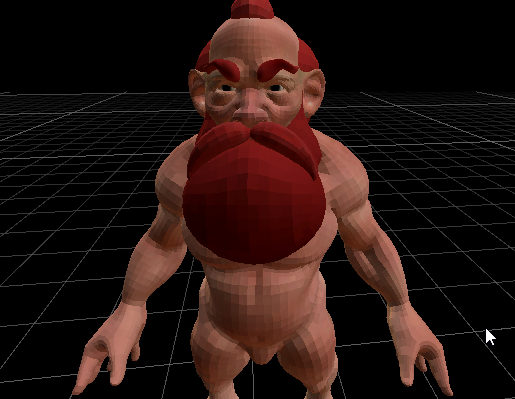
here is how my character is looking into Unity Scene with HDRP
put it feel "pixelated"
but in maya it's looking clean
any idea how to fix that easily ?
thx
shrewd moon
@turbid geode Smooth shading is not enabled on your mesh
Usually you can see in the modeling program whether the mesh is flat or smooth shaded, but I don't know how Maya works
I guess you can force smooth shading on in import settings by checking Weld Vertices and setting Normals: Calculate
 hollow frigate
This might be a stupid question, but I'm having an issue with the physically based sky and indirect lighting
No matter what the settings, the physically based sky seems to always apply indirect lighting unevenly


compared to the HDRI sky
which looks significantly better
what am I missing?
summer glacier
iron flame
Better with CPU lightmapper.
a new bug. This is what it looks like with ProbeVol...
How does APV work? If i activate it and bake the lighting, is the normal lightmapper still baking for anything that isn't selected to probes only?
And I assume it can use CPU/GPU similar to lightmapper?
 neon jolt
how do i make fps cameras in hdrp?
hdrp doesn't have camera stacking so what method can i use?
to prevent weapon clipping
 shadow walrus
hey guys! i'm making a pretty simple multiplayer game thats using defualt unity render pipeline and I wanted to add a effect in my game that would use shader graph and a pbr shader graph to be more specific. will upgrading my game to hdrp mess anything up?
like is there anything that I should be concerned about
neon jolt
shadow walrus
hey guys! i'm making a pretty simple multiplayer game thats using defualt unity ...
materials, although you can upgrade all of the materials to hdrp
dreamy fox
summer glacier
How does APV work? If i activate it and bake the lighting, is the normal lightma...
Unfortunately at the moment once you hit bake, it will bake everything, probes and lightmaps -- there is no way to bake only one or the other. This will come later.
The lightmapper is still the one doing the baking, so all the settings are still used.
iron flame
summer glacier
How does APV work? If i activate it and bake the lighting, is the normal lightma...
This is how I set all objects.


Only the Probe Convergence process appears in the GI information window.
 past halo
 vocal wharf
looks like 0 lighting
vocal wharf
looks like 0 lighting
What can i do?
vocal wharf
can't really tell, but I had this exact same behaviour, when my lighting settings were corrupt (no light was generated at all)
 exotic plume
Oooo I see in HDRP 14 we will have Intel's Denoiser for path tracing!! wooooooooo

😦
no gifs allowed?
how else can I convey my excitement for some nice +fast denoising for path tracing in Unity?
come on bot...
eternal laurel
We use emojis here like cavemen 😆
 onyx gale
Does anyone know why, my directional light in HDRP is super sensitive? like my scene view is really bright compared to my game view in playmode. any fixes?
quiet quest
Any one know what could be causing these dark volume looking thing around my asset
 shrewd moon
quiet quest
Any one know what could be causing these dark volume looking thing around my ass...
shrewd moon
quiet quest
Any one know what could be causing these dark volume looking thing around my ass...
Looks like screen space ambient occlusion
quiet quest
Ok … let me test TY
quiet quest
Yes ty @shrewd moon
iron flame
capsule capsule shadow 🙂
 loud leaf
Found out that current master actually has ray tracing effects in standalone build, but it's just the static lighting sky not affecting them. (works in editor)Trying to find out which PR broke it 😄
hollow frigate
hollow frigate
No matter what the settings, the physically based sky seems to always apply indi...
any ideas?
quiet quest
Is shaderlab in HDRP?
turbid matrix
@quiet quest technically HDRP shaders use shaderlab, but there's no surface shaders support for SRPs so you wouldn't want to handwrite HDRP shaders atm
Unity is working on this but it's like year+ off till we have something that works proper
quiet quest
Ahh ok
dawn sorrel
Wow, I have been working on an HDRP project the last couple of days and boy does this make me lose faith in it.
Screen blinking even on a fresh sample project.
Exceptions.
turbid matrix
macos?
dawn sorrel
Cryptic allocation warnings being issued a 100 times every frame.
Nope, Win10.
Both 2021.2.7 and 2021.2.8 have the same problem with HDRP 12.
turbid matrix
wonder what bugfix broke that
dawn sorrel
I have a feeling NaNs and bloom might have something to do with it.
Well some part of it.
It's still trying to invoke some shader pass that doesn't exist.
I swear Unity should start making unit tests some day.
turbid matrix
HDRP does get a lot of automated testing
but there can always be some combinations that gets past the testing
they don't merge things before they come up greenlit from visual tests, but I guess flickering and stuff could still go unnoticed on those
dawn sorrel
Well, I think it'd be totally doable to hook into the error callback for the debug console and check if the callstack for an error is coming from a certain namespace 🤔
turbid matrix
yeah no idea what's is going on with that, you shouldn't get those on stable builds
 distant hazel
dawn sorrel
Well, I think it'd be totally doable to hook into the error callback for the deb...
distant hazel
dawn sorrel
Well, I think it'd be totally doable to hook into the error callback for the deb...
I have the same thing on 2021.2.7. Started appearing after I imported Better Lit Shader 2021 into the project and it only occurred with its shaders in the scene
dawn sorrel
Funny thing, that's the thing I have to work with on this project.
distant hazel
should probably report that to jbooth then
dawn sorrel
I tested on empty sample projects as well tho and they do error.
So BetterLit or no, I get black screen either way.
inner parcel
dawn sorrel
So BetterLit or no, I get black screen either way.
try to clean your packages cache. i dont have any such issues in the hdrp template project
dawn sorrel
You mean the one in AppData?
inner parcel
Better to do it in preferences
No wait my bad. If you didnt set any environment variables, it should be somewhere in appdata
dawn sorrel
Thanks, I will pass it on to the team.
 silver copper
Anyone have any idea why the Light Probes option is greyed out? It's fine in the prefab but once in the scene it switches off. The object is not static except for contributing gi (doesn't work with it off either) No idea what's happening.
 shrewd moon
silver copper
Anyone have any idea why the Light Probes option is greyed out? It's fine in the...
shrewd moon
silver copper
Anyone have any idea why the Light Probes option is greyed out? It's fine in the...
Does the scene have light probes and have they been baked?
silver copper
yes to both
its not off for others... just this specific mesh
it's a generated mesh, that might be a problem though that wouldn't make sense to me
shrewd moon
silver copper
it's a generated mesh, that might be a problem though that wouldn't make sense t...
I don't know if that's the issue, but if it is a prefab then it can't really be Contribute GI static, can it?
silver copper
ah yeah it's not spawned dynamically
shrewd moon
I see, then it's probably not generated at runtime either
silver copper
oh yeah that's not what i meant, it's a combined mesh
 sleek quartz
CustomPassUtils.DrawRenderers(ctx, layerMask) only draws visual effects of said layer and not anything else?
p.s. new to rendering
neon jolt
how do i bake shadows in hdrp?
neon jolt
and how do i change the update rate of a reflection probe?
lethal carbon
Basic noob questions about lighting
In my project, the building prefabs is randomly created, changed, and deleted at runtime.
Q1) What is the appropriate workflow in this situation?
Should I use all the lights as "RealTime"?
Q2) If i change the Baked(Mixed) light to a RealTime light, how much will it affect the performance and quality?
Q3) Taking HDRP Sample Scene as an example.
If all the probes (chairs, decorations, etc.) are created at runtime,
How do I set up the lighting and probes?
Can I get the same (intended) lighting result using RealTime light?
 solid arrow
Hey!
so i want to convert from URP to HDRP
but the materials are pink, yes i tried to convert all materials to HDRP and I also tried manually
but it doesnt work
any help?
shrewd moon
lethal carbon
Basic noob questions about lighting
In my project, the building prefabs is rand...
Many answers to these can be found in the manual, especially the part about what light probes are and how they can be used
https://docs.unity3d.com/Manual/LightProbes.html
https://docs.unity3d.com/Manual/LightProbes-MovingObjects.html
Generally speaking all objects created at runtime will be dynamic, and they will recieve direct lighting from Mixed and Realtime lights, as well as ambient lighting from probes already baked in the scene
lethal carbon
shrewd moon
Many answers to these can be found in the manual, especially the part about what...
Did I get it right?
- "Light map" is precalculated and stored as texture, such as light information on the "surface", only for static object
- "Light Probe" is about the light information in the "space", for dynamic (runtime) object
Since the light probe provides light information of "approximate value"(not perfect value...?),
The quality is inferior to that of using a light map.
It is "not possible" to reproduce the result of using a light map only with a dynamic object and a light probe.
Is it correct?
I'm still a beginner, so I don't understand the concept well.
Sorry for asking such a silly question.
shrewd moon
lethal carbon
Did I get it right?
- "Light map" is precalculated and stored as texture, such...
Yes that's correct
What you can do with baked vs realtime lighting is kind of different to each, so you can't convert a scene from one to the other without it changing appearance
The appearance is very scene-dependent, as well as the performance
sleek quartz
sleek quartz
```CustomPassUtils.DrawRenderers(ctx, layerMask)``` only draws visual effects of...
?
 rain solstice
Not sure if there are any HDRP experts here but i am running into an issue creating screenshots. Camer.Render creates a memory leak. Is their any other option to render a camera from an editor script. I tryed HDRenderUtilities.Render but that seems to ignore the volume and other post processing
lethal carbon
shrewd moon
Yes that's correct
Thank you for your clear answer. have a nice day : )
 scarlet hull
rain solstice
Not sure if there are any HDRP experts here but i am running into an issue creat...
scarlet hull
rain solstice
Not sure if there are any HDRP experts here but i am running into an issue creat...
Have you tried this ? https://docs.unity3d.com/ScriptReference/ScreenCapture.CaptureScreenshot.html
 rain solstice
scarlet hull
Have you tried this ? https://docs.unity3d.com/ScriptReference/ScreenCapture.Cap...
rain solstice
scarlet hull
Have you tried this ? https://docs.unity3d.com/ScriptReference/ScreenCapture.Cap...
Thanks for the suggestion but i cant use that because i need to manipulate the image before saving it. Might still be worth trying and than loading the image to manipulate it 🤔
scarlet hull
Aside from this, Camera.Render should work, and not leak. We are using it in our testing, so I'm a bit surprised that you're saying this 🤔
rain solstice
I post the code example in a bit. If i comment out cam.render() everything works fine. To give a bit of context i create thousands of screenshots in this script at 2k resolution. Its definitely not instant but over time it crashes
rain solstice
scarlet hull
Aside from this, Camera.Render should work, and not leak. We are using it in our...
        {
            Camera temporaryCam = Instantiate(cam);
            cam.gameObject.SetActive(false);

            var temporaryTexture = RenderTexture.GetTemporary(2560, 1440, 24);
            var tempTexture2D = new Texture2D(2560, 1440, TextureFormat.RGBAFloat, false);

            temporaryCam.targetTexture = temporaryTexture;
            RenderTexture.active = temporaryTexture;

            temporaryCam.Render();
           temporaryCam.targetTexture = null;

            tempTexture2D.ReadPixels(new Rect(0, 0, 2560, 1440), 0, 0);

            //applying the mask if it exists
            if (mask)
            {
                for (int j = 0; j < mask.height; j++)
                {
                    for (int i = 0; i < mask.width; i++)
                    {
                        if (Math.Abs(mask.GetPixel(i, j).r - 1) < 0.1 && Math.Abs(mask.GetPixel(i, j).g - 0) < 0.1 &&
                            Math.Abs(mask.GetPixel(i, j).b - 0) < 0.1)
                        {
                            tempTexture2D.SetPixel(i, j, new Color(0, 0, 0, 0));
                        }
                    }
                }

                DestroyImmediate(mask);
            }

            tempTexture2D.Apply(false);

            var bytes = tempTexture2D.EncodeToPNG();

            //saving the file in location
            WriteAllBytes(location, bytes);


           bytes = null;
           CoreUtils.Destroy(cam.gameObject);
           Texture2D.Destroy(tempTexture2D);
           RenderTexture.active = null;
           RenderTexture.ReleaseTemporary(temporaryTexture);
           cam.gameObject.SetActive(true);

           tempTexture2D = null;
           temporaryTexture = null;
           temporaryCam = null;

}```Like i said if i comment out temporaryCam.Render() he runs forever creating black images. If i run it like its here. The GPU memory slowly fills up until it crashes
scarlet hull
Huuum.
It might be related to HDRPs buffer resizing system ?
But any case, this should not happen obviously, might be worth to submit a bug report.
totally not related, but your masking code is not very optimal, calling GetPixel() 3 times for the individal color channels 😅
And best is to get all the pixels in arrays using GetPixels , iterate over the array and then set them all back at once using SetPixels
Random question : are you doing some kind of video capture of a scene ?
rain solstice
Yes i am Aware. Its supposed to run over Night so getting it to complete a run has higher priority at the moment 😛
No Essentially cutting out objects in a scene to be able to interchange them in the web later on
scarlet hull
Also, I don't think it would fix the leak (but worth trying), you don't have to create a new camera, you could just use the one passed to your CreateImage function
rain solstice
Yeh i give that a try. That was originally just a ghetto workaround to not have motion blur after moving the camera. Saves managing the volume
scarlet hull
Oh, ok
You could also disable motion blur on the camera frame settings
Just disable it int he camera custom frame settings, but from script enable/disable the usage of custom frame settings : docs.unity3d.com/Packages/com.unity.render-pipelines.high-definition@13.1/api/UnityEngine.Rendering.HighDefinition.HDAdditionalCameraData.html#UnityEngine_Rendering_HighDefinition_HDAdditionalCameraData_customRenderingSettings
rain solstice
scarlet hull
Just disable it int he camera custom frame settings, but from script enable/disa...
Thanks that worked. But as expected the memory issue stayed the same
scarlet hull
I'll keep this in mind and will investigate a bit, but don't have a fix for anytime soon ...
Other random idea : like I mentioned, we are using this in our automation testing, but we do only one capture at a time and load a new scene. Maybe the scene load helps here, as it is forcing a re-creation of all HDRP buffers.
You could try to force a scene reload every N captures to clear the memory ?
rain solstice
Already doing that every 300 images. Or even fewer depending on the logic 😅
silver copper
Does HDRP not support volumetric shadow dimming when lighting is baked?
Or do my god rays go away because of bakery?
silver copper
ok not because of bakery. There's really no way to bake lighting but have volumetrics shadows?
 flint badger
Hi there i was wondering is some one could help me with a problem
i resently shifted my project to HDRP and some of my code broke
how can i get a shader to not appear if it is shadow
summer glacier
silver copper
ok not because of bakery. There's really no way to bake lighting but have volume...
You can do Mixed lighting. But yeah, if it's completely baked, volumetrics will be gone
neon jolt
HOW DO I BAKE SHADOWS?!?!/!?!!?!
scarlet hull
neon jolt
HOW DO I BAKE SHADOWS?!?!/!?!!?!
- Calm down
- Set your static/dynamic objects
- Set your static/mixed lights
- Bake lighting with shadowmask lighting mode : docs.unity3d.com/Packages/com.unity.render-pipelines.high-definition@13.1/manual/Lighting-Mode-Shadowmask.html
scarlet hull
Should
neon jolt
because when i do that
its still realtime
visible when i play the game and rotate the directional light
sleek quartz
sleek quartz
```CustomPassUtils.DrawRenderers(ctx, layerMask)``` only draws visual effects of...
still looking for an answer
neon jolt
 scarlet hull
@neon jolt Did you check that all the settings mentioned in the doc page I have are correct ?
neon jolt
i have to use shadowmasks instead of distance shadowmask?
scarlet hull
If you want to have the static objects close to the camera to always use baked shadows, yes
scarlet hull
Then shadowmasks yes I guess

 scarlet hull
Well, yes, this is expected
The volumetric fog needs shadowmaps (realtime shadows)
You could however use shadow caching : docs.unity3d.com/Packages/com.unity.render-pipelines.high-definition@13.1/manual/Shadows-in-HDRP.html#shadow-update-mode
neon jolt
oh
scarlet hull
And if you're using shadowmasks to have that soft shadow look on the ground, you can also have it with dynamic shadow by using the high quality shadow filtering : docs.unity3d.com/Packages/com.unity.render-pipelines.high-definition@13.1/manual/HDRP-Asset.html#filtering-qualities
neon jolt
does disabling the update time improves performance?
scarlet hull
Well, since you're no more rendering the objets in the shadowmap every frame, yes 😄
scarlet hull
rain solstice
Already doing that every 300 images. Or even fewer depending on the logic 😅
Hey, at what rate are you calling Camera.Render ?
rain solstice
scarlet hull
Hey, at what rate are you calling Camera.Render ?
The script i posted runs up to 8 times with the only other thing happening is a change of camera position. Between these runs are 1-2 seconds due to changing of materials and other logic
scarlet hull
Is that in play mode or running in editor ?
rain solstice
In Editor play mode. I really want to keep it there to not risk breaking the scene on a crash where lots of materials are changed
scarlet hull
Okay. I'm trying to reproduce your issue, for the moment I'm calling Camera.Render on a very simple scene multiple times per frame to render in a 4k RT.
Using the profiler I can seen the increase in memory usage but it regularly gets catched by garbage collection 🤔
rain solstice
"In Editor play mode" with that i mean unity is in play mode but the script is an editor script started over the toolbar
scarlet hull
rain solstice
"In Editor play mode" with that i mean unity is in play mode but the script is a...
Oh ? Well, it shouldn't really make a difference 🤔
I'll try to play a bit further with my setup, but it would be really helpfull if you could fill a bug report.
Or you would send me a project directly if you prefer
rain solstice
Ok i try braking it down to a simple method that has the problem. Its quite the big complicated project so that might take a bit
rain solstice
@scarlet hull ok i think i found the issue. I created a new project and tried it. Camera.Render() worked without problems. Now i tried to bring it closer to our project. We use Raytracing so i made the switch to DirectX 12. After switching and trying it again the problem happens. Creating a bug report now but that seems to be it
rain solstice
scarlet hull
Oh ? Well, it shouldn't really make a difference 🤔
I'll try to play a bit furt...
The ticket is 1400617_a5424ku6kiahel36 named: Camera.Render couses a memory leak in HDRP using DirectX 12
scarlet hull
Thanks 🙂
scarlet hull
rain solstice
The ticket is 1400617_a5424ku6kiahel36 named: Camera.Render couses a memory leak...
I'm bypassing some QA process to have this fixes asap, but I don't think a fix would land until at least 1 or 2 month
I may have a workaround for you : Don't use Camera.Render.
Yes, I know, sounds stupid but here's how :
- Set your game view size to the desired resolution
- Set your screenshot camera to be the one rendering to the game view (no RT, higher priority)
- No change of RenderTexture.active (should be null)
- When you have the object you want to render in view, user Texture2D.ReadPixels to directly grab the the game view render into your texture.
rain solstice
scarlet hull
I'm bypassing some QA process to have this fixes asap, but I don't think a fix w...
Did a quick test and the images are blank. The memory issue is obviously fixed. Might this not work because i am doing this inside an editor script and the normal renderer is paused?
scarlet hull
Hum .... no, it should work
Maybe because of this ?
For this function to succeed, Texture.isReadable must be true, the render target and the texture must use the same format, and the format must be supported on the device for both rendering and sampling.
Oh, ah, and it need to be called at a specific comment also I think, like in the on post render callback : https://docs.unity3d.com/ScriptReference/Texture2D.ReadPixels.html
In case of SRPs, you might want to use this callback : docs.unity3d.com/ScriptReference/Rendering.RenderPipelineManager-endFrameRendering.html
rain solstice
Thank you so much! I managed to get some images adding it to endFrameRendering. So there must be a solution somewhere in there. Guess its time to learn delegates so i can get one specific image at a time 😅
 gritty schooner
How to do the Occlusion Culling Separately for the room, lav, and the corridor?

 ivory flint
I tried windows build and build succeed but crash when launch exe. Do any one know how to troubleshoot ? I don't know where to start.
 grizzled flame
ivory flint
I tried windows build and build succeed but crash when launch exe. Do any one kn...
grizzled flame
ivory flint
I tried windows build and build succeed but crash when launch exe. Do any one kn...
start by looking at the player logs
ivory flint
grizzled flame
start by looking at the player logs
thank you!
quiet quest
Can some please clarify the map packing here

Are the Red and blue channels just black ?
ivory flint
if they're not used, black or white does not matter ?
quiet quest
@ivory flint so no need to remove a texture with if one is packed?
ivory flint
TwT
even after reading the player log file i can't know what cause the window build crash
<RI> Initializing input.

<RI> Input initialized.

InitializeOrResetSwapChain 1920x1080 hdr=0 samples=1
<RI> Initialized touch support.

UnloadTime: 0.598500 ms
Crash!!!
It crashed right after initialized touch support, and that's it. no more clue
plain mural
hey guys, is it just me, or does HDRP have way more overhead than other rendering piplines when it comes down to raw poly counts

heres my GPU instancer running on URP

heres the same scene running HDRP
the wind logic shaders were built 1:1 in hdrp and urp, and ive tried both amplify shader editor and shadergraph
the clouds here dont make much of a difference in FPS
the foliage is all handled in just a handful of drawcalls (its instanced with frustum culling, occlusion culling, and has lods setup)
and its about 20 million polys running on a 2080 super
so im wondering, why does raw poly count account for such a large discrepancy in FPS between URP and HDRP?
in the HDRP project ive turned down almost everything, including shadow filtering, resolution, post processing quality, etc
ivory flint
currently in depression with HDRP, i'm just painting a few grass using terrain paint tool and the editor crashed...
plain mural
ivory flint
currently in depression with HDRP, i'm just painting a few grass using terrain p...
the new terrain details system sucks ass
plain mural
ivory flint
currently in depression with HDRP, i'm just painting a few grass using terrain p...

GitHub
Unity indirect GPU instancing & painting with occlusion culling, frustum culling, and LODs - GitHub - Milk-Drinker01/Milk_Instancer01: Unity indirect GPU instancing & painting with ...
thank me later
(and star it if you can)
ivory flint
I thank you now ^w^
plain mural
theres still a few bugs i have to fix, and at the moment theres a 65k instance limit (i plan on adding world streaming and detail zones to fix this)
ivory flint
so you got double fps for URP vs HDRP, do you think your game really need HDRP for half the performance ?
plain mural
ivory flint
so you got double fps for URP vs HDRP, do you think your game really need HDRP f...
yea, hdrp is crucial
ivory flint
which features of it is crucial ? just curious
plain mural
i mean, performance isnt terrible, 80 fps with 20 mil tris is great but i just wanna know why urp can handle it so much better
plain mural
ivory flint
which features of it is crucial ? just curious
my project has been in development for like 2 years and i prefer the HDRP workflow over URP
all my shaders are written for hdrp, and my project doesnt need super large scale worlds (so poly count isnt a huge issue for me)

ive improved my wind shader since the last video. it now runs better and looks more realistic
ive put too much time into it to fall back now
ivory flint
oh yeah, game looks pretty
summer glacier
plain mural
hey guys, is it just me, or does HDRP have way more overhead than other renderin...
yes, it has more CPU overhead
you need to use the profiler to know performance, otherwise you will always wonder why performance is slower and assuming. Profiler is also easy to use, and shows you CPU & GPU performance info.
You should do your test in a build as well, editor has big CPU overhead that's gone in a real build.
Check your global settings (post processing etc) disable what you don't need, since it has a lot of post processing on by default. Although that mostly effects GPU performance.
plain mural
summer glacier
yes, it has more CPU overhead
im using GPU instancing, so theoretically any cpu overhead shouldnt matter, right?
my gpu is the bottleneck in the scene
summer glacier
plain mural
my gpu is the bottleneck in the scene
How do you know? You can see gpu perf in profiler
plain mural
summer glacier
How do you know? You can see gpu perf in profiler
my gpu is pegged at 100% when in play mode
summer glacier
if GPU is the bottleneck, could be the stuff HDRP has by default adding to it. Motion blur, etc.
Also volumetric clouds do make a difference. It adds an extra 1 - 1.8ms if it's on to the GPU.
plain mural
yea, the clouds do make a difference, but not enough to justify the performance impact im seeing here
summer glacier
That doesn't mean it's the bottleneck, also CPU will never be 100%, unity games don't utilize all cores or thread ever. (most games ever made don't)
you need to use the profiler, add the GPU module, and compare CPU/GPU perf.
If GPU is the bottleneck, CPU will stay show higher cost but it'll have an item that is waiting for the GPU, since it finished its work already.
If CPU is the bottleneck, it will have higher cost than GPU
plain mural
i would at least hope that the cpu isnt the bottleneck, the foliage itself is only a handful of draw calls, all the details are instanced
im booting up the project now to double check
summer glacier
if GPU is the bottleneck, you can look at CPU profiler and find something like "waitingforpressent" or similar, then do (CPU cost - waitingforpressent) = your real CPU cost.
If GPU bottlenecked, GPU will take longer than CPU.
You can also see costs of things, volumtrics clouds, motion blur,
as well as costs on the CPU
plain mural
58.7% of the cpu time is gfx.waitforpresentOnGfxThread
summer glacier
plain mural
58.7% of the cpu time is gfx.waitforpresentOnGfxThread
Then yeah you're GPU bottlenecked big time
what's your GPU?
add the GPU module in the profiler and look at what's taking so much time (brb)
plain mural
summer glacier
what's your GPU?
rtx 2080 super
my cpu is a 9700k
and ive got 32gb ddr4
31.2% is for the gbuffer, 23.8% is for the deferred depth prepass
everything else is very very little
6.7% PP, 5% volumetric clouds, 4.2% for deferred lighting
@summer glacier for when you get back
summer glacier
plain mural
31.2% is for the gbuffer, 23.8% is for the deferred depth prepass
try to disable all post processing in global settings and elsewhere and see how it performs
distant hazel
@plain mural try disabling the rendergraph feature in the HDRP asset
you have to press the 3 dots in the top right corner and enable debug mode first
plain mural
distant hazel
<@!191104658008309760> try disabling the rendergraph feature in the HDRP asset
this makes no difference
plain mural
summer glacier
try to disable all post processing in global settings and elsewhere and see how ...
i get 90 fps instead of 80 in this particular scene, still way lower then what i had in URP with way more instances
distant hazel
You sure that was the active asset?
plain mural
distant hazel
You sure that was the active asset?
yup, in this demo project i have only 1 profile
distant hazel
Alright then, no clue what's up then
plain mural
distant hazel
more cpu overhead on hdrp vs urp
no the issue is the insane amount of time the depth buffer is taking
there is near zero cpu overhead in my instancing solution
cause well - its a gpu instancing solution
distant hazel
do you know which part of the depth buffer generation is taking so long?
is it the depth prepass? hi-z generation?
I assume you're just copying the hdrp depth buffer for your culling solution?
you can try with renderdoc to see if an individual material is taking too long in the depth prepass
turbid matrix
@plain mural also try taking a snapshot with nvidia nsight
like, make a dev build with Unity first (dev build is important because otherwise the build will not have nicely formatted pass names on the snapshot), then launch the build with nsight's frame profiler
this will give you really nice overview at what you spent your gpu frame budget for
Unity's gpu module is horrible in comparison, it doesn't even list everything
you probably need a nvidia dev account to be able to download nsight but everyone gets that access after registration (unless you've already registered as a dev for nvidia dev site)
plain mural
distant hazel
is it the depth prepass? hi-z generation?
31.2% gbuffer, 23.8% depth prepass
 mellow knoll
I just set my project to HDRP then converted materials to it. But all the textures seem to be tinted grey for some reason?

Ok fixed by just clicking on the light in the scene. Weird.
turbid matrix
mellow knoll
I just set my project to HDRP then converted materials to it. But all the textur...
this still sounds like misconfig between lighting and exposure values
HDRP does this silly thing that it preconfigs the default volume settings to have exposure value for sky etc to match directional light that has intensity of 10k or so, but if people convert to HDRP, they typically have dir light intensity in 1-10 range
so then that default volume's autoexposure kicks in and boom, everything is grey
it's kinda unfortunate because then people wonder why things are washed out and grey, if the autoexposure wasn't there, they'd get back on track faster
altho what I'd REALLY want to see is the HDRP wizard etc to give new user a hint that their current settings aren't configured proper for HDRP
(like, something should check the scene's current lighting and pop a warning because most users converting existing stuff to HDRP will first encounter this and it's not intuitive)
inner parcel
is it just me or is dynamic res handler changing res via script broken in builds in 2021.2.10f1?
the camera frustum seems to change significantly when scale is less than 100.
very annoying issue, never had this in 2021.2.7f1 or below
doesnt happen in editor
 glad raptor
Hi, I've been trying so fix this HDRP baking issue for over a week.
For some reason, when I bake a model with panels in HDRP, every panel has different brightness
I've tried it in both 2020 and 2021 versions


In both cases, I've turned on "generate lightmap UVs", so Unity is supposed to create a custom UV map for baking
In the computer room, the panels are all part of the same mesh (and same object, of course)
In the tunnel, the panels are all part of the same object but within that object they're different meshes
shrewd moon
@glad raptor Do you have errors in console or UV overlap view about the overlapping UVs?
Have you checked if that happens with just those particular meshes or any, including the default shapes
And does it happen with those meshes in a fresh scene?
glad raptor
It only happens to those meshes
I'll try in a fresh scene when I'm back on the computer
shrewd moon
The generate UVs checkbox usually should fix this issue, but one thing that could impede it is if the mesh already uses the second UV channel for something and it can't be overwritten
But I haven't ever ran into that so I'm not sure if that's how it works in that situation
 low shoal
Guys cann somebody help please. I am working on large Hospital model, hundreds of rooms. Trying to do the light bake mostly using GPU. I am noticing that while all the walls / floors / ceiling and baking fine, all the smaller detail like doors have extremely large UV maps annd they look really bad. Changing the scale for those specific objects does not help. https://ibb.co/Lxc0FWn
 glad raptor
shrewd moon
The generate UVs checkbox usually should fix this issue, but one thing that coul...
glad raptor
shrewd moon
The generate UVs checkbox usually should fix this issue, but one thing that coul...
I checked, the meshes don't have a second UV map
 lunar cargo
low shoal
Guys cann somebody help please. I am working on large Hospital model, hundreds o...
lunar cargo
low shoal
Guys cann somebody help please. I am working on large Hospital model, hundreds o...
It seems you have a lot of objects overlapping the UVs, this results in one bake data from one object influencing another objects which might be generating the artifacts you are seeing.
You can check Lightmap UV Overlaps in the scene view:
https://youtu.be/KJ4fl-KBDR8?t=367

In this video, we are going to take a look at Lightmapping in Unity 2020.1 to help you create fast and beautiful lighting in your scene.
Learn more about Lightmapping in 2020.1 from our Docs!
https://on.unity.com/2U7VQIX
Interested in the newest Graphics Features we added in 2020.1? Click here!
https://on.unity.com/2GHYGkR
Download the Spaces...
If you keep having trouble with lightmapping, I would suggest asking on the #archived-lighting channel. There are more Lighmapping pros to help.
neon jolt
how do i prevent weapon clipping in hdrp?
inner parcel
neon jolt
how do i prevent weapon clipping in hdrp?
This has been answered over 100 times.
A custom shader or custom pass
turbid matrix
to be fair, there's no guide or tutorial for this anywhere afaik
I guess the simplest way is to grab the FOV spoofing SG from that old Unity FPS sample that makes tiny weapon look big:
https://github.com/Unity-Technologies/FPSSample/blob/master/Assets/Shaders/SubGraphs/FovProjection.shadersubgraph
https://github.com/Unity-Technologies/FPSSample/tree/master/Assets/Shaders/Graphs/FirstPerson_Projection
it's no perfect solution, may or may not work proper for your use case
I personally prefer just.... not letting the weapons clip in the first place
foliage can be problematic then though
but for everything else, you can just move the gun out of the way in case it would clip
@neon jolt^
I also think https://github.com/alelievr/HDRP-Custom-Passes/ has scene "FPS Foreground" but can't remember if it did this thing exactly... but worth taking a look anyway
please let me know if some of these worked for you, would be helpful to know for the next person who comes asking about the same thing
ivory flint
any HDRP pro can tell me why do you choose HDRP over URP (which features are critical ?) ? I'm just curious. Still have a lot to learn.
just successfully build test a scene and got ~140 fps so I'm happy with the performance of HDRP now
loud leaf
There's a lot you can disable to gain performance in HDRP, I picked HDRP because I want everything physically based, no "magic" or random values for anything.
ivory flint
that's a good take. Over my short course of learning HDRP I notice that too, about physically based workflow.
still the raytracing realtime GI is so noisy tho. Do you use that ? @loud leaf
loud leaf
yeah, my main project is fully ray traced
ivory flint
can you share a setting to make it less noisy ?
i notice 2 sources of noise is RT GI and RT AO
loud leaf
A lot of noise actually comes from ray traced ambient occlusion, but if you're sure it's coming from ray traced global illumination, make sure you have the second denoiser pass enabled, and don't use the half resolution denoiser. Try turning up the denoiser radius to something like 0.5.
Use the "performance" mode, the "quality" mode has multiple issues that make it unusable for me.
turbid matrix
ivory flint
any HDRP pro can tell me why do you choose HDRP over URP (which features are cri...
it's fully featured for one, and everything has focus on physical behavior, can use realistic lighting values etc. also has raytracing
ivory flint
yea I used performance mode and 2nd denoiser, will test out with radius !
loud leaf
If you're still getting too much noise with these settings, lower your "Clamp value", something like 2 should do.
turbid matrix
reason to pick HDPR over URP is if you care of the features it has and tad higher fidelity out of the box. reason to pick URP if you don't need that stuff, want faster VR rendering or otherwise slimmer project
ivory flint
just recently use DLSS and got fps from 70 to 140 with ray tracing. It's so lovely
loud leaf
What GPU are you using?
ivory flint
im using 3070
turbid matrix
do compare the visuals when using DLSS too, if you go for performance mode, there can be quite notable visual regression
but yeah if you care about raytracing, there's really no feasible alternative to HDRP right now
ivory flint
I do not want so much about visuals perfection tho, so I choose DLSS with forced 33% screen size lol, all for ray tracing with good performance!
https://twitter.com/iamspikebor/status/1490666340147167233?s=20&t=-XHTHQooZPJAJfZs7wnEQQ
so in this scene got volumetric light, fog, cloud, ray tracing GI ,AO, shadow, with 140 fps. It 1080p with forced 33% DLSS


@DMeville noice ! Here is my test on HDRP is fun, do not expect this kind of fps. https://t.co/Z1mpdvMHTb
 Twitter
·
loud leaf
Twitter
·
loud leaf
Yeah, there's a lot you can do by tweaking the settings with minimal quality loss
33% resolution for DLSS is pretty low though
ivory flint
maybe i'll try 50% next time
turbid matrix
can you even use custom percentage nowadays? I thought that was automatically picked by DLSS setting nowdays?
I haven't really messed with DLSS in a while though
afaik you still have to handle the scale manually with FSR and TAAU
loud leaf
I think you can force the screen percentage, unless they changed it 😄
ivory flint
yes there is option to force
turbid matrix
I thought it was the perf etc setting that forced the reoslution too
does the option do anything? 😄
loud leaf
I can check, I have my project open
turbid matrix
I assumed the option was there just for the other upscalers since you do have a fallback in case the user can't use DLSS
ivory flint
Just have to rmb to uncheck the Use optimal setting for it to work
 loud leaf
Definitely working here
turbid matrix
ah ok, that's good to know
loud leaf
Game started lucid dreaming at 10% resolution
ivory flint
btw i don't see any differences while using Software or Hardware method, no noticeable frame rate difference or quality difference
turbid matrix
how do you check this? just by comparing visuals or using the debug hud?
debug hud used to report DLSS etc resolutions too
 loud leaf
It works surprisingly well
turbid matrix
@ivory flinthttps://docs.unity3d.com/Packages/com.unity.render-pipelines.high-definition@13.1/manual/Dynamic-Resolution.html
HDRP uses hardware dynamic resolution by default. If hardware dynamic resolution is not available on your platform, HDRP uses software dynamic resolution. Hardware dynamic resolution treats the render targets, up until the back buffer, as if they are all the scaled size. This means HDRP clears the render targets faster.

Hardware dynamic resolution is supported on the following platforms:

   * All Console platforms supported by HDRP.
   * PCs that use DX12 and Metal.
thanks @turbid matrix
ivory flint
So does this character looks blurry to you ? She's rendered at 25% of 1080p. For my bad eyes she's good enough. And i love the byproduct of upscaling : far object is blurred while I do not use DoF which is a nice.

 mighty swift
Looks like CustomPass does Execute() every frame, including in editor.
Ah I guess that makes sense -- affects the scene view camera.
inner parcel
ivory flint
So does this character looks blurry to you ? She's rendered at 25% of 1080p. For...
Best way to check is by a side by side comparison of the upscaled image and the normal scaled one. But this looks fine to me
 lunar condor
how do I update HDRP to it's newest version? for me the newest appears to be V11
do I have to update Unity as well? I'm using 2021.4.9f
neon jolt
why does the decal projector doesn't work with my water shader?
 true zealot
neon jolt
why does the decal projector doesn't work with my water shader?
true zealot
neon jolt
why does the decal projector doesn't work with my water shader?
does it have Affects Transparent ticked (if your water is transparent)
true zealot
send a screenshot of your projector's inspector
 true zealot
Looks fine afaik. Maybe someone more familiar with HDRP will be able to help
summer glacier
lunar condor
how do I update HDRP to it's newest version? for me the newest appears to be V11
yes, you have to update unity.
HDRP used to be a package, but not anymore, so after a certain unity version (forgot which one) - it's installed with the engine version.
turbid matrix
it's technically still a package but now it's a core package which ships with Unity so to update, you normally just update the engine itself and that updates along it
also would recommend moving on from 2021.1, it's not supported anymore (altho 2021.3 LTS is coming in few months so could just jump to it straight if not in hurry)
 rich ravine
Speaking of 2021 lts.. proly next month?
neon jolt
neon jolt
help
why is this happening
turbid matrix
march or april yeah
@neon jolt if it were up to me, I'd try to repro it on simplest possible materials, see where it still works and when it breaks
lunar condor
summer glacier
HDRP used to be a package, but not anymore, so after a certain unity version (fo...
ah, okay that makes sense. Does anyone know why every time I play my HDRP asset changes everything turns ugly? For example I make changes, add fog and everything, go to play mode and everything is fine, however after turning it off and on again it went by bland and lost almost every graphical aspect which I've added, including shadows, reflections and all lighting, everything is just blue
I can't find fix for it
even if I make a new HDRP asset and it'll look fine for a while but after playing once it turns all blue
shrewd moon
lunar condor
even if I make a new HDRP asset and it'll look fine for a while but after playin...
Blue how? If it's a cyan kind of blue that would mean it's compiling shaders and should look okay after some time
Also worth checking if lighting auto generation is on, in my experience it can sometimes start regenerating lighting unexpectedly which breaks existing lighting
lunar condor
this

I have fixed it multiple times, it always goes back to exact same look after restarting
this is how it looks normally, as you can see everything is gone, for some reason reflections appeared on the walls

I can disable reflections in the HDRP asset and they're not gone - and I did check if the correct asset is enabled
inner parcel
lunar condor
I can disable reflections in the HDRP asset and they're not gone - and I did che...
do u have multiple hdrp assets referenced to quality settings?
 acoustic cipher
lunar condor
how do I update HDRP to it's newest version? for me the newest appears to be V11
acoustic cipher
lunar condor
how do I update HDRP to it's newest version? for me the newest appears to be V11
unity usually cames with the latest version of HDRP which is supported for that version of unity so you need to update your unity version
shrewd moon
The fact that screen space reflections are showing the procedural sky seems like a pretty severe issue
I would guess that HDRP is not set up properly, but someone who knows HDRP better might be able to advice
neon jolt
why is the decal stretching?
 grizzled flame
That's what decals do, isn't it? They get projected onto the surface
true zealot
neon jolt
but why does it like to stretch on flat surfaces?
If it's not pointed directly at the surface, that's what will happen.
If it's happening when you're aligned with the surface perfectly then maybe it's a texture wrapping issue that you need to change on your asset
neon jolt
how do i make a certain object not getting affected by a tri planar?
lunar condor
inner parcel
do u have multiple hdrp assets referenced to quality settings?
no I don't think so
lunar condor
shrewd moon
The fact that screen space reflections are showing the procedural sky seems like...
I doubt it isn't
just started appearing after one night I closed Unity
I used HDRP for a year this problem had never occurred to me before
 green cliff
I have a box volume using Hdri Sky with cubemap. I don't see any skybox while in the volume. Any idea's on what's up?
 scarlet hull
Raise the volume priority ?
green cliff
@scarlet hull Yep, thank you!
I guess because there is actually an existing Sky and Fog Volume with Priority=0 that it was fighting with. (I'm just guessing at this stage).
scarlet hull
Yep
 dusk brook
Has anyone encountered an issue with setting light intensity at runtime and it blowing out in HDRP - 2020.3.21f1 - Wondering if this is a bug, if I move the slider slightly in the editor it goes back to normal.
scarlet hull
What do you mean by "blowing out" ? Like the light is beeing way to bright ?
dusk brook
yeah
I'm using Lumen, set to pure white at 250 intensity
when I update it at runtime via code, it seems the intensity is far greater than it is
if I jiggle the slider it goes back to normal


Same values, first one is the runtime set problem
scarlet hull
I was kind of expecting it the other way around, but anyway : try using this method instead of light.intensity : https://docs.unity3d.com/Packages/com.unity.render-pipelines.high-definition@13.1/api/UnityEngine.Rendering.HighDefinition.HDAdditionalLightData.html#UnityEngine_Rendering_HighDefinition_HDAdditionalLightData_SetIntensity_System_Single_
scarlet hull
dusk brook
is this available in 10.6.0?
I think so
scarlet hull
dusk brook
is this available in 10.6.0?
dusk brook
@scarlet hull thanks, can confirm this fixes the issue, didn't realize I had to access <HDAdditionalLightData> 
 mental oyster
i am having a real hard time figuring out how to use the latest HDRP
i have installed git desktop and used it to copy graphics master to my hard drive
i then in unity try to install the package from disk, navigate to the hdrp package json that came from git
but it then can't find the dependencies
some help would be greatly appreciated
@turbid matrix i am sorry for the nudge but i think you may know how to do what i want, reading up
tired
been waiting since november to use the hdrp water
it was added back then
i know its coming in a 2022 release soon but the thread casually throws around how we can try it by getting this from git but no guide anywhere on the unity website on how to do such a thing
just lost all of my energy for the day faffing around with this nonsense when i just want to make things
sigh.
clearly people can do it because there are people in the thread using it
just pissed off with it really.
turbid matrix
@mental oyster you pretty much have to use latest betas / alphas (which ever is newer at that point) and even then there could be some changes that are not in the beta/alpha yet
as for dependencies.. they don't work automatically if you use local / git cloned package, meaning you have to ref to all local packages that HDRP depends, meaning: core, hdrp, hdrp-config, shader graph and vfx graph packages all
so... to test that water out, you clone the graphics repo with git client that support LFS. Git Desktop should work but I don't use it so can't tell for sure. Then you checkout master or some water branch if there's some newer one (there could be some updates that are not merged yet), have latest 2022 beta/alpha installed, ref all those mentioned packages manually.
there's always still possibility that it doesn't work
rich ravine
Wouldn't add package by name would automatically sync those dependencies?
turbid matrix
@rich ravine Gnak is now asking about being able to use graphics repo packages from github, add package by name mainly used to get unlisted preview packages from unity registry
HDRP is part of unity core packages so you can't tell PM to just update it to another version (other than telling it to use specific version from some local folder)
technically the git link via PM would also "work" but since you have to link 5 packages for this to work, I think that would end up doing 5 local clones of the graphics repo which itself is huge...
so cloning the repo manually and referencing the folders is basically the way to go if wanting to do something like this
rich ravine
Ah ok.. makes sense 👍
mental oyster
oof
thanks 0lento
after 3 hours i decided to make a blue transparent material and raised a middle finger in the direction of unity offices
turbid matrix
@mental oyster here's an example of my packages/manifest.json lines that are relevant to this:
    "com.unity.render-pipelines.core": "file:C:/Unity/Graphics/com.unity.render-pipelines.core",
    "com.unity.render-pipelines.high-definition": "file:C:/Unity/Graphics/com.unity.render-pipelines.high-definition",
    "com.unity.render-pipelines.high-definition-config": "file:C:/Unity/Graphics/com.unity.render-pipelines.high-definition-config",
    "com.unity.shadergraph": "file:C:/Unity/Graphics/com.unity.shadergraph",
"com.unity.visualeffectgraph": "file:C:/Unity/Graphics/com.unity.visualeffectgraph",```oh
turbid matrix
basically just swap the C:/Unity/Graphics path to wherever you cloned the repo and it should work
mental oyster
nice, i messed around trying to figure out the syntax for that from the docs
to reference a file locally
turbid matrix
well, there's PM button for it 😄
add local package etc
but it modifies the manifest so you can do it either way
mental oyster
i did add local package, the package then doesnt import because the dependencies arent there
so i need to modify the json
turbid matrix
yeah, you need all those
mental oyster
currently it looks like this
 turbid matrix
just to be clear, you don't modify that file
I guess you could, but you really should just put them on your projects manifest.json instead
mental oyster
i see
it doesnt accept your above info (adjusted for my file paths)
seems to be wrong syntax, flipping the slash direction gives me another error, which says that file: paths should end in .git or something
turbid matrix
not sure what you mean now
mental oyster
i went to manifest.json for my project
turbid matrix
can you just show the manifest?
mental oyster
i added those lines, but with my own file paths
turbid matrix
and error
mental oyster

oh wait it was me that added the wrong slashes, i fixed those though
so now the error
when using whats seen above
turbid matrix
lines 4 and 7 miss "file: prefix from the location
mental oyster
ah yeah

maybe SemVer is the version number that all the rest have?
dunno where to put it on the line though
turbid matrix
that sounds like your manifest is still broken
nah, you don't put the versions if you use file ref
that error told you the alternatives, either use file, semver or git
not to mix them
and in this case you do want file reference instead of git link there
turbid matrix
all I know is that what I pasted before was functional example since I've used it like hundred times 😄
I always just copy paste those lines to new test projects
mental oyster
something vfx graph related is broken
 turbid matrix
that's normal
you on b7?
there often are changes that are not yet in latest betas/alphas... which I tried to tell before 🙂
if you know how to use git and are willing to do some detective work, you can find the git commit that started to use the API that is not present on your Unity version and can try to revert that commit
the reason I keep asking if you are on latest beta is because the risk of things breaking on latest is smaller but it still happens
the engine versions we get are like 2-4 weeks older than what Unity staff uses internally
 turbid matrix
even with 2022.2 alphas being around, you could see something like this
it's definitely doable to make it run on older versions but like mentioned, you have to put some extra work to it
I've been testing these bleeding edge branches for several years and only few times there's been some api change that actually prevented the feat I wanted to test from working
basically only cases when you are totally out of luck is if the very thing you want to test requires newer API than what is in the engine you are using
of course all of this is totally unsupported by Unity, just saying what can and can't be done with these
glad tartan
@mental oyster you can still use it. Just open the error and comment out those lines. It will be a few. Once that's done it will compile
loud leaf
Yep you will get two of those errors (I'm on same setup usually), I think I just changed them from loadedSceneCount to sceneCount or something like that.
neon jolt
how do i make caustics with the decal projector?
make them animated AND NOT STRETCHED
1.not animated
2.the ones on the wall is stretched, the usual decal problem
 mental oyster
thanks guys
might have got it going, will see in a few secs
@loud leaf i adjusted those loadedSceneCount lines to sceneCount and everything has compiled
when i create>water surface> (any)
i get the little icon in scene view but nothing else shows
no error
no surface to see. the shader did compile for a bit, but that completed
have restarted the editor
did get this gray error when play mode was initiated
Should not grab hot control with an active capture
UnityEngine.GUIUtility:ProcessEvent (int,intptr,bool&)
neon jolt
can somebody help me with the caustics?
loud leaf
@mental oyster I haven't tried the water system yet because it's in active development, but my first guess is that you need to enable support in your HDRP asset + global settings. I could be wrong though.
neon jolt
how do i animate DECALS
mental oyster
have you made a flipbook shader before?
why are you doing it with a decal anyway, and not in the surface's shader, say?
so the materials used under the surface have the caustics on them maybe with biplanar projection or something
neon jolt
mental oyster
have you made a flipbook shader before?
i don't really mess around with shaders
flipbook shaders
mental oyster
ok you will need to put your 30 frames into a single texture (an 'atlas')
then in shadergraph you can use a 'flipbook' node which does all the hard work of selecting the uv subset
for each frame
mental oyster
you certainly arent going to get away with 30*1024 whether its one texture or many 😄
yeah, or use a lower framerate
half the number of frames at least
if you went through with this using decals and doing 30*1024 flipbooks you wont have great performance, i believe 🙂
neon jolt
well i'm trying out 12*512x512
mental oyster
should be good
 whole fossil
@neon jolt maybe you'll get lucky in more appropriate channels such as #archived-shaders for questions like this
turbid matrix
@safe kelp which renderpipeline?
 safe kelp
URP
turbid matrix
you posted same on URP and HDRP channels
safe kelp
iknow
 outer carbon
And #archived-lighting which I just deleted. Don't crosspost @safe kelp. #📖┃code-of-conduct


 glacial fossil
 mild siren
ig that's how shadows work. lights view is rendered using pixels same way as every image. if you want to get smaller pixels, you have to increase the shadow quality/decrease shadow distance. there also seems to be some stripes of shadows thats caused by "shadow acne". you have to play with depth values to get rid of that.


 quiet quest
Wondering if someone could help me out
I’m seeing spec highlights flickering, I have no bloom and only the sun in my scene
Exactly like this
Unity Forum
The combination of bloom + high smoothness objects seems to results in a lot of flickering:
[MEDIA]
Is there a way I could fix this without turning...
 ionic furnace
Is HDRP safe to use for my long-term sold game? I'm not sure how glitchy it is, nor how big the changes to it will be when updates come out
inner parcel
ionic furnace
Is HDRP safe to use for my long-term sold game? I'm not sure how glitchy it is, ...
hdrp is actively being developed now. and its there to stick for a long long time. its at a point where it could directly complete against the other big engines. if your target user base meets hdrp requirements, you should definitely go with it
full steeple
any chance of these planes not being visible trough eachother?
 shrewd moon
full steeple
any chance of these planes not being visible trough eachother?
shrewd moon
full steeple
any chance of these planes not being visible trough eachother?
You could enable ZWrite on the shader that would make them not visible through each other, but is that what you really want? They'd still look like planes rather than stardust
full steeple
shrewd moon
You could enable ZWrite on the shader that would make them not visible through e...
where can i find the zwrite option?
shrewd moon
full steeple
where can i find the zwrite option?
https://docs.unity3d.com/Manual/SL-ZWrite.html It can be written in the shader, or possibly enabled on a material using the debug inspector, but I haven't had luck with that in practice
safe kelp
olla i have a car which had 89k tris in blender, but in unity it has 194k tris, how is this possible?
 scarlet hull
safe kelp
olla i have a car which had 89k tris in blender, but in unity it has 194k tris, ...
scarlet hull
safe kelp
olla i have a car which had 89k tris in blender, but in unity it has 194k tris, ...
The window doesn't show the meshes triangle count, but the nomber of rendered triangles
in hdrp for example there is a depth prepass, doubling the count
and if you have shadows, you're rendering it to the shadowmap : again addind to the count
If you have 4 cascade shadows : boom, 4 times the render
safe kelp
That explains it @scarlet hull thanks!
glacial fossil
you can see the actual triangle count of mesh on mesh selection window atleast

 torpid bluff
I'm trying to disable HDRP camera relative rendering
i followed the official doc instructions

but when i edit the file unity restore it back either when i save or sometime when i click "Generate Shader Includes"
torpid bluff
The package cache was invalidated and rebuilt because the following immutable asset(s) were unexpectedly altered:
  Packages/com.unity.render-pipelines.high-definition-config/Runtime/ShaderConfig.cs
You need to make a local copy of the package and use that. That way the package manager wont change it
torpid bluff
This will make updating the package complicated everytime, but i guess you're right... Thanks you. It's weird from Unity to tell us to edit something in the package directory
scarlet hull
torpid bluff
This will make updating the package complicated everytime, but i guess you're ri...
(nice nickname btw :p ) Definitively not the clearest, but the config package doc page mentions that you should make a local copy of it : https://docs.unity3d.com/Packages/com.unity.render-pipelines.high-definition@14.0/manual/HDRP-Config-Package.html
indigo summit
Not sure if this supposed to be in here or #archived-shaders
can someone explain to me the difference in this property Declaration enum?
i can't find this in documentation

 ember breach
indigo summit
Not sure if this supposed to be in here or <#497874081329184799>
can someone ex...
ember breach
indigo summit
Not sure if this supposed to be in here or <#497874081329184799>
can someone ex...
Global is when you are setting in code by Shader.SetGlobalFloat f.ex. Per Material is that you can use your material in code and set _material.SetFloat, and not affect other materials and I haven't yet gotten to hybrid per instance.
indigo summit
ember breach
Global is when you are setting in code by Shader.SetGlobalFloat f.ex. Per Materi...
So i take it the Hybrid Per Instance is only for Hybrid Renderer ?
ember breach
indigo summit
So i take it the Hybrid Per Instance is only for Hybrid Renderer ?
Yeah, I guess so
torpid bluff
scarlet hull
(nice nickname btw :p ) Definitively not the clearest, but the config package do...
Oh i see, it's better explained in this part of the doc yes, thank you ! 🙂
dawn sorrel
anyone know how to fix the eyes? (apologies if this is the wrong place to ask)
 scarlet hull
Call an exorcist
scarlet hull
dawn sorrel
anyone know how to fix the eyes? (apologies if this is the wrong place to ask)
This just looks like a wrongly assigned texture to me ?
dawn sorrel
i fixed it thank you though
mighty swift
I'm still testing this, but calling Camera.Render() on the default "OutdoorsScene" (the core template with just a camera, light, and post process volume) causes ~120KB of garbage and like 30 ms frametime. It looks like it's reinitializing everything with every frame. (On 2021.2.11f1... I'm downloading the latest beta now)
On Legacy it generates (as expected) 0 bytes.
This is a serious problem because we're trying to use Unity as a headless renderer (ferrying the output cross-process).
Curious what it would do in Legacy with a post-processing stack... and URP for that matter.
mighty swift
Looks like it does NOT affect URP's sample scene, and it does NOT affect Legacy with PostProcessing. Just HDRP.
mighty swift
Filed a bug.
dawn sorrel
hello
its been a while
[14.0.1] - 2021-12-07
Added
Added denoising for the path tracer.
this is cool.
safe kelp
Would anyone know why my grass gets washed out while moving and visable when standing still. (Motion blur is off).
 uncut briar
Hi, i have materials that remain pink, even after upgrading them to HDRP. The materials have autodesk shader. Has anyone had this problem too maybe?
indigo summit
anyone using planar reflection? anyone know why adding normal shift the reflection and it fade around screen edges kinda like SSR?
without normal map it work just fine no shifting no fading
https://streamable.com/r270yx
Also i just realize planar reflection are kinda lightweight now, it was eating up performance like half previously

 rugged sigil
safe kelp
Would anyone know why my grass gets washed out while moving and visable when sta...
rugged sigil
safe kelp
Would anyone know why my grass gets washed out while moving and visable when sta...
You're grass may not support motion vectors ( I think this is a limit with terrain details or certain shaders)
Try changing you camera's Anti Aliasing solution to none/FXAA/SMAA/MSAA to see if it changes it.
rugged sigil
uncut briar
Hi, i have materials that remain pink, even after upgrading them to HDRP. The ma...
HDRP only upgrades shaders from Standard to HDRP LIT families because the only core difference is Metallic AO and Smoothness packing, everything else has to be adjusted manually Unfortunately
safe kelp
rugged sigil
You're grass may not support motion vectors ( I think this is a limit with terra...
That worked! are there things i have to keep attention to? never thought that AA would have businesses with that weird bug
rugged sigil
safe kelp
That worked! are there things i have to keep attention to? never thought that AA...
Inherently it's a limit of TAA.
Any temporal based solution requires motion vectors because they work by using historical frames to function.
Without it, you get what you had.
On alpha cut, transparent and volumetric technologies.
So mostly pay attention to anything transparent or that is volumetric ( like volumetric clouds)
Transparent objects don't write motion vectors ( your issue)
And vol Clouds need it so they don't smear across the sky.
You can enable motion vectors for transparents and alpha cut in some cases, so check the links below.
Motion vectors
https://docs.unity3d.com/Packages/com.unity.render-pipelines.high-definition@14.0/manual/Motion-Vectors.html
You'll likely see it mentioned there somewhere 👍
uncut briar
rugged sigil
HDRP only upgrades shaders from Standard to HDRP LIT families because the only c...
Thanks a lot for clarifying ✌️ eventhough its manual work, atleast i now have a plan on how to carry on
safe kelp
rugged sigil
Inherently it's a limit of TAA.
Any temporal based solution requires motion vect...
I enabled motion vectors for the grass shaders but that didnt fix my issue, i will read into it
safe kelp
rugged sigil
Inherently it's a limit of TAA.
Any temporal based solution requires motion vect...
Thank you!
rugged sigil
uncut briar
Thanks a lot for clarifying ✌️ eventhough its manual work, atleast i now have a ...
You're most welcome!
To keep things easier for our team as well we often stipulate that "if an object isn't special in anyway, see if you can keep it as standard and convert to HDRP with the wizard.
In some cases other shaders can switch back to Standard in which case you can then convert them to HDRP lit shaders again.
Special shaders, like motion or animation based ones would usually have to be re-made manually anyway.
So in your case. See if you can simply switch Auto desk shaders to standard via drop down and if it retains the textures in the shader list, you can bulk select and use the HDRP wizard to convert them all at once. 👍 It may work, though it's not something I've tested personally.
rugged sigil
safe kelp
Thank you!
Best of luck!
rugged sigil
indigo summit
anyone using planar reflection? anyone know why adding normal shift the reflecti...
If this is the normal blending I'm thinking of, it's essentially a blend corrector for normals that would be facing the wrong way.
It fades them out and you'd end up falling back to SSR-like situations.
And yes planar is nicely performant friendly in many cases now!
indigo summit
rugged sigil
If this is the normal blending I'm thinking of, it's essentially a blend correct...
i didn't use normal blending or ssr on that video
rugged sigil
indigo summit
i didn't use normal blending or ssr on that video
🤔 ah I see, increasing the Normals or the Water asset itself.
If this is 3rd party like KWS/crest/Procedural Worlds or custom, it may be a built in fallback.
There was or still is an FOV option on planar as well.
Other than that the only other thing I can think of is the probe isn't set to realtime, so it's not capturing the wave updates.
You may also be able to find where the waves are happening in the frame debugger, just in case you need to activate any custom frame settings on the planar probe
indigo summit
rugged sigil
🤔 ah I see, increasing the Normals or the Water asset itself.
If this is 3rd p...
increasing the normal strength,
this is just a plane with shader created with shadergraph
update rate also set to realtime
https://streamable.com/36q3a2
and this is with SSR on, Kinda defeat the purpose i think, since planar reflection should be the fallback reflection from SSR


 rugged sigil
indigo summit
https://streamable.com/36q3a2
and this is with SSR on, Kinda defeat the purpose ...
rugged sigil
indigo summit
https://streamable.com/36q3a2
and this is with SSR on, Kinda defeat the purpose ...
Yeah this is true.
It's just not taking the property properly.
For the sake of testing ( and please don't set fire to your PC ;) )
Tests a realtime standard reflection probe, just in case there something missed.
If not I'd honestly file a bug report cause yeah, it seems like the planar probe is taking your character camera rather than its own projection camera
indigo summit
i'll gonna open a thread for this, this is a weird issue i think
uncut briar
rugged sigil
You're most welcome!
To keep things easier for our team as well we often stipul...
This is a great idea! i will test this (after sleep) and report back to you tomorrow 👍 Thank you very much 🙂
summer glacier
safe kelp
I enabled motion vectors for the grass shaders but that didnt fix my issue, i wi...
anything instanced loses motion vectors, so if you place grass using unity's terrain it will lose motion vectors since the grass is instanced for performance reasons.
If you place the grass as a mesh to the scene, it will have motion vectors correctly. But without instancing you'll have performance problems if you want a lot of grass.
Also TAA medium quality gives better results than TAA high quality when an object doesn't have motion vectors (less ghosting/blurriness)
There's a way to visualize motion vectors which will let you know if it exists or not, "Rendering debugger" in there. I don't have unity open currently but you can find it in doc.
There's two different types of motion vectors. Camera motion vector and object motion vector.
The latter is what's lost when instancing, which is what leads to ghosting issues.
safe kelp
@summer glacier thank you so much! I think i can work with that info!!!
safe kelp
could anyone tell me why my skybox disappears after baking? and the exposure gets so bright. I did put my sky and fog volume in my lightmap settings
 shrewd moon
safe kelp
could anyone tell me why my skybox disappears after baking? and the exposure get...
shrewd moon
safe kelp
could anyone tell me why my skybox disappears after baking? and the exposure get...
Your baking is not finished judging from the progress bar, so the results may still change
safe kelp
shrewd moon
Your baking is not finished judging from the progress bar, so the results may st...
finished
 shrewd moon
In either case the sky has probably not disappeared, but dimmed out by auto-exposure due to the intense brightness
safe kelp
 shrewd moon
Well that does look rather disappeared
safe kelp
yeah
well its still there gause when i change the exposure to insane it comes back, but then my env is too bright
its weird
shrewd moon
So, the sky and sun exposure values are probably not correct I'd guess
Or something with the baking process is over-exposing the lighting
safe kelp
when i disable visual env in the sky and fog volume the standard sky comes back, but the results are still ugly
shrewd moon
Have you added albedo boost in baking settings per chance?
shrewd moon
I would just try to reset the sky, sun and volume settings to ones from the sample scene, as those should work
safe kelp
ill give it a swing, ill come back to you with the result ❤️
its not changing anything ^^
safe kelp
when importing an HDRI it works fine, but the visual enviourment keeps disappearing
safe kelp
anyone knows why my speedtree trees do this?
 candid pawn
Can you have multiple outputs in the graphics compositor?
I want to render two output cameras to two displays
 tawdry tinsel
ignore my ignorance but i seemingly have emission on a material in hdrp and nothing is happening plesase help
tawdry tinsel
candid pawn
I want to render two output cameras to two displays
yes just choose whatever display you like for each camera
 inner parcel
tawdry tinsel
ignore my ignorance but i seemingly have emission on a material in hdrp and noth...
inner parcel
tawdry tinsel
ignore my ignorance but i seemingly have emission on a material in hdrp and noth...
nothing is happening as in?
you should atleast see the color changing. also you need bloom in your scene for the glow effect
 gleaming coyote
tawdry tinsel
yes just choose whatever display you like for each camera
gleaming coyote
tawdry tinsel
yes just choose whatever display you like for each camera
@mommymuncher I think @Navi wants to show multiple compositor outputs (multiple cameras) at the same time in multiple displays
candid pawn
@tawdry tinsel Yeah, with that I can choose the display output for the camera, but I cannot (or can not find...) how to have multiple output cameras
 placid inlet
Anyone got any suggestions on how to make a game more scary using HDRP? Im trying to create a horror style thing.
quiet quest
Though I would share my NFT collection rendered in HDRP. Amazing toolset, thank you Unity

OpenSea
Bringing 15 years of experience at top studios including Walt Disney Animation Studio and Weta VFX to masterfully craft the Bean Bag Bears.
Each bear is digitally hand-cut, sewn, and stuffed using real-time tailoring software that simulates our physical world fabrics. Bean Bag Bears are truly a unique NFT that pushes the boundaries of digital a...