#archived-hdrp
1 messages · Page 77 of 1
 turbid matrix
 summer glacier
I'm more blaming them for how slow it's been, not that they're doing it (it's good that they are)
turbid matrix
even that blog post said they need at least year to get something to land on release
summer glacier
ouch
I feel like 2022.1 will be a small update in terms of new features similar to 2021.1 for urp
turbid matrix
also considering that + their past track record, I don't even expect the new shader setup to be production ready in 2022, we may get first experimental versions then at most
also about that SSAO... it's still SSAO 😄 meaning the fancier AO algos still will look better. been testing HBAO on URP and it is a clear improvement over URP 12's SSAO
I'd love to port GTAO to URP but that's kinda hit and miss where it works proper IMHO
summer glacier
Damn, urp will be like built-in
want better stuff? get a special asset for it
if it exists
turbid matrix
yeah I guess
summer glacier
Yeah heard good things about hbao.
turbid matrix
that hbao asset works in URP VR SPI too now
summer glacier
Lost in random, made with URP use hbao because urp's SSAO is not good enough.
pretty nice looking game.
Although that entirely relies on fog lol.
And they ported Aura Volumetrics to urp...
so they're entirely depending on an asset.
turbid matrix
ah, that must have been a pain
even Aura dev is taking it's time to get Aura 3 (aka URP edition) done
summer glacier
lol yeah
They also did some custom graphic stuff a bit to create some fog that isn't volumetric, but looks like one
might have been for less powerful platforms, don't remember
they actually started with hdrp
turbid matrix
I can see how that path went
summer glacier
and it looked really good. But switched to URP because they wanted to support switch, more platforms
Although using HDRP as a benchmark, they got pretty close in visuals, looks good. Even though they did that by using assets :/
Decal asset, AO asset, Volumetric asset, fog asset
plane reflections asset
man, urp was missing a lot lol.
turbid matrix
at least you don't have to use decal assets anymore
unless the built-in setup is fine
summer glacier
And they actually disabled shadows for all objects completely. Tanked performance way too hard.
They used proxy shadows, big cubes set as shadows only, and they set it up in the world to get shadows, a lot faster.
turbid matrix
also URP has had decal + planar reflection assets from Unity staff / samples
is there some blog post from that title or where do you source all this info from? 😄
would be interesting read
summer glacier
URP needs shadow caching really badly. Shadows tank performance so much, I remember when I was using it, a ton of all performance was being eaten by static objects.. it hurts just thinking about it.
summer glacier
turbid matrix
is there some blog post from that title or where do you source all this info fro...
Unity twitch creator spotlight, their vod is still there
for some reason didn't upload it to youtube. Even though it's by far the most interesting one they did.
Not to put down others, but I found none to be anywhere near as interesting and valuable as this one, some house cleaning game forgot it's name, and another one.
turbid matrix
I did enjoy watching this one (used HDRP): https://www.youtube.com/watch?v=pu9krs6rHKQ
Immerse yourself in the handcrafted world of Harold Halibut, as the Slow Bros. team joins us on Twitch for a deep-dive into their singular stop motion adventure game. We’ll look at how the team brought the physical models into the game through photogrammetry, how they built their cutscenes, and get an exclusive tour of the studio where the game ...
I've missed most of these talks though
summer glacier
I missed that one, but I know about the game. Interesting stuff
turbid matrix
I don't see the lost in random talk in twitch stream list though, maybe it's gone
summer glacier
 turbid matrix
ah, my searching skill's just suck 😄
summer glacier
they're in preview, will be production ready soon. 
summer glacier
turbid matrix
ah, my searching skill's just suck 😄
If you're interested, I did a pull for steamdb and I added HDRP and URP detection for all games using them on steam.
This is the best and more accurate list of game engines. 98~% of everything on steam is caught.
Although if a game is using il2cpp, steamdb can't know if it's urp or HDRP.

SteamDB
SteamDB detects various technologies such as engines and SDKs used by games on Steam from depot file lists.
https://steamdb.info/tech/SDK/UnityURP/
these are all games using urp
turbid matrix
huh... how can it tell that 😄
summer glacier
file names
all urp games have special file names, so does hdrp, unity, unreal, etc
turbid matrix
oh right, you did mention IL2CPP
summer glacier
steamdb has depots which captures all file names of all games on steam
turbid matrix
altho IL2CPP has files that still let you identify things
summer glacier
for URP, I detect Unity.RenderPipelines.Universal.Runtime.dll
there's a seperate unity list. All unity games are added there.
But if a game is using urp, you can't find the file names of it's managed .dlls
so no Unity.RenderPipelines.Universal.Runtime.dll, so you can't know what renderpipeline it's using. Although steamdb will know it's still unity.
turbid matrix
and yeah, I can see IL2CPP titles missing, for example Pistol Whip is using URP afaik and it's not in that list
summer glacier
Most big HDRP games are using il2cpp, and they aren't in the HDRP list :/
although there's plans to eventually manually add games to lists based on manual checks. (dumping il2cpp)
turbid matrix
that might not work that well in the future, didn't Unity reduce the info on those extra IL2CPP files recently?
summer glacier
Nope, dlls still there if you dump them
summer glacier
I tested latest alpha a while ago, 2022, and dlls still there
when dumping il2cpp
Plus, if it were to be added, it'll take some time for people to start using 2022 LTS 😄
one day at a time
turbid matrix
I still wonder why Unity does this... like have those files there
they clearly just don't care
they could have just done some trivial obfuscation to them
summer glacier
Pretty sure it's required to get things to work, something about communicating with mono, etc etc
Although to be honest. il2cpp alone stops most script kiddies that open up dlls and change them.
turbid matrix
yeah, that's the main reason I've used it + hide my hideous coding
summer glacier
Plus, performance gains are nice 😄
they're doing some il2cpp runtime optimizations to 2021 or 2022 I believe too. Script math operations.
turbid matrix
but like, I've seen tons of bugs caused by users running mods... and users are kinda silent about that side so having that possibility just opens the door for endless bug hunts for nonexisting bugs
I'm not against about modding itself though, it's nice thing to have
summer glacier
If you got mods it'll be a pain yeah. Although you can make it work, car mechanics 2021 uses HDRP and il2cpp.
turbid matrix
would just be nicer if one could choose what to expose to users
summer glacier
They got a setup to add mods
turbid matrix
it totally depends on the scale of modding you want to add.. just having custom model importer is easy, or if you use some simpler scripting language like lua etc, that can open some doors too
I'm actually going to work soon on runtime model importing as it makes sense to have that in my case
just have to have some ingame editor tools to be able to hook things up proper
turbid matrix
ah it was this ```md
- IL2CPP: Reduce executable size by reducing generic metadata output
- IL2CPP: Reduce some internal metadata allocations related to array method naming.```
I guess they still stuff a ton of metadata there
also math improvements were in 2021.2 already
turbid matrix
as another note, Unity did finally mention probe volumes on HDRP docs: https://github.com/Unity-Technologies/Graphics/blob/9db72a9423a75d0bf9396fbc2349e0f0f8b78745/com.unity.render-pipelines.high-definition/Documentation~/whats-new-12.md#probe-volumes-global-illumination-experimental

GitHub
Unity Graphics - Including Scriptable Render Pipeline - Graphics/whats-new-12.md at 9db72a9423a75d0bf9396fbc2349e0f0f8b78745 · Unity-Technologies/Graphics
not yet on official doc site but merged to master
The Probe Volume system supports volumetric fog. You can also use it to improve Screen Space Global Illumination results. This is an experimental release which is intended to gather feedback. This means it is not recommended for use in a production context.
In its current state, use the Probe Volume system as a replacement for the per-object Light Probe system, not as a replacement for lightmaps. This feature works best in a scene that uses large, static GameObjects.``` iron flame
GitHub
Unity Graphics - Including Scriptable Render Pipeline - Graphics/whats-new-12.md at 9db72a9423a75d0bf9396fbc2349e0f0f8b78745 · Unity-Technologies/Graphics
summer glacier
Yeah, the volume system is exciting

GitHub
Purpose of this PR
This PR introduces cell streaming to the APV.
This includes:
Refactor to split properly loading cell from the asset and uploading data to GPU
Renamed things a bit: Add for addin...
 whole plover
I'm having some issues with my hdrp project
I have a lot of draw calls (500) for just 3 simple shapes
lighting and some UI
ping me if you can help
 inner parcel
summer glacier
for URP, I detect Unity.RenderPipelines.Universal.Runtime.dll
inner parcel
summer glacier
for URP, I detect Unity.RenderPipelines.Universal.Runtime.dll
too late, possible bump.. for detecting urp/hdrp you can also look at InitializeOnLoad json file in data folder. Making an sdk for it basically requires parsing the json but yes it's still possible (it also works for il2cpp)
summer glacier
inner parcel
too late, possible bump.. for detecting urp/hdrp you can also look at Initialize...
Interesting, will check it out
 wild oasis
Is there any tutorial/unity talk on how rendering works in unity(built in and/or SRP)? I understand the basics: renderers are culled, batched and rendered using their shaders. But I kinda miss the point of when is it actually drawn to the screen? When does the output of each shader is combined? Do they draw to the screen buffer(texture?) right from the GPU or is it returned back to the main thread like compute shader output? And if so, what's done after that? Does unity combine shader outputs on the CPU side and the upload it to be displayed on screen?
 still charm
Thanks, that makes me feel better
 dawn sorrel
this is probably a really simple fix but i was curious if someone could help me wrap my mind around this issue i'm facing
basically, i started with a blank unity project, version 2021.1.19f1
i made sure to select the "URP" preset
i made a map using probuilder, made materials, and set up baked lighting with no issue

this is what it looked like
looks as intended! however, I then went to install a post-processing asset called Beautify, and it shot me this error

when i navigate to project settings / graphics, there isn't anything selected under "scriptable render pipeline settings"
 true zealot
Did you at some point delete your URP asset then?
dawn sorrel
are URP assets stored in the Assets folder?
true zealot
Yes
dawn sorrel
that might actually be the problem, and if it is i'm gonna facepalm so hard
true zealot
Well, you can recreate one and add it to your project, and upgrade your materials back to URP
dawn sorrel
hmm, i ended up generating the assets in the project view and assigning them properly, but it broke the baked lighting completely
i ran into the same problem in my last project

even when re-baking lighting, it looks like this. shadows are pitch black and everything is generally very bizarre looking
is this intended?
true zealot
I have no idea, I haven't seen banding like that from light baking before. The URP light values are different from the standard pipeline though, so you may need to adjust them.
Your previous screenshot didn't seem to have bounce lighting either? I could be wrong though, it's hard to see
dawn sorrel
super odd. i'll try again on a fresh project and see what changes
i ran into an identical problem on my last project with URP where every shadow was pitch black and everything was behaving strangely
seems to be working now! thank you
 tepid isle
cant use bakery lightmapper on radeon cards, sigh guess i will toss this 6900xt and go buy a 3090
 lofty dawn
Anybody know how to get camera color in custom pass after post-process?
I want to get after post-processed color in my custom fullscreenpass
turbid matrix
created this state of art test project for one bug report... but.... why is this HDPR scene utilizing 60+ % of the GPU? 😄

144Hz / 1440p btw
all stock HDRP settings and running on RTX2070S
 heavy crypt
does anyone know if it's possible to disable the antialiasing that URP uses when setting the render scale below 1?
since this functionality seems to be entirely separate from the MSAA found in the quality settings
turbid matrix
@heavy crypt you probably just see softening on the image because of the scaling?
camera itself may have FXAA enabled but that's not related to the scaling
heavy crypt
the camera doesn't have any anti-a configured, but I've done some more reading and found a thread where the members from the unity forum discuss how the camera in urp has bilinear scaling applied to it, and there seems to be little you can do about that
people were specifically discussing it because they wanted to use alternative algorithms, like those used to upscale retro games
not quite sure why they've taken the decision to do that, but the means to intercept that upscaling process simply isn't exposed
specifically someone wanted to use HQ2X, that's not the case for me, but by upscaling with bilinear turns the render into the blurry mess you might expect. I struggle to imagine a use case for it, mobile maybe.
it appears the only way to avoid this is by using a render texture, sounds kinda lame, if custom post processing effects were available, I could achieve what I desire with those, but sadly not.
 jade trail
turbid matrix
created this state of art test project for one bug report... but.... why is this...
jade trail
turbid matrix
created this state of art test project for one bug report... but.... why is this...
If it is on build, the VSync may be capping the FPS, so if your graphics card can produce 200fps, but your monitor is 144hz, it will only use the GPU resources up to 144fps
To disable that, on any script on awake call QualitySettings.vSyncCount = 0
To double check, set Application.targetFrameRate to a high number such as 300
turbid matrix
@jade trailah that wasn't the point... point was more like, getting 63% utilization on few objects using rtx2070s is kinda... a lot
that sample obviously capped at 144Hz due to vsync
and yes, I'm aware HDRP has tons of things enabled by default, it was more like rhetoric question 🙂
jade trail
turbid matrix
and yes, I'm aware HDRP has tons of things enabled by default, it was more like ...
Gotcha
 verbal apex
Is there still no workaround for applying different types of AA to different cameras in a camera stack in URP? Right now it just applies FXAA to everything in the stack regardless of camera settings, SMAA appears only to affect the base camera.
I want to use FXAA on the Switch, but using a UI Overlay camera completely destroys fonts when using AA.
I'm not against modifying my own pipeline, I've already got a few customizations, though the problem is I don't know if is a) possible and b) where FXAA/AA gets applied in the camera stack (I really only care about AA on the base cameras)
 upbeat badger
@turbid matrixwondering is there will be any improvements if you enable that pass skip property in frame settings
dont remember how its called
 turbid matrix
@upbeat badger there's plenty of savings possible by stripping things from both HDRP Asset and frame settings
upbeat badger
In my experience it doesn't matter much if you disable something or not. But i've tested HDRP pretty long ago maybe this is changed now
turbid matrix
I have no idea what that specific settings does in particular though
you will not get huge savings by disabling things from frame settings, it's just there are some things you can't disable from HDRP asset itself, like distortion etc
and yes, that one costs you even if you don't use it
(unless you disable it from settings)
what makes it tricky for users is that to disable such feats, you have to do it individually from multiple drop down menus on that frame settings as it can apply to several places there
I actually only found about the extra cost of distortion by looking at gpu timings via nvidia nsight, wouldn't have caught it from Unity's tooling
I do hope we get access to that new gpu profiler in Unity soon (and that it will catch things like that)
summer glacier
@turbid matrix I wonder why unreal and unity HDRP don't offer HBAO.
I've been seeing some comparisons and the quality difference is pretty crazy. And I don't think the performance cost is that big compared to SSAO -- not as extreme as VXAO for example
Although I've yet to do a unity HDRP SSAO and HBAO asset comparison, don't have the asset yet.
summer glacier
upbeat badger
<@!222536308319322122>wondering is there will be any improvements if you enable ...
This will skip rendering passes if they're not being used based on camera view, so if for example You have the Apply distortion pass enabled in your settings, but it's not being used in your camera view, this will skip(cull) it.
Otherwise, without this, if it's enabled in settings, it will always run
It usually gives measurable CPU gains, and very small GPU gains.
Although it depends on your scene and view at any given time.
if in play mode, you can go to Window > Anlyaze > Rendering Graph and click on Capture Graph. It will take a capture based on your camera view at the time (game view), if dynamic culling is enabled, passes culled will be in black
inner parcel
finally
 wild oasis
I've asked before, but didn't get an answer, so I'm looking for resources on how rendering in unity or in general works in terms of how the shader output of all the shaders is combined and drawn on the screen.
From my understanding, every shader draws pixels on a texture in order and then unity uploads it to the monitor(?). Is that correct? If so, how does a shader know what texture to draw to? And how exactly unity uploads the final image on the screen?
inner parcel
wild oasis
I've asked before, but didn't get an answer, so I'm looking for resources on how...
what you're looking for is a big big topic and I doubt you'll get any answer despite most people active in this channel knowing the answer to it themselves. if you want to understand the very depth of rendering modern graphics most people would suggest you to write your own simplified engine using something like opengl or get started with writing your own srp.
wild oasis
inner parcel
what you're looking for is a big big topic and I doubt you'll get any answer des...
Hmm... I guess looking into srp might give me some clues.
lofty dawn
lofty dawn
Anybody know how to get camera color in custom pass after post-process?
I want t...
Turns out unity use TEXTURE2D_X(_InputTexture) as a default variable for getting screen image that affected by post-process
lofty dawn
lofty dawn
Turns out unity use TEXTURE2D_X(_InputTexture) as a default variable for getting...
Well It don't work well, the _InputTexture doesn't contain screen image effected by custom post-processing with after post-process injection point
Both sampling _AfterPostProcessColorBuffer directly and use CustomSampleCameraColor function only produce black color,
CustomSampleCameraColor only works before post-processing injection point, but after post-process injection point only black color, is this a bug, or it's intended ?
 broken lichen
wild oasis
I've asked before, but didn't get an answer, so I'm looking for resources on how...
broken lichen
wild oasis
I've asked before, but didn't get an answer, so I'm looking for resources on how...
Everything like this is done via commands to the GPU. It's ultimately the GPU's responsibility to get the image to the monitor. A shader knows which texture to draw to because you have to set the render target before submitting any draw calls.
wild oasis
broken lichen
Everything like this is done via commands to the GPU. It's ultimately the GPU's ...
Oh, thanks for the info. So at some point unity sets the monitor as the render target? How is the intermediate image passed between the shaders? Let's say I have 2 draw calls with different shaders. Does unity call issue a command to the first shader, gets the render texture from the gpu and sets it to the second shader, then the second shader draws right to the monitor?🤔 Still feels like I'm misunderstanding something...
broken lichen
wild oasis
Oh, thanks for the info. So at some point unity sets the monitor as the render t...
The GPU calls in that scenario would look something like this:
SetRenderTarget(someTexture)
SetShader(someShader)
DrawMesh(someMesh)
SetShader(someOtherShader)
DrawMesh(someOtherMesh)
The texture is continually updated, it doesn't need to be fetched and assigned again
And everything stays on the GPU
turbid matrix
@summer glacier I've only done perf comparison in VR (with Q2 resolution) and HBAO was almost twice the cost of URP SSAO
But URP SSAO is very cheap too
There are some things in HBAO algos that I dont like.. It kinda gives bit blocky fade out on extreme values. It happens on HBAO+ from nvidia too
And why Unity does not offer it... Well perf is one and on HDRP where they would allow higher cost they have GTAO which is visually more high end solution
Old Amplify Occlusion v1 was HBAO btw. Their v2 is GTAO
wild oasis
broken lichen
The GPU calls in that scenario would look something like this:
```cs
SetRenderTa...
That makes a lot of things clearer. Thanks!
Another question is about the DrawMesh function. From the shader perspective, is it the same as uploading a structured buffer? Does it mean that we can customize what data is uploaded to the vertex shader?
broken lichen
wild oasis
That makes a lot of things clearer. Thanks!
Another question is about the `DrawM...
You might be able to bind a structured buffer as if it's the vertex input, but Unity doesn't allow you to do that. What you can do in Unity is use Graphics.DrawProcedural and just read vertex data from a structured buffer you pass yourself instead of getting it through the vertex shader.
wild oasis
broken lichen
You might be able to bind a structured buffer as if it's the vertex input, but U...
But on a lower level, is it unity that decides what to upload to a vertex shader? Or is it something defined in HLSL - that a vertex shader takes a specific input? Also, are fragment shader and vertex shader bound together? Does the GPU know to execute the fragment shader right after it's vertex shader? Or is it something that's called from the CPU at some point? And can we call vertex and fragment shaders separately?
Sorry for the wave of questions. I'm just really curious to understand how it works and I can't seem to find any good resources on that. I'm not even sure what to look up. Is it part of HLSL? Do you happen to know any?
broken lichen
wild oasis
But on a lower level, is it unity that decides what to upload to a vertex shader...
I would just look into OpenGL/DirectX tutorials. The exact details depends on the graphics library, but in OpenGL, a vertex and fragment shader are combined into one "shader program"
Unity decides what data it binds, but a shader also defines what data it wants
wild oasis
broken lichen
Unity decides what data it binds, but a shader also defines what data it wants
We can't see the vertex buffer in the shader though? Or is there some parts that are hidden from us?
Anyways, gotta look into directx. Thanks for the guidance!
broken lichen
wild oasis
We can't see the vertex buffer in the shader though? Or is there some parts that...
I don't know the exact details, but the idea is you tell the graphics library what and where you're storing data in your vertex buffer using attributes. This is similar to this API in Unity:
https://docs.unity3d.com/ScriptReference/Rendering.VertexAttributeDescriptor.html
inner parcel
turbid matrix
<@643496046227357736> I've only done perf comparison in VR (with Q2 resolution) ...
where did you get HBAO from? 3rd party?
broken lichen
wild oasis
We can't see the vertex buffer in the shader though? Or is there some parts that...
And then the GPU knows how to read from your buffer so it can give the appropriate data to the vertex shader. HLSL uses semantics to define what variables are supposed to be what. GLSL does it slightly differently.
It wouldn't be useful to get the raw vertex buffer in the shader, because you don't know what data is in it or in what order it's stored
wild oasis
broken lichen
I don't know the exact details, but the idea is you tell the graphics library wh...
Wow, that seems to be super cool feature if we can change what data is passed in with the mesh. It's like a whole new world of opportunities opening for me.😁
broken lichen
wild oasis
Wow, that seems to be super cool feature if we can change what data is passed in...
MeshRenderer.additionalVertexStreams is also cool. It lets you add vertex data to a mesh renderer without needing to modify its original mesh, overriding only what you want, like only vertex color for example.
https://docs.unity3d.com/ScriptReference/MeshRenderer-additionalVertexStreams.html
turbid matrix
@inner parcelit's a paid asset yes (https://assetstore.unity.com/packages/vfx/shaders/fullscreen-camera-effects/horizon-based-ambient-occlusion-54780)
wild oasis
broken lichen
`MeshRenderer.additionalVertexStreams` is also cool. It lets you add vertex data...
This is limited to the data already defined in a mesh though, right?
broken lichen
wild oasis
This is limited to the data already defined in a mesh though, right?
You're always limited to a specific set of attributes, but of course you can store any data you want in those attributes. There are 8 UV coordinates, but all of those are just float4 that can be used for anything. This lets you override and add new vertex attributes
wild oasis
broken lichen
You're always limited to a specific set of attributes, but of course you can sto...
I see. How is it different from just setting my arbitrary data in the UVs manually with mesh.uv = myData; though?
broken lichen
wild oasis
I see. How is it different from just setting my arbitrary data in the UVs manual...
It's no different, it's just a useful API since it means you can keep the original mesh unmodified if you only want to modify/add some attributes. Like the vertex painter example.
wild oasis
broken lichen
It's no different, it's just a useful API since it means you can keep the origin...
I see. That can be useful indeed.
inner parcel
turbid matrix
<@!565060299611439115>it's a paid asset yes (<https://assetstore.unity.com/packa...
how does that hbao in hdrp fair against hdrp's ssao?
I was thinking of purchasing it too few days ago so your review on it would help me take the decision
btw in Infinity Ward (cod warzone) there wasn't any major difference at all bw hbao and ssao in terms of raw fps at 1080p. So maybe I'm hoping that when it comes to hdrp someday we it feels the same or atleast we get enough parameters to fine tune it
turbid matrix
@inner parcel main issue with using that on HDPR is that it can't currently take lit areas into account with HDRP due to it running the effect on HDRP's custom PP (there's no injection point before actual rendering with PP, only for custom passes)
that asset can reduce AO from directly lit surfaces with URP and built-in though
I did discuss with the dev about the HDRP situation, he might do the custom pass approach eventually for HDRP but I wouldn't count on it
the real question is, are you having some issues with current HDRP SSAO? (which is GTAO)
if you can dial it's built-in AO to work proper for you, you'll probably get more realistic results with it
this is from Amplify Occlusion promo footage: https://assetstorev1-prd-cdn.unity3d.com/package-screenshot/8bb063a0-299a-4fc3-85b2-6b635b4da720.webp
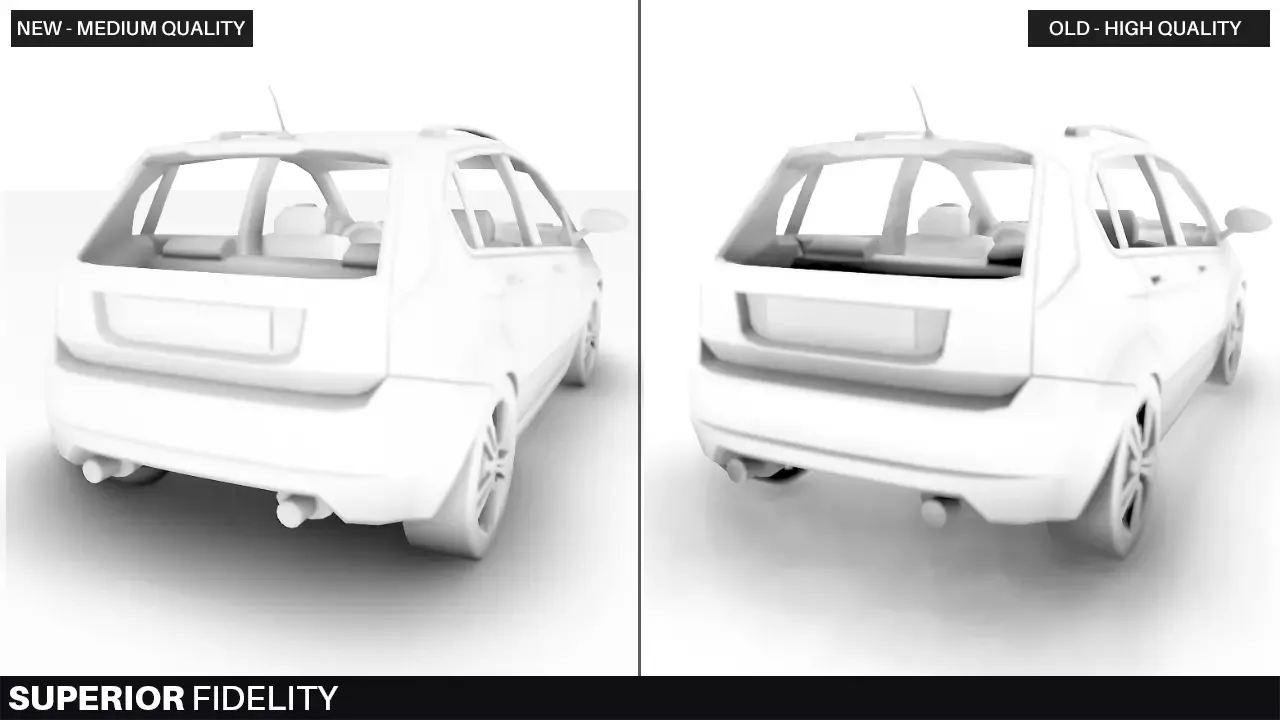
basically the "new" is GTAO and "old" is HBAO
you can see the blockiness on the gradients on the old one there, all HBAO implementations have that
I probably wouldn't really use it for HDRP unless you need to give the players some options or are struggling with the GTAO (there are specific cases where it kinda fails hard due to lacking the required data)
inner parcel
turbid matrix
<@!565060299611439115> main issue with using that on HDPR is that it can't curre...
Seems like a real hard limitation for projects with lots of light setup. Atleast i would expect the dev to mention it somewhere since it looked too good for a 25$ package to not have any limitation
turbid matrix
apparently users specifically asked the current approach (you can stuff custom PP effects on HDRP volumes which you can blend but you can't do that with custom passes)
but yeah, custom passes is the right way to do this
if it's important to you, you could probably mention it to the dev, he's been super responsive to me
it's totally doable
inner parcel
turbid matrix
I probably wouldn't really use it for HDRP unless you need to give the players s...
yes that's exactly what I want to do. I basically have a switch allowing user to pick whatever they want and some basic presets for people who don't care/know. My current ssao is only on/off but I wanted it to be more for obvious reasons
turbid matrix
the issue on the switch thing is that the dev would have to maintain two separate versions then but I don't really think the volume approach is even needed
I guess it's nice to be able to tweak the effect per region
also I'm not sure if one could still mix the two
inner parcel
yep not just that. anything other than color/gradient effect I have a switch for almost all options. It's a bigger pain to swap assets at some cases to save some petty performance
turbid matrix
main issue here is that the custom PP approach is just missing a HDRP injection point... it makes sense that they don't have it because it's.... post process.... but on the other hand, it's their only way they can have things on regular volumes
inner parcel
I heard about something where they were able to preserve lighting data. I don't remember if that was by a unity dev or someone else. Or might be my memory
turbid matrix
basically the injection point you'd need for this is "After Opaque Depth and Normal" which is available for custom passes but not for custom PP
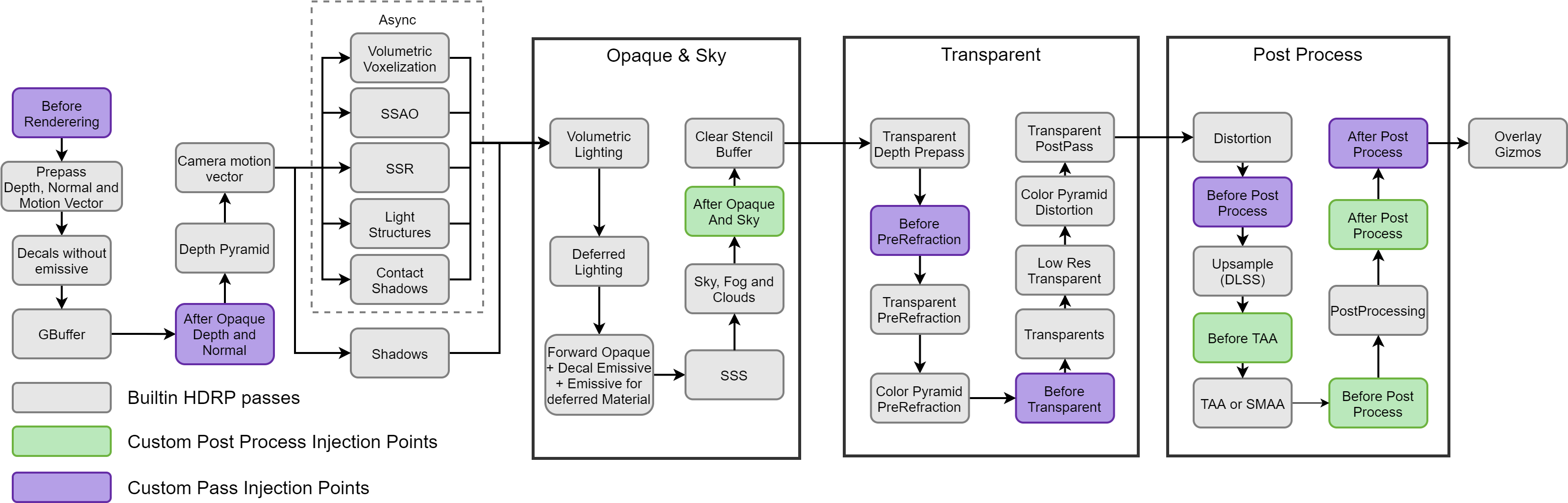
well, you still miss movecs and depth pyramid there
where movecs is the real bummer
(if you do any temporal filtering)
basically only way to do this proper is to manually modify HDRP source code
inner parcel
yes custom pass is the way out. in fact I was even under the impression that this asset was a custom pass based approach
turbid matrix
it's just.. even that is not ideal due to missing out on movecs
oh btw, that HBAO asset doesn't have hard requirement for movecs but you are then missing out on the temporal filtering
which is probably why it was more costly for me than SSAO
well, URP SSAO is really built perf in mind too, they could have done fancier blur etc with extra cost I think
as for the timings, I didn't really do much testing on that, just something I observed while testing other things with MockHMD running at 2540x1440 resolution
there SSAO took 0.8ms and HBAO took 1.5ms
inner parcel
If you look at pc version of URP it just feels like anything you do unless you do it very badly you'll never have any issue with the perf. Maybe that's the reason why URP takes lot of time to add something because above anything else they need performance for mobile devices
inner parcel
turbid matrix
oh btw, that HBAO asset doesn't have hard requirement for movecs but you are the...
temporal filtering isn't a huge problem for me. I can get away without that too
turbid matrix
it's just.. if the perf is concern, you could do less work on the HBAO and have temporal filtering smooth it out
but yeah, you do get more headroom with URP
iron flame
I change the HDRP code and use 3 direction samples in temporal mode. realistic, temporal denois and performs well at half resolution.
https://twitter.com/MuhammedEAydin/status/1365257189955403776?s=20




 eternal laurel
damn finally got the right frame timing stats for my dynamic resolution scaling. Game runs at 6ms avg now 🙂
iron flame
https://www.reddit.com/r/hardware/comments/nozuvo/testing_unreal_engine_5_temporal_super_resolution/

reddit
760 votes and 177 comments so far on Reddit
I should do a similar comparison in Unity Spaceship demo 😄
turbid matrix
if you do, do put TAAU into mix
(unless you meant to do that in the first place)
also what...
"AMD patented its alternative to NVIDIA’s DLSS on May 20, under the name AMD GSR”Gaming Super Resolution (GSR)”, formerly known as FidelityFX Super Resolution (FSR)."
so FSR is GSR?
iron flame
Spaceship demo with HDRP 13 2022.1 alpha
AMD 6900XT-AMD 5800X
Native 4K 110FPS.
TAAU 75% 4K 180 FPS.
turbid matrix
with FSR you still have to use TAA, otherwise it'll just look horrible
(or some other AA solution)
inner parcel
turbid matrix
with FSR you still have to use TAA, otherwise it'll just look horrible
Specular aliasing is still horrible in fsr
turbid matrix
it isn't any kind of antialiasing solution afaik, just upscaler
inner parcel
true but I wasn't talking about fsr not doing the anti aliasing. I just wanted to say that the specular aliasing looks horrible with fsr but is much better with taau
turbid matrix
even with FSR + TAA combo?
turbid matrix
that's not really necessary, it does make sense that the aliasing gets worse if you go lower resolution first
inner parcel
turbid matrix
even with FSR + TAA combo?
Fsr without TAA is something I can't even afford to have as an option
turbid matrix
yeah it looked horrible when I tried it as is 😄
 sinful locust
I have noticed that whenever I origin shift I get a noticeable light intensity jump (using HDRP). Anyone know what is causing this or how to work around it? I tried shifting the directional light as well but that had no affect.
sinful locust
hmm it might be limited to light + fog
 devout viper
I'm trying to use Deferred rendering with URP, but it doesn't seem to be effecting anything, it hasn't changed the maximum lights per object.
I've added the script compilation entry ENABLE_RENDERING_PATH_UI and set the rendering path on the URP asset to deferred.

Are there other settings I need to enable or something?
 main rune
Is editing sub graphs in the shadergraph broken for anyone else?
I get a bunch of UI errors which stop it working properly
 devout viper
main rune
Is editing sub graphs in the shadergraph broken for anyone else?
devout viper
main rune
Is editing sub graphs in the shadergraph broken for anyone else?
Fine for me. Null reference property drawer errors on built in things are usually fixed by a Unity restart for me
main rune
devout viper
Fine for me. Null reference property drawer errors on built in things are usuall...
Unfortunately I was experiencing the same error last night, and I've restarted my PC since
It only appears to happen on graphs created by right clicking existing nodes and converting to a sub graph
devout viper
devout viper
Are there other settings I need to enable or something?
After further looking deferred URP is only 2021.2.0b, im dumb
devout viper
under the graph inspector window in shadergraph what does the added property look like?
main rune
devout viper
under the graph inspector window in shadergraph what does the added property loo...
The panel breaks :V
It looks like a known bug that was fixed in 2021.1.7f1
So I suppose it's update time for me
devout viper
what version are you currently?
main rune
2021.1.0f1 or something maybe?
I think I updated purely to fix a different bug at the time lol
devout viper
Apparently these combinations are known to not have that issue from the unity issue tracker:
2021.1.a9, 2020.2.7f1 with Package version 10.3.2, 10.3.1.
2021.1.17f1 with Package version 9.0.0-preview.71.
2019.4.21f with Package version 7.5.3.```That's an odd assortment, I assume it's not exhaustive?
devout viper
im personally using 2020.3.14f1 (with shadergraph 10.5.0) and i cant reproduce it
nah it wouldn't be
-ArgumentNullException error is thrown on deleting property from the Blackboard window. -NullReferenceException error thrown on sele...
 long dagger
Why does my character have these weird lines? I am using URP. No custom shader. Texture has no problem since i also tested it with a default material.
 broken lichen
long dagger
Why does my character have these weird lines? I am using URP. No custom shader. ...
broken lichen
long dagger
Why does my character have these weird lines? I am using URP. No custom shader. ...
Realtime shadow acne:
https://docs.unity3d.com/Manual/ShadowPerformance.html
 cloud lantern
why are the shadows acting up here?

Basically my camera sees the shadows only from certain perspectives, otherwise they just disappear and everything is lit
weirdly, in scene view it's all perfectly normal
Ok I think it's something to do with the far plane somehow?
(I'm making a space game so it's quite big and the far plane is very far away)
cloud lantern
It seems if I have the far plane beyond ~10^7, shadows just stop working properly
idk why
seems it's just bc it's large and you incur inaccuracies over that distance that make shadows stop working
great...
long dagger
@broken lichen Thank you very much, for some reason depth and normal bias in my URP pipeline was set to 0. Fixed after settting both of them to 1. Edit: Set normal bias back to 0, since giving it any value makes my characters shadow look like a noodle.
turbid matrix
I love to track the Graphics repo's master branch via RSS but it's also very spam-heavy 😄

if I cared enough, would do some middle-man filter for this
as other topic... this new Anisotropic option is going to be super confusing... https://user-images.githubusercontent.com/28871759/134224177-dc337182-23c9-4fc1-86fd-c829b913676f.png

why it is set on the node settings? (also one could ask why is node settings even a thing as it's not very good UX IMHO)
would have probably been more of a topic for #archived-shaders though
I just don't understand the concept even.. like why config half of the settings on the visual node and others on the hidden menu, could just have some extendable advanced mode etc for extra settings on the visual node
eternal laurel
@turbid matrix Hey I've been meaning to talk you. Do you know why a urp render feature with the draw mesh aproach(was using full screen blit before but as we know that doesnt work anymore) set to before transperants render pass messes up maskable elements in a word space canvas. They no longer work as masks. At first I tought it has something to do with the stencil but now I just dont know.
 hearty peak
I seem to recall using LOD blending in URP but somehow can’t get it to work again… is there a specific shader or feature that needs to be enabled/selected?
 old meteor
How can i change the darkest color to more of a dark blueish color, instead of a complete black
 hearty peak
old meteor
How can i change the darkest color to more of a dark blueish color, instead of a...
hearty peak
old meteor
How can i change the darkest color to more of a dark blueish color, instead of a...
In lighting settings you can change the realtime shadow color and you can make a skybox that has a non-black floor and provides sufficient environment light relative to the other light sources... other than that... black shadows is what you get in a PBR workflow without global illumination
 civic turret
hey , just had this happen to me , what should i do (building the game on mobile)

 last blade
will fog ever be a post processing effect
since its a rendering feature i cant use it with volumes
rip
old meteor
hearty peak
In lighting settings you can change the realtime shadow color and you can make a...
my skybox has a non-black floor but kinda doesnt light up anything, i have global illumination on but for some reason it literally does nothing (hdrp)
oh
nevermind
i fixed the skybox thing
but still global illumination no workie
hearty peak
old meteor
but still global illumination no workie
you probably need to bake the GI first
 shrewd moon
civic turret
hey , just had this happen to me , what should i do (building the game on mobile...
shrewd moon
civic turret
hey , just had this happen to me , what should i do (building the game on mobile...
If you intend to use HDRP, you should do as it says and provide a HDRP asset in GraphicsSettings
civic turret
shrewd moon
If you intend to use HDRP, you should do as it says and provide a HDRP asset in ...
erm , i cant do that since am doing a mobile game
mobile games dont use HDRP or they dont render at all
shrewd moon
civic turret
erm , i cant do that since am doing a mobile game
So, why would it be asking about HDRP?
shrewd moon
Perhaps you started the project in HDRP, or used some HDRP related asset?
Make sure you've done every step to configure the project for built-in RP or URP
eternal laurel
Im at my wits end. For some reason my custom render feature in UR SPI breaks Ui masks on a world space canvas
turbid matrix
@civic turretgo to packge manager, uninstall High Definition RP package from your project there
@eternal laurel I have no idea on your issue :/
eternal laurel
This is really sad. I tried your example as well it can be reproduced there as well
turbid matrix
I'd probably start testing where it does work and where it starts breaking
also if it's clearly not working as it should, probably worth sending a bug report
eternal laurel
thats the thing I'm not sure if its me or unity
since I need to sample the opaque texture and then redraw to the color target
if I inject anywhere after transperants I loose them
since they are not present in the opaque texture
so I go for RenderPassEvent.BeforeRenderingTransparents. And that works. Effect is applied to all opaques in the scene and then ui gets rendered on top, but the UI masks are broken like they are passing the stencil test
The SSAO feature doesn't cause this issue so I'm thinking it must be coming from my feature missing something
eternal laurel
Well It doesnt happen when not rendering XR so I send a bug report
If blit is broken and this is broken wtf can I do😆
turbid matrix
@eternal laureljust to be clear, this is same with _CameraColorTexture and _CameraOpaqueTexture ?
turbid matrix
can you give me full repro steps using my project?
eternal laurel
Sure
- Change render pass event to RenderPassEvent.BeforeRenderingTransparents in the constructor of the pass 2. Set up a world space canvas with a panel that has a mask component. Set up a image that has maskable enabled. Make sure the image is masked from the panel(Like being half way outside of it) 3. Run scene and notice that mask no longer applies to image
turbid matrix
btw I don't think you can compare to stock SSAO, unless you use that extra checkbox that renders it afterwards on top
stock SSAO behaviour is that it just renders the effect on SSAO buffer which is then sampled by Lit etc shaders (this is how they can adjust the amount of AO in direct sunlight)
well, something along those lines anyway
eternal laurel
well yeah sure. I think it has something to do with the render pass event
anything after and including BeforeRenderingOpaques breaks the ui mask
turbid matrix
maybe they only render the UI mask internally there
eternal laurel
wait no thats if its not running
so if I use RenderPassEvent.AfterRenderingSkybox+1 then it breaks
turbid matrix
I really struggle to even get the repro running, I have no idea how you'd get the mask working in world space regardless the renderer feature being there or not (but then again, I've never used UI masks since I've pretty much avoided this now-old stock UI system)
but then again, I dunno if I can really help on this, I'd start looking at the frame analysis to see why the thing fails, it sounds like something overwrites the stencil data etc?
@eternal laurel^
as a side note, I see Unity just merged this to master: https://github.com/Unity-Technologies/Graphics/pull/5395

GitHub
Purpose of this PR
This PR added a doc to guide urp user how to do custom full screen blitting in XR SPI
Fogbugz case https://fogbugz.unity3d.com/f/cases/1335524/
Testing status
ABV
Comments ...
it's basically similar example to what I have now on github for SPI
eternal laurel
Im a bit confused on where to read the actual doc
turbid matrix
eternal laurel
ah thanks will check it out
turbid matrix
this is almost 1:1 to what I have on that git repo now, altho I'm not overly fond of using that CameraOpaqueTexture as someone can just downscale it for all renderer features from URP asset
(so if you rely on it for final image production, whole game renders first at full resolution but will display downscaled result
eternal laurel
its the same as mine but this RenderPassEvent.BeforeRenderingPostProcessing will simply wipe the world space canvas from the final render
turbid matrix
I'd still suggest either doing bug report (if you are positive it's not working as it should) or making a forum thread with repro project etc so people will have really easy way to see what is failing, now it's bit like finding the needle on the haystack unless you know specifically what to look for 🙂
 whole fossil
guys, isn't something wrong with me or spotlights cannot cast realtime shadows in HDRP? It is weird because it seems that terrain (with two sided shadows) seems to be casting shadows properly, but other objects cannot
light source is on the right side

testet it both on HDRP 10.6 & 12
what even weirder it seems that this behaviour changes with distance from light source as well as distance from camera https://i.gyazo.com/d93f1f08f8a7fb5cf4981808116cb17b.mp4
verbal apex
From what I recall, shadows are only rendered at certain distances based on your quality settings.
You may be on a lower quality setting in the editor which is why you aren't seeing the shadows. Also make sure your objects/materials cast/receive shadows.
 viscid solstice
Hey guys

However

So, im kinda of confused here
Someone ping me if anyone knows why this is the case?
summer glacier
viscid solstice
So, im kinda of confused here
You probably didn't activate it in the asset you're using
Do it from global settings, if it still doesn't work, go to quality and click on the Render Pipeline Asset, and then activate the volumetric clouds for that asset in the project assets
summer glacier
Actually, you enabled it on your camera, not asset, I just realized that when I noticed the quality level above volumetric clouds. You need to enable it on your HDRP asset
whole fossil
verbal apex
From what I recall, shadows are only rendered at certain distances based on your...
I am feeling really dumb right now, thanks ^^. But I must admit that is pretty weird for me that terrain shadows behaves a bit different than the ones from meshes
 indigo summit
whole fossil
I am feeling really dumb right now, thanks ^^. But I must admit that is pretty w...
indigo summit
whole fossil
I am feeling really dumb right now, thanks ^^. But I must admit that is pretty w...
Check or adjust your shadow distance, if should be in the global volume, if there's none add one and set it up
whole fossil
yeah, I didn't knew that hdrp uses this range for the last cascade for punctual lights. I always considered it only as screen space cascades for shadows (as it is for directional lights)
indigo summit
there's also additional per light settings to cull shadow and light by distance
 tidal lodge
I noticed that adding shaders to the Project Settings → Graphics → Built-in Shader Settings → Always Included shaders doesn't modify ProjectSettings/GraphicsSettings.asset. Which means that it's not picked up by version control. Does anyone know why? I can manually add the shaders by editing GraphicsSettings.asset in a text editor. Seems like I shouldn't have to do that.
tidal lodge
Adding shaders to build, apparently changes Library/SceneVisibilityState.asset instead,
Is there any reason why I shouldn't just modify GraphicsSettings.Asset?
turbid matrix
you mean shaders you add there with editor tooling doesn't end up in build?
that part has always worked for me for actual shader inclusion
with SRPs there may be some other shader stripping that gets in the way but it doesn't strip away your manually included shaders (just can strip away things that they depended on :D)
 topaz quartz
I'm using the latest beta (2021.1.0b13) and shader compilation take ages and it seems the shader cache doesn't work, do you guys have a similar problem ?
I'm using URP
turbid matrix
@topaz quartz URP 12 compiles absurd amount of shaders atm, they've fixed some of it recently via shader stripping improvements but I don't think those improvements have yet landed on the betas we get (they are merged in github already)
this was merged 12 days ago for 2012.2 staging: https://github.com/Unity-Technologies/Graphics/pull/5563

GitHub
Purpose of this PR
Backport #5060
Testing status
Describe what manual/automated tests were performed for this PR
meaning this round of fixes is probably going to be in some of the upcoming betas, they are still doing some work on it though so should improve even further
for example this hasn't landed yet https://github.com/Unity-Technologies/Graphics/pull/5544

GitHub
Purpose of this PR
This is follow up of #5060.
Stripping disabled variants if feature is enabled:
Main light shadows.
Additional light.
Additional light shadows.
Testing status
Local GFX founda...
topaz quartz
@turbid matrix Thanks for the info, I'll try to switch to 2022 or the next beta when it's out
We needed 2021 for URP supporting deferred rendering but it blew up build times
turbid matrix
@topaz quartz it's probably going to be a whole lot better in future 2021.2 once we get the version with the fix (could be next beta or one after that etc)
if you are in a hurry, you can also just use 2021.2/staging branch from github
it works on current beta, just bit tedious if you don't use Unity's graphics repo otherwise
topaz quartz
@turbid matrix I had to modify the URP v12 so I put it separate from the package manager, wouldn't that cause a lot of trouble ? Also is there a way to build only scripts + prefabs and not shaders ?
turbid matrix
not sure what you are asking now
running URP package from local folder is fine
it's just pain when you update the engine
topaz quartz
I'll make a branch and try it out
I was just wondering if there was a way to build only prefab data + scenes + scripts and not shaders, since that's the longest part and it doesn't change much.
Similar to what script only builds do, but with prefabs, since my scripts don't move much but my prefabs does.
turbid matrix
shader compilation stage should be brief if you've already done it and haven't changed URP graphics settings
there's been some issues with "Mesh Optimization" option lately though, so toggling that off may help a ton on build times
 rancid kettle
Hello ! I want my mesh tu use less video memory so I was wondering if it's possible in unity to change the data type of the mesh ?
I want to do something similar that what is explain in this video : https://www.youtube.com/watch?v=VQuN1RMEr1c
 kindred crane
Is there a way to check via code which renderer the camera is currently using? I know there is an option to set the renderer but I found no option to see which one is currently active
viscid solstice
summer glacier
Actually, you enabled it on your camera, not asset, I just realized that when I ...
thanks
 worldly minnow
Is geometry better for foliage than using transparency maps? How bad are transparency maps?
 unkempt laurel
depends on how much overdraw actually is happening.
 patent sun
how to make CCTV in HDRP? Afaik there should be only one camera at a time
is there a way to do it?
unkempt laurel
rendertotexture?
patent sun
unkempt laurel
rendertotexture?
ye but afaik you need second camera for render texture
turbid matrix
@patent sun there can be many cameras, it's just slow in HDRP
old style camera layering doesn't work in HDRP (you need to use HDRP's composition tools for that but CCTV doesn't need that kind of setup)
@kindred crane afaik there's no way to set some cameras use different RP's than others so there's no camera specific setter/getter for that either
you can read current RP from GraphicsSettings.currentRenderPipeline
it's probably null for built-in renderer
kindred crane
turbid matrix
<@!276418785919893504> afaik there's no way to set some cameras use different RP...
Im talking specifically about the renderer you can pick on the camera (In URP its a Forward Renderer). You can set the camera to use the Default renderer or a custom one specified in the SRP Asset. In the Camera Additional Data script attached to the camera, you can set the renderer that the camera should use, but there is no way to see which one is chosen already.
turbid matrix
ah I see what you mean now, my bad 🙂
I don't immediately spot any getter for that either and seems like the camera's stored value is internal..
kindred crane
turbid matrix
I don't immediately spot any getter for that either and seems like the camera's ...
Yeah I figured but maybe I could have missed something
turbid matrix
@kindred crane hmmm, can't you just get scriptableRenderer from the UniversalAdditionalCameraData (which you get from your specific camera)?
still not clear what you need this data for
 obsidian quest
This is a post processing question more than RP: colorGrading.colorFilter.Interp(Color.white, Color.black, (Time.unscaledTime - t) / fadeSeconds); when I interp between the two colors in the post processing Color Grading Setting it works between white and black except it also affects the "intensity" value of the HDR, I don't know why that is also changing, any ideas?
kindred crane
turbid matrix
still not clear what you need this data for
Im switching between renderers to activate some features needed at specific points in the game. By setting the renderer I can instantly switch between the two. However I am unsure about the performance impact of always setting the renderer to a specific index when not needed. But my workaround is to store the index locally and checking against it. Still unsure about the impact or of the engine is checking internally if the index already matches as to not to switch needlessly
turbid matrix
@kindred crane but that scriptableRenderer from camera data is not what you want?
you will not get index by it but you can probably detect which asset it is still
I don't see any issue on the locally cached value as long as Unity itself doesn't swap the renderer at any point (so basically would need to just make sure the value matches from scene / prefab loads if they hold such cameras
turbid matrix
nice to see it's finally getting some love
HDR hardware output is currently only supported in built-in renderer
 sterile mesa
Can I make a mesh absorb more light in HDRP , like just be brighter than objects around it?
And how is that done in the editor?
turbid matrix
you can make mesh use another lighting layer and add extra light for it there (can't do shadows for extra directional lights though) or just... make the thing emissive if that fits your art direction
@sterile mesa
topaz quartz
@turbid matrix Here to confirm that shader cache didn't do anything : I've built yesterday, I'm doing it again, and it's re-compiling every shader.
summer glacier
Damn
is HDRP adding an ocean/water system?

GitHub
Unity Graphics - Including Scriptable Render Pipeline - Commits · Unity-Technologies/Graphics
check the commit content
i was surprised since the branch name doesn't fit
turbid matrix
@summer glacier not the first time they try to fool us 🤔
I must admit that one was a good try
wonder if this is based on the past work on water system (that just never got merged) or something completely new
summer glacier
turbid matrix
<@!643496046227357736> not the first time they try to fool us 🤔
Maybe they're tired of us sniffing around lol
it's an addiction to be honest, haha
turbid matrix
if they really didn't want us seeing something, it wouldn't go to public github (which is why more secret stuff gets often only added right before merging)
summer glacier
water system in far cry
(although I don't know to what extent, it's probably just one of the many things they refer to)
turbid matrix
this is the old version that just never got merged (from early last year) https://github.com/Unity-Technologies/Graphics/commit/ee547952d607c60c8f19bbf45dc0e3166aa72409

that was a lot simpler setup, no SG integration
summer glacier
interesting
the person working on the new water is anisunity, he did the volumetric clouds coming in 2021.2
and in the end they turned out pretty good, so I am looking forward to the water 🙂
turbid matrix
he's one doing the commit for that, doesn't mean he did all the work (but could be)
summer glacier
True, but it seems like he'll be the one to work on it
turbid matrix
considering how much work Unity puts on that guy, I wouldn't be surprised though 🙂
summer glacier
I wonder if it'll be extra performance focused like the volumetric clouds, I hope there's more quality possibilities, if someone wants more performance, they can tone down the settings. Although that means more work, perhaps
turbid matrix
they seem to be quite understaffed on this segment
summer glacier
Yeah they need more people working on graphical features
turbid matrix
he does most of the realtime raytracing work for HDRP side too, and bunch of other stuff
worldly minnow
Why do some people leave the plane for the transparency mask square and others cut the foliage? Isn't it better square because it's only one face?

 summer glacier
turbid matrix
he does most of the realtime raytracing work for HDRP side too, and bunch of oth...
summer glacier
turbid matrix
he does most of the realtime raytracing work for HDRP side too, and bunch of oth...
yup, noticed that too
I wonder if he is here in this discord
i don't think so
turbid matrix
he's here alright 🙂
 exotic tide
worldly minnow
Why do some people leave the plane for the transparency mask square and others c...
exotic tide
worldly minnow
Why do some people leave the plane for the transparency mask square and others c...
It's a trade-off. If you're concerned about fill rate, such as on mobile devices or in high densities of overlapping transparent polygons, it's probably going to be faster to spend a few extra verts to reduce the surface area, especially if there's a lot of dead space in your texture. However, if you happen to be vertex bound for some reason, maybe you'll want to optimize in the opposite direction
worldly minnow
That's interesting, thank you!
 rotund mantle
does it really suck this much to write a custom lit shader with URP?
 tough pulsar
why? I have enabled it in frame settings and my hdrp asset and still the same thing
 rotund mantle
I was kinda hoping I could just write my code to generate the albedo and plug it into some function and move along...
tough pulsar
 summer glacier
tough pulsar
summer glacier
tough pulsar
go to quality
see what is green ticked under the monitor icon
then go to HDRP under quality, and click the equivalent asset to the ticked setting in quality
and activate it from there
Notice that you also need to activate it on each camera you want to render volumetric clouds, frame settings
tough pulsar
ahh there we go
thank you
ok so another question - maybe you will know how to fix this "leaking" light issue?
 summer glacier
Shadows
need shadows to cover it up, lights without shadows will always leak
the light needs to have shadows, and the mesh needs to cast them
you can also try putting reflection probes
tough pulsar
Yeah but when I will come closer it disappers, I already have reflection probes
 summer glacier
tough pulsar
Yeah but when I will come closer it disappers, I already have reflection probes
summer glacier
tough pulsar
Yeah but when I will come closer it disappers, I already have reflection probes
Shadows distance
depending on your version, go to global volume and add a shadow override
increase distance
if it's not there, then it's in the HDRP asset
tough pulsar
oh yeah you are right, I forgot about that
tough pulsar
summer glacier
Shadows distance
okey, changing it to higher value it makes even worse
tough pulsar
where to turn this off?
summer glacier
in global volume
add visual env
and set it to none and ambient light to dynamic
tough pulsar
I have only ambient mode and changing it takes no effect
 tough pulsar
directional
tough pulsar
it is double sided already ;v
summer glacier
maybe something within the reflection probe settings can fix it
since it only happens when you are far away
tough pulsar
okey I will try to find what is the issue, it is not such a big problem
 cobalt idol
Hi, I've found a quite nasty bug in URP, not even sure how to begin reporting it or if I'm doing something daft. I am inserting some draw calls (nominally before shadow maps are rendered) which I use for rendering some metadata to a temporary render target. Anyway, the bug is this: it seems sometimes a race condition can occur where drawing can occur before parameters such as unity_OrthoParams are set. In my particular case, it causes a flickering artefact in editor as it draws consecutive frames sometimes with, and sometimes without these values set
I was able to fix it by bumping the call back to 'BeforeOpaques', which presumably gives a chance for these values to have been set by the time I then do the drawing
jade trail
tough pulsar
okey I will try to find what is the issue, it is not such a big problem
the easiest way to fix that is to place a solid object (such as a cube) behind that wall with shadow mode set to shadows only
You can fix that using contact shadows as well
But that won't fix objects at the edges of the screen
No cube behind

Cube behind
 tough pulsar
jade trail
the easiest way to fix that is to place a solid object (such as a cube) behind t...
tough pulsar
jade trail
the easiest way to fix that is to place a solid object (such as a cube) behind t...
I will try that, thanks 🙂
 tranquil isle
Hi!
in unity 2022 i do not find where to upgrade materials to URP!
it says Edit-rendering but there is no option there except generate shader
turbid matrix
from URP 13.1 changelog:
* Fixed the LensFlare flicker with TAA on SceneView (case 1356734).```but... there's no built-in TAA for URP?
also... am I supposed to know what MAOS means? 😄

yes the tooltip did hint it's probably metallic, ao and smoothness, but tooltip also said it does emission as well, so why isn't it then MAOSE?
summer glacier
turbid matrix
but... there's no built-in TAA for URP?
Mistake, they meant HDRP
URP doesn't even have AA selection in scene view 🙂
turbid matrix
yeah I suppose so
 proud gulch
There still is no easy way of fully converting materials along with textures to HDRP, right?
 desert wharf
Does anybody happen to know approximately when in the update loop the SRP Render function is called?
turbid matrix
@proud gulchthere's still the material conversion script that has pretty much always been there 🙂
it can't convert shaders, so if you have custom shaders in project, it wouldn't know how to map the HDRP material so it only can convert stock built-in shaders materials to hdrp shaders materials
proud gulch
turbid matrix
<@!338301960769765376>there's still the material conversion script that has pret...
you mean the 'upgrade materials to hdrp'?
because it still doesn't create mask maps and etc.
turbid matrix
it does if you have those values setup in built-in renderer's standard shader
it has always done that btw
not sure about detail masks because I think that part worked differently in built-in but for metallic / smoothness maskmap, the conversion script definitely channelpacks a proper map for you
proud gulch
turbid matrix
it does if you have those values setup in built-in renderer's standard shader
what do you mean exactly?
I've been doing the texture conversion through substance painter whole the time.. so if there is a built in function that does that.. I would save a lot of time
proud gulch
turbid matrix
it does if you have those values setup in built-in renderer's standard shader
if I've understood this right... it still doesn't create a mask map (last time I checked) and it requires another way of conversion
turbid matrix
The Built-in Shader to HDRP Shader conversion process combines the different Material maps of the Built-in Standard Shader into the separate RGBA channels of the mask map in the HDRP Lit Material.
@proud gulch ^
this has been one of the main reasons to use this conversion tool and it has worked for me for years, I don't remember it even being broken in past
proud gulch
and by the conversion tool.. you mean this?
 turbid matrix
yes
proud gulch
I need to test it again then
 celest rose
hello, I'm using the universal pipeline, and have recently been unable to build my project, the build immediately stops with these errors:

this is one example but this error pattern is repeated for all shader graph shaders
until recently building worked, so I must've changed something? any way to reset them to have the appropriate subshaders? thanks for any help
tough pulsar
why is this happening when I had baked lights?

and when I baked it ealier it took about 5 minutes not whole day and I didnt change any thing in scene
and why enlighten is not available ? (2021.2 beta)

 lethal grail
I am getting these jagged edges on mesh in HDRP but not in SRP. How to solve it?
 turbid matrix
tough pulsar
and why enlighten is not available ? (2021.2 beta)
turbid matrix
tough pulsar
and why enlighten is not available ? (2021.2 beta)
enlighten ligthmap support never returned
only realtime gi
(these are two separate things)
tough pulsar
ah ok
 forest chasm
Anyone know if I can get a forward render feature by name as opposed to index ?
tough pulsar
tough pulsar
why is this happening when I had baked lights?
and it is going and going.. what the hell

 cinder root
I'm having issues with ray tracing and the project going slow for no apparent reason
even with the only light source off, the only camera off, the FPS is only around 160 on a i7700k + 2080ti with just a small ish sample scene
summer glacier
cinder root
even with the only light source off, the only camera off, the FPS is only around...
What do you mean?
is the perf much better when raytracing is off?
when the camera/lights are disabled?
cinder root
I'm saying I suspect there is an issue when even without a camera and any lights things are not running as fast as I expected
with 1 light and 1 camera, I'm getting 45 fps
when I disable all the post processing stack (so disabling the settings for the ray tracing) it only makes 10fps difference
and that's most the global lighting. So it's almost like the ray tracing isn't even costing the performance
unless just being enabled as possible in the settings is part of the performance hit
it makes me wonder if there is something else in HDRP that's slowing it all down though
summer glacier
Check the profiler and you'll know
there's a good chance it's an Editor loop
so it wouldn't be there in a build
check CPU and GPU timings in profiler
cinder root
did a build and was the same
summer glacier
if you don't use profiler much
cinder root
hm I've done something but not sure what
summer glacier
profile it and save it, send it here
cinder root
it's now going 110
I was turning things on and off to see where a difference could be found
thought I restored it to how it was but hm...
maybe I got the DLSS running properly
I'll disable it again and see...
summer glacier
Doing things blindly can be a pain, you should look into the profiling window.
It'll save you so much pain and guessing, and it's extremely easy to use with good ui
summer glacier
nice
cinder root
I did look at profiler but couldn't make sense of it
right up the top thought the 'other' category was clearly the biggest hit
not even rendering
wild oasis
Other is usually the editor loop
Can't say for sure without seeing the details though
cinder root
yeah I did see it say editor loop
but didn't know what that meant
and as mentioned, was having about the same speed in a test build
wild oasis
cinder root
and as mentioned, was having about the same speed in a test build
Then something else might've been the cause in the build.🤷♂️
cinder root
yeah I'm thoroughly confused
wild oasis
Well, we can't help you unless you share some of the profiling data/screenshot.
cinder root
how it was is gone now so I can only show how it is now
and the bit I'm confused at is I thought how it is now is how I've had it in the past but it's acting better
yeah profiler is nothing like before

the 'other' before was going above that 60fps line
is there a way to change the Dynamic Resolution setting Forced Screen Percentage while in runtime?

I want to be able to change that as a kind of quality/performance setting
summer glacier
cinder root
is there a way to change the Dynamic Resolution setting Forced Screen Percentage...
Yes, check dynamic res documentation
cinder root
just found another way my scene run faster. Was because I used Mesh Combine Studio to combine draw calls
but it did nothing without enabling static batching
it would be good if it could change the screen percentage to hit an FPS target
summer glacier
cinder root
it would be good if it could change the screen percentage to hit an FPS target
that's the point of max and min screen perc
but you have to code it yourself, the timings
gpu timings
cinder root
summer glacier
that's the point of max and min screen perc
I don't get it sorry
so you turn off forced and you can set min and max
and that's to set up some other kind of variable which is rated 0 to 100 percent?
so your min is 50 and so when this other thing is set to 0... it's returning value 50?
summer glacier
cinder root
so you turn off forced and you can set min and max
You have to read GPU timings (performance) and adjust the screen percentage as required
The point of min and max is, the lowest percentage you allow yourself to go down to is min, and highest is max
so you have to code it yourself, there's an example in dynamic res documentation
summer glacier
it's not ready out of the box, you have to do it yourself
summer glacier
Unfortunately you have to do it in code, maybe one day HDRP will provide it out of the box. That would be really nice.
cinder root
how much hassle would it be on someone if I ask em to do it?
it a big deal or just a quick script?
actually here is some weirdness again. So I set it on forced 10 just to see how much it can help. I know going from 50 to 100 is nearly the same fps coincidentally enough
but on 10, it's still the exact same 110 ish
summer glacier
I imagine it wouldn't be a big deal although i couldn't tell you since i haven't done it, the sample in the doc helps, you need to do the extra bit to change it based on your game's performance
cinder root
8ms render latency. Same as before
summer glacier
like I said, all of this would be apparent if you used the profiler
I can't tell without seeing the profiler
maybe i'll make a tutorial for the profiler, it's a really powerful tool people need to use more often
cinder root
I don't know what part to show


 cinder root
ok thanks
wild oasis
cinder root
I don't understand how a CPU bottleneck happens with low usage:
because task manager shows usage of all cores. Unity runs mostly on the main thread(one core).
wild oasis
cinder root
Also, not much is clear from these screenshots. Change the profiler to hierarchy mode(where it says Timeline). And select a frame on the graph.

 summer glacier
cinder root
summer glacier
cinder root

NOTE: I was wrong about dx12, it DOES support gpu profiling.
watch it in full and you'll know everything
cinder root
I'll have a look
thanks but to open a whole different question


how do I stop that orange reflection from popping in too suddenly?
you see those two shots aren't far apart but the orange is suddenly visible.

thought I would find that there (Post processing) but maybe not?
cinder root
summer glacier
https://www.youtube.com/watch?v=fnz1SRTAmoo&feature=youtu.be
thanks I watched that video. It does help understand how it works better. You are right in saying DX12 does not have a GPU profiler
summer glacier
cinder root
you see those two shots aren't far apart but the orange is suddenly visible.
I'm not really sure on this one. You probably already tested it but Maybe one of the SSR settings will help with this problem?
cinder root
yeah the ray traced does come under SSR, but I'm just not seeing anything about any kind of distance
don't know what the ray length means but doesn't seem to change anything in that regard
 mellow condor
cinder root
you see those two shots aren't far apart but the orange is suddenly visible.
mellow condor
cinder root
you see those two shots aren't far apart but the orange is suddenly visible.
that's a limitation of screen space reflection
just don't use it. use a reflection probe
cinder root
mellow condor
that's a limitation of screen space reflection
no I'm making an all RTX project
the point being it's all RTX. My son got a card but there is barely any games to use with it. Also out of the games that have it, they only partially do it
So you are saying there is a hard coded setting on how far RTX reflections will show?
mellow condor
cinder root
So you are saying there is a hard coded setting on how far RTX reflections will ...
no
screen space reflections work a certain way
even raytraced ones
that make them not behave like true reflections
cinder root
my issue is they appear so visibly and suddenly
go from nothing to POP you see it appear like an orange light turn on
mellow condor
i know, that's exactly a consequence of the limitations of screen space reflections
in all game engines everywhere
screen space reflections are inferior to a reflection probe in terms of physical accuracy
cinder root
ok so nothing I can do?
mellow condor
you can use a reflection probe
cinder root
since I mean I can't combine an RTX reflection with a probe, or?
mellow condor
for that geoemtry you would use a planar reflection probe
RTX doesn't accelerate reflections, it accelerates screen space reflections
cinder root
yeah just trying to keep it true to being all RTX
but you are saying just turn it off?
mellow condor
okay, lemme ask you a question
cinder root
or have it suck
cinder root
I don't understand your question
ssr shows what is on the screen space
I suppose
and the baked or probed is everything
mellow condor
alright, i think a simple way to prove to yourself one of these limitations, is to place an object behind the camera and see if it appears reflected in a metallic material
cinder root
but won't do realtime well
mellow condor
have you tried a realtime probe?
another limitation is that screenspace reflections behave glitchy with surfaces along the edges of the screen
which is what you are seeing
cinder root
they kill performance pretty bad
mellow condor
you tried it?
mellow condor
did you try it now
 loud leaf
He's using ray traced reflections, not screen space reflections
mellow condor
in your current scene
cinder root
I mean if they are the answer then you wouldn't need rtx
you also can go into a probe
which breaks it
like I have a probe in middle of room, walk into it, suddenly whole room looks like me
mellow condor
loud leaf
He's using ray traced reflections, not screen space reflections
ray tracing accelerates and makes higher quality the screen space reflection
that's why it's a check box inside screen space reflections
loud leaf
That's not how it works
cinder root
so needing heaps of costly real time plus the placement issue is why I don't like probes and I think is the whole point behind RTX
mellow condor
loud leaf
That's not how it works
then why is the user seeing a quintessential screen space reflection limitation?
cinder root
mellow condor
then why is the user seeing a quintessential screen space reflection limitation?
no I think you are confused
mellow condor
cinder root
so needing heaps of costly real time plus the placement issue is why I don't lik...
i'm trying to say that RTX is not unbiased raytracing, which you can actually enable and it sounds like that's what you want
cinder root
it's not missing data based on being off the screen space
I know about that. It's not that
mellow condor
cinder root
it's not missing data based on being off the screen space
i didn't say it was
cinder root
I can show you an off camera object reflecting with rtx
mellow condor
there is a different issue with surfaces at that angle near the edges of the screen
cinder root
this is about an object saying 'I'm too far away, I won't project'
mellow condor
i googled "limitations of screen space reflections"
here is one example
reddit
3 votes and 5 comments so far on Reddit
"Due to this approach, reflections near the screen borders are problematic."
it's just nuanced
cinder root
I'm seeing objects too far away don't project
mellow condor
i don't know what to tell you, you asked my opinion on a visual bug
mellow condor
i know the object is in the center of the screen
but the surface that is reflecting it is not
and both matter
listen it's okay
try unbiased raytracing
you need the pathtracer
cinder root
 mellow condor
you've been conflating raytracing with pathtracing
cinder root
orange wall too far
mellow condor
it's fine
 mellow condor
i'm telling you you are seeing a limitation of screenspace reflections
cinder root
it's so visible it's jarring
mellow condor
if you turn them off and use a reflection probe it will behave correctly
mellow condor
cinder root
so how do I fix performance of real time probe?
have you tried a realtime probe
in this scene
loud leaf
mellow condor
i'm telling you you are seeing a limitation of screenspace reflections
This has nothing to do with ray traced reflections. You could try playing with the min/max smoothness + fade start settings to see if it improves the situation, or try disabling LOD for the mesh that is popping up in the reflections. There have been some recent changes to the way LODs are handled by the acceleration structure manager that could behave differently in an older version.
cinder root
no but it wouldn't be just 1
it would be like 10
a probe can't see through objects
mellow condor
cinder root
a probe can't see through objects
have you tried a realtime probe
in this scene
 mellow condor
alright well
cinder root
would need at least 1 on either side that middle divide
cinder root
but not just 1 each, more like 6 each side
then I will walk into one
or, it will be too high or too low
and will give warped projections
then there is probe blending
I've tried to do all this stuff before, it sucks
but really I was just trying to do a legit RTX game
so don't get why there is a limit on distance
loud leaf
There is not (other than the maximum ray length), it is probably a LOD issue.
mellow condor
the experience of using unity HDRP being pretty complicated compared to say, Unreal, to achieve basic effects is common
maybe try opening the RTX sample in Unreal
it will be set up correctly
cinder root
look at this. There is a mirror in the middle of the hall at the end. It's got a black side on the left

it's cutting off the furthest part of the wall
I have a light there so it's not about being unlit
it's too far away so cut off from the reflection
mellow condor
loud leaf
This has nothing to do with ray traced reflections. You could try playing with t...
yes, i suppose the user can try all these things
who really knows
cinder root
ok LOD is a hint. So you think it may cut things off like this?
so I should dig through the HDRP setting for LOD?
cinder root
I'm invested in what I know about Unity. Don't want to start again.
also assets
tools like Playmaker, etc
not going to switch unless Unity stops existing
mellow condor
i can just tell you're an unreal user at heart
which is a good thing
it looks better
they have blueprints
great asset library
have you seen metahuman? it's amazing
everything in megascans
cinder root
yeah I know it's good, but I'm still stubborn about sticking to what I know. It's already hard enough continuing to learn more about things "I know"
 keen pivot
i tried to use SSR a while back, wasnt RTX, but i had similar cut off issues
my scene is viewer from above and you can see everything, so actually a bad case for using SSR
but there was some distance setting i remember and i had to crank it up to 1000, i could see the hard line moving as i increased it
by the time i got what i wanted, it was a slide show
summer glacier
@mellow condor Pretty sure raytraced reflections aren't screen space
keen pivot
duh, course, sorry i wasnt thinking 🙂
summer glacier
Wasn't meant to you, replying to doctor
Unreal is nice, especially nanite
but as an indie, unity HDRP is much better imo.
cinder root
summer glacier
<@!247793168056057857> Pretty sure raytraced reflections aren't screen space
it's not actually screen space but you control it through the SSR post processing
summer glacier
Hence why unreal has next to no successful games with small teams (5 and under), unity has a ton.
Even HDRP has one, even though it's fairly fresh. Where unreal still has none that are a big success.
cinder root
 summer glacier
It's simply a convenience.
cinder root
another example of my problem. This is actually looking into a mirror

the black is the cut off mostly
cinder root

I back up a little and the yellow handle appears in the reflection
(because going back away from the mirror moves closer to the yellow handle)
mellow condor
summer glacier
<@!247793168056057857> Pretty sure raytraced reflections aren't screen space
pathtraced reflections aren't screen space, but raytracing in screen space reflections are... you guessed it, screen space
mellow condor
summer glacier
devs check it out regularly
i'm a contributor to HDRP, the package
cinder root
but what about it means you can't change the distance?
you said before no it's not just fixed, but clearly there is a distance set
mellow condor
i think you should try pathtracing
because it sounds like that's what you're looking for
raytraced reflections under screen space reflections do indeed use "off screen data"
summer glacier
raytracing uses off screen data, how is it screen space
cinder root
mellow condor
because it sounds like that's what you're looking for
that's not for actually playing though?
it's just to render?
mellow condor
because it is mechanically otherwise very similar to screen space reflections
and has other limitations
such as the one the user keeps seeing
summer glacier
Would it still be called screen space though if it's not screen space?
mellow condor
why do you think the ray tracing checkbox is under screen space reflections?
i don't erally wanna argue semantics
the substantive part of it is the technique, which happens to be called Screen Space Reflections
cinder root
just tried path tracing. Was full of noise, bad FPS, then the editor crashed
I think I seen that described before as just what you render for a screenshot with
mellow condor
i've been telling the user over and over again that the issue has to do with the location of the reflected surface and something else that's kind of subtle, that doesn't occur with reflection probes
cinder root
not playing a realtime game
mellow condor
if you want reflections, use reflection probes
that's what unreal does
people don't understand when they look at demos of RTX versus non-RTX that, also, the the comparison enables realtime probes
i am not the nvidia marketing department
cinder root
I know about realtime probes
I said what issues I have
- they can be blocked, 2) part of 1, they need to be positioned around like grids to not be blocked by the geometry, 3) when you have lots real time, that's a huge performance hit
mellow condor
you haven't tried the probe so
i don't know, why help out
you won't try things people say
cinder root
I haven't right now, but have in the past
summer glacier
I'm no graphic developer but although it may have similarities, i don't think it's screen space.
Same thing with screen-space GI, if it works with things off the screen, then it doesn't make sense calling it screen space. For example HDRP raytraced documentation states that raytraced reflections are a more accurate solution than screen-space reflections.
mellow condor
summer glacier
I'm no graphic developer but although it may have similarities, i don't think it...
why is the checkbox under SSR then?
keen pivot
in other news, i was playing with HDR after watching a unity vid, and i thought you could just...enable it for awesomeness
summer glacier
convenience, UX design, you name it
mellow condor
😑
summer glacier
😄
mellow condor
yeah i don't know, not really render pipelines talk anymore
summer glacier
This is the perfect time for a unity developer to show up and answer, i could be wrong but I need to be convicned 😛
where is kecho in these dire times 😄
mellow condor
cinder root
I haven't right now, but have in the past
this will be the last message i send you, but without fail, the people who act like this do not thrive
summer glacier
Voodoo just use reflection probes
cinder root
mellow condor
this will be the last message i send you, but without fail, the people who act l...
because you are asking me to dismantle my work
to change settings in numerous pages
summer glacier
they can also work alongside screenspace reflections
cinder root
to do something I've extensively tried before
all while not telling me how to avoid the issues I clearly listed
how do you not clip into a probe?
cinder root
summer glacier
they can also work alongside screenspace reflections
does it work alongside rtx though?"
summer glacier
actually i remember it doesn't, limitation
i think
Pathtracing is really good btw but needs beastly hardware. It also doesn't have a denosier so you need a seriously high number of samples for a clean look. It's not meant to be realtime though.
just a source of truth and for animations, i suppose
keen pivot
but it didnt look right, not sure if this is hdrp specific or normal behavior
 mellow condor
summer glacier
This is the perfect time for a unity developer to show up and answer, i could be...
mellow condor
summer glacier
This is the perfect time for a unity developer to show up and answer, i could be...
you don't need a unity developer, the code is open source
summer glacier

Not sure I'll be able to tell if it is or is not screenspace from looking at the code
summer glacier
Although, if you do, then I'll take your word for it
mellow condor
pretend it's named "Warblegarble"
summer glacier
lol
mellow condor
cinder root
honestly i think the user probably just needs to set the mode to quality instead of performance in this page
keen pivot
trademarking that name....
mellow condor
the user should just switch to unreal
summer glacier
well that's a drastic suggestion lol
cinder root
that doesn't work
mellow condor
then ther'es nothing you can do
because that's the only substantive change that matters
cinder root
it's just so odd that someone set a distance that the reflections reach
cinder root
I guess I don't but you haven't said anything about why it's limited
it's collecting data from a distance one way or another
distance is 100% the factor here
not on screen or anything else
summer glacier
You really should post on the forums, HDRP section
cinder root
have
mellow condor
summer glacier
You really should post on the forums, HDRP section
they'll just tell the user to use reflection probes
like i have
mellow condor
you don't understand what RTX is
cinder root
my god man
mellow condor
you're conflating raytracing with pathtracing
cinder root
why on earth would you say that
cinder root
so what I'm saying is people came up with the thing called 'ray tracing' to do reflections. But right now if you use it, then it has a jarring effect
mellow condor
i assume at this point you've tried all the settings
cinder root
and the only solution to that system is to not use it
mellow condor
i think maybe you should return the 2080 if you're dissatisfied with it 🙂
cinder root
yeah tweaked so many things and none had any effect on this
well I make games for a hobby
so trying to just do an interesting project
but it was my son who just got a 3060ti and was disappointed
which spurred me to trying to do an all rtx project as something interesting and just so there is 1 thing he has (other than quake 2 rtx) which uses all, not just shadow, or just reflection, etc
also really another big hope for (future) RTX is ease of development. To not spend an hour or 10 per room optimising probe position, blending, quality, etc
to just have it work because it's on and that's it
which is what the global lighting can do...though it'
it's slow of course
summer glacier
I think reflection probes would work alongside Raytaced reflections, on last bounce set it to Reflection probes
or Ray miss
Although I understand it would be a pain setting that up
It might work well though, if ray miss is set to probes
 dreamy fox
I saw someone posting stuff about HDR, I am working on HDR output as we speak 🙂
summer glacier
@keen pivot
Reply from dev above,
How come you enabled HDR in HDRP when it's still not added? Is there a different option?
dreamy fox
The option is on every Unity project not a part of HDRP specifically, in theory the engine should do some auto magic, in practice it works fairly bad. Proper support is coming soon. The option shows up outside our control.
Also to be clear, we are talking about HDR output, the option on the camera is about HDR rendering in the pipeliene which must be on for HDRP to function.
keen pivot
yeah so its output i was talking about, i posted in the forum as i thought i'd got lost in the shuffle
dreamy fox
I can answer more on the forum if you want, but if you want to try I have a branch that is not definitive but can already get you a start.
summer glacier
keen pivot
yeah so its output i was talking about, i posted in the forum as i thought i'd g...
sorry 😄
keen pivot
weeeelll, now that you've told me it doesnt actually work yet...and that i'm a professor of logic and all, i'm going to assume that its never going to work on 2020.3 LTS which i'm currently kinda locked into
i'm not desperate for it, i just kinda though that since its a console game it might be expected that its supported.
that said, if me trying it out on a new build helps you out, i'm willing to do my part
i didnt realise it wasnt something everyone is using yet
dreamy fox
We are criminally late, but sadly COVID is a big culprit here. We haven't returned to office yet and up until recently I did not have an HDR screen to work with 🙂
I think it is unlikely it will be backported to 2020, sorry about this.
Re: feedback, all feedback is incredibly appreciated and helpful, but don't want to waste other people's time 🙂 If you are curious to give it a spin feel free to (https://github.com/Unity-Technologies/Graphics/tree/HDRP/hdr-device-support) but as I said there is no need.
In the branch once HDR is enabled in the player settings all the options appear in the tonemapping volume component. Also, there are some debugs useful to see the parts of the color gamut covered by your image in the debug menu under Lighting -> HDR.

GitHub
Unity Graphics - Including Scriptable Render Pipeline - GitHub - Unity-Technologies/Graphics at HDRP/hdr-device-support
Important to notice that with this change we are moving our color grading space to a different color space (a wider gamut one), even for LDR pipelines. However it is possible to go back to the legacy one with an option in the global settings asset (Color grading space)
dreamy fox
I have been working on 22.1.0a9 but should likely work with any 22 alpha branch yes. Haven't checked just yet.
keen pivot
i'll give it a poke at the weekend just so see how it is, not sure how useful the feedback will be but we'll see 🙂
thanks for the update
dreamy fox
No problem! Any feedback is good feedback!
 lavish zealot
Any idea why my visual effect would show up when in playmode (on a Quest 2), but not when I build it to the device?
 plain mural
lavish zealot
Any idea why my visual effect would show up when in playmode (on a Quest 2), but...
plain mural
lavish zealot
Any idea why my visual effect would show up when in playmode (on a Quest 2), but...
If ir using meshes make it read/write enabled. I get the same thing using drawmeshinstancedindirect
plain mural

any idea why shadow filtering has so many artifacts in hdrp?
imo those are not really acceptable quality
 queen jewel
Hey guys, I'm using a render texture to render out a pixelated version of the scene to my camera. I'm using SRP 2020.3, and I have my camera Clear Flags set to Solid Color with a black background. What is causing this glitching effect? Also, what is that effect called?
 inner palm
surely im missing something right, does HDRP really have no way to allow for graphics settings in a menu of some sort
like the render pipeline assets cant be edited at runtime
ive scowered google and the only post i saw that had replies was from 2019, unity staff replied saying it was something they were looking at, and there were 2 posts from 2021 asking if this had been implemented yet
hmm looks like I need to find some other ways to allow players to change settings, from me scouring through the results for "hdrp" in this server
keen pivot
dreamy fox
No problem! Any feedback is good feedback!
i tried out the HDR output in the git branch. i cant really post a picture here as it doesnt come out like it looks on the display. but it looks as i'd have expected it to look, the bright lights are brighter, more intense, the image feels a bit more intense really.in all it just kinda works as expected. i chose ACES 1000nits, not sure at this point what to expect from that setting
it kinda points out that i have some scene lighting thats probably actually way too bright
i dont know how i'd tune a scnee to look correct in both, i guess you tune it to look right in HDR and SDR has to yield to some degree
summer glacier
inner palm
surely im missing something right, does HDRP really have no way to allow for gra...
No direct API I think, but some games do it so it's possible, you just need to hack around to get the settings you want.
dawn sorrel
inner palm
surely im missing something right, does HDRP really have no way to allow for gra...
I read on the forums you can do it with reflection ayy lmao.
Interesting how tesselation used to be fancy and modern but it seems it's not supported on consoles 🤔
Wonder how people do it then.
inner palm
janky workaround just added a script to all my volumes that adds overrides
 fickle shuttle
Please help me, I can't set up the First person view in the URP normally, then it doesn't work, then my hands shine through, I don't know what to do anymore

 summer glacier
fickle shuttle
Please help me, I can't set up the First person view in the URP normally, then i...
summer glacier
fickle shuttle
Please help me, I can't set up the First person view in the URP normally, then i...
Probably the problem is with reflection probes, or light-probes
reflections in template are baked
 sinful locust
I see that HDRP added a compositor shader which allows camera stacking, but the documentation is also clear that this shouldn't be used in games due to performance. What is the correct way to render very distant objects (say planets, distant stars) in HDRP given this limitation. Clearly setting far clip to absurd distances isn't the answer.
 chrome locust
fickle shuttle
chrome locust
fickle shuttle
It looks like depth test is disabled on your hands. That's why you see the fingers going through. Check the material you are using. Ensure it's opaque
I don't know how urp works in that regard, but depth testing is off in your hands
fickle shuttle
absolutely any material as soon as I put a layer becomes like this, depth test - always
plain mural
inner palm
surely im missing something right, does HDRP really have no way to allow for gra...
you can change post procesing quality at runtime but theres no documetation on it. so things like volumetric fog, ao, bloom, etc. dm me if u need a code sample
tough pulsar
Ok I have very strange problem and this is the biggest mistery I have seen

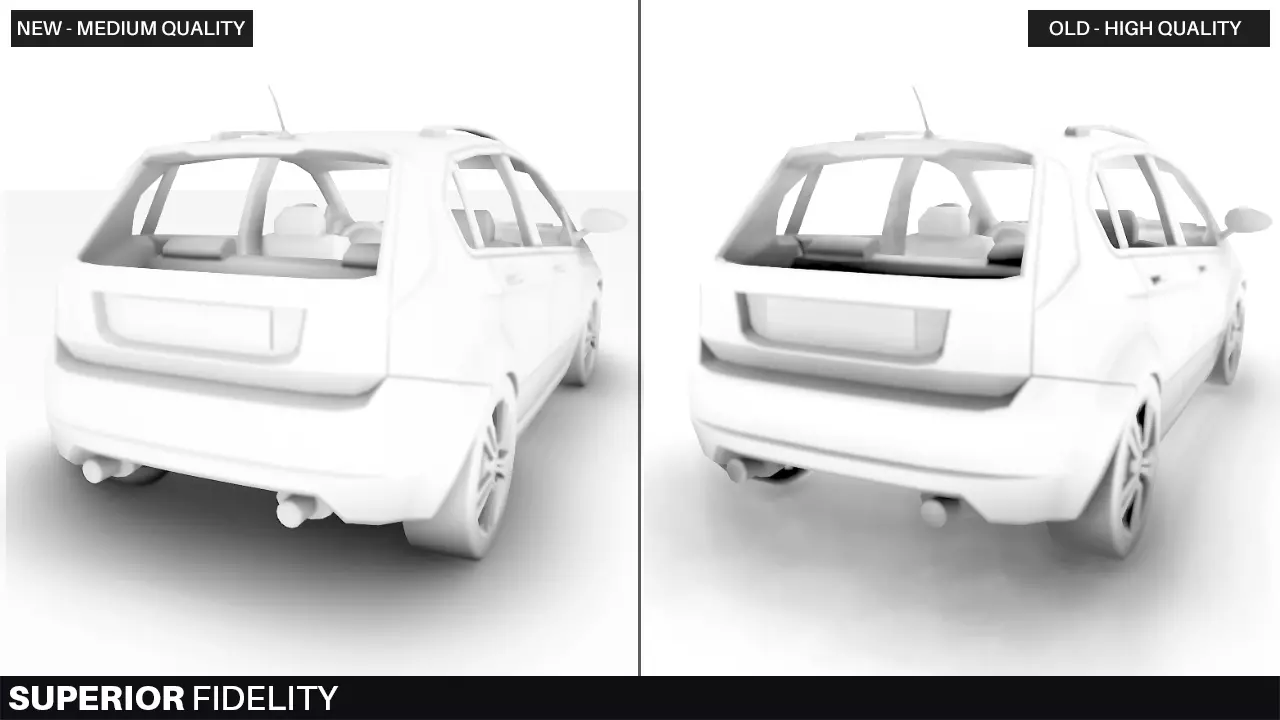

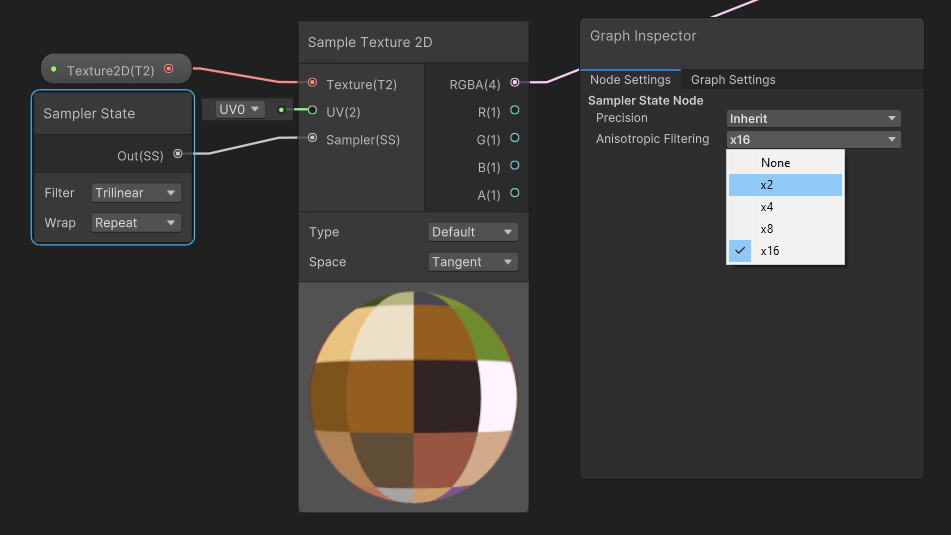
Can somebody tell me what is the issue?
plain mural
how do i switch the active hdrp asset during runtime
dawn sorrel
sinful locust
I see that HDRP added a compositor shader which allows camera stacking, but the ...
Maybe you can render them in a custom render pass with a custom FOV?
sinful locust
dawn sorrel
Maybe you can render them in a custom render pass with a custom FOV?
I have been looking into what something like that would entail. Thinking CustomPassUtils.RenderFromCamera(ctx, viewCam, ctx.cameraColorBuffer, ctx.cameraDepthBuffer, ClearFlag.None, layerMask, overrideRenderState: depthTestOverride) might be the key, but not sure exactly how to present these objects. I am thinking ill need to scale their distance and size from camera by some factor and make sure they render behind near field objects.
dawn sorrel
@sinful locust I think there is a breakdown of space rendering by that wacky space dudes game dev team somewhere.
Kerbal Space.
sinful locust
they do it much differently. They are using standard render and as such can use the old multi-camera hacks.
With HDRP its not quite so straight forward 🙂
dawn sorrel
Ehh. Surely you can do forward rendering into a separate render target and then blit it back somehow.