#archived-hdrp
1 messages · Page 52 of 1
 frigid nova
 turbid matrix
need to be more specific
but would assume nothing changes unless users report the issues
it seems to work for me (HDRP one)
 cursive tulip
@frigid nova If talking about PPV2 ssr,they did it on purpose probably to reduce performance hit. For SSR i would prefer Stochastic SSR or Legacy Post Processing SSR.
If talking about HDRP SSR its not broken but it needs higher sample counts for looking ok
frigid nova
yeah i noticed been using 2k rays but i still thingk legacy post processing ssr was better
 sudden juniper
Right I think i put this in the wrong channel the first time. Hey, i'm using the URP 2D Renderer and while all the lighting works with it, the VFX won't render within the scene or game views. I've looked online and just want to figure out whether this is a bug or just my lack of understanding
sudden juniper
nevermind... just realized it doesn't support VFX Graph
 solemn obsidian
hi
I have a question regarding the universal render pipeline
I switched to it since I want to create a custom shader with sphere and box masks
so i want to try the shader graph caps that require the universal render pipeline
I read in a blog that there is a deferred rendering version planned for this pipeline
what I noticed is that many interesting debug options like looking at overdraw does not get populated unless its for transparent materials
I would like to know if the deferred option is already implemented for the URP?
 waxen lantern
fyi i responded to @sudden juniper in the #✨┃vfx-and-particles channel, support for that is planned on the roadmap https://portal.productboard.com/unity/1-unity-graphics/c/116-urp-2d-renderer-support
Add support for the VFX Graph to be used with URP's 2D renderer.
@solemn obsidian deferred rendering is not yet in URP but it's being worked on right now
solemn obsidian
thanks for the information
sudden juniper
👀
solemn obsidian
In my game scene I see no difference in FPS since the frame CPU time is 12ms and the GPU time is just .8 to .9ms
waxen lantern
@solemn obsidian https://portal.productboard.com/unity/1-unity-graphics/c/10-deferred-renderer-support
We're adding the option for deferred rendering to the Universal Render Pipeline, which is currently in development and targeting 2020.2. Deferred rendering allows you to use lots of lights in your scene and maintain a reasonable level of performance.
To learn more about D...
solemn obsidian
is there a preview of 2020.2?
waxen lantern
you can track status on the product roadmap here
solemn obsidian
In the hub i see a beta for 2020.2
waxen lantern
there's a 2020.2 ALPHA but that doesn't mean the features you want are available or work
waxen lantern
no worries, just be wary
solemn obsidian
sure. In the end the difference in forward and deferred is just lighting calculation can take longer on forward if i would have large amount of dynamic lights
waxen lantern
i don't really waste my time unless a release has been in beta for a few weeks at least, unless you are just really keen on filing bug and crash reports or fix bugs yourself to help out , steer clear of alpha
solemn obsidian
is there any difference for the shader development when it comes to forward vs deferred as long as a do not access the buffers directly?
@waxen lantern that sounds reasonable and same as I like to do
I just wanted to build a custom shader and I come from UE development so I have quite some questions to avoid wasting too much time
But currently I just want to add a shader with a sphere and box mask
waxen lantern
I Imagine that they will attempt to keep things portable and abstract as possible via shadergraph anyway but i really don't know the details, you'd have to ask a dev or rummage around the graphics repo on github to see for yourself if they are far enough along even
but there will be some divergence of course
solemn obsidian
I did this in UE shader graph so I would be happy to do it with a shader graph in unity as well I just want to understand the ramifications first as I am used to UE4 deferred rendering
waxen lantern
you might want to check out HDRP the instead? if possible for your project. it's meant to compete more directly with UE4's main render pipeline
and has deferred rendering already
solemn obsidian
But it does not have a shader graph or does it?
I am currently using HDRP (checked the settings)
But anyways thanks for clarification and the update on the road map.
I checked the roadmap and found no entry in the 2020.1 or 2 section but 2020.2 seems to have not been fleshed out
turbid matrix
main difference today for 2020.2 vs older is that it has improvements on DX12 and has WAY better and more stable delta times across the engine while using DX11 (DX12 fix coming on a12, metal is stalled due to some issue)
besides the mentioned things, you'll not get any notable improvement on SRPs yet if you run it on 2020.2 instead of 2020.1
I mean today that is, as there's no 2020.2 specific SRP feats yet
this will change at some point, just trying to say what there is right now
@solemn obsidian
also re-posting this for awareness on the deltatime thing 😄
it makes a huge impact on anything that relies on consistent DT's, no need to manually filter the dt's to get smooth movement on screen
 chilly badge
Hi everyone, does anybody know if there's a way to get the bounding volume of a light (directional, spot, point, etc.) ? It's possible to override the bounding sphere but I don't find a way to retrieve it.
 fallow thunder
I would like to create my own shader terrain in HDRP in order to use triplanar/parallax. Is someone have some tips/documentation to read for me ?
I think that if you set the useBoundingSphereOverride property to false, you will recover your light ? Is this that your are looking for ?
chilly badge
Thanks for your answer @fallow thunder. I am not trying to get it back, I am just trying to find a way to have access to the regular bounds of a light. I mentionent the possibility of overriding a volume because it seems strange that you can override it but not access the regular one.
fallow thunder
Is the bounding sphere correspond to the light range ?
chilly badge
Yeah but not for the directional light
fallow thunder
For directionnal light, i think the bounding box correspond to the fade distance ?
chilly badge
It could be yes.
fallow thunder
I have check all exposed property, and I think you have to compute it if you need it.
chilly badge
Yup unfortunately
fallow thunder
Did you check if the default value of OverrideBoundingSphere is equal to the light boundingSphere ?
chilly badge
Nop, but that's a good idea !
solemn obsidian
@fallow thunder For your triplanar mapping search for it on youtube there is an UE tutorial I watched it was quite good you should be able to find it. The presenter introduced it to use a snow shader
So maybe also search for snow shaders
I ported my UE shaders to unity and it was like one to one beside some minor different naming conventions and how shader parameter are defined.
But the math and nodes are one to one
@all I read somewhere in the forum that the shader graph is also available / usable for the HDRP render pipeline? Can someone verify it. I would like to use deferred rendering but also would like to use the shader graph tool...
 rich spade
@solemn obsidian shader graph is available for both SRP's URP and HDRP.

 scarlet hull
^ need to change the terrain material to a urp compatible one
 dusty hearth
@scarlet hull How
scarlet hull
In terrain settings, you can assign the terrain material to use.
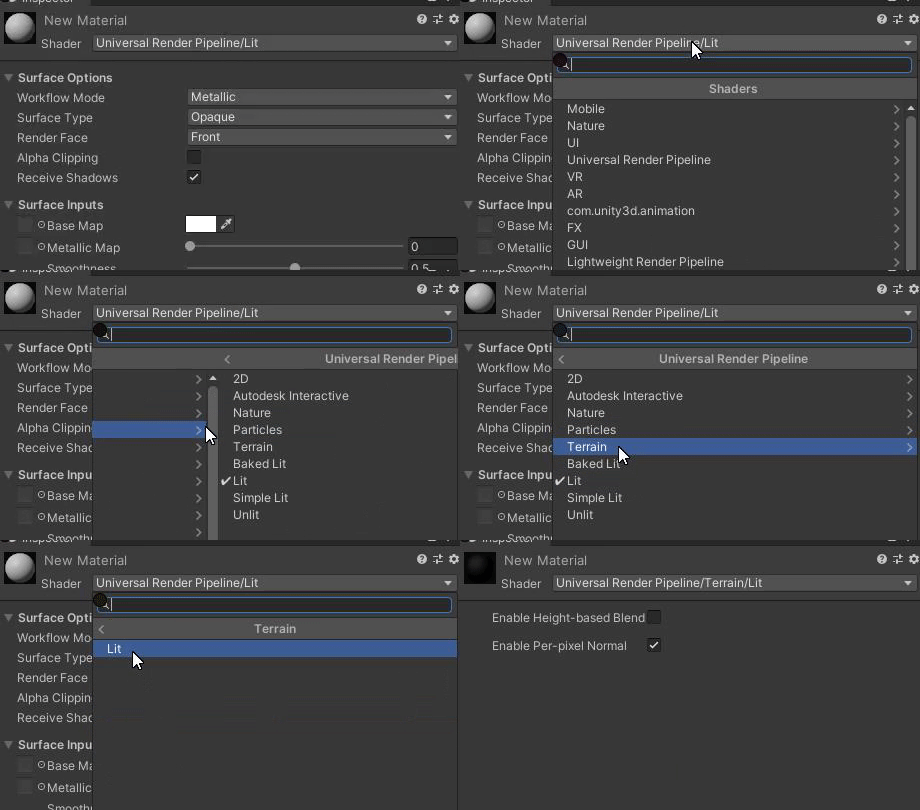
Pick the default URP terrain from URP package, or create a new material using the Universal Render Pipeline/Terrain/Lit shader
scarlet hull
Dropdown list of the shaders, on the material inspector
I guess that you were using the default terrain material, that is read only, so URP could not properly upgrade it
 raven valley
Also note, if you were using any custom shaders. You will have to rewrite them to work properly in URP.
 lyric burrow
Hey guys, Im just about to start development on a VR game for my masters project and I've been looking into render pipelines a bit more. Just wondering in your opinions, should I develop it using the URP or just the BRP?
scarlet hull
@dusty hearth Like I said, create a new material, set it to use URP/Terrain/Lit shader, and assign it to the terrain
 robust gazelle
In Unity 2019.3.9f1 modifications to the Sky and Fog Volume object (HDRP) don't seem to be able to be saved. Has anyone else experienced this? :0
Happens regardless of whether or not the object is in a prefab or in the scene
dusty hearth
@scarlet hull I can't find URP/Terrain/Lit shader,
scarlet hull
Can't do better then that https://i.gyazo.com/946ac685fd74c3bf98b23840e012e445.gif
 dusty hearth
Thanks!!
 valid dock
also re-posting this for awareness on the deltatime thing 😄
@turbid matrix whoa... where does this graphic come from?
turbid matrix
@valid dock from my testing
turbid matrix
Basically every Unity version between Unity 3.5 and Unity 2019.2 on my computer is like the green part of the chart,
every version between 2019.3 and 2020.2.0a7 are like the red part and after a8 it works like the blue part
it's amazing now
yes, you don't need any filtering, DT times are now rock solid on DX11
valid dock
so the green is like... constantly jumping between the high and low parts?
turbid matrix
yeah, I dunno what's up with that
valid dock
i wonder if its stable enough to run a music sequencer sort of thing on the a8 update
turbid matrix
there's similar issue still with windowed mode if you have monitors on your desktop that run at different refresh rates
but it's not related to the 3.5 - 2019.2 oddity, I actually tested it to do that weirdness even with single monitor
windowed fullscreen and exclusive fullscreen both are fine even on the mixed monitor setup
music sequencer?
btw, related thread here: https://forum.unity.com/threads/time-deltatime-not-constant-vsync-camerafollow-and-jitter.430339/
it's a long thread
@valid dock for ref, this is how deltatimes used to be on unreal 4.22
do note the larger scale
ue actually has like 3 groups where it lands the DTs at
two that overshoot above and beyond the target and one in the middle that somewhat on the target
but the variance +- is way bigger than even on the older Unity versions
valid dock
music sequencer?
@turbid matrix on multiple occasions I've tried building step-style sequencers in Unity, using an Update() in a MonoBehaviour to trigger note events, but the timing is never stable enough... lots of ugly jittering
turbid matrix
ah,you mean like that
basically this change makes it sure you get actual time spent rendering the frames instead of just timing the time diff between the two main loop runs (like it was done before)
I dunno if you should do music sequencer that is tied to the particular users monitor refresh rate though
valid dock
hehe well i agree, but unless i want to delve into writing native audio plugins for Unity, it's the highest resolution tick you can get
 silent mortar
Currently using URP on a 2D project, and have noticed that changing the the sorting layers position for my particles causes the bloom effect to massively overexpose and intensify. Anyone know what is causing this?
 fading delta
ok well,,,just one more otherwise doing great , I brought over scene, had trouble with HDRP but finally got it working again, but the middle terrain is still pink which usually indicates HDRP problems but the other 8 look as expected...where would I look to fix pink terrain in middle ? all the others are named with very long alphanumgeric, center just says New Terrain...
scarlet hull
Try manually assigning a HDRP terrain material to this terrain ?
 split spire
Has someone used the HDRP volumetric fog for underwater ambient before? I try to achieve like this effect, but here the water plane is opaque and the refraction is not working when it's opaque.
And when I set the plane to transparent, it's somehow rendered after the fog. How can I make the fog rendered after transparency?
turbid matrix
I see that Amplify Shader Editor beat Unity in this :p
finally tesellation options for custom shaders on URP and HDRP
 indigo summit
shame. . . shame. . . shame . . . :p
@turbid matrix should've also post that on #archived-shaders channel
oh wait you did 😄
turbid matrix
yup 😄
https://github.com/Unity-Technologies/com.unity.demoteam.digital-human.sample
https://github.com/Unity-Technologies/com.unity.demoteam.digital-human
https://github.com/Unity-Technologies/com.unity.demoteam.attributes

GitHub
Character sample featuring the digital human from 'The Heretic'. - Unity-Technologies/com.unity.demoteam.digital-human.sample
GitHub
Library of tech features used to realize the digital human from 'The Heretic'. - Unity-Technologies/com.unity.demoteam.digital-human

GitHub
Library of attributes common to packages in com.unity.demoteam.* - Unity-Technologies/com.unity.demoteam.attributes
split spire
And when I set the plane to transparent, it's somehow rendered after the fog. How can I make the fog rendered after transparency?
@split spire Nvm I just found the "Receive Fog" toggle in the transparent material inspector
 candid basin
I am generating a render texture in URP, and when I use the frame debugger, I get this result (when I zoom in lot)
As you can see, on the left of the pure white section, there is this vertical strip of pixels that makes the transition between the gray and the white
how can I get rid of this? I want a hard cutoff between gray and white
I'm have set the following settings for my render texture
and for the 'baseDescriptor' variable I use this
so "renderingData.cameraData.cameraTargetDescriptor"
ah!
since I was using the cameraTargetDescriptor it seems it was using the anti aliasing settings I set in my pipeline
 fiery marsh
Might be able to change the RenderTextureDescriptor.msaaSamples
candid basin
Yes! I tried that before, but I got a blank texture
turns out I need to set it to 1, and not 0
thanks 🙂 it works now
valid dock
are there any ways to try getting better performance from HDRP volumetrics? @turbid matrix i kind of remember you mentioning something about being able to change the resolution of the volumetric grid?
i really only want to use it for this spotlight in the scene and don't need it anywhere else... could a BoxVolume help with that?
turbid matrix
besides being able to set the volumetrics values per volumes on newer HDRP, I dont think there's any other major things
 glad tartan
last time I checked the volumetric fog wasn't that expensive. IF you are using a version of HDRP that supports the resolution percentage then the runtime debug profiler should also be working (For me this is only with 2020.2 alpha and Staging branch from GitHub). You can check that and see how things are performing on the GPU and CPU
glad tartan
It's the builtin runtime debug display for HDRP
Open it
Keyboard - Ctrl + Backspace
Gamepad - Press the two joysticks in a once
Navigate
PC - Arrow Keys
Gamepad - D-Pad
(Left and Right open/close foldouts)
Change Tab
PC - Page Up and Page Down
Gamepad - Left and Right Bumper/shoulder
Pin A Stat to Screen
PC - Enter
Gamepad - Square (Playstation) X (Xbox)``` opal bison
Does someone know why my WebGL build renders pink stuff with a custom shader?
it doesn't happen in Mono build
candid basin
Anyone else get this error when starting a new URP project?
Fixed it by changing the path of my project, weird
scarlet hull
Path to long ?
candid basin
yup I suppose
 drifting vault
its show only probably correct FPS
turbid matrix
And here is the blog for the heretic char: https://blogs.unity3d.com/2020/05/13/the-heretic-digital-human-package-out-now/

Unity Technologies Blog
When we revealed our short film The Heretic, the question you asked the most was, “Are you going to release this?” We’re happy to tell you that one of the ...
glad tartan
its show only probably correct FPS
@drifting vault
Yea, currently this only works correctly with the latest HDRP from GitHub and 2020.2 alpha. It might be backported to 8.x for 2020.1
drifting vault
alright, but you able to enable that in game too or in editor only?
glad tartan
it's for both
But you have to have the setting enable on the HDRP asset Runtime Debug Display for it to be included in the build (Development Build).
It also makes the build time a lot longer because it has to build all those debug shaders
drifting vault
hmmmm, thanks, will try that
 halcyon epoch
Default Renderer is missing, make sure there is a Renderer assigned as the default on the current Universal RP asset:UniversalRenderPipelineAsset UnityEngine.GUIUtility:ProcessEvent(Int32, IntPtr)
need help
i got this error when i installed the pipeline asset into my project settings
 elder merlin
Have you watched a video on upgrading to URP @halcyon epoch?
There a step-by-step guides on this process
halcyon epoch
i did, because i wanted to do 2D glow effects
and i followed it to a T and this happend
@elder merlin
elder merlin
Do you have a pipeline asset assigned under the graphics settings?
fiery marsh
@halcyon epoch Check your URP asset, it needs to have a renderer assigned (either Forward Renderer or 2D Renderer) at the top. Perhaps it used to have the forward renderer but you deleted it and created a 2d one but haven't assigned it?
halcyon epoch
you were right i didnt assign the 2D render
but now i did do that,
and now everything in the scene is bright pink, all my backgrounds and the player is just not visable, there still there because i can see the outline when i select them in the hiearchy htough
@fiery marsh
example
elder merlin
Have you done Edit>Render pipeline>Upgrade project materials?
halcyon epoch
ah thank you, though, one thing, my background is just white now, but my player is there
(btw im all new to this so sorry if im being smooth brain)
elder merlin
This is why I asked if you watched a video on upgrading...
halcyon epoch
i did they never went through those steps i swears
elder merlin
You'll need to edit the material on your background
 proper raft
anyone here tried shadowcaster2D with URP?
It takes up 8ms frametime at spikes and really high GC
valid dock
It's the builtin runtime debug display for HDRP
@glad tartan hmmm doesn't open for me... found a post on the forum from more than a year ago talking about it so i'd assume that me using 2019.3 isn't the problem...
any old build should be able to open it with CTRL-BACKSPACE?
glad tartan
It works on basically every version of HDRP
valid dock
:/
glad tartan
but in a build it needs to be a Development build and you have to enable the runtime debug display on the HDRP asset
valid dock
ah makes sense. its enabled on the HDRP asset, but its not a development build
will try that, thanks
glad tartan
yea, if it's not a development build HDRP stirps it from the build
strips the shaders/code
With it enable it will significantly increase the build time though since it will be compiling a lot of shaders
 austere bane
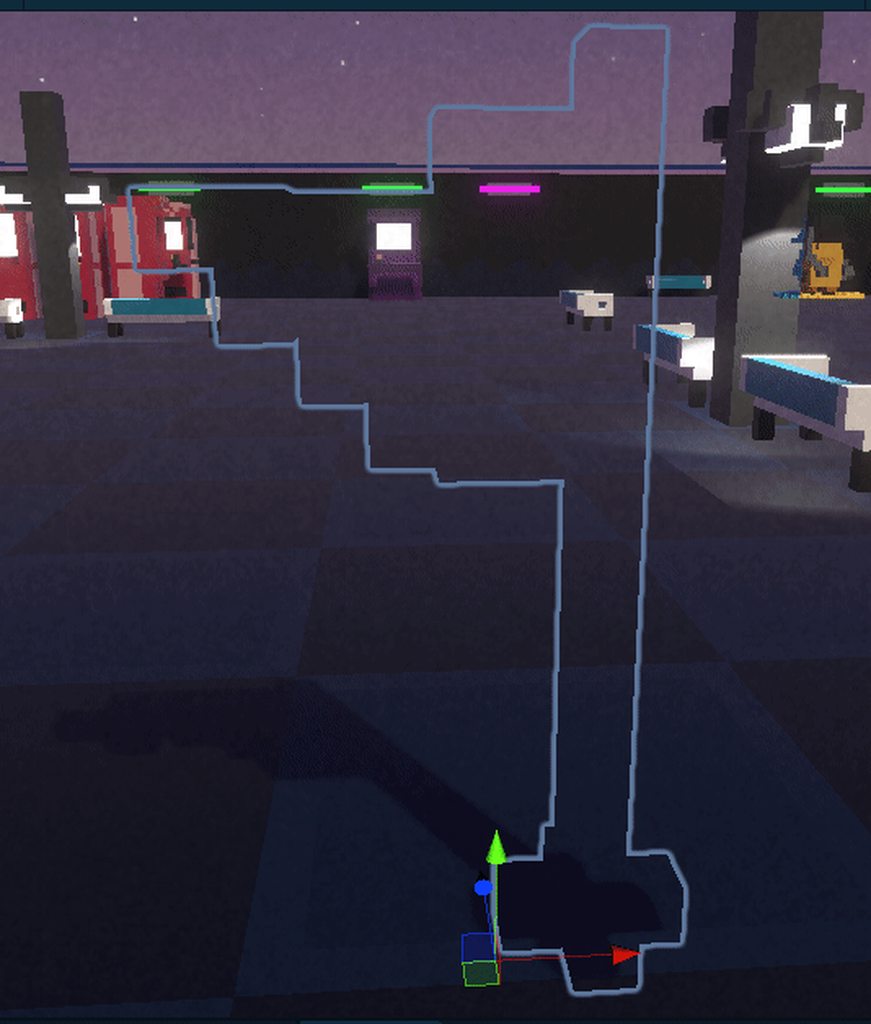
im giving my flag a layer for collision so it doesnt collide and such but for some reason it doesnt render when i apply the layer, but when it is on default its normal https://i.imgur.com/fVaEfh8.gifv could anyone help me?
I got my camera culling mask set to everything too just flags dont appear not sure why not sure if this is the right place
 halcyon epoch
whenevr i add any new sprites or animations the whole thing is just black, how do fix
nvm fixed it
valid dock
@glad tartan so its working, but when i expand CPU timings and GPU timings in the Display Stats menu, everything is 0.00
seems like that's where i'd want to be looking to understand what's eating up time in the render loop, no?
glad tartan
yea that's the part I'm saying only works with the latest HDRP from GitHub and Unity 2020.2 alpha
valid dock
ohhhhh... lol what's it even doing there if it doesn't provide any actual data?
glad tartan
the changes will probably be back ported to 8.x and 2020.1 but right now it only works with the latest
not sure. It's been there ever since work started on it but only now just started to work
valid dock
weird... that seems like it'd be very useful, but i can't port to 2020.2 🤷♂️
glad tartan
Yea, I guess we'll have to wait and see if it will come to 2019.3 and HDRP 7.x
currently I've seen a video by Unity saying it works with 2020.1 beta so 8.x should be getting it
not sure about 7.x though
valid dock
i'm doing my dev on an Oculus Quest w/ link cable at the moment so FPS is capped at 72fps, and in my problematic scene, framerate is down to half that. if i turn off volumetrics, it'll climb up to 72fps, and strangely sometimes when i turn the volumetrics back on, it maintains the 72fps
very mysterious 😦
only sometimes... other times, it drops back down to 36fps
glad tartan
Hmm yea. Not sure what's happening there. Maybe attach to the frame debugger and look though that and see how things are performing
valid dock
debugging HDRP + VR is the worst
glad tartan
different hardware will run things differently so maybe volumetric fog is really heavy on it
valid dock
yea... its running on a 2080ti so i figured i'd be fine
valid dock
w/ VR?
glad tartan
there are some talks on it and about optimization. Not sure if you've seen them
valid dock
nah
glad tartan

High-Definition Render Pipeline (HDRP) is now supported for tethered virtual reality (VR) headsets. Learn about the types of applications this unlocks, the supported features and constraints to be aware of, and what it looks like to build an HDRP project to VR.
Speaker:
Fabie...
 idle robin
is it me or is the 'double sided' flag ignored when objects are seen through drx'ed glass?
glass on/off
split spire
Is it possible to make changes directly to the render pipeline? I want to change the LightEvaluation.hlsl so that the Directional Light cookie is projected under a specified height.
scarlet hull
@split spire please do, the code is open source here : https://github.com/Unity-Technologies/Graphics
GitHub
Unity Graphics - Including Scriptable Render Pipeline - Unity-Technologies/Graphics
split spire
Do I have to create my own render pipeline? I just want to use the HDRP with slight changes in one script
scarlet hull
Packages are read only, if you want to alter HDRP code, you will need to have a local copy of it
@idle robin Any specific setup ? What HDRP version ? 'cause apparently, this should work.
split spire
Alright thanks, @scarlet hull
idle robin
@scarlet hull 7.3.1 and 2019.3.7f1
ohh wait.. got an idea..
no wasn't it.. it's really simply not showing any backfaces.. bit in a rush so I'll just copy and invert all vegetation geo 🙂 would be nice if this worked!
so it's not in refractions and not in reflections
raytraced shadows and AO are fine
I think.. doesn't look strange at first glance
and more strangeness...
that gray area in gloss=0 and metal=0 .. yet it has perfect reflection when viewed through glass
scarlet hull
Could be worth entering an issue with your scene/project attached
turbid matrix
@split spire easiest way is to just find the package you want to move from library/packagecache and move it to packages folder (same folder where manifest.json is)
that way you don't have to actually update the manifest at all for the custom version but at the same time Unity will not overwrite your changes automatically on project open
of course in ideal case, you'd just fork or clone the Graphics repo and make your mods there so you can version custom changes
 weak bluff
Is camera stacking possible with URP 7.3.1? Their documentation seems to suggest it is. I can't get my overlay camera to work
turbid matrix
did you follow the docs instructions?
it works differently from the old approach
@weak bluff
weak bluff
I believe so - I'm having issues getting my overlay UI to work. World space UI does work, however
Ok, I'm still having an issue with the screen space canvas getting reset to the base camera on play
So it prevents me from seeing my overlay UI, until I manually reset the canvas to target the overlay camera
("render camera" field gets set to point to main camera in play mode)
weak bluff
I ask because the only way I seem to be able to get line renderers to render in proper order as UI elements seems to be to use a screen space canvas, rather than an overlay one
turbid matrix
I don't honestly get the issue
if one of the cameras can still render the UI, why you need to have it on another
weak bluff
Because when using the screen space camera canvas, two cameras are needed to avoid having post processing affect the UI
overlay canvas would work, but the problem with the line renderers still exists (which admittedly is a bit more of a specific problem than what I was initially asking)
weak bluff
I ended up fixing my render order issue by switching to a custom line script from the Unity.UI.Extensions project (and sticking with the overlay canvas)
turbid matrix
now also on asset store: https://assetstore.unity.com/packages/essentials/tutorial-projects/the-heretic-digital-human-168620

Get the The Heretic: Digital Human package from Unity Technologies and speed up your game development process. Find this & other Tutorial Projects options on the Unity Asset Store.
 crimson vortex
Everything I have read about Occlusion Culling indicates that static objects that the camera cannot see, should not render. I have an area that no matter what I seem to do, impacts my GPU despite it all being behind a wall. I even tried baking an Occlusion Area to no effect. All my objects are static and have dynamic occlusion culling checked off. It is like the wall is just not there at all. Any ideas as to why this is happening? I have spent days trying to discover what is causing this issue and am flat out of ideas. It is not a single object but rather the sum of them that causes the issues which ultimately impacts my frame rate in an unacceptable way. I welcome any tips you may have as maybe I missed a little option somewhere. I am using the Universal Render Pipeline on 2018.3.13f and my target platform is Android.
rich spade
@crimson vortex there is an option in the baked culling area to visualize the cull, or might be in scene view at top. Anyway, you should pause game when you are at the wall and have a look in scene view to see what is getting culled and go from there. May require some tweaking of the culling parameters. Check the wall has an opaque shader, no windows in the wall etc.?
You may need to do some manual culling, using box colliders as trigger zones in worst case.
 wise hornet
I have semi large project and i'm using URP. I'm going to change URP to HDRP. what things to consider when change SRP?
 icy onyx
i am using the hdrp but the shadow sides of my objects are extremely dark how can i make it brighter
elder merlin
By baking indirect lighting
 hazy yoke
@icy onyx or running your own post effects on the shadows
 abstract canopy
I'm trying to render objects on top of everything (like the guns in a fps game) this used to be done with camera overlaying but now it supposed to be done with custom passes, The problem is that i cant get anything to render on the screen with custom passes can anyone point me in the right direction?
glad tartan
Which Render Pipeline are you using?
abstract canopy
HDRP
hazy yoke
Ive hacked it before but havent used CustomPass, I can take a look in a sec
abstract canopy
I can use the built in stuff to overlay but i want to use a custom one to override the fov later
hazy yoke
sure, makes sense
abstract canopy
I just want to know how to draw something to screen with it
hazy yoke
how have you set it up in the scene?
abstract canopy
I have an object with a custom layer
hazy yoke
with the custom volume
abstract canopy
yeah
Do i need to always use the DrawFullScreen to add it?
What i mean is do i need to use The DrawFullScreen and pass the buffer to a shader to draw on the screen?
hazy yoke
seems like there is already a class for DrawRenderersCustomPass which might be easier to inherit from. But looking at it, nothing is immediately jumping out as wrong. @scarlet hull may have a better idea though
abstract canopy
i'll take a look thanks.
Its seems like the DrawRenderersCustomPass was deprecated on versions above +7.1.8
 steel fable
I made SUPER COOL FIREWORKS using Unity....check it out.I hope you wanna tag along.so if you are interested , subscribe....
It's in the #✨┃vfx-and-particles
Check it out
 dawn sorrel
Is there any way to make a density volume in HDRP not look like rounded circles after applying a density mask? Like when I move in a certain direction it looks like it's throwing light out in all directions.
Actually I can just sit there and look and it's like pulsating outwards
crimson vortex
@rich spade Check out this video where I face the camera at a wall with 2 additional scenes behind it that I turn off. I show that Occlusion culling is turned on which should mean those 2 additional scenes should not be rendered yet, when I turn them off, you can clearly see a massive drop in draw calls. This should not be happening right? https://youtu.be/DANbFg3DvV4

Check out this video where I face the camera at a wall with 2 additional scenes behind it that I turn off. I show that Occlusion culling is turned on which should mean those 2 additional scenes should not be rendered yet, when I turn them off, you can clearly see a massive dr...
@rich spade here is the Backed Lightmao Culling view of the same scene. https://youtu.be/XAJyfgkIh2k

In reference to this video: https://youtu.be/DANbFg3DvV4
abstract canopy
Even tho i got the custom render pass to work i cant find a way to override the camera fov

rich spade
@crimson vortex check the culling panel
I setup 3 rooms same as you did and result with occlusion was
I didn't do anything fancy other than make sure they were static items.. and yea it's not perfect. But could probably be improved with some tweaking.
candid basin
does anybody know if fixes like this
To reproduce: 1. Open attached project; 2. Make sure "Depth texture" is enabled in Universal Render Pipeline asset; 3. Build and run...
get backported?
it's 'marked in 9.0.0' ...
 tardy zealot
Has anyone tried adding spot lights on URP? It seems like it doesn't show up
frigid nova
Okey bois i got a big problem its seems in HDRP when i have my mask (ao,raughness,metalness) texture enabled and try to add a detail map texture it does not work together, when i remove the mask(ao,raughness,metalness) texture ,the detail map works,How am i supposed to work around that?
frigid nova
they are packed correctly since it seem to work correcty when i remove the mask texture
turbid matrix
Yes that is expected
frigid nova
so what should i do copy paste the detail map inside the mask map
turbid matrix
Fix the mask texture
You dont put detail map to it
But it's mask
Look at the mask maps description
frigid nova
yeah but how am i supposed to scale it?
abstract canopy
But the details mask is different from detail map
turbid matrix
It literally tells where to apply the detail map
frigid nova
yeah but how am i supposed to sacale it individually from my smoohtness and th ao ect?
turbid matrix
If you have black channel for it on mask, you dont get detailmap rendered
frigid nova
so if i put white then its gonna render my detail mask?
turbid matrix
Make custom sg if the stock shader isnt enough
turbid matrix
But yeah white in masks detail channel will do
Was it blue channel.. Docs say it anyway
frigid nova
lets hope cause the older lit meterial had a detail normal that was working pretty good, no worries i got it bookmarked cause i never remeber them too on the top of my head
turbid matrix
I know metal is red and smoothness is alpha, never remember which way ao and detail mask were
 coarse blaze
could you make your own render pipeline?
abstract canopy
Yeah
coarse blaze
Cool!!!
abstract canopy
But it's killing just to edit the already made ones.
 tight ingot
So I got my scene
But if I slap a green material on the plane instead, everything gets darker
Im using the Unity HDRP
I would like to know what is causing this
the material is simply this
 broken lichen
@tight ingot Isn't the auto-exposure lowering the exposure because of the bright green plane?
 sterile cairn
Is it possible to replicate this type of lighting using the LWRP? I'm not sure if the lighting involves a shader or if it's entirely normal mapping.

Real-time lighting effect on 2D sprites in Unity3d. (test game)
To use Normal maps for pixel art animations, you have to make a new material & normal map for each sprite.
waxen lantern
@sterile cairn lighting effects with normal mapping must involve a "shader" program one way or another. i think you may be asking if this can be achieved with URP's built in materials / shaders, or if you need to author a custom material / shader.
sterile cairn
My bad, yeah, that's what I meant.
meant to ask if it involved a custom shader rather than some normal mapping trick
waxen lantern
@sterile cairn no worries and yes the good news is this is a built in feature for URP's 2D renderer

We created Lost Crypt using the complete suite of 2D tools. This lively scene features animation, light effects, organic terrain, shaders, and post-processing, all made natively in 2D. It shows how teams and projects of all sizes, targeting any platform, can now get more engag...
sterile cairn
oh, awesome. I'll take a look, thanks!
waxen lantern
@sterile cairn to elaborate a bit on that distinction: everything in computer graphics is a trick, made up, fake, etc. the question is: it from the engine's bag of tricks or your own? I'm getting a bit philosophical but i find that reminding myself of this helps me understand and articulate various abstractions in the evolving landscape of computer graphics. I don't mean to be pedantic or single you out, it's just been on my mind 🙂. a lot of time to contemplate in these days.
sterile cairn
You're fine, mate. I'm a game dev student at uni, so I have to get into that kind of thing sooner or later lmao
completely new to working with render pipelines and shaders, so the most I understand is the basic workflow and not how to actually implement it
 prisma sparrow
I just got this problem where all post process are disabled when i make a build
its looking fine in the editor
is there somehow some low settings that is overriding or some shit
i need this fixed asap :S
it looks like its ignroing my global volume and just using the default settings, but everything works fine when i play in the editor
 pine bloom
Im not entirely sure if this is a #archived-shaders question or not, so ill ask anyway hoping someone can point me in the right direction o.o
The artists on my team are using Substance Painter to generate all the various texture maps for PBR materials, however in Unity 2018.3.14 with HDRP 4.10.0 it looks very different than the screenshots from Substance Painter they showed me, it seems like the HDRP standard material doesnt have all the correct channels for AO, Metallic and Roughness maps, then the Height map offsets everything way too much that it looks ugly or "invisible", so the only 2 maps that seem to work flawlessly is the Normal map and Base map, but then everything just looks flat and uninteresting, unlike their screenshots - any ideas? (and I can provide screenshots or any other details that may help, im just not sure what to share - im just trying to implement their already complete assets to the game, I dont understand much of how these shaders actually work, the artists have experience in Unity, but not with HDRP, as same with me)
pine bloom
@prisma sparrow if you find your render pipeline asset file in your project that your using (in Edit > Project Settings... > Quality), under Render Pipeline Supported Features, do you have "Volumetrics" turned on? And in "Default Frame Settings For ..." under "Rendering Passes" there is "post processes" is that also on? Then the only other thing I can think of, is if you go into Player Settings, in "Other Settings" closer to the bottom, your "Managed Stripping Level" could affect shaders (meaning it could also affect post processing, depending on your releasing platform) - outside of the general check that your camera has a "Post Process Layer" component, using the correct layer and trigger, and that its enabled, and you have somewhere in your scene a "Post Process Volume" that is also enabled and set to global and has weight at 1 (meaning it takes top priority over other post processes) - see if you can make a Text object and display to it the name of the post process volume your using, if its enabled, if isGlobal is true, and other settings from it, so you can 100% confirm if your build is even finding the post processes to begin with, and that it is technically enabled (because if that Text object says it DOES find it and it IS on and everything is similar to your Editor settings, then something else may be the issue) - also, are you using HDRP or LWRP?
dawn sorrel
how do i change my project to use the standard rendering pipeline? I am a total newbie to unity
valid dock
Im not entirely sure if this is a #archived-shaders question or not, so ill ask anyway hoping someone can point me in the right direction o.o
The artists on my team are using Substance Painter to generate all the various texture maps for PBR materials, however in Unity 2018.3.14 with HDRP 4.10.0 it looks very different than the screenshots from Substance Painter they showed me, it seems like the HDRP standard material doesnt have all the correct channels for AO, Metallic and Roughness maps, then the Height map offsets everything way too much that it looks ugly or "invisible", so the only 2 maps that seem to work flawlessly is the Normal map and Base map, but then everything just looks flat and uninteresting, unlike their screenshots - any ideas? (and I can provide screenshots or any other details that may help, im just not sure what to share - im just trying to implement their already complete assets to the game, I dont understand much of how these shaders actually work, the artists have experience in Unity, but not with HDRP, as same with me)
@pine bloom hdrp changed the format... now it combines metallic, smoothness and a few other things into a “Mask Map”. Do some searching on that and you’ll find the details. An artist I work with was able to export from substance in that format
pine bloom
Ah ok, thanks for the info!
turbid matrix
@valid dock @pine bloom channel mapping is actually the as on HDRP than it's on standard besides the detail mask going into that blue channel, it's just many didn't realize this packing on standard as they put those entires separately on the material
as for things looking different on Substance Painter vs Unity, unless you really have some material conf issue, it's due to differences on lighting and PBR shader implementation
it's never going to match 100% on both
people have same "issue" on unreal too
there's been shaders that try to mimic game engine x visuals on substance painter but I don't think anyone did one for HDRP
I personally just use substance live link to mirror the material in SP to Unity in somewhat real-time
good thing is that it works... bad thing is that Adobe kinda dropped this livelink alraedy, it's now only available through substance share and I had to manually modify it to support Unity's HDRP
the version you can download there only works properly on built-in renderer
@pine bloom I also just checked latest substance painter export options. There's already HDRP template on the export settings, may as well use it if not already
pine bloom
Hmm alright, ill share this with the art team and see what we can make of it, thanks for the clarification and tips - I imagined a 100% one-to-one probably wasnt possible just cause Substance Painter has simulated lighting which would be vastly different than how Unity handles lighting, but even still it should at least look somewhat like what Substance produced, in color at the very least and depth/level of detail in the textures and such, which really is a matter of linking the correct maps to the correct channels, but I didnt know how it combined the channels, so we may need to do some re-exporting
turbid matrix
SP has IBL
it uses cubemaps to light the model
basically you could get cube capture from Unity from your scene and feed it to SP
but there would still be differences in the actaul shading model
all PBR shaders are not a like
there's a notable visual difference even between Unity's built-in PBR, URP and HDRP shaders all
 jagged canyon
so in URP
this clamp value doesnt do anything?
huge values, tiny values, I cant see any change
 last cipher
do you have HDR on? having it off pre-clamps it, afaik. i could be wrong though
 random knot
What is the best way in URP to have a transparent object that receives shadows?
I've found some shader solutions but they only work on the legacy renderer
rich spade
@random knot URP transparencies does receive shadows, although was an issue for a while. I can confirm in 7.3 as I was testing few days ago and it does work. Should be on by default but you can also toggle it in the universal renderer asset.
random knot
in this case, I want to make an object that is fully transparent except that it draws all shadows it receives
like a matte shadow
rich spade
as transparent does not block light it will look odd as shadow will still show through, but it should receive shadow. Not sure if it's based on opacity as to how much though, best to test.
random knot
so I should create a standard URP shader? no special shaders required for this?
rich spade
yea try with standard set to transparent and see how it affects a cube for start, it maybe dependant on opacity. if that is the case it may require some creative thinking to get effect you want.
random knot
it is dependent on opacity
can I get shadow information in shader graph? or will I need to handwrite a shaderlab shader?
frigid nova
So does anyone know if OctaneRender works on unity hdrp 2020?
random knot
i figured it out
for anyone who wants to know how to do this, set the base map to pure white, and the blending mode to multiply
this will solid render shadows but the object will be transparent
rich spade
👍
indigo summit
say, what happened with Occlusion Probe?? 🤔
is it still require a custom tools to use it?
frigid nova
they had something new called "prob volumes" like two updates ago but they removed it for some reason,it works like occlusion probs but this was much better with its own post processing solution,They removed it but it will come back because it was experimental
turbid matrix
They removed it?
I mean, I havent used it, just havent seen any pr's that revert/disavble it
 simple vine
Can someone please explain to me how HDRP does its reflection probes?
I've spent quite a bit of time diving into the code but can't understand a thing.
Inspecting it through renderdoc it seems that HDRP uses a cubemap array for rendering reflection probes.
That's all okay
But what is this ReflectionProbe Cache?
Looking at the code it seems like this controls a reflectionProbe texture array to which reflection probe textures are copied and convoluted for mips.
In case if I understood it correctly, can I ask why it's done this way?
Why isn't it possible to just use baked textures from reflection probes directly?
It's such a waste of memory
Not to mention the necessity to convolute reflection probes in shaders
scarlet hull
@simple vine You can use whatever texture you want for reflection probes :
- Baked textures with the lightmapper
- Realtime reflection probes
- Custom pre-baked cubemaps
All this is set in the reflection probe inspector
In the HDRP asset, the cubemap size sets the size for individual textures, of the cubemap array where you set the array size at probe cache size
The cache size is "how many cubemaps are held in memory for each frame", not a hard limit by level
simple vine
I think there is a misunderstanding
I want to clarify what the Reflection Probe Cache actually is.
Inspecting the code it seems like it's just a texture array to which the reflection probe textures are blitted and convoluted
scarlet hull
Yes.
simple vine
And my question would be "why even have such a cache? Is it not possible to just use the textures directly and not blit them to a cache just to convolute GGX?"
Because that would mean if there is a new reflection probe in the view that wasn't seen previously or was missing from the cache, there are now 36 blits of the size of 256x256
6 for all faces times 6 for all the convolution levels
That will surely slow down the GPU
So, why is this even a thing? Is there a technical reason for it?
scarlet hull
I'd say that the array is to have better control on memory. As for your concerns about the convolution, you got a good point here and I will try to find answers.
simple vine
Is there a way to create a texture array and bind it to the GPU by utilizing already existing textures and not just blitting to its RenderTargets?
scarlet hull
Copy texture should do it. Well, still pretty similar.
simple vine
Oh, so a texture array is just a single object on the GPU and you can't have it reference already uploaded singular textures?
scarlet hull
Dev decided to use a texture array to overcome the limit of 32 textures/shader, as in HDRP reflection probes are applied pr pixel and not per object
simple vine
You have to fill it out yourself exclusively?
scarlet hull
Yes, a texture array is a single object on GPU, and not resizable
 woven sonnet
@simple vine Yeah, it's a single object and we don't support bindless texturing otherwise we would be able to dynamically use any cubemap in our array without copying it
woven sonnet
Well, the whole point of the cache is to avoid cubemaps being updated every frame, so if that happens, there is a problem somewhere
simple vine
Yeah, also true
But still, such a thing will just require you to constantly hold double the data.
A set of reflection probe textures that come from vanilla unity and the cache that comes from HDRP.
simple vine
Is it really? IIRC Unity uploads the texture data as its referenced. So, Vanilla Reflection probe references the reflection texture -> texture gets uploaded to the GPU as soon as its loaded, no matter if the probe comes from a scene or a prefab.
You still need them present on the GPU memory in order to blit and convolute them into the cache
scarlet hull
But once it's in the cache, you can release the original one
simple vine
Until you exceed it that is, then you'll need to blit them again if a requested texture is suddenly not in the cache
scarlet hull
yep
simple vine
But I get the reason now, you need to blit into the texture array because the texture data needs to be linear in memory
Thanks
scarlet hull
Quote from a dev :
Because we want to potentially support multiple BRDFs. Besides, preconvolution is how legacy unity currently works and adds TONS of import time for texture as well as space on disk.
Here on the GPU it's much quicker and also done at the right optimal resolution chosen for the current quality setting.
Did you have any particular reason to raise this concern ? Frame drop on a project ?
simple vine
No, I was just curious mostly because I could imagine 2 ways how this workflow can create trouble (higher memory consumption and stutters when multiple new probes appear at once)
I just don't think I ever saw any other rendering tech do that.
But it's reasonable, since everything needs to be evaluated once per fragment. All the lighting, all the reflection probes, etc, either in a compute shader for deferred or a fragment shader in forward. So there's no way but to use the texture arrays.
turbid matrix
I do wonder if that's why the realtime reflection probes are so slow (all that processing)
I never profiled it
scarlet hull
Yes, one realtime probe = the 36 blits per frame 😄
turbid matrix
I only briefly tested it a long time ago and was like, nope, not feasible
I'll probably test ondemand update for them for some cases where I can stop dynamic objects (for example for photo mode)
simple vine
Oh, actually Unreal does a very similar thing, only difference is that it does it on a per-level basis at the start
And it uses mips to convolute instead of same-sized textures like unity
So it's pretty similar
valid dock
having an issue w/ Oculus Quest + URP (vulkan) where shadows from a direcitonal light only draw in one eye.
this is in a newly created project. i have previously had directional light shadows w/ the same stack drawing fine in a different project.
anyone know why this might be?
 sturdy sparrow
I'm using URP. When I create a RenderPipeline asset, it creates it, but also a Renderer file which I've never seen.
Should I be doing anything with the second?
valid dock
the render pipeline asset automatically references it. don't worry about it. most of the settings you'll want to be concerned with are on the render pipeline asset itself
sturdy sparrow
k, thx
 glacial basin
I'm unsure if I should come here or head to the 3d art or even lighting areas....but I'm trying to get a 6 texture skybox working in HDRP.
The new Volume component isn't my problem....its creating the cubemap from 6 textures.
I can still create a skybox/6 sides material the old way just fine, but I can't apply it to the new volume component as it is looking for a cubemap.
And if I create a cubemap, it defaults to a list of textures at the bottom of it where I can drag textures, but it doesn't even tell me which direction goes into which slot. Furthermore, even if I drag my six textures on them, the thing stays completely white.
You can see in the little black squares that the textures are not white...they are actually starry backgrounds.
But you can see the preview is completely white.
Any suggestions on how best to author cubemaps now? It is supposed to just work with Unity making them for you out of the 6 textures but now it is now.
Thanks in advance!
glacial basin
So, I messing with Spacescape(procedural Space Skybox Generator). It actually has a cubemap export(does a .dds file). This automatically works like a cubemap in Unity, but when applied for the HDRI it comes it really blown up unless I also set the Intensity Mode and do a multiplier of 0.01, and that number seems to make it really close to the actual file.
Worse though, if I preview the .dds in the inspector, the colors are normal and not blown up.
So my issue, which was making the 6 textures all white, wasn't the method of creating the cubemap(though I still need to figure out in what order to place the 6 textures). It is that they are somehow being blown up like crazy when I try to use them unless I multiply exposure by 0.01.
Sorry, I take back part of that...the 6 texture version of the skybox still doesn't work directly, coming out all white regardless.
But using a different cubemap that is created directly as a cubemap gets blown out without the massive exposure decrease.
scarlet hull
The legacy cubemap is not supported in HDRP. Author your textures to merge them together in a six faces layout single texture, and import it as a cubemap
glacial basin
Seems like another Unity disappointment. I did not see anywhere in the docs(including the HDRP ones) about it mot supporting the old method of creating cubemaps from six textures.
Is there documentation on how best to create a single texture layout. All my google searches ended up with things about the old way of doing it(which is no longer supported). Also, do I need to create sone sort of distortion for the images before laying them out?
 glacial basin
So for the flat ones i dont have to worry about distorting the images or anything right?
And is there any software you guys know of to maybe automate the process of laying the images out?
rich spade
@glacial basin if you want to do in Unity, you could probably map your textures to quads and place into cube. Use something like https://lmhpoly.com/how-to-generate-the-environment-cubemap-in-unity/ script example. I've not tested, this. simpler still is art program etc. many other options can be found on internet.
Generate The Environment Cubemap In Unity using script. Very simple way to capture your environment surroundings into Cubemap.
glacial basin
I was also figuring that if I author the things in Blender, i could probably find a Blender plugin to handle it too. And the Spacescape one Im using(thats the name of it) also directly outputs a single dds that can be inported into Unity directly.
Thanks for the help guys!!!
 stark elbow
I'm getting some really bad shadow banding on URP when I get the shadows to actually line up with objects using the depth bias, changed my directional light to use the pipeline settings and no matter what I tweak I either get correct shadows and banding or janky shadows and no banding
 formal nebula
Hi folks,
I've got two gameobjects which are sharing a material and shader.
I want to be able to enable a boolean property on the shader per game object. So I'd have one chair with outline and one without.
How can I do this? Or am I going about this completely wrong?
 left salmon
Is there a way to make a 2D tileset cast a shadow onto itself using the Universal Renderer Pipeline?
I want to automatically generate shadows for this kind of map, because right now it is very hard to determine depth
scarlet hull
Crosspost with Shaders :
I doodled a quick tool to help you pack your textures into a single one : https://github.com/RemyUnity/CRT-Texture-Packer
Might be helpfull for HDRP Mask Map and Detail Map :)
Or any fancy shader optimisation that you might want to do.

GitHub
A texture packing tool made with custom render texture - RemyUnity/CRT-Texture-Packer
turbid matrix
wonder if one could write some nice gui to automate that bit futher 🙂
cursive tulip
@formal nebula modify it via code using renderer.material.SetFloat(<the thickness variable>,<new value>) or renderer.material.SetColor(<the color variable,<new color>) It will automatically create an instance of the material for each different object if you do it properly
dawn sorrel
In HDRP we have decal projectors.. is there any way to block a projector from going through surfaces? Essentially I have a cave under water under my terrain and I want to stop my caustics projector from going into the cave - like this image (this is my cave) and I want to stop the caustics from going inside it...
turbid matrix
@dawn sorrel if you can use separate mesh, you can just uncheck the enable decals checkbox from the mesh renderer or material (it was on either of these, I never remember which one)
additionally, there's upcoming decal layer update but it seems to be stalled atm (no work since last Feb and no PR)
dawn sorrel
Thank you @turbid matrix I'll try that if what i'm trying now doesn't pan out. Going to try an sample the main scene light and mask out the non-lit areas.
(in sahder)
shader*
turbid matrix
just note you can't read the HDRP light directly same was as you can with URP
there could be some ways to hack around this
 scenic jay
maybe reading the shadow texture of the light? the projection might be difficult
turbid matrix
I don't think it's exposed on HDRP
but I've never actually had to access this stuff myself
dawn sorrel
I wonder why they would lock out the lighting info
turbid matrix
I know there's the GI nodes but I don't know if they feed you anything but baked data
scenic jay
@dawn sorrel everyting that is not available to the unity standars gets locked town so nobudy is wining if they change it again
turbid matrix
in this case, it could be more of a question of the data not being usable as is to majority of the users
scenic jay
@turbid matrix custome nodes if the shader code has access in general
dawn sorrel
Just unfortunate honestly, but if I figure out another way to make it work I'll be sure to let you all know, I like a challenge lol
 fading rose
I would love to see this using HDRP
https://youtu.be/WTABH-f8rbE

Testing upcoming UE4.25 Niagara features.
This combines this fluidsim level below with niagara particles:
World'/Landmass/Landscape/Maps/Landmass_Erosion_ShallowWater.Landmass_Erosion_ShallowWater'
Rendering is using an experimental raymarch shader with refraction supporting...
turbid matrix
https://blogs.unity3d.com/2020/05/20/the-heretic-vfx-character-out-now/
https://assetstore.unity.com/packages/essentials/tutorial-projects/the-heretic-vfx-character-168622

Unity Technologies Blog
At the end of The Heretic, we introduce Morgan, a VFX-based character created with the help of Visual Effect Graph. Now we’re releasing it as a project on ...

Get the The Heretic: VFX Character package from Unity Technologies and speed up your game development process. Find this & other Tutorial Projects options on the Unity Asset Store.
 fair flame
In this table it says Ambient Occlusion is available for URP 7.3.1, but it doesn't show up in the PP in Unity. Might the documentation be wrong?
https://docs.unity3d.com/Packages/com.unity.render-pipelines.universal@7.3/manual/universalrp-builtin-feature-comparison.html
Nevermind, it's for surface inputs
turbid matrix
@fair flame it says "in research"
SSAO is under dev for URP but it's not even merged to master on github afaik
https://github.com/Unity-Technologies/Graphics/pull/24
https://github.com/Unity-Technologies/Graphics/pull/8
GitHub
Purpose of this PR
This is the first part of an SSAO implementation for URP. It was decided to split this feature into two Pull Requests as the second part includes a big bonus feature, Render Feat...
GitHub
Purpose of this PR
This is the second part of an SSAO implementation for URP. It was decided to split this feature into two Pull Requests as the second part includes a big bonus feature, Render Fea...
I dunno what's holding it back, they implemented initial version last year already and even now it feels like there's PRs are just sitting idle on the repo
this comment was there from staff member two days ago: The current plan is to finish this PR and merge it in to master this week. Hopefully there will be no setbacks.
fair flame
I was too excited when I saw it in the list so I missed the label for surface inputs above at first, and nice to hear it's being worked on
 slow ingot
hello, does anyone know why this white color isnt working? this scene is a second scene made in a hdrp project. in my first scene everything was working, but when i made a another scene, it wasnt working only in the new one.
 raw canyon
Does anyone know if it's possible to have URP particles cast shadows? I can only get standard shader to work (but then the particles themselves render pink)
turbid matrix
hmmm, this looks interesting: https://github.com/Unity-Technologies/Graphics/pull/570
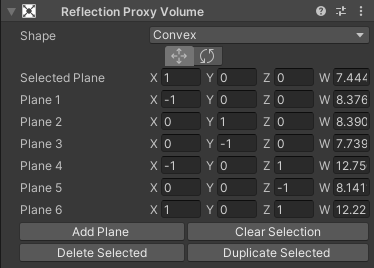
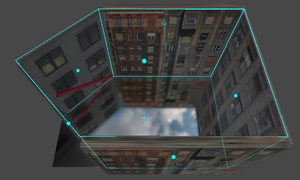
This PR is adding convex shapes to the Reflection Proxy Volume component.https://user-images.githubusercontent.com/61282776/82468468-1cc20900-9ac3-11ea-8a43-445ada4331b4.png
https://user-images.githubusercontent.com/61282776/82468091-b6d58180-9ac2-11ea-98ec-de3ad28ad6ac.png


(for HDRP)
drifting vault
yea, that feature already has Unigine 2, very useful for non square rooms 🙂
would be good to see that in HDRP too
turbid matrix
I'm thinking of some realtime reflection captures as this would let me omit sides that are not needed
hmmm, you probably still need more if it's like filled convex
idle robin
what's the current state of HDRP/DXR stereo VR recording? I need to render out some sequences 4k stereo video...
this doesn't work anymore https://blogs.unity3d.com/2018/01/26/stereo-360-image-and-video-capture/

Unity Technologies Blog
We are proud to announce that in 2018.1 creators can now capture stereoscopic 360 images and video in Unity. Whether you’re a VR developer who wants to mak...
idle robin
unity recorder is outputting garbage as well in stereo mode.. jsut a non-stereo blurry 360
and there is no motionblur/temporal stuff going on
drifting vault
@idle robin make sure you disabled a motion blur in environment volume and standart HDRP settings
 flat temple
Weird question about HDRP : is there some parameter that put a hard limit on point light's range ?
I'm trying to set up some space scene, and any point light simply fade after 9k units of distance from the camera (both actual camera and the scene one).
Tweaking camera's clipping plane, light range and light intensity doesn't change anything.
It's a perfectly smooth reduction in intensity between 9k and 10k, so it really look like something the engine is doing on purpose and not just some float32 accuracy problem.
I know there are workarounds like scaling down the entire scene, but I'm more interested in what/why its happening. Especially since a quick test in a non-HDRP project doesn't show the same behavior.
idle robin
@drifting vault oh.. motion blur ws indeed not off.. that fixed the blurry stuff..
but the stereo is very incorrect.. it's only stereo behind the viewer, no stereo to the sides and inverted stereo in front...
so it's probably just recording two cubemaps with a slight offset for each eye, which results is messed up stereo
as in when you look to the side, it's like keeping your head forward and rotating your eyeballs 90deg to the left.. zero stereo paral;ax
 dire carbon
Is there any reason this: https://discordapp.com/channels/489222168727519232/497873819898478596/713029199987867648 would happen in lwrp?
 light whale
Surely it's not possible to render out 360 video with proper stereo separation for every direction? Can't imagine what that would look like.
valid dock
Does anyone know if it's possible to have URP particles cast shadows? I can only get standard shader to work (but then the particles themselves render pink)
@raw canyon yes it is. click your output block and look in the inspector. there is a checkbox to turn shadow casting on
oh i assumed you were talking about VFX Graph particles. i don't know about the old ParticleSystem
idle robin
@light whale sure it is, traditional render engines have no problem doing it and 'VR panorama' package does it fine in unity too. It involves taking a lot of small stereo slices and stitching those together.
light whale
I don't see how that's possible from two images. If you had e.g. 8 images (2 per NSEW) you could maybe blend them? Engines of course just move the cameras if it's realtime.
idle robin
Yeah It involves around 8 or 16 cubemap per frame , so it's a slow process. We're using unity purely for offline rendering so performance is it's not a issue.. Just hoping to find a faster solution.
light whale
Sounds like you want a custom rig - either run it 4 times rotating 90deg each time or make your own camera setup?
I'm curious how you're delivering it where performance isn't an issue too. Blending between 16x 2k+ cubemaps videos per frame even if all the frames are pre-rendered is not something a regular desktop would deal with well
idle robin
I want unity to output proper stereo :)
4k x 4k stereo footage, h265, runs fine on oculus go
light whale
yes but you're talking about blending between multiple views.. right? so that's like 8-16 x that?
idle robin
Thats baked into a 360 equirectabgulair
Stereo top/bottom
The multiple cubemaps are only in unity internally, not in the baked output
light whale
ok sorry... I think... maybe I better understand
so.. Unity's solution is likely taking two cubemaps from e.g. +/-x which only works if you're e.g. looking +z
and I think it's worse than that because I think from memory it does it in world space and not even relative to the camera rotation? So rotating the camera has no effect from memory. If it hasn't improved since I did it a couple of years ago.
I think at the time I was only doing mono but had to write something custom because of the camera rotation issue.
Lamenting the state of Unity's solutions is obviously a time-honoured tradition - all I can say is that I wouldn't wait for it to get better.
On the off-chance it helps.. this was the script I used at the time ||```using System.Collections;
using System.Collections.Generic;
using UnityEngine;
[ExecuteInEditMode]
public class Camera360 : MonoBehaviour
{
public Camera cam;
public RenderTexture cubemapMonoEye;
public RenderTexture equiTexture;
public Material blitCubemapToEquirectMat;
private void LateUpdate()
{
    cam.RenderToCubemap(cubemapMonoEye, 63, Camera.MonoOrStereoscopicEye.Mono);
    try
    {
        var EquirectShader_CubemapUniform = "Cubemap";
        var EquirectShader_UseCubemapKeyword = "USE_CUBEMAP";

        blitCubemapToEquirectMat.SetTexture(EquirectShader_CubemapUniform, cubemapMonoEye);
        blitCubemapToEquirectMat.EnableKeyword(EquirectShader_UseCubemapKeyword);
        blitCubemapToEquirectMat.SetVector("Rotation", new Vector4(cam.transform.eulerAngles.x * Mathf.Deg2Rad, cam.transform.eulerAngles.y * Mathf.Deg2Rad, cam.transform.eulerAngles.z * Mathf.Deg2Rad, 0) );

        Matrix4x4 m = Matrix4x4.TRS(Vector3.zero, cam.transform.rotation, new Vector3(1, 1, 1));
        blitCubemapToEquirectMat.SetMatrix("_Rotation", m);
        Graphics.Blit(cubemapMonoEye, equiTexture, blitCubemapToEquirectMat);
    }
    catch
    {
        throw;
    }
}
}
(Sorry everyone, failed to spoiler that 😬 )
drifting vault
Hey @glad tartan , where are you find slider for control volumetric light render scale?
glad tartan
This is in the newer versions of HDRP 2020.1 and 2020.2
glad tartan
ah alright then you need to get the staging branch from github, it's not released in a package yet
glad tartan
8.x is for 2020.1 and 9.x is for 2020.2
I mainly use the staging branch from GitHub since I like top try all the new features and changes
drifting vault
i tried install Lit,Git etc but its not working on my PC 😦
like Unity cant see then
candid basin
Is a decal projector coming to urp anytime soo
Soon?
I'd rather not spent too much time on my own system if it's coming
Ah I see it's 'planned'
turbid matrix
Github staging & master is actually on version 10 now
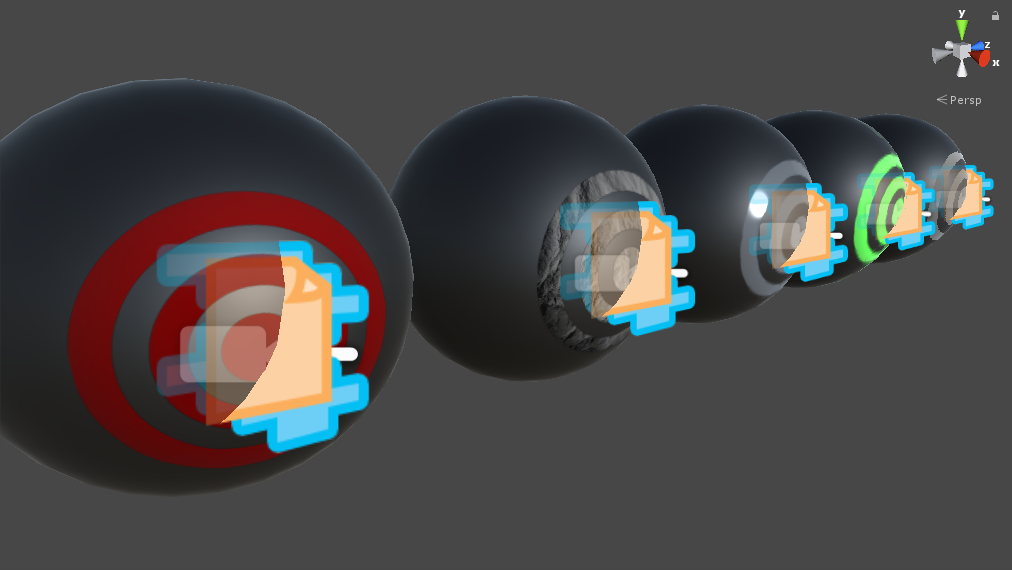
@candid basin https://github.com/Kink3d/kDecals
No idea on official support but that's the best you can get atm
candid basin
Yeah at the moment I'm using this

GitHub
A mesh-based PBR decal system for Unity's universal render pipeline. - Anatta336/driven-decals
works great
 slender belfry
Hello guys! I'm working on an atlas texture using HDRP and I would like to use just 1 material for multiple objects with the same geometry. Does anyone know how can I do this? (I'm posting in this channel because I though that making a script for every geo that changes the offset could solve this problem, but the code I'm using seems to be doing nothing in my HDRP proyect while it works in standard)
 onyx mica
Hey guys! I created a cube and a plane, and push half of the cube under the plane. Then I created a point light and move it far away from the cube.
But the shadow on the plane didn't contact to the cube.
Like this
I had set the bias of the light to 0, but it's the same.
Anyone can help me?
slender belfry
@onyx mica if i remember correctly shadow bias works better being close to 0 but never being 0, try 0.01-0.1
indigo summit
hmmm, this looks interesting: https://github.com/Unity-Technologies/Graphics/pull/570
This PR is adding convex shapes to the Reflection Proxy Volume component.https://user-images.githubusercontent.com/61282776/82468468-1cc20900-9ac3-11ea-8a43-445ada4331b4.png
https://user-images.githubusercontent.com/61282776/82468091-b6d58180-9ac2-11ea-98ec-de3ad28ad6ac.png
@turbid matrix Interesting, isn't sebastien are the one who make this technique popular?
turbid matrix
no idea tbh
indigo summit
i think it was called parallax corrected cubemap? back then
 sharp hatch
i have never
done anything as futile
as trying to create a toon shader in URP
that is compatible with several version of Unity
... i can't even begin
to..
I don't have words for the level of crap, incompatible minor versions, etc.
This has to be a joke
 summer berry
Now imagine that you are an asset developer
Even between patch versions things are incompatible
dawn sorrel
Production Ready! 🌈

 dawn sorrel
is there a way to disable post processing for specific cameras by code in HDRP? Effects specified in the global post process volume seem to be 'helpfully' applied to any rendering output
turbid matrix
@dawn sorrel set the volume layer mask from cameras
 ripe aurora
Question - if you are using playmode in editor, will allowDynamicResolution always be false?
 tight pendant
Hey...I'm trying to follow all these super easy-looking glow shader tutorials on YouTube for URP, but no matter what I do, I can't get it to work...is anybody available that I can show my setup to rn? My computer can handle everything Blender throws at it, so I don't understand why Unity isn't giving me any glow effects. I am confident I am just missing an asset, setting, or something dumb like that
sharp hatch
@tight pendant Welcome to SRP/URP... frustration
turbid matrix
@tight pendant you've setup urp pp right?
Also welcome to internet where most tutorials are outdated regardless the application :p
tight pendant
I thought so. I upgraded the project a couple of months ago
turbid matrix
@tight pendant I ask this because if you followed lwrp tutorial, they use different pp setup. URP has it's own integrated pp enabled by default
tight pendant
Well, I thought I did, maybe I didn't. What do I need to remember?
dawn sorrel
@turbid matrix ah, right, makes sense. Forgot about the data in HDAdditionalCameraData - didn't even have the HDRP runtime assembly referenced.
There still seems to be some sort of blit operation taking place that sets the alpha to 1 for all pixels and decimates my beautiful 32 bit precision float values (written to a render texture supporting float precision for all channels) to lowly 16 bit precision
turbid matrix
@tight pendant basically what you need is a highly emissive material and bloom enabled from PP
dawn sorrel
oh and thanks for your reply of course, @turbid matrix
turbid matrix
I can't help on the emissive material part on URP as I don't use it myself, I know HDRP made it more tricky but URP could still work more like the built-in renderer for that part
@dawn sorrel not sure which buffer you mention now but I think there are several which you can set from HDRP asset
tight pendant
@ Olento yes, I suspected that. I've seen tutorials where the shaders are gone over in great detail and there are PP objects in the scene that are not discussed; other videos just use PP objects. Thanks for trying to help, it's been a long day
turbid matrix
basically first step is to check if your current postprocessing does anything
like enable any effect that's quick to see on screen
if it's hooked up, then make sure you have bloom on it and then go forward from there
tight pendant
Yes, I tried to get the bloom effect, it wouldn't appear on my shader material. So I just made a regular URP material with HDR albedo, emissive enabled, but I didn't get results from that either. I tried messing with the PP volume, the PP layers, global/blend, etc
I added new animations, background music, and sound effects today. I am trying to make progress in as much as I can while I wait for my partner to get back
...but you are sayin there should be a default PP system behind the scenes, right?
so I should probably not have installed the PP addon?
dawn sorrel
If by PP addon you mean the post processing version 2 stack, then no, that's not compatible
turbid matrix
well, actually URP 7.x supports PPv2 additionally
but it's configured to use it's own internal PP by default
you should use the integrated if possible though because the ppv2 backwards compatibility support is only for URP 7, from 8 and forward you only get option for the integrated PP
and this is why I said this:
@tight pendant I ask this because if you followed lwrp tutorial, they use different pp setup. URP has it's own integrated pp enabled by default
basically if you've set PP layers and PP volume, you are using the old postprocessing package
you shouldn't install it at all unless you rely on some effect that's only available on it atm
instead you should use Volume workflow from URP (and I linked the docs page for it)
dawn sorrel
@turbid matrix I'm rendering directly to a render texture through an old-school manual camera.Render() call - which is why I was surprised that post processing would be applied automatically. Buffers sound like a good hint though - I should probably try if using CommandBuffers solves that issue.
turbid matrix
well, RTs have their own target, you use 32bit target and you still get banding?
also are you sure the issue is on RT and not just on visual presentation?
tight pendant
@turbid matrix thanks man
turbid matrix
(the nick starts with zero btw)
Ole must have gotten so many accidental pings because of me
(you're not the first)
tight pendant
got it 😛
turbid matrix
@dawn sorrel what I meant was really stuff like these values on HDRP Asset itself:
dawn sorrel
the issue is not banding, it's that values had tone-mapping applied (I'm baking out vertex position data, so I know what the values should be in my test case). That issue was resolved after turning off post-processing. The other issue though is that negative values are clamped to 0 (but values greater 1 work fine). Additionally, it seems that values have a lower accuracy depending on the position of the decimal, which is noticeable even for values in the [1.0, 10.0[ range.
Oh! That's an interesting point! I'll check that out
dawn sorrel
AHA! It was the rendering color buffer format!
tight pendant
Oof, you're busy today...
dawn sorrel
That would have taken me quite a while to figure out... I think I'll see if I can set those values specifically in command buffers though, handling regular rendering in half precision seems like a bit of a waste...
tight pendant
I removed the PP package I installed today because there is already a folder under URP called "Post Processing". But after removing the package, I can't find any of those PP volumes, layers, etc
dawn sorrel
you definitely saved me a lot of further headaches and time there! since I see you helping around here a lot - if you have something like a 'buy me a coffee' paypal, I'd gladly get something your way btw
tight pendant
nvrmnd, lol, it's called "Volume" now
 blissful geode
Does someone know a way to get my hand on an example of fur, for hdrp ?
turbid matrix
I know https://github.com/alelievr/HDRP-Custom-Passes has some fur shader but it's probably wip, at least I never managed to make it visually do anything that looks like fur 😄
blissful geode
Arf, too sad. I diged into sherman project but i havn't found anything usefull
drifting vault
hmmm, 5 FPS on empty scene, that strange
i tried disable volumetric fog and shadows, but that dint helped
in editor window i have 130 FPS, but once i switch to camera window, my FPS down to 5
indigo summit
what do you mean camera window?
drifting vault
scene view,game view and devlook probably 🙂
scene is complex - yes
but in editor scene view i have good FPS
but once i change to game view, my FPS going down
drifting vault
Unity 2019.3 HDRP 7.3.1
indigo summit
oh? that's new. never notice that issue before
 faint nymph
I can't seem to get lighting working on the URP 2D renderer
how the heck do I do this
everything is black, even with ambient lighting as well as 2d lights placed in (global light 2ds or point light 2ds)
drifting vault
Oh i found a problem, some reason there was two HD Additional Camera Datat that cause 2x FPS drop, now FPS better
indigo summit
in one camera?
drifting vault
yep hahaha
drifting vault
yea, my girlfriend was sad when i said to she that i not able to do a simple demo for she 😄
but now all works well, time to do some VFX
indigo summit
Nice shot, just need the jet flame for that ship
faint nymph
anyone using the new 2D renderer?
indigo summit
i'm not, but if you have any question just ask away, someone might be able to help
faint nymph
I can't get lighting working: everything is black, even with ambient lighting as well as 2d lights placed in (global light 2ds or point light 2ds)
I'm using the URP 2D Sprite-Lit-Default shader
when lighting is disabled in the scene editor it works great, but actual lighting mode / ingame it just ends up being black
valid dock
@drifting vault how did you get the nice rolling volumetric fog?
drifting vault
oh that a long story =D
But for 1.5 years of using HDRP i learn some trick and tips about HDRP lighting to make it looks nice and perform well
waiting for volumetric clouds for HDRP, hope HDRP team doing something similar to UE4 one
valid dock
so its something more than a box volume with a 3D texture?
valid dock
how did you author the 3D texture?
curious about what kind of 3D textures give nice results
drifting vault
or maybe for do nice looking volumetric light need to use 3d voronoi noise texture???
ripe aurora
By the way, if anyone else ends up searching for this, dynamic resolution worked fine on device so it must just not work in playmode from the editor
indigo summit
i'm wondering why it's not working in editor though
 fickle ocean
Hey does UPR have a Sharpen posprocessing filter. Or something i could get similar effect?
 strange jackal
Does anyone know why my post processing in my hdrp dosent work?
I have a post processing layer on my camera and a post processing volume on an empty gameobject
i even gave it the tag PostProcessing
Right now im using the volume for the camera and its still not working
drifting vault
@strange jackal you have to use build-in pp in HDRP
that works without layers
by using volume components only
drifting vault
you have to play with bloom settings to make its works
strange jackal
yea i made it like 100 to see if it works and nothing
drifting vault
show photos pls of inspector
drifting vault
make it betweeen 0.5-1 🙂
drifting vault
really? show photo
strange jackal
strange jackal
made it 0.7
drifting vault
try make both marked settings 1
strange jackal
i done this and i see a difference
but it looks like it just makes the whole thing more blury
@drifting vault
drifting vault
but you can use his repo for custom blooms https://github.com/keijiro

for get nice loking bloom like there https://www.youtube.com/watch?v=AdmQNKWR3fo

A test of my Forest scene with volumetric fog, real-time lighting and planar reflections.
Made with Unity 2019.3 HDRP 7.3.1
Music: Savfk - Ultra
strange jackal
with an emissive color on it but when i use it on an object it goes black
drifting vault
oh man, you have to many questions. Would be good if you will watch and read some documentation about HDRP
drifting vault
or buy lessons about HDRP for beginners , after that you will have 0 questions until you begin do something complex like shaders or custom render pass https://livehelp.unity.com/lesson/5e677f5aedbc2a001fdf0fe6

Unity Connect
The first talent marketplace dedicated to the full spectrum of Unity creators — game developers, artists, programmers, VR/AR developers, and more. Find game dev jobs, source Unity talent, and post tasks to get help on your Unity projects.
drifting vault
its a custom post effects that you can assing to current volume render component
 midnight glacier
I have this system that loads up prefabs on play, they aren't in the scene normally. But their reflection probes and lightning isn't baked as the rest of the scene, any way to fix it?
fickle ocean
Hey does UPR have a Sharpen posprocessing filter. Or something i could get similar effect?
 shadow dove
Hi
I am trying to use URP, but I ran into that problem where it errors out if the project path is >76 characters
I fixed it, but I am curious about this. Is this is a bug or purposeful?
And is this a problem with Unity it self or just the Unity HUB?
fickle ocean
Hey. Another question! Any good resources how to add custom POST processing effect with URP?
turbid matrix
@shadow dove in general, you should keep your project close to root
if there's that 255 char limit, you can imagine what URP paths look like when you navigate to project folder/library/packagecache/com.unity.com/render-pipeline.universal/runtime/path/path/path/file
there's not much you can do but keep your own paths short
shadow dove
@turbid matrix Oh. Why is it better to keep the project closer to root? What difference would there be?
turbid matrix
well, to not run into path length limit
I think win10 should let you have longer path now but haven't tested it in practise
 lunar ingot
Hey. Another question! Any good resources how to add custom POST processing effect with URP?
@fickle ocean Is there any official way to do it already?
 drowsy shard
Hi,anyone know when the shadowmask lighting mode will be available for URP?
turbid matrix
@lunar ingot no official way for the integrated URP PP yet
this is partly why URP still supports PPv2 as option on 7.x
fickle ocean
@lunar ingot that's what I am asking
@turbid matrix u mean I can add PP traditional way in URP?
I kind of tried it. Now working
sharp hatch
okey so... URP looks nice
like it feels like they made most of the correct decisions when implementing it
i can't wait for it to be "finished"
so i can actually use it for something proper
It looks hella nicer to use to achieve a toony look than the built-in pipeline is
sharp hatch
is custom render pipelines dead in SRP btw?
 true zealot
You can still make your own
sharp hatch
@true zealot but a lot of shit is hardcoded internally to URP/HDRP no?
a lot of people on the forums, with way more experience with SRP than me, saying that custom RPs are DOA
true zealot
I dunno, I just know of one person doing it for their highly specific needs. It looks very complex but they're managing
sharp hatch

Unity Forum
So I've been doing some basic benchmarking between the Standard Render Pipeline and URP (Universal Render Pipeline). I set up a basic toggle between 2...
this ia new thread... sigh
turbid matrix
these measurements tho... It's not perceivable since my game typically runs at 750-1000 FPS on my Windows machine, but as soon as I switch to URP, the frame rate drops by a couple hundred.
sharp hatch
@turbid matrix i mean look at the screenshots from mobile
how is this even possible
i want to like URP so much
but im getting so frustrated
(if that wasnt obvious lol)
sharp hatch
S5
it doesn't matter tho really? like
you want as many people as possible to play your game
ESPC on mobile
turbid matrix
settings do matter tho
sharp hatch
you need to cater to bottom of the shittiest chinese crap phone
well sure, but if equal visual quality = -30 fps?
o.O
turbid matrix
like, if they didn't match shadow draw distance etc, it could quicly reflect on results on weaker devices
sharp hatch
considering the care he took on the benchmarkjs, and care he took to set this up
i'd expect it to match
as close as possible
State 2) Standard Render Pipeline, all renderer (non-UI) materials in scene use a shared material - MobileBumpDiffuse Shader. Quality = default, shadows```Unity has told in past they tread perf regressions on LWRP/URP as bugs but these threads do keep popping up
sharp hatch
yeah the URP doesn't even have shadows on
and standard has shadows on
and it's still faster?
...
turbid matrix
I don't use URP myself but I'd file a bug report if that would happen for me
 amber gate
I'm curious to see if you can find a cause for that :o
speaking of URP, I didn't see it in the roadmap but are screen space reflections even planned to be supported in URP?
turbid matrix
I don't think I've seen any mention of SSR
sharp hatch
maybe together with the deferred rendering support
amber gate
is that on track for 2020.2?
turbid matrix
there's a PR for deferred
turbid matrix
GitHub
Purpose of this PR
Deferred renderer support.
Testing status
Manual Tests: What did you do?
[ X ] Opened test project + Run graphic tests locally
[ X ] Built a player
Yamato: (Select your branch...
turbid matrix
ah, it was
yeah, I'd love to have SRP that scales from high end to absolute low end
sharp hatch
i mean, i'd be fine with split SRPs
as long as EITHER of them worked
and wasnt a mess to work with
😦
turbid matrix
I've gotten HDRP to scale to ~40% down from default settings
but that's on high end gpu
sharp hatch
mobile-toon-midrange graphics = URP, AAA next gen = HDRP
I am fine with that
that is 100% ok
but right now... NONE of them work fully
so i am forced to use standard/built-in pipe
and build all my shaders on that
turbid matrix
what's your issue with URP?
like, you see the perf regression with it yourself on your use cases?
sharp hatch
@turbid matrix ugh, all kinds of crap... but most majorly is the fact that writing shaders by hand is >nigh< impossible (yes i know it can be done), because everything is intended to go through shader graph, but shader graph doesn't have all features exposed (not even close), etc.
so you're stuck in this middle land where you cant do what you want on SG
and only way to do it is by hand, but it's SO FUCKING PAINFUL
turbid matrix
you can get bit further when using custom function node on SG
but it's bit of a pain
sharp hatch
yeah it's not enough for what im doing
shit changes so fast that its basically impossible to upgrade
without breaking shaders over and over
turbid matrix
HDRP is at way better state for custom stuff atm
amber gate
I'm pretty much a newbie, I had no idea.. should I just stick to Amplify Shader Editor for now? I bought it like a couple of years ago and I'm only now seriously looking at learning Unity
 ashen laurel
Custom function node is okay but you can't do tessellation for example.
sharp hatch
@amber gate ASE is better than SG imho
it has support for built in pipeline
and is just a better editor
turbid matrix
you can use ASE for URP and HDRP too
ashen laurel
ASE is much much better
sharp hatch
yes i know
amber gate
but I was planning on using URP for the new 2D lights :o
turbid matrix
it's so smooth
sharp hatch
i bought ASE on first alpha/beta release day for like 9 bucks lol
best purchase ever
turbid matrix
and doing custom shader templates with ASE is a breeze
no need for cs files for that like on SG
(and it's not even officially supported on SG)
turbid matrix
yeah, I got ASE while beta as well
turbid matrix
you've seen the upcoming stack node change?
they finally let you author multiple RPs at once with the upcoming thing
 ripe fable
Why do you keep updating your editor and all dependencies? I can't do that on non-unity projects either, for the exact same reason, because things will break
turbid matrix
like, wire once and it can output to both URP, HDRP and VFX graph at once
sharp hatch
@ripe fable lol? because there's fixes and improvements i want?
im gonna be stuck on LWRP 6.x that's abandoned and not get fixes?
or what
amber gate
if SG isn't very good I hope they get there soon then, also I hope they add mesh shader support for HDRP before UE5 comes out.. xD
ashen laurel
UE5 doesnt use mesh shaders for nanite
amber gate
it doesn't, they have their own proprietary thing
turbid matrix
also doubt Unity will get mesh shaders any time soon
amber gate
but the only other thing capable of anything similar I know of is Nvidia's turing mesh shaders
ashen laurel
Yeah but I don't think nanite's tech is proprietary
turbid matrix
if they did mesh shaders, it would be through DX12 Ultimate
but that's realistically at least 2+ years away
ashen laurel
I wonder do they make a sort of a software rasterization
fickle ocean
Ouch, does Really URP perform -30 fps then standart?
Im currenty building a mobile game on it
dawn sorrel
I've seen plenty of released ue4 projects that still update the engine versions post release
just sayin'
ashen laurel
In my experience latest URP and HDRP was much better than legacy
turbid matrix
Unity has told they've measured also opposite perf, so I'd take peoples benchmarks with grain of salt @fickle ocean
sharp hatch
i just have too much time, knowledge, tooling and products invested in unity to jump ship
otherwise i would
ashen laurel
@dawn sorrel tell that to Rocksteady lol
sharp hatch
instantly
turbid matrix
better make your own comparisons, using your own projects needs
sharp hatch
im so tired of this internal-preview-state-and-old-but-stable-features-are-abandoned
turbid matrix
that's the only way you can be sure if it's slower or faster
sharp hatch
preview by default
amber gate
I actually tried, but I'm so used to Unity from years of lazy learning that UE seemed completely alien to me and I got nowhere at all
turbid matrix
I've used Unreal for years
it definitely takes longer to learn but it's not THAT hard
sharp hatch
Unreal isn't "better"
turbid matrix
it isn't
turbid matrix
there's a reason why I'm here 😄
amber gate
I'm sure it does
sharp hatch
it's just that AT THE MOMENT, so much of unitys stuff is BROKEN as fuck.
and in Unreal at least most features WORK out of the box
fickle ocean
Unity has told they've measured also opposite perf, so I'd take peoples benchmarks with grain of salt @fickle ocean
@turbid matrix Where did they told that?
sharp hatch
at the moment
dawn sorrel
the biggest difference between unity and unreal is, latter dogfoods
sharp hatch
yes
turbid matrix
@fickle ocean on previous forum threads where people reported similar findings
they've openly said people should file bug reports if they find URP to be slower
ashen laurel
An engine will never be a flip switch which will solve all your problems. I see games made with UE and most of the walking simulators are not cool
turbid matrix
also... there can be simple cases where SRP batcher itself makes things slower on simple and already optimized scenes
I dunno if URP forces it on by default like HDRP does
fickle ocean
@turbid matrix And they own messurments did not encounter any slowdowns?
ripe fable
@sharp hatch You can't keep updating your editor + dependencies in development and expect nothing to break. You can update minor versions yes. Releasing breaking changes in a patch releases is a major fuck up from the SRP team, maybe that's what you mean, and I agree with you, I'm sure we can all agree on that.
turbid matrix
@fickle ocean I wouldn't know 🙂
I just know what they've messaged in past
and I've seen countless of these forum threads as well
I don't use URP myself for any real project so can't speak from my own experience
(nor do I have any interest on mobile perf as I don't do mobile)
fickle ocean
Ghh
turbid matrix
I've done perf comparisons between urp and hdrp on desktop tho
but it doesn't tell anything about the mobile perf
fickle ocean
I hope my game will be not slow. I used Shader graph a lot and am not ready to migrate to standart pipe
turbid matrix
tbh, SG's are relatively trivial to port to ASE if needed
(altho it will be tedious if you have a ton of them)
fickle ocean
@turbid matrix no, I have like 3.. How to I port?
dawn sorrel
I doubt urp will be any slower than the standard in general. I would expect some edge cases to appear though
unity standard pipeline has years of optimizations, it would be hard to migrate everything to a new system
I'd imagine most cases are simple to fix shader or different defaults issues
I would be extremely surprised if unity doesn't have extensive automated testing for performance regressions
fickle ocean
I would be extremely surprised if unity doesn't have extensive automated testing for performance regressions
@dawn sorrel Well thats true
Instead of writing forum posts @Leifstro should file a bug with his project. Unity guys tend to be serious about bugs and provide workarounds if possible
turbid matrix
@fickle ocean there's no automated route, I meant that the nodes are very similar, meaning you can redo the node graph on ASE on most cases
fickle ocean
Mkay
turbid matrix
I've done this myself in past, haven't seen any show steppers (and even if it really missed some node from SG, there's ability to write hlsl code in ASE too
fickle ocean
I contacted Unity about the topic. Will see what they answer
turbid matrix
I'd expect there to be more helper nodes for ASE than SG in the first place
 cold flare
I have a question about manually rendering camera. I recently upgraded my existing project to LWRP(URP) and whenever I call camera.Render() it writes that value cannot be null. Parameter name: camera.
ashen laurel
I want to say that honestly I am surprized, I have been working on a little snow shader tutorial and initially made the shader for URP SG. It was looking kinda cool but not much realistic. Then I switched to HDRP and just by itself quality bumped up surprisingly. I mean I know hdrp is cool and all but I didn't have to configure anything and I think that's a big step forward comparing to earlier years of hdrp.
So this is urp version
And this is the hdrp version
They both have same textures and normal maps. Only urp has some gloss bumped up.
rich spade
The URP looks better to me as "snow" but the hdrp has better shadows, although you seem to have lost the snow glint.