#archived-hdrp
1 messages · Page 46 of 1
 night fractal
im using 2019.3.0f6
 turbid matrix
im so confused on why my Post processing is not working. im using LWRP, version 2019.2.0f6 have PP layer and PP volume on my main camera but
this is what you wrote earlier
oh well 😄
night fractal
bruh 😆
night fractal
yeah i noticed that
turbid matrix
anyway, if you use 7.2.0, it lets you swap the URP's built-in PP to that old PP package
but you could just use the new setup and then the instructions at #💥┃post-processing will apply to you
or just ref the URP docs on PP
night fractal
oh ok
 stark quest
i have problem with URP and 2d lights, when i try to upgrade materials it says :SimpleLit material was not upgraded. There's no upgrader to convert Universal Render Pipeline/Simple Lit shader to selected pipeline
 zenith knoll
I'm trying to implement custom renderer with ScriptableRenderPass(URP). But for some reason my mesh doesn't receive shadows and lights although it uses URP/Lit shader. What did I missed?
Source code: https://hastebin.com/iveweqeneh.cs
https://cdn.discordapp.com/attachments/517108768933281843/678817080346279936/unknown.png

 wispy juniper
Hello, with 2D Lighting there is also a shadow caster 2D component which's shape can be edited. Is there a way to gave it a shape of sprite somehow? Do anyone know that?
 ember breach
So it's been a while now since I last tried but is there a way to render every other pixel? Basically to make checkboard rendering? Im not sure you can set in custom pass before rendering as you can only write to depth or something like that so is there a way to just disable every other pixel and basically render at half the resolution as rainbow six did or bf5 🤔
 scarlet hull
URP or HDRP ?
For HDRP, It's not possible out of the box, but I think you could make a before rendering custom pass to write depth for every other pixel (to avoid further rendering by z-test), and do an other one before post process to fill the gaps ?
ember breach
Yes that's what I want. And yes HDRP.
scarlet hull
Well, you now have a possible solution
ember breach
Rainbow Six | Siege is based on the first iteration of a new current gen only rendering engine. With massively and procedurally destructible levels, it was important to invest in techniques that allow for better scaling on both CPU and GPU. This...
Here is the rainbow six solution for this
scarlet hull
Also, if you want to "render at half the resolution", you can use the dynamic resolution feature
ember breach
But its not unity
Yes but I want the scaling look good, so its not all blured
but gonna look into that now if it looks good
scarlet hull
The "hack" I mentioned using custom passes will probably break other features of the render pipeline
 drifting vault
is HDRP have any raodmap?
Yea i know its already pretty stable and works good, but i just want to know what will come next 🙂
ember breach
Yeah it might break few thinks but will try it today and will see what it looks like
drifting vault
@scarlet hull what do you think about custom mask textures?
For example combine in mask. So i will save some space on SSD of proejct by using only 3 textures (Diffuse,Normal,Mask) for material?
R - Metalic
G - Occlusion
B - Detail mask
A - Heightmap
or no way do apply alpha to heightmap cuz its not possible?
scarlet hull
And no smoothness ?
scarlet hull
You can use alpha for heightmap, if you make a custom shader (with shadergraph) for it, you can basically do anything you want
drifting vault
hah alright, will try shadergraph
scarlet hull
Is it for material layering ?
drifting vault
and save Video memory
scarlet hull
Well, if the geometry where the material is applis is indeed planar-ish, it's kind of logic that AO resembles height
One of the parameters that you would transform to a constant float would be metallic, as usually on that kind of materials, it's either full metal, or not
drifting vault
hmm, mostly i use metalic maps, cuz i downloading all textures with metalic map and then upgrade it via HDRP wizard tool
scarlet hull
For the 3 screens you showed, isn't the metallic map just full black ?
drifting vault
ah this one do not have metalic, only normal + base color
i was atlasing whole scene to get 80 FPS on my GTX1050Ti with tons of effects haha
that also reflect volumetric light 😄
scarlet hull
So, the windows also have the same material I guess ?
drifting vault
yea
scarlet hull
Are you using the blue channel for detail mask ?
drifting vault
whole city - one material
i do not sue detail mask...
im just never think about that
scarlet hull
so this might be the one that you could strip for height 🙂
scarlet hull
Also, you might want to take a look at this : https://docs.google.com/document/d/1mqV5N3rPRtR2ZabrUR0AkGnqCMmgv9Su4mgUxKCtod0/edit?usp=sharing

Google Docs
Compact PBR texture packing and blending experiment with Shader Graph. This experiment demonstrates a novel approach in packing PBR material information into a single texture map. It also layers multiple such materials in a compact shader. This approach works both in Univers...
scarlet hull
A collegue wrote it for material layering, but it's a good example of how you can compress data ... might not be suited for you case tough
drifting vault
still that documentations looks cool
scarlet hull
Some other notes : this packing will mostly save disc space. Depending on the texture import settings, it might not change at all for the video memory
You could also pack more info in the normal map : use G & A for normal Y and X (like the detail map), and R+B for something else (B having the less precision)
drifting vault
wow, i prefer leave normal and base texture, cuz i need always do some tweaks no it
reduce drawcalls by material count + by shader with SRP Batcher is very cool for performance
 indigo summit
@scarlet hull Sorry for tagging, i'm curious about the packing technique. So is that mean the build file size can be reduced but vram usage are approximately the same?
 runic bay
hmmm is using the render pass the only way to allow drawing custom meshes in URP? 🤔
via the command buffer
 formal spade
So i want to start to learn compute shades. Will the resources I find be applicable to hdrp?
 jagged canyon
@drifting vault the stats window is inaccurate your own fps counter should be closer to reality
scarlet hull
@indigo summit I'm not a huge pro on how GPU internally work, but for what I know, textures are store uncompressed in vram, compression is indeed only for the build size.
So, 4 grayscale textures = 1 rgba texture in size once in vram.
The difference is that you'll only need one sample to get all the data
And on project side, it's more common to work with rgba or even native (psd) files and just check "single texture channel" in import settings. But this then leads to huge disk cost 🙂
indigo summit
hmm i see, was wondering that it might be useful for mobile or VR
 fast pumice
guys, i upgraded from lwrp to urp, and now all my materials are broken and can't be upgraded. can anyone help me out?
 visual idol
Just to verify somewhere folks will know, does TMPro just not work in HDRP?
I was under the impression it is no longer a preview package, and TMPro is still packaged with HDRP, so it makes no sense that it would just not work
 cunning marsh
what render pipeline should we use in 3D projects? Right now there is quite few of them
visual idol
The old render pipeline is the most stable and supported, use it if you want asset store assets to work, or to use tools like amplify shader editor. The new pipelines are urb universal render pipeline, and hdrp high definition render pipeline
urp is performant and useable on a wide variety of platforms, but lacks some features (notably screen normals, so no ambient occlusion as a post process)
scarlet hull
@visual idol For TMPro, it is included in the HDRP template, but I think it is also the case for any other template ...
It doesn't support HDRP for the moment.
Unlit TMPro might work tough.
visual idol
hdrp is VERY high fidelity and contains a lot of good features, but takes advantage of modern video cards and comes with performance costs
Ok so it is currently just a broken asset included in the base renderpipeline selection? sounds like hdrp is still in preview :/
scarlet hull
Packages mixing and compatiblity is hard, and we are aware of this :/
visual idol
@scarlet hull ill try out unlit to see if it works. I have no need for text lighting so that might help me in the short term. thanks for the suggestion.
Might consider removing it from the template if it is unsupported though. There are likely many Unity users that add TMPro text to the scene and are driven to google to try to figure out why it does nothing.
Such as myself
 empty star
@formal spade you can use compute in URP and standard/legacy also, it is only restricted if old hardware doesn't support it. It works the same in all render pipelines
@runic bay render pass is one way, but you can also use any of the Graphics.Draw- functions, it pushes the draw through the pipeline and will show up in the CullResults that context.DrawMeshes uses, as long as a material or shader is used with a Lightmode tag defined that the render pipeline filters to draw
If u use Graphics.Draw it can be from anywhere in update late update etc
runic bay
ah wonderful
empty star
The only exception is command buffer graphics draw, those occur when the cmd buffer is executed and likely after the cameras context.Cull which gathers drawcalls
DrawMeshNow is also deprecated if I remember right
runic bay
yea it is
 valid quail
Does anyone know how to get Bilinear texture filtering working for Texture3D on iOS? I've noticed iOS with UWRP seems to ignore texture filtering for Texture3D and uses point filtering instead of what is set in the Texture's settings.
 dire vessel
.
 undone crow
I can't seem to find the Fog Attenuation Distance from the Fog override via script, am I doing something wrong?
 tacit slate
updated from LWRP to URP, followed the unity manual instructions what things need to be changed.
Library\PackageCache\com.unity.render-pipelines.universal@7.2.1\Editor\ShaderGraph\SubShaders\UniversalPBRSubShader.cs(421,31): error CS1061: 'PBRMasterNode' does not contain a definition for 'normalDropOffSpace' and no accessible extension method 'normalDropOffSpace' accepting a first argument of type 'PBRMasterNode' could be found (are you missing a using directive or an assembly reference?)
yikes 😦
turbid matrix
@tacit slate open you shadergraph and save the again
it'll regenerate the actual shader code for your current SRP version
tacit slate
oh nice, thanks!
turbid matrix
of course it could be something else too, but that's first step you should take if SG's are giving you grief on updated SRP
 jolly plinth
Hi guys, what are actually the differences between URP and LWRP in the PackageManager? I imported the URP but have many Shader Bugs and Nature Manufacture and GPU Instancer only hav LWRP compatibility packages included. Should they work with URP or is there a difference between them?
tacit slate
@jolly plinth https://docs.unity3d.com/Packages/com.unity.render-pipelines.universal@7.2/manual/upgrade-lwrp-to-urp.html i started with this. this resolved most errors
jolly plinth
Ouh nice, means there is a difference :-(
Thanks for that link mate 😘 👍
@tacit slate Did you try any 3rd party assets with URP like Enviro, Nature Manufacture trees or GPU Instancer?
tacit slate
none of those, sorry i try to avoid 3rd party assets
jolly plinth
would be nice, but i don't have the capacity to do all this by myself 😉
 glad tartan
@jolly plinth The main difference between LWRP and URP is that the post processing changed. URP uses a custom built in post processing and LWRP uses Post Processing V2 package. Other than that it's just shader path/name changes, so if you've made custom hand written shaders, you'd want to update those as well.
jolly plinth
ok, thx 4 that 🙂
fast pumice
guys, why can't i update my urp from 7.1.8 to 7.2.0 or 7.2.1?
i get these errors
sorry i figured it out, i needed to upgrade shadergraph to 7.2.1 too
turbid matrix
ah, 2019.3.2f1 is out now
will help people who want to use DX12 / DXR with 2019.3 as it was quite broken on earlier versions
 dawn sorrel
can we use dx12 on windows 7
turbid matrix
in practice, no

pcgamer
Too little, too late?
also windows 7 support has already ended afaik
like, MS doesn't update it anymore, it's dead in the water
 fathom slate
hey guys,
trying to get depth, and function not working for me
float depth = LoadCameraDepth(input.positionCS.xy);
my depth always 0.
@turbid matrix hey 🙂 trying to do this in TAA shader. I dont think that TAA runs before depth buffer filled.
fathom slate
hdrp
turbid matrix
not sure if I've accessed depth directly on shader code with hdrp
I've said this in past too but easiest way to check if you are doing the thing right on HDRP is to check what HDRP shaders themselves use for that
either from generated shader graph code where you just wire those relevant nodes in SG or if you know some hdrp PP etc requires that data, check how they used it there
fathom slate
oh
turbid matrix
and TAA definitely runs AFTER depth buffer exists
it's executed right before rest of the built-in postprocessing, but it's at the end of the framegraph


where latter is just the order the internal PP handles things
@fathom slate ^
fathom slate
wait, its right on the start before Depth of Field
turbid matrix
I'm curious, what do you need the depth for?
fathom slate
trying to create something like in amazon post
turbid matrix
oh wait, that amazon thing used depth?
turbid matrix
yeah, I remember the discussion
let me check what I did for that on the older HDRP
fathom slate
I am wondering another thing, they using stencil and historyStencil, but... we cant acces it in Unity ?
turbid matrix
float depth = LoadCameraDepth(dispatchThreadId.xy);
float linearEyeDepth = LinearEyeDepth(depth, _ZBufferParams);```that dispatch thing was because the TAA I applied that mod for was using compute shader
but yeah, I think you are just missing the LinearEyeDepth there
fathom slate
oh, thanks, let me try
turbid matrix
no idea if this is more tricky to do now but with the compute shader, it was fairly straight forward
as for the history, that's more tricky
there's a mechanism in HDRP to do that stuff but I doubt it's documented
I never implemented that part as I didn't really have ghosting issues on scenarios that the stencil history would have solved
that type of ghosting can mainly happen if you have low enough velocity and you turn the camera around
if you have the vehicle in motion, the velocity mask part will omit the TAA for that part anyway
@fathom slate also, we CAN access existing stencil buffer
in fact, current TAA does stencil pass with it enabled and without it
fathom slate
I have dynamic camera, on turns it moves from side to side of the car
turbid matrix
but if you need the stencil buffer as direct ref, in past you had to assign the buffer as input texture for the shader
or well, I think it's actually a copy of it
there are few PP effects that do it like this and I just copied the implementation for that for TAA shader as well when I did it
if you need to do the history stencil, you could just allocate extra RT and blit the current stencil buffer there I suppose
fathom slate
linearEyeDepth return some weird value, doesnt looks like they are right, value near 4200 for all pixels
turbid matrix
how do you read that value? with renderdoc (?)
I don't have any idea what range those values should be but it did work rather nicely when I did it
fathom slate
just placed if xD if ( linearEyeDepth > 0) color = red
color = float3(0.0001*linearEyeDepth,0,0); - and all pixels still red
turbid matrix
I sent some code snippet on DM
turbid matrix
so... 7.2 wiped even more camera API away
I'm curious, what there's no event/variable exposed when something resets the camera
there used to be variable that still worked on 7.1.8 for checking that
 minor verge
Hello, I've set a URP pipeline asset as my renderer using the 2D renderer, but sprite-lit-default isn't showing up as a material, and all the sprites i create default to sprites-default. As a result, the scene isn't affected by lighting at all. Would anyone know why?
dawn sorrel
try None
and on your cam
forward
deferred or else
did you try particles lit? in URP
turbid matrix
exposed the HDRP's TAA feedback values in camera settings:
should have probably used that fancy slider that would have allowed to set these both in one property but yeah... way easier to tune this with realtime controls
 regal walrus
whats the pro of a 2D renderer vs a forward renderer
 fiery marsh
@regal walrus I haven't used it, but it gives you access to URP's 2D lighting system. There's a bunch of info under the 2D heading on the URP docs : https://docs.unity3d.com/Packages/com.unity.render-pipelines.universal@7.2/manual/2d-index.html
regal walrus
Ok seems to be the shading etc
turbid matrix
I didn't have much luck in getting usable data out of renderdoc with 2020.1 and hdrp but nvidia nsight seems more straight forward
get these fancy graphs too
wispy juniper
after editing Shadow Caster 2D component's shape it still cast a quad shadow. Is that a bug?
It's in 2019.3.1f1 URP v7.2.1 btw.
2D Lighting setup.
glad tartan
So this seems to be the camera stacking feature for HDRP
https://github.com/Unity-Technologies/ScriptableRenderPipeline/blob/HDRP/compositor/com.unity.render-pipelines.high-definition/Documentation~/Compositor-Main.md

GitHub
Scriptable Render Pipeline. Contribute to Unity-Technologies/ScriptableRenderPipeline development by creating an account on GitHub.
dawn sorrel
Is there any news on if HDRP is going to get higher GPU instance counts? I understand why the standard renderer and LWRP wouldn't need high instance counts, to account for lower end hardware. But it seems like by default HDRP would have built in high GPU Instancing by default like GPU Instancer asset does. Or is there an option anywhere in HDRP to raise these rates?
It just doesn't seem like HDRP should have such low instance counts being by default it's for highend hardware.
glad tartan
HDRP and LWRP/URP has the SRP batcher and that does instancing by shader/material. It instances a lot more than built-in GPU instancing. It is enabled by default (With HDRP. URP = Manually Enable) and can only be turned off in code, which then switches to GPU instancing if you have your materials setup for that. If you are having problems then it might be a bug or your project isn't setup in a way that the SRP Batcher can efficiently batch things. Knowing how it works helps with setting up things to batch properly. You can find more information about SRP batcher here. https://blogs.unity3d.com/2019/02/28/srp-batcher-speed-up-your-rendering/

Unity Technologies Blog
In 2018, we’ve introduced a highly customizable rendering technology we call Scriptable Render Pipeline (SRP). A part of this is a new low-level engine ren...
turbid matrix
GitHub
Purpose of this PR
This isn't an actual merge request. Just using the PR process to start a discussion. Most of the files are copied from the Eye shader with a search and replace Eye-&g...
That isnt random user, the person works at Unity
 hexed fjord
what do you mean?
turbid matrix
I mean they've never done PRs that way. There are drafts and stuff but it is not common they simply use pr for discussion
hexed fjord
I think you are reading it too far
indigo summit
speaking of water is BoatAttack WaterFXPass possible to be remade in HDRP?
drifting vault
built in water, like cryengine?
turbid matrix
I'd guess it's just going to be some additional Shader Graph type to provide shading that's more suitable for water
fast pumice
Hi, guys. Can anybody help me out? I have upgraded from lwrp to urp and noticed that one of my shaders is not working properly.
Like its working, but it is glitchy using a vr headset
everywhere where it intercepts with another object, there is empty space in the shader
i cant really explain it
can i cant send a video ,because in the editor there is no glitch
i feel like it has something to do with depth texture. Around the edges of where the shader is intercepting with other object ther is no depth texture
but only when moving my head
when i stay still, the view normalizes
turbid matrix
I dunno, I'd check SRP repo if there's a fix for future versions
GitHub
Purpose of this PR
This PR introduces ProbeVolumes, a new type of volume handled in the LightLoop, which encodes regular 3d grids of Light Probes. ProbeVolumes are used to add GI by covering a part...
This PR introduces ProbeVolumes, a new type of volume handled in the LightLoop, which encodes regular 3d grids of Light Probes. ProbeVolumes are used to add GI by covering a part of the scene with a volume and baking it. Multiple volumes can be added to a scene, as each volume manages its data individually. Volumes that overlap are blended in special blending regions. On top of that, a blending mode can be selected for each volume.
fast pumice
okay i noticed one more thing. In one scene, only one eye gets this glitch
for the other the view is fine
but in the other scene, both eyes get a glitch
 fair flame
Is there any information on how the latest URP compares to the old built-in renderer in terms of performance?
 gusty shoal
Made the move to URP after some blocking issues were fixed for XR, however we have noticed the Speedtree7/8 shaders are very much broken
https://youtu.be/DCeS1nEcP-w

Demonstration of the issues with Speedtree7/Speedtree8 shaders in URP against the default lit shader that comes with URP
glad tartan
GitHub
Scriptable Render Pipeline. Contribute to Unity-Technologies/ScriptableRenderPipeline development by creating an account on GitHub.
SSAO for URP
 silent chasm
why dose LWRP make all my materials pink? (unless is shader graph)
turbid matrix
you need to have compatible shaders
old renderers shaders are not compatible with LWRP/URP (unless it's unlit)
silent chasm
yeah but like the default shaders even go pink
turbid matrix
if they are default unity shaders, then that's expected
turbid matrix
you need to upgrade them to LWRP's default shaders
there's a conversion script in the edit menu
it can convert all your project materials that use old default shaders to LWRP shaders
silent chasm
i swear it did not do that the last time i used LWRP
turbid matrix
well, if you create a new project, all new materials will default to right shaders
you'll only see this if you use old content with it
also... it's always been like this
silent chasm
ok thx
 quartz kettle
Does Universal RenderPipeline support custom post processes yet? I'm having a hard time finding any info on it
turbid matrix
@quartz kettle only through ppv2
But then you have to use old post processing for all urp pp
quartz kettle
This is the Post Processing package?
quartz kettle
So it still works with the renderpipeline in 2019.3?
quartz kettle
Alright
turbid matrix
Custom urp pp is on near term roadmap but cant remember seeing any work on github for it yet
quartz kettle
Do you know if it's viable to have multiple cameras for render textures? I recall it being a bit odd in 2019.1
turbid matrix
Huh
That should have always worked
Camera stacking was the wonky part but 7.2 has support for that too
quartz kettle
Hmm.. let's see if I can find the info
oh they added it now, the new stacking thing they talked about before?
turbid matrix
Yes. There should be a doc page on how to use it
turbid matrix
GitHub
DONT FORGET TO ADD A CHANGELOG
Checklist for PR maker
Have you added a backport label (if needed)? For example, the need-backport-2019.3 label. After you backport the PR, the label changes to bac...
testing that PR on 2020.1 merged to 8.xx/release, at least the SG is still pretty off
can wire it to a state where you can't do anything and it just spams errors
still pretty fancy that we'll get access to stuff like these on SG:
I'd wish it would let us also write movecs, not just read them
turbid matrix
hmmm, I ported the old compute TAA shader as additional option on 8.x HDRP and it actually ghosts bit less by default even when I dial them to same base settings
I guess there are still some small changes to the algo
 brazen violet
Hello, any ideas why the HDRP volumetric lighting has a pixelated/grain effect?
drifting vault
@brazen violet what a version of unity and hdrp?
brazen violet
hmm how do I check the version for hdrp again?
unity is 2019.3.0f6
HDRP is 7.1.8
should i update to the newest 7.2.1?
 half heart
would it be bad practice to use the Renderer Features as a substitute for sprite layering functionality? 🤔
as in creating a bunch of render objects, one per 'layer' and having each one override the depth test to always, forcing the draw order like you can with sprite layers
i think i'm an unusual case because my game is mostly 2d, but the camera is 3d+perspective so i can't just use the z dimension for the draw order
drifting vault
@brazen violet yes and in fog settings enable filtering
brazen violet
alright thanks for the help, im restarting my unity now after the update
which fog settings? volume ? @drifting vault
drifting vault
You have to expand fog volume settings
brazen violet
i dont see the option
 hardy oxide
why this be happening
turbid matrix
hmmmm, there seems to be a GC issue on HDRP when using current 8.x.x/release
something allocating 81 B each frame on reflection system
haven't checked if this happen on 7.2.1 or not
tested in editor but profiler shows the thing on playerloop side
also wonder why compute shaders got multi_compile support on 2020.1 but not for shader_keyword
I guess the need for latter is more niche
I just happened to have use case
 dry pawn
does anyone know how to use Granite Graphine in unity 2020?
turbid matrix
In this video, we're gonna take a look at adding Volumetric Lights to your Unity scenes, using Unity 2019.3 and HDRP! Volumetric Lighting helps improve the quality of your scenes by allowing light sources to affect the Volumetric Fog in the scene.
Download the Fontainebleau p...
@dry pawn you can't
it's not done yet
well, I haven't checked it on recent a24
few alphas back there was even some basic API still missing
but I did try to test some earlier version but it really felt like they were still missing some key elements there
they've added configurator tool since I last tested it which lets you set the cpu and gpu memory buffer sizes
thats the thing that needed additional editor support but they could have added the API already on a24
but even if that worked, it still lacks VT debug tool shown on the roadmap slides (and which is present on regular granite integrations) + lacks atlas tool for authoring the VT atlases. I feel the SG nodes are more for proc gen stuff but don't know if I'm right
dry pawn
hmmm,
i suppose you can't even purchase the tool from graphine itself
i want to use it primarily for udims
how did you try the earlier version?
it supposed to be built-in in 2020
turbid matrix
read the forum post I linked
I described the steps briefly there
2020.1.0a15+ has PART of the native code in it. it also has virtual texturing module but you still need to enable it manually + use custom HDRP branch - which is still very much WIP and not done yet
also, this was also on the thread from Unity staff member: Yes, we are actively working on introducing Virtual Texturing to Unity. APIs, workflows, etc. are all being worked on at the moment and we are not ready to communicate on this yet.
so... expect more details at GDC next month I'd guess
they'll have updated roadmap there
dry pawn
oh okay great. it works well with UDIMs right?
turbid matrix
no idea
dry pawn
nice GDC is soon so ill tell my pals to keep an eye out
turbid matrix
I don't think original granite did
but I could remember wrong
I actually have granite license for Unity myself
turbid matrix
but it's only for built-in renderer + Unity 2018
well, I planned to use it but then Unity bought them and they dropped the support
dry pawn
i see
turbid matrix
they were just about to release SRP support on the paid version
but now they are integrating it to SRPs directly
I wouldn't expect VT support for the built-in rendering at all now
dry pawn
but HDRP will have it for sure yeah?
turbid matrix
yes
URP too
but there's no official word on this, I've just seen commits on both SRPs on the SRP github
dry pawn
noob question : isnt HDRP > SRP?
turbid matrix
SRP = scriptable render pipeline
it's the core tech which is used to build HDRP and URP on top
dry pawn
if its the core tech, then it verily must have vt support
turbid matrix
it's not that widely adopted today
but more people go to photogrammetry and high res textures, more feasible VT becomes
there's still realities to face on the disk space limitations
even current AAA games can take 150GB on HDD
there's not really much room for bigger textures since the games can't consume more space on drives today
 autumn owl
i need help, i use hdrp and i downloaded this trees asset pack from the asset store, i tried to upgrade the materials to HD materials but they still appear like this
is it because they use shaders?
 long wagon
If it's unable to convert the shader you'll have to set similar one manually or recreate it.
long wagon
Asset creators usually have dedicated forum threads where you might find an existing solution. And yea, Shader Graph has a lot of tutorials, it's easy enough to learn.
autumn owl
should i use PBR or unlit for the shader graph?
because i see many tutorial using pbr
long wagon
unlit shader ignores lighting
drifting vault
@autumn owl
step 1 : Conver custom asset store shaders to standart material>
Step 2: Upgrade standart material to HDRP material.
Step 3: tweak material settings
autumn owl
@drifting vault with shaders you mean the .shader file?
drifting vault
nope
your custom materials
convert custom materials to standart materials
then standart materials to HDRP material
autumn owl
ok so from this to standard hdrp
hardy oxide
Is it possible to have the chromatic aberration effect on an overlay canvas?
I wanna have it like this
but it looks like this when i hit play
im using HDRP
 foggy knot
can you change the layer to which an object is assigned in the middle of a call to IRenderPipeline.Render and have FilteringSettings.layerMask work as expected for that object?
extra context: i'm playing with my own render pipeline. the rough, overall goal is to render several different cameras into their own render textures and then composite them together into a final image. when iterating the array of cameras in the scope of IRenderPipeline.Render i want to move certain objects in/out of certain layers for each camera and then draw renderers. but changing an object's layer via GameObject.layer from within Render doesn't seem to work in conjunction with FilteringSettings.layerMask. it looks like the objects that i would expect to be in their new layer are still in their old layer?
 candid basin
is the default renderer already referred to as 'legacy renderer'?
turbid matrix
built-in renderer would be more appropriate term
I don't think unity even uses legacy renderer term themselves
 exotic robin
soon-to-be dropped rendering pipeline :)
turbid matrix
lol
they won't drop it in years
if they did, it would kill their cash cow, asset store
I'm not even joking, they just can't do it
so instead they just leave it there to slowly die and remove it when most users have moved on
drifting vault
a big asset store content cleaning? hah
candid basin
Publishers are being encouraged to update for URP/HDRP
 upbeat copper
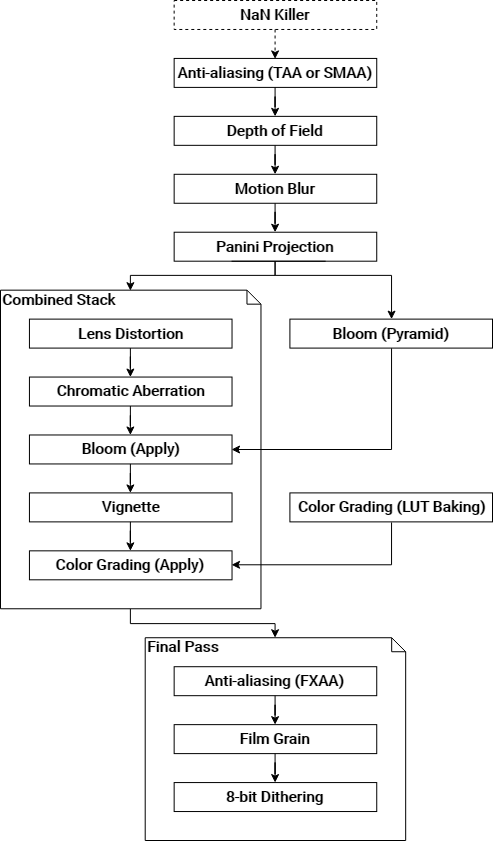
We're having a strange issue with HDRP in 2019.2.1, has anyone seen something like this before?
Our first assumption was something with shadow cascades but changing every setting doesn't fix this issue or change it in any way.
I've looked through a bunch of similar posts, all slightly different but not quite the same issue as ours, and I've tried adjusting every setting within hdrp I can think of.
We aren't doing any super fancy post-effects so I can't think what could be causing this.
Can anyone suggest anything?
https://gfycat.com/CleverTerrificArkshell


 turbid matrix
other than upgrade to 2019.3 ? 😄
upbeat copper
Haha it's a fair point, we're a bit worried about migrating the whole project at this point but I could give it a go
turbid matrix
it's just, even if there's an issue on 2019.2's HDRP, it's out of support already and HDRP is still in preview there
scarlet hull
Is this an otrhographic camera ?
upbeat copper
No perspective
scarlet hull
I would try to migrate (with a backup) and see if it still reproduces with the latests HDRP
 celest rose
Hey, is there something specific I need to do to get an emissive material to contribute to baked global GI in LWRP?
what I'm trying to do is use a directional light for general scene light, and have some highlighted florescent beams that have their lighting/shadows baked as well
however when I run the bake, only the directional light data gets mapped
upbeat copper
aah okay migrating seems to solve the issue, now we have to make the decision about migrating, cheers all!
dawn sorrel
Which asset do I have to buy to get grass working in HDRP?
I feel like with 2019.3 being so recent I'm walking on eggshells.
celest rose
been feeling the same way about scriptable rp in general, considering moving back to built in
upbeat copper
Hmm updating unity version fixed the shadow issue, but now I'm having an issue with addressables, Unity seems to be disregarding texture maps in objects using mask maps? so my assets are much shinier than they should be (Uploading image)
This is runtime in editor, on the right is an asset spawned through addressable system, on the left is the prefab from the editor dragged into scene, both have identical material setups when inspected.
I can adjust colours but not textures in the addressables material, and settings act strangely.
dawn sorrel
Upd: I yeeted 60$ down the drain, let's see if Nature Renderer can uncrappify HDRP.
glad tartan
https://github.com/Unity-Technologies/ScriptableRenderPipeline/pull/5971
This PR integrates the Virtual Texturing Cache size settings into the HDRP settings. Previously they were a separate asset.
GitHub
This PR integrates the Virtual Texturing Cache size settings into the HDRP settings. Previously they were a seperate asset.
@dawn sorrel Grass works fine in HDRP, you if you want to paint them on the terrain you just have to use them in the trees section. There's definitely work to be done for proper terrain support but for now that's the work around.
GDC is most likely when we will get more information on the terrain system and a lot of other features
dawn sorrel
Provided Unity doesn't drop GDC like Facebook and Sony 😄
glad tartan
That probably would have been announced already, before they confirmed that they are going. Basically only three weeks left now
 valid dock
is there a way to set the Light Layer of an Area Light in HDRP? the dropdown box is greyed out
oh i see, they weren't enabled in my HDRP asset
turbid matrix

Unity Technologies Blog
High Definition Render Pipeline is verified in 2019.3 with new features and artist tools for achieving high-fidelity graphics.
With Version 7.2.0 of the...
turbid matrix
I didn't know they shipped hair sample too on the hdrp package https://blogs.unity3d.com/wp-content/uploads/2020/02/image35.png


hair has been there for quite a while but first time I see them ship any sample for it
glad tartan
Recently they've also added a full material sample with all the possible materials HDRP supports. This is for 7.2.0 forward
valid dock
I have a camera that renders to a rendertexture in my scene and I want it to not clear the background and only render objects on one particular layer, but when I set up its culling masks, what I noticed is that the Scene View camera seems to be using it... no idea why... and it stops me from getting the accumulation effect i'm looking for on the render texture :/
 simple vine
I've been wondering about dynamic resolution...
Some papers say that this is extremely straightforward: you just render to a cropped-down viewport of your texture and then just upscale it.
This implementation requires very little code
However, default unity has some weird implementation of it, where artifacts start to occur on a texture if it's sized down too much
And also it's for some reason not supported on some platforms, like Vulkan standalone, DX11 and the likes
What's the deal with all of that?
I would really like to get an explanation
And further adding to it, HDRP actually does use the viewport based scaling, not unity's built-in one
And this is why it allows for fancy upscaling techniques instead of just using the bilinear scaling
What's the deal with that also?
It can't be because of latency hiding problems or bandwidth, can it?
candid basin
I'm getting this error for this piece of code
' UniversalRenderPipeline.RenderSingleCamera(context, reflectionCamera);'
'Screen position out of view frustum'
What should I check then before using RenderSingleCamera?
How can I check if something is visible?
 frosty spear
i have a project with 1000x1000 terrain and a single directional light. after moving to 2019.3 from 2018.4 , it crashes on iOS 13(iPhone X ) with following error UnityFramework`::ApplyAfterPassSet(): 0x102cba934 <+0>: ldr x8, [x0] 0x102cba938 <+4>: ldrh w8, [x8, #0x178] 0x102cba93c <+8>: tst w8, #0x7f0 0x102cba940 <+12>: b.eq 0x102cba9dc ; <+168> at ProbeOcclusionCache.cpp:90:1 0x102cba944 <+16>: sub sp, sp, #0x40 ; =0x40 0x102cba948 <+20>: stp x20, x19, [sp, #0x20] 0x102cba94c <+24>: stp x29, x30, [sp, #0x30] 0x102cba950 <+28>: add x29, sp, #0x30 ; =0x30 -> 0x102cba954 <+32>: ldr x8, [x1, #0x78] 0x102cba958 <+36>: cbz x8, 0x102cba96c ; <+56> [inlined] SetZero at ProbeOcclusionCache.cpp:44
any clues?
turbid matrix
since it's a crash in native code, all you can do is write a bug report
@frosty spear
I'd first search with google for the crash to see if it's already reported somewhere
but if not, then make simple repro case and send it along with the bug report
good repro project will speed up the process and they'll fix it in no time usually
celest rose
hey, when using LWRP is it possible to use Substance materials? or should I just be exporting maps from Designer and assigning them manually for LWRP?
most of the tutorials I can find focus on HDRP and I'm not sure if that's because LW doesn't work, or just because HD is more fun
turbid matrix
you can technically use substance for unity plugin for both SRPs, I dunno if they even today map the materials automatically for either tho
but you can manually change the order of the channels
celest rose
what about accessing the parameters?
turbid matrix

Open Beta Release: Be sure to back up all work and projects before upgrading or using the plugin.
Before using the plugin, please read our documentation for upgrading projects and Substance materials.
Upgrade information
The Substance plugin enables the use of Subst...
you need that
but it's not been that great experience in past
celest rose
hm why's that
part of me is wondering if it'll just be easier to export the maps to avoid any headache
turbid matrix
basically you have to understand that when they update that plugin, it may wipe all your substance materials along with it
celest rose
ahhh
turbid matrix
it's just been quite alpha level experience IMO
celest rose
yeah bleh, normal UV maps will work just fine
turbid matrix
I totally recommend just exporting things out on designer if you can
I haven't tested the recent versions tho
turbid matrix
so maybe they've improved on that
I used to nag them a lot about that and I think there's export option on the plugin itself now(?)
that's something I really wanted to get there as it would reduce the risk when the new version couldn't break existing materials
celest rose
yeah that's a big risk for what's essentially just a convenience thing
turbid matrix
yeah
celest rose
like fine tuning in scene would be great but the traditional way works fine
turbid matrix
the ideal workflow for me would be that the plugin would generate actual texture assets on unity project folder
but how they did it at least on past was that they created embedded asset that held those generated textures
celest rose
yeah that's how some tutorials I watched looked
turbid matrix
so after they changed something, that proprietary container broke very often or just got regenerated with new plugins defaults
which meant stuff like 256x256 pixel textures again
I dunno if they let you set the default texture size to something sane nowadays
I've given them a lot of feedback on the painpoints in the past but I haven't really verified lately how much of that was taken into account (I'm on their beta program)
it's also been quite common that new Unity version will break using that plugin
they will patch it out after some time after that unity version has been fully released
but can expect it to be broken throughout unity alphas and betas
I'd really love to have functional substance support in the editor but I gave up on that plugin a long time ago
I kinda hope it's better now but wouldn't expect wonders
valid dock
lol avoid the substance plugin at all costs IMO
so buggy
not really worth the hassle
 quick spire
how the hell do i use that RequestSkyEnvironmentUpdate function?
turbid matrix
GitHub
Scriptable Render Pipeline. Contribute to Unity-Technologies/ScriptableRenderPipeline development by creating an account on GitHub.
it's not on package manager yet
turbid matrix
also.. got curious again about the state of virtual texturing
and then realized that there's a test scene for it!
it doesn't really tell much but I'll try to decipher this 😄
basically they just assign the textures to the sample texture stack nodes there
which makes me wonder, is that some kind of node that moves those input textures to some internal atlas at runtime?
I'm so used to the old Granite integration where they did these ahead of time and you prepared the atlas yourself with their tooling
the procedural one sounds mode like what I described here
(but none of the test's graphs seem to use that node)
procedural one works in the opposite direction:
and you can set the amount of textures on the stack node parameters, and whether the texture is normal map or not
no docs on the VT wip branches yet so can't get a hint there yet
there's special VT setting on the texture import settings, I guess this is what forces the texture to be included on the atlas
altho that text suggests it could be used in VT regardless of the setting 🤔
sorry for the spam :p
@dry pawn you asked about this stuff earlier ^
I still can't find the VT tile visualizer thing anywhere, I mean thing shown here:
that would be like the easiest way to actually know the VT works as you expect
 void hound
is virtual texturing actually released yet?
turbid matrix
if it were released, there would be docs and stuff that would actually tell how this all is supposed to work 😄
turbid matrix
I know how Granite integration worked for Unity, I've used it
void hound
but no preview either right?
turbid matrix
but this is different approach
no preview yet
this isn't even merged in SRP repo yet
void hound
mm
turbid matrix
all SRP side work is still on VirtualTexturing branches there
2020.1 alphas has engine side support already
void hound
ah right, yes I remember checking out https://graphinesoftware.com/ after they aquired it

Stay ahead with advanced texture streaming
turbid matrix
yeah, I bought it little before that happened
was kinda wasted money as the support dropped immediately 😄
they stopped upgrading it to future unity versions
void hound
ah, the luck
turbid matrix
it's like buying anything on the asset store
two months later and the publisher deprecates the asset and runs
or just releases new version
can't remember how many times total that happened to me
so... don't really buy stuff that much anymore 😄
I especially hate that Unity lets people do sales and then deprecate the asset right after, it's just not very ethical way of doing business
void hound
yeah, so hard to make asset store a business I guess
so much time goes into support alone
but agreed on the ethics
yeah, the good thing with going DOTS is there's not much thirdparty to work off of anyway.
but yeah, looking forward to the integrated VT support. Will do wonders for larger games
turbid matrix
yeah me too
it doesn't even have to be a big game
it's just not possible to have high resolution textures for older gpu's without
you get capped by gpu ram quite quicly
found this setting now (I knew it was there but turned out the test project didn't use it so the asset didn't exist yet):
looking at github PRs, they are merging these VT settings to HDRP asset in the future
turbid matrix
hmmm, there is GranitePrivate_DrawDebugTiles function on 2020.1.0a24\Editor\Data\CGIncludes\GraniteShaderLib3.cginc
so I guess it's just not exposed yet
also it's commented out there if you use GRA_DEBUG_TILES
probably because it's not compatible anymore (I tried manually enabling it but got errors)
void hound
sounds like its just around the corner then, maybe they have hopes to show something off at GDC
turbid matrix
I'd expect that, yes
void hound
Anyone know which version of Entities the latest Netcode/Transport version targets? Is it the latest?
void hound
haha, I somehow thought I was still in #archived-dots 😄
 turbid geode
Hey guys !
I'm actually having a problem and don't find how to resolve it
I'm using URP
and this
    {
        if (_requests.Count < 8)
            _requests.Enqueue(AsyncGPUReadback.Request(source));
        else
            Debug.Log("Too many requests.");

        Graphics.Blit(source, destination);
}```is never being called with this pipeline
so i would like to know what would be the alternative to it ?
if any of you may know
@void hound i got it with the best fit version
wait

GitHub
Contribute to The-ULTIMATE-MULTIPLAYER-EXPERIENCE/Ultimate-Archery-Multiplayer-Unity-Game development by creating an account on GitHub.
this are the latest version working with Netcode0.0.4
Oh nvm just see that it got updated to 0.1.0 2 days ago
so it might be outdated
void hound
Not sure why you at me on these, but I don't really have any good answers here.
turbid geode
you were asking for packages version ?
for the version 0.0.4 the target version is in the link i sent you
for the newer i don't know yet
Still anyone can help me on my question with OnRenderImage ?
jagged canyon
So URP vertex light count doesn't work on android?
Performance is trash too even though every setting is as low as I can crank it
Old render pipeline performs great by comparison
Wtf is the deal?
valid dock
Any tips for profiling your render loop in HDRP? Performance is fine in the editor, but when I switch to VR, my framerate is not great and I don't really have that much going on in the scene...
turbid matrix
you don't see the painpoints with the regular profiler?
if you need gpu side timings, you'll need something else
or at least I don't know if there's any reliable way to measure gpu cost there
empty star
@jagged canyon best thing is to profile on device & report an issue. They might ask that you try on latest versions etc... Hope it's a bug, Unity's gonna have to rethink their new catchphrase otherwise.
turbid matrix
they've said in past they treat all perf regression against old renderer as bugs
so should be free to report even bad perf there
jagged canyon
Oh well ill make a clean testbed but yeah a simple plane tells me a lot
turbid matrix
that statement was for LWRP but I doubt their stance is changed with URP
in another news: https://forum.unity.com/threads/finding-your-way-in-hdrp-7-2-0-getting-started-settings-new-feature.833056/

Unity Forum
The High Definition Render Pipeline (HDRP) targets high-end PCs, high-end Mac and high-end consoles (Xbox One and PlayStation 4) for creating...
I totally missed they've added material keywords now to shadergraph
I kinda assumed they would do that but it's nice to see it there
I mean, material quality keywords which you can set from projects quality settings
they also have custom keywords on SGs now
valid dock
you don't see the painpoints with the regular profiler?
@turbid matrix does this look reasonable? the draw calls are low, but i've never really looked at SetPass calls before... don't even remember that being a thing in the legacy renderer
the scene has one area light (mixed) and a few spotlights, but usually only one spotlight is on at a time
turbid matrix
I was more of thinking of the hierarchy tree view
that tells you which systems consumed most of the cpu
valid dock
@turbid matrix well, EditorLoop seems to take up a lot of time, but my framerate isn't low enough to account for 26ms on top of the rest...
turbid matrix
you really should just profile in the actual build
editor perf is always horrible 🙂
@valid dock
 waxen lantern
which is reason enough to have a many core CPU... to decrease that compilation time when iterating on build tests
valid dock
i've got 8 cores... builds are pretty fast
 somber shale
Hey guys, I know how I can change the default HDRP volume settings profile in the Project Settings but can someone tell me how I do change them so they also affect the Editor camera?
 summer leaf
Is it normal for HDRP to take an hour to compile shader variants during build?
summer leaf
Build took 1.5 hours total and now i have aa purple screen on launch? lol
valid dock
sounds kinda extreme
summer leaf
i fixed the purple screen and subsequent builds are going faster, but my game nor hangs on load for like 15 seconds
goes into a "Not Responding" state
No clue what's going on
scarlet hull
@summer leaf Yes, depending on the quantity of shader variants needed, it can take a lot of time to compile.
@somber shale The default volume profile should affect the editor camera.
Note that you might need to toggle the effects in the scene view (sky, post, fog ...)
turbid matrix
iterative build shouldn't take that long anymore tho
also wasn't there some work on reducing the shader variants some time ago?
I do remember the build times with HDRP being quite long in the past
I did upgrade my dev rig recently so it's hard to tell the comparison to current state of HDRP anymore
somber shale
@scarlet hull Thanks for the response but it doesn't actually work. At least with Unity 2019.3.3f and HDRP 7.2.1 😦
If that is an expected behavior then, I'd need to fill a bug
Please let me know 😉
 solid swift
hello!
someone can help me there? gradient sky is not working for me 😦
i did add a volume component of that type
but nothings happen, there is something else i need to make this work?
glad tartan
You have the data but can't tell if it's hooked up to the scene
did you assign that volume profile to a volume in the scene?
solid swift
mean like this?
glad tartan
No, well that can help if it's set to static then you have to also assign it there and set the sky type to the correct sky to get it's ambient lighting
but you also need a volume in the scene with that volume profile assigned to it
so you can create a Global Volume and add assign it.
glad tartan
It should be working, check your post exposure value. Maybe that's higher than the sky's exposure so you cant see it
solid swift
nope
no post exposure at all 😦
if i set a different sky, it works
if i set gradient nope
glad tartan
which version of HDRP are you using?
glad tartan
Just tested it and the gradient sky works
looks like you are using two different volume profile. One has ambient occlusion as well but the other dosent. Unless you removed it between screenshots then you might be assigning the wrong volume.
scarlet hull
I bet it's because you need to raise the exposure of your gradient sky
glad tartan
otherwise just increase the Exposure of the Gradient sky as that's what I had to do to see it
solid swift
removed between screenshots btw
@scarlet hull BINGO
it was exposure after all, thanks
pretty weird that the default is 0 tho
scarlet hull
@somber shale if indeed you could file a bug with your settings, or share directly the project to inspect, it could indeed help
somber shale
will do
dawn sorrel
[This is HDRP related] - This doesn't happen with standard renderer.
Do yall get the assertion and D3D errors below with HDRP when exiting play mode? I've submitted a bug report, but I have to keep closing Unity as the screens go solid black, etc.
I'm hoping y'all have gotten in touch with support and perhaps have a tip that can help me with this headache before support has a chance to look at it. (Perhaps I'm just not using it right, I have no idea). But I'm really starting to get tired of closing Unity every 5 minutes for 10+ hours a day. Literally nearly every 5 minutes (probably faster if it wasn't for me messing with code between restarts), not an exaggeration, generally press play once or twice and - errors that force a restart.
I get 88 errors. (listed only a few, as most of them are the same error, just a different index).
D3D11: Failed to create render texture secondary RTV (error 0x887c0003)
D3D11: Failed to create render texture primary RTV (error 0x887c0003)
Graphics.CopyTexture could not find source D3D11 texture object. Maybe it is a RenderTexture that is not created yet? (this called over 3,000 times).
d3d11: failed to create 2D texture shader resource view id=2455 [D3D error was 887c0003]
d3d11: failed to create 2D texture shader resource view id=2724 [D3D error was 887c0003]
d3d11: failed to create 2D texture shader resource view id=4500 [D3D error was 887c0003]
The 3 kind of d3d11 failed errors are the majority - too many to list ^^^.
(continuing the error types)
Assertion failed on expression: 'dsOk'
Assertion failed on expression: 'SUCCEEDED(hr)'
Please if there's any insight on this, I'd be so appreciative.
turbid matrix
do also mention which HDRP version and which Unity version you are running
@dawn sorrel
turbid matrix
this seems pretty cool https://github.com/Unity-Technologies/MeshSyncDCCPlugin/blob/dev/Readme_EN.md
GitHub
Contribute to Unity-Technologies/MeshSyncDCCPlugin development by creating an account on GitHub.
MeshSync works as a plugin for Unity and DCC tools, and currently supports: Maya, Maya LT, 3ds Max, Blender, Metasequoia, and xismo.```altho that's bit offtopic here I guess
dawn sorrel
Pretty much every 2019 version of Unity I've tried and dealt with the errors, and there's only currently one HDRP version that's 'verified' (ones before this broke too)... And I've tried the newest (not verified) package - but I have to downgrade immediately as I get a constant Atlas error for something to do with lighting.
turbid matrix
can't tell I would have noticed such errors myself
dawn sorrel
Well support from bug report got back to me.. told me to delete library, and upgrade graphics drivers (did that last night) and then told me to try the newest 7.2.1... I still had the atlas error but figured out how to get rid of that (only happened in 7.2.1), so now gonna see if the errors persist still... I told him that if I see no errors I'd let him know Monday... So I hope no more errors..... They were giving off a memory leak as well, Unity when them errors happened was eating 25+ gigs of my memory.
turbid matrix
ah
if you don't wipe library, you can often get quite funky looking errors after HDRP upgrade
drifting vault
Hmmm in DXR metalic materials (Smoothnes 1 and MEtalic 1) reflect as something black?
scarlet hull
Because you need to enable multiple bounces
drifting vault
where are i can find that?
or its for DXR Tier 2?
Cuz im on GTX1660 ti
scarlet hull
Let me look for it.
scarlet hull
Sorry, took time, but it was more obvious that I expected :
turbid matrix
GitHub
Purpose of this PR
Adding an experimental Water shader to the Environment HDRP branch. This shader will only be used by the ClipmapOceanLit shader for now. An official PR will be started to get the...
glad tartan
Water looking nice
It's nice to have some shaders like these by default and shader graph support to make something custom if needed
Anyone know if the ACES implementation in Unity/HDRP ACEScg or another version of ACES?
drifting vault
@scarlet hull thanks, but for me result stay same when i do Bounce COunt 2-and more
scarlet hull
Probably because of tier limitation
 pastel fiber
I have been using HDRP for a while in my project, but the HDRP > Autodesk shaders are not appearing in the shader menu, even though there are in the hdrp package, any ideas why this might be ?
No idea what I should do, if creating again the library, unninstalling and installing again the package, those two will take a big amount of time, and the rest of the project is working fine
turbid matrix
I'll keep responding to that on #archived-shaders where it was originally asked
candid basin
I'm getting this error
When zooming out extremely far
"Screen position out of view frustum"
How can I check if a certain gameobject is within the view frustum?
The error is referring to this line
fiery marsh
@candid basin If the object has a renderer, I think there's Renderer.isVisible, however it is true if any camera can see it (including the scene view camera).
For a specific camera check, I use something like this :
        Plane[] frustumPlanes = new Plane[6];
        GeometryUtility.CalculateFrustumPlanes(cam, frustumPlanes);
        return GeometryUtility.TestPlanesAABB(frustumPlanes, renderer.bounds);
    }```
No idea if there's a better methodonline I found this but didn't get it to work
so as the renderer parameter I pass the MeshRenderer right?
fiery marsh
Yeah, it's just to get the bounding box of the object. You could swap it out for a Bounds object instead if you prefer
candid basin
your solution seems to work great
wait no
Yeah I still get this error when zooming out really far
fiery marsh
I suppose you could also calculate the distance to the object, and if it's larger than the far plane don't call the function. It would also be called behind the camera though. Don't know if that would be a cheaper check.
candid basin
It's annoying because I don't just get the error when zooming out, but also in 2D mode
the IsVisible function also returns true when in 2D mode
which makes sense
but the error persists
I guess I'll do a 2D check and a distance check before I render
 sleek pulsar
I was fiddling with the 2D renderer today and noticed the normals pass only works with sprites though 3D is not a hard fix ... the reason is the normals target doesn't support a depth buffer. It would be nice if that were an option in the 2D renderer.
Also waiting for the day I can set z write and other things inside shader graph. Relying on Amplify for now instead.
In the meantime, it's an easy fork.
dawn sorrel
I have a question. is there a way to disable dynamic hdr scanning at all in hdrp?
i.e. autoexposure
oh nvm found it
undone crow
Hey all. I use Unity 2019.3.2f1 with HDRP 7.2.1. While I'm rotating my directional light my ms goes from 2.5ms to 50ms, anyone know why this may happen?
turbid matrix
physically based sky update, probably
@undone crow
I wonder if they could do it async in HDRP (I doubt they do it now, but like.. in the future)
undone crow
@turbid matrix Yes I use Physically based sky
turbid matrix
well, that's super heavy to update at runtime
undone crow
@turbid matrix However, procedural sky, hdri sky, all the same fps drop
turbid matrix
really?
undone crow
@turbid matrix Heavy as in, not even useable? That sounds just weird 😦
turbid matrix
you sure you still don't have the physical sky in your volume when you swap the sky?
it would be very logical reason for the frame drop
 ripe fable
Ah, I ran into the same issue a while back, didn't find a solution so will be following this one.
turbid matrix
so it wasn't the sky for you either? @ripe fable
undone crow
@turbid matrix Lol I even checked the HDRP template, it also lags for me
ripe fable
Nope, I tried PBR & HDRI both.
turbid matrix
huh
are there some probes that update when you rotate the light?
trying to think of the expensive stuff
my current project doesn't require dynamic directional light rotation so I never tested this myself
undone crow
The only thing I have in my scene is Main Camera, Directional Ligh, Sky and Fog Volume, Scene PostProcess (new scene) and still lagging
ripe fable
I did have volumetric fog
turbid matrix
huh
well,one could just track it with profiler
see what part gives cpu spike when you rotate the light
undone crow
EditorLoop 99.9%
undone crow
ApplicationTickTimer
turbid matrix
in editor you could see all kinds of spikes
just make a developer build and attach profiler to it
undone crow
Ok should I build with profiler?
I will try, the builds always taking ages due to "shader variants" super anoying as well 😄
turbid matrix
you get that even on iterative builds? 🤔
I thought you only got slow build with HDRP for first time you build with new version
never really observed that closely tho
undone crow
@turbid matrix Finally build is done. PostLateUpdate.FinishFrameRendering 230ms and RenderSettings.CalculateAmbientProbeFromSkybox 200ms, any idea?
turbid matrix
so it's a probe update
undone crow
@turbid matrix What does it mean?
turbid matrix
I'd guess it needs to update the ambient probe for whatever reason (ambient lighting, volumetrics etc)
would need to dig into source code to understand it better I suppose
pretty sure it's set to static by default
(setting in volume->visual environment)
it could very well be related to volumetric fog
I know you said you get same lag with and without it but have you visually confirmed it's actually turned off?
hdrp's default volume might have it set enabled even if you don't manually add it
undone crow
@turbid matrix Thanks, I'm gonna check everything
turbid matrix
also do note that even if you can bypass that ambient probe update, you may get incorrect visuals due to it (but again, I don't really know how they use this under the hood, just trying to say: be cautious with this stuff)
undone crow
@turbid matrix Yes Fog is not enabled
@turbid matrix When I disable the Sky and fog volume, I can rotate my directional light without lag.
turbid matrix
that sounds expected, so I guess that's good news 😄
both sky and fog updates could be taxing
undone crow
@turbid matrix I understand it's expensive, but going from 2ms to 300ms? 😄
turbid matrix
yeah, it feels like a design flaw tbh
even if the computation would take that long, there should be a way to do that on the background, without stalling rendering
undone crow
Btw if fog is enabled or disabled its it's not a big loss at all for me
but as soon as Visual Environement is enabled it goes crazy
turbid matrix
people have complained a lot about the sky update lag in past
undone crow
Like now for example I disabled the Physically sky override and fog override, 300ms when rotating directional light
It's been like this for a long time now, not sure how to solve it
It's the same with a plain new scene as well :/
This makes me wonder how people are making their day/night / weather systems, if I can't rotate the directional light, is that not the way to go about making a day night cycle?
turbid matrix
I tried this briefly in the editor and I don't see anything that alarming on my end
but this is relatively powerful rig too
undone crow
@turbid matrix I see, whats your rig? I don't think mine is weak, but not sure 😄
turbid matrix
12 core ryzen + rtx 2070 super
this is like worst dev rig for catching perf issues
I have few older computers here but I havent setup unity for them atm
undone crow
Yeah sounds very overkill, I have a gtx 1080ti i7-7700K, I feel it should be running atleast lol
turbid matrix
That gpu is somewhat same perf wise but I dont think that operation stalls on that side anyway
undone crow
I just feel it's something weird going on, I mean I don't even rotate the sun by script, I rotate it by moving my cursor in the transform haha
sun = directional light
undone crow
Well yes I do have a system that rotates it, but I do it manually as well, same performance drops.
undone crow
You mean on the physically based sky ovverride?
turbid matrix
I dont have hdrp test projects on 7.x atm
turbid matrix
Nah, just the light rotation script
undone crow
Updating once per second = huge lag spike
100% unplayable
Updating every frame is 300ms constantly
 spark dune
can I change quality settings shadow distance at runtime?
I tried
QualitySettings.shadowDistance = maxDistance;
but that didnt work
I guess im gonna have to scale or downscale the whole world
lmao
undone crow
@spark dune What you wrote should be working 😮 Used it myself
spark dune
uhh, really?
its doing nothing at all
:C
I found a workarround that works for me
setting the camera far plane instead of the shadow distance
were you using the universal render pipeline?
undone crow
I'm no pro but, I remember doing that before. Before hdrp and all that tho
No I was not, mayube thats why
spark dune
yeah could be
since now instead of it being set there, it comes from the render pipeline asset
well, for me the far plane works, but is a bit of a weird workarround
turbid matrix
if you use SRP that doesn't use that setting, then it'll not obviously change anything
change the value where it's used on that SRP instead
spark dune
wym?
where do I need to change it?
the renderPipelineAsset object doesnt have any shadow related fields
undone crow
Maybe its the volume "Shadows" override
It has a field called Max distance
Unfortunately I don't understand how to access it by script...
turbid matrix
volumes should work similar way as you would have changed the old postprocessing volume settings
I actually pointed out a long time ago that Unity should put some code snippets to docs on how to access these volume settings so everyone doesn't have to figure it out on their own
it's essentially just few lines of code total
turbid matrix
this is for HDRP but should work the same way: https://forum.unity.com/threads/hdrp-2019-1-how-do-you-change-effects-volume-overrides-through-script.668842/#post-4497160
if the value you want to set is in volume that is
turbid matrix
are you now talking about HDRP or URP?
undone crow
Hdrp for me
spark dune
hmm will try
but maybe for my case, modifying the far plane is actually better
its a top-down game, so the far plane and shadow distances can be changed when the camera is moved up/down
allowing me to have the maximum amount of quality with the least rendered things possible
just by calculating the distance between the lowest terrain point, from the upper most point of the camera
turbid matrix
there is shadows max distance value on HDRP volume
undone crow
@turbid matrix I can see it, but from script I can't find Shadows?
turbid matrix
just get a ref to the volume that sets it with highest priority and set it accordingly
undone crow
Like what would you do, if( volume.profile.TryGet<Shadows>( out tmp ) ) or?
turbid matrix
Something like that yes
undone crow
Shadows doesn't exist, that's why I'm confused 😉
turbid matrix
Did you fix the namespace on that script?
undone crow
using UnityEngine;
using UnityEngine.Rendering;
using UnityEngine.Rendering.HighDefinition;
using UnityEngine.PostProcessing;
those I use
turbid matrix
You dont use that last one on hdrp
undone crow
Is that why shadows not showing up?
turbid matrix
@undone crow did you figure it out?
undone crow
@turbid matrix Yes finally, apparently it's called "HDShadowSettings" I was looking for just "Shadows" as it is called in the override
It's all so confusing lol
Not sure how to go about the fps drops though.
turbid matrix
oh right, that one
I think they even moved the shadow settings to HDLightSettings etc in future HDRPs
 south quiver
Hey, everyone! So... did emissive materials change in 2019.3 HDRP? See, in 2018.3, if I needed an object to emit light, all that was necessary was to check the tickbox and choose the emissive color, and I was good to go. Now, I'm trying to do the same in 2019.3, but my the object doesn't give off any light. To be clear, I don't need it to contribute to GI, specially because it will be a moving object, so I don't think any baking will be necessary.
glad tartan
@south quiver Sound like you are trying to get bloom to work with emissive objects. It should be the same process but the emission intensity needs to be high enough depending on the exposure your scene use.
It also depends on if you are using the default Color Intensity or the new Emission Intensity that uses Nits or EV 100 as the intensity value. If you aren't going for physically accurate lighting you can use the Exposure Weight slider and set it to 0. That will give a brighter glow that dosent match your scenes exposure value.
south quiver
@glad tartan Hmm... I'll give it a try, but I dunno. The object simply isn't emitting any light at all. I'll see. Thanks!
 sharp scarab
no soft particles factor in hdrp?
turbid matrix
oh wow...this new Brackeys video will come haunting here in no time: https://www.youtube.com/watch?v=5MuA92xUJCA

HDRP or URP? Find out which Render Pipeline is best for your project!
► Get Milanote for free: https://www.milanote.com/brackeys2020
► Turn-based Combat video using Milanote: https://youtu.be/_1pz_ohupPs
● Feature Comparison Table: https://docs.google.com/spreadsheets/d/1uoA...
he claims there things like HDRP supporting realtime GI
while there's technically still a deprecated enlighten support on HDRP 7, it's hidden for new projects even so people wouldn't use it and it's totally gone on HDRP 8
he also makes it sound like the templates are somehow the actual SRPs :p
he also said camera stacking being present on both SRPs, while it's technically true, there's no tooling for it on HDRP as it's still in a PR sitting on github
also, his point against HDRP was that you need to author more textures for it so it's not feasible option for teams under 5 people, but fails to mention URP uses mostly the same textures he listed there for HDRP. For the additional ones, he also makes it sound like you HAVE to have height and AO maps for each material on HDRP, making it heavy for asset authoring.
south quiver
@glad tartan gave it a try and, gladfully, it worked! Thanks a lot! 
 late schooner
HDRP/URP, even the whole SRP are pretty abject design failures at this point. It's baffling that they were initially positioned as a modular cleanup of the renderer, yet essentially just bifurcated everything (no more shared postprocessing, effects, shaders, even whole other packages do not work with one, the other, or custom SRPs)
all existing developers got were broken assets and nobody's even at feature parity yet
turbid matrix
I don't really see old things being incompatible as major flaw
late schooner
I understand new asset types, I'm more pointing out there's little new/positive change for clients, i.e. it seems like a better approach would have just been to improve the existing pipeline rather than change the design
turbid matrix
for me, SRPs are huge improvement
I can finally get access to at least part of their rendering code
late schooner
as a custom SRP developer they've been a nightmare since any meaningful work is just duplicated across the pipelines
minor changes like shadow map algorithms aren't really changeable in either of the official SRPs and need to be created from scratch with custom solutions. Unfortunately there's pretty little documentation on the subject and there are several features that are documented that are flat-out broken
turbid matrix
only thing I really wished they would have done differently is the URP/HDRP, they should have just made one that would scale for all IMO
late schooner
right, we are on the same page, it was a massive design mistake
the portable parts of the SRP work pretty well (shader library, etc.)
this gets even more gross if you try to, for example, integrate VFX or SG. Rather than have a sort of advertising system there are effectively hard-coded references to the two official pipes with no ability to change
turbid matrix
they have dependencies yes, but in such case that you'd make custom SRP, you could just run modified vfxgraph and sg that adds the hooks
not easy to sell such thing if you do it for sale tho
late schooner
Yes, it's a C# project that lacks the ability to create master nodes, i.e. the thing you need to make it work with a custom SRP
turbid matrix
which you can add if you modify it
late schooner
if that's changed then I'm thrilled, but last I checked, or around a month ago, there is no way to do this shy of forking the project
I don't consider that an acceptable solution
turbid matrix
well you clearly need custom sg package now
are there even that many dependencies on SG to HDRP or URP?
last time I looked, HDRP's own master nodes existed on HDRP package
late schooner
right, so the problem is that if the existing 'shared' resources are unusable then that brings the value of that framework into question design-wise-- you can't use any of it without doing it yourself anyway. I don't think the Unity rendering group needs to be burned at the stake or anything, but I think there were some poor calls made early in the project and I'm lamenting that the initial vision was great and I'd like that SRP instead
turbid matrix
there could be a stronger dependency to SRP core tho
late schooner
generally no-- as I mentioned the only real problem on the SG side is the lack of master nodes-- they are, after all, just making shaders
turbid matrix
but if you go through all the trouble of writing custom SRP, surely changing few lines from existing SG package is a non-issue
I do feel SG architecture is overly complicated tho
like if you look how ASE deals with templates, it's like miles easier to maintain
also might be worth testing if you could just use ASE for your custom SRP shaders
glad tartan
Yea, if you made a custom SRP you should be able to make a custom master node for it in SG unless your custom SRP is just a modified HDRP/URP then you are under the same limitations.
turbid matrix
you really just feed it a template that has the SRP specific shader code in it
it's dead simple
again, all this really depends a lot if you do custom SRP for internal use or for sale
for sale, I understand all your points
for internal use... everything is moddable
late schooner
yep, and instead of doing that (which again, great idea and how I think it should have been done by UT) there's this whole master node interface on the C# side.
and again, last I checked, some goofy string comparison stuff to figure out which one to select based on the active render pipeline in the editor
they might use types now
turbid matrix
if for internal use, you could just let SG think your custom SRP is URP or HDRP 😄
yeah, I know it gets dirty
but about the architecture
I don't really even wonder why they have so many bugs in it
it must be a nightmare to maintain
(SG)
late schooner
again, just presenting the case that a lot of the new renderer stuff is not internally well-designed
turbid matrix
adding new nodes to say, existing SRPs doesn't require any changes to SG btw
they even require minimal changes to the HDRP/URP itself even, just add the new nodes code there
I know this because I recently ported some old custom render texture node made for HDRP to newer HDRP and it was pretty contained, I don't think it even changed anything on HDRP, just added it's own files
 noble osprey
Hi, is there any ETA for realtime point lights in URP? Without it, it's kind of useless pipeline :/
 hybrid tangle
Hi all ! I am looking for a way to manually/by script reset the DXR framebuffer. When you move the camera, the raytracing computation restarts. How do you trigger that by script ?
turbid matrix
so, more info on 3 weeks sounds like they initially planned to talk about it on GDC 😄
turbid matrix
I'm testing this now: https://github.com/Unity-Technologies/ScriptableRenderPipeline/tree/HDRP/TAA
glad tartan
new TAA implementation?
turbid matrix
yeah, or atleast heavily reworked one
that speed rejection helps a lot on ghosting
Higher this value, more likely history will be rejected when current and reprojected history motion vector differ by a substantial amount. High values can decrease ghosting but will also reintroduce aliasing on the aforementioned cases.
this sounds pretty much same what Lumberyards TAA article did
but they additionally also blurred the omitted pixels
glad tartan
Oh, nice
wonder for how long the Old TAA boolean will be there
Old one Ghosts a lot
turbid matrix
well the ghosting rejection is just one thing that's changed here
also, "OLD TAA" sounds like placeholder for testing
glad tartan
Yea, I was thinking once it's merged it will be removed
glad tartan
Geometry shaders for Shader Graph or is this something else. Terrain got mentioned in it? https://github.com/Unity-Technologies/ScriptableRenderPipeline/pull/6046
GitHub
DONT FORGET TO ADD A CHANGELOG
Checklist for PR maker
Have you added a backport label (if needed)? For example, the need-backport-2019.3 label. After you backport the PR, the label changes to bac...
waxen lantern
Hi, is there any ETA for realtime point lights in URP? Without it, it's kind of useless pipeline :/
@noble osprey these are already supported, in fact the maximum just increased from 4 realtime per object lights to 8 lights. point, spot or directional.
late schooner
point shadows are not
waxen lantern
Geometry shaders for Shader Graph or is this something else.
@glad tartan
Looks like something else -- as far as I can tell, some other abstraction in the shadergraph codebase for dealing with shader codegen in the case of special geometry like terrain that aren't a typical mesh.
Don't expect much in terms of Geometry shaders being implemented in anything new, Unity or otherwise --the industry trend is to deprecate Geometry shaders in favour of Compute shaders and Mesh shaders. Which are more performant and flexible.
glad tartan
Ah alright. I was just wondering what it was really about.
I have no interest in Geometry shaders or know anything about them
waxen lantern
@glad tartan well that's perfect then! you're better off never learning!
Mesh shaders however are worth looking into:
NVIDIA Developer Blog
Turing introduces a new programmable geometric shading pipeline, mesh shaders,, enabling threads to cooperatively generate compact meshes on the chip.

D3D12 is adding two new shader stages: the Mesh Shader and the Amplification Shader. These additions will streamline the rendering pipeline, while simultaneously boosting flexibility and efficiency. In this new and improved pre-rasterization pipeline, Mesh and Amplification S...
it seems likely that Unity will expose Mesh shaders to SRP at some point considering that Microsoft is all in with them on DirectX 12
point shadows are not
@late schooner True, point light shadows are approaching on the roadmap anyway. You can track status and also upvote the feature here: https://portal.productboard.com/8ufdwj59ehtmsvxenjumxo82/tabs/3-universal-render-pipeline-previously-lwrp
Product roadmap and feature requests. Welcome to our product portal.
noble osprey
@noble osprey these are already supported, in fact the maximum just increased from 4 realtime per object lights to 8 lights. point, spot or directional.
@waxen lantern
Right, but what with realtime shadows for it? 😛
 olive anchor
Hello, this is a repost from the #💥┃post-processing channel because I think it might actually be a render pipeline issue:
Hello, Is anybody else having issues with getting postprocessing v2 to work in 2019.3.3? I believe that it should still be compatible for now (https://docs.unity3d.com/Packages/com.unity.render-pipelines.universal@7.2/manual/integration-with-post-processing.html) but it just doesn't seem to work. I've tried both upgrading my current project, as well as starting a fresh new project.
@olive anchor
 true zealot
@olive anchor URP and HDRP have their own post processing systems
Only 7.2.0+ URP has support for PPV2
true zealot
Don't know, but I don't expect so
olive anchor
So I've tried this and its still having issues. I've tried setting the SRP asset to 'none' in the Graphics settings and then the post processing pops back on, but as soon as I re-add it, the PP disappears again
HA! I got it working, woo!
So apparently there was in fact a setting (just in case anybody else has the same issue)
On the render Pipeline asset there is a post-processing drop down which needs to be set to the v2 post processing 🙂
noble osprey
@scarlet hull
Sorry for this question again but I really need to have fast answer. Is there any ETA for realtime shadows for pointlights on URP?
scarlet hull
I'm not the best one to ping for this, but I can poke around
drifting vault
@noble osprey Remy working on HDRP only i think
scarlet hull
Yep, and that already way enough 😄
 fast kestrel
Hey, can you get aces tonemapping working on android? it does not seem to do anything when i build on anroid
scarlet hull
@noble osprey So, sorry to not give a precise date, but it's one of the most demanded feature. Expect it in a couple of month
turbid matrix
I'm more of curious if the point light shadows are even arriving for URP's forward renderer
if it just lands along with deferred, I guess that's not going to make everyone happy
valid dock
does RendererExtensions.UpdateGIMaterials work in HDRP?
or is that strictly for the legacy pipeline
valid dock
hmm having emissive surfaces contribute light to your scene seems a lot less flexible in HDRP... can't even seem to change the intensity in realtime
 ionic remnant
hmm did something happen to the tree creator shaders? or do they require a particular package?
sorry for further context I'm in URP coming from LWRP where I thought they were working
never mind there is just something wrong with this particular tree, the others seem to work
valid dock
so realtime area lights show up in my planar reflection probes
why?!?
they do not have the emissive mesh option switched on
 desert yew
specular reflection?
waxen lantern
@late schooner True, point light shadows are approaching on the roadmap anyway. You can track status and also upvote the feature here: https://portal.productboard.com/8ufdwj59ehtmsvxenjumxo82/tabs/3-universal-render-pipeline-previously-lwrp
@waxen lantern
See my previous message to InvalidPointer above who was the first to clarify you actually meant point light shadows @noble osprey
Click on the link above you will see that the official ETA is "Roughly next 6 months." I also recommend you vote on the issue there.
Product roadmap and feature requests. Welcome to our product portal.
hybrid tangle
Hi all ! I am looking for a way to manually/by script reset the DXR framebuffer. When you move the camera, the raytracing computation restarts. How do you trigger that by script ?
@hybrid tangle
noble osprey
@scarlet hull @waxen lantern
Thanks for you answers. Can I expect it will work with 2019 LTS version?
 dreamy fox
I saw my TAA branch was found 😄 Old TAA will be gone when merged, yes
@turbid matrix Not sure what version you are in, but in "high quality" the options WIDE_NEIGHBOURHOOD is on and so the CENTRAL_FILTERING is set to BLACKMAN_HARRIS which is a very sharp blur but still a blur, so a bit of blurrying is going on. Not very aggressive though. The current implementation can be fairly easily extended to perform more strong blurring on those pixels, but I am not sure whether I want that or not yet. I can point on how to though.
Note that for "average" ghosting in cases not as extreme as racing games, the speed rejection should not be required in most cases.
turbid matrix
@dreamy fox I've tested few versions so far :) dig the options now
I havent dived much in the code side but will look into that blur thing
turbid matrix
looking at the code now
I see that you did history for movec length too 🙂
it's apparently used to diff the previous frame movec to current for the rejection...when I wanted to do this it was because the movecs can just jump around so much that I would have wanted to avg them for the velocity
ModifyBlendWithMotionVectorRejection seems like it uses this data to create some threshold instead
I dunno if two frames of data is ever enough to fully absorb the jittering tho
can definitely help
dreamy fox
current motion vectors are sampled post dilation, that should absorb a bit the effect of aliased motion vectors swimming about.
The threshold is a soft one, in that we progressively reject the history, not an hard cut.
The speed rejection thing anyway is not perfect by any chance, but more complex stuff requires more cost, not sure it is currently the goal, since shouldn't be necessary for lots of cases (while it can be for other).
turbid matrix
I'll try to test that side more in the future as it's what used to bug me in past 🙂
I'm guessing the depth buffer access on windows is now fixed on this?
I did see the additional texture setter for it
dreamy fox
Yes