#archived-hdrp
1 messages · Page 43 of 1
 eternal laurel
 scarlet hull
You can still use a custom shader made with shader graph to do that if needed.
eternal laurel
yes but I was interested in the simple shader
 turbid matrix
been looking at the motion vector stuff more... it seems it's definitely doable but my head is just spinning when trying to keep track on how these values get packed in HDRP
there's only few meaningful lines of codes to add even so it's bit frustrating :p
I'd say the need is for 10-15 lines of code total here
basically trying to embed this: https://github.com/Unity-Technologies/PostProcessing/blob/v1/PostProcessing/Utilities/CustomMotionTexture/Shaders/CustomMotionVectorTexture.shader into generated HDRP Lit shaders MotionVectors -pass
currently using ASE's HDRP template as it includes that movec code on the same template
on generated SG code, part of the meaningful motionvector code is in separate generic include so it's not as easy to mod it there + if one can get this working, could just add the changes to ASE template for easier mods
 chilly badge
Does somebody knows how to override URP shaders ? As an example, how could I add a lighting feature in the Lit shader so the new version with the feature is the one used by default.
 sterile spruce
I was curious of the difference between gamma color space and linear one
I'm using gamma on my mobile game because I heard its a little more performant and also compatible with vulkan api
But the colors looks all messed up, some are less saturated some are more
Any ideas on how to fix this?
 ripe fable
@exotic plume That's cool. Did you try any video export with DXR? Also, does it come with any post processing effects that could be used in real-time, or are they all applied on export?
 prime merlin
Hi, Does anyone know the technical details why unlit material has a clearer texture than lit render ?
um , I know the material renderer, apply light and various methods of light simulation
but I want to archive more visible texture, maybe something like blending 2 material 1 lit 1 unlit ?
 native goblet
what do you mean clearer? @prime merlin
prime merlin
More visible , the lit texture seems like smudged ( blurred) using the the same texture ,resolutions. just compare the standard shader and unlit texture . Probably due to the lightmaps but even without any light sources / same lighting conditions whether toggle static or not ..
@native goblet
native goblet
can you show an example?
 plain finch
any ideas why this isnt doing anything
i added the color adjustment one just to make sure something would work, and that one does, but it isnt making a sky at all
ive tried all three HDRP sky options, none of them do anything
ive tried toggling is global several dozen times, ive tried sliding weight and priority around, nothing changes
prime merlin
the unlit shader is more crisp
native goblet
if the materials are set up in the same way (outside of the unlit vs lit) then it's just lighting/shadows that are making things seem that way, you can remove the directional like and make ambient lighting full to see the same things as unlit on the lit, or you can see what you see when doing that
plain finch
any clue why my sky just doesnt exist...
ive literally disabled everything else in the scene, and it still wont fuckin work
 exotic plume
@plain finch you didn’t really provide enough info for anyone to answer your question
Are you on HDRP? What version ? What version of unity Editor you using? Did you run the pipeline wizard ? Was it a fresh blank project to begin with ?
plain finch
@exotic plume yes, Newest version, 2019.2.16, idk what that is, yes
@scarlet hull evidently that is what i was missing, thamk you
 lost marlin
Okay, guys. I used the HDRP Wizard to turn on Ray Tracing. But then I got the error "Platform StandaloneWindows64 with device OpenGLES3 is not supported, no rendering will occur." I turned off DXR with the assumption that my graphics card didn't support it, but I am still getting that error.
exotic plume

Making a model of a train for VR usage. Still a work in progress. This scene was made in Unity, captured with Oculus controllers and Unity Recorder, and then rendered with Deckard Render for Unity.
Work in progress.
lost marlin
To add information to my issue, I have a 4GB GTX 1050 TI
turbid matrix
@scarlet hull are you aware of the case #1208354 ? I submitted it for the NRE thing with DXR reflections mentioned earlier but now that I've seen others being able to run DXR 7.1.6+ on builds, I start to wonder if it's some conf issue on my end
afaik DXR reflections are still broken for everyone on builds
but I don't even get any render on build, for some it still renders other objects
also usually Unity QA responds quite quickly if they could repro the thing but I think people are still on the holidays
scarlet hull
Hum, indeed maybe the QA handling cases has a kind of stack of reported issues to filter due to holidays ?
Anyway, I can forward it to the right person to check for repro (as the portion of QA that has the proper hardware to run DXR is probably not so high )
lost marlin
@scarlet hull How do I get it working again? I turned off Real-time Ray-tracing in the settings by clicking on the HDRP asset but it's still not rendering.
scarlet hull
It should be enough, but have you tried simply closing reopening the project ?
It's weird that it gives you an OpenGLES3 error ... what is your target platform ?
 fervent plover
Does anyoneknow where I can find a guide on how to render a property on materials to be used in a custom renderer feature. For example if i wanted a texture on the mesh to affect the postprocess. Can I render this to a global rendertarget somehow?
 candid basin
In URP how would I do an underwater effect?
I read people do it with post processing but how would I set that up?
Because a volume object is like a trigger and when the camera touches it, the post processing becomes active for the whole screen right? Where would I put the volume so that the player can also kind of hover between being above and under water with the waterline being horizontally in the middle of the screen
 flint locust
this uses post processing stack but it's the same concept whatever you use to get started https://www.youtube.com/watch?v=DFptq4VKpvs
In this episode, I will share on how to create an underwater fx, using unity post processing stack, and trigger the change using a trigger box. Hope you guys like it. Cheers
Unity3d post processing stack link:
https://assetstore.unity.com/packages/essentials/post-processing-...
candid basin
Lovely, I'll take a look, thank you!
flint locust
it might not be perfectly what you want but I hope it'll get you started
candid basin
he has the same issue of activating the post processing effect before being submerged
before being fully submerged
candid basin
but still the image effect is either applied to the screen or it is not right?
flint locust
maybe watch the video and see how he does it
then you can decide if you want to do it the same way or not
 dreamy fox
For people that had motion blur problems in the past with background leaking into foreground or viceversa, a PR just got merged with a fix for what was a typo that would have significantly hindered the foreground/background detection, so I suggest you give it a try (is a one liner https://github.com/Unity-Technologies/ScriptableRenderPipeline/pull/5372 ) if you had the problem in the past.

GitHub
There was a typo that caused the whole weighting that should reject samples.
This fixes issues that the demo team had and should generally lead to higher quality to everyone as a whole big class of...
turbid matrix
^ if anyone tries to merge this, here's the thing in single commit https://github.com/Unity-Technologies/ScriptableRenderPipeline/commit/a19cbeecc5614f636ec0f4c0156b8b71cf6ba069
the commit from PR can't be directly cherry-picked anymore as the branch got deleted already
testing this now on 7.1.7 🙂
as another thing, I just noticed this from 2020.1.0a18 release notes:
Graphics: Add support for Virtual Texturing to the Editor and Player
it's actually been there since a15, just missed it
will def test this later with the WIP HDRP branches as well 🙂
lost marlin
@scarlet hull I just put it as “Current target platform.” I’ll check when I get home today
turbid matrix
@dreamy fox I just tested that change, it really helps a lot with linear movement on the camera (when car moves in front of the camera in linear way / further from camera)
I'm testing this with quite extreme settings and it doesn't break like it used to
there still is some bleeding as seen here:
but it doesn't glitch like it used to
(and that bleeding can be reduced with the settings)
dreamy fox
Extreme values will still show the issue yes, though in general is not good to have extremely high velocity and should probably clamp the velocity.
But glad it helped 🙂
turbid matrix
the noise in the area where it omits the motion blur is quite noticeable tho
I'm guessing the noise is actually from the ground texture itself
it just doesn't get the blur effect near the vehicle body
that's with moblur intensity of 1 and max velocity of 150
it's not related to this change tho, it's been there in past too
I wonder if one could just do normal blur on these places
@dreamy fox oh wait, I tested the rotation case with these more sane settings and it definitely helps there too, like night and day
it used to glitch super badly
it still does with extreme values but you wouldn't use those in real scenarios
now it actually looks OK without omitting the vehicle from moblur
I do need to test this more in actual level to get better understand but initial impressions are quite good
it was like this prior to the commit when you rotated the car in front of the camera:
after the commit:
turbid matrix
hmmmm, hdrp/staging is again ahead of public 2020.1 alphas
SkyManager.cs(689,45): error CS1061: 'CommandBuffer' does not contain a definition for 'WaitAllAsyncReadbackRequests'
tried it on a18
GitHub
Purpose of this PR
Fix issue https://fogbugz.unity3d.com/f/cases/1206361/.
Fixed an issue with ambient probe not being initialize for the first frame after a domain reload for volumetric fog.
This ...
Require c++ tells it all :p
after reverting that, I still get this on virtual texturing part: "HDRenderPipeline.cs(4276,77): error CS0103: The name 'CustomSamplerId' does not exist in the current context"
full line is cs using (new ProfilingSample(cmd, "Clear VTFeedback Buffers", CustomSamplerId.VTFeedbackClear.GetSampler()))
swapped that to: cs using (new ProfilingScope(cmd, ProfilingSampler.Get(HDProfileId.VTFeedbackClear)))
it now reports VT is enabled in SRP but I doubt I'll get any further with this as there's no obvious way to author VTs
I know Granite used it's own tooling for this and I suspect these tools are not yet shipped with the editor
turbid matrix
oh, there's a built-in package that's not enabled by default
more about it on here https://forum.unity.com/threads/virtual-texturing-2020-1a15.792111/

Unity Forum
Hello! I found this in release note of a15:
"Graphics: Add support for Virtual Texturing to the Editor and Player"
So there is many question about...
official reply from Dec 17: Yes, we are actively working on introducing Virtual Texturing to Unity. APIs, workflows, etc. are all being worked on at the moment and we are not ready to communicate on this yet.
enabling VirtualTexturing package didn't really give any more insight
roadmap slide doesn't really give many hints either 😄
I wonder if you need the new enivonment setup to use this
ripe fable
Hmm, new environment setup?
turbid matrix
it's for being able to layer environment nondestructively
think of photoshop layers but for landscape
ripe fable
Ah yea
turbid matrix
I think they'll do foliage with it too
which is why HDRP's terrain foliage support is so limited (as they didn't want to support the crappy old setup)
ripe fable
Yup, understandable
turbid matrix
@ripe fable
what's funny is that UE4 is doing this as well now
there's like dozen recent things that Unity did that UE4 did as well
which is so weird as UE4 left these systems unchanged for years until Unity started working on them
(of course it could be wise versa for some of the feats)
native goblet
yeah, unreal's implementation of virtual texturing is still a mess I heard
or it just doesn't work well, low resolutions, etc
turbid matrix
the thing people complain there is the procedural part of it, basically the resolution limit kicks in if they want to do huge open world maps with single procedural VT
I doubt there's a workaround for it but it sounds like a silly thing to do to begin with
surely if it's procedural, you could just gen it on fly for smaller area at once
 drifting vault
Im wondering, why there still no solution for volumetric lighting at URP/LWRP ? 🤔
like its super not possible to do that in URP
 ionic remnant
I mean I would be happy if there was one, but Volumetric lighting is really a pretty high end feature, well maybe it's more it falls right in the space between HDRP and LWRP, and URP is still so new and missing some other key features that it makes sense to not prioritize
 glad tartan
It's from a few months ago. Unite Copenhagen

Hear about Unity's roadmap for 2020 and get an overview of Unity's 3-year vision. Learn about upcoming developments for the Data-Oriented Technology Stack (DOTS), graphics, artist tooling, connected games and much more.
Speaker: Will Goldstone- Unity
View the slides here:...
lost marlin
@scarlet hull It’s Windows 64-Bit
exotic plume
@turbid matrix Hmmmm is that new layer based environment system not the same thing as the new Terrain toolkit?? Because it does have a layer system: https://blogs.unity3d.com/2019/08/15/accelerate-your-terrain-material-painting-with-the-2019-2-terrain-tools-update/

Unity Technologies Blog
After receiving your feedback, we are excited to share some new improvements to Terrain Material painting. Our 2019.2 Terrain Tools package lets you paint ...
and tileable
turbid matrix
@exotic plume nah, it is another upcoming thing
You probably mix the material layering now
Current updated terrain lets you blend material layers better now especially on srp's
lost marlin
Anyone else getting no Post-Processing effects with the HDRP?
They aren’t working for me
 rain pasture
HDRP has its own custom Post-Processing, so make sure you're not using PP-Stack
turbid matrix
^
as another thing, I fixed the custom motion vector hack from ppv1 so it works with HDRP (not really HDRP fix but it somehow worked on built-in despite having wonky settings)
I didn't find proper wheel / tire to test this with and the sample script I had limited wheel velocity anyway so the without movec hack wheel still copes somewhat fine
this is from HDRP 7 with recent moblur fix. wheel on the middle has the movec spoofing shader, on the right computes motion vectors normally and one one the left doesn't use movecs at all
main issue is that I really have to limit the custom movec shader to really low velocity itself because it would break quite badly otherwise... so the wheels motion blur effect remains quite subtle
here's one screenshot with different angle and stronger motion blur intensity:
this hack requires cage mesh for the movec spoofing shader and I didn't do fully tight fit so you can see it leaking into next mesh a bit on this angle
this is HDRP debug view that shows the spoofed movecs on left and stock movecs on right:
when one looks the effect further away in scene, this hack breaks really badly tho:
it must be mipmap issue on the movec lookup texture, I'll check
it's not mips, I guess the movec buffers wheel area is just so small in that size so this thing does more harm than good
unchecking sRGB from the lookup texture helps a bit but doesn't fix the issue
ripe fable
Making sure it doesn't explode when viewing from further away.
Default (top), custom motion vectors (bottom), this does include PR #5372
fervent plover
@tacit pier @fierce zenith Hey, I'm looking at the feature comparison list URP vs Builtin, and there is a number of features that are in research. What does this mean exactly, does it mean it is being worked on and will appear eventually, or does do we not know if it will happen or not. Is there somewhere I can look at status? For example, fixing point shadows seems like a pretty important thing to do, as well as mixed lighting distance shadow mask and shadowmasks. Distance mask sounds like a thing that also would fit the pipeline very well since it enables us to reduce the draw range of shadows and because of that be able to be very flexible on platform support but at the same time keep the look.
 true zealot

Camera Stacking for URP has landed in main code base. This is definitely the longest PR I did in my life (6+ months), but it's finally here. This is target to be released in 7.2.0 package for URP end of this month. https://t.co/5Pi19Lzot3
 Twitter
turbid matrix
Twitter
turbid matrix
that's pretty cool that they still land that for 7.x
I wonder what the HDRP camera stacking plans are
I mean, I've seen inidividual PRs, preparing that
turbid matrix
as a side note, I really don't get the negativity among some community members (referring to the first response on the tweet)
it's one thing to vent about things in general that Unity does but going negative nancy on staff members tweets is kinda lowball IMO, nothing is good enough for these guys
you'd think people would be happy about progress 🙂
and sorry for offtopic
scarlet hull
Maybe I missed something, but the first response you're mentioning doesn't seam negative to me.
turbid matrix
production ready?
scarlet hull
oh, yeah, ok, read it in the wrong order 😄
turbid matrix
people are pissed off about things taking so long to be actually usable
but you always need to make the first step to get progress
these people have been around for years and keep that attitude, I just don't get what it gives for them :/
candid basin
There will always be people like that, you can't do much about it I think
some people always find a negative take on things, on all things in life
turbid matrix
yeah I guess
I think myself as quite negative person but internet always surprises me how positive I am 😄
(in comparison)
anyway to get back on track, about the earlier discussion... I think the distance scaling @ripe fable (I gave him my shader changes earlier) showed on that video clip is needed for that motion vector spoofing shader now that I think about it
what that shader currently does is that basically spoofs the motion vector length now with just value you input there but it should be proportional to the size of the object on screen (so doing scaling with distance would just make it more correct). right now the shader doesn't take the possible size/distance into account at all so it keeps forcing same length motion vectors for the pixels when the object is both huge and tiny so adding distance scaling to the mix is just making it more proper
I don't think the original shader was fully thought out for game like use cases, it must have been more like proof of concept kinda thing
 low geode
Hey everyone, I've got a question or two about float types in URP that I can't find online.
flint locust
if you're having trouble with info on the URP it's always worth checking for the LWRP as they are the same thing just renamed
but yeah go ahead and post your question
low geode
First of all, there's real, which is simply half on mobile/Switch and float otherwise - why is this necessary? I thought half would just resolve to float on platforms that don't support it anyway?
And then even better, I notice this:
#define half min16float
Is half actually a type, or defined by Unity?
Lastly: is fixed not a thing? If I try to declare a fixed3 color I get "unrecognized identifier 'fixed3'" 🤔
turbid matrix
@low geode isn't half supported on windows platforms
afaik real is there to keep things generic and so they can swap it per platform if needed
a lot of shaders use half precision afaik just because they don't need full resolution
so it's not just what's supported per platform
 distant venture
I think they might have removed it since it was really only relevant on super old GPUs nm misunderstood the previous messages
According to the docs half and fixed also don't have any effect on desktop platforms at all, they're always floats
 trim bone
With the UniversalRenderingExamples repo do the Blit and FullScreenQuad examples actually do anything? Adding those to RenderFeatures dont seem to have any effect, trying to learn more about ScriptableRenderPass
ok was using the wrong renderer, blit does work but quad still doesnt appear to do anything
low geode
Should I ask Shader Graph questions here or in #archived-shaders?
scarlet hull
#archived-shaders imho
low geode
@turbid matrix I'm going based on "Common.hlsl":
#if defined(SHADER_API_MOBILE) || defined(SHADER_API_SWITCH)
#define HAS_HALF 1
I guess what I'm asking is, why use real at all instead of half? If you declare a real3 normalWS because you want it to be half if possible, is that not the same as half3 normalWS anyway?
And I can't find anything about why fixed is missing - it's not used anywhere in URP or RP Core (except a Cg snippet), yet I'm not seeing any posts or others asking about it.
trim bone
what am I doing wrong here with my scriptable render pass - the effect is shown in the camera preview but not game view, and works in scene view if i toggle post processing off in scene view(though there is no post process volume here)
https://gfycat.com/paltryunfoldedintermediateegret
code -https://gist.github.com/thelebaron/096ed83edfe84646ec5e6fee7e5d9ff0
is there a way not to auto preview links? kinda didnt want to bung this up with my links(did that get rid of it?)
trim bone
ok problem sorted, using RenderPassEvent.AfterRendering instead of AfterPostProcessing
 runic bay
Hmm - I think this question kind of fits here in render-pipelines. For any text based elements like TextMeshPro or UGUI's text - how is the mesh generated for each letter batched together for a single draw call?
 vivid sail
is there a guide on upgrading hdrp post processing effects to the new HDRP volume effects now that 2019 HDRP no longer supports PPv2?
turbid matrix
@vivid sail there is guide on how to use the hdrp pp
It's not that different
Hdrp manual is pinned to this channel, look for postprocessing section on it
turbid matrix

Unity Technologies Blog
Prior to Unite Copenhagen in September 2019, Unity collaborated with Lexus and its agency Team One to showcase a real-time car configurator and promote Uni...
 remote pilot
Hi! a question, if someone know pls "call me" @remote pilot
Do non important light add a render pass in forward rendering? I have a project in Unity 2019.3 using URP, I have two directional lights one using render mode "not important" will that light add a render pass?
 high badge
@remote pilot, no URP processes lights in a single pass.
remote pilot
Thank you!
turbid matrix
my DXR issue report got closed and I never got any kind of response from QA about it
usually they give at least some note why
ripe fable
The one about the errors + no output yeah?
turbid matrix
ah
GitHub
In the player, when ray tracing is running, there was a possibility that ray tracing effects were executed in the async command queue (which should not happen). This PR solves this BUG -> ht...
I guess this happened because Remy gave the issue directly to the devs so I guess normal QA response got bypassed
it's fine, just wanted to know the reason why that happened 🙂
(the case id in that PR is mine)
@ripe fable and yes
that one
there's been quite a few raytracing PRs again
just tested that PR on 7.1.7 and 2019.3.0f4 and it does work now on build
scarlet hull
I'm a bit confused 😅 : what do you want to know ?
 upbeat bronze
Hi, not sure if this is the place to ask this or if I should write it on #✨┃vfx-and-particles but, is there a way to use Unity Particle Pack with HDRP? They appear purple so I found some shaders to use with HDRP but couldn't make it work as I never worked with shaders before. I downloaded the HDRP6.8.1 link here: https://forum.unity.com/threads/hdrp-particle-system-shaders.643840/
I am using 2019.2.17f1 with HDRP 6.9.2

Unity Forum
We are releasing some shaders to provide support for Particle Systems (lit and unlit) in HDRP.
This is not for use with the Visual Effect Graph.
The...
upbeat bronze
There is also this discussion about the issue but it still wasn't clear for me: https://forum.unity.com/threads/hdrp-particle-system-shaders.643843/

Unity Forum
Please use this thread to provide feedback on our HDRP Particle System shaders!
This is not for use with the Visual Effect Graph.
You may submit your...
turbid matrix
@scarlet hull ah, I just would have wanted to know why the issue report was closed but it was obvious once I saw the fix PR
So, all good now :)
@upbeat bronze isnt there up-to-date version of that in the hdrp package itself?
Look at the buttons on hdrp package description in package manager
upbeat bronze
I keep reading that is the case but I can't seem to find them. There are two samples in the hdrp package description but nothing in them looks like these. I wonder if I'm missing something
upbeat bronze
6.9.2
There is "Shader Graph Samples" but when I check its contents, there is nothing related to particles
turbid matrix
@upbeat bronze this is where it would be if it's there:
since you are not seeing it, I'm guessing it wasn't yet included on your hdrp version
upbeat bronze
Oh no that is definitely not there. How do you see 7.1.7 though? It seems like 6.9.2 is the latest for me?
drifting vault
hmm, there a any way to make it hinger ?
upbeat bronze
Ah I see. Maybe I should upgrade to 2019.3 then. Although Unity Hub still tells me I have the latest version
Thank you
turbid matrix
@upbeat bronze 2019.3 is still in beta, it'll release in few weeks
@drifting vault you can't change that from menus if you use deferred on HDRP, but if you have newer HDRP, you should be able to swap that directly from HDRP config package (requires a local package for it and file edit)
drifting vault
i use 2019.3f03 and HDRP 7.1.7
turbid matrix
then check the "configuring HDRP using config package" from here https://docs.unity3d.com/Packages/com.unity.render-pipelines.high-definition@7.1/manual/HDRP-Config-Package.html#Example
it's also mentioned on "shadow filtering" section here: https://docs.unity3d.com/Packages/com.unity.render-pipelines.high-definition@7.1/manual/Shadows-in-HDRP.html#shadow-filtering
turbid matrix
it's not that bad once you've done it but I can see how that could be easier
for example you need to make similar change to use DXR with HDRP right now but the HDRP wizard makes that change for you
basically you just go to your project folder->library->packagecache and move hdrp config folder from it to your project folder->packages -folder and edit that shaderconfig.cs file and then do the next step there
docs are kinda missing the package relocation step
if you change the config package in library folder directly, Unity will override your changes later
I'm not the biggest fan of the local package setup for HDRP config myself
it feels like a hack
I'm guessing they did it on separate package to keep the local package slim
vivid sail
Has unity released the HDRP API yet? I'm trying to update a PPv2 custom process into the new HDRP 7.1.7 custom post process but I have no idea how to
turbid matrix
also check the templates Unity generates when you make new files with Unity UI for these
also there's this sample repo: https://github.com/alelievr/HDRP-Custom-Passes for custom passes

GitHub
A bunch of custom passes made for HDRP. Contribute to alelievr/HDRP-Custom-Passes development by creating an account on GitHub.
this doc image is pretty cool as well https://docs.unity3d.com/Packages/com.unity.render-pipelines.high-definition@7.1/manual/Images/HDRP-frame-graph-diagram.png

shows the injection points for both custom pass and custom pp pass
 lyric wagon
So.. lwrp.. how do i make this specular reflection get properly occluded..
if at all possible
nevermind, subtractive baked gi did the trick 😛
glad tartan
@turbid matrix Do you have the latest Staging Repo for HDRP working on 2020.1 a17 or a18?
I keep getting an error about command buffer for the sky manager since a17 and a decent amount of commits back.
Thought it would be fixed with a18 with some API change but nothing, so I'm wondering if it's something on my end.
turbid matrix
@glad tartan you need to revert this for a18: https://github.com/Unity-Technologies/ScriptableRenderPipeline/pull/5380
GitHub
Purpose of this PR
Fix issue https://fogbugz.unity3d.com/f/cases/1206361/.
Fixed an issue with ambient probe not being initialize for the first frame after a domain reload for volumetric fog.
This ...
c++ change is not yet there
latest staging is pretty broken for me still
for example I can't make SSR or DXR reflections work at all there now
it's not been broken for very long time, only recently I think
glad tartan
Yea, I was just making sure it's not something on my end.
After a16 a lot got worse for me. I summited a bug report about unnecessarily high VRAM usage from I think a16 till now a18. I usually get a response a day later but haven't gotten any in about 2 weeks now, figured it was just because it's the holiday. For some reason HDRP is using almost all my 8gb of VRAM on an almost empty scene.
turbid matrix
yeah, it's not you only, it's just missing that c++ PR
there's been bunch of GC fixes recently on HDRP
altho those wouldn't really affect VRAM
glad tartan
Yea. My guess was that it might be the shaders pre processor but I'm not too sure.
As soon as I upgraded to a version that had it on by default and you get the Baking Shaders progress bar on the bottom right I started having VRAM issues.
trim bone
does vfxgraph use compute in urp?
trim bone
originally i thought it wouldnt support it? i guess im a little confused on what urp's limitations are supposed to be now that its gaining more features in the near future
turbid matrix
the thing with this is that URP itself can be used on non-compute devices
HDRP requires compute
so having vfx graph support HDRP was fine as it already did compute
the first versions of vfx graph on LWRP required the device it was used on to be compute compatible as they didn't have non-compute version for the vfx graph
I dunno what is the current state of this but compute requirement rules out basically all by high end mobile phones from phone sector
people at #✨┃vfx-and-particles probably know better about the current state of it
 upbeat badger
is it possible to make object in urp receive shadows from other objects but not from himself?
i wanna get rid of this artefacts
 pliant isle
using lwrp and my imported models are just pink
cant change the shader off of standard because its greyed out
changing the pipeline settings or render asset hasnt done anything
halp
true zealot
If your shaders are greyed out then you probably just have to extract them using the model importer https://docs.unity3d.com/2017.4/Documentation/Manual/FBXImporter-Materials.html
Before you do the conversion process
 wild oasis
Are you both using the same rp and unity version?
pliant isle
yes
same project over collab
after staring at it for a few hours and coming back to my computer it magically fixed itself
glad tartan
Check if the pipeline asset is assigned. You can also run the material upgrader and see if that helps
 tight vessel
Is there any way to attach a Shadow Caster 2D on a tilemap?
exotic plume
@tight vessel You should ask that question in either 2d or lighting channel.
tight vessel
Well I asked in the 2D section and no one responded, and I thought the Shadow Caster 2D was a URP exclusive thing
exotic plume
oh ok I guess thats appropriate. I don't do 2D stuff so Im no help
exotic plume
Does anyone know if EditorXR works with HDRP?
Or maybe as runtime build also ??

Unity
Unity’s EditorXR extends the powerful features of the game engine Editor to create VR, XR, and AR experiences that you can preview and test in real-time.
I mean the video at the top of this page is pretty impressive looking
 flat breach
Hi everybody. I just decided to import the Lightweight Render Pipeline into my existing project in order to create forcefield effects per one of the Brackeys tutorials. However, I noticed that the project initially had all materials pink. I did the research of course and found that the materials needed to be upgraded to use the pipeline. That was fine - I did just that. Some of the materials didn't upgrade immediately. That was also kinda frustrating, but I worked with it. I was able to make MOST of the materials reflect the HLR kinda material I had created after re-importing the models, however it seems that on some parts of these models, the material seems to be there, but then when I press the "Play" button to play the game, my material on these few parts are pink. Has anyone else had this kind of problem?
turbid matrix
material upgrade script only upgrades few select standard shaders
if there's some custom shaders on the old project, those will not be converted
@flat breach
@exotic plume I'd assume Unity doesn't officially support HDRP on that but should be easy to try it
flat breach
@turbid matrix actually I'm sure you're right, but I figured out my problem
It was actually in my scripting
Definitely appreciate your two cents tho
 brave turtle
Is it still possible to render negative values to a render texture via a camera in HDRP? I'm currently using v7.1.6. In an older project (with an older version of HDRP) I had to disable "Post-process" in the camera's "Frame Settings Overrides" for it to work, but it no longer seems to work. Is there another setting I need to change, or are the rendered colors always clamped above 1 now?
turbid matrix
@brave turtle what would render negative values?
just curious of the use case here
brave turtle
@turbid matrix I'm rendering a particle system to a render texture which I'm using to displace particles in VFX Graph.
This isn't the final shader I'll want to use, but I put a pause on improving it to figure out why negative values weren't working
brave turtle
The render texture's color format is R16G16_SFLOAT so it should be signed. Also I was able to do this in an older version of HDRP/Unity
brave turtle
@glad tartan that did it, thanks!
glad tartan
Nice! No problem
fervent plover
I'm trying to upgrade an older built-in project to universal, but all the materials seem broken in the editor. Not in the gameview. Even a new scene looks pink + assigning a new universal unlit to a box.
anyhting I could do to fix it? it's temping to make a new project and gradually move over..
fervent plover
ok, a restart helped.
turbid matrix
hmmm, looking at URP docs, they don't have any mention of supported PP AA's
was trying to check if they had FXAA support for it as I didn't see the shader in the package at first glance
 reef monolith
i just wondering if anyone here is involved in any other non games industry
basically i need to a simple video walkthrough of a city (arch viz) but im a bit hesitate to use hdrp since it slightly trickier than built in
because most hdrp demo ive seen before are mostly doing interior
so i just wondering if anyone have input about doing hdrp + large terrain + complex building
at beginning we dont mind much about low fps (since we will screen capture for a video)
but we will try to optimize it for real time rendering in the future.
*one of the complex video ive seen before was unity megacity, but iirc it use different system all together
turbid matrix
https://blogs.unity3d.com/2018/09/24/the-high-definition-render-pipeline-getting-started-guide-for-artists/
https://blogs.unity3d.com/2020/01/09/how-to-set-up-unitys-unitys-high-definition-render-pipeline-for-high-end-visualizations/

Unity Technologies Blog
In this post we will explore authoring a scene to be rendered using Unity’s High Definition Render Pipeline, also known as HDRP. We’ll walk through starti...
Unity Technologies Blog
Prior to Unite Copenhagen in September 2019, Unity collaborated with Lexus and its agency Team One to showcase a real-time car configurator and promote Uni...
@reef monolith
also check the official HDRP docs
they should cover the basics
docs pinned on this channel
reef monolith
ok thank you, i have tried follow a hdrp tutorial before, but mostly for interior stuff
but it seem that car demo seem dealt with some exterior stuff
let see if can scale it up for city view (our current project)
to get what i meant, is something simple like this : https://www.youtube.com/watch?v=Ip3adtXmfr4
turbid matrix
@reef monolith if it's pure visualization, you may want to experiment with DXR feats too
but otherwise, you'll be getting best visuals if you bake lighting
 indigo summit
it's there anything change on SRP regarding accessing/modifying shaders properties from scripts?
every exposed properties cannot be modified from script now, like it's locked :/
 hexed fjord
Has anyone used the new input system together with the HDRP?
I know it didnt work a while ago, but Im at work atm and am looking for an update on that
 lyric ravine
What happened to progress bars that go from left to right to show progress...
 foggy plaza
@lyric ravine probably it just shows progress for each operation instead of total progress
lyric ravine
Yeah I see that it kind of tries to do both, but previously with shader compilation it would just update the little text number instead of this hack
turbid matrix
@indigo summit barely
but if you refer to like TAA shader's hidden hardcoded values, you can still make a local HDRP package and tweak the TAA shader defines from the top of the shader file while the game is running in editor and see it update there
@lyric ravine I'm guessing the files it prosesses put more things into queue, hence making the bar jump like that
I'm now curious about this PR: https://github.com/Unity-Technologies/ScriptableRenderPipeline/pull/5457
GitHub
In the player, when ray tracing is running, there was a possibility that ray tracing effects were executed in the async command queue (which should not happen). This PR solves this BUG -> ht...
it just got merged but I was following up the internal discussion there and it seems that now raytracing disables like async SSR always if DXR is just active regardless if the SSR component is using raytracing or not
I wonder if it's just a compromise now and/or a thing that they'll address later?
indigo summit
@turbid matrix in my case it's shader created from shadergraph
indigo summit
eeeh HDRP Custom Pass Repo are not compatible with the current alpha???!!!
scarlet hull
Yeah, maybe it's a bit ahead of time.
turbid matrix
well, technically there's no HDRP release for current alpha even
but it's alpha....
I'm personally waiting for new alpha to drop to be even able to run current hdrp/staging or master as is
I can revert that one commit from it to make it run but it's not fully functional on a18
(no SSR or DXR reflections on my end with it)
glad tartan
@turbid matrix Yesterday I started using the latest staging on a18. I just comment out that one lien of code when it gave me to error then it finished compiling and worked like before (No more memory leak in my case). I didnt see anything it affected though maybe the new stats display. GPU and CPU timings since those weren't updating?
turbid matrix
@glad tartan I've just reverted the commit that required the API change but I lose those reflections
I don't think the commit I revert is responsible for losing those reflections either but you never know
glad tartan
Yea, I remember commenting out something about a command buffer for the sky manager. Having the timing stats will be nice though
turbid matrix
oh right, it was for sky manager
chilly badge
Does someone know if there's a way to share material properties over render pipeline passes ? Like retrieving the _BaseColor from a material inside a ScriptableRenderPass ?
turbid matrix
yay for https://github.com/Unity-Technologies/ScriptableRenderPipeline/pull/5487 & https://github.com/Unity-Technologies/ScriptableRenderPipeline/pull/5490
GitHub
Previously, to have a colored or semi transparent shadow. We needed to set the shadow mode to off on transparent/transmissive objects (otherwise they would cast opaque shadows) which doesnt make se...
GitHub
The PR is done on top of this PR: #5487
This PR implements semi transparent shadows for point and spot light (like directional, but without the color). Also added test scenes for this new feature.
 vast ledge
hello. is there a way to preview render buffers in unity?
 half heart
I'm on URP and here it seems like the hdr color intensity is being limited to 1
as intensity continues beyond 1, the bloom effect should get more extreme but it doesn't
i tested it with both unlit and pbr shaders
true zealot
Do you have HDR enabled on your URP Asset?
half heart
yep, well i assume this is all ok:
half heart
oh no.... I had the camera components HDR set to off for some reason
don't even remember that being an option let alone setting it
indigo summit
anyone else getting memory leak using Physical Sky? it even crashed my laptop 😒
turbid matrix
@indigo summit maybe related? https://github.com/Unity-Technologies/ScriptableRenderPipeline/pull/5409
GitHub
Purpose of this PR
Fixed a leak in the sky system: https://fogbugz.unity3d.com/f/cases/1205918/
Testing status
Manual Tests: What did you do?
Opened test project + Run graphic tests locally
Bui...
indigo summit
oooh i see, thanks @turbid matrix
 simple vine
Is there a way to override stencil ops for a command buffer?
I ask because I want to modify it in a postprocessing shader via a command buffer but Unity won't let me because it executes before deferred lighting (the region from gbuffer fill to deferred lighting have their ops overriden)
glad tartan
Guess we are getting layers for decals.
I wonder if it's going to be added to the light layers or something separate
https://github.com/Unity-Technologies/ScriptableRenderPipeline/pull/5502
GitHub
DONT FORGET TO ADD A CHANGELOG
Checklist for PR maker
Have you added a backport label (if needed)? For example, the need-backport-2019.3 label. After you backport the PR, the label changes to bac...
turbid matrix
I'm not surprised to see that
because it's been an issue with HDRP from the start (decal order messing up)
 wispy juniper
Anyone has any knowledge on Realtime GI on URP? Current 7.1.7 comparison suggests it's still on research.
glad tartan
yea, at first they said we wouldn't get any layers for them, then after a while there was talk on adding them to the light layers, or another buffer that we could enable but would be more expensive. A lot of people have been wanting some sore of sorting for decals though
@wispy juniper That's most likely a long way off. HDRP dosent have realtime GI yet (it's being worked on) but it's an expensive feature
https://www.youtube.com/watch?v=F3hIculYFwM
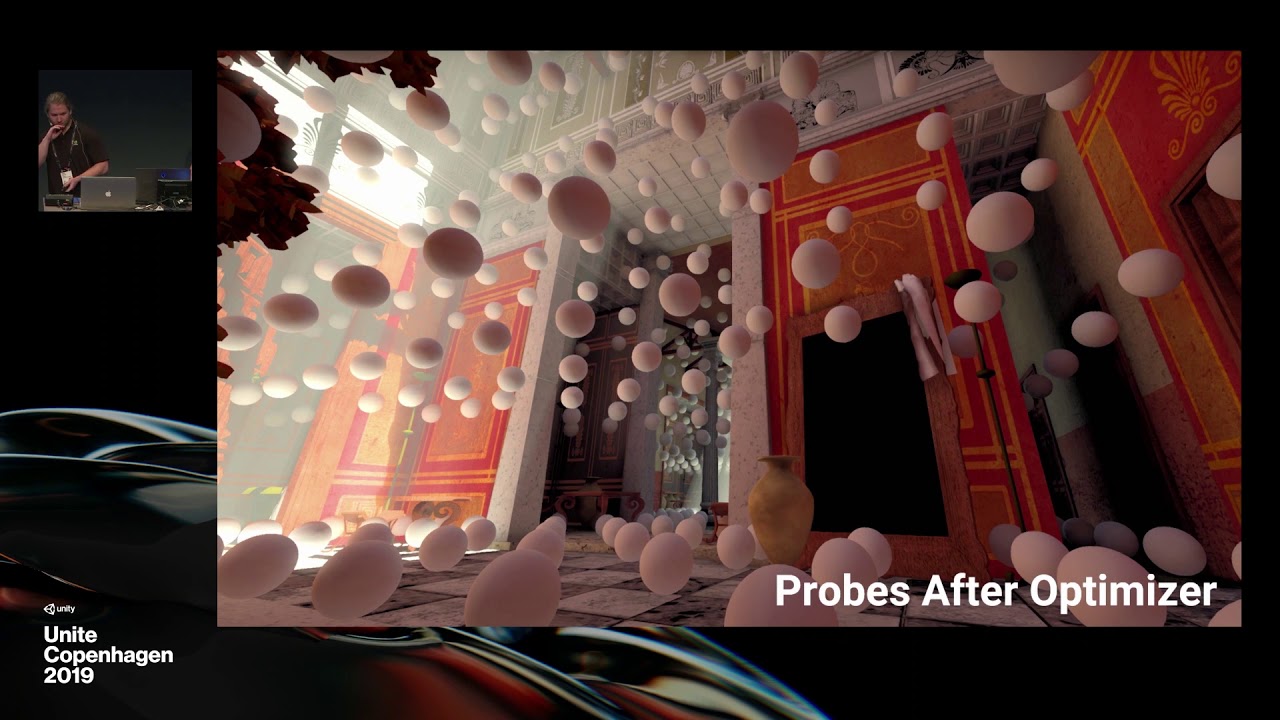
NVIDIA RTXGI was leveraged to create real-time global illumination in Unity. The product-facing integration of this tech combines great artist workflow with stunning real-time ray traced results. In this talk, we review ray tracing, show behind-the-scenes VFX breakdowns for a...
wispy juniper
Sad. I am definitely going back to Amplify and built-in, then.
Thanks for info @glad tartan
glad tartan
No problem. Remember you only have the precomputed realtime GI with Built-in for a few more years
turbid matrix
enlighten is going to get removed too
I think they said they'll keep it around for built-in for 2020 cycle and then it's gone
for HDRP it's going to be out after 2019 already
glad tartan
yep
Technically youll have 3 years with it from now if you stick to 2020.4 LTS
@wispy juniper So this is also help you to decide what to use.
turbid matrix
yes, but no support in Unity 2021
technically one could say HDRP supports it for 2 years now
but in reality you shouldn't use it at all with HDRP and there's minimal fixes for it
glad tartan
Yea. the 3 years is for built-in as you'll have this year and the next two years from 2020 LTS.
wispy juniper
well I think I'll settle for 2019 LTS so that should be fine for 2 years at least.
That's not the only lack of parity in my mind while deciding.
Good to know though.
fervent plover
Anyone here know where I can find samples of custom renderer features where show how you can use material properties/textures in the custom renderer pass. I need to access alphatest + I would like a lineweight value for an outline shader.
glad tartan
Is this for HDRP or URP?
fervent plover
urp
turbid matrix
@fervent plover you know this repo? https://github.com/Unity-Technologies/UniversalRenderingExamples

GitHub
This project contains a collection of Custom Renderer examples. This will be updated as we refine the feature and add more options. - Unity-Technologies/UniversalRenderingExamples
fervent plover
hdrp has normaldepth already I guess, so there have the problem is solved. yes, I've seen that one, but I think I should take another look. In my case, or, its mainly from https://alexanderameye.github.io/outlineshader.html, the normalshader used for the customnormal renderer pass here is for built in, and is using CG, it works, kind of, but only receives mesh normals, and no alpha test. So, no texture there. it's using this shader for the pass. https://github.com/TwoTailsGames/Unity-Built-in-Shaders/blob/master/DefaultResourcesExtra/Internal-DepthNormalsTexture.shader

GitHub
Unity Built in Shaders. Contribute to TwoTailsGames/Unity-Built-in-Shaders development by creating an account on GitHub.
So.. I guess it is not fully supported by urp, as it looks to be a built-in shader (using cg)
I adding the transparentcutout pass there as opaque (which is the one running), and output _MainTex directly, but I only get a white defaultoutput, so I guess _MainTex is just not assigned.
And because of that alphatest is also not used.
candid basin
Just to be 100% sure, may be dumb question
But if I don't have URP installed
I can't access the UnityEngine.Rendering.Universal namespace right
it would give an error?
true zealot
Unless they've added some code in the engine or other packages you're using, yes, it won't exist
candid basin
Alright then I'll check first if the package is installed, then access the namespace
Thank you!
plain finch
so, i found a few gltf importers, but from the first one ive tried, the imported materials dont work with HDRP, and was wondering if there was either
A) a way to convert a standard material to be HDRP compatible
B) an importer that supported HDRP
 teal hemlock
is there a way to make post processing work only on specific layers in the universal RP?
so far when i set the volume to global on a 2d project, it affects everything
turbid matrix
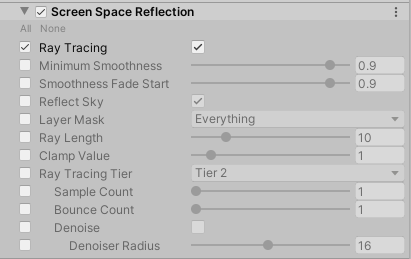
https://user-images.githubusercontent.com/42026998/72439507-59919280-37a7-11ea-8370-451fe559779e.png

you can finally set the RT tier per effect
I'm mainly wanting those better reflections on tier 2
 upbeat copper
Has anyone else tried anything along the lines of taking screenshots in editor with different cameras in hdrp?
I'm having issues with the way the camera starts to render, and the fact that post processing seems to initialise differently depending on if you're interacting with the scene or not
AH okay I just tested from play mode, this seems to force things to resolve, even if unity is not the currently active window
Doesn't totally solve the problem tho
candid basin
are depth/opaque texture always generated in HDRP?
There is no checkbox or something
?
scarlet hull
What do you mean ?
candid basin
Like in the URP asset, you have checkboxes for depth/opaque textures
in the HDRP asset, is there something similar?
scarlet hull
Ok, got it.
This is always there indeed in HDRP.
candid basin
okay wonderful, thank you
and one more thing
I am accessing the UnityEngine.Rendering.HighDefinition namespace in a script
but obviously I only want this to happen when HDRP is installed
like you can do platform dependent compilation, is there a way to do SRP dependent compilation?
I want to support both URP/HDRP and switch what code is used based on which of them is installed
scarlet hull
If I'm not wrong, each package will register a specific define when imported in the project, that you can use in code.
candid basin
Cool, will do some digging online
scarlet hull
If you look for exemple at the HDRP.Runtime assembly definition file, it does add 3 defines:
Oh, wait, that's wrong !
I think you do it the other way around :
- use asmdef for your code
- Use the "version defines" in the asmdef to declare defines, depending on the loaded resources
candid basin
Cool will check it out
candid basin
@fiery marsh Have you rendered camera view to render texture in URP?
I have it working in default renderer but having issues in URP, it doesn't seem to be generating any texture
 fiery marsh
@candid basin I have, yes.
candid basin
I need to use that 'Output Target' setting?
fiery marsh
Yeah
candid basin
Ah and I can access that through script by accessing the UniversalAdditionalCameraData script
got it working
 mental glen
Anyone know about HDRP and how well it supports vulkan
Also if i choose this for my project can i scale down the graphics for low end pc's as well? including those using Vulkan on a lower end machine?
eternal laurel
hey Guys I'm trying to write a custom shader for URP 7.1.6 and I'm getting undeclared identifier 'GetAdditionalLightsCount'. But all the docs and tutorials I can find use it. Is it renamed to something I cant find or what ?
nevermind had some wrong preprocessors XD
scarlet hull
@mental glen iirc, vulkan with HDRP is quite ok. As for scaling down, this is totally on you and how you manage the settings for the different quality levels.
mental glen
Ah cool, it didnt really specify that in the little ? in the corner of the HDRP button so i was curious, I have one more question
So i am importing a asset from the asset store thats got LWRP shaders, how do i make it work in HDRP?
Everything is pink
scarlet hull
We don't have a path to make direct conversion from LWRP to HDRP.
You will have to manually change the materials shaders to HDRP compatible ones.
mental glen
Hmm it doesnt have any it came with, i guess i will have to try and learn how to do it
scarlet hull
What do you mean "it doesn't have any" ?
scarlet hull
Like I said, it's only the mater to change the shader type in the materials to use HDRP ones, and maybe to re-assign textures if needed.
mental glen
Ah, ok...hmm
turbid matrix
some might but there are bunch of changes even between each LWRP versions
if they are made with shader graphs (like they should be) then it's just a matter of opening the shader graph in URP and saving it (unless it uses things that have been removed from it)
turbid matrix
Just tested recent hdrp/staging with 2020.1.0a19 (which just got out) and it finally runs without modifications again
also getting proper reflections now (both SSR and DXR)
turbid matrix
wonder if there's anything that could be done about the DXR reflections noise on rougher materials
denoiser doesn't really help on it at all
and having 1.0 smoothness or super rough is kinda binary and not really PBR correct at all :p


 simple vine
Unity's builtin pipeline utilizes a part of the stencil buffer during deferred rendering to tell what kind of a surface a pixel contains, like if it's lightmapped, what lights to exclude, is it a surface at all etc. The stencil values are overwritten during the drawing of the objects in the renderer itself, so shader parameters are ignored.
Now, the DrawRenderer function has an overload that accepts a RenderStateBlock struct with which you can override various stuff, including stencil ops.
However, this begs the question
Imagine that I want to indicate which surfaces are lightmapped and which are not using the stencil. How exactly would I do that the way vanilla Unity does it?
In case if I were to submit multiple DrawRenderers command, then how am I supposed to filter data for surfaces? Not to mention the more important question: will it mean that the rendering order will be invalidated and the objects valid for the second command will draw after the first one fully completes?
simple vine
So, like, I see how HDRP does it: it sets those things on a per-material basis and just doesn't override its stencil ops in its blocks, so all of the stuff is configurable from materials. That's cool and all, but vanilla deferred operated based on renderer's layer and its lightmapped state.
turbid matrix
GitHub
Previously, when moving a shadow caster with ray traced shadows the amount of ghosting that was produced was really high. This PR reduces it quite significantly (without removing it completely). in...
that's only for DXR shadows
wonder if it would be possible to do that with DXR GI
 radiant ingot
Any news on Ambient Occlusion for URP?
turbid matrix
that didn't get merged?
hmmm, I guess not
that being said, this would let people use 3rd party SSAO for PPv2 / LWRP on URP: https://github.com/Unity-Technologies/ScriptableRenderPipeline/pull/5354
GitHub
Purpose of this PR
Added an option to temporarily support PPv2 in URP to ease the porting of LW projects to URP. It's a project-wide setting, meaning you can't use builtin &...
turbid matrix
things like these are bit alarming:
**Known Issues:**

* macOS build has trouble rendering SSAO
* Visual Effect Issues with macOS/metal
* HDRP renders pitch-black on Linux Vulkan```that's from SpaceshipDemo's upcoming 2019.3 port
HDRP is leaving preview and it's still having issues like these on metal and vulkan
altho I guess that is more of a linux vulkan issue(?)
that being said, I don't need macos or linux support myself, but can imagine many do
indigo summit
I'm wondering is the ShaderGraph development are part of SRP or it is actually developed independently?
scarlet hull
"both" :
- Dedicated team for shadergraph (base code and common functionalities / nodes ...)
- Each SRP team handles it's specific nodes
turbid matrix
can we access stencil on HDRP custom passes / custom PP passes now?
or do we still need to modify the HDRP source to assign the thing?
 modest crest
@turbid matrix , I think you refer to the changelog in the staging/2019.3.0 : it has not been properly updated yesterday, I just duplicated the entry from 2019.2 without changing the known issues :(. To give you an update about the state of rendering that I tested this morning, most issues from metal have been taken care of, and the last ones should be resolved in a future update. Linux Vulkan Rendering however has not improved. However, this issue is linux/vulkan only as for windows/vulkan it works correctly.
To add up about the release of Spaceship, as you have probably noticed, this is a staging branch that is a WIP and should release in a few days once we wrap everything up and finalize our QA on it
turbid matrix
@modest crest I referred to the change log on that shapeship's wip branch, yes
of course it's not fully done yet but some of those sounded so serious they will not be fixed before hdrp release
vulkan on linux is kinda bummer as it's the main thing people would want for it but it's nice that at least metal issues are mostly resolved
modest crest
about metal, most of the issues we had in 19.2 are now fixed
I will update the changelog so it reflects todays testing 🙂
turbid matrix
well, it's clearly not final so I think it's ok, I'm just jumping into conclusions here 😄
modest crest
also, the date is not correct as it's just a supposed date, but it'll maybe shift a little
turbid matrix
that's expected yes, I usually don't even pay attention to dates unless they are on final releases 🙂
 whole fossil
guys - is there some sort of regression considering decals in 7.1.7? I've noticed strange behaviour - for example, decals rendering while component is turned off
glad tartan
That got fixed recently.
It should be in the next package release
whole fossil
phew, good to know that I'm not seeing "things"
glad tartan
@scarlet hull Do you know of any progression on the Physical Sky? Currently sunset/sunrise is really off
scarlet hull
What do you mean ?
trim bone
is hdrp getting the custom renderpasses like urp?
glad tartan
@scarlet hull The sunrise and sunset for the physical sky is a really light and dark ( yellowish to greyish) gradient.
In reality the sunset and sunrise are really blue and only the horizon gets orange/pinkish.
It's also missing Blue Hour before sunrise and after sunset. Just ambient lighting from the sky that's very blue. The Physical sky just goes to a light yellowish to greyish gradient.
Physical Sky
HDRI Sky
Blue Hour - HDRI Sky
Blue Hour - Physical Sky
I didn't have the best HDRI to show so here's a picture as well
fervent plover
Hey (unity) guys/gals, about the new urp rendererfeatures, is it possible with RenderObjects and mateiral override to render with the texture that existed on the original material? For example if I have a "replacement" shader that used existing properties like the alpha on the existing texture, or used a float property from that material. It would be super useful.
okay, fiddling with the depth test seemed to work, equal looks correct. So, now it remains to figure out how to render this to a texture, but it looks like the RenderObjectsPass has members for this.
flat breach
Hey, got another question about LWRP. I'm trying to follow a tutorial in creating a flame, but when I make the material alpha, the background is black. Anyone know why that is?
I'm trying to make the equivalent of a blended alpha in LWRP here...
 exotic robin
You will need to have an alpha channel for that, either from the texture or by greyscale
 delicate iron
I'm using URP and trying to understand what is going on behind the scenes when there are multiple cameras. I understand that cameras have a Rendering Priority, so does that mean that the entire scene (or at least whatever is in the camera's culling mask) is rendered to the "first" camera, and once thats finished the entire scene is then rendered again to the next camera? Or instead, is each Sorting Layer rendered to all cameras one at a time?
 uncut root
Getting an "out of range" console error without stack trace in HDRP when trying to do custom post processing. Familiar to anyone?
 south star
does anyone know why my screen is pink when i set the render pipeline to lwrp
or why it gives alot of errors when i upgrade my project materials to lwrp materials
turbid matrix
@uncut root which version of hdrp and unity?
theres been bunch of issues like that in past
also if you use new custom PP setup, there's been bunch of fixes for custom passes and custom pp passes, not sure if all of them are even merged yet
uncut root
HDRP 7.1.7 in 2019.3
I think I'll have to try to take things out one by one, see where I starts to break
 north peak
Hey guys Im trying to use URP but the default lit shader behaves oddly for me. Im simply assigning it to a material with a black color however as the camera or scene view gets further away from the object the color disappears and the object just becomes grey
I have no idea what is causing this, have been trying a lot of toggles lol
turbid matrix
@north peak you have fog enabled
if it's some default scene, it's probably setup on some sky volume etc (I haven't used URP much myself so don't know the naming out of the box)
north peak
The default post-processing just has Tonemapping, bloom and vignette
turning them off doesn't remove the fog
hmm
Ohh
Its in the global lighting settings, fog was indeed turned on there. Thanks @turbid matrix
turbid matrix
np 🙂
 left fiber
so, how would one best go about creating volumetric light shafts in the most recent HDRP?
now that exponential and volumetric fogs are under the same component, i can't seem to get good settings that would limit it to light shafts only
instead there is this very thick global fog always present
can't figure out how to just get those long godrays that reach all the way up close to the camera and otherwise clear scene
i reckon there was more control available in my previous HDRP tests in the older versions
 tender ruin
im looking to try and simulate color blindness for development purposes. Is there any way I can simulate that with LWRP/URP? I can only find resources on the default render pipeline. thanks in advance
turbid matrix
you probably could utilize some LUT for it
high badge
How about https://assetstore.unity.com/packages/vfx/shaders/fullscreen-camera-effects/colorblind-effect-76360

Colorblind Effect (CBE) is a Fullscreen Camera Effect for Unity 5
- Three most common types of colorblindness
- Simple setup and control
- Compatible with all Unity rendering paths (Forward, Deferred and Legacy) and anti-aliasing
- No perceptible performance hit
- Work...
But it's not URP compatible by the looks of it.
tender ruin
@turbid matrix Did some research, I can apply a LUT with PostProcessing V2 so that's good. Now Im trying to figure out how to find a color blindness LUT, but im having a bit of trouble finding any. Any idea how to generate one and/or search terms for Google? Thank you!
@high badge I tried it out and can confirm it doesn't work for URP. thanks for the link anyway!
high badge

Design for color blind users
8% of your users are color blind. You really should design the colors and tones of your artwork keeping that in mind. People easily localize their products for different languages, however, particular languages affects less percent of use...
@tender ruin you sure it doesn't work on URP?
I think you need to use the cube format
I know HDRP at least doesn't support the old style LUTs at all
tender ruin
the asset that was posted, 100% sure. Im trying out the link @high badge posted, and i got files. I tried the (what im assuming are) old style LUTs and they give me weird colors and stuff. I then tried the cube ones + external mode, and I think they half work. Only issue is that it's washed out
@turbid matrix
im pretty sure the filters work, just that they cause the grey thing to happen
HALD stuff straight up doesn't work on any mode
turbid matrix
I'm currently testing the CUBE's on HDRP
I know it supports CUBE's but these files are not accepted, despite Unity clearly reads them right (previews look fine)
I wonder if the 64x64 resolution is too much for it
tender ruin
for me the .asset files show a blank preview, this is weird
turbid matrix
no I mean, if you select it and look at it in inspector
also found out that at least in HDRP, there's LUT resolution on HDRP asset
tender ruin
this?
turbid matrix
but this still doesn't work for me
tender ruin
imma play around with the LWRP one
tender ruin
completely forgot we had a preview
 undone crow
Hi all, I have issues when I rotate my directional light. The fps drops from 150 down to 3. I checked the profiler and there's a huge spike "Semaphore.WaitForSignal" went from 0ms to 455ms while rotating my directional light. Anyone know why this is happening? I'm on HDRP 2019.3.0f5.
turbid matrix
hmmmm, I ported this to HDRP's custom PP pass: https://www.alanzucconi.com/2015/12/16/color-blindness/
but still figuring out how to expose that enum for the PP component
nevermind, took a peek at how tonemapping does it internally, needed to create ```cs
[Serializable]
public sealed class ColorBlindModeParameter : VolumeParameter<ColorBlindMode> { public ColorBlindModeParameter(ColorBlindMode value, bool overrideState = false) : base(value, overrideState) { } }
holy crap you're amazing
tender ruin
ah alright
turbid matrix
I dunno if URP even has custom PP atm or how those URPs custom things work
but technically one could just port that article's code into PPv2 as it's going to be supported by URPs next version (and is supported by older LWRP)
anyway, if someone wants that thing for HDRP 7.1.x or newer, here's my quick port (don't judge me if it's doing silly things :D)
could make a git repo for it I suppose but I don't really feel like maintaining that
ripe fable
I wonder how accurate that is, I'm colorblind 😛
turbid matrix
well, it just takes the screen image and omits colors for it
it doesn't play with intensities at all, I dunno if you see something else in place of the omitted color or if it's just darker for you
it's quite literal port on the articles shader
I didn't bother doing the view that shows the diff
@ripe fable I'd be curious if you can see the diff between normal and the mode that represents your vision on that emulation
if it looks somewhat the same, it's probably working then
that zip has readme that tells how to setup that but it's relatively simple
just add the script and shader to assets folder, add the custom pp script to HDRP Default Settings After PP and add the custom/color blindness component to HDRP volume to tweak it
anyway, it doesn't have to be 100% accurate to serve it's purpose but still curious how it works in reality
tender ruin
Solved my issue on how to simulate color blindness; I looked at the Unity LUTs and compared it to a neutral LUT that seemed to work with the LDR lookup texture thing in PPV2.
Turns out that all the Unity LUTs were flipped verically compared to the one I found to be right. I just had to flip them all, and then it just worked with Unity and LWRP/URP.
top; normal
bottom; tritanopia (green and blue gets completely blended together)
@high badge @turbid matrix thanks for the help! ❤️
 slate lark
I have a question about the Post Processing package. I am on mobile and I am profiling the device. It is showing a render texture but I removed all post effects. Does having the package in the project automatically allocate memory for a render texture on initialization?
 unborn gorge
With HDRP 7.1.7 contact shadows don't work for me and micro shadows seems to be too strong in overall. Has anyone else problems with them?
turbid matrix
@unborn gorge you've followed the instructions here for contact shadows? https://docs.unity3d.com/Packages/com.unity.render-pipelines.high-definition@7.1/manual/Override-Contact-Shadows.html
it's really easy to miss the frame settings one
turbid matrix
they definitely work for me on same HDRP
unborn gorge
hm, ok, will triple check everything 🙂
turbid matrix
actually they work out of the box for me on HDRP template, only thing I need to do is add the thing to volume and enable it
the most probably cause for this to not work for you is it's not set on the frame settings (through your project settings)
or if you've enabled custom frame settings for your camera and have not enabled it there then
if you've not overridden the camera's frame settings, it's going to use those defaults
unborn gorge
Cam uses default settings, default settings have contact shadows enabled, volume has contact shadows enabled... should work... but doesn't. I create a new hdrp project and check it there
unborn gorge
In new hdrp project they work... strange
Maybe an asset causes issues, have to check...
turbid matrix
There's also "Use Contact Shadows" low, medium and high checkboxes on HDRP asset itself
under Shadows dropdown
unborn gorge
Yep, they're activated for med and high
unborn gorge
Hm, seems to be an asset. Will talk to the creator to verify...
Yep, asset setting... fixed! Too much settings for contact shadows 🙄
north peak
Does anyone have "Load Renderdoc" working with Unity 2020 alpha? It just crashes for me :/
scarlet hull
Yeah, this is known, sadly. Workaround is to do it the other way around, load unity from render doc
turbid matrix
Add virtual texturing support to HDRP.
Unity trunk now has support for VT but without the SRP's driving this it is not possible for user to use this. This PR adds the SRP side of VT for HDRP. This includes two major parts of code

* Feedback analysis: Add an extra rendertarget written during the relevant phases (GBuffer, forward) that allows the VT system to collect information on which textures were accessed by the shaders.
* Shader graph support: VT enabled materials can be created in shadergraph through a new texture stack node. If VT is enabled in the project this will be using VT if VT is disabled this will fall back to using regular 2D texture sampling.```That still sounds like a lot things are missing
turbid matrix
that doesn't really tell much how this works 😄
I suppose it's going to place the texture you input to that node in VT texture stack and it handles the VT atlas in the background
but since there are not debugging tools for this it's close to impossible to see what's happening here (unless you hook renderdoc etc to this)
 left mango
Does the default RP not use the GPU at all?
glad tartan
Every renderer uses the GPU
left mango
well, yeah. what I mean is batching etc?
left mango
ok
turbid matrix
left mango
oh, right. My meshes are all different so no batching for me 😛
upbeat copper
Anyone know if the reflection probe off/blend probes/blend probes+skybox/simple setting actually works in hdrp?
It doesn't seem to have an effect for me right now
An example:
Or am I missing something?
scarlet hull
Nope, it's doesn't do anything. I'm checkign with dev, but I think it's a remnent from legacy that is still shown.
 past current
I just started playing around with HDRP for the first time yesterday, been trying to get into unity again after a break so im trying to learn all the new cool stuff. Are there any tips/tricks for using HDRP. Is it something you want to use for every 3d project you make or is it more of a specific thing only if you're trying to get like really advanced graphics etc. Just kind of trying to gauge how much effort should be invested in learning or if im going to use it on every project or just only for certain cases.
scarlet hull
First, you need to take into account the constraints :
- Do you want to run on mobile and lower end hardware ? => URP / Legacy
- Do you really heavily on asset store and in particular custom shader from there ? => Legacy
Then, if you know you're targetting "higher" end hardware and current/next gen consoles, and want top out of the box graphics : go HDRP
uncut root
In HDRP 2019.3 I'm having a hard time using temporary render textures for custom post processing using RTHandles.Alloc, they aren't ever released so cause a memory leak. Built in post effects use the PostProcessingSystem.TargetPool class for this, but all of it is protected. What are we supposed to use then? 😅
 woven sonnet
HDRP have it's own custom post process system, you can check out the doc to see how to use them: https://docs.unity3d.com/Packages/com.unity.render-pipelines.high-definition@7.1/manual/Custom-Post-Process.html
For more complex effects that require more than fullscreen passes (for example drawing objects) you have custom passes: https://docs.unity3d.com/Packages/com.unity.render-pipelines.high-definition@7.1/manual/Custom-Pass.html
You can check out some example of custom passes effects here: https://github.com/alelievr/HDRP-Custom-Passes
GitHub
A bunch of custom passes made for HDRP. Contribute to alelievr/HDRP-Custom-Passes development by creating an account on GitHub.
uncut root
Thanks! Didn't know custom passes were a thing in HDRP. Simple post effects work fine, but I'm looking to do more extensive post effects through the volume system
I see that's allocating RTs during setup, or if null, that may just work. Won't take resolution changes into account, but that's a problem for later 😛
upbeat copper
Cheers for the info @scarlet hull , do you know if there's a replacement way to exclude a scene object from being affected by render probes now?
scarlet hull
It will add some cost to the rendering, but your can use HDRP light layers for this
glad tartan
Physically based sky isn't in preview anymore
I wonder if the sunset part of it cant be change without a different implementation of the whole system. UE4's Physical sky have the same problem with its sunset
turbid matrix
that's for 2020.1 release
so it's still going to be in preview for 2019.3
do note that while the preview tags get out on github, it only reflects what they are going towards... like HDRP has been without experimental rendering for a long time now but it's still not officially released
glad tartan
Yea I know, HDRP got it's tags released from I think 2019.3 alpha days
turbid matrix
yup
I do wonder if there would be better way to do this
there's a lot of angry feedback on the forums already when people thing some things are already released due to lack of beta/preview tags
(despite them using prerelease unity versions 😄 )
for the namespace stuff, I get these changes can't happen last minute
glad tartan
I just hope the physical sky gets the issues ironed out and able to look realistic and not just alright. Currently it looks alright
turbid matrix
but they could make some setup where the UI would reflect the preview state until the thing is truly released
I haven't tried that new sky in a long time
last time I tried it, I got some spec spots on my scene from it
glad tartan
For now I'm just testing all the new stuff as they come. In alpha or beta
Yea, that was 2019.2 days
turbid matrix
I really want that VT myself 😄
glad tartan
it got fixed and UI changed since then
turbid matrix
and built-in cloud system
but I guess that's still quite far away
I know it's on their backlog
glad tartan
yep. Physical Sky with clouds will be nice.
Finally some decent clouds and shadows from them in the scene
turbid matrix
I'm also curious when HDRP will reach a point where they don't constantly redo their stencil setup 😄
it's changed quite many times after I did my last experiments with it
turbid matrix
it wouldn't result in big changes on custom code
glad tartan
balance between perf and all
turbid matrix
but I'd ultimately just want to be able to access stencil buffer on custom passes/pp passes
tbh I don't if it's possible already
but in past you had to mod the internal loop to pass the stencil RT/buffer/whatever to shaders that needed it
it wouldn't be a big change to expose that
glad tartan
That might be the part that's being reworked. Trying to make it simple to use
turbid matrix
I wonder how far we have to go to actually get stencil passes exposed on SG
UE4 has allowed this for ages
I think currently the stance is that there's no room for user stencils
but it's quite limiting
hardcoding things like that works if your rendering team focuses on making the thing work for specific game and optimizes everything for you
I can't imagine general purpose (even if it's for high end only) renderer can cover all use cases out of the box
glad tartan
Yea. Currently that's the main thing we are waiting on to swiitch to HDRP. The First person system we currently have use a stencil buffer so Until thats clear in HDRP we gotta hold out on switching.
turbid matrix
current stencil bit mask has both one free slot but also tons of slots users could reuse: https://github.com/Unity-Technologies/ScriptableRenderPipeline/blob/master/com.unity.render-pipelines.high-definition/Runtime/RenderPipeline/HDRenderPipeline.cs#L199
hmmmmm wait what
that's from the refactor branch (edit nevermind this and following, it was older branch)
there's quite a lot more masks
worst part of all this is that since it's internal to HDRP, there will never be any docs that explain any of this either
so after each change, one has to figure the usage on their own
the new setup makes it easier to use at different rendering stages I suppose
glad tartan
Was there an amount that's stated to be exposed?
turbid matrix
I don't think anyone said any of this would get exposed
also would love to get access to that internal doc referred there :p
glad tartan
hmm, I remember seeing something about one being free for users
turbid matrix
ah yes, they had one "user" bit at some point on that mask
but it was never officially communicated anywhere
glad tartan
guess we gotta hope for the docs then and dig in ourselves
turbid matrix
we'll not get any docs for these as long as it's internal 🙂
glad tartan
hopefully after things settle down it wont get changed much and break things
turbid matrix
I just love to be right sometimes
like, I've been tempted to redo my old setup after Unity's earlier refactor broke it but I knew they will change these things many times so it would be just a waste of time trying to maintain it at that time
also, the recent motion blur fix made one of my hacks obsolete
glad tartan
haha yea, that will make you hesitant.
turbid matrix
oh they have PR up for this refactor already https://github.com/Unity-Technologies/ScriptableRenderPipeline/pull/5581
GitHub
This PR contains three parts:
Stencil refactor for HDRP as discussed in meetings
Make the material migration actually work by saving the assets at the first time the editor is ready to.
Make mater...
from 3 hours ago
oh, this is different branch
stencil-revamp
I was looking at older stencil-refactor
this is the stencil "mask" now on this new PR: https://github.com/Unity-Technologies/ScriptableRenderPipeline/blob/HDRP/stencil-revamp/com.unity.render-pipelines.high-definition/Runtime/RenderPipeline/HDStencilUsage.cs
glad tartan
separate file now
turbid matrix
// --- Following are user bits, we don't touch them inside HDRP and is up to the user to handle them ---
turbid matrix
yeah, would love to get access on custom passes for these
turbid matrix
these UserBit0 and UserBit1 are not assigned anywhere in the code, they are only reserved on that one file
glad tartan
That might come soon
Did they start allowing us to add custom post processing to the default volume or it's still a separate volume? I remember seeing the Color Blind post you made on the default volume
turbid matrix
I actually didn't think about that much, I definitely put it in regular volume
but there could have been some limitations to the volume blending still
"The High Definition Render Pipeline (HDRP) allows you to write your own post-processing effects that automatically integrate into Volume."
I just followed that doc page
glad tartan
Ah alright. When it was first introduced you had to make a separate custom post volume so this is nice
turbid matrix
that being said, the code snippets had extra row after each line, wonder why they did that on docs
it's not even easier to read on the webpage
yeah, I have a faint memory of that setup as well, but wasn't that still when it was a draft?
glad tartan
yea
turbid matrix
or was it like that on the first integrated version too?
glad tartan
don't fully remember but it's good it's in the default volume now
turbid matrix
oh wait
it was the custom pass that needed it's own volume
it's still that way
when these things arrived, custom pass came first, custom pp pass followed after it
turbid matrix
hmmmm, if they ever plan to expose these user bits on stencil, the whole StencilUsage enum shouldn't be set to internal at all
(right now it is)
@dreamy fox is the index 16 correct here? https://github.com/Unity-Technologies/ScriptableRenderPipeline/blob/HDRP/stencil-revamp/com.unity.render-pipelines.high-definition/Runtime/PostProcessing/Shaders/TemporalAntiAliasing.shader#L5
GitHub
Scriptable Render Pipeline. Contribute to Unity-Technologies/ScriptableRenderPipeline development by creating an account on GitHub.
I mean it does get placed value of 2 when it runs, so it probably doesn't matter, but 16 was the old value, right?
(just noticed this while trying to understand how this works)
that being said, I think all the shaders still have their old values
or is this some other index?
also wonder if these will use the generated defines eventually?
dreamy fox
So, whatever is in the shader doesn't really matter, I patched some of them up for reference, but are fairly useless since it is set via code; if it is not that's the bug.
We cannot use the generated defines unfortunately due to the fact we cannot include hlsl files before properties are declared.
Anyway, what are the ones you saw with old values? I can patch them up for "documentation" purpose, but as said, is more an aesthetic rather than functional reason
Yes, the enum will be public, we are discussing whether to do it now or we need to wait a bit of other PR we have piled. It will likely be public for when the PR lands.
turbid matrix
I only checked SMAA shader
and yeah, I assumed these were overrided in code, just felt weird they were setup in original hlsl file at all
dreamy fox
I guess I'll do a pass if I get some downtime 🙂
Yup, the behaviour of some of those shaders before was wrong, as they were declared in shader but never setup from c#, so in that case the value mattered
turbid matrix
btw, since on topic, is there any plan on exposing those userbits?
dreamy fox
yes
turbid matrix
like mentioned before tagging you, stencilusage enum is internal so can't even access that
but I guess this is some longer term plan?
dreamy fox
As I wrote above, the enum will likely be public soon after the PR lands or when it lands itself. But is not final decision, we still need some small discussion (will likely have tomorrow)
turbid matrix
ah, sorry I missed that, my bad 🙂
I know a lot of users are waiting for that stencil access so pretty excited if it finally happens without HDRP modifications 🙂
 patent sun
how to disable rendering weapon shadows on the ground?
turbid matrix
your mesh renderer should have option to cast or not cast shadows @patent sun
patent sun
yes but parts of this gun are not casting shadows on another parts
turbid matrix
so you want self shadowing but not shadow casting to world otherwise?
patent sun
yes
turbid matrix
which renderer?
turbid matrix
@patent sun ok so, HDRP has this feature called light layers: https://docs.unity3d.com/Packages/com.unity.render-pipelines.high-definition@7.1/manual/Light-Layers.html
When using Light Layers, Meshes only cast shadows for Lights on the same Light Layer as them
you could abuse that system if you don't have tons of light sources
like if there's one directional light, you could just duplicate it and have the gun and extra light use their own layer
patent sun
i will propably use ~5 light sources (1 directional + 4 point) and max 20
will this be good?
turbid matrix
alternatively, you could try if you get enough shadows with just using contact shadows for gun's self shadowing
but it could still glitch I guess since contact shadows rely on screenspace data and that gun is usually on the edge of screen
that light amount is not an issue but you should test it on your project rather
also I dunno if you even can have two directional lights casting shadows in case like this
if I remember right, normally HDRP limits directional light shadows to one directional light but I have no idea what happens if these are in different light layers
could just try it out as it's quite quick to test
turbid matrix
it's probably under the advanced menu
that doc page I linked should have instructions tho
turbid matrix
did you click that plus icon on "Shadows" bar, right
?
also not sure when they introduced this so if you'r on really old HDRP, it might not be there
turbid matrix
yup, that's the advanced menu I meant 🙂
I think the icon is more obvious on newer Unity versions
turbid matrix
ah that's the thing I was wondering about
patent sun
is there any other way to do this?
turbid matrix
if it gives you that even when your two directional lights are on different light layers, I guess that hack won't work
patent sun
FPS sample have this problem fixed but i dunno how
turbid matrix
well, you could play with those contact shadows
you sure FPS sample even has guns selfshadowing?
turbid matrix
if I remember right, basically what they do there is that they render a tiny weapon and change it to big with fov shader
so I wonder if it would still cast shadows but since the scale is so small, you wouldn't notice it?
patent sun
i have small weapon too
turbid matrix
I have all FPS Sample modifications to HDRP here: https://github.com/0lento/ScriptableRenderPipeline/commit/9ac752ee95e77224ee879bf6d25fd910f454934e
it's not for the latest FPS sample but I doubt they added anything for that particularly
looking at that diff, it's mainly there to alter shadow draw distance and being able to set it from menu I think
so whatever they did, it's not specific to their HDRP modifications
patent sun
so maybe you know how to get rid of this shadow probem when im using custom FOV shader?
this is the only reason why i want to get rid of that shadows
patent sun
SG?
turbid matrix
shader graph
turbid matrix
that doesn't show what shader it uses
at some point, they updated the gun to use SG shaders I think
patent sun
turbid matrix
if I have to guess, these are the things: https://github.com/Unity-Technologies/FPSSample/tree/master/Assets/Shaders/Graphs/FirstPerson_Projection
GitHub
A first person multiplayer shooter example project in Unity - Unity-Technologies/FPSSample
ah, so it's a sg on your end too
turbid matrix
I have no idea what's inside those anymore
it's been ages since I've touched these
turbid matrix
it's probably the same
hmmmm, wonder why this on bintray now: https://bintray.com/unity/unity/com.unity.render-pipelines.high-definition-config/7.1.8
there's no other 7.1.8 packages and 7.1.8 isn't released even on github
turbid matrix
is that with contact shadows?
turbid matrix
it's probably artifact you get with screenspace effects
glad tartan
You always get that with contact shadows. The most you can do is increase the samples but it will still be there
patent sun
yes it is
turbid matrix
btw
can you omit only dynamic shadows from getting cast to materials?
just wondering if that FPS sample could have just configured to not receive cast shadows from dynamic objects
altho you'd think they would still would have wanted the dyn chars to cast them
so go figure
patent sun
when i swithed it to dynamic it was still not casting shadows
turbid matrix
in cases like these, I'd just examine their setup and test what happens differently on your setup and theirs
turbid matrix
going back to previous topic
is ExcludeFromTAA even used anywhere?
it's a stencil bit but I can't find anything that uses it on the SRP repo
there isn't checkbox to exclude select meshes from TAA either
(like there is for SSR, decals etc)
GitHub
Purpose of this PR
This PR allows part of the frame to not execute TAA, but go straight through with just the unjittered sample of the scene color.
The client for this is particles, so the tagging ...
The client for this is particles, so the tagging of the stencil will need to happen on VFX side.
so they just never used this on vfx graph?
this was used with some custom shader that does stencil pass that sets the ExcludeWithTAA bit?
 outer wigeon
Having trouble with LinearEyeDepth, (maybe?), the output is extremely tiny on the screen (top left corner). It looks like a mip map, but there are no other mips. Just the super tiny one.
HDRP 6.9.0, Unity 2019.2
turbid matrix
I'm guessing you'll better answers in #archived-shaders
outer wigeon
I wasn't sure, thanks!
turbid matrix
no worries, it's just I don't think there are that many shader guys hanging on this channel 🙂
outer wigeon
I've only had this problem with HDRP, it's odd. I'll probably be back for something else, heh.
 lapis sky
So, I have a full screen mask similar to vignette effect, but dithered (Just either fully on/off)
Is there a way to skip rendering the pixels on the masked area?
turbid matrix
got the stencil mask figured out
here ExcludeFromTAA stencil bit set to the ground using custom pass on my old test scene
turbid matrix
what puzzles me is that even with the new stencil mask refactor, I had to use 16 with stencil mask to ExcludeFromTAA, but it should have been 2
so I'm guessing the software override isn't working right, at least on editor?
TAA shader has default of 16 right now so I'm guessing it finds it there
indigo summit
I'm always wondering about this one, We know that unity now support and actually using hlsl for SRP. Why there's no menu to create hlsl file though? 🤔
and yeah i'm asking on this channel because hlsl mostly used on SRP
turbid matrix
here's the whole HDRP custom stencil pass thing (shader + mat + prefab), just set the material's stencil mask to whatever you need to set and also set the custom passes layer value to something that holds objects you want to tag with the shader
no guarantees it's all correct but worked on my test scene on 2020.1
@indigo summit hasn't SRPs always supported hlsl?
indigo summit
i know, what i'm asking is why there's no option to create hlsl
turbid matrix
I'm guessing to avoid confusion
getting that stuff run properly isn't trivial to most users
indigo summit
hmm it's just kinda annoying when we want to create hlsl, we need to open system file browser and rename the extension there
oh 7.1.8 is released
turbid matrix
hmmm, is sorting priority broken again?
I found old bug report that says it's fixed a long time ago: https://issuetracker.unity3d.com/issues/hdrp-sorting-priority-is-not-working-when-sorting-by-material
How to reproduce: 1. Create a new HDRP template project 2. Create two cubes in the Scene which overlap each other 3. Create two sepa...
this could be handy for many things you want to render on top
you are still being limited to transparent shaders but like, could prevent stuff like foliage going through player/hero objects (gun etc)
dreamy fox
what puzzles me is that even with the new stencil mask refactor, I had to use 16 with stencil mask to ExcludeFromTAA, but it should have been 2
I will double check, the exclude from taa is the only one that cannot be automated tested as we don't have an internal usage yet.
Oh oops, find the issue, probably a merge issue in the various merge of staging I did, thanks for checking it out 🙂
whole fossil
hi guys. how long does it usually take to show hdrp package in package manager? Since it is 7.1.8 on github, but 7.1.7 in PM?
whole fossil
well 😄 I guess it's pretty fast 🙂 It just showed up in my project
whole fossil
uh, but it cannot be installed via package manager yet since hdrp config package doesnt exist in 7.1.8 version right now
scarlet hull
it does
whole fossil
 fading rose
How can a single piece of terrain with a single layer produce more batches than parts of the scene with lights, objects and materials?
scarlet hull
@whole fossil Ok, so, despite all the tests we have, maybe something has failed somewhere in the process. I checked and HDRP-config 7.1.8 is available on the "old" bintray registry, but is not on the new registry server.
I will raise the issue internally
whole fossil
yeah sure, not a problem & totally understandable. I was just excited to rush and try out new bugfixes 🙂
thanks for your attention
scarlet hull
Theorically, you should be able to force HDRP-config to 7.1.7 (import it manually in package manager instead to let it be handled as a dependency) and update HDRP to 7.1.8. The config package didn't change iirc.
Have not tested tough
turbid matrix
@scarlet hull new bintray? :D
I'm guessing it is some internal server that cant be as easily snooped with browser? 😅
scarlet hull
I guess that you could get the adress by looking at the machine network trafic, but yes, it was decided to move the hosting of packages out of bintray
They are still published there for legacy reasons, but I don't know for how long
turbid matrix
Registry address is in in package manifest too, just didnt notice change
Any idea on the sorting prio not working on hdrp? I'm wondering if I'm missing something basic
I guess I could do simple repro on 7.1.8 and submit bug report too
If it even fails there that is
scarlet hull
yep, would be best 🙂
turbid matrix
ah the new registry isn't even in the manifest file
anyway, can confirm that PM doesn't find 7.1.8 config package on my end either
also wonder if 7.1.8 is getting release on github eventually?
as for 7.1.7 config compatibility, it should be the same because this was the last change besides changelog: https://github.com/Unity-Technologies/ScriptableRenderPipeline/commits/release/2019.3/com.unity.render-pipelines.high-definition-config/Runtime/ShaderConfig.cs
that's on Nov 22 and 7.1.7 got released Dec 16
so it's pretty safe to say it's identical functionally
scarlet hull
7.1.8 tag will be added. Should be the lastest commit in release/7.1.x branch
turbid matrix
anyway, I got 7.1.8 installed the way you suggested, first 7.1.7 config package and then 7.1.8 hdrp
bit worried that QA will point about the missmatch since I'm doing a bug report here, might be better to just point this to old registry manualyl so I can get all 7.1.8 packages there
turbid matrix
you get HDRP issue reports directly?
I thought there was some middle layer here to filter all the nonsense
anyway, sorting is broken on clean 7.1.8 project too
I still wonder if I'm failing to do something extra so I might also test on older version that's supposed to work
I've only set the materials to transparent and altered the sorting prio on material (also prio on mesh renderer doesn't do anything)
as a side note, 7.1 docs have missing link on https://docs.unity3d.com/Packages/com.unity.render-pipelines.high-definition@7.1/manual/Renderer-And-Material-Priority.html
"The built-it Unity render pipeline sorts GameObjects according to their Rendering Mode and renderQueue." has link to Rendering Mode which tries to open page that doesn't exist
scarlet hull
There is indeed filtering for user reported bugs, but depending on who does it, it can only be a re-assignation based on description, or more in depth test for repro before :/
turbid matrix
I also wonder what I should set HDRP issues to be related to
like I know it's technically a player issue if it doesn't render something right
but I've only verified it to be broken in editor
so I can't really tell for sure it's player issue 😄
I mean this thing
there could be "A problem with the package" etc I suppose
scarlet hull
hum, I think that in that case it doesn't really matter. I'd set "in editor" as it also occurs in editor
turbid matrix
anyway, for what it's worth: Case #1213792, HDRP Sorting Priority not doing anything
I sure hope it's not some dumb issue on frame settings/hdrp asset 😄
I did try to look all those settings over but didn't spot anything obvious
and if that's the case, it would be a documentation issue then as docs should state it
unborn gorge
Are there any best practices for setting HDRP quality levels? There are so many options, i really don't know where to start... maybe shadows as they are using the most performance (at least in my game)?
fading rose
a good start.
https://blogs.unity3d.com/2020/01/09/how-to-set-up-unitys-unitys-high-definition-render-pipeline-for-high-end-visualizations/
Unity Technologies Blog
Prior to Unite Copenhagen in September 2019, Unity collaborated with Lexus and its agency Team One to showcase a real-time car configurator and promote Uni...
@turbid matrix what are you trying to do when "HDRP Sorting Priority not doing anything"? I suppose you have properly set the transparency features on the material right?
I thought I had sorting issues but it was only a matter of material setup.
turbid matrix
@fading rose you dont even get the prio settings on the material if you dont set it
I actually wanted to try this after reading that blog post and did follow the doc page
It is just not working
scarlet hull
The issue with HDRP-config 7.1.8 should now be resolved !
turbid matrix

The Heretic is a short film created by Unity’s Demo team. After debuting its first part at GDC 2019, the completed short is now available to watch in its entirety.
The Unity Demo team’s mission is to push the boundaries of what is visually possible with Unity. With ”Th...
fading rose
@turbid matrix I was asking more about what is it that you are trying to do that needs transparency sorting.
i.e. i had problems with transparency on a lantern culling the back of the object. then setting the transparency to do first back then front ,etc. solved it. or similar issues with leaves of a tree.
glad tartan
I was wondering when they would post the full version of The Heretic since it wasn't available right after part two was shown at Unite Copenhagen. All this time to see part two you had to watch it in the keynote.
turbid matrix
@fading rose ah, I don't really have actual need for this yet, was just testing the feat when I discovered it existed
and the use case I have could be solved in many other ways anyway
my only use case for this is the in-car view where I don't want things like foliage to render through the interior floor. But this can be solved in so many other and better ways.
could for example just do some naive alpha cut limit for the foliage that would be updated with the vehicle position
I once did a hack like that to prevent raindrops getting rendered in-car
there simple radius check to camera was enough for the particle shader