#archived-hdrp
1 messages · Page 40 of 1
 waxen lantern
 turbid matrix
I have this one man company where I'm developing a racing game with Unity
I try a lot of bleeding edge stuff, hence you may see me commenting these things on this channel from time to time
like, there are specific HDRP PP things that need special attention in the genre I'm working with and I'm also interested on DXR (altho raytracing is bit too early for production use in games atm)
 median raptor
Hi guys ... Where does unity load HDRP scripts? It's just that if I edit a script so it returns to the default state again.
 azure kraken
@median raptor The HDRP package lives in Library/PackageCache. If you move the folder (com.unity.???@???) from there to the top level Packages folder (next to Assets) you’ll be able to make changes without them getting periodically stomped.
median raptor
@azure kraken Okay, thanks for tip
@azure kraken Really thanks for help. Finally after one day solving bug in HDPR version 6.9.1
working 🙂
 grand egret
We want to target DX12 for our game using the HDRP, but when we do so, we aren't able to proceed due to the following:
d3d12: generating mipmaps for array textures is not yet supported.
I've gone through all the textures in the project and disabled mipmap generation and it's still not letting us continue. Is there a global switch for this? Or some other way to solve this problem?
turbid matrix
@grand egret it pretty much means what it says
it'll still work afaik
and they will fix this on 2020 cycle
d3d12: generating mipmaps for array textures is not yet supported.
This will be fix for 2020.1 and performance will be fix for 2020.2. Both DXR and DX12 should be out of preview in 2020.2``` frigid nova
why my GPU lighmapper always reverts back to cpu after 1 min of baking i mean Jesus christ this is so unstable.
 lyric ravine
@frigid nova it'll do that if it finds issues. For me most of the time it means there's overlapping or missing uv2s. There should be a console warning as well
frigid nova
@lyric ravine so for example trimsheets are off the table?Also ill add that i generate lightmaps ove the whole scene via the automatic lightmap generator of unity
but it happened when i didnt have trimsheets
i just wish there was a force gpu lighmapping mode,or only a gpu lightmapping baking
lyric ravine
@frigid nova trimsheets are usually uv1. Lightmapper uses uv2, which should be non-overlapping if you generate it via Unity but I had cases where these were still overlapping
frigid nova
dunno i think gpu lightmapping is too week for 3gb graphics cards ,and i hate that
azure kraken
I got a 2060 with 6GB mostly to get GPU lightmapping to work better, but it still craps out and falls back to CPU on a lot of scenes.
frigid nova
is unity gonna fix that with 2020?
turbid matrix
@azure kraken @frigid nova from 2020.1 alpha release notes:
* GI: Improved memory allocation strategy for GPU lightmapper on AMD GPUs
* GI: Improved memory allocation strategy for GPU lightmapper on Nvidia GPUs (Windows only).
* GI: Progressive lightmappers will display the number of lightmaps that will be generated, in the Lighting window, as soon as atlassing stage is done.
* GI: Reduced GPU memory usage when baking lighting with the GPU lightmapper by using stackless BVH traversal.
* GI: Show user friendly name in the Lighting window for AMD GPUs on Windows and Linux instead of GPU code name.```so, you'd think it should work better on lesser RAM gpu's with these
(altho the notes doesn't grant that)
frigid nova
@turbid matrix im really on the edge tbh,i have a really small scene that i try to bake,cause ray tracing on the 3gb version is a dream at this point.I cannot bake with Gpu anymore.I honestly have no idea of what to do from now on.My options is either to buy a new graphics card or use blender.
azure kraken
@frigid nova This might be voodoo, but I have two displays on my machine (4K & 2K). When doing a bake I disable the larger monitor and I think it helps. 🤷♂️
Or do a CPU bake over night.
frigid nova
i have two screens too,but it used to help when i didnt use substance.and give all the gpu power to the baking.But this does not help now.Also cpu baking overnight for a small scene i think is too lets say overkill
 drifting vault
Hey @scarlet hull , since Fog Quality was deprecated in 2019.3, how we can now control depth of volumetric light?
 scarlet hull
I was a bit of grid this week, but iirc, you can do it in the advanced settings of the fog
drifting vault
omg thanks! 😄
 modest veldt
is there an alternative to decals in LWRP?
 hidden ridge
not that i'm aware of. afaik i just have to settle for quad-based bulletholes sticking out from geometry when bullets hit convex corners. 😦
there's probably some convoluted Asset for it that's not entirely bulletproof (ba dum tshhhh), but i didn't look.
modest veldt
ah dang
thanks for telling me
that this project ain't in the most advanced stage yet I might go back to the old renderer then
waxen lantern
@modest veldt Since a deferred renderer is coming to URP in 2020, i figure decals are on the roadmap. Though I don't have proof of that.
modest veldt
ah sweet
waxen lantern
regardless, maybe this asset would work for you?

Lux LWRP Essentials provide a growing collection of manually written and optimized HLSL shaders and custom nodes for Shader Graph . It bridges the gap between HDRP and LWRP/URP by adding missing advanced lighting models and adds a ton of other rendering features to cover a...
@modest veldt
modest veldt
looks good, though that the project I'm working on is a uni project we are not allowed to use additional assets such as this, so I might stick to the older pipeline for now
waxen lantern
Ah, I see. and you can't use HDRP either?
hidden ridge
@waxen lantern thx. the "● Charlie Sheen cloth lighting" bulletpoint was the clincher
modest veldt
I'll prob need to ask the module leader about that
turbid matrix
heh, now I feel so dumb
I had Unity processing one project for over one hour after changing to newer HDRP
I just now looked at the names
and it keeps just looping few SG's all over 😄
so it's been going circles this whole time now just over like 3-5 shadergraphs
I had a system crash on the previous import run so that must have screwed up the cache
(I've had issues on new AMD system, so trying to find stable memory clocks)
drifting vault
@turbid matrix i have same problem. that happened sometimes at 2019.3
turbid matrix
it could have been also just the upgrade alone
drifting vault
you can cut that files from assets with meta, then open proejct adn import that files again
turbid matrix
it's not first time the cache goes bonkers
I usually wipe the the library beforehand when there's bigger change
drifting vault
Im hope your project dont have size over 40GB+ 😄
drifting vault
report that bug bugtracker and give me link, i will vote up it
turbid matrix
you can't report bug like this as it's not reproducable
unless you give them outdated library files along with the report
but as far as I'm concerned, this is by design
I'm not using some released package versions here
so I don't expect clean upgrades, I'm also used to things going sideways if upgrading HDRP itself
 stuck imp
Hello! I'm using Graphics.Blit() from a texture with a material (using a shaderGraph shader) to a render texture. I'm getting a black texture as result. Anyone has encountered this problem?
If I use a non-shadergrph shader for the material it works properly
 viral summit
Hi all. Some one knows if there is a Vertex Shader for the HD Pipeline? Thanks!
scarlet hull
@viral summit Yes, you can use the vertex position/normal input in the SG master node
@stuck imp Not sure, but you should also probably point to the proper pass index.
stuck imp
How many passes has a shaderGraph shader? I was assuming it has only 1
scarlet hull
Depends on the render pipeline, the master node you're using and its settings
Best is to look at the generated code (right click on the master node for option)
 glad tartan
Anyone ever tried profiling HDRP? Both GPU and CPU on rendering with the SRP Batcher enabled? I'm trying to see how it's batching things, the stats window and profiler showing different things and it's making things difficult to track
 opal tinsel
I assume it is simple and I just do something stupid here, but with Custom render pipeline, how can I make specific GO (Layer) to be rendered on top of everything in VR ?
only difference so far I have seen with different events are: visible as usual or not visible and in "After Rendering" my right eye go crazy on Oculus
and even they don't show tat on top 😦
I need it for custom transparent shader and UI in world space
turbid matrix

I wonder, are compute shaders supported on these custom passes?
 empty star
@opal tinsel you use the CullResults and ScriptableRenderContext.DrawRenderers() and can pass in filtering settings for the layers, types of shaders etc
The order you call your draw renderer is the order things draw, so if you have UI you'd tell it to draw last before presenting to the screen and calling context.Submit()
I guess to clarify is this a custom SRP, or are you using universal forward renderer
 plain finch
Library\PackageCache\com.unity.render-pipelines.high-definition@6.9.2-preview\Editor\AssetProcessors\ShaderGraphMaterialsUpdater.cs(15,23): error CS0117: 'GraphData' does not contain a definition for 'onSaveGraph' i updated HDRP, and now ive got this error
plain finch
ive tried restarting my computer, uninstall the package and reinstalling, upgrading my unity version,and that error is still there
plain finch
nvm, needed to update shader graph and remove PP
viral summit
@scarlet hull hi thanks for your tip, can u please tell me how do I do that?
scarlet hull
Just input data in object space to those inputs @viral summit
viral summit
Hi @scarlet hull I found one that works for the 3D Pipeline and it displays correctly the Vertex Colors coming from a VRML file. Now the question, how to "transform" it so it works in the HD pipeline?

Gist
Unity Shader to visualize vertex color. GitHub Gist: instantly share code, notes, and snippets.
 indigo summit
just use the vertex color node
scarlet hull
I don't get how you can have shadergraph work in the "3D" pipeline and not in HDRP
How do you want to visualize the vertex colors ? As colors ? Then just plug it to the albedo of the master node
turbid matrix
@scarlet hull you know if compute is possible with current custom and custom pp passes?
not looking for any sample now, just simple yes / no kinda answer 🙂
 chrome sandal
Hey has anyone here used the Flashback 94 plugin from the Asset Store? Have you got it to work with URP?
Doesn't seem to have any effect any more. I'm kinda new to render pipelines though... Is there something I need to do to make this kind of thing work?
 buoyant solar
I'm new to Unity shading and RP, is there a tutorial/blog/sample for something like a complete low-poly shader graph for HDRP? I've googled, but only could find either old stuff, or cartoonish URP. I have built an unlit low poly shader, but it has black sides on the opposite side from directional light, and also it doesn't receive shadows. If I do a lit shader, it is blurred in shadows, etc.
 exotic plume
@chrome sandal Nope, looks like Flashback 94 plugin is old so the shaders will not work with URP you could message the dev and ask if they have plans to bring it to the RP's
but honestly - what would be the point of using shaders that make everything look crappy/ retro with a modern rendering pipeline?
empty star
So... HDRP uses Alpha8 for density volumes, but texture3d's with Alpha8 format are always black. 🤔 how do they test
(reported bug, been like that since 2018)
R8 format works and it reads it as R8_Unorm in the shader anyway
 cloud lichen
Please help. I'm trying to import Lightweight RP for my 2D game. At most I'm getting this option, which unfortunately does not suffice. I need 2D rendering pipeline assets which I'm not seeing. I've tried three versions so far including the newest and verified ones.
 dawn sorrel
How do I switch form hdrp to lwrp
cloud lichen
Also I'm getting these three errors.
waxen lantern
@chrome sandal yeah as @exotic plume said, that asset is older than URP or HDRP. Right now an asset doesn't explicity say that supports the new RPs, you can safely assume it doesn't. Fortunately, the SRP / Scriptable Render Pipeline that they are built on allow for this sort of retro rendering on a more integrated level as a Custom Render Pipeline than just hacking it into the legacy pipeline with shaders like Flashback 94 did. Keijiro has a pretty good example that has that same playstation 1 / saturn look you are looking for. Plus, it's free: https://github.com/keijiro/Retro3DPipeline

GitHub
A minimal example of a custom render pipeline with the Retro3D shader. - keijiro/Retro3DPipeline
 stray oriole
Hello, is using 3 camera to have different depth a bad thing for performances in a 2d game ?
 short thorn
Regarding performance should I use lwrp(urp) or could I get hdrp to work on lower powered pcs by tweaking the graphics settings?
turbid matrix
@short thorn URP probably scales down to a lot lower spec systems
there's initial overhead on running HDRP which you can't get away from simply tweaking settings
it's kinda painpoint I'm having as I'd want to get best of both worlds (cheap low end rendering + high end rendering for systems that can handle it)
dawn sorrel
is unity still adamant about not wanting people to have both urp and hdrp in their project?
empty star
You can have both packages in your project
Seems like a content nightmare to support both though, do you have an army of artists
It would be more sane to use URP and port features you want from HDRP
turbid matrix
it used to be possible yes
I made a proof of concept proto about swapping HDRP and LWRP on the fly in build and it worked just fine
one of the main painpoints to support could be sky
unless you use same custom sky on both
it's been like year since I tried that, or could be even longer
so no idea if there are some new restrictions in place
both URP and HDRP now got their own PP's
when I tried it, both LWRP and HDRP used PPv2
empty star
has there been any Unity-provided solution to control HDRP's volumetric density from VFX / Particles? I noticed there is the voxelize pass where it combines density volumes into the frustum oriented voxels but didn't see equivalent for particles
 desert yew
I recall that being mentioned somewhere, but I don't know what ever happened with it.
waxen lantern
@empty star volumetric light/shadows work with VFX graph particles anyway and it looks great
chrome sandal
@exotic plume @waxen lantern thanks for the responses! and sorry my reply has been slow, I was at work yesterday.
I'm still really uneducated on how render pipelines work so it sounds like I need to read up on it a bit more and try these other methods. I've seen Kejiro's work before. I'll look into it. thanks!
chrome sandal
hmm @waxen lantern that project by Keijiro is set up for 2018.2, but a lot seems to have changed since then. opening it in 2019.2 gives me a bunch of compile errors with the renderpipeline scripts. do you know where I can find out more about this?
Assets\Retro3D\Retro3DPipeline.cs(12,36): error CS0104: 'RenderPipeline' is an ambiguous reference between 'UnityEngine.Experimental.Rendering.RenderPipeline' and 'UnityEngine.Rendering.RenderPipeline'
 noble osprey
Hi. Is there any chance there is or there will be soon a solution for outlines in HDRP?
 alpine gorge
I'm trying to apply shader based antialiasing to a rendertexture. Any ideas about the right approach for this?
empty star
@chrome sandal RenderPipeline got moved out of experimental, so removing the .Experimentalwill fix that error
there will likely be more about some API name differences
putting this just above any classes may help catch most:
#if UNITY_2019
    using FilterRenderersSettings = FilteringSettings;
    using DrawRendererSettings = DrawingSettings;
    using CullResults = CullingResults;
    using SortFlags = SortingCriteria;
    using RendererConfiguration = PerObjectData;
    using ShaderPassName = ShaderTagId;
#endif
the CullResults changed as well from CullResults.Cull(ref portalCullingParams, context, ref portalCullResults); to CullingResults portalCullResults = context.Cull(ref portalCullingParams);
context.DrawRenderers changed where instead of passing cullResults.visibleRenderers you just need to pass cullResults
 trim bone
Anyone getting errors attempting to profile a 2020.1.a9 project with hdrp?
glad tartan
I profiled HDRP 8.0.0 with 2020.1 a9 and had no problems.
Only issue I had was actually seeing the batches/drawcalls its making with SRP batcher
trim bone
no it was just what was standard in the package manager, i guess thats the issue
is that via github?
also did the srp batcher toggle get moved or renamed somewhere in hdrp? cant find it
turbid matrix
@trim bone I don't think 8.x is on package manager yet
but you are not supposed to use 7.x on 2020.1
I noticed batcher settings not being there anymore also
I just assumed they removed the option to disable it
trim bone
that clears up everything but i dont feel good about it 🙂
chrome sandal
thank you so much for the help @empty star , I've managed to fix some of the errors at least, but I keep hitting new ones as I chip away.
I got to a case where Cullresults.Cull is used, but when I try to change it to the new method there is no "portalCullingParams" to pass in.
I mean... at the risk of sounding clueless (which I am) how am I supposed to know all this? are these changes documented somewhere?
empty star
@chrome sandal oh sorry you first create a cull results struct
CullResults myCullResults = new CullResults();
CullResults.Cull(ref myCullingParams, context, ref myCullResults);
myCullingParams is also created using something like camera.TryGetCullingParameters(out ScriptableCullingParameters myCullingParams);
 frail dove
Wrong ping, my friend
empty star
whoops sorry 😄
@chrome sandal i was just copying pasting from my code that's why it had portal-named stuff
chrome sandal
@empty star thanks! so final result there is
camera.TryGetCullingParameters(out ScriptableCullingParameters myCullingParams);
context.Cull(ref myCullingParams);
woo I fixed all the other compile errors!
thanks for your help @empty star , this has been super helpful
 sharp hatch
Whats the easiest way of re-using one cameras depth buffer for another camera?
i.e. i have one camera which renders the main world, and then i have another camera which renders selected parts of the world in a special way - and I want to re-use the depth buffer of the first camera (which renders the main world first) when i render using the second camera. But I don't want to re-use the color buffer, so i can't just layer the cameras on top of each other.
process is this:
- Camera 1: Renders Main World
- Camera 2: Render 'Special' Parts of the World using Camera1's Depth Buffer
- Merge images from camera 1 and 2 and display them
noble osprey
Thx for info. I found it 🙂 Another question. Is there any information when it would be in official release?
scarlet hull
@sharp hatch not really possible.
Why would you like to do that and not simple render everything in one camera ?
sharp hatch
@scarlet hull Because I want to apply post fx to select parts of a scene only (i.e. specific geometry) but not other geometry
So i basically split the scene into two, and then merge them after
scarlet hull
Camera stacking is not supported in HDRP currently. But you can use two custom passes to copy the depth buffer from the first camera to the other:
- Camera1 renders in a RT
- Have a first fullscreen custom pass "before post process" that copies the camera1 depth to the custom depth
- Have a second fullscreen custom pass "before rendering" that copies the custom depth to camera2 depth
- Render Camera2
Find a way to compose the two cameras together (use a second RT, use a custom pass "after post process" on camera 2 ....)
sharp hatch
@scarlet hull No this is the legacy renderer
Not HDRP
I just want to re-use camera 1 depth buffer data when i render camera 2, so that it can do depth test/culling properly
scarlet hull
Sorry, I'm biased :D
Well, in legacy you can stack cameras and choose to no clear the depth of the second one
sharp hatch
@scarlet hull Yes, correct - but then they all get merged into the same color buffer dont they?
scarlet hull
yes, but you should be able to apply posts to one camera and not the other
sharp hatch
Basically I have various post fx that I only want to run on what's rendered from camera2s perspective
i dont want those post fx to affect the image from camera1
at all
scarlet hull
okay
Hum, i'd say then to go for a full custom route : use command buffers to copy the depth from camera 1 to 2, and compose both cameras after their rendering
sharp hatch
I tried doing this using Camera.SetRenderTarget
but it seems to be... wonky
it's not behaving as it should, and it's causing me to get null refs inside of the post fx callbacks on camera 2, etc.
 viscid plaza
any idea why this is happening ?
when using 2d renerer with LWRP it does this weird thing visible on the first picture
dawn sorrel
I am clueless.
median raptor
Hello,
when I create DecalProjector and set up the material, it will show me the projection in the scene, but it won't show up in the playmode anymore. Do you know why it doesn't work?
median raptor
Nobody knows? 😦
glad tartan
@median raptor Check if your camera has decals disabled in its framesettings
median raptor
@glad tartan Yes, right now, in camera preview decals I see but in playmode still not
hidden ridge
doesn't work (not supported) in URP. 😦
buoyant solar
I'm trying to optimize my HDRP rendering for lots of objects. I have instancing enabled for materials, I have same mesh for many objects. Now I struggle to coordinate several things in my head:
First, Frame Debugger says Node use different shader keywords, while keywords are the same, but base color is different. Is it a problem with diagnostics or a bug in shader/SRP? The shader is standard HDRP/Lit.
Second, if I enable "Stats", it shows 13K batches, but are they SRP batches or draw calls or what? And "saved by batching" is -13K, yes, negative. What does it mean?
So, with profiler and switching it on and off:
SRP Batching off ~60 FPS
SRP Batching on ~37 FPS
How do I find what's the problem? Unity 19.3b latest
No SRP Batching
With SRP batching
buoyant solar
Yeah, it is basically this: https://forum.unity.com/threads/hdrp-batching-does-not-work.699419/#post-4855259

Unity Forum
Hello, trying to get batching to work with no results :(
Have a simple scene with single prefab (mesh + material) being rendered with HDRP Lit...
median raptor
Where is problem? 😦
Decals in sample scene is working, in my scene do this.
desert yew
Does anyone know how to get a Camera's corresponding HDCamera?
I'm using RenderPipeline.beginCameraRendering(), but that only provides a Camera, and I'd like to access the HDCamera, but I can't figure out how.
I'm on HDRP 6.9.2
median raptor
Nobody knows why it doesn't show me in the Game window?
 mossy lynx
Did Unity just re-break LWRP Android VR on 2019.2?
I'm getting a ton of fancy problems with it forgetting how to map the eyes in single pass
Like it did a while back
X-posted in shaders and virtual reality
noble osprey
Hi, do you know why my HDRP Custom pass volume shows outline only on scene view?
turbid matrix
@noble osprey have you tried it with only one view visible at the same time?
or in build?
scarlet hull
Could it be that the game view camera is not using the custom pass volume (not global volume or wrong layer mask) ?
noble osprey
Oh god. I found out what happened. Sorry! 😛 Max distance value was too low
 long mural
Hi there. Has anyone got the Oculus Avatar hands working with the Light Weight Render Pipeline (LWRP)? Even using the latest version of Unity and the Oculus package, the hands are still showing up as pink. I've tried upgrading the project materials via Edit->Render Pipeline->Update project materials to Lightweight RP Materials. No luck. 😦 Any hints, tips, etc. much appreciated. Thanks.
turbid matrix

GitHub
> Is this mean that this error will be here till Unity 2020.1.a11 will be released?
> I'm getting this error with 2020.1.a9 (latest public version).
Hi, as explain in the ...
master now requires 2020.1.0a11
we are now at a9 :p
 ripe fable
Cool
Everything from 2019.3 also gets merged into 2020.1 right? Haven't really looked into it lately
long mural
@turbid matrix Thanks for the link. 🙂 With LWRP now production ready, have you heard anything about Oculus updating their Unity based Oculus package so that the avatar hands will be compatible with the LWRP? Thanks again.
turbid matrix
@long mural Unity is coming up with a new XR package setup now
it'll replace the old plugin setup
like, they will have one major XR package that then handles all VR and AR devices through it
I haven't checked if they released the preview for it for 2019.3 already
basically this: https://www.youtube.com/watch?v=Stqk1GxlSK0

Unity developed a new architecture that improves the support for existing and future augmented reality (AR) and virtual reality (VR) platforms. Learn about t...
long mural
@turbid matrix Thank you so much for the information, I didn't know about this! 🙂
hidden ridge
@long mural just select a different shader. LWRP requires almost all shaders to be different from the built-in RP
long mural
@hidden ridge Good idea, though the shaders used for the Oculus controller hands are created via code at start-up, ie: no field to change unfortunately.
When developing for VR, has anyone here got any real world feedback on the performance difference between the standard renderer versus LWRP? ie: is there a massive performance increase to justify switching over to LWRP? Thanks
hidden ridge
@long mural in code set renderer..material.shader = Shader.Find("Lightweightwhatever/whatever");
there's programmatic ways to do almost everything in Unity.
LWRP is not a huge performance increase. on PC at least.
turbid matrix

GitHub
Scriptable Render Pipeline. Contribute to Unity-Technologies/ScriptableRenderPipeline development by creating an account on GitHub.
- Barebones SSAO working
- AO included with shadow resolve pass
- No exposed controls``` proper locust
Your game view must have got post processing effects acting on it
 graceful lance
Oh thank you i solved my problem ^^
hidden ridge
@turbid matrix that's great news!
dawn sorrel
@buoyant solar Hi! I just saw your message about a slow down when activating SRP Batcher. It's not expected, do you have more details or even better a small repro project to share?
buoyant solar
@dawn sorrel I don't have a sample project to share, but it's basically a big mesh for terrain and lots of trees on it, and a low-poly shader. Nothing really fancy.
dawn sorrel
did you tried the SRP batcher benchmark class? https://github.com/Unity-Technologies/SRPBatcherBenchmark/blob/master/Assets/Scripts/SRPBatcherProfiler.cs
Just add that script to your scene. If you could post two screenshots with & without SRP batcher active, maybe I can get some more info
GitHub
various benchmark scenes for SRP batcher ( both LWRP & HDRP ) - Unity-Technologies/SRPBatcherBenchmark
turbid matrix
Nice to see more unity graphics devs here :)
 primal jacinth
@dawn sorrel doesn't have his "unity" tag yet, but I can confirm he works at Unity (in front of me actually...)
turbid matrix
That was my assumption, considering the topic and nickname :)
@primal jacinth btw do you know if that urp ssao is going to land on 2019.3?
A lot of people have been asking about it
primal jacinth
I can't really say honestly, but if I had to guess I would say 2020.1 given everything that has to land in 19.x that is higher priority :/
buoyant solar
Yeah, 19.3b crashes a lot for me with HDRP…
turbid matrix
yeah, I assume 2019.3 release is getting close already
primal jacinth
very, very close indeed...
turbid matrix
but then again 2019 LTS cycle i still long 🙂
glad tartan
@dawn sorrel I also get a slightly slower performance (10-15 fps slower - around 6.79ms Batcher on - around 6.2ms batcher off) with batcher on vs off but it's always been that way since it was first introduced in 2018
Also is there a way to properly profile HDRP with SRP batcher on?
dawn sorrel
@glad tartan are you talking about global frame time ( 6.79ms) or SRP Batcher time? ( ie numbers displayed with SRPBatcherBenchmark.cs class )
glad tartan
That was global. I can get you the CPU rendering time and code path
turbid matrix
@glad tartan you could probably get better figures with that linked benchmarking class tho
glad tartan
@dawn sorrel SRP Batcher On
SRP Batcher Off (Materials using GPU instancing)
@turbid matrix Yea, I've been using it since it was introduced as min profiler, that's actually the version I still use.
dawn sorrel
ok so batcher is still efficient ( 1.88ms instead of 2.42ms ). total time isn't faster because you still have 0.67ms of objects using standard code path. My guess is that these objects use a non SRP batcher compatible shader.
glad tartan
@dawn sorrel Yes, that's the weird thing with SRP Batcher enabled. Everything in the scene uses a default HDRP shader, Lit or layered Lit. In the frame debugger it shows that some objects use a new batch because "SRP: Node use different shader keywords" even with nothing changed between materials.
I like SRP batcher, it makes things easier to work with as I dont have to go to materials to enable instancing they just get batched. It's just a little difficult to see exactly what it's doing.
dawn sorrel
two different things here: frame debugger saying "different shader keywords" means that the shader variant changed, so the batch is broken. It doesn't mean it's not SRP batcher compatible. Often, when standard code path is used, it means that you have objects using MaterialPropertyBlock attached, or you have skinned mesh, or the shader itself isn't compatible. ( you can see that in the shader inspector )
buoyant solar
btw, I've noticed that keywords different is shown for neither of the reasons you mentioned – the only difference I could spot was base color…
It was drawing all the same trees, albeit at different distance, so might be shadows, etc, but clearly not keywords
glad tartan
Ah ok, good to know. everything in the scene uses Lit or Layerd Lit shader, no animated mesh, or MaterialPropertyBlock
buoyant solar
@dawn sorrel Is there a way to copy info from Frame Debugger to share with devs? Might be something we can't spot that causes batch break.
glad tartan
@dawn sorrel I figured out what was causing the standard code path to also render objects and it's the Terrain. So the Terrain shader isn't SRP batcher compatible
You got a lot of messages today. Thanks for the info/help
buoyant solar
Terrain is probably using DrawMeshInstanced
glad tartan
Yes, Layered Lit is also not SRP batcher compatible.
Now I know, I never thought to check it as I though all the default shaders would be compatible
dawn sorrel
humm HDRP layeredLit is supposed to be batcher compatible. what unity version are you using? ( editor & HDRP package? )
glad tartan
this might be my fault.
I'm on 2020.1 a9 and using HDRP 8.0.0 from GitHub
glad tartan
Are the ApplyShader Calls the drawcalls for SRP Batcher?
dawn sorrel
I have to check, if you don't manually modify layeredlit shader, then it's probably an issue on our side. I will check
dawn sorrel
but as a rule of thumb, all shaders provided with URP or HDRP are SRP batcher compatible (if not, we should fix)
glad tartan
ah alright. I didn't modify any of the shaders
plain finch
alright, so im working with HDRP, and im trying to create an image of each of my models, without HDRP, i would onPreRender create the model and a rendertexture to go with it, and onPostRender would un-assign the rendertexture, and delete the model, and loop this until all pictures are done, then delete the camera
but in HDRP, there isnt an onPostRender, so im not sure what i should use as a substitute
i tried alternating each time, on odd executions it creates the model, and on even executions it deletes them, but for some reason this only gives me the first model's picture
    void OnPreRender()
    {
        if (progress < beasts.Length * 2)
        {
            if(progress%2 == 0)
            {
                mesh = Instantiate(beasts[progress/2].pfMesh, new Vector3(0, 0, 0), Quaternion.identity, transform);
                mesh.localPosition = new Vector3(0, 0, 2);
                cam.targetTexture = textures[progress/2];
            }
            else
            {
                cam.targetTexture = null;
                Destroy(mesh.gameObject);
            }
            progress++;
            Debug.Log(cam.targetTexture);
        }
        else
            remove();
}```What's the point of doing this in OnPreRenderand not simply in a dedicated loop using Camera.Render ?
dawn sorrel
Anyone encountered the following specific problem:
Using Unity 2019.3.0b7 + HDRP 8.0.0 in VR Single Pass Instanced
If a terrain is using the Draw Instanced option the particles from visual effects graph are getting weirdly occluded, whatever the bounds are
glad tartan
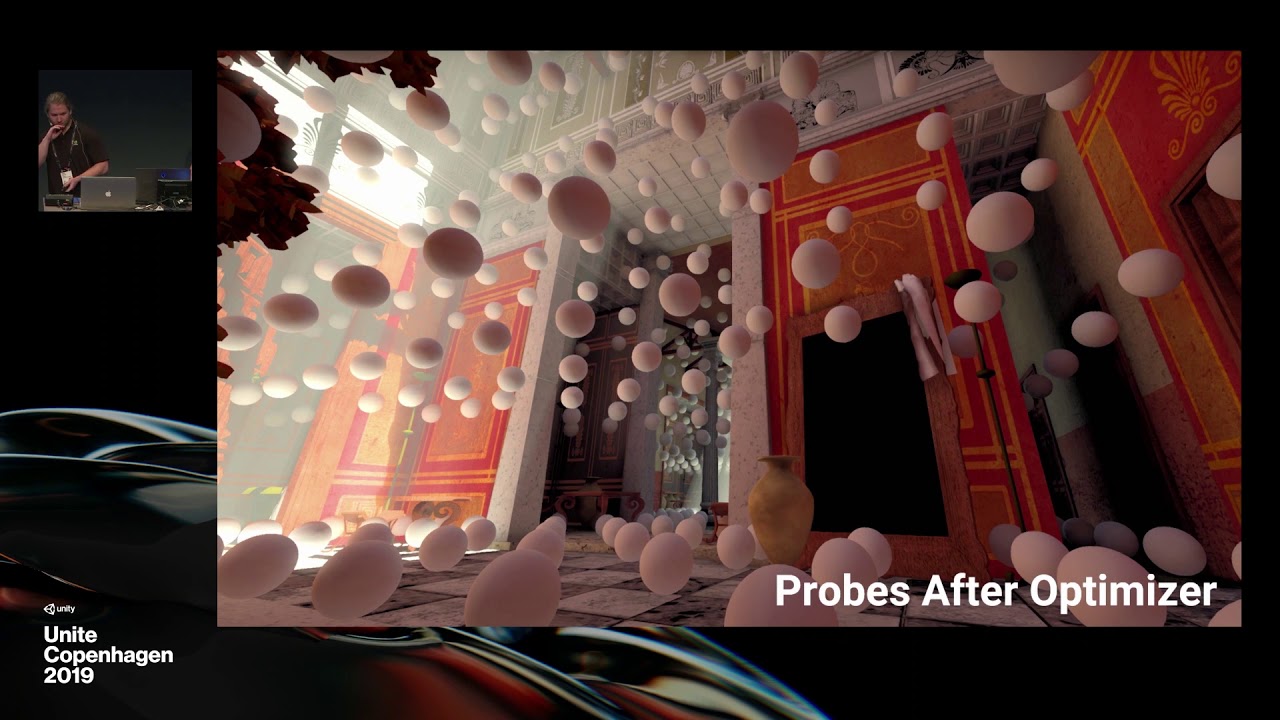
NVIDIA RTXGI was leveraged to create real-time global illumination in Unity. The product-facing integration of this tech combines great artist workflow with ...
turbid matrix
bumping @weary fog @mental oyster @chrome hawk and @quasi mulch for DDGI talk awareness ^
 weary fog
watching it right now, it's a good video for procrastinating 😄
Is that Probe Volume script a generic probe volume script that'll be useable with the lightmapper or is that specific to DDGI
graceful lance
Where could I get detail information about renderer features in asset renderer?
 quasi mulch
DDGI is wonderful except for the project I am now on VR and Universal pipeline
(I'm indie so this shit happens)
What I would love is for regular probes to actually function you know? in 2019.3 and 2020.1 they don't even bake in addition to being invisible.
Using third party asset Bakery, the problem is solved, however Bakery can't handle LDR + Linear (my particular mix)
drifting vault
@quasi mulch with VR? I tried to use URP for Oculus Quest but not working 😦
 thorn wedge
hey guys i have a quick question, i recently switched my project to HDRP and now if i use a ui canvas with world space, the canvas wont render at all, but camera space ui canvas works fine
 prisma sleet
Does SRP Batching work on skinned meshes?
I found my answer in the docs, it does not.
long mural
Hi all. Once a LWRP project has been created, is it possible to convert it back to using the standard RP? I'm finding a few of my plugins aren't compatible unfortunately, hence wanting to make the switch back without having to re-create all of my project again. Any advice, much appreciated. Thanks
 brazen linden
@long mural
Switching the project:
- In the graphics settings of the project settings unassign the LWRP scriptable asset
Other things to do:
- To remove the extra code associated with LWRP uninstall the package(s) in the package manager
- Some of the materials/shaders will have to manually be moved back to Built in render pipeline
long mural
Thanks @brazen linden , much appreciated. I followed your instructions, though everything in the scene is now bright pink and I'm not sure what you mean about manually moving the materials/shaders back to the built-in render pipeline. Does the built-in render pipeline exist considering I selected LWRP for the project in the first place? Thanks again.
@brazen linden I think I may have figured it out, I have to go into each asset and reset the Shader to 'Standard'?
brazen linden
Yeah
Unfortunately no automated way to do that that I know of
You could search for all the materials using some keyword not sure what it is thoughj
long mural
@brazen linden It'll still be quicker than creating the entire thing. Thanks 🙂
brazen linden
You can multi edit materials by shift clicking
long mural
My scene is slowly coming back to life. 🙂
 candid basin
I'm confused
should AA be set here in the camera inspector?
or here
in the pipeline quality settings
 uncut root
@candid basin FXAA/SMAA are post processing effects, while MSAA works on a lower level, during the rasterization stage I believe.
Lens flares don't seem to work. I have no doubt they could make them work, but doesn't seem to be on the rader 😛
candid basin
okay cool!
and hmm then I might just put the lens flare thingies as objects in the scene
the scene is pretty static anyways
 still drum
How can I use SpriteMasks with the new 2D Renderer? It seems they are not supported, are they?
 simple vine
Hmm, I think I don't understand something
How do I bind RenderTargets for rendering in SRPs?
I've snooped around the source code for URP and so far I don't think I can find any APIs for setting the color and depth destinations for the next drawing operations
glad tartan

Learn how the Boat Attack demo was created using the Universal Render Pipeline. These slides offer an in-depth look at the features used in the demo, includi...
 amber lichen
if you make lots of UI that consists of multiple cameras stacked, how do you get around that in lwrp for the time being?
like 2d layers in the background, 3d objects in the middle, 2d layers in the foreground
or something more complicated
frigid nova
@turbid matrix High Definition RP 7.1.2 does not work with my projects is there a latest i can grab ,the last working version is 7.0.1
frigid nova
on HDRP 7.1.2 im missing the "SerialazedScalable Settings.cs" that why the gui of anything does not appear correctly
 bold helm
For some reason my cameras in any HDRP scene are always white. How can I fix that ?
 wheat inlet
Does anyone have weird artifacts when trying to bake lights in URP?
This is with beta8
This is with realtime ☝
drifting vault
@wheat inlet its happened with URP only? At standart render pipeline all baking good?
wheat inlet
I'm not sure, I have only started playing with baking since moving to URP
The colours seem to be wildly off too
drifting vault
@wheat inlet check that on your models
wheat inlet
Thanks, will do - sorry for the late reply just prepping dinner
 oblique plinth
Hey all. Is the Transparent Depth Pre Pass working for HDRP/Lit Master in Shader Graph? When enabled it doesn't seem to work the same as applying a HDRP/Lit shader to the same material.
graceful lance
Hi everyone. When i checked render post-processing in camera, my game view show nothing. Why is this? I am using unity 2019.3 with URP
And this is unchecked view. You can see that post-processing not working in game view.
lyric ravine
@graceful lance It's still broken on latest 2019.3 with latest released URP. Either use the master branch from SRP repo or wait for a proper release.
noble osprey
Hi, I have a problem with building HDRP-Custom-Passes Selection scene. Are you aware of this or I did something wrong?
Scene with custom pass volume also crashing build.
scarlet hull
@noble osprey Oh, sorry, I made this script to have a kind of auto loading of additive scenes in editor only, not for build
noble osprey
@scarlet hull
That's alright 🙂 Do you also know something about build crash when Custom Pass Volume script is on a scene?
scarlet hull
iirc, the dev ( @woven sonnet to the rescue !) knows this issue and a fix is on it's way
noble osprey
@scarlet hull
Thanks a lot! I'll try to contact him 🙂
scarlet hull
Avoid contacting Unity employes through PMs, prefer pinging them for public answers that might help other peoples
noble osprey
Oh, alright. I'll remember next time.
wheat inlet
Thanks @drifting vault - It was the UV issue + the environment reflections intensity was a bit high 🙂
drifting vault
ah alright 🙂
wheat inlet
 inland ferry
Quick question. Does HDRP support panoramic skyboxs?
drifting vault
@inland ferry HDRI?
inland ferry
?
drifting vault
@inland ferry this one?
inland ferry
Yeah, how do you set a texture like that as the skybox?
drifting vault
@inland ferry click on texture, open inspector, change settings and then apply that to scene rendering
just check some tutorials and documentation on YT
ripe fable
Has anyone tried VR + DX12?
I can't get nearly the same performance in DX12 compared to DX11 😦
I wonder if it's just a DX12 limitation/problem for now or if it requires some specific setup to get comparable framerates
turbid matrix
@ripe fable HDRP?
DX12 in HDRP is known to be slower
they are going to fix this on 2020 cycle only
- DX12 is in preview state and have some functionnality not supported as this one:
d3d12: generating mipmaps for array textures is not yet supported.
This will be fix for 2020.1 and performance will be fix for 2020.2. Both DXR and DX12 should be out of preview in 2020.2```I'm curious, how big difference (in ms) you see between DX12 and DX11 on your content?
ripe fable
Ah, yeah, HDRP.
Haven't measured in my current project, but on my other project it went from 205 fps to 140 fps. (DX11 -> DX12), to give you a rough idea
turbid matrix
high fps values give very little actual data on what is slowing it down
but it does tell it's slower 😄
ripe fable
yep
turbid matrix
but yeah, I guess now we wait for 2020 LTS 😄
I was hoping to get virtual texturing by 2019.3 but that ship sailed already
ripe fable
Currently playing with DXR in VR (oculus) with leap motion hand tracking, everything seems to work nicely
turbid matrix
I haven't tested VR support recently but I'd expect it to be more stable now considering how close to release we are
it's had tons of issues on past when I tried it, like issues that got fixed and the reappeared in some alternative way later on 😄
but I've always treated HDRP's VR even more experimental than HDRP itself
ripe fable
yeah, I've spent nearly all day getting the entire thing to work
Biggest issue turned out to be that the leap motion library won't work on 2020.1 but works fine on 2019.3, very weird. All scripts go 'missing' without any compile errors, no matter what I do. (clearing library/etc)
turbid matrix
that sounds funky
ripe fable
yeah very, I didn't even expect any differences between 2020.1 and 2019.3 except for future changes
turbid matrix
like, they literally get wiped or just refs to thing don't exist anymore?
ripe fable
I can't even find the scripts in the project/asset list, it's like they don't compile, but there are no compile errors
Literally tried everything, starting the project from scratch, creating it in different editor versions, downgrading/upgrading, etc.
turbid matrix
could be some asmdef/ref issue
dawn sorrel
How do I go about using the Line renderer in HDRP? The lines just appear dark... Wasn't sure if there was a specific shader I should be using for this, or what I should make in shader graph to make it work. Thanks everyone.
scarlet hull
@dawn sorrel We have know issues with line renderers, even if you use the HDRP/Lit shader. Works with unlit tough.
dawn sorrel
Oh okay, thank you for the tip! I'll do an unit shader then. Just needed a solid color anyways :p
lyric ravine
When, when, when will those show-stopping URP light glitches finally be fixed? This is happening on all released URP versions so far, and on current SRP master as of right now, and nobody replies to my bug reports about it.
(not talking about the GIF glitch but about lights randomly affecting objects or not affecting objects depending on whatever)
drifting vault
@lyric ravine how did you get volumetric light in URP, or its fake cones?
lyric ravine
Fake cones; it's this one, I can highly recommend: https://assetstore.unity.com/packages/vfx/shaders/volumetric-light-beam-99888
We're even using them in HDRP since the quality in VR is just not good enough with the "real" HDRP volumetrics for small cone angles.
noble osprey
Do know how to change shadow tint value from code?:P
scarlet hull
HDAdditionalLightData.shadowTint
 smoky orchid
@lyric ravine i had somewhat the same issue and solved it by ticking the SRP batcher box in the quality settings (in advanced)
lyric ravine
Yeah, I tried that before, but it seems to randomly work and not work
smoky orchid
Yes it solved it for meshes but shadows are still badly rendered for terrain
 midnight oyster
Hey there, could anyone please point me the differences between URP/LWRP and HDRP? I mean, other than the fact that one will look better than the other by default
I mean, I would like to know the differences in technical aspects such as optimization, rendering etc
I want to make a cartoon-styled game, but at the same time I want it to have some effects and other things like normal mapping, bloom, etc
scarlet hull
URP : forward only at the moment, easier to extend, exports to all platforms
HDRP: deferred and forward, more lights, physical light units, more complex materials and lighting effects, exports to computer/ps4/XBox only
midnight oyster
Oh, I see
With more lights, you mean like point, area, emission maps etc? as for lighting effects, are there any examples I can look at?
scarlet hull
Indeed, more type of lights, but also, more lights visible on screen
and for lighting effect, the most visible that comes in mind is volumetric lighting
midnight oyster
Wait, so with URP, would I have a limit of how many lights I'd be able to see? If so, how many?
scarlet hull
I'm trying to find the informations again ...
So, looking at the settings, you can have up to 9 lights per object (1 main per pixel + 8 additional per pixel or vertex)
midnight oyster
"per object"? So if I have 10 objects in a scene, I can have 90 lights?
That's not too bad actually, I thought that would be only 20 lights on a scene and that's it lol
scarlet hull
It means 9 lights maximum can affect a single object. Any additional light will get "rejected"
You example is valid if one object is affected only by 9 lights, and nothing else.
Also, 10 objects would more be 81 lights : 1 main (common) and 8 per object
midnight oyster
Hmm, alright, fair enough
How can I set the lights that affect an object? Or is it automatic?
For example, if I have 20 lights, but they have a distance long enough to appear they don't exist (100 units)
kinda like 2 rooms with 10 lightbulbs each
If I place an object in one room, would the other lights be "omitted"?
scarlet hull
Each light in Unity has a range parameter, and each object in this range is "affected" by the light
 rain sable
I am unsure if it's the best place to ask that but, I'm using Command Buffers to render a blurred version of the game (used for menu background etc..).
For some reason, BuiltinRenderTextureType.CurrentActive seems to be UnityWhite (default white texture) if I use the frame profiler. I need to access what has been rendered up to now and I can't find the way to do it with CommandBuffers.
Any idea please?
turbid matrix
@rain sable which renderer?
rain sable
@turbid matrix The default one. I wish I had time to look into making our own, but not before we ship our current project. (I asked here because it makes more sense here than in Shaders...)
turbid matrix
just asking because doing that on recent HDRP is somewhat trivial (fullscreen blur)
that sounds like more of a post processing question tho (if you can render UI on top of the PP)
rain sable
Yeah if I had any control over the render pipeline it would definitely be trivial : ( Unfortunately I can't at the moment so I have to do that with the tools we have like CommandBuffer
turbid matrix
why can't that just be simple postprocessing effect?
they used to have this on the old effects package: https://docs.unity3d.com/540/Documentation/Manual/script-BlurOptimized.html
The Unity Manual helps you learn and use the Unity engine. With the Unity engine you can create 2D and 3D games, apps and experiences.
rain sable
I can kinda do it in OnRenderImage, but that adds an additional Blit (from src to dst). It's not "just" a full screen blur that I want, I'm rendering it to a render texture bo then be able to use it anywhere I need
and if I use OnRenderImage, that means I need to blit the result to the RT, then still Blit(src, dst) to render something to the back buffer.
If I would be able to do it through command buffers, I avoid that additional Blit.
drifting vault
hmm, Unity2019.3.9B not working with HDRP 7.1.2
trim bone
a fix is apparently on the way for 7.1.3
midnight oyster
I need some info on URP. Do I need to be using 2019.3 to make a URP project, or I can use 2019.2? Asking because I have a project on HDRP which I want to switch to URP.
I was gonna switch it to LWRP but with the URP being announced, I decided to wait for URP to be released. However I've been looking at the docs and apparently it's already released? So I'd like to know if I can switch now
scarlet hull
You can switch now.
Note that URP is mostly an evolution of LWRP. The big breaking change when then name change is the deprecations of the post processing stack v2 to use a new postprocessing system integrated in the render pipeline
midnight oyster
Ok, sweet. Thanks a lot!
scarlet hull
You still need to switch to Unity 2019.3.0beta to use it
midnight oyster
Oh, right
Either way, is upgrading from LWRP to URP easy like upgrading from built-in to SRP?
midnight oyster
Hmm
Eh, guess I shouldn't waste my time and wait for URP to go live then. Thanks!
Live as in not beta, that is
empty star
@rain sable try CameraTarget it might also depend where your command buffer is executed, ex if in Update that occurs before all other rendering, if it's a cmdbuffer assigned to the camera that may work.
Or it's just a case of unity being unity and maybe worth filing bug report
May also depend on forward VS deferred
If you have renderdoc installed that can give some insight
rain sable
@empty star it's super strange, but Unity sets the wrong texture (UnityWhite) instead of the target RT. If I blit with no material (just copy) it works though, do I guess the two blit signatures don't go through the same code path
dawn sorrel
im trying a project from a tutorial about scriptable pipeline, but it says The name 'CoreUtils' does not exist in the current context. anyone knows what i need to do?
 dreamy summit
Im having a trouble with lighting in URP, anyone got experience?
Im using a point light for the main light, but it seems as if when i move the camera out a bit, the object behaves as if a second directional light has appeared, moving as if attached to the camera. I have intentionally removed ambient light and all other sources i can think of, and set the point light to mainlight in the lighting settings... Any thoughts? im also using a shader which i have managed now to get to make some simple smooth shadows, in shader graph, its using the built in "GetMainLight" function in a custom node to blend the shadows.
@dawn sorrel have you tried updating all included packages with the package manager?
@me if you respond :)
dawn sorrel
@dreamy summit No, because i found that particle surface shader will do a great job for me because it can be translucent and cast and recieve shadows on both sides
dreamy summit
I just wrote a shader to do that in shadergraph.... its so easy it should be illegal hehe
@dawn sorrel i can explain what i had to do if you like? i've got it animated, light responsive, and i have also gotten how to do manual shadows via manual capture of light positions etc. Mine should be able to do everything the standard shader can, and with more control, once i finish with it. But... i did find some hurdles - if you wanna try shader graph, i can explain further :)
In regards to the original problem, i think it was some kind of error in unity, what i was experiencing seemed like the scene lighting button had been toggled off, and was acting as it does in the scene view, but in the game view too. Rebooted and its fine.
 winter basin
SRP Noob here: I'm trying to figure out a good way to stack my cameras in LWSRP... was hoping i could just blit the opaque stuff to a temp rendertexture and have the transparent passes render over that. is that possible to do with rendering features or do I need to roll my own SRP?
dreamy summit
I was looking at some stuff today, and judging by the responses, its not directly supported.
@winter basin
winter basin
Ok thanks I've been thinking of a bunch of possible workarounds that I'll try out tomorrow
turbid matrix
@winter basin it is not supported in lwrp
There is special camera stacking coming for urp but it is not there yet
drifting vault
ok, from 2019.3.8b to 2019.3.10b HDRP 7.1.2 not working, materials inspector broken too
 marsh hollow
Hello, does anybody know what is better performance-wise for 2d: the LWRP with a global light or the regular unity renderer?
scarlet hull
@drifting vault This is a known issue, sorry
drifting vault
roll back to 7.1.1 helping
i think 🙂
hope at released 2019.3f1 HDRP will work good
scarlet hull
For some obscure reasons, meta files were missing when the package was published, and Unity 2019.3.0b9 introduced a new "security" in the asset pipeline : The asset imported is no more able to create meta files in the package cache (normal as it is supposed to be read-only) preventing to import 2 csharp files
drifting vault
wow
scarlet hull
My recommentation would be to stay on Unity 2019.3.0b8
A new package v 7.1.3 with the missing meta files (among other fixes) is on the way
drifting vault
cool, thanks!
also im note that in Unity2019.3.b10 has weird bug with project window
scarlet hull
I think I heard about this one somewhere, so it is probably known
marsh hollow
Does anybody have a shader example of a 2d lwrp (or urp) for unlit sprites?
There is a Sprite-Lit-Default but not a Sprite-Unlit-Default 😦
turbid matrix
well, release/7.1.x seems to run fine on 2019.3b10 now
or well, I have some funky lod issue on the default HDRP template but this is an old template, not one shipped with the latest beta
basically the objects get culled from the rendering way too soon
turbid matrix
tested this on fresh scene and I think the LODs are just set to cull too early there
trim bone
ah just tested and am getting the same early culling
turbid matrix
it's probably just badly setup scene
marsh hollow
I will ask again maybe I get lucky.
If I don't need any dynamic lighting: do I still get ant benefit from keep (or urp) for 2d sprites?
midnight oyster
How do I get bloom in my game? I already checked HDR on the LWRP asset, the Main Camera on my scene has HDR set to use Pipeline assets and I even added a post processing volume, but I still don't get a bloom effect.
Enabling and disabling those options doesn't change anything.
 true zealot
and you added bloom to the post processing volume?
true zealot
That's not how volumes work
you need a post process layer on the camera
and a volume in the scene
and you need their layers to match
midnight oyster
Oh, alright. I'll change it and see what happens
true zealot
Details here: https://docs.unity3d.com/Packages/com.unity.postprocessing@2.1/manual/Quick-start.html
(Pinned to #💥┃post-processing )
midnight oyster
Sweet, it works greatly! Thanks a lot!
true zealot
probably important to note
midnight oyster
Hmm, I see
I should use this if I want to make certain objects have bloom and others don't?
true zealot
No, it's unrelated. It's just to be a key to find the volume
glad tartan
So HDRP can cache shadows? Never seen an option for this before
drifting vault
@glad tartan yes, you can setup sgadiws:every frame, on demand etc
glad tartan
Ah, yea I knew that but it never worked for me. Either shadows completely disappears or I get offset shadows that seems to work only in screen space.
I was under the impression that you needed to properly activate cached shadows by code
drifting vault
Oh
 steel gorge
Hey Unity fam!
I'm using HDRP for my latest package and have come across light layers which is absolutely PERFECTLY suited for my needs! (https://docs.unity3d.com/Packages/com.unity.render-pipelines.high-definition@6.9/manual/Light-Layers.html)
Can someone tell me, am I limited to the 8 layers provided? If so will this be increased at any point?
Cheers!
scarlet hull
@steel gorge We might increase the number of light layers in the future, but it's a low priority task.
Note that using light layers is already costly, and increasing their count will only make it worse 🙂
steel gorge
Noted - thanks for the response!
 open dagger
Hello ! Anyone has info on RenderTexture.SetActive() ??
Gpu is taking 2ms and then, boom, 20ms spike
anyone knows how i can trace that draw to it's origin ?
marsh hollow
Third time is the charm
If I don't need any dynamic lighting: do I still get ant benefit from keep (or urp) for 2d sprites? (I will make a bunnymark test and try to see)
 thorny shale
Hello everyone. Does someone else have an issue with the triangle count? In the default HDRP scene both my tris and verts counters are zero:
While this is in the camera view:
I've updated unity and the HDRP to the newest versions
I've had this problem with multiple Unity and HDRP versions
The tris count in a standard 3D project does work so I assume it has something to do with the HDRP.
turbid matrix
that stats window has been always off with HDRP, don't use it
scarlet hull
This a known issue.
The SRP batcher isn't very friendly with the reporting in the stats window
turbid matrix
for example even the FPS it shows is wrong
would be nice if it was actually useful someday again
thorny shale
Ooh okay, is there another way or tool I can use to measure the amount of triangle in the camera view?
turbid matrix
there's some in-game debug mode for HDRP but I have no idea what it reports, I've never even enabled it
ah, there's no such stats in it (just checked)
thorny shale
In-game debug mode? Where can I find more about that?
turbid matrix
you enable it by pressing both gamepad sticks at the same time
you know, the stick buttons
thorny shale
On a keyboard?
turbid matrix
no idea what the keyboard bind is (if there is any)
thorny shale
ooh okay, thank you anyway😄
turbid matrix
it's mostly the same as the hdrp debug view on the editor menu apparently
just lets you toggle things in game
only additional thing I see is "Display stats" but it only has fps and ms for frametime
You can also open this window at run time in Play Mode, or in the standalone Unity Player on any device on Development build. Use the keyboard shortcut Ctrl+Backspace (command+Backspace on macOS) or press L3 and R3 (Left Stick and Right Stick) on a controller to open the window.
so, ctrl + backspace is the keyboard bind, @thorny shale
thorny shale
aaah thanks, I just found it
you can also open the panel in Window > Analysis > Render Pipeline Debug
turbid matrix
yeah, that's what I meant by that editor menu
thorny shale
But it doesn't show anything else besides the frame rate indeed :/
turbid matrix
other is in-game
other opens in separate window in editor
the in-game is mainly useful for testing things in actual build I suppose
glad tartan
Has anyone gotten the Physical sky to work with exposure values over 1 since 7.x.x?
Before that it was working fine but after 7.x.x any value over 1 and the sky is blown out
turbid matrix
surely there's some exposure value you can tweak for that
glad tartan
yea, but i'm saying setting it over one since 7.x.x just blow out the sky. You used to be able to set it to any EV needed before
turbid matrix
you mean there's no value you can tweak on the sky itself?
pretty sure there was one
 karmic mesa
hey guys someone know why while i create a scene create-->HD Template Scene--> renaming new scene and pressing confirm, this scene file disappear form project asset window..Unity wont let me create a hd template scene....im currently using 2019.2, hdrp,core pipeline,shadergraph (all 6.9.1 version). https://gyazo.com/30ded1e757d43323fde99b7e2c78b0e2 in the gif you see that after confirming/renaming the new scene it disappears. also tag me inf answer, thank you
 karmic mesa
For anyone else who got my same error just use the Render Pipeline Wizard and fix it, i feel dumb now ahah
glad tartan
@turbid matrix It's an issue with the sky. There is a value you can tweak.
What I was saying is that if you raise the value over 1 now since 7.x.x it blows out the sky. Before. 6.x.x - 5.x.x you used to be able to set it to the exposure needed and it worked fine.
I was waiting to see if it gets fixed and since it's still experimental I thought it broke for a version or so while being worked on.
But haven't seen anyone with this issue so I was wondering if it's just for me or maybe no one is using it or using it with a value over 1
turbid matrix
I can check it later
last time I tried it, it made weird artifacts to the scene so I couldn't use it
that was fairly soon when it was initially merged
midnight oyster
Hey, could anyone help me why my shader looks different if I'm on the editor and when built?
Top one is built, below is editor
I'm following this tutorial https://connect.unity.com/p/zelda-inspired-toon-shading-in-shadergraph and part of this https://blogs.unity3d.com/2019/07/31/custom-lighting-in-shader-graph-expanding-your-graphs-in-2019/
midnight oyster
This is just a hunch I have, but it still could be the cause. I'm using a few custom function nodes and I'm using some compiler tag checks such as #ifdef LIGHTWEIGHT_SHADOWS_INCLUDED and #if SHADOWS_SCREEN. Could that be the cause?
midnight oyster
Nah, I tried to put an exclamation mark before the tag name and the materials got pink on both build and editor, so back to square one
dawn sorrel
Hi! Been looking to learn some lightning basics and while messing around with HDRP I keep having the following artifact
Could anyone give me some pointers on having light be more consistent?
 abstract basalt
Hi, I'm using HDRP in 2019.3.0b6 and one of my objects is visible in the editor but not when the game is built. In the console I get this message after building:
Dimensions of color surface does not match dimensions of depth surface
UnityEngine.GUIUtility:ProcessEvent(Int32, IntPtr)
I thought it could have been an issue with the materials, so I tried using the (visible) ground's material on my player, but it is still invisible. Anyone know how to fix this?
Also the object and its children don't have any tags.
abstract basalt
I think I fixed it by ticking enable read/write on the mesh import settings
 foggy plaza
Sorry for crossposting - maybe this is more related here though, so
Hey guys, do anybody have any clue on how to fix this issue? Some materials started to have this rendering bug when you look into specific direction. Only happens on Android, and not in Editor.
 grizzled kite
hey, just asking if anyone else has this issue: I updated to the latest 2019.3 beta and updated all my packages to latest. But after every second restart of the editor, the Autodesk shadergraph shaders in the universal pipeline package compile in an endless loop at editor start. Only way to get them to compile through seems to be to delete the whole library folder before each and every editor start. I couldn't find out how to permanently just delete those files (I don't use them anyway), as the package just resolves itself to default on every start as well.
Just wondering if anyone else has seen the issue and knows of a fix or better work-around then waiting 2 hours for the library to be rebuilt before every editor start 🙂
lyric ravine
@grizzled kite I think this is a known issue.
@foggy plaza is that LWRP/URP? Tons of issues still with that and Android VR.
grizzled kite
@lyric ravine well thank you for answering 🙂 I guess I'll wait for the next release then, because right now this is a huge blocker (especially together with the random crashes I get as well on going into play mode. it's a random chance I will be blocked from working for around 2 hours basically). I tried going back to the stable 2019.2 but it happens there as well now. Time for some better art 🙂
lyric ravine
you might want to reset your package cache. had similar issues. That being said, once it works it works ok, I'm on 2019.3 with URP/HDRP for multiple projects
foggy plaza
@lyric ravine yes it is
I think it may be related to occlusion as I didn't have the issue when the player was "floating" in the air w/o any obscuring structures around
dawn sorrel
Hi! I'm using HDRP and all my colours have gone and when I try to apply bloom the screen goes all black
grizzled kite
@lyric ravine only deleting the PackageCache does not fix the issue though, only the full deletion of the whole library folder unfortunately. And then only for the first start.
lyric ravine
@grizzled kite please report a bug, thank you.
 jolly gust
@foggy plaza Did u try to change rendering mode to single pass instanced?
foggy plaza
@jolly gust thanks, I'll try that
grizzled kite
@lyric ravine will do once I got the editor up again! thanks for trying to help though 🙂
foggy plaza
@jolly gust thanks a lot! that helped 🙂
(specifically I've made the shield material to be GPU instanced)
turbid matrix
@dawn sorrel your first issue (shadow artifacts/ramped lighting) is a bias issue, there are bias settings on light sources you can try to tweak for this
for the bloom, I assume that's some side-effect from other settings you have there, bit hard to tell without knowing more about the rest
which gpu you have btw?
asking because HDRP has had some issues on intel's integrated gpu's in past
 stark crane
Hey folks, this might be a weird question, but is it possible to grab a render texture after post processing has happened? Using URP if that changes things.
jolly gust
Only via code. In srp you have access to event after postprocessing. So in theory you can write script for pulling out rendered texture. Not sure though how to push modified texture back to rendering.
 surreal wadi
Hi there. In LWRP, this code which scrolled UVs in the old renderer does not seem to work. Does anyone know what I need to do?
            meshRenderer.sharedMaterials[ 0 ].SetTextureOffset( 1, uvOffset );```

This is basically my first experience at all with LWRP.@surreal wadi Try meshRenderer.sharedMaterials[0].SetVector("_BaseMap_ST", uvOffset); The SetTextureOffset function probably tries to set _MainTex_ST, which isn't used in LWRP shaders anymore.
Not sure if it'll work, but worth a shot
scarlet hull
meshRenderer.sharedMaterials[ 0 ].SetTextureOffset( "_BaseMap", uvOffset ) should work imho
surreal wadi
Thanks! I will try it.
Why on earth would they change that and break a decade of uv scrolling scripts?
It seems kinda arbitrary
I will try both once I get back into unity
scarlet hull
Use 1 as first argument for the function is for the property name ID. I'm unsure about how this int is mapped to the shader properties, but I can only guess :
I the built-in "Standard" shader, "_MainTex" is the second declared property (index 1), while in "URP/Lit" "_BaseMap" is the third one (index 2 then).
As for "breaking scripts" ... the change is minimal
lyric ravine
Anyone know what's the right way to blit into a rendertexture on HDRP/URP with SinglePass or SinglePassInstanced?
Regular Graphics.Blit gives only half sides, or nothing at all
 oblique olive
just wondering which pipeline i should use for a 2d platformer, the graphics will probably be 32 to 64 bit
turbid matrix
URP definitely
considering it has dedicated 2D renderer
and year, HDRP has overhead you pay for no good reason for that kind of game
 digital mesa
I'm a bit confused by the documentation around URP. When I search for URP in the Package Manager, I can only find the LWRP/HDRP. The documentation I have seen seems to indicate the URP change over should have already happened? (2019.2).
 frigid cypress
the name change for lightweight to universal only applies to 19.3 and newer editor versions
digital mesa
Got it, thank you for the clarification, I thought I was missing some sort of package list. (Documentation is missing this bit).
candid basin
in urp I would like to use camera->Clear flags->Depth only but it is not available
what is an alternative?
 lavish pumice
I'm using Unity 2019.2.12f1 with the LWRP and 2D Renderer, and when I make a TilePallete the tiles are all black in the pallette, is there a work around?
jolly gust
@candid basin camera stacking is not available on lwrp/urp at the moment. Alternatively you can write your own renderer with srp (which is a bit complicated)
candid basin
I found a quick fix @jolly gust I commented out some lines in the URP code and what I want is working 🙂
Hopefully camera stacking support is coming
turbid matrix
There is wip branch on github for it
And design document that explains how it will work
For urp that is
I have no idea if hdrp would ever get it
GitHub
Scriptable Render Pipeline. Contribute to Unity-Technologies/ScriptableRenderPipeline development by creating an account on GitHub.
last commit on that branch 18 hours ago, so it's still actively worked at
no PR for the feat yet
 iron berry
Since unity's custom shadow essential no longer works, are there any alternative approaches to get good, detailed shadows on characters in close up scenes?
drifting vault
@iron berry contact and micro shadows in HDRP render?
turbid matrix
can do contact shadows on built-in too if you use some asset for it
NGSS probably does it at least
empty star
@lyric ravine are you blitting with a material specified? Basically hdrp doesn't set or use the old unity_ matrices, so some functionality is broken anywhere unity would use the blit internally. I think you could set the Unity matrices prior to the blit. Usually now I just use Draw Procedural with 3 vertices and use the procedural blit hlsl for full screen triangles.
And for stereo instancing you need to target with cube map faces as -1
And use unity's macros for sv_rendertargetarrayindex
lyric ravine
Blit with regular rendertexture + Unlit seems to work fine, but with stereo it doesn't
Do you have an example at hand for "get the camera image into a texture for single pass/single pass instanced"?
empty star
Yea once I'm at work I can post an example
It basically involves an #ifdef for stereo and using texture2darray
And if you're blitting to a texture it also has to be rtarray, if you want to merge stereo to sbs that could work too
lyric ravine
👍 thanks, looking forward to that
 nocturne scaffold
So , does anyone know if one day all the standard objects will work in the render pipeline or possibility of an automatic converter changing them? or will assets always only work on either one or the other?
nocturne scaffold
@turbid matrix Woops meant to say, objects which use the standard shaders, as oppose to the HDRP or LWRP. They basically just look fully pink in the pipeline mode if they use the standard renderer
jolly gust
@nocturne scaffold You can go to edit>render pipeline>upgrade all project materials to universal.
Built-in going to be deprecated at some point.
turbid matrix
@nocturne scaffold old shaders will never be compatible, you need to use pipeline specific ones
so no, there will not be a day when they go back to the old shaders for new RP's
 spare tiger
2D lights system uses URP/LWRP and released a guide for it here


Hey Folks! I've released my second guide for the new 2D lights for @Unity3D completely for free. Link is below. Learn how to light up your game with (Uses preview packages but fundamentals are the same with Unity 2019.3)! #gamedev #madewithunity #unitytips https://t.co/zRB...
 Twitter
scarlet hull
Twitter
scarlet hull
Using custom passes in HDRP to evaluate thickness of glass :
 upbeat badger
water metaballs example is also very cool
wondering is it possible to add lighting to that
right now its only distortion i think
scarlet hull
It does lighting
And not distortion but refraction 🙂 (subtle difference in the render loop)
nocturne scaffold
@turbid matrix thankyou. So basically all the old 3D assets not upgraded to be compatible will only work on old versions of unity soon. But I would hope eventually there will be an asset to make them compatible automatically
turbid matrix
@nocturne scaffold your old meshes are fine
you only need to use HDRP/URP/LWRP compatible shaders with them
and if you used standard shaders for the meshes, there are material upgrade scripts that will change the materials to SRP supported shaders for you...
those upgrade scripts can't upgrade custom unity shaders tho, only the standard ones
nocturne scaffold
@turbid matrix alright thanks. i understand now. I just saw people complaining in reviews certain assets that actually use standard shaders didnt work in HDRP. but I guess that was before there were material upgrade scripts
 fading rose
@scarlet hull your glass looks very nice. tried setting up the standard glass with translucency etc?
scarlet hull
It's a very basic shadergraph :
The trick is that I use a custom depth buffer to draw the back faces of the objet and use it to calculate the thickness.
As the thickness drives the result of the transmittance absorption color, it give those nice changes in the glass color
^^ @fading rose
inland ferry
Hey, I am using HDRP, and trying to get a strong bloom, but not having much luck. I feel like I remember someone saying that they made it more physically accurate, so you can't get super strong bloom with it. Is that right?
waxen lantern
@inland ferry I believe that is correct. HDRP post process bloom is based on physically based rendering and high dynamic range, not the bloom of the past where you can just set a unrealistically low threshold and blow everything out.
if you want an NPR / non photorealistic rendering bloom you may have to implement a custom post processing effect
jolly gust
@waxen lantern I have a problem with postprocessing on single pass stereo mode on universal. It is just not working for second eye (known issue for srp team). Do you have any recommendations how I can implement custom postprocessing?
turbid matrix
@inland ferry basically how you do it now is that you use small bloom intensity values (0.1-0.3) and do the glowy effect by adjusting emissive values
there's separate emissive variable set on the materials now
in past you could use whole bloom intensity range but now if you do it, it's like full screen blur
scarlet hull
@dawn sorrel Well, the statue model by itself no, it's from the stanford scanned models library :)
But on the screenshot, the right one is rendered with built-in HDRP/Lit shader, using transparency, refraction and absorption color.
On the left it's practicaly the same, but the refraction thickness is driven by very simple thickness estimation using a custom depth buffer rendered with the custom passes HDRP feature
turbid matrix
@inland ferry here's actually my old thread about it 😄 https://forum.unity.com/threads/hdrp-5-3-0-ppv3-bloom-blurs-the-whole-frame.620272/

Unity Forum
Could be early impressions but I don't really like how the new HDRP bloom filter unsharpens the whole image. I know the new filter is supposed to be...
back then I really thought it was a bug
scarlet hull
@inland ferry I can also add that if you want to achieve the unrealistic bloom effect, look for the "Exposure Weight" parameter
turbid matrix
ah it was labelled as exposure not emissive?
anyway, I try to refer to those additional values 😄
from that thread:
those probably look tad different now
scarlet hull
The whole idea is that it allows you to controll how the pre-exposure is applied to the emission. If 0, no exposure is used, resulting in a very high value in the color buffer, and thus, a bloom "glow" effect
turbid matrix
btw
once 2019.3 releases and since we have custom post processing now
expect to see old style bloom filters on the asset store soon :p
scarlet hull
Yeah 😄
turbid matrix
I could see things like different AO's and blooms coming up
as not everyone is fond of the GTAO
these work in quite different way compared to the past setups and people don't like change in general
scarlet hull
I'd argue that if people don't like change, why move to HDRP then ?
I mean ... it changes A LOT from built-in
turbid matrix
because they want prettier rendering, just with controls they've used to for PP etc
I don't all agree on being stubborn on past ways
but I also totally understand why someone would prefer the old bloom that didn't blur the image :p
because I personally hate the blur part
I like the new bloom effect visuals otherwise, but it pains me to know it straight up softens the whole frame in somewhat linear fashion with intensity value
so I could never even consider myself putting anything bigger than 0.1 to that intensity
even with 0.2 and toggling the effect on and off really shows what it did, at 0.1 you still can't tell easily it affected the whole frame
that of course totally depends on the scene and look you are going for
for some cinematic scene, I could see people using higher bloom intensity values just fine
GitHub
Scriptable Render Pipeline. Contribute to Unity-Technologies/ScriptableRenderPipeline development by creating an account on GitHub.
looking at the changelogs, it's mainly bugfix against 7.1.4
turbid matrix
btw re: change
there's already been tons of people annoyed by the new bloom and ao on the forums, so clearly they do have different expectations
I'm not saying either is bad change in the long run, just that one can see that a lot that people want the old ways certain of things
for things that change that dramatically, I'd love to see some "legacy" versions as option
 mental cedar
Hello, i'm using the hdrp and for somehow my texture on my ceiling seems to fade to gray, tough it was the post process but it isn't 😕
turbid matrix
yeah, that's typical
it's not HDRP specific either, you'd see the same on built-in renderer too
 slim flicker
what did LightTypeExtent get changed to from 7.1.2 to 7.1.5? Hybrid Renderer 0.1.1 won't compile and there's no changelog or manual updated beyond 7.1.2 as usual
turbid matrix
@slim flicker are you telling hybrid worked for you with 7.1.2?
slim flicker
I updated to 7.1.5 because 7.1.2 was throwing even more errors lol
turbid matrix
I have a memory the api change that broke hybrid happened months before 7.1.2
there's bunch of changes since btw
at this point, I'd wait
slim flicker
sick
turbid matrix
because Unity is about to release new version any day now
slim flicker
what's the last working version
turbid matrix
7.0.x something I'd guess
but those will not work with latest 2019.3 betas
so atm, it's really best to wait a bit if you are not in a hurry
Unity used hybrid on their shooter thing they are about to release
but they are still fixing last issues with the setup
it was originally planned to be out by now already
waxen lantern
@slim flicker I submitted this issue with the hybrid renderer 0.1.1 + hdrp 7.1.1+ in a bug report and got this response:
`Date: Mon, 21 Oct 2019 09:57:30 +02:00
Subject: Re: (Case 1189048) Hybrid Renderer throws 4 errors on import when HDRP 7.1.1 or above is installed
Light components are removed from the next release which is coming out later this week.
We are bringing them back in another format in another release. The current approach was not maintainable or performant. Sorry for the inconvenience.
Joachim Ante`
lyric ravine
@waxen lantern wow that bug report escalated really high up the chain ^^
waxen lantern
@lyric ravine I also noticed Joachim has a likelihood of commenting on forum threads relating to DOTS features and workflows, so it must be of a particular interest to him.
turbid matrix
heh, yeah
usually you don't see more than QA interpretation of the situation
but yeah, they changed the API
while it's technically possible for you to update the api yourself, it's very tedious task now
I'd just wait for next hybrid release as it has to be super close to release now
I hope they will fix these issues faster in the future, this isn't first time hybrid because outdated due to api change
and it took quite a while last time for them to released fixed version as well
I think it's because hybrid is released along with entities and they can't easily just fix the hybrid
waxen lantern
@turbid matrix that's sort of what I did to work around it and got the hybrid renderer to compile on HDRP 7.1.2, just added some 0 values in the HDadditionalighitngdata structure and commented some other things out
turbid matrix
(because these both evolve at the same time behind the curtains)
they earlier removed shadow data too
waxen lantern
which disabled some lighting features like shadows yeah
turbid matrix
it was merged to light data or something
waxen lantern
which i wasn't using in my DOTS experiments anyway
turbid matrix
what I did before was that I just reverted the commit from HDRP itself
but right now I'm not using Hybrid at all
there's just too many things it doesnt work with properly + it's often getting left behind the HDRP api
so it's not really worth it for me yet
I hope one day it's ready for prime time
waxen lantern
well presumably there will be a "DOTS Editor"
and hybrid renderer can be deprecated
turbid matrix
wonder who would reply if I reported hybrid not working with DXR 🤔
that being said, I've made enough noise about that so that they do know it's broken
so can't really bug them more about it as I don't want to be that much PITA for them :p
I talked with Lucas about it on Unite and Sebastien also responded when I asked about the fix ETA on the forums (I knew they won't give one but had to ask anyway)
drifting vault
Well... HDRP 7.1.5 fixed problems, but now when i press play mode, my Unity 2019.3.11b just importing same object infinity time 🤔
Will try clean library, hope that help me
in manager seems like Unity working, not stuck(Not responding)
but most fun to see blender while Unity import FBX files in progress bar 🤔
and everytime when i open project , get this message:
drifting vault
but i really like custom Post Effects 🙂
 craggy whale
Hi Guys!
Im just wondering if you could give me some guide what I could look into regarding my problem. As seen in my gif, there are two meshes (one green big thing and a darker small square moving around) on the screen and they are rendered differently in the Editor and in the Camera. You can see that the small square is not visible always on the rendering of the camera but its always visible in the Editor. What I checked so far:
- not a Z fight, because there are like 20 units between the two mesh
- the small object is not near the rear nor the far pane of the camera
Any tips or further readings that you think can help would be cool! Thanks!
 stable vale
Not sure if this is the right place to ask, but is anyone else useing HDRP able to make there decals emmisive? aparently the shaider has the option to but i cannot see any effect.
scarlet hull
It should work ... maybe the emission intensity is too low ?
stable vale
i set it at max
i also tried adding other random textures as emmisive maps, and i cannot see any change at all
scarlet hull
No clue here ... I'm not sure, but maybe it was broken in an earlier version and got fixed. What version of unity / hdrp are you using ?
fading rose
Upgrading to HDRP 7.1.5 made the shadows flicker. Dark blotches flicker throughout the scene. 😦 This is very disappointing, every version fixes something while breaking something else. It makes it really hard to depend on SRP at all.
At this point near release it makes you wonder, are we going to be able to focus on making our project look great or are we supposed to spend our time troubleshooting the new graphics system?
stable vale
2019.2.11f1 HDRP 6.9.1
turbid matrix
@fading rose regular or dxr?
there's https://github.com/Unity-Technologies/ScriptableRenderPipeline/pull/5035 but it's for DXR
GitHub
This also fixes errors in the console related to unbound resources (ray tracing)
Binding the Light Data related attributes in the global context of th…e command buffer as soon as they are ready
Bin...
fading rose
I dare not touch DXR 😄
turbid matrix
fair enough 🙂
how I'd do it myself would be to bracket the versions between it broke and report the issue
or well, I'd probably try to find the exact PR that broke it
but I get it's time consuming
it just helps Unity to find out the root cause faster if they know where they broke it in the first place
fading rose
I did a few quite lengthy experiments and came to the conclusion it is only there as a rushed "me too" solution. LWRP is not even worth investing time on, HDRP has issues, and the old one is not as performant as a modern project needs it to be although it is super stable and great looking.
I am using HDRP for a new project and everything was great, except VR was not working. Now VR is working, but shadows flicker 😄
turbid matrix
that sounds like some buffer clearing issue
I'm sure it'll get sorted before full release
fading rose
I am reporting regularly, but they can't reproduce it and in one case I have found them to call an issue resolved when it was clearly not. 2 versions passed until it became resolved.
fading rose
yup. The thing is, I want to focus on my project and not on Unity's issues. Sadly, it looks like the best version with the least issues and best asset store support is still 2018.3-4. Then again, it is missing all the new features.
 dreamy fox
I know can be frustrating to see issue closed as non repro, but we do genuinely try, we still appreciate bug reports with repro scenes, so please submit one for what you are seeing and hopefully we can get a sense of what's happening
fading rose
I know very well how hard the team is trying to repro and I must say that Unity's QA team is one of the best I ever communicated, or worked with. (And I have worked with some amazing QA teams) I have several examples of how hard and honestly the team is trying to reproduce. That is not an issue.
I was not talking about a non repro though. I was talking about a particular problem that was accepted in the public tracker, and was marked as fixed and closed when it was clearly not so. And it didn't re-open even when I reported it again and worked with the team to reproduce it which they did.
Thankfully now it is fixed. So we can put it to rest. That may be a unique case, a single example at least for me it is, but I see so many people having the same issues which the team can't reproduce. Perhaps a different way of reporting and capturing bugs should be introduced. I really like how Windows Insider feedback hub works.
That is a discussion for a different channel though 😄
turbid matrix
and in some cases where the issue gets marked fixed, it really is fixed with the repro case on that issue report but there's some other underlying issue that happens on others projects
or.. possibly the same issue reappears after some future change
fading rose
I am pretty sure with so many users and system configurations out there this definitely happens.
turbid matrix
like, srp batcher has been broken quite many times but I'm sure it's been for different reasons 🙂
dawn sorrel
Anybody know how to get terrain working on hdrp?
fading rose
Working great 🙂
It is exactly the same as before, just assign a terrain material if you had already created the terrain without HDRP and now are converting your scene
A new terrain should already use the correct terrain material.
dawn sorrel
Ok awesome. I updated an existing project to HDRP and had to create a new material but now it's working. Thanks!
turbid matrix
only thing not working: built-in terrain grass
but it was so outdated setup you shouldn't miss it
(too bad they don't really got up-to-date replacement though)
you can still use the tree tool still
turbid matrix
pink = shader compilation issue
with SRP's it's quite strong indicator that you are trying to use old style shader with SRP
and those are not compatible
dawn sorrel
Yeah I'm going to start a new project with HDRP and start that way.
 hexed mantle
How does one access RenderPipeline.beginFrameRendering in 2019.3? It's still in the documentation but doesn't appear to be accessible anymore...
lyric ravine
@fading rose please report a bug. Only way to get it solved unfortunately. It's been the same for about a year now, every release fixes some areas and breaks others.
hexed mantle
GOT IT.
The context changed to RenderPipelineManager.beginFrameRendering and the variables changed.
fading rose
@lyric ravine I know, and believe me I am reporting often. I am that close to going out for beers with a couple of the QA guys. 😄 But this is unprofessional. Not from the aspect of QA, but from a product development philosophy and strategy standpoint. Already moved a project to Unreal, don't want to move another.
turbid matrix
out of curiosity, you haven't faced similar things on unreal?
jolly gust
Just humbly waiting for universal postprocessing on single pass stereo mode.
fading rose
@turbid matrix there are so many users and configurations, chances are some may have had similar issues but this is not something Unreal is known for. Flickering (anything really ,shadows, AO, lighting) is so widely spread in Unity throughout versions that people have somehow internalized and normalized it, cracking sad jokes. The fact that I encounter the same issues in both 19.2 and a different version of the SRP as well as 19.3 and its latest SRP means there is probably a deeper issue.
turbid matrix
ah, I've been at unreal from 4.0 days and seen the complaints on that side, it hasn't really been different but of course different users will face more showstoppers than others
terrain shadow bias used to be a huge PITA for ue4 users in past
I think they've tweaked it since
fading rose
There is no software without issues and no tool without complaints. The question always is about the kind of issues and complaints.
How persistent are they?
If you have overhauled the entire rendering system and you still het flickering, well... I would think it is rather embarrassing.
empty star
I don't think they overhauled it, more like exposed what's there, imo. The comments throughout hdrp code make me think that they have to work around legacy internal engine code.
A directional light flicker bug got fixed recently (2018.4~) and it took a lot of effort on the reporting side to convince unity it was a bug.
But there are probably tons of reports of all kinds of things, I just hope things don't get forgotten.
indigo summit
HDRP have cache shadow now??? 🤔
hexed mantle
Does anyone else notice that the alpha channel of transparent render textures, in LWRP, do not get updated with every render of the render texture? The alpha channel seems to update more like every 5th or 10th frame...
So all visuals will update but they leave trails that fade away in the transparency.
drifting vault
@indigo summit yes, something like that
indigo summit
yeah just checked the latest HDRP, so it is a full cached shadow. Not Hybrid one
dawn sorrel
A question about HDRP
Is this correct in 2019.3?
indigo summit
i'm wondering if tesselation support in shadergraph are going to be included in the 2019.3 stable release 🤔
since HDRP are planned to be out of preview
stable vale
does anyone have any ideas why the emmision map is not working on my decals in HDRP?
Ive spent 2 days trying to figure it out and nomater what settings i change i cannot see any emmisive effect at all, but normal emmision maps works just fine in my scenes
here you can see the red bottons are emmisive as expected, but the decal is not at all
im useing HDRP 6.9.2 (latest) and unity 2019.2.11f1
upbeat badger
you need to enable emissive for decals in hdrp asset
turbid matrix
@indigo summit definitely not
I mean, I'd want it, badly
but there's no indication on github that anyone is actively working on such thing and it probably requires quite a lot of work on SG to make it happen
I'd expect most features gotten frozen months ago..
stable vale
@upbeat badger I can see where you need to activate metal and AO howerver i dont see any options to enable emissive there.
i dont see it anyware else in the asset however maybe im missing it
upbeat badger
uh, i was wrong then. I thought you need to enable emissive also
stable vale
=/ that would make sence considering how just nothing seems to be happening at all. it seems like they are 100% dissabled, not just bugged
stable vale
i have been randomly throwing diforent textures and no texture at all, etc
turbid matrix
ah, so it's supposed to be RGB texture
stable vale
yep
stable vale
i have not?
turbid matrix
well, decals emissive does work for me on 7.1.5
I don't have 2019.2 installed to try 6.9
turbid matrix
2019.3.0b11
 turbid matrix
do note that 999 on luminance setup isn't really making things glow on my end either at sunlight
you may try that EV100 option to get different scale
it's starting to glow a bit around 20k
for luminance values
@stable vale
but I'd assume that all depends on the relative values you got with other lighting and exposure
stable vale
i tried all values, both lum and ev, and hdr
turbid matrix
this was just on the hd template
stable vale
sliding everything all around
turbid matrix
ah the white shadow edge was from having base color white
hmmmm, weird now that I think about it
that's not how it's supposed to look like 😄
once I enable metal and ao, I get this 😄
which is how it should look with ACES
it's weird tho, I didn't have any tonemapping setup
it was first showing like it would with tonemapping off
after changing the decal metal + ao setting it started using ACES 😄
I can still manually put the tonemapper there and override it but it's really weird that it would swap the default suddenly if it's not setup yourself
ripe fable
GitHub
Will add changelog later.
Still need to profile
and add a test scene
Cool stuff
More DXR related PR's have been opened/merged this week, in case anyone's interested.
turbid matrix
what is area light barn door?
ok...so: "Barn Door Angle", "Sets the angle of the Rectangle Light so that is behaves like a barn door."
"Barn Door Length", "Sets the length for the barn door."
that sounds like super specific use case
which make me wonder, what is the actual use case for this?
just for ref, these are the "barn doors" https://www.lightology.com/img/prod/original/26114.jpg
 stable vale
that is super awsome!
upbeat badger
@turbid matrix https://youtu.be/EekCn4wed1E?t=348

As of Unreal Engine 4.22, Unreal’s renderer will support the new DXR API for real-time ray tracing. During this Unreal Engine Learning Theater session at GDC...
 trail flower
Hello, I am looking for some help on understanding how render targets work in LWRP: https://forum.unity.com/threads/trying-to-figure-out-how-the-render-targets-work-in-lwrp.779963/
Unity Forum
It's a long time I don't use D3D, so long that D3D11 didn't really exist yet, however I remember things, like being able to render the same data in...
indigo summit
@turbid matrix so a directional setting for area light?
 upbeat cobalt
Hello, would anybody happen to know of a way to produce lens flares in the LWRP? I've been searching all day, no luck. I finally solved my problem with weapons clipping in LWRP, then it seems like another one just reared it's head up, lol.
turbid matrix
@indigo summit I dunno, basically what those do is they limit the shape of the light afaik, but you can already do that with area light parameters
so I wonder if this simulates some other physical properties that are side effect from the barn doors
indigo summit
hmm i think it's the same setting similar to this one https://docs.chaosgroup.com/display/VRAY3MAX/Plane+-+Disc+-+Sphere+Light+|+VRayLight
the directional settings
drifting vault
@trail flower Robocraft upgrade rendering to LWRP?
 hexed mantle
Thinking I found a bug here and want to check with the rest of you....
If you set a camera to have a RenderTexture, and set everything up so the RenderTexture will be transparent, it will work - however - the camera will constantly render artifacts into the transparency channel. The only fix I have found to this is to - while the game is running - select the RenderTexture in the inspector, and modify literally any setting. This seems to fix whatever went wrong, clears the artifacts from the RenderTexture, and prevents further artifacts from being drawn.
I've attempted to clear the RenderTexture each render update, and this does not fix it. I have also attempted to mimic the 'change any setting' from script, however Unity locks it down so you cannot change those settings from code, so that does not act as a work-around.
This appears to be a fatal bug in LWRP and URP camera rendertextures.
trail flower
@drifting vault robocraft is not under development anymore, this is for gamecraft
drifting vault
oh alright @trail flower
trail flower
anyone knows how to copy the depthprepass texture to the depth render target ?
mental cedar
Hello, i'm using unity 2019.3 with the hdrp and i would know if it's possible to completely disable lights on a scene like in the standard renderer when we press the light button on the top left of the viewport ?
As you can see, i uncheck this option but a new default light has come
 barren kindle
where can i see if hdrp quality settings is low, high or ultra?
it definetly is not ultra right now because shadows looks like ass
scarlet hull
@mental cedar In the built-in renderer, this toogle replaced the scenes lights by some hard coded lights bound to the camera. In HDRP, it replaces the scenes lights by a mat-cap material
@barren kindle Those tiers for shadows resolution are not quality settings, but more "per light preset".
Look in a light inspector in the shadow section, you will be able to choose shadow map resolution between low/medium/high/ultra/custom
waxen lantern
@hexed mantle It sounds like this is happening in the editor, but does it also happen in builds? That would be useful information to collect before submitting a bug report.
Also, since a "fatal" bug or error has a history of meaning that it causes a computer program to close, (the editor or your build executable crashes / is killed,) I wouldn't use it to characterize a rendering issue or artifact.
hexed mantle
It happens in editor and builds
waxen lantern
That said, don't hesitate to submit a bug report with weirdness like that, the scriptable RPs are such a work in progress I'm sure it's worth Unity investigating
I also noticed the release notes of recent Unity 2019.3 betas commonly mention fixes or additions to RenderTexture, sometimes platform or device specific @hexed mantle
hexed mantle
It wouldn't surprise me. We had an issue before where RenderTexture transparency didn't work at all on Android in 2019.2, so we tried 2019.3b and in that the transparency issue itself was fixed, although an issue related to - as mentioned above, clearing the buffer, was still there.
I did find a work-around solution however, with manually clearing the RenderTexture each render frame (I think I was doing it wrong before hah)
Doing this in RenderPipelineManager.beginFrameRendering worked as a work-around:
                    GL.Clear(true, true, Color.clear);
RenderTexture.active = null;```@hexed mantle ah, well that's the most useful type of bug report, then. where you are already injecting code into the RP for a workaround. 💯
hexed mantle
Truth!
glad tartan
Physical Sky getting some more love. Now sun flare
https://github.com/Unity-Technologies/ScriptableRenderPipeline/commits/HDRP/pbr-sky-improve-ux
GitHub
Scriptable Render Pipeline. Contribute to Unity-Technologies/ScriptableRenderPipeline development by creating an account on GitHub.
I actually prefer using it over HDRIs because you get better ambient lighting with it and with clouds it will be the best sky system to use over HDRIs. Shadows from the clouds will make lighting more dynamic
ripe fable
Is there some kind of roadmap for the pbr sky? Will clouds be a thing? Haven't had a lot of success finding a good cloud solution for HDRP.
indigo summit
Talking about Flares, it remind me how come Lens Flare Component not getting any upgrade of SRP support? 🤔
i want to add blinding lens flare 😄
Oh btw it seems Refraction Model Box Mode broken 🤔
i'm using HDRP 7.1.5
roughness working just fine in all mode, but refraction with normal map doesn't have any effect at all on box mode
is there any SRP developer can confirm that? is it known issues or not?
turbid matrix

Unity Technologies Blog
A recent Unity Labs paper introduces a new framework for blending normal maps that is easy and intuitive for both technical artists and graphics engineers....
indigo summit
@turbid matrix new feature addition to SRP or another repo/stuff that we need to add our own?
turbid matrix
their sample seems to work on stock 7.1.2 HDRP
so would guess they just use custom code node for SG
as another note


finally
not the instructions but we can finally get PCSS on deferred too
the obvious weirdness comes from having to modify files to enable it
like... can't these be some settings in the editor?
indigo summit
another hidden settings
turbid matrix
yup :/
indigo summit
speaking about deferred, i just totally forgot. What is the differences between forward and deferred in HDRP?
in term of performance an visual 🤔
turbid matrix
many things are not quite correct on deferred mode
indigo summit
i mean both can handle large amount of lights
turbid matrix
but you gotta use it with DXR
indigo summit
ooh. . .
turbid matrix
that should list some
"HDRP uses the normal buffer for Screen Space Reflection and other effects"
so would expect them to use it for AO as well
indigo summit
in visual differences, why do it seems "everything in deferred are wrong"
indigo summit
yeah, kinda weird though
turbid matrix
I personally like forward more but lack of PCSS on deferred was one big reason to stick with forward with HDRP
MSAA is also only there for forward but most use it only for VR
proper locust
anyone come across this issue where depth only second camera does not work with lwrp in 2019.2.12 ?
upbeat badger
can anyone confirm black reflections when using pathtracer in the latest hdrp?
@proper locust lwrp doesnt support camera stacking yet
turbid matrix
@upbeat badger that sounds like exposure issue again
like, there was this issue with DXR reflections on first 7.x versions that supported raytracing, you'd get black reflections if you used high lighting values and had to use exposure control
path tracing is even more experimental than the main DXR tho, so wouldn't really expect much from it yet
waxen lantern
@upbeat badger @turbid matrix in terms of recursive reflections this is to be expected unless an env map or reflection prove is used as a fallback ( or a fallback color that isnt black) or the recursion level is extremely high, but that will kill performance