#archived-hdrp
1 messages · Page 24 of 1
 turbid matrix
 glad tartan
Yea, I feel you. I actually have a version with subgraph and POM that I was testing. Didn't go through git though just smashed the two packages together locally.
turbid matrix
POM is merged in already now
I had tons of merges when I tried out the custom nodes
I did this for a while: https://forum.unity.com/threads/experimental-srp-for-testing-new-features.554455/

Unity Forum
EDIT: branch REMOVED for the time being, what is in current SRP releases is way more up-to-date already. I might return with some other experimental...
first post used to have updated list of wip techs that branch had
but it made more sense back then, nowadays new things get merged fairly quickly
 elfin osprey
Theres plenty of experiemntal stuff not in master 😛
and most people working on SRP have forks with other crazy stuff in them 😛
glad tartan
haha yea, I actually didn't think this much would come before 2019.2
You did some cool stuff as well with the LWRP shader as I remembered. SSS and Clear Coat
 verbal apex
Quick Q, though this is kinda? a render-pipeline question. I upgraded to the new Post Processing stack and I can no longer access/modify settings via the old route so I'm upgrading to using the PostProfessProfile stuff but I can't get the settings for Anti-aliasing as they're not implemented the same way as Bloom, DoF, etc. How do you access the current anti-aliasing profile to modify it during runtime? 😕
For the use case to clarify what I'm trying to achieve with the new system is allowing the client to change AA and other quality settings for the post-processing effects.
turbid matrix
@verbal apex AA is on camera
even in the old approach, aa settings were there, but there you have to attach script for it
only SMAA has AA quality settings there
verbal apex
Ok so it's on the camera now? I know they added a whole new Post Processing Layer stuff. I was using the old Post Processing Behaviors they had in 2018.1 and 2018.2 😕
turbid matrix
well, the old PPv2 also had AA selection on script you attached to camera afaik...
so it's not really that far away from where it used to be 😃
oh wait
you are talking about PPv2
verbal apex
I'm using their old version of the post processing stack that had profiles.
So ppv1?
turbid matrix
HDRP has a newer system already, hence the confusion
turbid matrix
PPv2 is in Package Manager too
but yeah
if you use v2 now, then you have to add PP layer to camera object
you set the AA there
verbal apex
Ok, I figured I'd have to update the way the behaviors are set up on the cameras. That's no problem. As for accessing AA through that layer...
I'll just have to start from square 1 then and just go through the new documentation on how to set up the layers and profiles. I don't think jumping between the two versions is gonna be a super easy fix 😕
verbal apex
yeah we were using the Post Processing Behavior that had different post processing profiles that we copied and modified at runtime.
turbid matrix
I suppose you'd have get ref the camera object and get the PP layer from it to change the values
verbal apex
Yeah that's expected. I'll just upgrade my stuff to the Post Processing Layer since we use none of that (since the old system didnt have it)
turbid matrix
oh wow, I totally missed the point on earlier discussion
so occlusion stuff is now integrated on light probes
I guess that makes sense as it's already there
verbal apex
(Btw, I'm already liking the new changes to the post processing layer stuff. Definitely gonna deprecate some of my clunky custom stuff)
turbid matrix
5.8.0-preview out on github and staging
 empty star
Occlusion probes seem like a halfway/placeholder thing. We need to be able to sample during lightmapping and store volumetric samples as SH or custom, not just if a ray to skybox is occluded
Then that can be used as good baked lighting to replace lightprobes & also play nice with fog and similar effects
 true zealot
Sounds very much like a custom rendering thing right up your alley
but I think the intention is to make it a more user friendly and integrated feature that requires no code
Having both would be ideal to be honest
the integration with light probes and the ability to just freeform take your own samples regardless
I assume the APIs are opening now the integration is in the pipeline?
empty star
Yea, just more data out the lightmapper like how they did occlusion
turbid matrix
hmmm, having weird issue on that 5.8.0
my scene settings keep loosing "visual environment" -component if I restart the editor
I even recreated that asset as it has that by default and when I open the editor, boom, gone
this basically means when I open the editor, scene is missing sky and fog
@empty star you know they are working on voxelized shadowmaps, right?
turbid matrix
waiting on the GDC talk :p
true zealot
goddamn physical deadlines
empty star
Id heard of that but wonder if its for indirect light too
turbid matrix

GDC SF 2019
19th March, 2019 10:00am - 11:00am - Join Martin Gram, the Product Manager for our Data-Oriented Technology Stack (DOTS), and guests as t...
true zealot
you mean realtime or otherwise?
empty star
Baked :) at the level of unreals volume lightmaps or beyond
true zealot
It'd be pretty weird to not include indirect
turbid matrix
you do set the volume on this Unity thing youself
but I know nothing about the actual implementation
true zealot
All this new tech that we're still hankerin' for
turbid matrix
we are missing the baker for VXSM
otherwise we could try it out
hmmm, now I got the visual environment to stick on 5.8
weird
turbid matrix
tried PM's example project thing
not super happy with that path monster it creates
true zealot
oh that's cool though - I didn't know what was a thing
is the sample just a unity package?
true zealot
So it's already included in the original package?
and then deploys doubly to your Assets
turbid matrix
basically once I put this into github, one can just put the git ref to manifest and that's it, person running it can either just use it on regular project or import the samples to blank project etc
yeah, it deploys to Assets folder if you press that button
true zealot
Sorry, my question is is the sample included in your original package or is it a seperate package that you refer to like a dependency?
One of the big dislikes I have with things is when the sample is included and I can't choose to not download gigs of assets I never asked for
turbid matrix
this is the actual directory structure here on the test project itself (I've placed the local package in packages folder as it's easier to testing but it can be anywhere)
that occlusion-probes.hd is the package here
so it's part of the package, just special folder
it doesn't even show in the unity editor
 iron hollow
so the ~ tells it to put it in assets instead of packages?
empty star
~ just hides it from unity AFAIK
iron hollow
oh ok
turbid matrix
yeah
empty star
we use it for art source content like PSD's max files etc
turbid matrix
you can use it for docs too
 quasi mulch
so what's new this time round?
turbid matrix
the actual sample usage thing is in the package.json
{
  "displayName": "Occlusion Probes for HDRP",
  "name": "occlusion-probes.hd",
  "version": "0.0.1",
  "description": "Unofficial port for Unity's Occlusion Probes for standard HDRP, converted into package for easier deployment.",
  "unity": "2019.1",
  "dependencies": {
        "com.unity.render-pipelines.high-definition": "5.8.0-preview"
  },
  "samples": [
    {
      "displayName": "Demo Project",
      "path": "Samples~/Demo"
    }
    ]
}```that's what I got there atm
true zealot
the docs say ~ ignores import in the Assets folder, I wonder if it just hides in Packages
turbid matrix
@empty star you probably know if these folders will get included in build as well? (inside folders with ~)
I'd assume they wont
empty star
yea they wont
true zealot
Things that aren't referenced in general aren't included
empty star
no meta's either
turbid matrix
ah, yes, saw that on docs
they recently wiped the meta files from them
(on SRP repo)
anyway, I'm not sure if this is super useful for this particular package
true zealot
I'd personally end up making an example package that just deploys the sample using that logic instead of having one god package
it's still nice to have though
turbid matrix
people who would want to try it out would want preset sample project anyway
as you need to setup HDRP and right now staging for it
iron hollow
I'm actually surprised they don't have a way to make a package put things into assets. A lot of things could benefit (like TMPro).
turbid matrix
this is doing that
true zealot
I wonder if they actually have the build pipeline for the package copy the real Assets directory to the Sample~ directory
and that's why it doesn't get imported
turbid matrix
but it's not a very nice path thing
iron hollow
but you're running a script to do it?
turbid matrix
nah, just using that json I pasted
true zealot
because it's already in-step with the project
turbid matrix
and have my sample on that dir it refs
iron hollow
oh ok, makes sense then
turbid matrix
anyway, this is useless for me until 2019.1.0b8 ships as the custom bake is still broken before it
and we are now at b6 😃
empty star
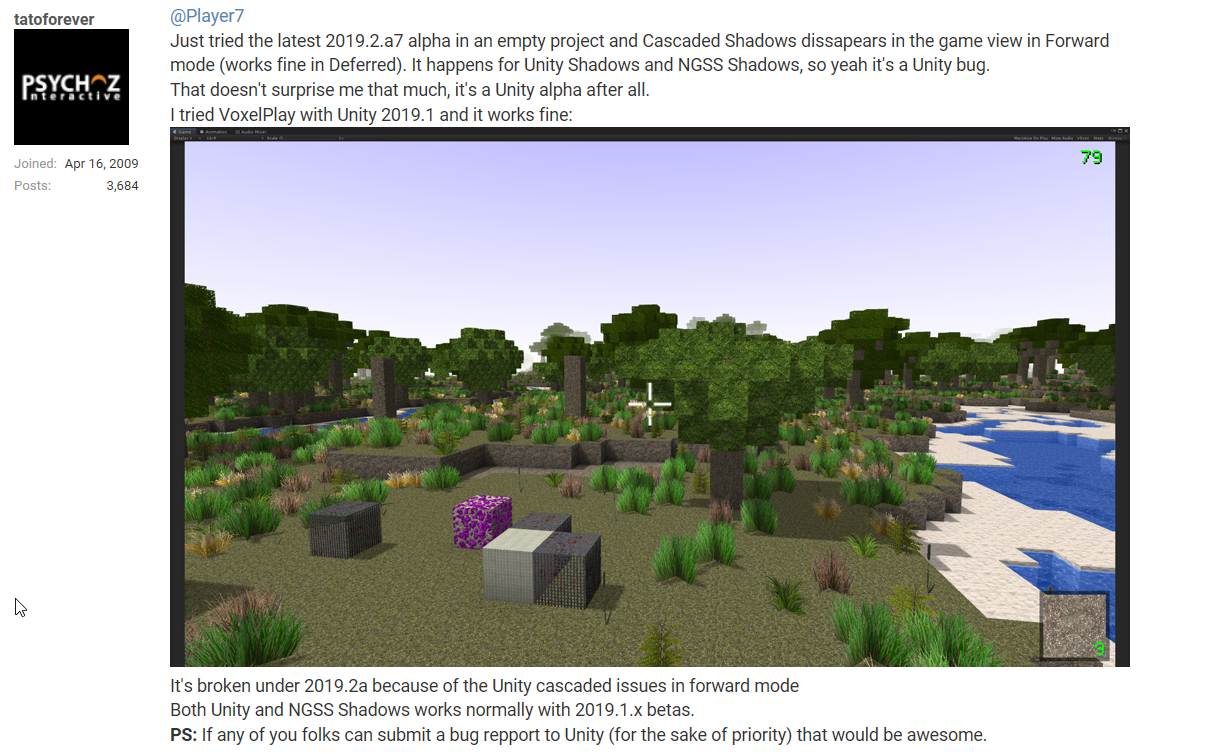
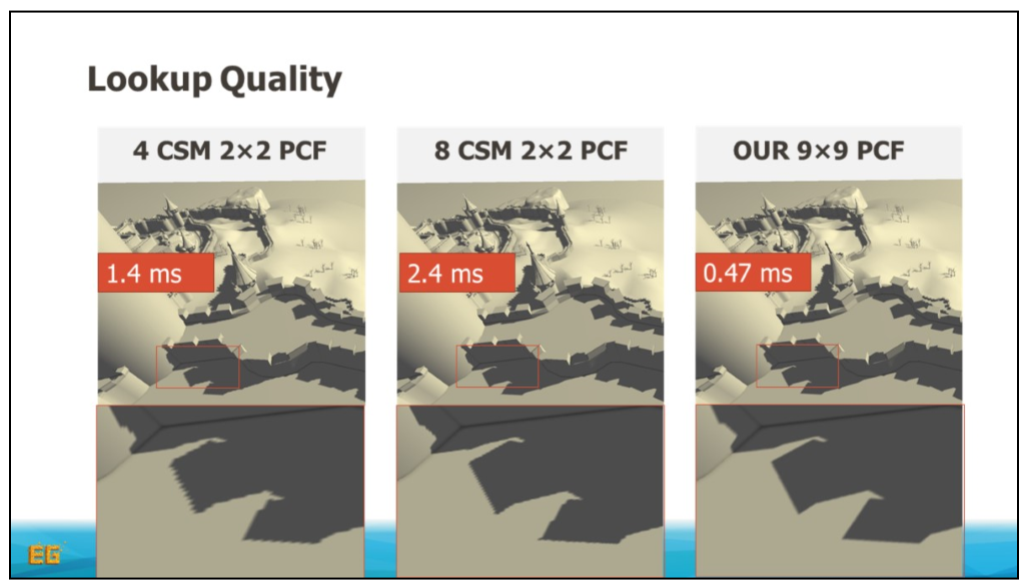
on the topic of voxelized shadow maps, im not sure what it is but found this which might be similar in idea: https://newq.net/dl/pub/EG2018-DAG_Tutorial-ShadowVolumes.pdf
turbid matrix
built-in then
iron hollow
 turbid matrix
could be
they could use that for mobile optimization I guess
but HDRP version is getting volumetric support too
so dunno what's the grand plan here
iron hollow
interesting paper
turbid matrix
iron hollow
 turbid matrix
that must be one reason for this 😄
1) for large and open scenes
2) With high resolution and fast filtering
3) And with very efficient antialiasing for distant shadows

And this within a few hundred megabytes.

Note that, while our method does not help with shadows from dynamic objects, it can be combined with a simple cascaded shadow map implementation, which will be very cheap as only a fraction of the triangles now need to be rendered.```sounds like the answer to Hippo's prayers
true zealot
the flying spaghetti monster on page 9 is a really freaky representation of an octree
turbid matrix
I'd want more of fancy shadow mapping stuff for real-time lights tho
 dusk hare
anyone figured out a way to fix this ? it's happens with ssr on hdrp at certain angles, My current hdrp version is 4.10 and unity version is 2018.3.8f
 indigo summit
@turbid matrix huh is 6.6.0 are out already?
 fading rose
@indigo summit there are some early versions out, but not for all versions of Unity. I think these would be on the alpha versions of 2019.2 which will probably be possible to use for production after summer.
indigo summit
usually i modify package manifest file t pull from staging. but i can't see 6.6.0
fading rose
ok I see. And would this also work for 2018.3 if it was there?
indigo summit
oh i use 2019.2 alpha
fading rose
oh ok then. I tried it a bit but was too unstable for production work. Many of the tools we use broke and made our life difficult so we went back to a version more suitable for our project.
quasi mulch
@iron hollow it does make me hot, but I'm not sure Unity will add it :<
I tried the highest quality shadow option in HDRP and the quality was a) always worse than CSM and b) the perf unsuable ...
perhaps it is broken?
actually quality is good now!
but still not as good
here is CSM on medium for 4096 distance
quality is acceptable! framerate high
highest is:
note the slight panning and softer look. the softer look is welcome but the corner is offset slightly and the fps tanked
probably experimental
turbid matrix

Unity Forum
We are releasing some shaders to provide support for Particle Systems (lit and unlit) in HDRP.
This is not for use with the Visual Effect Graph.
They...
things like this makes me wonder about the current structure: https://github.com/Unity-Technologies/ScriptableRenderPipeline/commit/f6ba260f8db80982802708ed51521d255e0c5aa2

GitHub
-
Move SMAA option after TAA
-
Update CHANGELOG.md
basically if they add any PP AA in the future, it will be last on the list to avoid this kinds of issues, regardless where it should be from UX standpoint 😃
quasi mulch
why are terrain realtime shadows not matching terrain pixel error? it's leading to shadows that are incorrect for the visual and lower performance
They could have done "formerlyserializedas" but seems like they can't be bothered with the maintinance
indigo summit
the HDRP particle shader are nice, it give me a good start to customize it
Yay translucent steam with shadow receive
How long we've been waiting for lit particle with working shadow receiver again 🤔
quasi mulch
use vfx
why use shuriken with HDRP? it's only a use case if you need specific collision behaviour or specific callbacks
there's no cases where it runs faster than equivalent vfx for the hardware HDRP targets
(in my tests)
quasi mulch
touch it, it compiles compute shaders from scratch
it's FUCKING awesome
all lit too... what you're ASKING for
indigo summit
now that's tempting
quasi mulch
tempting? go my pigeon, fly free
embrace the sun of lit particles
you wil become one of the next gen AAA faithful
iron hollow
VFX isn't the answer to everything though
it's total overkill for most particles
it's really suited for LARGE particle systems that use a lot of particles
not puffs of steam
if it was really meant for everything, Shuriken would be killed off completely.
glad tartan
It can be used for anything particle related, it's not specific to a certain number of particles.
Right not it's only GPU based so it cant do some things Shuriken can do as Shuriken cant do things it can do.
On the road map CPU support is stated for 2019.3 so by then it will have support for that as well.
Only time Shuriken would be deprecated is when all it's features are supported in VFX Graph and the default pipeline isn't there to use it as well.
iron hollow
sure it's not restricted to any count, but it's like driving a Lambo to go get groceries.
doesn't even need anywhere near the power it has to do a simple particle task
glad tartan
not exactly. It's not over computing things
iron hollow
i believe in using the right tool for the job
 upbeat badger
puffs of steam will be more perfomant with vfx graph so why not?
iron hollow
not seeing everything as VFX Nail to hammer
quasi mulch
particles don't have the same optimisation while vfx system will compile a compute shader just for what you are doing
iron hollow
if you make everything a GPU task, you're going to make your game GPU heavy
which probably means it's going to be an unoptimized piece of crap.
Some tasks should be left on the CPU
quasi mulch
I thought the same once, I wonder if you can find my 5 year old post saying that
glad tartan
only reason you would want to use Shuriken is if your GPU is being hammered and have CPU headroom to run particles there instead
iron hollow
I'm not going to drag out VFX graph to puff a little puff of smoke
quasi mulch
it was true back then or even now for mobile. but it's not true for the target VFX targets
turbid matrix
@glad tartan or if you need a lot of interaction from your code
do note that you can now jobify shuriken particles
so that could be used for some fancy gameplay effects
I have one scenario which I'd want to handle myself
I'm pretty sure I could do it on both, will need to experiment on the VFX graph for it
main issue right now is that I don't know it's limitations
I know the broadly described things but talking like practical stuff, how to move SDF's in the worlds for effects and such
quasi mulch
It will be more performant to use shuriken for particles on gpu weak devices or for situations you need to control the behaviour or with physx interactions since that's also on cpu
no readback nonsense
so we get to have both... sheer bliss
although there's a cpu version of VFX in the works
turbid matrix
this would be neat-o on HDRP too :p
https://www.youtube.com/watch?v=0Rk5p7z9xtE

UE4 SSGI testing. I just found out about it. Unreal dev-rendering
not huge fan of screenspace effect artifacts but still cool that they can do that
iron hollow
there's a few of those on the asset store already
but probably not HDRP yet
there's one currently being written, i don't know if he's targeting SRP or not
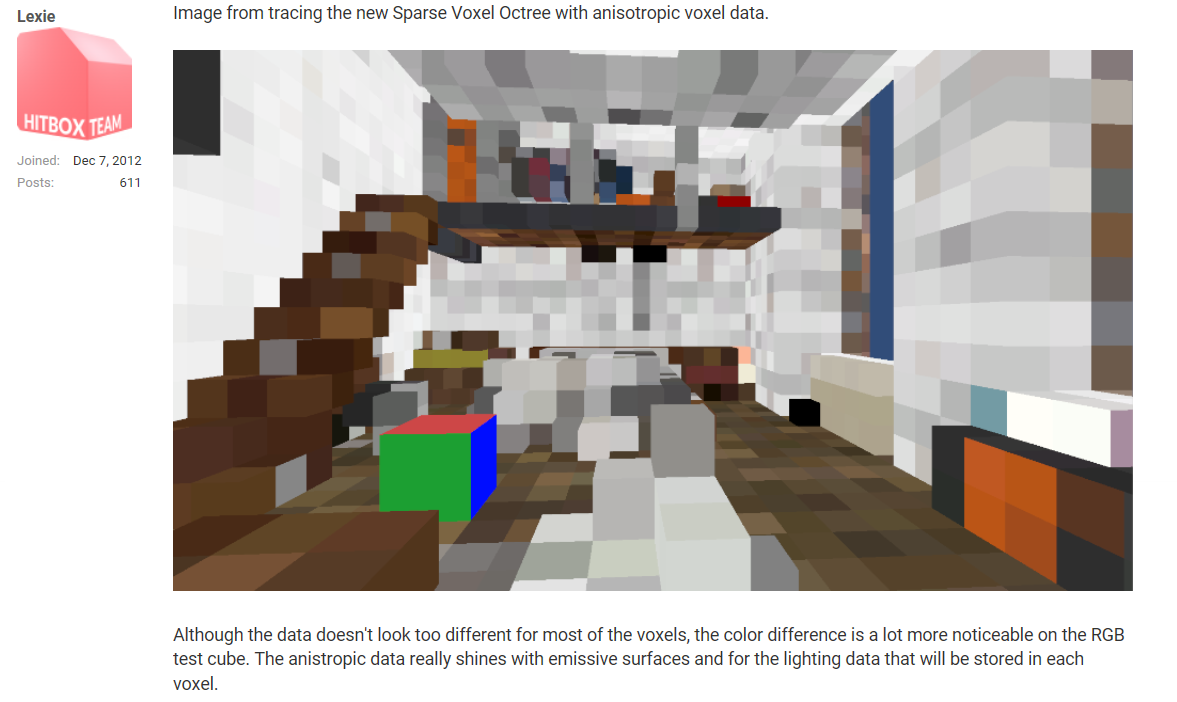
he uses sparse voxels to do it
then blend and voila
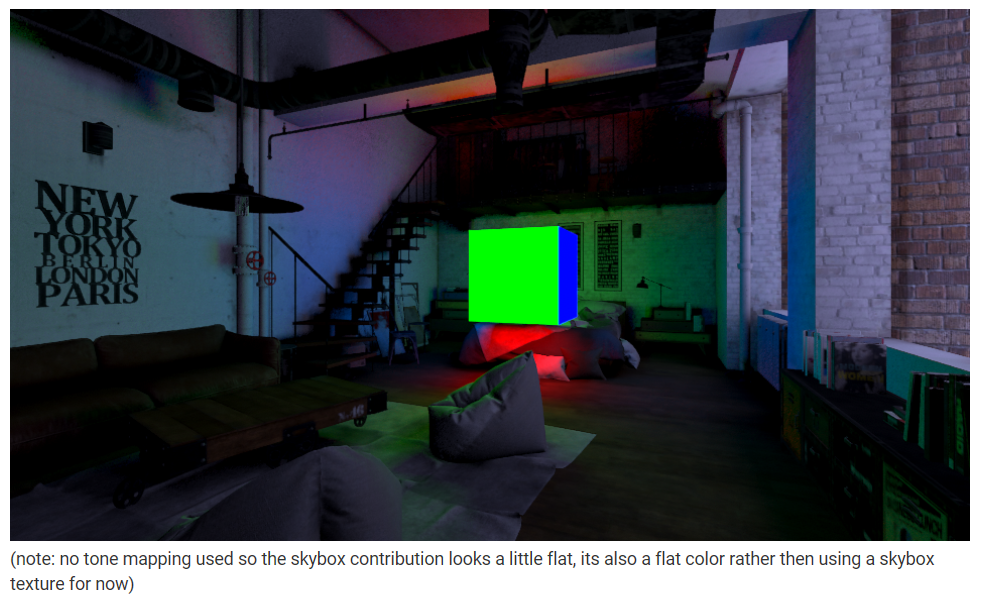
better 1:1 example:
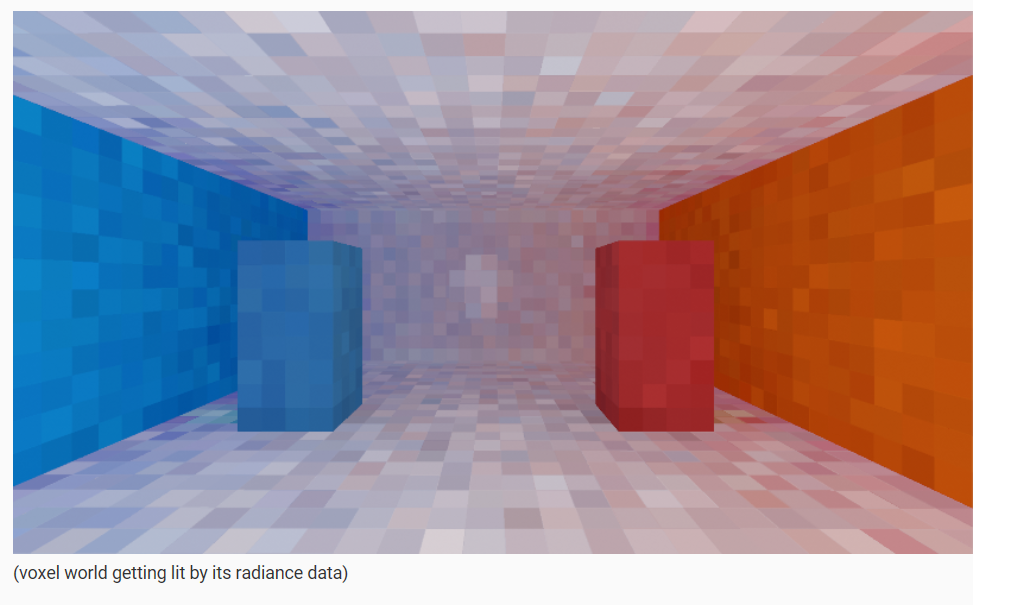
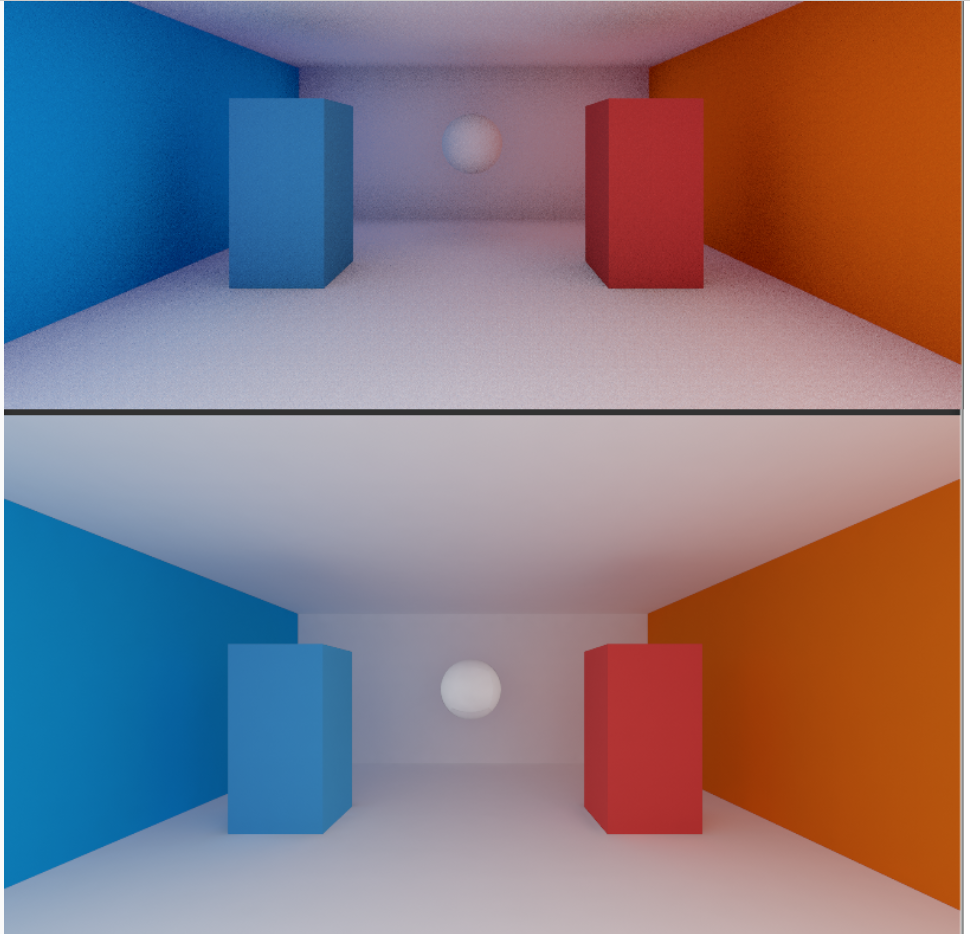
top is his result, and bottom is unity default
turbid matrix
well, there are tons of voxel based GI solutions
but this was using screen space data for it, which I'd guess would mean it's fully dynamic
iron hollow
well i assume any screenspace solution has to do the same
unless they are literally raytracing i guess but that sounds slow
yeah i think the point of this voxel one is it's fully dynamic
being so fast by using voxels allows for that
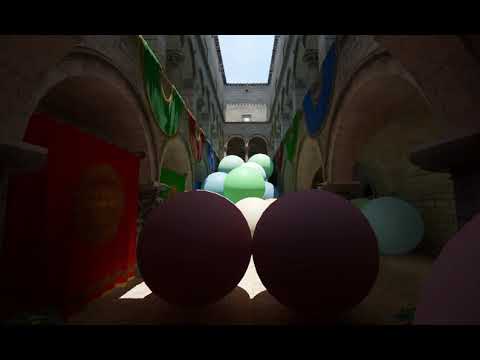
Work in progress - HXGI at 1080p running under 5ms on a GTX 1070.
fully dynamic 😃
turbid matrix
5ms is a lot of time 😃
iron hollow
it's alpha 😛
turbid matrix
yeah, I've read that thread a long time ago
is that anywhere near getting released now?
or is it released already?
I'm just SUPER skeptical on especially GI techs people come up with
there are always people making these systems and most don't release ever
and if someone does, they drop it right away
quasi mulch
sexie lexie brings all the render geeks to the yard
iron hollow
yeah they have clearly stated they will probably never release it
it's for their own use primarily
but I'm sure if enough people beg it will happen
turbid matrix
see, this is why I don't show my own in-house systems 😄
because from past experience, people start demanding it to be theirs, one way or another
quasi mulch
FWIW I had path tracing on ps vita
by rendering textures to textures
2D pretending to be 3D, of course
turbid matrix
I once showed online an image of a steel racing wheel stand I made that one can put in front of a sofa, people wanted to buy that stuff too
quasi mulch
I want to open my github up but i think half of my stuff there is riddled with source that is in no way clean or can even be attributed properly
turbid matrix
can't just casually show, "I made this" for only inspiration etc
quasi mulch
for example in the middle of prototype dev I can easily just pull code from all over, without giving a hoot where it came from
I guess nobody minds much so long as it's just a snippet or whatever but it would be nice to cleanify it
iron hollow
yeah that's why i don't sell stufff
i would have to make it all clean and pretty and then support it
turbid matrix
support part is what's killing it for me
I have one plugin planned for UE4 but still considering it
it's something most users there couldn't even come up with
but that also means there might be limited market too
iron hollow
well limited market means fewer people asking for support
i might be ok in those circumstances hehe
turbid matrix
yeah, but I don't really like overpriced assets
and polishing an asset for few copies sold with low price is just not going to happen
iron hollow
i feel bad for people like the Aquas guy
cause everyone comes and buys that and then wants help because they don't bother reading how to use it or understand intermediate gamedev
turbid matrix
that's normal
people also want you to make their game for them
I just got a private message on unity forums the other day from user asking me to fetch him some items from Unity's own FPS Sample
iron hollow
lol
turbid matrix
I get that it's 18 gig download but there's no way I'm going to start doing favors like that to random people just because they are too lazy to do it themselves
iron hollow
yeah i hear ya
upbeat badger
just tried smaa from 5.8. Is this even doing anything?
without aa and smaa looks almost identically
turbid matrix
@upbeat badger you look in the game view?
turbid matrix
in play mode?
upbeat badger
yes
turbid matrix
well, it does work for me
at least on 5.8.1
it's not going to remove all the jaggies
PPv2 SMAA didn't either
but it's way less blurry than FXAA for example
so it's a tradeoff for not losing the sharpness
turbid matrix

GitHub
Purpose of this PR
This PR introduces two variants for cases with only static lighting, one with Lit only and one with Lit and SSS+Transmission.
Also, it skips the build light list if there is noth...
Optimize rendering when only static lighting is available or when only directional lights are present.
quasi mulch
KNEEL and spend a moment with the Creator

Unity Labs is where we do experimental projects, research, and explorations into the future of game design, VR, AR and development. Check out https://labs.un...
iron hollow
I check the unity labs webpage regularly, but they very rarely post anything
well anything I like anyway, mixed reality isn't my bag
dusk hare
ugh updated unity to 2019.1.0b7 and hdrp to 5.7.2 now it says it doesn't support ssr in hdrp settings or scene settings
 scarlet hull
Thats the frame settings, check lower in the inspector, in the lighting section, for the SSR support
dusk hare
Well none of the options are working on current hdrp version
going back to 2018.3.b8 and hdrp 4.xx but it still has plenty of issues with ssr like this one
scarlet hull
You need to have both those options checked for SSR to work :
dusk hare
Like I said earlier both the options are not available
It's fine with other versions of hdrp tho
scarlet hull
That seems to be a bug, could you make a screenshot maybe ?
I tried a few minutes ago with 2019.1.0b7 and hdrp 5.7.2, and it worked
dusk hare
Well I deleted 2019.1.0b7 but might download again to report the bug
And also is this ssr bug fixed in latest version of hdrp?
Similar bug also happens while using real time reflection probe
scarlet hull
I'm trying to understand what's happening in this screenshot, and this might just be how SSR works
dusk hare
Well at certain angles ssr draw weird pixelated images on screen
And it wasn't like this before with defualt unity render pipeline and ssr from pps
scarlet hull
You should try to increase the number of ray steps
dusk hare
I did
I tried around 300 and it still has the same issue at certain angles but kinda minimize the issue
And having above 300 raysteps would be a terrible idea
scarlet hull
Yes indeed ... If you could send a bug report which specificaly reproduces this issue (with a small scene), that would be great.
dusk hare
sure will do that
dusk hare
updated to 2019 beta and hdrp 5.7.2 and it has made it even worse on ssr
scarlet hull
I think it's falling back to a kind of default sky (depending on your setup), try adding scene settings or a reflection probe
dusk hare
also bloom is not working with 2019
pps bloom doesn't work and the bloom on scene settings makes everything black if you increase intensity
scarlet hull
PPV2 won't work with HDRP > 5.3.1
 primal jacinth
Use the builtin HDRP bloom
dusk hare
what about the bloom which comes in default with hdrp in scene settings
it's making everything black
scarlet hull
And the new bloom is not a "fake glow" bloom like before, it's physically correct and needs some time to get used to
Since your scene here is mostly black, depending on color intensity your have, it can actually look like a global blur when intensity it set to the maximum
primal jacinth
It's energy conserving, don't push the intensity too high (0.2/0.3 is generally good) unless you're trying to simulate a very bad plastic lens with vaseline applied to it.
dusk hare
well at 0.1 it makes entire screen black and when i hit the play button it keeps changing
like it makes the entire screen black and then goes back to normal for few seconds and then it repeats
wait let me record
primal jacinth
do you have TAA enabled?
dusk hare
nope
using smaa
tried switching to fxaa and taa still same issue
ugh this is kinda painfull and i also noticed little performance issue with current update, Gonna report this and switch back to 2018.3
 faint kraken
for some reason, enabling HDRP bloom can cause NaN issues :/
I could catch some here (if I disabled TAA, the screen would totally go black)
dusk hare
even with taa you will face black screen issue but it's kinda minimized
for now it's better to to report these issues and use the older version
turbid matrix
the SSR issue is definitely from not having the feat enabled, would have loved to see a screenshot of the conf that didn't have that option
@scarlet hull you know why the order of the options were changed? before the enabling feats part came first and it was intuitive
by the time goes on I expect more and more users getting confused how to enable things as now the thing you need to setup are somewhere in the middle
it makes no sense at all
@dusk hare I'm guessing that you missed the feat enabling option for a reason like not expanding the Reflections section in the middle of the settings
it's hidden well, I only found it because I knew what to search for from using the feat extensively on the previous versions
actually looking at the discussion, I'm now confused if you found the settings later on 😄
also, when you had visual issues, did you actually enter the play mode?
dusk hare
well even after playing around with settings and other things i still noticed way too many issues with hdrp on 2019 beta and yeah i was tetsing all of them on playmode to confirm the issues
turbid matrix
2019.1+ have had issue where it didn't initialize the async shaders properly unless you went to play mode once after editor restart
but I haven't really gotten that lately on 2019.2 so I'm guessing it could have been resolved?
either way, some PP effects get messed up before you enter playmode even today
like TAA
dusk hare
i might try alpa tomorrow
turbid matrix
2019.x are way better for HDRP though, a lot of advancement there to the versions in 2018.3
but things also move faster there
so if you need stability, 2018.3 (and 2018.4) may not be bad picks atm
dusk hare
for now i'm sticking to 2018.3 due to the issue but still gonna play around 2019 to report some problems
scarlet hull
@turbid matrix It was decided to move the feature checkboxes (that were before the frame settings before) into the different categories (lighting/rendering ...). This unintentionally made the frame settings move to the top.
We're waiting for an UX pass on this before changing things again.
fading rose
@turbid matrix 2018.4? It does not look like this is happening. There is no alpha for it.
@Mr.unpredictable#4462 In my opinion, 2018.3 is the release to go for stability and wide availability of tools if you plan to release within the next 6 months.
If you are looking for a release deeper than that, it may worth looking at 2019.1.
turbid matrix
you don't need alpha or beta for 2018.4, it's going to be 2018.3 bumped into 2018.4 LTS when it happens
there's practically no new feats for LTS versions
it's kinda silly to have different version for it at all but it does make sense as people would otherwise expect .3 to be stable like LTS versions in general upon arrival
what they do now basically just means they treat it as more stable LTS release after .3 has been out for a while and most glaring bugs from it have already been fixed
and LTS is going to be released within a month probably
two at most
@fading rose this cycle is probably better explained here: https://blogs.unity3d.com/2018/04/09/new-plans-for-unity-releases-introducing-the-tech-and-long-term-support-lts-streams/

Unity Technologies Blog
At GDC, we announced our new plans for Unity releases, which include what will be known as the TECH stream and the Long-Term Support stream (LTS). The TECH...
ah, they explained the .4 bump there too: ```Why did you bump the version number to YEAR.4?
We wanted to have a clear point at which the two-year support schedule begins. Also, we wanted to begin a new LTS stream at around the same time the new TECH stream begins. ```
empty star
@dusk hare does that ssr issue repro in prior versions with same setup & assets
Just ruling out if its mesh normals etc
fading rose
@turbid matrix ah I see. Ok it is a bit confusing though. Since there is nothing new and it is only updates, 2018.3.xx could be the LTS and still have a clear point where it starts and still have a clear point where new tech begins. 😄
turbid matrix
yeah, I don't really see that "clear point" being any clearer if the 2-year support period would start the day YEAR.3 ships vs YEAR.4 ships ;D
but they want to do it this way to have separation on the TECH stream stage
iron hollow
well it makes sort of sense
4 releases a year, but it's staggered, release 1 is at the end of 1st quarter, 2 is at the end of 2nd quarter, 3 is at the end 3rd quarter, and 4th is at the end of 4th quarter.
instead of at the start of the quarter
turbid matrix
yeah, but .3 is basically .4, so the bump is artificial
(or other way around rather)
either way, it is what it is
I don't really have any issues with it, I find it really cool that they do LTS now
iron hollow
yep, i still have 2017 LTS and 2018 LTS installed for legacy reasons
well not 2018LTS
i mean 2018.2
but to me it's a LTS 😛
because they keep updating it and it's pre-new Prefab
dusk hare
@empty star i've experienced that in almost all versions of hdrp i tried (if you were referring to this bug)
wait it's not clear in this pic
 glad tartan
That seems to be a limitation of SSR in general. Since it's screen space it will only reflect what you can see.
So what's behind that object can't be reflected since the camera can't see it causing that area to fall back to reflection probes or sky reflection.
you could use planar reflection since it seems the ground is flat
fading rose
SSR, of course, only renders what is on your Screen. Hence "Screen Space Reflections".
dusk hare
It wasn't really an issue with ssr on defualt unity render pipeline and haven't seen such issues with ssr on other engines too
In this pic it still looks normal but in many cases it just makes it terrible
I still have a project with defualt rendering pipeline and ssr from pps and it works just fine
glad tartan
This is the case with SSR in all engines.
Here you can see it in Metro Exodus with the weapon occluding the background and and cuts off the SSR reflections from the water
https://youtu.be/x5GGimxOE4k?t=390

Yes, Alex is a huge Metro nerd! But that pays off big-time when assessing a gigantic leap in design for the 4A Engine powering the new Metro Exodus. We've go...
and the same with BF5 in Frostbite
https://youtu.be/VK7lL3E2LVc?t=61

An EXTENDED look at Battlefield V Gameplay beyond the Ray Tracing tech demo. How does Nvidia GeForce RTX and Real Time Ray Tracing graphics in Battlefield 5,...
dusk hare
But it wasn't this bad before
Well tomorrow I might take few more screen shots to show how it kinda makes the scene worse by drawing black pixelated images on screen
Kinda like Nan pixels issue
turbid matrix
I'm frankly surprised that you liked old PP SSR
as I've never gotten anything usable from it
it seemed like totally broken by design for me
(talking about PPv2 one, the older one worked still)
iron hollow
i always though StochasticSSR one was better than the PP ones
of course it doesn't have SRP support
in fact i'm on the watchlist for that project, and some guy was cussing him out for not having SRP support. was kind of sad.
he basically told the guy to go use PP then 😛
people can be so rude and pushy
quasi mulch
OK guys, gimmie a TLDR of what I've missed with HDRP :P
turbid matrix
nothing, 5.8.2 out for 2019.1
mainly fixes standalone building
but it's still on staging I think
quasi mulch
Standalone builds were fixed for me by nuking any kind of stripping this end
I wonder where SSR went? 🤔 It's been gone a while now, would've expected a return at this point
turbid matrix
?
what version?
it works on my end
only thing that drops SSR on HDRP is MSAA
hmmm, HDRP speedtree branch got ST7 shaders about done now
I hope they get to ST8 soon
altho should probably read their updated terms, they got kinda greedy lately
quasi mulch
huh? SSR flat out just only reflects sky here, weird
turbid matrix
which version?
quasi mulch
5.7.2
quasi mulch
it's just reflecting the skybox
turbid matrix
but it's something that tends to break all the time 😄
I think I've reported it being broken like three times already
they always fix it 😄
quasi mulch
hey - does SSR have much of a perf hit since I was thinking I could live with just probes tbh
turbid matrix
the issue with SSR is that their automated visual tests don't cover each combo I think
it does have perf hit but you can limit it with the settings
do less samples
I can get away with pretty cheap setup on my tests
I don't need 100% mirror like finish 😄
I'd use probes if it were viable for my game 😃
I mean, only them
screen space artifacts can be nasty
turbid matrix
is this a HDRP sky bug?
it happens on prefab view for me on latest 2019.2 and latest HDRP
I checked 2019.1 and built-in and it didn't do this, will check 2019.2 built-in next
turbid matrix
yeah, it's only happening with the HDRP assets sky
faint kraken
isn't this normal?
The light is apparently controller by camera rotation
https://forum.unity.com/threads/feedback-wanted-high-definition-render-pipeline.560653/page-11#post-4262371
But in prefab mode (or when you disable the scene lighting toggle), this light is the hidden light attached to the camera, and thus, the sky changes with your point of view.

Unity Forum
I work for my own company :)
You can make custom/local packages for PM just fine. You can even put direct github links in your manifest (as long as...
turbid matrix
I like how that put my forum post in the preview :D
We're searching a solution for this now, but also working on a new procedural sky. Expect more a fix on the new one.
Ok. So probably will remain broken in prefab view
I wish you could then just swap to gradient sky in prefab view automatically :p
@faint kraken so it is a known issue. Not really normal but something we need to deal with
faint kraken
hm, a temporary solution would be to create an empty scene with a light and use it in prefab mode 🤔
indigo summit
create new empty scene, add them to these
turbid matrix
oh
indigo summit
for prefab editing if you have your favourite HDRI, might want to use them
turbid matrix
that's not really helping for this
oh, I could probably override the sky itself on prefab scene
the light itself didn't help there
ok, I can override the sky setup at least
so HDRI could be ok
indigo summit
what do you mean the light itself didn't help?
turbid matrix
I added directional light and scene volume settings with procedural sky into that prefab scene
it still did the thing on prefab view
but I can now swap the sky itself from volume settings
indigo summit
umm i'm not getting that bug with custom prefab scene
turbid matrix
what is on your prefab scene?
I tried it with only directional light in it, then with additional scene settings, then with additional camera
it's all the same as long as I have procedural sky selected
if I swap the sky to something else, it does obviously fix it but I'd like to keep the procedural one if I can
indigo summit
the default scene that created by HDRP wizard
turbid matrix
and if you look up in prefab?
indigo summit
turbid matrix
how do you get that scene, you said hdrp wizard
but I don't see any option anywhere that lets you make new scene with these
indigo summit
turbid matrix
oh wow
indigo summit
i have no idea 😄
turbid matrix
yeah, this explains why I never paid attention to that 😄
there's no option to make new scene here tho
there's default scene prefab
wonder if that's changed on 6.x
indigo summit
hmm that tools already exist since 5.x
indigo summit
when you create a new scene, it is already have volume and PP volume?
turbid matrix
nah
new scene with HDRP enabled gives me always just light and camera
I've always manually added the scene volume settings
dusk hare
alright i tried 2019.2 beta and looks like alot of nan pixel issues are fixed but for some reason i see huge performance drop, can't figure out what is causing it but i will run some test and use profiler and frame debugger to see what could be causing the issue. edit: same scene with same settings on 2018.3 had way better performance
indigo summit
this is mine
turbid matrix
is that on 2018.3?
I'm testing this on 2019.2 so they could have changed a lot of things
indigo summit
this is the behaviour of HDRP since 5.x
turbid matrix
well, not on my end
indigo summit
also i'm on 2019.2 right now
turbid matrix
wtf 😄
but you create the new scene how?
you said through that wizard
but there no option for it
indigo summit
yep using that wizard
turbid matrix
you saw the screenshot I sent
indigo summit
do you have this folder in your project ?
indigo summit
well that's weird 😄
indigo summit
hang on let me try create empty project
turbid matrix
I also can't place that DefaultSceneRoot prefab into scene
it doesn't even let me open it in prefab editor
I can expand it and see what's there but can't do anything with it 😄
I used that wizard the create the prefab but it's all messed up
indigo summit
great unity just freezed, Damnit unity why do you have to set auto lightmap baking on by default
turbid matrix
2019.1 with 5.7.2 HDRP acts exactly the same for me
on that, new scene from File menu does give those extra objects
oh wait, now I get it 😄
you have to have tht defaultsceneroot thing there before you create the new scene
once it's there, it does put those extra objects in default scene
indigo summit
oh
turbid matrix
I only got them now when you showed where the wizard was
man, they should just put everything under some rendering submenu :p
indigo summit
ah
turbid matrix
but, it still didn't immediately solve my issue 😄
indigo summit
i see
turbid matrix
now when I enter prefab view, it's pitch black 😄
but I think it's because the settings differ from my main scene so much now
indigo summit
have you tried to save that scene? into a copy? called it prefabscene or something and add it on the project setting
turbid matrix
I saved the default into "PrefabView" scene and applied it to the project settings for that prefab etc
indigo summit
is still broken?
turbid matrix
yes, but I know why
it's the overlapping scene settings
I need to make the prefab view use same profiles as the main scene
turbid matrix
for main scene?
indigo summit
prefabs
turbid matrix
I want my custom setup there
yeah, that's the issue
I get pitch black screen if I do that
indigo summit
uh i'm not
turbid matrix
somehow the settings get multiplied
well, you probably have same setup on the main scene as well 😃
turbid matrix
the regular level
with all the game world stuff in it
it somehow conflicts with the prefab view
don't ask me how
indigo summit
ah nope, totally using different profile
turbid matrix
yeah, you'd think
indigo summit
for my prefab scene it using the default profile as in empty scene
for my main scene i create new profile
turbid matrix
yet, if I disable scene volume settings from the main scene and then enter prefab mode, it shows the thing normally
altho the darkening while looking up is still there 😄
so, this isn't really going anywhere atm ;D
indigo summit
alright i have no idea what is happening actually 😄
turbid matrix
yeah, this is a mess
hmmmm
wonder if it's because I keep game view in separate window
it does render the view from main level even if I'm on prefab view
nah, it's not that
indigo summit
oh
interesting
for my case
actually my main scene profile got replaced by the prefab scene profile
when i'm entering prefab mode
Normal view
turbid matrix
it's the exposure difference + light intensity difference that made it black
indigo summit
prefab mode
turbid matrix
if I match those values between main scene and prefab scene, it does show up normally now
but the looking up bug is still there
turbid matrix
yeah, nothing I do fixes the prefab view issue here 😄
I now took the wizards default light + volume settings to the main level and that lets me use the prefab view scene just fine
but the camera/ light issue is still there regardless
indigo summit
now i see, the exposure differences bug
my prefab mode become full white now
😄
but i can't repro the look up bug
turbid matrix
also wonder why they split the volume so that the have render settings and post processing settings but still put AO in render one
or don't they treat AO as PP effect?
primal jacinth
AO is not a PP effect, it's a lighting effect (like SSR, Contact shadows etc)
turbid matrix
well that explains that one
indigo summit
is HDRP ao still using MSO?
primal jacinth
yes
turbid matrix
have you guys experimented with GTAO?
primal jacinth
we already use multi bounce from GTAO
indigo summit
wait what?
primal jacinth
As for using pure GTAO, yes, we ran some experiments. It's slow and only works well visually with a temporal pass
it's not that "magical" 😃
if anything I'd prefer to look into LSAO
indigo summit
what is LSAO?
turbid matrix
I was wondering about the temporal part too, I never really tested it in motion

This video is part of my EGSR'13 presentation. This work reduces the time complexity, and therefore the render times, of the widely used Screen-Space Ambient...
primal jacinth
Yep, http://wili.cc/research/lsao/ (used in Quantum Break fwiw)
turbid matrix
I just swapped to HDRI sky for prefab scene (to fix the sky turning black issue)
ASE actually had one cubemap which is almost like the stock sky
 weary fog
Any plans on physical units for HDRP auto exposure
primal jacinth
Any plans on physical units for HDRP auto exposure
It already does use physical units, not sure what you mean
it just throws errors
Assuming you're on 2019.2b, there's an issue with XR code that broke quite a few shaders, Exposure included
It can be fixed by disabling the Texture2D promotion to Texture Array in TextureXR.cs and TextureXR.hlsl
turbid matrix
it's fine, I don't need the autoexposure right now 😃
I'm sure it'll get fixed eventually
scarlet hull
In PPV3 the exposure is set with EV100 ... what would you want @weary fog ?
weary fog
I didn't see any units when I was using it so I assumed it was just using arbitrary values
primal jacinth
Tooltips might be missing (haven't checked). Other than that we can't display units in the fields but I'm pushing for it as it's becoming more important with so many different physical units
But yes, like Remy said it's ev100
turbid matrix
@indigo summit ah, I missed the lighting toggle in the prefab view, it wasn't enabled
this actually works with that lighting set to enabled even without prefab scene but it'll default to tad low light angle
but that lightbulb itself was the reason why the procedural sky didn't work properly even on separated prefab scene
I'm thinking, this could be made smarter by putting lighting and scene volume settings into subscene and including that same subscene on both game level and prefab scene
but this is fine for now
iron hollow
what they should do is merge Prefab view with Lookdev
since they are nearly the same concept
turbid matrix
yeah, I don't really know even how to enable the lookdev, haven't yet tried it
iron hollow
that way you can isolate your prefab to look at it
and tweak it and you're already in prefab mode so you can save the changes.
indigo summit
@turbid matrix Huh? The lighting toggle on the scene header bar? isn't that unified ? which mean all this time you have lighting disabled on scene view?
turbid matrix
nah, it's enabled by default on scene view but not on prefab view
I tried different unity versions and projects, it defaults to off on prefab view on all (altho I dunno if that's some global setting)
indigo summit
weird, it's on by default for me
why do you keep finding weird behaviour on the editor 😄
turbid matrix
if it's a shared setting between the engine versions (like the editor layout), it's possible I've just toggled it off without thinking much
meanwhile
5.8.2 packages now on regular registry and package manager
quasi mulch
https://youtu.be/8Aeyafaz7Jo can i have this thanks bye

Showcasing my new volumetric cloud system for Unity. It is a mix between using particles to render the clouds and ray marching for lighting and scattering ma...
quasi mulch
i wanted amplify imposters to add particle /transparent support with custom bake shaders but they said no
(for clouds etc) so I'm looking into using VFX for clouds
(that cloud technique is just billboard impostors with rotation like trees or amplify impostors)
works well in VR (the game is VR) and highest perf
I want it but no time at all to dev it so I'll likely use VFX system to knock something up
indigo summit
Ooohhh that's cool
iron hollow
oh I thought that was the asset store one which is terrible performance-wise.
but seems something new.
quasi mulch
it's for a VR flight combat game if memory serves. I stumbled on it ages ago and kept it secret of course
I really don't give out much of what I really want or use :P
iron hollow
heh well seems a secret for not much longer. he says it will be on the asset store in 2 weeks
iron hollow
 quasi mulch
STOP THE PRESSES EVERYONE GRAB HIM BY THE SCRUFF OF THE NECK (IGNORE CEEBEE AS WELL HE DOESN'T COUNT) AND FORCE HIM TO MAKE IT FOR HDRP.
iron hollow
yeah tell me about it
I saw another asset on youtube the other day and asked if it would have SRP support and this is what the guy said:
quasi mulch
become one of the hdrp faithful
iron hollow
 quasi mulch
the one true renderer
iron hollow
oh man, I just realized it's the exact same guy LOL
I saw his video about a rain system
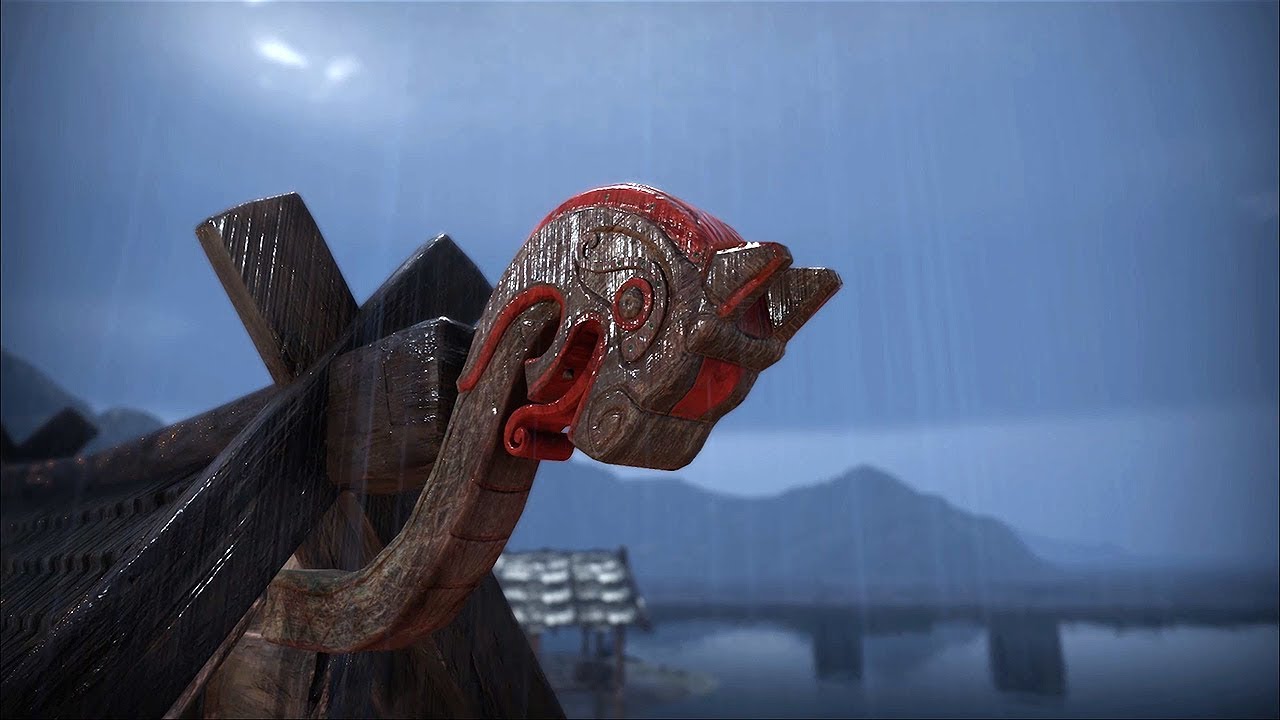
Showcasing the dynamic wetness feature for my upcoming sky and weather plugin for Unity, OverCloud, using the Viking Village asset. The system is fully dynam...
this one
iron hollow
I think it's just shader replacement
but I was curious if it would work for HDRP
and I guess he's not interested in it
quasi mulch
does not suit his VR game
here is how the clouds started tho

While working on a billboard-based cloud system for Unity I had to find some way of drawing a huge amount of clouds at great distances really fast. I ended u...
iron hollow
I won't buy anything else that doesn't have or will have SRP support
quasi mulch
rough at first but polished up
so my interest is really just seeing if I can get flipbook to play ball for cloud rotation in VFX
then i dont need it
iron hollow
yeah I guess culing the techniques out of it is a strategy
quasi mulch
he used to contract for dice and other places so he's not shit at what he does
"The clouds are rendered as billboard clusters when close to the camera, and swapped out for dynamically updated imposters at a distance. They are also rendered to a quarter-sized buffer for optimal performance and then upscaled using nearest-depth bilateral filtering. These two tricks enable hundreds of clouds to appear on-screen at the same time, even in VR. The lighting of the clouds is fully dynamic and so will respond to changes in time of day."
iron hollow
yeah sounds better than the current one on there that is full blown raymarching
I have Enviro, which is a whole weather system, it includes pretty decent clouds
they aren't volumetric but they do the job
He says he's working on SRP support
quasi mulch
I dont need sims, I need perf I can use :D
quasi mulch
yep so this runs super quick
my game is not VR but I like anything that comforts me with stuff like "runs really fast on VR"
has he redone his clouds to a volumetric approach now?
or maybe it's a hybrid thing?
looks volumetric not sprite based now
iron hollow
"Enviro new volumetric cloud system is based on latest cloud rendering papers. These will bring you sky to life and offer plenty options to customize. In addition there are also fast flat clouds options to mix or use for maximum performance. "
I guess you're right, I didn't realize it was volumetric
it didn't perform bad, I guess that's why I assumed it wasn't
but yeah looking at it, clearly it is volumetric
it's been awhile since I looked at it heh
i tend to stack my cart with things during sales and try them once and then file them away for later 😛
and it's def in that category as I've not started with any outdoor levels yet
Waiting for the perfect nexus of New terrain, HDRP, and other junk to come together
and CTS was a step toward that until they made me angry 😛
 trim bone
why did they make you angry?
iron hollow
long story @trim bone
trim bone
tldr version?
turbid matrix
heh, that 5.8.2 HDRP still works on 2019.2
quasi mulch
!
STOP THE PRESSES
5.8.2 come to papa
every single HDRP update is a tinge of excitement and testing here
quasi mulch
what effect does 32 vs 16 bit shadows have, in what situations?
what configuration would likely push a developer into enabling 32 bit?
quasi mulch
yeah but I'm not seeing any diifference whatsoever, which is why I'm asking :(
that's why I asked for what would force me to use 32 bit
iron hollow
you can get artifacting with 16 bit that you wont' see with 32 bit
quasi mulch
yeah but what situation causes that?
iron hollow
soft shadows
quasi mulch
reason I ask is I'd like to know how to avoid going to 32.
iron hollow
if all you use is hard, probably don't need it
quasi mulch
iron hollow
or you can just put up with the artifacting
like it says many platforms don't support 32 bit anyway
turbid matrix
16 bit shadows were botd optimization that got backported
16bit one was a lot faster with quality sacrifice
iron hollow
oh really? i thought unity always had 16 bit
turbid matrix
Hdrp at least did not
And I think Hippo is asking about hdrp now :)
@quasi mulch
I'd guess you'd pick 32bits always when you do pure visualization
Talking of that, does HDRP support 16bit normals?
In deferred that would require gbuffer change, I'd imagine that would be easier to implement on forward
That was something ue4 added when they went to automotive visualization
quasi mulch
how to get HDRP transparent objects to not recieve shadow?
turbid matrix
by having them as separate meshes and setting the mesh renderer to not receive shadow? (I don't think they should cast shadows either)
iron hollow
doesn't renderer still have a receive shadows toggle?
turbid matrix
it has
I do this for car windows this way
altho I've set them to receive shadows, just not cast them
iron hollow
yeah, frankly that's a feature i look forward to, transparent things getting shadows, doesn't work in legacy ;p
turbid matrix
well, they get shadows by default
it's just treated the same as opaque materials :p
or at least that's how it appears on shadow maps
would love some shadows that took the alpha amount into account but that's probable one of the harder problems
turbid matrix
I'd be fine even for having one one global transparent shadow strength value for all transparent materials
iron hollow
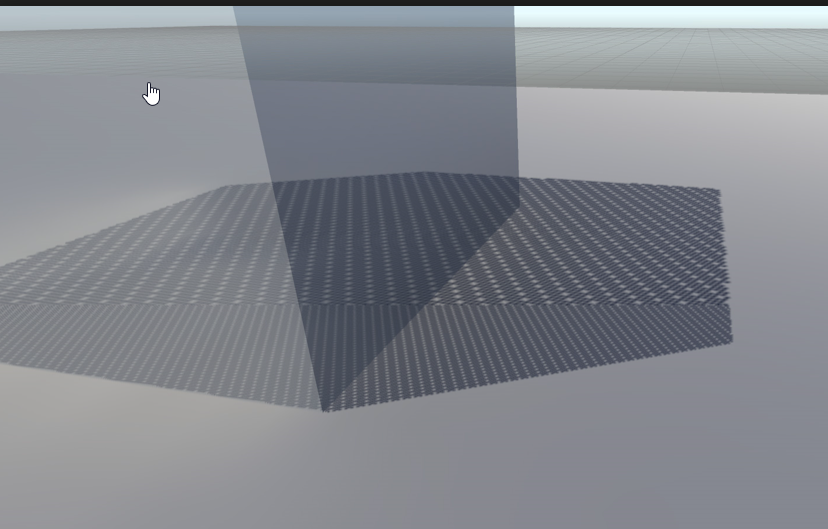
it can look pretty meh
but the dither amount does change with opacity
fewer and fewer dots
unity actually has a built in shader function to convert values between 0 and 1 into dither blocks
you can use it in your own shaders
it's used for LOD fading too
but yeah if having one value meant no dithering, i'd be fine with that
quasi mulch
weird, must have totally missed it
as the age of internet and unreason matures, it'll be filled with the digital equivalents of old people crossing roads
not seeing the option ::(
seems that a mesh cannot omit itself from recieving shadows
casting or not is np
iron hollow
now i'm curious. i don't see why they would remove that
iron hollow
yeah i know what he means. and yeah it seems to be gone. odd
Unity Forum
Hi everyone !
(Version used: 2018.2.8)
I've started using HDRP to make my scene looks cool and managed to get the terrain material works with it....
seems it used to still be there, but didn't work, i guess they removed it because of that
i remember that now, it's because of Deferred
but even in forward it's missing hmm
now i have to go look at legacy just to be sure i didn't imagine it
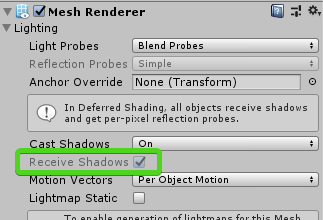


yeah legacy def had it
disabled in Deferred and togglable in Forward
shows it's still there via script
maybe you can toggle it that way
guess i'll test that
turbid matrix
yeah, I do remember seeing that toggle
iron hollow
yeah seems in HDRP the setting does nothing 😦
dusk hare
i have 5.8.2 installed and idk why it's asking me to update to 5.7.2
dusk hare
also unity stops responding while building the scene on hdrp 5.8.2
indigo summit

Technology Reveal: Real-Time Ray Traced Reflections achieved with CRYENGINE. All scenes are rendered in real-time in-editor on an AMD Vega 56 GPU. Reflection...
this make me wondering about the raytracing in HDRP
indigo summit
wait, where can i find the 5.x changelog? the latest changelog was 5.2.0
primal jacinth
I've seen this happen on my laptop as well, it's on my fixlist
indigo summit
awesome, thanks for the info
turbid matrix
@indigo summit changelogs are usually at package root
you can either check them for the project for installed packages in library/packagecache for recent engine versions
Or if the package is on github, find the release you are after and check from there
indigo summit
Yikes
turbid matrix
That is kinda side-effect for grouping all srp packages in same place and versioning them together. You dont always get notable changes even if there is a version bump for package x
 alpine bluff
Yeah - sometimes we have to bump lwrp packages because of changes in hdrp or Shader graph - or the other way around.
But the changelogs only reflect the one package.
I swear it’s not because we forget to put entries in the changelogs - me and my colleagues of writers are too adamant to let that happen ;)
But also: you can also find the changelogs for the promoted packages in Package Manager, next to View Documentation. :)
primal jacinth
me and my colleagues of writers are too adamant to let that happen
I can vouch for that...
turbid matrix
Oh right. I keep forgetting you got those links there :) probably easiest way to get those changelogs then
Well. Not all minor changes and fixes make it to the changelog
But usually the ones that dont make it are part of some bigger restructuring or just fixes on things that only broke on staging etc so that makes sense (as staging isnt considered as regular release)
primal jacinth
Some of them would just add noise to the changelogs (like typo fixes in tooltip etc), but yeah there might be some that are missing... That's what happens when you get over 9000 PRs a day on a project that is still in heavy development 😃
Once it gets out of preview I'm pretty sure the changelog policy will be enforced more heavily
alpine bluff
@primal jacinth - sorry not sorry :p
Yeah, we made writers code reviewers on changelogs for the SRPs several months ago; so at least we have a look at them. And for lwrp, Phi-Lira is a star at pinging me in on others’ PRs if I hadn’t been added already or there are just any user facing words.
quasi mulch
OK everyone just bear in mind it's never Kats fault when you see rampant typos, it's usually going to be the AI or something.
iron hollow
wait if the AI is writing everything, what does Kat do? 😛
push the 'write stuff' button?
alpine bluff
I wish!
Kat does a lot of writing :p
And a lot of “this name makes no sense - how’s about we change it?”
iron hollow
hehehe
so were you responsible for the best name ever in the history of Unity?
These HD Lit Advanced Features, or HD Lit AF, include coat-mask, iridescence, translucency, subsurface scattering, and anisotropy.
 robust mirage
xD
alpine bluff
I wish! But I don’t work on HDRP, a part from when we have to align certain things :p
iron hollow
must have ben Vlad the Creator 😛
alpine bluff
More likely Sebastien L :p
Vlad’s pretty good at naming stuff. And always promises me customisable flying mounts.
robust mirage
Look guys, made some high quality grass
terrain grass override shader with shadergraph seems to be very special
iron hollow
I can't see the grass for the icicles
robust mirage
I used _mainTex because I thought it would use the texture given by the terrain detail mesh, but it uses a rendertexture of some sort, super weird
iron hollow
@alpine bluff What kind of flying mount? Bird, Uniforn, Griffon, or Dragon?
yeah there was an article today I linked at hippo where the guy made some custom HDRP grass.
robust mirage
oeh nice, I'll check that out then! Are you currently making something with SRP as well? : )
iron hollow
it's in #⛰️┃terrain-3d
No, currently i'm still on legacy
but I'm keeping abreast of SRPs so I can make the jump at some point
alpine bluff
I’d definitely love me some dragons
robust mirage
Oh boy, that guy uses prefabs instead of the terrain grass, unlucky
iron hollow
yeah well his scene isn't that large so I guess it works
turbid matrix
What article?
robust mirage
I made a prefab painter half a year ago 🤔 could use that don't want to work around the terrain just yet :p
iron hollow
I've actually heard a lot say unity's terrain grass is not that great
it's in #⛰️┃terrain-3d
robust mirage
The harbor scene
turbid matrix
Ah, I dont follow that channel, explsins why I missed that
robust mirage
Unlucky
robust mirage
But not fancy unity terrain 😛
turbid matrix
I wouldnt really pay attention how the grass was instanced there. It was moreabout the art assets itself
robust mirage
Yeah true
turbid matrix
Yeah zero terrain on that
Tbh I dont really like terrain either, hence muted the channel
iron hollow
hehe
robust mirage
Hehe, seen a lot of hate on the terrain, so you're not the only one I guess
turbid matrix
You'd have decorate terrain a lot but it does work nicely for things you have to see in the distance
robust mirage
But to use a custom grass shader with a namespace, seems rather weird..
iron hollow
namespace?
robust mirage
Or, well, not really, but the shader name, you have to make a new shader with the name Hidden/TerrainEngine/Details/WavingDoublePass for it to use it.
iron hollow
ooh ok
robust mirage
Looks a bit hacky since you can give the terrain a custom material
turbid matrix
botd planted grass as trees :D
iron hollow
yeah I think they just expect people to use their shader only
yeah I read that about the tree grass lol
robust mirage
Yeah.. only way to use prefabs with the terrain, unlucky 😦 but there is a dedicated team working on terrain now aye? So we'll see some more improvements soon I hope.
Guess I'm going to paint grass as trees as well then, can't reach the _mainTex being set by the grass settings.
turbid matrix
5.9.0 on staging
glad tartan
The 2D renderer on GitHub seems to be an extension to LWRP.
Thought it was going to be it's own RP.
Will be nice if you can do the 2D to 3D switch at anytime
quasi mulch
what miracles doth 5.9.0 bring forth?
@glad tartan there is not much to save from LWRP, LWRP is practically limited in performance only by the choice of post and evaluating set of shaders
the SRP is so barebones that it suits 2D or even VR fine
when not using compute, less is always more so that's that
glad tartan
Yea, I wasn't worried about the performance.
Thought they were going to make it separate for some reason.
 outer wigeon
I'm getting a lot of differences between the samples for Visual Effect Graph and what I can create nodes for. There's a lot of "____ Random" blocks that let you choose from two values in the samples, but the only nodes that are available are "____ randomized" with a curve.
Top: from "Create Node". Bottom: from the VFX Graph samples
iron hollow
might be different versions of shadergraph
outer wigeon
I updated to the latest, did they get rid of items?
Ah, I didn't update the HDRP, maybe that's it.
iron hollow
shadergraph is changing all the time
I don't recall what version the samples use, but i'm betting it's older
outer wigeon
True.
I'm going through all of the samples and trying to recreate them so I can learn better. It's fun.
elfin osprey
yea 5.8+
quasi mulch
Trying to port Vegetation Studio pro's node to it now, I wondered if you'd spare a couple of secs to orient me? it seems simple enough
it's just a pass through position thing I think
elfin osprey
if its really simple sure
quasi mulch

GitHub
Contribute to AwesomeTechnologies/VegetationStudioPro-ShaderGraphNodes development by creating an account on GitHub.
elfin osprey
but nows not a great time
quasi mulch
super simple :D
elfin osprey
last minute GDC crunch...
quasi mulch
ouch well I'm sorry to hear that!
elfin osprey
ah its just overiding the matrices
with a pass through as youve got to do something in SG..
iron hollow
I thought the new custom node stuff wouldn't have C# components like the old one did
iron hollow
oh the node he linked seem to have a 'setup' function
elfin osprey
#pragma instancing_options renderinglayer procedural:setupVSPro
    #ifdef UNITY_PROCEDURAL_INSTANCING_ENABLED
        struct IndirectShaderData
        {
            float4x4 PositionMatrix;
            float4x4 InversePositionMatrix;
            float4 ControlData;
        };
        #if defined(SHADER_API_GLCORE) || defined(SHADER_API_D3D11) || defined(SHADER_API_GLES3) || defined(SHADER_API_METAL) || defined(SHADER_API_VULKAN) || defined(SHADER_API_PSSL) || defined(SHADER_API_XBOXONE)
            uniform StructuredBuffer<IndirectShaderData> VisibleShaderDataBuffer;
        #endif
    #endif
    void setupVSPro()
    {
    #define unity_ObjectToWorld unity_ObjectToWorld
    #define unity_WorldToObject unity_WorldToObject
    #ifdef UNITY_PROCEDURAL_INSTANCING_ENABLED
            unity_LODFade = VisibleShaderDataBuffer[unity_InstanceID].ControlData;
            unity_ObjectToWorld = VisibleShaderDataBuffer[unity_InstanceID].PositionMatrix;
            unity_WorldToObject = VisibleShaderDataBuffer[unity_InstanceID].InversePositionMatrix;
    #endif
    }
    "));
yeah
elfin osprey
in a .hlsl file
elfin osprey
then add a function:
void PositionPassthroughHD_float(float3In, out float3 Out)
{
   Out = In;
}
in there as well
then in File mode use PositionPasthroughHD as function name
and reference to the .hlsl
iron hollow
sounds much simpler
I get why people wanted the C# stuff but no need to overcomplicate it
elfin osprey
it doesnt really add anything tbh
the full API does, but we cant expose that for many reasons
true zealot
are these shadergraph nodes? I'd assume the C# side would be for customising UI
can you not do such a thing
iron hollow
that was the old way
but it was removed
how he described is the new way, it's just Hlsl
quasi mulch
")); is safe to remove I expect?
quasi mulch
To clarify that's all just one Function node but it's using both the file and string modes?
"syntax error: unexpected token '(' " - must be blind can't spot where :P
quasi mulch
no joy
iron hollow
try removing all the SHADER_API things and adding them back in one by one
might be one of them is no longer defined or something
quasi mulch
Shader error in 'hidden/preview': undeclared identifier 'PositionPassthroughHD_float' at line 39 (on d3d11)
scratches head
iron hollow
yeah I can't really help because I've not even seen documentation for this feature yet
do you known if any exists?
quasi mulch
Haven't found yet
quasi mulch
done, where do I put it - a package?
iron hollow
ya goof, you didn't add the function like he said to ;p
iron hollow
It should be in the hlsl file
iron hollow
just be sure you fix the typo float3 In not float3In
quasi mulch
yep
think it might be compiling
thanks guys, will give it a whirl and install VSP and break all
iron hollow
name a new bug after me 😛