#archived-hdrp
1 messages · Page 19 of 1
 exotic robin
I've seen quite a lot of projects at our studio that need UI particles (2d mobile games most of the time)
looks like some people made a workaround: https://forum.unity.com/threads/free-script-particle-systems-in-ui-screen-space-overlay.406862/

Unity Forum
I haven't been too active in the Unity forums, but I am a professional dev who has been working with Unity for several years. I've recently been...
(didn't know about it)
 outer carbon
In HDRP, where does one find the environment settings for skyboxes?
 turbid matrix
@outer carbon it's in scene/volume settings
if you have a new scene, you have to add it to the scene manually first
(right click and select Rendering/Scene Settings)
sky related stuff is somewhere early on in the components
 quasi mulch
Regarding multiple cameras to render things, that's kind of a unity concept, and very wasteful. builtin has to cull everything, do all the transforms and callbacks per stacked camera, and is enough work wasted for cpu and gpu that you proabably could add a bunch more stuff for free in exchange
It's fantastic they dropped it
all we need though, is for unity to properly patch why we used multiple cameras to begin with (overlaying rendering)
exotic robin
I don't mind too, we just need alternatives being done correctly.
quasi mulch
I'm all about unity being as efficient and fast as possible because it's a real time sink when I have to optimise their code and not my code
outer carbon
Thanks @turbid matrix !
turbid matrix
no sure if bait 🤔
 true zealot
never reply to comments on the unity forums is my rule
turbid matrix
there's not really much to reply with to that 😄
like, that person clearly has opinion but no explanation for it
so there's really nothing to talk about
true zealot
Who's gonna use this render pipeline that everyone uses???!@?
turbid matrix
well that was kinda implied there (those less wise people) 😄
 outer wigeon
My problem with custom render pipelines is summed up with the question: "How could I possibly do any better?"
true zealot
it's not that you might do better I think, it's that you might need different
if you're building a strange game that needs specific passes or custom culling architecture, that's when I'd think about it
 dawn sorrel
I do agree that making a custom render pipeline from scratch might be risky in terms of compatibility and a thousand other things; I predict that only very experienced graphics programmers who know what they are doing & want to achieve a very specific visual style/goal OR larger studios who have the resources to build & maintain a custom render pipeline will actually use one in production.
But thats why we are making and maintaining LWRP and HDRP and improving both of them; to cover as many basis and needs as possible. 😃 And then allow people to edit the source or make their own shaders for them or inject their own passes (Such as the Scriptable Render Pass API in LWRP)
exotic robin
I would say start from HDRP/LWRP and add some changes to fit your needs? they are already pretty customizable without any code editing but yeah.
 alpine bluff
Yes! That's exactly what we're hoping you'll do.
turbid matrix
I bet most will mainly add callbacks to specific points
made a post about SSR and MSAA on the forums in hopes to get some insight on this issue: https://forum.unity.com/threads/hdrp-will-there-be-support-for-simultanous-ssr-msaa.618220/
I have a strong feeling that the combo not supported is just some resource allocation issue combined with expectation that people would not use MSAA for anything but VR combined with the fact that SSR is not really usable in VR
dawn sorrel
Id recommend starting with LWRP for modifications. HDRP is more 'complex' but is certainly modifiable. In fact, our Demo Team modified it for a few things for Book Of The Dead and our Sample Game Team modified a few things for FPS Sample. 😃
AFAIK; these modification were removed gradually as they were implemented natively in HDRP. 😃
turbid matrix
ah, I'm actually very aware what you guys did there ;D

those are all the HDRP changes you did for BOTD and for FPS Sample
I have PP changes on separate fork
dawn sorrel
Haha, oh wow! Didn't know someone externally was keeping track of the changes. 😄
turbid matrix
I really wanted to know what you guys did there and this also partly helped me to understand what I needed to change from future SRPs to be able to use Occlusion Probes
I have a separate demo project which I did around 2018.2 for OB's
I also needed the FPS Sample diff to upgrade the HDRP on FPS Sample so I could run it on 2019.1 alphas (my 2019.1 branch here: https://github.com/0lento/FPSSample/commits/2019.1-update)
without the diffs, it's pretty much impossible to know what kind of changes happened and how
also PS. I did get confimation that I can share the diffs as they fall under Unity Companion License so legal side should be cool with these 😃
as another topic: Unity finally merged hdrp-master changes to regular SRP master branch 😃

GitHub
Purpose of this PR
Merge of HDRP master that contains tons of change
Merge VFX-Staging (#2809)
Refactor FrameSettings (#2794) (#2786)
Fix multiple issue with reflection and planar probe (#...
that list is kinda huge
oh, master is marked 6.0.0 / 2019.2 now (still seems to run on 2019.1.0a14)
 plush pilot
fwiw, I'm working on a sandbox city builder for mobile - definitely required work on a custom batcher that SRP would have been good for
just to keep draw calls sane
quasi mulch
People who have assets targeting Builtin pipeline regularly negatively post about HDRP on forums I've found so I tend to ignore them.
turbid matrix
I've noticed
people just want things that work for them
this is probably also reason why built-in renderers will be available and used for a long time after both LWRP and HDRP get out of preview
just noticed that you posted about letterboxing
what you do mean by that?
quasi mulch
bultin does look better than LWRP while supporting all platforms, so it actually has a viable place IMHO.
builtin scales way, way better than both, so you could have a 60fps mobile tile, and a 60fps console title, that looked better than if you chose LWRP.
So it does depend on the game / dev still. LWRP is strictly limited on how good it can look (mobile to PC port would still lack)
turbid matrix
can't you just set the viewport to start and end at different positions or is that broken on HDRP version you use?
or you mean you can't measure perf benefit from that?
quasi mulch
On the version I use, changing the viewport parameters appears to merely stretch to fill .
turbid matrix
oh
quasi mulch
You never get black bars, which is what I want
turbid matrix
in editor too?
quasi mulch
I didnt test build because it takes forever, but with builtin it worked fine in editor
turbid matrix
for some reasons, those controls did work for me when I tried even split screen setup
only to find later on that they patched the HDRP to support that kind of setup only several commits after I tried it and saw it working on my end
quasi mulch
4.8 (2018.3)
turbid matrix
it could be that I was on 5.x.x at that time already
quasi mulch
I could render opaque meshes with infinite depth first for top and bottom I suppose
turbid matrix
they are now at 6.x.x, it's nuts 😄
quasi mulch
yeah the major version was to keep in sync with unity wasn't it
kind of silly with semantic versioning
turbid matrix
I think so
for 2019.2
it still runs on 2019.1 but I don't expect it to keep that way
quasi mulch
So V3 post stack - any improvement?
turbid matrix
it's mainly a different place to keep the components, they are giving better motion blur to it (I'm not sure if that PR is integrated) and some exposure changes etc
basically now everything is in the HDRP scene volume
so, all in single asset again
it makes a lot of sense
quasi mulch
The exposure was expected, I guess the motion blur needed a tweak as HDRP has its own jitter
turbid matrix
as having two different volume setups was kinda silly
that's from the changelog
they also got new ambient mode
I guess it makes dynamic lighting from sky easier but I haven't digged in to it's details
quasi mulch
I need panini slightly but I worry about technique. If done on render texture could be higher bandwidth
turbid matrix
panini definitely works already
I briefly tested it
I don't have use case for it tho 😃
quasi mulch
nice but perf could be hit with it I guess. I want it just to adjust the game camera slightly. I used to do it in the vertex shader before (which was sufficient) as a hack
when making games sometimes you need to counter some distortion when trying to fit more in without it skewing perspective too much, that's the nudge-use-case I have for it
its utterly useless for your VR taste I imagine
where is all this?
19.1?
turbid matrix
atm these changes only exist in SRP github
they got new 2019.1 branch and master is now targeted at 2019.2
these are very much feats they'll not backport to 2018.3 though
quasi mulch
I will wait for that before upgrading to an alpha because it will signficantly alter our whole lighting work so far, but I anticipated this
turbid matrix
so expect 2019.1 to have these
turbid matrix
btw, I did test the viewport rect thing on this in editor... results were... interesting 😄
technically it is only rendering the limited thing
quasi mulch
how crappy it just draws over it mindlessly
turbid matrix
but it stretches it to fullscreen in the background 😄
quasi mulch
yeh got to roll my eyes
turbid matrix
I don't think it renders anything extra tho
quasi mulch
true yeah
turbid matrix
other than the extra blit
wonder if it still does this in the build
when I tried splitscreen, I didn't have this issue as my viewports filled the whole screen
quasi mulch
I might as well just do borders myself. If I render them right they should allow gpu to reject pixels behind them, making them basically free
turbid matrix
welp, I can't build this 😄
quasi mulch
no?
turbid matrix
well, it throws errors on building, could be either that this version is designed for 2019.2 or they haven't tested building in this wip branch lately
it happens more often than you'd think
quasi mulch
I tend to dip into an early alpha to see what it's all about then resume work on whatever beta i happen to be on at a given time (staying on beta mostly until I feel it's time to stick closer to end)
turbid matrix
but to the earlier question, 2019.1 alphas have been pretty crash happy for me but a big part of it could have been me fiddling around with these wip SRPs and other previews
quasi mulch
yeah the first 2019.1 alpha was horrific, bombing me in play mode etc
turbid matrix
you get tons of errors on latest alpha too if you use SRP from package manager
it throws the console full of errors from camera + PPv2 TAA
quasi mulch
doesn't sound like my cup of tea
turbid matrix
😄
they fixed the camera thing on latest github
and PPv2.. well, it's not even going to be a thing on 2019.1
TAA works fine on PPv3
well, for HDRP that is
quasi mulch
I want my own dissolve and transition post effects so I hope it's still scriptable
turbid matrix
PPv2 is still being used by LWRP and built-in renderer
but I don't think they have the same issue there
yeah me too
I actually tried asking about that few times on the forums but those were pretty early posts
quasi mulch
I like that we're having a nice tailored native post effects stack for HDRP, it deserves a proper async-optimised yebis quality one doesn't it?
turbid matrix
I hope they get it covered (custom PP effect API for PPv3) before 2019.1 gets out
oh right
a lot of the effects now run on async
that's kinda major change from past
quasi mulch
yeah I like that. it's not easy to do
My main job coming up on my game is to look into what is the most efficient method to render the environment (level). I am currently going classic - just meshes and umbra. Bit of lod. I'm going to have to dip into this megacity sample though. Assuming it would be an improvement that is...
turbid matrix
so, the wonky thing could have been just me running the master on setup that I shouldn't
quasi mulch
weird black bar there
turbid matrix
you mean the shadow?
quasi mulch
yeah
turbid matrix
yeah that could be just my settings
the floor is too reflective too
I've tested all kinds of shadow filtering settings on this one
well... this is new 😄
I managed to make empty asset
3 steps below the selection there
turbid matrix
5.3.0-preview must be close: https://github.com/Unity-Technologies/ScriptableRenderPipeline/commit/1fb51a8f8da498a37ab9ec15fff7969911359995
 turbid matrix
both also now on staging
turbid matrix
since it's coming out now, anyone going to give any pointers on how to actually get usable bloom now?
they moved to "more physically based" thing on PPv3 I think
but for me, it just blurs the whole screen, I don't want that
here's 0.0 and 0.5 bloom at 250%
previous ones were with default 0.7 scattering value, here's video with progressive intensity at 0 and full 1 scattering values:
I honestly don't get this, why would anyone use the new Bloom? the more you add it, more it blurs, but even tiny amount weakens the image quality noticeably
also, this discussion would have probably belonged to #💥┃post-processing now that I think about it
turbid matrix
for what it's worth, this is from 2018.3 and PPv2 for comparison:
on PPv2's bloom, you can make the effect not degrade the whole frame's sharpness
 upbeat badger
do you have this bug withh DoF?

max radius values above 13 produces this black background even with maximum sample count
quasi mulch
I think regarding V3 you have to have way more intensity in the scene as V3 + GI are being upgraded to support correct physical lighting values.
turbid matrix
I'm waiting for new HD Template for it
I hope they dial in values there that show how they want it to be used
turbid matrix
looking at the commits @ https://github.com/Unity-Technologies/ScriptableRenderPipeline/commits/release/2019.1 we might have to wait for 5.3.1 for new SRPs to show up on package manager using regular registry
4.9.0 made it already
turbid matrix
well, 5.3.1 now at github and staging
turbid matrix
should probably spend some evening trying to make Unity's FPS Sample run well
like, try to remove all the expensive stuff
it runs like 30fps for me in the editor on my GTX970
quasi mulch
I gave that a go, it's really inefficient in a lot of ways, it will hammer your GPU hard and the unity editor itself is in no way equipped to handle drawing widgets with HDRP on that scale - that alone is half the problem
turbid matrix
I did build it too but can't remember how it ran standalone
I didn't really have issues navigating the level itself
quasi mulch
in fact the entire thing is a complete artist-driven pig of a scene that smashes unity's editor and runtime and thats fantastic news as it will give unity a lot to work with to improve
turbid matrix
BOTD environment was worse on that aspect
quasi mulch
not even sure why unity's scenes are so heavy
turbid matrix
2019.1 also now got texture streaming in editor
it might help on heavy scenes like that a bit
but they still have to fit all the geometry there at once still
can't wait until we get that ECS renderer streaming in the editor out of the box
quasi mulch
well megacity. that's the end game here, all streamed and only really existing if it has to. without me doing any work I hope looks at unity with pathetic droopy eyes
turbid matrix
and I seriously hope we get that tech this time integrated
and not just "we put it in megacity, it's all there, we don't merge it to main engine this time either" 😄
at least they merged some of the BOTD improvements to the main HDRP
turbid matrix
well, the renderer is mostly available already
quasi mulch
In which sample?
turbid matrix
just the automated world streaming part isn't
it's not in sample
but they have Hybrid Renderer package on PM
it's partly old rendering stuff from Entities package but they got new renderer + some extra stuff for the lod + culling setup afaik
I still bet MegaCity will be the first sample we get on this stuff
quasi mulch
How long does active scene conversion take, for a given example scene?
turbid matrix
I didn't test it on any fully dressed scene so hard to tell, I wouldn't expect it to take long still as instantiating this stuff on ECS side is really fast
quasi mulch
oh I mean - is it less than a second for a typical game level ?
turbid matrix
but you still wouldn't really want to do this runtime yourself as you'd then still pay the cost for first loading up the traditional gameobject scene and then convert it and then destroy the old gameobject scene
quasi mulch
yeah I know but for a friend who has already got his procedural game in place, I think he would prefer to just press an optimise-me button in this case
turbid matrix
I can't really tell on that as I haven't tested case like that, but it's not really meant to be used at runtime, idea is that you use it in the editor and serialize the ecs world for faster loading at the actual runtime use
ah, you mean like that
case like that would require some extra thought
also worth noting that this is moving things to pure ECS, I dont think you can run hybrid stuff from the same level you convert anymore
so, no physics, audio etc
quasi mulch
In my case it would be used for some simple physics (bouncing rocks and debris) plus the task of rendering the world, obviously, so I don't really need the physics engine nor audio etc
turbid matrix
ECS audio stuff is coming up next though
quasi mulch
its just a case of "unity, will you take this static stuff and optimise it pls"
yeah i'm not worried i'm prepared to do whatever it is that's painful to be as high perf as possible
turbid matrix
I think there are also some examles on the forums on how to use procgen meshes at ECS
quasi mulch
I really would love 60fps on console
turbid matrix
but I haven't really looked into that myself as it's not been relevant for myself
quasi mulch
Problem is I dont want to guess. I've guessed and forged my own paths for 35 years worth of coding. I want Unity's smart engineers to make it perfectly clear what my task is. Frankly it pisses me off having too many options 😃
I want results!
slams table
Tell me how to build a better car and I will happily follow that, rather than the much more expensive task of guessing what the optimal workflows are you know?
So I want Unity to lead a lot rather than their historic approaches of "we'll just leave the tech dangling and let the users show us where to go with it" - this is fine for hobbyists and fine in theory, and exactly what Unity's publically said it's done before, but that's very expensive for me.
turbid matrix
best way to get answers is to test yourself
HDRP is kinda high risk thing atm for multiple reasons
but at least we have fallback options if it fails to deliver on target platforms
I should do my own more extensive benchmarking on HDRP
I've done lots of testing and tweaking to make UE4 and CE run on really potato HW
CE V (3.x was better on this front) is kinda special as the whole engine refuses to run properly unless you got either min 4 hw threads or 4 cores on the computer
it can't even render few box scene at acceptable frame output speed if you run it on dualcore without HT
quasi mulch
I'm hoping for a workflow such as pressing a button in the Unity editor and it'll AutoLod, bake a bunch of data and prepare a nice little ECS world for streaming and rendering it all in. This would just be a dream come true for indies.
turbid matrix
you probably know about Unity's AutoLOD project
quasi mulch
Yeah not heard much news about it for a year though
I'm sure they've touched it since
turbid matrix
I moved it into PM package some time ago, haven't updated it for the recent changes
it works still with old Unity simplygon plugin if you managed to store it while it was still distributed
well, I haven't tried it in like 6 months or so but when I did, it worked really nicely
quasi mulch
Pretty heavy on memory apparently?
turbid matrix
you could even conf it to automatically generate lods for your imported meshes
quasi mulch
The hierarchical lod, that is
turbid matrix
well, you do that on editor so it doesn't really matter if it consumes ram or cpu
ah you mean that
quasi mulch
yeah it would need streaming still
turbid matrix
I'd wait on what kind of setup will be recommended for the ECS renderer at this point
quasi mulch
But you know, ECS rendering is so quick to prepare that having h-lod may well be of less benefit than just brute force culling and lodding the stuff on screen, for some games, especially non open world
turbid matrix
one thing about the MegaCity sample that worries me a bit is that it's mainly static world with only flying vehicles being dynamic, but their dynamic objects are not really something that need to exist even for that long
they didn't really talk much about nonstatic challenges on the renderers lod and culling
they actually made a lot of assumptions there based on knowing things they had there being static
quasi mulch
Megacity demo had some harsh pop-in artefacts in the videos at times
turbid matrix
there was that one moment where that was really noticeable
but I wouldn't really blame the tech for that, considering they got it running few days before the event first time 😄
quasi mulch
Funny how that's always the case though 😛
turbid matrix
I can smell that crunch miles away
I do feel bad about the people having to go through it though :p
quasi mulch
smells like linux sweat
turbid matrix

GitHub
Purpose of this PR
This is a port of SpeedTree 7 & 8 shaders for lightweight render-pipeline. It is mostly a direct port of the legacy shaders, with changes to hookup LOD fading, fog, and per ...
HDRP speedtree branch is still very much WIP
 simple vine
It's been quite a long time for maxQueuedFrames to appear on APIs other than DX and NVN
Is there a reason that there's no ability to set the value on other graphics APIs?
I mean... Triple buffering is far from being an ideal solution for every type of game
So why is it impossible to use anything but Triple Buffering on APIs other than DX and NVN?
turbid matrix
@simple vine why do you compare that to triple buffering?
simple vine
Because maxQueuedFrames of 2 == triple buffering in nature
turbid matrix
it's not really the same thing tho
queued frames are there to provide more pre rendered frames so gpu can maintain more stable framerate, where true triplebuffering aims to let you use vsync without stalling the rendering when it can't keep up
while they both aim on similar thing, the implementation is totally different
former helps even without vsync, but using triplebuffering without vsync is pretty useless
turbid matrix
and 5.3.1 is now on regular registry, should show up in the package manager
alpine bluff
It will soon. Just has to go through internal channels :)
turbid matrix
ah
@alpine bluff will it immediately show up in the PM when it's done or is there some specific ways to refresh the Package Manager cache manually?
I've been wondering this for a while
especially since some 2019.1 alphas have showed sometimes even wrong projects package cache
alpine bluff
Uh, I’ll have to get back to you on whether it updates automagically.
Only promoted packages go to PM. They have to be signed off by some of our internal teams. So not every package that goes on registry will be promoted - if we deem to have a reason to wait and only promote the next package. We’re definitely promoting 5.3 to be in PM, though - so should be within the next few days.
I’ll ask about cache update tomorrow, when I’m in the office.
turbid matrix
sure, no hurry, just genuinely curious how that works and how you can manually fix issues if there's some corruption (instead of just randomly trying thing out until it works again)
and yeah, I'm aware of the promoted thing, this is why I poll your bintray 😄
alpine bluff
Yeah, it’s a very good question :p
quasi mulch
Regarding ST shaders, seems like one would have to still prepare the textures
and triple buffering is used on consoles quite a lot, it really helps with consistent frame timing, something sadly lacking on the unity side at the moment although seems like there's movement with another go at vsync
alpine bluff
Re: PackMan updating with new promoted packages: it technically auto-shows in PackMan, but if you already have the window open, you'll have to re-open it for it to load.
turbid matrix
@alpine bluff so you don't have to even close the editor itself?
and thanks for checking this 😃
I probably should file a bug report for the PM showing wrong packages if I still come across it, it's been reoccurring thing on alphas, haven't yet noticed it on beta
(it sometimes listed even packages being installed from my other project on completely new project made from stock template)
alpine bluff
No, just re-opening the PackMan window should do it.
turbid matrix
ok, that's good to know
alpine bluff
should, possilbly, I hope, fingers crossed
turbid matrix
yeah, I know, when it actually breaks, even restarting editor doesn't fix it, you literally have to change some package (or install new / remove) and it then just pops up to normal
this is why I was interested on where the cache is
alpine bluff
If you see that kind of issue, please do file a bug report!
turbid matrix
sure, it's just one of those things that is tedious to repro as I don't have any kind of rational repro case
even if I wipe library folder from the project itself, it doesn't get fixed
so sending the project along with the bug report will not likely help anything
(but who knows)
I'll definitely backup the project next time and see if it can be used for repro
alpine bluff
Niceness.
You might catch an actual bug. You might catch one of those cases where you tap your left foot twice and Unity has a hickup without anyone knowing why. Either way, you'd help us out by letting us know :)
turbid matrix
I know, it's just so annoying to report things if you can't repro them reliably yourself, chances of people finding the cause is less probable and it's more likely that is just wastes everyones time
alpine bluff
Yeah, I get that that's a bit of a balancing act.
quasi mulch
Failed to get anything meaningful from HDRP in the first 2019.1 beta. Just way too many errors, broken things and undocumented API changes. In addition the onyl HDRP version I could obtain was 5.3.0.
I would imagine I should be using 5.3.1+
quasi mulch
@Olento - saw your post regarding 5.3.1 so perhaps I ought give 2019.1 another spin.
turbid matrix
@quasi mulch did you get it running?
for others interested, you can take it for a spin with json "com.unity.render-pipelines.high-definition": "5.3.1-preview", on your manifest, no need to add staging registry
quasi mulch
I'll give it a bash in a bit for sure
turbid matrix
LWRP got new template on staging now, it's setup for 5.3.1
so, HD template will probably follow soon (I wouldn't be surprised if this is the reason why Unity is still hiding the 5.3.1 from PM)
quasi mulch
I will wait for the mystical 5.3.1
turbid matrix
@quasi mulch I was reading this: https://github.com/Unity-Technologies/ScriptableRenderPipeline/blob/HDRP-tier-2-manual(.md)-documentation/com.unity.render-pipelines.high-definition/Documentation~/Forward-And-Deferred-Rendering.md```Differences between Forward and Deferred rendering in HDRP
Visual differences
Normal shadow bias: In Forward mode, HDRP uses the geometric normal (the vertex normal) of the Material for shadow bias. This results in less shadow artifacts compared to the pixel normal that Deferred mode uses.

Emissive Color: In Deferred mode, due to technical constraints, Ambient Occlusion affects Emissive Color. This is not the Case in Forward mode.

Ambient Occlusion: In Deferred mode, HDRP applies Ambient Occlusion on indirect diffuse lighting (Ligthmaps and Light Probes) as well as the Screen Space Ambient Occlusion effect. This results in double darkening. In Forward mode, HDRP applies the minimum out of Ambient Occlusion and Screen Space Ambient Occlusion. This results in correct darkening.

Material Quality: In Deferred mode, HDRP compresses Material properties, such as normals or tangents, in the GBuffer. This results in compression artifacts. In Forward mode, there is no compression, meaning that there are no compression artifacts.
I was aware that forward has advantages on some of these things but I expected them to list some pro's for deferred here too, but they pretty much only tell that deferred does things wrong 😄
like, on the current implementation
true zealot
b-b-b-b-ut tons of tiny lights?
turbid matrix
it's not as big issue with current approaches
turbid matrix
in HDRP, they aim to have feature parity between forward and deferred, so you get most feats on both
but yeah, gbuffer is handy for all kinds of things
quasi mulch
yeah but - why deferred, if you don't even use many lights?
true zealot
decals are nicer, there's lots of nice buffer hacks
quasi mulch
I'm only interested in peformance anyway, the visual quality difference isn't going to be pronounced
turbid matrix

The slides of my and Evgenii Golubev talk “The Road toward Unified Rendering with Unity’s High Definition Render Pipeline” in the advance realtime rendering course at Siggraph 2018 are available he…
this (and the slides linked there) explain some of these things
would have loved to have that with audio (video) 😃
quasi mulch
yeah I guess in the end i'll just test it in forward and deferred and whatever's faster will win
turbid matrix
hmmmm
when I use SSR with MSAA, I now notice some streaks on the reflection in motion
could be one reason why they've disabled it
 indigo summit
Guys is the Fixes from HDRP 4.xx already included in the current 5.xx ?
turbid matrix
@indigo summit they are not originally from 4.x but same fixes are on 5.3.1
5.2.3 on PM is outdated
indigo summit
ah i see
now that make sense
i was wondering why scenedepth and scenecolor node are still having a broken UV
since those were fixed in 4.8
turbid matrix
Yeah. Hdrp had a long stall for 5.x.x releases due to big changes on it
4.x kept getting backported fixes meanwhile
(plus 4.x specific fixes)
indigo summit
Alright thanks for the information
i was merely curious since 2019 are entering beta
turbid matrix
seems like they wanted 5.3.1 to be available for it (it still kinda is, you just have to modify the version number manually from manifest atm)
if I had to guess, they are waiting for matching HD template to be finished
quasi mulch
Is it up? 5.3.1 I mean?
turbid matrix
@quasi mulch still need to add through manifest
quasi mulch
Then I shall sulk and I shall wait.
 ivory nebula
hey, any obvious reason i'm missing that point lights are not working when I upgrade my project to LWRP?
2018.3.3 with RP 4.9.0
ivory nebula
nope, they work but the intensity has to be massively increased
like 5 -> 5000, is that normal?
turbid matrix
probably use different unit now
there's a dropdown selection for the type
or well, I don't really know how it looks like on LWRP atm
ivory nebula
yeah, no dropdown in the LWRP
indigo summit
speaking of lights is Lighting in render pipeline using a physical unit now?
quasi mulch
it's intended but not sure which version 😛
I mean they all are but the supporting tech needs it
exposure, gi etc
post
turbid matrix
I dunno about these light levels, I now tested more realistic values for night time and really struggle to get anything decent looking with it
probably yet another thing where you just have to learn how to tweak the odd mix of procedural sky lights,, exposure and bloom
having these this dependent on each others is what's causing me the headache
but I also know that this is how things go the more physics based you make things
this is actually a really relevant thing in all physics, like for example those vehicles I work with. If you make things more physically accurate, things start to depend on about everything and it's quickly a game designers nightmare to tune things to feel good
this is also one benefit of making arcade racers (instead of simulations) as they allow you to spoof so many things in physics
turbid matrix
as another topic
I can't remember last time they had this many PR's stacked waiting
usually that figure is ~30
what things you'd want to render after PP? https://github.com/Unity-Technologies/ScriptableRenderPipeline/pull/2876

GitHub
Purpose of this PR
Added a pass for rendering objects after Post-Process
This implied several other changes in the render loop
Removed separate blit from post process to better share code. When po...
 sly sentinel
more post-processing
 faint kraken
sly sentinel
faint kraken
sly sentinel
does that make the other one pre-post-processing?
turbid matrix
I guess there can be things you don't want the post processing to effect, but then it would seem nicer if you could just mask those objects, with stencil buffer of something and not run PP for those parts?
extra pass for that mentioned use case sounds expensive
sly sentinel
(being serious now) ya im not sure
quasi mulch
Still not sure on if I should be using forward or deferred with HDRP so any docs listing the pros and cons of both would be really welcome 😃
quasi mulch
Weirdly I get slightly higher perf with MSAA on in forward with TAA on as well. I don't understand it, but there it is. Turning MSAA off lowered performance slighty. The only rationale for this must be that the MSAA option is toggling other stuff too.
 elfin osprey
Are you sure TAA is actually running? Iirc TAA and MSAA are incompatible on HDRP, but that may not be true anymore
quasi mulch
Yeah I eyeballed for that and saw it looked rather antialiased still so I was a bit confused.
elfin osprey
check the frame debugger or another frame profiler
TAA should have specific markers
quasi mulch
Hmmm... deferred is only useful in HDRP context for all the lights possible, right? Because I noticed that HDRP does a prepass on decals even in deferred
(and perhaps for blending cubemaps or such)
I'm really frugal with light use - old habit so I'm wondering if it's just better to go forward with HDRP (the shadow quality is pretty lovely)
using PCSS high option

GitHub
Scriptable Render Pipeline. Contribute to Unity-Technologies/ScriptableRenderPipeline development by creating an account on GitHub.
I see it (sorry for rambling if anyone's reading):
"Deferred rendering in HDRP is faster in most scenarios, such as a Scene with various Materials and multiple local Lights. Some scenarios, like those with a single Directional Light in a Scene, can be faster in Forward rendering mode. If performance is not so important for your Project, use Forward rendering mode for better quality rendering."
This is what I expected but with a fully async pipeline led by seb and nat I have absolutely no interest in making assumptions. The gods of rendering @ seattle and paris are beyond my feeble pixels.
turbid matrix
@quasi mulch many lights thing doesn't really apply the same way on modern forward renderer like Unity has on HDRP
uh?
they still say deferred is faster?
turbid matrix
I'm pretty sure Seb wrote in the forums that difference shouldn't be noticeable between the two when comparing the deferred and forward
quasi mulch
It does seem that HDRP loses it's performance gains from deferred over time as things like decals move to a forward approach anyway
(prepass)
But if the comment was back when decals were purely deferred then ...
that was ages ago though
turbid matrix
better this always make your own benchmarks on your own scenes IMO
what you truly get is what matters
quasi mulch
Yeah that's actually way harder with async compute based engines
cos you benchmark fine in a 980 for example, but the same kind of hardware spec can be really bad perf on a similar gpu
Here there is absolutely no measurable difference between deferred and forward that I can measure but I bet you a GPU with slightly less compute grunt or different drivers would tell a different story
Unlike builtin rendererer
I guess at this level it's all about magic wizard things like wavefront occupancy and so forth
Re: PCSS option - is this nvidia only? what happens with AMD?
I suppose it just goes to show, even an indie needs to spend resources testing with valuable QA for different machines etc
Even more now
I found no visual change for anything except high quality shadow option with forward.
turbid matrix
@quasi mulch I've assumed PCSS works just fine on AMD but never tested it there
quasi mulch
Maybe the fall back or have own implementation
turbid matrix
as for the MSAA, you have these three things changed?
turbid matrix
I know HDRP doesn't check the last one by default
quasi mulch
In my version, it correctly greys out the options which aren't compatible so I couldn't get it wrong if I tried
surprised your advanced future version doesn't do that 😛
hmmm
It is slightly a concern that deferred isn;t any faster, that's all. I imagined deferred to be quite a bit faster, and tiled lighting (essentially forward+ right?) to be faster up to at least a typical amount of lights like 20 or so
in my case I don't use many lights at all due to force of habit, they've always been horror stories on perf
Heck even overwatch only uses one light, the rest is probes and bloom
....bloom we can no longer exploit 😄
kidding
Well. seeing absolutely no real reason to be using deferred on this particular machine right this moment
What I'd love is a strong personal recommendation from any Unity staff. It's nice to have some advice
turbid matrix
I've always favored forward so I'm just happy we finally get higher tier engine and renderer with good forward support 😃
I used forward in built-in renderer too but there you got more downsides, like the lights really hurt the perf + no SSR, no control for direct lighting on SSAO etc
elfin osprey
Depends how many lights you have per tile though right, if you start stacking them or have really high radius punctuals you should start seeing more and more difference afaik
does HDRP debug menu have a light heatmap view?
quasi mulch
I tried it's tiled view but it isn't working so hot in the 4x branch, will try again in 5x as soon as 5.3.1 pops up
MaterialFeatureVariants is showing nicely - the others not so much
elfin osprey
cool view 😄
quasi mulch
Hehe i'm becoming nerd for this stuff
elfin osprey
just remember that F+ excels with small radius punctual lights
quasi mulch
The game is set around sumerian times, so lots of torches light shafts etc but typically just a dominant dir light for sun/moon so I imagine all those fires will be fairly punctual
really interesting option though the feature variants one. I guess this means long compile time rather than how expensive it potentially could be
elfin osprey
is it not the bit of the variant being used?
quasi mulch
To be honest I'm struggling to see a situation where most lights would not be punctual
elfin osprey
cant say ive used that at all
quasi mulch
I've no idea. Half of the options don't work or will work depending if its deferred or forward
elfin osprey
the situation would be lots of wide, long ranged spotlights or long range points
lots of overlapping lights is really bad for Forward even if its tiled
quasi mulch
I can pretty much guarantee 2 in most cases with the occasional third (dir + local point)
i don't think I will overlap more than 3 most of the time
elfin osprey
then youre probably a good case for F+
quasi mulch
In fact why would that not be the case for most games anyway with decent GI and probes to fill things out
quasi mulch
The night time city thing is something I would immediate look at masks for or a whole bunch of sprite style light, even bloom with emission
with them swapping to realtime as you grow near
(really can't spell today, just got over flu!)
elfin osprey
haha no worries
quasi mulch
Would even AAA render a city at night with realtime lights? It seems that the fakery for this is more than sufficient to pass muster for most gamers
In GTAV it seems that they fall back to some kind of geometry shader as early as possible for lights
elfin osprey
yea "as early as possible" is key here i think
otherwise youd have hundreds of overlapping lights 😛
quasi mulch
I suppose shooting for F+ is the best bet with deferred being a lazy fallback for indies or arch vis with more hardware than sense? 😄
(or artists that must have the TRUTH)
elfin osprey
imo it makes more sense when you have blendable gbuffers ala destiny
then you can have full deferred decals and run 95% of your rendering in deferred
quasi mulch
Will that happen before 2019.3 though? In my case I love decals + mesh decals. In fact I don't think I'd ever tire of decals. I wrongly assumed before today that deferred somehow had the perf edge given my decal (but not light) abuse
elfin osprey
well HDRP gbuffer isnt blendable, and were shooting for feature parity between deferred and forward (as much as possible)
quasi mulch
Ah right I guess it's basically really that F+ is the way to go
Actually book of the dead is just one light isn't it? surprised that was deferred
I'd have probably gone with LWRP if it was as nice looking - I just think we would've cried too much without the lush volumetric stuff
quasi mulch
Do you have a link to your game
?
Is LWRP much faster though? It gives me anxiety to think about how many optimisations must be lost not having all that async compute shadery goodness.
quasi mulch
I'm a major fan of civ up til 5 (not tried 6 cos didn't like the dodgy sales model so far)
elfin osprey
I gave in and learned to love 6
quasi mulch
This looks chunky and cute as heck
elfin osprey
i chose LWRP for a few reasons
but mostly the flexibility
i can modify it to add or remove whatever I want
I could with HDRP but the overhead of the base complexity is non-trivial
quasi mulch
I said on forums I wouldn't ever want to modify HDRP, I feel it's a bit above my pay grade on top of making the game itself
elfin osprey
exactly, i feel like youd need to hire someone just to manage the renderer
which is fine, thats the price you pay for the AAA quality
quasi mulch
I am super interested in LWRP though if I can just get the visual bar higher and its actually faster performing on console hardware (I can't assume)
elfin osprey
well the visual bar is what you make of it 😃
as you can see I added SSAO
and atmospheric scattering
quasi mulch
You're shit hot at this stuff tho 😛
My engine expertise pretty much ran out 10 years ago I think! 😃
the SSAO is awesome. I tried a modification not long ago from github for LWRP by some dude, but I believe the API changed too significantly for it to work
(It was just to enable the PP V2 version AFAIK)
elfin osprey
yea it was to enable V2 MSVO
Which is what i have done also
Its actually a lot easier now than what that guy did 😛
quasi mulch
LWRP is allowing some compute stuff through the door soon isn't it?
quasi mulch
Nice, it seems like the best of all worlds then
turbid matrix
afaik visual effect graph itself should be using compute on LWRP when they get it there
elfin osprey
Im working on more material types for it too, got SSS and clear coat going atm
turbid matrix
probably not the same thing you are not thinking about tho
quasi mulch
Even HDRP has learned the lesson that compute is not necessarily faster, specially with the switch optimisation (pyramid via shader instead). I was thinking though, I doubt HDRP will ever be really an actual serious choice for that console
turbid matrix
oh you saw that discussion too?
quasi mulch
SSS in LWRP? I saw your twitter post on that and slobbered over it
turbid matrix
or was it on the forums?
I just track the HDRP PR's somewhat and read some of the discussions 😄
quasi mulch
VFX is also able to run on cpu though
turbid matrix
also since talking about LWRP, I wonder why this is developed only for LWRP atm: https://github.com/Unity-Technologies/ScriptableRenderPipeline/tree/vxsm/2019.1
GitHub
Scriptable Render Pipeline. Contribute to Unity-Technologies/ScriptableRenderPipeline development by creating an account on GitHub.
Voxelized ShadowMaps is able to render scene with high-quality and many-lights shadow.
quasi mulch
in my game we can shift from HDRP due to nondestructive workflow
(substances etc)
I'd only do it if there was some kind of proper guarantee we'd get more framerate etc
quasi mulch
Same never actually heard of the concept before
elfin osprey
idk if its appropriate for HDRP also, but it might be that its just easier to get working in LWRP, then potentially port
quasi mulch
That's very true
quasi mulch
re vox shadowmap - I'm guessing just for volumetric light?
or perhaps raytracery goodness
🤔
turbid matrix
@elfin osprey I kinda assumed that too
also haven't really tested that myself due to it being LWRP
quasi mulch
LWRP would be perfect if it had a bit more sexy time with post effects and general lighting
turbid matrix
my assumption would be that it would kinda do similar things as UE4's volumetric lightmaps
not meaning the implementation but the use case (bake the lighting on the volume and apply it to dynamic objects in realtime)
occlusion probes kinda do this for occlusion alone
elfin osprey
voxelise all the things...
turbid matrix
still issue if you need realtime lighting 😃
even Cryengine now precomputes their voxelized data for GI (or has option for that)
quasi mulch
hmmm "voxelise all the things..." can only mean secret fantasies of generating entire little planets for civ meets mario galaxy sort of stuff ...
turbid matrix
and that engine has always been about dynamic lighting only
here's example of the UE4's thing:
if the voxelized shadowmaps is similar on Unity, I can see that being handy for dynamic stuff on otherwise static lit environments
quasi mulch
oh I see, well that's not really something you notice once you got good probes laid out
turbid matrix
for some reason, none of the UE4 devs I know (and I know ton) were really excited about that feature, yet most still used baked lighting still
quasi mulch
Yeah, we find it's really situational where you'd need that kind of lighting. It's basically the same as LPPV
elfin osprey
trying to use baked lighting on shadow of the colossus 😛
quasi mulch
Maybe you're just really small....
elfin osprey
have fun interpolating 4 probes for that 100ft thing... lol
quasi mulch
The LWRP chat has actually got me thinking though: how much of HDRP do I truly need?
elfin osprey
a good question to ask yourself 😛
turbid matrix
I want that SSR 😄
quasi mulch
Well I can't really live without lush post. My bro does most of the art and he's an artist's artist and he'd sulk until the sun rose and set until the end of time if I pull the rug from him with light shafts. They're his main gig
turbid matrix
PPv3 is coming to LWRP too but SSR isn't really part of it, it's HDRP feature itself
turbid matrix
yeah, I can see your art style not really needing it
elfin osprey
yea well unless you want to write your own volumetric system on top of LWRP 😛
quasi mulch
All we need is some form of nice volumetric lighting going on... and some nice SSAO
by some form I mean, I'm open to how realistic it might be, can be quite shoddy so long as we can make people go oooh
elfin osprey
advantage for me, at this big a scale i dont really need volumetrics
i can live with scattering only
quasi mulch
But imagine f that tiny world had little clouds casting little shadows from little tiny buildings in a diorama that is just full intrigue ....
elfin osprey
i can fake that 😛
quasi mulch
^ why indies never finish
quasi mulch
no problem - in 5 years or so 😛
turbid matrix
chances are VR is not a thing in 5 years 😄
quasi mulch
There's really no way HDRP is suitable for switch although I give them credit for trying
turbid matrix
altho I do personally think it'll remain the small niche thing it is now
you know something HD team doesn't? 😄
elfin osprey
I agree mate, but theres a relatively big market for VR games
its a niche market, but that market is desperate for real games, with so few options
turbid matrix
ah, yes, there's a ton of shovelware there
quasi mulch
I think VR will keep shrinking and find some kind of purpose
AR is an everyday thing on phones people no longer really fuss over
my eyesight's gotten worse quite rapidly in the last 2 years, it's sudden
seems like vasline smeared on my eyeballs
I get the sense though that HDRP is really designed to be a forward+ renderer, since the deferred option only benefits many more lights and nothing else.
elfin osprey
well, there are other advantages
quasi mulch
Actually I'd like to see where maintaining 2 versions of the codebase even makes sense in the real world. How many overlapping lights really occur?
elfin osprey
gbuffers are incredibly useful
SSAO in forward is always affected by direct lighting in forward for example
which is wrong 😛
quasi mulch
True but not an issue for a stylised game, on the flipside you get double-darkening in deferred
turbid matrix
this was on the HDRP's upcoming docs: Ambient Occlusion: In Deferred mode, HDRP applies Ambient Occlusion on indirect diffuse lighting (Ligthmaps and Light Probes) as well as the Screen Space Ambient Occlusion effect. This results in double darkening. In Forward mode, HDRP applies the minimum out of Ambient Occlusion and Screen Space Ambient Occlusion. This results in correct darkening.
turbid matrix
also, I dunno how they do it in HDRP but you can get PPv3 AO to ignore the sunlight in forward
there's a slider for it
although for some reason it works the opposite for me than what I'd expect (Direct Lighting Strength set to 0 mean you get no SSAO on lit areas and same value set to 1 seem like AO everywhere)
oh wait, the direct lighting strength means AO's strength in this case
elfin osprey
so its a contribution strength
turbid matrix
it's still kinda opposite what one would initially think it means
elfin osprey
but PP V2 has it as boolean value
ambient only mode
but yea no idea how that works in forward :/
turbid matrix
me either but I'm happy it does 😄
elfin osprey
whatever, full deferred ftw 😛
turbid matrix
forward all the way!
elfin osprey
either way, down with hybrids 😛
turbid matrix
you'd still kinda want hybrid if you have deferred, for the proper translucent stuff if you have such
turbid matrix
but yeah, https://github.com/Unity-Technologies/ScriptableRenderPipeline/blob/HDRP-tier-2-manual(.md)-documentation/com.unity.render-pipelines.high-definition/Documentation~/Forward-And-Deferred-Rendering.md isn't really huge selling speech for HDRP's deferred
GitHub
Scriptable Render Pipeline. Contribute to Unity-Technologies/ScriptableRenderPipeline development by creating an account on GitHub.
elfin osprey
fix it in post 😉
turbid matrix
you mean TAA?
elfin osprey
yea
turbid matrix
yeah, not happening 😄
elfin osprey
TAA + dithering = ❤
turbid matrix
TAA ghosting = 💔
elfin osprey
its a lot better if you dont have any transparents xD
plus nothing some motion blur cant fix 😛
turbid matrix
yet another thing I hate with passion 😄
elfin osprey
haha maybe the full deferred path isnt for you 😛
turbid matrix
well, motion blur can be nice, especially for cinematics
but I dislike putting big focus on art and then just blurring it all away
turbid matrix
yes, by not using TAA 😄
elfin osprey
or by not using art 😛
elfin osprey
yep, works great for flat(ish) shading
turbid matrix
that I can agree with
works great on somewhat static and slowly moving things too unless you run at really low framerate
elfin osprey
yep
turbid matrix
as the delta per frame keeps small
elfin osprey
but flat shaded at 60fps is perfect
and if you dither + TAA everything you can run your post stack at really low samples/downsampling
get great performance
quasi mulch
Deferred is probably going to be less exensive the more objects you have on screen come to think of it
turbid matrix
in my use cases, the engine I've tested more thoroughly have been faster in forward than deferred by huge margin
but like mentioned before haven't tested HDRP in particular
but then again, I've mainly tested for lowest scalability settings as those are the things I care the most
in UE4, I could almost double the framerate on nvidia gt610 when in forward
that's mainly coming from less overhead on the renderer itself
once you start stacking feats on it, it starts to even out
elfin osprey
yea up to a certain point the cost of the gbuffers alone is a lot
thats why deferred on mobile doesnt usually work out
its still theoretically faster, especially if its on tile
turbid matrix
CE had separate mobile gbuffer setup for this
elfin osprey
but no ram for the buffers 😛
turbid matrix
it was a lot faster as there was less things there
but their forward was also way faster (than any of their deferred options)
elfin osprey
thats smart though, mobile specific gbuffer layout
turbid matrix
yeah, I'd frankly expect everyone to do something like that if they target deferred and mobile both
I don't do mobile myself, only checked those things as I could apply them on desktop for weaker platforms
quasi mulch
16 bit buffer 😛
quasi mulch
We can use vertex normals like real men
turbid matrix
Epic actually ditched normalmapping from their "simple forward" mode they built for Paragon's low end players
quasi mulch
loop through every vert 8 times in the vs, for lights!
elfin osprey
lights? why bother
turbid matrix
they only did the bare minimum feats for that mode that still looked fine for that specific game
it was all baked lights too
elfin osprey
yea, nice
quasi mulch
INDEED! just paint it, pixel by pixel.
want shadows? use paypal and Kink will photoshop them in
elfin osprey
i wish i could use baked lighting for my game
im so used to leaning on baking at least the indirect
quasi mulch
It's not totally insane to render them at runtime, cached shadowmaps, blur pass, sorted
makes it look way less artefact prone than it is
turbid matrix
I do like the additional shadow control now on HDRP
you can finally tweak more things there
it used to be quite pain to get anything decent with the built-in renderer on shadows
like, without 3rd party changes
elfin osprey
@pallid gyro I believe they are actually part of the HDAdditionalLightData component
You can draw whatever UI you want for existing engine side components (and require extra components per RP) but you cant actually store new member variables or execute new code there
 pallid gyro
Thanks @elfin osprey !
 woeful ice
Hi, on LWRP i am getting a black screen in the editor, and the loading screen in the headset (like the white grid area, but darker that only appears once we load the game). I have tried removing post, updating SteamVR, changing from "single pass" to "single pass instanced" and back again, turning on/off HDR on camera and LWRP asset.
Anyone encountered this? The tickets i saw submitted to Unity were all marked as "non-reproducable", which was weird considering that there were ~10 of them
true zealot
is the scene view black or just the headset?
If the scene view is black just right click on the LWRP package in the project view and reimport it
sometimes just reimporting the shaders fixes it
if it's just a GameView thing, perhaps someone else has some ideas
woeful ice
scene view black, headset in dark steamvr scene.
I will try the reimport, thanks 😃
no luck unfortunately
This has been occuring on and off throughout dev since switching to lwrp. We also switched to 2018.3 at the same time, so we've had a hard time separating whether it was 2018.3 or lwrp that is affecting it, but we are 90% sure its lwrp
true zealot
Whenever I get the render pipeline blackness usually some combination of reimporting fixes it and then I rarely have it again. It's a regular thing I get when starting up Unity or first starting a RP project. Buuut if the reimport doesn't fix it for you: 😔
woeful ice
Would doing a "reimport all" break anything? Worth a shot maybe
true zealot
I don't think it's worth the time
It just takes ages, and I doubt it will help, if reimporting the RP-related stuff doesn't fix it (or reimporting specific parts of it) a Reimport all probably won't
the problem is likely related to the RP and not the rest of the project
woeful ice
How unstable is 6.0.0 lwrp? The changelogs have a few VR fixes, and i could grab it from github
true zealot
no idea, sorry
woeful ice
all g, you arent an all knowing Unity God haha
turbid matrix
@woeful ice you shouldn't use master for 2019.1 or 2018.3, upcoming 6.0.0 is for 2019.2
woeful ice
ahh thanks. hadnt upgraded it yet, still on the max package manager version (4.0.1 i think), because i figured it would be something like that.
true zealot
I have 5.2.3 on 2019
turbid matrix
2018.3 should have 4.9 on PM
woeful ice
yup, just checked, im on 4.9
my memory envies swiss cheese
I dont have a changelog for shadergraph, but is it possible that it might be affecting this? im a few versions behind with it
turbid matrix
you should use matching set
turbid matrix
only if you don't manually install it as well
turbid matrix
not really, unless you use set from github or use local packages
woeful ice
I think I first installed LWRP before it was a dependency, and it came out after that. Still all through the package manager, but I just updated it then and it made no difference.
turbid matrix
if you use file: thing on manifest, it can't automatically load the dependencies if they are not in actual registry
but on regular PM stuff, you don't need to install core or SG separately
as they get included as dependency
on 4.9, they seemed to put PPv2 as dependency as well, at least for HDRP
true zealot
yeah, the updated PM stuff is slowly getting there on the niceties
woeful ice
I narrowed it down! I disabled my prefab at runtime and spawned a new camera and it started working, so now I just feel like an idjit. Gonna trawl through my camera options, etc, and see what affects it. I'll let you guys know if i find a specific option that kills it
woeful ice
okay, you guys are going to love this. The new camera I implemented works perfectly. Even when it has the exact same settings as the old one. Same components, same tags, same 109.845 fov. However, if I right click on the non-working camera, and copy components and then paste into the new camera... the new cam stops working. So, at this point im just concluding that something somewhere that I cant see or affect has gone wrong, and hopefully this new camera will not do the same 😛 Thanks for all the help in this guys!
true zealot
have you poked around in Debug mode?
it's probably just missing something that's hidden
woeful ice
oh good point! I will just check
true zealot
but also there can be hidden serialized stuff that doesn't even appear in debug mode (why, Unity, why)
woeful ice
^ thats what I figured this was, but I was wrong! Viewport rect in normal inspector was 0,0,1,1 but in debug it was 0,0,0,0! Which is just a whole lot of wtf, but im guessing its due to the fact that lwrp cant do cam stacking. They might have changed something behind the scenes to try and stop this from happening but which resulted in this.
At least I know!
 rain flower
There is category for remder pipelines?
Maybe someone here will know:
Is there an option to change sorting axis in LWRP
dawn sorrel
So, if I don't really care about many lights, volumetrics, SSR, and general post quality in general, would LWRP be the better option by default? (compared to HDRP)
quasi mulch
It will mean that you will have a lot of instant stability and work on any device. Sounds like LWRP is what you want.
HDRP is nowhere near finished, very hard to make new shaders with etc
HDRP will be considered ready at end of 2019.3
and it won't really look any different to LWRP based on what you said.
Unity is giving LWRP more visual goodies + VFX graph as well.
dawn sorrel
LWRP is also aimed to come out of preview in 2019.1.
alpine bluff
Tentative: Yes, LWRP sounds like the right choice for you.
LWRP is meant to cover most use cases, and function as a universal render pipeline across all platforms. HDRP will give you the extra bells and whistles for AAA etc., but if you don't need them, LWRP should have you covered.
turbid matrix
@quasi mulch "and it won't really look any different to LWRP based on what you said. "
from what I've seen, there is visual difference
that being said, I've not done comparison with same sky on both, I once setup the runtime swap between LWRP and HDRP on the template scene but I had different sky there due to HDRP requiring different setup (in hindsight I should have setup some HDR cubemap for it so I could have compared the results better
elfin osprey
The main BSDF (multiple BSDFs in HDRPs case) is straight up different, so you will be able to see the difference. But, especially if youre not going for realism, LWRP sounds like the better option for you.
quasi mulch
I meant in his scenario - he is using so little of HDRP that at that point, and at this early stage in development, likely the outcome would have very little difference after tweaks and so forth.
turbid matrix
Seb posted this on the forums:
Here is the change log and various thing to pay attention:

- Expect this version to be unstable, there is a lot of change and it is highly possible that various stuff don't work anymore (due to bug).
- VR is broken in this version
- We have change the reflection system. It is now unified and doesn't go through CPU anymore. So when you bake lighting, it now bake reflection probe on GPU. You can select what to render inside the cubemap with FrameSettings.
- Note: There is a know issue with cubemap that render dynamic object in bake cubemap instead of only static like before. This can be workaround with tag```- Software dynamic resolution have been introduce. Render world at lower resolution, upscale and draw UI on top
- We have added a Render Pipeline wizard (in Windows -> Analysis) to detect wrong settings and also to allow to create a new scene with correct settings for HDRP from a provided scene prefab
- A new hair shader is available
- A new HD Unlit master node is available
- Various physical unit have been added for light and for emissive (Lux At, EV100 etc...)
- Whole lighting pipeline now use pre-exposure (we apply exposition of previous frame on current frame lighting to improve precision of lighting storage) and exposure is EV100 everywhere (https://en.wikipedia.org/wiki/Exposure_value).
- Emissive can be pre-expose or not, or a weight of both. There is a slider for this and a new node in shader graph to control it. This allow to have an always glowing emissive even if lighting change.
- There is physical camera control + new physical parameter to control DOF, MB etc...
- There is support of multiviewport
- Shader graph now expose GI input, so you can modify the GI (like do a multiply on it, provide another normal than vertex normal etc...)
- UI of framesettings have been redone
- Ambient probe for sky have been redone, it is now done on GPU and store for various cases (preview windows etc...) that should fix various flickering issue when multiple windows where open. This can be source of new bugs!```
- Realtime Enlighten is in a bad state since a long time. Several features aren't supported (like color temperature), the intensity isn't correct and there is no inverse square falloff. Improvement should come but could be 2019.2```I like that they are redoing the sky
quasi mulch
I really did not like the sky stuff before and have said so
It's clunky and should just be combined properly
Really excited where it is going
These changes are perfect
Will be some time until stable I guess
this cures all my emissive panic. I knew there would be big problems with it but here, seb has removed all my fussy tears, he dried them with a PBR hankie with subsurface scattering
I looked up.. perfect hair rendering and swooned, dazzled by the correct pre-exposure
2019.2 to fix GI. But you know, maybe I should have a look at what the game looks like without GI
 remote forge
he knows whats up
turbid matrix
well
if they actually fix enlighten
it might be first time in Unity's history where that integration does something usable 😄
quasi mulch
Steady on, it's always been useful if you've a stylised game where accuracy happens to other engines
turbid matrix
yeah, I guess that's fair, it's just not really been widely adopted
as a side note, did test latest SRP master on 2019.2 for this post: https://forum.unity.com/threads/2019-2-alpha-wow-what-a-shocking-graphics.625462/#post-4189849

Unity Forum
Unity! it's impressing - every new version alpha/beta/gamma/ e.t.c. is better and better.
I think, that your teams make contests which team create...
(it does work as expected)
quasi mulch
Should ignore ignorant people, let unity deal with it on alpha, it will continue to happen and it's OK for people to lose interest
turbid matrix
yeah, but I find it best to at least tell the root cause before we get filled with these threads
quasi mulch
just ignore it for alpha
those people dont belong there, they haven't the interest in fixing anything, and expect it to act like LTS
turbid matrix
could we get disclaimer about alpha/beta before you can post on those forum sections? 😄
true zealot
perhaps an MRI
gotta see whether people have a brain before they can post
That black pipeline on startup is as easy as a reimport but they've instantly gone to complain instead of asking or doing basic unity fixes
quasi mulch
Nah, there is no pain for anyone with this (alpha)
just 1-2 random comments if ignored sends the best possible message
sometimes doing nothing is good
turbid matrix
but that will not stop these people for posting these things, they keep thinking they were right and doing others favors for warning how bad it is
 iron hollow
and anytime someone says how bad an alpha is, most people go 'but it's an alpha...'
I agree with hippo, if they can't accept that an alpha is alpha, they shouldn't be using it.
elfin osprey
@quasi mulch how long have you been a forum mod?
Basically as long as I can remember...
quasi mulch
Since the earth was young and you were a mere 8 bit pixel
I honestly can't remember, and it's like being asked your wow /played time and it turns out to be a large number
elfin osprey
well ive been using unity since like 2.8?
Im pretty sure you were a mod in 3.x days 😛
quasi mulch
yes
before then I'm sure I was just lurking
so around then
Unity didn't have all that much community $ to go around back then and I'd probably injure myself if I visited another forum so I'm a local landmark I guess
elfin osprey
just interesting because you thought me loads about HLSL back then, thanks for that 😛
anyway ill stop derailing the channel now 😛
quasi mulch
hehe I just don't remember much, I actually google stuff and answer myself now
You'll have gone far past where I was 😄
iron hollow
Google is the collective brain of most of the people on earth ;p
quasi mulch
it still feels nice to know some help was useful thanks 😃
turbid matrix
turbid matrix
wonder if we get ore updated ugui on the registry soon
this popped up in SRP master now https://github.com/Unity-Technologies/ScriptableRenderPipeline/commit/ec29999eae014ceac323473ef78ef5abde3c305b 2019.2.0a4 isn't happy for trying to find that package 😃

latest ugui we have on staging is 1.0.0-preview.3 which is dated to Jun 05, 2018
well, dummy package to the rescue I guess:
loads up now again
can imagine how much this will mess up people who try to get HDRP running on 2019.2 without any idea how 😄
turbid matrix
Vulkan kinda runs on HDRP now, but
 scarlet hull
@turbid matrix Known bug, somebody is working on it
quasi mulch
Is 5.3.1 on PM ?
turbid matrix
it wasn't earlier today
quasi mulch
😢
alpine bluff
There’s a hiccup with getting it to PM. A fix is underway, but we can’t say when yet. :/
quasi mulch
😦 and I thought we were friends!
That's it... no more correct punctuation for you!
(thanks though)
turbid matrix
tested 1.3.0 from staging briefly: https://bintray.com/unity/unity-staging/com.unity.template.hd
it's basically the old template with just 5.3.1 HDRP setup on packages
actual scene still tries to use old PP (which doesn't work on 5.3.1 HDRP) + the readme refers to old PP's docs too
alpine bluff
No more correct punctuation? Egad! How shall we live?
 frigid cypress
@turbid matrix HD template 1.3.0 is a backport for bug fixes for 2018.3, not anything new 😃
turbid matrix
ah, just found it weird that HDRP package itself got upgraded for 2019.1 there
frigid cypress
hmm... might have accidentally bumped at some point..
frigid cypress
i'll go check it out, that seems like an accidental versioning bump
turbid matrix
I think it's same on 1.3.0 LW template too
(5.3.1)
but yeah, these are still only on staging
turbid matrix
oh, Amplify Impostors added HDRP and LWRP support now
iron hollow
yep, just downloaded the new version a few min ago
turbid matrix
Here's hoping this works longer than their ssao solution on HDRP
iron hollow
i figured they would eventually as they were fast to add RP support to ASE
turbid matrix
Still kinda bummed how the occlusion thing went (they got ppv2 solution out right before 2019.1 getting ppv3 was known
iron hollow
yeah i've always been wary of buying single effects like that
i mean you have PP stack already
turbid matrix
But there are still chances they can benefit from that work once ppv3 gets extendable
iron hollow
and Nividia pubished an example of integrating their HBAO solution into unity
turbid matrix
I like to have options :)
iron hollow
so if i was going to use any kind of 3rd party AO, it would be that 😃
it's the gold standard imho
turbid matrix
Hbao+ isnt all good IMHO
iron hollow
why not?
turbid matrix
it has blocky artifacts that I dont like. It is in the core algo
iron hollow
i recall people raving about it when it firsts came out
turbid matrix
Well it was great back then
iron hollow
i guess it's been awhile (relative game universe time 😛 )
5 years real time = 20 years gamedev time ;p
it's still what i see used in pretty much every game, anyway
HBAO is pretty much the standard even now
not necessarily Nvidia's version but the algo in general
all the latest Tomb Raider games have it
turbid matrix
Probably because nvidia
iron hollow
Witcher 3 had it, i think fallout 4 did also (though not sure, that engine is so ancient)
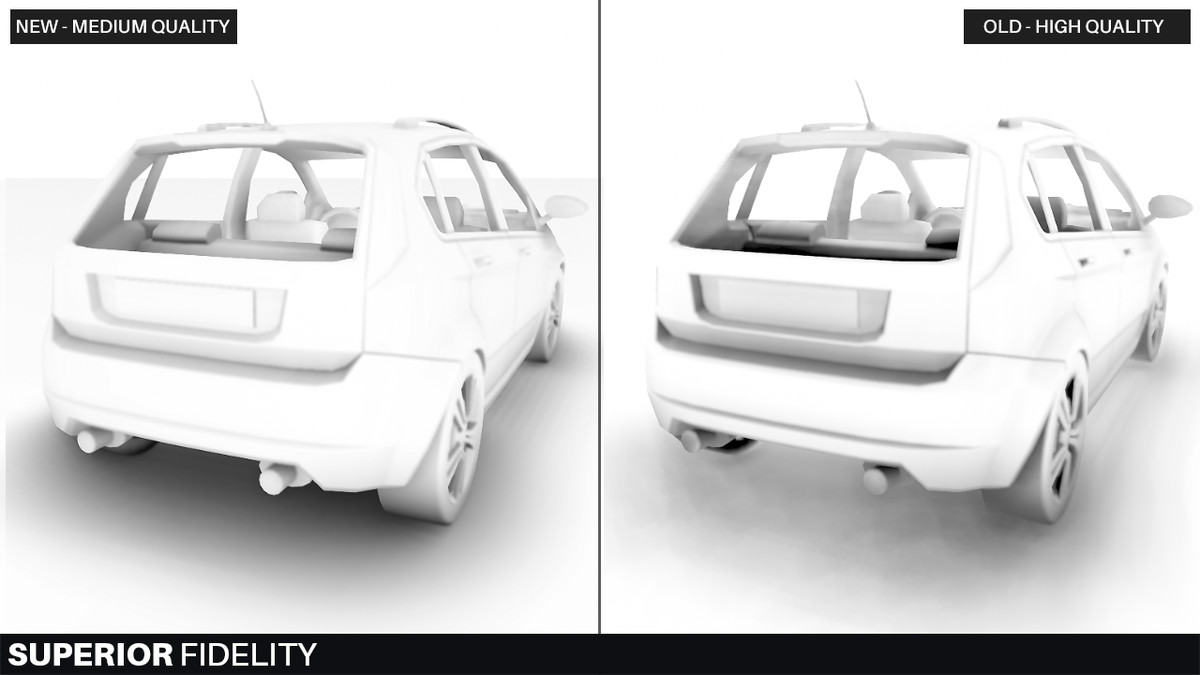 iron hollow
new looks smoother, but the old looks darker
i don't like AO that's too light
almost doesn't add anything at all
firing up Destiny 2, i want to see if it uses HBAO or not
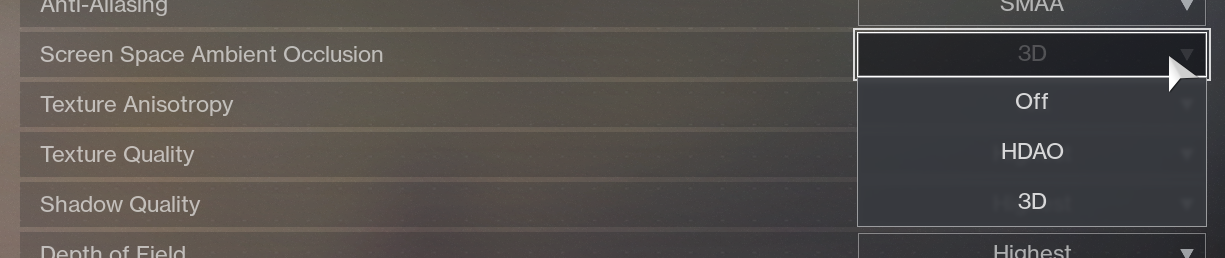
seems they offer "HDAO" maybe their own brand lol
"HBAO and HDAO are essentially the same thing but different vendor specific implementations. " yeah
upbeat badger
new amplify is GTAO based? Looks almost like offline quality ao render
quasi mulch
Honestly though not bothered about AO quality, for me AO needs to be high performance above all other considerations as it's something that will wreck perf up close. MSVO is not so bad at this
iron hollow
someone pointed out to me once, that it's probably better to use baked AO, because you don't alwyas know if your end user's PC will be powerful enough to use a SSAO feature.
if you rely on SSAO only, then for them it would look decidedly bad.
and i realized they are right.
so i may use SSAO to supplement the look, but i'm not going to rely on it
quasi mulch
Yeah you can use forward with HDRP and it'll mix any baked AO with post effect AO, so we could just turn off the post effect AO on weaker systems and it'd look quite good
in deferred that's not possible though
Still not a problem if switching materials
iron hollow
oh? what happens in deferred?
quasi mulch
It's just a limitation of the gbuffer I expect
deferred in general only exists for situations like hundreds of lights, it has no other benefit I know of... maybe it's a tiny bit quicker?
Olento sneers at deferred
iron hollow
yeah primarly it's for a lot of lights
but generally nobody would run deferred exclusively
if you have even one transparent anything, it's going to have a forward pass added.
so most of the time you're running mixed anyway
quasi mulch
of course
but a forward only renderer allows much more flexibility, in this case forward+ I suppose
iron hollow
yeah
quasi mulch
I'm giving it a spin on F+ not deferred for a bit. I rather like PCSS, which doesn't appear to be ported to deferred yet if it will be at all
iron hollow
I'm on deferred because so many things i use require it. but i call it F+ because it's mostly forward + a few deferred passes ;p
i understand that VR pretty much requires Foward because they need very low latency
which makes sense, they basically have to render two frames for every 1 i would render
But overall deferred is nothing to sneer at, it's used a lot and has it's place in the rendering world 😃
quasi mulch
True but in the case of HDRP there are many less reasons than normal due to gbuffer layout and the decision to prerender for decals
true zealot
VR uses Forward because MSAA is extremely important
quasi mulch
typically a deferred renderer might also optimise decals, but here they do not
iron hollow
yes, MSAA i forgot about that
quasi mulch
so the only benefit for HDRP with deferred is lighting, at cost of degraded visual quality, so there's more interest in F+ (for me, for HDRP)
iron hollow
i see. yeah maybe HDRP changes the dynamic. I haven't really looked into it in depth
for now I"m still on Std pipeline
quasi mulch
honestly though I'm not sure why the docs mention the quality is not as good in deferred because it's pretty darn nice still
iron hollow
hmm yeah i don't know why they would say that
quasi mulch
french honesty
quasi mulch
HDRP do comparisons with ground truth and mathematical models, so their idea of a huge difference is probably something a gamer can never ever notice 😛
iron hollow
hehe true
quasi mulch
and my eyes are shot these days
I used to be able to see a bee with its willy out at 500 miles, now I have to guess at whatever the microwave meal wants me to cook it for
iron hollow
yeah i had to ctrl-scrollwheel the browser the other day, make the type larger heh
i've worn glasses since 7th grade
it's nothing new really
quasi mulch
Yeah I've got a pair but after wearing them a bit the entire rest of the world goes to hell when i take them off...
iron hollow
i need them, without glasses i can't see past one foot in front of my face heh
quasi mulch
At least depth of field is optimised
iron hollow
both my parents wore them too, so i guess it's just genetics
hmm, maybe that's why i dislike DOF in games, reminds me of my failings lol
never thought about that
 open coyote
how to make Light.AddCommandBuffer work in HDRP?
iron hollow
i wouldn't think that would change no matter what renderer you use.
iron hollow
might be true. it was originally designed for the built in pipeline. it could be it's not extended into the newer RPs yet


 iron hollow
yeah now that I look at it, it seems it only works for the built in pipeline
i have no idea if they intend to extend that to the RPs or not
RPs may have a better way of doing the same thing.
i think it really was a stop-gap until scriptable pipeline was developed.
now with SRP you can write in any such features yourself.
(cause that's super easy right? 😛 )
it seems LWRP does support command buffers

Unity Forum
Hi,
I'm using HD render pipeline. When I use provided stuff (hd-lit shader, Shader Graph), all works nice...
Now I want to do some custom rendering:...
here unity states they will offer 'another way' for HDRP in the future.
so nothing at this time i guess.
open coyote
but isn't hdrp like 2+ years old?
iron hollow
not really.
open coyote
how come such a simple feature still silently does nothing
iron hollow
it just came out in 2018, so you could say 1 year at most
open coyote
it could at least throw some errors in console
iron hollow
though it's been in preview all this time
so really it's not even out yet 😛
still not recommended for production.
turbid matrix
@iron hollow HDRP being at our hands for 1 year doesn't mean Unity hasn't been cooking it a long time before
iron hollow
lol well, it depends on your interpretation of how old it is
turbid matrix
SRPs themselves were around since 5.6 or something I think
iron hollow
to me it means how long has it been available to the public
i dont' really care how long ti's been bubblig in their labs
turbid matrix
technically they are still doing that :p
iron hollow
agreed 😃
point is it's not finished yet
so i'm not surprised there's still rough edges and unfinished features.
open coyote
meh
this is what I dislike about unity
they are obsessed with new features
instead of fixing old bugs and providing as much backwards compatibility as possible
iron hollow
well... really who is the one who is obcessed when you think about it 😃
a developer can just stay on 2017 LTS and ignore the new stuff.
nobody has to upgrade 😛
open coyote
it won't help with the bugs
check out this one
To reproduce: 1) Open the test scene in editor 2) Start the play mode and see the sibling index is 1. 3) Build the project and run i...
found in 4.6, still not fixed
that's my favorite
iron hollow
well, then clearly it's now a feature heh
open coyote
whatever
iron hollow
i don't disagree they should fix bugs like th at
but wheter you stay on 2017 or upgrade to 2018, that bug is there.
so kind of irrelevant to this anyway.
open coyote
what I mean is
I'd prefer them to focus on bugs like this instead of throwing new beta features every month
iron hollow
reading what siblingIndex is, it's very much an editor thing
i don't see how knowing the order of items at the same level in a hierarchy is for in a build.
probably why it doesn't work in a build.
open coyote
yeah but it works for all objects except root level
in editor, it works for root objects too
in build, it doesn't
though they obviously have an order
iron hollow
probably, though like apples in a bag, saying what that order is might be hard heh
open coyote
the thing is, it's not something barely reproducible or impossible to fix
root objects are obviously stored in a certain order in the build files
just like in scene files in editor
if it's not meant to work for root objects in a build (why though)
it should throw an exception or something
instead of silently returning 0 for all objects
which makes it similar to the AddCommandBuffer issue
iron hollow
yeah they should at least give an error
open coyote
+I have an AutoHotkey script which instantly kills Unity when I press [Pause]
Pause::Run, taskkill /im Unity.exe /f
I never thought I would need something like this before I started working with unity
but killing freezing unities via task manager became too annoying very fast
iron hollow
i've only had unity freeze once, and it was my own fault for creating an infinite loop heh
open coyote
there are so many ways to make it freeze except obvious ones like infinite loops 😄
some of them are very weird and hard to figure out
iron hollow
i guess i just haven't run into them.
iron hollow
yeah you're right about that 😃
haven't done any online, or custom threading stuff
I use Arron Granberg's A* pathfinding, it has thread support
but seems pretty stable
writing my own DLLs isn't something i've pursed yet, but maybe at some point.
open coyote
yeah it becomes stable once you figure out what you shouldn't do 😄
quasi mulch
hdrp will be released in 2019.3 - it doesn't matter how long it's been in development, it's an entirely new renderer and a lot of that time was spent creating SRP, that underpins it and LWRP. So, stuff like command buffers or a whole of callbacks are purposefully removed because those were too slow before. But check github and forum for the finer details
quasi mulch
I see you found seb's comment
turbid matrix
key thing here is: you can't please everyone. There are always people stuck in the past and prefer to keep things like they were but also many that want new shiny things or more tools that enable the users to do better things or just get better workflows
and when you give early access to new shiny things, people will complain it's not working like the final release should work
so, no matter what you did, you are screwed if you just listen to users 😄
but in the longer run, no 3d game engine can just sit still and keep fixing bugs, whole engine will become irrelevant really quickly if you do that
true zealot
what juiciness am I missing here
turbid matrix
also for that sibling index thing, that's hardly a deal breaker