#archived-hdrp
1 messages · Page 4 of 1
 scarlet hull
 proper drum
scarlet hull
IDK how to help, I've set up a simple scene with what you mentioned, and it seem...
proper drum
scarlet hull
IDK how to help, I've set up a simple scene with what you mentioned, and it seem...
Just investigating if it's the other end of the render that has issues, the thing i'm trying to get rendered on it is being pumped out via Visual Effect
proper drum
scarlet hull
IDK how to help, I've set up a simple scene with what you mentioned, and it seem...
If it's not too much to ask, can you try rendering a VFX particle system against that Planar Reflection Probe, where you only RequestRenderNextUpdate() every other frame?
scarlet hull
They appear black for some reason after adding the base VFX in the scene, but the particles are here :
 proper drum
scarlet hull
They appear black for some reason after adding the base VFX in the scene, but th...
proper drum
scarlet hull
They appear black for some reason after adding the base VFX in the scene, but th...
Interesting, different result from mine. For me the particles disappear even if they're set to render opaque (didn't realize to test that earlier). If i'm calling the request every other frame all Visual Effects just vanish from me, using 2021.3.14f1
I'm guessing this indeed is a bug and i should propably file that bug report as you suggested
scarlet hull
They do look better if I switch to a HDRP lit quad output.
 proper drum
Ah i'm using Unlit, i'll try that
proper drum
Yep, but if i can get that to work for this prototype for now, i can ship and then focus on making a proper repro for you guys
proper drum
scarlet hull
Unlit should still work, so maybe the bug is here.
Didn't help for me, guess i'll have to try upgrading first and then try, Thanks for the help still
proper drum
scarlet hull
Unlit should still work, so maybe the bug is here.
There is most definitely a bug with this still in 2021.3.18f1
Observe what happens when i have a visual effect active with the scene and game view side by side but then i close the scene view, this is with an unlit alpha blended output in VFX:
https://i.gyazo.com/815659f7fb5dc8d9dee6d717855fe49c.mp4
If i however change to an HDRP Lit Quad it does work now and we can ship our proto so thanks for leading me to water
I'll make a minimal repro proj and report a bug, but again thank you for sparing your time!
proper drum
scarlet hull
I'm on 2021.3.17f1
Unfortunately we couldn't use that version, it contains a major BinaryFormatter bug in IL2CPP that breaks our games data serialization completely, will upgrade after that is fixed(is already reported, fixed in techstream and under review for backports, but not in yet sadly). I'll just have to figure out some other effect to use instead of VFX particles.
 unkempt sedge
Why is HDRP so much slower at 4k on CPU time but not GPU?
my game runs at 120 fps on full hd but only 25 fps on 4k
CPU time on 4k = 40ms
GPU time on 4k = 7ms

the problem is on ParticleSystem.WaitForPreMapping taking 40ms
Why is it so slow?

 summer glacier
unkempt sedge
summer glacier
unkempt sedge
is TVE the vegetation engine? If so you might want to ask the author of the asset, also profile a build since it might be editor only overhead
https://forum.unity.com/threads/profiling-game-particlesystem-waitforpremapping-taking-36-9-cpu-what-is-it.896408/
Increasing particle raycast budget might fix your issue

Unity Forum
[IMG]
The top highlighted line says ParticleSystem.WaitForPreMapping, and it is taking 36.9% CPU time. I googled ParticleSystem.WaitForPreMapping as...
unkempt sedge
summer glacier
is TVE the vegetation engine? If so you might want to ask the author of the asse...
Thank you, I will try that
 nimble anvil
my scene looks like this now, i installed terrain tools pack and it created some hdr, how do i rever it to normal?

 shrewd moon
nimble anvil
my scene looks like this now, i installed terrain tools pack and it created some...
shrewd moon
nimble anvil
my scene looks like this now, i installed terrain tools pack and it created some...
What do you mean by "created some hdr"
HDR rendering is meant to be enabled in HDRP by default, but you can check if it's turned off from your active HDRP Asset
nimble anvil
shrewd moon
What do you mean by "created some hdr"
HDR rendering is meant to be enabled in H...
uh it was something like HDR setting is not created..would you like to create one
how do i turn it of from that HDRP asset?
shrewd moon
nimble anvil
uh it was something like HDR setting is not created..would you like to create on...
Some external assets which support HDRP give you a pop-up to install and configure it, but that doesn't mean you have to
Is your project meant to be using HDRP or not?
nimble anvil
shrewd moon
Some external assets which support HDRP give you a pop-up to install and configu...
nope
shrewd moon
nimble anvil
nope
You'll have to find instructions how to remove / downgrade HDRP from a project, I don't know the process off the top of my head
Usually it's best to have back-ups or version control to avoid that
unkempt sedge
summer glacier
is TVE the vegetation engine? If so you might want to ask the author of the asse...
It works
 whole fossil
guys, I am unable to see probes from apv in my scene view. I am using 2022.2, in the lighting window I have them turned on yet nothing is showing up. Is there anything else that I need to do?
 whole fossil
ah, it is still in the rendering debugger. I thought that it has changed since then
 signal osprey
is it possible to run some scenes in BRP and others in HDRP within one project?
 runic bay
in HDRP's custom passes, how can I get the camera data like in URP custom render passes?
I'd like to determine if the camera is a scene view camera or preview camera
runic bay
Also wondering if folks use multiple CustomPassVolumes
runic bay
the problem I'm trying to solve is how to get my custom pass into the ExecuteRenderGraph but somehow I'm injecting it before the ExecuteRenderGraph in HDRP 14 🤔

 nova raft
I got a custom pass volume to render my weapons before everything else

but using this causes TAA to create a lot of ghosting
After trying out different settings, I assume TAA is not getting the motion vectors of these custom pass objects in time
so uhh what do I do? Do I gotta run TAA specifically on the custom pass? If then how?
 vast kindle
does anyone know how i can add a 3d object to my ui while using hrp?
 dawn sorrel
Would be pretty nice to turn off Exposure without the screen turning completely white
Finally
whole fossil
Create a depth of field and configure manual ranges for example
 untold bronze
so I've ran into a problem using HDRP after changing the Lumens and Temperature of some lights, have no idea what's happened here so I thought I'd ask if anyone has any clue as to what exactly might be causing this:
 scarlet hull
untold bronze
so I've ran into a problem using HDRP after changing the Lumens and Temperature ...
scarlet hull
untold bronze
so I've ran into a problem using HDRP after changing the Lumens and Temperature ...
Looks like you've reached the max light limit per tiles on screen at some places
untold bronze
so its a problem with the quantity of lights hitting tiles, is that a setting that's change-able in the pipeline settings?
scarlet hull
untold bronze
so its a problem with the quantity of lights hitting tiles, is that a setting th...
No, it's a hard coded limit, but quite "high" (63).
IIRC, no filtering is done to prioritize the " highest affecting lights" per tile, so it is up to you to tweak the lights ranges to not got over this limit
You can use the rendering debugger to visualize the number of lights affecting a single tile on screen : https://docs.unity3d.com/Packages/com.unity.render-pipelines.high-definition@16.0/manual/Render-Pipeline-Debug-Window.html#LightingPanel
untold bronze
oh right, thank you for the help
 shell whale


It looks like tessellation is working but the wire frame says otherwise and tessellated more twards the center of the map, weather or not i move the perspective view camera or the game MainCamera.
 peak finch
 sweet gyro
looks good, I'd expect the blood to reflect a little more of the enviorment though
 barren goblet
Is it feasible to use ovminiverse to coordinate the work of HDRP and URP?
 loud leaf
Which version of Unity, which graphics card, and are you using DLSS? I'm currently stuck in a bug report 😄
Also, is this in editor or standalone exe?
loud leaf
I take it you mean 2022.2.6? Could you try a standalone build?
loud leaf
I'm currently facing an issue where standalone exe results in a black screen (with some flickering sometimes) when DLSS is enabled. QA can not reproduce the issue (they are on a RTX 20xx series, I'm on RTX 30xx series). I've created a standalone build here, if anyone with a RTX card and a VR headset would like to try it out, it would be much appreciated.
https://hyperproject.net/build/hdrp_vr_dlss_bugreport_standalone.zip
loud leaf
Tried updating to the latest driver (528.49) but no luck, also tried switching between iGPU and PEG for primary but no luck, same for swapping different DLSS versions. I just can't understand why QA says it's working fine. 😅
loud leaf
 floral oar
sure
floral oar
sure
Did you manage to try this?
 mellow condor
floral oar
2022.2.6*
mellow condor
floral oar
2022.2.6*
this looks nice. i don't think the heretic model has muscles weights and such though right
it's still very convincing
oh "weight" maybe it does in the hand
floral oar
Yeah it's a bit off, I'll be able to add some solvers that should.help with the hands but it's not made for VR or first person that's forsure.
floral oar
Hey @loud leaf I have not tried this yet. I'll see if I can tonight at some point
 molten surge
I feel like I've always struggled with HDRP looking a little blurry and just not very "high definition". Apart from MSAA, what could I do to help?
 shrewd moon
molten surge
I feel like I've always struggled with HDRP looking a little blurry and just not...
shrewd moon
molten surge
I feel like I've always struggled with HDRP looking a little blurry and just not...
You could also try TAA
It doesn't really look that blurry to me but you could check that SMAA and FXAA are disabled, which can cause smudging of edges
molten surge
Whenever I use TAA, I always get trails behind my player
So I settled with SMAA
See how there's a light trail behind the player? https://gfycat.com/heartyjitterygreatargus

If there's a way around that, I'll happily use TAA
shrewd moon
molten surge
Whenever I use TAA, I always get trails behind my player
That's not supposed to happen but I think indicates a problem with motion vectors
HDRP largely expects you to use TAA because it's used to smooth dithering of many effects like shadows and reflections
molten surge
Is there a way I can fix it or is it one of those things I have to wait for unity for sort?
shrewd moon
molten surge
Is there a way I can fix it or is it one of those things I have to wait for unit...
It's up to your project
I'm not familiar with troubleshooting that particular system at all so I don't have more concrete advice
You can always fire up a new project with the sample scene to compare and confirm it's showing all the features with no problems
molten surge
Alright, thanks
loud leaf
floral oar
Hey <@740141755344617532> I have not tried this yet. I'll see if I can tonight a...
All good. You could also try the build I linked a few messages up. Using a RTX card and a VR headset it should either display a black screen, or a sky with reflective sphere. This way you don't have to sit and wait for your own build to compile.
QA is very vague and slow, I don't have a lot of confidence in them currently (also due to the exact same past experiences)
summer glacier
molten surge
See how there's a light trail behind the player? https://gfycat.com/heartyjitter...
What unity version are you on? TAA had a massive ghosting issue until a few months ago, a patch made some improvements. Was backported a couple versions back.
You can also check if your character is rendering object motion vectors by going to Window > Analysis > Rendering debugger > Rendering > "full screen debug mode: Motion vectors"
Enable it while your in-game and move around. There's two types of motion vectors, camera motion vectors which usually always work fine, and object motion vectors for animated objects - you should look for object based motion vectors around your character while they're moving.
You can also try adjusting some TAA parameters such as jitter/base blend/anti-flickering.
summer glacier
molten surge
I feel like I've always struggled with HDRP looking a little blurry and just not...
Obviously GI, but could be tough in such a large environment.
One thing you can try is disabling "reflection lighting" in indirect lighting controller, this will prevent reflections but if you don't have reflection probes it can reduce the "flat" look.
Worth checking out micro shadows as well, and adjusting the directional light to have more shadows around. I feel like there's too much direct lighting, so worth changing it a bit and seeing the result even if you can't bake gi
Also it feels like there's no SSAO, probably because it's mostly direct lighting and by default SSAO is set to 0 strength for direct lighting
 iron siren
Hi everybody, I have an issue with my material in the game view where it doesn't render properly
Here is the scene view, where it's fine

And here is the game view

Why is it OK in the scene view but not the game view?
Even stranger is the camera preview does show the proper material.
 iron siren
Really strange, it appears to be due to some quirks with instantiating in Unity. My character is actually instantiated from a prefab. If instead of a prefab, I put my prefab as a gameobject in the scene and use it to instantiate, then it works fine. But if this gameobject is set at position (0,-9999,0) to hide it from camera or disabled or hidden from camera, the bug from above occurs 100% of the time.
Can't figure out why it behaves so.
If I change the face shader to HDRP/lit then back to my custom shader graph, then it starts to work properly. Forgot to mention texture are loaded from streamingassets folder using the Trilib asset. Might have something to do with it.
 molten surge
summer glacier
What unity version are you on? TAA had a massive ghosting issue until a few mont...
molten surge
summer glacier
What unity version are you on? TAA had a massive ghosting issue until a few mont...
2021.3.15
molten surge
summer glacier
Obviously GI, but could be tough in such a large environment.
One thing you can...
I've never noticed micro shadows actually making a difference. What do they actually do?
That's a lot of good info btw, thank you
summer glacier
molten surge
I've never noticed micro shadows actually making a difference. What do they actu...
from doc: Micro shadows are shadows that the High Definition Render Pipeline (HDRP) simulates for small details embedded in the Material of a GameObject, but not in its Mesh geometry. HDRP uses the details from the normal map and the ambient occlusion map to estimate the shadows those maps would cast if they were Meshes.
Only applies to direct lighting otherwise there won't be any micro shadows, requires AO map to be assigned.
Usually you wouldn't want it at full strength, somewhere in the middle or so based on your own scene
 summer glacier
No, I believe TAA received the ghosting improvement since 2021.3.6f1
after making sure object motion vectors are working correctly, your best bet is adjusting TAA parameters
molten surge
How do I know if they're working correctly exactly? Sorry I've just never touched stuff like this. I went through the debug render. The arrows were kind of all over the place on the player. I think it's due to my shader. But, how would I fix that?
summer glacier
Tough to explain, will message
 ionic kindle
anyone got any idea how I'd go about making my FPS arms render over everything so they don't clip into walls?
I'd use camera stacking but that introduces lighting and volume issues
 eternal laurel
ionic kindle
anyone got any idea how I'd go about making my FPS arms render over everything s...
eternal laurel
ionic kindle
anyone got any idea how I'd go about making my FPS arms render over everything s...
I think the preferred way of doing it today is with custom passes https://github.com/alelievr/HDRP-Custom-Passes/tree/master/Assets/CustomPasses/FPS Foreground. Somebody correct me if Im wrong or has a more up to date example
ionic kindle
eternal laurel
I think the preferred way of doing it today is with custom passes https://github...
I remember trying to do it with custom passes, but was getting issues.
materials bugging out specifically
do custom passes require forward rendering?
eternal laurel
Actually they do this is from the docs Unity renders all objects in a Custom Pass using the Forward rendering path. This can cause issues if your scene is set to render using Deferred Only. In the HDRP Asset, change the Lit Shader Mode to Both to avoid issues when you build your project.
I too am actually looking for a good stable solution to render first person hands and weapons. It would be nice if Remy or someelse knowledgeable chimed in.
dawn sorrel
would anyone like to help me Export some FNaF animatronic materials from blender to unity?
nova raft
ionic kindle
anyone got any idea how I'd go about making my FPS arms render over everything s...
are you using separate viewmodels? I mean one for the camera and one for other players to see
in that case, scale your viewmodel down untill your viewmodel never exceeds your player's collider
looks ridiculous on the editor but it works like a charm

Using custom passes for rendering priorities prevented me from using TAA
custom pass messed something about motion vectors I guess, it ALWAYS had ghosting if you're using custom passes to render objects separately from the camera
ionic kindle
nova raft
are you using separate viewmodels? I mean one for the camera and one for other p...
can try this I suppose, but doesn't that also mess up lighting?
I was suggesting to our programmer to just add a raycast and move the viewmodel backwards as you get near a wall
nova raft
ionic kindle
can try this I suppose, but doesn't that also mess up lighting?
the positioning on the lighting? I think so yeah
the gun is so small that it's still in the shadow despite camera showing otherwise
 nova raft
ionic kindle
I was suggesting to our programmer to just add a raycast and move the viewmodel ...
nova raft
ionic kindle
I was suggesting to our programmer to just add a raycast and move the viewmodel ...
yeah you could do that if you want
goddammit I still can't figure out on how to run TAA properly with custom pass rendered objects
it's been 2 months and I've been constantly looking and asking about it
dawn sorrel
someone PLEASE Respond
THIS MESS was caused by the NORMAL Map

and I have no clue how to resolve it or what is causing it
nvm its set to color not black and white
 left plaza
afton
nova raft
nova raft
I got a custom pass volume to render my weapons before everything else
does ANYONE have a solution for this? I've been trying to solve this for months
TAA with custom render passes cause unbearable ghosting artifacts
 crystal frigate
does anyone know how to fix this shadow problem

 south girder
crystal frigate
does anyone know how to fix this shadow problem
south girder
crystal frigate
does anyone know how to fix this shadow problem
Maybe some light's shadow bias near plane setting is wrong, hard to tell
crystal frigate
Thanks, i try it later , maybe it works
 astral silo
how do i increase quality of shadows

 slow aurora
astral silo
how do i increase quality of shadows
slow aurora
astral silo
how do i increase quality of shadows
i do not see an issue lol
please include a bigger image idk where the light is or what you were expecting
what you were expecting is much more important
astral silo
slow aurora
i do not see an issue lol
light is on other side of the glass (i thought it was pretty clear) and it shines thru the glass
but there arent any shadows blocking light not coming directly through the glass
slow aurora
astral silo
light is on other side of the glass (i thought it was pretty clear) and it shine...
i didnt even realize that was glass it looked like just a mirror lol
astral silo
yeah
slow aurora
anyways thatnks for clearing that up i have no idea what the problem is but someone who does know will hopefully have an easier time
astral silo
alright, thanks for your time though
 tawdry warren
Hey those of you who are really good with HDRP, I am having an issue with alpha-sorting and refraction on my asset. You can see the issue here:


Is there any way to do some sort of self-refraction?
or self alpha sorting
 proper drum
hey guys I am having a praoblem with performance in my HDRP project can someone take time and help me?
shrewd moon
tawdry warren
Hey those of you who are really good with HDRP, I am having an issue with alpha-...
https://portal.productboard.com/8ufdwj59ehtmsvxenjumxo82/c/1889-transparency-improvements Self-refraction seems to be a feature in newest beta versions
In the meanwhile I think you could try to use a layer of opaque alpha-clipped soot
Or if transparent without refraction I believe polygons are depth sorted by their order in the mesh, which you can control but it's a bit tricky
tawdry warren
shrewd moon
<https://portal.productboard.com/8ufdwj59ehtmsvxenjumxo82/c/1889-transparency-im...
I'm on a beta branch right now so I might update
Thank you ❤️❤️❤️
 vague steppe
Use the tmpro shader for text that goes through everything. I can tell u the name later
 plucky flame
crystal frigate
does anyone know how to fix this shadow problem
plucky flame
crystal frigate
does anyone know how to fix this shadow problem
Just a question did you actually manage to get the gta 5 map in unity?
 worldly kraken
astral silo
how do i increase quality of shadows
worldly kraken
astral silo
how do i increase quality of shadows
seems like no shadow at all
check if both light and the mesh is casting shadow
astral silo
worldly kraken
seems like no shadow at all
check if both light and the mesh is casting shadow
i forgot what the issue was but im pretty sure it was that shadows werent enabled (despite them bieng enabled!? i forgot what i did but it was really weird)
also, when going into an area that should be completely black (no light) the camera suddenly brightens black parts

(through glass)

fixed it
nova raft
light layers are busted
unity docs tell you to find the light layer option in settings whereas you can only see it if you enable the debug inspector mode
I found it, set the things according to the tutorial
nothing happened

Directional Light, it should only affect the objects with default light layers, right?

nope, it just illuminates everything anyways
 nova raft
Directional Light, it should only affect the objects with default light layers, ...
nova raft
nova raft
Directional Light, it should only affect the objects with default light layers, ...
also the same directional light:

this is how it should look but it doesn't:
 nova raft
unity docs tell you to find the light layer option in settings whereas you can o...
nova raft
nova raft
unity docs tell you to find the light layer option in settings whereas you can o...
https://docs.unity3d.com/Packages/com.unity.render-pipelines.high-definition@12.0/manual/More-Options.html
Documentation tells you about a feature that is only visible through debug inspector mode
???

 shrewd moon
nova raft
https://docs.unity3d.com/Packages/com.unity.render-pipelines.high-definition@12....
shrewd moon
nova raft
https://docs.unity3d.com/Packages/com.unity.render-pipelines.high-definition@12....
That's not a debug inspector thing
but still not sure why it's tucked away like that
nova raft
shrewd moon
That's not a debug inspector thing
but still not sure why it's tucked away like ...
Let's forget about that for a moment, it still doesn't work
eternal laurel
Lets say I have a way to compute indirect diffuse global illumination. How would I inject that data into hdrp in a nice way. Custom shadegraph shaders that sample a custom buffer? Is there a way do add it to the gbuffer ? Ideally I would like the build in shaders to just work
loud leaf
I will soon be looking into the same, I think a custom pass that writes to the baked diffuse will be the most correct, but I have yet to do the actual research on this
eternal laurel
Hey I saw your ReSTIR GI video
loud leaf
I think ray marching a 360 degree cubemap + depth capture, with spatiotemporal reservoirs, in a custom pass, should be able to deliver some good results
It's not ReSTIR GI, it's DI in that video 😄
eternal laurel
My bad
loud leaf
No problem
eternal laurel
I really want to implement this paper
Wondering if I can repurpose some of the APV code for it
loud leaf
Worth a try
eternal laurel
Then again I have my hands full with another project atm I just found some interesting stuff and went on a tangent
loud leaf
😄
eternal laurel
They are connected. Im writing a custom BRG renderer for gameObjects
loud leaf
eternal laurel
Hey I saw your ReSTIR GI video
I've learned a lot since that video and plan on creating a new one soon. Basically that was when I just got into reservoir sampling / shaders, it's also biased
I've got this crazy long list of notes of things I've figured out and came up with since then 😄
eternal laurel
Well if your research leads you to a answer I would like to know haha
loud leaf
An answer to real time GI you mean?
eternal laurel
Or rather a good apraoch to inject the data into hdrp
i think the paper I linked is pretty good and I can implement it based on the code they provided
loud leaf
Ah like that. I'm not really a fan of probes though
eternal laurel
Why?
loud leaf
I don't see the point
eternal laurel
How come? Computing it via probes should be faster that other approaches I think
loud leaf
Every cheap GPU can do DXR these days, and if things get too heavy, trade some performance for bias by skipping shadow rays (and instead of classic checkerboarding, distribute the bias in a visually pleasing way using blue noise)
Can also trade some shadow rays for screen space ray marching like I posted in the DXR thread
I would love to have a HDRP version without all the rasterization hacks 😄
eternal laurel
Interesting. I would love to look at your implementation for reference. When I get to making the probe based gi I plan to open source it.
 cloud sphinx
Why do my textures have these weird lines?

 glacial fossil
cloud sphinx
Why do my textures have these weird lines?
glacial fossil
cloud sphinx
Why do my textures have these weird lines?
Thats unfortunate consequence of discontinuous uvs, here are few possible solutions: https://forum.unity.com/threads/pixel-artifacts-when-supplying-discontinuous-uv-coordinates.733334/
cloud sphinx
glacial fossil
Thats unfortunate consequence of discontinuous uvs, here are few possible soluti...
it worked! thanks
 shrewd moon
cloud sphinx
it worked! thanks
shrewd moon
cloud sphinx
it worked! thanks
Which fix did you go with?
cloud sphinx
shrewd moon
Which fix did you go with?
i disabled mipmaps
glacial fossil
Thats the easiest solution, though there are reason why mipmaps exist, without them, you can get some unwanted aliasing when viewing the mesh from further away
shrewd moon
If you're using texture maps that shouldn't be necessary
You would instead make sure that UV islands have some color padding to them
And ideally unwrap the mesh without UV seams all over it
cloud sphinx
im kind of a noob when it comes to texturing but I'll check it out later
crystal frigate
plucky flame
Just a question did you actually manage to get the gta 5 map in unity?
I don't understand what you mean , the map is exported of gta 5 but its probably Personal use
 shadow thunder
I'm a little new to hdrp and a little confused on what settings to use when baking lightmaps. If I put any model in the default outdoors scene and bake, the sky immediately loses all it's color and the objects become very bright. I imagine it's because of the 100k+ intensity on the directional light but why use physical based lighting settings when it's not possible to bake lighting with it? Am I just supposed to turn down the intensity and adjust exposure or is there a way to bake lighting with these true to life settings?
shadow thunder
Nevermind apparently making the directional light mixed instead of baked fixes the issue. Can use actual sunlight values now
 delicate jacinth
why are my meshes (when set to transparency instead of opaque) overlapping each other?
 scarlet hull
delicate jacinth
why are my meshes (when set to transparency instead of opaque) overlapping each ...
scarlet hull
delicate jacinth
why are my meshes (when set to transparency instead of opaque) overlapping each ...
Transparent meshes do not write to depth (by default) and as a consequence, don't depth test against each other and themselves.
This can result in polygons beeing in the back appearing on top of other, because they are just drawn in the order they are presented in the mesh.
ionic kindle
do decals not work on transparent materials?
dawn sorrel
is there anyway to make ripples with the new water system?
scarlet hull
ionic kindle
do decals not work on transparent materials?
Only Decal projectors using the HDRP/Decal shader can work on transparent materials.
Shadergraph decals on transparent are not supported yet, and meshes decals on transparent don't work at all.
scarlet hull
dawn sorrel
is there anyway to make ripples with the new water system?
What kind of ripples ? Like interractive ripples when objects enter the water surface ?
Nothing is provided built-in to make it, but you can use a render texture as input for surface deformation, and controll this with a dedicated camera / compute to make ripples simulation.
 wooden fractal
Hi I have a GameObject for my Sky and Fog Global Volume but If I change it in one scene it changes in evry scene. How can I change that? (no static)
scarlet hull
wooden fractal
Hi I have a GameObject for my Sky and Fog Global Volume but If I change it in on...
The volume components in the scene reference volume component overrides assets in the project.
If the object of both scene point to the same asset, changing it in one scene will change in the other.
You need to dupplicate the assets to avoid this behaviour.
wooden fractal
scarlet hull
The volume components in the scene reference volume component overrides assets i...
Thanks!!!
wooden fractal
Can I change the Material of multible objects at ones? ( The Object has 2 Materials)
 scarlet hull
wooden fractal
Can I change the Material of multible objects at ones? ( The Object has 2 Materi...
scarlet hull
wooden fractal
Can I change the Material of multible objects at ones? ( The Object has 2 Materi...
By script ? In editor ?
wooden fractal
scarlet hull
By script ? In editor ?
In editor
scarlet hull
If the objects use the same material, changing one will change the others
scarlet hull
Then dupplicate the material asset, assign the new one on the objects, and edit
wooden fractal
Yes but how can I assign it to like 100 objects at the same time if every object has 2 materials
scarlet hull
Select all of them, and drag the material in the material slot you want
But usually, this is what the prefabs workflow is for
wooden fractal
This deleteds the second color
 static scroll
i just imported hdrp for the first time , and this happen when i enter play mode ?
 summer glacier
static scroll
i just imported hdrp for the first time , and this happen when i enter play mode...
summer glacier
static scroll
i just imported hdrp for the first time , and this happen when i enter play mode...
whats your gpu
static scroll
summer glacier
whats your gpu
intel hd 4000
scarlet hull
static scroll
intel hd 4000
That's pretty old/weak, and not recommanded for working with HDRP
static scroll
scarlet hull
That's pretty old/weak, and not recommanded for working with HDRP
but i want to build the game for my samsung 3 mini
so he cant run it also ?
scarlet hull
static scroll
but i want to build the game for my samsung 3 mini
HDRP doesn't work on mobiles
Use URP instead.
static scroll
scarlet hull
Use URP instead.
thx i back to it 
scarlet hull
But even with URP, a galaxy s3 mini is ... old and not so much powerfull :/
static scroll
scarlet hull
But even with URP, a galaxy s3 mini is ... old and not so much powerfull :/
it can run coc 60 frame , he will run my game against his will
wooden fractal
How can I turn on Tonemapping per code? And how can I change the value of the diractual Light?

 fiery dirge
static scroll
i just imported hdrp for the first time , and this happen when i enter play mode...
fiery dirge
static scroll
i just imported hdrp for the first time , and this happen when i enter play mode...
The error says about your kind of device and GPU and processors or something else
fiery dirge
static scroll
but i want to build the game for my samsung 3 mini
HDRP they don't seem to work on mobile devices, but you can download or find scripts for graphics
 ivory flint
Anyone got this NaN bug with raytracing GI in HDRP 14?
 ivory flint
worse part is I can't reproduce this bug in another scene
Try to reproduce it to make a bug report : (
shrewd moon
ivory flint
worse part is I can't reproduce this bug in another scene
Try to reproduce it to...
If it doesn't happen in another scene that sounds like good news to me, as far as troubleshooting goes
It means you can feasibly figure out what's different between the two scenes, and even if you fail to find the culprit you can move your stuff to the new scene and be rid of it
ivory flint
shrewd moon
If it doesn't happen in another scene that sounds like good news to me, as far a...
Yea kinda good because now I know my other scene won’t has this bug.
I did move the Light and Camera also the Volume to the new scene and can’t reproduce it, lost it here. As those are the only components I can think of that can affect the frame output
dawn sorrel
My game is incredibly laggy even at small resolutions, and a lot of my testers are complaining about the lag. What could be going on? And how can I reduce it?


I tried using the Profiler, but I have no clue what I'm looking at
summer glacier
dawn sorrel
https://www.youtube.com/watch?v=sBpXiJ9G3OY
Learn the profiler, it's very simple and a requirement if you want to understand and improve performance.
Notice that the profiler also has a GPU module that works in the editor.
Editor has slight CPU overhead so a build will be faster for CPU, but the GPU doesn't and will be the same

Watch this video in context on Unity's learning pages here - http://cms.hq.unity3d.com/learn/tutorials/modules/intermediate/editor/intro-to-profiler
The built-in profiler allows us to capture real-time data about our scenes and analyze there performance. In this video, you will be introduced to the profiler and its basic sections.
Help us capti...
dawn sorrel
summer glacier
https://www.youtube.com/watch?v=sBpXiJ9G3OY
Learn the profiler, it's very simple...
Here's what I'm seeing, there's a lot being spent on Shadows and Depth on the GPU end, and rendering on the CPU end

 rotund saddle
Hello, is there limitation on number of decals in the scene?
I want to use a pavement patches to my city ground
 unique creek
Can someone tell me why my spotlight shows these pixelated edges?

 distant hazel
dawn sorrel
Here's what I'm seeing, there's a lot being spent on Shadows and Depth on the GP...
distant hazel
dawn sorrel
Here's what I'm seeing, there's a lot being spent on Shadows and Depth on the GP...
This looks like you have a lot of shadowcasting lights in your scene, try using baked lighting instead of realtime if it's appropriate for your project
Also reduce the amount of shadow cascades/their resolution
south girder
unique creek
Can someone tell me why my spotlight shows these pixelated edges?
I think that's caused by volumetrics. Not sure if it's possible to get rid of completely
unique creek
south girder
I think that's caused by volumetrics. Not sure if it's possible to get rid of co...
Is it really not possible in Unity to have a light without those ugly borders? xD Thanks for the answer
south girder
unique creek
Is it really not possible in Unity to have a light without those ugly borders? x...
Hmm.. I'm trying out my Fog volume settings right now, is your Denoising Mode set to Gaussian?
Try Reprojection, it seems to get rid of the blockiness! It has some artifacting when moving but still looks overall better than Gaussian IMO
I also notice some flickering 🤔
dawn sorrel
distant hazel
This looks like you have a lot of shadowcasting lights in your scene, try using ...
How do I bake the lighting, again?
Or is it possible to reduce the amount of shadows without baking
distant hazel
dawn sorrel
How do I bake the lighting, again?

In this video, we are going to take a look at Lightmapping in Unity 2020.1 to help you create fast and beautiful lighting in your scene.
Learn more about Lightmapping in 2020.1 from our Docs!
https://on.unity.com/2U7VQIX
Interested in the newest Graphics Features we added in 2020.1? Click here!
https://on.unity.com/2GHYGkR
Download the Spaces...
distant hazel
dawn sorrel
Or is it possible to reduce the amount of shadows without baking
By reducing the amount of shadowcasting lights
dawn sorrel
distant hazel
By reducing the amount of shadowcasting lights
But how do I make it not cast a shadow
distant hazel
There is literally an entire section related to shadows in the light component
dawn sorrel
Okay.
unique creek
south girder
Hmm.. I'm trying out my Fog volume settings right now, is your Denoising Mode se...
Yes!
unique creek
south girder
I also notice some flickering 🤔
I'm going to investigate what reprojection is, I've never used it, thanks!
south girder
unique creek
I'm going to investigate what reprojection is, I've never used it, thanks!
Np! You actually made me investigate and I ended up changing to Reprojection in my own project too 😄
unique creek
south girder
Np! You actually made me investigate and I ended up changing to Reprojection in ...
Hahaha, can you tell me where is this option?
south girder
unique creek
Hahaha, can you tell me where is this option?
In your volume/profile, Fog module
At the very bottom
I mean you said you are using Gaussian? So select Reprojection in that dropdown
unique creek
south girder
I mean you said you are using Gaussian? So select Reprojection in that dropdown
Thank you! I have noticed a little improvement, although it is not what I would like, but for now I will leave it that way
I take that back, the improvement is quite good changing the quality settings, fog control volume and resolution depth radio, thanks!
Today

Yesterday
 astral silo
so im trying to add motion blur so that my spinning fanblades (simple high angular velocity, nothing else) will have motion blur as they spin, but im not really sure how to enable it
i enabled motion vectors, put a motion blur override on my volume profile, put a global volume in the scene, changed settings around, changed the velocity of my fanblades around, nothing
 harsh basalt
Does anyone know why this happened?

 long wagon
@sick ravine Don't cross-post. Pick a single channel.
 sick ravine
long wagon
<@429021064119451658> Don't cross-post. Pick a single channel.
sick ravine
long wagon
<@429021064119451658> Don't cross-post. Pick a single channel.
Yea, sorry
 meager mist
Hey all, I'm getting a "flickering" on shadows on trees. The image obviously doesn't show the flicker, but as I run around its a really pronounced flicker. My assumption is that the shadows being cast are almost too precise on the leaves? Whats the best way to handle shadows on trees?

Seems volumetric clouds make this considerably worse
shrewd moon
meager mist
Hey all, I'm getting a "flickering" on shadows on trees. The image obviously doe...
TAA is required to denoise shadows, volumetrics and reflections, so it's worth checking out
Also if TAA is enabled but motion vectors aren't, or aren't working for a mesh, flickering or smearing may ensue
meager mist
Yea TAA helps reduce, but its still really apparent
 pulsar panther
I'm using a CustomPass to render a bloody screen effect. Now I want to draw another type of effect but only the last one drawn with CoreUtils.DrawFullScreen show. How can I draw multiple effects on screen in the same pass?
dawn sorrel
hi guys im super new to unity i just wanted to create a map to skater xl game and im using free "forestvision uni" assets unfortunately every tree model material is pink and i know its shaders fault but cant seem to fix it ;(( can anyone help me with this?

im using 2019.3.15f1
and this asset was made for 2017.3.1 or higher
long wagon
dawn sorrel
hi guys im super new to unity i just wanted to create a map to skater xl game an...
If the shaders are simple enough you can try https://docs.unity3d.com/Packages/com.unity.render-pipelines.universal@12.0/manual/features/rp-converter.html If it was supported for 2019 (pipelines have more features usually with later versions)
Otherwise you'll have to create custom shader yourself or contact asset creator/community if they have HDRP shaders.
loud leaf
Has anyone here ran into the problem where ray tracing performance degrades over time in editor and is back to normal after a restart?
 rare garden
Hey! First time posting, i've been constantly fighting the HDRP system trying to get my lighting to show both fog and shadows when the directional light is upside down (-45 degrees), but i can't seem to figure it out for the life of me.
Got some screenshots about it, i'm not sure if this should go in the lighting or HDRP channel.
 lofty geyser
I'm using recursive rendering to simulate a glass with liquid in it, but the refraction has the skybox 'leaking' through it

(The silvery-grey is my skybox)
If I disable recursive rendering the issue disappears
I've tried setting the Last Bounce fallback to Reflection Probes only, but then those grey areas just turn black
Anyone have any ideas what might be going on?
Disabling Double Sided on the glass material makes the issue disappear, but then the refraction stops working (as I believe the mat needs to be set to Double Sided for the refraction to work correctly with recursive rendering?)
 keen glen
lofty geyser
I'm using recursive rendering to simulate a glass with liquid in it, but the ref...
keen glen
lofty geyser
I'm using recursive rendering to simulate a glass with liquid in it, but the ref...
But is that not correect, that you have your skybox reflected?
lofty geyser
Sorry I should have mentioned, the orange environment is an enclosed sphere
So the skybox isn't actually visible from within the environment
Yet is still being pulled into the refraction
keen glen
lofty geyser
Sorry I should have mentioned, the orange environment is an enclosed sphere
Is the sphere blocking the skybox from outside. So did you set it to double sided?
lofty geyser
Yeah the sphere's material is set to two sided
scarlet hull
lofty geyser
I've tried setting the Last Bounce fallback to Reflection Probes only, but then ...
And, you've set a reflection probe, right ? 😅
keen glen
I am currently testing the new water system, which is gorgeous, but I cant seem to get screenspace reflections working. Anyone already tested it and got a realtime reflection working without that probe setup?
 lofty geyser
scarlet hull
And, you've set a reflection probe, right ? 😅
lofty geyser
scarlet hull
And, you've set a reflection probe, right ? 😅
lol yes
scarlet hull
keen glen
I am currently testing the new water system, which is gorgeous, but I cant seem ...
You need to enable screen space reflections on transparent
keen glen
scarlet hull
You need to enable screen space reflections on transparent
I did, it does not care somehow in the pipeline asset
scarlet hull
keen glen
I did, it does not care somehow in the pipeline asset
Did you also check in the default camera frame settings (HDRP Global Settings) ?
keen glen
scarlet hull
Did you also check in the default camera frame settings (HDRP Global Settings) ?
I will check later, just to be 100% sure 🙂 thx for pointing at that setting!
 glossy sail
.
keen glen
scarlet hull
Did you also check in the default camera frame settings (HDRP Global Settings) ?
Like here? It was active
 scarlet hull
keen glen
Like here? It was active
scarlet hull
keen glen
Like here? It was active
Here
 keen glen
scarlet hull
Here
keen glen
scarlet hull
Here
Ha, missed that little tick there I guess 😄 Thanks a ton, now this looks even prettier, awesome
Dang this thing is performant on my little macbook here 40FPS for what it is and doing, nice.
 shrewd moon
What kind of reflections are you utilizing here?
And what kind of shader
I'm only barely familiar with raytracing, but probably something related to those settings
I would create a mirror surface material using the same shader to swap to and compare
That would tell you what precisely is reflected and give clues about how it stops reflecting
shrewd moon
I wouldn't call it a workaround, shaders based on the lit graph can't -not- have some smoothness value
astral silo
so how do i use screen space reflections for large or noticeable surfaces? i figure screen space reflections are more optimized than non screen space reflection techniques, but i end up noticing that because screen space reflections, and by extent, all screen space based techniques (reflections, refractions, emission, ect) all only have access to the content on the screen, when the camera is moved so that those important elements are excluded from view, the reflections suddenly fog up, because if the things that should be in view of the reflection arent in view of the camera, they wont reflect those elements
this is probably good for performance, especially with smaller objects, but for larger objects, like a reflective floor, how do i make sure this isnt super apparent?
glacial fossil
astral silo
so how do i use screen space reflections for large or noticeable surfaces? i fig...
How did you come up with the conclusion that SSR is cheaper than other methods? Most likely its faster than raytraced reflections but planar reflections (using second camera) and reflection probes are much faster in most cases. Ussually the solution is to use both SSR and reflection probes so on the areas where SSR fails, the closest reflection probe will be used
astral silo
alright
shrewd moon
I think it should work with mixed lights


 worldly sedge
 strong slate
why is the terrain and water not rendering further away?
strong slate
why is the terrain and water not rendering further away?
Camera render distance?
 ripe flare
Hi !
I am trying to make an x-ray shader for a school project, and I can't find any tutorial for HDRP, could you help me ? I have an issue to find a way to see my meshes through walls
in the tutorials, they are always using the "forwards renderer", but i can't findthe equivalent for HDRP. If someone could help me that would be great, Thanks !
ripe flare
ok I've found it nevermind
strong slate
worldly sedge
Camera render distance?
lmao
dawn sorrel
Why do i lose like 5-10 fps if i enable DLSS? o.O
im just in play mode and toggling this on and off
 loud leaf
Do you keep losing more fps every time you do it?
 dawn sorrel
loud leaf
Do you keep losing more fps every time you do it?
dawn sorrel
loud leaf
Do you keep losing more fps every time you do it?
not really
loud leaf
Don't use ultra performance mode btw, it's the slowest one
dawn sorrel
ultra performance has same fps has max quality
loud leaf
It's bugged, I have a report open for it, it will get picked up soon afaik.
(ultra performance mode being slower than max quality)
 loud leaf
Yeah that's the other thing that has always been bugged, there is a workaround
dawn sorrel
around 110 rn with first person controller in the hdrp sample
dawn sorrel
loud leaf
Yeah that's the other thing that has always been bugged, there is a workaround
huh?
 loud leaf
Which version of Unity is this by the way?
First, go into your active HDRP asset, and set your dynamic resolution settings to this:

Then, on your camera, set your dynamic resolution settings to this:
 dawn sorrel
2022.2.10 btw
loud leaf
With these settings, it should work. I remember back when DLSS first released for HDRP, I thought the entire thing was broken, I actually lost FPS and all the different modes didn't do anything. 😄
 loud leaf
you're forcing the screen percentage
dawn sorrel
oh i didnt set that
ok sec
yea now i got more fps
and yes ultra performance lowers fps by like 50 ...
loud leaf
Yeah, the force screen percentage thing is user error (which you fixed now), ultra performance is a bug
There used to be a bug related to the different modes but I don't know if it's fixed, I haven't touched it for a while, but I know my current settings always work
dawn sorrel
also max performance compared to max quality is like only 5 fps boost
loud leaf
So, the more GPU bound you are, the more FPS gain you will gain
If you have a good GPU with a fairly lightweight scene, you will not gain a lot
Same if you are mostly CPU bound, DLSS (2.0 at least) will not help you
 loud leaf
I mostly just take a quick peek at the stats window top right, then I use the profiler for game logic and rendering debugger for graphics
dawn sorrel
seems im cpu bound
if i lower res i dont get (much) fps gain
what takes so much cpu tho? in the default hdrp sample scene
my gpu is at 50% while cpu says 75%
loud leaf
For CPU you can check the profiler and enable deep profile
In play mode you can also press ctrl + shift + backspace by the way
dawn sorrel
oh neat
ok no idea why this takes so much cpu

shouldnt that be gpu time since its hdrp
if i add actual gameplay code it will shrink fps even more
loud leaf
HDRP is pretty heavy on CPU, but by default there is also a lot enabled that you probably don't need
Also, editor has some overhead, it will run better in standalone
Personally I always disable everything and then enable something when I need it
dawn sorrel
loud leaf
Personally I always disable everything and then enable something when I need it
yea but there are so many thingies to change its overwhelming
slow aurora
loud leaf
In play mode you can also press ctrl + shift + backspace by the way
yo wtf, completely unrelated to HDRP but you just helped me solve my Deferred shading program, not sure what to do with this info but i figured out i need some specific lighting features on that the debug menu had lol
wait what the
dawn sorrel
loud leaf
In play mode you can also press ctrl + shift + backspace by the way
how do you make this appear in the built exe?
scarlet hull
iirc, you need to make a debug build
scarlet hull
Yes, this 🙂
dawn sorrel
yea works thanks!
 manic tapir
what is the "Color Pyramid", and why might it be using so much of my GPU? (ignore that the Canvas is using most of it, I'm working on that)

 frail tendon
Is there a good way to detect if you are in HDRP vs in built in? I have an asset that I have scripts that make it compatable with HDRP, but I cant just include the HDRP file as it would cause errors in built in
 digital spire
loud leaf
Personally I always disable everything and then enable something when I need it
digital spire
loud leaf
Personally I always disable everything and then enable something when I need it
I have always wonder if I have some pass enable in default frame setting eg the transparent pre pass but I disable it in the scene camera, does this pass still get render in that scene?
 oak fern
is it possible to use HDRP for mobile devices ? my game is super super simple and its one single closed room
eternal laurel
If the mobile devices support compute shaders then yes
scarlet hull
oak fern
is it possible to use HDRP for mobile devices ? my game is super super simple an...
@eternal laurel No supported as HDRP will prevent you to build for mobiles.
If you really want to try it, you will need to change HDRP source code to bypass the platform check when building.
eternal laurel
since when ?
I"m pretty sure I have build hdrp to a quest 2
it wasnt great but it did run
scarlet hull
frail tendon
Is there a good way to detect if you are in HDRP vs in built in? I have an asset...
You can check the currently assigned render pipeline.
Also, it is possible to use #ifdef in you code to check if the HDRP package is imported or not
scarlet hull
eternal laurel
since when ?
I don't remember when the platform check was added, but I can tell it was a while ago ^^ . https://docs.unity3d.com/Packages/com.unity.render-pipelines.high-definition@12.1/manual/System-Requirements.html
Are you sure you weren't tethering a PC executable to the quest 2 ?
eternal laurel
it was definitely before 12.1 and now that I think about maybe it was a Quest 1 even
scarlet hull
manic tapir
what is the "Color Pyramid", and why might it be using so much of my GPU? (ignor...
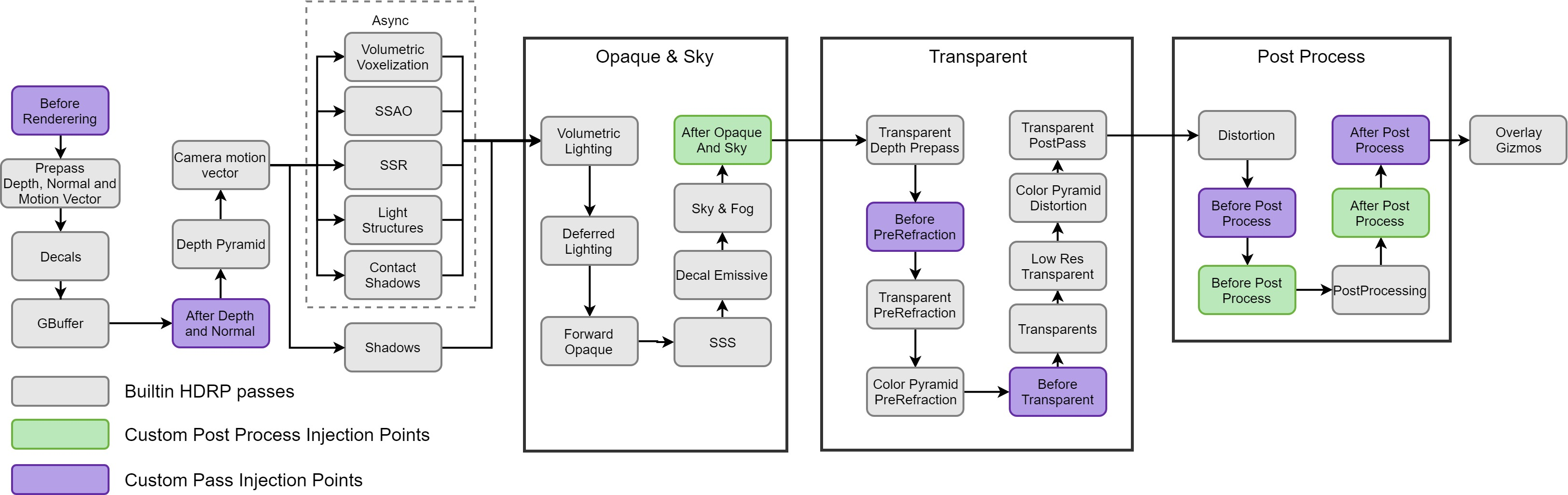
I'm a bit confused about why it is appearing after the post processing : https://docs.unity3d.com/Packages/com.unity.render-pipelines.high-definition@10.2/manual/images/HDRP-frame-graph-diagram.png
But the color pyramid pass is basically a downsampling pass for the screen color buffer : generating the mip map level of what it on screen.
It is used in example for the refraction and distortion effects
 dawn sorrel
Hi there, I have a little question about lightning on materials using hdrp. I create some dynamic path meshes and place them onto my terrain to connect placed buildings. The material used on my Mesh Renderer looks dark/blackish even if the hdrp lit shader is used. If I use the same material on a static quad then it looks much more enlightened. Anyone knows how to fix that?
 scarlet hull
dawn sorrel
Hi there, I have a little question about lightning on materials using hdrp. I cr...
scarlet hull
dawn sorrel
Hi there, I have a little question about lightning on materials using hdrp. I cr...
Maybe you mesh has bad normals resulting in wrong lighting ?
manic tapir
scarlet hull
I'm a bit confused about why it is appearing after the post processing : https:/...
Thank you very much! I've been banging my head on a wall with optimisation, and knowing this helps
digital spire
Is there a way I can get the current exposure value from camera?
digital spire
For context, I'm writting a utility script that will lower or higher lights intensity base on the camera exposure. I currently get it working limitedly by getting the fixed exposure value from global volume. But this doesn't work if the exposure mode is set to other mode beaide 'fixed exposure' like automatic or histogram
My main goal here is to use this script for item view light ( the one that move object infront of the camera and player can rotate it around) . So items get lit even if player view them in dark room.
scarlet hull
digital spire
For context, I'm writting a utility script that will lower or higher lights inte...
I think it should be possible somehow, but : if you change a light intensity value based on the current exposure, that is automatic, then the exposure will try to change again, and you will again update the light intensity, and the exposure will change ....
digital spire
Omg yeah 🤦
scarlet hull
If you are still willing to get the value, there is a pass "dynamic exposure" at post process that calculates the exposure value to use based on the rendering, by doing two compute shader dispatch
It writes to a 1x1 R32G32 texture that is probably the one containing the exposure value
 wide mauve
Hello, i'm generating a procedural map with rooms linked to corridors (all is closed, no directional light), can someone help me find the best way to handle light with raytracing plz ?
I'm currently using screen space global illumination ray tracing but when i'm not inside a light everything turn dark, and also i'm at 10 fps :/
scarlet hull
What do you mean by "not inside a light" ?
I think something is no set up properly : raytracing should take in account lights that are off camera, if the GI effect only works with lights that are visible, it is probably only screen space

 scarlet hull
I'm thinking a some issue with the ray distance by looking at those images
wide mauve
i tried playing with max ray length but nothing change
whole fossil
guys will APV work with instanced indirect meshes? Or doesn't it matter as long as renderer is set to use probes instead of lightmaps?
wide mauve
@scarlet hull found out why, i needed to add "Light Cluster" to my global volume and change "Camera Cluster Range" (it was 10 by default, so lights further than 10 were not calculated)
 peak finch
wrong UVs
but also from the looks of it, your not using the right shader
@knotty surge
 knotty surge
what is the right shader?
peak finch
not what you are using
but at the moment I wouldn't worry about that
and would focus on correcting the UVs on those hands
not sure if the texture map you are using is indeed like that, if it is then switch it out for something else, if not then it's the UVs on the model that are incorrect
knotty surge
the face its not like the hands
 peak finch
its UVs then
on the hands
your pretty much reaffirming that its a model UV issue if both the hands/face are using the same material
knotty surge
so how do ifix it
peak finch
you'd have to fix it in your modeling program of choice
blender, maya, cinema 4d, etc.
knotty surge
blender ah ok
peak finch
UV mapping the hands so that when a texture is put over it, it looks correct
I can't give specifics since I'm not a blender expert
knotty surge
ok thanks iwill see
digital spire
ooh 2023.2 alpha
HDRP: Added Scalable Temporal Post-Processing Upscaling Filter
 high flare
I want to create graphic settings menu, where I could modify particular elements of the graphics. I handled stuff like mesh quality, textures, texture filtering, ambient occlusion, etc. But I can't figure out how to deal with lighting and shadow settings. I suppose I could edit the Light instances, but I don't consider this an elegant solution. Does anyone here have any ideas on how lighting and shadow settings could be implemented?
shrewd moon
high flare
I want to create graphic settings menu, where I could modify particular elements...
Iirc you can set each light's shadows to get its resolutions from a quality tier, which come from the active SRP asset
high flare
shrewd moon
Iirc you can set each light's shadows to get its resolutions from a quality tier...
In such case, I would need to swap HDRendererPipelineAsset or change the quality in each Light instance individually. It would be nice to find some alternatives tho.
shrewd moon
high flare
In such case, I would need to swap `HDRendererPipelineAsset` or change the quali...
I expect you would swap between HD Render Pipeline Assets, or have a custom asset that you let the user set individual settings of
Aren't these changeable individually just like LOD biases are?

Of course it'll require that your lights aren't using "custom" resolution
high flare
shrewd moon
Aren't these changeable individually just like LOD biases are?
Yep, those settings are changed individually for each light source. I can see that people in my project are using higher tiers for more important light sources (e.g. the sun, bonfires) and lower tiers for some less significant light sources (e.g. candles). That way we have multiple lights active while most of those have fairly low quality thus not reducing the game performance.
I feel like some equivalent of LodBias would be the best, which is a global multiplier for a particular Lod setting. It would be handy to have the possibility of simply cutting resolutions in each instance in half for lower settings. It could be done with HDRendererPipelineAsset, but it would result in changing all other HDRP settings as well, so I consider it as a last resort option. It would be neat to have this option separated for more flexibility. Alternatively, I could change the resolution settings on Light components to Custom and cut it in half, but
 shrewd moon
high flare
Yep, those settings are changed individually for each light source. I can see th...
shrewd moon
high flare
Yep, those settings are changed individually for each light source. I can see th...
Are we talking about the same thing for certain?
Changing the tier resolutions my picture of affects all lights that use them, no need to access individual lights
high flare
shrewd moon
Are we talking about the same thing for certain?
Changing the tier resolutions m...
The problem is that there is no support for changing those values in runtime other than swapping the whole HDRendererPipelineAsset including hundreds of other settings. Technically it's possible to change the values with reflection (which is not safe), but so far it caused some unpredictable errors in my build.
shrewd moon
high flare
The problem is that there is no support for changing those values in runtime oth...
That seems like a bizarre exception! I thought it would've been simple but you've researched this more than I definitely
 buoyant igloo
How do I make a object fade out, like from fully visible and it slowly becomes transparent
 simple pewter
Hello! I hope it's the right channel here. I created a terrain using Gaea, however after applying the assets and starting the scene using the normal camera, I now have weird artifacts inside my scene view. Anyone knows what may cause this? Also got an error after play mode which had something with material out of range. It's just the basic HDRP Core Template with Enviro and my Terrain.

Whenever I go closer to it, it gets normal. So I feel like it's something with render distance inside the scene view?
floral oar
trying to create marble blast type game. I have been using GPT4 to help me create a player controller system using Cinema Machine. So far it has turned out great
digital spire

 floral oar
Spark, just make sure you have legacy probes enabled if you want to use the old system
@digital spire
Oh didn't see you also had a probe volume in there. You need to pick which system you want to use
digital spire
It's bugged. I was on 2023.2 to try the new stp upscaling. I enabled APV and unity yelled that I didnt enable it. So I add the legacy probe group which also yelled at me that I already enable APV lol
floral oar
Oh yeah I had that issue recently. Kept crashing Unity
 vagrant bay

vagrant bay
digital spire
It's bugged. I was on 2023.2 to try the new stp upscaling. I enabled APV and uni...
- @floral oar can you file a bug with your observations, a repro, perhaps what sort of workflow you were trying to follow? I'd take a look asap.
floral oar
It was an issue with legacy probes and the new volume probes being in the same scene. Not sure if its something to look into due to me having to enable legacy or volumes I'm the project settings
In*. I don't think my issue was the same as sparks
vagrant bay
floral oar
It was an issue with legacy probes and the new volume probes being in the same s...
We want the two systems to coexist in the editor, the "legacy" system is not going to be called that for long, since they have separate use-cases. The UX that I see above is not very friendly, so we'll make the experience smoother. Thanks for bringing this to our attention!
floral oar
I'll try to recreate my issue tomorrow and send it in
eternal laurel
vagrant bay
We want the two systems to coexist in the editor, the "legacy" system is not goi...
Could you explain the separate use cases to me? I don’t see a need for manual probe placement if I use APV ?
vagrant bay
eternal laurel
Could you explain the separate use cases to me? I don’t see a need for manual pr...
APVs are certainly a replacement for the use-case of creating a scene-wide grid of probes. However, this is a global structure and the probes are fixed in the grid, whereas in the Light Probe Groups give you more flexibility.
For the most common uses APVs are a direct replacement, but we are working on having the probe groups shine in their own ways, more info on that soon 🙂
 warped ridge
any one in here using hdrp with linux? i cant lunch my project i think its vulkan problem not sure
digital spire
vagrant bay
+ <@327278251447812097> can you file a bug with your observations, a repro, perh...
Honestly there is just so much broken stuff in the alpha version that the qa will have a hard time differentiate the cause XD.
It's fine though, the alpha wasn't meant to be used anyway. If i found it broken in 2022.2(which I havn't test) I'll report it
eternal laurel
vagrant bay
APVs are certainly a replacement for the use-case of creating a scene-wide grid ...
I was under the impression I can have multiple local apv volumes as well as a global one.
vagrant bay
eternal laurel
I was under the impression I can have multiple local apv volumes as well as a gl...
Yes but that's still within the limitation of having a fixed grid. Again, more info on this soon and it will make more sense.
eternal laurel
Ah I get it sometimes we would want to place denser probes around certain propa
vagrant bay
digital spire
Honestly there is just so much broken stuff in the alpha version that the qa wil...
It's nice that people are using the alpha, it helps us stabilize it. I think it's likely to be broken in 2022 I'll take a look Monday.
vagrant bay
eternal laurel
Ah I get it sometimes we would want to place denser probes around certain propa
You may also have geometry that doesn't play well with a super uniform array of probes for whatever reason. So the art direction may prohibit them.
But if you have 15 sq miles of terrain yeah use APVs no doubt
I guess on a more technical level, the original light probe groups are vertices on a tetrahedral mesh which then is interpolated and sampled by objects, whereas apv is using a different technique, even if it's still 'probes'.
summer glacier
vagrant bay
For the most common uses APVs are a direct replacement, but we are working on ha...
With better anti-leaking, APV would be great, even for all static objects in a scene. Currently it struggles a lot with light leaking. That combined with SSAO that is thickness aware would be a killer solution to GI for HDRP.
In 2023.2, I tried baking my imported scene that uses APV + lightmaps and it crashed, usually I would report it but it seems the bug report was bugged and I didn't have time to do it again and report, I'll try to do it later.
I wonder what Scalable Temporal Post-Processing Upscaling Filter is in 2023.2 alpha? Since HDRP already has Temporal Upscaling
Is it similar to unreal's TSR?
digital spire
I tried APV on 2023.2 alpha again today. still same issue. case id IN-35807
What I did to get the issue
1.open 3d HDRP core template
2.Press fix all in HDRP + DXR in the wizard page
3.Enable APV in HDRP asset
4.Enable APV in default frame setting
5.Add probe volume to scene
6.generate lighting
then this error happen
and then APV just fail after that.
 vagrant bay
digital spire
What I did to get the issue
1.open 3d HDRP core template
2.Press fix all in HDR...
vagrant bay
digital spire
What I did to get the issue
1.open 3d HDRP core template
2.Press fix all in HDR...
Thanks for filing the bug!
vagrant bay
digital spire
It's bugged. I was on 2023.2 to try the new stp upscaling. I enabled APV and uni...
Did you upgrade an existing project from 2023.1 -> 2023.2 when you ran into this?
digital spire
no. It's fresh project open from the hdrp core template
digital spire
summer glacier
With better anti-leaking, APV would be great, even for all static objects in a s...
APV also seems to also hate this kind of geometry 
 summer glacier
digital spire
APV also seems to also hate this kind of geometry <a:sadblob:1068138809251876864...
summer glacier
digital spire
APV also seems to also hate this kind of geometry <a:sadblob:1068138809251876864...
That's actually not a bad case for APV, thick walls and objects are good for it. The occlusion artifacts could be due to low sample count
APV struggles with interiors and dark areas, the less light there is, the more artifacts, noise there will be from APV. It can be masked in very bright areas, but not when the lighting is dim/low
digital spire
is 32 sample multiplier considered low?
summer glacier
depends on what env & indirect samples are set to
also how dense are your probes?
digital spire
1/9
summer glacier
what do you mean 1/9? Check your probe volume settings, min distance between probes
if it's 1 then that's a good reasonable density
digital spire
yeah 1 and 9 max spacing
summer glacier
For samples something around 1000 is okay, maybe 500-1000 for environment, and 2000 indirect.
That's the total sample count, so after including multiplier as well
also the more probes you have, the more samples you need, and vice versa
This is challenging for APV, the wall on the left is very thin, so is the roof, and it's somewhat dark inside.
You can see a lot of light leaking.

And this is already using view bias quite a bit.
and this is after using some probe touchup volumes to give walls fake thickness and invalidate some probes.
but as you can see, still light leaking in some places. And this isn't even completely closed off interiors, which are the worst case for APV and near impossible to do
 digital spire
ughhhh, I'm trying crazy sample and multiplier rn. it's taking longer than lightmap cpu baking lol
still blocky

gave up
😅
summer glacier
set multiplier to 2 and enable importance sampling
worst part is this light leaking isn't just for static objects, if you have dynamic objects that don't contribute to baked gi but only receive probe lighting, they will receive that light leaking..
 summer glacier
Go to game view and press play, make sure your camera has TAA, should clean it up a bit
it could be due to the sampling APV does, you can find it in your post process override
for probe volume
digital spire
or the 0.00 is the probe that got invalidate?
summer glacier
That shouldn't be the issue
APV has sampling noise

which can look like the image, you need to go to game mode and use TAA + tick animate sampling
Actually this might be an issue just due to your material, it's too white/flat, if you were using a texture you wouldn't notice it
digital spire
summer glacier
APV has sampling noise
hey, the view bias and sampling noise help a lot
summer glacier
Sampling noise in APV could be improved, I don't know the magic behind it but it's very noticeable when not using TAA, and sometimes even with TAA it's still noticeable
 summer glacier
There's just too many things that can cause issues in APV, too much or too little view bias/normal bias, "validity and normal based" leak reduction can cause a ton of noise or weird artifacts that go away when you disable it, but then you have even more light leaking, dilation/virtual offset (especially dilation) can cause issues themselves..
I experimented with APV a lot and it reminds me of lightmap hell. Different tool, same pain and never ending iterations to fix issues..
digital spire
have you seen this forum post?https://forum.unity.com/threads/feedback-request-global-illumination-changes-with-the-2023-1-beta-tech-stream.1412454/
Unity Forum
Global Illumination changes with the 2023.1 beta tech stream, we want to hear your feedback!
We want to make sure we are providing you with the best...
they would love your feedback XD
I'm messing around so I can give feedback too
summer glacier
I posted a lot in the APV feedback thread, but it seems they have no plans for better anti light leaking
APV could've been a way to stop using lightmaps, and unity's lightmapper is painful to use, so painful that the majority of users use a third party lightmapper made by one person over unity's solution.
digital spire
Is bakery really working well with HDRP?
summer glacier
Unity also made bakery more problematic to use by splitting the engine into 3, in my experience it can face issues with HDRP that you wouldn't see in built-in, dunno about URP
digital spire
I have used it for mobile projects but I gather from a lot of places(you're also one of them lol) that it have problems wit hdrp
due to the physical lighting model
 graceful ridge
Hello ! When I'm changing camera from first to second camera, the fps drops to 15 and then 60 back again. I dont know what causes the fps drop. Someone can help me? Thanks!
digital spire
graceful ridge
Hello ! When I'm changing camera from first to second camera, the fps drops to 1...
Is there a reason to do that? Maybe you could use Cinemachine to avoid that scenario.
Our game needs many cut / transition as well but we achieve that by using only a single camera and cinemachine blend override
graceful ridge
digital spire
Is there a reason to do that? Maybe you could use Cinemachine to avoid that scen...
Thank you for responding. So I'm not making anything like that. So I just get in a vehicle by enabling camera, carUserControll and things like that. So what to do in that situation?
digital spire
Still can use cinemachine blend.
 cedar kernel
what does this mean? I followed the tutorial but I can't paint
 scarlet hull
cedar kernel
what does this mean? I followed the tutorial but I can't paint
scarlet hull
cedar kernel
what does this mean? I followed the tutorial but I can't paint
What shader is currently applied on the object ?
cedar kernel
scarlet hull
What shader is currently applied on the object ?

If I want to do vertex, this is the only part that I can edit, even the UV is fixed, not outside the map

 scarlet hull
cedar kernel
scarlet hull
cedar kernel
So the vertex paint IS working ?
 scarlet hull
Now, why only in this small mesh corner, I have no clue 🤷♂️
cedar kernel
scarlet hull
Now, why only in this small mesh corner, I have no clue 🤷♂️
Yeah, that's my problem that I'm working on
even the other parts has that problem
They can only be painted on certain parts


 scarlet hull
Makes no sense to me .... Are those objects made of submeshes maybe ?
I hate to be that guy, but I've just tested and "works on my machine" :/
cedar kernel
I'll try with other mesh
cedar kernel
scarlet hull
I hate to be that guy, but I've just tested and "works on my machine" :/
yeah the tutorial is so simple, but mine doesn't work like it is seen on the tutorial
digital spire
Is there a way I can launch the rendering debugger via editor script or set this exposure debug mode via my own editor script?

 true zealot
digital spire
Is there a way I can launch the rendering debugger via editor script or set this...
true zealot
digital spire
Is there a way I can launch the rendering debugger via editor script or set this...
If it has a menu item https://docs.unity3d.com/ScriptReference/EditorApplication.ExecuteMenuItem.html is the easiest way
digital spire
true zealot
If it has a menu item <https://docs.unity3d.com/ScriptReference/EditorApplicatio...
thanks. works
cedar kernel
scarlet hull
Makes no sense to me .... Are those objects made of submeshes maybe ?
have you tried using it to an external mesh? cause it only works on internal Unity mesh
scarlet hull
cedar kernel
have you tried using it to an external mesh? cause it only works on internal Uni...
Yep, worked
digital spire
var hdInstance = RenderPipelineManager.currentPipeline as HDRenderPipeline;
hdInstance.debugDisplaySettings.data.lightingDebugSettings.exposureDebugMode = ExposureDebugMode.SceneEV100Values;
In case some one wanna set debug view via code XD
cedar kernel
scarlet hull
Yep, worked
It doesnt work on my mesh, but when the shape comes from unity it is working
What did you do to your model?
scarlet hull
cedar kernel
What did you do to your model?
Technically not "my" model. Took the circle room wals from the HDRP sample scene, applied layeredlit, and painted vertex color
cedar kernel
that's what I mean, if the model comes from the unity itself it will work, but if it's externally like you made from blender, it's not working
scarlet hull
This doesn't mean anything, the model is not something magic, it's just a .fbx file
Now that I said that, I've tried by exporting myself a model from blender (the famous Suzanne head).
And indeed, there is some issues apparently I have trouble painting out of the box.
It seems related to the scale converzsion from blender to unity (model has a x100 scale to be sized properly in the scene). I fixed it by setting the scale of the scene object to 1, and disabling "Convert Units" in the mesh importer
cedar kernel
scarlet hull
Now that I said that, I've tried by exporting myself a model from blender (the f...
And it works?
I'll try I'll try!
cedar kernel
scarlet hull
This doesn't mean anything, the model is not something magic, it's just a .fbx f...
SIR
I LOVE YOU
IT WORKS HAHAHAHA
THANKS A BUNCH
 brittle needle
Hey so, I created a camera from script and ever since then my scene doesnt seem to want to use the HDRP global volume settings. Anyone knows why?
I copied and pasted a camera from another scene and it worked but does anyone know why it doesnt work by default?
Oh my bad it seems that it doesnt work with cinemachine
 dreamy fox
Hey there, I used fullscreen pass graphs and custom pass volumes to render an image effect after post processing. When the image effect is applied it seems like the color range gets limited? I do have hard color ramps afterwards. What could be the issue here?
Tested the same setup before post processing, without hard color ramps
dreamy fox
nvm, found the setting for custom buffer formats and changing it fixed the ramps .D
brittle needle
Hello people
I have a script that shoots a projectile rigidbody whenever i click mouse0. I want to make it so that when I hold and shoot, and when I'm holding, if I move my mouse/flick it in a general direction, depending on the direction and the extent, I want the projectile to curve, but ultimately end up at the same spot as a projectile without the curve would end up in.
My guess is that
-I record the initial camera angle as initRot
-I record the end camera angle as finalRot
-I find the curve direction using vectors
-I find the angle between then using quaternions and then simulate projectile motion using simple physics, but alter direction of gravity to suit the curve direction
Is this possible?
digital spire
brittle needle
Hello people
try #archived-code-general or #archived-code-advanced instead.
 sacred sundial
Is HDRP ready for production/commerical games?
scarlet hull
sacred sundial
Is HDRP ready for production/commerical games?
Some games shipped with it, so I guess we can say that it is
sacred sundial
Do you know maybe names of those games? I would love to check them out
scarlet hull
sacred sundial
Do you know maybe names of those games? I would love to check them out
Lego Builders Journey (high quality version)
Road 96 (pc/playstation/xbox version)
The forest
Look at this on steam db 🙂 : https://steamdb.info/tech/SDK/UnityHDRP/
sacred sundial
OH I didnt know that existed! Thank you so much
 buoyant drum
Hi been trying to get a backrooms style interior lighting (but just a bit darker than what you usually see it to be) Baking also takes 34 years and when it actually finishes the lighting goes wonky and bright, some surfaces go black etc etc. Any tips for me? I have the directional light off and haven't really got on a sky box since I've been trying to get it going all on point lights. Unless there's a better way I don't know about?
Not really gone onto much graphics I've always just been coding or 3d modelling so excuse my noobness ;D
 vernal burrow
buoyant drum
Hi been trying to get a backrooms style interior lighting (but just a bit darker...
vernal burrow
buoyant drum
Hi been trying to get a backrooms style interior lighting (but just a bit darker...
Make sure on your lighing tab you are using GPU lightmapper instead of CPU lightmapper , otherwise Its going to take years
You can also try to lower these values and test if you still face the same issue; Generally the default settings work fine

something else that might be happening is that you have an invalid model in your scene which pretty much bugs the baker and freezes it. Examples of this could be lets say a detailed tree or a mesh that has a ton of polycount
vernal burrow
Hello there, I posted this question on #archived-shaders channel but I guess its better here. I want to enable the SRP batcher / GPU instancing for my project as I have many objects with the exact same mesh and material but it is just not working, I even followed the steps provided by unity for using it but no result. I'm using HDRP and I realized that enabling GPU instancing flag on the shader does not work because of the SRP batcher. does anybody know how to fix this? I even used the profiler script unity provides but for some reason all my fields are 0 except for the main thread fps
buoyant drum
vernal burrow
something else that might be happening is that you have an invalid model in your...
Hmm I've designed a map but all the walls, ceiling and the floor are separate. Could that be affecting this?
I have the settings on default and my light mapper is already on gpu
digital spire
buoyant drum
I have the settings on default and my light mapper is already on gpu
Try enable the lightmap debug in the sceneview
1.overlap UV
2.texel validity
Should be able to tell if something is wrong
buoyant drum
Thanks, I will try this when I get home
digital spire
buoyant drum
Thanks, I will try this when I get home
also in case you didn't know.
https://forum.unity.com/threads/lightmapping-troubleshooting-guide.1340936/
this guide is great to help fight the lightmapper lol
Unity Forum
Introduction
I developed this guide in order to help developers get the most out of Baked Global Illumination (GI) in the Unity Editor. Here, I unpack...
vagrant bay
floral oar
Oh yeah I had that issue recently. Kept crashing Unity
I think I just saw your bug report, funny enough we found the same issue internally by the time it reached us and we're already reviewing the fix (first for 2023.2). Should be in 2023.1 soon.
buoyant drum
digital spire
Try enable the lightmap debug in the sceneview
1.overlap UV
2.texel validity
think your right and thanks for linking that
vernal burrow
Yay
sacred sundial
Will HDRP work with VR?
shrewd moon
sacred sundial
Will HDRP work with VR?
Depends on VR platform, not all devices meet HDRP's graphics API requirements
Ones that do still tend to run into problems with performance, as you need to render a huge amount of pixels with consistently high framerate for VR
floral oar
vagrant bay
I think I just saw your bug report, funny enough we found the same issue interna...
Thank you!
loud leaf
sacred sundial
Will HDRP work with VR?
It works, but there are a lot of issues currently.
sacred sundial
Ugh alright so would it be a better option to go with URP then?
floral oar
I have had better luck using VR in HDRP lately
sacred sundial
Since its not a bigger game I think I wouldn't even use those right now
loud leaf
Personally I would only chose HDRP if you're chasing photorealism
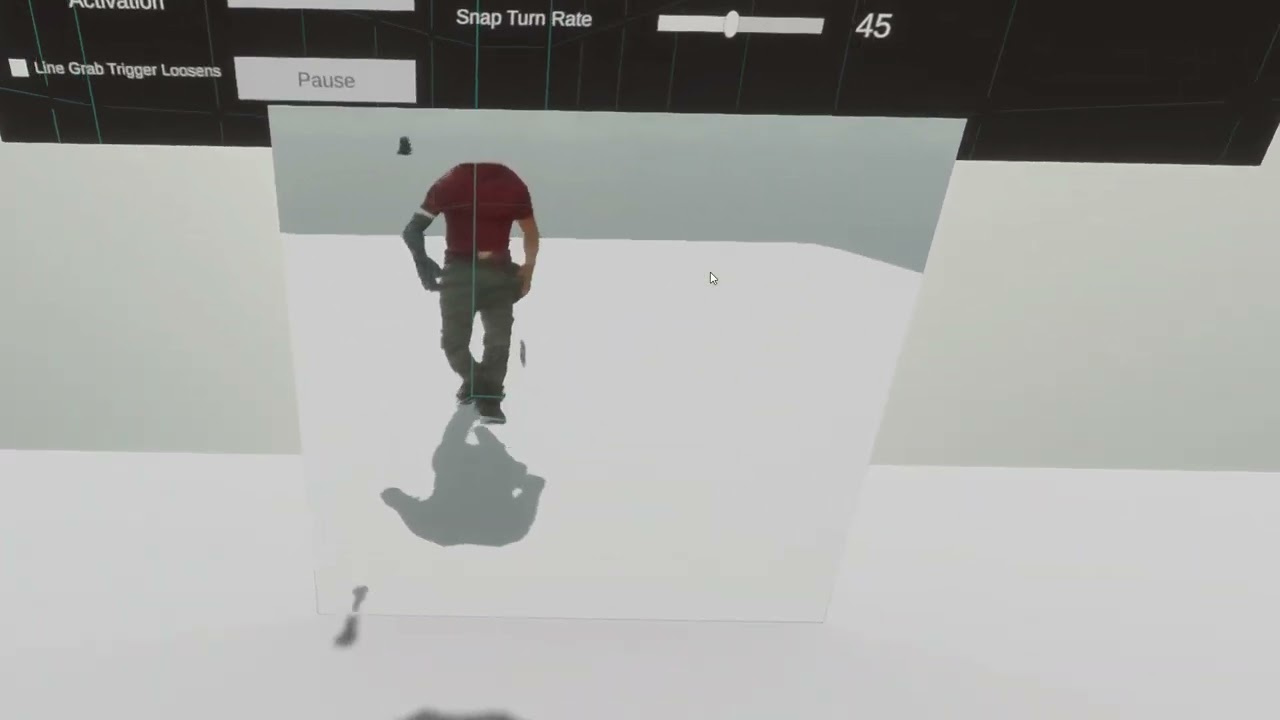 loud leaf
Is that single pass instanced?
sacred sundial
loud leaf
Personally I would only chose HDRP if you're chasing photorealism
Im trying to achieve graphics something similar to the game "IN SILENCE", would HDRP be overkill for that?
floral oar
I was running 120 fps but Im running it with a 4080
floral oar
sacred sundial
Im trying to achieve graphics something similar to the game "IN SILENCE", would ...
might only be able to target high spec computers.
loud leaf
floral oar
I was running 120 fps but Im running it with a 4080
Multi pass or single pass instanced? I think most issues come from SPI.
floral oar
multi pass
loud leaf
Yeah, that makes sense, still cool though
floral oar
yeah but not practical unfortunately
sacred sundial
floral oar
might only be able to target high spec computers.
Hmm would URP be a better option then?
How realistic can urp graphics get? For now I only saw URP being used in stylized/cartoonish games
loud leaf
I think you should be fine with URP
floral oar
yeah
Test out the new hair shader so you can create something similar
Depends on VR platform not all devices
sacred sundial
Well alright thank you guys then I think I'll go with URP then, I might have to get some assets since I'll need a volumetric fog/lights which urp sadly doesnt have :((
unkempt sedge
on HDRP is there an efficient way to draw a model on UI ? (Paperdoll)

this
a moving papeldoll
without losing a lot of FP
FPS
Is forcing a camera to forward lighting a good way?
 paper terrace
Hey, I'm having an issue with HDRP where in the editor I get normal 200-300 fps but if I build the project it goes down to about 60 and having checked the profiler it also seems to spike quite often. I tried making a new empty project where I only installed HDRP and did nothing else but the same issue appears.
loud leaf
Vsync?
paper terrace
I didn't change the default settings
slow aurora
i think the defaults might have vsync
 severe ember
Peeps, I've been trying to figure out reflections in HDRP for a bit but I keep getting artifacts with PBR accum, approximation and reflection probes. Only dxr reflections seem to work. Also any smoothness value other than 1 seems to not work as expected. What am I missing?😭
 shrewd moon
severe ember
Peeps, I've been trying to figure out reflections in HDRP for a bit but I keep g...
shrewd moon
severe ember
Peeps, I've been trying to figure out reflections in HDRP for a bit but I keep g...
These look like SSR artifacts
A planar reflection probe should work without problems, though it's more costly
SSR will always have some artifacts on very mirror-sheen surfaces afaik
Also they may appear worse in scene window than they really are if they rely on TAA denoising, which might not be enabled there
severe ember
Thought so as well but the weird thing is I had SSR disabled and still got artifacts 😦 I toyed around with the PBR accumulation method and got something ok, just quite noisy. Also it seems that materials with low smoothness values give less than stellar results, which I'm assuming is an SSR limitation?😕
shrewd moon
severe ember
Thought so as well but the weird thing is I had SSR disabled and still got artif...
I'm very confident SSR is enabled in that image
What type of reflection is it intended to be?
severe ember
You are right, the volume didn't have SSR but it was enabled in the hdrp asset, my bad. I don't have any clear intentions, just toying around with HDRP after a long time away and had some not so fun shenanigans with SSR/GI. I don't know if this is relevant but I'm on LTSC 2019, which could be causing issues? Anyhow thanks for the input!
shrewd moon
severe ember
You are right, the volume didn't have SSR but it was enabled in the hdrp asset, ...
2019 is totally ancient by now
Usually you'd get by and work around the limitations of SSR, baked reflection probes and planar reflection probes
If all those fail you have the option of ray tracing / path tracing
severe ember
True, it's not exactly "Ancient" per se (for basic use) but I am starting to get errors in certain DCC's which is probably a sign I need to upgrade. Thanks again for the help✨
ivory flint
hi~, do anyone has a shader graph shader that can has reflection probe affect behaviour same as the Lit shader?
Unity give us this node but no example how to use
https://docs.unity3d.com/Packages/com.unity.shadergraph@6.9/manual/Reflection-Probe-Node.html
ivory flint
I'm inspecting all the material in Unity's Material Samples, strangely enough, no reflection probe node used so far, but all their materials are affected by reflection probe, except my custom Shader graph materials 🥹
scarlet hull
ivory flint
hi~, do anyone has a shader graph shader that can has reflection probe affect be...
If the shadergraph is of type "lit", the material should react to regular reflection probes in the scene
ivory flint
scarlet hull
If the shadergraph is of type "lit", the material should react to regular reflec...
I cranked the probe up to see the effect better, and my hair and skirt obviously not pick up the probe, along with a few material in the MaterialSamples scene from Unity


this is normal multiplier
so from this image, even some of Unity's shader does not pick up probes. I don't know what is wrong, what made a material not pick up probe, everything is Lit type
scarlet hull
Try to play with the smoothness / metalic and AO settings of your shader/material, as all of them can affect how the surface reacts to reflections
ivory flint
okay I found it, anything with receive SSR ON will has that reflection at seemingly 1 intensity, while the probes multiplier at 100 everything white, they will stick out

sounds like a bug to me
because I can't turn off receive SSR, I want raytracing reflection.
scarlet hull
Well : the SSR result if valid will prevail over reflection probes. You've only raised the intensity of the probes, so when SSR shows it still has the regular intensity
ivory flint
Thank you for the explaination
scarlet hull
You could boost the reflections global lighting with this : https://docs.unity3d.com/Packages/com.unity.render-pipelines.high-definition@11.0/manual/Override-Indirect-Lighting-Controller.html
ivory flint
I'm very excited for the AVP time of day demo.
 frosty geyser
i have activated emission, why the materials are not illuminating around them?
 shrewd moon
frosty geyser
i have activated emission, why the materials are not illuminating around them?
shrewd moon
frosty geyser
i have activated emission, why the materials are not illuminating around them?
Emissive materials do not illuminate surfaces unless you're using baked lighting, precomputed lighting, ray tracing or path tracing
They can be seen reflected off of materials when using SSR or reflection probes
frosty geyser
shrewd moon
Emissive materials do not illuminate surfaces unless you're using baked lighting...
i selected baked lightning
whole fossil
is there any reliable solution for skinned mesh decals in hdrp?
scarlet hull
whole fossil
is there any reliable solution for skinned mesh decals in hdrp?
Best solution currently is to use mesh decals with also a skinned mesh
whole fossil
I never used mesh decals. How do they differ from regular decal projectors?
scarlet hull
- Works only on opaque objects
- Like decal projectors, they render into the dedicated dbuffers to store the decal informations
- But they do not project on depth, it's "basic" mesh rendering into the dbuffers
whole fossil
is this a regular mesh (mesh renderer) with decal shader. It will conform the mesh to object that is overlapping?
scarlet hull
whole fossil
is this a regular mesh (mesh renderer) with decal shader. It will conform the me...
No conform
Well, somehow .... it won't project the mesh to the depth buffer (you need to have a mesh that is slightly over the surface you want to project onto), but it will be applied to whatever is under it
whole fossil
got it, thanks a lot!
 iron flame
Can anyone use local Volumetric fog in version 2022.2 or newer? I keep getting material compile error and it doesn't work.
 ionic kindle
I've got a custom master material shader in HDRP, which takes in smoothness, metallic, AO, etc maps individually
but it looks different, when compared to the normal lit shader
got an artist complaining that his asset doesn't look as good. It shouldn't look any different at all though, but I've just confirmed that yes indeed things look different with my shader as compared to the default HDRP one
is there something about mask maps that doesn't translate to splitting things up into individual textures?
south girder
ionic kindle
is there something about mask maps that doesn't translate to splitting things up...
I have replicated the HDRP lit shader and realized that the AO is different
The AO on my shader was a bit less effective, I had to remap its range to make it more similiar
ionic kindle
south girder
I have replicated the HDRP lit shader and realized that the AO is different
only the AO? anything else that popped out
from what we've seen it seemed the smoothness looks different on the lit shader, vs the smoothness map on my shader
south girder
Just the AO, I got everything else to work the same and use the same property names as HDRP Lit
ionic kindle
1st is master shader, 2nd is my shader

 south girder
Im pretty sure you sent the same image twice
 south girder
ionic kindle
south girder
ionic kindle
Yeah the smoothness does seem to be off by quite a lot
You could show how you are sampling the smoothness in #archived-shaders and ask there
ionic kindle
my first test before that will probably be making an adjusted shader that takes a mask map like the lit shader
instead of individual maps
and seeing if that fixes the issue
ideally it shouldn't, but it could be that software isn't exporting the smoothness maps the same
because there is no HDRP smoothness export option
just mask maps
south girder
Ye thats what I did
ionic kindle
smoothness maps are just from default exporting or URP export
south girder
Are you using the correct property names in your shader? _SmoothnessRemapMin/_SmoothnessRemapMax
ionic kindle
not using remaps
had that in an older version but ideally things would look fine on initial import
then if we still want to adjust I'll look into adding them back
south girder
Alright. Here are the maskmap properties I use
 ionic kindle
ideally I can keep the remaps out because
I'm the only one who can look at the shader/material editor and not get lost
so I want to keep things straightforward and simple for anyone in-engine trying to get materials to work
could just make them but not expose them tbf
then if they need adjusting I can just do it in the graph
scarlet hull
@ionic kindle Just to be sure here : did you disable sRGB in the import settings of your metal/smooth/AO textures ?
ionic kindle
scarlet hull
<@313130762964828161> Just to be sure here : did you disable sRGB in the import ...
Is that important?
Do they not like srgb?
scarlet hull
ionic kindle
Do they not like srgb?
Usually those values are mean to be used with linear [0,1] , nbot sRGB that applies a gamma correction curve.
This could explain the difference in rendering
Maybe silly question but : why do you absolutely need to have separate maps ?
ionic kindle
scarlet hull
Maybe silly question but : why do you absolutely need to have separate maps ?
Just a preferred workflow for me
Less effort
But yeah nothing really
scarlet hull
Less optimized shader also then 😅
ionic kindle
scarlet hull
Less optimized shader also then 😅
Not that big a difference is it?
scarlet hull
You're replacing a single texture sample by 3 (or 4)
ionic kindle
Suppose it could add up
scarlet hull
And if you forget to import the texture as single channel, you waste graphic memory
ionic kindle
I've been more worried about poly counts and lightmaps
scarlet hull
What I want to point is : its nice for testing things out easilly, but it's better to have a proper texture workflow
shrewd moon
Any recommended tools for that? It's a bit miserable to do in Gimp for sure
 flint mirage
hi folks,
after importing HDRP into the URP project the scene view turns grey and the game mode - black
I saw people has asked the same question here and in forums, however most of them remain unanswered and unsolved or the solution didn't work out for me
I made sure the hdrp profile is chosen in the graphics and quality tabs
I deleted and reimported hdrp again, used the hdrp wizard
nothing seems to be working
I would be grateful for any help 🙂
scarlet hull
- Any image processing tool
- Python image library
- Unity editor script & import script
- Unity custom textures & import script
And usually in PBR workflows with tools like substance, you can do this out of the box
@shrewd moon
scarlet hull
flint mirage
hi folks,
after importing HDRP into the URP project the scene view turns grey an...
Checked the lighting intensities of your scene ?
flint mirage
scarlet hull
Checked the lighting intensities of your scene ?
not sure it's connected to the light intensity 🤔
 scarlet hull
Did you try to randomly enter play mode ? 😅
flint mirage
ummm, not sure I understood your question 😅 the screenshot was made not in the play mode
 scarlet hull
Sometimes, hdrp freaks out and entering play mode will for the pipeline to reset itself and recreating all the buffer textures
flint mirage
mm, still the same, unfortunately
I'm using 2020.3.7 version, by the way
scarlet hull
Also, note that having the two pipelines in the project is ... unsupporter for the moment
"works", but not great
Do you have any errors in the console ?
flint mirage
scarlet hull
Also, note that having the two pipelines in the project is ... unsupporter for t...
huh, interesting
then how do people publish on the asset store one project with 2 and more render pipelines inside? 🤔
flint mirage
scarlet hull
Do you have any errors in the console ?
I had a lot of them before restarting the project
1 moment
flint mirage
scarlet hull
Do you have any errors in the console ?
these are the errors after re-importing the hdrp and before using the wizard

after the wizard the scene turns grey
scarlet hull
Try :
- Clear the console
- In the project window, navigate to packages/High Definition RP
- Righ click & reimport HDRP package from here
 scarlet hull
Hum, hard to sop the origin from all of this, I suspect that one error is chaining all the rest to fail compilation...
Do you have the same exact package versions between urp and hdrp ?
Can you check if it's possible to update both to a more recent version in package manager ?
Oh, wait, found it
Your project path is too long XD
That's what the first error says
Well, not obviously, but somehow
flint mirage
holy
this can be an issue? wow 😅
scarlet hull
Move your project so the full path is shorter
Yes, and it's stupid.
Because of windows
By default windows has a maximum file path length limit of 256 character.
As unity is caching HDRP in the /Library folder of the project, and it has itself a hierarchy of files, it can result in quite long files path.
And if some of them are longer than the windows limit, they fail importing
flint mirage
okay, give me a couple of minutes
scarlet hull
No pb 🙂
buoyant drum
is there anything for models made with UDIM materials?
 wheat nest
Hey everyone, quick question
I'm using transparent materials for the walls in a prototype i'm making, since i have a shader that cuts a hole around the player so they are always visible (not on the screenshot since it uses a runtime script for getting the position)
and the transparent materials end up looking like this for no reason, is there a way to fix this? I never had this issue when working with URP or Legacy
 dreamy fox
wheat nest
Hey everyone, quick question
I'm using transparent materials for the walls in a ...
dreamy fox
wheat nest
Hey everyone, quick question
I'm using transparent materials for the walls in a ...
try setting depth write to true in material options, so that the transparent material writes to depth buffer
wheat nest
dreamy fox
try setting depth write to true in material options, so that the transparent mat...
this seems to work well, but i can only find this on the regular lit materials
but i'm using a custom shader, and i can't find an option for this in the shadergraph, nor the debug inspector for the material. Even tried compiling the shader, and looking inside the code to find it, but it's non existent
 shell yoke
Perhaps someone can help me understand this... I have a Directional Light, I crank down indirect lighting to 0 to make scene ambience dark. I turn up directional light intensity and the model is now gray. However I drop a point light in the scene, turn off the directional light and the point light shows the textures.
I just made it 0.1 as a temporary measure lol.
scarlet hull
wheat nest
this seems to work well, but i can only find this on the regular lit materials
b...
Look into the graph settings :
 scarlet hull
shell yoke
Perhaps someone can help me understand this... I have a Directional Light, I cra...
scarlet hull
shell yoke
Perhaps someone can help me understand this... I have a Directional Light, I cra...
I didn't understand your steps
shell yoke
This is directional light with indirect lighting to 0 (there are textures you just cant see them). Now if I make indirect light 0.1 for example the textures show.


However if I use pointlights it shows textures.

even at 0 indirect light
Maybe it's a bad scene, seems to be cursed, new scene has no issues lol
cedar kernel
How can I achieve ditering in HDRP?
 scarlet hull
cedar kernel
How can I achieve ditering in HDRP?
scarlet hull
cedar kernel
How can I achieve ditering in HDRP?
Look into shadergraph dither node
scarlet hull
shell yoke
This is directional light with indirect lighting to 0 (there are textures you ju...
What "indirect lighting to 0" ? The "Indirect Multiplier" of the directional light ?
 chrome spade
Hey everyone, with the new Water System for HDRP I am unable to have a transparent material behind it. It doesn't render the portion of the object below the waterline, but it'll render any opaques. I can render two transparent materials, one behind the other, but the water system wont render a transparent behind it, any ideas?
shell yoke
@scarlet hull - Indirect Diffuse Lighting Multiplier on the Indirect Lighting Controller post process
scarlet hull
chrome spade
Hey everyone, with the new Water System for HDRP I am unable to have a transpare...
It's probably because of refraction.
Try to set the render queue of your transparent material to "Before Refraction"
chrome spade
scarlet hull
It's probably because of refraction.
Try to set the render queue of your transpa...
That makes the object now visible underwater, but not above. Unless not Infront of the water.
scarlet hull
shell yoke
However if I use pointlights it shows textures.
Ok, got it.
What you see in "no textures visible" is indirect specular that is lighting the surfaces, from the environment.
aka : Reflection
And when you add the point lights, the diffuse term shows again over it.
scarlet hull
chrome spade
That makes the object now visible underwater, but not above. Unless not Infront ...
Hum, well, yes, this is a limitation of how realtime refraction works ....
chrome spade
scarlet hull
Hum, well, yes, this is a limitation of how realtime refraction works ....
Why is that though? HDRP Hair shader utilizes transparents to improve the look of a character's hair. However, when going into water, it's a bit odd their hair will be removed.
scarlet hull
Refraction works by sampling a copy of the color buffer.
Regular transparent objects (with or without refraction) are rendered after this buffer has been made, those in the "Before Refraction" queue are forced to render before, to be avalable for sampling in there.
Oh, I think I got why the object is not visible above the water : depth testing.
The object doesn't write to the depth buffer (like transparent objects by default), and when water is rendered, it draws over it.
chrome spade
scarlet hull
Oh, I think I got why the object is not visible above the water : depth testing....
Is there a way to include things like hair within the depth testing? It just seems a bit odd that HDRP Hair wouldn't play nicely with HDRP's Water System 😂
scarlet hull
Opaque hair shouldn't have any issue, and for transparent mode, similarly, you can force depth write
Look at the "Transparent Depth Prepass" and "Postpass" options
chrome spade
scarlet hull
Look at the "Transparent Depth Prepass" and "Postpass" options
I have both of those enabled on the material. BTW, thanks for your continued help with this
scarlet hull
And the Rendering pass set to "Before Refraction" ?
And still doesn't work ?
chrome spade
scarlet hull
And the Rendering pass set to "Before Refraction" ?
And still doesn't work ?
Sadly not (Don't mind the lantern in the water)
scarlet hull
chrome spade
Sadly not (Don't mind the lantern in the water)
You didn't enable depth write
I'm flabbergasted now :/
chrome spade
scarlet hull
I'm flabbergasted now :/
I know right? I have been trying to solve this issue for the past couple days and honestly I too am flabbergasted 😂
scarlet hull
I'm on something else right now, but will try to reproduce tomorrow to check, might be a legit issue here
chrome spade
scarlet hull
I'm on something else right now, but will try to reproduce tomorrow to check, mi...
No worries, I will work on another aspect of the game. However, glad I could bring this to one of the Unity Staffs attention. If you and/or your team need more details: HDRP 16.0.0 (Same on HDRP 15), Unity 2023.2.0a7 (Same on 2023.1.0b9)
scarlet hull
HDRP QA doing it's duty 🙂
wheat nest
scarlet hull
Look into the graph settings :
aaah, no idea how i glanced over that
ty so much
 full steeple
what is this and why is it always taking so long for me, it happens each time i save a shader and it usually takes up from 1 to 5 minutes

this mf is the reason ive quitted multiple projects because the bigger the project gets material wise the longer the loading takes and if there are loads of materials up to even 10 to 15 minutes
dawn sorrel
Is there a way to prevent clipping for firstPerson objects like weapons in HDRP?
cedar kernel
Why the material is not working? I'm new to this mybad

 fluid merlin
dawn sorrel
Is there a way to prevent clipping for firstPerson objects like weapons in HDRP?
fluid merlin
dawn sorrel
Is there a way to prevent clipping for firstPerson objects like weapons in HDRP?
A lot of people have used the Custom Pass method, there's a good write up here: https://www.intetic.com/blogs/unity-hdrp-render-object-on-top-of-everything/
I had an issue with that method since I have a highlight object system effect that gave it a weird look, so I ended up using an intermittent raycast with a variable for range per hand held object, with a layermask. If it hits something, I then have a method which plays an animation for the rig armature which tips the rig down and back, when the hit is cleared, it plays a reverse animation for it.
scarlet hull
cedar kernel
Why the material is not working? I'm new to this mybad
I'd avoid has setting textures in the shader, and use exposed properties instead.
chrome spade
scarlet hull
HDRP QA doing it's duty 🙂
Hi Remy, here's to hoping we can find a resolution for the HDRP hair shader and Water System compatibility! 🤞 🌠
scarlet hull
chrome spade
Hi Remy, here's to hoping we can find a resolution for the HDRP hair shader and ...
I'm digging right at the moment
scarlet hull
chrome spade
Hi Remy, here's to hoping we can find a resolution for the HDRP hair shader and ...
So, keep in mind that the water system is still quite young 🙂
Devs are aware of the rendering order issue, and are working on a fix currently.
However, I found some way to display the transparent objects underwater : render them in the "Low Resolution Transparent" queue.
They look blurry, but at least they are visible :/
chrome spade
scarlet hull
So, keep in mind that the water system is still quite young 🙂
Devs are aware of...
No worries, even with that setting it still looks broken and refraction doesn't work either. I will leave it as is until the issue has been resolved with an update. Thank you for looking into this and hopefully the team is able to solve this issue within good time! Thanks again @scarlet hull
slow aurora
full steeple
what is this and why is it always taking so long for me, it happens each time i ...
What PC do you have?
 outer carbon
@maiden cloak Please use the forums for job postings: !collab
 hoary starBOT

📢 Collaborating and Job Posting
We do not accept job or collab posts on discord.
Please use the forums:
• Commercial Job Seeking
• Commercial Job Offering
• Non Commercial Collaboration
full steeple
slow aurora
What PC do you have?
as in specs? i have amd stuff as in ryzen 5 something and an msi GPU
slow aurora
full steeple
as in specs? i have amd stuff as in ryzen 5 something and an msi GPU
it would help if you could tell me which ryzen 5 and which msi GPU, especially the GPU
slow aurora
2600 and RX 570 that could explain a bit
full steeple
i am unfamilliar
slow aurora
thanks for specs tho
full steeple
i have no clue what it explains tbh lol
full steeple
bro what kind of microsoft studio do you have at home lmao
slow aurora
btw does shader mean a shader graph or what
full steeple
slow aurora
btw does shader mean a shader graph or what
HDRP lit shaders
slow aurora
shadergraph or doesnt matter?
slow aurora
full steeple
i make shaders and then click on save asset
do you have anything complex in your shadergraphs or what
also
if you go to your materials folder
and click reimport all does that cauuse the issue too
full steeple
its reopening
what have i done lmao
it was not the same message tho as the save asset message
its basically about 7 of these
 slow aurora
if you change something in this and save it
right now
it does the thing right>
also lol look at this i made while messing around
 full steeple
its mostly when ive eddited multiple ones
full steeple
anyways lets trashtalk my pc lets say ur mom and hope he's offended
and hope he aint loading that long again
ill ping you when it happens again someday
cedar kernel
why is my emission map not working?
 true zealot
cedar kernel
why is my emission map not working?
true zealot
cedar kernel
why is my emission map not working?
if you change it from black does it work?
cedar kernel
u mean reverse?
true zealot
🗃️ Documentation
HDRP
Raytracing
Configuration / Upgrade ⏫
Feature comparison ↔️
📚 Resources
Github
Tutorials
Blogs, e-books, and videos
💬 Forums
HDRP • Graphics Experimental Previews
🗺️ Roadmap
cedar kernel
I already did, even If I change everything on that part, it's not reacting
I already tweaked everything on the emissive input panel, it's not just reacting to model, anything but the emissive part
true zealot
This?
 cedar kernel
true zealot
This?
cedar kernel
true zealot
This?
yes yes, I play every parameters on the Emission inputs
fixed it now, wtf I just restarted my Unity 
Thanks thanks
Unity Gaslighting at it's finest
crystal frigate
does anyone know why the textures are bad rendered in the distance? (Anisotropic is Forced On)
 scarlet hull
crystal frigate
does anyone know why the textures are bad rendered in the distance? (Anisotropic...
scarlet hull
crystal frigate
does anyone know why the textures are bad rendered in the distance? (Anisotropic...
Try raising the aniso level of your texture to force it to be rendered with a lower mip at distance
scarlet hull
 sour kestrel
how to collaborate with someone without plastic scm
sour kestrel
how to collaborate with someone without plastic scm
Use an other version controll system : svn, mercurial, git, perforce ...
sour kestrel
scarlet hull
Use an other version controll system : svn, mercurial, git, perforce ...
i do have github
scarlet hull
And out of subject of this channel btw
crystal frigate
scarlet hull
Try raising the aniso level of your texture to force it to be rendered with a lo...
thanks for answering , but its already at 16
sour kestrel
scarlet hull
And out of subject of this channel btw
but i dont how to use github
from what i know
i committed it
now its uploaded to github.com
then how do i get it to my friend
scarlet hull
You need to share the github project with him, and he need to clone the repo
sour kestrel
scarlet hull
You need to share the github project with him, and he need to clone the repo
he did
it downloaded something
how do i get the project to him
so that when he makes a change i see it when he does i see too
scarlet hull
You seem to lack a bit of git and versioning knowledge, I recommand that you search a bit on the net for tutorials, as really, this is totally out of the subject for this channel.
But to put it short :
When you make a change, you :
- commit to you local clone of the repo
- **push **to the distant repo
And you friend on his side needs to:
- fetch the changes from the distant repo (to get them in his local repo)
- **pull **them from his local repo to his working directory
scarlet hull
crystal frigate
thanks for answering , but its already at 16
Hum, then you should apply a mip bias to force a lower mip
crystal frigate
where is it?
 scarlet hull
I honestly thought that there was some UI for it, but apparently no, and it needs to be done by script : https://docs.unity3d.com/ScriptReference/Texture-mipMapBias.html
scarlet hull
Well, you maybe need some more to get the material and texture, but yes.
crystal frigate
i cant find a script on the texture or should i create? but when i create , i only have one float it is not changing anything
cedar kernel
How can I adjust the intensity of the shadow? the cascade is not helping
 scarlet hull
crystal frigate
i cant find a script on the texture or should i create? but when i create , i on...
scarlet hull
crystal frigate
i cant find a script on the texture or should i create? but when i create , i on...
What is your script ?
crystal frigate
scarlet hull
What is your script ?
i didn't created one
scarlet hull
cedar kernel
How can I adjust the intensity of the shadow? the cascade is not helping
You mean, the shadow doesn't look "dark" enough ?
This is cause by ambient (sky) lighting.
You need to bake lightmaps/probes to dim the ambient lighting in the closed areas
cedar kernel
I already got the answer thanks! I didn't know it's hidden in additional settings unlike URP.
cedar kernel
scarlet hull
You mean, the shadow doesn't look "dark" enough ?
This is cause by ambient (sky)...
Thanks thanks
I'm looking for the dim options, and it is hidden, my bad.
cedar kernel
How can I remove this horizon? even if I change the background type, the horizon is still there
 scarlet hull
cedar kernel
How can I remove this horizon? even if I change the background type, the horizon...
scarlet hull
cedar kernel
How can I remove this horizon? even if I change the background type, the horizon...
That's fog showing at distance
cedar kernel
ohhh, thanks for the term!
scarlet hull
You can control the look of it in the fog settings of the scene volume component, might need to display the advanced settings
digital spire
Hi. I think I have too many mixed lights in the scene with OnDemand update mode, they fight for spot in cached shadow map. In this case, how do I tell HDRP that I want this specific light to be in the cached shadow map and remove the faraway light from the reserve spot?
 digital spire
alright, I need to evict the faraway light and force register the light I want to cache. wish HDRP do this for me.... I'll just use every frame update mode for now then :/
full steeple
is camera stacking already available in a way for HDRP? or not
digital spire
full steeple
is camera stacking already available in a way for HDRP? or not
Practically no. Having 2 camera in hdrp will create all kind of problem.
fiery dirge
digital spire
Hi. I think I have too many mixed lights in the scene with OnDemand update mode,...
HDRP, you can use the Shadow Resolution setting in the Lights component. By default, HDRP automatically assigns lights to the cached shadow map based on their distance from the camera and their importance to the scene. However, you can manually adjust the Shadow Resolution setting to prioritize certain lights over others. This will allow you to allocate more space on the shadow map for important light sources and reduce the struggle for space. Additionally, you can use the Shadow Distance option to limit the distance at which the light casts shadows, which can also help reduce the number of lights vying for space in the cached shadow map.
 steel roost
Ran into this strange issue with my HDRP spotlights. They stop rendering if I look at the light source. If anyone has had a similar issue and knows where I should look any advice would be appreciated! I've spent a whole day already debugging trying to fix it with 0 luck.
Gif showing issue: https://gyazo.com/2aef1aafe417758415d2c0c95ec33aee
From what I've tested, it seems to only happen if you're looking in the direction of the actual light object that is emitting the light.
 shrewd moon
steel roost
Ran into this strange issue with my HDRP spotlights. They stop rendering if I lo...
shrewd moon
steel roost
Ran into this strange issue with my HDRP spotlights. They stop rendering if I lo...
Don't crosspost please
steel roost
shrewd moon
Don't crosspost please
Sorry figured it belonged in here after originally posting it
full steeple
digital spire
Practically no. Having 2 camera in hdrp will create all kind of problem.
ya but i need to have no weapon clip and also my UI is as world space attached to my cam aswell and if the normal camera renders that it aint work
 woven belfry
Anyone know what is going on with my shadows here ?
Fresh HDRP Project on High Fidelity.
Weird shadows behavior in video with camera as well
 digital spire
woven belfry
digital spire
woven belfry
that's seems like shadow cascade. check the cascade view to be sure
digital spire
full steeple
ya but i need to have no weapon clip and also my UI is as world space attached t...
both problem doesn't need second camera. you can google it for better answer than I can help with but for a quick summary, if your game is fps then scaling down the weapon seems to be the best solution. For UI, I'd go with ZTest always shader.
full steeple
digital spire
both problem doesn't need second camera. you can google it for better answer tha...
ye but its online so the weapon needs to be correctly scaled for the others in the lobby
it also has an entire playermodel with hands attached to the weapon so cant really shrink that aswell lol
digital spire
Then I'd do that only to the player and let other player show the model correctly.
if you don't wanna bother with that then it's you'll need custom shader like they do it in fps sample project

GitHub
A first person multiplayer shooter example project in Unity - FPSSample/Assets/Shaders/Graphs/FirstPerson_Projection at master · Unity-Technologies/FPSSample
or use custom pass
shrewd moon
woven belfry
Anyone know what is going on with my shadows here ?
Fresh HDRP Project on High ...
Grainy shadows happen because TAA is required to denoise the shadow filtering
Scene window by default doesn't have TAA enabled so they may appear grainy there even if there's nothing actually wrong
 snow kestrel
Someone know where is the recorder track?

ahh, sorry
It was not installed
I thought that it is automatically
full steeple
digital spire
https://github.com/Unity-Technologies/FPSSample/tree/master/Assets/Shaders/Graph...
thank you @digital spire ill check that out!
loud leaf
@chrome locust I see the DLSS Ultra Performance issue has been reported and closed multiple times. Can you link me to some official info? Anything I can find online is stating the opposite
Hope it's ok to ping you this one time. 😄
Previous report linked to NGXSDK/2.2-0/Doc/RTX_Developer_Guidelines.pdf but it's on internal git which we can't access.
 chrome locust
hey! @loud leaf
yes so this issue is interesting. So what happens is that NVIDIA based their 3 modes on resolution.
And this makes total sense if you are only talking about rasterization. That is, rendering geometry to the lighting buffer and then upscaling.
However, post effects: they are always at full res with DLSS. Thus, they will incur into a higher cost on what nvidia expecs a less cost
So I am not sure how else to solve this other than bringing it up to NVIDIA 🙂
we do have a workaround
and is to set DLSS after post.
loud leaf
So, if we ignore performance for a second
chrome locust
I added this option on 2022.2 and up. You should be able to use DLSS after post and then it might behave better
but you will trade for possible artifacts on DoF & Bloom
loud leaf
Ultra Performance having an internal resolution of 33%, and Maximum Performance having an internal resolution of 50%, there is no way it could look better right? This seems to reflect correctly in all other DLSS modes
I tried searching through the HDRP package for "Ultra Performance" but I'm not getting any matches somehow 🤔
If I manually force the screen percentage to 33%, it seems to work correctly, and I get the output I'd expect from DLSS Ultra Performance. But if I pick it from the list, I get the quality I'd expect from Ultra Quality.
Unless things in HDRP work different than all games on the market, Ultra Performance should look worse than Maximum Performance. (which I guess is valid, but this is where the confusion and thus reports from multiple people come from, because this isn't what all the other engines/games seem to be doing)
Regardless of the performance/cost, Ultra Performance should give you the worst quality of them all. (In HDRP, it gives you the best quality of them all)

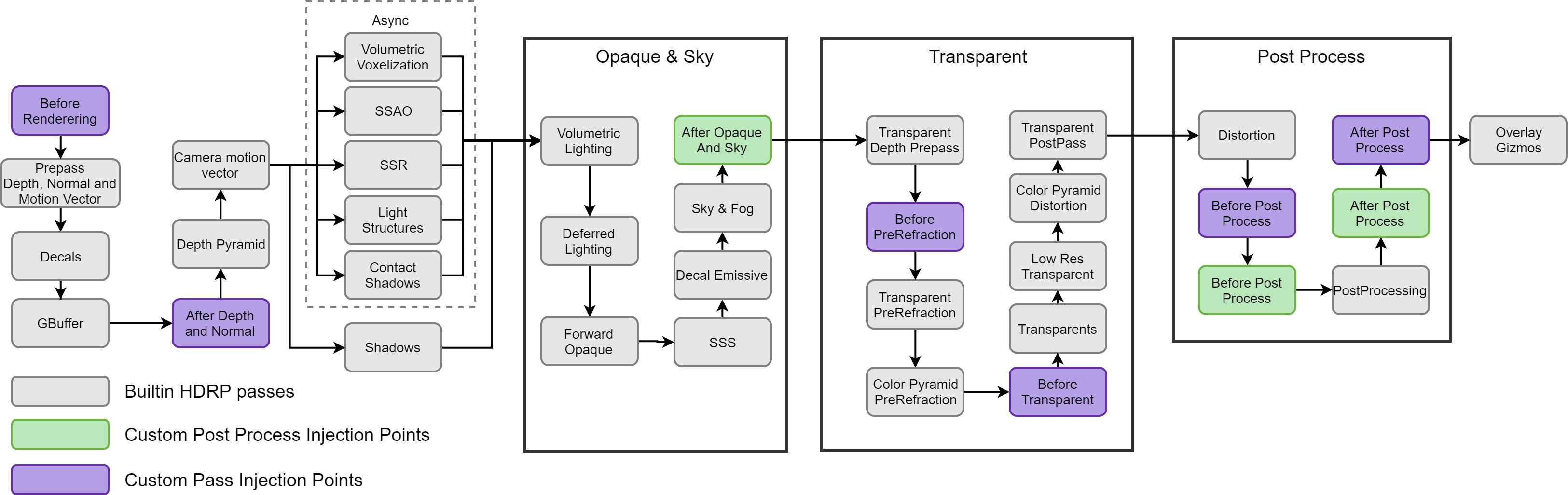 loud leaf
Yes, exactly.
Ultra Performance is the one you'd only use at 8k really, because it's the lowest internal resolution, for example:
 chrome locust
correct.
loud leaf
Do you see the issue here? 😄
chrome locust
"Ultra Performance should give you the worst quality of them all"
Thats not correct. This is entirely %100 based on resolution. i.e. "Ultra Peformance" on a 1080p target is sort of 'undefined' behaviour
I think your point is that Ultra performance sould translate at 1080 right?
loud leaf
