#🏃┃animation
1 messages · Page 95 of 1
 lean lily
Ok seems to be spamming both Idle + Movement blend tree at the same time
Figured it out
shoot me
 shut plover
welp
 hybrid tinsel
shut plover
welp
hybrid tinsel
shut plover
welp
I literally can't tell what you need help with.
 near sierra
late reply, when you say set up correctly what do you mean?
hybrid tinsel
Presumably 'where you want them'
 agile solstice
near sierra
late reply, when you say set up correctly what do you mean?
agile solstice
near sierra
late reply, when you say set up correctly what do you mean?
If the flipping happens based on pivot point (which I'm mostly sure about but don't remember precisely) then the pivot point needs to be in the visual mid point of the sprite so it doesn't "jump" when it flips
near sierra
gotchu
 fresh moat
Hello, a model I am working with has too many bones (in blender) which don't move the mesh. I want to hide the bones which don't affect movement so it's easier to animate the model in unity without all the extra bone categories. Any tips?
hybrid tinsel
fresh moat
Hello, a model I am working with has too many bones (in blender) which don't mov...
You can hide objects in the scene view using the eye icon next to the name in the hierarchy.
fresh moat
hybrid tinsel
You can hide objects in the scene view using the eye icon next to the name in th...
Okay, thanks. Will those bones remain hidden when I export to Unity for example?
hybrid tinsel
...oh, I thought you were asking about doing it in unity.
I don't use blender so I dunno what you can do in that.
agile solstice
fresh moat
Okay, thanks. Will those bones remain hidden when I export to Unity for example?
Exporting with Blender doesn't respect any kind of hiding or disabling
FBX export has an option for "only deform bones" which culls bones which don't have any weights
Otherwise you'll have to delete them in blender or in unity
fresh moat
hybrid tinsel
...oh, I thought you were asking about doing it in unity.
Okay, thank you. The original model has so many categories before I reach the child bone which actually moves the mesh. I will test these options thanks everyone.
fresh moat
agile solstice
Exporting with Blender doesn't respect any kind of hiding or disabling
FBX expor...
Thank you
 dense magnet
Can someone please help me. I uploaded my character to Mixamo, got the anims I want and it looks great and all on mixamo but when I play the animation in-game it looks like my dude needs a wheel chair
 cunning thunder
Is it possible to make it so once an animation stops playing it trigger's something in a script? If so, how?
shut plover
hybrid tinsel
I literally can't tell what you need help with.
i want the character stays facing that direction when I let go
 twin musk
I was recommended to try asking here. I'm working on a voxel/cube character creator where after building your desired character you can combine the cubes together into one mesh, attach it to a skinned mesh renderer and preview animations on it
https://pastebinp.com/vg66v3XARzg9hRTr8EGQ#XfpFqHjplDtPuGoV1TICw4frNUE_uecJj6Pi5zSm2wE=
This is the part of the code where I'm combining the meshes into a skinned mesh renderer and assigning the bones
I'm sometimes getting a "bone weights don't match the bones" error and the times when I'm not, animating the bones on the rig have no effect on the combined mesh
I'm not sure if its the mesh combination process messing up the bone weights and bind poses or if its something else entirely
This is how the rig looks like in the editor, visualised by the Animation Rigging package

And these are the body part regions, each with exactly one bone associated
 fresh moat
dense magnet
Can someone please help me. I uploaded my character to Mixamo, got the anims I w...
fresh moat
dense magnet
Can someone please help me. I uploaded my character to Mixamo, got the anims I w...
Mayeb you need to mess around with the skinweights, or the bones in unity. Sometimes, if you go under project settings and set the minimum bones to 4 instead of 2, it smooths meshes out during animations. Other than that, it seems there is an error with the rigging.
fresh moat
dense magnet
Can someone please help me. I uploaded my character to Mixamo, got the anims I w...
Also, make sure that you delete all the model's bones & armature first before uploading it to mixamo. Delete the bones & armature by first importing it to blender, selecting and deleting the green parts in the collection, (pose & armature) then exporting it as an FBX/obj. If you have some bones left on the mesh before uploading to Mixamo, it could trigger errors with the autorigger even though it may look "good" in mixamo.
 grizzled stream
I need some help with my animation. I made a walking animation for my character and when I import it the body of the character is turned sideways. On top of that the body is moving back and forth not the feet. It looks good in blender and just gets messed up when I export. Is there a reason for this?
dense magnet
hey @fresh moat I removed the Rig from the character and re-downloaded the mixamo animas with the uploaded non riged character an no sauce
The animations in Mixamo work perfectly .
@fresh moat my dump ass did not download the anims with skinning.... 🤦
Thanks for the help
 thin ginkgo
https://gyazo.com/de1be0e28060a84ddc73a75a22ab57c5 does the bottom circle means root bone?

 lost sedge
Is there a reason my animation is split in two here imported from blender?

 candid ridge
i am struggling so hard with blender -> unity configuration idk where to begin
i have created a 3D model (rigged with Rigify's advanced human meta-rig) and aligned everything, and the generated rig works really well in blender
but when I import the fbx to unity it just has a spasm. I have watched so many videos but still have 0 idea what I am doing bc I'm a Unity noob.
First of all, it doesn't like that my model is in a A-pose, but I've seen youtubers use an A-pose and it worked out just fine?
like it turned their A-pose model to a T-pose and everything was green and wonderful
me on the other hand:

au contraire, everything is green for me the the 'inspector' thingie

What I'm trying to do is convert her into a .vrm so I can put some animations on her
so i have the unityvrm addon and whatnot
but making her tpose just makes her do this

and the export button is grayed out
i'm just completely lost at this point and uber-frustrated
so yeah anything helps lol a
 uncut salmon
 dapper glade
how can i plz ? (report bug)
dapper glade
how can i plz ? (report bug)

Unity
Unity is the ultimate game development platform. Use Unity to build high-quality 3D and 2D games, deploy them across mobile, desktop, VR/AR, consoles or the Web, and connect with loyal and enthusiastic players and customers.
grizzled stream
I need some help with my animation. I made a walking animation for my character and when I import it the body of the character is turned sideways. On top of that the body is moving back and forth not the feet. It looks good in blender and just gets messed up when I export. Is there a reason for this?
 desert terrace
Can anyone help me get an idea of how I would go about creating an animation like this

The removal of flags
 fluid sage
so i have two models in my avatar
i wanna be able to animate the model inside my model without touching my og model rig

my purple avatar back there summons this blue cowboy and does an animation, is it possible to do so without having to add on another animator?
 nimble swallow
I have it so when I click my button it plays an animation but when I click too fast it only plays some of the time, can I fix this?
hybrid tinsel
cunning thunder
Is it possible to make it so once an animation stops playing it trigger's someth...
You can add a script to the animator state and use https://docs.unity3d.com/ScriptReference/StateMachineBehaviour.OnStateExit.html
 hybrid tinsel
thin ginkgo
https://gyazo.com/de1be0e28060a84ddc73a75a22ab57c5 does the bottom circle means ...
hybrid tinsel
thin ginkgo
https://gyazo.com/de1be0e28060a84ddc73a75a22ab57c5 does the bottom circle means ...
Yes.
hybrid tinsel
nimble swallow
I have it so when I click my button it plays an animation but when I click too f...
Would need to see the script and animator to tell, but you are probably either missing inputs in the script or there is a timing issue in your state transitions.
nimble swallow
hybrid tinsel
Would need to see the script and animator to tell, but you are probably either m...
No script, I used the stuff built into the button. The transition stuff.
hybrid tinsel
@fluid sage if the avatar definition contains both models then as far as unity knows they are one model.
fluid sage
damn
i cant like just put the name infront of all of the keyframes so its forced to only use that one model and not the base one
hybrid tinsel
desert terrace
https://gyazo.com/f44eebcf359a9b2b8ec595f3135555e2
Probably easiest to just use a script for that if you want the random motions.
hybrid tinsel
lost sedge
Is there a reason my animation is split in two here imported from blender?
That generally mens that the fbx file has multiple 'takes' recorded.
hybrid tinsel
candid ridge
i have created a 3D model (rigged with Rigify's advanced human meta-rig) and ali...
Thete are lots of potential issue, but I'm guessing that having so many extra bones is making it hard for unity to figure out how to make a t pose. Either due to how they offset the humanoid bone positions or by introducing excess rotations.
desert terrace
hybrid tinsel
Probably easiest to just use a script for that if you want the random motions.
Should I use LeanTween
Or?
grizzled stream
i have my model all rigged up and when i go to parent the mesh with the rig it doesn't show the armature deform option. How do i get that to show up
hybrid tinsel
I have never used leantween so I have no idea.
 fleet agate
have anyone here ever animate an empty game object in which it contains many other animated objects? I'm trying to rotate an island 360 and in that island I have many traps and obstacles which also move around themselves, many objects managed to move along with the island but some are standing at their first positions. Also these traps and obstacles I created and attached bones in Blender and exported to unity in fbx. It will be nice to know if there's anyone here had encountered this problem before and thanks for the help everyone!
grizzled stream
homies, I made a walking animation but when I exported it made it into 18 animations with all the separate animations. so there is one for the left foot, and one for the right foot. anyway I can combine them or just fix it completely?
hybrid tinsel
grizzled stream
homies, I made a walking animation but when I exported it made it into 18 animat...
Made it in what? Exported from what?
grizzled stream
hybrid tinsel
Made it in what? Exported from what?
made in blender exported from blender in a .FBX
 trail marten
so i just modeled this low poly axolotl and i wanna give it a little runing animation but i have no idea where to begin

i could try and keyframe it in blender? or idk about unity animation but that might be better because of IK
dapper glade
bruh explain me why some animations are not anymore playing ?!
The animations was playing yesterday and today
not
wtf is this shit
(i didn't touch anything just go to sleep and then back and play my game but some random animations not visualy playing but physically it's playing)
 narrow spindle
look through ur animations and how they're setup. maybe some problem on ur side
 silk citrus
i keep running into issues using sprite sheet sliced animations. I've got a sprite in the scene with a sprite renderer and a "animation" component with a SpriteIdle.anim attached with selected sprite frames. nothin'. where am i going wrong? and should I do frame by frame animation somewhere else then import to unity?


reading thru the tutorial and documentation and im really confused. here i see they are using an animator to control the states of animation, but i keep reading elsewhere and getting errors about legacy animations, and that animation clips n mecanim dont work together well? (feel free to dm me resources or anything)
silk citrus
Got it. I think. You don't double layer the animationClip in the object. Let the Animator component handle the states. And --inside-- the Animator, place your states (ie the clips). you still have to make the clips and have them in your assets. fwhew. glad to finally see something moving.

 iron fiber
is there an equivalent to unreal's notify system in unity's animation system
 pliant fable
iron fiber
is there an equivalent to unreal's notify system in unity's animation system
pliant fable
iron fiber
is there an equivalent to unreal's notify system in unity's animation system
There are animation events. But, I don't really know what else does the notify system does in Unreal
https://docs.unity3d.com/Manual/AnimationEventsOnImportedClips.html
iron fiber
pliant fable
There are animation events. But, I don't really know what else does the notify s...
so you can go keyframe by keyframe and you can make it so that on a certain keyframe there is a trigger for an event
like a sound effect
or particle effect
pliant fable
Yes, that's there Screenshot from the documentation Link
You can specify the audio or particle or any other variable and pass it in the "Object" tab. There should be a script sitting beside the animation component which has the same function name as the one you specified when creating the event.
This function will take whatever parameter and it would be mapped on it's own so if the object you passed is particle, then it will be converted to a particle if you function takes a particle
You will find a lot of videos on Youtube regarding this part
 iron fiber
yeah that is it
 lyric rover
Someone know why this happen with my Blend file?? The chatactres split in Unity !!!
https://vimeo.com/718739362

This is "2022-06-09 16-33-00_Trim" by Ruhan Kasumi on Vimeo, the home for high quality videos and the people who love them.
In Blender this doesent happen
hybrid tinsel
Probably have some constraints or transforms that aren't baked properly.
lyric rover
hybrid tinsel
Probably have some constraints or transforms that aren't baked properly.
Yeah... i didnt bake the animation at all.. when i bake the characters animation it won't move anymore.. i just saved the file and imported it to Unity.. it works fine with other object that are animates.. only these 2 dont work how i want
 thick minnow
Jo I am new to unity, and all worked, took a break, came back and now my ANimator window is empty
Object selected: Check
Object has Animation Controller: Check
Object has its animation: Check (4 clips)

Ah well closing the tab and reopening it fixes it haha
 tawny basin
is it posssible to edit a animation key while its running in play mode and see it change in real time?
currently i have to stop play mode and go back in to see the change
 nocturne storm
how do I make a trigger at this specific time in the animation so I can trigger some code?

like i want to make it so that when this specific frame occurres, I wanna instantiate a prefab ball at the player
please ** ping me**
hybrid tinsel
tawny basin
is it posssible to edit a animation key while its running in play mode and see i...
You probably can, might need to use timeline to do so though.
 stuck elm
nocturne storm
how do I make a trigger at this specific time in the animation so I can trigger ...
stuck elm
nocturne storm
how do I make a trigger at this specific time in the animation so I can trigger ...
The animation event button lets you do this. You can set the animation to run a named public function in a script on the animated object.

 sinful heath
I need some help, my character does not split into separate parts when I try auto geometry. Anyone know why? I'm following this tutorial but with my own asset https://www.youtube.com/watch?v=t3HdlMCTdNU&ab_channel=FyreflyStudios


How to rig a 2D sprite in unity without photoshop.! In this video I use affinity designer in place of photoshop but any image editing software with transparency will work! (This method will work for photoshop too!).
Discord Server:
https://discord.gg/NeckaRWH
Music:
https://www.streemtunes.com/
my sprite setting

 upper hull
Animation Overriding the Z Axis Of Player . Anyone Help me
hybrid tinsel
sinful heath
I need some help, my character does not split into separate parts when I try aut...
My guess is that your sprite is too small for the default settings. Those big blobby shapes would be pretty tight on a larger sprite.
You can just make your own geometry
Or separate the pieces more
In that tutorial it looks like they're using a 1024x or larger texture, so the gaps between their pieces are as big as your entire sprite.
hybrid tinsel
upper hull
Animation Overriding the Z Axis Of Player . Anyone Help me
Can you explain in more detail?
upper hull
@hybrid tinsel
the transforms of Animation resulting to weird player movement on Z Axis
lyric rover
Why does my Charscter slide?????
https://player.vimeo.com/video/718739362?h=9d26d09092
I have tried exporting to unity in Blend File and Fbx... but its the same
I tested it with 3 Boxes.. it also happens
Im using Blender 3.2 / Unity 2019.4
 cinder gale
Hey there! I'm having a problem with Mario's jump animation here. It seems to reset a lot, causing a jitter effect during his jump. Any ideas how to fix this issue? Also, when he lands, it takes a while before that transition activates, causing a delay in his landing animation.
agile solstice
cinder gale
Hey there! I'm having a problem with Mario's jump animation here. It seems to re...
You have "can transition to self" checked so you constantly transition to jumping, while jumping
all the space here before the blue angled transition is delay before the transition happens
 cinder gale
Oh I see, thx!
 shut flax
I reorganized the hierarchy, and animations now have yellow "missing" properties. My plan is to remake the animations, but it would be much faster if I could just edit the properties to point to their new locations... Is that possible?
 bold berry
lyric rover
Why does my Charscter slide?????
bold berry
lyric rover
Why does my Charscter slide?????
you probably have apply root motion ticked on your animator component, try un ticking it
 proper barn
If I tell u I have no idea how anything works in Unity, except Debug.Log, what r u going to tell me?
 vernal birch
proper barn
If I tell u I have no idea how anything works in Unity, except Debug.Log, what r...
vernal birch
proper barn
If I tell u I have no idea how anything works in Unity, except Debug.Log, what r...
that I have no idea how to use unity at all
 little sluice
I'm trying to use an animation override track with Unity's Timeline. I set up the animation (a simple move) and it looks fine when scrubbing through the timeline, but at runtime, the movement is something completely different. Any ideas?
lyric rover
bold berry
you probably have ``apply root motion`` ticked on your animator component, try u...
In blender or Unity?
hybrid tinsel
vernal birch
whoever teaches me how to convert .anim to .fbx
While I doubt I'll ever see that crypto, you can use the fbx exporter preview package to convert anim to fbx. https://docs.unity3d.com/Packages/com.unity.formats.fbx@2.0/manual/index.html
little sluice
hybrid tinsel
lyric rover
Why does my Charscter slide?????
That still looks like the same issue from before. Import to unity won't keep constraints or unapplied transforms.
lyric rover
hybrid tinsel
That still looks like the same issue from before. Import to unity won't keep con...
Soo what couses it?
hybrid tinsel
You said earlier that you didn't bake your transforms or constraints, so I'm guessing that that is the problem.
lyric rover
hybrid tinsel
You said earlier that you didn't bake your transforms or constraints, so I'm gue...
I tried and baked a charackter.. and it also happened
bold berry
lyric rover
In blender or Unity?
unity
lyric rover
bold berry
unity

Its off :(
Can i send the blend file to see for yourself if you have time
Im stucking in this issue for days
Cant find nothing on google
I send you also the baked fbx files...
Just to compare them with blender and unity
lyric rover
hybrid tinsel
You said earlier that you didn't bake your transforms or constraints, so I'm gue...
I tried again with baking the character.. it happens the same
 hybrid tinsel

 light marsh
Is it possible to save animation clips created in a timeline as individual assets? I can't seem to find info regarding this.
hybrid tinsel
light marsh
Is it possible to save animation clips created in a timeline as individual asset...
You can use the recorder package or the fbx exporter to do that.
light marsh
hybrid tinsel
You can use the recorder package or the fbx exporter to do that.
Ah thanks. I saw those methods but was surprised at how many steps there were. Was hoping there was a simpler method!
hybrid tinsel
Well, using the recorder is pretty simple
 full cove
What is normally the "any state" used for?
agile solstice
full cove
What is normally the "any state" used for?
State transitions which don't need to care about other states
Character death could be one if it should always be able to override other animations and use the same clip regardless of current state
hybrid tinsel
Yeah. Any State transitions are ones that, well, can happen from any state, overriding the usual flow of the graph.
Avoid using them without a good reason 
lyric rover
hybrid tinsel
I did that.. its the same 🥲
I really dont get whats going on
Not sure where the issue is
hybrid tinsel
Well, you've eliminated the easy answers, now you'll need to go deeper.
You're not using any constraints in your animation?
lyric rover
No, only animation
lyric rover
hybrid tinsel
Well, you've eliminated the easy answers, now you'll need to go deeper.
The thing is i cant find nothing on the internet with this kind of issue
If you want i can send you the blend file
Im soo desprete, it took me soo long to make this animation in Blender... only to find out that im gona have bigger problems with Unity
hybrid tinsel
What the fuck would I do with a blend file? I don't even have blender.
And are you not exporting as fbx?
lyric rover
I did , before i did blend file only, but to try find the issue i did export fbx..
 paper ermine
is there a way to animate more than 1 box collider at a time?
by using animator
or do i have to make a seperate animator myself
agile solstice
paper ermine
is there a way to animate more than 1 box collider at a time?
One animator can animate any number of components and gameobjects which reside in the animator's hierarchy
paper ermine
oh nice
how do i add it to the animation clips though
i can only see one box collider
 jagged moth
Hi guy, i actually have a little problem on my roll animation he always stop after 2 frame,
i think is a common problem but i am stuck
agile solstice
jagged moth
Hi guy, i actually have a little problem on my roll animation he always stop aft...
It looks like transition from rolling to idle takes place too fast, would've been useful to see that transition's settings
Perhaps rolling should be a bool instead of a trigger so that the animator can know how long to stay in the rolling state for
 glossy glen
Hey guys, any easy way to interpolate Root Motion when Time.TimeScale < 1? Currently my character just jumps from keyframe to keyframe (i think) when in bullet time. Is there a setting somewhere to fix it or do I need to program a workaround?
jagged moth
agile solstice
It looks like transition from rolling to idle takes place too fast, would've bee...
So i change it, but is still here, it's look like unity think that my animation is only on 2 frame
agile solstice
jagged moth
So i change it, but is still here, it's look like unity think that my animation ...
This perspective reveals that Jump Blend Tree is overriding the roll from Any State, in sync with Grounded
You could make the jump require condition that IsRolling is false, but these kind of problems are pretty constant when relying on Any State transitions
jagged moth
ok thanks it seems to work
paper ermine
how do i control colliders of the same type in animator
lyric rover
lyric rover
Someone know why this happen with my Blend file?? The chatactres split in Unit...
I need help on this issue.. if someone know pls let me know, i also did baked the aninations and exported them in fbx, the object still slides, even when in animation it should stay in one place
fluid sage
hey so i made a mocap animation and i just wanna dictate it to one armature without needing to add another animator onto it

i wanna put it under Higgs Facility armature but theres a problem

when i go into the mocap animation clip it shows me that the path is blank, so i cant direct it to the specific armature. it just continues to use the main armature to animate
 tawny holly
can you speed up a transition?
stuck elm
tawny holly
can you speed up a transition?
You can set the speed of a transition in the inspector for the transition.
tawny holly
stuck elm
You can set the speed of a transition in the inspector for the transition.
thank you
paper ermine
im trying to animate 2 box colliders at the same time but
the animator only recognizes the first
and doesnt let me add another box collider property
stuck elm
paper ermine
and doesnt let me add another box collider property
Add additional colliders on child objects.
paper ermine
so that means that i cant add them on the main object and animate them together?
 novel crown
Hi im new to Unity how does animation work?
 celest crag
novel crown
Hi im new to Unity how does animation work?
celest crag
novel crown
Hi im new to Unity how does animation work?
Checkout pinned resources top right and Unity Learn for tutorials
novel crown
Thanks
 celest crag
Should add more details to your question. Don't make people guess.
 rustic geode
Ok, basically I added animations to the character and then it did that, is it because of root motion? Or is it because of some other isssue.
My animations are set to humonoid


 wooden cipher
hey guys, i've had an animation set up for six separate meshes so that it plays a sound every time they disappear and reappear a second apart, it works very well for the first 2 rotations but come the third one it goes to hell from there and gets worse as it goes, ill just put a video here that i uploaded with text at the bottom that tells you when its normal and when it becomes not normal

maybe this will make my issue apparent
i want the entire animation to be how it is when its "normal"
idk what causes it to go wrong
i can put my .anim files here if anyone wants to see
 still jacinth
It seems like the whole animation and sound just slow down? Have you checked if you have stable FPS?
wooden cipher
still jacinth
It seems like the whole animation and sound just slow down? Have you checked if ...
thats not the problem
its like the animation starts doubling itself and becoming slower
its got something to do with the way ive set it up
if it was the fps it would also be messed up on the first two rotations
it loses its sync, idk this is very hard to explain
it just becomes out of whack
ive also tested in-game, (blade & sorcery), the exact same thing happens
so ive messed something up here with the animation
still jacinth
wooden cipher
if it was the fps it would also be messed up on the first two rotations
Not if it's a performance issue that appears because you instantiated more stuff for example.
And I think it will be impossible to say anything without seeing how your animation are set up and called.
wooden cipher
still jacinth
Not if it's a performance issue that appears because you instantiated more stuff...
i can stare at the ground and have 90 fps i can hear the shields doing the exact same thing
here
i know its probably a huge pain in the ass
but if anyone wants to take a look id really appreciate it
you will have to scroll all the way in to see everything ive done in the animation files
i have some of it very close together
 static prism
rustic geode
static prism
rustic geode
its happen when you add generic animation to humanoid character
wooden cipher
i was specifically trying to have it so that each shield would turn on and off a second apart so that it didnt all happen at the exact same time
it works perfectly until after the second rotation as you can see in the video
its like it stops following what i planned
im willing to screenshare with somebody if they want to, ive been stuck with this for way too long
still jacinth
I haven't used animations much, but use activate the different animations with a script, no?
wooden cipher
still jacinth
I haven't used animations much, but use activate the different animations with a...
i did not need to use any scripts
what i think is possibly happening is, somehow the one second delays that ive created for each shield is adding on more and more with each rotation past the first two
at least thats what it looks like is happening in my video
each rotation gets longer and longer
instead of only staying one second apart like they should be
some of my dots are overlapping in certain areas so idk if that has anything to do with it, if anyone decides to look at my anim files, make sure you zoom in all the way on all of them and drag things around
upper hull
upper hull
<@172484507788771328>
Weird Character movement in Z Axis. Any Help!
hybrid tinsel
rustic geode
Ok, basically I added animations to the character and then it did that, is it be...
You probably need to set up the avatar for either the character or one of the animations.
hybrid tinsel
wooden cipher
it works perfectly until after the second rotation as you can see in the video
Unless you are somehow synchronizing things they will often drift for various reasons.
wooden cipher
hybrid tinsel
Unless you are somehow synchronizing things they will often drift for various re...
i have all 3 rotations exactly 1 second ahead of eachother
so you could say ive "synchronized" things
hybrid tinsel
No, I wouldn't say that.
wooden cipher
it just doesnt make any sense to me how the first 2 rotations could be perfect, but then it all goes to hell on the third?
like
with how i understand it shouldnt it just loop what ive already done
hybrid tinsel
Unless you are explicitly syncing them, unity doesn't know that they are supposed to be in sync.
wooden cipher
so how difficult is it to tell unity they are supposed to be in sync then assuming that this isnt fixable in the animation file
all i want is these shields to turn on and off a second ahead of eachother like i have in that video
hybrid tinsel
Are the animations off time or are the sounds?
wooden cipher
what do you mean by off time
hybrid tinsel
Honestly, I'd just put the sounds and the forcefeilds all in one animation and trigger the sounds with animation events
wooden cipher
thats what ive done already
hybrid tinsel
Then why do you have six animation files there?
wooden cipher
idk i guess when i did this i didnt really know what i was doing and it was easier for me to do it all separately
either way its all synced ahead by a second

thats the first one for example

second
i have all six slightly ahead of eachother
like i said its all fine the first 2 rotations
all 6 of my shields work perfectly until its the third reset
idk if you saw the whole video i pasted earlier or what but yea
legit perfect until it hits the third column
i have a feeling that if i could just copy and paste the first and second columns of dots it would probably be okay
hybrid tinsel
First of all, you can
second of all, it is no wonder things are getting out of sync, jeeze
If you want multiple animations to play in strict lockstep you can of course; you can make a timeline and put them all in it
But you'd really be better off just putting all the lasers in one animation
What are you keying on the audiosource?
wooden cipher
it was very hard for me to get this far, the less work / changes i have to make the better or im gona end up being at step 1 again and have none of this working so id like to try and take the easy route lol
wooden cipher
hybrid tinsel
What are you keying on the audiosource?
what do you mean by this
hybrid tinsel
Doing it 'easily' sounds like a really good way for you to be asking me vague questions for another ten hours trying to debug this hole you've dug.
Instead of just doing it right
wooden cipher
i just dont want to have to spend another 3 days figuring out what i already almost have working thats all
hybrid tinsel
You'd rather have both of us spend three days trying to do it, right. 
wooden cipher
its moreso paranoia of screwing this up again rather than not wanting to do it "right"
hybrid tinsel
wooden cipher
what do you mean by this
I mean what properties are those keyframes on?
wooden cipher
let me see
this is the second pair of keyframe properties on shieldsoundone


it would probably be quicker if you went into my anim files and zoomed into all of it to see what i did
hybrid tinsel
no need
wooden cipher
i used to have parts of the key frames in the middle of the other ones, but i dragged some of them very close together on purpose to try and fix the problem earlier
hybrid tinsel
I'd really suggest just using a script to play the sounds
wooden cipher
yea thats not happening
i have zero idea on how to do that
never scripted in my life
ive just been modding blade & sorcery the last 5 months
thats all of my experience in unity
well anyways, if the two rotations stay perfectly sync'd like they do in the video, then i have a feeling that if i replaced the third row of dots properly with the working ones it would work fine
hybrid tinsel
just make a script like ```using System.Collections;
using System.Collections.Generic;
using UnityEngine;
public class playSound : MonoBehaviour
{
public AudioSource source;
public AudioClip sound;
public void playSound()
{
source.PlayOneShot(sound);
}
}```
And then if you put that script on an object you can trigger a sound using an animation event in the animation.
hybrid tinsel
wooden cipher
never scripted in my life
I mean, are you making a game? It's hard to avoid scripting forever.
Though you CAN just do it the way you were but put all the objects into one anim file.
wooden cipher
hybrid tinsel
I mean, are you making a game? It's hard to avoid scripting forever.
no i am not
just modding blade&sorcery
hybrid tinsel
Ok
wooden cipher
this is pretty much the absolute last thing i need to do before taking a break from the scene for a while
so ive been trying pretty hard to get this one to work
hybrid tinsel
The basic problem is that unity doesn't actually consider animations being in sync to be very important generally. If it needs to drop a frame here or there it doesn't really worry about it too much.
This is usually imperceptible, but with multiple animations they will tend to drift over time because unity doesn't really know that they should be synced.
When they do need to be, the usual fixes involve either putting things into the same animation, or using timeline, or using a script to line the animations up.
wooden cipher
if you mean timeline instead of timelike thats what ive been doing
agile solstice
I very much also recommend a timeline or a scripted timer and using just one animation for all of them
Doing it this way invites endless troubleshooting
wooden cipher
everything in the timeline
hybrid tinsel
sorry, it is almost 7 am here
and you are using five unrelated animations, not Timeline
unless you are and didn't show that
 agile solstice
Cinemachine and Timeline are unrelated, at least these days
hybrid tinsel
Not very clear naming scheme on Unity's part
They are related under the hood, believe me 😄
stupid playables
wooden cipher
hybrid tinsel
Though you CAN just do it the way you were but put all the objects into one anim...
so what would be the simplest way to do this then

this is the hierarchy
agile solstice
You can use one animator with one clip to control them by creating the animator and the animation clip on their parent object
hybrid tinsel
Put the animator on a higher object in the hierarchy
wooden cipher
right im a bit lost already
agile solstice
An animator uses animation clips to control properties of itself and all of its child gameobjects
 agile solstice
You can use just one animator to control all six
lean lily
How do you make it so that your character is under an object if it's from the top, and above from the bottom. I can't remember but I remember seeing a video about it, something with pivots and point at feet or something.
For instance, if I come from behind a tree, be under, infront then be above
From above the fence -> Behind, From below -> In front
wooden cipher
agile solstice
You can use just one animator to control all six
maybe i am doing this differently than you think, but this is as simple as my "animators" are

how would using one animator to control all 6 instead of separate ones with each anim in it be different?
because
as i have it currently
each .anim is set up like i said a second ahead of the other ones
so idk if im gona be able to even do that if i put all of this into one animator
agile solstice
It'd guarantee that they are synced
agile solstice
any way ou want it
But really you need to study this whole topic more
It seems you hardly have a grasp of what an animator is or what it does
wooden cipher
yes thats correct this is the first time ive tried using the animator over the past few days
because this is the last step for something i was making
then im done
so ive just been trying to get it over with
ok well how could i switch it over to being one controller then
should i just drag each .anim into a single controller
and then drag that controller into each mesh
agile solstice
No
The simplest way about it is that you remove all animator components you have, make new one on a parent object of all the shields and remake the shield animations within that animator
Regardless of how final this step is in your project we can't really help if you don't have the basic knowlege to implement our suggestions
More frustrating still if you actively reject the idea of learning any more than you already know
wooden cipher
when did i reject the idea of learning
ive spent the last 6 months learning how to do all of this over discord lol
ive learned a ton
agile solstice
I recommend the documentation and official learning materials instead of discord
wooden cipher
i have somebody that is going to help me out over screenshare tommorow, so hopefully they can just get this sorted for me
and honestly i disagree
im better with learning from people most of the time rather than reading
i have a learning disability, and sometimes things just have to be shown to me
before my brain gets it
just how it is lol
i never would have got as far as i have over the past 5 months w/o the b&s discord
those poor people have dealt with me
but i got a ton of stuff out on the nexus
so its all been worth it
lots of fun lol
just tryin to get this last thing done and im going to take a loooong break
without the discord and direct contact i never would have learned to port maps, or many of the other things ive learned
you know?
just thought id try and ask the kind people here as nobody else seems to have an idea
agile solstice
If you can get someone tutor you for free, that's certainly good for you
But that's not something you should normally expect
wooden cipher
this is literally a discord for help
a bit of a dick way to act isnt it
its not like im asking for a full on tutorial session for days
its just a question lol
its 4 am and im starting to get vibes from you that you are being condescending and its honestly annoying me, its obviously very easy to have misunderstandings over text
so if im wrong about that im sorry
but im also extremely tired lol
im not trying to be in some argument here, just trying to get some help so i can take a break from what you could call suffering lol
im just being honest man its a bit rude saying that i shouldnt expect help
everyone needs help every once in a while
agile solstice
Me and others like to explain what one needs to do and give some pointers how, but we just don't have the resources to do walkthroughs or handholding
agile solstice
And when the conversation slips into that the politeness tends to run out quite fast
You should get some rest, it's more important than this!
wooden cipher
don't know how someone requiring a bit of extra help leads to politeness running out but thats fine
agile solstice
I hold no ill will towards you but being a "helper" for the amount of people here does train you to be very territorial about the limits of attention and resources
wooden cipher
i know, i completely get that trust me i do
but you can't get annoyed or stop being polite to someone because you ran into someone that isnt as experienced as you
alright well i gotta go to bed its been nice talking to you
hopefully someone here can help me out tommorow
hybrid tinsel
When someone asks which way they need to flap their arms to fly, there is only so much you can say.
 lilac grotto
 agile solstice
lilac grotto
agile solstice
lilac grotto
One reason that for me seemed to cause this was "force start/end keying" setting being enabled when exporting
https://answers.unity.com/questions/1245096/missing-animations-in-unity-from-blender.html some more possible causes here
I'd look into that animation import clip list size being too short
lyric rover
I cant find a solution
celest crag
@lyric rover Post the question or post the job offer on the forum. This isn't advertisement board
lyric rover
celest crag
<@306926518951608323> Post the question or post the job offer on the forum. This...
Isnt here any discord for thst?
celest crag
lyric rover
Isnt here any discord for thst?
No, read #📖┃code-of-conduct for links
 raw night
Hi, I have a issue with a project i am working on. My animations look fine in blender but when i import it into the unity project some of my animations look broken. E.g. When jumping my feets go through the shoes when doing a jump animation. I looked at my blender to make sure it isn't a animation issue, and it wasn't. I also looked to see if it isn't a import issue and to test that i imported my file into a blank unity project, and the aminations worked fine there too. So what could be the issue?
agile solstice
raw night
Hi, I have a issue with a project i am working on. My animations look fine in bl...
There's a lot of things that happen when exporting an animation
Keyframes get baked (if baking is enabled), compressed and weights may be altered if the use more bones than the unity project's quality settings support
As a rule of thumb, the accuracy of animation decreases the further the bone from the root in hierarchy
It can be alleviated by tweaking the compression settings, but usually there are some extra tricks to make sure everything stays stable
For example the Avatar system has a type of foot IK to ensure that feet will stay on the ground
And if you have objects like shoes attached to the feet, they should be directly parented to them so they won't drift apart
...or constrained in some other way, such as by using constraint components or animation rigging package's constraints
raw night
agile solstice
There's a lot of things that happen when exporting an animation
Keyframes get ba...
but how does the animation work in one unity file but not in another
one of them i imported in a blank file and the other is in the actual unity file
raw night
agile solstice
It can be alleviated by tweaking the compression settings, but usually there are...
and how do you tweak the compression settings
agile solstice
raw night
and how do you tweak the compression settings
animation import settings of the mesh asset
My brain skipped over that part that your thing works in the other project
raw night
agile solstice
animation import settings of the mesh asset
where do you check that, i am a noob at unity so bare with me
 hearty walrus
How do you use the new animator condition in unity? i have a simple thing, just go from idle -> walk, when a paramater is set to true

however, i cant find this documented anywhere and i have no idea how to use it?
agile solstice
hearty walrus
How do you use the new animator condition in unity? i have a simple thing, just ...
New? I don't think transitions have changed since Unity 5
It appears you're looking at the transition with the debug inspector
hearty walrus
oh maybe, how do i switch to the normal one
agile solstice
hearty walrus
oh maybe, how do i switch to the normal one
 hearty walrus
thank you
 late mica
Since I'm on 0 animation oriented server i have nowhere else to ask but, is 100ms between events (or between 2 Keyframes) enough?
rustic geode
static prism
its happen when you add generic animation to humanoid character
everytbing is set to humanoid
 weak beacon
whenever I select a game object after double clicking an animation, the editor things there are no animations tied to it. How can I point the game object to an animation?
 hybrid tinsel
weak beacon
whenever I select a game object after double clicking an animation, the editor t...
hybrid tinsel
weak beacon
whenever I select a game object after double clicking an animation, the editor t...
The animations need to be added to the animator for that object.
weak beacon
ok
 harsh ivy
If I'm working in 2D and I have a gun for example, is it possible to set the target for the arms as specific points on the gun, and thus by moving the gun that animation is automatic?
So like real time animation instead of pre-determined animation
stuck elm
harsh ivy
If I'm working in 2D and I have a gun for example, is it possible to set the tar...
When you say '2d' you mean flipbook animation? You can add a child object and manually animate its position/rotation for each frame to match the sprites.
 trim hatch
harsh ivy
If I'm working in 2D and I have a gun for example, is it possible to set the tar...
trim hatch
harsh ivy
If I'm working in 2D and I have a gun for example, is it possible to set the tar...
Maybe ik would work
Inverse kinematics
static prism
rustic geode
everytbing is set to humanoid
but not your animation
where you got those animation from ?
static prism
rustic geode
mixamo
set the character to generic and check out
 halcyon wind
Simple question, there wouldn't be a way to single out a material when animating offset, would there?
upper hull
Animation Transforms affecting the Player Position. Z is set to 0 But still in transform its Changing Due to animations .Any Help!
 hallow rain
I need some help... for some goddamn reason, my "Skinned mesh renderer" is just making my model invisible. It all works fine when I actually drag it out physically. Just absolutely invisible. It shows as visible in the actual LOD groups. It shows a blank image on the file. It gives no errors anywhere. Any tips?
(Not skinned mesh)

(Skinned mesh)


 hallow rain
upper hull
Animation Transforms affecting the Player Position. Z is set to 0 But still in t...
hallow rain
upper hull
Animation Transforms affecting the Player Position. Z is set to 0 But still in t...
Sorry for posting my long help request, hope you won't be ignored!
upper hull
No problem after getting your answer Please Delete two of them
hallow rain
Sure.
upper hull
@dire geyser Please make a Help channel or Helper role to make server more "Responsive"
 charred belfry
upper hull
<@177875100266135552> Please make a Help channel or Helper role to make server m...
charred belfry
upper hull
<@177875100266135552> Please make a Help channel or Helper role to make server m...
Do not ping admins, this is not an official channel for support. If you have feedback for the server use #531949462411804679 , and note this has been requested before so you can just search for it.
upper hull
charred belfry
Do not ping admins, this is not an official channel for support. If you have fee...
So Whom To Ping😂 . Just kidding
harsh ivy
stuck elm
When you say '2d' you mean flipbook animation? You can add a child object and ma...
No not a flip book, real time animation
I want to use IK but I don't know how to set the target for the bones to be a sprite
Or part of a sprite
hybrid tinsel
halcyon wind
Simple question, there wouldn't be a way to single out a material when animating...
What do you mean?
hybrid tinsel
upper hull
<@177875100266135552> Please make a Help channel or Helper role to make server m...
You think this server is unresponsive?
hybrid tinsel
harsh ivy
I want to use IK but I don't know how to set the target for the bones to be a sp...
Are you using bones, or animating the sprites directly? If you are using bones, you would use the bones as IK targets because the sprite transforms don't accurately reflect where they are.


 hybrid tinsel
@shadow flumeYour avatar is incorrctly set up either on the character or on one or more of the animations.
 shadow flume

what do you mean by avatar
I use the IDLE , walking , fast run, run and walking animations from miaxmo
mixamo
harsh ivy
hybrid tinsel
Are you using bones, or animating the sprites directly? If you are using bones, ...
I was thinking of doing something like this, where the bones are connected to the gun and rotate with the mouse movement
 hearty forum
A prospect walk and run cycle for armless characters in the game.


 wise belfry
How can i make all the frames stay in the same position?
agile solstice
wise belfry
How can i make all the frames stay in the same position?
Slice the spritesheet into uniform sprites using size or rows/columns instead of automatic
wise belfry
agile solstice
Slice the spritesheet into uniform sprites using size or rows/columns instead of...
Thanks for the respons but i fixed it
twin musk
Idk how download animation jump
hybrid tinsel
shadow flume
what do you mean by avatar
 hybrid tinsel
harsh ivy
I was thinking of doing something like this, where the bones are connected to th...
hybrid tinsel
harsh ivy
I was thinking of doing something like this, where the bones are connected to th...
Then just use the bones, you don't need to reference the sprites at all in the IK.
harsh ivy
do I just rotate the whole animation then?
hybrid tinsel
Not sure what you mean.

You set up IK using the bones, and the sprites follow the bones.
harsh ivy
hybrid tinsel
You set up IK using the bones, and the sprites follow the bones.
How do I make the bones follow the mouse orientation of the cursor?
weak beacon
Anyone know how to make a sprite follow the path of a bezier curve?
hybrid tinsel
harsh ivy
How do I make the bones follow the mouse orientation of the cursor?
I don't have a mouse aim script handy but it should be really easy to find on google
hybrid tinsel
weak beacon
Anyone know how to make a sprite follow the path of a bezier curve?
Spriteshape package?
weak beacon
I just settled with using the curve as a reference to animate the sprite.
shadow flume
hybrid tinsel
It ida thw goos selection
hybrid tinsel
No idea what you are saying.
shadow flume
It's the good selection@hybrid tinsel
harsh ivy
hybrid tinsel
I don't have a mouse aim script handy but it should be really easy to find on go...
But how do I reference the animation in the script? Should I ask another channel?
hybrid tinsel
harsh ivy
But how do I reference the animation in the script? Should I ask another channel...
Well, the way I set mine up was that I have one gameobject(child of the body) that rotates to follow the mouse and made the IK target for both arms children of that.
So when it moves, the arms follow
No special connection with the animation or anything
harsh ivy
hybrid tinsel
Well, the way I set mine up was that I have one gameobject(child of the body) th...
Ohh I see
Thanks
hybrid tinsel
Oh, and I include the crossbow as a part of a limb.
You can see how the IK is set up here
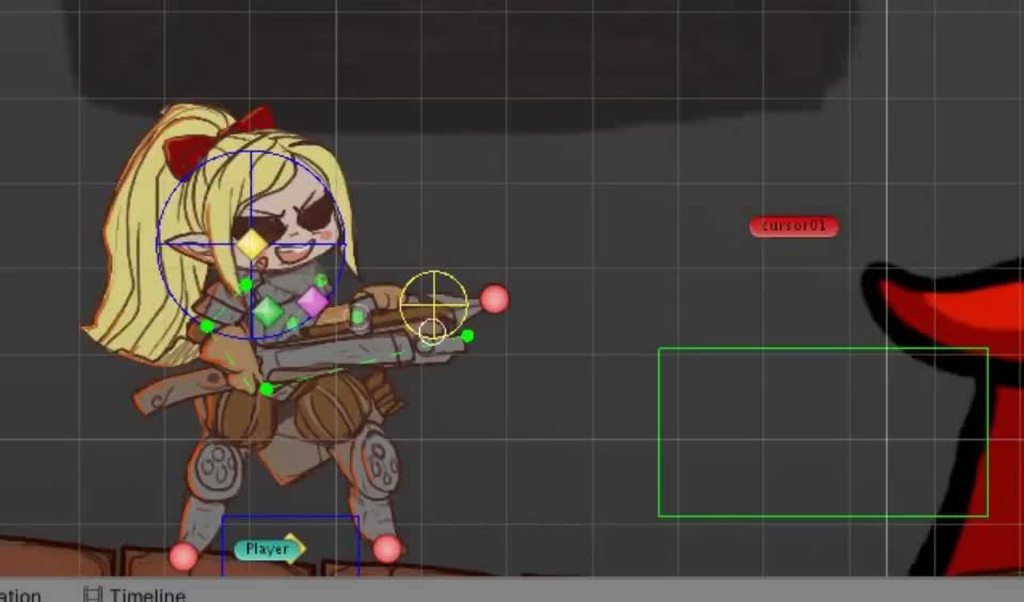

Not the easiest to decipher, I know
But the idea behind it is pretty simple(though it takes a lot of tweaking)
I also independently have the head follow the mouse using a basic aim constraint
You can have the body do the same if you wanted
glossy glen
Hey guys, what would be the easiest way to fire a method on the Start of Transition into another animation state?
 tepid socket
havent really looked too much into Unity animation, but can you use it for enabling/disabling colliders at certain frames? or is there another way to do that?
little sluice
Quick question: What's the best way to match the camera between Blender and Unity. If I'm going to animate fps arms in Blender, the camera lookd different from Unity even if they are at the same fov. What's the best way to match them so that I can properly animate?
hybrid tinsel
tepid socket
havent really looked too much into Unity animation, but can you use it for enabl...
You can just keyframe the enabled state of colliders, yes. If you want to key multiple colliders of the same type, you probably will want to add them to child objects so the animator can tell them apart.
hybrid tinsel
glossy glen
Hey guys, what would be the easiest way to fire a method on the Start of Transit...
Use a behavior script attached to the animation state.
 pastel gull
Hallo, incredibly new to animation, is it possible to blend 2? e.g. take torso animation bit from anim 1 and glue it to the legs anim of anim 2? Trying to create a new sitting anim with a dialogue anim I have, but the dialogue anim is standing
hybrid tinsel
pastel gull
Hallo, incredibly new to animation, is it possible to *blend* 2? e.g. take torso...
You can have multiple animations on separate layers, with different avatar masks.
pastel gull
hybrid tinsel
You can have multiple animations on separate layers, with different avatar masks...
Can this be done inside unity or will I need to use something like blender? 
hybrid tinsel
Assuming you have the animations already, you can do it all in unity.
upper hull
hybrid tinsel
You think this server is unresponsive?
Any Doubt !
twin musk
Why cant I add events or keyframes?

 indigo sky
Hey there, when I move SpiderLeg Gameobject, the whole leg move, and the ikTarget gets ignored, pls help
 twin musk
hello... I need help with my 3D mesh.. can someone help me or refer me to the correct channel?
thank you
 oak drift
anyone know why I can't add more frames but i can delete frames?

 royal lodge
oak drift
anyone know why I can't add more frames but i can delete frames?
royal lodge
oak drift
anyone know why I can't add more frames but i can delete frames?
Cuz you havent more frame.
royal lodge
Try increase sample

 dusky coral
I try to have the camera fixed looking the same way as my character, but when i start the project the camera is facing the opposite way. How do i fix this?


 proud oak
Guys quick question does my character need to be compatible with a rig in order for it to work ? Could for example download a model from one place and an animation from somewhere else and have the work together?
 brisk stag
is there a way to get animations to work with other sets of bones based on unity's assignments? i have a character that's not taken into mixamo, and i wanna get anims on them, but the skeleton bone names are all slightly different from what mixamo wants
hybrid tinsel
dusky coral
I try to have the camera fixed looking the same way as my character, but when i ...
You can rotate the camera gameobject?
hybrid tinsel
proud oak
Guys quick question does my character need to be compatible with a rig in order ...
If the rigs are both compatible with the mecanim humanoid OR have identical hierarchies and naming.
hybrid tinsel
brisk stag
is there a way to get animations to work with other sets of bones based on unity...
The names don't matter as long as the hierarchy fits the humanoid definition. You might need to manually assign the bones to the correct body parts in the unity avatar definition though, if unity can't automatically figure out the naming scheme.
brisk stag
i found out later that there's a different way to operate bones on humanoid rigs.
i just wish i could add other transforms, like eyes.
 hybrid tinsel
You can. They just won't be automatically retargeted.
 mint oak
How do I enable my MultiAimConstraints on runtime? I would like to enable the IK for aiming a gun when the player is actually aiming.
Whenever I update the MultiAimConstraint weight from an Animation Event, the weight does not change in scene.
RightHandIK.weight = 1f;
 mint oak
I have also tried setting the rig weight instead of the constraint and it still does not change realtime
Nevermind, I renamed my function at some point and it unlinked it from the animation clip 🤦
hybrid tinsel
That would do it.
You can also just directly keyframe the weight in the animation
 mint oak
hybrid tinsel
You can also just directly keyframe the weight in the animation
mint oak
hybrid tinsel
You can also just directly keyframe the weight in the animation
That's useful to know!
hybrid tinsel
You can animate most serializable variables with a few weird outliers.
 grizzled eagle
Is it possible to import blender animation events into Unity?
hybrid tinsel
unity doesn't do it by default EDIT apparently it does now
grizzled eagle
Is there some sort of addon I can get or something?
hybrid tinsel
No idea
grizzled eagle
Alright, well thanks for responding.
hallow rain
grizzled eagle
Is it possible to import blender animation events into Unity?
Yes
You very much can, they auto import lol
grizzled eagle
Really?
hallow rain
Yes
hybrid tinsel
Ah, hm. Someone should update the unity manual then
mint oak
When I turn on my animator component it messes up my gun raycast and I have no clue why.
I have my gun parented to the hand transform for testing. The gun fires a raycast from the barrel forward and then spawns an impact effect at the end of the raycast. The impact effect has a Line Renderer with position1 at hit.point and position2 at the MuzzleEndPoint.position
Full Code https://www.toptal.com/developers/hastebin/avusamaqah.csharp relevant code at line 59-79
Video https://streamable.com/04nnwn
Hastebin is a free web-based pastebin service for storing and sharing text and code snippets with anyone. Get started now.
 mint oak
I am also only playing one animation layer with no blending and rigging disabled
hybrid tinsel
mint oak
When I turn on my animator component it messes up my gun raycast and I have no c...
'messes up' in what way?
mint oak
hybrid tinsel
'messes up' in what way?
Sorry, there are two separate angles being rendered. The line should be parallel with the gun barrel but when I turn on the animator you can see another line being rendered perpendicular to the barrel
In the clip when I turn off the animator the line renders properly being parallel with the gun barrel
hybrid tinsel
when are you performing your code for handling the raycast?
You generally should be doing it after all animation, but you might be best off waiting till the end of the frame
Maybe something like IEnumerator MyRoutine() { yield return new WaitForEndOfFrame(); //fire }
Funnily enough, that was the problem I originally learned this server seeking help with, instantiated objects not lining up with their animated parent.
 zinc ferry
Hey! I was wondering if theres anyway I can fix this issue in Unity. I believe I know why it's happening but I don't know how to fix it. Basically, I've implemented an attack animation/mechanic to my current project but due to having to animate it in a larger file (due to the length of the tongue-whip) it moves across during the attack time. Is there any way I can fix this in Unity, or am I going to have to mess with my source file?
 modern portal
Does Unity have a workflow for importing Sprite frames of arbitrary sizes into an efficiently packed Sprite sheet or should I make my own Sprite packing algorithm?
hybrid tinsel
It does.
The sprite packer.
So I have this game object that has decided to just not keyframe at all suddenly.
Any keys I set seem to work until I play the animation and they are erased.
Very frustrating
hearty forum
Let’s not talk about empty sleeves with this.

 covert thicket
Hello, I am kinda new to using animations, I want the character to do a pushing animation when it comes in contact with an object. The object moves but my character kinda clips through the object. How do I fix this
This is how it looks rn

Is it possible to use a different collider for the player and use character controller's is grounded property?
 somber bolt
is there a way I can have priority for event transitions?
the transition from hurt -> death I want to trigger on death but play all of the hurt animation first
the transition from hurt -> idle has no condition right now and that seems to be ovverriding the hurt -> death transition

 astral epoch
how do i reverse animation effectively with trigger?
i tried setting parameter for speed
but when i reverse it, it takes a few seconds for the animation to reverse

its taking very long time to open door, but when i open and close frequently, it gets shorter

 broken beacon
Y’all
I need help!
For some reason! When I make a camera walking animation in first person, the Y axis doesn’t respond with the animation as I tried to look up and down, but the player can look right and left with the animation
 gentle wind
Is there any setup required for models themselves, meant to be animated directly (through code) using playables?
Or is it really as simple as, humanoid clips, humanoid rig, reference the animator in the graph.. etc
 ripe lynx
Trying to animate multiple gameobjects at once. I have a model of a machine I need moving parts on for 20 seconds; animation window plays fine but play mode is completely different timing?
 deep narwhal
i have 2 animations in blend tree they both play perfectly if they are sepratly but in the blend tree this comes

can u tell how to fix it?
 vernal oar
hey what animation software should i use for 2d pixelated art
twin musk
Just Rotate it
hybrid tinsel
near sierra
how do i get rid of this edge?
you can select it and delete it, or delete the middle point
hybrid tinsel
somber bolt
is there a way I can have priority for event transitions?
the transition from hu...
So add a condition to hurt>idle?
hybrid tinsel
gentle wind
Or is it really as simple as, humanoid clips, humanoid rig, reference the ani...
That's pretty much it.
deep narwhal
hey anyone there to help?
gentle wind
hybrid tinsel
That's pretty much it.
Hm had a feeling.. For some reason my mixamo rigged character isn't playing his state. The state itself is working fine, I have the graph visualizer and have gone through my code.. He just remains t-posed strange enough.
I read somewhere playables and mixamo avatars don't get along sometimes could that be it?
I know the two can work together I've seen an example of it, older version mind you so who knows.
hybrid tinsel
Is your avatar correctly configured? Does the animation play if you just use the animator without a timeline?
gentle wind
hybrid tinsel
Is your avatar correctly configured? Does the animation play if you just use the...
Yes it works fine in the traditional mecanim setup.
I'm new to playables, and its not very well documented, but I dont think I'm using the timeline at all? Everything should work from my mono script. It creates a graph, mixer, sets my blend weights/positions if need be evaluates graph etc but no reference to a timeline
I'm stepping Manually mind you as well
I thought it must be like a setup error on the mesh itself, like the animations have to be baked to the avatar or something
Might just go with Animancer.. Supposedly very helpful, built on playables and has more documentation so 🤷♂️
hybrid tinsel
Ah, I haven't used playables separately from timeline myself.
grizzled eagle
Hi, it seems using IK with the animation rigging package (two bone IK constraint) doesn't seem to match its exact target whilst an animation is being played. I want to get a character to punch a target using a jab animation, so I play the jab animation and slowly apply IK towards the target throughout the duration of the animation, but for some reason, by the time the punch is fully extended which is when the IK constraints weight is also equal to 1, the characters fist seems to be off to the side for some reason, why is this, does it have to do with some sort of ordering I'm not taking into account?
grizzled eagle
So I think the issue was actually another constraint I was using on the model (multi-aim constraint) I thought this wouldn't be an issue because the IK constraint comes after the multi-aim constraint in the hierarchy, but after disabling the weight of the multi-aim constraint the ik seems to work perfectly.
brisk stag
hybrid tinsel
You can. They just won't be automatically retargeted.
well, if i place one of these animations in the animator, make it a default, why can't i hit record and change something not part of the humanoid rig? (my Eg. is eye rotation)
hybrid tinsel
brisk stag
well, if i place one of these animations in the animator, make it a default, why...
'make it a default'?
brisk stag
animator entry goes to a state that has that animation as motion
 plucky jasper
Hey everyone this is an outside shot, but is it possible to mirror animations (on sprites)? Like lets say I have two arms I want to move the same way, but inverted. Is there a fast way to configure duplicate keyframes automatically or is that something I'll have to do manually?
mint oak
hybrid tinsel
You generally should be doing it after all animation, but you might be best off ...
WOW! This was spot on my problem, thanks for that nugget of wisdom 👍
hybrid tinsel
You can thank @celest crag for that one!
 karmic mango
I made this mock up in Blender, exported via FBX, and I have these extra 7 bones. What did I do wrong?
 hybrid tinsel
@plucky jasper the sprite renderer lets you flip the sprite
hybrid tinsel
karmic mango
I made this mock up in Blender, exported via FBX, and I have these extra 7 bones...
Are those extra bones or just extra gizmos being drawn by the bone renderer?
karmic mango
hybrid tinsel
Are those extra bones or just extra gizmos being drawn by the bone renderer?
How can I tell?
hybrid tinsel
Check your hierarchy
 willow cloud
How feasible is it to customize mixamo animations? There's a pack for axe-related animations, and specifically the reactions on those aren't as good as the archer reactions, and I'm considering trying to customize the archer ones to work well with the axe ones
 forest delta
How can I do that? Can anyone help? The 3D portal object is available, I just need the VFX animation from fragment to reassembled as seen in this video.
https://jumpshare.com/v/OnQyfV7iQlVFu3R7a5ry

@hybrid tinsel excuse me please can you help me?
hybrid tinsel
forest delta
<@172484507788771328> excuse me please can you help me?

Provided to YouTube by IIP-DDS
Where Does Food Come From · Josh Radnor · Kimiko Glenn · Megan Nicole Dong · Chris Diamantopoulos · Parvesh Cheena
Centaurworld: S1 (Music from the Netflix Original Series)
℗ Maisie Music Publishing, LLC
Released on: 2021-07-30
Producer: Toby Chu
Mixer: Phil Levine
Mixer: Justin Moshkevic
Music Publisher: Mai...
hybrid tinsel
willow cloud
How feasible is it to customize mixamo animations? There's a pack for axe-relate...
Well, I suppose that depends on how comfortable to are with animation 😄
light marsh
Is there a way to quickly duplicate an animation clip? When duplicate a clip in the project window with ctrl+d then rename it with the inspector the animation window warns that the clip name doesn’t match the file name.
hybrid tinsel
Weird. I never had a problem with that.
I'm gonna guess that some other issue is causing that error.
hybrid tinsel
light marsh
Is there a way to quickly duplicate an animation clip? When duplicate a clip in ...
Is it an .anim file you created in unity or a clip you imported?
light marsh
hybrid tinsel
Is it an .anim file you created in unity or a clip you imported?
anim file created within unity. Just wanted to create another animation based on another.
 celest dirge
Hey guys! i have a problem with my animator
the animations work and run fine
only 3 of them
but when i add other animations
they don't get called
if i press S
the backwards going animation doesn't get played
 earnest trail
i imported an animation from blender where i only recorded rotation. when i start the animation its position and scale are reset. how do i fix this?
 cunning sparrow
Could someone tell me why does my new model look like this? ( I am using an animator controller from another model whit a new avatar for this model )
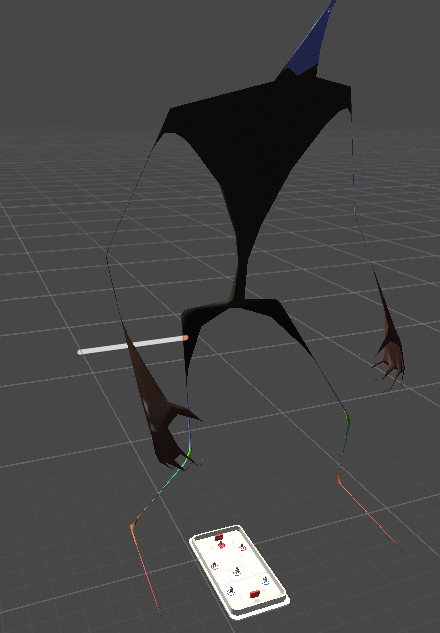
It has all the animations working but the mesh looks screwed up
Like it is stretched out just to fit the rig
The problem isn't in the scale but in the deformation. The original model is a hockey player
hybrid tinsel
cunning sparrow
Could someone tell me why does my new model look like this? ( I am using an anim...
Not gonna lie, that actually looks really cool
Add some particles and you've got a ripper of a bad guy
So both avatars are humanoid and correctly configured?
cunning sparrow
It looks like a siren head 😂. The original model is a hockey player. Actually the avatars are not humanoid they are generic. If I try to do the humanoid type it says that the Head is not found. Also skin weights is 4 bones
cunning sparrow
Manged to fix it, it was a scaling problem with Blender
 fervent sierra
Fellow Animation peeps, i need help! When i export a .FBX object animation to unity, the animation works in the preview but when i use it on a scene on the object, it just flips out crazy like the last few frames in. Past animations have worked before but now it just keeps happening :'0
Edit: Fixed it kinda, i drag and dropped the animation on animator thing which fixed it but i don't really understand why it fucks up with i copy and paste the animation to a clip
harsh ivy
So while making an animation, could you add a sprite and then remove it in the same animation? And also dynamically change its order?
harsh ivy
harsh ivy
So while making an animation, could you add a sprite and then remove it in the s...
no one?
hybrid tinsel
harsh ivy
no one?
Passive aggressive whining won't get people to answer any faster. As you can tell by the total silence since your first post, this channel is not super active at the moment.
hybrid tinsel
harsh ivy
So while making an animation, could you add a sprite and then remove it in the s...
Depends on what you mean by 'add.' You can't instantiate an object from an animation, but you can unhide one that is hidden. Sprite order is animatable.
 granite kite
is full body in vr hard to make
hybrid tinsel
No direct experience with it but I'm gonna guess 'yes' given how rare it is.
 zinc pine
Hey, how can i fix right hand ? Did i anything wrong with multi-aim cons ?

If i weight down to 0 it fixed but when i grab a weapon it's not following to aim
Can i change weight of this with code ?
hybrid tinsel
zinc pine
Can i change weight of this with code ?
Yes but you are probably better off changing the aim and up axis
zinc pine
How can i change up them ? @hybrid tinsel
harsh ivy
hybrid tinsel
Passive aggressive whining won't get people to answer any faster. As you can tel...
I didn't mean to be passive aggressive, my bad. But you said you could hide an object during an animation, correct?
harsh ivy
So if it's a reload animation, would I need to make a hidden backup magazine or did I understand wrong?
hybrid tinsel
harsh ivy
So if it's a reload animation, would I need to make a hidden backup magazine or ...
You can indeed have a hidden backup magazine and just show it when needed.
I am on mobile so can't see what you are bumping.
hybrid tinsel
light marsh
anim file created within unity. Just wanted to create another animation based on...
You should just be able to duplicate it, then.
You're doing the duplication inside unity, right? Not in the folder?
earnest trail
when i play animation using animator.play() i cant play it again?
hybrid tinsel
earnest trail
when i play animation using animator.play() i cant play it again?
Can you give more details? Is Loop Time enabled in the animation?
 kind sail
hi, i need help. i wanna make a crouching animation, 1 animation for crouching and the other one for standing up
how can i keep the animated objects in the crouched state and not just replay the animation over and over again?
hybrid tinsel
kind sail
how can i keep the animated objects in the crouched state and not just replay th...
Disable looping in the animation's inspector.
kind sail
yeah alright, that did the trick
but now i am stuck on another problem
the animation itself works fine now, but for some reason it won't set the bool to true or false when it should
 hybrid tinsel
kind sail
the animation itself works fine now, but for some reason it won't set the bool t...
hybrid tinsel
kind sail
the animation itself works fine now, but for some reason it won't set the bool t...
When should it?
hybrid tinsel
earnest trail
Doesn't answer my question, though frankly it looks like you have bigger problems
earnest trail
loop time isnt enabled
kind sail
hybrid tinsel
When should it?
i fixed it actually, all good!
hybrid tinsel
earnest trail
loop time isnt enabled
Then you need to set the time in your play() because it is already playing, unlooping, at the end.
earnest trail
okay i put a 0 and now it works. i dont understand why though
hybrid tinsel
earnest trail
okay i put a 0 and now it works. i dont understand why though
You just kept hitting play without rewinding first.
 cobalt tartan
My player kept on playing the animation even when i have a condition. Can anyone help me out?
 harsh ivy
if I have 2D game with a lot of weapons while inverse kinematics is in place, do I have to make a separate animation for each weapon in game? and how much storage would that take?
harsh ivy
cobalt tartan
My player kept on playing the animation even when i have a condition. Can anyone...
I believe you should have an idle state
cobalt tartan
an idle state as in an empty state?
i tried that and my model stop working, not being able to move
harsh ivy
as in an idle animation
that should play when the player is doing nothing
am I allowed to send links of videos?
cobalt tartan
i don't need an idle animation.
cobalt tartan
just trying to create a death animation.
harsh ivy
cobalt tartan
just trying to create a death animation.
and I have no idea how to do that
cobalt tartan
ok, thanks
 frail shore
can soneone dm me to exlpain aboiuyt animations i have watched videos and docs but i oulnd understand it pls
 upper cove
I've imported an .fbx file into Unity and i'm trying to get the animation exported with it to play. I have an animator controller that is set to play an animation on entry but the animation doesn't play. I know the animations exported properly because they should up in the preview. How would I fix this?
 abstract coyote
why does my character disappear when i press play
hybrid tinsel
When pasting bones from a differently sized character into the sprite window, is there a way to bring the skeleton into the sprite window?
I see all the bones are there but they are not visible due to being either too big or just offscreen

Alternatively is there a way to zoom out farther?
hrm. I found a way but I don't like it
gotta change the ppu of the sprite to some amount that makes the sprite properly huge enough
agile solstice
Huh, that's annoying
hybrid tinsel
I am also getting INCREDIBLY tired of how occasionally the apply button reverts instead
Like, 'I want to put a foot through the monitor' tired of it
hybrid tinsel
abstract coyote
why does my character disappear when i press play
Can you be more specific?
hybrid tinsel
upper cove
I've imported an .fbx file into Unity and i'm trying to get the animation export...
Not enough info to determine the problem. You're sure the animator is attached to the object and the animator is correctly set up?
lean lily
I cant figure this out


But it can clearly access it

What is the issue
I dont know what to add to "Object" ive tried everything
The animator is connected to the Player object, just like the script
Nothing makes sense im going crazy
Please someone
lean lily
... () is the issue
zinc pine
I'm using animations from asset folder directly and i tried to build the game everything work expect animations. I read a few article about rename them but how can i do that ?
When i check the animations there is a (read-only) text at their name
 hybrid tinsel
zinc pine
When i check the animations there is a (read-only) text at their name
hybrid tinsel
zinc pine
When i check the animations there is a (read-only) text at their name
imported animations are read only. You can change their names in the importer, or make a duplicate and rename that.
zinc pine
hybrid tinsel
imported animations are read only. You can change their names in the importer, o...
Yeah i did thanks. But i need re-arrange of my every animations right
Is there a replace option ?
hybrid tinsel
I'm not sure what you're asking
 lofty pine
Does anyone know how I can animate a part of a mesh with probuilder
zinc pine
@hybrid tinsel I duplicate them. Also from animator i change their motions with new anims not fbx. Also i change their animations name but still when i build it's not working
Have any suggestion ?
hybrid tinsel
zinc pine
Have any suggestion ?
I still am having trouble figuring out what you're saying.
hybrid tinsel
lofty pine
Does anyone know how I can animate a part of a mesh with probuilder
Not with probuilder directly but probuilder meshes can be animated.
lofty pine
ah ok
hybrid tinsel
Depends on what kind of animation you wanted to do, of course.
 upbeat silo
can someone help me set up animations with my player character
 hybrid moth
greetings
I'm about to make a mesh animation
is it easier to use blender then export it to Unity
or use some mesh deform add on to do the animation there directly ?
agile solstice
hybrid moth
is it easier to use blender then export it to Unity
or use some mesh deform add ...
Blender is a fully fledged animation tool, whereas Unity is not
I can't speak for addons but they're usually made for very specific purposes
If your use case is very specific and there's a perfect addon for that, then that's probably a good choice
If you just want to make mesh/character animation in general, you'll probably want a real developed tool for it
hybrid moth
about to make a low poly animal transformation
at that point it will address me to some mesh transformation animation.
I hope Unity be able to read animated mesh with FBX
since I'm avoid alembic @agile solstice
fresh moat
Hello, I used Mixao to rig a generic character as a humanoid, however there were extra bones in the generic model which are now gone. Is there a way to add bones to a humanoid model, or to preserve extra bones? I want to add a jiggle effect during animation.
 forest jay
fresh moat
Hello, I used Mixao to rig a generic character as a humanoid, however there were...
forest jay
fresh moat
Hello, I used Mixao to rig a generic character as a humanoid, however there were...
you can make the extra bones stand alone, once it's done
just parent it to the main rigs (torso e.g)
fresh moat
forest jay
you can make the extra bones stand alone, once it's done
just parent it to the m...
Thank you. My problem is that I deleted the extra bones so that I could rig the model in Mixamo. Is there a way to make a humanoid model without removing those bones? If not, how do I add them?
forest jay
anyway how to make our basic animation plays constant without getting slow at the first and at the end
forest jay
fresh moat
Thank you. My problem is that I deleted the extra bones so that I could rig the ...
but sorry it's my experience at blender not unity but probably they have similiar treatment
wait we don't get it, where is the extra bones came from ?
fresh moat
forest jay
wait we don't get it, where is the extra bones came from ?
The extra bones were already with the model. There were some extra bones that were meant to jiggle. I had to remove them to rig the model as a humanoid through mixamo. The model works fine in mixamo, however those bones are gone and the parts that were supposed to jiggle on the mesh are immobile.
So I am wondering can I re-add those bones in blender and still have the model work as a humanoid.
Or is there a way to converted a generic to humanoid without removing those extra bones in the first place.
forest jay
if the entire process ended at Unity
do you mind if you creates those extra bones on Unity
and parents it to the rigs you've been import from mixmo
fresh moat
forest jay
do you mind if you creates those extra bones on Unity
I didn't know that you can add bones to a mesh in Unity. That's awesome. And it doesn't effect the humanoid rig? Is there a tutorial on how to do that?
forest jay
there was some videos on yt, if it's a tail it would be related to Inverse Kinematic (I.K)
hybrid moth
I also need this either
agile solstice
thousands of animations?
There's multiple ways to connect animations and environment, and it kinda depends on the environment and how perfect you want it
If you've got a chest, you'd usually have to move the character to the correct position and rotation (or otherwise ensure they're in the right place) and start the animations on both character and chest
If you want character to grab a freely positioned object, you may need to use inverse kinematics at runtime to orient the character's arm towards the grabbed object
 rain ether
hello
i'm a developer, and i now i want to model a character and animate him, does anyone know any good ressources or how to get started (using blender, i have like an hour of experience with it)
i know i can google that, but i want to see if someone knows a good way
rain ether
or i think i should learn some more basics first
agile solstice
rain ether
or i think i should learn some more basics first
I recommend starting smaller
Modeling, texturing, rigging and animating are all involved processes on their own and humanoid characters may be the hardest subject matter out there
rain ether
thanks, so do you know any useful ressources for starting (using blender)?
agile solstice
rain ether
thanks, so do you know any useful ressources for starting (using blender)?
There's so many different things to learn, so the choice of best learning materials will vary by your goals as well as preference
I found Andrew Price's donut tutorial series good as it's fairly all-encompassing and fast enough paced for my attention span
I've heard plenty of people preferred more the blender courses by Grant Abbitt for Gamedev.tv, as they focus more on game environments and characters and spend more time in each feature, although those aren't free
rain ether
thanks, ill check the donut tutorial series


 agile solstice
 wintry mauve
Why my animator play only Idle_0 animation????
wintry mauve
Why my animator play only Idle_0 animation????
How are you transitioning to IdleSelector from Idle_0?
wintry mauve
agile solstice
How are you transitioning to IdleSelector from Idle_0?

Immediately as soon as I switch to the default state ( IdleSelector) through the StateMachineBeahviour, the OnStateEnter event occurs (in it I call the randomization of the Idle animation if the current state is IdleSelector)
such a script hangs on each state
 agile solstice
Well the transition looks right
So it just starts 0 again even if you're in IdleSelector and the Idle integer is 1?
Have you tested by setting Idle to 1 instead of random to force it go to 1?
I admit I'm kinda unfamiliar with putting scripts directly on states
Usually I think you would use a sub-state machine to have a state with multiple possible states, instead of a dummy state like that
My hunch is that if the dummy state has no motion the transitions might not work properly, but hard to say
wintry mauve
agile solstice
Well the transition looks right
So it just starts 0 again even if you're in Idle...
how can I get the number of Idle states of my animator, otherwise it turns out that I use the magic numbers 0 and N when randomizing animation, I would like to get a specific number of such transitions
hybrid tinsel
wintry mauve
how can I get the number of Idle states of my animator, otherwise it turns out t...
you can get all states and then iterate through them to find ones with 'idle' in the name I suppose
Or add a behavior script to each state you want counted

 wintry mauve
And how to set SubMacchine is a Default transition on BaseLayer
like this
wintry mauve
How do you randomize animations? for example, I did it like this, but in this case a problem arises: in this way it turns out that there is always a basic idle0 animation, which is always played and for everyone at once in the first place, as if the random itself appears only after this animation has completely played
well, let's say in the same way I want to make not an Idle animation, but a player's reaction (dance, jumps, claps). It turns out that all the characters (if it is a crowd of Persians) will first lose the dance (if this animation is set as the base one) and only then something else will randomize


You can make a dummy, BUT: then it will be funny, when switching from a reaction animation to this dummy, animations will not mix, well, from an idl to another idl through this dummy
abstract coyote
first time doing animation why does my character disappear when i add like the images to animation
why does the 2nd and 3rd keyframe now work

Not*
hybrid tinsel
define 'does not work'
 wet bison
How should I go about animating multiple weapons, basically, I am working on a fps/party game type thing, but I'm getting confused on a part for animation and how I should do it more efficiently. I want to implement viewmodel arms that hold guns in unity but how should I go about adding multiple guns with different animations? because by the time the game is in 1.0 there is 30 guns planned. all having a different quirk to them.
wintry mauve
How to randomaze reaction and Idle animations? I try to use sub state machines, but in this case I can't achieve correct mixing of animations, or correct randomization (you have to play at the beginning, always play the same animation)


 gentle wind
wintry mauve
How to randomaze reaction and Idle animations? I try to use sub state machines,...
gentle wind
wintry mauve
How to randomaze reaction and Idle animations? I try to use sub state machines,...
create a blend tree, give it a a random index through code when using it?
walking >> now idle, given index 0 - play blendtree idle 0.
idle >> walking >> idle again, index is 4 - play blendtree idle 4 etc
or however you want that randomized sequence to go.. could be done over time
just feed the animator an index
gentle wind
Ok good- I have never actually done it thanks for confirming 😆
hybrid tinsel
(Or just once, for objects that just need to pick a random loop once)
wintry mauve
gentle wind
create a blend tree, give it a a random index through code when using it?
And this way would work well to randomize a random reaction and a random idle and everything would mix well?
gentle wind
try it
wintry mauve
did I get the idea right?


 wintry mauve
gentle wind
try it
wintry mauve
gentle wind
try it
how to track that one animation of the blending tree to enable another animation IDLe, let's say the animation is played with index 2, it has ended. re-range the index and already play another animation in this blend tree
gentle wind
the state of which animation is playing would be controlled by your "threshold" eg index
@wintry mauve
how you do that for what purpose would be defined in script
wintry mauve
gentle wind
the state of which animation is playing would be controlled by your "threshold" ...
I understand, but I want to constantly play IDLE animation and each time a new one, how to track the end of one animation to change the index
gentle wind
if I'm not mistaken you can also create sub-trees which allow for blend trees inside blend trees
I don't understand the first part, the second part is something like..Anim.GetCurrentAnimatorStateInfo(
and then check if it's finished or whatever you're trying to do
these questions are all very google friendly
wintry mauve
I don't understand the first part. First part???
gentle wind
I want to constantly play IDLE animation and each time a new one,
You want to constantly play a blend tree (idle) each time (idle clip is finished) move to the next one?
Ok, so every time you change an index and the blend state reflects that, change it again..
 grim grotto
I'm having an issue with Unity's animation rigging that's driving me a little bit nuts. Animator states are no longer writing defaults on transition, causing animated values to persist into other states.
This doesn't seem like intended behavior at all.
I sort of worked around this by adding a single-state "default" layer with every property keyed in under all the override layers but this feels really hacky and I don't know what kind of overhead that is if I have to do it for everything that needs a rig
wintry mauve
How to get all states in Blend Tree???
 snow galleon
yea so i tried playing with exit time and transition duration
nothing works
the player still slides
 restive ibex
post your context for this channel. Are you directly playing animations still or using transition conditions?
 restive ibex
alright, let's see the full transitions inspectors
 restive ibex
and walk>idle?
 restive ibex
well then, gotta fix that. Find the gameobject with your Animator component and you should see a field to select your animation controller inside there
 restive ibex
are you re-assigning the Animator inside your script to something else??
snow galleon
not that i know of
restive ibex
do you have animators on other objects that might be the cause of that warning?
snow galleon
i only used Animator for reference
No, this is the only gameObject i have so far
i mean
with scripts
i have decorations and stuff
 restive ibex
can you show your code again? I briefly saw it before you deleted it
snow galleon

wow unity crashed
and i didnt save
how nice
not important, the warning is gone
restive ibex
sigh ok that's great. So when you play and you hold one direction, it eventually starts playing the animation for walk? did you say you fixed it before by disabling exit time on the idle > walk transition?
snow galleon
restive ibex
*sigh* ok that's great. So when you play and you hold one direction, it eventual...
yes it does start playing the animation for walk
but in the beginning it stays the same and slides
and no, turning exit time off didnt fix it
restive ibex
I have something like this for one of my test projects and it seems to work.

Are you sure your "Walk" animation doesn't have a few frames where it stands still in the beginning?
snow galleon
try to spam LEFT button on ur device, but dont hold it
snow galleon
restive ibex
Are you sure your "Walk" animation doesn't have a few frames where it stands sti...
i am sure
snow galleon
snow galleon
try to spam LEFT button on ur device, but dont hold it
does the animation play every time you click?
restive ibex
are you suggesting it works for you when you hold left, but slides when you quickly tap left repeatedly?
snow galleon
"works" is a strong word, but something like that
i can see the player sliding for a split second
but yea your statement is correct
restive ibex
well the second part of that will have to do with the exit of the transition from walk > idle
in that case try setting has exit time with an exit time of 1 for instance (in your walk > idle transition), to make sure it always completes at least one loop of the walk animation. (or like 0.5 if you want one of the two steps to play)
snow galleon
but if i increase exit time, the sliding lasts longer
restive ibex
in walk > idle?
snow galleon
ah no
k ill try that
yea now its sliding every second
not every second but every 2 seconds maybe
restive ibex
my dawg, double check your actual animation to make sure it loops nicely (and loop is enabled where appropriate)
btw you can also watch the active animator state during your gameplay to get a better understanding of which state it is in. Just select the GameObject the animator is on. For instance:

if the timing of the state looks correct/smooth w.r.t. your movement, but not the animation itself, it would suggest to me that there is an issue with the individual animation
snow galleon
How do i set my JUMP animation to only go off once, and not loop?
restive ibex
in the animation itself (not the controller), disable loop time. I saw what you said in #💻┃code-beginner but thought you had ghosted me. Also you can do something like start a coroutine that sets the "Jump" parameter to false on the next frame if you don't want it to re-enter the jump state. On transitions FROM jump to other states you might want to enable exit time, and set it to 1 if you want it to complete the jump animation before it transitions back to another state.
sleeping now, gl
snow galleon
okay thank you
twin musk
im having this problem where my character moves normally without animations
but when i enable animator, the animation works but my character doesnt move and if i apply root motion, the character moves in y axis only and not in x axis


i tried many things but none of them seem to work
abstract coyote
why does my 2nd and 3rd animation not work

the first one works but the 2nd and 3rd make him disappear
i maybe fixed it but how do i make it stop at the 3rd
i did not
abstract coyote
i was wondering if theres maybe 2d templates for animation since i suck at drawing
zinc pine
Hey, When the object die and animation start, it stays on the air because of collider. How can i fix that ?

 lyric rover
Can someone help me with the Animation... The animation i did in Blender slides in Unity : https://player.vimeo.com/video/718739362?h=9d26d09092
I dont know the reason behind it.. i tried it all.. i baked the animation and exported it as it should from Blender to unity.. but the animations are differe from one another
I got almost close to fix the issue.. i turned off Resamble Curves and set the possition error to -10..... but still.... slide does happen
agile solstice
<@&502884371011731486>
gentle wind
zinc pine
Looks like it's because of that character's mesh
Its not because of the mesh. The mesh has no collider to elevate itself. You need to bake your animation Y it looks like
 gritty frost
!warn 603578962664226816 This isn't a platform for you to promote your unrelated projects.
 dusk valeBOT
 Warning logged for SonicGamer1180#8216. I couldn't DM them.
zinc pine
gentle wind
Its not because of the mesh. The mesh has no collider to elevate itself. You n...
I found that randomly while desperately searching stuff. Thanks anyway !
ripe lynx
This happens after I copy and paste animated gameobjects from one scene to another. I lose the animation
Also, if I only select certain gameobjects from the hierachy, with animations, they don’t export in my fbx file

 deep thistle
ripe lynx
This happens after I copy and paste animated gameobjects from one scene to anoth...
deep thistle
ripe lynx
This happens after I copy and paste animated gameobjects from one scene to anoth...
the animations are linked to gameobject names, if the names aren't the same, it will not work
but if you're copying the whole gameobject, it should work 🤔
twin musk
Hi so I'm trying to make my first reload animation and I keep getting this warning:
The AnimationClip 'ReloadAKM' used by the Animation component 'AKM' must be marked as Legacy.
UnityEditor.EditorApplication:Internal_CallUpdateFunctions ()
But then when I set it as legacy I get this warning:
The legacy Animation Clip "ReloadAKM" cannot be used in the State "ReloadAKM". Legacy AnimationClips are not allowed in Animator Controllers.
UnityEngine.GUIUtility:ProcessEvent (int,intptr,bool&)
Does anyone know how to fix this? Thanks
 umbral quarry
here is the power of timeline
learn how to combine as many animations as you want and make them 1 standalone animation right inside unity using all free tools , make .fbx file and export to any other 3d engine that supports fbx format.
in this short tutorial you will learn how to combine multiple humanoid animations and make them as one playable animation right inside the unity3d engine
 fallow dew
Can anybody tell me if animation rigging allows to limit joints to only rotate around one axis? E.g. having a chain IK but each of the bones can only rotate in one axis?
zinc pine
Hey

How can i change my object position with landing place after jump
Why it's not moving with object position ?
After he's animation done he teleporting back place
agile solstice
zinc pine
Why it's not moving with object position ?
If nothing moves the object position, it won't move
"Root motion" is used to solve this problem
Or you can "teleport" the position to the landing position at the same time when the animation ends, but the position/collisions won't match during the leap
zinc pine
I will check it thanks
 echo sundial
hey
i have a unity animation that plays once on trigger
my objective is make it go in reverse once, i managed to get it to play in reverse but it keep looping infinitely
anim.SetFloat("Speed", -1);
how can i make go reverse only until it reaches the initial state?
hybrid tinsel
zinc pine
How can i change my object position with landing place after jump
You can use animator.MatchTarget() to have the jump land in a specific spot as well
Though I believe that that requires root motion to be enabled as well
 vivid barn
I have animation compression off and simplify in blender export settings at 0 but for some reason, my animation is still jittery. Any ideas?
agile solstice
vivid barn
I have animation compression off and simplify in blender export settings at 0 bu...
What kind of jittery?
vivid barn
agile solstice
What kind of jittery?
Like this type of jittery
Trimmed a little early by accident. Basically, the hand stays on the object in blender but decides to slide around the object in unity
agile solstice
Hmm, I would've expected compression and simplify to be the culprit
@vivid barn Inaccuracy problems are most often inherited from some (or multiple) bones up the hierarchy
If all else fails you could look into securing the extremities into their place/motion with IK
vivid barn
I'll have a look through my rig for any problems and come back if I find a fix
 snow depot
@vivid barnmake sure unity isn't reducing the number of keyframes
 split jolt

basically I want the gun to immediately transition from reloading animation to idle when fired while reloading
no smooth transition
just immediate
but it isn't doing that
 hot sphinx
split jolt
hot sphinx
split jolt
you can edit the settings to remove the exit time and the transition time in the transition from reload to idle
 signal cloud
Anyone mind helping me out with a small issue? I'm working on gun animations at the moment and I seem to have this weird issue where if the magazine moves out of sight the whole gun disappears
I was testing it and I confirmed it's whenever the clip/mag moves out of sight of the camera the whole model vanishes
agile solstice
signal cloud
Anyone mind helping me out with a small issue? I'm working on gun animations at ...
The magazine and gun are a part of the same skinned mesh renderer, right?
You can use "update when offscreen" option on skinned mesh renderers to solve this kind of issue
It's more costly than modifying mesh Bounds to be large enough to prevent accidental frustum culling, but if in case of viewmodels I don't think it makes a difference
 gentle sigil
Hi, I'm currently doing a top down thirdperson controller using the Character Controller component and by moving it with Move() function and i want to add root motions to my movement for attacks animations.
The problem of course is that after the end of the animation, the player position go back to his initial state and the camera is not following him nether.
// I also wanted to use that kind of method for the dash animation but i ended doing a Coroutine where the player go forward but in that case, the player can go threw walls and thats why i check with a raycast if there is a wall but it doesn't work everytime ( check in fixedupdate + OnTriggerEnter lol )
My current method 🙁 :
 abstract coyote
omg i cant animate i suck so much at drawing
cinder gale
I have a parent and a child. The child has an animator which makes it rotate. My parent rotates along with it, but I don't want that. How can I fix this?
 cedar ruin
What kind of animation is that? Was it made in unity? Provide some relevant details when you ask a question.
A screenshot could be helpful
cinder gale
It was made in Unity indeed
Hold on
So the sprite child has the animator but it also rotates the parent


 cedar ruin
From the look of it, it shouldn't be affecting the parent.
Assuming you don't have an animator with the animation on the parent as well
cinder gale

This is the parent
It makes my wallcheck child move along with the rotation of the parent, which is not ideal. So that's my problem really.
I found a solution by freezing the rigidbody Z-rotation
 stuck blade
hi, i have a problem where my 'shoot' animation only plays a frame before switching to another animation, i'm pretty sure the reason for this is that other animations like idle will always play if the horizontalInput is 0, not allowing the shoot animation to play, so how would i work around this problem?

 glad lynx
@stuck blade usually you look at the animation state machine running in a window while the game is playing and just see where the ping is going when it skips past the animation.
It could be a number of things. Most likely Any State is popping something off and you just need a boolean to ensure that doesnt happen during a certain animation
stuck blade
glad lynx
<@683990933024538636> usually you look at the animation state machine running in...
it is not a problem with the animator tab its more like the game plays the idle animation due to the criteria for it being true so it skips the shoot animation after showing only a frame of it so it can be in the idle animation(if this makes any sense)
glad lynx
@stuck blade yea one solution to that is just having shoot=False as something needed for the idle state
stuck blade
k, will try that, thanks!
 steady cliff
Does anyone ever set up a physics engine interaction and then make an animation out of it?
Like just to get something realistic looking, then like copy it with keyframes. I'm new to animation just thinking about that.
twin musk
im trying to make a top-down 3D player controller, and im having trouble getting the animations to work properly.
the controller lets the player use "WASD" to move, and the mouse orientates the player. The mouse doesnt lead the player to walk in its direction. for example:
if the mouse is on the left side of the screen (player is facing left) to move forward, you have to press the "A" key, "w" = right "S" = left and "D" = back.
the issue im having is trying to figure out how to make the proper animations play, depending on which direction the player is facing. im using a 2D direction blend tree for the animations,
and the animations work just fine when the player's rotation is 0,0,0. but i cant figure out how to get the animations to work when the player is facing in other directions
 thorn mason
hey, this always confused me lol
does write default refer to the default state? so that other states resets based on whatever is in the default state?
 signal cloud
agile solstice
You can use "update when offscreen" option on skinned mesh renderers to solve th...
signal cloud
agile solstice
You can use "update when offscreen" option on skinned mesh renderers to solve th...
This was exactly it, thank you for the help!
abstract coyote
how would i make a sword stay on the same hand when the character turns
this just happens

 abstract knot


 glad lynx
@abstract knot setting the parameters of the animator controls the states. then you go for example for boolean animator.SetBool("variableName", True) which changes the variables inside the animator
hybrid tinsel
gentle sigil
Hi, I'm currently doing a top down thirdperson controller using the Character Co...
If you have root motion animations and have root motion enabled, the player should no go back to their initial state at the end
hybrid tinsel
thorn mason
hey, this always confused me lol
does write default refer to the default state? ...
No. It sets whether properties that are aniamted by the previous state but not by the current state get reset or not.
hybrid tinsel
steady cliff
Like just to get something realistic looking, then like copy it with keyframes. ...
You can just record a physics object using the animation recorder.
steady cliff
hybrid tinsel
You can just record a physics object using the animation recorder.
I'm curious on how that is done. I imagine that if you record and run, wouldn't that capture like a billion keyfames?
zinc pine
I have a word space canvas for hp bar inside the enemy folder. That because of that it's rotate with enemy direction. Can i somehow fix that to player direction ?
 hybrid tinsel
steady cliff
I'm curious on how that is done. I imagine that if you record and run, wouldn't...
hybrid tinsel
steady cliff
I'm curious on how that is done. I imagine that if you record and run, wouldn't...
No worse than motion capture
hybrid tinsel
zinc pine
I have a word space canvas for hp bar inside the enemy folder. That because of t...
You have to rotate the game object to face the player
agile solstice
abstract coyote
how would i make a sword stay on the same hand when the character turns
Are you negating the gameobject scale when you turn?
 noble spindle
hi
so I've finally finished the character controller and another important game mechanic for my fps project and I wanted to get into animating hands in blender, but all the tutorials I've seen on Youtube seem to have a a rig with a sophisticated setup that makes it look like they have implemented an IK system but I don't find one clearly stating the setup of their models apart from rigging for animation.
would someone please help me understand how exactly their models are setup, or preferably in my case how do I set mine up.
Ill be using hands for guns where the right hand will have the pistol position and the left hand would act as a support holding the right hand from below something like this

 spare parcel
Hello there,
I need some animations that I can't really find on the web, and even on the asset-store, so any advice where to find:
Drunk Animation, Puke, to crawl and faint and standing up from faint?
 sand meadow
Hey guys, we are experiencing some problems due to Root Motion. Is there a way to import and configure new clips for Root Motion (as Animation tab in Import Model) later than initial import? We add new animations every day! Thanks in advance
Apart from that, some advices on Blender to Unity animations for importing IKs? Our feet do weird things that don't show on preview... 😫
 wide peak
so i imported an fbx model from blender, it has animations built into it so i can use the humanoid animations. It also has an additional bone (it doesn't go into humanoid settings). It's basically a gun hold bone so i can stick any gun mesh in there and it will be already animated. But for some reason when i imported it into unity the gun bone isn't moving. I changed the mask settings to include it but it still doesn't work. It also only doesn't work in play mode, in animation view everything is fine.
abstract coyote
agile solstice
Are you negating the gameobject scale when you turn?
scale what do you mean?
agile solstice
abstract coyote
scale what do you mean?
It's a common technique to negate the horizontal Transform scale of a gameobject when making it turn in 2D space, though this can cause unpredictable transform changes to be passed onto child objects like weapons
abstract coyote
so how would i make it be on his hand instead of flying when he flips his x
 boreal rain
is there an easy solution to add some kind of offset to my AI's so that the animation isnt played in sync?
I couldnt find a solution
agile solstice
abstract coyote
so how would i make it be on his hand instead of flying when he flips his x
The first step would be to figure out why it happens, which is why I probed about if you're scaling the transform in some way
abstract coyote
no and its because the sword doesnt move it only flips
agile solstice
Usually you would move the transform that serves as the attachment for the weapon to the other side of the character when they turn, using specific coordinates and then flip the weapon sprite
But when flipping sprites consider that they flip around their pivot point (defined in sprite editor) which can add an unpredictable offset
agile solstice
boreal rain
is there an easy solution to add some kind of offset to my AI's so that the anim...
played in sync how?
boreal rain
agile solstice
played in sync how?
I have multiple soldiers and the walking animation is completely in sync for everyone of them
but that looks unnatural
agile solstice
boreal rain
I have multiple soldiers and the walking animation is completely in sync for eve...
You can set animation time to random offset with code like this
Animator anim = GetComponent<Animator>();
AnimatorStateInfo state0 = anim.GetCurrentAnimatorStateInfo(0);        //Get active animation state on layer index 0
anim.Play(state0.fullPathHash, -1, Random.Range(0f, 1f)); //Play that animation starting at random normalized time between 0f and 1f```