#🏃┃animation
1 messages · Page 91 of 1
 simple seal
 glossy plank
anyone know how i can make a simple looping animation for an arrow
basically i want it to move left and right slightly to indicate to the player they need to move here


 stuck dew
Anyone know how to fix this issue? My animation states are blank, this was the only fix I could find and it didn't work.

 static prism
stuck dew
Anyone know how to fix this issue? My animation states are blank, this was the o...
static prism
stuck dew
Anyone know how to fix this issue? My animation states are blank, this was the o...
you did not mention the issue
stuck dew
static prism
you did not mention the issue
My animation states are blank
static prism
but animation node / state must contain the keyframe of object
 drifting holly
my ghost is just falling through the terrain
static prism
drifting holly
my ghost is just falling through the terrain
do you have collider in your ghost ?
drifting holly
static prism
do you have collider in your ghost ?
yeah
i also tried baking terrain
static prism
do you have rigidbody with ghost ?
 static prism
is the initial position of the player above the terrain ?
 stable wyvern
not sure how to go about this, but I'd like to take an existing attack animation fbx, clip it before the transition back to idle, and replace with a new idle pose... is this possible? how?
drifting holly
static prism
is the initial position of the player above the terrain ?
yes, sorry was busy doing other things
drifting holly
static prism
is the initial position of the player above the terrain ?
oh wait
not it's not
I don't know how to fix that though
 pliant radish
I want to transition my idle anim to a walking anim. The animation changes whenever the bool is checked but I want to do this by pressing either of the adws keys. How?

 flat root
pliant radish
I want to transition my idle anim to a walking anim. The animation changes whene...
flat root
pliant radish
I want to transition my idle anim to a walking anim. The animation changes whene...
you can do this many ways, the simplest is just check if you are pressing the movement key set bool to true else don't , or you can just set it by check if magnitude of player is larger than say 0.01 if you got cc.
psuedo : if (input.move != Vector2.zero) isMoving = true;
pliant radish
flat root
psuedo : ` if (input.move != Vector2.zero) isMoving = true;`
and where do I write this code? Is it in the same script as my player object and if so...
 pliant radish
flat root
you can do this many ways, the simplest is just check if you are pressing the mo...
pliant radish
flat root
you can do this many ways, the simplest is just check if you are pressing the mo...
btw I am 100% new to C#, I have literally no idea how I got here 🙂
flat root
if (movement != Vector2.zero) isMoving = true;
flat root
pliant radish
btw I am 100% new to C#, I have literally no idea how I got here 🙂
You can see your **movement **is already a variable so you check if it's not zero , meaning moving
flat root
pliant radish
and where do I write this code? Is it in the same script as my player object and...
You would add that into your Update(), Update is a default method inside of unity executes on every frame
pliant radish
flat root
You would add that into your Update(), Update is a default method inside of unit...
as far as I understood this is what u told me to do (tried both isWalking and is Moving) and both gives me the same error


nono nvm
flat root
pliant radish
as far as I understood this is what u told me to do (tried both isWalking and is...
well it was kinda psuedo code to give you an idea how to do it, the error is telling you exactly that. You don't have a bool name isWalking, you need to create one
don't forget to add an else to set it to false
then you do something like animator.SetBool("isWalking", isWalking);
again, you need to reference the animator too
so above *Start() *just like movement and the bool is walking you do something like [SerializeField] Animator animator;
pliant radish
ye no this to complicated it just says IsWalking doesn't exist. Mby I should have followed a tutorial strictly to learn at the start, I just sorta mooshed code together like a html document without knowing anything
its not u, I rly appreciate the help but I'm completely new
flat root
pliant radish
ye no this to complicated it just says IsWalking doesn't exist. Mby I should hav...
yeah that's always a recipe for a bad time to just copy and paste
pliant radish
none of this makes sense to me, but thanks for the help either way. I'll just start anew tomorrow
pliant radish
flat root
yeah that's always a recipe for a bad time to just copy and paste
but either way, thanks alot have a great day/night
flat root
pliant radish
but either way, thanks alot have a great day/night
No problem. It really seems overwhelming at first but it gets better with time. Start small.https://www.youtube.com/watch?v=Lu76c85LhGY&list=PLB5_EOMkLx_VHKn4IISeNwhlDrb1948ZX (here is a useful playlist)
stable wyvern
stable wyvern
not sure how to go about this, but I'd like to take an existing attack animation...
yes I could do an animation transition but the original idle is still baked in... is this possible to splice out?
 silver nest
Hello, how can I animate the toes using mecanim? Help is appreciated
flat root
silver nest
Hello, how can I animate the toes using mecanim? Help is appreciated
do you mean move the feet only in animation?(use avatar mask) or you mean the bones ? use IK with Animation Rigging
silver nest
flat root
do you mean move the feet only in animation?(use avatar mask) or you mean the bo...
thxm, nope, I mean move the feet fingers in the animation
silver nest
Is that a preview package?
flat root
not anymore, ~~i just sent older link ~~ fixed
silver nest
but that is not using mecanim is it?
flat root
silver nest
but that is not using mecanim is it?
IK uses your avatar bones and overrides any animations and you can record your own by animating the target transforms
silver nest
flat root
IK uses your avatar bones and overrides any animations and you can record your o...
thx, yeah I use IK extensively but not with Animation Riggin
my problem is how can I animate the toes using only mecanim
I am able to animate the hand fingers but I dont see any animator property similar for the feet fingers
flat root
silver nest
I am able to animate the hand fingers but I dont see any animator property simil...
did you map them ?
silver nest
there is no option to map them in the avatar editor
flat root
silver nest
there is no option to map them in the avatar editor
can you show your bones setup on the model feet
silver nest
they arent setup because there are no option to set them

Left and Right Hand have that option, when you click on the buttons it takes you to configure them

but there is no such option for the feet
Im not sure what is wrong
silver nest
the only thing there is the foot and toes but toes is a parent of all the toes

I dont want to mask them, I dont intent to move them separatedly as a different animation
I want to be able to animate each feet finger on the main layer animation
similar how I do with the hand fingers
On the Animator I can add properties for the hand fingers:

but there are not such for the feet fingers because they are not configured on the avatar
it doesnt give me the option to configure them
also on the avatar muscle configuration I see the hand fingers

but nothing for the feet fingers
 strong coral
how do you import animations for a cvharacter that changes between having a weapon and not? do you bring them in as a single fbx or do seperately in unity?
 lilac minnow
Are there comprehensive and in depth Tutorials for Making animations inside of Unity and how to handle the controller types anyone would recommend.
I feel like I'm missing out on something because when i create a Animation it also creates a controller... but I can't seem to re-use that very same animation in a different controller
More excitingly. When I create an animation in the controller where its needed, but delete it in the Base Layer before putting it in the layer it's supposed to go, the Animation doesn't work anymore either.
Is my version Buggy or is this "Just Unity things"
 agile solstice
lilac minnow
Are there comprehensive and in depth Tutorials for Making animations inside of U...
agile solstice
lilac minnow
Are there comprehensive and in depth Tutorials for Making animations inside of U...
A "controller" is functionally a collection of animation clips used by an animator component, and the state machine to blend between them which is why it's needed
You can use clips between controllers
lilac minnow
agile solstice
A "controller" is functionally a collection of animation clips used by an animat...
I can see why it's needed. And it creates one when I just go into Create -> Animation.
But for this project I can't use that animation in a different controller anymore.
When I started with the project I think I just created my folder hierarchy, created Animations inside of the folders using the Controller that gets generated alongside, then deleted that controller and simply dragged the Animations into the controllers that I was actually using afterwards. But that doesn't seem to work anymore...
 hybrid tinsel
silver nest
there is no option to map them in the avatar editor
hybrid tinsel
silver nest
there is no option to map them in the avatar editor
Mecanim doesn't map the individual toe bones, so you would have to animate the transforms directly.
hybrid tinsel
lilac minnow
Are there comprehensive and in depth Tutorials for Making animations inside of U...
You should be able to reuse animation clips in a different controller, as long as the hierarchy is exactly the same. Unity animation clips are based on relative paths(relative to the gameobject with the animator component.)
lilac minnow
hybrid tinsel
You should be able to reuse animation clips in a different controller, as long a...
That's what I thought too.
But as soon as I delete the Original (generated) controller the Animation switches from "Body: Skined Mesh renderer" to "Skined mesh renderer" on the properties and it's not gaining the "Body" piece back. Despite it being the same mesh in the same prefab on the same position in the Hierarchy.
Guess I encountered something that I call a "gatekeeper problem" then.
hybrid tinsel
Coming up with a cute name for the problem is counterproductive at this stage, I think.
What are you animating on the skinned mesh renderer?
There might be some quirk there.
lilac minnow
Blendshapes
I now know how to animate the stuff I want to animate but it feels more like a work-around than a direct approach to it.
But since I'm also pretty new to Unity there might be something I started to overlook, that I have not overlooked in the past? I dunno. I can stream or make a short YouTube video if need be
hybrid tinsel
Hm. Blendshapes might be the problem; Unity has a lot of quirks related to blendshapes.
lilac minnow
I see
For someone taking their first steps in Unity it sure is a very quirky programm...
When I made my first Blendshape animations in Unity I was able to click the body mesh without the Animation window resetting... That stopped being the case at some point for some reason so I had to lock the Inspector on the Body, then prep the Animation recording which would work just fine..
And I call those "Gatekeeper problems" because it feels like any Programm has those. Issues a newcommer runs into that are so specific and so incredibly rare no one ever heard of them. But once overcome they never happen again. I've had those "gatekeeper problems" in Blender, SUbstance and zBrush. They take hours or even days to figure out. But once you managed to solve then, they just... don't happen ever again
hybrid tinsel
nods.
Is the gameobject with the meshrenderer the one with the animator component on it?
lilac minnow
I put it into the Prefab
hybrid tinsel
Is it just those references to the meshrenderer breaking, or is it others as well?
lilac minnow
Only those. Though they are also the only ones I'm using. It's a VRChat avatar. So the "normal" animations and movements happen at Runtime. The fancy stuff such as face expressions and stuff happens with Blendshapes in my particular case
hybrid tinsel
...See, I really wish people would mention it was a VRchat thing from the start
Because those have all sorts of weird rules and I know almost nothing about them >.>
lilac minnow
Okay. But shouldn't the base stuff work regardless? Like the recording of animations and making them work inside of Unity?
Or does importing the VRC SDK in Unity mess with how Unity works? :o
 river quarry
Can't add animations to states after connecting them to other states. Is anyone else having this problem?

using Unity version 2020.3.31f1
 calm pasture
Henlo!
I have a question, does anyone know how to animate a sprite with 8 frames.
And then anchor equiped items on specific spots?
I cant really use the default animation because it does 60 frmes,
I really want it to be snappy with 8 frames only.
hybrid tinsel
lilac minnow
Okay. But shouldn't the base stuff work regardless? Like the recording of animat...
I am not sure, since I don't use VRC. But I see a LOT of people in here having VRC problems that I don't see otherwise so it makes it really hard to debug.
So it is more a complicating factor that I am not sure how to account for?
hybrid tinsel
calm pasture
Henlo!
I have a question, does anyone know how to animate a sprite with 8 frame...
What do you mean 'the default animation'?
calm pasture
The animator and animation
hybrid tinsel
Unit animations are based on time, not frames. So you can place a frame at any time you like.
You can also adjust the sampling rate to control how many frames are played per second.
As for attaching things to specific points, there's really no way other than to keyframe the points.
calm pasture
Ohhhh oke oke, thanks for the insights @hybrid tinsel
lilac minnow
hybrid tinsel
I am not sure, since I don't use VRC. But I see a LOT of people in here having V...
Fair! And it probably doesn't help that a lot of those people are new to Unity, or new to anything 3D. Atleast... looking at other VRChat related servers I feel that a lot of people start their 3D carreer with VRC
hybrid tinsel
It does seem popular. I'm kinda surprised there isn't a discord for troubleshooting it.
 stone nymph
Hello, I am trying to use the animator to play 4 different animations on unity but I am really struggling. Is there someone that can help me with it ?
lilac minnow
hybrid tinsel
It does seem popular. I'm kinda surprised there isn't a discord for troubleshoot...
There are several actually.
But I thought this was a Unity issue, not a VRChat one since I'm handling the Unity part of it. In addition to that I did ask there (and the other VRC Avatar creator servers I'm in) but didn't get an answer that was actually related to my problem, if any at all >.>
hybrid tinsel
Gotcha.
It MIGHT be a unity issue; like I mentioned, I know that blendshapes can be fiddly.
So I'm not entirely clear- when you say it is only the blendshape references that are breaking, but that those are all you use, did you mean that you just don't have non blendshape keyframes so you don't know if they break, or that they do work but you don't need them?
And also, can you just re-connect the correct meshrenderer by selecting the broken reference in the animation window and hitting f2?
lilac minnow
hybrid tinsel
So I'm not entirely clear- when you say it is only the blendshape references tha...
I only have Blendshapes to test for Deforming stuff.
I just made a test animation for a Material switch just to test (Though that's talking to the Skined Mesh renderer as well)
Got into a folder -> Create -> Animation -> Open -> Selected my Body (The mesh inside the Prefab) -> Hit Create again (in the Animation window) -> Created the Animation using the Record Button -> Deleted the Animation controller that gets generated (Animation breaks) -> Created a new Layer in another Controller -> Put Test Animation there -> Still broken
lilac minnow
hybrid tinsel
And also, can you just re-connect the correct meshrenderer by selecting the brok...
Not sure what you mean by that. Hitting F2 usually triggers the Rename function, but doesn't seem to do anything
stone nymph
when i press play, i can see my character take the pose of the animation, however it doesnt move at all, its frozen in place. Any suggestion ?
hybrid tinsel
stone nymph
when i press play, i can see my character take the pose of the animation, howeve...
Do you have an any state transition transitioning into that state every frame?
hybrid tinsel
lilac minnow
I only have Blendshapes to test for Deforming stuff.
I just made a test animati...
What happens if you duplicate the .anim file?
Also, I out of curiosity, what happens if you put the animation on another controller without deleting the original?
stone nymph
hybrid tinsel
Do you have an any state transition transitioning into that state every frame?
I was using the wrong skeleton , I did not knew that I had to replace it with my original model for every animation I import.
its working now ty
lilac minnow
hybrid tinsel
Also, I out of curiosity, what happens if you put the animation on another contr...
Breaks
lilac minnow
hybrid tinsel
What happens if you duplicate the .anim file?
Breaks... both... wat? o.O
I'll pack my Prefab up in a Unity Package and just import it into a new, empty project. I can't give this file to any normal soul >.>
hybrid tinsel
lilac minnow
Breaks... both... wat? o.O
Huh, sounds like there might be something more wrong there... your project directory isn't read-only by any chance?
lilac minnow
hybrid tinsel
Huh, sounds like there might be something more wrong there... your project direc...
I have not set any Read/write parameters. Seems I can't even set anything like that within Unity. And Unless Win10 did something weird everything should be read/write.
I can create animations that don't break. But it feels like more of a "around the corner" approach, rather than a "Just create it and drag it where needed!"
hybrid tinsel
That is very strange.
lilac minnow
Okay. At least I'm not going crazy. So "Just create them however and where ever, then toss them where needed" is a valid approach to making animations inside of Unity
hybrid tinsel
Well, an animation should work as long as the hierarchy matches. That is true of transforms and most scripts, anyway. I haven't tried it with blend shapes so I'm not sure about that.
Animations are just text files that have the hierarchy path and keyframes
Unlike most stuff in unity which uses UUIDs
lilac minnow
I'm by far not deep enough into that matter but I am thinking that the Anim file would just create some sort of Path. And that path stays true/active until changed, regardless of what it is linked to or where it is placed. It can either find the path and do what it's supposed to. Or it reports that something is missing.
Atleast... that would be optimal?
lilac minnow
hybrid tinsel
Well, an animation should work as long as the hierarchy matches. That is true of...
Yes. That is what I thought too x3
lilac minnow
hybrid tinsel
Unlike most stuff in unity which uses UUIDs
But even if it did use UUIDs. Those shouldn't change for as long as the object stays within the scene?
Either way. Thank you for the help information. It's bed times for me. Have a good day/night!
hybrid tinsel
Night!
 wheat island
gn
hybrid tinsel
@lilac minnowOK. So I did a bit of testing myself. I created a mesh with a blendshape, created an animation with the blendshape, and then deleted the animator and the animation controller. I then added a new animator component and a new animation controller, and then added the old animation to the new controller and it worked fine. https://i.imgur.com/52HSd3u.mp4
 pure timber
In the animator, if i set a transition between two animations, it seems to break it to where I can't make a transition from the first animation to another.
If an animation has a transition to or from it, the information in the inspector is bugged so it cuts off the top most part of Motion, and it doesn't display any of the information that would normally appear below it. Also, any animation with a transition can't be moved by clicking and dragging it.
I tried updating to the newest version of unity, but the issue is still present
hybrid tinsel
pure timber
In the animator, if i set a transition between two animations, it seems to break...
I've been seeing a while bunch of similar(but not identical) bugs being reported recently but have no idea why
stuck dew
river quarry
Can't add animations to states after connecting them to other states. Is anyone ...
Yes I reported this problem a few days ago
lilac minnow
hybrid tinsel
<@!315781090071805957>OK. So I did a bit of testing myself. I created a mesh wit...
Okay great. My Project is broken then.
Thank you very much for this information.
I still give it the cute name of "Gatekeeper Problem" or "Gatekeeper Challenge" XD yeets the project
river quarry
stuck dew
Yes I reported this problem a few days ago
Oh dear.
 proper mango
Two of my animations, a walking and jogging one, are rotated slightly on the x-axis on import for some reason, doesn't happen on other animations. Animations are exported fine, I checked, it's only on import. Anyone know why?
lilac minnow
hybrid tinsel
<@!315781090071805957>OK. So I did a bit of testing myself. I created a mesh wit...
Yeap. Works now! re-importing everything into a new and fresh Project solved the bug that will probably never occur anymore no matter what I do

 past raven
i've got more of a technical design orientated question
im designing an fps, and i have a 3d model of a gun that appears and looks quite nice in the area you'd expect (a la team fortress 2, overwatch, deep rock galactic, that sorta thing. not centered like doom)
right now for ease of prototyping this is literal 3d object i've moved close to the camera, but i'm assuming to prevent clipping into walls, a lot of games make this some sort of canvas so that it doesnt clip? im not really sure how to go about doing that, though its not important rn. do you maybe create some sort of clipping layer so the gun object appears through walls for the player thats holding it? IDK! :D


in case it's unclear, this is the sort of clipping effect i'm talking about
however thats not my main question, it just might affect my main question
my main question is: how would you artists out there create animations for this kinda thing?
stuff that affects the model like a reload should probably be done in blender - but how would you go about creating a system where, for example: you can hold right click to move the gun central (like a scope), and zoom in the camera slightly? (i can do the zoom in bit myself, just not sure what kinda animation system to create to activate this zoom)
or how would you do an animation that adds recoil when you fire?
would i use unity's built-in animation system in ways i never have before, or do i code it myself in some sorta coroutine? what do you guys do?
all advice would be appreciated ^^
oh and also, unrelated, how do i add jiggle bones? like if i want something to swing on a hinge with (the illusion of) air resistance as the player moves, that sorta thing
is that what you'd use? idk!
 rare loom
past raven
right now for ease of prototyping this is literal 3d object i've moved close to ...
rare loom
past raven
right now for ease of prototyping this is literal 3d object i've moved close to ...
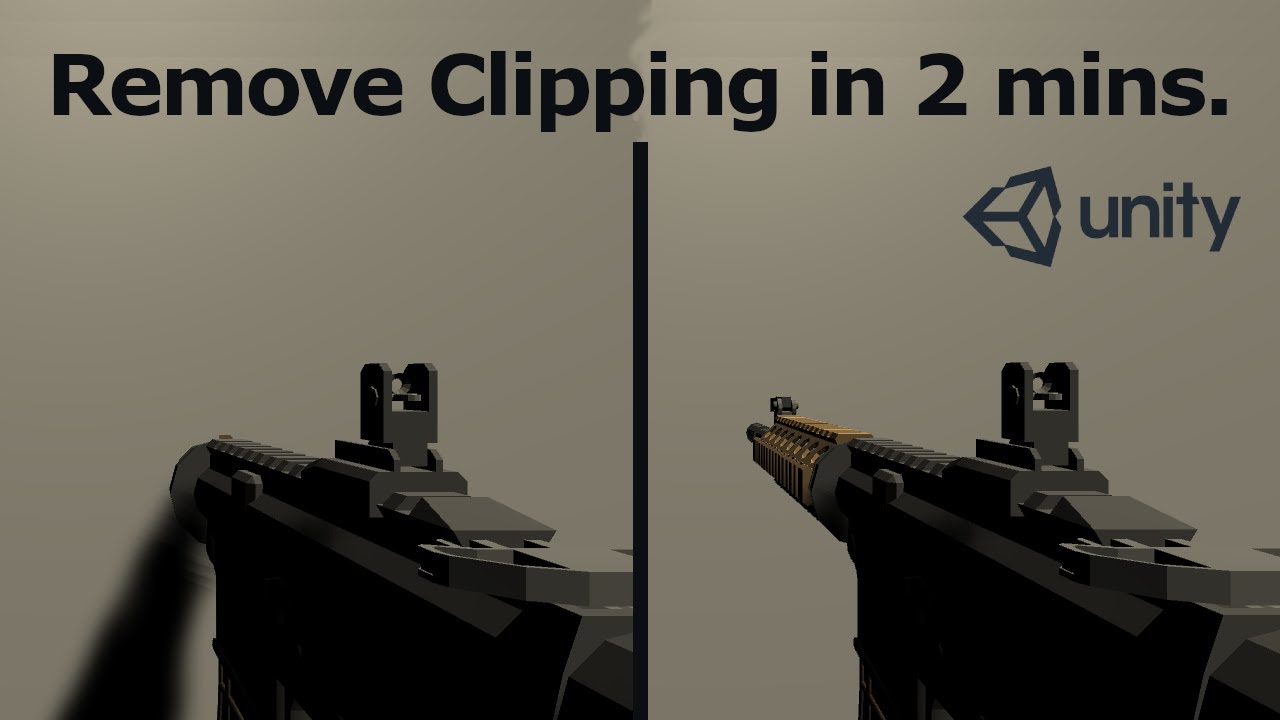
Need help or want to share your work. Join our Discord:
https://discord.gg/uCm6d3HDxq
In this short tutorial I show you how you can prevent weapons in FPS games from clipping through walls.
If you are making an FPS game it is a very common problem that the weapons clip through walls. However, it is fairly easy to fix this problem.
00:00 The P...
past raven
good start, i figured i'd have to make it a canvas element or something ^^
got any advice for the other parts of my question?
hybrid tinsel
proper mango
Two of my animations, a walking and jogging one, are rotated slightly on the x-a...
Probably based on the rotation of the root bone? There is a setting in the importer animation settings to offset the root rotation.
hybrid tinsel
rare loom
anyone know why he isnt idling ?
That pose makes it look like the avatar isn't set up correctly, which would stop animation clips from playing.
flat root
past raven
stuff that affects the model like a reload should probably be done in blender - ...
make a parent gameobject for weapon then animate it in unity animation window, make a main animation controller for different animations
flat root
past raven
so yes unity's animation system? :3
yeah, you can simply move it closer to the player(weapons) camera for things like scoping in
past raven
awesome, ty!
flat root
past raven
would i use unity's built-in animation system in ways i never have before, or do...
You can use things like coroutines for things like reload time / shooting rate
past raven
yeah, that makes sense
 little sluice
I have a set of root motion animations that are plugged into a blend tree. The character uses a navmesh agent to figure out a direction to move, but update position and rotation are turned off. I wanted to use the root motion to drive the character's movement. However, when the game starts, the character doesn't move even though the animations are playing. Root motion is enabled and the XY motion is active in the Animation Clip. Any thoughts?
 zinc pine
Is there any good video of showing how we can build idle and walk animation for player with rigging ?
 twin musk
Hello, I am trying to apply an animation to my sword only, but it doesn't seem to work. When dragging the object into the animation field it also just stands still. Any help on how to fix this ?
 naive badge
Completely stumped here: I'm using the animation pack Basic Motions, and would like to supplement it with animations from Mixamo.
However, just about everything I try results in swish feet. I guess this is due to faulty IK targets?
But how do I fix them?
naive badge
naive badge
Can anyone confirm that this is supposed to work? Should I be re-rigging animation files?
 tacit nest
i am animating a wrist blade extending and was wondering if i just needed to have the keys for the anim add something like 5 percent per frame to get the extension
twin musk
Hello, I am trying to apply an animation to my sword only, but it doesn't seem to work. When dragging the object into the animation field it also just stands still. Any help on how to fix this ?
 toxic haven
I'm trying to blend between a Walk and Run animation in a 1D blend tree. Both animations have transform rotation and move in a straight line on their own with root motion, but any blend value between them causes the character to veer off the straight line. What am I missing?
Excuse me, both animation have transform rotation baked into their root transform rotation I meant to say
 flat blaze
hello i have a problem with the animator, when i want to do a jump action the animation transitions from the " and i need to double tap the space button for the animation to play, but if i press the space button one time, it turns the jump bool to false and on really fast
 digital thorn
Hello I'm using animation hierarchy editor and I seem to get these errors on some animations, any ideas?
and they keep looping till i switch animation taht i'm editing

 limpid rune
river quarry
Can't add animations to states after connecting them to other states. Is anyone ...
limpid rune
river quarry
Can't add animations to states after connecting them to other states. Is anyone ...
It’s been broken a while, roll back to .30
How to reproduce: 1. Open the user's attached project 2. In the Animator window select "Idle_FR" or "Walk_FR" animation state 3. Obs...
 oblique anchor
Anybody here worked on a 2D top down game that has no clipping? Like if you turn 180 the character slows pivots and runs the other way but all smoothly? I'm trying to work out a way to do this but I cant find a solid way to get the character controller to ease in and out of directional changes especially on the 90s. everything slides too much or just instantly moves in the next direction. Im expiramenting with ways of triggering new movements at the end of animations but tying in the physics is uhhh rather hard for me lol.
oh and if this needs clarification the animation portion isnt the problem. its the character controller or rB sliding around while my model is animating.
hybrid tinsel
oblique anchor
Anybody here worked on a 2D top down game that has no clipping? Like if you turn...
Reduce angular drag and increase linear? Lower the mass?
oblique anchor
Yeah I tried that. Something wrong with the timing. I think I need more control during the transitions using animation actions or something
 exotic dragon
do you guys know why this isn't transitioning even though the conditions are met
 hybrid tinsel
oblique anchor
Yeah I tried that. Something wrong with the timing. I think I need more control ...
hybrid tinsel
oblique anchor
Yeah I tried that. Something wrong with the timing. I think I need more control ...
The usual method for dealing with that is either to use procedural animation to match the physics motion, or to use root motion so the animations drive things.
oblique anchor
@hybrid tinsel how do I do that with 2D?
hybrid tinsel
Depends a lot on your art style, I'd suppose.
river quarry
limpid rune
It’s been broken a while, roll back to .30
Hub's not showing me that one. Instead there's 2019.4.37f1.
2021.2.18f1 is also available, but it's not under LTS.
limpid rune

Unity
Unity is the ultimate game development platform. Use Unity to build high-quality 3D and 2D games, deploy them across mobile, desktop, VR/AR, consoles or the Web, and connect with loyal and enthusiastic players and customers.
river quarry
limpid rune
https://unity3d.com/get-unity/download/archive
Already went to the 2019.4 one.
limpid rune
river quarry
using Unity version 2020.3.31f1
You said you are using this version, so download 2020.3.30 instead from the archive.
river quarry
limpid rune
You said you are using this version, so download 2020.3.30 instead from the arch...
Alright
 fair fern
why do you need animation layers in animator?
 lavish onyx
Can anyone suggest me a tutorial of vr animation link.
Thank you
hybrid tinsel
@twin musk you don't need a script for that; you can just add transitions from one to the next and they'll play in order.
Can you... describe those things you need?
hybrid tinsel
Ok. At this point that's more of a code question than an animation one. The basic idea would be to get an array of the states in the animator using RuntimeAnimatorController.animationClips and getting their names and their lengths.
hybrid tinsel
I use it a lot, yes.
I believe so, though I've not done it. Generally the way to automate it would be through the timeline.
Of course, you can control the timeline via script so that would work too.
 visual isle
what would cause a sprite to render out of order when using IK in a 2d (asking for a friend, screenshot relevant) -- he wants the tail to render below the body

I dont use IK i do frame by frame animation so i thought id ask
also the sprite isn't in the scene, so i dont think its render layer order
strong coral
I'm trying to do a paralax and some of my pngs have a white outline around them for some reason, do you know how to fix it?
in maya
hybrid tinsel

In this 2021 Game Career Seminar talk, Tyriq Plummer gives an overview of the basic skills for 2D character animation in games, providing examples from his own career's work as well as other prominent 2D games.
Register for GDC 2022, in-person in San Francisco, March 21-25, 2022: https://gdconf.com/passes-prices/?_mc=blog_x_gdcsfr_un_x_gdcsf_x_...
hybrid tinsel
visual isle
what would cause a sprite to render out of order when using IK in a 2d (asking f...
What do you mean by 'when using IK'?
visual isle
nvm they sorted it out 😉
 dusty forge
How would I go about animating this scenario?
We're working on a tamagotchi type game, and the pets will have different emotions which correspond to different faces.
The sprite for the body is the same no matter the face, and has 3 states (walking right, walking left, idle)
Each face has animations for these states as well, all animations are the same frame + time length
How can we set it up so that the face can change based on emotion while syncing with the body animations?
Is there something we can do with layers? Or just having a really big state machine is the only way?
twin musk
I need some help calculating the rotation of my AI to activate a turn animation in a blend tree, I need to calculate the left turn to -1f, and the right turn to 1f. is there anyway I could do this?
I already have my animator set up I just need too calculate the rotation to change the float.
 vale plover
would any talented pixel artist be willing to look at my walk cycle on piskel and fix it?
hybrid tinsel
vale plover
would any talented pixel artist be willing to look at my walk cycle on piskel an...
If you want feedback, just post it.
hybrid tinsel
dusty forge
How would I go about animating this scenario?
We're working on a tamagotchi type...
You pretty much guessed what animation sync layers are for. They are a copy of an existing layer, synced to it, but using different animation clips.

 hybrid tinsel
Add a skateboard under his foot and it will look perfect
Seriously, though, you need to make the closer and farther foot not have the exact same silhouette, and you need a better crossing pose
Right now it looks like one foot is sticking way out and wobbling a bit while the other kicks.
flat root
vale plover
 flat root
vale plover
flat root
vale plover
 lavish onyx
Hlo i m looking for a good tutorial to learn animation on vr can anyone suggest anything?
 blissful sonnet
I am animating a character in unity and in my script I made it so it only plays a jumping animation when it isn't colliding with the ground, but it is bugging out because the 2d collision box isnt always touching the ground because of the idle animation
is there a way to always make sure the collision box is touching the ground while the animation plays?
blissful sonnet
never mind
 oblique vessel
Hello! I have this issue with my root motion animation of the ledge climb mechanic. For some reason as shown in the video, at the last frame the character pops up for a reason i cannot understand. This kinda ruins everything and i i cant seem to find the way to fix it. I am not very good with animations. Any ideas will be helpful!
 glacial lion
why cant i make more transitions? please help i am new
agile solstice
glacial lion
why cant i make more transitions? please help i am new
The menu with "create state" is the one that appears when right clicking on the background rather than a node
No idea why it happens, but that could be a clue
I've seen this reported half a dozen times but none of them came back to tell what the solution was
glacial lion
agile solstice
The menu with "create state" is the one that appears when right clicking on the ...
oh, if i find a solution i will share
 daring pawn
ok so ive been using unity for four years now however this new project has me questioning things they essentially want me to use 2 animator controllers for the board and the player am i wrong in saying the person making the animations just to combine the 2 together instead of attempting to use 2 animation controllers? or is using 2 animation controllers fine?
 limber dagger
I have a very weird behaviour in Animator. I have animation, which is set to loop and which is being triggered with a boolean (so if player wants, it can be interrupted within some time). For transitions "has exit time" is set to false. Expected behaviour is that once I click button, it start looping animation, and as soon as script have decision, it sets a trigger for further animation which cannot be interrupted.
And it works. For first time. The next time I try to play same route, animation transition happens, but animation is not being animated.
 limber dagger
I have a very weird behaviour in Animator. I have animation, which is set to loo...
limber dagger
limber dagger
I have a very weird behaviour in Animator. I have animation, which is set to loo...
Mistake in script was found. I was player animation when Layer volume is set to 0, and on start its 1. Every time animation ends it resets to 0, thus I had this wrong behaviour.
 steep prism
Hey everyone, I am pretty new to using animations in Unity and I am curious if there are any good tutorials about them. I am trying to use a model with an armature and I am not sure how to rotate/move it by player input.
 open pecan
Hello there ! Can anyone help me with an issue?
When I try to animate my character, and use sprite sheet animation, when I start "walking" my character, it increases in size enormously...


This is the preferred size, the size of the character model
 agile solstice
open pecan
Hello there ! Can anyone help me with an issue?
When I try to animate my charac...
agile solstice
open pecan
Hello there ! Can anyone help me with an issue?
When I try to animate my charac...
This would happen if you've scaled the gameobject and the animation clip overrides the scale
In that case you will have to scale down the walking animation the same amount, or a better option to parent the sprite to an empty gameobject and scale that while keeping the sprite and clips at 1,1,1 scale
open pecan
Ehm
How would that look in my project? @agile solstice
Make the sprite a child of a new gameobject?
agile solstice
That's what I would do, if the problem is the one I suspected
open pecan
I'll try, I'll let you know!
Can I put them all under the same parent
?
Also, do I have to do this in my scene?
agile solstice
open pecan
Can I put them all under the same parent
Them?
open pecan
Yeah, the different sprites for the animation
Where do I put it? At X or Y?

Because within different scene's (Levels) I want to have the same animations
agile solstice
"X" or "hierarchy"
But in your situation I would place the player's sprite object under Player which would act as the parent instead of an empty
 agile solstice
But I can't practically walk you through the process so it might be easier to just scale the animation frames down to the same scale as the idle frames in this case
agile solstice
open pecan
So right now the parent IS the sprite, right?
It appears so
open pecan
So I create a new object in which I place this all...is then the animation for the player scaled automatically as well?
agile solstice
open pecan
So I create a new object in which I place this all...is then the animation for t...
Normally you would have Player object which does movement and all such, and under that as a child you would have Player Sprite gameobject the sprite renderer of which you animate
agile solstice
So if you want to scale down the whole thing you can scale down Player object, so as a child the Player Sprite inherits that scale for any and all animation frames
open pecan
Is that parent object an empty object?
agile solstice
If it's the Player, technically not as it will have components
open pecan
I'm sorry I'm a complete noob at Unity. I'm helping my Fiancée with her project. Deadline is due tonight
I'm a Software Engineer myself, I coded a lot of logic. But she is making levels and I wanted to fix the animation
agile solstice
Still, it looks like in this case you can just change the sprite scale in the walk animation clip
open pecan
I tried, but then the collider scales down too
And once I play and press A or D it scales back up
I'd have to change all that into the PlayerParent object, right?
 agile solstice
open pecan
I'd have to change all that into the PlayerParent object, right?
agile solstice
open pecan
I'd have to change all that into the PlayerParent object, right?
Yes, that's the idea
Anything that's not the sprite renderer or the animator
open pecan
I see
agile solstice
open pecan
I tried, but then the collider scales down too
Did the collider change scale when the scale problem happened originally?
open pecan
Yeah
open pecan
open pecan
Here
agile solstice
Makes sense
open pecan
Do I take the Transform away from the player as well?
agile solstice
open pecan
Do I take the Transform away from the player as well?
Every gameobject has to have one
agile solstice
I guess you need to give it the Player tag if you're using tags for collision
open pecan
Also why is the parent there, the collider is there as well now...

I will try
This is what I'm using for collision
 agile solstice
open pecan
Also why is the parent there, the collider is there as well now...
agile solstice
open pecan
Also why is the parent there, the collider is there as well now...
The parent gameobject likely wasn't in the correct position
You can unparent the sprite object, move the parent and parent again
agile solstice
open pecan
Still is in the same spot
Hard to imagine how if you did move it
open pecan
I've seen that the transform of the player child component has values..If I change these values the child moves independent from the parent
agile solstice
open pecan
I've seen that the transform of the player child component has values..If I chan...
You can reset its position to zero if you want it to be fully on the parent's position
Still, organizing gameobjects can be quite a challenge if you don't understand the systems or the goal fully
If this fails you can still undo this and scale down the movement animations
If the new scale matches the old idle scale, there shouldn't be any abruptness
open pecan
agile solstice
You can reset its position to zero if you want it to be fully on the parent's po...
That does not do it xD
agile solstice
I'd wager my head that it does!
open pecan
I tried, but it ends up on the top right side of the parent
Also - Please don't wager your head :(
I took the parent away, reverted the progress, let's see if I can scale down the animations
agile solstice
Anyway I'll have to wish you good luck for now, important sleeping business to do
There should be info about this stuff in basic scene editing and animation tutorials, in case you get stuck
open pecan
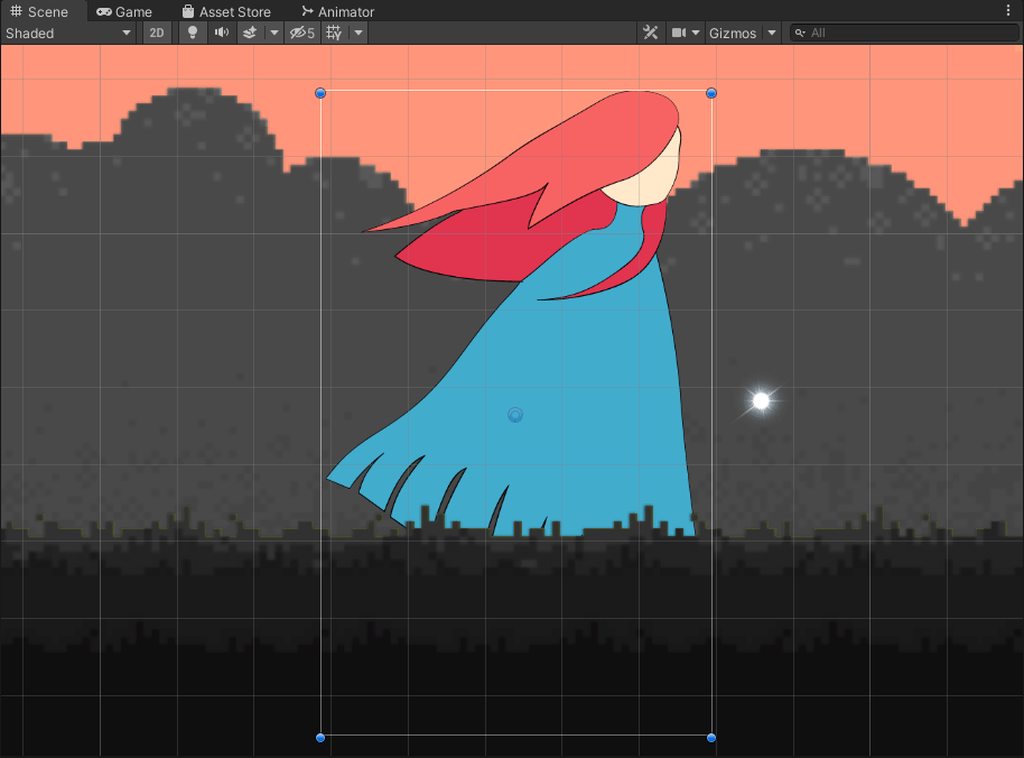

This is the size of the player
Now I scale the animation down
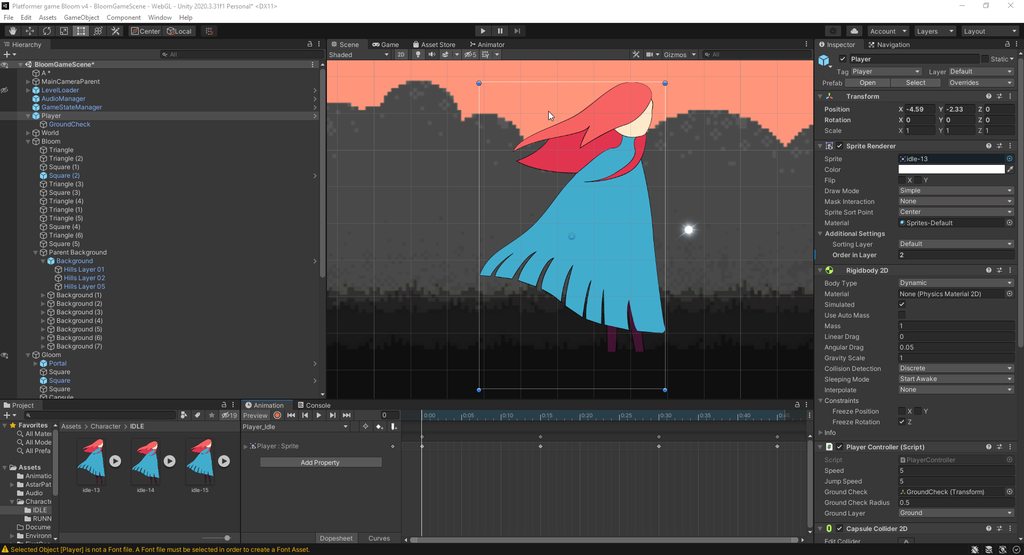
And it scales the player down aswell
open pecan
agile solstice
Anyway I'll have to wish you good luck for now, important sleeping business to d...
Alright thank you! Have a good day!
 split gust
they start with eyes open then only stay of this frame, anyone know why?

nvm think i got it
hybrid tinsel
daring pawn
ok so ive been using unity for four years now however this new project has me qu...
Board? Like a skateboard, or...?
daring pawn
hybrid tinsel
Board? Like a skateboard, or...?
yes
hybrid tinsel
I'd probably combine them into a single animator, but there might be good reasons to separate them depending on what kind of gameplay is involved.
oblique vessel
daring pawn
yes
imagine the case where player falls off it inside a ramp, the player starts tumbling and the skateboard goes off the ramp
i think its tottally fine to have them seperate for these kinds of scenario
there is also the case where player might do a flip with his feet and turn the board one time, two times, or more with one movement of his feet.
daring pawn
oblique vessel
i think its tottally fine to have them seperate for these kinds of scenario
but the animations dont sync properly with seperate animators
oblique vessel
yeah it will probably need a lot more work to do that with seperate ones. Didnt think about that
i guess you could make that happen though if the animations are correctly setup from the start
but i dont see a way of doing what i mentioned above with only one animator
maybe have one for player connected with the board, one for player only and one for board only in the case he falls etc, or when not connected with it @daring pawn
also what i ussually try to do is not use the built in animator and make a script to trigger animations via code. In a complex game like that i think it would help a lot. So when a playeer does a trick you can trigger what each of the player and board need to do
hybrid tinsel
One thing that a lot of skateboard games do is to just have two skateboards. One that is rigged separately and one that is part of the character. And you just switch between them as needed.
oblique vessel
Thats clever indeed
daring pawn
Thanks for this I'll see what I can do for now I need to figure out the physics of a skateboard
 ember wing
Question for Blender x Unity aficionados. How does animating keys on the visibility attribute transfer over to unity?
Is it through registering the visibility to the viewport or the render? Both?
hybrid tinsel
ember wing
Is it through registering the visibility to the viewport or the render? Both?
From what I've been told, neither.
That is, Unity doesn't recognize it at all. I'm actually not sure whether unity even imports the keys at all.
agile solstice
I would've guessed so
There's a 2018 official tutorial that claims it's possible
hybrid tinsel
I dunno about that; you can of course do it with scripting.
Using animation events.
agile solstice
That's definitely an option if this fails
hybrid tinsel
If you're making the animation inside unity, you can also toggle off the renderers directly.
agile solstice
Seems that at least from Blender it doesn't create any unity keyframes for either viewport or render visibility
https://youtu.be/DUlIDIQJDNg here's the tutorial anyway
agile solstice
hybrid tinsel
If you're making the animation inside unity, you can also toggle off the rendere...
This is easiest way I'm sure
hybrid tinsel
agile solstice
This is easiest way I'm sure
It is the easiest way for a couple of animations. If there are hundreds of them, a script is. 😄
Just like anything where automation is involved.
agile solstice
Quite! Also if the animation happens to have dozens of objects which all change visibility according to procedurally generated keyframes, in that case it'll be a problem 😅
hybrid tinsel
 finite arch
Instead of 2D
finite arch
Instead of 2D
Write your own I guess?
Mecanim only has 1d and 2d, though you can fake it by having a 2d blend between 1d blends
agile solstice
Or perhaps two 2D blends on different animation layers, with layer weight acting as the third dimension
finite arch
How do I write a blend tree
agile solstice
finite arch
How do I write a blend tree
If you need to ask then it's probably not the most viable option for you
finite arch
agile solstice
If you need to ask then it's probably not the most viable option for you
Well I know nothing about anims. If I need to ask it means I would like to learn so I can implement it
I didn’t understand ur solution either
So I just need to understand a single method of doing it
agile solstice
finite arch
Well I know nothing about anims. If I need to ask it means I would like to learn...
Coding your own blend tree system is much more difficult than the other solutions
Based on your question I assume you know how to make 2D blend trees, so making blend trees of blend trees, or blend trees on layers is not a huge step up in difficulty
https://docs.unity3d.com/Manual/BlendTree-DirectBlending.html this is also worth looking at
At first glance it looks like it might let you make blend trees with any number of dimensions
finite arch
agile solstice
<https://docs.unity3d.com/Manual/BlendTree-DirectBlending.html> this is also wor...
I already saw that
finite arch
agile solstice
Coding your own blend tree system is much more difficult than the other solution...
Ok thanks
What do U mean by layers tho
agile solstice
Animation layers
finite arch
Like is there an example or resource u could link
agile solstice
Have you searched the docs?
finite arch
Yes
How would a tree of a tree work
Could I access the parameters of the parent tree
From the grandchild
agile solstice

 primal bolt
I'm trying to make it look like a coin is going into a box, I have the box in 2 separate images, coin in between them. The problem I have is that this is in UI therefore if i want to make coin render inbetween I need to put them in that order in hierarchy. But I also want to scale the box in some ways using animator which creates the issue of scaling coin as well, is there any solution apart from scaling 2 images of the chest at the same time?
twin musk
Hello, one question, why i cant export a character that is premade from the studio to fbx? i want it to use it to animate and it puts unity package when i export it, so i cant put it as fbx on blender
 sterile sphinx
Any suggest to make card hand animation of Splay The Spire? 🙂
when the player draw the cards, the card settle the position with an animation
 cosmic oyster


 upper viper
can someone here help me with setting up my animations so they work in engine?
 scenic tangle
hey i was wondering,am i able to make humaniod animations that support any model with an avatar in unity?
ember wing
agile solstice
Seems that at least from Blender it doesn't create any unity keyframes for eithe...
Thanks @agile solstice and @hybrid tinsel Ill sift through and see if this will cover my goals here.
 prime ridge
hello, I have a fbx file with an animation from blender. The file has multiple objects with multiple animations attached to it . I would like to merge these animations into one. Is it possible to do that?
 hybrid tinsel
prime ridge
hello, I have a fbx file with an animation from blender. The file has multiple o...
hybrid tinsel
prime ridge
hello, I have a fbx file with an animation from blender. The file has multiple o...
You can combine them using the 'clips' list in the importer.
 fresh niche
posted this in code by mistake before realizing it might be better to ask here, but
i have a question about animation transition interruptions. i have a bit of a convoluted animation system, shown in the video is the issue i'm currently running into (slowed down to be easier to see). the relevant states are "idle", "oneshot_state" and "oneshot_state2". The transitions from each of the oneshot states back to idle can be interrupted by a transition to the other oneshot state (interruption source = Current State, ordered interruptions is checked, each of the outgoing oneshot state transitions are above the idle state transition).
The first couple of animations play correctly because I don't try to interrupt the transition. however, when I do try to interrupt the transition from one of the oneshot states to idle, you see the character shoot into the ground. this looks to me like, when the transition interrupt happens, instead of lerping from the current position in the interrupt to the oneshot state, it lerps from the default position of the character (hunched over, in the ground) to the oneshot state.
Any idea why this is happening / how to fix? Both the oneshot states are overridden in a runtime override controller but I'm not sure if that's relevant
stable wyvern
Relatively new to Anim state machines and behaviors... is it possible to set a parameter on state enter and then evaluate the state? Simple example, a random index parameter is set and used on transition conditions.
I suppose I could set that random on exit which would take effect on the next state enter but that seems backwards.
prime ridge
hybrid tinsel
You can combine them using the 'clips' list in the importer.
thanks for the answer but how exactly. I have been looking for tutorials but can't figure it out
 torn zephyr
hey
i made a dialogue system with a yt tut https://youtu.be/f-oSXg6_AMQ
though i can find out how to make an animation everytime i press “continue” on 7:07 any ideas?

In this easy Unity and C# tutorial I will show you how to make a cool dialog system, complete with animations, sound and a nice auto typing effect !
By the end of the video you will have a system that can easily be implemented into whatever game project your are currently working on !
-----------------------------------------------------------...
fresh niche
hi, i was hoping to bake the root motion of some animations i got from the asset store, but there's this "Root contains root motion curves" error that I see instead of the root motion options. Did some googling but literally no results, any idea what's causing this/how to fix? Ditch the asset and get new anims?
 hybrid tinsel
@finite arch didn't that get answered yesterday? You'd either code your own using a direct blend tree or use nested 2d/1d trees.
@prime ridge what is the part you aren't getting?
 shy cliff
Hey. Is there an easy way to Play an animation on object2 right after object1 finishes it's animation?
hybrid tinsel
@shy cliff several ways, depending on your preferred approach. You can use a script, or use a timeline.
shy cliff
I know there's a way to do it by making the animation trigger a function in a script, but is it possible to do without using a script to do it. I haven't touched the animator much so I'm very much new in that field
hybrid tinsel
You can use a timeline
shy cliff
So I can trigger an animation on a different game object from the animation timeline? or are you talking about a different timeline?
hybrid tinsel
The cinematic timeline. It lets you play animations from multiple animators. https://docs.unity3d.com/Packages/com.unity.timeline@1.2/manual/index.html
 modern cargo
why does it take over 2:40 minutes for me to open the humanoid avatar configuration settings? my pc is not slow otherwise
hybrid tinsel
That sounds more like a bug than an animation issue.
finite arch
hybrid tinsel
<@378634277761450007> didn't that get answered yesterday? You'd either code your...
That means nothing to me, I appreciate the help I really do but I’m starting from square one here. Telling me phrases like this doesn’t help and I can’t find any resources online which clarify the topic
hybrid tinsel
Well, Spazi linked the documentation for direct blends but there really isn't a ready-made solution.
It isn't a simple problem.
Nested blends is probably easier, where you'd use a 2d blend tree where each state in it is a 1d blend tree.
So you'd have the third axis handled by the 1d blend trees.
finite arch
How do I merge them
Or not merge
But u know what I mean
Like how do I make animations pull from parameters of both
hybrid tinsel
I don't know what you mean.
finite arch
hybrid tinsel
I don't know what you mean.
As in I appreciate the help. But how exactly do I do that?
I create a nested blend tree with the first one 2D then the second one 1D
Then what
hybrid tinsel
Then it should effectively act like a 3d blend tree?
finite arch
hybrid tinsel
Then it should effectively act like a 3d blend tree?
To which blend tree to I attach the animations
The second one
But then I can only use the parameters from the second one
hybrid tinsel
Maybe easier if you just use three 1d blends
 toxic viper
Hi, I wanted to know if someone know some advanced animation tutorials for Unity, I would like to do more professional animations, including characters and effects, something like a tutorial for "movie" production in Unity
hybrid tinsel
If you find any good ones let us know!
toxic viper
That's the thing, I'm asking if someone professional know Cuz I haven't seen any
 viral galleon
Hi, I have an issue with Aanimation rigging IK. I originally made my rig to be compatible with blender IK for my animations. But the “feet and hands” are detached from the normal rig on IK bones. I need those bones to be a part of that normal rig for the IK to work but that messes up the animation. I was thinking of baking the animations back in blender but there’s 2 problems, 1 I don’t even know if that would work and 2. I don’t know how I would overwrite it in my character. I already have it fully set up and playable. Thanks for the help.
 grizzled eagle
Are blender drivers able to be exported through an FBX file into unity?
hybrid tinsel
grizzled eagle
Are blender drivers able to be exported through an FBX file into unity?
No.
Only a small subset of maya ones.
grizzled eagle
Okay, is the only way to create procedural effects through rigging and bone animation then?
hybrid tinsel
Depends on the procedural effect you want, but there are lots of ways.
grizzled eagle
Ok, what are some ways besides using bones?
 unreal glen
So I'm looking for best practice for FPS reload animations. The example objects are an M16 and an Ak 47.
Should each object have an individual reload animation if they will be mostly the same? Using the example of reloading, the only difference in animation would be the bones on each weapon aren't at the same coordinates. Is there an acceptable way to reuse this animation? For my example the arm and hand bones are children of the weapon object.
hybrid tinsel
grizzled eagle
Ok, what are some ways besides using bones?
What do you want to do?
hybrid tinsel
unreal glen
So I'm looking for best practice for FPS reload animations. The example objects ...
I suppose you can try using the same animation and see how it looks; if the differences make it look bad, make a different animation for the second weapon.
viral galleon
viral galleon
Hi, I have an issue with Aanimation rigging IK. I originally made my rig to be c...
Someone pls
hybrid tinsel
viral galleon
Someone pls
If anyone knows, they'll answer.
viral galleon
hybrid tinsel
If anyone knows, they'll answer.
Ok
grizzled eagle
hybrid tinsel
What do you want to *do?*
How about squashing a cube?
hybrid tinsel
Bones would be the easiest way. If you wanted to squash the entire object, you could just animate the object directly. You could also use a vertex shader, or a script(Like the Deform package on Github)
 mild leaf
how do you make an animation with a single keyframe (a pose) in unity?
i've already got the character posed how I want, and I've created a new .anim file, but how do I put the pose as a keyframe into it?
grizzled eagle
hybrid tinsel
Bones would be the easiest way. If you wanted to squash the entire object, you c...
Okay, thanks for the info.
hybrid tinsel
mild leaf
i've already got the character posed how I want, and I've created a new .anim fi...
Select all the bones you want to keyframe, then right click the rotation in the transform component inspector and select 'create keyframe'
mild leaf
hybrid tinsel
Select all the bones you want to keyframe, then right click the rotation in the ...
I don't see 'create keyframe' button
 hybrid tinsel
Are you in recording mode?
mild leaf
no i just created a .anim file
but it doesn't have any bones
and I don't know how to get them into the file
I have the guy posed like this in the scene

but if I click on him and hit record
he does this

and I really don't want to have to manually move all 50 joints to their positions in the above picture
i just want to save the pose
hybrid tinsel
I know there's an asset to let you save poses, I don't remember what it was off the top of my head.
Generally you're supposed to do the posing after you start recording.
The 'squatting and embedded in the ground' usually means your avatar is incorrectly configured.
Also, if you're using a humanoid you can only keyframe the humanoid muscles, not the actual transforms.
 hushed ember
Does this hint set correct?

I'm new to animation rigging and I cant get the effect I desired
 finite arch
How do could I use an avatar mask only in a single animation
So I have a fist animation
And I want to make it a pointing animation
I want to do this be excluding the index finger from the fist animation via an avatar mask
But I don’t see where I could do it
agile solstice
toxic viper
Hi, I wanted to know if someone know some advanced animation tutorials for Unity...
"Professional" animations aren't done in Unity, they're made in animating software which have their own tutorials
At the professional level concepts for animation and VFX are almost universal
As long as you understand Unity's workflow you can bring over that expertise from elsewhere
Professionals don't spend much time making tutorials, considering they're busy being paid for having knowledge that others do not
Your best bet are probably paid animation courses
hybrid tinsel
agile solstice
"Professional" animations aren't done in Unity, they're made in animating softwa...
Eh, there is plenty to learn online for free before blowing money on stuff. And I don't think just telling them 'oh, just use other software' isn't really useful if you want to make in game cutscenes for unity games... even with assets imported from other tools you probably should learn cinemachine, timeline, etc. And a lot of the basics for animation are entirely doable inside unity. (I've done all my game's animation in Unity).
agile solstice
hybrid tinsel
Eh, there is plenty to learn online for free before blowing money on stuff. And ...
I do agree about that
Assumed those weren't "professional" enough though
hybrid tinsel
Well, I've seen plenty of games with worse.
toxic viper
agile solstice
I do agree about that
Assumed those weren't "professional" enough though
Well I'm looking for a result more like CoD and that kind of style, Ik CoD is made by professionals in dedicated programs but with "professional" in Unity I mean for example how to animate a character without needing to move bone per bone and dealing with deformación.
 ornate bridge
i just cant understand why an animation clip in preview mode works, and in play mode just doesnt...
first time is reloading ingame..... second time is in preview mode in the animation
 coral gull
not sure if this is the correct channel to ask but I have an idle as my default state and then a transition into my run animation, but how can I add my jump and crouch since it doesn't seem like you can make multiple transitions from the same animaton?
hybrid tinsel
@coral gull you can make as many transitions from a single animation as you want.
There is a bug some people have been having about that, though; where they can't get the context menu for a state after they add a transition to it... so that might ne it. What version of unity?
coral gull
hybrid tinsel
There is a bug some people have been having about that, though; where they can't...
oh ok yeah that might be it then because after I add a transition the option to add another disappears. For the version idk if this is correct, but the version or editor version I have selected when I make a new project says 2020.3.32f1
hybrid tinsel
I'm not sure which version the other people with that problem are using but it seems to have just started happening in the past couple weeks- we've suddenly had a TON of people posting about it.
It doesn't happen for me on 2921.1.2f but not sure if that's helpful
 cyan mauve
anyone familiar with importing animations from blender to unity? (I got a problem with quaternions/xyz euler stuff)
hybrid tinsel
What problem, specifically?
cyan mauve
I made 4 animations, one of them I had to use xyz euler system because I needed my rig to spin
the rest were quaternions
i thought when putting them in the NLA thingy they would keep the animation no matter what mode blender was set to
or that unity would be able to read each animation with its own rotation style
but it seems only the quaternion animations are being read in unity, the last one (that used xyz euler) just does nothing
I tried some tool to convert it back into quats in blender, didn't work either.
cyan mauve
^ fix for this is kinda annoying but you just gotta convert the xyz euler animation into quats, and if it's choppy, delete the bad keyframes and animate it again (for the spin i just made constant 90 degree rotations every 2 frames and it kinda~ looks as good as it was before)
coral gull
hybrid tinsel
It doesn't happen for me on 2921.1.2f but not sure if that's helpful
yeah that was helpful just tried using the other unity version I had and it's working now
hybrid tinsel
I suggest filing a bug report just to make sure that Unity knows about it.
We've had a dozen people with the same problem this week so it seems like a bona fide bug.
exotic dragon
I have a problem with my animation controller
it will stay on one state and nothing seems to get to change off it
I have this transition back to rest


the only condition is not walking
and I observe it and walking is false but its just looping
not even the "any state" transition will make it stop this state
hybrid tinsel
Can you give more details?
exotic dragon
like what
the transition says walking false, walking is false, it doesn't transition
here's the bobbing state


and the rest state
idk why its not transitioning

it says not walking
but it just loops bobbing
it actually seems like its somehow playing both but I only one layer
since the blue bar shows on both of them
hybrid tinsel
Yeah, something looks weird there.
exotic dragon
if I mute both transitions it no longer shows the bar on rest when its in another state
hybrid tinsel
What about the transition from rest to bobbing?
Are you sure it isn't just transitioning back immediately?
exotic dragon
maybe but why would it be, walking would need to be true
thats the whole problem
ok that's weird I fixed it
the transition to bobbing needed to have 0 transition time
hybrid tinsel
Ah. So the transition was taking longer than the animation state?
Is it like a one frame animation?
exotic dragon
no its a long animation
do you mean bobbing or rest
rest I have set to 0 speed
its not supposed to do anything
whatever its fixed now, I just dont really understand the animator all that well
I want to be able to combine transforms additively but I can't figure that out
hybrid tinsel
Setting speed of a state to zero can break some stuff, too.
To combine transforms additively you add more layers.
And set the layer to additive
exotic dragon
what should I do if I want a state thats basically just a neutral not animated state
just set speed 1 and no clip?
and should the additive layer be on top or below the base layer
twin musk
exotic dragon
just set speed 1 and no clip?
Do you mean an idle state?
If so, you can put in a clip with just one frame as well
exotic dragon
it seems to work on with just no clip
twin musk
Nice!
exotic dragon
I have two layers and one is additive

and I can see theres a state present on both
but only the top one is affecting it
if I reverse them, then only the Base Layer shows effects
twin musk
I must admit I've never worked with multiple layers, so sorry, can't help you with this.
twin musk
trying to set up IK for guns in my game, for some reason this happens, does anyone know how to fix?
using animation rigging btw
 naive cipher
can anyone help me export idle animation to vseeface?
hybrid tinsel
@exotic dragon did you set the weight of both layers?
And the additive layers should be below the base on the list.
exotic dragon
what's the layer weight
and is it even possible to actually like, add values together
I have one animation which makes the gun go down and back up when you land
and another that makes it go left to right and also up and down when you run
is it possible to combine those so its still playing the walking animation but can simultaneously play the landing one, combining the offsets together
hybrid tinsel
exotic dragon
what's the layer weight
For some reason unity defaults to newly added layers having no weight, so you won't see any effect.
 hybrid tinsel
exotic dragon
and is it even possible to actually like, add values together
hybrid tinsel
exotic dragon
and is it even possible to actually like, add values together
That's what additive layers do.
exotic dragon
alright thanks
 spare parcel
Hello there, I'm looking for drowning 🏊♂️😵 💀 animations, anybody can help me? 😳
viral galleon
Hi, I have an issue with Aanimation rigging IK. I originally made my rig to be compatible with blender IK for my animations. But the “feet and hands” are detached from the normal rig on IK bones. I need those bones to be a part of that normal rig for the IK to work but that messes up the animation. I was thinking of baking the animations back in blender but there’s 2 problems, 1 I don’t even know if that would work and 2. I don’t know how I would overwrite it in my character. I already have it fully set up and playable. Thanks for the help.
hybrid tinsel
viral galleon
Hi, I have an issue with Aanimation rigging IK. I originally made my rig to be c...
It sounds like you've got some re-rigging to do somewhere, either baking the animation to a compatible skeleton or redoing the rigging in unity to support the disconnected transforms.
viral galleon
hybrid tinsel
It sounds like you've got some re-rigging to do *somewhere,* either baking the a...
That sounds like it may work, I may have to try it later (I’m not at my computer) thanks.
 chrome ocean

 uncut salmon
Open the Animator tab, drag in an animation.
Then, select an object which has the animator assigned to it's component and you'll see the animations in the animation window.


 glacial coral
is it possible to pause an animation on the last frame so it dosnt repeat?
glacial lion
glacial coral
is it possible to pause an animation on the last frame so it dosnt repeat?
double click the animation in the animator and turn loop time off
glacial lion
glacial coral
another question, can i queue up animations using script
play it or make another animation happen after it finishes?
glacial coral
make another happen when finished, but i dont wanna make a transition in the animator
glacial lion
glacial coral
make another happen when finished, but i dont wanna make a transition in the ani...
click on the transition arrow and give it exit time?
glacial coral
but i dont wanna do it in animator
glacial lion
glacial coral
but i dont wanna do it in animator
why not?
glacial coral
because it over complicates things imo
glacial lion
glacial coral
because it over complicates things imo
then idk how to do it
glacial coral
ok
grizzled eagle
Is it better to animate in unity or blender? I like blender for its greater range of features, but when I import them into unity they don't seem to be as malleable, I cant change the settings of the imported asset and I cant move them into folders for organizing. Is there some sort of free plugin I can use to make unity animation more intuitive? (For example, IK while posing a rig, being able to easily switch interpolation modes between keyframes)
flat root
grizzled eagle
Is it better to animate in unity or blender? I like blender for its greater rang...
Unity has a great package for this, Animation Rigging.
agile solstice
grizzled eagle
Is it better to animate in unity or blender? I like blender for its greater rang...
Blender is easily orders of magnitude better for animation, though if you want something super simple like a swinging door, then it won't matter.
Animation Rigging does IK but the practical benefit of it is to allow procedural IK motion at runtime, I wouldn't ever use it to create animations
grizzled eagle
Yeah I may try to just make all animations in blender and deal with the consequences of not being able to organize them in a hierarchical structure.
hybrid tinsel
@glacial coral if you think that overcomplicates it, you won't like the script method to queue animations up =p
viral galleon
hybrid tinsel
It sounds like you've got some re-rigging to do *somewhere,* either baking the a...
could you explain how to re-rig the character? Thanks
hybrid tinsel
@agile solstice @grizzled eagle the ik rigging package, while I don't love it, does now work just fine for creating animations in the animation editor since they made it evaluate during record mode.
You can switch keyframe interpolation by right clicking a selected key and using the context menu.
@viral galleon the same way you rigged it the first time, but with a compatible rig?
agile solstice
Sure it works
I'd rather use anything else though
viral galleon
hybrid tinsel
<@687868834467545144> the same way you rigged it the first time, but with a comp...
Oh, but in unity? Could I bake the animations in blender change the rig then overwrite the file?
hybrid tinsel
Yes.
Overwriting the file in blender will change the animation in unity.
You'll want to keep the clips the same names and lengths probably
 crystal bridge
hi, how would one go about stretching the whole sprite with the unity's spine animation tool
is there an easy way of doing that?
so I already have a rig with bone weights etc
but I don't know how I could stretch the character
 mystic flame
Trying to add a particle effect onto a preexisting animation but the add property value is greyed out. How can I add particles to anims?
 flat root
mystic flame
Trying to add a particle effect onto a preexisting animation but the add propert...
flat root
mystic flame
Trying to add a particle effect onto a preexisting animation but the add propert...
is the particle system component on the same GO as the animation controller GO
mystic flame
The particle system yes, but it wont let me add the anim to the model
hybrid tinsel
crystal bridge
hi, how would one go about stretching the whole sprite with the unity's spine an...
Spine isn't part of unity, so not sure about that specifically, but can you not just stretch the whole object using its transform like any other object?
hybrid tinsel
mystic flame
Trying to add a particle effect onto a preexisting animation but the add propert...
If it is an imported animation, it will be read only and you'll need to create a copy of it to edit it.
Or add curves/events in the importer for the clip.
crystal bridge
hybrid tinsel
Spine isn't part of unity, so not sure about that specifically, but can you not ...
i guess it's called Skeletal animation
i called it Spine animation by mistake
twin musk
i got a humanoid model
an animation showing that im throwing out a fishing rod
but the fishing rod goes inside the model while playing that animation...
i simply put the fishing rod inside my model skeleton in his hand according to the mixamo animation
how do i fix that?
crystal bridge
yes, I could use transform, but then I'd have two systems in place for animation
i'd like to do it all with bones if possible
hybrid tinsel
crystal bridge
i guess it's called Skeletal animation
i called it Spine animation by mistake
Ah, ok. Is it 2d bones, 3d generic, or a mecanim humanoid rig?
viral galleon
hybrid tinsel
Overwriting the file in blender will change the animation in unity.
Ok
twin musk
Hey guys! Maybe a weird question, but I know it's possible to trigger an animation by bool/trigger, but is there a way to do it the other way around as well?
 finite aspen
Does anyone have a good tutorial / resource for how to create Unity's procedural rigging? The worm boss tutorial was good on how to 'string' things together but unless i missed a video didn't seem to cover how to create it or the procedural pickup thats in the package examples
hybrid tinsel
@twin musk not sure what you mean. Can you rephrase/expand?
twin musk
I feel like it's a stupid idea, but I got some issues with my code I don't understand
Can I DM you?
@hybrid tinsel
Oh nevermind, I'm seeing your bio now 😉
hybrid tinsel

Best to explain in here, so it can help others and so anyone with an answer can jump in.
twin musk
Thanks for your availability!
I might have found the solution, so I'll come back to you if I haven't!
hybrid tinsel
@finite aspen have you checked the package documentation?
twin musk
Long story short: I have to use transitions
hybrid tinsel
Transitions are good.
twin musk
Question about transitions though...
I see it's possible to select Greater or Less than
Why's there no equal to?
crystal bridge
hybrid tinsel
Ah, ok. Is it 2d bones, 3d generic, or a mecanim humanoid rig?
it's done using unity's skeletal animation system
I think that's only for 2D
just a custom rig
hybrid tinsel
@twin musk you can't use equal to for floats because floats generally aren't used for discrete values but for thresholds.
twin musk
What's the best solution if I only want it to trigger if there's a value other than 0 on one axis but not on both X and Y?
I could use a Parameter, but I'm not sure if that's too dirty
hybrid tinsel
Do the complex logic in your script and pass a bool to the animator. @twin musk
twin musk
That's what I thought, thanks for confirming!
I'm a noob at this, so it's nice to get confirmation from someone who knows their stuff.
hybrid tinsel
@crystal bridge my usual solution is to use a second root bone in my 2d rig, to use for stuff like scaling/stretching the entire rig.
hybrid tinsel
Yes.
Generally, I put the root bone at the origin and then make a second root somewhere around the center of gravity to use for that kinda thing.
crystal bridge
okay thank you, so I'm trying to do it but I don't understand how to have 2 roots?
what would be the weight paints on that
basically when i move the second root bone
it just acts as a regular root.
nothing gets stretched
hybrid tinsel
Ok, take this rig for instance

Now, for what you're doing you'd probably want it oriented along an axis, but I didn't do that because of this rigs specific needs
crystal bridge
like this?

i just don't really understand the idea behind it
it still has the weights on vertices that it affects
hybrid tinsel
First of all, remove all weights from the root bones
They should be on the influence list but with no actual weights. They are just to control the rig, not to deform anything
So for my example, you can see how scaling the root2 bone stretches the character out

 crystal bridge
ah I see, yeah that's exactly what I need
Okay, I removed the weights
sorry to be annoying, but now the second root doesn't act at all XD
do i have to define that it's a root bone somewhere?

it's still in the list
but the green one just moves freely
 hybrid tinsel

You won't be able to see the effect in the sprite editor because you can't scale bones in the sprite editor.
So that's only in the scene view.
Alternatively, if the character is that simple, you could just have a bone at the bottom and a bone at the top, and move the top bone to stretch him.
crystal bridge
thanks, I tested it like that and stretched in the scene view
works with the vertical root bone, stretches it up
but side bone has no influence
crystal bridge
hybrid tinsel
Alternatively, if the character is that simple, you could just have a bone at th...
this character is just for testing heh
hybrid tinsel
Are the other bones children of the second root?
It will only affect its children
 twin musk
@hybrid tinsel fixed it with transitions alone!
 minor sinew
I am not sure if this goes in here or in scripting, but is there a way to use math formula to generate animation curves. I want to enter a formula and it will generate animation curve that I can reference in script.
I am making a theremin and synthesizing audio. I want to exponentially increase frequency, I can do it in code but I was wondering if I can use Animation Curves. Like insert a math formula and whenever I wanted a value, I use animation curve as lookup table.
 buoyant fox
When using Animation Rigging, is there a way to get the position of the tip of a IKConstraint before the constraint is applied? Turning off the weight and getting the position doesn't work because it hasn't updated yet.
 upbeat flame
Any idea why at the end of the movement when it transitions to my idle blend tree it briefly switches to my up sprite?

 covert girder
If I have a pixel character within 64x32 dimensions, will I have sprite distortion if I create an animation where their body extends past the 64x32 space?
hybrid tinsel
minor sinew
I am not sure if this goes in here or in scripting, but is there a way to use ma...
You can definitely do that, but if you want to find someone who can help you I suggest a coding channel. Not that it doesn't belong here but more that we're all dumb animators and not hardcore coders 😛
hybrid tinsel
upbeat flame
Any idea why at the end of the movement when it transitions to my idle blend tre...
Dunno. What does your animator graph look like? did you check to see whether you are sending incorrect inputs in your script?
hybrid tinsel
covert girder
If I have a pixel character within 64x32 dimensions, will I have sprite distorti...
In most cases you just need to make sure that your pivot is set correctly.
upbeat flame
@hybrid tinsel So I removed all transitions and it seems that it just defaults to that sprite when no input changes are occurring. I didn't know if it was a setting or a default placement or something. Im combing over the script now.
upbeat flame
Yah it seems to go to whatever sprite is first in the motion list. As in if I put the right motion at the top, itll flicker to the right sprite before the idle transition happens.
upbeat flame
I think I figured it out, you called it on the incorrect inputs. My check for movement wasnt sensitive enough and caused the weirdness. Thanks.
 slender roost
Anyone know how to fix this animation issue? I made this blender model using bezier curves for the legs but when importing my model to unity the animations don't factor in the bendy curves and i'm not sure how to fix it (if it can be fixed). Anyone know how to get them working in unity?
The gif here shows the model in both blender and in unity.

I followed this tutorial for the arms which uses arrays/curve modifiers, hooks, and other stuff.
(plus many hours of work to get things working in blender lol)
https://www.youtube.com/watch?v=xKfdy050JMQ
oblique anchor
@slender roost so far as I know you would need to make bones for the arms etc. other transforms won’t port over
Are there scripts or plugins so I can color coOrdinate my animator?
Or just any mod for the animator mechanim in general
hybrid tinsel
slender roost
Anyone know how to fix this animation issue? I made this blender model using bez...
Blender curve modifiers don't transfer to unity. You'd need to convert it to a bone animation or use something like VAT(Vertex animation textures) to animate it in a shader.
Or use some curve based unity addon I suppose.
slender roost
Oh shit if it cannot be used in unity then RIP all of my free time in the past 24 hours lol
hybrid tinsel
On the bright side, it would probably be pretty easy to do with bones; you could even use IK in unity to handle the leg motion.
Or, since the pieces are rigid, even with just a hierarchy of meshes
oblique anchor
@slender roost bones imo are easy as hell to rig especially for something like that
You could throw bones on the legs and auto paint them, stick an IK bone on the foot sections and you should be good to go. At that point you just move the IK bone things and the leg follows. You would want to set the IK constraint thing so it moves up the leg properly. I’m probably going to the office tomorrow, I could steam how I would do it for you if you have the time.
hybrid tinsel
If you wanted to set up the IK in unity, there is an official tutorial on rigging that sorta thing in the 'prototype' series.
Though that is more focused on procedural animation.
If you do your animation in blender, just remember to bake the IK to normal animation on export.
 graceful temple
Hello, not sure if I can ask this here, but I edited a vrm file in Unity using univrm and the boneweight transfer tool.
However, as it is a wing on the place of the arm, it kind of breaks into two.
Any advice on how I could fix this
(Top part is bound on the inner arm, lower part is bound to the lower arm)
Is there a way to fix this?


 jade quartz
I created a character in blender and wanted to use animation retargeting with the humanoid rig but when i try setting the animation with the character I created it doesn't work, while if I use a model downloaded from mixamo it works just fine. I think that the problem is that the mixamo model has the Hips bone as a direct child of the component containing the animator, while mine is the child of a child and the hip bone is not detected.

(Lola is the character from mixamo)
Anyone knows a way to fix it?
hybrid tinsel
jade quartz
I created a character in blender and wanted to use animation retargeting with th...
You need to create an avatar from your character rig
jade quartz
i know, but when i assign it it pops up an error
jade quartz
hybrid tinsel
You need to create an avatar from your character rig

and this is the error in the console
 hybrid tinsel
jade quartz
i know, but when i assign it it pops up an error
hybrid tinsel
jade quartz
i know, but when i assign it it pops up an error

You need to make an avatar from the model, not try to use the avatar from a different model that doesn't match.
jade quartz
ah
jade quartz
hybrid tinsel
so if I create a character in blender and want to use some animations from mixamo what should i do?
I did some research but all tutorials grab both the model and the animations from mixamo, so of course there is no problem with the avatar
hybrid tinsel
You need to make an avatar definition from the model, that dropdown that you currently have set to 'copy'
 twin musk
hybrid tinsel
Ok, take this rig for instance
twin musk
hybrid tinsel
Ok, take this rig for instance
whats this game
hybrid tinsel
twin musk
whats this game
That was just a one-off animation of my friend's character Seven. https://i.imgur.com/UWLJLTL.mp4
 twin musk
hybrid tinsel
That was just a one-off animation of my friend's character Seven. https://i.imgu...
twin musk
hybrid tinsel
That was just a one-off animation of my friend's character Seven. https://i.imgu...
She looks very ... aggressive
Is that blood on her hair... or just color?
hybrid tinsel
Just color... probably.
twin musk

How do i make an held item not go inside my character when playing an animation?
Like I downloaded a "throw fishing rod" animation and placed the fishing rod in his left hand (bone)
but when he swings it, it totally noticably goes inside his body...
 viral mango
HELP
I have problems with this character and his animations, when I imported the animations from mixamo I did all step to make the animation works but the character is not making nothing

 twin musk
viral mango
twin musk
viral mango
is this the character or an animation?
viral mango
twin musk
is this the character or an animation?
is a character
rigged
the animation is this:
twin musk
on the main character do "Create From This Model"
on the animations do "Copy From Other" and select the original model avatar
viral mango

this is the animation from mixamo with the skin
but this is not the main character
twin musk
yeah get the skin seperate and animations without skin
viral mango
the main character is in the A pose
viral mango
twin musk
yeah get the skin seperate and animations without skin
yes but even without the skin is not working
because I separate the animation from this model
and set as an animation state
and I set this copy of the animation state that was extracted from the Default import animation with skin from mixamo and I set the animation state to the animator controller and I set this animator controller to the main character


 fast lagoon
viral mango
fast lagoon
viral mango
What's the actual error message here?
 silent nacelle
Regarding, StateMachineBehaviour Callback. Wouldn't this create undefine behaviour?

 carmine wedge
guys, can anyone please help me understand why this is so broken.
A single humanoid character, with a single animation clip in the controller... and as soon as i hit play, the pose is not At all even close, its an idle in that pose, and it really shouldnt change, but you can see the legs fall out of pose, and th feet are moving and stuff... thats not at all the animation.
that single fbx IS the actual fbx uploaded into mixamo and than animation was applied, and downloaded, as basic as it gets.
twin musk
Hi, I wanted to know if anyone creates voxel art assets or even makes voxel art animations?
 novel skiff
Hey everyone,
I have a sprite in layers etc etc
The creature has winds in three states, open semi open and closed. Also the legs change when grounded and when flying or walking.
Should I upload all different sprite on unity and change in the animator clips the whole sprite or is there another way to do that?
viral mango
fast lagoon
What's the actual error message here?

 carmine sluice
how to add animations (that i have from this asset) to character because its standing now like that
 twin musk
carmine sluice
how to add animations (that i have from this asset) to character because its sta...
twin musk
carmine sluice
how to add animations (that i have from this asset) to character because its sta...
where did u get it from? isnt there a readme or smth
and doesnt it come with a prefab?
carmine sluice
twin musk
where did u get it from? isnt there a readme or smth
it comes, with both of that but im too dumb to understand whats going on https://assetstore.unity.com/packages/3d/characters/medieval-cartoon-warriors-90079

Elevate your workflow with the Medieval Cartoon Warriors asset from Jose (Dogzerx) Díaz. Find this & other Characters options on the Unity Asset Store.
since the sending message i've figured out how to make idle animation but now i walk with idle animation :/
 dusk quarry
is there a way to interrupt an animation to change to another?
in 2d
my character just moves for a bit with the idle animation
carmine sluice
 dusk quarry
yeah same but in 2d lmao
carmine sluice
😄 high five
dusk quarry
i think you have to use a parameter on the animator
i am doing that
i just wanna know how to interrupt my animation to play the walking one
carmine sluice
thats what i've done
 dusk quarry
hmmm
 west delta
carmine sluice
thats what i've done
west delta
carmine sluice
thats what i've done
Look in the animator window
One of the states will have a check mark on something called “wait to finish” or something similar
I haven’t checked it in awhile so I don’t remember what it’s exactly called
Oh wait
west delta
west delta
One of the states will have a check mark on something called “wait to finish” or...
@dusk quarry sorry that was to you 😄
Look in the animator window
carmine sluice
west delta
<@!687266532241309759> sorry that was to you 😄
well i need something similar
my animator window
 west delta
It’s something in the animator window
west delta
carmine sluice
my animator window
The actual animator window
Windows > animation > animator or something
It’ll look like a bunch of boxes and arrows
carmine sluice
what the hell is that
 carmine sluice
how to connect them properly
west delta
Right click on them and something will pop up
One of the options will let you connect them
carmine sluice
so just go connect them randomly :D?
west delta
But you’ll probably need an entire tutorial since there are a couple of steps and since your code probably doesn’t use the state machine
west delta
carmine sluice
so just go connect them randomly :D?
I got to go soon. Your animation script is probably playing them by .play or something, either add logic that figures out to stop the animation or use a state machine tutorial to set up the animator
 bitter mica
Hello, I'm a total noob when it comes to Unity and need some help. My professor is having us learn the software and I was assigned as an animator. He however has never done any animating in Unity so I had to learn it on my own.
So, I created an animation using bones successfully however, I'm having a hard time exporting it and importing it into a new project. I figured out how to get the sprite, the controller, and the animation over, but I can't get the bones to export. Is there something I need to have checked or do in order to get them into another project?
Also, the characters are in 2D, not 3D.
 abstract nova
i have a unity bug related problem.
i want to animate an empty gameobject but when i click on the object and then click on "animation", instead of seeing the option to add an animation i see the animation tab of another object
twin musk
abstract nova
i have a unity bug related problem.
i want to animate an empty gameobject but wh...
show
abstract nova
twin musk
show
aight lemme screenshot
twin musk
np
abstract nova
twin musk
np
 twin musk
And what is the problem exatly ?
abstract nova
twin musk
And what is the problem exatly ?
the animation tab is showing the animation for another object
abstract nova
abstract nova
the animation tab is showing the animation for another object
@twin musk
twin musk
abstract nova
the animation tab is showing the animation for another object
And before going to the Animation tab, did you select the object you want?
abstract nova
twin musk
And before going to the Animation tab, did you select the object you want?
yeah
 crimson cargo
does anyone have any idea how do i make a walking animation for this character?

it has 2 pixels for the legs and i have no idea what to do
ive tried just removing the bottom pixel for each of them to make it look like its walking but it looks terrible
abstract nova
twin musk
You can create a new animation for your object otherwise
how?
twin musk
abstract nova
how?
Right Click -> Create -> Animation
twin musk
crimson cargo
does anyone have any idea how do i make a walking animation for this character?
Can I try something?
crimson cargo
sure
this is the spritesheet i have so far

it looks acceptable with the front and back view of the character, but sideways is worse
abstract nova
twin musk
Right Click -> Create -> Animation
right click what?
twin musk
abstract nova
right click what?
Can you create a new animation?
abstract nova
twin musk
Can you create a new animation?
worked thanks
crimson cargo
yep, but generally i just cant think of a way to do it with only two pixels
twin musk
I try
crimson cargo
k
 abstract nova
twin musk
Np
abstract nova
twin musk
Np
i have the animation now but now it doesnt start at the beginning even though i set it as the beginner state?
twin musk
abstract nova
i have the animation now but now it doesnt start at the beginning even though i ...
What is your animation ?
abstract nova
twin musk
What is your animation ?
animation of a 2d sprite
twin musk
You can adjust the sprites in your animation, so that it starts at the beginning
send screenshot if you want
abstract nova
twin musk
You can adjust the sprites in your animation, so that it starts at the beginning
wdym "adjust so that it starts at the beginning"?
twin musk
Send a screenshot to better explain, pls
abstract nova
twin musk
Send a screenshot to better explain, pls
screenshot of what?
twin musk
of the animation tab with your 2d sprite
crimson cargo
twin musk
<@413109091951575040>
oh that looks better, ill try it out, thanks!
twin musk
crimson cargo
oh that looks better, ill try it out, thanks!
No worries 🙂
abstract nova
twin musk
of the animation tab with your 2d sprite
 twin musk
abstract nova
twin musk
abstract nova
The white diamonds represent your sprites, you can change their place
abstract nova
twin musk
The white diamonds represent your sprites, you can change their place
ik that
problem is the animation doesnt start at the beginning when i play the game
twin musk
Oh okay
hybrid tinsel
That is indeed a limitation, because it is based on the component name and it finds the first one.
There are a few workarounds; You can have multiple child objects with the component and animate those, or you can create a script that holds references to the other components and animate that.
The latter is how I'd generally do it.
abstract nova
twin musk
Oh okay
why does the animation not start in the beginning?
hybrid tinsel
The animation format is literally just a text file that refers to components by name. The 'order' in the inspector isn't really important, though; I believe you'd actually need to remove and re-add a collider to change the order that unity 'finds' them.
Or maybe reload the scene. I'm not sure whether it saves that internal order or if it is just generated when it loads.
twin musk
abstract nova
why does the animation not start in the beginning?
At the moment I have no idea :/
hybrid tinsel
abstract nova
why does the animation not start in the beginning?
Problem with the animator perhaps?
abstract nova
hybrid tinsel
Problem with the animator perhaps?
yeah it just doesnt loop
hybrid tinsel
Did you set it to loop in the inspector for the animation file?
abstract nova
hybrid tinsel
Did you set it to loop in the inspector for the animation file?
i did now
viral mango
fast lagoon
So your rig doesn't have hands
it have
hybrid tinsel
viral mango
it have

 dusty prism
I am trying to understand the nimator and what happens when clips play one after another. In particular I expected a clip that only had an animation of rotation to use the "existing position" as it ended from the previous clip. That's not how it is working be default. Is there a way to say to "use existing position" or something like that? I haven't been able to locate that kind of option.
hybrid tinsel
dusty prism
I am trying to understand the nimator and what happens when clips play one after...
That is what 'use root motion' is for.
dusty prism
Ok - that makes sense
Now I just have to find where root motion is specified. Is it on the transition? or the controller?
hybrid tinsel

And also on the importer, for imported animation clips, there are controls for how root motion is applied.
 nocturne arch
Hello
dusty prism
Great - I found it - that makes sense (in retrospect)
hybrid tinsel
Yeah, sometimes it is only intuitive after you hunt an option down. 😄
 late ginkgo
hi guys, I have enemies which shoot and I want to play a "warning" animation before they shoot (just a simple glow that's increasing in intensity) - how do I time the shot with some point in the animation (eg when the warning intensity reached its maximum value)?
do I start the animation, wait for some amount of time I need to figure out, then shoot? or is there a way to add an event to the animation to which the enemy would add itself?
late ginkgo
late ginkgo
do I start the animation, wait for some amount of time I need to figure out, the...
oh, there literally exists exactly the event functionality I was looking for, so all good!
 frail fern
My animations keep playing on start even tho Loop Time is off
am i missing some other "play automatically" button?
fast lagoon
some transition in the controller?
frail fern
fast lagoon
some transition in the controller?
i dont have any transitions
late ginkgo
yeah, probably the Enter -> yourAnimation default transition
frail fern
just Entry > Animation
late ginkgo
yeah, that means on Entry, Animation gets played
frail fern
Can i just make it do it with a script
late ginkgo
you probably want an Idle state to which you transition on Entry
frail fern
with animation.play("animationname")
late ginkgo
 late ginkgo
frail fern
with animation.play("animationname")
late ginkgo
frail fern
with animation.play("animationname")
maybe, what I do is add a transition from Any State to YourAnimation with a "Trigger" condition, then I can do from code animator.SetTrigger("theTrigger") which effectively does what you said with animation.play("animationname")
frail fern
late ginkgo
maybe, what I do is add a transition from Any State to YourAnimation with a "Tri...
Ah didnt know about settrigger
ill try that
im trying to use set trigger but its not actually making the bool true
late ginkgo
frail fern
im trying to use set trigger but its not actually making the bool true
what bool? I don't use any bools
 late ginkgo
haha oops
np
then on the transition from Animation to Idle set that trigger as condition, should pop up automatically
frail fern
is there anyway i could make it do another animation state right after the first one is finished?
late ginkgo
frail fern
is there anyway i could make it do another animation state right after the first...
I think that's just an empty transition with no conditions
frail fern
late ginkgo
I think that's just an empty transition with no conditions
i tried that but it didnt work
late ginkgo
is your animation looping?
I only started working with unity animations 30 minutes ago so I'm not the most knowledgeable 😂
late ginkgo
late ginkgo
I have a question myself: in this state machine, when I first enter Idle (through Enter) it sets some properties to some value that I can't think of why it would do that, but everything is normal and as I expect when I enter Idle from the droneGlowWarning animation
frail fern
late ginkgo
I think that's just an empty transition with no conditions
ended up using another trigger for it, Janky but it works lol
and im doing this for a game jam game so its probably alright lol
late ginkgo
aaah cool, what jam?
frail fern
Thanks for the help tho i couldnt find anything online
frail fern
late ginkgo
aaah cool, what jam?
the "lame jam" lol
late ginkgo
lool
frail fern
still like 3 days left if you'd like to join
its like a low effort game jam where you make a game with like no hard work
late ginkgo
sounds interesting, but I'm in the middle of making a game for a uni course
frail fern
seems like you already kinda are in a game jam lol
twin musk
how do i animate a rawimage please?
hybrid tinsel
twin musk
how do i animate a rawimage please?
Can you be more specific?
twin musk
hybrid tinsel
Can you be more specific?
i have a ui rawimage that i want to animate
 vagrant nebula
animate in what way?
twin musk
similar to the hourglass shown here
except that is using image. i want to use raw image
hybrid tinsel
Well, my first question is why you'd want to use rawimage when image is pretty much made for that kind of thing... but you can animate the texture property of a rawimage just fine in the animation panel.
twin musk
hybrid tinsel
Well, my first question is why you'd want to use rawimage when image is pretty m...
because i want to learn how to do it incase i need to in the future
ok, im guessing it cant be done, i will just create a rawimage and enable that when needed
i knew this. i was just asking if there was a way, thanks
hybrid tinsel
twin musk
i knew this. i was just asking if there was a way, thanks
Like I said, you CAN animate the texture property of a rawimage.
You just add keyframes to the property like anything else.
hybrid tinsel
When you say you can't, can you describe what is happening when you try?
twin musk
hybrid tinsel
When you say you can't, can you describe what is happening when you try?
i dont think i can drag the sprite into the texture property

hitting play on the animation does not animate
hybrid tinsel
Sprites and textures are different.
The texture is the actual image file
The sprite is a recttransform + image
twin musk

 twin musk
yes so i dragged these sprites in, but it would not accept
hybrid tinsel
Because rawimage isn't for sprites. It is for textures.
twin musk
hybrid tinsel
Because rawimage isn't for sprites. It is for textures.
.....and so how can i use this? 🤲
oh
just pass in textures. ok i see i see
i dont have textures tho
hybrid tinsel
That isn't really a technical question 😛
 molten geode
Hello y'all! 👋 I'm getting started with Unity 2D, trying to figure out a good workflow for my character animations. I'm having a bit of trouble getting a satisfactory look with a rigged pixel art sprite: as you can see in the pictures, as soon as the skeleton deforms the sprite, the pixels become stretched - understandably. Does Unity have a good solution for this that allows me to keep the pixelated art style but still use a rig?
I imagine it might be a bit expensive to recalculate the pixels from the polygons at runtime, but I'd take an expensive solution if it can get rid of the stretching ^^ If there is no solution for this yet, what would be the options with Unity? Is this something that could be achieved with shader magic?

 hybrid tinsel
molten geode
Hello y'all! 👋 I'm getting started with Unity 2D, trying to figure out a good ...
hybrid tinsel
molten geode
Hello y'all! 👋 I'm getting started with Unity 2D, trying to figure out a good ...
You can't really avoid stretching pixels when using deforming geometry. Depending on just what you want, the options would usually be to either split the sprite up into non deforming pieces- this would give you pixels that would rotate but not stretch. Or you could use a higher resolution sprite and then pixelate it after doing the deformation, using a shader.
All depends on what your shrimperitives are 🦐
molten geode
hybrid tinsel
You can't really avoid stretching pixels when using deforming geometry. Dependin...
ah, bummer :/ I think I might have to go the shader route then. Is there a specific reason you mentioned using a higher resolution sprite before deformation rather than just working with my 64x64 sprites? I honestly have no idea what re-pixelating the low res sprite would look like - so maybe you're speaking from experience?
🦐 The shrimperitives are really to keep the amount of work relatively low for a modular character system, but also allow for decent looking pixel art. I want to avoid having to pixel animate all clothing options for every single animation. Especially since I don't really know which animations I need yet 🦐
hybrid tinsel
molten geode
ah, bummer :/ I think I might have to go the shader route then. Is there a speci...
Well, pixelating a high resolution image avoids introducing artifacts from deforming the individual pixels.
molten geode
well, now I'm curious. Since I already have the low res character, I'll just see what it looks like with that first and go from there. Time to get into shader stuff then it seems 😌 Thanks for the feedback!
hybrid tinsel
Well, there is no 'right answer.' Just whatever looks right to you.
abstract nova
hi i want to save an object's current transform as the first animation keyframe how can i do it?
flat root
abstract nova
hi i want to save an object's current transform as the first animation keyframe ...
when u have record button in animation window on, you can right click on the transform position in , inspector and should have AddKey option
abstract nova
flat root
when u have record button in animation window on, you can right click on the tra...
i dont see that option
flat root
abstract nova
i dont see that option
 abstract nova
flat root
abstract nova
flat root
took my time to learn u need to press INSIDE the component and not on the component title. im good now thanks!
flat root
abstract nova
took my time to learn u need to press INSIDE the component and not on the compon...
ops yeah should've mentioned you have to rightclick the actual textname like "Position" Unity just adds a slight highlight to text when u select it to copy/add key or w/e , def a bit unintuitive at first. glad u got it tho
abstract nova
flat root
ops yeah should've mentioned you have to rightclick the actual textname like "Po...
yeah ik im good now thanks
 versed sinew
Hey so im wondering what is the best approach to switch between two type of animation. I've got 2 set of animation, one for player with weapon equipped and one with out. So is it best to use animation override controller to replace the animation?
finite aspen
hybrid tinsel
<@798639307845140511> have you checked the package documentation?
yeah - I even went back to it - I feel like I'm missing something.
I understand how to set it up in the editor - what connects to what.
Maybe I missed the right documentation page but the singular hole for me is this concept is around seeming to be how to actually create a 'new' procedural pickup animation or 'idle' like is in the examples which is why I had initially reached out to the channel.
The documentation seems fairly opaque around how to actually make the 'animation clips' that the example plays. It's very clear on what connects to what and how it's structurally setup but not so much on how these clips are created / otherwise manipulated.
The official unity video is too short / more of a marketing piece to be of real utility sadly.
If you don't know of any resources thats fine - I just figured that someone here probably would have had a good resource that helped them through it
 fast kelp
Anyone know a clean way to have an animation show nothing on the end of its life
Instead of tinkering with transparency to 0 or delete gameobject
agile solstice
Why did it take me this many years to realise that "animation transition to self" is a thing
Or maybe it wasn't before?
fast lagoon
read only animation?
 hollow blade
imported animations are bound the the imported asset
you can make a copy of the animation and change them after that
 mighty ridge
Hello, My animations made in Unity 2D are deleting their key frames each time I close and re-open them, or when I change the placement of a frame, I made an animation about 12 frames and only 2 of them still displays, Is this a bug or is it something I have done wrong? (also is there a way to see what image each frame has directly in the animation window instead of the scene view?)


 fast lagoon
open the foldout for the sprite to see more info
twin musk
Does anyone who knows blender know how I can fix this? I set up the rig myself and I'm fairly new to blender, I'm afraid I messed something up

I can send the blend files also
 acoustic roost
yo people. I have a blend tree with a lot of animations for my locomotion. Everything works fine except when quickly changing direction from left-right or forward-backwards goes through this "middle state" where it just looks stupid. As if he was sliding on ice (not moving the legs at all). How would I make this animation more "snappy"
grizzled eagle
What could be some of the reasons for unity importing every FBX animation from blender except for one named "Idle"?
molten geode
twin musk
Does anyone who knows blender know how I can fix this? I set up the rig myself a...
you're in pose mode, so you probably just moved the bones around from there: try selecting all bones by pressing A, then use Alt + R and Alt + G to reset the bones to their base position and rotation
twin musk
molten geode
you're in pose mode, so you probably just moved the bones around from there: try...
That's not the issue the problem is the sleeve not being connected to the arm even thou they are the same mesh. I tried weight painting it but that didn't work

better example
molten geode
can you upload the .blend file? It's impossible to tell just from looking at it
twin musk
yeah np
grizzled eagle
Is unity able to import FBX animations that don't have any movement? Because that's not working for me.
 viscid idol
to do something like that, what program do you think I need,

at that level of detail
 next flax
Does anyone know why it won't let me start recording the cinematic?

 dry fog
next flax
Does anyone know why it won't let me start recording the cinematic?
dry fog
next flax
Does anyone know why it won't let me start recording the cinematic?
One message removed from a suspended account.
next flax
yes
dry fog
One message removed from a suspended account.
hybrid tinsel
finite aspen
yeah - I even went back to it - I feel like I'm missing something.
I understan...
So your trouble is in making animation clips, or...? It's been a while since I've dug through those docs but I thought it didn't have any too exotic requirements for the clips.
If you want to change the playback speed of the animation, do it from the animator. If you actually do need to change the sample rate, do that from the importer or make a duplicate of the clip.
hybrid tinsel
viscid idol
to do something like that, what program do you think I need,
There is no software that will teach you how to paint. Photoshop, painter, krita, pretty much any painting software can create that type of image, though if you want to animate it then unity likes photoshop files a bit more right now(I've heard that they are looking to improve support for other formats).
hybrid tinsel
acoustic roost
yo people. I have a blend tree with a lot of animations for my locomotion. Every...
It could be transitions that are too long in duration, or having 'has exit time' enabled on a longer animation clip.
hybrid tinsel
grizzled eagle
Is unity able to import FBX animations that don't have any movement? Because tha...
It is able to, though if there is no movement you might need to tell whatever software you're using to still save the empty clip; lots of software tries to optimize when there's nothing keyframed.
dry fog
hybrid tinsel
So your trouble is in making animation clips, or...? It's been a while since I'v...
One message removed from a suspended account.
hybrid tinsel
dry fog
One message removed from a suspended account.
I was replying to Pikay421, who was asking about animation rigging.
 vapid garden


 twin musk
Hello, is anyone working on a game in voxel art or not?
finite aspen
hybrid tinsel
So your trouble is in making animation clips, or...? It's been a while since I'v...
I know how to make traditional animations that’s not the issue it’s the procedural ones I don’t understand how the clips are created
 heady flax
Why does the blend threshold on my blend tree change the speed the animation plays at?
grizzled eagle
hybrid tinsel
It is able to, though if there is no movement you might need to tell whatever so...
Sorry for the delayed response, I'm not seeing any obvious options for exporting empty animations except for the "Export All Actions" option.
 weary otter
Not sure where to ask so I’ll ask here,
I made my first 3D model and imported to unity and it has a couple animations I made also in blender. When I press play the model moves. Can’t seem to figure out why
Do I get around it by placing the model with the animator on it in a parent? That’s typically what I do I was just checking how the animations looked in Unity.
twin musk
weary otter
Not sure where to ask so I’ll ask here,
I made my first 3D model and imported ...
Maybe there's something going on with your rigid body?
weary otter
twin musk
Maybe there's something going on with your rigid body?
I didn’t attach one. To just check the animations I just added the model to the scene with an animator
twin musk
If you check the Animator, are they playing?