#🏃┃animation
1 messages · Page 75 of 1
 hybrid tinsel
hybrid tinsel
hybrid tinsel
I didn't have a bow picture handy but you get the idea 😄
 whole trellis
I'm on it, that seem tricky as fuck to bend a bow tho
hybrid tinsel
Well, you could also use bones along the axis that bend
whole trellis
I tried this but I can't close the bones segmentation
 hybrid tinsel

Your mesh is all wrong for that, and your bones are arranged badly for it

Personally I'd make the string a separate sprite, makes it MUCH easier
but if not, then you need to add vertices between the string and the bow to avoid deformations you don't want
whole trellis
that actually almost work!
hybrid tinsel

this area should be where any interpolation is, the actual string and bow should have no weights from each other at all
You can set an ik target where the arrows meet
and use it for both the top and the bottom- think of each side of the bow as a separate limb
The mesh and weights are as important as the bones
whole trellis
ok thx I'll try something
🤔

The bow bend just fine, the middle of the bow is invicible?
whole trellis
I exclued it from the mesh cuz I don't want that part to be bended
 hybrid tinsel
Anything not covered by the mesh will be invisible
whole trellis
But if I cover it it will bend
 whole trellis
These 2 bone on the string arent linked

alright everything work!
thx for ur help
 twin musk
i have a model that doesn't follow the normal humanoid body, could someone tell me the easiest way i could rig it
hybrid tinsel
@twin musk That is a very broad question; can you be more specific?
hybrid tinsel
whole trellis
thx for ur help
Awesome
twin musk
alright gimmie a sec
 twin musk

im new to unity, rigging, modeling, ect
should i rig it in unity or should i swap to an easier program
hybrid tinsel
whole trellis
https://gyazo.com/90c53dfb9c08c4aef7ccd8d95ac9d765
Nice! Maybe add a bit of wobble after the firing, secondary motion.
@mersh#5449 People usually don't rig inside unity for 3d objects.
whole trellis
i really hate that animation are slightly off with fixedUpdate()
Since all my event occur in fixedUpdate instead of animation event (a lot of stuff are going on in the background so I disable all the unnecessary stuff), it has time to play 1-2 extra frame and provoking the whole loop to restart
 wind smelt
I have an idle state and an attack state. If I played the attack state and during halfway of it playing I want to return to idle state. How would I do this?!
whole trellis
wind smelt
I have an idle state and an attack state. If I played the attack state and durin...
Make a transition state with ether exit time off or where you'd want it to exit.
 whole trellis
ha not halfway, you meant finish the attack animation then return to idle?
wind smelt
No. I meant half way of playing the slash attack, I want to instantly return to idle
whole trellis
Something like this
 wind smelt
Ummmm
whole trellis
in your code, animator.SetBool("Idle", true);
whenever you want it to go back to idle
wind smelt
So lets say you are in idle, you then click your mouse to attack. During your attack (for example, it takes 1 second), during 0.5 of that animation you want to return idle. Is there something in code to instantly exit out of the animation and return to idle?
 meager drum
That's what they just showed you. Setup your animation as in that screenshot, and set the parameter back to idle. It will instantly exit
whole trellis
or you can animator.Play("Idle")
wind smelt
Oh okay, lemme try that
whole trellis
yeah if its instant you don't need a transition. I still do a transition for scalability purpose
wind smelt
@whole trellis Thank you for the help.
 tender relic
freee?
whole trellis
the 2 i use are not free
tender relic
ik
whole trellis
PaintTool Sai
nvm it is not free
i dont know any free software other than gimp actually
good night, i have to sleep, good luck
 dense bay
yes, I dont see any reason it would not
[EDIT]
assuming what you mean is
"can you make 2d animations using blender?"
 lone swift
Hello, what's the easiest way to make animation when recording with the unity recorder?
hybrid tinsel
@whole trellis The system isn't designed to be used that way so it isn't surprising.
In my own game I use a coroutine to wait for the end of the frame a animation event goes off instead of mid frame.
@cinder quest The animator is very greedy about controlling keyframed properties even if the active animation doesn't use it.
 cinder quest
so it will still affect properties even though it isnt playing
hybrid tinsel
You can use LateUpdate for your aiming script if you want to aim after the animator updates each frame
cinder quest
Im using fixed update to aim the dagger
hybrid tinsel
Why?
cinder quest
I heard somewhere that its better to use fixed update for moving things, and calculations and input for update
So do I still need to move the aiming to late update
hybrid tinsel
You probably have no need to aim 60 times per frame when your input is once per frame.
Fixedupdate is for physics and stuff like that.
 last gull
Hello everyone 🤗
I made a 3 stage jump animation and I'm having two "hick-ups" in the first stage (the upwards animation). In the video i set the animation playback speed to 0.1 to visualize it better. With the original playback speed, they just happen quicker. I'm using root motion handled by a script and everything works smoothly for the ground movement. I'm applying the movement with rigidBody.position += animator.deltaPosition inside OnAnimatorMove() which works fine for all other animations. Also at the time these "hick-ups" happen no transition is active and no StateMachineBehaviour is active and I have deactived gravity.
Every help is very much appreciated, since I have spent a lot of time trying to figure out what is happening here 🥲
This is the curve in blender before export:

Was anybody else struggling with a similar issue?
hybrid tinsel
Maybe bake the y into the pose rather than using it for root motion?
last gull
Thx for the response. Yeah, I'll maybe end up doing that if I don't find another solution. But would rather use root-motion for the y movement too
last gull
I think i finally figured out what the problem was. I think it was my temporary camera setup. My camera is following a transform parented to the rootmotion and somehow the movement of this transform is a bit behind the animation, that's why the character moves up first and then the camera follows a bit later.

But I'm not 100% sure yet
But if that's the problem then I'm clueless why that transform doesn't follow the root motion
That's probably a bit offtopic here, sorry 😇
hybrid tinsel
I think it's fine
And it might be that the follow script is a frame behind the animation
If it is running before the animation updates each frame
It would only catch changes a frame after
Putting the camera follow in lateupdate might help there?
whole trellis
@hybrid tinsel Actually me it's the opposed, the animation end slighly before so my bool (used as a trigger) are not unchecked. But I think ill just uncheck the bool on the first update after animation start it should do the trick
hybrid tinsel
Why not just use a trigger?
whole trellis
because there a lot going on outside the camera, so I disable animation and other stuff for performance
hybrid tinsel
Ah
whole trellis
but event still need to occur
last gull
Hmm yeah, I think putting it in late update would be worth a try. Now i started switching over to Cinemachine anyways and with some dampening all of "hick-ups" are gone. But thanks for the input, it's good to keep that in mind next time
 crude creek
hello, how to appropriately approach vegetation growth in Unity? Things like https://www.youtube.com/watch?v=sz0jwfOmhEo or https://www.youtube.com/watch?v=OwzK9gYCkQ4 ? I am not even sure where to post this question. Any hints much appreciated. DM pls


This video show, how the Nali Healing Fruit Grow from his seed.
last gull
crude creek
hello, how to appropriately approach vegetation growth in Unity? Things like htt...
I have never tried it out myself, but I have heard about shape key based animations and watched this tutorial a while ago:
twin musk
@crude creek you can try using blender shinkwrap modifier as show in this video https://www.youtube.com/watch?v=K2z4tVAwkfk

Have you ever wanted to animate a plant as it grows?
Watch this tutorial to learn how to create a growing plant animation quickly and easily with Blender 2.8! Blender's new additions are all exciting and animation is a part of that. This video is a full guide aimed at Blender beginners and it will show you all the steps from modelling your plan...
shape keys are also a good idea
crude creek
@last gull and @twin musk thanks a lot for your replies, I will check these out
Someone also recommended Vector Displacement Mapping approach https://80.lv/articles/case-study-vector-displacement-mapping-in-real-time I am also thinking if this somehow would be doable totally within Unity only (I know this might not be the best idea) - for example with some "morphing" magic with use of some features of https://assetstore.unity.com/packages/tools/modeling/mega-fiers-644 with use of assets created with https://assetstore.unity.com/packages/tools/modeling/mtree-tree-creation-132433 - could anyone tell me pls if this idea is even worth consideration?
last gull
I have never about this but it looks very interesting
 nova merlin
Can anyone explain to me why my Charakter moves +y after animation? The first frames he jumps, falls down to the ground and while falling scales tinier and the last frames go back to normal position
And after the Animation stopped he moves +y for no reason like 0.314124
crude creek
if you exported it from Blender please keep in mind that both of these have different axis for the up-down
also consider loading your character into Mixamo service and exporting it with animations that you would find best looking in the preview
 trim niche
Hi guys!
Does anyone know of any (free) alternatives to Radical's motion capture? 🙂 It seems pretty pricey, but maybe that's just me!
 fresh pivot
Hello,
I've made some research, and the unity animaition event system require to create a function for each event name used in animtion event.
In my case, I don't want to hardcode things just because an animation got an event, also I can't ignore it cause not having the function leave an error
Is it possible to create a function "OnAnimationEventReceived(string eventName)" and process all of them inside?
Thanks
whole trellis
Is it possible to do animation based on a variable
Context, I have an archer shooting arrow in a straigh line, i need to define keyframe based on variable angle
 foggy nymph
plz i want some advice on how make melee attack combo i want to make smooth combo with each weapon
 bright silo
foggy nymph
plz i want some advice on how make melee attack combo i want to make smooth comb...
bright silo
foggy nymph
plz i want some advice on how make melee attack combo i want to make smooth comb...
You could try interupts
https://www.gamasutra.com/blogs/ArielMarceloMadril/20191003/351550/Unlocking_Unity_Animators_interruption_full_power.php

The interruption mechanism in Unity’s Animator tool is often misused or completely skipped altogether, but what most people does not realize, is that most of the animator they created has a lot of interruption built in it, they just don’t use it!
bright silo
fresh pivot
Hello,
I've made some research, and the unity animaition event system require to...
You could name them all the same function name, then use the parameters to pass values
https://docs.unity3d.com/Manual/script-AnimationWindowEvent.html

 crisp jungle
My move animation seems to have a semi-random startup lag. The sprite will start moving while still in idle, before changing into the walk right animation partway into movement, and not even always at the same time. I know it isn't the code's fault. When viewing the transition from idle to Walk Right in the animator, it seems the Preview thinks there are 66 frames, when in fact the Walk Right animation only has 17 frames. Could this have anything to do with the problem?
It's grid based movement, so movement happens in discrete intervals
Anyone know about this issue?
whole trellis
maybe ur idle -> walk transition animation has a exit time
crisp jungle
I turned exit time off. It helped but didn't fix the issue.
The animation delay is somewhat random. Sometimes it starts instantly as soon as you start moving, other times it's delayed by, say, half a second.
whole trellis
try to force it animator.play("ur animation")
if it still delay then we know the problem isn't in ur animation
tender relic
how to make sheet to be animated in unity
basically how to assemble arms legs etc as different parts to easier animate
also can i make animations somewhere else and import it
tender relic
dense bay
yes, I dont see any reason it would not
[EDIT]
assuming what you mean is
"can yo...
for a game
im gonna draw something in krita but not sure how to make it able to be animated somewhere else
dense bay
Yes, I think it should work for a game too
 jolly burrow
hmhm face animation with Blend shapes drop my FPS down to 20 FPS ... is there a solution or trick for that ?
 spare yoke
My fighting reaction animations seem to be playing more than once when hit, even though I've tried using code to turn off the colliders when they hit
Is there any way I can use a sort of bool to use in the reaction methods to check that the animator isn't already in a transition to stop it happening multiple times?
whole trellis
your animation doesn't stop when ur turn their condition off, you have to do something to leave the state like transitionning to another animation
meager drum
@jolly burrow That's strange, I haven't noticed facial blendshapes impacting my FPS
 rancid furnace
Can anyone tell me why my orc be looking swole when I import an animation made in Blender?

Changed some settings in my blender export

First he's a troll blob thing, now he's grass
Changed some more settings, now he's even more swole

 willow cloud
Got a question, how are things like enemies reacting to punches implemented? Are the areas that can be punched fixed so there are just pre-determined animations, or is there a procedural approach?
rancid furnace
@willow cloud Is thate just a general design question?
willow cloud
No, more of an implementation one. Let's say you're tasked with setting up the animations for a enemy boxer in a VR boxing game, how would you set up the animations for when the enemy gets punched?
 bleak stirrup
have a pretty basic question.
I have an animation graph active on a character in my scene, and I'm triggering stuff with it.
Is there an easy way to visualize/debug the current graph and parameter states on a given animator while in play mode?
oh nevermind, figured it out. just have to click through the instance in scene to do it.
rancid furnace
@willow cloud Sorry for the delayed response. I would just use hitboxes, that'd be the easiest way, a procedural approach would probably be a bit of a waste of time
willow cloud
Yeah, that's what I thought would probably be the most feasible. Thanks @rancid furnace!
rancid furnace
Sure thing!
dense bay
rancid furnace
Are you using separate blend files for animation and model? Seems like there's a mismatch between the animation and model scale
willow cloud
Yeah procedural animation is possible with c++ @drowsy heron , if you mean IK stuff there's bound to be lots of code for it. I know at least for OpenGL stuff there's a lot of tutorials and code floating around
 graceful hamlet
Hi, im still learning a bit about animations but I was curious if im going about this the right way.
I have an animation controller for a mixamo rig and the base layer handles all of the locomotion and then I created a new layer for weapons. I use an override controller to handle the specific animations for each weapon type and then I have a weapon container under the hand bone in the hierarchy. Does that sound about right?

Not finished with the transitions yet but thats the base layout above
One question I do still have is how do I animate the weapon container, I was going to use blender to rig it but the weapon container won't exist there because i created it in unity. Do I need to setup the weapon container in Blender and rig it there?
 remote harness
is it possible to transfer a blender anim to unity?
 drowsy heron
@willow cloud is it more of a rendering thing or a more code thing? like for example if iam to make the game multiplayer, will the code for the procedural animation be done client side or server side, iam asking cuz iam gonna be handling collisions server side
 feral orbit
does anyone know what type of animation style is used in this video by the character? https://www.youtube.com/watch?v=6BrZryMz-ac where it faces towards the mouse and can walk forwards or backwards without it looking like its moonwalking?

Combat keeps the player engaged as they explore my game, so I improved how the enemy interacts with the player and their environment. This tweak made combat so fun that a tester spent over an hour repeatedly fighting a handful of enemies. At this point I knew I had an engaging combat system!
Howdy, and welcome to the 12th indie game devlog for ...
trim niche
Hey guys! Probably a noob question, but how can I convert a bvh file to fbx?
I am doing some VR motion capture which yields a bvh, but to retarget it in Unity onto my model, I need an fbx file. Any pointers? Thanks!
whole trellis
is there a way to use unity animator without the visual scripting, cuz at some point it become unreadable with too many link
willow cloud
@drowsy heron depends on your granularity. I have a multiplayer game that uses IK, but the IK boils down to using the positions of an HMD and two VR controllers. Since the hitboxes in my game depend on this procedural animation (so I can dodge stuff or move my hand and not get hit in the arm), I have both the server and client simulate it, where the server is responsible for collisions and the client is responsible for just the graphics. AFAIK in general you want to keep collisions and physics (so code stuff, that controls game mechanics) on an authoritative server to make sure the world simulation is centralized, while you want to put the other stuff that doesn't matter as much and can be done on a per-client basis is done client-side. Unless absolutely necessary, try to keep the hitbox independent of the animations, because you want animations on the client-side for minimum latency.
 hasty gale
Is it possible to change a muscle's default value for a Humanoid character? My character's eyes at looking up instead of forward when the muscles are set to 0 😦 We can compensate for this in animations, but for IK it becomes a problem
 drowsy heron
@willow cloud alright thanks for helping
jolly burrow
@meager drum if i change it through script there is no lag but if use the slider in editor it lags badly ^^ no clue i just go with it
meager drum
Oh, yeah, I've had all kinds of weird problems with them in-editor. Like, a lot of times I can increase the shape's influence but not decrease it again. But it's all fine in script at runtime.
 noble fractal
Is there a way to animate rig effectors in humanoid hierarchy?
jolly burrow
Someone know how to fix Parenting issues with Rigify and Unity? I Rigged this Character with Rigify and it has Ears and a custom Jaw Bone but they not follow the head bone in Unity . someone know how fix this i also would like to use Humanoid Rig ? lhttps://gyazo.com/f3d67a7fba9dc48c12b7056de0ec929c
 meager drum
jolly burrow
Someone know how to fix Parenting issues with Rigify and Unity? I Rigged this C...
meager drum
jolly burrow
Someone know how to fix Parenting issues with Rigify and Unity? I Rigged this C...
Humanoid rig doesn't directly support extra bones. But you can use them; you just have to create a mask for them when you import your animations. Check all the "extra" bones you need in the mask. It just limits your ability to retarget animations to other models.
jolly burrow
ohhhh thank you i gonna try it out
mmmm will i be able to use just normal Humanoid animation with this ? i have not animated the ears and would just love them to follow the Head bone ^^
meager drum
They should "just follow" as is really. I suspect that might be a weight painting problem? Joints follow the normal parenting rules of any other game object - go into Scene view and see what the joints are doing vs what hte mesh is doing
Actually looking the video again... that hierarchy looks... screwed up
Are these really not all under the same root?
 jolly burrow
yeah hmhm ... i belive my rig has 2 set of spines . i used rigify and the script to Convert it ..
noo they not
meager drum
It's really gotta be a single hierarchy
jolly burrow
mmm you by any chance how i do that in blender / rigify ?
meager drum
Sorry, wish I did. I've only ever used Maya and I'm an amateur at that
This is what one of my character's skeletons looks like, with a lot of extra joints:

She has extras along the way for cartoony bending of limbs if desired, and she has extras in the head for her hair.
But it's all a single hierarchy
jolly burrow
but good 😄 now i know where the issue is i need to fix .. thank you for your help alot
meager drum
No problem 🙂
jolly burrow
blender Hierarchy nightmare https://gyazo.com/a535407773262a4e444e741b22e8d123
 meager drum
You can see in the animation video you posted how like, the head is somehow connected to... the feet? tail? The blue lines showing the connections are kinda crazy-pants 🙂
jolly burrow
yeah ... i am not sure what im dooing 😄 but i see if i can fix the parenting in blender
okay ... so the issue is Rigify 😄 and the way it converts the rig ... i will have to change the parent there manually cuz in the Deform Rig it is not getting set up right thanks for the troubleshooting https://gyazo.com/d25e50b4df9866b7bf24c00eca317d0b
 meager drum
You're welcome. Good luck!
jolly burrow
i get the animation inside unity now ... but the first bone gets fully ignored it looks like ... How do i fix that ? adding another Root Bone ? https://gyazo.com/e31fc89581990dde25b5f8300d7e441a
 last gull
jolly burrow
i get the animation inside unity now ... but the first bone gets fully ignored ...
last gull
jolly burrow
i get the animation inside unity now ... but the first bone gets fully ignored ...
Oh boy... I was struggling with a custom rigify rig too (for quite a while actually). It's so annoying that it has to be that complicated. But there is a pretty good tutorial series on how to do it:

This is a new video in my Blender to Game Engines series (aka "Bridging the Gap"). Here is the full playlist:
https://www.youtube.com/playlist?list=PLdcL5aF8ZcJvCyqWeCBYVGKbQgrQngen3
This video is made possible by the people who support me on Patreon and Gumroad.
●Support CGDive
🔸Youtube Memberships
https://www.youtube.com/channel/UCRSx63y-VPi...
Despite it all I didn't manage to do it myself (a reason was that I'm using a few stretchy bones) and ended up buying a plugin... Next time I would like to learn how to do it myself
 glass cove
Hi! Can someone give me their opinion on putting logic into State Machine Behaviors?
I been told its not good to place non animation logic into there because of how it works, but i feel like its the most clean approach.
I just want to use MovePosition on my rigid body (to get close to an enemy) while the Jump animations plays, so i thought on including it in the OnStateUpdate
last gull
glass cove
Hi! Can someone give me their opinion on putting logic into State Machine Behavi...
I did the same thing and its working for me. But I'm very new to this so I'm also no sure if it's a great idea to do so...
glass cove
last gull
I did the same thing and its working for me. But I'm very new to this so I'm als...
thanks for sharing 🙂

 glass cove
Seems cool, i think its okay as long as it behaves as you want it to.
last gull
yeah i guess 😇
as long as my friends who work on the same code don't start cursing about it 😆
 keen plover
should i be animationg models in unity or blender?
remote harness
Hey, i wonder, what would be more costly
-
Constantly animating a light source, creating a sunrise/sunset effect.
-
Every x frames/seconds changing the rotation value of the light source a little.
I would assume that constantly animating the sun source would be alot more costly?
remote harness
keen plover
should i be animationg models in unity or blender?
I think blender has better control. Easy animations can be done in unity, no problem.
But for advanced movement like animals or humans, blender is better imo. Unity works fine with basic animations such as hover, or basic axis movement.
keen plover
aright thanks
 hardy crypt
Hi has anyone ported content built in Anima2D package over to the new Unity 2D animation package? I've heard it's just repackaged but does that mean all the components just work with the new package (same GUIDs)?
 cyan rock
Can anyone give me any hints on how to enable keyframes? I am lost on that
hybrid tinsel
@hardy crypt It definitely is not just repackaged. They aren't compatible because the unity version doesn't use mesh renderers, and several components are renamed, combined, or missing.
 ruby mesa
Hey, i guess im at the right place, I would like to know if it is possible to change a materials during a timeline ? And if yes, how !
hardy crypt
hybrid tinsel
<@!343445360468819968> It definitely is not just repackaged. They aren't compati...
Thanks for the reply. OK that sucks, I guess I'm better off sticking with Anima2D, I'm just worried about it falling apart in some future version of Unity.
ruby mesa
cyan rock
Can anyone give me any hints on how to enable keyframes? I am lost on that
You can enable keyframe by moving/rotating (even its .001) ur object :)
hardy crypt
Maybe someone wrote a script for migrating bones from one to the other?
cyan rock
ruby mesa
You can enable keyframe by moving/rotating (even its .001) ur object :)
Got it now. Thanks
hybrid tinsel
I believe that animations can be interchanged between them.
But haven't tested it
But you'd need to have a matching rig
hardy crypt
hybrid tinsel
But you'd need to have a matching rig
Yes, that makes sense since the bones are both just Transform animations. The characters would just have to be re-rigged which is a bit of a pain. For now we'll stick with Anima2D and hope it doesn't break.
hybrid tinsel
I've actually been considering using anima2d a bit
To make use of the meshrenderers
 quick cipher
hi all, is there a way to move clips into another tree
 twin musk
I've been wanting to know this as well. For a long time.
Never was able to find an answer.
quick cipher
Hmm, yeh so how do assets I download have multiple, have they imported them as one?
seems like such a waste having to repeat the root and settings parent
hybrid tinsel
@twin musk @quick cipher If you name the imported files in the right way unity will combine them
You can check the manual under file importing
quick cipher
thanks @hybrid tinsel ill give it a try
is it possible to point to the manual where is mentions animation clups?
hybrid tinsel
under importing models specifically
quick cipher
ah think ive found it, thx
 worn badge
What is the basic premise for animating/handling a character turning in an animation?
in terms of how their actual angle is reflected and transitions
so for example imagine a character turning 180 in the animation.
meager drum
You can either directly rotate their transform, or you can have a turning animation and apply its root motion to do it
 surreal warren
Hey all, for hacky reasons I'm trying to quickly "traverse" through the states of my extremely convoluted animation state machine without any of the animations playing, what's the best way of doing that if there is one at all?
 gritty frost
@surreal warren Does it actually have to traverse? You can tell animator to jump to a specific state
surreal warren
Could I do that but without actually playing the animation or tricking it in a way so that it "arrives" at the end of the animation in that given state?
I'll test that out, I assume it's with the normalizedTime under with Play?
 hushed marsh
Hey guys, I'm looking for a bit of guidance. Say you want to have more complex animations in your game that depend on certain variables. What is the best way to do this? I heard that Mecanim can help but I know nothing about it.
For example, I want the artillery units below to have an animation that aims their cannons as below https://cdn.discordapp.com/attachments/821230035310215198/823085157438455818/IKExplosions.gif

The aim depends on the relative position of the target
Right now this is all controlled through some co-routines but it'd be nice if I could do it through animations for greater decoupling
 bold jacinth
ahoy hoy folkadots, quick question, is the animator window only able to follow one branch at a time or smth, it only ever seems to follow one for me in this setup
 meager drum
It can only do one at a time, per layer
bold jacinth
aah, ok, perfect, thanks!
 balmy scarab
Hi guys, got a question. If I wanted to have my character climb a ledge, would it be better to have it move along the axis/move its position in the animation(then set its transform to the position where the animation finished), or have it animated without moving its position and moved via code? If that makes sense
Thanks
last gull
hushed marsh
The aim depends on the relative position of the target
My first approach here would be to use a StateMachineBehaviour script on a state inside the animator and then inside that script measure the angle of the vector from the gameobject to the selected field, quantize it into steps of 60 degrees und rotate the gameobject accordingly.
But I'm not really sure if that's good advice 😇 I have also heard people saying that putting to much logic inside StateMachineBehaviours is bad practise. I for myself like that workflow and I use StateMachineBehaviours extensively and its working fine for me. Maybe someone else here has more experience with StateMachineBehaviours and the Dos and Donts related to them?
hushed marsh
Okay yeah I figured that I could have scripted animations like that. I was also thinking that that would be my best bet. Just wanted somebody who knows the workforce better to validate.
hushed marsh
last gull
But I'm not really sure if that's good advice 😇 I have also heard people sayin...
I'll start there for now but if anyone has something better to propose please do
Thanks :)
 green gulch
Hey guys, im trying to directly save my blend file with its actions into my Unity files "assets"
is there anything specific i need to do to get my animations to show up in unity?
so far i have the model/rig etc. but no actions
so its imported something called "scene" which appears to just be one animation, and thats whatever action was chosen when i save the blender file
anyone got any ideas?
i've tried baking the animations, and checking "fake user" next to each action, but still nothing in unity
 kindred marsh
Okay so I have this situation
I have a 3d model w/ bones, and no animations
I have a .anim file which should work for this model but I didn't use the animation tab on the model
so as far as unity is concerned everything in the .anim file is not referenced

that's the warning I get in the animator tab
Here's my rigged model in the Hierarchy

now I my question is "How do take all the bones shown in the Hierarchy, and move them to the animator tab without deleting the keyframes?"
All I need to do is reference the bones.
So how could I do that?
kindred marsh
Even if you only have an idea, I would love to hear because if it works it would save me ALOT of work, and it would look wayy way way better than my poor animations
meager drum
Sorry, I wish I had an idea. I've never worked with an .anim file
kindred marsh
dang it
okay well I didn't like edit it manually or anything.
It's just the file that unity generates when you create a new animation
meager drum
Oh, that. Then... I don't understand what you're doing. What's it have to do with the animation tab on the model?
kindred marsh
I am trying to resurrect a dead game by basically reprogramming it's logic and taking it's assets
kindred marsh
kindred marsh
Here's my rigged model in the Hierarchy
So what I did was take the assets from the original game who's bones you can see here, and I found some .anim files for the model animation
kindred marsh
kindred marsh
however when I try to combine the model and the animation, I get this error
meager drum
I think, if you put an animator on the model, and then setup an animation controller to use those animations, it should all line up so long as the joint names line up
kindred marsh
cannot use an animation controller
the games old and it's animations don't work with an anim. controller
meager drum
Well, I'd still think playing them directly on an animator with the right hierarchy should work
kindred marsh
I think I found a fix for my problem
kindred marsh
kindred marsh
so I found out that by clicking one of these yellow text areas over and over (there's 100% a better way than pressing the text over and over but Idk how else to get this to work) there will be an input field revealing the absolute path to the gameobject (which doesn't exist)
well turns out that I can enter the path where the root will be the gameobject under the one with the animator component
Player - (Holds animator component)
|_> Role21
|_> helmet_021
|_> role_021
All the gameobjects under the player Gameobject will act as a root directory
So I would replace the path which caused yellow text with the real path Role21/bla/spine/arm/hand/pinky or whatever
Thanks for your help though 🙂
I appreciate it
meager drum
Sure! Sounds like what I was getting at, but you found an interface I didn't know about
 echo umbra
How can i change the animation that is playing, i have my transitions set up with the animator, but i want to be able to change it with script
and yes, i tried google i couldn't what i was looking for
 last gull
echo umbra
How can i change the animation that is playing, i have my transitions set up wit...
last gull
echo umbra
How can i change the animation that is playing, i have my transitions set up wit...
In what way do you want to change it?
echo umbra
nvm, i figgured it out, i was looking for animator.Play()
last gull
ah cool
Does someone know how to do something on the last frame, before a state starts transitioning out of the current state?
echo umbra
i don;t really get what your asking
last gull
I'm trying to set a variable inside a StateMachineBehaviour script right before the transition into the next state happens. My problem is that when I set a variable in the OnStateExit() Function the OnStateEnter() function of the next State will be called before that OnStateExit() Function. The end of the current state and the beginning of the next state overlap. This makes it impossible for me to guarantee that my variable is set before a new OnStateEnter() might change that variable.
It's a real headache 😅
 junior tartan
The OnStateEnter might be being called first because of the Transition time. But, the solution for what you need could be Animation Events. Did you tried that?
You can put Animation Events on your animation clips and call a script function on the frame you need.
Just note that the script with the functions needs to be on the same GameObject with the Animator Component.
last gull
Thanks for the answer. The problem with Animation Events is that I have the same animations being used in different states and I only want to trigger the events when my animator is in a specific state. So I don't think Animation Events are a good solution sadly... Otherwise they would be exactly what I'm looking for. What I'm doing ATM is waiting for the first Frame not being in a transition anymore by checking this:

It works but I'm not happy with it ^^
Also I'd like to do stuff inside the StateMachineBehaviour so that's another reason why I can't use Animation Events as far as I know....
rancid furnace
dense bay
Are you using separate blend files for animation and model? Seems like there's a...
Sorry for the delayed response, I took a short break.
Yeah, I'm using a model I downloaded from the asset store. It was a model with 4 separate animations as FBX files. I wanted to create my own animations for the model.
Everything I tried wouldn't work. It'd import rotated and/or scaled incorrectly and/or the animation wouldn't work at all.
Even importing pre-existing animations and re-exporting, that didn't even work. Even though they're the same animations that (with the original files) do work with the model correctly. And I didn't make any transformations to the animation at all.
 chrome basalt
Hi, I'm encountering frustrating behaviour when working with an Animation Clip in Unity.
When adjusting any one point in the curves, or from the dopesheet, all my curves are adjusted across the entire clip. I'm not sure if it's intended behaviour or not and can't find any setting to prevent the behaviour. I'm wanting to split this large clip into smaller ones and start building them into the Animator State Machine.
Please see .gif below for what's going on:

Anyone have any suggestions or fixes?
echo umbra
I have a motion .fbx and .blend in my assets floder, im able to play the animation in this small tab

but it don't pop ip here

with out my walk animation i slide ;-;
 sterile forge
I am having problems while animating two moving obstacles the same time
Anyone who will help me??
 main orchid
Is there something like mixamo but for facial animations instead of body animations? I don't care whether it's free or paid software.
sterile forge
sterile forge
I am having problems while animating two moving obstacles the same time
lol I have fixed the prob by researching no prob yay
 calm grove
Is there any way to tell Unity to disable animation interpolation ?
kindred marsh
I am using an animator component to handle my animations, and when I set my running animation as the default animation to run it always stops and waits for a second and then it loops.
How do I disable this?
Here's a demo to clarify
The first time you can see the animator component running the animation, and the second time you see the actual animation.
As you may notice the animation itself does not pause, it's the animator component which is doing so.
Here are the animator blueprint and the animation property


It seems this question has been asked before in 2012 but to no avail (https://forum.unity.com/threads/animation-pauses-at-set-point-in-loop-why.118910/)
twin musk
do you need an avatar for generic (e.g. animal) animations?
kindred marsh
twin musk
do you need an avatar for generic (e.g. animal) animations?
I'm not quite sure
The animation type on the model is Generic so Imma just say yes, that's what I need
kindred marsh
kindred marsh
Alright, I fixed it.
twin musk
is it possible to apply root motion movement to in-place animations?
last gull
twin musk
is it possible to apply root motion movement to in-place animations?
You could just manually move your character inside the OnStateMove() function inside a StateMachineBehaviour script that sits on the state that is playing that in-place animation.

Does anybody know how to trigger an event (i want to play a sound) when a specific transition is happening inside the animator?
balmy scarab
If I wanted to have my character climb a ledge (2D animation), would it be better to have it move along the axis/move its position in the animation(then set its transform to the position where the animation finished), or have it animated without moving its position and moved via code? If that makes sense
sterile forge
how to make good character animations? Mine one is like too much slippery legs
remote harness
Hey, how would I make a drain / collect animation where I go close to an item and it sucks towards me and later disapears?
Like im a giant vacuum machine 😎
A 'hardcoded' animation will not give me the result since i may be moving, and also it needs to move towards my character even though the item might face a random direction. OR does unity support some kind of dynamic animation?
Edit: Did a simple solution with Vector3.MoveTowards. Works fine but look a little bit boring 😛
remote harness
sterile forge
how to make good character animations? Mine one is like too much slippery legs
Are you animating in blender? Check out a tutorial im sure some good tutorial will cover all you need.
Im not sure what you mean with slippery legs to begin with 😋
hybrid tinsel
@chrome basalt set the curve to 'broken' between the sections?
 dusk adder
I'm trying to make a palette swap shader in Unity, but in order to do that I've had to remap the uvs on the model that I exported from mixamo. I imported it into blender, marked the seams, adjusted the uv maps, then exported it from blender, but now it looks like this. Any idea where I've gone wrong?

I should say the frog hat is a separate object
 indigo lotus
dusk adder
I'm trying to make a palette swap shader in Unity, but in order to do that I've ...
indigo lotus
dusk adder
I'm trying to make a palette swap shader in Unity, but in order to do that I've ...
Some mesh parts are not being imported sometimes. Maybe thats the problem ıdk. That was a common problem but I never noticed. There is many tutorial bout that
dusk adder
indigo lotus
Some mesh parts are not being imported sometimes. Maybe thats the problem ıdk. T...
Alright, I'll have a look. Thanks
indigo lotus
dusk adder
Alright, I'll have a look. Thanks
Np
dusk adder
circumvented the whole issue by sorting out the uv maps before uploading to mixamo

 jovial fiber
Does anyone know how to fix this

when i activate my animation it just makes it stuck in the ground
pls
help
meager drum
Looks to me like there is no active animation, that looks like the Humanoid Avatar bind/idle pose
Maybe you don't have the animation set to loop
 tacit pendant
How does one fix missing animation clips from Blender into Unity?
I'm editing animations on my model and now only certain animations carry over and the rest don't exist in Unity.
However, I can open up Blender and they are there and play perfectly fine.
Any advice?
dense bay
Are they completely missing even inside the menu which popups when you are adding new animation?
tacit pendant
dense bay
Are they completely missing even inside the menu which popups when you are addin...
Yes, even the source animation is gone. However, its still there in blender. Last time, I had to remove all NLA strip animations, unlink user data, and then fake user link all the animations and then re-add the NLA STRIPS for it to carry over....
jolly burrow
i got a problem when importing my Character to unity ... i import the same fbx file but it is giving me different results, i dont understand why it is only importing fine in one of my Projects but not the new one https://gyazo.com/36470010b9962401c72d5dff17d4c971 somebody got a tip for me how to get the model in my new Unity Projeect
 meager drum
If that's literally the same FBX file in two different projects, I guess I'd compare the properties on the importer between the two of them very closely
chrome basalt
hybrid tinsel
<@!186803781000888322> set the curve to 'broken' between the sections?
Thank you for your reply! I'll give it a try.
jolly burrow
i will check it but i have not changed anything at the import settings . but maybe in one project they have different default Values . i just drag the fbx , from the working Project file into the New one ...
chrome basalt
hybrid tinsel
<@!186803781000888322> set the curve to 'broken' between the sections?
Unfortunately did not help. 😦
I could send the .anim file to checkout if you're willing?
hybrid tinsel
I can't at the moment.

 last gull
Wow! Those look awesome! 🥳
last gull
jolly burrow
i got a problem when importing my Character to unity ... i import the same fbx f...
Waait, so thats the same FBX file in 2 different unity projects? That's super weird
It can only be the import settings then, right?
jolly burrow
i have compared them ... and i don't see different settings ... but i also don't change anything while import just drag them in .. i could not figure it out yet . so i just keep using the Project where any imported fbx works without issues ... just hope it wont get issues later on once i done animation and everything ^^ https://gyazo.com/4094f2aaa4098ea67872b58474adfff4

 crude field
last gull
Wow! Those look awesome! 🥳
crude field
last gull
Wow! Those look awesome! 🥳
thank you good sir
 stable sigil
Anyone thinks I should slow down the fps speed? He looks a bit like the Flash's idle animation in Injustice 2
 last gull
jolly burrow
i have compared them ... and i don't see different settings ... but i also don...
last gull
jolly burrow
i have compared them ... and i don't see different settings ... but i also don...
So the same Unity version, the same FBX file with the same Import settings butt different results? Oh Booy, that sounds annoying. This is really weird
last gull
jolly burrow
i have compared them ... and i don't see different settings ... but i also don...
Project settings?

I once had problems with my weight painting, because in a new project the Skin Weights were too low
jolly burrow
@last gull ohh yes thats it ! thank you ... that fixed it, it was set to 2 and with 4 it is deforming better
last gull
Great! Yeah, I was struggling for a while too because of that setting
jolly burrow
im still quite new to Unity .. and yeah thats a tricky one for me^^ i spend half a day changing blender settings figured it had to do with that . nice now i can be sure it wont give me issues later
last gull
Yeah blender to unity FBX export is not easy :/ I'm struggling too again and again, the last time I had problems with strechy bones
jolly burrow
im always getting Fbx Import warnigs for scale in bones, but the animation looked alright so i did not bother 😄 looking for a way to get Udim Textures working in unity or i have to reduce the materials i use i think
meager drum
I did the bones setting so long ago I totally forgot to suggest it
Was even thinking it looked like a weighting problem, but couldn't think how from the same model file
 bright dirge

Whenever I try to drag and drop my frames into the animation tab, it is completely greyed out and doesn't let me drop it in
any solution to this?
I can't even create a new animation clip and can't interact with it
@last gull could you possibly help me out, don't want to bother you but I can't find a solution
 low nebula
why is there no create effector

 plain garnet
How do I add an animation from one human model to a different one?
The animation isn't playing when I try
 hollow hearth
Does anyone know how to calculate hashes or how to find them to be able to apply them to a character component? When it comes to creating a new character model in the FPS Sample, the character prefab has a component of "Skeleton" that has all the skeleton parts of the model but then below that there is something called "Name Hashes" and those are all set as 0 for the new character but for the Terraformer and Robot those all have numeric values. I am unsure of how to get those; i read that it has to do with animations and tracking their locations while on a server/online but thats all I got for the most part
**In this screenshot the values are actually present- my issue is that the new characters are set as 0
 tacit pendant
Any idea as to why Blender isn't exporting all the actions that are setup for my model?
 hollow fiber
tacit pendant
Any idea as to why Blender isn't exporting all the actions that are setup for my...
hollow fiber
tacit pendant
Any idea as to why Blender isn't exporting all the actions that are setup for my...
Lots of issues that can come from that. If you recently added bones but did not keyframe all your animations to include the new bone then they will not import properly.
 uncut salmon
@crude field No crossposting please.
 dense bane
i have imported a .obj model and got this error message. what is it

 charred belfry
Read it
charred belfry
It's telling you where to look for more details
Nobody can help you as all you're doing is sending a message that is saying "Errors are elsewhere"
last gull
bright dirge
<@!699986159119499297> could you possibly help me out, don't want to bother you ...
Sorry I only saw that now I was not online anymore :/ I don't have experience with the animation timeline in Unity, since I use blender for most things. Maybe you have to duplicate the animation, since the one you're trying to edit is linked to an import?
 keen orchid
hello, i am a complete new to unity, i created a humanoid .vrm , imported to unity then i edited my humanoid. the problem is, when i tried to export my humanoid, it says that i require an avatar.animator what asset did i miss please?
bright dirge
last gull
Sorry I only saw that now I was not online anymore :/ I don't have experience wi...
Thank you for acknowledging the message regardless, I figured it out, it was just the silly mistake of not selecting the object I was animating
 crude vault
I have a problem that I'm wrangling with for a few days now:
the basic problem is exporting an animated character from blender, then importing it in Unity.
- I have a humanoid character with a walk animation in Blender.
- I have a backpack that is not part of the animation yet.
- I make the backpack a child of one of the characters spine bones (using ctrl + p -> Set Parent to Bone).
- the animation now looks fine in Blender: the backpack moves with the character while the character is walking.
However, when I export the mesh + armature as FBX,
then import it in Unity, this happens:
backpack moves with character, but inverted (when character leans left, backpack leans right).
 wooden sequoia
Hi Guys, I need help. Im trying to record a video with 2 animated objects (a prefab and a camera). When I press play, only one of two objects animate. How do I let multiple animations play when clicking on the play button (btw I am a total rookie)
 river heart
has anyone ever transferred an animation from blender to unity and while the animation gets in, all the key poses are erased? I cant get my idle and walk animation into unity without them disapearing an the animation just shows my mesh sitting there doing nothing
twin musk
what number should i put in fixed timestamp to make it go faster?
 onyx horizon
How do I add my animationcurve to the currently playing animation, or at least an animation?

 vernal sandal
If I have a idle and run animation on base layer and a shoot animation with upperbody mask on another layer, how do I use script to call the shoot animation?
tacit pendant
hollow fiber
Lots of issues that can come from that. If you recently added bones but did not ...
All bones should be included because i'm selecting the whole pose by pressing A and then I -> Location/Rotation. There are zero errors for missing bones. The only thing that is changing is the addition/editing of new/older animations. Is there a place where I can read up further on how to correctly export my models animations from Blender to Unity to prevent issues like these?
hollow fiber
tacit pendant
All bones should be included because i'm selecting the whole pose by pressing A ...
There is also an issue if you rename a bone you have already keyframed. Blender does not update this information. I don't know of any guides that will cover every detail of animation exporting that can help.
junior tartan
vernal sandal
If I have a idle and run animation on base layer and a shoot animation with uppe...
Just using parameters, the same way you call animations on the base layer.
Generally on a new Layer you do a empty animation for the Default State. And change it with a parameter
vernal sandal
Calling SetBool doesn't call the animation on the other layer

 fossil olive
how do I make an animation play on a trigger happening?
hollow fiber
playing an animation directly also includes a parameter for the layer if im not mistaken, animator.Play(int_hash, layer);
junior tartan
fossil olive
how do I make an animation play on a trigger happening?
Could not understand it. You already have a trigger on the Animator, but you dont know how to call its parameter? What are you trying to do?
tacit pendant
hollow fiber
There is also an issue if you rename a bone you have already keyframed. Blender ...
Appears you solved it! I went back in and keyframed EVERY bone for past animations that weren't showing and now they appear...
fossil olive
junior tartan
Could not understand it. You already have a trigger on the Animator, but you don...
lol I'm a noob so I don't know terms well
    {
        GameObject collisionGameObject = collision.gameObject;
        if (collisionGameObject.name == "Player")
        {
            buttonEvent();
        }
    }
    public void buttonEvent()
    {
    }
}
how do I make that start an animation
junior tartan
fossil olive
lol I'm a noob so I don't know terms well
``` private void OnTriggerEnter2D(C...

Help to support the channel if you are feeling super kind: https://www.patreon.com/dapperdino
Join our Discord: https://discord.gg/sn9xXK4
In this video I show you how to use the animator controller and set up some simple animations in the state machine. Then I show how to control this in script ending up with showing you how to call functions...
fossil olive
thanks
hollow fiber
tacit pendant
Appears you solved it! I went back in and keyframed EVERY bone for past animati...
Glad I could help, I had my fair share of annoyances from missing animations. 🙂 👍
fossil olive
junior tartan
https://www.youtube.com/watch?v=gON_hhhvheI
would I need an idle animation then?
tacit pendant
hollow fiber
Glad I could help, I had my fair share of annoyances from missing animations. 🙂...
Yeah, I'm already having issues with it again. Could it be caused by the number of users who are using an animation data-block?
My walk/run no longer appear in the source take even though they're in blender
junior tartan
fossil olive
would I need an idle animation then?
Wait, instead of making random questions and getting random answers. What are you trying to do? Is it pressing a button and play an Animation?
fossil olive
yeah, pressing a button and playing the animation for it
sry for the randomness I just started and have little to no idea what I'm doing
junior tartan
That is the thing. You just started and you dont have patience to watch a 20 minute video. Just keeping watching and you will understand the Animator system
hollow fiber
tacit pendant
Yeah, I'm already having issues with it again. Could it be caused by the number ...
What format did you export as?
fossil olive
junior tartan
That is the thing. You just started and you dont have patience to watch a 20 min...
ok, I'll go do that then
tacit pendant
hollow fiber
What format did you export as?
FBX - [X] All Actions - [X] NLA STRIPS. The issue is that I can export every animation using NLA STRIPS. However, when they're not muted, the walk animation will be taking input from the jump, jab, fall, hurt animations as its playing so the final walk animation will look like a contorted mess. If I leave out NLA Strips the animations don't all come over...
tacit pendant
tacit pendant
FBX - [X] All Actions - [X] NLA STRIPS. The issue is that I can export every an...
So, If I check the toggle for all NLA TRACKS and export it, all animations export and they aren't influenced by each other. However, if I manually check them during any action, they all influence each other...
junior tartan
@tacit pendant By NLA you mean Animation being exported by Blender? I guess Unity doesn't direct support this animation mix system from Blender, you probably need to:
- Export each animation track individually and recreate its blending on Unity through Animation Transitions or/and Blend Layers.
But I might be wrong about the Blender NLA support.
tacit pendant
junior tartan
<@!134762293375401984> By NLA you mean Animation being exported by Blender? I gu...
When I export with - Animation -> All Actions [X], my model will be missing animations. I have to export with both All Actions and NLA STRIPS checked and manually add NLA STRIPS for each animation in order to have all my animations show up. I was having issues earlier where my walk cycle was a contorted mess because by not muting the NLA STRIPS they each contribute to each other for the final result... I eventually somewhat figured it out
I needed to toggle all NLA STRIPS at once and then export. Otherwise they each contribute to each other if I manually go in and check them off during any action
junior tartan
But when importing in Unity, how the animations appears?
Is it separated tracks or only one with all animations?
tacit pendant
junior tartan
But when importing in Unity, how the animations appears?
Separate actions and at least now they all show up. Where as before - certain animations weren't showing(i.e. walk cycle) but the Jump1 animation would show
dense bay
Hi everyone, I have a question, is it possible to animate visibility on blender? Like can we hide/show an object using animation?
hollow fiber
tacit pendant
Separate actions and at least now they all show up. Where as before - certain a...
NLA animations must be baked. Those animations are mixed actions done internally by blender. I don't think Unity can extract that information from FBX data.
 dark token
So this might be kind of a dumb question but
How do I check what object an animation clip is bound to?
tacit pendant
hollow fiber
NLA animations must be baked. Those animations are mixed actions done internally...
Right - I've have that checked. The issue was some actions were missing on fbx export. So, I translated them into NLA STRIPS, however, strips can contribute to each other to create unique animations. That data can get baked over into unity. So my walk cycle, turns my character into a 4 legged spider because of the NLA STRIP issue. Then, I was able to fix it.
hollow fiber
Is this behavior consistent with all animations?
That could be a scaling issue between your object and armature
I would back up your work now before making any changes.
tacit pendant
hollow fiber
Is this behavior consistent with all animations?
Not anymore - I can reproduce the issue though
junior tartan
dark token
How do I check what object an animation clip is bound to?
You mean, how can you check what Animation Clips a 3D model asset has on Unity?
If it is it.
- You can select the object on the Project panel and on the Import Settings at the Inspector, go to the Animation Tab.
- Also, you can just expand the object on the Project Panel and the animation clip (Read-Only) will be there.
 spiral mesa
can someone help? i am unable to understand why this is happening. There is yellow text indicating that the animation data is missing
 uncut salmon
It means the path to the target can't be found. If you select one of those properties and hit F2, you should see the path it's looking for.
You can edit the path to target the correct object.
spiral mesa
ok, i will try this thank you
whole trellis
Is there a alternative to visualy scripting animation. I have too many nodes it's a mess at reading
uncut salmon
There are code solutions such as Animancer Pro on the Asset Store you could consider.
Otherwise, proper use of layers and blend trees is how you try to achieve a clear looking animator.
dense bay
dense bay
Hi everyone, I have a question, is it possible to animate visibility on blender?...
may I assume that this is impossible?
meager drum
As far as I'm aware that's not possible
I mean, assuming what you mean is "And bring this animation into Unity"
dense bay
meager drum
As far as I'm aware that's not possible
Aw, ok, might need some workaround then, but thanks
meager drum
It wouldn't be terribly hard to make an animation in unity to do that though, and just line up the timings.
dense bay
My workaround was to duplicate the animation in unity then add the active/inactive keyframe using animation editor... but this means that everytime I change the animation in blender, I have to redo everything again (duplicate & edit animation)
But, I'll try your suggestion, thanks
last gull
whole trellis
Is there a alternative to visualy scripting animation. I have too many nodes it'...
I was also looking up ways to do that and ended up looking into Animancer a while ago. I thought it looked kinda cool, but for now I'm going to stick with the normal animator anyways... I think it's not going to be easy without plugins but there is another way, you just have your animations in (mostly) unconnected states inside the normal animator and then you control them from code with Animator.Play() and other functions
I can also recommend this video about it: (edit: or maybe not so much)

► Easily make Platformers using my Unity Asset - http://u3d.as/2eYe
➤ Ultimate 2D CarGame Kit [ON SALE] - http://u3d.as/1HFX
➤ Wishlist my game - https://store.steampowered.com/app/1081830/Blood_And_Mead/
➤ Join the community - https://discord.gg/yeTuU53
➤ Support on Patreon - https://www.patreon.com/lostrelicgames
0:00 Escape Unity Animator ...
I tried animating from within code but ended up going back to the state machines
dense bay
You can change animation clip at runtime to simplify your animator nodes using RuntimeAnimatorController
Before and after changing clip at runtime
 hybrid tinsel
It reminds me of this
 last gull
Haha yeah, welll
hybrid tinsel
I mean, there is definitely a time and place for explicit state calls.
But going to extremes is silly.
And telling people that they are wrong for not doing the same is worse 😛
last gull
Yeah I agree
last gull
last gull
https://www.youtube.com/watch?v=nBkiSJ5z-hE&t=303s&ab_channel=LostRelicGames
So just ignore that video
I think animation controllers are just complex and after I tried coding stuff I ended up basically rewriting a much worse version of what is already there in the animator component.
hybrid tinsel
That's pretty normal.
whole trellis
last gull
I was also looking up ways to do that and ended up looking into Animancer a whil...
He is using sprite sheet without transition, not rigged animation. I can't just force animator.play without nodes
whole trellis
hybrid tinsel
It reminds me of this
Plz tell me its fake
last gull
whole trellis
He is using sprite sheet without transition, not rigged animation. I can't just ...
Well technically you could use Animator.CrossFade() to transition
I think, but its probably not a good idea
whole trellis
Right now i have 17 nodes but I know in the future I'll have hundreds
 fossil surge
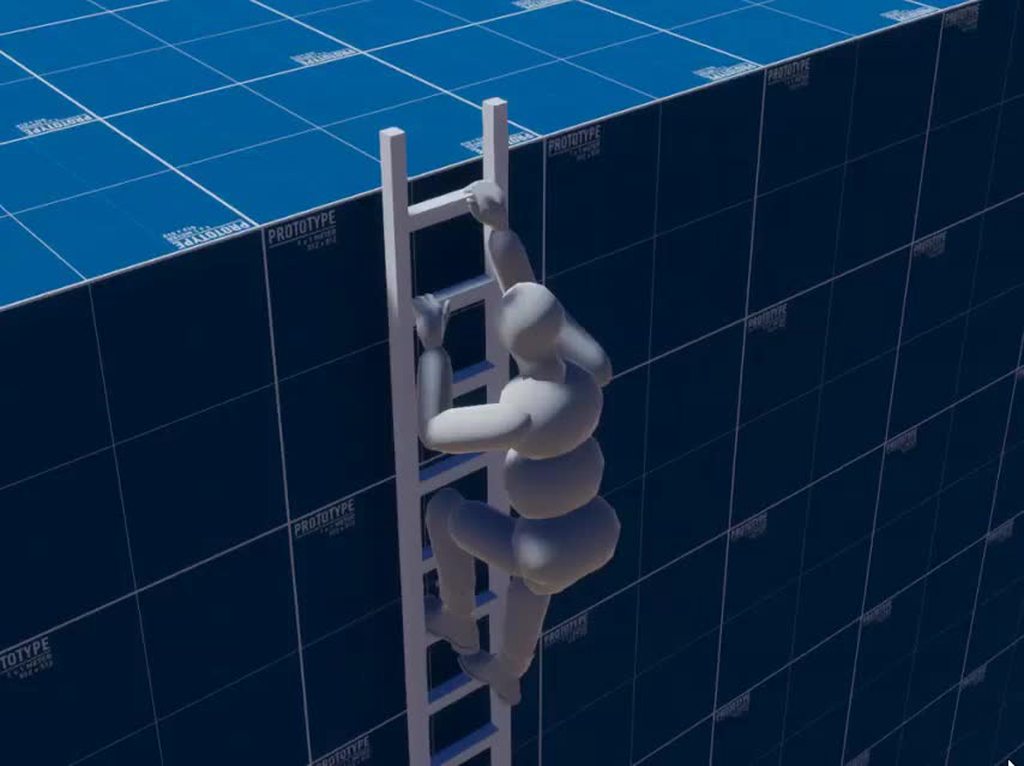
So, I have this issue with root motion not being accurate when climbing a ladder. I've removed compression on the animation clips and am using OnAnimatorMove in LadderState but I still experience the wrong offset on the Y-axis. https://i.imgur.com/pfqUHkx.mp4
Anyone has an idea?
 last gull
whole trellis
whats with crossfade?
last gull
whole trellis
whats with crossfade?
From the documentation i understand that the cross fade function allows to smoothly blend from the current state into another state, similar like a transition in the animator just from within code. But I never used it, so I'm not sure...
whole trellis
ill take a look at it when i add more animations
last gull
I think I'll check it out too maybe ^^
whole trellis
it's not ideal to use bool/trigger when i can just call out the transition
also, i need to find a way to do animation based of a variable. I have an archer and I need to adjust his bow/hand/head angle
last gull
Yeah. What I wished for was a way to create Events when a certain transitions happens. I play a sound when I go from peaceful into fist fight mode and It's a bit annoying to catch that moment. It would be ideal to just play a sound on the transition itself.
last gull
fossil surge
So, I have this issue with root motion not being accurate when climbing a ladder...
Are both the sliding down and the climbing animation not moving the right distance? To me the climbing seems fine
whole trellis

You can add event based of animation
but i need the other way, i need my code to access to the keyframe animation
last gull
hmm thanks for the tip, i'll think about it. The problem I have is that there are quite few transitions from different animations like run/peaceful_idle/jump into different animations related to fist fighting so I would have to add animation events to a bunch of animations and that would get out of hands quickly i fear. I would always just wanna trigger the same sound
just marking those tranistions to trigger an event would b so cool
fossil surge
last gull
Are both the sliding down and the climbing animation not moving the right distan...
The climbing is fine if I don't loop it. If I climb long enough it eventually turns out to be wrong. I think it might have to do with what's posted here but I'm using OnAnimatorMove and it's still not precise.

But the sliding is for some reason more severe. Maybe because of the above.
last gull
Hmm yeah for the normal climbing animation if there is even a tiny offset that offset will add up for each loop but it's really weird that the sliding is off so much
Have you tried making really harsh/no transition for the sliding?
fossil surge
There is 0 transition.
last gull
oh ok
fossil surge

As you can see the animation is off "tick" though, I assume
The blue bar
But using OnAnimatorMove should solve that according to the above post, if I'm not mistaken
last gull
Are you using rigidbodies/animate physics?
fossil surge
I'm using CharacterController, only using root motion for some things like ladder, jump animation
I've tried using all Animator modes, Unscaled Time seems most accurate but still not accurate
last gull
It's weird are you sure the distances are right in your animation software?
fossil surge
Yup, in Blender it's 100% correct
last gull
It also seems to accumulate just much faster than with the climbing
fossil surge
if I only press up or down once, as to only play the climbing up or down animation once, it never goes out of sync
if I hold up or down it does, so seems to maybe have to do something with the transitions, but they're all 0
whole trellis
@last gull Personnaly I use fixedtime to build my game logic instead of animation event because I'm disabling stuff outside the camera, then I found out there's like 1-2 frame of desynch despite using the same timer (animator timer are slighly faster). Like shooting an arrow there's 1 frame when there's no arrow at all
it's not noticable so i let it
last gull
Oh well... Maybe it would be possible to manage such timing problems with code but that seems kinda tedious
With the ladder, you could maybe define the distances of where the ladder steps are and then loop the sliding animation until you reached such a distance inside OnAnimatorMove (using root motion) and then from there stop the animation. But I'm not sure if that would actually work...
fossil surge
Yeah, I've been thinking about using code to move the player and not the root motion but I haven't thought of a good way of doing it yet. So I'd rather make the root motion work 😄 It just seems like there should be a solution
hmm the OnAnimatorMove doesn't seem to do anything
well, probably because my StateMachine doesn't inherit from MonoBehaviour
well, even with OnAnimatorMove in the right place it doesn't do much other than mess up my jump animation
last gull
I think you have to call OnAnimatorMove from a script that is on the same GameObject like the Animator component
then it should work
fossil surge
Yeah I did, but it made no difference other than that my jumping animation goes through walls
fossil surge
it's so annoying to get stuck on a visual thing
whole trellis
synch the movement with the foot animation instead of sliding 🙂
fossil surge
the player needs to move 0.6 Unity units in a linear motion throughout the animation, if I remove root motion
I have no idea how to do that the smart way
from a book I found while googling:
 whole trellis
thats why accessing to keyframe animation through code would be so nice. You could tell them to stop hand movement til it hit the ladder, so you could have ladder of any size
fossil surge
there's something called MatchTarget() that can be used
 somber vessel
help unitys only showing 3/8 animations and also combining some of them for some reason sdjfidsjhgf exported from blender, it all works fine within blender :<
 hybrid tinsel
@last gull You can use StateMachineBehaviour.OnStateExit() and StateMachineBehaviour.OnStateEnter() to trigger events when transitioning.
last gull
Thanks for the suggestion. That's actually where I'm doing it at the moment. But the sound has to be played when entering not just into the normal fight-Idle state but also when entering into 3 or 4 other fighting related states and then also not always when entering into those states but only when entering from certain states that are not related to fist fighting. So this sound playing code is all over the place and I always have to check for from where the transition is happening. I don't really like the way I'm doing this
The easiest thing would be to select all of those "starting to fight transitions" and put a callback on them. But I don't think that's possible
fossil surge
I'm trying MatchTarget and the results are quite interesting to say the least. I get teleported after a seemingly random amount of time to the MatchTarget position 😄
 river forge
hi guys I downloaded some animations from the asset store, how do I implement this in a controller if I have this many?

 vagrant wedge
Probably just packing that all into a blend tree and shift between them using a float parameter
spare yoke
Evening guys. I messaged a while ago about my characters feet sliding around the floor, but didn't find a fix at the time.
I've come back to it and looked at the animation and I've noticed this message on the import error / message section of the animation:

Do you think this mismatch is why the feet are moving around - but they appear fixed to the ground on the preview? Its because the feet don't match where they think the feet are?
fossil surge
I got MatchTarget to work but only for one loop of the climbing animation
Can't seem to find any info on how to make it loop
Is there any other way of moving the root bone a certain distance between the first and last point of an animation?
 wide sleet
For some reason my animator transitions to my other animation but it doesn't start playing. I've gotten this many times before so I'm figuring it's pretty common. anyone know how to fix this
hybrid tinsel
@spare yoke that definitely would make the feet slide around
 clear orbit
Yo what do you mean?
put a 2 bone ik constraint on it
on the leg
yeah you can blend
I have a question. Do I need "Rigify to Unity" if I'm going to be using animation rigging? I don't think I do.
And what about hair bones, anyone know about that?
And clothes bones
How many, and which type of chains
And should I avoid using rigify
hybrid tinsel
My only experience with rigify is people asking in here why it isn't working so I dunno 😛
tacit pendant
How is everyone exporting their animations in Blender? Do y'all mind sharing your settings?
hybrid tinsel
I just do my animations in unity
dense bay
tacit pendant
How is everyone exporting their animations in Blender? Do y'all mind sharing you...
the only thing I change in the export (fbx) setting is the path
fossil surge
This just seems like more trouble than it has to be. Why can't just root motions be exact? What's the problem? Now I'm using MatchTarget(), but in order for it to be called on every loop of an animation I have to call InterruptMatchTarget() at the end of the animations, however not too near the end because then it interrupts the MatchTarget that is being called at the beginning of the next loop?? https://streamable.com/detadd

 distant patrol
hello i have an issue, in the animation the enemy after dying loops over and over againand does not stop at the final dead sprite. how can i fix it?
ping me, thx
 cyan flower
when you make an animation inside unity you can key stuff like materials properties or blend shapes but not if you import an animation from an fbx
is there a nice way to hook up a fbx animation anim to unity stuff?
I've always done it with a c# script in lateupdate like hand.SetBlendShapeWeight(blendShapeIndex, blendShapeBone.localPosition.z * 100);
last gull
clear orbit
And should I avoid using rigify
Rigify creates rigs that are not compatible "as is" with unity. So you either have to spend quite a lot of time learning how to fix them yourself or use a plugin to export it. I use arigify which works fine for me but it is proprietary.
 sturdy eagle
Hi all, super new to unity, just here to ask if Unity has a Sprite-Builder/ Animation System? Ive made a mermaid sprite consisting of multiple moving parts and i hope to be able to animate it with unity's animator. Will this be possible?
 somber vessel
i believe it does? if i remember correctly theres a few packages you can install to help with that
 fading gale
i personally don't use the sprite builder because the possibilities are limited. But i usually make basic characters and draw the animations in photoshop
somber vessel
aight ive got an issue thats just stumping me where it looks as if the animations are splitting themselvs? but ive no clue why. maybe i just exported them from blender wrong but i cant figure out like..how i coulda done that
like heres how this jump animation is appearing in unity

but heres how its supposed to look (in blender)

wtf did i do wrong lmao
sturdy eagle
somber vessel
i believe it does? if i remember correctly theres a few packages you can install...
Thankiew! Im not sure where to find those, but i really appreciate ur response ♡♡
somber vessel
sturdy eagle
Thankiew! Im not sure where to find those, but i really appreciate ur response ♡...
try looking in the package manager !
its under the window tab :)
sturdy eagle
Will try soon! Tqsm ❤️ ❤️ ❤️
somber vessel
np! hope it helps
sturdy eagle
I hope ur problem above gets fixed btw 🥺
somber vessel
gaaah it better or else this whole thing is gonna get messed up cus its affecting every single animation o(-(
distant patrol
distant patrol
hello i have an issue, in the animation the enemy after dying loops over and ove...
can anyone help?
 sturdy eagle
somber vessel
gaaah it better or else this whole thing is gonna get messed up cus its affectin...
sturdy eagle
somber vessel
gaaah it better or else this whole thing is gonna get messed up cus its affectin...
Im no unity or blender expert but ive read that porting animations from blender can have issues, especially if u try to fix certain things with unity's animator after doing keyframes in blender, but dont take my word for it because I know literally nothing and I just read this off somewhere.
somber vessel
sturdy eagle
Im no unity or blender expert but ive read that porting animations from blender ...
changed my export settings to the default ones and it worked ??? im hoping its just cus i had deform bones and leaf bones unchecked 🤞 but its all working now !!
hybrid tinsel
@distant patrol you can either set the death animation to not loop in the inspector or have the sying state transition to a 'dead' one.
@sturdy eagle that would be very possible. You actually could have used fewer pieces, since with bones you can animate flexible parts pretty easily as well.
distant patrol
yh got it sorted by making the animation not loop
hybrid tinsel

Unity Learn
In development at Unity is a 2D Animation package that allows you to rig Sprites as one might rig a 3D model for animation. In this tutorial, you will go through the process of importing the 2D Animation package and rig a sprite ready to be animated. You will learn about all the features of the 2D Animation package, including Bones, Weights and ...
sturdy eagle
hybrid tinsel
<@351171607005495297> that would be very possible. You actually could have us...
Thankiew! I hope i'll be able to look into that soon haha! I'm currently trying to make 3 different variations as for now to try out a probability breeding/summoning system
hybrid tinsel
Neat
 lofty plover
https://learn.unity.com/course/introduction-to-3d-animation-systems?uv=2019.4
This can help for 3d animations

Unity Learn
In this course, you'll explore the fundamentals of Unity’s 3D animation systems. You will: Review the core concepts for the animation systems in Unity Connect those core concepts to the functionality of the Unity Editor Apply your learning through creating and modifying simple animations Review key principles of scripting for animation
By the e...
 hallow dust
Hello. I'm a beginner programmer so i'm coming into a lot of problems making my first game.
Right now i'm struggling to get my animation to flip and the code i'm doing doesn't make my guy flip but instead makes him shrink.
anyone have a fix or suggestions?
twin musk
hi everyone! so i've got the Animation Rigging package going, i was wondering which of the constraint components would be best to line up the hand with the ground normal in this get up animation?

 misty glacier
hi all
How to make an animation in the animator so that, for example, the animation of a jump is once
otherwise, while in the air, my jump animation is duplicated
junior tartan
twin musk
hi everyone! so i've got the Animation Rigging package going, i was wondering wh...
What you need is probably IK (Inverse Kinematics)
There is the Chain IK and the Two Bone IK: https://docs.unity3d.com/Packages/com.unity.animation.rigging@1.1/manual/constraints/TwoBoneIKConstraint.html
junior tartan
misty glacier
How to make an animation in the animator so that, for example, the animation of ...
Could not understand the question. Your character is playing the Jump animation two times?
twin musk
junior tartan
What you need is probably IK (Inverse Kinematics)
oh ya i saw those! I had one working earlier, but rly confused on where to start with it, would I be like raycasting down to set the constraint's transform?
misty glacier
junior tartan
Could not understand the question. Your character is playing the Jump animation ...
yes
junior tartan
twin musk
oh ya i saw those! I had one working earlier, but rly confused on where to start...
This one is a simple video that shows a simple implementation of the Two Bone IK https://www.youtube.com/watch?v=Kk0xN26ICLQ

Looks like inverse kinematics will finally be something easily acheived in Unity with the new Preview Package "Animation Rigging" It can do other things too. but in this tutorial lets just see how we can set it up and use it for a 2 bones IK on a mesh I create from Blender real simple and real quick
go to http://www.omarvision.com to:
- browse...
But in a short description, you will have a target Transform which will define the position of your hand (the start of the two Bone Chain). From that position the IK Constraint will try to adjust the rotation of the forearm and arm to conform that movement.
junior tartan
misty glacier
yes
- Check if your animation clip is with Loop enabled.
- If you are using a Transition from Any State to Jump State, you might check if "Can transition to self" is disabled
misty glacier
junior tartan
1. Check if your animation clip is with Loop enabled.
2. If you are using a Tran...
 twin musk
junior tartan
This one is a simple video that shows a simple implementation of the Two Bone IK...
twin musk
junior tartan
This one is a simple video that shows a simple implementation of the Two Bone IK...
ty for the help! i think my original confusion was less about the IK and more how they positioned the target in the vid below. it was confusing bc of the parenting structure but i think it's starting to make sense now! https://youtu.be/acMK93A-FSY?t=235
In this episode of the Prototype Series, we've expanded the Procedural Boss project by creating a procedurally animated walk animation!
⭐ Project Download https://on.unity.com/3jX6PAY
⭐ Training Session https://on.unity.com/3atx3rW
⭐ Procedural Boss video https://youtu.be/LVSmp0zW8pY
Timestamps:
00:00 - Intro
00:54 - Setting up the rig
03:55 -...
misty glacier
@junior tartanthx
sturdy eagle
Hello everyone, i have a question :) if i were to import a TIFF File into unity for Animation, will unity split my sprite into layers just like a PSD file? Asking as I dont have photoshop and i use Autodesk as a Drawing Software. Ive been looking around to find results but all just state psd files (this is for a 2d sprite)
 fringe berry
why does unity humanoid rig not take hipbones?
it makes no sense not to have hip bones in a rig, makes it harder to animate without hip bones
meager drum
Not sure what you mean, it has "upper leg" r/l, and then a hip bone in the spine. Which joint are you thinking is missing?
 hybrid tinsel
@hallow dust If you don't post your code it is hard to guess what might be wrong.
@sturdy eagle It will flatten tiff files. If you need to use layers, you'd need to have something to save as psd and then convert it into a .psb, which is the only format the layer importer accepts right now.
sturdy eagle
hybrid tinsel
<@!351171607005495297> It will flatten tiff files. If you need to use layers, yo...
Ah... if i download PS free trial and import a tiff to convert it to psb, will it work?
sturdy eagle
hybrid tinsel
<@!351171607005495297> It will flatten tiff files. If you need to use layers, yo...
Okie :D
hybrid tinsel
You can use any software that saves layered psd files, with a converter, though there might be erratic behavior depending on how well they stick to the spec- a lot of software 'kinda' supports psd. There is a converter that's been linked a few times on here that converts psd to a psb file that should generally work well with unity's layer importer.
sturdy eagle
Autodesk only saves as a tiff tho :(
hybrid tinsel
You could use something like GIMP as a converter
hybrid tinsel
Well, not many software supports layered tiff these days
sturdy eagle
Ahh gimp works? Dang 😂 i just deleted it last week
hybrid tinsel
I know gimp supports tiff, dunno if it supports tiff layers
gimp doesn't work directly, you still need to use a converter from the psd gimp saves
sturdy eagle
I'll try PS Trial first, will revert here if it doesnt work hehe
sturdy eagle
Im back! Sad to say that i cant get PS to open my TIFF file to seperate layers no matter how many settings ive changed and troubleshooting i've done.... its honestly driving me nuts... i literally just want to animate my sprite (gonna try the psd thing now! :D edit: psd doesnt work... i'm stumped)
fringe berry
@meager drum i had 2 bones, 1 for each hip in mind
meager drum
Do you have a diagram of what you mean?
Not trying to be thick here, just not able to picture what else would bend there 🙂
hybrid tinsel
@sturdy eagle Did you install the 'psd importer' package from the package manager?
And did you save the file as a PSB file(not PSD, depite the name of the package)
sturdy eagle
hybrid tinsel
<@!351171607005495297> Did you install the 'psd importer' package from the packa...
So im dumb.. i didnt know autodesk had a built in psd converter? So now i'm gonna try again using that file... will revert... and no, didnt install psd importer, will find that now, thanks ♡
hybrid tinsel
The naming is bad, both because unity has its own psd importer built in but also because this package uses psb files.
But that's unity for you
sturdy eagle
Gonna convert to psd first so that i can use PS to make it a psb :) but if the layers dont load, i think i'm legit gonna take a 5min cry break 😆 😆
hybrid tinsel
Worst case scenario, I saw your previous postings, you are quite capable of making a sprite sheet that doesn't need layered importing 😛
Though obviously the layered importing makes it much easier, it isn't required.
The only unique feature that importer had was the generation of sprite library assets, and for some reason they removed that.
dense bane
can you change the skybox thru an animation? i looked it up and i couldnt find something?
fringe berry
@meager drum i suppose i get what you mean. metarig in blender creates a rig with a bone between the lowest spine and the thigh bone called hip bone. and it creates on for both left and right leg. so naturally i animated everything and used those hips bones with keyframes of rotation too. and now unity discards those bones animation information because theyre not a part of the humanoid rig format in unity. so now all my animations looks rigid and stiff
dense bane
dense bane
can you change the skybox thru an animation? i looked it up and i couldnt find s...
anyone?
meager drum
@fringe berry If you're not planning to retarget the animations to different models/humanoids, you can always tell it to import the animations on the extra joints
fringe berry
that is the problem 😩
its my fault for not checking the requirements of humanoid rig before animating
meager drum
If you are planning to retarget you still can if the bones/joints that are extra always have the same name, but I think you can run into trouble if the models aren't the same size. I haven't tried.
fringe berry
i really wish unity had a defauly rig with only the necessary bones for humanoid rig as a free asset or something
fringe berry
meager drum
If you are planning to retarget you still can if the bones/joints that are extra...
its not possible, i tried for a long time, even when you override and tick the unused hip bones, the animation data from those hip bones is still discarded
and from what i gathered online its for that very reason about scale
meager drum
Yeah, maybe because it's in between. I've only seen it done for leaf nodes like tails and ears
hybrid tinsel
@dense bane You probably can. If not directly, then you could write a script to do it and trigger that from an animation event.
 torn shale
Posted this technically in another channel yesterday, but I figured it is most likely related to animation as in the blend tree so I thought I post here if that's okey:
I am not sure where this should go channel wise optimally, but yeah I am following a tutorial for how to make a 2D Topdown game, however for some reason when I start the game the character stats in the up position rather than the regular down position as in facing the player, so wondering if someone here know what the reason might be.
I am guessing it is the blend tree that got a wrong default start for the Idle animation, but yeah if so can I just quickly fix or do I have to remake the whole blend tree again and such? Here is a screenshot:

It might be an easy fix or redo, but personally I am really new to animation related work in Unity so yeah not sure what is best.
hallow dust
hybrid tinsel
<@!643152611515564078> If you don't post your code it is hard to guess what migh...
Yeah I figured out what was wrong if i have a problem ill post the code.
 steady bear
Just trying to understand. With 2d animation, you've got sprite sheets, or keyframe, or rigging, correct? Are there any others?
As a guy who can't draw worth crap, I'm thinking rigging or keyframe. And since it's top-down, keyframe. So is this my best option?
twin musk
hey everyone! i'm experimenting with custom ragdolls and
got a toggle working between the ragdoll state and idle animation. i'm looking for a way to lerp between the ragdoll position and one of the idle keyframes. I got an idea while i was typing this actually but if anyone else has some insight lmk!
 twin musk
here's what i tried, the armature still only snaps into place like above (no interpolation) i feel like i'm either missing a step or misunderstanding something hmm

the code finds all the ragdoll bones and repositions them, just trying to figure out the interpolation stuff now
twin musk
got it figured out! (at least for the scope of this test) in summary: this version opens a coroutine for every bone and Lerps them back into position. there was some weird behavior when I didn't target every bone. i'm still gonna study what was done in the post below, does anyone have any tips on making animation clips in code? (ex: taking the ragdoll pose) https://perttuh.blogspot.com/2013/10/unity-mecanim-and-ragdolls.html?m=1

Update 17 May 2014: If you're interested in physics simulation and character animation, check also our latest research . Also, please note t...
hybrid tinsel
@torn shale can't you just set the direction to start as negative?
torn shale
@hybrid tinsel Really new, so not sure how in that case.
Also, thank you Pinballkitty for helping me :-).
hybrid tinsel
In your script, you are passing the value to the animator that it uses to decide which direction to face. so if you pass it a small negative value it will set the sprite to face down.
torn shale
This is the code that I wrote based on the tutorial:

This tutorial by the way:
https://www.youtube.com/watch?v=3h6kZkhza3U
This Part 2 of Make a Game Like Pokemon in Unity Series. In the this video, we will look at how to create Player Animations using Blend Trees.
Become a Patreon to help me continue making this series and get access to all the script files
https://www.patreon.com/posts/script-files-for-38708232
Download the art assets needed to follow along with...
(Really new and still mainly just copying, and trying to understand).
 torn shale
I am not exactly sure what happened, but I managed to at least fix my issue.
I noticed there were 2 IdleDown options in the Blend Tree menu, so I tried switching to the other one and apparently somehow that fixed it. Still, thank you for trying to help me Pinballkitty and really appreciate it :-).
 copper relic
i need help with something, this is supposed to work like this:
-i click the mouse button, that activates a bool that makes the object pass from idle state to the animation, in the animation i have an event to make the bool change and that change the state from animation to idle again

its pretty simple, but, if i spam the mouse button it gets stucked

it gets stucked like this, and the bool dont change anymore

how do i fix it? ;;;_;;;
what is wrong?
twin musk
quick workflow question, when trying to add Animation Events to imported fbx animations, do i always have to duplicate them to make them non "read only" or is there another way?
dense bay
twin musk
quick workflow question, when trying to add Animation Events to imported fbx ani...
only if you are using legacy animation type I guess.
You can use humanoid or generic animation type/rig to avoid that
 hushed ember
 hushed ember
I'm new to animation.How do I add an animation event?
hybrid tinsel
The link I just posted
hushed ember
Shouldn't there be a drop-down list and choose the function from the scripts that u attached?
hybrid tinsel
That is for animations you're editing in the animation window, now imported animations.
Since you can't attach a script to the actual imported object, only to prefabs you make with it after import.
hushed ember
The "robotsphere" is origional object I imported containning animations . But "core" is what I create myslef inside it."Pistol" is a model I imported without any animations.I made an animation myself and gonna add event to it

This is pistol model


 hushed ember
hybrid tinsel
Since you can't attach a script to the actual imported object, only to prefabs y...
hushed ember
hybrid tinsel
Since you can't attach a script to the actual imported object, only to prefabs y...
Thx,It works now
 tight meadow
Do anyone know where to find a free good rigged character
 undone dagger
tight meadow
Do anyone know where to find a free good rigged character
undone dagger
tight meadow
Do anyone know where to find a free good rigged character
adobe mixamo.
anyone here similar with the Unity.Animation ECS package?
 ancient echo
Speaking of Mixamo, im quite confused... On their website the animations look normal, download import into Unity and they basically seem to be putting "less effort" than Mixamos, and for some odd reason the left leg is moving oddly, even with their rigs, what am I missing? (solider is using "root motion", blue robot thing is not, Mixamo on the left is tilted forward with both legs properly planted on the ground, in Unity their backs are straight and left leg is not planted properly, what could cause this?)
I also tried downloading the regular FBX, and FBX for Unity, with and without skin, and every framerate, and framerate reduction option, all produce the same results - the preview window in the inspector also have the same issues, so im assuming its an import setting im missing, since I cant it being an initial problem with the source file itself o.o
 twin musk
Hi
I have a question
How do I make animations? Like what file format does it have to be
Or is it just a bunch of pics
ancient echo
twin musk
How do I make animations? Like what file format does it have to be
Animations are typically done in something like Blender, 3DS Max, or other 3D software, then exported as a .fbx file, that contains the animation data (for example the gif I posted above was probably done in 3DS Max, exported as a FBX and then Mixamo allows me to download that fbx file, but I guess its also possible to get weird issues such as the one im experiencing, which could be down to the export settings in Blender/Max/whatever, or the import settings in Unity/Unreal/whatever)
twin musk
i mean in like 2d
ancient echo
Oh, you didnt specify that part - I personally donno much about 2D animations, but you could use something like Aesprite to create and export your animations in a format you can then import into Unity, with an asset you can get it into basically a JSON file containing the animation data, to a Unity animation clip - or yeah you could export every individual frame and link them in the animator but thats more of a "old school" way, since as you can imagine thats a pretty tedious method
twin musk
kk ty
hushed ember
Hi. guys. There's a cube around my character and it aims for the mouse pos. I want it rotate around character 360 when some buttons down. What is a good idea to do it?animation?or coding?
 distant dust
Hi! I’m making a horror game. I’ve already modeled and rigged a weapon, now I just need to animate the weapon with arms. I can’t seem to find any good free arm rigs, however. Does anyone know any good free arm rigs for blender/unity?
 paper prairie
Hi! I'm having really bad performance-issues with Umodeller and I can't understand why. It's basicly one large building with not so many details and no materials for that matter. Help would be greatly appreciated
 zenith iris
Hey guys,
How would you create a walking animation for such a character? Our first try looks a little but weird so I wanted to ask if anyone has some references where we can see how a walking animation could look like for this kind of art style. Thanks a lot! (please ping me if you answer)
 junior tartan
paper prairie
Hi! I'm having really bad performance-issues with Umodeller and I can't understa...
junior tartan
paper prairie
Hi! I'm having really bad performance-issues with Umodeller and I can't understa...
Prob de wrong channel, since it has nothing to do with animation.
Are you having performance issues in game runtime or on editor level?
On Game runtime, the performance issue could be related to the polygons count of you model. You could try a new scene with only your model to check if it really is the model or another thing.
But, if it is on Editor level, maybe you are with Lightning Auto Generate enable, in such case the Lightning will try to bake everytime your scene changes (in other words, every time you add a change on your model created by Umodeller).
 tender relic
krita or gimp to allow customization
tender relic
which is better
twin musk
arent krita and gimp image editors
unless you want to gif animations i dunno if this belongs in this channel and even then it'd be better on #archived-art-asset-showcase
twin musk
can I ask for help in this channel or is there another channel for help
 obtuse cloud
 trail scarab
how do i fix this
trail scarab
how do i fix this
Increase the field of view in your camera
twin musk
I made a jumping animation .. it is devided into 3 sections, leaving the ground, staying in the air and finally landing... I made 4 animations, the three mentioned above and them combined ... my question is how do I make the animation go.. like I want the character to jump , then if it's in the air the 2nd animation will keep playing till the character hits the ground and that's when the landing animation takes place
last gull
twin musk
I made a jumping animation .. it is devided into 3 sections, leaving the ground,...
I created a boolean parameter "isGrounded" in the Animator. You set that parameter from wherever you make the ground check. Then you connect the 3 animations with transition just like this: A->B->C. You transition from the "Up"-animation into the "Airborne"-animation just with "Has Exit Time" and from "Airborne" to the "Landing" Animation you add a transition with a condition for "isGrounded" is True. And then, when you want to jump, you just start with the Up-Animation.
twin musk
last gull
I created a boolean parameter "isGrounded" in the Animator. You set that paramet...
thanks, I will try it

 twin musk
last gull
Np, also I put those 3 animations inside a sub-statemachine to keep it organized
twin musk
last gull
Np, also I put those 3 animations inside a sub-statemachine to keep it organized
thanks but idk anything about statemachines in animations, can you send me a link for a video
Does anyone know why would 2x blender objects, working together through animation actions be out of sync after the first loop in unity?

I have this arm, picking up the chem and on the first playthrough in unity, it's good, but then their sync gets completely out of loop
the number of frames between the two are the same
last gull
twin musk
thanks but idk anything about statemachines in animations, can you send me a lin...
Maybe this one?
Learn the fundamentals of animating characters with Unity's animation system, and understand how & why it all works!
This beginner-friendly tutorial is a thorough break down of the Animator component in Unity 3D and explains how to use the component's five properties: controller, avatar, root motion, update mode and culling mode. By the end o...
I didn't watch it myself just quickly looked into it and it seemed fine
twin musk
last gull
Maybe this one?
I know that video, and I know how to make animations... but you said a sub state machine... how do i do that?
last gull
you can just rightlick somewhere in the animator:

and then drag and drop a few states into that container
The animator component works already as a state machine. When you connect these states with transitions you are defining a state machine already. A sub-state is most likely not going to change the way how your state machine works but just hiding away some of the complexity by grouping states that belong together.
 balmy furnace
Hiya, I'm trying to work out how I could combine multiple animated meshes into one mesh, while keeping the animation.
It involves animation from Maya's MASH, so there's no rig.
I haven't found a way to do it in Maya, and was wondering if Unity had a good method for this?
twin musk
can someone for the love of god, explain to me, what the f is going on with this animation and why does the constrain go absolute bonkers on LOOP?
last gull
Maybe that potion contains a strongly magnetic substance
hybrid tinsel
@balmy furnace What sort of animation?
hybrid tinsel
twin musk
can someone for the love of god, explain to me, what the f is going on with this...
You don't really show the rig or how the constraint is set up, but my guess is that the two objects are just getting out of sync somehow. Are they the same length? Are you syncing them somehow?
twin musk
hybrid tinsel
You don't really show the rig or how the constraint is set up, but my guess is t...
Hey, figured it out thanks to one cool person here, so, basically, comprised od multiple meshes and 2 rigs, the other rig was just for the pose bone constraint and it turned out that animation when imported into unity, didn't have the same number of frames as the animation 1
hybrid tinsel
That would do it
twin musk
so I had to push the last frame of that second animation (the flask) to match the frames of the other one.
yeah, the only shitty thing is, the inspector is showing the same number of frames for both and I'm still a noob at all of this, so it took a while
luckily, inspecting the layers, I was able to catch that the animation 2 is finishing before the first one.
hybrid tinsel
If needed you can explicitly synchronize animations (which might be good if you need frame perfect syncing)
But for most purposes just making sure they're the same length(based on frame count and sampling rate) is fine
hybrid tinsel
You can use Animator.Play() with the 0,-1, 0 parameters to force the current state to play from the start without 'entering' the state, and if you do that for both animators they will be perfectly in sync
hybrid tinsel
ah, so in that case you could use sync layers
Where the second layer is slaved to the first
twin musk
yeah, tried that but it did nothing, in fact it just stopped the animation on the main object alltogether
but thank you for all this inpu
I'll definitely re-explore these options.
hybrid tinsel
You need to use a mask to tell is which objects are affected by the sync layer
Otherwise it defaults to the entire hierarchy, because people also use sync layers to switch 'alternate' animations
Yet another way is to use a timeline
twin musk
hybrid tinsel
You need to use a mask to tell is which objects are affected by the sync layer
yeah, someone suggested that today too, I'm not familiar with the concept but I'll definitely investigate. Thanks 🙂
 austere phoenix
How would I animate this lol

Not a question related to unity just wondering how would I animate the propeller like spinning
twin musk
yay i finally am able to have a decent workflow between unity and blender

 lean yoke
Hi ya!
Tell me please, is it possible to change bone position/rotation/scale in avatar mode without affecting the mesh?
 fringe berry
the unity website on humanoid rigs is literally misinformation....
its showing 2 hip bones

you CAN NOT have 2 hip bones. it discards your hip animation if you have 2 hip bones
@meager drum
literally we had this conversation last week. so this time i consulted the unity website. and this is the documentation. (the picture uses two hip bones)
balmy furnace
hybrid tinsel
<@!503290606190329867> What sort of animation?
A flower with many petals, simulated in MASH
fringe berry
also, whats with UpLeg and Leg being capitalised but none of the other words are except HIPS
twin musk
question, is there a way to make an animation state go to another state when it's finished automatically?
ancient echo
twin musk
question, is there a way to make an animation state go to another state when it'...
If your animation is not set to loop, then when it finishes it will automatically go back to the "default state" (orange one), assuming it has a exit time and no conditions - otherwise if you want it to go to a very specific state that isnt the default one youd have to create a connection from the state in question to the target state, and tweak the exit time as needed for that transition
twin musk
ancient echo
If your animation is not set to loop, then when it finishes it will automaticall...
that's the thing, I put it to the default state but it's not doing that ... idk what the problem is
ancient echo
twin musk
that's the thing, I put it to the default state but it's not doing that ... idk ...
What are your settings for that animation state?
Also what is it currently doing instead?
twin musk
ancient echo
What are your settings for that animation state?
i will take a picture


@ancient echo and it is doing the 2nd action, then not doing anything
ancient echo
twin musk
If your certain "isShooting" is true when the state finishes, then you probably want to turn off exit time, since you have it set to zero anyway, so it will never exit or only exit at the very first frame (the exit time, basically determines in normalized time, how far along the animation until it transitions, for example 0.8 would be about 80% into the animation it will be allowed to transition)
twin musk
ancient echo
If your certain "isShooting" is true when the state finishes, then you probably ...
yes you see here is my problem, is shooting .. idk if it should be a trigger or a boolean (i want the shooting animation to start when the mouse button is clicked) and when the animation finishes idk how to turn it back to false (if it should be a bool)
ancient echo
twin musk
yes you see here is my problem, is shooting .. idk if it should be a trigger or ...
A general rule of thumb I like to follow for that, is "if the animation should play in response to an action, its a trigger - if the animation can be interrupted, its a bool"
In your case, I imagine shooting will probably want to be a trigger, since it should happen when the player does some action (in your case, left clicks I assume), if it was sprinting or they could cancel the shooting animation for a different action, then a bool would be better
twin musk
ancient echo
A general rule of thumb I like to follow for that, is "if the animation should p...
thank you , can you recommend me a video that teaches me how to make that stuff and how do I solve the current problem how do I get the action to get back to idle after i change the variable to trigger
ancient echo
twin musk
thank you , can you recommend me a video that teaches me how to make that stuff ...
If its a trigger, and you have exit time turned off, and it has no conditions, it should automatically transition to the next state - I dont have any videos since everything I know about the animator is through my own trial and error experience, sorry - im sure if you googled "unity animator tutorial" youll probably find tons of info on it
twin musk
ancient echo
If its a trigger, and you have exit time turned off, and it has no conditions, i...
thank you, one last question.. is there a way to set the boolean, trigger back to false when the animation is done ?
ancient echo
twin musk
thank you, one last question.. is there a way to set the boolean, trigger back t...
Not a trigger, a trigger is reset automatically when the animation that triggered it finishes
A bool though, you could check the animation time and do some math (total length of clip - current time in clip = remaining time left in clip) and determine when its appropriate to change back to false
https://docs.unity3d.com/ScriptReference/Animator.GetCurrentAnimatorStateInfo.html
That class should help you get the math you need, but it can be a bit confusing to understand so id suggest to use print or Debug.Log statements and check the output info and make a logical decision from there
And the index will probably be 0 in most cases, unless you have multiple layers for your animations and your trying to access the animations on layer 2 for example, im assuming thats not the case for you
twin musk
thank you but yes it is the case I have 3 layers.. thank you 😁

 woeful minnow
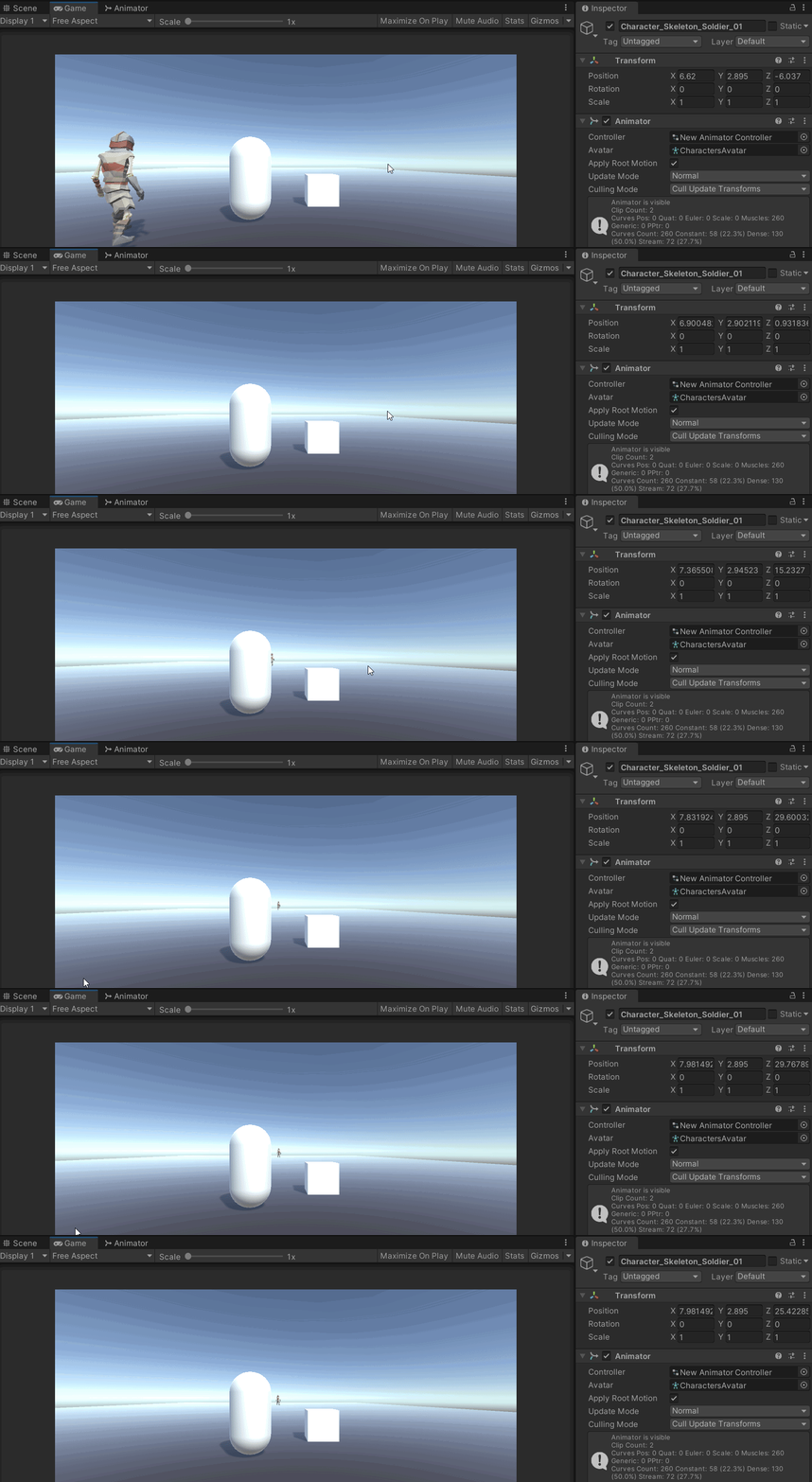
As you can, walking increases the transform position X, caused by the animation, which makes it go to the right. Even though you're just holding W (forward).
with only the movement code it doesn't happen. How do I prevent this? Why is it happening? I've looked around no luck.
I've tried to fix it on my own for a while.
changing root transform orientation on the animation to get it to 0 on the average velocity below helped
now it doesn't change X except the first few frames of a W click, after that it's constant/forward.
so I still need help with that, but it's now acceptable compared to before
 willow quest
austere phoenix
How would I animate this lol
willow quest
austere phoenix
How would I animate this lol
make it go smaller inward and grow back out
austere phoenix
yup, got it alreayd
hybrid tinsel
balmy furnace
A flower with many petals, simulated in MASH
You'd need to convert the animation into something unity can use, like a vertex texture animation or a bone animation.
trail scarab
thoughts on this approach vs webs vs blend trees?
https://www.youtube.com/watch?v=nBkiSJ5z-hE
► Easily make Platformers using my Unity Asset - http://u3d.as/2eYe
➤ Ultimate 2D CarGame Kit [ON SALE] - http://u3d.as/1HFX
➤ Wishlist my game - https://store.steampowered.com/app/1081830/Blood_And_Mead/
➤ Join the community - https://discord.gg/yeTuU53
➤ Support on Patreon - https://www.patreon.com/lostrelicgames
0:00 Escape Unity Animator ...
trail scarab
 limpid terrace
does anyone know how to stop animation from being spammed with a key
limpid terrace
does anyone know how to stop animation from being spammed with a key
check if its being played already?
hollow fiber
@trail scarab layers are far easier to manage
trail scarab
i really hate checking for 15 million booleans though...
hollow fiber
Create your own enum to select layers 😛
trail scarab
😫
hybrid tinsel
@trail scarab that video is garbage
@limpid terrace depends on why they are spammable; if you are using any state transitions, disable the 'can transition from self ' checkbox. If it is an input issue, add a cooldown to the input in your script.
trail scarab
hybrid tinsel
<@425746431920570378> that video is garbage
can you elaborate as to why?
hybrid tinsel
When I get back to my computer
Or you can look up what I said last time it was posted in here =p
trail scarab
i dont wanna scroll up forever
hybrid tinsel
TLDR it is the animation version of

The problem the guy attempts to solve certainly exists, but his approach to solving it is terrible.
meager drum
Taken far enough his solution is to reimplement the state machine in code.
trail scarab
so whats the ideal way to do animations then? @hybrid tinsel
hybrid tinsel
That's kind of a massive topic, but yeah. What Wyldfire said is exactly right.
meager drum
There's nothing inherently wrong with that I suppose, but I certainly wouldn't say it's better or simpler either.
hybrid tinsel
It certainly isn't easier.
Really, you'd need to break it down into 'animations for what?' because there are lots of different scenarios with different needs.
In some places you would want to explicitly call states like that guy suggests. In others, 1d and 2d blend trees are very useful. In others, you can add multiple layers to the animator.
 modern escarp
Why isn't the animation looping? I made a running animation in Blender for inverse kinematic. The whole skeleton runs in place, movement in space is given only by the Root bone - father of all other bones, which I assign as the root bone in Unity ( in Rig FBX import setting Tab ). But the animation doesn't match XZ position loop. I do not understand - why?
I tested it in the game ( you can watch the video ). css [RED Sphere] - Position of whole object that takes position of Root Bone ( Apply Root Motion setting do it ), ```diff
- Green Sphere
https://www.youtube.com/watch?v=C_ffkMCcdoQ

Position of object ( red Sphere ) lags behind the root bone ( Green sphere ) and it cause problem because we see how further loops of walk animations start at position behind and it cause teleport back effect.
 trail scarab
how do i use a 2d blendtree? do i just check if x and y are this, and then play that animation?
 tame steppe
Hello, I have a simple pistol animation that goes up and down when shooting. The problem is, the animation is not ending in the same place it started! Even though I am 110% sure that in the keyframes, it starts and ends on the same position. And so what ends up happening is, if you shoot the pistol enough times, it just dissapears from the screen! I am not sure what is causing this and have tried so many different settings. Thanks
EDIT nvm solved, just used animation instead of animator
trail scarab
how do i tell something to instantly switch to a new animation
currently in my web of booleans, an animation has to finish before the transition starts
tame steppe
think u wanna do something with exit time = 0
transition time also = 0
not sure im kinda a noob too
trail scarab
we'll get there eventually ¯_(ツ)_/¯
trail scarab
nvm fixed it
 dry ocean
Hi.
i'm trying to change blendshapes in runtime but unity won't let me.
it did work for one of my models because i exported it differently but i don't know how i did that.
i'm using Blender.
 lusty wadi
got this working
just gotta figure out how to script... a crap ton more
man sometimes i wish i had a programmer for this project rather than having it a 1 person team
hybrid tinsel
trail scarab
how do i use a 2d blendtree? do i just check if x and y are this, and then play ...
Yes. It will blend between them in proportion to how close to each node in the blend the values are.
last gull
Did anyone try out Playables or the PlayableGraph?
I have a generic rig and would like to implement an IK system for the upper body and I am a bit stuck on how to approach it, any hints/suggestions?
modern escarp
Root Transform Position (XZ) Loop Match not match generic run animation. Please, help me with this issue. Here i posted thread with all detail ( video, images and text ) - https://gamedev.stackexchange.com/questions/192293/root-transform-position-xz-loop-match-not-match-generic-run-animation

Game Development Stack Exchange
Why isn't the animation looping? I made a running animations in Blender for inverse kinematic. The whole skeleton runs in place, movement in space is given only by the Root bone - father of all other
 half blaze
Huge bug in unity animator, using the 'any stat' cause all your animations to have a slight delay before they play. I just set everything up with 'any state' and then I found this post https://answers.unity.com/questions/1125513/animation-start-delay.html
Is there anyway to circumvent this? Or will I really have to make transitions to every single state back and forth?

Unity is the ultimate game development platform. Use Unity to build high-quality 3D and 2D games, deploy them across mobile, desktop, VR/AR, consoles or the Web, and connect with loyal and enthusiastic players and customers.
 violet flame
Question. How can I do this?
Enemy is playing animation an animation, like "A", or "B".
On an specific trigger, the enemy changes to play another animation, "C".
How can I make that after finish animation "C", it rollback to the previous animation that it was playing (which can be either "A" or "B").
I don't mind if the previous animation start from zero or from the exact moment it changes to "C".
 crystal berry
violet flame
Question. How can I do this?
Enemy is playing animation an animation, like "A", ...
crystal berry
violet flame
Question. How can I do this?
Enemy is playing animation an animation, like "A", ...
Why not make a transition from C to A/B?
violet flame
crystal berry
Why not make a transition from C to A/B?
But how can I make that if reach to "C" from "A", it must go again to "A", and if reach to "C" from "B", it must go again to "B"?
hybrid tinsel
@Toasty™#3376 I'd not noticed such a delay. Are you sure that 'can transition from self' isn't active and/or the transition conditions only trigger once?
@violet flame you can set a variable on exiting the other states, and use that to return to the appropriate state?
crystal berry
Is it possible to move around freely while in an empty animation state?
violet flame
hybrid tinsel
<@282246408223064064> you can set a variable on exiting the other states, and us...
I will try that
violet flame
Inside an StateMachineBehaviour, is possible to check which state name and index is it?
twin musk
Hello everyone, I have 2 Questions.. I made an fbx file that contains the character model, bones and animations... My first question is should I duplicate the animations before using them (get them outside of the fbx file )
2nd question is in case I want to edit the animations, how do I do that.. Keep in mind that my bones avatar is generic
Thanks!
uncut salmon
-
You don't need to duplicate the animations to use them. The only main reason you'd do that is if you needed to make changes to the keyframes.
-
As above.
twin musk
uncut salmon
1. You don't need to duplicate the animations to use them. The only main reason ...
Thank you.. I want to modify one animation.. How do I do that?
hybrid tinsel
@twin musk Duplicated animations can be edited using the animation panel
 crude hedge
i made this with playmaker and it works but i forget to add run animation, do i have to remake all this or i can just add run animation

can anyone help meeeeeee
 kind patio
Can someone plz help me how to fix this
kind patio
crude hedge
i made this with playmaker and it works but i forget to add run animation, do i ...
U can delete the nodes
crude hedge
ok
kind patio
Click on the node and press delete
crude hedge
okkkkkkkk
crude hedge
nope
 ruby plume
if i have 3 slides, how would i set up a different slide between 1 to 3 and 1 to 2 if that makes sense
 ruby briar
would anyone happen to know what is happening?
why is it moving down when the jump animation starts? and why does it look so weird
 primal glen
Hi everyone, is there a way to replace programmaticaly a humanoid player model in unity ? (While using the Animation Rigging package?)
Because I would like to keep my player controller prefab, and just replace the model with multiple characters ? To make this a little bit optimized. Thanks!
 celest inlet
hey all, i have a question. I have my characters talking in cutscenes, but I want to make them play a gesture anim on command. I've created an unconnected animation in the state machine for a gesture (just his hand out), but when I play the anim in code it doesn't blend from his current idle to the gesture, but rather snaps to it. Do I have to use the state machine to make it do this?
 odd prairie
I can't rename my missing animation properties
(by doing as usual: click once - pause - click twice)
what is the reason for that?
without "(Read-Only)"

 opaque smelt
Not sure if this is the right area for this, but I am working through a tutorial on IK for VR avatars. Right now I have a walking animation (uploading as part of this message) and I have the Robot Kyle asset from the Unity store. I am running into an issue applying the animation for walking to the Robot Kyle in my scene. The tutorial says to just drag and drop the animation into the inspector and it will handle everything, but when I hover the animation over the inspector, it will not let me add it.
Any suggestions for where I am going wrong?
hybrid tinsel
@celest inlet How are you playing it in code? Using Animation.Play() or Animation.Crossfade()?
dry ocean
Hi.
i'm trying to change blendshapes in runtime but unity won't let me.
it did work for one of my models because i exported it differently but i don't know how i did that.
i'm using Blender.
 silver nest
Hello, How can I play an animation from the timeline additive to the animation playing on the animator controller?
hybrid tinsel
@dry ocean what do you mean by 'change' them?
dry ocean
hybrid tinsel
<@230115756237389824> what do you mean by 'change' them?
I mean change their values through script
hybrid tinsel
Like, change which one is applied or actually change the blendshape data?
@silver nest only via scripting, I believe
silver nest
hmmm, with script blend the timeline animation with the one from the animation controller? as per frame per frame interpolate between both animations?
dry ocean
hybrid tinsel
Like, change which one is applied or actually change the blendshape data?
give me a sec, i'll send you my script
dry ocean
hybrid tinsel
Like, change which one is applied or actually change the blendshape data?
here's my script
https://pastebin.com/9V9GMSqA
Pastebin
Pastebin.com is the number one paste tool since 2002. Pastebin is a website where you can store text online for a set period of time.
dry ocean
does anyone know how i can change blend shapes through scripts while having armatures that effects the body but not the face?
hybrid tinsel
That should be the default behavior for blendshapes
kind patio
kind patio
Can someone plz help me how to fix this
Can someone plz help me to fix this
hybrid tinsel
@kind patio I can't even tell what your problem is; maybe explain that instead of repeating yourself.
kind patio
the face flickering
and the fact that the face goes transparent immediatly when I add my blender animation to it
last gull
I'm currently trying to figure out a way to check whether a state is inside a certain sub-statemachine or not. Did someone find a solution to the problem that OnStatemachineEnter() and OnStatemachineExit() don't work, when not using the Entry/Exit nodes?
clear orbit
Hello
 pulsar sand
hi, i am using a blend tree to handle the movement animation of a 3d character i have a dash mechanism for which i need another blend tree which handles the dash animations which are similar to movements animations but fast and short. Any thoughts on this and what would be an appropriate way of handling animations for the dash . Currently there are no animations for dash so it looks like sliding.
Thanks in advance.
low nebula
i have made animations for my right sides, is there a way i can duplicate and switch sides?

 deep cradle
yo (:
austere phoenix
making a idle animation for the monkey, im making the head bop up and down but i feel like its rlly bland what else should i add?
 deep cradle
so im having trouble with a walk cycle animation its 3d WASD
{{ description }}
this is the code i have for it at the moment
basically the problem is after a couple seconds of holding a direction it goes back to the idle animation loop
the D direction works fine for some reason thoughj
deep cradle
yee gimme a sec
you can see how going right "D" works fine but the rest for some reason go back to idle
to clarify my "idle" state isnt actually an animation, its just no motion
i dont think that should change anything but idk
austere phoenix
add debugs to see if the code is still working after holding w/a/s for longer than a second
what should i do to make this idle animation look better?
i can change the speed of the animation in unity so making it already done
meager drum
Make the tail move around
deep cradle
possibly have the body move with it slightly? thats way more work tho
austere phoenix
i got the tail to move a bit in and out
and for the body, i kinda have no idea how to do that lol
austere phoenix
who wants to help me and do jumping animation for the fellow monke
hallow dust
Is there a way to import animations to your character without code?
im just curious if theres a way.
austere phoenix
i mean the animator
but that would make the animation constantly play over and over
only able to edit when its turned on/off in code.

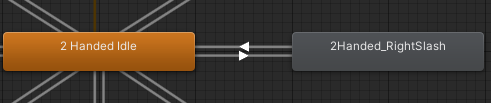

 fringe berry
hey is it possible to animate using the muscle parameters on the humanoid rig avatar definition?
meager drum
I think it's possible via GetHumanPose(), but I don't think it's really intended. to be done that way. The system mainly exists to facilitate retargeting of external animations amongst models/avatars
 devout quarry
I have character with rigged bow equipped and it is playing bow shoot animation when i press the button. How do you set up that the rigged bow is also animating as it is currently static with string not moving
celest inlet
i am mega confused. i have two models that share animation controllers. if I change the avatar (still humanoid and matches bones) then the animations no longer work, stays stuck in T pose. Animations are sat outside of the models. They aren't tied to an avatar are they?
 light bluff
Hi, i would like to how to create in animation inside a animator controller to achieve this result ->
 last gull
How can i find out in which specific Substamachine an Animator is in currently?
 chrome radish
im having problme exporting animation from blender to unity .. can anybody help?

in blender it affect only the besh i mapped but in unity it move the whole mesh
tried to troubleshoot many time cant get it to work
echo umbra
why don't i see my walking animation

i have my walk.fbx but it don't show up

please someone help
 mellow ravine
Anyone know a good youtube video i can watch to help me animate? I want to do an animation where say a character wakes up and stands up and go towards the window for example then you get to play
echo umbra
can someone help me pleease
 tardy goblet
echo umbra
can someone help me pleease
tardy goblet
echo umbra
can someone help me pleease
nope
the more annoying you are and repeating "can someone help me" in a short time, the less help youre likely to get
also i found a answer to that question withing 2 google searches, so why dont you just try to google 👍
echo umbra
ok.
echo umbra
still not working

 surreal widget
How can i change Animation window timeline? etc it goes 0,1,2,3... and i wanna make it 0,0.1,0.2,0.3,...?
last gull
chrome radish
in blender it affect only the besh i mapped but in unity it move the whole mesh
Did you parent that bone that moves your speaker-membrane to a root-bone before exporting?
 muted storm
I want my text to play its animation when my enemy dies.So i'd make a transition between "any state" and "textfade" and put the bool condition.But unity makes a transition between "entry" and "textfade" which i cant change at all.How would i remove it?
austere phoenix
If i want to add a weapon in my 2d game that my player can hold, do i have to reanimate everything? like the player holding it, walking with it, jumping with it?
hybrid tinsel
@muted storm any stare m3ans that it can be called from any state, not t bg at it will automatically trigger from every state.
echo umbra
echo umbra
i have my walk.fbx but it don't show up
anyone know why this isn't showing, im not getting anything from google
kind patio
Can someone plz help me how to fix this
https://cdn.discordapp.com/attachments/410854194313035778/842587142432882688/2021-05-13_22-19-00.mp4
the face is flickering
and the fact that the face goes transparent immediatly when I add my blender animation to it