#🏃┃animation
1 messages · Page 74 of 1
 meager drum
 obtuse roost
like nothing is hitting it anymore
yea not anymore
the console is blank
idk what happened
meager drum
What object is this script attached to, do you have a bunch of colliders?
obtuse roost
now it's not colliding with anything i guess
it's attached to the chest object on reptile
fuck
fuck
fuck
i got it to work
oh thank GOD
i had to make the chest collider a trigger
that's literally it
@jovial moth @gentle wind thank you for the help
i'm going to bed now
 jovial moth
 obtuse roost
Yea for some dumb reason I kind of forgot you need a trigger collider for any sort of real code effect to happen
My brain is just a little fried today ig
meager drum
Well, glad it's working 🙂
 hybrid dove
what's the connection between the animator component and the animation controller?
ight nvm that, how do I make a player have different animations based on different weapons?
 gritty frost
AnimatorOverrideController can be used to replace specific animations in a controller.
https://docs.unity3d.com/ScriptReference/AnimatorOverrideController.html
 keen jacinth
Does anyone know why my character's jump animation starts in the middle?
Then the jump animation ends in the middle of the jump
 drifting lotus
lets goooo

 storm quiver
I have a weird little issue going on with my animations.
- In my start I have
platformAnim.SetBool("platformOn", false); - I have method named 'MovePlatform' and that has
platformAnim.SetBool("platformOn", true);
If I put my false to true, the platform moves but when I enter the UnityEvent system to activate the platform with the MovePlatform method, it doesn't go to true.
Any clues on why?

 fringe berry
Hello. In blender we animate IK by using Bones that are NOT CHILDREN of the main armature. Unity avatar requires that everybone be a child related to the root bone. So the question is:
How do you animate with inverse kinematics in blender and then ALSO make a humanoid avatar of this rig in unity?
fringe berry
To set up ik in blender you need to make the foot bone a child of the target so that the foot bone doesnt disconnect from the shin. However this means the foot is no longer a child of the shin bone. So in unity the humanoid rig says error footbone.L is not a child of shinbone.L. Etc
Why is this a thing? This makes animating in blender harder, when the whole point of using blender is to make animating easier. You could argue is an issue with blender and id agree however im hoping for some insight. This has been an issue since day 1 and noone has talked about this. How is that possible?
fringe berry
 fringe berry
i think i got it working with a copy rotation constraint on the foot bone to the footIK target bone. invert the y and z axis and use world space -> local with parent. seems to work perfectly!
 deft raptor
https://gyazo.com/c23b4beb7b93aed2dc16df0a695ba83e Why is it not counting down in seconds? "currentTimeCount -= 1 * Time.deltaTime;"
If I start it, the counter only goes down by clicking shift but not while holding, what am i doing wrong?

 long bluff
 long bluff
long bluff
long bluff
what is problem with this ? animation not working well 😦
what did i missed ? should i have to make it just in animator ?
long bluff
long bluff
what did i missed ? should i have to make it just in animator ?
found the answer, i have to use Animator and throw away the Animation Component for real 🥲

 mortal whale
I made a simple animation which squeezes the player to make it crouch and vice versa
since it resizes from the center its a little jittery when standing from crouching position
and if I add position changes to animation to make it move and resize at the same time(which makes it smooth, just as i want), then i cant control my character anyone
anymore*
If the crouching animation just affects the scale then movement works fine but crouching is jittery, if I fix crouching by affecting the position in the animation then movement just totally stops. Can do nothing except crouching. Any help pliss? :c
 flat bison
how would I best animate I have a animator for my char and one for its arms cuz there difrint arms then the original char and I have to make both move at the same time but its realy hard to animate 2 difrint animators at the same time
like the char needs to move asswell with the arms
for a ADS animation
 abstract nova
how do u make an animation only happen once and then destroy the object thats animated
 crisp oyster
i have a problem with the animation controller
when i do playerAnimator.SetBool("TouchingFloor", controller.isGrounded); on the fixed update it will just repeat fall to idle to fall to idle
 placid zodiac
how do i use inverse kenematics? 😦
 vocal garden
abstract nova
how do u make an animation only happen once and then destroy the object thats an...
vocal garden
abstract nova
how do u make an animation only happen once and then destroy the object thats an...
Animation events?
abstract nova
vocal garden
Animation events?
in the animation window (not animator) when u see events i want the animation to happen once and then destroy the object that is animated
also thanks for answering
vocal garden
abstract nova
also thanks for answering
I never done this before but you can make a code just to autodestroy a GameObject and make it run in specific frame of the animation
abstract nova
nvm i found a solution
Unity is the ultimate game development platform. Use Unity to build high-quality 3D and 2D games, deploy them across mobile, desktop, VR/AR, consoles or the Web, and connect with loyal and enthusiastic players and customers.
best advice i could find
vocal garden
abstract nova
nvm i found a solution
Sweet!
 polar jay
small question for yall
whenever i add an animator and animation clip to a football object, it always changes and locks in a orientation/rotation that i dont want
animation is just a spin to make a thrown ball look more organic
but it locks its transform to something that i dont want
abstract nova
Pastebin
Pastebin.com is the number one paste tool since 2002. Pastebin is a website where you can store text online for a set period of time.
it does the jump animation but doesnt quit the jump animation
i set a condition from jumping animation to idle animation that happens when IsJumping = false
abstract nova
turns out my entire jumping mechanic doesnt work which is why the condition didnt disable when i landed, because i didnt
fringe berry
@abstract nova best to get things working before the animations. Then you can glue the animations on top
deft raptor

► Easily make Platformers using my Unity Asset - http://u3d.as/2eYe
➤ Ultimate 2D CarGame Kit [ON SALE] - http://u3d.as/1HFX
➤ Wishlist my game - https://store.steampowered.com/app/1081830/Blood_And_Mead/
➤ Join the community - https://discord.gg/yeTuU53
➤ Support on Patreon - https://www.patreon.com/lostrelicgames
0:00 Escape Unity Animator ...
i wish i found this earlier
abstract nova
fringe berry
<@729324554815799327> best to get things working before the animations. Then you...
yeah ik i said in a more relevant channel that the animation works but relies on a mechanic that doesnt
fringe berry
@abstract nova which is why i saod make sure the fundamental mechincs work before you start adding animations
:-)
abstract nova
yeah they work but now i have another problem
theres a line in my code that sets a bool parameter to true
and transitions that work whenever that parameter is true
but it just skips to the animation and the result is weird
fringe berry
You can control the cross fade via the transition arrow's options in the inspector
abstract nova
i need help
 twin musk
I'm trying to drag 4 image/sprites in my animation window. As I follow a tutorial. Drag and drop It does not work.

selecting spreads and then create animation doesn't work ether.
oh it worked!

 dusky trout
is there way to import curve animation on .anim to unity?
 steady bear
hybrid dove
what's the connection between the animator component and the animation controlle...
steady bear
hybrid dove
what's the connection between the animator component and the animation controlle...
this is a good question. I recently added the animation component to my lefthand object so I could control it from the player animator. I'm confused, but it works
 strong minnow
Anyone ever run timeline animations with root motion on an animated character that has an animator running with root motion?
I'm seeing some weird movement artifacts and I don't quite know where to look for answers on what's causing it.
They're melee attack animations, btw.
So normal animator for locomotion and then abilities driven by root motion animations on timeline
 hybrid tinsel
@strong minnow maybe you could add a parent object to animate with the timeline so the two components aren't having a tug of war?
strong minnow
They both animate the same object so I'm not sure I'm following @hybrid tinsel
keen jacinth
when I'm holding space and running on the floor still holding space, the animation is idle, instead of run
By the way, all the code:
I think the problem is in the void jump.
 celest crag
@keen jacinth Don't cross-post in other channels, please.
keen jacinth
Sorry
strong minnow
To anyone encountering weird behavior with mixed animator/timeline on the same object and you're using PlayableDirector. Call Stop() on PlayableDirector before you play each time. It seems not doing so may have consequences.
Helped me at any rate.
 fading crystal
does anyone have any suggestions for getting lipsync to work in unity?
I'm importing keyed animation as fbx from maya, and don't need any sort of auto lipsync- would I need lipsync pro to configure the face joints (no blendshapes)?
meager drum
You're importing an animation of the character already lip syncing and you need to get the audio to line up?
I'm not sure what you mean by configure the face joints if you already have the animation
I'm doing lipsync using Speech Blend with blendshapes, so I'm not sure I'll be a ton of help here.
I also haven't tried Lipsync pro. But I CAN say that despite its popularity, Salsa is very lacking/unimressive IMO.
fading crystal
sorry, should've been more specific- I'm hooking my anims into mecanim and most other anims work but when it comes to facial animations, certain joints (like jaw) just dont move
meager drum
Yeah, the avatar definition really doesn't cover a lot of detail for lipsync. You might also be running into a problem where you need to mask off the mouth joints from other animations like "idle" that may be playing
fading crystal
hmm ok I'll keep looking into it, thanks for the suggestions and other info tho!
meager drum
I'm actually not sure how masks deal with "extra" bones, like, if you mask off the head does that apply to bones/joints "below" that like the mouth?
Do you have a lot of speech? Are you hand animating it all?
fading crystal
I'd guess that it prob masks according to hierarchy 🤔 I think it's a somewhat minimal amount, I'm just using it for a short film
meager drum
Sorry for all the questions, I just plan to have a lot of speech in my own project so the topic interests me 🙂
fading crystal
totally fine haha I'd be curious too!
meager drum
If you're doing them all by hand, why joints/bones rather than blendshapes?
fading crystal
tbh I'm kinda new to face rigs ':) I prefer more freedom when animating and didn't have fixed expressions to hit yet + thought joint based wouldn't be as 'heavy' in engine
^fixed expressions since Im just working off a script (that didnt exist)
meager drum
Hrm, I hadn't considered that one would be heavier than the other. I haven't measured, but blendshapes so far seem really light in use. My audio analysis definitely has a bigger impact
Disregard the whiplash of the voice lol, this is where my experiments are at.
fading crystal
Yea the difference prob wouldn't be too big with simple enough rigs, though I also didn't want to pile on more work learning and making blends haha
oh wow thats cool, is that based off auto lipsync type things? I havent looked into those at all
meager drum
Yeah, it's entirely driven by audio analysis
fading crystal
makes sense to drive those with blendshapes
meager drum
Well, Salsa does that too, but it's pretty... I dunno, I guess it's fine for very basic effects and it places few demands on the model.
Here I used SPeech Blend, which only really works with blendshapes. It's a pretty unassuming asset, but its core audio analysis seems very good to me
You have to provide a blend shape for each Viseme (trying to remember how many, but it's a fair number). But then basically it analyzes the audio and comes up with a mix of them that it feels are appropriate for the sound.
The model here has tongue and lip/cheek, and jaw positions tied to each shape. So, it's a fair amount of setup required in the model up front, but I think it pays off well
fading crystal
yeaa that makes sense, ig comin from a film background I just felt compelled to just key animate the lipsync haha
seems really efficient though, might explore it next time
meager drum
Makes sense 🙂
I'd never be able to do it with my zero budget and "just me" staff, so I've been working on this solution lol. It combines really well with expression shapes too
Took me like two weeks to get this thing working with FMOD instead of Unity's built-in audio
fading crystal
oh man, Ive barely even touched audio in unity 😅
meager drum
I think at the rate I'm going I'm going to have spent a whole year getting ready to attempt my first cinematic. It's not that I haven't been learning a LOT the entire time, but I do have to wonder if I'm procrastinating on it at this point 🙂
fading crystal
kinda what I've been doing actually! been learning unity the past year and have increasingly interested with using it for real time film; if I may update on my issue, the anim is right in the preview but not in the scene :')
meager drum
I guess to be fair to myself, I only just got my second completed model a week ago, and I didn't really want to have the first one acting against herself.
Ok, so that sounds like the animation data is fine.. By "not in the scene" I assume you mean nothing is happening?
fading crystal
yea, it seems like the animation itself is perfectly fine in preview, but then in the scene, once again most of the face joint animations are gone (but limbs/etc still work)
I did isolate it so no other animations are playing
meager drum
Is it doing that weird curled bug pose?
fading crystal
mm no, everything else seems perfectly normal
meager drum
So T-pose?
From what I've seen so far, if NO animations are active but there's an animator, it forces the character into that Avatar bind pose where every joint is bent
fading crystal
it's weird, so it have lipsync+a bit of acting in a single animation clip, so the body acting works but the face animation is just lost haha
meager drum
Huh. Weird. Is it using joints/bones unaccounted for in the avatar definition?
fading crystal
yea, prob goes back to what you said before about the avatar definition not having a lotta detail :// but then again the preview is fine so..
perhaps ill just keep fiddling around settings, it seems close at least
meager drum
I was under the impression though that you could have animation for "extra" bones that the avatar doesn't define, it just meant you can't retarget them
Admittedly I haven't tried doing that yet
I'll be curious what you find; sorry I don't know the answer
fading crystal
oooh ic, yea ig that's why the preview still works; thanks for trying to help anyway!
meager drum
Are you bringing in the animations from seperate files? When you do, are you telling it to reuse the existing avatar rather than making a new one?
fringe berry
everyone setting up blender IK wrong. heres my solution. hope it helps someone somewhere. Very annoying when you spend 4 days doing a bunch of animations and then you try to make your rig a humanoid avatar in unity and you get an error and have to change the rig which screws up your animations feet https://youtu.be/BHWiuDzZQ-E

Every tutorial on youtube sets up foot ik in blender by parenting the foot bone to the foot ik target bone. if you do this then you can not make a humanoid avatar rig in unity because the foot bone needs to be a child of the shin bone. in this video I show you my solution.
 queen crest
https://youtu.be/ZZdhIB0MFnQ does anyone know a good guide to make a blend tree because my character Love MoonWalk Actually

 tepid sparrow
Hey everyone, for some reason the animation can't go from Player jump to Death

However it's linked by "any state"
And just had a trigger as a condition

I also know the trigger works because I can hear the sound from the code

And it doesn't have any exit time or whatever

 proper folio
Could anyone help me with a Unity animation mask issue im having? When I put the mask on my Base Layer it doesnt play the animation at all, even though everything is green. Ive imported avatar but it doesnt seem to work.


 mellow chasm
Hey so, im trying to make a character play an animation when entering a trigger collider, i cant really find something that makes it break away from the normal idle/walk cycle and play the animation, that would also make the player unable to move the char while he's performing the animation
i tried to follow a couple of formus nd stuff, ended up with this for the code

and the animator like so
 fading crystal
meager drum
Are you bringing in the animations from seperate files? When you do, are you tel...
fading crystal
meager drum
Are you bringing in the animations from seperate files? When you do, are you tel...
didn't see this sorry! I was bringing in animations as separate fbx files, and reusing an existing humanoid avatar configured from a base rig fbx- but apparently switching it from humanoid to generic helped it register all the extra face bone animation!
for anyone else who might need this you'd also need to change the type on all the animations too; I'm not rly sure what tradeoffs there are for using generic vs humanoid but it doesn't seem to be messing up my other anims
twin musk
help i have a very big problem with my animation
for some reason my animation looks very weird
in the preview tab the animation looks normal
but in game it looks very weird
idk if it's because of my character
twin musk
can anybody help me?
meager drum
@twin musk Looks like the same thing @fading crystal is describing right above you
meager drum
Try the solution they're describing in that same message
twin musk
fading crystal
didn't see this sorry! I was bringing in animations as separate fbx files, and r...
here?
meager drum
Yes
twin musk
yeah i have the animations as separate FBX files
how do i make them all in one
i mean not separate files
meager drum
@fading crystal As far as I know, all you lose with "Generic" is some scripting niceties, like Animator.avatar.human and the ability to look up a bone by its constant. That shouldn't be a huge deal, BUT it does mean you can't retarget animations from anything that doesn't have your same bone setup, and that third party things (asset store stuff mainly) may not be able to deal with it.
@twin musk There's nothing wrong with seperate files. It seems to be using a Humanoid avatar rather than "generic"
twin musk
oh
yeah i'm using humandroid
but generic rig doesn't work with 3rd person controller

what do i do
@meager drum
meager drum
That's exactly what I was just telling @fading crystal , third party stuff probably won't deal with non-humanoid
 meager drum
I don't have an answer. It's my understanding that extra bones are SUPPOSED to work with humanoid, and that humanoid just gives you a common lowest-common-denominator.
But I wonder if there's a particular way they have to be imported to make that work...
 meager drum
I think I might have found it ( @fading crystal , @twin musk ):
Set the main model back to "Humanoid" and configure it as normal. Then, on the "Animation" tab for your animation file(s), scroll down to:

Set the mask to "Create From This Model"
twin musk
oh
meager drum
Then in the table underneath the mannequin, make sure all your extra joins/bones are enabled
meager drum
"Then, on the "Animation" tab for your animation file(s)"
 meager drum
The animation tab.
twin musk
 meager drum
On your animation files.
twin musk
oh so the walking animation ?
meager drum
Yes
 meager drum
Open the humanoid pulldown, scroll under the mannequin and make sure all the relevant joints are selected
WAit, sorry. Open the Transform one, not humanoid
And JUST joints, no meshes
strong minnow
https://docs.unity3d.com/Manual/Retargeting.html If anyone cares to look, this document references placing the animated objects as children of an object with a CharacterController component. This seemed odd to me as I don't see how the root motion in the child is going to move the character controller.

This was the re targeting "recommended hierarchy" but it doesn't seem to jive with how these things work in my experience.
 mental bobcat
 strong minnow
Set up animation/animator component.
Call a method in one or the together to play an animation.
 terse veldt
why does my guy keep blinking?
 twin musk
twin musk
twin musk
Can anyone help me fix this problem?
It's been 2 hours since i'm trying to fix it
strong minnow
Did you configure the avatar after?
twin musk
WhereMp?
strong minnow
Makes sure all the right bones are set
It's in your screenshot
Then once done you can go to all your animation files
Set them to use that avatar
twin musk
K
strong minnow
Then you should be able to use those animations
Not sure on that
First just see if you can get to using the anims
And then if they seem borked up, look into that
Don't get caught up on details like that yet.
twin musk
😦
it's been 4 hours since i'm trying to fix the problem
it might be a setting from unity or something
because in unreal engine the animation looks normal
meager drum
Did you do the mask thing I explained?
 meager drum
Ok, and all the extra bones are selected?
meager drum
.... so in 4 hours you couldn't open the disclosure triangle?
twin musk
no
idk how
can you help me please!!
idk what to do anymore
how do i open disclosure triangle
@meager drum
meager drum

 meager drum
Honestly man, this isn't to be mean, but in 4 hours you couldn't poke around and find that yourself after I told you where to go AND it's like 15 pixels from where you already were? You gotta either have more curiosity or motivation for yourself if you want to get anything to work.
What do you mean where? Are you even looking at your screen?
 meager drum
Select all the bones that are extra in your rig vs the Humanoid avatar.
ANd make sure only bones/joints are selected, no meshes
What version of Unity is that btw?
meager drum
Animation
 meager drum
I really don't know anything about how your model is laid out. All the bones/joints you want to be animated.
twin musk
yes i think these ones
k and what do i do now
after i selected them
woaaah
it's working
no way
only the legs are not in the right direction
 meager drum
@fading crystal I think the above shows this should solve the problem for you with the Humanoid Avatar
meager drum
I don't know. Since they reversed when you told it to account for extra joints I would guess there's some joints in there with a weird rotation applied
twin musk
then what do i do
meager drum
Basic debugging. Check out the joints in your modeling app, see if there's anything weird about them. See if applying a rotation or freezing an existing rotation has an effect etc.
twin musk
blender
i told you
in unreal engine the animation looks normal
so it's not from blender
it's something from unity
meager drum
You showed me import warnings before that said "L_UpperLeg_jnt1 is inbetween humanoid transforms and has rotation animation that will be discarded" Which sounds a LOT like what you're seeing now.
twin musk
oh
meager drum
So... try turning that joint back off. Or removing the rotation animation that's screwing it
meager drum
"It works in Unreal" means practically nothing, we don't know if it's ACTUALLY fine or if Unreal is ignoring the problem similarly to how Unity was a moment ago.
twin musk
ooh
meager drum
Or at least, I don't know. I know nothing about using Unreal
twin musk
the left leg now looks normal
meager drum
Right. So your Blender model has some garbage rotation on that joint
Or the animation for it does
 last gull
Hi everyone 🤗
I was wondering if there is someone here with experience using animations made with Rigify/Blender. I'm going to use Generic Animations and I would love to use the "tweak bones" in my rigify armature. I'm not sure if that's possible and my online-research/tries in unity were unsuccessful. Now there are many things I could try out but before investing a lot of time in experimentation I was wondering I someone maybe has some experiences.

Those are the controllers I'd like to use, but I'm not sure if that is even possible...
twin musk
finally i fixed it
meager drum
@last gull I don't know Blender specifically, but that looks/sounds a lot like using a Rig in Maya. You can do it, but you need to bake the animations down on export because only bones/joints will export.
meager drum
@twin musk Glad it's working
last gull
meager drum
<@!699986159119499297> I don't know Blender specifically, but that looks/sounds ...
Thx, yeah I'll keep trying to bake it the right way
meager drum
I animate with a rig in Maya, not with the joints directly. But it bakes down to the skeleton on export for Unity to use.
 meager drum
You're going to have to do those same import settings for each animation
twin musk
yeah i unticked everything
fringe berry
literally sitting here reading all these messages
and i was finalising my characters animations for export. and im getting the exact same issue.

so annoying
it has the correct rotation in blender so whats the issue?
twin musk
How could I animate the alpha channel of a TextMeshPro text? For some reason when I try to do it from the animation window the changes don't reflect, but doing it from the inspector (whlist still having the animation window open) changes all keyframes instead of just one. Help?
meager drum
@fringe berry 3 degrees doesn't seem like it's worth worrying about. It's probably the difference in the Avatar definition's t-pose and the model's original pose.
fringe berry
unfortunately, since i reimported it again its now 19 degrees 😦
although the animations seem to play okay
ah i see what you mean - since they arent even registered by the avatar it didnt align them to fit the tpose like it did to the other bones. is that right?
meager drum
Yeah, that's my thinking
I don't think it's relevant unless you're using them in an animation
fringe berry
using the plevic bones? i am using them in the animations lol
meager drum
It says it's an in-between bone though, so it doesn't seem to agree.
 meager drum
Are they the ones in your avatar definition?
fringe berry
actually its curious how only the right pelvis is printing a warning
meager drum
If they aren't one of the joints assigned to the avatar definition, then Unity isn't using their animation data unless you've imported the animation with the mask for them as decribed earlier
If you are, then I don't really know why you're getting the error with no apparent effect. Is the joint mirrored?
fringe berry
it is mirrored, yeah
meager drum
I initially had some rotation issues in mirrored joints coming from Maya; I forget how we fixed that. Freezing the rotations maybe?
fringe berry
for some reason the start of my climbing animation is the default position the character (not when making the avatar) maybe this is something to do with it. looks like the right bone (the one printing the warning) is about 20 degrees rotated or so

actually annoying. i would prefer the Tpose. when i put it into the hierarchy i see this position as well. i didnt even export from blender with this animation chosen
i was on the idle animation when i exported. weird
meager drum
When the animator is in effect on a humanoid rig, but no animation is playing, it half-closes all the "muscles". So they kinda look like a curled up bug a little
If THAT is showing joints turned weirdly though, there's definitely something wrong
fringe berry
meager drum
If they aren't one of the joints assigned to the avatar definition, then Unity i...
i am not retargetting from another avatar. i am creating the avatar from this rig. does this still apply?
meager drum
Yes
fringe berry
i dont see any curling up or anything
meager drum
When you import the animation with a mask and add in the "extra" joints, those animations will require exact bone name matches to apply to a target model
fringe berry
there is not slot for the extra joints to add the pelvis
meager drum
If you go to the Muscles tab in the Avatar definition editor does it work correctly?
You can't add extra joints to the avatar, you do it in the animations
It's a little weird, and I've only just figured it all out (I think) so I'm probably not explaining well
fringe berry
im checking the muscle settings now
proper folio
Wondering if anyone can help me, I've imported a model from blender to unity, and the animation doesnt seem to run, theres keyframes in the fbx itself but when I extract it from the model the animation goes blank and looses its name, and doesnt work on the model that its linked to. Any ideas?
fringe berry
@meager drum the muscles all seem to be working correctly. looks a okay
meager drum
Ok, good
fringe berry
@proper folio have you check some basic blender to unity tutorials at all?
there are quite a few on youtube :- )
proper folio
I followed a tutorial on how to export it, on other models in other unity files they seem to work fine
but for some reason this one doesnt
fringe berry
have you tried using the animation without extracting it?
you can choose it in the animator states without extracting it
proper folio
WELL IT APPEARS TO WORK NOW
sorry for the bother
I think unity was just being buggy
fringe berry
@meager drum ive found that on all this rigs animations every one discards the pelvis information
animation> inspector> import messages
also, i found the mask however that only has some basic options for ik
meager drum
The extra joints should be available to select in the animation's mask no?
On my model darn near everything appears there, joint or otherwise
fringe berry
it shows that they are active, however when i watch the animation playing i can see now that it is indeed not using the pelvis. is this list what you are referring to?
 meager drum
Yes
Hrm. I would think that'd be enough to get it to use the extra joints
Are there any objects that aren't joints selected like meshes? I read someplace that can screw it up
fringe berry
i made sure about that too, just the player model mesh and the rig
meager drum
You don't want the model mesh at all from an animation file I don't think
Or do you have animations in the same file as the main mesh?
fringe berry
oh okay. i exported the mesh and the rig together. the mesh and the rig are connected in blender. weight painted etc
the mesh is a child of the rig in blender
meager drum
Yeah, me too. But you don't need or want to import the mesh again from secondary files
fringe berry
oh yeah i have the animations in the same file as the mesh
meager drum
Ah, ok. I wonder how that might change things...
You probably still don't want the mesh selected in the mask there... Can't hurt to at least try unchecking it
fringe berry
i wonder about what MLDanny was saying before about extracting animations. i couldnt find this option
oh right, you mean the mesh selected in the animation mask?
meager drum
Yeah, I think that should ONLY be joints
fringe berry
it is unchecked :- )
fringe berry
hahaha its okay. i really appreciate your help. seems there are endless variables
meager drum
Never run out of stuff to learn that's for sure
fringe berry
just for reference this is effectively the issue: pelvis.L/R is inbetween humanoid transforms and has animations that will be discarded.
i think its because as you can see in this picture there is not slot in the avatar. but like you said the bone is checked. i will keep searching for ways to enforce the bone to be used.

is it possible to retarget animations between generic rigs?
for the future is there some kind of premade unity ready humanoid rig? i ran into similar issue 1 year ago and i forgot what the problem was and ive gone and done it again >:[. unity needs to supply 'standard unity humanoid rigs' lol
meager drum
Only if their joints have identical names as far as I know
And even then, you can run into problems with scale if they're not the same size
fringe berry
cries in wasted time
 hybrid fractal
so for my game the character attacks in the direction of the mouse, and im curious if there's any easy to do that without making several animations for each attack and then using a blend tree
keen jacinth
Someone wants anim this horse to me? kkkkkkkk (i'm kidding ok)

 tropic walrus
didn't unity have a ik system? I remember messing with it not long ago but I can't seem to find it now
 charred belfry
it has IK for humanoid characters and there is an animation rigging package
tropic walrus
I remember using ik onto a fps arms skeleton
 native mural


 hybrid fractal
it does have an IK system but im not exactly sure how that works
ive kinda only used it for head tracking rn and idk how to like change the rotation ig of just the arm for the animation to like attack at different angles towards the mouse
twin musk
what's different between unity's .anim and maya's .anim?
charred belfry
They have absolutely no relation to each other
 lunar chasm
hey guys is there a way to transition between animation controllers?
I have a system where the animation controller is swapped out at runtime for different abilities and I'd like to make the transitions cleaner as you would with a transition inside a controller
 gaunt drift
Are the rpg mechanim animations worth buying?
 stone otter
how can i stop my reload animation from repeating after its finished because i pressed the key twice ?
stone otter
how do i know when the reload animation has finished
@ me if anyone has the answer for either
is there not a way to make an event happen or find out when it has gone from reload to idle again

like this line
 crystal berry
stone otter
is there not a way to make an event happen or find out when it has gone from rel...
crystal berry
stone otter
is there not a way to make an event happen or find out when it has gone from rel...
You want a line of code that plays once the animation ends?
crystal berry
stone otter
like this line
At the top of my head, I'd say write a wait-however-many-seconds-the animation-lasts line that prints "It stopped" at the end
But, I don't think that's a sound method
hybrid tinsel
@stone otter use StateMachineBehaviour.OnStateEnter() in a script attached to the idle state. Or use StateMachineBehaviour.OnStateExit() on the state you are leaving if you want to trigger at the end of the transition rather than the beginning.

It is called 'behavior' but it is just like adding scripts to any object.
Sadly you can't attach them to transition directly, because that would be too useful.
 keen cloud
so i have a sprite that should only show up at certain times during the animation but it wont pop up, what gives?

 uncut salmon
For starters, is your animation even being called?
keen cloud
yes
uncut salmon
If you scrub the timeline manually in editor, does it work?
keen cloud
it doesnt show up but in the timeline it shows the game object with a check mark and it shades it in the hierarchy
uncut salmon
What is the actual issue, your muzzleflash isn't appearing?
keen cloud
yeah
uncut salmon
You have a position property set on the muzzleflash, are you just moving it away somewhere else accidentally? Why is there a position property if you just intend to turn it on for 0.04 seconds?
keen cloud
yep got it i had to change the positioning up a little and change it layer above the actual gun and player sprite
thanks
stone otter
hybrid tinsel
<@!135425782502785024> use `StateMachineBehaviour.OnStateEnter()` in a script at...
thank u so much
proper folio
Has anyone here had some experience with Animation rigging?
 noble fiber
question about "any state": I have animations that I want to have an exit time. If an animation trigger is called for an animation stemming from "any state", will my current animation be instantly disrupted? Do I have to make a transition to 'any state' declaring that I want exit animation going to 'any state'??
 proven sedge

I'm learning how to animate
I want to move into Spine 2D pro eventually
to have that beautiful flowing animation without spending years animating frame by frame
but for now, I'm learning frame by frame animation to get the basics right
 fallen topaz
Hi everyone, new to unity and ml-agents, but have a deep learning background. I have a scene mostly setup with my agent, but how should I go about having the agent have animations?

Ideally I want the agent to just have a walking animation when it's moving around (doesn't need to look super great) and then a block animation and a sword swing animation
I have animations from mixamo but am unsure how to set them up properly for the agent to control
 meager drum
Is it really not possible to animate the Transform.position of something on a single dimension?

I want this only moving the Y position, but even deleting all the keys on x and z, it ends up doing this which forces the thing to x = 0, z = 0 even without keyframes
and you can't delete the x/z items individually

 real cobalt
Hey y'all, is there no way for me to use an animation to set its own animator's bool to something?
meager drum
Apparently the "usual" solution to this is to make the animated object a child of something else, but that's not great for a character.
real cobalt
Hmm, if I disable "fixed duration" for a state and give it a transition with no flags, will it automatically activate the transition when it finishes playing the animation of its current state?
I'm trying to figure out how to say "play this animation once, then transfer to next state"
Ah, google got me for that. Just struggled figuring out how to word it
 errant maple
does anyone have experience with the animation rigging package? im on 2020.3 lts and adding animation rigging to my character for some reason offsets the entire rig halfway across the map. any help would be appreciated
hybrid tinsel
@proven sedge You don't need spine for that sort of animation, unless you want to do very complex stuff
And that looks very good 😄 Being able to do frame by frame animation is always useful even if you do rigged characters.
@real cobalt You can add a script that sets the bool, and control the script by the animation.
@errant maple That's odd. How are you adding it?
 neat nimbus
Is it possible to "split" the animation from 2 parts of the same skeleton? I want the upper (torso,arm,head) and lower (legs) part of my character be independent, how can I do it?
hybrid tinsel
@neat nimbus Avatar masks
neat nimbus
How can I add another gameobject in the avatar mask?
 crisp jungle
I swear my animation looks choppy no matter what I do with it. I can't figure this little white readline out, seems like it doesn't read evenly
proven sedge
hybrid tinsel
<@!222016482928754689> You don't need spine for that sort of animation, unless y...
I know I don't need spine 2D for it, but I would like to have the "moving paint" feeling later on.
neat nimbus
neat nimbus
How can I add another gameobject in the avatar mask?
any help?
 upbeat meadow
Hey Guys
I'm Importing a Blender Character with animations and have the Problem that the legs are rotated.
Does anyone know how to fix this?
Blender:

Unity:
 real cobalt
hybrid tinsel
<@!142373886065901568> You can add a script that sets the bool, and control the ...
real cobalt
hybrid tinsel
<@!142373886065901568> You can add a script that sets the bool, and control the ...
So in order for an animator to access code from a script, do I need to place that into a public function?
real cobalt
I literally have to ask that question even if it feels like a basic Google because every single attempt I make at googling this flips the question and only gives me responses on scripting an animator, instead of animating a script
 nova forge
if I make an array on a script, is there a way to change them individually inside an animation? I tried doing it, but it doesn't give me the option to add every bool from the array..
hybrid tinsel
proven sedge
I know I don't need spine 2D for it, but I would like to have the "moving paint"...
Moving paint feeling?
hybrid tinsel
real cobalt
So in order for an animator to access code from a script, do I need to place tha...
A function needs to be public to call it from an animation event, and a variable needs to be public to animate it via keyframe.
hybrid tinsel
nova forge
if I make an array on a script, is there a way to change them individually insid...
Annoyingly, no. You'd need to make individual variables and animate those.
proven sedge
hybrid tinsel
Moving paint feeling?
something like that

video process of halloween girl
animation by spine 2d pro
I am selling video process of making it here
The video set consists of 3 parts with a total time of 4 hours, full real time process
You can find it here!!!
https://artstn.co/m/03Rl
https://gumroad.com/l/zuiWD
http://cbr.sh/oykruq
my fanpage: https://www.facebook.com/daole.art/
_________...
you can stretch individually each point in the sprite so you get this flowing motion
very hard to do in frame by frame
nova forge
hybrid tinsel
Annoyingly, no. You'd need to make individual variables and animate those.
ahhh that is disappointing haha hope they implement smth like this in the next unity versions TvT tyvm nonetheless!
hybrid tinsel
@proven sedge You can do most of what they do in that using unity's tools.
proven sedge
you can?, that's good to know!
hybrid tinsel
https://imgur.com/9huR7w4 Not as fancy an example but it is largely a matter of the artwork and how much time you put into it.
 real cobalt
hybrid tinsel
A function needs to be public to call it from an animation event, and a variable...
real cobalt
hybrid tinsel
A function needs to be public to call it from an animation event, and a variable...
Awesome, that’s what I figured but I haven’t had the chance to tinker today so I’m glad I know going into it now
hybrid tinsel
That's for calling functions from an animation. If you wanted to add scripts to the animator directly you can do that too.
proven sedge
hybrid tinsel
https://imgur.com/9huR7w4 Not as fancy an example but it is largely a matter of ...
Yeah, that as much as I need!
hybrid tinsel
By adding the scripts to the animator states using the 'add behavior' button.
proven sedge
Better than spending God knows how much in spine 2D pro
hybrid tinsel
Yeah, exactly.
proven sedge
Is it like 400usd or something
hybrid tinsel
You don't get the fancier features but 99% of people don't use those.
I'm not actually sure how much it is
https://imgur.com/Q2a30gp My needs are pretty simple.
 proven sedge
I checked, and it's around that price
and that looks amazing, good enough for what I want
right now I want to make animated sprites for cutscenes
(RPG style)
hybrid tinsel
That's what I'm doing at this moment
proven sedge

stuff like that
but with slight animations instead of stiff
since my project is a war tactics game, I will have icons for the units (maybe I'll animate them?, not sure, depends on the project budget)
hybrid tinsel
Cool
For basic idle motions, you can probably handle that pretty easily.
I tend to use frame animation for eyes and mouths recently, but those can be done with bones too.
proven sedge
most likely Ill go with frame animation for facial expressions
but I need to go and test stuff first!
 lilac nest
So uh, I have this cape that's skinned on my model, is there a way to exclude the bottom part so that it doesn't follow the bones?
 muted trench
Does anyone know why "Apply Root Motion" totally breaks my objects position? My Code does the following:
- Waits for player to click
- If Ray collides with object with tag X, destroy said object and instantate a new object there
- The object has an animator component
- "apply Root Motion" is active
- The tiles spawn somewhere completely random
i.e. these are my tiles,if i click, a new one is instantated at that location

but, with my animation, if:
- Apply Root Motion is off, all tiles are animated on top of eachother, at coordinates 0,0,0 (which makes sense, as the root animation is there)
- With "Apply Root Motion" on, they spawn completely off the screen
instead of 0,0,0 I get this weird stuff:

My animation is setup so that the tile starts in the air and then falls "down" into place
 hybrid tinsel
@lilac nest remove the weights from any vertices you want to be unaffected by bones
lilac nest
I can't import the model in Blender, it gets messed up
hybrid tinsel
@muted trench add an unmoving empty object as the root and turn off root motion
muted trench
hybrid tinsel
<@232941568875560972> add an unmoving empty object as the root and turn off root...

theyre already placed in an empty object?
turning off root motion just places them all at 0,0,0
mind you, the animator component is on a prefab
and prefab looks like this:
 hybrid tinsel
Because you have keyframes on the root object of the prefab.
You want the root of the prefab to have no animation keys on it.
 hybrid tinsel
Yes
hybrid tinsel
Sorry
muted trench
I mean, why is it even needed?
I use the prefab and apply random textures and behaviours to it, but now those aren't directly possible because I need a random empty object around it so it can wiggle a bit
wow...
hybrid tinsel
Because unity animation is relative to the parent
muted trench
yeah but the objects are placed in a parent object called map that is positioned at 0,0,0
hybrid tinsel
And the animation has a keyframe relative to the map's origin.
muted trench
but those are all 0,0,0
so I don't exactly see how, in this case, it's a problem, shouldn't it just take current parents coordinates?
hybrid tinsel
The current parent is the map.
So every tile has a keyframe telling it to be in the same spot on the map
Another option might be to write a script that runs in LateUpdate() that adjusts the position after the animator does every frame.
But that might lead to stuttering or other issues
muted trench
Thanks for the help, I really appreciate it, but the "empty game object" solution seems like some weird afterthought from unity
hybrid tinsel
It is just a different way of looking at things.
There are advantages to it.
You should see the hierarchies of most of my characters if you don't like that 😛
muted trench
well I mean I don't see the point of it, really, any use case I can think off would work just as well if it took the world position of the animated object itself, and in case where it has the parent, took the parents position as 0/0/0
hybrid tinsel
Please don't take this the wrong way, but it sounds like you haven't considered nearly all the use cases >.>
And it does take the parent's position as 0,0,0
That is why adding an empty parent helps.

 nimble peak
Question -- after importing a .fbx, i can allegedly edit these settings and loop my model's animations:

however...
it doesn't take effect unless i duplicate the animation and modify THAT one
Is there something I'm missing here? tutorials ive watched tell me to duplicate it, but then I don't understand why there are these settings in the animations tab in the inspector that don't seemingly work
hybrid tinsel
I've not worked much with imported stuff but are you applying the changes in the importer?
meager drum
I have imported animations that loop, and I've never had to duplicate them. But I also don't remember doing anything special
 quartz schooner
any website where I could download dance animations for my avatar?
meager drum
If you've got using the Humanoid Avatar, there's plenty on Unity's asset store, you can also use Mixamo... probably others
quartz schooner
meager drum
If you've got using the Humanoid Avatar, there's plenty on Unity's asset store, ...
thanks
Can I add an animation to an already existing avatar using mixamo?
hybrid tinsel
Yes
meager drum
Yes
 wild matrix
Hi all. Does anyone know where I can get (buy) a good set of animations for an enemy taking cover and coming out of cover to shoot a pistol?
I tried mixamo, but the animations don't sync up at all, so it's kind of useless
I have a shoot animation but the shoot idle animation looks entirely different, so that's stupid
strong minnow
I have 3 states in an animator and two conditions on each of their transitions. These condition pairs are checking if a float parameter is min(some val) > the param > max(some val) and it's always selecting the same state to transition into instead of either of the other 2 states which are options given how it's set up.
Anyone had anything like this? I'm passing in a float in the range of (0, 1) and then slicing that range up between the transitions for random selection.
I can see the parameter is changing.
It's just only selecting a single option.
Oddly, even making the state it transitions to every time have invalid conditions still has that state selected/transition do.
hybrid tinsel
@strong minnow Use an int instead of a float?
strong minnow
Tried that as well
hybrid tinsel
I just put this script on the state for a random selection```using UnityEngine;
public class IntParameterRandomSetter: StateMachineBehaviour {
public string IntParameterName;
public int StateCount = 0;
override public void OnStateEnter(Animator animator, AnimatorStateInfo stateInfo, int layerIndex) {
animator.SetInteger(IntParameterName, Random.Range(0, StateCount));
}
}```
strong minnow
It actually turned out it may be a bug, in the end it had something to do with the state machine I placed them in being a default transitio.
Float works
There's a problem with a sub state machine not having a definite entry state and being the default transitioned state in it's parent
Under this condition it seems transitions aren't necessarily considered normally
Honestly looks like a bug
hybrid tinsel
Ah, I didn't realize it was a sub state machine
strong minnow
I didn't think it would matter but it seems to
hybrid tinsel
Those can be kinda weird
strong minnow
Indeed
Seems "special rules" but this looks like a bug
Even making impossible transition conditions
One will be selected
 hybrid root
Does anyone why root motion doesn't work correctly?
I basically animated 2 2d things at one position, but I wanted them to be higher up. So I moved them up and realised that they reset to their original position. I heard that you could use root motion so I applied it. But now when I preview the animation, it goes far far away and when I play the game, the position changes by twice as much.
hybrid tinsel
@hybrid root it is hard to troubleshoot with such a vague description but instead of using root motion I suggest adding a parent object and moving that.
Or simply don't add keyframes to the root.
hybrid root
Yeah, well I fixed it anyway, just had to divide the position by 5 on every keyframe, a little annying but it worked
 pseudo olive
Hey everyone, is there a way to animate re-ordering things on the...scene drop down thing? Basically I want to swap these two?
 stone otter
can someone show me or send me a video on how to animate something already rigged in unity
 torn kite
Do you guys have trouble using normal animations on a mesh using the Animation Rigging package as well?
strong minnow
@pseudo olive if that's the hierarchy panel just drag and drop
hybrid tinsel
@pseudo olive you can write a script to do that and trigger it with an animation
strong minnow
Derp. Didn't see you said animate it.
real cobalt
So when working with animators, do you need a different Animator Controller for each object if the objects need different animations?
Or if I have 5 objects with the same states but different animations playing in each state, can I use a single Animation Controller for that?
real cobalt
Yeah I answered my own question ^
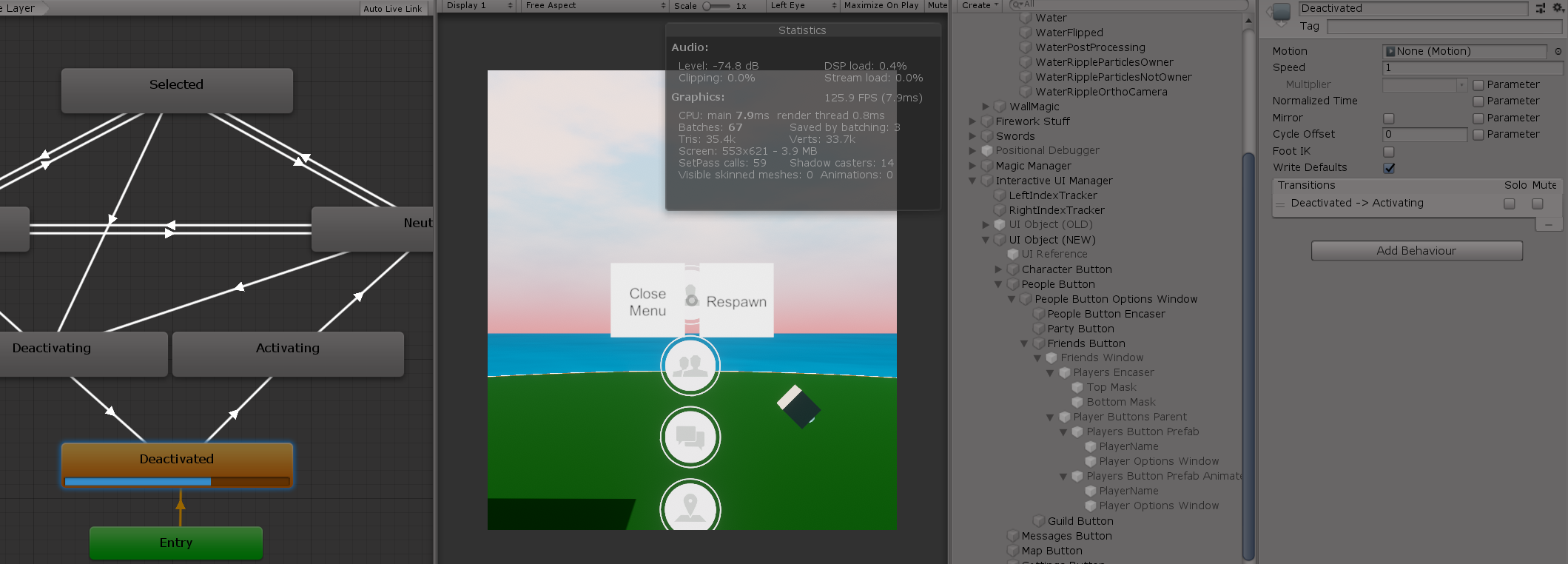
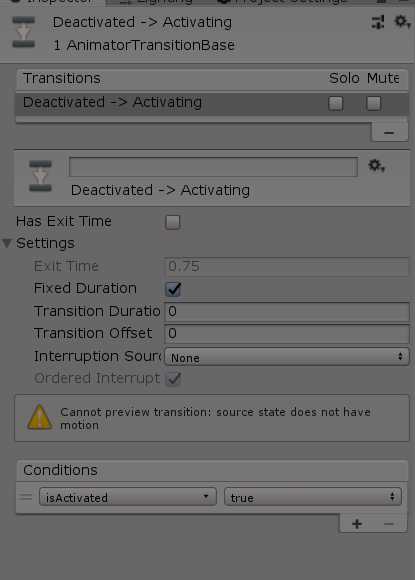
New question: does a state need motion to be able to change out of it? I wouldn't think so, but my state here isn't changing even though the animator says the bool is true and that's all I have for the transition: https://i.imgur.com/qElXQiI.png
This is the transition... https://i.imgur.com/Ktw2em9.png
 pseudo olive
Hey @strong minnow and @hybrid tinsel I ended up switching to sprites, taking the things off of the canvas and just moving them in space... though it was still waaaay more of a hustle than I felt it should have been. Because... things don't want to show up in order that they are in the 3D and I didn't want to be constantly animating that damn order layer property....assuming that is even a thing you can do? 🤷♂️ I mean just look at this?!

This is what it should look like at this angle... and sometimes it dose?
 strong minnow
You're going to have to control the depth one way or another in this case.
pseudo olive
Yea... I'm considering just using a plane with a texture slapped onto it.
strong minnow
If they're at the same depth you'll end up with z fighting
pseudo olive
They are not, also the map markers that are attached to them also need to be on the same layer, or rather, I don't want the map markers from one being displayed over the wrong map
hybrid tinsel
You can use sorting groups to keep groups of layers contained
pseudo olive
Is that different from the order in layer?
pseudo olive
...and that's different from the layer up the top?
Sorry, I'm just upset right now.
real cobalt
Gonna plop in a new question: I can't see public methods for scripts in the animation window
I have a method here https://i.imgur.com/9kCRXod.png
But that's not an option here https://i.imgur.com/GY7nYFf.png
 hybrid tinsel
Stupid question, did you save the script after adding the function?
real cobalt
Ah, I fixed that issue and again didn't update here. I needed to use the animation events area.
I was expecting it to show up in the properties list
hybrid tinsel
Oh, haha. Yeah, I only looked at your image on my phone and didn't catch that.
 surreal lion
 stone otter
can someone show me or send me a video on how to animate something already rigged in unity
steady bear
Just wanna confirm with someone before I start making changes. In my hierarchy I have player > anchor > fist. There is an animation controller on player, and a script. I am animating player, but also the anchor with the second animation. I want to move the animation controller from player to the anchor so I can prefab the anchor for multiple players. All I need to do is remove the player script and animation controller from the player, put it on the anchor? (because if I prefab and remove the anchor now, it cannot find the player controller and breaks)
twin musk
is there a way to animate material?
twin musk
I'm looking for a way to use static objects in a scene to modify 1st person animations.
I want the characters hand to rest against an object when the player is near & looking somewhat towards the object.
What would I search for to find tutorials on this?
twin musk
i have a question. so i was wondering how can i make a cut scene but then transition to game play smoothly. an example is call of duty. in this clip the player is being controlled by animation but then it switches to game play without a loading screen or anything to transition. it just goes to game play smoothly. if you play it at 6:54 there is animation in the character and no player controlled inputs. but when he gets off the boat the game play starts smoothly. how can i do this?https://www.youtube.com/watch?v=X99Rq2wIm4o

CALL OF DUTY WW2 Walkthrough Part 1 and until the last part will include the full CALL OF DUTY WW2 Gameplay on PS4 PRO. This CALL OF DUTY WW2 Gameplay is recorded in 1080p HD on the PS4 PRO and will include the full Campaign and all the boss fights.
Enjoy!
If you liked the video please remember to leave a Like & Comment, I appreciate it a lot
...
hybrid tinsel
@twin musk search for inverse kinematics / IK
@twin musk you can use a timeline track that activates the character controller at the end of the animations.
@twin musk yes. Many material properties can be animated with the animation panel.
@steady bear if you change the hierarchy, you might need to edit the animations in a text editor so they still point to the right objects.
twin musk
hybrid tinsel
<@456226577798135808> you can use a timeline track that activates the character ...
and that will smoothly transition it?
hybrid tinsel
If you do it well.
twin musk
so all i need is at the end of the timeline when the animation ends it switches back to player movement
real cobalt
So from what I'm seeing, there's no way for an animation to disable its own object completely, and I need to write a custom method for that and call it with an Animation Event?
real cobalt
Alright so, is there a way to force a state change or otherwise easily apply this? https://i.imgur.com/bocN8Wt.png
 steady bear
hybrid tinsel
<@811494846661525536> if you change the hierarchy, you might need to edit the an...
steady bear
hybrid tinsel
<@811494846661525536> if you change the hierarchy, you might need to edit the an...
Thanks. I found atool that lets you rename the path. same edit but with GUI. I think I've got the animator understanding down. I'll create new animations for the weapons, prefab, then add to character with switching script. Only thing I'm worried about is referencing something outside the prefab. I don't think it can be done? Like, the weapon referencing a part of the player sprite.
hybrid tinsel
steady bear
Thanks. I found atool that lets you rename the path. same edit but with GUI. I t...
Ooh, what tool? That could be useful.
And animations can only reference objects below the animator in the hierarchy.
steady bear
I meant for the name, not the hierarchy @hybrid tinsel
GitHub
Contribute to s-m-k/Unity-Animation-Hierarchy-Editor development by creating an account on GitHub.
sorry
hybrid tinsel
I meant that you can't reference something outside of the prefab from the animator because it is outside fo the hierarchy.
What you CAN do is to have a dummy object that you animate and use a script to animate the other object based on that.,
steady bear
I think I've still got more to learn
what do you mean animate the object based on the dummy?
What I've got right now is a player with body sprite as the child. There is a weapon prefab which was once a part of the player, but I redid the animations and made it it's own prefeb. This way I can create more than one and have the player switch out which weapon he wants.
I'm animating the player seperately from the weapons. so far, this is working.
Next, the rotation of the weapon was on the player controller, but I think I'm going to have to move the RotateArm part of the script over to the Weapon.CS. But I don't want to have the input on the weapon, so now I need to reference the player controller on the weapon to get the rotation. I think. (Nothing to do with animation though so this belongs somewhere else)
 rich slate
Based on the animation documentation in unity. Humanoid rigs are less performance intensive than other rigs. Is this true even if lets say my general rig has about 5 bones? something simple like a worm
steady bear
Anyone alive?
twin musk
i had a question with timeline, if i want to make a cutscene that contains a car with a player inside it, how do i get them to move at the same speed. do i have to parent them? (in the game it will be a first person view of the character inside the car
hybrid tinsel
@rich slate hard to say without actually profiling it.
@twin musk either parent it or use a parent constraint.
@steady bear no.
 wraith pond
hey if i have a character that has idle walk jump attack etc. moves and i want to add all those again only carrying a sword should i use layers for this? it's just pixel art so no rigging
steady bear
@hybrid tinsel you alive?
hybrid tinsel
@wraith pond you can use synced layers for that, yes.
wraith pond
thanks i'll give that a go 🙂
 wooden falcon
Hello does anyone know of a way to lock an animation at its starting position? I'm using a temporary dodge roll animation that has the model roll forward and then the end of the animation has the model slide back into the center. Is there a way for me to make the animation not move the model forward?
meager drum
Bake the root motion in the animation importer
 cedar depot
Hey, I've just joined this Discord in pursuit of an answer to a problem I've encountered importing my animation.
Before importing, when I check out the animation clip everything seems to be in order, even when I play it.

However, when I click on the imported animation, the tail bone seems to completely ignore the animation that it is supposedly part of.

Any clues what might be going wrong?
twin musk
hybrid tinsel
<@456226577798135808> yes. Many material properties can be animated with the ani...
can you help me with a doc or tuts link?
 eager trellis
Excuse me guys I have a question
It isn't directed related to animation but I don't no where else to ask. If i have an active camera in my scene but its depth makes it not visible to the character does it cause lag? Essentially If I have a camera view completely covering another camera view does the bottom one cause lag?
stone otter
this is causing me issues with OnStateExit

i would like to know when this animation has completed , but it happens some loops after
(so i can keep reloading the bullet at a time until the mag is full)
any way to check when one reload is done?
steady bear
If I have float shotCounter and I'm using time.deltatime to count down, purpose to delay attacks, does anim.setTrigger ignore it? If I'm instantiating a prefeb, it'll wait for the timer but the animation will trigger even if the timer is above 0 for some reason
steady bear
eager trellis
It isn't directed related to animation but I don't no where else to ask. If i ha...
probably in /general-unity
hybrid tinsel
@twin musk It would take me just as much time to google it as it would you
meager drum
cedar depot
Hey, I've just joined this Discord in pursuit of an answer to a problem I've enc...
If this is using a humanoid avatar, you need to add the extra bones to the animation's import mask
stone otter
why is onstateexit not calling at the correct time
it's calling after another state has played
please @ me if someone knows
i debug logged the exit on startReload, and it only prints after midReload
 hybrid tinsel
@stone otter That function is called on the last frame that the state is active at all(including transitioning out of it)
deft raptor
https://gyazo.com/83b70601bed8aafc726a575dd7884eb1
Hey, How do I make the transition instant?

it always waits till blend tree is finished for some reason
cedar depot
meager drum
If this is using a humanoid avatar, you need to add the extra bones to the anima...
Thank you so much for your answer, that fixed my problem and I'm all set to go now! Cheers!~
 stone otter
hybrid tinsel
<@!135425782502785024> That function is called on the last frame that the state ...
stone otter
hybrid tinsel
<@!135425782502785024> That function is called on the last frame that the state ...
is there any way to check when startReload has finished the way i want it to?
stone otter
can someone please guide me with this issue i have had no luck for the past day 😢
 rose hearth
I am using the 2d PSD importer package to get sprites into my game(creates an object for each individual layer in photoshop that the image had). If I were to edit the image and re import it, would I be able to easily apply the same set of animation to it or would I have to make them all over again?
hybrid tinsel
@rose hearth if you are using photoshop then you should be fine unless you reorder or rename the layers. Resizing them can sometimes require some editing in the skinning editor as well to fix bounding boxes.
If you use other software to make the psb the layer metadata might not be saved the same every time which could break things.
rose hearth
Every time I reimport, i have to delete the other sprite. I cant just overwrite it. Also, what if I wanted to change the pivot of the sprites? How would that convert over?
hybrid tinsel
You set the pivot in unity. And you should be able to overwrite?
rose hearth
Well, when I replace the file the PSD importer would have to redo all the stuff because the file I am replacing it with does not have the data that the PSD importer applied to the original(i think)
Forgot to mention I am using Krita instead of photoshop. I save save the file as a psb and then just change the file type to psd manually. It seams to not have any negative impact on the image.
hybrid tinsel
Right. Krita doesn't save the same metadata that photoshop does
I believe there's a script on github for handling the issue, don't have a link handy
 spare yoke
Ok I have a feeling this is a n00b question so please go easy on me, but I'm trying to make a fighting game and I've followed a course and go so far using Mixamo characters and animations.
I've now got further into it and I want to use some purchased characters and animations, but im having issues because (i think) I need to change the format from generic to humanoid. However, I can only change it from the Mixamo imported characters and not the purchased ones
This lets me select the model

But with the purchased assets I dont have that option so I cant change it

 silent mountain
Just some faces. Any feedback super welcome 🙏

 umbral garnet
I want to animate my block looking character and I'm not sure rigging bones is the way I want to go. I was thinking to have him go for a more Minecrafty legs swinging effect with those sharp bends, not the rounded that I am seeing with the bones. any suggestions?
i am a complete animation noob btw
meager drum
spare yoke
But with the purchased assets I dont have that option so I cant change it
You define the avatar on the model import settings
spare yoke
meager drum
You define the avatar on the model import settings
Thanks, still can't get him out of T-pose 😢 Gonna need to keep playing around
meager drum
Is it a rigged model or just a mesh?
spare yoke
I think I may have got it working, its a bit confusing because the mesh is saved in a different folder to the prefab. Got him in idle gonna see if others work, thanks
Looks like its working except the head isnt moving around its static, but its 'configured'
hybrid tinsel
@spare yoke mixamo characters come set up for unity's humanoid system; random purchased models often don't.
spare yoke
hybrid tinsel
<@197468278803791873> mixamo characters come set up for unity's humanoid system;...
I'm pretty sure these ones do, it all works aside from the guys head. It also says on the asset page they have a humanoid rig:
https://assetstore.unity.com/packages/3d/characters/humanoids/humans/pbr-fighters-pack-145995

Get the PBR Fighters (Pack) package from Maksim Bugrimov and speed up your game development process. Find this & other Characters options on the Unity Asset Store.
hybrid tinsel
@umbral garnet the softness of the deformation is defined by the weights in the mesh, not the bones. If each block is entirely weighted. To a dingke bone, it will follow that bone without distorting.
@silent mountain very nice! Is that Shel Silverstein in the middle?
 dreamy orbit
Hey - I'm seeing discrepancies in my humanoid rig animation between Unity and maya - specifically, Unity isn't importing my twist rotation in the character's shoulders.
Is there a way to configure the the humanoid rig so that this rotation info isn't lost?
wooden falcon
meager drum
Bake the root motion in the animation importer
Hey in response to this tip yesterday, I dont see root motion as an option. Is there something I need to enable to be able to do it?
 buoyant stream
why does my walk animation get stuck at the end? this is the code i have so far
[SerializeField]
private Animator anim;
[SerializeField]
private KeyCode goForward;
//this is just W

void Update()
{
    if
    (Input.GetKey(goForward))
    {
         anim.Play("walk");
    }
}
Haha, good question! I guess it could be! Also realized I posted this in the wrong channel 😄
meager drum
@wooden falcon Like this. Check "Bake into pose" for any dimensions that you don't want the animation's root motion to apply. So in this case, I've unchecked XZ because I DO want my character's walk animation to drive her forward. But you'd want to check it.

 hybrid tinsel
@dreamy orbit I don't know if unity humanoid rigs support twist bones.
 dry ocean
Hi.
dry ocean
dry ocean
Hi.
this is what they're supposed to look like with all their blendshape values at zero
 hybrid tinsel
@wooden falcon You need to set up root motion in the animation import settings.
meager drum
@dreamy orbit @hybrid tinsel They'd be considered "Extra" joints. They're supported, but you have to define an import mask on the animation and check the "extras" you want.
And it limits your ability to retarget the animation of course, because it can only be retargeted to other avatars with the same extra bone names AND the same scale
wooden falcon
hybrid tinsel
<@!125379281927798784> You need to set up root motion in the animation import se...
In these settings?
 dry ocean
this is what they're supposed to look like with all their blendshape values at z...
dry ocean
dry ocean
this is what they're supposed to look like with all their blendshape values at z...
all their value reach 100 every time i hit play and can't change them during play mode.
are they anyways to fix this?
 meager drum
@dreamy orbit Look here:

@dreamy orbit This is in the inspector for the animation; you need to define a mask, and then select all the extra joints (AND NOTHING BUT JOINTS) you want to be used with this animation under the Transform pulldown seen above
@dry ocean That's a new one by me. I have a lot of blend shapes and have never seen them do that =\
dry ocean
meager drum
<@!230115756237389824> That's a new one by me. I have a lot of blend shapes and ...
which is weird cause i didn't call them at any point
meager drum
If a script were doing it you'd still be able to "fight" with it in the inspector at runtime...
(I know that from experience with a rogue script lol)
dry ocean
they were like this when i looked at their animations in the model inspector when i first imported them.
meager drum
Interesting
buoyant stream
why does my walk animation get stuck at the end? this is the code i have so far
[SerializeField]
private Animator anim;
[SerializeField]
private KeyCode goForward;
//this is just W

void Update()
{
    if
    (Input.GetKey(goForward))
    {
         anim.Play("walk");
    }
}
Do the blendshapes have keyframes set to 100% in the animation?
meager drum
The animator wouldn't affect the importer though
dry ocean
in the blend file they are but they're all turned off when i exported them from blender
meager drum
Although, where are you seeing them in the import settings at all? I'm looking at mine and I don't see them mentioned at all
dry ocean
the animation clip editor never said anything about blend shapes but when they were animating in the clips, all the values were set to 100
meager drum
Are you putting your animations and main model in one file?
hybrid tinsel
So there are no blendshape keyframes in the clips?
dry ocean
hybrid tinsel
So there are no blendshape keyframes in the clips?
the blend shapes were on in the clips
dry ocean
meager drum
Are you putting your animations and main model in one file?
the model and animations are all in 1 fbx file
meager drum
You mean these clips?
 dry ocean
yeah that
meager drum
I don't think blendshapes are supposed to appear there. At least, mine don't
I have my model separate and individual FBXs for animations. My blendshapes come from the model import, and I have "Animation" entirely turned off on that one
I'm not saying this should or shouldn't work with everyting in a single file mind you, just what I'm doing.
So if I'm understanding you, the animation preview from Clips for any of your animations is playing with the blendshapes stuck at full effect
That would definitely lead me to think it's an export setting that needs changing
dry ocean
meager drum
So if I'm understanding you, the animation preview from Clips for any of your an...
thats it,
the values are at zero when in scene mode but they then shoot to one once i hit play
meager drum
Are you baking your animations in Blender on export?
dry ocean
yes
meager drum
Does your Blender animation animate the blendshapes at all?
dreamy orbit
meager drum
<@!257388972668354561> This is in the inspector for the animation; you need to d...
The bone is already set in the transform mask - I actually don't have a twist bone - it's just that because of the way I've rigged it, the humanoid arm ik overrides the twist value.
I can fix my problem by changing the rig type to generic.
buoyant stream
why does my walk animation get stuck at the end? this is the code i have so far
[SerializeField]
private Animator anim;
[SerializeField]
private KeyCode goForward;
//this is just W

void Update()
{
    if
    (Input.GetKey(goForward))
    {
         anim.Play("walk");
    }
}
is your animation looping?
wooden falcon
meager drum
<@!125379281927798784> Like this. Check "Bake into pose" for any dimensions that...
So I've been tinkering with it and havent had success 😦 As you can see the model is still off from the starting position with the bake into pose boxes checked.
 dry ocean
meager drum
Does your Blender animation animate the blendshapes at all?
dry ocean
meager drum
Does your Blender animation animate the blendshapes at all?
in blender or unity?
buoyant stream
dreamy orbit
is your animation looping?
idk, how do i check that
dreamy orbit
buoyant stream
idk, how do i check that
in the animation tab of the file, enable 'loop time'
meager drum
@dry ocean Blender
@wooden falcon Is there a parent object to the part of the mesh that's moving? It kinda looks like it's moving away from whatever's considered the "root". What if you change "Based Upon" to "Center of mass"?
dry ocean
meager drum
<@!230115756237389824> Blender
the blendshapes don't animate in blender. they don't have any key frames
wooden falcon
meager drum
<@!125379281927798784> Is there a parent object to the part of the mesh that's m...
There is a parent object. The only other option I have is root node position
 dry ocean
however i did set the blendshape values from 1 to 0 in blender, exported them again and now they're face is completely normal with all the values set at 0. (atleast from the import settings window)
@meager drum
buoyant stream
dreamy orbit
in the animation tab of the file, enable 'loop time'
i can't find that
meager drum
@dry ocean That makes sense, but I don't get why you weren't allowed to change them
dry ocean
meager drum
<@!230115756237389824> That makes sense, but I don't get why you weren't allowed...
i couldn't change them in play mode.
meager drum
Unless it treats the value as the lowest-end and you can only go up from there?
buoyant stream
dreamy orbit
in the animation tab of the file, enable 'loop time'
i found it and did it. thanks
 dry ocean
i couldn't change them in play mode.
dry ocean
dry ocean
i couldn't change them in play mode.
i can change them in scene mode but once i hit play, they're stuck at 100%
meager drum
That and the preview behavior really strongly imply that it thinks the animation is affecting them
Do you have the opposite problem now? Are they impossible to turn up in play mode?
dry ocean
give me a moment to check
meager drum
I'm not really an expert on this, and I've never used Blender. I've just had some success with Blendshapes so far so I hoped I could help 🙂
dry ocean
it must be the way i exported the animations. i just replaced a idle clip from the second model into the first model's animator.
when it is idle the values are at 0, when doing another clip the values are at 100%
meager drum
Yeah, that makes sense with the symptoms
But I don't know anything about Blender to suggest anything (Only blender tip I know it "Bake animations" lol)
dry ocean
it must have baked the blend shapes cause i did add a key frame to one of the animations in blender and the face was normal then the face changed in that key frame.
that could mean i can't change the blend shapes in Unity, i'll have to animate them in blender
meager drum
Or you could export a model with no animations, and the bring in the animations from a separate file to kinda "filter out" the problem
That's not WHY I'm doing that (Maya isn't causing this problem), but it might help here.
buoyant stream
how do i blend from one animation to another?
meager drum
It's part of the transition arrow thing in the animation controller
buoyant stream
what?
meager drum
When your animation controller transitions from one state to another you can define the blend
buoyant stream
how do i do that
meager drum
Perhaps you should start with a tutorial on animation controller
 thorn wind
I'm trying to ensure the player can attack whenever they want, regardless of which animation is currently playing, I'm having troubles with this.

I am not using any Exit Times. I am using bools for animations. Is anything off here, that I'm just not seeing in terms of the overall set up?
It seems like sometimes for example, when strafing to the right, that animation has to play a bit, or maybe even finish, before the player can attack.
 whole trellis
Does anyone know where to find IK 2D animation documentation? I'm trying to add sprite through the code
 regal flicker
thorn wind
I'm trying to ensure the player can attack whenever they want, regardless of whi...
regal flicker
thorn wind
I'm trying to ensure the player can attack whenever they want, regardless of whi...
You will need to set Interruption Source on your transitions. Although your states don't have an exit time, a transition itself does (if its Interruption Source is set to None).
That's why it has to "play a bit" as you say, because the transition can't be interrupted.
thorn wind
regal flicker
You will need to set `Interruption Source` on your transitions. Although your st...
Thanks mate. I was looking at this earlier actually on the docs, but I was very confused by the values for the states. I'll give it a fresh look tomorrow.
Or actually, with another look, maybe they would all just need to be Current State.
 regal flicker
Yeah I myself get stumped by them. So I end up trial and error until I catch on. Its rare for me to use them, so even when I figure them out, by the time I get around next time...I forget 😛
buoyant stream
how do i smoothly go from one animation to another?
twin musk
Hey i am Learning pixel art and i made a character
and i dont know how to make its animation can someone help me pls

 sacred rune
Does anyone know if it's possible to set the parameters of an existing Animator ** -transition- ** via code?
I know you can create transitions using Animator.CrossFade but is it possible to edit an existing transition?
gritty frost
Afaik you can't change the structure of an animator at runtime
Unity has Playables for stuff that requires this sort of control.

 open token
buoyant stream
how do i smoothly go from one animation to another?
open token
buoyant stream
how do i smoothly go from one animation to another?

By increasing this blue thing
The longer it is, the smoother will be the transition
To find this, I select the transition line

 tacit pendant
Anyone know how to setup an animation in Unity to be interruptable during certain frames? I.E. An attack has 30 frames(5 startup, 3 active, 22 recovery) that can be chained into a second attack but only once the first 8 frames have finished playing(i.e. during 9-22 frames).
real cobalt
When an animation's samples is set to 60, is that "60 changes to the animated object per second"?
hybrid tinsel
@tacit pendant Split it into multiple animation states that play in sequence rather than a single one
tacit pendant
hybrid tinsel
<@!134762293375401984> Split it into multiple animation states that play in sequ...
I'll be going the route of animation events and just using one animation for the startup, active, recovery phase. I ran into issues when attempting to export my updated file where only new animations were coming over and had to delete my whole NLA STRIP and recreate a new one with all old/new animations in there...
I couldn't imagine having to do that for 50+ animations
hybrid tinsel
Ah. I've never worked with imported animations.
But you wouldn't need to make new animations; you could break them up in the animator graph.
Just make three states with the same animation and have exit time transitions at the appropriate spots
tacit pendant
hybrid tinsel
But you wouldn't need to make new animations; you could break them up in the ani...
Sure if my animation clips in blender were just one long take. I decided to do different actions for different animations(Walk, run, jump, double_jump, blast1,blast2,blast3,etc)
tacit pendant
hybrid tinsel
Just make three states with the same animation and have exit time transitions at...
All my actions are states except my walk/run/idle(Blend Tree)
hybrid tinsel
I mean, you can take a single animation with startup, active, recovery and use three states in the graph for it.
I do that with jump animations.
tacit pendant
hybrid tinsel
I mean, you can take a single animation with startup, active, recovery and use t...
Like a Blend Tree?
hybrid tinsel
No
Like, you make three states, and have each one play a different part of the animation.
tacit pendant
I created three different blasts(1->2->3->idle) and all animated blasts lead back to the idle pose. Put animation events on frames before going back to idle which lead into the next blast
tacit pendant
hybrid tinsel
Like, you make three states, and have each one play a different part of the anim...
Ahhh. I get it now, split it in Unity
Yeah I suppose I could do that as well. I'll have to weigh the benefits
hybrid tinsel
Well, the main benefit would be getting to use the graph and transitions correctly. The main downside would be that you'd need to manually set the transition points which could be tedious and not automatically adjusting to changes in the animation.
tacit pendant
'redman 2' AnimationEvent 'ComboReset()' on animation 'Armature.001_normal_blast_1' has no receiver! Are you missing a component?
How do I prevent this error message? This is a duplicated clip of a read-only clip. I cannot add events to read-only animations. The animator has the updated clip with the animation events. The character has a Controller with the function ComboReset()

In Debug it shows the root game object as being NOne
 hollow blade
tacit pendant
```
'redman 2' AnimationEvent 'ComboReset()' on animation 'Armature.001_normal_b...
hollow blade
tacit pendant
```
'redman 2' AnimationEvent 'ComboReset()' on animation 'Armature.001_normal_b...
the object filed is a parameter and not the target
it expects a script with a function call ComboReset on the same object as the animation / animator
@tacit pendant and its
ComboReset
not
ComboReset()
nova forge
so, I'm trying to make it so that an object does a certain animation while following an object and, when it is just going around the map, it stops following.
following example:
https://gyazo.com/2337d0b7db64b337f1625187e1343942.gif

for some reason, when I put the object to go around the map, the following stops working and I don't get why.
https://gyazo.com/65b69d1159ad4a201ae25ed3f5f67b4e.gif
this is what I used for the follow.
void Update()
    {
        if (follow == true) {
            Follow();
        }
    }

    public void Follow()
    {
        //faz objeto seguir Sol
        transform.position = new Vector3(Sol.position.x + x, Sol.position.y + y, Sol.position.z + z);
    }
}```when it is going around, I make sure to put follow to false and even if the animation doesn't touch the recorded part
like this
https://gyazo.com/b00949eee079ac5fa9d1e2e144ac8876
it still stops following the object referenced.


does someone know what it could be?
and how I can fix it? apparently, it is a "recorded" issue, since if I delete them, they just don't bug my animation
the function "follow" apparently is still normally called btw (tested with debug). it just doesn't work.
tacit pendant
hollow blade
<@!134762293375401984> and its
ComboReset
not
ComboReset()
Thanks! Yeah once I removed the call and used the function callback it worked(also after removing my extra animation events)
buoyant stream
open token
ok thanks
 hazy arch
Hey I have a (I think) simple question. I found an asset at the store, and I want to know how can I mirror its' sprites. (2d movement left/right)
quartz schooner
anyone with bilibili account? (kind of chinese mega to download motions/animations for unity)
 stable acorn
Hey, im looking for pixel artist for my upcoming game
I need nicely animated MC
Got proof of concept, nice team of two, and some shareable demos and design base
Pm me if interested :) thanks, cheers and nice weekend
 still rapids
I have a small issue, I have a model setup with an animation rig, but it always defaults to the "muscle pose" instead of staying in T pose. Is that intended behavior?
My avatar seems properly set up (all green), I'm not able to understand why it changes
spare yoke
Any idea why my character slides around a little when in an idle pose?
meager drum
still rapids
I have a small issue, I have a model setup with an animation rig, but it always ...
That’s normal/expected when an animator is active on a humanoid avatar but no other animation is playing
meager drum
spare yoke
Any idea why my character slides around a little when in an idle pose?
Probably has root motion. Try baking the position in the animation import settings
spare yoke
meager drum
Probably has root motion. Try baking the position in the animation import settin...
Thanks for helping. It looks like the positions are already baked into pose if thats what you mean?
 still rapids
meager drum
That’s normal/expected when an animator is active on a humanoid avatar but no ot...
still rapids
meager drum
That’s normal/expected when an animator is active on a humanoid avatar but no ot...
I've seen videos with an animator, a rig and no animation other than some IK via the rig and the model kept the base pose ?
 mossy badger
Hello, I'm trying to animate specifically the exit of my Pause Menu (UI), but it's not working properly, it just disappears. I've set the Bool condition to check when it will close or still be opened.

// VARIABLES I NEED USE IN THIS CASE
    public static bool gamePaused = false; // the condition that pauses or resume the game
    public GameObject pauseUI; // the pause menu
    public Animator anim; // anim for Pause Menu
    bool canPause = true; // check if the player can pause or not
void Update()
    {
        if (Input.GetButtonDown("Pause") && canPause)
        {

            if (gamePaused == true)
            {

                PauseSlideOut();
                Resume();
                gamePaused = false;
            }

            else
            {
                Pause();
                gamePaused = true;
            }

        }
    }
// PAUSE
    void Pause()
    {
        pauseUI.SetActive(true);

        Time.timeScale = 0f;

        //gamePaused = true;
        FindObjectOfType<AudioManager>().PlayOnly("PauseGame");
    }
// RESUME
 public void Resume()
 {

     pauseUI.SetActive(false);

     settingsMenuUI.SetActive(false);
     resumeDelayUI.SetActive(false);
     canPause = false;

     if (settingsMenuUI) // You can ignore that part
     {
         settingsMenuUI.SetActive(false);
         anim.Play("Base Layer.Settings Slide");

     }

     StartCoroutine("ResumeDelay");
 }

 public void PauseSlideOut()
 {
     anim.SetBool("isOpened", false);
 }

 IEnumerator ResumeDelay()
 {
     yield return new WaitForSecondsRealtime(1); // delay after resuming the game

     pauseUI.SetActive(false);

     resumeDelayUI.SetActive(false); // "wait" // note: Gabriel

     Time.timeScale = 1f;

     gamePaused = false;
     canPause = true;

     FindObjectOfType<AudioManager>().UnPauseAll();
 }
@still rapids Base pose meaning T-Pose?
@still rapids Maybe with a Generic avatar? All mine with a Humanoid do the "muscle" pose until I have an animation playing. (I call it the curled bug pose 🙂 )
meager drum
spare yoke
Thanks for helping. It looks like the positions are already baked into pose if t...
Yes, that's what I mean. When you say it's moving around do you mean it's like, wandering away or just that it's shifting slightly in place?
spare yoke
meager drum
Yes, that's what I mean. When you say it's moving around do you mean it's like, ...
Just shifting slightly, like he's standing on jelly. (Or Jello if you're a yankee)
meager drum
Ah, ok. I was picturing it drifting away when I suggested the baking. That just sounds like something in the animation then. It can be tough to get teh feet to really be planted depending on the rig in use
spare yoke
meager drum
Ah, ok. I was picturing it drifting away when I suggested the baking. That just ...
Ok, thanks anyway. I've emailed the model seller and he said he will look into it.
I can still carry on, just using Mixamo characters which is fine but just a shame as the ones I bought look really cool
meager drum
It's a pet peeve of mine when my character's feet slide around on the floor in a pose, so I pay extra close attention to that when I'm doing my own animations.
spare yoke
I'm quite new to it all so I've not done any proper animation work, all ive ever done is import stuff via mixamo. In fact this pack is my first purchased models & animations
So I wouldnt know how to avoid it xD
meager drum
It's sadly common, I even see it all the time in AAA titles. Makes my eye twitch
hybrid tinsel
@hazy arch sprite renderer has the option to flip on x or y axis. You can also just invert the scale(which also affects child objects)
 novel portal
anyone know some good resources or videos to set up running tilts and pivots?
 spiral pond
I have a small issue using animation rigging with my character, I am using the free basic motion asset for my character movement and I wanted to using rig a weapon to my character.
But as you can see the hand position is not where it should be (right hand should be where my axis are visible)

I have those warning in my animator and I suspect that there is something wrong with my animation, but I can't figure how to fix it

My character is of type Humanoid and same for the animation
meager drum
The message seems to be saying that the animations aren't Humanoid
spiral pond
I don't that that message until I try to do the rigging, so I assume the rigging itself is not humanoid ?
meager drum
Humanoid in this case just means that you mapped the joints onto a humanoid-type avatar in unity.
spiral pond
Hmm I am not i understand what you mean 100%, my animation is of type humanoid, my character as well, but I don't understand what you mean by the joints
meager drum
When you created the humanoid avatar you mapped the model joints to avatar joints. If the model's joints were pretty standard it might've done that for you.
But it literally says "Some generic clips" - generic implies something isn't humanoid
spiral pond
Hmm okay, I will try to do another retargeting
 blazing sandal
Please help. I am using the built in animator. I am trying to add jump animations. I need to be able to jump from any of my several directional movement animation/states. Will someone please advise?
nova forge
I'm having a problem with my position when I'm animating. I try to rotate a bone, but it also adds key to position, adding to it even if I don't want it to.
Is someone knowledgeable about that? plz, advise if yes-
 wild sleet
Are there any free arm and gun model and animations
I found one but it's super low poly
 outer gale
Any expert on Animators and Timelines who can help me with this super irritating problem?


For no reason this keyframing just STOPS working completely for the Focus Target
I'll keyframe the Focus Target reference transform to different objects over the animation, and it works properly when i play the animation through Unity Timeline, but randomly at some point later when i'm playing it, it resets the Focus Target to None for EVERY SINGLE KEYFRAME
Anyone have any clue what the hell is going on here?
hybrid tinsel
@outer gale For some reason unity hates keyframing postprocessing
outer gale
hybrid tinsel
<@!324340106498670592> For some reason unity hates keyframing postprocessing
So is this just a stupid bug that's unfixable?
outer gale
hybrid tinsel
<@!324340106498670592> For some reason unity hates keyframing postprocessing
Wait but the problem for me isn't even with the post-processing! It's with the Transform reference in the custom script i set up
outer gale
hybrid tinsel
I hadn't noticed that it was the script.
Could it be something with the timeline overriding the recording or something?

It keeps all the other data like camera moves and stuff but not the Focus Target
hybrid tinsel
Could be
 analog tusk
Good morning, I have literally no experience with animation within unity so this may seem a very simple question. I have added a simple rotation to my player controlled gameObject, is it possible for it to rotate without changing the axis? I wish for the player to move as if the object is still, but to add a rotation just for aesthetic reasons. Thank you in advance for your help.
 exotic igloo
does skeletal animation work for pixel art?
ive drawn a big ass skeleton player and animating it frame by frame scares me
hybrid tinsel
@exotic igloo Depends on the style you're going for.
 scenic pecan
If 'Has Exit Time' is off, do i still need to configure stuff in "settings" so it doesnt make any transition?
 hybrid tinsel
@analog tusk I'm not entirely sure that you're asking
exotic igloo
ive just started switching the game to pixel art so idrk about the style
analog tusk
hybrid tinsel
<@!373227383966269459> I'm not entirely sure that you're asking
Thank you for replying but I sorted it with code. Thanks anyway!
hybrid tinsel
@scenic pecan You seem to have it set up correctly.
scenic pecan
a mean.. i have 11 more transitions
configured by default
so.. do i need to setup up each one to 0 transition duration and offset and bla bla?
hybrid tinsel
Yes.
hybrid tinsel
No problem:D
exotic igloo
hybrid tinsel
<@!509048616862744582> Depends on the style you're going for.
would it look weird tho?
hybrid tinsel
@exotic igloo Some people like the look, others don't.
There are also shaders you could use to make rotation look more pixelly.
hybrid tinsel
google I suppose
exotic igloo
ok examples look better than i expected, although if i ever make it a finished game i might do frame by frame because it still prefer it
ty
hybrid tinsel
I meant the google game
with the t rex 😄
But yeah, you could do the rotation and then pixelate it
exotic igloo
wha
spare yoke
So I've got my second character working but for some reason she T-poses for a split second before going into one of the animations.
I've even tried swapping it out for a different one and its the same thing happening
I've checked exit times and there arent any. Any ideas?
meager drum
Maybe nothing is recorded on the first animation frame? Try cutting it out from the import settings
 lone swift
Hello, I'm creating an Animation with a camera and I added a rotation, but for example I only want that it start's rotating at waypoint 1, but it's rotating already between 0 and 1
 cosmic flicker
Hey all, I have a software questions for 2d animation. What is the standard software for frame by frame hand drawn sprite animations? As photoshop is quite expensive over the time are there other programs that can do you the job? I was thinking about clip studio paint but finding answers to this topic is quite hard. Maybe someone here has some experience with 2d hand drawn animations? Please @ me with your answer!
 ancient siren
Is it possible to use an animator for a different object, or just the object it was made for
Oh wait, I know, ill just make a new animator and put the old animations in it
 charred flicker
well you can have different characters f.ex. with same animator, just pass in different variables with script?
oh you mean just component right
 uneven granite
So I'm using animancer, and am trying to figure out how to play an animation on only my hands. I have the mask set up, but it breaks my character animation. It puts him halfway underground. I'm using my existing animation controller as a base, and it has the "hands" layer setup, too.


I was able to get the mask working through the animation controller alone, but when I play the animation that closes my fists through the animancer script, it breaks my character lol
twin musk
Is anybody else having extreme trouble with Animations using Collaborate in 2020.2.3f1? I'm talking my partner making changes to Animators (such as assigning different, new clips) and these not being applied on my end despite having pulled Animator changes from Collab that he pushed.
meager drum
uneven granite
So I'm using animancer, and am trying to figure out how to play an animation on ...
I think it's because you've got nothing playing on the rest of it, you just need to have an animation that accounts for the rest of the body playing at the same time. My character also does the half-in-the-ground thing if I don't have her idle animation play for instance.
outer gale
hybrid tinsel
Could be
Figured out the problem if you were wondering. So the references to objects were scene-dependent, so when you exit the scene (like closing unity and reopening it) it loses those references for some dumb reason
If i set the objects to Prefabs instead of instanced assets in the scene, it works, but that's useless for my purposes
hybrid tinsel
Ah, ok. I didn't realize you were leaving unity, I thought you meant it happened mid scene
 drowsy heron
if iam making a game with c++, and i make an animation in unity and generate the animation file, can i use it with c++ in the game?
 vagrant cairn
im trying to record rotation in the animation timeline but my rotations keep getting applied to every key frame and not just one. It also gives me this You are recording with an initial rotation offset. This may result in a misrepresentation of euler angles. When recording transform properties, it is recommended to reset rotation prior to recording UnityEditor.Undo:InvokePostprocessModifications (UnityEditor.UndoPropertyModification[])
hybrid tinsel
@drowsy heron Unity animation files are very simple to parse, but there are probably better open source formats.
 haughty steeple
can someone help me with animating my player? I set it all up, but it does not properly transition from one state to another even though it's all set up properly. Basically the state does not change from idle to run, run to jump, etc.
 modern escarp
I am creating an animation pack for creating a movement system. I'm afraid I will make the animations wrong, as I think it is important that each animation starts from a specific leg, i.e. the legs that will be in front of the character at the beginning of the clip.
Can you tell me - Which leg does the each animation start with?
 drowsy heron
hybrid tinsel
<@!351438321416798210> Unity animation files are very simple to parse, but there...
drowsy heron
hybrid tinsel
<@!351438321416798210> Unity animation files are very simple to parse, but there...
can you suggest me some
hybrid tinsel
drowsy heron
can you suggest me some
I can suggest googling animation libraries for c++ and seeing what they can import.
This is a unity server, not a google random stuff for you server.
drowsy heron
you didnt mention animation libraries, if you did i wouldve searched
but anyway thx
 low nebula
why isnt geometry being added to arms and legs?

 strange trout
I've been having some trouble with the TopDownEngine Asset working with Mecanim. The developer has a lot of single frame animator parameters set as bools when they should be triggers and my transitions don't seem to be catching them. specifically I'm triggering an attack animation. Kind of a long shot but does anyone have experience with this?
haughty steeple
can someone help me with animating my player? I set it all up, but it does not properly transition from one state to another even though it's all set up properly. Basically the state does not change from idle to run, run to jump, etc. Can someone jump into a vc and help me out?
hybrid tinsel
@low nebula are they separate sprites?
@haughty steeple if it was set up properly it would probably work =p
How about you show your code and your animator?
whole trellis
Does unity animation has deformation tool like this on photoshop?
 haughty steeple
hybrid tinsel
<@524680711752646666> if it was set up properly it would probably work =p
haughty steeple
hybrid tinsel
<@524680711752646666> if it was set up properly it would probably work =p
yeah, but i don't know if i did
hybrid tinsel
@whole trellis not exactly like that, no. But you can do similar.
whole trellis
hybrid tinsel
<@97765845433847808> not exactly like that, no. But you can do similar.
My hear open
hybrid tinsel
Well, depending on your needs you could just use bones, or you could use something like the Deform library on github.
whole trellis
bone doesn't work. I want to bend a bow which is not based on bone segment
hybrid tinsel
If it's a Sprite you can add bones.
whole trellis
but it give totally different bending
its cool for bending leg and arm, but not a bow
hybrid tinsel
You can do all sorts of stuff with bones; I have no idea how a bow wouldn't work
whole trellis
because there no bone in a bow. it's a curved stick that bend like a curved stick, not segmented bones