#🏃┃animation
1 messages · Page 70 of 1
 fickle swift
if it's working there, something is wrong with the controller
it's posisble ur animation is referring to the wrong gameobject relative where the animation controller is placed if the animation clip isn't playing/previewing
 abstract marlin
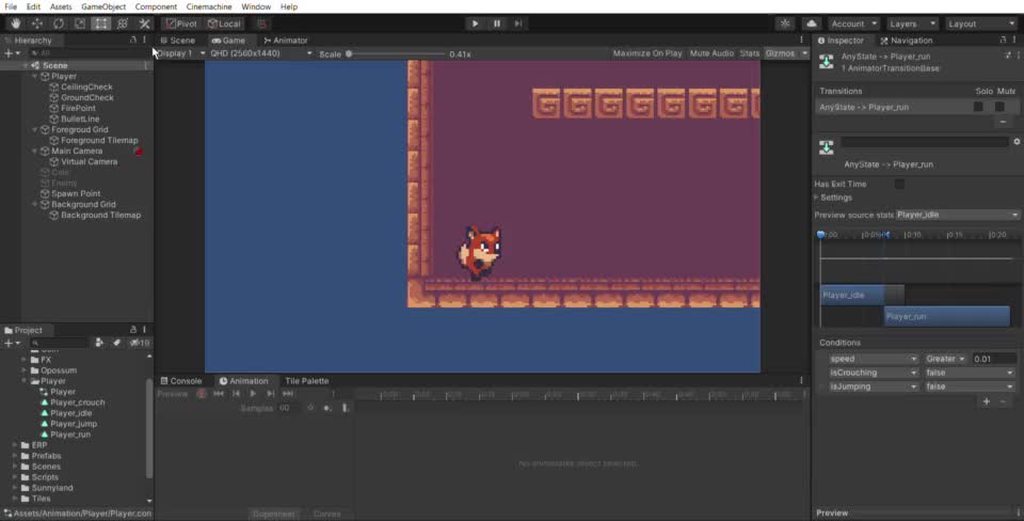
this is in play mode, and all of the conditions are true
fickle swift
yeah and you can test the animation clip without the controller as well to see if it's something to do with the controller
since the controller can affect it due to other parameters
abstract marlin
I can see the animation clip playing when I play it manually
fickle swift
might exit etc, can test it in isolation
screenshot ur Layers and expand the settings in ur Player_idle
abstract marlin
I only have one layer
fickle swift
hmm weird
fickle swift
idk why then, looks mostly correct if your animation clip works + tested
the other animations work?
abstract marlin
yes
fickle swift
like running etc
hmm
if "idle" preview works when you click on the GameObject with the animator controller, then im not sure why it doesn't work, unless you repeatedly reset the animation constantly (so it keeps resetting the first frame - random theory)
abstract marlin
what will cause it to restart to the first frame
fickle swift
AnyState -> Idle, anything that matches those conditions maybe?
hmmm, maybe try Running -> Idle
but there's duplication of transitions
nah maybe my theory is wrong
cause the next transition starts after the current animation ends, so ignore my theory
fickle swift
fickle swift
these are my settings, works on mine
abstract marlin
mhm
fickle swift
I set transition duration to 0 (and offset to 0)
try my settings if they differ, otherwise i have no idea sorry m8
abstract marlin
that looks like the same settings
fickle swift
fickle swift
cause the next transition starts after the current animation ends, so ignore my ...
w8, maybe my comment about my theory being wrong, is wrong
cause i think transittions can interrupt any state
since transition duration = 0
fickle swift
abstract marlin
that looks like the same settings
Try Running -> Idle
you don't want Idle -> Idle
I made mine with Layers (one layer for walking, one for idle) so i didn't come across this issue before
abstract marlin
ok - I think just making individual transitions from each animation to idle solved it
thanks so much
fickle swift
Np, this is a really hard problem to debug and this has improved my animation debugging knowledge
animations r very fiddly, so recommend layers + blend trees if not already (I still need to get good at using them)
now we confirmed the issue was the "Idle" state was transitioning to itself so the animation kept resetting to the first frame
fickle swift
true since u only have 2 directions
abstract marlin
what do layers do to help with this?
fickle swift
i have one layer for Idle
one for walking
and i'll make one for shooting
instead of having one big layer, yoou can use one layer over another depending on the situation and merge/override other layers
i'm not good at using it yet though, i just did 1 tutorial 2 years ago so i don't remember much
fickle swift
Np, gl with ur game!
abstract marlin
thanks! I'm not planning to make this into a full game, it's just a project for learning unity
fickle swift
ah nice 🙂
 fickle swift
u prob need Jump -> Idle?
show ur animator in the same recording (you can split ur main section into Game/Scene + Animator view)
fickle swift
yeah but u can show it in the same recording to see what's going on, helps you debug
if these conditions r met it should work
abstract marlin
fickle swift
cause isJumping is true from ur recording
fickle swift
yh, set it to false if the ground is touching the character's feet
 calm veldt
Hello is there a audio visualizer script that effects the transform of objects?
 gentle moon
Not sure if this is best channel to ask, I think it's more of a programming question 😛
gentle moon
Maybe hold the down on the arms/sword at frames (2,6) for an extra frame or two? They seem stiff compared to the hip/head movement.
Could also add an extra segment to the arms and have them follow through another frame after
Separating upper/lower arm*
Really like the legs and head animation!
Oh also just noticed the "helmet" has a gap on the side, not sure what it is but I'm not sure why it moves back a pixel at frame 2 and 6. But it looks out of place.
 indigo vigil
 smoky flint
@gentle moon Thanks for your critique:)
 past umbra
You’re such a god for noticing that small detail Nik.
 novel gale
Hello, I purchased some animations from the Unity asset store but the tip of the pink finger seems to bend the wrong way. Is it possible to export the animations from Unity into blender?
 hybrid tinsel
What format are they in?
novel gale
hybrid tinsel
What format are they in?
fbx I believe
hybrid tinsel
Then you should just be able to load the fbx files in blender
 twin musk
Hello, I'm continuing the project on a Mac computer. After switching from the windows operating system, I encountered many graphics differences. All the graphics I have (in the simulator) have decreased. In addition, I do not know why, but after using the "Play" button all animations work, but after building the apk file and installing the game to fix these errors. I don't know much about Mac, so the system itself is a mystery to me at the moment.
 queen hill
I have a problem. My character's head turns slightly to face the object, but it is not fully facing into it. ```using System.Collections;
using System.Collections.Generic;
using UnityEngine;
public class PlayerIKController : MonoBehaviour
{
protected Animator animator;
public bool ikActive = false;
public Transform rightHandObj = null;
public Transform lookObj = null;

void Start ()
{
    animator = GetComponent<Animator>();
}

//a callback for calculating IK
void OnAnimatorIK()
{

        //if the IK is active, set the position and rotation directly to the goal.
        if(ikActive) {

            // Set the look target position, if one has been assigned
            if(lookObj != null) {
                animator.SetLookAtWeight(1);
                animator.SetLookAtPosition(lookObj.position);
            }
        }
        else {
            animator.SetIKPositionWeight(AvatarIKGoal.RightHand,0);
            animator.SetIKRotationWeight(AvatarIKGoal.RightHand,0);
            animator.SetLookAtWeight(0);
        }
}
}```
 thorn shale
did you put your target on the object to look at?
otherwise might be some kind IK restraint on the head/neck
queen hill
yeah, i put the object in there and the head turns slightly.
I dont really know what is wrong. And that character was just made in 1min for testing if this works
queen hill
thorn shale
otherwise might be some kind IK restraint on the head/neck
How can i see if i have some restraints on it?
I can send a video
it looks a little off of the object
thorn shale
that looks fine to me
queen hill
But isnt the character looking slightly off?
I mean its not looking directly into the object in my opinion. It can be my eyes too xD
thorn shale
eh don't sweat the small stuff
i think you're right but it's hard to tell
on the other hand if you have 100% ik weight on the target, it will look jerky and unnatural
im not sure how the rest of your system is set up
queen hill
Yeah, it is. Maybe i need to live with it
 daring spindle
I think I have a very silly question - but struggling to a google an answer:
I'm making an avatar "sit" in the seat of a car using an animation. This has worked fine, he sits and moves his head a little during 'play' mode. But when i quit and go back to the scene view he is positioned as standing in/through the vehicle. Is this expected?
play mode
back to scene view??
queen hill
@daring spindle That is propably because animations arent displaying in editor. only in play mode.
daring spindle
Do you know if it's possible to have the avatar in this pose by default?
queen hill
If you need it to be standing at some point, i dont think so. Unless you then use animation to make him stand.
daring spindle
he'll never need to stand
queen hill
Cant you then just pose him at sitting position on your modeling program?
like you have done in the animation
daring spindle
it's a downloaded asset, I'm not modelling my own characters right now
But this has helped me understand the expectation, so that's good. I think it's not really a problem for now, it works when playing which is the main thing
smoky flint
gentle moon
Maybe hold the down on the arms/sword at frames (2,6) for an extra frame or two?...
Better?
 gentle moon
smoky flint
Better?
gentle moon
smoky flint
Better?
Wow those changes look so good! Arm follow through is nice, look like there's a lot more movement. Congrats! Only thing that stands out is the helmet squash at frame 6, stands out because it has no transition before or after it (ease in/out). Also frame 7, the helmet looks like it moves back (to the left) but there is an extra layer of pixels on the right side of it, removing that illusion (maintains the same shape as on frame 5, but thicker). A possible solution to the helmet squash on frame 6 is to just hold the down of frame 5 (on the head) until frame 7. Looking forward to your progress.
 woven gyro
twin musk
https://media.discordapp.net/attachments/766234929121984512/794284850424971314/B...
woven gyro
twin musk
https://media.discordapp.net/attachments/766234929121984512/794284850424971314/B...
The weird white on the outside makes it look like it's cropped out of something
 nimble edge
Hey Guys i have a problem with my charakter animations
when i move right then everything is fine
but when i move left
it do 3 animations at the same time
gentle moon
Got any screenshots of the individual state machines?
smoky flint
gentle moon
Wow those changes look so good! Arm follow through is nice, look like there's a ...
Thanks for your nice words. I'll continue when I come back from work😆
 signal void
hi i have made a animation for my gun
of magazine
going up and down
but i want it to play only when the Gun is reloading
i have the reload function ready
 fallow ether
i have a problem wtih my animation
a child object do an animation and the parent object change position
but they don't move at the same time there is always a latency
 gray quartz
when i import animations from blender will the framerate be better or worse in unity?
twin musk
hello, i'd like to know if it is possible to convert a humanoid model to legacy, all by letting the converted model being compatible with some legacies animations
 stuck elm
@twin musk Yes. You just lose the extra functionality of a humanoid rig(IK and retargeting)
twin musk
stuck elm
<@456226577798135808> Yes. You just lose the extra functionality of a humanoid r...
How please ?
stuck elm
@twin musk In the model import settings.
twin musk
Yes, but animations arent automatically targeted to the skeleton (like humanoïd does)
I dont know if i have to use blender to fixer this
Or if there is something else i can do
stuck elm
Like I said. If you switch out of humanoid, you lose the humanoid features.
 astral sparrow
im using dotween and I have a DoRotate running in an if and Im trying to make it so as soon as the if becomes false the DoRotate stops but i dont know how
astral sparrow
I dont even know what a delegate is... but i can try and look it up
i found out a solution
 cloud zealot
why is this happening?
the armpit caves in on itself
blender doesn't have this issue
and before you ask, NO I do not have preserve volume on in blender
 fleet shard
Hey , I’m having an issue and I thought I might ask here (new to unity 😅) I’m creating an animation for a game in unity, and as part of the animation I want to use the particle system .. I put in in a game object and on the timeline I told it when it should be activated.. but it not working, it is activated but the particles are not showing up.. what am I doing wrong?
stuck elm
@fleet shard Is the particle system play on awake, or...? How are you enabling it in the animation? Just activating the object?
fleet shard
yes the play on awake is checked
 static verge
cloud zealot
static verge
cloud zealot
Gimbal locking perhaps, since Blender uses Euler
Make sure you dont have angles more then 180 degrees
 tawny dust
Can anyone show me how to replace the character model for the RPG Character Mecanim Animation Pack? I already have a model ready to go, it has a basic humanoid skeleton
fallow ether
Help! I am working on an fps game using ray cast , i followed Brackeys nave mesh tutorial the shooting was working but when i added the animation sometimes it does not detect the collision, and sometimes it does
 ocean sage
I'm looking for a person to help me with the pixel art 34x14 character animation. I have already drawn the character. Please on priv
cloud zealot
@static verge nope, nothing is being rotated more than 180
and im pretty sure blender doesn't actually use euler, it just has multiple ways of displaying the rotation in the properties
more examples
part of the leg where it joins with the body
cloud zealot
found out the problem
it was that the editor settings I had were set to use 1 bones for skin weights instead of 4
cloud zealot
I can't change my skinnedmeshrenderer's blend weights during playmode. As in, I literally can't move the sliders at all during play mode. They work fine outside of playmode. Why?
 somber wadi
Is there a reason the sprite isn't changing as I'm trying to get it to? It looks completely different than the one I have circled (it's not changing the sprite, just playing the scaling). I can't seem to get the sprite to change.
There is no other key on the animation
static verge
My first run animation with my first low poly human in blender for Unity game projects https://clips.twitch.tv/WiseSilkySmoothiePeanutButterJellyTime

Twitch
Watch JohnShepherd104's clip titled "My first run animation with my first low poly human"
 trim hatch
nice
 sweet osprey
anyone has any clue on why mixamo isnt able to rig the character? =/ I looked for a solution online and they said to remove any hair or mustaches but i have neither on the model
hybrid tinsel
You placed all markers?
twin musk
@celest crag apologies in advance for tagging you -- I thought it would help me get visibility.
I've been given a CAD task - I have some pictures and potato quality videos of a bridge that's collapsed in my city. Job could go well up to the government. My task is to:
- Model and embellish said bridge
- Make it destructible
- Make a short cinematic of it
I'm not entirely sure about how to do this in Unity (I know ProBuilder well enough to do basic CAD but I don't know much about destruction) and I don't know how much to charge for my work since I'm not a designer but a programmer. Any advice and pro tips will earn me money and boost my confidence towards future pursuits.
 celest crag
@twin musk Please don't tag people out of conversation with you.
twin musk
celest crag
<@456226577798135808> Please don't tag people out of conversation with you.
I apologise, won't happen again.
But I need advice, basically. Hopeful that I could get an expert's opinion on what should be done.
 short mauve
Hi, would this be an appropriate place to ask about animations and implementing them into unity's blend tree. More specifically looking at the walk cycle.
celest crag
The right place, take a look at the pinned resources, ask any specific questions you might have.
 sleek condor
Hey guys and gals, can anyone help me wiht an issue I have?
I have two different animations, from two different controllers, that are supposed to happen right after another
in both, the alpha changes from 1 to 0 and 0 to 1 respectively (so one animation disappears, and the other appears)
whe nI press play though, instead of the transition happening in 1 frame, it takes 2 frames, with the second frame being 50% opacity
does anyone know why that might happen?
 restive snow
Is there no built in event that triggers at the end of an animation? An event to which a func can subscribe through code
OnStateExit of the StateMachineBehaviours triggers when exiting the State and not the animtion...
restive snow
😂😂😂
 fair rain
Hi there, i'm new to animating and new to unity. I have a model rigged and animated in Maya. When I try to export it as .anim and import it to Unity, it says it can't read the file. When I re-import it into Maya, it says it can't read the file. Is there someone here who is familiar with Maya exporting animation here that could guide me by chance?
restive snow
Didn't you followed a tutorial?
fair rain
I watched and followed a few youtube tutorials, but the animation doesn't want to export out
restive snow
I can't help unfortunately, but don't you have some logs of Maya explaining why he can't export it?
there must be an issue with your model
 turbid agate
i have an animation issue. i createn an animation in the animator for a 2d sprite to move to the right on the x axis . i cant get it to loop smoothly
can i post a video to show somehow?
to move to the right at the end it snaps back to start position and moves right again
sleek condor
@restive snow connected it to an Exit, but then what happens is that it loops back again
rather than disappear
restive snow
this wasn't a reply to you actually you misunderstood lol
sleek condor
oh xD
 gusty lodge
Hey guys, I am trying to do one simple task... Duplicate anim files and then reference a different sprite sheet. I tried the built in way but the psd import is only importing a single spritesheet and not even making a library.. Manually importing and making sprite library assets and resolver has no effect even with the tangent to constant... not to mention by manually adding the property on each frame (which is at this point almost pointless in time savings). The document is minimal on this issue or VERY outdated... Am I missing something simple?
I'd also like to avoid using LastUpdate() because I have a ton of spritesheets to swap
Also I think the LastUpdate solution is from 2014
It's like it is all designed for skeletal animations. I am only using framebyframe tho. The animator overide is super great, but I'm missing the other piece of the puzzle to save me hours and hours of work... Using the same anim files for 67 other sprite sheets....
hybrid tinsel
@turbid agate you need to apply root motion for the animation to actually move the object.
@gusty lodge your question is somewhat incoherent but what I think you're saying is that you have a frame by frame animation with no skeletal elements, and you can't figure out how to just play that?
If so, you can directly drag a sequence of frames into the animation timeline. The resolver is for skinned sprites.
Honestly though, I couldn't understand most of your post, so rephrasing might help.
 weary plover
Can someone help me with animation? I've bought an Asset Package (Western Polygon) and I want to add a new Animation on his character, but only when he is jumping.... Someone has already made it? Thanks a lot!
gusty lodge
Hi @hybrid tinsel thanks for your response. If you don't understand sprite libraries, resolvers, PSD imports, or that I already made anim files you are out of scope to awnser the question.
I can play animations easy no problem... Now I need 67 spritesheets to do the same animations.
And if someone Googles it an overrode only solves half of the tedious work
hybrid tinsel
@gusty lodge I understand all of those things quite well, by the standards of this place anyway. Your question wasn't very clear at all, though, and I try not to make too many assumptions.
Your post rambles into several different subjects, which muddies things considerably; for instance, why you need to use the PSD import and sprite resolver for a spritesheet animation, when those are really only needed or useful for a skeletal one or when changing sprites via code. Talking about tangents and constants, which I presume is referring to needing to set the keys of a sprite resolver animation to broken(which can be done for all keys at once by multiselecting.) Talking about LastUpdate() for... some reason? even though you haven't even mentioned doing any scripting aside from that.
So.
Assuming I understand you correctly, you have a frame by frame animation and you want to replace the image being used by the sprite renderer without changing the slicing information, etc? Or are you trying to do something else?
gusty lodge
Let me rephrase, how do I use the same .anim file for 67 different sprite sheets.... Efficiently.
Non skeletal
The sprites can be png or PSB files
hybrid tinsel
Just use PSD, using PSB uses the separate importer and is just a waste for this sort of thing(and might actually break it when used for this.)
gusty lodge
Interesting, I never tried because the unity documentation says PSD is not supported.
hybrid tinsel
PSD is not supported for that particular usage(importing layers as separate sprites)
PSB uses an entirely different importer from the built-in psd importer.
Specifically for skeletal animation rigs.
 tawdry lava
Does anyone know where I can get some twoboneIK that works straight out of the box ? I’ve tried most free solutions, but the ones that worked really morphed the meshes skin. I’m starting to think that the 90$ final IK might be the next move
I’ve spent a good amount of my time working with unity’s animation rigging package but my god does the performance tank on that, each rigged object brings cpu time up by 0.75ms!
I was hoping they’d fix it once out of preview, but they just released 1.0 with 2020.2, and it’s still hard on the cpu 😭
hybrid tinsel
Now, you won't enjoy hearing this presumably but there is no entirely simple and efficient way to swap the spritesheet used by a sprite animation without any scripting. There are workarounds, but the unity devs for some godawful reason seem to have never considered the idea when making the system. My personal solution was to make my own flipbook shader in shadergraph. This has the advantage of not requiring any hacky file manipulation or using extra animation files.
The rigging package is indeed not looking great.
gusty lodge
I am great with scripting... Just not using LastUpdate... I guess is what I previously meant by my incoherent original question. So shaders are interesting... Is that with a sprite array?
tawdry lava
hybrid tinsel
The rigging package is indeed not looking great.
It gets the job done lemme tell you, but it blows my mind that they used jobs+burst compiler yet still get the same cpu time as running single threaded lmfao
gusty lodge
Also, yeah that sucks there is no builtin way! Haha
hybrid tinsel
Other options would be to duplicate the anim file and hard edit it to use a different sprite resource(probably not ideal for your situation) or to script a change at runtime(which I'm guessing is where your comments about LateUpdate came in).
gusty lodge
Yeah lastupdate will be very poor performance wise.. it's an ok solution for a few sheets. As long as I'm not missing an in engine thing for such a obvious issue than I might try a script to replace fileid and guid
Since I don't need it at runtime
turbid agate
hybrid tinsel
<@491662335262588939> you need to apply root motion for the animation to actuall...
i can play the animation.
the problem is that it moves so far and at the end it snaps back then moves again. i want it to loop seamlessly
I'm gonna use my phone to capture video
hybrid tinsel
@turbid agate you are not applying root motion, so any changes to the root position are reset when you loop.
turbid agate
ok i clicked apply root motion. now my object just keeps going doent reset
gusty lodge
@hybrid tinsel Thanks for the information and your patience. As this will be a huge part of my workflow, I'll see if I can find a optimized solution via scripting or check out different engines. I appreciate the help!
hybrid tinsel
No problem. In my first game I manually changed the asset references in the files, in my current one I am using the shader based solution. Though I mostly work with skeletal animations so I never need to do large quantities.
tawdry lava
gusty lodge
Yeah lastupdate will be very poor performance wise.. it's an ok solution for a f...
Wait why would LateUpdate be more performant?
gusty lodge
Depending on your project it is not very optimal for build size and memory usage.
There is situations where I'm sure LateUpdate is fine, but I am not very happy with it for a solution to hack a workaround with spritesheets.
tawdry lava
gusty lodge
There is situations where I'm sure LateUpdate is fine, but I am not very happy w...
👀 (me watching as my entire projects logic is based in LateUpdate)
tawdry lava
gusty lodge
Depending on your project it is not very optimal for build size and memory usage...
How do LateUpdate and update differentiate when it comes to memory usage? This is the first time I’m hearing this
gusty lodge
Are you using it as a workaround for the tedious work involved with anim files? if so, you just have to beware that when LateUpdate() is used for sprite swapping it requires the entire spritesheets to be preloaded into memory. It might be fine for some games... It is very project dependent. If you haven't worried about it until now... you are probably fine.
twin musk
Hello, I am trying to get my sprite to animate though I'm quite confused and lost about it not working. Should I send a screenshot of it?
Never mind I found the problem
tawdry lava
gusty lodge
Are you using it as a workaround for the tedious work involved with anim files? ...
Nah my use case is fine, im overriding bones for IK, it’s just there’s a lot of stuff overriding
After I completed my prototype using animation rigging, I checked the profiler and saw that I was getting 1ms of cpu time 😭
So now I’m switching to my own simpler system that uses LateUpdate() to override, instead of animation riggings animator.update()
 thorn plank
im having some issues with learning how to animate a character. would anyone be willing to help me troubleshoot via screenshare. I dont really know how to describe my issue in one question other than to say its like my animations either arent activating or are being overriden
ok, something is definitely wrong with the rig, kinda annoyed cause i payed good money for that lol. will have to message its creator to figure out whats up
on the other hand. we have MOTION!
sleek condor
Hey guys and gals, how can I animate particles to appear at a specific point on time?
I've tried finding what to animate on the particle system to start appearing when I want to
but nothign works
 round dust
@sleek condor if you want particle systems to start at a certain time, make them a prefab and use Instantiate()
sleek condor
and why do I only have those two options for Particle shaders?
 dusty delta
sleek condor
dusty delta
sleek condor
hey guys, why is only one animation playing even though I have two transitions?
I want to have an asset jump on loop, but wiht a delay of a few seconds before it jumps again
better image
that's the flow I want to have
so preloop is a few seconds of nothing, then it goes into the idle, then back to the preloop
but when I play it only continues to card_fx_rot
and not to preloop
ok say I evne remove the preloop, it still only transitions to card_fx_rot, rather than both to that and the idle
help pleasee
 wintry mauve
Guys, what shape type should I use to make this particle system out of flowers?
 carmine wedge
hey guys , im not really sure what key words to look up and search for but more so , im wondering, maybe someone can point a direction here..
I am wishing to explore creating a floor surface, that already has grooves in it , and i would like to have for eg: a poison that starts to flow down the grooves ... but im just not sure , if should be looking at shaders, a mesh animation , particles... i am not sure which direction to explore. So, does anyone have any insight into this? Ty.
 grave iris
Is it possible to animate a GameObject reference on a MonoBehaviour in timeline? It seems that it will generate a key, but the references don't seem to be serialized when I hit save.
wintry mauve
I'm just getting started with Unity and would like to know what to learn so that I can make such an explosion (I'm interested in the effect of spreading fog)
 tawdry knot
Hello. Is root motion better for immersive FPP with some parkour?
hybrid tinsel
@carmine wedge depends on the look you want for it; any of those techniques might be appropriate.
twin musk
do you guys use animation events
cuz i got to enable a collider a few frames into when an animation plays and disable it before it ends
using coroutine rn
hybrid tinsel
I use them.
 quasi kindle
i am a beginner and dont know how to animate my player, my game is 2d
i made the animations and i am at the animator but my horizontal parameter keeps changing back to New Float.
twin musk
Hi! I'm testing Unitys Animation Rigging plugin but this errors stopping all my progress https://cdn.discordapp.com/attachments/598279843955736581/798858866175639552/asdf.gif

Enabling the rig builder bloody kidnaps the mesh
tawdry lava
twin musk
Hi! I'm testing Unitys Animation Rigging plugin but this errors stopping all my ...
i had this same problem at one point... Are you modifying position through script?
tawdry lava
idk I only had that issue when modifying position, so I just made it a child of an empty gameobject and moved that around instead
tawdry lava
twin musk
The deal was that the actual skelleton was one level down
This is my personal hiarchy
"Player" is what contains the rig builder
And it works pretty good
 fervent sky
Hi
is there a way to combine animation and physics?
for example when my character goes ragdoll i still want him to kind of play fall animation while also being affected by colliders
 sterile hinge
fervent sky
is there a way to combine animation and physics?
sterile hinge
fervent sky
is there a way to combine animation and physics?
Try Alembo animation file
Does anyone know if I can use the same animation for all of the same gameObjects if they are the same? I tested that it worked individually that other gameObjectscan use the animation clip that I originally used.
 nocturne saffron
{
if (isMoving == false)
{
isMoving = true;
anim.SetBool("moveLeft", true);
yield return new WaitForSeconds(.7f);
isMoving = false;
anim.SetBool("moveLeft", false);
}
} ``` i feel like there's a better way to go about playing an animation all the way through since this for some reason has lag at the start of the input and just doesnt really work properly at all tbh but after googling it over and over again for weeks i couldn't find a more efficient method urban ocean
how do i change from the walking animation to the running animation after the player moves at a certain speed
 covert otter
urban ocean
how do i change from the walking animation to the running animation after the pl...
covert otter
urban ocean
how do i change from the walking animation to the running animation after the pl...
if (speed >= 100) {
    anim.SetBool("running", true);
}
@urban ocean If your speed is a float in the animator, you can directly set a transition based on speed, or can gradually blend between walk and run with a 1d blend.
 honest crane
Can anybody help me with animation layering? I'm trying to run seperate animations on different layer.
It shows the blue line on my second layer indicating the animation is being run, but only the first layer animations are playing
honest crane
don't need help anymore, the issue was changing the layer blending to additive
twin musk
Hello! Would anyone mind helping me to figure out how to use .Anim files with custom models. I tried with some rigged model i have but none of them works except one free model that was in a unity package file instead of just being a FBX file like the one I tried to use.
Oh nvm found the solution!
twin musk
how do i have an animation finish before going to the next one?
thorn plank
I hava a maya model that has a blend shape. how do i use that blendshape in unity? cause its not showing in inspector like the tutorials im seeing show
 limpid rose
how much it would cost to get someone to make some custom animations?
hybrid tinsel
@twin musk Set an exit time
@thorn plank Blendshapes are only supported by some formats(like fbx) and you generally need to explicitly activate including them in the exporter.
sleek condor
Hey can anyone help me with Sorting Layers and animating?
there are some animations that no matter what I try always show up on top of stuff
round dust
How are you setting the sorting layers?
Add an event at the end of the animation clip
Then make a void function on a script attached to the GameObject with that has that animation
smoky flint
gentle moon
Wow those changes look so good! Arm follow through is nice, look like there's a ...
Would love to get feedback on this idle animation aswell
round dust
On the animation window there is a button saying add keyframe, and then there is another saying add event
gentle moon
smoky flint
Would love to get feedback on this idle animation aswell
Mid body looks good, nice movement there, you could spice it up with the same movement you had in the run cycle (split up upper/lower arm with follow through). Head moves a lot in comparison to the rest of the body, which is a bit confusing. Maybe limit it to moving by one pixel left/right. And same with up and down motion, legs go up/down by one pixel but the head moves up and down by 2/3. So looks off from the extra added height.
Looks very clean though, massive props on that!
round dust

This explains events
You can make one at the end
And make something like void AnimationEnded()
On the top there is Window>Animation
Send me a screenshot
Make sure you are selecting the object with the animation
Oh, it says read-only, is it an imported animation?
if (animator.GetCurrentAnimatorStateInfo(0).IsName("YourAnimationName"))
Maybe this works
smoky flint
gentle moon
Mid body looks good, nice movement there, you could spice it up with the same mo...
Did this do the job?
gentle moon
Loots a lot better imo! Still might be a bit too busy, but that comes down to taste, so good job on the idle!
smoky flint
gentle moon
Loots a lot better imo! Still might be a bit too busy, but that comes down to ta...
https://gyazo.com/e9eadc782af0e4de878dee7c8343982a Here is how it looks in game, sorry for the bad framerate but we can blame that on gyazo:)
 rustic surge
Hi guys! What is the way to play a different animations based on objects i lift for example?
They are picked up with one universal script
Is there any way if i pick stone to play one animation, if i pick stick to play another animation
Is there any universal way without setting too much parameters and extending code for each item?
gentle moon
smoky flint
https://gyazo.com/e9eadc782af0e4de878dee7c8343982a Here is how it looks in game,...
Looks really good in game!
rustic surge
Please, anyone?
woven gyro
Animator Overrides, stored inside a component you get when picking up the object
probably
twin musk
Hi everyone
Ive got a third person game but... my character doesn't walk straight when it has to, instead of walking straight he walks diagonal and i found the cause but don't know how to fix. De bug is in the animation. When there isn't an animation on the character he walks straight but if animation is applied he walks diagonal.
Someone know a fix?
hybrid tinsel
@smoky flint I still just see 'Spaceballs' when I see that, but other than being a bit fast the idle looks good to me.
 sonic echo
I'm learning about animation and was wondering what type of tools would help you animate something you saw in a video, like a video of someone doing a silly dance. I'm guessing you could put the video behind the rig and adjust your rig with each few frames, but are there tools that help with that ?
im just curious
hybrid tinsel
@sonic echo There are markerless motion capture tools, but they're not very good yet I think. At least the free ones aren't 😄
@twin musk You'll need to adjust the animation's root motion/rotation settings probably.
sonic echo
do you know the names of any? I've never been able to find one when searching
i probably dont know the right search terms
hybrid tinsel
"markerless motion capture"
sonic echo
this might be what im looking for

GitHub
OpenPose: Real-time multi-person keypoint detection library for body, face, hands, and foot estimation - CMU-Perceptual-Computing-Lab/openpose
Input: Image, video, webcam, Flir/Point Grey, IP camera, and support to add your own custom input source (e.g., depth camera).
thx im going to go check it out
smoky flint
hybrid tinsel
<@!226361142971334656> I still just see 'Spaceballs' when I see that, but other ...
Haha, it is supposed to be hair. I'll try making the animation read better.
 smoky flint
hybrid tinsel
Maybe making it deform a little would help it read as hair?
smoky flint
hybrid tinsel
Maybe making it deform a little would help it read as hair?
Yeah, I'll try it out tomorrow:)
hybrid tinsel
 twin musk
guess im here now
Could somebody help me in unity animation
the animation works
is just that whenever i play
my character just keeps going foward with no stop
when im not even moving, its not tied to the camera
hybrid tinsel
@twin musk Should it be tied to the camera?
hybrid tinsel
You're not really giving much information about the situation.
twin musk
sorry man, I actually fixed it.
twin musk
never mind i didint
 pine badge
In Animator tab, i click on the transition arrow and some of them doesn't show anything in the inspector?
Reopening unity doesn't fix it...
I gotta delete and remake it
What the hell? And it's like this for around half of them
queen hill
@rustic surge there is the 2020.2 version of it. https://docs.unity3d.com/2020.2/Documentation/Manual/class-AvatarMask.html
twin musk
can someone tell me how to something like this so that +1 pops up and "jumps" in a direction
it should be able to jump in any direction so i can put in a random one so it looks nice
and i should be able to "spawn"(?) several in case someone collects several
idk how th
 oak tundra
hey i trying to make foot placement for my character. should i use animation rigging package or unity animator IK?
hybrid tinsel
I used neither, but I work in 2d mostly.
 cinder gorge
hello can someone help me how to use the trail render
woven gyro
I think you need both
 hasty gale
Hey, could anyone give me a hint as to why I can't change Root T in my animation?

The value just keeps resetting to 0 in the interface
 fringe lynx
how do i get both of my animation clips to show up in this list? right now it's only showing the T clip
nvm, found a workaround. didn't realize i could copy/paste properties, i thought i had to manually reselect all of them
 mortal dock
hi! how can I change the depth of a bone in an animation?
hybrid tinsel
@hasty gale you have to click the red button first, to enter recording mode
 wintry fable
Could anyone help me with 2D animation transitions?
hybrid tinsel
@wintry fable https://dontasktoask.com/
 wintry fable
Sorry about that, Is there anyone who could assist me in figuring out why my jumping animation isn't transitioning to a jumping and shooting animation
 latent kite
so I just added an animation to my camera which only changes the position for a few seconds and then comes back and it gets triggered by code, but now when I start the game the camera gets stack at the start point of the animation. what should I do?
ok so I checked the root motion but now it doesn't move, it just scales up and down
can I change position when root motion is applied?
oak tundra
ok i make the foot placement script and its work.i use unity standard asset animations so its move itselve(Root motion), player animator have 2 floats uses in a 2D blend tree: Speed and Turn, and i write this code:
oak tundra
.
public float CurrentRot;//controlling by mouse
    private float RotFactor;
    protected void RotationUpdate()
    {
 plain thistle
Hello not sure if this is the right channel but I want to wait until an animation has stopped playing before disabling the animator without having to time it with WaitForSeconds, is there a way to do that ?
 slow sparrow
Hey, question about best methods for some simple animations. I have a background fade animation I created using scripting (only script). It does a walk forward, vanishes the background into itself, it's essentially using the transform delta.Time in a FixedUpdate to work. Right now it pauses the players input until the animation finishes, then allows you to interact again.
My question is, should I use this method, or just replace it with an animator that does the same thing? It's the same animation everytime you press the "W" key for forward. There's no reach changes (The background behind it may change due to locations, but that's easy to handle in script). Is animator a more reliable way to animate this than code?

(the animation)
hybrid tinsel
wintry fable
Sorry about that, Is there anyone who could assist me in figuring out why my jum...
You need to give some information about what is going wrong.
@plain thistle You can add a script to an outgoing transition, or could use an animation event.
@slow sparrow I don't think that either option is 'better.' An animator might be overkill for your needs if that's all you ever plan to do with it.
plain thistle
I used an animation event thanks
wintry fable
@hybrid tinsel The problem is that I am trying to program a 2D shooter game using Megan an sprites and I am trying to make it so I can jump and shoot. But whenever I jump and hit the shoot button it doesn’t play the correct animation. It is just not play the “jumping and shooting” animation until I move left it right jump up and land on the ground. I literally can’t think of any other way it explain the problem I am having
hybrid tinsel
You can show your code? Show your animator state machine?
Like, you're basically saying "I want it to work but it isn't." Which, like, of course. I mean, if I answered in the same level of detail I could just say "Set it up right and it will work," but that isn't very useful either.
slow sparrow
@hybrid tinsel I'm using an Animator for quite a few things (probably improperly). Mainly UI effects etc. It might be overkill, but I feel it would work better than my script (which while not terrible is a bit convoluted) if I ever wanted to change up the effect a bit or add into it.
hybrid tinsel
@slow sparrow Well, really it is up to you 😄
slow sparrow
I'll probably stick to the animator for the sake of lowering the complication 😩 . I want to implement a Parallax background (like an infinite scrolling one) and I'm sure I'll have to do that with a script so I want to reduce the amount of script animations honestly.
Thank for you the help @hybrid tinsel
hybrid tinsel
I do use animators for a lot of things myself.
slow sparrow
Isn't too overwhelming for your project is it? I mean I'm only going to have like a couple in all and most of them aren't going to run concurrently so.
hybrid tinsel
My game is a 2d platformer and I've not had any problems yet
 grim jewel
How do I go about adding animated 2D grass, water, ect sprites into unity
Like would it be possible to put a water sprite into my game from the tile palette and it would be animated?
hybrid tinsel
@grim jewel I believe you need a separate script from the tilemap extras on unity's github for animated tiles.
 regal karma
how do I make an animation shorter
twin musk
Hi! I'm not sure in which channel to ask, but I'm currently encountering issues where an animation plays perfectly fine in the editor play mode, but it doesn't on the build on iOS. Does anyone have any idea what might cause this?
 loud falcon
Hello, if anyone can help me, I am making a 3D first person game. I have imported an animation that I would like to use on multiple models. But I want to switch the models in-game, through a character switching system that I have already implemented. For now all the possible characters are children of a parent with an Animator component attached. The character switches by settings one of the children to active but the animations do not work on any character except the default. Can anyone help me with this.
woven gyro
Make sure all children used in the animation are named the same in the original and the variants
 proud jacinth
general animation/ humanoid animation /// these bones are red, how do i fix it
woven gyro
I think that means they are orientated wrong
proud jacinth
how do i fix it then?
 earnest sun
I suck at animation idk if anyone can but can someone pls animate for me I have rigged character and some weapons I would really appreciate that 🙂
twin musk
twin musk
Hi! I'm not sure in which channel to ask, but I'm currently encountering issues ...
Can someone help me with this? I can provide the project file, if needed.
twin musk
This is the animation in question that is not correctly working (but no animation is actually working on iOS, strangely enough...):
This is what the animator looks like
Am on 2020.2.1f1, but also tried other versions (2021, 2018)... iOS is 14.3 and 12.4, both don't work.
 verbal tiger
Can anyone help me with this? im trying to learn animation and am trying to animate a door, but as you can see in the gif i attached, when opening it plays the animation a second time, can anyone help me?
its not very obvious in this gif tho
loud falcon
woven gyro
Make sure all children used in the animation are named the same in the original ...
but the names are how i identifiy them
wait nevermind i read it wrong
the names are the same in all the children
but it still doesnt work
hybrid tinsel
@verbal tiger What happens in the state machine? Do you have an exit time greater than one? Is the animation a looping animation(set in the inspector for the anim file)?
twin musk
Yo guys, I'm trying to make a body attention part to my rig but it is offsetting all my other IK due to the bone being very high up the hirarchy https://imgur.com/5Zh00kk
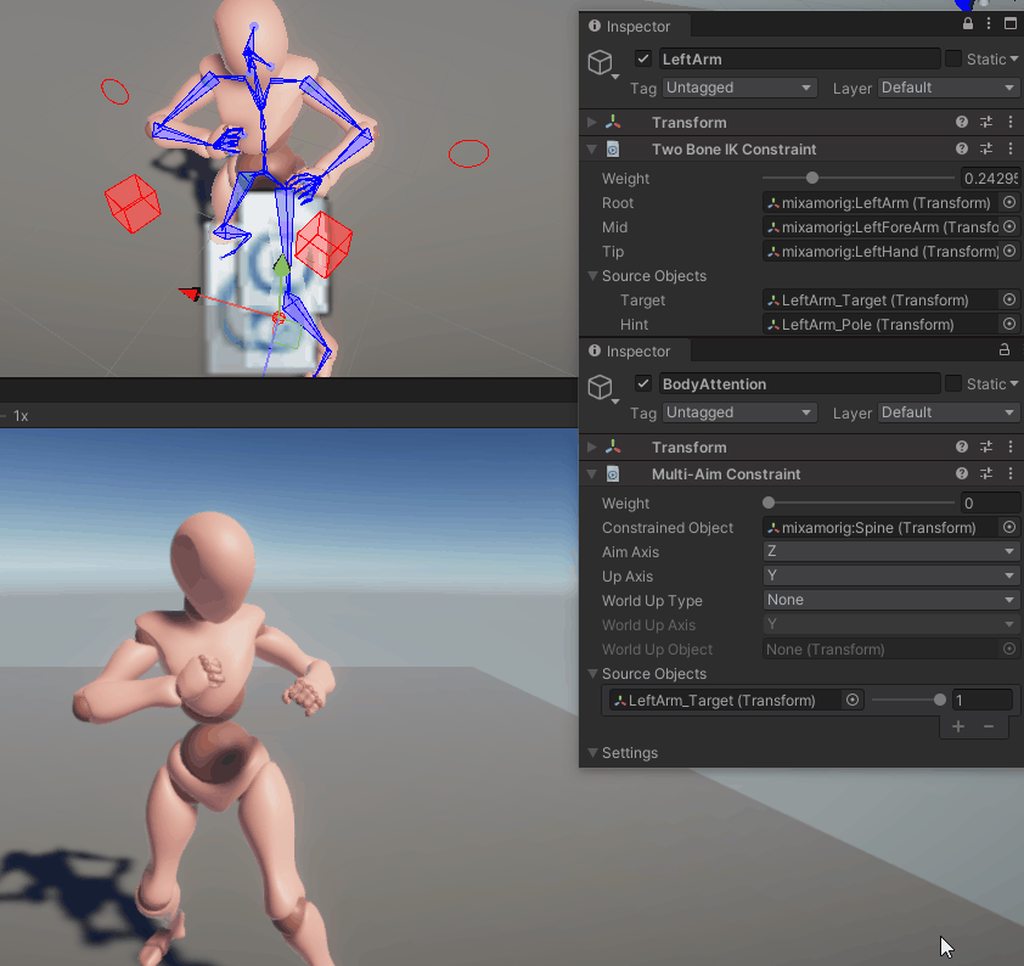
Is there any good way you recommend me doing this?
gentle moon
verbal tiger
Can anyone help me with this? im trying to learn animation and am trying to anim...
I would recommend looking at the pinned messages in this channel. Could also follow a tutorial on youtube.
 junior river
Hey, im currently having trouble with the blend tree, i want to animate my players movement. This somehow doesnt work, the right values get set, but animations only get player when both coordinates are != 0
hybrid tinsel
@junior river At zero it will be in balance since you don't have an idle at 0,0?
junior river
i tested it with idle too, same problem @hybrid tinsel
junior river
hybrid tinsel
And you're in the right state in the animator?
yes
2D Freeform Directional
hybrid tinsel
In the Freeform Directional type the set of motions should always include a single motion at position (0, 0), such as “idle”.
So even if that doesn't fix this issue, you should have one
junior river
I have one by now
hybrid tinsel
Though you could try simple, where the center position is optional
junior river
This is the current one
hybrid tinsel
So nothing at all is playing until you move? The idle isn't activating?
junior river
Sorry i just fixed that, although my Character is now animating away from me, its probably because of root motion, does it have to be activated or deacitvated in order to stay in place?
hybrid tinsel
Deactivated.
 analog sequoia
my walk animation and idle animation are sped up a lot when using blend tree
can someone help
hybrid tinsel
@analog sequoia you have it at .5, so if your input is 1 you'll have it twice as fast?
twin musk
i have a problem regarding unitys UI
i have this rectangle on the bottom of my screen that i want to collapse into a square when its not being used
ive added the proper animations for this, and it works perfectly... when it's 16:9
if the screen aspect ratio changes, it gets screwed up and isnt a square anymore
is there a way to fix this?
here's a gif of it working properly at 16:9 https://gyazo.com/c31a72038bab74ede7cf209d1c315121

but when i change it to a different aspect ratio, it turns into this at the end instead https://cdn.discordapp.com/attachments/497872424281440267/801337893011980328/unknown.png

 wise prism
twin musk
i have a problem regarding unitys UI
i have this rectangle on the bottom of my s...
wise prism
twin musk
i have a problem regarding unitys UI
i have this rectangle on the bottom of my s...
you got canvas scaler on your canvas?
 errant sage
ok hy guys im trying to add arms to my game
twin musk
i believe so yes
errant sage
i already have the arms made in blender and rigged
but now i need the arms to follow my gun
wise prism
@twin musk youll probably need to animate by relative screen size, not by static coordiantes
twin musk
how would i do that? rn in the animation im just inputting values to change the lengths to match
idk much about animation tbh
wise prism
ie if you design for a specific screen size WxH, then use those values that look good for WxH, but if it changes, multiply by the new aspect ratio
if that makes sense
twin musk
so would i have a script edit the animation keyframe somehow?
wise prism
well personally i would probably just use DOTween for this anyway
 vernal scaffold
Canvas anchoring is something you really have to come to love, because if you dont it will hate you back
woven gyro
Anyone here worked on exporting animations to unity from blender
I'm having an infuriating experience trying to, it keeps giving me 3 animations when I only want 1
Pipes is the only thing I want an animation for
trying to fix this has given me a headache so I'd really appreciate some help
gentle moon
 hybrid ether
anyone know why the anim plays fine in blender but wont play in unity?
hybrid ether
anyone know why the anim plays fine in blender but wont play in unity?
I'd recommend uploading gifs instead of files, I think most people are prudent enough not to just download random files from strangers.
 quaint wolf
When I do not mask root bone/shadow in the upper body mask, the upper body shake (left and right shake) is solved because it is overridden by the upper body layer. The layer does not have animation, only one constant key aim animation.
Shouldnt we mask the root bone in the upper body layer (Aim)?
or we should remove movement in the root bone animation
 carmine socket
I have an animated weird 3d shaped (fbx imported from blender). When i give it a mesh collider, and put a sphere (with rb & sphere collider) on top of it, the sphere just goes through it. Why ?
 neat kelp
anyone using Animation Rigging know how to get the FK (animated) positions of bones? Looking to get the FK position of the feet, use it to raycast and position the IK on the ground
 strong plover
https://i.imgur.com/1a5GrMT.gif
Seems a little "stiff" in my opinion anyone got any recommendations?
 analog sequoia
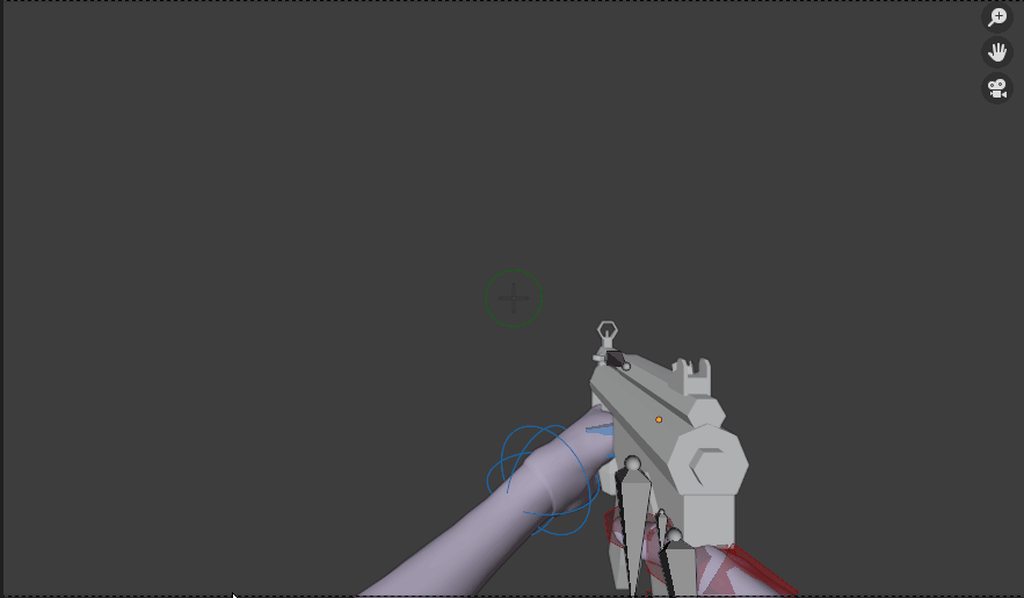
my movement animation speeds up a lot while using blend tree
how do i fix
(give good explaination as i am beginner)
 echo plover
Does anyone know a relatively easy way for me to display animated 3D models in a top-down view so I can rotoscope them into 2D animations? I ask because Blender is a very complex tool and I don't want to learn 3D modeling or animation, but all Blender tutorials are oriented towards that. Thanks in advance.
hybrid ether
so turns out restarting unity was the answer to my issue
hybrid tinsel
@analog sequoia did the answer I already gave work?
@echo plover you can use unity recorder to record objects to frame images or video files.
analog sequoia
@hybrid tinsel I didn’t understand it
 sharp nexus
So me and a friend put this character into unity, its idle and walk animation work fine but the run animations legs screw up and its not leaned foward as much as it is in blender, Is this a unity or a blender thing? idk how to fix it
 quasi fable
Feet look messed up too
sharp nexus
Yea, thats the main place, its like they are being pulled, but it looks fine in blender, like its not a weight paint issue so idk what it could be
sharp nexus
Ok I clicked normalize on all the bones
sharp nexus
Welp that didnt fix it
 dense flint
Some one, know any plugin where i can improt my adobe after effect animation to the unity ?
 gritty frost
@sharp nexus I would probably check if the humanoid setup was detected correctly in Unity
Assuming it's a humanoid rig
 honest falcon
hey, when im using the timeline to animate my character to move along his lower body folds. does anyone know why?
sharp nexus
gritty frost
<@!154696413387685889> I would probably check if the humanoid setup was detected...
It wasn’t humanoid at that time so we changed it and it still didn’t work so what we did to fix it is to just remake all the animations after recalculating the scale in blender and it fixed it
 chrome wolf
someone know why it doesnt work i'm trying to change a float based on a animation but when the animation start it stay at 0
echo plover
I'm trying to rotoscope 3D models doing 3D animations into animated 2D sprites, and for that I need a way to display these models doing the animations from a specific camera angle in an editor. Does anyone know a way I can do this? I've tried using Blender or UMA but all the tutorials deal with creating 3D animations or models and I'm not interested in that as it's a complex skill that takes a lot of time and is mostly unrelated to my project (2d).
somebody pls help i'm having a lot of trouble with this and it's crucial to my project.
hybrid tinsel
@echo plover So my suggestion(the unity recorder) didn't work?
 lean hatch
Is there any way I can change material parameters via animation? The shader used for the material was made via shadergraph.
quasi fable
lean hatch
Is there any way I can change material parameters via animation? The shader used...
Not sure about shadergraph...
I know VFX graph has this: https://docs.unity3d.com/Packages/com.unity.visualeffectgraph@7.1/manual/PropertyBinders.html
which exposes your properties on a component and you can animate them then
maybe shadergraph has something similar?
twin musk
im trying to make it so i can click on a cube and it will play an animation with audio but idk how to make my cube clickable and stuff. can anyone help me
lean hatch
quasi fable
maybe shadergraph has something similar?
Not really, but I was able to use a Material.SetFloat() property to change the float values on my material without affecting the shader, and the best part is that its animatable!
quasi fable
nice
lean hatch
thank you, I've has this issue for two years, thank you again
quasi fable
haha feel like I didn't do much but you're welcome
lean hatch
Is there any way to animate, say, float values in an Array?
quasi fable
how do you mean
lean hatch
Ok, I have an array of floats from a C# script. Is there any way using an animation to change those values?
lean hatch
its a float. Change the number from one number to another.
quasi fable
yeah but which number
and when
you said it's an array
are you askling if arrays can be accessed by an AnimationClip?
lean hatch
yes
lean hatch
already did, no such luck
quasi fable
so maybe not directly
lean hatch
I wouldn't want to make a new variable within the script for every float I need to be animated.
quasi fable
if they're all being animated.. in the same way then you could do some cute stuff to make that happen with an animation
like if you want every value int he array to follow the same curve
hybrid tinsel
@lean hatch
You should be able to, except on stuff like UI that doesn't expose its material.
You can also write a script to access the sharedmaterial on the renderer, and then animate the values in the script.
lean hatch
yeah, I want to animate UI material values. Also, yeah I had to write a script to access all of my material values.
hybrid tinsel
Yeah, that's kinda annoying that they don't just expose that, there's no technical reason that I know of.
echo plover
@hybrid tinsel It's not what I was thinking of, i just want to know how to properly swap premade models and animations (for example, record the walk1 animation on dummy1 and dummy2). Recording it is not an issue at all. But thank you
 steep kelp
I need some tips with Timeline
I set the timescale to zero to pause the whole game
and I want a Timeline to play at normal speed
a cutscene of sorts in the middle of gameplay
Except it's not working
The timeline plays but the animations inside are all paused
 abstract bobcat
2 motion in one state unity
any help??
should i need sub state?
never mind i got fixed this
ok another question
unity has stopped all of my animation after when i changed the rotation of a bone
pic of super confuing unity animator
 noble fiber
quick question: if I have an animation bool set to play but then later I call another animation bool to play without setting the previous animation to false... will it cancel the previous animation? will it throw some error?
echo plover
Does anyone know how I can record this animation in a way that lets me reproduce it with a decent loop?
Would playing the animation only once get me what I want?
(I'm recording it in unity 3D and tracing over it in gimp)
twin musk
Anyone know why Two Bone IK is broken in 2020.2.1f1?
 severe dew
can someone reccomend a free muzzle flash effect that looks realistic? please ping me if u answer 🙂
 median galleon
yo can anyone help i cant get ym walking animation to work
like its all there in the animator
but the sprite wont do the animation
 fading kite
is there a way to modify animations by script?
quasi fable
fading kite
is there a way to modify animations by script?
Do you mean manipulating the animator, or actually changing the animation clips?
sharp nexus
Is there a way to have a humanoid rig in unity when the foot bone isnt connected to the lower leg in blender, I have IKs set up and every tutorial I look at say to have it disconnected from the leg bone entirely, and that means I cant connect it which means I cant have a humanoid rig, can anyone help
echo plover
do mixamo animations refuse to work for anyone else?
hybrid tinsel
Be more specific?
twin musk
Hi, is there anyone here I can ask for help?
 half plinth
Hey whet do you guys think is the best movement option for screen shake left right, up down, or zoom in out
 dry berry

How can I parent the gun to the hand in blender so when I move the hand the gun moves? @ me thank you!
abstract bobcat
dry berry
How can I parent the gun to the hand in blender so when I move the hand the gun ...
i think before asking this question you should google
dry berry
k thx
hybrid tinsel
@twin musk Don't ask people, ask the channel.
echo plover
anyone else had trouble with mixamo animations? Mine just go into fetal pose instead of doing what they should
nevermind figured it out
 silver berry
hello there, can someone help me with animations? walking and Idle?
I try to make it work since 5 hours now
basically Idle is default, but it goes to walking instantly
und it won't stop walking.
I dunno, what code do you need? which Screen?
abstract bobcat
unity's animation are just wasting my time 
this is the animation
coming to idle
going to firing
and this is just what happening
it stucks on the first frame on animation
and not going on 2nd to 20th
echo plover
What are some good 2D animation softwares? (preferably free or low cost)
(also for frame-by-frame animation)
twin musk
hybrid tinsel
<@456226577798135808> Don't ask people, ask the channel.
alright thanks, I fixed the issue on my own anyway XD
 cloud raven
I have a roll animation and just enabled root motion and it just flies to the right. in the animation preview its just forward, but when I actually roll it flies to the right infinitely. Not a scripting problem.
 ruby flower
echo plover
What are some good 2D animation softwares? (preferably free or low cost)
(also f...
ruby flower
echo plover
What are some good 2D animation softwares? (preferably free or low cost)
(also f...
open toonz, blender is also good
abstract bobcat
abstract bobcat
unity's animation are just wasting my time <:sad:711659994088472616>
last time else i have to do something myself 
umm
yesterday i tried googling but i didn't find anything
today i tried and found (but with a different keyword)
anyways my problem is solved now 
 molten meteor
should animation be made in Unity or Blender?
abstract bobcat
molten meteor
should animation be made in Unity or Blender?
any you want. according to use
twin musk
can someone help me today with making script for animations
 cold panther
Does anyone have experience with both final IK and the new rigging package? The newer official rigging package aims to do the same thing as final IK, however the forum for it is kind of slow, it has bugs, and theres no full body setup like final IK so im wondering if final IK is still the better more mature set of features.
Animation rigging package is said to run on jobs, making it more performant...in theory.
tawdry lava
cold panther
Animation rigging package is said to run on jobs, making it more performant...in...
no
well yes, it runs on jobs, but does it help it? no
0.75ms cpu time for each rig builder component is kinda ridiculous
tawdry lava
cold panther
Does anyone have experience with both final IK and the new rigging package? The ...
Id say to just use Final IK until they figure out the rigging package
 round granite
guys I've successfully created water material animation 🥳
any idea for how to create galaxy nodes ? like milky way and such
did I put this on a correct channel ?
cold panther
@tawdry lava thanks. I had not profiled anything, final ik cost money and i preferred to use the "official" unity animation rig...but in my tests and research it does seem not so mature yet. Theres a bug where if u disable and enable the game object the rig goes all fucked up. And final ik looks to have a full body rig w one click ..where unity animation package doesn'thave anything like that its a very manual process it seems...though im new to it
tawdry lava
cold panther
<@112816370906869760> thanks. I had not profiled anything, final ik cost money a...
Its definitely a lot of trial and error from my experience
Build my entire system for a multiplayer game, then boom 0.75ms/player object
brought me from ~300 players to 30 players for same performance
 tender herald
Hello, i'm working on a 2d pixel topdown game and i'm trying to make a character creator, but the thing is i have no idea how i can make "skeletal animation" on a pixel charater (this is the tutorial i've watched, they say that spritesheets will get messy as we add more stuff) https://youtu.be/kAPIWJJ6NQI
In this Unity Tutorial we'll cover the difference between spritesheet and skeletal animation to better inform ourselves when engineering a system to handle character customization in our games.
The example we'll end up building in this tutorial is a 2D Character Creation or Character Customization menu, with bonus features of a Randomize butto...
so yeah anyone know a good tutorial where i can look for making skeletal animation with pixel?
tawdry lava
cold panther
Have u compared final ik?<@112816370906869760>
No but I’m assuming finalIK isn’t as bad
cold panther
@tawdry lava thanks good to know before i go to crazy w the animation rig. Im only using it on one main player right now.
tawdry lava
cold panther
<@112816370906869760> thanks good to know before i go to crazy w the animation r...
Oh if it’s a single player it’s great
Awesome package
Use it
I’m just mad I can only have ~30 players before hitting 16ms cpu time
Just don’t call it 7 days to die
And don’t steal any assets from their game
Yes you need to call it something else
And do not use any assets from their game
That should be fine yeah
cold panther
@tawdry lava i haven't looked in to multiplayer much. For your game, what did you use, is there a general consensus on the best option these days? People seem to like Mirror from asset store, but i also read there are drawbacks.
Also ill playtest anything if you need anyone too
tawdry lava
I’m switching to litenetlib
I believe it’s the foundation of mirror
It’s a simple transport layer
Use a platform like blender
tawdry lava
cold panther
<@112816370906869760> i haven't looked in to multiplayer much. For your game, wh...
Look up LiteNetLib
Start modeling
 warm verge
Hey everyone 🙂 I am doing an animation of the opening chest and I am wondering what is the best way to work with it in the scene view. I need to create a particle effect when the chest opens, but I cant see the animation in the scene view, even when I scrub through the Animation.
 burnt linden
I decided to try making a simple "hopping out of the way" animation so when my gameobject is instantiated it hops to the side and out of the way. Apparently animating in Unity has vastly changed since last I used it (A few years ago) and I can't figure out how to get the animation to stop looping! (or do anything for that matter...) The documentation does not help... can anyone give me a simple explanation of how to use this mess?
warm verge
Footknight: try to use Animator and Animation States
twin musk
how do i export animations i made in blender and put them in unity?
without putting the entire .blend in unity
warm verge
export as fbx
twin musk
warm verge
export as fbx
i found this tutorial https://www.devjockeys.com/blog/unity-3d/export-a-blender-2-81-animation-to-unity-3d/ , and the first time it exported without the animation iirc, but it looked normal (the model), every other time it had the animation(?) but it looked glitched
warm verge
hmm, maybe is the problem in the model... wrong normals, bad skin or weights... hard to say.
twin musk
not sure, i kinda wish blender had a .anim export option by default, so i could probably just easily put the .anim file in unity and done, but the only way i can think of for now to transfer the animation, is make it in blender, then import the .blend to unity, and copy pate the time line of the animation and put it in the acgtual time line i want
so like
i make 1 animation, then i tranfer it to unity via .blend, then i make another animation in blender and copy/paste that .blend in unity as well, but then i copy pate the animation timeline for the 2nd .blend to the first one,
and delete the 2nd model/.blend afterwards
and repeat till all animations in unity i guess
warm verge
you can duplicate the animation clip of the imported model in the Project window https://puu.sh/HaDc1/8c2b271ffb.png it is easier and faster than copy/paste keyframes
you can also have every animation in blender in order in timeline, then in unity you can chop take001 to different takes with different key frame ranges https://puu.sh/HaDef/a737348a32.png

 twin musk
i have some animations but if i apply walk and idle to my character it will only render the most recent one so for example if i apply the idle animation then the walking one my character will do a walking animation when i am not moving how do i fix this
 hot dock
So I got a free asset store animation pack, but it doesn't have sideways movement, is there a way to like copy the walk animation and alter it to make sideways movements?
 oblique bobcat
Theres most likely a easier way but duplicate the animation and just change to be the speed and make it side shuffle
Or you can use inverse kinematics
quaint wolf
How can I update my custom packages auto?
Suppose I have a script shared folder for different projects
hot dock
oblique bobcat
Or you can use inverse kinematics
Whats inverse kinematics
I think Ive heard it before, isnt it where the leg will bend properly to stay on a point or something
 somber pond
Rather inexperienced with animating things, I've got a general blend tree controlling the movement of a character with mixamo animations, but, I've run into an issue when it comes to root motion. If I leave it off, the "rolling" animation I was planning to use won't work since it needs to lower the model's y position. But, enabling it, even when the animations I have are meant to be "in place" ones, I keep getting very slight offsets persisting after every animation, so the model ends up not aligning properly.
Trying to figure out the best way to go about this, either, finding a way to lock the position outside of playing the rolling animation, or, fix the small offsets the animations are producing, or just, turning off root motion and trying to control the y position manually in a script.
Any suggestions?
oblique bobcat
Yeah it's a hard thing to make but has satisfying results basically physics procedurally makes animations based on its surrounding, by calculating how it can move a object to get somewhere
@somber pond I would suggest if you mean like flying in air then I would just go to the animation and lower it to the floor or to where you need
somber pond
The issue is, if I allow that animation to change the root node's height, then, it's giving me all the other offsets I don't want and don't know how to fix. And it's a mixamo animation so I can't seem to edit it using the animation window to add an animation event or anything.
oblique bobcat
Hmm... cab u make a short video of what's happening and either send or post
somber pond
These are getting offset by small amounts as animations play
I need the position and rotation coordinates to always be 0,0,0, except I need to allow the Y position to change temporarily during a specific animation.
essentially I need all my animations to have no root motion, except for one specific animation that only applies motion to the Y position
molten meteor
So if I want to animate a 3D model to run and attack, would I have to animate the upper/lower body separately and give them their own layers?
hybrid tinsel
@somber pond add an animation curve to the clip and use that to vontrol the y position
somber pond
since I imported the animations from mixamo, it's saying they're read only and not letting me edit the clips themselves within unity, any idea if there's a way around that?
hybrid tinsel
Personally when I animate that's why I don't put the hips as root, but rather as a child of the root
@somber pond you can add curves to imported animations in the inspector.
If you actually do need to edit the imported animation you will need to duplicate it.
somber pond
ah! I'll give that a try then
thanks a bunch, I feel so lost when it comes to the animation and art side of things, lol
@hybrid tinsel how do I actually, tell it to use the curve for the y position? I found the curve section in the inspector for clip, but aside from defining the curve itself, not sure how to utilize it.
ah! Found a way around it, by fiddling with some of the import settings, I set the Y position and rotations to be baked into the pose rather than applied to the root
 bronze crest
I think this is the spot for this. I wrote a screenplay and made a little rough cut of an animated short in Unity. Synty, PolyPerfect, URP, mixamo animations, cinemachine, timeline, Tyler Cunningham music pack. Working on the final cut now and I’m probably gonna keep making shorts. It was a lot of fun!

Short film animation made in Unity
Screenplay written with a production plan and the video
Full Sail University Creative Writing Masters
Advanced Visual Storytelling Rough Cut
Synty Studios assets
PolyPerfect assets
Mixamo animations
Music by Tyler Cunningham
https://assetstore.unity.com/publishers/5217
https://assetstore.unity.com/publishers/19...
 wise patrol
Hi everyone, I was wondering if I could be given some pointers on using Kinematica. I made a post on the forums about it yesterday but haven't gotten a response yet (here's the post - https://forum.unity.com/threads/cant-seem-to-get-kinematica-to-work-outside-of-hello-world.1046023/) Since posting this I found out one of the issues was that the models must be using a Generic rig with the hips set as there root, rather then having it as a humanoid rig, though this still doesn't solve all the issues, in different versions of Unity im finding that the root motion of the animations is not being maintained (an example would be that the player walks forward, but then is teleport-ed back to 0,0,0 once its over) but in others it works fine. Something I have noticed though is that I'm getting memory leaks in all versions I've tested, without changing a single line of code from the hello world sample.
Clearly I'm doing something wrong, but its one of those situations where i'm not sure what it is in which i'm not doing. My guess is that I need to do something to either the model or animations import settings as these issues only affect the animations and models I use, and not the default ones that come with the package. On that case if anyone recognises the issues or knows of a start to finish guide for setting it up that I could read or watch, I would appreciate it.
twin musk
I need some help I have been trying to fix this for about 2 hours or something
i have made animations and stuff in blender
which are for unity obvously
and I have imported them, I am trying to use teh animator
everything looks ok I followed videos on how to do it since its my first time
I have a problem though it plays the idle animation then instantly stops and doesn't change
anyone know what this could be?
I am getting a recording if this helps 1 sec
 wise patrol
So am I right in thinking you want the idle to loop?
wise patrol
As that can be done by either creating a condition-less transition to itself in the animator or on the animation itself in the assets folders theres a toggle you can click which sets the animations to loop :)
twin musk
I have done that, but its not looping
I followed a video
and its not working
so I am bit confused
I probably done the coding part wrong
does that look wrong
when the character holds shift he is running, which increases the speed
which is mean to make the character loop the running animation
I don't know if thats right
I just realised I put false, true it wasn't like that before that is not the problem but ill fix it
wise patrol
Can you show me the transition conditions in the animator?
twin musk
Ill try
is that info I don't reallly fully know what to look at yet XD this is new to me
wise patrol
Yeh thats the one, no worrys about not knowing where to look. You'l get the hang oif it xD
twin musk
yeah just time and pratice as they say
this is just annoying the hell out of me I have followed multiple videos I did the same thing yet its not working
wise patrol
So that seems correct, in both the code and the transitions
twin musk
unless its bc my code is a little different
I have no clue then
thanks for trying to help me
I am going to have to just keep testing
wise patrol
Naa its cool, I know you said you'd done so, but just to absolutly make sure this part is definatly ticked on both clips?
It shouldn't affect transition but this is the most likely cause for them not looping.
wise patrol
Ahh hmm,
twin musk
idk if this helps me
but when I tick the 2 boxes at the top it makes the running animation loop but thtas not what I want bc I am standing still
and when I actually move it just keeps the animation doing the same loop
wise patrol
Yeh those are the ones that should be updating in the code, so if you hold shift
wise patrol
Is the animator on the same GO as the script?
twin musk
go?
wise patrol
Game Object, not that it should matter if you passing it as public though
 undone rampart
anybody using blender and working with custom properties? is blender able to export it to FBX and showup in unity?
wise patrol
Yeh what object is the script on and how are you giving it access to the animator?
twin musk
undone rampart
anybody using blender and working with custom properties? is blender able to exp...
I am using blender right now and I am also using fbx
I don't mess around with the settings much though
1 sec ill take a look
undone rampart
did you ever try exporting animated object with custom properties?
twin musk
this is my first attempt now
so I don't know much about it sorry
but ik it can work
my code is attached to my character thing idk what its called sorry
I just added something to anim at the bottom right
I think that might make it work a bit better
undone rampart
https://blogs.unity3d.com/2017/10/12/unity-2017-2-is-now-available/
because in here mentioned that Unity support animated custom properties. But it seems the custom property are not showed up in Unity.
not sure it's from blender FBX exporter issue or not

Unity Technologies Blog
Unity 2017.2 introduces new 2D world-building tools, support for new XR platforms, and thanks to an exclusive collaboration between Unity and Autodesk, faster importing and exporting between Maya/3DS Max and Unity. Unity 2017.2 includes updates to the robust storytelling tools Timeline and Cinemachine, as well as support for ARCore, ARKit, Vufor...
twin musk
I have no clue what the custom properties is sorry
wise patrol
Naa thats fine, it looks like your passing the Animator through as a public variable which is correct, (I only asked as you can also get it through .GetComponent<Animator>()), if you play the game, and look at the Animator Controller for the player, do the variables change when you press shift? As if the code is being ran they should do. (Unless the code isnt being called, where is it currently placed?)
twin musk
sorry this is getting a bit confusing for me haha
I will try to have a look but it might take me a sec thanks
twin musk
ah
wise patrol
One sec let me make sure im not talking rubbish xD
twin musk
haha np
wise patrol
Okay
So the script and the animator are on seperate objects but you passing it through the inspector as a public variable,
- Script is on FirstPersonPlayer
- Animator is on Player_001
Thats fine, but just above where your setting the booleans
You also calling GetComponent<Animator>
twin musk
ok
yeah I get what you by that
but tbh I have no clue what it means haha if you get what I am saying
so I didn't realise that was a problem
wise patrol
Thats setting the animator to null
twin musk
ah
wise patrol
Naa no worries, you should be able to remove the line of code saying anim = GetComponent<Animator>(); and you should hopefully be good :)
twin musk
ok thanks so much ill give it a try
wise patrol
Let me know how it goes xD
twin musk
if it doesn't work I am all out of luck ahha
but thanks so much and I will
dam didn't work haha I have no clue what is happening
wise patrol
If it doesn't could you also send a screen shot of the debug console. As potentially it might be dropping the frame somehwere which would make the code not run
wise patrol
No problem, sorry that didnt fix it
twin musk
its fine in my problem I appreciate any help
their is nothing their dam
I don't want to waste your time
could it be a problem that I have no avatar?
idk what it is but maybe thats idk
wait a sec I found something
when the animation plays the idle
when I press shift it does the running animation
but the idle doesn't replay it just does it once
wise patrol
Okay
wise patrol
Okay so thats at least some progress
I noiticed you had the aniamtions on the same fbx, are all of them set to loop?
As it might be that only run is affected
twin musk
thanks even if I can't get past this I learned a lot for next time so thanks again
yeah they are set to loop
wise patrol
Naa no promblem xD
Ah, im not sure on this one then, I havnt bundled the animations like that before, usually I have them as there own FBX's (which is probably really inefficient xD)
twin musk
ah np thanks though
that has helped me probably more then you think I can' say thanks enough and sorry for wasting your time XD
wise patrol
No time wasted, glad I could help if only a little. :)
twin musk
not a little a bit chunk haha
you got my character actually sprinting
now I just need to try fix the idle animation
alright ill try to not waste any more time haha
thanks for the help
enjoy the rest of your day or night
hopefully I can share my knowledge to others people
once I learn more haha so thanks
wise patrol
Anytime, good luck with the rest, and have a good time too xD
twin musk
thanks
cya later (hoping that later is not another problem haha)
@wise patrol
sorry for the ping I am just so happy haha
I managed to fix it
I added a transition to exit
and changed the code a bit
Just wanted to let you know sorry for the ping again
 wise patrol
twin musk
<@!320157499892432906>
sorry for the ping I am just so happy haha
I managed to ...
wise patrol
twin musk
<@!320157499892432906>
sorry for the ping I am just so happy haha
I managed to ...
No worries about pinging me, glad it all worked out! :D
 last mural
Hey, how would I go about animating a .OBJ file?
I can't export the animation alongside the OBJ in my blender project straight into Unity3D
Is there a way to attach an animation to the OBJ?
quasi fable
Try exporting to FBX instead
OBJ is an older format that doesn't support a lot of things
 lilac nest
I need to ask y'all a question
I've a model I bought on the Unity Store, whose model needed some edits
However, the animations no longer work when exporting from Blender
No bones have been edited
Nevermind, I seem to have worked it out
twin musk
last mural
Is there a way to attach an animation to the OBJ?
I swear I seen a animation option inside of obj
but have never tested it since I am new to animation and importing into game engines and stuff
last mural
@twin musk yeah it’s an option to export each frame as an individual .obj file
I have no clue what it would be used for
And I rly don’t want 500+ obj files in my project
twin musk
ah that is very true you don't want that haha
I didn't know that that happened
I honestly just recommend fbx works fine for me
obj is too old thats why they probably don't support animations
last mural
yeah, so thats why i need to somehow get this thing working with fbx
 low oak
anyone know what would cause this to happen, i've been using a box till now but just put a rigged model in and setup an animator manager and an animation script on it and it starts swimming in the floor like this, the only animations it has available is standing still and walking forwards
when i move around the scene he floats up to standing on the ground again and walks
interesting, i switched the idle animation so they were both walking and it stands above ground fine now
okay, it fixed itself, somehow selecting frame 0-1 as the idle animation means swimming and selecting 1-1 is fine
somber pond
Anyone know how to remove the read only aspect of an imported animation? I read that duplicating it should, but, didn't seem to work. Or if you know of a better way than animation events to trigger something in a script when an animation state exits?
somber pond
Ah! found out how to add events directly to the animation without needing to edit it in the animation window
 earnest mirage
is there a software for auto 2D animations?where i upload my character and the software animates it
twin musk
I doubt it but I don't know much
but
is there a way to make it so that after an animation starts the mouse cannot manipulate it
for reference
 fervent kite
how can you save the state of an animation curve at runtime?
I added [SerializeField] to save it in general, but when I make changes while runtime... it doesnt save them...
 clear orbit
hello. is it possible to animate using Animtion Rigging without Mecanim?
Or in Timeline. I read on a forum that Timeline and Animation Rigging could be used together.
Would I need to learn about Playables?
Is it ok to use, Maybe 10/20/100 Damp constraint Transforms on a player?
Would that be unreasonable? I should try that.
quasi fable
fervent kite
I added [SerializeField] to save it in general, but when I make changes while ru...
Changes at runtime don't get saved as a general rule
 neon pasture
Anyone know of a way to change the Mirror parameter of a state at run-time via code without having to create a unique bool per state? Like basically alter AnimatorState.mirror but independent of the UnityEditor namespace (since you can't build with that)
fervent kite
quasi fable
Changes at runtime don't get saved as a general rule
i figured out that you can save presets in the AnimationCurve, share those even across all instances, during runtime... 🙂
 gilded cairn
Ciao everybody - I'm not 100% is an "Animation" question but I'll try to ask.
Basically I have a futuristic hot air balloon (made in Blender, very basic), landed on a desert.
Now, this balloon is very static and what I would like to do, is to add some movement of the balloon by the wind.
Do you know what could be the best approach?
Something like deforming the mesh to bring the effect at second 7?
https://www.youtube.com/watch?v=_1Fqvecc-8k

A hot air balloon crashed into a tent at Balloon Fiesta Park in Albuquerque, New Mexico Monday. The pilot was reportedly ejected from the balloon and injured. (Oct. 5)
quasi fable
Probably best done with a vertex shader
gilded cairn
mmmh yeah that's an interesting approach indeed. When I tried my balloon became transparent for some reasons
 willow heath
Simple question: How can I distort an image/texture in Unity?
quasi fable
what kind of distortion are you looking for?
quasi fable
so like a skew...?
willow heath
Looks like it yeah
quasi fable
is this on a SpriteRenderer?
 eager obsidian
Anyone here ever use polywink.com? Auto-face rigging.
somber pond
If I wanted to have various attack animations (and hand poses during non attacking animations) based on the currently held weapon, what would be the best setup for that in the animator?
Currently I have basic movement all in one layer, then a second override layer with a one handed sword grip. Should attacking animations be in another override layer? Or in the same layer as movement?
hybrid tinsel
@gilded cairn Be sure to set vertex position, not vertex color. Plugging a vector3 into vertex color will make it transparent because color is a vertex4(rgba)
@willow heath Most times you'd use bones for that.
gilded cairn
thank you @hybrid tinsel - I think I managed to get something very weird but closer to the result I wanted (batter than an invisible thing)
the thing I don't get is the lighter-black thing that stands behind the deformed mash
(don't mind about the white stripe, is another material)
it's like a double-layered mesh - could it be that I messed up something in blender?
hybrid tinsel
It is possible
gilded cairn
yeah - I tried on a sphere and the result is pretty much what I was looking for - so thanks for your precious advice!
 jaunty cave
 finite lagoon
hello is anyone familiar with sprite rigging?
hybrid tinsel
Lots of people are familiar with sprite rigging.
 wide sleet
yo I'm using the animator for the first time. I right click the block and choose make transition. I bring it over to another block and it snaps into place. however if i move my mouse away again it will detach. How do I lock it on? i tried left clicking and right clicking XD
 brazen ginkgo
hey im watching this https://www.youtube.com/watch?v=rycsXRO6rpI and im at the animate part but it wont let me animate it im at 4:54
A brief introduction to 2D Character Movement and Character Animation in Unity. We will use a Sprite Sheet with Animator Controller to animate our 2D Character, and we will use some Scripting to change his position by pressing the Arrow Keys. Topics like Sprite Sheet, State Machine and Animation Transition will be cover along the way.
Are you i...
ping me to help
brazen ginkgo
PLEASE HELP
 near berry
on some tutorial it shows events under the script, however I cant find this functionality anymore...
is it relocated or..?
quasi fable
It's determined by the script in question
Any script can add events like that by declaring UnityEvent variables
 north hawk
can anyone let me know why it keeps resetting to the defauly position?
 molten ocean


my first animation.
#animation #cinema4d #unity3d #madewithunity #hdrp
#indegamedev #indegame https://t.co/2tifcIWwK7
 Twitter
·
Twitter
·
 fervent schooner
How do I add new animations to an existing rigged model?
Considering both rigs are exactly the same
 prisma quartz
did anyone had this problem before in export the file from blender to unity a avatar animator is missing
tawdry lava
fervent schooner
How do I add new animations to an existing rigged model?
Considering both rigs a...
you need to make them both humanoid for retargeting I think
fervent schooner
you need to make them both humanoid for retargeting I think
@tawdry lava i dont think my original rig is humanoid, does that mean i have to start over?
tawdry lava
no clue
you can try assigning the other model the avatar of the rig with the animations on it
if they are bone by bone the same
 mild leaf
does anyone use maya? I'm having trouble with the quick rig joints
all of them work fine except the leg joints, which look like the quick rig put them too far forward
they don't move the mesh very much at all when I rotate them
 glass lantern
Hey, I’m wanting to make a simple 2d game and just trying to learn everything still. My question is, if I make a character in photoshop, do I have to animate it in photoshop? Like idle, walk, run, jump? Or is that possible to do in unity?
 halcyon lagoon
I have an animation for when I fire my gun, but currently I can't play the animation again until its over. How can I allow it to be overridden if I fire the gun again before the animation is finished?
hybrid tinsel
@north hawk Is root motion disabled?
@glass lantern I mostly make characters in photoshop and animate in unity
glass lantern
alright. thanks
halcyon lagoon
Nevermind I figured it out
prisma quartz
hi
can someone help me
first of all i wanna know how can i increase the size of the plate armor in unity
prisma quartz
all fix nvm
 manic glen
i'm using same animator controller for 2 characters , both use same controller profile and animations state but different animator component
it doesn't work ..
only in one character
the other one is on different layer but I don't think it's the reason
 spiral ferry
How would I move from one animation to the next
without waiting for the current one to finish
 twilit plank
i have a fully rigged character but i cant animate it
spiral ferry
wdym by you cant
spiral ferry
twilit plank
i have a fully rigged character but i cant animate it
like the option doesnt show up or its not working
spiral ferry
Do you have previous experience with animations
twilit plank
not really im really new
but it works
not in the model
i can preview the animation in the unity model
spiral ferry
are you running the animation in game?
twilit plank
yes
spiral ferry
like from a script?
twilit plank
i didnt wrote any scripts
 lethal veldt
Hi I have added the animation rigging package to my project and cant seem to remove this white play button card. Does anyone have a solution to remove it?
quaint wolf
Have you worked with Final IK?
I have added Aim IK and full body IK and custom IK to update bones correctly, it is OK
My question is about recoiling
Recoil script does not work at all!
lethal veldt
lethal veldt
Hi I have added the animation rigging package to my project and cant seem to rem...
It seems to be the rig builder component on my humanoid which is causing this issue
twin musk
Hello,
I changed my operating system to Mac OS while creating the project. Consequently, I had to install a newer version of Unity than the previous one, but still 2020.x. Everything works fine except for animation. Most of the buttons in my game are responsible for starting some animation. Everything works fine in the editor, but after building the apk, none of them work. Initially, it seemed to me that it is the fault of the buttons, but activities such as "Application.Quit" and loading scenes work, but running the animations unfortunately not. I checked the Animator to see if all animations were added as well as the Animation component. Everything is properly implemented. Hence my question, what could be wrong? Are they some files or settings?
I would ask for help in solving this problem.
near berry
something on my animation doesnt work and im not sure what..
it leaves the last frame of the animation rather than completely finishing it (and disappear)
say this is the animation
I would see the last frame
twin musk
Did someone ever tried to export a Rigify rigged model and animation to Unity? Mine has different result from Blender to Unity
 green oxide
hello, i’m applying the animation rigging to my model, following Valem’s tutorial. when applying the head constraint, it does this. any help? : (
 unreal nova
 static swan


#blender #b3d #Blender3d #animation #3Danimation #videoediting #beginner #bouncingballs
Still working on the basic principles and learning how to video edit in Blender. I've now finished my 4th animation in Blender. 😊
🎵 And So It Begins - Artificial Music🎵 https://t.co/45TM9X6QSB
Twitter
·
Bouncy ball
 old grail
Where do I ask for help? I just need some help with making my equipment mesh follow my character movement when attached to a socket. Right now I have my chest piece attached to sock (chest) I enter the game and equip the chest piece and it works fine but when my character jumps or performs any animations the equipment doesn't animate with my character (it only follows my character because ofc it's on (chest) socket. How do I fix this? I want it to also animate with my character idle/attack/walk/run/gather/etc..
 frosty basin
Hi I made a fade animation for changing from lvl 1 to lvl 2 or when the player die but how can I make it loop only once
In short how can I make a animation play only once for the fade effect I made?
quasi fable
old grail
Where do I ask for help? I just need some help with making my equipment mesh fol...
Are you not parenting the equipment to the character?
Perhaps you need to make sure to parent it to the specific bone it is attached to?
somber pond
So, I'm trying to learn how to animate things in blender for unity. For a more "complex" animation that involves multiple moving parts, like, maybe finger movement, leg movement, arm movement, head movement, etc, should each one be it's own animation action? that can then be combined into one animation later somehow?
 granite sigil
Hey guys,
I'm making a 2D character animation for my mobile game,
& i'm trying to create something similar to the Lost Crypt character rig,
the way they did Sara's character, with her pony tail
bouncing with her movement.
Is anybody familiar with this ?
I'd appreciate a little help with this
 tepid cloak
hi guys, i have a humanoid model with a hierarchy that i would like to change. for some reason the shoulders are parented to the neck, and i need to upload the character to mixamo
how do i change the order of the hierarchy?
 old pagoda
Hey, does anyone know how I can adjust the sample rate? On tutorials the option should be here around the top left, but it's nowhere to be found.
Ah for anyone wondering running into the same issue- it's disabled by default. Click the three dots in the top right to enable it.
 little sluice
Is there a way in Unity to add constraints to bones so that I only need to move one bone and it affects the rest that are attached to it?
I know you can do it in Blender but I have no idea what it's called in Unity
quasi fable
little sluice
Is there a way in Unity to add constraints to bones so that I only need to move ...
Isn't that just called parenting?
And yes Unity supports that. Just drag the objects into each other in the Hierarchy window
little sluice
quasi fable
And yes Unity supports that. Just drag the objects into each other in the Hierar...
But like if I move, say a weapon, the arms should move only as far as they are allowed by a certain constraint
old pagoda
I have got this character sprite with png's all over the place, it has seperate torso, legs, arms as well as weapons, but there's instances like the idle animation where it's the whole body. How would I create a working character this way? Would I need to do a skeletal animation or regular or something in between? I am not sure and I'm new to Unity, I couldn't really find a tutorial which can help me with this exact problem.
EDIT: 2D sidescroller (as you can see)
quasi fable
little sluice
But like if I move, say a weapon, the arms should move only as far as they are a...
Yeah not sure about that then :/
old pagoda
little sluice
But like if I move, say a weapon, the arms should move only as far as they are a...
https://www.youtube.com/watch?v=HdqOfLZS8R0
This video could help you

Welcome back to another video! In this video I will make a tutorial on how to create Skeletal Animations in Unity, applying Inverse Kenematics and using a single png image. It is a tutorial for begginers in the Unity 2D Animation System.
First, we are going to talk about how to install the two packaged we need to create the skeletal animations...
old pagoda
well this looks funky... any idea how I can add the TorsoHead, Arms and Weapon?
Edit: idle animation is the entire character (as well as death animation and knockdown animation), But when running/crouching/jumping the legs and torso and arms and weapons are seperated. I dont know how to add those together
 balmy scarab
I've got no idea why this is happening. It's got a IK FABRIK Solver for the whip, which works relatively close to what I want to do, but in the build it just looks like a badly behaved stick. It's a child object of the hand it's attached to so I don't know if that's the root cause or if it's something else:
Editor movement: https://gyazo.com/0cab6143ced6de5d3a358d5eb3a92312
Final Build movement: https://gyazo.com/4017640ba16ea344b4651fae7fdfb479


The Editor's also not doing it the way I anticipated it to work either, however at least the whip's bending and stuff in the Editor.
hybrid tinsel
@little sluice What you want is 'Inverse Kinematics'
 hallow plover
I'm trying to animate the towers of this factory going up and down at the same time, but I dont know how to make several of them animate at once. When I connect the animation controller to the model, I can only use one animation at a time
This is how it looks in the animation controller
I animated them in blender first and then sent it to Unity
 jagged pulsar
has anybody some expirience with spriter pro?
balmy scarab
Turns out the bones ARE working, but the sprite for the whip isn't
 long otter


 old pagoda
I have a 2D game with a sprite whose Torso, arms, weapon and legs are separated from one another (I have only animated the legs so far and this works well, jumping, running, crouching etc, however the Y is not correctly positioned). I have no idea how stick those animated torso, arms and weapon on top of the legs (these have no transitions like the legs do have) (the bodyparts are seperated because you can choose different weapons which go with different torso and arms etc)
I could not really find anything on YouTube except for skeletal animations, but I am not looking for that (and normal animations, but there you actually always have 1 body that needs to be animated and not a split body)
for the people interested in seeing what it looks like.. lol.. (this is my first Unity game, and I am remaking Commando 2 in unity for a school assignment, I found the assets online, the original game doesn't work anymore due to dropped flash support so I thought why not. Fits all grade requirements).
PS: the idle animation is fine, as well as the death animation and knockdown animation because those are all "one body" and not seperated in torso/arms/weapon/legs
 midnight moth
Hi. I have a problem with my Humanoid character. I need to reposition the pivot of the Hand bone so that my script can correctly move it. Tried an offset in my script but then i get some weird anomalies with the position of the hand
Does anyone know how I can do that?
 uneven mica
I am brand new to Unity and am working on a project that I just imported from MAYA, I have frozen transformations which means that the rotation and position values all equal 0. I don't know how to get the object back to a no rotated state. Can anyone help?
 left cradle
How would I go about re-using a 2d animation clip? For example, I have an idle cycle, but I have 4 versions for facing different directions. I've created an animation clip for idle_down, but now how can I duplicate it into idle_up, idle_left, idle_right?
I want to maintain my timing, but swap in the new sprites
twin musk
Hey, why dont I have the possibility to animate something ?