#🏃┃animation
1 messages · Page 49 of 1
 serene marsh
 brittle raft
It's more about a visual queue for when you gain control rather than making believable motion, but you're right, I reckon I can get it pretty tight and it wont get too janky.
I'll see how I go
 kindred burrow
you could also just wait until they can move to start the animation to stand up, but keep the controls locked
they wouldn't know the difference
brittle raft
Ah, it's way more complicated than that
It's all networked code that's synced
But yeah, I reckon I'll get it... I'll share a vid when I get it working. 😉
serene marsh
Networking doesn't really change anything
That's why I mentioned you should use it as a state machine as it's intended.
Then you just sync the states.
brittle raft
It is a state machine.
serene marsh
Yeah but Im saying if you control it using parameters you can just sync the parameters and you're good to go across the network
brittle raft
Yeah, that's what I'm doing.
My solution is to pass in the "timeUntilStart" and then do a transition when it goes below some value.
Should work.
Just need to refactor some stuff first...
serene marsh
mmm refactoring. the Amy Santiago of programming.
brittle raft
@serene marsh @kindred burrow workin'
brittle raft
Hey @kindred burrow what happened to your messages about the null state?
I scrolled up to take a look at them and they're all gone. :/
Actually it turns out you don't need to make an empty substate, you can just make an empty state.
@kindred burrow The advantage of using a regular empty state instead of a sub-state-machine is that you can set it to default, which doesn't not seem to be possible otherwise.
 calm holly
I only use animator for a blend tree, going to and from that, plus everything else is done with one line of code when the char requres, so I'd recommend a hybrid approach for sure. It's best not to let animator make the decisions IMHO, but excute the blend trees, etc
kindred burrow
yeah it doesn't have to be a substate. somehow I was able to make my substate the default, but I forget how.
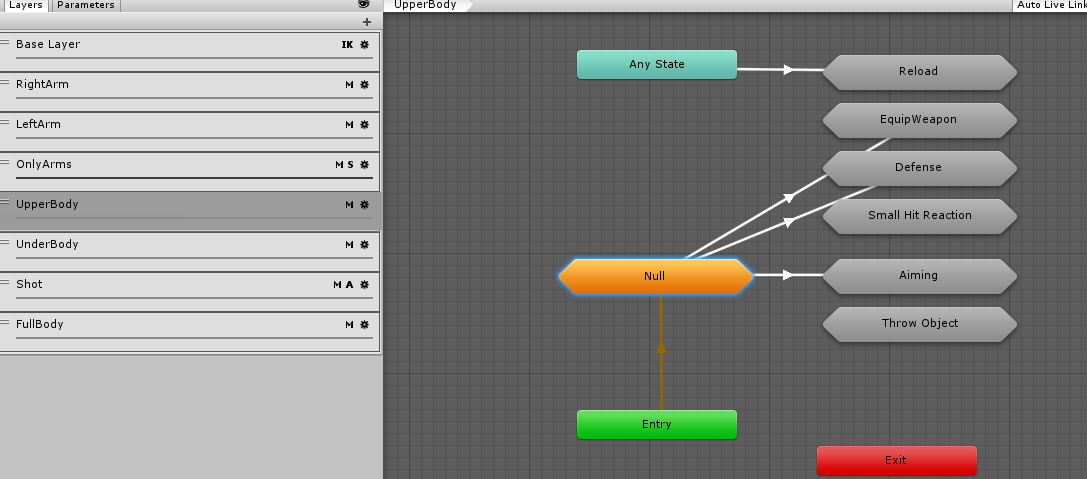
you can see it's yellow
and yeah at first I tried doing transitions for everything but it's harder to sync with code. triggering things via code is simpler, as hippocoder recommends.
but for cases where the code doesn't need to know what is going on, transitions rule 😛
 formal elm
using Unity 2018.3.5f1 I am getting some strange behavior with the animation system.
The attached video shows the issue.
The left/first platform is doing the expected behavior (the robot childs to the platform and moves with the animation)
the right/second platform is not doing the expeted behavior (it childs, but doesn't cleanly move with it)
I have both platforms set to physics update animation (I am have all the movement code running in the FixedUpdate Cycle), same script/colliders setd.
The only difference is the first one, I have the the platform as the root object and am moving it directly. The second one, there is an empty game object that has the animator on it and it is animating the child object.
Any idea why the one platform correctly moves the child object (the robot) correctly but the second one doesn't?
please tag me if you can answer my question.
 icy rune
Hello, I have a rigging/animation question. I think the way I set up my parent constraints has effected how my model looks in Unity.
The Unity scene with imported asset
The Unity file explorer for the asset
The model shows up fine in the Unity inspector window, but when I enable the import constraints option it seems to stretch it out in the scene. Also my animations don't work, that's my second problem. I select the root joint in Maya, select hierarchy, select the body and eye mesh, send to unity option with bake animation on the correct frame range. I'm thinking of not working with parent constraints and instead using set driven keys on my controllers to control the joints, and then just parent the controller under the respected joint. Fix Update: I forgot to highlight the actual timeline baked animation after selecting the joints and mesh before sending to Unity. Animation works fine without enabling the import constraints option in the animation inspector so no more stretching.
 inland obsidian
If it hasnt been done, i really think it would be cool if Unity hires some coders to reply a couple of things everyday, there are legit good questions all around
calm holly
anyone using timeline with colliders for example character going up ramp?
 short laurel
Hello everyone, quick question, if you animate something and you need a reference, do you search for you own or do you use specific resources e.g. Websites? I am looking for a collection with recorded movements where I can study them, is there anything like that?
serene marsh
I usually just youtube for references. mixamo has a ton of prebuilt animations too but I dont think it has references
 analog rover
So, I'm trying to use blend tree to make an idle jump and running jump animations based on speed of the character. I have one blend tree with my movement that connects to the jump blend tree with idle jump and running jump. And I've got parameter saying that if speed is less than 0.1 do idle, if greater, do running jump. The connecting node that triggers the jump has a trigger parameter that is triggered by hitting space button. However, it doesn't seem to work. 🤔
brittle raft
Does anyone have experience changing the model controlled by an animator at runtime?
 slim pivot
any timeline pros here? am noticing when stopping the timeline a track's animation doesn't always seem fully evaluated -> ie a canvas group is being animated an on the last frame the alpha should be 1 and it should be marked as interactable, but it seems to not quite hit that last frame... i guess it maybe has to do with maybe the order in which tracks are evaluated?
actually, i'm not even stopping it, i just set the speed to 0 (as i basically just want to ignore the animators entirely) - i guess there is a more straightforward approach but it's not immediately clear to me
@brittle raft what's the issue specifically? have done a bit with swapping and remapping the runtime controller + parameters, not specifically the models
hmm, if i extend the duration a frame and get a little crossfade, it seems to work as i want it to, but that doesn't feel right...
brittle raft
@slim pivot I just don't know how to do it. The Animator is created by Unity with the import as part of the model, so I wasn't sure how to go about it. To be clear I mean replacing the model at runtime with code.
(sorry, I've no experience with timeline btw)
slim pivot
still not sure exactly what you're looking for. unity supports retargeting for humanoids, generics i think still not
i go back and forth but the animation system (including timeline) generally leaves me more frustrated than anything else
mecanim works but it's a very old, very basic system. director (timeline) looked promising at first but it feels like a product that has hardly evolved the last few years -> things i'd expect out of the box for a basic sequencing package (events and reliable playback + looping controls) you still need to do yourself, and it's not straightforward, even with the wizard to generate 4 or 5 different files
none of which works with DOTs -__-
calm holly
animator (mecanim) and timeline solve different problems.
timeline is not exactly basic, it's a sequencer, it shouldn't have more functionality
it's a director of animation
mecanim is a state machine for animation
slim pivot
sure
calm holly
sure yeah
slim pivot
i'm speaking more generally about the underlying tech (playables, which i think mecanim is either running on or lead to the version that the new stuff runs on), and also the usability
i mean, we JUST got zoom
it's only frustrating because of all the other cool stuff that gets put out (both by unity and other tools)
 charred belfry
We have events now, they're called signals
New in 2019.1
I find them quite clunky but they do the job
slim pivot
this was exactly my problem ^^^ they're late, required an editor upgrade to a beta version, and what i was seeing from the community was a decent amount of negative feedback
maybe i'll love them... but i really, really wish unity would just start making their own games
go beyond the cool tech demos and small-ish partner experiments and have teams in extremely close proximity under pressure that have to use these tools every day to deliver something on a tight budget
real dogfooding
 opaque pilot
that's what projects like fps.sample are inteded to do
have more "real-ish" projects like you'd really build a game and less forward test projects like Adam/BotD/Butterfly effect.
Not that they won't stop making tech demo projects, but doing more "real-ish" projects kinda forces them to dogfood things better
and opening up previews and betas achieves the same thing with real users
 frigid stag
Problem is fps sample will only ever be that, there's no drive to improve it because it's just a sample
See: sample assets lmao
 proven cove
I have avoided unity animations whereever possible, until now. So I am fairly new: Is this a bug or a feature? 😄 https://gyazo.com/03b98adf40f4ccf5a715cebc060028f2

 quiet void
Probably a bug. What happens if you add a key from the timeline? I am generally happy with the animation of Unity reminds me a lot of 3dsmax and maya. And that is very good.
proven cove
@quiet void Settings keys manually works. However, if I set an initial key, jump to the end and want to use the record-function to record a linear rotation in one axis, this happens: https://gyazo.com/21a3746534c979f87bff404d02e50e31

All three axis go completely crazy
quiet void
hmmm are you sure this is not a gimbal lock issue? I have seen such issues and they are usually because of that. https://www.youtube.com/watch?v=zc8b2Jo7mno

In this video we explore Euler Rotations, the most common method for orienting objects in 3d. It's by-product "gimbal lock" can cause headaches for animators...
kindred burrow
the built in animation tool is really only meant for simple object animations, not animating skinned mesh characters.
i'd use a real animation tool for that, like blender/3dsmax/maya
proven cove
@quiet void @kindred burrow thank you! Indeed, this seems to be the course. Which is quite sad as I just wanted to hack a quick "hand-closing" animation for vr-grabbing (without the overhead of switching to 3ds and back since I've never used 3ds animation)
quiet void
You actually can. But it is painful.
Try this tool. It makes it a bit easier than having to learn a full fledged animation tool.
https://assetstore.unity.com/packages/tools/animation/umotion-community-animation-editor-95986

Powerful Animation Editor for animating any type of 3D model right inside Unity.
Reduce development time by fine tuning animations even while being in play mode.
No CPU overhead: UMotion produces Unity animation clips that require no run-time components.
KEY FEATU...
proven cove
This seems to be exactly what I've been looking for! Thanks a lot! I will try it
 woeful hearth
Umotion Pro very cool tool 😄
 verbal pecan
I have a sprite animation of a popping balloon. I am setting the color of the balloon randomly on creation. Is there a way that this color can carry over on the animation?
verbal pecan
nvm, discovered I didn't use the right sprite renderer for it
 onyx dagger
Hi , Has anyone tried this program? https://cascadeur.com/

Cascadeur - the physics-based animation software. A breakthrough in character animation
kindred burrow
first I heard of it
closed beta, no real info. Hard to say how good it really is
sounds like it probably uses IK and the like, which isn't really new. but I'll reserve judgement until they actually show something to indicate what it does.
quiet void
I have heard of it, looks nice, but never used it.
It appears to be similar to Euphoria that Natural Motion was making before they became a game studio.

Introducing Morpheme and Morpheme with Euphoria. Elevate your projects to the next generation by creating complex and compelling high fidelity in-game animat...
kindred burrow
Morpheme. I remember that. But what's hilarious is everything they show in that video looks just like Unity's Animator + PuppetMaster and FinalIK.
FinalIK even has the behaviors stuff.
 peak flume
Hey all. Anyone here using/used before the characters from Mixamo ? They work great and Ive used them for over a year, but I cannot fix the broken blendshapes for the mouth. They seem to be anchored to the wrong spot, causing the mouth to get all fucked up passed a certain point. Do I need to fix them in blender? Or can I do it in unity?
 worldly shoal
The 2D animation package is in preview right now. I'm ok with that, my only issue is that it's not optimized yet, but that's planned in the next release (2019.1, I think). I'm trying to debate whether I should use it or not. I could probably wait ~3 months, but I don't think I could wait 6-12. Is there an estimate of when 2019.1 will come out? I'm trying to decide if I should use spine or wait for 2D Unity Animation
actually, I put 5 on the screen and my FPS is about 50-70, so I guess I don't need to worry about this
 robust tulip
i have a bit of a problem, also not familiar with anything animation wise
all the anim clips are saying that because it was "originally imported in an earlier version of unity, if you mesh has blend shapes you may notice some artifacts or missing normals .."
when i hit a button shown that says "fix now" for all of the clips.. my characters spazz out every couple seconds and "jumps in the same spot" is the best way i can describe what they are doing whenever i run the game so idk what happened or what to do
i was using the same animation set and character models found in this video: https://www.youtube.com/watch?v=blPglabGueM
Learn how to link together surfaces and how to add an animated character to our Agent. This video is sponsored by Unity. Watch on Unity's website: https://go...
if that helps
 pine badge
Anyone have experience with body type systems? Those are the same animation, but i just dont get why their localPosition/rotation are different. In the inspector they're the same, only their root bone is adjusted from the body type but...
pine badge
So... it all boils down to this behavior.
Is there any way rotation can be preserved (it doesn't go ellipse) when the root is scaled somewhere? Or something in LateUpdate?
robust tulip
ok.. so idk what happened but any new character model that was pre-rigged and animated just doesnt work properly
im not familar with anything animation wise
when i hit fix now, idk what happens and when i run my game none of the animations work properly..
robust tulip
My character keeps doing this although im not telling it to jump anywhere, after the latest update something happened to all the animations.. is there a way to fix it?
kindred burrow
looks like he thinks he's falling
so i'd find out why your falling code is being triggered
robust tulip
hmm
robust tulip
im using navmesh + third person controller..
this is... really odd cause theres a boolean in the 3rd person character controller that specifies true or false if you want to jump or crouch, and you can set it to false in the script to make it not jump
robust tulip
ok.. so i redownloaded the navmesh script.. idk how.. it got corrupted somehow.. but i replaced it with the existing nav mesh components and.. everything works fine now..
@kindred burrow
 high junco
hmm... i was trying to export a player to unity and somehow the mesh is screwed up. can anyone please help, im a bit confused as to why it shrinks the mesh down when it goes into unity
i might have a clue hang on
well it works on convex but nothing else
eh im just gonna use a bunch of cube colliders
worldly shoal
Hello! Can Anima2D import a psd/psb and place everything in the correct locations, like the 2d animation preview already does with its PSD Importer?
serene marsh
@worldly shoal Did you ever find out the answer to your question..
worldly shoal
nope
calm holly
Anima no longer developed so YMMV
worldly shoal
ok. Is anyone here using the 2d animation preview?
I've run into a bug that's really bad
After importing a PSB, I created a prefab variant. I then added a layer to the PSB and saved it. Now the prefab variant is broken. More info here: https://forum.unity.com/threads/2d-animation-v2-preview-packages.599356/page-3#post-4359139

Unity Forum
Hi, you should parent your SpriteMask to the bone instead. The geometry follows the bones not the SpriteRenderer's GameObject.
Yes I did realize...
am I doing something wrong?
worldly shoal
I'm considering using Spine instead of this, because this is a critical bug to me. It means I only get one shot at creating my animation, and if I want to add clothes in the future, I have to start all over again like it's a brand new character. Here's my question about spine:
Once I take my spine created asset and put it in unity, can a script set pieces of that character to active/inactive? This is how I'm currently showing or hiding certain clothing.
pine badge
Anyone using dotween? Im not understanding how Ease type is calculated in SetSpeedBased...
 twin musk
Can someone link me to an animation layer blending video? The official one (https://www.youtube.com/watch?v=fi4O1i8a2Ro) doesn't give a working example.

Watch this video in context on Unity's learning pages here - http://unity3d.com/learn/tutorials/modules/beginner/animation/animator-controller-layers Animato...
I have a 1D Blend Tree for idle/walk/run animations, the latter 2 being 2D Blend Trees
Now I want it so that when I press Right Click, the torso and above plays an Aiming animation while the rest plays walk/run/idle
Also how would I make it so that when stopping a movement, a "stopping" animation is played first before returning to the idle animation
 strong portal
Hey
I need some help importing animation from blender
Can someone check this out?

There are two gifs in the link, one is from blender where the animation looks allright, and the other one from Unity (imported as fbx) which looks like this
It looks like a problem with mesh skinning? But wouldn't it be visible in blender as well?
kindred burrow
blender allows an unlimited # of bone weights per vertex
Unity however (like most engines) only allows 4 bone weights per vertex.
so likely at import Unity is discarding anything above 4, so on vertices where you have 5 or more bone weights, you'll have issues.
fix is to redo your weights so you stick to the limit of 4 per vertex, or you can wait for Unity 2019 to come out, which raises the bone weight limit from 4 to 32
(though it's still best to keep it as low as possible, the more weights per vertex, the more work it is to calculate the skinning)
strong portal
with deadline untill tomorrow I won't be able to wait for 2019 😄
does beta support it?
kindred burrow
i'm not sure, let me load it up and see
fixing it might n ot be hard, sometimes it's just about cleaning up some stray groups you don't actually need in the problem areas
strong portal
awesome, I'm passing this information to my 3d artist then
kindred burrow
you could try running the blender tool to limit weight groups
it will prioritize by which groups have most influence
removing anything above the limit that is so small as to not really matter anyway
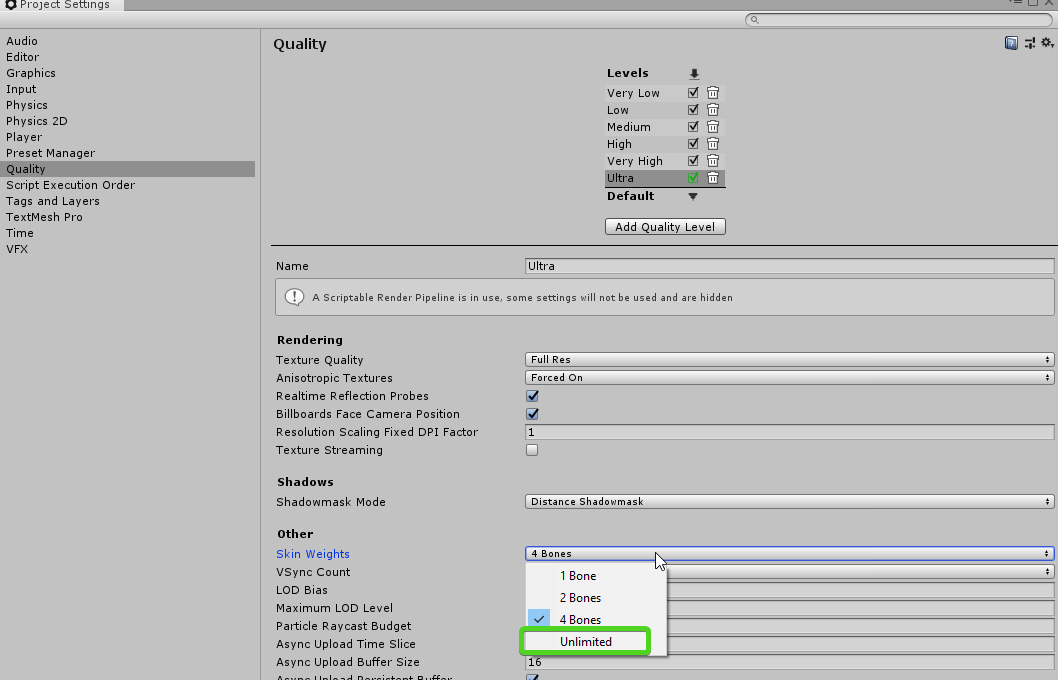
and yeah 2019.1 beta does have the new limit
they call it "unlimited" but it's really 32 😛
strong portal
😄
kindred burrow
yeah well if you have 32 weights per vertex, you're doing something wrong LOL
calm holly
absolutely lol
kindred burrow
I've only ever seen one game go over the 4 weight limit
was Quantum Break
they have such a complex facial rig, they used 8 weights per vertex
calm holly
it's likely for something like USD, where effects can sometimes be engineered in unique ways.
(pixar scene format)
kindred burrow
yeah there could be reasons, but they are rare
calm holly
(UsdSkel)
no it's for this

GitHub
Integration of Pixar's Universal Scene Description into Unity - Unity-Technologies/usd-unity-sdk

Unity Technologies Blog
Pixar's Universal Scene Description (USD) is a file format designed for large-scale asset pipelines, with a particular focus on parallel workflows. Apple a...
kindred burrow
yeah I know what it is
but regardless, it's rare to need more than 4 weights per vertex
strong portal
@kindred burrow I bought a model of the dog which wasn't game ready so I guess that's the reason with the weight limit
calm holly
well in vfx pipelines, coming from houdini or other sources, these apps also have 32 per vert so the parity is required.
kindred burrow
yeah, sounds like they didn't take game engine constraints into consideration when making it @strong portal
strong portal
anyway I'm gonna try porting this to 2019.1 and see how this works because it should be quicker (I think)
kindred burrow
4 weights per vert is pretty much the industry standard
strong portal
and meantime I'll pass the info to my 3d artist to work on it in blender
kindred burrow
USD not withstanding 😛
strong portal
Thanks! @kindred burrow
kindred burrow
np
calm holly
can make do with 2 vert weights even
need to increase dev time though, bit fiddly trying to make skinning look good
kindred burrow
2 is probably fine for more cartoonish characters
but if you're trying to have any kind of realistic joint movment in complex areas like the shoulders, it's pretty much impossible. You need interaction from the chest, the shoulderblade, the upper arm at the very minimum, and if you want to do it right, you'll throw a little neck in there as well
it can be even more complicated if your model is rigged for body size adjusting (like character body style customization some games offer)
I've rigged bodies and clothing for a Virtual World that offers around 130 body shape customization sliders and let me tell you, the rigging is a real balancing act.
thankfully dogs don't wear clothing or need body shape adjustments hehe
strong portal
I've tested the dog on 2019.1 but it didn't help even when setting higher weight limits. I can confirm though that this is the problem, because if I set the minimum bone weight to 0.001 the jitter is minimal, and when it's 0.5 you can see the whole part of the mesh detaching.
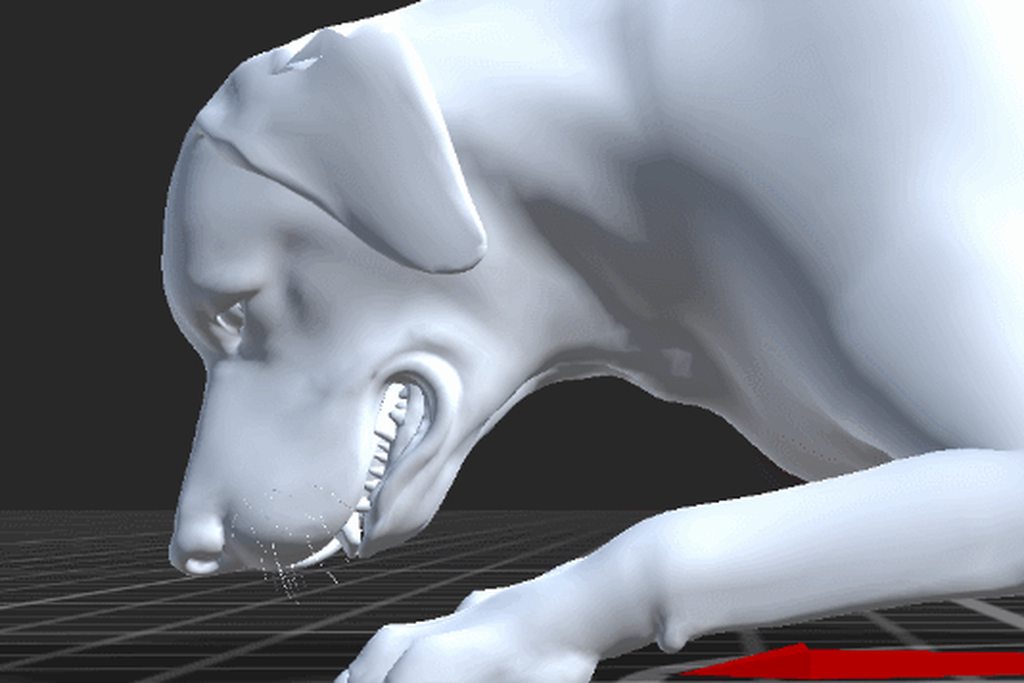
I guess it's gonna be manual work then
There's 2 more gifs in album which show difference between 0.001 and 0.5
kindred burrow
yeah i have no idea what the weight setup is, but clearly some kind of weight problem
i wonder if it's possible they had some IK/FK rig in their modeling software that's not being transferred to unity?
I've sadly bought a model or two with this issue. Usually if they used Maya
( i won't even buy anything rigged in maya anymore, their rig system is mostly no good for use in unity)
strong portal
Yeah, I'm not gonna buy anything outside of asset store most likely ;d
Fixing this costs me the same amount I would have to pay for someone to do the model/rig/animations from scratch
Could this also be issue that the model is made of quads instead of tris?
I mean, I know that Unity triangulates on import but the animation was made in blender on quads, could this add to the problem?
calm holly
blender is using triangles behind the scenes so unless it's really low poly it should have no effect
(really low poly would require sometimes turning edges to assist in animation bending)
kindred burrow
yeah quad/tri shouldn't matter
strong portal
We have limited the number of weights
And even tried cleaning the model and exporting it like this
aaand it still persists
kindred burrow
yeah it could be the cleaning is removing something vital
which means it's not that simple to fix
would need reweighted
charred belfry
https://www.gdcvault.com/browse/gdc-19#page-9 has a good talk on the preview animation rigging features
 vapid fossil
Hello! I have a question regarding certain method of animating I have in mind.
The idea is to have a rough stiff animation and then use jiggle store assets like Dynamic Bones or Jiggle to add jiggle effect to limbs
After that I want to bake the jiggle effect to the animation by exporting it as Alembic via Alembic for Unity
The question is regarding the Alembic for Unity
when using the export option does Alembic for Unity exports what's in play mode?
The reason I ask is because I want to wrap cloth around the animated model enhanced with jiggly effects in Marvelous Designer 8
pine badge
Hi guys. Default transition doesn't have a parameter, right?
Why is my Idle state not playing(just that tiny blue bar) unless i check the Idle bool parameter?
Nvm it was a bug. I deleted the Idle bool (warning says "it's used by: [empty]")
So i guess the transition is set to use the bool somehow(?) and no way to view it/remove it because it's default transition(?).
Weird..
 vapid chasm
Is there a way to transition from state to state non lineary?
quiet void
Anyone has experience exporting blendshapes from Maya to Unity?
I got everything working in Maya and when exporting some parts do not work properly as they should.
 cloud turtle
how do i delete a transition
i put it on solo too btw
and uhm how do i set the animator component
it wont let me drag it in
charred belfry
Is it the component you are dragging or the controller asset
charred belfry
Take a screenshot of what you are trying to drag
If it's in your first screenshot then you are not dragging the component
cloud turtle
i tried dragging both of them
i cant screenshot while dragging
the two in the left corner are the ones i tried to drag
well i can but yeah
charred belfry
Neither are an Animator component
a component is on a GameObject
You can add them with Add Component
put an Animator on a GameObject, drag that in
put the Controller on the Animator
cloud turtle
what gameobject should i put it on?
charred belfry
Whatever you want, you are in control of your destiny
cloud turtle
ok i did it
now i just gotta figure out how to remove a transition
what do i need to do from here?
charred belfry
cloud turtle
i already looked it up, i found nothing, i just tried again, cant find anything @charred belfry
charred belfry
What do you mean, those results tell you what to do?
cloud turtle
ive only gotten to set entry transitions to this V
and it says press - but it does nothin
charred belfry
can you make the New State the default as was previously mentioned
 scarlet aspen
Whats wrong with clicking the arrow and pressing delete on the keyboard
cloud turtle
how do you do that vertx and no that doesnt work
cloud turtle
i dont know what your doing different
charred belfry
You can find answers to almost every second question you ask on the first few google results
cloud turtle
but that does not work for me
charred belfry
You are trying to delete a default transition
scarlet aspen
Cant delete orange, you can only set a new default
cloud turtle
kk
oh got it
let me try now
ok
so
i think i fixed the view here up but now it isnt doing my animation when i want it to
public class LevelManagement : MonoBehaviour
{
    public Animator Levelopen;
    public int Levelvalue = 0;
    public int Level = 1;
    void Update()
    {
        if(Levelvalue >= 2)
        {
            Level = 2;
            Debug.Log(Level);
        }

        Levelopen.SetInteger("Level", Level);


    }

}
y no work
scarlet aspen
In your NextLevel state; if it needs to play an animation; drag and drop that animation from your folder to the "motion" field of the state.
scarlet aspen
And then inside your NextLevel animation; does it modify anything
charred belfry
Also, does it even get triggered - do you even ever set Level to be 2?
cloud turtle
yep @charred belfry
i have a debug log for it
i believe so @scarlet aspen but ill double check
yes its there
hm wait up
if i edit the position in 1 keyframe, it edits it in the others
for example i want y 1 to y 10 but if i change y1 to y1 to y1 to y10 then it goes y10 to y10
it edits all the positions
scarlet aspen
Another point is the name of the object the animator attempts to modify
I think it applies from the Animator component through the game objects children
someone else might have to confirm that one
cloud turtle
ok but
if i click the last keyframe, change the y on it to 10, tand go back to the first keyframe, the first keyframe has also changed to 10
y?
scarlet aspen
Probably because you are just clicking the keyframe
you need to drag the timeline
then modify the value at that point
cloud turtle
arghhhhhhhhh
im ready to die im so annoyed right now wtf
it doesnt let me set anything without it screwing up
its going through this i think but why isnt the actual animation playing
scarlet aspen
Ah so yours is object specific
scarlet aspen
the animator will need to be on that object then
cloud turtle
oh
ok it is
still nothing
im thankful for you guys helping me but goddamn some of this stuff is hard to understand and get the hang of
scarlet aspen
Works for me, as long as your animation isnt messed up :/
cloud turtle
okay well i found another idea for it anyway
 still raven
hi i wanna search this kinda image to make animtion for all directions ..including N NE E SE S SW W NW.. i found this but its not png .. wat should i search to find this kinda sprite sheets?
charred belfry
I don't think you'll have much luck as you're not allowed to use anything unless they're marked as labelled with reuse. There's a grey area around personal use I think... but still.
I'd probably add "Isometric" to your search terms.
quiet void
Mixamo is there for animations too.
 safe solstice
Can someone tell me why, with my animator, it plays the default animation and then goes right to the next animation instead of staying on the default one?
NVM, I figured it out. The old tutorials on unity3d.com really need to be updated, badly.
 wispy tiger
started learning Unity game dev over the weekend, made a little gun reload animation https://imgur.com/SVmR3VP
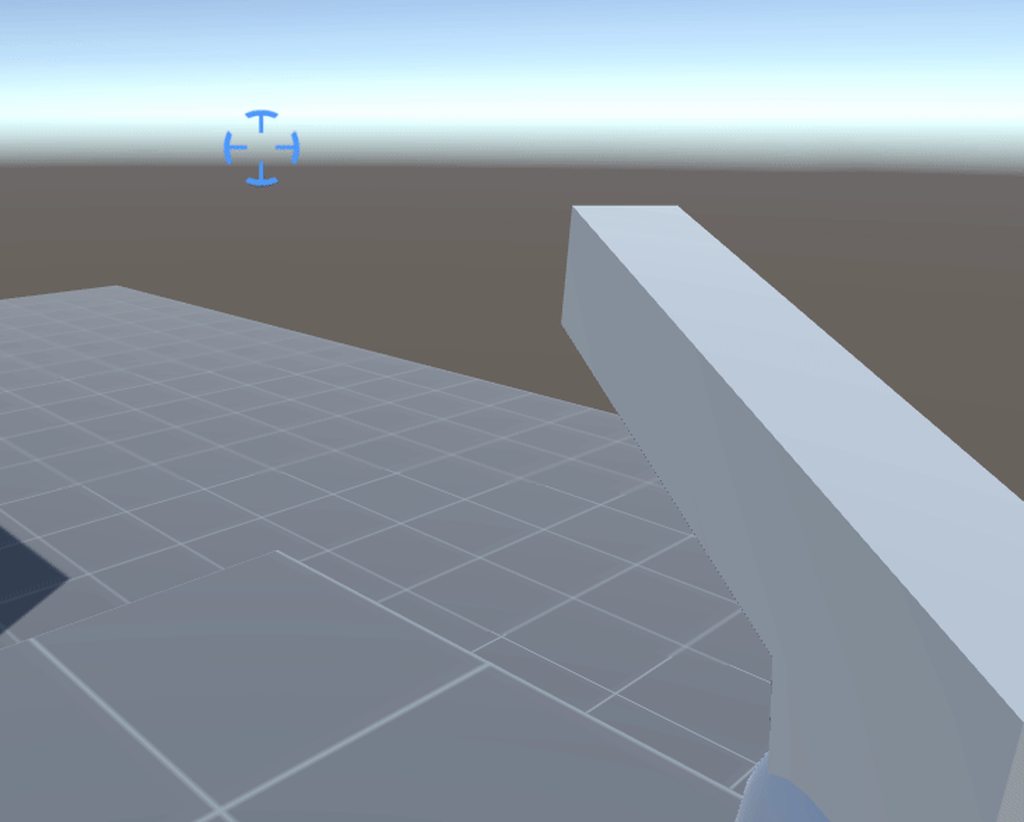
it looked ok but I thought I could improve it
https://i.imgur.com/4yEf0qo.gifv so I did that thing
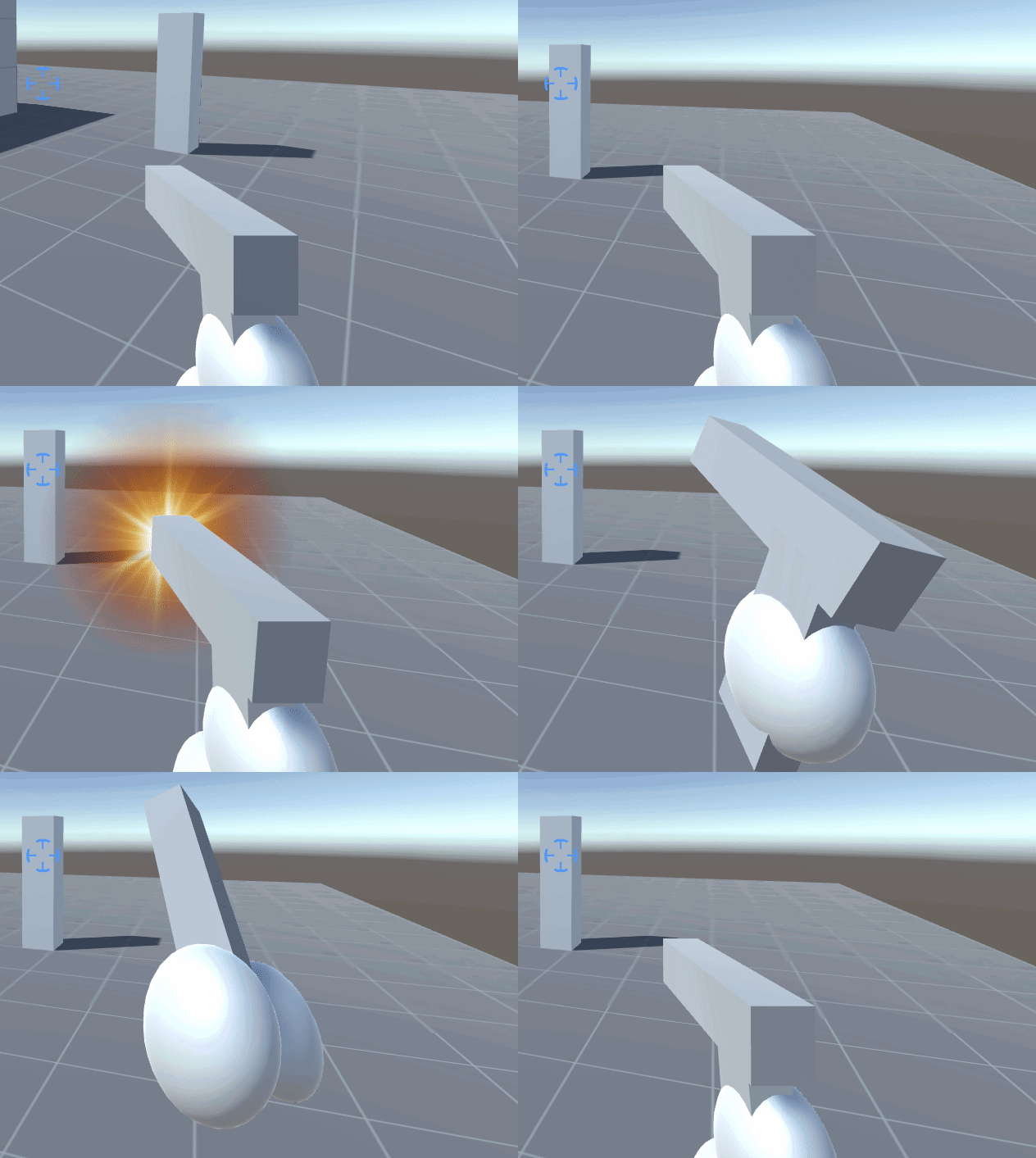
 hearty forum
I heard premultiply could your best friend..... ESPECIALLY with that muzzle flash.
 old temple
How hard is it to animate a character rig? 🙃
Also, how do people generally handle ragdoll + animations? I bought some assets (Final IK, ragdoll stuff too) but I have no idea how to use them all.
hearty forum
Well.... It's not particularly hard.
It can be easily done in blender via a premade humanoid armature.
safe solstice
Is there a way to get the AddForce to apply at the same time an animation is triggered? Right now, the force is always happening before the animation.
Thus, if I have a character jump, the character moves up and then the jump animation plays.
old temple
Yeah I was talking about premade blender model
with rigging and all
Oki will give it a go then
 vast junco
does anyone know of a tool for runtime animation capture, similar to how GameObjectRecorder works in editor?
worldly shoal
I have a question about spine: If I import a PSD, then my artist adds more layers (to add an outfit to a character), can I reimport that PSD without losing all my work?
 tame veldt
Okay, got a strange problem. Animator states are not accepting motion. They won't keep ithe,
 wheat lance
hey is there a simple solution to animate ? because the unity animation system blows and i dont want to find pluggins have forward kinematic for blender
something easy like in source filmmaker
 patent mortar
Hello , I have a problem that Tree terrian leaf stop moving after i close unity i did save and close it and open again and it wont moving at all. How can i fix that issue?
serene marsh
@safe solstice you're looking for animation events
Select the object the animator is on, click animation tab, select animation from drop down, add event, choose method to call when event fires.
 kindred nymph
Hello everyone 👋 I have a question, probably rather simple one but I couldn't get it to work.
I'm trying to extract vertex data from an animation. So I want to go through each frame, get vertex positions and save them somewhere.
So I tried
 for (int a = 0; a < time; a++)
{
       animation.Play("Hip Hop Dancing", 0, a / time);
       meshFilter.BakeMesh(tempMesh);
       bakedVertices = tempMesh.vertices;
}
but I think it's not working. I'm playing Animator but trying to extract data from skinned mesh renderer, does that sound correct? Any idea what's wrong in general?
kindred nymph
I think I got it to work. there are some other issues now but I'm getting somewhat correct vertex data now, thanks anyway!
 grim slate
Hello
 polar socket
hi! I have some recordings of vive controllers moving around, essentially a transform over each frame. What's a good way for me to convert it into an animation I can re-run later? is there a Tweening package that would be ideal for this? thanks
serene marsh
@polar socket many like itween
 cloud zealot
Not sure if this is the best channel to ask this in but I don't really understand how cutscenes work behind the scene.
For example, what would be best practice to "start" a cutscene? A trigger that hides the player and shows the cutscene entities and plays a timeline?
I'm making a 2D game, if that changes anything.
twin musk
What software does everyone use to make 2D custom sprite sheet animations?
 oblique sinew
Anyone know if there is a way to get a universal skeleton in-game? I noticed that when I import my characters, rather than having a separate skeleton asset that is still linked to my mesh, it appears to be part of my mesh asset. I would like to be able to import a single skeleton and then link my new characters to the same skeleton so that they can use the same animation assets.
 thorny light
Hi guys i was looking for help on animations in Unity i imported an fbx of a character however the hands are out of sync so when i add weapons the character simply isnt really holding it. any idea as to what causes this?
 safe needle
Hi there, is there a way i can scale objects relatively to their current size in Animator/Animation?
Soo i want it to scale to 0.9 value of the current scale on all axis.
oblique sinew
A lot of questions.... not a lot of answers. Unity dead?
 floral junco
@tired eagle yep
vast junco
why is it so difficult to rename blendshape attributes in Maya Q_Q
charred belfry
@oblique sinew use humanoid animation, import the base character and set that up, then set all others up with the Avatar Definition setting from another model
They'll have to all have the same bone layout, but size can differ
@KarinExMachina#9650 could be anything. Sadly animation compression can be a cause of animations not matching up, but turning it off will increase the size of a game massively. Generally people always add a layer of IK to do these things, and there's a new rigging package in preview (may be 2019 only?) that's a good future for these things
https://docs.unity3d.com/Packages/com.unity.animation.rigging@0.2/manual/index.html (https://www.gdcvault.com/browse/gdc-19#page-9 good talk half way down this page)
There are also less preview IK solutions out there
oblique sinew
@charred belfry, you mean the Copy From Other Avatar option? I'll try that.
The big issue, is that I'm trying to get a base, makehuman character in-game... then use it's skeleton as a base skeleton, and import the other characters so that they all use the same skeleton/animations.
I don't want to have to convert each character with mixamo in order to use the animations. Since the T-Pose in Mixamo is different from the one unity uses.
 topaz herald
@vast junco For runtime animation capture I would suggest the official Unity Recorder. I mainly use it for rendering out videos and image seqs. But you can also use it to record animations
vast junco
is that the editor recorder? it worked at runtime but not in a compiled/built app if I remember correctly
i found a 3rd party plugin which allows me to capture and playback facial tracked animations which seems to work ok
 weary wasp
Hi guys !
Question about the recorder as well
Is it possible to record a game with frame-rate drops at a given frame rate ?
Like the ue4 lock frame rate feature ?
I guess it's possible, for Unity has been used to make movies and short films. But is there a pre-made plugin, package or API to do it ?
Maybe the recorder package is doing it, but the documentation says nothing about it ?
Oh wait, I found out
Ok, the doc was unclear, according to my tastes ^^
So you just have to set Playback to "constant", and the game frameRate will scale accordingly during playtime recording.
twin musk
Hey guys
Does anyone know how I can make a character put on a jacket? Like an animation but actually put on a coat
safe solstice
I have a general question. If you export an animation from a 3D modeling program at x fps, does Unity play the animation at the same speed or does it just play the keyframes at its own frame rate?
 warped violet
Sorry to pile on here but I didn't find an answer via google/reddit, it's a simple question though (i hope). I have a parent object with an animator that animates the child object. Is there a way to replace the child object but keep the animation? It always says object missing, even if naming it the same. I'm just animating transform/rotate.
calm holly
Animator or Animation ?
with animation, changing child objects will still work as it's a binding by name, and you can edit the name in animation window to restore the link to the missing child
not sure how it's relevant to AnimatOr though.
So yeah - animation is a little oddball with animating child objects, and if you rename or move the child you can repair it directly inside the animation window (you'll see the missing refs and can rename/rebind)
for Animator (mecanim) I'm not sure how to answer your question because it doesn't animate child objects at all, but is a graph for higher level decisions in animating rigs
warped violet
I just added "BikeRat_alt" and removed "Rat" at that position. I don't find the option to repair it by rebinding. Renaming the object to "Rat" again does restore the binding automatically though and thats good enough for now, thank you
 latent orbit
has someone exp. with exporting shapekey animations from blender 2.79 or blender 2.8?
I've been trying to do this for an organic blob animation but in blender 2.8 location and rotation are messed up even though I export with y up and in 2.79 exporting shape key animations doesn't seem to work in general.
latent orbit
nvm found the problem unity seems to have problems when both actions an shapekeys are exported in one fbx
I've exported the fbx with only the shape keys and animated them in unity and that worked
 gleaming void
Hello guys! I have a problem with Animator. I have a state machine to handle some animations. When a specific bool is true (isWalking) , I want this SSM to exit and go to my Walking animation, however this doesn't happen (although the bool evaluates correctly). Any clues? Below is part of the base layer - Idler is the SSM and to the right is my animation.
SSM layout
 past yacht
Hi,I have a scaled character ... But IK positions stay in old position ... https://ctrlv.cz/shots/2019/05/20/gZgI.png How I fix?
Edit: Solved! Scaling must be 1f, 1f, 1f and character DNA (UMA2) set height to lower value
 twin musk
iswalkiiiiiing
quiet void
Hi, anyone using UMotion?
Do I need to buy the Pro version to see if it can blend or edit existing animations?
woeful hearth
@quiet void Hey, you can edit but blend animation possible only by controller
Or in Umotion Pro you can import two animation that you want to blend, and try blend manualy
quiet void
Thanks. At this point I just need to move an arm here or there.
warped violet
Is there a way do preview the animator controller? I use two layers and I want to preview the animation of both playing additive
worldly shoal
does anyone here use Spine and asmdefs? I can't figure out how to set up the asmdefs correctly and could use some help seeing where you put yours in the spine-unity directory
quiet void
I also find it problematic that i need to play the entire game in order to preview the animations. I feel I am missing something or doing something wrong.
The alternative I use, is to create a small stage and do all the testing there, then import the character in the main scene. But still in some cases this is problematic. i.e. when I have an animation on a moving stage.
It would be great if I could pick certain objects from the scene, and in a way "isolate" them like you can do in 3dsmax and set them as a "stage".
 lament copper
Yo, i've encountered a pretty nasty bug within unity's animator, I have no idea as to what is going or is causing it, I made a post asking for help on the unity forums so i'll link that here so i don't flood this place with a wall of text, any help is greatly appreciated
https://forum.unity.com/threads/materials-altered-in-animation-suddenly-dont-work-when-playing-the-scene.683842/

Unity Forum
While working on a character for my game, I decided to alter the colour of their arms using animation to highlight the power of the attack, i did so by...
sorry if this isn't the best place to ask, not sure what area to post it in
worldly shoal
@quiet void you can totally do that. Watch this Brackeys vid on it: https://youtu.be/hkaysu1Z-N8
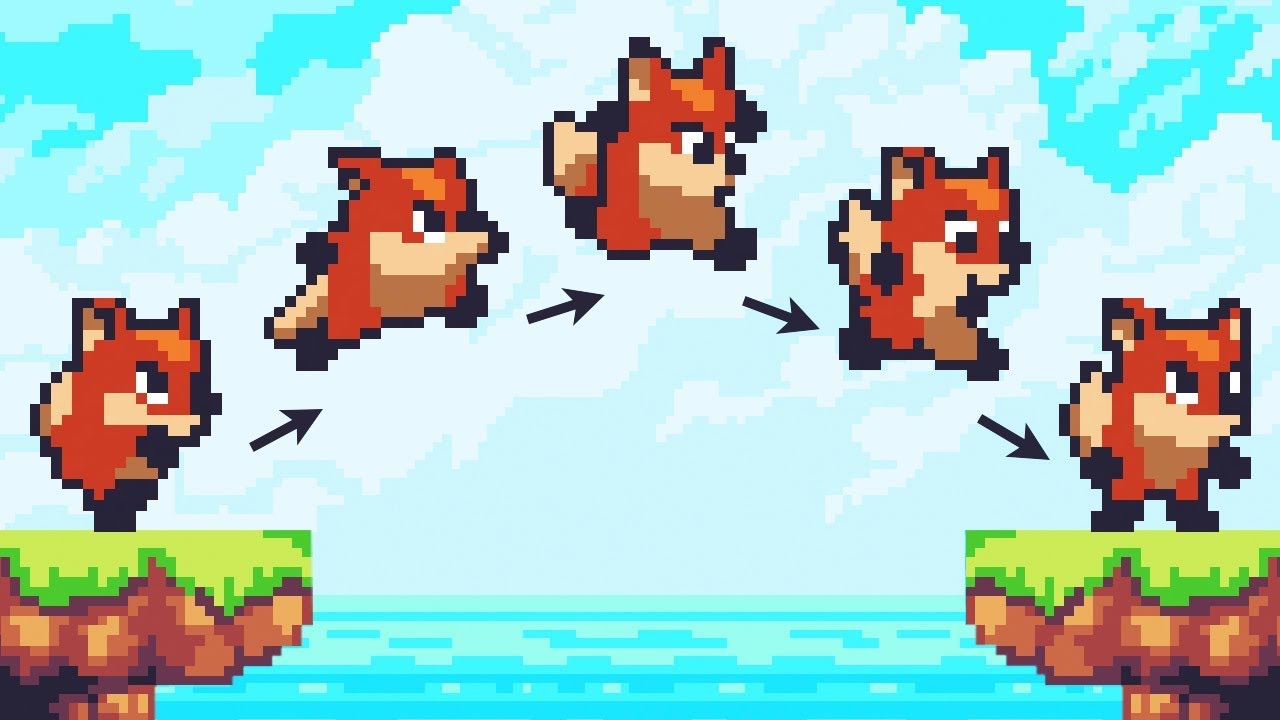
Let’s animate our character! ● Check out Skillshare: https://skl.sh/brackeys8 ● Watch Player Movement: https://youtu.be/dwcT-Dch0bA ● Download the Project: h...
worldly shoal
i'm making a visual novel and I created an animation of a character sliding from the left to the right. How do I flip this so they are sliding from the right to the left? Do I have to create a whole other animation clip?
worldly shoal
I moved my animator up a parent, and now I have all these yellow properties. Is there a way to fix this without starting all over?
lament copper
if you move the animator back to where it was before it was moved it should work again
worldly shoal
yeah but I want the animator where I moved it
the solution is you can edit the file in a text editor and change the path:
quiet void
thanks @AoF I will give it a try. See if it also applies in 3D.
 hearty night
How do I stop an animation from looping?
charred belfry
select the asset and untick Loop Time
the same goes for clips imported from a model, just go to the Animation tab of the importer, select your clip, and untick Loop Time
 fluid ember
I imported some pixel-art animations but they are extremely blurry, how do I fix this?
charred belfry
use the pixel-perfect camera package and set the scales up correctly, or use point-filtering instead of the default billinear
fluid ember
ok will try thx
 serene belfry
Hi, I am not sure if my problem suits to this room but let's say it's the closest.. I have a problem with a camera. I have a code that makes camera rotates as head rotates (it's put inside of a head). Problem is that it doesn't rotate exactly like a head. It rotates way more, it looks like all the motherbones (higher than head) have influence to this camera movement. So for instance when the chest moves a little left but head stays in the same direction, then camera also moves, however it shouldn't.. In my game i have a humanoid character and many animations that i made in blender. I noticed that when I set the animation type to generic instead of humanoid then it is all fine, but the thing is that I need humanoid character to some other things.. Do you have any ideas how to solve my problem? Would be greatful for any suggestions
 vague shell
What does this particular highlighted area mean? It seems that whenever i preview the entire animation it always stops at this section
 pastel cradle
does anyone know a quick way to convert a sprite sheet to an animation?
perhaps an automated way
just automatically sequence the sprites in an animation with a set interval
 granite fox
I've been having an issue with my animation stutering. It plays perfectly fine in blender, but when I export to .FBX and import into Unity I stutters on the first few frames.
I've disabled Resample Curves and turned Animation Compression off
 misty raven
@granite fox it doesn't really sound like a unity animation issue to me it sounds like some setting in blender isn't baking things right on export
for that it might be better to ask in a blender discord though
 atomic talon
Same thing I put in General Code, just in case this might be more relevant:
Is there a way to change when the Unity IK takes place? For my specific problem, when I run in OnAnimatorIK the position of the hand isn't ideal except under a specific circumstance. If I run that same IK in LateUpdate, however, everything is perfect for all scenarios but Unity blasts me with multiple warnings every single frame about how IK shouldn't be run there.
Is there a way to defer this execution, or just do it in LateUpdate anyways and suppress the warnings?
 kindred linden
Hello my name is Raymond and I'm from the Netherlands. I've already got a bit of experience with Unity but there is something which I just can't figure out on my own. Would someone be really nice by helping me out learning animating?
 crude shoal
Not an expert but what do you want to know?
kindred linden
Well I created this photoshop file with this kind of like stucture:
(From a youtuber)
@crude shoal How am I supposed to animate a character like this. So it must be able to swich sprite when going left right or forward and it must have a skeleton so I can move certain parts.
crude shoal
@kindred linden Have you ever heard of Brackeys?
kindred linden
Yeah i have checked out his vids
But I have not found a video where he uses multiple sprites with a skeleton
kindred linden
Yeah so that's why I am confused I think
I want to be able to swich sprites like the image above
crude shoal
You wouldnt use them together
kindred linden
but also be able to bend the arms etc
crude shoal
If the starting points of arms are the same, you can cheat a bit and add the "bones" for the left/ right arm and activate / deactivate them based on which sprite is active
so the skeleton will be the same in relation to the collider box, but the sprite will change
kindred linden
I assume that would be a pain in the ass with the amount of individual parts I have
Or isn't it
Yeah I get what you are trying to say
crude shoal
If we imagine that the right arm being at, lets say, 10, 10 coordinates in all views
you can simply animate that
and then use those animations / skeleton based on the sprite that is active
kindred linden
Well they aren't in the same position
kindred linden
This is mine
crude shoal
and activate certain animations based on whether the object with identifier is present or not
crude shoal
a lot of stuff will be
there are probably animators that could give you a better option
but this is all i got for now 😄
kindred linden
Well thanks !
I think I will also be looking for a animator just like you are saying
I was looking at spine
but yeah 69 dollars
 slow eagle
hi, im preety new to animations and stuff, i saw tutorial on how to do a blende tree, and from what i saw there should happear root transform rotation
like here
and it doesnt show on mine
if anyone can help i'd really apreciate ^^"
misty raven
@slow eagle uhh is that first screenshot from timeline?
misty raven
So that is the inspector for the animation
the one I assume exported from say blender
slow eagle
either that or from mixamo
misty raven
ok
either way yea
that's not what the mech anim inspector has
I believe there is a checkbox somewhere called "Apply Root Motion"
slow eagle
if i selected the animation file?
slow eagle
doesnt show 🤷
misty raven
it wouldn't be there
I don't recall where it is honestly
have to poke around myself
slow eagle
alright, i'll look further in the meantime ^^"
also the aniamtions have to be in the same fbx file?
@misty raven sorry for the ping, but i found the problem, i didnt know i had to assign a root motion
thanks for the help tho, apreciate ^^
 wise gulch
Hi, if i have a rig do i need to use ik on it?
 opaque crest
So I have a weird issue with a blender import, it is of a normal orientation in the editor but when running it flips upside down.
If anyone could help I'd appreciate it! (I thought it might belong in here)
serene marsh
@opaque crest your animation probably has rotation and position offets
Select the animation and see if you edit the offsets. If not or if they are indeed off you can often select the animation and duplicate it with ctrl + d, then the copy will be editable. Then in your animator point to the copy.
 mortal ivy
not sure if this is the right area for asking about this but I've been combining SkinnedMeshRenderers and it seems if I directly reference a model prefabs renderers for body parts before combining and then combine them bone and weight them they animate fine.
However if I make separate prefabs for each renderer within the model prefab (t-shirt, shoes etc) then combine bone and weight in exactly the same way the combned mesh no longer animates?
Does separating the individual renderers out break their bone references? I'm not sure how to combat this because I don't want to have to put every mesh option on the model prefabs for each body part :/
worldly shoal
can someone explain animation events? It says, Animation Events, which allow you to call functions in the object’s script That makes no sense to me. An animation is an asset, an object is somewhere in the hierarchy and animations can be reused.
yet, the inspector implies I set the event once per animation, not object
so if I reuse an animation...
just wtf
i feel like the docs are half written on this topic
then I watch this video and the inspector shows something wildly different from what mine shows when I click on an animation: https://www.youtube.com/watch?v=mTAjzdR65eo

This is part 11 of the making a game with Unity tutorial series, in which I use animation events for the shoot event of the enemies to call the set damage me...
omg
so you have to click the animation in your project, then you click on the animation event in your animation tab, then the inspector will look correct
and none of that shit was mentioned in the docs
opaque crest
@serene marsh you were right, but what actually fixed it for me was going into blender and fixing the axis on export
for whatever reason it was set to the forward axis being -z, when I changed it to +z the animation is right side up
hearty forum
Reanimating my test subject for a higher def.
worldly shoal
creepy
is there a way to play a fraction of a non-looping animation? I have an animation that moves a character from off screen to the center. Now I want an animation that moves them off screen to the right half of the screen.
i could make another one, but it'd be easier to maintain if I could just say, "play this animation up to frame x"
 fallow solstice
Anyone has tips for making animations for a 2d characters, so that there's a running animation that happens, but when attacking, it fits WITH the running animations? (Do I need 2 sets of animation? One for while running, other for standing still)
Cause I was thinking of maybe making the hand and weapon of my sprite seperate, so that it can just play anytime the player attacks, but the bobbing of my character during idle/running phase makes it difficult to do so...
 ember jungle
can someone hlep me im wahtcing a tutorial and in the tutorial in says to drag the animator component to the movement script component and it wont let me
 winter silo
 glass onyx
someone know a term name for this type of sprite
 narrow copper
isn't that a spritesheet from flash?
 cedar ruin
I'm kinda struggling with the new animation rigging package. Does anyone have experience or good results with it?
charred belfry
@ember jungle this is not a place to request for work - especially unpaid work.
ember jungle
ok i agree should ask craigslist or somehting
 celest crag
@ember jungle Tutorials usually are accompanied by example project files. You can use them to understand what you were doing wrong.
twin musk
is there any way to pass an array though an animation event
cedar ruin
I hope someone can help me with this riddle I have
I'm testing the animation rigging package
I've set up an IK for the right arm here. As you can see the target( visualized by the blue cube) is centered on the origin of the hand bone. I've checked these over 10 times, so you can be sure it's true.
however, when I enter the play mode, the hand bone shifts to the side of the ik target, no matter what I do
whether I set to keep the position offset or not
play mode
play mode with position offset on
as you can see, it doesn't care whether there's a position offset or not, it always snaps to the side of the ik target...
Am I misunderstanding something about how 2 bone IK works?
cedar ruin
nvm. figured it out
 vague mauve
quick question, does animation rigging work if you turn on optimize gameobjects in the model's import settings? cause Unity always crashes when I try playing after setting it up
cedar ruin
@vague mauve It was crushing for me too, when I tried to manipulate the root bone in any way
I see you're trying to constrain the hips bone. Not sure if it's the same for you, but for my character it is the root bone
vague mauve
@cedar ruin no, I have a dedicated root bone that's on the ground
anyway, regardless of what bone I use, it always crashes
I'm trying to send a small project that recreates the crash as a bug report but even the bug report sending doesn't work 😩
vague mauve
it was just an override transform on one bone
cedar ruin
and nothing else?
cedar ruin
I think it is because you try to move the hips
vague mauve
yeah but same thing happened when I use the chest or spine instead
vague mauve
I used to do it the old way, with just moving the bone transforms directly. I'll probably just revert to doing that instead
vague mauve
or actually I'll try with turning off Optimize GameObjects first
cedar ruin
alright. tell me if it helps
vague mauve
finally got bug report sending to work. just waiting for it to finish upload
vague mauve
@cedar ruin well I definitely got it to work if I turn off Optimize Game Objects
vague mauve
yeah
cedar ruin
hmmm
did you try to follow the blog or the video from the gdc?
I can't create a new animation in the animation window and make it work...
vague mauve
I watched it before but right now what I did is look at the example files from the package
cedar ruin
I see
they don't use a humanoid avatar rig in the examples though
I wish they released the ninja example too
vague mauve
so why can't you make a new animation
cedar ruin
the animator is saying something about not being able to apply generic animations to a humanoid avatar
not to mention that when I tried to create new animation the rig would curl up into a ball...
vague mauve
yeah the ball is the default pose when it doesn't have an animator controller
I created a new clip from here
cedar ruin
so how do i put into a regular pose?
vague mauve
well you'd need an existing animation and assign that in the animator controller as the default state
if you haven't played the game yet (edit mode), it should be in its default pose coming from the original fbx file
cedar ruin
the character has an animator with a default pose
but when I click create new animation and preview it or record it, it curls into a ball
vague mauve
oh that
you can ignore that since you'd be adding animations on the rig's game objects, not the 3d model's game objects
cedar ruin
okay
but then when I animate the virtual bone, add it as an override layer to the animator and loop it, it doesn't do anything
vague mauve
is the override layer's weight on full 100%?
cedar ruin
yep
also
my virtual bones are children of the animator object
so whenever i try to create the animation it wans me that you can't use generic animations with humanoid avatar
actually, it happens when the animator is trying to run the new clip...
ah, maybe it's unrelated to the clip
vague mauve
to be honest the rig override transform only works one time for me, and then it stops, even though the animation I made loops
cedar ruin
it keeps appearing after deleting it ><
vague mauve
however if I manipulate the transform directly from the inspector, it does work
vague mauve
this is about as much as I can make it do
I'll try giving the constraint its own controller
ok I got it to work, the rig setup itself needs its own animator controller @cedar ruin
I do still get these, but I don't think they matter
 crude monolith
hi there, this is probably something very simple, but I can't seem to be able to change the "Normalized time" on an animation using the editor, there is no field to edit, can somebody explain why?
I'm basically trying for a non-looping animation to start at a specific time
cedar ruin
@crude monolith this should be in the transition settings
crude monolith
Do you mind showing me an screenshot? It's ok if you cannot, thanks in any case
Just asking because I see the field name, but no input to change it, unless I enable "Parameter", which doesn't make sense
crude monolith
Thanks, I'll check that although in my case I'm not sure I can do that
Thanks again!
cedar ruin
why not?
crude monolith
I don't have it in front of me right now, I'll try to post a screenshot later after lunch
vague mauve
@crude monolith create a float parameter in the usual way, then assign that as the parameter for the normalized time of the state you want, then in code you just assign a value to that parameter like any other parameter, so you can change the normalized time that way
crude monolith
@vague mauve that's what I was doing, actually
but that's obviously a hack
in any case, what @cedar ruin told me worked perfectly in the end, many thanks!
I guess the UI is just really confusing, having that "Normalized time" parameter there without an input is misleading
vague mauve
I'm not sure what you intend to do, but I don't think it's a hack, it's a normal thing to do, using a parameter to control normalized time
if you want complete control over the normalized time in the script
crude monolith
Sure, but a script that only sets that parameter, it sounds wrong. In any case, you can do the same with the "Transition offset", at least for my use case
vague mauve
yeah I can see that, if you only need to change it during transition into that state
 mellow mantle
I need help with animations for my 2d shooter where you aim with a mouse and or controller and the arms follow the point where you aim at. how do i best animate it because the arms are like another object than the body?
and if i animate it the arms look like not beeing attached to the body
 eager jungle
Hi, I have a question about timeline in unity, I want to know if there is a way I can pause the timeline but continue the character idle animation?

Unity Technologies Blog
Timeline is a powerful tool for creating cutscenes and short movies. But there’s more to it! Let’s see how we can leverage Timeline to blend gameplay and s...
Can someone help me?
twin musk
Does Unity is a 'reverse keyframes option?'
 quick swift
Hello people! Anybody here who could answer me some questions regarding the combination of 2D Bone and traditional 2D animation?
quick swift
I have bone-animated characters (2D Animation package) and I want to add facial animations via frame by frame animation. And I am not sure how to seperate the head from the rest of the body and bring them back together with both animation types
woeful hearth
@quick swift do two animators. One for body with head. Second for face animations only.
You can do two animation layers in animator controller
quick swift
Ok thats good to know. But how does the engine know that the head with animations has to replace the head-part in the bone animated character?
Or do I have to have the complete character in both animations? Meaning the exact same sprite
woeful hearth
@quick swift just do face as separate sprites
@quick swift that simple animation made in Unity. Look at eyes.
Head and hair its one sprite.
Eyes A - Open eye
Eye B - a bit closed eye
Eye C - Closed eye
https://twitter.com/LineKotsi/status/1116052384604741633


Elite Hibana 2d Animation with process
@Rainbow6Game
#R6Community #Ubisoft #rainbow6siege #RainbowSixSiege #animation https://t.co/aVVrbg9yJ9
Retweets
213
Likes
1774
 Twitter
In animation you press Eye A , and change it to eye B and then C
quick swift
Thanks, that does make sense. So one body sprite + one seperatore head sprite (+ animation frames). Still not sure how to get the head sprite into the sprite editor and rig it to the head bone if it is a seperate file?
Ok I can add the head sprite in a prefab, add a sprite skin component and bind it to the head bone. But that does only work because it is completely rigid. Maybe there is a more elegant way?
woeful hearth
@quick swift you can draw in photoshop different layers and export it as PSB to Unity
Unity will seperate layers automaticli
quick swift
Ok I got that working. I am getting there, I think. It is not exactly correct yet, but I think I can trial and error it out
woeful hearth
You can show photos, will be more easy to understand problem
woeful hearth
@woeful hearth really?
 thick stirrup
What kinda things should you blend animations on? Like should you put left and right in a blend or just like forward/right forward/left
 deft mantle
Hello, I've got a little problem - I can add curves that control Animator Controller parameters, but only on animation clips imported from an .fbx model.
I'd like to be able to also set them inside animations (.anim) that I created inside Unity, but those options are not there. There are curves in the Animation window, but they seem to just be a curve representation of keyframe interpolation, not anything related to Animator Controller parameters.
twin musk
Does someone know a fast, free Arm IK?
charred belfry
charred belfry
@twin musk you have to add the Animation Rigging package using the Package manager (it will appear if show preview packages is ticked in the Advanced menu)
I'm fairly certain it's also 2019.1+
hearty forum
NOW's kicking.
twin musk
@charred belfry thx, Is that from the unity api?
charred belfry
Not sure what you mean, but you can find more about it here https://blogs.unity3d.com/2019/05/14/introducing-the-animation-rigging-preview-package-for-unity-2019-1/
thick stirrup
Is it possible to make a curve between blended animations
vapid chasm
No, sadly blends in Animator are linear
 final lintel
Hi
quick swift
You forgot the arms 😉
quick swift
Like legs, growing out of your shoulder. Very useful things, especially for PC work
mellow mantle
how do i play an animation on mouse over ?
my animations are autoplaying all the time
 granite pulsar
I am using the mechanim to animate my character.
I run the following code to go from attacking to idle
animator.SetBool("IsNormalAttacking", false);
and then right away some where in my code runs
animator.SetBool("IsNormalAttacking", true);
really soon
this is supposed to put the mechanim state from my idle back to attacking again
but it doesn't get triggered and sits in idle state.
is it because I flip the boolean variable too fast? how do I work around this?
thorny light
I haven't used IK before on first person rigs and not in Unity since I'm not the coder/programmer in our project I was wanting to ask for some tips since our coder is busy at the moment
charred belfry
See pins in #🖼️┃2d-tools for 2D animation links
Documentation
Animation: https://docs.unity3d.com/Manual/AnimationSection.html
Packages
Animation Rigging: https://docs.unity3d.com/Packages/com.unity.animation.rigging@latest
Kinematica: https://docs.unity3d.com/Packages/com.unity.kinematica@latest
Alembic: http://docs.unity3d.com/Packages/com.unity.formats.alembic@latest
PlayableGraph Visualiser: https://docs.unity3d.com/Packages/com.unity.playablegraph-visualizer@latest
FBX Exporter: https://docs.unity3d.com/Packages/com.unity.formats.fbx@2.0/manual/index.html
Forums
Animation Previews: https://forum.unity.com/forums/animation-previews.141/
Animation: https://forum.unity.com/forums/animation.52/
Git
Image Sequencer: https://github.com/Unity-Technologies/VFXToolbox
Mesh Sync: https://github.com/unity3d-jp/MeshSync
Animation Rigging Playground: https://github.com/TeckUnity/AnimationRiggingPlayground
Videos & Blogs
Animation Rigging: https://www.youtube.com/watch?v=9IBhQMYYYWs
Procedural motion for animated skeletons: https://www.youtube.com/watch?v=saOHaHKSOi0
Kinematica @ Unite: https://youtu.be/TlIWPS2Wzac
Roadmap
3D characters and animation: https://unity.com/roadmap/unity-platform/3d-characters-and-animation
mellow mantle
animations will sooner or later make me smash my fucking monitor
mellow mantle
I just want to make my script know when the anim is over? I have 3 anims for 3 object which are supposed to zoom in when i hove over them and back out when i stop hovering over it. it works that they zoom in and out but the zooming back takes place when the zooming in still is in progress which results in a very unclean effect. HOW DO I MAKE THAT WORK??
twin musk

 waxen aurora
Is there an way to emulate CSS transition? I can change a color on hover over my text but i'd like to do it smoothly
Figured it out. Put the Text inside of a button with no image and use the hover built in to that
 ocean pivot
Hello, im somewhat new to using animations, i have a prefab model and it has the idle animation working but the walk animation does not and i receive no errors, if anyone has a minute could i get some advice?
twin musk
@mellow mantle You can add an event at the end of the animation, linked to a method of your script and voilà
 green folio
anyone know of a way to select a timeline director from script? i.e. like this dropdown
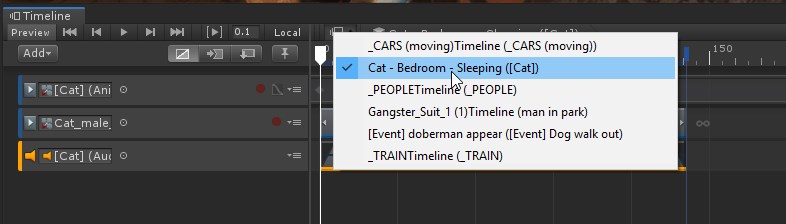
ah, maaaaybe i had the timeline window locked ;x
 stiff spindle

pine badge
Hi guys. I'm trying to do stuff to Animator (SetFloat) when a player just spawned.
Even when i DebugLog(GetFloat) right afterwards, it's showing correct values.
But in reality it's not changed at all.
SetFloat-ing a few frames later works tho.
Is this normal?
 jovial gorge
hello im struggling to flip my character in a 2d game,my character with animations wont flip but when i put the same character controller on a sprite with no animations it flip perfectly ?
mellow mantle
How the fuck can i stop an animation playing when starting my game
jesus i hate animations
I cant delete the transition from entry to the anim
mellow mantle
I figured it out
polar socket
hi! I'm trying to make this a pretty sine wave:
I tried anim.SmoothTangents(0,0); across all frames, and it does not look nice. how do I make all the keyframes 'Clamped Auto' via script
thanks!
charred belfry
surely you want a smoothing weight of 1? Maybe I'm not understanding the function properly
polar socket
trying that now @charred belfry
charred belfry
I've not used it before, so let me know if that's the correct way of using it 😛
polar socket
charred belfry
naw
polar socket
same thing as before. running -1 does a similar thing
almost got it working but the first couple points are still wrong: ``` ks = new Keyframe[156];
var timePoints = LinSpace(Vector3.right0f,Vector3.right2f,1000/78);
var enumerable = timePoints as Vector3[] ?? timePoints.ToArray();
for (int i = 0; i < enumerable.Count(); i++)
{
ks[i] = new Keyframe(i, Mathf.Sin(enumerable[i].x*5f));
}
anim = new AnimationCurve(ks);
for (int i = 0; i < anim.length; i++)
{
anim.SmoothTangents(0,-1f);
AnimationUtility.SetKeyLeftTangentMode(anim,i,AnimationUtility.TangentMode.ClampedAuto);
AnimationUtility.SetKeyRightTangentMode(anim,i,AnimationUtility.TangentMode.ClampedAuto);
}
still no luck. any tips?
charred belfry
My only tip is looking at the source code:
https://github.com/Unity-Technologies/UnityCsReference/blob/master/Editor/Mono/Animation/AnimationWindow/CurveMenuManager.cs#L221
 hard meteor
Hi all, i was wondering if anyone could help me
right now, when i attach multiple clips and click on match offset to previous clip, it does nothing
all my clips reset and start from the start position
hard meteor
fixed, had to put the models rig to humanoid.
 toxic geyser
does anyone have a good free source for production grade FBX files complete with a full sets of animations, (can be rigged / non-rigged). Content can be anything.
Just want to practice integration workflows
hard meteor
@toxic geyser try mixamo.com
toxic geyser
@hard meteor thank you, just what i need!
 inland oar
turbosquid.com is a great source too, but you may need to rig
 proud ferry
I am very, very confused with scripting the playables API
Let's say that I have an animator and I add a simple animation playable through script via another output. So one output for mecanim and one output for the animation itself. Those are additive, you cannot mix and blend them.
Right?
Then how in the world Timeline can do this behavior?
It uses a custom output for the timeline evaluation and just completely overrides the animator without destroying anything (so the animator still technically runs).
How is this possible if outputs are additive?
Here's the animator playable
And here's the timeline playable
At which point does it happen that timeline can completely override the animator without additive?
twin musk
Hello im stuck, i animated my ninja but i can't seem to make his animation work in unity.
 dense schooner
Hi all, Currently I am making a mobile game. My prime concern is performance efficiency / optimization of the game. When enemy gets destroyed there should be a particle explosion. Which will be better to use, a png sequence animation or particle effects? If am using particle effects will it cause any recognizable performance issue.
 restive mica
@dense schooner an animating sprite sequence would be the most performant solution
 manic meteor
Anyone know how to animate the albedo color on an object that has more than one material? The color gets updated on all of the materials
 feral salmon
Hey, trying to change the samples in Unity 2019.3. where is it?
I know where it is in another version, but not in this one
nvm found it
 paper radish
I'm new to unity, trying to set up layers for attacking and moving at the same time. I understand the concept and have it working to some degree but the top layer which is the attacking layer makes the legs go wonky. I'm assuming this is because the attack animation is rotating a bone that the base layer is using. My mask for the top layer is humanoid with no legs or leg ik.
Is there a solution to this?
feral salmon
Hey. Anybody know how to tell when the playable director is playing a playable or not?
charred belfry
PlayableDirector.state?
feral salmon
@charred belfry is it similar to the Animator's isPlaying variable?
charred belfry
charred belfry
just check whether there isn't a director or the time is at 0
feral salmon
ok
feral salmon
Hey. I have a problem. I am trying to have a timeline end with an object's property permanently changed until another timeline changes it. how can I do this?
for example, a light to turn on then stay on.
 fathom crypt
hey guys
can somebody clue me in on what these mean
stretched and spread
This is from an fbx file
(im not an animator)
are these something my animator has done in 3ds max?
 barren valley
Hello there, I am new here, I wanted to know some things about SteamVR in Unity, If someone could help that would be great. I am trying a point where I can throw any object I want, in vr, and it to do somewhat of a boomarang effect and come back if it is in the air too long, or just hits something. My goal is to have it return in the same direction, but not go straight into my hand, you would have to manually grab it. Any suggestions?
twin musk
Has anyone used the 2D animation package in unity 2019?
I'm playing around with it, but when I try to add bones to a character, the bones do not appear to be saved.
 nova isle
the animation 2.0 workflow is a bit weird, with a spritesheet of body parts I can only seem to define bones per sprite, not a whole skeleton
 strange wharf
Do i need a script for it to randomly choose between these animations? because it keeps going to the middle one
nova isle
Of course, the triggers are deterministic, so you need to give it different conditions to jump to different states.
wheat lance
is it possible to set a bones position while it animates additively ?
i swore bones were only points in space and it was possible to stretch a bone while it animes
 velvet portal
Question. I downloaded mixamo's ybot and some animations. Regardless of what settings I use, character just walks in place
Something I am missing?
Or if he does move he plays the walk animation 2 steps and freezes then slides back to starting point. I know there is something I am doing wrong. I just cant remember what it is.
 shrewd cypress
Hello guys have any ideas what is going on with that panel? https://gyazo.com/1e22378a789bd668340abc64e5bb9a0d 0:05



I need only one animation on start not infinity
 dawn kiln
getting odd foot movement in things like idle animations even though the feet are stationary in blender. exporting to fbx and importing to unity. anyone know how to fix this?
dawn kiln
incidentally unity's .blend->.fbx python script does work. so I ported it over to blender as just a generic fbx exporter, so now animations exported from blender as fbx work properly inside unity. no more animation issues
 brazen coral
Would you use After Effects?
celest crag
@twin musk Please don't use unrelated channels to advertise your issues.
What is you question anyway?
If you formulate a more complete question you'll have a better chance getting an answer. You can't tell on those videos which was taken where. And I thought you got an answer already about how to avoid 2d rotation extrapolation.
twin musk
nope i didn't get any answer that helped me
twin musk
Hello i need a suggestion please look in #archived-game-design
twin musk
Hi, I've a problem with my animator, if I call it before calling a firebase database event it's working, but if I call it after, it didn't work, do you have any ideas?
The case when it didn't work
The case when it's working
The method to change the animation (simply play from the Animator)
The load players method ...
wheat lance
Anyone ever keyframed a ik rig ?
Im trying to make a fps animation with the left arm rigged with a ik to make it hold a pistol so its more easy to animate although the problem is that when i keyframe it doesn't seem to frame the ik arm, when i deactivate the ik too, i dont want the ik to be permanent so its cleaner when i go back to unity but when i deactivate the ik the left arm just go back to its original t pose even if i select all bones and loc/rot it
 oak arch
@wheat lance "more easy" = EASIER....
twin musk
anyone has any ideas ? :/ :/
wheat lance
@oak arch 👏 👏 👏
 wicked laurel
I'm having a fps game and I want to be able to un aim the gun and mid-aim animation and just reverse back to unaiming
How do I stop animation and reverse it back to where it was before (doing the animation in reverse from the current frame)
twin musk
how do I turn a big picture, with a lot of frames in it, into an animation? example:
go to your texture asset, change the param "Texture Type" to "Sprite"
Change the Sprite Mode to Multiple
Go to the Sprite Editor (by the btn)
Click on the second button "Slice"
you can try "automatic", if your asset has the same size, it should work
else change to "Grid By Cell" and choose your x, y value
from my guess you have to much border on right and left to use the Grid By Cell
And to make your animation, select all your new images from the spritesheet and drag it to an empty animation, it should place in order all your images to the timeline
thanks
I can't drag them out of the window
You can't drag it from your sprite editor view
but from the project window, your asset is now able to open
I clicked apply but the file is still one big file
and when i drag it into the aniamtor
it sees it as 1 frame
you can expend your file now
because of the "multiple" sprite mode
should be like this
It worked
perfect 😃
 west isle
Hello , i downloaded some movement from Mixamo , and for some reason when my character is running instead of going straight , he shifts side to side. If some one could explain me why that happens would be great!
 dim wadi
Hii I've been trying to animate unity chan in blender, but whenever I export into fbx and set the animation to humanoid, the arms and legs work, but the hair and dress breaks. I've tried importing an existing animation into blender, and exporting and the same problem occurs, so please help! Thanks 😃
 vocal bolt
hey
I'm trying to import a model with an animation into unity
its blender
and like
my animation appears as like
tons of seperate clips
in blender they play as 1
vocal bolt
vocal bolt
aaa
my animation
is so broken
lmao
I dont understand
why it wont import properly
what the fuck
okay
it works now
lmao
I dont understand
blender
at all
lmao
dim wadi
rt blender is confusing
vocal bolt
lmao
ya
I still dont completely understand what I did wrong
also I have thousands of clips
that do fuck all
in unity
only 1 that I need
lmao
¯_(ツ)_/¯
 open acorn
guys not sure if this is the right place to ask
do you know how i can add Dolly Cart from Cinemachine to timeline
I got a DollyTrack and Vcam works normally. The Dollycart only seems to work in playmode
i dont know how to add and control it in timeline.
charred belfry
You should just control it via an animation track
 raw flame
Hi guys I dont know if this is the best channel to ask but im pretty stuck. Im new to C# as well as Unity so any help is appreciated.
Im working with an app that utilizes gaze to interact with a hologram in the HoloLens. I basically just want to make a missile fire when you gaze at it. I have the animation but I can either only get it to loop after only gazing at it once or to just not reappear at all
brazen coral
Anyone know what you would do if you are animating a 2d character skeleton in Unity but you need to change the drawing so something is oriented a different way? IE a fist rotating around the wrist. As far as I know with skeleton animation you wouldn’t do that...
 verbal herald
hiya, im pretty much a noob when it comes to unity, and recently while I was watching a Brackey's 2d animation (using skeletal animation) i realized that when i clicked on the Sprite Editor drop down menu, neither Bone Editor nor Skinning Editor appeared. BTW I do have the 2d animation pack. Thank you.
 tired flame
Hi boys.. Anyone who uses Maya here ? Im trying to do the IK rig bone tutorial but idk why my bone show like this
And this is how in the tutorial looks
verbal herald
Anyone know why only my torso is colored with the bone colors?? Also when i double click the bones appear but the geometry of the heads, arms, and legs disappear
please do help.
 terse wolf
I am working in unity animation. I have the following Grand Parent > Parent > Mesh (as Child) with rotation script. The Animation is located in the Parent, and the Grand Parent of course to act as an anchor, but my animation is behaving as if I put it in the child instead of parent.
It should be cylinder spinning in place based on it's local axis and then the parent where the animation is making it move from side to side in the hall.
Anyone know where I went wrong?
nvm my child object was a little off center
nope that wasn't it lol
looks like the child pivot is still effecting it at the higher lvls so will have to zero the pivot out in 3d editor to fix this and reimport
terse wolf
Fixed ^^
verbal herald
why is there only weight in the torso and how come i have to double tap on the torso jusy yo get the bone arrows to show..
verbal herald
prs help i want to suceed
charred belfry
Only humanoid animations use the Unity IK as far as I know. But there's a package for animation rigging that has IK in it in the pinned messages. (answering below)
 stoic sluice
do u need animations to use the built in unity ik
because i want to make all my animations on run time using ik
like i dont want to import animations, every animation in the game is made by the ik
is it only for humanoid characters?
charred belfry
The animation rigging package works with any transform hierarchy you want
stoic sluice
animation rigging package?
charred belfry
Information in a message pinned to this channel
woeful hearth
@verbal herald show us bones
stoic sluice
does unitys built in ik use fabrik where you can specify the end effector AND the elbow power
https://assetstorev1-prd-cdn.unity3d.com/key-image/f312bf41-02e8-4273-90e3-55f9e2bb6588.jpg like this


otherwise how would i go about making a fabrik solver that can be used on top of existing animations
i want to make an aim system using IK in real time but want to add reload animations and stuff like that
on top of the ik
if that makes sense
verbal herald
@woeful hearth my bones are extremely basic, two vertical for my torso, two in both my arms (parented to the upper bone in the torso), one vertical bone in the head connected ti the upper bone in the torso, and two in each leg (both parented to the bottom torso), exactly what brackey's looked like
also i imported a png file
i will show bones when i get on unity
verbal herald
here are the bones and my sprite
why is there only weight in the torso and how come i have to double tap on the torso jusy yo get the bone arrows to show..
also why is the text for each section off
wait
i think i figured it out xd eckdee
nop
anyone know why my weight is completely red?
 inner raft
I need to get this rig working in Unity. I am exporting from Blender and need to use a generic rig setup. But I have had no success. If anyone can suggest something from the very basic steps of setting up animation for a generic rig, ty in advance
 twin depot
well it looks like it's already rigged isn't it?
you can just export the armature with the mesh as a child
assuming you've set up bone weights
inner raft
Yes, it is weighted, and I have an idle animation setup. I have exported the armature with the mesh as a child but in Unity, if I set it to Humanoid, the face rig and cloak rig are not working at all.
terse wolf
For a character like this where he is blocky and his mesh is not deformed in anyway simply just animating head, arms, legs... Would I need to animate attachments as they don't need to twist or bend or could they simple be anchored to the animated part and move along with it?
https://sketchfab.com/3d-models/wild-origin-starter-avatar-45d28dd63f4c478887ab3f6d494fb7ca

When you crash land on the new world, about the only thing you have is your trusty orange jumpsuit.
Remember to wash frequently. - Wild Origin: Starter Avatar - 3D model by Cody Rauh (@wildorigin)
inner raft
oi, I figured it out.
@terse wolf That depends. It can be done with the animation or it can be scripted
terse wolf
While all parts of the avatar are rigged for the base they are different meshes, so hoping you can just script attach object to x anchor point/position
verbal herald
question, does the size of a model lets say imported from blender effect alot?
terse wolf
I imported my animations from from blender and for some reason they are read only. 😦 in the preview window.
terse wolf
Anyone know why my .blend animations aren't importing in a way that unity is allowing to work?
charred belfry
Anything imported directly from an importable asset (like a model file) will be read-only and only modifiable by the importer itself
You can click on imported animation assets and duplicate them (CTRL-D) and then you get a separate modifiable version
terse wolf
yeah not trying to modify
just trying to use, which Unity refuses to show a preview of animation working with armateur
I was following this tutorial: https://www.youtube.com/watch?v=COckHIIO8vk&t=292s

In this episode we import the character model and set up its animations in Unity. Brackeys' channel: https://www.youtube.com/user/Brackeys If you haven't bee...
Down to the T and I understand everything happening but I am not getting the same options he is.
In order to get my Animations integrated with my model.
charred belfry
Sorry, I'm not sure what exactly isn't working for you?
terse wolf
Not sure to be honest. I am going to revisit this in the morning with a pair of fresh eyes.
I appreciate the reply
terse wolf
Figured out the issue, overlooked a simple setting, lol.
Now the next question I have is I am watching this tutorial and it looks like he has bones in his scene heiarchy parented to his prefab somehow

In this Unity tutorial I show you how to attach a picked up weapon or also other items to the hand of the player and align it correctly according to position...
Do you know how he did that?
@charred belfry
charred belfry
Please don't tag me into new questions thanks
If you don't have Optimise GameObject Hierarchy ticked then I've no idea
Also this is back before the prefab changes
So it could be that the changes have altered the workflow
seeing as that's 2017
terse wolf
Would you know what terms I should look up in order to check for workflow change?
charred belfry
Nope
you'd just have to go into the prefab instead
or use prefab variants... I dunno, the new prefab workflows can be very differing depending on what you need to do
terse wolf
Figured it out, all the bones and all the mesh components all displayed with same box icon underneath the prefab.
 languid lion
how o I animate a 2D charecter
 valid ember
I was testing the animator layers for having 2 different sprites at the same time.
On the default layer I do have the character animation (https://sanderfrenken.github.io/Universal-LPC-Spritesheet-Character-Generator/#) and on the 2nd layer I have only the sword animation (https://sanderfrenken.github.io/Universal-LPC-Spritesheet-Character-Generator/#?body=no_body&weapon=dagger).
Do I have to have a mask set?
 trim atlas
One day can someone help explain in voice chat how to play an animation that I downloaded from the asset store?
I am new to this.
I posted the question in the General Programming.
twin musk
asking here too: is it possible to tell apart a real time animtion from a video playing when both are .exe files created by unityß
?
 median otter
Hello dear developers,
I bought asset from asset store and i have a problem about animations. When i use the walk animation, character is going away on x or z axis. How do I stop it? I just use animation, no moving.
Thanks.
 hazy tusk
Make sure and disable "Root motion" on the Animator component the character is using
woeful hearth
Is Unity have something like "Follow Path" when you draw curve on scene and object will follow that curve with speed in settings
past yacht
Hi all, Why "NeedReload" looping? 😦 I try I fix about a 3 hours 😦
https://ctrlv.tv/iK8y

Fastest screen record online
Fastest screen record online in browser only without addons.
twin musk
Is it possible to retarget Animations of a 3ds max cat rig to another 3ds max cat rig? Its about first person arms.
past yacht
I have a animation created in Unity
 earnest idol
Could do with some help - I'm trying to animate a car crash, I have a first person camera already animated and I want to sync the car interior animation with the camera. Is there a way (in Unity) to animate two separate game objects with the same animation controller? I've tried animating them separately but it's impossible with no way to preview both animations playing at the same time.
Ideally I would just be able to add the CarInterior game object underneath CrashCamera: Rotation and keyframe it alongside the CrashCamera
but I can't figure out how to do that
past yacht
Solved my problem ... I had checked on animation "loop time" :X 😄
@earnest idol yes ... create empty gameobejct and put in all items what you want to animate and create animation on this gameobject
twin musk
Hi, can someone assist me with Root Motion, please?
I've been trying a few tricks, including setting my Root to Trans on my model's Rig tab. I'm basically trying to make my character dodge attacks on either side (forward, backward), but he's supposed to be able to move and stay where the dodge animation ends. But instead he keeps snapping back to the original position. I've tried OnAnimatorMove, setting the Root bone as my model's root, etc. Nothing is working 😦 Thanks.
earnest idol
Thanks @past yacht I've got it working now. 🙂
past yacht
@earnest idol You're welcome 😃
twin musk
hello, i might need a teacher to teach me the logics of animation im just a really bad animator but a good 3D modeller so its handicaping
 umbral yew
so i'm trying to animate an idle and when the animation starts the arms immediately start moving and it takes a really long time for the arms to get where they are, how do i make a part of the animation move after the animation has started or how do i make the arms move in the middle of the animation not at the begging
 stray sigil
Hi All,
Any Maya Animation specialist (in special for using Human IK)? I have a question
 willow rain
does anyone know if i can add bones and animate a model inside unity?
woeful hearth
@willow rain you can only animate inside Unity
willow rain
ok thanks
 grizzled spear
Actually there is this in preview: https://blogs.unity3d.com/2019/05/14/introducing-the-animation-rigging-preview-package-for-unity-2019-1/

Unity Technologies Blog
The Animation Rigging package for Unity 2019.1 enables users to set up procedural motion on animated skeletons at runtime. You can use a set of predefined ...
 graceful lantern
not so sure this is meant as a generic substitution for rigging and skinning characters
looks more like an IK solution
 wild eagle
So I have an animation for when the player hovers over a button a highlight will fade in but when the player goes quickly it doesn't highlight which is annoying anyone know the fix for this?
 fossil cave
Hey everyone! I had a question about alembic streaming and motion vector data. I can't seem to generate the proper motion vectors for motion blur. I'm looking for a result similar to what Oats Studios achieved with their alembic data. Does anyone have experience with this? Thank you 😄
fossil cave
oh wow.... all you have to do is add this to the sub shader: UsePass "Hidden/Alembic/MotionVectors/MOTIONVECTORS" 🤣
with no spaces, the manual online had spaces
 fiery hatch
I've actually had this problem before, and don't remember how I fixed it. I'm trying to rotate an object along an axis, and Unity has decided to make the Y and Z axes the same. is this something where Unity id being dumb or is there an import setting messed up?
 proud dragon
How do I pass an animator that gets created after the game loads?
proud dragon
If anyone runs into this. You should pass the gameobject and then get its child that would be spawn during the runtime with .GetComponentsInChild<type>();
 unique folio
Is there a way to make animation go backwards