#🏃┃animation
1 messages · Page 27 of 1
 misty arch
 worthy verge
Did anyone of you work with Animation Rigging tool before and can maybe help me out?
I got it all set up, and my animations look fantastic.
My main issue is: My hip (in my example the main body) remains static while the legs move. There has to be a good way to get my Body to move along with the legs, like tiny leans to the side, but i cant figure out a clean way.
 inland stag
does anybody know how to fix an animation tree that stops playing after a scene reload? weirdly enough changing a value manually in the animator fixes it and it continues playing
the animation is stuck like this

 wet pecan
Can somebody explain me this phenomena in unity, For some reason in my animation state for attack its transition from idle to light attack seems to stop at the end of the transition phase and its like that in game scene as well, instead of it transitioning to the animation its supposed to transition https://gyazo.com/fb198b5c1bf4daee57d6c689db75f025

 unkempt palm
How do I make the player switch to a specific animation if my object (upgrade with working collision detection) collides with it? I have several animations (Lv0, Lv1, and Lv2), and I need some of them to stay at their current animation (e.g. Lv0_idle) until the player is hit, and then either play another animation (e.g. Lv1_idle -> Lv1_to_Lv0 ->Lv0_idle), or switch to another animation (Lv0 -> Lv1).
My Animator looks like this right now.
 unkempt palm
Okay, I figured it out, it's done via adding a Parameter, then triggering it with playerAnimator.SetTrigger("LevelUpTo1"); (I named the player animator playerAnimator and had the Leveling up trigger called LevelUpTo1).
 muted flume
Hey, I am trying to move my head and arms alongside the camera when the player is looking around.
I am using a Mixamo Character as seen here
I was. told it has something to do with IK and Aim Constraints?
Does anyone know how I can get this to work properly?

 tame crane
How to remove camera shake due to character animation? The camera is located in the character's head model
 agile solstice
tame crane
How to remove camera shake due to character animation? The camera is located in ...
agile solstice
tame crane
How to remove camera shake due to character animation? The camera is located in ...
Don't parent it to the head so it won't shake
Normally you wouldn't try to "remove" shaking or any similar issue, but implement it in a way that the camera gets no shake in the first place
It seems rather unusual to want to attach a camera to a moving character's body part if you don't want it to inherit the motion, including shaking
So there's a specific result you want that not all solutions will be applicable for
But it's not clear what that result is
muted flume
Hey Spazi could you help me out ? :/
agile solstice
muted flume
Hey Spazi could you help me out ? :/
Since you're using mixamo, you're probably using a humanoid avatar as well
I'm not familiar with either, but from what I understand humanoid avatars have IK features available to you so look into those
If not, you'll need to use the aim constraint, or the Animation Rigging package's IK constraints
If you aren't familiar with the terms or don't know how to implement those, search and study
It's the kind of legwork we all have to do every time we implement something
muted flume
I am really not that good with animations, neither is anyone else from the team.
This is just a small school project therefore we thought using pre-made characters / animations would be the easiest, but we are completely stuck on this small thing
agile solstice
muted flume
I am really not that good with animations, neither is anyone else from the team....
IK and constraints aren't necessarily small, or simple in practice
But you do know what information to search for?
muted flume
not really, I am guessing just IK in general?
agile solstice
muted flume
not really, I am guessing just IK in general?
Humanoid avatar IK specifically, if you're using a humanoid avatar
The aim constraint components https://docs.unity3d.com/Manual/class-AimConstraint.html
And finally the Animation Rigging package's components
muted flume
Okay I will give it a go, thanks :/
 vapid tulip
If I have an animation blend tree with several different idle poses and then a separate animation state, is it possible to have it so if the animator returns to the idle blend tree from that animation state, they go into a specific idle animation?
 hybrid tinsel
muted flume
Hey, I am trying to move my head and arms alongside the camera when the player i...
hybrid tinsel
muted flume
Hey, I am trying to move my head and arms alongside the camera when the player i...
If you are using humanoid, there is an example script for head looking in the manual under IK.
hybrid tinsel
vapid tulip
If I have an animation blend tree with several different idle poses and then a s...
When entering a blend state, you will get whatever the parameters controlling the blends are set to.
So if you set the parameters correctly, it will play the animation you want.
 misty pilot
Is there any way to get fbx animations out of Unity and into another program?
I tried opening them in blender but got an ascii error
vapid tulip
hybrid tinsel
When entering a blend state, you will get whatever the parameters controlling th...
But let's say I have two idle poses
One of a character standing there looped
One of a character typing on their phone looped
Then an animation state of taking out the phone (not looped)
At the start of the game the character is set to use the standing idle animation from the blend tree
Then at some point in the c# script I trigger the transition to the animation state of taking out the phone
But how can I get it so that when it exits the state and transitions back to the idle blend tree, it knows to use the phone idle animation?
agile solstice
misty pilot
Is there any way to get fbx animations out of Unity and into another program?
FBX is a universal format, you should be able to import it into blender just fine
However note that exporting and importing animations will bake animation keyframes, strip all control rig information, and bone transforms become ambiguous
So even if you can import it, editing an animation after it's been exported is not practical
Always work on source files
misty pilot
agile solstice
FBX is a universal format, you should be able to import it into blender just fin...
Right now I'm using Cascadeur and I can unbake the keyframes
That's why I want to export them
Since it's by far the easiest way to export animations at the moment
agile solstice
misty pilot
That's why I want to export them
Weren't you asking about importing, not exporting?
misty pilot
agile solstice
Weren't you asking about importing, not exporting?
I meant exporting them from Unity
and then importing them into Blender (or preferably Cascadeur)
agile solstice
misty pilot
I meant exporting them from Unity
There's no need to "export them from unity" assuming you have fbx files in the project's assets folder
misty pilot
agile solstice
There's no need to "export them from unity" assuming you have fbx files in the p...
I downloaded asset packs with animations. I can't open them in other programs without bringing them into Unity first. But I want to edit the animations in a different program and then bring them back in
agile solstice
misty pilot
I downloaded asset packs with animations. I can't open them in other programs wi...
Importing an asset in unity does not modify the files in any way
Are they in your project's assets folder?
misty pilot
agile solstice
Importing an asset in unity does not modify the files in any way
Are they in you...
they should be
let me check real quick
agile solstice
Even if you import a package that should download the files directly into your project's file system, so no "exporting" is necessary
Unless possibly if the pacakge uses the kind of package format that imports the files into the /packages/ folder rather than /assets/ which does not exist in the file system, but I'm not very familiar with that process
misty pilot
agile solstice
Even if you import a package that should download the files directly into your p...
oh thanks so much
I just found them
 dense magnet
Hey! I would love to know what the workflow is for Indie or AAA studios when doing mocap. I watched a video or so on how Naughty Dog did mocap for Uncharted 4. I am rather interested in the process and I would like to apply the same concepts using Rokoko. From what I can understeand, They took the real world measurements of the mocap volume and drew that up in 3D(maya/motion builder) From there if they act scenes out, they make sure to stay in the confines of the volume.
If anyone has some knowledge on this topic, I would love to hear your throughs. I am trying to figure out the workflow before committing to buying a Rokoko suite.
hybrid tinsel
vapid tulip
But let's say I have two idle poses
One of a character standing there looped
One...
You shouldn't be using a blend state for those, but rather a substate. Blend states are for animations that are meant to be blended together.
A blend is actually 'using' all component animation clips at once, and all you are changing is the weight of each one.
Unless you plan on having in-between states of those animations, you want them to be discrete states. In which case you can just transition to the one you want. That said, my solution still works in your scenario, even if it isn't the best solution.
hybrid tinsel
misty pilot
Is there any way to get fbx animations out of Unity and into another program?
Unity has an fbx exporter package. Though as Spazi said it is likely not your best solution if you already have the source files.
misty pilot
I feel like I'm almost there

The animation itself works just fine in Unity

But when I put it into Blender, it looks like this. I can switch between models in Unity no problem for the animation, but outside of Unity it just doesn't work
agile solstice
misty pilot
How precisely do you put it into blender?
It looks quite weird that instead of an armature of bones it seems to have created a hierarchy of transforms
Still, varying levels of weirdness are entirely expected when importing a rig that's been exported once already
So even if you can import it, editing an animation after it's been exported is not practical
misty pilot
agile solstice
How precisely do you put it into blender?
It looks quite weird that instead of a...
I convert it to binary
using autodesk fbx converter
agile solstice
That shouldn't be necessary
Are you unable to import the file directly using blender's fbx import?
 agile solstice
Even if you managed to import it as perfectly as an fbx can be imported, you would be working on an incomplete animation rig because most of that stuff is stripped away on export
And in my experience because transforms in the fbx formats are ambiguous it'd be another struggle to export it in a way that's compatible with your existing animations
Trying to animate without source files is a huge time sink
Assuming it eventually works at all
misty pilot
I see. I think someone else got a Unity fbx asset to work by importing it into Unreal first
 acoustic hollow
Hello everyone. I have a problem, my problem is that I drew my character in blender and it works correctly in animations, but when I transfer it from blender to unity, there are deformations in my character's legs. How can I solve this? If you press ctrl + "A" in blender, the shape of my character's armature changes.


This place is deformed
 muted flume
Hey, I need to ask again:
I have a humanoid Character from Mixamo.
Currently I am trying to make it so the body follows the camera, so when I look down the actual upper body actually moves with the cam.
I have tried using a multi aim constraint on the spine which kinda work, but it deforms the upper body quite a bit.
Is there a better way to achieve this?
agile solstice
muted flume
Hey, I need to ask again:
I have a humanoid Character from Mixamo.
Currently I a...
Another way is to have your partial body rotations as pre-authored animations on a different animation layer, so the body can only bend into pre-determined postures
However, instead of deformation the accuracy of the looking suffers
What's a better way really depends on your circumstances and workflow
muted flume
there must be an easy way to just pop in a character, add a camera and let it move properly
agile solstice
muted flume
there must be an easy way to just pop in a character, add a camera and let it mo...
Dynamic animation is very rarely easy, unless you tolerate deformation and other glitches
Maybe Humanoid Avatars have some type of "look IK" but I'm not sure
Here's more info about the kind of feature you're trying to make: https://youtu.be/W0eRZGS6dhQ?t=523
@muted flume it also explains many ways you can end up with glitches even when the system is working "perfectly"
 jaunty canyon
Hello everyone,
I animate my character in Blender, and when I import my animation in Unity I got many more keyframes, and some on bones I don't even use.
For the exemple, I just put 2 keys on one bone just to tranlate it on Y axis, and i got all that keyframes when I import it in Unity.
Is it normal? Or is there any way to avoid it ?
 agile solstice
jaunty canyon
Hello everyone,
I animate my character in Blender, and when I import my animati...
agile solstice
jaunty canyon
Hello everyone,
I animate my character in Blender, and when I import my animati...
I believe this is just the way animation exporting and the FBX format in particular works
jaunty canyon
agile solstice
I believe this is just the way animation exporting and the FBX format in particu...
Got it ! I'll try other things !
hybrid tinsel
muted flume
there must be an easy way to just pop in a character, add a camera and let it mo...
There is an example look ik script for humanoids in the manual.
muted flume
but that is only for the head, I need the whole upper torso to move properly
 dreamy sage
Hello, i'm completely new to gamedev and i found this movement script but i can't find a way to add the animator to the script.
Can someone help.
 agile solstice
dreamy sage
Hello, i'm completely new to gamedev and i found this movement script but i can'...
agile solstice
dreamy sage
Hello, i'm completely new to gamedev and i found this movement script but i can'...
The same way you've done with the Rigidbody2D, if they're on the same gameobject
Otherwise you should google how to get references to components
dreamy sage
agile solstice
The same way you've done with the Rigidbody2D, if they're on the same gameobject
Yes they are in the same gameobject , so what you're is to do the same thing but with the Animator variable?
agile solstice
dreamy sage
Yes they are in the same gameobject , so what you're is to do the same thing but...
I would assume so
This nearly the most basic scripting challenge there is, so there will be much worse ones nearby unless you study a bit
!learn
 dusk valeBOT
:teacher: Unity Learn ↗
Over 750 hours of free live and on-demand learning content for all levels of experience!
dreamy sage
agile solstice
I would assume so
This nearly the most basic scripting challenge there is, so th...
Yeah i know. i started watching C# videos but i'm a slow learner
hybrid tinsel
muted flume
but that is only for the head, I need the whole upper torso to move properly
The script is just an example; the weights for the torso look act exactly the same way as the head.
agile solstice
muted flume
but that is only for the head, I need the whole upper torso to move properly
https://docs.unity3d.com/Packages/com.unity.animation.rigging@1.3/manual/constraints/MultiRotationConstraint.html
Animation Rigging has an example of this type of constraint setup
Still, I'm not sure if this package is the best for you since you seem to be using Humanoids
 ancient vale
unitanimator.Play("moving", 0);
if (!unitanimator.GetCurrentAnimatorStateInfo(0).IsName("moving"))
{
movings(hit, tilehit);
}
newbie animator here, why does the moving method still go off even when the animator is played? I'm trying to make it so that if the animation is played that it will not do the method.
I tried looking online, but I don't even know how I would try and find this.
 eager arch
agile solstice
eager arch
eager arch
agile solstice
eager arch
Use a transition from idle to recoil as well as from recoil to recoil, or allow transition interruption from next state (or both transition to self and transition interruption together if that works better)
Don't use Play()
The play method is limited as it doesn't allow replaying the current state, and tends to mess up good state machine structure
eager arch
agile solstice
The play method is limited as it doesn't allow replaying the current state, and ...
I don't really use a state machine for animations, both my animation/sound system are very basic, if it's really necessary i'll implement it on the next weapon system rework
agile solstice
eager arch
I don't really use a state machine for animations, both my animation/sound syste...
Work with the Animator, not against it
eager arch
although setting interruption thingy worked
eager arch
agile solstice
Work with the Animator, not against it
solo dev, handling code, animation, modeling and sounds is hell
ya know how it is
im only good at code and model
eager arch
eager arch
although setting interruption thingy worked
nah still bad
imma just reduce the fire rate
agile solstice
eager arch
solo dev, handling code, animation, modeling and sounds is hell
I mean it is more work trying to get the unity's animator state machine to work without using it as it's intended
eager arch
agile solstice
I mean it is more work trying to get the unity's animator state machine to work ...
funny thing is that some weapons do the overrinding animations thingy (actually they don't just looked at it)
 void pelican
hi there, anyone knows how i can replicate or export the camera from Unity to Maya?


 kindred cloak
 meager hazel
Go to your animation file
meager hazel
Go to your animation file
i dont have an animatuion fuile
or wait
the .controller?
meager hazel
If you have an animation you have an animation file
agile solstice
eager arch
funny thing is that some weapons do the overrinding animations thingy (actually ...
I'm not sure which "overriding animations thingy" you're referring to
Did you create a transition from recoil back into itself, or only try setting an interruption source?
 flat kite
i got this error is this the reason my animation is not working?
 agile solstice
flat kite
i got this error is this the reason my animation is not working?
agile solstice
flat kite
i got this error is this the reason my animation is not working?
That would appear to be the most obvious reason based on the information you have presented
flat kite
agile solstice
That would appear to be the most obvious reason based on the information you hav...
yea i got it
 wintry field

hey guys got an animation called pulseStun that runs via a trigger
i have 4 stun variations
is there a simple way to have this PulseStun node run one of the 4 animations upon being triggered

as rn it just has the one motion
rn the only method of approach i can think is having multiple triggers that then gets set randomly in code


anim.SetTrigger("stunned" + randomNumber);
but must be an easier way
agile solstice
wintry field
is there a simple way to have this PulseStun node run one of the 4 animations up...
I wish
You don't need multiple triggers, but one trigger and one float parameter that's randomized in code which you can also re-use for any other random transitions
If you want to avoid multiple states entirely, there's a but if a hacky way to use one blend tree as that type of "container" for multiple animation clips, even if they don't have to blend
Blend tree weight parameter becomes your "selector", though you have to round it to the correct thresholds
wintry field
agile solstice
You don't need multiple triggers, but one trigger and one float parameter that's...
yeah thats annoying
but good point ab using a parameter instead!
ill prob use that approach
thanks<3
 keen knoll
Hello, is there a way to move and scale bones on an avatar if they are already on an avatar?
 little sluice
agile solstice
Blend tree weight parameter becomes your "selector", though you have to round it...
little sluice
agile solstice
Blend tree weight parameter becomes your "selector", though you have to round it...
I've done that before but recall sometimes animation events get called multiple times
agile solstice
little sluice
I've done that before but recall sometimes animation events get called multiple ...
The technique has drawbacks
Animation events can be finicky as they trigger if the clip that contains is being played at all, even with near zero weight
little sluice
Yeah I ended up reserving it for things like idles since those can have a lot more leeway
agile solstice
little sluice
Yeah I ended up reserving it for things like idles since those can have a lot mo...
Also if you're using the blend tree as a selection animations, or generally have an event in a blended animation, you can have the event method check the blend factor before proceeding
So you can ignore events if the weight is too low
little sluice
Ah that makes sense
 echo flume
Hey! Im using a humanoid controller with rootmotion for my AI
I havent had any problem up until now when I wanted to add navmesh links

as you can see the blue gizmo follows the navmesh links but the transform is keeping the same height until the blue gizmo hits the ground
little sluice
echo flume
as you can see the blue gizmo follows the navmesh links but the transform is kee...
There's a script on the Unity github page which has an example of setting transform lerping over navmesh links
 wind torrent
Why am i getting these weird pixels around my character with their animation sprites (and no it is not a part of the animation sprites, for some reason those pixels just weirdly appear)

Theres also a gray box around the sprite and i dont know why
 hybrid tinsel
wind torrent
Why am i getting these weird pixels around my character with their animation spr...
hybrid tinsel
wind torrent
Why am i getting these weird pixels around my character with their animation spr...
Do you have compression on the texture?
Most of the compression types aren't the best for small pixel art
wind torrent
hybrid tinsel
Do you have compression on the texture?
i don’t think so but i’ll check in a bit, putting clothes away rn 😂
muted flume
Hey I have an interesting problem:
I have an Animation from Mixamo, I have checked the "In Place" Checkbox before downloading it.
The Animation works great! but when I spawn "w" for some reason my character moves backwards a tiny bit, when I hold it: The Animation is played without the character moving.
Does anyone know why?
Well I figured it out as soon as I pressed enter... Root Motion was checked 😄
But I do have another small problem:
When my Walking Animation is triggered, the Legs of my humanoid are slightly bend to the right and I am not sure why.
Does anyone have an Idea?
 ancient raptor
How can I create an Animation, that Spawns a smaller Version of an object inside the Player. That can then be animated
hybrid tinsel
muted flume
Well I figured it out as soon as I pressed enter... Root Motion was checked 😄
...
Does the animation look correct when played on its own on that model?
hybrid tinsel
ancient raptor
How can I create an Animation, that Spawns a smaller Version of an object inside...
Add an empty object to the animated model, and animate that. Then you can use animation events to trigger spawning and despawning the prefab you want as a child of the empty object.
ancient raptor
hybrid tinsel
Add an empty object to the animated model, and animate that. Then you can use an...
Thx, how can I create an animation that is dependent on the position of an Object that isn't a parent?
hybrid tinsel
ancient raptor
Thx, how can I create an animation that is dependent on the position of an Objec...
Can you provide more details about what you mean?
ancient raptor
The ObjectThrown has the animation and should play the animation dependent on the player Position
 hybrid tinsel
You can't just make it a child of the player?
ancient raptor
I could do it, but I don't know if it gets confusing when I move on. I tried to keep it tidy
hybrid tinsel
You could use a constraint script to have it follow the player.
ancient raptor
hybrid tinsel
You could use a constraint script to have it follow the player.
Whats a constraint skript
hybrid tinsel
There are a bunch, they let you constrain one transform to another in various ways.
You can also just write your own.
ancient raptor
Does that requires a lot of process power
But I guess using the object as a child is the simplest way
Thx for your help
 maiden laurel
please help me how to implement animations in Unity like here
 winged hollow
Hey everyone, I've an humanoid with imported animation which I start via controller. However the animation also moves so its position changes over the animation cycle. But is there a way I can keep the animation but fix it to one position so that it does not move but keeps the animation as is?
 dull vine
Good evening, I have a problem with a humanoid animation where the left hand/fingers and right foot are twisted. It looks alright in Blender but in Unity it twists Does anyone know how to solve this issue? Thank you in advance to anyone who is willing to help!

 outer holly
dull vine
Good evening, I have a problem with a humanoid animation where the left hand/fin...
outer holly
dull vine
Good evening, I have a problem with a humanoid animation where the left hand/fin...
Check if the Animation/Avatar is T Posing Correctly within Rig when Importing

 cloud nova
i create a animation with a rotate with a T and a S. after that in the same animation, i move some seperate objects around, then i want to move the S and the S to its orginal rotation. However when doing this, the rotation animation starts as soon as the first one finishes even though the keyframe is later on, how do i make the rotation after play when the keyframe starts?

first rotation ends here

then instead of it starting at the last point seen, its starts straight after the first t animation concludes

done it, just need to add seperate keyframe
acoustic hollow
Good evening everyone. There is an enemy in my game as seen in the screenshot. This enemy looks like the second screenshot when the game starts. What could be the reason for this?


 wheat cedar
i'm trying to make some animations in blender and import them into unity, but the unity importer is also importing the blend shape keys, which i don't want. is there something in the import settings i can change to make that not happen?
 hybrid tinsel
acoustic hollow
Good evening everyone. There is an enemy in my game as seen in the screenshot. T...
hybrid tinsel
acoustic hollow
Good evening everyone. There is an enemy in my game as seen in the screenshot. T...
Are you accidentally using the avatar from a taller, skinnier model?
agile solstice
acoustic hollow
Good evening everyone. There is an enemy in my game as seen in the screenshot. T...
Animations might have been authored with wrong/unapplied transforms
 limpid shard
Hey guys so I'm having a major issue with animation rigging on a generic rig. First screenshot is when the option No Avatar is selected in the import settings. Everything works fine. Second screenshot is when the option "Create from this model is selected". The two bone ik gets a very very strange offset. The offset changes randomly when any animations plays. I need the avatar to use it as a mask so that we can have things like eyes blinking and chest breathing etc. What could possibly be going wrong? All I can find online is similar problems but with humanoid avatars.


 magic venture
Hello
I wanted to use some mixamo animations on the Adam Character (from unity)
the thing is, Adam have some extra bones (such as necks), so I get a warning when trying to make a Humanoid Model from the mesh
i tried fixing by removing stuff but it doesnt work, any suggestions ?

 magic venture
Hello
I wanted to use some mixamo animations on the Adam Character (from unity)...
magic venture
magic venture
Hello
I wanted to use some mixamo animations on the Adam Character (from unity)...

 paper notch
Hi, I have a problem with my character. When I start a game, an animation becomes cursed in all it means. Dude is floating and his limbs are screwed up
I use Mixamo animation. And it worked well. I don't know what is the reason as a beginner all is made by tutorial.
Here is the script:
`public class PlayerMovement : MonoBehaviour
{
[SerializeField] private float speed = 2f;
private Animator animator;
// Start is called before the first frame update
void Start()
{
animator = GetComponent<Animator>();
}
// Update is called once per frame
void Update()
{
   var velocity = Vector3.forward * Input.GetAxis("Vertical") * speed;
   transform.Translate(velocity * Time.deltaTime);
   animator.SetFloat("Speed", velocity.magnitude);

}
}`


 paper notch
Now it`s even worse
 hybrid tinsel
paper notch
Now it`s even worse
hybrid tinsel
paper notch
Now it`s even worse
At least the character looks comfortable.
paper notch
meanwhile in mixamo everything is fine

 zenith olive
Is there any package to change the imported 3D model bone name? I have a character created a long time ago using Blender, and its bones names are separated by space. I switched to Maya, and Maya forced me to use underscores.
 shadow obsidian
They weren't talking to you btw. They were asking for help
paper notch
shadow obsidian
They weren't talking to you btw. They were asking for help
Oh sorry
unkempt palm
In my Animation window I added an Animation event. How do I edit it to do stuff?
 lunar forum
unkempt palm
In my Animation window I added an Animation event. How do I edit it to do stuff?
lunar forum
unkempt palm
In my Animation window I added an Animation event. How do I edit it to do stuff?
Is it read-only?
unkempt palm
lunar forum
Is it read-only?
I don't know. I just created it in the Animation window.
unkempt palm
lunar forum
Can you send a screenshot?
 lunar forum
unkempt palm
lunar forum
unkempt palm
this is read-only so you cant change its values. if you ctrl + d you can edit the copy however you want
unkempt palm
CTRL+D? I pressed that but it didn't do anything.
hybrid tinsel
unkempt palm
I don't know. I just created it in the Animation window.
Then that is where you edit it.
Select it and check the inspector
hybrid tinsel
zenith olive
Is there any package to change the imported 3D model bone name? I have a charact...
You can write an asset postprocesser for that.
unkempt palm
hybrid tinsel
Select it and check the inspector
Ah thanks, no guide mentioned that. How do I attach code to it? As like, "When the animation hits this point, run this code"?
hybrid tinsel
You need to define public methods in your code, then the animation event can be given a method to call.
zenith olive
hybrid tinsel
You can write an asset postprocesser for that.
Thanks, I successfully changed its name.
unkempt palm
hybrid tinsel
You need to define public methods in your code, then the animation event can be ...
Yea but where do I add the script?
 hybrid tinsel
On the game object with the animator
unkempt palm
Ok, I have a Methoc DestroyObject(GameObject target), do I just put DestroyObject into Function?
Nope, that crashed the game :(
unkempt palm
Ok got it to work by just using DestroyObject (I used DestroyObject() before)
hybrid tinsel
Guessing you caused some recursion there
lunar forum
unkempt palm
CTRL+D? I pressed that but it didn't do anything.
Ctrl d is the shortcut for duplicating on most softwares. You have to have it selected in your assets folder first though
hybrid tinsel
unkempt palm
CTRL+D? I pressed that but it didn't do anything.
Just remember that ctrl d makes an editable copy, it doesn't let you edit the 'original.' Which is generally not a problem but you need to be aware of it.
unkempt palm
I didn't need to make an editable copy, I just didn't understand what to do and where everything was.
 winged stream
hi ive been trying to procedurally animate an fps controller using the animation rigging package but im running into an issue with weapon handling. namely, if i dont parent the weapon bone target to any of the bones and update its position with global references like weapontarget.position = headtarget.position + offset in update() this produces jittery behaviour. If i parent the weapon bone to the head i should have an easier time with sight allignment and but a more difficult time alligning the weapon stock to the shoulders. If i parent the weapon bone to the shoulder I have an easier time aligning the stock to the shoulder but its impossible to allign sights. I'm new to the animation rigging package so this is a bit foreign to me and I'm probably doing things in a counter productive way; would love some guidance.
hybrid tinsel
unkempt palm
I didn't need to make an editable copy, I just didn't understand what to do and ...
I was just giving context for what quat said. Like I initially said, you can edit events in the importer. :D
hybrid tinsel
winged stream
hi ive been trying to procedurally animate an fps controller using the animation...
You would probably want to not use update() for that. Probably lateupdate() in this case.
 exotic flicker
Hey
 odd bone
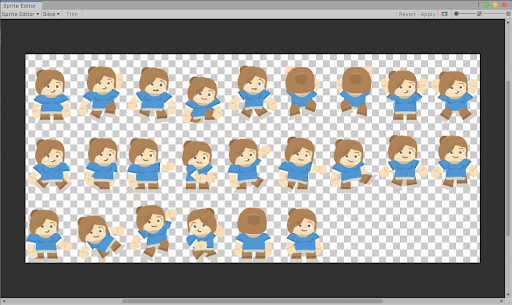
Unity Learn
Sprite Animations are animation clips that are created for 2D assets. There are various ways to create Sprite Animations. One way is to create them from a Sprite Sheet, a collection of Sprites arranged in a grid. The Sprites are then compiled into an Animation Clip that will play each Sprite in order to create the animation, much like a flipbook...
exotic flicker
Ty my friend
odd bone
odd bone
<@699997819192213545> https://learn.unity.com/tutorial/introduction-to-sprite-an...
@exotic flicker also, should add, In this approach, you basically hand the most responsibility to animation crew (or just you drawing more, and needs animation knowledge). If you are a lone programmer, this is hard for you. There are generative animation ways also, which you can create sprites with code, a bit advanced in coding, but people who hate doing graphics themeselves might prefer that.
exotic flicker
odd bone
<@699997819192213545> also, should add, In this approach, you basically hand the...
I prefer the first option
And can i found free pick with internet ?
There is a website
 slender musk
Is there any way to blend between the current playing timeline and another one?
I have a long activation animation that I want to be cancellable at any point
Right now I'm just stopping the director, setting the timeline to my reset timeline and playing ir
Which causes the animation to instantly reset, but I'd like to animate that reset, blending from current values to the target ones set in the reset timeline
 tawdry elm
did anyone know why my animation doesnt play?
 uncut salmon
Kind of hard to tell what you're trying to show by rapidly clicking around your screen. But one thing is you have no animator controller assigned to your animator component.
 fleet flume
Hi! First time animating something in Unity, is there a feature that allows smooth editing of keyframes in curves mode, like "Proportional editing" does in Blender?
hybrid tinsel
Not a blender user so unsure what that does.
 ivory forum
How can I achieve the following setup with 2 layers (movement and action) and 2 parameters: (isWalking and isWaving):
Movement layer
- Disabled state (no animation)
- Walking state (full body walking animation when not waving, only the lower body animation when waving)
Action layer
- Idle layer (full-body idle animation when not waving and not moving)
- Waving (full-body waving animation when not moving, only upper-body animation when moving)
Is this even possible without editing the avatar masks through code based on isWalking and isWaving?
agile solstice
ivory forum
How can I achieve the following setup with 2 layers (movement and action) and 2 ...
I don't see anything impossible about it
At what point do you expect needing to "modify masks through code"?
ivory forum
agile solstice
I don't see anything impossible about it
At what point do you expect needing to ...
As far as I know there's only 1 "priority" with Unity's Animator system: the layer order.
If I setup the layers as I described above, and both isWalking and isWaving are true (and so the lower body should play the "walking" animation and the upper body should play the "waving" animation), the full-body "waving" animation will be played & shown, as it overrides the "walking" animation from the movement layer.
agile solstice
ivory forum
As far as I know there's only 1 "priority" with Unity's Animator system: the lay...
Well, your waving has to be either full-body or masked, not both
You could have a fullbody waving animation on one of the lower layers, and another layer that's masked for the partial waving
Then choose the correct one contextually
Layers can also be synced with other layers, so you should be able to start moving and blend to partial wave without interrupting the wave
If needed
ivory forum
How bizarre that there's no built-in way to achieve this. Seems like a really common use-case?
agile solstice
ivory forum
How bizarre that there's no built-in way to achieve this. Seems like a really co...
If I understand the issue it can be done with the built-in features just fine
And for once in a way that doesn't require circumventing the Animator features
ivory forum
Sorry I meant with just the animator, so without any code
Creating separate layers for partial animations feels very suboptimal if you ask me
hybrid tinsel
ivory forum
How can I achieve the following setup with 2 layers (movement and action) and 2 ...
You cannot. You can very easily do it by adding additional layers, though.
hybrid tinsel
ivory forum
Creating separate layers for partial animations feels very suboptimal if you ask...
Think of them as groups, if that helps. Layers may overlap, but you use the ones you need at the give moment.
 worldly furnace
Are you able to animate a sprite render? I setup my tabs the exact same way as I did with an indicator object, the only difference is that the tabs use a sprite renderer and indicators use an image component?
// Used in my code to change the animation of my tab
tabAnimationControllers[indicator-1].SetBool("Activity", isAvailable);
This is what I am using to change the value. Attached are the setup of my animation.


The active game shows that it is reading true but ShipSetup didn't change animation

Meant to be _active file not the current

 devout ember
how can i stop knockback hard from constantly starting itself over and over again because the parameters are met?
 lunar forum
devout ember
how can i stop knockback hard from constantly starting itself over and over agai...
lunar forum
devout ember
how can i stop knockback hard from constantly starting itself over and over agai...
change the parameters or add new ones?
hybrid tinsel
devout ember
how can i stop knockback hard from constantly starting itself over and over agai...
Don't use any state, or turn off can transition to self
 eager scarab
Hey so
I have two layers, one for normal animation, running, walking, jumping, etc
and another layer to add up with a mask.
The problem is, whenever the animation ends and goes to "new state"

it abruptly goes to the layer 1's animations, without smoothing
is there a way to fix that?
hybrid tinsel
What's the transition to new state like?
eager scarab
hybrid tinsel
What's the transition to new state like?
New state is blank

Whenever it goes to New State it flickers black to the original position
hybrid tinsel
eager scarab
New state is blank
Not what I asked, but good to know.
 hybrid tinsel
Transition duration is zero, of course it will be abrupt.
hybrid tinsel
Use a fixed duration, with the time you actually want it to take.
hybrid tinsel
Explain what, precisely, you mean by flicker here.
eager scarab
It skips frames, if something is at -90 degrees
it doesn't smoothly go to the layer 1's 0 degrees, it sets it instantly
hybrid tinsel
I'd say to just show me, but I am on mobile with a tiny screen so probably won't be able to see much. Might as well post a video anyway, in case someone else can.
hybrid tinsel
eager scarab
<@172484507788771328>
First of all, you realize that this isn't a server for ripped assets right? Second, it looks like you aren't setting the transition properly. I don't see any transition into the empty state visible there.
 hybrid tinsel
Properly is the operative word here.
eager scarab
If i set the transition
the animation plays multiple times, for some reason

ill record video
hybrid tinsel
Ok, the issue here seems to be that you don't know what those weird blue bars in the transition inspector mean 😛
eager scarab
hybrid tinsel
It will save you a LOT of time if you quickly skim over that bit of the manual, because it'll make what I'm saying a lot easier to understand 😛
eager scarab
hybrid tinsel
Ok, the issue here seems to be that you don't know what those weird blue bars in...
no matter what i do with them it won't work
for the reason that, there is no animation on "New State" and there can't be, otherwise it'll override the animation playing on the base layer
hybrid tinsel
That is not the reason, though.
That part is done correctly.
You can see in your latest video that there is no 'flicker.' And it plays multiple times because your transition is the full length of the animation.
And the exit time is at zero, which is probably later than you are entering the state since the entry probably has some duration.
So what is happening is that you are entering the select out animation, it plays the remaining animation and then starts over, whereupon it hits the exit time and starts slowly transitioning out over the entire length of the animation.
hybrid tinsel
By following the steps I said at the start. Make the transition shorter(probably should just use fixed duration). Also should probably place the exit time after the transition in completes.
 eager scarab
well, i did not do exactly as you said
settign the exit time with animation length and shorthening the things you said made it work
damn i wrote everything wrong
but basically it worked, thanks
hybrid tinsel
I should hope so, since that's how it is set up in my game 😄
 tepid mural
I am looking to make my character walking as is touching the ground normaly is there a way asset or some tools to make my character wolking like mechanim or something like that but using legacy animation and animator
or do i have edit it manualy
tawdry elm
Hello, I'm currently looking for a 3D animation mentor, and I don't know where to find or hire one. Can you guys help me or refer me to someone?
 balmy wing
Hi, why does my levels window only close after the second click?
 agile solstice
tawdry elm
Hello, I'm currently looking for a 3D animation mentor, and I don't know where t...
agile solstice
tawdry elm
Hello, I'm currently looking for a 3D animation mentor, and I don't know where t...
!collab
dusk valeBOT

📢 Collaborating and Job Posting
We do not accept job or collab posts on discord.
Please use the forums:
• Commercial Job Seeking
• Commercial Job Offering
• Non Commercial Collaboration
agile solstice
balmy wing
**Hi, why does my levels window only close after the second click?**
That really depends on your Animator and code, which we can't see
tawdry elm
agile solstice
!collab
Uhm at job seeking or job offering?
agile solstice
tawdry elm
Uhm at job seeking or job offering?
Mentoring is a job, so you're offering a job
tawdry elm
agile solstice
Mentoring is a job, so you're offering a job
Aight ty

 wheat cedar
is this the right channel to ask for help regarding getting constraints to work how i want them to, or is there a better channel for that
hybrid tinsel
Probably as good as any, unless you have a heavily code based question.
 silent lintel
i cant get this bone y(?) to point at AimTarget with IK (or any of the bones in the arm) (its working for the spine and neck bones)


 atomic idol
hey guys, if i have several animations i want to play in a sequence with smooth transitions for my character, is it better to make this in the animator with blend trees or create a timeline and integrate the timeline into the animator panel with scripting
(because i feel like the control the timeline provides over the durations and transitions is very handy)
this is my attempt at setting things up in the timeline, as you can see my character's last position is being ignored
and i didn't have this position problem when i used the animator instead. so i'm wondering if i should use the timeline at all. thanks for any advice
 agile solstice
atomic idol
this is my attempt at setting things up in the timeline, as you can see my chara...
agile solstice
atomic idol
this is my attempt at setting things up in the timeline, as you can see my chara...
The issue here is that your animation clip is intended for root motion, which is not what you want with timeline typically
You either have to negate the root motion in the clip itself (by baking it or getting a new clip with no root motion)
or snapping the character forward at the same frame as you start the next animation (though in that case you can't practically have blending, but you don't need it either)
atomic idol
agile solstice
The issue here is that your animation clip is intended for root motion, which is...
you're right, it's much easier doing everything in the animator. plus you can blend transitions on the inspector so i don't have to set up weird blend trees
you can see in the video the transitions are smooth, but my character is walking further than i'd like
so i tried squeezing the start and stop walking animations even closer but then it seems like unity glitches out, the start walking animation plays fully first, have you seen this before? am i merging them wrongly somehow?
silent lintel
silent lintel
i cant get this bone y(?) to point at AimTarget with IK (or any of the bones in ...
bringing this back up, it got buried, can i provide any more info?
agile solstice
atomic idol
so i tried squeezing the start and stop walking animations even closer but then ...
Your "exit time" is likely at the end of the animation clip
Hard to say when you keep the Settings minimized
atomic idol
agile solstice
Your "exit time" is likely at the end of the animation clip
Hard to say when you...
hey, i got it. so turns out the glitch happens if the previous transition is too long and runs into the next transition. so i shortened it and now it's working perfectly. thanks for your help! 
agile solstice
atomic idol
hey, i got it. so turns out the glitch happens if the previous transition is too...
The process will become easier if you expose the Settings, so you can set the exit time among other things
 twin surge
why are all of my animations imported twice? here is my blender NLA timeline :

 twin surge
atomic idol
hey, i got it. so turns out the glitch happens if the previous transition is too...
twin surge
atomic idol
hey, i got it. so turns out the glitch happens if the previous transition is too...
my brother in christ what is up with your hirearchy 💀
looking at it makes me want to kms
atomic idol
twin surge
why are all of my animations imported twice? here is my blender NLA timeline :
because it comes in a prefab (from mixamo) and in the tutorial i watched the guy duplicates them for some reason. i know you don't have to though
atomic idol
twin surge
my brother in christ what is up with your hirearchy 💀
looking at it makes me w...

if it ain't broke don't fix it

twin surge
twin surge
why are all of my animations imported twice? here is my blender NLA timeline :
the animations are also duped in the "source take" drop down
silent lintel
silent lintel
i cant get this bone y(?) to point at AimTarget with IK (or any of the bones in ...
bringing this back up, i have been stuck for days
agile solstice
twin surge
why are all of my animations imported twice? here is my blender NLA timeline :
Might be because the NLA editor sucks
twin surge
twin surge
why are all of my animations imported twice? here is my blender NLA timeline :
It looks like when i disabled these check boxes on the NLA editor, the first instances of all the animations disappeared

horaaaaay?
atomic idol
atomic idol
because it comes in a prefab (from mixamo) and in the tutorial i watched the guy...
oh i thought you were talking about my asset folder my fault og
agile solstice
twin surge
It looks like when i disabled these check boxes on the NLA editor, the first ins...
You can also exclude animation clips from being imported in the mesh import settings
 acoustic raft
I have a 2d pixel art character im animating using a rig. When it transitions from the idle to run animation, I have the character lean forward during the first few frames. However, this ends up getting stuck in the running animation loop. How can I get the character to lean when it transitions from idle to running but only loop the actual running portion if he stays running
agile solstice
acoustic raft
I have a 2d pixel art character im animating using a rig. When it transitions fr...
Two states with an automatic transition from the first one to the second
acoustic raft
tyty
 north sapphire
Heyy. I have spent a lot of time fixing some issues with animations but have some left which I cannot figure out. My animation keeps looping back to the start point and not in place as the character is moving. When I check apply root motion, it fixes that issue but creates so many more.
agile solstice
north sapphire
Heyy. I have spent a lot of time fixing some issues with animations but have som...
Root motion animation not used with root motion is your issue
north sapphire
is there a work around or is it a case of either changing my animations or changing my script?
agile solstice
north sapphire
is there a work around or is it a case of either changing my animations or chang...
You can use an animation that's not made for root motion or work your character controller to work with root motion
Or possibly apply root motion but set it to not actually do anything with the root motion vector
north sapphire
thank you. I'll look into this
hybrid tinsel
north sapphire
is there a work around or is it a case of either changing my animations or chang...
You can go into the animation importer setting and use 'bake into pose.'
twin surge
how to play footstep sounds on walking animation blend tree?
i cant use events since :
1-i have 8 walking animations and its a pain
2-animation events and blend trees dont really mix well, since the timing of the steps and walk speed on different directions, are different in my case.
hybrid tinsel
twin surge
how to play footstep sounds on walking animation blend tree?
i cant use events s...
If the timing of the steps is different, you should not be using a blend anyway, because you can't really properly blend between movements with different timing.
twin surge
hybrid tinsel
If the timing of the steps is different, you should not be using a blend anyway,...
well it is working fine for me
hybrid tinsel
Imagine a 50% blend between differently timed animation, your character could end up with the 'treading water' pose because one animation wants the right foot down and the other wants the left foot down.
hybrid tinsel
twin surge
how to play footstep sounds on walking animation blend tree?
i cant use events s...
Generally for blends you will likely have better luck with animation curves... but those are even more a pain than adding events.
You can also just check for actual foot collision instead. This also has the added benefit of letting you vary the footsteps based on what you hit.
twin surge
hybrid tinsel
Imagine a 50% blend between differently timed animation, your character could en...
well i dont get that on my end. im sure the professional animators at valve knew what they were doing when making these animations
twin surge
hybrid tinsel
Generally for blends you will likely have better luck with animation curves... b...
hmm, sounds good. when should i check for collision on each foot? update? fixedUpdate? OnAnimatorMove?
hybrid tinsel
twin surge
well i dont get that on my end. im sure the professional animators at valve knew...
Your model isn't humanoid so it is perhaps less obvious, you the issue us clearly happening in your video; you can see the grounded feet waving around when changing direction, instead of staying planted. 🦿
twin surge
it is obvious when the blend values are low, but that will never happen beacuse of the way my script, which controlls these values works
hybrid tinsel
And I believe that valve would be using ik on the legs for any time you see them up close.
twin surge
i am intendeng on doing that. already have it for my humanoid charachters, just not for this one
hybrid tinsel
Lateupdate is probably fine for foot checking, but I suppose it will depend.
ivory forum
hybrid tinsel
You cannot. You can very easily do it by adding additional layers, though.
It may be simple, but I cannot figure out how to do it. Could you give an example how you would implement the given animations and each of it's combinations with only isWalking and isWaving parameters?
 sharp basin
i'm having an issue rn, for transitioning from different animations i'm using bool parameters. all of the idle animations are working perfectly, but for walking, only the first frame is being shown. (ping me)

 dense agate
I have two animations, one is for hanging_idle and the other is for climbing up the ledge
When I try to transition into the climb_up anim, It messes up the hand placement.
why do the hands go down, when the climb animation starts?
agile solstice
dense agate
Looks like hanging and climbing presume a different position for the ledge relative to character
dense agate
agile solstice
Looks like hanging and climbing presume a different position for the ledge relat...
You are right. Thanks a lot. Should I offset the Y position in the animation?

omg, that worked
The hands also seem to be going down while the climb_up anim is playing, and in the end It does not reach the full height
Is that an issue with the animation itself?
I think its not just the hands, but the body itself
sharp basin
sharp basin
i'm having an issue rn, for transitioning from different animations i'm using bo...
I still can't find a way to fix this. Any help pls?
hybrid tinsel
ivory forum
It may be simple, but I cannot figure out how to do it. Could you give an exampl...
Looking back at your original post, I feel like rearranging the entire setup would be the simplest way. I'd put idle in the locomation layer, with waving on both that layer and a second layer(with a layer mask to only affect the upper body.)
That way, the waving will always play but when idle you can have the lower body perform it as well.
So you can do it in two layers, just not with the arrangement you were using.
You would only need the two parameters, though I generally prefer to use speed rather than a binary 'is walking' and putting the idle>walk in a blend. That's a matter of preference, though it helps a lot if you might find yourself needing(say) a run as well, or if you are using an analog stick for movement speed.
ivory forum
hybrid tinsel
Looking back at your original post, I feel like rearranging the entire setup wou...
That's a clever idea and would work fine for this simple example. I think it would fall apart quickly though as other animations get added though as the transition conditions for the locomotion layer would get out of hand quickly (as each "action" state would also live in that layer). I might be wrong though, I gotta think it through.
hybrid tinsel
sharp basin
i'm having an issue rn, for transitioning from different animations i'm using bo...
You shouldn't be using any state transitions there, probably. My guess is that you have 'can transition to self' enabled, so it is restarting the animation every single frame that the conditions are met.
hybrid tinsel
ivory forum
That's a clever idea and would work fine for this simple example. I think it wou...
Well, there are other ways to do it but you can likely combine your actions into a substate. In my game, I assign an int value to each unique action(emotes, etc) so a single parameter can link to any number of them in a single state machine easily.
The main takeaway should be that you are best off figuring out whether your basic structure works before getting too into the weeds.
ivory forum
hybrid tinsel
The main takeaway should be that you are best off figuring out whether your basi...
Oh yeah I'm all for experimenting and getting a clear picture before implementation, that's what I'm doing at the moment. I'm gonna experiment with what you said and see if that works. Thank you for your import, I appreciate it!
hybrid tinsel
ivory forum
That's a clever idea and would work fine for this simple example. I think it wou...
Another option would be to have two action layers, with one being synced to the other and upper body only. Then you can set the weight of the full body action later to zero when moving.
That way, any states you add to the full body layer will get duplicated automatically.
This could lead to problems if you need actions that are always full body(like jumping or climbing) but can be good if you have, like, a hundred standing emotes.
Or, like many games, you could just use the idle animation as the base for most such actions so you wouldn't need a full body version at all.
winged stream
Hi, refer to image explanation of issue.
 hybrid tinsel
winged stream
Hi, refer to image explanation of issue.
hybrid tinsel
winged stream
Hi, refer to image explanation of issue.
I mean, properly describing the issue wouldn't hurt. Since I'm kinda confused after looking at the image.
winged stream
hybrid tinsel
I mean, properly describing the issue wouldn't *hurt.* Since I'm kinda confused ...
the blurb under the image is the description
sorry i shouldve clarified
im using override transforms to rotate and position bones
some of the bones have other constraints on them like the arms which use a 2 bone and then i override transform the 2 bone targets, other bones i adjust directly with the override transform. For some reason when i rotate or move the player the bones with other constraints display contrary motion but the ones that are accessed directly are correctly fixed.
hybrid tinsel
Well, my first thought would be an order of operations problem. Could be that you have multiple scripts and internal functions running, and you have these constraints attempting to compensate for the rotation of the object, but it is using the wrong values because other constraints like the override run after it figures out the angle but before it actually applies the transformation...
Not sure how you'd fix it, exactly, but might be something to look into
winged stream
only one script, ive fixed it temporarily by removing the additonaly constraint on the ik targets. My guess is that the first constraint is already world space and the second one accounted for world space a second time leading to weird behaviour
not too sure
hybrid tinsel
Right.
 winter lagoon
how can I make it so the lower bone doesnt move side to side like the arrows (beautiful illustration ik)
 sharp basin
hybrid tinsel
You shouldn't be using any state transitions there, probably. My guess is that y...
sharp basin
hybrid tinsel
You shouldn't be using any state transitions there, probably. My guess is that y...
i don't understand
agile solstice
sharp basin
i don't understand
Which part do you not
sharp basin
hybrid tinsel
You shouldn't be using any state transitions there, probably. My guess is that y...
this
agile solstice
sharp basin
this
It's a pretty clear explanation
You have to be more specific about what you're confused about
sharp basin
i'm sorry but i don't understand what i have to do, what does he mean by "self enabled"
agile solstice
sharp basin
i'm sorry but i don't understand what i have to do, what does he mean by "self e...
Not "self enabled", but a setting called "can transition to self" enabled
You can find an explanation by googling that phrase
sharp basin
alr
agile solstice
sharp basin
alr
But as mentioned you can avoid that issue entirely by not using Any State transitions at all
Since they're easy to get tripped up on
If you don't know exactly what you're doing
sharp basin
well yes, i'm learning currently and i thought "any state" was a good idea, but i don't want to keep making transitions from every animation
tho i can't see transition to self anywhere
agile solstice
sharp basin
well yes, i'm learning currently and i thought "any state" was a good idea, but ...
Any State seems tempting but it won't save you any trouble in the long run
You will have to make a lot of transitions in most cases, but you can cut down their numbers by using animation layers and blend trees strategically
agile solstice
sharp basin
tho i can't see transition to self anywhere
under the Settings of the any state transition
sharp basin
yes ik, it doesn't exist
sharp basin
agile solstice
Any State seems tempting but it won't save you any trouble in the long run
You w...
well, alr, i'll have to learn more abt them
agile solstice
sharp basin
yes ik, it doesn't exist
Can you show the transition settings?
sharp basin
 agile solstice
sharp basin
agile solstice
sharp basin
Your settings are minimized
click the arrow next to the field
sharp basin
mb, did expand it before but apprently i was on the wrong transition
and it's enabled
already
agile solstice
sharp basin
and it's enabled
That's likely the problem
winter lagoon
how do I make it so the bones dont seperate but stay overeach other? beautiful illustration here:


 mint ridge
hi i have a little problem, i have a script for some animation and i have a conflict between jump and fall animation

when i jump the parameter direct switch on fall animation so the jump animation don't work
the jump animation don't have the time to be execute
hybrid tinsel
winter lagoon
how do I make it so the bones dont seperate but stay overeach other? beautiful i...
Those are the same picture, except you put a red x in one of them.
winter lagoon
hybrid tinsel
Those are the same picture, except you put a red x in one of them.
Yeah sorry about that I pasted thr wrong pics


These should be right
hybrid tinsel
Still nonsensical without an explanation though.
hybrid tinsel
mint ridge
hi i have a little problem, i have a script for some animation and i have a conf...
You have bigger problems than that, to be fair.
winter lagoon
hybrid tinsel
Still nonsensical without an explanation though.
Well in one pic, the Bones are over eachother and dont sway to the side, on the other pic, they do
hybrid tinsel
You haven't explained how you are controlling them. I'm guessing some sort of IK?
winter lagoon
Yes
The animation rigging package
2 bone IK Constraint
Nothing External, no scripts
winter lagoon
hybrid tinsel
You haven't explained how you are controlling them. I'm guessing some sort of IK...
And also just moving them trough the editor when its started
 dire elm
Hi, I want to ask how do I add two animations to the same character and make them play at the same moment when a button is pressed or something?
I didn't find anything about this online.
hybrid tinsel
dire elm
Hi, I want to ask how do I add two animations to the same character and make the...
Did you look in the unity manual under 'animator?'
dire elm
hybrid tinsel
Did you look in the unity manual under 'animator?'
No, I'll check it out now
hybrid tinsel
dire elm
No, I'll check it out now
You will likely still have questions after but you will understand a lot better
 hybrid ibex
¿How can I use Skinning Editor to asign one bone only to one layer? And create square Mesh, Its for a Low Res Pixel Art Skeletal Animation

 dusky summit
Im trying to animate a model I found online,
But I have no idea what to do and I do not understand the tutorials.
Someone help me please
hybrid tinsel
dusky summit
Im trying to animate a model I found online,
But I have no idea what to do and I...
That isn't really a question anyone can answer.
dusky summit
hybrid tinsel
That isn't really a question anyone can answer.
basically im asking how the hell do I animate
hybrid tinsel
hybrid ibex
¿How can I use Skinning Editor to asign one bone only to one layer? And create s...
I really wish they would just add a 'add square mesh' button since that would be useful, but what I do is just add four vertices and then drag them out to the corners of the bounding box. As for assigning one bone to an entire layer, you can use the 'weight slider' tool for that.
hybrid tinsel
dusky summit
basically im asking how the hell do I animate
Well, start with the unity manual and if you have specific difficulties, we can try to help with that
hybrid ibex
hybrid tinsel
I really wish they would just add a 'add square mesh' button since that would be...
What is the best way to use Dragon Bones Animations in Unity? I've tried with the UnityPackage and it doesn't work well, when I create the Armature Object the Texture doesn't show
hybrid tinsel
hybrid ibex
What is the best way to use Dragon Bones Animations in Unity? I've tried with th...
Why would you ping ME for that?
hybrid ibex
Sorry,that was a misclick
hybrid tinsel
Okie
 brazen shuttle
to work with animations in unity, what do you think is better to makes this?, in blender and transfer to unity o make this directly en unity
 kind magnet
is this the right channel to discuss procedural animation?
because if it is, I don't know where to start on building it
I've made a worm that has a body of cubes that, when the head moves, the cube behind it moves to just behind the head and then the cube behind that moves to the behind of the cube that moved behind the head, and so on... and I guess it sorta works but I think the beginning would be inverse kinematics, right? no idea how to do that tho xD
 chilly viper
brazen shuttle
to work with animations in unity, what do you think is better to makes this?, in...
chilly viper
brazen shuttle
to work with animations in unity, what do you think is better to makes this?, in...
blender for sure
it has b etter tools for animation
kind magnet
kind magnet
I've made a worm that has a body of cubes that, when the head moves, the cube be...
y'know what never mind I'm sure I can figure out how to do procedural animation somehow...
cloud nova
i have a animation of a object spinning in a unity world, I want a player in Vrchat to be able to click on this then makes that spinning object disappear and play a separate animation I have created, anyone have a tutorial video of something like this that can help me? thank you
agile solstice
cloud nova
i have a animation of a object spinning in a unity world, I want a player in Vrc...
!vrchat
dusk valeBOT
Join the growing VRChat community as you explore, play, and create the future of social VR! https://discord.com/invite/vrchat
agile solstice
We don't really know vrchat's specific workflows
cloud nova
thank you
 versed nimbus
Hi, I just learning how animations works. I have a little problem here.
I have downloaded skin and animation from maximo website (.fbx format). When I import them into Unity, the character don't have skin and Unity says Warning message A polygon of Mesh 'Ch06' in Assets/Materials/Caharcters/Animations/Idle.fbx is self-intersecting and has been discarded.
How can I fix this?
 dreamy pecan
I'm getting some pretty weird animation results when moving the sprite's position
Essentially, the animation ends when then translation is support to start.
In this video you can see the animation get cut off, but when I look at the animation clip itself it is much longer
The point at which it stops is when the player's transform is supposed to change. I will note that I have used similar techniques before on the player attack (giving them a slight forward movement) and have never run into any issues. It is also worth noting there is no transition time/blending for this animation
 earnest nexus
hi, my problem is that my player is going up, and i want it to be inside the hitbox, how can i do?

ping me if you got the answer pls thx!
earnest nexus
winter lagoon
how do I make it so the bones dont seperate but stay overeach other?

 agile solstice
winter lagoon
how do I make it so the bones dont seperate but stay overeach other?
agile solstice
winter lagoon
how do I make it so the bones dont seperate but stay overeach other?
You keep asking this but the question seems as each time
You don't need to do anything to make them "not separate" as long as you don't separate them
Which means you're expecting to be able to move them in some specific way
winter lagoon
agile solstice
You keep asking this but the question seems as each time
You don't need to do an...
well they do seperate
when i move them up
thats why I am asking
agile solstice
winter lagoon
when i move them up
If they're parented, you should rotate them instead of moving
You can't move something and expect it to not move
agile solstice
Helps to mention that
winter lagoon
its moving to the side
agile solstice
Which type of IK?
winter lagoon
I use that animation rigging package with 2 bones ik constraint
 swift tide
Hello, so I want to update an Avatar to have a new joint (this joint has no mesh influence and is just parented under root). Is there a way to just "update" that Avatar or do I have to switch all the rigs that used the old avatar to the new avatar for it to work?
hybrid tinsel
swift tide
Hello, so I want to update an Avatar to have a new joint (this joint has no mesh...
When you say rigs you mean humanoids, rugging package rigs, or what?
swift tide
hybrid tinsel
When you say rigs you mean humanoids, rugging package rigs, or what?
Nope, generic
I think I fixed it by replacing the fbx in the unity project via explorer and hitting reimport?
sharp basin
how do i make my animation play for a limited time? my animation keeps playing
i used Exit Time but the animation keeps playing
 steep kelp
Is there a way to force a mecanim animation to correctly play regardless of enabled layers?
I want to put some gestures/emotes, and I want them to play as is even if the player is crouched, running, holding a weapon, etc.
Right now the do seem to play, but the layers override them, so if the player is holding a weapon, the arms won't move, etc.
agile solstice
steep kelp
Is there a way to force a mecanim animation to correctly play regardless of enab...
"Forcing" it to play would be achieved by setting all other layer weights to 0, which probably doesn't make a good result
Another option is to simply place your gesture layer above other layers
Or gestures on a layer that already has hand motion like weapon holding so you can transition from one to to the other
steep kelp
agile solstice
Or gestures on a layer that already has hand motion like weapon holding so you c...
That's what I though, however something is keeping it from correctly playing. I mean, placing it above all other layers. I can't really put them on a layer that already has hand motion, because I have different layers for different body parts. So if I put it on a hand motion layer, the legs will go bonk.
hybrid tinsel
steep kelp
That's what I though, however something is keeping it from correctly playing. I ...
That's what masks are for =p
steep kelp
hybrid tinsel
That's what masks are for =p
I found the culprit. It was IK.
Now I'm looking for a way to use use collisions with it.
sharp basin
sharp basin
i used Exit Time but the animation keeps playing
where do i enable exit time tho?
which transition
 magic jetty
sharp basin
where do i enable exit time tho?
magic jetty
sharp basin
where do i enable exit time tho?
Exit time means it will automatically leave the animation after the specified time.
I haven't read into your convo but you should know best where it would prove to be useful
sharp basin
magic jetty
Exit time means it will automatically leave the animation after the specified ti...
yeah well it's not doing that
magic jetty
What I like to do: New scene, only the objects you need. If it works there, find out why it won't work in your original scene
agile solstice
sharp basin
how do i make my animation play for a limited time? my animation keeps playing
Use a condition to transition out of the state when you need it not play anymore
agile solstice
How do you need to time it?
If you need the animation to stop looping only at the end of the clip, you can use a transition condition together with exit time enabled and set to the end
Exit time if used with a transition will time that transition to a specific part of the clip
sharp basin
I did use transition time, and multiplied the duration by 2 to make the animation repeat, but the animation did not stop
agile solstice
Transition time is a different thing which means how long the transition takes
That means the animation would loop twice during the transition
I understood you want the animation to loop, but once the condition to stop looping is met, the transition waits for the current loop to finish and then transitions to another state instantly
But I might've misunderstood
If I didn't, then you'll want a looping animation state, a condition to transition to another state, and on that transition exit time enabled with exit time of 1, zero transition time and no offset
sharp basin
Well mb not the transition time, the exit time
sharp basin
agile solstice
I understood you want the animation to loop, but once the condition to stop loop...
No, i might've explained badly, what i want is for the animation to play for specific number of times
agile solstice
sharp basin
No, i might've explained badly, what i want is for the animation to play for spe...
How specific?
sharp basin
I set how many times i want the animation to repeat
agile solstice
At runtime dynamically depending on context, or now?
agile solstice
So, one option is to do pretty much the opposite of what I instructed earlier
Meaning you use exit time of 0 with no conditions to automatically start the transition
The transition will have a transition offset longer than the clip's length * the number of times you want it to play
Iirc Transition Offset is a normalized value even if Fixed Duration is used, so the number should correspond to how many loops you want, but I'm not 100% on that
sharp basin
What does transition offset mean? Does it mean the animation will play earlier or later? Cus that's what I know
sharp basin
If i multiply its value by another value, shouldn't it happen later?
sharp basin
agile solstice
Wait, correction
Take ur time
agile solstice
It's the offset of the state which is being transitioned to
But you can offset the start of the transition nonetheless
By dragging the target state on the transition timeline
sharp basin
So like....i can offset the start and end of the transition to make it longer?
Id think i understand much
O ig it got clearer now
agile solstice
The transition can be set in the future far enough to require loops of the initial state before it occurs
Should become apparent when you move around the blue things on the timeline
sharp basin
So like when i multiply the transition by a value it should get bigger and get past the state to which i want to transition?
agile solstice
Not totally sure what "multiply transition by a value" refers to out of all these variables
sharp basin
You know...the many times i want the animation to repeat
 warm stirrup
Are you looking for loop time/Cycle offset?
sharp basin
Idk i just want to make the animation repeat for a specific number of times
Amd using exit time only did not stop it
agile solstice
sharp basin
Idk i just want to make the animation repeat for a specific number of times
Grab the target state on the transition graph and drag it right, the initial state will repeat to catch it
agile solstice
sharp basin
Exit time should be enabled right?
If you want to do it according to my plan earlier then yes, and starting at 0
If you don't know precisely what the terms mean, make sure to read https://docs.unity3d.com/Manual/class-Transition.html
sharp basin
agile solstice
If you don't know precisely what the terms mean, make sure to read <https://docs...
Yes pls
Ty
 graceful hawk
yo guys is there something called Loop time in Animation
because I wanna uncheck it because I wanna play the animation only once and that's when I jump

oh just found it, i have to select .anim file
warm stirrup
How can I make my animations smooth loop with an Imported Animation?
graceful hawk
Yo guys is that the best way to switch between two animations by having two states

I have made two states, the main one has the normal wing and the second one is the I made it which is the JumpWing and it has different kind of animation
agile solstice
graceful hawk
Yo guys is that the best way to switch between two animations by having two stat...
There are many ways to switch between animations for different results
We don't know how your animations are different so we don't really have a grasp of how exactly you want to "switch" between them
 wise ether
Hello everyone, I have imported an idle animation for my character, but I don't know why, the knees and the foots move while they don't move in 3ds max, somebody know at what this is due and how to fix that ? (for the context: the avatar is the same than the run animation, but this is the same rig/skin between the two, for proof: I test to create an avatar with the disfonctionnal animation and apply it on the run animation and this one works correctly)
the animation in 3ds max :
the animation in unity :
and I have set up my animation like this :
agile solstice
wise ether
the animation in unity :
It's because of keyframe compression that bones down in the hierarchy lose precision
Since it's a Humanoid you should be able to enable foot IK in Unity to counteract it
wise ether
agile solstice
It's because of keyframe compression that bones down in the hierarchy lose preci...
where do you enable that ? (I work with the character system of Invector)
isn't there something related to this parameters ?

or this parameter in the animator, but it's already enable
 agile solstice
wise ether
or this parameter in the animator, but it's already enable
agile solstice
wise ether
or this parameter in the animator, but it's already enable
That's probably it
I don't use Humanoids or this Invector but foot IK is included in mecanim Humanoids
wise ether
agile solstice
That's probably it
I don't use Humanoids or this Invector but foot IK is include...
but I'm also already in Humanoide mod
 agile solstice
wise ether
but I'm also already in Humanoide mod
agile solstice
wise ether
but I'm also already in Humanoide mod
Perhaps there's some steps to make it work
wise ether
ok thank you, I will continue on this path
 limber rivet
why it's blocked?
 agile solstice
limber rivet
why it's blocked?
agile solstice
limber rivet
why it's blocked?
Possibly since that's a Humanoid Avatar feature
limber rivet
agile solstice
Possibly since that's a Humanoid Avatar feature
my model is humanoid but the animations were imported separately, is there anything I can do about this?
agile solstice
limber rivet
my model is humanoid but the animations were imported separately, is there anyth...
That shouldn't be an issue
All Humanoid-compatible animations can benefit from the same features
The point of the system is to be able to translate animations and rigs from different sources to be compatible together
limber rivet
agile solstice
That shouldn't be an issue
All Humanoid-compatible animations can benefit from t...
do i need to mark my animations as humanoid animations?
agile solstice
limber rivet
do i need to mark my animations as humanoid animations?
I expect so
limber rivet
how can i do that?
limber rivet
agile solstice
But you have an idea what to look into
no i don't😭
there aren't many parameters
 agile solstice
limber rivet
no i don't😭
agile solstice
limber rivet
no i don't😭
If you want to use Humanoid features you'll have to find instructions how make sure your rig and animations will work with the system
And what the Humanoid system is and does
Docs are a good place to start
limber rivet
agile solstice
If you want to use Humanoid features you'll have to find instructions how make s...
thanks
winter lagoon
how can I move the selected bone only when the target moves side to side (so it should not move when the target only goes up and down) (target is the red cube)

just like here
agile solstice
winter lagoon
how can I move the selected bone only when the target moves side to side (so it ...
Tried using a constraint to copy the target's sideways movement onto the selected bone?
winter lagoon
agile solstice
Tried using a constraint to copy the target's sideways movement onto the selecte...
how
agile solstice
winter lagoon
how
Something like multi-position constraint on the selected bone with target as the source object and X as the only constrained axis
Your axial setups may vary
winter lagoon
any tutorials for that?
agile solstice
winter lagoon
any tutorials for that?
Don't know of them, but the docs are pretty descriptive
https://docs.unity3d.com/Packages/com.unity.animation.rigging@1.3/manual/constraints/MultiPositionConstraint.html
The examples in the docs are also importable from the package manager
winter lagoon
agile solstice
Don't know of them, but the docs are pretty descriptive
<https://docs.unity3d.co...
agile solstice
winter lagoon
Are you sure that's just one 2 bone IK chain? Looks more than two bones being moved there
winter lagoon
well yeah before the shoulder wasnt involved
agile solstice
That doesn't make sense
There's nothing that should be rotating the shoulder, nor the foot
Or at least nothing you've disclosed
Only the thigh and the calf should be involved in the IK

 agile solstice
winter lagoon
agile solstice
winter lagoon
Chain IK is very much different from two-bone IK
It's very difficult to help you when not provided the necessary or correct details
winter lagoon
agile solstice
It's very difficult to help you when not provided the necessary or correct detai...
now i did, also things changed between my messages
hybrid tinsel
wise ether
but I'm also already in Humanoide mod
Have you looked at the warnings generated by your model? They might give some insight.
wise ether
hybrid tinsel
Have you looked at the warnings generated by your model? They might give some in...
yes, it was this parameter to activate
 winter lagoon
why does it move outwards
agile solstice
winter lagoon
why does it move outwards
We don't know what constraints you're using this time or how
winter lagoon
agile solstice
We don't know what constraints you're using this time or how
chain IK
winter lagoon
agile solstice
We don't know what constraints you're using this time or how
what else am i supposed to use
graceful hawk
agile solstice
There are many ways to switch between animations for different results
We don't ...
both of my animations about the bird's wings flappybird game.
the only thing that the animation do is flapping y for wings so it look like it moves it's wings but if it jumps the wings moves faster for once
using System.Collections.Generic;
using Unity.VisualScripting;
using UnityEngine;

public class BirdScript : MonoBehaviour
{
    public Rigidbody2D Rigidbody2D;
    public float BirdStrength;
    public bool HitPipe = false;
    public LogicScript Logic;
    public Animator BirdAnimation;
    public bool animationLoaded;
    private float  JumpInTime;

    void Start()
    {
        Logic = GameObject.FindGameObjectWithTag("Logic").GetComponent<LogicScript>();
        animationLoaded = true;
        JumpInTime = 0;
    }

    // Update is called once per frame
    void Update()
    {


        if (Input.GetKeyDown(KeyCode.Space) && !HitPipe)
        {
         Rigidbody2D.velocity = Vector2.up * BirdStrength;

            if (Time.time > JumpInTime)
            {
                BirdAnimation.Play("JumpWings");
                animationLoaded = true;
                JumpInTime = Time.time + 0.5f;
            }
        }

        if (animationLoaded && Time.time > JumpInTime)
        {
            BirdAnimation.Play("NormalSpeedWings");
            animationLoaded = false;
        }

        if (transform.position.y > 15 || transform.position.y < -13)
        {
            Logic.GameOver();
        }


    }

    private void OnCollisionEnter2D(Collision2D collision)
    {
        Logic.GameOver();
        HitPipe = true;
    }

}
the second if statement was made in case the player jumps more than once, you will found that the animation is bugged cause of play method, so i made my own float variable and i assign it Time.time + 0.5f , 0.5f = the animation playtime
if there's a better way for switching animation would be cool to hear it
agile solstice
graceful hawk
``` using System.Collections;
using System.Collections.Generic;
using Unity.Visu...
Avoid using Animator.Play
By using it you've gone down the path of starting to recreate an animator state machine yourself, when the Animator already is one
graceful hawk
is there different method then?
shadow obsidian
graceful hawk
is there different method then?
Just use the animator
graceful hawk
shadow obsidian
Just use the animator
im using animator class?
i don't get your point
public Animator BirdAnimation;
i have defined animator class, but I'm waiting for a method or a different way
agile solstice
graceful hawk
is there different method then?
Transitions via conditions that use parameters
https://docs.unity3d.com/Manual/class-AnimatorController.html
If you prefer a video guide: https://youtu.be/sgHicuJAu3g?t=1104 18:24 to 23:01
dire elm
Hi, I asked earlier about this, and @hybrid tinsel referred me to the Unity manual. The question was: how do I make two animations play at the same instant when a button is pressed, for example? I left out the important information that I'm working in 2D, not in 3D (sorry about that). Is there a way to do this through Unity, or can it only be done through coding? Either way, if so, can someone briefly explain to me how I can do that, because I couldn't find anything about it online.
Here's an example: say the player presses the jump button. The Jump animation should play, and at a certain frame, the dust animation should play. How do you achieve that in 2D?
 hybrid tinsel
dire elm
Here's an example: say the player presses the jump button. The Jump animation sh...
hybrid tinsel
dire elm
Here's an example: say the player presses the jump button. The Jump animation sh...
The typical way to handle that would be to use an animation event, though if the dust is part of the animator you can just have multiple layers that can be triggered simultaneously. So there really is a lot of flexibility.
Personally, I prefer to spawn dust on impact instead for most cases.
dire elm
hybrid tinsel
The typical way to handle that would be to use an animation event, though if th...
Are there any tutorials for beginners that explain both of those methods?
dire elm
hybrid tinsel
Personally, I prefer to spawn dust on impact instead for most cases.
I assume using the particle system, right?
The animated dust looks better in my opinion, but the dust isn't even the main reason why I want to know how to do this.
dreamy pecan
Hopefully this video is somewhat self-explanatory, but any idea why my sprite library is yielding way different results in play mode?
I'm trying to see if my system will be better if I use a sprite library (see all those anim variations...), but it doesn't seem to work properly in play mode. I can only seem to get that weird glitching
It looks like the sprites are getting unloaded or something in play mode - >
 hybrid tinsel
dire elm
I assume using the particle system, right?
The animated dust looks better in my ...
hybrid tinsel
dire elm
I assume using the particle system, right?
The animated dust looks better in my ...
Well, you could use a partcle system, a sprite, or anything really.
 scarlet breach
Hi there. I have animations that need to play on a parent animator in some situations, and animations that need to play on child animators in some situations. How can I prevent the parent animator from overriding the child even while idling in an empty state?
 carmine flare
Good morning. Would you use this channel for help with inverse kinematics?
 clear current
can some one help please. i have an animation it works fine but as soon as i add it to the animator it weird and does not start correctly
clear current
any ideas?
agile solstice
clear current
can some one help please. i have an animation it works fine but as soon as i add...
Does the problem happen at runtime or only in the animator preview?
clear current
both
it works ok when i click the animator and press play. but as soon as i add it to to the any state of even add it to the animator it goes all funny
agile solstice
Then I do not know
I would look into the import warnings, test with transition from idle rather than any state and try to move the animations in the transition graph to see if they respond to that change at all
clear current
agile solstice
Then I do not know
I would look into the import warnings, test with transition f...
fixed it, i renamed it and reimported it, not sure how or why it worked
that was a waste of a day
hybrid tinsel
scarlet breach
Hi there. I have animations that need to play on a parent animator in some situa...
In most cases, the children should override the parent when it come to animators.
hybrid tinsel
carmine flare
Good morning. Would you use this channel for help with inverse kinematics?
Unless you are asking how to code it.
 serene flare
I am learning Timeline, how do I handle objects that are used in the cinematic but is not needed otherwise?
Do I need to keep them in the scene as disabled?
Can I spawn them like a prefab before cinematic starts?
hybrid tinsel
serene flare
I am learning Timeline, how do I handle objects that are used in the cinematic b...
You can do either.
serene flare
hybrid tinsel
You can do either.
havent seen anything related to initializing a prefab and using it in timeline, can you direct me to docs or something?
hybrid tinsel
I'm on mobile so not really, but generally speaking you can instantiate from the same script that calls the timeline and then bind it to a timeline track. Also, you likely want to wait for ut to be loaded before playing.
scarlet breach
hybrid tinsel
In most cases, the children should override the parent when it come to animators...
Unfortunately that doesn't seem to be the case. For example, Object A has an animator and is in an empty default state. Object B is a child of it and has its own animator or way of rotating, moving etc. Object A prevents any changes to Object B's positions, etc. and maintains its original shape unless Object A's animator is triggered.
This seems to be consistent across all of my objects with subanimators.
I attempted one solution from the very few threads I could find online by adding a dummy animation to the parent's default state targeting only one property, to try and get it to ignore all the properties the subanimators are targeting, but that didn't work.
I also unchecked write defaults. The only thing I haven't tried yet is an avatar mask.
scarlet breach
I can't really show anything specific since I'm under an NDA.
I can probably show the hierarchy or animators though, just no screenshots of the game itself.
scarlet breach
Fridge and the Fridge animator. The child objects are attempting to change their position and rotation based on code, which is getting overwritten somehow. If I turn off this animator, it all works except the Magical animation because the animator is disabled.


 hybrid tinsel
scarlet breach
I attempted one solution from the very few threads I could find online by adding...
hybrid tinsel
scarlet breach
I attempted one solution from the very few threads I could find online by adding...
Do you have write defaults disabled?
scarlet breach
Yes, on the parent animator.
hybrid tinsel
Not the child?
scarlet breach
Let me see. I don't think so.
But also, the doors for the fridge are code driven and not animation driven.
I rotate them around an axis to open them.
But even that rotation is being overwritten by the parent.
Yeah, all 3 nodes on that animator shown above have write defaults disabled.
hybrid tinsel
scarlet breach
But also, the doors for the fridge are code driven and not animation driven.
That would be a separate issue; you'd probably need to perform those transformations in late update, after the animator has run
scarlet breach
Interesting. I can try that.
The Fridge Drawer however has an animator on it. Let me test that one.
So this is the child animator for the drawer

The animation has played, and it should be out, but it did not move. If I disable the parent animator it works.
 cold ore
scarlet breach
So this is the child animator for the drawer
cold ore
scarlet breach
So this is the child animator for the drawer
This is why I hate to do Animations I just do everything via Code i mean with that that I start and end the Animations by code
hybrid tinsel
It didn't move, or it moved and then snapped back to default?
scarlet breach
Didn't move at all until I turned off the parent animator
When it turn it off, it snaps to where it's supposed to be
I think somehow in the layering the child is activating first and then the parent is layering over it?
scarlet breach
cold ore
This is why I hate to do Animations I just do everything via Code i mean with th...
Unfortunately I'm a generalist on a contract and the animators have done an amazing job with the animations. Almost everything in the game works, it's just the ones where we have to animate certain large objects which also have small component animations.
I can't recreate what they did through code for a lot of these. Just the doors and drawers haha.
Those are easy to just lerp into position or rotation.
Worst case scenario I can turn the parent animator on only when it's needed, but the issue arises that it will then snap everything back to default and then animate which will be jarring.
And I'm certain the publisher won't like that
cold ore
Yeah I meant like I do not use the Animation states I just start the Animations I make in the Script
scarlet breach
Oh hmm interesting. So if I disable the animator, let the child objects move/animate, then re-enable it, the objects DONT snap back.
They're just refusing to move while the animator is active.
scarlet breach
cold ore
Yeah I meant like I do not use the Animation states I just start the Animations ...
Ah that might be a good idea.
I'm using animator override controllers so I have it set up in a generic way for almost every object
I've only made unique animators for the ones that have super unique states or things like this
cold ore
scarlet breach
Ah that might be a good idea.
Warning tho i use very simple Animations
Like I dont have many Animations in any games I make
scarlet breach
Ah gotcha
cold ore
So my approach may be really bad in your case
scarlet breach
The only problem I can see with that approach is the blending between states that the transitions provide
cold ore
scarlet breach
The only problem I can see with that approach is the blending between states tha...
Yeah exactly with a ton of states that may be hard
I do like if the character is not grounded play the jump Animation that type a thing
scarlet breach
Is it possible to remove the default state?
If I wanted to have an animator to contain the animations but use code to activate them?
cold ore
I think I did but lemme check
Me naming my Projects shit like 2d shooter real

my animator
scarlet breach
The other problem with this is that merely having the empty new state seems to tell the object to revert to defaults.
So even if I do this setup it still prevents the children from moving
scarlet breach
hybrid tinsel
That would be a separate issue; you'd probably need to perform those transformat...
The code for the rotations are done via coroutine at the moment. As far as I can see, there's no way to get the coroutine to wait for late update since they're executed between Update and Late Update
I suppose that means I'd need to re-code that part.
scarlet breach
cold ore
this is how it looks in game
Gotcha. Yeah, I understand what you're getting at, I'm just having structural trouble because of how these animations are layering, regardless of how they're being activated.
I'm also struggling to understand why an empty animation on the parent seems to force everything to stay put.
I tried switching the Culling Mode to Cull Update Transforms, which gave me some bizarre behavior, where the doors flickered between being in their default state and rotation properly.
cold ore
maybe try to make the animation for the fridge parent start via code
instead of putting it into a state
thats all i could think off honestly im really inexperienced when it comes to animations
im sorry if i distracted you with my 50 cents on this topic
i hope you find a solution also you can check out my newest game in the dev logs section haha
scarlet breach
You're all good. Thanks for weighing in.
I'll keep fiddling around with all these ideas and see if anything works.
Interesting
So I removed all animations and all transitions from the animator and made it an empty animator with only a default state (no motion, no write defaults)
And it stopped overwriting things
So simple having even a disconnected animation in the animator seems to cause it to overwrite things
Any ideas?
cold ore
scarlet breach
Fridge and the Fridge animator. The child objects are attempting to change their...
It wasn't disconnected in this pic
cold ore
Ok 👌
scarlet breach
this breaks it.

and then if I remove it, and just have the empty, it doesn't overwrite anymore
 cold ore
Maybe In your Code you call it or smth
scarlet breach
I can try that.
scarlet breach
Oh, no. Nothing is being called until I interact with it.
It's just sitting in New State chilling
cold ore
I see
scarlet breach
But merely having the animation on the animator anywhere seems to start the issue up again
And it's not the animation itself. the animation works great when tested. it's something to do with unity's animators.
scarlet breach
Seems so. Someone said on a forum that changing any properties of a child object recalculates the entire tree. For some reason this is also true even when the animations aren't linked up.
cold ore
scarlet breach
Seems so. Someone said on a forum that changing any properties of a child object...
Probably so that the Animations still work how they were intended
scarlet breach
Makes sense. But no, also, I can ensure that the animation is never playing. Its mere presence in the animator causes the problem 😦
cold ore
Weird I have no ideas legt
Left
You might wait for others who are more knowledgable
I will go to sleep hopefully till tomorrow your problem will be solved see ya
scarlet breach
Thanks for tryin. have a good one
 dim patrol
Bone structure question.
I want to make a single generic humanoid rig and animate that one rig
But I'd also like to play fast and loose with the proportions without the resulting scale differences affecting children bones.
Whats the most efficient way to achieve this?
I fear that simply setting one bone's scale, then the immediate child bone's scale to a value that negates the parent bone's scale is going to have some unforseen consequences and generally make it a nightmare to warp and pose.
Performance-wise, what kind of overhead performance cost am I looking at to have a rig that can rescale any bone without affecting other bones?
Like if none of the bones were parented, but instead every frame on update they're setting their position and rotation inhereited, but not scale? Sounds really gross.
I tried searching the asset store and github but I couldnt find many examples of this sort of thing in Unity. I know in Gmod for example you can scale individual bones without the child bones scaling so its possible for game engines to achieve this 
hybrid tinsel
scarlet breach
Makes sense. But no, also, I can ensure that the animation is never playing. Its...
They are still evaluated because they can be called from code
scarlet breach
I see. I suspected as much.
hybrid tinsel
scarlet breach
But merely having the animation on the animator anywhere seems to start the issu...
And you disabled write defaults on the parent's animations?
scarlet breach
Yes
I've found a semi-functional temporary workaround where I turn the animator on and off as I call the animation
Which works mostly, but any position changes for the children of course do not revert, so I had to write some extra code to evaluate if the animation has finished to put it back into position
hybrid tinsel
Try adding a avatar mask to the parent to exclude the child explicitly?
scarlet breach
But would that prevent the animation from being able to include the children when it plays?
hybrid tinsel
Yes. You can't have both.
scarlet breach
Because the whole idea of the parent anim is to animate the object as a whole when it's needed
I just need it to not do so when it's not in the animation state
hybrid tinsel
Something needs, for lack of a better term, ownership of the transform.
scarlet breach
I understand fundamentally, but I don't know why it needs ownership when it's not actively playing anything. I'm assuming that's just a quirk of the unity animator.
hybrid tinsel
It is a structural issue. You could try adding a dummy parent(an empty transform) between the parent and child
So the parent can animate the dummy instead of directly controlling the child.
scarlet breach
I see. That might work. Good idea. I'll give that a go.
hybrid tinsel
dim patrol
Bone structure question.
I want to make a single generic humanoid rig and anima...
Not sure performance wise but counter-scaling and breaking the hierarchy are pretty much the only options for a generic rig.(or for transforms in unity in general)
scarlet breach
hybrid tinsel
It is a structural issue. You could try adding a dummy parent(an empty transform...
This was very smart. It worked.
I can't believe I didn't think of it.
I appreciate the help. Sometimes it's hard to think ouside the box when you've been pushing against the walls for so long.
hybrid tinsel
Glad it helped!
 hollow bane
Is there any for when i tap with eithier touch or mouse click or any tap, i play a clicking animation?
 winged shoal
If i've got an animation in a timeline of someone running and jumping off something, how would I actually make them fall? I've been told to use an override track, yet any time i try to lower the y position unity just adjusts all position values and sends the character off to god knows where
brazen shuttle
i´ve got animated a hair,the object hair is not animated, the object who is animated is other and the hair has a MeshDeform modifier, the problem is when i export blend to fbx to unity, in unity the animations are in the meshdeform object, and i want that the animatios are in the hair, sorry for my english, and thanks
carmine flare
I'm looking to get normal animations to play along with inverse kinematics, like I want my model to play a walk animation and at the same time I want to use IK to make the hands reach out to another object. I can already do a animation or a IK, but they don't work together.
Is there a good tutoral to follow?
 pliant tulip
I thought of my third game, Starilign would have actual 16-bit retro look with the same attack mechanics but reskin into her 16-bit look
kind magnet
so I'm working on making procedural animation, and I thought that the first thing I need to do is implement inverse kinematics. well, this is what I've got so far:
as one can see, it doesn't work. I would like it to be fixed to that red point and act like a sort of leg or something.
I can share the code for what I have so far but Idk if I'm allowed to post code here xD
hybrid tinsel
carmine flare
I'm looking to get normal animations to play along with inverse kinematics, like...
What sort of IK are you using? What doesn't work?
hybrid tinsel
kind magnet
I can share the code for what I have so far but Idk if I'm allowed to post code ...
!code
dusk valeBOT
Posting code
📃 Large Code Blocks
Use links to services like:
https://gdl.space/, https://paste.ofcode.org/, https://hatebin.com/, https://paste.myst.rs/, https://hastebin.com/
📃 Inline Code
Surround code with three backquotes. Not quotation marks.
To format as C#, add cs to the first line:
```cs
// Your code here
```
Add a comment with a line number if there is an error message.
hybrid tinsel
Though you might get better answers in one of the actual coding channels, fair warning.
Since this is mostly artists looking in here =p
hybrid tinsel
Well, it is welcome certainly.
kind magnet
hybrid tinsel
What sort of IK are you using? What doesn't work?
lol I coded it myself- it's really simple ```
using System.Collections;
using System.Collections.Generic;
using Unity.VisualScripting;
using UnityEngine;
using UnityEngine.Animations;
public class Leg : MonoBehaviour
{
public Transform target;
public float moveSpeed = 5f; // Adjust this value to control the speed of movement
private bool isMoving = false;

private void Update() {
    // Check if the leg is not already moving and the distance to the target is greater than 0.7
    if (!isMoving && Vector3.Distance(transform.position, target.position) > 0.7f)
    {
        // Set isMoving to true to indicate that the leg is now moving
        isMoving = true;
    }

    // If the leg is moving
    if (isMoving)
    {
        // Calculate the direction towards the target
        Vector3 direction = (target.position - transform.position).normalized;

        // Calculate the amount to move this frame based on moveSpeed and deltaTime
        float moveAmount = moveSpeed * Time.deltaTime;

        // Move the leg towards the target smoothly
        transform.position += direction * moveAmount;

        // Smoothly rotate towards the target's position
        Quaternion targetRotation = Quaternion.LookRotation(direction);
        transform.rotation = Quaternion.Slerp(transform.rotation, targetRotation, moveAmount);

        // Check if the leg has reached the target
        if (Vector3.Distance(transform.position, target.position) <= 0.1f) // You can adjust this threshold as needed
        {
            // Set isMoving to false to stop the movement process
            isMoving = false;
        }
    }

    Cursor.lockState = CursorLockMode.Locked;
}
}
yes, I used chatgpt for some of it
that's why the comments are there xD
hybrid tinsel
You just probably won't get as many coders looking in here, so less answers.
kind magnet
hybrid tinsel
You just probably won't get as many coders looking in here, so less answers.
gosh that's a good point
hybrid tinsel
That was probably a mistake
kind magnet
I mean, I didn't say "write me IK"
hybrid tinsel
Gpt tends to send you on wild goose chases that are harder to fix
kind magnet
I wanted gpt to make me a bit of script that would make the object move towards a target smoothly
that's what I asked it to
kind magnet
hybrid tinsel
Gpt tends to send you on wild goose chases that are harder to fix
I wholeheartedly agree xD
I learned it the hard way
okay yeah I'll put it in the coding-general I think
hybrid tinsel
I generally don't suggest remaking IK from scratch for most cases unless you need a special feature or something; not necessarily because it is too hard to write but because it is a real nightmare to debug =p
kind magnet
hybrid tinsel
I generally don't suggest remaking IK from scratch for most cases unless you nee...
ah
any ideas on where I could find an already built example?
I just wanted to have the feeling that I created it myself lol xD
hybrid tinsel
The unity animation rigging package is actually mostly ik
And there are a bunch of solutions on github
kind magnet
hybrid tinsel
The unity animation rigging package is actually mostly ik
Yeeeah that’s what all the IK tutorials were for using! I should check that out
 idle wren
can anyone help me out i have this blend tree set up for an aiming animation, Idle to ADS animation, ADS Loop animation, and ADS to idle animation. press the aim button it will stop idle activate blend tree play the startAim anim, at the event on the last frame it switches to the Aim Loop anim, but when i release the mouse button it just snaps back to idle it wont play the stop aim anim. set to 0 when the button is pressed until the event, gets set to .5 until the mouse button is released, gets set to 1 but there is no animation that plays it goes back to idle until i press the button again then it goes to 0 and repeat. here is the code https://hastebin.com/share/afohuharun im sure its because that last event is not being called but why


Hastebin is a free web-based pastebin service for storing and sharing text and code snippets with anyone. Get started now.
hybrid tinsel
idle wren
can anyone help me out i have this blend tree set up for an aiming animation, Id...
That is not what blend trees are for - they are not for discrete states like idle to aim, aim, aim to idle. They are for states that need to be blended together.
Separate them into separate states if you want them to be sequential.
 wet crow
Hi Guys!
Searching for good ressources about first person animation, especially modelling, rigging and animating. I have basic Blender knowledge and already tried some small models, arms, IK and simple walking animations but most ressources I find are about 3rd Person stuff. Nothing that shows you the bigger picture (doing arms, legs, part of the body, different FOV, preview animations in Blender, export to Engine etc.).
You know any good Tutorials, does Unity has something for that or should I buy a course like from CG Cookie? My goal is to animate First Person bow and climbing very well.
https://cgcookie.com/courses/animating-first-person-character-weapons-in-blender
Already watched some GDC stuff but it more or less tells me the why, not the how
 spare bloom
Why doesn't the animation play at all?
 urban holly
The last animation state from the last animation clip just got applied to all clip of the king. This issue happened yesterday, too. I had to recreate all animations for the king. Also this happens while the king animation track is locked. I just noticed while watching back the timeline. I would appreciate any ideas why is this happening. All keyframes and animations are still working but on the last state/pose of the king.

 dapper rune
had this fixed about a year ago when i was doing this but, i havent used unity since. I forgot how to fix it, my animation plays but when i loop it the animation goes back to where it started (root motion)
 elfin surge
I'm curious about the performance implications of how my 3D Animator dev setup this enemy model. We have a single armature with 6 different variations of the creature (creep.1l, creep.2l, etc) that is all under a single FBX export. The armature is manipulating all variations, but only 1 gets enabled at runtime. We just randomly pick one creep to get enabled for that enemy. If only 1 creep object is enabled, is there a performance hit by having the other variations disabled yet still assigned to the same armature bones? Would it be better to have 6 different individual FBX with 6 different individual armature/creep combo instead of housing everything under the same FBX?

 snow hedge
how do i make a cutscene not loop?
hybrid tinsel
snow hedge
how do i make a cutscene not loop?
By cutscene you mean a timeline, an animation, what?
hybrid tinsel
elfin surge
I'm curious about the performance implications of how my 3D Animator dev setup t...
I believe that in most cases the way you have it now would be fine(if not indeed better). You might wanna profile it to be sure, though.
 severe moat
how to add jump vfx or particles in unity ?
agile solstice
severe moat
how to add jump vfx or particles in unity ?
post only to a relevant channel
severe moat
agile solstice
post only to a relevant channel
sory did no realize
 rocky kite
Hi guys, is it possible to swap sprites inside the animator using a script? Wanted to change the sprite for each frame.
 agile solstice
rocky kite
Hi guys, is it possible to swap sprites inside the animator using a script? Want...
agile solstice
rocky kite
Hi guys, is it possible to swap sprites inside the animator using a script? Want...
Not really
To have functionality like that you'll probably have to make your own component to pick the Sprite Renderer's sprite from swappable sprite arrays
The custom component is then animated rather than animating the Sprite Renderer directly
 rough bloom
Ok question since I am out of ideas I have a blend tree which is based on 2d Freeform Cartesian in there I have a bunch of motions with defined ranges max -35 ,35. I am feeding InputAngle as the parameter to the Animator for those ranges. However problem is that Unity is not clamping the range in Blend tree. So if my range is 90 I would expect it to then take 90 and just do max range of 35 instead at runtime unity takes 90 and somehow forces that number into defined range breaking my animation and overriding the clamped number of 35
Any help on this would be much appreciated
hybrid tinsel
rough bloom
Ok question since I am out of ideas I have a blend tree which is based on 2d Fre...
Can you try describing the issue in more detail? I'm having trouble visualizing what you are attempting to do.
rough bloom
hybrid tinsel
Can you try describing the issue in more detail? I'm having trouble visualizing ...
So with pics this is my setup. In code I am simply calculating the Degrees based on input float inputAngleRadians = Mathf.Atan2(horizontalInput, verticalInput); float inputAngleDegrees = inputAngleRadians * Mathf.Rad2Deg; Then I am passing this value back to the animator animator.SetFloat("InputAngle", inputAngle);


Code wqise everything works great I am getting my angle based on direction and updating accordingly
problem is that Blend tree thresholds are not respected ,the inputs are set to -35 to 35
but my angle can be 90 - 90 ect so I would expect when I am gettign angle of 90 the threshold should be respected and set to 35 max instead what happens is that blend tree overrites it to 90
hybrid tinsel
Not respecting in what way? The blend tree doesn't affect the input at all, it is read only.
rough bloom

this should never be -90 but should be clamped to threshold of -35 as per images above
As far as I knew the range parameters will never allow to be higher then defined
Not sure whats the workaround this issue
Is there way to edit range threshold number in Blend tree through code?
hybrid tinsel
You can just clamp it before sending it to the animator ?
The blend tree never clamps, it takes whatever nonsense values you feed it.
rough bloom
Yeah your right I can do that  thats what happens when you stare at screen for too long.. Still thought not sure why it just dont work
hybrid tinsel
Because for the usual useage cases you don't want to clamp it.
rough bloom
hybrid tinsel
The blend tree never clamps, it takes whatever nonsense values you feed it.
So isnt the whole point of thresholds to enforce correct blend
rough bloom
well with 90 degree my charcater leans way too much hence me defining 35 would mean I dont have excessive lean
thought thats what thresholds does
hybrid tinsel
Consider the thresholds to be landmarks on a map. Placing a waypoint doesn't change the landscape.
The input is the landscape in this analogy.
rough bloom
ok so it can still be overwritten then
rough bloom
yeah but I thought you are settign that value to be the max allowed value
hybrid tinsel
That isn't how it works.
There is no 'max allowed'
That just isn't a thing.
Think of it like a thermostat. You can set something to trigger at a certain temperature(threshold) but that doesn't prevent the room temperature (input) from getting hotter than the threshold.
rough bloom
yeah I get it now but still in doc its refrences as range which implies its min and max but ok I kinda get it
dense agate
Hey, do you guys use two different blend trees for walking and running?
 fast swan
 candid turret
i need advice pls? 😮
candid turret
i need advice pls? 😮
if you read #854851968446365696, you would know that's not how to properly ask a question
candid turret
oops
rough bloom
dense agate
Hey, do you guys use two different blend trees for walking and running?
not personally but can be done
I do use two different blend trees for starting walk and run animation
one blend tree to handle intial animation then second blend tree to handle main movement
dense agate
Also, when a player press W, How do you handle the velocity? Do you increment it by an amount every frame? Or just clamp it to a certain value?
rough bloom
I have two control scheme one keyboard another for controller they both utilise Input Magnitude. For keyboard users inputMagnitude increases over time so player goes into Start Walk cycle and transitions to full walk cycle the greater the magnitude
dense agate
I see, thanks
rough bloom
joystick users have finer controls so they can just simply rely on inputmagnitude alone
dense agate
is the velocity preserved when the player turns 180?
rough bloom
I have animations to handle that effect essentially I have walk 180 and run 180 animation motions so i dont use velocity on that purely driven by animator
dense agate
aah I see
rough bloom
it helps when you have motion capture animations
 wintry compass
Hi. I am playing animations from code (animator.Play). When I use animator.Play with 3 different animations, why is it sometimes not playing the last one? Shouldn't every call to animator.Play override the last?
hybrid tinsel
I believe that there is no strict guarantee that multiple plays in a single frame will execute in a particular order.
wintry compass
hybrid tinsel
I believe that there is no strict guarantee that multiple plays in a single fra...
Oof. But thanks!
Perfect! It's working now. Whenever I want to play an animation now, I just save it to a variable of type Action (and overwrite it). In LateUpdate I Invoke the action and set it to null afterwards. This way I can make sure only the last animation is played.
 wild imp
not sure if animation directly, but I'm trying to use IK to put a hand on a thing, and I have two different IK implementations (FastIK and FinalIK), and both of them don't have an option to stretch the arm ... in my case I don't need realism, the IK target is further away than the default arm length
maybe dumb question but do they read this info somehow from the skinned mesh? seems the initial bone structure doesn't have anything on the bones, they're just transforms, and when I move them the mesh does stretch, but neither of the IK solutions will move the bones outside of initial limit
tried also LimbIK, CCD IK, but they all do the same thing 
hybrid tinsel
wild imp
not sure if animation directly, but I'm trying to use IK to put a hand on a thin...
No idea about any of those. Unity's mecanim humanoid does have ik stretch(you have to increase from the default value to really notice it, though.)
 ionic cape
Hi! So I've been adding in weapon animations to my 2D top down game. For the more simple ones, I have simply recorded the animation using the Animation window and tweaked with the transform values to create a simple weapon animation (such as the weapon bobbing up and down). However, I have come to realize that the Animator will actually override any transformations performed in my scripts. For example, I am trying to implement a simple EnemyMeleeSwing script that will rotate the weapon towards in an arc towards the player. I was wondering what the solution to this problem would be outside of making a swing animation in 8 directions. I thought of adding in a weapon holder gameObject and rotating this rather than the weapon with the animator component attached. Is there a way to apply transformation changes to a gameObject without it being overridden by the Animator.
 timid crypt
i have an animation that changes the rotation of an object (this animation is in layer 0), and i have another in layer 1 that also changed the rotation, but even when animation A in layer 0 isnt palying, animation B in layer 1 won't change the rotation, how do i fix this?
agile solstice
ionic cape
Hi! So I've been adding in weapon animations to my 2D top down game. For the mor...
Scripts can affect component properties overridden by an Animator if they act after the Animator in script execution order, but it can be hard to keep track what the component properties actually are in that situation at any given time
It's better to use a "holder" transform as you suggest
or the Animation Rigging package which lets you mix external motion into animated transforms, but that might be overkill in your situation
agile solstice
timid crypt
i have an animation that changes the rotation of an object (this animation is in...
It's important to note that any property (such as rotation) that's controlled at any point by an animation state will be overridden by that Animator
Animation layers will only have an effect if their weight is increased to be able to override the base layer and other layers below in the stack
timid crypt
right so layewr with animation B should be on top?
ionic cape
agile solstice
Scripts can affect component properties overridden by an Animator if they act af...
Got it tyvm! ^^
agile solstice
timid crypt
right so layewr with animation B should be on top?
No, lower and increase the weight
(The layer list stacks downward so "above layer" is below in the list)

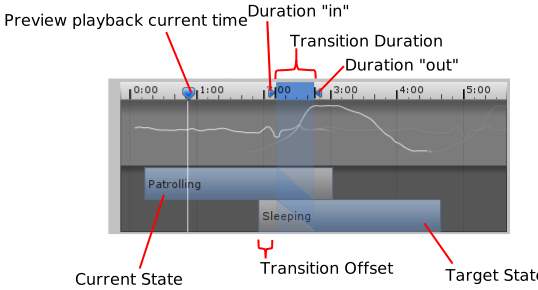 timid crypt
ye it works, thanks
hybrid tinsel
ionic cape
Hi! So I've been adding in weapon animations to my 2D top down game. For the mor...
Scripts running in LateUpdate will be after the animator and so will override it.
I agree that a empty parent object is probably better in this case, but it is good to know.
dense agate
Hey guys, I wanna set some parameters to false, after an animation plays out (Lets say I wanna set isDodging to false after the dodge animation)
Is adding a script to the animation and then setting the parameters in the "OnStateExit" function a good idea?
hybrid tinsel
dense agate
Hey guys, I wanna set some parameters to false, after an animation plays out (Le...
You can certainly do it that way. If all you want to do is make sure the animation only triggers once, you can also use a trigger type parameter which gets used up once it triggers a transition.
dense agate
hybrid tinsel
You can certainly do it that way. If all you want to do is make sure the animati...
So the thing is Im calling the animation from the code itself using crossfade, without any parameters/transitions
But Ill look into what you said again
Thanks
hybrid tinsel
I'm not precisely sure about the details of on state exit when crossfade is used, so I suggest checking just in case.
urban holly
The last animation state from the last animation clip just got applied to all clip of the king. This issue happened yesterday, too. I had to recreate all animations for the king. Also this happens while the king animation track is locked. I just noticed while watching back the timeline. I would appreciate any ideas why is this happening. All keyframes and animations are still working but on the last state/pose of the king. I'm struggling with this for a long time now. I can send video footage about it, too, if needed.
 dense agate
Why does the dodge animation keep glitching when I press 'space'
animator.CrossFade(animationName, transitionTime);
I am using a transition time of 0.5f
The last dodge was pretty smooth,so I think its when the animations transitions from running to dodging
 wet nest
so i have a unity character that has a ameture mesh. would it be possible to just change the ameture mesh to something else and for it to work with the bones the character has now. cause when i try it this happens

 gray pumice
Cool
 small forge
Hi, can anyone give me some suggestions? I am trying to sync my character controller and jump animations, When my character jumps the collider for the character controller component and the camera fall before the animation so it can't jump over objects. Is there a way to sync to lock them together them? I am only using VS but this doesn't fell like a code problem, just a setting I am missing. When I move the Camera to the characters root it will move in sync but I don't think I can move the Character Controller Component to the root as a fix?
 runic pollen
Hello everyone, is there any way to jump to a frame of the animation in the object?
agile solstice
runic pollen
Hello everyone, is there any way to jump to a frame of the animation in the obje...
Not to a "frame", but to a normalized time or a fixed time yes
runic pollen
agile solstice
Not to a "frame", but to a normalized time or a fixed time yes
So if I take the frame of another object and assign it to the object I need, will the two objects perform the same animation?
agile solstice
runic pollen
So if I take the frame of another object and assign it to the object I need, wil...
Not... quite
You don't assign "frames" to "objects"
Objects can't have frames, animations have keyframes which can be sprite frames, or other component property overrides
Gameobjects can share animations, but they need the Animator component playing the same or similar animations
If you want them to play at the same time, you need to ensure that from the playback of the Animator outside of the animation
agile solstice
small forge
Hi, can anyone give me some suggestions? I am trying to sync my character contro...
There'd normally be no need to "sync" any of those
Character model with the animations should be parented to the Controller, and camera should as well be following the Controller
If the jumping animation doesn't make the character jump in place, but rather up, that means it's likely a root motion animation, and you should bake out the root motion
Either to keep the character connected to the Controller, or to utilize "apply root motion" so the Controller is moved by the animation's root motion
Generally you always want the character attached to the Controller under it in the hierarchy, even when jumping
small forge
agile solstice
There'd normally be no need to "sync" any of those
Character model with the anim...
I've just left it for another time now, I spent most of my day trouble shooting it with no luck.
The character can jump, but for whatever reason the capsule collider from the Character Controller Component is not in sync.
I have since deleted the animation, and tried others from mixamo but still had the same problem. I think I will be making my own animation now, but that can wait 🙂 Thank you for the idea
agile solstice
small forge
I've just left it for another time now, I spent most of my day trouble shooting ...
With Mixamo I think you can choose whether the animations are "in place" or have "root motion" and thus wander away from their origin
As mentioned root motion animations need to be prepared in Unity so they don't actually wander away from the origin when in use
 bronze rampart
I cannot see the Markers on the markers track in the Timeline editor window. they just dont show up when i create Signal emitters. also when i press a time stamp is the cursor supposed to be very slow and need like 2 clicks and a second to move to that location. I remember it as much more smooth.
In tha image i created a signal emitter by right clicking the markers track... but i cant see it in the timeline ;-;

in videos on youtube there is this lil drag thing on the cursor, and it looks Extremely smooth
 bronze rampart
this is in unity 2022.3.17f1
bronze rampart
Huuuh, it happens when you uninstall the timeline package and instal it again ;-;
 serene verge
how can i make an animation play once a certain key is pressed in unity?
agile solstice
serene verge
how can i make an animation play once a certain key is pressed in unity?
Make a script that listens to keyboard inputs with a reference to your animator
Then in that method set your Animator's parameter that you've used as a condition to transition into that animation state, or call the Animator.Play() method directly if you're lazy
 slate sentinel
Im trying to get an animation to work in unity (first time importing animations to Unity) and I've set up a blend space for a walking animation that blends via the forward vector, and in the blend space the animations play, and the forward variable gets changed when i debug it, but the animation never plays in the game view. Anyone got any idea as to why?


 glacial flume
Yo I don't know if it's allowed to ask this or smthn but does anyone know where I can find a alright item grabbing animations? I can find on mixamo where the character bends down. I want an animation where the character stands and just reaches their hand out to grab something or hand something over.
hybrid tinsel
glacial flume
Yo I don't know if it's allowed to ask this or smthn but does anyone know where ...
Unity put out a free animation set a few years ago that had grabbing animations(and a lot more). No idea if it is still available somewhere.
timid crypt
i pass in normalized time (being 1), the animation has loop set off, yet it still plays the beginning, what did i do wrong?

animator.CrossFade("PlayerCrouch", 0, 1, 1);
did not work
 whole fog
glacial flume
Yo I don't know if it's allowed to ask this or smthn but does anyone know where ...
whole fog
glacial flume
Yo I don't know if it's allowed to ask this or smthn but does anyone know where ...
there is this one in mixamo. you can lower the "Weight" and adjust the "Object height" too
 agile solstice
timid crypt
i pass in normalized time (being 1), the animation has loop set off, yet it stil...
agile solstice
timid crypt
i pass in normalized time (being 1), the animation has loop set off, yet it stil...
I'd try a value very close to 1f rather than 1f
serene verge
i animated my ui buttons in my main menu scene, but how do i make it so that the animation plays when you hover over the button ?
serene verge
serene verge
i animated my ui buttons in my main menu scene, but how do i make it so that the...
for example: the buttons get bigger when you hover over them
timid crypt
agile solstice
I'd try a value very close to 1f rather than 1f
tried it, also nope
timid crypt
serene verge
i animated my ui buttons in my main menu scene, but how do i make it so that the...
there are prob some good tutorials on it, you would have to use trigger parameters i think, and they dont require code
agile solstice
timid crypt
tried it, also nope
Then I would use an animation that only has the crouched keyframes
timid crypt
is there no other way around it?
agile solstice
timid crypt
is there no other way around it?
Maybe setting the state time directly but I'm not sure
https://docs.unity3d.com/ScriptReference/AnimationState-time.html
 cunning pike
anyone has had this problem solved please. im out of ideas
https://www.reddit.com/r/blenderhelp/comments/10k7x52/import_fbx_animation_into_blender_no_armature/

Reddit
Explore this post and more from the blenderhelp community
 lament bridge
Here is my walking and crouching animations. I want the left foot to be on the front of the red mark, essentially rotating the animation 90 degrees to the right but only for the crouching animation. When I try to do this in the animation window it makes the whole animation rotate 90 degrees repeatedly rather than as a baseline. Any quick way to modify this?

 dense agate
slate sentinel
Im trying to get an animation to work in unity (first time importing animations ...
dense agate
slate sentinel
Im trying to get an animation to work in unity (first time importing animations ...
Did you change the rig to humanoid?
slate sentinel
dense agate
Did you change the rig to humanoid?
Yeah, i did
 umbral bear
ello i mean trying to complete this game i cannot undestand the issues , i cant fireball or move properly
hybrid tinsel
umbral bear
ello i mean trying to complete this game i cannot undestand the issues , i cant ...
...Is that an animation problem? I am confused
umbral bear
hybrid tinsel
...Is that an animation problem? I am confused
tbh i dont know im new
umbral bear
hybrid tinsel
...Is that an animation problem? I am confused
where do u find help?
umbral bear
hybrid tinsel
...Is that an animation problem? I am confused
which channel would be appropriate?
hybrid tinsel
umbral bear
which channel would be appropriate?
#💻┃code-beginner perhaps
umbral bear
hybrid tinsel
<#497874004401586176> perhaps
well its more of playing with settings problem, ill see thx
pliant tulip
I got a problem, like when I walk and jump normally, the animations works fine, but when I run and jump, the jumping animating is glitching out a but and when i land on the ground, the charge animation starts but it's not supposed to do

should i explain more?
shadow obsidian
pliant tulip
I got a problem, like when I walk and jump normally, the animations works fine, ...
Is the glitch in that video? I didn't really see anything wrong looking
Is it the smoke coming up?
pliant tulip
shadow obsidian
Is it the smoke coming up?
no, you see it at 0:12, that you barely see the jump animation glitched out a bit right there and when you land on the ground, it's donig the charge animation instead
pliant tulip
shadow obsidian
Is the glitch in that video? I didn't really see anything wrong looking
like when i run and jump, after the one time jump animation, it kinda glitched out and when i land on the ground, it does the charge animation
 hasty scroll
I'm running into this problem where I am trying to animate a 2D sprite walking, but the artist of the sprite never made a walk right. I know usually you could just put the pictures into a photo editor or smth but They put all of the photos into one. Is there any simple way to do this? Kinda new to Unity.

Nvm Just figured it out all you have to do is Add Property >> Sprite Renderer >> Flip X and check that for every frame
 native pelican
hey so im trying to animate a ui image conponent i have a animation i want the image to do but im not sure how to get it to work can i just do the same animation process as with a sprite renderer?
pliant tulip
pliant tulip
I got a problem, like when I walk and jump normally, the animations works fine, ...
....... if anyone knows how animation works
agile solstice
pliant tulip
I got a problem, like when I walk and jump normally, the animations works fine, ...
You can better debug the Animator by having the Game and Animator windows side by side
With the character selected you can see what the animator is doing, and if the correct transitions are even being attempted
In this case it doesn't seem like a big mystery why this happens, most likely your code is setting Jump and isRunning true even when landing sometimes
agile solstice
hasty scroll
Nvm Just figured it out all you have to do is Add Property >> Sprite Renderer >>...
You can do that in code so you don't need a separate animation for both directions
(But only if your Animator is not at any point controlling that property)
 sonic stirrup
ok so how do i get started with animaion, i tried blender , but the bones dont work properly and for somereason the body becomes attached to one bone
agile solstice
sonic stirrup
ok so how do i get started with animaion, i tried blender , but the bones dont w...
Two common misunderstandings are:
An Armature is a collection of Bones, each Bone should not be an Armature
Them mesh must be "weight mapped" to the armature, which you can get a starting point for by "parenting with automatic weights" and then you can tweak using the weight painting tool
sonic stirrup
agile solstice
Two common misunderstandings are:
An Armature is a collection of Bones, each Bon...
i attach them using automatic weight, but whole object is attached to whole armature and for somereason , i cant go to indivisual bone