#🏃┃animation
1 messages · Page 20 of 1
 north shale

 distant valve
in Unity, I have a player prefab and within this prefab I have my knife object, I have made an animation where the player is tossing the knife up into the air to catch it backwards (blade sticking out from the other side), however, I can't seem to be able to figure out how I can animate both the player and knife at once so they can be aligned and timed properly. Hopefully any of this makes sense.
 glossy furnace
So I have a 'charging up' animation play when it recieves the trigger 'attack', which then is supposed to immediately transition into an attack animation when it finishes. It successfully starts the PreAttack charge when it recieves 'attack' but it keeps looping and never goes to the actual attack animation. Both the pre attack and the actual attack have looping off


me sad
 cerulean ore
I have a rotation animation in 2D that is rotating around the center of the parent animator object, which rotates them from the wrong centerpoint of the child
for instance A B C child objects but the centerpoint of their parents are all B
i'm unable to move the parents positions because it is locked by the animator
since they also have a positional animation
for instance, the blue highlighting is the child, but the centerpoint of parent animator here is in the middle as you can see.

 agile solstice
cerulean ore
i'm unable to move the parents positions because it is locked by the animator
agile solstice
cerulean ore
i'm unable to move the parents positions because it is locked by the animator
Ideally all movement animation would happen under a parent gameobject relative to it so its transform doesn't get overridden by the animation, since you probably will want to move it
cerulean ore
I am even trying to change the RectTransform's pivot of the parent, it's not fixing it
cerulean ore
agile solstice
Ideally all movement animation would happen under a parent gameobject relative t...
yes! they're under a parent and that is the same parent that's also trying the rotation animation
which is why there's a problem, because those positions are fixed of the parent
please tell me I don't need to make a 2nd parent
-_-
i do think that would theoretically work, but it seems SO SLOPPY
have a grandparent/parent/child, the animator is on the parent and the grandparents position controls the objects center position?
agile solstice
I'm not sure I totally understand
All transform values are relative to parent transform values
The parent is always the "pivot point" of its child transforms
cerulean ore
yea so the parents are all in the same position in a container.
the children have differing positions, which contain the sprites etc as you can see in the image.
however, as you just said the parents have the pivot point, which is fixed in the center of that parent container
so if I want to rotate the children at their center, i have no idea how to accomplish that
they all rotate around the center of the parents, which is not what I want 😦
agile solstice
cerulean ore
so if I want to rotate the children at their center, i have no idea how to accom...
If you rotate a sprite (the child) by itself it rotates around its own center / sprite pivot
Rotate any of the parents and the parent acts as the rotation pivot
cerulean ore
so I need a separate animator for the child to do rotational animations?
let me try doing that
agile solstice
No
cerulean ore
?
agile solstice
Within the Animator's hierarchy any transform can be animated individually
cerulean ore
oh
SHIT
yes i was wondering that
i gotchu
ok let me remake that with the right object (the child)
for just the rotational one
in the same animator
I used the parent, so that would make sense
agile solstice
Transform values are simply inherited down the hierarchy
Any and all components in the whole hierarchy under the Animator can be animated
cerulean ore
Problem solved. Works as expected now. Ty. Did not understand heirarchy applied to animations in the same way. Thank you so much!
glossy furnace
glossy furnace
So I have a 'charging up' animation play when it recieves the trigger 'attack', ...
e
agile solstice
glossy furnace
So I have a 'charging up' animation play when it recieves the trigger 'attack', ...
The most common issue with using Any State is that its transitions will override anything
Avoid it entirely
glossy furnace
agile solstice
The most common issue with using Any State is that its transitions will override...
Ah, okay
So if I skip using it, the problem should go away?
agile solstice
glossy furnace
Ah, okay
So if I skip using it, the problem should go away?
I can't see the transition settings or conditions, or how the parameters are being changed during playmode so I can only guess what the problem could be
But if someone's using Any State and is having problems triggering transitions I'd give it about 85% occurrence that it's the cause also
glossy furnace
agile solstice
I can't see the transition settings or conditions, or how the parameters are bei...
Okay tysm!
Yea the second transition has no trigger
agile solstice
Any State is the nuclear option and it's very easy to create problems with it
I'd only use it for death animations or any such similar that absolutely must take precedence
glossy furnace
Lol thats funny cuz im also having problems with the death animation
I have a transition from anystate called 'death' and if its triggered it should start a death animation
but once i create the animation, even if he doesnt die, he stays still and doesnt move
no matter what trigger
agile solstice
Could be a conflict with the other Any State transitions
glossy furnace
yeah probably
ill def take your advice and stay away from anytrigger
Thank you again!
Edit: ayy it be workin now! I just gotta fix the death anim
agile solstice
glossy furnace
ill def take your advice and stay away from anytrigger
It may seem at first like a convenient way to make the state machine simpler and more direct, but that doesn't really pan out
It's better to avoid it and instead learn to master the transition settings and other features of the Animator like sub-state machines and layers to make the animator controller more efficient instead
agile solstice
 toxic orbit
Why cant I animate my character?!
toxic orbit
Why cant I animate my character?!
Animating humanoid avatar configurations in-editor is not allowed
agile solstice
(memes are not tolerated here so I'd remove that but) quite literally "it's just not"
You cannot keyframe a humanoid rig in Unity. It's disabled by design because our keyframing workflow is not powerful enough for humanoid rig. You should use an authoring tools like blender, max or maya to keyframe your character, they have better workflow and their tools are made to create asset. -Mecanim-Dev
 dusty tree
This is a semi-programatic animatio question. I'm working in 2D. I have a game where electricity can flow into a tile from up/down/left/right, and leave the tile up/down/left/right. Ultimately, there are 12 different combinations, with lots of symmetry. Each would have a simple animation of a yellow dot (let's say) going from up to left (or whatever). My main challenge here is that these can be overlaid, as a tile could be getting electricity from multiple directions at once, and 12! is way too many animations to draw by brute force.
Does anyone have a recommendation for how to best draw this?
 edgy pelican
Hi all, how are you doing ?
I have a simple question that i didn't find the answer yet, so i thought directly asking here was good idea.
So i'm using Humanoid Rigs to make Avatars and do some retargeting in Unity. But i also have to do this with facial animations, is it possible to do so ? A "Face" Avatar kind of ? Or is there any option on the already existing Humanoid Avatar ?
Tried with the Generic Type Rig, which seems to do the trick but my models were also copying the proportion of the original model that was animated, i don't want that. I need to keep the proportions of every mesh, that's why i'm using Humanoid. (don't know if my explanations are clear lol)
Thanks in advance :)
 wet crow
Hi guys, having two blend trees for normal and crouch walk, but I want to make the transition to set the collider size and position (center).
Anyone an idea how I can achieve that?
agile solstice
wet crow
Hi guys, having two blend trees for normal and crouch walk, but I want to make t...
The movement animations can have keyframes for the size and center of your collider, the blend tree will hand the blending
 deft frost
Hello,
I currently have an animation for an attack with a spear which is using both hands. I want the spear to be hold in both hands during the animation the whole time while both hands are actually grabbing it. The problem I have is that I would have to change the rotation and position every keyframe with what I currently have and I don't want to hard code any values. Is there an easy way to do this without coding, or at least with a universal solution as I have more weapon types using both hands during their animation?
deft frost
deft frost
Hello,
I currently have an animation for an attack with a spear which is using b...
Would I have to create an animation for the weapon as well? Or is there an easier solution?
wet crow
agile solstice
The movement animations can have keyframes for the size and center of your colli...
I know that I can implement a property for the collider, but where do I put it? I have a blendtree with idle/walk/run for standing and a second with idle/walk for crouching. By setting a crouch-float from 0 to 1 I can Switch between them, but do I have to put an Animation with exit time between both blend trees that handles the resizing between both states?
agile solstice
wet crow
I know that I can implement a property for the collider, but where do I put it? ...
Collider size would be part of the movement animation clips
Just like they animate the limb transform properties would the collider size be animated as well
Another option is to use synced layers to play different clips simultaneously in the same states
edgy pelican
deft frost
Hello,
I currently have an animation for an attack with a spear which is using b...
You could maybe use an orientation constraint on the spear, aiming for the second hand ? You can easily do this with the Animation Rigging Package
It'll definitely need some adjust after that, but that should do the trick for the rotation.
deft frost
Thank you, I'll try that. It's my first time making a 3d game which is why I still have some difficulties.
edgy pelican
I recommend you to do some research on the Animation Rigging package, it's a really powerfull tool for this kind of things :)
And it's fairly easy to use
deft frost
Thank you, I appreciate your help.
edgy pelican
You're welcome 👌
edgy pelican
edgy pelican
Hi all, how are you doing ?
I have a simple question that i didn't find the ans...
I take this opportunity to remind my message in case someone has the solution :p
dusty tree
I have a 2D game with tilemap where a given tile should have something like a yellow dot moving across it up/down/left/right going in, and up/down/left right going out. But each tile could have multiple of these things going on, so I need to do this programatically.
I’m not sure what is the best tool for this. Ideas:
-Animated tile: I would need 8 tilemaps, and constantly draw/undraw tiles representing the particle effect.
-Different animated gameobjects, each with an animation controlling monobehaviour: This could lead to 2000 gameobjects each updating, and I want to avoid that.
-Other? I don’t really understand unity’s particle system, or shaders, or what tools are available for this sort of thing.
(I’m reasking with some more ideas on what I could do. I honestly just don’t know what tools would be right for the job)
In theory, I would also like to just change color of the tile below as the yellow dot passes over (instead of just drawing a raw yellow dot), but that would be a bonus. idk if I need to learn about shaders, particle effects, other animation, or fancy tile animation.
 wispy nebula
For 3d modeling for use in unity which program would be recommend for a beginner? I am only aware of Maya or Blender by name. Would one have a steeper learning curve than the other? Which do you personally prefer?
I believe Blender also has some integration with Unity? Would Maya have similar?
agile solstice
wispy nebula
For 3d modeling for use in unity which program would be recommend for a beginner...
Blender doesn't have good integration with Unity, don't know about Maya
Both are difficult programs to learn but Blender is probably easier as it's free and recently became more accessible and so popular, so there are a lot of tutorials and courses for it
 crystal parrot
hi guys i have a question. If i made animations without using a model (no rigging) but then added a model later on, would i have to redo the animations to include the rigging? or is there a better method? thank you for your time everyone!
agile solstice
crystal parrot
hi guys i have a question. If i made animations without using a model (no riggin...
Animations can be re-used for different meshes as long as the mesh has vertex groups that match the rig's bone transforms, so the mesh can connect to them
It should be technically possible to export and import the two separately into Unity, but in my experience Unity enjoys removing "unused" rigs from meshes so zealously that I just export animations with a placeholder mesh / meshes with a placeholder animation to make it easy for myself
If you've got characters with Humanoid Avatar configuration, then you can re-use animations between them even if they don't exactly match, adjusted to the character's proportions too
agile solstice
dusty tree
I have a 2D game with tilemap where a given tile should have something like a ye...
Is it just a visual effect or an interactive one? If the moving dots need to actually change their behaviour in response to something, or if the color-changed tile needs to update its tile type as well then it seems to be primarily a coding challenge
Rather than within just the realm and rules of visual effects and animations
dusty tree
so I have an electrical grid that moves electricity through it.
i can represent the yellow dot’s behaviour with like 8 bits: 4 directions going in, and 4 going out, and any number of those 8 bits can be on/off at a given time
when something in the level changes, i need to change what motion the yellow dot(s) display
i have no issue getting the data, and representing it
i could know for sure that X tile needs to show Up/Left going in and Up/Right going out. no problem
but idk what tool to use to display that
because I’m not making 2^8 different animations
does this make sense?
i could draw on 8 different tilemaps, all overlaid on top, each with a different single animation for up/down/left/right * in/out
but that doesn’t seem right
i feel like there’s an important animation tool i’m missing
agile solstice
dusty tree
i could know for sure that X tile needs to show Up/Left going in and Up/Right go...
That's helpful
My idea is you could use VFX Graph (or even Particle System in a pinch) to instantiate a dot animation on the corresponding tile
Both of them support flipbook animations and moving particles, whichever makes for a better dot
VFX Graph in particular recently implemented instancing so instantiating a Graph of matching type should combine them to one, rather than creating a new Graph component
dusty tree
i see. so VFX graph is the right tool?
agile solstice
Sounds like it to me
dusty tree
and this is lighter than stacking a bunch of tilemap renderers ina dumb way, right?
agile solstice
Most likely
VFX Graph supports millions of particles easily, though it has an overhead cost and is GPU bound
dusty tree
so the first time I use it is the biggest cost, and then after that it’s very efficient?
agile solstice
Yes
dusty tree
ty. i’ll look into it
agile solstice
If it's not available to you due to render pipeline or platform limitations, Particle System could be an option
It's not very expensive to instantiate, but does lose out to VFX Graph instancing by a long shot if you need hundreds or thousands of them
You could potentially squeeze performance out of one by reading and writing its live particle properties individually through code, though that'd be a very manual process
dusty tree
also, before I go to deep, is VFXgraph good for 2D?
agile solstice
dusty tree
also, before I go to deep, is VFXgraph good for 2D?
Should work just fine with anything 2D
Even compatible with the unreasonably picky 2D renderer
https://docs.unity3d.com/Packages/com.unity.render-pipelines.universal@15.0/manual/2d-visual-effect-graph-compatibility.html
 magic cargo
Hey! I’m trying to re-create Billy from Dani’s upcoming game Karlson and for the inverse kinematics, I’ve found pretty much the only tutorial on Billy’s IK. If anyone is familiar with the Happy Chuck Programming video on making Billy, you’d know that before his final attempt, Billy has multiple mini seizures (minor glitches) thus being fixed by swapping the left and right IKs. I’ve tried everything in my power to see if anything I do could fix him, but nothing seems to be working. Today however, I got him to stay balanced in a sort of crouch position. If anyone thinks they can help, I’d be so thankful. I won’t be on my computer for the rest of the evening nor the whole morning tomorrow. (EST) thanks so much!
I know for a fact that it isn’t a code issue because the scripts were given via the description of the video.
 olive prairie
How Animation Rigging works?
Where can i find tutorials?
can it work for a bow?

only humanoids?
I tried setup on this bow no IK works
Chain IK does not change a thing about my model

Is there anything wrong?
Chain IK don`t change a thing also
Is there anything that i can do?
edgy pelican
Can you explain what are you trying to do first ?
edgy pelican
Ok, so how does the Bow's Rig working ?
What is making it bend, just pulling the String bone ?
Or do you have to rotate the arms of the bow too ?
olive prairie
I`m trying to bind string bone to left hand
Right now animation is bending it but not right
edgy pelican
Have you tried putting the arms bones at the base of your IK Chain instead of the root bone ?
olive prairie
Humm, MY ik chain was inside the bow not player
Do i need to add it on player?
I can equip multiple bows
edgy pelican
Not yet, let's see if we can setup it first
So i think you would have to do two chains everytime (Arm_Low -> String, Armo_Up -> String), one for each arm, setting your IK gameobject as the target of both chains, then in theory you will just have to put the IK Target in the hierarchy of your hand
olive prairie
Setup the chain on player itself?
edgy pelican
No, on the bow
olive prairie
olive prairie
Look that
edgy pelican
olive prairie
In this video the root of you ik chain is your root bone
You need to try with the arm bones
with two separate chains, one for each arm, see ?
 edgy pelican
It's ok
olive prairie
I tried using hand l but still nothing changes
edgy pelican
Oh, my bad, when i said arms, i was thinking the BOW's arms x)
Could you maybe give me a package of your bow ? So i can show you ?
 hot dock
I'm just starting out trying to get simple cube guys to do animations, but it sets them to like the position the animator has them set to
so when it starts they all teleport to the same spot
agile solstice
hot dock
so when it starts they all teleport to the same spot
Transform overrides from the animator are relative to parent transform, or scene if no parent
Animate a child gameobject's transforms instead
edgy pelican
hot dock
I'm just starting out trying to get simple cube guys to do animations, but it se...
Have you tried using Root Motion ?
hot dock
edgy pelican
Have you tried using Root Motion ?
Sorry, I was pretty busy today, I just started trying to learn how to just do some basic animations so I don't really understand, and the videos ive at least seen havent been all too intuitive
do you think I should maybe try to do my animations through blender?
 twin musk
from going to blender to unity, does exporting the IK/FK bones along with deformation bones matter? do exporting those extra bones affect anything?
olive prairie
Why do this jitter happens while using rigbuilder?
animation rigging package
Look at arrow teleporting
edgy pelican
hot dock
do you think I should maybe try to do my animations through blender?
It depends on the animations you're aiming for, learning soft like Blender is allways a good idea, but if right now you're just moving a cube, don't bother
Root motion is something simple yet complicated to understand, i recommend you go watch some tutorials on youtube that can explain it.
edgy pelican
twin musk
from going to blender to unity, does exporting the IK/FK bones along with deform...
I wouldn't recommand to export your IK Bones to Unity, the less bones you have in Unity the better it is.
Animations with IK simply need to be baked to function in Unity, then you only have to export deform bones,
If you still need IK functionalities inside of Unity, you should check out it Animation Rigging package who comes with lots of constraint component such as IK Chains, orientation constraint etc.. (that can be enabled or not thru code, more for a dynamic/real time approach if you need specific interactions).
edgy pelican
olive prairie
I have absolutely no idea 
 golden ruin
With root motion my character goes up into the sky when facing upwards and having animation of going forward. How do I fix it?
agile solstice
golden ruin
With root motion my character goes up into the sky when facing upwards and havin...
Usually when facing upwards the character has an animation (or an animation layer) for looking up rather than rotating itself
It sounds like you're rotating the character upwards in its entirety
golden ruin
agile solstice
Usually when facing upwards the character has an animation (or an animation laye...
I mean it moves up (forward from its perspective), not rotates
agile solstice
golden ruin
I mean it *moves* up (forward from its perspective), not rotates
As a result of being rotated, I'd have to assume
golden ruin
agile solstice
As a result of being rotated, I'd have to assume
It's an animation of going forward
agile solstice
golden ruin
It's an animation of going forward
Forward towards the character's local forward axis
You don't normally ever need to rotate a character when they look up, so this sounds like a special case
golden ruin
agile solstice
Forward towards the character's local forward axis
You don't normally ever need ...
It's a spider of sorts, can traverse uneven terrains. When staying on a tilted surface, gets slightly tilted too. Is it one of the special cases you are talking about?
Is root motion not suitable in this case?
agile solstice
golden ruin
It's a spider of sorts, can traverse uneven terrains. When staying on a tilted s...
Yes, that's important info
I'd expect that a spider like that would always be moving forward on its local axis even if it rotates to match the surface curvature, but it that's not desired I guess the next option would be to apply the root motion manually using OnAnimatorMove, and rotate the root motion vector to not have the spider's rotation
golden ruin
agile solstice
Yes, that's important info
I'd expect that a spider like that would always be mo...
The thing is I don't have code for rotating it on surfaces. I expected it to just get pushed down by gravity but seemingly gravity doesn't work or isn't strong enough when the spider changes from going up on a tilted surface to walking on a ground-parallel surface (i.e. gets to the top of what it was climbing)
agile solstice
golden ruin
The thing is I don't have code for rotating it on surfaces. I expected it to jus...
Hard to say, seems like something that really mostly depends on your spider's movement code
Root motion does different things depending on whether it's on a rigidbody, a charactercontroller or neither
golden ruin
Never even heard of character controller actually
golden ruin
agile solstice
Hard to say, seems like something that really mostly depends on your spider's mo...
Is there an answer for when the code only sets states in state machine?
agile solstice
golden ruin
Is there an answer for when the code only sets states in state machine?
I don't have any idea how the code does it, what components are involved or what the problematic movement looks like so I can't say much else
Root motion works in the local space of its own transform, but you can modify that vector by applying it manually via scripts
 clear current
hope this is the correct channel to ask this question, i have been working the last few years in 2D and now moved onto learning 3D. I am not sure how to create animations in 3D. what i want is my player to do a melle attack. but keep the player and the weapon seprate. my player is 2D like paper mario but in a 3d envirmoment. So my question is if the hammer is animated. will that animation only work in the position i recoreded. so ie. the attacck is recorded from left to right and my player is facing right. if i then turn my player left becuase its a 3d envirmoment will it get the correct angle or willl it just play the position it was recoreded
 hybrid tinsel
golden ruin
With root motion my character goes up into the sky when facing upwards and havin...
hybrid tinsel
golden ruin
With root motion my character goes up into the sky when facing upwards and havin...
You can separately bake the root motion for y axis from the xz, but you're likely better off fixing the animations in the source for something like this.
 devout osprey
Just imported an animated character from blender to unity and suddenly the animation is "Read Only" with no way to copy it or something.

Unity is giving me brain damage every single hour.
Oh, I duplicated it and now I can change whatever I want.


 grand ruin
anyone know how to make it so that when my lower half is running my upperhalf doesnt tilt forwards?


 full bridge
How can I adjust render layers hierarchy withing the unity sprite skin
 cerulean ore
I have a script that animates the child GO (no animator attached), then I tried to do some animations on it's parent and hook up an animator with normal parent animator -> child relationship, and I'm getting the dreaded position locking problem where if the child position has changed, the animation is starting from where the parent is located
i'm not sure what i've done wrong but I'm wondering if animating the child via script is causing the problem?
the position of the child is correct, and the child script animations work fine. But whenever the trigger for the parent animation occurs, the position gets all messed up
i wonder if trying to mix parent animations with child scripting animation is a no-no
yea i think it wont work with what i'm trying to do. i'm just going to script all the animations then... if anyone knows a solution that i'm not seeing though pls let me know
agile solstice
cerulean ore
i wonder if trying to mix parent animations with child scripting animation is a ...
Generally it causes issues and although technically possible to make them work it isn't usually very practical
cerulean ore
yea after beating my head against the wall for 2.5 hours, i just scripted the rotation with a lerp and it works fine 😛 took like 5 min
agile solstice
The officially sanctioned workflow for adding scripted motion on top of animation is the Animation Rigging package
cerulean ore
sometiems you just want something to work, and its the wrong choice
agile solstice
cerulean ore
sometiems you just want something to work, and its the wrong choice
If that ain't the truth!
cerulean ore
i'll check out the rigging package later, isnt that more for character animation type stuff?
agile solstice
cerulean ore
i'll check out the rigging package later, isnt that more for character animation...
It has a lot of tools that are useful for character animation but it works with anything really
 stuck elm
Is there any way for timeline to animate the blendshapes of a mesh separately from the animation clips? If not, that feels kinda insane...
agile solstice
stuck elm
Is there any way for timeline to animate the blendshapes of a mesh separately fr...
What do you mean by "separately"?
Blend shapes are properties within the skinned mesh renderer component, they're not in any way inherently tied to animation
You could give them their own clips to be layered with other animation, or control them through scripting:
https://docs.unity3d.com/Manual/BlendShapes.html
stuck elm
I mean that when adding an animation override track in timeline to control blendshapes, it seems to work fine in the preview but then when actually running the game there is no animation from that track.
agile solstice
Hmm I'm not familiar enough with Timeline
They shouldn't be different from any other property in that regard as far as I know
stuck elm
Well, the problem seems to be that the override track only seems to be working for transforms in the avatar mask
hybrid tinsel
Unity still doesn't properly support additive timeline anim tracks. It kinda has them in the api but they are a pain. I just use the timeline to control a separate script for my character faces.
Which sucks, but...
stuck elm
Weirdly, the blendshape track works when you use the unity recorder
So I'm gonna see if it works in a build
If it does, then I can live with it... though it'll be a pain being unable to test anything without building
 lofty shale
does anybody happen to know of any good places for finding animation references online?
 errant arrow
why does this animation play ten times faster than

this one?

when i play the first one the frames progress at a breakneck pace
the second one it's about 5 frames a second
and then when i actually activate it ingame, it either doesnt animate, or is so animating so fast i can only see the first frame
ah it's set to 60fps instead of 12
but...

how do i change it?
you can only change it in... debug mode?
well theoretically it should be working properly now
but the animation still doesnt animate
the animation bar just doesnt progress

 wheat flint
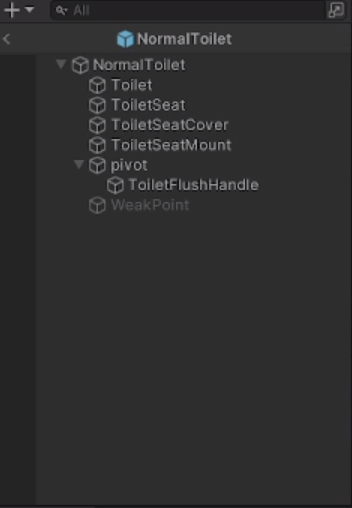
Does anyone know of a method to animate if a player is pressing a toilet lever? obviously the toilet lever will do the animation that it was pulled and return to its original state
*toilet flush handle
that is the correct name xd
hybrid tinsel
errant arrow
how do i change it?
You are looking at the fps set in the file; if you want to change the playback speed that is done in the animator
 wispy token
wheat flint
Does anyone know of a method to animate if a player is pressing a toilet lever? ...
wispy token
wheat flint
Does anyone know of a method to animate if a player is pressing a toilet lever? ...
Not sure what do you have troubles with, of what you are trying ti achieve
stuck elm
Yeah,the question is pretty ambiguous
 stable seal
Hey guys! If I have an animation clip open for my model, is it possible for me to set the current position of my model to the position it's in on the animation? I'm using preview mode to make animations and ewhenever I go off preview mode, the actual model is in a completely different position to the animation, which isn't what I want
agile solstice
stable seal
Hey guys! If I have an animation clip open for my model, is it possible for me t...
What do you mean by "completely different position", where do you need to set the position to?
If you need the gameobject to be in a specific spot when the animation begins, I'd use a script to move it there
Or if it's a cutscene, perhaps use Timeline to ensure it all happens in pre-fixed locations
stable seal
I just want it to appear in the editor where it currently is on the clip I'm previewing, so I can make another animation from that position
This isn't really a case where I'd need a script. I just want to set it's position in the editor like it is when previewing a particular clip, so I can work from that position to make something else
 wanton tusk
Today I am learning about animations. Does anyone know how to make my custom animation from a given model I have from the asset store?
What tools should I use? what are some key words that I should search to learn this + any good personal favourite resources to learn from?
agile solstice
stable seal
This isn't really a case where I'd need a script. I just want to set it's positi...
Then move it? I'm not fully understanding 
stable seal
agile solstice
Then move it? I'm not fully understanding <:UnityChanThink:885169594560544800>
Yeah that's fine if I was dealing with one object which maybe just needs its position or rotation adjusted, when it's about a dozen for one animation that's effort. I could still do it, but I thought there'd be a convenient way to do this in the engine without having to move back and forth between the preview and the editor to make sure it's all aligned.
agile solstice
stable seal
Yeah that's fine if I was dealing with one object which maybe just needs its pos...
Aligned with what?
errant arrow
hybrid tinsel
You are looking at the fps set in the file; if you want to change the playback s...
well i imagine i want to have the fps of my animations match
agile solstice
@errant arrow Did you try tweaking sample rates of the clips
 errant arrow
hm i didnt see that
but i got it playing at the correct speed
problem is when the bool that aftivates the animation gets set to true
the animation starts but never progresses

 random gale
Diving Zombie Boss, diving problem:
In my game there is a character boss that dives, and jumps.
The diving zombie boss has 4 animation that do jumps and dive animations.
When I export my zombie boss to Unity from Mixamo with his dive animation, when the diving zombie boss does his walk animation, then does his jump animation, it's like he does the dive from a standing fixed position, like he does not dive to the left, then continue his walk animation afterwards.
So, I want the boss to dive left, but actually dive 2 meters to the left instead of just doing the animation like he is stuck in his original position.
Can you help with this problem?
Here is a video of what I am seeing with diving zombie.
Do I need to write in C# for Diving Zombie needs to stay in the position he dives to and continue walking from there?
So in the Animation Controller for Diving Zombie boss:
So there is a transition from Entry to the walk animation.
Then there is a transition from walk to the attack animation, Has Exit Time is Unchecked on this transition.
Then there is a transition from the attack animation to the walk animation, Has Exit Time is Checked on this transition.
Then there is a transition from the walk animation to the jump 1 animation Has Exit Time is unchecked.
Then there is a transition from the Jump 1 animation back to the walk animation Has Exit Time is checked.
My friend say:
''Seems like you have the walk animation as default with the animation state.
Moving his position can be done the same time as running the animation in the script.
Honestly most of that positions should correct it self out when you fix the walking, but if not might need to edit the animation a bit.''
using System.Collections;
using System.Collections.Generic;
using UnityEngine;

public class DivingZombie : Enemy
{
    private string[] triggers =
    {
        "Jump 1","Jump 2","Jump 3","Jump 4"
    };
    private string trigger;

    private void Start()
    {
        StartCoroutine(JumpRoutine()); // Start the coroutine for diving.
    }

    // Method to trigger a diving animation.
    public void Jump()
    {
        trigger = triggers[Random.Range(0, triggers.Length)]; // Select a random diving animation trigger.
        Animator.SetBool(trigger, true); // Set the selected animation trigger to true.
        agent.speed = 6f; // Set the NavMeshAgent speed to 6 for diving.
    }

    // Coroutine to repeatedly trigger diving.
    private IEnumerator JumpRoutine()
    {
        yield return new WaitForSeconds(2f); // Wait for 2 seconds before the first dive.
        while (enabled)
        {
            Jump(); // Trigger a dive.
            yield return new WaitForSeconds(5f); // Wait for 5 seconds before the next dive.
        }
    }
}```using System.Collections;
using System.Collections.Generic;
using UnityEngine;
using UnityEngine.AI;
public class JumpStopper : MonoBehaviour
{
private Animator animator;
private NavMeshAgent agent;
private Vector3 Startpos; // Store the starting position of the hips.
public Transform hips;
private string[] triggers =
{
"Jump 1","Jump 2","Jump 3","Jump 4"
};
private void Start()
{
Startpos = hips.position; // Store the initial position of the hips.
animator = GetComponent<Animator>(); // Get the Animator component of this GameObject.
agent = GetComponentInParent<NavMeshAgent>(); // Get the NavMeshAgent component of the parent GameObject.
}
// Method to continue walking after the dive animation.
public void ContinueWalk()
{
// Calculate the distance traveled during the dive.
Vector3 distance = hips.position - Startpos;
// Move the parent object back to its initial position.
transform.parent.position += distance;
agent.speed = 3f; // Set the NavMeshAgent speed to 3 for normal walking.
// Reset all diving animation triggers to false.
foreach (string trigger in triggers)
{
animator.SetBool(trigger, false);
}
}
}
 fleet veldt
make a thread
fleet veldt
random gale
```cs
using System.Collections;
using System.Collections.Generic;
using UnityEng...
cause u use chat gpt
thats the first reason why its not working
fleet veldt
yeah and gives you code which doesnt work
 inland knot
If I duplicate an animation asset (which puts it out of the FBX package) Unity seems unable display a preview model automatically. Is there a way to fix this?
 vestal acorn
Hello, I am trying to do a doom style animated sprite thingy in a 3d environment. However, I cannot figure out how to even make an animated sprite in the first place. I managed to apply a spritesheet as a texture to a Quad, I also managed to splice up the spritesheet into its respective sprites, however I have no clue where to go from here. Any help would be greatly appreciated

Please ping me if responding, thanks
 uncut salmon
vestal acorn
Hello, I am trying to do a doom style animated sprite thingy in a 3d environment...
uncut salmon
vestal acorn
Hello, I am trying to do a doom style animated sprite thingy in a 3d environment...
You can use a SpriteRenderer component and then make an animation from the sprites.
fleet veldt
how can i animate a humanoid?
because i cant use transforms, i have to use the muscles or whatever they are
 crimson delta
Working with a Vroid model, and I wanted to know...how do I create a brand new blendshape? And what I mean by that is...putting in the ARKit 52 blendshapes doesn't move my eyes for LookLeft, LookRight, etc, but I can manually MOVE my eyes myself after finding my eye bones in the Hierarchy.
Well after I go into the Hierarchy and move my eyes to the right for LookRight...how exactly do i register/copy/confirm/create a blendshape of that movement? As far as I know, all I've done is permanently (until I undo it) moved my character's eyes on that model.
Or maybe I can use te hierarchy to modify the existing LookRight blendshape by manually moving my bones to record that for that blendshape but I don't know how, and I can't find resources on that.
And no, the sliders that come wit ARKit blendshapes don't work, the preview doesn't show my eyes moving, so I figured I have ot manually do it
fleet veldt
@stuck timber sorry for pinging you again, but i just found this video, its super useful, i understand it more now
https://youtu.be/LEwYmFT3xDk
this is exactly what i need
 stuck timber
fleet veldt
<@968604165150507078> sorry for pinging you again, but i just found this video, ...
stuck timber
fleet veldt
<@968604165150507078> sorry for pinging you again, but i just found this video, ...
yeah that ones good I suppose .
I've used also these in the past
https://youtu.be/fB0P0C_3sPU?si=-5GrlXTw-xsDipz4
https://youtu.be/chgLRjSaoXc?t=3
fleet veldt
stuck timber
yeah that ones good I suppose .
I've used also these in the past
https://youtu.b...
what do you think so far?
stuck timber
fleet veldt
what do you think so far?
looks good
fleet veldt
i want to blend the animations, but the thing is when i use the blend tree, there is not transition when i change direction
this is what i mean, thats when i use a blend tree

and this is what it looks like by doing it this way

the interuption source is set to next state and the transition to 0.25 on each of the arrows
its hella smooth, but i cant combine forward and side walking animation
fleet veldt
fleet veldt
its hella smooth, but i cant combine forward and side walking animation
i need this but with blending the animations
this is what i do in my code

so basically i need to make transitions in the blend tree
because im using GetAxisRaw so its instant
agile solstice
fleet veldt
so basically i need to make transitions in the blend tree
Blend tree has no "transitions"
The blend is only as instant as your value change
Use GetAxis instead or do your own smoothing for the parameter
 hybrid tinsel
crimson delta
Working with a Vroid model, and I wanted to know...how do I create a brand new b...
hybrid tinsel
crimson delta
Working with a Vroid model, and I wanted to know...how do I create a brand new b...
Blendshapes are generally separate from bone driven deformations in unity; if the eyes are driven by bones then they won't be by blendshapes and vice versa.
 static temple
Hey So i got 3 animations as poses that i want to use as additive. I have no idea what im meant to do or how to do it and im pretty stuck...


my idea was to have the idle pose as the base
and have the rest be additive


and it is not moving what so ever and i have no clue why
when i click play it just goes to idle pose
is there some settings i need to mess with that i am unaware off
static temple
well i just found out i need to have the original pose in frame 0
and now additive works but not really
crystal parrot
hi everyone i have a question, I have a fbx package import with a mesh, a quick rig and an animation clip (read only). I also have 2d sprite sheet animations. My question is, how do I combine these 2? How do I get the rigging from the fbx package? Thank you to whoever answers 
 obtuse sapphire
hey guys, im struggling to make my punch animation perform fully. Any idea on what could be the issue?
If i put the Transition Duration to 0, it just "starts" doing the anim, but goes straight back to idle. So it's at 0.25 in the video.

and it freaking starts at like 20% of the animation, instead of the beginning. And never ends it fully
when i spam, it starts doing it a little more, but that's not a fix 😛
 lost gazelle
Hello, I need some help with animation. I have two fbx armatures with the same bones, but I can't play the same animation from the other armature on the main one.
 red bramble
If the bones match exactly, then you should be able to import them both with the "Generic" animation type
(which is the default)
you would want to make a single animator controller that uses animation clips from one of the imported models
lost gazelle
red bramble
you would want to make a single animator controller that uses animation clips fr...
this didnt work, the character does nothing
red bramble
when you say "the same bones", are you talking about two humanoid characters with roughly equivalent skeletal structures, or do you mean they have identically laid out and shaped bones?
lost gazelle
red bramble
when you say "the same bones", are you talking about two humanoid characters wit...
when I say "the same bones", I am meaning two humanoid characters with the exact same skeleton, same name, same bones, same amount of bones
red bramble
okay, so both Generic and Humanoid animation types should behave properly here
So all of your animations are defined in character A's model, and they're failing to apply to character B.
I created two models with the same skeleton but different meshes. Putting an animator on both and assigning an animation clip from one of the two works correctly.
I don't see any obvious errors if I make the two skeletons different.
although you do see these "Missing!" messages in the Animation window (not the Animator window) if you select something with an animation on it that doesn't match

So I would suggest opening the Animation window and clicking on the character that isn't working (making sure it has the Animator component with the right Animator Controller assigned to it, of course)
see if you get a ton of yellow channels like that
hybrid tinsel
obtuse sapphire
and it freaking starts at like 20% of the animation, instead of the beginning. A...
.25 is 25% of the way through the animation.
obtuse sapphire
hybrid tinsel
.25 is 25% of the way through the animation.
yea ik :/ but when i put it at 0 it doesn't perform it at all. just like a 0.00001 part of the anim
then goes back to idle
i could screenshare if it's easier to show
hybrid tinsel
My point is that those numbers are a percentage of the animation you are devoting to the transition; you can make that shorter, and/or add more lead time to the animation file.
obtuse sapphire
tbh ive tried a bunch of stuff, switching from triggers to bools, playing with the transitions durations, etc. I've been trying to get the animation to perform fully the WHOLE day xd T_T its rly frustrating lol
https://gyazo.com/0f268308eb82c514d2fbd34c61a75f35
this is what happens when the transition duration is at 0

 amber bison
Hi I'm starting to learn and mess with animations and I'm running into an issue where the camera changes from third person to first person for the duration of the animation and then back to third, any ideas what I could have missed?
 agile ruin
How come when i input my animation frames to unity the frames randomly change position slightly? its still there even if i delete and put them again (Original animation for reference)

 hybrid tinsel
agile ruin
How come when i input my animation frames to unity the frames randomly change po...
hybrid tinsel
agile ruin
How come when i input my animation frames to unity the frames randomly change po...
Because your frames are different sizes and/or have different pivot points.
 bleak harness
Anyone know why my walk animations aren't working correctly?
The left and right start to work but are a little laggy but forward and backwards just isn't working correctly
 eager yoke
Hi guys, a friend of mine made a video in Adobe After Effects containing a loop of a card. I want this loop do be added as an animation in Unity so I can decide when to do the next animation. Should this be done by exporting it to many many images and then glueing them together (like this video suggests: https://www.youtube.com/watch?v=KTBOahrXTBE), or are there better ways to import this video as animation?

Do everything inside After Effects and a lightweight open source utility. No scripts, no plugins, no AE expressions. Takes literally a minute to do.
GlueIt download link*: https://github.com/Kavex/GlueIT
*APRIL 4, 2017 - THE ORIGINAL SITE (http://www.varcade.com/blog/glueit-sprite-sheet-maker-download/) LINK NO LONGER WORKS BUT IS STILL HERE FO...
hybrid tinsel
eager yoke
Hi guys, a friend of mine made a video in Adobe After Effects containing a loop ...
I mean, that'll work, or you can just import the images directly and let unity make the sprite sheet. Or you can generate the spritesheet in after effects
Shoebox tools has a good sheet generator too.
eager yoke
hybrid tinsel
I mean, that'll work, or you can just import the images directly and let unity m...
Oee those are amazing Ideas! Thank you very much!
vestal acorn
uncut salmon
You can use a SpriteRenderer component and then make an animation from the sprit...
okay, I did use the spriterendered component, however I have several questions if you don't mind:
How do I scale the sprite on its own?
How do I sort of put the whole spritesheet thing into it? I can only select the seperate sprites I spliced
uncut salmon
vestal acorn
okay, I did use the spriterendered component, however I have several questions i...
-
You scale the PPU of the sprite in the import settings, or scale the game object (not ideal). Or, you redraw the art to scale you want to use and match the PPU of it.
-
You don't put the whole spritesheet. If you're asking about animating it using the sheet, you splice it and create a basica animation where each frame is a different frame of the sheet.
vestal acorn
uncut salmon
1. You scale the PPU of the sprite in the import settings, or scale the game obj...
Hmm. It seems I am not entirely sure how sprite animations function in Unity yet. However, I did try Create > Animation, however it does not allow me to do anything. Both Add property as well as Add keyframe are greyed out.

I am either forgetting something or I am approaching it wrong entirely
 uncut salmon
You need to apply it to an object and animate it that way. It's a visual process, it's probably worth just finding a tutorial on how to animate a sprite. It will take <5 minutes to understand.
vestal acorn
uncut salmon
You need to apply it to an object and animate it that way. It's a visual process...
Ah, okay. If you don't mind, do you know of a good one? I admit it I am not sure if just looking up "animation tutorial" will yield the right result so maybe you know one that fits better
i tried looking for sprite tutorials, problem is it is still all greyed out for me and for them it isnt
uncut salmon

Unity Learn
Sprite Animations are animation clips that are created for 2D assets. There are various ways to create Sprite Animations. One way is to create them from a Sprite Sheet, a collection of Sprites arranged in a grid. The Sprites are then compiled into an Animation Clip that will play each Sprite in order to create the animation, much like a flipbook...
 stable coral
How do I add walking animation to my character?
 fleet veldt
how do i make my player hold the weapon like this?


im going to need to do this for like 100 items
 gusty garnet
stable coral
How do I add walking animation to my character?
gusty garnet
stable coral
How do I add walking animation to my character?
On mixamo you can find some free animations for humanoid rigs.
 winter lagoon
my character does an specific animation very slow how do I speed it up
gusty garnet
winter lagoon
my character does an specific animation very slow how do I speed it up
the blend tree problem right?
if you have no loop time on your animation this also happens
make sure to tick the box on both animations

i just tested it out. if loop time is not ticked the blend tree acts like that, the animations are played very slow
in the asset folder choose your animation package
winter lagoon
I have loop ticked
gusty garnet

did you maybe change the blender speed itself
beside that as mentioned in the blend settins in the motion window the animaiton speed

these are pretty much all the things that could affect the speed
fleet veldt
how can i still use humanoid with this?
my animations are no longer working

i need it humanoid
static temple
fleet veldt
i need it humanoid
dont remove the bones
Im still having issues with additive layers https://cdn.discordapp.com/attachments/915556506328522772/1151236056155430923/2023-09-12_20-18-42.mp4
the ik hand gun position is all correct. the reload does change the positions and everything but i assume i also need to make reload animation for when its pointing up and down
do i actually have to do the same shit that i did for the looks but this time for reload?
hybrid tinsel
gusty garnet
The blend assumes that all the clips are the same length. If one of the clips is a lot longer, then the other slips will be slowed down to match the length.
Because it treats the time as going from 0-1 for each clip.
lost gazelle
Hey I need some help with avatars please
wheat flint
Hey, does anyone know about this error? I wanted to make it so that every time the player pressed E the lever was lowered but the animation only ran once, does anyone have a solution?
also im using this script :void InteractWithObject(GameObject obj) { if (objectAnimator != null) { objectAnimator.SetBool("Flushing", true); } }
lost gazelle
lost gazelle
Hey I need some help with avatars please
I made an avatar for my character, it works, but some bones are missing their animation. Also sometimes the root bone doesnt move the character in animation
hybrid tinsel
lost gazelle
I made an avatar for my character, it works, but some bones are missing their an...
If it is a humanoid avatar, then it will default to only including animation for humanoid definition bones.
lost gazelle
hybrid tinsel
If it is a *humanoid* avatar, then it will default to only including animation f...
I need it to be a humanoid avatar so I can have the same animations work on different characters, but I need other bones to work in animation too
hybrid tinsel
Well, I'd suggest checking the unity manual for more details about precisely what the humanoid avatar process does; you can add extra transforms to it but they won't be retargeted and if they are between humanoid bones then they will likely be ignored because the animation is converted into muscle pose space.
wheat flint
wheat flint
Hey, does anyone know about this error? I wanted to make it so that every time t...
run once per start
lost gazelle
hybrid tinsel
Well, I'd suggest checking the unity manual for more details about precisely wha...
So how do I fix this, I looked and didn’t see anything about it
hybrid tinsel
lost gazelle
So how do I fix this, I looked and didn’t see anything about it
What do you mean by 'fix' it? If the bones are outside of the humanoid structure(stuff like tails or wings or whatever) you can add them as extra transforms on the avater. If they are inside the humanoid structure(extra spine bones) then you can't.
lost gazelle
hybrid tinsel
What do you mean by 'fix' it? If the bones are outside of the humanoid structure...
Oh, I couldn’t find an option for this in unity, I guess I didn’t look hard enough. Do you know where it is?
hybrid tinsel
the import options for the object's rig
I am on my phone so I can't post a screenshot
But there's a foldout optiomn for adding additional bones in the avatar setup tab
lost gazelle
Oh ok
random gale
I can get Diving Zombie boss to walk then do the diving animation with this state machine transition.✅
I can make the diving zombie walk for 10 seconds then do the diving animation.✅
So this is great...but.
If I check loop pose on the jump 1 (which is a dive animation to the right) he does the dive but in place where he stands and it does not look right, like he is rooted to the spot where he stands.
Without loop pose checked the diving zombie boss moves back to his original position where he started the jump 1 (dive to the right animation) after the jump 1 animation is finished.
Do I need to write in C# for the Diving Zombie boss to continue his zombie walk animation from 2 meters to the right after he has done the jump 1 animation.
So I need to update the zombie boss's position based on the jump animation's end position.
I made this video so you can see what is going on with my diving zombie boss.
fleet veldt
sooo, im thinking, i have a holder on my camera for like weapons, axes, u get the point, and thats for like the object which the player holds, and im thinking to have each of the items in the holder have its own arms
like export just the arms from my character
and i can then easily animate everything inside the unity editor
but im not sure how i could attach the arms to the shoulders
IK?
if someone could just watch this video and tell me how hes done it


this is also that he wrote
can someone open a thread and help me out make the same thing?
have each object have its own arms
connected to the rest of the character somehow
also same here

FPS Under Dev with Fullbody System

i need to make this so it wont look weird in multiplayer
lost gazelle
hybrid tinsel
But there's a foldout optiomn for adding additional bones in the avatar setup ta...
Ok I tried to find this but it still didn’t work, can you send a screenshot soon?
hybrid tinsel
lost gazelle
Ok I tried to find this but it still didn’t work, can you send a screenshot soon...
ok, it is the animation tab, a dropdown called Mask
You need to set it to 'from this model' and add your extra bones
 bleak arrow
can any one help me with a certain syntax to access the animation track of timeline asset so that when the game starts i can have the animator changed for that animation track
 livid oriole
Guys
I have animation clips for my weapons in game
How do I actually play the animations?
These are all my clips
 fleet veldt
can someone help me make this?
https://youtu.be/WxqsIGeCxg0?t=143
this is exactly what i want
each item you can hold to have its own arms
but the arms are bugging out
im not sure what i can do
they have to be attached to the shoulders
someone please help i've been stuck at this for like more than a week now
i cant progress any further
fleet veldt
i beg someone just help me out with this
i wanna get back on track but i cant
im willing to even pay at this point
 obsidian stream
My attack animations will repeat whenever transitioning from idle to movement, these are all in 2D Unity, and are 4-directional. How should I fix animator to prevent this from happen?
 lost gazelle
hybrid tinsel
You need to set it to 'from this model' and add your extra bones
lost gazelle
hybrid tinsel
You need to set it to 'from this model' and add your extra bones
Yep, I did that and they still remain unanimated
hybrid tinsel
lost gazelle
Yep, I did that and they still remain unanimated
Are the bones between humanoid bones?
hybrid tinsel
obsidian stream
My attack animations will repeat whenever transitioning from idle to movement, t...
Remove the anystate transitions, probably?
lost gazelle
hybrid tinsel
Are the bones between humanoid bones?
?
hybrid tinsel
lost gazelle
?
I mean like extra spine bones or something. Those won't work.
lost gazelle
I’m meaning about bones for props that are animated
stable coral
how can i add to my character some animation? did you have some tutorial?
gusty garnet
stable coral
how can i add to my character some animation? did you have some tutorial?
Not easy to explain , too many steps, you want to watch some tutorials instead or read some docs on that. A good place to get some free animations is mixamo, but i already mentioned that earlier.
fleet veldt
fleet veldt
can someone help me make this?
https://youtu.be/WxqsIGeCxg0?t=143
please
 plucky viper
guys i want to animate the offset od this material, but when i click to recor it move offset of all materials
lost gazelle
hybrid tinsel
I mean like extra spine bones or something. Those won't work.
Wait, I have to do this for every single animation??
fleet veldt
anyone know how to get over the "Keyframing rotation on humanoid rig is not supported!"
im trying to make animations for my humanoid character in the unity editor
any way to get around this?
hybrid tinsel
lost gazelle
Wait, I have to do this for every single animation??
You can do it once, and then use 'copy from other mask' for the rest.
lost gazelle
hybrid tinsel
You can do it once, and then use 'copy from other mask' for the rest.
I Am a bit confused. It’s on the animation tab right? I need to do it for every animation of the bones are there. Also for other armatures it’s not working on those bones
hybrid tinsel
fleet veldt
im trying to make animations for my humanoid character in the unity editor
They don't want you to edit humanoid transforms in editor. The usual workaround would be to make the animation as generic and then save it to an FBX that you import as humanoid.
hybrid tinsel
lost gazelle
I Am a bit confused. It’s on the animation tab right? I need to do it for every ...
 lost gazelle
hybrid tinsel
lost gazelle
hybrid tinsel
Yes, I have found it and done this. But every other animation I need to do it again
hybrid tinsel
Once you have the mask made, you can copy that mask to other animations.
hybrid tinsel
 lost gazelle
Now it wants me to use an avatar mask
hybrid tinsel
Yes. The mask you made in the previous step
If you haven't actually made one yet, you can't add it
 lost gazelle
? How do I copy the mask from the previous animation
it wants me to choose one of these but that isnt for the actual thing

Ohhhh
Wait
fleet veldt
hybrid tinsel
They don't want you to edit humanoid transforms in editor. The usual workaround ...
oh alright
does it work?
lost gazelle
How do I create the mask for the character and the bones
lost gazelle
hybrid tinsel
Where do I find the mask from the animation
hybrid tinsel
fleet veldt
does it work?
Yes
fleet veldt
i tried it and its too much effort
might just do them in blender
prob easier at this point
hybrid tinsel
Well, that's what they expect you to do
crimson delta
I created a path that a trail of smoke follows, The path is a game object, I copied the path, adn want to mirror it so it's symmetrical with the first one, side by side.
How do I mirror it?
hybrid tinsel
lost gazelle
How do I create the mask for the character and the bones
right click, create>avatar mask
crimson delta
Changing scale below zero doesn't work
hybrid tinsel
Add the skeleton to that, choose the transforms
hybrid tinsel
crimson delta
I created a path that a trail of smoke follows, The path is a game object, I cop...
reverse the sign of the position for each point of the curve on whichever axis?
crimson delta
reverse the sign means what exactly?
obsidian stream
hybrid tinsel
Remove the anystate transitions, probably?
Doing that makes it so that I can't attack
lost gazelle
hybrid tinsel
right click, create>avatar mask
Ik how to create an avatar mask
I don’t know how to add the extra bones and which character to specify
crimson delta
Nah, that didn't quite work
crimson delta
Is there no way to just simply mirror a path over an axis?
wheat flint
Hey, does anyone know about this error? I wanted to make it so that every time the player pressed E the lever was lowered but the animation only ran once per Start, does anyone have a solution?
 orchid pumice
Hello, im a bit newer to animating, but was wondering if I would be able to take a humanoid animation and apply it to this "undead" character. When I try converting the rig over it doesnt seem to help. Is this even possible?


with the exception of eyes, the generic (left) and the model I want to use (right) have the same bone structure, so I seen no reason why this wouldn't work. Also they are both from protofactor so I feel like that raises the chance that they would mesh
 orchid pumice
got it figured out. For anyone wondering you just have to convert you model / animations to humanoid. This tut works https://www.youtube.com/watch?v=Cxn24UKtw4A

Unity Tutorial - How to convert Generic to Humanoid
► Twitch = http://www.twitch.tv/theMessyCoder
► Discord = http://bit.ly/messydiscord
► Unity3D asset store = http://bit.ly/themessystore
In this video I show how you can convert generic models & animations to humanoid manually and then I show how you can use UMotionPro to help speed up the pro...
 jovial lark
I'm trying to import a png file to unity but despite setting the compress setting to none my image is still being compressed/distorted, has anyone had this same problem?
this is for unity 2d
edgy pelican
Yo,
anyone has experience with Mechanim (Humanoid Rig) + Facial ?
lost gazelle
I need some help please
I have some avatars and I need help with the rigs
Some bones don’t have animation anymore
full bridge
what program do you guys use to animate 2D drawing
 west chasm
Hi animators, all I'm trying to do is make it so that when my player picks up a puzzle piece a different animation is displayed on the UI but I'm new to unity and don't know how to code with tutourials and can barely use the animator. Anyone generous enough to walk me through this process?
jovial lark
full bridge
what program do you guys use to animate 2D drawing
Aseprite
full bridge
and for non pixelart
been using asesprite for a while know and wanne try something else
jovial lark
Oh I haven't really been using anything else currently, I don't have much experience with 2d animation
full bridge
ive been using clip studio paint to draw art but animating in it has been a struggle
hybrid tinsel
Anyone happen to know what to add to a script to execute while timeline/animation preview is running? I remember that such a thing exists but not what it is called to search for
 prisma lintel
Question. Im new to animation and have been using aseprite and its great, Im now importing my sprite sheets into unity and have suddenly just realized....animations dont save over...and you have to reanimate the timing in unities animator...now treat me like a child when I ask this question...but isnt this anti condusive or anti productive? If you spend time animation something why would you animate it a 2nd time in the game engine and not just have it running as a gif?
 past plover
Hello! Im starting work on a retro styled FPS and am working on adding basic weapon bobbing to the weapon using basic animations. I have added in a basic sway left to right kind of animation to the sprite and have also setup to have transitions back and forth between the default state and the moving state.

However Im running into the issue of the animation having a hard cut back to its default resting state without any smooth transition out of its current state
I was wondering if there was anyway to script it so the animation can grab where its at and smoothly transition to its default standing position instead just hard cutting back to default once the triggers have been activated
{

    public Animator gunAnim;

    // Start is called before the first frame update
    void Start()
    {

    }

    // Update is called once per frame
    void Update()
    {
        if (Input.GetKeyDown(KeyCode.W) || Input.GetKeyDown(KeyCode.S))
        {
            gunAnim.SetTrigger("Bob");
            gunAnim.ResetTrigger("Stop");
        }
        if (Input.GetKeyUp(KeyCode.W) || Input.GetKeyUp(KeyCode.S))
        {
            gunAnim.SetTrigger("Stop");
            gunAnim.ResetTrigger("Bob");
        }
    }
}```I have a very basic script attached for this animation to trigger. Not sure if I was supposed to go to scripting or here, so sorry if Im in the wrong channel for this type of question
past plover
Ive checked online and it seems like maybe crossfade might do that? Not sure
 slow veldt
Hey Idk where to ask this but I have a question about the Unity's spline tool. I want to make a train with multiple carts follow the spline but now I only have the front following the spline and I don't know how I can make all the carts follow it as well. Does anybody have an idea how I can do this?
crimson delta
I figured out how to do my tornado like effect, it was literally just using Velocity Over Lifetime
 echo flume
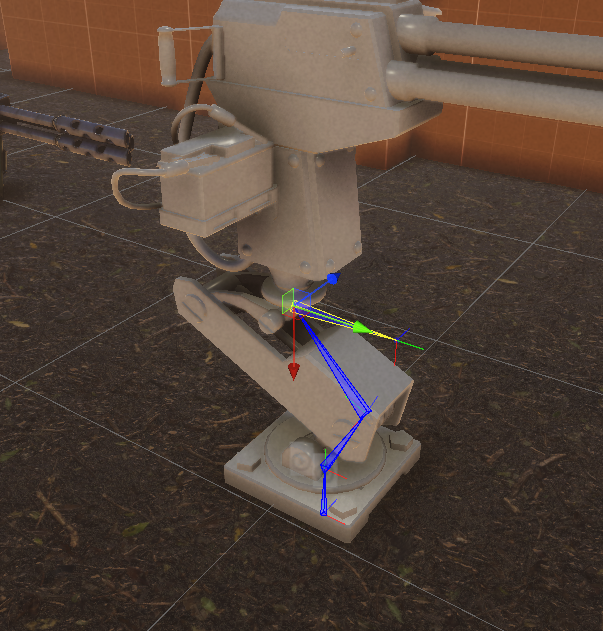
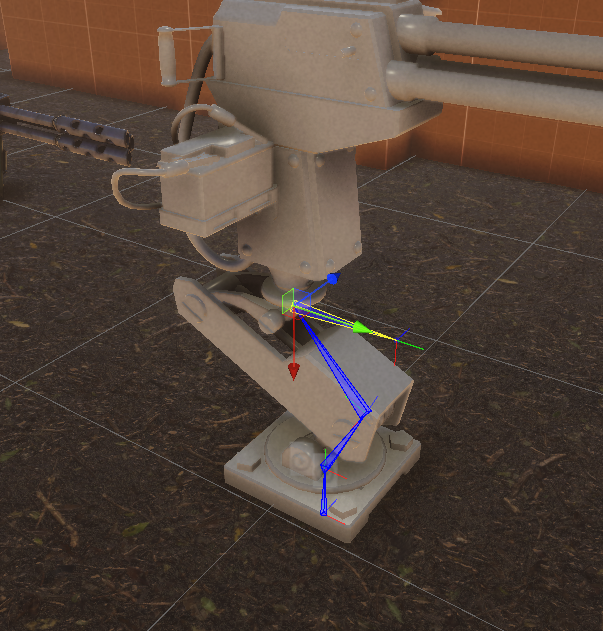
do we have any pro within animation rigging here?
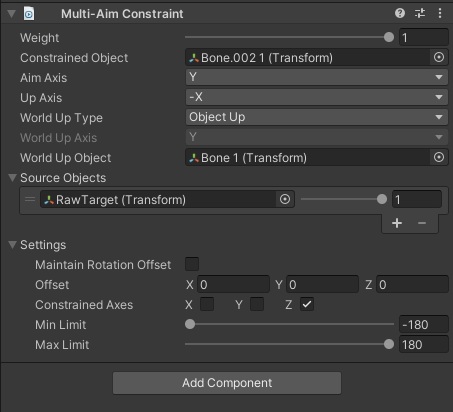
Ive been trying to set up a turret with multi aim constrains and Im about to pull my hair..
I get the base rotation to work but I cant get it to aim up and down
https://i.gyazo.com/ec3f1f078e96b7e9f0e8417db77f9caa.png local axis
https://i.gyazo.com/3731dce712f421aae5ac1f0d0af9883e.png setup
 hybrid tinsel
prisma lintel
Question. Im new to animation and have been using aseprite and its great, Im now...
hybrid tinsel
prisma lintel
Question. Im new to animation and have been using aseprite and its great, Im now...
Isn't there an aseprite importer that handles animation?
wheat flint
Anyone knows how to solve this error in which objects that contain the same animator, having one instance reproducing the animation, all instances will do the same?
echo flume
does it happen even if you leave prefab mode in the hierarchy? and how does the code look like
wheat flint
echo flume
does it happen even if you leave prefab mode in the hierarchy? and how does the ...
here its (the interactiveButton tag is the toilet flush handle tag)``` public float interactDistance = 3f;
public Animator objectAnimator;
void Start()
{
    objectAnimator = GetComponent<Animator>();
}

void Update()
{
    if (Input.GetKey(KeyCode.E))
    {
        Ray ray = Camera.main.ScreenPointToRay(new Vector3(Screen.width / 2, Screen.height / 2, 0));
        RaycastHit hit;

        if (Physics.Raycast(ray, out hit, interactDistance))
        {
            if (hit.collider.gameObject.CompareTag("InteractiveButton"))
            {
                InteractWithObject(gameObject);
            }
        }
    }
    else
    {
        objectAnimator.SetBool("Flushing", false);
    }
}

void InteractWithObject(GameObject obj)
{
    if (objectAnimator != null)
    {
        objectAnimator.SetBool("Flushing", true);
    }
}
and what do you mean with prefab mode?
echo flume
InteractWithObject(gameObject);
shouldnt that line be
InteractWithObject(hit.transform.gameObject);
ah wait nvm this is on the actual toilet, right?
the script
echo flume
in the video that you sent, inside of your hierarchy you can see that you got the actual prefab selected and not the scene hierarchy, it would be wierd if that was the issue but can you try and unfocus the prefab in the hierarchy ?
wheat flint
yeah
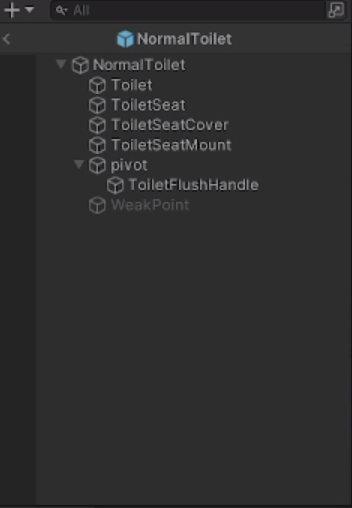 echo flume
Wait nvm I think I know what it is
if (Physics.Raycast(ray, out hit, interactDistance && hit.transform == transform))
echo flume
did it work?
wheat flint
echo flume
did it work?
welp, this seems to have disabled the animation/interaction
hot dock
I'm using a unity blend tree for a character walking motion and when I try to make the character go diaganol in the blend tree it goes the right speed, but in the game it ends up being slowed down and then the characters steps dont match the move speed
 stoic depot
Is there no way to hear audio while in preview mode?
Not even with a package or smth?
agile solstice
stoic depot
Is there no way to hear audio while in preview mode?
What's "preview mode" in this context?
stoic depot
agile solstice
What's "preview mode" in this context?
The animation preview in the Editor
agile solstice
stoic depot
The animation preview in the Editor
Probably not easily
You can call AudioSources to play in the editor with scripts that run outside of play mode, but the animation preview of the inspector is not coded to care about any other components afaik
I prefer to use the scene window for previewing animations anyway
stoic depot
So there is no way in unity to sync animation and audio/other events unless I press play?
agile solstice
As I said, I believe you can
stoic depot
But how do I make a script that runs outside of Play mode?
 wooden lark
can somone help me make animation of a updown 2d game
crimson delta
Still asking, can anyone help me with this? Want to make the particles all flow upward in a line, not spread out at the top there. There is no gravity modifier applied, just velocity over time.
 wooden lark
crimson delta
Still asking, can anyone help me with this? Want to make the particles all flow ...
wooden lark
crimson delta
Still asking, can anyone help me with this? Want to make the particles all flow ...
not that many pepole in animation chat ,-,
 cursive hollow
1 - its from animation package, rest are from mixamo / net. Why is there such a big difference?
 wooden lark
can anyone help me get updown movment with animation
wooden lark
.-.
agile solstice
crimson delta
Still asking, can anyone help me with this? Want to make the particles all flow ...
This is not an animation question
agile solstice
wooden lark
can anyone help me get updown movment with animation
You have to be more specific
wooden lark
i just want help geting top down movment into my game i dont think i can add more to that
agile solstice
cursive hollow
1 - its from animation package, rest are from mixamo / net. Why is there such a ...
Because the proportions are different
Animations only store rotations, so if the skeletons have a different shape the rotation error becomes multiplied down the limb chain
IK must be used to ensure a specific end position of for a limb chain
agile solstice
wooden lark
i just want help geting top down movment into my game i dont think i can add mor...
You will only get help if you can point to specific problems or obstacles and can show effort in solving them yourself first
crimson delta
agile solstice
You will only get help if you can point to specific problems or obstacles and ca...
Which is BS beceause there's no way for anyone here to know if someone asking a question put in zero effort, or put in a lot of effort.
Is this high school, you want us to show your work before someone on here decides to help?
A bit silly
agile solstice
crimson delta
Is this high school, you want us to show your work before someone on here decide...
Not as a general rule
We're happy as long as it's possible to see a sign that someone's walking the path themselves and aren't expecting handholding
If one is stuck on that path, then I like to help them get moving again
hybrid tinsel
stoic depot
So there is no way in unity to sync animation and audio/other events unless I pr...
The easiest way is to use timeline
hybrid tinsel
crimson delta
Is this high school, you want us to show your work before someone on here decide...
This is a room full of people donating their time to help, but they are unable to read minds so if you can't articulate what you need there isn't much to be done.
hybrid tinsel
crimson delta
Which is BS beceause there's no way for anyone here to know if someone asking a ...
I can't even figure out what hrldon wants, and they mihht not even be asking for something appropriate to this channel
wooden lark
can somone help me with updown movment code and animation
wooden lark
hybrid tinsel
I can't even figure out what hrldon wants, and they mihht not even be asking for...
then wich channle somone led me to this channle for animating and codeing up down movment
agile solstice
wooden lark
then wich channle somone led me to this channle for animating and codeing up dow...
This is the right place for the topic, but your approach to learning game development is wrong
wooden lark
agile solstice
This is the right place for the topic, but your approach to learning game develo...
ok thx
 final wagon
Is there a something to learn animation
agile solstice
final wagon
Is there a something to learn animation
There sure are a lot of resources for it
But since there are many styles of animation you'd have to look for a specific one
Additionally the technologies to make animations and to implement them in game engines are often different
 iron cobalt
Can someone help me? I made a animation in blender, and when I import into unity I get like 30-40 actions
 agile solstice
iron cobalt
Can someone help me? I made a animation in blender, and when I import into unity...
agile solstice
iron cobalt
Can someone help me? I made a animation in blender, and when I import into unity...
Blender actions are stored per-object or per-armature
An armature can have multiple animated bones in an action so you'll probably want that if they're meant to move together
The individual objects can then be parented to bones if you want to keep them separate and don't want to merge and weight them to the armature like you would when rigging a character mesh
iron cobalt
agile solstice
Blender actions are stored per-object or per-armature
An armature can have multi...
Is there a way for me to find the one animation I made for it?
hybrid tinsel
iron cobalt
I'm not a blender user but I believe that unity will default to creating a clip for all 'actions' or 'takes' in the source file. You can edit that in the file importer dialogue.
agile solstice
iron cobalt
Is there a way for me to find the one animation I made for it?
I don't think there is any "one" animation, even in Blender
Blender plays all the objects' associated actions in sync when you preview the animation there
iron cobalt
hybrid tinsel
I'm not a blender user but I believe that unity will default to creating a clip ...
How would I set that up from when I imprt the fbx into unity
iron cobalt
agile solstice
I don't think there is any "one" animation, even in Blender
Blender plays all th...
Baking it doesn't turn it into 1 animation?
agile solstice
iron cobalt
Baking it doesn't turn it into 1 animation?
Keyframe data must be tied to an object, baked or not
If the objects are separate, they must each be in control of their own animation
iron cobalt
agile solstice
Keyframe data must be tied to an object, baked or not
If the objects are separat...
Its a door with like 6 parts.
 agile solstice
iron cobalt
Its a door with like 6 parts.
agile solstice
iron cobalt
Its a door with like 6 parts.
Like previously mentioned you'll probably want the animation in an armature, since it can be solely responsible for animation of all bone transforms in its hierarchy and let them share actions that way
If there is some way to do the same with non-armature objects, I have not figured out what's the way to do it
 formal schooner
Hey! Can someone help me understand why my animation is doing this? See video. I'm currently finishing up Creating With Code 2, and am in the process of replacing all primitives in my near-finished "game" with existing assets. I thought it would be even better with adding animation, which I had done earlier in the course. But something is acting up. Here's what I want to achieve:
- When the player runs, play the running Running_Static animation
- When the player stands still, play the Idle animation
Here is my full Player script:
And here's an excerpt which sets my paramter bool:
https://gdl.space/inaqiqexek.cpp
        //Animation
        if (Input.GetAxis("Vertical") > 0)
        {
           playerAnim.SetBool("Running_b", true);
        }

        else
        {
            playerAnim.SetBool("Running_b", false);
        }
What are the transition settings from run_static to idle like
That's the one that seems to start when it shouldn't
formal schooner
agile solstice
What are the transition settings from run_static to idle like
I wanted to show you, but after posting my message I decided to start over by deleting the assets, and re-importing them. I had played a bit with the parameters and wanted everything to be as it was when I originally imported. That broke something. 😅 So I'm first rebuilding and then I'll try again and post here. 😒
stable coral
someone know why i get this?

 agile solstice
stable coral
someone know why i get this?
agile solstice
stable coral
someone know why i get this?
Either no animation is playing or the animation is not humanoid-compatible
 untold rampart
Hey, folk. So I am taking a prefab that I see in a scene in the first pic - the fishing rod. It has an Animator attached to it which matches the animation on this current character.
Anyway, I took the prefab and put it into the same bone position on the character in my practice project, and it's much, much smaller and in the wrong position, even when I give it the same transform data. And it's in the same bone for sure, so it should just work with the humanoid, afaiu.
 stable coral
agile solstice
Either no animation is playing or the animation is not humanoid-compatible
stable coral
agile solstice
Either no animation is playing or the animation is not humanoid-compatible
i downloaded it from mixamo
stable coral
agile solstice
Either no animation is playing or the animation is not humanoid-compatible
fix it, i set only the one wlking as humanoid
thx
hybrid tinsel
untold rampart
Hey, folk. So I am taking a prefab that I see in a scene in the first pic - the ...
Did you include all humanoid bones in the export or only the skinned ones?
 weary pond
Hello ! I have an gunsling animation which is launched randomly after an idle and I want to know make the gunsling cancellable. For example if I start running while being in the gunsling animation, it cancels out and start animation run. In fact, I need every state to cancel the gunsling. How can I do it ? Thanks !
 random gale
using System.Collections;
using System.Collections.Generic;
using UnityEngine;

public class ZombieBossTenSecondParticleSystem : MonoBehaviour
{
    // Reference to the particle system attached to the zombie.
    public ParticleSystem zombieParticleSystem;

    // The time interval (in seconds) between each particle system activation.
    public float interval = 20f;

    // Timer to keep track of the elapsed time.
    private float timer = 0f;

    private void Start()
    {
        // Check if a ParticleSystem component was assigned.
        if (zombieParticleSystem == null)
        {
            Debug.LogError("No ParticleSystem assigned to the script.");
            enabled = false; // Disable this script to prevent errors.
            return;
        }

        // Initialize the timer to start counting.
        timer = interval;
    }

    private void Update()
    {
        // Decrement the timer by the time elapsed in the last frame.
        timer -= Time.deltaTime;

        // Check if the timer has reached or gone below zero.
        if (timer <= 0f)
        {
            // Trigger the particle system to play.
            PlayParticles();

            // Reset the timer to the specified interval.
            timer = interval;
        }
    }

    // Function to play the particle system.
    private void PlayParticles()
    {
        Debug.Log("Playing particles!"); // Add this line to check if this method is called.

        // Check if the particle system is not already playing.
        if (!zombieParticleSystem.isPlaying)
        {
            // Start playing the particle system.
            zombieParticleSystem.Play();

            // You can also add additional logic here if needed.
            // For example, you can play a sound effect or apply gameplay effects.
        }
    }
}```This script chatgpt does not work to play a particle system on a object after 20 seconds, what is wrong in the script?
The particle system is a child on the cube and the particle system is in the box of the script.
hybrid tinsel
random gale
This script chatgpt does not work to play a particle system on a object after 20...
What is wrong is using chatgpt.
random gale
hybrid tinsel
What is wrong is using chatgpt.
yup he wup my ass sometimes
 gleaming timber
what are these lines?

 zenith fable
Hey, I need some help on making an object appearing or disappearing when its animated or not, I am doing a FPS animation which consists on the arms picking up a box, but I don't know how to make the box disappear at the end of the animation and when it is not animated at the start, I was told to use "SetActive()" but I don't know what the hole script will consist of, I also don't know how where does the script needs to be added, is it in the prefab or only in the object, I also don't know how can I tell the code if the animations playing or not, I tried using a bool parameter in the animator but I didn't got it to work. Some help will be deeply appreciated
gleaming timber
zenith fable
Hey, I need some help on making an object appearing or disappearing when its ani...
you can do this in different ways... the easier is to add an event inside the animation. than append every method you want
zenith fable
gleaming timber
you can do this in different ways... the easier is to add an event inside the an...
do you have a tutorial on this?
gleaming timber
 zenith fable
thx
untold rampart
hybrid tinsel
Did you include all humanoid bones in the export or only the skinned ones?
I am not entirely sure what this means, but I can do some Googling when home later.
untold rampart
But then what about all the golden toilet salesmen?
 little path
 pliant tulip
I have a problem, when I run and attack, it keep on playing that animation but it stops when I stops moving or just walking, how can I fix that?
zenith fable
Hey, Using a script and Animation Events I made an prefab disappear when its animation was not playing, I got it to work but now the animation won't start, I believe it is because the script for making the prefab disappear is present in a parent of the it but the script that launches the animation is in the prefab itself and that maybe causes a bug when the two got to start at the same time, I tested and saw that the animation was not starting at all in the Animator, is there any way to fix this?
 frosty notch
Hey there, i have sprite sheet animations that has a freezing problem but can't figure out how to solve this issue
basically i have a player character with sprite sheet set attack animations that i play using Animator.Crossfade, but when setting up the animations i have this weird invisible frame at the end that i can't edit or remove and that causes the animation to freeze on the last frame, any ideas why this happens or how to remove this last ghost frame?
also i'm pretty sure the sprite sheets are set correctly since they don't have an extra invisible frame (i checked multiple times)

 random gale
untold rampart
But then what about all the golden toilet salesmen?
random gale
untold rampart
But then what about all the golden toilet salesmen?
they can shit on the regular with the riff raff
pliant tulip
pliant tulip
I have a problem, when I run and attack, it keep on playing that animation but i...
does anyone know the issue with the animatino?
hybrid tinsel
pliant tulip
does anyone know the issue with the animatino?
Instead of just repeating your question, can you try providing more information?
pliant tulip
I don't know what I'm supposed to say
 severe canopy
could someone help me with animations


I wanna play knife animation after pickup the knife object
Wanna make the knife play attack animtion for the player
pliant tulip
hybrid tinsel
Instead of just repeating your question, can you try providing more information?
I don't know what more to say
pliant tulip
pliant tulip
I have a problem, when I run and attack, it keep on playing that animation but i...
I got an issue with the animation, the attacks when do a slice attack works for the three other animations, but when i hold in shift to run and make an attack, the animation keep on repeating the same running attack and it only disappears when I walk or just stop running
hybrid tinsel
pliant tulip
I got an issue with the animation, the attacks when do a slice attack works for ...
You don't show your code, you don't show your animator, you don't describe what SHOULD happen...
frosty notch
frosty notch
Hey there, i have sprite sheet animations that has a freezing problem but can't ...
any help with this? i really can't figure out how or why this freezing key frame is appearing and i can't find anything online :((((
pliant tulip
hybrid tinsel
You don't show your code, you don't show your animator, you don't describe what ...
I did show the animator in the video


 hybrid tinsel
Ah, yes, sorry. seems my phone hadn't loaded the whole video.
Though an explanatiuon of what we're looking at might still help.
pliant tulip
pliant tulip
two images below is showing the arrows which I normally use for when the player attack while at the top is having the issue
frosty notch
pliant tulip
wow that's a whoole spider web in there :///
pliant tulip
yeah I know my second game is going to be bigger
frosty notch
yeah i really hate working with the animator just because of these :(((
pliant tulip
yet I still don't know why the run attack is the only one that is not working
hybrid tinsel
I personally put my attacks on a second layer that overrides the locomotion
But that doesn't work for everyone
 devout moth
I'm not sure if this is the right channel, but I'm trying to upload a 3d model to vr chat using unity and I had to add an animator component coz there was an error in the vrchat sdk companion thing about no animator component. However, I'm not sure what all the settings mean and I'm not sure where to find any guides that are up to date.
 hybrid tinsel
devout moth
I'm not sure if this is the right channel, but I'm trying to upload a 3d model t...
hybrid tinsel
devout moth
I'm not sure if this is the right channel, but I'm trying to upload a 3d model t...
Have you tried the vrchat server? Most of us here aren't reallt familiar with the specifics of what it needs
devout moth
hybrid tinsel
Have you tried the vrchat server? Most of us here aren't reallt familiar with th...
no, i will do that now.
hybrid tinsel
Good luck getting it to work!
agile solstice
pliant tulip
yeah I know my second game is going to be bigger
Look into utilizing animation layers, sub state machines and blend trees to design simpler and more efficient animators
But that's just a general tip for the future
hybrid tinsel
@pliant tulipSo are your bools being set correctly during gameplay?
agile solstice
frosty notch
Hey there, i have sprite sheet animations that has a freezing problem but can't ...
What you're looking at on the animation timeline is not a "ghost frame" but the minimum length a keyframe can have, the length of one sample or "frame" as you think of them
The delay is more likely because you're using crossfade
You can't blend or crossfade sprite animation, because there fundamentally is no interpolated state between two sprite frames
It just picks the one that has the most weight
This causes the sprite change to be delayed or flicker between sprites with competing blends
pliant tulip
agile solstice
Look into utilizing animation layers, sub state machines and blend trees to desi...
ok
frosty notch
so what can i do to fix it? is there another function to play animations through code without going throught setting them up in the anim controller?
agile solstice
frosty notch
so what can i do to fix it? is there another function to play animations through...
Animator.Play()
Iirc it cannot replay an animation state that's already active though
But that's probably a limitation with the other functions too
frosty notch
okay i will try replacing it and see how it goes
cerulean ore
In a 2D project with sprite rigging, how would I do an animation with rooting the feet, so I can move the hips without the rest of the body moving?
Currently, the hips are the parent of the rig
So if I move the hips, then the body just moves with it
oh sounds like i need to do IK?
agile solstice
cerulean ore
oh sounds like i need to do IK?
Yes
cerulean ore
sweet
random gale
This script will make a zombie do a animation it got from mixamo every 10 seconds, you could use it for a boss attack every 10 seconds.
drag the animation into the fil=eld in the script in the inspector, and select the animator controller for that zombie in the box filed in the inspector.
then add the attack animation in the animator controller, but have the animation not do any transitions from other animations.
using System.Collections;
using UnityEngine;

public class ZombieBossTenSecondAnimation : MonoBehaviour
{
    public Animator animator; // Reference to the Animator component (if needed).

    // Name of the animation to play for this specific zombie boss.
    public AnimationClip animationClip; // Drag the animation clip into this field.
    public float initialDelay = 10f; // Initial delay before the first animation.
    public float interval = 10f; // Time interval between animations.

    private void Start()
    {
        // Start the coroutine to play the animation after the initial delay and repeat every interval.
        StartCoroutine(PlayAnimationRoutine());
    }

    private IEnumerator PlayAnimationRoutine()
    {
        yield return new WaitForSeconds(initialDelay); // Initial delay.

        while (true) // Infinite loop to keep playing animations.
        {
            // Trigger the animation.
            animator.Play(animationClip.name); // (if using Animator)

            // Wait for the specified interval before playing the animation again.
            yield return new WaitForSeconds(interval);
        }
    }
}```If i have an .anim file that is a pose, how do i get my model in the Play scene to do the pose? Where do i put this .anim file on my model hierarchy so they do it when i press Play?
agile solstice
crimson delta
If i have an .anim file that is a pose, how do i get my model in the Play scene ...
That's handled by the Animator
https://youtu.be/sgHicuJAu3g?t=127
You can add animations to your controller by drag&dropping the animation assets into the animator window
 marsh zephyr
 agile solstice
marsh zephyr
agile solstice
marsh zephyr
Delays and transition offsets are handled in the individual transition settings
marsh zephyr
I've set "Has Exit Time" to off and "Transition Duration" to 0 in both setups
I am pretty sure it's something specific with using the "Any State" state
 sour lava
how can i setup a 2d sprite animation so i can set different times for windup, swing and cooloff through script?
agile solstice
sour lava
how can i setup a 2d sprite animation so i can set different times for windup, s...
You would build a state machine that implements delays
Or use the Animator which does just that
 quiet ivy
Hello, I have a problem: I need to make animation the enemy die like in super mario bros nes? (if necessary I can show the enemy script)
agile solstice
quiet ivy
Hello, I have a problem: I need to make animation the enemy die like in super ma...
That doesn't sound like a problem
quiet ivy
agile solstice
That doesn't sound like a problem
Well, for me now this is a problem, as for a beginner
like that
 agile solstice
quiet ivy
Well, for me now this is a problem, as for a beginner
agile solstice
quiet ivy
Well, for me now this is a problem, as for a beginner
The likely simplest way to do it is to have a squashed sprite for the enemy, and play that sprite as animation when enemy is killed
Or instantiate a prefab that's just the squashed sprite, as there's no need to have a functional enemy gameobject after it's stomped
quiet ivy
agile solstice
The likely simplest way to do it is to have a squashed sprite for the enemy, and...
Can you show how it should look in code or post a video on this topic?
agile solstice
quiet ivy
Can you show how it should look in code or post a video on this topic?
I don't have any example of something so specific
quiet ivy
ok
sour lava
for a simple animation like this. if i want to implement a delay in it through script ( stay on frame 3 untill attack is completed ) how can i accomplish that?

ive already written some statemachines for attacks, but no clue on how to match my animations to it
 snow depot
@sour lava animation event
 sick spindle
Is there any way to stop an animation from moving an object away from the origin of its parent? I downloaded some mixamo attack animations which dont have an in place check so they offset themselves and dont go back after attacking
crimson delta
agile solstice
That's handled by the Animator
<https://youtu.be/sgHicuJAu3g?t=127>
Would I need two different Controllers for tow different models being animated separately
agile solstice
crimson delta
Would I need two different Controllers for tow different models being animated s...
Are the different models connected in some way?
sour lava
snow depot
<@151433383413547020> animation event
thanks, ill look those up
snow depot
@sick spindle The problem is that those animations were made with characters moving in mind
you can delete the root gameobject property in the animation file, which requires that you duplicate the original animation file so that it's no longer readonly
it's not going to look good
sick spindle
snow depot
you can delete the root gameobject property in the animation file, which require...
yeah i found that to be a solution
its not nice
sick spindle
so im going to attempt to move my parent in accordance with animator.deltaPosition
snow depot
have that character model be the child of a gameobject that has all your player scripts on it
sick spindle
yeah the main problem is that it calculates the rotation based on a parent rather than the object that gets animated so when the animated object gets offset by root motion the radius of rotation gets altered
crimson delta
agile solstice
Are the different models connected in some way?
No, but I got it ot work, I did have ot use two diff controllers so i could have each of them pose different
snow depot
@sick spindle is it possible to take the animation data from the original and put it in an animationcurve?
what I mean is that the animation file itself won't modify the root
but you can manually move the parent with the root animation data?
sick spindle
you can definitely remove the root motion in the animation curve i did that already
but im still on the fence about whether I want the motion or not
because one of them is a greatsword jump attack
and it doesnt feel quite right in place
snow depot
don't you just want the y motion then? I assume the character physically jumps
sick spindle
oh yeah i kept the y* motion
but like
the feet placement looks off if they're standing in place
because in the original they step forwards
snow depot
rip. There's only so much you can do with assets that weren't purpose made for your game
sick spindle
yeah its only a school project so im not super worried in the long run
anyways i have my solutions I just need to mix and match etc.
agile solstice
crimson delta
No, but I got it ot work, I did have ot use two diff controllers so i could have...
Yes, each individually animated gameobject hierarchy should have its own Animator and Controller
If they're individually animated in the same hierarchy, then animation layers and nested Animators are both options with their own tradeoffs
crimson delta
I'm working with VRM models, would you know how ot make it so their necks and heads can rotate? LIke I can manually rotate it myself? Scale seems to be the only option that works in Unity when I click on their Head or Neck in the hierarchy
Or maybe I just can't do it in an active Play scene
Is there a way to apply a .anim pose outside of Play Scene so i can line up my models how I want before pressing Play?
or will the .anim pose ONLY work after I press play?
 bleak glacier
Hi! Does anyone know how to have two objects animated in the same animation?
I'm trying to take the object in the glass case and move it down as same colored cylinders move through the glass cylinders, like water pumping through a pipe.

 hard brook
do you need to be working with a human rig to use animation layers? i have a mech robot im working with and wonder if i need a different approach to do what i want
jovial lark
Does anyone know how to move a sprite in an animation? here in the video you can see that the sprite automatically centers on the player location, and I do not know how to change this
hybrid tinsel
hard brook
do you need to be working with a human rig to use animation layers? i have a mec...
Nope. You might need an avatar mask in some cases, though.
hybrid tinsel
bleak glacier
I'm trying to take the object in the glass case and move it down as same colored...
Either have the animator on a parent object of both objects, or use timeline.
stuck elm
crimson delta
I'm working with VRM models, would you know how ot make it so their necks and he...
If you are using UniVRM, they have a script on the character that controls the head and neck for look IK- you either need to disable that, or control it yourself.
 mortal zealot
Hi. I am currently using skeletal animation for 2d. Can I change the bone sprite somehow. It baffles me that the sprite is one, and not a composite of other sprites
agile solstice
mortal zealot
Hi. I am currently using skeletal animation for 2d. Can I change the bone sprite...
 hallow bay
currently working with rotation animations, and I've seem to run into a problem where I believe an animation isn't finishing correctly, causing it to slowly become more and more offset, despite the values on the curves being the correct rotations
 mortal zealot
agile solstice
<https://docs.unity3d.com/Packages/com.unity.2d.animation@8.0/manual/SpriteSwapI...
mortal zealot
agile solstice
<https://docs.unity3d.com/Packages/com.unity.2d.animation@8.0/manual/SpriteSwapI...
ty!
bleak glacier
hybrid tinsel
Either have the animator on a parent object of both objects, or use timeline.
Thank you! (not gonna do ping just in case)
 solar halo
Why does my character's legs break when playing an animation? All downloaded from the MIXAMO. What to do with it

 gritty walrus
Hi everyone!
So I'm trying to create a simple equip animation, and I made a test one to make sure its working. However, when I try to edit the animation, it seems it completely ignores it, even after restarting the play view. The animation updates correctly, as shown in the gif, when I preview, it plays the new animation, however when I go to pick up my gun, it plays the old, test animation.
The animator is switching to the animation clip properly, however it for some reason is not updating the animation! I've checked that it IS the same animation and there is no duplicates in my assets.
 gritty walrus
Ok! So I can modify the position of the gun, but for some reason the rotation of the gun is not being updated, even with keyframes.
Fixed it. For some reason it allows the gun to be moved anywhere and will be updated, but the rotation doesnt get updated. To fix, I just created an empty game object and used that to rotate, then made the gun a child of the game object
 signal mulch
Hi hoping this is the proper spot to ask, Im working on an assignment and Im strggling with the animation, dose anyone have some time to help?
agile solstice
signal mulch
Hi hoping this is the proper spot to ask, Im working on an assignment and Im str...
It's best to ask specific questions so someone who knows the answer can get spot it
signal mulch
ok. . . . .Im trying to move objects if the player interacts with them, as well as hiding and unhiding if the object is in the player's possesion
Im also trying to make an object spin, and another object create an emission light
Im open for a Dm if anyone would like to have a better understanding
 crisp jungle
Uhh... so I've got two animations - riverE and riverE_W, and whenever I do Play(riverE_W) it plays riverE. Is this a quirk of the animator?
Do I have to rejigger the names so there are no nested titles?
It will be inconvenient so I'd rather not
Oh never mind. riverE is just the default state. So something else is wrong
hybrid tinsel
crisp jungle
Uhh... so I've got two animations - riverE and riverE_W, and whenever I do Play(...
That shouldn't work at all
You're supposed to give it a string
crisp jungle
I wasn't giving literal code
The problem was that I changed the name of the animation 'asset' but not in the 'state,' which is the only place where it looks
hybrid tinsel
That would do it
crisp jungle
Yeah it's kind of confusing... I feel if you change the name of the animation it should also change the name of the states for that animation
not sure why that would be separate
but there's probably reasons
hybrid tinsel
There is a pretty good reason.
You can have animator variants that use the same states but different animations.
So if changing the clips changed the states it would totally break.
frosty notch
Hey there guys! i've asked this question before but did not get any answers, basically i have a characters sprite sheet animations and use them to create some animations, i use animator.play(int StateNameHash) to play them through code, however the animations have this weird freeze at the end where they freeze at the last sprite frame
I also have this weird extra space in my animation window where the last sprite is in the animation (not sure if it's just something normal) but idk if it's what causing the animation to lock on the last frame, can anybody help me solve this issue?
here's what i tried for now :
- remaking all animations (maybe i set them up wrong at first) and that did not work
- adding and remove extra keyframes but that does not do anything


i really don't know where the problem comes from and i really can't seem to fin an answer, i don't know if it's the animation window bugging or if it's something within the sprite sheet (although i checked the sheets many times and they are totally fine and imported correctly) i've also made sure to check off animation looping for animations that do not require looping and there is no exit time on any state since i don't use the animator states anyways
frosty notch
can anyone help me with solving this issue? :(((((
agile solstice
frosty notch
Hey there guys! i've asked this question before but did not get any answers, bas...
Since you're playing your animations manually through code, your code is responsible for switching the animation from hitting to idle at the correct time
hybrid tinsel
frosty notch
can anyone help me with solving this issue? :(((((
What Spazi says applies, but also that 'gap' after the last keyframe is actually the duration of a single frame, determined by your sample rate
frosty notch
agile solstice
Since you're playing your animations manually through code, your code is respons...
Yeah i know, i don't think the code is messing up anything since I'm basically when changing animations I'm checking first with a coroutine that waits until the animations play completely before going back to doing idle animations or walk..etc
Basically i have a coroutine that does:
Float delay = animator.getCurrentStateInfo(0). length
Yield return new WaitForSeconds(delay)
And then switch back to checking for idling or walking animations and setting them accordingly
But even with that the animations keep freezing
random gale
Can a box collider and capsule collider effect each other in the scene, especially with ray cast?
I have a box collider on my zombie boss which acts as the trigger for the zombie boss to punch the player I use for when the player.
Also on the zombie boss is a Capsule Collider that I use for when the player shoots at the zombie boss to trigger a particle system hit effect (as if bits of flesh are coming off the zombie boss when hit by bullets)
On some zombie bosses the box collider and capsule collider overlap and it's working fine, but on other zombie bosses the guns do not trigger the particle system hit effect, so I lowered the box collider and I got it working again in play mode when the player shoots at the zombie boss.
So the capsule collider and box collider effect each other?
and what can I do to shop the capsule collider and box collider from interfering with each other in play mode?
 agile solstice
frosty notch
Basically i have a coroutine that does:
Float delay = animator.getCurrentStateIn...
agile solstice
frosty notch
Basically i have a coroutine that does:
Float delay = animator.getCurrentStateIn...
Have you confirmed that the length returned and time waited matches the real duration of the animations?
Why not use the Animator?
hybrid tinsel
random gale
Can a box collider and capsule collider effect each other in the scene, especial...
Put them on different objects, in different layers that don't interact
hybrid tinsel
frosty notch
Basically i have a coroutine that does:
Float delay = animator.getCurrentStateIn...
So is there a reason you can't just use animator transitions?
Like I said, the length of an animation includes the length of the last frame.

 frosty dove
got issue importing animation from mixamo to unity, any idea why?
ping me if u know
thank you
frosty notch
hybrid tinsel
So is there a reason you can't just use animator transitions?
okay then, but i still don't know why it would cause these freezes in the animation :((( like i said i control the animations switching based on coroutines
frosty notch
agile solstice
Have you confirmed that the length returned and time waited matches the real dur...
i did, some animations have a bit of extra time on the delay that i reduce to have the animation play just once (like the attack animations) but other than that i don't know where the script could cause a problem :(((
 wide rapids
In Blender I have 4 bones. finger 1-3 and one finger.ctrl as bone control. finger.2 has a bone constraint (chain length 3) attached.
When exporting to Unity and using the Bone Renderer however I can only see finger.1 and finger.2. The rest is available but not visualized. Any idea why that is?

 agile solstice
wide rapids
In Blender I have 4 bones. `finger` 1-3 and one `finger.ctrl` as bone control. `...
agile solstice
wide rapids
In Blender I have 4 bones. `finger` 1-3 and one `finger.ctrl` as bone control. `...
The bones are not in the Bone Renderer's list
It only visualizes bones you add to the list
You can alt-click the arrow of a GO hierarchy to maximize (or minimize) it entirely, then shift+click to select a range of GOs and then drag&drop into the renderer's list to instantly have it render all bones
Maybe there's an even better way but this one seems quick enough
wide rapids
agile solstice
The bones are not in the Bone Renderer's list
It only visualizes bones you add t...
I am putting them in there as you can see on the right side - however the finger.3 and finger.ctrl aren't rendered properly :/
 agile solstice
wide rapids
I am putting them in there as you can see on the right side - however the `finge...
agile solstice
wide rapids
I am putting them in there as you can see on the right side - however the `finge...
The final bone of a chain is meant to be a sphere, because technically they have no length in Unity
The 4th bone is called "ctrl" which implies to me it could be a control bone and may not be connected hierarchically
wide rapids
yeah it's separate and I used ctrl only for posing purposes to build the animation in blender. But now using Animation Rigging package in Unity I feel the ctrl bone is messing up the posing somehow :/ I thought it's related to the visual representation somehow but doesn't seem to be the case
random gale
hybrid tinsel
Put them on different objects, in different layers that don't interact
thank you
random gale
Also I was looking at the unreal engine and the graphics are a bit better by like 10% but thats it
 sleek field
Hello! I'm looking for a Unity artist, someone who can animate movies within Unity. Please DM me.
 mellow zealot
I'm having the most confusing animation problem ever.
I have an animation that looks and works fine
Until I copy the keyframes
Which I need to do, in order to edit it and add animation events
This is frame 56 in the source clip

and this is frame 56 in the new clip, which consists of
the source clip copied into the new clip

There's no errors on import, no errors in blender, no errors at all actually
But somehow, it just fucks up
In blender, I have now changed the rotation order to ZXY to match Unity, and shall check if that works
it is now broken but in different directions.

I'd really appreciate some help with this, because this is the first time that its happened
A new development has been made
ONLY the arms are broken
scratch that
bleak glacier
(nvm I figured my question out)
 zenith ginkgo
so im pretty new to unity and Im trying to learn how to add animation to my sprite.. My box collider was working well until I added my idle animation, which it moved the box half way under the sprite, im trying to fix this but cant seem to get it working properly.. does anyone know the problem?


this only happens when i click play
 sly sedge
does anyone have a youtube tutoral or something to help me get started with game develpment and just get the basics down
agile solstice
sly sedge
does anyone have a youtube tutoral or something to help me get started with game...
!learn
 dusk valeBOT
🧑🏫 Unity Learn can offer you over 750 hours of free live and on-demand learning content for all levels of experience! Make sure to check it out at https://learn.unity.com/
agile solstice
zenith ginkgo
so im pretty new to unity and Im trying to learn how to add animation to my spri...
Animator overrides component properties such as transform position when the animation plays
Transform properties such as position are relative to parent transform, and collider center is relative to its own gameobject transform
I guess you might have moved the character "above floor" when making animations for it, but that means the collider is still centered to transform zero, and so is the sprite when the animation is not playing
 soft cloak
Im trying to edit some coliders on an animation

but everytime I do something
only the first one is changed
and Im not even trying to change the first one
red bramble
hey, did you even wind up finding a solution for this? I'm having this exact problem now...
 peak sigil
uhhh maybe? i don't recall too well
give me a sec i'll open up the project
yea no i can't recover the blend file i have nooo clue where it went since i changed my file organization since then: however

somehow i got the animations to be humanoid animations and i'm fairly sure that was a large part of the problem with my og setup that i was trying to troubleshoot
i don't remember at all how i went from then to now though >>
@red bramble hope that clears something up
red bramble
the problem I'm having is that I'm trying to export animations that just set one bone to a constant value
Blender really likes throwing those out completely if I don't turn on "Force Start/End Keyframes"
I guess that's because it "bakes" the animation, so it just looks at what each channel's value is at each frame
there's no real difference between an unkeyed channel and a channel that's constant
oh! i just realized
i can export one animation that has many poses and then make many clips from it
red bramble
bit of a nuisance -- I can't easily make an animation that just animates one bone to be the same as the default value, since Blender eats it
crimson delta
Why can't I press Play, record something new, or add a property to this anim file i got from mixamo? Is it because it's already tied to a blendshape? I can delete keyframes and change values which modifies it, but that's it. I want to add a property to it

is it read only or something?
agile solstice
crimson delta
Why can't I press Play, record something new, or add a property to this anim fi...
I guess it's a Humanoid Avatar which cannot be animated in Unity
crimson delta
What do you mean? Yes it's a humanoid avatar, but I don't udnerstand why i can't edit this animation that I got separately from Mixamo, is it because when I downloaded it from Mixamo, it was already attached to a rig?
agile solstice
crimson delta
What do you mean? Yes it's a humanoid avatar, but I don't udnerstand why i can't...
Humanoid type animations cannot be authored or modified in Unity
Simply not allowed
crimson delta
I see
so if I download an animation from Mixamo, am I able to modify it, or do all of mixamo's animations just come baked as a Humanoid type?
agile solstice
crimson delta
so if I download an animation from Mixamo, am I able to modify it, or do all of ...
If they come with source files, you can modify them in a modeling or animation program
I don't think mixamo does though, never used it
Otherwise you can technically modify them but without animation controls it'll be miserable, and you have to figure out importing/exporting while keeping all the orientations and unit scales consistent
crimson delta
Got it, thanks
 wind sparrow
hello i have a question about blend trees
so i currently have a 2d blend tree for simple movement like this
but im wanting to add the ability to have the characters head position move up or down
ive made a few simple 2 frame animations to try to blend like the following
https://gyazo.com/49763d5136187c2c779f52be5ca26bfe
but how would i use them in a blend tree like this?
is there such as a 3d blend tree?

 agile solstice
wind sparrow
hello i have a question about blend trees
so i currently have a 2d blend tree fo...
agile solstice
wind sparrow
hello i have a question about blend trees
so i currently have a 2d blend tree fo...
No, but you can have blend trees on multiple animation layers
wind sparrow
agile solstice
No, but you can have blend trees on multiple animation layers
would you mine explaing a little further, i find this a little confusing, thanks.
agile solstice
wind sparrow
would you mine explaing a little further, i find this a little confusing, thanks...
Animation layers can be used to layer animations separately from each other, for example body movement and head direction
There are no 3D blend trees but if your limb animations are separated by layer you may not need one such
Animation layers can be of type override or additive, and if using Humanoids masked using Avatar masks
crimson delta
I watched a video on how to change the idle pose for a model, by applying a Controller (in my case a second one) to the ROOT of the model, then going into the Animator window, and drag/dropping the .anim file onto it, then linking it to the Entry node.
My problem is that that video had an anime file that was simply a pose change, like from standing to a sitting position. What i want is to use a whole 2 second animation for my model's idle pose, basically make their default standing pose a swaying motion, not just static standing in place.
I can't seem to get it to work, is there an easier way to change a model's default idle to a moving animation instead of static standing/t-pose?
wind sparrow
agile solstice
Animation layers can be used to layer animations separately from each other, for...
Okay that makes a little more sense ill give it a go, thanks.
agile solstice
crimson delta
I watched a video on how to change the idle pose for a model, by applying a Cont...
Any animation state that's set as the Entry state would be considered the "detault idle", regardless of the motion in the state's animation clip
The Entry state will play first, and will keep playing (whether set to loop or not) until a different animation state is played either by your code or transition conditions
crimson delta
@agile solstice I get that, but in the video, she does this....Entry is linked to the Orange tab, which is her Empty State that she linked her pose animation too. And it worked. I do the same exact thing with an animation that isn't just a single frame long on a loop, but with a 2 second looping animation, and it won't work, yet the animator says that it is running and looping
 agile solstice
crimson delta
<@166982635950702592> I get that, but in the video, she does this....Entry is li...
agile solstice
crimson delta
<@166982635950702592> I get that, but in the video, she does this....Entry is li...
I can't glean any relevant info from this
Like I said the animator state machine doesn't care what motion the clips have
Either you missed some step or the animation is not compatible with your character at all
lost gazelle
crimson delta
Why can't I press Play, record something new, or add a property to this anim fi...
Click the character
twin musk
unitynub here, got a new 2d animation working perf, except the 360 rotation of my player body (top down) messes with it when playing during player rotation. What's the trick do make the anim play and also account for the player's movement?
the animation is a pickaxe swing - so pretty basic - 90 degree z axis rotation, then back. it works, but if I also rotate my player the same 90 z, then it ends up negating some of the pickaxe swing.
My player object hierarchy looks something like:
Player
-PlayerRotation
--PlayerBody
--PlayerPickaxe
twin musk
here's the issue demonstrated. anim look good when player not rotating. can i make the anim play and stay relative to the player's rotation? i'm guessing it's easy, like i said, i'm newb, so thanks for any insight!
 hybrid tinsel
agile solstice
Humanoid type animations cannot be authored or modified in Unity
Simply not allo...
hybrid tinsel
agile solstice
Humanoid type animations cannot be authored or modified in Unity
Simply not allo...
That's not entirely true; as much as they try there are workarounds.
hybrid tinsel
crimson delta
so if I download an animation from Mixamo, am I able to modify it, or do all of ...
Imported animation clips are read only but you can add additional curves in the import window. You can also duplicate the clip to a new file which won't be read only.
If you want to use unity's animation editor to edit the animation, import as generic.
agile solstice
twin musk
here's the issue demonstrated. anim look good when player not rotating. can i ma...
It is staying relative to player's rotation, which is probably not what you want
I'd pause the player's rotation for the duration of the swing
agile solstice
hybrid tinsel
That's not entirely true; as much as they try there are workarounds.
I'd imagine so, but is that something we want to recommend as a solution when someone runs into this?
 sage onyx
Is root animation even worth the effort.. my character is moon walking forward??? not synced with the walking or running.. ik is checked and unchecked??
hybrid tinsel
sage onyx
Is root animation even worth the effort.. my character is moon walking forward??...
The animation has to be authored with root motion in mind; it isn't magic.
And foot IK is mostly to correct for different proportions when retargeting.
agile solstice
sage onyx
Is root animation even worth the effort.. my character is moon walking forward??...
It's better for motion that needs to be controlled by animation
A lot of characters have their animations be controlled by the motion instead
 static cosmos
Hi, I'm having problems exporting an animation from blender to Unity
This is what it should do
And this is what it does
agile solstice
static cosmos
Hi, I'm having problems exporting an animation from blender to Unity
Only object or armature bone keyframes can be exported
Blender's modifiers must be applied at export (with the exception of armature deform modifier)
static cosmos
these are my options and modifiers, the animation only moves the object to the X, that's the reason why it only moves to that direction but in Unity, it doesn't consider the curve that makes it move that way, the animation is doing what it should but it isn't moving curve how it should


 knotty condor
I have a slash vfx using particle system, however I want the slash vfx to launch forward, do i just use the animator to achieve this or another way?
 raw zephyr
Anybody know how Starfield has such good lipsyncing? I'm not sure I've seen another game with lipsync as good as it
 dark jetty
attacks instantiate gameobjects. How can I make those gameobjects play a spritesheet animation with least amount of work?
also don't want it to be performance heavy.
agile solstice
static cosmos
these are my options and modifiers, the animation only moves the object to the X...
No matter what your export settings are modifiers are not exportable
 astral cave
Hello everyone! Im new here and I'm not very into unity yet 🙂 But I've made couple of 3D models in Blender, with animations, textures etc. Something weird happens with some animations while used meta-rigs. My model goes wild 🥲 I have no idea why tbh, have tried every solutions I've heard about, but nothing worked at all. I hope to find some tips here (probably it
 agile solstice
knotty condor
I have a slash vfx using particle system, however I want the slash vfx to launch...
agile solstice
knotty condor
I have a slash vfx using particle system, however I want the slash vfx to launch...
There's many ways to move a gameobject
I'd first look into giving it some speed/velocity in the particle system itself, seems like the simplest way
astral cave
astral cave
Hello everyone! Im new here and I'm not very into unity yet 🙂 But I've made cou...
probably it's simple but I have to idea haha
agile solstice
astral cave
Hello everyone! Im new here and I'm not very into unity yet 🙂 But I've made cou...
Rigify rigs from metarigs do not support being exported into game engines or this happens
They rely on constraints to correct distortion, but those are lost when they're exported into non-blend file types
There's some addons to fix that, I use this one https://github.com/Arminando/GameRig/
astral cave
agile solstice
Rigify rigs from metarigs do not support being exported into game engines or th...
Ouh that's what I was afraid of. Does it mean that I'll lost my animations made while using rigify rigs?
static cosmos
agile solstice
No matter what your export settings are modifiers are not exportable
I see, thanks
astral cave
astral cave
Ouh that's what I was afraid of. Does it mean that I'll lost my animations made ...
However, thanks a lot, that's precious lesson for the future 👋
agile solstice
astral cave
Ouh that's what I was afraid of. Does it mean that I'll lost my animations made ...
I think yes
Last time I had to fix that issue I ended up "tracing" the animations by overlaying the old and new rigs
Maybe there's some better way to convert them but I didn't find it
astral cave
agile solstice
I think yes
Last time I had to fix that issue I ended up "tracing" the animation...
I'm already mentally prepared to make new animations haha. thanks a lot
 thin ginkgo
anyone know a good assetpack with 8 directional animations for basic, pistol and rifle? and i need strafing for left right
west chasm

UI animation is not playing and I have no idea why?
I used the same technique on my other scene and it works perfectly fine
 loud halo
hey guys, anyone got some tips for mobile animations? We have 2d characters animated for 30fps, but those animations don't really feel smooth compared to 60fps, but I think simple animations like idle/movements should be smooth in 30fps
 ancient cove
Hello, is anyone familiar with IK? I am using LIMB IK but for some reason if you straighten the limb the ik seems snappy.
(2D)^
 torn stirrup
not sure if this is supposed to be here, but
When dealing with animation controllers, avatars and the like
is there any major difference between a regular Mesh Renderer and the Skinned Mesh Renderer?
I know bones are a thing, and you can use those to control deformations, but, I'm under the impression that if you're just going to use keyframes anyways, aren't bones kind of unecessary? Or am I misunderstanding what's the skinned mesh renderer for?
dark jetty
can I animate a spritesheet without using animation controller?
agile solstice
dark jetty
can I animate a spritesheet without using animation controller?
Only if you avoid the Animator entirely, but why would you
dark jetty
I want to have animation spritesheet for every projectile/ melee slash attack. Wouldn't I need to make an animation and a seperate animation controller for each attack?
seems kinda bad
agile solstice
torn stirrup
is there any major difference between a regular Mesh Renderer and the Skinned Me...
Skinned Mesh Renderer deforms meshes according to weight maps so you can fit them over armatures in a flexible way, regardless of what's moving the bone transforms be it animation, scripts or physics
"Keyframes" are just points of animation data that tell the Animator to override properties of a component, usually Transform position or rotation, but it could also be blend shapes or sprite reference or anything
agile solstice
dark jetty
I want to have animation spritesheet for every projectile/ melee slash attack. W...
Yes, I think that's a notable exception where the Animator is unwieldy
Unity doesn't deal with sprite sheets, just individual sprite references
If you want to reuse animations across sprite sheets you may want to make a script that assigns Sprite Renderer's sprite by index from an array of sprites
Then you'd animate that index instead of the Sprite Renderer, so your sprite arrays would then be functionally sprite sheets
Scripts can be set to run in editor so you can see the sprite changing when animating without touching the Sprite Renderer
These arrays could be most convenient to store as Scriptable Objects
dark jetty
yeah seems like that's a good option. I imagine performance would be worse than with regular animator controllers tho?
or not tested?
agile solstice
dark jetty
yeah seems like that's a good option. I imagine performance would be worse than ...
Negligibly worse, I'd assume
You'd need an extra component for each of them that runs one method for every keyframe, but I don't see anything particularly expensive about either
dark jetty
ok thanks
agile solstice
If you need like a thousand of them at once then you could look into shader based flipbook animation instead or something else more heavy duty like that
Though even with a thousand of them the scripts might not be your bottleneck
knotty condor
agile solstice
There's many ways to move a gameobject
I'd first look into giving it some speed/...
Oh thanks!
west chasm

why cant i press the play button or anything?
how do I change the sprite to an Image.Sprite
lost gazelle
west chasm
why cant i press the play button or anything?
click the sprite
Hey, how do I fix some avatar animations? Some of the animations play strangely, like my character's head goes up too much.
 visual carbon
is anyone there !?
like i have a problem with timeline , im tryna add animation on a character like a walkin animation but the terrain the character is on is not flat , and the animation, well , is pretty much on the x axis , how do i apply like physic on the animation so that when the dude walkin , he stay on the floor and doesnt fly away
i tried usin collider and shit but it only apply once the animation end , not b4 , not durin only at the end
and that piss the shit out of me off
 jovial seal
so this is my issue and i have no idea how to fix it !!
does anyone have any idea, because i guess its waiting for the idle animation to finish
but id love that delay to not be there and i also dont want to wait for the running animation to stop before idling again
this is the code, btw
    void FixedUpdate()
{
        rb.velocity = movementInput * moveSpeed;

        bool state = false;

        if(rb.velocity.magnitude > 0) {
            anim.SetBool("isRunning", true);
        } else {
            anim.SetBool("isRunning", false);
        }

        if (movementInput.x < 0) {
            state = false;
        } else if (movementInput.x > 0) {
            state = true;
        } else {
            state = spriteRenderer.flipX;
        }

         spriteRenderer.flipX = state;
}
     void OnMove(InputValue movementValue){
        movementInput = movementValue.Get<Vector2>();

        anim.SetBool("isRunning", true);
}```i added it in the on move input too just in case but it didnt help
i think its just an animator issue
agile solstice
jovial seal
but id love that delay to not be there and i also dont want to wait for the runn...
Show the transition of Idle to Running with the settings visible
There's probably a delay/offset and or an exit time set there
 magic frost
Hello, im using this line to get the progress of animation in my animator:
scroll.size = _playerScript.animator.GetCurrentAnimatorStateInfo(0).normalizedTime;
problem is, recently i had to make a few avatar masks and animation layers to combine them, this code kind of works, as it still gets the animation progress in the end but on the start it looks to mix it up with other animations because my scroll size is moving buggy at the start
So i wanted to know what would be the way to get the animation progress in the particular layer
 west tulip
Hey guys ^^
Is there some documentation/tutorial with the animation rigging package? Because my constraints are lost when I build the game...
agile solstice
west tulip
Hey guys ^^
Is there some documentation/tutorial with the animation rigging pack...
https://docs.unity3d.com/Packages/com.unity.animation.rigging@latest
Also you can download samples for it from the package manager
There's nothing platform specific about it, to my knowledge, but script execution order may change when you make a build if you have not defined it unambiguously and have scripts that rely on execution order
west tulip
agile solstice
<https://docs.unity3d.com/Packages/com.unity.animation.rigging@latest>
Also you ...
Thanks ^^ I'm on it.
Unfortunately it's just a prefab with animator and constraints 👀
Maybe it's because of ECS, but it would be weird.
agile solstice
west tulip
Thanks ^^ I'm on it.
Unfortunately it's just a prefab with animator and constrai...
I don't know anything about the practicalities of ECS so I wouldn't be surprised if it has an effect
west tulip
agile solstice
I don't know anything about the practicalities of ECS so I wouldn't be surprised...
I'm just remotely controlling a gameobject, the animation part is still not ECS. That's why it's weird. Maybe more something about prefab. Will see u.u
 lean valve
First time doing 2d animation. So I was watching this video https://www.youtube.com/watch?v=k4LkNtp9_wU&t=142s which was the most detailed and most up-to-date video I could find, but then they click "Auto Geometry" at 4:35 and it creates a mesh for every body part of their sprite, but for mine (pic), it just makes a big blob around it. I did notice that they have they have all the body part spread out kind of like I do (2:21), but I don't know how to separate them like how they did in the video. Do I have to create a separate png image for each of the bodyparts or is there a way to manually split them?


Unity 2D Animation tutorial, about getting started with 2D Skeletal Animation in Unity 2020. By the end of this video, we will have a fully rigged character – ready for animation.
🎁 FREE High-quality assets: http://bit.ly/2dhp-free-yt
📦 Download project: https://github.com/notslot/tutorial-2d-anim-character/releases/download/v1.0/Unity.2D.Anima...
west tulip
agile solstice
I don't know anything about the practicalities of ECS so I wouldn't be surprised...
what the hell... I'm not sure of what I did but it's working now. Maybe because one of the object didn't have an animator controller
lean valve
Oh shit I had the sprite mode on Single instead of multiple, but I still dont know how to do this
west tulip
lean valve
Oh shit I had the sprite mode on Single instead of multiple, but I still dont kn...
Honestly I never touched 2D so I don't know, but I don't see any bones on your sample. If you really have none, maybe it's why (but as I sais, I don't know).
lean valve
lean valve
First time doing 2d animation. So I was watching this video https://www.youtube....
Bruh, almost every single time I come ask something here I manage to fix it right after posting the issue
west tulip
That's a good thing u.u
jovial seal
agile solstice
Show the transition of Idle to Running with the settings visible
Thanks so much, disabling exit time altogether fixed it
agile solstice
west tulip
what the hell... I'm not sure of what I did but it's working now. Maybe because ...
Animation Rigging fully relies on there being an Animator and a Controller
Since it works on top of Animator code
lean valve
..Okay so, the tutorial has me confused. On the picture you can see the bones I have on the test rig, but the head has bone influence of every bone, whereas I want each of the body part to be influenced by the bone that is on it. I think I could create one the bone under one body part, then move on to the next, but not sure how the hiearchy would work then, and it is not what they did in the tutorial (https://www.youtube.com/watch?v=k4LkNtp9_wU&t=142s), and I am pretty lost

Unity 2D Animation tutorial, about getting started with 2D Skeletal Animation in Unity 2020. By the end of this video, we will have a fully rigged character – ready for animation.
🎁 FREE High-quality assets: http://bit.ly/2dhp-free-yt
📦 Download project: https://github.com/notslot/tutorial-2d-anim-character/releases/download/v1.0/Unity.2D.Anima...
west tulip
agile solstice
Animation Rigging fully relies on there being an Animator and a Controller
I though so, but it worked fine in the editor. It was just a stick with no animation.
Well at least now I know ^^
west tulip
lean valve
..Okay so, the tutorial has me confused. On the picture you can see the bones I ...
looking at the interface, you could paint the weight of each bone I guess? There was a cut in your tutorial, and the weight brush was selected after the cut. Maybe the auto weight is enough though
west tulip
agile solstice
Animation Rigging fully relies on there being an Animator and a Controller
Or maybe I have a real problem xD I just removed the samples and so the objects I added to my scene. And I no longer have my constraints x)
lean valve
west tulip
looking at the interface, you could paint the weight of each bone I guess? There...
No, I mean I don't have the bones influence on each body part like they do. wenever I select another body part so that i could change their influence, all the bones disappear, as they all belong to one of the body parts because I made them all with that one selected
Does anybody know a goddamn up-to-date tutorial like this? There are several major thing missing or different in the tutorial than it is in my editor (2022.3.7f1)
west tulip
Well let's hope some 2d guy comes here 🤞
lean valve
lean valve
Does anybody know a goddamn up-to-date tutorial like this? There are several maj...
Man what the hell, they all just add bones without any body part selected, but for me it only allows to add bones when a body part is selected which screws everything up
west tulip
Wah for real... my constraints works only if I have imported the package samples. Even if I include nothing in my scene xD
 merry garden
Hi, does anyone know why this is happening? Unity version 2022.3.4f1 - I've restarted and still have the same issue.
agile solstice
merry garden
Hi, does anyone know why this is happening? Unity version 2022.3.4f1 - I've rest...
Update to 2022.3.10f1
merry garden
Will do 
stuck elm
lean valve
First time doing 2d animation. So I was watching this video https://www.youtube....
It looks like the difference there is size and possibly compression. Their image has empty space between the segments and a relatively large pixel scale. The auto geometry is based on the pixel transparency to find islands, and the padding it applies is based on pixel size.
For such a low res image you'd probably have to manually draw polygons.
stuck elm
merry garden
Hi, does anyone know why this is happening? Unity version 2022.3.4f1 - I've rest...
That's a known issue with certain versions of the sprite editor.
lean valve
stuck elm
It looks like the difference there is size and possibly compression. Their image...
Yeah, did it (I think), and it worked, but I really can't seem to get the bones correctly. Do you happen to know how to do this, or at least a newer tutorial explaining this? So far all of them did the thing I can't do, add bones without a body part selected. But for me, that causes all of the bones to be made only for that one body part and I can no longer follow the tutorial as they rely on adding the bones like that.
If the question is a little difficult to understand, then my apologies, when I get home I'll add some pictures if you'd like that
 twin surge
Hello guys! im trying to add root motion to this model but something is not working. the charachter is moving faster then it should(with foot sliding) and then teleports back a little when the animation loop starts over. can anyone tell me what might be causing this?

does it have something to do with the "Root Transfor Position (XY)" loop match being red?
hybrid tinsel
Did you not actually enable root motion on the animator?
twin surge
hybrid tinsel
Did you not actually enable root motion on the animator?
yes!
here it is

okay. so i assigned the avatar that unity made for me and umm... this happens
evrey bone that is controlled by ik in blender just.. breaks
lost gazelle
Hey, how do I fix some avatar animations? Some of the animations play strangely, like my character's head goes up too much.
stuck elm
twin surge
okay. so i assigned the avatar that unity made for me and umm... this happens
Blender IK isn't imported into unity. And if the naming and hierarchy don't match what unity expects then the avatar might be built incorrectly, too.
 dense magnet
So I have a few animations I would like to add events to. The animations are Read-only and I would like to know if there is a way to remove the read-only status from the animations to add events OTHER than duplicating the animation?
agile solstice
dense magnet
So I have a few animations I would like to add events to. The animations are Rea...
You can add events to read-only animations from animation tab of the mesh's import settings
dense magnet
agile solstice
You can add events to read-only animations from animation tab of the mesh's impo...
Oohhh, mind dropping me a screenshot?
here?

Found it
Thank you
random gale
With this script I am trying to get the audio source that is on the zombie boss model, to play when the zombie boss explodes when he dies.
the enemy script is on the empty game object parent, the zombie boss model is a child of the empty game object parent.
In the enemy script Explosion Audio Souce box fild the zombie boss model is selected.
I just want the audio source to play when the zombie boss dies and explodes, right now it plays but when the zombie boss spawns in the boss room when the player walks through the trigger

 jovial seal
hi im back with another issue lmao
idk why but if i just lightly tap left or right on my keyboard the transition is perfect because the sprite just barely moves
but if i lightly tap downwards the entire animation for the bottom plays which makes no sense
down and left/right transitions are the exact same thing and they have no exit time


exact same thing and yet for some reason the downwards animation just plays the entire thing and wont switch
 split compass
 lost gazelle
Hey, how do I fix some avatar animations? Some of the animations play strangely, like my character's head goes up too much.
jovial lark
I have a problem where I want my running animation to be on the ground, like my idle animation, but the running animation is not as tall as the idle, so it gets lifted up to the center of the player position. Does anyone know how I could lower the sprite within the animator?
agile solstice
jovial lark
I have a problem where I want my running animation to be on the ground, like my ...
If your sprite renderer is on a child gameobject to your moving Player gameobject, then you can keyframe its position as part of the animations
But another option is to add the offset as pivot point position to those sprites in the sprite editor
If you slice your sprite sheets by grid count / grid size and your sprites are drawn on the sprite sheet correctly relative to the sprite grid, then their relative sprite pivot will not change and no extra work is required to offset it
jovial lark
For the first option, should the animator component be on that child gameobject as well?
agile solstice
jovial lark
For the first option, should the animator component be on that child gameobject ...
No
An Animator handles all gameobjects below it in hierarchy, but you cannot have it override its own transform properties or it will be stuck in space
(nested Animators are possible but that's not what you want here)
jovial lark
Yeah I see now, got it to work. thanks a lot
 lucid monolith
jovial lark
I have a problem where I want my running animation to be on the ground, like my ...
lucid monolith
jovial lark
I have a problem where I want my running animation to be on the ground, like my ...
idk but thats a sick animation
jovial lark
Thanks, I appreciate it
 jaunty prawn
Hi do you know a method for giving a feeling of animation on a 2d image, i try to animate resize (increase and decrease) but it not render well
For giving breathing effect
agile solstice
jaunty prawn
Hi do you know a method for giving a feeling of animation on a 2d image, i try t...
Not "render" well?
jaunty prawn
Image get bigger after smaller it s not look good
 burnt fiber