#📲┃ui-ux
1 messages · Page 49 of 1
 rapid ferry
 radiant oracle
Gotcha. Then you could grab the orientation of the camera
and have the canvas's orientation match that
rapid ferry
can we discord talk
radiant oracle
No promises I can help, but I'd be willing to take a look 🙂
radiant oracle
No problem! Happy I could help 🙂
rapid ferry
Hello, how do I blur the UI background on Unity 2D? I'm using the 2d Renderer from URP
 real arch
@rapid ferry https://www.youtube.com/watch?v=cjfNgra1uWk+

In this video i'll show you one way to make Blur for UI elements in SRP using Shader Graph. this works with 2D and 3D. This video using URP but i think you can do the same with HDRP too, will need to test that.
Thanks for 100 Subscribers. Hope you enjoy the video.
Music: by TheFatRat
Mayday stems
rapid ferry
oo thank u
rapid ferry
guys i want to make hud for my moba game
i created it in ps but i cant import it in canvas
any solution
 hollow atlas
Trying to make a prototype main menu for my game. I want to have it slide in for the slide but I'm unsure how to do it with tweening. I'm not sure how to make sure it always slides in the correct amount for all resolutions. Any help?
 jagged monolith
Haha that looks so much like something we have. I think you can tween the anchor position. @wheat lichen made it 👀
 wheat lichen
Yep, tween the anchored position. Tween the x value to 0 to make it enter frame and tween it to the rect's width to make it go out of frame, if your anchor's x position is at 1. This will make it tween in and out on the right side of your screen
radiant oracle
Thoughts on why this occurs with my UI & how I can fix it?
https://gyazo.com/651103749df2ec3a1e2f1f7770eba24e

I'm seeing it through solid objects
 tender drum
hello guys, just a quick question.
To set up an UI for very different resolutions. If the size of the buttons for example becomes too big when working on big resolutions like tablets.... do you modify the canvas scaler ? or thats not a good practice
because this value (0.5) works nice for all the mobile phone resolutions
but when it comes to big tablets, the buttons are way too big... so how do you solve that? apply by code different canvas scaler when certain resolutions detected?
 elfin ore
@tender drum I personally have 2 sets of UIs
One for the mobile and one for the PC
Although I have a question by myself too
I'm looking to be able to fill an XP bar, but the longer the button is pressed, the faster it fills
I don't know what to google for to look for a solution
tender drum
elfin ore
<@!508665975655235594> I personally have 2 sets of UIs
2 completely different canvas trees ? is that a common practice? im going to mix the use of anchors whenever possible together with some customize scripts that will modify properties or positions depending on the resolution
@elfin ore that sounds like you are adding values exponentially to the xp bar
could you past your code
 hybrid elk
Hey guys
In unity editor
How can I make arrows appear around text to show it is selected
I tried sprite swap but the sprites are different sizes to each other so formatting is weird
jagged monolith
If the prefab is instantiated during runtime you'll have to set it with code
 dusk cedar
I would like to be a healthBar (Preafab) on the enemy but I need to reduce it and I found that I can do it when I put it in world space, but I can add a camera to it in the preafab. if it's somehow scripted, you could help me or send me a link where to study it. thanks.
jagged monolith
If you're not gonna interact with the health bar you don't need to assign the world space camera
dusk cedar
but i need to health bar show enemies healts.
 pallid creek
Does anyone know how to create an if statement for a slider in Unity? I'm using Unity 2020.1.5 with Visual Studio 2019. Thank you!
jagged monolith
pallid creek
Does anyone know how to create an if statement for a slider in Unity? I'm using ...
Just make a script with a function that takes a slider as a parameter @pallid creek then you can do what you want inside. Alternatively, make a script with a reference to the slider and subscribe to the OnValueChanged event
rapid ferry
There's some conflicting information about UI in the documentation. Between UIElements and the Unity UI Package, which is newer and which is the dev team working on? Which one would most recommend I dive into first?
Also is there any documentation on the ui package or literally just this page that tells me nothing? https://docs.unity3d.com/Manual/com.unity.ugui.html

 iron escarp
Will UGUI go away because of UIElements?
rapid ferry
@iron escarp I'm just now digging into Unity's UI system but I believe the most up-to-date information can be found on the forums. To be honest, it seems like a complete mess... they seem to be confused on what exactly they want to call the new and old system but at one point they were literally called the same thing - one was just the 'package' version and one was the 'built-in' version even though they were both very different. I don't think any of the systems will go away, Unity seems to like to leave in multiple options. Anyways, https://forum.unity.com/threads/ui-toolkit-1-0-preview-available.927822/
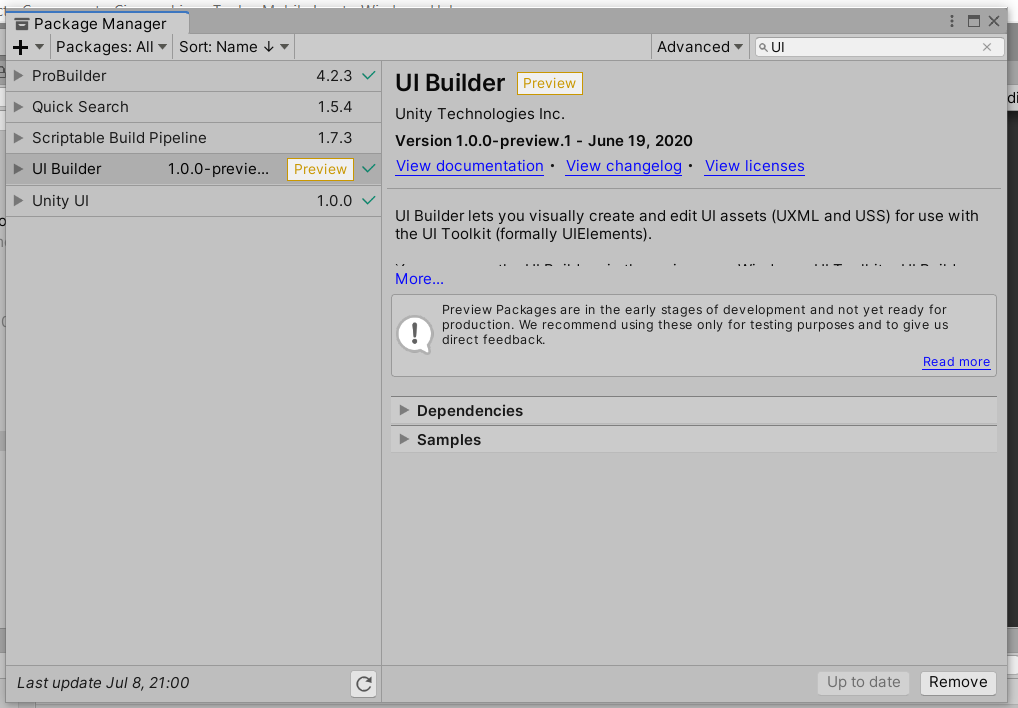
Unity Forum
Hi everyone,
We're excited to share the first version of the new UI Toolkit package, expanding on the existing VisualElement tech stack (formerly...
iron escarp
oh man that naming
rapid ferry
Currently they're calling it UI Toolkit, but it was previously UIElements which shared a name with a completely different built-in featureset as described here https://docs.unity3d.com/2020.1/Documentation/Manual/UITK-package.html
iron escarp
UIElements -> UIToolkits //note for myself
rapid ferry
Yea but there were two UIElements (which sometimes didnt even go by UIElements but a different name)
And the C# scripts use the UIElements namespace so
rapid ferry
Are you talking about IMGUI?
rapid ferry
Because IMGUI was specifically for creating editor interfaces not runtime.
rapid ferry
I'm not sure if the documentation is up to date but this is what they point to on the forums for reference with the new package https://docs.google.com/document/d/1C_c5hrqOrkgYjmD3s04vcKfk-aQ8n007Ti7vUR51SeQ/edit (not the build in system)

Google Docs
Creating runtime UI UI Toolkit's runtime UI tools provide a mechanism to display UI defined in UI Document and Style Sheet assets in the Game view and build games and applications. To create runtime UI with UI Toolkit you need the following assets and components: A Panel Settings asset: defines a...
iron escarp
btw I think UIElements aka UIToolkits is still exerimental. Or not in case my information is outdated
I'm not planning to use UIToolkits currently
rapid ferry
I'm not sure they have a non-experimental user interface kit
iron escarp
I'm currently using Unity UI/UGUI and hope they won't deprecate it because it seems solid for a certain workflow
Component based etc
rapid ferry
They typically don't depreciate whole systems - certainty not while their new system is just starting to come out.
iron escarp
they deprecated the legacy animation system
rapid ferry
depreciated doesn't always mean its no longer usable - just that they're not going to support it any longer
elfin ore
@tender drum Yeah, well I don't have code for it at the moment, I wanted to know the mechanics behind it to start coding. But I think I found something by setting a "Delay" variable a reducing it proportionally to the time the button is pressed.
Also for anyone here who is up
How can I use a Gradient in place of a SpriteRenderer Color?
 hearty violet
Uhm
I need some help and guidence trying to add a Ui button panel in unity to toggle on and off things
dont know if anyone is willing to help me in terms of this.
elfin ore
What are the problems you're having?
 silver summit
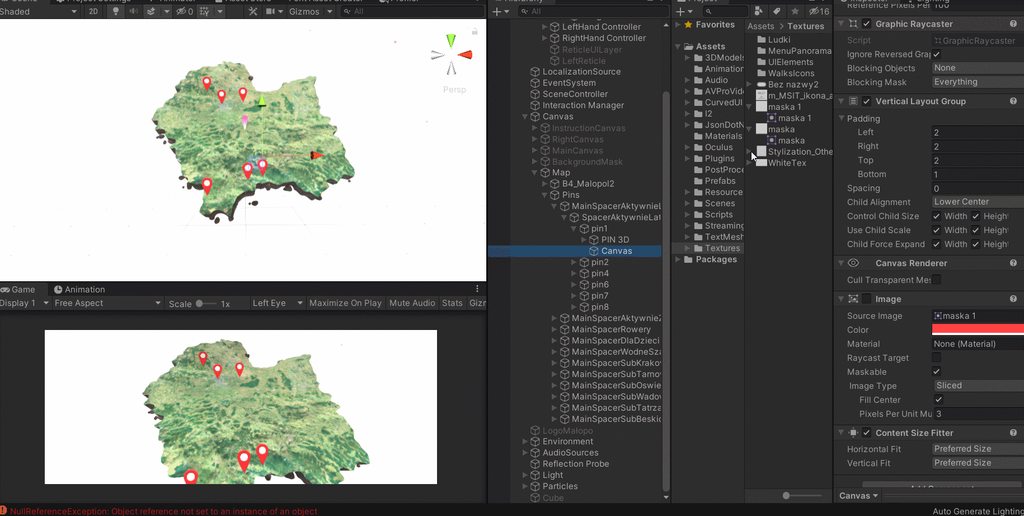
How can I fix this? The content size fitter sets minimum width/height = image width/height
I need this to work as when there is no sprite attached
The text content is dynamic, so I need the content size fitter to set size depending on the text length
But I also want rounded edges so I need the sprite in image 😦
I could lower the size of the background sprite to a size that is always smaller that the smallest text, so it is always scaled up. But then I lose resolution and the edges look bad
silver summit
Mkay, I fixed it by having the image as a child of the parent with ignore layout and set to stretch. Now the parent resizes correct to the size of the text content, and the background image stretches to match the proper size.
hybrid elk
Guys does anyone know how I can export photoshop layers from photoshop and import them into unity while maintaining their correct locations
i have built a UI in photoshop and wanna drop it into unity
I have a photoshop to layers export script already
Just want to import them into unity and lay them out like in photoshop quickly as UI elements
 quaint cargo
Hey, wondering why my ScrollRect setup refuses to scroll or automate at all.
I have followed the reference for ScrollRect, not using scrollbars, vertically scrolling, should be a piece of cake
maybe someone could checklist me through things I could have missed, I have an eventhandler with default input module
*event system
quaint cargo
too bad for me I'm using 2dtoolkit which doesn't work with Unity UI
 celest eagle
what is 2dtoolkit?
rapid ferry
how do i add a outline to my text
 drifting lake
I have a canvas-group gameobject and multiple canvas objects under it as child objects. If one of the child canvases gets updated does it cause redraw to whole canvas group?
 outer verge
i have a full screen menu UI and trying to use TextMesh for updating text. But the TextMesh does not appear on screen even if it is placed in the camera's viewport. Is there a way to solve this?
 verbal mantle
yo, so i have this script for finding the distance using raycast:
void FixedUpdate()
  {
    RaycastHit hit;

    if (Physics.Raycast(ShootPoint.position, ShootPoint.transform.forward, out hit, range))
    DistanceText.text = hit.distance.ToString("0000");

    if(hit.distance <= 0.0f)
    DistanceText.text = " ";
  }
``` and i want to make something like
``DistanceText.text = someText + hit.distance.ToString("0000");``
someText being let's say "Range", and something that can be edited from the inspectoris it possible?
 floral crow
how come I'm getting null references when I add listeners to an onclick event in a button?
 viral kelp
Can I somehow specify for an image in UI to appear above another one? Like a sorting layer of sorts?
I know I can just sort the UI in the hierarchy to achieve that, but I kind of want to organize stuff better, and when I make the clock image here a child of the background label - it draws underneath it.
 viral trout
Hi! Im trying to use anchors to make the UI, but when using a vertical layout it wont let me
How can i do that?
 shadow yew
I would love some feedback on how to use my space better for the inventory slots. The design goal is to make it look like entries in a book with concessions to playability.
The inventory system is also iconless.
 unborn summit
How can i set the height of an image to always match the sub gameobjects text?
For example i want to make a chatline prefab for my chat. But i cant get an background to the message
 golden cave
unborn summit
How can i set the height of an image to always match the sub gameobjects text?
golden cave
unborn summit
How can i set the height of an image to always match the sub gameobjects text?
Use content size fitter. It will adjust its size based on whatever is inside...
unborn summit
golden cave
Use content size fitter. It will adjust its size based on whatever is inside...
i tried but it doesnt work
so it actually does nothing
rapid ferry
anyone familiar with the FocusOut event (or similar events) within UIElements?
asking because documentation there sucks
 wicked hound
Hey, I can't find anything on how to set up input for TextMeshPro. Am I forced to use the default unity input settings if I want TMP's buttons to work with it?
 shell yew
Hi, I've a problem with my health bar, I just wanna know why in game it's "dark" because when i see it in the editor it's a normal picture :
video : https://gyazo.com/d5acbad209ababb4bf9550ff81e6af37

 stable kettle
Ok I am using Ui Toolkit preview + new InputSystem. I have a simple UI I built with just a visualelement and a button (created via UI builder). I can click the button and get an event just fine if I load it in a empty project. As soon as I add it to an existing project I no longer receive the click events. Any ideas?
stable kettle
nm, it seems Ui Toolkit now has its own event system
 frosty compass
We have a Problem with the UI in the Scrollview on the right the instantiated prefab is not scaling properly even tho we have set it to scale with screen size
 old cape
@frank herald Are you using TextMeshPro?
 frank herald
no
old cape
Well that would be the first step. It will likely look way better after the switch
old cape
It's likely just drawn
frank herald
what is the best drawing (free) software
old cape
Krita has a pretty good reputation for raster stuff. Inkscape is the one for vector stuff. Aseprite for pixel stuff.
frank herald
i use aseprite quite a bit
cuz i do terraria modding
ive never really done digital drawing
ill try inkscape amd krita
and see which i prefer.
 dawn rain
Hey everyone, I need help with a carrousel not scaling with difference resolutions properly
This is what happens
And this is what looks like in the resolution I made it in, 1080 x 1920 for mobile
I'm not sure why it's not adapting to the main canvas...
Does anyone have an idea of what could be going on? I'm a bit desperate
I know the slide should be set to stretch but it won't let me since it's being handle by the "Grid layout group"
dawn rain
As you can see it is not stretching to the bounds of the canvas even though its set to stretch
rapid ferry
frank herald
what is the best drawing (free) software
I use paint 3D a lot and ms paint
paint 3D has a really good pixel pen for drawing one pixel at a time
only thing I wish it had was a grid
 stuck garnet
I'm having this happen to me, hopefully yall know what's going on. I have multiple canvases in my scene, a world space one, a screen space one and another screen space one for a pause menu. My pause menu looks normal in the scene view not during runtime, but when I run the game and toggle it on and off it scales it super large like this. The rect transform on the canvas is set just to stretch to fill the screen.
 quiet storm
hey guys so I was wondering how to reset my unity editor ui to default? I messed mine up and wanna go back
I asked in the wrong channel previously
floral crow
what's the difference between highlighted and selected?
 rain merlin
I can't see my UI in editor anymore - in both prefab or scene view. I can see the gizmos, and I've made sure the layers are all visible, and I've Restarted unity and tried several different versions. Anyone have an idea?
 vast patrol
Anyone know any good tutorials on how to make a good UI for a Unity Game / App?
jagged monolith
floral crow
what's the difference between highlighted and selected?
A button is highlighted when the mouse hovers over it, but selected when you click
jagged monolith
quiet storm
hey guys so I was wondering how to reset my unity editor ui to default? I messed...
Window>Layouts>Revert factory settings
jagged monolith
stuck garnet
I'm having this happen to me, hopefully yall know what's going on. I have multi...
My first thought would be to check if you have any of the rect transforms set to more than 1,1,1 scale
rain merlin
@jagged monolith any thoughts on my issue above?
jagged monolith
If you create a new canvas with an image on it can you see that?
 scarlet owl
Hey guys, do you generally put your character's UI stuff nested under the character prefab or do you place it directly in the scene?
 tranquil parrot
Hey I have 2 expandable windows inside another empty gameobject container that has a veritcal layout group. The expandable windows simply makes the body of the expandable window visible and vice versa. The problem is when I make it visible it make the first window go up instead of pushing the 2nd window down like in most UI's, how can I fix this?
dawn rain
stuck garnet
I'm having this happen to me, hopefully yall know what's going on. I have multi...
Make the canvas scale with screen size, set a reference resolution such as 1920x1080, then set your UI canvas to Stretch, reset the component to being 0,0,0,0, on all sides.
I mean, not the canvas, but the component that has the rect transform with the texts in it, or as a child.
Please let me know if this solved it.
tranquil parrot
Here is an example of my issue. I want to windows to stay put, or at least the top window, and when it expand it needs to push the second window down.
dawn rain
Hey people, do you know a workaroud to Mobile keyboard blocking buttons?
According to Unity team members this is a problem because the mobile keyboard blocks the first interaction to close it first and then the raycasts are detected
This is what the member said
Anyone can think of a workaround?
 wanton axle
hey guys, for some reason an arrow button i put in doesn't seem to be responding to my cursor hovering on or clicking it. Here are the setting i put for it in the inspector. Can somebody tell me what i've done wrong so that i can rectify it?
dawn rain
Is there any objects or images on top of the button?
Maybe something is blocking the raycast
I'd put a debug log in the OnClick or add the event by code with AddListener
@wanton axle
wanton axle
oh ok
lemme try restricting the borders of the other elements i have
it doesnt look like anythings blocking it
just for reference, i used the rect tool to shape the borders of the UI.
dawn rain
Can you give a screenshot of your scene
wanton axle
i will, once unity decides to cooperate with my potato of a computer
hopefully that doesnt take long
dawn rain
Ill be here lol
wanton axle
but for how long is the real question lmao
especially with me making the rookie mistake of pressing install on a visual studio update
dawn rain
What are your specs
dawn rain
It's okay I don't plan on going to sleep anywhere soon
wanton axle
true
but then again
its 12am here
and idk how long i can stay here without either me or my father losing sanity
oo its at 50% pog
dawn rain
So what happens exactly? You press play, click on the arrow and nothing happens?
Like I said, I'd make a little test script
Make a function and put a debug log on it, make it be called in the OnClick box thingy
Just to make sure the button is working
wanton axle
even hovering over the button doesnt do anything
it should change into a red arrow sprite
dawn rain
public void ConsoleDebug()
{
Debug.log("Test message");
}
wanton axle
but what about hovering over the button?
dawn rain
I see that your image has a very weird scale
set them all to be 1, 1, 1
And modify the height and width instead of the scale
It could break it
wanton axle
its a child of a canvas
dawn rain
Please check like I said with the debug.log forget about the hovering, we just want to see if the UI is detecting events
wanton axle
how would i do that?
dawn rain
Do you know how to make scripts?
wanton axle
yes
oh. ok
wait i get you
so should i make a debug log script
and attatch it to onclick
dawn rain
Yes
dawn rain
dont close it lol
dawn rain
oh I see
stuck garnet
dawn rain
Make the canvas scale with screen size, set a reference resolution such as 1920x...
Thanks for the help, I tried what you've said to no avail. I have multiple Canvases in my scene so I'm not sure if that's the problem. I think it may be a bug within Unity, what I'm doing to toggle the canvas is enabling / disabling the canvas component on the game object. Which if I do that in the editor I don't get the strange scaling. But, if I do it with the script I wrote, which only enabled and disables the component, it will produce the bug at runtime.
 clever yoke
what are these lines
old cape
@clever yoke UI navigation. Important for keyboard and controller navigation for example.
clever yoke
a ok
 bright dagger
hi, I got a question about UI scaling;
I have a 16:9 background image element in my Canvas and I want that image (native resolution 1920x1080) to always be visible entirely while maintaining its original aspect ratio no matter what the resolution or aspect ratio of the screen is, so it needs to be smaller and have black bars top and bottom for 5:4 for example and black bars left and right for 16:10 - how do I approach this?
jagged monolith
Pretty simple @bright dagger - Add a full black panel, set to full stretch. As a child, add your image, also with full stretch. Check preserve aspect, and it should just work
bright dagger
damn... such an obvious solution... shouldve been able to figure that one out by myself
thanks a lot
bright dagger
works just as I wanted now :)
 rotund grail
Im not quit sure whether this belongs here or in #📱┃mobile , but my problem is, that text looks not very sharp and stretched on my phone, but normal on my Pc. How can I fix that?
 azure flame
rotund grail
Im not quit sure whether this belongs here or in <#534632293520769024> , but my...
azure flame
rotund grail
Im not quit sure whether this belongs here or in <#534632293520769024> , but my...
Be sure to use TextMesh Pro and scale UI using canvas scaler not changing their scale individually.
rotund grail
azure flame
Be sure to use TextMesh Pro and scale UI using canvas scaler not changing their ...
Thank you, it doesn't look stretched anymore and is sharper, but still not perfect
wanton axle
@dawn rain u there?
 slim igloo
When I rotate this text (textmesh pro Text) the yellow border goes all weird? What does this border do and why are there 2 borders? A white one and a yellow one? How do i fix the yellow one to not be rotated weirdly?
Oh and If i change color of textmeshpro in a canvas, it changes in other canvas too???
wanton axle
For some reason, when I hover over or click the arrow button, no output occurs.
these are the settings for the arrow button
i even put a debug check to see if it is actually being clicked, and no output occurred still
 marsh cliff
does anyone here have a good solid tut on adding the 3 stars to level buttons? most tuts ive found are old and i can old get them to work with level 1 not all levels
azure flame
@marsh cliff Don't cross-post please, tutorials are pinned in #💻┃code-beginner
marsh cliff
ask in beginner code?
azure flame
You are talking about activating/deactivating images on a button, most tutorials will teach you how to do that.
marsh cliff
yeah they are all from unity 5 and i followed like 4 and they only work for level 1 in each case
using playerprefs to save temporarily
azure flame
Should not use prefs for saving level data, lookup how to save into Application.persistantDataPatth folder
 hard tide
Hi could anyone point me to the correct direction. I'm trying to get my UI to animate only when the Ui goes from inactive to active. Im pretty much tracking a ui element to a Augmented Qr code and i want the Ui to animate in only when the Qr code is scanned. Are there any easy ways to animate the Ui only when active instead of having to code it from inside the image tracking script?
dawn rain
@hard tide use the Unity Animation timeline and make an animation.
hard tide
Yeah thats what i did i just wanted it to animate when the object activates but i got it working found a solution in the docuemntation
jagged monolith
Do you have an event system in your scene @wanton axle?
wanton axle
Yes
jagged monolith
Select the event system and see what it says is hovered when you have your pointer over the button. There's probably something blocking it
 spare field
@marsh cliff check out ”mr taft creates” on youtube, in the ”make a match 3 game in unity” playlist you will find what you need in regards to both saving data and handling activating/disabling the images
 wanton pike
hi
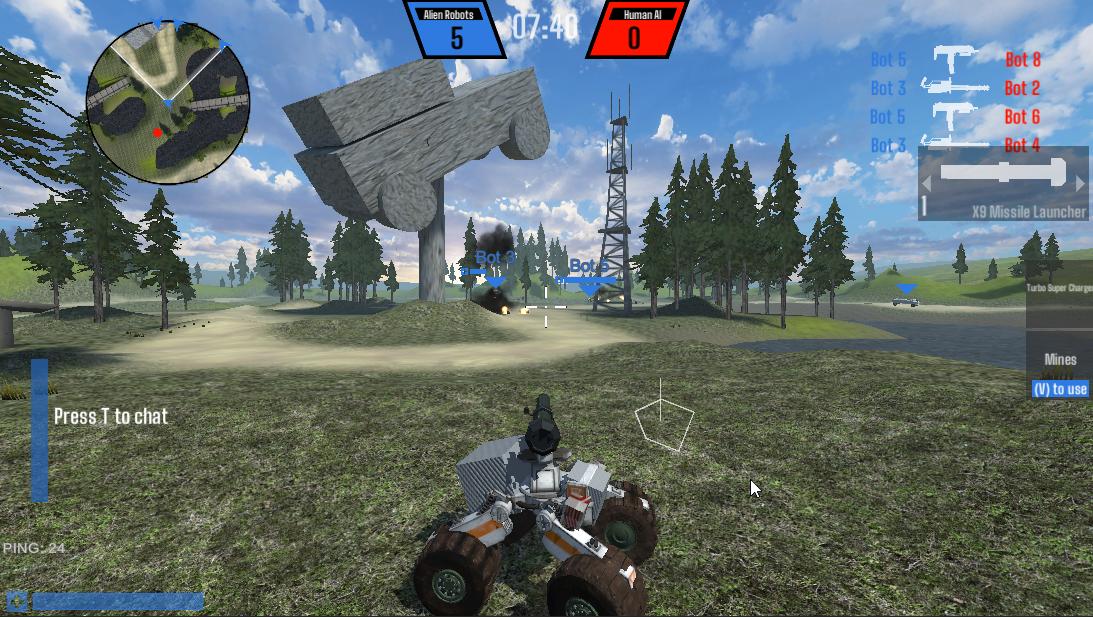
Do y'all have any feedback for how to improve my HUD/UI?
https://i.imgur.com/yH6ubZI.jpeg
 umbral wren
Anyone have experience using Textmesh Pro link tags? I'm trying to use them for hover-over tooltips, but I can't understand how I'm supposed to get the link ID.
 fossil bough
Hi! Is it possible to use the up and down arrow keys to navigate through the buttons while using the left and right arrow keys to change the value of the slider?
 jovial yacht
I'm trying to use outline but I get these bad issues on the edges, is there a way to fix?
 sullen tartan
jovial yacht
sullen tartan
jovial yacht
Outline
 primal dirge
i haven’t used unity before so this is my first time using unity and i’m very confused and the more i try to do stuff the more it hurts my brain
marsh cliff
@spare field thank you I'll look in that. Much appreciated
 dull gust
wanton pike
Do y'all have any feedback for how to improve my HUD/UI?
https://i.imgur.com/yH6...
dull gust
wanton pike
Do y'all have any feedback for how to improve my HUD/UI?
https://i.imgur.com/yH6...
its kinda flat , add texture to the buttons or transparency mayne
like the score on the top and others
 prisma field
Hello i got some issue on while using gui with the keyboard/controller, i have a set of button that i want to navigate into, i've setup a cursor to showcase the selected button but i want to also highlight the button at the same time but when i do so the active/highlighted button does not follow the cursor there is like an offset or something preventing the button highlight and the cursor to be in sync
    {
        EventSystem.current.SetSelectedGameObject(null);
        var tmpChar = characterInstanceUI[selectedCharacter].transform;
        bannerInstance.transform.position = tmpChar.position;
        // highlight selected character
        var btn = tmpChar.GetChild(0).GetComponent<Button>();
        btn.Select();
    }
I found that unity default input is interfering with my input
 drowsy saffron
Hello guys, Do anyone know a way to make something like this using UIElements?
I need to make a loading screen with radial image fill.
 versed patrol
Does anybody else just have massive problems with the UI randomly just changing everything?
I alt+tabbed and all of a sudden every single UI element decided it was in a different place
not only that, when I go fullscreen now its just an absolute mess
it goes from this
to this
i just don't understand why the UI system in unity is so counter intuitive tbh
 timber elbow
 dry gyro
this is a panel and how can i make it not transparent
dry gyro
this is a panel and how can i make it not transparent
Image component has a Color property. You can adjust it's alpha value there.
dry gyro
there is nothing and its not becouse of the picture but i use a panel to make that UI and ui is like that when you make it
timber elbow
dry gyro
there is nothing and its not becouse of the picture but i use a panel to make th...
There are only a few ways to display a picture on the screen: Image, SpriteRenderer or MeshRenderer. The first 2 have a color property. If you don't know what I'm talking about. And it seems like you don't judging by your screenshot, => basic unity tutorials!
 haughty badge
I made an empty in a canvas, set the anchors to Min (0, 0) and Max (1, 1), so it covers the entire canvas. Then I added a Horizontal Layout Group to the empty (hoping I could make a splitscreen-like effect with two Panels). But now I can't use the Panels Anchors, meaning I have to use the Width and Height properties, but isn't that not scalable? Wouldn't different resolutions mess it up
 mental notch
Who is able to make this I don’t have photoshop so I can’t make it I’m willing to give credit to those who can I’ll send link to the tutorial if you are able to make it I need it like this but more cave style
 stoic isle
@mental notch ah what if i told i have already created that. The original idea is from a youtuber if i remember i will send you a video
mental notch
stoic isle
<@500761391653978112> ah what if i told i have already created that. The origina...
yep ur correct
stoic isle
You might need to contact him to use it in commercial game idk the license type actually just saying
mental notch
stoic isle
You might need to contact him to use it in commercial game idk the license type ...
i was gonna use it in my game i better contact him just incase
stoic isle
Yeah it is better to get the permission first
mental notch
stoic isle
Yeah it is better to get the permission first
thx for your help
 ruby igloo
This is my settup for a graphic raycaster test:
And this is the code: https://hatebin.com/tvpwlzfudd
I still dont get any resoults when clicking the little square on the bottom hotbar
ruby igloo
I've tried with EventSystems.current.RaycastAll and doesnt work either
 cyan sentinel
Not sure this belongs in here or somewhere else. Anyone ever had the issue that the UI just stops animating for some seconds and then just works again?
 steep viper
Do I need the graphic raycaster component in both parent and child canvases?
Assuming there is something to click on in the child canvas
 icy lynx
how can i stop this looking so bad?
the text
it looks like its faded
and looks pixely
icy lynx
ttf?
 crimson finch
TrueType file type. Used for fonts. It looks like you're using legacy font / text in which case you'd want to scale the size of the text object down and increase the font in the inspector. A better long term solution would probably be to switch over to using Text Mesh Pro.
icy lynx
ok
also 1 more thing. i have a minimap but i realized i can put it in a good spot correctly because i change the size of the game window so whats the best way for me to always make something in the top right?
icy lynx
its locked @long dome
 leaden charm
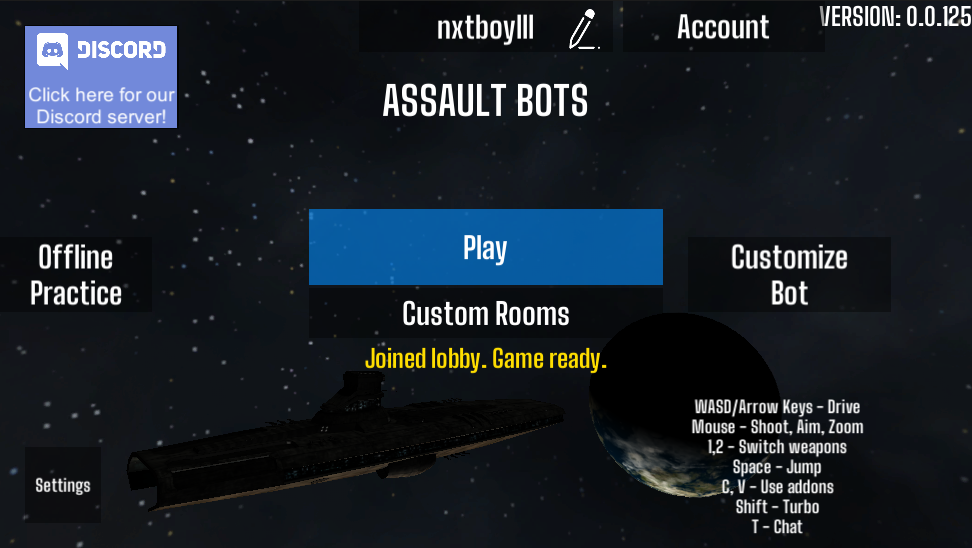
See the version number and how it and the account black highlight overlays it
and maybe add some padding to the top of window
wanton pike
leaden charm
See the version number and how it and the account black highlight overlays it
o
 thorny frigate
@wanton pike is this for a mobile game?
wanton pike
yes
thorny frigate
id say that it'd look better if the offline button was under the custom room one
the play button don't look good with the background and other buttons
and u shoul try to make the version text a bit smaller and in the bot left
@wanton pike
wanton pike
ok thanks
icy lynx
@leaden charm i think 2 is better
leaden charm
Yes thats what I thought
icy lynx
O_O chill
leaden charm
lol
 leaden charm
the only thing about two is it takes up more of the actual game space
icy lynx
whats your first project about?
icy lynx
im currently working on my first game ever
its an open world adventure
i got the gun mechanics made
the maps good
got alot of stuff done actually
leaden charm
As you see I am not that advanced yet
icy lynx
me neither
leaden charm
I am only one day in
icy lynx
if you need some help in it im happy to let you DM me
leaden charm
How long have you been using unity
icy lynx
errr
idk
but not long
but i can help out with guns and stuff. dont expect too much but i got the basics nailed down.
leaden charm
My next game I plan on making a pvp style
its always a good feeling when you dont need tutorials anymore
icy lynx
is there a green screen effect for unity? if you know what i mean?
 ionic jackal
how does this UI look? I'm pretty proud of it
leaden charm
ionic jackal
how does this UI look? I'm pretty proud of it
Pretty good ngl
 radiant ridge
Is there a way to put this Gradient variable into a UI Image?
So far my search only yields two possibilities:
- Creating a mesh instead and setting the vertex color to the gradient
- Somehow create a shader for the UI?
I have not touched anything relating to shaders or dynamically creating a mesh, so i need other opinion whether there's a method to create such UI for a customizable Gradient
Though if i were to create a mesh, is it possible to put it in a canvas renderer?
azure flame
If you put UI in camera space you should be able to control draw order better, I think. Another way to go between world space an UI is render texture and project it onto the Image.
radiant ridge
azure flame
If you put UI in camera space you should be able to control draw order better, I...
Oh using render texture is a good idea
actually my question is already answered with an assetstore asset xD apparently BaseMeshEffect is a thing
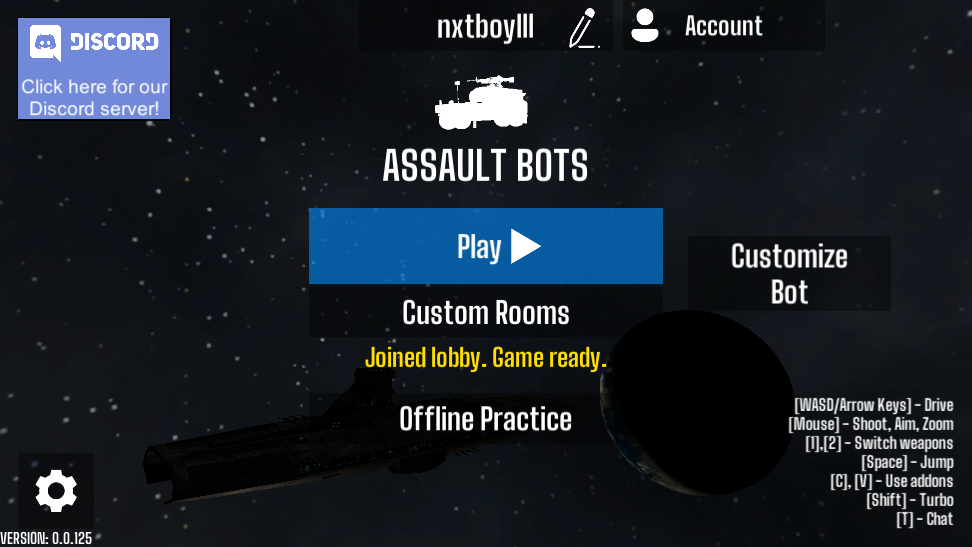 ionic jackal
Make buttons not boxy
I'd put settings in top right
Then the account button
Then the name
Make a dedicated discord button which is only discords logo
I'd put social media buttons in top left
Then move the play button, custom room button downwards
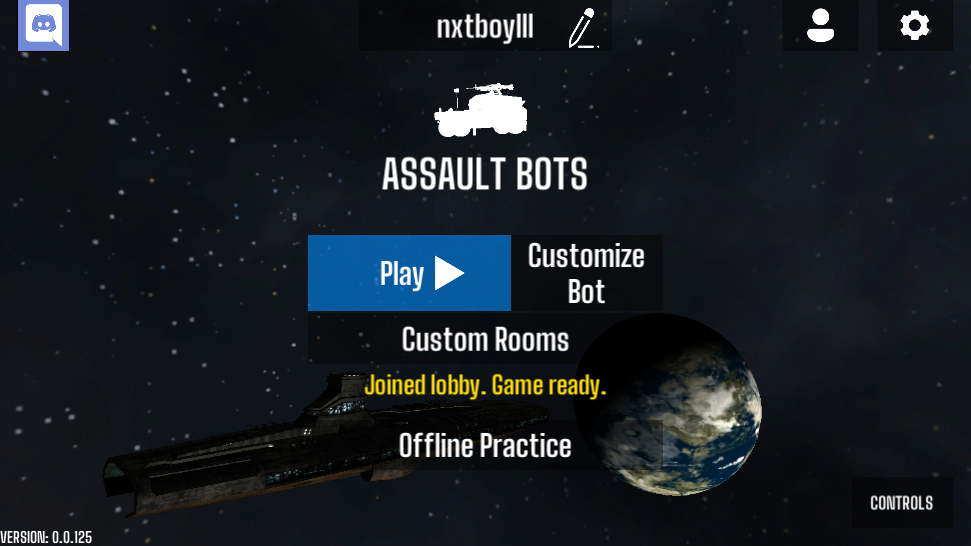 ionic jackal
did you scale up the button?
rapid ferry
nvm lol i fixed it
i used the "TextMeshPro" one
that one is better
@ionic jackal
ionic jackal
textmeshpro is way better yeah
 steel tundra
how to make my text clickable?
 manic jasper
Anyone has any resources to help me have a prefab (that is an error) pop up full screen? I am using SceneManager to load scene in additive mode in the Persistent scene, which is where I put the "alert" prefab, but it seems to overlap with the scene being loaded...
clever yoke
how do i remove this border
(the img is 32 16 but rendered as hd i think)
stoic isle
@clever yoke in the import settings change filter mode to point that will help to clear the image
clever yoke
stoic isle
<@507971620950900746> in the import settings change filter mode to point that wi...
where
stoic isle
Filter mode
manic jasper
Hey found it, was simple after all. Just needed to set my Canvas's sort order higher 😁
 green berry
Good evening. I'm making a simple telephone for a game. I got the scripting right, but the UI is killing me. The scaling works nice on 4:3, as you can see:
The thing is, when I change aspects, the buttons don't scale properly:
How can I make buttons mantain proper size?
 eager saddle
@green berry is your objective to have a scaling behaviour that works like a website?
typically you can use physical scaling, and simply set the buttons' width to a percentage, for example
or the horizontal layout group expand width checkbox to achieve your goals
green berry
I don't what you by website. I just want the proportions to remain the same (i.e. no huge amount of white space).
How do I work with percentages in the UI?
eager saddle
hmm, i think maybe start with a written UGUI tutorial, i like ray wenderlich's
you will need to use a horizontal layout group
it will look something like
vertical layout group
  horizontal layout group, expand width
    button, layout element
    button, layout element
    button, layout element
  horizontal layout group, expand width
    button, layout element
    button, layout element
    button, layout element
  horizontal layout group, expand width
    button, layout element
    button, layout element
    button, layout element
Can you share a link to the tutorial in question? The guy's website has a lot of stuff and I haven't found the right one yet.
 quick vine
Hey everyone :)
Designing some UI for my game, and I want to add tooltips which give a ton of information that is otherwise not showed in the UI. For instance, an inventory where when you hover over an item, it gives you a massive page of information that helps you learn more about it.
I am kind of struggling to understand how I would implement this, for instance how you would have it only follow the cursor, but also stay within the view port and stay on top of all elements.
Any help would be greatly appreciated 🙂
jagged monolith
Are you using a grid layout group @green berry? That with 'control child size' should do the job
green berry
Not sure. I just scripted my way out of the problem. I just wanted to know if there was a way to do it from the editor. But thanks anyways. @jagged monolith
jagged monolith
Definitely is
 stray quarry
How can I prevent a scroll rect to scroll more than the text dimensions as shown on the gif ?
As you can see in the gif, the text goes up and there is a blank space with no text. In apps normaly there is no space under the last text. I want to remove that space, and prevent scrolling more than the last text
 cyan ginkgo
I was editing my UI and pc crashed after that I can't seem to make UI work I made a new camera (seperate from main camera) to render my UI but it gives me blackscreen. I need bit of a guide PLZ
 lyric hare
Hi im having a bit of issues with custom shaped buttons that with the change of resolution and ratio the shape doesnt hold and them are all over the place, can you point me to a tutorial wich explains in depth that kind of behaviours?
jagged monolith
Is your scroll mode set to elastic @stray quarry?
Some screenshots would help @lyric hare
stray quarry
@jagged monolith It's set to elastic and I've tried with Unrestricted and Clamped. It acts the same on any scroll mode.
I have also watched
https://learn.unity.com/tutorial/ui-components#5c7f8528edbc2a002053b4d6
It works now ! I had to remove the viewPort from being a child of the Scroll Rect.
 upper raptor
Hey, I have a question. I am using Unity and I'm following a course, to learn Unity. I was trying to make a little text effect on my own, but I didn't get it working correctly. Here is my code for it:
using System.Collections;
using System.Collections.Generic;
using UnityEngine;

public class TextEffect : MonoBehaviour
{

    [SerializeField] TextEffect text;

    float scaleDown = Mathf.Lerp(1, 0.9f, 0.1f);
    float scaleUp = Mathf.Lerp(0.9f, 1, 0.1f);
    RectTransform rectTransform;
    // Start is called before the first frame update
    void Start()
    {
        rectTransform = text.GetComponent<RectTransform>();
        StartCoroutine(Size());
    }


    IEnumerator Size()
    {
        rectTransform.localScale = new Vector3(scaleDown, scaleDown, 0);
        yield return new WaitForSeconds(0.5f);
        rectTransform.localScale = new Vector3(scaleUp, scaleUp, 0);
        yield return new WaitForSeconds(0.5f);
        StartCoroutine(Size());
    }

}
I want to make a text effect, where the text gets a little smoothly, a little smaller and then to then smoothly normal size back. I wanted to ask what I did wrong 🙂
This is the effect, I am getting through that code 🔼
 humble harbor
Can someone tell me how to change the radius of the particle effect? I tried changing it in the editor but it doesn't work
 sand lotus
https://gyazo.com/3c1716ecda1a852c5dc42dd42bf8b03b
Sooo im trying to do this tutorial:
https://www.youtube.com/watch?v=JivuXdrIHK0&list=LL&index=4&
but the resume button wont change alpha, anybody knows why?


Learn how to make a pause menu using Unity!
As mentioned in the video, we've already created a start menu and a settings menu. Check them out:
Start menu: https://goo.gl/EM7rr6
Settings menu: https://goo.gl/KBgy8p
TextMesh Pro Video: https://goo.gl/YdQ3MA
Get TextMesh Pro: https://goo.gl/Z9iHxH
♥ Support Brackeys on Patreon: http://patreon....
(I tried in play mode too obviously)
old cape
@sand lotus Is time scale set to 0?
sand lotus
time scale?
i didnt do any scripts yet, I just want it visualized for now
everything else should be on default
 mild pilot
Is this also the place for the <excited> UI Toolkit </excited> ?
mild pilot
Im trying to make a simple window drag in UIE. I'm used to attaching a MB with the IBeginDragHandler interface n friends
In UIE, is the IMouseEvent the equivalent?
 dry perch
how can i get button onclicks from physical canvas
i want to detect button clicks from a physical canvas
how can i do that
azure flame
put UI in camera space
azure flame
No, that won't work. I think UI would have to be in world space to interact with it
 topaz yarrow
it's 2d and I don't understand a bit what the world space means
azure flame
or particles imagery sent into UI space through render texture rendered by separate camera
Canvas render mode world space. It will make it render in world space not in screen space
And it will be subject to world render draw order
mild pilot
There is a particle system for UI renderer thingy
https://github.com/mob-sakai/ParticleEffectForUGUI
GitHub
Render particle effect in UnityUI(uGUI). Maskable, sortable, and no extra Camera/RenderTexture/Canvas. - mob-sakai/ParticleEffectForUGUI
Hi all, is there a way to do world canvas in UIE ?
azure flame
@errant thorn Don't cross-post and use relevant channels.
 errant thorn
azure flame
<@!421027458209546271> Don't cross-post and use relevant channels.
errant thorn
azure flame
<@!421027458209546271> Don't cross-post and use relevant channels.
sorry I wasn't careful
mild pilot
When making a window resize function, generally, should i have 8 directional separate "click area" ? (4 diagonals, 4 horizontal/vertical)
Or i just combine it all together? If combine, how would i detect which part is for which resize direction?
mild pilot
UI in game window
azure flame
You just need to manipulate a Rect
mild pilot
Although... i cant be bothered making too sophisticated of a UI window..
Im just gonna make a single small square on the bottom right corner, so there is only 1 resize direction
How can i have that small white square relatively always on the bottom right?
Oh, position absolute, bottom right 0
azure flame
@mild pilot Keep in mind if you are working with canvas scaler using reference resolution that you'll have to convert drag coordinated from the screen into a corrected reference resolution. Because they would differ in some cases.
mild pilot
There's canvas scaler stuff in UI Elements?
azure flame
Ah, don't know about that.
mild pilot
I think UIE is straight up screen pixels
 small stream
Is it possible to style the host element from within a template in ui toolkit? I want to style the red highlighted element but don't know how to do that
mild pilot
My clicks goes thru UIE and into my world space uGui. How do i make UIE properly consume clicks?
green berry
Yo! I need to get the string from Input Text and compare it with another string. How do I do that?
mild pilot
inputField.text == myText
mild pilot
mild pilot
My clicks goes thru UIE and into my world space uGui. How do i make UIE properly...
Actually clicks goes through to world objects as well, not just uGui stuff
mild pilot
Is there an equivalent of this in UIE ?
EventSystem.current.IsPointerOverGameObject()
mild pilot
https://forum.unity.com/threads/check-click-on-ui-element.925844/
And some other post suggests to use Pick, RegisterCallback on the elements, ContainsPoint, etc
To avoid having to do this on each UIE, and as a general best practice, should i only have 1 single UIDocument parent for all UIE windows?
Unity Forum
Hello.
Previously, I used EventSystem.current.IsPointerOverGameObject() to test the click on a UI element. But with Ui Builder i have false all the...
mild pilot
Why can't i change around the child VE of the TextField?
vast patrol
Question; does anyone know how to place UI Text directly above an image?
Example; I have an image that is set to preserve aspect, I need the text to stay in the position directly above the image no matter how it scales
Is that possible in Unity?
stoic isle
@vast patrol if you check the documentation about the anchor points you will have your answer just magke the anchors of the text at the edge of the image on top and the text will always be in there
vast patrol
So, the problem is I have the anchor of the image to bottom @stoic isle
Because I want the aspect image to be anchored to the bottom of the UI
And I want the text to be on top of the image
Like this
stoic isle
@vast patrolthe text has anchor points too just like you did with the image do it with the text and move the anchors to the top
vast patrol
I already did that, but the problem I'm facing is when trying on different devices it's not aligning correctly
I'm using a grid layout to layout the UI
The bottom grid is where the table is, and I embedded text within it and i have it anchoring to the top center
Better screenshot
So the text isn't staying above the table
stoic isle
Hm that's weird, what are you using in the canvas scaler
vast patrol
Does this help?
I'm not sure if I should be even doing this in the UI honestly
I'm trying to port my game from native iOS to Unity
It currently looks like this
I thought since everything is stationary it would make sense to have it as the UI, but then again I could be wrong
stoic isle
The text UI is it a child of the image or not.
Also that is not what i meant by the canavs scaler
vast patrol
stoic isle
The text UI is it a child of the image or not.
Also that is not what i meant by ...
Yes it's a child of the image
stoic isle
To to the canvas and check the resolution component i think this will fix the issue if you set it to screen size and put .5as a value of the width hight slider
vast patrol
I changed it to 0.5, same issue though
I'm gonna try to use a sprite instead of a UI
 sharp crater
hey i have a question how to i change the layer of a canvas through code when i click a button i was thinking of having it in a method . is there a specific funtion i can call or... im not used to ui
 wicked condor
Hi guys! not sure if this is the correct channel i'm having an issue while trying to CrossFadeColor to a TextMeshProUGUI, everything goes ok, debug messages and all but the text color/alpha won't change, CrossFadeColor does nothing, any clue? https://forum.unity.com/threads/crossfadecolor-not-working-on-textmeshprougui.1029517/
Unity Forum
So i've found posts about using CrossFadeAlpha, so the solutions for that case didn't work for me.
I just want to set a custom text color for a...
sharp crater
sharp crater
hey i have a question how to i change the layer of a canvas through code when i ...
can someone help me
sorry,
mild pilot
sharp crater
hey i have a question how to i change the layer of a canvas through code when i ...
U trying to like move forward the window thats clicked? I usually just organize all the window tops into 1 group in the hierarchy, then do SetAsLastSibling
mild pilot
vast patrol
Does this help?
U set the text as child of the image
Then pivot y to 0, anchor y to 1, then zero out the position y value
mild pilot
wicked condor
Hi guys! not sure if this is the correct channel i'm having an issue while tryin...
Does the value stay in the inspector? Maybe theres another animation overriding it, or if u have say Button with AnimateColor on thr hover/clicked values then that'll also override it
sharp crater
mild pilot
U trying to like move forward the window thats clicked? I usually just organize ...
I mean like I click a button and then it moves forward in order
mild pilot
Yeah if theyre under the same transform group, then u can use SetAsLastSibling
But if not, well u check the canvas.sortOrder n change that
But then u'll also have to keep track the previously "in front" panel and change the sortOrder of that too
 wild trellis
Is there an example for two way data binding in an inspector window with UI Builder? I can get it to read but not write.
wild trellis
Figured it out, had to use an Integer numeric field and set editor-extension-mode="True"
mild pilot
Hi, so i'm doing this
inputPrice.RegisterValueChangedCallback<string>(SetPrice);
But within SetPrice, is there any way to access inputPrice.userData ? Or anything about the VE itself?
Coming from uGui, i used to check the button's sibling index as my "data". Now not sure how to do that in UIE
And i dont wanna make an anon method on the spot bcoz i need to be able to unregister it
I thought this would work, but nope
inputPrice.RegisterCallback<ChangeEvent<string>, int>(SetPrice);
Oh cool this works
inputPrice.RegisterCallback<ChangeEvent<string>, int>(SetPrice, inputPrice.parent.IndexOf(inputPrice));
 gentle coyote
@mild pilot I've used lambda in situations like that. (string) => { // regular method // }

Learn about lambda expressions. There are expression lambdas that have an expression as its body, or statement lambdas that have a statement block as its body.
mild pilot
Yeah but if i do that, i can't unregister
It's fine tho, the RegisterCallback with data overload works here
 fiery crater
Hey 👋 I need help with some ui elements. I have an Object with vertical layout group as it's component. This object has many children each of these children have text objects as their children. How can I make the vertical layout group places each of it's children so the text doesn't overlap?
 carmine cedar
Anyone here using UI Builder and Toolkit for the UI of their game?
I have an architectural question, how would one split their UI into components with UI Builder?
Would I just create a UI Document for each of my components like button, user profile picture, etc?
Or is there another way of doing this more correctly?
I need to be able to dynamically add the components with C# and also easily use them via the Builder UI.
rapid ferry
hello all! how can i do this ui for my game?
stoic isle
@rapid ferry world space canvas or quad with a texture
floral crow
hello, for making a text mesh pro sprite asset would I need an image that has all the images I want?
Or can I add existing sprites to a sprite asset?
rapid ferry
@stoic isle thank you so so much!!
mild pilot
carmine cedar
Anyone here using UI Builder and Toolkit for the UI of their game?
I have an arc...
I saw a forum post that its recommended to only have 1 parent uidoc.
Then each individual window panel can be made into uxml templates, and then loaded on start. Optionally destroying it when its closed, or simply do style.display = DisplayStyle.None to disable
And thats what im doing and works well
steep viper
Is there any way to easily change my UI colour scheme globally, instead of having to go to every image/text object and enter the new hex codes
 strong trail
I've been following up on Brackleys cool transition video, i've done everything up untill 14:32 in the video, where he attaches his animator to the script
https://www.youtube.com/watch?v=CE9VOZivb3I&t=484s

Transitions in Unity are easy to learn - let's have a look!
Get up to 91% OFF yearly plans using the code "BRACKEYS": https://www.hostinger.com/brackeys
● This video was inspired by: https://youtu.be/a0OQvWAPeuo
● Loading screen in Unity: https://youtu.be/YMj2qPq9CP8
● More about singletons: https://youtu.be/ptkxRn0HCJc
● Check out the website...
But for some strange reason the animator is not getting attached.
Pastebin
Pastebin.com is the number one paste tool since 2002. Pastebin is a website where you can store text online for a set period of time.
that's the code
the CrossFade is the animator, when dragged and dropped onto the script it's not taking it in.
is this a version problem or am i missing something?
ok i hadn't attached an animator component to my CrossFade.......
duh.....
 outer venture
how do I make it so my UI looks the same on any screen size
azure flame
outer venture
how do I make it so my UI looks the same on any screen size
Look into canvas scaler component
azure flame
Experiment with it, learn how it work, switch resolutions for the game window
outer venture
I've been doing that for the last 15 - 30 minutes
azure flame
Don't forget about manual as well, that question button on the component takes you there
outer venture
I experimented with it, I checked the manual, yet it's still going out of bounds and not big enough when I change the resolution of the window
floral crow
 UnityAction action;

    // Start is called before the first frame update
    void Start()
    {
        img = GetComponent<Image>();
        if(instantce == null)
        {
            instantce = this;
        }

        action += ResumeGame;
        ResumeButton.onClick.AddListener(action);
    }
    public void ResumeGame()
    {
        Time.timeScale = 1; img.enabled = false; ResumeButton.gameObject.SetActive(false);
}```I feel like this is a lot of code to write just to make a button do something
Is there an easier way to make a button reference a method?
 frosty pewter
Buttons have Unity Events that you can configure in the inspector
just drag a GameObject into it and select the function
Also, ResumeButton.onClick.AddListener(ResumeGame);
works
@floral crow
floral crow
I know they can be dragged but doing it through code is cleaner
 jade fern
With the sales going on, are there any good/truly worth it UI assets from the store? I was looking at DoozyUI but it hasn't had an update for nearly a year.
 remote arrow
How can I create a text that both: a) Follows an object b) Is a constant size on the screen, independent of how close the camera (used for a map screen) is to the object?
I tried creating a worldspace canvas, make it a child of the object to follow, and add the text as a TextMeshPro, but that didn't work.
remote arrow
Nevermind, solved it by using screen space overlay canvas and world space to screen space conversion.
 long summit
Does anyone have a video tutorial on how to make a gui to dress your character in unity? I need it urgently, I can't find anything to help me on YouTube, my English is very bad, I'm using a translator
floral crow

This video covers how to set up a basic character(inspired by Animal Crossing) and then implement a FeatureManager and a UIManager that will allow the player to customize their character by changing the skin tone, eyes, hairstyle, mouth and t-shirt. And lastly, use PlayerPrefs to save and load the settings.
►Download Asset Package:
http://bit.l...
unborn summit
How can i make the box (parent) scale to the text size?
That the background (parent box) is always fit to the text
This is with content Size fitter. The parent Object (the background image) does not scale to the content height properly
any ideas why?
steep viper
Does anyone know any more performant alternatives to ScrollRect? I have 3 of them, and on scene load it causes a 29ms lag spike from ScrollRect.LateUpdate(), alongside a 243KB GC Alloc
Two of the scroll rects are masked, and each is in it's own subcanvas
wanton pike
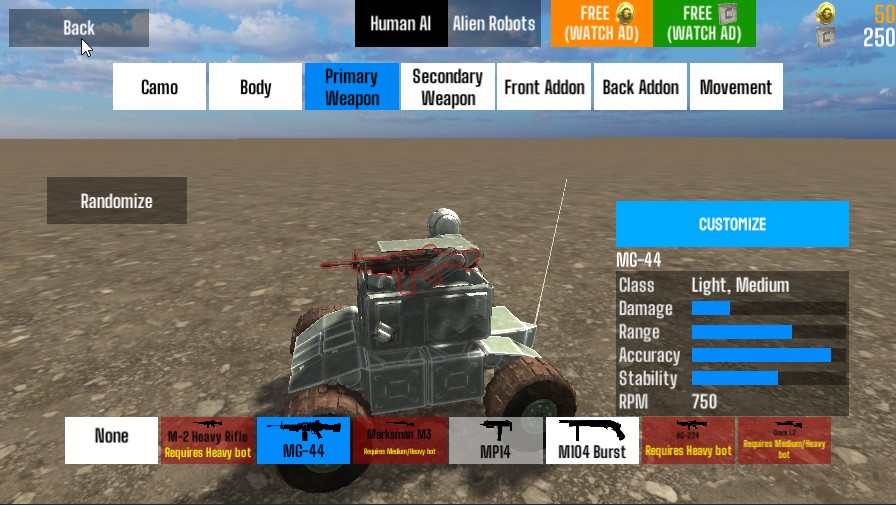
Hi how would I make the effect of killing another robot more satisfying, as far as the game UI? Right now there is tex where it shows in the video “100 [MG-44] (players name)” and also kill feed on top right, and a red indicator in the center of screen to show you got a kill
ionic jackal
maybe a bloom effect for a couple of frames?
sorta like GTA does when you kill someone
bright dagger
I have a button with these transition settings, but after clicking the button and running the OnClick function the transition on that button doesnt work (no highlighted effect etc) anymore until I click somewhere else - does anyone know why?
jagged monolith
Because it's selected probably @bright dagger. Try changing that colour to something weird to check
bright dagger
changing Navigation from Automatic to None fixed it
it was selected due to that apparently
ty!
strong trail
i've been trying to get textmesh pro text to type in my game name into the canvas
but it throws this weird exception
any idea what it is
the text renders properly at the start however after the game end, it throws this exception
wanton pike
ionic jackal
maybe a bloom effect for a couple of frames?
im thinking like how to improve the UI tho
ionic jackal
You mean like cleaning it up?
Cause you asked how to make the kill popup more satisfying
wanton pike
hmm
i guess like yeah how to make it more satisfying
like make the UI look fancier
for the kill popup
like in some games they have cool text animations etc
like the text coming in etc
cyan sentinel
Anyone got a good drop shadow for the UI besides the Unity build in one?
Or should I just put it in an extra sliced graphic?
 past shoal
Alright, I'm trying to make a shop function where the left click adds an item while the right click removes it. The problem is that right clicks on buttons don't actually trigger the UI so it doesn't look like you're clicking the button. How can I make it look identical to the left click?
jagged monolith
past shoal
jagged monolith
<@!456219571070959646> <https://forum.unity.com/threads/can-the-ui-buttons-detec...
I'm not worried about registering right clicks more so than I am changing the UI element's colors the same way they change when you normally press a button in unity
jagged monolith
Yes, unfortunately you're gonna have to replicate that behaviour with a script such as that one
past shoal
rip
 frail rock
is this the right place to ask about UI Toolkit?
 pastel yarrow
Pardon i wanna understand how to properly handle TMP and UI in world space but i am getting nauseated by the minute
i am trying to simply create a TMP with a canvas and with a simple lookat make it look towards the camera
the issue soon comes in the form of either blurry or straight up meshy TMP textes, which do look as intended (in certain rotations only and that infuriates me)
to add to that i simply cant get why the TMP fields are misaligned
and to add a last comment to my infuriation
why the hell when i move a canvas by rotating it, the canvas size changes in world space (and therefore changing whats inside of it)
instead of just literally rotating as intended?
pastel yarrow
Please ping me when you can help my dumb ass get unstuck, thanks a bunch!
jagged monolith
Is the canvas or any of its parents scaled @pastel yarrow?
pastel yarrow
yea thats right! cause i wanted to scale it down to the object (so it would look close to the parents size)
was that a wrong thought?
Correction @jagged monolith i infact havent changed the scale
only the width - height
jagged monolith
You'd need the scale of the world space canvas to be really small of course
But you need to make sure that the scale is the same for x,y,z on the whole hierarchy leading down to your canvas
pastel yarrow
Yea several tutorials havent really properly touched how i should go about World Space canvas placement
jagged monolith
Cause rotating a child that has a non-uniform scale will mess it up
jagged monolith
Tbh there's nothing really special to it, you just treat it as any other 3D object
Once you get it set up correctly it's just like regular canvases
pastel yarrow
A quick question then
assuming my canvas has a scale of 1,1,1 (as it has)
hmm no nvm
that was a silly thought
i wonder then what should i do, cause i ponder
if a parent has a scale of 2,2,2
and a canvas has a scale of 1,1,1
then the canvas would be affected by the parent scale of 2,2,2
jagged monolith
yes
pastel yarrow
thats fine for round numbers like this i guess (to a degree)
but what about uneven
jagged monolith
no problem
pastel yarrow
like 2,1,2
jagged monolith
That's problem
pastel yarrow
i mean thats my current issue actually thats why i ponder
jagged monolith
Can't have that if you wanna rotates
jagged monolith
It can be parented as long as you watch out for this
pastel yarrow
okay i maybe havent understood something along the lines help me a touch more
So i can have this, but not if i rotate etc
So i cant handle this in a prefab - orientated logic
jagged monolith
For example
Parent
|- scaled child
|- canvas
pastel yarrow
Ah i see what you mean
i should have an empty as a parent
and have my actual object do its own devices
jagged monolith
Indeed
pastel yarrow
okay actually thats great thinking thanks for helping me
that should solve this pretty much
thanks a lot
 steel oasis
is any one here who can help me with my ui
 lethal breach
Hey guys. Can someone help me understand why is it that when I make a grid out of same sized prefabs, and they are all evenly spaced (mathematically perfect), that visually they have uneven gaps between them?
I understand that this might have to do with either Canvas settings, or sprite settings, or something else?
steel oasis
no one seem to be here currently iv been waiting an hour
for help
maybe you could help me but thats about it
maybe there's a dedicated discord but who knows
 lethal flax
they they have an uneven space visualy
then its ur eyes
whats up with ur problem tundrax?
lethal breach
@lethal flax maybe it's hard to see from far way, if you look closer, you'll see the orange background show through some of the padding between the cells, and others are just so tight it doesn't show.
steel oasis
i have no knowledge about anything ui based and nothing shows up on the Carma
lethal flax
what did u even make?
lethal breach
lethal flax
do you mean this?
Yes, Exactly that.
I move them manually even by 0.1 units and then the gap is on the other side lol.
lethal flax
what are you using to separate ###?
steel oasis
all i made was a slider and nothing shows up on main camera
lethal flax
so
steel oasis
i have not done anything with ui's at all
lethal breach
lethal flax
what are you using to separate ###?
Those are irrelevant, just placeholders. The image then becomes transparent icons. If I disable them the gaps are still uneven. Here...
And this is my grid settings
steel oasis
horizontal and to act as a imput for movement
lethal flax
sliders active
only when
size is above limit
say
say you draw ur UI 300 x 300 pixels
and you keep adding new lines
one time it will surpass 300pixels that u set
and active the slider
i will put it shortly
lethal breach
Draw your UI 300 x 300? You mean the sprite icon size? Or the canvas size?
lethal breach
steel oasis
yes
lethal flax
the first one doesnt have any
lethal breach
oh. lol I thouhgt you were talking to me lol
lethal flax
jason
i am talking to u
stop confusing me
so
the first pic doesnt have a slider
bcoz i dont have enough elements that go beyond my sized GUI
on the second
is the oposite
@lethal breach
@steel oasis
what was ur problem tho?
steel oasis
no ui shows on camera
steel oasis
what
lethal flax
do u mean ur games UI or unity UI's?
might aswell show me a screenshot what u r facing
steel oasis
what do you mean
steel oasis
given what the camera should see and just moveing it dose nothing
i tried that 2 hours ago when i first had the problem
dawn rain
I'm not entirely sure where to post this, but has anyone tried non-western languages when using TEXTMESHPRO? How can I make it so I can write in JAPANESE?
jagged monolith
You just need to use a font that supports japanese characters @dawn rain, and build your own TMP asset with that
tranquil parrot
This might very well be a very dumb question. But I have an animator controller with two animation clips. Neither of which has to play at entry, yet I'm forced to have a 'default entry state', how do I not have something play on entry? Or am I forced to have an idle animation?
rapid ferry
Hello guys,
So I’m about to loose my mind trying to figure out how and why Unity manage UI !
I have a panel which has a Canvas + Graphic Raycaster + a child button
If I put this canvas in a scene, the button can be clicked. So far so good.
I decided to nest this panel inside another Canvas which acts like the MainCanvas of my app. This MainCanvas also have a GraphicRaycaster. When I disabled the MainCanvas Canvas component my panel is no longer visible. So far so good. But if I click where the button is supposed to be then the interaction linked to it are executed. So far NOT so good. Why is that possible and how could it be useful ? If I disabled the main canvas I expected the whole MainCanvas hierarchy to not be visible and interactable. But it’s not the case, why ?
dawn rain
Maybe you have something blocking the raycast in that canvas?
 south kayak
so im not sure if this is the right channle but im about to loose it with unitiy's canvas system when im in gameview my charecters head is fully colored in but when i go in game its transparent someone plz help
my charecter is on a ui
dawn rain
Could you provide an image?
Maybe check the character's sprite color to see if it has alpha?
 glass sequoia
How do I make an inspector variable in my script that looks like this?
(example from unity Slider)
old cape
@glass sequoia That's the inspector drawer for UnityEvents
glass sequoia
That's pretty broad. What is the way to make it exactly like the image I sent?
Basically where you can click a + button, then it adds something.
Or maybe just a list of scripts and a dropdown for the functions.
I've got it: turns out it's a UnityEvent
 low cobalt
Is UI Toolkit not available for Unity 2019?
 cloud lintel
I'm having an issue with buttons on a scroll view. I have disabled the drag functions of the scroll rect, but now when I hold down a button and drag the mouse, the button becomes unpressed without me letting go. Any ideas what is causing this?
rapid ferry
low cobalt
Is UI Toolkit not available for Unity 2019?
it should be on preview packages I think
azure flame
2020.1 and later```They mention it only on Git page
Oops, posted in the wrong place.
 weary reef
hello I would like to be able to add actions in the events of the Scheduling button:
Highlighted, pressed, selected, disable
green berry
Hey, there! I have twelve buttons in a panel and I am trying to make the size flexible for different aspect ratios. Is there a way to use Grid Layout Group and Content Size Fitter in a way that the panel is always expanded but the button width change according to the aspect? More specifically, can I make the cell size flexible, rather than the panel size?
 peak yacht
why does my custom cursor look pixelated?
these are the settings on the texture
frosty pewter
Because you're using point filtering
peak yacht
so which one should i use?
 oblique stratus
is there a 2D UI which is like scrollable with a mouse? for example if i instanciate a UI element outside of the range it shows i can just use the mouse to get over to it
 umbral star
anyone able to answer this one? https://answers.unity.com/questions/1168545/ui-tile-image-in-one-axis-stretch-in-another.html
Unity is the ultimate game development platform. Use Unity to build high-quality 3D and 2D games, deploy them across mobile, desktop, VR/AR, consoles or the Web, and connect with loyal and enthusiastic players and customers.
dawn rain
Hello everyone, how can I make it so this scroll view components are very tight together? Like I don't want that spacing in the middle but my spacing is still 0.
 rose zinc
so - I made a dropdown menu and tried modifying it a bit, but ended up with this mess:
every little part of the dark area of the dropdown is one of the items.
how do I resize items in the dropdown menu?
so - I restarted the menu, and it looks like this now:
as you can see, the size is a bit of a problem
I think I got the size thing figured out
now just the background
rose zinc
ok - I believe this is the final problem. for some reason, the labels on the dropdown are brown, although I put in the same color preset as the "back" button.
if it matters, I'm using the TMP dropdown, not the regular one
celest eagle
@rose zinc is this regular unity UI or the new UI toolkit?
rose zinc
it's a TMP dropdown
celest eagle
how does one create pixel perfect UI with the UI toolkit? I use the pixel perfect camera and this is what it looks like
rapid ferry
wanton pike
can you guys please help me design this screen better
i cant help you exactly but take a look at screens like this from other games
see what they have in common
 nova salmon
celest eagle
how does one create pixel perfect UI with the UI toolkit? I use the pixel perfe...
nova salmon
celest eagle
how does one create pixel perfect UI with the UI toolkit? I use the pixel perfe...
uhm pixel perfect UI doesn't even work well with the old UI, so yea, I think you'll have to wait or find another solution
 bronze steppe
hmm so a couple months later, I'm still having issues with blurry sprites in game mode. (I asked about it here) https://discordapp.com/channels/489222168727519232/502171135350407168/764618676196343869
i haven't found any solutions to this and it's kinda annoying lmao
 north tendon
Hey all, my buttons don't work :/ Did everything they say online
there is an EventSystem and it's in the Canvas Hierarchy
canvas is interactable everything
made sure there are no planes or texts over it
tried taking the background back
I checked hte Force Module Active in the Event System too
people are saying that the event system has some debug that says if it registers clicks but I don't see any debug when I play the scene
floral crow
I'm using text mesh pro, if I want gamepad buttons do I have to make a custom font?
 patent portal
although I am putting hero to the bottom, its always displayed in the background
I cant get it to show on top even if I edit its Z value
HexField seems to be always rendered on top.
why is that?
frosty pewter
Is it an Image?
If it is a SpriteRenderer then it's not the right component for a canvas
patent portal
hexfield contains image prefabs yes, hero was an empty object but I put sprite renderer component on it
hero:
frosty pewter
Well that's your issue
patent portal
individual hex:
what should I do to fix it? moving it outside of canvas dont work
frosty pewter
Canvases are meant to contain Images
if you want to use a SpriteRenderer it will not sort within a canvas
you can only sort it around a canvas using sorting layers
patent portal
but sorting layer is a sprite renderer config, no? how'd I use that with canvases?
Creating a second canvas with higher/lower sort order didnt work
frosty pewter
Both Canvases and SpriteRenderers have sorting layers and orders within those layers
if the canvas is a world (and I think perhaps screen) space canvas that'd appear
patent portal
making the render mode "world space" as you said worked, but is this good practice? will this different render mode cause complications for me in the future?
as you probably already realized, im really new to unity, and im scared of getting used to bad practices
frosty pewter
I really have no idea what you're doing or whether this matters or not. I probably wouldn't use a Canvas for a play field like this, I feel like sprites and tilemaps is what you want
patent portal
I was going to use that, but the udemy lesson I'm following made me create this abomination by hand
thought he'd have a reason for this so I was continuing to follow him
but getting stuck at such a simple task like this made me lose my desire to continue following him
I guess I'll follow the link you posted and other sources, thank you so much for your help 🙏 I appreciate it
 dry goblet
some one know how to export animation from adobe after effect to adobe xD ?
 bronze marlin
I'm messing around with making a styling system and am running into what I believe is a uGUI issue. My code is correctly changing values on the text component when the style changes, but the text does not update visually until I move or disable/enable it. I've tried all of the ui/layout dirtying/rebuilding functions I know of but nothing has made a difference :/
notice how when i change the style, the text settings change in the inspector, but there's no visual change in the scene
bronze marlin
ok looks like changing my code that sets the id to modify the serialized property instead of the literal class fixes it 🤨
 proven prairie
does anyone know how to use animator on image component for UI?
 tawny quartz
Been deciding what kind of UI I want for my game, trying to get as many thoughts and opinions I can
 dry light
I like the second one. might be better to have a head/bust shot like the Kingdom Hearts HUD
wicked condor
Please i'm still trying to figure out this issue: https://forum.unity.com/threads/crossfadecolor-not-working-on-textmeshprougui.1029517/
Unity Forum
So i've found posts about using CrossFadeAlpha, so the solutions for that case didn't work for me.
I just want to set a custom text color for a...
 remote rune
I wish to make a white checkmark, so i can change the color accurately, so i was gonna copy the standard asset, but just white. But i have no idea where i can find the standard checkmark asset, does anyone know?
 torpid mural
Is this the correct channel for UIElements / UXML questions?
rapid ferry
Probably
 pseudo apex
@tawny quartz way too big (2) but otherwise it looks nice, would make her much smaller potentially. I prefer when gameplay is the focus and not static UI
viral trout
Hi! There is any way to set a min width or max to an interface element?
pseudo apex
If you change their size using C# scripts, yes.
mild pilot
Is there a way to make sliders use a repeating squared bar as the fill ?

Ah, VerticalLayout works nice here
 ocean torrent
is there any way to get a curve effect on a ui?
cyan sentinel
Anyone knows the best way of getting the UI in the spot of a 3D world object? Like worldtoscreenpoint, but somehow, it is giving me weird results there, kind of offset.
Nevermind, read about anchors setup wrong, got it right 😉
 thin nymph
Is there a way to import custom source images?
frosty pewter
Yes, import them and set them as sprites
 runic venture
Anyone know how to get TMPro input fields to work with the new input system?
I get this error when trying to type in it:
InvalidOperationException: You are trying to read Input using the UnityEngine.Input class, but you have switched active Input handling to Input System package in Player Settings.
UnityEngine.Input.GetKey (UnityEngine.KeyCode key) (at <18652b5914b14e07a74076a4608f13e3>:0)
runic venture
Nevermind, fixed it
But now the problem is that it doesn't work as it should after resetting the scene
Nevermind, fixed that too
Actually do mind
 quiet vine
Does anyone have any experience with rendering tilemaps on the canvas? I have a building tool that works via the UI system where players can build rooms. Those rooms are made up of tilemaps and I'm wanting to render the preview of the rooms using tilemaps as well because I have code that handles sprite swapping based on adjacency. Unfortunately the native tilemaps don't seem to work on canvas. Open to any ideas to reuse my existing code.
elfin ore
Alright so I have a CanvasRenderer with an Empty Image that I use as a screen fade. When the alpha is at 1, the whole screen fades to black, when it's at 0, well the fader is invisible. It works. Except that now I want to have it bypass a layer.
 bronze otter
Hey guys, how would you suggest adding unit ui to a strategy game?
I was going to add a new canvas for every unit in world space
But I see online that most people are suggesting to do everything in screen space
I wonder if I could do some nicer 3d effects with the former though
any thoughts?
 midnight parrot
i have some text and meshes being rendered to a render texture, however only the meshes show up. is there some trick to text (both regular and tmp) and render textures? they seem like they should be visible according to their position and the camera
rapid ferry
Hello Guys
Can you plz tell me what should I do when the player will die in my game. Which type of GUI should I create when the player will die . Plz help me
 low pike
slider.value = value;
Why the hell is this changing the Left/Right on the Fill object AND the Pos X on the Handle object to NaN ?!
 steep galleon
low pike
steep galleon
low pike
nm, sorted it now
 winged light
Hey Im having a really hard time anchoring this
the problem is that some of them are rotated which makes the icons always seem to not stick and im not sure how to fix it
I should note that everything else its anchored except the icons onto the background
 rose marten
How can I fix the Text being way bigger than Camera?
 spark citrus
Hey guys, i am having a small problem with my UI,
as you can see its not correctly getting aligned..
heres in unity editor
My canvas scaler
Mind helping this old lad out a bit?
 wicked cosmos
Hi everyone, I need some help 😄
Someone knows why text mesh pro renders this strange in game view?
But renders perfectly in scene view?
using unity 2020.2 URP
 sour panther
For this kind of UI where the actual player camera occupies only a small part of the screen, what are my options? My first impulse was having separate cameras, displaying the UI camera as the main one, and having the "player" camera on a render texture.
 empty swallow
I'm making a ui and I can't work out why it looks fine in preview and not in the builds (ignore background hills in build)
build
preview
one sec let me load up the project
well the preview is what it looks like in the game tab of unity
its just on the free aspect ratio
nope it looks fine
it sometimes cuts a bit of it out though
when I go fullscreen it does the same thing
I'm guessing I just need to scale it up
empty swallow
turned out I accidentally ticked the low resolution aspect ratios
thats why the ui didnt look right in preview
 past pivot
How can I render UI underneath another UI without changing hierarchy
past pivot
@rapid ferry I am making a inventory system and I wan't the items to be children of the item slots instead of making a new group
But I think I have to do it
floral crow
yup
spark citrus
spark citrus
Hey guys, i am having a small problem with my UI,
as you can see its not correct...
Please help me out with this.
rapid ferry
@spark citrus just move it up in unity
i cant figure out why my unity ui menu isnt clickable
when i try to highlight that toggle nothing happens and i cant click anything
rose marten
When I enter Maximize on Play my Stopwatch I have(text) moves towards the center. how do i fix this?
 mortal robin
@rose marten You need to set up anchors for your RectTransform properly
it's a whole thing to learn
rose marten
so no simple fix?
mortal robin
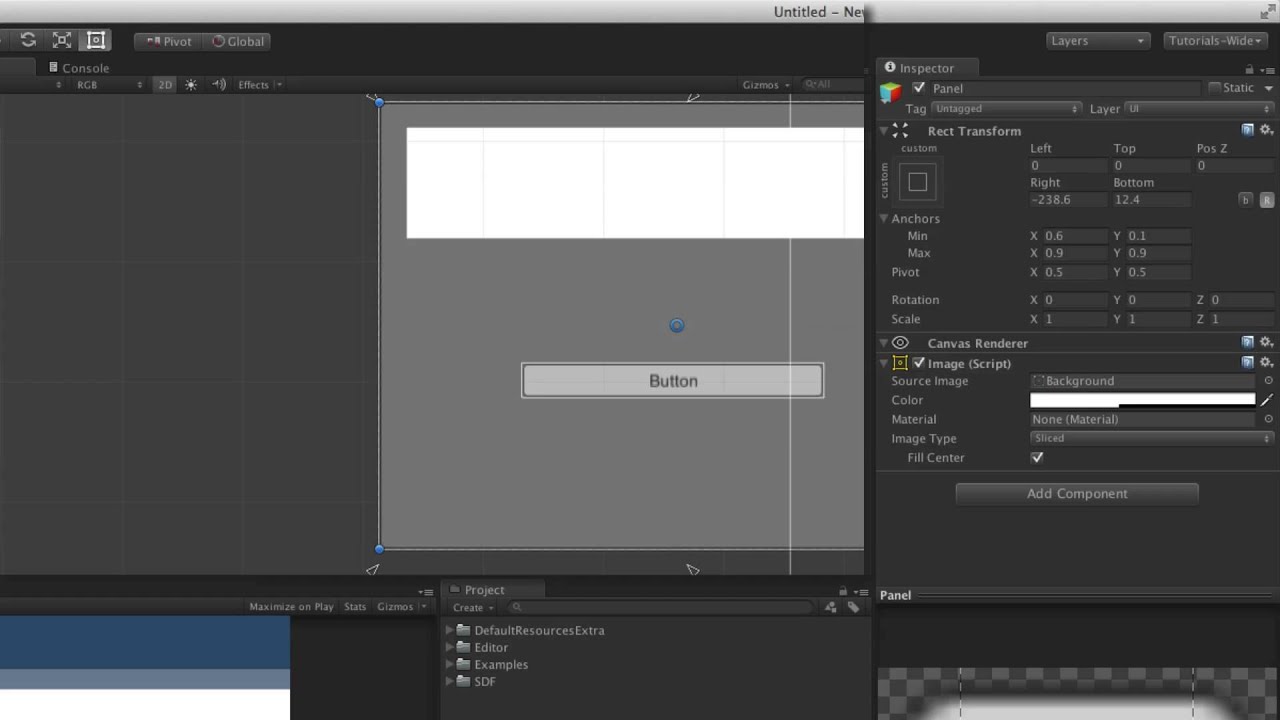
Watch on the official Unity Learn site -
The Rect Transform is the positioning component for any UI element within a Canvas and is used to adjust positioning, anchoring, pivots and more.
There's a simple fix but only if you know how Unity's UI layout system works
rose marten
ok thanks
mortal robin
The simple fix is to use the Center Anchor preset
or rather, whichever preset makes sense for your stopwatch ui
basically you can attach it to one of the sides of your canvas
and offset by a certain number of pixels
and it will obey that no matter how you resize the screen
rose marten
So i could set it to the corner, and it would stay there? ill try that thanks
mortal robin
yea
 lament arch
Hiya, I want to make a UI button disappear after I click it. And have it reappear after a certain amount of time. I've tried SetActive but for some reason the object is still visible in the UI. Recommendation?
 tacit marsh
Hey, I have an issue with a vertical layout group in my UI. It behaves correctly at edit time, and looks correctly at edit time until I press play. My two layout elements are overlapping at runtime until I modify any of them. I would appreciate any help on this issue, I don't quite see a way of solving this without some custom scripting, which in this case shouldn't be needed I think.
This is how it looks after the game is started:
Inspector tab is showing the item that seems to be causing the issue here
 autumn iris
https://i.imgur.com/sMvnsea.png
I've been using the preview for UI Builder in Unity 2020.2.2 and enjoying the experience. Especially since it's like visual CSS.
I have a texture here that is wrap mode: repeat. I want it to tile when the width is stretch, but there is no repeat mode for "Scale Mode"
Anything to be done here or am I stuck doing it the old fashioned way and coding it?
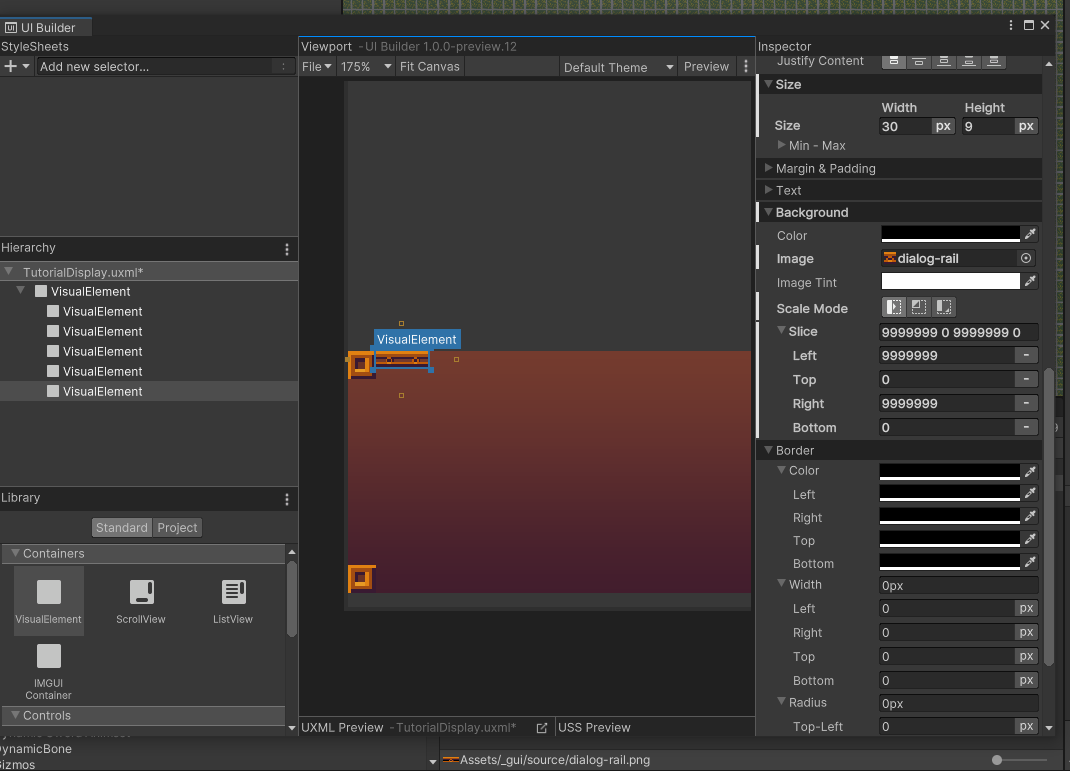



 daring dragon
so..... I know this is going to sound stupid, and i know i feel stupid for asking this after i spent as long as i did trying to figure it out, but ui elements are confusing me alot. Im trying to make a button, where its transistions are sprite swap so when its doing anything but selected, it doesnt show my highlighted button image. I was thinking of doing that by using eventsystem, but no matter where i look or what video ive watched in the past hour it just has been confusing. What does an eventSyetem select? Any ui object, including an image? doesit have to have an event Trigger on it? how do i work this thing its so confusing
mortal robin
can't you just... set all the sprites empty except the Selected Sprite?
or are you asking how do you actually "Select" something?
daring dragon
I plan to set all sprites empty except the selected sprite, but i can seem to actually get the eventsystem to select something
cant*
daring dragon
im wanting to navigate the menu using A anf D or arrow keys left right
mortal robin
ok
so
two things
You need an input module
which should be on or near your EventSystem
daring dragon
stnadalone input module
daring dragon
input manager right?
daring dragon
yea i allready set that part up
mortal robin
so once that's set up
the other thing you need is when you show your UI
you need to select something in the canvas
usually through coded
like EventSystem.current.SetSelectedGameObject
daring dragon
Oh so i have to code if eventsystem is making it selected through scripts? aahh
mortal robin
once something is actually selected
then you should be able to navigate between all the selectable objects in your canvas
according to the navigation rules you set up
mortal robin
Button is Selectable
daring dragon
can it be an image?
mortal robin
InputField is selectable
daring dragon
text itself?
mortal robin
Image is selectable but only if you add Selectable component to it
same with text
basically anything you want selectable you add a Selectable component to
mortal robin
and then you can navigate between them using your axes
no it's a different thing
Add Component -> Selectable
daring dragon
aaaaaaaahhh thats what i was missing all along
mortal robin
yeah it's super confusing
not at all obvious
but a button is actually selectable already
so you don't need to add it to the button
daring dragon
i didnt want to use a button because it wwas just extra weird steps
mortal robin
Ok yeah you can even just remove the button
and use a selectable and an event trigger if you want
with like a Submit event
that's basically all a button is anyway
daring dragon
could i add that pre-select script to my eventsystem? or does the option to choose selected objects on the eventsystem not work?
mortal robin
Uh you can put it wherever you want
daring dragon
assumed so
mortal robin
There might be some better way to like - select the first thing
but I haven't found it
I would expect a Canvas to have a field for like "First selected object" or something
but it doesn't
so ¯_(ツ)_/¯
daring dragon
Ahh uhhh EventSystems does.
mortal robin
Oh that might be the way then