#📲┃ui-ux
1 messages · Page 48 of 1
 placid garden
 reef wigeon
i've gotten some issues where, on lower resolutions, all the UI elements were invisible
i've tried setting the overflow mode to overflow, and it did nothing
reef wigeon
good talk
 shrewd pagoda
I am trying to convert the rect of a ui element to a rect in world space
I tried getworldcorners
I tried converting UI point to screen point by multiplying by canvas factor and then converting from screen point to world point
shrewd pagoda
hello?
 azure flame
I'm pretty sure it was discussed exhaustively how to do that the last time you've asked.
You can just go through message history.
Eventually covering two different solutions as well. https://discordapp.com/channels/489222168727519232/497872424281440267/754456262778814534
shrewd pagoda
But @azure flame those solutions didn't work
 rapid ferry
unfortunately I'm still stuck with my text not rendering in UIToolkit (preview-6).
I did also create a forum post. https://forum.unity.com/threads/ui-toolkit-label-does-not-render-text-in-custom-visual-element.971943/

Unity Forum
So I have created a custom UI Element: Popup. It has a label in it's title area.
In UIBuilder the component renders correctly, and sets it's default...
@shrewd pagoda did you not try this solution I posted? https://discordapp.com/channels/489222168727519232/497872424281440267/754512176881860650
As it worked perfectly fine for me.
shrewd pagoda
@rapid ferry Maybe I am doing something wrong?
rapid ferry
ill ping you when I'm home from work and request to see code then
 halcyon vigil
I have an issue with my game UI going from my editor and the full screen play mode there to my itch.io html5 build.
UI looks good in editor play mode
but is messed up in itch.io (small screen).
and messed up differently in full screen.
Canvas settings
Camera settings (I have pixel perfect component running)
azure flame
@halcyon vigil It works as expected, because you set it to shrink mode
Set to match width or height if you don't want it to break
halcyon vigil
I'll try that, thanks.
the two example I provided show each mode though right? so isn't one of those still going to be messed up?
azure flame
experiment with settings, resize the screen and change resolution mode in editor
halcyon vigil
That's the thing that was throwing me, when I change the screen size in editor it adjusts just fine.
is that not what the first image I provided is showing?
nevermind... i see that I have it set to 16:9
in Free aspect the problem appears
azure flame
research how RectTransform anchors work as well to set them properly to work with chosen scaling.
halcyon vigil
ok, thanks.
 storm osprey
gut no problem my friend
reef wigeon
i have an issue where UI elements do not scale with resolution, and are invisible on lower resolutions. is there a fix to this?
nevermind, i just had to use anchor presets
 real condor
I have a problem, how do I get the "ends" of a sprite attached to a healthbar to not scale?
I've done this in the sprite editor, and when I play around with just the image in the editor it seems to work as intended
But when that image is attached to a slider, it stretches like so:
Basically I guess I'd like to combine the sliced and filled image type?
 pallid yoke
I got this msg in my screen, and it won't go away, what should I do?
it just doesn't go away
 stuck garnet
Hello, this might be a stupid question, but does anyone know how to turn individual sprites of letters and numbers into a useable font?
 sonic umbra
i don't think unity is the tool suited for you my guy
 terse cargo
Ive got a question about IU.
UI*
how does User interface contribute to game mechanics?
ive been struggling with this
 tribal jasper
I have a button with Normal/Highlighted/Pressed/Selected colours set up but the child text component/target graphic inside it is a TextMeshProUGUI component, and when the text appears highlighted (appears yellow) the actual VertexColor of the text remains #FFFFFF, is this normal?
The reason I'm trying to query this info is because when the UI first appears it has no button highlighted despite a first highlighted button is set up in the EventSystem, so Im trying to detect whether any button is yellow at all to retrigger the selection but as you can see the font remains white so I have no idea how to detect it.
To further clarify, on startup when the issue of the UI appearing without a highlighted button happens, pressing SUBMIT on the controller DOES work, the button is fully interactive, but without the highlight. Additionally, if I press down, the second button does get the yellow highlight, and if I press up then to reselect the first button, it does get the yellow highlight this time.
This issue seems similar to mine but the solution proposed doesnt apply: https://forum.unity.com/threads/ui-menu-not-starting-with-a-highlighted-button.419224
Any ideas please? Thank you
 inland obsidian
can someone help me to make a play game and shop gui?
azure flame
Did they ask you that in class? What is this question. Do you have a practical question?
inland obsidian
Theres a way to make a cool main menu with the character? Like in Fornite or Fall Guys
reef wigeon
does anyone have a fix for a UI slider not being interactable? @ me please
 sweet flicker
@reef wigeon theres a check box for being interactable
i am lost any one know why my xr ui sliders work in editor but on play do nothing
super confused due to it works just not on play
if anyone can see why its not running on play would be huge help cuzs im lost it should work
works fine in editor ><;
sweet flicker
thats great ^^ now if someone to tell me if i messed up or this is a bug >>;
cuzs this is driving me nuts O_O;
i even did a test with just a cube with set active on n off
worked on editor but on play no results
just tested in blank scene with a point light and its intensity float value
works editor
nothing on play
 spring thorn
to reference tmppro sprites you need to do this, is there anyway to do this in scripts?
 fresh hamlet
would people here advise using the new UI builder/ UI elements at runtime?
I'm trying it out right now but it feels a bit buggy
it could also just be me not understanding things
for example, my buttons are nice and square in the preview
but in the game they get squished horizontally
fresh hamlet
ah, figured it out, the containing (parent) element was too small, now I set the width to auto and it works
 regal coyote
In terms of the Canvas Scaler, I'm wondering how many folks use different scaling resolutions per canvas. Is this something common, if so what's the use case do you have in mind?
 white jolt
Has anyone used UniWebView for UI?
tribal jasper
Any idea why it might be that my navigation on UI buttons is too "fast"? navigation is set to automatic and Im on the new InputSystem. In this gif, im pressing up and down on the gamepad super carefully, but it still cycles instantly to the top or bottom on one press, highlighting the next button only momentarily before stopping at the final button;
tribal jasper
OK actually it's not the buttons. it's the input reading the same one input as multiple inputs... any ideas why?
 deft steeple
In terms of the Canvas Scaler, I'm wondering how many folks use different scaling resolutions per canvas. Is this something common, if so what's the use case do you have in mind?
@regal coyote Mobile Games that are on different screen ratios
to reference tmppro sprites you need to do this, is there anyway to do this in scripts?
@spring thorn you also need to set up a special atlas for using icons in TMPro
 terse hornet
Hey guys
I forgot to make my textures power of 2 and assigned them in my project, if i edit them in photoshop to make power of 2, will i need to re assign them in images and scripts? Are there any easier way of doing this?
 jagged monolith
As long as you're editing the same file then it will refresh automatically in Unity. Same goes if you overwrite it with the same name
terse hornet
Okay thank you! @jagged monolith
 subtle helm
Hey, can anyone help me out? I created a UI Image and added the on-screen button component, and set my control path to my left arrow key. It works fine in the editor, but when I try to test it out on mobile, it doesn't register. Is this a Unity Remote issue, or a problem with the component itself. I'm using the new input system, btw
 mossy needle
just curious - do you guys explicitly lay out your interfaces, or are any parts of them procedural, such as inventories?
 silent sigil
Is UnityEngine.EventSystems (with interfaces like IPointerEnterHandler, etc.) still recommended for 2020-era Unity, or is there some new system that I should be migrating to if starting a new project? Never quite know with Unity.
 feral remnant
I am trying to work on my UI and experience some issues with transparent sprites, does anybody have an idea what is causing these artifacts?
 polar grove
Hello, how do I make a Dynamic Vertical Group? I have a multiplayer game, and there is the scoreboard, it shows the player name and kills, when someone joins in or leaves how do I update the size of the list? Also when someone joins how do I add to that list?
rapid ferry
Right click -> UI -> Scroll View
Then put your elements as children of Scroll View/Viewport/Content
rapid ferry
Does someone know how to fix this TextMeshPro error?
"Mesh.vertices is too small. The supplied vertex array has less vertices than are referenced by the triangles array."
Unfortunately the stack doesn’t give much info, and I don’t know which object is causing it.
It might be related to the TextMeshPro_UGUI object being in a vertical layout group.
The message is from the sub meshes rendering loop
rapid ferry
Looks like it’s happening when there is a sprite in the text...
silent sigil
Anyone know how I would get a list of all the UI elements (images, panels, etc.) on the screen at a given point (not the mouse position), sorted in order of which draws on top of which?
In 2020.2b if it matters.
 warped basin
wait i'm stupid i got it nvm
 earnest trout
Hi can i ask something ?? I have a problem with my ui button in android
Its acting weirdly ... But its look okay before i build it
Anyone can solve this ??
 spring fulcrum
Hi, I need help with UI (again), I want a scrollview on the side of the screen, with a list of buttons. I want the buttons to be as big as possible in the alloted room (scrollview object) but keeping the ratio of the image under it.
I still have a lot of issues on how Unity handles UI but is there a way to make it work without breaking everything (like the child elements being squished to nothing)?
Thanks in advance.
Here's the content GO of the scrollview:
Here's the child element (that's repeated) in the content GO:
Here's the hierarchy of my current scrollview prefab:
And here's my current result, the basis:
polar grove
if I resize a window in unity or even flip orientation (in mobile, portrait to landscape) the text from Input Fields vanish
why is that?
spring fulcrum
if I resize a window in unity or even flip orientation (in mobile, portrait to landscape) the text from Input Fields vanish
@polar grove Because UI in Unity is terribad. 😛
spring fulcrum
And here's my current result, the basis:
@spring fulcrum Nobody? I've tried fiddling with Grid Layout but there is no way it seems to adapt the buttons' size depending of its container. Also if I put "flexible", it makes a 3x3 zone and the content goes beyond the size of the scrollview, which I don't want...
rapid ferry
uuh
text is just suddently black now
for some reason
i want it white
bruh
Highlight all the text and then pick white as the color
unless you've already tried that
oh apparently i had to press ctrl r
ah
dk what ctrl r does
but whatever
At least you got it sorted 🙂
 winter hinge
how do i put ui on a object
 glad minnow
In 3D space ?
winter hinge
yes
winter hinge
so
winter hinge
how do I do that
 vestal fossil
I am new to unity and bought a UI package in the marketplace. Sadly, I cannot figure out how to use it in unity.... I can import the PSD file, but the psd importer generates sprites. so I have a sprite of the menu. but obviously I cannot use it for interactions. Am I correct in the assumption that I have to rebuild the UI in unity from scratch using the textures included in the PSD file? or is there a trick to speed things us? Did I miss something?
winter hinge
how do i put ui on a 3D object
winter hinge
?
glad minnow
Make the canvas 3D space
winter hinge
but when i put the canvas to world space its way too small for text
tribal jasper
@winter hinge it sounds like you need to find a world space canvas tutorial
 thorn peak
Hello, I am fairly new to Unity and my goal is to make a spreadsheet display in 3D Unity, similar to excel or something but obviously with a lot less functionality just basic viewing is my main goal. Any recommendations on any packages or toolkits or anything I could use to make this? (feel free to ping in response)
 distant heath
hello, every time I select a UI element it shows this error, editor only... I can move the text though
can someone identify the problem?
I can't seem to get it
 sonic oasis
how can i make the text not blurry and very crisp?
sonic oasis
anyone?
 tall grotto
@sonic oasis are you using textmesh pro?
sonic oasis
i am now but i am having a hard time with it
tall grotto
that's the easiest route to less blurry text
sonic oasis
the only down fall is i have to make my own font for it but the font has the weird box around it when the camera is far from it fyi its a world canvas im talking about but
tall grotto
not sure about that sorry
tall grotto
that is strange, is that from the game mode or scene view?
sonic oasis
thats from scene view but it does it in the game as well
tall grotto
🤷♂️
sonic oasis
its only for the font i made tho which sucks cause i like roboto thin
tall grotto
you could try moving it up like .001, if it is on the same level as other stuff there might be causing that, apart from that, not sure what else to try
sonic oasis
it is higher and it doesnt do it if i change it to a font that comes with TMP
sonic oasis
if anyone knows a fix please ping me
 wary lodge
sonic oasis
wary lodge
sonic oasis
nvm fixed it by making the padding higher
 solemn salmon
the only down fall is i have to make my own font for it but the font has the weird box around it when the camera is far from it fyi its a world canvas im talking about but
@sonic oasis they provide you with a font asset creator
That turns a regular font asset into a tmp font
Window > TextMeshPro
 bright cargo
Guys hello, i have trouble with 19:5:9 aspect ratio. How you guys solve this problem? It's expanding ui object. My scene settings is 1080:1920 portairt. And here my canvas settings
@still vector on my old games i'm using this same settings. What is your suggest?
 still vector
@bright cargo okay, but what is the difference in behaviour ?
bright cargo
With 19:5:9 aspect ratio on longest phones (like oneplus 7t) it's expanding UI's
It's stretching ui images
 thorn python
If you are using Image you can set preserveAspect = true in code, or through the inspector in debug mode
bright cargo
What is this?
I opened now but how it's working?
ps : i have no problem about gameover screen and it's fully ui image elements and no problem in here
just i have problem in mainmenu.
rapid ferry
Does anyone know what sprite/texture2D setting I need to change so that whenever I get farther away from the sprite it doesn’t get a wierd background?
I think generate mip maps needs to be turned off so ima try that later
thorn peak
Hello, I am fairly new to Unity and my goal is to make a spreadsheet display in 3D Unity, similar to excel or something but obviously with a lot less functionality just basic viewing is my main goal. Any recommendations on any packages or toolkits or anything I could use to make this? (feel free to ping in response)
 pseudo apex
@thorn peak You could literally use a tilemap or build the positioning system yourself with UI objects or something, there are many ways to do this. A friend of mine did a whole hex grid mathematically himself using DOTS.
thorn peak
hmm apologies I'm new and don't know what a tilemap is but I'll look into that thank you. I have something really basic going with UI objects but I couldn't figure out how to be able to scroll/generate labels as needed from Unity (prob some way in C# to do so but I'm struggling to figure out how to link the 2). Worst case I'm thinking I can just use buttons to "scroll" and have the text on the labels just update as if it were scrolling
 frail jewel
Do you think my objectives UI background needs abit more pazaz ?
 old sonnet
Is there a way to make a ui element the width of the screen, but only the width, I already have the height controlled by the canvas scaler
So the height is OK and I dont want to change that at all, it scales prefectly, just the width
alright nvm, I fixed it by adding a script with this code to the UI element:
using UnityEngine;
public class setscreenwidth : MonoBehaviour {
    void Update() {
        var height = GetComponent<RectTransform>().sizeDelta.y;
        GetComponent<RectTransform>().sizeDelta = new Vector2(Screen.width, height);
    }
}
the width becomes slightly bigger than the screen size for some reason, i dont know why
but thats fine
 hollow atlas
How can I make it so the distance between each object in a vertical layout group is constant instead of based on how many there are?
rapid ferry
@hollow atlas use a vertical layout group
 scarlet gale
hey guys. im building a cardgame right now and was wondering if it would be beneficial to add the UI builder to my project.
I currently dont have a deep understanding of it and dont know how its behave with 2d -> 3d coordinate convertation...
hollow atlas
@rapid ferry I already am
 spice rover
Trying to use EditorGUILayout.Popup(), and the Popup value never "sticks" when I alter it, and the return value is always the same as initially. https://hatebin.com/rknwudovyh
rapid ferry
Does anyone know how to scale up properly? I cant seem to do it..I already clicked scale with screen size but it does no effect
Fixed it, I now understand why
 rocky gate
How can i do an autoscroll scroll view?
 dry shadow
I have a TextMeshPro input field, and a button. When the button is clicked, I want to send whatever is written in the input field to a script. How can I do this?
jagged monolith
There are a couple of ways, and it can depend on how into coding you are. Personally I would do it all in code - so in the script have a reference to the button and the inputfield, and subscribe to the OnClick event from the button.
Alternatively you could make a function in the script that takes an inputfield as a parameter, and in the inspector call that function on the button click event and assign the inputfield there
rapid ferry
can anyone help me with the restart button? i cant click it
 jade gulch
is it a button?
is the text over it a raycast target thus blocking the image under it?
jade gulch
Yea you can do that. I accidently do it pretty often with TMP_Text lol
jade gulch
Does the canvas it's on have a Graphics Raycaster object?
jade gulch
The root canvas object should have a component on it called "Graphic Raycaster"
rapid ferry
jade gulch
Also little tip. If you click the "Event System" object, the bottom right of your Editor should have a little dialogue box with some information including displaying what selectable ui object the mouse is over, that can tell you what is blocking it
jade gulch
Seems your pointer is hitting the Text element
rapid ferry
public CanvasGroup CGI;
    public void ReloadScene()
    {
        if(CGI.alpha > 0.5f)
        {
            SceneManager.LoadScene(SceneManager.GetActiveScene().name);
        }
}``` the function if it helps(cgi is assigned and has an alpha of 1)
jade gulch
It seems the pointer is clicking on the Text element and not the Image (which is what Button) uses
I'd say to double check for Text having a Raycast Target toggle on
jade gulch
Hm put a Debug.Log outside of the if to see if it gets triggered
rapid ferry
@jade gulch it doesnt
jade gulch
huh... yea I'm unsure on this
rapid ferry
its not even grayed when i put my cursor over it
its uninteractable
what the event of a working button looks like
my one seems to be the same with one difference
pointer enter and pointer press are null
changed this on the canvas group and now it works..?
rocky gate
how can i do an autoscroll scroll view?
 lone dirge
As new person to unity (downloaded it today) are there any guides for UI that are well known for me to look at? There are so many tutorials for things that I'm completely lost and cant find what I need. I really just need a general guide to UI currently. (Apologies if this is worded weird)
pseudo apex
@lone dirge I would look at the original unity tutorials from the company itself.
https://learn.unity.com/
And if you don't know programming, you probably should head out to find yourself some courses in that too, I see way too many people who just want to make a game and then they go into the code section of this forum and just ask about the simplest things.
So learning basic C# will help a lot.

Unity Learn
Unity Learn provides award-winning free tutorials, sample projects, and full courses for mastering real-time 3D development skills with Unity Learn to make video games, VR, AR, and more.
lone dirge
Thanks, ill look into this immediately, I appreciate the quick response. @pseudo apex 👍
pseudo apex
There are several youtubers who are also very good at teaching the basics and even more complex stuff like DOTS, but considering that this is your first game I would not go into that yet, but instead get used to the interface of Unity and just produce some quick simple games.
lone dirge
Alright, ill look around in unity more.
rapid ferry
I am not sure if this fits here if not tell me and I remove it. I want to design an as simple and clean interface as I can get away with. This is a very simple title screen (duh) I am mostly interested what people think of the color difference there in terms of readability.
The whole game is basically the user staring at text and very simple graphics so I want it to be as eye friendly and readable as possible.
pseudo apex
@rapid ferry an advice I can give you is to look at other apps dark mode and see what feels comfortable. Like the grey and white discord is using has never made me feel tired. Mat colours are usually the better option instead of highly contrasting ones.
rapid ferry
Dark mode apps is what I tried to emulate with the above. I have a bit of a higher contrast between the mediums and the darks there admittedly so I might brighten it up.
Thanks for taking the time to reply.
pseudo apex
Yeah, I feel the title and the background is a bit screamy together, but the text on buttons seems just fine
 rough ridge
Hi I have a simple ui question, how can I let a ui game object's rect transform follow the on screen mouse position?
pseudo apex
Just set the objects position to the Input.mousePosition @rough ridge
There are other ways of doing it too, but that is the most straightforward and simple way of doing it
rough ridge
@pseudo apex that's what I have, it doesn't work
pseudo apex
err, are you moving the entire menuA or just an item in menuA?
rough ridge
it's the entire menuA and its children
pseudo apex
Was a long time ago since I moved a ui object manually like this, but isn't it enough to just take the game objects transform? Do you need to fetch the rectTransform?
rough ridge
I have no idea, it's my first time digging in ui. I'm making this menu that when it's active it can spawn right next to mouse position
Just like how blender's menu work
nvm it works now
rapid ferry
Could use some feedback for our main menu design
Is the layout good? How are the colors? etc
For context, it's a battle royale game
 cold ridge
this is for ui right ?
rapid ferry
ye
 torpid birch
I think that the white background color under new cosmetics doesn't fit
rapid ferry
yeah, I was going to make it orange
torpid birch
cool
rapid ferry
I should probably do another full body cosmetic too instead of shoes
torpid birch
Maybe have something (a button?) underneath the characters also
 hollow pewter
can someone confirm if canvas is dirtied when the whole canvas is moved around the scene?
 quasi phoenix
please help
my button sets its pos to the bottom left corner of the canvas on play
quasi phoenix
new scene, issue persists
help this issue is seriously bothering me
i cant fix it
 timber elbow
@quasi phoenix do you have any scripts on the objects/in the scene?
rapid ferry
Check your scale with screen size
quasi phoenix
its a clone of another button without this issue
rapid ferry
One sec, ill try replicating it
quasi phoenix
this is especially frustrating because i cant find anything about it on google
timber elbow
right click the object in the hierarchy - find references
quasi phoenix
there is no find references button
timber elbow
Ah, sorry, that's when you right click a component.
quasi phoenix
something happened but idk what
timber elbow
might also be related to canvas render mode
quasi phoenix
its a clone of another button and canvas without the issue
timber elbow
something happened but idk what
@quasi phoenix you should have a list of objects that reference it in the hierarchy
quasi phoenix
a lot of stuff popped up cuz they all reference my player
and my player references the animation on it
which changes the alpha
and not the transform
timber elbow
sounds like a very bad design decision...
why would you player reference a transform of a button?
timber elbow
you said that a lot of stuff pops up when you do what I said.
quasi phoenix
yeah but its never referenced in the code
timber elbow
it should only show objects directly referencing the transform component
timber elbow
okay
quasi phoenix
button still moves tho
timber elbow
can you focus on the button in the scene view and take a screenshot? It's not clear where it is from the video that you shared.
quasi phoenix
well uh
a new issue just randomly popped up
all of my stuff just turned invisible
dude wtf is happening
im not changing stuff but its messing up
thats where its being put
timber elbow
looks like it's very small compared to a canvas...
quasi phoenix
its a small button
timber elbow
and almost out of bounds.
quasi phoenix
yeah thats not where its supposed to be
timber elbow
I mean it's so small that I don't even see it
timber elbow
then what's the previous screenshot?
quasi phoenix
what happens to it when i click play
timber elbow
okay
it's probably one of your canvas settings, as the original button seems to be on a different canvas...
quasi phoenix
theyre each on separate canvases for organization purposes
timber elbow
make sure the canvases have the same settings and none of your code is messing with the new canvas
quasi phoenix
i moved the button to the same canvas as the working button and the issue persisted
these things come up when i search for references but they dont reference the transform
timber elbow
what about in the editor?
quasi phoenix
thats in the scripts for everything that shows up in the editor
and the functional button had the same results for the searches
im telling you this button is identical to the one that works
no matter where i put it, where i anchor it, it sets itself to that corner
relative to everything
i changed it from bottom center to top center and it still went there
timber elbow
can you take a screenshot of the canvas before and after play?
quasi phoenix
the canvas doesnt change
the functional and nonfunctional button are both in the same canvas now
timber elbow
this seems to be a different canvas though
I was talking about the one with the problematic button
timber elbow
on the video it was called skip
unless you were trying to confuse us with the video and showing us the wrong button there.
timber elbow
🙃
quasi phoenix
well thx
timber elbow
sounds suspicious but ok.
quasi phoenix
my engine has been acting weird all day
like i said earlier everything disappeared for a bit
 spice marten
@rapid ferry second
spice marten
can someone help? Why line renderer always shows behind the image (not sprite renderer)
but when i change material of a line to standart, it becomes dark
 long condor
i'm using a textmeshpro button, how can i run a function on click?
rocky gate
How can i make an autoscroll scroll view?
pseudo apex
You have to be more specific @rocky gate.
Shall it auto scroll to a position when you click a certain thing, or should it be always rolling or when you press left it shall auto scroll to the left item if there is one? There are more options for this auto scrolling business ^^;
https://forum.unity.com/threads/scrollview-scroll-position.463048/
There is this solution..
https://stackoverflow.com/questions/30766020/how-to-scroll-to-a-specific-element-in-scrollrect-with-unity-ui
And this solution.
https://docs.unity3d.com/2017.2/Documentation/ScriptReference/UI.ScrollRect-verticalNormalizedPosition.html
Or simply use this, which is a value you can increase between 0-1 to scroll the view.
rocky gate
thanks!
long condor
how do i use a text input textmeshpro to set a variable
 eager sand
Can anyone help me out with this? Pls guys
So my prob is I have a FloatField in an editorwindow (using UIElements btw) which is bound to a serializedProperty of a float in the same editor window so that unity automatically handles the undo/redo.
After changing the floatfields values a few times and the undo stack is updated with the change cuz its bound to a serializedProperty, now if I close the editor window the undo operation for changing the floatfields are still present and if I hit the undo Ctrl Z now there r empty undos in the place of the floatfield values being undoed cuz the editor window is closed.
What I need is to be able to undo the floatfield when the editor window is open but when I close the window I want to delete the undo commands in the undo stack for the times I changed the floatfield
Pls I really need some help in this. Editor scripting is killing me
Editor Window Code: https://pastebin.com/w73tHZkH
Pastebin
Pastebin.com is the number one paste tool since 2002. Pastebin is a website where you can store text online for a set period of time.
 pliant torrent
hi
I kinda could need someone that would bring a menu I designed to life, but since I fear not having such luck, how could I make it myself as someone that has no clue of scripting?

here is my menu concept.
its just the basic function of this battle menu for an (j)rpg. it has not a core design yet.
pseudo apex
@pliant torrent This is actually not too difficult to pull off, it will take some time for sure. But as long as you focus the attention of the controller on that element alone, then left and right can move between the tabs and up and down move between the alternatives.
I would suggest the menu takes over the controller when you activate the menu and then you just register the controller inputs to animate certain elements to your liking and all the actions are done behind in code.
Make a good state handler that keeps track of where you are in the menu and then just animate these fluffy visuals when in a certain state.
pliant torrent
it was actually really planed to work with the controller/arrow/wasd keys the same way you descripted it.
one in my team would rather have it controlled be the mouse cursor, but I dislike this idea. ^^'
i guess if this game would ever land on a device with a touch screen it could be build in, but its the lowest prio for me.
Make a good state handler that keeps track of where you are in the menu and then just animate these fluffy visuals when in a certain state.
@pseudo apex
I just never did something like this.
can you suggest a tutorial for this? ^^'
sadly I am the 3D designer in my team and we have no UI-IX scripter/designer.
pseudo apex
@pliant torrent That menu can literally just be a bunch of images that you replace depending on your menu's state, that's about the best I can explain it TBH. I'm a programmer so don't really do much using the unity editor myself. But you for sure will need some 2D art for this one, unless you wish to make your menu in 3D.
 gritty marlin
Hi everyone. I'm getting into UI and I was wondering what some standards are. Currently I'm trying to figure out if UI should be manually placed in every scene used (say if i have several levels I place a new "health bar" object in each level) and updated based on a game manager, or if it should be something constant that stays through scenes, using something like "dontdestroyonload" on the script?
pseudo apex
@gritty marlin Make prefabs of UI, so you can reuse them in places and make sure that elements that update is in their own canvas, since it's a big performance cost to re-render the entire shablam if you just keep everything in one canvas or two for example.
pliant torrent
...unless you wish to make your menu in 3D.
@pseudo apex
I made a lifebar once in 3D, just to render each single part of it ou in 2D
 pseudo apex
yep, that's possible, as long as you have a way to control the animations.
gritty marlin
So, stay away from keeping HP, Score and whatnot in the same canvas a use prefabs, got it. Thanks for the help!
Also sick resource bar jarron
pliant torrent
thank you. I normally don't do UI stuff. maybe I should?
 lost cape
Does anyone know why when we build our game none of the canvas elements or anything are where the camera is?
Like the camera just shows a blue background instead of the background image and canvas elements
But it works perfectly in the editor
spring fulcrum
Hi, quickie! Is there a way to be able to scroll a scroll view with elements in it such as buttons without clicking on the buttons while dragging. By default if we try to drag, it doesn't then when we release above a button, a click registers. That's a bummer. I was wondering if there was something cleaner.
Also, how to avoid this? The horizontal scrollbar there. I just wanted the elements in the layout group with some space between them and around the list. 😦
When you use content size fitter you can only set the size to minimum OR prefered. You cannot tell the element to take the most room possible? That's insane, Unity UI is rubbish. 😦
 sonic garnet
Hi, quickie! Is there a way to be able to scroll a scroll view with elements in it such as buttons without clicking on the buttons while dragging. By default if we try to drag, it doesn't then when we release above a button, a click registers. That's a bummer. I was wondering if there was something cleaner.
Make sure your behaviour is implementing IPointerClickHandler instead of IPointerUpHandler. If you've dragged and exceeded the drag threshold, the OnClick event handler won't fire. but the OnPointerUp event handler still will. This is built in to prevent what you're describing. If you've checked to make sure you're listening for the right events and this remains an issue you could consider tuning your EventSystem's DragThreshold until the clicks stop passing through. That can sometimes be an issue on high DPI screens.
Also, how to avoid this? The horizontal scrollbar there. I just wanted the elements in the layout group with some space between them and around the list. 😦
remove the connections for horizontal/vertical scrollbar and delete/deactivate them to your preference. They're not required and you're in full control of your hierarchy.
When you use content size fitter you can only set the size to minimum OR prefered. You cannot tell the element to take the most room possible? That's insane, Unity UI is rubbish. 😦
A content size fitter does what it's name implies: it fits an object to the size of what it contains. That's why minimum or prefered size are the only options that would make sense. Content Size Fitters are good for when you have a varying body of text and you want to have a texture mapped to be the background of it.
It sounds like you're looking for opposite of that which is a horizontal or vertical layout group. These can control the size of their children to fill their the space of their rect.
 sand prism
So my mouse is locked (center non visible) and I'm trying to interact with world space buttons. Currently nothing happens, what am I missing?
 indigo goblet
does anyone use UI elements (UI toolkit / UI builder)?
 timber carbon
In Unity 2019.4.11f1 I have a rigged sprite that I made, It is a child of an empty game object on the canvas, but in the game space it is out in the world, on the editor it is on the canvas!
anyone have an ideas?
pseudo apex
did you place one of the game objects in "world space"?
timber carbon
i think i dragged it to the hierarchy panel
it doesnt seem to have an anchor option either
pseudo apex
is the canvas in world space?
timber carbon
it doesnt seem to have an anchor option either but the other images do have an anchor option
pseudo apex
Do you have several canvases in that hierarchy and is any one of them using the setting "in world space"?
pseudo apex
feels odd riggin a menu button with bones, are you sure it's able to function in a canvas with bones?
timber carbon
Maybe you cant use rigged components as buttons on the ui?
pseudo apex
Exactly my thought, never seen it done before, it does operate a bit differently than the rest of the game objects.
timber carbon
yeah i just wanted a cool animated button effect when you mouse over it, so I was going to rigg the piece behind the button
trigger an aniamtion etc
i guess I am going to have to do texture animation instead, boo
thank you for the help @pseudo apex
pseudo apex
There might be some more resources on this online, but I just have never seen it before being done
 arctic pike
i looking for UI for apocalypses game with zombie.
 leaden osprey
Is this a good room to ask Text Mesh Pro questions? Specifically Input Validation? It's not, like, UI Design, so...
hollow pewter
i dont see any other better channel so why not
spring fulcrum
@sonic garnet Hi, thanks for your input!
Make sure your behaviour is implementing
IPointerClickHandlerinstead ofIPointerUpHandler. If you've dragged and exceeded the drag threshold, theOnClickevent handler won't fire. but theOnPointerUpevent handler still will. This is built in to prevent what you're describing. If you've checked to make sure you're listening for the right events and this remains an issue you could consider tuning your EventSystem'sDragThresholduntil the clicks stop passing through. That can sometimes be an issue on high DPI screens.
On which object should I put this behaviour? The scrollrect's content panel?
sonic garnet
no, those would be for the buttons.
spring fulcrum
remove the connections for horizontal/vertical scrollbar and delete/deactivate them to your preference. They're not required and you're in full control of your hierarchy.
But I don't want to, I want them to display depending on if they are needed.
A content size fitter does what it's name implies: it fits an object to the size of what it contains. That's why minimum or prefered size are the only options that would make sense. Content Size Fitters are good for when you have a varying body of text and you want to have a texture mapped to be the background of it.
I want the opposite, I want the button to change dimensions depending on the panel they are contained in.
It sounds like you're looking for opposite of that which is a horizontal or vertical layout group. These can control the size of their children to fill their the space of their rect.
So you say I don't need a content size fitter on the parent? Just layout group on the parents and all their children should size themselves depending on t he parent? But to what extent? Will the children take the most possible width in the layout group and how to force them to keep their original ratio (squarte here)?
@sonic garnet
no, those would be for the buttons.
@sonic garnet Oh of course, thanks.
no, those would be for the buttons.
@sonic garnet So an empty behaviour on those with just the IPointerClickHandler should fix it?
What should I put in OnPointerClick? I'm using the default onClick on the button.
I think I got it for this one, I can leave that method empty. It seems to work.
Thanks.
spring fulcrum
@sonic garnet OK, when I set no scrollbars for the scrollview (if it works with a mouse or a finger I don't need them), my content doesn't display at all...
Never mind, issue came from prefabs not updating in the main scene. 😦
pliant torrent
I made a concept of every option I have to merge functions, but as more it gets compressed as complexer it will become.
Like creating shortcut buttons for some task like the classic l1+r1=flee. Or how to switch when selecting attack from state multi to smash attacks.
long condor
how do i use a button (textmeshpro) to run a function? i am trying to make a save function for the game, but i don't know how to use a button to run it
 bronze steppe
@long condor Click on the button and go to the inspector. Scroll all the way down untill you see the "On Slick" window. Click on the plus icon to add a new action and then drag the game object with the script in to the black field below the text "Runtime Only". Then click the longer bar that is besides "Runtime Only" and then pick the 4th option. A long list will come up, but just pick the function you need
long condor
Ok, thank you!
bronze steppe
np!
now im having issues myself
I have a script that should get a TextMeshPro component and i even dragged the component in, but once i click play, it simply disappears and i have to redrag it into the script again
idk why this is happening
nvm this thread helped me out a bunch https://answers.unity.com/questions/1226989/script-element-disappears-after-pressing-play.html
Unity is the ultimate game development platform. Use Unity to build high-quality 3D and 2D games, deploy them across mobile, desktop, VR/AR, consoles or the Web, and connect with loyal and enthusiastic players and customers.
It seems to me that your script is attached to the Player GameObject in the hierarchy, and obviously, the Player DOESN'T HAVE A TEXT COMPONENT.
what the sentence does, it to set the countText to the Text Component of your PLAYER gameObject. Since your player has no text, it returns null.
However, since countText is already a Text, you don't actually need to re-assign at all. It is simply safe for you to delete this line.
bronze steppe
uh texture issue
when zooming in in "game" mode, the textures become extremly blurry. Idk why the issue is like this but if anyone knows a fix let me know
in scene mode, it's really clean
scene
game
 silver cypress
This...
Or this?
Basically weither or not I should show the mask graphic
Could also lighten/darken it
bronze steppe
Third one
polar grove
I think I've found a bug on the Input Field, so when ever I enter text in small caps it shows up fine, but if I enter Capital letters, they automatically become small
idk what is causing this
I checked the text field, none of the Uppercase, Lowercase or Smallcaps are turned on
 trail spruce
Scrollviews aren't the most intuitive, anyone care to help me configure mine?
silver cypress
@polar grove Sounds like either a height issue or that you have BestFit turned on. Try making sure that BestFit is off, and also try changing Vertical Overflow to Overflow.
polar grove
@silver cypress I fixed it, I had the content type set to name
Changing it back to standard fixed it
 nimble chasm
I have a Prefab, that is made up of RawImage components, with a RectTransform at the root. I've dropped that into a Canvas in the main scene
But, when i set that prefab's RectTransform.sizeDelta = new Vector2(somex,somey); it doesn't update the size at all
Well, at least it's display for a size
jagged monolith
@bronze steppe that's how it works. Zooming in doesn't move the camera or add more pixels, it just scales up the rendered image
bronze steppe
so i could basically move the camera further in then?
jagged monolith
that depends on what you want
bronze steppe
well if i want the textures to be crisp in game mode
 sage fog
I have 2 panels in a canvas. No matter where I put Panel 2 in relation to Panel 1 in the hierarchy (above or below) Panel 2 is never visible because Panel 1 is always on top. Can anyone help me?
 empty osprey
does anyone know why my texts are pixelated?
 brazen forge
does anyone know why my texts are pixelated?
@empty osprey same for me, I am using the old text instead of text mesh pro
Fixed it! just follow the steps here https://answers.unity.com/questions/990559/fix-blurry-ui-text.html
Unity is the ultimate game development platform. Use Unity to build high-quality 3D and 2D games, deploy them across mobile, desktop, VR/AR, consoles or the Web, and connect with loyal and enthusiastic players and customers.
empty osprey
fixed too!
 ivory cipher
Hey, how are you even supposed to handle navigation when you want support for both mouse and gamepad?
Right now i have a First Selected: on the EventSystem, and also Deselect On Background Click disabled, that way it selects the resume button by default and you also can't deselect through the mouse (since you can't navigate with a gamepad unless something is selected): https://i.imgur.com/SNdeHUJ.png
However, then I'll always have one button that is selected, even if I'm using the mouse, which seems super unoptimal and ugly: https://i.imgur.com/Te3aXcs.png
What is the proper way to handle this? I don't get why unity doesn't take care of this stuff automatically
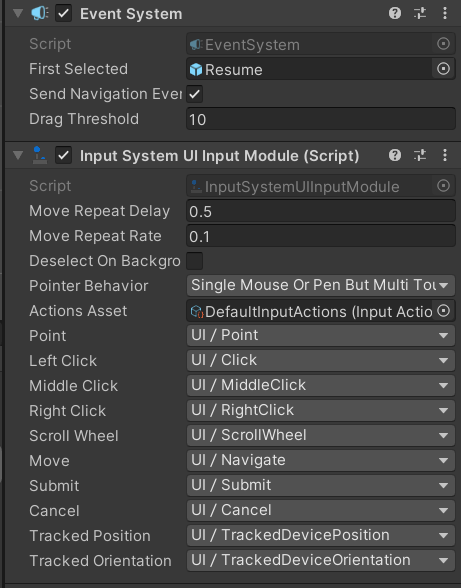
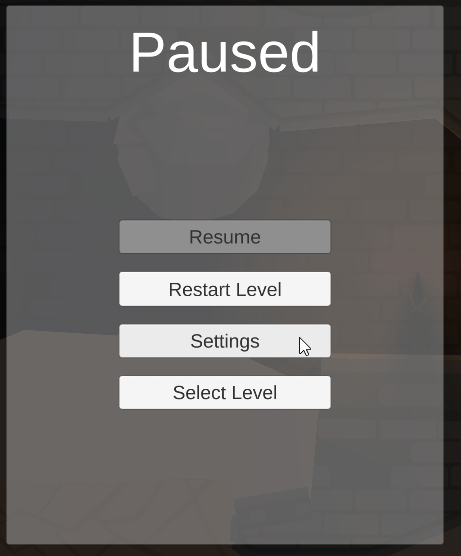
 twin nymph
tl;dr How to drag a UI image along a path? - Been searching and searching but I'm having difficulty finding a solution to this problem. Trying to make a puzzle game where you click and drag lets call it a wooden crate (box) along these hallways inbetween shelves. Its a top down view. Basically you are moving this crate by click and drag along path lines. For now the lines are all straight but I'd like to be able to have a node/spline setup eventually. I've found lots of stuff on making something move along a path automatically but not anything yet on how to make it move on that path only when you click and drag. Any thoughts on this? Something like this but click and drag and not automatic: https://www.youtube.com/watch?v=11ofnLOE8pw

#unitytutorial #unitymovegameobject #unitymove #unitymovement
In this video tutorial, I will show you the way how to make a game object move by Bezier curve. Also we will see how to make a game object follow some interesting and unusual paths using several Bezier curves. In ot...
long condor
i was trying to use buttons in the latest version of unity 2020, and the buttons don't work. i have the new unity input system enabled, could that have something to do with it?
 wise jasper
how do u add a background image from google to ur unity game
 elder sleet
I have a question about GUI elements. How can I make sure one element is above another? Changing the Z axis didn't seem to do anything.
 marsh crown
y
 storm veldt
@elder sleet if they are using sprites, you'll need to look for the "Order in Layer" property. Changing the number there will make your sprites render in front or behind each other
It's on the Sprite Renderer Properties
A higher number will render your sprite in front of others
elder sleet
@storm veldt They're just normal GUI images/text. I ended finding a kinda solution and that was just making another canvas. Not happy with this, but it's the only way to force that window to be on top when I wanted it to.
rapid ferry
Hello...I don't know why my canvas boundaries disappeared. They are shown only if I click on the canvas gameobject. Normally they were visible also with children UI GO. Anyone can help?
azure flame
@rapid ferry Make sure gizmos are turned on for it, check that UI layer is not turned off top right in layer visibility
rapid ferry
layers are okay. Which gizmos I have to check_
nvm solved. I wasn't selecting gizmos at all! Thanks for the help
long condor
help my buttons aren't buttoning
 nova onyx
 cyan ferry
@inner sierra
here's my brand's colour palette
the colours all play nicely together
brazen forge
anyone know why is the cursor is so big? I am using playmaker on it
Its the "get cursor" action
 hushed bolt
Can you use selectabale base class for Sprites(in spriterenderers)? The navigation visualization works but I'm not sure if it's meant to be used this way.
 vernal ferry
Is there a way to anchor the bottom menu (costumes menu) to the bottom of the main screen menu? Whenever changing aspect ratios (like if someone uses a longer for, for instance) the costumes menu keeps popping up to the main menu.
The shop menu scales and transitions fine into the center. Just the costumes menu acts up
 nocturne cape
Someone knows where I can learn to make good UI design (courses or textbook)? And a web page to create good Ui wireframe?
 clear imp
Anyone know how to make a start menu?
 forest garnet
hi i get this error in the package manager and i dont know how to fix it
i accidentally deleted all the packages
is there a way for me to reinstall them?
 turbid onyx
How would someone go about implementing navigation in a script?
rapid ferry
My TextMeshPro prefab when instantiated (even if the Text is correctly filled) it shows a T instead of the actual text. Why?
sorry I'm an idiot.
vernal ferry
What is the best way to handle multiple in-game menus? I was thinking multiple canvases as prefabs for each menu but I'd like to hear if someone has a better approach.
 smoky field
Actually generating new UI from Prefab may be more expensive than just having it hidden and then enabled (using SetActive) @vernal ferry
 native aspen
How do I make an UI object follow my cursor location?
jagged monolith
Having multiple canvases can actually be better for performance @smoky field & @vernal ferry, because when an object is changed, the whole canvas needs to be redrawn. By splitting the UI into several canvases based on how static they are you can save some cycles
However it depends, and if youre talking about spawning prefabs during runtime then bionicl might be right in that it’s more performant to cache it and enable/disable, depending on the amount of instances
 desert nimbus
Unity's Mask component doesn't anti-alias? How can I have a UI mask that is smooth
smoky field
Sorry, not really. You'd need to use other plugins for that
@desert nimbus If you'd like to achieve rounded corners you can check my recent tutorial that shows how to add them:
https://youtu.be/RsgiYqLID-U (Rounded corners 3:30)
sage fog
Has anyone experimented with a Pictionary or paper telephone style game? Where the players can draw or write their own “cards” which are then arranged in a specific way and visible for all players? I made a screen for the players to draw on, but now I’m not sure how to have their drawing be saved and then shown later in game
 swift holly
I have this GUI button that I want them to press while in the FPS controller, how does that work?
pseudo apex
@swift holly Depends how you have done your FPS controller and how you want to press the button.
You could potentially have a button that locks the FPS controller in place and lets you move the mouse, such as many MMORPG's do it.
desert nimbus
@desert nimbus If you'd like to achieve rounded corners you can check my recent tutorial that shows how to add them:
https://youtu.be/RsgiYqLID-U (Rounded corners 3:30)
@smoky field Thanks! That's a good tutorial but I'm looking for a way to mask any image into rounded corners :/
 unreal relic
I just change the Canvas scaler from Constant to Scale with Screen size and suddenly all of my buttons have stopped working. They are not reacting to hover or click. How can I fix it??
swift holly
@pseudo apex more like a hologram, canvas in world space, I want if the center crosshair goes over the button and the user clicks, it can click the button
 idle cloak
If I’m creating a game menu and UI from scratch today in unity 2020.1, should I be looking to use the UIElements and builder or should I still be using the UnityUI system?
pseudo apex
@swift holly Just check what the user is aiming at with a raycast and if it is a button of some sort, just make it activate instead of shooting.
you can also use the other method of when moving close to an object you can press E for use or something
 austere zenith
if a sprite go under an UI, how to make another sprite ontop of the UI while the original one is under
pseudo apex
@austere zenith Don't really understand what you are after, but you can just spawn another ui object and place it in the canvas in the same position as the one under it, do keep in mind that the position in a canvas is different from the position in the world space
austere zenith
so ijust want to be able to see the object when its hidden under a ui since it can go under it
but I just cant seem to make the ui change transparency on collision
pseudo apex
Isn't it easier to just have a button to hide the UI?
Don't know too much about shaders, but shaders are used to see through walls usually, might work for UI too.
A sprite in the world can not collide with a UI object unless it is in the world
pseudo apex
There is a whole chat channel dedicated to that knowledge, it's not easy to explain straight off the bat, but you can make some snazzy effects using shaders.
https://learn.unity.com/tutorial/rendering-and-shading

Unity Learn
Get an overview of the lighting features new to Unity 5 with this lesson covering realtime global illumination, light types, the lighting panel, as well as emissives and probes.
But as I said, have no clue if shaders work with the UI unless it's in the world space
austere zenith
ok, thanks anyway :D
pseudo apex
I would just have a button that hides the UI, seems odd that the UI would be this intrusive though
 faint torrent
I'm guessing the current UI Toolkit package you can add manually in PM is totally incompatible with current 2020.2 betas..
pseudo apex
It's in the documentation, so should not be the case.
faint torrent
ok so, current UI Toolkit package has been broken since 2020.2.0b2 and Unity expects to get new package out soon along with 2020.2.0b10
current package still works with latest 2020.1
talking of the toolkit, anyone actually knows what's the deal with it's samples
it seems like they just put bunch of random stuff there without any test scene even (for runtime part)
 fossil spruce
This is a bit of a technical question but in the user experience sense, which is better? To have the UI in the center of the screen, or to have it at the corners?
fossil spruce
@smoky field let's say weapon select and health/mana or energy or so
smoky field
@fossil spruce It all depends on your game.
- Usually health/mana/etc is situated in the corners of the screen.
- If weapon select is a quick thing, it can be placed on the center (like in Witcher game)
- If you talk about main menu, equipment, quests screen etc - it usually covers full screen (if you can stop the game, singleplayer) or right/left half of the screen (multiplayer, hack-n-slash)
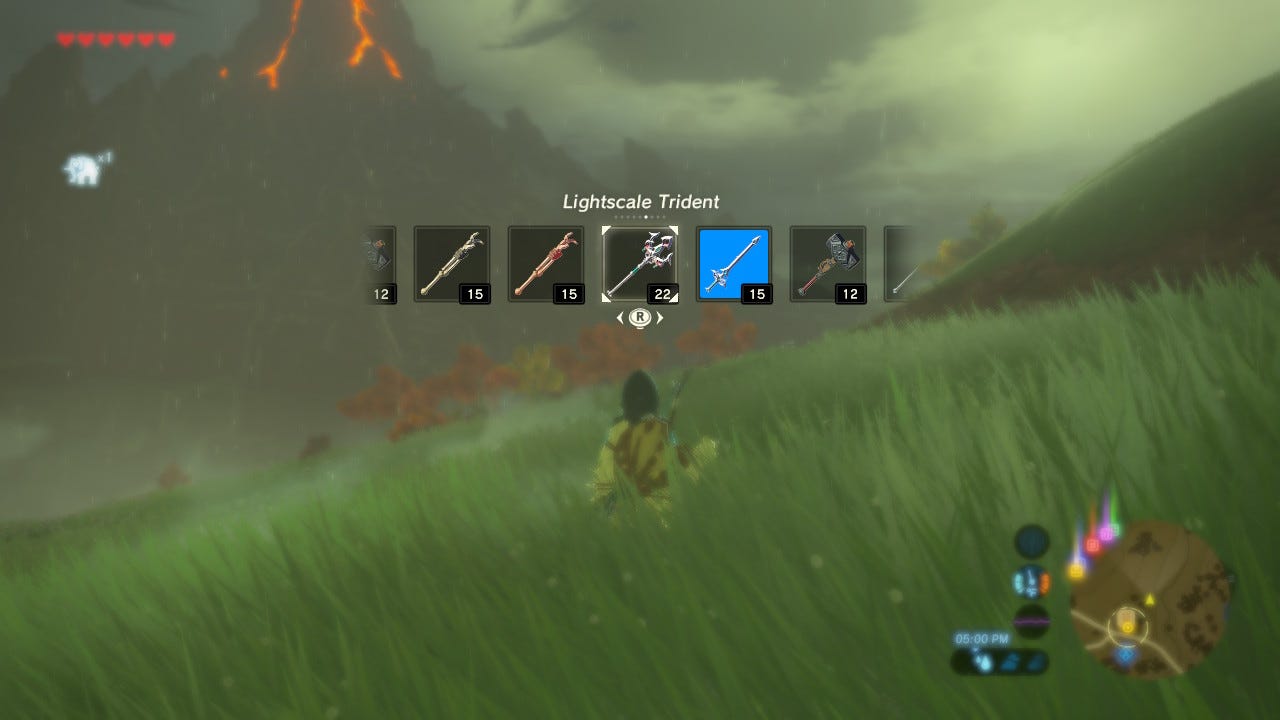 fossil spruce
@smoky field but my question is why tho. Why is it usually at the corner and not center. Someone just asked me that today and besides the "that's the norm" I have no explanation to why
pseudo apex
The reason is simple @fossil spruce if done badly, it can be intrusive to the player, so people play it safe and put it to the side and let the gameplay be in focus.
Most of the time I have no need for HP and such in the center of the screen unless it's a high paced arena fighter, but even then, if it's a moba then I still prefer it on the side.
smoky field
To make game more immersive. UI in the corner often does not obstruct the view and if you want to see it, you need to intentionally look in the corner
Yup, exactly!
pseudo apex
If it's a game that usually can kill you in one blow, like Risk of Rain for example, then HP is not even that useful, so it's placed on the side so you can quickly glance at it if you wish, but it's barely ever used in my case.
For games like WoW in the arena, you might want to be on top of debuffs and such when you shout those out for dispells, and then it might be nice to have it close to the center of the screen, but how people do this is up to their preferences, usually mod-able solutions since everyone likes it in different designs.
It's just safer for someone to place it on the side, make it less intrusive and then potentially add mod support for the UI in the future an let the players handle it 🙂
rapid ferry
how do i make the mouse unlocked when ui open?
 shrewd socket
Hey does anyone know if this will ever be fixed?
If not I sadly can't use Unity anymore if they've made a choice not to support camera stacking and to just let a subset of camera and canvas types become literally unusable. I mean just literally, i need it for every game idea I have.
How to reproduce: 1. Open the user-submitted project 2. Open the "Main" Scene 3. In the Hierarchy window select the "CameraDrawer" o...
 unborn hull
shrewd socket
unborn hull
shrewd socket
I don't see it for the LWRP, unless I'm missing that too
shrewd socket
Also that guide just gives me a black screen with no errors, unless I disable the overlapping camera, just like the bug says
Also it's an old issue with new replies as early as 2020 because it seems unresolved maybe?
LOL Yea it's broken now for URP
https://issuetracker.unity3d.com/issues/urp-camera-stacking-results-in-black-screen-when-msaa-and-opengl-graphics-api-are-used
They claim it's fixed but it's not
How to reproduce: 1. Open the attached '1250602.zip' project 2. Open 'SampleScene' Scene 3. Notice that scenes are present in Game V...
in fact they've claimed it's fixed since may, and I just had to spend hours upgrading to URP just to find they're ignoring the same exact error and claiming it's fixed again in URP
 smoky rivet
This is really frustraghting. If I have this in a script... public TextMeshPro displayText;
I expected to be able to asign a text mesh pro object to this veriable in the inspector... but apparently not. Anyone have any idea what I'm doing wrong?
shrewd socket
This is really frustraghting. If I have this in a script...
public TextMeshPro displayText;
I expected to be able to asign a text mesh pro object to this veriable in the inspector... but apparently not. Anyone have any idea what I'm doing wrong?
@smoky rivet are there any compiler errors? That should work, sometimes the inspector won't update if there are any errors though
I honestly can't find a way to make an overlay UI now with 3D objects, anyone have ideas? With these bugs I'm stumped 😦
jagged monolith
You need to use TMP_Text @smoky rivet. Simply the wrong data type
smoky rivet
Hey @jagged monolith I did manage to eventually figure it out. It was still frustraghting though.
twin nymph
Trying to get a scroll rect to work on a world space canvas. Anyone had any luck with this before? Mine is not moving at all. So far my research has not really yielded any clues.
twin nymph
Got it. Used the Event System to see that a UI element was blocking it
 paper hill
idle cloak
paper hill
idle cloak
is there like a default HDRP UI material that can be copied and edited?
it seems to offer a slot for adding a material, but if i create one in shader graph isnt doesnt seem to clip properly like using 'none' does
and i wonder if there is some stencil code in there somewhere
idle cloak
nevermind, found it in source on github
native aspen
is it possible to limit that texts length horizontally so it doesnt go outside the box?
So when it would want to go outside, it would go down
austere zenith
#how to use Sprite mask to hide ui
jagged monolith
The overflow settings is what you want to change @native aspen
 round badge
whats best practice to keep particles behind or in front of specific ui elements in screen space?
(VFX graph)
 frank beacon
so i have these two text ui elements. Why do the texts resize differently after turning on the best fit property on both of them? as far as i can tell, the only properties that are different between them are x position and text.
azure flame
Text has own mounting anchors as well, need to make sure they are completely the same. Also should not use autofit at all if you want to have the same size.
frank beacon
where can i find these mounting anchors? and i assume autofit means best fit, so i should have it off and canvas scalar will automatically scale it proportionally to different screen resolutions?
azure flame
Autofit has nothing to do with resolution, it will only change font size according to the space it has.
frank beacon
Still unsure if by autofit you mean best fit, but again assuming it is, autofit wont scale with resolution but if i had it off, a canvas scalar with "scale with screen size" will scale the text with resolution?
azure flame
best fit goes by empty space. Empty space expands proportionally with scaling (so it won't affect it)
frank beacon
Alright, im gunna go try and find some resources to get a better base understanding of stuff then read your answers again
thanks for the help
 limpid plaza
i have a prefab with a mask component. The mask component seems to be working in the prefab editor but not the game. Potential fixes? Ive tried deleting Library and it still doesnt seem to be working
please spam ping me to respond
limpid plaza
thanks to @smoky field for helping; the issue was with the grid layout cell size
austere zenith
HOW TO USE SPRITE MASK TO HIDE UI
 atomic niche
hello guys
i had a question
what should i do with the resolution of the UI to be the same in all IOS phones in unity
i have checked the scale with screen size still the UI is fucking up itself in different Resolution
rapid ferry
why is this text so blurry? (using tmpro)
eager sand
Guys Create Sprite Atlas option is missing for me under Assets/Create. Did they remove that feature or something?
austere zenith
@atomic niche either use vector photos or make the photos have bigger resolution
@rapid ferry same deal with the above
rapid ferry
?
 tall folio
Greetings, I've run out of ideas how to make part of a panel stay consistent with the rest of my UI design. Here's what happens.
I have a server browser UI that has a header inside a "middle" container that is a Panel with the "Expand to Screen" thing set
This means that if I change resolution (I work at 2K natively, but the Canvas is set for 1080p and will scale with the screen size should people have bigger/smaller monitors) it expands/shrinks what's inside.
Here's what I have under it
So the header part looks great at "Free Aspect", like you can see here
But should I set it to standalone 1024x768 mode for example, this is where it gets very janky
Where the heck did "Latency" go?
Things inside the scroll view also get very janky too. It just seems that it's not scaling with the canvas on resolution change. Is there something I'm missing?
This is the header part
So yeah. I honestly don't know what jank is going on. Anyone got any clues?
I can possibly make a video showing the issue if it'll help. But I'm really bamboozled by this, I haven't had this issue before and I know I'm staring at it down the barrel of a gun but I just can't pin point what it is
Now that I think about it, maybe it could be Text Mesh Pro? I wonder what would happen if I switched back to classic UI text elements
tall folio
Here's also the canvas setting itself
 clever portal
I only do 3d so only just found out about sprite sheets as UI
been using Raw Image
so for menu stuff, what says I should use a sprite sheet?
is it not a big deal, or is there compelling reasons for me to switch over
rapid ferry
With TMPro, the further away the text is from the centre of the screen the blurrier the text is, anyone know what's going on?
clever portal
3d or UI?
rapid ferry
UI
clever portal
that's odd I've never seen that
you have Vignette or something?
in Post Processing
rapid ferry
i don't think so
clever portal
is your canvas on screen space overlay or camera
rapid ferry
camera
clever portal
I think screen space overlay will remove camera affects
rapid ferry
yep, it worked! thank you
clever portal
you have a filter on your camera
something in post processing maybe
maybe depth of field
it can be helpful to put UI in it's own camera if you don't want to use screen space
have that camera only see objects in certain layers, which you have your ui objects in
put it on top sorting level, and with depth only so it doesn't put black or your skybox over the top of your regular game camera
 icy heath
Hi everyone! I'm having a problem with the UI canvas scaler which seems a bit impossible to fix. All UI graphics are pixelart and we use a reference resolution of 720p so all the graphics look good and scaled on 1080p and 4K. However, going from 720p to 1080p is an increase of 1,5x, which does not work for pixel art because that scales it non-uniformly. Because of this all our graphics look pretty bad on 1080p if you look closely. Somehow I only noticed it this weekend, even though our game has been in development for 1,5 years now. I can't think of a solution for this, because the problem with the non-uniform scaling makes total sense to me. I just do not know how to fix this. Choosing a different reference resolution is not a solution either, since then it might scale non-uniform on other screen resolutions, or the scaling will be too big. Can anyone please point me in the right direction? Posting on Reddit and the Unity forums left me with no answers sadly
This is a zoomed in portion on 720p, looking all nice and crisp
And then on 1080p. The left vertical side of the scroll bar is wider than the other and some of the other parts are stretched ugly. Again, this makes total sense because it's a non-uniform scale going from 720p. But I just can't see a solution for it. How are other games managing this that use scaled UI for pixel art?
Oh here are the scaler settings. We need to fully match on the vertical resolution, otherwise all the UI will get scaled too large on ultrawide screens
 topaz kraken
Hey Folks!
I have a few horizontal layout groups to contain some "cards" in certain zones of my card game prototype. Looks like this:
That screenshot is from my editor which isrnning in 1920x1080 and everything looks great.
But when I run the game from a client which is in a smaller resolution (but still 16:9) and the canvas is set to scale to screen
I wind up with this weird thing where the blue zone cards are instantiated in code and I think they're basically being instantiated at full size rather than "to scale".
The one card in the gray zone is there from the start in the editor so that one was scaled appropriately.
Do I need to say something about scale when instantiating the object?
 autumn geyser
unity should have xamarin esstinals to be number one for native development (apps and games)
topaz kraken
Anyone can shed some light on the above? 😬
 gleaming cedar
Any tips of getting pixel perfect UI? Just can't seem to get it done
Resizing the Min/Max anchors breaks any pixel perfectness it had
topaz kraken
Hmm I wonder if I need to not have preferred/flexible sizes checked on the card prefabs?
like could it be that they're extending beyond the zones because it's trying to get to the preferred height/width of the card?
sigh yup that was it. I guess I should have RTFM. Thanks @floral crow
 floral crow
lol no problem all I did was throw links :b
gleaming cedar
is anyone able to help with this?
Unity Forum
I've achieved pixel perfectness by setting a low reference resolution (256 x 112) and using Upscale Render Texture, but this makes any text completely...
gleaming cedar
all good...have decided smooth gameplay and camera movement is more important than perfect pixel art
 wanton horizon
shrewd socket
wanton horizon
shrewd socket
Hey, I'm having trouble figuring out how to solve a layering issue in the UI, anyone know anything about this?
I can't figure out how to set it so the quantity indicator is always above the outline, the Z doesn't seem to do anything 
 true shore
Hmm. Try putting the other things as childs of the outline in the index
azure flame
@shrewd socket In UI objects are sorted by their order in hierarchy. Things you want on top go to the bottom.
To mix world objects you need to either use lower render queue for them or render to texture from another camera to display in the IU image.
(or move UI to the world space)
shrewd socket
you need to either use lower render queue for them
@azure flame how would i find how to do this? With my camera layering and object hierarchy it sounds like the best option
would that be creating a dupe of the urp/ui shader and changing the layer thing at the bottom?
azure flame
What do you want to be behind what?
shrewd socket
I just want the outline to be behind the circle with the number
i have multiple ui elements on different cameras, and i use 3D models as icons, so i need to use camera - screen space to layer them and still show 3D objects.
azure flame
For UI you can do an outline as a sliced image, then you can sort it just using UI hierarchy
shrewd socket
but they're dragable, so i need to keep each icon+outline as one object in the hirearchy, and because of that i cant put all the outlines under all the rest of the icon elements
azure flame
why are you dragging an outline with the object
pool an outline, reuse as many as you need as objects selected, place/resize them as you need to, when dragging return to the pool
shrewd socket
so the player can see how it fits into the grid
azure flame
Either way it's not related to numbers. Keep numbers on the bottom in a separate container, they will be drawn on top.
shrewd socket
but i'd like the numbers to be draggable as well, it sounds like you offered a solution that solves all of this before with the render layers right?
azure flame
Don't get attached to the hierarchy. Place things where they need to be rendered, then update their position as you need to
shrewd socket
Why? it sounds like i'd need to restructure everything and do a lot more work just to do it that way from my perspective
azure flame
This is the simplest way, use hierarchy draw order to your advantage. You may want to have temporary container for the things you move on the bottom, so they would be on top of everything.
shrewd socket
but then I can't use onDrag, I need to move 3 elements separately with the cursor on update, and I'm relying on the hierarchy anyway, it's definitely not the simplest for my project.
azure flame
If you use separate container you can drag them as one...
shrewd socket
A separate container around what? They all already have separate containers around them, that's causing the layering issue in the hirearchy.
i'd need to take the outline and number out of the container and put it above or below the icon container wouldn't i?
azure flame
This is the simplest way, use hierarchy draw order to your advantage. You may want to have temporary container for the things you move on the bottom, so they would be on top of everything.
just parent under that object to have them on top while you dragging them
Can't get simpler than that
shrewd socket
I mean, it makes me need to swap the parent transforms of several objects in the code back and forth whenever it's selected if it's the child of this object, but that could be do-able. I just hope the scaling can stay consistent without manual adjustments
azure flame
You need to reparent just one object, it's not that complicated
You'll keep your original object structure with box, numbers and everything this way
it will keep it on top of everything while dragging, then just simply reparent back
shrewd socket
I'll try it, thanks!
hmm, guessing i need that worldPositionStays=true thing?
hmm nope 😦
azure flame
Try changing the type of anchor
shrewd socket
weirdly it works when i move it once, idk why, just thought i'd mention it before i mess with the anchors too much
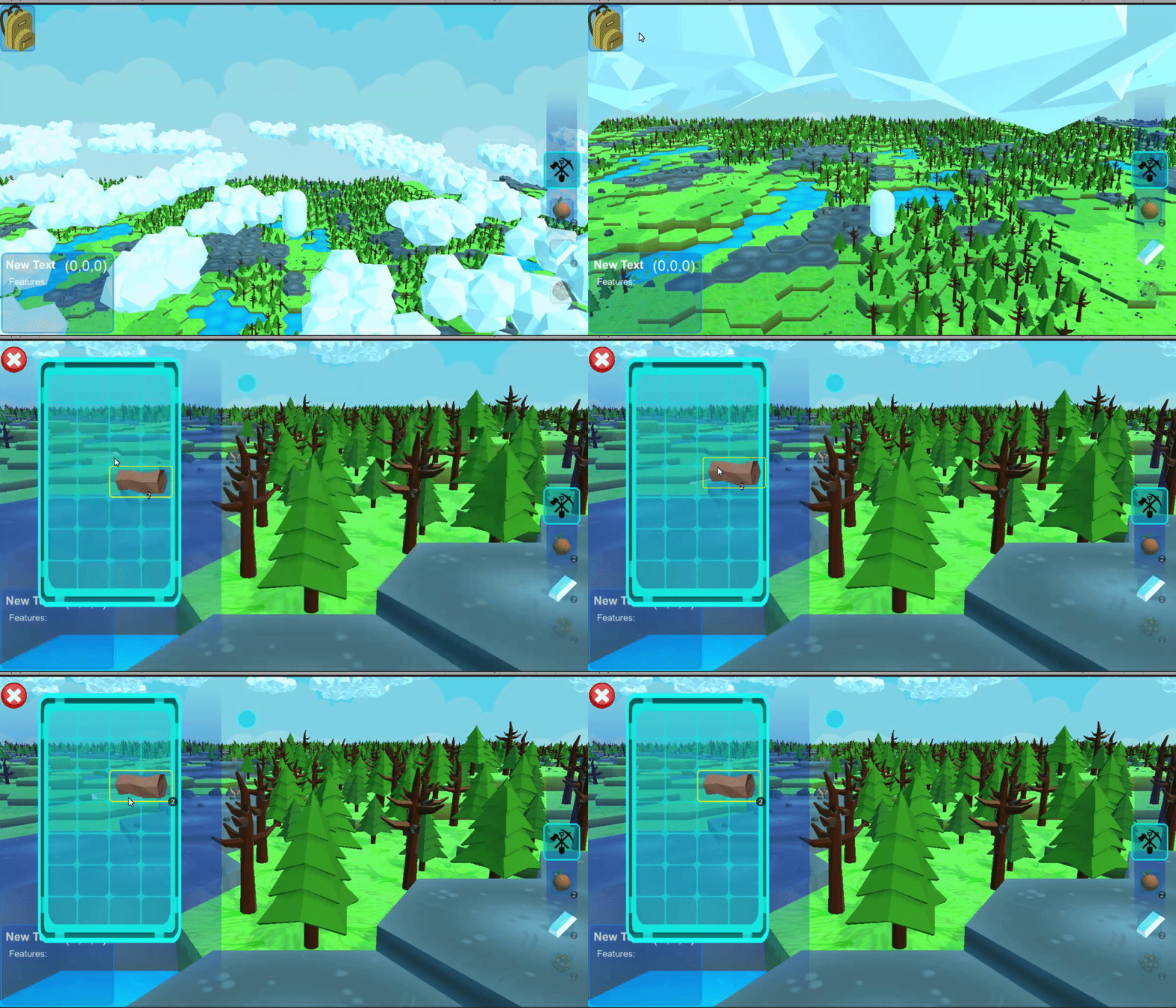
hirearchy changes correctly while being dragged too 🤔
huh, @azure flame i'm not exactly sure how to change the anchors to work for this while also allowing the indicator circle to scale with icon size
azure flame
Use absolute positioning inside the container. If they are all parented under one object that you are moving they should maintain relative position.
shrewd socket
the containers change size though because the icons are shaped
so i need to scale position and size
azure flame
Also maybe scaling is an issue. Never change scale on UI objects, use size, scale on;y for temporary effects, like animations, it will mess with children.
shrewd socket
i use scaling for a lot of the icon stuff, like when they're selected to help keep spacing in the UI specifically to help scale the children. For the grid i use anchor size though
azure flame
There are grid layout components, and they scale using actual size
shrewd socket
so pixel size?
 terse edge
Hi a VERY NOOBY question : how i can change camera and Canvas size?
 faint cargo
there's a panel image that will a background but its dimensions wildly change when trying to test it in other dimensions
like this:
how can I set the bg panel so that it can keep itself more stabilized
 lime egret
what would be a good UI system to use that supports the new input system?
shrewd socket
yea it doesn't look like that sugestion is working
@azure flame can you maybe help me look into that layers thing you mentioned, it still seems like the best way forward to me
azure flame
Your problems are from using scale for containers. Use layout groups, grid layout is perfect to the inventory
shrewd socket
layout groups?
azure flame
shrewd socket
I want my game to dynamically resize to anything, not just specific layout groups
azure flame
and reset scale to 1 for everything so it will be consistent for children.
You can nest groups, they resize according to cinditions set
there's a content fitter component as well
It's worth going through a tutorial to learn how they work
shrewd socket
sure, it's just frustrating that you mentioned what seems like a simple solution and are now just gatekeeping in a way that' s going to force me to basically start over with my ui to do it the way you want.
azure flame
I'm not the one creating problems for you, you are doing it yourself. :) I'm just pointing out how you are shooting yourself in the foot. Using different scales for containers will make you adjust everything every time. Work with the system not against it.
shrewd socket
I mean i wasn't adjusting anything before, now I am
so i guess you're wrong? XD idk what to tell ya, sounds like i could've changed one thing and been literally done with my ui completely and moved on to other features
azure flame
Which is fine until you try to move something and maintain the draw order
that's where your "working solution" falls apart
shrewd socket
so why'd you mention the solution you did?
azure flame
There's a nice way to do that.
shrewd socket
'nice' is an opinion
like why mention a solution that could work then constantly say i'm doing it all wrong?
azure flame
No-one is forcing you to do that, I did point out what you need to do, doing it your way, go ahead :)
shrewd socket
no you didnt i asked for a push toward what you mentioned and you've been refusing
azure flame
🤦
shrewd socket
I mean you can scroll up and read, every time i've asked for futher info you go into saying "no that's wrong"
like instead of face paliming you could link me to a tutorial or give me a term i can search or heck, even say yes when i asked if what you were talking about was what i thought
but you deflected
azure flame
At that time your question was unclear and it was for the 3d object sorting with UI solution that you had.
Please don't ping me again, I don't have time for this.
shrewd socket
wow, okay
would that be creating a dupe of the urp/ui shader and changing the layer thing at the bottom?
@shrewd socket Anyone else have enough time to answer a yes or no question rather than gatekeep?
LayoutGroups require pixel size so again they wouldn't work for me as I've said above
it also forces the elements to a certain size, so i can't have different size images which is 100% nesisarry
 nocturne elbow
Has anyone tried using the UI Builder for runtime? I'm only concerned about making a prototype using version 2020.1.5f1, and I'm not concerned over long-term stability
If so, how was your experience with it? (Specifically for runtime)
 bleak wolf
TMPro seems to have problems with the tag voffset in version 3.0.3. Anyone experienced it?
 proven kite
Is there a different type of GameObject for UI? It won't let me use a TMP with my GameObject component.
 opaque wharf
I have a radial fill meter, basically it's a circle with icons around the edge at specific increments. I want to change the icons based on the fill level. Now would it be sensible to do either:
A. Have two textures, one for each set of icons, then use a mask to hide the old icons and show the new.
or
B. Just have the icons as a separate sprite each, stick them in an array and enable/disable them as needed?
(Fear my paint skills for they are mighty)
 jade fern
I have a tile-map that creates a "UI" element out of a sprite at runtime. I'm adding post-processing effects, so I want UI to be part of a second Camera. Is there any way to get a sprite to work on a canvas/Screen Space - Overlay? Like can I create the sprite renderer image, then somehow toss it to the UI element or something?
 potent fulcrum
So I have a UI that I am animating by pushing old "panels" (just groups of buttons) to one side and destroying them, while instantiating a new "panel" off-screen and animating it in place of the old one.
With a lot of troubleshooting the positioning, I got it working in the editor Game preview, but in my builds, the position is all wrong, and I'm not even sure where to start trying to fix it.
The Game preview is the same aspect ratio of my monitor, so I don't think it's the aspect ratio throwing it off.
Is there a specific method of positioning UI elements in Unity that is more reliable?
potent fulcrum
Ok, so, I played around a bit, and now I'm seeing that whenever I instantiate a prefab, its scale is .455~ and it has a negative pos X and Y to position its center pivot in the bottom left of the canvas. The issue? The prefab is identical to the game object manually placed on my canvas, which has a pos of 0 and scale of 1.
shrewd socket
anyone know why my editor's fields aren't showing in inspector?
am i missing something foe eventtrigger s?
 golden cave
@shrewd socket wrong channel, try #↕️┃editor-extensions...
shrewd socket
Ah, didn't know if the eventtrigger would make it go here, thanks
 silver summit
Can someone help with TMP?
Not sure what's going on here
I'm using default font asset
 surreal moat
So on my in-game menu, when I go back to the main menu and then go back to the game my airplane falls out of the sky for several seconds before it is corrected and starts flying again. Problem is it doesn't start back off at the same altitude. I'm assuming I need to clear the game data when I send them back to the main menu but I don't know how to do that and I can't seem to find a video tutorial on YouTube covering that.
@rapid ferry it should unlock your cursor automatically when you re-enable the canvas I'm assuming you placed the buttons on a canvas. Idk I just made my first one but my cursor automatically unlocked
ah, I believe there is a specific method that releases the cursor. I'm still pretty new to Unity though so I'm learning as I go
rapid ferry
Has anyone dealt with Canvas Scaling + Pixel Perfect UI elements? Canvas Scaler in Constant Pixel Size mode retains pixel perfection but the Scale Factor is not being adjusted based on different resolutions while Scaling with Screen Size looses the pixel perfection but adjusts on different resolutions.
surreal moat
Ah, no I haven't messed with it really. I've just been using Scaling with Screen Size, wasn't sure what Pixel Perfect was for exactly.
pseudo apex
@rapid ferry If I remember right, you have to scale it and reload the entire canvas, it's something wonky at least.
Pixel perfect is not exactly a functionality that works well with dynamic scaling objects since it's very strict in it's functionality.
surreal moat
He what do they call that again when you create an instance of a class within itself?
That's used for refrencing methods within that class from other scripts right?
rapid ferry
@pseudo apex Yes, the problem seems to be that to retain UI Pixel Perfection the scale factor needs to be an integer. Even if you get the scaleFactor calculation from Unity's Canvas Scaler, and round it, there's always a resolution that has the interface exageratedly scaled. For example in 800x600 with a reference resolution of 320x180 the scaleFactor could be 2.5 but as you round it ends being 3. Which makes the UI half more bigger to retain that pixel perfection.
I'm not sure if there's a better way to deal with this UI scaling and Pixel Perfect combo. Hope someone has the knowledge and is wiling to help.
 civic talon
hey everyone I am new to unity but wanted to ask for peoples advice on how to correctly setup health and ammo bars. I have exposed a public variable in my gun script but since my gun is a prefab I am unable to asswign it the ammo bar in the game through the editor. Anyone have any tips?
 real arch
@civic talon you could use GameObject.Find or Object.FindObjectOfType to find the heallth / ammo bar object and assigne the reference on the spawn / cativation of the wheapon
using a singelton patter works too most of the time
 viscid summit
is there a way to display an image when the mouse hovers over a button? trying to put together a menu like hitman 2
 fiery cape
hey everyone, I'm having trouble with some custom controls not showing up in the UI Builder. I have successfully made one custom control, but a second one with a similar setup doesn't show up. Is there a cache that needs to be updated, or what could I check to determine the issue with my control? Unity 2020.1.6f1, UI Builder 1.0.0-p9
fiery cape
I figured it out, it was jus me not matching up the classes in the factor.
 spice vault
is there a component i can use with my UI to dispaly a bunch of UI objects in rows?
sort of like this, where it begins in one column and then makes a new one?
oh, figured it out
 woeful remnant
 jolly coral
Hey everyone, im looking for a comic book style GUI temaplte. Can anyone help please?
civic talon
thanks
jade fern
So I've been designing my UI for 1080 and didn't really make it scalable (if I change the res from 1080p (1920x1080) to like 3:2 etc it messes up/stays relatively large)... Is there a good way to clean this up into being scalable?
Like I'm using the Canvas Scaler with a Reference resolution, but sometimes it's just messy.
viscid summit
any idea what could be causing that thin gray line? it scales with my image and I have no idea how to get rid of it
spice vault
is there a ui component that scales children to its parent with padding/space around the borders?
nvm figured it out
 bronze marlin
i've got a some ugui text (tmpro) and as it get's smaller on screen each character fades into a solid rectangle of color. any idea how to prevent this?
hmm looks like lowering the Sampling Point Size of the font asset helps
 cobalt totem
Anyone here tried to work with UI Builder ? I've done everything with percentage so it will be responsive, the only thing I couldn't is the font, is there any responsive unit size like percentage ?
 deft lance
Eh I need assistance
I made a minimap
And I want to display my location with a green dot
Am I going about the right way if I add a green cylinder above the guy’s head and make it invisible to the main camera
jagged monolith
Haha I’ve done that before
rapid ferry
how would i go about making an input field that can only accept numbers and cant go over the 32bit integer limit
so for example, you can type in any number between -2,147,483,648 and 2,147,483,647
but nothing out of those bounds
pseudo apex
You handle it in the code that accepts the input, just as if it was a website. @rapid ferry
And for the only numbers part, try looking into OnValidateInput
 uncut loom
Hi guys,
I have a project with a world space canvas acting as a "TV" in the scene.
On my PC it appears as expected, but on another PC the world space canvas appears in the correct place, but in front of all 3D geometry.
It looks like it's trying to render in in ScreenSpace - but it is set to WorldSpace.
We've created a new WorldSpace canvas and they all have the same issue.
No special shaders have been used, all unity defaults.
Any ideas?
- Please @mention me if you reply, thanks. 🙂
 opal yacht
How you you limit the range of worldsapce ui? currently interactable from any distance
 silk horizon
Is it possible to set a panel's transparency to opaque within the editor or is it best to do it in the code?
 slate dagger
why does my pixel font look like this when converting it into a tmp raster hinted font?
 wind lotus
Is it possible to set a panel's transparency to opaque within the editor or is it best to do it in the code?
@silk horizon a panel is just a UI Image - you can set it however you like 🙂
How you you limit the range of worldsapce ui? currently interactable from any distance
@opal yacht personally, I would write your own subclass ofBaseRaycasterand use that. Check out Unity'sGraphicsRaycasteras an example: https://github.com/jamesjlinden/unity-decompiled/blob/master/UnityEngine.UI/UI/GraphicRaycaster.cs). I recommend this way just because it's quite fun to poke around with this sort of thing - essentially you can copy this, but change the max distance inpublic override void Raycast, starting on line 116. I think the bit you want to change isfloat num2on lines 137, 138 and 139 🙂
at the top, I'd add [SerializeField] private float m_MaxDistance;, then change those three lines to, ```cs
float num2 = 100f;
if ((UnityEngine.Object) this.eventCamera != (UnityEngine.Object) null)
{
float dist = this.eventCamera.farClipPlane - this.eventCamera.nearClipPlane;
if (this.canvas.renderMode == RenderMode.WorldSpace)
num2 = Mathf.Min(dist, m_MaxDistance);
// you can probably just use m_MaxDistance rather than Min if you don't care about the clip planes!
else
num2 = dist;
} else if (this.canvas.renderMode == RenderMode.WorldSpace)
num2 = m_MaxDistance;
not sure about your level of comfort with this sort of thing though. If that's too much, on all of your UI interactions you can add ```cs
if (Vector3.Distance(transform.position, eventCamera.transform.position) > maxDistance)
return;
 coarse folio
Hey everyone I have completed a small game but I need someone whose good with VFX and ui too make the effects looks good it will be a collaboration. Feel free to DM me this is the game https://youtu.be/hqE6WiI5En
 thick portal
How can I make my inventory like his, but every slot to be in one?

Welcome to a new tutorial series on how to make an Inventory with unity and C# !
In this first episode we will create the UI for our inventory as well as give the player the ability to pickup items and add them to his inventory !
--------------------------------------------...
I mean that I want to make something that connects every slot
this is the example that I found on google
 tacit sphinx
How would I make a "next" button or "next level" button?
 cedar socket
Create a function that changes scenes, attach that script to a game object, set up the button so it calls that function
or watch a brackeys UI video
jagged monolith
Or type those exact words into google before discord
 tardy dock
Hi all. I'm working on my inventory UI and have most of it working except for items are drawn below slots. Here is a vid for reference:
https://gyazo.com/64ed19c684e43922157069c6509252d7
I tried parenting the item directly to the canvas when you grab it but none of my drag eventhandlers get fired when doing that. Any ideas?
azure flame
UI is sorted by its order in hierarchy, if you create a container on the bottom of it, you can use it to temporary parent things under it to have them stay on top of everything
you only need to create additional canvases to manage things that are updated more often than other things, to reduce draw calls (which draggable thing will be as well, so couldn't hurt to add sub-canvas)
 lucid gale
UI is confusing me
I used Unitys snap system to make the UI compatable across all devices
But it still looks good on some but bad on others
I thought the shift alt thing was supposed to make it better
tardy dock
Ill give that a shot again and see if it works out
lucid gale
Why is making UIs comparable so hard
tardy dock
Yeah so when parenting to something lower in the heirarchy I am unable to receive the IDropHandler event on the slots above it in the heirarchy
It does work as intended though for items being behind slots
Ahh, fixed it by using a canvas group and disabling block raycast
fresh hamlet
I'm struggling a bit with the grid layout

basically I want the the two elements to be either next to each other (wide screen) or have one on top, one on the bottom (tall screen)
however at some point in resizing the elements go outside of the screen
but maybe I'm asking impossible things of the grid layout
fresh hamlet
https://forum.unity.com/threads/need-help-with-grid-layout-horizontal-vertical-based-on-orientation-paid.658195/ there's some code here that seems to do what I want
Unity Forum
I need help figuring out an issue with Unity, where I have two boxes of data, and I need them to column/row appropriately with orientation change...
 fringe nacelle
how do i move an image in the ui, it's not outlined blue
the only way i can change is by entering coords
 stable kettle
anyone know the fix/workaround for this?
happens even with the latest ui toolkit and inputsystem.
 rancid pier
Hi I'm trying to rotate an object with a textmeshpro component in my 2d game and when I rotate the z axis it messes the text up and doesn't rotate properly
No rotation
With some rotation in the z axis, gets messed up
hierarchy (object with textmeshpro comp is popup)
 maiden igloo
Anyone have some good programs for making UI thats free?
rancid pier
Okay I think I figured it out, I removed the textmesh outside its parent component and it rotates normally
maiden igloo
Or does everyone just use photoshop?
 lucid lotus
Okay, I have simple question but I have no clue how to approach it:
How would I make text like this in Text Mesh Pro?
 honest palm
If I have a tab system and i'm swapping between 2 different data sets in my panels... how should I be swapping between the panels? Should I just the hide non active one?
 frail rock
@honest palm totally depends what the tabs do, if they are identical but with different info, you can just update the info in your "display" panel
if the tabs are super different, i guess you need a separate panel for each tab
Any UIToolkit gurus here? Specifically GraphView. I'm searched all the example code on git and can find no way to make BlackboardFields draggable, even capabilities don't seem to work. Would love to know the standard approach to this.
Also, how can we add more options to BlackboardField context menu? By default it only contains Rename
rapid ferry
Could anyone explain to me how this red radius ring was done?
wind lotus
@rapid ferry that looks like a screen space shader to me! One mo let me find a similar tutorial for you 😊
Basically it's an image effect/post processing effect that uses the scene's depth to draw the circle
Can't find the tutorial I'm thinking of right now, I'll let you know when I find it
wind lotus
Here we go!
https://youtu.be/OKoNp2RqE9A

Support me on Patreon ➜ https://www.patreon.com/DanMoran
Follow me on the Twittersphere ➜ https://twitter.com/DanielJMoran
Get the Assets for this Video here ➜ http://goo.gl/dKA0sT
Music:
No Man’s Sky: Music For An Infinite Universe, 2016
65daysofstatic
Obviously this does a bit extra - you won't need to make it expand or add lines to it or anything like that, but the theory is the same ☺️
rapid ferry
thanks so much dude
 rapid locust
Hello, I am making a chess game & my piece sprites are very pixelated. I've tried tweaking almost everything in the inspector for my sprites and the only thing that made a difference was generating mipmaps, which didn't make it higher resolution it just blurred the pixelated sprite. Any ideas of what might be causing this?
jagged monolith
Your game view is zoomed in which means it's enlarging pixels by 68% @rapid locust
 naive mural
enable mipmaps too if it's still a problem
jagged monolith
Says in the message they already tried that
naive mural
oop mb
 proper lotus
Using the new UI Toolkit/Builder any idea how I make an area clickable that isn't a rectangle?
smoky field
rapid locust
Hello, I am making a chess game & my piece sprites are very pixelated. I've trie...
UI is not great at scalling big images. Try to create smaller graphics
 celest arrow
Does anyone know how to fix the missing characters? I am using TextMeshPro. The boxes should be diagonal arrows.
wind lotus
celest arrow
Does anyone know how to fix the missing characters? I am using TextMeshPro. The ...
the font probably doesn't have the right characters, or you didn't include them when generating the font atlas
 young sandal
Hey , what line of code allows me to access the fill amount value
wind lotus
myImage.fillAmount - where myImage is a variable of type Image 🙂
young sandal
ok thanks
rapid ferry
I am having an issue with my UI system. When i click one button, it clicks all the buttons. and then spams the one at the bottom. I have no clue as to what might be causeing this to happen
 past yacht
I've just upgraded my project from 2019.4.91f to 2020.1.14f1 so I can use the new UI Builder and UI Toolkit package to create simple in-game UI. There errors popped up somewhere along the line. They appear after about half a second (basically after all my game scripts have run). When Googling the error the problems seems to be that I can't do what I am trying to do, except I am not doing anything. These error's just appeared after downloading the UI Toolkit package. Should I mind them? What can I do?
Is some sort of functionality trying to run twice in a row?
 sullen tartan
I have a Problem in unity that button not respond when clicking or hovering over it. I know it's old question but nothing is working me. For the full question kindly go to

Stack Overflow
Ok as you read title you will know problem. The problem is very old and much people tell fixes. But nothing works for me. So please help another time. I have EventSystem in hierchy. See picture
Le...
And please help me
smoky field
sullen tartan
I have a Problem in unity that button not respond when clicking or hovering over...
Select 'Raycast target'
jagged monolith
If you select the event system in the hierarchy @sullen tartan you can see what object is being hovered at any time. It will help you find issues like this in the future
 elfin ore
How do I keep Unity from cropping the Alpha in my pictures?
I'm trying to make some UI textures and I need the space Unity is cropping. I don't want Unity to crop it. I want it as is.
naive mural
elfin ore
How do I keep Unity from cropping the Alpha in my pictures?
have you tried this?
 fluid raven
Hey anyone know why content size fit text, that is dynamically changed at runtime, doesn't resize until I change the game viewport size?
I've tried calling a bunch of methods alongside the dynamic change, like RebuildLayout, SetAllDirty, etc. but nothing seems to fix it.
arctic pike
i m looking about a flexible grid layout ping me
 halcyon quarry
how would i go about resizing a world space button with code to enlage it just a hair when a raycast is on object? right now i have SteamVR laser Pointer events and can do things when onPointerEnter and onPointerExit but i can't get the resize to work properly i have tried ````CantinaButton.GetComponent<RectTransform>().anchorMax = new Vector2(0.8f, 0.8f);``` which increases the size to about the right size that i want to increase it... but when i leave hover onPointerExit im not sure how to get it back to original size when i try to do (-) it changes position and rotation not what i expect[solved]
rapid ferry
I can't click buttons on my UI nor the slider when my game is in 3D, does anyone know why
https://streamable.com/lyc2eg
 jagged monolith
I don't see an EventSystem in your hierarchy, do you have one @rapid ferry? You can select an eventsystem to see what object is currently hovered in the UI
 astral robin
I'm pretty new to adding listeners via code but this works perfectly.
The problem is that I can't figure out how to get non persistent listeners count.
There's GetPersistentEventCount() for getting persistent ones and I'm looking for a way to get those added by code.
jagged monolith
I've not seen this done before, but it seems like other people have tried. Have you look at this solution? https://forum.unity.com/threads/get-number-of-runtime-listeners.292537/#post-5623144
 restive jungle
I need a little help
My Button is spawning where it shouldn't be
Outside the canvas
Transform parentTransform = dayButtonContainer;

if (btnData.buttonPhaseType == ButtonPhaseType.NightButton)
{
    parentTransform = nightButtonContainer;
}

Debug.Log("Creating " + btnData.buttonName);

ButtonHandler btn = Instantiate(buttonPrefab);
btn.transform.SetParent(parentTransform, false);
btn.SetupButton(btnData.buttonName, _playerTagIndex, btnData.buttonActionType);
SetupButton is just changing public variables
Ugh
Someone who had encountered this please help
jagged monolith
No errors in editor? You should print the parent values to make sure they're not null. Also you don't need to use SetParent, you can just do Instantiate(prefab, parent)
restive jungle
jagged monolith
No errors in editor? You should print the parent values to make sure they're not...
Fixed it, apparently I can't create prefab within a prefab in the same frame
The child would go out of canvas
jagged monolith
Ah ok
sullen tartan
Can someone give solution of this SendMessage cannot be called during Awake, CheckConsistency, or OnValidate
UnityEngine.GUIUtility:ProcessEvent(Int32, IntPtr
this comes when I change value of slider
 tender drum
Simple question: whats the best way for UI design whenever you want to target phone and tablet?
The predefined tools on Unity UI doesn't seem to be enough. If im not wrong you cannot change the position of UI elements according if youre on tablet or phone. Or tell not to scale up certain elements inside the UI.
Am I wrong? Should i dive deeper into the unity UI system or there are other approaches?
 wicked heron
hi anyone know how to create an inventory system? using sprite
elfin ore
@naive mural actually I fixed it by making a 1 pixel black line in the edge of the image but I'll try that next time and see. Thanks, mate!
 gaunt tartan
I'm trying to position one of my UI images based on the position of a Text Mesh Pro (I simplified the code, but I'm going to use the rend.bounds.x to get the width, so I can put the image to the right of the text).
float x = tmpro.gameObject.transform.position.x;
uiImage.transform.position = new Vector3(x, uiImage.transform.position.y, uiImage.transform.position.z);
But, it doesn't work. It's off by tens of thousands. They don't share a parent object, so I don't think I can use local position either. My Text Mesh Pro is aligned to the "top left". Any ideas why?
gaunt tartan
transform.position = new Vector3(transform.position.x - 200, ...), this caused my transform position X to be reduced by 18000 in the inspector O_o. I guess I have to find another way. Because tmpro.rends.bounds.size.x = 200. So I assume the scaling is the issue, I need to get the non-local bounds
uh I hacked it by copying the text's transform.position to my img, and translating in the localPosition space
since rend.bounds.size was local, which was the problem I think
gaunt tartan
solved it using transform.TransformPoint tmpro.transform.TransformPoint(new Vector3(tmpro.textInfo.characterInfo[0].bottomLeft.x - offset, 0, 0))
 warped fjord


I made system that allows you to pick up weapons off the ground and it looks damn good #unity3d #madewithunity #gamedevelopment #gamedev #3d #lowpoly https://t.co/5P3IHTQHxs
 Twitter
·
Twitter
·
what you whink about my weapon pick up system
 spark lagoon
Nice!
 glacial frigate
Can I build a custom inspector using UI Toolkit?
Or is UI Toolkit only for in-game UI
 left pebble
how could i make this rectangle show up in front of the other rectangle, are they on different layers or something?
 final tendon
try changing their order in the hierarchy
 bleak lark
hey guys, i was wondering if there was a way to make the ui text in my game invert the colors behind it?
(in urp)
like this
(i just made it in photoshop)
 swift venture
hi all!
I made a new ui for my game, now I need to make it alive, I explain: suppose a gauge that should read a value from a gameobject and render the result 0~1, etc... what's the best way?
- brutal: link the ui in the gameobject and on the
Updatemethod, update the ui value - brutal 2: in the ui element, make a script that in the
Updatereads the gameobject property and update the ui?
rapid ferry
Hello Ladies & Gentleman,
Right now im having a some kinda issue with scaling of UI can someone give me a Hint how i can fix that blurry text for my button
rapid ferry
@rapid ferry Use a Text Mesh Pro button
 cedar halo
does someone know how i make a text stand still, because if i move ma character the text moves with him, but i want it to stay in the speech bubble
 stray quarry
Hello :)
How can I prevent a scroll rect to scroll more than the text dimensions as shown on the gif ?
( I am creating a chat box with Text Mesh Pro )
As you can see in the gif, the text goes up and there is a blank space with no text. In apps normaly there is no space under the last text. I want to remove that space, and prevent scrolling more than the last text
 radiant oracle
Not sure if this is the best place to put this question, but how can I trigger a UI Button press via code?
Basically, I've created my own interaction system for a virtual reality environment, which requires the ability to "press" a UI button
radiant oracle
@rapid ferry Make the bar a child of the camera
radiant oracle
rapid ferry
guys how to make hp bar in parallel with screen
Maybe give a little more information here, so I can best try and help.
I'm assuming you're talking about the hp bar ;P
rapid ferry
yes
so i made canvas insted player
and slider
i want hp bar to follow my character but to be in parallel with screen
radiant oracle
Does your screen rotate or orientate at all?
rapid ferry
not insted* inside
radiant oracle
or is it static?
rapid ferry
its static