#📲┃ui-ux
1 messages · Page 25 of 1
 low pike
 light mulch
tried changing the sprite to default unity uisprite but didnt help either 

i dont have any scrollbars assigned :o
low pike
right, but by default they are there and the anchors are set to make space for them...
light mulch
is there any way to remove the gap you think?
low pike
low pike
and the anchor set to -5 (or whatever) on a recttransform
By setting this to 0..
 lilac egret
the whole project was broken cuz im still kinda new to unity but almost nothing was done it was still just f-ing around so i made a new project.
Btw why can't we tile materials? This would be a great feature for me rn...


Oh nvm i just screwed up something, works fine now

i dont even know what wrong lol
low pike
lilac egret
Btw why can't we tile materials? This would be a great feature for me rn...
I've never used a material on UI
 fallen barn
when the button is selected, how do you also select its child TextMeshPro? Do I need to use the script to achieve this?

 mortal robin
fallen barn
when the button is selected, how do you also select its child TextMeshPro? Do I ...
mortal robin
fallen barn
when the button is selected, how do you also select its child TextMeshPro? Do I ...
You can't because TextMeshProUGUI is not a Selectable
Can you explain what you're trying to achieve?
fallen barn
mortal robin
You can't because TextMeshProUGUI is not a `Selectable`
Can you explain what yo...
when the button is selected, it will change the sprite, and I also want to change the TextMeshPro text colour(to show it is selected), i have added selectable to TextMeshPro for it to be selectable
mortal robin
fallen barn
when the button is selected, it will change the sprite, and I also want to chang...
If you want to change more than one graphic at a time you can't do that directly with the Selectable thing.
Add an EventTrigger component to the Button and implement the OnSelect and OnDeselect events (or use a custom script with ISelectHandler/IDeselectHandler)
fallen barn
thanks, will look into that
lilac egret
low pike
I've never used a material on UI
I need to. Dynamic patterns. Design choise 🙃
 limpid torrent
I have a Dropdown menu and on the OnValueChanged field in the inspector i want to pass the value of the dropdown into my function, is there a way to reference that value from the field in the inspector so I can pass it into my function? like right here:
 mortal robin
limpid torrent
I have a Dropdown menu and on the OnValueChanged field in the inspector i want t...
mortal robin
limpid torrent
I have a Dropdown menu and on the OnValueChanged field in the inspector i want t...
Assign the function with the dynamic parameter instead of a static parameter
 rapid ferry
@supple basalt


 supple basalt
"Screen Space - Camera" puts the canvas at a certain distance from the camera
It doesn't matter where the canvas is in the hierarchy.
You could set "Plane Distance" to something like 1
rapid ferry
Does anyone know why after compiling my game the score / "0" Text does not show.

^ in unity

^ compiled
 supple ingot
normally people use 2 cameras for this
1 camera is for the UI and one for the game
noticed your the camera set in the canvas is named Main Camera which makes me think you are using the same camera for both things
so could fix that, or see if ScreenSpace - Overlay is a better choice since it does not require its own camera
really would just start with ScreenSpace - Overlay as the canvas render mode since your UI does not look complciated enough to need its own camera
 wide sedge
How would I get my damage numbers to display nicely on the right, and expand to the left as they get bigger?
I have MinDmg and MaxDmg
You can see the structure on the left.
I added a Horizontal Layout Group on the DamageNumbers wrapper, but now the texts are displayed at the top and not sure if they will expand properly

That's what I have now

 fickle bloom
Hi guys any idea how to make wavy UI? like that picture and those ui keep moving
 mortal robin
A shader
lilac egret
So - UI anchors work on "X pixels away from anchor", but i need procentages. Similar to how in CSS i'd do top: 10%; instead of top: 10px;

how
This is my goal

And i need it uniform
supple ingot
looks like you need to decide what your reference resolution will be then use a canvas scaler
since if its all based on a reference resoultion, then scaled to fit other resoultions you can easily know where 50% is and just say 50% is 540 for exmaple since its half of 1080
or that 10% becomes 192 and so on
 supple ingot
oh yeah 100%, set that to a actualy resoultion or atleast set it to like like 16:9 or what ever ratio you want to test for
lilac egret
supple ingot
since if its all based on a reference resoultion, then scaled to fit other resou...
so... still choose pixels but now i have it on a fixed resolution? Meaning the game might be playable in only one resolution?
lilac egret
low pike
and don't work in 'Free Aspect'
will do. 1920x1080
fallen barn
if this is my scene, every red square is an individual sprite, what component do you suggest to achieve this page? Grid layout, vertical/horizontal layout, or just drag them to their corresponding position?

 mortal robin
fallen barn
if this is my scene, every red square is an individual sprite, what component do...
mortal robin
fallen barn
if this is my scene, every red square is an individual sprite, what component do...
not enough information
~~are these UI elements? ~~- sorry dumb question just saw what channel this is
How do you want it to respond when the game window is resized or has a different aspect ratio?
fallen barn
yes, i was thinking a fix size screen, like full screen
mortal robin
You mean fixed aspect ratio?
fallen barn
yep
mortal robin
If you use a fixed aspect ratio then it doesn't really matter too much
just use the canvas scaler for "scale with screen size" and nothing else will change when you resize the game window so it doesn't matter
fallen barn
thanks
 proper ether
Hi - I have built enemy nameplates (health bar and name that appear above an enemy head) similar to in WoW. The problem I have is that because when you make a canvas is it huge in the unity editor, as it is a child of my enemy gameobject, the center point/ transform axis is now proportionally between the enemy gameobject and it's child giant canvas.
This makes it very difficult to manipulate my enemy gameobject because of the transform center location due to the canvas i use for the enemy nameplate being a child of the enemy.
Is there a quick solution to this where I can just reset the transform to be at the gameobject of the enemy and not the average of also it's children?
See here for what i mean ^ enemy is selected, but because of the canvas giant in it's children (which i use for the screenspace enemy nameplate hovering above it's head) the axis is miles away
 mortal robin
proper ether
Hi - I have built enemy nameplates (health bar and name that appear above an ene...
mortal robin
proper ether
Hi - I have built enemy nameplates (health bar and name that appear above an ene...
So many things wrong with this
- The canvas will only be giant if it's an overlay canvas
If it's an overlay canvas it has no business being the child of your enemy object in the first place
- You can set your tool handle position to Pivot instead of Center
That's this here

Note this doesn't actually change anything about the object. It just draws the tool at the object's actual position instead of an average of all of its children
proper ether
mortal robin
If it's an overlay canvas it has no business being the child of your enemy objec...
Ok gotcha - thanks that's super helpful - i knew i was doing something fundamentally wrong - should all overlay canvases just live separately in the hierarchy? Should I have every overlay canvas under one master canvas? Thanks in advance
(FYI the logic of this nameplate is that, it enables the screen-space overlay canvas for the enemy healthbar when I get close to the enemy - code works well)
proper ether
all fixed now thanks
 tiny spade
i have two transparent ui images, and i want to overlap them, how can i hide the ui image below? with a mask? if yes how
proper ether
How can I create a Border (or outline - it's for a rect) on a gameobject? I've tried using the 'outline' component but that is not actually a outline it colours the whole thing
proper ether
How can I create a Border (or outline -
 jagged moon
how can I lower the viewport resolution and upscale to create a low quality look?
is the render texture thing the only way to do this?
 subtle trout
Having a slight issue with trying layout dynamic textboxes within a scrollrect.
The scrollrect isn't aware of overflow text for obvious reasons, but I don't really know the approach to solve this. I could try programtically changing the rect of the text box, but that sounds janky. Is there a cleaner solution that makes the scroll rect aware of the true height of the text?
subtle trout
Nevermind I figured it out...
 azure flame
If you are posting about solving something, you should share what you did. Also there might be a better solution.
subtle trout
In that case, my issue was pretty simple, the tools were all there, I just wasn't using it right. That's why I didn't really want to explain myself, and the reason for the ellipses. I was just not exhausting every option.
The solution was to give the text a parent, and that parent has a Vertical Fit set to Preferred Size. That way the area of the text is not predefined on the vertical axis.
Then along with that, another issue I was having was improper anchoring. I was leaving stuff on center anchoring, thinking it wouldn't matter... It did.
And much to my continued confusion, the vertical layout group should have it's horizontal set to expand and control size. Not the height, the WIDTH, no clue why, but otherwise it all falls apart. =
MotS:
azure flame
There's also Content Fitter component that can expand content area to fix updated text elements. Although sometimes it requires to run manual UI update to update it midframe to react to changes.
subtle trout
azure flame
There's also Content Fitter component that can expand content area to fix update...
The Content Size Fitter? If that's what you're referring to, that's what I meant by "Vertical Fit"
 azure flame
Right, that's one its properties.
 gaunt bough
Does anyone know how to make TextMeshPro's button overlay on top of an image?
These are the settings for the button:

And there are the settings for the image:

The image is placed as a child of the button.
azure flame
gaunt bough
Does anyone know how to make TextMeshPro's button overlay on top of an image?
UI is sorted by order in hierarchy.
gaunt bough
azure flame
UI is sorted by order in hierarchy.
Do you mean I have to place the button above the image in the hierarchy?
azure flame
Swap their order, yes
gaunt bough
How do I do that while the Button is the parent to the image?
azure flame
Use containers to change their order
gaunt bough
Oh ok thanks!
Nevermind even if the button is placed above the Image it still doesn't overlay it?
azure flame
Show the hierarchy
 azure flame
The one that is lower will be on top
lilac egret
Is there a component that can make the child objects of the empty object scale down along with their parent?

Oh, right, Scale! NVM, im stupid
fallen barn
hello, is there a component that can toggle the raycast of an object?
 sacred stirrup
Hi I am new to unity and need some help
I want to create a unity UI searchable dropdown element but do not have an idea of how to approach it
The UI Search element will have (say for example)40 possible options to chose from, the user should be able to click on the element, type in text and the most appropriate option(by matching alphabets) shall appear in the dropdown similar to google search bar
Please guide me further
 white solar
Running into this issue where text overlaps with choices. How do I fix this?


 devout hearth
Got this issue, i have a camera drag script that works when you hold left mouse and move cursor.
The problem is, if i start dragging on a clickable button (its a town management game, so buildings are buttons on world canvas), the button will be clicked on after i let go of LMB.
Is there any way to cancel holding a button when i drag? Or maybe put a timer on the button that cancels itself if the button is held for some time?
 past coral
I have Layout Group and I want the elements to stack in center. How can I do it?

 supple basalt
You currently have "Child Force Expand" turned on. Turn that off and set the layout group to control child size instead.
This may cause the boxes to shrink to 0px if you have other layout problems
past coral
Yes, it work nice. Thank you
supple basalt
I wish this was the default for a layout group :p
 gentle vapor
i just built my game and i have a button that is supposed to show up at the end of the start scene that leads to the second but the button doesn't show up in the build (it works fine in normal play mode in unity)
 supple basalt
your button is at Z=-2000, which is a bit weird
that will move it further away from the camera
gentle vapor
 supple basalt
the canvas also currently has a scale of 0
i presume it'll get changed once you activate the game object, though
gentle vapor

this is what its supposed to look like

when i change to free aspect its gone so i think youre on to something but im not quite sure i understand how to fix it
gentle vapor
supple basalt
i presume it'll get changed once you activate the game object, though
yes this is it activated
 supple basalt
gentle vapor
supple basalt
gentle vapor
Show me where the button went in this screenshot
(you can hit F to focus on it in the scene view)
gentle vapor
oh yeah she went all the way oer here
 supple basalt
I'm surprised it moved so far, since its X and Y positions are very small.
The button is directly parented to the canvas, so it's not like its parent has an extreme position
If you set those to 0, does it snap all the way back into the center of the screen?
gentle vapor
it snaps to here
 supple basalt
Ah. That's why it had the huge negative Z position
(which moves it closer to the camera, not further. whoops)
gentle vapor
but it screws up the position of the button in the one where it works
supple basalt
You can change how far the canvas is from the camera
change the "Plane Distance" on the canvas
gentle vapor
ohh ok now the button is tiny but i can simply readjust it to a good position and now it shouldn't move as much anymore right?

i have made the canvas a lot smaller does this size seem reasonable?
supple basalt
oh yeah, you should switch the Canvas Scaler to "Scale With Screen Size"
this will make the button take up the same proportion of the screen as the resolution changes
gentle vapor
ok nice it seem to be working, thank you so much!
supple basalt
It got so small because your canvas was set to a 4K resolution, then scaled way down to fit in front of the camera properly
the button's size was 80x30 or so
I'm still confused about how it wound up so far from the center with such a tiny X/Y position.
Maybe something was going haywire because the canvas started out with a scale of [0,0,0]
proper ether
Question about UI in unity - is it possible for bools in a script attached to a UI component, to turn off/ on UI components in the Scene editor?
E.g. in this screenshot I have built a sliderbar, I will now create a script for it, where I woudl like to have toggle for things like 'image' and 'textleft' where if unselected they are not visible by default
I know that this will work at runtime because the script would effectively disable those gameobjects, however I'm wondering if I can also have that appear in the scene editor/ inspector by toggling bools in the script
Thanks in advance for any pointers

 dreamy river
why is my crosshair "smushed" it's set to 10x10 but it feels like it's 10x8, also it has really low quality while it's 2048x2048 texture
 low pike
impossible to tell from the information given
dreamy river
it's not a perfect circle + it's really low quality and its edges are sharp
 low pike
I mean, the problem can be understood, but the reason why ¯_(ツ)_/¯ ... no details have been given about the setup
proper ether
Is it squashed on all resolutions when running the game? Does it squash differently on different resolutions?
dreamy river
proper ether
Is it squashed on all resolutions when running the game? Does it squash differen...
i'll check
proper ether
also show a screenshot of the hierarchy and inspector of the crosshair so we know what components / setup you have for that
dreamy river
proper ether
also show a screenshot of the hierarchy and inspector of the crosshair so we kno...
it looks better on 16:10 aspect ratio


 proper ether
Is this the 'Image' in your hierarchy that you're sharing ? How is the Panel and Canvas set up in the inspector?
dreamy river
proper ether
Is this the 'Image' in your hierarchy that you're sharing ? How is the Panel and...
yes

 low pike
it's not related to the issue - but that image on the Panel game object is pointless (assuming you keep the alpha at 0) .. you can remove it
Show all the components on the canvas game object
dreamy river
low pike
it's not related to the issue - but that image on the Panel game object is point...
okay i did it and this is the canvas
 low pike
Try changing the UI Scale mode on the Canvas Scalar to Resize with ...
Then set the reference resolution to 1920x1080, and the slider at 0.5
dreamy river
low pike
Try changing the `UI Scale mode` on the Canvas Scalar to `Resize with ...`
Then ...
i did it and it's even worse now
 low pike
Change the width/ height of the dot to 1024x1024 (as a test)
It might be because you're taking something from 2k down to 10..
For something so small, I'd have this image at like 32x32
dreamy river
okay i'll create a new one
yea it worked but it's still a little squished and i'm scared that i'll affect the rest of my ui
 low pike
it shouldn't..
that looks fine, it looks "squished" because the top/bottom pixels are alpha'd a bit. set the alpha to 1 and they won't be (probably)
dreamy river
okay, thanks a lot
gaunt bough
Does anyone know how to make a 2D game object that is completely invisible except that the player is invisible behind it??
mortal robin
gaunt bough
Does anyone know how to make a 2D game object that is completely invisible excep...
gaunt bough
mortal robin
https://docs.unity3d.com/Manual/class-SpriteMask.html
Thank you!
 echo oracle
Does anyone have a Korean font asset for text mesh pro please? There is a bug in my version and I cannot convert a font for text mesh pro
 fierce rampart
Can anyone tell me what continuesly causing this to happen with my UI Elements?
 mortal robin
fierce rampart
Can anyone tell me what continuesly causing this to happen with my UI Elements?
mortal robin
fierce rampart
Can anyone tell me what continuesly causing this to happen with my UI Elements?
The red x means it has a negative width or height. This will happen due to your RectTransform settings. Such as having a "right" value of -100 when the parent is only 50 wide, for example
fierce rampart
Okey thats what I thought about, but I have accutally no reason why its happening. Most of the time its happening after save and closing the project and then the next time ill work on it, that problem comes up.
Could it be, that its cause of the Anchor Presets?
low pike
fierce rampart
Could it be, that its cause of the Anchor Presets?
no, it would be silly if the presets had any negative numbers
it will be something doing an auto layout
fierce rampart
low pike
it will be something doing an auto layout
Okey but you didnt said anything abt a solution yet so you dont have a clue either?
supple basalt
Is there any good reason to use mipmap limits for UI textures?
I'm deciding whether to put them in a "UI" mipmap limit group that's forced to full resolution or to just disable limits on them entirely
low pike
fierce rampart
Okey but you didnt said anything abt a solution yet so you dont have a clue eith...
You need to confirm the problem first.
And you haven't shown anything that can confirm the problem, no one here can give you a solution until you give details.
limpid torrent
if i have an Input Field UI game object in my scene how can i get the input field component... doing GetComponent<InputField>() just returns null
in unity 2023
or is there any way to set the value of the text of an input field from code?
mortal robin
limpid torrent
if i have an Input Field UI game object in my scene how can i get the input fiel...
Are you sure you're using the legacy InputField and not TMP_InputField?
mortal robin
limpid torrent
or is there any way to set the value of the text of an input field from code?
of course, you set it once you have the reference
 quiet radish
I'm having a weird issue where my UI Image components that have a material attached to them are disappearing when I enter play mode. They were working 24 hours ago, and I have no idea what I did to make it stop working. Strangely, you can see the materials while I resize the game window, as shown in this screen capture.
The cards are being initialized at runtime from scriptable objects, with the materials being assigned then - but I made a sample image to the left of the cards with one of the materials attached and it also disappears when I click play
 golden stump
I can't see any treeview component for UGUI other than asset store ones. Anybody seen? I guess will have to DIY again
mortal robin
golden stump
I can't see any treeview component for UGUI other than asset store ones. Anybody...
UGUI doesn't have a TreeView afaik.
UI Toolkit has one and IMGUI has one (I think)
golden stump
mortal robin
UGUI doesn't have a TreeView afaik.
UI Toolkit has one and IMGUI has one (I thi...
yes but I am not making an editor tool or wanting to switch yet so after a UGUI one. Anyway found 1 free one on asset store so checking it out
 upbeat moon
Hey guys just asking what the best website is to showcase my UI/UX work professionally?
mortal robin
upbeat moon
Hey guys just asking what the best website is to showcase my UI/UX work professi...
Make your own 😉
lilac egret
Idk why but my circle dissapears when i click Play

 upbeat moon
mortal robin
Make your own 😉
upbeat moon
mortal robin
Make your own 😉
you’re not wrong. i was going to but went down the lazy route.
i’ll set sail i guess
 onyx ginkgo
Does anyone know why my TMP text looks blurry? I've tried increasing the fontSize and decreasing the transform scale but that didn't work.
mortal robin
onyx ginkgo
Does anyone know why my TMP text looks blurry? I've tried increasing the fontSiz...
You shouldn't be scaling UI elements manually
But also, where are you seeing them being blurry?
onyx ginkgo
In the game view (not scene)
mortal robin
Is your game view zoomed in
 old patio
Anyone know any good courses to help with UI in unity and animated UI?
upbeat moon
old patio
Anyone know any good courses to help with UI in unity and animated UI?
not necessarily courses but i can recommend looking into a plug-in called LeanTween
if you look it up on youtube. guys shows how to use it for some mobile UI
documentation is decent too
old patio
Thanks
 night lake
Hello, I am trying to recreate a Clash Royale style horizontal scrolling main menu UI for my mobile game, It works great until I try changing my resolution and things get wonky really quickly. My problem is I don't really know how to account for changing the resolution and the way that effects my camera size, if anyone would be willing talk me through what I'm doing wrong I would appreciate it massively (I have included a few screenshots that hopefully convey some of the problems better than I can)


 lilac egret
I want the BG image to fill the Image but keep aspect ratio. Just like CSS object-fit: cover;

Nvm got it

 merry owl
I really like the persona series ui and want to try recreating them, where do I start?? I mean do they use adobe illustrator or figma to do the actual ui design or
Stuff like this: https://m.youtube.com/watch?v=IpXuhmtWrHw
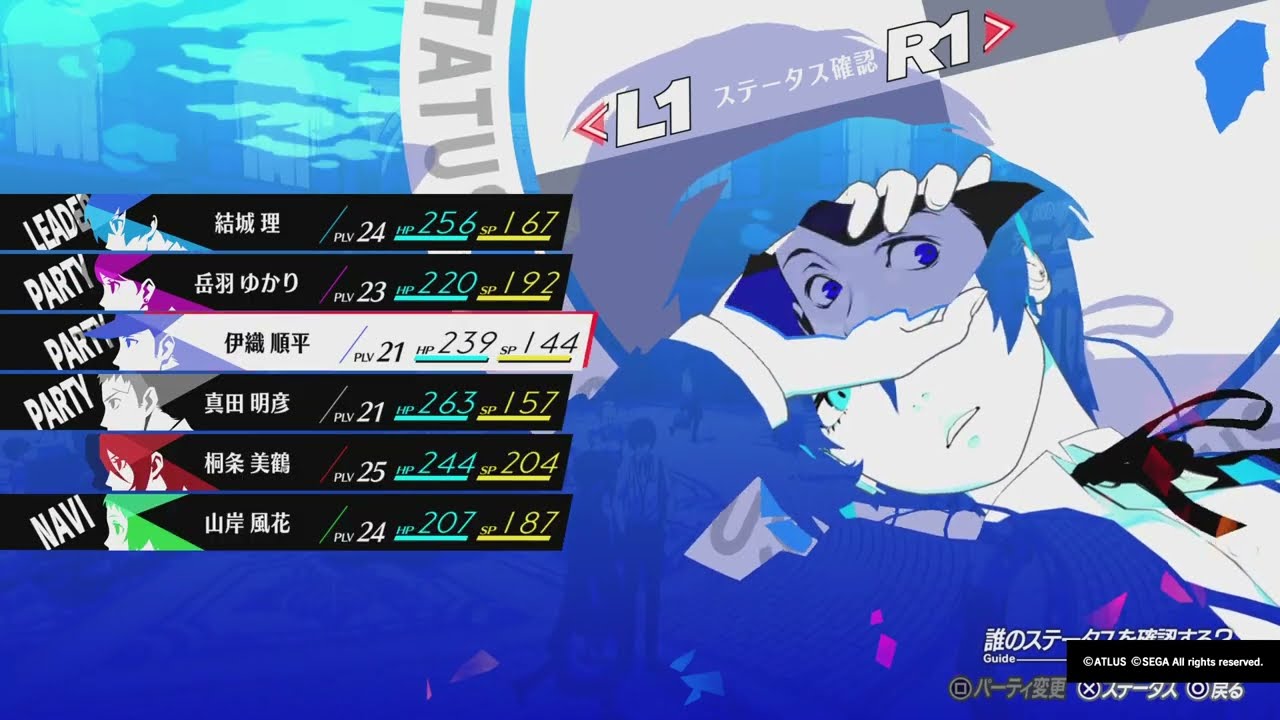
#P3R #ペルソナ3リロード
P3Rのレビューも書いたので良かったら読んでください
https://note.com/fiince/n/n01ae13112870
I have a bit of background in visual arts if that matters, I’m all ears for any advice 
 cunning wing
how to animate an image in the ui? im doing the same thing i do with other stuff not in the ui (using the animator) and it dont work
cunning wing
solved :D
 bold edge
I have these assets, and I want to achieve the slider in the second pic, with 25% marks, how can I do it? Is there any tutorial on it?

 mortal robin
bold edge
I have these assets, and I want to achieve the slider in the second pic, with 25...
mortal robin
bold edge
I have these assets, and I want to achieve the slider in the second pic, with 25...
Just a few such images next to each other. Probably using a horizontal layout
Think of it as just a static background image behind the slider
wide sedge
Why is my image not displaying?

Ah the scale is 0, how did that happen? This worked perfectly yesterday, didn't change anything
WTF? So I changed the scale of one item while running the game (so this should reverse as soon as I stop the game?)
The items are generated from a prefab, which was still set correctly.
I re-load the game and it works again???
 lilac egret
Help - i need to achieve a nice text using this font (i got on Google Fonts) that is white with an outline but i keep having issues: legacy has low res and no outline, TMP converts it to a font that can't be switched to bold, when in Game or when zooming out in Scene, these rectangles form around the text, and it also doesn't have an outline.

 solar wadi
why I got black squad shadow
 solar wadi
there's no people who read this channel or can answer me a question
 honest saffron
solar wadi
there's no people who read this channel or can answer me a question
honest saffron
solar wadi
there's no people who read this channel or can answer me a question
google says this: "Typically a semi transparent box around the text is the result of the sampling point size to padding being too small. You should normal aim for a ratio of about 10%."
this can be done in the font asset creator
Window > TextMesh Pro > Font Asset Creator
it should show your ratio there and you can change your padding and stuff there
azure flame
solar wadi
there's no people who read this channel or can answer me a question
No-one is obligated to jump on your questions. People look in when they have free time. (and do your own research meanwhile, then you can post the answer yourself)
azure flame
lilac egret
Help - i need to achieve a nice text using this font (i got on Google Fonts) tha...
You have the same problem of SDF font atlas characters bleeding into each other because of low resolution/lack of adequate padding.
 solemn pivot
I'm having a UI problem with unity sliders(?) maybe?
    private void Start()
    {
        OnColorSliderValueChanged(0f);
    }

    private void DebugValues()
    {
        Debug.LogWarning($"H = {currentHue}, S = {currentSaturation}, V = {currentValue}, and color is {col}");
    }

    public void OnColorSliderValueChanged(float value)
    {
        DebugValues();
        currentHue = value;
        UpdateColor();
        DebugValues();

    }

    public void OnLightSliderValueChanged(float value)
    {
        currentValue = value;
        UpdateColor();
    }

    public void OnSaturationSliderValueChanged(float value)
    {
        DebugValues();

        currentSaturation = value;
        UpdateColor();
        DebugValues();

    }

    private void UpdateColor()
    {
        DebugValues();

        Color color = CreateColorFromHSV(currentHue, currentSaturation, currentValue);
        DebugValues();

        cursorPreview.color = color;
        icoPreview.color = color;
        col = color;
        ClientsideNetworkMessenger.instance.SetPlayerColor(color);
        DebugValues();

    }

    public Color CreateColorFromHSV(float h, float s, float v)
    {
        DebugValues();

        return Color.HSVToRGB(h, s, v);
    }
The instant 'OnSaturationSliderValueChanged' gets called, even before it assigns to anything, currentHue becomes 0. It just becomes zero, but nothing is setting to it.

Can the ui sliders cause this? Why would a slider not being interacted with change its value?

Solved it
saturation had its own separate instance of the color selection code on it
it wasnt 'assinging' them to be zero, they were just zero in its unique instance
 pliant crescent
I'm setting Toggle.isOn to false, but it's not hiding Toggle Graphic (the changevalue event is being fired though)
is there a way to make the toggle toggle properly?
the situation is I have two toggle groups with the same items listed (it's a primary and secondary language selector) and I'm trying to remove the secondary language selection when the primary is selected, if they match
limpid torrent
i have a UI that has a bunch of objects with Image components in a hierarchy and now I want to put a Sprite (with and Animated Sprite Renderer) on top of these images but the sprites doesn't show up even if I increase Order in Layer value. I can see the sprite in Scene view but not in Game view
oh it seems to be in a different coordinate space maybe
mortal robin
limpid torrent
i have a UI that has a bunch of objects with Image components in a hierarchy and...
If your canvas is in overlay mode it draws on top of everything
And yes
It's a different coordinate space entirely
If you want a UI element, you need to use the Image component
Not SpriteRenderer
limpid torrent
then i would have to make my own script to animate the Image component? if i cant use Animated Sprite Renderer
mortal robin
SpriteRenderer is for the game world, not for UI
mortal robin
limpid torrent
then i would have to make my own script to animate the Image component? if i can...
I have no idea what "animated sprite renderer" is
limpid torrent
or can i put a gif as an image?
mortal robin
You can use Unity's Animator component with the Image component as normal
No, animated gifs aren't supported
lilac egret
I need help with giving my custom font an outline
 low pike
lilac egret
I need help with giving my custom font an outline
low pike
lilac egret
I need help with giving my custom font an outline
scroll down and look at the bottom of the TMP component and look at the material

 mild kernel
Do you have anything on the canvas to actually display?
 elder hawk
mild kernel
Do you have anything on the canvas to actually display?
elder hawk
mild kernel
Do you have anything on the canvas to actually display?
yea i do, i. figured it out and it was so ridiculously stupid
I was zoomed in slightly in the editor 0-0
mild kernel
That'll do it
I suggest you change your reference resolution to something more standard as well, like 1920x1080.
Especially if you intend on making your own artwork, though if you're using packs, they're likely done to that scale as well since it's the most common.
elder hawk
mild kernel
Especially if you intend on making your own artwork, though if you're using pack...
Alright, thank you for that
 upper raft
Hello im trying to replicate this video guide, but there is one step im having trouble with. After creating the calendarholder and equipping it with the vertical layout group im unable to stretch the calendardaytitle in the Y axis and therefore replicate the tutorial. Any tricks?


 maiden tinsel
how do i disable Text Mesh Pro text wrapping, so letters that can't fit into one line won't jump to next line?
mortal robin
maiden tinsel
how do i disable Text Mesh Pro text wrapping, so letters that can't fit into one...
in the inspector there's a text wrapping mode
maiden tinsel
mortal robin
in the inspector there's a text wrapping mode
ok, thanks
 supple shoal
I have some TMP text that is being stubborn. It's appearing in play mode IN ALL RESOLUTIONS but not appearing in the build. I checked the canvas scaling, updated unity to the newest version, and tried deleting the scene from the build and putting it back. No luck yet, any suggestions?
 supple shoal
Got it! It wasn't a problem with the UI. For some reason a timeline asset alone can't play animation events, it need to have an animation with events in it instead. That was making stuff not appear
Only in the build though which is weird
 proven venture
how do i fix the text overflowing

 high tartan
do you guys think this looks good? any suggestions
 rapid ferry
high tartan
do you guys think this looks good? any suggestions
rapid ferry
high tartan
do you guys think this looks good? any suggestions
can do some changes, first center texts, second instead of "increased", you can say `+35% blablablah"
also that coins didnt really got aligned properly
rapid ferry
proven venture
how do i fix the text overflowing
you should use rect masks for that
high tartan
rapid ferry
can do some changes, first center texts, second instead of "increased", you can ...
better? also the "increased" part is a major part of my stat system to tell how different stats will stack
 rapid ferry
high tartan
better? also the "increased" part is a major part of my stat system to tell how ...
rapid ferry
high tartan
better? also the "increased" part is a major part of my stat system to tell how ...
in that case, you should reduce the font size by a little, 1px should be enough
currently the description is as large as subheaders, that's not nice
high tartan
rapid ferry
in that case, you should reduce the font size by a little, 1px should be enough
kk, anything else?
rapid ferry
should be all for me
high tartan
thanks
 soft swallow
high tartan
better? also the "increased" part is a major part of my stat system to tell how ...
soft swallow
high tartan
better? also the "increased" part is a major part of my stat system to tell how ...
hey! if you are still not set on the layout, you can do something like this to make it more interesting, adds a little bonus UI depth to your game
 rapid ferry
yea, single vertical layout can be quite boring
high tartan
soft swallow
hey! if you are still not set on the layout, you can do something like this to m...
yeah I might, right now its just a text box formatted with rich text. trying to get the satisfying item feel like in Diablo and path of exile
also is there a better way to keep the box within the screen window? right now i have this and it works but when the box is hidden then activated again when hovering a new item, it briefly flickers outside of the screen before correcting.
        if (anchoredPos.x + rectTransform.rect.width > canvasRectTransform.rect.width)
        {
            anchoredPos.x = canvasRectTransform.rect.width - rectTransform.rect.width;
        }
        if (anchoredPos.y + rectTransform.rect.height > canvasRectTransform.rect.height)
        {
            anchoredPos.y = canvasRectTransform.rect.height - rectTransform.rect.height;
        }
rectTransform.anchoredPosition = anchoredPos;```this is within update
soft swallow
high tartan
this is within update
do it OnEnable
high tartan
soft swallow
do it OnEnable
it has to be on update?
since it reads mouse position
and it moves with the mouse
soft swallow
high tartan
it has to be on update?
do it both
soft swallow
lemme actually read the code lol
high tartan
i got a screenshot of what i mean

this is the frame where its outside of the bounds
next it is fixed
 soft swallow
ahh the panel is out of unity screen
high tartan
im talking about it leaving the bounds of the screen
it works fine besides that 1 single frame when its enabled
soft swallow
Let me look at how i did mine before
soft swallow
high tartan
it works fine besides that 1 single frame when its enabled
just call that after moving the thing
then enable the object
    void Update()
    {
        UpdatePositionAndPivot();
        ClampToBounds();
}```its just locked to the bottom left of my screen
soft swallow
is the parent canvas rect transform larger than tooltip recttransform?
also this code only change the position, you need to set the resizing properly using layoutgroups and content size fitters
soft swallow
the idea for this method is so that the green box stays inside the red (as long as it's smaller)

https://gdl.space/uwikibuvuh.cpp here with Y axis being fixed as well
high tartan
soft swallow
the idea for this method is so that the green box stays inside the red (as long ...
its doing the same thing as my old code
soft swallow
idk why it is working for me then..
 bright plaza
I'm looking for advice about some other Unity ui
mortal robin
What does that mean?
bright plaza
I want to design a furnace menu
With animations in thé température,fuel, an timer an température clock
Thé problem is ,how to anímate all in a ui? In différent gamme objects?
Y have other interfaces
But thé problem is, i cannot anímate all and Connect them
Like this examole
Thé blue things are things that show thé level off thé water or Gate or level off thé distillated water ,i dont know how i can anímate

 slender flame
Anyone knows an asset, how could i make this? i really like this ring type of inventory but i have no clue how to mess with Unity's UI system for something like this, any help is well appreciated 

(if anyone also knows the name of this type of system)
mortal robin
slender flame
Anyone knows an asset, how could i make this? i really like this ring type of in...
It's called a carousel in UI terminology
 lyric venture
why tmp text is not showing after changing during runtime
but the text is getting updated in the inspector.

 obsidian flax
hello, my canvas shows a ridiculous rectangle in my game, i want to hide it but without hiding the canvas objects inside, how can i do it ?
 mild kernel
That white rectangle is the canvas borders, which is just a gizmo. It won't show up in your game.
obsidian flax
oh okay
thanks
i still see it in the game in the editor, it will be removed during the build ?


i also see a camera icon which is horrible
mortal robin
obsidian flax
i also see a camera icon which is horrible
turn off gizmos if you don't want to see gizmos
supple shoal
@obsidian flax You're project looks really interesting! Keep it up! 😄
mortal robin
How many cameras do you have
And... Another in the scene?
I didn't say there were more
And what is the canvas render mode?
And if you deactivate the "Background Panel" object what happens?
But both renderings disappear?
Try restarting Unity
Something is fishy here
Very fishy
mortal robin
The overlay UI probably doesn't do any kind of clearing of the buffer. So it probably drew once, did a layout, then drew again elsewhere. And nothing cleared the buffer
It's not advisable to have a scene without a camera
 timber leaf
Does anyone know how i can make it so that only the borders of the image scale and not the cutout part?


 supple shoal
Just so I understand better, why do you want to do that?
timber leaf
supple shoal
Just so I understand better, why do you want to do that?
it's a scope, when the game is played on some other aspect ratio like 21:9 or 16:10 it stretches
supple shoal
timber leaf
it's a scope, when the game is played on some other aspect ratio like 21:9 or 16...
If you want your UI to stretch then select the canvas scaler component, and set UI Scale Mode to "Scale with screen size" and then set the default resolution by typing in your width and height (4k would be 3840, 2160. 1080p would be 1920, 1080)
timber leaf
supple shoal
If you want your UI to stretch then select the canvas scaler component, and set ...
yeah i know, it streches with the screen size n stuff, issue is that the cutout part is also streched which makes the scope turn weird
supple shoal
Worked on my end!
timber leaf
last one had no audio lol
supple shoal
Ooh
supple shoal
timber leaf
last one had no audio lol
Ok here's what I would do if you dont want it to look that way: I would go into illustrator, or photoshop, or whatever sprite editor you use, and then I would add a wider black part to the scope. And then I would set the canvas to not scale with screen size so it doesn't stretch. A bit of an awkward workar-aound but it works. Do keep in mind, that a lot of games that have features for stretched resolution have that odd looking stretched scope effect. Think of games like cs:go or fortnite. Both of these triple A games have that weird stretching effect so I wouldn't worry too much about it. But if you do end up trying that work-around, let me know your results!
 timber leaf
supple shoal
Ok here's what I would do if you dont want it to look that way: I would go into ...
timber leaf
supple shoal
Ok here's what I would do if you dont want it to look that way: I would go into ...
I was doing this, but what if it's smth like 16:10 4:3 etc
fkin goofy ahh UI system
imma make a 10000x10000 image fk it
supple shoal
Unless you expect players to have a 2006 monitor or are playing on mobile, I wouldn't worry about those resolutions 😂 . Even still, If you want to fully fix it, I do think making a larger image is your best bet
timber leaf
yeahhhh
 timber leaf
yeahhhh
timber leaf
timber leaf
yeahhhh
christ this is such an abomination
supple shoal
timber leaf
christ this is such an abomination
Did it work?
supple shoal
timber leaf
yeah
Stuff like that is frustrating 😂 . I checked out your steam page. Looks awesome, keep it up!
timber leaf
supple shoal
Stuff like that is frustrating 😂 . I checked out your steam page. Looks awesome...
oh, the steam page is like 2 years old, game is completely different now, if ya search up "Project Nova Pre Beta Gameplay Footage" you'll find newer gameplay
supple shoal
You should update that on your page!
timber leaf
I don't have art for the page lol
dreamy river
how can i remove the overflow?? it's a canvas in world space
 timber leaf
dreamy river
how can i remove the overflow?? it's a canvas in world space
timber leaf
dreamy river
how can i remove the overflow?? it's a canvas in world space
Mask
or png
dreamy river
timber leaf
Mask
how can i do that??
supple shoal
dreamy river
how can i do that??
I would either go into photoshop and manually smooth the edges, or you can look up "how to mask UI elements" and I'm sure you'll find something helpful there!
dreamy river
supple shoal
I would either go into photoshop and manually smooth the edges, or you can look ...
okayy, thanks
obsidian flax
supple shoal
<@730039667243876422> You're project looks really interesting! Keep it up! 😄
Thanks !!
 wicked mural
Hey everyone,
I'm currently developing a 2D pixel art game with a global light to simulate day-night cycles, using URP. This global light affects every sprite in the game.
However, the UI looks strange at night because the entire game is dark while the UI maintains its original brightness, creating an ugly contrast.
I've experimented with setting the material of my UI images to Lit-Default, which makes them affected by light. Visually, this works well, but it causes issues: images with that material no longer work with RectMask2D or register cursor hovers. I'm sure there are more problems I haven't encountered yet, as I assume the Lit-Default material isn't designed for UI.
Does anyone know a practical way to make the UI respond to lighting?
supple shoal
wicked mural
Hey everyone,
I'm currently developing a 2D pixel art game with a global light ...
If I were you I would write a script that tracked what time it is in game and adjust the white levels of your UI images accordingly
wicked mural
supple shoal
If I were you I would write a script that tracked what time it is in game and ad...
But that would mean having an extra script attached to every UI image.
I have pretty complex UI, so it can get messy.
supple shoal
Not necessarily, I would make one script and attach it to the canvas, and then make an images array in that script for modularity
If you need exaples I can do that ❤️
wicked mural
I see.
Well, another concern I have is that the global light in the game's world affects both brightness and hue. Adjusting the white levels on my UI images would only change their brightness, not their hue, correct?
 supple shoal
wicked mural
I see.
Well, another concern I have is that the global light in the game's worl...
supple shoal
wicked mural
I see.
Well, another concern I have is that the global light in the game's worl...
That's true. If you want to adjust the hue then you would edit the entire color rather than just the white. (Which, either way you would be editing the entire color, but in my first message I was under the impression that you only wanted it to get darker)
supple shoal
wicked mural
I see.
Well, another concern I have is that the global light in the game's worl...
It's also worth noting that if you adjust the color of a yellow object, and set it's color to blue. That object won't be blue. It will be yellow with a hue of blue
So you wouldn't have to adjust each individual color, you could edit all of them at the same time so they all had the same hue
wicked mural
Oh, that's true actually.
That definitely sounds like a better solution that what I had so far.
I'm still a bit concerned about having to link every new image I add to the UI to the script attached to the canvas, but I guess you can't have it all.
supple shoal
You could tag all of your UI elements something like "UIcolor" and then attach each tagged item to the array instead of doing it manually
supple shoal
wicked mural
Oh, that's true actually.
If it were me, I would rather do it manually though. It's a bit easier to debug even if it takes more time
wicked mural
Will try that. Thank you so much for your help! 🙏
supple shoal
wicked mural
Will try that. Thank you so much for your help! 🙏
Good luck! ❤️
pliant crescent
my UI buttons aren't working, but they worked previously. looking at the EventSystem inspector, clicks on them aren't showing up. how can I check if something is blocking them?
is there any more debugging I can do on a UI element other than that?
supple shoal
I would go into play mode, and disable all other UI elements that aren't your buttons, and then start enabling them one by one and find out when your buttons stop working. Then, go out of play mode, click on the culprit, and disable "raycast target" on the image component of the element. Note that you may need to do this process multiple times because there may be more than one thing blocking your buttons!
pliant crescent
kk, thank you
yup that nailed it, cheers
yeah so I have a couple of toggle groups. they're not overlapping, in fact they're all in a vertical grid together. but if I switch them off my buttons work. what could that be?
I'm not completely up on how things like canvases and graphic raycasters work. I have multiple instances of both, is that okay?
supple shoal
The "Canvas Group" component also has a bool that blocks raycasts. If you disable that it should work
supple shoal
pliant crescent
I'm not completely up on how things like canvases and graphic raycasters work. I...
Yes that should be fine, as long as they aren't blocking each other
supple shoal
pliant crescent
do you know which option it is?
It should be a bool called "Blocks Raycasts" on the Canvas Group component
pliant crescent
okay, ty
supple shoal
pliant crescent
okay, ty
Did that fix your issue?
pliant crescent
finding out now
I couldn't find the option in anything that shouldn't have it
only my actual buttons have it
it was "Raycast target" right?
I never saw anything called Blocks Raycasts
supple shoal
"Blocks Raycasts" is a bool in the 'Canvas Group' component. "Raycast target" is a bool in the 'Image' component. They do the same thing but are on different components
pliant crescent
I have this as well

I guess I don't have a canvas group component anywhere
the thing grouping everything is this

(wasn't a grid)
I actually don't know when this broke so I don't even know if it was the last thing I added
supple shoal
Oh I see. If you set your blocking mask to nothing are your buttons still interactible?
pliant crescent
oh,. my preview text element which is BELOW the buttons is acting weird. turning off the thigns above it helped but maybe only incidentally
lemme try your suggestion first though
ended up trying both, no difference
I guess I'll just try moving everything around a lot and putting padding on everything
I just wondered if there was some kind of component collision rather than screen collision
instead of occlusion, maybe something is discarding the event
supple shoal
I have one more suggestion
Remember earlier when you disabled objects one by one to see which one was the problem? Try that, but this time only do it to the objects INSIDE the group that you know is causing the issue
pliant crescent
with that last layout change, just disabling the bottom toggle group makes it work now. before it had to be both.
must be occlusion
oh good idea
supple shoal
Hmm odd. Glad you found a solution!
pliant crescent
it didn't help so it must be the grid layout group causing it
there isn't really anything in there specifically related to blocking

and the toggle group above doesn't affect the toggle group below. lemme show you what I'm working on

the two buttons not working are "smaller" and "larger"

if I disable the grid group for the bottom row of flags, the buttons work
like this still doesn't work if the flags are disabled
 supple shoal
Really weird. I have never used that grouping component before. You should look up if other people have had this problem! It may be a Unity bug
pliant crescent
thank you for the help, I'll keep poking at it. those were good ideas 🙂
I might put all the flags into another group just to pad them out
supple shoal
pliant crescent
thank you for the help, I'll keep poking at it. those were good ideas 🙂
No problem at all. I really like the look of your project! very few unity devs make educational content and that makes it unique
supple shoal
With proper marketing!
pliant crescent
k we're on to something. a new vertical layout group has tidied it right up
supple shoal
Awesome
wicked mural
supple shoal
If it were me, I would rather do it manually though. It's a bit easier to debug ...
Hey, I have another quick question if that's alright.
You mentioned creating a script on the canvas to keep a reference to all UI images. How would you handle UI elements that are spawned or despawned at runtime, like the interfaces for inventories, chests, crates, etc.? I don't keep every UI element in the scene, I spawn them as needed.
Would there be an easy way to reference their images in that script?
supple shoal
I see. I would tag all of your prefabs that you want to be affected and then use GameObject.FindGameObjectsWithTag("TagName"); to add the tagged objects to the images array we talked about earlier in a FixedUpdate() { }
wicked mural
Alright then, will try that.
Thank you once again.
supple shoal
❤️
 jagged monolith
supple shoal
I see. I would tag all of your prefabs that you want to be affected and then use...
jagged monolith
supple shoal
I see. I would tag all of your prefabs that you want to be affected and then use...
This is a really bad idea, it's a very heavy method that should not be run in any update loop. Even in FixedUpdate it's gonna run multiple times a second. If you want to manage objects spawned during runtime @wicked mural, my personal preference would be to have some sort of manager that is available statically, like a singleton (even though those shouldn't be overused either). Then when a button spawns, it is responsible for registering itself in the manager, and detach when it is destroyed.
wicked mural
jagged monolith
This is a really bad idea, it's a very heavy method that should not be run in an...
I found out that Unity 6 supports UI shaders, and I tested it out - it's true.
I might switch to the new version. This way, I can simply change a material, and all images using that material will respond to the color changes I make.
I figured using FindGameObjectWithTag would affect the performance quite a bit.
low pike
UI shaders aren't new to Unity 6..? 🤔
mild kernel
The canvas shader graph is new with 6. They mentioned it during Unite
 wild pebble
Yup. You could have made handwritten UI shaders forever but the shader graph support is a new feature. Nothing would have prevented from using, lets say, unlit graphs for UI materials previously either but the unlit graph doesn't have ZTest [unity_GUIZTestMode] and UI masking so the shader might have been bit buggy but somewhat working
 steel patio
i'm making an inventory system for a 3d unity project. right now i'm trying to add a drag and drop system to the items but it doesn't work.. I only have debug.logs right now and nothing shows up in the console
DragDrop - https://hst.sh/cufazifuva.cpp
ItemSlot - https://hst.sh/movubemodo.csharp
i've read forums talking about adding a StandaloneInputModule to the event system but because im using new InputSystem i need to use a InputSystemUIInputModule. I've added a canvas group to the item, made sure the canvas has a GraphicRaycaster. I also did an Event System debugger - https://hst.sh/musobofono.cpp and still nothing shows up in console. when i click on the item absolutely nothing happens
 high tartan
anyone know why my UI has gaps when my game is ran at 1440p? it looks fine at 1080p. I believe it from using pixel perfect mode on the canvas, but not sure. Anyone know how to properly make a pixel perfect UI or fix the issue?
 supple shoal
wicked mural
I found out that Unity 6 supports UI shaders, and I tested it out - it's true.
...
supple shoal
wicked mural
I found out that Unity 6 supports UI shaders, and I tested it out - it's true.
...
@jagged monolith @wicked mural If you are going for optimization, then you could add a script to your prefabs that adds then to your images array on their start rather than using GameObject.FindGameObjectsWithTag("TagName");
supple shoal
steel patio
i'm making an inventory system for a 3d unity project. right now i'm trying to a...
When you say nothing shows up in the console, what do you want to show up? Can I see some of the components?
supple shoal
high tartan
anyone know why my UI has gaps when my game is ran at 1440p? it looks fine at 10...
Is your canvas set to scale with screen size?
steel patio
supple shoal
When you say nothing shows up in the console, what do you want to show up? Can I...
all the debug.log show nothing in console. i did make a proper drag and drop system but after seeing it didn't work i replaced it all with debug.log and they're there to make sure everything works and apparently nothing works. console is completely empty
i'm still fairly new to unity
supple shoal
steel patio
all the debug.log show nothing in console. i did make a proper drag and drop sys...
Don't sweat it! This is most likely a question for code-beginner rather than ui-ux. I would check there and see if anybody has any suggestions. If not, feel free to come back here
fallen barn
If i understand this correctly, the Scale With Screen Size option adjusts everything under the Canvas to the proper size according to the screen size. How do I do the same for the player sprite?
 mortal robin
fallen barn
If i understand this correctly, the Scale With Screen Size option adjusts everyt...
mortal robin
fallen barn
If i understand this correctly, the Scale With Screen Size option adjusts everyt...
Why would you want to do the same for the player sprite?
that would mean physically changing the player's size
which means the game will behave differently
This is really for UI which is more concerned about looking good on the screen than being part of an actual game simulation
fallen barn
I initially thought if ui size changed, wouldn't you need to change the player sprite as well?
Got it, thanks.
mortal robin
fallen barn
I initially thought if ui size changed, wouldn't you need to change the player s...
depends on your game and your goals
in the vast majority of games, you don't change the size of any objects in the game world itself to suit the screen.
What you might do is zoom the camera in or out based on the aspect ratio, if you have a desired physical height or width of the camera viewport.
 foggy heron
I'm using the localization package
Is there really no way to do nested localization string lookups without manually inputting persistent variables? I want an entire string table to be available for nested lookups (these strings have no params)
pliant crescent
pliant crescent
like this still doesn't work if the flags are disabled
omfg it's everything at the bottom half of the screen that's not interactable
found it!
woo
is there a way to convert a group of selected objects into a prefab in-place?
supple shoal
pliant crescent
is there a way to convert a group of selected objects into a prefab in-place?
Drag and drop the parent object into your assets folder somewhere
supple shoal
foggy heron
I'm using the localization package
Is there really no way to do nested localizat...
I bet you'll find an answer in one of the code chats!
foggy heron
discord is such a pain in the behind to search through
high tartan
supple shoal
Is your canvas set to scale with screen size?
yes
 karmic plinth
i created one ui design for webVr project and ui size is 1920*1080px
but i need to develop the responsive webui for my project so anyone can suggest me for project
 grand night
Hey I have a slider with a 9-sliced fill, but whenever the value of the slider is very small, Unity scales the fill instead of using 9-slicing, how can I fix this?
 proud sandal
grand night
Hey I have a slider with a 9-sliced fill, but whenever the value of the slider i...
proud sandal
grand night
Hey I have a slider with a 9-sliced fill, but whenever the value of the slider i...
Try adding negative padding to the fill transform (make it bigger than the track it slides in)
mortal robin
grand night
Hey I have a slider with a 9-sliced fill, but whenever the value of the slider i...
Is this for a Health bar or something?
grand night
proud sandal
Try adding negative padding to the fill transform (make it bigger than the track...
Thanks it works now!
grand night
mortal robin
Is this for a Health bar or something?
Yea its an energy bar
mortal robin
grand night
Yea its an energy bar
You shouldn't use a slider at all
Just use a filled Image
grand night
mortal robin
Just use a filled Image
i'll keep that in mind next time
 hoary kindle
is there any way to make the objects spawn opposite direction under a horizontal layout group
 gloomy marten
hoary kindle
is there any way to make the objects spawn opposite direction under a horizonta...
gloomy marten
hoary kindle
is there any way to make the objects spawn opposite direction under a horizonta...
setsiblingindex(0) for spawned object?
there should be a flag called reverse arangement on Horizontal Layout Group
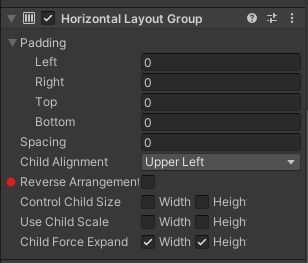 hoary kindle
gloomy marten
there should be a flag called reverse arangement on Horizontal Layout Group
hoary kindle
gloomy marten
there should be a flag called reverse arangement on Horizontal Layout Group
it only reverse the arrangement of the objects
gloomy marten
combine that with child alignment set to XXX right
 dusty spindle
I'm using a Drag-n-Drop (Golf game like) game mechanic which uses OnMouseDown function.
Problem is that i also have a UI button that toggles a camera zoom function but clicking that button affects gameplay by beginning a drag action.
How can i prevent clicking on the button to affect gameplay?
I tried having this line of code in the player movement script, but problem didn't dissappear. I might be using it in the wrong way. Dragging triggers still.
if (EventSystem.current.IsPointerOverGameObject()) { return; }
How do mobile games solve problems like this between UI and the Game?
 mortal robin
dusty spindle
I'm using a Drag-n-Drop (Golf game like) game mechanic which uses OnMouseDown fu...
mortal robin
dusty spindle
I'm using a Drag-n-Drop (Golf game like) game mechanic which uses OnMouseDown fu...
Don't use OnMouseDown
Use the event system for everything
IPointerDownHandler
You will get the correct behavior for free
dusty spindle
mortal robin
You will get the correct behavior for free
thank you i'll try switching to that
 solar dove
How can you change the colliders for sliders as mine are way too big
mild kernel
Sliders don't have colliders?
UI elements will use whatever images they have for example.
solar dove
when dragging the colliders the mouse will clicke quite far away from the image and still connect with it
mild kernel
You have some UI elements that are inside that object that are big, then. You can turn of raycast target on components (image components, text components, etc.) for ones you don't want the mouse to consider.
solar dove
thanks ill try that
TY so much thats perfect ill keep that interaction in mind from now on!
steel patio
supple shoal
Don't sweat it! This is most likely a question for code-beginner rather than ui-...
i've posted it there quite a few times and noones replied
wide sedge
Can someone help me figure out why Unity keeps setting the Scale of my items to 0/0/0?
I Instantiate my items from a prefab, the prefab's scale is set to 1/1/1, nothing in my code touches the scale, the item is placed in a Grid Layout Group parent
The prefab contains an empty gameobject with a fully transparant image on it and an empty gameobject child with a Horizontal Layout Group and the item image on it
 mortal robin
wide sedge
Can someone help me figure out why Unity keeps setting the Scale of my items to ...
mortal robin
wide sedge
Can someone help me figure out why Unity keeps setting the Scale of my items to ...
Where are you seeing a scale of 0,0,0
 mortal robin
wide sedge
Can someone help me figure out why Unity keeps setting the Scale of my items to ...
mortal robin
wide sedge
Can someone help me figure out why Unity keeps setting the Scale of my items to ...
Well first off - shouldn't you show the Item object here?
Since that's the one that is being scaled incorrectly?
(the prefab root)
wide sedge
that is what I'm showing, it's renamed when instantiating the item
mortal robin
wide sedge
Can someone help me figure out why Unity keeps setting the Scale of my items to ...
you're showing a child object

 mortal robin
OK so - can you show your code that instantiates these things?
and/or configures them
wide sedge
        {
            GameObject itemGO = Instantiate(itemPrefab);
            T item = itemGO.AddComponent<T>();
            item.ItemData = itemData;
            item.name = itemData.ItemName;

            if (item is Weapon weapon)
            {
                weapon.WeaponSO = (WeaponSO)Resources.Load("Items/Weapons/" + itemData.ItemName, typeof(WeaponSO));
                weapon.transform.GetChild(0).GetComponent<Image>().sprite = weapon.WeaponSO.Sprite;
            }
            else if (item is Armor armor)
            {
                armor.ArmorSO = (ArmorSO)Resources.Load("Items/Armor/" + itemData.ItemName, typeof(ArmorSO));
                armor.transform.GetChild(0).GetComponent<Image>().sprite = armor.ArmorSO.Sprite;
            }

            item.ItemDescriptionPrefab = CombatController.Instance.ItemDescriptionPrefab;

            if (itemData.IsEquipped)
            {
                item.transform.SetParent(EquipmentSlots[itemData.EquipmentSlot].transform);
            }
            else if (itemData.InventorySlot > 0)
            {
                item.transform.SetParent(ItemSlots[itemData.InventorySlot].transform);
                EmptyItemSlots.Remove(itemData.InventorySlot);
            }

            //item.transform.localScale = new Vector3(1, 1, 1);
}```you should determine the parent first and instantiate it directly as a child
rather than instantiating and setting the parent later
that really messes with UI/layout groups
wide sedge
cool, let me try that 🙂
mortal robin
wide sedge
cool, let me try that 🙂
To be clear I mean that you should use the Instantiate(prefab, parent) form of Instantiate
Something like:
Transform parent = null;
if (itemData.IsEquipped)
{
  parent = EquipmentSlots[itemData.EquipmentSlot].transform;
}
else if (itemData.InventorySlot > 0)
{
  parent = ItemSlots[itemData.InventorySlot].transform;
}

GameObject itemGO = Instantiate(itemPrefab, parent);```the issue is I don't have the Script that contains the correct parent when I need to instantiate the object
because depending on what Item type it is I add a different script to the prefab
but I guess I'll just manually set the scale to 1 then at the end
mortal robin
wide sedge
the issue is I don't have the Script that contains the correct parent when I nee...
Wdym?
That has nothing to do with the Instantiate part or the parenting part
I just showed an example of exactly how to do it
wide sedge
ah yeah, I got a bit confused there 🙂 I do have ItemData from the function parameter 🙂
this actually fixes my issue, thx!
 vague oriole
I'm having issues with centering rect transforms so I made a quick example. Does anyone know why the canvas' 0, 0, 0 is like a bit to the left?


The pivot on the quad is fine

Wait no it's an issue on my end sorry!!
I had the pivot set to always be the center instead of the actual pivot. The plane's pivot is off
mortal robin
vague oriole
I'm having issues with centering rect transforms so I made a quick example. Does...
Use the rect tool for RectTransforms
mortal robin
vague oriole
I had the pivot set to always be the center instead of the actual pivot. The pla...
yeah this was going to be my guess
dreamy river
why are my buttons in "world space" canvas not working in some position
feels like there's something on top if them but there's really not
and this is my canvas (the event camera is set in a script)
 mortal robin
dreamy river
feels like there's something on top if them but there's really not
mortal robin
dreamy river
feels like there's something on top if them but there's really not
Slect your event system object at runtime
and look at the preview window, to see what's overlapping it.
dreamy river
mortal robin
Slect your event system object at runtime
hmm, it feels like the game doesn't know the canvas is "tilted"
 mortal robin
dreamy river
hmm, it feels like the game doesn't know the canvas is "tilted"
mortal robin
dreamy river
hmm, it feels like the game doesn't know the canvas is "tilted"
How is the tilting happening? Is it physically tilted or a shader? Which camera is the event camera? Is it the same camera we're seeing out of? Is there postprocessing?
dreamy river
mortal robin
How is the tilting happening? Is it physically tilted or a shader? Which camera ...
yea there is post processing, and it's happening physically
 sullen shoal
Hey! does the world space uses the hierarchy order in what to draw first?
I have a problem with world space ui elements on single canvas, that its not order from the closest to camera to farthest
Do i need to sort it manually?
 upbeat moon
Any tips on continuing to build a UX UI portfolio when you currently arent working on any game projects with anyone
sullen shoal
sullen shoal
Hey! does the world space uses the hierarchy order in what to draw first?
I have...
Unless i should use world space canvas for each characters, cuz right now im using only 1 worldspce that is used for spawning / despawning World UI Elements
dreamy river
mortal robin
How is the tilting happening? Is it physically tilted or a shader? Which camera ...
oh, it was my lens distortion
 rain grove
I'm trying to mask an image on a world space canvas, but if the player/scene camera is a certain distance away the mask seems to stop working and the entire image is visible. If the camera is closer than that distance it works as expected. I'm using Forward rendering, but not sure what could be causing this
sullen shoal
sullen shoal
Hey! does the world space uses the hierarchy order in what to draw first?
I have...
At the end of the day i just switched from using canvas to sprite renderer
 violet sandal
does someone have a clue what's causing this flickering behavior?
(watch it fullscreen)
maybe the edges share 2 pixels and the GPU doesnt know where to render ?
 brisk monolith
Is there a way to make the screen darker besides a specific rectangle? I guess it should be something with UI mask maybe? I'm thinking about some inverted mask
or cut out a part of an UI image
proud sandal
brisk monolith
Is there a way to make the screen darker besides a specific rectangle? I guess i...
That or a custom full screen render feature or a quad in front of the camera with a transparent shader doing the masking (which is essentially a full screen render feature)
 sand sorrel
Hi, I'm making a drifting mobile game (see #1263105452112351232) and I have a level selector menu that looks like Candy Crush (it's a road with the levels on it and you click a level to play it) but I need help finding how to represent the levels
Right now the levels are the pink squares but I need a better design (I'll make it myself, just need an idea knowing it has to be a cartoon 3D model)
supple shoal
steel patio
i've posted it there quite a few times and noones replied
What was the problem again?
steel patio
i'm making an inventory system for a 3d unity project. right now i'm trying to add a drag and drop system to the items but it doesn't work.. I only have debug.logs right now and nothing shows up in the console
DragDrop - https://hst.sh/cufazifuva.cpp
ItemSlot - https://hst.sh/movubemodo.csharp
i've read forums talking about adding a StandaloneInputModule to the event system but because im using new InputSystem i need to use a InputSystemUIInputModule. I've added a canvas group to the item, made sure the canvas has a GraphicRaycaster. I also did an Event System debugger - https://hst.sh/musobofono.cpp and still nothing shows up in console. when i click on the item absolutely nothing happens

i just copy and pasted my last message
wide sedge
How would I make my numbers appear on the right and auto-expand to the left as needed?

This is what I currently have:

 young sinew
I'm adding UI stuff for the first time. I started with a HUD for stats using UI Builder but then started doing the right-click > UI > Canvas > Panel stuff for in-battle menu stuff. Is it best practice to only use one of these UI systems rather than both or no?
Looking online it seems like Legacy might be better for beginners working in 2D.
Would you guys say that's pretty correct?
Seems maybe easier to find resources since it's been around longer
 blissful kraken
When using TMP I can't find the option to combine an inside and outside text. For example, this "0" is made of two fonts, the white and black, and I need to use two text objects and change them in my code any time I want to alter the text. Can they be combined into one object
 mortal robin
blissful kraken
When using TMP I can't find the option to combine an inside and outside text. Fo...
mortal robin
blissful kraken
When using TMP I can't find the option to combine an inside and outside text. Fo...
Just make your own wrapper function or property that sets them both
 autumn rapids
blissful kraken
When using TMP I can't find the option to combine an inside and outside text. Fo...
autumn rapids
blissful kraken
When using TMP I can't find the option to combine an inside and outside text. Fo...
Isn't it possible to use a textoutline instead?
low pike
autumn rapids
Isn't it possible to use a textoutline instead?
the text outline component is for legacy text, not TMP
 faint spindle
I have a tmp button, but for some reason it cannot be highlighted, clicked or anything. Does anybody know how I can fix this issue? I tried so much but nothing seems to work
mortal robin
faint spindle
I have a tmp button, but for some reason it cannot be highlighted, clicked or an...
- Make sure you have an event system in the scene, with an appropriately configured input module
- Make sure there are no other things blocking the button
- Make sure the button is interactable and enabled
faint spindle
i checked that already, doesn't work
mortal robin
it works, those are the things you need
if you think you have everything set up properly, feel free to share screenshots
 carmine canopy
Can I make it so the grid cells scale to fit the area it is inside? I'm aiming to create a 5x5 grid of items that scale to fit their parent with equal spacing.
 proud sandal
carmine canopy
Can I make it so the grid cells scale to fit the area it is inside? I'm aiming t...
proud sandal
carmine canopy
Can I make it so the grid cells scale to fit the area it is inside? I'm aiming t...
you cannot do that with a grid layout group, but you can nest horizontal and vertical layout groups to achieve that effect. Alternatively you can implement a custom variant of the grid layout group.
 vagrant nova
Hello,
I've created a basic UI already and I'm not looking to make it more "beautiful" but I seem stuck on a very basic topic, and I'm afraid I need someone to explain it to me very slowly 😦
I've got a menu, which I would like to put a background to. That background is an jpg image (for now) and illustrates a soccer field. I've managed to 9-slice it so that it can neatly scale depending on the size of the menu.
I've create a object which I've attached the "Image" component to and assigned said image as "source image" property.
Now my problem, which I'm sure is an easy fix, that I was simply not able to find and/or understand:
The "color" property (as I understand it) is working multiplicative in unity. This means my existing image is being "multiplied" by whichever color I choose. This is great when my image is white, because it lets me change the color. But my background already has colors, which I would like to use as-is.
The best I could come up with, was putting the color to white (255,255,255,255) but that still looks like the colors are loosing some of its "power/intensity".
I've read things about custom materials that might solve the issue, but I did not quite understand that.
So: Is there a way to use an image "as-is" on an image component without the multiplicative color or is white(255,255,255,255) the right solution anyway and my eyes are playing tricks on me.
Thanks for any pointers.
honest saffron
vagrant nova
Hello,
I've created a basic UI already and I'm not looking to make it more "bea...
cant you leave the parts that need to be colored as separate objects and leave them completely white? and then color them
vagrant nova
honest saffron
cant you leave the parts that need to be colored as separate objects and leave t...
yeah, that would be solution, but that would mean splitting the soccer fields into a bunch of rectangles for the various colors. And somehow that feels like I'm "redrawing" the image in unity with multiple objects. I'm not quite convinced thats the intended way to include a background image with its original colors as created by the illustrator.
honest saffron
vagrant nova
yeah, that would be solution, but that would mean splitting the soccer fields in...
1 image for colored stuff, 1 image for the rest. all you need is 2 images total
or will you color them all different colors?
vagrant nova
if thought explaining the image, but i think its easier to just show it 😄

If i understood you correctly, i would need to put the rectangles of one green as an object, the ones from other green another object and then some for the white lines - although I'm not yet sure how to do the circles
honest saffron
vagrant nova
If i understood you correctly, i would need to put the rectangles of one green a...
what are you trying to color here exactly?
vagrant nova
nothing really, thats my problem.
i want to use this image as background as is and then put a bunch of UI on top of it.
but with the color property of the image component, the best I could do to put it to white with full alpha, which still changes the colors slightly (or so my eyes tell me)
honest saffron
vagrant nova
nothing really, thats my problem.
i want to use this image as background as is ...
no i mean, what do you want to change the color of? the white lines?
vagrant nova
i dont want the colors to change at all
but I cant set the color to "none", because that will just hide the image all together
honest saffron
vagrant nova
but I cant set the color to "none", because that will just hide the image all to...
keep the color as default then. which is white. why are you even tinkering with that if you dont want colors to change?
white means the image is not colored and looks normal
vagrant nova
but it doesnt.
left is the original image, right is in unity with color "white"

the right one looks like there is a "filter" on top of (at least to me)
honest saffron
vagrant nova
left is the original image, right is in unity with color "white"
its not an issue with the image's color property, it could be unity's color space then https://docs.unity3d.com/Manual/LinearRendering-LinearOrGammaWorkflow.html
see if that changes anything?
 vagrant nova
I'll give that a read, thank you.
just to make sure:
a) on the example above, you would also say that the right one is less "intense" (at this point I'm skeptical about my own eyesight)
b) generally speaking: setting the color property to white with max alpha should preserve the original color, correct? (which makes complete sense, when you think about it, but it just did not add up for me)
honest saffron
vagrant nova
I'll give that a read, thank you.
just to make sure:
a) on the example above, ...
yeah the colors look different, and yeah the white with max alpha keeps it at the original color
set your color space to the other option and see if that fixes it
vagrant nova
doesn't seem to have changed much (i've adjusted the aspect ratio to make the comparison easier)

hmm... but for the soccer pitch it helped. so maybe its something about this graphic in particular.
thank you so far
honest saffron
vagrant nova
hmm... but for the soccer pitch it helped. so maybe its something about this gra...
maybe theres a transparent white panel on top of this image thats causing this?
vagrant nova
hmm... there is multiple objects there, but the image should actually be the last one / top most, but I'll check once I'm back to reorder them and see if that helps 🤞
wide sedge
Is it ok to remove the Graphics Raycaster component from a Canvas if I'm only going to use that canvas to display damage numbers?
mortal robin
wide sedge
Is it ok to remove the Graphics Raycaster component from a Canvas if I'm only go...
If you don't plan on any event system interaction it's fine to remove
 grim tinsel
hello it's the first time i ask for help so maybe there is an appropriate channel for questions but I've been trying to figure out how to make a sprite clickable for a while now. In fact, what I'd like is for an interface to appear when I click on a sprite.
mortal robin
grim tinsel
hello it's the first time i ask for help so maybe there is an appropriate channe...
IPointerDownHandler or IPointerClickHandler
You will also need:
- a 2D collider on the sprite
- a PhysicsRaycaster2D on the camera
- an event system in the scene
 untold vessel
what did i do wrong, why is my UI under the Map
 azure flame
Your UI is in camera space, and camara looks like under tiles in world space on the screen. It's irrelevant for UI display.
If you want to not show camera frame hide it in layers display, there's other way I think too
 leaden mason
so i have player in which HealthBar script is attached and i make prefab of the player , and in Healthbar script i have {public Text GameTimerLeft;} this , but when i drag any text into it it says Type mismatch
honest saffron
leaden mason
so i have player in which HealthBar script is attached and i make prefab of the ...
put "using TMPro;" at the top and use TMP_Text instead of Text. cause thats the legacy text (unless ur using the legacy text for some reason)
grim tinsel
mortal robin
IPointerDownHandler or IPointerClickHandler
thank you very much it works now
 heavy jungle
what is the best practice for enabling/disabling Unity UI? Should I use canvas group and set the alpha or should I set the UI GameObjects.setActive(true/false)?
which is more performant?
 uneven holly
Excuse me, I'm seeming to have trouble with UI stuff. I'm trying to set up a border around an image, but I can't add the border component to the image directly, so I need to have a panel in the background with the border instead. The issue is for some reason, the panel is rendered over the image and idk how to fix it


I need the image to render in front of the panel, not behind it. I tried changing the Z position of the UI so it was closer to the camera than the panel, but that didn't change anything
uneven holly
Nvm I figured it out
 warm fulcrum
Why is text ends abruptly?
It should go to the next line once it reaches the "end" of parent, but it looks like it's just going to the next line whenever it wants.


 somber light
How can I disable gamesession temporarily while in cutscene? I have tried many methods on web but it didn't work.
mortal robin
somber light
How can I disable gamesession temporarily while in cutscene? I have tried many m...
Wdym by "gamesession"
somber light
Like I want to disable temporarily UI while in cutscene.
mortal robin
Deactivate the GameObject that makes up the UI
 lofty moon
How do I make a button holdable.
mortal robin
lofty moon
How do I make a button holdable.
Use the EventTrigger component to capture other events like pointer down and pointer up
Or IPointerDown/UpHandler on your script
 sleek remnant
Hello, i've encountered a weird bug where my text in my World Space canvas get glitched when the player travel 5000 or more units in distance 🤔 tried to reconfig the camera, the canvas, but no success... maybe an engine limit ?

 mortal robin
sleek remnant
Hello, i've encountered a weird bug where my text in my World Space canvas get g...
mortal robin
sleek remnant
Hello, i've encountered a weird bug where my text in my World Space canvas get g...
when the player travel 5000 or more units in distance 🤔
This is an expected side effect of being so far away from the origin due to the limits of floating point precision. You should avoid having objects that far away from the origin
If your game is such that such distances are required, you should look into a "floating origin" scheme
sleek remnant
mortal robin
If your game is such that such distances are required, you should look into a "f...
yeah i need these long distances
i'll look into it, thank you 🙂
warm fulcrum
warm fulcrum
Why is text ends abruptly?
It should go to the next line once it reaches the "en...
Updated info on this
azure flame
warm fulcrum
Why is text ends abruptly?
It should go to the next line once it reaches the "en...
Select the text object and examine its gizmo, make sure you are actually resizing it.
warm fulcrum
Oh, that's was the problem, thank ya
 teal wedge
how can I make a TPM text be as large as possible without it going out of bounds depending on the text?
mortal robin
teal wedge
how can I make a TPM text be as large as possible without it going out of bounds...
there's an auto size checkbox
teal wedge
mortal robin
there's an auto size checkbox
but that makes it go on the same line
mortal robin
same line as what
mortal robin
That's more to do with the height you set and the text wrapping setting
lofty moon
mortal robin
Use the EventTrigger component to capture other events like pointer down and poi...
Alright thanks
teal wedge
mortal robin
That's more to do with the height you set and the text wrapping setting
no, the wrap mode is normal and there is enough space below
mortal robin
teal wedge
no, the wrap mode is normal and there is enough space below
there are more auto size options than just the checkbox
e.g. line height
teal wedge
mortal robin
there are more auto size options than just the checkbox
do you mean WD% ?
lofty moon
mortal robin
Use the EventTrigger component to capture other events like pointer down and poi...
I added the event trigger but it still is not wrking
 mortal robin
lofty moon
I added the event trigger but it still is not wrking
mortal robin
lofty moon
I added the event trigger but it still is not wrking
define "not working"?
What are you expecting this to do?
why are you using SendMessage?
What is mForward?
and you have nothing in PointerUp
lofty moon
mortal robin
define "not working"?
It's meant to move my player forward
lofty moon
mortal robin
and you have nothing in PointerUp
I thought i wasn't supposed to put anything
lofty moon
mortal robin
define "not working"?
When i click it it works, but i want it so i would hold it
mortal robin
PointerDown happens when you first press the button. PointerUp is when you release it
lofty moon
mortal robin
PointerDown happens when you first press the button. PointerUp is when you relea...
yeah i dont want anything to happen
other than the bot would stop moving
mortal robin
lofty moon
yeah i dont want anything to happen
I would expect code like this:
bool buttonHeld = false;

public void OnPointerDown(BaseEventData _) {
  buttonHeld = true;
}

public void OnPointerUp(BaseEventData _) {
  buttonHeld = false;
}

void Update() {
  if (buttonHeld) {
    MoveForward();
  }
}```I have no idea what your code currently is
but based on your button setup it doesn't look promising
lofty moon
mortal robin
I would expect code like this:
```cs
bool buttonHeld = false;
public void OnPoi...
Imma do that rn
mortal robin
Also don't use SendMessage
lofty moon
mortal robin
I have no idea what your code currently is
👀 code?
mortal robin
set up the actual functions
mortal robin
lofty moon
👀 code?
How do you expect anything to happen if you haven't written any code?
You need a script of course
lofty moon
mortal robin
You need a script of course
My bad 😓
 mortal robin
lofty moon
My functons dont show
mortal robin
lofty moon
My functons dont show
you didn't make them public probably
and/or you didn't give the right parameters
lofty moon
mortal robin
you didn't make them public probably
OOh
lofty moon
mortal robin
and/or you didn't give the right parameters
yeah i didnt make them public
mortal robin
Also you don't want to select it from "Static Parameters" if possible
should be from the Dynamic Parameters list
not that you're really using the parameter in my example
lofty moon
yeah
lofty moon
mortal robin
Also you don't want to select it from "Static Parameters" if possible
TYSM
Its working
ive been trying for days
even google didnt help
 hushed elm
Is there a way to scale the game to different screen sizes properly?
I have tried ways but they all increase / decrease the distance between objects or zoom super in or out which affects gameplay.
I want each player to have the same experience
lofty moon
Do you mean canvas?
mortal robin
hushed elm
Is there a way to scale the game to different screen sizes properly?
I have tri...
You absolutely don't want to scale or change the size of any game world objects, no.
What you can do is zoom the camera based on the aspect ratio of the display
Note UI is a different story
UI you should be handling via proper anchoring and the canvas scaler
hushed elm
mortal robin
You absolutely don't want to scale or change the size of any game world objects,...
ty i also found a setting for image called precive aspect ratio and that does wonders but there isnt a option for that on objects only images 😦
mortal robin
hushed elm
ty i also found a setting for image called precive aspect ratio and that does wo...
Again you wouldn't want to modify the size of a game world object
"objects" by which I assume you mean game world objects are not going to stretch according to the screen shape anyway so that setting wouldn't affect them anyway
Unless you're doing something really weird and unusual
hushed elm
mortal robin
Again you wouldn't want to modify the size of a game world object
So to make the screen scale to most devices and have the same space between objects / ui i use anchors?
mortal robin
hushed elm
So to make the screen scale to most devices and have the same space between obje...
anchors are only for UI
for game world objects you should not be doing anything
steel patio
does anyone know why my drag and drop system for an inventory doesnt work? it works fine in a completely new project but doesnt in the current one
item slot - https://hst.sh/ariruvahas.csharp
dragDrop - https://hst.sh/vakahelodo.cpp
mortal robin
steel patio
does anyone know why my drag and drop system for an inventory doesnt work? it wo...
can you elaborate more on "doesn't work"?
steel patio
mortal robin
can you elaborate more on "doesn't work"?
like absolutely nothing happens
no debug.logs
it doesnt move
mortal robin
steel patio
no debug.logs
Sounds like you forgot to put an event system in your scene or something along those lines
steel patio
there is an event system
mortal robin
Ok and... you attached the scripts to what exactly?
Show screenshots of the setup
and the hierarchy
etc
the less cropping the better
steel patio

the item (stone) has the DragDrop script
the inventory slots have the ItemSlot script
i quickly remade it in another new project and it worked fine
 mortal robin
steel patio
i quickly remade it in another new project and it worked fine
mortal robin
steel patio
i quickly remade it in another new project and it worked fine
likely you have something blocking the mouse
Click on your event system
and run the game
and watch the preview window
it should tell you waht your mouse is hovering over

 fresh salmon
has anyone tried this way of organizing TMP font ?
the default font is an empty font with nothing in it, then fallback font are ordered based on the current system language

so bascially every single character displayed in the game are coming from fallback
im wondering how is the performance by structing like this
 formal slate
hello anyone here knows how to design UI in unity
honest saffron
formal slate
hello anyone here knows how to design UI in unity
yeah
formal slate
honest saffron
yeah
can you help me with the UI im very bad at it
honest saffron
formal slate
can you help me with the UI im very bad at it
maybe this can help https://www.youtube.com/watch?v=IuuKUaZQiSU

Great games' unsung heroes are great user interfaces. I've grown to love Unity's UI creation system but it admittedly took a little bit to get the hang of. Since making UI isn't at the core of most games' gameplay mechanics, it can be easy to neglect, especially if you don't really know where to begin. In this video, we'll walk through the ba...
fresh salmon
how to edit glyph less painfully ?

im trying to create a bitmap font with text mesh pro, but the glyph adjustment part is way to troublesome
 glossy junco
how do I upload fonts to unity? as I can't figure it out
low pike
google -> unity how to create font for tmp
 covert tiger
fresh salmon
im trying to create a bitmap font with text mesh pro, but the glyph adjustment p...
covert tiger
fresh salmon
im trying to create a bitmap font with text mesh pro, but the glyph adjustment p...
It's supposed to be automated. Your font hasn't separated the glyphs?
Are you using the asset creator window? It turns your ttf font into a tmp font asset (from there you can decide what material to use)
formal slate
Yea I'm not good at ui anyone please I need someone to do ui for a open world game I'm creating with my team
 idle echo
how do i make it where they don't activate each other
 lofty moon
idle echo
how do i make it where they don't activate each other
lofty moon
idle echo
how do i make it where they don't activate each other
Did you test it and they activate each other?
I'm asking cuz my buttons look like that and they don't activate each other
Although I use legacy buttons
fresh salmon
covert tiger
It's supposed to be automated. Your font hasn't separated the glyphs?
im trying to create a bitmap font, so it is created using png instead of ttf
proud sandal
fresh salmon
im trying to create a bitmap font, so it is created using png instead of ttf
There are tips on the forums for how to do it. But it’s tedious in any case. You could write a custom script for your font though
bitmap fonts are also somewhat of an antithesis to the principle on which TMP is based, or rather derived its power from.
 sleek sundial
hey guys can anyone help me with this
this issue only happens in some device
like touch goes back and forth for a while
while in other devices it works fine
any solution?
 austere jewel
give me video
old patio
QUESTION: When importing a Photoshop psb to unity, the level instance comes with Transform, but I need to have Rect Transform on it. How could I change it? I cannot unpack it, since it is a Psb.
 mortal robin
old patio
QUESTION: When importing a Photoshop psb to unity, the level instance comes with...
mortal robin
old patio
QUESTION: When importing a Photoshop psb to unity, the level instance comes with...
You can unpack anything.
But also you don't need to. Just use the various assets in it
There's no need to use the prefab
austere jewel
mortal robin
There's no need to use the prefab
can you help me bro
honest saffron
is it just me or using transform.localposition with an ui element gives me a random position? is it broken?
mortal robin
honest saffron
is it just me or using transform.localposition with an ui element gives me a ran...
It works fine
Just note that localPosition is not the same as canvas space positions
Depending on what the canvas settings are
It's a completely different coordinate space
honest saffron
mortal robin
Depending on what the canvas settings are
oh, i changed my canvas settings at some point, that must be what messed the localposition up? before the position was completely understandable but now it seems completely random
mortal robin
honest saffron
oh, i changed my canvas settings at some point, that must be what messed the loc...
It all strongly depends on the canvas settings yes
You maybe want RectTransform.anchoredPosition and/or sizeDelta
lofty moon
When I setup ui on a canvas on my PC it is satisfactory and when I try it on mobile it is also satisfactory but when I build it and run it on my mobile device it shifts towards the center
mortal robin
lofty moon
When I setup ui on a canvas on my PC it is satisfactory and when I try it on mob...
Sounds as though you haven't set up your UI properly with anchors and/or the canvas scaler.
lofty moon
mortal robin
Sounds as though you haven't set up your UI properly with anchors and/or the can...
Oh
Alright I'll do that
austere jewel
how can i make this . help me
give me video
 merry owl
Is there a way to only make a text with borders and transparent insides?
Also trying to use TMP with Mask but this stencil thing keep dissappearing after every time I hit save so I can't see things in editor
 merry owl
Also trying to use TMP with Mask but this stencil thing keep dissappearing after...
merry owl
merry owl
Also trying to use TMP with Mask but this stencil thing keep dissappearing after...
My issue is the exact same as this post: https://discussions.unity.com/t/textmesh-pro-as-mask-in-image-ui-component/664805
teal wedge
how can I prevent this form happening:

the text has autosize enabled, but it isn't prevented from beeing as large as the maximum size
and it just resized the parent panel
 random pond
Is there a way to make the width/height outline for RectTransform better visible? I have a hard time to see this thin grey outline 😦
 low pike
random pond
Is there a way to make the width/height outline for RectTransform better visible...
low pike
random pond
Is there a way to make the width/height outline for RectTransform better visible...
Press T and use the UI tools..!
random pond
low pike
Press T and use the UI tools..!
ah ok that's a bit better. Any way to customize the outline color/thickness nethertheless?
low pike
not by default, you'd probably be able to do it by writing custom editor code
honest saffron
teal wedge
how can I prevent this form happening:
you gotta change wrapping and overflow settings on the textmeshpro
teal wedge
honest saffron
you gotta change wrapping and overflow settings on the textmeshpro
wrapping is set to normal and overflow is set to overflow
honest saffron
teal wedge
wrapping is set to normal and overflow is set to overflow
try disabling them both then
teal wedge
honest saffron
try disabling them both then
but then it will only be on one line
honest saffron
teal wedge
but then it will only be on one line
i thought thats what you wanted
 thorn peak
Hey, i made a slider, its set to 100 (max value) but u can see that its not fully filling up, does someone know how to fix this?
https://gyazo.com/d0a57b2e907724fac5e9177d0ffc7837
 upbeat moon
thorn peak
Hey, i made a slider, its set to 100 (max value) but u can see that its not full...
upbeat moon
thorn peak
Hey, i made a slider, its set to 100 (max value) but u can see that its not full...
id recommend using image fill
duplicate the bottom layer, apply a new colour
and use image fill
saves a lot more time and issues
(im assuming this bar is for health)
 steel cradle
Is there a way to make it so when you reduce the light in the scene, the UI buttons/text also get dimmer?
it seems like UI elements are unaffected by light
 north void
is there a way to make the object collider just sort of stay visible
 proud sandal
steel cradle
it seems like UI elements are unaffected by light
proud sandal
steel cradle
it seems like UI elements are unaffected by light
You can use a lit shader on your ui components and put it in world space
thorn peak
upbeat moon
(im assuming this bar is for health)
Stamina but yeah
upbeat moon
thorn peak
Stamina but yeah
set the top to an image fill
its what i do
way easier
 elfin niche
heya, does anyone have experience working with multi colored fonts in unity? I'm not really sure how the process should differ from typical fonts if at all.
My end goal is to get a clean pixel font with a tight outline like my reference. This is apparently quite a hassle to do with tmp's typical font outline.
 rapid ferry
im kinda going insane trying to do this also sorry i am very new to game development!!
so im using a dropdown and it has a scrollbar but i want to keep the handle the same size constantly no matter how much content is added to the dropdown but anytime i resize it and press play it streches back and the texture i add gets stretched out incredibily any help would be useful!!!
 elfin niche
figma is free, I would highly recommend trying that instead
it's going to be a lot easier to change shapes around and change font sizes
 tulip stag
Hi, I could use a hand with understanding whether the warning about Parent has a type of layout group component. A child of a layout group should not have a content Size Fitter component, since it should be driven by the layout group is something I need to worry about in this context, or whether my approach to this particular UI is just incorrect. Game is non-realtime and this hierarchy is only updated on movement, so I'm not concerned with the performance cost of rebuilding the layout

So what's going on is I have a cascading highlighter on the left side of the screen, starting at where it says "Dinzo" in the green circle. In the scene view this is the result of nesting vertical layout groups and content size fitters
so for example, the highlighted entry is where "Task Force" appears in the highlighter
 elfin niche
tulip stag
Hi, I could use a hand with understanding whether the warning about ```Parent ha...
elfin niche
tulip stag
Hi, I could use a hand with understanding whether the warning about ```Parent ha...
hey, I've done this too before and never worried about the warning, but I found this thread that has some good solutions https://discussions.unity.com/t/layout-group-and-contentsizefitter-in-child/590686/7
there's also a handy point in the unity documentation about fitting children of a layout group fit their respective sizes
sand sorrel
Hi, I'm having problems with my scroll view, it won't scroll, like if the container size was 0, 0, here's what I have:


First screen is ShopTilesManager's inspector
I don't understand why it doesn't work
mortal robin
sand sorrel
Hi, I'm having problems with my scroll view, it won't scroll, like if the contai...
does your scene have an event system?
sand sorrel
mortal robin
does your scene have an event system?
Yes
mortal robin
sand sorrel
Yes
shouldn't there be a Viewport assigned in the Scroll Rect inspector?
sand sorrel
It scrolls when I set it to elastic but it goes back right after it
sand sorrel
mortal robin
shouldn't there be a Viewport assigned in the Scroll Rect inspector?
Idk, I followed a tutorial and he did not use one
low pike
content game object is too small
mortal robin
sand sorrel
It scrolls when I set it to elastic but it goes back right after it
Probably just do the size and acnhoring of the RectTransforms then
Make sure you use the Rect tool when working in UI
sand sorrel
low pike
content game object is too small
Yeah but why is it?
Cause it has childs
with UI elements
which are not small
low pike
The children aren't relevant.. the height/width are at 0,0
the scroll functionality doesn't know about the children, it only knows about the size of the content object
sand sorrel
low pike
the scroll functionality doesn't know about the children, it only knows about th...
That's why I added a Content Size Fitter
Well I found why
low pike
It's not doing anything, you've left it set to unconstrained
sand sorrel
It was on unconstrained
sand sorrel
low pike
It's not doing anything, you've left it set to `unconstrained`
Yeah, I just found out
Thanks!
Another quick question, how can I align my vertical layout? I want all the childs (4 here) to got to the right of the parent (the arrows)
 mortal robin
you really should use the Rect Tool
sand sorrel
Changing the chil alignements setting does nothing
mortal robin
also that looks like a horizontal layout, no?
mortal robin
without seeing the RectTransform boundaries it's hard to understand what you want
sand sorrel
mortal robin
without seeing the RectTransform boundaries it's hard to understand what you wan...

I want all the childs to allign to the right of the middle point
Because right now they are centered
And this thing does nothing:
 mortal robin
sand sorrel
I want all the childs to allign to the right of the middle point
mortal robin
sand sorrel
I want all the childs to allign to the right of the middle point
you need to anchor the layout group itself so the left part of it starts there
i.e. use one of the Left anchor options here

Then adjust the left anchor until it's where you want
If you don't understand anchors it's a good idea to read through this at least once https://docs.unity3d.com/Packages/com.unity.ugui@2.0/manual/UIBasicLayout.html#anchors
sand sorrel
mortal robin
you need to anchor the layout group itself so the left part of it starts there
I'm dumb I think cause I can't manage to do that
Nvm, I did it
It works so well, thanks
 mortal robin
 formal carbon
on rect tool
formal carbon
on rect tool
Does grid snapping work with the rect tool? I thought it was only for Move, Scale, and Rotate
formal carbon
Oh maybe, I just remember when adjusting my panel it snapped
Maybe I’m just misremembering
Is there no way to snap the edges?
mortal robin
formal carbon
Oh maybe, I just remember when adjusting my panel it snapped
Afaik they snap to each other but not to a grid
formal carbon
Ohh gotcha, canvas included?
 supple vale
Hey, any ideas, how to make cropped like filled bar?
 mortal robin
supple vale
Hey, any ideas, how to make cropped like filled bar?
mortal robin
supple vale
Hey, any ideas, how to make cropped like filled bar?
Image component
In filled mode
supple vale
Yes, but you see chopped end?
mortal robin
Yes that's what filled mode is for
low pike
filled mode cuts off the end flat, it doesn't allow for a nice end - in the image provided, the end is at an angle
supple vale
Interesting idea, thanks!
 native spindle
Anyone know why Im getting this error. I installed the latest TextMeshPro, along with the resources for Unity 2022.3..39f1.
NullReferenceException: Object reference not set to an instance of an object
TMPro.MaterialReference..ctor (System.Int32 index, TMPro.TMP_FontAsset fontAsset, TMPro.TMP_SpriteAsset spriteAsset, UnityEngine.Material material, System.Single padding) (at ./Library/PackageCache/com.unity.textmeshpro@3.0.9/Scripts/Runtime/MaterialReferenceManager.cs:525)
TMPro.TextMeshPro.SetArraySizes (TMPro.TMP_Text+UnicodeChar[] unicodeChars) (at ./Library/PackageCache/com.unity.textmeshpro@3.0.9/Scripts/Runtime/TMPro_Private.cs:980)
TMPro.TMP_Text.ParseInputText () (at ./Library/PackageCache/com.unity.textmeshpro@3.0.9/Scripts/Runtime/TMP_Text.cs:1902)
TMPro.TextMeshPro.OnPreRenderObject () (at ./Library/PackageCache/com.unity.textmeshpro@3.0.9/Scripts/Runtime/TMPro_Private.cs:1533)
TMPro.TextMeshPro.Rebuild (UnityEngine.UI.CanvasUpdate update) (at ./Library/PackageCache/com.unity.textmeshpro@3.0.9/Scripts/Runtime/TextMeshPro.cs:280)
TMPro.TMP_UpdateManager.DoRebuilds () (at ./Library/PackageCache/com.unity.textmeshpro@3.0.9/Scripts/Runtime/TMP_UpdateManager.cs:177)
UnityEngine.Canvas.SendWillRenderCanvases () (at <a32ab74da9ab4308ad5497a9a178f6fc>:0)
low pike
remove the pacakge and re-add it
native spindle
low pike
remove the pacakge and re-add it
Funny, that worked. Thanks!
low pike
It's the first thing to try with pacakge issues
Well, maybe second after googling the error 😄
 sullen field
is there a reason, maybe complexity or something, that I shouldn't be using UI toolkit over the other gui options for simple things like a yes or no confirmation button?
mortal robin
sullen field
is there a reason, maybe complexity or something, that I shouldn't be using UI t...
The only reason would be if you were more comfortable or familiar with another system, or unwilling to learn/invest in learning UI Toolkit.
sullen field
That makes sense. I did learn the uGUI in the past but that was a long time ago so i would have to relearn anyway. Just wasnt sure if there was some hidden benefit in the older stuff like maybe easier scripting usage or something
mortal robin
sullen field
That makes sense. I did learn the uGUI in the past but that was a long time ago ...
I mnean I definitely think UGUI has an easier learning curve
sullen field
But performance and functionality UI toolkit is probably just better?
mortal robin
FOr somethign basic it's not going to matter either way
In my understanding the main draw of UITK is the ability to use HTML/CSS-like tools for the UI.
teal wedge
If I click a short time before the scene reloads on a button (normal Unity UI button) in my quiz project, it will click in the next scene. Is there a solution for my problem?
mortal robin
teal wedge
If I click a short time before the scene reloads on a button (normal Unity UI bu...
disable your buttons before reloading the scene
teal wedge
mortal robin
disable your buttons before reloading the scene
that already happens
 keen sigil
Hey! I have a question regarding IMGUI, not sure if this is the right channel but i cant find any better one. Ive been trying to change the background color of a button. Searching the internet the usual tip is to create a texture2d and set it as the background. But that doesn work for me when it comes to buttons. It just shows like a grey bevelled image no matter what color i use. From reading online it seems that it used to be possible. Can anyone confirm that it still is possible to do for buttons? Or maybe something has changed? Im using 2022.3.
 frosty pewter
keen sigil
Hey! I have a question regarding IMGUI, not sure if this is the right channel bu...
frosty pewter
keen sigil
Hey! I have a question regarding IMGUI, not sure if this is the right channel bu...
Yes, you should be able to set the GUIStyle's content and change it to whatever you want
keen sigil
frosty pewter
Yes, you should be able to set the GUIStyle's content and change it to whatever ...
Thanks! Then there is definetly something weird going in. Would you mind pointing me to a resource that shows how the backgroundcolor of a button should be changed that you know to work?
frosty pewter
I've not used IMGUI for a few years, but it's all just in the GUIStyle's normal, hover, GUIStyleStates. That you can use an EditorStyle and swap out the style completely indicates that it works
usually for coloring the global tint is easier than styling
 tall shale
Hi, how many batches should be my ideal limit for a android game based on ui only ?
teal wedge
how can I make buttons disappear with code so other buttons take more space?
keen sigil
teal wedge
how can I make buttons disappear with code so other buttons take more space?
Show me the code that you have now.
teal wedge
keen sigil
Show me the code that you have now.
most variable names are Dutch:
`void GetRandomQuestion() {
int willekeurigitem = UnityEngine.Random.Range(0, onbeantwoord.Count);
vraagzichtbaar = onbeantwoord[willekeurigitem];
vraagtekst.text = vraagzichtbaar.vraag;
List<string> antwoorden = vraagzichtbaar.antwoorden.ToList();
antwoorden = antwoorden.OrderBy(a => UnityEngine.Random.value).ToList();
Debug.Log(antwoorden.Count);
for (int i = 0; i < knoppen.Length; i++) {
Debug.Log(i);
if (i < antwoorden.Count){
opties[i].text = antwoorden[i];
if (antwoorden[i] == vraagzichtbaar.antwoorden[vraagzichtbaar.goedantwoordnummer - 1]) {
antwoord = i;
}
}
else{
Destroy(knoppen[i]);
knoppen[i].gameObject.SetActive(false);
}
}
onbeantwoord.RemoveAt(willekeurigitem);
}`
keen sigil
teal wedge
most variable names are Dutch:
`void GetRandomQuestion() {
int willekeurigit...
How are the buttons (knoppen[]) set up? I guess you have a group of buttons under a canvas object and you want one of them do dissapear and the other ones to spread out? Are you using a vertical layout group (or horizontal)?
teal wedge
keen sigil
How are the buttons (knoppen[]) set up? I guess you have a group of buttons unde...
the buttons are in groups of 2 in a panel with horizontal layout group. the 2 panels are in a panel with vertical layout group
 keen sigil
teal wedge
the buttons are in groups of 2 in a panel with horizontal layout group. the 2 pa...
keen sigil
teal wedge
the buttons are in groups of 2 in a panel with horizontal layout group. the 2 pa...
If you set up the horizontal layou groups correctly then one button should take upp all the space if the other one is disabled. Is this what you want? What happens when you disable one of the buttons manually in the editor?
teal wedge
keen sigil
If you set up the horizontal layou groups correctly then one button should take ...
If I disable the bottem 2 buttons the above 2 buttons stay in place 😦
 keen sigil
Oh... you want the 2 vertical groups to expand if the other vertical group is disabled? In that case the code needs to disable the gameobject of the vertical group that the button is in. Which would be the parent i think. You can try knoppen[i].transform.parent.gameObject.SetActive(false);
But i dont think you want to destroy the button right?
teal wedge
keen sigil
Oh... you want the 2 vertical groups to expand if the other vertical group is di...
thank you. and why not?
keen sigil
I dont have a good reason. I just assumed maybe you tried to delete it to see if it changes something. But ofcourse i you dont want to be able to use it again after that then it makes sense to destory it. Lets see if it helps your expansion problem!
teal wedge
keen sigil
I dont have a good reason. I just assumed maybe you tried to delete it to see if...
I can still see the buttons after destroying
what should I do?
keen sigil
Then its probably that you havent set up the vertical and horizontal groups correctly. You dont need to run the code. They should behave the way you want in the editor when you manually disable one of the groups. Try looking up documentation or a tutorial on how the layout group works. Its a bit of hassle with them i know.
teal wedge
keen sigil
Then its probably that you havent set up the vertical and horizontal groups corr...
oh, it works now, but thanks for helping
keen sigil
Oh great! No problem. Good luck
teal wedge
If I click a short time before the scene reloads on a button (normal Unity UI button) in my quiz project, it will click in the next scene. Is there a solution for my problem?
keen sigil
I think thats too little information to answer.
teal wedge
teal wedge
If I click a short time before the scene reloads on a button (normal Unity UI bu...
oh it didn't happen when I tried it on my mobile phone
tall shale
my ui in a horizontal layout group has 3 buttons each with same material but different images in the same atlas still they have different batches in the unity and it shows different material instance
 crystal swift
I want to add an external outline to tmpro but setting tmpro.outlineWidth = 1f gives me this, which is of course not external
 low pike
afaik TMP doesn't have any other outline
crystal swift
well, I'll have to pre-render every static text on a png image and load it then :(
thanks
low pike
I have skimmed this thread, some info in here for you - I didn't skim to the end, may have a solution https://discussions.unity.com/t/tmpro-draw-external-outline-before-faces/682390/21
proud sandal
crystal swift
I want to add an _external_ outline to tmpro but setting tmpro.outlineWidth = 1f...
you can probably use a glow/underlay and push the power value to make it solid
 sage nova
I’m using a render texture to display a 3D object within my UI but the raw image that will show the 3D objects displays it super pixelated and low quality, how can I fix this?
 pliant ether
sage nova
I’m using a render texture to display a 3D object within my UI but the raw image...
pliant ether
sage nova
I’m using a render texture to display a 3D object within my UI but the raw image...
Use a high quality image?
Are you using render textures?
sage nova
pliant ether
Are you using render textures?
Yes
pliant ether
Ah. Did you apply anti-aliasing to the camera?
It will reduce the jagged edges, which could make it look nicer.
Otherwise, increase the resolution of the render texture
sage nova
pliant ether
Otherwise, increase the resolution of the render texture
Thanks I’ll try that
sage nova
Hey is there anyway I can show a raw image in a render texture. My menu uses a 3d object so thats why i need the render texture but then my buttons have a raw iamge child, which wont show when i run the game
mortal robin
sage nova
Hey is there anyway I can show a raw image in a render texture. My menu uses a 3...
You have it backwards
the RawImage component displays textures
not the other way around
sage nova
mortal robin
You have it backwards
so how can i see the raw iamge which is a child of my 3d object
mortal robin
sage nova
so how can i see the raw iamge which is a child of my 3d object
Maybe show some screenshots of what you're trying to achieve here
it's kind of vague/abstract so far
why would a 3D object have a child that's a RawImage (UI component)?
sage nova
mortal robin
Maybe show some screenshots of what you're trying to achieve here
i havea scrolling background (blue eggs) which is a raw image, but when i run the game, the obejct loads but not the scrolling background
 mortal robin
sage nova
i havea scrolling background (blue eggs) which is a raw image, but when i run t...
mortal robin
sage nova
i havea scrolling background (blue eggs) which is a raw image, but when i run t...
why use RawImage
why not just put the texture on a Quad
Make a material
Set the shader of the material to Unlit
Assign the render texture as the main texture on the material
Create a Quad (GameObject -> 3D -> Quad)
Assign the new material to the quad
Position the quad where you want.
voila
sage nova
mortal robin
why use RawImage
the raw image has a script to scroll the image, but in the future i want to add buttons with raw image onto the 3d object
mortal robin
sage nova
the raw image has a script to scroll the image, but in the future i want to add ...
Pick one
UI or not UI
you can make world space buttons if you want
 tough tide
is it possible to make the leaderboard not deform according to screen dimensions, but just to make it shrink or enlarge without deforming it?
mortal robin
tough tide
is it possible to make the leaderboard not deform according to screen dimensions...
Of course, by setting the appropriate anchor and pivot settings
And canvas scaler settings
tough tide
mortal robin
Of course, by setting the appropriate anchor and pivot settings
I litteraly tried every possible combinaison but none of them as worked properly 😅
tough tide
mortal robin
Of course, by setting the appropriate anchor and pivot settings
I achive to not let the leaderbord deform but sometime it's just to big
tulip stag
Running into an issue where some of my UI elements are wandering off to very large z positions seemingly arbitrarily upon either instantiation or being child'd to a layout group. The Z position appears to be the result of Canvas Position.Z / Canvas Scale.Z * -1f Any clue why this is occuring? Canvas is Screen Space - Camera
azure flame
@potent fossil #1180170818983051344 is for requesting feedback.
tough tide
Why I can't click on the change team button ?
mortal robin
tough tide
Why I can't click on the change team button ?
I don't see an event system in your scene
tough tide
mortal robin
I don't see an event system in your scene
I'm sorry I completly forgot what is an event system
mortal robin
Is that a question?
tough tide
mortal robin
Is that a question?
yes why ?
mortal robin
Well it wasn't phrased as a question at all so I wasn't sure
tough tide
mortal robin
Well it wasn't phrased as a question at all so I wasn't sure
oh sry
mortal robin
GameObject -> UI -> Event System
tough tide
mortal robin
GameObject -> UI -> Event System
but I never use that to use a button ?!
mortal robin
tough tide
but I never use that to use a button ?!
UI interaction doesn't work unless you have an Event System
ever
You never noticed before because it creates one for you automatically when you create a UI element in a scene through the menus
tough tide
mortal robin
You never noticed before because it creates one for you automatically when you c...
OK ! thx for your help
solar wadi
Hello guys, if I add an event trigger to the UI that is in the scroll, the scroll will not be able to scroll. But I want to make animations for mouseEnter, mouseDown, mouseUp or mouseLeave. How to fix it
mortal robin
solar wadi
Hello guys, if I add an event trigger to the UI that is in the scroll, the scrol...
Use a custom script with IPointerEnterHandler etc
The problem with EventTrigger is it captures all events
 karmic stag
 mild kernel
The same as before UGUI or UIToolkit
solar wadi
mortal robin
Use a custom script with IPointerEnterHandler etc
public class UIScale : MonoBehaviour, IPointerEnterHandler, IPointerExitHandler, IPointerDownHandler, IPointerUpHandler;
{
    public void OnPointerEnter(PointerEventData eventData)
    {
        gameObject.transform.localScale *= 1.05f;
    }

    public void OnPointerExit(PointerEventData eventData)
    {
        gameObject.transform.localScale *= 1.05f;
    }

    public void OnPointerDown(PointerEventData eventData)
    {
        gameObject.transform.localScale *= 1.05f;
    }

    public void OnPointerUp(PointerEventData eventData)
    {
        gameObject.transform.localScale *= 1.05f;
    }
}```
Like this?yes
 still perch
why is the auto slicer giving me these small square slices it's weird

 icy stag

hey there! i want to make it so the opacity of text is lowered when it's closer to the top of the menu in a gradient, just like this
what would be a way of doing that? is there some way i can add a layer on top that affects opacity in a gradient?
i'm using dialogue system if that helps