#⛰️┃terrain-3d
1 messages · Page 20 of 1
 winter minnow
 strong fox
I think I'll take your advice, and make a couple prefab variants decorated differently for each building and then throw in a couple non-parented prop prefabs sprinkled around the scene.
Thanks so much for the advice!
 ivory mauve
I did what it told me but it doesn't work
winter minnow
ivory mauve
I did what it told me but it doesn't work
That means you reduced vertices? Does it still give an error about too many vertices
ivory mauve
winter minnow
That means you reduced vertices? Does it still give an error about too many vert...
I did the reduce detail and it still gave me errors
winter minnow
ivory mauve
I did the reduce detail and it still gave me errors
About what, too many vertices again?
 grizzled wigeon
Why is it that terrain tools is not appearing in the windows tab? I want to create new terrain without using 3d objects.
because my terrain is turning up like this on 3d objects:

 rose sentinel

I'm a beginner so I don't know if there is an easy fix or not, but when I increase the tiling option to make the textures smaller it does this:
 ivory mauve
winter minnow
About what, too many vertices again?
ivory mauve
winter minnow
About what, too many vertices again?
yes
winter minnow
ivory mauve
yes
Stands to reason that you didn't reduce the vertices enough? 🤔
winter minnow
rose sentinel
I'm a beginner so I don't know if there is an easy fix or not, but when I increa...
Confirm that the texture's Wrap Mode is set to Repeat in import settings
 rose sentinel
winter minnow
Confirm that the texture's Wrap Mode is set to Repeat in import settings
rose sentinel
winter minnow
Confirm that the texture's Wrap Mode is set to Repeat in import settings
Oh thank you!
 woven citrus
Does anyone know how to make visual brush rendering like that? I am working on trees editor so you can plant them, but idk how to make brush size visual.

I mean i dont know how to make projector following cursor. I can use raycasting from screen, but it is too expensive
 maiden lichen
@woven citrus you mean a custom brush?
woven citrus
It is not connected to terrain system. I just want to make this effect
maiden lichen
when i made it for my custom brush tool i used gizmos
its more optimized and much easier to setup
just make ur own gizmo script
woven citrus
Can you tell more about it?
maiden lichen
you cant use the projector
maiden lichen
yea it doesnt work. i thought of it back then too but it doesnt really work and its less efficient
with gizmos. you can draw any shape on to the editor
and have it work just like the brush you sent a screenshot of
what you gotta do is get the cursors position to world
so screenpointToWorld
and then set the gizmo in a update loop to that position
woven citrus
but wait. It will draw in the mouse position in camera, not on the terrain, right?
woven citrus
If i just make mouse pos global it will be in camera?
maiden lichen
i dont completly understand what youre asking.
But screenpoint to world
it gets the position of your cursor. but returns the relative position in world space
meaning the shape would be in the world
woven citrus
what exactly does gizmos do? does it draw shapes on screen?
maiden lichen
Everything you use in the editor is gizmos
when you drag a cube around
when you rotate the light. those handles that let you rotate are gizmos
woven citrus
okay, i'll try it. Thanks a lot
maiden lichen
no worries
@woven citrus here's a video with an early version of my brush tool. you can see the gizmo brush i made there
To make sure its what youre looking for of course
woven citrus
Wow, yes, that is exactly what I need. Thank you very very VERY much:D
But how did you draw it? I didnt actually see the drawing code)
 tribal canyon
General noob question. When people build levels from assets and stuff, is it pretty normal for the designer to build the entire level world, and then go back in and redo the colliders for optimization?
maiden lichen
@woven citrus i dont have the script showing there but i can send it if youd like
maiden lichen
tribal canyon
General noob question. When people build levels from assets and stuff, is it pr...
depends. colliders are usually set from the get go with the assets. the only reason you might change them is for gameplay
and usually levels are made and taken care of by the environment artist making and setting up the assets. the idea of a level designer isnt something ive personally come across often but in simple words. The collision is set with the assets, and not really remade after the level is done for any other reason than gameplay
tribal canyon
maiden lichen
depends. colliders are usually set from the get go with the assets. the only rea...
There just seem to be a lot of mesh colliders... also, in the case where a building has 4 walls, you'd reduce it to a single collider on the group, right?
 dim thistle
Is there any reason to use "Paint Detail" on a terrain? I think I can just use "Paint Trees" for everything (including grass) and it's more flexible
maiden lichen
tribal canyon
There just seem to be a lot of mesh colliders... also, in the case where a build...
Well mesh colliders in general arent so optimal. Typically you want to stick to box and capsule colliders
But since i dont know much about the game youre making, i will assume it doesnt involve many complex scripts or complex shaders, networking, etc... So its fine to stick with your meshcolliders for now. But in the future when you make your own assets or maybe even use assets that are made for more complex and performance demanding projects, then you can take more time setting up the collisions by hand
But for now as far as my knowledge about the project goes, i think youre safe to just have fun with it and not worry about performance much if at all. Maybe draw calls but not sure as ive already said, dont know enough about the project but you should be fine
 snow current
Hello everyone! I have this weird problem regarding the trees placed by the tree brush: the billboarding is...wrong to say the least. In the top half, I unchecked the "Convert Units" checkbox because the trees are...so small they aren't even visible (bottom half-Convert Units checked). The billboarding in the second pic may be the correct size, but the trees for sure aren't. I've tried following Unity's warning: to use the soft occlusion shader, but that only makes them pink (might have to do with URP?).
I've tried looking online for any way to solve this, but I haven't found anything. Does anyone know some way I could fix those trees?
 maiden lichen
snow current
Hello everyone! I have this weird problem regarding the trees placed by the tree...
maiden lichen
snow current
Hello everyone! I have this weird problem regarding the trees placed by the tree...
I assume you made them in blender. Its the exporting that is inconsistant in that case and needs to be adjusted
snow current
yep, they're exported from blender. I had to rotate them already so I wouldn't have them laying on the floor. Could you tell me what am I supposed to modify? the scale was brought to 1 1 1, so uh...might take a while to do something about that
maiden lichen
snow current
yep, they're exported from blender. I had to rotate them already so I wouldn't h...
Look up videos on exporting from blender to unity. Its easier than me having to explain it word by word
snow current
alright, will do so. I will return if I can't fix it probably  but thanks for the help anyways!
maiden lichen
snow current
alright, will do so. I will return if I can't fix it probably <:Eyes:68077646472...
All good
good luck
 strange wave
This is a Mesh Collider question. When I add the matching mesh for this forest ground, the mesh always attaches in this vertical angle. Same for other materials in this pack from what I've seen and tested.
Is there a way for me to separately rotate the mesh to match the position of the material?

When I use the rotate tool, it rotates the mesh and material together. So that's out.
Okay, so what I ended up doing is creating an empty object and added the Mesh Collider component to it. Making it completely separate from the ground material. Duplicated it once and used CTRL to position it incrementally. It works well enough.
Now I'm thinking of how to easily and efficiently duplicate and move the mesh into position while being able to see the unselected meshes as reference since an unselected mesh isn't visible. If that makes sense.

 lime crest
dim thistle
Is there any reason to use "Paint Detail" on a terrain? I think I can just use ...
lime crest
dim thistle
Is there any reason to use "Paint Detail" on a terrain? I think I can just use ...
Performance.
woven citrus
maiden lichen
<@!581130887773814806> i dont have the script showing there but i can send it if...
Can you please send the part where you draw the circle? Also i didnt understand fully, how to you get the position of the circle? Do you raycast?
 raven pond
Im looking for mobile friendly nature environments. Preferably realistic looking but still low poly(not style) / performant
maiden lichen
woven citrus
Can you please send the part where you draw the circle? Also i didnt understand ...
You use ScreenPointToWorld
Its a camera function. Now unity with in its self has a camera constantly for the editor that allows you to navigate around the scene while editing. So you can use that if you want to draw the circle in editor. But if you want it in game, you can use the Game camera.
ScreenPointToWorld is basically raycasting, but, it lets you shoot a ray from your cursor in to the world.
So you input a vec2 and it returns a vec3
That vec3 then can be used to draw the gizmo on the correct postion
woven citrus
But it is so expensive to do it every frame
maiden lichen
No not really
woven citrus
To raycast
maiden lichen
Since its in an update loop, it does it every tick
So not every frame. But lets assume that the tick rate is every 40 milliseconds. then it does it every milliseconds.
Just like anything else you have in an update function
woven citrus
okay, i'll try it again
btw whats the difference between drawing gizmo and using projector?
maiden lichen
Projector is like a decal light. As far as i know, its not really realtime in unity. So you cant really access it through scrip to alter position
But in all scenarios, gizmos are much better. They are more optimized and they get the job done at all levels
maiden lichen
No worries. im looking for my gizmo script to share it. il send it if i find it
using System.Collections;
using System.Collections.Generic;
using UnityEngine;
using UnityEditor;

public class Brush_Standard : ScriptableObject
{
    public void drawBrush(Vector3 Pos, Quaternion norm, float radius)
    {
        Handles.color = new Color(0.15f,0.15f,0.15f,0.5f);
        Handles.DrawSolidDisc(Pos, norm.eulerAngles, radius);
    }
}
I thought i need to use Gizmos class
maiden lichen
well it depends, this is for the editor. It works with out starting the game
But it should work in game too, try it.
    private void getMousePos(SceneView sceneview)
    {
        Ray ray = HandleUtility.GUIPointToWorldRay(Event.current.mousePosition);

        if (Physics.Raycast(ray, out hitInfo, rayDist))
        {
            objNorm = Quaternion.Euler(hitInfo.normal);
        }
    }
i'll use your code:D just for test
maiden lichen
XD np
But that other code is how to get the cursor to world but from with in the editor. not in game. in game it wouldnt work
you would have to use screenPointToWorld
woven citrus
why do you convert normal eulers to quaternion if you need eulers?)
maiden lichen
I need the normal of the face
woven citrus
maiden lichen
But that other code is how to get the cursor to world but from with in the edito...
I dont need to get it working in game
maiden lichen
To set the direction of the circle so its aligned with the face of the object
maiden lichen
woven citrus
I dont need to get it working in game
oh, then perfect
woven citrus
but you can use Vector3 not Quaternion
maiden lichen
DrawSolidDisc required a eulerAngles value if i havent forgotten
for the direction.
If vec3 works then sure but in my case i cant remember why i used quaternion haha. it was many months ago
woven citrus
without cs?
maiden lichen
`x3 csharp
// code
`x3
i cant write it properly cz then it wont show
but its 3 of that weird comma
maiden lichen
yes
 drifting crown
It's in #854851968446365696
maiden lichen
but wrong comma
woven citrus
maiden lichen
but wrong comma
wdym
woven citrus
drifting crown
It's in <#854851968446365696>
ahh, really, i am stupid
woven citrus
maiden lichen
Its wrong sign
aa, got it
if (Event.current != null)
            {
                Debug.Log("drawing");

                Ray ray = HandleUtility.GUIPointToWorldRay(Event.current.mousePosition);
                RaycastHit screenHit;
                Physics.Raycast(ray, out screenHit, 10);

                drawBrush(screenHit.point, screenHit.normal, 5);
            }
idk whats the problem with tabs
maiden lichen
nah its fine dont worry about it.
woven citrus
anyway I thought that when i mouse cursor current event isnt null
but it doesnt work when i move it
maiden lichen
Well if i unserstand correctly, and youre going to have it in editor. you have to use editorDelegate
Its like a seperate thread loop
woven citrus
what the editor delegate?
maiden lichen
    [InitializeOnLoadMethod]
    public void castRay(bool isTrue)
    {
        if (isTrue)
        {
            SceneView.duringSceneGui += getMousePos;
            SceneView.duringSceneGui += raycastFromCursor;
            SceneView.duringSceneGui +=  drawInstance;
        }
        else
        {
            SceneView.duringSceneGui -= getMousePos;
            SceneView.duringSceneGui -= raycastFromCursor;
            SceneView.duringSceneGui -= drawInstance;
        }
    }
    private void raycastFromCursor(SceneView sceneview)
    {
        try
        {
            brush01.drawBrush(hitInfo.point, objNorm, brushSizeSlider_Value);
        }
        catch (System.Exception e)
        {
            Debug.LogError(e);
            throw;
        }
    }
Now this part is the one that actually draws the brush
It calls the seperate script with the gizmo on it. and draws it in to pos
maiden lichen
there we go XD
woven citrus
thank you very very very much
maiden lichen
no worries
woven citrus
waait
maiden lichen
?
woven citrus
why does it work only when i rotate my editor camera?
it seems that when i just move cursor it doesnt call
maiden lichen
Thats when the function is being called could be why
Im assuming youre still using the mouse event
woven citrus
yes
woven citrus
when i move cursor it redraws circle in the correct position in a few seconds
but when i hold the right mouse btn and rotate camera it works
it also works when i click any buttons
woven citrus
which one?
maiden lichen
Well can you try and debug the mouse pos from the rayFunction
And then check if it gets updated even when the circle isnt being drawn
If it is updating. Then its the drawbrush thats the one you need to change. you want it to be running constantly. not just on mouseEventTrigger
woven citrus
i have a function OnSceneGUI that is subscribed for SceneView.duringSceneGui and it actually works right
maiden lichen
yea just a second though
maiden lichen
woven citrus
i have a function OnSceneGUI that is subscribed for SceneView.duringSceneGui and...
onSceneGui would only fire on the start of the GUI. not update
When you input an event from the mouse, it redraws. Thats why OnSceneGui gets fired again
Thats why it works when youre moving
woven citrus
maiden lichen
onSceneGui would only fire on the start of the GUI. not update
no wait it works whenever i do smth with the scene
okay, i'll debug
maiden lichen
woven citrus
no wait it works whenever i do smth with the scene
Thats what i mean. youre still updating the GUI
when you change the scene it redraws
with what
woven citrus
maiden lichen
when you change the scene it redraws
aa, okay
so what is the delegate i need to use?
maiden lichen
woven citrus
so what is the delegate i need to use?
The same one but different event trigger. OnSceneGui would only work on redraw and draw
So youre help is more "looking for people to work for free on my project" type of help
woven citrus
maiden lichen
The same one but different event trigger. OnSceneGui would only work on redraw a...
wdym by event trigger?
woven citrus
i am currently using DuringSceneGui -_-
maiden lichen
?
maiden lichen
You jack ass hahahaha. OnSceneGui is an actuall function
built in
Its like OnEnable
woven citrus
SceneView.duringSceneGui += OnSceneGUI;
woven citrus
maiden lichen
You jack ass hahahaha. OnSceneGui is an actuall function
hahaha
okaay
i am stupid
maiden lichen
dont worry about it.
woven citrus
no
i have right function
private void OnSceneGUI(SceneView sceneView)
{
SceneGUI();
}
So i subed this function to call my function that names SceneGui
maiden lichen
Weird. i could be wrong about this one. I remember OnSceneGui being a built in function
Like void start and void onEnable
woven citrus
hm
maiden lichen
Alright. so il get rid of that idea.
So lets think. the duringSceneGUI is what's calling that function right
woven citrus
yep
maiden lichen
So can you debug when onDestroy gets called
maiden lichen
Well im trying to check if onDestroy gets called randomly during scene
maiden lichen
? im super confused now haha
maiden lichen
Well lets not ruin anything. the script works
its just firing incorrectly. Thats what we need to debug. keep focus on that
it cant be anything else
woven citrus
okay
it may sound funny but it loggs correctly whenever i move cursor
but it draws when i do NOT move it
its wierd
maiden lichen
What hahaha
how
Like if it worked when you use the cursor then it makes sense
But when youre not moving??
well wait. could be just a stuck frame
woven citrus
wdym?
maiden lichen
You stopped inputing but it kept the last position data
woven citrus
it seems to be right
cause it is not a random issue
hmm
Event.current.mousePosition works fine
i logged it and everything is okay
maiden lichen
Alright youre on your own on this one haha. i just woke up my brain is slow haha
woven citrus
alright:)
it is already better than without it at all, so thanks
but i will try to make it perfect)
the function that only draws circle in the right place works fine, but it does not draw ¯_(ツ)_/¯
maiden lichen
Its just the trigger im sure. Just need to figure out when to call.
woven citrus
but it calls fine
i see it in a console, that when i move mouse it loggs
can it be a problem of Handles.DrawSolidDisc(Pos, norm, radius);?
maiden lichen
doubt, but not sure
 arctic elm
hey
I have an issue with terrain vegetation. my entire terrain is 5x5 tiles or 25 tiles total
when I paint some trees on one tile, I have to add the tree in the tree list
but when I move to another tile, each tile has its own tree list and I have to readd it. is this normal? is there a way to use the same tree list for all my tiles?
 fervent hatch
what are the commands to access and change the texture of a terrain detail (like grass) in real time, using a script?
 dusty dome
Hello, is there any way to paint on a terrain with a custom (toon) shader ?
fervent hatch
just create a material with the shader, then set it to the terrain
winter minnow
I believe the terrain shader is a normal lit shader with the ability to use splatmaps to blend multiple textures
Unless you know how to convert the toon terrain into that system, it might not work out
ivory mauve
I have a map made with terrain and I want to make it a bit bigger to make a border but I don't want to stretch the stuff that is already on it how can I stretch it without stretching the terrain already on it
 mellow hatch
Hi is there a way to get rid of this gray box at the bottom? It doesn't seem to be a game object that can be disabled. If a player goes far enough in my terrain, they will see this:
 winter minnow
mellow hatch
Hi is there a way to get rid of this gray box at the bottom? It doesn't seem to ...
winter minnow
mellow hatch
Hi is there a way to get rid of this gray box at the bottom? It doesn't seem to ...
Looks like it could be a missing face of the skybox
 silver lance
hmmm is there a way to blend a cube into a plane so that there are no hard line edges between them?
I am trying to put a dirt patch on a grass plane and want to soften the edges a bit.
rose sentinel
Is there any performance difference between making a 10k by 10k terrain or making 100 terrain plots of 1k by 1k each?
woven citrus
@maiden lichen I found the solution of my problem, so if you are interested in that: scene did not repaint when i move cursor, so i needed to add SceneView.RepaintAll(); into the draw brush function)
maiden lichen
woven citrus
<@384700966697566210> I found the solution of my problem, so if you are interest...
XD hahaha damn
 pine mural
Grass that doesn't kill fps. Has anyone figured this one out yet?
 scarlet temple
I have this package called digger...but always when I want to use it my console says
MissingReferenceException: The object of type 'Terrain' has been destroyed but you are still trying to access it.
and how can I uninstall it :/
rose sentinel
 rose sentinel
scarlet temple
and how can I uninstall it :/
rose sentinel
scarlet temple
and how can I uninstall it :/
See if it's in the package manager
Hey does anyone know any good terrain tutorials that are updated for the more recent versions of Unity? I keep trying to find one but they all are a bit outdated

 proven shuttle
That means whatever you're trying to access has a value of null. @rose sentinel
 ashen ridge
How do I create terrain?
 undone lark
Create a terrain asset and get creating.
 elfin niche
@marble sentinel is it this one?
 elfin niche
oh

 marble sentinel
Terrain Tools is a preview package so you need to enable it
elfin niche
how do i enable it
marble sentinel
Edit -> Project Settings
Find Package Manager in the window hierarchy
Check the Enable Preview Packages box
Click I understand
do you use 2020.2 or earlier?
 elfin niche
where?
marble sentinel
 marble sentinel
no problem
happened to me a few times as well until i realized that i downloaded brushes and features and not the actual tool
 minor jetty
Is there any way I can fix this?
 elfin niche
@marble sentinel help. i did something. no matter what strength i choose on the brush it only raise the terrain like 0,5 tiles then stop
marble sentinel
elfin niche
<@!556095118738718756> help. i did something. no matter what strength i choose o...
what tool do you use?

and what do youu mean by "stop"
elfin niche
 marble sentinel
ok
elfin niche
marble sentinel
and what do youu mean by "stop"
no matter how many times i press it does not raise it any more
marble sentinel
does it not brush at all or is it clamped at that height?
 marble sentinel
increase this
 marble sentinel
what is your terrain height?
 elfin niche
1
marble sentinel
uhm
thats the max height your terrain does
so it can't goi beyond that
increase that 😂
marble sentinel
1 is not the standard a terrain is created with so you probably fiddled around and messed it up somehow ^^
 solemn harness
I need some help I'm trying to design a town inside a mountain and I'm wanting the mountain to not be like a straight up wall that way the texture doesn't look stretched out but like I've tried lowering the terrain but it never does it nicely
winter minnow
solemn harness
I need some help I'm trying to design a town inside a mountain and I'm wanting t...
How do you mean inside, exactly
Like closely surrounded by mountains, or carved into or under one?
winter minnow
solemn harness
So it's a mountain and it's on the side of it
I'm not getting a very clear understanding from that!
Anyway, it sounds like it's mostly an artistical challenge
Cliffs are always difficult to get to look good, and if they're very sharply inclining you'll have to use meshes for it
The terrain system is based on a height map, so any sharp drops will inevitably become stretchy
solemn harness
Yeah I finally got that handled I just need to set opacity down and slowly lower my terrain I used a triplanar to fix it
winter minnow
Triplanar mapping is a good call
solemn harness
Haha thanks
rose sentinel
anyone know how to bake the shadow of terrain painted trees? that are basically sprites because of LODs. the mesh tree and cube cast shadows but the painted trees dont

 wild pewter
Hello, does anyone know if there is a normalize function for the alphamaps? Unity is doing that when you remove a layer, but i cant find a way t oreplicate that effect by code... here is an example of a broken alphamap that gets fixed by adding and then removing a layer, so SOMETHING is going on in the background and i really need to figure out what
 upbeat solar
no matter what i do, my heightmaps just dontwork
totally flat

im importing this
(as a png)


 upbeat solar
nvm fixed
winter minnow
upbeat solar
nvm fixed
Do share the solutions
In case someone else faces the same issue
 spiral hawk
Anyone know any reason why my terrain is not allowing me to paint any detail meshes or textures?
it lets me add them and select them but doesnt show anything at all on the terrain.
these are my settings currently... anything anyone can see causing the issue

 wary sparrow
Hi, When painting a terrain is it possible to hide layers so they are not shown in the Scene view?
 crimson needle
wary sparrow
Hi, When painting a terrain is it possible to hide layers so they are not shown ...
crimson needle
wary sparrow
Hi, When painting a terrain is it possible to hide layers so they are not shown ...
Texture layers? Or like the terrain details or trees?
crimson needle
spiral hawk
Anyone know any reason why my terrain is not allowing me to paint any detail mes...
Are you using HDRP or built-in render pipeline?
wary sparrow
@crimson needle The texture layers like rock, sand etc. The built in
crimson needle
wary sparrow
<@!330936857372262422> The texture layers like rock, sand etc. The built in
I was hoping you were gonna say "terrain details" because then I could have helped 😛 Also that question about render pipeline was a reply to someone else
wary sparrow
I was asking as It would make it easier to see what you are painting.
spiral hawk
crimson needle
Are you using HDRP or built-in render pipeline?
built in pipeline - on unity 2019.4
wary sparrow
Or what you already have painted
spiral hawk
crimson needle
Are you using HDRP or built-in render pipeline?
it seems if i change it from "grass" to "VertexLit" in the settings for the detail mesh it paints and shows then - but even at that, it seems to only be working with various meshes (not all).
 rich charm
hello people i m trying to just turn off the 4 parts of the terrain once the player collider , triggers the "ontriggerEnter" on the collider script ... but everytime ... it turns off the terrain , stops my game and this erros pop's ... what could be causing this issue?

i tryed ... run the game , and just untick it during the gameplay and nothing happens ... it just turns it off and on ...
i dunno why with the script this is happening
 mild solar

I set 9000x20000 terrain and my brush looks oval.
How can I fix that and make it round?
winter minnow
mild solar
I set 9000x20000 terrain and my brush looks oval.
You probably should make the terrain in 1:1 ratio, and if you want it long, you could use the tool that extends terrain
Don't remember what it was called
mild solar
Thanks.
winter minnow
mild solar
Thanks.
It's "create neighbor terrains" but looks like your version doesn't have it
2017 is really old and the terrain system has gotten big improvements since
...at least doesn't have it by that name
mild solar
I use it since I play VRchat and it uses that 2017 version.
Guess I'll need unity hub for both latest and 2017 versions.
 delicate pivot
hey guys, I see videos where they stack rocks one on top of each other and using mesh colliders. Is that approach fundamentally wrong in terms of performance or is there something that I'm missing?
winter minnow
delicate pivot
hey guys, I see videos where they stack rocks one on top of each other and using...
It's always situational
Mesh colliders are expensive
Calculating mesh colliders against other mesh colliders, such as terrain, is even more expensive
Don't use them if you don't have to, but if you've got performance budget for it, there's no issue
 arctic spruce
How can I stop my trees rendering like this on my terrain https://cdn.discordapp.com/attachments/277180794370260992/868145789745135696/unknown.png

 barren oak
arctic spruce
How can I stop my trees rendering like this on my terrain https://cdn.discordapp...
barren oak
arctic spruce
How can I stop my trees rendering like this on my terrain https://cdn.discordapp...
how would you like them to render?
 odd fern
Hey, total noob here, I can't seem to use any brushes on terrain and have the message "the brush is read-only." How do I make my brushes write again? terrain collider was off
arctic spruce
barren oak
how would you like them to render?
They should look like this
 barren oak
arctic spruce
They should look like this
barren oak
arctic spruce
They should look like this
Doesn't look like you have any lights right now
arctic spruce
barren oak
Doesn't look like you have any lights right now
I have lights, in my scene they just start rendering that way after a certain distance, like there is a detail distance I need to tweak somewhere
arctic spruce
I have them on max here

nvm, I am an idiot
Its the bilboard start
Just had to increase that and it worked
solemn harness
So I'm new to unity and I'm wondering if there is a way to set certain terrain textures to automatically apply at certain heights? That way it'll look more natural instead of me painting it and over doing with certain textures
 sudden burrow
 odd fern
solemn harness
So I'm new to unity and I'm wondering if there is a way to set certain terrain t...
odd fern
solemn harness
So I'm new to unity and I'm wondering if there is a way to set certain terrain t...
also a noob, I've only used blenders node editor but the shader graph looks pretty similar so I think you can use it to do this job by plugging the position/separated Y-coordinate into a color ramp which you use to mix your image textures.
odd fern
anyone have tips/tricks for making this view look more photorealistic?

 dawn spruce
odd fern
anyone have tips/tricks for making this view look more photorealistic?
dawn spruce
odd fern
anyone have tips/tricks for making this view look more photorealistic?
Grass looks awful
Have no suggestions though
odd fern
dawn spruce
Grass looks awful
it does look pretty bad up close but this is more of a background and you won't be able to walk up to/through it as a player
dawn spruce
aha
odd fern
I'd say about 10 gridspaces away at a minimum
dawn spruce
Graphics aren't really my thing, I'm only recently experimenting with Post Processing and basic terrain sculpting, it's embarrassing
odd fern
I have experience in blender and roblox so i figured it was time for me to finally use unity and do something "real"
dawn spruce
But I got the bit where you shit on Unity's grass, so that should explain my reply 😄
dawn spruce
odd fern
I have experience in blender and roblox so i figured it was time for me to final...
As long as "real" means fun, then good luck!
odd fern
also do you know how I can put grass on non-terrain meshes?
dawn spruce
odd fern
also do you know how I can put grass on non-terrain meshes?
grass is just prefabs you can spawn with the terrain tools or manually
even if your grass is a texture2D (i think)
odd fern
can i use a brush for it?
dawn spruce
never tried to put grass on non-terrain meshes
i usually google things i'm trying to learn, actually, that's the only way to learn 😆
Man.. imagine if we didn't have google
Oh god... we'd be on Bing!
 viral schooner
I hate importing from Blender to Unity... this was supposed to be a forest terrain

 minor bluff
viral schooner
minor bluff
viral schooner
it's a nightmare lol
 desert sun
viral schooner
I hate importing from Blender to Unity... this was supposed to be a forest terra...
desert sun
viral schooner
I hate importing from Blender to Unity... this was supposed to be a forest terra...
really? maybe you forgot some checkbox while exporting a FBX?
barren oak
What did it look like in Blender?
viral schooner
barren oak
What did it look like in Blender?
it looked like a forest lol
viral schooner
desert sun
really? maybe you forgot some checkbox while exporting a FBX?
i exported as fbx
but i think since blender to unity has some weird -90 rotation bug maybe all my trees just splattered
barren oak
viral schooner
but i think since blender to unity has some weird -90 rotation bug maybe all my ...
It's not really a bug so much as the two programs use different coordinate systems
and you have to account for that in the export
but your trees don't look rotated, they look.. flattened 🤔
ivory mauve
I'm trying to place a rock using terrain but it's not coming in the scene and no error is coming
 wraith shadow
Am I missing something here? Is there more to Unity's terrain system?

At this point Unity's terrain is out of the question. Blender is just so much more feature complete than this
winter minnow
wraith shadow
Am I missing something here? Is there more to Unity's terrain system?
What are you looking for?
Blender gives you more power if you know how to use it, as in most situations
Terrain's advantage is that it comes ready with chunks, LODs and instancing
But on the forums some say that coding your own version of those for mesh renderers would be faster, but then it's on you to make the texture painting and layering shaders too
And grass and trees
 left jackal
wraith shadow
Am I missing something here? Is there more to Unity's terrain system?
left jackal
wraith shadow
Am I missing something here? Is there more to Unity's terrain system?
Yes, download Terrain Tools from Unity Package Manager
Cheers
upbeat solar
my trees disappear when their bases go out of view
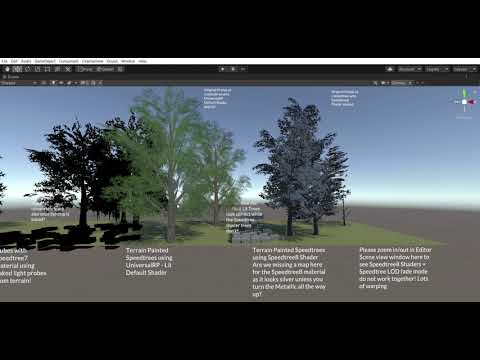
Unity Forum
Issue Tracker
I was wondering if Nature/Soft Occlusion shader is supported in URP? I was recently experimenting with trees in URP and getting issues....
wraith shadow
I've taken to using ProBuilder to block it out, then importing to Blender to create the final product. I still haven't gotten to the exporting phase, but so far ProBuilder is great
 left briar
Why does my blender object makes my project laggy?
winter minnow
left briar
Why does my blender object makes my project laggy?
What kind of object is it
How many verts does it have
left briar
Is that important?
left briar
winter minnow
What kind of object is it
A plane
winter minnow
left briar
Is that important?
You're not giving much info to help track down the issue
If it's a mesh with millions of verts it might not be a mystery why it seems laggy
left briar
Yeah, that could be the problem
 pine crystal
How do I add a material to terrain?
 lime relic
Humm... is it a feature or a bug when the terrain is not occlusion culling properly? I'm really suspecting that the game is rendering everything behind a hill due to a poor performance.
winter minnow
lime relic
Humm... is it a feature or a bug when the terrain is not occlusion culling prope...
RenderDoc is useful for verifying things like this
I think occlusion culling only happens with baked occluders but I'm not entirely sure
 ornate yarrow
tips for 2d level designing?
winter minnow
ornate yarrow
tips for 2d level designing?
That depends a whole lot on the type of game
ornate yarrow
I want to create a simple game, just cubes
winter minnow
Platformer? Top-down?
ornate yarrow
Platformer
I tried to create a sky for it and turned out pretty weird 😹

I want to create a simple Swordigo like game, but cubes
winter minnow
Something to always keep in mind with platformer level design is to base all level geometry around the player's movement abilities
Build a sort of "palette" of heights and chasms that the player can scale with relative ease
Most jumps shouldn't be ambiguous about whether they can be reached or not
It feels awkward if some walls are just barely too tall to be reached, or if some steps are just barely too tall to be walked over
ornate yarrow
I see
lime relic
winter minnow
I think occlusion culling only happens with baked occluders but I'm not entirely...
Your tip was the solution. Just found the rendering > occlusion culling pane. Baked and it's working now. Thanks!
 trim fern
Is there any way to make terrain “details” with HDRP
 coral anchor
Hi there! I'm reading a lot about using terrain to create the cliffs and mountains and didn't find the "best way" to make it, because i think I won't be able to create nice cliffs only using unity's terrain. Did you end up using the mixed approach (terrain + cliffs objects - like the digger asset says) or found a way to use only the terrain? Cheers!! 🙂
coral anchor
So... 3D Game Kit uses only meshes for the whole environment, without Unity's terrain, would that be a "best way" to create big scenes? (The asset has 2 scenes, but they aren't that big comparing with "open world-ish" scenarios...)
winter minnow
coral anchor
Hi there! I'm reading a lot about using terrain to create the cliffs and mountai...
Unity's terrain is entirely height based so a mixed approach of using separate meshes for steep cliffs might be the best compromise
winter minnow
coral anchor
So... 3D Game Kit uses only meshes for the whole environment, without Unity's te...
How much optimization you need depends on your target platform and hardware
I don't know what optimization techniques the 3D game kit uses but you're probably going to need something extra if you're doing open world scale things
Unity's terrain already has instancing, tiling of some sort, LODs and all the same for foliage, but I believe it doesn't have chunk loading/unloading which you would have to implement yourself
coral anchor
What if I have a "city/some area" at the top of the cliff? Add another terrain or use the same? Or even if I have some steps at the cliff
coral anchor
winter minnow
How much optimization you need depends on your target platform and hardware
I do...
Yeah, I has reading that the good part of unity terrains is the built-in LOD
winter minnow
coral anchor
What if I have a "city/some area" at the top of the cliff? Add another terrain o...
Both are options
If the terrain above isn't overlapping the terrain below heightwise, then they could be connected, with the difference cut out with "paint holes" tool
Terrain can also be extended in any direction using the "create neighbor terrains" tool
coral anchor
Imagining that I have some scenario like these, how you'd you better build it? I mean, what part would be unity terrain and what part would be meshes? (Just created a random scenario @ blender, i think its easier to show an image than write what I'm trying to build)

green = walkable
gray = not walkable
blue = water ou roads
I'm struggling to think what would be the best approach
only the base (blue) as a terrain and everything else as meshes? Or the walkable area (green) as terrain with surrounded meshes? Or smth else?
and imagine that I might have some big mountains (with walkable places at the top)
coral anchor
maybe this one can show more higher places so its easier to actually see what I mean

 hot lark
Does anyone know where I could perhaps find a tutorial to make my terrain do like this blend thing

 sinful wren
Heyo, can someone here help me guiding me to the right direction to bake light with multiple terrains?
I tried googe for 3-4 hours with no success sadly, when I try to bake them all at once: unity crashes
when I deactivate all terrains and bake one, it works
but when I do it with another one, the first lightmap gets replaced
winter minnow
coral anchor
I'm struggling to think what would be the best approach
I guess it comes down to size and whether you want to use the Terrain's foliage system or supplement your own
I can't tell what's the size of those cliffs, but if they aren't totally huge, then they can be frustum culled as separate objects, unlike one big continuous ground
ivory mauve
Going to make flowers but don't know how to make them for the terrain can anyone suggest
ivory mauve
found how
coral anchor
winter minnow
I can't tell what's the size of those cliffs, but if they aren't totally huge, t...
Didn't know about Frustum Culling, really nice stuff!
coral anchor
winter minnow
I guess it comes down to size and whether you want to use the Terrain's foliage ...
Yes, its ok for me to place trees and stuff by my own on those places, I was thinking more from the performance perspective (if it would be a big hit to use mesh for those places)
Thanks Patchi, really appreciate all the help!
winter minnow
Not a big hit probably, but if you use your own meshes, make sure they have LODs
coral anchor
winter minnow
Not a big hit probably, but if you use your own meshes, make sure they have LODs
sure, I think LOD is a "must need" after this whole week reading about it 😂
rose sentinel
I have a question regarding terrain, if working on a big open world for rpg game, would you create 1 big terrain for entire world or create many "chunks" of terrain and load only those that are nearby?
 low pecan
rose sentinel
I have a question regarding terrain, if working on a big open world for rpg game...
low pecan
rose sentinel
I have a question regarding terrain, if working on a big open world for rpg game...
you need to chunk it for a variety of reasons 🙂
open world is super technical
not builtin to unity
rose sentinel
low pecan
you need to chunk it for a variety of reasons 🙂
should I start with chunks of terrain or one big one and then cut it somehow?
low pecan
rose sentinel
should I start with chunks of terrain or one big one and then cut it somehow?
go with the chunks, they sort of help you by auto lining up new terrains
then you need to export individual pieces to either scenes or prefabs and stream them in when required
like i said its pretty heavy work because its not builtin
you will want to write your own editor tools to accomplish a lot of grunt work
rose sentinel
how big a single chunk should be? I guess it depends on a lot of factors but just wondering
low pecan
the unity floating point math breaks the physics past 10000 in any direction
so you need to correct for that too by moving everything
its a pain
the normal terrain size is fine i think for a chunk
keep in mind you need to load 6 chunks at a time
to cover all views
around the current chunk
rose sentinel
low pecan
the unity floating point math breaks the physics past 10000 in any direction
wait what? woah that's a useful piece of information
low pecan
yeah its actually not just unity
its just floating point numbers break in accuracy
past that

Unity Forum
Hello,
I am currently working with a team on a project involving a large scale world.
I currently believe Unity supports anything up to 99,999.99...
5000 even allegedly
 storm falcon
hi guys me and my friend are working on a survival game, hes highly experienced in these kind of things but diffrent time zones, so i wanted to ask, im made a procedural landmass generation but its mostly mountains now i want to mix this with flat land like a normal survival game, but the problem is where do i start.....
 marble sentinel
i never tried to make a procedural landmass but from my logical perspective i'd start with figuring out where in the height map the large chunks of similar height values are and then find the average and set the average to smooth this points
that way you get your first plateaus
the edges of said chunks should be altered less strong to get a better fading
how you do it? no idea. am not a programmer. just started brainstorming
lime relic
I'm having problems with terrain texture's smoothing. The ground looks like it's under a plastic wrapper if the smoothing is enabled. Disabling fixes the issue but here's the thing: the setting always resets when I reboot the editor.
Is this a bug or am I missing something?

Here's the setting I mean.

Terrain without smoothing.
 marble sentinel
the "Plastic" look is intended
The Smoothness is set in the Mask Map, and since you don't have a Mask Map unity needs to come up with a value (which is 1 by default)
which doesn't make it look like plastic but it makes it shiny and smooth which is kinda plastic
but i can't tell you why it resets the channel default value if you reboot. i don't think that is intended
lime relic
I see, that explains a lot. Thank you.
lime relic
Agh... it doesn't save mask maps either.
I've created the terrain with World Creator 2 + Bridge Tool. I wonder if Unity is somehow locked into those exported terrain values. Really bizzarre.
lime relic
Is this caused by metallic channel (R) in mask? For some reason it won't go away no matter what. The lack of URP documentation about the file formats and what not is puzzling.
 lime relic
Freaking solved. I had to manually create a new terrain, duplicate the world creator bridge created files and modify those instead. What a great exporting tool...
ivory mauve
does anyone know how to stop leaves to light up all at once
when a light goes on the tree
 hazy shard
ivory mauve
does anyone know how to stop leaves to light up all at once
hazy shard
ivory mauve
does anyone know how to stop leaves to light up all at once
Don't crosspost
ivory mauve
hazy shard
Don't crosspost
no found it was lighting issue
hazy shard
yeah
 river steeple
Hey, I put trees on my terrain, however they are 1 single gameObject, when printing .name, it all returns Terrain. I don't like this since I would like to cut trees/interact with them. Is there any workaround?
 glad pine
rose sentinel
my terrain brush is not working can anyone help me?
glad pine
rose sentinel
my terrain brush is not working can anyone help me?
Hey there NeXto, do you mind explaining what you mean my "not working"
 earnest briar
My grass is being culled in chunks, but I want it to gradually fade away. Does anyone know how to do this?
 wooden zenith
Hello. I'm in need of some help. So some context, i downloaded a package that essentialy help's me create roads on my map however i want it to be, however that requires that my terrain has unity's terrain system for it to work on. However i have allready created a terrain outside of unity (in blender) and i'm wondering is there a way to trick unity into using my allready made terrain to work with unity terrain?
winter minnow
wooden zenith
Hello. I'm in need of some help. So some context, i downloaded a package that es...
There's a paid asset and a free script floating around that claim to do that which you can find pretty easily
If they're not an option, you could always convert your mesh terrain into a height map and import that height map into an unity terrain
wooden zenith
winter minnow
There's a paid asset and a free script floating around that claim to do that whi...
What the script/asset called so i can search it up?
winter minnow
wooden zenith
What the script/asset called so i can search it up?
Object2Terrain
I can't make any guarantees about its functionality
wooden zenith
@winter minnow found it. The strange part is im looking at a tutorial on how to use it and the guy just clicked on the script in the editor and a new tab apeared in the top, i however when i double click it opens visual studio and now clue how to execute it
scarlet temple
does anyone know how I can select only 1 terrain with my brush. I wanna make a hole on one terrain but I always accidently paint on the other terrain as well
 quiet owl
Hi, I am currently looking for the terrain tools, but I caNt find it ... is it moved in the 2021 unity version I use?

 ivory mauve
why is my flower looking like this when I made it I gave it no background
 winter minnow
ivory mauve
why is my flower looking like this when I made it I gave it no background
winter minnow
ivory mauve
why is my flower looking like this when I made it I gave it no background
You checked "alpha is transparency" in import settings?
ivory mauve
winter minnow
You checked "alpha is transparency" in import settings?
fixed on it's own
 verbal lichen
Hey guys im making a VR Game and im wondering if using the Terrain Tools will be optimized enough to run on the Oculus Quest 2?
its a mobile standalone headset it runs an XR2 chip
rose sentinel
glad pine
Hey there NeXto, do you mind explaining what you mean my "not working"
Hello sorry for delay my problem got fixed as I realized that my terrain brush was set to paint texture not raise or lower terrain
😂
scarlet temple
hey, I just commited my changes to github... also using LFS.
now I work on a remote computer and loaded the github changes. but all my terrain dissapeared and the assets look like this.
idk why
 rose sentinel
how can I make the border between terrain layers sharp in the new terrain system, rather than blending between layers?
I'm trying to do something like this
 scarlet temple
how can I make a unity terrain or lets better say multiply times which are REALLY deep like 10k meters deep but still have the possibility for details on it with my brush... is it even possible?
winter minnow
scarlet temple
how can I make a unity terrain or lets better say multiply times which are REALL...
If you mean details on the slope, then not really
The terrain is heightmap based, which means steep slopes and walls will have no surface information resolution
scarlet temple
yea... I fight with myself for the last...lfew weeks with that.
I want to make a subnautica like game and for that, you will be able to dive REALLY deep into the water.
the problem there is, that I also want some small hills but the whole map will still be like 10k deep, so this makes it pretty impossible to use my brush for small things as well
and idk how to even begin with that. I tried to overlap a small terrain on a big terrain... (does this make sense?)
and thanks for your answer patchi
winter minnow
It requires a more advanced type of terrain generator, probably something that stores the information in some sort of 3D array, probably
Or mesh terrain made with a modeling software
scarlet temple
hmm tysm already. you're really nice 🙂
winter minnow
There are some solutions on the asset store for terrain like that, but they're not free
That kind of terrain system is much more complex to implement
scarlet temple
I do have the terrain toolbox but this thing doesnt really allow me to do much more stuff...
scarlet temple
winter minnow
There are some solutions on the asset store for terrain like that, but they're n...
thats true...I also payed for Digger...but this one is made for small stuff
scarlet temple
but the brush size is really small so... well idk
it does work yes, but only for small cliffs for example
I feel bad for writing so much and asking these questions ^^
why are you here btw? are you also working on something in unity?
winter minnow
Making complex terrain in a modeling software is pretty easy, but the hard part is optimizing it for large scales
scarlet temple
I mean, as you can see...I am not advanced with unity yet 😄 but I do give my best to learn stuff and also help other ppl later
scarlet temple
winter minnow
Making complex terrain in a modeling software is pretty easy, but the hard part ...
hmmm sooo you mean in blender or pro builder? (things I am bad at xd)
winter minnow
scarlet temple
I feel bad for writing so much and asking these questions ^^
why are you here bt...
Sure
Advicing others forces me to look up things and test them so it's a decent way to learn
winter minnow
scarlet temple
hmmm sooo you mean in blender or pro builder? (things I am bad at xd)
Blender, Maya or Max or such
Ah, Digger's authors offer another package for big voxel based terrains
Similarly pricey
scarlet temple
ahh okey I will look up for it 😄
I mean...ugh its pretty complicated... I want to draw small things which are not polygon AND not 500m high on my map with the brush,
but I also want my map to have cliffs that go a few tousand meter down...its not easy ^^. but maybe these tools you said will help me
 scarlet temple
I'm dying inside bcs of this shit right now...
 reef marten
hi all. is there a way to use the terrain details system for grass textures in unity 2019.4? thanks!
 candid vapor
does anyone know where terrain layers are found i cant find them anymore 😄
reef marten
go to your terrain, paint. scroll down
undone lark
candid vapor
does anyone know where terrain layers are found i cant find them anymore 😄
In the future, don't spam your questions across multiple channels.
candid vapor
reef marten
go to your terrain, paint. scroll down
yeah i did it but its not there anymore
candid vapor
undone lark
In the future, don't spam your questions across multiple channels.
oh okay sorry
candid vapor
i cant see my terrain layers anymore
 earnest briar
My grass is being culled in chunks, but I want it to gradually fade away. Does anyone know how to do this?
 elder tapir
hey if you start creating your world design / terrain do you know already how it should look or you just randomly start and work till you think that's cool
winter minnow
elder tapir
hey if you start creating your world design / terrain do you know already how it...
Feels to me that improvising rarely works with terrain
Real terrain's shape and texture are formed by very particular natural processes, and influenced by deliberate human design
It's very difficult to create something that seems believable at least without reference
Even for placeholder terrain it's often better to use blocks and ramps to represent terrain
 vast warren
Hey, I am trying to make an area for my game, but it always feels like its just a square floating in space. I dont really know how to make it feel like a vast land while keeping my player confined. Does anybody know a way to do this?
winter minnow
vast warren
Hey, I am trying to make an area for my game, but it always feels like its just ...
oftentimes there's extra terrain outside of the accessible terrain, which can be low res as the player won't get close to it
And beyond that a 2D image of an even more distant terrain, like a cardboard cutout, or one such embedded into the skybox image
verbal lichen
winter minnow
And beyond that a 2D image of an even more distant terrain, like a cardboard cut...
in my opinion this one is a bit harder to achieve because if you can tell that part of the terrain is not physical the immersion for the player might go down especially in a VR Game
winter minnow
verbal lichen
in my opinion this one is a bit harder to achieve because if you can tell that p...
Good point! Though very far away objects have practically no parallax, and resolution limit jumbles things up, it's still worth avoiding flat environments
It depends a lot on the type of game
Sometimes all you need is to give the idea of a world that continues beyond the stage, even if it's obviously fake
verbal lichen
its defo a think to play around with
winter minnow
I remember in old racing games the borders of the level very clear and the world out there very blocky, but it got my imagination going
verbal lichen
takes a bit of time to get perfect
verbal lichen
winter minnow
I remember in old racing games the borders of the level very clear and the world...
Haha yeah, Thinking about if Fog is good too
like adding a bunch of fog far away makes it look like the world is kinda fading out but it might still feel like it goes on
winter minnow
Even color gradient skyboxes can go a long way to painting a mood and an idea of a scene
 ripe vigil
Not exactly a terrain thing, but does anyone have any advice for making damaged post-apocalyptic roads for an open world game?
rose sentinel
Hello, i've found a grass shader tutorial minionsArt, question is it better performance wise than terrain tool with prefab grass?
 toxic quest
my set height setting isnt working. can some one help?
 jovial pier
Could anyone throw some ideas at me for this?:
My project requires a small area of deformable terrain (at runtime). At the moment I'm using the built-in terrain, 32*32 with a heightmap resolution of 1024*1024. While it functions well enough (digging and filling small holes), sadly it looks kinda bad...
I can up the resolution, but it doesn't seem to be worth the slight visual improvement, this also causes a small but noticeable stutter while deforming it.
What can I do? Looking around the asset store there doesn't seem to be anything aimed at small terrains, and without direction I'm not sure if I can come up with anything by myself
 verbal lichen
you should probably smooth that terrain
unless its supposed to be blocky like that
winter minnow
jovial pier
Could anyone throw some ideas at me for this?:
My project requires a small area...
Looks like there's no falloff/AA of any sort with your terrain brush
Fixing that would get rid of the blockiness
It'd also greatly benefit from a shader that changes the texture or color based on height or surface normal
jovial pier
Ah....for some reason I didn't see how it looked with the actual terrain tools, went straight for the code :/
Yea it's perfectly fine, just need to write some better code for the runtime tools. I also have a something that adds dirt around the edge when it's below a certain height, but it was disabled. Doesn't look half bad when the real textures are added. I'll look into making a shader though, probably could look better
Thank you @verbal lichen @winter minnow
Smooth 🙂
 left briar
Why cant I texture paint with the universal render Pipeline?
scarlet temple
you can
you just need to use another material
from the pipeline
okey...so I made a commit in github again and I had 2 groups of terrains in my assets.
group 0 & group 1.
as you can see, the terrain tiles group 1. is weirdly not there on my 2nd/remote computer and idk why because the other terrains are there 🤔
 left briar
Oh, I found the error, I only had to make the texturequality normal and not to half
scarlet temple
left briar
Oh, I found the error, I only had to make the texturequality normal and not to h...
ahh okey
low pecan
anyone done some open world stuff ?
scarlet temple
low pecan
anyone done some open world stuff ?
I plan to ^^
low pecan
im concerned about the floating point accuracy problem
scarlet temple
why? I don't have any experience soo yea idk
low pecan
genshin impact was made in unity and has a nice open world
but i really want to know how they handled that
and the streaming
i am probably going to go with async loading in scenes in a grid like manner
based on player position
scarlet temple
low pecan
genshin impact was made in unity and has a nice open world
wait..genshin impact was made inUNITY??? 😮
 left briar
Oh, I found the error, I only had to make the texturequality normal and not to h...
left briar
left briar
Oh, I found the error, I only had to make the texturequality normal and not to h...
But now it says that “the current rp Does not support detail shading“
rose sentinel
low pecan
anyone done some open world stuff ?
me me me, still on very early development though.
low pecan
rose sentinel
me me me, still on very early development though.
how you going
rose sentinel
not very good, i've just started learning.
low pecan
yeah its not an easy thing to do
and you have to take into account unity degrading past the 5000 x/y/z
rose sentinel
eh? i didn't even know that one hahaha
low pecan
yeah if you go too far everthing starts getting less accurate and twitchinbg
rose sentinel
i see, mine might not that big, i haven't encountered that issue yet.
winter minnow
low pecan
but i really want to know how they handled that
The most common solution is to move the world around the player, instead of moving the player within the world, either constantly or periodically
left briar
left briar
But now it says that “the current rp Does not support detail shading“
Why is this happening?
And how to download the terrain tool in the package manager
Because I can’t see it there
reef marten
hi all. is there a way to use the terrain details system for grass textures in unity 2019.4? thanks!
low pecan
winter minnow
The most common solution is to move the world around the player, instead of movi...
Hmm 🤔
 ornate elk
hey, it wont let me use the paint texture tool for my terrain. anyone now how to fix it?
trim fern
Hey im working with HDRP but i cant use detail shaders is there a fix to this or i will have to use 3D meshes
 wanton hound
Hey guys i need some help that i couldnt find very fast atleast
if i have a terrain and i put 50 terrain layers on top of each other but only the one on top is visible, does it affects performance ? or unity will think there is only one layer there
 velvet oar

 pulsar socket
is there anyway to create and modify superlarge terrain without lagging out my gtx 1650 or ryzen 5 4600H or do i simply need a better pc for large terrain

nvm
verbal lichen
pulsar socket
is there anyway to create and modify superlarge terrain without lagging out my g...
you shouldnt ever need a better pc to run something, instead you need to optimize it so people with a PC like yours can run it
if your PC cant run your game then something your probably doing something wrong
pulsar socket
yep... did a bit of searching and found many other ways to do this
winter minnow
pulsar socket
yep... did a bit of searching and found many other ways to do this
It's nice to share your solutions when you find them
Helps others
pulsar socket
i found a lot of solutions on google an now im using l3dt to make terrain
also said many and not that i found a specific one
also i may use something different because as of now i cant genarate good looking terrain
 cosmic oar
Hey ya'll, i am fairly new to Unity/blender and i wish to start with some low-poly terrain creating. Do anyone of you have any tips as to where i should start? I see examples such as polybrush etc, should i use those?
 worthy wind
i have made a tree in unity using probuilder, but because it is using pro builder's mesh filter it gives me an error that the mesh renderer is missing, any way to use pro builder trees in unity terrain?
 tawdry remnant
I'm kinda in the same boat. I was using Unity itself to make a terrain I was happy with this, but then I had to make the NPC/character models and found I needed to use blender for that...however, I'm not the best artist...so they came out looking very low-poly-like characters so I thought it best I change the terrain stuff to low poly too....however I have a problem.... the coloring in Blender's screen looks normal. After exporting and loading into Unity, the colors are totally different or non-existent entirely...
Blender

unity
 worthy wind
if its terrain try changing terrain setting
the material to
built in legacy diffuse
i had incorrect colors too and it fixed it
tawdry remnant
well, when I import the terrain into unity, it just has a Mesh attached to gameobject
am I meant to add a terrain component + terrain collider?
is that what you mean by changin the terrain settings? I'm not sure of any other settings to be honest
worthy wind
maybe something in the mesh renderer material
tawdry remnant
in unity right?
worthy wind
i wasn't able to export something into mesh from blender before
tawdry remnant
not blender?
worthy wind
yeah since in terrain its material that does that maybe in mesh renderer it does the same?
haven't tried though

 worthy wind
try changing smoothness
tawdry remnant
okay
seems to make it shiny/reflective of the sky the more increase it but sadly doesn't alter the colors 😦
but I do like it with more shinyness XD
but still neeed to figure out the color issue
😦
worthy wind
maybe changing the albedo color to more black makes it darker?
tawdry remnant
okay ill try thx
hmm, it increases darkness of all the existing colors
but that missing one doesnt appear
is it possible that Unity just cannot understand Blender's imported color? so it just changes it to "yellow" for all shades of yellow?
worthy wind
im guessing it might be unity light is different than blender?
tawdry remnant
this is possible
worthy wind
try lowering the scene light intensity or highening it
if it doesn't work then it might have something to do with blender
tawdry remnant
yeah its not helping 😦 I guess its something on blender's side
there is another issue with this too
when I'm in modeling or UV Editing modes , the terrain looks like this:

you can clearly see the path outlines
but you see from my earlier pictures...when in shading/rendering or exporting to unity..it becomes very different
in some areas completely gone
know any reason for that by any chance?
worthy wind
i don't really know much about blender but im guessing the shading or rendering gives it better light or something
tawdry remnant
yeah its weird, it almsot deletes 50% of the path
thank you for trying though
I might end up havign to go back to normal terrain in Unity =\
worthy wind
im trying to paint trees in terrain (they are models made out of cubes, not unity tree) but when i do that they are way too small, strange thing though is when they are billboards they are the size they are supposed to be, any fix?
worthy wind
fixed it, highered the billboard distance and using pro builder i merged the 3x size tree with an empty gameobject so the games thinks its size is 1
 wide pier
i dont know if this is the right place to discuss but im having some issues with Probuilder.
i know its not terrain but it seems to be the most-related. Let me know if i should go to another channel
tawdry remnant
how can I get more sharper colors? so it's less "blending" "smoothed"?
 winter minnow
tawdry remnant
Blender
winter minnow
tawdry remnant
Blender
Your blender scene is being lit by HDRi environment in filmic color space
It's bound to look different unless you can get that in unity
tawdry remnant
sorry I'm new to this. I'm not sure I follow you entirely
 open cargo
guys why does it say this
 tawdry remnant
looking quickly I'm using standard rendering pipeline which is not HDR unless I'm mistaken?
 winter minnow
tawdry remnant
sorry I'm new to this. I'm not sure I follow you entirely
winter minnow
tawdry remnant
sorry I'm new to this. I'm not sure I follow you entirely
It looks different because the lighting in the blender scene is different
Also the material's smoothness is different but you figured that out already
tawdry remnant
I'm not using blender at all here, this is purely Unity and unity's terrain tools
winter minnow
tawdry remnant
I'm not using blender at all here, this is purely Unity and unity's terrain tool...
Wasn't the issue that the terrain in unity looks different than it looked in blender
tawdry remnant
oh, no that was another issue I had with another project. I decided to scrap that for now and started a new solely in Unity project for now and so far all is well , except the colors look a bit washed out/overly smoothed like in the above picture. I would like (if possible) for the grass/green texture to come to a complete stop at the "edge" and then the gray texture to start "fully" from that edge onwards if that makes sense
instead unity seems to be trying to "blend" and smoothly transition between the two colors which makes it blurry/fuzzy :S
winter minnow
Ah, I wasn't talking about that
ornate elk
i asked this a few days ago and didnt get an answer. it wont let me use the paint texture tool for my terrain. anyone now how to fix it?
i tryed to change the layout but it didnt fix it
worthy wind
wide pier
i dont know if this is the right place to discuss but im having some issues with...
sorry if this is late but i had some issues with probuilder and terrain today too what is the problem
wide pier
I tried to change a face to a different material and all of them get set.
so even if I have like 4 materials on a probuilder mesh. it just ends up being 1 material.
winter minnow
tawdry remnant
instead unity seems to be trying to "blend" and smoothly transition between the ...
My understanding is that they have to be blended, as a vertex can only hold one color, so the area between vertices is an average of those values
Found some forum posts saying it's possible to have multiple colors per vertex so they're separated per-face, but I think they're wrong
Well, it can be done but it requires vertices to be duplicated, as with sharp normals
I'm like 85% sure terrain doesn't support sharp/duplicated vertices
 floral crow
wide pier
so even if I have like 4 materials on a probuilder mesh. it just ends up being 1...
floral crow
wide pier
so even if I have like 4 materials on a probuilder mesh. it just ends up being 1...
Sounds like you might have selected the whole object instead of just the face you wanted
Make sure you are using polygon selection mode (if im not mistaken 2nd from right on the buttons on top of the viewport when the probuilder window is on)
wide pier
that's what I did. only a face or two is highlighted
the way I've fixed it is to restart unity
 frigid ledge

can anyone help me assign this layer to the terrain?
it is pink at the moment
what
oh the brush?

like this?
then what
but at least you know its pink bcs there is no material assigned to it right?
yes i tried but it didnt work
anyone else?
knows why
what how
nope
floral crow
wide pier
the way I've fixed it is to restart unity
huh. that IS odd
sounds like a probuilder bug, i havent had it happen to me personally though
tawdry remnant
winter minnow
My understanding is that they have to be blended, as a vertex can only hold one ...
thanks, how might one go about doing that? is that something that can only be done in blender?
winter minnow
tawdry remnant
thanks, how might one go about doing that? is that something that can only be do...
I didn't test it yet, but apparently if you hide a face and vertex paint on an adjacent face, the hidden face retains its color and there will be a sharp color edge between them
Imported meshes support split vertices, so I guess it would work
scarlet temple
what is a good height resolution on terrains for more detail with brushes? because mine is on 300 and its way too sensitive/high
 jaunty hollow
my terrain ground check does not want to work, it checks the Layer "ground" to see if its colliding. it worked but then i changed to a terrain now it does not work.
idk what to do to fix
 undone sundial
how do i go about getting the grass texture in the middle looking a little less flat/one dimensional? i tried painting actual grass onto it but that sort of gets in the way of the battle when the round starts. do i just use some other grass textures and try to blend them?

 toxic schooner
undone sundial
how do i go about getting the grass texture in the middle looking a little less ...
toxic schooner
undone sundial
how do i go about getting the grass texture in the middle looking a little less ...
That’ll work. There are assets for it, but just more texture variations is the vanilla unity way
undone sundial
Are there any assets you recommend that are good for beginners? Everything I paint comes out pretty ugly
 shy scaffold
Terrain related Question:
Is it possible to rename A heightmap file using Gimp 2 and if possible, How❓
 swift kernel
shy scaffold
Terrain related Question:
Is it possible to rename A heightmap file using Gimp ...
swift kernel
shy scaffold
Terrain related Question:
Is it possible to rename A heightmap file using Gimp ...
do you know what to rename the said file to make it work in unity
shy scaffold
swift kernel
do you know what to rename the said file to make it work in unity
Yes it's eather .Raw or .RAW
swift kernel
so you only require the information on how to rename the map file or get it from google to desk right
shy scaffold
Pretty much Yeah
swift kernel
hmmmmm
shy scaffold
So if someone knows let me know by a ping
 spiral garden
shy scaffold
So if someone knows let me know by a ping
spiral garden
shy scaffold
So if someone knows let me know by a ping
What exactly are you trying to do?
shy scaffold
spiral garden
What exactly are you trying to do?
Copying a heightmap from google and renaming the file throw gimp but i'm a rookie with the software
spiral garden
shy scaffold
Copying a heightmap from google and renaming the file throw gimp but i'm a rooki...
Why do you need Gimp to rename the file?
swift kernel
shy scaffold
Copying a heightmap from google and renaming the file throw gimp but i'm a rooki...
what i understand is that using a heightmap requires a file rename to .raw so it can be used in unity right
shy scaffold
swift kernel
what i understand is that using a heightmap requires a file rename to .raw so it...
Yes
swift kernel

Let's have a look at the new Terrain System in Unity!
● Learn more: https://ole.unity.com/TerrainTools
● Terrain Samples: https://bit.ly/2Y25AEX
····················································································
♥ Subscribe: http://bit.ly/1kMekJV
👕 Check out Line of Code! https://lineofcode.io/
● Join our Discord: https:/...
shy scaffold
Thats what i been rewatching
swift kernel
so you require a photoshop to get this right right
spiral garden
swift kernel
what i understand is that using a heightmap requires a file rename to .raw so it...
Who said that?
swift kernel
spiral garden
Who said that?
allo said earlier
spiral garden
I see. Weird, but ok
In Gimp you can export the image as raw image data:@shy scaffold
 shy scaffold
Thanks 👍
shy scaffold
spiral garden
In Gimp you can export the image as raw image data:<@!837722946427551804>
Btw do i just copy the heightmap or save it with a name, and would this work on both gimp 1 and 2
spiral garden
shy scaffold
Btw do i just copy the heightmap or save it with a name, and would this work on ...
Copy from where to where? And I'm not sure about gimp 1, but why not get the updated version? It's free anyway.
shy scaffold
Im using the 2nd so just checked and for Copying from google to get the specific land scape
spiral garden
shy scaffold
Im using the 2nd so just checked and for Copying from google to get the specific...
You'll need to open the file in Gimp of course. Then just export it as raw. No extra steps needed.
shy scaffold
I think i understand thank you for the help
scarlet temple
hey... I again run into the problem, that when i work together with other ppl on github on the map, the terrain is actually missing on the remote computer and I have no idea why :/

Don't get confused, there is a terrain under the missing one and this one is weirdly there :/

 elder moth
Hello i want to cut terrain forward line but I don't find any asset.
 pale echo
Don't judge its my first terrain 

 rustic hearth
pale echo
Don't judge its my first terrain <a:Celebration:718877529976602664>
rustic hearth
pale echo
Don't judge its my first terrain <a:Celebration:718877529976602664>
is it really your first terrain?
pale echo
yes, in unity anyway. I used to work in a smaller developing program
as a low poly builder
but this is my first high poly unity terrain build
did watch some tutorials
rustic hearth
great work!! @pale echo
pale echo
Thank you that’s really motivating to hear!
 languid crane
pale echo
Don't judge its my first terrain <a:Celebration:718877529976602664>
languid crane
pale echo
Don't judge its my first terrain <a:Celebration:718877529976602664>
Looks nostalgic…
languid crane
pale echo
Don't judge its my first terrain <a:Celebration:718877529976602664>
Looks amazing! You def have potential!
pale echo
Thank you!
pale echo
made another one 

 gilded crown
can anybody help me understand how to remove a specific terrain layer during runtime in a script?
winter minnow
What's best I cannot say, but Ultimate Terrains looks capable
Does destructible voxel type terrain among other things
 obtuse monolith
so i have a problem with my map .. as you can see i made an box collider for my grid which contains my tilset but my player keeps falling even though i gave him a rigibody2d and a box collider 2D

 shell jolt
Any way to handle laggy terrain editor while in editor mode?
The lag driving me nuts tbh
winter minnow
shell jolt
Any way to handle laggy terrain editor while in editor mode?
One possible cause is that if auto generate lighting is on, it might try to regenerate the lighting every time you make any change to the terrain
Otherwise try reducing the heightmap and control texture resolutions, I guess
shell jolt
winter minnow
One possible cause is that if auto generate lighting is on, it might try to rege...
how can I stop it from regenerating lights in realtime?
winter minnow
shell jolt
how can I stop it from regenerating lights in realtime?
Lighting window has this checkbox

confirm that it's off
shell jolt
winter minnow
Lighting window has this checkbox
Thats in terrain editor or my hdrp light? This is my first time using Terrain Editor 😃 ...
winter minnow
Lighting window is a separate window that exists in all rendering pipelines
shell jolt
ah ok 👍 I got this thanks @winter minnow
shell jolt
winter minnow
Lighting window is a separate window that exists in all rendering pipelines
Pretty sure in non hdrp the default is off, why it's turned on in hdrp I've no idea. And yes it works!
Are there any free alternatives to Nature Renderer to scatter grass on the Terrain in hdrp?
I noticed when I used the Tree tool to scatter the grass, the drawcalls were doubled
spiral garden
shell jolt
Are there any free alternatives to Nature Renderer to scatter grass on the Terra...
If you're using realtime shadows any renderer that casts shadows doubles draw calls.
 modern forge
https://i.gyazo.com/d91673dfebe62b9905df310a55877f77.mp4 can anyone give me feedback/advice for the grass?
(ignore the terrible trees and walk anim lol)
swift kernel
@shy scaffold were you able to do the heightmap
shy scaffold
swift kernel
<@!837722946427551804> were you able to do the heightmap
Well i found the high quality one i pressed save as changed the name but it ain't showing on gimp at the open file so i can edit the said file to raw
swift kernel
okay try dragging it into a folder at the my computer than open gimp and pick the folder where the map is located than you can figure out how to edit
shy scaffold
Thanks it worked
swift kernel
now look the hint you got earlier and use that
shy scaffold
👍
 torn latch
how can I get this to fill back in?
 torn latch
modern forge
https://i.gyazo.com/d91673dfebe62b9905df310a55877f77.mp4 can anyone give me feed...
torn latch
modern forge
https://i.gyazo.com/d91673dfebe62b9905df310a55877f77.mp4 can anyone give me feed...
the grass looks as big as the flowers, maybe reduce each one to a blade of grass or some longer plant like wheat-length grass and I personally think it'd look better but overall it looks good regardless
modern forge
thank you!
torn latch
ofc, it looks good! Keep going 🙂
torn latch
okay so set-height makes holes in my terrain
modern forge
Does TreeInstance.Position refer to the terrain position of the tree or the world position?
winter minnow
modern forge
Does TreeInstance.Position refer to the terrain position of the tree or the worl...
Sounds like that would be fairly simple to test
modern forge
winter minnow
Sounds like that would be fairly simple to test
According to my tests, the tree will always display position (0,0,0) which doesn't make much sense
shell jolt
Tested compute shader for grass and mind blown by how lightweight it is, yeah, this is much more preferable than the default grass feature in Terrain editor which such a performance killer
 tawdry remnant
pale echo
Don't judge its my first terrain <a:Celebration:718877529976602664>
tawdry remnant
pale echo
Don't judge its my first terrain <a:Celebration:718877529976602664>
just wanted to say, very well done. this is great work
rose sentinel
Why does Raise and Lower terrain break, it stays on one piece of terrain and I have no idea how to fix it
It's actually stuck in palce
place
rose sentinel
torn latch
probably increase the textures res
try that
and see
All of my tools get stuck in place
why does this keep happening
spiral garden
rose sentinel
Why does Raise and Lower terrain break, it stays on one piece of terrain and I h...
Wdym by "stays on one piece"?
rose sentinel
place*
spiral garden
rose sentinel
place*
Mind demonstrating with a video/screenshot?
rose sentinel
I can't ss on this computer, it will probably explode
So basically what is happening, after I use a brush for a certain amount of time, it just the freezes, I can't use the brush anymore
spiral garden
rose sentinel
So basically what is happening, after I use a brush for a certain amount of time...
Perhaps you reach the upper/lower bound of the terrain height.
 terse flume
what is a good terrain/to player height?
vast warren
Does anybody know how to convert 3d models into tree prefabs to use with terrain tools?
modern forge
Yeah
Step one is to put the tree 3d model in your game. You have to add an LOD group* That's probably what you're missing
When that's done you make a prefab with your LOD tree and add it to the terrain tree prefabs
rose sentinel
spiral garden
Perhaps you reach the upper/lower bound of the terrain height.
Wdym
vast warren
modern forge
Step one is to put the tree 3d model in your game. You have to add an LOD group*...
Ahh I see
 vale gulch
anyone know how I could get a height map from google earth?
I found a site for SRTM that ended up generating 3 files ,how i can turn them into a height map?
 winter minnow
vale gulch
I found a site for SRTM that ended up generating 3 files ,how i can turn them in...
winter minnow
vale gulch
I found a site for SRTM that ended up generating 3 files ,how i can turn them in...
Terrain uses .raw files for height, right?
If so I think you can open the .tif in gimp and export it as raw
vale gulch
the .tif map ended up being only 2 colors , its not a height map

actually nvm , found a better way , thanks anyways
 lusty pumice
Are there any Unity devs on here? I have tried posting about a certain issue on the forums but it never gets any response, so I guess I'll try here. Maybe I need to post a bug report for it to get eyes on it.
There is a major issue with how Terrain Auto Connection works (for terrain neighbors). Every time a terrain is enabled or disabled in the scene while the game is running, an internal AutoConnect method is automatically called. The first thing this method does is clear the neighbors of EVERY active terrain in the scene, regardless of whether those terrains actually are using the Auto Connect option in the inspector.
In my situation, I do not use Auto Connect, because it is slow and produces unecessary garbage. Instead, I manually connect the neighbors of terrains over multiple frames using the SetNeighbors method. This works great because usually it's terrain in the distance that are being loaded in, and the player will not be able to see seams that appear for only a second.
However, because the internal Auto Connect method is called automatically, and because it clears all neighbors no matter what, I am left with terrain closer to the player which have not had their neighbors changed, yet still need to have their neighbors reset. Seams appear until I fix them via a new SetNeighbors call. This is completely unnecessaryand this whole fiasco could be fixed with a simple couple lines of code in the AutoConnect method that allow it to exit early if there are no terrain in the scene with the Auto Connect option enabled, and also which would only clear the neighbors of terrain with Auto Connect enabled.
If a dev is on here and could respond it would be greatly appreciated!
winter minnow
@lusty pumice Your best bet is filing the bug report
I very rarely see unity staff commenting here, and I don't recall anyone talking about this issue before
...Besides you
Seems like you've been wrestling with this for a long time!
lusty pumice
winter minnow
<@!399073402935181313> Your best bet is filing the bug report
I very rarely see ...
Sigh, that is indeed the case. I never considered it a bug which is why I haven't filed it that way, but I guess that is the only path I can take towards getting it changed. Thanks for the advice, I appreciate it!
shell jolt
vast warren
Does anybody know how to convert 3d models into tree prefabs to use with terrain...
wdym? You can use any tree 3d models for your terrain
pale echo


 winter minnow
<@&502884371011731486>
 edgy rampart
can someone give me tips on making a scary terrain for a platformer 2d game
 vivid raven
is this a good place to ask about 2D SpriteShape?
winter minnow
vivid raven
is this a good place to ask about 2D SpriteShape?
There probably is no "good" place for it, but it does count as a "world building tool" I suppose
vivid raven
alright, thanks
so, i was trying to set up a closed sprite shape, but i can't drag a sprite into the fill texture, anyone know what i'm doing wrong?

 cunning raven
Hi Everyone, is there a way to tell HDRP terrain to display the normals further away? Right now the normal stops very near:

the green line is where the normal stops displaying
 thorny swift
cunning raven
Hi Everyone, is there a way to tell HDRP terrain to display the normals further ...
thorny swift
cunning raven
Hi Everyone, is there a way to tell HDRP terrain to display the normals further ...
If you are using standard material that terrain comes from, enable instancing and then in material enable Per Pixel Normals
 inner willow
Hi. My team is working on a fan-game based on a PS2 title, which requires extracting terrain quadrants from the original game. This terrain is made up of several meshes with different textures that blend together in-game. What would be the best approach for replicating this in Unity?

You can see here how the textures are meant to blend
 winter minnow
inner willow
Hi. My team is working on a fan-game based on a PS2 title, which requires extrac...
winter minnow
inner willow
Hi. My team is working on a fan-game based on a PS2 title, which requires extrac...
They probably are meant to have a shader that fades them to transparency based on a mask map or vertex color
inner willow
Yeah, I believe they use vertex blending in-game
cunning raven
thorny swift
If you are using standard material that terrain comes from, enable instancing an...
i have already active but it stil cuts the normal in the distancce like it has LOD somewhere
thorny swift
cunning raven
i have already active but it stil cuts the normal in the distancce like it has L...
Hmm, either it does not get saved on material, make sure you created your own instance, using default one will often reset values on it. Next I can think of would be Base Map Distance (It may be falling back on lower level shader)
cunning raven
thanks for the tip! i have now my own but still it is cutting the normal in distance @thorny swift is there any other settings to overcome this?
 thorny swift
cunning raven
thanks for the tip! i have now my own but still it is cutting the normal in dist...
thorny swift
cunning raven
thanks for the tip! i have now my own but still it is cutting the normal in dist...
np, I am running out, last thing was BaseMap distance, if that did not fix it I dont know if anything else that is not requiring you to write your own shaders will
cunning raven
alright, thanks a lot!
thorny swift
ur welcome
 tulip flare
what does this texcoord means in terrain tools?

 strong dune
Hello, does anyone know if there's a way to get the tile palette to straighten all the tile colliders? I have some that are taking the shape of the tile and it makes my character move up and down when running xd

 carmine river
Maybe this isn't the solution you want but what if you just create a 3D cube, give it collision and make it invisible, then layer it onto the rocks?
strong dune
Yes, that's one solution I am thinking about but I also want to know if there's some tile functionality I don0t know
verbal lichen
Where can i find a good terrain palette?
winter minnow
 rain dagger
i looked everywhere and there is no good or simple explanation
rain dagger
i looked everywhere and there is no good or simple explanation
https://docs.unity3d.com/Manual/class-TerrainLayer.html mask map is explained along with other properties
rain dagger
I don't get it..
barren oak
strong dune
Hello, does anyone know if there's a way to get the tile palette to straighten a...
In the sprite editor for each sprite you can set a custom physics shape for it
cunning raven
rain dagger
what is a mask map?
im sorry but try to use google
 winter minnow
I can get not understanding mask mapping if you're not familiar with channel packing or non-color texture maps or with any other abstract shader concepts
But without knowing what the point of confusion is I can't really help
rain dagger
Oh dont worry spent whole yesterday researching texture mapping, i have solid grasp on the topic now :)
rain dagger
5.7k tris in size 500x500 terrain

vs 90 tris in 100x100 terrain

but when looking at the wireframe triangles.. it actually looks like the 100x100 has more triangles..and through testing, size seems to be the only factor.. any ideas? Shouldn't wireframe represent the triangle count?
winter minnow
@rain dagger Both of those look to be 16x16
Which amounts to 512 triangles, not 90 or 5.7k
rain dagger
then what's the stats window on about?
winter minnow
It's not usually accurate
winter minnow
Besides, looks like the terrain is not being rendered to the game camera at all in the second image
rain dagger
thats just cube position
as soon as i change from 100x100 to 500x500 the tris change to 5.7k
winter minnow
Things the camera can't see are not normally rendered
rain dagger
hmm lets check
!
that was the issue
still cant figure out why it says 5.7k tho
it should only count the amount the camera renders
which shouldn't be more than 100 imo
 winter minnow
I don't believe the verts can be frustum culled individually
Either the terrain is rendered or it is not
winter minnow
I simply believe that the stats window lies and don't worry about it unless it causes an issue that can be seen in the profiler
thorny swift
@rain dagger Triangle count gets multiplied by lights [as light also takes geometry in to render shadows], try disabling lights and see if your triangle count drops.
winter minnow
Good point
thorny swift
basically treat each light with shadows as new camera, but this camera has its own culling, which can be even behind main camera view to give you shadows from behind you
thorny swift
best is to use shadows only on main light, and use cookies for other lights to fake shadows. If you definitely need realtime shadows try to do it at smallest possible size and it should not spike to infinite
rain dagger
hmm, what i dont understand is i had a flat surface, so there were pretty much no shadows being cast, and still multiplied all the triangles by 5?
for what reason
thorny swift
you can check window/analysis/framedebugger to see what data did lights take to calculate them
rain dagger
what am i looking for
 thorny swift
already there in Preview you see total number of Vertices/indices it too to calculate shadows, I believe its under Shadows.RenderJob where you can see each batch
rain dagger
lol its so hard to understand everything in here
i look up a guide on the frame debugger!
thorny swift
Yeah, go for it! it is not hard in the end but I understand why it can be overwhelming.

 thorny swift
you can see 4 batches of terrain chunks casting shadows (terrain is divided into chunks for culling speedups)
rain dagger
but the surface is flat D:
thorny swift
yeah, well either it is main light casting 4 chunks or if you have 4 lights with shadows it might be each light spanning 4 batches
rain dagger
its one light
how can i prevent this
its not even drawing shadows
idk why it does this
thorny swift
not sure tbh
rain dagger
np! learned a lot still (:
winter minnow
rain dagger
how can i prevent this
A lot of the time it's not worth spending the effort optimizing things that aren't causing a problem
rain dagger
winter minnow
A lot of the time it's not worth spending the effort optimizing things that aren...
For me it's to learn for future reference, not for the time being
winter minnow
The shadows are being rendered even if it's "flat"
I guess disabling shadow casting form the terrain mesh might help
rain dagger
ye that's the part im most curious about! It's not visible at all that any shadows are being rendered! Hence wondering why it's calculating shadows when none are present!
thorny swift
shadows are not rly per pixel if something wont cast shadows, turn shadow casting off
winter minnow
The renderer doesn't know whether shadows are being cast or not before it starts calculating them
The shadow map is still being drawn even if there's no geometry that recieves the shadows
rain dagger
there we go!
clicked
so if i use terrain as a flat surface should definitely turn shadows off
now imagine kilometers upon kilometers of terrain
not knowing this
huge performance cost
literally 5xing all tris otherwise
winter minnow
If it's flat, the vert count can be really low
If it's really flat, you may consider not using terrain at all
Vertex counts aren't a huge deal for optimization
Even mobile devices are starting to be able to render what, a million verts or more?
rain dagger
would baking the terrain lighting in this case reduce the tris count or does it not matter? (i'm thinking since the calculations are done prematurely)
winter minnow
Baking in what sense?