#🥽┃virtual-reality
1 messages · Page 62 of 1
 glad leaf
can you look at #archived-art-asset-showcase
I don't want to crosspost and I asked a question not sure if you have any idea of top your head.
 fierce siren
Hey ! Thank you for your answer. I tried to move the origin but it didnt seem to have any effect. It felt like it was not moving at all during gameplay. You are suggesting that the camera offset is the object that actually moves around with the player ? So this is the one I should snap it's local position back to 0,0,0 for example ? Thank you for your time
 dusk sky
how do i take button input with scripting?
 buoyant jolt
fierce siren
Hey ! Thank you for your answer. I tried to move the origin but it didnt seem to...
buoyant jolt
fierce siren
Hey ! Thank you for your answer. I tried to move the origin but it didnt seem to...
I believe so, if I remember correctly the origin remains fixed and is what moves when you teleport, it is essentially a reference to the center of your play zone
 tiny niche
fierce siren
Hey ! Thank you for your answer. I tried to move the origin but it didnt seem to...
tiny niche
fierce siren
Hey ! Thank you for your answer. I tried to move the origin but it didnt seem to...
you're supposed to move the object at the top of the hierarchy. the transforms inside the xr rig basically have a no-touch policy
 rancid warren
Hi, following up on this question, still havent found a way to fix it :)
 woven kite
Hello there! Did anyone managed to have Application Space Warp working on the Quest 2 with MSAA? I got ASW working but MSAA no longer works which is not ideal.
 mild igloo
Anyone work with Passthrough before? Seems to freeze when you disable it
 icy notch
Hello! I've been using MRTK to develop for my WMR headset, and the teleportation system is completely busted. Does anyone know how to change it at all?
Earlier on, it barely moved me at all, and I was completely unable to change how far the parabolic pointer went
Still having the same issue, but now it doesn't work at all
It just rotates the camera
 willow tulip
Actually about to start a very similar project, is that still the approach you are taking
 crude frost
willow tulip
Actually about to start a very similar project, is that still the approach you a...
crude frost
willow tulip
Actually about to start a very similar project, is that still the approach you a...
we gave up
willow tulip
Ah noo! Not what I wanted to hear 😅
willow tulip
crude frost
we gave up
Did you guys look at vuplex webview?
crude frost
is that the $199 plugin?
willow tulip
Yes
It works really well for traditional web browsing. Haven't tried it for a 180 or 360 view
There's also the unity official webrtc package. I'll probably try that one
 obsidian marsh
hi!
I'm using this script for my project:
https://forums.oculusvr.com/t5/Unity-VR-Development/Meta-avatar-2-multiplayer/td-p/937397
I need to use Meta Avatar2 for photon multiplayer
In editor I can spawn in my avatar and it is correct
but if I make a build on quest2 nothing is visible from the character
please help

Hello everyone. I'm trying to use the new meta avatars in multiplayer but I struggle with implementation. I tried with Photon Pun 2 and the sample scene "network loopback" but I'm unable to achieve proper networking. Has anyone achieved multiplayer with the new avatar sdk or know a documentation o...
 hidden ember
quick question would i be able to make a IK character with only the arms and not the head so its kinda like trouts game (if you know what that is)
buoyant jolt
hidden ember
quick question would i be able to make a IK character with only the arms and not...
I do not, but yes of course you can
 gilded wyvern
hidden ember
quick question would i be able to make a IK character with only the arms and not...
gilded wyvern
hidden ember
quick question would i be able to make a IK character with only the arms and not...
You absolutely could. You'd just need an IK setup that only handles the arms. So if you had an IK component that was per-limb, then you only need two, one for each arm, just as an example
hidden ember
ok so i got that to work. how do i get my gun to kill other players because rn it just shoots bullets
or if there are any tutorials please tell me
 lament slate
does anyone know some good tutorials to getting started with vr stuff in unity?
 wise tartan
does anyone know how i can add jumping to my vr game?
hidden ember
wise tartan
does anyone know how i can add jumping to my vr game?
there are jumping tutorials on youtube
 north path
wise tartan
does anyone know how i can add jumping to my vr game?
north path
wise tartan
does anyone know how i can add jumping to my vr game?
Same as any 3d game, doesn't matter if it's VR.
I do however recommend you look into Tunneling Pro, to reduce motion sickness in VR while jumping
wise tartan
Ok
north path
lament slate
does anyone know some good tutorials to getting started with vr stuff in unity?
This guy has great videos (thanks for the good guides @crimson ingot )

LOTS of people got the Oculus Quest 2 for Christmas. Want to learn how to make games for them all to enjoy? Yea you do!! Come learn how to set up a VR project in Unity's lastest version as well as some basics like how to use the grab interactable to pick up objects and the locomotion system to move via teleportation or continuous movement.
// 📃...
hidden ember
can someone help me.. i have inverse kinematics on my model but im using photon and other players see just a floating sphere and hands but how do i add inverse kinematics to photon pun..i have already set up photon
tiny niche
hidden ember
can someone help me.. i have inverse kinematics on my model but im using photon ...
do the ik client-side, there's no reason you need to sync the results
hidden ember
so you mean like i should remove IK that the player can see and add it so other players to see?
 limpid beacon
has anyone here ever made vr game?
north path
hidden ember
so you mean like i should remove IK that the player can see and add it so other...
Yes, or if you want the player to see his own body do both.
Syncing this over the network sounds like a bad idea. Just sync the required positions and make the IK move locally on all machines
wise tartan
can someone send me a unity XR jump script for oculus controllers button (A)
 cerulean niche
How can I do basically this? -> https://www.youtube.com/watch?v=sugshDnB5PY

Working on a character customization. Planning to add a more interactive, no UI based one later. Like a manual click and drop of colors and meshs instead of selecting them on the UI panel.
Still a good start.
I Also need to send all the collected data from the selected model to my database to be able to load as it, onto the desired account.
tiny niche
@hidden ember there's only data and some of that data is synced between the clients. Some of that data should be synced directly and some of that data can be calculated based on the other synced data. Ik falls in the second category
north path
@wise tartan depends how your player is setup. If it uses rigidbodies just use addforce upwards when pressing the button
 storm ether
im trying to make a game and i cant get my controllers to track
 steep oxide
storm ether
im trying to make a game and i cant get my controllers to track
steep oxide
storm ether
im trying to make a game and i cant get my controllers to track
Using unity xr with steam vr?
storm ether
im trying to get models to track with it but the wont
and i cant test it on steam vr rn
steep oxide
storm ether
im trying to get models to track with it but the wont
Which headset?
 toxic geode
does anyone work with vrbooster
 high mason
Hey! I'd love to know your thoughts on this asset https://assetstore.unity.com/packages/tools/integration/auth0-authentication-for-vr-oculus-216543

Use the Auth0 Authentication for VR Oculus from Auth0Lab on your next project. Find this integration tool & more on the Unity Asset Store.
 tulip anchor
might want to clarify/disclose that you're asking as a developer of the asset
rancid warren
I'm still having this issue and I'm not sure what ive done wrong but I need help
tiny niche
tulip anchor
might want to clarify/disclose that you're asking as a developer of the asset
seems to be a marketing thing. since they're back with the same question every few weeks
hidden ember
i got an error that says im using an oculus xr plugin version with known issues and tells me to upgrade but i need to remove then install and not just upgrade but the plugin is up to date.. should i just uninstall and redownload anyway?
 steep oxide
@true meteor you need to install the SteamVR unity plugin but also to manually configure the json bindings, having had precisely this issue today…
 true meteor
@steep oxide Hi, do you have any document, or repository showing how to do it?
 muted laurel
Is there a way, how I can make, that the X and Z coordinate of the XR Origin camera to the same, like the XR Origin Capsule?
(The XR Camera is a child of the XR Origin but If I move in Real life back, forward, left or right. My position is no longer inside of the collision capsule of the XR Origin, so that I have problems with finding the door hole and something like that)
Is there a way to tell my XR Camera, that it should stay on "X" and "Z" of my XR Origin Capsule?

 tulip goblet
Hello everybody, I'd like to implement wall climbing in my VR game using HTC Vive and XR Toolkit. Could anyone help with a video or tutorial?
 pine bison
tulip goblet
Hello everybody, I'd like to implement wall climbing in my VR game using HTC Viv...
pine bison
tulip goblet
Hello everybody, I'd like to implement wall climbing in my VR game using HTC Viv...
Did you look on youtube? Both Valem and Andrew have tutorials on this
hidden ember
anyone know any tutorials for hand hitting ground vibration like gorilla tag

 abstract sigil
should I use open-xr for oculus quest 2? Or should I continue using the oculus xr plugin? I think I read online that oculus is moving towards open-xr and oculus-xr will be supported until 2023?
 pine bison
OpenXR is the preferred API for Oculus going forward @abstract sigil
 viral shale
Hi guys, I am desperate. I am developing a prototype in Unity for Oculus Quest 2. My game is experiencing, all of a sudden, a strange clipping (kind of flickering), only when exported to standalone version into Oculus (and not in Unity when testing with Oculus linked). The problem is that I kept on developing the game testing only in Unity with linked Oculus, so I did not notice the problem until later on. Here are some video showing the issue, and a screenshot with the exporting settings. Please help!

is this the right section to post this kind of problem? Sorry it is my first post on this server
 shell kayak
viral shale
is this the right section to post this kind of problem? Sorry it is my first pos...
shell kayak
viral shale
is this the right section to post this kind of problem? Sorry it is my first pos...
Sure. This looks like the kind of glitchiness you get when you move the camera too far away from the (0,0,0) position. You didn't notice it in the editor because a desktop GPU uses higher precision floats by default, which requires more distance from (0,0,0) before you get this kind of error.
The solution is to not move the camera so far from (0,0,0)
 scarlet tree
Hey, anyone got a tutorial/documentation on implementing a collision based UI interactor for the XRITK? basically, instead of ray interactors, I want to put a collider on one of the fingertips of my player hand and if it collides with a button, pus the button, for example
 shadow trout
pine bison
OpenXR is the preferred API for Oculus going forward <@361236928881885184>
shadow trout
pine bison
OpenXR is the preferred API for Oculus going forward <@361236928881885184>
how stable is OpenXR in comparison to oculus SDK nowadays?
pine bison
Perfectly stable from my own testing. It's not as feature rich as the steam and oculus packages though
viral shale
shell kayak
Sure. This looks like the kind of glitchiness you get when you move the camera t...
Hi MentallyStable, thanks a lot for your reply. I will now put the XR RIG in 0,0,0 position, and let you know how it went.
abstract sigil
pine bison
OpenXR is the preferred API for Oculus going forward <@361236928881885184>
So the oculus xr plugin package is not needed at all, correct? Under XR plugin management I should have open xr checked for android and the quest 2 support feature checked?
pine bison
Yes
viral shale
shell kayak
The solution is to not move the camera so far from (0,0,0)
Hi, the position of the camera is 0,0,0. Also, I set clipping planes "Far" value for the main camera (the XR RIG Camera) to 300, but the issue is still present... 🙄
 inner jackal
Hi guys, I updated my project from 2020.1 to 2020.3.26 and now my game isn't rendering in my left eye, does anyone know how to fix this?
storm ether
Hi guys,
as an university project, I developed a virtual reality application on my quest 2. I'm using XR Interaction Toolkit and OpenXR.
Loved the developing process and works fine on my quest.
Now my professor aims to run the application in the universities showroom on their HTC Vive Pro 2 via Steam. Is there an easy way to achieve this?
I tried switching the platform to UWP in Build Settings, build an .exe file and install it as external .exe file to steam.
Obviously this didn't work.
I'm a beginner in all of this, so help is much needed!
BIG THANKS in advance. 🙂
abstract sigil
Should I be using URP or the built-in render pipeline for standalone VR these days? I’m running into some performance issues on an empty scene for my Quest 2. I’m wondering if it’s because I’m using URP
buoyant jolt
I've yet to see URP reduce development time or actually solve a framerate issue. Most of the benchmarks we've done show URP to be slower in practice but intorduces a lot of rework. But we haven't checked it in a while
 acoustic lodge
abstract sigil
Should I be using URP or the built-in render pipeline for standalone VR these da...
acoustic lodge
abstract sigil
Should I be using URP or the built-in render pipeline for standalone VR these da...
URP using the mobile-targeted shaders (i.e. SimpleLit rather than Lit) should generally be as fast as or faster than built-in with its standard shaders.
buoyant jolt
storm ether
Hi guys,
as an university project, I developed a virtual reality application on...
Don't change it to UWP, you want standalone desktop. You probably just need to enable OpenXR in the windows XR Plugins. However, I've found that quite a few versions of Unity can't work with SteamVR bindings, so getting SteamVR specifically working can be a pain.
Maybe even impossible without a vive/steamvr to test with.
storm ether
buoyant jolt
Don't change it to UWP, you want standalone desktop. You probably just need to ...
hey thanks for your reply. I switched to standalone desktop. Did I do that right?

 storm ether
buoyant jolt
Don't change it to UWP, you want standalone desktop. You probably just need to ...
storm ether
buoyant jolt
Don't change it to UWP, you want standalone desktop. You probably just need to ...
yeah I had some trial and error moments in the last few days so I thought maybe someone here can help haha..
But it would be great to know whether if its possible/impossible..
buoyant jolt
storm ether
hey thanks for your reply. I switched to standalone desktop. Did I do that righ...
Yes that's the proper OpenXR config for SteamVR
Although in 2020 I was able to stop using the OpenVR Loader as well
If you need someone to test a vive build just let me know. Usually when there is an issue the headset works fine but controller input doesn't
storm ether
buoyant jolt
Although in 2020 I was able to stop using the OpenVR Loader as well
I'm currently using Unity Version 2020.3.24 for that project
hidden ember
how do i get controller vibration when i hit the ground
viral shale
viral shale
Hi guys, I am desperate. I am developing a prototype in Unity for Oculus Quest ...
still desperate... any help would be super appreciated! 🥰
viral shale
hidden ember
how do i get controller vibration when i hit the ground
are you on Unity? Developing for Oculus?
hidden ember
yes
viral shale
ok I managed to do exactly that. Wait I send you the code I used...
hidden ember
ok
viral shale
hidden ember
how do i get controller vibration when i hit the ground
there you go

don't forget to add "using UnityEngine.XR.Interaction.Toolkit;" at the top
viral shale
you are welcome 😃
 dim geyser
Our VR camera is very close up when seen via monitor (as expected).
We fixed this by adding a second camera and making it the primary display on our monitor.
The reason we did this is because we can increase the FOV and lerp the camera pos and rot so you get a really nice, smooth spectator camera.
Problem is... Rendering 2 cameras is extremely expensive...
Anyone have any advice?
tiny niche
dim geyser
Our VR camera is very close up when seen via monitor (as expected).
We fixed th...
nothing you can do about it. you'll always need to do a separate render for the spectator camera
you'll just have to adjust your performance budget to account for it
dim geyser
Got it, thanks @tiny niche !
storm ether
I am doing the VR tutorial and whenever I create a prototype world my hands are really offset from where they actually are can someone help?
storm ether
can someone please help I have no idea how to fix this
 lusty wyvern
Am I able to let other players walk on each other?
 lime plover
i'm using animation rigging for a VR player model
I want to disable the thing that makes it stay a certain size so it works for people with long or short arms without them needing to input their height
how do I do this?
abstract sigil
Anyone know how to correct the default hand orientation/rotation for OpenXR on oculus quest 2? When I load in, my hands seem to be rotated incorrectly
 gaunt coral
Hello, I have a problem with OpenXR and HTC Vive, where it doesn't track my head movement
I added the Input Action Manager and linked it to all the default input actions
It still doesn't respond to movement, what could be the things I have missed?
(I should add that the head movement worked before I added the XR Interaction Toolkit)
((Oh and the controllers are also unresponsive to movement and anything else, but they are configured to use default XR actions))
gaunt coral
Riiiight, now I somehow got the controllers to work, but my head still doesn't move
tiny niche
lusty wyvern
Am I able to let other players walk on each other?
its not impossible, but its typically not a great idea
 severe saffron
viral shale
still desperate... any help would be super appreciated! 🥰
severe saffron
viral shale
still desperate... any help would be super appreciated! 🥰
there is less z clipping fidelity on mobile targets, including quest. Besides increasing the nearclip plane and decreasing the farclip plane.... There isn't a lot to be done. Try and make sure you don't model coplanar or nearly coplanar surfaces. The windows on that building for example just need to be offset a bit. Just avoid overlapping triangles and you won't see so much of this.
gaunt coral
gaunt coral
Hello, I have a problem with OpenXR and HTC Vive, where it doesn't track my head...
could anyone help me with this?
viral shale
severe saffron
there is less z clipping fidelity on mobile targets, including quest. Besides in...
thanks, that fixed it!
thank you very much!!!
 stoic storm
hello, hope somebody can help me
I have video in my folder "streaming asset" (i use avpro to read them), lets say i have one video
I add one video (of 800 mb for informations), i build the game, put it in the headset, everything is good
I add an other video (of 500mb for info), i build it and try to launch the apk in the headset, but it instantly crash (i don't even see the "unity" logo)
Hope somebody will know why
 slate tendon
Hiiii, does anyone know why my game cannot move forward when I turn the 30degree angle down?
 fossil temple
has anyone had this issue before?

Something seems to have changed with steamVR so "InteractUI" was no longer an option and i had to set click to TriggerButton
storm ether
can i use URP with VR ?
storm ether
storm ether
I am doing the VR tutorial and whenever I create a prototype world my hands are ...
Can someone help
abstract sigil
storm ether
can i use URP with VR ?
Yes. Some people have said it's less stable than the built-in renderer, but I decided to go with URP since it seems to be recommendation going forward and is newer with more customization available. If you use the 3D URP template in Unity Hub when creating your VR project, just be sure to select the right Render Pipeline asset when your game is loaded. I had an issue where performance was horrible on standalone VR on my quest 2. I realized it was because Unity had defaulted to using the High Fidelity URP asset instead of the performant or balanced asset. This fixed my issue
storm ether
i connected my oculus and everything but when i hit play it doesn't run in the oculus
instead i have to build the project to the oculus for it to work only
how can i fix that and just be able to run the game instead of building everytime
 rapid pike
fossil temple
Something seems to have changed with steamVR so "InteractUI" was no longer an op...
rapid pike
fossil temple
Something seems to have changed with steamVR so "InteractUI" was no longer an op...
Have you tried re importing all?
hidden ember
i found code online
if i go to the bullet prefab would i be able to make a script that has this code would it kill the other player:
i would have to edit the name "enemy" right?
 true raptor
im gonna ask a dumb question but im trying to set an offset on controllers whiles using hurricane vr and everytime i grab something it resets the rotation i put in
storm ether
im trying to export my game to be side loadable on sidequest and when I try and build the apk I get this error
UnityEditor.BuildPlayerWindow+BuildMethodException: 2 errors
at UnityEditor.BuildPlayerWindow+DefaultBuildMethods.BuildPlayer (UnityEditor.BuildPlayerOptions options) [0x002d8] in <0cde216a590a4d6fbc3d7db7ac203c5d>:0
at UnityEditor.BuildPlayerWindow.CallBuildMethods (System.Boolean askForBuildLocation, UnityEditor.BuildOptions defaultBuildOptions) [0x00080] in <0cde216a590a4d6fbc3d7db7ac203c5d>:0
UnityEngine.GUIUtility:ProcessEvent (int,intptr,bool&)
storm ether
storm ether
im trying to export my game to be side loadable on sidequest and when I try and ...
ur using URP right?
buoyant jolt
storm ether
UnityEditor.BuildPlayerWindow+BuildMethodException: 2 errors
at UnityEditor.Bu...
You need to look at all the errors, one will show the actual failure message.
 lapis briar
can someone help me i am trying to convert my game to Vr and my UI is not interacting with the Controllers
 iron bridge
hidden ember
i found code online
if i go to the bullet prefab would i be able to make a scri...
iron bridge
hidden ember
i found code online
if i go to the bullet prefab would i be able to make a scri...
You should of just asked me
hidden ember
iron bridge
You should of just asked me
do you have a gun script that kills others?
storm ether
buoyant jolt
You need to look at all the errors, one will show the actual failure message.
Ok this is what I got for one of them
BuildFailedException: Oculus Utilities Plugin with OpenXR only supports XR Plug-in Managmenent with Oculus XR Plugin.
OVRGradleGeneration.OnPreprocessBuild (UnityEditor.Build.Reporting.BuildReport report) (at Assets/Oculus/VR/Editor/OVRGradleGeneration.cs:141)
UnityEditor.Build.BuildPipelineInterfaces+<>c__DisplayClass16_0.<OnBuildPreProcess>b__1 (UnityEditor.Build.IPreprocessBuildWithReport bpp) (at <0cde216a590a4d6fbc3d7db7ac203c5d>:0)
UnityEditor.Build.BuildPipelineInterfaces.InvokeCallbackInterfacesPair[T1,T2] (System.Collections.Generic.List1[T] oneInterfaces, System.Action1[T] invocationOne, System.Collections.Generic.List1[T] twoInterfaces, System.Action1[T] invocationTwo, System.Boolean exitOnFailure) (at <0cde216a590a4d6fbc3d7db7ac203c5d>:0)
UnityEngine.GUIUtility:ProcessEvent(Int32, IntPtr, Boolean&)
iron bridge
hidden ember
do you have a gun script that kills others?
I have a kill script
hidden ember
you do you say.. dm me lol
 torn notch
how do u make vr cosmetics
 storm ether
torn notch
how do u make vr cosmetics
storm ether
torn notch
how do u make vr cosmetics
lol mazz that's why u deleted my msg in your dc server asking how im also curious
torn notch
storm ether
lol mazz that's why u deleted my msg in your dc server asking how im also curiou...
?
oh
storm ether
lol
torn notch
i know how to make them now
storm ether
Nice
torn notch
u need photon
storm ether
oh ok
 tepid bough
How do i fix "Unable to start Oculus XR Plugin"?
I have my oculus connected to an app on pc
hidden ember
im using photon and my network player is just floating.
 haughty axle
lapis briar
can someone help me i am trying to convert my game to Vr and my UI is not intera...
haughty axle
lapis briar
can someone help me i am trying to convert my game to Vr and my UI is not intera...
Maybe this will help. At about 9 mins in he talks about UI https://youtu.be/4tW7XpAiuDg

▶ Get access to the source code: https://www.patreon.com/ValemVR
▶ Join the Discord channel: https://discord.gg/5uhRegs
One of the main limitation in VR is interaction with fareaway objects. In this video, I will show you how to overcome this problem with a Ray. We will learn how to distance grab with a ray, interact with User Interface and tri...
lapis briar
haughty axle
Maybe this will help. At about 9 mins in he talks about UI https://youtu.be/4tW7...
i have done everything watched about 3 different tutorial but still my controller doesn't interact with the Ui
 shell kayak
tepid bough
why the hell it does not work
shell kayak
tepid bough
why the hell it does not work
Have you tried it with SteamVR not running?
tepid bough
I actually fixed it
 ashen venture
i need help with rag doll stuff
buoyant jolt
lapis briar
i have done everything watched about 3 different tutorial but still my controlle...
Are you using OpenXR? What headset, Quest? And doesn't interact via editor streaming or when you build the APK?
buoyant jolt
 junior cove
That says HVR, are you using the hurricane asset? Sounds like you need to ask the dev for that plugin or look at the code and fix it.
Hurricane does a lot, but the code is pretty messy, and error prone unfortunately.
 rapid maple
Ok, so i have a sphere collider on the mesh for the hand, and the object is turned off when i grab something. i need the collider to be able to push in buttons and etc, i also tried turning off the collider as well but as expected no difference, the problem here is that for some reason the collider is messing up with grabbing objects even though it shouldnt. am i doing something wrong here? should i have the collider on something else? if not then what is wrong here??
also i didnt realise the music i was playing also got captured
ok.. just to double check i removed the collider and the problem persists. i am using a ray interactor with a low range instead of a hand interactor. but that shouldnt be a problem
i figured it out, keep selected wasnt oon
 vestal flicker
buoyant jolt
Hurricane does a lot, but the code is pretty messy, and error prone unfortunatel...
vestal flicker
buoyant jolt
Hurricane does a lot, but the code is pretty messy, and error prone unfortunatel...
yep, total garbage
 rich drum
im trying to use XRRig and it says XRRig is depricated and to use XROrigin and when i try to use it it doesent want to work
 signal loom
How do you set the XRrig device type to headset?
tiny niche
rich drum
im trying to use XRRig and it says XRRig is depricated and to use XROrigin and w...
you cant just swap to the non-deprecated one. you also need to configure everything for it
so i'd go through the docs on it to make sure the project is configured to let it work
 brazen elm
does anyone know why unity wont load my game into steamvr
ive enabled VR support in project settings and ive added xr management and the interaction toolkit.


if i add the oculus plug-in provider it turns off VR support.
ive fixed my issue but the camera is very unstable and my controllers dont move.
fixed controllers but camera is still jaggy
pine bison
You're mixing the old and new XR systems @brazen elm. You shouldn't be using the VR Supported checkbox anymore, just XR Management
I would recommend following a tutorial, VR with Andrew / Valem / Justin P Barnett are some good channels
brazen elm
pine bison
I would recommend following a tutorial, VR with Andrew / Valem / Justin P Barnet...
i was following this one https://www.youtube.com/watch?v=KnUO1NcpOHA&t
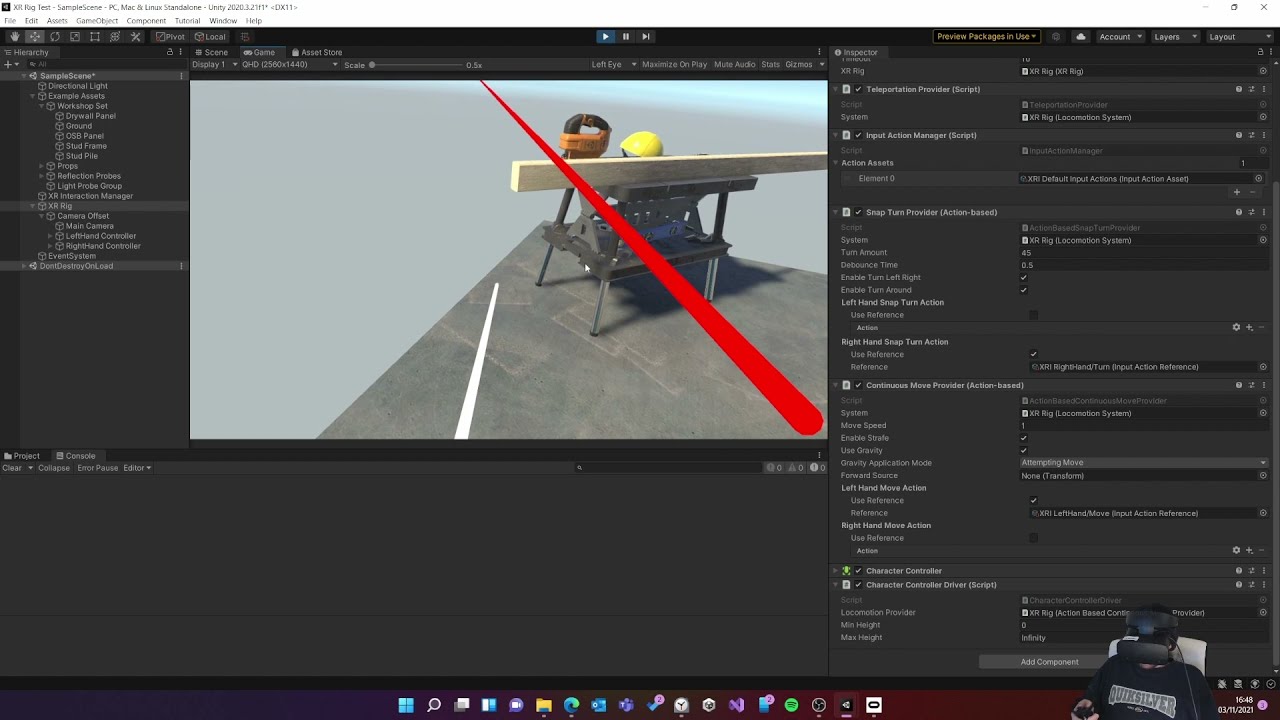
XR Rig with teleporting, continuous locomotion, and snap turning. Implemented using Unity 2020.3, XR Interaction Toolkit and the new input system.
Note: since this video was made the XR Toolkit has renamed XR Rig to XR origin
i am however using 2019.4.31
is OpenVR already included in xr management?
im assuming i need openvr desktop, lol
pine bison
OpenVR is a bit of a mess with 2019 so I'm not sure about that one
It's easier with 2020+ and OpenXR
brazen elm
pine bison
It's easier with 2020+ and OpenXR
which one do you reccomend?
pine bison
2020 LTS probably
brazen elm
so somewhere between 1.0 - 3.0?
pine bison
2020 LTS is 2020.3.33f1
brazen elm
alright, i think ill stick to 2020.3
just to start with
i was trying to do this but when i finished it, i couldnt get VR to work. https://www.youtube.com/watch?v=tBYl-aSxUe0&t
▶ WATCH the PART 2 : https://youtu.be/Wk2_MtYSPaM
▶ Get the full Project on Patreon : https://www.patreon.com/ValemVR
▶ Join the discord channel : https://discord.gg/5uhRegs
Hey guys
Download Robot Kyle : https://assetstore.unity.com/packages/3d/characters/robots/space-robot-kyle-4696
Some more info about the Animation Rigging Package :
http...
pine bison
You'll want to do it one step at a time. First get VR up and running, and then onto things like IK
brazen elm
ah, i see, valem started with IK so i just followed along.
pine bison
I'd recommend this playlist https://www.youtube.com/playlist?list=PLrk7hDwk64-a_gf7mBBduQb3PEBYnG4fU
brazen elm
Alright, Thanks!
 shadow cloud
this is a project for university and the goal of this game is to put the ball in the hole, but the problem that i have is when i press start the ball on the platform is launched to the left and then it behaves like it has low gravity and it is very sensitive. I'm trying to control the rotation of the platform based on the rotation of the came (the head of the player) because its for the phone.
if i copy the rotation of the camera to the rotation of the platform with an offset then if i change the rotation of the platform really fast ball clips the platform and falls down. In the video above im trying the RigidBody.MoveRotation but it also doesn't work
tepid bough

The game is standalone for pc, and two players can play on one pc
So one of them is on pc and controls a player but the second one is on vr
they are using only 1 game and both see other displau
buoyant jolt
Yes, set one camera to None, and the other to Both
tepid bough
lemme try
buoyant jolt
That's if they are using the same computer (i.e. steam or oculus desktop) as they are on the same platform.
Otherwise you need to network them (more complex) as they are two separate platforms.
tepid bough
buoyant jolt
Yes, set one camera to None, and the other to Both
This does not work
Both of them are set to display 1, and on pc i can see only a vr camera
buoyant jolt
tepid bough
Both of them are set to display 1, and on pc i can see only a vr camera
Display 1 doesn't matter.
Display:None, a camera will only appear on desktop.
Display:Both, a camera will appear in VR. If there is no overriding None camera, it will show on Desktop as well
We also use this to overlay watermarks on our desktop VR solutions :)
tepid bough
Let me try this
buoyant jolt
There are some cases where it may not work right though, so it could be something else causing it to misbehave
tepid bough
When my game is set to display 1 (pc view) on vr i only see a black screen
when i cahnge it to display 2, i can see on vr and on pc
tepid bough
@buoyant jolt
junior cove
buoyant jolt
That says HVR, are you using the hurricane asset? Sounds like you need to ask th...
Fixed it
 sour laurel
im making a vr game and made a head model but the inside of the head model isnt transparent so i can still see the eyes but i want to have the eyes be visible to other players
so i need to basically make the inside transparent so i cant see the eyes anymore i think
 buoyant horizon
Anyone tried out the Oculus hand tracking 2.0 yet? I couldn't get hand or controllers to work in a fresh project. Moved to an existing project that was using hand tracking 1.0 but after updating to v39 of oculus integration, I have no controller or hands working.
rich drum
i need help with XRRig bieng outdated and i ned to configure it but i dont knowwhat i havedont wrong
using System.Collections.Generic;
using UnityEngine;
using UnityEngine.XR;
using UnityEngine.XR.Interaction.Toolkit;

public class ContinuousMovement : MonoBehaviour
{

    public float Speed = 1;
    public XRNode inputsource;
    private Vector2 inputAxis;
    private CharacterController character;
    private XRRig rig;

    // Start is called before the first frame update
    void Start()
    {
        character = GetComponent<CharacterController>();
        rig.GetComponent<XRRig>();
    }

    // Update is called once per frame
    void Update()
    {
        InputDevice device = InputDevices.GetDeviceAtXRNode(inputsource);
        device.TryGetFeatureValue(CommonUsages.primary2DAxis, out inputAxis);
    }

    private void FixedUpdate()
    {
        Quaternion headYaw = Quaternion.Euler(0, rig.Camera.transform.eulerAngles.y, 0);
        Vector3 direction = headYaw * new Vector3(inputAxis.x, 0, inputAxis.y);

        character.Move(direction * Time.fixedDeltaTime * Speed);
    }
}
how do i get XR Interaction Toolkit on unity 2021.3.0f
rich drum
download it
 hexed schooner
Hey all - I'm attempting to use Unity to build a super basic VR level using my Quest 2, and while I have the OVRPlayerController all set up, I can hit Play to hop in and try it out, then can hit Play to stop, and things are fine and dandy until I hit Play for the second time and it freezes Unity and I have to force quit. Anyone experienced this before?
buoyant horizon
hexed schooner
Hey all - I'm attempting to use Unity to build a super basic VR level using my Q...
I’m actually dealing with this too. It just said reloading asset or something like that. Not sure why. I haven’t gotten to research yet.
buoyant jolt
sour laurel
im making a vr game and made a head model but the inside of the head model isnt ...
Increase the culling on the camera
 pine bison
Have you got preview packages enabled @toxic geode?
You can also install it by name, click the plus in the corner and choose add by git url, then use the address com.unity.xr.interaction.toolkit

 terse hawk
Hey everyone- new to the server! Does anyone here develop on an HP REVERB G2? And, if you do, please feel free to add me as a friend and I'll keep a focused list of co-developers. There are some peculiar challenges for this headset when working on OpenXR , not to mention cross-headset optimization, etc.
rich drum
hexed schooner
Hey all - I'm attempting to use Unity to build a super basic VR level using my Q...
ive experienced this but i dont know why its happening i think its something to do with oculus and unity its a bit buggy but it doesent always happen to me
 vagrant sparrow
toxic geode
how do i get XR Interaction Toolkit on unity 2021.3.0f
vagrant sparrow
toxic geode
how do i get XR Interaction Toolkit on unity 2021.3.0f
Add by name. Just google it
vagrant sparrow
toxic geode
how do i get XR Interaction Toolkit on unity 2021.3.0f
Package manager/press + / select add package by name/ write: com.unity.xr.interaction.toolkit
 tropic garden
I'm using OpenXR, is there somewhere I can get the VIVE controller 3D models?
 alpine jackal
Hi, im just using the vr template that unity provides and ive built to an apk file for testing on a quest 2, however when i launch it, everything seems to flash particularly in my peripheral vision, also my hands dont seem to work despite the scene coming pre-loaded with them, are they supposeed to work by defualt or do they need additional set-up?
north path
tropic garden
I'm using OpenXR, is there somewhere I can get the VIVE controller 3D models?
Google probably has it?🤔
north path
alpine jackal
Hi, im just using the vr template that unity provides and ive built to an apk fi...
Using OpenXR or the Oculus XR Plugin?
north path
OpenXR is also a plugin haha
alpine jackal
sorry XR Plugin
alpine jackal
are you refering to this?
 north path
Yepp
What Unity version is this?
Sadly I don't have that much experience with the template and systems they use :/
alpine jackal
2020.3.251f
how do you do it without the template out of curiosity? is it just something you install of the asset store @north path
 abstract quarry
Heya, I'm making an airship project in VR (URP) and I want to make some clouds you can fly through, I'm a little mythed as to how to approach this especially given the technical limitations of VR and I was wondering if anyone had any guidance or suggestions for how to go about this?
Happy to use an asset for it, but concerned volumetric clouds assets may be too performance heavy
north path
alpine jackal
how do you do it without the template out of curiosity? is it just something you...
I have done these:
Make my own player with XR Interaction Toolkit (from Unity themselves)
Use VR Interaction Framework for big projects (paid asset, but really good if you want to make solid commercial games)
And once a prototype with steamvr asset and oculus asset. If you dev for oculus and have no coding experience the oculus integration asset is pretty handy
north path
abstract quarry
Heya, I'm making an airship project in VR (URP) and I want to make some clouds y...
If you're developing for PC (and maybe psvr2) only and want a realistic artstyle you could try the HDRP with local volumetric clouds.
A cheap alternative in URP would be either particle systems or something in VFX Graph (for android/quest use vulkan for it to work). Not the lightest, but probably better than volunetrics by far, especially if you LOD the clouds
hexed schooner
@buoyant horizon and @rich drum - I think I fixed it, I'm using VR Interaction Framework, and I just started a new project with just that and NOT bringing in the Oculus Integration package. Still had to set XR Plug-In Management > Oculus for Windows and for Android within Project Settings, but all seems to be well now!
 civic palm
GM all! I’m looking to use a minimap to hit some target and make appear an arrow in front of me that keep pointing the direction of the target. My problem is im using steamvr and im totally lost about how to make the raycast work through the minimap (which is a phisical object you can pick up and point-click the button to move it and zoom in/out
north path
Are Unity, Oculus XR Plugin and if used Oculus integration updated to the latest versions?
 minor wave
Hello i am getting 100% gpu usage on meta quest 2 with unity 2021, oculus xr plugin, recommended setting, and a compleatly blank scene. Just for texting, i have evend disabled the xr rig, but i am still getting 40fps. Can someone help? What settings should i use?
gilded wyvern
minor wave
Hello i am getting 100% gpu usage on meta quest 2 with unity 2021, oculus xr plu...
What's your gpu, what other programs are open and what other packages do you have installed
also, are you on mains or on laptop battery?
minor wave
gilded wyvern
What's your gpu, what other programs are open and what other packages do you hav...
Natively running on stadalone quest no laptop
gilded wyvern
Ah, so you've built it to an application?
minor wave
Yep
gilded wyvern
I'm not sure then honestly
tiny niche
minor wave
Hello i am getting 100% gpu usage on meta quest 2 with unity 2021, oculus xr plu...
you most likely have a bunch of post-processing activated
minor wave
tiny niche
you most likely have a bunch of post-processing activated
Nope there is none
tiny niche
and take a look at the profiler to make sure you only have expected scripts executing and only render what you think you're rendering
when you say there's none, did you check the profiler? cause you probably have post-processing effects that you didn't add intentionally
minor wave
Not yet
 cerulean harbor
Hey all, glad to be here. So I am coming from UE looking at what Unity has to offer in terms of VR development, trying to decide what to use for my VR game. I noticed a lot of the top vr games have been made in Unity and I just wanted to come in here and see what could be the reason for companies using Unity over UE for VR?
 wraith shale
one reason for picking Unity is that people have just been used to using it. And I guess it might be easier to optimize for VR but I don't really have tons of experience on Unreal's VR. Unity is totally mixed bag on it's VR support atm though
like... it's all over the place atm and it's not nicely done package you can just pick up and start developing with like with Unreal's VR
@cerulean harbor
cerulean harbor
wraith shale
one reason for picking Unity is that people have just been used to using it. And...
Hmm I am mostly curious because there has to be something I am missing, as 80% of vr games are from Unity engine. I think I have played only one from Unreal Engine. It does seem like there is a ton more documentation for VR in Unity from YouTube videos, packages, etc. Unreal in terms of VR you have to figure it out there is very little content around it. Which also makes me wonder why more VR content is not being released around UE
 lethal shuttle
can anyone please help me with a VR grappling hook script i stuck right now. idk i tried to take a grappling hook script and convert it into vr but it dindt worked. Thanks.
wraith shale
@cerulean harbor you will find more tutorials for Unity for sure but most of them will be outdated since unity has redone their VR systems and it's still evolving. All in all, I'd recommend just giving it a go and see if you like it. Both engines can do even mobile VR (Quest 2) as there are examples from both engines running there
Unreal isn't super uncommon for VR games either but I think there are still more Unity based VR-titles out there
cerulean harbor
wraith shale
<@176404730292076545> you will find more tutorials for Unity for sure but most o...
So its mainly just preference? There isn't really anything Unity has that makes VR development better?
wraith shale
I'd imagine Unity is possible to scale down further to VR purposes but I really haven't done comparison. VR dev in terms of optimization is closer to how we optimize our games for mobile vs some console game production.. And Unity has always been strong on the low end segment
shell kayak
cerulean harbor
So its mainly just preference? There isn't really anything Unity has that makes ...
I think part of what makes Unity a better fit for VR is the fact that it doesn't make many assumptions about your game. While UE has many useful systems right out of the box, most of them are designed for flat-screen games first and don't necessarily translate well into VR. Unity is designed to be very customizable (without requiring forking the engine source), so I think it's easier for developers to make their own VR specific systems and components. But I'm saying this with practically no experience with UE.
 mortal lynx
So I have a bit of an issue. I'm working on a VR game for a class, and I have a basic setup (player movement, picking up objects), but despite adding colliders to stuff, the player is able to just phase right through it. How can I fix this?
gilded wyvern
does the player have colliders, and is everything on the right layers?
rich drum
rich drum
i need help with XRRig bieng outdated and i ned to configure it but i dont knoww...
just gonna bring this up again
never got help for it
i thinl
 hazy spear
rich drum
just gonna bring this up again
hazy spear
rich drum
just gonna bring this up again
I don't understand your question could you word it a bit better?
rich drum
hazy spear
I don't understand your question could you word it a bit better?
I am trying to make a movemnent controller and when i try to use XRRig it does not work becuase it is outdated and i need to use XROrigin but when i try to use it, it does not work. I was told to see if my setup was right and i think it is but it still does not work.
hazy spear
https://docs.unity3d.com/Manual/xr_input.html Try using this for input or use Input.Input.GetAxis("Vertical")/Input.GetAxis("Horizontal")
 mortal lynx
gilded wyvern
does the player have colliders, and is everything on the right layers?
mortal lynx
gilded wyvern
does the player have colliders, and is everything on the right layers?
I am assuming so yes. Im not at my computer but ill have to check
pine bison
mortal lynx
So I have a bit of an issue. I'm working on a VR game for a class, and I have a ...
If you're moving the player by just setting the transform position, this ignores physics. You would need to use the rigidbody instead
mortal lynx
Im just using the basic unity stuff. Ill take a looka t it tomorrow as im going to bed
wraith shale
shell kayak
I think part of what makes Unity a better fit for VR is the fact that it doesn't...
I dont think the built-in framework in unreal really limits vr use cases specifically. What you described is true for all ue use though regardless of the vr aspect (it is more hardcoded for its framework). I'd see this as more of a difference between these engines in general
shell kayak
wraith shale
I dont think the built-in framework in unreal really limits vr use cases specifi...
You don't think the design of the built-in systems in UE is biased towards flat-screen games? I don't think you would have to go much outside the box when making a standard flat-screen shooter in UE, while you definitely would if you wanted to make a VR shooter that isn't just a tracked camera strapped to a normal character controller with gamepad controls.
civic palm
Im working on a 5yrs old problem damn, any solution for inaccurancy of Camera.ScreenToWorldPoint() in VR?
shell kayak
civic palm
Im working on a 5yrs old problem damn, any solution for inaccurancy of *Camera.S...
Well there's two eyes, so which eye do you want? If neither/both, then you're probably imagining a single screen some distance away from the user's eyes.
wraith shale
shell kayak
You don't think the design of the built-in systems in UE is biased towards flat-...
I dont see how their char controller wouldnt work in VR but I can see how it is kinda overkill for it. They also have basic vr navigation schemes offered on their vr template. Also none of this is anything you also couldnt rebuild yourself from scratch like in Unity on the projects own codebase. You are not forced to use their char controller nor do you need to go to engine source code to build your own controller. I dont see anything striking out as being limiting factor for VR. I have only done one smaller vr project in Unreal but have used it in general for almost decade now, including doing tons of engine source code work there and I dont really see why you'd have to go for source code modifications there to use it properly for VR. If anything I can see unreal being way more approachable for VR than Unity atm due to Unity VR and it's frameworks being all over the place atm :/
That being said, @cerulean harbor already uses ue so he does know what it can do :)
Note: I'm not ue fanboy, just tad frustrated how Unity has dealt VR in recent years
I still feel that both engines are good picks, just have to pick one for the right reasons
civic palm
shell kayak
Well there's two eyes, so which eye do you want? If neither/both, then you're pr...
Oh i get it now! Yeah im targeting both eyes rn i assume i need to change something but since im pointing on a minimap through a pointer (which has a camera component) im using this and not maincamera.
shell kayak
wraith shale
I dont see how their char controller wouldnt work in VR but I can see how it is ...
This is where my inexperience shows. How capable is UE for making custom editor tools, like custom editor windows and custom asset importers? I've tried looking it up and it's either not as capable or it's just not well documented.
wraith shale
shell kayak
You don't think the design of the built-in systems in UE is biased towards flat-...
how you describe Unreal sounds like the engine was in UE3/UDK days when they slapped every new project with FPS setup. It has been more general purpose engine since ue 4.0 though
Custom editor tools are way more pain in unreal. They are getting better but it is nothing like in unity. Note: havent checked if ue5 does things better in this
shell kayak
It also seems a bit more difficult to write shader code, it's clearly preferred that you use Materials, but that would make me think it's a bit more difficult to make custom more optimized lighting for Quest.
I can find a lot of tutorials for toon/cell shading in UE4, but they all seem to be deferred post processing shaders, which obviously wouldn't work for Quest. Is it still straight forward to create custom lighting for forward rendering?
shell kayak
Red Matter has great lighting in UE4 on Quest, but I've always assumed that was accomplished with source code changes.
wraith shale
Red Matter definitely did some extra magic
shell kayak
Personally, these two points alone make Unity much more attractive to me for VR. I have many custom editor tools that are very VR specific (even a whole visual node graph tool that is specifically VR related) and I wouldn't be able to achieve the quality and performance I'm going for for my game without custom lighting in shaders.
I'm even using compute shaders on Quest, which I know is much more difficult to use in UE4.
But I'm extremely biased, having only used Unity.
I also really dislike that they still have an inheritance model for their actors/game objects. I know they also have components, but still many of the built-in types are inherited. I'm happy that GameObject is sealed in Unity.
storm ether
hi there. i have an issue with unity, im making a vrchat world, and i haven't had this issue with any other world before. but when i move or turn my head in anyway, the lighting seems to break and bug out, i can send a video if needed.
tepid bough
The game is standalone for pc, and two players can play on one pc
So one of them is on pc and controls a player but the second one is on vr
they are using only 1 game and both see other display

read the screenshot first
buoyant jolt
storm ether
hi there. i have an issue with unity, im making a vrchat world, and i haven't h...
You should report that to vrchat, it's not really a unity issue
 fallen wolf
how do you get joy stick moveing?
 modern ginkgo
does anyone know why ReadPixels is 1 frame behind my current active rendertexture in vulkan compared to openGLES
 real crane
What are the alternatives for Firebase on Oculus Quest?
storm ether
real crane
What are the alternatives for Firebase on Oculus Quest?
Flutter is a good alternative
real crane
Actually I meant using firebase for analytics, firestore etc
 rustic tree
hello
can someone call and help me?
I am making a physics-based vr game coughinspired by boneworks cough
and
I am having trouble with inverse kinematics
can someone help Me PLease
?
 feral hill
hi who knows steam vr plugin here?
 urban cloak
@high willow Use the forums if you want to recruit someone. #📖┃code-of-conduct
 vast jasper
can anybody help nudge me in the right way. im trying to find a way to flip a switch with my hand/finger. how could do that? or even flip a block around its axis like this (picture is from the room : dark matter vr
 rustic tree
yo
i need help
this is my error
Btw
i am making a physics based vr game cough boneworks cough
now, here is my error:
'Enable Input Tracking' is enabled, but Position and/or Rotation Action is disabled. The pose of the controller will not be updated correctly until the Input Actions are enabled. Input Actions in an Input Action Asset must be explicitly enabled to read the current value of the action. The Input Action Manager behavior can be added to a GameObject in a Scene and used to enable all Input Actions in a referenced Input Action Asset.
UnityEngine.XR.Interaction.Toolkit.XRBaseController:Update () (at
gilded wyvern
vast jasper
can anybody help nudge me in the right way. im trying to find a way to flip a sw...
Maybe use rigidbodies on a configurable joint - lock their rotations on all but the rotating axis and lock their positions
up your angluar drag too
if you have colliders on your fingers, it should work

 pliant fable
I followed this tutorial by Valem to try getting my first "game in VR" going but I have an issue. The cubes that are meant to be my hands are ahead of me, meaning they are not at my hands. So when I go to interact with something the cube will hit it before I can grab it because it is in front of my hands. Any clues as to what might be the problem? Here's the link to the video if that helps in any way:https://www.youtube.com/watch?v=gGYtahQjmWQ&t=973s

If you want to get started with VR development. This video is for you.
▶ Get access to exclusive content: https://www.patreon.com/ValemVR
▶ Join the Discord channel: https://discord.gg/5uhRegs
Want more details ? Check arvrtips articles :
▶How to Install Unity Hub and Setup a VR Project :
https://arvrtips.com/how-to-install-unity-hub/
▶The Only...
Pretty much, the cubes are not where my hands are
 wooden garden
pliant fable
I followed this tutorial by Valem to try getting my first "game in VR" going but...
wooden garden
pliant fable
I followed this tutorial by Valem to try getting my first "game in VR" going but...
When you are making the prefab to slot into the "Model Prefab" part, you need to make sure that the cube is at the center of the scene (0, 0, 0). If not, it will be offset by your actual hands by the amount it was offset from the center.
 torn basin
How do i imploment a fully functional web browser into unity xr? that is touchscreen like in this video:https://www.youtube.com/watch?v=sv6T-tg6RL4&ab_channel=GregMadison

Transform any surface into a giant touch screen. While many of us spend almost all day in front of a table, there are no apps/games taking advantage of this providential armrest. @unity @Oculus #OculusQuest #MadeWithUnity #XR #SpatialComputing For more information: https://twitter.com/GregMadison/status/1218220146675732480
wooden garden
How would i make it so that an object doesn't have collision whilst being held?
storm ether
Hi I dont know where to post this but I help with this glitch it happened after I tried changing the prone and Crouch animations

 torn basin
some1 plz help me
pliant fable
I was watching this video from Valem, part 2 as I'm trying to make my first VR game. Someone was the best and posted the full code for the video in the chat, yet I cant follow the rest of the tutorial cuz i get a message. How do I fix this?


▶ Get access to exclusive content: https://www.patreon.com/ValemVR
▶ Join the Discord channel: https://discord.gg/5uhRegs
-LINKS-
XR Input Manager : https://docs.unity3d.com/Manual/xr_input.html
VR Controller Unity Package : https://www.dropbox.com/s/9ajsxoa6u3ps1y8/vr controllers model-fixed.unitypackage?dl=1
Oculus Hands Unity Package ...
link in case its helpful
the comment with code should be at the top
topish
pliant fable
wooden garden
When you are making the prefab to slot into the "Model Prefab" part, you need to...
btw thanks alot on the other on
was able to make it work
wooden garden
pliant fable
was able to make it work
👍
pliant fable
spunky got any clue on this one
?
And when it says to fix any compiler errors, there is none
pliant fable
nev
civic palm
GM - I'm using SteamVR and I'm currently struggling with raycast and UI interaction.
Specifically I need to select some target object through the minimap. The SteamVR_LaserPointer class shows some hint but I can't understand how to find the pixel on the RectTransform of the RawImage where my minimap is show.. I even tried to rebuild a simpler pointer to use but seems not working anyway
as you see the green raycast (the first) doesnt follow the pointer line renderer .-.

 verbal sentinel
Hi, any idea why TMPRO fonts looks bad inside VR ...tried increasing the fort size and scaling down the cavas and components... no change.
pine bison
Looks bad how?
verbal sentinel
@pine bison Blurry edges (not crisp) around the letters. BTW on screen it looks much better then inside the VR device
 waxen tartan
Hi, has someone an idea why my game lost hand tracking after I left and re-enter the play area? It happens with a Quest 2 and it doesnt matter which runtime I use Oculus or OpenXR. Is there a Callback or something I can listen to be notified if the user lost tracking?
 worthy zenith
Should I go with steam vr or unity xr
 nimble tangle
I have a similar question I tried doing some things in steamvr on unity a couple of times but found the action input system to be unbearable. Has it gotten any better?
pliant fable
How come when I put a teleportation anchor down and try changing the match orientation, there is no camera option?
only world space up, target up, and target and forward
and of course none
 real escarp
Hi all, i`ve been working on a project and its been going well until i tried to build it and it throws up this error, anyone know whats happened 😦

these are the errors
pliant fable
I get this error message with my code, any ideas? "The type or namespace name 'XROrigin' could not be found (are you missing a using directive or an assembly reference?)"
 nimble tangle
Are there any good tutorials for reading vr controllers positions and inputs?
tiny niche
nimble tangle
Are there any good tutorials for reading vr controllers positions and inputs?
ready vr?
tiny niche
pliant fable
I get this error message with my code, any ideas? "The type or namespace name 'X...
sounds like you are missing a using directive or assembly reference
civic palm
civic palm
GM - I'm using SteamVR and I'm currently struggling with raycast and UI interact...
UPDATE: I'm trying to use a wrapping class to override the SteamVR input with eventdata and using them in RectTransformUtility.ScreenPointToLocalPointInRectangle
My problem is that is not working at all. What I'm missing?
im following some help here https://answers.unity.com/questions/1600790/how-to-implement-steamvr-laser-pointer.html but i cant pass the eventdata
Unity is the ultimate game development platform. Use Unity to build high-quality 3D and 2D games, deploy them across mobile, desktop, VR/AR, consoles or the Web, and connect with loyal and enthusiastic players and customers.
I build this and attached on the rawimage.
The SteamVR build in UI Element script is attached to the canvas but can't access anything.
 alpine jackal
im looking at the unity docs and im trying to install the XR interaction tool kit, however it just says to install via the package manager, but it is not listed as an option, any help?
 pallid quail
I might just be dumb but I'm going to ask anyways.
I'm having one(hopefully the final) big issue with VR and I'm not having much luck tracking down the right docs to solve it. In 2021 LTS I have XR plugin management not enabled at startup. I want to manually detect if VR mode should enable before activating the XR plugin system. That part all works, or so I thought. When I start it up with the VR cmd line arg it loads up SteamVR(my system default OpenXR provider) like it should and all the XR features enable. Where I'm stumped is that in non-VR mode that the OVR plugin runs anyways(but not SteamVR). I am not sure how or if I can prevent that from loading in non-VR runs.
north path
Only enable/spawn the OVR components/prefabs when VR is enabled in Start? @pallid quail
@alpine jackal latest Unity version?
pallid quail
That is my goal yes.
I don't have anything explicitly related to OVR in the project.
north path
In code you can check if VR is enabled. So just check, when true spawn OVR Rig or whatever, when false spawn regular player
Then what part is running precisely?
pallid quail
Just OpenXR.
I'm using the xr package manager and have it set to not initialize XR until I manually do it.
I don't know where OVR is coming from to be honest.
I was under the impression that if I don't load XR that it shouldn't try to hook in with the VR systems on the machine.
Apparently that assumption was faulty?
north path
What VR systems are being loaded?
If you tell what happens I might be able to help, but something OVR related is really vague
How do you see it's enabled
pallid quail
I know it's enabled because when I load a build an OVR app loads(this is different from when vr is enabled) and it steals the audio.
As for vr systems, it shouldn't be loading any at all when I run the test.
I did not install the OVR package anyway unless it's hidden with something else in the xr package manager.
So I'm confused at what is going on.
Is it not possible to do this without a separate build?
pallid quail
To be clear of the distinction, SteamVR loads when VR is enabled and OVR loads when it's disabled.
pliant fable
Why do I get this error message? "'XROrigin' does not contain a definition for 'cameraGameObject' and no accessible extension method 'cameraGameObject' accepting a first argument of type 'XROrigin' could be found (are you missing a using directive or an assembly reference?)"

theres the code if it helps
lapis briar
My Ui is Not interacting with Oculus Quest 2. can someone Guide me through i have followed few tutorials but still not interacting
storm ether
i am using oculus quest 2 and my game has 700k verts per frame, does the number of polyg effect the performance strongly or should i just ignore that and improve the performance some other way
bc honestly modifying the the 3D models is PAIN
shell kayak
storm ether
i am using oculus quest 2 and my game has 700k verts per frame, does the number ...
It does affect performance pretty significantly and 700k vertices is a lot for Quest 2. You can probably get away with that many if you're drawing them with a very simple shader, like unlit.
pine bison
Oculus' own recommendation for triangles is max 700k-1m @storm ether
If you're having performance issues the solution is to go into the profiler and figure out what's causing the issue
storm ether
pine bison
If you're having performance issues the solution is to go into the profiler and ...
i dont understand a single thing from the profiler tbh
pine bison
Then you should start there, optimizing blindly can be a waste of time
storm ether

this is always the case with the profiler
i understand its something with the render, thats all it is
pine bison
Well your player loop is less than 10ms so that's not the issue
Select the rendering section instead of CPU
 west mantle
I tried to use animation riggind (package) to model but it went out of hand
And got realy buggy because of avatar
But if i remove the modular avatar it works fine but can't place animations

 gentle stone
Hi, anyone knows how to make a draggable object like a shopping cart with vr ?
I tried getting the change on the rotation and position of the hand but they are always off
 storm mulch
I'm trying to create a vr game for quest and I don't know how to get the default input actions. I'm using unity version 2020.3.34
 queen minnow
storm mulch
I'm trying to create a vr game for quest and I don't know how to get the default...
queen minnow
storm mulch
I'm trying to create a vr game for quest and I don't know how to get the default...
im guessin you already know about sidequest?
storm mulch
yes
queen minnow
doesnt the default unity VR thing have input actions already setup?
storm mulch
Idk I can’t find it and I do what the videos say and on like step 2 I can’t find it
queen minnow
hmm
storm mulch
Do I have to use the vr I’m on the 3d
queen minnow
im unsure
 fierce shell
Does anyone know how to fix this?

 storm vigil
fierce shell
Does anyone know how to fix this?
storm vigil
fierce shell
Does anyone know how to fix this?
are you sure that is the correct unity version for the VR chat package?
fierce shell
yeah. I have the VRChat SDK. Isn't that the right one?
storm vigil
The current Unity version in use by VRChat is Unity 2019.4.31f1.
you will need that version to use the VRChat tools in unity
storm mulch
How do I get the room scale X-ray rig
tiny niche
storm mulch
How do I get the room scale X-ray rig
there's no x-ray rigs afaik.
 full pecan
Hi all, I would like some help for my gorilla tag fan game
it's multiplayer and I am adding player colliders
But I don't know how to get rid of self collisions
But I still want to have collisions between players
storm ether
question, does the number of vertices effect the performance? or is the number of triangles is what actually matter, there was 1m triangle and 500k vertices in my game but after using a tool to reduce it, now i have 200k triangle but still 500k vertices
muted laurel

How can I make, that my body, controllers and headset, stays or reset all the time to this xr origin capsule back?
Because if I stand up in reallife and walk to the aide as example, i am no longer standing in my collision capsule of the xr ogirin, so that I have zroubles with going into doors.
Is it possible to set the position of my headset always to the position of this xr origin capsule?
 storm ether
junior cove
i keep getting this error everytime i try to build it
storm ether
junior cove
i keep getting this error everytime i try to build it
Did you remove a package that’s needed?
junior cove
I have not deleted anything
 fleet cedar
Hi guys,
Recently I had checked out VR development using the SteamVR Plugin in Unity. After installing the plugin, and setting up the project right out of the box the hand grip/posing does not work. I'm getting a warning that some properties hand armature is attempted to set to null and the armature itself janks all over the place. I've made a screen recording of it happening: https://www.youtube.com/watch?v=1ldqLPVG8fI
For the whole project I'm using SteamVR via ALVR, which seemed to be the most reliable of all. I had no other negative experience with other VR apps.
Can someone help me to troubleshoot this?
Thanks in advance.
 junior cove
now i have this
 storm ether
junior cove
I have not deleted anything
storm ether
junior cove
I have not deleted anything
Is there a packageimportList in your project?
junior cove
storm ether
Is there a packageimportList in your project?
And I no longer get that error
 storm ether
what platform are you trying to build for? Can I see you player setting/ build settings?
junior cove
storm ether
what platform are you trying to build for? Can I see you player setting/ build s...
I’m building it as a apk
Can we dm instead of talking I’m here
In
lapis briar
anyone here Using Quest 2 for their VR game i need some help
wraith shale
better just ask the actual question
 fossil ridge
Hey I'm developing a VR game and when I try to playtest it in Unity the only thing that shows up in my Quest 2 headset is a black screen
On the game view screen it shows that the orientation is working just not the headset
 mystic patrol
Im making a Vr game and whenever i try to play it on my quest 2 the graphics quality \is super bad
 dense roost
Hi. Does anyone know if it's better to use ILCPP or Mono please?
storm ether
can you add hand tracking to unity vr please
i need you to do this so gtag can have hand tracking
i'm executive director for gtag
so please add hand tracking
 icy kindle
it's triangles that matter, AFAIK. triangles are what actually get drawn, and as such are what take time to render. although, IIRC vertices will have an impact to some degree as if they get sent to the gpu that's going to take time away from rendering. as far as i know, triangles are the main concern
tiny niche
@storm ether hand tracking is there, you just need to hook up the hands and hand interactions you make to the raw tracking data
storm ether
hmm ok thank you
north path
dense roost
Hi. Does anyone know if it's better to use ILCPP or Mono please?
Pretty much always use il2cpp as it's more CPU optimised.
Always test Performance tho
dense roost
north path
Pretty much always use il2cpp as it's more CPU optimised.
Always test Performanc...
Okay thanks. The downside is that using IL2CPP breaks a lot of visual scripting things, like saved variables don't even work, other buttons don't work either...
north path
Enable AOT support and it works @dense roost
Google 'unity visual scripting il2cpp' or similar terms
Functionality should be on par with mono for most things, especially if it's Unity made
dense roost
north path
Enable AOT support and it works <@586547376370745345>
yah, but how do I enable that haha😅
I've tried searching for that option but can't find it with unity visual scripting
like, with bolt, it was easy to find
But with visual machine, the one official from Unity, can't find that option anywhere
dense roost
north path
Google 'unity visual scripting il2cpp' or similar terms
If I search this, literally the 2nd result is "IL2CPP breaks visual programming"
north path
It's probably hidden somewhere else, but it should definitely be possible.
I don't have my laptop right now to check
dense roost
north path
Enable AOT support and it works <@586547376370745345>
Is that something in here?

or here?
 north path
No, that's burst
It's either in preferences, the visual scripting tab in project settings or somewhere in visual scripting windows
I'm guessing, been a while since I've touched it
dense roost
The most similar is the aot safe mode
 north path
You can try
Nothing in preferences?
Or is this prefereces
If you remind me tomorrow I can look for you
dense roost
Okay I would really appreciate it
dense roost
Okay I just updated Unity to the latest version and seems to be working now idk why. Maybe they fixed the saved variables. (I did't change any settings in preferences or project settings about AOT)
Btw, is it normal that on Unity test play the performance is worse than on oculus 2 itself?😅
pine bison
Usually for those who have asked about vive trackers and openXR lately! Posted today https://youtu.be/Tw5LbNLW9Q4

A bit of a special video! Today, we'll be taking some time to get HTC's Vive Tracker working with OpenXR, and Input System.
Vive Tracker Profile Script:
https://forum.unity.com/threads/openxr-and-openvr-together.1113136/#post-7803057
Subscribe for future projects:
https://www.youtube.com/c/vrwithandrew?sub_confirmation=1
Support my work, and ...
storm ether
do anyone knows why when i use the VR camera everything changes to this ?


things gets too bright and missed up
even tho i applied the same settings on both cameras
pine bison
Post processing?
 spice sail
anyone know how to keep the oculus quest 2 enabled in Unity Editor mode when you're not wearing the headset
storm ether
pine bison
Post processing?
its enabled for both
spice sail
my headset keeps turning off the moment i remove it to check editor stuff
 tacit quartz
Hey guys, I started vr recently and i followed a tutorial to create custom basic itneraction (grab, teleport, etc) from scratch (without using template one like oculus template interaction etc).
But when it comes to interacting with UI, i can't find any tutorial not saying (simple use these components from oculus/other template pack. It's very frustrating that there isn't any tuytorial helping doing this from scratch.
I create a line renderer from hands, but i don't know how to do a kind of raycast hit on an UI element .. Thanks a lot !
pine bison
storm ether
its enabled for both
Try disabling the post processing and see if that's the cause
pine bison
spice sail
anyone know how to keep the oculus quest 2 enabled in Unity Editor mode when you...
Download the Oculus Developer Hub, it has the option to disable sleep
storm ether
is it possible to use real time global illumination in VR ?
or even mixed global illumination ?
pine bison
tacit quartz
Hey guys, I started vr recently and i followed a tutorial to create custom basic...
Well. Simply put because it's a pretty complex topic, and the whole point of those packages is to remove that kind of boilerplate code. You will have to dive into the event system and pass info from your raycast into it.
@shut glacier has implemented this for VRTK and it's all open source, so maybe you can learn something from that https://github.com/studentutu/Tilia.UnityUI
tacit quartz
pine bison
Well. Simply put because it's a pretty complex topic, and the whole point of tho...
Thanks a lot, yea event system stuff , i had trouble finding infos about it, thanks a lot i'm going to check VRTK
tacit quartz
pine bison
Well. Simply put because it's a pretty complex topic, and the whole point of tho...
is it okay to put a collider on UI element to allow raycast with ?
pine bison
You would probably need to
but I don't know. I haven't done this myself. I just use CurvedUI
tacit quartz
Okay thanks 🙂
storm ether
question, i use VR normally and its fine but when i run my game and try it out its so sicking like i am actually getting dizzy that i wanna throw up, this only happens with my game not other apps
do anyone have any idea why is that
 plain minnow
try turning up your render scale
maybe
reduce the amount of lights
disable controller acceleration

Immotionar
Hello everyone and welcome to the first episode of this serie that talks about what we’ve learned during the developing of our concept demo "The time...
tiny niche
storm ether
do anyone have any idea why is that
could be lots of things, what's your app doing differently than your reference samples?
but the first thing you should do is check that all movement renders silky smooth, eliminate acceleration relative to nearby visuals and minimize the time people spend turning using a controller
north path
dense roost
Btw, is it normal that on Unity test play the performance is worse than on oculu...
Great you fixed it!
And in-editor performance depends on a lot of things. Mostly project size and complexity and system specs. Also sometimes GPU power save locks fps at 30
 wide parrot
Is there a way to keep the VR controllers 'alive' and tracked even when the headset is taken off?
Need it for a dev tool, it only need to work with Quest2, not even all headsets.
tacit quartz
Hey there, when i run my game from unity it's working on my quest 2 (using playmode) but when i build the apk and install it on my quest, and open the app, then i just have a grey screen with nothing showing up ... any idea ?
mortal lynx
Ok so i need some help.
My roommate and I are fiddling around in Unity with VR.
We want to freeze ONLY the current object being held on a button press, and unfreeze on another button press
So to do that, we're working with Rigidbody. We only want whats being held to be effected
How would we get the component of whats being held only?
This is the script we have on it right now
using System.Collections;
using System.Collections.Generic;
using UnityEngine;
using UnityEngine.InputSystem;
public class MoveAndFreeze : MonoBehaviour
{

    [SerializeField] public Rigidbody m_body;
    bool keypressCheckF;
    bool keypressCheckC;


    // Start is called before the first frame update
    void Start()
    {
        m_body = transform.GetComponentInParent<Rigidbody>();
        m_body.constraints = RigidbodyConstraints.None;
    }

    // Update is called once per frame
    void Update()
    {
        //keypressCheckF = Input.GetKeyDown(KeyCode.F);
        keypressCheckC = Input.GetKeyDown(KeyCode.C);
        if (Input.GetKeyDown(KeyCode.F))
        {

            m_body.constraints = RigidbodyConstraints.FreezeAll;
            return;
        }
    }
}```Gonna be in class for a bit, so if anyone has an idea, please ping me
 modest helm
Hey guys, I'm trying to make a multiplayer game that is on VR and mobile, like the game Acron, does anyone have any suggestions on how to get started?
mortal lynx
How would I check if an object is currently being held by the player in VR?
modern ginkgo
does anyone know if there's a way to access number of stale frames from unity?
i know i can see it with the ovr metrics tool but i'm wondering if there's a way i can access the number from inside my game
 open briar
hi guys
has anyone worked on VR
I want to implement the AB XY buttons of the oculus controller in my application
does anyone have a tutorial suggestions or a good documentation link for that
I am not able to find a good one
 blissful fog
does anyone knows how to do VR using XR rig to insert the key to unlock and next to open the door?
 mild igloo
anyone here have experience using passthrough
 uncut quartz
How would i keep the character collider on the head? because i can clip through walls otherwise
mild igloo
why is it so quiet in here
mortal lynx
mild igloo
why is it so quiet in here
idk x.x Came to the server for help in VR
mortal lynx
uncut quartz
How would i keep the character collider on the head? because i can clip through ...
Are you walking into the walls with the left stick?
Or physically
Cuz IDk how to fix it if its physically
uncut quartz
physically, and i got a script to fix it now
mortal lynx
And I did a kinda fucky workaround for it where I pit a ball at the bottom of my player, and then just did colliders
mortal lynx
uncut quartz
physically, and i got a script to fix it now
Sheeeeeeeesh mind sendin it my way 😅
uncut quartz
mortal lynx
Sheeeeeeeesh mind sendin it my way 😅
if you have a character controller on your XR Origin you can use it, i can send it through DM?
mortal lynx
Go for it
pine bison
mortal lynx
How would I check if an object is currently being held by the player in VR?
XRBaseInteractable.isSelected
gentle stone
is there a way to have XR socket only work on one gameobject without making a whole interaction layer for it ? this feature existed in the old version but I cant find it in the new one
 hasty narwhal
I have no VR Device other than a simple smartphone (galaxy note8) but I need to build a quick Demo and somehow test it and also simulate simple walking feature, whats a good way to do it?
pine bison
Just fake it entirely and render things out in unity?
 balmy holly
Hi, I'm trying to use the Unity XR Interaction Toolkit to detect a UI. The XRRayInteractor, XRInteractorLineVisual and LineRenderer are disabled and get enabled on a button input, but as soon as they are enabled I get the error "Invalid QueryTriggerInteraction for CastFilter" each frame (also when they are enabled in the beginning). The Raycasters are working, but the errors have a massive impact on the framerate. Does someone know how to fix this?
 acoustic shell
how do i add cosmetics so that they can buy it and it goes on there head or hand?
blissful fog
Hi, does anyone knows how to set one of the buttons on HTC vive controller for grabbing and object just for rotating on VR?
 remote plume
Is there a way to detect input focus using OpenXR in Unity? To be able to know if the dashboard is open. I can't seem to find a solution
 pine yoke
Anybody have any experience with VRIF? I'm not sure how to handle "VR hands collide with this object" in code...
tiny niche
remote plume
Is there a way to detect input focus using OpenXR in Unity? To be able to know i...
there are focus events
remote plume
tiny niche
there are focus events
I was trying that and couldn't get them to work. But then what do you do if you enter the game with the dashboard open? That's a problem
tiny niche
remote plume
I was trying that and couldn't get them to work. But then what do you do if you ...
the focus events i was talking about are vr-specific and made specifically for this scenario
remote plume
tiny niche
the focus events i was talking about are vr-specific and made specifically for t...
You're probably thinking about these? https://docs.unity3d.com/Packages/com.unity.xr.oculus@3.0/api/Unity.XR.Oculus.InputFocus.html I tried this today before but didn't get any callbacks
 rich slate
does anyone have a photon vr package setup that i can have
 opal wolf
Hitting a strange bug today that google doesn't have any results for.
My project has desktop and Quest builds, in the Quest builds only, the LODs seem to be broken and all LOD levels are drawn at the same time no matter the distance. From editor and desktop builds LODs work as expected.
Anyone run into something like this before?
pliant fable
when I test my game after installing the apk and sideloading it, the game has like motion blur. When I move my head things seem to blur with partial static at times. Any idea how to fix this
tiny niche
opal wolf
Hitting a strange bug today that google doesn't have any results for.
My project...
sounds like a shader bug
or nvm, its gotta be something screwing up in the render pipeline
 finite flame
I need to know how to set up my oculus quest 2 so I can test my vr game in editor
I just want to press play in the editor and be able to use the buttons and stuff on my controller to test stuff
pine bison
finite flame
I need to know how to set up my oculus quest 2 so I can test my vr game in edito...
That's Oculus Link. You can google it
buoyant jolt
finite flame
I need to know how to set up my oculus quest 2 so I can test my vr game in edito...
You need a VR capable laptop. From there, you can use Steam VR or Oculus Desktop to let your headset operate as a desktop headset. It will let you work in the Unity editor.
You can work fine without it, but it is slow. A lot of our youth programs have home laptops and are restricted to APK builds and waiting. It makes it a lot harder for them to learn.
dense roost
Hey! Does anyone know how can I make it to when I grab things and throw them, they actually throw and not just stop instantly when I release them please? I'm using oculus integration package
finite flame
Awesome Thanks!
buoyant jolt
 cosmic rose
I mean play it
cosmic rose
I mean play it
Depends on what you made, what headset it is for, what build settings you have. But usually pressing Play is the first step. And then File > Build will be the next one.
 quasi grove
Hi I spent three hours trying to figure out why I cannot complete my build because of SDK errors. does the unity SDK manager for android work? I have installed manually and even tried to use Android studio SDK.
buoyant jolt
Not sure, I have it installed manually as I work with a bunch of game engines and mobile devices directly. But it gets messed up for Android easily thanks to the Java requirements etc that makes Android so fun
It would depend on what the SDk error is though. Each Android platform has different Build Setting requirements you need to follow.
It's a mess when you are trying to learn it all for the first time... But unity is also a mess. So it's fitting.
quasi grove
I am building for the Oculus device. I did not know Java was a requirement. i will finish that first. I was hoping I could get Unitys build in JDK and SDK to work after spending days downloading and then reinstalling them
finite flame
buoyant jolt
It's a mess when you are trying to learn it all for the first time... But unity...
Tell me about it
 cursive lantern
What code does oculus/oculus 2 use
 modern tangle
quasi grove
Hi I spent three hours trying to figure out why I cannot complete my build becau...
modern tangle
quasi grove
Hi I spent three hours trying to figure out why I cannot complete my build becau...
I had similar problems once and what worked for me was copying the "default" paths for the android SK and tools and set them manually to those paths.
 tawny swift
how to check which way the player faces? i'm trying to shoot flames from player's mouth when player does certain things
modern tangle
tawny swift
how to check which way the player faces? i'm trying to shoot flames from player'...
just use the transform of your camera or put all your stuff into a child gameobject attached to the camera
local position of such a mouth-based fire-breathing gameobject could be about (0,-0.1,0). Then just use your transform.forward
dense roost
Hello. Anyone knows how to throw things with oculus integration please???
dense roost
Or is it better to use oculus integration or XR interaction toolkit please???
buoyant jolt
I can't answer that question because we don't use the XR integration toolkit for carrying objects. I found their implementation too simplistic and buggy, so we rolled our own. I'm not sure what you need to do to make it respect motion physics on release - although I strongly suspect it already does that in its sample scenes
And it's always better to use cross platform toolkits. If you use oculus integration only, you will be screwed if another company launches a better headset 4 months from now and makes the quest irrelevant
dense roost
buoyant jolt
And it's always better to use cross platform toolkits. If you use oculus integr...
So better use the XR interaction toolkit then? And leave the oculus integration aside?
buoyant jolt
dense roost
So better use the XR interaction toolkit then? And leave the oculus integration ...
Yes very much yes
Oculus integration is set to be deprecated for Unity XR
dense roost
but it still can do hand tracking with oculus? Or what are its limitations (I'm kinda noob sorry)
 crimson aurora
hello, tell me where I download the Initial D? please
buoyant jolt
Not out of the box, we have a special thing for it. If you want hand tracking and are new to Unity, you'll be stuck using the oculus integration for hand tracking unfortunately
buoyant jolt
crimson aurora
hello, tell me where I download the Initial D? please
What is the "Initial D"?
You can create a 3D model of a D in Blender if you want
crimson aurora
buoyant jolt
What is the "Initial D"?
Leave it, I got confused with the server. it's a car and drift game
dense roost
buoyant jolt
Not out of the box, we have a special thing for it. If you want hand tracking a...
Yeah, I would use oculus integration, but as it isn't physics based, I can't throw things and other objects that I've set not to move, I can still kinda move them and it's very buggy
buoyant jolt
It should be able to, we use oculus integration for catching and throwing things in our stroke software we built for a local hospital
dense roost
Then I might be doing something wrong, because I can't
buoyant jolt
I don't remember doing anything special for it, but I have a habit of not using their integration stuff, so maybe I rolled our own for the tossing though
I'll try and take a peek at it today when I'm up and about and let you know if I had to do anything special for it
dense roost
Okay thanks
dense roost
buoyant jolt
I don't remember doing anything special for it, but I have a habit of not using ...
Like, why does it do this? I just wanted to make a simple lever, and it just starts doing that wiggle wiggle that is very annoying and not smooth 😦
dense roost
Any idea with that thing?
Like, anyone knows how to make the oculus integration work with physics based grabbing?
 split wave
i need help, my avatars are spinning uncontrollably after i import them into vrchat
i have floor colliders for a tail and cloth physics on a dress just for further information
 visual idol
Sorry to add to all of the questions, but I was wondering if there was a video or something online that could help me figure out how to allow my AI to use throwing physics like a player would? Thanks.
dense roost
Hi. First, why is there a lot of questions and no one to answer haha😅 . Second, I need some help too sorry
Why do the grabbed things do this? Why don't they just stick the the controller?
I'm using oculus integration btw
dense roost
buoyant jolt
I'll try and take a peek at it today when I'm up and about and let you know if I...
Did you manage to find it please...? If not I'll just start over with XR instead of oculus integration
modern tangle
dense roost
Why do the grabbed things do this? Why don't they just stick the the controller?
that looks like physics try to resolve a collision. There are several possible ways to fix that depending on your needs
easiest would be to disable the controllers colliders while you hold something
dense roost
Well, the thing is that controllers don't even have colliders...
modern tangle
maybe your player has a big capsule the held object collides with? Does it stop that behavior when you hold it far away?
modern tangle
maybe a rigidbody setting needs to be set, you know, the one that sets if physics should move the object or if you do it by script... i forgot the property name
dense roost
kinematic?
modern tangle
yes
dense roost
it is already set
it only happens with the grab interactible btw, not with the ovr grabbable
maybe is something in the inputovr thing?
modern tangle
I don't know how those work at all... do they modify the hierarchy or move the object otherwise, do you move the player in Update and the system moves the held object in FixedUpdate?
dense roost
modern tangle
I don't know how those work at all... do they modify the hierarchy or move the o...
well, there are some options for using fixed update, but i've tried setting it on and off and nothing changed
maybe that?
 modern tangle
I never worked with those systems.... so it's hard for me to tell what exactly causes the problem
dense roost
You use the XR thing?
modern tangle
yes, maybe
I always used the Unity provided Tracked Pose thingies for tracking. I usually want multiplatform (sometimes even GearVR), so I kinda try to steer clear of the systems provided by just one vendor
dense roost
welp it crashed again...
modern tangle
I'd probably implement a simple grabbing myself...
dense roost
I don't know any of c#, so I use visual scripting, and I'm not sure I can do that with visual scripting
modern tangle
2021.3.0 had several crashes for me, got a lot better with the recent updates
Ah, okay, simple grabbing would consist of reparenting things in the hierarchy, enabling/disabling colliders and rigidbody settings, not sure if or how that would work with visual scripting
dense roost
well, I'll try to understand how it works with visual scripting. Thanks
visual idol
Hey again, I am wondering if there is a video or something online that could help me figure out how to allow my AI to use throwing physics like a player would? Thanks.
modern tangle
visual idol
Hey again, I am wondering if there is a video or something online that could hel...
I know nothing about Unity's machine learning... Maybe someone in #🤖┃ai-navigation can help with AI learning certain movements
visual idol
modern tangle
I know nothing about Unity's machine learning... Maybe someone in <#763502536354...
I didn’t really mean it like that. I’m more wondering is I could make a hand with Xr interaction but instead of activating on button presses, activating on functions or variables instead.
modern tangle
Oh, I misunderstood AI then, I wasn't thinking of NPC behavior, my bad
I would probably just play some animation and "throw" the object like any other physics object, rigidbody and addforce and velocity and all that
dense roost
Does anyone know how can I modify the interactable in order for it to work the same way as the OVR grabbable please?
dense roost
dense roost
Why do the grabbed things do this? Why don't they just stick the the controller?
Or which setting do I have to change in the inputOVR to not let this happen please
dense roost
modern tangle
I always used the Unity provided Tracked Pose thingies for tracking. I usually w...
I'm trying to use the XR thing but now I can't even get my controllers tracked 😦 (sorry)
modern tangle
Just add the tracked pose driver component to your head and hands and set up HMD / LeftHand / RightHand and things should track out of the box
dense roost
I added the XR (VR) thing, but it doesn't track the hands. What exact component do I have to add? Like, it shows the rays, but they don't move
modern tangle
dense roost
I added the XR (VR) thing, but it doesn't track the hands. What exact component ...
that's how it looks in my project for example.
 dense roost
inestad of openVR I have selected oculus, is that the problem?
modern tangle
definitely shouldn't be a problem
dense roost
btw what things do you have in the left and right hands? Because I don't have anything in there and idk what to add
modern tangle
dense roost
btw what things do you have in the left and right hands? Because I don't have an...

so, just set the Pose Source
dense roost
Okay sorry but, why is my OVR controller prefab not changing to the controller like it was doing with the OVR camera rig?
modern tangle
oh, you mean the visuals? Yeah, you'd have to check the device yourself and change the model for that. These components only do the tracking. You could attach the correct model yourself if you want.
dense roost
Well, first things first, can I even make a project with both oculus integration and XR toolkit?
Because like, I would like the XR toolkit grabbing and the oculus pose detection and hand tracking
is that even possible?
dense roost
modern tangle
oh, you mean the visuals? Yeah, you'd have to check the device yourself and chan...
Okay I attached the oculus model and it works. Thanks!
modern tangle
Great!
dense roost
dense roost
Well, first things first, can I even make a project with both oculus integration...
but is this possible please? Or no one has tried before because is just a dumb thing to do?😅
modern tangle
(I don't know...)
dense roost
Oh okay. Well thanks for all your help, I really appreciate it 😄
modern tangle
yw 🙂
 cyan raven
I'm trying to learn unity to make VR things and I'm having a few issues.
- the model I imported from blender (as an fbx) rotates 90 degrees when I pick it up
- the model is very shaky when moving it even when making very smooth movements
- I can't find a place to use my roughness map
here is a video showcasing my issues
https://drive.google.com/file/d/1PW2-zhsWBexOomCyl5kfYVLZM77odxwx/view?usp=sharing
also if this isn't the place to ask this please let me know, I'm very new to unity

Google Docs
dense roost
Is there any way to remove the fps limit with oculus 2 please? I can't get more than 72 fps
buoyant jolt
dense roost
Did you manage to find it please...? If not I'll just start over with XR instead...
I haven't looked yet! Busy day :).
dense roost
Oh sorry my bad
In the end I'll probably do some kind of mix or try to create my own grab and throw script
severe saffron
dense roost
Is there any way to remove the fps limit with oculus 2 please? I can't get more ...
yes add oculus integration package, add an OVRManager to your scene
then you can call
OVRManager.display.displayFrequency = 120f;
in your own script
 lusty sail
my app lab update is giving me the following error
ERROR: Validation identified the following errors:
The focus aware manifest meta-data tag must be set with required="true". More information can be found here: https://developer.oculus.com/distribute/vrc-quest-input-4/
Describes the Oculus Store requirement for focus aware apps.
I'm having trouble finding what to actually set to true and where it is, can anyone help?
modern tangle
lusty sail
ERROR: Validation identified the following errors:
The focus aware manifest meta...
is it something in the Androidmanifest.xml?
verbal sentinel
Hi... I can't make TMPRO text look crisp in VR.. inside VR (Quest) it even look worse than the game view. I get gray square background for each letter. Any ideas?

 torpid ginkgo
Make sure you are not scaling text elements or their parents. Try to create a new TMP text asset with higher padding and test with default properties first. Might want to create a clean, default canvas for testing text element first as well. Then find out which options make it fuzzy on yours.
 stoic hawk
Hi. I installed HVR (hurricane VR, popular VR physics asset) and openXR. then I got some dialog that forced my whole existing project that is hugely reliant on old input system to be switched to new one... How do I handle this?
Is openXR the cause? or was it HVR fault
I will try to revert to old git commits to redo everything because new input system will be nightmare to rewrite on existing project I think
modern tangle
I don't remember such a dialog with OpenXR, so I'd suspect HVR
stoic hawk
I'll ask similar question in their discord then
pine bison
OpenXR requires the new input system @stoic hawk
As per the upgrade section here https://docs.unity3d.com/Packages/com.unity.xr.openxr@1.4/manual/index.html
stoic hawk
dammit. how hard will it be to rewrite my old project?
It gets worse because my game is a hybrid (PC keyboard/mouse + VR)
I'll read that stuff. Also heard theres pins in #🖱️┃input-system
pine bison
Depends on the size of your game. It can be a lot of work
 kind sundial
Hi Joe! Are you still looking for handtracking frameworks?
 umbral violet
kind sundial
Hi Joe! Are you still looking for handtracking frameworks?
umbral violet
kind sundial
Hi Joe! Are you still looking for handtracking frameworks?
No. Im fine. Thx
lusty sail
modern tangle
is it something in the Androidmanifest.xml?
I'm not sure, I didn't see an option for Focus Aware in the android manifest
buoyant jolt
stoic hawk
It gets worse because my game is a hybrid (PC keyboard/mouse + VR)
HVR does work well if you use it as-is, but coding wise is a real mess. I don't recommend using it unless you use it at the start and invest the time into some core rewrites of it.
In your case I'd probably write my own, but the XR Interaction Toolkit might be a better option as it's easier to adapt
We use our own UnityXR cross platform thing for mobile, desktop, web, AR and VR all in one. Prior to that we used the VRTK, which still has some strong advantages over UnityXR
pine yoke
People...I'm so desperate. Game works fine on Editor play but when I build on Oculus, it doesn't show anything. Not even default Unity Splash screen. I only hear sound. What's happening 😭
full pecan
Hi I am using IK for arms in unity, but my IK hands are rotated the wrong way. I have tried everything but nothing works
thanks in advance,
 little jetty
Slightly off topic, but I was wondering why whenever I read messages with “thank you in advance” I find I dislike it. I found the answer here. This is not an attack on you. https://macademic.org/2011/06/08/never-end-your-email-with-thanks-in-advance/

There is a new trend in email writing to send someone a request and then sign it with “Thanks in advance.” or even worse “Thanks in advance!!!”. I find this trend bordering …
full pecan
bro
 static dome
yo guys i have a problem with on trigger enter with a VR player
modern tangle
pine yoke
People...I'm so desperate. Game works fine on Editor play but when I build on Oc...
check logcat for error messages
modern tangle
static dome
yo guys i have a problem with on trigger enter with a VR player
that's very unspecific
static dome
modern tangle
that's very unspecific
yeah it was fixed, I had a to add a another rigged boy on top of the real one and make it kenimatic
than it worked
modern tangle
👍
spice sail
getting a black screen when launching unity apk build
anyone know how to debug / address this issue?
modern tangle
spice sail
getting a black screen when launching unity apk build
first thing is always to check logcat for error messages.
spice sail
05-24 11:30:26.263 19481 19978 W RPCServerHandlerHelper: RPCServerHandlerHelper::MainLoop: Error reading pipe: ServerProcessConnection: com.oculus.xrstreamingclient:com.oculus.xrstreamingclient:19759
05-24 11:30:26.263 19538 19694 W InputDispatcher: channel 'd957510 com.oculus.xrstreamingclient/com.oculus.xrstreamingclient.MainActivity (server)' ~ Consumer closed input channel or an error occurred. events=0x9
05-24 11:30:26.264 19538 19694 E InputDispatcher: channel 'd957510 com.oculus.xrstreamingclient/com.oculus.xrstreamingclient.MainActivity (server)' ~ Channel is unrecoverably broken and will be disposed!
05-24 11:30:26.349 21235 19805 W RuntimeIPCServerMgr: RPCClientHandler::MainLoop: Error reading pipe: Client: com.oculus.xrstreamingclient:com.oculus.xrstreamingclient:19759, Server: com.oculus.guardian:com.oculus.vrguardianservice (guardianserver)
05-24 11:30:26.350 21235 19804 W RPCServerHandlerHelper: RPCServerHandlerHelper::MainLoop: Error reading pipe: ServerProcessConnection: com.oculus.xrstreamingclient:com.oculus.xrstreamingclient:19759
05-24 11:30:26.350 20716 19802 W RuntimeIPCServerMgr: RPCClientHandler::MainLoop: Error reading pipe: Client: com.oculus.xrstreamingclient:com.oculus.xrstreamingclient:
19759, Server: com.oculus.vrshell:com.oculus.vrshell:Overlay (ptkserviceserver)
05-24 11:30:26.351 20716 19801 W RPCServerHandlerHelper: RPCServerHandlerHelper::MainLoop: Error reading pipe: ServerProcessConnection: com.oculus.xrstreamingclient:com.oculus.xrstreamingclient:19759
05-24 11:30:26.362 20731 19798 W RuntimeIPCServerMgr: RPCClientHandler::MainLoop: Error reading pipe: Client: com.oculus.xrstreamingclient:com.oculus.xrstreamingclient:19759, Server: com.oculus.systemdriver:com.oculus.vrruntimeservice (RuntimeServiceServer)
Show your XR Settings @spice sail
 true tapir
hey I am having issues with unity running and it is very laggy. Even the opening Unity Logo is extremely laggy when building with the APK to quest standalone. It is completely fine though when running on my pc with link cable? What could cause this. I know it's not my assets (rendering to many things) because of two reasons. I loaded a empty scene to test and it was still lagging like crazy, and 2. it was lagging the Unity Logo. Any help would be great/
I am using Open XR btw
 tulip quail
https://streamable.com/xcffa6 progress
i'm an absolute newbie to unity btw. just watched some simple tutorials and this is where i am at right now :)

 lofty grove
Wow, looks amazing :+1:
kind sundial
Testing hand tracking Inverse kinematics with Unity humanoid rig. So far we implemented head, arm and finger tracking. Legs would be next. What do you guys think?
https://youtu.be/HUhHSYJ7pTQ
 severe saffron
so uhhhh, gameObject.isStatic doesnt work on quest/android?
shell kayak
severe saffron
so uhhhh, `gameObject.isStatic` doesnt work on quest/android?
isStatic is technically an editor only feature. Changing it in builds won't do anything because isStatic only affects what happens when you build.
 cyan cove
Anyone using Oculus' Interaction SDK? I'm trying to create a socket like in the Unity Interaction Toolkit but can't seem to get it working 😦 Any ideas?
true raptor
my player collider is a child object of my camera is there a way i can make the collider not rotate so that its not rotating forward and back with you move your head , i tried to use a rigid body with constraints and that didnt work unless i did it wrong
cyan cove
true raptor
my player collider is a child object of my camera is there a way i can make the ...
That won't work because constraints will freeze rotation but still follow a parent
You'll have to create a script like
void Update () { transform.rotation = Quaternion.identity; }
true raptor
i ended up making my own script that kind of works for now anyway
    public Transform parent;
    public Transform child;
    void Update()
    {
        child.transform.eulerAngles = new Vector3(-parent.transform.rotation.x , 0 , -parent.transform.rotation.z);
    }
} ```Glad to hear!
Another way you could do this is if the collider is on a sibling object, and have the sibling follow the camera instead
obsidian marsh
Hi!
could you please tell me exactly how to build and run a splitted apk with obb?
I just upload the obb file in it's folder and I only see three dots on app launch
it's a Meta quest 2
severe saffron
shell kayak
`isStatic` is technically an editor only feature. Changing it in builds won't do...
thanks for the answer .... sad that we don't get to use that flag! I worked around it by adding a stub component to act like a tag.... Ew... 😦
 solar dune
any Idea on how to make drawing?
finite flame
solar dune
any Idea on how to make drawing?
what do you mean? If your looking for a good program, try gimp.
I'd recommend only doing pixel art and simple geometric art unless you have a drawing tablet or you are tracing IRL sketches
If you're looking to make a drawing VR game, idk :/
finite flame
Does anyone know where I can find the location of the player head? some more information, I'm using all the unity VR packages from this tutorial https://www.youtube.com/watch?v=yxMzAw2Sg5w&t=631s. I know how to get the relative position of the player head in their playspace, but my game uses smooth locomotion, so I don't know how to get the location of the player after they have moved.
LOTS of people got the Oculus Quest 2 for Christmas. Want to learn how to make games for them all to enjoy? Yea you do!! Come learn how to set up a VR project in Unity's lastest version as well as some basics like how to use the grab interactable to pick up objects and the locomotion system to move via teleportation or continuous movement.
// 📃...
Nevermind I found it, I've been trying to fix this for like 2 days and the moment I ask for help I find the thing I need :/
 thick dragon
Quick question, where can I ask for more information regarding building a Spell Wheel Selection for a VR game project. An example would be like the Spell Selection Wheel used in Blade and Sorcery. Pretty new to VR and coding in general and was trying to wrap my head around how I would build it with my limited programming knowledge.
severe saffron
Id try trigger colliders
the alternative is learning stuff like the dot product
spawn the wheel as physical buttons that use trigger colliders to see which one is most recently selected. Alternatively you could use vector math .... but I mean who wants to do math?
thick dragon
Lol okay thanks for the advice I will look into this. Thank you for giving me a starting point
buoyant jolt
pine yoke
People...I'm so desperate. Game works fine on Editor play but when I build on Oc...
Assuming you followed the Unity project setup instructions, I suspect the problem is the Android auto graphics API. Make sure Vulcan is not in that list for the Quest
 wintry notch
Hi,
Performance of my game is decreased when using OVRPlugin with OpenXR backend.
Is it possible to achieve the same performance as of Legacy OVRPlugin with OpenXR backend as well?
I'm using unity version: 2020.3.31f1
Oculus SDK version: 39
Are there any specific settings we should use when using OpenXR Backend? Please help me out.
 modest spindle
Does anybody know if there is a way to use a gaze pointer with the volume buttons for interaction in Quest 2 ?
tiny niche
modest spindle
Does anybody know if there is a way to use a gaze pointer with the volume button...
should be possible, but you're never gonna get onto the store with that enabled
modest spindle
tiny niche
should be possible, but you're never gonna get onto the store with that enabled
Thank you. Why though ?
tiny niche
modest spindle
Thank you. Why though ?
because you'd have interactions interfering with the volume controls
i would also worry about liabilities if i released something with that feature. bound to get sued for causing hearing loss at some point
pine bison
Why do you want this @modest spindle?
modest spindle
pine bison
Why do you want this <@378285989451399168>?
We have an old GearVR app that we would like to keep the user using the gaze instead of controllers
pine bison
Why not use controllers?
modern tangle
controller was an optional on GearVR
the GearVR headset has a touch area on the side for various input
pine bison
I know, but if you're porting to quest, then why limit yourself with obsolete hardware
modern tangle
true... Will a build with latest libraries even run on a GearVR?
modest spindle
If it was my decision I would use the controllers, but it is a client request. So I want to see if it is possible
pine bison
Oculus Integration stopped supporting GearVR with version 20, new XR system doesn't support GearVR I think
modest spindle
Yeah it doesnt. But still, using a gaze in Quest is not related to building for gearvr
pine bison
Correct
Unfortunately I can't recall ever seeing something about getting input from the volume buttons
modest spindle
This is normal, since everyone would prefer using the controllers 😛 Thank you though !
pine bison
I've been spending several hours this week debugging why my FinalIK rig goes wild the further you are from world 0, and it turns out if you have an active animator on the object it just does that, and by disabling it everything is fixed 🙃
buoyant jolt
I don't see a unity question here, I think spam gets limited to #502171626805133312 etc.
 limpid totem
@buoyant jolt oops sory i just seen virtual reality, and posted here
buoyant jolt
modest spindle
If it was my decision I would use the controllers, but it is a client request. S...
Worst case scenario, gearvr is just android. You could use the Google cardboard SDK and listen to the actual android device volume buttons. Iirc we had to go through some hoops for that with some devices, I think we ended up building an Android plugin for it
modest spindle
buoyant jolt
Worst case scenario, gearvr is just android. You could use the Google cardboard...
Will try that too. Thanks
dense roost
Any idea on how can I create a map that is not too performance heavy please?
 prime lagoon
dense roost
Any idea on how can I create a map that is not too performance heavy please?
prime lagoon
dense roost
Any idea on how can I create a map that is not too performance heavy please?
Learn probuilder and use that to create parts of your terrain, do not just make it on probuilder and keep it that way though export the model out as an FBX and use blender or something like that if you know how and get rid of the rear faces and the faces you won't be able to see.
Decreases the texture resolutions as much as you can.
Do not use Normal Maps for the terrain textures.
Make your lightmap resolution lower.
Do not fill the terrain with grass, and avoid making 1 giant terrain, instead make a bunch of smaller ones (100x100 or 200x200)
Make use of occlusion culling by making hills and valleys where the player can't see what's over the hill until they get to the top of the hill.
If you make your terrain on blender or something like that make sure you apply texture atlasing to lower your SetPass Calls, also using the same texture atlas will automatically let you Batch your parts together if they're set to Static in the inspector.
Don't make a huge part without cutting it up into a few pieces, the player won't be able to see the back side of something so Occlusion Culling will automatically "hide it" or turn it off.
Bake your lighting and try not to use Realtime for the lightning or shadows.
Don't use Soft Shadows.
If you can avoid using shadows all together that would be best.
Do not use 10 different Grass textures, and do not use more than 5 ground textures.
What platform do you have in mind? Oculus Quest Standalone? Or lower end PC?
dense roost
prime lagoon
Learn probuilder and use that to create parts of your terrain, do not just make ...
oculus quest 2 standalone. How do I set the terrain size btw?
prime lagoon
Click your terrain, and in your inspector you should see a Cog icon, those are your terrain settings.
 prime lagoon
Width and Length is what you want to set to 100x100 or 200x200.
1000x1000 is way too large.
Detail distance should be set to no more than 50.
Mess with those settings until you can get something that runs good.
We all start somewhere.
dense roost
and how do I make it so I can mass spawn trees in all terrains at once?
prime lagoon
dense roost
and how do I make it so I can mass spawn trees in all terrains at once?
Go to the tree, add your tree model, and there's a "Mass Place" button you can click which will open a window.
Make sure you lower the amount to something sensible. Less than 100 is adviced.
prime lagoon
prime lagoon
Go to the tree, add your tree model, and there's a "Mass Place" button you can c...
Default number is 10,000 which will bring your pc to a halt if you have a midrange system.
dense roost
prime lagoon
Go to the tree, add your tree model, and there's a "Mass Place" button you can c...
yeah, but that only plants trees in that section of terrain. I mean in all sections of terrain, is there any way to do that?
prime lagoon
dense roost
yeah, but that only plants trees in that section of terrain. I mean in all secti...
I am actually not sure about that one, If I was to test myself the first thing I would try would be select 2 of your terrain GameObjects and see if you can edit multiple of those at once, if you can just use the same method.
dense roost
prime lagoon
I am actually not sure about that one, If I was to test myself the first thing I...
nope

multi-object editing not supported
prime lagoon
dense roost
multi-object editing not supported
Yeah so I would assume that you would have to do it one terrain at a time sadly. I haven't looked too much into this since I use Gaia for all of my terrain needs (don't look at it, its expensive and unnecessary for somebody starting out) take your time learning the basics instead of dumping a whole bunch of money and becoming a digital hoarder like myself hahaha
dense roost
Oh okay. Well, this is actually for a school project, so I should not spend any money on it haha. Thanks for the advice!
prime lagoon
dense roost
Oh okay. Well, this is actually for a school project, so I should not spend any ...
No doubt!
Any questions feel free to DM me, im always glad to help anybody who needs it, I don't have all of the answers but I'll do my best to help with what little knowledge I have.
dense roost
Thank you so much for that! But be aware I'm a master at finding bugs and unity-breaking stuff hahaha
prime lagoon
dense roost
Thank you so much for that! But be aware I'm a master at finding bugs and unity-...
Trust me, if I haven't seen it or been through it, somebody else has a full 100 page write up on how to replicate the issue and how they fixed it, the trick is not to be good right away but to make mistakes and learn from them.
dense roost
That's true, ngl
Why is it that I get more fps with all the terrain loaded than with all the terrain not loaded? Shouldn't be the opposite...?

 prime lagoon
@dense roost I am going go DM you so we don't clutter the chat, but in case anybody else thinks this is important, it is to an extent.
When looking for performance issues you want to look at more than FPS.
TRIS / VERTS / Batches / Setpass Calls
Those 4 things in my opinion are more important than FPS.
Since you're targeting Quest Standalone you need to keep your Tris and Vert limits present at all times, and same with your Batches.
In addition to those things, you have them inside a folder that inside a folder.
Put all of your terrains under 1 game object, you current have it as TERRAINS -> New Terrain -> your terrain.
The more game objects you have the higher the performance impact, a terrain doesn't need to be childed many times, also make sure you click the little box that says "Static" on the top right next to the name in the inspector.
junior cove
Could someone help me with multiplayer I don’t know how to do it
 bleak cloak
I'm exporting a vr game to an apk file. I get met with this error:
Starting a Gradle Daemon, 1 incompatible Daemon could not be reused, use --status for details
vast jasper
question:
what is the preferred Render Mode for the Canvas UI, if you want the UI to be like a HUD always visible to the player?
screen space - overlay OR screen space - camera?
havent got any to be visible in the VR headset like i see it in the Scene.
pine bison
Screen space camera is what I use because it lets you set the plane distance. The default is 100 (meters) which might be why you don't see it
Note that if you use a camera canvas then this will clip through geometry, so if you don't want that you need to use a shader that always draws on top @vast jasper
vast jasper
pine bison
Note that if you use a camera canvas then this will clip through geometry, so if...
thank you so much. now i know where to start. so even if i make a new shader, i should use screen space camera?
pine bison
You can use all the different modes as far as i know but SS camera is what makes most sense to me
dense roost
why when I enable application application spacewrap the fps drop to 45 please? Ping me if u know pls
buoyant jolt
dense roost
Any idea on how can I create a map that is not too performance heavy please?
Experience, LODs, dummy background assets, good lighting, fog, no post processing, low impact weather and skyboxes...
buoyant jolt
Use baked lighting as well
dense roost
can't.
it just doesn't let me
whenever I try, it just freezes and after some time closes without any error
buoyant jolt
You always want your batch calls below 200, and poly count below 1m (ideally at 500k) for the quest 2.
dense roost
lemme check how much I have of those
buoyant jolt
As long as those two things are met, it should let you now only worry about code for performance
 dense roost
btw, those 100fps drop whever I connect the quest 2 or I build the project, so those fps aren't real
idk how to see how many batches are in the build itself
buoyant jolt
Those will be the same. You could technically profile on the quest, but the ODH does a better job of that.
dense roost
ODH?
 buoyant jolt
It lets you do things like show the FPS on the headset, performance checks etc. Just a convenient apb wrapper.
dense roost
dense roost
this is with the oculus 2 connected lol
batches are a bit high now
dense roost
buoyant jolt
It lets you do things like show the FPS on the headset, performance checks etc. ...
yes that's where I saw that fps were low
dense roost
so batches depend on the laptop I'm using then?
buoyant jolt
No, running in the editor treats it as a Steam VR or Oculus Desktop headset and relies on your CPU and GPU to render
The only thing that matters at that point is how it runs as an APK and installed onto the quest
dense roost
then batches will still be high in the oculus 2 itself, and so I should try to lower it to 200 instead of 800?
buoyant jolt
No that's not how it works
The batches you see are the batches that will be on the oculus when you build an APK and install it
When you run it as an EXE or in the editor, the only thing that matters is your computer's CPU and Graphics Card.
Think of the Editor play and Windows EXE builds as unrelated to your quest - it's only a display at that point and not processing much
dense roost
okay, so the performance in the editor is not the same as in the oculus, but still, what can i do to improve performance in the oculus? Because I still can't get stable 90fps in the oculus build😅. Like, polygon count seems fine, does that mean scripts are the ones causing performance problems?
 willow wagon
So I built a build for my game and it only works for oculus vr since I didn't add the steam VR plug-in. I then added the steam vr plug-in and I get controller and headset movement but I cant use the buttons on my controllers
for example, the xr grab interactor doesnt do anything when I hold the grip on an object
it still works fine with normal oculus software though
also theres more
I can only see text mesh pro text in my left lense
im using a quest 2 with link cable
 vivid prism
I have a unity origin rig
Set up from the xr tab
The problem arises when i use a link cable on my oculus and test the project. My right eye renders and i can see the game as usual, and my arms and controllers work too. The problem is my left eye is squashed like to the point were its a two pixel tall bar
Im not sure why this is, as in the game view I can see both eyes are rendering properly
willow wagon
willow wagon
im using a quest 2 with link cable
just tested it again and it seems like steam vr only doesnt work when I try to use virtual desktop. When I have oculus open then open steam vr all is well
vivid prism

Both sides render
in game view
but one side is squished on the actual headset
this is not happening anywhere else
 hollow sail
Can someone explain me how the camera rotation is static in roller coaster VR videos like this one?
https://www.youtube.com/watch?v=yF3QcEQoASg
It seems to me that the developer is keeping the camera rotation static and only rotating the scene landscape, game objects around the camera.

360 Video VR Roller Coaster created by http://Youtube.com/3DVR360
Characters in this video: FNAF Five Nights at Freddy, Siren Head, IT Pennywise Clown, Among Us Impostor, Manticore, Skyrim Dragon Aldur, Spider, Demogoron from Stranger Things, The Kranken
Naik Wahana Exterme VR 360 Wahana Ekstrim
feral hill
how do i ancor the hand to the object in steam vr?
buoyant jolt
hollow sail
Can someone explain me how the camera rotation is static in roller coaster VR vi...
It looks to me like it's a normal rail system, you could rotate it around the player but not much reason for that unless you are dealing with 20+ KM of map space
That said, it is quite easy. I have 3 scripts we use for lightweight custom VR. One just tracks and matches the headset rotation. You could toss that on anything pretty easily it doesn't need to be a camera
 woeful sentinel
👋 I just configured a XR controllers and API for VR. I can see it in game. What's the function called when my laser points to some object and I am performing click/long press? Can you point me to API methods?
tiny niche
woeful sentinel
👋 I just configured a XR controllers and API for VR. I can see it in game. Wha...
i think that's the select event
or the activate one
woeful sentinel
tiny niche
i think that's the select event
whats the exact name of that event?
tiny niche
woeful sentinel
whats the exact name of that event?
select-something, you'll see it when you find it in the inspector
hollow sail
buoyant jolt
It looks to me like it's a normal rail system, you could rotate it around the p...
You mean as far as the rotation is concerned, I should keep the camera still and rotate the rail system around the camera?
What do you mean by lightweight custom VR?
woeful sentinel
tiny niche
select-something, you'll see it when you find it in the inspector
found it 🙂 thanks
dim geyser
Has anyone managed to get the vulkan backend working with unity 2021.3.x? (Quest 2 standalone)
Every time we build with vulkan as opposed to gles3.0 it's just black loading screen endlessly. Gles3.0 works fine.
It's a known issue afaik, but wondering if there's a nice workaround I'm unaware of
buoyant jolt
dim geyser
Has anyone managed to get the vulkan backend working with unity 2021.3.x? (Quest...
The workaround is to disable Vulkan and use GLES3 :D
dim geyser
I know 😦 but we really wanna take advantage of Oculus' custom SRP
buoyant jolt
The plus is it is better supported on other mobile headsets if you go down cross platform support though anyway, but yeah, annoying
Ah, we can't use platform specific stuff. I cannot help further I am afraid
dim geyser
Yeah, no worries. I appreciate the thoughts nonetheless!
storm ether
Hello, so I want to try and recreate the first oculus program where you're introduced with the beautiful colors and all (the animals and all) Where should I start recreating that ?
storm ether
north path
Which one? <@456226577798135808>
Oculus First steps
north path
Ahh from the quest
north path
Just break up the components into smaller steps and start from the basics I guess
storm ether
that one
storm ether
north path
Just break up the components into smaller steps and start from the basics I gues...
yes, but where would I start? What do I use to create that drawing/ animated feeling
north path
So not the dev side but the art side?
storm ether
I did see that app called Tilt brush and tried it, but I will never in my life recreate that and how would I ever want to animate that ?
north path
If you have a screenshot I might be able to help more. Don't recall any scene with animals
storm ether
Yeah sure give me a sec
@north path https://youtu.be/_Sfv2cp8yJ4 this one

Oculus Rift S doesn't have a launch date yet, although it seems the most recent Oculus software update has brought along with it a few day-one essentials for prospective Rift S owners. Digging through files that came along with the latest update, we found the new Rift S Touch tutorial that you can play even if you don't have a Rift S just yet. C...
north path
Seems to be quite simple matte colors with some post processing
For the models start looking into modeling animals and animating them I guess
storm ether
north path
Seems to be quite simple matte colors with some post processing
For the models ...
ah yes
wise tartan
can anyone send me a grappling hook vr script?
storm ether
Hi, I am trying to test my vr game and I start the game in unity but my game doesn’t start in my vr headset
bleak cloak
h e l p
im going insane.
tldr; made a small game that im trying to test, exported as apk, sideloaded it to quest 2, but whenever i launch it it just crashes
modern tangle
check logcat
bleak cloak
been trying to export a single 30k kb game for like 3 hours
bleak cloak
modern tangle
check logcat
logcat?
bleak cloak
oh, but i thought that was only for testing within unity?
sorry if im acting dumb rn im sleepy
modern tangle
no, this option connects to the device and lets you read the log messages.
bleak cloak
oh wow, thats rlly useful
agiht lemme try that rq
alr i have it up
and ima try running
wow thbats a lot of red text

im assuming this is where i crashed
just in case gonna retry
holy
nope that was not it
is it i think
yep, tried multiple times, same logs
dense roost
hi
anyone knows how can I set both of those into the one grab transform in the grabbable script please? Using oculus integration package btw

thanks in advance
dim geyser
Has anyone ran into issues with the sprite renderer on a canvas not working in vr?

left = image with just "source sprite" right = material (works fine)
dim geyser
dim geyser
left = image with just "source sprite" right = material (works fine)
Figured it out, my project was missing the default shaders, fixed by going to project settings > graphics and resetting to default, which re-included the needed shaders
severe saffron
Anyone know how to fix this? Seems like compound colliders and physx just dont play together. This is using simple box primitives too!
its just cubes but it acts freakin insane
modern tangle
bleak cloak
can someone help w/ this
I'd probably investigate any and all warnings / errors before the crash happens. That piece of log doesn't really tell much. Also: Make a new project and see if that will run fine. That way you'll have a clue if the problem is with your game or your dev environment
also check if all plugins (anything XR and oculus) are up-to-date
bleak cloak
modern tangle
I'd probably investigate any and all warnings / errors before the crash happens....
alr thanks
bleak cloak
modern tangle
I'd probably investigate any and all warnings / errors before the crash happens....
wait but question bout the investigate part:
what would affect the game to crash? the app crashes as soon as I open so idk if any errors before it opens would be relevant?
since other games run well
 livid cloak
So this might be a very simple question, but me and my friends recently started learning some VR development in Unity. But we are now running into the problem where if we grab an object, it collides with the character controller. Which means the player can boost themselves with the grabbed object. Is there a way to deal with this issue?
abstract sigil
Anyone know why my Quest 2 isn't showing up in the remote debugger within Visual Studio? I did a development build with script debugging checked, and the app is currently running standalone on my quest 2. When I open the sln file for my project in visual studio and then try to remote debug, my quest 2 doesn't show up as a device to attach to. Any suggestions?
severe saffron
livid cloak
So this might be a very simple question, but me and my friends recently started ...
Collision layers
urban cloak
@storm ether Stop crossposting aroudnt his server. If anyone wants to take the time to help, they will answer in that channel.
storm ether
ok but they dont help me
severe saffron
Well VR isn't web sockets
urban cloak
Whining about it is irrelevant. Don't crosspost, and stay in one channel please.
storm ether
ok srorry
 elfin linden
i need help i created a 3d unity project and vr unity project when i try to play it won't show on my oculus pls help
bleak cloak
bleak cloak
alr thanks
ended up fixing this: the fix was so simple im embarrassed to explain
just had to uncheck a lighting option 💀
bleak cloak
great another problem 🙂
expected tracking positions:

actual positions:

idk whats going wrong. this used to work with same method on another project
tiny niche
bleak cloak
idk whats going wrong. this used to work with same method on another project
compare the object hierarchy with the other project, not the method you used to get there
 strange jolt
