
#🥽┃virtual-reality
1 messages · Page 61 of 1
 final basin
Thats what i thought, and im going through their source code and it all looks fine. No errors happening or anything
 hushed fox
Hmm.. now that I think of it how would you actually do that?
Make the button a rigidbody? 😅
 true tapir
umm yes?
hushed fox
Ah ok
true tapir
watch this vid hold up...

Let's use some joints and physics to interact with the virtual world using...BUTTONS!
Hey guys! Buttons are one of the primary ways that players interact with the world. In this video we use a configurable joint and two cylinders to fire of "Pressed" and "Released" events that can be used to do any number of actions from turning off and on ligh...
^^^
@hushed fox
final basin
true tapir
https://streamable.com/glcn1h
Looks like it worked perfectly going from right to left, but then trying to grab it again with your right had a delay 🤔 But yeah, the right to left behaviour is exactly what i'd expect
Will debug further, but thanks for the sanity check
true tapir
Ok
hushed fox
Btw is there any way to use hand tracking without the toolkit?
true tapir
Yes the collider to grab it is way smaller thats why XD
true tapir
hushed fox
Btw is there any way to use hand tracking without the toolkit?
just use the toolkit
save urself time
like I said the 100+ C# scripts
it's 100% free
 buoyant jolt
You can, it's mostly just the world position of the controllers that it helps you access. But there are ways to get at it all without using it
buoyant jolt
hushed fox
Btw is there any way to use hand tracking without the toolkit?
Generally you'll need a framework for hand tracking, usually like the oculus runtime.
We have an experimental OpenCV hand tracking we use on the Pico, but we don't use it through the XR toolkit at the moment.
hushed fox
true tapir
just use the toolkit
I usually like making things myself if its possible bc then I feel like i have more control over my game
If I imported the toolkit but never used it would it impact my game in any way?
Like performance?
true tapir
umm no?
u are not using it so no
you might just have more extra syntacs if u use the namespace in c# scripts
I mean intellesense
hushed fox
K
 winged frost
afternoon everyone
Noticed that 2019LTS has finished support from the unity side. I still use it cause it supports the original steamvr plugin
anyone else had to port their stuff to a later version?
 north path
winged frost
Noticed that 2019LTS has finished support from the unity side. I still use it ca...
north path
winged frost
Noticed that 2019LTS has finished support from the unity side. I still use it ca...
If the project is (mostly) done in 2019 lts already, is there a reason to bump it to 2020?
 sleek iris
Hey guys! Which headset should I buy for virtual reality development?
 tiny niche
sleek iris
Hey guys! Which headset should I buy for virtual reality development?
tiny niche
sleek iris
Hey guys! Which headset should I buy for virtual reality development?
quest2, gives you the most platforms to target and wireless debugging opportunities
 coarse stratus
anyone know how to move an xr origin spawn point?
sleek iris
tiny niche
quest2, gives you the most platforms to target and wireless debugging opportunit...
Yeah that makes sense, thanks
 silver cove
coarse stratus
anyone know how to move an xr origin spawn point?
silver cove
coarse stratus
anyone know how to move an xr origin spawn point?
Wdym by that?
Like the location 🤣 wdym u just move it?
coarse stratus
silver cove
Wdym by that?
yeah just move it somewhere else than the center of the scene. But I managed to do it but my centerpoint is al weird now

 vale mountain
Is dithering viable for VR? I'm noticing color banding in dark scenes.
tiny niche
vale mountain
Is dithering viable for VR? I'm noticing color banding in dark scenes.
yes
vale mountain
tiny niche
yes
Know of any tutorials for applying it to everything with lighting?
 last tartan
When I’m using Unity in my Quest 2 headset via AirLink, my Unity screen comes up and I can interact with it except that my drop down menus are invisible from within the headset. The drop down menus do appear on my monitor so I know it’s working; I just can’t see it in the headset. I can even still select items from the (invisible) drop down menu with the oculus controllers; I just can’t see them in the headset so I have to peek out from the headset and look at the PC monitor to do it. (I watch the curser move down the menu on the PC monitor as I move the oculus controller.) Does anyone know how to fix this so the drop down menus are visible from within the oculus?
Also, where’s the best place to post very basic beginner questions?
tiny niche
vale mountain
Know of any tutorials for applying it to everything with lighting?
there's postprocessing you can do to apply it to everything, but its slow
 rapid maple
i dont know why but this controller wont pick up this item, im able to pick it up with a different direct interactor and a ray interactable but not this spesific one

 rapid maple
it seems to be a problem it dont want to interact with non kinematic rigidbodies
but i have another hand that dont have this issue and i copied the component values and it still dont work
rapid maple
ive made a discovery. apparenly the direct interactor and ray interactor works differently and it does not use the settings from the XR controller the same way. for instance the direct interactor does not move held/selected objects, only the ray interactor does. this may or may not be some of the root of all these weird issues im having
 sleek summit
Hello,
After spending hours searching, I come to ask for help here hoping to find a solution to my problem
I'm using a pico neo 3, and I would like to be able to read a file from my Assets/[..] folder, it works fine coming from my pc with Application.datapath, but impossible to find the right path to the Asset folder when running the application on the headset. I also tried with Application.PersistentDatapath...
Does anyone have any idea? Thanks a lot
rapid maple
sleek summit
Hello,
After spending hours searching, I come to ask for help here hoping to fi...
wouldnt this be more of a programming question? and you should probably explain the code/how exactly you are doing it
sleek summit
rapid maple
wouldnt this be more of a programming question? and you should probably explain ...
It does but it's pico related so I didn't know :/
I will try in the programming section
Thanks
rapid maple
i was more thinking how you are reading a file from assets, either if you are using resources or reading files in different ways
 rapid maple
have you made sure that this code works on the operating system for it? if its android or anything else than windows you should make sure that its compatible whith whatever system your headset is
rapid maple
is there an easy way to get the rigidbody of the selected interactable that is built in into the XR package?
 full agate
Hello, I am working with OpenXR 1.3.1 with Unity 2021.2.16f1 on a VR game and I wanted to confirm (if anyone can), that with Windows Mixed Reality the input "UserPresence" always return true, and then is not usable ?
 long spade
rapid maple
is there an easy way to get the rigidbody of the selected interactable that is b...
long spade
rapid maple
is there an easy way to get the rigidbody of the selected interactable that is b...
I have the same issue right now actually. I need to get the GameObject I am interacting with. I have no idea how to do that...
I don't think XR includes such feature unfortunately, as needed as it is. I think the only solution is to create my own interaction system, which is so much more flexible, but I really don't want to make my life harder than it has to be incase I missed something
If anyone knows how to get the GameObject I am grabbing/interacting with please let us know!
I mean there's this https://i.imgur.com/3xSpcg9.png
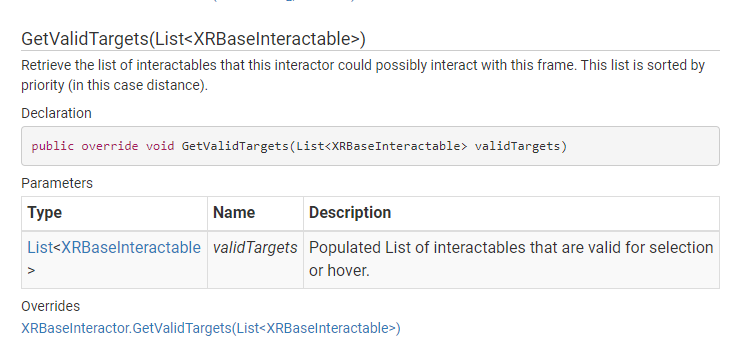
I just have no idea how to use it
Or if it's even useable
rapid maple
long spade
If anyone knows how to get the GameObject I am grabbing/interacting with please ...
Im gonna do a very not great solution for it, in our player script that controls continuous movement and controller inputs that is not interactions; im gonna make a method that sets the current held item for left/right hand and plot it into the gameobject's interaction selection events. Its not a great solution since id rather want it to be a part of the already existing interactions or using the structure that's already there but that might prove difficult if there is no easy way to get the targets
I might have a look into editing the base xr interactior script to keep the gameobject saved in a variable in the interactor script while its selected
rapid maple
long spade
I mean there's this https://i.imgur.com/3xSpcg9.png
Since i couldn't figure out how to use this, and the other get selected interactables method
long spade
Bro I've been struggling trying to implement this for so long
Without using another raytrace
For that extra bit of optimization
💀
rapid maple
I'll keep you in mind when i go over this sometime this weekend and update you if i get anywhere
long spade
Does anyone know a function to stop the selection of an interactable?
I found CanSelect(XRBaseInteractable) in XRBaseInteractor yet I don't know how I go from XRGrabInteractable to XRBaseInteractor
Or how to even use it
There's even an allowselect but it doesn't help me much considering I still don't know how to get to the XRBaseInteractor
long spade
            Transform Base = CurrentlyGrabbedObject.GetComponentInParent<XRGrabInteractable>().transform.parent;
            if (Base == null) return;
            Base.GetComponent<XRBaseInteractor>().allowSelect = false;
            Base.GetComponent<XRBaseInteractor>().allowHover = false;
I did this and it changed absolutely nothing (in an update function too)
P.S. I tried this because there's a weird issue where if you point both controllers at eachother and there's an object inbetween, and you hold both grip buttons, it kind of goes crazy
Also fun fact that will kill you emotionally, if you hold grab and grab the side of an object like a cube, On Hover from the interactable go after you grabbed the object from the controller, and if you grab them properly then it goes before you grabbed the object from the controller
Just to elaborate, my approach is to mark the interactable as grabbed once hovered using it's built in hover call, and then from the controller side I can get it, and know which controller I'm talking about because of the controller's select call.
Though obviously this has to come with a lot of timing issues...
 pseudo yacht
Been working on a little Arcade-Grapple Plattformer
https://streamable.com/b607sb
 tiny niche
long spade
Just to elaborate, my approach is to mark the interactable as grabbed once hover...
tiny niche
long spade
Just to elaborate, my approach is to mark the interactable as grabbed once hover...
the interaction system is set up so the grabbables are not supposed to know about the controllers and the controllers are not supposed to know about the grabbables. Works as long as you only do interactions supported by the interaction manager
tiny niche
pseudo yacht
Been working on a little Arcade-Grapple Plattformer
https://streamable.com/b607s...
grappling is pretty lackluster unless you include lots of overhangs in your level design
pseudo yacht
tiny niche
grappling is pretty lackluster unless you include lots of overhangs in your leve...
of course
barely added things to the level, its just my testing space for the moment
long spade
tiny niche
the interaction system is set up so the grabbables are not supposed to know abou...
I find that silly. I need to diffrienciate between a button and an interactable (for convenience, knowing when the button is "clicked" in VR without making an extra raytrace), and also of course fix the spam grab you can pull off
tiny niche
that's the thing, what you're trying to do is going to end up with a lot of circular dependencies
the interaction toolkit set out to solve that by offloading the interaction architecture to the interaction manager
long spade
tiny niche
the interaction toolkit set out to solve that by offloading the interaction arch...
What do you mean by that?
From what I can understand, I can't pull off what I wanted to pull off conveniently with the interaction system and would rather have to use an extra raytrace which is a little painful to think about considering I already have a raytrace. (Not to mention I would still be required to find the button/controllers for colour changing effects and whatnot)
tiny niche
raycast, raytrace is a rendering thing
tiny niche
basically you have to limit yourself to things that you can grab and activate, since that's what the toolkit can handle unless you modify it
would've been nice if they made it extendable, but they've made the implementation really opaque
long spade
If they're already casting a raycast to get whether the interactable is an interactable or not, and to grab it, it's very confusing as to why they don't allow us to figure out the interactable. And it's not just me stuck on this issue, another guy above requires it too.
I'm already like 80% into fixing it with circular dependencies, it's just really painful because even the timing is incorrect between the grab functions, hopefully I'll figure something out today.
long spade
long spade
If they're already casting a raycast to get whether the interactable is an inter...
I also don't think that piece of code of theirs is accessible
The one that casts the raycast
 lilac haven
Hey all,
We are a Metaverse startup looking for an intern, someone who would like to work on the the cutting edge tech and is eager to learn and explore the world of VR. Please feel free to contact me regarding the role.
 umbral pollen
anyone has problems with quest joysticks, sometimes all buttons map well ,other times they dont
 solar dune
Yo anyone got a good grapple hook tutorial?
pseudo yacht
solar dune
Yo anyone got a good grapple hook tutorial?
i used Dani's personaly, its simple and was relatively easy to port to VR
solar dune
Hm can you help me port it to vr?
pseudo yacht
iirc the only thing you needed to do different from his tutorial was attach a camera to the hand that is casting the hook and use that instead in the script
not completly sure anymore if it had other issues though
solar dune
alr
pseudo yacht
i made this with his grapple guide @solar dune https://streamable.com/shcn7v

 pseudo yacht
his grapples by default dont pull/push, need to add that yourself if you want that
attached it to the hand you want to shoot from
solar dune
so the controller?
pseudo yacht
yup
"gunTip" is where the hook will origin from, "camera" is the camera used for the raycast iirc, player is the object the joint will be placed on, so pull in GorillaPlayer
 pseudo yacht
should work i think?
solar dune
I tried, my camera turned into a dead fish but worse
and now im getting this lol

@pseudo yacht
pseudo yacht
solar dune
and now im getting this lol
right, you have to replace the input with the input system you use for the other VR stuff
 solar dune
Where does that go?
pseudo yacht
 pseudo yacht
solar dune
Where does that go?
pseudo yacht
solar dune
Where does that go?
its in the update function of his code, you replace the one there with the VR input
solar dune
alr now time to force my lazy brain to type
pseudo yacht
solar dune
I tried, my camera turned into a dead fish but worse
there should be an XR section on the camera, disable the XR rendering there
you could also try if it works with just your players camera, maybe you dont get the issue i had (the LineRenderer was acting a bit odd)
solar dune
pseudo yacht
you could also try if it works with just your players camera, maybe you dont get...
hey sorry for being lazy but could you send me the code i need to add in
 cedar cliff
hi everyone! this is my first time trying out vr game development so im just trying to basically get anything to run on my quest 2
i have it connected to my pc and all
but the play button doesn't start it in the headset (im in the link home)
and trying to 'build and run' it just results in a "gradle build failed" message
any ideas?
solar dune
can anyone send me a good vr grapple thing?
long spade
cedar cliff
but the play button doesn't start it in the headset (im in the link home)
You need SteamVR active, also I recommend to watch this tutorial: https://www.youtube.com/watch?v=yxMzAw2Sg5w
It helped me a lot

LOTS of people got the Oculus Quest 2 for Christmas. Want to learn how to make games for them all to enjoy? Yea you do!! Come learn how to set up a VR project in Unity's lastest version as well as some basics like how to use the grab interactable to pick up objects and the locomotion system to move via teleportation or continuous movement.
// 📃...
cedar cliff
ahh thanku!
see i was watching their one from 2021
but maybe a couple things are outdated?
i did follow the things the comments were saying
long spade
Could be, skim through it and check
cedar cliff
oki
long spade
I'm also pretty new to unity but it worked for me
cedar cliff
@long spade it works!! thanku so much :DD
long spade
👍
pseudo yacht
Is there a way to change the FoV of the Camera that outputs to the Desktop Window?
solar dune
I need help with a vr grapple
cedar cliff
does anyone know why when i teleport (using a basic locomotion system with teleportation provider and a teleportation area attached to my floor plane), the camera height gets set much lower (pretty much the floor level), ive provided some screenshots but if you need more details just ask :)


XR origin transform.position.y is 1.1 and the camera y offset attribute is set to 0.2
the Camera Offset game object has a transform.position.y of 0.2
and the main camera has a transform.position.y of 0.45
nvm i immediately got it working xD
if anyone has the same issue, i just increased the camera y offset attribute in my XR origin object and didn't bother with the transforms of any of the objects
 sour sail
Anyone know of a good tutorial for implementing a “grab air to move, scale, and/or rotate” mechanic? An example would be like in Gravity Sketch, Horizon Worlds Creator Mode, Tiltbrush, etc.
sour sail
sour sail
Anyone know of a good tutorial for implementing a “grab air to move, scale, and/...
I’ve searched high and low with no success. Maybe there is a specific naming convention for what I’m trying to achieve, but I’m just not aware of it?
 torn notch
Hi so I have the gtag locomotion package and when I sideload I spawn in the air
 jolly girder
how to make camera start in specific place?
 pine bison
Just move the XR Origin to where you want to start
jolly girder
pine bison
Just move the XR Origin to where you want to start
i did but when test starting, it moves somewhere else
and goes back in place after turning off
pine bison
Then try and putting it under a parent and move that instead
tiny niche
sour sail
Anyone know of a good tutorial for implementing a “grab air to move, scale, and/...
its simpler than you might think. basically you can think of it as grabbing 2 sides of a cube that scales to fit between your hands
inverse the transform on it and you've got the matrix that describes the new world space
sour sail
tiny niche
inverse the transform on it and you've got the matrix that describes the new wor...
Ummmm….. 🥺
pseudo yacht
Current progress on my little VR grappling game
https://streamable.com/ziqz0c

 smoky otter
How easy is it to build to a quest 2 using the VR Template from the hub?
 visual kettle
I imported my project apk in to Oculus Quest 2 but it plays like video and not a game. Any ideas how to fix this? 😅
 hearty cobalt
Hey, so, I'm using XR. But when I use link for my Oculus Quest 2, its not in vr mode.
 balmy comet
Have you guys seen this error before? OPENGL NATIVE PLUG-IN ERROR: GL_OUT_OF_MEMORY: Not enough memory left to execute command unity reddit
It's crashing my application. I'm on OpenGL ES 3
pine bison
visual kettle
I imported my project apk in to Oculus Quest 2 but it plays like video and not a...
Sounds like something in the XR settings is wrong
north path
balmy comet
Have you guys seen this error before? OPENGL NATIVE PLUG-IN ERROR: GL_OUT_OF_MEM...
Check memory usage in the profiler
north path
hearty cobalt
Hey, so, I'm using XR. But when I use link for my Oculus Quest 2, its not in vr ...
Could you be more specific?
How is the project set up and what does and doesnt it do
cedar cliff
hi guys :]
im very new to vr game development, im having a sudden issue where my controllers (quest 2) aren't being tracked correctly by unity? like at all, this just started happening a couple days ago and before that it was working fine
now the raycast lines where my controllers should be are going crazy all about the place and glitching in and out
its not a hardware issue as the controllers work fine everywhere else on my quest
anyone know what might be causing this?
 gilded wyvern
If I was to make a rigidbody a child of the controller, would smacking something with that object give a physics interaction?
like a punch or slap
or like, tennis stick
gilded wyvern
I wanna do a combination between blade and sorcery style weapon physics (all mass based and such) and kind of h3vr with the lack of a player's body
would a custom interactor that attaches the interactable and interactor by a joint be a good idea/
 storm ether
guys im having an issue
so im using the vr baseplate from unity
but for some reason my controllers are always on the ground in game
hearty cobalt
north path
Could you be more specific?
How is the project set up and what does and doesnt i...
so, im following this tutorial: https://www.youtube.com/watch?v=5D2bN7xL5us&ab_channel=JustinPBarnett
and whenever I spawn in, I spawn in the sky.
Ok, I honestly had WAY more fun making this tutorial than I should have. This kind of movement is so addicting. In this video I use a basic PID controller and Hooke's Law to add Gorilla Tag's physics based movement to our Unity VR project. Run, climb, and launch your way around in this new Unity XR tutorial! We're using Unity 2021.2.7f1 and the ...
gilded wyvern
i haven't watched this one but my guess is that you need to specify either a spawn point in a transform or coordinates, perhaps. or your player is already in the scene/game manager object is the spawn point, and it's too high up
solar dune
hearty cobalt
so, im following this tutorial: https://www.youtube.com/watch?v=5D2bN7xL5us&ab_c...
I could help with it
 opaque vine
Hi! Did anybody get the quest 2 controllers working with the new input system? ReadValue just returns zeros for me on everything and I'm not sure where to start debugging. Already tried a few different package combination including openxr and various binding paths and it's always the same result. To know that it's possible at all would be a good start.😬
 mystic kraken
Imported the Oculus XR Plugin Management thing into my project. How come Oculus.Platform isn't a valid namespace?
Using 2019.3.15f1
tiny niche
opaque vine
Hi! Did anybody get the quest 2 controllers working with the new input system? `...
i use the actionbased system with my q2. works the same as when using the rift
just make sure the actions are enabled
tiny niche
mystic kraken
Imported the Oculus XR Plugin Management thing into my project. How come Oculus....
ocusus has no plugin management stuff for unity
but you're probably referencing their openxr runtime
the namespace you're talking about is in their sdk though
tiny niche
sure, but do you even want that sdk? its not a required thing usually
mystic kraken
The Oculus.Platform namespace is apart of what my friend sent me. I guess I gotta have it lol
It shouldn't be too bad
Is there a download link you can send? Sorry @tiny niche
tiny niche
its in the asset store
mystic kraken
Ah. Is it Oculus Integration?
tiny niche
yes, that's the sdk
mystic kraken
Alright. Thank you!
 oblique bough
Hi, I was wondering if anybody knew how to make it so when you move your controllers in a certain way it would cause an action
 hidden ember
i have made a script for vr and whenever i put on my vr. the hands just stay at 0, 0 and continuously try to move there and i dont know if it has anything to do with the code or with unity
tiny niche
hidden ember
i have made a script for vr and whenever i put on my vr. the hands just stay at ...
pro tip: its always your code that's broken ...even if it shouldn't be
hidden ember
tiny niche
pro tip: its always your code that's broken ...even if it shouldn't be
well it wasnt
but your right
it is the code that is usually broken but
my code wasnt broken
i just forgot to add something in unity
LOL
tiny niche
things you do in unity is essentially your code as well
hidden ember
yeah true
my problem was i didnt put the 'XRI default input actions' file in the 'input action manager' tab
hearty cobalt
solar dune
I could help with it
alright tell me when you can
solar dune
hey! Im working on a VR game about exploring caves, and I need a script so that my player can swing from a rope. can anyone assist?
buoyant jolt
Just make one, keeping in mind forced motion is 🤢
 mossy matrix
hi guys, ever since I've switched to URP my left eye sees some scene view icons like the directional light sun icon also in game view
did I accidentally switch on a gizmo somewhere perhaps?
mossy matrix
I must have toggled all gizmos on, I just disabled it again and it's back to normal
 rotund wyvern
when i export apk to go on quest 2 it runs as a non-apk app any help?
 hushed marsh
Is there anyone around that has experience with publishing a game to the oculus store? We are in the process of submitting but are having a hard time finding low hanging fruits in profiler. We do the usual build to device and connect to profile so there is no UI overhead. But can't find anything other than semaphore.waitforSignal


 gray radish
are there issues with the URP with the quest 2? I'm trying to figure out how anyone is hitting 120hz or similar with Unity
is using multiview instead of multipass essential for hitting those framerates? I've kind of hit a wall with identifying bottlenecks in my scene
final basin
I'm using URP but only recently ported to Quest2, so havent hit 72 yet. Though i don't intend to go beyond 90 if at all. I'd say multiview is essential, but you'll have to make sure all your shaders support it. Otherwise objects will only appear in one eye
gray radish
Most of our props use a shadergraph lit shader and I haven't been able to get that to not show up as bright magenta in-headset with multiview enabled
gilded wyvern
gray radish
Most of our props use a shadergraph lit shader and I haven't been able to get th...
You have to make sure that you have the Universal target set in your shadergraph
north path
 tepid bough
How do i play my project on quest 2 wirelessly?
tepid bough
How do i play my project on quest 2 wirelessly?
Air Link
north path
gray radish
is using multiview instead of multipass essential for hitting those framerates? ...
https://youtu.be/i4fPErsEJD4
This is a decenet start with my CPU optimization guide. Other than that look at the profiler

Unity has some great features to improve performance for VR games.
This video will go through all the easy performance improvements. Anyone can follow along, even if you cannot code or don't know the technical details (explanation below).
I cover both Desktop (Oculus Rift, HTC Vive, Valve Index, Windows Mixed Reality) and Android (Oculus Quest)...
north path
tepid bough
if im already connected
Make sure oculus or openxr is enabled under PC in XR management and just press play
north path
tepid bough
does it work with virtual desktop?
Probably, but then you might need to run it via steamvr
 north path
@tepid boughDid you enable OpenXR on desktop
As I said, if you use virtual desktop it wont run using oculus
if you only use oculus package you should use air link or link
 serene summit
I need some help with Unity about VRCSDK cuz I get alot of errors
 urban cloak
Nobody can help if they don't know what the issues are. #854851968446365696 if you need a primer on how to ask a question.
mystic kraken
So I made a PID script for my hand and it works fine when I move the left controller manually in the editor but when I build it for my headset it follows my real hand fine but after like 5 seconds they just disappear. What's that about?
This is the script
Hold on gimme a sec lmao
 wraith shale
gray radish
are there issues with the URP with the quest 2? I'm trying to figure out how any...
wraith shale
gray radish
are there issues with the URP with the quest 2? I'm trying to figure out how any...
it's going to be difficult for sure... basically what I'd suggest to try would be:
- use 2020.3 LTS (2021.2+ URP's are slower)
- don't use any postprocessing at all
- reduce resolution
I can only run URP at 120Hz with really simple scenes and every extra option turned off
(on Q2)
in addition, if your app design allows it, you could try oculus application spacewarp for projecting from 60->120
all in all... 120Hz on Q2 is hard to pull off, many can't even do 90Hz
gray radish
I had read on the unity forums the quest's current software version auto adjusts the level of fixed foveated rendering. Is this true or do I still need to enable this in my application?
unless there's another way I can reduce the resolution of my game that I'm unaware of
hidden ember
I am having alot of problems trying to get a body for my vr game im making a game with gorilla tag movement and want to make a character for the game i got a character and... i have no idea i followed a tutorial but they were using OVR and i was using XR but i still tried anyway and i tried remove the rectangle hands that i was originally using and move the PID script and hookeslaw scriptto the models hands but that still didnt work... i feel like there is an easy fix just my small brain cant think of it.. lol
 sage nebula
how would you implement crossplay between VR and non-vr
 grand bear
 rotund stream
you starting a museum?
rotund stream
grand bear
you starting a museum?
Nah - just platforms I've shipped stuff on 🙂
looks nice in the front of the shop
grand bear
You've got quite the collection! Need the powerglove and a couple others
rotund stream
Heh, I had to get choosy. would need another 30 shelves 😛
grand bear
haha well done
rotund stream
been doin AR/XR long, long before oculus existed heh
 austere nebula
Howdy, how would i go about getting the left controllers "Primary2dAxis" and using it for the Forward and sideways input for this vector 3? im quite new to the different input system and looking it up doesnt give me any solid examples to getting the Primary2dAxis vector 2 values

this is unity XR for version 2020.3.30f1
 severe saffron
wraith shale
all in all... 120Hz on Q2 is hard to pull off, many can't even do 90Hz
severe saffron
wraith shale
all in all... 120Hz on Q2 is hard to pull off, many can't even do 90Hz
this makes me sad. Im using BiRP and I can hit 120hz with terrain + LOD'd synty stuff.
When I tried URP, dropping everything including AA, I still couldnt hit 80hz 😱
Seems like there's nothing fast and performant about urp 😛
hearty cobalt
why do I keep flinging out of the map when I put on my vr headset.
It's perfectly fine until I put my vr headset on, then I go flying.
 serene plank
Yo can you guys makr something for school my teacher asked me if i cab find one but there is no
 frozen arrow
I'm facing this issue when building my Pico application: Manifest merger failed : Attribute application@allowBackup value=(false) from [:unityLibrary] AndroidManifest.xml:44:9-36
is also present at [:Pico_PaymentSDK_Android_V1.0.34:] AndroidManifest.xml:18:9-35 value=(true). Can someone please help me resolve it? There is no manifest file in Assets/Plugins/Android folder but several in Temp folder
aren1709 — Today at 3:04 PM
 finite hawk
Hello everyone, I play the game VRchat, Recroom and I thought how did they make it possible to load so many rooms within the game for download? Do they use addressables/asset bundles?
gilded wyvern
hearty cobalt
why do I keep flinging out of the map when I put on my vr headset.
if you have colliders on your body and hands, make sure that they're either on a layer that doesn't have intercollision, or that the hands are triggers
wraith shale
severe saffron
this makes me sad. Im using BiRP and I can hit 120hz with terrain + LOD'd synty ...
yeah I can imagine built-in could work better there, considering Quest is really bare bones target where you don't want any kind of overhead since you disable everything anyway
severe saffron
Yeah honestly dropping it to vertex lit gives me the best performance but obviously this looks poop.... particularly on terrain 😛
I remove specular and reflections on most materials, unless its something like a glass bottle or something that really needs it
hidden ember
how do i get a model for my game and put the scripts on in using XR
 uncut hedge
gilded wyvern
if you have colliders on your body and hands, make sure that they're either on a...
uncut hedge
gilded wyvern
if you have colliders on your body and hands, make sure that they're either on a...
Could also make the inter-colliding parts use a non-self-colliding layer...
gilded wyvern
That's what i meant, yeah
uncut hedge
gilded wyvern
That's what i meant, yeah
ah
Is it possible to turn off the Microsoft Mixed Reality Portal's VR world transition. Kind of slows down the testing iteration...
gilded wyvern
PID controller?
mystic kraken
gilded wyvern
PID controller?
Yeah
gilded wyvern
wassat mean
 inner fossil
is it true Unity no longer support VR for android ?
https://github.com/googlevr/cardboard-xr-plugin

GitHub
Google Cardboard XR Plugin for Unity. Contribute to googlevr/cardboard-xr-plugin development by creating an account on GitHub.
severe saffron
what?
uncut hedge
Does Microsoft have a VR tech support?
austere nebula
Using unity XRs Action based controller component how can i get the button Action? for example oculus' A B X and Y buttons?

to me there seems to only be the trigger and the grip, is there something im missing?
gilded wyvern
austere nebula
Using unity XRs Action based controller component how can i get the button Actio...
You need to create an input action map and reference it
inner fossil
severe saffron
what?
https://media.discordapp.net/attachments/497874524549808128/959702367442448394/unknown.png
yeah sorry, is this my smartphone or I need to update an SDK
 analog flower
when i try to create a game object in the XR section, the only option that appears is "convert main camera to XR rig"
hearty cobalt
why am I being flung out of the map when I put on my headset
hidden ember
how do i make it so that other people can see my character but for them they only see spheres as hands e.g . trouts game
gilded wyvern
analog flower
when i try to create a game object in the XR section, the only option that appea...
You need to install the XR interaction toolkit if you want all the stuff that comes with that
smoky otter
Any tutorials recommended out there for an oculus quest 2 character controller?
just looking for something to show me how they use the game stick. The premade VR input actions are pretty large
gilded wyvern
I can always recommend Valem on youtube. Look at his xr interaction toolkit playlist, that covers everything from moving to two hand grabbing, climbing and more
buoyant jolt
severe saffron
Seems like there's nothing fast and performant about urp 😛
I could have told you that :D URP is a make work project
buoyant jolt
serene plank
Yo can you guys makr something for school my teacher asked me if i cab find one ...
Yes but why would we?
serene plank
Idk bc it can be cool
buoyant jolt
hidden ember
how do i get a model for my game and put the scripts on in using XR
Add the model to your Assets folder. Drag it into your scene. Add scripts onto it in the scene. You should really take an intro course though tbh.
buoyant jolt
inner fossil
is it true Unity no longer support VR for android ?
https://github.com/googlevr/...
Unity never supported it. They (as a company) require other companies to fund their support to a tune of 1m/yr for support.
Google however made the cardboard plugin for Unity, and has since opensourced it and ceased development of it.
buoyant jolt
uncut hedge
Does Microsoft have a VR tech support?
This isn't a Microsoft discord. It's Unity.
 torn basin
why can my character phase through walls>
buoyant jolt
serene plank
Idk bc it can be cool
I can say with full confidence I like my own ideas and XR projects more than the one in your head. So again, why would a developer want to build your dream idea instead of our own?
buoyant jolt
torn basin
why can my character phase through walls>
What did you create that you think would stop them?
 serene plank
buoyant jolt
I can say with full confidence I like my own ideas and XR projects more than the...
serene plank
buoyant jolt
I can say with full confidence I like my own ideas and XR projects more than the...
Bc my dream is the future of kids getting to see in vr how to learn it with new experiences
buoyant jolt
torn basin
this is my settings on it'
It doesn't work that way, you may want to look up a tutorial on collision fading for VR
serene plank
How can i make a own vr game or vr thing
torn basin
serene plank
How can i make a own vr game or vr thing
use valems tutprials
serene plank
Okey
torn basin
buoyant jolt
It doesn't work that way, you may want to look up a tutorial on collision fading...
i cant find any tutorials
buoyant jolt
serene plank
Bc my dream is the future of kids getting to see in vr how to learn it with new ...
I'd recommend learning some tutorials and build it on your own :)
serene plank
Okey you're ideas are idd better
torn basin
im not asking for a tutorial from you @buoyant jolt
 worldly adder
im trying to make a vr game
but when i import an action based xr origin
my pointers arent being tracked
i followed the same steps i did for a different game
and i have zero idea of what to do
or what to post
mossy matrix
worldly adder
my pointers arent being tracked
under project settings > XR, is the correct platform selected?
try switching to oculus or openXR
buoyant jolt
 flat gyro
anyone willing to help? 😄
flat gyro
anyone willing to help? 😄
It depends on what the issue is. But you'll get a lot more responses if you post the issue.
 torpid aspen
anybody know how to do this but with oculus integration? (im referring to the sprint mechanic that the purple player does in this 2D game) https://media.discordapp.net/attachments/497874004401586176/955620438170566656/ezgif.com-gif-maker_2.gif
 buoyant jolt
Please don't throw players across the room in VR unless you want them to get sick
north path
torpid aspen
anybody know how to do this but with oculus integration? (im referring to the sp...
What Iloyd said, maybe make it some kind of ranged attack or a teleport attack instead of a jump
 lofty tangle
buoyant jolt
Please don't throw players across the room in VR unless you want them to get sic...
lofty tangle
buoyant jolt
Please don't throw players across the room in VR unless you want them to get sic...
Laughs in echo arena.
north path
lofty tangle
Laughs in echo arena.
That is smooth acceleration tho, and caused by pushing or jetpacking yourself
lofty tangle
There is the launchy thing at the beginning that moves fast.
Honestly a dash isn’t too much different than jumping. Just in another direction than up.
And if Someone can’t handle jumping then they’ve got weak constitution.
worldly adder
mossy matrix
under project settings > XR, is the correct platform selected?
had my input manager set improperly
 median parcel
Which Unity Asset works the best and is better for making a full game on the oculus quest 2 with 0 experience, autohands, Vrif, or hurricane, I'm only planning to get one that I can use forever and help get my ideas out there with.... also I'm willing to spend hours and hours looking at tutorials, so if there's a lot of documentation for one than that's good too! :)) please help me decide...
 iron bridge
when i start my project the xr origin flies away anyone know why
worldly adder
my game is using openxr and theres a random haptic thing that happens when i press the trigger or grip button. i have no haptic events coded in and i cannot find an option to disable it
severe saffron
median parcel
Which Unity Asset works the best and is better for making a full game on the ocu...
personally I love hurricane+hexa but autohand's new stuff looks pretty appealing and its cheaper
vrif is pretty meh by comparison
 north path
true tapir
TMP is very blurry when a few feet away from the text
north path
true tapir
TMP is very blurry when a few feet away from the text
Add MSAA
 remote plume
Hey there. I'm trying to update our game Tentacular to Unity 2021.2 (from 2019.2) and the experience is just utterly depressing. Would anyone tell me how to get SteamVR input working with OpenXR? I can't believe in what state VR is in 2022. Please help.
north path
remote plume
Hey there. I'm trying to update our game Tentacular to Unity 2021.2 (from 2019.2...
Are you also switching from legacy XR to XR Management?
Because otherwise you can still use the steamvr xr plugin in 2021
If you make a build using OpenXR, it will automatically run on steamvr and oculus
remote plume
I'm pretty lost when it comes to all the different packages tbh
remote plume
north path
Are you also switching from legacy XR to XR Management?
Because otherwise you c...
can I DM you maybe?
north path
Then follow a guide on how it works in 2021
This is a decent one: https://youtu.be/1VC3ZOxn2Lo
How to start a Virtual Reality Game in 2021 that actually works! A beginner's guide to Unity's XR Plugin and how to start that VR game in 2021.
Hey guys! So I know many of you are home from work, have lost your jobs, are now doing school online, and are bored with how much time you have at home. I can't be the only one who has started a new hob...
OpenXR: Used for all desktop, unless you need very specific oculus or steamvr features. This will also future proof you
SteamVR: Steam only, if no per finger animation is needed use OpenXR
Oculus: Just use OpenXR for desktop, for Quest I do recommend the Oculux XR plugin
remote plume
if I used OpenXR people won't be able to configure their own controllers, like they can with SteamVR Input and I need to make new builds for new devices
north path
Is that the case?
You still run can run HMDs using SteamVR runtime, you just develop using OpenXR
OpenXR is cross platform, so new devices will be either really easy or automatically supported
All new devices should basically support OpenXR
remote plume
Thanks! I'll try to get deeper into the system.
 candid zodiac
Hey, I'm using the OpenXR plugin and want to parent my righthand under a different gameobject, but it's transform data seems 'frozen'.
If I go into the editor and try to change it's values, it immediately updates to the old value again, even when tracking is turned off.
 candid zodiac

Stack Overflow
I want to parent the LeftHand Controller object under another transform to orient it in a specific way as an attach point.
However, the values from the LeftHand Controller's transform seem to be fr...
 opaque stag
Hello, I am trying to do a house-tour in VR, I can walk around in the house and such but the problem is that there is no collision, so I cant walk up the stairs to the second floor. I have no idea how to fix it and I am just super stressed about it so could someone help me?
gilded wyvern
Make sure you have a collider for the player, and colliders on everything in the house
I can always recommend Valem for VR tutorials, even if you only need the movement; he has a tutorial on there
@opaque stag

▶ Get access to the source code: https://www.patreon.com/ValemVR
▶ Join the Discord channel: https://discord.gg/5uhRegs
Welcome back to the part 4 of this tutorial serie that will teach you the basics of VR development in Unity. In this episode we will learn how to setup continuous movement!
#vr #vrdev #madewithunity
This video here
opaque stag
Yeah, That was actually the video that I followed when I created this but I cant for the life of me find what I missed, but I will go through it again
 cosmic needle
hey, does anyone know why im getting random frame drops in my game? i go from about 100 fps to like 10
Its so weird, the game runs fine for like 5 min. but then i get these horrible frame drops, weirder is, that if i restart the game then, i still get massive frame drops, only thing that fixes it is restarting my pc and Vr headset
Why in the world would this happen?
Im pretty shure none of my scripts cause this, since i have disabled all of them for testing, so i really dont understand why this is happening
The frame drops are more like lag spikes, runs fine for 3 sec. then at 3fps for 10, repeating
im loosing my mind
are there some compatibility issues with URP or smth?
opaque stag
Could a capsule Collider for the player (VR Rig) and Mesh Collider for the house work?
@gilded wyvern
gilded wyvern
Yeah, that's what Valem uses
opaque stag
Must have somehow missed that, I will try it now
opaque stag
I have a mesh collider for the parts were I need to have them but I still dont get it to work so, what do i need to have in it? do I need to have this "Convex" and "Is Trigger" options? and what about "cooking" and "Material". @gilded wyvern
 vagrant yarrow
Hey guys, do you know if I can get VR stereo in URP using skybox-panoramic material? I've tried 3D layout option (my image is over under) but with oculus link I got no stereo..
gilded wyvern
set it to Convex, leave IsTrigger off
gilded wyvern
opaque stag
I have a mesh collider for the parts were I need to have them but I still dont g...
and in the dropdown for cooking and stuff, leave that to "everything"
Convex mesh colliders are more performant (iirc, might be wrong) that non convex ones
 daring temple
i have an empty game object with the Tracked Pose Driver (New Input System)
i am trying to get the transform position (get) but it always returns zero
if i click on it while running the editor it shows its ever changing coords in the position tab of the inspector
i have tried making it an asset to no avail
please help me
opaque stag
@gilded wyvern Thanks for the help so far. It is sort of working now, I cant get up the stairs but I cant walk through them anymore and I can walk through the walls to get outside but I cant get back in after, Which is sort of reverse on how I would prefer the walls to work
And the gravity is messed up but that might be because I have the wrong layer chosen? I had one called "house" but I have set it to Everything now, which might be better. Followed Valems guide for it. Sorry for needing help with so much haha
 near juniper
hi, i have a question, which hardware device u use for vr dev?
gilded wyvern
I myself use the Oculus Quest 2 connected via cable to the computer
tiny niche
near juniper
hi, i have a question, which hardware device u use for vr dev?
quest2, using air link
near juniper
okay nice and for AR? Tablet? Smartphone? Ar glases / which?
tiny niche
near juniper
okay nice and for AR? Tablet? Smartphone? Ar glases / which?
you pretty much have to target phones when doing AR
unless its an industrial application and you use hololens
buoyant jolt
near juniper
hi, i have a question, which hardware device u use for vr dev?
I have on my desk right now, Quest 1, Quest 2 Pico 2 Eye, Pico 3 Eye, Rift, Rift S, Vive, Samsung Odyssey. Right now only the Quest 2, Pico 3, Rift S and Vive are connected to my PC, the rest are on the desk but not connected at the moment.
buoyant jolt
near juniper
okay nice and for AR? Tablet? Smartphone? Ar glases / which?
I shave 30+ AR enabled devices for testing, probably 10 or so on my desk including third eye and hl2. We don't use ARFoundation, so we test a lot more devices as we cover high and low end phones and tablets.
I also have 4 or 5 various depth sensors on my desk, real sense, Kinect 2, leap motion etc. But those are for our more experimental stuff
Finally, I recognize I need to clean my desk
true tapir
remote plume
if I used OpenXR people won't be able to configure their own controllers, like t...
but you are limited to only Steam LOL. And yes you can still configure with OPEN XR
you just use the new input system
😉
true tapir
opaque stag
Hello, I am trying to do a house-tour in VR, I can walk around in the house and ...
it's because you are using a rigidbody?
if you use a controller collider you can change the height to go up things manually
remote plume
true tapir
you just use the new input system
Thing is we already have the game fully working for Oculus (PCVR & QUEST) and SteamVR. For Quest I will need to use Oculus SDK anyway as far as I know so I have to wrap controls in any case
true tapir
or with a rigidbody code it to go up stepper slopes
wdym steam vr will only work with steam vr
you cannot port to anything else
like the oculus store, etc.
that is why Open Xr is the go to for multiplatform if you are not making everything from scratch
it's really not that bad to use
here is an example of a little project I am working on using it

a couple weeks old since I recorded this so I have a lot more features but o well XD
hidden ember
Help me, i have a PID and Hookes law code to make the gorilla tag physics but i want to make a character with that. BUT
i have followed tutorials on how to make a character and i just expexted it to work but i just flew straight up into the air and/or the hands were not tracking their position properly
true tapir
well join Justin's Discord since you are following his tutorial. You should be learning not strait copy and pasting what you watch.
 mild igloo
Has anyone dabbled in using your finger to interact with UI? Not a long raycast but direct finger to button interaction?
silver cove
Yes
 kind sundial
mild igloo
Has anyone dabbled in using your finger to interact with UI? Not a long raycast ...
kind sundial
mild igloo
Has anyone dabbled in using your finger to interact with UI? Not a long raycast ...
yes, it can be done quite easily and works just as well
 acoustic shell
can someone help me
 sacred venture
Does any one have any idea on how I can address the problem.
My character dips below my environment she has a collider, so does the ground.
 north path
sacred venture
My character dips below my environment she has a collider, so does the ground.
north path
sacred venture
My character dips below my environment she has a collider, so does the ground.
Put the rigidbody of the character on continues
uncut hedge
buoyant jolt
Finally, I recognize I need to clean my desk
LoL
mild igloo
kind sundial
yes, it can be done quite easily and works just as well
Can you point me in the direction of a resource to study or is something explaining it ?
 fickle spire
is it possible to offset your VR hand position from the position of the controllers?
 atomic quarry
I want to have a player collider for my unity VR interaction toolkit game. How would I get the right dimensions for the boxcollider?
sacred venture
north path
Put the rigidbody of the character on continues
Thanks for the response.
kind sundial
Check out VR with Andrew and Valem on youtube, no use in someone trying to explain you the steps
pine bison
atomic quarry
I want to have a player collider for my unity VR interaction toolkit game. How w...
The character controller does a lot of what you might want. Check this video https://www.youtube.com/watch?v=_Zrde_WTaiI
north path
fickle spire
is it possible to offset your VR hand position from the position of the controll...
Yep, but you may need to write your own XR Pose drigers for the hands, or find the script responsible for changing the positions and ajusting it
 real pagoda
Hello Everyone,
Can anyone help me with, I want to hammer a Nail inside a wooden block. Can anyone help me with how can I do that
 gray estuary
Hi guys, I've a problem with the last version of OpenXR & XR Toolkit.
My Valve Index controllers are not detected by unity, I don't know what could be possibly missing.
I've checked OpenXR in the manager, also selected Valve controllers
I have the XR Origin, my headset move correctly, but bot of my controllers are stuck at the position zero. Neither they appear in the XR Debugger
north path
real pagoda
Hello Everyone,
Can anyone help me with, I want to hammer a Nail inside a wooden...
Read the OnCollision. In here get the velocity of the hammer and decide how much that will move the hamer down.
Will be hard to do this physically accurate I think. Maybe with joints but doubt it
fickle spire
how do you make realistic hand movements? like when u close ur hand using the controller, the hand actually closes around an object instead of clipping into the object and forming a fist?
pine bison
That's caleld hand posing. There are a few tutorials out there. And an asset called auto hand
fickle spire
pine bison
That's caleld hand posing. There are a few tutorials out there. And an asset cal...
but to detect the collision of the hand, should i use a rigidbody or collider?
 rich slate
fickle spire
but to detect the collision of the hand, should i use a rigidbody or collider?
rich slate
fickle spire
but to detect the collision of the hand, should i use a rigidbody or collider?
rigid body
atomic quarry
pine bison
The character controller does a lot of what you might want. Check this video <ht...
I have a character controller but collisions don't register
I think this is because i'm using the OnCharacterColliderHit and it only activates when the move method is being used, but I want it to be controlled by VR movements and not the move() method
storm ether
Im starting to develop on my oculus quest 2 using oculus link (my computer is supported) and the controllers arent being detected in the default virtual reality scene, havent changed the default settings at all
 storm ether
what version of unity should I use to develop vr games, and what's a good tutorial to learn how, ive been using 2021.2 and the tutorials and documentation dont tell me nearly enough
buoyant jolt
gray estuary
I have the XR Origin, my headset move correctly, but bot of my controllers are s...
Open the OpenXR sample scene, see if that one works (it did for me). Then I double checked SteamVR was added to the input list for OpenXR. If that is still an issue at that point, close and reopen .
buoyant jolt
storm ether
what version of unity should I use to develop vr games, and what's a good tutori...
Unity documentation, and unity learn, has deteriorated quite significantly. Their frameworks (all of them) are a bit of a partially documented mess and much of what they create lately is deprecated a few versions later. It isn't you, their quality has tanked since 5.6x.
For VRTK/SteamVR/Oculus direct I recommend 2019.4.
For OpenXR/Pico/PSVR I recommend 2020.3.
I haven't seen any tutorials off hand that I would recommend
fickle spire
does somebody know of a free vr hand model with colliders for each segment of each finger? ive looked around online and the only hand models i have found only have 1 collider per hand
final basin
The hand models in SteamVR Unity Plugin have colliders at most of the joints of the fingers. So spheres at the knuckles rather than capsules going from knuckle to knuckle
 real escarp
hi all - ive been working on a wee project, football related, the objects are all (box colider/rigidbody/OVR Grabbable - when I pick up and object and it virtually hits the stomach of the user, it shoots them right across the game - I have no idea how to stop it from doing that - any help is appreciated, thanks
 dapper sandal
Anyone have a direction on how to render a shader independently to each camera? For a simple example I'd just like to render like two independent colors, one to the left eye camera and one to the right. Ideally, I'd like to be able to use the URP and apply a shaderGraph based shader to each camera independently (if that makes a difference). Any direction on what I should be looking into is greatly appreciated.
fickle spire
final basin
The hand models in SteamVR Unity Plugin have colliders at most of the joints of ...
This would be great, by any chance, couldyou link me to the download for this model?
fickle spire
I will be using these hands to develop a pair of my own vr haptic gloves with force feedback. Ive figured out how finger tracking will work, and i plan on detecting collisions between a rigidbody (vr hand) and colliders (objects in the environment). This will activate the force feedback mechanism. However, i still am not sure as how to determine when to be able to pick up an object, as pre programmed hand poses will not work with haptic gloves
For example, normally irl u cannot pick up a basketball with 1 hand, unless: your hand is enormous and your grip strength is huge, you are lifting up the bbal from underneath, or you are using 2 hands
hidden ember
im getting this error when i try get the build for my game
 atomic quarry
I have a character controller but collisions don't register
I think this is beca...
atomic quarry
atomic quarry
I have a character controller but collisions don't register
I think this is beca...
@pine bison do you know how to do this?
atomic quarry
pine bison
The character controller does a lot of what you might want. Check this video <ht...
So my current fix is to add a gameobject with a capsule colldier and a position restraint on the camera. Is this a fine option?
 magic hornet
Im getting this error


 vivid void
So I'm making a vr game, and i've just set up the vr settings but the hands are moving all around the place and not synced with the actual controllers. If anyone can help me, that would be great! I'm new to vr dev
pine bison
Follow a beginner setup tutorial @vivid void. VR with Andrew, Valem and Justin P Barnett are good channels
buoyant jolt
real escarp
hi all - ive been working on a wee project, football related, the objects are al...
I'm not sure why you have a rigidbody and physics enables collider on the stomach, that sounds wrong to me in VR or it'll cause forced motion.
I'd also recommend light baking that scene so it looks nice :)
But what you built appears to be doing what it should do. The plastic thingy has a collider and is attached to the hand, so touching a base collider if you have one would cause it to move. Because the hand is attached to the base collider the cycle continues
solar dune
anyone know how to make a camersa
 buoyant jolt
solar dune
anyone know how to make a camersa
buoyant jolt
solar dune
anyone know how to make a camersa
What is a camersa?
buoyant jolt
 trail veldt
anyone wanna make a vr game with me
trail veldt
anyone wanna make a vr game with me
No, I recommend joining a gamejam
buoyant jolt
 manic coral
Click on the errors to get more information
manic coral
buoyant jolt
Click on the errors to get more information
nothing comes up when i hover over the errors

it says this tho
 junior cove
i keep getting this error
UnityEditor.BuildPlayerWindow+BuildMethodException: 4 errors
at UnityEditor.BuildPlayerWindow+DefaultBuildMethods.BuildPlayer (UnityEditor.BuildPlayerOptions options) [0x002ca] in <68089899e4c84456bfc1de3436accf4a>:0
at UnityEditor.BuildPlayerWindow.CallBuildMethods (System.Boolean askForBuildLocation, UnityEditor.BuildOptions defaultBuildOptions) [0x00080] in <68089899e4c84456bfc1de3436accf4a>:0
UnityEngine.GUIUtility:ProcessEvent (int,intptr,bool&)
how do i fix it
junior cove
i really need help with this
 storm vigil
junior cove
UnityEditor.BuildPlayerWindow+BuildMethodException: 4 errors
at UnityEditor.Bu...
storm vigil
junior cove
UnityEditor.BuildPlayerWindow+BuildMethodException: 4 errors
at UnityEditor.Bu...
that says only that there are other errors that prevent you from building
junior cove
Oh ok
buoyant jolt
manic coral
nothing comes up when i hover over the errors
I've seen that error before, if I remember correctly it's something interfered with the https: and the downloads not valid. You may need to manually download and install the editor
 jagged anvil
Hi guys, I just started making a game for the Quest 2 using the XR Interaction Toolkit, but after setting up the rig based on the package's manual, I'm not able to move around using the controller even though the camera movement it's fine.
Does anyone know if there's something else that I need to set up specifically for the package to work with the Quest 2?
manic coral
buoyant jolt
I've seen that error before, if I remember correctly it's something interfered w...
how do i do that
 lyric jasper
jagged anvil
Hi guys, I just started making a game for the Quest 2 using the XR Interaction T...
lyric jasper
jagged anvil
Hi guys, I just started making a game for the Quest 2 using the XR Interaction T...
I'm having the same issue and I'm getting this error
NullReferenceException: Object reference not set to an instance of an object
UnityEngine.XR.Interaction.Toolkit.ContinuousMoveProviderBase.Update () (at Library/PackageCache/com.unity.xr.interaction.toolkit@2.0.1/Runtime/Locomotion/Continuous/ContinuousMoveProviderBase.cs:109)
iron bridge
Anyone know why my vr game does that?
It does it with the apk but not with unity editor
jagged anvil
lyric jasper
I'm having the same issue and I'm getting this error
NullReferenceException: O...
I fixed my issue after adding the Locomotion System object since I removed it by mistake while messing with the scene assets.
I went over this guy's video just to make sure I got everything set up fine: https://youtu.be/yxMzAw2Sg5w
LOTS of people got the Oculus Quest 2 for Christmas. Want to learn how to make games for them all to enjoy? Yea you do!! Come learn how to set up a VR project in Unity's lastest version as well as some basics like how to use the grab interactable to pick up objects and the locomotion system to move via teleportation or continuous movement.
// 📃...
junior cove
how do i make something invisible
urban cloak
Turn off its renderer
junior cove
not working still visable
its a arm for a human model btw
if that changes anything
urban cloak
If you disable the renderer of a mesh, it can't show.
inner fossil

With this script you can quickly make simple presentation from slides of any subject. Infity swipe system allows moving slides in any direction(left or right) without restrictions.
https://www.assetstore.unity3d.com/en/#!/content/42992
About version 1.0 - https://youtu.be/RRoLQD6jWGo
things like this
hi guys any chance to add Swipe slideshow for our VR ?
 bright jacinth
inner fossil
hi guys any chance to add Swipe slideshow for our VR ?
bright jacinth
inner fossil
hi guys any chance to add Swipe slideshow for our VR ?
you could maybe make it follow the hand's x or z coord then just check if it goes past 50% of the image width?
junior cove
urban cloak
If you disable the renderer of a mesh, it can't show.
Well it’s still there but it’s fine
The game is not out yet so I have time to work on it
 frank lion
Hi, is there a way to get the endpoint position of the laser pointer in the XR interaction toolkit?
I mean the position that the reticle goes to when the target is valid.
I don't want to make my own script casting ray each frame when that script is clearly using it already.
inner fossil
bright jacinth
you could maybe make it follow the hand's x or z coord then just check if it goe...
does it assume that I load, let say 5 char on the character selection menu
but only displaying one of them on game world ?
bright jacinth
I would assume you could just do the same thing as the video just using the hand's position instead of a mouse one, right?
inner fossil
why I'm talking about character selection tho 🤦
inner fossil
bright jacinth
you could maybe make it follow the hand's x or z coord then just check if it goe...
it's summer sale happening on the marketplace
bright jacinth
???
inner fossil
bright jacinth
???
which asset you think compatible with VR ?
bright jacinth
😖 what kind of asset
inner fossil
bright jacinth
😖 what kind of asset
slideshow mate ...
inner fossil
bright jacinth
I thought you were gonna code it yourself 😳
I'm about to make the object animation inside the game, so I'm gonna go buy the asset instead
bright jacinth
ok
buoyant jolt
inner fossil
hi guys any chance to add Swipe slideshow for our VR ?
Sure, it’s not too difficult 🙂 I’d probably recommend making them grab the image to physically move it though, as people tend to respond best to real world physics in VR
I don’t buy assets for code though, most are written pretty crappily, and by the time you go to use it they will have deprecated it and started charging for a newer version.
And buying it for art and assets is risky as about 1 in 60 asset packs get flagged for copyright violations over their lifetime - silently and without informing you. So you are likely to ship something with stolen EA assets and get your game magically held in legal hostage down the road
inner fossil
this is not for commercial
buoyant jolt
frank lion
Hi, is there a way to get the endpoint position of the laser pointer in the XR i...
It’s just a line renderer, you definitely can. The linerenderer and pointer already store that end point data
inner fossil
for educational purpose only
buoyant jolt
But there are better demos in the XR examples for indirect interaction using ray casts iirc
buoyant jolt
inner fossil
this is not for commercial
No worries - I suspect it’s faster to just write the code though. It should only take 5/10mins if you’ve done VR dev before. There are lots of interaction demos to use with the different frameworks if you want a reference though
inner fossil
it would be great I really appreaciate it Lloyd.
@bright jacinth gave me one
I'm using it yet
opaque stag
So I am currently having an issue were the player will fall through the ground if I use any other controller-prefab except for the cube that I created early on as a placeholder, No idea why, please help
jagged anvil
guys, what's your way of handling collisions for VR games? I've tried adding a capsule collider and a rigidbody to my player and I can collide with walls just fine, but if I add a collider to an object that I can grab, once grabbed, Unity will try to separate the player's collider and the object's and removing the rigidbody from the player solves it, although the rest of the collisions won't work
tiny niche
jagged anvil
guys, what's your way of handling collisions for VR games? I've tried adding a c...
you should ignore collisions between the player than things you grabbed
flat gyro
Does anyone know how I can test my game without airlink or cable?
Because it doesn't work for me
tiny niche
flat gyro
Because it doesn't work for me
sounds like your quest is broken. but you can always do a regular build
flat gyro
well
I have been trying to use airlink
but it just infinity loads
and I can't really make a game when I can't test it
tiny niche
well you can test it on the device, but you dont want to do tht for everything
cable not working is strange though
wraith shale
there's also virtual desktop but that can be pain in Unity editor... and if you can't get airlink to work, chances are VD wouldn't do anything for you anyway
tiny niche
@flat gyro i assume you checked and made sure your pc meets the min specs?
wraith shale
oh
@flat gyro you are using win11 aren't you?
oculus still doesn't support it, but I think VD should work there now
wraith shale
huh
flat gyro
I mean... my Virtual Desktop works just fine
tiny niche
and you're not trying to run it on a 1050 or something?
flat gyro
Worse
My GPU sucks
My PC in general sucks
but I have been using airlink before
CPU = i3-9100F GPU = GTX 960 RAM = 8
that's my specs
tiny niche
960 is right on the edge of min specs as i recall
wraith shale
it was even for original rift cv1
it should run current Unity VR though, just have to downres a ton
flat gyro
Do you know if it's possible to use Virtual Desktop?
tiny niche
im guessing you've firewall blocked air link or something
wraith shale
you mean the Virtual Desktop app from quest store?
flat gyro
yeah
wraith shale
if it works, sure.. but you have to use steamvr/openvr plugin for the editor I think because VD can't inject oculus runtime for unity editor easily
and their openxr support isn't fully done afaik
you could try testing this with VD: https://assetstore.unity.com/packages/tools/integration/steamvr-plugin-32647

Use the SteamVR Plugin from Valve Corporation on your next project. Find this integration tool & more on the Unity Asset Store.
it's not ideal since you can't use oculus api with that but it's better than nothing
and you can still use the regular abstracted api
flat gyro
If I can just test the game and see if everything works fine, then it's all good for me
 random cradle
Sooooo I have another question, I've been trying to get Post Processing to work on one of my scenes, however when I enable it but keep all the individual effects off, the left eye will remain normal, but the right eye will be completely underexposed, if anyone knows what could be going on here I'm all ears


(it of course also didn't work when some or all of the effects were enabled)
buoyant jolt
random cradle
Sooooo I have another question, I've been trying to get Post Processing to work ...
Not all post processing works in VR with Unity
It often needs you to change from Forward to Deferred, and quite often it cant tell the camera difference between the eyes properly and effects will either only run on one eye or behave unexpectedly
Use it cautiously in VR
random cradle
Damn, outta luck
Cheers for the quick response!
buoyant jolt
In the meantime try changing to deferred rendering or vise versa - it might fix it
 raven bough
Peeps hey! I'm using unitys xr origin component and it's working amazing for picking up stuff.
The problem is that the Ray Interaction is going through my UI! I can't pesss buttons or anything.
Any suggestions?
raven bough
Oh wait I think I had something wrong on the event manager (upgraded from old project)
buoyant jolt
Sounds like that's the problem just need to update your eventsystem
 gloomy hare
Hey, very stupid question regarding the XR Interaction Toolkit: What is the proper way of creating actions that only fire once per keypress? Right now I just read the value from the keypress, and compare it with the previous frame, but there is probably a built in interaction which does exactly this, I just don't know what it is called
tiny niche
gloomy hare
Hey, very stupid question regarding the XR Interaction Toolkit: What is the prop...
use the new action-based system, it lets you add an interactor to the binding that does this
gloomy hare
tiny niche
use the new action-based system, it lets you add an interactor to the binding th...
Ok, thanks!
gloomy hare
tiny niche
use the new action-based system, it lets you add an interactor to the binding th...
Am I doing it correctly by setting the interactor to tap, and lowering the max tap duration to something like .01?
tiny niche
@gloomy hare you'd have to read the docs, i'm not sure if tap tries to replicate keyboard text input
you should also consider if you want it to trigger on press or on release
gloomy hare
tiny niche
you should also consider if you want it to trigger on press or on release
Yeah thanks, but could you direct me to the documentation? All I was able to find was documentation tied to locomotion and the scripting API, not for the actual action system. I just assumed up to this point that maybe documentation was lacking do to it being a newer package or something
tiny niche
gloomy hare
Yeah thanks, but could you direct me to the documentation? All I was able to fin...
gloomy hare
Aha, I knew I was beeing stupid. I was looking at the XR docs the entire time
tiny niche
the action system has nothing to do with vr, which probably led you to look in the wrong package docs
gloomy hare
tiny niche
the action system has nothing to do with vr, which probably led you to look in t...
Yeah, I assumed the XR interaction system was seperate from the normal interaction system. I'm still new to Unity :P
tiny niche
oh it is, the xr interaction system has nothing to do with the action system's interactors
the action system is just a fancy middle-man for handling input emulation/rebinding
gloomy hare
Ah, ok, now I understand. Sorry about drawing this out so much, I was just confusing the action system for being part of the XR interaction toolkit, when in fact it isn't. I just realized it says (Input Actions) next to my asset. Again sorry about this, should have read over docs again before asking
hidden ember
 hoary crow
How can i setup vr game
hoary crow
How can i setup vr game
youtube
i loaded my game on 2 application and the 'other player' is just a floating head
 hidden ember
wait...
how do i setup movement for vr multiplayer using photon
i cant find any tutorials
 fossil quiver

I MADE A VR GAME AND IT WI BE FREE TO DOWNLOAD ON SIDEQUEST (SOON) AND ON PCVR! JOIN THE DISCORD IN ORDER TO GET THE LINKS FOR THE GAME (It has Gorilla Tag movement)
https://discord.gg/fNAUNUS4k9
Tags:
#gamedev #game #vr
storm ether
Im having an issue in my project where my controllers would follow the movement of my headset rather than individual movement. Does anyone have any idea on how to fix it?
tiny niche
storm ether
Im having an issue in my project where my controllers would follow the movement ...
don't parent the controllers to the head
and make sure you bind them to the correct trackers
fossil quiver
storm ether
Im having an issue in my project where my controllers would follow the movement ...
what Ragath said
and also
idk
I'm not very helpful
flat gyro
rt
 quaint bloom
#🥽┃virtual-reality Hey Guys, does anyone know anything about creating VR cockpits. I have levers with hinge joints for restricted motion etc but unfortunately its throwing my craft 17,000 feet in the air at about 100g's 😂 not too sure where to look or what to do as there is very little in the way of information out there... or i could be looking in the wrong places!
tiny niche
quaint bloom
<#497874524549808128> Hey Guys, does anyone know anything about creating VR coc...
in general you can't rely on joints when making vehicles perform well
you have to treat the physics engine with kid gloves and boil the control mechanisms down to applying forces and torque
quaint bloom
tiny niche
you have to treat the physics engine with kid gloves and boil the control mechan...
oh god really! what would be your suggestion for making these controls because ive spent two weeks searching the net and cant find a thing to help :/
essentially you are sat in the craft and i want to use levers and sliders
tiny niche
quaint bloom
essentially you are sat in the craft and i want to use levers and sliders
i'm talking about the movement of the craft itself, not the interaction visuals
but you don't need the entire physics system to be involved, just to use levers and sliders
for a slider, you project the hand position onto a line to figure out where on the slider you are
in the case of a lever, you project onto a plane that the lever moves along and calculate the relative angle from the start position
quaint bloom
tiny niche
but you don't need the entire physics system to be involved, just to use levers ...
the explanation sounds simple but its the execution that i cant figure out :p
its frustrating because the models and ui look great but everything relating to actually getting it moving messes up and im spending ALOT of time on such a stupid small thing
tiny niche
quaint bloom
its frustrating because the models and ui look great but everything relating to ...
that stupid small thing is called gameplay and should normally be 95% of your workload
quaint bloom
tiny niche
that stupid small thing is called gameplay and should normally be 95% of your wo...
i didnt mean the whoe gampleay mechanics just this one thing is holding me back from getting anything else done :/
 slender quarry
anybody see anything here that would prevent my XR Direct Interactor on my XR Controller (action-based) from picking up anything, including an extremely basic XR Grab Interactable?

 high mason
Hi, I'm looking for some feedback on a free asset we just publish https://assetstore.unity.com/packages/tools/integration/auth0-authentication-for-vr-oculus-216543 I'd love to know your thothoughts

Use the Auth0 Authentication for VR Oculus from Auth0Lab on your next project. Find this integration tool & more on the Unity Asset Store.
real escarp
buoyant jolt
But what you built appears to be doing what it should do. The plastic thingy ha...
Thanks pal, much appreciated 🙂
buoyant jolt
I've already expressed my thoughts, locking the oauth demo to the Oculus SDK, requiring people to remove their headset for authentication, and only supporting 2020 onward is a step backwards in all 3 cases. Giving out an asset pack for free that requires your platform isn't actually free and sharing that here is clearly just trying to advertise on the discord server @high mason
There are a bunch of web browser plugins that will allow people to use any auth system of their choosing, and without needing to leave VR to log into something
fickle spire
im creating my own physics VR hands w colliders on each finger segment and rigidbodies. I have all the physics, movement, and pick-up actions programmed, but for some reason, i cant move the hands and they are just vibrating back and forth
does anybody have any idea how to fix this
fickle spire
fickle spire
im creating my own physics VR hands w colliders on each finger segment and rigid...
^this only started after i added everything required to pick interactable objects up
iron bridge
I am making a mouse game and when i start the project i can see the nose of my mouse how do i fix this?
 stoic storm
Hellon its not my first vr project, but its the first time this happened:
I have to work under unity 2018.4. So i build my game and put it on my quest 2 with sidequest, and when i launch it in my headset, the app open as a sort of a window, not in 360, anyone know why ?
tiny niche
stoic storm
Hellon its not my first vr project, but its the first time this happened:
I have...
why that version? its old enough that it may not be compatible with the quest store requirements once you're ready to release
stoic storm
I'm in video game studio, i had to take an old project wich was under 2018.4, and i've choosed to do not upgrade (i had good reason but i forgot them 😶)
Everything was find, but there is this problem on the build, i don't know if its because the editor or not, i think i'll try to upgrade it in 2020 last lts (i know that this build under this version work) and see what happens
 obsidian marsh
Hi!
I've updated an old Oculus project to 2022 unity and now I only see my built game with my right eye
could someone tell me what setting should I change to fix this?
 raven solar
is there some kind of base project thats already set up for like walking and stuff?
obsidian marsh
try VRIF
obsidian marsh
raven solar
is there some kind of base project thats already set up for like walking and stu...

A quick walkthrough of how to install VRIF into a fresh Unity 2020 project.
Also available on the wiki : https://wiki.beardedninjagames.com/Overview/InstallationGuide
The steps :
- Activate the "New Unity Input System" under Project Settings - Other - 'Active Input Handling'
- Install VRIF from the package manager. Be sure to click "Yes" or...
 nova sequoia
the xr interaction toolkit do be kinda broken
for some reason the "grab interactable" prefab in the toolkit only gets grabbed if I set its scale to 1
LOL
Ok I figured out, for some reason collision is veeeeery far apart (not a me problem)

the ball is the actual controller location, the sphere is the collision
 worldly adder
i am using openxr and there is this really weird thing. the controllers vibrate when i press the trigger or grab
this is not a feature ive turned on
its not in any of my scripts
yet its still doing it
and i cant find a toggle for it
please help
 languid zealot
.
buoyant jolt
nova sequoia
for some reason the "grab interactable" prefab in the toolkit only gets grabbed ...
I'll be honest, the entire toolkit is rather poorly written. I'm not sure how much, if any, we will be keeping in most of our projects.
It's kind of like the Unity devs that built it never actually shipped anything or researched anything in VR
torn basin
how do you setup the gorillatag unitypackage
fickle spire
im giving both the actionbasedcontroller and devicebasedcontroller a try. the device based one works fine - the hand models in my unity project follow the movement of my controllers. however, when i switch to actionbased, for some reason, the hands are stuck in their original positions, just vibrating back and forth. does anyone know whats wrong
true tapir
slender quarry
anybody see anything here that would prevent my `XR Direct Interactor` on my `XR...
umm you didn't add the interaction mapping for the new input system yet it seems like also you haven't added the interaction manager script item in the inspector
slender quarry
true tapir
umm you didn't add the interaction mapping for the new input system yet it seems...
that wasn't the problem
that field gets automatically assigned once the scene starts, given that there is an interaction manager in the scene
the problem was simply a physics layer misconfiguration
the trigger collider doesnt work unless it can collide with the interactable's physics layer
true tapir
it should automatically be setup once you imported it. You added the samples/dependences right once added the package manager?
slender quarry
if you're asking me if the interactions themselves were configured on the manager or the asset, yes they were
before, i was using a ray interactor, which doesn't need a collider on the interactor to function, and doesn't need physics setup
 sage wren
Hello, I stole the jump code of a YouTube video but when I used it some bugs appeared, my right hand doesn´t move and when I grab the something I just fly, I deleted the code but all the but the bug didn´t disappear. Does anyone know how I fix it?
hidden ember
can someone tell me how i can test a vr game.. that has movement
sage wren
sage wren
Hello, I stole the jump code of a YouTube video but when I used it some bugs app...
I already solve it
sage wren
hidden ember
can someone tell me how i can test a vr game.. that has movement
go to the project settings, xr plugin management and check oculus, then connect your Vr to the pc and start the game
That worked to me
hidden ember
sorry.. i meant like multiplayer.. like 2 people but its only me
sage wren
sorry but I dont know
sage wren
How do I Jump?
tiny niche
hidden ember
sorry.. i meant like multiplayer.. like 2 people but its only me
add a desktop client that can act as an observer, then you can keep a window of it inside vr
worldly adder
worldly adder
i am using openxr and there is this really weird thing. the controllers vibrate ...
bump
 wary junco
Does anyone have recommendations for creating a VR/PC loading? I was thinking of making a loading scene where it waits for XR System detection and if none, it loads PC scene, if XR System found, it loads XR Scene. Wondering if there is something simpler, and how one would detect if XR system was found. Client wants to push for PC and Oculus. Was going to use OpenXR, but seems like maybe I shouldnt
wary junco
tiny niche
add a desktop client that can act as an observer, then you can keep a window of ...
Any tutorials on this? or terminology?
worldly adder
wary junco
Does anyone have recommendations for creating a VR/PC loading? I was thinking o...
i guess you could detect the presense of a hmd and if not then dont load vr, if yes load vr
not entirely sure how you would do that
cause im pretty sure enabling vr happens at the start of the runtime
idk if you can disable vr during runtime tho
wary junco
worldly adder
idk if you can disable vr during runtime tho
I guess when I get home I can try to see…. I read one of the above posts and it got me thinking about the viewer mode… in theory if you can do vr with a viewer you should be able to just disable it. Would be more practical for Unity to have something built in so that game development with vr could be universal. Ex, XR.EnableVR(true);
XR.DisableVRInput(true);
worldly adder
im pretty sure openxr isnt developed by unity
dont take my word for it tho
im still dumb when it comes to xr
wary junco
Fairly sure it isn’t. But some features should be
worldly adder
openxr has this thing where the trigger and grab buttons produce haptics that arent controllable at all. its hard coded
even though im pretty sure the answer on how to disable it is
right in front of my head
cant be sure tho
im not an expert
wary junco
Can’t you disable haptics on the built in scripts?
worldly adder
ive tried looking through the openxr scripts
found zero mention of the haptics
even when you disable the xrcontroller script its still present
thats the confusing part for me
there is an openxr dll
ive already tried dnspy but it appears to be obfuscated in some way
wary junco

Unity Forum
I am using SteamVR2.0.1
I want to not receive a haptic pulse every time the trigger is pulled. But cannot locate the source.
Now with new SteamVR...
According to this you need to try steam bindings on your buttons
wary junco
Steam bindings
worldly adder
give me a moment
didnt appear to fix it
the odd thing is it happens on the grip button too
the grip button wasnt binded to haptics
 worldly adder
does it specify where this json happens to be
is it a unity thing or a steamvr thing
wary junco
It doesn’t. I think it’s in the steamvr folder

You changed this setting already and saved it?
worldly adder
no
but i think i figured it out
it doesnt recognize the unity project
which means its not going to show my game in the dropdown menu
tiny niche
wary junco
Any tutorials on this? or terminology?
its just standard non-vr multiplayer stuff
hidden ember
i have a gun in my game and im using gorilla tag movement but my hand is interacting with the gun causing me to float how do i make it so this does not happen?
tiny niche
hidden ember
i have a gun in my game and im using gorilla tag movement but my hand is interac...
why is the hand interacting with the gun? doesn't sound like your game needs physical hand-gun interactions
hidden ember
tiny niche
why is the hand interacting with the gun? doesn't sound like your game needs phy...
im using gorilla tag locomotion with guns cause i thought it would be a cool concept but when i try pickup the gun, my hands hit the guns colliders and i just fly
here a video
worldly adder
hidden ember
here a video
disable the guns collider when your picking it up
hidden ember
1 sec i need to get it
is this right?..
.
void OnTriggerEnter(Collider other)
{
this.enabled = false;
}
worldly adder
hmm
how about the script on your gun
like the script that does all the stuff when its picked up
is there any code that runs when the gun is picked up
hidden ember
yes
worldly adder
alright
give me a sec
alright
so
on the xrgrab interactible
theres a drop down menu called interactible events
hidden ember
yes
worldly adder
on select entering is what you want
public void gunGrabbed() {
    collider.enabled = false;
}```public void gunReleased() {
collider.enabled = true;
}```make a new script or put these functions in your gun script
worldly adder
then just put the gameobject with the gun script into these variables and select your script and the classes
 worldly adder
hidden ember
thanks
worldly adder
hidden ember
thanks
ye np
hidden ember
worldly adder
```cs
public void gunGrabbed() {
collider.enabled = false;
}```
i got errors that say (unity upgradable) how do i upgrade unity
hidden ember
sorry 1 sec

when i saved the file it said i could upgrade unity but i cancelled it..
worldly adder
Oh yeah
You need to define a collidrr
Public Collider collider
Put that in your script
hidden ember
ok

 worldly adder
Where are you putting this
hidden ember
should i just put this in an entirely new script
worldly adder
are you putting the public collider outside of the class?
hidden ember
i think so
 worldly adder
perfect
hidden ember
i tried it out and im still flying 💀
damn
nvm
i forgot someting
im still flying but im pretty sure i did everything
hidden ember
worldly adder
```cs
public void gunGrabbed() {
collider.enabled = false;
}```
i just got another error for this part and i dont know how..
 worldly adder
It’s not assigned
You need to define the collider in the script
Or well
The component
Just go to where your script is and drag the collider for the gun onto the collider variable
hidden ember
worldly adder
Just go to where your script is and drag the collider for the gun onto the colli...
i dont see the collider variable
 hidden ember
ye my bad.
hidden ember
worldly adder
i have 2 colliders tho
worldly adder
duplicate the collider variable and rename it to collider 2
then just duplicate the collider enable and disable lines
and replace collider with collider 2
 celest mural
Got a weird little bug in the game atm - when the scene switches to an end of game final scene (a black void with a transparent floor), the right eye gets this sort of after-image blur effect, while the left eye is perfectly fine. Not sure what's causing it, since my only visual effect is just a simple fade to black when the scene switch happens. Anyone have something similar occur?
hidden ember
worldly adder
and replace collider with collider 2
i have an error now that says gungrabbed and gunreleased is already defined can i change this to something elses or...?

 worldly adder
gunGrabbed() {
    collider.enabled = false
    collider2.enabled = false
}```yup
worldly adder
gunReleased() {
    collider.enabled = true
    collider2.enabled = true
}```tysm!
fickle spire
does anybody know what is causing this?
when i turn the controller a certain angle the hand rotates the opposite direction to the current position
sage wren
Help, please, I copied the code of this video but when I go to a higher site I cant jump https://www.youtube.com/watch?v=Mfim9MlgYWY

You need a Unity VR tutorial about how to jump? I have you covered!
Hey guys! We all know getting used to Unity's new input system and the new XR Interaction Toolkit has been kind of difficult. Well I just figured out a way to make all that struggle you've been having disappear in two lines of code! After this tutorial you'll be able to jump an...
tiny niche
sage wren
Help, please, I copied the code of this video but when I go to a higher site I c...
probably because that code is not made to take the ground position into account
solar dune
anyone know to make a swimming system
sage wren
tiny niche
probably because that code is not made to take the ground position into account
Ok, Im going to see if I can solve it
sage wren
I couldn´t solve it XD
torn basin
help plz
 fickle spire
when i turn the controller a certain angle the hand rotates the opposite direction to the current position, does anyone know whats causing this?
 brazen tundra
Is there a way to be able to use my HTC VIVE controllers without having to trigger the headset on detection?
storm ether
So, you know how you have to log into your vrchat account on the sdk tab on unity inorder to upload the avatars? Im having an issue with logging in, ive made sure that the log in is correct and it is, ive tried about 2-5 times to log in and tried after 2 restarts on my pc. Now, i was using an old sdk from 2019 but a couple hours ago it was uploading fine, do i have to maybe download a new version of unity and if so which one, or is there some other explanation.. Can someone help me out?

 tight owl
I'm following a VR tutorial by Valem but it looks like I screwed up packages somehow... most of the XR components are not there

how do I import them?
 toxic geode
click them ?
 fathom steeple
storm ether
So, you know how you have to log into your vrchat account on the sdk tab on unit...
fathom steeple
storm ether
So, you know how you have to log into your vrchat account on the sdk tab on unit...
vrchat official is better tho
storm ether
fathom steeple
vrchat official is better tho
thats not what i mean, i need help cause they couldnt help me
 twilit copper
https://cdn.discordapp.com/attachments/965062053826023435/965455945444524042/RPReplay_Final1650252849.mov can anybody help with this?
 humble escarp
is there a specififc version you have to use to make vr game?
hidden ember
humble escarp
is there a specififc version you have to use to make vr game?
i dont think so.. im using 2019.4.3f1 but you could probably just use the latest version
humble escarp
alright thanks
toxic geode
wow setting oculus quest 2 is quite a challenge lol
toxic geode
when ive build my first apk i cant see it in the oq2 at unknown sources`it say 0
toxic geode
does anyone know why it would do that
tiny niche
toxic geode
does anyone know why it would do that
follow the manual and make sure the build settings are correct and the dependencies are supported
toxic geode
even in play mode of unity it does nothing
yet im set to developper active and i have developper account
mild igloo
check your XR Management Settings
toxic geode
hummm i did something and now its in my oq2 ...
 reef timber
Hi everyone big time struggling with building a 1 to 1 scale vr game for a university project having big issues with my interactive pieces is there anyone who help me debug and figure out what I am doing wrong would be greatly appreciated
 obsidian pike


 toxic geode
i dont know what that is and im also facing an error lol
 bright flume
Does anyone want to help me with my gorilla tag fan game? Dm me if so
 verbal knoll
When i go into Xr Plugin management and look for stand alone platforms, why does nothing pop up? It just gives me a screen like this and i couldn't find any thing online to help.
 buoyant jolt
verbal knoll
When i go into Xr Plugin management and look for stand alone platforms, why does...
buoyant jolt
verbal knoll
When i go into Xr Plugin management and look for stand alone platforms, why does...
You are set to WebGL mode.
You also probably want to install OpenXR
If you want to use WebXR

GitHub
Assets for creating WebXR-enabled Unity3D projects. - GitHub - MozillaReality/unity-webxr-export: Assets for creating WebXR-enabled Unity3D projects.
gilded wyvern
tight owl
I'm following a VR tutorial by Valem but it looks like I screwed up packages som...
you need to install the xr interaction toolkit
 fierce stream
 fierce stream
fierce stream
fierce stream
why do I get this error, PLS HELP
 wise tartan
can someone help me? im trying to make a tag function like gorilla tag but i dont know how to can anyone help?
tiny niche
wise tartan
can someone help me? im trying to make a tag function like gorilla tag but i don...
use a trigger
wise tartan
i dont understand it]
how do i combine both
so OnTriggerEnter Rigidbody gravity = 0.1f;
im trying to make it so when i go inside water it turns 0 gravity on
tiny niche
wise tartan
i dont understand it]

Learn C# in your browser, and get started with your own development environment
start by learning all of that
wise tartan
-_-
tiny niche
@wise tartan you have to start with the basics. Right now you're basically skipping to the end and ignoring the fundamentals you need to understand what you're trying to do
 summer thunder
'Enable Input Actions' is enabled, but Select, Activate, and/or UI Press Action is disabled. The controller input will not be handled correctly until the Input Actions are enabled. Input Actions in an Input Action Asset must be explicitly enabled to read the current value of the action. The Input Action Manager behavior can be added to a GameObject in a Scene and used to enable all Input Actions in a referenced Input Action Asset.
UnityEngine.XR.Interaction.Toolkit.XRBaseController:Update () (at Library/PackageCache/com.unity.xr.interaction.toolkit@2.0.1/Runtime/Interaction/Controllers/XRBaseController.cs:292)
'Enable Input Tracking' is enabled, but Position and/or Rotation Action is disabled. The pose of the controller will not be updated correctly until the Input Actions are enabled. Input Actions in an Input Action Asset must be explicitly enabled to read the current value of the action. The Input Action Manager behavior can be added to a GameObject in a Scene and used to enable all Input Actions in a referenced Input Action Asset.
UnityEngine.XR.Interaction.Toolkit.XRBaseController:Update () (at Library/PackageCache/com.unity.xr.interaction.toolkit@2.0.1/Runtime/Interaction/Controllers/XRBaseController.cs:292)
lofty tangle
wise tartan
im trying to make it so when i go inside water it turns 0 gravity on
Leave the gravity value as is. Instead set the rigid body use gravity to false.
And on the object that has the collider, use on trigger enter and exit to set true or false
hidden ember
im following valems tutorial on inverse kinematics and i finished the first part.. but whenever i look down the body moves and the head but my camera is still in one place.. its like the model is not connected to my camera.. what do i do?
hidden ember
yes.. i still need to fix position but why when i move my head down the body goes down?
tiny niche
hidden ember
yes.. i still need to fix position but why when i move my head down the body goe...
that's normal. you need to do an ik/ai setup for the legs as well
hidden ember
tiny niche
that's normal. you need to do an ik/ai setup for the legs as well
but in valems tutorial when he looked down the body didnt move with it
also my games not gonna have legs.. lol
kinda like gorilla tag
 fierce siren
How would someone reset the position of the oculus head position when loading a new scene ? I want the player to be aligned with my XR Origin and not used previous session orientation. In other words, the player should be facing a very specific direction when starting the scene, so I want to disregard "tracked orientation" and force player to look this way
tiny niche
hidden ember
but in valems tutorial when he looked down the body didnt move with it
then your setup is not identical to his
hidden ember
tiny niche
then your setup is not identical to his
thats probably cause he was using OVR and i was using XR
tiny niche
no, its more likely because your ik hierarchy is not identical to his
your problem is an ik one, not a tracking one
 clever raft
guys help, im making a game with gorilla tag locomotion, but the controllers dont go to the original controllers' locations, and its very low fps, i imported on quest 2
i had to switch to vulcan and gamma since it only lets me build with these options
im using unity 2022 alpha
it the only one there
in alphas
 pliant herald
Hii im working on making a full body vr game but im really struggling with make a vr callibration system with the steam vr plugin, does anybody know how to make this?
 dire stag
clever raft
im using unity 2022 alpha
dire stag
clever raft
im using unity 2022 alpha
You do realize that alpha versions are less stable versions right?
clever raft
well then how do i fix the license issue in unity 2021?
it works normally in other version
only versions from 2021 have issues
 buoyant jolt
clever raft
well then how do i fix the license issue in unity 2021?
buoyant jolt
clever raft
well then how do i fix the license issue in unity 2021?
Switch to Unreal :). Or delete the license and re-add it.
Using a beta means it isn't well tested and will have many bugs. It's recommended against that for many reasons.
Using an alpha is even worse.
hidden ember
tiny niche
then your setup is not identical to his
ive checked and it is.. the only thing different is that his is OVR and mine is XR
clever raft
buoyant jolt
Switch to Unreal :). Or delete the license and re-add it.
Using a beta means i...
firstly, i have no idea how to make gorilla tag locomotion, so i use a tutorial, and i dont think theres a tutorial for unreal engine, second, i tried readding the license many times, didnt work
lofty tangle
I mean the math would be the same you would just use whatever physics engine unreal has instead of unitys
tiny niche
hidden ember
ive checked and it is.. the only thing different is that his is OVR and mine is ...
then you must've missed something. Cause the ik has nothing to do with the tracking sdk
hidden ember
tiny niche
then you must've missed something. Cause the ik has nothing to do with the track...
but my problem is that the head is not following the camera.. cause in his video when he looks down the camera goes with it but my camera stays still and the body moves and i have copied all the code exactly
tiny niche
hidden ember
but my problem is that the head is not following the camera.. cause in his video...
the ik is probably mostly done in the object graph. you need to copy the game object hierarchy as well and all the animation-related stuff in the component settings
 rustic star
anybody know why my raycast in VR is going through my graphical UI?

Its making it impossible to navigate
rustic star
Swapped to button presses
 distant basin
Ehi guys, to test my project I have to build everytime my game and than it starts in my VR. There is a way more faster to test it?
tiny niche
distant basin
Ehi guys, to test my project I have to build everytime my game and than it start...
dont do a build and start it from within the editor
its still pretty slow though. takes 10-15 seconds usually even in a small scene
distant basin
I tried but nothing happen. I remember that one day worked as u said until I restarted the pc
gilded wyvern
Is there a way to force an interactable to be removed from the current interactor in the XR toolkit?
 acoustic lodge
gilded wyvern
Is there a way to force an interactable to be removed from the current interacto...
acoustic lodge
gilded wyvern
Is there a way to force an interactable to be removed from the current interacto...
In the past I've called the SelectCancel method on XRInteractionManager to do that, but I've never been completely sure whether that's the right method to call or whether there's a higher level interface I should be using instead.
gilded wyvern
alright, thank you. I'm not actively testing yet, just looking for methods to do stuff
tiny niche
gilded wyvern
alright, thank you. I'm not actively testing yet, just looking for methods to do...
used to not be possible without modifying the source, but i think the SelectCancel has been added since then
 split field
Does anyone know how to get a 3d scanned room into vr
Or vrchat just similar to this video
A 3d scan I can walk around in
http://iontrades.com/
https://facebook.com/iontrades
Found this while browsing http://vrchat.net/
Edit: The author of the model is GEOCV (http://www.geocv.com),
(see comment below)
MR.Q has uploaded this 3D scanned their apartment and made a Virtual reality chat room inside it using VRChat.
They used what looks like a smartphone to 3D scan ...
 glad leaf
Hello guys im new to VR world
I'm starting from ground up
anyone know what are the supported platforms for VR games/content?
what are some platforms that allow you to publish to them or do you create your own
is steam and oculus the only way to publish a game or something?
someone @desert plume me so I don't forget to see answer
pine bison
If you’re new to VR then there’s no point worrying about distribution yet. Just learn and get something working first. Then you can worry about how to distribute it
Steam and Oculus are indeed the biggest storefronts but there are other alternatives
glad leaf
what if I'm not trying to focus only games, what are the platforms that are supported?
urban cloak
Also, you're pinging another user when you do that @.
 glad leaf
sorry.
 warm mica
Ok I got a question would I be able to do object detection say on the oculus quest 2 with Unity. Like detect a guitar in the scene in mixed reality
 rancid warren
Hello, I'm having an issue with Unity where it doesnt track the right hand oculus controller. I have an Oculus Rift S. Both controllers work in the Oculus lobby place, but in Unity the ray doesnt work for the right hand controller.
fierce siren
I need help, how do I get the world position of my user (Oculus quest) with the xr interaction toolkit? I want to offset the whole experience to be around my player when a scene load, discarding previous tracking. I know how to move the world, but I dont know which position to move it to. The XROrigin ? The camera offset? The controllers?
Thank you 🙂
storm ether
How do I make it so I could change the run device
 buoyant jolt
glad leaf
what if I'm not trying to focus only games, what are the platforms that are supp...
buoyant jolt
glad leaf
what if I'm not trying to focus only games, what are the platforms that are supp...
It depends on your framework.
Ours supports Rift, Rift S, Vive, Index, WMR, Quest 1&2, Pico 3, Focus, Desktop nonVR, PSVR, WebGL, WebGL with VR, Mobile without VR, Cardboard, and some AR support - all in the same source code.
We personally don't support Apple, other game Consoles, Linux, or universal Windows apps. But you could add those if you want.
It's not as hard as it sounds though. A few plugins and a few case statements to switch your player stack.
buoyant jolt
fierce siren
I need help, how do I get the world position of my user (Oculus quest) with the ...
I replied to this once but some bot deleted it. But you want the offset of the camera in reference to the origin. You need to move the origin, and offsetting the camera offset is the way to center it
glad leaf
@buoyant jolt what about other plaforms?
like PS, steam and etc....
this means you cant have one package/distribution for all?
buoyant jolt
glad leaf
like PS, steam and etc....
Steam is Desktop, PS is PSVR.
However you are asking this in #🥽┃virtual-reality
buoyant jolt
glad leaf
this means you cant have one package/distribution for all?
We (my studio) supports PlayStation, Steam and Itch in our internal framework for both Unity and Unreal (where personally I prefer Unreal). But yes you can - for consoles such as sony you need a PS5 devkit, licensing etc. And that takes some cash and paperwork
glad leaf
so what I'm seeing then is VR isn't as connecting as they say then.
buoyant jolt
What makes you think that ?
glad leaf
like on some games its cross-platform.
I mean its like what if a game or an app
is on a different platform
how do they connect now?
like if an app on VR that is only unity-based.
buoyant jolt
I don't understand the question in relation to Unity development and cross platform development.
We literally use the same code base for a desktop game, mobile game, and VR without changing a line of code.
glad leaf
I will be honest I lack terms/knowledge in this field, but im just trying to start with planning before I dive deep into it.
yeh but I meant for other platforms, how can you acheive that? would hte same code work? you said you prefer unreal engine for example
would u have to re-implment it? from unity?
buoyant jolt
And that game runs on the Quest, Pico, and Focus (mobile VR headsets), PSVR (we only care about VR for consoles), Steam (for VR) and Oculus (for VR).
Our same games run on Desktop without VR, on the web and mobile without VR
Mmm - maybe I'll preface this by saying we are a larger studio than some, so we have our own templates and frameworks that make this much easier for us than what a person normally deals with.
We release about 8 to 12 VR experiences per month, for a large cross platform support. So we have special templates we made for Unity and Unreal to do that. Where although Unity works, Unreal is by far my preference and what I hope we move to 100% before the end of the year.
But yes, you use the same code. The technique is to build your own framework as an abstraction layer between it all to adapt to all the input types. It takes some experience. It isn't nearly as simple as it should be for how long all the platforms have been in place.
Also, it's always OK to ask questions :) just don't mind if it takes me a few tries to narrow down the question
glad leaf
ah nah perfect thank you so much, you broke it down for me and it clicked now. Its making much more sense now. Tbh I may go with Unreal engin as well because of blue print it makes it much easier.
buoyant jolt
glad leaf
ah nah perfect thank you so much, you broke it down for me and it clicked now. I...
Either way, share lots, I'd love to see what you end up making