#🥽┃virtual-reality
1 messages · Page 57 of 1
 wraith shale
 severe kelp
Hi guys, i'm learning to do a VR games and i would like to used a 3D model for my character. i set up IK on the hand and the head but i got an issue for the head, when i look up, my 3D model turn at 180°. Someone know that issue and have a fix ? Thank - Using Unity 2020 and XR
 lofty tangle
Instead of setting the head ik to the follow the tracked hmd object, you could make another object that follows the hmd but is clamped to not look 100% up or down. That way it doesn’t change directions like you described
 shut wagon
Does someone have an up to date tutorial on how to make games for quest?
 fresh turret
It seems like at least for vr everything is changing super fast. Tutorials from months ago no longer apply for setting up projects and all that
shut wagon
Yeah, I recognised that, too. I’ve tried some tutorials about 7 months old and they didn’t work
wraith shale
this happens on every new 2021.2 update now 😄 Android SDK Build-tools component is not found. Make sure all tools are installed in the SDK manager. UnityEngine.GUIUtility:ProcessEvent (int,intptr,bool&)

it's silly alright
basically what happens here is that they are missing one part of the Android SDK from the hub's install list when they push new release... and I can't just install the missing part via Hub (rather have to uninstall the whole engine version and reinstall it then again when Unity ships the whole thing)
basically one can tell at the install time already if it's going to fail... it should look like this with Android stuff selected when you install it (don't mind windows IL2CPP there):

but if it omits those build tools, you get 4 components less to install
you only notice this if you expand that installation view
altho this could be also Hub 3 issue
well, I guess this is more of a #📱┃mobile rant, just using android target for Quest
 violet swift
@wraith shale just use the old unity hub not the beta and you will get rid of those problems
wraith shale
there's other issues with that one
like, hub 2 reports current templates in really weird manner
and both hubs suck on their own things 😄
 north path
https://unity3d.com/unity/whats-new/2021.2.4 More movecs support 

Unity
Unity is the ultimate game development platform. Use Unity to build high-quality 3D and 2D games, deploy them across mobile, desktop, VR/AR, consoles or the Web, and connect with loyal and enthusiastic players and customers.
severe kelp
@lofty tangle i change the vector by .forward to face the Z axis and it seem to work now, in the tutorial i followed, its forward was Y so he put .up
Thank for your reply 😛
 minor zinc
Can anyone recommend me a good VR tutorial ( English) beginner friendly
 mystic ridge
minor zinc
Can anyone recommend me a good VR tutorial ( English) beginner friendly
mystic ridge
minor zinc
Can anyone recommend me a good VR tutorial ( English) beginner friendly
go to unity hub and click learn and scroll down to VR beginner: the escape room
 green blade
hello i have a problem with vr development and would like to ask for help
i am just starting to do vr development and was setting the thing up
controls work
except it doesnt recognize the aim of controllers

it leaves it on ground and does nothing else any clues as to what to do?

the same thing in the sample scene
aim gets ignored
any clues as to what can i do about this?
green blade
k fixed it
 sinful sable
How do I toggle "Left Hand Snap Turn Action" in the Snap Turn Provider on/off? I want to do it via code.
I tried disabling the input actions but this did not work.
XRIDefaultInputActions playerActions = new XRIDefaultInputActions();
playerActions.XRILeftHand.Turn.Disable();
 rancid solstice
So Im trying to figue out how index finger tracking can work on full bodies like in boneworks but cant find any articles or videos on it. Anyone tried doing such type of work?
Most tutorials out there seem to do either or, like one will do index finger tracking but no body or one will do full body vr but no index finger tracking
 naive bramble
Problem time. I am trying to setup the controls for my WMR controller in the unity input system; however the device (headset and hand controllers) is listed as "disconnected" in the device list, and will not read any inputs from the controller despite everything else working just fine. This debugging has made me weary, so please mention me if any of you are able to help
Goodnight everyone
sinful sable
naive bramble
Problem time. I am trying to setup the controls for my WMR controller in the uni...
Not used WMR but I'm curious if you need to grant access via the controller. While using Oculus, I have to first "trust" the PC that the device is connected to and then go the link mode for Unity to detect it.
north path
@naive bramble try OpenXR, it also supports WMR
https://docs.microsoft.com/en-us/windows/mixed-reality/develop/unity/xr-project-setup?tabs=openxr#manual-setup-without-mrtk

Stay up to date on the latest Unity XR configuration recommendations for HoloLens application development.
naive bramble
north path
<@220347909726535680> try OpenXR, it also supports WMR
https://docs.microsoft.c...
I had the same issue with openxr. Will read and check everything
north path
naive bramble
I had the same issue with openxr. Will read and check everything
Make sure you use the latest version of oxr and xr management if not already (:
 lament valley
In my game I spawn in and fall directly through map. There are some hills on the map so I can move around and I can move up the hills and see the bottom of the map directly above me. I am not sure how I can fix this if somebody can help I'd be so happy
north path
@lament valley on the rigidbody of the player, put collision detection to continues
If possible having the map be a convex mesh collider also helps a ton, but this might not be possible on your mesh
Or isn't it a clipping issue?
If not, make sure your camera isn't too far off the player game object
naive bramble
lament valley
In my game I spawn in and fall directly through map. There are some hills on the...
sounds like your camera is below the floor. be sure to move the position of the camera (not the player controller) to the desired place. if not that, you may not have a collider on your mesh or player object.
 little depot
Any recommended VR kit to buy?
naive bramble
north path
Make sure you use the latest version of oxr and xr management if not already (:
Already using open xr. Dont know why it lists multiple inputs(devices?) though
 naive bramble
Problem time. I am trying to setup the controls for my WMR controller in the uni...
naive bramble
naive bramble
Problem time. I am trying to setup the controls for my WMR controller in the uni...
Found that the headset and controller only register as connnected during play mode. When it does not register as connected while play mode is active, it seems that restarting steamvr works as a possible solution.
I truly dislike the input system, but onwards I must press.
sinful sable
Unity XR Interaction toolkit for VR:
I want to disable specific input actions with code. I've tried doing the following but its not working. Any ideas how I can do this in a way that works?
private XRIDefaultInputActions playerActions;
void Start()
    {
        playerActions = new XRIDefaultInputActions();
        playerActions.Enable();
        playerActions.XRILeftHand.Turn.Disable();
    }
I'm still able to turn. How do I disable input actions?
lofty tangle
Maybe instead of trying to disable the input action. Just disable the thing that that action is doing, you know by having a bool or something that’s set for when ever you want it enabled or not
Like:
Action(){
If (bool == false) return;
DoTheThing();
}
sinful sable
lofty tangle
Like:
Action(){
If (bool == false) return;
DoTheThing();
}
Good suggestion!
 visual idol
Hey, anyone know where to go for help with the xr interaction toolkit specifically?
 pine bison
visual idol
Hey, anyone know where to go for help with the xr interaction toolkit specifical...
pine bison
visual idol
Hey, anyone know where to go for help with the xr interaction toolkit specifical...
This is the place
visual idol
I’m wondering if there is a way to get whether the person is gripping and then storing it in a variable.
pine bison
You have a bunch of things here https://docs.unity3d.com/Packages/com.unity.xr.interaction.toolkit@2.0/manual/index.html#extending-interactors
The alternative would be to poll the XR management system for a grip press
north path

Unity Forum
I am working on a PCVR to Quest port and have issues installing the game. The build goes well, but I get this error.
I tried a blank project with the...
 fossil temple
Hi, so i got a CameraRig with a left controller and a right controller which both has a Steam VR_Laser Pointer script on them. The laser is there and it changes color to green whenever i hold down the trigger button, but for some reason it is not interacting with UI. What am I missing to get this to work (using the new Input System)
 acoustic lodge
fossil temple
Hi, so i got a CameraRig with a left controller and a right controller which bot...
acoustic lodge
fossil temple
Hi, so i got a CameraRig with a left controller and a right controller which bot...
I haven't used the SteamVR integration specifically, but generally to get motion controllers to interact with UI you need a special EventSystem input module and a graphic raycaster that support them. I would assume SteamVR provides examples of those, but I don't know.
sinful sable
Yes. If you need to subscribe to a function for a given input
 cobalt rover
has any of you gotten openXR build work fine on Vive but have controllers rotated 90 degrees on Rift? any pointers to a fix? (unity 2020.3.22f1)
 copper verge
Just started programming, have legit 0 experience, how do i turn files like these into a 3d model
pine bison
First of all this has nothing to do with programming, or with VR. Second, that screenshot only contains textures, but you need a mesh to apply them to. I would recommend you sit down with some tutorials to get to grip with unity and then it will make more sense to you (ok I guess the original post was deleted)
 vast thorn
Hey, what would be the fastest way to read and display high res pictures for OQ? I have 8K panoramas and they take few seconds to load, which also locks my app completely, because it's not async.

should I try doing this on threads?
this way it will maybe not freeze the app so I can show a loader
nvm, this is actually not a OQ problem idk why I posted this here 😄
vast thorn
ok but since I asked I'm gonna write what I found out - threading should help with hanging the app completely, but the device can still take a load here and drop fps which will have similiar effect.
wraith shale
if people want to try Oculus Application SpaceWarp on newer Unity than 2020.3, I ported the oculus movec changes to latest Unity 2022.1 alpha 16:
https://github.com/0lento/Graphics/commits/app-spacewarp-2022.1
https://github.com/0lento/Graphics/commits/app-spacewarp-2022.1-urp10
https://github.com/0lento/Graphics/commits/app-spacewarp-2022.1-urp13
there's three options here:
- the one without extra suffix is URP 14 version where I've just merged trunkASW which is some WIP branch from Oculus. This one seems fully functional.
- URP 10 based which is just direct port of custom Oculus URP for AppSW, just made to run proper on Unity 2022.1. Lacks all fancy new additions to URP 12+
- URP 13 based which has stock URP movecs removes and custom 2020.3 oculus movecs added in place. This port may still has issues but haven't tested extensively.
URP 10 just flies in comparison to URP 13 but that's not due to AppSW changes, it's just so slow now, at least on native Quest 2 build
haven't fully investigated what changed on URP 12+ that made native Quest builds so slow but I've seen similar reports on the forums too
north path
Woah good job!
And really hope they fix the performance issues indeed
I recommend making bug reports if the performance issue is reproducable with both 2020 and 2021/2 project in the report (or ask for them to make a shared google drive link to put the projects in)
wraith shale
the perf issue itself makes it tedious
because how it runs today makes the newer URP totally pointless for this
wraith shale
yeah I have quite few bug reports to file as well
I just wait for betas to start publicly, which is on Unity only running sweepstakes for beta period 😄 (they really should run it for whole alpha-beta duration)
north path
Good point haha
Also might join in the next beta period. submitted over 15 bug reports in 2021.2, of which 4 have been actual issues, 1 major VR issue which was closed because I was unable to submit my work project and a few still open waiting for response
north path
And next 1.5 years I have a pretty relaxed schedule, so free time to experiment with the new tech
Oh sweet!
wraith shale
there were two things that really were close to showstoppers for me, this is why I do report them early (before full release)
chances of Unity fixing something on actual release is way lower (or they will get fixed only on some newer versions if the prio isn't high enough for Unity to backport)
north path
Here is the post I found:
https://www.reddit.com/r/Pimax/comments/qhkrfp/pimax_unity_xr_plugin_issue/?utm_medium=android_app&utm_source=share

https://www.youtube.com/watch?v=I_8nuv8-4gI
https://www.youtube.com/watch?v=KMp1-10Ja3o

If you want to help getting this fixed, could you make a bug report to unity and mention case 1377372 so they can link them.
My case was closed because I was unable to submit my project.```

This is an issue which only some vr projects have, but might be good to know it existsYeah true
fossil temple
Hi. Is there an easy way to do UI sliders with the SteamVR laser pointer? Right now I got buttons working using this script, but i'm not sure how i would do dragging a slider
public class SceneHandler : MonoBehaviour
{
    public SteamVR_LaserPointer laserPointer;

    void Awake()
    {
        laserPointer.PointerIn += PointerInside;
        laserPointer.PointerOut += PointerOutside;
        laserPointer.PointerClick += PointerClick;
    }

    public void PointerClick(object sender, PointerEventArgs e)
    {
        if (e.target.name == "Cube")
        {
            Debug.Log("Cube was clicked");
        } else if (e.target.name == "Button")
        {
            Debug.Log("Button was clicked");
            e.target.GetComponent<Button>().onClick.Invoke();

        }
        else if (e.target.name == "Slider")
        {
            print("slider was pressed");
        }
    }

    public void PointerInside(object sender, PointerEventArgs e)
    {
        if (e.target.name == "Cube")
        {
            Debug.Log("Cube was entered");
        }
        else if (e.target.name == "Button")
        {
            Debug.Log("Button was entered");
            e.target.GetComponent<Image>().color = e.target.GetComponent<Button>().colors.highlightedColor;
        }
        else if (e.target.name == "Slider")
        {
            print("slider was entered");
        }
    }

    public void PointerOutside(object sender, PointerEventArgs e)
    {
        if (e.target.name == "Cube")
        {
            Debug.Log("Cube was exited");
        }
        else if (e.target.name == "Button")
        {
            Debug.Log("Button was exited");
            e.target.GetComponent<Image>().color = e.target.GetComponent<Button>().colors.normalColor;
        }
        else if (e.target.name == "Slider")
        {
            print("slider was exited");
        }
    }
}
@north path well... apparently the oculus dev branch for ASW actually works now on 2022.1.0a16... I tried merging it to bit older alpha and 2021.2 as well but it just froze the application on Quest
 wraith shale
b1 have existed internally for a good while
north path
Ahh okay
wraith shale
so yeah, it's probably next 2022.1 version
wraith shale
replied to your message on the forums
this was a fun one to figure out... had to first narrow down URP versions between URP 10 and URP 12 to find where it started causing slowdowns
then when finding the first version that was broken, had to look through commits from URP rendering folders to see which could be relevant to this and after 4-5 tries of reverting commits that could have caused this, found this one 😄
north path
Woah that's a great find!
wraith shale
of course it could be something different on your end so would be nice to hear if you get the perf back just by disabling the depth options (both urp asset + urp renderer asset)
north path
Yeah, I'll try tomorrow!
wraith shale
it did let me finally run Application SpaceWarp on URP 14 successfully and actually get some headroom this time around
(you still need custom SRP packages for it though)
 toxic socket
Hey, when I make vr controllers and add a model to it. In game the model appears in a different position than the controller but it still moves with it. How do I make it so that the model is on the position of the xr controller?
wraith shale
@north pathdo look at my follow up post on that thread as well
well, you get the notification for it anyway, just amazed by this
north path
Will do!
sinful sable
Is it possible to record when you are "playing" the VR scene from Unity? If so, how?
wraith shale
sinful sable
Is it possible to record when you are "playing" the VR scene from Unity? If so, ...
I have no idea how the anim clip recording works on that though
just seen it around
 fast igloo
Hey all, not sure if this is the right place to ask this, but I'm encountering a strange issue and was wondering if any of you brilliant folks might have an idea -
So basically I have an app I'm building for Quest and Steam - I recently switched from building for Android (Quest) to building for PC (Steam) to get that ready for release - no problem at all - but upon switching back (and it's been a few weeks now so a fair bit of changes have been made), when I build for Android the terrain is completely black - this is not a problem on editor or PC builds...all scenes have baked lightmaps and all objects except the terrain are properly lit
If anyone has any ideas on what to do, I'd greatly appreciate it, google and stack exchange have been pretty sparse with results
wraith shale
@fast igloo did you change terrain shader?
But.. If you cant tell what caused it, just create another branch in your version control and narrow it down by testing the build using different versions from it
And if you dont have version control this can be seen as valuable lesson why you absolutely should have :)
north path
@wraith shaleHey, was trying your fix and noticed there wasnt a depth priming option for me.
Does this has to be changed somewhere other than the urp assets?
wraith shale
@north path depth priming option is in URP renderer asset, not in the main URP asset
but... I'll probably just revert the depth change on those branches to make it work out of the box
@north path just pushed the fixes to both branches that were affected by this
north path
Got it, thanks
fossil temple
For some reason, this code doesn't seem to work?
SteamVR.instance.overlay.ShowKeyboard (0, 0, "Description", 256, "", true, 0);
What am i doing wrong here?
I'm just getting a bunch of errors
 fossil temple
I'm essentially just going to open the steamVR keyboard when clicking on a text field and use their keyboard to input text
pine bison
fossil temple
For some reason, this code doesn't seem to work?
```cs
SteamVR.instance.overlay...
What does that function look like in visual studio?
fossil temple
oh it's a really basic function

and this function is being called when I press a UI button
pine bison
I meant the SteamVR function
Since your code looks right compared to the docs but it seems to be expecting something else
pine bison
Can you hover over the function name like in visual studio?
fossil temple
Using Rider as my text editor, but I think i found it???????
public EVROverlayError ShowKeyboard(int eInputMode,int eLineInputMode,uint unFlags,string pchDescription,uint unCharMax,string pchExistingText,ulong uUserValue)
    {
        IntPtr pchDescriptionUtf8 = Utils.ToUtf8(pchDescription);
        IntPtr pchExistingTextUtf8 = Utils.ToUtf8(pchExistingText);
        EVROverlayError result = FnTable.ShowKeyboard(eInputMode,eLineInputMode,unFlags,pchDescriptionUtf8,unCharMax,pchExistingTextUtf8,uUserValue);
        Marshal.FreeHGlobal(pchDescriptionUtf8);
        Marshal.FreeHGlobal(pchExistingTextUtf8);
        return result;
    }
Not sure why it's different from the docs but there you go at least. Are you on the latest version?
fossil temple
yup. this is the latest version. not sure what all of this means but atleast it's a step in the right direction. Thanks 😄
severe kelp
Hello guys, i'm trying to get the transform by using "selectingInteractor" but it's obsolete, someone know what to use instead ?
fast igloo
wraith shale
And if you dont have version control this can be seen as valuable lesson why you...
Using URP terrain lit, which I don’t think has changed unless something has changed with URP. We do have version control, sort of, Unity Collab…which doesn’t allow for branching, but at least we can go back to earlier revisions
fossil temple
Ok so i got the steamVR keyboard to show up, but how do i use this to input text into a UI text field
fast igloo
So was mostly hoping somebody had ideas before the slog through restoring old revisions and building over and over
 grand totem
Are there any good tutorials on how to create VR games? I looked through the official Tutorial which just told me to delete the SampleScene and then start making my game... all the videos are outdated or simply give too many errors and don't work.
 strong echo
@grand totem I'm using this beginner one https://learn.unity.com/course/create-with-vr

Unity Learn
In this official course from Unity, you will learn to design and develop your own Virtual Reality (VR) applications. You will create prototypes, attempt challenges, and complete quizzes to build and solidify your skill set. At the same time, you will be guided through creating your own unique VR project from start to finish, beginning with a bla...
sinful sable
Second this. Its the best one that teaches everything about XR Interaction and VR Development.
 spark tide
grand totem
Are there any good tutorials on how to create VR games? I looked through the off...
spark tide
grand totem
Are there any good tutorials on how to create VR games? I looked through the off...
might be a bit late but I recommend videos from https://www.youtube.com/c/JustinPBarnett and https://www.youtube.com/c/ValemVR, the videos are just basic concepts and setup but should be enough to bring you up on track (I'm able to start venturing the documentations after those).

YouTube
I talk about all things VR: dev, games and tech! My goal is to enable other creators to make meaningful VR content (selfishly so I can play more VR games 😉)
New video every Wednesday.
// 🔗 IMPORTANT LINKS:
👋 Discord - https://discord.gg/6mzMQx5VKk
🦸♀️ Patreon - https://www.patreon.com/JustinPBarnett
🐦 Twitter - https://twitter.com/JustinPBar...

 vague cypress
Hey guys, is there way to check if VR is connected and being used, in order to properly catch moment to enable fallback (non-vr) controls?
wraith shale
@vague cypress there is a check for presence (uses proximity sensors on vr headsets)
 tiny niche
@vague cypress its much easier to just react on the command line arguments and its more in line with what users expect
its also one of those things where your solution would make you fail oculus cert
vague cypress
@wraith shale @tiny niche thanks!
vague cypress
tiny niche
its also one of those things where your solution would make you fail oculus cert
what you mean?
 urban cloak
@sage void Jobs don't belong on this Discord. Use the forums ( #📖┃code-of-conduct for links)
tiny niche
vague cypress
what you mean?
there are some things you need to do, to pass their review process. like pausing the game when you take the headset off
vague cypress
tiny niche
there are some things you need to do, to pass their review process. like pausing...
oh, interesting, is there any public list of requirements?
vague cypress
acoustic lodge
https://developer.oculus.com/resources/publish-prep-app/
Thanks friend!
 crude parcel
I keep having the issue when I use my joystick to like move or rotate with a object in hand it would rotate /move
wraith shale
vague cypress
oh, interesting, is there any public list of requirements?
of course none of that matters unless you actually plan on publishing the game on oculus store
there are plenty of vr mode optional games on steam for example
 fluid remnant
I need help my oculus quest wont launch into my unity project and i'm using the oculus integration
 buoyant jolt
Start with the oculus desktop, make sure the quest is recognized. Then, in Unity, check that the oculus framework is installed and a}set properly in the XR runtime. Finally, when you press play, if it doesn’t work check the Unity logs if the headsets even being detected
 frank cave
I appreciate that at some point unity stopped making steamVR run on editor start, when a project supports VR, and instead made it start when you press the play button, makes testing and quick edits way easier than before.
north path
fluid remnant
I need help my oculus quest wont launch into my unity project and i'm using the ...
in XR management, did you enable oculus under the android tab and in that tab is 'iniatiialize XR on startup' on?
Or do you mean with oculus link?
visual idol
Hey, bit of a complex question, but does anyone know how I could poll the unity xr interactor to see if the user is gripping, store it in a variable, and then make a seperate object behave similarly to the xr interactor but instead of activating when the user grips it activates when the variable is true.
buoyant jolt
You can do that with the examples using a UnityEvent
visual idol
buoyant jolt
You can do that with the examples using a UnityEvent
is there somthing like this that does not persist past runtime?
buoyant jolt
visual idol
is there somthing like this that does not persist past runtime?
By default variables and UnityEvents will reset every execution of the app unless you explicitly store their state... I'm afraid I'm not sure I follow the question.
But, with the input system, you can tell when a user does an action or releases an action. And you can use that to turn on and off an external state or switch if you like using any number of means. And that variable could be set to only be valid or persistent in whatever circumstance you like.
So, you shouldn't need to poll the input - but you could if you like with the legacy input system.
 weak garnet
I'm getting the error The type or namespace name 'Interaction' does not exist in the namespace 'UnityEngine.XR' in a script for CurvedUI. I have Active Input Handling set to "Both" but it doesn't seem to have the XR Interaction Toolkit installed. And I don't see it in Packages. Is there something I need to do to get it to work? This is in 2020.3.20f1
weak garnet
I guess I'll answer my own question in case anyone runs into this, but you have to check "Enable Preview Packages" in Project Settings\Package Manager so that XR Interaction Toolkit will show up and then you can install it.
north path
@wraith shaleBeen trying vulkan without depth in 2021.2, but cant install to my quest because of signing issues (no clue from what)
fossil temple
Hi. I'm making a game with SteamVR, but for some reason when I set the render mode to Multi Pass, all my Unity UI is rendered double or something when I put on the VR headset and enter play mode
is there a way to fix this? The UI is in world space
 honest gate
Hey VR people - using Unity's XR Interaction Toolkit, my hands use a XR Direct Interactor and I have a test object with an XR Grab Interactable script. The object has an attach transform which is added to the 'attach transform' field of that script. My problem is when I've grabbed the object with my left hand using the grip button, if I then grab the object again with my right hand and release the left, it will snap to the right hand at the area of the attach transform.
Is there a way to avoid this behaviour? Ideally I'd be able to specify a left attach exclusively for the left hand, and a right attach exclusively for the right hand.
Any help super appreciated 🙏
frank cave
I think you'd have to program up a specific grip position and grip mechanic for this object
honest gate
Hm I did try to follow some double handed grab tutorials (VR with Andrew & Valem) but had limited success
visual idol
Hello, how would I be able to test if the player is gripping? Thanks.
 idle cypress
Anyone one know how to get the OpenXR device name in Unity? I've so far only managed to tell if it's using OpenXR.
 brazen island
Hey! I'm a student and my group and I have to design a VR program. For this specific program we would like to be able to control certain events in the VR simulation via a PC. Could anyone help us / me figure out how to do that?
We got this code from our supervisors but are not sure at all what to do with it https://gist.github.com/danielbierwirth/0636650b005834204cb19ef5ae6ccedb
Thank you in advance for any help!

Gist
TCP Client-Server Connection Example | Unity | C# | Bidirectional communication sample: Client can connect to server; Client can send and receive messages: Server accepts clients; Server reads clie...
pine bison
brazen island
Hey! I'm a student and my group and I have to design a VR program. For this spec...
From the same PC or a different one?
brazen island
pine bison
From the same PC or a different one?
from the PC the VR headset (we use an Oculus Quest 2 I think?) is connected to. So far we exported an apk to the headset, we haven't found out yet how to run an application directly from pc. The only thing we managed to do is to stream the visuals from the Oculus to the PC.
 rigid cypress
you need to enable oculus link
and you need a
XR controller
We use autohands for our projects
pine bison
If you can do what you want by running VR through Oculus Link and use the same PC for managing things, that's super easy. If you need to run natively on the quest or manage through a different PC, you'll need a networking setup and that's way more complex
brazen island
thank you !
 ornate questBOT
**Command:** !rank
Aliases: !
Description: Join/leave a rank
Cooldown: 2 seconds
Usage: !rank [rank name]
Example: !rank Mystic
 graceful adder
Hi everyones! I am about to start a long term project in VR. I have first made my first tests on version 2021.1.2f1. Now I don't know on which version I should start this important project. Knowing that 2020.3.24f1 seams more recent and stable but the latests versions have a better VR XR implementation. Do some of you have any thoughts about it?
rigid cypress
We always use the newest version
Right now we are making a Cyberpunk VR shooter for the quest 2 and Steam VR. with URP if you use URP i do infact suggest 2021.2.x because you get so much new stuff that was only HDRP compatible such as decals which is a huge plus if you make a shooter
Also you get the visual scripter with the engine now
albeit being a bit buggy
so we removed it
graceful adder
Thank you for your advice. The last 2021.2 should be a good choice. I use URP indeed
rigid cypress
no problemo
 vague birch
Does anyone have an idea why single pass instanced doesnt work in Unity 2020.3 HDRP with my oculus cv1? The right eye is completely off
rigid cypress
I believe single pass is also not recommended by oculus right?
vague birch
The thing is that 30% performance boost is rly nice for HDRP vr and why shouldnt the feature work if its in the XR management (oculus settings)? is it discontinued or smth
rigid cypress
i dunno but we had issues with it too in HDRP. I believe my senior dev fixed this for one of our games in the past
i can ask him
rigid cypress
vague birch
The thing is that 30% performance boost is rly nice for HDRP vr and why shouldnt...
what XR platform do you use?
vague birch
rigid cypress
what XR platform do you use?
So in my project i have the Oculus and OpenXR plugins installed and they are managed over the XR Management tab.
rigid cypress
ah yeah than it was different than we used
we use Open XR now but in URP 2021.2.x
i think we use multi pass render
vague birch
I had the same problem in URP 2021.1
I tried everything that came to my mind but i didnt get it properly running
rigid cypress
hmmm
 thorn lagoon
anyone here knows how to fix the hololens 2 app made with unity can't connect to the internet
https://github.com/microsoft/MixedReality-WebRTC/issues/729
GitHub
Describe the bug When starting the video chat unity sample on the hololens 2, it shows an error message on the hololens, that it cannot connect to the remote server. I checked the settings, like th...
 brazen tundra
Hi
When people try to open my game using Oculus Quest and Virtual Desktop, the screen stays black and they can only hear the sound
How do I fix that?
 sonic violet
does the new unity VR core template use openXR?
wraith shale
not sure what XR module it's been preconfigured to use but it definitely works with OpenXR
sonic violet
ok ty
wraith shale
vr template is just a blank scene with VR controller rig, it doesn't really do much
sonic violet
i guess under project setting i just set to openXR
it new input so it should still just work with the action maps?
rigid cypress
brazen tundra
When people try to open my game using Oculus Quest and Virtual Desktop, the scre...
i found our that the oculus link is extremely buggy ATM you have to have oculus link open and then start the game via de oculus link menu
wraith shale
if you want a more in complete starting point, you may want to look into installing XR interaction toolkit from unity
I don't remember if the vr template actually uses the new input system or not. interaction toolkit does for sure
sonic violet
ok ty, is that a preview package?
sonic violet
ah thank you
wraith shale
additional resources: https://github.com/Unity-Technologies/XR-Interaction-Toolkit-Examples
https://learn.unity.com/tutorial/setting-up-a-vr-enabled-project-with-unity-and-the-xr-interaction-toolkit
https://learn.unity.com/tutorial/using-interactors-and-interactables-with-the-xr-interaction-toolkit
https://learn.unity.com/tutorial/locomotion-and-teleportation-in-the-xr-interaction-toolkit
https://learn.unity.com/tutorial/best-practices-for-user-interfaces-ui-in-vr-with-the-xr-interaction-toolkit
there are bunch of youtube tutorials on how to do things with the interaction toolkit around as well
sonic violet
ok thank you this is fantastic
sonic violet
DllNotFoundException: UnityOpenXR UnityEngine.XR.OpenXR.OpenXRLoaderBase.Initialize () (at Library/PackageCache/com.unity.xr.openxr@1.2.8/Runtime/OpenXRLoader.cs:194) UnityEngine.XR.Management.XRManagerSettings.InitializeLoaderSync () (at Library/PackageCache/com.unity.xr.management@4.0.5/Runtime/XRManagerSettings.cs:187) UnityEngine.XR.Management.XRGeneralSettings.InitXRSDK () (at Library/PackageCache/com.unity.xr.management@4.0.5/Runtime/XRGeneralSettings.cs:175) UnityEngine.XR.Management.XRGeneralSettings.AttemptInitializeXRSDKOnLoad () (at Library/PackageCache/com.unity.xr.management@4.0.5/Runtime/XRGeneralSettings.cs:148)
anyone seen this
is openXR not supported on mac
UnityOpenXR
pine bison
Id be surprised considering no VR headsers can run on a mac
It works with oculus though
honest gate
visual idol
Hello, how would I be able to test if the player is gripping? Thanks.
are you using Unity XR interaction toolkit?
brazen tundra
rigid cypress
i found our that the oculus link is extremely buggy ATM you have to have oculus ...
Thanks for your reply!
However it seems that it works for other games but not mine
It only works if the person opens SteamVR manually
rigid cypress
brazen tundra
It only works if the person opens SteamVR manually
hmm then it seems you do not use the OpenXR package
but you use SteamVR
which is not supported by the quest 2
Unless you enable your quest to be used for steamVR
brazen tundra
rigid cypress
hmm then it seems you do not use the OpenXR package
Hi Jackal! Good morning
I believe I do use OpenXR
brazen tundra
 brazen tundra
Yeah, I am not sure how this Virtual Desktop really works
rigid cypress
You also need the oculus plugin and integration packs
seems like that is what you are missing

asked my senior dev real quick next to me xd
 brazen tundra
rigid cypress
asked my senior dev real quick next to me xd
brazen tundra
rigid cypress
asked my senior dev real quick next to me xd
Very handy! Haha
 onyx pulsar
onyx pulsar
onyx pulsar
no problem, good luck!
rigid cypress
:3
brazen tundra
Thanks hehe
 magic cipher
Hi ! Is there a simple way to disable inputs when you use XR Interaction Toolkit ? I do this to disable the 3 components used by the controller for interaction
https://paste.ofcode.org/Rtib7M8CYBdTSgscbNqShA. It works but the XR interaction Manager keep sending an assertion error (I suppose it processes something under the hood that need those components).
I also tried disabling the XR Interaction Manager before disabling my controllers, but it still trigger the "Assertion Failed"
graceful adder
rigid cypress
so we removed it
hmm... but it seems that the XR interaction toolkit is not yet compatible with 2021.2 . I should say that I use it a lot since I am not much a programmer....
brazen tundra
@onyx pulsar Hi there! I did install Oculus integration pack, however it doesn't appear the same way that it appears for your coworker

However, it is all updated

Would it work now?
onyx pulsar
Have you both imported the oculus plugin and the oculus integration package?
Also if im not mistaken, beneath Oculus/Tools/OpenXR you need to enable OpenXR for oculus
rigid cypress
Yup if you do al that it should work fine. There is a weird bug with unity that sometimes you have to re enable OpenXR or click "Fix errors"
Atleast we have it from time to time but that could also be version control being an ass
brazen tundra
onyx pulsar
Have you both imported the oculus plugin and the oculus integration package?
Only Oculus Integration
Let me see if I can find Oculus Plugin
onyx pulsar
It's below the official unity packages in the package manager
brazen tundra
Oh yesss
Found it
I was searching only on "My assets"
Another issue that happens, is that when player recenters or lose headset tracking, the screen goes black
Has that ever happened to you?
onyx pulsar
Not that i can think of. Which assets do you use for your application?
onyx pulsar
A colleague of mine also has issues when running OpenXR via Virtual Desktop
I haven't found a solution for that, but to be honest i also haven't searched yet 😛
brazen tundra
Me neither haha
Gonna search it and let you know if I find something
By the way, I'm making a rogue lite rpg coop game
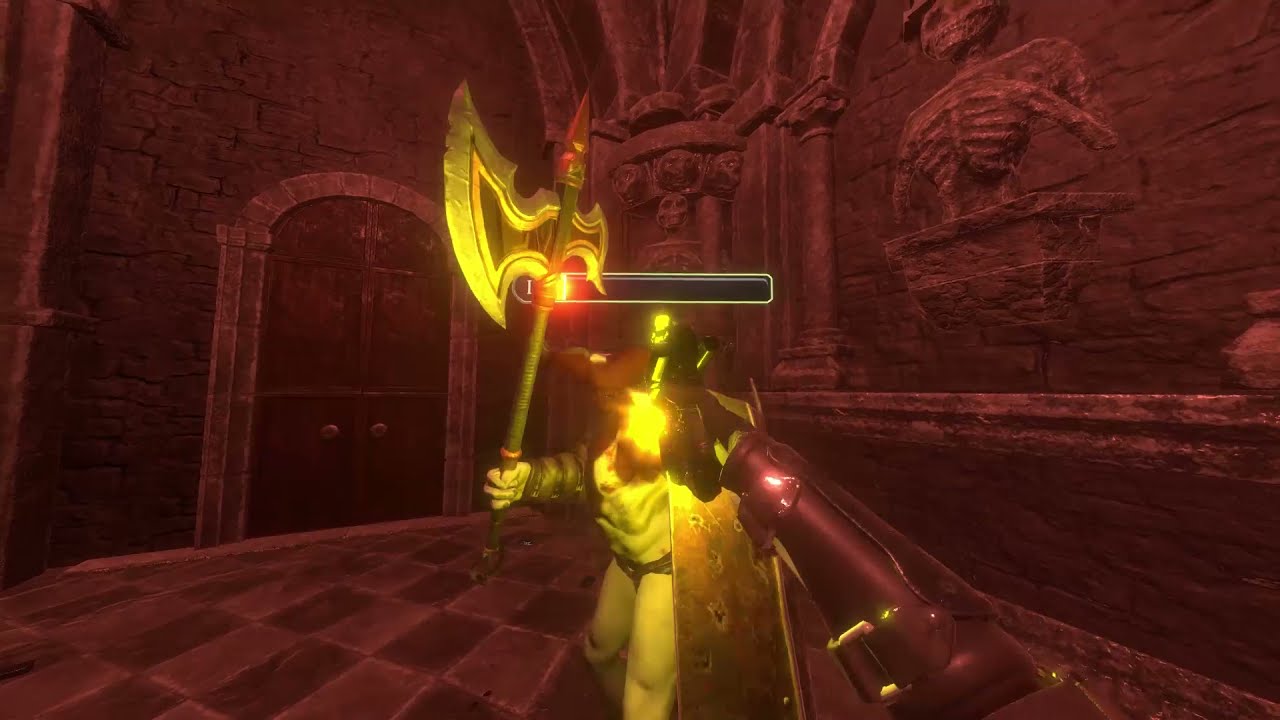
Almost ready for EA
If you need help with something, hit me up
brazen tundra
Thanks!
brazen tundra
onyx pulsar
Will it run on Oculus native?
Don't know what that is
Is it the Oculus Store?
onyx pulsar
yeah
brazen tundra
For now I'm only thinking Steam
brazen tundra
So, the other way to play would be using Virtual Desktop
And that's what some players are doing
Now I see
Do I just leave it like this and it should work?
 onyx pulsar
yeah, looks good
brazen tundra
Do I have to change something in my game? The rig or change some codes?
onyx pulsar
you're using the OpenXR rig?
brazen tundra
Yes
rigid cypress
Stereo rendering mode should be multi pass right?
onyx pulsar
no, only when building for oculus quest
brazen tundra
rigid cypress
Stereo rendering mode should be multi pass right?
For OpenXR I left it single
rigid cypress
ah alrightr
brazen tundra
Ah thanks
rigid cypress
Don t listen to the junior here xd
brazen tundra
rigid cypress
Don t listen to the junior here xd
Hahaha
Dude, you are a pioneer of this area
Almost no one knows what you know 😉
onyx pulsar
we're all pioneers in VR 😛
brazen tundra
I guess we are!
rigid cypress
Framedrop knows more xd
brazen tundra
Hehehe
onyx pulsar
😂
onyx pulsar
Oh well. We hope to have a EA somewhere in early 2022
brazen tundra
rigid cypress
Level design is more my mood xd
Also fun!
What are you guys working on?
rigid cypress
Dont know if i can share xd
onyx pulsar
Multiplayer sci-fi shooter is all i can say atm 😛
rigid cypress

brazen tundra
onyx pulsar
We still need to stress-test that 😂
Samee! Haha
onyx pulsar
we're trying to get 12 vs 12
 brazen tundra
onyx pulsar
we're trying to get 12 vs 12
brazen tundra
onyx pulsar
we're trying to get 12 vs 12
I like that
onyx pulsar
nice 😄
acoustic lodge
magic cipher
Hi ! Is there a simple way to disable inputs when you use XR Interaction Toolkit...
Using the old input system, or the new (action-based) one? If you're using the new one you should be able to put all the input actions the components are using into an action map and disable and enable it, though I haven't tried this myself. Note that this will potentially disable all XR input, including tracking, which is what you seem to be asking for but might not be what you want.
brazen tundra
Hey @onyx pulsar , can you please ask your colleague if he found out the issue about the recenter or losing tracking, please?
I searched and couldn't find anything like this
onyx pulsar
brazen tundra
Hey <@!265546105951879168> , can you please ask your colleague if he found out t...
I may have a solution, one sec
brazen tundra
onyx pulsar
I may have a solution, one sec
Thanks!
onyx pulsar
brazen tundra
Thanks!
I don't know for sure, but you could check if auto simulation is turned on in Project Settings/Physics
If that doesn't work, have them put Virtual Desktop as current OpenXR platform in Virtual Desktop (if it isn't yet)
brazen tundra
onyx pulsar
I don't know for sure, but you could check if auto simulation is turned on in Pr...
Yeah, it's turned on
brazen tundra
onyx pulsar
If that doesn't work, have them put Virtual Desktop as current OpenXR platform i...
Ok, I'm not sure what that is, but maybe the players will know
onyx pulsar
i also found this

Microsoft Flight Simulator Forums
There are many threads with lots of conflicting advice, most of it old. I am looking for current information on how to fly in VR wirelessly using VirtualDesktop with updates in August of 2021. It was working fine a month ago before I went away for a few weeks, came back and updated SU5. Now MSFS works after removing all my mods. I can fly VR wi...
It says players need to set OpenVR (SteamVR) as their default OpenXR platform
You can set it in SteamVR options
That's all i can think of for now
rigid cypress
Hopefully you can get it working correctly :3
visual idol
honest gate
are you using Unity XR interaction toolkit?
Yes
honest gate
visual idol
Yes
maybe you can set up an interaction event for when an object has been grabbed - https://learn.unity.com/tutorial/2-2-activation-events?uv=2020.3&courseId=60183276edbc2a2e6c4c7dae&projectId=601834b9edbc2a4418546660#6023388fedbc2a0f094364f6

Unity Learn
In this lesson, you will learn how to add unique functionality to an object when the user interacts with it in a certain way. By the end of this lesson, users will be able to pick up a remote and press a button on a controller to turn on a TV. This lesson is part of the Create with VR course.
 small scarab
I cannot find the XR Toolkit to get some simple VR interactions in the Unity Package Manager
I have enabled "Show Preview Packages"
Nothing
I've tried to search around, no repository link I can add to download it that way
I'm using Unity 2021.2
All I can find is Open XR in the package manager. No Toolkit.
acoustic lodge
small scarab
I cannot find the XR Toolkit to get some simple VR interactions in the Unity Pac...
I've seen people say that XR Toolkit isn't supported yet on 2021.2?
I can confirm that it appears correctly in the package manager (with preview packages enabled) on 2021.1.
You could try adding it manually on 2021.2 using "Add package by name" with "com.unity.xr.interaction.toolkit", but there's no guarantee it'll work.
small scarab
Alright, I'll try that
Well it installed at least. I'll see if it runs. Thanks @acoustic lodge
 frosty parcel
what's the best way I can go for a PC-VR game? Standard Pipeline, or URP (HDRP is 100% not going to work for VR lol)? I want the game to look half decent to good but able to run at a smooth 90 fps, also what would be the best option for making asset for VR, because I've heard and seen mixed things about both, how URP uses different material fields and stuff different from Standard and how normal maps or something don't really work so you have to use another system, its just all really confusing. One of the options I'm considering is just using Standard while I prototype my game and then moving to URP if I need to for rendering when I get to that point, because its easy enough to update to URP after the fact (right?)
acoustic lodge
I don't think there's much if any reason to use Standard for VR these days? There used to be some important features that URP didn't support in stereo rendering, but that was years ago and as far as I know none of them are issues any more. URP is very flexible, and depending on how you set it up it can be cheaper than Standard, or look better, depending on what you want.
Migrating from Standard to URP is only easy if you're not doing anything fancy at all. Pretty much every custom shader and visual effect will need to be redone when you switch over, the only things that will convert automatically are materials using the standard built-in shaders.
frosty parcel
ok cool, URP it is
 torpid jolt
i dont know if this is a great place to ask but i have an odd issue with my vr controllers in unity, whenever they get about a foot close to my head they just dissapear, heres a video
onyx pulsar
torpid jolt
i dont know if this is a great place to ask but i have an odd issue with my vr c...
You can lower the minimum clipping range om the camera. That should fix it

The upper one
Change Near from 0.3 to a lower value
visual idol
honest gate
maybe you can set up an interaction event for when an object has been grabbed - ...
Is there a way to test if the user is gripping without using an object? Just a script or something that can store if the user is gripping in a book value?
pine bison
@visual idol do you want to check if tithe user is grabbing an object, or if they are pressing the grab button? Different solutions for those two
honest gate
for just whether the grip button has been pressed you can use https://docs.unity3d.com/ScriptReference/XR.CommonUsages-gripButton.html
namespace UnityEngine.XR.Interaction.Toolkit
...
var inputDevices = new List<UnityEngine.XR.InputDevice>();
UnityEngine.XR.InputDevices.GetDevices(inputDevices);

foreach (var device in inputDevices)
  {
    bool triggerValue;
    if (device.TryGetFeatureValue(UnityEngine.XR.CommonUsages.gripButton, out triggerValue) && triggerValue)
      {
        //Grip button pressed
      }
  }
I asked, and I get this answer. It seems it will not compatible with 2021.2 until march. Maybe the XR interaction toolkit 1.0 earlier?:
"1.0 pre-release and 2.0 will both be compatible with Unity 2019.4+. As soon as we publish the final 2.0.0 release, we will work to get it backported to the Package Manager window in Unity 2021.2. I don't have the exact date of the 2.0.0 release, but it will be by March 2022. "
small scarab
graceful adder
I asked, and I get this answer. It seems it will not compatible with 2021.2 unt...
I tried it in the editor and so far it seems to act as you'd expect
So while the compatibility is not guaranteed it does seem to at least work
¯_(ツ)_/¯
graceful adder
small scarab
¯\_(ツ)_/¯
Yes why? Maybe there is something risky. Depending on what you work on
small scarab
I mean it's a preview package regardless so
Not sure it can be that risky
And don't worry it's not a thing that requires production specs right now. It would at most be a prototype
graceful adder
It became a preview from preview : )
vague birch
Apparently the XR Management plugin wont let me use the OpenXR SDK and the Oculus SDK at the same time... but i need them both running because if i use my CV1 with the OpenXR Plugin single pass wont work ( the right eye stretches and is off centre ) but with my Index it works like expected. And with the Oculus SDK activated ( instead of the OpenXR Plugin ) the weird stretching when using my CV1 is gone but now my Index wont work because only the Oculus SDK is active.
Does anyone have a solution to that?
wraith shale
@vague birch you can force them both be there but it's bit of a pain
I'd ask first if you truly need OpenXR?
because if you can do without it, you could just use OpenVR + OculusXR combo
I've experimented with this back when Oculus didn't have AirLink yet and I was stuck with Virtual Desktop which didn't support OpenXR back then
tiny niche
@vague birch you dont need anything special. openxr should work out of the box for cv1
i've used it myself for that
wraith shale
and yes it does work
and I personally just use OpenXR for windows with my Oculus
what I'm trying to say that if one really wants to, you can have these all there at once, but you have to modify source code to allow it and then you have to manually load the right XR module yourself... I can just say it's major pain and would avoid it if possible
tiny niche
and you need to use openxr in order to not get kicked out of the oculus store in a few months
wraith shale
if you target oculus store in the first place...
tiny niche
the vr ecosystem is small enough that you really cant afford not to
wraith shale
there are many cases where publishing in Oculus store isn't reasonable option, like if your game isn't VR only title, would you really want to release VR only version on one PC store but have desktop + VR compatible version on Steam? I kinda doubt it
but yeah this is getting bit sidetracked
what is the stretching issue with OpenXR?
vague birch
tiny niche
<@!682288244678983701> you dont need anything special. openxr should work out of...
The thing is that it works fine until i enable Single Pass Instancing and that bug where my right eye is streched is only when using my CV1. When trying the same with my Index everything works like expected.
wraith shale
that sounds really weird, why it would be device specific
tiny niche
vague birch
The thing is that it works fine until i enable Single Pass Instancing and that b...
i used single pass instancing in my tests too
wraith shale
you sure it really was from using OpenXR or did you also use some other assets / PP etc at the same time?
tiny niche
im guessing you have a shader thats breaking things
wraith shale
that would be my first guess too
tiny niche
device specific openxr issues is nothing odd though. since its just a common api spec for device specific drivers
vague birch
First of all im experiencing that behavior in lwrp, urp and hdrp that only when using the OpenXR plugin in combination with the rift
And i haven't messed with shaders at all
tiny niche
just like how nvidia and ati cards behave differently on shader issues, despite both running gles
vague birch
So it may have to do with my rift?
tiny niche
lwrp should not exist anymore. is something up with your unity install?
wraith shale
there's the dummy LWRP module on previous unity versions that just installs URP under the hood
it's meant to help people with upgrading their projects
vague birch
tiny niche
lwrp should not exist anymore. is something up with your unity install?
isnt lwrp the non urp and non hdrp project prefab?
wraith shale
no
tiny niche
vague birch
So it may have to do with my rift?
no, just because its a device specific error doesn't mean that you didn't do something wrong when using the openxr api
wraith shale
LWRP = lightweight render pipeline, Unity renamed it to Universal Render Pipeline quite a while ago
vague birch
huh thats good to know
wraith shale
I guess you meant Built-in RP now
vague birch
yee
wraith shale
people call it built-in rp, BiRP, legacy renderer etc
some also think SRP means standard RP so they mislabel that too, (SRP = scriptable RP which URP and HDRP use)
tiny niche
there's the legacy renderer and urp/hdrp, which are both scriptable render pipelines, sometimes referred to as srp
wraith shale
anyway... have to tested OpenVR from Valve, it also ships with SteamVR integration nowadays?
if you don't really need OpenXR, your issue goes away
OpenXR is the future though
tiny niche
its only people who hate urp and hdrp that pretends its called standard render pipeline
wraith shale
I see the mod updated the pinned list on this channel, there are links to all XR modules on that pinned message now
vague birch
So things that i tried:
Different Unity Versions ( 2019, 2020, 2021 Beta, 2022 Alpha )
legacy renderer, URP and HDRP
I could reproduce that error with all the different versions and pipelines
Only fix using the Oculus SDK.
@tiny niche how did u set up your project?
tiny niche
i started off with an empty urp project, then added unity.xr to it, followed by the oculus sdk
vague birch
Didnt you use the XR Plugin management thing?
 wraith shale
@vague birch if you can be certain it's broken on OpenXR, I'd send issue report with repro project
and remember to highlight it's specifically broken on CV1
vague birch
wraith shale
<@!682288244678983701> if you can be certain it's broken on OpenXR, I'd send iss...
I have already set up a bug report
tiny niche
@vague birch all the plugin manager does is install packages and edit configurations
 tiny niche
i used openxr though, not oculus
wraith shale
one thing I've noticed with OpenXR is that it can be bit picky with the depth option on OpenXR settings but I think everything still works fine on DX11, my issues were related to DX12 where Unity simply hadn't implemented the thing for the options I needed back then
vague birch
tiny niche
i used openxr though, not oculus
have both at the time there is only OpenXR active
tiny niche
yea but you might confuse the sdk
wraith shale
it literally disables OculusXR when you have OpenXR active
tiny niche
since there's additional apis available even if its not active
vague birch
Could be but that isnt the problem because i just installed it
vague birch
wraith shale
one thing I've noticed with OpenXR is that it can be bit picky with the depth op...
Couldnt that be my problem because the Single pass algorithm would nead the depth to calculate the cut out of the render texture that gets send to the right eye?
or is the depth for something else?
wraith shale
it's just depth buffer sharing through the OpenXR framework
afaik you need this for Oculus ASW to work
altho I don't remember if I've actually verified it getting passed onto oculus properly
actual SPI rendering is already done by Unity at that point
I mean now this

 vague birch
yee
wraith shale
some of the depth options here used to be problematic with oculus specifically in past
but it actually meant more like, getting totally black screen in VR
or errors
vague birch
i haven t changed that. still on none
Its so frustrating that i cant find out to what that issue is related to. I want to use HDRP but 30% performance off because single pass wont work is big pain, i could as well use multi pass and BiRP at that point
onyx pulsar
@vague birch how does your openxr screen look like? I'm also developing a game with oculus + openxr combo and i don't have any problem with it
vague birch
of my right (bugged) eye?
onyx pulsar
Yeah
Do you use the oculus vr plugin in combination with the oculus integration package?
vague birch
Its hard to describe...
So the views dont match.
The right eye is always off.
vague birch
onyx pulsar
Do you use the oculus vr plugin in combination with the oculus integration packa...
No
just open xr downloaded through xr manager added the controller profile and thats it
If i dont use Open XR and the Oculus SDK instead everything works fine
onyx pulsar
I'd advice you to follow the startup documentation on develop.oculus website.
Yeah, probably the connection between oculus plugin and openxr isn't set up correct
1 sec
onyx pulsar
Hmm, else try googling on developer + oculus + unity
Weird that the link doesn't work
vague birch
it does load but the oculus page says "Content could not be loaded"
vague birch
works
onyx pulsar
Cool
vague birch
Could it be that it has to do with this settings

they are only available in the oculus plugin but not open xr that seems to fix the problem
but i need to us oculus plugin for taht
onyx pulsar
Shouldn't be the issue.
onyx pulsar
There should be an option in unity underneath oculus/tools where you need to set oculus to be working with openxr if i'm not mistaken
vague birch
That could be it. Wait a sec i need to download the proper oculus integration
i dont have that oculus thing at the top
vague birch
onyx pulsar
There should be an option in unity underneath oculus/tools where you need to set...
Do you have that oculus option on the menu bar with file, edit etc
?
Strange there is no menu for the oculus plugin
onyx pulsar
I think this is what you need
This guide describes steps to activate the Oculus utilities plugin using OpenXR.
onyx pulsar
vague birch
Do you have that oculus option on the menu bar with file, edit etc
Don't know exactly. I'm talking from memory cause i'm not on my pc atm sorry
vague birch
vague birch
Could it be that it has to do with this settings
Only the "new" oculus plugin that has no menus. Settings only exist in XR Plugin Management tab in project settings i guess they mean these
"Oculus XR Plugin provides display and input support for Oculus devices"
omg i cant......... 1 entire month and nothing i dont seem to find something useful. Google wont help, i havent find anyone else with that problem, on this discord i seem to be the only one with that issue so it is probably because of my dumbness. It will be related to my PC/OperatingSystem/vrHeadset or smth idk
visual idol
pine bison
<@643364230841630752> do you want to check if tithe user is grabbing an object, ...
If the user is pressing the grab button is what I am trying to find.
onyx pulsar
vague birch
omg i cant......... 1 entire month and nothing i dont seem to find something use...
I'm sorry i can't be more of help. My best bet is to try and set up the project exactly as described on the oculus develop website. I'll check tomorrow if i can find anything else.
vague birch
onyx pulsar
I'm sorry i can't be more of help. My best bet is to try and set up the project ...
Im really grateful that u try to help me. Though u dont need to waist ur time.
onyx pulsar
I'm more than happy to help fellow developers in times of need 😄
vague birch
onyx pulsar
I'm more than happy to help fellow developers in times of need 😄
I think i just fixed it... 😌 Omg i hope it works in my other project to...
Did download the oculus integration, open xr ( set it to single pass ) opend up the ( deprecated ) OVR Profiler and selected fix stereoscopic rendering and it now suddenly works!
Thats in my test project i hope that this methode will also work in my other HDRP project...
vague birch
vague birch
I think i just fixed it... 😌 Omg i hope it works in my other project to...
Did...
Nvm doesnt work in HDRP
._____.
grand totem
So there's this thing that I'm trying to do, however I have no idea how ;-; I asked someone who did and they told me this I make a configurable joint on every hand, which are connected to player body rb, and I'm updating a connected anchors of configurable joints every fixedUpdate to controller position. And physics engine do the rest :3
So my question is: How would I Update the Connected Anchors of the COnfigurable joints every fixedupdate to the controller position?
acoustic lodge
vague birch
Apparently the XR Management plugin wont let me use the OpenXR SDK and the Oculu...
You can enable both loaders by editing the XRGeneralSettings asset using the inspector in debug mode, but it's a pain and any time you navigate to the XR settings window it will try to disable one of them again. I think you might also be able to use both if you initialise XR through script, but I haven't tested initialising XR Loaders that aren't in the Manager's list of ActiveLoaders? I don't remember seeing anything in the code that would break, but that doesn't mean nothing will.
As far as I can tell there aren't any actual problems if you use both, the automatic disable is just there because if you use OpenXR for anything they want to make clear that you should use it for Oculus too.
 past chasm
Can someone help with a project I am working on? I gotten the unity set up for my vr headset I believe, I have the vr developer mode on, and its turned on and plugged into my desktop. How do I test the game a bit out to see if everything is going smoothly. This is the message I get. Unable to start Oculus XR Plugin.
Possible causes include a headset not being attached, or the Oculus runtime is not installed or up to date.
If you've recently installed or updated the Oculus runtime, you may need to reboot or close Unity and the Unity Hub and try again.
UnityEngine.Debug:LogWarning (object)
Unity.XR.Oculus.OculusLoader:Initialize () (at Library/PackageCache/com.unity.xr.oculus@1.11.0/Runtime/OculusLoader.cs:158)
UnityEngine.XR.Management.XRGeneralSettings:AttemptInitializeXRSDKOnLoad () (at Library/PackageCache/com.unity.xr.management@4.2.0/Runtime/XRGeneralSettings.cs:148)
buoyant jolt
@past chasm I'm guessing you are using an Oculus Quest. So, you need Oculus Desktop (this is the Oculus Runtime) installed as well. And you, for testing, usually want to enable Oculus Link on your headset. Failing this, are you able to use Oculus Link at all? etc. etc.
past chasm
Oculus Desktop downloaded on my desktop?
buoyant jolt
Yes
past chasm
I have it installed on my desktop already
buoyant jolt
It lets your Quest act like a Rift S, so it can be detected at play-time in Unity. Otherwise, the only way to test is to create builds manually as APK's and install them and run them on the headset.
past chasm
Where is a good site to download the Oculus Runtime?
Also the desktop is linked with the headset atm and it does ask (the oculus) if I would like the pc to have access to the files. I say yes and it goes to the main menu
buoyant jolt
are you able to use Oculus Link at all?
past chasm
Are you talking about like SteamVR? Like have it hooked and playing off my pc?
Now it isn't doing anything, not even giving me an error. It does its "Hold On" thing.
 lone knoll
tiny niche
and you need to use openxr in order to not get kicked out of the oculus store in...
lone knoll
tiny niche
and you need to use openxr in order to not get kicked out of the oculus store in...
Wasn't aware of this using openxr tho - where does it say so ?
tiny niche
@lone knoll if you read the oculus dev news, you'll find the end of life mentioned in most of the recent posts
 vestal flicker
Including app lab? Old apps still work fine, are they actually forcing devs to use openxr?
acoustic lodge
vestal flicker
Including app lab? Old apps still work fine, are they actually forcing devs to u...
From Aug 2022 new apps will be required to use OpenXR (which they may well do by using a more recent Oculus SDK that uses OpenXR internally). Existing apps will be able to continue to use old APIs.
https://developer.oculus.com/blog/oculus-all-in-on-openxr-deprecates-proprietary-apis/

Starting with v31, new features will be delivered via OpenXR extensions, instead of new Oculus Mobile and PC APIs. OpenXR will enter Full Support and will be the preferred API for all new applications going forward, including those that plan to use Passthrough Experimental API functionality.
Notably for Unity devs, it will still be fine to use the Oculus XR plugin rather than the OpenXR one; the Oculus XR plugin has used OpenXR internally since v31.
(But Oculus intend to stop supporting their own plugin in 2023, recommending the OpenXR plugin instead after that.)
 storm ether
Anyone know how to fix the issue with using oculus hands, and destroying objects or components on the objects makes the hands break. I am so exhausted trying to figure it out. Anyone got any info, thanks.
north path
storm ether
Anyone know how to fix the issue with using oculus hands, and destroying objects...
Can you define break?
Bad animations? Disappearing? Frozen? Errors?
And what code do you use to destroy what object?
storm ether
Basically the hands just stop working and cant grab anything. Ive made a little bit of progress, basically I have a burger. But if I place the bun on the burger, the burger in the middle is in between 2 box colliders, and for some reason floats off into the distance lol
I removed angular drag and gravity from the outer colliders but still floats off
north path
storm ether
I removed angular drag and gravity from the outer colliders but still floats off
Can you maybe record it?
fossil temple
Hi, i'm having this issue where my VR hands are showing and working in play mode
but they do not show or work in my build. Has anyone had this issue before?
I'm using steamVR and their cameraRig
fossil temple
I have tried using a Vive Pro headset and a quest 2 headset. The vive pro headset works in the editor but not in the build, while the Quest 2 does not work in the Editor or the build
onyx pulsar
fossil temple
I have tried using a Vive Pro headset and a quest 2 headset. The vive pro headse...
Have you correctly set up the input?
Also as far as i know Steamvr is pretty buggy when you start the game while the headset is on standby.
past chasm
If I press play on unity, would it play through my oculus quest 2? Or do I need to download an app through the quest to test run the game?
 tiny matrix
Yes, should work. Controllers and everything will work as well 🙂
If you have all the framework stuff in unity set up correctly
I am not a master, so someone else will have to help if it doesn't work!
past chasm
yeah, for some reason non of it is working. I linked up my headset, its wired to the pc, downloaded OpenXR, everything that I have been told, now it won't do anything 😢
But run the "Hold on"
 true meteor
Does anyone know where I can download VR hands?
grand totem
true meteor
Does anyone know where I can download VR hands?
For oculus, search: "Oculus VR hands Model"
 shadow plaza
I'm getting jittering happening between two meshes - a flat water plane hitting a sloped beach. It's only happening in the Quest build. I'm not sure what to do about it. I assume it's z-fighting. I have tried different shaders and different mesh detail, as well as changing material properties and priorities. I am tempted to join the two meshes in the 3d software, but that would then lose any further tweaking (or animations). I would really love some help here. Cheers
visual idol
Hey, is there any way to check if the user is holding the grip button down? thanks.
 leaden kettle
I have a similar question about if there is a way to tell if the primary button is pressed down.
visual idol
I found something. Scroll down slightly more than half way on this page: https://docs.unity3d.com/Manual/xr_input.html
leaden kettle
Thank you! That looks like what I was looking for!
urban cloak
@loud latch No crossposting please. #archived-art-asset-showcase is fine.
 vernal jackal
How can I create an XR player? All I can see is "Convert main camera to xr rig"
 acoustic lodge
vernal jackal
How can I create an XR player? All I can see is "Convert main camera to xr rig"
acoustic lodge
vernal jackal
How can I create an XR player? All I can see is "Convert main camera to xr rig"
That is the standard way to create a VR player rig if you're not using XR Interaction Toolkit (which adds some different options).
 hushed turret
Hey I'm not sure if this is a good place to look for help, but I can't find the XR interaction toolkit package in the package manager if someone can help with that I will be your best friend
vernal jackal
the package category is probably set to "used in project"
hushed turret
vernal jackal
the package category is probably set to "used in project"
Hey thanks for responding! I eventually found a forum and it is a glitch in 2021.1 that they are still working on.
I had to change some Jason file in the package manager
vernal jackal
ah ok
how does the movement like in gorilla tag work?
is it like every time the hand touches something, it moves the body in the opposite direction?
north path
vernal jackal
how does the movement like in gorilla tag work?
Many different mays to do this tbh.
But tldr:
- player is just a rigidbody with arms
- make friction very high of arms or when colliding with ground or wall make a weak joint between the hand and ground to move
 slate obsidian
hi all struggling to find XR Interaction Toolkit
I have preview packages enabled but its not showing up
acoustic lodge
slate obsidian
hi all struggling to find XR Interaction Toolkit
What Unity version? If you're on 2021.2 or later it isn't supported yet; you can add it with "Add package by name" but it's not guaranteed to work.
slate obsidian
ahha that will be it then thanks you @acoustic lodge
I did try the microsoft mixed but it also throws a ton of errors - guess same thing with that version
i will go back to the LTS and see
wraith shale
"add package by name" and entering com.unity.xr.interaction.toolkit should work just fine, you don't even have to enable preview packages separately
 vast jasper
Question:
How many drawcalls would you guys say is the limit for a VR game?
wraith shale
that is super vague question
you can only make some approximation like that if you target specific hardware
tiny niche
@vast jasper somewhere between 0 and infinity
vast jasper
tiny niche
<@!554793592766464023> somewhere between 0 and infinity
seriously? 🙂
tiny niche
probably less than a million too
vast jasper
lol
tiny niche
but it depends
wraith shale
like, there are recommendations oculus gives for Quests, but if you target PCVR, we have wildly different headset specs where first gen gear can do tons in comparison to modern higher resolution ones
vast jasper
tiny niche
probably less than a million too
seriously dude 🙂 where do you draw the line?
wraith shale
also min gpu specs etc
vast jasper
is 300 too much?
wraith shale
but bottom line is, you'd want to keep it as low as possible
tiny niche
vast jasper
seriously dude 🙂 where do you draw the line?
depends on the hardware and what you're doing
wraith shale
rift s?
vast jasper
yes sorry. rift s
wraith shale
but are you only targeting these specs for end users?
vast jasper
im targeting what a general limit would be. like if there is an unwritten law somewhere
first of all im gonna make it for myself. then if it works, have it for download.
tiny niche
the unwritten law is usually designing it to be able to be downscaled to run on a quest 2
vast jasper
tiny niche
the unwritten law is usually designing it to be able to be downscaled to run on ...
yes, but what is the unwritten law for a quest 2?
wraith shale
nah there are recommendations from Oculus for that
vast jasper
dont have a quest 2 so i dont know what it can muster
tiny niche
but regardless of what the limit is, you shouldn't have more than you absolutely need
wraith shale
this
tiny niche
you're not describing the game very well here
vast jasper
its a cyberpunk city at night
wraith shale
there are some vague figures on old guidelines like 500-1000 for PCVR here: https://developer.oculus.com/documentation/unity/unity-perf/ but this shouldn't be read as some law
vast jasper
flying cars, hologram girls dancing, gif commercials on the walls,
vast jasper
wraith shale
there are some vague figures on old guidelines like 500-1000 for PCVR here: <htt...
thanx. at least something to go on.
tiny niche
@vast jasper cyberpunk
 vast jasper
 tiny niche
cyberpunk
 wraith shale
 vast jasper
as little to no lights as possible, fake spotlights. baked lights, static stuff as much as possible. pooled cars.
tiny niche
the theme says nothing about what your game needs
vast jasper
tiny niche
cyberpunk
not cybeprunk 2077 🙂 need to crosslink 10 3090 ti for that to work with a VR headset 🙂
vast jasper
tiny niche
the theme says nothing about what your game needs
game needs to be able to handle alot thats going on at the same time. bizzy enviro
tiny niche
going by the screenshot, you should be able to suffice with < 10 drawcalls. possibly even < 5
vast jasper
tiny niche
going by the screenshot, you should be able to suffice with < 10 drawcalls. poss...
thats just a small draft. just a small sum of whats going on in the game.
tiny niche
you're talking about it like you have no clue of what its going to be or how its going to be architected
vast jasper
but youre right. i dont think there is more than 5-10 drawcalls there, but there will be lots more. just wondering how far i can go.
vast jasper
tiny niche
you're talking about it like you have no clue of what its going to be or how its...
i definetly know whats going on. but i dont wanna spoil it. or give people ideas 🙂
tiny niche
everything matters. you can't just say X drawcalls is the limit and as long as i'm under that i'm fine
vast jasper
tiny niche
everything matters. you can't just say X drawcalls is the limit and as long as i...
a drawcall is a drawcall. its not dependent on what is in motion or what is happening in the world.
tiny niche
you have to look at the entire thing at once and then you can say if you're over or under budget.
vast jasper
that would probably require a signed NDA between us ;P
tiny niche
@vast jasper a drawcall happens on the cpu and depending on what you're doing, it can also lock the gpu while it's happening. so yes, a drawcall is a drawcall, but that doesn't matter when you're budgeting cpu/gpu time
wraith shale
just measure the perf impact and keep things slim, every project has their own characteristics anyway
if that's not enough, then worry where you can cut more things out (by that I mean, based on actual perf metrics)
vast jasper
just think that youre in a Korben Dallas apartment. interacting with the room and having a corner room with a big window out into the bizzy night life.
tiny niche
and most importantly, architect your game to handle what your artistic vision needs, while still being able to run on the hardware that your userbase has
vast jasper
with that drawcall list, i think ill be fine. even if i half the drawcalls listed there ill make it and have it still looking good
im somewhere bewteen a light and medium simulation.
tiny niche
have you benchmarked it? you don't really know anything until you do that
vast jasper
tiny niche
have you benchmarked it? you don't really know anything until you do that
not yet. havent modelled everything yet. almost done. just setting up a future drawcall routine i will go after when i texture everything
how i can maximize the car variations without making it performance heavy.
tiny niche
you don't have to model things to do a benchmark. just figure out your polycount targets and throw in some random junk in that range
vast jasper
like 5 different skin variations for each car. just by having one material i can reposition the UVs to match another car skin. you know, trim sheets
vast jasper
tiny niche
you don't have to model things to do a benchmark. just figure out your polycount...
ahhhhh i getcha
vast jasper
tiny niche
you don't have to model things to do a benchmark. just figure out your polycount...
like throwing in different high poly stuff just to see where i land with the fps.
tiny niche
the only important thing about a benchmark is you need to have the same amount of different models, textures and they should be in the same polycount ballpark and roughly placed at the correct scale
vast jasper
tiny niche
the only important thing about a benchmark is you need to have the same amount o...
roger
tiny niche
then you want to figure out the layout in your prototype scene, since that also affects performance
vast jasper
tiny niche
then you want to figure out the layout in your prototype scene, since that also ...
ok ok. will do. hopefully i will be able to crank up the visuals a bit when i know.
vast jasper
tiny niche
then you want to figure out the layout in your prototype scene, since that also ...
one last question, how much does the GIF animations impact the game?
tiny niche
depends
vast jasper
on the amount of images in the gif?
tiny niche
there's no native gif support on a gpu, so there's many different ways of drawing the animations
vast jasper
do you know the least impact solution?
tiny niche
but yes, more frames occupy more vram and if you hit the vram limit then your performance becomes instantly terrible
vast jasper
tiny niche
but yes, more frames occupy more vram and if you hit the vram limit then your pe...
hmm ok. so it doesnt matter how much actual ram i have then if it goes on the Vram
tiny niche
there's no least impact solution that works for everything. if there was, then you wouldn't need to implement it
vast jasper
tiny niche
there's no least impact solution that works for everything. if there was, then y...
touché
tiny niche
your vram also ends up consuming ram. you can think of it as overlapping a piece of ram
vast jasper
tiny niche
your vram also ends up consuming ram. you can think of it as overlapping a piece...
i got 64 gig ram, so i think im fine. im just trying to release preassure form the cpu. i guess the cpu gets pressed hard from the gif.
tiny niche
what you have is irrelevant though. its all about what your users have
vast jasper
it does yes. well im first going for myself. if that works and i release it, i can downgrade it later
but i think im a little bit wiser now.
tiny niche
if it was that easy, then games wouldn't have performance issues
vernal jackal
north path
Many different mays to do this tbh.
But tldr:
- player is just a rigidbody with ...
thanks!
vast jasper
tiny niche
if it was that easy, then games wouldn't have performance issues
i know. it sucks tbh
vast jasper
tiny niche
if it was that easy, then games wouldn't have performance issues
thanx for the help. you too Olento
brazen tundra
Hi everyone
How can I get the name of the controllers that a player is using?
I search it around but the codes that I found doesn't seem to work for me
Also tried some of the codes from this channel, and it didn't work
Also the tutorial from VR Andrew, and it also doesn't seem to work
Maybe because XR did an update and the code that I found is outdated
vast jasper
brazen tundra
Hi everyone
brazen tundra
vast jasper
isnt it this? : https://docs.unity3d.com/Packages/com.unity.inputsystem@1.0/manu...
Hi Fressno
Thanks for the reply
I couldn't find what I needed
Did you see it?
vast jasper
brazen tundra
Hi Fressno
i was reffering that you can detect it with the detect script.
brazen tundra
vast jasper
i was reffering that you can detect it with the detect script.
Sorry
Where is the detect script?
I search for it and couldn't find it
vast jasper
brazen tundra
I search for it and couldn't find it

 clear tinsel
What type of file do I need to upload to the rift store I know for quest and app lab it’s an apk but for rift it should be the desktop application right but I can’t upload the folder which has all the app data and the ext so what do I upload
I tried to zip the folder and then upload it but I got this error when uploading

The app works fine and uploads fine with the apk on applab but for rift store I can’t get it up
I tried to find a totorial on YouTube but everything’s flooded with stuff for the quest
Am I missing something or is there a tutorial I should have watched
brazen tundra
vast jasper
Thanks Fressno
brazen tundra
vast jasper
Unfortunately that didn't work
clear tinsel
Anyone know anything about rift uploading I can’t find anything online and even oculus’s own documentation is contradictory and outdated
 gleaming sorrel
I am using an XR Grab Interactable script to grab on to objects and it works fine, however when I move with the joysticks, it moves the object I have grabbed away from the hand. Is there an option to disable this or a rookie mistake I have made?
I am using unity 2020.3.24
north path
clear tinsel
Anyone know anything about rift uploading I can’t find anything online and even ...
What do you mean with rift uploading?
north path
gleaming sorrel
I am using an XR Grab Interactable script to grab on to objects and it works fin...
Maybe parent the hand to the object when its grabbed?
Not sure if it's a default option
gleaming sorrel
ok
clear tinsel
north path
What do you mean with rift uploading?
Yes
The ui to upload an app asks for the apk and appears the same as the applab one but won’t accept that either
Am I doing something wrong or are you not supposed to upload rift apps threw developer hub
north path
clear tinsel
Am I doing something wrong or are you not supposed to upload rift apps threw dev...
Rift does not use apk, that is the quest (android)
The rift is windows bases, so needs probably a .zip with an .exe inside
And showing the error helps
clear tinsel
north path
Rift does not use apk, that is the quest (android)
The rift is windows bases, so...
Tried that originally but still has the same error
I get this no mater if I upload the zip or apk
 north path
Ahhh did not see that post was also yours sorry
north path
clear tinsel
I get this no mater if I upload the zip or apk
Havent tried it yet via this method (primarily use on quest), but I assume you followed this:
https://developer.oculus.com/documentation/unity/unity-platform-tool/
This topic describes how to use the Oculus Platform Tool to upload an app to the Oculus store.
clear tinsel
north path
Havent tried it yet via this method (primarily use on quest), but I assume you f...
No I used the rift version but it’s outdated and doesn’t work anymore
north path
Oh I see now\
clear tinsel
It wants you to upload with the website which isn’t supported anymore
north path
Defaq facebook
I havent messed with uploading from within unity yet, sorry
Maybe try contacting oculus support?
They usually are quite helpful, maybe they can redirect the email
clear tinsel
I’ve try
north path
Oculus forums and reddit maybe if no one here knows?
vast jasper
brazen tundra
Unfortunately that didn't work
sorry, dont know anymore then that .
brazen tundra
vast jasper
sorry, dont know anymore then that .
I found out how!
Thanks @vast jasper 🙂
vast jasper
no worries. glad it worked out
hushed turret
I'm starting to think that Unity is not ready for VR development
Is anyone else having problems at every turn?
pine bison
Well... unity is the decidedly most common used engine for VR apps, so I'd say try and work your way through it 😛
It's chaotic in parts sure, but stick to the LTS versions and it's pretty stable
acoustic lodge
I would say that it is at least more ready for VR development than any of its competitors. That said, that's not a terribly high bar.
brazen island
Hey! Does anyone know how to get a data output (on the console or wherever) of the movements a person in VR (oculus quest 2) does? Any help is appreciated and thank you in advance!
pine bison
What are you looking for exactly? You could just console log the position and rotation of the camera rig
brazen island
yes, that sounds about right! How do I do that?
pine bison
Attach a script to the head camera and just do Debug.Log(transform.position) in Update or FixedUpdate
brazen island
I'll try, thank you^^ in case of more questions I'll write them here ^^'
So I asked my group and they said we're working with an apk on the quest itself and therefore cannot log it onto the console...
pine bison
You can access the console through ADB on a computer
But the alternative is to make a canvas with a text object to print to instead
brazen island
The idea with the canvas is brilliant, we will try that, thank you!
pine bison
If you make it a camera space canvas and set the distance to 1 meter you'll always have it in view
brazen island
We'll make the canvas appear after the user is done with the application in an additional scene because the user is a person in a psychological study and is not supposed to see the data
tiny niche
@brazen island you should just report the data back to the central system then, since you'd need to securely gather and store it anyways
brazen island
tiny niche
<@!330371253661859840> you should just report the data back to the central syste...
We don't have a central system, we're just using a quest with a livestream of the application
We tried to make a controller visible & functioning in the VR environment (to make the last canvas visible at the end) but we couldn't figure out how to do that. Same with making the hands visible. We tried to create two hands in the XR rig that server as controllers with the XR controller script from the xr interaction toolkit, also using oculus integration, but we couldn't figure it out. How does that work?
tiny niche
@brazen island you must have a central system somewhere, since you're doing a study. Or are you planning on submitting a handwritten article with your findings when you're done?
brazen island
tiny niche
<@!330371253661859840> you must have a central system somewhere, since you're do...
we're simulating an environment and want the user to move as little as possible, but we're doing it all from scratch so there is no precedent. We'll just take the raw number output from the canvas and analyze it then
tiny niche
yea but unless you're doing the analysis using pen&paper, you have a system somewhere that needs to accumulate and store the data
pine bison
Yeah... Sounds like you should be saving the movement at set intervals and output it as a file at the end of the session
tiny niche
or just stream it over a websocket
 hushed marsh
Hey for the quest. I am trying to get a prototype into the store. Got almost all stuff checked. But is asking for the focus aware in the manifest. There used to be a Oculus > tools option to create a manifest right? Do I need to install the Oculus integration to get that? How do you guys usually go about prepping manifest for quest submission?
tiny niche
its just a json file, so if you know what it needs, you can just type it in
hushed marsh
I am not sure what the tag is suppose to be. If I knew I would just type it in
But oculus documentation does not say the exact tag. Is kind of generic
Focus aware tag not included in manifest. For explicit control of how the operating system menus interact with your app, add this flag to your manifest
So do I write something like this?
<meta-data android:name="unityplayer.FocusAware" android:value="true" />
brazen tundra
Hi
So I'm using XR, and whenever a player that uses Oculus and Virtual Desktop alt tabs, looses headset tracking or re centers, the screen will go black
Has this happened to anyone else?
acoustic lodge
brazen tundra
Has this happened to anyone else?
Yes (though I get it on Oculus PC headsets through OpenXR). I haven't found any way to prevent it; it seems to be happening at a very low level, very possibly not in C# code at all.
brazen tundra
acoustic lodge
Yes (though I get it on Oculus PC headsets through OpenXR). I haven't found any ...
Very strange
tiny niche
@brazen tundra i've never had that happen (quest2 & rift cv1)
 umbral vault
Hi I hope you are well- I am an XR artist training in full stack dev- I use unity- I would like to add bio inputs and computer brain interface to my work so I can combine art and movement-
This is the CBI want to buy: https://www.next-mind.com/product/
Pls can I ask what you think of it? Also also pls can i ask (re wearables) for tracking steps (even when running) and heart-rate do you have any recommendations?
Apple Watch is expensive and I am only using the biofeedback features atm and my headset is an oculus quest so hoping to get find gadgets that are compatible with it so I eventually share work on side quest/ steam/ the oculus store
Thanks so much!

Order the NextMind Dev Kit to build the first generation of mind-controlled experiences. Built around Unity 3D for Windows and MacOSX.
tiny niche
@umbral vault a coworker of mine has a smart ring on his finger that does the same tracking the apple watch does
probably way cheaper too
umbral vault
tiny niche
<@!753335532695847132> a coworker of mine has a smart ring on his finger that do...
omg sounds awesome
a smart ring that will work with unity
wow that sounds magic
i will try and find that! thanks a lot!
tiny niche
well you hook it up to a phone normally, but you could always relay the signals to a pc
umbral vault
thanks!!
vestal flicker
Is there a way to use frequency in haptics for Oculus XR Plugin without using OVR stuff
umbral vault
tiny niche
well you hook it up to a phone normally, but you could always relay the signals ...
I am sorry I looked up the rings and I have also looked at smartwatches, as all I need is heart rate, steps and speed -
But I cant find any ones that say they are for ppl to develop apps, and that they can link up with unity/ an oculus quest
I am so sorry but would you mind pls telling me a few key words I can google?
Thank you so much!
tiny niche
@umbral vault i dunno what they're called, but they also wouldn't state that purpose on the stores, since you're looking at generic consumer hardware and not prototype stuff like an arduino or raspberry pi
umbral vault
tiny niche
<@!753335532695847132> i dunno what they're called, but they also wouldn't state...
actually am keen to use arduino
now
having had no luck
with the generic stuff! thanks for pointing that out
i guess i should just do arduino tutorials until i figure out what to do
thank you!
 celest jetty
OVR had an option to use fixed update to update the position and rotation of the headset and controllers, does open XR have an equivalent?
storm ether
Hello. I was wondering if there is a way to hook up a quest 2 to MacOS and have preview mode available?
visual idol
Hey, anyone know a good tutorial on how the whole xr interactor works? I would like to attempt to edit it to my needs but I would like to find a webpage that breaks down the script. Thanks
 toxic nest
Hello, I wanted to build a scene in Unity for a mobile VR headset. As soon as I opened Google for this I met a plethora of options and plugins(OpenVR, ARCore, etc) that people recommend me to install. But I am confused as to what plugins have to be installed. Or do's and don'ts for developing a game in VR for android phones.
wraith shale
@toxic nest define mobile VR headset
you mean like cardboard thing now or quest or something else?
I'm assuming you mean cardboard vr now (which google scrapped already)
you'd probably have best time on using Unity 2018 LTS or 2019 LTS (if still supported) with some cardboard SDK
google dropped the project long time ago but there could be some community maintained things around still
toxic nest
wraith shale
<@!634220822881632267> define mobile VR headset
Yeah I meant Google Cardboard. I have a headset from Irusu. Which acts like Google Cardboard. Thanks for the advice. However is there another Mobile VR headset like Cardboard, that I can try?
wraith shale
it's not that much about the devices but what kind of platform you are targeting at
it just sounds like you are only after cardboard sdk here
it's been ages since I've fiddled with this stuff so can't really help much other than point into that direction
toxic nest
Oh thanks. The Platform I was aiming at was android, so I concluded that only Google Cardboard can work on it.
north path
The oculus quest and vive focus 3 also run on android, so that's why there was some confusion (:
For phones used as vr headsets you indeed need cardboard @toxic nest
toxic nest
north path
The oculus quest and vive focus 3 also run on android, so that's why there was s...
Thank you very much for Clarifying 🙂
storm ether
This is also a code question but most fitted to VR. I am using the ovrinput. And I want to get the values of the thumbstick, but not sure how, tried searching but no luck. I want something like this but this obviously throws an error, but essentially I want to store the values of the thumbstick and give the x and y values to the mouse pointer CS mousePointer.transform.position.y = OVRInput.Axis2D.SecondaryThumbstick;
brazen tundra
Hi. When someone that has Oculus + Virtual Desktop plays my game and they lose headset tracking, alt tabs or re centers, their screen goes black. Has this been happening to your game as well?
 sinful delta
Im in the process of moving over my project from unreal to unity. What is better to go with? Standard or URP? Most stuff i see on asset store etc says it does not work with URP so thats why im asking.
wraith shale
URP is better supported in VR
I mean by Unity, there's plenty of 3rd party support for built-in
would just evaluate the 3rd party content you rely on in VR and see for yourself
sinful delta
ok thanks
brazen tundra
wraith shale
URP is better supported in VR
Agreed
brazen tundra
sinful delta
Im in the process of moving over my project from unreal to unity. What is better...
Also plenty of assets that support URP
wraith shale
well... that's not as easy anymore
if you look into any postprocessing type effects, only few actually work with URP SPI on Unity 2020+
majority will simply fail there
this is because new XR system that Unity requires since 2020 breaks cmd.blit, which is what everyone used to use for blitting their effects with
if you use Unity 2019 LTS and the old VR api, that stuff is still functional... so... it's very hit and miss
this is why I made a separate note for URP being supported better by Unity (Unity in general doesn't fix built-in renderer's VR issues anymore)
there's no ideal "everything works here" situation with Unity and VR atm, not until you go for some older version
and then you are facing lack of official support situation
of course how important PP is for your VR project is another thing, you'd want to strip out most of the PP effects there anyway, or probably fully if you dev for Quests
@sinful delta
sinful delta
Thanks. Can you even use pp in vr with unity? I know in unreal you definitely can’t for quest pc is ok somewhat
wraith shale
you can, but if you target quest, you really don't want to, it's just too heavy
sinful delta
Right. Ok thanks. One more question. Are there any good docs for converting stuff to urp that don’t convert with the tool
wraith shale
if you ask about converting custom shaders then... not really no. you'd have to rebuild the whole shader from scratch
there can be some stock materials it fails to convert too, then you just map URP shaders to those materials manually
sinful delta
Ok thanks for the help
 hushed knot
Hello. I have been trying to build an app for the Oculus Quest 2 (.apk), and when trying to build the app, I get this error: https://pastebin.com/muXuEhcK
Pastebin
Pastebin.com is the number one paste tool since 2002. Pastebin is a website where you can store text online for a set period of time.
grand totem
Hey, so I'm trying to check if the collider of the VR rig is touching the ground: ```cs
void FixedUpdate()
{
if(!Physics.Raycast(transform.position, -Vector3.up, distanceToGround + 0.1f))
{
_touchingGround = false;
Debug.Log("Wapie");
}
else
{
_touchingGround = true;
Debug.Log("no Wapie");
}
}
I fixed this, so just ignore it
tiny niche
grand totem
Hey, so I'm trying to check if the collider of the VR rig is touching the ground...
the root of the xr rig should be on the ground. if it isn't, the user has screwed up their floor calibration
and if you want to make the player seem smaller, scale up the world around them
grand totem
tiny niche
the root of the xr rig should be on the ground. if it isn't, the user has screwe...
Currenctly it looks like this

This is very buggy and has the glitch stated before
I dont know why, but the collider always flows a few centimeters above the ground, so the "No Wapie" Debug never plays
tiny niche
@grand totem your code is not checking if the xr rig root is on the ground though. its just doing a raycast from an arbitrary transform
buoyant jolt
And based on what I see in that photo, you have some collider or controller half in the ground.
By default, your start position is set by you in the editor. So if you are off the plane below, it means the plane below is set too low. That said, I would use a different method to determine if they are touching the ground - likely a trigger and sphere collider. But if you are checking the PlayerSpace in the example above, it will always be on the ground. If you are checking that odd capsule collider, it starts half through the ground already
 grim vine
I'm trying to get my oculus game's apk but when i export the game i get this error ```UnityEditor.BuildPlayerWindow+BuildMethodException: 6 errors
at UnityEditor.BuildPlayerWindow+DefaultBuildMethods.BuildPlayer (UnityEditor.BuildPlayerOptions options) [0x002cc] in /Users/bokken/buildslave/unity/build/Editor/Mono/BuildPlayerWindowBuildMethods.cs:193
at UnityEditor.BuildPlayerWindow.CallBuildMethods (System.Boolean askForBuildLocation, UnityEditor.BuildOptions defaultBuildOptions) [0x00080] in /Users/bokken/buildslave/unity/build/Editor/Mono/BuildPlayerWindowBuildMethods.cs:94
UnityEditor.GenericMenu:CatchMenu (object,string[],int) (at /Users/bokken/buildslave/unity/build/Editor/Mono/GUI/GenericMenu.cs:127)
There should be more information on the 6 errors, this is just the breadcrumb to the error
grim vine
buoyant jolt
There should be more information on the 6 errors, this is just the breadcrumb to...
that was all the error stated
grand totem
buoyant jolt
By default, your start position is set by you in the editor. So if you are off ...
I don't fully understand what you mean?
I have a climbing feature and I just want to know if the player is touching the ground so I can reset it's cachedVelocity
Someone told me to do this, since a groundCheck gameObject wouldnt work
grand totem
tiny niche
<@!486545455258402818> your code is not checking if the xr rig root is on the gr...
..What exactly do you mean with "Xr rig root"
I think I'm trying to get the sphere collider in the middle on top of the plane, without moving the XR Rig. Because right now the XR Rig just floats 20m above the plane when the collider is somewhat on the plane
The Sphere collider is I think the character Controller
grand totem
Okay so I got that working, this is my script rn and this is what it looks like

void FixedUpdate()
    {
        if (MovingHand)
        {
            Climb();

        }
        else
        {
            character.Move(transform.rotation * cachedVelocity * Time.fixedDeltaTime);
            cachedVelocity.y += gravity * Time.fixedDeltaTime;


        }
        if (!Physics.Raycast(transform.position, -Vector3.up, distanceToGround + 0.1f))
        {
            _touchingGround = false;
            Debug.Log("Wapie");
        }
        else
        {
            _touchingGround = true;
            Debug.Log("no Wapie");
        }
        if (_touchingGround == true)
        {
            cachedVelocity.Set(0, 0, 0);
        }
    }
}```However, I kind of want the player to be half in the ground
No like clipping
but so that they're really short
tiny niche
you can't do that by pushing them into the ground. you have to scale the world around them up in order to make them feel small
tiny niche
grand totem
..What exactly do you mean with "Xr rig root"

its the only object in the hierarchy that you can have arbitrary positions on
grand totem
Ah
grand totem
tiny niche
you can't do that by pushing them into the ground. you have to scale the world a...
Okay, however the only issue is that the player can never put their hands under the floor
I want the player to be able to do that
Or atleast
the floor is always at the floor level if that makes sense
I want people to be able to climb across the floor
sorta like climbing up a wall but then on the floor
however, if they cant reach the floor due to it being at ground level..
tiny niche
you can't really do that, since tracking quality is normally terrible next to the floor
grand totem
Have you ever played Gorilla tag? Sort of like that on the floor if that makes sense
tiny niche
gorilla tag is not played on the floor though, which is what makes it work
grand totem
tiny niche
gorilla tag is not played on the floor though, which is what makes it work
The thing about gorilla tag is is that the floor (plane) Is at the waist level
For me its at feet level
I want it at waist level too
 hard carbon
Hey all, im getting stuck into the Voice SDK on quest 2 using Quest Integration asset.
Im writing a custom response parser, pretty much just iterating over the elements of the WitResponseNode provided on response from the AppVoiceExperience script, but for some reason I cant seem to get the trait names. I can get amount of traits, and parse the confidence and values of them, but because there is no actual 'name' field, I cant get the name of the trait itself.
Anyone figured this out?
tiny niche
@grand totem then you want the opposite of what you've said. you want the player to go through the ground by moving the collider above the xr rig
 shell kayak
hard carbon
Hey all, im getting stuck into the Voice SDK on quest 2 using Quest Integration ...
shell kayak
hard carbon
Hey all, im getting stuck into the Voice SDK on quest 2 using Quest Integration ...
The json output from Wit is weird. The name of the trait is used as the key for the trait object. Example:
{
  "text": "Hello world",
  "intents": [],
  "entities": [],
  "traits": [
    "wit$sentiment": { // <-- get the name here
      "id": "571895729572",
      "value": "positive",
      "confidence": 0.99875
    }
  ]
}
hey, can anyone provide me with a webpage that has a detailed explaination of the unity xr interactor components? thanks.
buoyant jolt
visual idol
hey, can anyone provide me with a webpage that has a detailed explaination of th...
visual idol
buoyant jolt
https://docs.unity3d.com/Packages/com.unity.xr.interaction.toolkit@0.9/manual/in...
already checked this out.
better question: could i send false inputs to the xr controller as i have just learnt i cannot edit the script?
hard carbon
shell kayak
The json output from Wit is weird. The name of the trait is used as the key for ...
Yep, that was exactly the issue. The Json parser they were running had no way to extract the json key from the WitResponseNode.
I actually just ended up importing simpleJSON and using that to parse just the trait keys. Unwieldy, but found no other solution or reference to trait parsing
shell kayak
hard carbon
Yep, that was exactly the issue. The Json parser they were running had no way to...
Yeah, I did the same actually. I never bothered with their custom JSON deserialization, but I'm surprised it can't access the key name.
hard carbon
It seems to just be a very surface level implementation, but i guess the perks of using JSON is that there is a ton of different parsers out there
buoyant jolt
SimpleJSON is what I use across the board. Convenient and well structured.
 wanton barn
hi is anyone aware of any examples of any games that have a vr supermarket interaction.. like its emulating to be like a supermarket with interactions that you would do in the supermarket if that makes sense
 cursive axle
Anyone know why? Everything is smooth and fine when I test but when I build it all goes haywire :/
shell kayak
cursive axle
Anyone know why? Everything is smooth and fine when I test but when I build it a...
This means your objects are too far away from the world center (0, 0, 0). Their positions are too great and become less precise.
grand totem
tiny niche
<@!486545455258402818> then you want the opposite of what you've said. you want ...
@tiny niche How would I do this?
tiny niche
@grand totem well you'd move the collider so its higher up relative to the rig. if how you do that is not immediately obvious , you should really spend some time reading the unity manual
grand totem
tiny niche
<@!486545455258402818> well you'd move the collider so its higher up relative t...
Thank you
I just moved the CC up
grand totem
tiny niche
<@!486545455258402818> well you'd move the collider so its higher up relative t...
There is one thing though, which I couldnt find anything about online or well basically anywhere, that is that when I start playing, the collider isnt close to the camera or vice versa, which means that if the collider goes past a wall, I can see myself going straight through it
 tiny niche
yea, you can freely move around relative to the xr rig root
tiny niche
yes, you have the collider move around relative to the rigid body in order to track the headset position
grand totem
I'm not using a rb though.. will that change anything?
tiny niche
depends on how you expect to move around
tiny niche
there's no "DoClimbing();" method though, so you have to break that action down into something you can implement
grand totem
I have one
WAit
Wait*
You mean a void?
I have void Climb() if thats waht you mean
tiny niche
well it could be. what the climbing signature looks like is irrelevant, what's important is that it does what you need it to do
grand totem
   void Climb()
    {
        InputDevices.GetDeviceAtXRNode(climbingHand.controllerNode)
            .TryGetFeatureValue(CommonUsages.deviceVelocity, out Vector3 velocity);

        character.Move(transform.rotation * -velocity * Time.fixedDeltaTime);
        cachedVelocity = -velocity;
        Debug.Log(cachedVelocity);
    }
``` I just move the player with Climbbasically sit down and do a design for the climbing system that includes a collider. you could draw up a diagram that includes the forces, velocities and object hierarchies along with some physics formulas describing what everything does
i would also draw it up as multiple frames, going through all the states the system is going to be in
grand totem
But I already have all that set up and I know how it works- I'm just trying to make the XR Rig or the camera move with the collider/camera
tiny niche
you can move the xr rig, but you can't move the camera
grand totem
So I should move the XR Rig with the camera?
tiny niche
you move the xr rig by editing the position value on the Transform
grand totem
tiny niche
you move the xr rig by editing the position value on the Transform
Dont I just make the position of the XR Rig follow the Position of the camera?
tiny niche
if you move the xr rig in world space, the camera will also move in world space. since its parented to the rig
grand totem
tiny niche
if you move the xr rig in world space, the camera will also move in world space....
I know that
tiny niche
so what are you asking then?
grand totem
grand totem
There is one thing though, which I couldnt find anything about online or well ba...
Im asking how to make it so this doesnt happen^
So the Camera isnt Outside of the collider
tiny niche
well you can't move the camera, so you have to move the collider
grand totem
That is what I'm trying to do
tiny niche
the collider has a position and it can also be attached to other objects that also have positions. so you should be able to move it, the trick is figuring out where you want it to go
grand totem
Well the collider is the Character Controller right? So don't I just make the CC 's position follow the Camera's position?
tiny niche
have you tried it? and did it do what you want?
grand totem
I havent
tiny niche
well you have 2 options then: implement it and see what happens, or do a thought experiment on paper to figure out how it would affect your system and deduce a working implementation from that
grand totem
Okay so I tried this
    public GameObject Camera;
    public CharacterController character;
    // Start is called before the first frame update
    void Start()
    {
        character = GetComponent<CharacterController>();
    }

    // Update is called once per frame
    void Update()
    {
        character.transform.position = Camera.transform.position;
    }
And for some reason it glitched out the entire XR Rig
I dont get why, since the CC has nothing to do with the Green outline of the XR Rig
Nvm I forgot its A CC
You need FixedUpdate
tiny niche
is the character controller attached to the rig?
tiny niche
fixed update shouldn't have any major impact on this. certainly shouldn't make the camera spaz out
grand totem
it didnt work
tiny niche
think through what you've just done. my guess is you've made the equivalent of a cat chasing its own tail
grand totem
tiny niche
think through what you've just done. my guess is you've made the equivalent of a...
Probably
wait
I just realized
the CC doesnt have a transform.position
wait it does
tiny niche
this is when you should consult the manual. read up on what the character controller is and how it works
grand totem
I know what I'm looking for is the Center
YESS
Good news
The Collider now moves with the Camera's transform
bad news

Ugh this XR Rig is too confusing
and the manual doesnt explain it at all
tiny niche
it does, you just have to read all of it
and make sure you understand the basic unity features first, so you know what you need to know in order to understand what the xr rig manual pages are telling you
grand totem
tiny niche
it does, you just have to read all of it
No because there is no XR Rig manual
tiny niche
google it
grand totem
I did
tiny niche
grand totem
There isnt one
tiny niche
yea that link totally leads to nowhere
grand totem
tiny niche
yea that link totally leads to nowhere
Yes, but does it explain ANYTHING about the XR Rig
Nothing about it on the main page
tiny niche
it does
grand totem
Locomotion part only legit tells you to set it up
tiny niche
it explains the entire setup
grand totem
Yes, the SETUP
tiny niche
setup as in system
grand totem
I legit forgott to set the Tracking origin mode to Device
That fixed everything
Im stupid
Well, okay
Almost everything
 woeful ravine
I am trying to make a vr game following a tutorial on YouTube and it wants me to install the "XR Interaction Toolkit" and when i went i enabled Show Pre-release Packages it wasn't showing it
acoustic lodge
woeful ravine
I am trying to make a vr game following a tutorial on YouTube and it wants me to...
The XR Interaction Toolkit is only officially supported (even just as pre-release) on certain versions of Unity. If you're on a later version of Unity you would need to downgrade, or ignore the warning and install it manually with "Add package by name" (com.unity.xr.interaction.toolkit).
 glacial stone
I want to start my first VR game and idk where to start
urban cloak
The same way you start any project, with prototyping.
If you mean specifically how to do VR, then tutorials.
 ancient bolt
glacial stone
I want to start my first VR game and idk where to start
ancient bolt
glacial stone
I want to start my first VR game and idk where to start
Unity Learn
In this official course from Unity, you will learn to design and develop your own Virtual Reality (VR) applications. You will create prototypes, attempt challenges, and complete quizzes to build and solidify your skill set. At the same time, you will be guided through creating your own unique VR project from start to finish, beginning with a bla...
glacial stone
Thanks so much!!
 paper marlin
hey, I'm getting started with VR and following a tutorial using unity's xr plugin manager and interaction toolkit
i noticed that when i release an object from being grabbed, there's a small delay before it actually detaches from my controller
any idea what might cause this?
wraith shale
@paper marlin are you using Quest with Link / Air Link?
paper marlin
using cable link, yes
wraith shale
you get small delay from that on it's own... it's not as noticeable for head tracking because the headset does reprojection in real-time for that
paper marlin
really? cuz everything else has little to no noticeable delay
grabbing objects has the exact delay it's set to, moving around with my joystick is also pretty smooth
it's only releasing grabbed objects that are delayed
wraith shale
there are ways to counter that but it's essentially coming from the latency
unless like, there's really long delay
paper marlin
define long, because it feels like around 1/3rd to 1/4th of a second of delay
guess i'll have to compare with a build and see
wraith shale
the real latency is more like in 50-100ms ballpark I think
this is pretty typical issue with Quest Link though... throwing objects in particular has been broken in some old VR games because you can't estimate the real controller movement and right time to release the grab button
some have patched that post release, and some are just wonky
paper marlin
well, good thing i've tackled it early then
cobalt rover
The delay is hardly noticeable on some things, but I made some buttons that make sounds and with a rift you can sort of play bongos with them, but not with the quest+link
the delay makes it unsatisfying
paper marlin
well for now im just gonna assume it'll be fine when i test a build rather than through link