#🥽┃virtual-reality
1 messages · Page 56 of 1
 lone knoll
 storm ether
Hello, does anyone know how I can make a very beautiful game ?
sort like the begin game of Oculus where you can just watch around you
 urban cloak
Make beautiful art?
storm ether
urban cloak
Make beautiful art?
Yes, just for people that want to see something beautiful and where you don't have to do anything
urban cloak
Yes, the answer is: make beautiful art.
Unless there's a specific feature you're struggling with.
storm ether
urban cloak
Yes, the answer is: make beautiful art.
Do you maybe have any tutorials where they explain it ? I really can't find something good
 tulip anchor
That isn't something that can really be taught with a tutorial.
Learn the tools, study and work hard
 mild yacht
[Oculus Quest 2] I want to get the left controller but I can't find ANY devices

My console looks like this

Maybe it's because I haven't set the run device to the quest 2 in my build settings? I use Air Link and whenever I try to refresh the run device (to find the Quest 2 so that I can select it) the air link gets disconnected

Also... I am only testing it in the Unity Editor
 pine bison
You don't need the run device for running in editor
Do you have Windows Oculus enabled in your XR settings
mild yacht
pine bison
Do you have Windows Oculus enabled in your XR settings
Where can I check that?
pine bison
XR management settings
mild yacht
This could be a problem too
 mild yacht
pine bison
XR management settings
mild yacht
pine bison
XR management settings
Where do I find that?
pine bison
You're in them
mild yacht
oh great
pine bison
If you're gonna build to your quest you'll have to fix those issues
But that's the android settings. There are tabs further up
 pine bison
Alright, well start by fixing those then
If you haven't added the oculus controllers to the features it does make sense they're not found
mild yacht
pine bison
If you haven't added the oculus controllers to the features it does make sense t...
That's true

I add the oculus touch controller profile?
pine bison
Yes
mild yacht
pine bison
Yes
Okay. What now?
pine bison
Again if you're gonna build to the quest you should check that checkbox as well
mild yacht
Do I need the oculus quest support?
 pine bison
And then make sure the touch controllers are enabled on windows too
mild yacht
pine bison
Again if you're gonna build to the quest you should check that checkbox as well
What checkbox?
pine bison
Quest support
mild yacht
okay
mild yacht
pine bison
And then make sure the touch controllers are enabled on windows too
Which tab?

 pine bison
Ok then try running
mild yacht
pine bison
Ok then try running
Still I get the error
pine bison
Do you get headset movement in VR?
pine bison
What does your log say?
mild yacht
mild yacht
My console looks like this
This
mild yacht
pine bison
What does your log say?
I mean I imported this so maybe I should just get the interactions from here?


I set it up like this
pine bison
Is there nothing else in your log?
 pine bison
And when are you calling your function?
 pine bison
I'm not sure if devices get initialized before start
IEnumerator Start()
{
  animator = GetComponent<Animator>();
  while(inputDevice == null)
  {
    inputDevice = GetInputDevice();
    yield return null;
  }
}
Try changing start to this
mild yacht
pine bison
I'm not sure if devices get initialized before start
You can see that it is connected to this object
 mild yacht
pine bison
Try changing start to this
mild yacht
pine bison
Try changing start to this
I will
pine bison
No wait
mild yacht
okay
pine bison
There you go
And then in your function return null if the length of the list is 0
You can do a debug log after the while loop to check if it ever gets past it
mild yacht
pine bison
You can do a debug log after the while loop to check if it ever gets past it
Okay I'll try it
mild yacht
pine bison
And then in your function return null if the length of the list is 0
One problem. It can't be null
 pine bison
Alright, then I guess set inputDevice inside the function instead of returning it and setting it in start
mild yacht
pine bison
Alright, then I guess set inputDevice inside the function instead of returning i...
    IEnumerator Start()
    {
        animator = GetComponent<Animator>();
        while (inputDevice == null)
        {
            SetInputDevice();
            yield return null;
        }
        Debug.Log("Input Device Found!");
    }

    private void SetInputDevice()
    {
        InputDeviceCharacteristics characteristics = InputDeviceCharacteristics.Controller;

        if (handType == HandType.Left)
        {
            characteristics = characteristics | InputDeviceCharacteristics.Left;
        }
        else
        {
            characteristics = characteristics | InputDeviceCharacteristics.Right;
        }

        List<InputDevice> inputDevices = new List<InputDevice>();
        InputDevices.GetDevicesWithCharacteristics(characteristics, inputDevices);

        Debug.Log(inputDevices.Count);
        if (inputDevices.Count > 0)
        {
            inputDevice = inputDevices[0];
        }
}``` ???I also changed the characteristics a tiny bit
pine bison
Yyyyes
mild yacht
pine bison
Yyyyes

I guess that it's never null since it didn't log inputDevices.Count
So it must never have entered the while loop
pine bison
Guess we gotta check null a different way
mild yacht
I guess
I think we just need to find out what the default value of type InputDevice is
pine bison
IEnumerator Start()
{
  animator = GetComponent<Animator>();

  List<InputDevice> inputDevices = new List<InputDevice>();
  while(inputDevicesCount == 0)
  {
    inputDevice = GetInputDevice(inputDevices);
    yield return null;
  }
}
You could but it's easier to just check the list content I think
Not all types are nullable
InputDevice.isValid
mild yacht
Nice find!
    IEnumerator Start()
    {
        animator = GetComponent<Animator>();
        while (!inputDevice.isValid)
        {
            inputDevice = GetInputDevice();
            yield return null;
        }
        Debug.Log("Input Device Found!");
    }

    private InputDevice GetInputDevice()
    {
        InputDeviceCharacteristics characteristics = InputDeviceCharacteristics.Controller;

        if (handType == HandType.Left)
        {
            characteristics = characteristics | InputDeviceCharacteristics.Left;
        }
        else
        {
            characteristics = characteristics | InputDeviceCharacteristics.Right;
        }

        List<InputDevice> inputDevices = new List<InputDevice>();
        InputDevices.GetDevicesWithCharacteristics(characteristics, inputDevices);

        Debug.Log(inputDevices.Count);
        if (inputDevices.Count > 0)
        {
            return inputDevices[0];
        }
        else
        {
            return new InputDevice();
        }
}``` You think this would work?Not sure about return new InputDevice();
pine bison
Maybe yeah
mild yacht
okay
mild yacht
pine bison
Maybe yeah
That's it!

Great thinking
I know it works since the hand animates when I press the buttons
Thank you so much 🙏🙏
pine bison
Interesting
 true meteor
Can someone help me, I am having trouble using HTC and XR interaction Toolkit.
I'm using Cosmos Elite 2
pine bison
I have a feeling you might need to trigger this code based on when a new device is added. But have a play and see whether it behaves like you expect, for example if you take the headset off and on @mild yacht
I'm gonna be implementing OpenXR in a little while myself so it's nice to get familiar with it for me
Describe your issue @true meteor
true meteor
It's a little hard to describe.
I've done all the setup, when I click play everything works.
But when I start walking around with my VR headset. At some points I lose vision and it only appears on one side of the lens.
pine bison
And this only happens in unity and not other games?
true meteor
It is not a tracking problem. Since I am still inside the Steam play area.
It happens in unity and in the build
I'm using OpenXR and XR interaction Toolkit

It looks like this
I don't know if Unity 2020support cosmos elite 2, open XR and XR interaction toolkit
pine bison
But it does not happen outside of your own appliaction?
true meteor
No, It doesn't
mild yacht
pine bison
I have a feeling you might need to trigger this code based on when a new device ...
👍
 outer crescent
Hi, do anyone know how to use Ray interactors on both left and right hand to select and scale the object size ??
I have been looking for that solution for long, any help/idea will be appreciated
 cinder crag
Has anybody tried using XR plug-in system with WMR? I can’t for the love of god get input feature querying to work. Using pose drivers to propagate position and rotation works, so the controllers are connected properly, but InputDevice.GetDeviceAtXRNode(XRNode.RightHand).isValid returns false
Using the same routine with a Quest works flawlessly, is there a WMR specific setting that I am missing?
 tiny kiln
Hi all. Does anyone have experience with Pico Neo 3 in Unity. I'm just getting started but it is not clear how to work with the headset in the Unity editor. I enabled dev mode on the headset, created a project with the XR plugin and Pico SDK, I connected the pico through USB, but I can't seem to get the headset to work in editor
 acoustic lodge
tiny kiln
Hi all. Does anyone have experience with Pico Neo 3 in Unity. I'm just getting s...
acoustic lodge
tiny kiln
Hi all. Does anyone have experience with Pico Neo 3 in Unity. I'm just getting s...
What do you mean by "get the headset to work in editor"? The Pico headsets are standalone devices; as far as I know if you want to test anything on them the only way is to make an android build and push it to the headset, same as if it were a phone.
 sinful sable
No changes.
I'm learning sockets (following this course at unity learn: https://learn.unity.com/tutorial/sockets-g?uv=2020.3&courseId=60183276edbc2a2e6c4c7dae&projectId=60183335edbc2a2e6c4c7dcb#60259f88edbc2a002121331d). Setting up sockets is straightforward but my paintings show up at weird places. Any ideas why?

Unity Learn
In this lesson, you will learn how to configure sockets that objects can snap into in VR. By the end of this lesson, users will be able to hang hats up on hooks - and even wear the hats too! This lesson is part of the Create with VR course.
Sockets Video
pine bison
tiny kiln
Hi all. Does anyone have experience with Pico Neo 3 in Unity. I'm just getting s...
Have you installed the SteamVR Pico component?
pine bison
acoustic lodge
What do you mean by "get the headset to work in editor"? The Pico headsets are s...
The Neo 3 recently got its own version of PC streaming like oculus link
tiny kiln
Oh I didn’t that. Thanks for the tip!
storm ether
Hi does someone know anything about sword combat in VR? As I can't find nothing on the internet about it and I know I can't do it myself
sinful sable
storm ether
Hi does someone know anything about sword combat in VR? As I can't find nothing ...
Why not start with basics? Make the sword assets an xr grab with multiplayer (or single-player) prototype. If the sword touches (collides) with body then you loose some health.
storm ether
sinful sable
Why not start with basics? Make the sword assets an xr grab with multiplayer (or...
I know that I should add the grab interactor etc. but I don't know where to go from there in the script as I am not very familiar with it. I don't know how I add the health etc. but I don't see anywhere a tutorial where they explain it
sinful sable
Well a script on the enemy and the player ought to take care of that. When there aren't any tutorials, I always try to break down the systems to see where I can start. To add health, I'd just attach a script on the player and the enemy. For example, you can start with a "dummy" that has the script and reduce its health once your sword collides with the dummy's body.
storm ether
sinful sable
Well a script on the enemy and the player ought to take care of that. When there...
Do I make a public float for my GameObject and say when the item collides it reduces health ?
not sure if I am saying it wrong
sinful sable
A very basic implementation would be Debug.Log() where you reduce health by some points. There are many tutorials that go into the health systems (but not for VR). You may want to check them out.
storm ether
sinful sable
A very basic implementation would be Debug.Log() where you reduce health by some...
ok, thanks!
sinful sable
sinful sable
Sockets Video
Need some help with this 
acoustic lodge
pine bison
The Neo 3 recently got its own version of PC streaming like oculus link
Ah, that makes sense; we mostly work with the Goblin line so I missed that news.
 spiral oxide
 storm ether
Hello, I am having some troubles with grabbing a sword. Does someone know how I can make it that I grab it by the handle and that it position is good?
 proud raft
Hi, does someone know how to create a standalone application in Unity that can overlay apps from steamvr?
 fading wigeon
Is there a way in the XR Toolkit to determine if a XRGrabInteractable is socketed inside of a XR Socket Interactor and get the GameObject of that interactor?
I'm currently just iterating through all of my sockets and checking the selectTarget property, but I'd like to check directly with my Interactable instead of iterating through a bunch of interactors.
Checking the socket using the selectTarget is flawed because it doesn't change until another object is put into it, not when an object is removed
 cursive axle
Why it being whacky? Why it jitter? Only when I build not when I test
 lofty tangle
anyone else doing this game jam? https://itch.io/jam/vr-super-jam

itch.io
A game jam from 2021-10-22 to 2021-10-31 hosted by immersive insiders & Justin P Barnett - VR Dev. ğŸ‰Call to all creators, we are jamming!🉠With joined forces, we, that's Justin P Barnett and immersive insiders - are calling for you to jam toge...
cursive axle
lofty tangle
anyone else doing this game jam? https://itch.io/jam/vr-super-jam
Maybe next year if I have more experience, looks awesome though!
cursive axle
I hope this channel gains more traction some day, I know there has to be a lot of people making vr in unity that also have questions and input
 severe saffron
speaking of.... anyone know if its better to use URP these days with quest 2 or BiRP?
lofty tangle
no idea. i still just use urp
 north path
Same, just more features and it will be updated more in the future
Never saw a huge difference in performance
 tiny niche
@severe saffron urp lets you get the rendering more optimized if you design for it
 buoyant jolt
We did some benchmarking, URP vs standard with proper texture atlasing and batch performance. We found no real speed difference. So we stayed with standard.
Imho the whole thing has mostly been a make work project.
 alpine burrow
resting my feet on my hmd to warm them up
i like to imagine the screeching of some who would see the sight
 vast jasper
I have a problem i hope you guys can help me with. its in this unity forum page: https://forum.unity.com/threads/vr-ui-hud-offset-indicator.1188040/

Unity Forum
Im trying to create a very basic HUD indicator like in most space sim games.
[IMG]
I made this in photoshop just to show an example.
Im trying to make...
severe saffron
tiny niche
<@!105725740481314816> urp lets you get the rendering more optimized if you desi...
I'm trying to make sure this is the case however I feel like the overhead of URP makes this not worth it. If you optimize all of your materials/meshes for the old RP (batching, atlasing, static flag) then I don't see the need to wait 3ms for SRP
Ive dropped the settings to the floor just trying to keep hitting 120hz
no scenecolor/opaque texture, all the shit Im 'supposed to do' for speedy quest rendering
But so far Im not seeing the robust performance that URP tries to sell me
I know I need to address things more scientifically but its difficult switching between BiRP and URP projects and making sure everything is the same or as similar as it can be.
RenderDoc analysis comes next.
severe saffron
buoyant jolt
We did some benchmarking, URP vs standard with proper texture atlasing and batch...
this is what I was kinda worried about. I'm already doing a lot of best case optimization for old pipeline and I don't think SRP batcher is going to help if I'm already <100 drawcalls.
the only situtation Ive seen where srpbatcher does better is if you have a lot of skinnedmeshrenderers.... And if you're trying to make a quest 2 build (essnetially mobile game) its unlikely you'll have 30 characters onscreen.
tiny niche
@severe saffron yea urp is not magic. it's not going to perform better on something optimized for the legacy pipeline
 undone kettle
Hi, I'm joining a new job in 3 months(my first as not a web dev but unity dev), and need to train unity VR as much as I can to ease my arrival.
However, I have a valve index, while they probably do not.
How can I use/learn XR (as opposed to using SteamVR) ?
tiny niche
@undone kettle you do it the same way everyone else does it
install the xr packages and activate openxr
 bitter marsh
good afternoon everyone - I'm starting out with Unity, trying to get my Oculus 2 headset connected to the dev experience. The headset works over airlink fine, I'd like to know if it is possible to have apps build in Unity and run directly on the Oculus. If someone knows of docs to help get this working that'd be great. The (simple?) problem I'm dealing with right now is that the build settings window doesn't show any devices within the Android -> Run Device drop down.
severe saffron
bitter marsh
good afternoon everyone - I'm starting out with Unity, trying to get my Oculus 2...
You mention air link... did you try pushing builds using the cable?
bitter marsh
Not yet, I've ordered a cable - waiting for it to arrive. All the other cables I've got don't connect - at this stage I'm assuming those cables are old/unsuitable/etc
severe saffron
ah well I never was able to get adb over wifi to work but with the wire Im able to deploy no problemo
I think you need the cable to press 'allow this pc' at least once
bitter marsh
Yeah, it'd be wonderful to get it over airlink if its fast enough. My question was also aimed at understanding if anyone has done this - as opposed to me chasing a non-existing target.
severe saffron
also Ive got a friend who can only use 1 of his USB ports... all the others report 'unrecognizable device' from windows
so you might need to investigate that if the new cable doesnt work
bitter marsh
it's gotta be at least 3.0 right?
severe saffron
yes which all of his ports were but I think its his cheap chinese mobo
something to watch out for anyway
bitter marsh
thank you.
 severe saffron
thats legacy XR
looks like you're using XR plugin management

XR plugin management is the new hotness, legacy XR is getting deprecated. You can only use one of these so you have to decide
for quest 2 unity 2019 LTS Ive been sticking with legacy + xr helpers
pine bison
@bitter marsh You don't need a 3.0 cable for just installing an apk. Any will do
bitter marsh
pine bison
<@!242741775523905536> You don't need a 3.0 cable for just installing an apk. An...
yup - makes sense. I will see what happens with the cable (once it arrives); at present the Windows box doesn't seem to recognize the device via USB at all. I'm blaming the cables right now; might also be the ports. Once I have the "official" cable I can at least rule that one out as a possible issue.
 wild river
severe saffron
XR plugin management is the new hotness, legacy XR is getting deprecated. You ca...
wild river
severe saffron
XR plugin management is the new hotness, legacy XR is getting deprecated. You ca...
explain like im 5?
pine bison
wild river
explain like im 5?

Support my work, and get access to source code! - https://www.patreon.com/VRwithAndrew
Hello, and welcome! Today, we're going to start our journey for exploring VR development using Unity.
In this video, we will do a brief project overview and taking a look at the current VR plugin landscape.
severe saffron
wild river
explain like im 5?
Legacy XR is old. After Unity v2019 you cant even use it? XR Plugin Management is Unity's new XR system.
lots of old tutorials will direct you to enable XR by clicking the legacy checkbox. Lots of new tutorials will make you click the newer install button
you most likely want to be working with the new stuff
undone kettle
Is the tutorial project integrated into unity to teach vr still up-to-date?
acoustic lodge
undone kettle
Is the tutorial project integrated into unity to teach vr still up-to-date?
Not sure, but this is: https://docs.unity3d.com/Manual/configuring-project-for-xr.html
Note that there are a lot of different ways of doing VR in Unity right now, though, and while learning one of them will certainly teach you concepts that are relevant to the others they're all quite different. It might be worth finding out exactly which one your new employers are currently using and trying to use that to learn if you can.
(That link is specifically for XR Plugin Management, which is the recommended built-in option for newer versions of Unity, but companies that have been doing VR for a while may be using something older - or just something different entirely.)
undone kettle
acoustic lodge
Note that there are a *lot* of different ways of doing VR in Unity right now, th...
Then it will not make me look bad to simply ask them. Thanks a lot for the tip!
acoustic lodge
If the answer isn't proprietary I'd be curious to hear which one they do use; it's quite hard to tell how or even whether companies are standardising on anything.
buoyant jolt
vast jasper
I have a problem i hope you guys can help me with. its in this unity forum page:...
This isnt a VR challenge. You should bring it up in general
Yes, ask what they use.
We have ~300 repositories at Red Iron, and have strict protocols on our VR frameworks. If you come in having learned SteamVR or Oculus, you'll be throwing it all away.
But even if you know VRTK and UnityXR, it is wrapped in our framework anyway so we can be less platform locked and allow for web builds, mobile builds and even AR from the same repository.
We use VRTK for industrial and health (because we often need access to the Oculus and Steam SDK directly). For example: showing button tutorials and showing controllers.
UnityXR for games and creative applications.
But weve also moved to about 40% Unreal now.
buoyant jolt
bitter marsh
yup - makes sense. I will see what happens with the cable (once it arrives); at...
Yeah, you can oculus link with a 2.0 cable. And install with the cable. I use raw ADB to install and debug when I am using a Quest, and I remember needing to do some small changes to get APK over wifi working.
That said, when I work on the Quest, I keep it plugged into the PC. The battery life isnt very long, and a USB 3.0 will charge and play at the same time.
This also lets you use it as a desktop headset. So you can just press play and work with the headset inside unity. Then do a build at the end to verify how things run - primarily for the performance difference
bitter marsh
Lloyd, thanks. Should the cable and USB port be in order, would plugging it in and simply using the adb shell to list all devices show the headset? Im new to all the android stuff - so even finding / starting the shell is a bit of a mystery. What you say makes sense with going cabled for dev, battery life isn’t the best.
buoyant jolt
Yeah just adb list! It acts just like a phone :)
acoustic lodge
bitter marsh
Lloyd, thanks. Should the cable and USB port be in order, would plugging it in a...
You will probably also need Oculus' adb drivers (pretty sure they were mandatory for Quest 1, haven't tried 2 without them), and you will definitely need your headset to be in developer mode.
 terse summit
Hi, I can't get the Unity iPhone Face Capture app to work. I'm using the SlothHead example in my scene. I can see my face movements through my iphone coming through to movements in the blendshape sliders on the SlothHead 'ARKit Face Actor' but I can't record it for some reason. I'm using a Take Recorder and have added my iPhone as an ARKit Face Device to the Take Recorder and put the sloth head in as the Actor. When I press record on my iPhone it says 'Camera View Disabled' and the screen goes black. If I press record in the TakeRecorder in the Unity Editor it records a blank file. Any help would be gratefully received.
wild river
severe saffron
Legacy XR is old. After Unity v2019 you cant even use it? XR Plugin Management i...
Im on v2019 though
severe saffron
so the decision is up to you as 2019 supports both
if you're doing raw XR stuff then you probably want the new version
Im using hurricaneVR (paid asset) and they recommend using the older xr stuff but I don't know the reasons why
 vestal flicker
vast jasper
buoyant jolt
This isnt a VR challenge. You should bring it up in general
vestal flicker
vast jasper
buoyant jolt
This isnt a VR challenge. You should bring it up in general
its entwined into converting the usual canvas overlay to camera and making it work. its a question for both parties, but im having a bigger problem with the VR side than a regular 3d game. it falls inbetween.
buoyant jolt
vast jasper
its entwined into converting the usual canvas overlay to camera and making it wo...
I don’t really see it that way, it is just how to rotate a UI object based on the camera forwards angle to a target. Most any first person game has a quest finder - nothing in the question was VR specific. That said, by all means, post where you like - I am no gatekeeper on here 🙂
wild river
Hello. I would like to know how I use this in VR on my unity project 🦍 please help!

GitHub
locomotion system used in Gorilla Tag. Contribute to Another-Axiom/GorillaLocomotion development by creating an account on GitHub.
 outer bone
Does anyone know how to get a callback or otherwise find out if the steam/oculus/etc dashboard/overlay is visible when using openXR?
I want to pause our game when that's visible
north path
Should optimized frame pacing help with gameplay on the quest?
 bitter marsh
While waiting for my Oculus cable to arrive, I decided to use the Unity Learn modules on VR (https://learn.unity.com/course/create-with-vr) to start a new project, this time for my older Samsung Odessey Windows MR headset. I've added one of the prefab rooms, foreground and background to the scene. I'm only using OpenXR in the projects XR Plugin Management settings, and within the OpenXR settings interation profiles I've added two interaction profiles - the m/soft hand interation and motion controller profile. My problem is that movement of the headset does not translate into movement within the sample room/game.

Unity Learn
In this official course from Unity, you will learn to design and develop your own Virtual Reality (VR) applications. You will create prototypes, attempt challenges, and complete quizzes to build and solidify your skill set. At the same time, you will be guided through creating your own unique VR project from start to finish, beginning with a bla...
bitter marsh
Ok, now I have rendering on play working on Oculus AirLink, but the controllers are not responding - along with corresponding errors in the console (working on it).
So I'm trying to solve this one now: 'Enable Input Tracking' is enabled, but Position and/or Rotation Action is disabled. The pose of the controller will not be updated correctly until the Input Actions are enabled. Input Actions in an Input Action Asset must be explicitly enabled to read the current value of the action. The Input Action Manager behavior can be added to a GameObject in a Scene and used to enable all Input Actions in a referenced Input Action Asset.
UnityEngine.XR.Interaction.Toolkit.XRBaseController:Update () (at Library/PackageCache/com.unity.xr.interaction.toolkit@1.0.0-pre.3/Runtime/Interaction/Controllers/XRBaseController.cs:254)
 cyan socket
Hey guys, I need help setting up the HTC Vive with the Escape Room project.
It works pretty well with both Window Mixed Reality (Lenovo Explorer) and Oculus Quest 2 but I can't it with the HTC Vive no matter what I do.
I can move my head and hands but I don't have any input at all (I can't close the hand or teleport).
I did install the OpenXR package so I'm kinda lost
severe saffron
north path
Should optimized frame pacing help with gameplay on the quest?
good question
bitter marsh
bitter marsh
So I'm trying to solve this one now: 'Enable Input Tracking' is enabled, but Pos...
SOLVED; I hadn't enabled default input actions. For anyone else looking to solve this one - the input action manager on the XR Rig instance needed to point to "XRI Default Input Actions" (for instance). Yay me.
storm ether
Does someone know which are the best solutions for virtual reality streaming?
north path
storm ether
Does someone know which are the best solutions for virtual reality streaming?
Like virtual desktop and link orr?
storm ether
north path
Like virtual desktop and link orr?
or like unity render streaming and alvr
north path
I don't understand what you want to do
storm ether
Stream VR content from a server to a client using the internet
north path
Ahh from a server, not your PC
Don't know much about that tbh, latency would be pretty crappy for anyone except those with the best internet and a server nearby tho
storm ether
Nvidia CloudXR already has a good solution with acceptable latency, but I woul like to find alternatives
tiny niche
i guess acceptable latency is a fair bit more than what you'd normally have
 wraith shale
OculusXR got 2.0 preview:

Added support for Application SpaceWarp to enable smoother experiences at lower framerates. Note: This feature currently requires a customized version of the URP package that is provided by Oculus. You shouldn't enable this feature if you aren't using that custom URP package
 calm nest
Hey, helping with a game for VR, and there is debate about whether or not the game should use local or staged playspace: ||https://developer.oculus.com/documentation/native/android/mobile-guardian/||
Is it possible to implement both, and switch them during game through some settings menu?
acoustic lodge
calm nest
Hey, helping with a game for VR, and there is debate about whether or not the ga...
I'm not aware of any fundamental technical obstacles to doing so, but I don't think it should be a user facing option for most applications; how would you explain the difference in a way that most users can understand and make an educated decision on?
calm nest
one would allow smooth turning with the joystick (local), and one would not (staged)
but things like smooth and snap turning cause people to slowly fall out of their guardian space and clip through walls in game and stuff
sooo I was curious if we could make it a toggle for people who want it and people who don't
acoustic lodge
Then sure, though bear in mind that switching from local to staged will require you to rearrange everything in your game world to fit in the staged play area.
 sick thunder
Is there an easy ish way to convert let's say an FPS to VR?
storm ether
I'm making a VR game for Google Cardboard. Is there a way to do input for this?
north path
With Unity 2021.2 I cannot install my apk to my quest 2, because the v2 signing isnt working. Does anyone else have this issue?
I get INSTALL_PARSE_FAILED_NO_CERTIFICATES: Failed to collect certificates from /data/app/vmdl825137747.tmp/base.apk using APK Signature Scheme v2: integer overflow in SideQuest
north path
The APK also is twice as big as the 2020 apk
acoustic lodge
Using the OpenXR plugin, any time position tracking data isn't available Unity seems to completely shut down all camera rendering. Obviously this isn't ideal behaviour; does anyone know where the code responsible for this is, or whether it can be configured anywhere?
buoyant jolt
sick thunder
Is there an easy ish way to convert let's say an FPS to VR?
Yes, hire someone experienced :D. Honestly as long as you have the code - the barrier is on you. I think it took me an hour or two to make Doom into VR
buoyant jolt
storm ether
I'm making a VR game for Google Cardboard. Is there a way to do input for this?
Yes and no. Cardboard supports one magnetic button on the visor - however almost no phones can use it. Most folks use look-to-select if we need to use cardboard.
We built a fairly complex inventory, use and teleport system off gaze. But it is not ideal
storm ether
buoyant jolt
Yes and no. Cardboard supports one magnetic button on the visor - however almos...
Ok, so would I be able to use like a Switch controller or PlayStation controller connected to the phone through Bluetooth for input or no?
buoyant jolt
storm ether
Ok, so would I be able to use like a Switch controller or PlayStation controller...
No idea on switch, a current playstation controller is bluetooth and would pair and would work yes
Any gamepad that pairs would be fine. Usually people using cardboard go for these 1 or 2 dollar cheaper controllers thougg
But to the game engine it all gets treated the same. An axis and buttons
storm ether
Ok thx!
 worthy steppe
is there any chance someone here develops for both quest and vive?
i got my app working on the quest 2, then in may we had to switch to vive, so we got it working on vive, but now we have a quest again and its not working on quest and i cant figgure out how to get both to just cooperate
i think its something with manifests
acoustic lodge
worthy steppe
i got my app working on the quest 2, then in may we had to switch to vive, so we...
Vive as in Vive Focus?
If so then yes, developing for different Android headsets generally requires different setup and manifests for each. As it happens I haven't yet had to maintain the same codebase for multiple at once, but when I do I expect to use SuperUnityBuild to script automatically setting up the different distributions.
My suggestion would be to follow Oculus's instructions for setting up a new Quest app, then see what's different in your VCS and use that to figure out what you need to be able to change back and forth to switch targets. (I haven't used the Focus, so I can't comment specifically on what it might be changing.)
severe saffron
north path
The APK also is twice as big as the 2020 apk
yeah compare it to 2019 lts lmfao
Every single time I try to go above 2019.4 in VR my life becomes hell
good luck 
 full ore
I have an issue where the scenes and scripts all work fine on the Unity editor and play mode running on my quest 2 headset via wireless
however when I try and build the apk and load it onto the quest 2 headset, the starting scene works fine, but any further scene does not load
all the scenes have been added to the build settings
Its possible that a script is going wrong
Is there anyway to debug it?
I dont know what I can do if it works perfectly in play mode but stops working as soon as I build it and install it manually
buoyant jolt
worthy steppe
is there any chance someone here develops for both quest and vive?
We currently develop for Quest 1&2, Vive, Index, Rift, Rift S, WMR (Samsung & HP), Cardboard, Pico 2 & 3 for official support in our simulations - we have three templates we use that are tested frequently for the above headsets - one with VRTK 3.3, one with VRTK 4.0, one with UnityXR. You definitely can support everything in one package. They also build to Mobile, Mobile AR, Web and Desktop - but that uses our abstraction layer to migrate everything to camera placement locations and mouse versus controller.
That said, about 40% of our projects are now on Unreal. But I feel like most of the older studios have something similar in place like us now…
But yes when dealing with Focus / Quest & Pico, you need to manage your manifests closely.
full ore
full ore
I dont know what I can do if it works perfectly in play mode but stops working a...
it was because unity was smooshing some project internal json into binary paste :/
Have now learned about the StreamingAssets folder
 civic yacht
If anyone is looking for work, I’m looking for someone experienced with XR development to hire
 balmy comet
Do you guys know if there's any way to get Oculus-related "Quit" events through Unity?
Or are my options limited to inferring from the various Oculus lifecycle events?
 tough ingot
I'm having some trouble getting my Unity VR build apk file onto my Oculus system, how can I install the file on to the oculus?
buoyant jolt
civic yacht
If anyone is looking for work, I’m looking for someone experienced with XR devel...
There is another Unity discord group that has some job posting sections if it helps
It’s called the Unity Developer Community - but links are blocked here so I can’t share it I’m afraid
The VR Slack group is pretty decent too for experienced XR folks looking for contracts
wraith shale
anyone seen the mentioned blog post about Application SpaceWarp for Quest?
they've really hid this info well
basically the QR code on their Connect-video just pushed you to point where you could find this https://www.khronos.org/registry/OpenXR/specs/1.0/html/xrspec.html#XR_FB_space_warp
actual talk here if someone is interested: https://www.facebook.com/watch/?v=2968524790068355
civic yacht
buoyant jolt
The VR Slack group is pretty decent too for experienced XR folks looking for con...
Thank you man
 wary junco
Anyone know where to get the camera that is rendering? in Unity, using URP, the main camera that is attached to the XR Rig reports stereoenabled as false, secondly in the OnRenderObject area, the camera is always null when rendering the vr cameras (ive checked this when looking for scene view etc).
wraith shale

@Rengle820 Yep, the 2 big dependencies are:
- Vulkan
- SRP/URP
SRP is required for managing render passes, like the motion vec pass. We actually already published our URP fork with all the code, which you can either use directly, or as a reference implementation: https://t.co/xnDqcFdktr
 Twitter
·
Twitter
·
GitHub
Unity Graphics - Including Scriptable Render Pipeline - GitHub - Oculus-VR/Unity-Graphics at 2020.3/oculus-app-spacewarp
that's their URP fork for Application SpaceWarp for Unity 2020.3
doesn't look that horrible in complexity https://github.com/Oculus-VR/Unity-Graphics/commit/56cb0ec5b30c003d8a03f18fe96783e904ab47e0
wraith shale
already ported that to Unity 2022.1 / URP 13 but since there's no Oculus firmware with the support yet, have to wait till 8th to test it
whats funny is that Oculus actually had to implement movecs for URP on Unity 2020.3 because it wasn't yet there.. (Unity added movecs to URP on version 12 / 2021.2)
buoyant jolt
Probably better to ask URP questions in #archived-urp
wraith shale
@wary juncopretty sure you can't rely on that stereoenabled flag at all
there were bunch of such things that didn't really give correct info - at least with URP
also in addtion, there were some legacy eye index variables too that doesn't work there
wary junco
buoyant jolt
Probably better to ask URP questions in <#900380950083534888>
Its not exactly clear if it is a VR problem or an URP problem. It appears to me to be a Unity Programming problem related to XR/VR and indirectly ties into URP.
wary junco
wraith shale
<@!350014062610087941>pretty sure you can't rely on that stereoenabled flag at a...
I agree. Its not reliable as per tests. However, all Unity resources suggest that this is how you are supposed to determine the data, but yet it never flags.
sinful sable
I'm looking to "physically" click buttons (using hand controller) on a UI element. Any tutorials/suggestions on how do I do this? I have seen many videos but they all do it through raycast.
lone knoll
from the recent 2021.2 announcement , does it mean we can avoid importing the bulky steamVR plugin ?
 wraith shale
yes
buoyant jolt
Keeping in mind you will lose some functionality, and 2021.2 is extremely unpredictable, but yes
wraith shale
@lone knoll OpenXR package works on 2020.3 LTS too
 arctic dew
Anybody familiar with the Oculus Sample framework hand script? Just like so much of the oculus sdk - it just doesn't seem to work at all...
wary junco
sinful sable
I'm looking to "physically" click buttons (using hand controller) on a UI elemen...
you may want to look into box colliders and in your script that has a box collider on it us "OnTriggerEnter, OnTriggerStay, OnTriggerExit" and put a trigger on the controller collider.
lone knoll
wraith shale
<@!226789193022570496> OpenXR package works on 2020.3 LTS too
yea ik , just dont have a none oculus headset to try steamVR only
to use the link we have to always open the ridiculous oculus app - so it will bypass steamVR for me
or maybe im doing something wrong ?_?
wraith shale
not sure what you mean
buoyant jolt
arctic dew
Anybody familiar with the Oculus Sample framework hand script? Just like so much...
Works fine here, just did a fresh medical project with it.
buoyant jolt
lone knoll
yea ik , just dont have a none oculus headset to try steamVR only
Any oculus headset should work through both SteamVR and Oculus Desktop.
wraith shale
sure, but person mentioned the link and oculus app... which you'd still need to be able to play steamvr on Quest using link cable
hence the confusion
north path
What are things that can lock up my Oculus Quest once I start my game?
I can only hold the power button to restart. Home doesn't even work.
Previously this happened to me when Initialize XR on startup was disabled, but that's not the case now
tiny niche
@north path try it in pcvr first and make sure you have no errors or warnings during the session
north path
tiny niche
<@!512275182228865024> try it in pcvr first and make sure you have no errors or ...
Yeah idk what happened. On pc the hmd works, controller pos works but no input works
 dawn oasis
I'm working with a super basic starting project, and the hand and head tracking is super smooth using my Quest 2, but as soon as I add a rigidbody to ANY gameobject in the scene, tracking becomes choppy. What could be causing this?
dawn oasis
Turns out it's not immediately tied to RigidBodies, it has magically started working and has magically stopped working randomly. Maybe there is a different cause I'm missing. The play window doesn't show the lag but the headset does, so it may not be a unity problem at all
lofty tangle
Rigidbodies move with physics which is in fixed delta time. So make sure any rigidbody movement is in fixed update
 foggy plaza
hey guys, I'm trying to draw lines on objects with linerenderer but it kind of looks weird from the side.. how can I solve this problem?

front

why does it show me the same line from the side as at the front? that doesn't make sense to me..
foggy plaza
anyone?
acoustic lodge
foggy plaza
why does it show me the same line from the side as at the front? that doesn't ma...
If your LineRenderer is set to "Alignment: View" it will always turn the line to face the camera; if you change it to "Alignment: Transform Z" the line will have a fixed rotation in the world.
lofty tangle
well no, i mean its a line its in the name. at that point it would be a 3d object
foggy plaza
I see! Ok then why does the following happen: When I place the linerenderer on a 3D object, on camera it sometimes disappears (left) but when I move, it appears again..
 tiny niche
@foggy plaza probably just z-fighting
foggy plaza
Means?
tiny niche
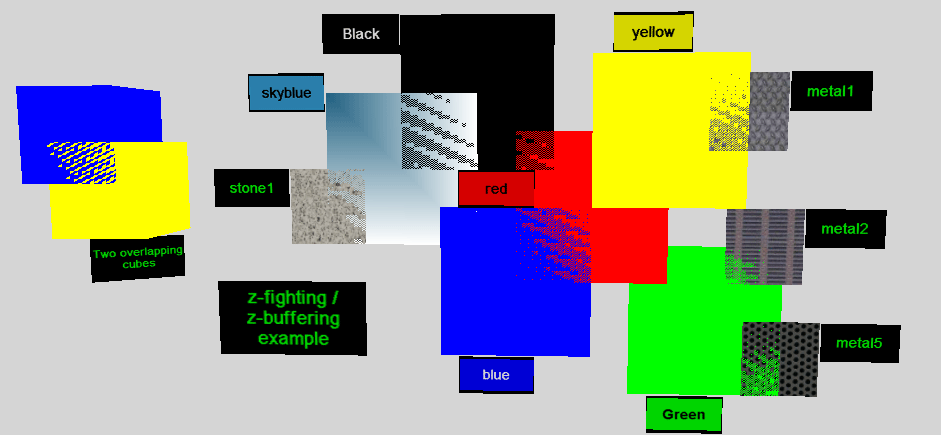
Z-fighting, also called stitching or planefighting, is a phenomenon in 3D rendering that occurs when two or more primitives have very similar distances to the camera. This would cause them to have near-similar or identical values in the z-buffer, which keeps track of depth. This then means that when a specific pixel is being rendered, it is near...
foggy plaza
Ah thank you!
wraith shale
 wraith shale
oh wow, forgot to check the oculus xr plugin for android platform again after platform switch, my unity app just started 2D in quest 😄
I guess this is what happens now when Quest can run native android apps in 2D
wraith shale
still kinda wondering how you force this on, Oculus did release new metrics tool for Quest that does show ASW on the device but it's clearly not enabled yet
I'm already on custom URP package from Oculus and using OculusXR 2.0 preview that has these options (which were on the screenshot)
they did mention they will do step by step guide but I doubt it's up already 🙂
acoustic lodge
If you have the URP package and the option checked, surely it is on? I don't know whether it will do anything if you're already running at target framerate, though; I could see arguments for them to implement it either way.
wraith shale
nah it's not doing anything when I deploy it to Quest 2
ASW graph is sitting still and reports 0 frames using it
looking at the git repo's test project, they do have setter for this on OVRManager but we need this via Asset Store package I think?
and that is still v33, so would expect them to update that to v34 set next week
foggy plaza
I've got a question: I'm trying now to draw linerenderer on a 3D object and have set 'line.alignment = LineAlignment.TransformZ;' but whenever I do this, it disappears. Why is that? I already tried to rotate the line, but it just doesn't want to show up :/
 acoustic lodge
Perhaps it's facing away from you? I don't use LineRenderer much, but I wouldn't be surprised if its default material is single-sided.
foggy plaza
what do you mean? Sorry Im also new to it
acoustic lodge
foggy plaza
what do you mean? Sorry Im also new to it
Is it visible if you look at it from the other side? (You may need to hide the object it's next to.) If so then the line is rendering one-sided, and you happen to be looking at the back. Depending on what you need you could either turn the line object around, or change the material it's using to one with Render Face: Both.
foggy plaza
no it's not :/
 floral mural
My mind seems to slowly deteriorate for this nasty bug with Transparent textures that seem to set transparency to black on Oculus Quest builds. I have set the texture override to use ASTC on build settings. Textures are fine in editor but in build it just looks horrible with the black alpha
 kind sparrow
I'm uh... not seeing any controller profiles here

Where do I find the controller profiles I actually need to fix this error?

Oh wait, nvm, found it
 noble python
hey there
can anyone suggest me a good and budget VR headset?
any response is appreciated
wraith shale
@noble python for a budget headset, I'd go with some second hand device or Quest 2
Q2 is nice especially if you have any interest on developing for standalone VR like Quests
noble python
You mean Second hand* ?
wraith shale
*yes
wraith shale
Quest 2 pro's:
- 120Hz
- somewhat high resolution display
- can do standalone VR
- can stream PCVR wireless via AC/AX Wi-fi (no more cables)
- unbeatable price point for the new device
cons: - facebook / meta
- PCVR uses video compression (softens the image a bit and can have compression artifacts) + it has tad higher latency than headsets specifically made for PC only
- FOV could be bigger
but it also boils down to what you need from it
if you are ok with lower resolution and having wires around, you can probably find many used Oculus CV1 / Rift S or HTC Vive's for reasonable price
noble python
damn 120 hz
wraith shale
yeah, that's quite nuts, considering they originally shipped it only 72Hz enabled (altho it was supposed to ship at 90Hz by default, they just didn't have time to figure it out back then)
noble python
are samsung VR headsets good?
wraith shale
I guess they are one of the better WMR headsets
I cant remember how the controllers were on that one, in general VMR headset owners tend to complain about the tracking a lot
noble python
hmm i see
wraith shale
there's plenty of reviews for these headsets around, probably good to do some research if find some good deal on specific model
noble python
yup
 idle rune
hello guys, fast question:
max capacity for VR multiplier in one session(room)?
of course, it depends on soft, but still, any numbers?
severe saffron
@idle rune entirely depends on your implementation
maybe you already have a networking library in mind?
photon or mirror or something? There's nothing really VR specific about it so you might have better luck in #archived-networking
quake used to support 32 players in 1997 lol
idle rune
No, I'm in a search session atm.
I want to use Unity, that's all that I know now
I think my instruments will depend on this search result
severe saffron
well Ive had ok luck with photon but the relay delay sucks... not sure Id recommend it for VR where you wanna juggle with others
Ive heard good stuff about normcore and VR
dawn oasis
Is there known weirdness with trail renderers and VR? I dug up a thread from 2015 about trails being rendered differently between eyes but I can't find anything else
They just feel weird, kind of hard to look at
acoustic lodge
dawn oasis
Is there known weirdness with trail renderers and VR? I dug up a thread from 201...
Anything that's rendering view-aligned will potentially feel wrong in VR (since they will typically align to each eye separately, so they'll appear slightly differently rotated for each eye), and I think TrailRenderers are set up like that by default. If switching them to some kind of fixed alignment stops them feeling uncomfortable then that's likely the problem. (Though obviously switching them to fixed alignment is likely to break them in other ways.)
dawn oasis
acoustic lodge
Anything that's rendering view-aligned will potentially feel wrong in VR (since ...
Sweet, I'll poke around with that
 fallen bough
I have a problem while building project for quest 2, as always I do I was exporting but before Postprocces Player shows an error that says a failure occurred while executing com.android.build.gradle.internal.tasks.workers$actionfacade, someone can help to fix it please? I searched on google but nothing helps me, I need to build it as fast as possible so if someone can help me quickly in a place of 30 minutes I will be grateful
fallen bough
solved
 tacit quartz
Hello everyone. I would like to start VR on Unity and I have some questions if somebody can help me.
- is creating VR projects much harder than creating non VR projects ?
- i was thinking about an oculus quest 2 to start playing VR & creating my firsts VR projects, however, i saw that it was possible to connect the headset to a computer to run the games on this computer. So, why buying a vr headset which allow to run games on it if connecting it to a computer can do the job ? (isn't buying a similar headset without the possibility to run a game on it a better idea?)
- how is compatibility between VR projects and different VR equipments ? For example, if i am doing a VR project which is compatible with a specific VR headset, will it be compatible with other headsets ?
- I don't have usb-c port on my computer, I saw that it was now possible to use an usb 3 (or even an usb 2 !) port to do the job, has anybody experienced this yet ?
Thanks a lot in advance ! And sorry for my approximate english (english isn't my mother tongue 🙂 )
acoustic lodge
tacit quartz
Hello everyone. I would like to start VR on Unity and I have some questions if s...
is creating VR projects much harder than creating non VR projects ?
It is harder, but I wouldn't say it's much harder these days; there are reasonably good tools for it in modern versions of Unity.
i was thinking about an oculus quest 2 to start playing VR & creating my firsts VR projects, however, i saw that it was possible to connect the headset to a computer to run the games on this computer. So, why buying a vr headset which allow to run games on it if connecting it to a computer can do the job ? (isn't buying a similar headset without the possibility to run a game on it a better idea?)
It depends what you want. People typically buy a Quest 2 because they want to be able to play games without connecting it to a computer; if you're happy to only play games while connected to a computer then there are other headsets you can buy more cheaply (though possibly not much more cheaply, as Facebook drive the Quest price very low).
how is compatibility between VR projects and different VR equipments ? For example, if i am doing a VR project which is compatible with a specific VR headset, will it be compatible with other headsets ?
For the headset itself compatibility is pretty easy; you can usually tick boxes for all the headsets you want and they'll work. For motion controllers, though, compatibility is much more difficult. You will generally need to think separately about how your game's controls will work on every different type of motion controller (because they don't generally have the same buttons).
I don't have usb-c port on my computer, I saw that it was now possible to use an usb 3 (or even an usb 2 !) port to do the job, has anybody experienced this yet ?
I've connected a Quest 1 over (non-C) USB3 without any problems; if people say that works for the Quest 2 as well then they're probably right.
tacit quartz
acoustic lodge
> is creating VR projects much harder than creating non VR projects ?
It is hard...
Thanks a lot for your answer ! It helps a lot !
So if I want to save money by buying a headset where I have to connect it to a computer (let's imagine it's cheaper), I could test my game on it and then if one day I buy an oculus quest 2 for example, my game will also work on it ?
Thanks for the warning about motions controllers
Thanks a lot again 😄
acoustic lodge
tacit quartz
Thanks a lot for your answer ! It helps a lot !
So if I want to save money by b...
You will likely need to do some work to move a game from computer to Quest; it would be similar to the amount of work you would need to do to move a game from computers to phones. The Quest is essentially a phone, so it's much less powerful than most desktop computers; games need to be less demanding to run well on it.
tacit quartz
acoustic lodge
You will likely need to do some work to move a game from computer to Quest; it w...
Okay perfect, and for "rendering" it's just like basic games where you have a 3D scene ? Unity does the job of rendering it properly to both eyes in the headset for example ?
acoustic lodge
tacit quartz
Okay perfect, and for "rendering" it's just like basic games where you have a 3D...
Yes, you will usually only need to worry about the details of rendering if you're writing your own shaders.
tacit quartz
acoustic lodge
Yes, you will usually only need to worry about the details of rendering if you'r...
Perfect
And lastly, for PS4 VR games, I suppose that it is different ?
Maybe it's harder to try a PS4 VR game , I don't know at all how to export game to PS4
 fiery night
I've been experimenting with settings for standalone quest 2 builds and I found that enabling HDR drops my framerate from 90 to 30/40 fps.
Is it safe to assume that HDR is a no-no?
Or might spacewarp be a potential solution here once it becomes available?
acoustic lodge
tacit quartz
Perfect
And lastly, for PS4 VR games, I suppose that it is different ?
It's hard in the same way as making any other PS4 game; you need to persuade Sony to let you become an official PS4 developer, and you need to buy or rent development hardware from them.
tacit quartz
acoustic lodge
It's hard in the same way as making any other PS4 game; you need to persuade Son...
Oh okay, very boring if it's just for a personal project for example. Thanks a lot for all your answers !
sinful sable
I am able to rotate the object (by using Primary 2D axis) using XR Grab Interactible on the gameObject. However, when I add "attach Transform" the rotation is of the empty game object. I still want to rotate the gameObject the way I can without having the attach transform. The video provides details.
Rotate game object
wraith shale
@tacit quartz my Quest 2 works just fine on usb3->usbc cable but I only use it for sideloading nowadays. I used it originally for pcvr link but use wifi link for that now as it is just more convenient
tacit quartz
wraith shale
<@119462804737490946> my Quest 2 works just fine on usb3->usbc cable but I only ...
😯 thanks a lot for your answer, I didn't know that there was an air link feature ! It's very interesting
So you basically just a cable to load the headset and airlike to play games ?
wraith shale
You need ac/ax wifi but yeah it works really well if you have router nearby
I've even bought two routers dedicated for quest wifi alone as you get best experience if the router is near the playspace
You can use wifi for adb link too but never tried that with unity
north path
For the newly announced oculus quest spacewarp:
Will it only be supported in 2021.2 or will 2020.3 also work?
severe saffron
good question
north path
FFR doesnt work for me, even on the highest I don't see a difference and performance is the same
My CPU and GPU level also aren't applying
void Start()
    {
        OVRManager.cpuLevel = 3;
        OVRManager.gpuLevel = 4;
        OVRManager.fixedFoveatedRenderingLevel = OVRManager.FixedFoveatedRenderingLevel.HighTop; // it's the maximum foveation level
                                                                                                 //OVRManager.useDynamicFixedFoveatedRendering = true;

        OVRPlugin.cpuLevel = 3;
        OVRPlugin.gpuLevel = 4;
        OVRPlugin.fixedFoveatedRenderingLevel = OVRPlugin.FixedFoveatedRenderingLevel.HighTop; // it's the maximum foveation level
        //OVRManager.useDynamicFixedFoveatedRendering = true;
}```@north path using BiRP? That should work. On quest 2 I can hardly tell its HighTop unless I have text in the middle/top of the screen. And even then its not super noticable. Try making an eyechart to debug it 😛
also I found that FFR is not a magic bullet for performance. I see a diff of 5-10fps with it maxxed out.
north path
URP in 2021.2
severe saffron
Ah so the oculus URP package?
severe saffron
oculus has their own urp yep
0lento has the details in this channel
its new and requires vulkan
seems the only way to get FFR working with URP
north path
Do you have a link or something?
It's a pretty big PCVR project I'm porting. The first issue is that vulkan performance sucks compared to opengl rn
Oh interesting
severe saffron
this was for implementing spacewarp but yeah thats also requiring the new URP/vulkan stuff
north path
Yeah I am on 2021.2 with urp and vulkan. I switched to vulkan specially for spacewarp
But cant find a special URP version or something like that. That one was for 2020.3 I think
We also use it for SteamVR etc, so idk if changing the urp will break that
AH, my Oculus XR package is stuck at 1.10
That won't help
I see spacewarp is already added in 2 and 3 :o
Does need the custom URP yeah
No link tho lmao
severe saffron
its...somewhere
ive seen it i swear olento knows where lol i just dont wanna ping him
north path
https://github.com/Oculus-VR/Unity-Graphics/tree/2020.3/oculus-app-spacewarp
This is the branch, but its only for 2020
GitHub
Unity Graphics - Including Scriptable Render Pipeline - GitHub - Oculus-VR/Unity-Graphics at 2020.3/oculus-app-spacewarp
I'll just wait for official support
Assume this wont be the permanent implementation haha
WOAH upgrading the Oculus 3.0 improved performance a TON!

Unity Forum
I noticed that performance on Vulkan sucked on the Quest 2, even on Unity 2021.2. In the end I did fix the issue and it gave me a 30-60% performance...
Will be making a video about this as well, this is huge
severe saffron
north path
WOAH upgrading the Oculus 3.0 improved performance a TON!
fr?
north path
Yeah with vulkan it did, barely getting 24fps (vsynced) to going between 24 and 36 (yeah, performance sucks lol)
2.0 should do the same for 2020.3
No clue if OpenGL changed performance
severe saffron
my scene in birp gles3 is getting 90hz so hmm
north path
I'm also on the URP, might be good to know
Apparently the 'vulkan going out of experimental in 2021.2' is only if you manually update the package -_-
Since that happened in 1.11, while all versions only use 1.10 (without being able to upgrade it automatically, even when enabling exp packages)
 shut glacier
Can somebody help? How to remove OpenGL validation at runtime? Oculus does it inside their .so file - how can we do it in Unity?
north path
shut glacier
Can somebody help? How to remove OpenGL validation at runtime? Oculus does it in...
What for?
shut glacier
Oculus SDK has an option to disable runtime shader validation for OpenGL platform. We need the same
on the different platform
also Android
Pico to be precise
 visual idol
Hello, I was wondering if i could somehow make the xr direct interactor on a controller activate by using an event or something? Thanks
storm ether
How do I access quest 2 controller button inputs (A/Y)? I want to map one of them to jump
I have the XR plug in with the oculus provider
acoustic lodge
storm ether
How do I access quest 2 controller button inputs (A/Y)? I want to map one of the...
If you're using the new InputSystem it should have a long list of "optional controls" for each XR Controller. Which of them work will be different for different controllers and providers; I'd try primaryButton/secondaryButton first.
storm ether
I ended up using this tutorial

You need a Unity VR tutorial about how to jump? I have you covered!
Hey guys! We all know getting used to Unity's new input system and the new XR Interaction Toolkit has been kind of difficult. Well I just figured out a way to make all that struggle you've been having disappear in two lines of code! After this tutorial you'll be able to jump an...
wraith shale
severe saffron
ive seen it i swear olento knows where lol i just dont wanna ping him
lol
wraith shale
north path
Does need the custom URP yeah
you need custom core, urp and sg packages for this
Oculus changes to URP are not horribly complicated so it's definitely something one could port to newer Unity is needed
also it might be possible to not require custom versions in the future. One of the core reasons why Oculus had to mod 2020.3 URP was because it didn't support movecs but I also don't know if they did something custom stuff on their movec passes
oculus modded version actually implements movecs for 2020.3, for all URP shaders and SG templates (this is why you need modified sg package too)
I have bit more detailed reply about this here: https://www.reddit.com/r/OculusQuest/comments/qhudgq/application_spacewarp_70performance_holly_crap/hiksfdq/?context=3
basically once you have the custom SRP packages installed, you'll see this on oculus XR settings:
 north path
Yeah I figured that out, just wonder how 2021.2 will fare, since I already upgraded the project to it
wraith shale
what I do wonder myself is if this could be used on windows side as well
north path
Since the urp they used is older than the one from 2021
wraith shale
obviously Oculus only cares about standalone Quest now so I don't expect it to work outside android
yeah I've actually quickly ported those changes to 2022.1's URP master but I didn't really spend much time trying to make it work
north path
Yeah fair, that also has spacewarp v2, which also does something similar (but probably with less quality)
wraith shale
main reason why I'm interested for something like this for PC side is because there's no standard for game engine providing movecs to VR drivers... which is what happens on this application spacewarp
meaning oculus just has to compute movecs on it's own if you use ASW 2
pretty sure vulkan late latching is already on 2022.1's URP
and part of the new draw api implemented some macros which Oculus had to change on 2020.3 as they didn't exist there
so.. there are strong indications that there could be built-in setup soon'ish but probably for 2022 cycle earliest
storm ether
Passthrough API on Quest 2 is broken on the new OS v34 update :/
wraith shale
they also removed that experimental stationary passthrough that ignored the controllers for guardian and just faded to passthrough mode if you left the bounds
I loved that one as I do like to have some guardian while on stationary but didn't really feel like you needed to have it for controllers... it's vague enough limit anyway as you can't define it yourself
storm ether
Hello, does anyone know if there is a way to start Quest 2 native recording via Unity app? Or maybe some alternative of recording the Players POV?
tiny niche
@storm ether even if you could, i doubt you could play it back
wraith shale
@north pathv34 is live now at https://assetstore.unity.com/packages/tools/integration/oculus-integration-82022

Use the Oculus Integration from Oculus on your next project. Find this integration tool & more on the Unity Asset Store.
(just mentioning because it at least should let you use their URP sample project for AppSW)
wraith shale
actually just tested this on Quest2
it runs now with that integration package and custom URP
OVRManager.SetSpaceWarp(true);
to enable it on demand
AppSW itself is reported to be running and functional using latest OVR Metrics Tool
pine bison
Cool :) Will have to look into how to get the custom URP up and running
wraith shale
basically clone this repo and branch with git lfs: https://github.com/Oculus-VR/Unity-Graphics/tree/2020.3/oculus-app-spacewarp
and copy com.unity.render-pipelines.core, com.unity.render-pipelines.universal and com.unity.shadergraph folders from it to your URP projects Packages folder
wraith shale
well... this gets interesting
I get the AppSW options even without custom URP on 2022.1
 wraith shale
according to https://developer.oculus.com/documentation/unity/unity-asw/ they still require custom movec data so I dunno why it works without the custom URP
wraith shale
ok so after some testing, 2020.3 with custom URP works a lot better than unmodified 2022.1 URP. Both can enable AppSW but only custom URP seems to have solid hand controllers, I can see some misspredictions on 2022.1 which is probably due to missing movec data in form they want
 woven kite
Hello everyone, does any of you experienced massive performance drops with latest firmware update of the Quest 2? The same apk runnning at 72FPS before firmware update now runs around 40/50FPS. I currently have no idea what could be causing it. Tested and validated on multiple headsets.
proud raft
Does anyone know a workaround in OpenXR to stop the user from recentering on Oculus? The stage space setting or even getting the boundary points still do not work.
shut glacier
Please help, tried everything to fix it - Releasing render texture that is set as Camera.targetTexture! Context : Android, Pico VR, using custom render texture (asset) in the addressable prefab. When releasing gameobject via addressable release instance - it always throws this error. What should I do?
 wraith shale
I don't have Q1 so can't test, but there's been no word if it works or not on it
actual implementation doesn't seem like it separates the two in any way
been also trying to make this run on 2021.2's URP but it just shows black image on the headset... still trying to decipher what's going on but I'm suspecting it's URP's new shader stripping getting too aggressive
lone knoll
so hopefully we can see standard Q2 performance on the Q1
wraith shale
I've tried also stripping the stock movecs out of URP 12 in case they interfered but that made no difference
lone knoll
Pass
{
            Name "MotionVectors"
            Tags{ "LightMode" = "MotionVectors"}
            Tags { "RenderType" = "Opaque" }

            ZWrite[_ZWrite]
            Cull[_Cull]

            HLSLPROGRAM
            #include "Packages/com.unity.render-pipelines.universal/ShaderLibrary/OculusMotionVectorCore.hlsl"

            #pragma vertex vert
            #pragma fragment frag

            ENDHLSL
}
it just includes those paragmas to the last time i checked
and an extra MotionVectors Tags
didn't try it yet tho, just looked at the source a few time
wraith shale
yeah, I'm actually suspecting it might strip the whole pass away but this is just a wild guess
can't think of any other obvious reason why it doesn't work on 2021.2
actual PR port is straight forward, especially now that I've removed the stock movecs
there could be some stuff going on the closed source side on oculus dll though that prevents this from running on other than 2020.3
but I don't think it ever gets that define even on 2020.3, at least my VS grays out that first part
there's no such thing as isPreviousViewValid or previousView on 2020.3 either (or in 2021.2 if that matters) so it wouldn't even build if that define actually worked
they do this cs #if UNITY_2020_3_OR_NEWER && !UNITY_2021_1_OR_NEWER && !UNITY_2020_3_1 && !UNITY_2020_3_2 && !UNITY_2020_3_3 && !UNITY_2020_3_4 && !UNITY_2020_3_5 && !UNITY_2020_3_6 && !UNITY_2020_3_7 && !UNITY_2020_3_8 && !UNITY_2020_3_9 && !UNITY_2020_3_10 && !UNITY_2020_3_11 && !UNITY_2020_3_12 && !UNITY_2020_3_13 && !UNITY_2020_3_14 && !UNITY_2020_3_15 && !UNITY_2020_3_16 && !UNITY_2020_3_17 && !UNITY_2020_3_18 && !UNITY_2020_3_19 && !UNITY_2020_3_20 && !UNITY_2020_3_21 #define UNITY_2020_3_22_OR_NEWER #endif
I mean... no wonder it's broken
I've also tested 2021.2 using OculusXR 3.0-pre.1 instead of 2.0-preview.1 (which worked fine on 2020.3 for AppSW)
should probably learn how to debug the actual device better as it would make this type of troubleshooting a lot easier 😅
I'm so used to doing PC only stuff so kinda green on android everything
lone knoll
wraith shale
can't think of any other obvious reason why it doesn't work on 2021.2
isn't that URP v12 in 2021.2 ?
wraith shale
yeah, it is
lone knoll
i heard there are some breaking changes from 10 to 11
wraith shale
I've modified 2021.2.2's URP
thing is.. AppSW actually runs on newer URP if I don't put these oculus changes in 😅
I just don't think it gets movecs right
lone knoll
wraith shale
they do this ```cs
#if UNITY_2020_3_OR_NEWER && !UNITY_2021_1_OR_NEWER && !UNIT...
lol
lone knoll
wraith shale
I'm so used to doing PC only stuff so kinda green on android everything
and that's with vulkan , right ?
wraith shale
yeah
afaik AppSW only works on a) Quest's b) Vulkan
OculusXR doesn't even run Vulkan on windows + there's no setting to enable AppSW for anything but Android
wraith shale
I'd really love to have this on PCVR too as it's way better than ASW 2
lone knoll
now we have to mess with all that stuff as well ...
wraith shale
it's just since Meta has no interest on PCVR anymore, there's very little chance they'll let us have it there
lone knoll
someone might hack it )))
PCVR is just a screen with no software running on it , should be possible in theory
wraith shale
also how I see it, only real reason to even want to go past 2020.3 URP for this is to get better dynamic resolution handling + filtering on 2022.1. While 2021.2 added a ton of neat feats to URP, most of those are out of reach when you use Quest for rendering
2022.1 will have AMD FSR, did test it yesterday with AppSW, but I really suspect it didn't get any movecs for spacewarp
lone knoll
from what i seen so far the biggest performance boost is FFR and scaled down resolution on normal URP settings
( also removing AA )
wraith shale
yeah I tried FFR on 2020.3 with AppSW too, it works quite nicely
well.. I couldn't make it actually do that on my scripts.. there's like 3 different API's to set the foveation level / dynamic setting for it and none of them worked
I just ended up using adb to test it
lone knoll
wraith shale
2022.1 will have AMD FSR, did test it yesterday with AppSW, but I really suspect...
in the article from oculus they claim to have a toggle for appSW in runtime ( frame based ? ) , might worth to try add this to actually see if there is any difference
wraith shale
whole FFR setting thing reminds me a lot of haptics/controller rumble as there's also at least as many API's for that - which all do nothing on current XR setup
wraith shale
lone knoll
in the article from oculus they claim to have a toggle for appSW in runtime ( fr...
it's a manual toggle, I used it already while testing
AppSW on 2020.3 actually feels more snappy than native 90Hz on my brief testing
lone knoll
wraith shale
whole FFR setting thing reminds me a lot of haptics/controller rumble as there's...
iirc i got it working with openxr
wraith shale
yeah I tried those too :/
googled for all kinds of discussions around it and man there were many struggling to get it to work
that being said, I'm using the modified OpenXR setup from oculus
I'm not sure if you can even enable AppSW without it atm
wraith shale
yeah it's not ideal at all... wish there was like one api that worked for everything
they actually just added yet another new haptics api for OpenXR 1.3 package
I mean... they could have fixed the old stuff too but hey 😄
lone knoll
haptics api ?
wraith shale
only way I got vibrations to work on OpenXR prior to this was to use XR Interaction Toolkit... they hook into input system on bit hacky way so they actually get it working there
lone knoll
wraith shale
googled for all kinds of discussions around it and man there were many strugglin...
that's what i got
//// 0 = Off, 1 = Low, 2 = Medium, 3 = High, 4 = High Top
Unity.XR.Oculus.Utils.EnableDynamicFFR(FoveationLevel > 0);
//Unity.XR.Oculus.Performance.TryGetAvailableDisplayRefreshRates
Unity.XR.Oculus.Utils.SetFoveationLevel(FoveationLevel);
I'm assuming haptics is just another word for rumble / vibrations at this point
yeah I tried these too, in that same order
lone knoll
so this works for me but only with the oculus xr plug-in ( not the xr feature )
wraith shale
wait, you have to enable dynamic FFR for this to work?
I think I tried the opposite
lone knoll
idk i just assumed it has to be enabled first before it was set and it kinda works
wraith shale
I read somewhere that dynamic option is enabled by default unless you swap it but didn't really verify it...
I wanted to force it to one level for testing to see the impact, if it's dynamic it will not really give same data
lone knoll
hmm didn't notice if its on by default , there is that fps graphs inside the oculus OS that can be installed that also can show the current FFR level
wraith shale
yeah I'm running the OVR Metrics Tool already
if you test Application SpaceWarp, you want to update that to the latest as they added stats + graph for AppSW there too
lone knoll
ooo interesting will do
wraith shale
I also used that to check the FOV level
it didn't do anything before I finally used that adb command
lone knoll
field of view ?
wraith shale
foveation
they just use FOV for short
it's bit confusing but there's no reason for debug tool like that to even know of your game fov
lone knoll
ah right , its FFR here , FOV there and something else elsewhere xD
wraith shale
I agree it should just read as FFR instead
lone knoll
how does the AppSW shows in the metrics ?
wraith shale
it just shows 0 if there's no AppSW used and then it shows the target framerate when it's active
so you will see FPS: 36 and AppSW: 72 etc when it's active
FPS: 72 AppSW:0 when inactive
or something along those lines
lone knoll
interesting if it would be possible to have higher level of appSW in the future , right now its at 2 , maybe 3 that will use third of the frames
wraith shale
graph itself isn't really that useful, it's basically just toggle
one thing that confused me a bit first on that OVR Metrics Tool was their way of reporting CPU and GPU usage... I didn't at first realize it is % figure from 100
I'm so used to measuring all perf in milliseconds so first wondered why they have that kind of units there
lone knoll
there is also this app that shows the same data in a slightly different format to that of the Metrics Tool

( not sure if its supported by AirLink tho )
wraith shale
yeah, I use that to update that metrics tool + it's handy if you want to store adb commands you use a lot as it can run your custom commands with one button click
they have wifi adb but I never got that to work with Unity, didn't try for long though
also since both Unity and that oculus hub use adb for connection, they kinda interfere if you sideload with Unity, I guess one could just use oculus tool for sideloading too
wraith shale
I just have my 5m usb cable connected while testing Quest builds nowadays... but use AirLink for PCVR testing
lone knoll
recently switched to airLink for development ( phone usb internet hotspot + win10 mobile hotspot 5GHz )
haven't tried uploading an apk with this yet
wraith shale
AirLink itself isn't the tech for that but you can use adb over wifi to sideload apk's
lone knoll
ah right
probably will just use a cable as usual for uploads
can u ping me if u find something new on the AppWrap + 2022/2021 ?
wraith shale
sure, altho I'm not sure how much I'm going to investigate that path atm, I feel like one way to approach this would be to port stock URP movecs to 2020.3 and then try to modify them to be AppSW compatible there and then mirror the changes to 2021.2+ as it would be most trivial to maintain that way
or... try to mirror AppSW movec changes on 2021.2+ directly
I did measure regular URP being more costly on 2021.2 using Quest 2 though, it wasn't even slight difference, more like 20-30% on that simple test scene
also... URP in 2022.1 is super glitchy atm (at least on Vulkan), even without all these VR things, it's not a great experience atm
wraith shale
also... wonder what happened to this https://github.com/Unity-Technologies/Graphics/pull/4707
GitHub
Purpose of this PR
Enable Motion Vectors for XR and fix some issues with multi pass and camera motion vectors.
When enabling test for xr I noticed that view matrix did not update properly for multi...
it was approved last August but never merged
severe saffron
this makes me sad to hear
Im getting 90hz with BiRP and most of my experiences with URP were in 2019 and the performance was poor
I want asw but things are already pretty good as they are
Not sure all this extra work is gonna be worth it
(except asw might enable power saving/lower gpu level)
wraith shale
I don't really have huge margin with URP and 90Hz with AppSW + FFW at max but then again I don't really know how expensive it is to rendering things at native resolution with Q2 in the first place (do people do this usually?)
sinful sable
I'm using XR Interaction toolkit and I see that if I have XR Grab Interactable on the object, I can customize Interaction Events (On Hover, On Activate). I want to have other events (Using A and B button on right controller). How do I go about doing this?
 sharp drum
wraith shale
basically clone this repo and branch with git lfs: <https://github.com/Oculus-VR...
sharp drum
wraith shale
basically clone this repo and branch with git lfs: <https://github.com/Oculus-VR...
sorry, could you elaborate on copying to packages folder?
If you drag it in it gets added to assets and I'm not sure if you're supposed to install it through package.json on packagemanager
this is the final step for me and its killing me lol
acoustic lodge
Should be just what it says; copy the folders with those names into the Packages/ folder at the root of your project (not in the Assets folder). Unity should pick them up automatically.
(I suspect you may find it's more like the first step than the final step, though that may just be my natural cynicism talking.)
sharp drum
Yeah I just realized that lol thank you
Its quite nightmarish though I'm getting errors related to the comshadergraph and comuniversal
I'm not sure if I'm missing something
in the package manager it says missing com.unity.searcher

these are the only errors that appear is anyone else getting these
acoustic lodge
I'm not setting this up myself so I can only hypothesize. com.unity.searcher is a standard package, I'm surprised Unity can't resolve it; I guess Oculus' shadergraph must be asking for a strange version number? For the other two my first guess would be that they only work with a specific version of Unity (perhaps 2020.3 based on the URL?) and you may be on a different one? That could potentially explain the first error as well, if they're asking for a version of Searcher that isn't compatible with your Unity version.
sharp drum
acoustic lodge
I'm not setting this up myself so I can only hypothesize. `com.unity.searcher` i...
Thank you so much for the help, I really appreciate it. I Guessed the same and updated to their recommended version but from this point on I get different errors
Im not sure if its just the package being in an early state
narrowed everything down to this error

I'm really hoping that someone here has encountered this since I'm pretty much stuck here
acoustic lodge
No real idea for that one, I'm afraid. As a wild stab in the dark, perhaps that file (ICSharpCode.NRefactory.dll) is corrupt and needs to be redownloaded?
sharp drum
acoustic lodge
No real idea for that one, I'm afraid. As a wild stab in the dark, perhaps that ...
Aha! It's fully working now! I just had to download that one dll file independently
Thank you so much for the help I was really struggling here
hopefully this helps anyone else who might have the same issues
just need to finally test it on the quest now
 deep trout
Is this where I can ask an openxr related question?
severe saffron
ye
 lusty pelican
So i dont know if this is the place to ask but i dont know where else i would. I made a shader in shader graph that uses the depth texture. When i finished i wanted to test my shader in VR, but it was all offset and wrong. Took me a while to figure it out, but basically the Depth texture stores both eyes depth in one texture thats twice as big, and when sampling the depth at the screen position, its offset the way that this image above is kinda describing. (Red is the right eye view and blue the left eye view). Now i could just offset them accordingly, but the problem is that this offset depends on the IPD, and so 1. its not static and 2. its somehow calculated and i dont know how

I have two options here, either i find out how to get the ipd value and find out how to caculate the offset in order to negate it, or i find a way to have the depth texture be individual for each eye, which im guessing is not possible since its probably made like this by oculus themselves.
I am using URP and the XR Management Plugin with the Oculus provider and added a standard XR Rig
Im really hoping that someone can give me some input here because im honestly lost, this is the first time im doing VR in Unity
Also to be sure, is this the right channel or should i repost this in shader channel ?
wraith shale
@sharp drum did you use Git LFS to clone those SRP folders?
if you get errors on binary files being too small it suggests you didn't
meaning there could be other files missing too (altho most binaries on SRP repo are for their test projects)
sharp drum
wraith shale
<@!905300552546676737> did you use Git LFS to clone those SRP folders?
Thank you, I should've paid attention to that. It's all working right now but if there are any issues I will reclone it
fiery night
For some reason my rotations don't update anymore after having exited playmode using EditorApplication.ExitPlaymode();.
It works fine if I use the play button in the editor, but to prevent myself from having to take off the headset all the time I want it to be a button press in-game
fiery night
lusty pelican
So i dont know if this is the place to ask but i dont know where else i would. I...
I think you can solve this with a single pass... Whatever it's called
Render mode set to single pass
tiny niche
@fiery night just bring up the desktop inside vr. then you can fiddle about and not need to take the headset off
fiery night
tiny niche
<@!366596598169600002> just bring up the desktop inside vr. then you can fiddle ...
How do I do that in play mode?
tiny niche
depends on what headset you use. if its an oculus one, then there's a button for it on the far right in the menu
 mint turret
So, looking to make a vr version of our game. Is it easier to port it, or easier to rebuild it from “scratch”?
tiny niche
@mint turret i'd prototype the vr interaction systems in a project on the side and then package them up for integration into the existing game
you could still reuse one of the existing scenes as a sample scene though. That way you'll get a better fit with less rework needed, when you package it up
 dull ingot
Hi. I hope this is the appropriate channel to be asking for this kind of help.
I have been, for the past week, trying to test my VR project in my Oculus Quest. There has been some settings I had to change in order for the Unity software be able to even build my project in the first place. After finally getting it to succesfully build and create an apk, I have not been able to get it to run on my Oculus Quest. I have also tried build and run, as suggested by a video tutorial I have been watching, while it did not work the first time around, due to a faulty link cable, after getting a new one and having my PC succesfully detect my Oculus Quest, the headset does not run the project whatsoever after the Unity software succesfully builds and runs my project.
Is there anything more I have to do? Or is it something I am currently doing wrong? As of now when the Unity software is done building and running, the Oculus Quest turns black, shows a loading sequence, and then fully turns black. Note that even the "Game" window in the Unity software does not move accordingly to the headsets movements. Any help is greatly appreciated. Thanks
pine bison
It seems like you are confusing Build and Run and Oculus Link @dull ingot. When you build and run, your app runs locally on the quest and will not be displayed in editor. If you connect your Quest to the computer with Oculus/Air Link then you can run in editor without needing to build to the quest
Regarding the app not running at all, please show your XR Settings in Unity
 brave dirge
Hey all, I got passthrough working on Quest 2, but when I toggle/adjust opacity/overlay-underlay/adjust depth/etc. my scene objects and/or UI are not showing up. Just black screen. Skybox/Color is not showing up either. I'm using URP. Any ideas why the OVRCamersaRig's camera is not rendering the scene?
dull ingot
pine bison
It seems like you are confusing Build and Run and Oculus Link <@!381195250787680...
Shall it not be running the app then locally on the quest while it is plugged in with an Oculus Link cable, @pine bison? Because with the the Oculus Quest plugged in, it does not seem to be running in editor at all. Further, when I choose to build and run it does not work either, just shows a black screen on the Oculus Quest.
dull ingot
pine bison
Regarding the app not running at all, please show your XR Settings in Unity
I will sending a number of screenshots showing the player settings below:


Hopefully the provided images clarify things for you @pine bison.

I may have made a mistake sending you the wrong images, is the above image what you are asking for?
pine bison
The last one is what I needed
However I think if you want to use VR in editor then you should just find a tutorial about how to set up oculus link
dull ingot
That I guess I could find a solution to then. However, what can I do about my project not running on the Oculus Quest when I choose "Build and Run"?
pine bison
You showed your oculus XR settings, what about the top level?
dull ingot
Where could I find that? I am a little confused.
pine bison
Where it says XR plugin management
north path
dull ingot
Also set minimal android version to 23, this will avoid signing issues later on
north path
dull ingot
Install location should also be at auto, can cause install issues for some users Ive heard
But indeed go to XR management and make sure Oculus and Initialize XR on start are both on under the android tab
dull ingot
pine bison
Where it says XR plugin management
Here is the window that comes up when I click "XR Plugin Management":
 dull ingot
north path
Also set minimal android version to 23, this will avoid signing issues later on
dull ingot
north path
Also set minimal android version to 23, this will avoid signing issues later on
I recall having done that but it doesn't hurt to double check
pine bison
Disable ARCore
That will interfere in a build
Also, to run in Editor, you need to enable Oculus under the desktop tab
dull ingot
pine bison
Disable ARCore
I have disabled it now
 tight geode
Does anyone here know how to get the exact value of how much the trigger is being pressed
pine bison
tight geode
Does anyone here know how to get the exact value of how much the trigger is bein...
Assuming you're using XR Plugin Management
tight geode
pine bison
Here <https://docs.unity3d.com/Manual/xr_input.html>
Yeah but which one actually uses or shows how much a button is getting pressed in?
 final basin
What's the latest recommendation for Oculus + SteamVR cross platform XR development? I have a unity 2019.4 LTS project that's currently using the SteamVR Unity Plugin and I'm in the process of porting to Oculus Quest. Do i need to keep using the SteamVR input action system in PC builds and a different system for Oculus? Or is there a one size fits all that still allows Steam users to customise their bindings?
pine bison
tight geode
Yeah but which one actually uses or shows how much a button is getting pressed i...
There is example code for exactly what you're asking https://docs.unity3d.com/Manual/xr_input.html#AccessingInputFeatures
north path
final basin
What's the latest recommendation for Oculus + SteamVR cross platform XR developm...
My personal recommendation (IF you do not use any SteamVR specific features, whatever those are):
For desktop use OpenXR, for android use Oculus
And if you need access to more advanced Oculus features like avatars or lip sync, you also need Oculus Integration
You will need to use something else for Input. I highly recommend the new input system (required by OpenXR either way), so you can easily manage all input from 1 asset
If you are on the old input system you gotta change all the input events in your code either way to add Oculus input support
final basin
Thanks for the reply @north path !
"OpenXR for desktop and Oculus for Android" <- This is just for handling the rendering and position/rotation tracking of the XR devices? Seems like this + the unity XR interaction toolkit is a good way to go.
I've never used the New Input System, but it seems action based like SteamVR's input. Is there a way to bind the New Input System's actions to SteamVR actions so that desktop players can still customise their bindings through the SteamVR tool? Or should i completely abandon SteamVR Unity Plugin's input system? My other concern with the New Input System and Unity XR is that last time i tried (a long time ago) it didn't seem to support finger tracking and input with the valve knuckles
The SteamVR unity plugin hasn't been updated since february which is concerning lol 😬 But i havent been through the Unity XR changelogs yet to see what new fixes/features it has
north path
I dont think SteamVR will be updated much more, since afaik all features are in OpenXR (steamVR natively supports all openXR deviced and applications)
New input system indeed is action based, worth it to learn if you have a day of time
OpenXR + Oculus is for rendering, position/rotation, input reading, and Oculus has stuff like CPU/GPU levels for the Quest, as wel as fixed foviate rendering etc, so far that Oculus Integration is not needed.
For interactions the XR Interaction Toolkit is probably the best free interaction system. For paid systems VR Interaction Framework (my fav) and HurrcaneVR are alternatives
final basin
Awesome! Thats super helpful. I hadn't heard of those paid tools, so i'll check those out too. Thanks a lot!
dull ingot
I have successfully been able to run the project on the Oculus Quest. It is working properly now aside from a few nit picks such as assigning the head movement axis as well as the controller movements and creating an object around them of some sort. Either way, my main problem has been solved and for that I thank you, @pine bison and @north path for your help. Have a good one!
 sudden inlet
so since quest is mobile technically, im assuming non of my normal maps work because of it
buoyant jolt
Unity’s builds for Android have pretty much always supported normal maps afaik. At least since I started with it in 4.1.
pine bison
sudden inlet
so since quest is mobile technically, im assuming non of my normal maps work bec...
You might be thinking of detail normals, which you need to explicitly enable on android. Regular normal maps work just fine
sudden inlet
I just mean there's no depth. The normal and shading technically work fine.
pine bison
Well what do you mean by depth? The normal map only affects the lighting, it doesn't alter the geometry or create parallax like a height map
buoyant jolt
Also, before we go there, height maps are also supported on the quest.
 glacial plover
hey guys im following occulus documentation stating that there is a tab in player however my project does not seem to have this?

The project is made in 2020.3.22f1 using the VR core
I have installed the oculus integration module
 buoyant jolt
That option started to be removed from Unity, but not sure when
It would have been under Other Settings there
glacial plover
buoyant jolt
It would have been under Other Settings there
i cant locate a virtual reality supported toggle in other settings, any idea? I could also be blind
buoyant jolt
glacial plover
i cant locate a virtual reality supported toggle in other settings, any idea? I ...
Unity Forum
Where can i check these? under player settings i cant find these issue.
Thanks a lot
Tina
No they moved it in 2020
glacial plover
buoyant jolt
https://forum.unity.com/threads/player-settings-virtual-reality-supported.664858...
ah so if i just toggle oculus in the XR Plug-in management that enables virtual reality support?
although i did build it and run it on my quest 2 however my controllers werent being recognized
buoyant jolt
In 2020 it should
You also need to generate a manifest, and bring in the controller prefabs - assuming you are using the Oculus SDK
glacial plover
buoyant jolt
You also need to generate a manifest, and bring in the controller prefabs - assu...
yeah i am, im just going through the oculus documentation currently on setting it up and so far it has ran me through making the project and setting it up for building/testing
glacial plover
buoyant jolt
You also need to generate a manifest, and bring in the controller prefabs - assu...
Im assuming this will be covered in the documentation as i proceed?
buoyant jolt
glacial plover
yeah i am, im just going through the oculus documentation currently on setting i...
Yeah, the downside with that approach is it will only work on oculus headsets, but great spot to start.
Their code, plug-in and documentation has always been rather lacking so I will say maaaaaybe it is in there
glacial plover
buoyant jolt
Yeah, the downside with that approach is it will only work on oculus headsets, b...
thats completely ok im doing this for a research project i dont need it to be ran on other kits
buoyant jolt
The process they outline should work, but only on the specific unity they used for the documentation
glacial plover
how should i go about setting up my unity for github?
im getting an ungodly amount of errors when i try commit
i set unity as my preset for git ignore?
these used to be in a past version when i was making a webgl game

but dont seem to be present in 2020
i found them, and they seem to be in the right configuration
 marble latch
hi all, hope it is okay to post this here! 🙂 we are looking for participants for a paid VR research study! participants will be reimbursed for their time (€ 15 as Amazon voucher, in their local currency) and the only requirement is having access to an Oculus Quest 1 or Oculus Quest 2 and being 18+. If you are interested in learning about novel authentication systems for public displays, VR research, and/or a € 15 Amazon voucher please let me know! I would very much appreciate your help in this research study! Further details via PM 🙂
 lusty sail
When an oculus quest headsets goes into sleep mode during runtime (You take it off for 15 seconds), is there a callback for that?
Or some kind of way to detect when that happens?
I tried OnApplicationPause and that didn't work

Game Development Stack Exchange
The Oculus and the Vive have this light proximity sensor that detects whether you have your VR headset placed on your head currently or not.
Is there any way to tap into that for our own game chec...
lusty sail
So I'm working on a custom controller for oculus quest using arduinos, but does anyone have an idea of how I might track the object I'm holding?
The input is working fine, just not sure how to actually track the position of it
wraith shale
natively on quest or via PCVR?
on pc side you could add extra tracking system (https://github.com/pushrax/OpenVR-SpaceCalibrator etc)
like valve lighthouses and vive trackers
on native quest, there's really no such thing, just either existing controllers or your hands (and you can't mix between them so you'd track both the hands and controllers)
@lusty sail
buoyant jolt
lusty sail
So I'm working on a custom controller for oculus quest using arduinos, but does ...
The Pico 2 uses electromagnetic tracking instead of cameras. Very interesting approach. You could also create a small IoT camera, add LEDs to your Arduino controller, and track and submit the data through the camera as say a Bluetooth interface
But I would:
- estimate using electromagic tracking because it is cool and fun.
- you can estimate as well using gyros, but it would be a 3dof solution, like the oculus go
- create an Arduino camera puck with Bluetooth, add LEDs to the controller, and let the Arduino camera provide the position information to the headset over Bluetooth
Or if you want you could run it through steamvr with vive pucks etc. But that won't be a scalable or sellable solution
 agile dune
Anyone know why my XR thing only says this and nothing else?

I'm on 2021.1.1f1
Disreguard
wraith shale
yeah, rest of the options come with xr interaction toolkit
lusty sail
hey I'm looking around at unity xr and trying to find a way to detect if the headset is in sleepmode
I found one for UserPresence, if the headset is on the user, but I only want to do an event if the headset goes into sleep mode
does anyone happen to know a way to do this?
acoustic lodge
I'd look into general android APIs rather than XR ones? "Sleep mode" isn't really a concept in XR specifically, it's just a thing mobile devices do.
 uncut oak
Hey! Do someone knows where can I find vr hand models for free?
acoustic lodge
You could cut the hand meshes out of characters built with something like MakeHuman or VRoid Studio? Might need some re-rigging, though.
wraith shale
@uncut oak from asset store and free... oculus integration has some nonrealistic looking one and steamvr integration has fancy glove. haven't really looked around for these just remember seeing those
buoyant jolt
photogrammetry scan your own, put a rig on em in blender, and voila!
lusty sail
I'm pretty convinced as of rn there is no way to detect when your Oculus Quest starts sleep mode
tried OnApplicationPause, OnApplicationFocus, OnDisconnected, and Unity.XR.Oculus.InputFocus.InputFocusLost
someone please prove me wrong 
severe saffron
@lusty sail working with the oculus integration? OVRManager.hasInputFocus && OVRManager.hasVrFocus
Im also seeing OVRManager.HMDMounted and unmounted.... Not sure about sleep mode
google is giving me crap results
Unity Forum
Hi,
is there any way to detect when the Quest enters/exits stand-by mode?
I tried using:
- OnApplicationFocus
- OnApplicationPause
- OnEnable
None...
dude has the same issue, but mentions a hacky possible fix
if you can live with ~1 second weirdness delay
vast jasper
Hey guys. A question:
Has anyone in here any experience making or importing a custom made 3d model for VR? I cant get it to work. Im using the standard dummy made in Maya.
 gloomy halo
marble latch
hi all, hope it is okay to post this here! 🙂 we are looking for participants fo...
gloomy halo
marble latch
hi all, hope it is okay to post this here! 🙂 we are looking for participants fo...
Nobody has time for your study we would help but please note this counts as advertising
buoyant jolt
vast jasper
Hey guys. A question:
Has anyone in here any experience making or importing a cu...
What issue are you seeing? Maya should export to FBX just fine for Unity.
vast jasper
buoyant jolt
What issue are you seeing? Maya should export to FBX just fine for Unity.
just wondering if there is any special rigging for VR avatars
buoyant jolt
marble latch
hi all, hope it is okay to post this here! 🙂 we are looking for participants fo...
Please don't send us unsolicited private messages. We have our own VR authentication solutions.
buoyant jolt
vast jasper
just wondering if there is any special rigging for VR avatars
Not really, it's easier if you follow meccanim and make sure hands are structured the way oculus likes to see them
Specific frameworks benefit from specific structures. But Unity is pretty flexible
A safe bet for now though would be to follow oculus avatar and hand rigging naming conventions. But the top VR framework changes every few years
tiny niche
vast jasper
just wondering if there is any special rigging for VR avatars
there's premade hand rigs you can get from oculus as a starting point. it feels less jarring when the hand poses match the defaults as you go into a game
vast jasper
tiny niche
there's premade hand rigs you can get from oculus as a starting point. it feels ...
yeah ive used those before. now im upgrading to arms, custom made and textured by me 🙂 hate floating hands. such an immersion break for me.
tiny niche
well as long as the shoulders and elbows match up with the real world. but as soon as they don't, floating hands are far superior
most games i've tried don't even get the arm length right, so its like you've got rubber tubes attached to the hands
sinful sable
I'm trying to get a reference to hands so that I can detect primary and secondary button presses on Quest. For some reason, the code does not detect button presses, even though I think I have the reference to the right and left hand controllers.
[SerializeField] InputDevice leftHandController;

    //private bool isPrimaryButtonPressed;
    // Start is called before the first frame update
    void Start()
    {
        var leftHandDevices = new List<UnityEngine.XR.InputDevice>();
        UnityEngine.XR.InputDevices.GetDevicesAtXRNode(UnityEngine.XR.XRNode.LeftHand, leftHandDevices);

        if (leftHandDevices.Count == 1)
        {
            UnityEngine.XR.InputDevice leftHandController = leftHandDevices[0];
            Debug.Log(string.Format("Device name '{0}' with role '{1}'", leftHandController.name, leftHandController.role.ToString()));

        }
        else if (leftHandDevices.Count > 1)
        {
            Debug.Log("Found more than one left hand!");
        }

    }

    // Update is called once per frame
    void Update()
    {
        bool isPrimaryButtonPressed;
        isPrimaryButtonPressed = leftHandController.TryGetFeatureValue(CommonUsages.primaryButton, out isPrimaryButtonPressed);


        Debug.Log("Primary Button Value" + isPrimaryButtonPressed);

        if (isPrimaryButtonPressed)
        {
            Debug.Log("Priary Button Pressed");
        }
   }
The isPrimaryButtonPressed value is always false.
tiny niche
@sinful sable that's not how you use a try-method
buoyant jolt
sinful sable
I'm trying to get a reference to hands so that I can detect primary and secondar...
[SerializeField] InputDevice leftHandController;

    //private bool isPrimaryButtonPressed
    void Start()
    {
        var leftHandDevices = new List<UnityEngine.XR.InputDevice>();
        UnityEngine.XR.InputDevices.GetDevicesAtXRNode(UnityEngine.XR.XRNode.LeftHand, leftHandDevices);
        foreach (var controller in leftHandDevices)
        {
            Debug.Log(string.Format("Device name '{0}' with role '{1}'", controller.name, controller.role.ToString()));
        }
    }

    void Update()
    {
        var isPrimaryButtonPressed = false;
        if (leftHandController.TryGetFeatureValue(CommonUsages.primaryButton, out isPrimaryButtonPressed))
        {
          Debug.Log("Primary Button Value" + isPrimaryButtonPressed);
          if (isPrimaryButtonPressed)
          {
            // down
          }
          else
          {
            // up
          }
        }
   }
The start doesn’t really have anything to do with the Update. If that isn’t working, I’d look at the input settings and make sure it is Configured properly & the input method for the project is set properly
The left hand bool of the TryGetFeature is different from the right hand bool.
 ionic estuary
I am getting an Oculus Quest 2 this week. Anyone have any referal codes for the store? I hear we both get $30 of store credit?
wraith shale
ionic estuary
I am getting an Oculus Quest 2 this week. Anyone have any referal codes for the ...
yeah you get 30€/$30 store credits for both if you do this. It's not code though, it's like invite system so both have to be friends on facebook for this to work
"Earn Oculus Store Credit for yourself and your friends! Here’s how it works. Invite a Facebook friend via Messenger with a link to buy an Oculus Quest 2. 30 days after your friend activates their new Quest 2 device, your €30 in Oculus Store Credit will be ready to be redeemed. Your friend will get their €30 in Oculus Store Credit once they activate their Quest 2 device. Oculus Store Credits have no cash value and can only be applied towards the purchase of qualifying items on the Oculus app store. The link expires 90 days from the date sent. There is a limit of 5 referrals every 30 days."
fiery night
I'll be friends on facebook for €30 store credit :p
sinful sable
buoyant jolt
```cs
[SerializeField] InputDevice leftHandController;
//private bool isPri...
Thank you! I see the code is somewhat different than mine. However, the leftHandController field is null. Isn't it necessary to "set" its value (reference) to the controller that we have found in the Start function?
The XR Ray Interactor has several functions (hover, select, activated). You can use them to get this value.
acoustic lodge
I don't know about "easy"... assuming you're using the XRUIInputModule I think you would need to use it to get the TrackedDeviceModel corresponding to each of your interactors and compare each of their pressedGameObjects to your button.
buoyant jolt
sinful sable
Thank you! I see the code is somewhat different than mine. However, the `leftHan...
If you aren't setting it via inspector, yes
sinful sable
Gotcha.
 knotty nebula
So what's the latest on handling input and interactions in a cross-platform way?
I remember hearing about 6 months ago that the SteamVR asset was the best way to get good interactions and wide support
but I also remember the last time I tried to do some VR stuff I ended up in an OpenXR nightmare
Does Valve's SteamVR plugin work with modern Unity now? (I'm using 2021.2.3f1)
Is it compatible if I wanted to build an Oculus Quest APK?
acoustic lodge
OpenXR (not to be confused with OpenVR) is very much the way things are going, and right now I'd say it's your best chance of cross-platform input and interactions. Without knowing what you found nightmarish about it last time it's hard to say whether you'll like it any better now.
pine bison
knotty nebula
Is it compatible if I wanted to build an Oculus Quest APK?
No, SteamVR is incompatible with Quest. OpenXR is your best bet like tjm says. A lot has happended in 6 months, for example Oculus has moved to focus on OpenXR for both PC and Quest
 cobalt rover
Is it advisable to use URP with VR? Has anobody tried? Looking around I found that at some point there was a VR template that used URP but they removed it, that's not reassuring.
pine bison
At this point I think it's pretty safe to do so, there are some features missing still but there are some nice upgrades with URP and at this point it's pretty stable
cobalt rover
Thanx Ole, will give it a go
 azure geyser
cobalt rover
Is it advisable to use URP with VR? Has anobody tried? Looking around I found...
azure geyser
cobalt rover
Is it advisable to use URP with VR? Has anobody tried? Looking around I found...
its recommended bc performance
 atomic wren
Hi, anyone knows if unity have a good support with pico neo 3?
i have knowledge in ue4, but i was assigned to a project that have to be built i unity
wraith shale
@cobalt rover bigger issue is that built-in renderer + VR combo have pretty subpar support from Unity because URP exists and is their main VR renderer
and last properly supported Unity version for built-in VR was 2018.4 LTS which doesn't get any updates anymore so... again not great deal today
would recommend URP for most VR use cases now
acoustic lodge
atomic wren
Hi, anyone knows if unity have a good support with pico neo 3?
Pico support in Unity is entirely provided by Pico themselves, not by Unity. So, I guess you'd say it's as good as they can make it?
pine bison
@atomic wren Pico has pretty fast response on their forum, I've worked a bit with the G2 and it was totally fine
acoustic lodge
I've had no major complaints either, but I'm working with a very old version of their SDK and I believe they've rewritten almost everything since then?
pine bison
I used the XR Plugin and it was pretty painless
sinful sable
buoyant jolt
If you aren't setting it via inspector, yes
I'm not able to "set" it in inspector. There is no place to drag and drop my controllers to a serialized field called leftHandController.
knotty nebula
acoustic lodge
OpenXR (not to be confused with OpenVR) is very much the way things are going, a...
Thanks, good to hear. Something I really liked about OpenVR was the way they had interactions with Physics (and non-physics) objects built into the library, and had a really nice way of handling grabbing of objects, grab points etc. all setup and ready to go, are you aware of a package/asset that does that for OpenXR?
I took a look at the OpenXR Manual and it seems to just handle input
acoustic lodge
knotty nebula
Thanks, good to hear. Something I really liked about OpenVR was the way they had...
Unity's XR Interaction Toolkit does that decently; I have some issues with it, but nothing I consider a dealbreaker.
knotty nebula
Ah, I hadn't heard of it before, thanks I'll take a look
Any red flags to keep in mind?
agile dune
Yo real quick. What is the best Unity version to do VR in? Thanks in advance.
acoustic lodge
knotty nebula
Any red flags to keep in mind?
The main thing that bothered me was that it didn't handle the separation between pointer orientation and controller orientation; OpenXR exposes those separately (because natural pointing direction is different for different controllers), but the interaction toolkit uses the same orientation for both purposes. That's fine on Vive wands (and I think Index controllers?) but feels awkward on Touch controllers.
knotty nebula
agile dune
Yo real quick. What is the best Unity version to do VR in? Thanks in advance.
Latest LTS is usually a pretty solid pick
agile dune
knotty nebula
Latest LTS is usually a pretty solid pick
Thanks a lot!
 fresh turret
Hey yall. Im just starting VR and using Unity to develop games. I was following a tutorial on youtube and I'm having trouble getting the scene to load. I tried earlier with another project but those settings didnt save when unity crashed (didnt realize some things dont autosave). I followed a different updated tutorial and setup the XR rig but when I try to launch the game I get the following visual

 jade jacinth
This is a really beginner question, but how would I detect if the left thumbstick is pressed (clicked)? I know the detection is primary2DAxisClick but how do I implement it so that when it detects that, something happens?
lusty sail
jade jacinth
This is a really beginner question, but how would I detect if the left thumbstic...
You'd probably just have it constantly check if it's pressed, then if it is pressed have it do x
so an If statement
jade jacinth
I figured it out its all g
 indigo fjord
anyone here available for a VR custom unity event assist? I'm struggling on this one lol I can post my code too
public class EventTrigger : MonoBehaviour
{
    [SerializeField] private UnityEvent enableClock;

    // Start is called before the first frame update
    void Awake()
    {
        if (enableClock == null)
        {
            enableClock = new UnityEvent();
        }
    }

    private void OnTriggerEnter(Collider other)
    {
        if (other.CompareTag("Player"))
        {
            enableClock.Invoke();
        }
    }
}
I don't know if the awake function is actually important or not
public class EnableClock : MonoBehaviour
{
    [SerializeField] private GameObject clockText;

    public void DisplayClock()
    {
        clockText.SetActive(true);
    }
}
is the code being interacted with
 trim monolith
How do I fix this on my VRChat Avatar?
 lusty sail
indigo fjord
```csharp
public class EventTrigger : MonoBehaviour
{
[SerializeField] priva...
lusty sail
indigo fjord
```csharp
public class EventTrigger : MonoBehaviour
{
[SerializeField] priva...
No need for creating the new event in awake, it'll do it automatically for you when you define it above like you have.
The code isn't being interacted with because in your EventTrigger script you made a Variable called enableClock that is of type UnityEvent
your second script called EnableClock is a script, not an Event
it's not going to call it because it has the same name
you need to add the DisplayClock() function to the UnityEvent either via Code, or in the Unity Editor on the Component when you attach it to a gameobject
doing enableClock.Invoke(); just says do anything attached to the UnityEvent enableClock
your variable named enableClock and the script named EnableClock are two completely different things that don't effect eachother
indigo fjord
Thanks. I deleted the awake and it worked XD so I feel real dumb lol
lusty sail
I get what you were trying to do
 west mantle
Hello after updating to xr toolkit 2.0 i got plenty of missing references in the xr origin (new xr action based)

no matter what i do in the project settings
it doesn't update
acoustic lodge
Try resetting that component, perhaps? Obviously you'll need to set up the correct data on it again, but it doesn't have much so I expect that'll be fine.
 fossil pecan
Hey yall! I made a quick game in unity for VR using my Rift S. I want to build the project and turn it into a desktop app so I can run it without going into unity (Standalone App). However, I can't find any options for building an app. All I can make is an apk file but I don't know how to run it on my PC. Google searches keep telling me how to run it on quest 2 but I want a desktop app. Anyone know how I would go about doing this???
fossil pecan
@severe saffron its greyed out
 pine bison
If you have your build target set to android you need to switch over to desktop before you can build
fossil pecan
i added all the modules
i tried switching
switching to windows sill has the "build" option greyed out
i created the project with the vr template
i did upgrade the graphics ti URP, would that be the problem?
i read that it wouldn't
severe saffron
its still grey after hitting switch platform button?
fossil pecan
yes
severe saffron
console errors?
fossil pecan
none
severe saffron
new project time 
fossil pecan
i cry
pine bison
Can you screenshot your build settings
fossil pecan
sure thing
Here is the build settings for android

and here is the build settings for widows haver switching

the error on windows there is under server so i assumed that it doeesn't matter
does it?
im not building a server for the game, its all client side local
pine bison
Easy enough to check if you just change your backend in player settings to Mono instead
 fossil pecan
well thank you guys so much for the help, seems like i have to use mono
what does il2cpp do? and does cpp mean c++? i assume it does
if so then what does "il" mean
severe saffron
pine bison
It gives you some better performance in a build
fossil pecan
@pine bison oh i see, and also i am reading the link you ( @severe saffron ) provided so i see even more lol
❤️
 chrome ocean
Hello, i'm new in using Unity XRRig, i wanna get the rotation of player right hand. I try using rotationAction.action.ReadValue<Quaternion>(); but the one i got is a value with 4 dimension (x,y,z,w) is there a way to get it in 3 dimension (x,y,z)?
fossil pecan
did the rig not come with a game object for the controller?
chrome ocean
fossil pecan
did the rig not come with a game object for the controller?
it come with a game object Right Hand with right base controller and right teleport controller as it children.
fossil pecan
so could you not just get the rotation from the game object
severe saffron
which is still a quaternion with 4 values....
transform.rotation.xyzw
anyway use .eulerAngles
and you get 3 instead 🙂
chrome ocean
severe saffron
https://docs.unity3d.com/ScriptReference/Quaternion-eulerAngles.html
Oh right forgot there is euler angles thanks tront and Spicy melon.
chrome ocean
fossil pecan
so could you not just get the rotation from the game object
It give different value when i get it immediately from the game object.
fossil pecan
what do you mean by different?
chrome ocean
fossil pecan
what do you mean by different?
When i take it immediately from the gameobject somehow it give me a 300+ degree rotation even though the game object show only 2 digit value.
fossil pecan
if you try using the rotation in game, would it still match up another gameobject to the same rotation?
if so then the value is ok that its 300+ cause that might just mean its spining completely around and then some
and so you might just be able to subtract 360 degrees but im not sure
chrome ocean
Oh now that you mention it if i subtract it with 360 it give me the correct angle it was currently is in the gameobject rotation. Thank you spicy melon.
fossil pecan
@chrome ocean np!
 lament valley
Hey sorry if this is a really dumb question I'm a bit new to this but I have exported a map into unity with Blender and I have textured it successfully. My issue is that every time I spawn in I fall through the map and I am not sure on which Collider to use.
 woven badge
lament valley
Hey sorry if this is a really dumb question I'm a bit new to this but I have exp...
woven badge
lament valley
Hey sorry if this is a really dumb question I'm a bit new to this but I have exp...
A mesh collider should work! it should also remove the need to make any complex collision for your geometry as well 🙂
lament valley
Alright thanks! Which settings should I change for it?
 woven badge
in the mesh you should just need the mesh of the map you exported
lament valley
I don't see the mesh of the map in it though
woven badge
if you select the model in your asset browser, do you get a menu like this in the inspector? If so you should just be able to tick the "Generate Colliders" option that i've highlighted
 woven badge
hmm ok, can you share the full inspector window for your map please?

 woven badge
you could try ticking the Convex tick box, I believe (i'm not too sure on all this) but it makes mesh colliders able to interact with other mesh colliders if you're using one for the player
woven badge
Nope, that should stay unticked
lament valley
Keep falling through
woven badge
ok, if you disable the map for now, if you just place a plane on the ground, do you fall through that?
lament valley
woven badge
ok, if you disable the map for now, if you just place a plane on the ground, do ...
Yes
Sorry for delay I was doing something
woven badge
No worries :) well if you're falling through that as well it sounds like its your character controller that might have a collision issue now! Would you be able to share the inspector window for the player please so we can look at the collision on there :)


 woven badge
Ahh looks like it might be that sphere collider if im understanding that right, im not too familiar with auto hand but can have a quick look if this doesn't work.
Try turning off "is trigger" under the sphere collider
lament valley
I'm walking on something but its not the map

I think the mesh layer is underneath the actual map
woven badge
huh that's a weird one, urmm stupid question but was the map exported while at 0,0,0 inside blender? I dont think that should matter with mesh colliders but just in case for some reason. Otherwise i'd say maybe try with the map set to 0,0,0 inside unity and see if that brings any joy
lament valley
woven badge
huh that's a weird one, urmm stupid question but was the map exported while at 0...
 woven badge
ok, so if you set the map to 0,0,0 in unity does that do anything?

 woven badge
The Y position is set to 1 in there (it shouldn't matter tbh but just in case it's doing something funky)
lament valley
It didn't work
woven badge
ok, if you just turn off the mesh collider and add a box collider onto the map, make sure the centre is set to 0,0,0 and the size is set to 1,1,1 and see if that works
lament valley
It didn't seem to work
I can move around and I'm under the map and I can climb up the slopes but the map itself is above me
woven badge
hmm im sorry I dont really know where to go from there 😦 My brain is too fried as it's nearly 4am here and I've been programming since 11am 😅 Sorry! Hope you are able to get this fixed!
lament valley
Alright thank you so much for the help! I'll figure out a solution eventaully! 😄
Make sure to get a good sleep in at some point
woven badge
No worries! 😄 sorry I couldn't help fix it all! I'm sure there's loads of great people smarter than me that will be able to fix it ^^
I will try get some sleep soon for sure haha
outer crescent
@leaden flame when do we expect XR Toolkit to be stable and do you think XR Action Based will be part of the stable version and its new input system?
north path
https://forum.unity.com/threads/horrible-performance-on-vulkan-with-simple-scene-quest-2.1203082/
Any help is welcome for Vulkan performance on Quest
Unity Forum
I am working on a port of a big project, but can't wrap my head around why I have such a difference in performance between OpenGL and Vulkan.
In my...
pine bison
Haha 33 ms XRUpdate
That is pretty whack, don't have any good suggestions for vulkan unfortunately
north path
Yeah, also don't have it on other projects, but GPU profiling is unsupported on vulkan :/
wraith shale
@north path have you tested 2020.3? I saw huge perf dip on 2021.2 with quest 2 but didnt investigate it further. Was using vulkan and urp
2020.3 ran way better on exactly same setup
north path
Not really. Upgraded to 2021 because I thought it would support spacewarp faster
Officially*
wraith shale
2020.3 is unlikely to ever support appSW outside the custom package. Even 2021.2 is bit iffy
2021 cycle has been long feature locked already
north path
Ahh good to know
With OGL we get +- 36 fps in our main scene so we were aiming for spacewarp to save us haha
wraith shale
Ouch
It does help a bit but cant do miracles
Still need to optimize heavily for quest
north path
Yeah it has been in development for pc for a few years, now trying to get it into the quest haha
Yeah we know
Do you think 2022.1 will support spacewarp?
I saw in the (urp) changelog something about motion vector support
Just thought of our shaders being made in amplify, so that also would take some time before mot vec are added, yikes
Back to the drawing board
wraith shale
2021.2 has movecs but it's not enabled in VR yet. And it still needs extra changes
Pretty sure you will need custom urp packages for app-sw for first year
Things like this always take a long time
I spent some time a while ago trying to make appSW run properly on 2021.2 but couldnt solve it in reasonable amount of time. I tested both porting oculus changes for 2020.3 urp into 2021.2 urp and also oculus devs urp 13 mod for appSW. Both just resulted in black screen and app freezing on quest when enabling appSW
That plus 2021.2 perf on q2 made me stop testing this as it sucked all around anyway
2020.3 works with appSW today and has way better performace so there is very little point fighting the newer version
2021.2's URP is quite packed with fancy new features but majority of them are too heavy for native quest apps anyway...