#🥽┃virtual-reality
1 messages · Page 34 of 1
 turbid valve
 frosty stirrup
Hello, with SteamVR. How do I create bindings for controllers I don't own?
 frozen grail
If i would like build a project in unity with vrtk and would want to export it as like an application how much work would that be? Considering i know how to work with 3d software but not that familiar with the application part?
 pine bison
Depends a lot on how complex you want the interactions to be @frozen grail. If you just want the features given by VRTK then you can build a project entirely without writing any code
 potent escarp
Hi guys, when I use particles with vr, they keep on rolling even though I have unchecked "allow roll" . I know this issue hasn't been fixed for a while now, but does anyone know whether it works on some new beta or something?
 peak aurora
@potent escarp Have you already seen this thread? https://forums.oculusvr.com/developer/discussion/5998/hmd-roll-and-particles
Oculus
Join the Official Oculus Discussion Forums and talk about Oculus Rift, Oculus Touch, Samsung Gear VR, and virtual reality.
(found via this thread: https://forum.unity.com/threads/particles-in-vr-behave-strangely-with-head-movements.549463/)
 onyx ibex
Using 2019.2.8f1 I tried installing the LWRP sample scene onto an oculus quest, but when I launch the app instead of the screen rendering to each eye, I see the screen floating out in space at an angle like a render texture floating in space. Everything else is black
even the default unity loading screen is floating in space
peak aurora
You need to use stereo rendering mode Multiview. Single Pass isn't working for LWRP mobile VR.
@onyx ibex 👆
onyx ibex
Thanks @peak aurora I'll give that a go as soon as my new scene finished compiling shader varients
peak aurora
@onyx ibex Figuring out this tool can save you hours of shader compile time per day: https://github.com/SixWays/UnityShaderStripper

GitHub
Modular utilities for shader stripping to drastically improve Unity build times - SixWays/UnityShaderStripper
onyx ibex
Oh that's really nice, I'll have to try and set that up this weekend!
 tiny cosmos
Cross posting from #⚛️┃physics, would love to get some thoughts on this...
So... for the life of me I cannot get decent ping pong in VR. Just the ball-paddle interaction
And I was curious if anyone had any thoughts on how to pull this off
If I “gravitate” the paddle to the hand (with a capped maximum velocity ofc), upon hitting the paddle, the ball goes flying easily and unpredictably, lowering the mass helps but if you hit the ball anything other than dead center, it rotates the entire paddle.
I wrote a script that basically capsule casts from the ball ahead its trajectory, and if it will hit the paddle as a trigger volume, it runs some custom stuff to find its bounce velocity based on the hand velocity, the normal of the paddle, and the ball velocity (circumventing collision entirely)
But it has all sorts of edge cases, and I’m definitely not doing it the “right” way...
I feel like this general concept is the way to go overall. But maybe I don’t have the knowledge to make this work? Feels like it should be super simple.
Or maybe doing it all physx is the way to go and I’m just messing it up.
It’s weird. I’d really appreciate any insights or possible directions as google usually yields results that end up not being very effective :/
I’m not looking for a super high bar, just “functional”
potent escarp
hey wystem, did it work? I had to regress to 2019.1.8 because i had the same error
and seriously? The best solution is something from 2014? 😦
peak aurora
@tiny cosmos Have you added "bouncy" (low friction, high bounciness) physics materials to the ball and the paddle? Have you set the ball's collision detection to "Continuous Dynamic?" Continuous dynamic should be similar to your leading capsule casts (but better). It's designed to prevent small fast moving objects from tunneling through other objects.
The paddle should probably be marked as Kinematic and attached to the hand. I think the paddle's rigidbody should be set to "Continuous Speculative" collision detection (kinematic bodies can't use dynamic). Then every FixedUpdate you should set the paddle's rigidbody velocity to the velocity of the hand. Oculus has a pretty accurate hand velocity available in their input system (don't know about Vive), or you could use the PhysicsTracker from this Super Science repository: https://github.com/Unity-Technologies/SuperScience
This is stuff you could try. I haven't actually tried paddle mechanics in VR yet, but I've been working on a throwing mechanic, so I had to learn about getting a held physics object to match hand movement and making sure fast moving objects collide accurately.
tiny cosmos
Yeah, I have all that implemented. The idea behind the capsule cast into trigger was that I could ignore unity’s physics entirely and set the velocity of the ball exactly how I wanted. And the physics hand stuff works great for held objects, but for whatever reasons it makes the paddle-ball interactions really intense. I’ll try the physics tracker though and report back
I really appreciate the thoughtful response
I also realized now that I haven’t tried parenting the paddle, making it kinematic, and setting its velocity to the hand velocity. I’ve been setting the paddle’s velocity non-kinematically to the delta between the desired and current positions / fixedDeltaTime (gravitating it to the hand) which means that there’s extra variability in the velocity over the time of a given hand movement as it slows down approaching the stopped hand. It takes place over only a few steps, but that’s potentially a big difference.
peak aurora
Another useful function I found in a blog post is rigidbody.GetPointVelocity you could use this to find the actual velocity of the paddle at the ball's contact point and copy that to the ball (maybe scaled down a bit).
https://www.normalvr.com/blog/throwing-throw-down/
tiny cosmos
That’s a really good find, had no idea that was a thing
peak aurora
Yeah. Because if you're flicking your wrist the hand's velocity is nearly zero, but the paddle would be moving quite fast.
 pearl bluff
Has anyone tried using a terrain in the Quest? I'm using Unity 2019.1.14, LWRP. When I add a terrain into the scene (just a bare terrain, no trees or anything) the FPS just tanks, even with FFR turned to high. The terrain is only 50x50, so it isn't that large.
onyx ibex
@potent escarp Yes it fixed my problem in 2019.2.8f1
 vale knot
Quick question, I feel like I'm going mad. I've animated a simple camera move using the curve editor. It just tweens XYZ pos between two keyframes. If I preview the animation it looks fine.
But if I add the animation to the timeline. The camera just snaps back to 0,0,0 globally and stays there
I feel like I'm missing something very simple here
I tried adding the camera as a child to another object and applying the same animation to that but it was the same result
At this point I'm debating putting my scene under one object and doing the inverse camera movement on that 😅
I was missing something very simple "Remove Start Offset"
Been puzzling that one out for ages and the moment I post for help, I find the answer. Typical 😆
 distant zealot
@pearl bluff I had the same issue too
potent escarp
Hi guys, I am still having issues getting particles in vr work properly. The "allow roll" option doesn't work apparently. Is this fixed in any new version? Or do you have any custom method on getting particles to not rotate with head?
pearl bluff
@distant zealot It's good to know I'm not just an idiot... What did you end up doing as a replacement?Did you just create a mesh in a 3D program and import it?
distant zealot
@pearl bluff just turned down quality settings like no directional lights, baked lighting only. Limited my texture maps for painting the terrain to 4. Reduced terrain detail resolution and resolution etc. all stuff you can see tips about here at the bottom of this page
https://docs.unity3d.com/Manual/class-TerrainLayer.html
Also Increase the detail resolution per patch
 pearl bluff
Thanks, @distant zealot . If I could ask, what resolution per patch did you end up using as well as detail resolution? I didn't know that about the number of render layers. I think I had 5 defined, and of course the limit per pass is 4. I'm still trying to do an outside water scene which I'm thinking was a mistake to try...
distant zealot
@pearl bluff It's completely down to your landscape size, you can very quickly change the value in the editor and see the results there.
I am also doing an outdoors area with water but basically almost any water material I use with the built-in renderer or UniversalRP is not working due to this reproducible issue. I try not to think about how broken VR is in all the Unity renderers on a daily basis because it causes me great annoyance
https://github.com/Unity-Technologies/ScriptableRenderPipeline/pull/4803

GitHub
Purpose of this PR
Opaque Texture sampling in ShaderGraph currently breaks in XR. It's used for a wide variety of effects, e.g. water, blurry refractions, translucency...
This PR adds a tes...
pearl bluff
I totally agree. It seems I spend most of my time just trying to build a basic system instead of developing the experience I need to be working on. And when I do get something halfway working, either Unity or Oculus updates and breaks everything.
That plus Vulkan support are why I see people moving over to Unreal for VR dev unfortunately.
distant zealot
The devs are thirsty for Vulkan for Quest, you know it will launch with bugs for sure given the current state of their rendering support for Mobile VR :(
https://forum.unity.com/threads/vulkan-for-oculus-quest.738125/#post-5041796
Unity Forum
Is there any news on a planned release date? As mentioned here and elsewhere it was thought to be coming soon.
Thanks!
 ancient sapphire
Hi guys, how come no big apps were ever made for google cardboard
I see the headsets at thrift stores all the time, I have one myself but currently have no use for it.
pearl bluff
Putting a big app on Quest is difficult enough. Trying to put one on cardboard (with about 1,000 variations of the user's phone) would be a nightmare, I would think. At least with the Quest, you know every user has the exact same hardware you do.
 sour chasm
it also wasn't a very satisfying UX. you have look, and one button to click. if you have a menu you've already used up click, so you're left with just gaze interaction.
it was mostly good as a gimmick to show people that VR could work on phones, throw a rollercoaster video on it and make your friends queasy for a minute.
additionally the package felt a little precarious, especially for the original cardboard. you slip your phone into this box and then hold it to your face. There were a few headsets that made half steps towards like a daydream device, and those were a bit less nerve wracking but not really worth the price of admission
ancient sapphire
I see what your saying
too bad no one ever got virtual boy working on it but thats another thing
would have done that job well enough I think
sour chasm
haha, i feel like that would have really sealed the deal of it being a weird proof of concept device 😂 i kinda love it.
ancient sapphire
ya hey maybe someday XD
then it give all those under 10 buck headsets something to do
Jack Bros, Mario Clash, Bomber Man and wario land are good games
Just ya know don't play in blood red, it may be oct but thats too much :p
 deft gyro
how do I use the new input system with VR inputs?
i have the input actions window open but it cannot listen for my controllers. the optional controls under XR Controller do not work
distant zealot
Vulkan has its own cross-platform Fixed Foveated Rendering feature, hoping to see this implemented in Unity for performance boosts across platforms!
Learn how to effectively use Vulkan to render mobile VR scenes with performance. This talk will provide learnings and best practices for VR-specific Vulkan f...
 hexed belfry
So i'm trying to test my vive with unity, made a new project with 2019.3 (urp) and everytime i play the scene, the vive only renders one eye (left)
all games, apps, steam home works fine, but any unity project i play only left eye renders?
pearl bluff
In the player settings, try setting the stereo rendering most to "single pass"
That worked for me, at least once
Welcome to our club of "trying to figure out which combination will work for the day" 😓
hexed belfry
haha i just tried that and it did work, next problem/question is there URP post process compatbility in vr?
and haha
 storm ether
Anyone getting a crash with the Mock HMD option?
 timid sundial
@hexed belfry it should work on 2019.2
it works on 2019.3 but only with a specific urp-xr- fixes branch in the SRP, released versions don't work at all.
pearl bluff
I honestly cannot get LWRP to work past 2019.1.14, at least on the Quest. Which is incredibly annoying. Let's face it, there aren't THAT many HMDs that people are actively developing with that we should be doing their QA for them
peak aurora
@pearl bluff I've been using LWRP 6.9.1 with Unity 2019.2.8. If you've been using "single pass" as your rendering mode on Quest you need to change it to "multiview."
pearl bluff
I had recently started just a clean project from scratch and could not get it to stop "strobe flickering". That being said, I cannot remember what rendering mode it was set on - I could have changed it to single pass by habit so I will give that a try again. Thanks!
peak aurora
@timid sundial Does URP 7.1.X work with 2019.2.X (if you install the package manually)? It seems like fixes are arriving faster in 7.1 than 6.9, but 2019.3 beta is too broken for me to work with.
timid sundial
I'm currently using 2019.3.0b3 with 7.1. something (my own ffr-hack fork of the SRP repo) for Quest
doesn't give you postfx though (but gives you FFR)
If you want postfx then you'll need that urp-xr-fixes branch I mentioned above
(but you won't get FFR and PostFX, that's not supported by Quest drivers at the moment, Unity+Oculus are on it though)
 astral ravine
Hello all, I'm developing on a Pimax 5K+ headset and GTX 2080 Ti using original Vive lighthouses. Usually the first time I play my game and don the headset, my hands are messed up like this. Any suggestions?
messed up hands in VR using SteamVR 2
Should add that this only happens on about every 3rd or 4th frame. Then they go back to normal.
deft gyro
is there support for rendering vive cosmos controllers using steamvr?
deft gyro
my vive cosmos controllers arent tracking but the inputs work
astral ravine
@deft gyro the only mention is that latest SteamVR added Cosmos default bindings, but I would not take that to mean they are including cosmos controller models:
https://assetstore.unity.com/packages/tools/integration/steamvr-plugin-32647
There are some ways to add custom controller models and I bet you could get the models themselves from HTC directly. They should be keen to support anyone developing directly with their new headsets.
deft gyro
HTC does provide the models, however the position of the controllers don't even update in the editor
i can move the joysticks to move my character and press triggers to summon objects though
astral ravine
Maybe the bindings is what you need - all the actual animation of the controllers is done by SteamVR. If you're not using the very latest version of the unity SteamVR package, try updating... but you may already have tried that.
deft gyro
yeah i'm on the latest version
even deleted all the steamvr files from my project and importing a fresh version from the asset store
astral ravine
Hmm, sorry then, not sure what else to suggest, but will get back to you if I have any ideas. I think I need to update on my main dev system as well (maybe it will fix my weird hands).
deft gyro
thanks anyway
 pearl wharf
Ok so how do I make my in game camera object support VR
astral ravine
@pearl wharf generally you import SteamVR, add a Player object to your scene and delete the default camera. There are plenty of docs and videos on this. But what I said there should just work if you have some standard setup.
 compact cove
Hello, does anyone know how to add Windows Mixed reality bindings to a unity steamvr project?
 unborn sequoia
Looking for some collaborative work getting my VR werewolf game done
 shell kayak
@unborn sequoia What kind of werewolf game?
deft gyro
anyone use Final IK with SteamVR?
deft gyro
how can i do punches that vary in power depending on velocity?
 forest moth
measure distance between prev pos & current pos is a simple way.
or just use any existing .velocity field or whatever on whatever object/component you're using. as the force (or force modifier)
compact cove
I'd probably use velocity.magnitude
And velocity.normalized to get the direction, and apply a force to the object based on the direction and magnitude
 reef beacon
Just use velocity then
deft gyro
thanks guys
unborn sequoia
@shell kayak The game is werewolf only because that is the enemy I imagined for the first level, though any dark lurker would work because the theme is a VR unity horror escape room with [lurker] running around and banging on the exterior while you work puzzles inside and listen to the walls break.
High polygon models for still images- lower poly needed for in-game animation
 cloud blade
This is our w.i.p physics based game. https://youtu.be/jh_4_0vrWkE mostly everything is a placeholder.

Hope you enjoyed the video! This one had a bunch of new changes. Were getting closer and closer to a playable demo. Here's the link to our Discord server if ...
 slender quarry
@cloud blade are you generating the smashed mug based on a prefab or generating it procedurally?
cloud blade
Prefab
 gritty seal
How can i disable all head tracking with the Google Cardboard SDK?
Because There isnt any camera options in the hierarchy
deft gyro
when using SteamVR asset, should unityProject.vrmanifest be in gitignore? i'm working in a team and this file gets auto-regenerated on everyone's machine
gritty seal
When combining AR with google cardboard VR, it disabled the camera movement
 novel moon
I am working on a project for oculus quest and was wondering if anybody here could help me program a jumping mechanic since for some reason the oculus integration doesnt come with it
 wise thorn
@deft gyro yeah, that's unique per machine, it can be ignored
deft gyro
thank you
wise thorn
did you get your cosmos issues sorted?
distant zealot
Anyone here got any recommendations for IK character rigs for VR - I was hoping that Unity Mecanim was a bit more elegant than what is shown here https://www.youtube.com/watch?v=7y9GAVpCW_c

How does Unity's built-in Mecanim IK perform vs Final IK's VR IK? Let's find out! Github for Mecanim IK demo: https://github.com/createthis/unity_vr_ik_mecan...
 celest widget
Im using final IK, easy to setup, hard to find VR examples. Using it with my Custom VR framework with no issues. Still working on bend goals tho
Has anyone made floating menus in VR yet? Looking for some pattern tips for making a UI Manager
Or movement... currently rewriting my movement code in VR, combining joystick/touchpad input form both controllers to make a smooth locomotion, has anyone made anything like this before? My current version is a bit too sensitive, so adding in some deadzone curves.
 main delta
Has anyone here made UI scroll functionality with SteamVR input system? I have buttons working, but when I apply the same logic to a scroll bar, it won't move.
sour chasm
https://www.instagram.com/p/B4AlroWHxMf/?igshid=tsesuw8st78g this is pretty awesome, looks like they're doing it in Unity

Instagram
219 Likes, 5 Comments - SinBin.vegas (@sinbinvegas) on Instagram: “VGK VR is really neat. The first NHL team using Sense Arena at their practice facility.”
this touches both my hockey heart, and my unity heart. i'm so happy =D
celest widget
@main delta in that past years of unity the scroll component was always pretty jank. I always had to manually control it with code and or use a custom scroll component i find on github. Try making your own? Im about to x_X
main delta
I see, yeah I don't mind making my own solution. Just wanted to make sure I wasn't missing something. Thanks for the info! @celest widget
pearl bluff
For those of you developing for the Quest, I have a question: I have seen the recommendation to develop on the Rift-S so you have the convenience of just pressing the "play" in the editor, have an easier time debugging, etc. and not have to wait for a compile. I did that when developing a prototype, then changed my target to the Quest/Android, waited forever for that to happen, only to find out I wasn't performant enough. So it ended up biting me in the butt in the long run. I should have done more frequent testing on the Quest, but going back and forth from the Rift to the Quest is a horrible, time consuming experience, and on at least one occasion when going back to the Windows/Rift platform, the project crapped itself.
Am I missing something here? How do you manage the back and forth "shuffle", or do you just go ahead and develop on the Quest?
Thanks, and Happy Friday!
pine bison
When you have the build set to Android you can still play in the editor with your Rift S @pearl bluff. So you don't need to wait to go back and forth. And yes, you should still do regular builds to the quest to make sure things work as expected, but the point is you don't have to do that if you just chaged one variable and want to test that
pearl bluff
@pine bison Is there a setting for that? Or just plug it in and it works? I feel like an idiot, not trying that out...
pine bison
No I don't think so, if Oculus is up and runnign you can just press play
pearl bluff
Thanks! That made my Friday. Going to try that here this morning
pine bison
Haha happy to help 😄 Yeah the platform switch is unbelievably slow
pearl bluff
Hmmm, that didn't seem to work. I plugged in my Rift-S on my Quest project, and when I hit "play" in the editor, the game screen just looks forward and nothing comes up in the Rift.
pine bison
You might need the App ID set for the rift version as well, in the oculus settings
You might also need to add Oculus in the Windows player settings
pearl bluff
I did both of those... Now I'm getting the "three dots" in my Rift when I hit play, so I'm closer.
astral ravine
Hi All, I’m working in SteamVR latest and need a simple lever/slider to allow user to change (e.g.) audio levels or game difficulty. I tried adapting “linear drive” from the steam examples but got bogged down. Can anyone recommend either a walkthrough/tutorial or shared asset for this? I will need to customize it and don’t mind writing the code myself, just having trouble laying it out and want to focus on gameplay rather than reinvent the wheel. Thanks!
storm ether
storm ether
tiny cosmos
Did Unity just re-break LWRP Android VR on 2019.2?
I'm getting a ton of fancy problems with it forgetting how to map the eyes in single pass
Like it did a while back
 wispy bison
Which render pipeline are yall using for VR? I'm seeing different recs online so just curious to hear from folks here
pine bison
Too many vartious issues with LWRP still, so at work I use the standard pipeline @wispy bison. Doing some testing with my quest at home with URP, but it's not so straight forward... for example the oculus integration comes with a set of shaders that is not compatible with URP, and ingle mass stereo doesn't work
pearl bluff
Even with a simple scene (like some cubes and a plane - very simple), I'm only getting around 55 FPS (on the Quest) when using the LWRP on 2019.1.14. If I change the same scene to the standard pipeline, I'm back to 72 FPS
It's so frustrating.
wispy bison
ok... thats really helpful..thanks for the info.. hope it gets better soon for LWRP...
pearl bluff
At least on the quest, I can't even get the LWRP to work with 2019.2.x, much less 2019.3 beta. It's really frustrating that LWRP has been out of preview for this year, yet we still cannot use it reliably on a platform that arguably needs all the performance boost it can get (especially since Unity doesn't support Vulkan yet, either).
pine bison
I've got it working with 2019.2 LWRP so it's doable at least. Just have to use multipass
pearl bluff
I tried multipass but it still only shows in one eye (the left eye). I'm not sure what I am doing wrong.
Regardless, it shouldn't be this difficult. And what frame rates are you getting?
shell kayak
@pine bison
Just have to use multipass
That's a big problem. Single pass cuts draw calls in half. I wouldn't be surprised if any performance boost you get from switching to LWRP is lost by switching to Multi-Pass
tiny cosmos
So.... yikes!
Is basically the message I'm getting here?
Freaking yikes.
Also, for the love of christ for the one project I have that seems to work on singlepass, do not update anything at all
wispy bison
I'm running into this issue with rift microphone where after a few seconds of me singing continuously into it, it dampens the input volume significantly. I've run into this before when doing a UE4 project, and wasn't able to solve it then , but now am trying a similar idea with Unity and really want to figure it out once and for all. Has anyone else run into this and found a solution? It's driving me crazy. All I want to do is sing or chant into the mic continuously and then use that to drive cool effects like vfx graph etc. And just get a good recording without my voice suddenly disappearing. It's not a problem with Unity or UE4 specifically, or any program it seems (for example when recording steady vocals or any constant sound past certain loudness threshold waveform gets dampened in audacity, default windows recording program, ableton, etc...)- seems like its potentially something happening with lower level drivers either with windows OS or oculus, but it's driving me a bit crazy. I'd be so, so grateful if anyone had a fix.
will x-post in audio too...
pine bison
That definitely sounds like something I would expect to be an Oculus feature... if that’s the case though I don’t know if it’s possible to bypass it somehow
wispy bison
Ok- thanks @pine bison 🙏
 fast dawn
Would anyone be able to let me know how to add damage to fists or melee in VR? What I'm trying to do is literally just "if fist or melee hits ai, ai ragdolls/dies"
Actually really just "if fist or melee hits ai, ai takes x damage"
 hard carbon
add an object to the controller that has a rigidbody component and a collider (probs sphere collider is best). Make the rigidbody kinematic. On the enemy, have a collider that you set to trigger, then in a script on the enemy have OnTriggerEnter. You could then do a check for if the object entering the trigger is the players controller, probably by adding a tag to the controller object, and checking for it with other.gameObject.tag
fast dawn
okay, and how would i syntax that? sorry I'm a beginner in visual studio
 candid sorrel
has anyone here had the chance to try Bebop's Forte Data Gloves?
compact cove
Is there a way to get the velocity of VR hands? Because anytime I try the velocity is always 0
 coral frost
Which version are you using?
hard carbon
@candid sorrel I actually had a call with them today about ordering some. Found out it would be $3000 for a pair + sdk, had to decline 😛
candid sorrel
@hard carbon have you found any demos of the gloves apart from the videos from the expos?
I can't seem to find a decent hand tracking solution
hard carbon
there are a couple. What headset?
candid sorrel
we use vive pro
hard carbon
At my work, we 3D printed cradles for leap motion controllers to go on the front of the headset. That has turned out to be quite a sustainable solution
(we've been using it inhouse for 2 years, releasing commercially later this year)
candid sorrel
leap motion had the best tracking so problem is you can't have hands overlapping
what kind of product did you make with leap
hard carbon
VR health education. Essentially a VR first aid course, where every skill became interactable and assessable. Cant go into much more detail until release on that. `
hmm
I believe Vive will be releasing a proprietary hand tracking solution later this year
but i cant remember where i read that
VIVE Developer Resources
Online DocumentationForum To download the early access release, scroll to the bottom and accept the license agreement. VIVE Hand Tracking SDK [Early Access] A cross platform tool to track hand position and recognize gestures using the front camera(s) of the VIVE Cosmos, VIVE ...
It will be a bit better for occlusion, because it will take advantage of more than one spaced camera, and possible the lighthouses, (more angles = less occlusion)
you could experiment with that
candid sorrel
i'll look into it
if you are making a first aid course, I'd assume you have resuscitation
astral ravine
@fast dawn take a look at the grenade (Modal Throwable) in the SteamVR interactions example. It has a method which is activated if the impact speed between two colliders exceeds some threshold. In the example this is used to detonate the grenade but you can probably see how it works and adapt it to punching.
compact cove
One person tried my game and their hands were stuck in one position when they loaded in, how do I fix this?
storm ether
You might need a reload scene c# for them. I have hands at 0 0 0. Are you doing Oculus integration? Or can be their battery is dead for One controller
distant zealot
Another day, another load of build errors with the latest changes to Shader Graph/Universal RP
distant zealot
Anyone else having a clash between the Oculus Integration Utilities from the Asset store and the XR Management Package?
peak aurora
@distant zealot In this video (around 12 minutes in) they talk about setting this up and mention somewhere that it's not compatible with the Oculus Integration.: https://youtu.be/PUK2-GzXuso?t=716
I have no idea what that means for stuff like Oculus Avatars, or Quest/Go features like foveated rendering.

Unity developed a new architecture that improves how we support current and future developments at Oculus. Learn about the technology under the hood, the res...
distant zealot
@peak aurora I recall that being mentioned, didn't realise they would release it with build-stopping errors, my app starts alpha development soon and I'm so frustrated waiting for Unity to fix these issues
distant zealot
Wonderful OpenGL errors on SRP URP on Quest, see the warped right eye too 🙄
 proud raft
Is anyone else having problems with post-processing in VR in the Unity 2019.3 beta? It seems to be broken ...
 hoary field
We are excited to announce the release of ANTARCTICA ORIGINS VR : ESCAPE GAME will be available on October 31 🎃🎃 for the superb Oculus Go !
Help Mickael Jones to find his wife in the Antarctic, time is running out....
🎮🎮🕹👉 https://www.oculus.com/experiences/go/
https://www.youtube.com/watch?v=MPBjAatzcfU&feature=youtu.be


 tropic widget
@proud raft yes, we had the same problem in a prototype this week. Had to downgrade Unity to be able to use post processing in VR
 gentle yarrow
does anybody know why Postprocessing Stack v2 doesn't support single pass double wide mode in 2019.1+ ?
Instead it issues a drawcall for each eye and uses two textures
it is done via compile directive
storm ether
Hello is anyone here working with Oculus Quest and have had any troubling with the Locomotion Sample Scene (from Oculus Integration package)? I'm trying to demo some basic movement, and teleportation but I just am not able to activate the movement in this demo regardless of any Controller Buttons I press.
 lone knoll
Hi im freelancer and looking for a project, a bit low on cash so will take any job, DM me
 wild marsh
Also as a tip: never say you are low on cash.
lone knoll
@wild marsh is that because one might get paid less ?
@reef beacon oh nice, didn't know its a thing
cheers
astral ravine
Question on SteamVR 2.x ... is there a demo or example where the trigger or grip is used to toggle attachment to hand? Seems all the ones in the sample scene are grip-to-hold and releasing the grip drops the attached item. I feel like this should be possible in SteamVR without custom coding but can’t find anything. Thanks in advance.
 eager lark
Would anyone know how to rotate an object based on the direction that the headset/camera is facing. I'm using SteamVR. For example: I have objects moving in the directions based on where you touch on the Vive touchpads, but want them to rotate as well to the direction you face.
 whole current
If you just want to have objects to have the same rotation as the VR Headset, it should be as simple as accessing the gameobjects rotation by yourGameObject.transform.rotation and applying that to whatever gameObject you want to rotate with your face in an Update() script of either the gameobject itself or a manager that goes through all objects you want to rotate. Or Do you want to look at a point and then Have the object look at the same point you look at?
.
Can someone tell me how I can access the actual chaperone corner points?
I can only find how to access the play area (rectangle) corner points, but I want the "advanced" corner points that can be more than 4 points.
Like I can get the blue representation, but I want the green representation.
shell kayak
@whole current You'll have to use the IVRChaperoneSetup.GetWorkingCollisionBoundsInfo method from OpenVR.
It'll give you every quad of the chaperone bounds
whole current
Thank you! Trying that now C:
Looks promising, I probably overflew it as it got me confused because it was returning quads and I was expecting something with points, but it's the actual plane/walls of the bounds which definitely makes more sense.
distant zealot
What's everyone else using for a mobile Skybox on Oculus Quest? In the developing for Android guidelines from Oculus it says
"Avoid Unity’s Default-Skybox, which is computationally expensive for standalone. We recommend setting Skybox to None (Material), and Ambient Source to Color in Window > Lighting. You may also wish to set Camera.clearFlags to SolidColor (never Skybox)."
https://developer.oculus.com/documentation/quest/latest/concepts/unity-mobile-performance-intro/"
 quaint moss
@distant zealot I remembered this link https://forum.unity.com/threads/skybox-using-6-draw-calls.15402/
Unity Forum
Being that the iPhone is very draw call sensitive, I noticed that using a skybox produces 6 drawcalls - one for each face of the box. Is this...
distant zealot
@quaint moss thankyou, really useful post!
astral ravine
@eager lark ... I wrote a magic carpet type game as my first VR project; it made people a bit sick and I back-burnered it for now but you could probably use the camera in the same way I did. In your class top put this (without the Board probably):
    private GameObject CameraEye;
    private GameObject CameraRig;
    private GameObject Board;
then in Start() or OnAwake() put this:
        CameraEye = GameObject.Find("Camera (eye)");
        CameraRig = GameObject.Find("[CameraRig]");
then in Update() I was calling this function, where you should be able to get CameraEye.transform.rotation or something like it:
    void BoardTilt()
    {
        // get position of HMD
        Vector3 offsetPos = CameraEye.transform.position;
        Debug.Log(string.Format("HMD position now: {0}", offsetPos));
        dashboard.Message(string.Format("HMD: {0}", offsetPos));

        // how much tilt to the board? This is just a visual effect
        BoardCurrentAngles = BoardInitialAngles;
        BoardCurrentAngles.x = BoardInitialAngles.x + (10 * offsetPos.x);
        BoardCurrentAngles.z = BoardInitialAngles.z + (10 * offsetPos.z);
        Board.transform.eulerAngles = BoardCurrentAngles;
    }
mine applies to a flying carpet which you tilted to "steer" but I'd also be careful how you connect the head movement to (for lack of a better term) physically challenging motion in the VR world. Might make people dizzy. If you're just coding the chin turret of an Apache helicopter gunship then it should be fine 🙂 https://www.youtube.com/watch?v=TZ7gG5Fhw9E
eager lark
Thanks @astral ravine and @whole current, I'll try out your suggestions and see if I can make some progress!
 fair stream
Hey there! I have a question about a Look At me script I’m using. It works fine when I’m using joysticks but for some reason whenever I use real physical movements like ducking and shifting it slows down significantly causing major performance drops, rendering my experiment unplayable. This is the code: ```
using System.Collections;
using System.Collections.Generic;
using UnityEngine;
public class LookAt1 : MonoBehaviour
{
public Transform target;
private void Update()
{
    Vector3 direction = target.position - transform.position;
    Quaternion rotation = Quaternion.LookRotation(direction);
    transform.rotation = rotation;
}
} ```
quaint moss
@fair stream how did you find out that this specific script is causing the issues?
Did you profile?
 glacial patio
SteamVR pals: am I good to ignore unityProject.vrmanifest in source control? Often getting changes in the repo from other team members, and wondering if this path can either be made relative or ignored completely. Tag me if you respond, cheers!
shell kayak
@glacial patio Yes, it's recommended to ignore it in version control.
glacial patio
👍 thanks!
fair stream
@quaint moss I played the game with the script disabled and then enabled and when it was enabled it caused massive issues. It’s like it doesn’t understand movement that isn’t in straight lines.
quaint moss
@fair stream you can try https://docs.unity3d.com/ScriptReference/Transform.LookAt.html instead
 hearty iron
can someone explain to me how to get correct rendering on the Oculus Quest using the URP. What ever I try using Multi pass the right eye does not render at all and using MultiView from the new XR plugin or Single Pass the right eye renders but it is warped and causes a sort of double vision effect.
timid sundial
(1) use Single Pass, everything else is broken
(2) make sure to disable every piece and trace of postprocessing from your project
(turn it off on the camera etc)
 fluid wagon
@hearty iron 1) Use single pass instanced only, but you should rewrite some custom shaders
2) postprocessing v3 on single pass rendering with urp is broken for now, so do not use it
hearty iron
Yes ?
fluid wagon
@hearty iron Not rewrite, but add some lines to use gpu instancing and stereo rendering
hearty iron
ah ok. So as of yet there is no way to get post fx working on the Quest?
fluid wagon
Not in single pass rendering modes. Should work for multipass, but it is double rendering so your fps drops
hearty iron
nah multipass does not work at all
maybe it does on the standard pipeline haven't tried that yet
fluid wagon
Standard works as usual, so yes. Another option is to downgrade to lwrp with 2019.2. But I personally don't tested that.
Also, you can follow ScriptableRenderPipeline on github, and use newest version when single pass ppv3 will be fixed, but only for testing purposes. Do not try it on important project. As far as I know that fix is wip.
distant zealot
Universal RP may as well be considered completely broken for Android VR at the moment
 icy kindle
sorry to bother yall but when i press the trigger (htc vive) it isn't detected, even in steamvr input live view
 potent garnet
has anyone got experience with VR and Commandbuffers?
astral ravine
@icy kindle does the SteamVR example interactions scene work properly?
icy kindle
thanks, but it works now, i should have deleted the post
 wet seal
anyone happen to know if there is a way to identify the serial number of an oculus/vive device via lower level USB calls?
celest widget
anyone using HDRP with VR?
hard carbon
does anyone know of any good vr controller prop makers? Been looking around, found some gun stocks, but looking at getting some different stuff, like staves/swords. Something to add some weight. Ideas?
gritty seal
Like in the VR world or real life?
hard carbon
real life. Im adding a bit of weight in the game with some drag on object following, etc, but i feel that working with add on props for the controllers could help bridge that immersion gap
gritty seal
Sounds cool
hard carbon
Will be ... if I can find somewhere that either makes cheap custom props, or already does vr stuff haha
gritty seal
Well I don’t know of anyone sorry
hard carbon
ah all good 🙂
 chrome helm
HDRP with VR has some issues which Unity says will be fixed in the next iteration of HDRP in 19.3 (something related to Camera and Terrain)
How to reproduce: 1. Create a new project with HDRP template 2. Go to Player Settings and enable VR support 3. In the Hierarchy crea...
 covert moon
Unity Learn
In this comprehensive course from Oculus and Unity, you’ll learn how to build an immersive VR game step by step. Designed for people who have an intermediate knowledge of Unity, the goal of this course is to teach you how to design, develop, and deploy a VR application. You...
^free
 vast thorn
Hey, anyone here using CurvedUI with GoogleVR (cardboard)?
I even downloaded the latest version of CurvedUI because it says - Fixed GoogleVR issues on Unity 2019.2
but I'm getting no input from gaze mode, scene works fine in the editor or as Oculus build
there are no errors, it's like it didn't register button events at all (hover,clicked etc)
icy kindle
hooo boy, i'm currently using the steamvr UI Element component and i am having issues making it work, my button will highlight when i put my controller near, however i cannot actualy click the button. Update: I have tried the steamer interaction examples with no success with the ui buttons, everything else worked fine.
novel moon
How would I possibly make a set of custom hands, and how would I make the texture I need to do so?
 ocean path
i want to watch this video in vr

Join us as we try Job Simulator for the first time!
We recommend watching in VR
they are recording IN 360 DEGREE VIDEO
a monitor of them playing vr
 verbal minnow
@novel moon you can use the ones from VRTK to learn how it works
 dusty pumice
was wondering if anyone is using just the steamVR plugin, and if so, i remapped the controllers and added functions for the inputs, and published a test version but its only working for me. i noticed that the steam controller settings do say they are local, but steamvr information page it says that it will replace bindings unless i have it so it does do that
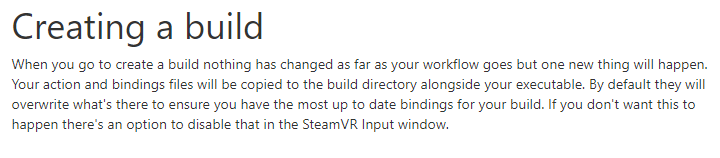
it doesnt seem to be overwriting for anyone else that tries it though
astral ravine
@dusty pumice When I build on one system and copy to another system, it picks up my custom bindings; is that what you mean? I assume it is just a json file in the build folder. Maybe this isn’t what you’re asking though 🙄. ??
dusty pumice
im going a different route with it, thank you for responding though
astral ravine
@dusty pumice ... I know you aren't stuck on this but today I noticed you get that error (missing custom control bindings) if Steam (as distinct from SteamVR) is not running on the client, so maybe that was something to do with it. Just a thought.
dusty pumice
just having issue with custom bindings working with other controllers
worst part is i dont have the other controllers to test with so i have to ask friends to test, which i cant do very often. do you know of anyway to see other controller bindings other than for the controller i have?
i was trying to just use script to determine it, but from what i was reading it seemed like what i have should work with the new steamvr asset
astral ravine
I've only seen other controller bindings when I boot up without any controllers set up, and I can't remember how that happened. You might be better asking over on https://github.com/ValveSoftware/steamvr_unity_plugin/issues/ ... or just look through the issues, maybe someone asked already. Remember to show "resolved issues" or whatever they call it, that means "answered questions" to me, and they're hidden by default, which seems really dumb to me.

GitHub
SteamVR Unity Plugin - Documentation at: https://valvesoftware.github.io/steamvr_unity_plugin/ - ValveSoftware/steamvr_unity_plugin
dusty pumice
thank you for that, i just posted a new issue, i couldnt find anything that was the same
hearty iron
Bravo Unity, you actually fixed post fx on mobile vr Good Job!
quaint moss
@hearty iron on which Unity version? o_O
quaint moss
thanks!
fluid wagon
PP still won't work on single pass instancing on vive though. And updating to 7.1.5 requres reimport, so I just killed like 2 hours for nothing
 worldly kelp
Hey, I had a question about how to add a movable camera to my project, so far I managed to import a 3D Scan we made with a drone into Unity but I'd like to add a movable camera to it so you can "fly around" using the VR Setup (Oculus)
If anyone has an idea how I would achieve that or could point me into the direction of some resources that could teach me how that'd be very appreciated
shell kayak
@worldly kelp You have to make an empty game object and make it the parent of the main VR camera. Then you can move the parent.
worldly kelp
thanks, ill try that 🙂
pine bison
The Oculus integration has a prefab called OVRController that does movement for you @worldly kelp
worldly kelp
Thanks @pine bison I tried that but im quite lost now, I added the prefab to my project but how would I go about assigning actual movement to the controls? unfortunately the Oculus Developement guide I found didnt go quite as indepth as I had hoped
Also: Is it OVRControlPrefab or OVRPlayerController?
pine bison
PlayerController
It should have everything set up. I just dragged it in, set it to quest, floor level and built it
I believe by default it will use physics, so you need colliders on the floor. But you might be able to just turn off gravity
worldly kelp
Thanks ill try that right away
 tired dock
Hello everyone, Does anyone have an example of how I would us the analogue on a touch controller to detect footstep sounds? I want footstep sounds but unsure how to write that in code, never dealt with analogue before.
 green venture
anyone know the minimum version of SteamVR you can use that supports index finger tracking?
tiny cosmos
Is the Oculus Integration plugin for Unity 2019.3 a non-starter?
Like, just jump ship to the official Unity XR stuff
is the message I'm getting
shell kayak
@green venture You want the first, buggy, integration of Knuckles support?
Why not get the latest version?
If it's to not have to use the input system, you have no choice if you want to use the skeletal API. It's only available in the new input system.
hard carbon
he wants finger tracking stable, not knuckles 🙂
aka, IR image based hand recognition using the index's onboard cams
verbal minnow
oculus quest does that aswell now right?
 wintry delta
Not yet, no. I think they said early next year
wintry delta
Hey folks. After upgrading to Unity 2019.2.12f1 with VR and LWRP [6.9.1] I'm seing some weird lighting issues. Lots of flickering like you would see if you have too many realtime lights enabled. However, I only ever have 2 enabled and its still present. Is this a known thing? I have a video showing the issue here. If anyone has any suggestions, Im grateful for any help. VIDEO : https://youtu.be/cnujxG2rk1A

Video showing point lights being weird in Unity 2019.2.6f1 with VR and LWRP. Only 2 lights are ever active, and RP asset settings is also shown in the right ...
Asked this a while back in #archived-hdrp but no response
tiny cosmos
LWRP is wack with VR, and has almost already been phased out in favor of the URP
Which is the same thing, basically, except the URP is getting updates.
There's technically a path to getting it on 2019.2, but it's really on the 2019.3 beta which is... LWRP/URP stuff is a lot of things rn haha
wintry delta
Jesus..
Guess I'll try 2019.3b and URP instead
Otherwise I'll have to stay all the way back on 2019.1
fluid wagon
@wintry delta URP also has some problems: Postprocessing doesn't work on single pass modes, Light flickers same on single pass. I tried to switch to single pass instanced and it works, but some custom shaders may need to be fixed. Aaaand I recommend you to bake lighting. But if you are new to this topic it can take too much time to understand all you needs and how to implement it
wintry delta
I'm not new to it, I'm just trying to figure out the correct versions of all the doohickeys I need to try and stay up to date with engine versions. Doesnt seem feasible atm. Im doing a procedurally generated game, so lightmapping is posing a few issues, but thats secondary.
Seems the time is not to upgrade. I cant even use the Oculus utils with 2019.3 it seems. It just prints "XR SDK Provider detected in project. Disabling VR Device settings for Standalone"
semi-procedurally*
fluid wagon
@wintry delta You are right, most of things just do not work out of the box in 2019.3. You can make bugreport though
@wintry delta Maybe you can try to use single pass instanced on 2019.2?
wintry delta
Can give it a shot
wintry delta
@fluid wagon Single pass instanced seems to actually work under 2019.2.12f1 - with postprocessing and everything
Thanks for the suggestion.
Not supported on Quest, but thats a future problem
hearty iron
Hey guys anyone have an idea why my scene is waaaay more brighter on the quest compared to the editor. I'm using unity 2019.3 and the latest URP
chrome helm
Not sure what this could be, but the first thing to check is make sure you have the scene effects and lighting on in your editor window which you have probably already checked.
also make sure your active camera is properly set with the post effects.
hearty iron
both of these things are correct yes
I'm narrowing it down to maybe the exponential fog or the lightmap compression
shell kayak
Displays also differ. Have you tried using Oculus Link to run editor scene on the Quest?
hearty iron
no I dont think that is out yet. Being able to stop building all the time would be nice
shell kayak
It's out in beta and works very well if you've got a cable that can handle it.
hearty iron
I've only got the usb to the quest cable
not that optical one
can you give me a quick rundown on how to set it up?
shell kayak

AAt OC6, we introduced Oculus Link—a new way to access Rift games and experiences from a gaming PC on Oculus Quest. Today, we’re excited to share that Oculus Link software is rolling out in beta, so you can now enjoy AAA PC VR games like Asgard’s Wrath and Stormland on ...
hearty iron
thanks
hearty iron
btw do I need to do anything special in the editor to get it to run? I'm already using the plugin from the XR management package.
shell kayak
If the project can be run on Oculus Desktop or SteamVR, it can run on Quest through Link.
hearty iron
wait.. It's a project for the quest not for desktop
shell kayak
A project for Quest can easily run on Oculus Desktop as well
It's all the same Oculus SDK.
 outer portal
Has anyone ever used SteamVR skeletal input 'GetSkeletalDataCompressed' & 'DecompressSkeletalBoneData' ? I can't get the decompression working no matter what I try, Unity just crashes (probably buffer overflow because it uses IntPtr and I'm too dumb to use them correctly ?)
green venture
has anyone had success using the SteamVR 2 hand poser with Oculus? Can you just save the poses and transfer them over or is it more complicated then that?
Basically I'm looking for a good cross platform hand posing solution!
pearl bluff
I was wondering about that myself. I have not tried using the SteamVR poses with Oculus. A cross platform solution would be awesome though
fluid wagon
Just try it out man @green venture. Load the interactions example scene and try to use your controllers
distant zealot
A lot of the latest pushes in the Scriptable Render Pipeline Repository for Universal Render Pipeline are XR fix related, fingers crossed a stable version for VR is coming
distant zealot
Shader Graph now works in the latest URP on Oculus Quest, but only if you DISABLE MSAA on your Render Pipeline Assets
Oh and the UI renders now also as a result of the fix
 ashen valley
Hmm, I see a few familiar names here.
green venture
hm but they recommend 4x MSAA no? Hopefully they fix that soon the we should be good to go
hearty iron
Im going to ask again since I cant find info on this. I noticed that when I build to the quest my scene is much brighter that what I see in the editor Using the Link I get visuals that are correct but I guess the Link ust send a video feed from the editor. Anyone experiencing this?
chrome helm
@distant zealot have they enabled Ambient Occlusion yet?
distant zealot
@chrome helm I can have a look, I believe post processing was "fixed" for XR but that could always be wrong haha
fluid wagon
@distant zealot post processing definitely doesn't work on latest urp both on single pass and single pass instanced.
chrome helm
so far, as A1Dius said, it does not work. I am not going to use Github versions. I have been burned badly in the past. So no sir. 🙂
distant zealot
This was merged in to fix post processing apparently haha https://github.com/Unity-Technologies/ScriptableRenderPipeline/pull/4788
@fluid wagon @chrome helm
GitHub
Purpose of this PR
add XR macros and functions to post processing shaders
fixes for single-pass (instancing, multiview and double-wide)
enable post-processing on Mobile devices
effects tested on P...
Obviously hasn't fixed it?
vast thorn
Hey, I'm doing a video player for oculus go for presentation purposes in a kiosk. I want my video to restart if the OVRManager.HMDMounted wasn't fired for like 5 seconds (meaning probably someone took it off)
But the event Mounted/Unmounted is never called on my GO, the same code works on Rift on PC
I have to wait 15sec for the device to go into sleep mode - OnApplicationPause is called, and reload this way. BUT if the device goes to sleep, we then get the "Enter VR" screen and someone has to use the controller to enable the scene
I could put something on the sensor so it never goes to sleep, but then I can't use either HMDMounted / OnApplicationPause to reload the scene if a new person wants to see the video
😦
what I noticed however is that whenever I rotate my head and put the goggles on, the view automatically resets the position so the content is centered. I don't know if it's done from the Unity side or device itself, but it knows when I put my head in, so there has to be a way of doing it (again, OVRManager events don't work for me on GO)
shell kayak
@vast thorn Have you looked into some of the properties and events in OVRPlugin, which OVRManager uses?
There should be some "user present" or "proximity" stuff there.
distant zealot
Ah yes, good old work in progress 😤
timid sundial
@hearty iron make sure you're on Linear color space. URP on gamma is not tested much as far as I'm aware, and definitely not tested for Android/Quest
hearty iron
@timid sundial I'm most definetly using linear color space
timid sundial
if you're using Linear + GLES3.1 on Quest with no postfx and no renderpasses at all you shouldn't see colorspace issues (I'm definitely not seeing any).
otherwise please report a bug asap
chrome helm
I am getting a slight "wobble" that I have never seen before at the lower part of my image using the latest OpenVR (2.0.5) and HDRP 7.1.5. Single Pass is on, and SP Instanced in the player.
chrome helm
TIP: NEVER install the new XR package after having installed SteamVR and OpenVR.
You end up with an endless loop of OpenVR being deactivated (by the new XR systems) and automatically re-activated due to SteamVR settings.
nasty and stupid. 🙂
 quartz magnet
Would anyone know how to do a simple vr camera fade when colliding with a wall? similar to this https://www.reddit.com/r/Unity3D/comments/80wu7i/using_a_screen_fade_in_vr_to_avoid_people_seeing/

reddit
Posted in r/Unity3D by u/UGTools • 831 points and 106 comments
Or maybe know how to work the SteamVr_Fade script because I have no clue how to work it.
reef beacon
It's probably just a physics.overlap sphere
Then if it hits something it'll fade out based on the distance
quartz magnet
would there be an example somewhere? Sorry just been looking all day and kind of tired of trying multiple ways and no success
reef beacon
You could look at the source of the SteamVR_Fade script
Not sure if there are any other examples
But if you've got the distance from an object
You can just do InverseLerp(minDistance, maxDistance, currentDistance)
Which will give you a value of 0 to 1 based on how far you're between min and the max distance
quartz magnet
Not to sure on how I would set that up, but I'll figure something out
potent garnet
just put a world space ui image/or mesh quad with a fade attached to the color and transparency .

GitHub
Fadein and out camera to color in using a simple shader - iBicha/Unity-Simple-Fade-Camera
this is using a shader, but you might have to modify it to use it in VR
quartz magnet
I got it now. Something simple I made, no fade but that's fine I could work on it later on today or whenever.
quartz magnet
Another quick question, would anyone know how to make the object(blender created) that the player picks up not being able to pass through anything. I have the SteamVr package and got it working but I can't seem to recreate what the interactable package does I copy and paste each script but unable to recreate the same instance to how the steamvr package does it.
Hopefully that makes sense ask and I'll try and explain it easier.
quaint moss
@quartz magnet try adding non-trigger colliders and rigid bodies to the object and environment
reef beacon
Your attachment mode is probably based on parenting, you probably want to use a join
quartz magnet
When I add a rigidbody kinematic to the wall it acts the same, now the cubes that actually aren't supposed to go through the wall now do. Luckily I have CTRL-Z
is that something script related or project settings?
reef beacon
How are you attaching your objects to your hands?
quartz magnet
I have steamVR and I'm using the basic Interactable script
reef beacon
I don't know what the interactable script does
quartz magnet
Should I show a video for it to be easier?
reef beacon
But it probably parents your object to your hand
Instead of parenting your object you should create a joint from your hand to the object
quartz magnet
hmm ok I'll try and set that up if I can
just before I do that
There's the interactable script and the object I'm trying to pick up. Idk if there's any option you think I should tick for it to fix
reef beacon
Don't think so
Oh
AttachmentFlags on Throwable maybe
But that seems like the wrong place
quartz magnet
Welp I'm dumb
Somehow got it working but ran into another problem.

I thought in the beginning it was the box collider making the thing spaz out but it turns out the object doesn't clip to the hand. Ima try and look online first for the solution
Although it should act the same as the other cubes I would suppose but idk Ima look
reef beacon
Is it possible to match the serial number of a rift s headset to the serial number of the complete set?
 mental patio
What's better for VR development, oculus rift or HTC vive?
potent garnet
get a quest
 warm saddle
@mental patio depends on your needs, we recently switched to Rift due to the inside out tracking being better for large dev teams in the same space, but we'd probably still be on Vive if we could still be covered by a single volume. That said I would suggest using your lowest spec target
potent garnet
you can plug it in and develop for most PC VR and have a mobile 6DOF headsert
same space vr is the best though, we used 4 vives in one room for many moons.
was the best
but, convenience is king atm
have not tried the index though?
warm saddle
yeah index or vive pro + lighthouse 2.0 would have fixed the problems we had but the rift S seemed like a better match in the end
potent garnet
how is rift s vs og rift?
mental patio
@warm saddle but I'm gonna get the regular oculus rift not S
Is the regular rift good for dev.?
potent garnet
rift is still good, my daily driver
much better controllr v og vive
don't expect the biggest room scale experiences, but for dev its perfect
potent garnet
deal
quartz magnet
Is vive considered basic for dev? If that makes sense
shell kayak
Basic? In what way? Any headset will do, it's just about what you can afford or which one you prefer.
quartz magnet
mmk
I was thinking developing wise like easy of use or basic in a sense of what people use to dev. Idk 😆
pine bison
Biggest issue with the vive for me is the grabbing, index and oculus touch controllers are way better for that
quartz magnet
Would anyone know how to make a system where the player can piece together an item like putting together a sword or something similar to that
quartz magnet
A fixedJoint would work I suppose
 shrewd onyx
Anybody here work with the Vive Focus? I'm working on optimizing my project and I feel like I'm missing something major.
The short version is that I have a fairly simple scene that I'm trying to render but no matter what I do I'm still getting out of sync with the GPU and my framerate is dying.
 toxic grotto
Hey - Looking for a little help with something here
I'm using the SteamVR Asset for Unity
And I have no idea how to get the teleporting andstuff to work
Because it aint working
quartz magnet
@toxic grotto I'm assuming you have the vive. https://www.youtube.com/watch?v=iJ0oNYIUFJo&t=151s

▶ Support my work on patreon : https://www.patreon.com/ValemVR ▶ Join the Valem discord channel : https://discord.gg/5uhRegs A Virtual Reality introduction f...
subscribe to him as he has good videos to help setup stuff for VR
toxic grotto
New issue has popped up
For some reason, the teleport area that I made no longer allows me to teleport to it after I added a collider to the model that the teleport area ison
 slim pumice
the Quest can now run PC VR rift content with the latest oculus integration upgradeUse a USB C-USB C connection but not the cord that came with the Quest. I played Brass tactics on the Quest today.
quartz magnet
Does anyone know how to position the hand or the object in a different area when the player picks up the object?
quartz magnet
Figured it out!
@toxic grotto I'm assuming your new. https://www.youtube.com/watch?v=a9EBILq2ep8&ab_channel=ZuluboProductions

I've developed a fully functional hand posing system for VR in Unity. This system allows more complex hand behaviour on a smaller time budget, and lets you a...
This will come in handy later on. Basically how to position your hand when you pick up a object^^
hearty iron
so I nailed it down that my scene on the Quest gets brighter when I enable post processing on the center eye camera. Any work arounds for this ?
reef beacon
What postprocessing settings do you have?
hearty iron
even with no settings i the volume( or no volume) it is still the same
reef beacon
Sounds like a bug
hearty iron
just ticking post processing on the camera makes the entire scene brighter when I deploy to the Quest.
reef beacon
Reproduce it and make a bug report I'd say
shell kayak
@hearty iron You're not using URP or LWRP, right?
hearty iron
I'm using URP 7.15
It's the only one that actually has working post fx on the Quest using MultiView
shell kayak
There have been a lot of issues with URP and VR, especially with post processing
So it's probably a bug
hearty iron
yes I think so too. I submitted a bug report
 simple tartan
What is the recommended rendering setup for VR today ?
is it legacy pipeline? urp? muli/single pass?
fluid wagon
@simple tartan depends on your resources. Built-in requires a LOT of effort to render solid 90 fps. Urp basically just do it for free, but postprocessing is broken in 7.15, 2019.3
simple tartan
@fluid wagon okey, so URP is fine without PP ?
I assume PP will be fixed eventually
fluid wagon
@simple tartan you goddamn right
simple tartan
is URP still a forward renderer?
or is it some hybrid renderer ?
i know LWRP was forward
fluid wagon
@simple tartan yeah it is, btw deffered coming next year.
simple tartan
There's gonna be a lot of questions here now... lol, so what is the recommended way of doing VR input (Oculus Quest main target for now) ? Using the oculus OVR stuff? Or unitys XR Management stuff?
input/head tracking/etc.
fluid wagon
I am vive man, you know.
simple tartan
I can not get an image on the right eye
tried both the XR management stuff
and the oculus devkit
hearty iron
@simple tartan URP 7.15 on the 2019. beta with the XR Management set to MultiView works for me
but PP is broken
simple tartan
how do I set it to multi view? the documentation is so sparse, i've been trying to find the config but cant
hearty iron
if you have the XR Management package it's from the project settings
XR Management then you need to download the Oculus Loader
and then ( I think) a Oculus sub menu will show up.
simple tartan
ah there we go
hearty iron
Maybe you need to download the Oculus XR package too and in that submenu you have a android option
simple tartan
Is there an example rig anywhere for left/center/right eye setup?
hearty iron
for input i use the OVR plugin that comes from the Oculus package
simple tartan
okey, and then the camera is done using the XR management stuff? sorry for all the Qs, feel like a proper noob (.. was a while ago), but the documentation is so sparse on this
hearty iron
I think Unity are gonna come out with a XR rig next year that simply does it all for multiple platforms
There is no documentation as far as you ask me haha. I'm pretty new to the VR stuff too. As far as I get it you set your rendering mode from the XR Management
and you use the OVR package for input
simple tartan
do you use the oculus OVR rig for cameras also? or do you use the XR management camera stuff?
hearty iron
and the oculus asset store thing for the camera rig itself that does the 6DOF tracking
I use the OVR rig
simple tartan
you did, thanks 🙂
shrewd onyx
@simple tartan I've been working with the Vive Focus. Different SDK, but same hardware. HTC has apparently not been able to get SRPs to work correctly with the Vive Focus. If you use LWRP/URP in singlepass mode you end up with the doublewide texture on the left eye and nothing on the right.
I have no idea if what you're dealing with is the same problem, but it sounds similar enough.
Their "solution" was to switch back to the default renderer.
pine bison
@simple tartan I'm playing with LWRP/URP at home but at work we only use the standard pipeline. There are just so many caveats with the new stuff still. Probably soon, though
simple tartan
so im using the OVRRig, which camera is supposed to have the post fx on it lol?
left/right (both) or center?
pine bison
If you wanna develop for quest the Oculus integration is decent, but quite limited. There is a plugin called VRTK which comes with a load of functionality for most VR headsets so it's a good place to start
shrewd onyx
If you're using single pass, put the post on CenterEyeAnchor
 zealous briar
out of interest: was URP for VR always broken, or did that happen with an update?
shrewd onyx
it never worked great
pine bison
It has only recently been unbroken for me
shrewd onyx
on desktop it looked like ass, and I have never gotten it to work on a mobile headset
zealous briar
lol. anyone knowing whether they're working on fixing that? Maybe URP isn't meant to support it in the first place. idk really
pine bison
They just have too many things going on at the same time i reckon
shrewd onyx
Part of the reason they developed it was, ostensibly, for VR. Its frustrating
pine bison
Agreed
shrewd onyx
It "works", but again, looks like doodoo
Like even on desktop, I have these random shadow artifacts that show up
things like that
zealous briar
Steps to reproduce: 1. Download and open the attached project 2. Set RenderScale to anything other than 1 in LightweightAsset 3. Ent...
is this what we're talking about? https://issuetracker.unity3d.com/issues/lwrp-vr-building-project-from-vr-lightweight-rp-template-results-in-black-screen
Steps to reproduce: 1. Open user attached project 2. Build & Run on Android device 3. Observe that a black screen is displayed E...
simple tartan
okey so i got the basic rendering working in vr now
but i have some really weird issue
i have no post fx enable
no nothing, just the plain boring camera
i get like a shimmer/sheen thing... it looks like the ingame camera has a sheet of dirty shrinkwrap over it or soething that it's looking through
or like a plastic bag over the 'lens' of the camera
it only happens in the unity game, nowhere else
so the headset is fine
this is using legacy render pipeline, etc.
shrewd onyx
@zealous briar that first one might have been the same issue I was seeing. I don't remember if I messed with renderscale or not
zealous briar
first one is marked as fixed though
I was just wondering if there currently is an open ticket for the problems you guys experience - the latter looks like it
shrewd onyx
fholm, does it happen in editor? Can you send a screenshot?
I'm not sure I understand what you're seeing
simple tartan
@shrewd onyx no it only happens if i look inside the HMD
its really weird
also only multi pass rendering works, not single pass
god unity i am so tired of all this broken crap
why can't stuff just work
for ONCE
shrewd onyx
😬 I have no idea how that's happening
lenses are clean?
That's literally the only thing I can think of
simple tartan
@shrewd onyx yeah 100% headset is brand new and it only happens in the unity game I'm fiddling with, nowhere else
quartz magnet
Is there any video tutorial on how to set up VRTK V4? Also should I even use VRTK V4 or VRTK V3 I know V4 has bugs and such but are there lots of bugs? One more thing does SteamVR 2.0 work well with VRTK V4 or no? Sorry for a lot of questions I just see a lot of people using VRTK and I never actually set it up properly.
 meager totem
I'm having some issues with anti aliasing on Quest. I have adjusted the setting in project settings, but still nothing
warm saddle
is there a way to set the output resolution for the play in editor button?
hard carbon
@warm saddle You could create a custom play button. I cant remember the exact function, but its something like Editor.isPlayer = true. Then, you chuck any custom logic (such as setting target resolution) before that. My work uses it for multiplatform work, where you can instantiate in the correct player/input scheme by selecting "Play With X"
warm saddle
nice I'll take a look at that thanks!
distant zealot
It's been working in various ways but only with certain features, there has been a lot of regression of performance and functionality recently which I have been reporting. Please report with the bug reporter if you have any issues with URP and XR
 tight anchor
Hello!
We are looking for a developer to write network code, and a server part for a game project. Work will be on Unity, with the Spatial OS network engine.
For details Telegram messenger: @terraformation
fluid wagon
I want to make like a pushcart using steamvr. Any suggestions? I've done some experiments, mainly using rigid body constraints and throwable script, but it is unpredictable and buggy
distant zealot
Using Unity 2020 on the Quest, the head tracking always starts at the floor of the scene regardless of whether you set the tracking space type to Roomscale or Stationary. Seems like a major bug
simple tartan
I've finally gotten my rendering setup to work properly in VR
So started moving on to mapping the controllers, etc.
But the controller tracking is incredibly jittery (not an fps issue, i've made sure of that)
Anyone got any tips of where to go from here?
It's like the controllers are tracked at 30fps or something instead of the full 72fps on the oculus quest
 hollow elk
Hi guys! Is this the place I come for questions regarding VR development?
I am building tower defense.
Had some issues with GPU and Oculus software.
They don't like AMD.
astral ravine
@hollow elk ... This is one place to come, yes - welcome! If you're developing for SteamVR you should also visit their github message board, https://github.com/ValveSoftware/steamvr_unity_plugin/issues?utf8=✓&q= and there are some other good places too. I'll post links later if you can't find what you need here.
GitHub
SteamVR Unity Plugin - Documentation at: https://valvesoftware.github.io/steamvr_unity_plugin/ - ValveSoftware/steamvr_unity_plugin
hollow elk
@astral ravine Thank you sir. I use Rift.
 rare marlin
hay i still need help
Basically Oculus integration the hands won't show up and I've tried older versions and I've also tried the app ID fix and that didn't work
IM ON QWEST
caps
btw @ me if you want to help
candid sorrel
could somebody please explain to me what is XR.WaitForGPU?
reef beacon
Probably that you're GPU bound
Your rendering is taking longer than your CPU so your CPU has to wait till your rendering is done
candid sorrel
why would this be taking 5.2ms on an empty unity scene :|?
It doesn't make any sense, I got a scene with nothing but SteamVR and lighting and I get between 4ms to 6ms for XR.WaitForGPU
reef beacon
vsync maybe
candid sorrel
made sure its off
reef beacon
I mean, it's impossible to guess from here
It might still be vsyncing because your VR framework enforces it
candid sorrel
I did some googling about this, it seems to be a common issue, but there seem to be quite a wide range of causes
I wouldn't mind it VSyncing if that didn't mean dropping below 90 fps when I actually have stuff rendering in the scene
tired dock
Does anyone have any info or links on how to use the analogue on the touch controllers. I want to register footstep sounds. But im not sure how to go about doing it. Anyone got any experience doing this?
simple tartan
what the hell is this?
PostLateUpdate.PlayerSendFrameCoplete, FramEvents.XREndFrame, XR.DeviceSDK, etc.
this is a better screenshot
The issue here being that the game actually renders a full frame in under 13ms
so it should be fine, but it's not
this is what eats time
hearty iron
are you profiling a build from the device or in the editor
hearty iron
well as far as I know PlayerEndOfFrame runs when you have a coroutine yielding WaitForEndOfFrame
do you have any code like that ?
also how complex is your scene ?
simple tartan
@hearty iron my scene is like the two oculus quest controllers, a sky box, and a plane
... 😄
😦
hearty iron
I would also try disabling VSync
reef beacon
There's usually vsyncing enforced by the vr api
candid sorrel
It looks like this XR.WaitForGPU crap is trying to target 60fps
tired dock
I need some help. One of my users has told me about a glitch with a button press on their rift s controller. But I can not re-produce the issue on my normal rift. Are the rift S and normal rift controllers the same input?
rare marlin
hay i still need help
Basically Oculus integration the hands won't show up and I've tried older versions and I've also tried the app ID fix and that didn't work
 timber spoke
heyo! Anyone know how I could do local mutliplayer with two quests? (Ping please)
 thorny adder
@timber spoke A better place to ask would probably be in #archived-networking. You would need to add some networking library. Networking code is not trivial and will take sometime to learn.
Some suggestions to check out:
Photon Unity Networking (PUN2): Very easy to setup and host servers, costs $$$
Mirror: Forked from Unitys offical networking after it was discontinued. Complex to setup servers for devices like quest, Free.
 hot summit
Hello! I'm prototyping some ideas for VR. I want to be able to demonstrate it on both the HTC Vive and the Oculus Quest. I started using the SteamVR plugin, but found that it would not support the Oculus Quest.
I was considering...
- Extending SteamVR to recognize the Oculus Quest
- Use OpenVR directly and manage everything myself
- Creating a script that would load a SteamVR player prefab when on PC or an Oculus Quest player prefab while on Android
For anybody that has run on both platforms, how did you set your project up?
thorny adder
@hot summit I think it is quite tricky to do cross platform development with VR if you are using a particular vendors plugin (e.g SteamVR). Unity has released its own plugins recently which abstract the concept of XR controllers. I think most people end up writing code twice OR extending the features the need to the other SDK.
hot summit
Ah yeah, I meant to say XR when I said OpenVR. I'm leaning toward the option of using the XR Plugin mostly because I'm not really looking for all of the extra features of either the Oculus or SteamVR SDKs. Additionally, it could probably be something I can reuse for other projects without the extra overhead of the Oculus / SteamVR sdks.
rare marlin
you i need help
rare marlin
Basically Oculus integration the hands won't show up and I've tried older versions and I've also tried the app ID fix and that didn't work
pine bison
@hot summit have you looked at VRTK? It's awesome for cross-platform
tired dock
Anyone know how I can use Oculus touch to get the analogue information so i can trigger footstep sounds. Anyone have any example?
worldly kelp
Hello guys,
Im trying to get an input from my Oculus Rift to switch Cameras my current line in the script goes like this:
if (Input.GetKeyDown(KeyCode.C))
but im unsure how to proceed from here on
If anyone has an answer or could point me in the direction of where I could read up on that id really appreciate it :)
 jagged yarrow
@worldly kelp i have the exact same Issue
using System.Collections.Generic;
using UnityEngine;
using UnityEngine.Events;
using UnityEngine.XR;
using System.Threading.Tasks;

public class ActiveObjectActivator : MonoBehaviour
{
    public bool activeCam = true;
    public bool isPressed;
    private List<InputDevice> rightHandDevices = new List<InputDevice>();


    void Start()
    {

    }

    void Update()
    {
        InputDevices.GetDevicesAtXRNode(XRNode.RightHand, rightHandDevices);

        if ((rightHandDevices[0].TryGetFeatureValue(CommonUsages.primaryButton, out isPressed) && isPressed))
        {
            activeCam = !activeCam;

            if (activeCam)
            {
                this.gameObject.transform.Find("XR Rig Tracked Controllers - Grab").gameObject.SetActive(true);
                this.gameObject.transform.Find("XR Rig Tracked Controllers - Grab (1)").gameObject.SetActive(false);
                System.Threading.Thread.Sleep(250);
            }
            else if(!activeCam)
            {
                this.gameObject.transform.Find("XR Rig Tracked Controllers - Grab").gameObject.SetActive(false);
                this.gameObject.transform.Find("XR Rig Tracked Controllers - Grab (1)").gameObject.SetActive(true);
                System.Threading.Thread.Sleep(250);
            }
        }
    }
}```

This is what i used, the Problem is, it will look like your game actually lags, because of the sleep command. If you remove the sleep command, you switch the cams for every frame updatewhen you press or hold on to the button ofc
(btw i like your profile picture, it was my last one lol)
worldly kelp
Haha thanks 
Ill try that one, as soon as I get an opportunity to get back to my pc 👌
jagged yarrow
Hey no Problem dude, if you find any solution to how to switch without the lag and not switching every frameupdate, hit me up on that
 jagged yarrow
Same goes to you
tired dock
Does anyone know how I can relate the speed of the player with the speed at which an audio clip is played. I want to add footstep sounds, so i need to grab the speed of the player and say if the player is going slow or fast then the audio plays slow or fast?
pine bison
That sounds like you just need to get the velocity of the player, which there are many ways to do. For example just check position in an update function and compare it to the last frame. Then set the speed of the audio source based on that
tired dock
Ok, I managed to get the velocity
But how can I connect that to the footstep sounds
using debugLog I can see the horizontal velocity goes from 0 to around 3.15
I just need to some how connect it to the sounds
pine bison
You need to do some maths to convert it to a number that makes sense for the audio source
hot summit
@pine bison thanks for the suggestion. I'll check out VRTK
pine bison
So if you take your velocity, divide it by 3.15, then use that as the third input of a lerp function to set the pitch of the audio source
audioSource.pitch = Mathf.Lerp(0.75f, 1.25f, velocity/3.15)
Where the first two numbers are the min and max of the pitch
tired dock
So how can I say when to play the footsteps?
what argument to use sorry
because if I use velocity thats not right I dont think?
Maybe a timer?
pine bison
No wait you want the pitch to stay the same, just play more often the faster you walk?
tired dock
yes thats right
I mean I want to change the pitch too but I already know how to do that
Its just connecting how frequent the steps are with the velocity
So for instance if im running then it needs to be stepping fast
pine bison
In that case I would probably just play the footsteps sound repeatedly based on a timer, then you can multiply the timer increase by the velocity
pine bison
Not really
 pine bison
{
    footstepCounter += Time.deltaTime * velocity;
    if(footstepCounter >= stepFrequency)
    {
        AudioSource.Play();
        footstepsCounter = 0;
    }
}
How often you want it to play
tired dock
But I want it to play relative to the velocity
pine bison
Yes, so the footstepsCounter variable will increase faster based on the velocity
tired dock
I understand, im just not sure what step frequency is lol
sorry, I am probably having a dumb moment
trying to figure this out for so lonhg
pine bison
When you have a velocity of 1, stepFrequency is how many seconds there are between the sound playing
tired dock
So where is stepFrequency assigned? do i just assign it as 0? It isnt used apart from the argument.
Im not sure if its just me 😭
pine bison
It's just a variable in your script
That you make
Just try out what values work, start with it at 1
tired dock
wait I think I understand
Yeah hold on im just being stupid I think
Works man
Absalute legend you are

there is me like this
 pine bison
Easy to get stuck when you work on something for too long
tired dock
Yeah man, just got to change the pitch now but thats easy. Thanks again man for putting up with me for so long
distant zealot
Promising stuff for reliability of URP for Android https://github.com/Unity-Technologies/ScriptableRenderPipeline/commit/0180281355d513d6a599cf068e097d63b7e68ba5

GitHub
-
Adding smaller project with 4 scenes for running on mobile
-
using latest android image
-
Disabling SerializationRoundtrip_AllFieldsAreSerializedAndDeserialized test for now
-
adding mob...
distant zealot
Vulkan for Oculus Quest and FFR (Fixed Foveated Rendering) support are imminent in Unity 2020 alpha/beta versions using XR Subsystems Management
https://forum.unity.com/threads/enable-foveated-rendering-in-unity-without-oculus-integration-for-oculus-quest-go.728861/#post-5241299

Unity Forum
From my understanding, to enable foveated rendering on the Quest/Go, you must use "OVRManager.fixedFoveatedRenderingLevel =...
tired dock
Hello everyone, Can anyone tell me if the Oculus quest controllers a programmed different from normal oculus touch controllers? One of my players has a weird bug that I can not re-produce at all using my rift.
pine bison
They should be the same @tired dock. What's the bug?
tired dock
When using the right back trigger to scroll through a build menu using UI elements. For him it doesnt work, but for me I haven't had a single issue, nor have I heard any complaints from anyone else. I did ask if his battery was ok and if the button works in other applications and aparently, he had fresh battery and no issues in other apps.
He even made a youtube video showing the issue
But as far as I know, it should work on quest controllers.
pine bison
Do you not have a quest to test on yourself?
tired dock
I don't unfortunately
pine bison
I can try on mine if you wanna PM me a build
tired dock
Oh for sure
 spring geyser
Is there anywhere I can read up on VR game physics collision principles or something of that nature? I'm trying to learn the common ways some VR games handle physics collision that result in your player being in orientations your controllers don't match. Like if 2 players swing swords at each other and they collide, your hands continue to travel past the collision point and your sword is no longer where your controller is telling it to be.
shell kayak
@spring geyser I don't know of any reading material on this topic, but the basic idea is that you have a target position for the player's virtual hand, which is the position of the controller, and then you apply a force towards that position.
spring geyser
@shell kayak I guess the idea is that if you extend past the collision limitations, then a constant force would be applied trying to get the in-game object to the target position that it ultimately never reaches?
Maybe that + haptic feedback so that the user feels the collision happening is enough for a good experience?
shell kayak
Depends what you're trying to accomplish. You can gain immersion by having proper hand physics, rather than letting the hands phase through walls and objects.
 torn niche
I'm attempting to make a VR Asymmetrical game but I have no idea how to make it Asymmetrical, can anyone help me?
shell kayak
@torn niche You just need another camera that has the target stereo eye set to None (Main Display)
coral frost
You could use 2 camera's, 1 for the VR player and one for the regular PC player.
You can set the Target Eye option for the PC player camera to None (Main Display) to render it for the regular PC user.
https://gyazo.com/95cdd626f646f46c8823a06ca0352223
And set the Target Eye option for the VR player to Both.
https://gyazo.com/108d191681ccb656877830a69195eb12
Then you should have 2 separate camera's to work with, and thus allow for 2 players to play on the same computer.


Oh
xD
torn niche
Thanks a bunch
coral frost
For other people in the chat btw, you can also use this as a trick to increase the FOV on the main screen. I always had the problem that the regular VR camera FOV was way too low. All you have to do is parent a second camera to the main camera, increase the FOV to whatever you want it to be and set the Target Eye option. (Not sure if there are better options for this, but for simply testing it does the job 😄 )
torn niche
@coral frost Wait... do I set LeftEyeAnchor, RightEyeAnchor, and CenterEyeAnchor all to Target Eye: Both?
Just asking to make sure
I meant both*
coral frost
Where do you see those options?
torn niche
I have the Oculus Integration
coral frost
Never worked with that to be honest. I always just used plain Unity.
torn niche
Hmmm...
coral frost
Can you send a screenshot of the options you see?
coral frost
I assume those would be the correct settings. As far as I can tell
torn niche
Alright, thanks again! :D
coral frost
So now it's just a simple task of adding another regular Unity camera which has the Target Eye set to None (Main Display) 😄
torn niche
Could i just use the Standard Assets FPSController Prefab?
or do I have to create my own?
torn niche
Well....
It has what you said it needs
so I'm guessing it will work! :D
@coral frost Thanks a lot, dude! :D
coral frost
Np! If you have any other problems just ask, maybe I can help 🙂
torn niche
Alright :)
coral frost
And otherwise someone else probably can haha
torn niche
Yeah. lol
coral frost
(I'm really no expert, so yeah xd)
 noble wave
Hello all, I'm using VRTK to set up interactions for some educational content. Does anyone know how to approach using tongs to grab an object? I've been a little stuck on this for the past couple of days. Basically I know how to set up the tongs as grabbable, but then how do I use the Tongs to grab something else?
spring geyser
Anyone have any idea how to get the strongest possible haptic/vibration feeling with Steam VR sdk?
I'm able to generate vibrartions but it seems like all the different frequency and amplitude values I try... nothing feels like the strong vibrations I get while playing Beat Saber
 frail cliff
looking for artist to add details and polish existing maps for VR military themeed First Person Shooter game, DM me if interested.
hard carbon
@noble wave if you wanted to do it fairly simply, you could have 2 animations on the tongs. Open + Close. Have it idle at open, and close when you pull the trigger. Have triggers on the actual tong bit, and if something goes in it, parent it to the tongs and freeze the animation.
It will be a bit clunky, but will work as a prototype you can work off
 earnest forge
Hey guys. Does anyone have any advice on how to implement a reticle for Oculus Touch controllers?
shell kayak
@earnest forge What kind of reticle do you mean? Like a laser pointer coming out of the controller showing a reticle where it hits?
earnest forge
@shell kayak Yup, something like that. I don't necessarily need the laser pointer line itself, just the reticle at the hit point. My scene is very basic right now. Just trying to select a cube by pointing at it and pressing a button on the Oculus Touch controller.
shell kayak
@earnest forge Usually done with a raycast
earnest forge
@shell kayak Got it, thanks!
rare marlin
how to get the position of a oculus controller in unity?
like i want to set it to a vecter 3 val but idk how to get the controller pos
earnest forge
@rare marlin Can you send a screenshot of your project?
rare marlin
@earnest forge I literally have nothing done except for a cube for a floor and I have enabled Oculus VR support but I'm not going to mess with oculus integration because it's been broken forever so I just want to know what lines of code I need to use 2 set the position of the controllers to a vector3
rare marlin
@earnest forge but here ya go
hollow elk
Hi guys! Any idea how to get OnMouseEnter and OnMouseExit for VR?
Meh. Seems like quite a hassle. Will just use VRTK stuff for this probably.
hearty iron
Hey, anyone using the latest URP and post processing on the Quest? I would love to see if you are having the same problem as me.
distant zealot
GitHub
Purpose of this PR
add XR macros and functions to post processing shaders
fixes for single-pass (instancing, multiview and double-wide)
enable post-processing on Mobile devices
effects tested on P...
hearty iron
@distant zealot yes this fixed the pp not working at all or warping the right eye but I have a different problem. When using the postprocess the entire scene become brighter. Even with no active effects, simply by enabling postprocess on the camera.
distant zealot
@hearty iron if you read the comments on that PR people are mentioning things are still broken generally, the testing on it isn't robust enough yet tbh
hearty iron
I know I know I'm just looking for a workaround that maybe someone found
rare marlin
Yo I still need help I want to figure out how to get the XYZ position of the controllers tracked by the Oculus Quest and assign it to a vector3 if you want help please DM me if it doesn't work add me and I will add you back
I'm new VR development and I already tried to use Oculus integration but as you all probably know it's broken so at this point I have resulted to making my own hands and head tracking
hearty iron
are you using the oculus integration from the store because that works great for me.
rare marlin
With the newest version of unity and the newest version of oculus integration nothing works the app ID fix doesn't work either my hands never show up the tracking is laggy and it doesn't function at all I've looked up fixes and the only thing I can find is the app ID problem but even if I put a false app ID a real app ID it never fixes it that's why I'm trying to create my own system at this point @hearty iron
pine bison
Is there even a way to do that without the integration? I'm on 1.43 and I've been using it fine
earnest forge
@rare marlin Not sure how to do it without using the integration. Would you consider just using an older version of the integration? I think you can download them from some Oculus archives.
torn niche
Oculus Integration works great and I don’t even have VR! my friend tested it and it worked perfect
@rare marlin just follow this tutorial

▶ Support my work and get the project on patreon : https://www.patreon.com/ValemVR ▶ Join the Valem discord channel : https://discord.gg/5uhRegs This is the ...
rare marlin
I tried that 15 different times Unity needs to talk to Oculus about fixing their crap everyone's complaining about it Oculus integration is busted people say it works but the other 90% say it doesn't and the other 90% having the same problem I'm having
torn niche
hmm, weird
distant zealot
@rare marlin what's broken for you with it now? I'll help you report any issues!
 full magnet
Is it possible to build an editor tool that runs in vr even if the game doesn't?
 wraith shale
huh
the new XR Management package doesn't even support SteamVR or OpenVR
or is this bundled in Windows MR ?
Correct, OpenVR is not available as an XR Plugin at this time.
that was from June
how can they omit one of the main platforms?
instead they support all kinds of niche platforms
what's worst in all this, 2020.1 doesn't even support the old OpenVR setup.. so it's completely busted there now 🙂
I hope they solve this within few months/before 2020.1 is officially out, otherwise they will have issues with people who want to do VR with Unity
rare marlin
Yo question how can I assign the rotation speed of a object to a float or int
rare marlin
Like I want to assign it as like miles per hour or something like that
distant zealot
Is anyone here using the VRIK Interaction Package with FinalIK for grabbing of objects? I'm having trouble withit always grabbing offset 😤

Unity Forum
Hey,
2. If you disabled "Plant Feet" that would lock the head to the HMD no matter what. If your character is too small, the feet will float, but you...
 fringe shadow
Hi! I have some terrible and really weird issues with the skybox, it's like its too close to the camera, clipping though all the meshes in my scene. Regardless if it's a picture skybox or just a plain colour. Any ideas why is this happenieng? ;;
distant zealot
Does anyone know how to use a Vive or Valve Index with Unity 2020 Editor? OpenVR is deprecated in it https://forum.unity.com/threads/how-to-use-a-htc-vive-or-valve-index-in-2020-editor.792354/
Unity Forum
So since the OpenVR package is deprecated, and there isn't a replacement XR Loader with XR Management Subsystems, how do I use a HTC Vive or Valve...
@fringe shadow what's your engine version? I can try to have a look, is this VR related only or does it happen without VR being active?
fringe shadow
it;s okey, just fixed it, it somehow fixed itself after switching the VR headset, we don;t know what was wrong :< thanks anyway ! ❤️
 fallen stag
Hey guys, I need some help with a VR project i'm working on!
I'm pretty new to Unity and VR, with only about 2-3 months of watching youtube tutorials and trying out some myself
The end goal is to create a VR CPR Simulator
I have close to no idea where I should begin because everything seems so overwhelming at the moment
I've tried looking for resources online, but I don't think I know how to fully utilise them because of my experience w/ Unity
I'm also on a timeline, and I'm expected to show at least a minimum viable product by the end of January
Right now all I have is a small level with some models in it, and I have a ton of questions in my head
Please pm me if you can help me in any way! I'll provide more information/questions too
Bringing the topic back to resources, I found this today, but I can't seem to get it running on my VR HMD.
Also, i'm working with an Oculus Rift.
Link to resource: https://unitylist.com/p/g9i/cpr-training-model
PS. By running I mean on Unity, when I press the "Play" button and put the HMD on, i just see a still screen, unable to move or control anything at all.

unity model in vr that aims to train users for cpr
 loud niche
Hey there! I've created hand models for my VR game, but I can't seem to get steamvr unity to work as the verticies go flying
I'm trying to build in steamvr support and then ovr support down the road for testing but i cant seem to get my hand model to show up correctly without breaking
 merry fjord
small Q., Can you actually do VR desktop (or Quest, not store - just offline) application, with unity built-in XR stuff ? (without steam, oculus plugin or those)
distant zealot
Yes, use XR Legacy Input Helpers with Tracked Pose drivers
merry fjord
nice, thanks!
 tall badger
hey! I would like to create a shader in HDRP that is able to tell me if I'm rendering with the left or right eye (single pass instanced). Is there a way to do that? thanks!
my first test is to get the matrix "unity_CameraProjection" that should give me some infos, but I'm not able to get it.
earnest forge
Hey guys. Does anyone here have experience using the Oculus integration for Unity? Specifically, I have some questions on the GetLocalControllerPosition() method.
 idle fjord
@earnest forge I am just starting to learn VR and am playing with Oculus integration, do you have any good resources that helped you learn to use it? I am having a lot of issues with the hands and not grabbing properly as well as when I move the hands spasm out and jitter but if i stay stationary and just move my hands they work fine
hearty iron
@tall badger you can use ‘unity_StereoEyeIndex , 0 for left eye, 1 for right one. However that is from UnityCG, not sure where and how they named it in HDRP. Ah found it it seems to be defined in TextureXR.hlsl found in ShaderLibrary
tall badger
oh nice, thanks @hearty iron , will try it!
idle fjord
I started learning to use oculus integration but think steamvr might be a better route. If i learn steamvr theres no need to also learn oculus integration right?
tall badger
@hearty iron when I include the file on a custom hlsl file I have this error:
Compiling Vertex program with UNITY_PASS_SHADOWCASTER UNITY_SINGLE_PASS_STEREO
Platform defines: UNITY_ENABLE_REFLECTION_BUFFERS UNITY_USE_DITHER_MASK_FOR_ALPHABLENDED_SHADOWS UNITY_PBS_USE_BRDF1 UNITY_SPECCUBE_BOX_PROJECTION UNITY_SPECCUBE_BLENDING UNITY_ENABLE_DETAIL_NORMALMAP SHADER_API_DESKTOP UNITY_LIGHT_PROBE_PROXY_VOLUME UNITY_LIGHTMAP_FULL_HDR```Hmm well if it says its not compatible then I honestly dont know. This is strange since I know you can select stereo instanced rendering. Maybe you are missing an include, or since I got the reference of github its not in your version yet. Sorry I could not help
 formal solstice
Not sure if this fits this channel, so pleas poke me if I have to move it.
Are you part of a group of developers or a lonely developer/programmer/artist who could use a programmer buddy for a VR project? In my work I develop training VR experiences for heavy industries, but in my spare time I really want to collaboratively develop VR games with other enthusiastic developers. So if you have a crazy VR idea you want to bring to life send me a DM here on Discord.
 onyx loom
Speaking of hands, has anyone experimented with Quest hand tracking?
shell kayak
@onyx loom The SDK hasn't been released, unless you're just asking if anyone has tried it?
pine bison
@onyx loom I got it yesterday and played around, very interesting for sure but feels beta still. Makes me excited for the SDK
onyx loom
OK, so they released it to the users, but not to developers? 🤨
lone knoll
is there anyway to make Unity run on the nvidia GPU ? whenever i hit play on a VR project it takes a while for it to run
i noticed in the taskbar that unity is unity GPU-0 by default when in edit mode
once i smash the play btn it will switch to GPU-1
so i assume both the oculus app & unity are using the nvidia GPU in the same time
i read online and it wasn't recommended to switch off the intel GPU
so i figured maybe there is an option for unity to always use the my gtx by default without switching it
reef beacon
GPU-0 and GPU-1 might just be display adapters, I doubt that's causing the wait before it starts running
You should probably profile it
reef beacon
Attach the profiler in edit mode
And you can make Unity run on the nvidia GPU through the nvidia control panel
But it most likely already will
wintry delta
Theres still no (free) way to do curved UI right? I was thinking of my HP bar being a "bracelet" around the players wrist with a simple Sliced Image
reef beacon
You can just make it yourself
wintry delta
Filled*
wintry delta
That doesnt have it, no. checked there
It has Cylinder Text which looked right, but doesnt work for images
reef beacon
You can look at how that code is done and roll your own
Or just buy the asset since it's like 20 bucks
wintry delta
Alright, cheers
lone knoll
@wintry delta there was an episode on mix and jam
he created a curve UI using an inverse cylinder and applied the canvas as a texture on top of it
i also did a similar thing at one point
just create a half cylinder in blender
hard carbon
Anyone know of any particular space to watch to know when the quest hand tracking sdk is out? Said it would be this week, Im checking their website and various news sources but feel like I still might be the last to know when it does drop haha
 high wagon
Can anyone help me understand why when im building my apk, i am underneath the ground? the guardian system is correct, but in the application, im in the ground / below it.
this is for oculus quest if that matters
hearty iron
Are you doing build and run? I found out that the tracking gets sorta wonky if you are not wearing the headset while build and running. But restarting the app on the devices fixes the issue
hard carbon
@high wagon If you are using the oculus resources inside unity, then make sure you set your tracking origin to eyes
celest widget
Please someone ANYONE, halp with setting config joint rotations? 😄
pine bison
Wish I knew @hard carbon 😄
wintry delta
Has anyone tried 2019.3 RC ? It keeps saying it cant load the (new) com.unity.xr.oculus/OculusXRPlugin file due to a "Specified procedure not found". Sounds like the (verified) Oculus package by Unity doesnt have a certain method?
wintry delta
Okay, so it seems the XR Oculus package is broken. (1.1.2). I had to upgrade to Unity 2020.1a to get access to a previous package (1.1.1), which is not broken. The "Verified" tag means absolutely nothing. Its REALLY starting to be a chore to just get a project going in Unity.
Their current development style is just horrendous. Too many people doing too many things at once. All things are being released in a half-assed state, and in order to get support, I have to google for someone with the same 14 different packages, unity version, render pipeline versions etc.
Going back to 2019.1.14 Legacy Renderer
pearl bluff
@wintry delta this is why we are seriously looking at switching to another engine for development. We just are spending too much time just getting started or tracking down what seems to be the issue of the week and not enough time developing.
wintry delta
I know, its crazy. They seriously need to slow down and do proper QA and compat tests between everything. Its almost completely impossible to complete the puzzle of which packages do I need to do something simple? I want MSAA, under which conditions does that work currently? Do I use Oculus Utilities or not? LWRP/URP working? Multi-pass?
I'm currently solo, but coming from 7 years in mobile. I cant imagine using anything after 2019.1 in production
Lights are totally broken in all of unity 2019.2 for me. Flickering all over. No solution in sight. For the ENTIRE 2019.2 line. Thats insane
pine bison
We're gonna upgrade to 2019 LTS when it's available, hopefully that will be stable, but for now it's just a huge mess... I'd love to use URP as well but the way things look now I don't even know if it's something we can do within the next year
lone knoll
when you get side tracked when doing ragdolls in vr
PS: this is suppose to be a medical application
high wagon
@hard carbon can you explain what you mean by set tracking origin to eyes?
@hearty iron yes i am doing build and run. i see.. my cable isnt long enough to build and run while wearing it. i have to be on the floor always for that 😦
hearty iron
@high wagon Thats fine just reset the view by holding the oculus button on the right controller or restart the app after you have build
coral frost
@lone knoll I don't think legs are suppose to work like that 😂
lone knoll
it was tricky to hold the ragdoll and record a gif via a mouse in the same time
 fierce river
I've got this pretty weird bug in the hd render pipeline, if I remove the default camera and only leave the steam vr camera my screen goes white in edit mode. Anyone else have this?
 worthy stone
Hi,
We have AutoCad models and we want them to be in VR. I heard that AutoCad is not supporting Unity or Fbx format now.
Is it possible? Suggestions?
reef beacon
Internet says exporting to FBX works just fine?
high wagon
@hearty iron okay ill give that a shot thank you!
high wagon
hmm still happening even after doing those tings
hearty iron
can you share a screenshot of you OVRManager ?
high wagon
i think i figured it out
hearty iron
also make sure your camera rig is placed on eye level
high wagon
it was set to eye level
but i switched it to floor level
and now its correct?
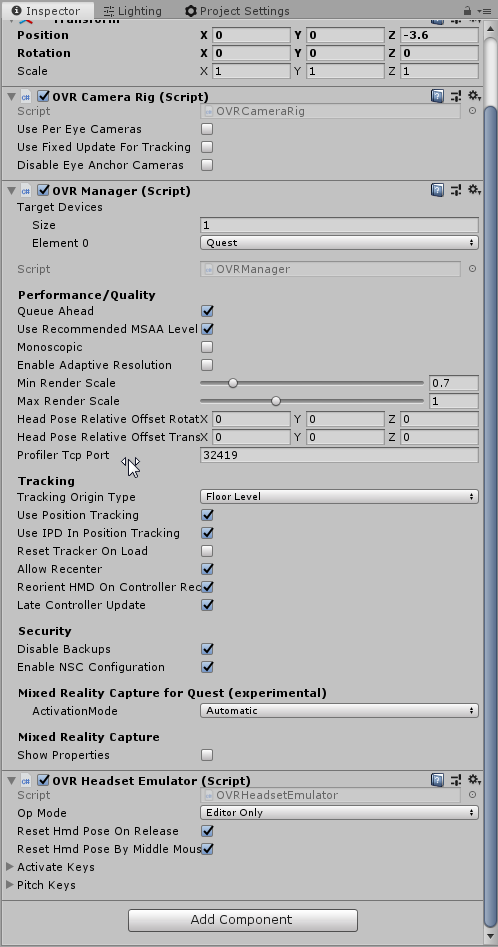
im slightly in the floor, but not enough to bother me.
i was able to make a build and test it. worked for the first scene. forgot to apply the changes to the prefab so it only worked in one scene.
any idea if theres a way to test the scene with the quest without having to make a build everytime?
hearty iron
first do you see that "Tracking Origin Type" set it to eye level if you want to place your camera rig at eye level. For your second question: Yes. You need to install the oculus desktop app, enable the beta program, make sure your Quest is update, get a usb 3 to usb c cable, install the Oculus desktop package in unity from the package manager and then you can use the Oculus Link to hit play and preview on the Quests 😄
coral frost
Hey guys! I was wondering, how do people make hands that collide with objects like walls? I currently have a kinematic rigidbody which uses the MovePosition & MoveRotation in script to set the position and rotation for the hands. However a kinematic rigidbody doesn't have physics. So my hands just go through colliders. Now according to the Unity docs if I want to use MovePosition I have to use a kinematic rigidbody. So how do people do this?
https://docs.unity3d.com/ScriptReference/Rigidbody.MovePosition.html
If the rigidbody has isKinematic set to false, it works like transform.position=newPosition and teleports the object to the new position (rather than performing a smooth transition).
shell kayak
@coral frost You can make the hands non-kinematic and add forces to move it in the direction of the controllers.
coral frost
How should I go about creating exactly enough force for it to stay in place though?
shell kayak
It would always drag behind a little bit, but that's required if you want physics based hands.
But it'll be good enough. Just add a lot of force in the direction of the controller and slow down as you get closer so it doesn't overshoot.
 plush flax
Does anyone here do SteamVR development for Unity? I am confused as to where I could find documentation for how I should be estimating the player's position to calibrate a new 'center' for roomscale stuff or if it's even possible
or calculate where they are and offset it so that I can force the player, regardless of where they are in the roomscale, to be at the intended position upon hitting loading a scene
 lone elm
can some1 help me add an emote and gesttures to vrchat avatar in unity?
coral frost
@plush flax If I understand you correctly you just want the player to be somewhere? If so you can simply put an empty gameobject as the main camera it's parent, and then move the parent around to move the player (the camera).
 dawn blaze
Oculus quest doesn't render the right eye when building with URP on 19.2 . changing multipass to single pass led to app crash.is there a work around that could be done?
hard carbon
anyone else having trouble getting the latest quest package from oculus? Keen for that hand tracking, but all the assets mentioned in the documentation arent in their latest package - even though their release notes say that it should be!
so, somewhat figured it out. The version I need is 12.0, but the latest build supplied on the store is 1.4.3. If anyone knows how I can download 12.0 I will be hella thankful 😛
hearty iron
12.0 refers to the version of the quest software. I too am very interested i the hand tracking sdk so if anyone knows how to get it give a dm please
hard carbon
they actually have jumped the versioning number of the sdk to match the software 🙂
refer to the integration docs for details, I think its just for continuity
hearty iron
But its still 1.43 on the store🤔 Looks like we just have to wait
quaint moss
anybody else facing huge memory leak issues on latest 2020 Alpha?
updated alpha from 14 to 17 and my android GVR project started to consume memory like crazy until Out of memory crash occurs
hard carbon
yeh Uri, looks like its just a time thing. I just got confused earlier because I saw another developer using it, but they are from Japan so maybe theres a geographical factor to how long the store takes to update
hearty iron
so any day now 😄 😄
pine bison
Exciting!
Don't think there are any stable way to get URP working on 2019.2 @dawn blaze. I think it might work on 2019.3 or 2020.1
If you scroll up a bit in the channel there are some people getting it working
hard carbon
I believe this latest patch may help, because it was the foveated rendering breaking it, and this patch added a toggle to turn it off. Just a wild guess tho. And yes, 12.0 is out and I am ready to get stuck in!
quaint moss
https://issuetracker.unity3d.com/issues/android-crash-with-gsl-mem-error-kgsl-sharedmem-alloc-ioctl-failed-on-adreno-gpu-devices-1 looks like my issue
The texture gets missing following with a crash "GSL MEM ERROR: kgsl_sharedmem_alloc ioctl failed" on Adreno GPU devices Steps to re...
hard carbon
Possible, but im not certain. Simply that they have identified some issues with unity, and instead of fixing them they just kinda put in a toggle for them 😛
Foveated rendering in URP was one of those from memory
hard carbon
Bout an hour ago 🙂
dawn blaze
Or forward?
hard carbon
Foveated
Foveated rendering is a rendering technique which uses an eye tracker integrated with a virtual reality headset to reduce the rendering workload by greatly reducing the image quality in the peripheral vision (outside of the zone gazed by the fovea).A less sophisticated varian...
dawn blaze
I have been trying extensively to build URP but the render issues forces me to go back to 3d with extras
It's like unity enjoys adding new features 😂
The URP bug has been prevalent for while now
hard carbon
its a mix between unity and oculus. They are both doing fairly rapid iterations with a somewhat loose QA process. Thats why a lot of this work is classified as 'preview'
hard carbon
nope, but quest is pretty curated anyway so this was only ever going to be for existing apps or localised work, at least for a month or so while they bring it up to scratch
I would set the banner at closer to 6 months to be honest
quaint moss
wait foveated rendering is coming to URP??
hard carbon
Not for now, I think they just added checks to make sure that it doesnt screw you up if you ARE on URP
Man, we really need an Oculus rep to clear these issues up
wintry delta
I'm fairly sure Oculus said at OC6 that you wont be able to mix handtracking and controllers, because the cameras need to run different apertures or gamma modes or something. Does anyone have any info on that?
hard carbon
The guide has options for one or both. There is some info saying that the needs for hands and normal tracking are different, so one may work where the other does ot
*not
Utilize the hand tracking feature to use hands as input devices.
wintry delta
Aha, okay so I'll take from that, that is still a little iffy. But thanks for the link, I hadnt seen that
Ah, from the docs : Controllers and hands are not currently tracked at the same time. Apps should support either hands or controllers, but not both at the same time.
dawn blaze
any suggestions on which unity version to used for Quest Dev?
I am still waiting for a 2019 LTS version
hearty iron
I'm using 2019.3 with URP
dawn blaze
have u built for quest?if Yes , then did u run into render issues?
hearty iron
I did run into issues yes. For example the post processing has a bug that causes the entire scene to be much brighter, etc etc but with the XR Management package and URP 7.1.6 it renders correctly using MultiView, so you should not have too much trouble
dawn blaze
ok Uri imma try that,if that's works.Your officaly my kids godfather
hearty iron
just make sure to use the XR Management package
normal XR settings from the player will not work ok
 honest orbit
has anyone had success getting the build pipeline set up for the quest on ubuntu?
android SDK & NDK have been tricky to set up for me
hearty iron
oh man that is some times tricky to set up on windows... getting it up on ubunto is a can of worms I dont want to open haha
honest orbit
its fussy, im very close though
hearty iron
gl
storm ether
Does anyone happen to know what code needs to be done to actually detect a 'button down' event for the red dots on the oculus go controller? I can detect touches, and swipes, but no where can i find online an actual button 'press' for these buttons. I know they exist because I've play games that utilized these presses. But they seem to keep alluding me. I've tried DPadUp, I've tried Axis2D checks, I've tried Up, etc.
Touches are easy to do, Swipes are too. But it seems an actual button press is harder than it seems.
frosty stirrup
Is Post Processing Stack broken on VR in Unity 2019?
dawn blaze
yea its advised not to use post process
u can just go and get the xr management package and that will help a tone wth URP(univesal rendere pipeline)
compact cove
I want to add item grabbing for my VR game, and I want grabbing heavier items to have sort of a delay before the hand gets to the real position, but the hands my game uses right now always automatically go to the true position.
To add this feature, would it be best to create a fake pair of hands and interpolate them to the true hand's position based on the mass of the object grabbed
coral frost
What I personally would try is storing the last X amount of locations a person their hand has been, and after a certain threshold start moving along those locations.
So yeah, basically a fake pair of hands.
But not sure how well that would work ^
The solution you have also seems totally fine to me 😄
Just try it out and see what works best for you
compact cove
Ok cool thanks
 silver urchin
Hey! If possible, could someone send me the new Oculus Integration directly? I'm having troubles downloading it from the asset store. When I import the Integration, the new assets included in v12 aren't present for whatever reason
silver urchin
Nevermind!
 hardy sand
@storm ether It's easy, the touch pad click has its own button code, once you intercept it you can poll the touch pad finger position
the rest is basic math
storm ether
@hardy sand Ahhh that actually makes since... pretty much if I wanted to detect clicking on the 'top' I'd check if Y is > than something (based on touch) and if the button is pressed kinda thing.
wintry delta
Anyone messing with Quest Handtracking and Unity UI? I
Im not certain if I need a special type of raycaster attached, cant seem to find a new type of raycaster with this Oculus Integration update
hardy sand
@storm ether yep, although I suggest not using a simple check whether x or y is over a certain threshold, otherwise you'll end up with 4 overlapping areas along the y=x and y=-x lines
storm ether
Appreciate the insight Tibor.
hardy sand
Also, add a dead zone in the center of the pad
That's it, good luck with your project
storm ether
You'd really think they would include such features for us already honestly. But then again it really is technically 'one' button isn't it?
compact cove
What's the best way to implement hand collisions in a vr game
coral frost
I currently have a solution working which uses a rigidbody which directly modifies velocity and angularVelocity to match up the position & rotation respectively.
https://www.youtube.com/watch?v=ZAGZQ1kdMFk

Which seems to work pretty good 😄
coral frost
Yeah sure, I'm not using it for a real project, I was just messing around with it @hollow elk :D
https://pastebin.com/9qPaxaYE
And here are the rigidbody settings I used. https://gyazo.com/fc7342a9a783dc84ce1067b0813faeb0

 hollow elk
Thank you so much!