#🥽┃virtual-reality
1 messages · Page 22 of 1
 gritty heart
 mild igloo
anyone have any tips for getting this line to work with the Quest Pro in Unity?
if (CurrentInputDevice.TryGetFeatureValue(CommonUsages.eyesData, out Eyes data))
I am using the Meta XR core and eye tracking is working but I want to get info from the data but can't because it treats the Quest Pro as if eye tracking is disabled. Event though I have verified if works via the manifest in the project and the build settings and config. I also decompiled the APK and verified there as well .
gritty heart
mild igloo
anyone have any tips for getting this line to work with the Quest Pro in Unity? ...
Metas eye tracking doesn’t get fed into the input system in openxr. You can make your own input device to do it if you like. We used to have an adapter for this but it had issues so we removed it.
 glossy tundra
guys, i get a really weird bug crash in unity 6, and my project doesnt open anymore, always crash instantly when openned, i'm downloading the project again to test if solves the issue
glossy tundra
someone knows if DrawGizmos can be releated, i discover that the scene was the problem and i revert scene file to an older version and work
mild igloo
gritty heart
Metas eye tracking doesn’t get fed into the input system in openxr. You can make...
damn. make my own input device? Do you have a point of reference for this?
gritty heart
mild igloo
damn. make my own input device? Do you have a point of reference for this?
Well the nice thing is that now you can also do it with input readers, or just setting the transform of the gaze interactor.
Theres an example of a custom input device in the xr hands package, with the meta aim features being lit up through a custom input device
glossy tundra
glossy tundra
someone knows if DrawGizmos can be releated, i discover that the scene was the p...
Yes, the problem is the drawing gizmos 😅 , watch out for that guys, because if you made a mistake on that, it doesnt get any errors, and the current scene that you are working on have the script that use draw and crashes, when you try to open the project again unity will open the current scene, and you can`t do anything because it crashs on load, so you will need to use UVCS to revert the file at the point that you removed the script of the scene.
 weary trellis
You guys recon this is a good way to get around coding in vr? https://assetstore.unity.com/packages/tools/visual-scripting/vr-builder-open-source-toolkit-for-vr-creation-201913

Get the VR Builder - Open source toolkit for VR creation package from MindPort GmbH and speed up your game development process. Find this & other Visual Scripting options on the Unity Asset Store.
 limpid narwhal
On the component XR General Grab Transformer....
What does "Allow One Handed Scaling" even do? 🤔
Two handed makes sense and works fine, but one hand?
How do you scale something with one hand? 🤷
I can't figure it out.
 hexed bluff
If you "click in" on the left hand thumbstick it will change between position mode and scale mode, letting you control the local scale of the with forward/backward on the joystick. I don't think this works with XRI 3.x
limpid narwhal
Holy smokes -- you're right.
Dang, thanks!! 👍
 uncut plank
For some reason when i click start to enter playmode the game doesnt start on my headset i have the headset on any everything but it doesnt start the game in the headset? litterly 2 days ago it was working and i didnt change anything but add 3d models???
 mighty mantle
how do you add listeners to xr interactables/interactors?
primaryInteractable.selectEntered.AddListener(???);
replacing the "???" with any function in the script shows this error and I can't for the life of me figure out how to get it to be happy with me
Argument 1: cannot convert from 'method group' to 'UnityEngine.Events.UnityAction<UnityEngine.XR.Interaction.Toolkit.SelectEnterEventArgs>'
basically just want it to do this

but during runtime
mighty mantle
uncut plank
For some reason when i click start to enter playmode the game doesnt start on my...
if quest link works normally (assuming you're using a quest device) then id assume restarting unity (or maybe your whole pc) should do the trick. if that doesn't work, make sure you didn't change any of your openxr settings on accident
hexed bluff
void Start()
{
  m_Interactable.hoverEntered.AddListener(OnHoverEnter);
}

void OnHoverEnter(BaseInteractionEventArgs args)
{
  // Hover Here
}
That should get you started. You can extrapolate that for Select, and Activate. Don't forget to add a RemoveListener as well!
gritty heart
mighty mantle
how do you add listeners to xr interactables/interactors?
```primaryInteractabl...
Take a look at the interactor affordance provider. It has bindings to all the events
Same for interectable affordance provider
uncut plank
mighty mantle
if quest link works normally (assuming you're using a quest device) then id assu...
quick question do u know how echo vr managed to pull off decently detailed stuff... when ever i port my game to quest 2 its abomadably horrible fps
peaks at 11
it all started when i first imported my 3d models from blender
mighty mantle
uncut plank
quick question do u know how echo vr managed to pull off decently detailed stuff...
i never played echo vr, definitely didn't work on it myself so i have no idea how they did anything. i'm also only developing for pcvr so frame issues on quest standalone is not anything ive gotten into yet. if i had to guess you have things that are too high poly or are using a lot of procedural materials instead of texture-based mats
 feral gazelle
Hello everyone.
Need an advice on something. Is there a tracker that works with quest 3 in standalone mode without PC connection or external base stations? Looking for a solution to implement full body tracking.
 vivid condor
Does anyone know why The "Menu" interaction works for the Meta Quest 2 but not on the Meta Quest 3 / Pro?
(XR Interaction Toolkit: 2.3.2 - starter Assets)
Note: I don't have a Quest 3 to test it, this is knowledge from one of my testers.

 coarse escarp
hi having a bit of trouble getting a reading from a trigger, I have setup a mapping for trigger and its a value of type axis but not working out how to read it now
 wise warren
I have a scene with the VR rig at a specific location. When I play this build on the MQ3, I am always out of position and I think it's because the room scale setup always messes with it, so I don't actually spawn into where the rig is in the scene in Unity. Anyone know the best way to try and fix this? I tried a script that teleports me when the scene loads but it still doesn't spawn me where I want to
the script works fine in the editor though, takes me to the right position

 undone lance
Hello, I was wondering if anyone has any knowledge of glb files in VR.
I'm downloading avatars at runtime, in a VR app, Oculus Quest 2. When it is downloaded, it makes the screen go black for a few seconds. The logcat doesn't produce any errors, it just seems to refresh itself when it does the download. Someone else enters the room, their avatar starts downloading - I get black screen for 2-3 seconds too of course. Everyone gets it, it's not a random occurrence.
I've worked previously with fbx files only and never had this issue, so I'm wondering if it has something to do with the fact its a glb file and/or the textures?
The Gltf Asset component on the avatar prefab (which accepts the downloaded glb file with the avatar model in it) looks like this.
The URL is empty, because that comes in from a database after you enter the room.
 undone lance
Also, during the download I get this warning. Could this be related?

 azure apex
Do anyone have experience with dragging UI elements on VR on World-Space Canvas? I keep getting funny positions - like I am dragging in mid quarter space of canvas and element is moving all around... I have created forum thread - if someone can help?
https://forum.unity.com/threads/dragging-canvas-elements-in-wold-space-canvas-positions-not-updated-properly.1605138/
Unity Forum
I have Meta Quest 2 - using Oculus Interaction. Unity version 2021.3.9f1
I have 2 problems here both with World-Space Canvas, I suspecti it is the...
 safe iron
does anynone have a code for hand animation
 buoyant jolt
safe iron
does anynone have a code for hand animation
buoyant jolt
safe iron
does anynone have a code for hand animation
GetComponent<Animator>().SetBool("animateHands", true);?
 chrome tusk
Is there a trick or setting somewhere to getting a Post-process volume to work on an OVRCameraRig? I've got the layer set up on my CenterEyeAnchor camera, everything looks great in the scene view. Just testing Ambient Occlusion and Vignette right now. But when I hit play I'm not seeing the effects applied on the headset. Checked quality settings and not seeing anything in there.
chrome tusk
disregard, everything I'm reading says post processing = bad for vr
glossy tundra
Hello guys, someone knows if its possible to override the movement type of grabinteractable if he was on a socket ?
buoyant jolt
chrome tusk
disregard, everything I'm reading says post processing = bad for vr
Yeah, it's totally doable, but comes at a cost. So you just have to be smart with it. A lot of the Pre-modern-post-processing shaders are more performant than their new system but only work with BiRP and some need modifications for VR
gritty heart
buoyant jolt
Yeah, it's totally doable, but comes at a cost. So you just have to be smart wit...
The built in stuff with urp should work with vr, but our default urp profiles disable them.
Post processing does not work in conjunction with passthrough, presumably not compositor layers however.
chrome tusk
gritty heart
The built in stuff with urp should work with vr, but our default urp profiles di...
Ahh thanks for the info. I'm using built in, ended up doing some pretty cool things with the lighting and shader to get close to the effect I wanted.
 errant spear
'-' Following this first video, and my controllers dont seem to be tracking but my headset is. Does anyone have any ideas? https://www.youtube.com/watch?v=HhtTtvBF5bI&list=PLpEoiloH-4eP-OKItF8XNJ8y8e1asOJud

The first episode of the tutorial series that will teach you everything about VR development.
❤️ Support on Patreon : https://www.patreon.com/ValemVR
🔔 Subscribe for more Unity Tutorials : https://www.youtube.com/@ValemTutorials?sub_confirmation=1
🌍 Discord : https://discord.gg/5uhRegs
🐦Twitter : https://twitter.com/valemvr?lang=en
👍 Main Chann...
gritty heart
errant spear
'-' Following this first video, and my controllers dont seem to be tracking but ...
Try downloading the vr template from the Unity hub on 2022.3 or Unity 6
errant spear
I had to enable and disable my oculus link, my controllers weren't working at all lmao.
errant spear
Alright so next issue (if anyone knows) I've got a basic blendtree setup with some hand animations, and I'm trying to create a "thumbs up". Using the current script, I'm only getting the "Grip" and "Trigger" values. Does anyone know how I could obtain whether or not someone's finger is pressing or on the "A" or "X" buttons?


From what I see there is no support for checking buttons being pressed / held down in the xri default actionproperty
Unless I'm just blind


And is there even a way I can add a 3rd parameter?
 errant spear
Unless I'm just blind
errant spear
errant spear
Unless I'm just blind
Even making my own input action as Oculus Touch Controller "primaryTouched" does not work
Omg I finally managed to get the primary touched value working for Oculus controllers only, but I dont know how to incorporate it with my blend tree as it only allows me 2 parameters
 quasi drum
I am attempting to change a child TMP_Pro component over the network of an object that I am instantiating and the spawning over the network. The object can get instantiated and spawned by either the client or the host and I want the text to update for both... Any suggestions on how to do that or resources that talk about it?
 wild patio
why do i not have the continous move provider

and i dont have xr interaction manager
what do i do
gritty heart
wild patio
what do i do
Close your project, delete your package cache in your library folder, or the whole library folder. Reopen Unity, and if it’s not there reimport your xri package and samples
wild patio
how do i remove cache
gritty heart
wild patio
how do i remove cache
Open the folder on your pc, and delete it when Unity is closed
 warm verge
Does any one have a sample project for eye gaze / eye tracking for XR Interaction Toolkit?
The sample provided by XR doesn't have a working sample for eye tracking. I have tried to create a demo myself, but I cannot get the gaze interactor to center to the main camera and the documentation is not much help.
 chrome badge
i creating a vr game right now and i want to add a player model i can play with how do i do that
buoyant jolt
chrome badge
i creating a vr game right now and i want to add a player model i can play with ...
Find model -> drag into project -> drag into scene
If you want it moving to your movements you probably want existing VR avatars or finalik. If you want it other characters, add the animation system. If you want it multiplayer, it depends on the framework, but normcore is an easy way to do a simple start (until you need to sync a variable mind you)
 ebon palm
hello I am making a simple VR project and I made the environment for it
but I am not how to setup the player camera
i do not have a VR headset is there a way to play test with mouse and keyboard?
 dry vapor
Hi, im working with the XR interaction toolkits hand tracking, and for some reason i can only interact with objects using a pinch pose, and i cant figure out how to make that a grab pose instead
buoyant jolt
ebon palm
hello I am making a simple VR project and I made the environment for it
but I a...
There is an XR simulator with the XRTK, I've never used it though
gritty heart
warm verge
Does any one have a sample project for eye gaze / eye tracking for XR Interactio...
If you’re using quest pro, it’s gonna be tricky because our built in samples use the Microsoft ext eye tracking extension which the quest runtime doesn’t implement. Meta has a different extension but it’s not exposed by our openxr tools
warm verge
gritty heart
If you’re using quest pro, it’s gonna be tricky because our built in samples use...
I am using the htc vive, I was able to get the eye tracking to be accurate, but when hovering the gaze objects given by the prefab it throws an error. I think it was something like gameobject cannot be converted into material.
gritty heart
warm verge
I am using the htc vive, I was able to get the eye tracking to be accurate, but ...
Hmm it’s possible there’s a bug with rig setup for eye gaze, especially moving to xri 3
warm verge
gritty heart
Hmm it’s possible there’s a bug with rig setup for eye gaze, especially moving t...
The gaze ray and the stableizer needed to be put under the main camera for that to work, not sure how to fix the objects giving an error. I am going to try to work on it tomorrow and I'll let you know if I am able to fix it.
chrome badge
buoyant jolt
If you want it moving to your movements you probably want existing VR avatars or...
thats kinda hard for me to understand
 near radish
I recently started using XR Interaction Toolkit instead of Meta SDK, but I found that when I grab my controller while using hand tracking, my hands are disabled.
Is there any ways to show my hands & controllers at the same time?
 thin wedge
Hello Everyone! Im currently going through a build error that says "A failure occurred while executing com.android.build.gradle.internal.tasks.Workers$ActionFacade". Im not sure what to do, as i went through unity forums i did not find a solution. Please help when avaliable .
warm verge
near radish
I recently started using XR Interaction Toolkit instead of Meta SDK, but I found...
Can you send a screenshot of your setup? Here is what mine looks like, I got it through the XR Interaction Toolkit sample.
 warm verge
gritty heart
Hmm it’s possible there’s a bug with rig setup for eye gaze, especially moving t...
warm verge
gritty heart
Hmm it’s possible there’s a bug with rig setup for eye gaze, especially moving t...
My issues have flipped lol. I was able to get the gaze to work by changing the prefab to have its material be a child of the XR Simple Interactable, rather than on the simple interactable.
I am using ignore tracking state and whenever it is not tracking it works perfectly fine.
Whenever it is tracking the beam seems to be flipping to the opposite angle.
I have attacked a video showing this, the first half is with no eye tracking only headset tracking, the second is with eye tracking.
warm verge
warm verge
My issues have flipped lol. I was able to get the gaze to work by changing the p...
I should probably say the changes I have made to the prefab:
I put the gaze interactor and the gaze stabilized under the main camera, before it was just in xr origin and the beam always originated from ~~ 0, 0, 0
warm verge
Eye Tracking Fixed!
 strong quail
I want to make a VR game, but I am still new to unity. Should I learn things regarding VR first thing, or just focus on the basics?
 orchid jolt
strong quail
I want to make a VR game, but I am still new to unity. Should I learn things reg...
orchid jolt
strong quail
I want to make a VR game, but I am still new to unity. Should I learn things reg...
Focus on the basics without working on VR, VR is so much harder if you have no experience.
 glass geode
Hi Guys, I want help with IAP in oculus developer hub, Can someone suggest a video for that?
near radish
warm verge
Can you send a screenshot of your setup? Here is what mine looks like, I got it ...
maybe I have almost same setup because I used sample scene setup.
I meant like this image (this is done with meta sdk's hands capsense). Can I do this with XRIT?

 north path
strong quail
I want to make a VR game, but I am still new to unity. Should I learn things reg...
north path
strong quail
I want to make a VR game, but I am still new to unity. Should I learn things reg...
!learn Check out the dev course, and after that you could try the VR course
 ornate questBOT
:teacher: Unity Learn ↗
Over 750 hours of free live and on-demand learning content for all levels of experience!
 tiny niche
near radish
maybe I have almost same setup because I used sample scene setup.
I meant like ...
tiny niche
near radish
maybe I have almost same setup because I used sample scene setup.
I meant like ...
the toolkit parts wouldn't really be involved, but the core xr bits along with the animation features will get you there
 hidden carbon
Hi, Im working on a VR project and I need to make a simple basketball hoop. Can anyone help me how do i go about adding a projectile ray that shows where the ball will hit(eg the basket). Im using unity OpenXR
orchid jolt
hidden carbon
Hi, Im working on a VR project and I need to make a simple basketball hoop. Can ...
https://m.youtube.com/watch?v=p8e4Kpl9b28&pp=ygURUGh5aWNzIGxpbmUgdW5pdHk%3D
This should work or at least get you on the right track

Trajectory prediction lines are everywhere in puzzle games and you even see them in action games to simulate grenade throw arcs etc.
This is a new method recently made possible with the addition of Multi-Scene Physics. We now have the ability to simulate frames into the future using the in-built physics system, taking into account the physics ...
hidden carbon
orchid jolt
https://m.youtube.com/watch?v=p8e4Kpl9b28&pp=ygURUGh5aWNzIGxpbmUgdW5pdHk%3D
This...
i looked at few videos like this. the problem comes in static spawn point vs a dynamic one in case of VR.
idk how to take the movement/force of hands and plug it into the projectile motion equation and render a curve based on that
orchid jolt
Oh yeah I don't know what to do for that, sorry!
 agile eagle
Hi! So I'm working on a university project where I am making a VR game in Unity. The game runs fine through the editor and play mode connects everything correctly, but when I make a pc build and run the .exe it just opens in a window on the headset and doesnt actually play in VR. I have tried both OpenXR and Oculus in XR Plug-in Management and I have tried different cables. (Also restarted Meta Quest Link, Unity, PC, Headset, etc.) Any help would be appreciated!
 kind niche
agile eagle
Hi! So I'm working on a university project where I am making a VR game in Unity....
kind niche
agile eagle
Hi! So I'm working on a university project where I am making a VR game in Unity....
Try using a android build instead, and then using sidequest to export it to headset.
agile eagle
I would like to run the game on the PC and play it on the hmd because it runs better and allows us to have more assets. (also avoids android build limitations)
uncut plank
DOES ANYONE KNOW WHY MY META QUEST APP DOESNT OPEN GAMES ANYMORE... i go into vr click launch on gorilla tag or any game. and it just sits on loading... better yet when i try and open my unity projects it doesnt even open up loading... it just doesnt launch anything.. less than a week ago this was working any help? i wont be on so dm me with responses if u can. (i have tries uninstalling reinstalling checking for updates checking for windows updates ect. i have tries using it on a quest 2 and a rift s both with the same outcome
chrome tusk
friendly reminder to back up your project... like right now... just do it. thank me later 
 pine bison
agile eagle
Hi! So I'm working on a university project where I am making a VR game in Unity....
pine bison
agile eagle
Hi! So I'm working on a university project where I am making a VR game in Unity....
That's pretty weird. Show your XR settings?
 fresh sierra
Hello, i am pretty new to making vr games in unity and i was just following a tutorial (https://www.youtube.com/watch?v=HhtTtvBF5bI&list=PLpEoiloH-4eP-OKItF8XNJ8y8e1asOJud this one to be specific) and at 10 minutes and 47 seconds into the video he adds a action based controller script but i dont have it even though i installed everything correctly i am also on Unity 2022.3.21f1 i hope that helps if anyone found a solution please contact me thank you.
The first episode of the tutorial series that will teach you everything about VR development.
❤️ Support on Patreon : https://www.patreon.com/ValemVR
🔔 Subscribe for more Unity Tutorials : https://www.youtube.com/@ValemTutorials?sub_confirmation=1
🌍 Discord : https://discord.gg/5uhRegs
🐦Twitter : https://twitter.com/valemvr?lang=en
👍 Main Chann...
 eager ledge
is there a way to get a SteamVr Player in unity working on a meta quest 3 standalone? or is there a workaround to get this working?
fresh sierra
fresh sierra
Hello, i am pretty new to making vr games in unity and i was just following a tu...
Never mind solved it i downgraded the xr interaction toolkit to 2.5 from 3.0 and it worked it showed up
mild igloo
Anyone know if it is possible to launch a vr app in the background?
pine bison
eager ledge
is there a way to get a SteamVr Player in unity working on a meta quest 3 standa...
No. it would need to be ported
eager ledge
pine bison
No. it would need to be ported
how can i do this the best? i got an Bow from SteamVR so i somehow have to get the SteamVR Hands to the Oculus Player Rig
pine bison
You would have to move all the logic across. It's probably easier to just make it from scratch
eager ledge
oh hell noo😭
pine bison
SteamVR is just incompatible with native quest. You can move across both ways on PC via workarounds, but there's no such option natively
eager ledge
pine bison
SteamVR is just incompatible with native quest. You can move across both ways on...
is it not possible to map the controller inputs from the oculus controller tracking to the steam VR actions?
eager ledge
anyone?😭
 mellow vigil
It is possible but SteamVR would need to be running/controlling the input for that map to be applied. I dont believe there is a way to override the standard oculus input system in standalone mode other than what people have mentioned above.
eager ledge
mellow vigil
It is possible but SteamVR would need to be running/controlling the input for th...
Ah ok, makes sense
Then i have to get my Laptop with me everytime😭
 rich ridge
Does anyone know of a good template for multi-user VR?
- specifically one that could be modified to be a persistent space for multi-user interaction with 3D models (.fbx for instance). Maybe with Photon or some other multi-user backend.
gritty heart
rich ridge
Does anyone know of a good template for multi-user VR?
- specifically one that ...
We're about to release the VR multiplayer template
ITs discussed extensively in the later part of the video here
https://www.youtube.com/live/ZcXnoKTNsIg?si=-oaSC1R2UteMDd6W

Join us Live on Wednesday at 12pm ET for a stream you won't want to miss!Learn more about XR at Unity: https://unity.com/solutions/xr
buoyant jolt
rich ridge
Does anyone know of a good template for multi-user VR?
- specifically one that ...
I dont recommend unity game services (sorry to the Unity team) for many reasons. But photon has plenty of multiplayer VR samples on github. Normcore is another one you can get up and running in minutes.
gritty heart
buoyant jolt
I dont recommend unity game services (sorry to the Unity team) for many reasons....
Curious why you feel that way. The services have been improving a lot in the past few months.
buoyant jolt
Tl;dr: just not personally interested on it. It's expensive compared to our self hosted, it's slower to develop with, not as well documented, not used enough in the industry, not enough regional control, distrust of unty licensing, and locked to a single engine and cloud service.
Having a working template is going to help though. And having it built into the engine will too. But I think it's just a lot easier to get going, especially for new devs, with photon and normcore. And photon does have a decade of support. More experienced devs are likely to roll their own, or use something like fishnet where they have more control. So it kind of is missing an audience imo.
buoyant jolt
Original unet was decent until it was killed off though. But I think unity should spend its time helping make things like photon better instead of competing with them
buoyant jolt
 cursive timber
who wants to help me with a game that im develiping
cursive timber
who wants to help me with a game that im develiping
!collab
ornate questBOT

📢 Collaborating and Job Posting
We do not accept job or collab posts on discord.
Please use the forums:
• Commercial Job Seeking
• Commercial Job Offering
• Non Commercial Collaboration
buoyant jolt
Although I think unity is shutting those down soon
gritty heart
buoyant jolt
Tl;dr: just not personally interested on it. It's expensive compared to our sel...
There’s a few things worth noting
- a lot of the services are being streamlined. It’s complex now because it takes a lot of glue code but that’s being made a lot easier
- the template has a 1 click setup that includes all the services
- it’s possible to replace individual parts of the stack with self hosted stuff. In particular the transport layer is modular and replaceable, while still using ngo for the actually building your netcode
- netcode for entities is pretty sweet has client side prediction with rollback out of the box.
buoyant jolt
gritty heart
There’s a few things worth noting
- a lot of the services are being streamlined....
To be fair, a lot of that can be countered or counter claimed though. Normcore offers object persistence out of the box, most claim client side prediction built in, and almost all of them are better suited for custom server integration.
Benchmarks seem kind of all over, so it's hard to say for sure which is best. I'm expecting UGS to win out in the long run though just because it's baked into the engine. I just hope they keep in mind it needs to be usable by new users.
I think my responses are predictable though 😄 love the engine, lots of awesome staff, just not the company. And I always encourage people to explore the options available
Anyway, I don't want to drag out UGS and netcode in the VR channel. I recognize a lot of hard work is going into it
 cursive anvil
rn im using unity for a gtag fan game i am wroking on and so far this engine is alot better than unreal engine
buoyant jolt
Absolutely the engines great, especially for XR and mobile
 tight current
can someone help me change the target sdk for android from 34 to 32
 chrome badge
can someody text me private if they can help me creating an vr game?
 magic crane
hi, i'm now doing school project and basically i need to deal with stuff other people did. long story short In my vr game I need to scale whole level down because i look like a toddler. Is there any way to achieve it painlessly?
I've tried parenting it to an object and scaling down, but terrain gets distorted
 gritty sphinx
Hi everyone, would anyone be able to help me with this problem? https://forum.unity.com/threads/articulation-body-with-xr-grab-interactable.1604487/
tl;dr: I'm looking for a stable way to grab one end of a robot using my VR Controller without the robot's articulations exploding. I've tried using Joints and Articulation Bodies but it either doesn't work or the whole physics just seem to explode.
Unity Forum
Hello everyone,
I'm currently working on a small project in VR where the user should be able to interact with a small crane like robot. Basically my...
gritty heart
gritty sphinx
Hi everyone, would anyone be able to help me with this problem? https://forum.un...
Just replied. unfortunately its not something we have components for out of the box.
I spoke about how some of this is built and works in the XRI livestream
https://www.youtube.com/live/ZcXnoKTNsIg?si=TjqIvfwVHKOY0Y2j&t=2158
Join us Live on Wednesday at 12pm ET for a stream you won't want to miss!Learn more about XR at Unity: https://unity.com/solutions/xr
Its unfortunate I dont have a better answer for you atm
gritty sphinx
gritty heart
Its unfortunate I dont have a better answer for you atm
No worries, thank you so much! At least now I know it's not something I'm missing or doing wrong. I will try to explore your suggestion using base interactable or I might give it a try with some sort of IK Solution.
gritty heart
gritty sphinx
No worries, thank you so much! At least now I know it's not something I'm missin...
Base interactable handles the interaction events but doesnt do any of the motion calculation, so you can integrate it with an ik solution.
You use it to start a grab, then use the tracking input to feed into your ik
buoyant jolt
chrome badge
can someody text me private if they can help me creating an vr game?
!collab
ornate questBOT
📢 Collaborating and Job Posting
We do not accept job or collab posts on discord.
Please use the forums:
• Commercial Job Seeking
• Commercial Job Offering
• Non Commercial Collaboration
buoyant jolt
magic crane
hi, i'm now doing school project and basically i need to deal with stuff other p...
Unfortunately it's a limitation of the terrain system, it really doesn't work with scaling changes. You can scale everything else down. Your parenting works in most cases as long as the scale is uniform. For terrain, I had to make a tool for it. But you may find something googling around
If i remember and come across the code for it I'll post it on git for you
 narrow briar
what's your favorite tool for convex meshcollider decomposition?
(just discovered that many MANY physx api calls only handle convex meshes)
gritty heart
narrow briar
what's your favorite tool for convex meshcollider decomposition?
I know the devs of this package. They’re very talented vr devs.
https://assetstore.unity.com/packages/tools/physics/technie-collider-creator-2-217070

Get the Technie Collider Creator 2 package from Triangular Pixels and speed up your game development process. Find this & other Physics options on the Unity Asset Store.
narrow briar
gritty heart
I know the devs of this package. They’re very talented vr devs.
https://assetsto...
it looks like it doesn't use V-HACD 🙂
gritty heart
narrow briar
it looks like it doesn't use V-HACD 🙂
 narrow briar
gritty heart
narrow briar
gritty heart
lol, i'll pass
V-HACD is super tempermental
with holes
and when you increase alpha beta to get holes you lose asymetry in other areas
CoACD would be awesome, do you know who handles physics 3D or even mesh at Unity?
maybe the robotic team
much better
 gritty heart
nice
gritty heart
narrow briar
oh wait haha https://github.com/SarahWeiii/CoACD.git?path=/Packages/info.flandre...
this looks great
gritty heart
narrow briar
and when you increase alpha beta to get holes you lose asymetry in other areas
the great thing about hte asset is that it supports customization and the editor tools are well done
narrow briar
gritty heart
the great thing about hte asset is that it supports customization and the editor...
I saw that, very nice for refining, I'm sure they'll switch to CoACD eventually.
 stone escarp
can anyone give me a idea for a bizzare gun i should add to my game
narrow briar
stone escarp
can anyone give me a idea for a bizzare gun i should add to my game
pizza gun
pine bison
magic crane
hi, i'm now doing school project and basically i need to deal with stuff other p...
Try scaling your player rig instead
 robust dagger
Hello, i am doing a work project where i need a tutorial room/main menu in one scene and the application in another, however the button that is meant to call the scene loader does nothing when on quest 2, but in the editor it works just fine, anyone know what might be the issue?
I am using UI with a button on it, the button is using On Click () to call the AppLoader() function, and i have the relevant scene in the sceneToLoad variable
using System.Collections;
using System.Collections.Generic;
using UnityEngine;
using UnityEngine.SceneManagement;
public class LoadApp : MonoBehaviour
{
[SerializeField] Object sceneToLoad;
public void AppLoader()
{
    SceneManager.LoadScene(sceneToLoad.name);
}
}
 manic warren
hey guys, I'm trying to lock my Meta Quest users roomscale thanks to stage tracking mode, but since OpenXR If I push Meta home button, it recenters. Can't bypass that except if I roll back to Oculus integration. Am I missing something ? Regards !
 hallow maple
Hi ! Is there a way to have an ui in overlay with an Oculus ? It worked well on my editor but nothing on my headset ? maybe a setting to fit the screen to activate ?
 uncut plank
can someone please help me ive been stuck on this for 3 weeks. its somthing to do with vr - - ok so i have my headset on i open up unity. i press play. the game doesnt load up in my headset. part 2. i think i messed somthing up in my project. i go over to valems template https://github.com/ValemVR/VR-Game-Jam-Template and install a fresh project. i go into the xri test scene. click play. STILL NO GAME LOADING HELP ME PLEASE

GitHub
Starter Project using Unity XR Toolkit created for VR Jam 2023 - ValemVR/VR-Game-Jam-Template
gritty heart
uncut plank
can someone please help me ive been stuck on this for 3 weeks. its somthing to d...
That project looks a bit old. You could just try using the vr template that comes with the Unity hub for 2022.3
uncut plank
gritty heart
That project looks a bit old. You could just try using the vr template that come...
That works?
The thing is less than a month ago it was working fine
gritty heart
uncut plank
The thing is less than a month ago it was working fine
Hmm well I cant say why it suddenly stopped working. This project is built for 2021.3 though, and you are definitely much better off starting with a newer base.
The packages built in are also super outdated, like openxr and XRI.
 gritty heart
Yes
the mixed reality option too if you prefer that
the mixed reality one also adds hand tracking
 chilly stirrup
is there a way of setting the offset of the tracked pose driver itself?
looking to do some puppeteering and I have the OpenXR part working with vive trackers and index controllers (using the null driver so no headset as a reference)
I can't think of a good way to "calibrate" my IRL space to my virtual one
the idea I had was to set an offset to the IK rig so they would line up but I don't know how to do that
gritty heart
chilly stirrup
is there a way of setting the offset of the tracked pose driver itself?
looking ...
I think you can do this with the input system. You can add a processor on input poses
chilly stirrup
I was looking at that earlier, seems to be a candidate
I'm assuming I'd have to write it as I don't see one (there's Invert, Scale and Normalize)
if I can find a way to change the offset value in runtime I'll commit to it
 tidal spire
I am having problems using scripts to increase the velocity of the player, in this situation I am trying to allow the play to jump in the air on a button press as well as forward velocity. In the script I also use multiple debug.log to see if all is correct, the console brings all appropriate responses from the script however nothing happens. I do not have kinematic set on the rigidbody for the player and gravity applied has been set low for testing, any help would be appreciated.
Script was too large for discord, so had to use a website.
https://gdl.space/raw/izaruxokak
pine bison
hallow maple
Hi ! Is there a way to have an ui in overlay with an Oculus ? It worked well on ...
Overlay mode will not work in VR. Screen space camera works
pine bison
tidal spire
I am having problems using scripts to increase the velocity of the player, in th...
Do you have separate scripts for moving and jumping? That's probably not a good idea. In this case, when you set velocity drectly, you overwrite whatever is happening in the other script. You should shoudl use the Rigidbody.AddForce method instead
tidal spire
I use the character controller on the XR origin to control moving, I also tried using rb.AddForce before and it still came back the same
***cs
Vector3 jumpDirection = controller.transform.forward * forwardForce + Vector3.up * jumpForce;
rb.AddForce(jumpDirection, ForceMode.VelocityChange);
Debug.Log("Jumping with force: " + jumpDirection);
 supple roost
I wonder how H3VR does VR stocks?
The objects are all physics objects, how would you guys make it lock to your shoulder like that?
It's not a mount point either, you can put the stock anywhere on your shoulder
tidal spire
pine bison
Do you have separate scripts for moving and jumping? That's probably not a good ...
thought I replied sorry
uncut plank
gritty heart
Hmm well I cant say why it suddenly stopped working. This project is built for 2...
Alright i started a new project with the vr core BLANK SETUP. i click play WITH my headset on... and nothing. the game starts in unity but not the headset
is there some sort of setting i may have changed
Setting that I may have changed that goes over to multiple unity projects
im about to just uninstall unity and reinstall it... i dont want to do that cause i have a ton of work done on my project
supple roost
uncut plank
im about to just uninstall unity and reinstall it... i dont want to do that caus...
Go into project settings
uncut plank
ok
supple roost
one second


 supple roost
All of the settings in that dropdown...
 supple roost
I can't see what you're showing
uncut plank
 supple roost
 uncut plank


when i build the game and port it to quest 2 it works
but on oculus link it doesnt open
even if i build the game
supple roost
shit i dunno
supple roost
That might work, but I vaguely remember an issue like this but I solved it by switching some stuff there
supple roost
uncut plank
Try unchecking openxr and go oculus
uncut plank
ok
supple roost
Oh and try a few options here

I think what's happening is that it doesn't want to initialize anything
When it was doing it for me I just said fuck it and used steamVR to test
supple roost
uncut plank
steam vr didnt launch it either
Did steamVR open?
supple roost
and it just didn't say Now Playing somebullshit?
uncut plank
oh wait
u ment switching the openxr thing
mb i though u ment before switching that
supple roost
supple roost
Oh and try a few options here
this
supple roost
supple roost
Try unchecking openxr and go oculus
I don't think this is relevant
using steamVR worked for me
uncut plank
lemme try it
supple roost
what do you have Play Mode OpenXR Runtime set to?
 supple roost
No no
supple roost
supple roost
Oh and try a few options here
here
uncut plank

 supple roost
I have a feeling it has to do with quest link being terrible
uncut plank
yea
supple roost
Headset restart
supple roost
Oh shit that was before they added all the useless stuff
uncut plank
and it didnt work either
supple roost
rough. Good luck man
uncut plank
i wanted to restart anyway
all good cya man ima go sleep before i get yelled at for being up
tidal spire
I am having problems using scripts to increase the velocity of the player, in this situation I am trying to allow the play to jump in the air on a button press as well as forward velocity. In the script I also use multiple debug.log to see if all is correct, the console brings all appropriate responses from the script however nothing happens. I do not have kinematic set on the rigidbody for the player and gravity applied has been set low for testing, any help would be appreciated.
Script was too large for discord, so had to use a website.
https://gdl.space/raw/izaruxokak
 gritty heart
supple roost
Also my FPS is locked to 60
gritty heart
supple roost
Also my FPS is locked to 60
Check the editor settings. You can change the scene view framerate cap
For res there’s a drop down by the game view to adjust that’s if you’re on a laptop it my default to low res mode
supple roost
gritty heart
For res there’s a drop down by the game view to adjust that’s if you’re on a lap...
But it's free aspect
shouldn't it conform to my headset
gritty heart
Well the res in your gameview is probably for 1 eye buffer, not both. It also shouldnt affect what you see in the headset indeed. Check your quest link settings to affect your res there maybe?
supple roost
gritty heart
Well the res in your gameview is probably for 1 eye buffer, not both. It also sh...
No no, the headset resolution is low
let me see
gritty heart
Sorry I don’t know what’s up
I recommend trying the vr template in the hub with 2022.3 or Unity 6 and seeing if you can repro the issue there
 hybrid adder
Hey all! im currently trying to adapt the XRJoystick script from the interaction Toolkit v2.3 demo into a better joystick, and ive ran into a weird problem where the rotation goes past the max angle and locks out the value for that axis to the extreme in the distance that it is in.
for context, this is the joystick (to help yall remember)
ideally id like to just apply a fix to it but i dont understand the math behind it all that, so if needed ill swap to a joint based one, but id like some help attempting to solve the problem first!

the code was directly ripped from the interaction toolkit demo, and you can take a look at it here
uncut plank
supple roost
But it's free aspect
reinstalled unity and its still broke
im gonna go crazy
tidal spire
I am having problems using scripts to increase the velocity of the player, in this situation I am trying to allow the play to jump in the air on a button press as well as forward velocity. In the script I also use multiple debug.log to see if all is correct, the console brings all appropriate responses from the script however nothing happens. I do not have kinematic set on the rigidbody for the player and gravity applied has been set low for testing, any help would be appreciated.
Script was too large for discord, so had to use a website.
https://gdl.space/raw/izaruxokak
 uneven stirrup
I get this rendering issue when using a camera that doesn't render XR (a spectator camera). I'm using URP, this only happens in build
it's the colors btw, they are not supposed to be there and don't show up in VR
 sterile grotto
im working on a unity 3d game to run on google cardboard. when I run the game on my pc it works fine, but when i build and run on my phone the camera/player are in a different position. how can i fix this
 quasi jolt
Hi all, I'm working on VR app that will work later on pc-vr on vive focus 3. I have an issue in the controllers buttons (ex. primary btn & secondry btn) not working when clicked, but the trigger & grab buttons are working. Any one knows why this happening? I'm already using OpenXR and Vive openxr plugin

 supple relic
do we have an expected time for XRI Multiplayer Demo Scene?
 ivory lodge
is it possible to make a game using bolt?
hidden carbon
Hi, whats the best way to create a throwable ball ? For game like a basketball?
The default xr grab interactable and general grab transformer react either non or too violently to controller/hand movement/force when throwing at a steep angle
 magic slate
Hey I can’t seem to find documentation on this, i am trying to make a room scale vr game where the player does not use the control but instead walks around a large room that I have. How do I make sure the player is affected by gravity when they move around? If they go over a hill, I need the character to move up with the curve of the hill.
chrome tusk
hidden carbon
Hi, whats the best way to create a throwable ball ? For game like a basketball?
...
Sounds like you might need to play around with the mass/drag on the rigidbody of the ball, rather than try to change the xr.
chrome tusk
magic slate
Hey I can’t seem to find documentation on this, i am trying to make a room scale...
See rigidbody also, make your player object non-kinematic and tick on use gravity.
mighty mantle
any way to render a camera on one eye only? as far as I can see camera xr target eye only has options for neither or both.
uncut plank
can someone help me with my vr unity project. its not opening in the headset. i have tried building the game then running it and i think all my settings are fine. im using the default freshly booted vr game core.
when building the game in android then booting it to quest it works fine but when i use playmode or build it in windows mode it doesnt work

 tardy lynx
hey, i am using OpenXR, the first pic shows the position of cam in editor, but as soon as i play the game it adds offset which u can see in second pic. Tried to rotate and position the rig but it seems like the offset is added with respect to camera rig.

 hidden carbon
tardy lynx
hey, i am using OpenXR, the first pic shows the position of cam in editor, but a...
hidden carbon
tardy lynx
hey, i am using OpenXR, the first pic shows the position of cam in editor, but a...
there is an y offset serialized field on main camera in Open XR Rig prefab. Try changing that
buoyant jolt
 supple pewter
I need a vr-game project
supple pewter
I need a vr-game project
!collab
ornate questBOT
📢 Collaborating and Job Posting
We do not accept job or collab posts on discord.
Please use the forums:
• Commercial Job Seeking
• Commercial Job Offering
• Non Commercial Collaboration
buoyant jolt
 wanton stag
i want to build n run
wanton stag
i want to build n run
It says you have errors in your script that stopped it from compiling.
supple pewter
what mean?
buoyant jolt
supple pewter
what mean?
It means if you are looking for people to work on a project for you, that you need to use the forums. Which are being shutdown soon.
But if you have a specific problem, people are more than happy to help
buoyant jolt
supple pewter
understand?
not really, no.
uncut plank
HOW COME i build and run my game and it doesnt boot up in my headset. BUT WHEN I SEND IT TO SOMEONE (The same build... IT LOADS ON THEIR HEADSET dhjgndrghdrn
i have legit been trying to fix this for 2 weeks
gritty heart
uncut plank
HOW COME i build and run my game and it doesnt boot up in my headset. BUT WHEN I...
Try deleting the app manually using adb on your headset
buoyant jolt
uncut plank
HOW COME i build and run my game and it doesnt boot up in my headset. BUT WHEN I...
I'll need a lot more spefics, is it a quest and are you trying to install it as an APK? Does it install? How are you launching it? Can you use adb or logcat to see if there are any error messages? And yeah, as @gritty heart said, definitely try removing it first, in case there is some kind of odd or bad configuration somewhere.
uncut plank
buoyant jolt
I'll need a lot more spefics, is it a quest and are you trying to install it as ...
im trying to run it on quest link i have tried with 2 different quest 2s and a rift s ALL with no success... i have also had a friend try the exported game and it works on their pc.. but noy mine
and we have the same meta quest settings
buoyant jolt
uncut plank
im trying to run it on quest link i have tried with 2 different quest 2s and a r...
Yeah, see thats a very different issue.
uncut plank
This is the exported game and its not working on my pc but it works on others pcs
buoyant jolt
Running it over Link requires you to have a VR capable PC and treats it as an Oculus Rift. What you need to do, is make sure you are running Oculus Desktop, link is connected and working. Do any other games work? And if they do, and it still doesn't run, you may need to check your player.log and see what the error is
uncut plank
all other apps work
uncut plank
its only my unity projects that dont work
ive downloaded other vr unity games from itch
and they work
buoyant jolt
Perfect, so the next step, is just to check the player.log and see what errors are happening:
https://docs.unity3d.com/Manual/LogFiles.html

Windows %USERPROFILE%\AppData\LocalLow\CompanyName\ProductName\Player.log
uncut plank
alright lemme try
 vast thorn
Hey, I've just created a new VR project on Unity 6.0.2 with Meta SDK 66 and there is no tracking on hmd or hands
I see that people are already reporting this on forums
anyone found a fix?
uncut plank
buoyant jolt
Perfect, so the next step, is just to check the player.log and see what errors a...
there is nothing inside of here
 uncut plank
@buoyant jolt i ended up finding it i think
uncut plank
[Subsystems] Failed to initialize subsystem OpenXR Display [error: 1]
[XR] [9364] [15:53:33.827][Error  ] xrPollEvent: XR_ERROR_FUNCTION_UNSUPPORTED
To me, this error seems to be the cause:
xrCreateInstance: XR_ERROR_FILE_ACCESS_ERROR
buoyant jolt
Is this happening in the editor or when you run the exe or both
uncut plank
both
btw the project was working less than a month ago perfectly fine
ive tried creating new projects and stuff both with the same outcomes
im going to go eat instructions would be appreciated ur the first one to actually take time and help me @buoyant jolt
buoyant jolt
uncut plank
im going to go eat instructions would be appreciated ur the first one to actuall...
I've never seen this particular error before, so it's definitely a mystery to me
 sand parrot
I'm using the Hexabody plugin's Spinning Elevator script, does anybody know how to change the axis it spins on?
wise warren
has anyone experienced the quest 3 messing with the skin weights for meshes on models?
like, almost forcing the weights down to 4 bones rather than unlimited
buoyant jolt
wise warren
like, almost forcing the weights down to 4 bones rather than unlimited
That's a project setting for android, not just quest specific
wise warren
buoyant jolt
That's a project setting for android, not just quest specific
where?
I have it set to unlimited in Quality. When I stream through the editor it looks perfectly fine as well
buoyant jolt
It may actually be limited to 4
https://docs.unity3d.com/ScriptReference/Mesh-boneWeights.html
Like it looks hard coded to 4 to me.
wise warren
right, so building to android just ignores what you set in the build settings?
buoyant jolt
Rigging says up to 32 though https://docs.unity3d.com/ru/2019.4/Manual/FBXImporter-Rig.html
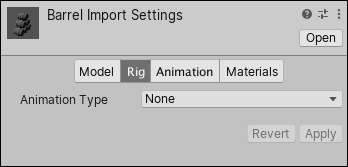
The settings on the Rig tab define how Unity maps the deformers to the Mesh in the imported Model so that you can animate it. For Humanoid characters, this means assigning or creating an Avatar. For non-Humanoid (Generic) characters, this means identifying a Root bone in the skeleton.
Which can be set under skin weights with a default of 4.
wise warren
okay, so on the rig tab for the model I did set it to 32
even tried 255 which is the max
buoyant jolt
Ah, in that case I have no other suggestions, those are the two spots I know of.
 severe hinge
Hi. Just got here and figuring stuff out. Working with unity VR and Oculus 2. How do I find the way to increase run acceleration with the hand increase of speed and vise versa to slow a character down?
 tired ferry
severe hinge
Hi. Just got here and figuring stuff out. Working with unity VR and Oculus 2. Ho...
tired ferry
severe hinge
Hi. Just got here and figuring stuff out. Working with unity VR and Oculus 2. Ho...
Wait, you want to overall manage speed of locomotion system that is already implemented in package?
I kinda don't get it
severe hinge
How do I implement a sprint speed from the normal speed. So doing X makes the toon sprint and stoping X makes him walk again.
tired ferry
what movement component are you using? ActionBasedContinuousMoveProvider?
    public bool sprintNow; // This is a field, move this before your class

    void Update()
    {

        ActionBasedContinuousMoveProvider actionBasedContinuousMoveProvider = new ActionBasedContinuousMoveProvider(); // A variable to assign ActionBasedContinuousMoveProvider, for my code I added it, if that component does exist for you, just assign it into this variable
        //actionBasedContinuousMoveProvider.moveSpeed = 1; This is how you can set movement speed
        // Now let's set sprint mechanic
        if (sprintNow)
        {
            actionBasedContinuousMoveProvider.moveSpeed = 3; //Example
        }
        else
        {
            actionBasedContinuousMoveProvider.moveSpeed = 5; //Example
        }
    }```

This code I have written changes the movement speed, you can set the bool to true if player wants to sprint, this code is quite not optimized because it does run with Update method, you can use events which does not overload CPU with useless calls and jobsSome back ground. My 13 year old wants to make a game. I just downloaded unity yesterday per his request and we have it linked to the oculus 2. So we are leaning as we go. He’s planing on getting movements down, then a map, then multiplayer.
So where would I load the code above?
hexed bluff
severe hinge
Some back ground. My 13 year old wants to make a game. I just downloaded unity y...
Unity just released tutorial video 2 days ago on building in VR. I'd definitely check it out: https://www.youtube.com/watch?v=DhqCLamOIQk

In this video, we'll be looking at how to set up the Editor for VR development, installing the XR Interaction Toolkit 2.5.x for Unity 2022 LTS, and how the VR sample works.
You’ll learn how you can build your project from scratch using the prefabs included in the sample to speed up the creation of your project, how you can create interactivity...
severe hinge
Awesome. Thanks so much for the help all.
 inland burrow
Hey, building a table top VR game here.
We need to spawn the whole map in front of player and somehow not get reduced Frame Rate.
When we spawn the map FPS goes down to 40-50 but we have to render whole map at once.
Any hints for optimization? We are using URP and Bakery to bake lights on prefab level.
pine bison
inland burrow
Hey, building a table top VR game here.
We need to spawn the whole map in front ...
There's no magic to it, it's optimizing like in any Unity application. Here are two links from the oculus developer pages on optimization.
https://developer.oculus.com/documentation/unity/unity-perf/
https://developer.oculus.com/documentation/unity/po-perf-opt-mobile/
inland burrow
pine bison
There's no magic to it, it's optimizing like in any Unity application. Here are ...
Thank you.
 meager falcon
Hey. Anyone developing for Quest 3 and having problems with hard z-fighting?
In Editor it looks good but in build on quest 3 the z-fighting of sprites in front of geometry is horrible 😄
 mellow pier
Hello i have a small but anoying error. I have set up a simple scene using the guide on the website and in the editor can see my Hands. Gave them a new Material so they dont have the "ghost hands" anymore. Like i did in another projekt. But in this case i cant see my hands while runing the projekt.
Everything else works fine, i can grab objekts and interact with other stuff, so i know the tracking works and the hands are on the right position but i cant see them and idk why.
I guess its a super simple solution and a classic case of "too obvious". But maybe another pair of eyes can find it and help me.
Thanks!


 buoyant jolt
meager falcon
Hey. Anyone developing for Quest 3 and having problems with hard z-fighting?
In ...
buoyant jolt
meager falcon
Hey. Anyone developing for Quest 3 and having problems with hard z-fighting?
In ...
It just has a more narrow range (for whatever reason) for geometry compared to a PC. So yeah, you'll need more distance than you might expect to avoid z fighting.
It also does some forced texture compressions by object distance. In case you wonder why a gridline scene doesn't grid very nicely later on
severe hinge
using System.Collections;
using System.Collections.Generic;
using UnityEngine;
public bool sprintNow; // This is a field, move this before your class
public class NewBehaviourScript : MonoBehaviour
{
// Start is called before the first frame update
void Start()
{
}
}
// Update is called once per frame
void Update()
{
ActionBasedContinuousMoveProvider actionBasedContinuousMoveProvider = new ActionBasedContinuousMoveProvider();
if (sprintNow)
{
actionBasedContinuousMoveProvider.moveSpeed = 3; //Example
}
else
{
actionBasedContinuousMoveProvider.moveSpeed = 5; //Example
}
}

@tired ferry Hi, added in your code above but seem to keep getting some small errors. Do you know what we are missing? Thanks.
buoyant jolt
severe hinge
<@242554854868910080> Hi, added in your code above but seem to keep getting some...
I'd format that so it's readable !code
ornate questBOT
Posting code
📃 Large Code Blocks
Use links to services like:
https://gdl.space/, https://paste.ofcode.org/, https://hatebin.com/, https://paste.myst.rs/, https://hastebin.com/
📃 Inline Code
Surround code with three backquotes. Not quotation marks.
To format as C#, add cs to the first line:
```cs
// Your code here
```
Add a comment with a line number if there is an error message.
buoyant jolt
And you'll want to post the actual errors you are getting
severe hinge
buoyant jolt
And you'll want to post the actual errors you are getting
Is the stop sign 🛑 in unity not the error?
buoyant jolt
severe hinge
Is the stop sign 🛑 in unity not the error?
Ah the image took a moment to appear for me
I think you are missing a final } but hard to tell
tired ferry
using System.Collections;
using System.Collections.Generic;
using UnityEngine;

public class NewBehaviourScript : MonoBehaviour
{
    public ActionBasedContinuousMoveProvider actionBasedContinuousMoveProvider; // Assign your actionBasedContinuousMoveProvider component here
    public bool sprintNow; // This is a public field, nevermind it must be inside a class
    void Update()
    {
        if (sprintNow)
        {
            actionBasedContinuousMoveProvider.moveSpeed = 5; //Example
        }
        else
        {
            actionBasedContinuousMoveProvider.moveSpeed = 3; //Example
        }
    }
}
@severe hinge this should fix it
I messed up the code
I tried coding without a IDE
severe hinge
Thanks. We’ll give it a try.
tired ferry
updated code
severe hinge
 tired ferry
using UnityEngine.XR.Interaction.Toolkit;
At the top to import package
Containing that class/component
severe hinge
cool, all errors gone so giving it a try
severe hinge
Errors below once we started up the oculus 2 link

showing code below used:
using UnityEngine.XR.Interaction.Toolkit;
using System.Collections;
using System.Collections.Generic;
using UnityEngine;
public class NewBehaviourScript : MonoBehaviour
{
public ActionBasedContinuousMoveProvider actionBasedContinuousMoveProvider; // Assign your actionBasedContinuousMoveProvider component here
public bool sprintNow; // This is a public field, nevermind it must be inside a class
void Update()
{
if (sprintNow)
{
actionBasedContinuousMoveProvider.moveSpeed = 5; //Example
}
else
{
actionBasedContinuousMoveProvider.moveSpeed = 3; //Example
}
}
}
buoyant jolt
severe hinge
using UnityEngine.XR.Interaction.Toolkit;
using System.Collections;
using System...
First, use proper syntax, I'm not reading this anymore until you do. That section of code is for NewBehaviourScript but the error says it is in WalkInPlaceLocomotion on line 18. Double click on it. Go to line 18.
mighty mantle
severe hinge
using UnityEngine.XR.Interaction.Toolkit;
using System.Collections;
using System...
aside from that, if i had to guess then you probably never set the move provider
you can make blocks of code more readable in discord like this if you use three graves (`) before and after the code
severe hinge
mighty mantle
aside from that, if i had to guess then you probably never set the move provider...
Thanks. I’ll check that out when I have time.
 tardy verge
which game is it?
 torpid ginkgo
@severe hinge Don't post off-topic images here.
severe hinge
torpid ginkgo
<@322891487304220673> Don't post off-topic images here.
I was responding to Lloyd’s comments above.
torpid ginkgo
severe hinge
I was responding to Lloyd’s comments above.
Read #📖┃code-of-conduct
severe hinge
buoyant jolt
First, use proper syntax, I'm not reading this anymore until you do. That secti...
No worries Lloyd. We can find someone else to help us.
severe hinge
tardy verge
which game is it?
Apologies for any confusion. My son is wanting to create a VR game and we are trying to figure out how to make the character go from normal speed to a sprint and back again.
mighty mantle
severe hinge
Apologies for any confusion. My son is wanting to create a VR game and we are tr...
i have my own move provider but your code looks right to me unless you didn't assign the reference
 cerulean fossil
https://Cristo.is-freaky.lol/dYMOj.png been like this for a month who knows how to fix

Ghost is fat
ivory lodge
anyone know how to make vr games using bolt
buoyant jolt
ivory lodge
anyone know how to make vr games using bolt
You should be doing new projects with fusion, but bolts pretty straight forward. Lots of example repos and tutorials online of you need.
Also make sure you have the latest bolt, there was a must upgrade a while back
 storm ether
torpid ginkgo
storm ether
torpid ginkgo
@storm ether Stop cross-posting. Post a clearer question instead.
storm ether
I'm not cross posting I was finding the lighting channel because it wasn't on my scroll down lsit thing
torpid ginkgo
@storm ether You've spammed several channels with links today
storm ether
links?
tired ferry
update momento 

 crude frost
ivory lodge
anyone know how to make vr games using bolt
crude frost
ivory lodge
anyone know how to make vr games using bolt
Are you talking about bolt the visual scripting tool or bolt the networking tool?
ivory lodge
crude frost
Are you talking about bolt the visual scripting tool or bolt the networking tool...
Visual scripting tool
crude frost
ivory lodge
Visual scripting tool
So Bolt was purchased by Unity, right? And its now called 'Unity Visual Scripting'. I think i tried it once...and it may be helpful to some folks, but I'd never recommend it to anyone. Unless you just really really need to see things visually, and you don't want to take the leap to a more intuitive visual scripting tool like Playmaker or something.
If you're just getting started, and you really want to do coding, Visual Studio with intellisense has come a LONG way, and makes it super easy to get started with coding, because Intellisense can help auto fill your lines of code. ChatGPT is also super helpful to get you started. It can tell you whats wrong with your code, suggest optimization steps, and even teach you what different things mean.
Another thing to consider is what you plan to do with your VR project. There are a LOT of things you can accomplish without a single line of code.
 gloomy bloom
How can I restrict two-handed rotation (using XRI Toolkit v3) to one axis only (Y-axis)?
I want to be able to rotate placed objects using both hands but only vertically
I've just started the VR Template and I played around with v3 a bit but couldn't figure it out. I'm using the XR Origin prefab from the template with near-far interactors
mighty mantle
gloomy bloom
How can I restrict two-handed rotation (using XRI Toolkit v3) to one axis only (...
restricting interaction axis is something ive done, but i didn't do it in the way you might expect
i use a grab interactable that acts entirely normal, except it teleports back to the starting location when it is released
then use a custom script to change the transform of the object you really want to interact with accordingly. that lets you limit translation and rotation along any axis you like, by just telling it to go to the transform with constraints
.
anyways, does anyone know a fair bit about how unity cameras display to the headset? I'm trying to do something fairly specific to achieve a certain effect. I want to render a secondary camera (with the same transform as the HMD-displaying camera) to a render texture on a plane or other object which covers the entire view of the main camera. this is to achieve the effect of an opaque helmet with external cameras that let the player "see" through it. it is only for a transition from helmet display to real eyes, and will not be rendering in that way the entire time. it just needs to look believable enough to make the transition not too jarring.
My only issue is I have no idea how to get this working for vr. It's simple enough for first person games on desktop, but due to vr having realistic perspective I have no idea how to get it to work correctly. Any advice would be greatly appreciated.
^ for context the point of this is to have a realistic way to have a minimalized hud in vr, plus game balance reasons
 agile fiber
How to fix the issue of the camera being offset from the center when you play?
I have a physics rig and it is really bugging me

It causes the player to go crazy with the collider when you get into the headset.
quasi jolt
quasi jolt
Hi all, I'm working on VR app that will work later on pc-vr on vive focus 3. I h...
Hi, Any one knows how this can be fixed?
pine bison
quasi jolt
Hi, Any one knows how this can be fixed?
Use the input debugger to see if you can see what input you get when the buttons are clicked https://docs.unity3d.com/Packages/com.unity.inputsystem@1.4/manual/Debugging.html
 proven radish
Anyone know how to fix where the ambient occlusion sampling just kinda makes VR look like a vintage movie?
it would be a joy if someone could help me with this (I am using URP)
I don't know if I should buy any atm but if I do need to buy one from asset store, recommend me an optimized one
 mossy finch
#🖱️┃input-system message Reposting here as per suggested. Issue with the inputsystem's sector stuff.
north path
proven radish
I don't know if I should buy any atm but if I do need to buy one from asset stor...
Do you need realtime AO?
It is incredibly heavy for VR, so baking or faking it is a LOT better for quality and performance
proven radish
north path
Do you need realtime AO?
It is incredibly heavy for VR, so baking or faking it i...
I optimized it
im just playing around with it
I dont care what the fps is, its an experiment so I just want to figure out how to get rid of the lines
north path
Start with high quality and turn it down untill it is gone I guess
proven radish
alr did
just stays there ig
I need to up my video quality, but it runs smooth somehow
I can pass along the settings if you want?
north path
Which Unity version is this?
north path
proven radish
I can pass along the settings if you want?
Sure
proven radish
north path
Which Unity version is this?
2022.3.18f1
proven radish
north path
Sure
alr
north path
proven radish
2022.3.18f1
Could try to update and see if it helps, who knows
proven radish
 proven radish
north path
Could try to update and see if it helps, who knows
proven radish
north path
Could try to update and see if it helps, who knows
nah
turn on after opaques if u want but it makes it look lower quality if its off
north path
Different method, radius, falloff and strenth could definitly help. Maybe changing the source as well depending on your render path
proven radish
i will try an asset from the store later if i dont fix this
 remote nebula
My completing domain will not load
 worthy mortar
any way i could put multiple usages/inputs in the select/activate/ui usages?

say if i wanted to select with grip OR trigger
how would i do that?
mossy finch
Anyone have any experience with the XR Ray Interactor? I'm checking to see if there's a way to make it Push a button directly when pushed (instead of released) before going and writing a band-aid for that on the button.
 true merlin
I am pretty new to unity i am developing a vr game and i need some steering in the right direction would anyone be able to direct me to a channel that is for help it would be much appreciated or would anyone be able to help me here. thank you
 waxen parrot
I need help, anyone know how to get headset(HMD) remove and wear event in XR interaction toolkit
 frank oasis
worthy mortar
any way i could put multiple usages/inputs in the select/activate/ui usages?
frank oasis
worthy mortar
any way i could put multiple usages/inputs in the select/activate/ui usages?
Actually quite interested by this have u posted to reddit and unity forum for a simple method?
A not so simple method would be to modify the code of the xr controller (action based) component to allow for more than one input per action
frank oasis
frank oasis
Actually quite interested by this have u posted to reddit and unity forum for a ...
But i imagine it’s quite a common want so should prob be a way to do it without having to modify code
 wary flame
Im trying to make a VR Hand setup, but "XR Controller (Action-Based)" Is not appearing, How can I fix this or make a working hand?
frank oasis
wary flame
Im trying to make a VR Hand setup, but "XR Controller (Action-Based)" Is not app...
Install the xr interaction toolkit package from unity package manager
wary flame
frank oasis
Install the xr interaction toolkit package from unity package manager
I already have lol
wary flame
Im making a new project and following a new tutorial
Ill let you know if anything goes wrong.
wary flame
I quit 💀
frank oasis
wary flame
I quit 💀
Hate to say it but if you give up after 30 minutes game dev may not be for you
try different tutorials, make sure everything is up to date, Unity version is 2022 LTS etc
 white flicker
will these affect performance? please ping me if you have an answer
 meager falcon
white flicker
will these affect performance? please ping me if you have an answer
meager falcon
white flicker
will these affect performance? please ping me if you have an answer
every post processing effect is affecting performance
white flicker
meager falcon
every post processing effect is affecting performance
how expensive are these tho?
are they worth keeping?
meager falcon
white flicker
how expensive are these tho?
On which device are you working?
or which is your target and lowend device you want to support?
in the end, you could check how it affects the performance on your device if you turn it on and off. 🙂
white flicker
meager falcon
or which is your target and lowend device you want to support?
quest 2 and 3
white flicker
meager falcon
in the end, you could check how it affects the performance on your device if you...
i was wondering if anyone knew how bad it affects performance, if not then ill check myself. thank you :D
meager falcon
in this case, try a build on quest 2.
It always depends on your project/scene etc.
I recommend to download the OVR Metrics Tool from the quest store and check how many milliseconds a frame renders with and without postprocessing.
if you are on a stable 72fps you are fine ^^
white flicker
alr, ty!
gritty heart
white flicker
alr, ty!
The problem with post processing is not the individual effects, it’s the blit you have to do at the end to blend the output of the post process into your frame.
On quest 2 you’re going to struggle with any post processing at all. It’s recommended that if you do color adjustments, you add some global shader variables and modify all the materials in your level, rather than doing post processing
On quest 3 you might be able to get away with it, but the resolution is higher and you pay a cost per pixel with post processing
You’re sacrificing a lot of headroom that could be spent on higher resolution or refresh rate, or even scene complexity and dynamic shadows, in an effort to modify the colors
white flicker
gritty heart
The problem with post processing is not the individual effects, it’s the blit yo...
ill look into modifying the materials
 cursive sphinx
Hey, on Quest, I can't save my preferences.json anymore to UnityEngine.Application.persistentDataPath; I get "Access to the path /storage/emulated/0/Android/data/ is denied". Used to work fine, but apparently Android changed write permissions. Is there any other place where I can write to on my Quest, and also access the file via the file system? Or another strategy to save and access data?
 buoyant leaf
In my Unity VR scene, there is a red line that does not go away. This does not appear to be part of my controller setup, as I can move the interactor rays (which are set to white colour). Does anyone know what this red line is? I have played around with the settings, and looked at documentation, but just cannot figure this one out
 wary flame
frank oasis
Hate to say it but if you give up after 30 minutes game dev may not be for you
wary flame
frank oasis
Hate to say it but if you give up after 30 minutes game dev may not be for you
It wasn't after 30 minutes, I was trying for about 3 hours at that point, that was my last hope
buoyant jolt
buoyant leaf
In my Unity VR scene, there is a red line that does not go away. This does not...
That looks like a stray line caster. There is some very questionable code in some of the XR Rigs in earlier unity versions, especially when you have both hand tracking and controllers enabled as it kind of randomly will turn one or the other off in a weird state.
That said, do a search for:
t:LineRenderer in your inspector at play time and see if you have one in your scene that's at 0,0,0. Alternatively do a search in your code for Debug.DrawRay if it's only in the Inspector view.
buoyant leaf
buoyant jolt
That looks like a stray line caster. There is some very questionable code in som...
Thank you. I will take a look tomorrow
buoyant jolt
buoyant leaf
Thank you. I will take a look tomorrow
It's probably just a Ray Interactor on the floor for some reason
 scarlet dawn
So im trying to make a right hand cosmetic in my game and I put it on the players right hand in the player scene

but when the player clicks the button ingame its very off

like this ^^
any ideas on what i did wrong here?
ivory lodge
Is it possible to make my own vr rig of sorts using visual scripting
frank oasis
scarlet dawn
but when the player clicks the button ingame its very off
so the issue is the hammer does not follow the players hand correctly?
frank oasis
scarlet dawn
So im trying to make a right hand cosmetic in my game and I put it on the player...
try parenting the hammer under one the hand bones
scarlet dawn
frank oasis
try parenting the hammer under one the hand bones
can u help me with something else now
I deleted the pink sphere things on the hand 😭
any ideas on how to get them back?
 tawny pond
How did you get them there in a first place? If it is an existing prefab, you can reset to the prefab.
Controllers not tracked
 limber granite
Hello everyone. I have a question. I'm currently using Meta Quest all-in-one SDK in Unity. What I'm trying to do is too make piano keys intractable with the hand-tracking. I put the sounds and box colliders on the keys. The problem that I'm facing is when I press on them using hand tracking, it does not work. Is there a way to put on the default hand a collider to make it collide with the other object?
 slow bison
Hi I had an error building a project it said I was missing a ndk for Android but I downloaded the ndk while downloading the original editor
Please assist me
north path
Did you install both android submodules from the hub?
In preferences - external tools, is 'installed with Unity' checked everywhere?
Did you update Unity already?
@slow bison
buoyant leaf
Has anyone here created a Unity VR app/game for the Meta Quest, for free public download? If so, then I was wondering how easy was this for you? Does meta only accept games from major brands? or can anyone upload an app/game if it is made to a certain standard? Also, I would assume side quest is a much easier route.
frank oasis
buoyant leaf
Has anyone here created a Unity VR app/game for the Meta Quest, for free public ...
do you mean applab or meta quest store
and yes sidequest is much much easier to get into
buoyant leaf
frank oasis
do you mean applab or meta quest store
meta quest store, or whatever you guys recommend for a starter like me. I am very new to game development and unity. It is just a hobby, but would love to eventually upload content to meta for free public use. But I also want to be realstic as I know i'm not a major game developer. So was wondering if it may be possible for me to upload my own app one day to meta, and what might be the best route for someone like me.
frank oasis
buoyant leaf
meta quest store, or whatever you guys recommend for a starter like me. I am ve...
from my understanding the meta quest store is very difficult to get onto, and i think (i may be wrong) is invite-exclusive
however, recently meta sent an announcement that applab apps/games are being moved onto the public store so they are discoverable
orchid jolt
buoyant leaf
meta quest store, or whatever you guys recommend for a starter like me. I am ve...
Meta is actually pretty chill about getting your game on AppLab (this would be the best route for you) you just have to make sure your apps pass metas VRC (virtual reality checks) then your game is on AppLab
frank oasis
orchid jolt
Meta is actually pretty chill about getting your game on AppLab (this would be t...
^ applab is the most realistic goal
orchid jolt
But AppLab is getting removed in a month but it will still be easy to get your game on the horizon store. It’s just a few more VRCs
buoyant leaf
orchid jolt
But AppLab is getting removed in a month but it will still be easy to get your g...
Oh really. Ok, I am pleased to hear it may be possible to get it on horizon store. It gives me a reason to continue learning and developing, as that would be fun.
slow bison
north path
Did you install both android submodules from the hub?
In preferences - external ...
I’ve never updated unity I should probably did that
buoyant leaf
frank oasis
^ applab is the most realistic goal
Thank you
buoyant leaf
orchid jolt
But AppLab is getting removed in a month but it will still be easy to get your g...
I will check out your game on applab sometime
slow bison
Wait why are they removing app lab
buoyant leaf
slow bison
Wait why are they removing app lab
I just read about it. Apparently meta want to merge applab with meta store. and call it meta horizon store
frank oasis
"this change will help developers find and grow an audience by providing apps that are new to the Store with greater discovery and visibility" is what the email says
orchid jolt
buoyant leaf
Oh really. Ok, I am pleased to hear it may be possible to get it on horizon sto...
I love working on VR games so I would 100 keep learning!
buoyant leaf
slow bison
I liked how they had it before
I never used applab. But seems like it is a positive change. Becuase everything will appear on the main store, giving all developers visability
orchid jolt
I think the horizon store is a great change, you can also mark your game for early access so players kinda know it’s unfinished
buoyant leaf
orchid jolt
I love working on VR games so I would 100 keep learning!
Yeh I love it. Actually I just completed my first scene. My mission was to recreate my garden bar, but in VR. Trying to make it look realistic as possible. And I also added a menu screen. Been such a learning curve and been incredibly time consuming. And I could not have done it without the help from people on this Discord. Its also forced me to be better at Blender, as unity requires perfect models.
buoyant leaf
orchid jolt
I think the horizon store is a great change, you can also mark your game for ear...
this is good to know. so i could just add main menu and the first few levels. then just add more
orchid jolt
buoyant leaf
this is good to know. so i could just add main menu and the first few levels. t...
You can also get your game on AppLab but not release it then invite people to the beat channel so you can have people beta test without having to side load the APK every time or release the game. I use this and it’s so nice, would recommend if you want people to beta test without releasing the game
orchid jolt
buoyant leaf
Yeh I love it. Actually I just completed my first scene. My mission was to recr...
Ya VRs hard at first but like everything you’ll get better at it with time.
buoyant jolt
As mentioned above - applabs also just about to merge with the Quest store for discovery 🙂 but they may change the process once that happens...
But yeah we've put tons of apps and games in there. It's free, pretty painless compared to epic/steam amd a whole world easier than xbox/sony
buoyant leaf
orchid jolt
You can also get your game on AppLab but not release it then invite people to th...
that is handy to know. thanks
buoyant leaf
buoyant jolt
But yeah we've put tons of apps and games in there. It's free, pretty painless c...
Thanks Lloyd. I actualyl assumed VR would be harder to upload content. So its nice to know its acutally eaiser then releasing on steam. Probably because VR is still relatively new, and they want to encourage developers.
buoyant jolt
buoyant leaf
Thanks Lloyd. I actualyl assumed VR would be harder to upload content. So its ...
Yeah, there is a process, but it's one of the more painless storefronts for sure.
slow bison
The thing I liked about app lab was if you were testing on it(I used to because I couldn’t hook my computer up to my oculus and didn’t know what mobile vr station was) you could still test your game without everyone knowing about it and playing it
I know testing it on app lab wassnt the best idea but still
buoyant jolt
Yeha app lab has some big benefits. We have a lot of client stuff that's now going to magically appear in the store because of it
I do like that everyone gets an equal chance of selling games in the store this way though
slow bison
north path
<@1231978412063854727>
Really sorry for the ping but are you available for a vc? It’s not showing me where to do what I need to do and I don’t understand I can’t move on until this is done in my game
north path
slow bison
Really sorry for the ping but are you available for a vc? It’s not showing me wh...
No, I only do live support for paid jobs
If you didn't understand something I said, just ask
slow bison
It says my unity is fully updated and the editor is too but my game still says I’m missing a android ndk file but when I check the editor it says I have it, is it as simple as finding it in my files? If so where would it be? I’m using 2022.3 if that helps
north path
In unity hub, installs, then press the gear icon @slow bison
 north path
Then check preferences - external tools as I said before @slow bison
Btw that version is very old, maybe update it to get all the big fixes and improvements (including for android!)
slow bison
Um sorry I tried manually downloading it but I can’t find the right version can someone give me a link for downloading version NDK r23b (64-bit) (23.1.7779620)?
north path
slow bison
Um sorry I tried manually downloading it but I can’t find the right version can ...
Why not just use the hub with a recent version?
slow bison
I guess that is a good idea but what will happen to the rest of the projects I make with that version
 lavish turret
Hello. Im making a experimental physics game for VR. But the Soccer shoe clips through the ball and doesnt affect it. Can anyone tell me why? Here are Screenshots of the Inspector of both, the ball and the shoe.


 buoyant jolt
storm ether
what does this mean
buoyant jolt
storm ether
what does this mean
You need to ask in !vrchat
ornate questBOT
Join the growing VRChat community as you explore, play, and create the future of social VR! https://discord.com/invite/vrchat
buoyant jolt
No idea why you can't upload files to it
mellow vigil
Looks like you need a collider on your handle.
For that handle it looks like you'll need to use a mesh collider.
 manic snow
dry vapor
Hi, im working with the XR interaction toolkits hand tracking, and for some reas...
manic snow
dry vapor
Hi, im working with the XR interaction toolkits hand tracking, and for some reas...
🖖 did you figure it out?
frank oasis
I've just installed the Meta Platform SDK and this error has come up:

Has anyone had any dealings with this before?
It seems to all point to to this line of code, but I'm not too sure what to do about it
 frank oasis
I've just installed the Meta Platform SDK and this error has come up:
frank oasis
frank oasis
I've just installed the Meta Platform SDK and this error has come up:
the solution came down to me needing to update every other meta sdk package i had installed
 scenic lotus
Hi I am making a VR game and I am using XR toolkit and I want to make it so that when the user points to an object and clicks the A button, some text will show up but I have no idea how to do it and I couldnt figure it out
hexed bluff
scenic lotus
Hi I am making a VR game and I am using XR toolkit and I want to make it so that...
You could make an interactable, tie into it's on hover event, and wire up your custom "press A button" logic once it's in a hovered state.
 frigid elm
hi
 golden yarrow
hey can i get some people to help mae make a portal inspired vr game
gritty heart
We've been teasing the VR Multiplayer template for a hot minute now...
This template is a labor of love by the XR Authoring team at Unity, and ties together XRI 3.0, with OpenXR and all of Unity's mp services (ngo, lobby, relay, vivox..)
Well... it's here! Grab it on the hub

 Twitter
·
buoyant jolt
golden yarrow
hey can i get some people to help mae make a portal inspired vr game
Twitter
·
buoyant jolt
golden yarrow
hey can i get some people to help mae make a portal inspired vr game
!collab
quasi jolt
Hi, developing for PC VR controllers are not showing in the VR app but working fine out side, what could be the issue?? using vive focus 3
buoyant jolt
gritty heart
FYI
https://x.com/pvncher/status/1813317930098270689
Do you have a non X link by chance? It's making me login to view the video links 🙂
buoyant leaf
@buoyant jolt @orchid jolt I was wondering how you improve the performance of your VR models. I create my model in blender, and use the special utilities option where you can group meshes by material. Which means all meshes of that material is one object. I am assuming this improves performance in unity VR. I was wondering if others on this Discord do this?
gritty heart
buoyant jolt
Do you have a non X link by chance? It's making me login to view the video links...
I put it on linked in too
https://www.linkedin.com/posts/provencher_weve-been-teasing-the-vr-multiplayer-template-activity-7219084367963320320-hDiZ?utm_source=share&utm_medium=member_ios

We've been teasing the VR Multiplayer template for a hot minute now...
This template is a labor of love by the XR Authoring team at Unity, and ties together… | 29 comments on LinkedIn
 ruby flicker
i wanted to make a vr game with my friend we figured out the colaborating system but we don't know where to get the project from any help?
gritty heart
ruby flicker
i wanted to make a vr game with my friend we figured out the colaborating system...
Download the Unity hub and pick a template
ruby flicker
gritty heart
Download the Unity hub and pick a template
yeah i already have a project im searching how to work with my friend live
gritty heart
Unity doesnt have multiplayer editing of projects
ruby flicker
gritty heart
Unity doesnt have multiplayer editing of projects
oh.
gritty heart
You can use git or unity's version control system
https://learn.unity.com/tutorial/collaborate-with-plastic-scm#

Unity Learn
The real power of Unity Version Control is the ability to collaborate on a Unity project while keeping your changes organized and your files backed up. In this tutorial, you’ll learn how to invite and work with collaborators through Unity Version Control.

Unity
Improve your game development pipeline by enabling seamless collaboration with Unity’s fast and easy-to-use VCS (previously Plastic SCM Cloud Edition).
Youre not gonna get a google docs or figma experience though
ruby flicker
gritty heart
Youre not gonna get a google docs or figma experience though
im not gonna make a game with my friend considuring we don't know anything about unity.
buoyant jolt
ruby flicker
yeah i already have a project im searching how to work with my friend live
You can use something like Scene Fusion for that. It is free for 2 people too.
Although if you are new to programming and not wanting to jump all the way into Unity, there are lots of non-coding platforms these days to make VR games.
hexed bluff
buoyant jolt
You can use something like Scene Fusion for that. It is free for 2 people too.
Scene Fusion looks really cool. Too bad it's only for LAN environments, would be great for a small in house studio though.
buoyant jolt
hexed bluff
Scene Fusion looks really cool. Too bad it's only for LAN environments, would be...
They have a non LAN version on their website, that's also free for 2 folks I believe. I was chatting with them earlier, for some reason unity made them make it LAN only? But maybe @soft karma can correct me if I'm wrong (in case there is pricing for the cloud one for 2 folks)
 soft karma
hexed bluff
Scene Fusion looks really cool. Too bad it's only for LAN environments, would be...
soft karma
hexed bluff
Scene Fusion looks really cool. Too bad it's only for LAN environments, would be...
Yeah we have a version that uses a cloud-based session server too for distributed teams to use. It's pretty much the same as the LAN version except it launches remote session instances on dedicated servers.
Also, the LAN versions should work over VPN too, and they should work if you use something like Hamachi. You just might need to use the IP/port connection option because session autodetect might not work over VPNs.
soft karma
To answer @buoyant jolt 's question, Unity does not allow online services and external account in their assets, unless you join UVS. Cloud pricing for 2 people is free if the scenes are 20,000 objects or less, otherwise $25/month per person.
buoyant jolt
soft karma
To answer <@229302061840203786> 's question, Unity does not allow online service...
I'm sorry you are facing that... meanwhile they are allowing AI subscription based solutions in by the hundreds 😛
soft karma
I think it makes sense what they are doing to a degree. I would like them offer more options in terms of extra services though. The Unreal Marketplace has no restrictions, and are pretty much happy to let you do as you want - it seems to be working for them.
lavish turret
Hello. Im making an experimental physics game for VR where you can shoot balls with your Feet, but the Soccer shoe clips through the ball and doesnt affect it. Can anyone tell me why? Here are Screenshots of the Inspector of both, the ball and the shoe. Should i send the ControllerManager Script too?

 north path
Is there a rigidbody? Is it continues detection? Are the layers set up to collide? Do you move the collider with physics or by setting the position? (Use physics!)
Do you shoot via code or with physics?
@lavish turret
 dawn iris
gritty heart
FYI
https://x.com/pvncher/status/1813317930098270689
dawn iris
gritty heart
FYI
https://x.com/pvncher/status/1813317930098270689
Thank you ! It's so great !
 livid dirge
Hello everyone,
I'm looking for a document, an e-book or a feedback concerning the best artistic practices for VR.
For example, I've noticed that normal maps are not used on apps. Antialiasing, polycount etc...
Thank you,
Ben
wise warren
has anyone experienced different behaviour with the default XR rig from the toolkit streaming vs built to headset.
I am using a MQ3 and when streaming my app, all is fine where another character in the scene reacts to me based on the distance between my headset or either controller, but when I run the build it is very inconsistent and seems to struggle to react to them.
all the code is doing is runnign some function based on the Vector3 value between this other character and the XR rig I am controlling. It works perfectly fine streaming from the PC but the build or the quest itself is doing something weird
gritty heart
wise warren
all the code is doing is runnign some function based on the Vector3 value betwee...
Would have to see what you're doing exactly.
There is a difference in the xr origin initial positionning that might be related. It comes down to the headset not yet supporting local floor origin with openxr
wise warren
gritty heart
Would have to see what you're doing exactly.
There is a difference in the xr ori...
yeah sorry I was trying not to say too much as I don't actually know what I'm allowed to say (Since it's work).
let's just say as I get closer to this other character, it keeps backing away from me (based on the distance between its head and mine with a raycast), then at a certain point it stops backing away and slaps my hands away if I get too close
so yeah maybe it's to d with the local floor tracking - I am using device as you suggested that a while ago to help with spawning in the right place regardless of room boundary
gritty heart
if its device based and theres no offset, there really shouldnt be a difference
wise warren
it's weird because this character will look at my hands like its supposed to (whicherver one is closest) but it just doesnt slap them away like it dose when streaming
gritty heart
Sounds like youll need to do some debugging lol
wise warren
gritty heart
if its device based and theres no offset, there really shouldnt be a difference
doesnt seem like it becuase it basically goes through 90% of the same behaviour. and I am printing out the distances on the canvas between my components and this characters head and the range of values is the same as streaming
gritty heart
yeah that sounds right
wise warren
weirdly though if I put the controllers behind my back at the start, it jumps from 5m (spawn point, so the difference between me and the character), to like 0.5m or whatever. Almost like when the headset can't see them anymore something weird happens?
wise warren
gritty heart
yeah that sounds right
I may try using an empty gameobject as a child on the controller as the reference, rather than the whole gameobject
gritty heart
Yeah there might be something funky in your setup outside of the xr origin
wise warren
hope there isn't, haven't touched it as its just from the samples folder
and the only differences between streaming and the build is the device or floor tracking
I'm using Vector3.Distance between the two objects - is there a way I should specifically define local space?
could just try [name].transform.LocalPosition instead of [name].transform.position
gritty heart
wise warren
I'm using Vector3.Distance between the two objects - is there a way I should spe...
You can transform a position to local space relative to another transform. it'll effectively do the same, but if you use the xr origin's parent for it, then the xr origin is the origin, and the other object's position is a direction vector
local positions need to be under the same reference to be comparable
Also, if you do this every frame, you can use vector3 square magnitude instead of distance
sqmagnitude doesnt change linearly tho, so you might not be able to use it exactly, but its useful for comparing relative distances between two objects, to see which is closer
buoyant jolt
livid dirge
Hello everyone,
I'm looking for a document, an e-book or a feedback concerning ...
I can't help with documentation, but normal maps are used in all our projects.
These may help
https://developer.oculus.com/documentation/native/pc/dg-performance-guidelines/
https://developer.oculus.com/documentation/unity/unity-perf/
Provides VR performance optimization information, including info on hitting frame rate and common causes of performance problems.
Overview of performance requirements and recommendations for Meta Quest Unity apps.
wise warren
gritty heart
sqmagnitude doesnt change linearly tho, so you might not be able to use it exact...
thanks I'll try and play around with this stuff.
Im finding the local space thing a tad confusing
gritty heart
wise warren
thanks I'll try and play around with this stuff.
Im finding the local space thi...
Local position is just a position relative to another position.
Think of it like this:
Rig
-- Origin
---- Head
---- Controllers
scene object
If you call inverse transform on any of the objects under rig, you'll get a position relative to rig.
If you call inverse transform on scene object with rig, then you'll get a local position that you can compare against rig
wise warren
gritty heart
Local position is just a position relative to another position.
Think of it lik...
isnt that what Vector3.Distance does then. just gets the local transform between the two objects
gritty heart
wise warren
isnt that what Vector3.Distance does then. just gets the local transform between...
Distance gets you the magnitude of the direction vector formed between two points. It doesnt know about world, local, or anything
If you have two world vectors, itll be a world distance
A transform also has a rotation and scale btw
Inverse transform point accounts for everything, not just position
wise warren
I'm just doing Vector3.Distance (object1.transform.position, object2.transform.position);
oh I get local space now I was being stupid. It's the position relative to its parent if it has one. So if you move the parent worldspace the child's local space willl not change
so presumbaly then i should not care about local space? I should be comparing the world space of the controllers to the worldspace of the other character?
I thought .position would be world space then, since localPosition is obviously local
gritty heart
wise warren
I thought .position would be world space then, since localPosition is obviously ...
It is world space
Local space can matter depending on your usecase, but it seems like it doesn’t matter to you
livid dirge
buoyant jolt
I can't help with documentation, but normal maps are used in all our projects. ...
Lovin dude, many thanks
 willow remnant
Hello! Im trying to make a model in Unity for VRC, I'm just trying to make the glasses on my avatar transparent, but also keep the color they have, dose anyone know how to do this for the quest version?
buoyant jolt
willow remnant
Hello! Im trying to make a model in Unity for VRC, I'm just trying to make the g...
I dunno what glass shaders VRC supports, but you could add a transparent material with a colour and low alpha (i.e. RGB: 255,0,0,0.25) would put a slight red tint
For figuring out how to include shaders and all that other stuff, you'll need to ask in !vrchat I'm afraid
ornate questBOT
Join the growing VRChat community as you explore, play, and create the future of social VR! https://discord.com/invite/vrchat
willow remnant
buoyant jolt
I dunno what glass shaders VRC supports, but you could add a transparent materia...
Right but that would only show up on PC, quest only uses 1 shader, which is the mobile shader
buoyant jolt
willow remnant
Right but that would only show up on PC, quest only uses 1 shader, which is the ...
Yeah you'll need to ask in VR Chat. We have no idea what VRC uses and restricts for Shaders. This is for Unity general, and we can use any shader we want on the Quest.
willow remnant
buoyant jolt
Yeah you'll need to ask in VR Chat. We have no idea what VRC uses and restricts...
Wait wdym u can use any shader u want on quest?
buoyant jolt
willow remnant
Wait wdym u can use any shader u want on quest?
Well, within reason. If it isn't setup for VR, you'll need to add a few lines. But for normal Unity use, you aren't restricted to only one shader for Quest
I use custom shaders for it all the time 🙂
willow remnant
Oh yea I can put any shader on it, I just meant that vrc restricts what's visible to one shader lol mb
 sly pine
I experience a problem with XR simple interactable where in order to trigger an animation event i have to poke the object while alternating hands. Do i need to modify some code or is this fixable by the default settings.
I can provide more information, i just dont know what. Im new to VR development
gritty heart
sly pine
I experience a problem with XR simple interactable where in order to trigger an ...
What version of xri are you on? We fixed a number of poke bugs in xri 3.0.4
sly pine
gritty heart
What version of xri are you on? We fixed a number of poke bugs in xri 3.0.4
wait lemme share more information
sly pine
gritty heart
What version of xri are you on? We fixed a number of poke bugs in xri 3.0.4
hmmm seems like i have 3.0.3
gritty heart
sly pine
hmmm seems like i have 3.0.3
Try giving it an update
sly pine
gritty heart
Try giving it an update
okay i fixed it but im still having general problems
lemme ask something different
if i want to activate an animation when i touch an object what would the suggested method be
gritty heart
sly pine
if i want to activate an animation when i touch an object what would the suggest...
probably use the on hover callback
or actually no
use the select interaction strength
when its over like 0.1 or so you can trigger your animation
lavish turret
north path
Is there a rigidbody? Is it continues detection? Are the layers set up to collid...
Yes there is on the ball. Yes it is. Yes there are. I use physics. by code. Also i put the Inspector of the ball below because i made an error before

 cloud rune
is there any type of way to regain a keystore password
cerulean fossil
 fluid void
cerulean fossil
fluid void
cerulean fossil
Had a similar issue recently, the culprit for me was an animations package that I had just imported into the project. Deleting it from the filesystem fixed the crashes on start for me. Did you import anything recently?
 vivid gorge
hello people can someone help me with this i have no idea whats going on
 frank oasis
vivid gorge
hello people can someone help me with this i have no idea whats going on
frank oasis
vivid gorge
hello people can someone help me with this i have no idea whats going on
Rough guess is you’re trying to force a vector 2 value from the float reading on the “grippressed” action
mellow vigil
Anyone ever modify the XRKnob script to work on a selectable axis instead of just the Y axis? I really don't want to have to reorient all my models that need the knob script. Maybe I am missing something?
true merlin
i need some serious help i have 26 compiling errors and i dont know how to get rid of them
gritty heart
mellow vigil
Anyone ever modify the XRKnob script to work on a selectable axis instead of jus...
It’s an example. You might need to make your own or modify the code
 mellow vigil
gritty heart
It’s an example. You might need to make your own or modify the code
mellow vigil
gritty heart
It’s an example. You might need to make your own or modify the code
Yeah for sure, that's what I have been working on the past few hours, just running into a lot of issues.
frank oasis
true merlin
On the error it says a lot about namespaces missing - have you deleted any packages/are you missing any packages?
vivid gorge
hello again people im just wondering why my grabbing is only working using the ray im using for teleportation. i want to set it as the grip button but its not working
 haughty hamlet
hello im quite new to vr game optimisation, just wondering if anyone has any tips?
tidal spire
Hello, would anyone be able to help me, I am trying to figure out why my player cannot be affected by any velocity or force applied through scripts. I am trying to allow the player to jump and it will not move at all, I have reduce the gravity and increased the jump force and I have checked that it is receiving inputs as well as being able to calculate where the player should be, however nothing happens. Any help would be good thank you!
crude frost
tidal spire
Hello, would anyone be able to help me, I am trying to figure out why my player ...
Try an Empty Gameobject with a rigidbody. Make your XR Origin a child of that.
crude frost
Suggestions on why my shader is causing these tiny black spots in clouds?
its only on build
buoyant jolt
haughty hamlet
hello im quite new to vr game optimisation, just wondering if anyone has any tip...
 vapid seal
I am helping my friend with his GTRO and I dont know how to boost the refresh rate in the game
Lol
 solid lotus
Hunanbean and HooDoo explained it pretty well in Unity-Talk....
 loud parcel
Do you want to increase the frames you get? That's an optimization issue
solid lotus
Profiling is an important piece to this puzzle
loud parcel
Refresh rate has nothing to do with it, if you want to increase your frames then profile is where we'd start
scarlet dawn
Can someone help me
I deleted the pink sphere colliders that are with the gorilla tag locomotion rig
 languid flame
scarlet dawn
Can someone help me
I deleted the pink sphere colliders that are with the goril...
languid flame
scarlet dawn
Can someone help me
I deleted the pink sphere colliders that are with the goril...
Add them back or reimport the files
mighty mantle
what's the best way to go about making a simple interactable deselect when the interactor is no longer touching it?
I tried overriding isselectableby to require it also be hovered, but it looks like hovering stops when selection happens, so it just alternates every frame.
tidal spire
crude frost
Try an Empty Gameobject with a rigidbody. Make your XR Origin a child of that.
That still doesn't work, sorry for the late message
 mystic kraken
Recently relaunched my project and for some reason TMP is borked
Works fine in Android builds but when testing on PCVR text is only visible in the left eye. Tried reinstalling TMP, importing TMP essentials and reimporting the shaders but none of that worked. I don't really want to switch to multi pass because of the performance decrease. I want to squeeze as much performance as I can without doing anything special
So any recommendations / help would be appreciated
mystic kraken
It happens with legacy text too :(
Literally anything is appreciated I'm at a loss
 silent ermine
Hello everyone. I have a question regarding Quit Application and Unity in multiuser apps. When quitting a VR app in HTC Vive, the application is suspended in background but Fishnet keeps my user connected a time greater than the Timeout value I have in ClientManager and ServerManager. This time vary depending on how many users are connected and sending information through network. Do you struggle with this error and know a possible solution? OnApplicationQuit, OnApplicationPause and OnApplicationFocus are not called when closing the app through HTC menu. Any suggestion? 🙂
gritty heart
mighty mantle
what's the best way to go about making a simple interactable deselect when the i...
Im thinking and the best way I can imagine is, if youre using xri 3.0, create a custom input reader that does an overlap check on the object, and require the select input to have that overlap check for it to be valid. That way, it'll release the select input in the situation you're describing.
mighty mantle
gritty heart
Im thinking and the best way I can imagine is, if youre using xri 3.0, create a ...
i thought of this as well, but how would i do an overlap check when interactors could use a number of methods to check initial selection?
right now, my interactors are just sphere casting, but an interactor could also be a socket that has a normal collider
gritty heart
mighty mantle
i thought of this as well, but how would i do an overlap check when interactors ...
Its tricky because once selection is active, the nearfar interactor stops tracking valid targets. If it kept tracking them, Id recommend just using a target filter, but because it doesnt use that after selection it wont be much help.
You could reuse the interaction casters the nearfar interactor uses, but it won't solve all your issues.
It sounds like its worth you reporting some feedback though, to outline that you'd want a check on interactables that say - require overlap, for selection to persist.
mighty mantle
i guess for now ill use an old method i had that deslected based on transform distance, it works ok but on abnormally long colliders that would give unusual results
gritty heart
Its not exactly a bug, but you might still be able to report it as one via Help -> report a bug
mighty mantle
i could also probably make it slightly better using collider's closestpoint function
buoyant jolt
silent ermine
Hello everyone. I have a question regarding Quit Application and Unity in multiu...
Probably better to ask that one in the Fishnet discord
silent ermine
Yeah, already done it but it seems none has this same issue so I'm trying here if someone can help
 buoyant jolt
storm ether
im struggling lmao
buoyant jolt
storm ether
im struggling lmao
Probably better to ask in !vrchat
ornate questBOT
Join the growing VRChat community as you explore, play, and create the future of social VR! https://discord.com/invite/vrchat
 fleet copper
is there a way to fix the climbing system in the XRI toolkit so it actually has collision while you're climbing?
 jolly sentinel
Hi All,
is shared anchors possible for quest3 without using meta spatial anchors? Just by using ARFoundation and XRInteraction?
 stray vapor
What is XR.Display.PopulateNextFrameDesc? I'm using Unity 2022.3.32f1, XR Interaction Toolkit 3.0.3, Oculus XR Plugin 4.2.0 with Meta Quest 2

it uses a lot of time of every frames
buoyant jolt
stray vapor
What is `XR.Display.PopulateNextFrameDesc`? I'm using Unity 2022.3.32f1, XR Inte...
https://docs.unity3d.com/Manual/xrsdk-display.html
This may help explain it and it's purpose
It's likely the same thing more or less as xr.waitforgpu, and likely means the gpu is busy still drawing the last request.
I'd check your batches, poly count, etc.
 silver pewter
Why Meta Quest 2 link with SteamVR takes so much VRAM? A VR game in that setup have maybe 2/3 GB of VRAM it can use at most in an 8GB VRAM GPU?
 subtle onyx
Hello, wondering if anyone can help with a very weird crash.
Error CRASH signal 11 (SIGSEGV), code 1 (SEGV_MAPERR), fault addr --------
Using Oculus Integration and the built in VR splashscreen there, I get this crash in certain scenes only. The crash is completely repeatable, and only happens if the hands are tracked at the splashscreen. Hands behind my back boots the apk, hands in front of device (Quest 2 / 3) causes an immediate crash after the splashscreen.
This only happens in certain scenes, others are completely fine. Also happens in an empty scene with just the VR rig. Any help is appreciated.
Bumping down max Android SDK level to 12L has made the crash stacktracable, pointing to (void QSortMultiThreaded<int*, std::__ndk1::less<int> >(int*, int*, std::__ndk1::less<int>, JobFence const&, profiling::Marker*) at ??:0) .
Disabling multithreaded rendering has made no difference though...
 past otter
Hi all! I'm making a VR game, and the Unity editor freezes and requires a restart every time I try to exit play mode. Latest version of Unity (6000.0.11f1), using a Valve Index, OpenVR Loader selected in XR Plug-in Management settings. Pausing execution via IDE, it seems that it's getting stuck on XRLoaderHelper.StopSubsystem<XRInputSubsystem>(). Has anyone experienced anything like this or have any ideas? I haven't tried making a fresh project to see if I can reproduce it with less going on, but that's probably my next step.

 bright ice
Hello~ I'm thinking about getting the HTC Vive Ultimate tracker (just 1) to play around. Would this work with just single one, and can I develop it in Unity 3D? Appreciate any info

 unique crown
Hello! I'm getting weird stutter only in VR everytime in a empty scene. The stutter is only in the VR screen, not in the "Game" window of Unity. I started new projects 3 times without success and I try to use OpenXR Plugin in version 1.12.0-exp.1 for see if that help, without success. Do someone already got this problem?
bright ice
unique crown
Hello! I'm getting weird stutter only in VR everytime in a empty scene. The stut...
been a while for me deving, but if your computer spec is not good enough you might get stutter. (I was using a laptop before and had that problem).
north path
unique crown
Hello! I'm getting weird stutter only in VR everytime in a empty scene. The stut...
Did you check the profiler?
What are your PC specs?
Any PC part at 100%?
Is Unity updated?
north path
subtle onyx
Hello, wondering if anyone can help with a very weird crash.
Error CRASH signa...
Update Unity
Swap OpenGLES3/Vulkan if possible
Disable Graphics Jobs
For the android sdk version use the recommended versions from the quest quickstart guide
north path
jolly sentinel
Hi All,
is shared anchors possible for quest3 without using meta spatial anchors...
Check the latest Unity meta shared spaces demo. It at least uses Unity's networking stack
subtle onyx
north path
Update Unity
Swap OpenGLES3/Vulkan if possible
Disable Graphics Jobs
For the an...
Thanks for this, going to try the OenGLES3 swap if possible. Disabling graphics jobs didn't seem to resolve it either.
I did some additional digging last night and the issue doesn't occur when using provided OVR Sample rigs, so that's leading me to think its something with the structure of our custom rig. Though that doesn't explain why its happening only for some scenes / builds
unique crown
north path
Did you check the profiler?
What are your PC specs?
Any PC part at 100%?
Is Unit...
Hi, I'm back from sleeping, I had an RX 7800 XT with an Ryzen 5 5600X so the config is not the problem I think, I use Unity 2022.3.26. I forgot to post my profiler, I come back in 10min the time I wake up and the project start
unique crown
north path
Did you check the profiler?
What are your PC specs?
Any PC part at 100%?
Is Unit...
Here my profiler
 north path
unique crown
Here my profiler
north path
unique crown
Here my profiler
That is usually GPU or rendering.
You can check deep profiling to see more, and maybe check the frame debugger
unique crown
 north path
unique crown
north path
unique crown
That seems to be the same. The timeline just shows it differently
unique crown
Yes but I just see PlayerEndOfFrame/XR.Display.SubmitCurrentFrame when I put Rendering in the profiler
And this is the profiler with GPU :p

Now for the frame debugger, Idk how to use it ^^'
 north path
unique crown
Now for the frame debugger, Idk how to use it ^^'
north path
unique crown
Now for the frame debugger, Idk how to use it ^^'
Wonder what the plugin stuff is, but in general I dont see too much special
Could you try deep profiling in the profiler?
unique crown

 unique crown
unique crown
unique crown
Deep profiler here
north path
Yep, definitely seems like the GPU is being loaded too much. What's the utilization (task manager) when running? @unique crown
You could check the latest Unity 2022 version as well
unique crown
Not at home so I gonna check until I'm back to home ^^'


 hollow mural
Not sure where I should best ask this, but I want to use the meta xr sdk for quest but it always breaks my pc version.
I tried to disable the meta xr feature group on the pc version but it still breaks inputs and steam vr skeletal input.
The inputs I could fix by enabling a combability setting in the SteamVR settings but I wouldn't want my users to change such a setting.
The finger tracking I couldn't fix though, so I'm not sure how I'm meant to do this.
Please ping me if you know a solution
Edit: The broken hand skeleton seams to have been an unrelatd issue.
unique crown
north path
Yep, definitely seems like the GPU is being loaded too much. What's the utilizat...
I switched from OpenXR to OpenVR and the stutter just doesn't occur now :p
north path
unique crown
I switched from OpenXR to OpenVR and the stutter just doesn't occur now :p
Were you using single pass instanced for both?
If so, could you make a bug report so it can be fixed
 floral star
Im making a vr game and I cant find any tutorials on how to make a working shovel. Can someone help me im lost.
mellow vigil
floral star
Im making a vr game and I cant find any tutorials on how to make a working shove...
You need to give us some more info. What toolkit you are using, what components are on your shovel object, do you have a hole in the ground object to interact with, etc...
floral star
i havent started im newish to the code part
i might want it to deform the terrain or dig up like sail vr kinda
i can probbaly do the rest once i know how I would do it
mellow vigil
unique crown
I switched from OpenXR to OpenVR and the stutter just doesn't occur now :p
You should start with some basic tutorials for whichever toolkit you choose. XR Interaction Toolkit is a popular choice.
floral star
i think i used that one
mellow vigil
I have digging in my game but i just use a particle effect to simulate the ground piling up around the hole
floral star
i cant find tutorials to deform the terrain like your digging
thats a good idea
have you used terrain deformation before?
mellow vigil
Not personally, check out "Digger" in the unity asset store. You might be able to adjust the code to work for small holes only.
floral star
okay thanks
buoyant jolt
floral star
i might want it to deform the terrain or dig up like sail vr kinda
We have a shovel in our cultivate game. We used mmm voxeland for it
floral star
how does it work
buoyant jolt
We eventually moved it to a laser gun to dig or undig to make it easier on them
floral star
cool
buoyant jolt
But there are a lot more free ones these days. It basically just let's you programmatically remove terrain
buoyant jolt
In case it helps, this is how it worked. It was for a CMF POC. .https://youtu.be/Dvk5YolgO-Q?si=-IW0eb9yGAwiZkbo

Today a whole ton of work went into the presentation of the experience, outdoor areas and general look use and feel ... as well as the first introduction to the Social Bot.
Not a Farm Game / aka Cultivate :)
You'll want to jump in to 01:35
floral star
yes thats the idea i was going for
small areas tho
did you use any tutorials im kinda new
buoyant jolt
But basically when the shovel collider hits the floor collider, you just use whatever method the terrain system let's you use for removal.
Most voxel systems will have a size, so you can set it pretty small. And probably fake animate sand on it.
buoyant jolt
I'm not sure to be honest 😦 I built this one on the VRTK I believe but I'd use XR Interaction Toolkit, it's pretty solid these days
... at least for getting started, itll save a ton of time. It can be difficult to extend comparatively.
buoyant jolt
That oens built into Unity (free, headset agnostic and includes hand tracking) 🙂 they have some good tutorials on !learn just filter for the XRTK
ornate questBOT
:teacher: Unity Learn ↗
Over 750 hours of free live and on-demand learning content for all levels of experience!
floral star
so if i use the xr kit that pops up when making a project it will be instaled?
buoyant jolt
floral star
so if i use the xr kit that pops up when making a project it will be instaled?
That's the one!
It has a script to make it easy to lift up anything with the controllers. So then it's just a matter of detecting when it hits things, then doing something to remove dirt when it does
 fathom cairn
im making a vr game but im in my vr and when i click play my screen and the vr just turns gray. what do i do
nvm i fixed it
how do i fix. no normcoreAppSettings object set. make sure your realtime instance has a valid normcoreAppSettings object in order to connect. that happens every time i try to play y game in vr
buoyant jolt
 hazy mist
when i try to export my game i get a error
hazy mist
when i try to export my game i get a error
Probably best to Google the build errors and fix the root cause.
buoyant jolt
fathom cairn
how do i fix. no normcoreAppSettings object set. make sure your realtime instanc...
I'd ask either in #archived-networking but be more clear in the error, or maybe post on the Normcore discord
fathom cairn
ok
buoyant jolt
Best guess you are missing the object in the scene it says is missing though
 hybrid herald
I'm using Unity version 2022.3.39f1, using the VR Core template with XRI Toolkit v3.0. I'm having trouble figuring out why changing the physics layer makes the Interactor just, not interact with the interactables. All I wanted to do was change the physics layer of a magazine for a gun so it doesn't collide with the gun, but changing the physics layer also affects the interactables somehow :X.
I placed two similar spheres to test it out. They both have the default interactable layers. But one does not work (The one without default physics layer). Everything I've searched doesn't seem to work with this version and I'm kind of stumped 🥲

 undone osprey
Hey guys, in xr interaction toolkit 3.0, how to take input and put logic on top of it in script - is there any documentation or video please share i googled but everything I find is a basic setup.
I want to add a function when trigger button hits on right hand controller, is there any event section of right hand trigger button where I can add this function
gritty heart
undone osprey
I want to add a function when trigger button hits on right hand controller, is t...
You can just follow the general input system for that. Just grab the action and bind to it in a script. You can also click on the sample action map and click generate c# bindings and then you’ll be able to easily read the code there.
hybrid herald
hybrid herald
I'm using Unity version 2022.3.39f1, using the VR Core template with XRI Toolkit...
Am I just misunderstanding how interactable layers work? They have to do with the physics layers? 
But the interactors are set to check every physics layer so idk
gritty heart
hybrid herald
Am I just misunderstanding how interactable layers work? They have to do with th...
Interaction layers are separate from physics layers
 long fern
Hello, what is the best practice to prevent player from going and peeking through walls?
crude frost
long fern
Hello, what is the best practice to prevent player from going and peeking throug...
I think the MR Template has components on the player prefab for this. Might look into the demo scene.
storm ether
What's the most popular and used vr framework for unity? Does anyone have any suggestions to take a look at? (besides XR toolkit)
Paid, free, either.
buoyant jolt
long fern
Hello, what is the best practice to prevent player from going and peeking throug...
If you physics block them they can give them motion sickness. If you let them wall through walls you need an anticheat or way of handling it. If you fade to black without an indicator they may not be able to find their way back.
So every games a bit different.
We have games like muffin fight where we have hidden exploratory areas if you wall walk. Horror games that fade to black. Some action games where we block scene items popping through the wall. And some sports titles that bounce you against it (in our case because you are on a flying bird).
buoyant jolt
storm ether
What's the most popular and used vr framework for unity? Does anyone have any su...
Xrtk, vrtk, autohands, hurricane, vrif, ultimate - or direct via Pico sdk, meta, steamvr. There are many. No idea what has the biggest user base next to XRTK, it changes every so often.
Personally I find the VRTK to be the most reliable and easiest to extend, with the most samples and features.
But we use our own framework, as we've been pushing away from unity for a long time now.
tiny niche
long fern
Hello, what is the best practice to prevent player from going and peeking throug...
best way of handling it is to simply do nothing. I'd try to see if the gameplay could be designed around that first
long fern
tiny niche
best way of handling it is to simply do nothing. I'd try to see if the gameplay ...
Can you elaborate? I don't think I understand
tiny niche
long fern
Can you elaborate? I don't think I understand
simply handle it by not handling it. Basically let the players poke their head through walls and that's that
if you can design your game around it, its going to be a better experience for the players
there are some things you can do though, like rendering the backside of your walls, so they don't end up peeking through half the level if they tilt their head into a wall in a hallway
long fern
tiny niche
there are some things you can do though, like rendering the backside of your wal...
Yea, but that takes preciouse memory on VR standalone. Also if I do nothing then every door, wall etc. lose meaning
tiny niche
long fern
Yea, but that takes preciouse memory on VR standalone. Also if I do nothing then...
turning off backface culling has 0 impact on memory usage
 lusty coral
is there a place i can show off my VR work?
 urban cloak
narrow briar
urban cloak
narrow briar
any oddity I should know about the Umbra occlusion culling on quest2?
 little ferry
How do yáll tackle gradle errors?


any help please? so i am building a vr project and recently changed laptop now i can't build project and keep getting gradle errors in all existing projects that i used to build.
buoyant jolt
little ferry
any help please? so i am building a vr project and recently changed laptop now i...
You need to go through those individual errors and read the body for details. One will tell you specifically why it failed
It'll probably be the one that says 6 errors. If you click on it and read the body you should see what they are
 crystal dagger
im having problem with my vr game and its model any way to fix this?
the model isnt where it should be and isnt on my hands/camera
crude frost
crystal dagger
im having problem with my vr game and its model any way to fix this?
You haven't provided enough information.
What model?
Where should it be?
How does it get there?
crystal dagger
this is what it looks like

the hand should be on that little circle
and when moving my controller it rotates the entire model
ive used photon vr and fast IK fabric for the model
crystal dagger
crude frost
You haven't provided enough information.
What model?
Where should it be?
How doe...
do you have any ideas of any fixes with some of the new things i said?
crude frost
sounds like your hierarchy is messed up. I'm unfamiliar with IK Fabric or how it moves the models.
Based on your current model though, using an IK tool is probably overkill.
For now I'd make the head and chest a child of your camera. And make the hands children of the appropriate controller.
If its being networked, at network transforms to those objects.
Make your XR rig not part of your networked player. Just make it part of the scene.
When you spawn your Avatar, have logic that makes them children of the correct objects as mentioned above.
crystal dagger
crude frost
sounds like your hierarchy is messed up. I'm unfamiliar with IK Fabric or how it...
problem is that i joined them since when it wasnt merged it would send a error and i couldnt move it out of the model
so i cant only put the head and chest under my camera and hands under the controller
 tribal viper
Hello I am new and would like to create a VR app with hands that are detect through the camera for a project. Can you tell me how I could do and/or the steps to follow.Thanks who can't help me !
crude frost
tribal viper
Hello I am new and would like to create a VR app with hands that are detect thro...
Which headset are you targeting? and mobile or stand alone?
tribal viper
We can't on pc with a camera
crude frost
oh. thats not really VR then, right? Thats a flatscreen hand tracking app?
tribal viper
Not really in fact we want to do like VR but with hands detect by the camera of a pc with the same 3D interface
crude frost
Most of the tools VR devs use are specific to VR HMDs. The app you're trying to build would be defined as "gesture recognition" or "hand tracking" applications. Similar to what the Xbox 360 Kinect did back in the day. I would google Implementations people have done with the Xbox 360 Kinect. I think there are even Unity Assets on the Asset store to utilize the Kinect.
tribal viper
We want to make smart glasses with AR with the same interface as the meta Quest but instead of the controllers it works thanks to the hands with all the interactions
tribal viper
crude frost
Most of the tools VR devs use are specific to VR HMDs. The app you're trying to ...
Ok, you'll keep me informed
tribal viper
tribal viper
We want to make smart glasses with AR with the same interface as the meta Quest ...
How can i do it?
fathom cairn
anyone know how to fix this error?
 crude frost
fathom cairn
anyone know how to fix this error?
crude frost
fathom cairn
anyone know how to fix this error?
its not an error. just a deprecation warning. the way to fix it, is to not have visual studio code set as your IDE.
 gray radish
trying to diagnose the strangest problem right now. Using XR Interaciton Toolkit's XR rig, someone on my team is having their rig break on Quest 3 specifically when scenes transition. This does not happen for Quest 2. The other user's project is identical (linked in source control)
any speculation as to what could possibly be causing differences? I don't have a quest 3 to replicate testing with. Their rig spawns in the floor, head movement stops working, and controllers are undetected. This doesn't happen prior to a scene swap
fathom cairn
@crude frost do u know how to fix this? cause it pops up when i try to play my game.
 crude frost
gray radish
any speculation as to what could possibly be causing differences? I don't have a...
crude frost
gray radish
any speculation as to what could possibly be causing differences? I don't have a...
Are they able to test in editor? Is it possible duplicate XR Managers are appearing during scene change?
usually I only have once scene with my XR stuff, and it just never gets destroyed on scene change
crude frost
fathom cairn
<@464772206518337546> do u know how to fix this? cause it pops up when i try to ...
It appears related to Normcore. I'm not sure what that is. Is it a multiplayer solution? Looks like you haven't set your app API Ids in its settings. Probably a scriptable object.
gray radish
It works fine in editor/via Link Cable, but not on build (on the Quest 3. Works fine on the 2). We currently have 2 XR rigs, one in each scene, and fully unload the old scene before transitioning
slow bison
I deleted unity but if anyone wants to have a challenge I have one and if possible where you actually make it I would enjoy the ndk file anyway if you’ve ever watched Naruto you know that there are hand signs for all the Justus, well though it’s not good for fast gameplay currently in later headsets it would be awesome, basically you use hand tracking and have different players use different combinations for their justu using ai to make sure that their hands are in the right position I hope someone can make this
tribal viper
crude frost
It appears related to Normcore. I'm not sure what that is. Is it a multiplayer s...
So you know how I can do for my AR or you would have documentation
tribal viper
So ?
torpid ginkgo
@tribal viper There's no point to bump discord channels, it's just spam and annoying people who already seen the post.
tribal viper
Ok but it's not spam it's a request to know if he found find it's not the same thing
torpid ginkgo
tribal viper
Ok but it's not spam it's a request to know if he found find it's not the same t...
You are dirtying the channel with notification for people who monitor it. So it is spam.
tribal viper
No
torpid ginkgo
@tribal viper It's not a discussion. It's a direction not to do that in the future.
torpid ginkgo
tribal viper
Je comprend r
Did you typo there?
tribal viper
I’m French
tribal viper
Yes, I just forgot to speak English 😅
torpid ginkgo
torpid ginkgo
What do you mean by r there?
@tribal viper
tribal viper
I don't understand
torpid ginkgo
tribal viper
Je comprend r
Again, did you mistyped something there?
tribal viper
No
torpid ginkgo
@tribal viper So what r means there?
torpid ginkgo
You should stick to English here to prevent any misunderstandings.
Especially after being confrontational about moderation.
tribal viper
I know since I'm bilingual I just forgot that I had to speak English
You are a moderator ?
torpid ginkgo
tribal viper
You are a moderator ?
You can inspect community members roles.
tribal viper
Oh ok
I have a question, is the AR for VR headsets or is it for everything like PCs
 magic sedge
Has anyone seen this?
Created a new URP project using Unity 6000.0.12f1 and the XR template. Running the different demo scene crashes the Unity editor (like full on crash with red exclamation mark and all that). It seems like there's something wrong with initializing the XR hands:
0x00007FFC5A2C1AFA (UnityOpenXRHands) UnityOpenXRHands_TryInitialize
0x000001EC2DDED543 (Mono JIT Code) (wrapper managed-to-native) UnityEngine.XR.Hands.OpenXR.OpenXRHandProvider/NativeApi:TryInitialize ()
0x000001EC2DDEC5AB (Mono JIT Code) [.\Library\PackageCache\com.unity.xr.hands\Runtime\OpenXR\OpenXRHandProvider.cs:38] UnityEngine.XR.Hands.OpenXR.OpenXRHandProvider:GetHandLayout (Unity.Collections.NativeArray`1<bool>)
0x000001EC2DDE8FA9 (Mono JIT Code) [.\Library\PackageCache\com.unity.xr.hands\Runtime\XRHandSubsystem.cs:363] UnityEngine.XR.Hands.XRHandSubsystem:OnCreate ()
0x000001EC2DDE89AC (Mono JIT Code) UnityEngine.SubsystemsImplementation.SubsystemWithProvider`3<TSubsystem_REF, TSubsystemDescriptor_REF, TProvider_REF>:Initialize ```No
 pastel oasis
im not sure if this applies here but i need help with making a map and im running into an error i dont know how to fix it
its for vr chat
 urban cloak
pastel oasis
its for vr chat
urban cloak
pastel oasis
its for vr chat
Questions for !Vrchat should go in their server
ornate questBOT
Join the growing VRChat community as you explore, play, and create the future of social VR! https://discord.com/invite/vrchat
pastel oasis
urban cloak
Questions for !Vrchat should go in their server
I did and no one’s replying I’m feeling helpless over here 😭
urban cloak
We're not a support server for their tool
But wait and see if anyone can help, I guess 🤷♂️
pastel oasis
Thanks
 bleak valley
Hello,
We're experiencing a Microphone bug when starting the Microphone the usual way, with Microphone.Start().
What happens on the Quest 2 is that when we put the headset to sleep mode, by pressing the button on the side, the Microphone stops. BUT this bug is inconsistent, at least from our tests, it looks like the Microphone only stops if when coming back from sleep mode on the Quest 2, we get a popup window (like enter passcode, choose user account, etc.). If we don't get a popup, from our tests, the microphone doesn't stop.
We don't like that when starting the microphone on the quest there is always a black frame. Would it be best practice to always start the Microphone when coming back from an OnApplicationPause event?
Do other people have that bug?
waxen parrot
Can anyone help: XR Interaction Toolkit - How to prevent dropping an object
gritty heart
waxen parrot
Can anyone help: XR Interaction Toolkit - How to prevent dropping an object
You can change the select action trigger on interactors to "Toggle"
 narrow briar
is this quest link regression being worked on @gritty heart https://discussions.unity.com/t/is-anyone-else-getting-terrible-vr-performance-with-2022-lts-fixed/920067/47
gritty heart
narrow briar
is this quest link regression being worked on <@134314775071948800> https://dis...
I'll take a look at this. Thanks for sharing
gritty heart
narrow briar
is this quest link regression being worked on <@134314775071948800> https://dis...
Just out of curiosity, have you played with the project settings -> Interaction mode? By default the editor does frame throttling. Setting to no throttling might resolve your issue. I think that default changed between 2021 and 2022.

 regal sky
Hello, I am new to the server and I would like to ask a question
I'm working on experiences for VR particularly for Meta quest 2 and with my first project I used Sidequest to pass the .apk to quest 2, when I open the apk in my viewer it looks like this
im new in this btw, any idea of what im not seeing?

 tidal hill
soo its just not going fullscreen?
regal sky
and not working, its a small city scenario with move, in the engine it acctually work
tidal hill
looks like incorrect XR PLugin settings
something something about starting as 2d android app idk. just browsing message boards
 narrow quiver
Hi all! One of the projects i'm trying to work on is targeting the quest 3 VR headset using OpenXR with Meta XR compatibility(because of the Oculus Meta SDK that i'd rather use also has bugs in it for Unity 6). However, in order to do that I need to build with il2cpp and that means i have to build for the arm64 architecture which i guess is just a no go?
I've tried these versions:
6000.0.13f1, 6000.0.12f1, 2022.3.40f1
And I get the same error (crashes when trying to build)
https://pastecode.dev/s/eelhfm2e
What are y'all using to successfully build to the Quest 3 with Unity? Din't seem to have this much of a problem with Quest 2 and older Unity ver. Hopefully just missing something simple.

PasteCode
PasteCode.dev is a website where you can store any code online for quick sharing. You can paste code and share code online for free.
regal sky
tidal hill
looks like incorrect XR PLugin settings
ok! ill check it out
buoyant jolt
regal sky
im new in this btw, any idea of what im not seeing?
This will also happen if you are missing the correct android manifest xml
pastel oasis
anyone know how to make it so when i hit a button (there will be 10 buttons) an object will swap out with another specific object (there are 10 objects in total) i want it so it just swaps out with whatever specific object is in that place if that makes sense if someone could help me or give me a video that'd be great (btw im not 100% sure but do i need to add any extensions like XR Interaction Toolkit?)
wise warren
I'm having a slight problem with the OpenXR default rig from the XR interation toolkit:
when I build my project to the meta quest 3, I seem to be spawning slightly in the air, and the capsule collider component (Techically the character controller) is therefore also sliughtly above the ground. How can I prevent this? I need to be on the ground.
I am using floor based tracking now as I need to account for player height. maybe that is causing a problem?
wise warren
is there a way I can access the height calculated by the XR Origin script and then apply that to my own capsule colllider
 wispy willow
pastel oasis
anyone know how to make it so when i hit a button (there will be 10 buttons) an ...
wispy willow
pastel oasis
anyone know how to make it so when i hit a button (there will be 10 buttons) an ...
just add a script to each button that deactivates the one object on click and activates the other, using SetActive(true/false). Yes you need the xr interaction toolkit to handle input and interactions
waxen parrot
gritty heart
You can change the select action trigger on interactors to "Toggle"
I'll try thx man
crude frost
A collider used by an Interactable object is already registered with another Interactable object.
crude frost
Solved: Collider already registered with Interactable
 vestal prism
can someone help me i cant test my game in vr it does not work?
frank oasis
vestal prism
can someone help me i cant test my game in vr it does not work?
There’s so many issues it could be try providing more details… see if the unity xr sample scene works on your headset
undone osprey
Hey guys, I am trying to build a pool game in VR, I want to build this mechanic that when I hold trigger button the stick freeze in the position and only rotation on Y axis works so that I can position my cueStick and when I click the otherr trigger button the rotation freezes and the position on Z axis works only so that I can make the cueStick forward and backward to hit the ball.........I don't know how to do this, I need your help, how can I make it work
 astral knot
Does anyone know if Unity 6's Adaptive Lightprobe Volumes work on Quest 2 and Quest 3 hardware?
astral knot
Hey everyone. Im trying to build an apk for the Quest 2 using Unity 6 URP. When I run the apk, I only get the left eye working, the right eye doesn't show anything. Even when the splash screen starts the right eye is blank. OpenXR is set to Single Passed Instanced \ Multi-view. Multipass works, but from my understanding that's not recommended. Any thoughts would be appreciated. Thanks.
pine bison
astral knot
Hey everyone. Im trying to build an apk for the Quest 2 using Unity 6 URP. When...
That is certainly weird. Can you recreate the same behavour with just the VR Template?
astral knot
pine bison
That is certainly weird. Can you recreate the same behavour with just the VR Tem...
It happens with both URP and VR Core
wise warren
does anyone know any equivalents to OnApplicationQuit that I could use for VR either when you press quit app through the device menu, or even when you take the headset off? (OpenXR)
OnApplicationQuit doesn't seem to work for what I need it to do, as it takes a few seconds to send a file to the unity cloud, I assume the application quits immediately before it does that
white flicker
does anyone know what SystemInfo.deviceName will return on quest 2? please ping me if you respond
 dusk bane
I keep getting a message that says “gradle build failed” and when I go to the console it says pb_mesh-142988 clone mesh must have at least one non degenerate triangle to be a valid mesh collider my game is a vr game
Anyone know a fix
torpid ginkgo
!warn 1004786847874023435 Don't cross-post. Use appropriate channels.
ornate questBOT
 ultimavyt has been warned.
cerulean fossil
i keep crashing everythime i launch, who knows how to fix this
 wise warren
does anyone know any equivalents to OnApplicationQuit that I could use for VR ei...
wise warren
wise warren
does anyone know any equivalents to OnApplicationQuit that I could use for VR ei...
does anyone have any suggestions?
 manic saffron
I've used the sample Kinematic cube which has grabbable scripts on it and have attached a scaler function to it via a another sample from meta sdk. When I have integrated both of them together, the scaling of the cube(small blue stage) keeps flickering...anyone might know why?
 minor storm
How can I get VR controller input using Unity XR? I've been trying to figure it out but I just can't.
long fern
Hello, I recently updated XR toolkit to 3.0.5 and I have peculiar problem. Everything I try to take out of XR Socket Interactor, it's snaping right back. Even between play sessions
Interesting, replacing XR Socket Interactor component with same component fixes the issue, byt why...
frank oasis
minor storm
How can I get VR controller input using Unity XR? I've been trying to figure it ...
Unity xr toolkit, id recommend just watching a tutorial to get started
wise warren
anyone know when Unity 6 will have proper support for the Meta SDK (Oculus Plugin)
 ember trail
Hi guys saket here
I am having an issue running my VR app on Quest 2. I have basically made a VR game in which I have added a terrain on which I have mass-placed trees & some objects, & have 4 flocking/schooling simulations & a second scene where the player can draw on a canvas in VR. The total polycount is around 700k to 1M.
When I build the app in my Quest 2 the app doesn't open it only shows 3 loading dots indefinitely. But when I installed the app on my Android phone the app works (but I can't navigate obviously)
I have also uploaded the apk file on the itch.io website ( https://digitekas.itch.io/mindful-oasis-vr )could someone try to run it on their own headset preferably quest 2 or 3 ( I have heard quest 3 has more computing power compared to quest 2)

 rocky thicket
wise warren
anyone know when Unity 6 will have proper support for the Meta SDK (Oculus Plugi...
rocky thicket
wise warren
anyone know when Unity 6 will have proper support for the Meta SDK (Oculus Plugi...
hey I'm using the meta sdk now and it seems like the keyboard controls are not working at all, you think is because of unity 6? Should i use 2022 stable one?
actually i tested out. This was the problem. Fuck off i lost an entire day just because of the version.
buoyant jolt
ember trail
Hi guys saket here
I am having an issue running my VR app on Quest 2. I have bas...
Just a faulty android manifest or graphics setting. 90% of the time removing Vulcan from the graphics pipeline will fix it. 10% is just a manifest tweak.
rocky thicket
anyone knows how can I get the passthrough image (the headset cam view) so i can process it in Unity afterwards? Comparing to the simulator, in Unity i cannot see the passthrough.
minor storm
frank oasis
Unity xr toolkit, id recommend just watching a tutorial to get started
I am using that, I just can't figure out how to get the input from controllers, When I open my project in a few I can show you my code.
ember trail
buoyant jolt
Just a faulty android manifest or graphics setting. 90% of the time removing Vu...
hi lloyd thank you for the reply, can you tell me where I can remove vulcan from the graphics pipeline, I am not able to find it ( I am using Built in render pipeline)

These are my player settings
frank oasis
minor storm
I am using that, I just can't figure out how to get the input from controllers, ...
You’d need to reference an action in the inspector
frank oasis
frank oasis
You’d need to reference an action in the inspector
there should be some videos online abt it tho
minor storm
frank oasis
there should be some videos online abt it tho
I've looked online but couldn't really find anything
minor storm
frank oasis
You’d need to reference an action in the inspector
I'm trying something like this, however I don't know what to use in "inputDevices" to get controller data, like the grip and such
 buoyant jolt
ember trail
hi lloyd thank you for the reply, can you tell me where I can remove vulcan from...
buoyant jolt
ember trail
hi lloyd thank you for the reply, can you tell me where I can remove vulcan from...
I'm sure you got it by now, but you need to uncheck auto graphics, that'll show Vulcan in the build list. Remove that.
The second possibility is a faulty manifest file.
hexed bluff
Any luck with the voice on the VR
wise warren
rocky thicket
actually i tested out. This was the problem. Fuck off i lost an entire day just ...
Hey, yeah I see people reporting the last stable version was 2022.3 LTS
Did you try 2023 LTS?
I really don't want to downgrade all the way to 2022
pine bison
rocky thicket
anyone knows how can I get the passthrough image (the headset cam view) so i can...
This is not accessible due to the privacy policy, unless that has changed lately
long fern
wise warren
anyone know when Unity 6 will have proper support for the Meta SDK (Oculus Plugi...
This doesn't wokr properly for you?
https://assetstore.unity.com/packages/tools/integration/meta-xr-all-in-one-sdk-269657

Use the Meta XR All-in-One SDK from Oculus on your next project. Find this integration tool & more on the Unity Asset Store.
long fern
minor storm
I'm trying something like this, however I don't know what to use in "inputDevice...
Idk what are you truing to achive by this, but I think you should track action, not devices itself. Since with XR you can have it on different platforms/controllers etc.
If you want to know when controller is gripping something you are interested in Select action

I recommend reading this: https://docs.unity3d.com/Packages/com.unity.xr.interaction.toolkit@3.0/manual/architecture.html
wise warren
long fern
This doesn't wokr properly for you?
https://assetstore.unity.com/packages/tools/...
no, it's not properly compatible yet with Unity 6:

Hello! It seems any version of the Meta all in one Unity package is not compatible with the Unity 6 preview. Just wanted to see if this was intentional and there is a timeline for this compatibility working? When even just trying to get the sample scenes to work there are multiple command line erro...
Development for all Meta platforms in Unity 6000 is broken, because of the Unity OculusXR Plugin. =========================================================================================== Version 4.2.0 of the OculusXR Plugin has a minimum version of Unity 2023.2. In Unity 6000.0.x (tested up to ...
long fern
wise warren
no, it's not properly compatible yet with Unity 6:
Oh crap, I am building with XRI Toolkit, and using Meta SDK to setup project settings and making builds for ease of use. That's for sharing links I won't be moving to meta SDK any time soon then.
wise warren
long fern
Oh crap, I am building with XRI Toolkit, and using Meta SDK to setup project set...
yeah, I've wasted so much time before actually finding it out
Meta is so needlessly difficult to develop with
and trying to use OpenXR instead causes other problems because really, you should be using the Meta SDK for meta quests (openxr still works but it's very difficult to get stuff working)
long fern
wise warren
and trying to use OpenXR instead causes other problems because really, you shoul...
I am not using any stuff from Meta that I would need their SDK for. I didn't have any problems with OpenXR so far.
wise warren
long fern
I am not using any stuff from Meta that I would need their SDK for. I didn't hav...
I'm honestly thinking sticking with OpenXR now because I already hate trying to navigate the meta SDK and get stuff working
I think my main needs from meta sdk is hand tracking, and passthrough
they seem to work better on meta sdk
long fern
wise warren
I think my main needs from meta sdk is hand tracking, and passthrough
Idk about passthrough tbh, but when last time you were trying XR Hands?
wise warren
long fern
Idk about passthrough tbh, but when last time you were trying XR Hands?
not actively tried it yet but I'll need to easily switch between using controllers and hands in my project
but man even these building blocks are not helpful. the components of the camera rig are needlessly confusing
ember trail
buoyant jolt
I'm sure you got it by now, but you need to uncheck auto graphics, that'll show ...
I removed the vulcan from the build list & built the game again in my Quest 2 but it still shows the 3 loading dots ( I can still hear the bg music from the game)
long fern
wise warren
but man even these building blocks are not helpful. the components of the camera...
I agree, when I started learning naming and architecture was quite... interesting
buoyant jolt
ember trail
I removed the vulcan from the build list & built the game again in my Quest 2 bu...
Next is checking that you have the xr plugin for android enabled in the build settings
Final is adding your own android manifest
ember trail
buoyant jolt
Next is checking that you have the xr plugin for android enabled in the build se...
I think I have enabled the xr plugin for android
Also there are some warnings too, could these be the reason the app's not working?
And wdym by adding my own android manifest?
(Sorry I am new to Unity that's why I am asking so many questions)

