#🥽┃virtual-reality
1 messages · Page 14 of 1
 buoyant jolt
It probably will be a very generic list
In Muffin Fight, I don't use tags. The ingredients have a script that inherit from a base IngredientElement script. That way they share a lot of functionality and you can grab the component almost as easy as the tag on Collison.
Not that there is anything wrong with tags, but it is restrictive
 muted laurel
cam you tell me what controllers?

Do I only need one?
like the khronos simple controller profile?
buoyant jolt
muted laurel
like the khronos simple controller profile?
I'd add all the ones you want to use.
Interaction Profiles are controller layouts that users can bind to their actions in Unity's Input System. For example, the Windows Mixed Reality feature set includes the Microsoft Motion Controller Profile to support Windows Mixed Reality controllers. At least one Interaction Profile must be selected in the OpenXR tab.
muted laurel
But whick one?
Ehat is the red marked one doing?
muted laurel
muted laurel
.
muted laurel
buoyant jolt
I'd add all the ones you want to use.
But does this "khronos simple controls" not already have all in one?
 hollow kiln
guys what is the best version for XRIT ?
 cobalt hollow
buoyant jolt
In Muffin Fight, I don't use tags. The ingredients have a script that inherit f...
cobalt hollow
buoyant jolt
In Muffin Fight, I don't use tags. The ingredients have a script that inherit f...
i see. that's probably a better idea
hollow kiln
dude I'm with device simulator, how to climb up ?

 orchid mural
hello, in which channel can i get helpt to merge projects and handle with the editor versions. im stuck atm
muted laurel
buoyant jolt
I'd add all the ones you want to use.
Does khronos simple control not contain all of them?
Cause i dont want to write code for every specific device.
hollow kiln
orchid mural
hello, in which channel can i get helpt to merge projects and handle with the ed...
what features makes you think would be collides ?
 storm ether
how do I fix this?
 storm ether
I need help with my vr gaem
So when I build it then I play it my game is in a older version of my game in like a differant scence.
And I tried deletin all my older ones and it didnt work
I also moved my player spawn to my new map
Please help.
 north path
storm ether
how do I fix this?
north path
storm ether
how do I fix this?
Put the screen orientation to landscape, or to auto with all options enabled.
storm ether
where
north path
storm ether
I need help with my vr gaem
So when I build it then I play it my game is in a ol...
I didn't quite follow this. What do you mean?
storm ether
show picture
storm ether
north path
I didn't quite follow this. What do you mean?
nvm fixed
north path
storm ether
where
Project settings - player settings
storm ether
k
north path
Then the tab about resulution or rendering or something
 storm ether
yeah
north path
?
north path
Are they all selectedm
storm ether
yes
north path
Hmm weird, then try this:
Update unity to the latest LTS within your yearly release (if you are on lts, the latest bugfix version)
Update Oculus XR plugin and xr plugin management if possible
Update oculus integration, and afterwards generate a new store compatible manifest in the Oculus menu at the top
Then make a build
It should work with auto rotation, at least it worked last time for me on app lab
storm ether
k
 deft lava
I'm following the Vive OpenXR documentation to enable planar underlay passthrough, but even after following the steps even their sample app doesn't work. I just see a black background (yes, alpha is 0).
Unity 2020.3.44f1, with a Vive Focus 3 and all the latest packages installed.
Anyone had this issue before? Any ideas? A forum post said to disable HDR but it didn't fix my problem.
 noble totem
I am on Unity 2021.3.11f1, wich is an LTS version. Why can't I upgrade my OpenXR package to higher then 1.4.2?
 gray marsh
muted laurel
cam you tell me what controllers?
gray marsh
muted laurel
cam you tell me what controllers?
You have a great user name 😄
SO maybe you guys can help me, my project runs perfectly when its run in the unity editor on my oculus quest 2. However, when I build and deploy to the oculus, the camera is stuck in the ground. Ive been building the project throughout and havent had this issue until my last build. Not sure what changed. 5 error messages poping up originally with complaints about conflicting names in the DeciveLayouts script that comes in the oculus xr plugin package, so i resolved that issue by having chat gpt modify the code, replacing the doubled name with a unique one and those error messages are gone, but i still have the same stuck camera issue after rebuilding. Please help?
north path
noble totem
I am on Unity 2021.3.11f1, wich is an LTS version. Why can't I upgrade my OpenXR...
Because newer packages aren't verified in that version. Update Unity or simply change the package version in the package manifest
north path
gray marsh
SO maybe you guys can help me, my project runs perfectly when its run in the uni...
- Make sure tracking origin is set to floor
- Delete oculus integration and download the latest version (if you use oculus integration)
- Update Unity, Oculus XR plugin, and XR management
- Check the exact errors using logcat and share them
gray marsh
I found the issue. I had imported a prefab that came with child camera object. For whatever reason, when I build, that camera became the main. Now that we got that out the way. The original problem i was coming here with is: when I pick up an object that has the grab interactable attached, it snaps right where I'd like it to, however, when grabbing and turning a lever, the lever trails behind my hand. What could be causing this issue? everything else seems to be tracking fine, just lever issue of some kind. Here is a video:
north path
Maybe the lever hinge has some kind of drag?
And is the grabbable set to velocity? If so, increase it or change the mode
gray marsh
yes i have it set to velocity. When i set it to kinematic or the other option, the lever detaches from the valve
ill check the drag settings
gray marsh
north path
Maybe the lever hinge has some kind of drag?
And is the grabbable set to velocit...

 gray marsh
north path
Maybe the lever hinge has some kind of drag?
And is the grabbable set to velocit...
gray marsh
north path
Maybe the lever hinge has some kind of drag?
And is the grabbable set to velocit...
There is my grab interactable and hinge joint. Anything look off to you?
north path
You use velocity tracking, maybe try another method?
And check the rigidbody on the hinge if there is any
gray marsh
I believe I already tried kinematic and instantaneous and they both just broke the handle off the valve. Ill try them again though. couldve had different settings at the time
gray marsh
I dont know. Ive changed every setting, the settings that dont break the lever all seem to have absolutely no effect
ill have to just go dig through documentation i guess
 indigo kite
If I wanted to make a cart that I could put items into and drag along, how would I go about doing that?
 tawdry sable
whats happening
 indigo kite
tawdry sable
whats happening
indigo kite
tawdry sable
whats happening
Maybe these could help:
https://www.codeproject.com/Questions/5267293/How-do-I-fix-error-CS0103-in-this

Stack Overflow
Assets\Wikitude\Samples\Scripts\MenuController.cs(26,46): error CS0103: The name 'Permission' does not exist in the current context
#if UNITY_2018_3_OR_NEWER && UNITY_ANDROID
if (!
How do fx ths my eye key broke btw
 storm ether
help
 light frost
prefabs keep popping up while I try to upload my avatar to quest? can someone help?
north path
light frost
prefabs keep popping up while I try to upload my avatar to quest? can someone he...
Can you elaborate on the issue?
storm ether
help
light frost
north path
Can you elaborate on the issue?
I’m trying to convert an avatar from pc to quest for the first time and I’m using the quest tools to help and I was finished and was going to upload her but then a bunch of prefabs kept popping up
north path
light frost
I’m trying to convert an avatar from pc to quest for the first time and I’m usin...
!vrchat
 ornate questBOT
Join the growing VRChat community as you explore, play, and create the future of social VR! https://discord.com/invite/vrchat
north path
I assume you mean a vrchat avatar. If so, check the link.
If not, what are you doing when converting, and what do you mean with prefabs popping up
light frost
north path
I assume you mean a vrchat avatar. If so, check the link.
If not, what are you d...
Yes it’s a vrchat avatar I’ll go ahead and bring it up in their discord

 urban cloak
 lime grove
when i drag he controllers to my head it goes invisible
lime grove
urban cloak
https://discord.com/channels/489222168727519232/497872424281440267/1132025203933...
someone said me ask here
urban cloak
Click the link
lime grove
BRO RECORD BUTTON IS IN THE OCULUS MENU EVEN 
U CAN DO IT STILL
oh
than its non posible
north path
You can use the oculus spectator camera to record a 2nd camera onto your phone iirc @storm ether
 distant nimbus
does anyone know how to snap the players hand to an interactable instead of the interactable being snapped to the players hand?
thanks
north path
What do you mean?
You can control the camera in game, but it would be recorded to the device using oculus' software instead of some kind of unity recorder.
And on PC you can just use OBS etc with the spectator cam
 remote falcon
is there a way to reset your password because that would be great.
also it a video that i neeed help on
 lofty tangle
distant nimbus
does anyone know how to snap the players hand to an interactable instead of the ...
lofty tangle
distant nimbus
does anyone know how to snap the players hand to an interactable instead of the ...
Separate the hands 🖐️ from the tracked controller objects. Then you can put them where ever you want.
You can have them follow your controllers tracked position, or snap them to a position on an object.
 leaden acorn
👋 Hello, does anyone know of a way to make the rig and the camera always aligned?
 tiny niche
leaden acorn
👋 Hello, does anyone know of a way to make the rig and the camera always aligne...
tiny niche
leaden acorn
👋 Hello, does anyone know of a way to make the rig and the camera always aligne...
you can't
gotta use a different solution to whatever you're making
leaden acorn
🫤 thanks for the info, then does anyone know what the 'Before Render' 'Update Type' option on the 'Tracked Pose Driver' is? i would think it would be OnPreRender but im not 100% sure because when i try it out in a script it never triggers a single time.
 shell kayak
leaden acorn
🫤 thanks for the info, then does anyone know what the 'Before Render' 'Update T...
shell kayak
leaden acorn
🫤 thanks for the info, then does anyone know what the 'Before Render' 'Update T...
It's the Application.onBeforeRender event.
 rare veldt
hey all. Having trouble with xR rig and socket interactors. the layers aren't working for me.. any ideas? unity version 2022.3.2f1 specifically the socket layer intreactors. when I enable them to a specific layer (and configured correctly) the object cannot be picked up (direct or ray).
 calm karma
Hello, I don't know if this is the place to ask help for this, but I'll been strugling for pretty long time now. When I wanna edit VRchat avatar, it is in blendhapes that I don't want, it makes the body thin. and without previewing it in animation, it stays thin. how do I turn these off ?
 north path
!vrchat @calm karma
ornate questBOT
Join the growing VRChat community as you explore, play, and create the future of social VR! https://discord.com/invite/vrchat
 random hamlet
lime grove
when i drag he controllers to my head it goes invisible
random hamlet
lime grove
when i drag he controllers to my head it goes invisible
on your camera you have Clipping Planes, Near & Far, lower the Near value to something like 0.01 and your hands/models can get much closer to the camera.
 vivid flume
guys, I just use Quest Link to connect my Quest 2 to my Unity
using virtual desktop I open my Unity
and add pose tracking to my camera
but it runs super laggy
is there step I've been missed
vivid flume
currently it's only works at build & run
north path
@vivid flume
- Are you using link or virtual desktop?
- Check the profiler to see the performance on PC
2.1 if this is bad make sure you use the same quality tier - Check if a PCVR game runs smoothly to check if it's a unity issue or internet issue
- Is the game view window open? That's required
north path
storm ether
When i load iinto my game its just a gray screen\
Be more specific with the setup
north path
storm ether
i just buld it normally and when i load in its just a gray screen
You did not say which render pipeline, device, graphics API, unity version, how the project is setup, which XR plugins you use, etc
Be specific if you want proper support
storm ether
k
storm ether
north path
You did not say which render pipeline, device, graphics API, unity version, how ...
device quest 2 xr plugins oculus unity version 2021 graphics api idk Arm64 target deviices all auto roation


 north path
Put minimum android api to the recommended minumum
storm ether
whats the recommand
storm ether
but it works fiine in the old version
storm ether
north path
And does a windows build work?
no it gotta be android
north path
But you can test if it works on windows. To see if its a build issue or android issue
storm ether
k
north path
storm ether
but it works fiine in the old version
Then check the diffs in version controll
That means you broke something with a change
north path
Oh and check logcat errors
north path
Stash what you have and going back a commit wont hurt no
storm ether
how do I go back
north path
Depends on the version control you use
storm ether
it never works
north path
??
storm ether
it wont log me in
storm ether
no
 north path
If not, good learning point to use it in case stuff goes wrong
You never used it...
So it did not make backups
storm ether
ok
north path
So enjoy debugging
north path
Check logcat for errors and try a windows build as well
north path
Debugging
As with all issues
Logcat to see errors and warnings (or make debug build with autoconnect profiler enabled to see errors in the console), and experimentation
storm ether
me think me fixed
rare veldt
hey all. Socket Interactors, XR Hands and layers. Anyone having trouble grabbing objects when using layers? I cannot seem to make it work with XR Hands oon 2022.3.2f1
 lofty carbon
i have 2 different cameras, and 2 different Canvases, the 2 canvases are set to ScreenSpace - Camera and the camera is set to the target camera, my cameras are set up like this so they render to different displays, but my game can only render 1 display, that is wichever i put as Display 1 camera, how do i make it so that the VR camera displays the canvas in VR and the normal canvas on the Main Display?


 tranquil stirrup
Hi all! I am using XR Interaction Toolkit, and everything was going well till I added in the Device Simulator (to test on my laptop without a headset). I hit play and my "hands" were stuck together and no longer following the "Main Camera". Nor are they able to be adjusted with the hotkeys (T and Y). They are just stuck in the door of my room and shooting a beam across the room. I've searched online for an hour or two and would be very grateful for any direction. It happened to a friend of mine too and he had to restart his build.
storm ether
@north path it didnt ix
north path
lofty carbon
i have 2 different cameras, and 2 different Canvases, the 2 canvases are set to ...
Probably easiest to use layers and don't render a certain layer on the camera
lofty carbon
how do i tell the engine wich layer to render on the headset?
 hard hornet
I am unable to find my custom main manifest when I export android project. Its an XR project using XR Plugin management 4.4.0 on Unity 2022.3.4f1. I could find a folder xrmanifest.androidlib with AndroidManifest file but it doesn't contain anything that I have added in my /Assets/Plugins/Android/AndroidManifest.xml folder.
I have also tried downgrading XR Plugin Management to 4.3.3 but then there's no AndroidManifest exported even after adding the package custom embedded with commenting out CleanupAndroidManifest(); inside XRGeneralBuildProcess.cs. By the way, this is a brand new project.
 mint trail
How do I manually drop via script something I’m holding using the XR Interaction system?
rare veldt
All - trying to rig VR IK with xr hands but cannot get the hands to work (stuck in default position, but head moves freely with headset). Anyone have a solution? Is it a known issue? 2021.3.21f1
lofty carbon
north path
It's a enum drop down on the camera somewhere
the only dropdown ther is is the general layer dropdown, wich i don`t use... even if i used it, the issue is still that the game doesn't render the 2 cameras to different "screens"
north path
lofty carbon
the only dropdown ther is is the general layer dropdown, wich i don`t use... eve...
I thought you meant 1 VR output and 1 desktop output. Then layers do work.
I never worked with multiple monitors, but you might have to use a build or multiple game view windows?
https://docs.unity3d.com/Manual/MultiDisplay.html
 north path
rare veldt
All - trying to rig VR IK with xr hands but cannot get the hands to work (stuck...
north path
rare veldt
All - trying to rig VR IK with xr hands but cannot get the hands to work (stuck...
Are the tracked poser components on the hands?
What XR plugins are used? (If OpenXR, did you add the controller profiles)
lofty carbon
north path
I thought you meant 1 VR output and 1 desktop output. Then layers do work.
I ne...
i don't have multiple monitors, i thought the engine treats the headset as a seperate video output
north path
It does, you can select on the camera to render to both eyes for the VR camera and none for the monitor
If there is just 1 camera (for VR) it will show the same camera on the monitor to save performance
lofty carbon
ye, i just realized that, tysm!
rare veldt
north path
Are the tracked poser components on the hands?
What XR plugins are used? (If Ope...
Hey ! im using the XR Hands prefab, The controller profiles are default for whatever the xr prefab has.... Tracker poser components.. I think those are on.. will check
hand tracking components are on
 pure smelt
Using XR Interaction Toolkit. I have one interaction group per hand; direct, poke, ray interactors respectively. I'm making a world UI tablet, and if i force/regular grab the tablet, then swap hands, I notice that because the canvas moves away from my interactor rather than my interactor moving off the canvas, I have to move my hand away from the canvas and then back in in order to interact with the UI elements. I also noticed that the reticle floats in the air when I do this; it also happens when I interact with a world UI using say a close UI button. Because the canvas is hidden, I assume the on exit method isn't being called and it's preserving the active interactor. is this either a known issue or does anyone have a solution for it?
rare veldt
XR Hands / XR and VR Keyboards -- everytime I try to type, the keyboard just disappears with no data being sent to the input field. Sometimes, the hand interacting with the KB freezes and becomes deactivated. Anyone hlep with this? Anything obviously wrong?
 bright nymph
Hi all,
So basically I'm using photon pun 2 plugin to implement multiplayer for XR app,
My question is , what how does the free version of photon pun 2 is different from paid one?
 zenith pasture
does anybody know if you can make Oculus Interaction native grabs respect physics and joints?
 placid birch
bright nymph
Hi all,
So basically I'm using photon pun 2 plugin to implement multiplayer for...
placid birch
bright nymph
Hi all,
So basically I'm using photon pun 2 plugin to implement multiplayer for...
Everything is on their site https://www.photonengine.com/pun/pricing. You can click "More..." on the each price plan to learn more.
 true meteor
Hello everyone,
Has anyone used this assets - Hurricane VR, I have a question, does it work with full hand tracking?
https://assetstore.unity.com/packages/tools/physics/hurricane-vr-physics-interaction-toolkit-177300
I have seen that it uses hand tracking only to record the pose.

Get the Hurricane VR - Physics Interaction Toolkit package from Cloudwalkin Games and speed up your game development process. Find this & other Physics options on the Unity Asset Store.
 ruby heath
bright nymph
Hi all,
So basically I'm using photon pun 2 plugin to implement multiplayer for...
ruby heath
bright nymph
Hi all,
So basically I'm using photon pun 2 plugin to implement multiplayer for...
More ccu
north path
true meteor
Hello everyone,
Has anyone used this assets - Hurricane VR, I have a question,...
Ask in their discord maybe
 hallow maple
Hi guys ! how are u ?
I'm using the XR Interaction Toolkit 2.3.0 and the XR Plugin Management 4.3.3, with the XR Device Simulator
Everything works fine in build on my Oculus Quest no problem with that
But in the editor, with the simulator i cant simulate the trigger input on controller
I can move myself, move the camera, move the controller, but the inputs don't work 😭
 dusty glacier
Heyo,
Currently what I want to do is have a Grab Manager (Grab Manager would keep track for each hand, which object is selected )
And then I want to make so that if an object is grabbed, I want to check if A button is pressed on my controller.
what would be the best way to tackle this? I haven't found anything yet that worked via code.
I would just need a few pointers in the right direction.
Edit: What im trying to do: When object (on certain layer) is selected, it then checks if button A was pressed. If so it opens a UI panel with info... And then if another object is grabbed, it takes that same UI panel and shows info for object 2 (so that im not duplicating UI game objects everytime )
 frank bison
Hi, I am testing with XR Interaction toolkit and I would like to know, if it is possible to implement OculusXR hand tracking?
pure smelt
XR Interaction Toolkit question: In my project, haptics work for anything with an XRInteractable components like 3d UI, diagetic UI, just random throwable objects. I cannot for the life of me get haptics to trigger on UI interactions. slider select, button click, etc. anyone have any advice?
i have ui interaction enabled, UI works fine, i have the haptic action selected appropriately
storm ether
frank bison
Hi, I am testing with XR Interaction toolkit and I would like to know, if it is ...
should be, there is a plugin for that
also im having some issues with letting unity read of a file from the quest, cuz its a book reading application, it works on pc and loads fine, but cant seem to find epub file from within the quest, even with 3 "fixes" for permissions applied
north path
storm ether
also im having some issues with letting unity read of a file from the quest, cuz...
How are you reading it? Share some code.
This probably is because android works differently when reading files
storm ether
wel as far as i know its passing it onto an unzip application with this: ZipUtil.Unzip ( file, epubFolderLocation);
 shrewd sentinel
dusty glacier
Heyo,
Currently what I want to do is have a Grab Manager (Grab Manager would ke...
shrewd sentinel
dusty glacier
Heyo,
Currently what I want to do is have a Grab Manager (Grab Manager would ke...
If you find out please do share. I'm also trying to do something similar
storm ether
dusty glacier
Heyo,
Currently what I want to do is have a Grab Manager (Grab Manager would ke...
wel as objects you can grab have a function to see if the're "selected" meaning grabbed, you can use that to toggle a "grabbed" boolean in an attached script via public functions, you can then use "public InputActionProperty A;" in script where in the editor you assign primary binding. do make sure you're reading on rising edge of that value tho so you dont spam the menu open
 ember gorge
anyone know why grabbable objects jitter
dusty glacier
shrewd sentinel
If you find out please do share. I'm also trying to do something similar
So I did it by having a script on the grabbable object.
it has an update function that checks if pressed button A (from reference) and also if varaible selected is true
variable selected gets chagned on the XR grabbable script on the event selected
and if both conditons are met i do stuff
storm ether
:3
storm ether
north path
How are you reading it? Share some code.
This probably is because android works ...
07-29 11:52:12.872 13739 13760 E Unity : UnauthorizedAccessException: Access to the path "/sdcard/Documents/Books/(Six of Crow) Bardugo, Leigh - Crooked Kingdom.epub" is denied.
07-29 11:52:12.872 13739 13760 E Unity : at System.IO.FileStream..ctor (System.String path, System.IO.FileMode mode, System.IO.FileAccess access, System.IO.FileShare share, System.Int32 bufferSize, System.Boolean anonymous, System.IO.FileOptions options) [0x00000] in <00000000000000000000000000000000>:0
07-29 11:52:12.872 13739 13760 E Unity : at System.IO.FileStream..ctor (System.String path, System.IO.FileMode mode, System.IO.FileAccess access, System.IO.FileShare share, System.Int32 bufferSize, System.Boolean useAsync) [0x00000] in <00000000000000000000000000000000>:0
07-29 11:52:12.872 13739 13760 E Unity : at System.IO.Compression.ZipFile.Open (System.String archiveFileName, System.IO.Compression.ZipArchiveMode mode, System.Text.Encoding entryNameEncoding) [0x00000] in <00000000000000000000000000000000>:0
07-29 11:52:12.872 13739 13760 E Unity : at System.IO.Compression.ZipFile.ExtractToDirectory (System.String sourceArchiveFileName, System.String destinationDirectoryName, System.Text.Encoding entryNameEncoding, System
im going to have an aneurism at this rate, i've given it permission in 4 ways, on quest, via request, in the manifest and in the player settings.... AND IT STILL DOESNT HAVE ACCESS...... where is a folder where it will have access too? is there even a folder where unity can have access to on the sdcard
storm ether
.... got it to work, moved the books to /sdcard/Android/data/<project package string>/Books
ember gorge
why tf no one answer my questions in this discord i have been asking for year never get a chance lol
storm ether
could you like send a vid of when they jitter? would make it far easier to identify the issue ;P
north path
ember gorge
why tf no one answer my questions in this discord i have been asking for year ne...
Maybe try the forums with a more clear description.
Like the setup, unity version, grab physics/type, what you tried, xr plugins, vr Frameworks used, etc
ember gorge
storm ether
could you like send a vid of when they jitter? would make it far easier to ident...
I found what makes it jitter when setting the movement type to Velocity Tracking it jitter while instantaneous type follow hand so smoothly
so Velocity Tracking is the problem
storm ether
do you need velocity tracking?
as its somewhat based upon the physics engine, so many objects which have physics might cause jitter? or having a solid object be your controller might as it intersects with the object
ember gorge
storm ether
do you need velocity tracking?
yeah it make the game way better
north path
It usually happens when an object is low mass and a lot of velocity is applied because of that. it overshoots the hand, tries to go back, overshoots again, etc.
Increasing drag and mass also might help if you want to use it @ember gorge
storm ether
would still be nice to be sent a recording of it so its easier to determine the type of jitter, as some are that^ and some are collisions
ember gorge
ember gorge
north path
It usually happens when an object is low mass and a lot of velocity is applied b...
am gonna give this a try
 fathom minnow
Anyone here have experience with quest?
fathom minnow
storm ether
ember gorge
am gonna give this a try
yeah its that or you might need to see if its possible to increase the speed of the physics engine (increase substeps)


 uneven stirrup
Should i use the oculus or the open xr package for quest 2?
 torpid ginkgo
@storm ether !collab
ornate questBOT

📢 Collaborating and Job Posting
We do not accept job or collab posts on discord.
Please use the forums:
• Commercial Job Seeking
• Commercial Job Offering
• Non Commercial Collaboration
 spring radish
I have created a multiplayer game using two separate Unity Editors, and have successfully connected to a Pun2 server. How can I connect both editors to the same room?
and how to join a specific room with Pun2 ?
 glacial epoch
i am sure you can easily find many tuts on YT or online
 leaden delta
Hey guys looking for experienced people in virtual reality UX/UI !
 blazing iron
uneven stirrup
Should i use the oculus or the open xr package for quest 2?
blazing iron
uneven stirrup
Should i use the oculus or the open xr package for quest 2?
yes you need that
storm ether
Looking for experienced ppl pm me
blazing iron
im trying to add server buttons to a game but it just shows error CS0111
 turbid gull
I'm hoping this is not terribly off topic. I am trying to use Unity3D with the VRChat SDK, which requires version 2019 of Unity. Unfortunately when I try to create a project in Linux using this version of Unity it crashes with an out of memory error. Has anyone had any experience with this?
 hot warren
I'm working in VR with the XR Interaction Toolkit. Hoping this is the right place with questions. If not I'll be glad to move the post...
I'm doing some dev today and have an interesting issue if anyone happens to know the answer. I have a VERY simple scene with a Plane and the XR Interaction Manager in Unity. I've implemented the Left Continuous Motion Provider and the Right Snap Turn Provider. I've to the Locomotion System installed. The issue is that Gravity does not seem to work (obviously I'm missing something). Moving around on the plane does what you would expect. However, when I move off the plane, I expect to fall into oblivion! I don't... The XR Origin (me) just continues on in a straight line. I see similar behavior in some slightly more complicated scenes I have, where I expect to follow uneven (tilted) planes, and I just fly right over them. What basic concept am I missing here?

My plane is a Mesh Collider, which is why I expect to be held up there....

In the Locomotion System, I have Gravity turned on, which is why I expect to fall into the great abyss when walking beyond the plane (or to follow a tilted one to another ground level)
 hot warren
Just noticed that there is a prebuilt Sample DemoScene. It has the expected behavior.. So I'll take a look around there to see if I can figure out where my setup is different. Here we go.
hot warren
Well, after 2 hours of troubleshooting, turning things on and off, moving components around, etc, I still don't know exactly how to fix the setup that I put together. The good news is that I almost immediately found a solution to fixing the problem. Simply copying the "Complete XR Origin Set Up" into my scene from the Demo, and turning mine off did the trick. As far as what was wrong... well, for one thing, I'm using Child Game Objects instead of Components for my Locomotion system. That should not make a difference though. Another difference is that I had not implemented a "Dynamic Move Provider (script)". It seemed to me to be just something to extend the piping to allow for the user switching between locomotion modes, so in my simple example, I did not set it up that way. Again, should make no difference. Lastly, as far as I can tell, I had not implemented a "Character Controller" or "Character Controller Driver" for my XR Origin's Move Provider. Doing this did not fix the problem, but reverse troubleshooting revealed that disabling it in the demo broke things in the same way my scene was broken. So, in short, I'll be using the Demo XR Origin and trashing mine. It has been an enlightening couple of hours.
storm ether
Anyone experienced at developing vr games, pm me
frank bison
I need help, does anyone know how to register the VIVE OpenXR Plugin Windows - Hand Tracking gestures for the Vive Pro headset, I can get the hand tracking, but the interactions do not work.
 lofty tangle
storm ether
Anyone experienced at developing vr games, pm me
lofty tangle
storm ether
Anyone experienced at developing vr games, pm me
Why?
storm ether
Just do
lofty tangle
Mm, not without a reason
lofty tangle
Then why ask for dms from people who may not know how to solve your specific problem because you haven’t disclosed it.
Try instead explaining your problem and allow anyone to see if they know the answer to help.
You’ll have more success that way
storm ether
It’s making a game mode for a game I’m making
Basically the game mode will be a game mode where when u enter a lobby there will be guns and once u shoot someone with the bullet they are out and when they are out their gun disappears until the round is over
Multiplayer game
First player
Respawn it’s just when u walk into the map it enters the lobby that could be for any game mode u have selected and when u get shot/hit u just stay where u are and get blood/ red splashed on you so u can’t carry on shooting ppl and once ur shot ur gun gets taken away from you
lofty tangle
That doesn’t sound very VR specific. More multiplayer, fps, no respawn specific.
Also you just described an entire game mode. No idea where you are at or what you specifically need help with.
storm ether
I need someone to make the game mode for me as idk how to
lofty tangle
Learn how to, maybe.
 austere yoke
HI guys I am Rupesh VR developer. I am working on project where we want to record video shot of user action on in app button click. I am able to catpure the screenshot but, not getting any Idea how to record video shot of screen of meta quest 2 with in app button click.
Anyone know how to do this? I will be thankfull for your help.
north path
Ask in the unreal discord
uneven stirrup
blazing iron
yes you need that
I meant one OR the other, which one should is use
 strange scroll
uneven stirrup
I meant one **OR** the other, **which one** should is use
strange scroll
uneven stirrup
I meant one **OR** the other, **which one** should is use
As I understand it, OpenXR is becoming somewhat of the industry standard due to its wide compatibility. I'd say based on everything I've read it's probably best to go with OpenXR unless you specifically need features that only the Oculus package has
 mystic ridge
Hey Guys, I want to rejuvenate an old Project that ran on GearVR and Oculus Go back in the day (Unity 5.6.3f1) to Unity 2022.X – has anyone experience how to bring back such old projects? Maybe start with updating to 2017 and go from there?
frank bison
Hi guys, Help, App lab of meta quest accepts apps using OpenXR from unity, or is it obligatory to use Oculus XR to be able to publish?
Context: I am trying to create an application with hand tracking, I am using openxr which offers hand tracking with xr interaction tooltik and xr hands interaction.
 autumn pewter
Is there any way we can create the sense of weight in virtual reality while lifting/grabbing the object with controllers? otherthan hepatic feedback?
 celest copper
frank bison
Hi guys, Help, App lab of meta quest accepts apps using OpenXR from unity, or is...
celest copper
frank bison
Hi guys, Help, App lab of meta quest accepts apps using OpenXR from unity, or is...
Oculus is eventually removing Oculus XR in favor of OpenXR. You should be fine to use OpenXR.
lofty tangle
autumn pewter
Is there any way we can create the sense of weight in virtual reality while lift...
Drag. Set a max speed that the object follows your hand at giving it a hefty feel. I personally hate that though.
 nocturne crystal
SOMEONE I NEED HELP MY GAME WONT BUILD
north path
nocturne crystal
SOMEONE I NEED HELP MY GAME WONT BUILD
We can only help if you give info about the error and project
Owh double posted #📱┃mobile
Don't cross post @nocturne crystal
 split oar
QUESTION. What is currently the best Unity version (URP) for Quest2 development? Over the last couple of years, I've heard there has been performance issues in newer versions. Is this still true?
split oar
split oar
QUESTION. What is currently the best Unity version (URP) for Quest2 development?...
This post recommends 2021 LTS. But what about 2023.1? How does that compare? https://forum.unity.com/threads/which-unity-version-for-quest-2-stability-performance.1316904/#post-9063949

Unity Forum
Hi,
Quest 2 : Running some early light tests in 2019.2.15 and in 2022.1.8.
Using the unity VR template for 2022.
Will consider testing 2021....
split oar
split oar
This post recommends 2021 LTS. But what about 2023.1? How does that compare? htt...
So a fix is in review for 2023.3? And Meta no longer supports 2020, which was the fastest version? WTF? https://issuetracker.unity3d.com/issues/urp-xr-performance-degradation-when-comparing-android-quest-2-builds-across-2020-dot-3-and-2023-dot-x
Steps to reproduce: 1. Open the attached user's project "PerfTest2020.zip" 2. Build the project to Quest 2 in 2020.3.47f1 3. Observe...
austere yoke
Hi friends, Is it possible to send meta quest 2 app's captured screenshot directly to cloud server without saving it on meta quest 2 storage?
frank bison
celest copper
Oculus is eventually removing Oculus XR in favor of OpenXR. You should be fine t...
Thanks for the info, is there any version of unity that is recommended to officially use Open XR?
I am currently using Unity 2021.3.25f1
 sharp sorrel
I Need Help With Something when i install XR Plugin Management it Says its downloading but never finishes When I Close the tab it just does not show up anymore
 fiery bramble
im making a vr game im working on the maps and i need help with the trees and grass. can i get help?
sharp sorrel
fiery bramble
im making a vr game im working on the maps and i need help with the trees and gr...
Can You Help Me With My Xr Plugin Manage Ment Thing
sharp sorrel
fiery bramble
im making a vr game im working on the maps and i need help with the trees and gr...
i can help
With that 2
fiery bramble
sharp sorrel
Can You Help Me With My Xr Plugin Manage Ment Thing
i can try but i dont know how
sharp sorrel
fiery bramble
i can try but i dont know how
ok
lofty tangle
sharp sorrel
I Need Help With Something when i install XR Plugin Management it Says its downl...
Slow download speed? Poor internet connection?
sharp sorrel
lofty tangle
Slow download speed? Poor internet connection?
my internet speeds are like 456 mbps on Speed test
lofty tangle
Tried restarting unity?
lofty tangle
🤷♂️
sharp sorrel
ima try a older ver of unity and see if it helps
sharp sorrel
lofty tangle
🤷♂️
Alr its Downloading ima wait now

 bitter igloo
the first question i have is why does Valve.VR not exist when importing the SteamVR package, and my second question is why in the holy unity do the "Valve.VR" not existing errors appear when building??!??
 void hornet
Hello! i have somehow broken my unity project and when i have steamvr running and run the project it just doesnt show up in my headset
well exactly one frame of it does which then blinks in and out of existance and then it just goes back to the waiting to load screen
 hollow sail
Hello everyone,
Can someone please help me with this
https://forum.unity.com/threads/calculating-calories-burned-in-unity-vr-project-on-meta-quest-2.1468577/
Basically, is there a way to calculate calories burned during gameplay.
Thank you in advance.
Unity Forum
I'm currently working on a VR fitness game on Quest 2 and would like to implement a feature that calculates calories burned during gameplay. I'm...
tiny niche
hollow sail
Hello everyone,
Can someone please help me with this
https://forum.unity.com/t...
you could measure pretty much whatever you'd like, since calorie burning is just pseudoscience without knowing more about the person than a headset or phone for that matter will
just make sure the values fall in the commonly accepted standard range and you're fine
and an acceleration over time sum would be enough as a multiplier that you should be able to fool people into thinking its a real value you're displaying
 vital falcon
hey im using 2.3.2 XR interaction toolkit
tryna do poke interaction with UI
literally does not work until i turn the poke interactor component off and on again
....why
this is the stupidest issue ive ever encountered
any fix ideas?
changing everything in the component and nothing seems to make it work other than reenabling
ok i found it
a fix i mean
by moving the XR UI Input Module onto the origin instead of having it in a scene that gets loaded, it just works now
great thanks XRI
 pallid vapor
what do people using steam VR use to test framerates - I've got the headset GPU performance graph reading 0.2 of 11.1ms - can't be right??
okay restarted editor and I have something more realistic
hollow sail
tiny niche
you could measure pretty much whatever you'd like, since calorie burning is just...
Makes total sense to be honest. Couldn't agree more.
 carmine timber
Hi guys, I writer you because I have a problem.
I would likes to ask you for some advice on how to manage asset proportions within Unity.
For my personal project, I need the entire scene to be in 1:1 scale, but when I import the scene into the headest, everything appears smaller. How can I fix this? Thank you in advance for your reply.
tiny niche
carmine timber
Hi guys, I writer you because I have a problem.
I would likes to ask you for som...
unity's units are in meters, so just make sure everything matches real-world scale with regards to that
carmine timber
tiny niche
unity's units are in meters, so just make sure everything matches real-world sca...
Since I worked on Maya using millimeters, what do you suggest I do to match Unity's scale with the real world? Thank you anyway for answering.
tiny niche
carmine timber
Since I worked on Maya using millimeters, what do you suggest I do to match Unit...
i suspect maya and the exporter might do the unit conversion for you. Otherwise just add a 0.001 scale factor to the fbx export

 grand bear
he took a picture
ember gorge
anyone know how to make XRSocketInteractor work on network (netcode or mirror..)
uneven stirrup
Can i use APV for Quest 2?

This session will showcase the advantages of adaptive probe volumes over legacy light probes (automated placement, per-pixel lighting, reflection probe normalization, and lighting scenarios). How to set up the system and how to fix light leaking (tools for debugging and tuning APV) with multiple scene examples.
#unity #unity3d #lighting
 uncut prawn
hi, i new to game development, and i followed a tutorial on vr hand physics and full body ik, they both work but i just cant get them to work together. Any possilble solutions would be greatly appreciated.
 north path
uneven stirrup
Can i use APV for Quest 2?
north path
uneven stirrup
Can i use APV for Quest 2?
I think so, but am not sure how the impact on performance is since it is per pixel (so twice the cost maybe)
Just try in a small project
uneven stirrup
north path
Just try in a small project
I'm trying but I can't get this to work in urp
Like it works but its wierd and complicated
north path
Yeah, especially in urp it might be a bit buggy
uneven stirrup
How does the Quest 2 have this reflections?

 hard anchor
Hi all, I am a student researcher in HCI (Human Computer Interaction) field.
During my recent research on VR commercial games, I noticed that developers incorporated two distinct modes for controller vibrations in the game. For instance, when attacked by zombies, both controllers vibrate simultaneously, while when firing a gun, only one controller vibrates. I am curious to learn about the specific design principles that guided these decisions and also hear about your experiences in game development.
I would greatly appreciate it if you could share any insights into the design considerations that led to these different vibration modes. Additionally, I am interested in hearing about your experiences and expertise in the field of game development.
If you are willing to help, please kindly fill out the following form, or you can DM me to provide more detailed feedback.
https://forms.gle/xfGuv89o2maUR9Pq9

Google Docs
Hi all, I am a student researcher in HCI (Human Computer Interaction) field.
During my recent research on VR commercial games, I noticed that developers incorporated two distinct modes for controller vibrations in the game. For instance, when attacked by zombies, both controllers vibrate simultaneously, while when firing a gun, only one controll...
 severe saffron
uneven stirrup
How does the Quest 2 have this reflections?
severe saffron
uneven stirrup
How does the Quest 2 have this reflections?
reflection probes, metallic+smooth, and a normal map.
 winter arrow
cann anyone give me a little help with adding interactive Aggressive Zombies to this VR game im making ?
lofty tangle
winter arrow
cann anyone give me a little help with adding interactive Aggressive Zombies to ...
Help with what aspect?
winter arrow
I’ve done everything I learned in the tutorials as far as Nav meshes and Nav mesh agents n all that but the zombie always either stays in one spot or runs in place, then when I get close it still won’t attack me
 jaunty trench
This is for VRChat. Can anyone help me get this package to be global when triggered? The bird flies when you get close to it. Can someone help me make this so that when a player triggers it, everyone can see it fly? Would really appreciate the help, can drop some PayPal for anyone who can assist.
 wet sluice
Anyone here got a Rift S?
I'm experiencing some problems with the tracking being offset in Unity
Not experienced it with anything else
north path
!vrchat @jaunty trench
ornate questBOT
Join the growing VRChat community as you explore, play, and create the future of social VR! https://discord.com/invite/vrchat
north path
winter arrow
I’ve done everything I learned in the tutorials as far as Nav meshes and Nav mes...
You probably need to look at the way you implement the npc. Debug log all the values in it and the states it is in
winter arrow
north path
You probably need to look at the way you implement the npc. Debug log all the va...
not sure what id be looking for. Im kinda new to this but I learn very fast.
north path
winter arrow
not sure what id be looking for. Im kinda new to this but I learn very fast.
Look up how to make AI in unity
The easiest easy probably is using a state machine
winter arrow
north path
Look up how to make AI in unity
The easiest easy probably is using a state machi...
Ive studied those videos for hours.. I think the main issue here is that theyre all tutorials made with wayyy older versions of the editor so what theyre telling me to do dont match with the available options i have or in the midst of the upgrade the locations of certain things were moved.. I'll look into the state machine but for you or anyone else interested i have an ongoing paid project and im open to collaborations, payment & credits will be given for your help.
north path
winter arrow
Ive studied those videos for hours.. I think the main issue here is that theyre ...
For the AI, not that much has changed tbh. Most features that worked in 2019 should still work, or at least have documentation on how to upgrade.
If it has decent pay shoot me a DM and we can discuss. I'm open for about a month for commissions/freelance
winter arrow
check your DM shortly
mystic ridge
Hey Guys, has anyone tested building an App to the Apple Vision Pro Simulator?
blazing iron
vr game is broken can anyone help
 dry minnow
Anyone know a free code library for comfortable flying locomotion? like echo vr style. just want to try it out quickly
vivid flume
anyone willing to give a shot for this ?
north path
blazing iron
vr game is broken can anyone help
Only if you tell what the issue is...
frank bison
Hello everyone, I have this problem when implementing the hand tracking of open xr in unity 2021.3.25f1
When I open the Hands demo scene the player appears in the direction (1) in green, which is how it is configured.
When I compile in my quest and start the scene the player appears in the direction (2) red, any rotation; it will always be the opposite.
Do you know why it happens and how to solve it?
I am using:
OpenXR 1.7.0
XR Interction toolkit 2.3.2
XR Hands 1.2.1
 lofty tangle
frank bison
Hello everyone, I have this problem when implementing the hand tracking of open ...
lofty tangle
frank bison
Hello everyone, I have this problem when implementing the hand tracking of open ...
Don’t know. But you could always reset the XR Rigs position and rotation so that the player is where you want them to be.
Though when I tested this I had to do the reposition and rotation in the first late update, In start and first update it wouldn’t take effect, in late update it happens after tracking data so as to not be over written at beginning of game.
frank bison
lofty tangle
Don’t know. But you could always reset the XR Rigs position and rotation so that...
Another aspect is that if I use the xr rig without having enabled the hand tracking, the player works correctly (1) even in compiled, when I enabled the hand tracking the player appears the opposite (2).
I don't know if it is a bug or what is going on.
 final basin
Has anyone been able to successfully upload a build to oculus in the last ~4 hours? Ours builds are fine, but in step 4 of the APK upload process (validating package contents) it resets and goes back to step 1. It retries 5 times and then fails.
It was working 7 hours ago, and even uploading the same build that succeeded 7 hrs ago now fails. So i think its a server-side issue, but i haven't heard back from them yet.
final basin
Have heard from one other developer with the exact same issue, so it seems like a system outage
shrewd sentinel
I'm following a valem tutorial on inputs but it's like 3 years old so I just want to make sure: Is this still the way to call inputs using the XR interaction toolkit or is there a cleaner way?
 lofty tangle
shrewd sentinel
I'm following a valem tutorial on inputs but it's like 3 years old so I just wan...
lofty tangle
shrewd sentinel
I'm following a valem tutorial on inputs but it's like 3 years old so I just wan...
That’s the simplest way. I compare it you just using getkeydown in flat game code.
But the cleaner way would be to set up your input actions with the “new” input system.
vivid flume

guys what just happened if I can't install Cardboard XR plugin
is this happen bcoz my pckage manager won't import from github ??
 orchid jolt
Hey so Im making a vr game for applab and I need to past VRC.QuesT.Funcional.2 and VRC.Quest.Input.4 which is basically open up the pause menu when the user removes the headset, powers it off, or press the univerlse menu. The problem is that I have no idea how to do this. So I'm basically wondering if someone has done thsi before and if they can tell me what to do or just give me code that works. I hope that made sense if not please ping me. Thanks
pure smelt
XR interaction toolkit, is there any way to listen to UGUI events? i literally just need to listen for entering and exiting UGUI components, even just canvases
 formal cape
Who do I have to talk to, to get the visionOS beta plug-in
storm ether
Anybody have some alternatives to Enviro 3? Love the tool, but between the issues with volumetric clouds, and VR support, i think i'm going to have to ditch it
buoyant jolt
 narrow relic
can someone help me build a map please
narrow relic
can someone help me build a map please
I'm not sure what you mean, a map for which? You can buy or download various asset templates from the asset store however.
buoyant jolt
vivid flume
guys what just happened if I can't install Cardboard XR plugin
is this happen b...
Yes, if it can't install the plugin, it won't enable it. It's one of the failures of a package manager approach.
buoyant jolt
orchid jolt
Hey so Im making a vr game for applab and I need to past VRC.QuesT.Funcional.2 a...
It should do that by default with a clean project and a somewhat recent oculus template. It's possible something you installed is either overriding the light sensor or perhaps something is set to running in the background as true and blocking the input? How far along is the project? Could it be something you installed?
buoyant jolt
formal cape
Who do I have to talk to, to get the visionOS beta plug-in
Unity! https://create.unity.com/spatial I think we heard back right away... but I suspect it might be a special circumstance in our case.

Create spatial experiences for Apple’s visionOS with Unity. Apply for the beta now.
buoyant jolt
storm ether
Anybody have some alternatives to Enviro 3? Love the tool, but between the issue...
Volumetric clouds are usually shader faked and most systems don't play nice with them, unfortunately. I've had good success with UniStorm but had to modify it a bit. For Volumetric clouds I'm using a convoluted particle system, probably not Ideal and probably smarter ways 😦 I hope you find something. I've had issues with all off the shelf systems and needed to fix them to work with them for VR
wet sluice
Are there any helpful tools for debugging VR shaders?
Obviously putting on the headset every time gets old quick
orchid jolt
buoyant jolt
It should do that by default with a clean project and a somewhat recent oculus t...
Hey thanks for responding. I’m pretty sure I have a clean project but I didn’t start with a template I just imported XR toolkit and stuff. Do I need to import the oculus integration? Also thanks for your help I like can’t find any info.
 regal ibex
This one is for basically anyone who has tested a VR game in unity.
If possible could you give me a step by step rundown on how you get to test your creations in your headset? I've spent the whole day with countless tabs looking on how to do this and I'm doing something right. If it has something to do with air link then mine wont connect. Also does it have to do with the fact my gpu doesnt meet the minimum requirements?
 uncut tapir
I use link with a USB-C cable, which seems to be more stable. Mine also says my GPU doesn't meet the minimum requirements.
regal ibex
uncut tapir
I use link with a USB-C cable, which seems to be more stable. Mine also says my ...
mine says that also but it doesnt even show my pc when I click air link
uncut tapir
Are you having troubles connecting using Air Link or your game won't show up after you connect to Air Link
regal ibex
trouble connecting to air link
uncut tapir
If you have your oculus opened on your PC and your headset and PC are on the same network (same router) it should work. But, I'm not really familiar with troubleshooting router and network stuff really.
There is a common router setting sometimes called "AP isolation" could prevent devices from discovering each others tho.
Might as well check router settings
Personally I just use the cable link, if I need to be untethered I'll build an Android build.
wet sluice
regal ibex
trouble connecting to air link
I'd test wired before trying airlink
regal ibex
uncut tapir
Might as well check router settings
Alr I’ll try it rn
regal ibex
wet sluice
I'd test wired before trying airlink
Doesn’t show up either
Even when I connect it with wired
uncut tapir
how did you install your oculus app on PC, maybe it was outdated?
nvm actually, it's probably harder to keep it outdated even. meta updates are pretty aggressive lol.
formal cape
buoyant jolt
Unity! https://create.unity.com/spatial I think we heard back right away... but...
I’ll give it another go, second time’s the charm 💫
uneven stirrup
Why does it look like that on Quest 2? And how do i fix it? (I mean the white lines)
 buoyant jolt
orchid jolt
Hey thanks for responding. I’m pretty sure I have a clean project but I didn’t s...
buoyant jolt
orchid jolt
Hey thanks for responding. I’m pretty sure I have a clean project but I didn’t s...
That's probably it! I import the oculus integration and the Pico integration, and it let's me use OpenXR with applab just fine.
wet sluice
Anyone know a way to retrieve the view direction in a full screen HLSL shader in vr?
uneven stirrup
Also anti-aliasing disables some of my particle systems, for some reason
regal ibex
uncut tapir
There is a common router setting sometimes called "AP isolation" could prevent d...
Since last night I reset my oculus, router, pc internet settings and still nothing
In total its been a whole day since ive had this issue
vivid flume
buoyant jolt
Yes, if it can't install the plugin, it won't enable it. It's one of the failur...
but it works on the other pc
buoyant jolt
vivid flume
but it works on the other pc
That PC most likely downloaded the cardboard plugin. There are other things that can cause it to uncheck but a missing dependency will definitely do it
 hardy hatch
Somehow I screwed up in VR Development somewhere along the way and now my hands are way over my head
How do i fix it
 severe locust
Good Day everyone, i apologize if this is not the right channel,,
I am getting this red error code when trying to Build and Test my world with VRChat,
I made one world and it wasn't going well so i made another and moved over files into this one
 vivid flume
buoyant jolt
That PC most likely downloaded the cardboard plugin. There are other things tha...
vivid flume
buoyant jolt
That PC most likely downloaded the cardboard plugin. There are other things tha...
lloyd do you know how to play a video on smartphone ?

Watch this video in context on the official Unity learn pages -
http://www.unity3d.com/learn/tutorials/topics/graphics/introduction-and-session-goals
In this session we will learn how to create an in-game video player which the player can interact with using first person shooter controls. The goals of this session are to learn how to use the V...
been doing this over weeks, but non of it covering an android subject
buoyant jolt
vivid flume
lloyd do you know how to play a video on smartphone ?
I do lots of video on android using just the Unity Video Player. If it doesn't show you a video, you sometimes need to manually click on the video in Unity and set it to a specific format to ensure it transcodes it properly
 terse dagger
hey all. my app is on the Quest 2 and just got hit by the v56 firmware update.... now my app isn't launching at all. got that fixed by upgrading from Unity v2022 to v2023 but now the microphone is a garbled mess (rushed and chopped). I'm using the Meta Oculus SDK v55 (no v56 available that I can see).....any ideas? been working on this for 24hrs straight and its got me stumped
to make it even more frustrating, i use Vivox for in-game voice chat and that's working fine but anything else that's using Microphone.Start is completely messed
Tried removing Vivox....no change
I've narrowed it down to where I think the issue is a clash between Unity v2023 and Oculus SDK v55.....but I can't imagine I'm the only one that's affected if that's the case
terse dagger
so i just tried a blank VR template project using OpenXR (no Oculus SDK) and I'm still getting garbled mic input.....
so now i'm thinking it might actualy be Unity
 warm halo
For some reason when I am trying to play my game on a vr platform it’s says having problem parsing the package pls help
warm halo
terse dagger
hey all. my app is on the Quest 2 and just got hit by the v56 firmware update......
I’m not sure but have you used android to build any of your games? If not android might be the best option if you want to work you publishing it to oculus. I not a professional but Maybe that could be why
pure smelt
anyone using XRI know of a reliable event for hover enter/exit of a UI component? hoverenter/hoverexit doesn't work without an XrBaseInteractable and a collider, though XrInteractorLineVisual seems to know what to do. Though the logic is actually insanely bloated and i don't want to replicate all of that. I wish there was one place that did it and invoked events
shell kayak
terse dagger
hey all. my app is on the Quest 2 and just got hit by the v56 firmware update......
What sample rate frequency are you requesting when starting the microphone?
terse dagger
shell kayak
What sample rate frequency are you requesting when starting the microphone?
I'm using the device's reported cap which is 43MHz
actually that may be wrong... currently doing a build let me confirm once it finishes
shell kayak
terse dagger
I'm using the device's reported cap which is 43MHz
I assume you mean 43KHz. You could try experimenting with other frequencies. For voice chat, you don't really need more than 16KHz. Vivox is probably undersampling to that or even lower.
terse dagger
but i'm using the Microphone.GetDeviceCaps API basically
ok so maybe I use the min instead of the max?
i didn't think the frequency would affect chop and speed
(not an audio guy)
shell kayak
The min might be too slow
Chipmunk voice can be explained by playing back an audio file at a higher frequency than it's recorded at.
As speed goes up, so does pitch.
terse dagger
that...makes total sense....
oh pitch stays normal
its just crazy fast
kinda like when in a Google Meet meeting or Zoom you have poor internet and then it tries to catch you up by playing back your feed on fast forward
shell kayak
Hmm, that's abnormal. Are you getting these results without Vivox being involved? Such as just playing back the AudioClip from Microphone directly?
terse dagger
yep
even tried a base OpenXR template project
same issue
I can use the same test script on my Unity v2022 version of the app and on the v55 firmware and everything works fine
shell kayak
Do you have another headset you can test the app on?
terse dagger
but the combo of Unity v2023 and v56 firmware gives me the above problem
i do and I have. even on a Meta Pro
same issues
v55 firmware fine....v56 chipmunk
shell kayak
And it's fine in the editor through Link you said?
terse dagger
yep
and its only the Microphone API
Vivox uses their own native DLL and has none of these issues
I've even tried just unchecking the "Capture Audio" flag in the Meta LipSync component to use their own raw feed to verify.... confirmed same issues
but again only on v56 firmware
its a total brain pretzel
i know Meta made updates to the microphone setup as part of the firmware update but i can't imagine an issue like mine would be something that would slip past QA....so i'm tempted to believe its a project config of some sort or just something I'm not seeing
the only major change i can point to is v56 required me to update my target Android API from v10 to v12
otherwise my app crashes on launch
shell kayak
Hmm, I have a Quest 2 app running on v56 and using Microphone, and don't have this issue
But that's on Unity 2021.3
terse dagger
interesting
i could attempt a downgrade....though would prefer not... out of curiosity what's your minimum target Android API level?
shell kayak
But since it's easy to reproduce this in a sample app, I would encourage you to report it as a bug through Unity. It probably won't be seen by a human any time soon, but it can't hurt.
terse dagger
and there's the rub. my client wants to launch this thing before school starts (its an education app)
so the pressure is on me hard to figure out a fix before the end of next week
shell kayak
Our app has been on the store for a while, so it seems we are grandfathered in. We haven't upgraded from API 30 yet.
terse dagger
and see that just.... that has me all kinds of curios.... because my app was on API 30 when the first wave of firmware updates hit
and my app just started crashing at launch
only on v56 firmware
sigsev error in the VRDriver.apk
updating to API 31 fixed that but not i've got this mic problem
shell kayak
Was the app published on the store before the firmware rollout?
terse dagger
yes
AppLab

Oculus
CurioXR is a customizable, immersive, engaging educational experience. It empowers students and educators to come together to collaborate and learn from anywhere across the world.
shell kayak
Maybe AppLab doesn't count in the grandfather rule. Ours is on the store.
terse dagger
do they actually check for that on app launch?
shell kayak
I would think it's during binary upload
terse dagger
would seem really cruel of Meta to break legacy support just because i'm not on their official store
but on v55 firmware i'm fine
with zero change to my app I can easily toggle between working fine on all fronts and crashing / mic problems all by just changing the firmware
shell kayak
If Vivox works fine through their native dll, then it sounds likely to be a Unity issue, brought on by the firmware update. So that bug report is probably important.
 shell kayak
Oh?
terse dagger
yep
kept the API level at 31, downgraded to Unity v2022....but also removed Vuplex from the project
no idea how that is fixing it since the blank project did not have vuplex
so i'm still at a loss on what actually fixed it
but its fixed
shell kayak
Hopefully stays that way.
terse dagger
agreed
thanks for the help
i'm going to clone my repo down to the last bit right now just to make sure i don't lose this state lol
 tropic reef
severe locust
Good Day everyone, i apologize if this is not the right channel,,
I am getting ...
tropic reef
severe locust
Good Day everyone, i apologize if this is not the right channel,,
I am getting ...
Did you manage to fix this error? I've gotten it a few times when certain script files were in my project
VRChat SDK doesn't like them at times
severe locust
tropic reef
Did you manage to fix this error? I've gotten it a few times when certain script...
I did, i was told to delete UdonScripts folder
tropic reef
Yep, scripts are always the culprit 
 dull lake
How “hard” is it to create different simulations in a VR game?
Ik I’d have to make the surroundings and tools and such in blender
Then code it here
shrewd sentinel
dull lake
How “hard” is it to create different simulations in a VR game?
what do you mean by simulations?
north path
dull lake
How “hard” is it to create different simulations in a VR game?
VR is the same as any other game, except for some rendering changed (and 6DoF controllers).
Simulation should be the same and performance depends on the hardware.
muted laurel
What is the difference between OpenXR and OpenVR?
My last Unity project used OpenXR and I sadly noticed, that it only works on Windows x64 systems and that SteamVR doesen't support it...
But what I found out was, that SteamVR does support "OpenVR" so I want to know, what is the difference between OpenXR and OpenVR and where can I download OpenVR?
Cause I want to have SteamVR support and I also would like to support VR for Linux x64 systems...
(even if only the Valve Index is the only supported Linux VR Headset, besides of Windows)
Where can I download the OpenVR asset or plugin?
And does OpenVR have the same compatiblity to common VR Headsets like Vive, Oculus, Windows Mixed Reality and Index?
 ionic thistle
muted laurel
What is the difference between OpenXR and OpenVR?
My last Unity project used Op...
ionic thistle
muted laurel
What is the difference between OpenXR and OpenVR?
My last Unity project used Op...
Latest version of SteamVR supports OpenXR directly.
 muted laurel
ionic thistle
Latest version of SteamVR supports OpenXR directly.
muted laurel
ionic thistle
Latest version of SteamVR supports OpenXR directly.
But OpenXR doesent support Linux and I need Linux support.
Thats why I wonder, how compatible this OpenVR thing is?
ionic thistle
For OpenVR you have to import https://assetstore.unity.com/packages/tools/integration/steamvr-plugin-32647 this plugin into your project

Use the SteamVR Plugin from Valve Corporation on your next project. Find this integration tool & more on the Unity Asset Store.
Regarding Linux I have no idea.
muted laurel
ionic thistle
For OpenVR you have to import https://assetstore.unity.com/packages/tools/integr...
Does+ openvr still support most common headset?
I get a build error with openxr on linux that says:
that it onlys supports windows x64 right now.
ionic thistle
muted laurel
Does+ openvr still support most common headset?
Yes I think so, but we need to add Interaction Profile for the targeted headsets.
To support controller interactions.
muted laurel
Why?
And how?
ionic thistle
 storm ether
im guessing we all know gorilla tag i want to make a game w gorilla tag physics but you have wings and you can fly and flap etc... could anyone help me that im not good at scripting
 junior meadow
Hello everyone. I am thinking of making my first VR game for Quest 2 and wanted to ask wether or not I need a link cable.
storm ether
No you dont
dull lake
shrewd sentinel
what do you mean by simulations?
Yeah I mean like. How hard is it to make a VR game
storm ether
dos anyone have a script for flying like a bird
urban cloak
storm ether
dos anyone have a script for flying like a bird
This isn't a discord for handouts. Make an attempt, ask for help if it doesn't work.
orchid jolt
Hey so Im making a vr game and I was testing the game standalone on the quest 2 and its a dark scene so I got to pull out my flashlight and the game crashes. I think it because its too much for the oculus to handle so my question is what are some ways to boost performance?
buoyant jolt
orchid jolt
Hey so Im making a vr game and I was testing the game standalone on the quest 2 ...
If it's a performance issue, it should just slow down not crash. But there are guides on the Meta dev site for unity on how to optimize and target for the Quest
orchid jolt
buoyant jolt
If it's a performance issue, it should just slow down not crash. But there are ...
Got it I’ll take a look into that. Thank you!
 zealous ginkgo
i need help. I dont know how to make a A row of 6 buttons labeling names that when you click on (Example 1[Button]) it shows (Example 1 Details[Text]). then press (Example 2[Button]) and it shows Example 2 Details[Text])
I got the Mirror toggle down but i cant get a button UI/Interactive board. Can i please get some assistance i just started 😦
buoyant jolt
zealous ginkgo
i need help. I dont know how to make a A row of 6 buttons labeling names that wh...
You need to start with UI tutorials
!learn
ornate questBOT
🧑🏫 Unity Learn can offer you over 750 hours of free live and on-demand learning content for all levels of experience! Make sure to check it out at https://learn.unity.com/
tiny niche
zealous ginkgo
i need help. I dont know how to make a A row of 6 buttons labeling names that wh...
that part is not vr-specific
storm ether
urban cloak
This isn't a discord for handouts. Make an attempt, ask for help if it doesn't w...
idk how to code bro
i dont even know where to strt the script
urban cloak
storm ether
idk how to code bro
Start !learn
ornate questBOT
🧑🏫 Unity Learn can offer you over 750 hours of free live and on-demand learning content for all levels of experience! Make sure to check it out at https://learn.unity.com/
storm ether
urban cloak
Start !learn
huh
urban cloak
Not knowing is not an excuse.
urban cloak
storm ether
huh
Read the bot above your message.
storm ether
bro i searched fly and nothing was even close if you dont wanna help me you dont need too ill fiond someone else to
urban cloak
Then it'll have to be somewhere that isn't this discord. Good luck. 👍
This server is for people who make an effort to learn.
storm ether
bro thx for the help tho
orchid jolt
Hey I’m back lol. So I imported my apk to my quest 2 to see how it runs and whenever I play it I get these weird like rainbow glitches/lines that will appear and disappear across the screen. (I tried to get a video but it sadly doesn’t show up on the video.) I think I just need to change a setting for unity but I don’t know which one. I’ve already followed oculus setting for meta quest 2 but it still does it. Does anyone know a fix for it? Thanks.
north path
orchid jolt
Hey I’m back lol. So I imported my apk to my quest 2 to see how it runs and when...
Which unity version, render pipeline, does it happen in an empty scene, does it happen in a specific video or all
vivid flume
buoyant jolt
I do lots of video on android using just the Unity Video Player. If it doesn't ...
I'm using 2 smartphone with Android Red Velvet (11) & Tiramisu (13)
but the video only run properly on Red Velvet
can you hint me plleasee
is this related to the Graphic API ?
vivid flume
I'm using 2021.1.15f1 atm
wet sluice
What is going on with the XR setup?

I have an XR origin offset from 0,0, as a parent of the camera offset

Yet for some reason, as I move the XR origin away from 0, 0, the camera moves by a much larger amount, as do the rest of the children.
Both Camera Offset and Main camera have default transforms
And there's no scaling happening
So what's the cause?
Putting it all inside another gameobject and moving that gives the same error
The children seem to be moving by about double.
I can't move anything without a horrible offset occurring
 foggy badger
wet sluice
I can't move anything without a horrible offset occurring
foggy badger
wet sluice
I can't move anything without a horrible offset occurring
Sometimes When I get issues like this I'll make a duplicate of that Origin rig, deactivate the original one, and then add a new 3rd one and drag and drop the necessary components and objects and stuff from the duplicate onto the rig to test if it fixes it. This way if it fixes it I won't have to rack my head around the why (even though I may lose sleep).
wet sluice
foggy badger
Sometimes When I get issues like this I'll make a duplicate of that Origin rig, ...
About 5 minutes ago it fixed itself. I have absolutely no idea why, or how.
lofty tangle
I feel like this has happened to me before.
foggy badger
praise the unity gods.
lofty tangle
The moving twice as far for child
wet sluice
I just kept trying different parents etc
lofty tangle
Idr what I did to fix though
wet sluice
lofty tangle
The moving twice as far for child
I feel like it must be some sort of transform being applied twice, I think I'll just pray it doesn't happen again, and if it does immediately revert to a Prefab
wet sluice
foggy badger
praise the unity gods.
🙏
foggy badger
good call. I have a prefab as well. I just gotta do that double work after i test it scene side and then apply the changes to the prefab if they work to update it.
Currently my issues involve final IK and pun 2. anyone have any experience there?
wet sluice
Does anyone know how to do accurate melee collisions with grab interactables (or some other way)

Velocity tracking has to be one of the most awful implementations I've ever seen in my life
The grabbed object barely follows the hand at all, it lags behind by so much, and is extremely jittery
wet sluice
buoyant jolt
Yes
You spend a lot of time answering questions in this channel, which is very nice of you. Can I ask what game your studio is working on? I'd love to check it out
buoyant jolt
wet sluice
You spend a lot of time answering questions in this channel, which is very nice ...
Thank you 🙂 We have quite a few :D, we work in medical VR, industrial, education, and games and usually handle about 10 XR projects a month - im very honoured for the amazing companies we work with... On the game side we just finished Muffin Fight 2.0, basically a VR food fight. And we were going to be releasing our Battle Birds beta this week which should be pretty cool
buoyant jolt
wet sluice
Velocity tracking has to be one of the most awful implementations I've ever seen...
This was quite a challenge for us too. We have a swords multiplayer type arena game, and we had to override the velocity to get things like shields to work as a frisbee etc. It's challenging to make it feel good
wet sluice
buoyant jolt
Thank you 🙂 We have quite a few :D, we work in medical VR, industrial, educati...
That sounds awesome, it must be a load of fun doing that variety of stuff, how many people do you have? Muffin fight 2.0 looks like a load of fun, it's a shame it's hard to play multiplayer vr with RL friends, as you all need your own headsets and seperate spaces
buoyant jolt
If I remember correctly, we cheated the physics eventually but that might have been caused by the multiplayer...
wet sluice
Yeah from some post I saw on reddit, it seems like setting velocity manually can help a lot. It's a shame the Unity implementation is so bad, I feel like I have to jailbreak out of the XR system they provide to get a creative result a lot of the time.
buoyant jolt
Yeah, internally we made our own VR templates based on their XR Interaction toolkit. But we redid all the locomotion and interaction stuff - we also needed to hybrid hands free and controllers into one, for our stroke recovery stuff
It went through a lot more iterations than I anticipated
wet sluice
buoyant jolt
Yeah, internally we made our own VR templates based on their XR Interaction tool...
This seems like the route I'm going to have to go down, which is a shame. I'm honestly surprised the xr toolkit does so much for you, it's unusual for unity, you don't even get that sort of movement support for basic 3d. I think I'd prefer if it was smaller in scope, but easier to extend.
That being said, I've not dived into much of the code yet, so maybe it's easier to work with than I think.
 slim atlas
Anyone having issues with quest 1 and the android api 32 update? The update is required for app lab distribution but, updates don't work on my quest 1 even after it downloads it. It uses the last update before the api upgrade.
buoyant jolt
wet sluice
This seems like the route I'm going to have to go down, which is a shame. I'm ho...
There's a guy on the Unity staff in the official slack group, who's done a lot of good work improving the XRITK - definitely good to follow his work there. It'll let you see the changes. The latest versions are getting much more usable
buoyant jolt
slim atlas
Anyone having issues with quest 1 and the android api 32 update? The update is r...
I saw some folks complaining about this in another group. I'll take a peek and see if they solved it
slim atlas
🙏 ty I appreciate it, so far no one I've reached out to has a quest 1
buoyant jolt
We have a few, as it was still an App Lab requirement for quite a while- might still be?
slim atlas
yeah they updated the api requirements in june, previously it was 25 i think
i havent made a build in awhile so I'm running into this issue late
buoyant jolt
Yeah previously it was up-to 32...
slim atlas
oh maybe i need to set the minimum to 29 and the target to 32
now that im reading this again https://developer.oculus.com/blog/meta-quest-apps-android-12l-june-30/

Starting June 30, 2023, all new Meta Quest app submissions are required to target Android 12L (API level 32) in order to further improve the security and health of the VR ecosystem. Learn more about what’s required.
wet sluice
buoyant jolt
There's a guy on the Unity staff in the official slack group, who's done a lot o...
Thanks, that's good advice I'll do that
buoyant jolt
slim atlas
oh maybe i need to set the minimum to 29 and the target to 32
Yeah I can't find the thread but I swear one of them stepped their build down a level
wet sluice
buoyant jolt
There's a guy on the Unity staff in the official slack group, who's done a lot o...
Where do I access this slack? Seems I need a unity3d email which obviously I don't have
slim atlas
ye this worked i think

waiting for the hampsters to catch up to speed on app lab before i can actually look at it
buoyant jolt
wet sluice
Where do I access this slack? Seems I need a unity3d email which obviously I don...
Hmm
This should work
https://join.slack.com/t/unitydevs/shared_invite/zt-219gfqbyb-AYDAT2Ajexn5FhgtqdBoFg
slim atlas
yeah confirmed fixed for me ty
wet sluice
buoyant jolt
Hmm
This should work
https://join.slack.com/t/unitydevs/shared_invite/zt-219gfq...
That does work, thank you
buoyant jolt
Awesome
 shy wing
quick question. is vr development with unity only with windows and not apple? or is the info on the learn page outdated

 pine bison
shy wing
quick question. is vr development with unity only with windows and not apple? or...
pine bison
shy wing
quick question. is vr development with unity only with windows and not apple? or...
You can develop for quest on the mac, but you have to build every time you want to test. There's no way to run VR on the mac itself
 fresh field
Hi, everyone. Can anyone share the unity spatial sdk? I am making vr games, but the official unity does not respond to me after submitting an application to their website
uneven stirrup
shy wing
quick question. is vr development with unity only with windows and not apple? or...
I don't think apple devices are strong enough for VR
 sour raptor
Hey there,
I just updated our Experience to Unity 2022.3.6 and I have a lot of problems..
First the Ui System completly broke. We used to use Screen Space overlay Ii so a "ControllerPerson"
could change settings on the PC Screen while a client wears the Headset.
But in 2022 The Ui is not longer Visible in my Build.
Anyone knows how to build a "Controller" Ui that is only rendered on the Pc Monitor not in VR ?
 kind sundial
Anyone knows where/if I could get a 3D model of a whole city? Specifically Cardiff city..
uneven stirrup
kind sundial
Anyone knows where/if I could get a 3D model of a whole city? Specifically Cardi...
unity asset store or sketchfab
north path
fresh field
Hi, everyone. Can anyone share the unity spatial sdk? I am making vr games, but ...
No, you could get your unity account suspended if you breach the terms
That it doesn't work for you doesn't mean it's broken. Tell the issue and your setup
north path
kind sundial
Anyone knows where/if I could get a 3D model of a whole city? Specifically Cardi...
You could look at maps to 3d model tools
north path
sour raptor
Hey there,
I just updated our Experience to Unity 2022.3.6 and I have a lot of ...
For flat screen UI with screen space camera you can select the spectator camera. Otherwise overlay should work on the main cam.
Otherwise try in a blank project to reproduce.
lofty tangle
i've had an issue with unity open xr for quest builds. the controller profiles had everything and they wouldn't track but when i removed the quest pro controller and just have the quest controller it worked
@uneven stirrup
uneven stirrup
lofty tangle
i've had an issue with unity open xr for quest builds. the controller profiles h...
Oh, ok i'll try that tomorrow, thank you.
 silver gull
dull lake
silver gull
dull lake
I was interested in making a game where I could simulate certain medical procedures. One example being like, cutting something open with a scalpel
Is this something that I'd be able to do?
urban cloak
Nobody can say what you are able to do. 🤔
Making a game like that, sure, it's possible. Anything is possible.
dull lake
urban cloak
Making a game like that, sure, it's possible. Anything is possible.
Then let me add more context
I have no experience at all with unity or blender. This is for a school project that I have about 4-5 months to complete
My goal is to help students to get a more realistic understanding of simple medical procedures
But I'm now thinking that maybe trying to represent something as complicated as surgery is going to be too much
But maybe if I try to simulate something like, drawing blood, or doing sutures, could be easier?
I just want to know if this is something that is feasible in my time span
I mean, I'm not really familiar with everything that unity can do and discord is kind of my only source of, what's possible, what's not, what's feasible in my situation, and what's not
urban cloak
With no experience, likely not possible in that amount of time, no.
Unity is a blank slate, the only limitation really is your abilities to do the thing you want to do. With zero experience in doing anything, that sounds like it's going to be far too advanced.
dull lake
urban cloak
Unity is a blank slate, the only limitation really is your abilities to do the t...
Both ideas I had are too advanced?
urban cloak
Yep
dull lake
Ok let me expand rq on the 4-5 months. Technically I have 8 months, but I'm applying to college this year so I expect 4-5 months to be a more realistic time span
I'll have to think of something else then
Brainstorm time, just a way to simulate certain medical procedures through VR
urban cloak
You can have it be more guided, with ghosted lines showing what to grab, where to move things etc., so it's not free form.
That would simply the flow a lot.
dull lake
Is that something that's easier to do in unity?
urban cloak
But making the art and being creative on how to set it all up (closing an opening for example), is a huge hurdle.
dull lake
Create these ghost lines
dull lake
urban cloak
But making the art and being creative on how to set it all up (closing an openin...
Gotcha
dull lake
Ok gotcha
Another idea that came to mind, so when I create these ghost lines, and have users be able to move things to that spot, could a simple animation display that doesn't require any user input but just something that they watch?
Sorry this is less of how to do things questions and more of a brainstorming what I could do
urban cloak
Sure, anything is possible
The easiest thing would have the player do nothing but observe, and click "next" to progress the surgery/steps with some voice overs.
dull lake
I definitely still want some amount of user input in there
urban cloak
Removing the player interaction on the actual procedure would significantly cut down the effort
dull lake
It doesn't have to be anything big, but at the very least, the user is able to pick up certain tools and move them with their hands, etc
simple movements like that
urban cloak
Yep
All that is relateively easy with VR. Your biggest challenge is going to be the actual model.
dull lake
Is that where using blender comes in?
urban cloak
(An example of what we did for an internal project for testing multiplayer)

Yes, you can't model in Unity
dull lake
Ooh that looks cool
urban cloak
Anyway, it's midnight so I'm off. 🌙
dull lake
kk, tysm for the help
It's really appreciated
I don't think I'll truly understand what I'm dealing with until I'm in unity myself
But now I know, creating animations with minimal user input will be a lot easier so long as I'm able to create decent looking models
uneven stirrup
lofty tangle
i've had an issue with unity open xr for quest builds. the controller profiles h...
It actually worked, thank you so much!
 wispy lark
can someone help fix this? im using probuilder and i have 6 of these errors and i cant build until they are fixed. someone help please
 dull lake
How is creating something VR where there’s minimal user interaction easier then creating something with the user interacting more?
If it’s possible to explain this simply, what do you have to do to create something with more animations than user interactions so at least the user is still able to be immersed into the experience
 broken anvil
As soon as I connect my VR to my PC to test the game my FPS drops from 100 to exactly 15 and stays there. What can be the culprit?
 brisk bay
i have 3 questions:
1 - how do i make my collisions smooth?
2 - how do i stop items from making me fly when i pick them up?
3 - why do i sometimes slide excessively when i touch objects?
 subtle sage
I don’t know where to post this, but when I load into the game, I’m floating, but when I put the spawn point lower I fall straight through the floor

Nvm I just chasnged it from a mesh collider to box
foggy badger
brisk bay
i have 3 questions:
1 - how do i make my collisions smooth?
2 - how do i stop i...
- I don't know what exactly you mean by Smooth Collisions but on your rigid body you can set things to continuous and continuous dynamic here's a vid. https://www.youtube.com/watch?v=XvrFQJ3n8Mo
- The item is colliding with your capsule collider on the body. There are a few ways to resolve this, one being changing the layer of pickup items to something specific as well as your body then going to the collision matrix in Edit> project settings >physics and scrolling to the bottom part to uncheck the intersection between the layer your body is on and item is on.
- I can't quite tell what the issue is with the sliding, but it could be that you messed around with damping settings on the rigidbody of your player and there's some weird velocity still going on when you collide. Hope this helps!

This video will help you understand why fast objects go through other objects and how to fix this in Unity3D. Make your object never pass through other objects again.
Also, check out this Asset https://shrinke.me/MyUnityAssets
lofty tangle
Or stick drift. A while back I couldn’t figure out what was wrong with my movement but it ended up being stick drift on my controller
foggy badger
dull lake
If it’s possible to explain this simply, what do you have to do to create someth...
simplest way I can explain it to you is that interactions that are trying to mimic reality are quite literally recreating reality... virtually. Each tiny thing is it's own step that you have to recreate. If you wanted to skip trying to code all of that there are ways of making it much easier without the actual physics being identical to reality. I would look up sockets and triggers. If you had a scalpel for instance you could simply put an XR Grab interactible component on it provided you are using Unity's XR interaction toolkit, and when the scalpel tip collides with a certain point on a model that has a collider set to trigger, the model would instantly deactivate, and a new version of the model with an incision would activate in the exact spot, giving the illusion that you made a cut. A socket would be an invisible area with a collider set to trigger that when you place a grabbable object into it, the object would snap into place. This could be for setting up rib spreaders/clamps or what have you. With Canvas UI elements floating in the scene you could also have those triggers scripted to change the text on the UI to the next step to do or even play videos that you import that you made elsewhere to guide the player to pick up the scalpel, then go to an area highlighted on the chest and simply press the scalpel into the right collider, or one collider to another and have it swap your models out instantaneously. A few of those types of quick grab and place actions and you could probably get through a simple surgical task with just triggers and sockets.
foggy badger
lofty tangle
Or stick drift. A while back I couldn’t figure out what was wrong with my moveme...
truth. Stick drift has been a pain.
dull lake
foggy badger
simplest way I can explain it to you is that interactions that are trying to mim...
That was a lot of help. Like seriously, it makes a lot more sense now. And I can kind of see the plan of minimal user interaction while still keeping them in "virtual reality" and immersed in the experience
one other question, would the bigger part of the project probably be designing all the 3D models in blender?
foggy badger
dull lake
That was a lot of help. Like seriously, it makes a lot more sense now. And I can...
With probuilder in unity you could also design some fairly good models as well. Also look into the unity asset store for free assets to download straight into the editor so you can grab things like hospital supplies and even human models. There are also places like sketchfab and turbosquid where they offer free models as well. You may be able to just use free stuff and modify things like color to tweak it to your liking or materials to put on your walls etc. Then all you'll really have to worry about is making the interactions all work, the demo flow, and the experience work from a to z.
foggy badger
dull lake
That was a lot of help. Like seriously, it makes a lot more sense now. And I can...
head over to the youtube page of Justin P. Barnett and Valem for very specific tutorials. They're not super long and you'll have it up and running in no time.
dull lake
foggy badger
With probuilder in unity you could also design some fairly good models as well. ...
I have 4-5 months on my hands for this project, I’m really excited to get started, and tysm for all the help you’ve given me!
foggy badger
dull lake
I have 4-5 months on my hands for this project, I’m really excited to get starte...
no problem. Go now padiwan, and make some super cool stuff, get hooked on VR and become a game dev and make more cool stuff.
 rich cedar
because of the perspective in vr you cant see the gun holsters, how could i solve this ?

 brisk bay
foggy badger
1. I don't know what exactly you mean by Smooth Collisions but on your rigid bod...
brisk bay
foggy badger
1. I don't know what exactly you mean by Smooth Collisions but on your rigid bod...
thank you! i'll try these
foggy badger
rich cedar
because of the perspective in vr you cant see the gun holsters, how could i solv...
Do you want to see the gun holsters? Or just know they are there? I'd use a collider to trigger a haptic pulse to notify you that you're on the holster so you can let go of the gun on the socket.
north path
rich cedar
because of the perspective in vr you cant see the gun holsters, how could i solv...
Move them or use a better suited model?
 topaz creek
Hello! I am making a VR game in Unity, and when I try to launch it, it gives a splash screen, then crashes. It works fine in the Unity Editor, but when I sideload it to the quest, it does it. And note that It was working fine before (When we built other versions earlier back) then, I had not added any packages or anything. When I was on one of the previous builds, (Which was unaffected before) It just started doing it for no reason. I released a new version in an attempt to fix it, but it didn't work. This is a video of what I mean by "crashing", and This is the Oculus Logs File I received from MQDH. Thank you. If you need any more info, let me know.
dull lake
rich cedar
because of the perspective in vr you cant see the gun holsters, how could i solv...
Hi I had a question for you, where did you make your model? In unity or smth else?
rich cedar
dull lake
Hi I had a question for you, where did you make your model? In unity or smth els...
I make my models in blender
dull lake
rich cedar
I make my models in blender
Gotcha, that looks rlly complex for me lmao but ty
 old sparrow
I am using the Oculus Quest 2 and there is a high, noticable delay between moving and seeing the effect. I am using the extra expensive cable and I set graphics to the lowest setting to get the lowest render time and highest framerate which has made it very smooth but it still has a delay which makes testing it very painful.
Is there something I should do or check to reduce the delay? I am using URP, and outside of Unity I don't see the delay.
I believe this wasn't so much of an issue on another project from a while ago, so it might be due to using URP. (ping me if you respond to me)
Well I restarted the editor (again) and for some reason the issue is magically gone for now, which is really weird because I completely restarted my computer and that did not fix it.
I ran it again and now THE ISSUE HAS RETURNED. Restarting the editor stopped the issue once but it came back when I ran it a second time.
 limber mortar
Hi there, I got a bit of a weird rendering issue I could use some advice on. I'm currently in the process of switching over a VR project of mine from the Universal Render Pipeline back to the built-in since URP runs pretty bad on standalone Quest 2 builds, and I hit a hiccup with a custom shader graph I have. Most materials I have were fine switching to the built-in Standard shader, but the ones using a custom paintable shader I have seem to now only render in one eye, whereas before with URP they render perfectly fine in both. I checked the shader graph and confirmed that I added Built-In as an active target, so I'm not quite sure what setting I'm missing here. Anyone got some tips?
north path
limber mortar
Hi there, I got a bit of a weird rendering issue I could use some advice on. I'm...
99% of performance issues people have in URP are related to not setting it up properly. Performance for all projects I've seen and tested is within 5% (both ways)
Disable stuff like SSAO and put soft shadows to low for example.
Shader graph support for built in is not great, so it can just be a bug, which they probably won't fix since BiRP is getting removed (makimg URP default) and they are working on a new shader graph (I've heard)
I suggest to fix the performance issue instead of redoing all your graphics setup
To properly fix the issue with BiRP, it's probably best to write a text based shader
north path
old sparrow
I am using the Oculus Quest 2 and there is a high, noticable delay between movin...
- An extra expensive cable will yield 0 improvements in response time. It either works or it doesn't.
- What has a delay? HMD rotation? Controller movement?
- How is the project set up? Did you follow any guides?
old sparrow
The delay is in the HMD rotation. When I turn my head, the world doesn't move until a moment later.
I did not follow a guide, but the camera is unparented and the rotation is entirely controlled by a TPD.
limber mortar
north path
99% of performance issues people have in URP are related to not setting it up pr...
Well that is incredibly unfortunate, switching back to the built-in render pipeline was the best recommendation I got for fixing the frame rate being basically cut in half on Quest 2 builds with URP and I'm on a pretty tight deadline to fix the performance. I already spent a ton of time researching possible solutions for fixing the build performance discrepancy and from what I saw I was using all the correct settings, but it doesn't seem to be helping at all. For context, I'm using Unity 2021.3.21f1 and URP 12.1.10 and these are all my current URP settings. Is there anything I'm missing?


 north path
limber mortar
Well that is incredibly unfortunate, switching back to the built-in render pipel...
north path
limber mortar
Well that is incredibly unfortunate, switching back to the built-in render pipel...
Those look gone. Cookie resolution could be lower, but if it's not used I'm unsure about the performance implications.
You can also share the profiler data and the android player settings if you need more help
Updating to 2021.3.29 also won't hurt, but probably won't improve anything
limber mortar
One of the first recommendations I got was to upgrade the project to 2021.3.2.1f1 and it didn't really have a substantial improvement, so I'm a bit hesitant to upgrade again without really knowing for sure if it would help. The Quest 2 build I made after switching back to the built-in works beautifully aside from the objects using that custom shader not rendering in both eyes, and with no real indication of what's causing URP to half that performance I think I might stick with built-in and try to figure out why the shader is just rendering in one eye. Not really sure how to approach that one though considering I'm not super good with shaders, but my best guess is that for whatever reason the custom one I got is not behaving properly with multiview rendering just on the built-in pipeline. No idea why or how to fix that though
limber mortar
Still not quite sure what's causing the problem seeing as how the settings in the shader graph are identical for both targets yet with built-in the materials using the shader only render on one eye. Is there a setting in shader graph that I haven't looked at yet that would cause this?
 wet sluice
Can anyone give me some guidance on teleport areas, whatever I seem to do I can't seem to do the normal teleport
I can do some weird grab teleport thing
but not actual teleport on any mesh I include in it
Fixed: Teleport Area needed to have interaction Mask set to "Teleport" I'm not sure why.
(or why it isn't default)
 marsh peak
We are trying to implement climbing to our VR horror game and everything we try doesn't work
we have followed lots of tutorials but it never works
this is out XR origin

 wispy lark
I used a unity package to add in missing components from an old package. i got this warning... what does it mean?
Import Error Code:(4)
Message: Build asset version error: assets/resources/photonvr/scripts/photonvrmanagergui.cs in SourceAssetDB has modification time of '2023-08-09T09:39:09Z' while content on disk has modification time of '2023-08-19T08:47:52.0091315Z'
buoyant jolt
dull lake
If it’s possible to explain this simply, what do you have to do to create someth...
You generally need to make the user interact at a minimum of every minute or so. Without that, there is a term I can't remember what it is, where it undermines their excitement of being in VR. Kind of like reaching out to open a drawer in VR only to find the modeller / designer made it so you can't open anything. So you get subconciously micro-defeated
rich cedar
north path
Move them or use a better suited model?
i found a better solution, i made it so the head moves forward in game like it does irl when rotated down
how can i make sure that my model always has the right scale so the arm extends all the way to the hand ? im currently using a 2 bone ik but i dont know how i can stretch the arm
 north path
rich cedar
how can i make sure that my model always has the right scale so the arm extends ...
north path
rich cedar
how can i make sure that my model always has the right scale so the arm extends ...
Non humanoid rigs should be able to stretch.
Otherwise scaling the model could help
rich cedar
im not going for realism
but scaling the whole model wont work, the hands and the body should stay the same size
north path
rich cedar
but scaling the whole model wont work, the hands and the body should stay the sa...
Then make a model for each body size (;
Otherwise something has got to stretch or scale
buoyant jolt
You can use bones to do the stretching. But may need to add extra joints for it
rich cedar
north path
Then make a model for each body size (;
Otherwise something has got to stretch ...
Thats why i want it to be stretched, making a difrent model for each Body Size is a really stupid and time consuming solution, i just want to know how i can make it so it gets stretched
I tried making a solution where the shoulder bone rotates towards the hand but then the ik stuff didnt align anymore
topaz creek
I have been trying to figure out a bug for the past few days and then I checked Oculus Dev Portal and realized there is a crash results page right in it! So, I found the error, but IDK what it means. Can someone tell me what it means?

 buoyant jolt
It's just saying a compiled library crashed. You are better off grabbing the unity logs from a headset
topaz creek
buoyant jolt
It's just saying a compiled library crashed. You are better off grabbing the un...
I have. Here they are.
buoyant jolt
topaz creek
I have. Here they are.
I'm on my phone, so I can't really do much with that. But you should be able to just use adb logcat to watch the log in real time and see what unity says before the crash. My best guess is this is a Unity bug (as it is a memory crash on a library file) - but there is a chance you can see more from the actual player log during runtime
topaz creek
buoyant jolt
I'm on my phone, so I can't really do much with that. But you should be able to...
Can you give me an article on how to setup the adb logcat?
IK to use MQDH
buoyant jolt
topaz creek
Can you give me an article on how to setup the adb logcat?
https://forum.unity.com/threads/libunity-so-crashes-on-android-devices.1437352/
Might help.
https://docs.unity3d.com/Packages/com.unity.mobile.android-logcat@0.1/manual/index.html
Unity Forum
We are experiencing lot of crashes after upgrading from unity 2019. Our crash increase from 0.2% to 3%.
Major crashes are from libunity.so. we tried...
You can actually see the unity log console in real-time from inside unity. It's super helpful with mobile
But it looks like it may be possibly caused by the Vulcan support. But that's a blind guess from the forum thread
topaz creek
buoyant jolt
But it looks like it may be possibly caused by the Vulcan support. But that's a...
Ok. How do I run ADB Logcat though or log right within unity? It's hard to tell as it does not happen in the unity editor.
buoyant jolt
topaz creek
Ok. How do I run ADB Logcat though or log right within unity? It's hard to tell ...
The package manager link above walks you through it. Basically you just open it, connect your headset via USB, and press connect.
 versed wind
How do I see my project in vr
north path
versed wind
How do I see my project in vr
Connect headset, set up PCVR, press play
You have to be more specific for support
 midnight saffron
Shout out to the Unity XRI team... just tried upgrading to 2.4.3 from 2.4.1 and it was pretty seamless, and I love seeing the beginning of hands simulation in the XR Device Simulator!
wet sluice
midnight saffron
Shout out to the Unity XRI team... just tried upgrading to 2.4.3 from 2.4.1 and ...
I'm assuming the changes are more than depicted here?
 buoyant jolt
Unity has put some good talent that I trust on XRI 🙂 It has been improving quite well
wet sluice
How do I deal with action conflicts in the XR toolkit?
Let's say I want to bind an action to the grip to pick up objects from afar, but the near pickup can also trigger causing an error in those conditions
Also, is there any way to manually offset the hand position? I find it doesn't track correctly on Rift S
subtle sage
Why is my player moving ?!?!
muted laurel
Are therer any plans to the current time to support Linux x64 on OpenXR?
Or do I have to use OpenVR instead?
- I hope atleast OpenVR is supporting Windows and Linux builds....
subtle sage
muted laurel
Are therer any plans to the current time to support Linux x64 on OpenXR?
Or do ...
When you say builds do you mean these?
 muted laurel
why android?
muted laurel
Windows, Mac Linux?
I both cases it is that
subtle sage
I think so
north path
subtle sage
Why is my player moving ?!?!
Maybe collision between the body and something?
Debug everything
north path
muted laurel
Are therer any plans to the current time to support Linux x64 on OpenXR?
Or do ...
Make a feature request on the roadmap.
I don't think there are immediate plans, so for now you need the OpenVR Loader I think. (never tried it however)
But if enough people request it we might get linux openxr
subtle sage
north path
Maybe collision between the body and something?
Debug everything
Yeah it was I found it out thanks
wet sluice
I'm curious, is there any need to have seperate animations, meshes, and animation controllers for both hands? I would've thought you could just mirror the mesh?
 simple skiff
To people who've used the Pico Neo Headsets, how do I get eye tracking information with the PXR_MotionTracking API in SDK Version 2.3.0?
I've tried adding the WantEyeTrackingService , GetEyeTrackingSupported and StartEyeTracking in the Start() function of one of my scripts, and it returns values of 0, -1 and -1 respectively
sour raptor
Hey there i am still stuggeling to get a working Ui in my VR application.
I am Useing HDRP 2022.3.6. I need a Ui that can be controllen by an "operator" on the PC Screen. I Used to do that by Simply creating a Screen Space Ui. But in 2022 this is no longer possible :/
I tried by setting up a second Ui Camera and compose them with the compositor but i can't get it to work.
 quaint sentinel
With the latest XR Interaction toolkit and XR hands packages, we get to see both the controller and hands when using 'just' hand tracking. Is there a way to remove the controllers from the visuals?
Using Focus 3 HMD.
wet sluice
quaint sentinel
With the latest XR Interaction toolkit and XR hands packages, we get to see both...
It's something like the xr modular controller?
You add it to the... interaction system I think?
Or seperately I don't think it matters
wet sluice
I'm reading about a fix for objects looking awful with velocity tracking grab interactions being decreasing the project's fixed timestep
GitHub
I am trying XR interaction toolkit with Oculus Quest. No matter what setting I try I see a really jittery movement both for grab interactables and for game objects attached to the controllers. Exam...
But this seems like a poor solution, can the quest even handle doing physics updates 72 times a second?
quaint sentinel
wet sluice
It's something like the xr modular controller?
Thanks @wet sluice, I'll look in to that.
 opaque dune
Is it possible to use OpenXR + Vive Console to develop and not be required to use SteamVR?
Seems like SteamVR just gets in the way
Unity crashes if I use Initialize XR on load in the project settings, but disabling it just leaves SteamVR in control and the app gets no vr inputs
Plus SteamVR runs at maximum power all the time and overheats the PC hardware even when you're not using it.
Would be nice to just take it out of the picture and let the actual vive software do the work its supposed to do.
 sharp hedge
how would i get index joystick inputs?
quaint sentinel
wet sluice
It's something like the xr modular controller?
Tried the XR Input Modality Manager to no avail. Still getting both the hands and controller.
Basically XR Interaction 2.4.0 will only display the hands when the Hand Vizualizer component is active. And there does appear to not be a way to turn off the mesh for the controllers.
Think I have just found a 'feature' ...
wet sluice
quaint sentinel
Tried the XR Input Modality Manager to no avail. Still getting both the hands a...
I believe the modality manager is meant to solve the issue youre describing, have you followed a video or anything?
If you're sure its bugged its definitely worth filing a report
wet sluice
Hey, is there a recommended way to smooth out physics interactions with the XR interaction toolkit?
Picked up velocity tracked interactables experience significant stutter when moving the hand or the player, and other interactables have a similar issue. Increasing the fixed update frequency helps, but this has a significant performance impact. Rigidbody Interpolation can smooth out the "waving" interactions, but the stutter when moving still exists. Is there perhaps a way to decouple the physics interactions from the visuals somewhat?
Thanks
wet sluice
Reducing physics timestep to match refresh rate doesnt even remove the jitter, especially while moving
wet sluice
buoyant jolt
This was quite a challenge for us too. We have a swords multiplayer type arena ...
How much work did you do circumventing the physics system? I've just tried out the big Unity XRI showcase scene, and left thoroughly underwhelmed by basically all the physics they showed off. Doors stutter their way through interactions and grabbable physics objects lag behind the hand by around a half a second.
Seems like Unity's physics in general just can't give a nice visual representation to a lot of this
foggy badger
wet sluice
Reducing physics timestep to match refresh rate doesnt even remove the jitter, e...
You mess around with the smooth position and smooth rotation toggles on the xr grab intractable components yet?
wet sluice
foggy badger
You mess around with the smooth position and smooth rotation toggles on the xr g...
I'll give this a go, but I think moving jitter while holding is going to be unsolvable without a custom system
Thanks
foggy badger
Another question would be if the objects have mass. Perhaps grabbing them you could set the mass back to 1.
I haven't had jitter with xr grab intractable components so 🤷
wet sluice
foggy badger
I haven't had jitter with xr grab intractable components so 🤷
Are you using velocity tracking though?
foggy badger
What velocity tracking are you using?
wet sluice
Turning off smoothing and rigidbody interpolation doesn't help much, and even with them on I'm just not sure there's enough data points to give something realistic
wet sluice
foggy badger
What velocity tracking are you using?
What do you mean?
foggy badger
Are you using a custom character controller or movement script?
wet sluice
foggy badger
Are you using a custom character controller or movement script?
Default
And right now I'm using the XRI template

The one that looks like this
foggy badger
I'm using just action based continuous movement /turn providers and xr grab intractable components and I have zero jitter.
wet sluice
foggy badger
I'm using just action based continuous movement /turn providers and xr grab intr...
Again, are you using velocity tracking?
foggy badger
I apologize but I don't understand what you mean by velocity tracking.
wet sluice

You're probably using instantaneous then, which doesn't interact with other objects at all, and is synced to the render update rather than the physics engine
Which works perfectly if that's all you need
But if you want objects to interact with each other, or want something like a sword, it's just not good
foggy badger
Ahh. That makes sense now. Your movement is using normal transforms but your objects are using velocity tracking. I saw a post about this and I think someone solved it. https://forum.unity.com/threads/xrgrabinteractable-velocitytracking-massive-lag-stutter-when-moving-player.993144/
Unity Forum
Hey partypeople,
I'm using Unity 2020.1.6f1, the Oculus plugin and the XR Toolkit and really the only thing that absolutely is a no go for my game is...
wet sluice
foggy badger
Ahh. That makes sense now. Your movement is using normal transforms but your obj...
Yeah I saw that, I think it's not an unreasonable solution
Issue is I don't think you can move rigidbodies using their parent
As long as it doesn't completely ruin physics it should be fine
But it's the reason I was avoiding it
Plus, to have attach transforms working properly it'll probably need a more custom interaction system
Oh, and the bigger reason, that only handles the locomotion jitter
foggy badger
I personally wouldn't use velocity tracking. Maybe you could write a script to change that when the object is grabbed.
wet sluice
foggy badger
I personally wouldn't use velocity tracking. Maybe you could write a script to c...
That's not really an option if you want melee weapons
Unless you can check collisions manually
Which I'm not aware of if you can
foggy badger
Why not check them manually?
wet sluice
foggy badger
Why not check them manually?
I'm not aware of a method to detect collisions with the scene geometry from C#
on the render thread
foggy badger
Give me an example of of a collision that you don't think can be detected.
wet sluice
foggy badger
Give me an example of of a collision that you don't think can be detected.
I don't really understand what you mean
I don't know how I'd detect a collision between a stick and the scene's colliders
Which could be any type of colliders
And a huge space
foggy badger
If it has a collider on it and you have your collision matrix set properly you should be able to write a script for on collision enter and oncollision exit. Using layers and even tags could work.
using UnityEngine;
public class CollisionDetection : MonoBehaviour
{
private void OnCollisionEnter(Collision collision)
{
// Handle collision here
Debug.Log("Collision detected with " + collision.gameObject.name);
}
}
wet sluice
foggy badger
If it has a collider on it and you have your collision matrix set properly you s...
Guess what calls that method
wet sluice
wet sluice
on the render thread
I'll give you a clue
Also the colliders / physics are disabled for instantaneous tracked objects
My current best idea is to decouple my visuals from my physics
Which is problematic obviously if you don't want things to clip inside stuff
I think this might just be a unity limitation thing. Which to be honest I can't blame too much
foggy badger
Idk. I get your frustration with your issue but I was trying to help. In my project I don't have any issues with collisions or detecting collisions nor why it has anything to do with the render thread. If something with a collider touches another collider I can detect that collision.
foggy badger
I told you how simple my setup was.
wet sluice
It seems those events aren't thrown for me when holding it with instantaneous
wet sluice
foggy badger
Idk. I get your frustration with your issue but I was trying to help. In my proj...
And apologies, I didn't mean to come off short, was just making a joke 🙂
foggy badger
Thing about threads is its easy to get frustrated and not know how you're coming off especially with zero body language or audio queues, but when you do come off short you could quickly lose the help offered.
My advice is to deactivate your current rig and use a tutorial from valem for bone works physical interactions. Or another physics interaction tutorial from Justin barnett.
wet sluice
inevitably there has to be some desync between the threads, I'm going to just keep fiddling with it until I can get it down to something that feels good
foggy badger
There also could be a simple layer issue with your physics collision matrix. Does your object collide with your hand? And when you pick it up is the hand colliding with it still?
wet sluice
It's just strange to me as it feels like even when physics = fps the desync is more than one frame of time
(which is the theoretical max desync)
wet sluice
foggy badger
There also could be a simple layer issue with your physics collision matrix. Doe...
Reproduced in multiple projects
I am still curious that your instantaneous grab objects collides with the scene
As far as I was aware that shouldn't happen by design
foggy badger
And I don't understand how yours don't.
I've used the very basic of setups.
Like I said. I recommend checking out a hand physics tutorial and making a fresh rig to play with. Set some debugs up
Do you not have rigid bodies on your objects?
wet sluice
foggy badger
Do you not have rigid bodies on your objects?
To clarify
I mean while they're held.
I'm using the XRI example so I'd say my understanding is correct
wet sluice
foggy badger
Like I said. I recommend checking out a hand physics tutorial and making a fresh...
Yeah I've watched around, nothing that solved my issues thus far, I think I'm going to try hack something together 🙂
wet sluice
wet sluice
I'm using the XRI example so I'd say my understanding is correct
(No edits, just refreshed it)
foggy badger
Hm. In my project I have objects on a shelf. When I grab the object with instantaneous I can move them into eachother, have it collide with the shelf, have it hit the floor or walls. Idk
wet sluice
Huh
That's... Strange
Sounds like kinematic almost
Obviously the objects have correct physics when dropped but when held they shouldn't do anything
Let me triple check the example scene
Right okay
It can't collide with static colliders
foggy badger
I'm super curious what I have going on. I know that to make sure collisions worked I put them on separate layers and set the matrix up so they collide.
wet sluice
Nor receive impulses obviously
But it can with other physics objects
If my understanding is correct
your object should collide with other dynamic rigidbodies even when held
but it should clip through static meshes
And obviously not be moved / stop moving even by objects it can move
I'm now curious why my collision event isn't calling
Maybe it calls on the object hit, but not on the object held?
foggy badger
Maybe? I guess for me its because I don't have the colliders disabled on held objects.
wet sluice
Your held object clips through like the floor and other static meshes right?
Or the shelf itself
foggy badger
Nope
foggy badger
Yeah
wet sluice
Nevermind that was a stupid idea
I was going to say push it through the floor
but your real life floor will get in the way lol
Push it through something else static haha
foggy badger
Well like I said I think its because my colliders aren't disabled on held objects.
wet sluice
Is that a setting?
foggy badger
That to me was a lazy way of handling not colliding with the body.
wet sluice
Or have you added that yourself
Wait are your hands physics objects?
Do they collide with the environment?
foggy badger
What the non disabling of colliders?
I made a simple change layer on grab script and the held object changes to a layer called inGrip that doesn't collide with anything on my body layer.
I found that much better of a system than just disabling colliders all together
foggy badger
Especially because I wanted to smack other things around with the held object.
wet sluice

From the docs
Your held object should clip through immovable object colliders
But should knock around other rigidbodies
foggy badger
Other colliders without a rigid body. Basically everything in my scene has a rigidbody
Yeah
Even my walls and floor
Because of that.
wet sluice
Your held object should still move through them
It'll just knock em around a bit on the way
The main idea is that the held object is completely immovable but tied to your hand position
foggy badger
Idk why but I cannot pass an object through a wall or the floor or anything
wet sluice
It has to be velocity tracked
foggy badger
I'm checking rn.
foggy badger
I don't know now what its set to but im pretty sure I changed EVERYTHING back to instantaneous because I was having jitter problems. But my scene still works as expected.
Yeah they're instantaneous. I'm gonna go in and try to force it through something now.
wet sluice
Don't think I've ever seen a scene with everything rigidbody
so could be that
And cool
foggy badger
Oh yeah I was testing with rigidbodies to make damn sure nothing fell out of the scene.
Unticked smooth rotation/position and a rigid body with continuous spec
wet sluice
Gotcha
So it clips through static stuff right?
And presumably through rigidbodies heavy enough
To not be flung away when it comes into contact
foggy badger
I haven't checked yet. Loading up link now.
foggy badger
Yea they don't but now I gotta figure out why.
Object grabbing physics was the first thing I did on this project.
wet sluice
foggy badger
Yea they don't but now I gotta figure out why.
They don't clip through?
foggy badger
Nah. I'm thinking its because I did a physics hands setup but that might have been another project.
wet sluice
Yeah that'd be the only thing that makes sense to me
if it's tied to the hands and the hands can't go through
wet sluice
https://www.youtube.com/watch?v=6lK8QXL4bxc
This guy has a very cool concept for physical hands but also objects if anyone is interested

Hello! Today we're going to be creating some Physical VR Hands that can interact with Static and Dynamic objects in our game. This functionality prevents the player from putting their hands through walls or tables, while also being able to push around physics objects. And to do this, we'll be using Unity 2019.4 and Unity's XR Toolkit 0.10.
GitH...
Essentially physics is only enabled for the hands when in range of a collision surface, meaning most movement is as smooth as can be, but the less smooth movement is only enabled when it's absolutely necessary
Great idea
foggy badger
I have a quick idea for you. on your rigid body of your object set maxAngularVelocity = 20 instead of 7.
for your velocity tracked object
see if that doesn't resolve your jitter
Difficulty level: for beginners to intermediate
This tutorial will teach you to pickup and grab guns, weapons, items, objects, or any rigidbody in Unity3D in virtual reality. When grabbing objects and guns, they will collide with walls and all other rigidbodies. The possibilities with physics are endless!
This tutorial uses SteamVR plugin, but...
wet sluice
foggy badger
I have a quick idea for you. on your rigid body of your object set maxAngularVel...
I managed to get a nicer result using a very large physics timestep increase, with very slightly smoothing on the interactable and no interpolation on the rigidbody
It still has some issues with locomotion, but I reckon I can fix it with that fix from the forum earlier
Thanks though
Out of curiosity, why would increasing angular velocity limit solve jitter if the object isn't rotating, only moving position?
foggy badger
it seemed to work in the case of someone elses issue on reddit and they provided the link I posted.
but once you had me thinking of sword mechanics I went down a rabbit hole and found this https://evanfletcher42.com/2018/12/29/sword-mechanics-for-vr/

A playable demo of this project can be downloaded here. You’ll need a SteamVR-compatible setup with tracked controllers. The lack of force feedback in VR systems is an interesting limitation…
and im gonna be honest it's probably the best way to bypass all the junk with the interactables.
wet sluice
Yeah I read that article recently, it's a great little system
buoyant jolt
wet sluice
How much work did you do circumventing the physics system? I've just tried out t...
Sorry for the delay, big game jam on the weekend then super busy day.
We completely scrapped and rewrote all the interactions, we didn't keep or use any of the XRI interaction systems or scripts.
wet sluice
buoyant jolt
Sorry for the delay, big game jam on the weekend then super busy day.
We comple...
No worries, thanks for the answer. I can see why you might have gone that route.
 silver wadi
hi, anyone can help me with snap? I would like to snap just one thing that I choose
 storm ether
how do i get started with development in unity for HTC valve index headset ?
wet sluice
storm ether
how do i get started with development in unity for HTC valve index headset ?
do you mean htc vive or valve index
either way, there's loads of tutorials out there for getting started in unity xr, long story short
XR Plugin Management, give that an install, make sure you have an openxr runtime (steamvr for you probably)
and take a look at example scene

GitHub
This repository contains various examples to use with the XR Interaction Toolkit - GitHub - Unity-Technologies/XR-Interaction-Toolkit-Examples: This repository contains various examples to use with...
wet sluice
silver wadi
hi, anyone can help me with snap? I would like to snap just one thing that I cho...
I'm not very well versed with the snap stuff, but I know the example scene I just posted has a lot of stuff on that
I'd like to ask a question also: Does anyone know how to bind multiple things to an action like grip?
I have a script that spawns an item in the hand when you grip
But if you're close to an object, it picks up the object too, which bugs out the interaction
 crude frost
how is post processing in stand alone VR nowadays? Anyone using it?
silver wadi
wet sluice
I'm not very well versed with the snap stuff, but I know the example scene I jus...
thanks but I solved it with uncheck over "Disable collider" option
wet sluice
crude frost
how is post processing in stand alone VR nowadays? Anyone using it?
stand alone VR? as in no default 3D? Post processing is fine
crude frost
wet sluice
stand alone VR? as in no default 3D? Post processing is fine
Like on a Quest 2 build
wet sluice
crude frost
Like on a Quest 2 build
As is the answer to basically everything in VR
It depends
I think they can do compute shaders now if that's a concern
Atleast the quest 2 can
And post processing is okay for the smaller effects
SSAO can be a bit much from what I hear
wet sluice
How do I make a GrabInteractable release itself from any interactors?
Say if they're holding a grenade and it explodes
opaque dune
In apps where VR is optional, how are you handling the camera setup? Seems like the main camera is pushed to the HMD all the time if you init when the app runs, but this totally wrecks the FOV and input screen coordinates system when you aren't actually using VR but the API is working over the main (non vr) camera.
opaque dune
Nevermind, I guess it seems like initializing/deinitializing on the fly as needed works properly.
 molten falcon
I want to the XRHand over the network (using Netcode for Gamobjects) for XR Hands package, can I have multiple XRHandSubsystemProvider (one from the Quest2 and one from network serialized data). and multiple hands that use these various providers.
vivid flume
YOO kind folksss 🖐️
does anyone ever tried using controller to make our player walks
instead of using Gaze look down ?
tiny niche
crude frost
how is post processing in stand alone VR nowadays? Anyone using it?
same as it's always going to be: use it when you have to, but avoid it like the plague
that goes for pcvr as well though
crude frost
I ended up doing tests with Unity's Built in Post Processing, and two other light weight post processing assets. Found a $10 asset that lets me have bloom in a single camera scene, and maintain 90FPS. If I want to use a second camera so my UI isn't imapcted by bloom, it knocks me to 72-80FPS. So, I think I've found my 'bloom' solution.
wet sluice
crude frost
I ended up doing tests with Unity's Built in Post Processing, and two other ligh...
I can't remember entirely but I think there's a way to do bloom seperation from UI without using a second camera (which nukes performance whatever you do)
crude frost
you would think. Every 'answer' online says use a second camera.
I imagine in a non-VR game, Canvas on Screen-Overlay may be ignored by post processing.
Otherwise, every 'answer' i've seen online says use second camera.
Which stinks.
topaz creek
Hello. I have been having problems with my game. So I used Stacktrace to find problems. And It said that libil2cpp.so, Libart.so, and Libc.so are missing. So, I unzipped the apk with https://apktool.org, and I found libil2cpp.so, but I could not find Libart.so and Libc.so. And they are both requesting a file called "Lib64" which isn't anywhere in the apk I unzipped. Will someone tell me how to get Lib64 in the apk and to get Unity to recognize that libil2cpp.so is there?


 next plinth
ANYONE THATS GOOD AT VR DEVELOPMENT MESSAGE ME
tiny niche
topaz creek
Hello. I have been having problems with my game. So I used Stacktrace to find pr...
Lib64 is usually a folder, not a file
tiny niche
next plinth
ANYONE THATS GOOD AT VR DEVELOPMENT MESSAGE ME
why?
next plinth
doesnt matter i got help
topaz creek
tiny niche
Lib64 is usually a folder, not a file
But can you help me?
tiny niche
topaz creek
But can you help me?
you've probably got the wrong build settings, cross-referece the ones you have with the oculus docs
 outer tangle
Anyone know whats happening here? Whenever I push down to teleport the ray snaps to the objects origin, upon releasing I'm teleported to the correct location..
wet sluice
outer tangle
Anyone know whats happening here? Whenever I push down to teleport the ray snaps...
This happens for me also using the grab teleport
I find the stick teleport works way better
.
.
Does anyone know a good way to cope with multiple input actions bound to one input?
I have a handler to spawn an object in the hand when a grip button is pressed, but this completely breaks the interaction system if another object is nearby that hte player can grab.
outer tangle
how do you get stick teleport working?
do you mean the method that allows you to change the direction you're facing?
wet sluice
outer tangle
do you mean the method that allows you to change the direction you're facing?
Yes
It's in the examples
outer tangle
if i enable that it still happens :/

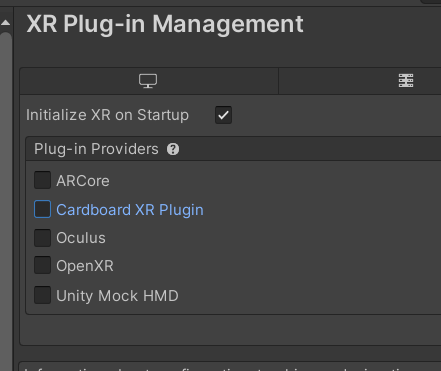 wet sluice
I have a handler to spawn an object in the hand when a grip button is pressed, b...
wet sluice
wet sluice
I have a handler to spawn an object in the hand when a grip button is pressed, b...
My cube sticks to the hand and then you cannot let go. I even check in the object spawn script if there's an object in hand.
wet sluice
outer tangle
"Match directional input"
You should look at either the VR template or the XRI example, they show how to set it up better than anyone could explain here.