#🤯┃augmented-reality
1 messages · Page 11 of 1
 thorn lava
Pixel 3A phone using OpenGLES
I also have XR Plugin Management 3.2.15 installed
I also have added this renderer feature to my renderer since some video mentioned that
But I get the same issue, with or without
Do I need to set something up so the app will request camera permission? Because when I launch the app, my phone doesn't ask me
 nocturne ivy
https://docs.unity3d.com/Packages/com.unity.xr.arfoundation@3.0/manual/ar-camera-background-with-scriptable-render-pipeline.html did you follow the documentation by chance?
thorn lava
nope
but I have everything set up like that
I was following this video

This tutorial will teach you the important basics you need to know to start building augmented reality experiences which will run on both iOS and Android.
NOTE TO ANDROID USERS: I've discovered the steps shown in the video don't fully support Android, but never fear! @Convile...
nocturne ivy
And at the end please remember to go to "Edit -> Render Pipeline -> URP -> Upgrade project materials to URP"
If you already did that do you mind submitting a bug for us so I can have your project with it? (Help->Report bug), and then when you receive the bug link, could you please send it to me?
thorn lava
My project was created using URP template, there are no issues with URP setup
Yeah I can, but to be honest this is my first time using AR so far more likely that I have a setup issue?
nocturne ivy
Perhaps, but if you have followed the docs/video then I trust you should at least see the AR Passthrough
thorn lava
One thing I do see that is in the docs but not the video
on here
IS that I should enable ARCore in the XR Plugin Management section in the project settings
but then my build fails
what's that about?
nocturne ivy
Yes absolutely, I apologize, I had already assumed you had included the loader when you said you had the XR Management installed 
thorn lava
Is XR plugin management replacement for ARCore XR Plugin?
Should I remove the ARCOre XR plugin package if it says it conflicts with it?
nocturne ivy
The ARCore XR Plugin is what you will want to use when using ARFoundation, the standalone ARCore package is for only ARCore, or that is how it should it
thorn lava
I'm confused
do I enable ARCore here or not?
and if I enable it, how do I get rid of the console error on build?
because the error says if I enable it, it conflicts with the ARCore XR plugin
but I need ARCore XR plugin if I'm using AR Foundation
nocturne ivy
Correct, one moment
nocturne ivy
Can you ensure this is unchecked in Project Settings -> Player -> XR Settings?
thorn lava
Right so that was enabled, disabled it and it works! Thanks, you're a hero
Quite confusing that in one section of the settings I have to disable ARCore, and in another I need to enable ARCore
hopefully this will all be unified some more in the future
nocturne ivy
Ah yes, it is, in newer builds this will be removed, but for now it is 'deprecated' as a warning for people to gradually move away from the XR Setting and give them time to transition their projects to XR Loaders
 dark juniper
Hi,
I'm using ARCore & ARFoundation for my game, if i set AR as optional can non-supported devices run the game without using AR features?
I think this is the second post without a reply
Hopefully i see answer 🙂
nocturne ivy
I asked to make sure and from what i've gotten back is that yes, that should be the case :).
 bronze sierra
Hello, does anyone know how to change face prefab at runtime? I mean face prefab is changing under ARFaceManager but it seems to be not updating or not working
do ping me
 royal dome
Is there some limit to how much scaling I can achieve with scaling the AR Session Origin? I am trying to place a relatively complex scene onto a plane but I cannot seem to figure out how to get it scaled such that it fits on the plane all in view, without scaling my scene which causes some collision issues obviously.
 hybrid perch
Generally when working with small scale AR it's recommended to scale the AR Session Origin up instead of the content down, is that what you're doing?
royal dome
Yep, I'm using the MakeAppearOnPlane and ScaleController scripts from the ARFoundation demos. Is my scene too big? When I start scaling up the AR Session Origin my content seems to stay the same size and then disappear so I am fairly certain I'm doing something wrong, but I've set everything up as close to mimicking the scaling demo scene as I can.
 formal quest
It might disappear because of your camera far plane. The content would only stay the same size if it was part of the ArSessionOrigin hierarchy i think
royal dome
Thanks @hybrid perch and @formal quest ! It was my camera far plane settings. Everything is working as I expect now, which is great and sad that it was something so simple hehe. I appreciate your help!
 rugged jetty
ummm why when i download unity its said something went wrong and the installation stop?im downloading unity in unity hub
 daring gazelle
Make sure your internet is stable
 coarse stone
Is there a place to look for collaborators in XR projects?
I have crazy awesome ideas and awarded patents... but could use some help building the example projects and foundations for the apps.
(I'll get it eventually on my own, I'm just slow and it would be awesome to collaborate with someone 2-4 hours per week.)
Tried hiring... but it's really difficult finding the smart ones.
wasted a lot of moolah 🙂
formal quest
Hi guys, just wanted to let you know that we added 🥁 Object Tracking to ARSimulation in 1.0.4-preview.2 🙂 -> https://get.needle.tools/ar-simulation

Use the AR Simulation from needle on your next project. Find this utility tool & more on the Unity Asset Store.
 dire marsh
Does anyone know what Vuforia changed this into? RegisterEventHandler(this);
 unique gale
what i do i need to do if my raycast is too deep inside a collider that it doesn't detect it?
 umbral briar
so I'm following this guide https://developers.google.com/ar/develop/unity/quickstart-android to get into Unity and ARCore, I'm using Unity 2020.1.6f1, does this only apply to 2019 or is it outdated?

Google Developers
because I get the same error as I would in 2019 if I don't include the packages
 fallow mica
https://www.youtube.com/watch?v=xg1YxBkldpw
I want to make something like this on vuforia but I don't know where to start >.<
Any sources?

Try this AR app concept, today. Attach augmented reality models to WEB GL graphing concepts as they actually exist in space. Provide an enhanced and expanded view of three-dimensional graphs by expanding them into 3D space. With image tracking and an easy visual animation engi...
@umbral briar might be 2019 onwards so also for 2020 since it says Legacy input helpers
royal dome
@fallow mica something like this might get you started - https://library.vuforia.com/articles/Training/VuMark my Vuforia experience is limited.
fallow mica
Alright I'll check it out thanks!
 grand cave
Hey guys..I'm a beginner in game development...I would like to start from the beginning...can anyone suggest where to start from...sorry for bad English
hybrid perch
https://learn.unity.com/ @grand cave
grand cave
@hybrid perch thank you so much
 elfin drum
@grand cave Go to yt, and search up Brackeys

YouTube
Learn how to make video games! Top-quality game development tutorials on everything from Unity and programming to game design. If you want to become a develo...
or click link
grand cave
@elfin drum thank you.. definitely I'll check:)
elfin drum
np any like a month old game dev(unity) knows that brakeys is the best tuturial(my opion) @grand cave
grand cave
@elfin drum :)ok
elfin drum
to bad he quited yt hes doing his own stuff now 🙂
coarse stone
I really want to learn more about AR programming... is there anyone here that does 1-on-1 tutoring for stuff like ARFoundation?
I just want to learn the basics and also implement some of my own ideas. I have a couple years of Unity & C# experience, but still have a lot to learn.
I successfully programmed a Vuforia app and can do anything I want with Vuforia Image Targets. But i want to learn about Plane Detection, Object Detection, Complex Environments, connecting point-clouds with meshes and even allowing the user to correct/delete/redo certain meshes and points.
I even programmed my own custom AR Camera / Gyroscope Camera... but when it comes to learning other people's API's and understand how they set up their code... I am slow.
I want help learning more about OpenCV, ARFoundation, ARCore, ARKit
Not sure if Im allowed to offer payment, but I would happily compensate for tutoring.
grand cave
@elfin drum yes:(
elfin drum
f
 cosmic stream
Assets\GoogleARCore\SDK\InstantPreview\Scripts\InstantPreviewManager.cs(33,23): error CS0234: The type or namespace name 'SpatialTracking' does not exist in the namespace 'UnityEngine' (are you missing an assembly reference?)
how to fix this error
whenever i try to import google arcore sdk
the same error pops up
nocturne ivy
Do you happen to have Legacy Input Helper package installed?
 kind pond
Got a question about VR Toolkits I should be looking to for new project, would love to get some opinions on, for a new VR project should I be focused on Unity XR, oculus integration toolkit, or VRTK, I used VRTK years ago but haven't done much in unity since. Got a demo with both XR and oculus working last few days
cosmic stream
Do you happen to have
Legacy Input Helperpackage installed?
@nocturne ivy no
nocturne ivy
If you install that does it fix the issue?
 hybrid gulch
!rank AR foundation
 raven heath
!ranks
 fossil pierBOT
raven heath
fossil pierBOT
raven heath
!rank hlep
fossil pierBOT
raven heath
!rank Generalist
fossil pierBOT
@raven heath, you joined Generalist.
 fossil flower
@raven heath #502893580512395264
raven heath
oops
 steep cosmos
Hello. I want to download my augmented 3d objects to be stored on cloud in runtime when target image is being detected. Is it possible
So my program will not be responsible of having heavy process. (3d objects and image targets)
raven heath
@bright wyvern
 bright wyvern
Talk in #💻┃code-beginner
 cobalt aspen
hi, i have an issue with onnx model in unity for an object detection in ar. is it right to ask here?
cobalt aspen
anyway, i have downloaded this repo: https://github.com/Syn-McJ/TFClassify-Unity-Barracuda , and I created a custom dataset from tensorflow following this guide: https://www.youtube.com/watch?v=Rgpfk6eYxJA . i also converted the .pb graph in .onnx with this : https://github.com/onnx/tensorflow-onnx , but when i import the onnx model in unity, it does not recognize it. how can i fix it? thanks
 half basin
and i would like to add a gallery button so users will be able to acess the gallery after taking an image
how do i do this?
 jolly dust
Anyone know if I can do Marker based AR without unity MARS?
hybrid perch
Yes. ARFoundation @jolly dust
jolly dust
ok ty so much for reply @hybrid perch. now i need to find a tutorial lol
i found this: https://docs.unity3d.com/Packages/com.unity.game.foundation@0.6/manual/index.html bout to just read it 
hybrid perch
There is also AR Core and AR Kit, for Android and iOS respectively. Then there are third party alternatives like vuforia and EasyAR
One of the issues with AR Foundation is that it’s still under development, so a lot of tutorials contain outdated info
Vuforia is a good alternative if you want an easier introduction with more stable documentation and tutorials
jolly dust
my implementation is super simple. just want a 3d model to pop up when the camera sees an image, then i want to be able to shoot it.
hybrid perch
Then both vuforia and AR foundation are good candidates
jolly dust
coo thanks again! i found the AR foundation github samples 🙂
unique gale
someone used to AR cloud anchors? is there a simple example or video tutorial for start?
royal dome
unique gale
@unique gale https://codelabs.developers.google.com/codelabs/arcore-extensions-cloud-anchors/#0
@royal dome awsome!!!!
 subtle verge
Are there any "best practices" for the optimization of ARFoundation-enabled apps? My team and I are working on a relatively complex application and we're running into some framerate issues
unique gale
@royal dome have you used these, it takes a lot of time to resolve sometimes, how can i fix that?
royal dome
I haven't used them but from their documentation it looks like the only things you can really do to speed it up is be on a fast device, with a fast connection, with excellent lighting. 🤷♂️
 jagged patio
@subtle verge I'd look into normal mobile optimizations. Reducing poly count, excessive allocations, texture sizes, ect. Maintaining stable 60 (ARKit) / 30 (ARCore) FPS is important for good tracking.
This series (part 1 and 2) are a good starter for optimization and give a broad overview of different things to consider https://www.youtube.com/watch?v=ZRDHEqy2uPI

Unity evangelist Arturo Núñez knows games inside and out. In the first part of this two-part series, profit from Arturo’s experience helping game developers optimize performance. He’ll cover the underlying architecture of Unity’s core systems so you’ll know how to get the most...
 rain inlet
Looking for AR developer in order to create something similar to this I will be providing the characters with shader and reflections + other plugins your might need. 350$ DM me if interested
https://streamable.com/153jew

 ornate nacelle
hello, anyone knows how to give rotation animation to a 3D model with vuforia? 😄
 ancient moon
Hello AR folks ! When I cover the camera with my finger, the tracking of the session is lost. If I uncover it, it sometimes retreive the previous transform, and sometime not (and then I have to rescan my trackables). All of this seems perfectly ok to me, but are there events for all these states?
jagged patio
@ancient moon yeah you can check if the session is tracking and there's even reasons for why tracking has been lost or isn't currently tracking. This script covers some of the functionality. https://github.com/Unity-Technologies/arfoundation-demos/blob/master/Assets/UX/Scripts/ARUXReasonsManager.cs
It's part of a larger UX sample that shows the different tracking reasons https://github.com/Unity-Technologies/arfoundation-demos#tracking-reasons

GitHub
AR Foundation demo projects. Contribute to Unity-Technologies/arfoundation-demos development by creating an account on GitHub.
GitHub
AR Foundation demo projects. Contribute to Unity-Technologies/arfoundation-demos development by creating an account on GitHub.
ancient moon
Thanks @jagged patio . There is still one use case I can't manage. When the tracking is lost, for example if I place my finger in front of the device camera, and then is back again, there seems to be two situations. Either the session is able to localize itself back in the world, or it is not
unique gale
@jagged patio i see you active in the group, i want to ask if you used AR Cloud Anchors of google and if you know how to make the resolve process faster?
ancient moon
If the session can go back to normal, trackables goes back in place and everything is fine. If not, we just have to ask users to scan the trackables again. But in both situation, ARSession.trackingState in back to normal, so how can we know that we are in this pending state?
jagged patio
@ancient moon you might be able to check the state of the trackables. What are you tracking, imagines, planes, ect? can you describe the app a bit more?
@unique gale it's been awhile since I've used cloud anchors, only the original implementation not the latest update. My understanding is it's just general scanning and environmental conditions (good lighting / contrast), ect. Potentially there's something to be done on the anchoring / placement side but I'm not familiar with them enough to know for sure.
ancient moon
yes of course. I only have one tracked image that is spawning a prefab. When the session tracking is lost, the prefab appears to be going to the same coordinate as the camera, and follows it. when the tracking is ok again, the prefab goes back in place if the session can retreive the origin, and stick to the camera position otherwise
jagged patio
Ahhh so in that case you'll want to link into the image trackable and check it's state (the session as well to make sure everything is working).
to properly check that you'll want to do an else on trackingstate==TrackingState.Tracking like this section here https://github.com/Unity-Technologies/arfoundation-demos/blob/master/Assets/ImageTracking/Scripts/ImageTrackingObjectManager.cs#L121-L149
GitHub
AR Foundation demo projects. Contribute to Unity-Technologies/arfoundation-demos development by creating an account on GitHub.
ancient moon
That was my first idea, but the trackable state is either tracked or limited at all time
I don't know how to check if I am in the state were the session is tracked but origin has been lost (whether it will be retreive or not in the future)
I should add that I want my prefab to stay enable even if the image is tracked with limited state
to give more context, my user is scanning an image on the wall, and then appear a prefab that is a big rig of pipes inside the walls and floors around them
they can then turn around and move away, so image is in limited state, and the rig is still visible
jagged patio
I see, maybe you can do something to check the position of the prefab / object to what the initial position of the image marker is in world space. If it's gone beyond a certain distance maybe it's floated away / lost tracking enough that you'd want them to relocalize and look at the image again.
ancient moon
ok I suppose I can do something like that. Thanks a lot for your time !
 merry fossil
i heard that ARFoundation now supports mesh generation from point cloud automatically , i don't have a device that supports AR but i need to know how does a typical mesh looks like that is results in AR, is it simple / complex ? does it has UV's ? Does it has valid normals ?
nocturne ivy
I believe you will need a LiDAR supported device for Mesh and the ones on the sample use UV coloring meshing to show depth :).
ARCore devices have a small amount of meshing but comparatively to the iPad Pro it is faint UV coloring.
ornate nacelle
hello, anyone knows how to display the AR without any image target? and also i would love to know whether we can import .obj file format into the project? any advice would also be great 😄
hybrid perch
@proven umbra #💻┃unity-talk
@ornate nacelle sounds like you just want plane tracking?
ornate nacelle
@ornate nacelle sounds like you just want plane tracking?
@hybrid perch oh yes, plane tracking... i didnt know the term, thx tho. Any suggestion on the .obj and .stl file format to unity? Is it doable?
hybrid perch
obj is supported just fine
stl I haven't used in Unity, I think that might be an issue
 lean warren
Hello, I'm trying to detect QR codes on the Hololens 2 with Unity and Microsoft.MixedReality.QR but I really don't know how to do that. It feels like whatever I do, nothing is working. (I just started AR 2 weeks ago and I have poor knowledge of unity and c# in general)
If u have any advices or something that could help me would be great
 raw parrot
I'm getting this issue.
Missing 'package' key attribute on element package at [:arcore_client:]
I'm using AR Foundation 4.1.0 Preview 10
 clever plover
hello, I have an issue with rotation/position of a 2d object hovering next to a 3d object. I want it to follow the y-rotation of the 3d object, which it does, but it also somehow moves in what feels like position as well. No idea why... heres an illustration https://i.imgur.com/mIKOpT9.png
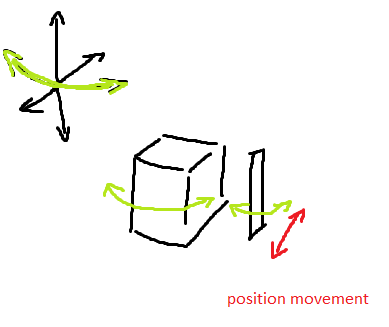
transform.rotation = Quaternion.Euler(transform.rotation.eulerAngles.x, targetObject.transform.rotation.eulerAngles.y, transform.rotation.eulerAngles.z);
I'm using this code
what happens is, when I touch a plane, a 3d object spawns and the 2d object follows beside it, and if i drag it around, I want it to rotate as the 3d object rotates
not sure why this rotation code changes the depth value of the 2d object
when I move the cube around
worth mentioning is that I placed the same 2d object but above the cube horizontally, and it rotates as intended without moving position
 shell python
So you want to make an AR/VR experience for mobile webgl, but you're having trouble using the webcam? The gyro doesn't even work? Well now you can make mobile webgl AR/VR experiences. Work with your device camera and gyroscope on webgl without issues: https://assetstore.unity.com/publishers/49512
 steel vortex
Huawei AR Engine — Unity AR Foundation Integration Coming Soon https://youtu.be/fKYA-PWbvhk

 limpid vessel
Hello people, I wanna make a zoom like virtual background feature but using unity. Any thoughts on this?
 shadow plaza
@limpid vessel no
 livid sonnet
I believe you will need a LiDAR supported device for Mesh and the ones on the sample use UV coloring meshing to show depth :).
ARCore devices have a small amount of meshing but comparatively to the iPad Pro it is faint UV coloring.
@nocturne ivy do you know how to generate a 3d model after scanning the environment
nocturne ivy
Unfortunately I would have to refer you to our ARFoundation Test sample project which supplies a great environment meshing scene with sphere spawning to look at for reference 😰
livid sonnet
Unfortunately I would have to refer you to our ARFoundation Test sample project which supplies a great environment meshing scene with sphere spawning to look at for reference 😰
@nocturne ivy I have tested that one, but it seems only for meshing, but no further 3D model output
I think one way to do it is get the meshing values, but I don't know how exactly to get it
 keen forum
@limpid vessel Why using AR? Want to track something? Search for Green Chroma Key shader (for background insertion) and RenderTexture to retrieve camera stream on a texture
jagged patio
@livid sonnet for extracting a mesh you could break it down as the following.
- define a specific area you want to scan (maybe a bounding box)
- store and capture each vertex from the 'mega mesh' within that area. Storing could be writing each vertex position value to a text file
- recreate / merge those vertex values into a mesh. Write or reconstruct that mesh to a readable 3D file format like obj or fbx.
- share that file
There's nothing out of the box for extracting scanned meshes and personally I've found the fidelity isn't super high for small scale objects. Scanning large objects like rooms seems to work well. At it's core a mesh is just a collection of vertices and faces and there are a few different ways to store those.
 jolly prairie
Hi all - I'm attempting to implement a multi-camera AR session, where world tracking is done with the rear, world camera, but the camera background is rendering the front facing camera. I can't seem to find a way to disconnect the actively displayed camera (front/user) from the one that is doing the tracking (rear/world), but I know it is possible natively based on this blog: http://www.bradgayman.com/blog/faceWorld/index.html
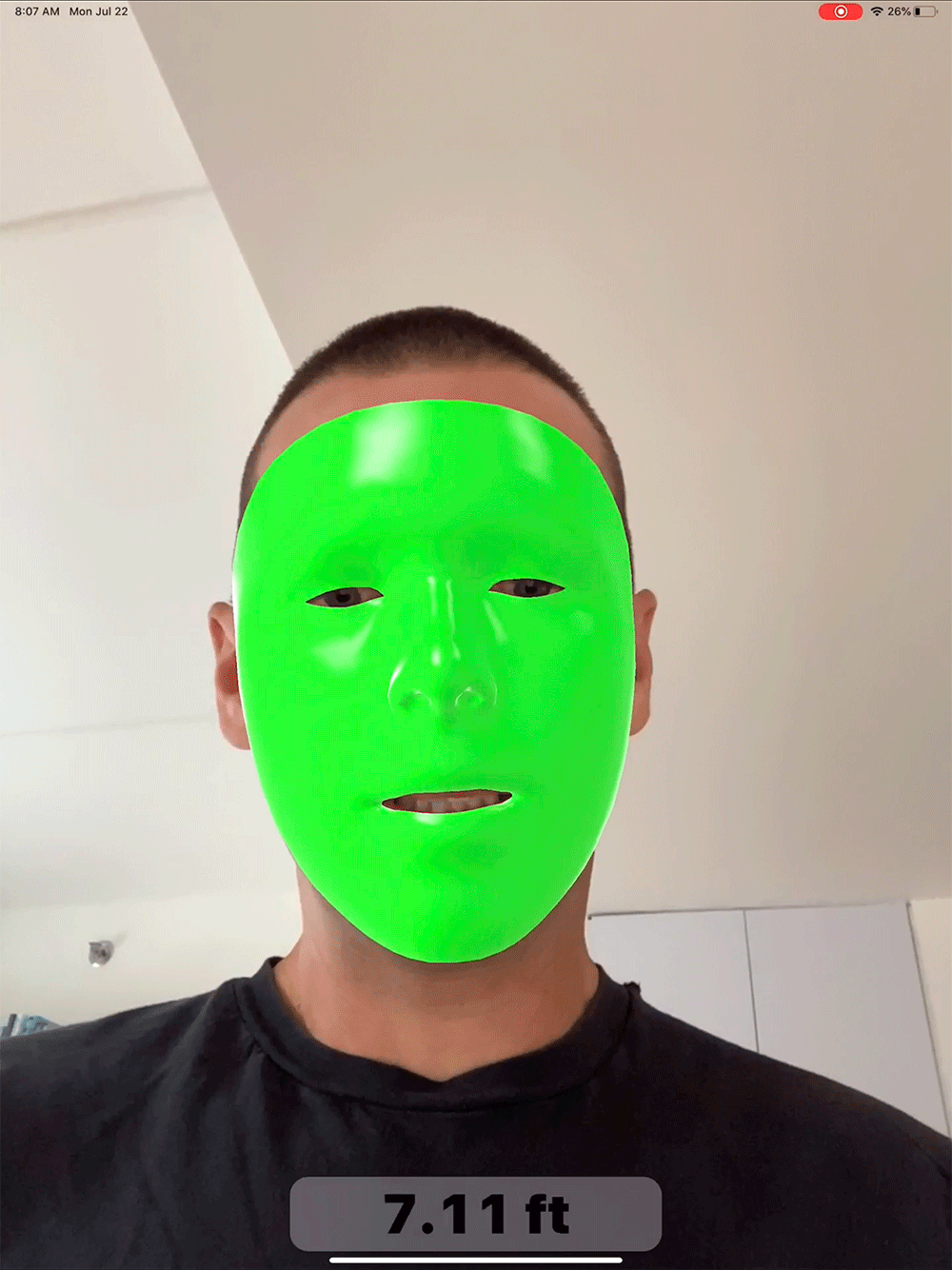
This is part two of our a look at multi-camera support for ARKit sessions. If you haven't already, I suggest you check out part one. Whereas in part one we looked at how to create an ARWorldTrackingConfiguration that also had face tracking, now we'll look at how to setup an AR...
I've looked at the "WorldCameraWithUserFacingFaceTracking" example, but this does not seem to allow for tracking to happen on one camera while rendering the other. It seems that switching camera in the ARCameraManager to front will also disable world tracking
jagged patio
@jolly prairie I'd look into writing a custom configuration chooser https://docs.unity3d.com/Packages/com.unity.xr.arsubsystems@4.1/api/UnityEngine.XR.ARSubsystems.ConfigurationChooser.html to make sure the loaded configuration supports those features. More details on how to write custom configurations and how they work can be found here (timestamped): https://www.youtube.com/watch?v=jBRxY2KnrUs&feature=youtu.be&t=677

Dive into the latest updates in AR Foundation, Unity’s multiplatform AR development framework for creating AR experiences that blend seamlessly into the real world.
Learn more about AR Foundation: https://on.unity.com/2EPmthf
Speakers:
Dan Miller, XR Evangelist, Unity
Todd S...
jolly prairie
awesome, thank you @jagged patio
unique gale
the tutorial of cloud anchors in codelab site is gone. has someone found an alternative?
ornate nacelle
anyone knows how to create a non virtual button? and is it possible to like color a specific part of a 3d model after clicking the button?
 violet canopy
hello, i'm 3d artist and i'm looking for a unity use to make great ar app, is there anyone available to cooperate? pm me if you you may be interested in @everyone
jolly prairie
@jagged patio the answer to my above question was actually quite simple. When an ARSession has tracking mode set to "Position and Rotation" that essentially means "world tracking." User Facing Camera precludes you from using a configuration that has anything else to do with world tracking camera (like plane detection, image tracking, raycast, collaboration etc...). Seems a little restrictive to assume the "front" camera is always pointed the user, and the rear camera is always toward the world, so disable all irrelevant features, but perhaps they'll change in the future.
So basically, just to view the front camera - not yet adding face tracking or anything computationally expensive, you have to disable most world tracking features. Seems Face Tracking should be the mutually exclusive feature, not User Facing Camera
(I'm forced to use config 5)
jagged patio
I see, are you saying the configuration seems a little restrictive or the way it limits some features? AFAIK those configurations / restrictions are set by the platforms not something we're controlling on the Unity side.
jolly prairie
Oh yeah - I assumed the configurations are enforced by Apple/Google , not Unity. My hope is that they will make cameras and features a little more independent of one another, particularly as iPhones start to have front and rear LiDAR. Right now it does feel like features are unnecessarily restricted to a specific camera.
no particular request from Unity, I think this is all super well supported/documented, so thanks! 🙂
jolly prairie
oh actually I do have one request: support for the Nearby Interactions Framework: https://developer.apple.com/documentation/nearbyinteraction?language=objc
while it's not technically part of ARKit, it's super helpful for AR apps. It's basically the new framework for the U1 UWB chip which is in iPhone 11s and later, new HomePod, etc. Good for very precise localization with radio
jagged patio
@jolly prairie ahh yeah I've been keeping my eye on the Nearby Interaction framework too. We don't have any plans for support that as of now, someone would write a native plugin / wrapper to enable it. I'll pass along the request to the team though!
 fervent spear
Hi everyone, I'm looking for a freelancer dev with experience with mobile dev and Unity AR Foundation to help me with a project. Please send me a PVT message if interested. Thanks! 🙂
 grim pecan
Would anyone know of how I can gain native control over the camera. I'm trying to make a camera capture system that results in the highest quality image I can achieve in selfie mode with face Reco. But requires that I have control over the camera like that achieved using NatDevice (from asset store) being able to change ISO, exposure, focused areas, etc. This all seems to be non accessible using foundations. Anyone try this or know of how to achieve this result?
jagged patio
@grim pecan off the top of my head I'd say yes that is not accessible and I'd also bet ARKit / ARCore take control and manage those sort of things when being used for AR so I'm not sure you'd be able to modify them at runtime.
 upper mural
Hey everyone, is there anyway to run AR Foundation on phones/laptops while debugging in the unity scene to check what's actually happening.
ornate nacelle
anyone knows how to make a specific part of 3d model to be clickable? or is there a way to make it work like that? any advice would be appreciated 😄 (im working with vuforia rn)
hybrid perch
You could just place colliders wherever you want it to be clickable @ornate nacelle
ornate nacelle
@hybrid perch hello there, colliders as in normal materials? (can be quad or cube or anything?)
hybrid perch
Any kind of collider, box collider, capsule collider etc. They can be added as components
 storm knot
Is there a way to use/download Unity As Library ?
@dark juniper
For all those people who find it more convenient to bother you with their question rather than search it for themselves.
ornate nacelle
@hybrid perch sorry for the late reply, yes i've given colliders and made them transparant and it works 😄
anyone knows how to remove the green transparent indicator though?
upper mural
Hey everyone, I want to use AR for making a game similar to Pokémon Go and I have already started of with AR Foundation. Do you think there are other API's more suitable for this purpose? excluding API's that cost money.
hybrid perch
No I think AR foundation is a good choice @upper mural 👍🏼
upper mural
Thanks @hybrid perch!
ornate nacelle
does anyone know why my text description on my panel doesnt change after being assigned another text? or is it because it's overlapping so i should destroy the first panel or something?
any advice would be appreciated 😄
 pale pecan
anyone else having trouble getting vuforia on latest unity?
storm knot
@ornate nacelle you should be able to update the text with a reference to the text element rather than having to delete it and create a new one.
If you are adding a new one, it'll appear based on your UI settings, so might be clipped.
ornate nacelle
@storm knot i think i did that it's just in a different script. Should i put it in the same script or import the other script file? i think it's because of that though my idea was that the texts are on the same gameObject which should be fine assigning through 2 different files
 dull flame
just tried the new 4.12 occlusion system on android. it works "ok" for static environment stuff, but I couldn't get it to detect people. Do any of you know the state of the occlusion system?
I thought human segmentation was a thing running on top of depthAPI but.... maybe not?
nocturne ivy
Human segmentation is only supported on iOS at the moment i believe
dull flame
ok thanks! i thought that might have been the case.
is it reasonable to assume human segmentation to be cross platform by the end of the year?
raw parrot
Has anyone tried out VisionLab?
How's it compare to Vuforia and ARFoundation.
Is there anything other than those three for AR?
 latent anvil
Hello! Could ARFoundation be used to make a map of a room, and then understand what a person in that room is poiting at?
jagged patio
@raw parrot AR Foundation abstracts ARKit and ARCore so it might be a better comparison to look at those platforms individually.
@latent anvil Can you describe more of the use case? AR Foundation (using ARKit) body tracking can determine arm position and rotation in 3D space so potentially use that for figuring out what someone is pointing at.
latent anvil
@jagged patio well to be speciffic, let's say i am in my room, and i made a 3d map of my room using vslam or any other 3d mapping option. then i will put a camera in a corner of my room. Then in unity i will somehow define what the objects in my room are. Then, if i point to something, could then unity see that i am pointing, and calculate towards what object i am pointing at?
jagged patio
if the camera is a LiDAR enabled iOS device that'd be a little more straight forward / out of the box but technically speaking yes that's possible just a few complexities for like mapping the room (LiDAR enabled devices can do this too), segmenting / classifying objects in the scan.
 analog elbow
@jagged patio i clearly seen that feature that you just explained as a Demo in one of the ARKit @latent anvil you can check that in ARkit youtube videos
i saw that demo quit back dono exatly is it a ARkit youtube video
but i definatly saw that in action
now i remember check the AR Foundation video in unity Youtube channal
latent anvil
great, if it's possible, that's all i needed to hear. time to learn unity and arkit
thanks folks
see you in 2 years
analog elbow
https://www.youtube.com/watch?v=jBRxY2KnrUs see around 20:00
Dive into the latest updates in AR Foundation, Unity’s multiplatform AR development framework for creating AR experiences that blend seamlessly into the real world.
Learn more about AR Foundation: https://on.unity.com/2EPmthf
Speakers:
Dan Miller, XR Evangelist, Unity
Todd S...
jagged patio
here's a small demo of what's possible with body tracking, in this case I'm recording the position and rotation of the 3D joints and replaying them in real-time. I've also exported the animation and brought it back into Unity. https://twitter.com/DanMillerDev/status/1216725207773106177?s=20
it hasn't been updated / supported but the source is available here: https://github.com/Unity-Technologies/arfoundation-demos/tree/BodyRecording
and recommend the Human Body Tracking 3D scene here: https://github.com/Unity-Technologies/arfoundation-samples/tree/latest-preview/Assets/Scenes/HumanTracking
Keep in mind Body tracking (and Meshing) are only supported on a subset of iOS / ARKit enabled devices.


Worked on a #ARKit 3D body capture app that can place the capture back in #AR, replay it, and view onion skins of the capture. It can also share the captured data and process it in @unity3d, which creates an animation clip that can be applied to other models. #madewithunity h...
Retweets
206
Likes
939
 Twitter
·
Twitter
·
GitHub
AR Foundation demo projects. Contribute to Unity-Technologies/arfoundation-demos development by creating an account on GitHub.
GitHub
Example content for Unity projects based on AR Foundation - Unity-Technologies/arfoundation-samples
latent anvil
This is so cool, thank you for taking time and looking for the references!
 reef flower
Hi, I was wondering how those apps that allow you to see internal structures of an object are made
like x ray vision
jagged patio
@reef flower there's a few different ways to do them but the general idea is localize to the object with an image or object tracking so that object is in a known position. Have a 3D model of the internals and line up that 3D model with the real world object. Maybe some interesting shader FX for revealing only parts of the internal model.
half basin
im tryna build helloAR for xiaomi mi 10 note lite but it crashes on start
i have installed xr management system and imported the arcore sdk
arcore is also installed on phone
unique gale
i am trying to work with instant preview but when clicking play on the editor i get this messages. help @jagged patio
jagged patio
"Please ensure a valid loader configuration exist in the XR Project settings" check the XR plug-in management settings under project settings and make sure ARCore is checked.
unique gale
it is already checked
jagged patio
Are you using ARCore Extensions or just the ARCore SDK for Unity? afaik the ARCore extensions does not support instant preview. If just the ARCore SDK for Unity then it might be the XR settings at the bottom of player settings and not the XR-plugin management.
unique gale
i am using ARCore Extensions. how do you know that it is not supported?
unique gale
i want to use instant because when trying to resolve cloud anchor in a different session- the cloud anchor returns null or task -in -progress @jagged patio
jagged patio
i am using ARCore Extensions. how do you know that it is not supported?
@unique gale it's in the documentation. https://developers.google.com/ar/develop/unity/instant-preview
"ARCore SDK for Unity 1.20.0 or later"

Google Developers
In general I suggest asking more specific questions, there's lots of others around to help and with different experience. I don't have much experience with cloud anchors so can't help out much on that front.
unique gale
where can i find answer to this? there is nothing on google. is there any AR discord group or facbook group? @jagged patio
jagged patio
@unique gale you could try posting an issue on the arcore extensions github https://github.com/google-ar/arcore-unity-extensions or on the google support platform https://support.google.com/

GitHub
Google ARCore Extensions for Unity's AR Foundation - google-ar/arcore-unity-extensions
 sour oxide
We have managed to create a solution which lets You use shared-experience and work on city scale locations . We the help of Unity we place 3d objects and let other users to view them ! Its a classical CV solution , all You need is Your mobile for reconstruction !)
https://drive.google.com/file/d/1buqPk1IF4bZA8N38uqHbnVoN1LWf13fU/view https://drive.google.com/file/d/1HIKArxsmrz0HDqKbd7VColbyzzHBVOUF/view

Google Drive

Google Drive
 lusty lance
Hello I'm doing an AR app and try to use the input system with it but when I get UnityEngine.InputSystem.Touchscreen.current.touches.Count it's always 10 ><
How can I get the real number of touches?
jagged patio
@lusty lance might be a better question for #🖱️┃input-system. Looking at the API touches array is Array of all TouchControls on the device. so that wouldn't be the actual fingers and instead the number of touch controls available
lusty lance
oh didn't see this channel
jagged patio
lusty lance
thanks a lot!!
I'll use activeTouches
dunno what is activeFingers lol
there is no description
jagged patio
lol good point, I'll ping the docs team 😄
lusty lance
cool thanks :p
jagged patio
ahh looks like it's updated in the newer package version https://docs.unity3d.com/Packages/com.unity.inputsystem@1.1/api/UnityEngine.InputSystem.EnhancedTouch.Touch.html
Set of currently active fingers, i.e. touch contacts that currently have an active touch (as defined by activeTouches).
jagged patio
looks like they have different uses as you can query the phase from a touch but not a finger for example. For just the number of fingers on the screen either array length should be fine.
reef flower
does anyone know how to create the x ray view over an obj model
jagged patio
reef flower
ok ty
half basin
Is it normal for HandInteractionExamples to run at 10 fps on HoloLens 2?
half basin
also what happened to the build window? its gone
hybrid perch
No. Did you build in debug mode from visual studio?
 sharp birch
I have added the vuforia package from their website but Vuforia game objects are not showing up in the Gameobject menu.
How do I fix it?
half basin
No. Did you build in debug mode from visual studio?
@hybrid perch i tried both that and creating app package and install via device portal
the app from the store runs smooth but my build runs like shit and i dont know why :/
half basin
@hybrid perch lemme give it a shot, btw do you know what happened to the build window in unity? i dont have it for some reason but other people do
like i dont have a build window
hybrid perch
Which one do you mean? The MRTK Build and run thing?
hybrid perch
half basin
half basin
@hybrid perch tried release/master and now it doesnt even run, like after the splash screen it goes to app envelope window thing
hybrid perch
Are you on an old version of MRTK?
half basin
no, latest
and arm works but on arm64 it crashes i guess
tho arm64 didnt crash on debug build which is weird
 nimble fossil
Anyone got experience with worldmaps from AR Kit?
 stuck path
Has anyone been able to get ARFoundation 4.0 working with MRTK? It's giving me a black screen and I'm not sure why, everything looks right and like there's no breaking changes to the package.
It doesn't even ask for camera permission on app launch.
It works fine with 2.1.8, but I really want lidar support.
nimble fossil
You need to use the right Unity Version with the right package version
stuck path
So no chance of 4.0 then since they say 3.1.3 for 2020?
Also what's the deal with Step 3: "Update the MRTK UnityAR scripting defines by invoking the menu item: Mixed Reality Toolkit > Utilities > UnityAR > Update Scripting Defines"? There's no such menu? (But 2.1.8 still works.)
nimble fossil
I guess you can use 4.0 only in like the latest beta or so.
I was hoping to use worldmaps, but it seems 2019 does not support that ARKit version...
stuck path
I was able to use 3.1.5 in 2019 without MRTK with no problems.
nimble fossil
hm, did you like update everyhting to 3.1.5 then? Like fooundation and subsystem?
Its just weird it is letting you update everything separately but you have to be likeon the same version to make it work 😄
stuck path
Yes, and ARKit to 3.1.3
nimble fossil
yeah, seems to at least load the package and dont hate my worldmap thing, thank you for helping me then! 😄
stuck path
Good luck. Now I need to figure out how to get 4 working with MRTK 😄
stuck path
Nevermind, lidar is in 4.1, which isn't even available in 2019 at all. 4.0.9 is the maximum version available.
jagged patio
AR Foundation has compatibility with earlier version of Unity but is verified with later versions. AR Foundation 4.1 which adds the depth API (included in LiDAR) is compatible with Unity 2019.4 (LTS). LiDAR support for ARKit scene reconstruction (meshing) was added in AR Foundation 4.0. This slide is a little dated but shows some of this compatibility with the color blocks.
As for AR Foundation + MRTK that's a bit more complex and handled by Microsoft as they maintain MRTK.
@stuck path you'll need to enable preview packages to see 4.1 in the package manager
stuck path
Thanks!
half basin
ARM build works but ARM64 build crashes for hololens2, does anyone know how I should troubleshoot this?
half basin
Access violation executing location when I run it from visual studio on release
nimble fossil
Any breakpoints to look after when running it?
nimble fossil
Anyone used worldmaps in AR before?
 kind pollen
you mean pokemon go style?
or with a camera overlay?
like google's AR map thing
I've done the first, haven't done the second (yet)
nimble fossil
More like an exhibition style, so inside a hall and you can like examine different stations. I was wondering if I can like have a image or another trigger to load a certain worldmap, if the user is in the right position, and then show the right content. for example, having a realtime box and being able to overlay it with a 3d digital box , just an example
Hope you are getting what I mean 😄 @kind pollen
kind pollen
I don't think I am, sorry 😬
are you wanting the user to be inside a specific real-world location? If so, you can print out a picture and use AR reference images - that way, when the phone "sees" the printed image, you can put your world map on top of the printed picture
you can use triggers and colliders as normal, though, so if you just want the user to walk over to an in-game box and have it display your world map, you can do that as you normally would 🙂
nimble fossil
We want to achieve a kind of markerless experience @kind pollen So the user is going to enter a building on different floors and will have stations to checkout with AR. Of course, it wont work without any type of marker, I was just wondering, if I could like trigger through a moderator telling, this is now worldmap 5 and ARFoundation will recognize the surroundings with the loaded worldmap automatically after looking around a bit
 fluid sky
Could anyone help me fix the problem with "Manifest Merger Failed"? I am trying to build and run my AR project onto my samsung phone, but there is an error stopping it. I tried to manually put in the androidmanifest.xml into the Assets/Plugins/Android, yet there's no success.
jagged patio
@fluid sky follow this documentation, https://developers.google.com/ar/develop/unity/android-11-build it's a new requirement that rolled out for the latest android OS

Google Developers
fluid sky
@jagged patio thanks for the help
raw parrot
Has anyone tried getting gyroscrope or accelerometer data in WebGL on iOS?
nimble fossil
Should work the same as it does without WebGL, doesnt it? Hav eyou tried it? @raw parrot
hybrid perch
It does not
I've only seen this asset advertised, so I don't know it works. But it gives you access to the gyroscope https://assetstore.unity.com/packages/tools/camera/gyrocamwebgl-176394
nimble fossil
Oh, so you have to like pass the gyroscope from browser internals to Unity via javascript, yeah, you can put that together, google will help you there without paying for that plugin.
Something like this should give you the right direction:
[DllImport("__Internal")]
private static extern void setLinks(string url1, string url2, string url3, string url4);
and something like unityInstance.SendMessage('GameManager', 'LoadMainMenu'); for your Website to call, there you can pass your own stuff to unity and back. Some keywords you can google for @raw parrot
raw parrot
yeah I've been trying that, but iOS requires you to requestPermissions() to access the gyroscope.
I'm trying to figure out how to call it, cause it says its requires user input to trigger.
nimble fossil
When you rwebsite asks for it, you should be prompted a permission of the user form: https://medium.com/flawless-app-stories/how-to-request-device-motion-and-orientation-permission-in-ios-13-74fc9d6cd140

Medium
The Return of the Gyroscope
raw parrot
Just be sure to call the associated requestPermission() method from a click event.
How do I do that on Unity.
nimble fossil
Thats something your website needs to do
raw parrot
Ah that's going to be troublesome. Hmm.
nimble fossil

MDN Web Docs
The DeviceMotionEvent provides web developers with information about the speed of changes for the device's position and orientation.
raw parrot
Thank you.
The DeviceMotion works fine on Android WebGL.
I just can't get it to work on iOS WebGL.
nimble fossil
Do you debug.log anything of the gyroscope stuff? like, do you get any data?
raw parrot
For Android yes.
iOS I get NaN for my Gyroscope data.
I'm pretty sure its due to the Permissions.
Is there anything I can do a to replicate a click event on unity or the jslib? I'm not able to do stuff on the website.
nimble fossil
Afaik and read on posts, you have to go with the javascript thing to get it from the website itself.
nimble fossil
Its just a little script that will call a script on your unity build, not that big of a deal 😉
raw parrot
okay wait...
if I create a button to request permission, how do I pass information from the website down to my Unity project.
raw parrot
I can use that code even outside the .jslib?
I'm not very familiar with javascript sorry, I've only really worked with C#.
nimble fossil
The docs website should tell you everything. You just need basic javascript from the browser to get the device stuff if available.
half basin
Hey guys, I got issues making a WebGL build run on Iphone. Any ideas of how to make this work?
nimble fossil
What is the issue...
half basin
It works fine on android and desktop but on iphone it does not start. The loading goes to 100% then the canvas is just white
nimble fossil
Did you debug log anything to get errors or so?
half basin
Unfortunately I'm working from home due to covid and got no access to a mac for debugging. I am hoping it's a common issue.
maybe there is a template project I could use?
half basin
Yes
nimble fossil
What does your game do from the beginning of it, like, when its loaded. Any special stuff like gyroscope or loading from network or whatever?
half basin
All it does is start the camera and face tracking through Dlib FaceLandmark Detector
but no camera request is shown either
nimble fossil
I think, you have to like allow the camera on the website and not on webgl build. Just a guess, so it wont load anything because it does not allow. You could try to just throw an empty scene in the build to load at start with a text or so and see if your iOS device shows it or not to know, if its in your scene or somewhere else
half basin
Ok, thank you I will test
half basin
@nimble fossil so I tried a empty scene and got the same result. But now it's all black on Iphone.
nimble fossil
Did you put any object in the scene to be sure, its not showing the right scene?
half basin
No objects in the scene but on android I can see the horizon from the default skybox and on iphone all black
nimble fossil
Then there is something else going on. but hard to tell from remote here
Can you upload it somehwere, I can check on macos, maybe I can find something fastly
Noone ever worked with worldmaps ?
half basin
I got my hands on another project which had it on iphone working and cleaned it out completely. Now it works so I guess it had to do with some settings
nimble fossil
Oh well, yeah sometimes a little checkbox can do big things
half basin
Now the issue is only that it does not request permission for camera
nimble fossil
hm, you could try this: https://docs.unity3d.com/ScriptReference/Android.Permission.RequestUserPermission.html but I am not sure, if you might have to fire up a camera call from the website itself to allow it.
 half basin
Thanks mate, I'll check it out!
nimble fossil
youtube, google
nimble fossil
Seems like an android error, nothing to do with arcore at first place I guess. Did you go through ar core build tutorials for android?
half basin

Google Developers
nimble fossil
There seems like a dex overload or something. You should google that gradle build failed along with java.exe and some other keywords, that might give you some ideas of solutions
half basin
whats dex?
jagged patio
half basin
whats dex?
check this reply, you need to update gradle and adjust some settings https://discordapp.com/channels/489222168727519232/497874498373156894/778345951856295936
half basin
Thank you
fluid sky
@nimble fossil thanks
stuck path
I need a collider that I can raycast against on one of my floating menus, but I don't want it to block the input to the buttons on the panel. Is there anything I can do about that?
nimble fossil
Not quite clear what you want to achieve.What is "the panel" 😉 Like can you show a screen or describe a bit?
 crystal sun
jolly prairie
crystal sun
jolly prairie
hey all - I have all latest packages enabled but I'm not able to find any of the Light Estimation components. Any ideas?
annnnnd I found it. Light Estimation has moved to the AR Camera Manager in 4.1
jolly prairie
ok, a simple one this time - my AR Selection Interactable on a prefab does not seem to trigger. Instead, when I tap on a placed object, it simply places another one right on top of it. I must be missing something very basic?
video of selection interactable not working
 charred solstice
Hey mates,
Sharing an upcoming event in the realm of XR and Haptics.
Sharing as you all might be interested.
EventPoster
Hey Folks!
**DreamXR **is coming up with a one of its kind show, "The XR Show". This will be series of events with one goal in mind i.e. bridging the gap between communities and companies.
We would like to invite you to be a part of the first ever episode of "The XR Show" where we will be hosting CEO of InterHaptics, a revolutionary Haptics startup based out in Paris, to share his insights about Haptics in XR.
This won't just be a webinar event but an event with a bunch of opportunities to work directly with industry leading experts of Haptics and XR industry.
Looking forward to see all the XR and Haptics Enthusiasts.
To know more about the event and to register your seat, checkout the given event link:http://tiny.cc/The_XR_Show_Ep_1
Facing any issues? No worries.
Feel free to reach out to our team on 9873183980 (Whatsapp).
#जन-हित-में-जारी
Team DreamXR

Eventbrite
In this event we will be diving into Haptics Design in XR. This will be the first episode of the XR Show by DreamXR.
nimble fossil
new day, same question. anyone worked with arkit worldmaps yet?
 fair otter
Hi all, I am currently working with AR core and was wondering if i could have a chat someone more experienced on the subject.
nimble fossil
Looks like we are quite alone here 😄
fair otter
had no luck finding answers here @nimble fossil ?
nimble fossil
Nope, like, people com ein and ask, but most of the time, no one answers. Seems like AR is being discussed somewhere else 😄
nimble fossil
Like is there no AR guy online? 😄
kind pollen
fair otter
Hi all, I am currently working with AR core and was wondering if i could have a ...
Generally best to just ask your question - that's why you're not getting a response 😅 people will drop in and see "I want a chat about arcore" and think "I'm not asking them what they want to talk about to then have to wait for a response". If someone opens this channel and sees a question they can answer, or a discussion, they are far more likely to answer!
nimble fossil
Well, in this channel, not really @kind pollen 😉
kind pollen
I disagree 😉 I can see loads of replies
Asking "Has anyone worked with at worldmaps" is exactly the same as the point I just made to danjohnstone
nimble fossil
Well I altered my question already a few times, no response here. 😄
nimble fossil
nimble fossil
We want to achieve a kind of markerless experience <@!325565391478718464> So the...
@kind pollen if oyu remember 😉
kind pollen
I don't actually understand anything in the second half of that message, which is probably why I left it for someone else to answer lol
nimble fossil
Okay, will try to clarify 😄
User goes into a building and will walk to different stations. I want to scan that area, have the worldmap and then place stuff on it in the editor so the user has like fixed AR experiences. Therefore I need the worldmap somehow visualized or at least reference points that I can rely on, thats why I would love to put anchors there and save them along the worldmap. But for now, I only found placenote as a third party cloud SDK, but this is not being updated for almost a year now and I am kinda scared, they will drop the sdk, which would be like very very bad for the project 😉
kind pollen
I'm really not sure what you mean by worldmap sorry 😬
nimble fossil
Well, so I have to wait for that "one" guy, that will never show up here 😉 Worldmaps are literally maps of the world storing all the reference points you can scan with your phone with ARKit. But there is nothing like a visualizer for it in Unity. Its just, yeah, you can save them and load them, hurray 😄
kind pollen
I have to wait for that "one guy"
Yeah unfortunately not many people are AR devs - it's a much more niche market 🤷♂️
nimble fossil
Like I am in three discords and one slack for this and there is like noone 😄
kind pollen
That's just how it is when you're doing things not many other people are 😂 I'm making an app in which you take pictures of famous landmarks and get a score for them, and I've run into SO many issues that absolutely nobody else has run into, because I'm using such a specific set of really new tech 😬
nimble fossil
Yeah, I agree. But I mean, it is AR, been there for over 10 years already 😄
I actually created AR with flash back in the days 😄
hybrid perch
I haven't done worldmaps in Unity but I did go through it in ARKit just with XCode @nimble fossil
I don't think ARKit gives any access to the points directly so that you could preview the scene
Since you have access to them during runtime you could just spawn a sphere for every point I guess and save that collection of objects as your world reference
If you haven't, you could look for the ARWorldMap demo in this repo https://github.com/Unity-Technologies/arfoundation-samples
nimble fossil
@hybrid perch I am actually rebuilding this demo right now and I was afraid, that this was the only solution to do it 😄 So I will add anchors on the device and hope, that I can export them somehow to my scene as a list and reattach them later.
thx for pointing out btw 🙂
hybrid perch
Better to just ask your specific question @pliant cave
hybrid perch
You have a compiler error, it could be in any script. Check your console
hybrid perch
Did you look in the console?
hybrid perch
Post a screenshot of the errors
 pliant cave
It's ok,found it
half basin
can someone help me with ar foundation
i have installed everything needed and made a scene with ar session and ar session origin
what happens next?
pliant cave
are you following a toturial on youtube?
nimble fossil
@half basin the AR Foundation tutorial on youtube should get you goin there
half basin
Did just that thanks
jolly prairie
Black background when switching to URP? Seems like a common bug. I'm on iOS. Any tips?
jolly prairie
You can only call cameraColorTarget inside the scope of a ScriptableRenderPass. Otherwise the pipeline camera target texture might have not been created or might have already been disposed. UnityEngine.Rendering.Universal.ScriptableRenderer:get_cameraDepthTarget() UnityEngine.XR.ARFoundation.ARBackgroundRendererFeature:AddRenderPasses(ScriptableRenderer, RenderingData&)
It looks like a bug with URP 10.1 and the ARBackgroundRenderFeature
nimble fossil
Did you add the renderfeature? @jolly prairie
half basin
I'm getting HandshakeUnreachable when I try to connect using the holographic emulator in Unity, anyone know what this means?
nimble fossil
Did anyone work with the ARRaycastManager not being blocked by the UI?
pliant cave
im not using raycast yet,sorry mate
nimble fossil
Damn, like, all my questions seem to be unique in here 😄
jagged patio
@nimble fossil you need to elaborate more. What exactly are you trying to solve, what is not working, what is the goal of the system or application.
nimble fossil
I tried like yesterday and nudiustertian, but in the end its quite silent here. About the raycast thing, the arraycast is ignoring ui elements, so i was wondering if its a setting thing or if i have to manually check for ui before I let the raycast fire off @jagged patio
jagged patio
AR Raycast is used ONLY for raycasting against trackables or AR things. For UI you'll need to use normal Unity physics raycast.
can you go into more detail on the use case? are you trying to ignore / not fire an AR raycast if you've clicked a screenspace button?
https://docs.unity3d.com/Packages/com.unity.xr.arfoundation@4.1/manual/raycast-manager.html
Also known as hit testing, ray casting allows you to determine where a ray (defined by an origin and direction) intersects with a trackable.
these are basically special types of raycast from the AR platforms so you can do things like more easily determine if a feature point, plane, ect are hit
if you want to tap a screen space button and not have an AR ray be fired off I recommend structuring your code a bit like this
{
if (Input.touchCount == 0)
{
return;
}
var touch = Input.GetTouch(0);
if (IsTouchOverUIObject(touch))
{
return;
}
if(m_RaycastManager.Raycasat(touch.position, m_Hits, TrackableType.PlanesWithinPolygon)
{
// do AR Thing
}
}
bool IsTouchOverUIObject(Touch touch)
{
PointerEventData eventDataCurrentPosition = new PointerEventData(EventSystem.current);
eventDataCurrentPosition.position = touch.position;
List<RaycastResult> results = new List<RaycastResult>();
EventSystem.current.RaycastAll(eventDataCurrentPosition, results);
return results.Count > 0;
}``` proven reef
Hello guys I just joined right now. I just hoped onto Unity, and I am currently stuck with a project. I searched for help online but I cannot find anything. I see some of you have lots of experience. Can someone help me? 🥺 👉 👈
proven reef
So my issue is that I made a 3D object (cube) onto my target image. However, the 3D object doesn't show up when I try it on my phone (Android, Note 9). I have no clue what it could be.
nimble fossil
Did you debug anything to check? @proven reef
 raven goblet
Hello there! I'm having issues when building for iOS in Cloud Build with ARFoundation and ARKit (tried 4.1.1 and 4.1.0-preview.13) with Unity 2019.4.12f1.
I'm getting two exceptions:
"UnityARKit.m:91:28: use of undeclared identifier 'kCLErrorDomain'; did you mean 'SCNErrorDomain'?"
and
"Exception: Calling TargetGuidByName with name='Unity-iPhone'"
Have anyone here had these issues or similar?
Is this the wrong place to ask these kinds of questions?
nimble fossil
The exception is just some bug from Unity I think, getting the same when building locally.
The other one I actually do not know, sorry.
But sounds like more of an iOS bug than a Unity one. Something weird going on with the location thing in iOS in your app. Did you try to build for different target iOS versions?
@raven goblet
But to be honest, I do not think this is a specific AR question, try to go into general code, there might be more people
raven goblet
@nimble fossil Thanks a bunch for the response. I'll head right over to general code and see if anyone has an idea over there. ❤️
raven goblet
@nimble fossil Perhaps we should continue the discussion over here?
Which file do you mean?
nimble fossil
Nah, nothing more to continue from my side 😄 It says, that UnityARKit.m is giving you that error, but if I check mine with the previous ARKit version, liek 3.1 or something, that identifier is not even inside of that file, so I guess, its a bug, just try to lower the version and test it in cloud build.
raven goblet
That would be something to test, yeah. Need to see if I can go lower with the AR Core Extensions plugin as well then, since I'm using Cloud Anchors.
nimble fossil
I am using my own ARAnchors right now, even if I think, cloud anchors should work too.
Oh, cloud anchors are stored online, okay, got it
Obvious from the name I guess 😄
raven goblet
Heh, yeah. Stored on Google's servers and requires the AR Core Extensions plugin, which has dependencies that is making my life harsher than it should be right now.
hybrid perch
I guess if you use cloud build you might not have access to a mac, but if you do I’d try and build one manually in Xcode and see if you get the same errors @raven goblet
raven goblet
@hybrid perch Yeah, I don't have a mac, but a colleague of mine does, and got the same errors.
proven reef
@nimble fossil Hello thanks for replying to me 😭 . Debug? I have never heard of this. Do I do it on the phone's application or on Unity?
half basin
proven reef
This is exactly what I have. I am using one of my paintings as my target image. I placed that cube and tried to see if It would work on AR on my phone, so I downloaded it and opened the app up. However, the cube doesn't show up. I followed exact instructions from some YouTube tutorials and it just doesn't work.
nimble fossil
This might be the right time for some tutorials about coding and unity...
proven reef
Oh alright I guess I will have to dig up an answer. Thank You
I just thought someone would know
nimble fossil
Yeah but you gotta fight the habit to ask for basics, cause Debug is like the most basic thing you can do 😉 @proven reef
proven reef
Its not a habit, i literally got on here just to ask that question. It is the first question i asked. But go off i guess lmao
@nimble fossil
jagged patio
Looks like you're using Vuforia @proven reef , if you have a webcam you should be able to test and try it out on your PC. That will make it easier to debug, by looking at the console window and seeing if any errors or additional info pop up there. The console window is behind the project tab the bottom in your current editor.
also make sure you're following the most up to date documentation, not sure what video you were watching but I recommend checking the documentation from vuforia. https://library.vuforia.com/articles/Training/getting-started-with-vuforia-in-unity.html
proven reef
@jagged patio OMG THANK YOU 🥰😘. Literally just needed a little bit of advice hehe now i have a clue of what is what and where i can find it. My Art professor just told me to make an AR project, with zero background knowledge and he is literally doing nothing to help us out. I will buy a webcam for my PC and try it there then! That could definitely make it easier for me to find out any issues. Thanks for taking your time to help me and share your knowledge with me (and not being as asshole about it hehe). I hope you have a blessed day 💖🥰 If it goes well I'll send you a pic directly! 😁
nimble fossil
@proven reef Sorry if I measured up you the wrong way, but of speaking habit, it was more of a common thing I was talking about, just trying to get away people from starting with it at all, coming from the experience on this server 😄 The advice still stands with tutorials, but as you said, as it might be just for this one project, you do not really have to take in account about future proof of this at all 🙂 so sorry again, didn't mean to bitch on the wrong target here 😄
 pure widget
Hello there, I recently joined this server to ask a question about a project I have in Unity. So, what I want to do is to create an application that can change your environment with AR. So far, I have an app that can detect planes and spawn an object when you tap on the detected planes.
What I want to do is to spawn objects when a plane is being detected without the users input. Is it possible to do that without using image tracking? If so, how do I do it?
pure widget
I have found the solution, nevermind 😄
nimble fossil
Whats your Solution? 😄 @pure widget
pliant cave
I need some help again
How i can get the distance between my camera and ground plane when using ar core
Is that even possible?
 gentle flare
I made a shader in shader graph and it ended up looking like that after build (on android) any clue ? using URP and ARCore
nimble fossil
@pliant cave so like the height of the device ? You could shoot down a ray and check for planes
pliant cave
@nimble fossil the ARArray thing?.Its still new to me.can i ask for you personal guide?
pure widget
@nimble fossil well, i took the AR plane manager and stored that into a variable. After that I created a function that when the plane is being detected and added, it will spawn an object on top of the plane. I did that by using the ar plane manager event listener and then say in an if statement if a plane is being added
nimble fossil
Oh okay so you dont care about the position of the object, got it @pure widget
pure widget
not really
it was just so to add the object as soon as the plane was detected
it will spawn at the first point is being detected
nimble fossil
@pliant cave sorry, already in bed and got a big project goin on roght now, sry. Just check out unitys ar samples
pure widget
but ill figure out oin how to control the positioning of the adding object
nimble fossil
Just raycast with arraycaster @pure widget
pure widget
oh yeah, thanks ^^
pliant cave
what is your objective to use the ar foundation?
nimble fossil
@faint rover you have to give us a little bit more information? What is your panel?
half basin
what's the best way to access hololens2 camera?
currently using this: https://docs.microsoft.com/en-gb/windows/mixed-reality/develop/unity/locatable-camera-in-unity
but it takes 2 seconds to capture an image which is way too slow for my computer vision use case
this is a better solution: https://github.com/VulcanTechnologies/HoloLensCameraStream
but it's no longer maintained
gentle flare
Help:
is it not possible to have shader graph with XR and URP ?
My shader just doesn't work properly in the android although it does in the Unity editor.
(right is correct)
 hallow idol
@gentle flare My Shadergraphs work correctly with ArFroundation. I am working on iOS tough
 karmic tundra
is it possible to track objects that dont have sharp edges with vuforia? Specificly I want to track food. The scanner app detects about 400 point for the object but in unity it wont detect it and Im guessing its because its not really geometrical with edges any work around there? :)
 hexed condor
just updated Vuforia to 9.6.3 and this is NULL - TrackerManager.Instance.GetTracker<SmartTerrain>();
is it still working?
pliant cave
yes,the ar camera still able to see the ui element such as panel or button
i just change the canvas render mode to world space and drag my ar camera to the event camera
 blazing prawn
How to Pause the video if the ar camera isnt looking at the imageTarget?
 visual shoal
@faint rover To be raw and simple, YouTube videos are probably your best bet. As well as looking into the Unity's documentation. Here are a few links to get you started:
Unity - https://unity.com/unity/features/arfoundation || https://docs.unity3d.com/Manual/com.unity.xr.arfoundation.html
YouTube - https://www.youtube.com/playlist?list=PLQMQNmwN3FvzCWfvCvq2AYh1CFnTlv2Es

Unity
AR Foundation combines the full power of the Unity platform with essential core features from ARKit, ARCore, Magic Leap, and HoloLens for rich immersive experiences that work across AR devices.

YouTube
AR Foundation video series with Unity3d where I walk you through all components available in this new component provided by Unity. In this series we include ...
visual shoal
@faint rover What helps me when learning something new, is to try and find some sort of small project that involves the skill I want to learn. It gives a practical application to what you're learning...and you might learn something new too! 🙂
blazing prawn
I have a question how to combine 2 image market into 1?
I search that the ITrackableEventHandler isnt supported by vuforia anymore?
nimble fossil
blazing prawn
@nimble fossil but if i want to use 2 separate imageTarget into 1 but the problem is that it shows both the combine image and the separate image
nimble fossil
Did you check the multitarget thing? @blazing prawn
Guess not, cause this is what you are after or I misunderstood you.
 sick hatch
working with Unity 2020.1.14f, ARFoundation 4.1.1 and testing on Android. Is it possible I'm not getting OnPreRender and OnPostRender called in a MonoBehaviour attached to the 'AR Camera' game-object?
nimble fossil
I guess not, as they are like in the pipeline of rendering things? Whats you rproblem with those calls? @sick hatch
sick hatch
I've got a behaviour to match and render out a reflection camera on the 'OnPostRender' which works fine in the editor but the method itself is not run during the AR session on the device.. I'm trying to figure out an alternative..
I'm using the standard rendering pipeline (ie. not any custom pipeline)
nimble fossil
I guess the AR Hardware is not capable of your reflection thing as your local hardware is?
sick hatch
I wouldn't know as the issue I'm having is that the "OnPreRender" and "OnPostRender" callbacks on the MonoBehaviour attached to the 'AR Camera' are not even being called
And we can add the "OnRenderObject" callback to the mix of not being called. Is this behaviour documented anywhere?
hybrid perch
Are you on URP or HDRP?
You can see the hooks for the different pipelines here https://docs.unity3d.com/Packages/com.unity.render-pipelines.universal@8.0/manual/universalrp-builtin-feature-comparison.html
sick hatch
Neither; I'm using the standard out-of-the-box pipeline (project is already in production and I'm not about to change the rendering pipeline :P).
I've tested the callbacks; it appears that the rendering callbacks ('pre', 'post', 'object') are not triggered on the behaviour attached to the 'AR Camera' but will be triggered on any other camera. So I'll try using a different camera and see if I can make the planar reflections work again 😄
It's probably due to some shenanigans by the ARFoundation behind the scenes 😆
sick hatch
weird.. my last comment wasn't posted..
anyway; ignore everything I just said. The tl;dr is that I'm an idiot.
I had an exception swallowed somewhere telling me that my custom shader wasn't found (the exception killed my monobehaviour). It was working in the editor but not in the build because the shader wasn't referenced directly in the scene and unity stripped it out of the build... lol
hexed condor
Vuforia 9.6.4 how to stop extended tracking?
hexed condor
turning off device tracker will broke ground tracking
nimble fossil
Does anyone know, if unitys AR Tracking Object Manager is gone? Its not in my components...
Nevermind, thought it was in 3.1.x but its in preview 4.x
 ornate rapids
is this of interest to someone here? https://challenge.resight.io
Challenge landing
Its an AR app competition with up to 5K$ prizes 🙂
hexed condor
hexed condor
Vuforia 9.6.4 how to stop extended tracking?
?
jagged patio
@faint rover yes, you'll need to do an AR raycast to get an ARRaycastHit to grab the trackable ID, pass that to the ARPlaneManager and check the alignment. Something like this
                {
                    if (m_PlaneManager.GetPlane(s_Hits[0].trackableId).alignment == PlaneAlignment.Vertical)
                    {
                        // spawn vertical stuff
                    }

                    if (m_PlaneManager.GetPlane(s_Hits[0].trackableId).alignment == PlaneAlignment.HorizontalUp)
                    {
                        // spawn horizontal stuff on the floor
                    }

                    if (m_PlaneManager.GetPlane(s_Hits[0].trackableId).alignment == PlaneAlignment.HorizontalDown)
                    {
                        // spawn horizontal stuff on the ceiling
                    }
yes, the scripts in arfoundation samples and demos are available to use in apps you develop. For more clarification you can view the Unity companion license here. https://github.com/Unity-Technologies/arfoundation-samples/blob/main/LICENSE.md https://unity3d.com/legal/licenses/Unity_Companion_License
GitHub
Example content for Unity projects based on AR Foundation - Unity-Technologies/arfoundation-samples

Unity
Unity is the ultimate game development platform. Use Unity to build high-quality 3D and 2D games, deploy them across mobile, desktop, VR/AR, consoles or the Web, and connect with loyal and enthusiastic players and customers.
 faint rover
Thanks
jagged patio
@faint rover you can add scripts to your project similar to any other file. Simply copy and paste them from the project location into any folder or location inside projects Assets folder. You can do it in your file browser similar to how you copy and paste any other file and don't have to do it in Unity. Unity will recognize new files have been added and import them into your project when you click back to it.
jagged patio
not sure exactly what you're asking but each plane has a mesh render and a material assigned to it. You can modify the material to be transparent or you can disable the mesh renderer or hide any visuals from the plane.
 gusty hemlock
GUYS
please help
iam getting sooo tired
this is sooo confusing
i cant build my simple AR app
wtf should i do
 desert arch
Maybe try lowering your api to 24 in player settings
Q) How to move any character in AR world with the help of sensors instead of comtrol buttons
 astral geyser
I just installed 2020.1 and installed the ARCORE pluging and AR foundation but the AR is not working for my game it works on 2019.4 but not2020.1
seems I need to uninstall URP
faint rover
Are there ways to make the placement of objects using the sample code better?
Like is there some thing I can look into
To make object placement cleaner
 covert rapids
How do you make a 3D object follow you?
faint rover
covert rapids
How do you make a 3D object follow you?
I’m not sure if this works for ar put you can create a script that makes an object follow another
The other could be the camera

In this Unity tutorial I show how to write a camera follow script for a thirdperson player with C# with the option to look at the player and apply a smooth interpolated camera movement.
Download the full project here:
https://www.patreon.com/posts/unity-free-15983015
See my social profiles here
G+: https://plus.google.com/+JayAnAm
Twitter: htt...
covert rapids
Thank you! That's pretty helpful actually
 crystal veldt
Simple question probably, but Vuforia
- im guessing simple object view is done by just the viewer app (by cloud database)?
And if you want functionality (like animations, buttons, ext) are done via built unity app?
crystal veldt
Or is everything done via unity app?
desert arch
faint rover
https://youtu.be/urNrY7FgMao
Opposite of this also possible? I mean can the player follow the camera?
jagged patio
@gusty hemlock follow this documentation. https://developers.google.com/ar/develop/unity/android-11-build you need to upgrade gradle and configure some settings in unity. It's a more recent change on google's side with the latest ARCore. Unity 2020.1+ ships with a newer version of gradle so it's not an issue if you install it along side your android module.

Google Developers
@astral geyser that are some package manager settings you may need to enable to see preview packages. 2020.1 has various version of the ARCore / ARFoundation package available in the package manager.
@desert arch in AR the camera is the device (the device sensors and tracking data drive a camera in unity). You can link into the position of the camera at anytime and have a character or objects follow it.
@faint rover can you elaborate on what you mean by 'make object placement cleaner'?
desert arch
jagged patio
<@!662193747601129472> in AR the camera is the device (the device sensors and tr...
thanks for the help
faint rover
jagged patio
<@!698574289812717608> can you elaborate on what you mean by 'make object placem...
Sure. Like enhanced the plane detection so it finds planes faster or doesn’t mistake a bunch of planes for just one.
faint rover
So I guess not the actual placement. But the planes it’s being placed on
And detecting those planes better
ornate rapids
Hi guys, we are running an AR app competition, its great for unity developers: https://www.challenge2020.resight.io/?utm_source=unity channels&utm_medium=all&utm_campaign=unity]
Challenge landing
astral geyser
don't worry I solved it 🙂
jagged patio
@faint rover that's really on the platform and device side. in Unity we're just exposing the data that the platform SDK returns. Some devices will detect and merge planes quicker or more accurate but it can vary between devices and between iOS (ARKit) / Android (ARCore). The one feature that does help with the speed and accuracy of plane detection is the LiDAR sensor available on the iPad pro and iPhone 12 pro.
faint rover
Yeah. I was thinking about checking the LiDar on the iPhone 12 pro out
faint rover
Is there a sample for placement Indacators?
jagged patio
The mesh placement demo uses a reticle for placing objects, you can see it in action here https://youtu.be/jBRxY2KnrUs?t=1256
and the code here https://github.com/Unity-Technologies/arfoundation-demos/blob/master/Assets/Common/Scripts/PlacementReticle.cs
Dive into the latest updates in AR Foundation, Unity’s multiplatform AR development framework for creating AR experiences that blend seamlessly into the real world.
Learn more about AR Foundation: https://on.unity.com/2EPmthf
Speakers:
Dan Miller, XR Evangelist, Unity
Todd Stinson, Senior Software Engineer, XR, Unity
Ask your questions here: ...
GitHub
AR Foundation demo projects. Contribute to Unity-Technologies/arfoundation-demos development by creating an account on GitHub.
astral geyser
hmm does it work on andriod?
faint rover
could someone please explain this line of code?
if (m_RaycastManager.Raycast(touchPosition, s_Hits, TrackableType.PlaneWithinPolygon))
faint rover
How should I go about learning at foundation?
jagged patio
astral geyser
hmm does it work on andriod?
The general idea / code would work on android but this example leverages ARKit scene reconstruction (Meshing) which in only supported on ARKit LiDAR enabled devices.
astral geyser
ah
jagged patio
if ( - conditional check
m_RaycastManager - stored reference to the ARRaycastManager
.Raycast ( - calling the Raycast method from the ARRaycastManager
touchPosition - stored touch position that is type Vector2
s_Hits - a static list of ARRaycastHits that get returned / populated from the Raycast method
TrackableType.PlaneWithinPolygon - the mask that determines what the raycast should raycast against, in this case plane within polygon is any point within a found AR Plane
in general m_ is just referring to member variables and is a coding style or coding conventions. It's more of less arbitrary but it can be helpful when multiple different developers are all working on a single codebase and to keep things consistent and readable. At Unity we have coding conventions that we follow for all public C# code.
@faint rover as for learning AR Foundation it probably depends a bit on how you learn best. The above Unite now video gives a pretty good 0-100 overview of what AR Foundation is and how to get started. From there I'd encourage you to think of a project with a small scope and work towards building that app. I learn best from examples so https://github.com/Unity-Technologies/arfoundation-samples is a great way to understand how to use all the different features that are enabled in AR Foundation.
I also think having experience with general Unity development is a good start, there's lots of different resources out there at https://learn.unity.com/ on youtube and more.
GitHub
Example content for Unity projects based on AR Foundation - Unity-Technologies/arfoundation-samples

Unity Learn
Unity Learn provides award-winning free tutorials, sample projects, and full courses for mastering real-time 3D development skills with Unity Learn to make video games, VR, AR, and more.
 supple dock
 magic arrow
guys is anyone here good AR development?
magic arrow
guys is anyone here good AR development?
I don't know about claiming myself to be good at anything 😛
magic arrow
supple dock
I don't know about claiming myself to be good at anything 😛
😄
anyone else?
hybrid perch
I don't know what answer you expect
supple dock
Hi guys, I have been working on a DesktopAR SDK >>> Demo here: https://youtu.be/cuvJxsB285k
HoloSDK is a holographic software development kit (SDK) compatible with any generic laptop and desktop computers. The SDK enables the creation of holographic applications, which deploys the state-of-the-art computer vision technology to track users’ head positions, and then renders output images on a display according to the users’ perspectives.
Anyone interested in checking it out? I can get you a license for free (60$ worth), if you can share your thoughts and feedback with us about it. Thanks!
 pliant smelt
do I need Lumin SDK if I'm building AR for Android using Unity's AR Foundation?
@ upon answering, I'm on idle
nimble fossil
@pliant smelt I do not think so, what is Lumin actually?
@supple dock So its like using your phone and the screen as marker to fake the screen being three dimensional?
supple dock
nimble fossil
<@!755437173125283870> So its like using your phone and the screen as marker to ...
Nope, this is a lesser known technique called DesktopAR. It uses a webcam to track the user and renders 3D pictures according to your view.
This is how it works: DIY Hologram | How to turn your laptop into Hologram with 1 USD https://youtu.be/jhh43ug23GM

Tired of seeing 2D image on your screen? Well, now you can turn it into HOLOGRAM DISPLAY with DesktopVR!
DesktopVR creates holographic effects by displaying 3D image according to your viewing position. Hope you can give it a shot and share your experience!
For this to work, you will need 4 things. First, a laptop or a PC. A red&blue 3D glasses...
nimble fossil
@supple dock oh on webcam, okay, cool thing 🙂
pliant smelt
nimble fossil
<@!367644836389715968> I do not think so, what is Lumin actually?
well it wouldn't make sense to be required for Android build since Lumin is a whole separate OS, but earlier when I built an AR thing and installed it on my phone it couldn't detect my phone camera, it was just plain black and only thing that came to my mind is that Lumin SDK is missing
now I tried again with a new project and I got 74 errors
pliant smelt
nevermind, I just updated unity to the newest version, and made a build somehow, I even installed it on my phone
only to find out my phone is not compatible with ar core
nimble fossil
@pliant smelt than it does not make sense, yes. like I do not know your app, but if you need lumin sdk stuff, it has to be in there. How are you detecting your camera?
pliant smelt
I do not need Lumin, it turned out
the reason the game couldn't detect my phone camera when I installed the app on my phone is cause my phone didn't have AR Core services installed, so I tried installing it only to get google telling me that my device does not support AR
nimble fossil
Phew that is bad, nothing to do there besides getting a new one, even a cheaper one which supports it
nimble fossil
you sure vuforia is not based on ar core too in some spots? @hybrid perch
hybrid perch
Where AR Core is available it runs it I think
jagged patio
Lumin = Magic leap platform and is very similar to the android platform from a development standpoint.
supple dock
I dont own an AR glasses and tried it once or twice.
Do not remember that it is stereoscopic or not?
Do MagicLeap and HoloLens just render mono-picture on the transparent plastic or stereoscopic?
jagged patio
MagicLeap and HoloLens render stereoscopic
 normal yew
Is it possible to set the build directory permanently?
sick hatch
got a weird thing going on;
I have a camera reflecting the main camera which then renders to the screen and eventually to a plane. Basically a very simple planar reflection solution. It works perfectly in the editor (camera follows the main camera and the reflections are plush on the plane) but using ARFoundation on my device (Android) there's a slight consistent shift as if the reflection camera isn't aligned to the main camera anymore (I'm aligning it at the OnPostRender).. Anyone had an issue like this?
(I'd post to the forum as well but I can't access it at the moment for some reason)
grim pecan
when building for iOS i've been running into a problem trying to build to the phone in Xcode.
Undefined symbols for architecture arm64:
all the error seem to be originating from the Face Provider under Unity.XR.ARKit.Facetracking.o
I've removed and added the arkit face tracking package so it is in there.
anyone run across this issue before?
nimble fossil
not really had any issues with it, sorry. Did you just for testing used the unity ar sample project and build it to your phone ? @grim pecan
grim pecan
Yeah, I don't have any problems building when I use the Git repo of foundations for 4.1. I recently started with a blank project and used the package manager to bring in all the AR packages for core and Kit but just can't get the Xcode build to stop sending errors about the arm64
jagged patio
@grim pecan a blank unity project won't have the same project settings as the git repos, for ARKit you'll want to target the ARM64 architecture in the Project/Player settings.
grim pecan
hey there @jagged patio thanks for reaching out. The architecture for the unity project is already set to ARM64 it's actually grayed out so there's no other option to choose from other than ARM64. Just to note, I have gone through and double checked to make sure I have the correct settings within the player settings and the other various tabs like XR Plug-in Management etc.
jagged patio
interesting, what version of Unity?
grim pecan
I'm currently running 2020.1.15f1
jagged patio
Building to my device now, where were you seeing the errors?
grim pecan
something to note, I did start building out some features using the base git repo then exported them as a package with dependencies into the new project, I was using the preview package version 4.1.0-Preview at the time. In the new project I did end up removing each package then updating to 4.1.
all the errors are originating from the Unity.XR.ARKit.FaceTracking.o anything to do with the face provider
jagged patio
Everything worked fine for me.
hmmmm, building features ontop of the facetracking API's?
grim pecan
yeah
jagged patio
can you post your package manifest or what versions of each package you're currently using?
grim pecan
well, using the blendshapes
jagged patio
wonder if there's a mismatch with the face one
I tested with the verified versions for 2020.1
    "com.unity.xr.arkit": "3.1.8",
    "com.unity.xr.arkit-face-tracking": "3.1.7",
AR Foundation 4.1.1
ARCore XR Plugin 4.1.1
ARKit Face Tracking 4.1.1
ARkit XR Plugin 4.1.1
I can do a test to see if the verified versions are working for me
jagged patio
The errors are in Unity or XCode?
grim pecan
all in XCode
jagged patio
I just hit a linker clang error, let me try a fresh XCode Build.
yeah everything seems to be working fine on my end, there are a couple places where settings change with 4.1 vs 3.1 like the camera facing direction and the checkbox in the XR Plug management / ARKit settings.
grim pecan
ok, yeah I do have the face tracking checked within the XR Plug management, I'll try another fresh scene and see where I get.
nimble fossil
can you give us more detail about you rerror? You just said "Undefined symbols for architecture arm64:" which is not the whole one I guess 😉
grim pecan
yeah I can, so like I mentioned it has something to do with the face provider in Unity.XR.ARKit.FaceTracking.o
not quite sure why it's all around face tracking but it definitely is the root cause
faint rover
“If a vertical plane comes into view. Print (“Vertical Plane”)
The if statement is simple
But
How do I refer to the vertical plane
Is it trackabletype.vertical plane or something along the lines of that?
faint rover
Thanks.
And I can use Oncollinsionenter for checking collision between ar objects and planes right?
jagged patio
OnCollisionEnter should work but make sure your planes and your objects have colliders setup correctly.
You need a reference to a plane to check alignment
        foreach (ARPlane plane in PlaneManager.trackables)
        {
            if (plane.alignment == PlaneAlignment.Vertical)
            {
                // do thing with vertical planes
            }
        }
 bronze silo
 faint rover
so something like this @jagged patio?
private void OnCollisionEnter(Collision collision)
{
foreach (ARPlane plane in manager.trackables)
{
if (plane.alignment == PlaneAlignment.Vertical)
{
if (collision.gameObject.name == "PlaneDetection")
{
Destroy(collision.gameObject);
}
}
}
}
and I guess I would attach this to the ar object
jagged patio
close, are you trying to destroy the plane or the object colliding with the plane?
might be able to do something like this
faint rover
jagged patio
close, are you trying to destroy the plane or the object colliding with the plan...
the object
jagged patio
I tried to post some code but discord is being weird?
but basically on the object itself you can first check if the object has an ARPlane component
if(collision.transform.GetComponent<ARPlane>())
next grab that plane component and check it's alignment
if(collision.transform.GetComponent<ARPlane>().alignment == PlaneAlignmentVertical)
Destroy the object itself
Destory(this.gameObject);
faint rover
oh ok. Thanks.
also would you reccomend mars? Seems really expensive though. I'd be interested in trying the free trial as it seems very interesting.
jagged patio
Probably depends on what type of apps you're trying to build but yeah it has a lot of cool features and can do some pretty unique things with the built in systems / rule logic. I do recommend checking out the free trail to see if it's a good fit for your current project. We just launched some new on boarding learn content for it and there are a few videos and past webinars you can check out too on getting started and some of the systems.
faint rover
jagged patio
Probably depends on what type of apps you're trying to build but yeah it has a l...
Yeah I’ll definitely check it out. From the material I have seen it basically gives more ar functionality in the editor itself?
jagged patio
yeah that's one part. The simulator, simulating a mobile AR devices and enabling you to test and iterate directly in the editor.
nimble fossil
I am not a fan if mars. Just adds another confusing layer to fiddle around with
And for 600 i am fine building the app now and then.
faint rover
nimble fossil
And for 600 i am fine building the app now and then.
Yeah of course. I'd possibly consider paying 600 if it can be helpful is build apps.
nimble fossil
Nah not annually, at least not with the ux from now @faint rover
faint rover
Oh ok 👍
 finite rose
Hey all... been away from Unity AR for a minute... whatever happened to AR Remote? Did Unity totally abandon it in favor of pushing people to pay for MARS to get that functionality? I see that someone has a nice 3rd party asset on the store now for $80. Is that the only other option?
Unity Forum
AR Remoting (Alpha)
We've received great interest in early access of Unity’s AR Remoting feature, and we're excited to share that we’re now conducting...
I see lol... based on mfuad’s track record, I expect we’ll be hearing again about this sometime in 2022
jagged patio
@finite rose the mobile remote is still in development, it's a larger effort by the mobile team alongside the XR team to support AR Foundation and enable quicker iteration and development for all mobile developers working in Unity (including AR developers). It has a planned release in 2021 but I can't share much more than that at this time.
Unity MARS while sharing some capabilities of what an AR remote might enable is not trying to compete or replace the remote. The simulation view is just one part of what Unity MARS offers, there's also complex rules system that allows for procedural placement on content and the ability to visual author AR content within the editor.
finite rose
@jagged patio thanks I appreciate the response. I think a lot of unity devs would appreciate better transparency in these kind of situations. The last word on this is from 7 months ago when it was still an AR remoting tool. Now that the scope of this tool has changed, an official update would make sense. Unity devs have been desperate for a proper AR remoting tool basically since 2018. I think it really says a lot about the internal mechanics of Unity team management that this has gone on for so long.
Btw, I know it’s not your fault at all... just venting!
I’m sure its just as frustrating to you.
jagged patio
understandable and I appreciate you mentioning it as a vent and not directed towards me  things are winding down for the year but I can follow up with the team and see if we can provide some update early next year to let users know the current state.
finite rose
Thanks Dan. Hope you get to have a nice break from work 🙂
faint rover
So I tried running a simple ar app on my iPhone
However when I open the app up
I just get a black screen
Is there something that I need to configure in the phone settings?
jagged patio
I'd start by trying to check the output logs, you can use the ABD logcat unity package or android or the xcode console / output for iOS. Also make sure the XR Plug-in management in correctly configured and ARCore or ARKit are checked.
faint rover
Ok
@jagged patio I remember checking the ar kit plug in providers but for some reason it was unchecked
That was probably the problem
sick hatch
Having issues with the windows mixed reality remoting and my HoloLens2 in the editor; using Unity 2020.1.14 and the MRTK 2.5.0
The remoting inspector says connected but when I press play nothing is streamed. Anyone?
jagged patio
I assume you've launched the remoting app on the HL2? there was recently an update I had to download.
 eager sandal
Guys, i made my first AR project lol but now how do I add my own target file?
It shows empty in database
and if i change the type to user defined even there's nothing to drag drop image
Btw am using unity 2019.3.7
hybrid perch
@eager sandal refer to a tutorial like this one if you're new https://tutorialsforar.com/how-to-use-vuforia-in-unity-to-create-ar-application/
jagged patio
I believe you can make them in the vuforia developer portal and import them into your project. Check the vuforia documentation here https://library.vuforia.com/getting-started/overview.html / https://library.vuforia.com/content/vuforia-library/en/features/images/image-targets.html
sick hatch
jagged patio
I assume you've launched the remoting app on the HL2? there was recently an upda...
yea, I eventually figured out that the standalone player wasn't configured. That said, once I did that the default MRTK configuration profiles when adding the camera to the scene are wrong (need to manually change to profile to the XRSDK profile)
eager sandal
Is it possible to make to augmented objected not disappear when tracker image is lost?
How ?
faint rover
I’m just learning but... couldn’t you create an if statement in which if the tracker image is lost, keep the ar object instantiated. I think I kind of know how this would be done but I’d probably be a bit off...
hybrid perch
You can do this by combining image tracking and world tracking @eager sandal. So after you've instantiated the object, parent it under the world instead
Are you using AR foundation?
eager sandal
No... i am using vuforia
nimble fossil
AR Foundation would help you with that as it gets more information about positioning than vuforia does I think
 south saffron
What is AR exactly
south saffron
Hmmmmmm
OH I KNOW
IT IS BECAUSE COMPUTERS ONLY USE JPEG
USE PNG FOR ANY MOBILE STUFF
Oh
PNG works on pc too
☹️
eager sandal
I converted it ot jpg and it worked
Btw can anyone provide me link or video to refer on how can i rotate my augmented object and zoom in and out??
For vuforia and unity 2019.3
faint rover
south saffron
What is AR exactly
Putting digital images and data on real world objects

Augmented reality (AR) is an interactive experience of a real-world environment where the objects that reside in the real world are enhanced by computer-generated perceptual information, sometimes across multiple sensory modalities, including visual, auditory, haptic, somatosensory and olfactory. AR can be defined as a system that fulfills three...
faint rover
Can you have two ar session origins in one project?
faint rover
nimble fossil
Not really? why would you? <@!698574289812717608>
Lol I was just wondering
Now that I think about it
I can’t really find any use cases for it
nimble fossil
oh okay 😄 just was wondering myself, what could lead to two sessions 😉
faint rover
nimble fossil
oh okay 😄 just was wondering myself, what could lead to two sessions 😉
What if you wanted to create two different prefabs for horizontal and vertical planes
nimble fossil
@faint rover Than you can just tell the thing what to do when found a trackable plane 🙂 The session is just as it is called a session that stores the trackable IDs of trackable objects. The only thing that will differ would be the unique IDs the session generates when creating the planes. But you can still tell unity what you want, when the plane is horizontal or vertical or upwards, downwards, whatever you like 🙂
faint rover
nimble fossil
<@!698574289812717608> Than you can just tell the thing what to do when found a ...
Yeah.
faint rover
nimble fossil
<@!698574289812717608> Than you can just tell the thing what to do when found a ...
But I mean technically it would be faster to simply create another session and make the plane tracking only horizontal and make plane tracking vertical for the other one
¯_(ツ)_/¯
nimble fossil
Not really. Why have two systems search for the same thing? @faint rover
faint rover
They wouldn’t be the same
I’m just saying it could be simpler for changing the prefabs
nimble fossil
Sessions store all planes they can find
faint rover
But you can set the tracking to one specific type of plane
Or
I guess
The planes it renders?
nimble fossil
You just ask for what you want then. You can ask if the found one is vertical or horizontal
faint rover
Yeah I know how to do that
I was just saying
That
If you wanted to render two different prefabs for horizontal and vertical planes respectively. You could quickly just create another session. However, this is not a good option because it doesn’t work for much else.
And add the plane manager
And put two different prefabs under the plane prefab GameObject
nimble fossil
...
faint rover
Lol
nimble fossil
Again its doin the same. Just for laziness copying the session could work but will double performance impact of one session. Just add another prefab to the session and ask for isVertical or not 😄
faint rover
nimble fossil
Again its doin the same. Just for laziness copying the session could work but wi...
Yeah I know. I was just saying it’s the lazy way to do it.
nimble fossil
Alright...
Just to finish this with the „right“ approach 😉 https://docs.unity3d.com/Packages/com.unity.xr.arsubsystems@2.1/api/UnityEngine.XR.ARSubsystems.PlaneAlignment.html
jagged patio
afaik you can only ever have one active AR session, if you had two in your scene the second one will probably override the first and drive the experience.
Since the plane manager only had one 'plane prefab' you'd link into the ARPlane component and determine what type of plane it is in something like Start()
{
    [SerializeField]
    ARPlane m_Plane;

    void Start()
    {
        if (m_Plane)
        {
            if (m_Plane.alignment == PlaneAlignment.Vertical)
            {
                // do vertical thing
            }
            else if (m_Plane.alignment == PlaneAlignment.HorizontalDown || m_Plane.alignment == PlaneAlignment.HorizontalUp)
            {
                // do horizontal things
            }
        }
    }
}
That easy 😉
faint rover
jagged patio
afaik you can only ever have one active AR session, if you had two in your scene...
Hmm. I tried running with two sessions. I set one to detect horizontal planes and one to detect vertical planes. When I ran it, it was rendering both. Wouldn’t this mean it was utilizing both?
jagged patio
Sessions or Session Origin? I guess you could have two different AR Plane managers and maybe they both run 🤔
faint rover
Session origin*
faint rover
jagged patio
Sessions or Session Origin? I guess you could have two different AR Plane manage...
Yeah you can do that
I should have clarified sorry
jagged patio
all good, seems like a usable approach, although maybe not fully recommended 😛
faint rover
For some reason when I’m destroying the game object if it hits a vertical plane it’s also destroying if it hits a horizontal plane
Do you know why this is?
jagged patio
can you share your code?
faint rover
Yeah
It’s just checking to see if the object that we hit is a vertical plane or not
@jagged patio how am I supposed to put the code here
when I copy and paste it gets deleted immediately
jagged patio
maybe try to put it between three ` marks on both sides
faint rover
ok
jagged patio
I had that issue before too, wonder if it's a discord setting or something?
I'm seeing if flash lol
maybe just use pastebin or a gist
Pastebin
Pastebin.com is the number one paste tool since 2002. Pastebin is a website where you can store text online for a set period of time.

ahh just saw this in the community guidelines ```Posting Code
Please be aware that Discord may auto-mute you if your code blocks are not linked externally, as this may be seen as spam. Large code blocks should be posted as links to services like hastebin, hatebin, gist, etc.. Post your questions as normal and then use one of these services to share the code so other users can help you.
Yeah it was just a temporary mute
 modern sparrow
Hey, so far I've been using SDKs like easy AR, maxst or vuforia for image tracking (different projects, mostly small experiences while tracking product labels). However most of the companies changed their licencing to monthly subscription per app, while also increasing their one time licence prices, i.e easy AR went from around 400 to 1300$! (That's a lot if you consider that we don't have clients that pay in USD and the ratio is around 1:4)
And now I lost some of the smaller clients, because 1. they don't want to pay subscriptions, because it's "another thing to manage" (yes it is if you want more than one app), or 2. the one time licence is too expensive (for a project where you simply display a video tracked to the image - yes it is)
Now, I want to switch to the ARFoundation, but I remember that there was a long time before the image tracking was added, and even after that, the ARCore didn't support dynamic tracking? (not losing target when it's moving). Does anyone use ARFoundation image tracking for project like these, is it worth it? How is the stability of the tracking, etc?
jagged patio
@modern sparrow when AR Foundation was still being developed and and new features were actively being added to ARKit and ARCore from Apple and Google there was some lag time. There was also some underlying framework development that took time.
The good news is the team and features are basically all caught up and the most recent updates and feature launches have included AR Foundation updates days / weeks after new feature announcements. For example, Depth the latest feature for ARKit / ARCore came out just a few days after it was announced.
Image tracking has been in for awhile now and supports dynamic tracked images as well as runtime Reference Image Library creation. Stability is also high as there's several verified versions of AR Foundation and really it just enabled ARKit / ARCore so performance is dependent on what device you're using with those SDK's.
modern sparrow
Awesome, thanks for your input, I'll give it a try then!
nimble fossil
I totally give AR Foundation a go! for now, too @modern sparrow I am working right now with worldmaps from apple and object tracking of crazy detailed stuff for a big factory, so for now, it seems to work fine even on detailed stuff or difficult situations.
modern sparrow
@nimble fossil Is object tracking supported on both platforms via ARFoundation? I only used it for ground plane tracking before and worked with other SDKs when image tracking wasn't supported. I'm curious how it will work compared to Vuforia cylinder tracking for example (for bottle labels)
nimble fossil
There is an AR Foundation Sample Git repo, where you can actually test that out. My client only works on iOS, so I did not test on android yet. I know worldmaps is an ARKit thing, but google has something called cloud anchors, which in the end will do something similar.
jagged patio
Object traction is only enabled on iOS from ARKit. ARCore doesn't have a feature like that so it's not available on android.
faint rover
How come there is a such a big difference between 2.1.10 and 4.0.9 versions
Like if I downgrade to 2.1.10 a lot of namespaces aren’t recognized
nimble fossil
Well its the way as arkit and core are also updated. Right now its arkit 4 out there, 2 years ago ipad only supported 2
nimble fossil
It should be written in the docs which version supports what but I think yes
Right at the bottom https://docs.unity3d.com/Packages/com.unity.xr.arfoundation@4.1/manual/index.html seems like
jagged patio
AR Foundation is a bit of a unique package in that it has 'compatibility' with earlier Unity versions but each version still has a verified version as well. There's been some fairly large architectural changes with AR Foundation over the versions, especially from 2.x to 4.x.
A big part was giving users / developers more access to things like configurations, camera facing direction, ect. Obviously adding new features from ARKit / ARCore as well like scene reconstruction (meshing) and depth.
Depending on what you're doing we usually recommend the verified version with whatever version of Unity you're using, especially for simpler AR apps. But if you need or want newer features you can upgrade the package.
That being said most of my projects are in 2019.4 and use AR Foundation 4.x since some things are easier to do with the package changes.
jagged patio
that's what we recommend but depending on the project and what you're working on isn't always possible.
jagged patio
not as major as 2->4 but still new features, some underlying changes, ect
faint rover
Ok
nimble fossil
4 has stuff like worldmaps for example I think
faint rover
Oh
faint rover
Will most of the sample scripts from the repo still work with 3 or they only work with 4
jagged patio
hard to say, the feature specific scripts no, some of the simpler ones? probably. There is actually branches for the different versions
GitHub
Example content for Unity projects based on AR Foundation - Unity-Technologies/arfoundation-samples
faint rover
Thanks. I didn’t notice that
 gentle cypress
Hi could anyone point me to the correct direction. I'm trying to get my UI to animate only when the Ui goes from inactive to active. Im pretty much tracking a ui element to a Augmented Qr code and i want the Ui to animate in only when the Qr code is scanned. Are there any easy ways to animate the Ui only when active instead of having to code it from inside the image tracking script?
jagged patio
@gentle cypress can you expand a bit on exactly what you're trying to achieve? also what framework / SDK's you're using? without more context I'd say you can use the OnEnable() method to do something when a gameobject becomes enabled / active.
gentle cypress
Hey Dan thanks yeah ended up using the on Enable() method thanks
Just what i needed.
faint rover
Is there any documentation on finding measurements of real world objects?
jagged patio
1 unit in unity = 1 meter in the real world
so if you placed an object on a plane in unity and then placed another object in unity the distance between them in unity units = the distance between them in meters. Keep in mind with distance checks it's at the root / center of the object if you're just grabbing it's transform.position
faint rover
jagged patio
so if you placed an object on a plane in unity and then placed another object in...
I meant as in like finding the length of a table top in the camera view.
And we would use Fiducials for that right?
jagged patio
there's nothing really out of the box that says "this thing in the camera view is x units in length". Instead you would need to calculate that manually by raycasting against feature points (or planes) at both ends and do a distance calculation. Fiducials / images at both ends could also give you that value with a distance check.
Lastly and much more complicated but possible would be some sort of custom computer vision approach based on tracking data and recognizing objects or something
if you're familiar with the measure app on iOS or android they are basically doing the first approach I described. Raycasting against a feature point to start the measurement.
faint rover
jagged patio
if you're familiar with the measure app on iOS or android they are basically doi...
Yeah I have a few of those measurement apps. I’ll give the different approaches a look at. Thanks.
 fringe haven
Hi all, I've downloaded from Package Manager version 1.0.3 of USD, using URP version 7.5.1 in Unity 2019.4.14f1. When I export a prefab out from Unity it's only exporting the model, not the textures. I believe this is because USD expects separate maps for metallic and roughness, whereas the URP shader requires the roughness map to be packed into the alpha of the metallic, and as such the textures don't export. Can anyone confirm if this is correct, and if so how I can go about exporting USD out of URP? Is it even possible?
steel vortex

Lenovo did a great job with the new design.
Compared to the older prototype, these look stunning.
#AR #SmartGlasses New images taken from @h0x0d
 Twitter
·
Twitter
·
 jagged patio
@fringe haven I see this listed in the USD documentation LWRP is the older version of URP so probably not fully working. Unity Materials: HDRP, Standard and limited LWRP support also this isn't really an AR specific question. I suggest asking in #↕️┃editor-extensions or on the forums for USD support.
fringe haven
@jagged patio Thanks, I'll ask there too
finite rose
hey there... trying to get a new AR project up and running with URP (my first time using URP w/ AR Foundation). I've added the AR Background Renderer Feature to my ForwardRenderer asset and so the camera feed is now showing in the build, but the console in Xcode is getting spammed with this message: "You can only call cameraDepthTarget inside the scope of a ScriptableRenderPass. Otherwise the pipeline camera target texture might have not been created or might have already been disposed."
call stack
jagged patio
what package versions of AR Foundation, URP and what Unity version?
finite rose
4.1.1, 10.2.2 and 2020.2 respectively
so if i've got the default ARSessionOrigin and ARSession in the scene and I add AR Default Point Cloud, i should see the point cloud stuff in the build, right?
jagged patio
the AR Default Point Cloud needs to be saved as a prefab and assigned to the ARPointCloudManager
finite rose
ah makes sense
i'm a little rusty
ok got it working... but is that console flooding message a cause for concern?
jagged patio
not ideal, but if it's not causing performance issues might be alright. I'm looking into it though
finite rose
k... @ me if you want me to check anything else
nimble fossil
What error? @faint rover
faint rover
nimble fossil
What error? <@!698574289812717608>
Oops. I forgot to delete that message. I was getting a strange runtime error having to do with the subsystems but it’s gone.
nimble fossil
Okay 😄
 exotic bay
hey there, i want to get into AR and i saw, there are some videos but they are a little bit outdated, like 2015 and stuff..
i wonder if there is some good AR Kit/solution that can be recommended to start with?
please ping me if you are going to answer me, this server is other way muted to me :p
hybrid perch
If you're comfortable in Unity already I'd recommend cloning this repo and having a look at the different parts of it in use @exotic bay https://github.com/Unity-Technologies/arfoundation-samples
Unfortunately it's difficult to find tutorials that are both good and up to date
exotic bay
thanks, i will take a look.
yeah, thats the problem i saw directly. there are some videos, but its not that good.
isUnity Mars for AR?
i saw it from time to time on LinkedIn, but im not sure if its a good thing to start with or if its something for more professionals
 mighty sigil
 nimble fossil
I think there is a SDK for it, but I do not know if it still supports the latest Unity versions @mighty sigil
@exotic bay I tried it and it was just too much more of a complex layer already above foundation and above arkit and testing in real environment was important for me anyways, so I just stopped the trial and did not pay for it. It is just too early I think to use in terms of user experience. AR is not that hard to handle without that extra layer of MARS. But thtas just my experience with it.
hybrid perch
MARS if definitely for professionals, it's a separate paid service. But if you work with AR at scale it's probably super useful
exotic bay
ah okay, thanks for the fast replies
 mystic oar
Hi, no idea if I've stumbled into the wrong house, but we're a bit stuck on an issue and have so far failed to find any info to help.
We have an existing app built in Cordova (I know) and are trying to implement some AR functionality. Eventually we have come to the point of trying to integrate a Unity instance into the code using a plugin.
We have successfully compile the Android version and have one error when compiling the iOS version which is apparently a missing library:
ld: library not found for -lUnityARKit
clang: error: linker command failed with exit code 1 (use -v to see invocation)
I'm not even the dev, just desperately trying to find some pointers 😬
faint rover
Hi. Is there a reason why when I push my project to github and open it up again from github. The session region and session don’t show up in the scene. Any reason for why this is?
jagged patio
@faint rover make sure you're opening and saving the correct scene. Before closing a project it's good to 'save project' too. You should be able to see any changed in github and can even manually inspect the serialized scene that are somewhat human readable to see objects removed or added.
@mystic oar there's a supported 'product' Unity has called Unity as a library, more info here. https://unity.com/features/unity-as-a-library
I recently did an overview video of it here and it talks about how to properly link Unity into an existing native app as a library https://www.youtube.com/watch?v=2zQYrOeF1Ko
This might be a good place to investigate first.

Unity
Unity as a Library lets you insert features powered by Unity, such as augmented reality (AR), 3D/2D real-time rendering, 2D mini-games, and more, directly into your native mobile apps.

With Unity 2019 LTS, we officially give creators the ability to insert features powered by Unity, including augmented reality (AR), directly into native apps. Attend this session hosted by Dan Miller, senior XR technical marketer, as he shares an overview of when to use Unity as a Library, how to use it, and factors to consider before getting st...
faint rover
Ok. If I remember correctly I might have forgot to save the project 😅
faint rover
@jagged patio when I add the sessions I’m not able to see those changes in github
jagged patio
after you saved the scene and pushed the changes?
faint rover
jagged patio
after you saved the scene and pushed the changes?
Shouldn’t they show up immediately on GitHub desktop
There is nothing
If I make a cube a prefab
It along with its folder show up
I guess thats veering away from ar. I’ll ask in another channel.
jagged patio
a bit, I'm not sure how what your setup is but in general github (backed by git) works like this. You can make local changes and then you must commit those changes. After you commit them you push them and then those changes will be reflected and visible on github.com. If you're making local changes and things have been saved (such as a scene) or new things have been added to your project those will show up as 'local changes that need to be commited'
faint rover
jagged patio
a bit, I'm not sure how what your setup is but in general github (backed by git)...
Yeah I know. However when I add let’s say a session origin, it doesn’t show up as one of the local changes.
jagged patio
it should after you save the scene.
faint rover
I’ll do more research on it
analog elbow
@jagged patio is there a way to set Position and Rotation of the spawned object in Image Tracking using AR Foundation
like in Vuforia and EasyAR
jagged patio
analog elbow
<@!265675269891686410> is there a way to set Position and Rotation of the spawn...
what do you mean by 'Set Position and Rotation'?
in AR Foundation images have a tracking state that you can link into and grab a reference to the AR Image (trackables) that store a transform with a position and rotation.
Here is the most robust image tracking example that shows how to use custom images and attach unique objects (prefabs) to those images. https://github.com/Unity-Technologies/arfoundation-demos#image-tracking--also-available-on-the-asset-store-here
GitHub
AR Foundation demo projects. Contribute to Unity-Technologies/arfoundation-demos development by creating an account on GitHub.
analog elbow
Instantiating the Object on different position instead of always above the Image
ya i saw the demo already
i understood
jagged patio
yeah for that you could just create an offset under the object attached to the image or can you arbitrarily instantiate an object in space and it should stay relatively in the same position as long as you maintain tracking. Keep in mind the origin (0,0,0) of the space is set / established to the device position once the session has been initialized and starts tracking.
 left beacon
Hello Everyone !
Christmas is close, and I got a present for you my fellow Unity Developers : 💯
We're over the moon to introduce you Synergiz LightHouse :
https://techcommunity.microsoft.com/t5/mixed-reality-general/introducing-synergiz-lighthouse-integrated-real-time/m-p/1998329#M35
🥳
It's a really powerful multi-user solution, mainly for Mixed Reality HoloLens but works everywhere!
LightHouse is quick and easy to implement at any stage of the development !

TECHCOMMUNITY.MICROSOFT.COM
Hi everyone! Hope you're all doing well! At Synergiz (French Microsoft MRPP company) we've been creating HoloLens content since the release of the first hardware version. We experimented a lot of tools to create HoloLens applications and we're now happy to say that we know what's painful and what'...
mystic oar
jagged patio
<@!781108732293414912> there's a supported 'product' Unity has called Unity as a...
Awesome, thank you @jagged patio
nimble fossil
@jagged patio if you dont mind asking, is there any way to like stabilize worldmaps for unity? Current case, I want people to like tap a button and the map of the room they are in gets loaded, any Unity magic or AR Foundation magic, that might help finding references faster, or is it just up to the worldmap to be good to be recognized fastly?
jagged patio
nimble fossil
<@!265675269891686410> if you dont mind asking, is there any way to like stabili...
there's nothing in unity or nothing we're doing that's outside of ARKit. In general with world maps the larger and more detailed map you have the quicker is should resolve. Make sure you're correctly linking in the world mapping status as you map and consider extending it once or twice after the initial mapped state. From there it probably just depends on the devices, I imagine LiDAR enabled devices will probably map and relocalize to maps quicker (but haven't seen that specifically called out in apple's documentation).
reef flower
is anyone else gaving issues with the ar plane detection?
like the plane it detects is like slightly above where it should be, like a good half a meter
nimble fossil
jagged patio
there's nothing in unity or nothing we're doing that's outside of ARKit. In gene...
Oh I think i missed the part of stopping the extending manually, so the mapped status can be used. Thanks for pointing that out.
faint rover
reef flower
is anyone else gaving issues with the ar plane detection?
like the plane it dete...
I haven’t really had that issue. It is possible that there is another object on the floor(half a meter tall) and its rendering the planes from that height after rendering a plane on just that. That’s happened to me.
crystal veldt
anyone here try Mars?\
i cant even get the sample template to work
wtf, just randomly complited and worked....
faint rover
Is it possible to switch to your front camera to view objects?
nimble fossil
@faint rover On iOS you can only use the front facing camera / selfie cam to use facetracking for example with ARKit
@jagged patio I hope its okay asking you here about the ARKit Worldmaps. Just a general question as I do not get a lot of resources about it. Is the automated mapping status you have in your example like a normal behaviour / a must, so that the worldmap constantly tries to extend, or could I just tell the device to use the saved worldmap and not try to find other planes? Just testing with your example and it constantly extends if possible.
fossil flower
@ornate rapids There's no reaction gifs or job ads on the server.
ornate rapids
ah. sorry for that
finite rose
anyone know of any good code examples/repos showing how to sample the camera's video image and align it to the LiDAR mesh geometry?
maybe you could just sample the texture with screen coords?
jagged patio
@nimble fossil for sure, happy to help out although my knowledge and experiences with world maps is a bit limited.
I'd recommend checking out the apple documentation. https://developer.apple.com/documentation/arkit/arworldmap and more specifically their sample project and documentation https://developer.apple.com/documentation/arkit/world_tracking/saving_and_loading_world_data there's also part of this WWDC video that covers some of the how and why of world maps https://developer.apple.com/videos/play/wwdc2018/602/
From that sample project you can see this line here that I think answers your question about the mapping status. ARKit provides a worldMappingStatus value that indicates whether it’s currently a good time to capture a world map (or if it’s better to wait until ARKit has mapped more of the local environment).

Apple Developer
ARKit 2 makes it easy to develop vivid augmented reality experiences and enable apps to interact with the real world in entirely new...
nimble fossil
Thanks for the hints and the wwdc link, will check that out! @jagged patio
jolly prairie
Been having trouble getting Xcode to build and run from Unity. Xcode will launch but I have to manually click the play button to run on device. Mild annoyance that adds a lot of headache over time. Anyone experienced this? Forum/Google search turned up nada.
 ionic hull
i've always experienced that. it's the default behavior, afaik
jolly prairie
hmm, perhaps something changed in a new version or Xcode or Unity. I've always had that behavior and it's quite nice
faint rover
jolly prairie
Been having trouble getting Xcode to build and run from Unity. Xcode will launch...
I don’t think there is any way to change that. I find it a bit annoying but haven’t really looked into something else.
nimble fossil
@jolly prairie common thing in Xcode on my side. Never worked for my out of the box as Android does for example.
 pliant briar
Hi, Is the plane tracking only work in rear camera?
nimble fossil
@pliant briar front camera is only for facetracking in iOS, not sure about android but I guess quite similar
pliant briar
Thanks. Anyway, is it possible to use AR core with IOS since ARKit face tracking is only work with iphone X + but ARCore face tracking seems to work with more device
faint rover
pliant briar
Hi, Is the plane tracking only work in rear camera?
Yeah. Besides, I don’t think it would be very useful to use the front camera
nimble fossil
@pliant briar well ARCore is Android, ARKit is iOS, thats the way it works, if ARCore has the function, it wont be able to be used in ARKit
 reef thistle
A simple raycast would do, did you check if the AR object has a collider?
While doing plane detection, I came across a problem that at times, the plane generated obstructs most of the view. Hence, I have come up with a shader to cull the plane after some distance. I would require the views of you all to improvise 🙂

A quick video on an upcoming shader effect for culling the plane based on the distance from the ARCamera.
A very quick shader that can be made in less than 5 minutes.
Also, helps in adding value to the User Experience, as not many planes obstruct the view.
half basin
Anyone knows what this means
Pastebin
Pastebin.com is the number one paste tool since 2002. Pastebin is a website where you can store text online for a set period of time.
 limber tangle
No active UnityEngine.XR.ARSubsystems.XRSessionSubsystem is available. Please ensure that a valid loader configuration exists in the XR project settings.
How to solve this ?
jagged patio
half basin
Anyone knows what this means
I don't see anything related to AR and with no context there's not much help we can provide. I'm not sure this is the correct channel.
jagged patio
limber tangle
```No active UnityEngine.XR.ARSubsystems.XRSessionSubsystem is available. Please...
need a bit more context to offer any help. From the output it looks like you haven't configured XR-Plugin management in the project settings. Make sure to add an active platform to that list.
ornate nacelle
Hello there, anyone have any idea on how to detect object movement or probably hand movement through AR? and what's the best AR we can use for it?
half basin
jagged patio
I don't see anything related to AR and with no context there's not much help we ...
I dont know what that error means. Maybe its the sdk version
pliant briar
I've noticed that after entering AR scene (with AR session) and come back to normal scene(no AR) the normal scene become more laggy. Is there any reason behind this? Do I need to manually call some functions to completely stop the ARsession and release all resources ?
faint rover
So I’m using the place on plane script. The only problem is that when I press a button that I’ve made, the object is also moved. How can I fix this. Can I change something on the button or do I need to change the code.
pliant briar
ok I just found out that in android unity set frame rate to 30 thats why Im getting a drop in frame rate after returning from ARScene
 severe anchor
May I ask for Vuforia help here?
ornate nacelle
ornate nacelle
Hello there, anyone have any idea on how to detect object movement or probably h...
anyone?
@severe anchor yeah i could prob help
if it's not too advanced
severe anchor
cool 🙂
Can you help me understand why this is happening.When I use Image recognition I have 5 stars and everything works normally but with the cylinder I have 4 stars and only after I added the sticker on the back and otherwise I had 3 stars. But it doesn't work the way I expected.

Google Drive
hybrid perch
Reflective surfaces are bad for tracking @severe anchor
And reflective transparent is even worse
severe anchor
Is there a way to fix that? Take a look this video for example
https://www.youtube.com/watch?v=fTgawFAEN0U

If you’ve ever wanted to visit us in person but couldn’t, now you have a chance. Just download our Jack Daniel’s Augmented Reality app, point your phone at any Jack Daniel’s bottle and take a virtual tour of the Jack Daniel Distillery. It’s the next best thing to dropping by to visit in person.
If you’ve ever wanted to visit us in person but cou...
hybrid perch
In that example I would assume it’s just using the label, which is flat
severe anchor
In my mini project I am also using just label
hybrid perch
I’d try with a cylindrical tracker that wraps around the whole bottle and see how it acts then
severe anchor
I tried to do just that, scan the stickers and put them on the Cylinder Target. When I use a sticker as an image target, everything works perfectly
limpid vessel
Any possible way to use text detection alongwith ARcamera feed in ARfoundation?
jagged patio
limpid vessel
Any possible way to use text detection alongwith ARcamera feed in ARfoundation?
you can use the Camera image API to access the image on the CPU and pass it into a custom text detection library / plugin. There isn't any text detection out of the box for ARKit / ARCore.
https://docs.unity3d.com/Packages/com.unity.xr.arfoundation@4.1/manual/cpu-camera-image.html
 glass wren
Hey there fellow experts. Wanted to ask if is possible to make the robot's end effector to follow the purple sphere as I drag it around? It works within the unity environment but not exactly with AR (Vuforia). And yes when I mentioned drag, the whole system is based of inverse kinematics and it works (Arm follows the sphere). It's just for the AR part that is not exactly going according to plan. Would appreciate your thoughts and let me know if you need the code for the target (sphere).
reef thistle
here is a quick WIP on displacement + tessellation shader in AR
Let me know your views on it please :)
https://youtu.be/fmnZAOyqib0

A simple demonstration of adding vertex shader displacement in AR. The plane is mapped with a vertex displacement and dynamic tessellation based on the distance from the camera. As the user moves the camera away from the plane, the optimization algorithm kicks in and reduces the tessellation. If the user moves closer to the plane, the terrain ge...
lusty lance
Hello, when building an AR empty project setted up with a youtube tutorial I have a black screen and not the camera. When I was building on my other computer it was working (unity 2019.3.17 IIRC). On my current laptop I have 2020.1.17.
After ticking ARCore in the plugin providers in XR Plugin Management I were asked to update the ARCore plugin via play store. After doing this, the app was properly asking me to share camera (which it didn't before), but I stoll got a black screen..
So now I followed this https://arvrjourney.com/running-arcore-with-unity-troubleshooting-with-android-phone-mac-8eb1d59f95f2
but Building fails with a huge error...
the error:
(I tried changing several times the AR packages version and lastly used the ones asked in the link, 3.0.1)
lusty lance
URP was causing the issue but it only works with the verified AR packages (3.1.6), and not with the latest 4.1.1 :/
jagged patio
faint rover
So I’m using the place on plane script. The only problem is that when I press a ...
I think I posted something similar here awhile back but the general idea is you want to 'ignore a touch' for placement or movement code if they hit a UI button.
      {
            return;
      }

      var touch = Input.GetTouch(0);

      if (IsTouchOverUIObject(touch))
      {
            return;
      }
so you put the above in your update or movement code with the IsTouchOverUIObject() method that looks like this
    bool IsTouchOverUIObject(Touch touch)
    {
        PointerEventData eventDataCurrentPosition = new PointerEventData(EventSystem.current);
        eventDataCurrentPosition.position = touch.position;
        List<RaycastResult> results = new List<RaycastResult>();
        EventSystem.current.RaycastAll(eventDataCurrentPosition, results);
        return results.Count > 0;
}```Hard to know exactly what's not working but I'd look into what coordinates the objects are in AR compared to Unity. Is the purple sphere a similar distance / position as expected within the editor and in AR?