#⚛️┃physics
1 messages · Page 84 of 1
 mossy iron
The reason I used ithe character controller is because its apparently supposed to handle stairs for you, but I guess that doesn't work in 2D.
 mental mica
hello, does anyone know any open source C# script that does physics?
just like rigidbody, but open source?
 timid dove
mental mica
hello, does anyone know any open source C# script that does physics?
timid dove
mental mica
hello, does anyone know any open source C# script that does physics?
PhysX and Box2D (Unity's physics engines) are both open source. They aren't C# though
 high shore
I'm trying to create a physics prediction in a PhysicsScene, but if i create it by code it tells me that the scene with the name "PredictionPhysicsScene" already exists. (Line 42 and 38)
 mental mica
timid dove
PhysX and Box2D (Unity's physics engines) are both open source. They aren't C# t...
mental mica
timid dove
PhysX and Box2D (Unity's physics engines) are both open source. They aren't C# t...
thanks, but i need it to be c#
 minor cosmos
I'm not sure if this counts as physics but here we go:
I am using FromToRotation to rotate towards an object in a 2D game, however, my Yaxis is facing downwards and i don't know how to flip it without messing the rotation up.
Code(update method):
Vector2 direction = Player.position - new Vector3(Shoulder.transform.position.x, Shoulder.transform.position.y, Shoulder.transform.position.z);
Shoulder.transform.rotation = Quaternion.FromToRotation(Vector3.right, direction);
Note: the black capsule is not the player.
How the Y axis look like:

 hushed frost
Hi, I have an issue with unity 2D collision. Basically, when 2 units with dynamic rigidbodies collide, they push each other. I want them not to push each other but their collisions must not be ignored. They are moved directly by velocity.
timid dove
hushed frost
Hi, I have an issue with unity 2D collision. Basically, when 2 units with dynami...
The collision is the thing that pushes them. Your request is a bit of an oxymoron
timid dove
 stuck bay
How do i make collisions without rigidbody
stuck bay
How do i make collisions without rigidbody
You don't. There are no collisions without Rigidbody in Unity.
kinda depends on your definition of "collision" of course
But that's the unit of "physically simulated object" that can experience and react to collisions
stuck bay
stuck bay
How do i make collisions without rigidbody
Collider?
stuck bay
minor cosmos
I'm not sure if this counts as physics but here we go:
I am using FromToRotatio...
Rotate by 180 on z axis?
minor cosmos
stuck bay
Rotate by 180 on z axis?
It sadly did not work, the rotations stopped working completely when i did that
stuck bay
minor cosmos
It sadly did not work, the rotations stopped working completely when i did that
Wat how
minor cosmos
I tried finding a way around it
stuck bay
minor cosmos
I tried finding a way around it
Have you tried rotateAround
minor cosmos
Yes i tried that too
stuck bay
:thonk:
there goes my wild card lol
minor cosmos

I did a simple script to flip the child gfx locally
Thats my work way around it
So he basically aims
And the graphics is handled separately
Shooting aswell is handled from the gfx's side
stuck bay
Hey guys! I got some issues moving my object from A to B in 2D gradually. I tried multiple ways and what I found was this:
- rigidbody.MovePosition(destinationPosition * movementSpeed * Time.deltaTime) << that overshoots the position, the rigidbody doesn't come to a stop.
- rigidbody.velocity << same problem
- gameobject.transform.Translate << same problem
in all cases it's inside an if statement in FixedUpdate comparing the Vector2.Distance between A and B
What could be the correct way to get an object start at A and stop at the exact position of B?
timid dove
stuck bay
Hey guys! I got some issues moving my object from A to B in 2D gradually. I trie...
void FixedUpdate() {
    rb2d.MovePosition(Vector2.MoveTowards(rb2d.position, targetPosition, speed * Time.fixedDeltaTime));
}```Thanks man! I noticed my problem is also in receiving the correct data, but I found out after using this. Thanks for helping me further.
stuck bay
minor cosmos
I'm not sure if this counts as physics but here we go:
I am using FromToRotatio...
Wat version of unity are you using?
minor cosmos
stuck bay
Wat version of unity are you using?
2021 lts
stuck bay
Have you tried using anything besides from to rotation?
I’ve never seen that before
Or is it the only thing you can use
minor cosmos
Its the only thing
Since lookat function(cant recall exact name) doesnt work properly on 2D
stuck bay
minor cosmos
I'm not sure if this counts as physics but here we go:
I am using FromToRotatio...
Why is direction a vector2? I thought Quarter irons are vector4
Oh it’s 2d
timid dove
minor cosmos
Since lookat function(cant recall exact name) doesnt work properly on 2D
All you need is:
Vector3 direction = target.position - transform.position;
transform.right = direction;```Will the Y axis be flipped?
I need the y axis to always face upwards
On all 360 degreese
Degrees*
timid dove
you'll need special handling for right/left sides
stuck bay
minor cosmos
Will the Y axis be flipped?
Can a 2d object even rotate on the y axis?
timid dove
Of course
stuck bay
Doesn’t 2d mean it can only rotate on one axis
minor cosmos
stuck bay
Can a 2d object even rotate on the y axis?
2D objects rotate ONLY on the z axis
timid dove
there are no 2D games in Unity anyway
The best way to flip a sprite around is rotate it 180 degrees on the y axis
stuck bay
Wat
minor cosmos
I already found a way around
stuck bay
Oh
 lone narwhal
Hi guys. How do I add velocity to this script? I want the object to be constantly moving, but you can change the direction it's moving (up/down/left/right)
Sort of like Snake 2D
 stuck bay
So since collision only works with rigid body, how do I make it so that no bouncing or anything happens?
I just want collision
timid dove
Collision and bouncing are one in the same
You can use physicmaterials to affect the bounciness
Or you can use the contacts modification API to change the nature of the collision entirely (3D only)
 real belfry
do you guys have any idea on how do I increase the speed for Hinge Joints? i'm trying to make a pendulum like obstacle

 timid void
real belfry
do you guys have any idea on how do I increase the speed for Hinge Joints? i'm t...
timid void
real belfry
do you guys have any idea on how do I increase the speed for Hinge Joints? i'm t...
why not just rotate the pendulum through code?
using rigidbody.moverotation instead of transform.rotate
or addtorque or whatever
 patent crane
how do I prevent a RigidBody 2D from sliding on slopes without adding friction?
real belfry
timid void
why not just rotate the pendulum through code?
my bad. I just started learning unity but I'll definitely try rigidbody.moverotation
thanks! @timid void
 gloomy blade
if I have a child object A that will never move on its own, but whose parent object does move and drags A along with it, should object A have a static or a dynamic/kinematic rigidbody?
timid dove
real belfry
do you guys have any idea on how do I increase the speed for Hinge Joints? i'm t...
In physics, the period of the pendulum is determined entirely by the length of the pendulum. The longer the pendulum the Longer the period of oscillation.
The only way to change that is by adding extra forces/torques
timid void
timid dove
In physics, the period of the pendulum is determined entirely by the length of t...
angular velocity is proportional to the sqrt of the length; speed is proportional to the sqrt of the length and the initial angle/amplitude
 split girder
Any ideas why NavMesh is ignoring Agent values?
 unique cave
split girder
Any ideas why NavMesh is ignoring Agent values?
unique cave
split girder
Any ideas why NavMesh is ignoring Agent values?
#🤖┃ai-navigation would be better channel
 rare dove
Would CompositeCollider2D cause lag if used on large tilemaps?
unique cave
rare dove
Would CompositeCollider2D cause lag if used on large tilemaps?
Cause lag on what part of the game? When enabling the composite collider or on every physics step after that?
rare dove
unique cave
Cause lag on what part of the game? When enabling the composite collider or on e...
physic steps
unique cave
rare dove
physic steps
According to docs:
Using both components
[Tilemap and Composite Collider]together reduces the number of individual Collider shapes involved in a physics update, which reduces the amount of calculations required, and minimizes the impact on performance.
Generating the composite collider can take some time tho
mossy iron
Implementing my own 2D physics for a platformer/beat-em-up game. Using boxcasts for ground/wall/tilemap detection.
Is there a way to avoid the whole "going so fast that you clip through the wall/ground" thing when using boxcasts?
mossy iron
Should I really just be using a Dynamic Rigidbody 2d?
rare dove
mossy iron
Is there a way to avoid the whole "going so fast that you clip through the wall/...
You plan on allowing the player to go that fast?
I dont think boxcasts allow this kind of clipping if you do them every frame
 tender gulch
mossy iron
Is there a way to avoid the whole "going so fast that you clip through the wall/...
tender gulch
mossy iron
Is there a way to avoid the whole "going so fast that you clip through the wall/...
Implement custom continuous collision detection I guess. Something that unity physics can do for you if you use dynamic rigidbodies.
 carmine basin
Got a question - I'm looking to implement some kind of stabbing/slashing physics so that objects get stuck in another when a sharp edge hits a penetrable object
I know I could check for physics materials for the latter part but how would I approach the "getting stuck in another object" part? I'm thinking I could use configurable or spring joints for it, perhaps?
since I only need it to slide on the axis of slash or stab
 rare juniper
I'm not sure if this is the right channel for this question, hoping I can get some help though. I'm trying to simulate the orbital trajectory of a real life satellite. Right now, I'm using a technique known as orbital propagation to calculate the next position of a satellite, where the input is time. Would it be more performant to use the Unity physics engine to move the satellites and just use orbital propagation periodically to correct the satellite's position if needed? Or should I avoid the Unity physics engine and just move the satellite based on the orbital propagation calculations? Right now, I'm just calling the orbital propagation method and passing in DateTime.Now to get the current position, and then I update the transform
Side note, anyone know how to create an ellipse in Unity to render an orbit ring? Right now we're using the LineRenderer, but there are some issues with it, and it's not very performant when the orbit is large
 scenic compass
New user here! Trying to emulate marble physics in my current Unity Poject but I'm having some difficulty.
The ball falls and rolls but it doesn't have the speed or lack of friction that your typical marble would have.
scenic compass
I keep increasing the mass but it continues to move really slowly
I'm creating and editing a physics material to the ball to see if that would change anything.
Following this for the marble:

WOOOOO IT WORKED
now i just have to edit the track a little so that it doesn't fall off
IT MADE IT TO THE BOTTOM!! heck yeah!!
 earnest nymph

so i made a level in blender and imported it to unity
would i need to add a box collider for every floor/wall and obstacle? manually? it would be quite tedious...
is there a quicker way to add colliders to all of the floors/walls?
mossy iron
rare dove
I dont think boxcasts allow this kind of clipping if you do them every frame
Yeah the player might move pretty fast.
All I am doing to stop clipping is:
  moveDirection.x = Mathf.Clamp(moveDirection.x, 0, 1);
if (IsTouchingRightWall())
  moveDirection.x = Mathf.Clamp(moveDirection.x, -1, 0);
IsTouchingLeftWall() just does a simple boxcast, where the box is more or less the left-half of the player sprite.
{
  int wallLayer = 6;
  LayerMask wallLayerMask = (1 << wallLayer);
  Vector2 boxCastSize = new Vector2(wallBoxWidth, wallBoxHeight);
  RaycastHit2D boxCastHit = Physics2D.BoxCast(this.transform.position + wallBoxDisplacement * Vector3.left, boxCastSize, 0f, Vector2.left, 0f, wallLayerMask);
  if (boxCastHit.collider != null)
    return true;
  else
    return false;
}
This bit of code here is just in FixedUpdate().
I suppose what I should be doing is checking if my updated Transform is intersecting the terrain. In other words, check if playerCollider.bounds.Intersects(tilemapCollider.bounds) [my syntax is probably wrong], and if it does, do something. I suppose just teleport the player out. I'll have to look up what other people do
unique cave
earnest nymph
would i need to add a box collider for every floor/wall and obstacle? manually? ...
Is there a reason not to use mesh collider?
unique cave
In what way faster?
 steel pewter
Hello all, I have an OnCollisionEnter and OnCollisionExit on the same script for a fast moving rigidbody. For some reason, only OnEnter is being called sometimes and OnExit is not. I've turned the edit solver iterations way up so it's solving much more. To clarify, both are being called, but sometimes OnEnter is called and the exit isn't picked up.
Is it possible that it's moving so fast that OnEnter is called but OnExit isn't? Is that even possible?
 hazy birch
@unique cave All my ground objects has a mesh collider but when i give to my player rigidbody it's not collide any reason ?
unique cave
hazy birch
<@689758471003963472> All my ground objects has a mesh collider but when i give ...
Dynamic objects cant use non convex mesh collider
hazy birch
I have a convex
unique cave
And none of the colliders is trigger?
 lilac comet
Hello guys, I have this pong game where my game is working 85% of the time, the ball is acting very strange, sometime the collisions between the ball and players are very weird. So I'm trying to understand what is going on.
The game is 3D with gravity.
I attached the image with code collision between players and the ball, I also added to drawline in debug to see the direction after the colision and... is very weird also.
I can show via streaming if you want.

 radiant coral
Hey everyone! I'm using fixed joints to pick up gameobjects, and for some reason they're really jittery when picked up. I'm jointing the gameobjects to a child of my player camera. Anything I can do to fix this?
https://gyazo.com/ed9ce6623d6975a5da3cbec6b7670e9d
timid dove
radiant coral
Hey everyone! I'm using fixed joints to pick up gameobjects, and for some reason...
Enable interpolation on the Rigidbody
radiant coral
timid dove
Enable interpolation on the Rigidbody
Didn't work. Set interpolate to interpolate on the gameobjects, however they're still jittery.
It is actually a bit smoother than before, however it's still buggy when the player moves while holding an object.
timid dove
radiant coral
It is actually a bit smoother than before, however it's still buggy when the pla...
How's your camera/ player moving?
radiant coral
timid dove
How's your camera/ player moving?
The camera is a child of the player, I'm not sure exactly how the player moves since I'm using the super character controller from the asset store. The player's rigidbody is set to interpolate as well.
 marble girder
radiant coral
The camera is a child of the player, I'm not sure exactly how the player moves s...
marble girder
radiant coral
The camera is a child of the player, I'm not sure exactly how the player moves s...
I'm a noob so take this with a grain of salt. Would it improve things to make the object a child of the player rather than the camera?
radiant coral
marble girder
I'm a noob so take this with a grain of salt. Would it improve things to make th...
I'm not parenting the objects to anything, I'm using fixed joints to attach them to a child of the camera. Making that child a parent of the player wouldn't work as it wouldn't rotate with the camera.
marble girder
I see
 visual karma
so i have a player & a ball, and i want the player to catch the ball and make it basically part of the player after catching
the thing is, often when the collision happens the player gets knockback from the ball
how do i make it so that the player doesn't receive any knockback from the ball?
steel pewter
visual karma
how do i make it so that the player doesn't receive any knockback from the ball?
I would probably store the players velocity, and when it collides with the ball set the player's velocity to what it was before the collision
visual karma
how would i store the player's velocity?
would getting it in OnCollisionEnter be too late?
steel pewter
visual karma
would getting it in `OnCollisionEnter` be too late?
I was actually looking at this earlier https://docs.unity3d.com/Manual/ExecutionOrder.html
 steel pewter
visual karma
how would i store the player's velocity?
steel pewter
visual karma
how would i store the player's velocity?
get the player's rigidbody, use can use rigidbody.velocity. to read and store it
visual karma
well yes
should i constantly update it?
in FixedUpdate
or should i read it right before OnCollisionEnter
steel pewter
I personally would try storing it in FixedUpdate, then checking in OnCollision if you should reset the velocity to what it was last frame... seems kind of hacky on second thought, but it may work
steel pewter
Anyone experienced with angular velocity and torque?
I have a few spheres that are connected to weapons of various masses via a connected joint.
The angular velocity maximum is set way up, so ideally they'd be spinning really faster after a while.
Problem is though that the heavier weapons never get to full speed.... Is this just a misunderstanding of fundamental physics on my part? Or is it configured incorrectly?
Ideally the weapons (regardless of mass) will eventually get up to maximum speed.
Been stuck on this, would love any help
 torpid marten
Good day everyone, I have a small little issue on a project, I imagine the solution is not very complicated but I could not for the life of me find a solution online...
TLDR is I want to make one of two rigidbodys not be effected by the other one, imagine controlling a tank that can push other cars around but no matter what, the cars cannot move the tank.
Physics Ignore doesn't work, as this would disable any collision at all.
timid dove
steel pewter
Anyone experienced with angular velocity and torque?
I have a few spheres that ...
what is your joint configuration that should be causing them to spin?
 split solar
Anyone know why my unity would fail a license check immediately after succeeding a license check?
Oh. Looks like my phone was viewing the physics channel the last time I was here. My bad.
stuck bay
target velocity doesnt affect anything, am i doing something wrong

there is no rigidbody attached
 dapper eagle
Can i give a character/object 2 colliders 1 for the environment and 1 for other characters so that i have a sphere for the movement but it has a smaller collider for bumping into other characters?
I was thinking of layers
timid dove
dapper eagle
Can i give a character/object 2 colliders 1 for the environment and 1 for other ...
yep just give it two colliders on different layers and use layer-based-collision matrix to set up the collisions
dapper eagle
Yeah, i feel like actually doing this can make some great things i always hesitated trying to just use a sphere for things like animals but i think it's a great option when using layers for other characters to not bump into the sphere but a smaller collider on the animal
 wooden jacinth
visual karma
an object only responds to gravity
wooden jacinth
visual karma
an object only responds to gravity
what do you mean "only" ?
visual karma
wooden jacinth
what do you mean "only" ?
2 reqs
- things bounce off it (i.e. it has a phys material on it)
- the only movement it has is bc of gravity- it can't receive knockback from other entities & whatnot
rare dove
visual karma
2 reqs
1. things bounce off it (i.e. it has a phys material on it)
2. the only m...
well would it be an option to simply move the object with translate rather than with a rigidbody?
visual karma
isn't it kinda bad to move RBs with translate
 quartz pagoda
curious. Is the built in 2d physics limiting. Is there like a goto asset extension "people" use. Want to create a puzzle 2d game where you build your level with different props and then play out a simulation.
Almost worked exclusively in 3d before
 jovial wraith
quartz pagoda
curious. Is the built in 2d physics limiting. Is there like a goto asset extensi...
jovial wraith
quartz pagoda
curious. Is the built in 2d physics limiting. Is there like a goto asset extensi...
2d physics would work just fine for what you're describing. It'll feel more or less the same as working with 3d physics.
quartz pagoda
jovial wraith
2d physics would work just fine for what you're describing. It'll feel more or l...
thanks. I will give it a shot! Cool to learn some new stuff
 cold socket
Is there a difference between AddForce() with ForceMode.VelocityChange and just setting the velocity of an object?
from what I understand setting the velocity of an object skips some physics stuff.
after some further reading it just seems like AddForce() multiplies with mass, while velocity doesn't. I'll believe this unless someone else has other information.
dapper eagle
cold socket
after some further reading it just seems like `AddForce()` multiplies with mass,...
This is the correct info, a normal Force uses an actual force in Newton and VelocityChange i think is just in m/s
so if you want to control the speed yourself without figuring out all the forces you can use velocity change
cold socket
alright, great. Thank you!
 vale stream
This probably has been asked before
But in a rigidbody based character controller
How do you cancel out any forces once none of the movement keys are pressed?
stuck bay
vale stream
How do you cancel out any forces once none of the movement keys are pressed?
rigidbody.velocity=new Vector3(0,0,0);
i didnt try it
vale stream
My character controller uses addforces to smoothly speed up when a button is pressed in a given direction
How do i make it so that when no keys are pressed, it add a force opposite of the current velocity to slow it down smoothly
stuck bay
increase the 'drag' in rigidbody component to slow down faster
 lunar lance
my character controller got pushed by a navmesh ai agent through a wall. how do i fix it?
i've made the wall thicker and it just got pushed inside the wall instead
 clever cape
Hey has someone a funny Shooter Game with funny phisics do Where the Player Can Push his with a gun in the air
carmine basin
ah, i understand what you meant with funny physics in the other channel now. It'd be quite easy. You just use the opposite of the barrel's forward as the force direction on the player
carmine basin
I won't give you all of it, but i'll make it somewhat easier
you'd do something along the lines of
playerRigidbody.AddForce(gun.barrel.forward- * force)
there's lots of tutorials online, as well as the official documentation
and you can always learn by experimenting too, as I did
 elder dune
Hi, I'm currently doing a top down thirdperson controller using the Character Controller component and by moving it with Move() function and i want to add root motions to my movement for attacks animations.
The problem of course is that after the end of the animation, the player position go back to his initial state and the camera is not following him nether.
// I also wanted to use that kind of method for the dash animation but i ended doing a Coroutine where the player go forward but in that case, the player can go threw walls and thats why i check with a raycast if there is a wall but it doesn't work everytime ( check in fixedupdate + OnTriggerEnter lol )
My current method 🙁 :

 bronze sapphire
I'm making pong game, I have a trigger collider on the rackets (rb2d kinematic) to return the ball ( OnTriggerEnter2D). I also have walls (with just a collider2d) that the racket shouldn't go through. I'm guessing it's a bad practice to have 2 different colliders on one object? What is an elegant way to prevent the rackets going past the walls? I'd rather avoid having to program this manually.
https://gdl.space/wosaxaveni.cs Code for the ball.
carmine basin
It's not bad practice to have two colliders on one object
At least, I don't think i've seen anyone say it is
I'm guessing its a collider set to trigger and a regular collider?
With your ball script, i dont think there's any need to call SyncTransforms
If you give me 30 seconds, I can think of something that might neaten up your script a lot in general
If you create a variable that holds the rigidbody of the ball, you don't have to keep calling GetComponent
With your initial problem though - its not an issue having two colliders on your racket
It sounds like because your rackets are kinematic, they don't respond when they hit something but other things would, like the ball
so the ball would bounce off it, but the rackets wouldn't stop moving when they hit the walls
I think you may be better off coding the position limit on the rackets
bronze sapphire
@carmine basin the issue I have is that I have a collider for the racket to trigger when it gets hit with the ball, I've created another thinner capsule collider (so that it's not triggered when it's the ball). This seems to work for me but not for the CPU - it goes straight through the top/bottom walls.
carmine basin
How are you controlling the rackets?
Do you use the velocity or do you translate them?
bronze sapphire
 carmine basin
Do you change the velocity of the rackets to move them or do you change their position directly?
carmine basin
That's what's going on. You're translating the CPU while you as the player are moving with velocity
It might be overkill for this situation but take a look at something called a PID controller. It's some maths black magic thing I don't understand, but if you use the output from a PID Controller to control the y velocity of the CPU, you should get the desired behaviour

#unity3d
I had the sudden urge to make a missile in Unity, but to spice it up I thought it would be cool to make a PID controller. Also, it would be a pretty boring Unity tutorial if it was just about a missile moving toward a target now wouldn’t it? Even though that is exactly what it is.
Anyway, I did some research and found this really grea...
This might be helpful for you
bronze sapphire
the collision detection doesn't work with translating the position?
carmine basin
I'm not entirely sure why collision isn't working with translation
It could be because its updating the position every frame or fixed update as it's also performing all of the physics updates
also
if (!(_dist > 0.0005)) return;
what does this line do?
is that just checking the ball isn't too close?
bronze sapphire
yeah, it's to prevent small up and down movement when CPU is tracking y pos of the ball
carmine basin
Ahh, I see
bronze sapphire
The issue I have with physics in general is that I don't know the easy way to make the movement smooth. With addForce I'm getting yoyo effect when it applies too much force to match the ball and then it adds opposite force and it will bounce of the walls.
carmine basin
That's where a PID controller comes into play
It uses some maths stuff to counteract that movement and you'd be able to directly modify the velocity of the CPU player
alternatively, you could try this (gimme a sec to type it and figure it out)
_y = transform.position.y - ball.transform.position.y * speed;
//Change the below for however you're handling your rigidbody
racketRigidbody.velocity = new Vector2(0, _y);
maybe something like this would work if you choose not to go with a pid controller
bronze sapphire
thanks, I'll look at this PID controller method.

 viral ginkgo
@woeful cave I think you might have problem in your weight painting
around the abdomen area perhaps
viral ginkgo
visual karma
how do i make
You can get the collision forces in the OnCollisionEnter
And the you can amplify the forces in the same directions and on the same points
viral ginkgo
bronze sapphire
thanks, I'll look at this PID controller method.
Vector3 targetPos;
public float pMultiplier, dMultiplier;
void Update(){
  Vector3 delta = targetPos - transform.position;
  Vector3 pForce = delta * pMultiplier * deltaTime; // for moving to target (causes oscillations if used alone)
  Vector3 dForce = -velocity * dMultiplier * deltaTime; // for dampening the oscillations
  rb.AddForce(pForce + dForce);
}
simple PD control example here
 woeful cave
viral ginkgo
around the abdomen area perhaps
woeful cave
viral ginkgo
around the abdomen area perhaps
I'll take a lil lookie, thanks
visual karma
viral ginkgo
You can get the collision forces in the OnCollisionEnter
And the you can amplify...
it isn't possible with only physics materials & whatnot?
viral ginkgo
@visual karma You could have a different collider to collide with A and another one to collide with B
You could adjust their layers
And do the collision matrix
visual karma
oh wow
viral ginkgo
And that should work
viral ginkgo
no probs
viral ginkgo
ball : rigidbody
colliderA : collider with bouncy layer and physics material
colliderB : collider with default layer
@visual karma
viral ginkgo
you add the colliders as childs
 magic crow
hey everyone
I'd like some help if possible - I have a car game I was working on a couple of years ago, and I've dusted it off to play around some more
I have a rigidbody that I'm moving around with AddForceAtPosition. All works fine and dandy, but I'd like to add a lerp function to it to simulate drift
but I'm not quite sure how to add the lerp to it. Can I just do RB.AddForceAtPosition.Lerp()?
and add everything in the parentheses?
I've tried calculating the Lerp seperately and inputting it, but it's not working. It's annoying, but I've forgotten a lot in the time the project has been dormant
magic crow
is this the best place to ask you think?
 snow pebble
Why is my fixed joint stuttering behind when connecting a dynamic rigidbody to a kinematic one?
 wispy patrol
Can someone help me get my car to move?
I have some scripts for it, and wheel colliders, but they're still not moving
wispy patrol
@magic crow Whatever is easier for you. I took the code from a Youtube channel.
!pastebin
Hastebin is a free web-based pastebin service for storing and sharing text and code snippets with anyone. Get started now.
Here is my car:
 magic crow
damn. I just took a look, but that's so different to mine, I'm not sure what's going on. I guess what I'd do is start putting debugs in to figure out what values you're getting. Also make sure that the controller is set up within Unity - I remember I had a problem with that early on. Hopefully someone else can help you.
wispy patrol
Thanks for trying @magic crow 🙂 ❤️
I don't even know if the script I used is ideal. I'd like to use whatever is the standard and is modern
snow pebble
Is there any way I can set the velocity of a kinematic rigidbody without it automatically going back to zero?
Setting it in late update seems to work.
wooden jacinth
Quick question, I had a rigidbody which i tried to stop, i reset the velocity, i reset the position, i put the rigidbody to kinematic, i change the parent, i change the localposition, but if the interpolation mode is in "Interpolate", my rigidbody wasn't following the parent like it should have, if its set to No interpolation, it works fine, I'm not sure I understand the reason, any guess?
video clip if that can help understand lol https://clips.twitch.tv/AlluringSpookyOilHassanChop-DlFKYkny1FwJSRKg
snow pebble
Because that's what interpolate does, instead of going to the target on the next update, it only goes part way. You can think of it like a lerp function that is applied to the object between it's previous position and the position you want it to be. Unless there's some reason you want to keep the interpolation I wouldn't use it for this case.
With the snappy transformative nature of a kinematic body this issue would probably just become more prevalent.
wooden jacinth
snow pebble
Because that's what interpolate does, instead of going to the target on the next...
Ok thanks for the details
snow pebble
np
 wooden jay
Anyone got any advice on how to improve the determinism of the PhysX engine?
My current instant replay system doesn't have the most accurate results (they don't have to be perfect just good enough to look almost identical once interpolated a little)
Current Physics settings:
 mossy iron
Noob question: my player has a dynamic simulated RigidBody2d, and I have a box with a BoxCollider2D with is trigger checked. why isn't OnTriggerEnter2D being called when my player enters the box? anyone have ideas?
wooden jay
alyways fingured it was done when simulation was called, but prob not
wooden jay
mossy iron
~~Noob question: my player has a dynamic simulated RigidBody2d, and I have a box...
How are your layers setup? double check spelling and make sure the OnTriggerEnter2D has the correct parameters
wooden jacinth
mossy iron
~~Noob question: my player has a dynamic simulated RigidBody2d, and I have a box...
does your player have a collider that is not trigger?
mossy iron
I'm a dumbass. Turns out I was calling OnTriggerEnter instead of OnTriggerEnter2D. 🥴
wooden jay
mossy iron
I'm a dumbass. Turns out I was calling OnTriggerEnter instead of OnTriggerEnter2...
It's programming. Everyone makes dumbass mistakes. It's part of the job (I spent 3 hours trying to debug an issues for why my script was having wild results, turns out I didn't start my index at 1 like I should have lmao)
magic crow
just wondering if anyone can help me using lerp and addForceAtPosition together?
magic crow
Figured it out. Should have followed my own advice and debugged some variables
real belfry
i'm currently doing a bullet-like projectile but I don't get it why this sphere goes up and down lol
I used addforce on it btw
 viral ginkgo
@real belfry looks like your models pivot is shifted
real belfry
viral ginkgo
<@206349517136592896> looks like your models pivot is shifted
I used an empty object and it instatiates the ball prefab
viral ginkgo
@real belfry Maybe you have a rigidbody parented to another rigidbody?
real belfry
viral ginkgo
<@206349517136592896> Maybe you have a rigidbody parented to another rigidbody?
okay let me check it cuz I put my empty gameobject(spawner) as a child for my cannon prefab lol
@viral ginkgo welp it still moves weirdly
viral ginkgo
@real belfry Well its gotta be something in the hierarchy of the ball
wispy patrol
What kind of joint should I use for a car?
 sudden flame
Hi. Is there any way to remove like the air friction while still being kinematic please?
Like, I have a lever inside a car, but when the car moves, the level rotates according to its inertia, and I would like to eliminate that inertia if it's possible
wooden jay
real belfry
I used an empty object and it instatiates the ball prefab
Set the localPosition of the ball prefab to zero after it's been parented to the empty GameObject
wooden jay
sudden flame
Like, I have a lever inside a car, but when the car moves, the level rotates acc...
Remove the Rigidbody component. If its only function is a lever, I doubt you need physics for it
wooden jay
wispy patrol
What kind of joint should I use for a car?
For like what? The wheels? Either the WheelCollider or a SpringJoint for custom wheels
wispy patrol
wooden jay
For like what? The wheels? Either the `WheelCollider` or a `SpringJoint` for cus...
Oh, so if I use wheel collider I don't need a joint?
wooden jay
wispy patrol
Oh, so if I use wheel collider I don't need a joint?
Nope! It's got one built right in. The wheels will need a bit of tuning, so make sure to read guides on friction, suspension, etc
wispy patrol
wooden jay
Nope! It's got one built right in. The wheels will need a bit of tuning, so make...
Thank you!!
clever cape
mossy iron
I'm a dumbass. Turns out I was calling OnTriggerEnter instead of OnTriggerEnter2...
Haha Same that Happens me too 🤣
sudden flame
wooden jay
Remove the `Rigidbody` component. If its only function is a lever, I doubt you n...
Yeah I think I would need it because it works with a hinge joint, that's the problem
wispy patrol
But it looks fine in the scene view
wispy patrol
Anyone have an idea why my wheels are flat:
don't know why but my wheels are looking like this:
changing the rotations doesn't help
But it looks fine in the scene view

 versed blaze
I am having difficulties connecting the parts of my tank with joints, centers of rotation are off, and sometimes the parts of my model become disjointed (https://stackoverflow.com/questions/72763583/good-way-to-animate-a-tank-with-joints-in-unity), anyone good with joints round here?

Stack Overflow
I have a model of a tank that has three parts (the main body, the gun, and the turret, the tracks are seperate and outside the scope of this question), which I would like to animate. I have been tr...
visual karma
do i apply a phys material to the collider or to the rb?
unique cave
visual karma
do i apply a phys material to the collider or to the rb?
have you tried both? rb doesn't have slot for phys material
 unique cave
oh, that's rb2d (regular 3d rb doesn't have that)
unique cave
visual karma
The
PhysicsMaterial2Dthat is applied to allCollider2Dattached to thisRigidbody2D
so use that if you want the same material to apply on all colliders of the rb2d
visual karma
icic
 lilac patrol
anyone know why RigidbodyConstraints2D.FreezeAll resets the rotation of the transform?
unique cave
What you mean by that?
lilac patrol
never mind, it was an issue in my code
 polar nexus
I have this issue that if I enabled = true or even wc.gameObject.setActive(true) a Wheel Collider it seems to freeze my rigidbody for one frame. Has anybody run into this issue and managed to solve it? (Unity 2021.1.25f1)
timid dove
polar nexus
I have this issue that if I `enabled = true` or even `wc.gameObject.setActive(tr...
Disabling the collider probably forces the Rigidbody to recalculate it's center of mass and resets its velocity and angular velocity in the process.
Should be a simple enough fix. Just record velocity and angular velocity before doing it and set them back after
polar nexus
yeah ok thanks I was afraid of that, not a pretty fix, but i'll have to do
timid dove
Wrap it in a function and forget about it
wooden jay
wispy patrol
https://media.discordapp.net/attachments/580995273325543434/990619649332883516/u...
Do you still need help?
 vital loom
I have a question about configurable joints. I want these joints to follow each other closely with a small margin of deformation. When i set linear limit to 0, there is no deformation, when i set it to a small number (.000001) the joints allow for large amounts of deformation and only slowly move together. Anyone know why? resources on these joints would be appricated
 wispy patrol
wooden jay
Do you still need help?
wispy patrol
wooden jay
Do you still need help?
I do! 🙂
wooden jay
wispy patrol
I do! 🙂
How are you updating the visuals of your wheels? Every FixedUpdate you should be setting the rotation, and position of your wheel visuals. This is what I do:
  collider.GetWorldPose(out Vector3 position, out Quaternion rotation);

  colliderTransform.rotation = rotation;
  colliderTransform.position = position;
  colliderTransform.localRotation *= Quaternion.Euler(allRotationOffsets[i]);
colliderTransform is the transform of the wheel visuals, collider is the actual WheelCollider component
wispy patrol
Gotcha
wooden jay
allRotationOffsets is just an array of Vector3s that map to the wheels, which I change as desired
wooden jay
wispy patrol
minus setting the localRotation
I think you need to set the localRotation then. Setting the world rotation of the transform just makes sure it's rotating correctly, while setting the localRotation *= Quaternion.Euler(allRotationOffsets[i]) corrects for miss-rotated wheel visuals.
wispy patrol
@wooden jay For allRotationOffsets , do I need to use the rotation property of the wheel transform?
wooden jay
wispy patrol
<@209095082735960064> For `allRotationOffsets `, do I need to use the rotation p...
It sets the localRotation of the colliderTransform that is the actual visible wheel. I have it setup a bit different then you likely. Instead of a single GameObject that has the WheelCollider component, scripts, MeshRenderers, MeshFilters, etc its actually setup: WheelVisuals that is a child of the WheelCollider that is a child of the RootVehicleBody GameObject
the wheel visuals and wheelcollider is not a single gameobject, but 4 gameobjects (or however many wheels you have)
wispy patrol
@wooden jay My meshes are children of my wheel colliders
and my wheels colliders are children of the rootvehiclebody
wooden jay
wispy patrol
<@209095082735960064> My meshes are children of my wheel colliders
It's setup just like how I have it then. The colliderTransform is the transform of the meshes (I actually need to rename it to wheelVisualsTransform but haven't gotten around to it)
wispy patrol
wooden jay
It's setup just like how I have it then. The `colliderTransform` is the transfor...


That's my error message
wooden jay
your assigning it to the localPosition not localRotation
also, it looks like your IDE isnt setup because intellisense should flag that as an error in your IDE (VS Code, Visual Studios, Rider, etc)
wispy patrol
Oh oops, I thought I had it
I'm nto familair with it
I'm still getting the same error message though
wooden jay
Quaterion.Euler() takes a Vector3
wooden jay
wispy patrol
I'm still getting the same error message though
replace the wheel.transform.rotation inside of the Quaterion.Euler() method with a public or [SerializeField] Vector3 field that you will adjust in the inspector
wispy patrol
wooden jay
replace the `wheel.transform.rotation` inside of the `Quaterion.Euler()` method ...

Yayyy, you did it! 🙂
wooden jay
wispy patrol
Yayyy, you did it! 🙂
Glad it works now 😄
wispy patrol
Thank you so much! ❤️
wooden jay
wispy patrol
Thank you so much! ❤️
np 👍
wooden jay
@prime flower holy shit just ran a 5 min replay using only physics (Velocity, angularVelocity, AddForce, and AddTorque) and it ended up being more accurate than I though. There were planes that were inverted that causes weird corrections, so Im going to test without them now
wooden jay
yeah, way more accurate. Plus I did a replay only using AddForce and I couldnt tell the difference either
 harsh glacier
Hi, I want to make a radio antenna (like the ones on tanks). I have tried messing around with hinge joints but I have been unsuccessful. I have tried implementing the first answer, can anyone guide me in the right direction here? My plan is to connect the hinge joints to bones of a mesh. https://forum.unity.com/threads/antenna-for-a-remote-controled-tank.38806/
Unity Forum
Hey everybody.
I'm trying to make an antenna for a tank. I want it to behave so that when the tank accelerate the antenna bounce in the opposite...
 dawn elbow
Could someone point me to the right terminology for this…
I am creating a VR game that has a constrained path but requires the ability to move the character both left right and up to dodge objects.
Could someone please direct me to the right feature to look into?
I looked into waypoints but this seems to have limitations(?)
timid dove
dawn elbow
Could someone point me to the right terminology for this…
I am creating a VR ga...
splines
Luckily Unity has recently released a spline package! https://docs.unity3d.com/Packages/com.unity.splines@2.0/manual/getting-started-with-splines.html
dawn elbow
timid dove
Luckily Unity has recently released a spline package! https://docs.unity3d.com/P...
Thank you so so much
 acoustic jasper
Is there a way to make raycasts/colliders more reliable? I find that sometimes the results can vary depending on the system and FPS. I have a mario-like game and sometimes the player will stomp on the enemy, and sometimes the player will take damage instead of stomping.
 bleak umbra
acoustic jasper
Is there a way to make raycasts/colliders more reliable? I find that sometimes t...
bleak umbra
acoustic jasper
Is there a way to make raycasts/colliders more reliable? I find that sometimes t...
they are reliable if you use them correctly and understand the inaccuracies inherent to the physics system. The most critical thing to watch out for is to make sure there always is sufficient room between your ray's origin and the collider you try to hit. At sufficiently high velocities your rays can easily miss a collider if they are too short.
viral ginkgo
acoustic jasper
Is there a way to make raycasts/colliders more reliable? I find that sometimes t...
I think you should be fine enough if you don't rely on rigidbody collisions
Maybe you can just work with trigger colliders
If you need, there should be an option in the physics settings to make raycasts hit trigger colliders
harsh glacier
Hello. I have a two hinge joints set up. I want to know how to allow the hinge to have an effect in all directions. I would also like to know why the top cube moves on the x axis. The hinge joint is set to the x axis.
First cube Hinge setup:

second (top) cube hinge setup:
 radiant coral
Hey everyone.
I'm trying to create a mechanic for my first person game, which allows the player to be able to drag certain objects (most notably vehicles) around. I haven't been able to find anything online about this, so I was wondering how I should go about this?
For example:
I want the player to be able to click and drag the point marked in red, which would then make the trailer move along with that point.
 timid dove
radiant coral
Hey everyone.
I'm trying to create a mechanic for my first person game, which al...
timid dove
radiant coral
Hey everyone.
I'm trying to create a mechanic for my first person game, which al...
uisually you would do something like this:
- When the player clicks you create or activate an invisible kinematic Rigidbody at that position
- Attach the wagon to the invisible body via a physics joint
- As the player moves the mouse, you move that Rigidbody via Rigidbody.MovePosition to the mouse position in FixedUpdate
when you release, you can detach the joint/destroy/deactivate the invisible body
timid dove
How are you rotating the wheels? @sterile light
How are they connected to the bot?
 sterile light
Each module is a child of the module it's connected too, so the wheels children of the main computer module in the middle (which contains the rigidbody)
sterile light
timid dove
How are you rotating the wheels? <@455155836822618114>
How are they connected t...
The wheels are connected to a rotator module, which rotates using transform.rotation during fixed update
(and sorry for the late reply, I never got the ping notification)
timid dove
sterile light
The wheels are connected to a rotator module, which rotates using transform.rota...
well that's why
you're rotating via the Transform
you can't directly modify Transforms if you want physics stuff to work
Rotate it via:
- AddTorque
- setting its AngularVelocity
- MoveRotation
which are all related to the Rigidbody
not the Transform
sterile light
I assumed that was the issue, but since the wheels don't have rigidbodies on them I wasn't sure how to do that
timid dove
sterile light
I assumed that was the issue, but since the wheels don't have rigidbodies on the...
they need Rigidbodies
timid dove
Rigidbodies are the basic building block of the physics engine
anything you want simulated by the physics engine needs one
I get what you did though - the root probably has a Rigidbody right?
And the wheels just had colliders?
sterile light
Right... but then when I put rigidbodies on each module my robot falls apart, since the parent rigidbody is using a compound collider, and joints don't hold it together properly
yeah
timid dove
For something like this you'll need separate Rigidbodies
and connect them via physics joints
sterile light
I tried that before and the joints were super wobbly, even the 'fixed' joints, and i couldn't really find a fix for that
timid dove
it's all about the settings on the joints
You could also look into Articulation Bodies
sterile light
timid dove
You could also look into Articulation Bodies
Okay, I'll look at this right now ^^
thank you
oh, and should my child rigidbodies be kinematic, if I take that route?
I kind've want them to be affected by everything so I assume the answer is no
but I also want the robot to act as one more-or-less solid piece of metal
so.. maybe? idk
timid dove
sterile light
but I also want the robot to act as one more-or-less solid piece of metal
if you want this - just use one RIgidbody on the root of the robot
you can have as many colliders as you want on child objects
sterile light
yeah that’s how I’ve got it now, it just doesn’t rotate with wheels or anything
 marble blade
Working on a simple flight simulation, I try to figure out how to compute a believable pitching moment.
I already got a decent lift and drag dependent of the wing span/area and the angle of attack, and now I would like my aircraft to naturally pitch down at low speed, or up when rolling, but I can't find the good math.
I'm not using control surfaces, only a general wing physics approximation.
Anybody has experienced with it?
bleak umbra
marble blade
Working on a simple flight simulation, I try to figure out how to compute a beli...
make the plane balanced at rest, add a upward force at the tail that tapers off to zero with speed, or implement is like in reality, nose-heavy rigidbody with a compensating force that balances out at the ideal airspeed
guess you can't really have believable nose pitch/balance without trim
unique cave
Are they dynamic or static (do they have rigidbody)? How many of those objects you have?
And do you know if the lags happen only because you move them or is there some collision checks involved (in case of dynamic rigidbodies)?
 empty schooner
I posted this in the wrong channel first, but now here I am. How expensive are rigidbodies when collision detection is set to Discrete and the objects are on a separate layer, not colliding with anything? I am toying with the idea of changing my damage numbers (that currently float upwards and fade) to a more fun physics based mechanism. So they'd plop out the top of enemies heads to the left and right. Again, they wouldn't collide with anything (not even the ground), but I want to avoid anything that adds any kind of extra performance hit.
 wheat jasper
my car is shaking and i dont know why. i searched the internet and nothing helped me. i am using wheel colliders.
empty schooner
Just a guess, but you have a box collider covering the entire car. Both the cars box collider and the wheel colliders are not triggers and they're on the same layer (edit: layer, not level). Which means you have colliders overlapping, that are colliding with each other. Imagine having a wooden block the size of the car (your box collider) and then the four rubber wheels occupying the same space.
Either give the car a separate collider (or separate colliders) that don't overlap with the wheels, or for a test simply make the cars box collider a trigger (is trigger = true). I'm not sure if that's the issue, but overlapping colliders that collide with each other is definitely not something you want.
timid dove
If there's only one Rigidbody, collider overlaps won't matter, as they're all part of the same body
carmine basin
wheat jasper
my car is shaking and i dont know why. i searched the internet and nothing helpe...
Try adding the suspension to the wheel colliders. that should dampen the forces a bit

 wind nebula
Is a capsule2D more efficient than a box2D shape?
 tardy arch
idk if this is the right place to ask this but how can i keep my fps camera from clipping the head of the player? Is there a way to make the mesh invisible for just the fps camera? Any help is appreciated, thanks!
 unique cave
wind nebula
Is a capsule2D more efficient than a box2D shape?
unique cave
wind nebula
Is a capsule2D more efficient than a box2D shape?
Yes, capsule is simpler shape mathematically (2 points and radius). Circle is even simpler (point and radius). The difference in performance isnt massive tho
 kindred quail
Does anyone know why CheckSphere only works with convex mesh colliders?
unique cave
kindred quail
Does anyone know why CheckSphere only works with convex mesh colliders?
Im not able to find anything about that on google so most likely it should work. Theres probably something other wrong in your code or colliders
timid dove
kindred quail
Does anyone know why CheckSphere only works with convex mesh colliders?
it should work fine with concave colliders
stuck bay
question about performance related to collisions;
i have a few hundred objects in the scene which can be picked up and thrown around by the player. If i had a script attached to each of those objects to listen for collisions, how performance heavy would it be? is there better ways to listen for many collisions at the same time?
timid dove
try it and see
the scripts being attached won't really affect the performance, except when it actually runs/gets triggered
 bronze whale
Which settings should I change (and how should I change them) for unity WheelColliders to reduce understeer & prevent the wheels from lifting up in high-speed corners
dapper eagle
I have a layer (6) that i wanted to store in my code i know it never changes so i can directly set it in code but i forgot the way it was done
i think you had to use an operator or something or can i just do Layermask thisLayer = 6;?
 median lava
Does anyone know anything about issues with Physics.SphereCast? They've been mostly working for me, but in some cases they end up generating incorrect collisions. I've only noticed it when the spherecast is close to parallel with the wall it collides with, and the collision is later than it should be. Here's an example of a sphere and its returned collision point (in green). The sphere has clipped into the wall significantly, and should have collided with the wall a full sphere width further away from the camera, where it was coming from.

I can perform a Physics.Raycast or a Physics.OverlapSphere earlier along the path of the sphere and both confirm that a collision should have occurred earlier. Is there some resolution setting or something similar I should be tweaking to get better precision here, or is Spherecast specifically just not fully accurate?
median lava
Found a few forum threads with similar issues but no one with any workarounds. I'm guessing I'm just out of luck at this point but if anyone's got ideas I'm happy to try them.
timid dove
median lava
Does anyone know anything about issues with `Physics.SphereCast`? They've been m...
The details of your sphere casting may matter here. Are you doing this as a custom continuous collision detection approach?
 stable gulch
Hi guys. Maybe someone who has more exp with Unity joints, can help me out here > https://forum.unity.com/threads/why-is-a-configurable-joint-moving-both-parts.1303605/
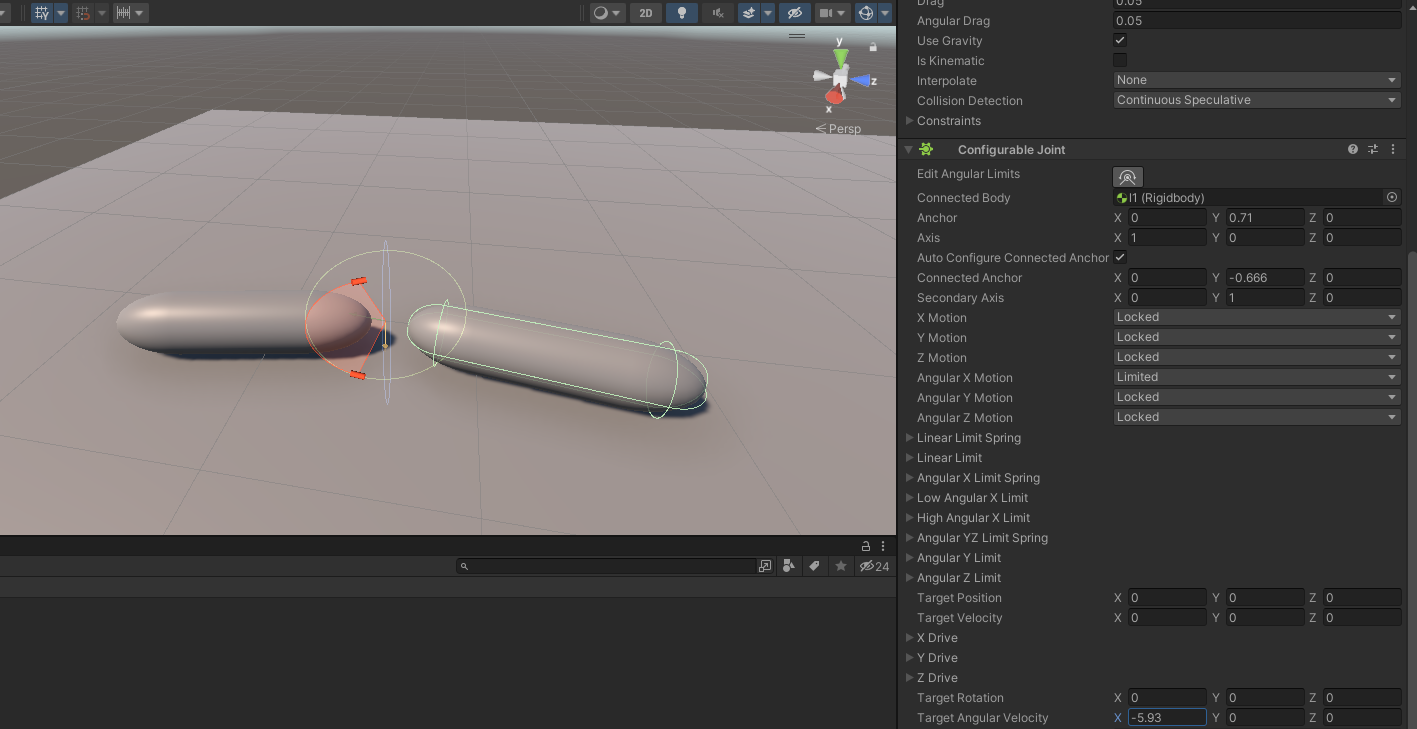
Unity Forum
[IMG]
And when I play with "Target Angular velocity"
[IMG]
both move simultaneously. I kind of expect that only the one (right and child) with...
median lava
timid dove
The details of your sphere casting may matter here. Are you doing this as a cust...
More or less, yeah. I'm doing it to predict when and where a launched spherical object will land before it's launched.
It may sound like a bit of clipping isn't a big deal, but here's an example of how it really messes things up. If we pick the same starting point A for the cast as in the above picture but only cast the sphere to where the actual collision should happen (point B) instead of all the way to the incorrect collision, sphere cast will say there wasn't any collision at all. However, any future spherecasts from point B will ignore the mesh collider entirely, since it starts within the bounds of the initial sphere because there should have been a collision. That means it's possible to perform a spherecast from point A to point B, and then another from point B to point C, and get no collisions returned even if there is a solid wall between A and C.
stable gulch
stable gulch
Hi guys. Maybe someone who has more exp with Unity joints, can help me out here ...
Updated the post to make the question more clear 🙂
timid dove
median lava
It may sound like a bit of clipping isn't a big deal, but here's an example of h...
yeah that "doesn't detect things it starts inside" behavior is exactly what I was worried about, Is there any chance the object you are trying to detect is moving?
median lava
I've confirmed that at point A Physics.OverlapSphere doesn't return any results, and it does return results at point B. The MeshCollider in question doesn't ever move.
median lava
timid dove
yeah that "doesn't detect things it starts inside" behavior is exactly what I wa...
Also note that casting from A in the direction of B, but with a long distance, it does generate a collision with the meshcollider, just the wrong one further away from where first contact is actually made. Since it can generate a collision with a longer distance, it seems pretty clear that it's not excluding the meshcollider from the search in the initial A to B spherecast, only the B to C one.
 strong shadow
I'm trying to use a wheel collider but the collider does not show up. I have rigidbody on its ancestor and gizmos should be turned on. Is there any other way to fix this issue?
timid dove
strong shadow
I'm trying to use a wheel collider but the collider does not show up. I have rig...
Double click the object that has the collider and make sure you haven't disabled that specific Gizmo
 modest cairn
boys, when sometimes my object are moving a bit fast, they seem to clip or pass through other objects
anyway to avoid this ?
perhaps another method of movement ?
would like to hear ur opinions about it
 lapis plaza
modest cairn
boys, when sometimes my object are moving a bit fast, they seem to clip or pass ...
lapis plaza
modest cairn
boys, when sometimes my object are moving a bit fast, they seem to clip or pass ...
CCD
modest cairn
lapis plaza
CCD
Much appreciated !
modest cairn
lapis plaza
CCD
a random question that I was thinking of, when using AddForce, is there a way to make it limited to a certain speed ?
stable gulch
modest cairn
a random question that I was thinking of, when using AddForce, is there a way to...
what kind of force?
There are 4 modes
lapis plaza
I don't even understand the question.. you can do your own velocity check prior applying addforce
unique cave
modest cairn
a random question that I was thinking of, when using AddForce, is there a way to...
Can you just clamp the magnitude of rb.velocity after that? Or do you want this particular force to have no effect after certain speed or?
lapis plaza
basically we are just guessing here what the end goal is so it's pretty hard to make suggestions
modest cairn
well, it's basically to set a speed limit, in a way
the reason why I guess I am asking is, I want the object to reach max velocity as soon as possible, but then cross that final speed no more
so, I guess you could say clamp the magnitude of rb.velocity after that amount of speed
lapis plaza
still wondering what the end application is.. like is this for limiting vehicle's max speed or something like that?
modest cairn
yep, limiting the vehicle's max speed
lapis plaza
you could do it the hacky way like that
stable gulch
modest cairn
yep, limiting the vehicle's max speed
Well in real life a motor can produce as much as force as it can. Maybe you should also find some sweet spot, that doesnt make it to fast
lapis plaza
or do it properly by computing the aero drag
modest cairn
well, my project isn't anything big, so I am fine with a hacky way to do it
is there like a maxLength() method like with strings, but with velocity ?
lapis plaza
magnitude
or length
but I'm going to assume unity's vector math lib uses magnitude
modest cairn
magnitude, that maxLength() was merely an example of something similar for strings
unique cave
Theres Vector3.ClampMagnitude
modest cairn
unique cave
Theres Vector3.ClampMagnitude
hmm, interesting
so, by also adding velocity I could also clamp it ?
or do add a new line of code where rb.velocity = vector3.ClampMagnitude( some number ); ?
 unique cave
modest cairn
or do add a new line of code where rb.velocity = vector3.ClampMagnitude( some nu...
unique cave
modest cairn
or do add a new line of code where rb.velocity = vector3.ClampMagnitude( some nu...
You need to put in two arguments, vector to clamp and max magnitude (max speed)
lapis plaza
where after constants being out of the way, you just have velocity ^2 multiplied by a constant and that's your counterforce
it's really simple in the end
modest cairn
hmm, seems interesting
I will try these out boys, thank you both
guess I needed those math classes after all xD
stable gulch
Can someone explain ArticulationBody.driveForce? It returns ArticulationReducedSpace which is really never explained properly.
 keen siren
i have one last thing got a sword which is my hand model which is also a fbx but i need to add collider to it when i do it dosent show up can anyone possibly help? (3d )
stable gulch
stable gulch
Can someone explain `ArticulationBody.driveForce`? It returns `ArticulationReduc...
nvm
 warm pilot
i'm working in 2021.3. can someone please explain to me ArticulationBody.SetDriveTargets?
it says Assigns articulation body joint drive targets for the entire hierarchy of bodies.
Number of degrees of freedom(DOF) for the articulation body can be found using ArticulationBody.dofCount.
so i call rootObject.dofCount and i get zero.
and i know I set all the joints to be at least one degree. if I call dofCount on each joint separately I get 1
so something is wonky here
 hard jacinth
why it go scrunchy?

 karmic leaf
is it possible to have both animation and rigid bodies at the same time?
for example maybe for example maybe i animate a character but i still want to give it rigid body physics so it can react when the character gets hit by a sword or crushed by a large object
unique cave
karmic leaf
is it possible to have both animation and rigid bodies at the same time?
for exa...
You could use the animation but enable the ragdoll/rigidbodies after its hit by something
 green thistle
Hello, I would to do a simulation of a car based on a trajectory i will have set( e.g from skidmarks and speeds) do you have any tips. tutorials?
 last halo
Hello. i want to move an object at a speed of n M/S using rigid.addforce(Forcemode Impulse), anyone got some tips to make this happen for me
its a bullet from a gun, but when i put real numbers like 660 to the addforce amount it comes up so slow until i put something like 35000 then it kinda makes sense ... What do i do
unique cave
last halo
its a bullet from a gun, but when i put real numbers like 660 to the addforce am...
Maybe the mass of bullet is wrong or youre using wrong forcemode. Why dont you use rb.velocity?
last halo
unique cave
Maybe the mass of bullet is wrong or youre using wrong forcemode. Why dont you u...
For bullet ???
unique cave
When shooting? Why not?
last halo
mhh interesting
how do i do it
what about the bullet drop and all the other stuff, or do i just tell it once when the bullet has spawned
unique cave
last halo
what about the bullet drop and all the other stuff, or do i just tell it once wh...
Yes, you tell it once and physics system takes care of rest
last halo
unique cave
Maybe the mass of bullet is wrong or youre using wrong forcemode. Why dont you u...
U might be right here coz i wasnt using any force mode
it was like Bullet.AddRelativeForce(new Vector3(0, 0, Stats.MuzzleVelocity));
now i changed it to Bullet.AddRelativeForce(new Vector3(0, 0, Stats.MuzzleVelocity), ForceMode.Impulse);
Or wat forcemode would you recommend coz i have read all four of them and i dont understand $%^$
unique cave
last halo
U might be right here coz i wasnt using any force mode
Youre using Force by default. But why are you using force to begin with if you want to give certain velocity?
timid dove
last halo
Or wat forcemode would you recommend coz i have read all four of them and i dont...
Just set the velocity directly if that's what you want
bullet.velocity = direction.normalized * desiredSpeed;```How could I go about doing that? I'm stull new a bit new to both unity and rididbodies
warm pilot
anyone here familiar with ArticulationBody? I have several questions and the API is poorly documented.
The drive will apply force to the body that is calculated from the current value of the drive, using this formula: F = stiffness * (currentPosition - target) - damping * (currentVelocity - targetVelocity)
ok first off that seems backwards, it should be target-currentPosition.
unique cave
karmic leaf
How could I go about doing that? I'm stull new a bit new to both unity and ridid...
Do you have the ragdoll physics working for the character already
warm pilot
@karmic leaf https://www.youtube.com/watch?v=oVPI2ESkgIw

Custom Ragdolls! You can use a Ragdoll on every amature based Object you want. I have chosen my bear object in my case. In this short video I will demonstrate how you can setup your custom ragdoll to use this on animals, monsters and every physics based object you need.
I provide you the complete project, hopefully this will answer every questio...
karmic leaf
warm pilot
<@287814398087790592> https://www.youtube.com/watch?v=oVPI2ESkgIw
ay thank you!
karmic leaf
unique cave
Do you have the ragdoll physics working for the character already
not yet, but im going to first watch the video robots sent to me
last halo
@timid dove & @unique cave all of these work the same and they work exactly the way i want. Thanks to you Guyz 🥳

This qn may not belong here but if I have weapon customization should i Spawn and Destroy attachments or just have them in the gun ready to enable them (using gameobject.setactive() ) . . .
 dense lintel
I have a capsule object with 'Rigidbody 2D.' The tilemap is currently a floor of tiles with 'Tilemap Collider 2D.' I can't figure out why they aren't working together. Am I missing something?
Nevermind I forgot the gosh darn collider.
unique cave
last halo
<@179367739574583296> & <@689758471003963472> all of these work the same and th...
Btw why are you getting the same component twice?
last halo
unique cave
Btw why are you getting the same component twice?
I know i could just get it once but idk why i didnt
wait getcomp<> uses alot of CPU right, wat am i doin .... this is bad practice. its a bad habbit i have to forget that code should also be optimised
unique cave
last halo
wait getcomp<> uses alot of CPU right, wat am i doin .... this is bad practice. ...
Nope, it doesnt use lot of anything. Just why to do same thing twice if one is enough. You can use get component 1000 times every frame and not notice any difference on framerate, its not that heavy at all. Use it when it makes sense. Instantiate is most likely taking much more time in this case but thats not that slow either
last halo
unique cave
Nope, it doesnt use **lot** of anything. Just why to do same thing twice if one ...
Yeah i saw a guy on YT who was just enabling and disabling attachments while i wad instantiating so that just got me thinking which one was better in terms of performance
but it just feels like its the same so i havent really bothered to change it
unique cave
last halo
Yeah i saw a guy on YT who was just enabling and disabling attachments while i w...
Object pooling is better but dont bother now, optimize your code later if needed
last halo
funny story i dont know whay object pooling is OR how to do it
unique cave
Try to make everything functional first and do optimizations later if you have noticeable lag spikes etc.
unique cave
Its good to know those concepts but you dont need to worry about optimization now. I dont think that code alone will cause any sort of performance issues. If you have 1000 of those running at the same time, then you probably need to do bit of profiling and see if you must do some optimizations, otherwise not
last halo
Thanks am watching brackeys XD
Get Skillshare: http://skl.sh/brackeys2
Speed up your game by setting up Object Pooling in Unity!
● Singleton Pattern: http://wiki.unity3d.com/index.php/Singleton
● Generic Unity Object Pooler: https://github.com/Rfrixy/Generic-Unity-Object-Pooler
● EZ Object Pools: https://assetstore.unity.com/packages/tools/ez-object-pools-28002
♥ Support B...
 thick lantern
Is there a good place to see values that work for Wheel Colliders <-> rigidbody?
I have tried a million different things but my car just keeps shaking like a chihuahua on a blender.
I have seen that a lot of tutorials on the internet use really small values (0.08) for wheel size, why is that?
bleak umbra
thick lantern
Is there a good place to see values that work for Wheel Colliders <-> rigidbody?...
You can’t fix something that is inherent in the system. To fix shaking you’d increase the dampening power of the shock absorbers and balance that with the spring strength and car weight
thick lantern
Wheel colliders are broken?
bleak umbra
No magic values exist
bleak umbra
thick lantern
Wheel colliders are broken?
They are not broken, they are just wheels, you need to add shock absorbers to the driving model
thick lantern
never heard of those, but ill search for it
bleak umbra
thick lantern
never heard of those, but ill search for it
Golden rule of physics sim in games: understand the real thing you are simulating.
thick lantern
Makes sense. I know what shock absorbers are in real life, but im testing this on a plane so I didnt think I'd need them. Also my shaking in in forward-backward, now up and down
bleak umbra
thick lantern
Makes sense. I know what shock absorbers are in real life, but im testing this o...
Would make for very difficult landing without them
thick lantern
a plane, as in, a plane floor, not a ✈️ :P
bleak umbra
Maybe you need to absorb floating point inaccuracies
But drag, friction and gravity should take care of those
thick lantern
I have a player separate from the car, but when sitting at the wheel, i make the player a child of the car. I thought that the problem could be of the camera, but parenting takes care of that right?
bleak umbra
thick lantern
I have a player separate from the car, but when sitting at the wheel, i make the...
It should
thick lantern
Yeah I just tested and left the car and it shaked even without me in it.
I didnt find any shock absorbers, but wheel colliders have those inherently right? The suspension distance + damping rate ? or is it a different thing?
bleak umbra
That’s the thing
warm pilot
how do i reset an ArticulatedBody to it's initial position? obviously it's more than just resetting the transform. I'm trying to reset a posable creature for ML training. My workaround has been to instantiate the prefab, play with that, and then destroy & reinstance at the next play-through. downside is I can't investigate the limb values because every new instance the heirarchy collapses in unity.
which is fair, and expected... and unfortunate.
stuck bay
my sphere keeps decelerating despite having zero drags and friction
how do i fix
oh its rotating, i dont know why
stuck bay
found the solution, which is to set "friction combine" to minimum in physics material
 warm pilot
nice follow up 🙂
hard jacinth
why ragdoll break leg?

like there is a joint there but it seems to just think there isn't
outside of the ragdoll it works fine

 drifting sleet
is there a way to make typical terrains behave less bumpy with wheel colliders
 keen siren
So im dealing with a third person controller and am also not too well-versed in Quaternions, but why is it that Vector3.forward * Quaternion.Euler(0, targetAngle, 0) would produce an error of operand * cannot be applied to Vector3 and Quaternion, but if you reverse the math to Quaternion.Euler(0, targetAngle, 0) * Vector3.forward it works fine?
bleak umbra
keen siren
So im dealing with a third person controller and am also not too well-versed in ...
because the multiplication of quaternions is not commutative, i.e. order matters
keen siren
okay that was an idea i had in mind, just couldnt think of the word. Appreciate it
drifting sleet
keen siren
So im dealing with a third person controller and am also not too well-versed in ...
it's true that quaternion multiplication is not commutative. but like any operator, it's whatever the programmer wants it to be. you could define an operator *(Vector3 lhs, Quaternion rhs) that does the rotation, if you want. if you're asking why unity chose to define the operator the way they did, my guess - it can only really be a guess - is that rotating a vector with a quaternion is a matrix operation X Y where the sizes of the matrices are X=(3,3) and Y=(3,1). so there's only one order you can multiply the matrices validly. and they're leaning on the symbolism of the * as multiplication
drifting sleet
hard jacinth
why ragdoll break leg?
that's a pretty hilarious bug
hard jacinth
drifting sleet
that's a pretty hilarious bug
it is, but i solved it, the pivot was set to the wrong bone
drifting sleet
warm pilot
how do i reset an ArticulatedBody to it's initial position? obviously it's more...
i think you should ticket it with unity to ask. that component exists for weird end user purposes
drifting sleet
thick lantern
I have a player separate from the car, but when sitting at the wheel, i make the...
the center of mass is wrong
you should use an asset. there's the car from standard assets, and also edy's vehicle physics, which is the car standard asset with lots of extras
thick lantern
I fixed it by making everything a lot smaller
idk why
all the numbers I saw on other things like this were really small, and it worked
didnt change the center of mass
warm pilot
drifting sleet
i think you should ticket it with unity to ask. that component exists for weird ...
oh? i've been using it with machine learning to teach a robot dog to walk. 😦
drifting sleet
warm pilot
oh? i've been using it with machine learning to teach a robot dog to walk. 😦
yeah
go ahead and ticket somewhere
report a bug is a waste of time
but if there's a github repo associated with it (e.g. ml agents) try that
warm pilot
drifting sleet
go ahead and ticket somewhere
somewhere
aye, there's the rub.
keen siren
drifting sleet
it's true that quaternion multiplication is not commutative. but like any operat...
Great explanation appreciate it
 stark wagon
Would anybody be willing to jump in a vc with me and explain some physics stuff?
I am so down bad with lerp
 fiery bolt
How do I check if RaycastHit was a hit or not in code?
 ivory shadow
anyone know how to addforce in the X direction? I did rb.AddForce in the jump but whenever I use it in theX it just snaps/teleports. Thanks
 supple sparrow
stark wagon
Would anybody be willing to jump in a vc with me and explain some physics stuff?
supple sparrow
stark wagon
Would anybody be willing to jump in a vc with me and explain some physics stuff?
You'll have better chances of an answer if you post here. Someone knowledgeable may read and answer. Or not !
supple sparrow
fiery bolt
How do I check if RaycastHit was a hit or not in code?
Physics.Raycast() and variants will return true on collision. Then you'll find the hit info in the out var. Check manual for an example
supple sparrow
ivory shadow
anyone know how to addforce in the X direction? I did rb.AddForce in the jump bu...
Not sure without seeing code but probably you have some code elsewhere setting the transform ? You can't do both transform override and moving through forces
Those will conflict each other and you'll witness the snap/teleport
ivory shadow
thank you for the response, I did fix it already
apparently when I do not disable the gravity while AddForce at X has value, it just won't move on the x, unlike in the y
 twin quarry
Hi, does somebody know if there is a way to get notified once the ContactPoints of a Collision update (2D)? I simply want an enemy to swap direction once he collides with a wall. However using OnCollisionEnter2D does not work for me, since I'm using composite colliders. So the wall is the same collider as the ground, and I only get one OnCollisionEnter2D for the ground, not when he collides with the wall. If not I will need to read the Contacts every physicsframe or do a Raycast.
timid dove
twin quarry
Hi, does somebody know if there is a way to get notified once the ContactPoints ...
You can use OnCollisionStay2D
you will get a callback every physics frame
you can check the contact points every time
 untold loom
Hello, I have a problem with collisions(triggering): When the weapon(the baseball bat) attacks then the enemy gets hit more than 1 time(so it gets more damage), because the enemy has many colliders attached. So it calls the method "Damage()" multiple times. I want to hit the enemy 1 time and call Damage() only 1 time. I added a collider on every bone
 timid dove
untold loom
Hello, I have a problem with collisions(triggering): When the weapon(the basebal...
timid dove
untold loom
Hello, I have a problem with collisions(triggering): When the weapon(the basebal...
What script is it calling Damage on?
some script on a parent of the colliders?
you can do something like:
HashSet<IDamageable> damagedThisFrame = new HashSet<IDamageable>();

void FixedUpdate() {
  damagedThisFrane.Clear();
}

void OnCollisionXXX(COllision other) {
  IDamageable c = other.collider.GetComponentInParent<IDamageable>();
  if (c != null && damagedThisFrame.Add(c)) {
    c.Damage();
  }
}```this way you'll only damage the unit once per physics frame
untold loom
When I hit the a bone(the collider of the bone) then a script on the weapon searches for the root gameobject of the hitted collider. On the root gameobject is a script attached named IDamageable. Then this script calls Damage()
timid dove
yeah - track which IDamageables you've damaged this frame so you don't do it multiple times
though I guess this mihg tnot be sufficient because you could hit another bone of the same character the frame after in a single swing right?
So we can modify it a bit...
untold loom
timid dove
though I guess this mihg tnot be sufficient because you could hit another bone o...
yes
timid dove
untold loom
yes
~~Ok it's slightly tricky but something like this: https://gdl.space/ehemokucol.cs~~
untold loom
thx, I'll try
timid dove
untold loom
thx, I'll try
Actually sorry - slight fix: https://gdl.space/umomatuqep.cs
untold loom
ok
untold loom
Same problem as before. It calls Damage everytime it collides with a bone/collider
No, I made a mistake. I works perfect thank you!!!
 woeful rapids
I need to half the value of a Quaternion, but I can't figure out how to do this. Does anyone know how?
Context: I have 2 Quaternions, a and b. I get the difference between them, c by doing c = b * Quaternion.Inverse(a), and I want to add that difference (c) to a, halving c every frame, so that the rotation slows down over time.
 odd osprey
Why does two of my objects collide on low speed, but they don't collide on higher speed?
One of them has Continious and the other one has Continious Dynamic Collision Detection
odd osprey
odd osprey
Why does two of my objects collide on low speed, but they don't collide on highe...
they just go through each other
Both of them has colliders and rigidbodies

 timid dove
odd osprey
they just go through each other
timid dove
odd osprey
they just go through each other
how are you moving them?
btw unless they're rotating, usually Continuous is the correct option
odd osprey
One of them is always rotating
And the other one is the player
The player is standing, and the rotating object goes through the player
Instead of pushing it away
timid dove
odd osprey
One of them is always rotating
how is it rotating?
How does the player move?
I'm looking for you to be specific here. Like show code
odd osprey
timid dove
how is it rotating?
 odd osprey
timid dove
How does the player move?
odd osprey
timid dove
How does the player move?
 timid dove
odd osprey
timid dove
odd osprey
you're rotating directly via the Transform
that bypasses the physics engine
try:
rb.MoveRotation(rb.rotation * Quaternion.Euler(0, value * Time.fixedDeltaTime, 0));```(where rb is the cylinder's rigidbody)
timid dove
is there a reason you're setting the position each time?
I think you should make the spinning bar kinematic
get rid of the position = line (line 19)
 normal leaf
I have a character with a cape and when I try painting constraints it doesn't work. Any ideas?

 lunar magnet
how do i switch from featherstone solver to gauss sleidel solver
stuck bay
is there a a way to make the model collide with its instance, but not internally

 oblique cipher
Y'all I know tons of people have solved this, but I don't see any definitive nor has anything worked for me yet.
The basic premise is. I have a sphere. I move it with force.
I have a few tiles, lined up using a the tilemap system's object brush (the tiles line up and are flush is what this is to say.)
When the ball rolls over a seam, the ball sometimes jumps.
I've tried the following: Using mesh combining scripts. Using the Mesh Combiner free asset (which is great). I've tried setting the ball from discrete to continuous, and continuous dynamic. The tiles just have a mesh and a mesh collider.
I've tried 2 different meshes, one that is "one sided" (not sure of the deffinition) and these which are full contained tiles. Both act the same way.
Anyone have any advice?


If it's any help this is using kenney.nl assets and the car controller from his patreon (with updates to use input system)
 storm drum
I want to build my own custom collider shape in code, creating a new class that extends https://docs.unity3d.com/ScriptReference/Collider.html . Anyone know of any examples online that I can use for reference?
storm drum
It's looking like subclassing Collider is not probably not possible. That's a shame. Is there a strategy I can use to make a MonoBehavior act like a Collider?
storm drum
Here's a different way I could do this... Is it possible to create collision shapes that cause collisions with rigid bodies only when portions of the rigid body are outside of the shape?
For example, a ball shape dropped on top of a cube shape, or thrown against the sides, bounces off the side it hit. But can I invert the cube shape, so that the ball can only ever be with the cube, and bounces around inside the cube?
Likewise, an inverted sphere body with a cube inside... Can that be done without resorting to mesh shapes?
warm pilot
I have a character made from 5 articulatedBody. I'm trying to train it with mlagents. when I reset the training scene there's a pause (probably resetting the physics objects?) and it appears to screw badly with the first physics frame after that. is there some obvious way to avoid this timing problem?
carmine basin
If I was to "grab" something using joints, would it be better to create the joint when it grabs, rather than having an existing joint and just changing the settings to lock it
warm pilot
great question! test it and see?
i imagine if I create the joint at time of grab then the positioning is perfect (grabbed thing will not "pop") and I can test "do you have a joint" to know if something is being grabbed.
 burnt tulip
Hello! well I'm making a pinball game and it goes something like this, but I want to make that when the "flippers" move by means of physics only one position of the flippers is stuck? i.e. I want to move only the tip and that the rest is stuck to the mini wall.
 warm pilot
so a pivot?
i'd make an invisible root body that is not affected by gravity and is immovable. then I'd attach both flippers with rotation constraint and angle limits (I'm familiar with doing this in an ArticulatedBody). Finally I'd make some sliders in editor to test the range of motion and the look/feel is right.
getting the mass of the flipper vs mass of ball right will be fun to tune.
 weak turtle
Hey, I am trying to make a drone that hovers in the air, so I tried turning gravity off for that drone, but as soon as its colliding with something its out of control and getting pushed back infinitely, is there a way to fix that?
oblique cipher
Does it work fine with gravity on? Using add force if under it's target position to stay up?
@weak turtle
bleak umbra
weak turtle
Hey, I am trying to make a drone that hovers in the air, so I tried turning grav...
Yes by applying drag https://docs.unity3d.com/ScriptReference/Rigidbody-drag.html
But aside from that you need to apply stabilizing forces
 slim ice
I'm using unity physics with DOTS, and I'm making a space game because we don't have a enough of those. lol. I have a cube on a spinning planet but it keeps falling off the planet instead of staying on the planet.

falls off

I'm guessing it's because everything just falls down using the Y axis, which wouldn't make sense in my case
timid dove
slim ice
falls off
This is called gravity ma'am
timid dove
slim ice
I'm guessing it's because everything just falls down using the Y axis, which wou...
Yes, you'll need to implement your own custom gravity system for a game like this
timid dove
It's not incredibly complicated, if you understand how forces work
And how gravity works
Basically you just apply a force towards the center of the planet
slim ice
well, I understand that there should be a force that pulls it towards the large mass and to stay on it, there should be a force holding it up
 gentle olive
Hello, I'm having a weird issue with what I think is a physics issue. Firstly, its a 2d game and for rotating the sprite left and right I change the scale of the parent game object. However if I jump (using Physics.AddForce(...)) I jump into a wall, than change the direction as I hit the wall my character clips into the 2d collider I have setup on the tilemap. In the example, if I try move right to get out of the wall, I'm stuck, but if I run left it shoots me back out to the right side of the collider (where I initially clipped).
I'm having trouble figuring out what exactly is happening here. Does anyone have any suggestions?
 timid dove
gentle olive
Hello, I'm having a weird issue with what I think is a physics issue. Firstly, i...
timid dove
gentle olive
Hello, I'm having a weird issue with what I think is a physics issue. Firstly, i...
Likely your collider is not totally centered or something, such that changing the scale ends up putting your collider inside the wall or something like that
gentle olive
timid dove
Likely your collider is not totally centered or something, such that changing th...
Thats what i thought and i checked and the sprites always centered with the colider
slim ice
Can I make a thread for my issue?
gentle olive
all my movement and physics is done in fixedupdate aswell
timid dove
gentle olive
all my movement and physics is done in fixedupdate aswell
Is it done using a physics friendly method?
gentle olive
here ill post the code since its not toooooo long and ill take out anything thats not needed for this question
protected virtual void FixedUpdate()
    {
        Vector2 worldMovement = new Vector2(inputVector.x * moveSpeed * Time.fixedDeltaTime, rigidBody.velocity.y);
        rigidBody.velocity = worldMovement;

        if (inputVector.x > 0 && !bFacingRight)
            Flip();
        else if (inputVector.x < 0 && bFacingRight)
            Flip();
    }

    // move to movement component
    private void Flip()
    {
        bFacingRight = !bFacingRight;
        Vector3 scale = transform.localScale;
        scale.x *= -1;
        transform.localScale = scale;
    }

    public bool DoJump()
    {
        if(CanJump())
        {
            isJumping = true;
            rigidBody.AddForce(new Vector2(0, jumpForce), ForceMode2D.Impulse);
            OnJumpEvent.Invoke();
            return true;
        }

        return false;
    }
DoJump is called from another component
not to sure what you mean by "physics friendly method"
my tilemapcollider2d uses a composite collider 2d aswell.
timid dove
gentle olive
not to sure what you mean by "physics friendly method"
as opposed to like.. directly modifying the transform or something
gentle olive
yeah using addforce. had a brain fart in initial question. i add the force on the rigidbody
slim ice
timid dove
You should disable the normal gravity
I looked online and found this example, hopefully this works
 gentle olive
@timid dove okay so i made the collider on the player wider and its not happening anymore...so i think your suggestion worked. Ill fiddle with it a bit more. Thank you so much!
slim ice
Here's the example in case others are interested https://github.com/Unity-Technologies/EntityComponentSystemSamples/tree/master/PhysicsSamples/Assets/Demos/6. Use Cases/PlanetGravity

GitHub
Contribute to Unity-Technologies/EntityComponentSystemSamples development by creating an account on GitHub.
gentle olive
slim ice
Here's the example in case others are interested https://github.com/Unity-Techno...
I was just about to ask for that. Looks like theres some cool stuff in there
slim ice
gentle olive
I was just about to ask for that. Looks like theres some cool stuff in there
Just making sure you are aware that the physics engine I'm using is experimental and buggy. I'm just testing what is possible for a prototype.
drifting sleet
just a basic marble game
 night latch
@drifting sleet (trying to accurately move a marble with physics) I am modeling the marble as uh, a rigid body with interpolate and continuous, and then a sphere collider with a physic material "marble" with some bounce and slight friction
drifting sleet
your run of the mill, standard, classic, no fuss, no muss, no problem marble game
drifting sleet
you take a marble
you put it in, a thing
and you move the thing, and the marble is supposed to move in the thing
but it don't move good
the thing that is running into the marble
that makes it not move good
what is it?
night latch
for this the character is actively moving the marble, and I'm wanting any collisions to just accurately add the forces (maybe be bad terms here) to the marbles. The thing is a rectangle, rotating with a script
drifting sleet
okay
the thing is a rigidbody that's kinematic
that you are rotating with a translate?
night latch
its kinematic yes
drifting sleet
see that was your mistake
night latch
transform
drifting sleet
if you want this thing to interact with the marble rigidbody correctly
it can't be kinematic
you have to add an angular force
/ set the angular velocity
night latch
well I have tried both I can uncheck that though
night latch
it's just floating in space spinning
hm, I forgot I changed it. It was kinematic because it would fall if not, I forgot what I did
night latch
night latch
it's just floating in space spinning
okay yeah I was just testing, also don't know the right way.
Do I have to build things physically sound to expect good physics, like I cant just make it float and stuff
wasnt trying to waste your time. Well, is there any good place to learn basics of physics?
thats what Im lookin fer ser
drifting sleet
night latch
okay yeah I was just testing, also don't know the right way.
Do I have to build...
yes
drifting sleet
night latch
wasnt trying to waste your time. Well, is there any good place to learn basics o...
not at all 🙂
i'm just messin
yes you should recreate things
in order for them to work well
based on what you described
it sounds like the ball gets hit by a rotating paddle
and it behaves weirdly
which is odd
pinball games work well in unity
night latch
while within the radius of the spinning paddle, it will be swept along with it just fine, at the right speed, centrifugal force gets it to the outside of the paddle, then once it's let go, it just doesnt carry it's speed.
but it's not glitchy or anything
well I guess it is? idk, it's the same every time, just wrong.
but I
'm down to recreate and learn right, just need some resources if anybody's got em.
maybe its unrealistic to expect, may be a lot. seemed simple enough lol
drifting sleet
night latch
while within the radius of the spinning paddle, it will be swept along with it j...
you might just need to increase the static friction of the ball
also the paddle probably needs to be much heavier
night latch
drifting sleet
also the paddle probably needs to be much heavier
yeah. hm can I send you a build or nah?
I tried that when it was kinematic
also, if it works, then my marble's speed was so fast that it was moving not 1:1 to it's skin. I had a better motion and lost the code in a tragic beginner mistake, so trying to start over as right as possible. I had it working veery well in this build with different physic materials.
it's okay if not. Mainly just looking for where to learn
night latch
got the motion back. it looks so dang good honestly. It looks like it's gonna sling it, then just all the momentum is a lie
I think it's more than the max speed of my marble's movement abilities and it just caps
yet, it moves that fast, while against the spinning unattached rectangle that is close to the ground
 static shore
Why my gameobject jumping left side on next frame? Can anyone help me with this hinge joint thing . i'm adding "connected rigidbody" at runtime on trigger enter.
 elfin flax
Hey which version of PhysX are we using in Unity??
bleak umbra
elfin flax
Hey which version of PhysX are we using in Unity??
PhysX 4.1
stuck bay
hello, new here and to unity how do i stop my object from falling from the damn cube that i want to use as a floor
 timid dove
stuck bay
hello, new here and to unity how do i stop my object from falling from the damn ...
timid dove
stuck bay
hello, new here and to unity how do i stop my object from falling from the damn ...
you need your objects to have colliders
and you need to move your moving objects in a physics friendly way
stuck bay
timid dove
you need your objects to have colliders
ok i added box collider to my dummy model

when i play the dummy doesn't fall down
but there's a gap between the dummy and the cube
is it supposed to be this way?
timid dove
stuck bay
but there's a gap between the dummy and the cube
You have an animator
it's probably oerwriting the position of your dummy
but also - show the scene view
show the collider gizmos
etc.
stuck bay
timid dove
You have an animator
i didnt follow
timid dove
try disabling the animator for a moment
 timid dove
You didn't have to delete it
disabling would have been fine
anyway - show scene view
and show the collider gizmos
stuck bay
timid dove
anyway - show scene view
 stuck bay
timid dove
turn on gizmos
stuck bay
timid dove
turn on gizmos

i downloaded basic motion model from asset store and they have all this basicdummymodeljump/idle etc etc
but how do i actually use it and get my model to jump or run?
timid dove
stuck bay
but how do i actually use it and get my model to jump or run?
I recommend using these: https://blog.unity.com/games/say-hello-to-the-new-starter-asset-packages
stuck bay
timid dove
see your collider is touching the floor
my collider isnt with my model?
timid dove
stuck bay
my collider isnt with my model?
you can see that it is not
stuck bay
how do i put them together ?
timid dove
move your model
stuck bay
where to?
 carmine abyss
Hi
Can someone help? I'm trying to add gravity to my cube but it won't work. I have gravity turned on in the rigidbody component. I can add a screenshot if needed.
timid dove
carmine abyss
Hi
Can someone help? I'm trying to add gravity to my cube but it won't work. I h...
show screenshots, yes
 carmine abyss
 carmine abyss


And that is it
I wanted to solve the gravity thing before i worked on the collision script
Also, in my project settings the y gravity is set to 9.81
timid dove
carmine abyss
I wanted to solve the gravity thing before i worked on the collision script
are you actually running the game?
is time scale set to 0?
carmine abyss
Time scale is set to 1 and I wasnt running the game in the picture but when I do it doesn't work
should I set the time scale to 0
timid dove
No... only if you want time to be paused
supple sparrow
carmine abyss
but when I enable the ground, the block just falls through
Does your ground have a collider ?
 wraith junco
So I'm working on custom raycast wheels. I got the suspension and turning right and I'm sort of faking sideways friction by cancelling out any sideways forces relative to the wheels. Can someone explain in laymans terms basic correct ways to do sideways friction?
Do I basically just have a "sideways force limit" where if it breaks it, the car is allowed to slide sideways a little bit while still cancelling out the sideways forces, but in smaller amounts?
timid dove
wraith junco
Do I basically just have a "sideways force limit" where if it breaks it, the car...
friction is generally modeled as coefficients of static and dynamic friction. Once static friction is overcome, you switch to the lower dynamic friction coefficient
stuck bay
I've got a weird problem if anyone can help. I'm making a simple pinball game, but the ball (with its own rigidbody and sphere collider) will pass right through the flippers (who also have colliders and rigidbodies) if they are in motion. I've made a little animation to show the effect (pardon the low framerate). All relevant parties have continuous collision detection. The flippers are actually tied to a empty object which rotates to give the flippers the right angle of motion. I've done a ton of research on this but have mostly just found people with the same unsolved problem.
 timid dove
stuck bay
I've got a weird problem if anyone can help. I'm making a simple pinball game, b...
timid dove
stuck bay
I've got a weird problem if anyone can help. I'm making a simple pinball game, b...
Most likely you're not moving your flippers in a physics friendly way
if you're just directly rotating them via the Transform for example, that's not going to do it
stuck bay
That's precisely how I'm doing it, thanks for confirming that. I've come across hinge components in my troubleshooting, would that be the direction to head into?
timid dove
no
The most straightforward way to do this is to use the MoveRotation / MovePosition methods on the Rigidbody. The Rigidbody should be kinematic.
and this should only be done in FixedUpdate
rotating via the Transform is akin to simply "teleporting" from one position to the other
stuck bay
Thanks for the tips!
storm drum
I've discovered ModifiableContactPairs in Unity. I have an interesting use case I'd like to discuss with someone that is deeply familiar with them. Please let me know if you can help.
 obtuse seal
Hi, I have a player that is using physics based movement that I wrote my self and has physic material with zero and minimum friction attached to it.
I also have models that I imported from blender, added box colliders to them and attached that same material to them too.
The problem is that for some reason my player is still getting stuck to the walls and all that.
Say that I am running and jump on to a wall, I won't fall down I'll just keep sliding along it or be stuck.
Could someone please help me figure this out?
obtuse seal
if you have an idea what might be causing it please @ me
 winter jetty
@obtuse seal if you are using rigidbody.AddForce for movement that could be what is causing that to happen
obtuse seal
winter jetty
<@576156118519119894> if you are using rigidbody.AddForce for movement that coul...
No, I am doing rigidbody.velocity += new V3...
 coral mango
That is definitely gonna cause problems.
timid dove
coral mango
That is definitely gonna cause problems.
why you say that?
and I ask because of my question in a certain other channel that you are also in...
obtuse seal
coral mango
That is definitely gonna cause problems.
well how am I supposed to make a physics based movement then?
coral mango
You're generally meant to add force rather than setting the velocity in most cases.
 quartz wyvern
so i have a RB that i toggle isKinematic on/off depending on a situation. but when i disable kinematic it continues on with the velocities it had before it was set to kinematic. so i fixed it with this:
_rigidbody.angularVelocity = _rigidbody.velocity = Vector3.zero; // cancel effects from forces etc
_rigidbody.isKinematic = true;
But according to unity you should not do this anymore it gives out a warning. So how do you clear previous data ?
timid dove
Something like this.
void FixedUpdate() {
Vector3 path = _destination - rigidbody.position;
Vector3 direction = path.normalized;
Vector3 velocity = direction * _speed;
// if our velocity would overshoot, we need to clamp the velocity a bit.
if (velocity.magnitude * Time.fixedDeltaTime > path.magnitude) {
velocity = path / Time.fixedDeltaTime;
}
rigidbody.velocity = velocity;
}``` meager latch
Hello
I started to work with wheel coliders.
Added four wheels to a thin rectangle and it span out of control upon landing on the terrain.
What could be the variabel that make it act this way?
Recreate my problem:
Game Object
Four child objects with a wheel collider
Set radius to 0.2
An rigid body to the first object
timid dove
it's creating a velocity that will travel the entirety of the path vector in a single fixed timestep
d = rt
so
r = d / t
d is distance, t is fixedDeltaTime
basically if you just kept the same speed velocity, you will overshoot in the last fixed update
this is to hit the target perfectly/not overshoot
meager latch
meager latch
Hello
I started to work with wheel coliders.
Added four wheels to a thin recta...
I solved the problem, it needs a box collider above the wheels 😄
timid dove
I think what you really want is a PID controller and to use forces
yeah they can be tricky but one you get it down it will give the most satisfying results I think
The best part about the PID controller is that it will allow your object to still be susceptible to outside forces, while still very convincingly doing what it's supposed to do
 ebon flax
Hello, i don't know where i can ask my question, so i'm gonna write here. I want create a a racing car game, but i don't know what is the better controller for my car : wheelcollider and the system associated or add a vector3 on my car... somebody can help me ? thank you 🙂
timid dove
"add a vector3" < whatever this is it sounds way too primitive to result in anything realistic
burnt tulip
Hey guys I have a problem
How can I make so that only the flipper moves and the anchor stays still? should I use some joint? and if so please give me an explanation on how it is, I already separated the sprites the flipper and the anchor, I just want to know how I can connect them by means of physics so that only the flipper moves and the anchor stays still.

 rich ember
hey all, does someone know answer to question ?
When i attach rotation script on object A (has mesh collider)
And when i drop object B on it with collider and rigid body , it falls onto it, but it does not rotate with a wheel itself then its standing and not moving at all
how can i apply rotation on object B to follow object A rotation without attaching same script on object B?
 stuck bay
I've got a hinge joint that works fine as long as the motor is disabled. When I enable the motor it ceases all movement. Any ideas why this is happening?
timid dove
burnt tulip
How can I make so that only the flipper moves and the anchor stays still? should...
there's no real reason to "connect" them. Just make the flipper's pivot at its... pivot point, make it kinematic, and rotate it with MoveRotation in FixedUpdate
timid dove
rich ember
hey all, does someone know answer to question ?
When i attach rotation script ...
that should happen automatically due to friction between the objects. The only way it wouldn't happen is if you:
- have a script overriding/controlling its rotation
- have rotation constrained
- are moving things in a non-physics-friendly way.
timid dove
burnt tulip
wdym?
that was the explanation. Which part are you confused about?
rich ember
timid dove
that should happen automatically due to friction between the objects. The only w...
Hm
Oke thanks for answer I'll check those conditions
timid dove
rich ember
Hm
Oke thanks for answer I'll check those conditions
most likely you're not rotating object A in a physics-friendly way
you're probably rotating it via the Transform
storm drum
So a few days ago I was in here asking about programmatic non-primitive collider shapes without using mesh colliders. I discovered ModifiableContactPairs and have been using those to solve my problems: https://forum.unity.com/threads/experiments-with-modifiablecontactpairs-inner-shape-collisions.1308105/
Unity Forum
I've figured out how to use ModifiableContactPairs to make a sphere collide with the inside of another larger sphere....
 cunning crater
Hi, im trying to match the rotation of my mesh collider with the rotation of the bone I attached it to. Its already matching transforms.


Any ideas?
I figured it out. I was linking it to the wrong bone >:|
ebon flax
timid dove
"add a vector3" < whatever this is it sounds way too primitive to result in anyt...
When i use the wheels collider système my car is shaking when i speed up
 umbral drum
hi guys, i'm trying to make a cube heavier on one or more corners, i've tried messing around with rigidbody.centerofmass but even tho the visual debug says my center of mass is correct, it does not work as i wanted to
here's my dice, the blue balls are the corners that's supposed to be heavier, to do this i'm iterating through all the corners, adding the normalized difference from the corner to the dice center to a temporary vector3, this part is working fine, i can get the center of mass where i wanted to

but my cube doesn't lands on the correct corner
instead i'm getting some weird gravity-related issues

the centerofmass of my cube looks like this (yellow dot), but he doesnt lands on the side i wanted

 sage yoke
https://github.com/AoTTG-2/AoTTG-2/issues/453
Guys i'm working to a project with some other peoples, and we are tryning to create a remake of a game that was originally created on Unity 4, now we are using unity 2020, but since that we're having throuble related to the update of PhysX, and we are getting very bouncy collision, can someone help me to figurate out how to fix it?

GitHub
Introduction Alright, so this one is going to be quite lengthy to read and will deviate slightly from the standard format as I want to include as much detail as possible on this issue. This is an i...
 supple pawn
Anyone has any idea why the object is not rotating? I made my own implementation of a damped spring system in Unity and that seems to be making that problem,
    {
        float force;
        float _damper;

        Vector2 direction = (upperPos-lowerPos).normalized;
        Vector2 velocity = Lower.velocity;

        force = springForce*(travel-Vector2.Distance(upperPos, lowerPos));

        if(useRelativeDamping)
        {
            damper = (springForce*travel)/relativeDamper*multiplierDamper;
        }

        if (Vector2.Distance(upperPos, lowerPos)<previousDistance)
        {
            _damper = damper*compression;
        }
        else if (Vector2.Distance(upperPos, lowerPos)>previousDistance)
        {
            _damper = damper*rebound;
        }
        else _damper = damper*compression;

        Lower.AddForce (force * -direction - (velocity-Upper.velocity) * _damper*Time.deltaTime);
        Upper.AddForce (force * direction + (velocity-Upper.velocity) * _damper*Time.deltaTime);
        previousDistance = Vector2.Distance(upperPos, lowerPos);

        //Debug.Log(force);
        //Debug.Log("currentTravel = "+ Vector2.Distance(upperPos, lowerPos));
        currentTravel = Vector2.Distance(upperPos, lowerPos);
    }

    void FixedUpdate()
    {
        Vector2 upperPos = Upper.position;
        Vector2 lowerPos = Lower.position;
        if(isShock)
        {
            upperPos = lowerPos + new Vector2(0,travel);
        }
        Spring(upperPos, lowerPos);
    }```

When I lower the spring stiffness, the error stops being as drastic, I'm  guessing the problem is on these lines
```Lower.AddForce (force * -direction - (velocity-Upper.velocity) * _damper*Time.deltaTime);
        Upper.AddForce (force * direction + (velocity-Upper.velocity) * _damper*Time.deltaTime);```
Maybe the direction calculation is not right,
`Vector2 direction = (upperPos-lowerPos).normalized;`Porfavor
 quasi kestrel
supple pawn
Anyone has any idea why the object is not rotating? I made my own implementation...
quasi kestrel
supple pawn
Anyone has any idea why the object is not rotating? I made my own implementation...
cool stuff
supple pawn
quasi kestrel
cool stuff
Only if it worked
quasi kestrel
oh well.. shoot
carmine basin
So, might be a bit weird what I'm doing here. I want to make something animated interact physically with other things.
Two approaches I'm thinking of are this - use some kind of maths thing + non-physical hit detection then add forces to target bones/entities
or
Active ragdoll setup for just the player's upper torso. That way, the legs animate perfectly but the arms have the physics that I want
stuck bay
carmine basin
So, might be a bit weird what I'm doing here. I want to make something animated ...
for ur first approach u cant add force to animated body
carmine basin
I don't mean adding a force to the animated body. I have an active ragdoll for my monsters
So they're physically simulated
stuck bay
if u have an active ragdoll, then u need nothing more than that
carmine basin
Could I just add a kinematic rigidbody and colliders onto my player's weapons for hit detection?
stuck bay
sure add rigidbody to weapon just as u did for bones
supple pawn
supple pawn
Anyone has any idea why the object is not rotating? I made my own implementation...
No one knows why that might be happening? Maybe I'm not taking mass into account or some weird physics stuff
supple pawn
supple pawn
Anyone has any idea why the object is not rotating? I made my own implementation...
The problem seems to be in the (velocity-Upper.velocity) calculation...
Upper.AddForce (force * direction + (velocity-Upper.velocity) * _damper*Time.deltaTime);``` potent notch
not quite certain if this is the place to ask, but im trying to create metaballs, and cant find any tutorials anywhere, does anyone have links to any good begginer tutorials/articles?
sage yoke
did someone here ever tried to write a custom physic engine?
unique cave
sage yoke
did someone here ever tried to write a custom physic engine?
Someone for sure have did that. Just ask your question and someone will answer if they know
sage yoke
basically i would like to remake the PhysX engine that use unity 4, but never tried to do similar things
timid dove
PhysX is open source - so I don't see why you would need to rewrite it from scratch.
what you would have to do is create managed wrappers in C# around all the PhysX stuff via https://docs.unity3d.com/Manual/NativePlugins.html
sage yoke
timid dove
PhysX is open source - so I don't see why you would need to rewrite it from scra...
i want to have the version of PhysX engine from unity4 to unity 2020
sage yoke
since i've never done a similar thing before i'm a little bit lost
timid dove
it's not trivial. It's probably not worth the effort
unique cave
sage yoke
i want to have the version of PhysX engine from unity4 to unity 2020
But why? Because there was dynamic mesh colliders? Btw it was also much less optimized
sage yoke
unique cave
But why? Because there was dynamic mesh colliders? Btw it was also much less opt...
tbh i'm not really sure that this will fix the issue, but i'm remaking a game made with unity 4, and i upgraded the engine in the 2020 and the collisions now are strange, even tho it's the exact same as the old one
so i think that is because of the physx update
unique cave
sage yoke
tbh i'm not really sure that this will fix the issue, but i'm remaking a game ma...
Lol, and first thing that came into your mind was to remake the physics engine to make it work 😅. You know people make games with newer unity versions too?
sage yoke
unique cave
Lol, and first thing that came into your mind was to remake the physics engine t...
not really
i tried to mess arround with everything
changing controllers, physic materials, even made a collision dumper script
but nothing give the same feeling as the original game
unique cave
sage yoke
but nothing give the same feeling as the original game
Maybe try to ask that then instead of recreating everything, as I said, theres many cool games made with newer unity versions too. Youre trying to find a way to make your incredible solution work instead of fixing the original issue (xy)
sage yoke
unique cave
Maybe try to ask that then instead of recreating everything, as I said, theres m...
the fact is that i don't find any issue with the game itself and with the collision itself, since those are identical to the old version of that game, and even tryning to change physics settings dosn't look to change anything
i don't want to remake the Physx system, it will be a pain xD, but i didn't find any other solution
unique cave
sage yoke
i don't want to remake the Physx system, it will be a pain xD, but i didn't find...
Solution to what? Maybe try to ask your actual issue with all relevant details and maybe some image/video comparisons. Most likely someone here would know the ”other solution”
sage yoke
i already sent them a little while back, i sent it again give me 5 seconds
https://github.com/AoTTG-2/AoTTG-2/issues/453 here it's a detailed post on the issue
GitHub
Introduction Alright, so this one is going to be quite lengthy to read and will deviate slightly from the standard format as I want to include as much detail as possible on this issue. This is an i...
unique cave
sage yoke
https://github.com/AoTTG-2/AoTTG-2/issues/453 here it's a detailed post on the i...
What collision detection mode are you using for the character?
sage yoke
unique cave
What collision detection mode are you using for the character?
Continuous Speculative (sorry for the late answer)
i tried also to change that, but seems always off
unique cave
sage yoke
i tried also to change that, but seems always off
That seems very buggy… maybe youre screwing something up in the character controller script? If you just let the character freefall at the same height and angle without any controller scripts attatched, does that still happen?
 tawdry lodge
i just started can anyone tell me how to add physics to a 2d object?
unique cave
tawdry lodge
i just started can anyone tell me how to add physics to a 2d object?
Watch any 2d physics tutorial
tawdry lodge
unique cave
Watch any 2d physics tutorial
ok
sage yoke
unique cave
That seems very buggy… maybe youre screwing something up in the character contro...
i can check, but problaby nothing will happen since those bounce happens only with an high speed and we kinda fixxed the collision on the floor, are only the walls that seems odd
unique cave
I think simply continuous is the mode youd like to use in this case
unique cave
sage yoke
i can check, but problaby nothing will happen since those bounce happens only wi...
So what about the walls?
sage yoke
they are regoular static object with non convex mesh collider

walls and trees
both have issue on collision
unique cave
What issue
sage yoke
after the collision the character less very low speed

the trajectory seems to be the same exact one, but the speed is always a little bit more
unique cave
I think the new one is probably more accurate tho
sage yoke
mhh not really, or at least not for the old community of that project, basically if u keep all that speed u can bounce between multiple trees a lot of times before stopping
before this project there was another one to try to make a "remake" of that game, and also in that version there are collision issue, so i don't think that is because of code, but because of updated PhysX engine, even tho i'm not 100% sure
unique cave
Maybe the engine have changed but I doubt they made it less physically accurate
sage yoke
maybe it's "more accurated" in this way, but the main problem is that the community of that game is used to having the old collisions, and the game feels a lot better with the old ones
unique cave
Maybe you can decrease the speed yourself based on he impulse on every OnCollisionEnter (maybe filter ground collisions out of those calculation if you want only wall bounces)
sage yoke
yeah but i'm not quite sure on how to do that since we need to check both speed and angle of collision
unique cave
Dot product between the normal of the hit and velocity could be helpful
Or complement of that rather
-dot(normalOfHit, velocity) should give 1 when hitting the wall at perpendicular angle and 0 when hitting the wall at parallel angle (meaning you are going same direction as the wall and barely touch it). The value of the dot product also give anything between 0 and 1 depending on the angle and velocity. When you get smaller value, the change in velocity should be smaller I think. You should use the unmodified velocity (not the one thats already affected by the hit. I beleive the value of rb.velocity is already changed when OnCollisionEnter is called, im not sure tho) for the velocity so youd need to keep track of the velocity in every FixedUpdate to get the velocity before the impact.
sage yoke
ok, i will try that, thank you ^^
unique cave
Good luck. I have to go to bed now, I’ll be here tomorrow at some point

 floral fossil
How do I prevent stuff clipping through other stuff when working with high speeds?
timid dove
floral fossil
How do I prevent stuff clipping through other stuff when working with high speed...
- make sure your objects are moving in a physics friendly way
- Use continuous collision detection on the fast moving body
- make thebodies larger
- make them move more slowly
- do custom raycasting/spherecasting etc in FixedUpdate
floral fossil
I'll try those, thanks!
torpid marten
Can someone explain to me what exactly "Convex" means on Mesh Colliders? I have a thin cube with a hole inside which i wanna use as a wall with a door, but Unity says this needs to be a Convex to work, however the with convex enabled, the hole gets ignored in the collision mesh
 frigid pier
torpid marten
Can someone explain to me what exactly "Convex" means on Mesh Colliders? I have ...
frigid pier
torpid marten
Can someone explain to me what exactly "Convex" means on Mesh Colliders? I have ...
Don't make it dynamic physics object. Static objects are fine with non-convex mesh colliders
torpid marten
Well i need it to be a wall on a space ship so it has to move at some point
What exactly is the difference between convex and non convex?
frigid pier
Kinematic works as well
It's limitations of the PhysX AFAIK
Convex shape is easier to calculate collisions for

 timid dove
doing it "on a thread" may not be possible with Unity's physics engine for GameObjects
you can do multi-scene physics to do a bespoke physics simulation though
 tribal sluice
my game is getting laggy is this too many rigidbodies
 timid dove
tribal sluice
my game is getting laggy is this too many rigidbodies
timid dove
tribal sluice
my game is getting laggy is this too many rigidbodies
You should use the profiler to diagnose any framerate issues before jumping to any conclusions about a cause.
tribal sluice
WHAT IS THIS
why are my rigidbodies misbehaving???
slightly devious
rather mischievous
utterly unacceptable
timid dove
tribal sluice
WHAT IS THIS
that tutorial famously doesn't work
because the truck is not moving in a physics friendly way
you'd need to move it via the Rigidbody, but the tutorial moves it via the Transform
tribal sluice
i tried making it move with rigidbody.AddRelativeForce but it kept going all sussy
wait that was while i was still multiplying by Time.deltaTime in the OnMove function
tribal sluice
ok thanks :)
i'll try that
omg the turning on this truck is so smooth!
can you get a degree in writing bad code
because if you can i know what i'm doing at uni
wait isn't that just eventually malware
ok this actually works decently now thank you very much for the help! :)
 neon solstice
Hello. I have added a simple character movement controller using physics
{
    // forward movement speed
    public float forwardSpeed = 25f;
    // side to side movement speed
    public float strafeSpeed = 7.5f;
    // how fast we move up and down
    public float hoverSpeed = 5.0f;
    public float rotationSpeed = 25.0f;

    private float activeForwardSpeed;
    private float activeStrafeSpeed;
    private float activeHoverSpeed;

    private float activeRotationSpeed;
    // Start is called before the first frame update
    void Start()
    {

    }

    // Update is called once per frame
    void Update()
    {
        activeForwardSpeed = Input.GetAxisRaw("Vertical") * forwardSpeed;
        activeStrafeSpeed = Input.GetAxisRaw("Horizontal") * strafeSpeed;
        activeHoverSpeed = Input.GetAxisRaw("Hover") * hoverSpeed;
        activeRotationSpeed = Input.GetAxisRaw("HorizontalTurn") * rotationSpeed;

        Vector3 forward = transform.forward * activeForwardSpeed * Time.fixedDeltaTime;
        Vector3 strafe = transform.right * activeStrafeSpeed * Time.fixedDeltaTime;
        Vector3 hover = transform.up * activeHoverSpeed * Time.fixedDeltaTime;
        Vector3 torque = transform.up * activeRotationSpeed * Time.fixedDeltaTime;

        Vector3 movement = forward + strafe + hover;
        // this.GetComponent<Rigidbody>().MovePosition(this.transform.position + movement);
        this.GetComponent<Rigidbody>().AddForce(movement);
        // https://docs.unity3d.com/ScriptReference/Rigidbody.AddTorque.html
        this.GetComponent<Rigidbody>().AddTorque(torque);
    }
}
It was working fine