#⚛️┃physics
1 messages · Page 71 of 1

 summer fog
disregard my comment about how frequently
 frosty ore
i mean it feels ok
summer fog
just don't modify position
frosty ore
yea yea.. i gotcha
i realized after i bought this controller
it has an array of raycasts and it positions itself above the ground
instead of using the regular gravity only when its not grounded does it use gravity
so i gotta make do if i want it to interact with anything beneath it :smh:
frosty ore
makes sense..
ill just take the gravity variable fromt he physics system and multiply it by my weight instead of using magic numbers
frosty ore
ill give that a try too 👍
 mighty sluice
gravity is an acceleration that applies equally to all masses
frosty ore
right now im just brainstorming something that isnt gonna break later on lol
right now its still kinda funky when u walk to the edge of something thats physics based
but thats just my overlap sphere i think..

i think i fixed her up.. we'll find out
 vapid tusk
I need to get the velocity of a game object. Can I get the velocity of a game object, directly from the game object or the Transform, or do I need to have a RigidBody on the game object in the scene, to get Unity to give me game objects's velocity?
 sweet snow
vapid tusk
I need to get the velocity of a game object. Can I get the velocity of a game ob...
sweet snow
vapid tusk
I need to get the velocity of a game object. Can I get the velocity of a game ob...
You need a rigidbody to have velocity.
vapid tusk
@sweet snow Thank you.
 stuck bay
@lost hornet how you doin?
 wide nebula
!warn 847765690513358849 Don't tag/disturb random users.
 flint portalBOT
 Jerry/GameDev#2678 has been warned.
wide nebula
Don't spam please. Just move on.
stuck bay
wide nebula
Don't spam please. Just move on.
ok
stuck bay
can i post that here?
 abstract aurora
Hey do stuff like collision events in scripts get called between 2 layers that aren't set to interact with each other on physics menu? ( basically is the physics menu only for rigidbodies or its for all script interactions as well ? )
 shell adder
abstract aurora
Hey do stuff like collision events in scripts get called between 2 layers that a...
shell adder
abstract aurora
Hey do stuff like collision events in scripts get called between 2 layers that a...
collision events rely on rigidbodies so i think the physics menu applies to them as well
Collision events are only sent if one of the colliders also has a non-kinematic rigidbody attached.
https://docs.unity3d.com/ScriptReference/Collider.OnCollisionEnter.html
 abstract aurora
ok well my question is still about physics layers though
shell adder
yeah so anything that has a rigidbody or relies on rigidbodies, will follow the physics layer menu
abstract aurora
oh i see ok thanks
stuck bay
Hi all. I have a pretty simple question - I'm working on a car game with my girlfriend just for fun, and I'd like to add "destructibles" such as lamp posts, benches, bins, etc... I already know how to get collision and rigidbodies working just fine to get most of the effect going, but I also need a way for the objects to stay in their correct spot until the car crashes into them. Like the lamp posts, those just fall over when I play the scene. Am I missing a simple and obvious checkbox or option somewhere, or do I need a script? Or something else entirely?
 ruby prawn
Why when I activate the interpolation on a rigid corp the corp may fall at blocking lapses?
wide nebula
stuck bay
Hi all. I have a pretty simple question - I'm working on a car game with my girl...
One option is to turn off gravity for that object. When you collide with it, turn gravity on.
stuck bay
@wide nebula Well that's what I'm trying to achieve, but how? Is there a toggle or do I need a script?
wide nebula
You can see the gravity on the on the rigidbody component's inspector. You can access this in code and setting it to true or false.
stuck bay
So there's no simpler way than a script.... 🙁
 timid dove
Read what he said again
But in order to switch the gravity on collision yes you will need a script
stuck bay
Well I know about the toggle, but how do I make it switch state on collision? Yes, I'm pretty dumb
Ah. Yeah there we go.
Well, thanks
wide nebula
Look up how to use GetComponent, which you can use to grab the rigidbody off the object you're colliding with. Then from there set the bool to true.
Not the cleanest way to handle it, but it's beginner friendly.
stuck bay
Hi.
 wraith flame
hi
 wraith junco
Anyone here ever make a rigidbody helicopter or airplane?
 vocal charm
guys can someone direct me into the correct channel cause i wanna make a 3d character controller using pureley raycasts
shell adder
i think here or #archived-code-general would be fine
vocal charm
ty
timid dove
wraith junco
Anyone here ever make a rigidbody helicopter or airplane?
I made a drone
 stuck breach
I can't send colliders . Why?
 timid dove
stuck breach
I can't send colliders . Why?
timid dove
stuck breach
I can't send colliders . Why?
Collider and Collider2D are different
stuck breach
True thx
stuck bay
How do I fix this? As you can probably tell, I can't code

I copied this from a thread I found where it was OnTriggerEnter, but I'd like to use it on collision instead
 wide nebula
Right, sorry, the parameter is type Collision.
https://docs.unity3d.com/ScriptReference/Collider.OnCollisionEnter.html
stuck bay
Oh I see. Sorry, I know just about nothing about coding. Thanks
 outer shadow
I'm trying to have the bullet that the player fires collide with the walls the same way it collides with the enemy (white character) , any tips?

this is my code for it
timid dove
outer shadow
Why not just do:
void OnCollisionEnter(Collision other) {
  Destroy(gameObject);
  Instantiate(poopPart, transform.position, transform.rotation);

  if (other.gameObject.TryGetComponent(out EnemyHealthManager ehm) {
    ehm.HurtEnemy(damageToGive);
  }
}```
e.g. ALWAYS do the particle thing and the destroy thing, and just do the damage enemy thing if you hit an enemy.This way you don't repeat your code.
outer shadow
thanks, the bullet still doesnt get destroyed when it collides with the walls however
timid dove
outer shadow
thanks, the bullet still doesnt get destroyed when it collides with the walls ho...
Well one problem is you're using Transform.translate to move the bullets which ignores physics
another problem is that, for a collision to happen:
- Both objects need colliders
- One of the objects needs a Rigidbody
- Neither collider can be a trigger
I suspect you don't have a Rigidbody on the bullets or the walls
so there's no collision
If you don't have a rigidbody on a collider, it's considered a static collider, and Unity doesn't expect static colliders to move.
outer shadow
how should I go about changing this? fairly new to programming not exactly sure what to do
timid dove
I just explained what you need in place to get the collision to happen
You need to modify your GameObjects to satisfy those conditions
It's not even really a programming problem
outer shadow
thanks got it working now 🙂
 wary ferry
so I have a Tilemap with a Platform Effector, Rigidbody2D (static), and a Tilemap Collider 2D on it, but for some reason when my player jumps and then lands on top of a tile, it takes a second for it to realize that it's on the ground. I check if it's on the ground by calling a raycast from the character straight down and seeing if it hits the ground, but for some reason I guess it takes a long time to complete it. There shouldn't be any problems with my script, as I tried it on a GameObject with just a box collider 2d, platform effector, and a static rigidbody and it worked exactly as it should. Anyone know why this could be happening?
timid dove
wary ferry
so I have a Tilemap with a Platform Effector, Rigidbody2D (static), and a Tilema...
raycasts happen immediately
Maybe share a video/code of what you're seeing?
wary ferry
I'm not at my computer rn, but basically in FixedUpdate I call a raycast straight down, and if it hits something it sets "isGrounded" to true. Looking in the inspector, isGrounded isn't set to true until maybe a second after touching the ground. Not sure what specifically I can mention that would be important, but I can send anything once I get back
timid dove
It's really impossible to say without looking at the project. The raycast might not be in the right spot, it might not have the right distance, it might not be using an appropriate layer mask, who knows.
Could theoretically be an Update/FixedUpdate timing issue
¯_(ツ)_/¯
wary ferry
Yeah I'll send a video and code once I get back, hope fully that will help
I'm just confused why it works fine on a single game object but gets messed up on the tilemap
stuck bay
for some reason, the force increases itself alone, any idea why?
timid dove
stuck bay
for some reason, the force increases itself alone, any idea why?
not without seeing your code
stuck bay
timid dove
not without seeing your code
public class HumanLauncher : MonoBehaviour
{
    public int Force;
    public static Rigidbody Player;
    public static Transform Clown;
    // Start is called before the first frame update
    void Start()
    {
        Force = 170;
        Player = GetComponent<Rigidbody>();
        Clown = Player.transform.parent.parent.parent.parent.parent.parent.GetComponent<Transform>();
        RagDollOff();
    }

    // Update is called once per frame
    void Update()
    {
        if (Input.GetKeyDown(KeyCode.Space))
        {
            Clown.SetParent(null);
            RagDollOn();
            Player.AddForce(Player.transform.up * Force, ForceMode.VelocityChange);

        }
    }

    void RagDollOn()
    {
        foreach (Rigidbody Rbody in RagdollRigidbodies)
        {
            Rbody.isKinematic = false;
        }
    }

    public static Rigidbody[] RagdollRigidbodies;
    public static void RagDollOff()
    {
        GetRigidbodies();
        foreach (Rigidbody Rbody in RagdollRigidbodies)
        {
            Rbody.isKinematic = true;
        }
    }

    public static void GetRigidbodies()
    {
        RagdollRigidbodies = Clown.GetComponentsInChildren<Rigidbody>();
    }

    public static void ChangeTags()
    {
        foreach (Rigidbody Rbody in RagdollRigidbodies)
        {
            Rbody.transform.tag = "Target";
        }
    }
}```eh... Seems like it would always be 170 to me... but what object is this script attached to?
stuck bay
the head of the ragdoll
stuck bay
to spawn them from other script
timid dove
you have one of these scripts on each clown
and since Player and Clown are static - every copy of the script is running Update at the same time
so they are all adding forces to the same clown
stuck bay
ok yes
timid dove
in a nutshell - don't use static variables. You don't need them to access things from other scripts
stuck bay
how do i spawn them then?
timid dove
To spawn a prefab? Just create a serialized variable:
public HumanLauncher myPrefab;
assign that to your prefab in the inspector
and instantiate it:
HumanLauncher instance = Instantiate(myPrefab);```then you can do anything you want with instance
stuck bay
cool , thanks
wary ferry
is it ok to do RigidBody2D.AddForce within Update? I know FixedUpdate should be used for physics, but I am using Input.GetKey for movement right now and that is making it overly complicated (have to have a bool to check if the key was just pressed for each type of movement, would be easier to use Input.GetKeyDown instead but sometimes it isn't called when I put it in FixedUpdate).
Is that ok to do? I would also be calling Raycasts in there
I can't think of a reason that this could be a problem, but Ive been told FixedUpdate is the place to put physics calculations
shell adder
wary ferry
is it ok to do RigidBody2D.AddForce within Update? I know FixedUpdate should be ...
really u should be doing all physics (including raycasts) in fixed update as it is more consistent than update and so will produce more reliable results across the board, and ur right with putting input in update as sometimes fixed update can miss inputs, but it is definitely worth it (at least for me ) to have the 'complication' of setting a bool to true than false in order to have both reliable input and reliable physics
 limpid hornet
Idk if this is a physics thing or what the actual cause it, but I need to figure out why this is happening. This is made from two models arranged like tiles on a grid. The each have a mesh collider. According to Blender the models edges are identical -- I checked the position of each vertex and they all coincide with the vertex on the other model. Yet my ball doesn't roll smoothly across the seam.
 shadow seal
@limpid hornetI think you should manually place box colliders in the place of all of the mesh colliders
unless this is procgenned
then I think there's a problem
stuck bay
limpid hornet
Idk if this is a physics thing or what the actual cause it, but I need to figure...
you can use probuilder to make them a single object that will solve it
 devout token
limpid hornet
Idk if this is a physics thing or what the actual cause it, but I need to figure...
devout token
limpid hornet
Idk if this is a physics thing or what the actual cause it, but I need to figure...
There are some solutions to this that work for some but not for others
-Combine them into one solid collider
-Make sure your floor collider is a simple plane so it doesn't have walls that the ball can catch on
-Set the rigidbody to use continuous collision detection or continuous dynamic if your tiles aren't static
-Mess with physics settings like Default Contact Offset or Default Solver Iterations
-Disable gravity on the ball while it's rolling using a tiny ground check
wary ferry
Figured out what I was doing wrong, I had my groundcheck like a pixel too low and I guess starting the raycast inside of the ground itself which apparently causes it to ignore the collider it's inside of
 rigid furnace
Hey all, I'm trying to work out car physics at the moment after seeing a document written by Marco Monster (https://asawicki.info/Mirror/Car Physics for Games/Car Physics for Games.html), and I'm trying to work out how to write this in Unity code:
    Ftraction = u * Engineforce,
where u is a unit vector in the direction of the car's heading.```How do I get u in this situation?
 tacit laurel
I thought heightmap based terrain collider is way faster than concave mesh collider!! on switch it's super slow at least with these settings. Anyone knows more about terrain collider?
 tacit laurel
90k with concave mesh collider
yet the concave mesh collider is much more performant
 young nest
How bad are mesh colliders? Like, I want to be able to shoot through fences nicely in an Oculus Quest game. Is that ok to just use the Mesh Collider, do you think, or will I have to make a bunch of box colliders?
rigid furnace
young nest
How bad are mesh colliders? Like, I want to be able to shoot through fences nic...
That would depend on the amount of vertices you have on those fences
Can you send a screenshot of the fence that you have right now?
It really depends on the kind of fences you're working with
young nest
 rigid furnace
In this case you're better off using a bunch of narrow box colliders from what I see
young nest
I figure the front gate is a no-go and I'll make it destructible, but the side fences might be good to shoot through
young nest
rigid furnace
In this case you're better off using a bunch of narrow box colliders from what I...
ok thx
rigid furnace
Although for the top portion you might wanna do something simple
since it kinda curves you can either:
rigid furnace
oh good
young nest
No one will be up there
I think....
So pretty much NEVER use Mesh Colliders unless they're super simple convex shapes, yeah?
rigid furnace
Ahhh
Nah
It's more like
mesh colliders is more or less used for if you want to have more detail
for the collision for the object
However for a system like the Quest
you wouldn't want to make that kind of sacrifice to performance
because mesh colliders use more vertices
limpid hornet
stuck bay
you can use probuilder to make them a single object that will solve it
Do you have a good guide for this? I don't know much about ProBuilder. I've managed to get the individual meshed combined into a single ProBuilder mesh, but I want to get a Mesh to use in a MeshCollider and it keeps throwing errors when I call GetVertices();
 stuck bay
public GameObject gameImpact;
GameObject GameO = Instantiate(gameImpact, hit.point, Quaternion.LookRotation(hit.normal))
stuck breach
Hello . Am I can use Character Controller with Rigidbody?
wide nebula
stuck breach
Hello . Am I can use Character Controller with Rigidbody?
They're not meant to work together, no.
 thin solstice
@young nest quick question. did you make those cars?
Its more #🔀┃art-asset-workflow related but since you posted it here first, id like to know. because those cars are well made
young nest
thin solstice
<@!229023217417846785> quick question. did you make those cars?
Nope. They're Synty from the Gang Warfare pack
thin solstice
Oh alright. thanks for letting me know
young nest
That whole scene was the Gang Warfare pack
thin solstice
XD
nice
You do physics programming though?
Like physics engines for animations and stuff like that?
young nest
Unity does that
thin solstice
Not physics engines not really. Not well made.
or generally not really
just a general question cz ive been working on this one physics animation engine and its getting tough so just generally looking for people who might be up to collaberate on it.
Its like ragdoll but you mix it with constraints to get realistic animations
young nest
That's cool. I'm not that good.
thin solstice
Nah man dont say that. stuff like this are very rare to find being made
young nest
I totally understand. You basically want the guy who made Puppet Master
thin solstice
puppet master?
young nest
It's an active ragdoll and canned animation blender
thin solstice
ima look that up but yea active ragdoll is basically the concept
young nest
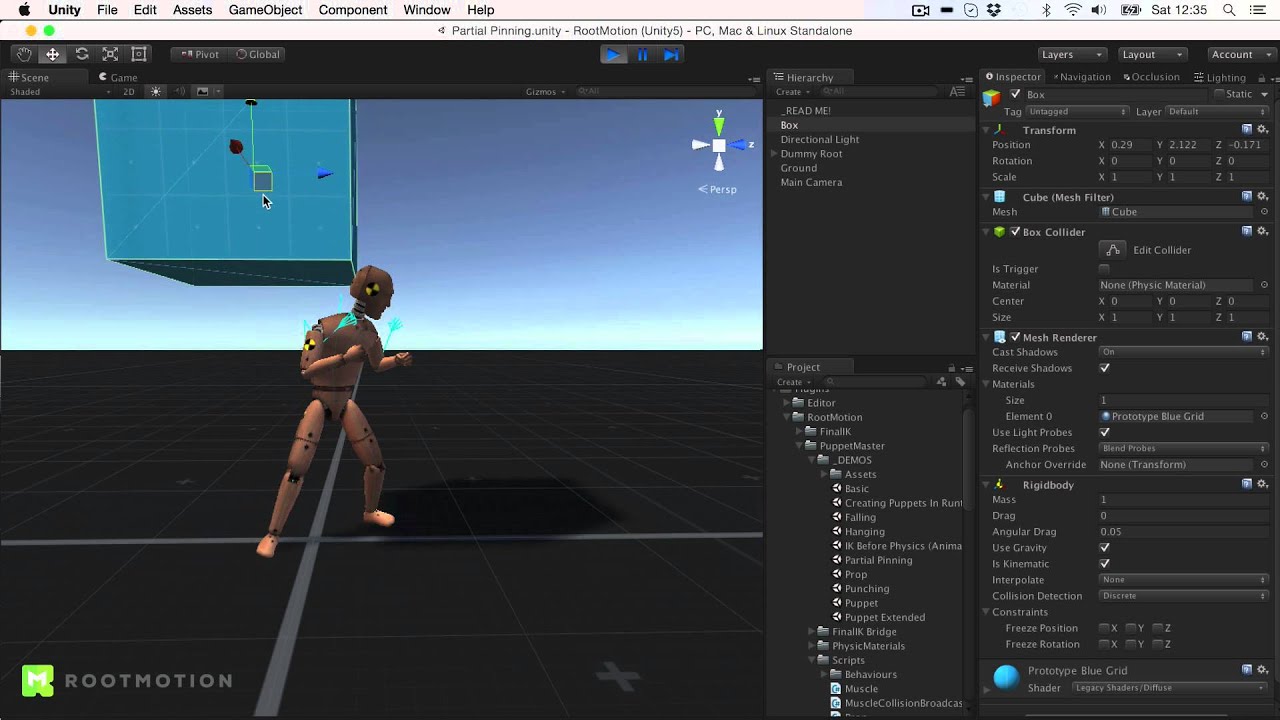
Short overview of the features of PuppetMaster (Beta), an advanced character physics tool for Unity
thin solstice
Yea that.
I made stuff similar, etc... But it gets complex to get all tools done and have that done at the same time. So kinda usually ask if someone is interested in case they had the experience, etc... Nothing special though man its fine. Thanks for the puppet master link though i might take a look at the source code. seems interesting
Ive made some world brush extensions, building generators from modular sets, etc... these type of tools. physics animation is something im not experienced with
stuck bay
timid dove
To spawn a prefab? Just create a serialized variable:
```cs
public HumanLauncher...
fyi i solved it using ```c++
this.
can someone help me to simulate the engine of a car on this different situation in unity? i.e. engine running alone or hooked to clutch, and i would like to have the specifications of a real vehicle like this one http://tech-racingcars.wdfiles.com/local--files/toyota-corolla-ae86-gt/AE86GroupA.pdf
I have started to implement this formula https://x-engineer.org/automotive-engineering/internal-combustion-engines/ice-components-systems/mean-effective-pressure-mep/
Tutorial on what is (indicated / brake) mean effective pressure and how it is calculated for an internal combustion engine
young nest
Anyone here good with PuppetMaster who might be able to tell me why I can't get my guy to fall over no matter how much force I'm adding to him?

I've lowered every possible thing
 timid dove
young nest
Anyone here good with PuppetMaster who might be able to tell me why I can't get ...
timid dove
young nest
Anyone here good with PuppetMaster who might be able to tell me why I can't get ...
 ancient needle
What would be a good way to get the vertex color of a mesh at a raycast hit?
Looping through all the verts and checking for the shortest distance is sloooow
timid dove
ancient needle
What would be a good way to get the vertex color of a mesh at a raycast hit?
RaycastHit has a triangle index and barycentric coordinates for exactly this reason
stuck bay

I have a Rigidbody 2D on both my player and my wall tilemap.
And a Tilemap collider 2D and Composite Collider 2D on my wall tilemap.

So it has a collision box like this, but my player can run into it.
timid dove
stuck bay
So it has a collision box like this, but my player can run into it.
are you moving your player in a physics-friendly way?
stuck bay
A really simple way,
using System.Collections.Generic;
using UnityEngine;

public class PlayerMovement : MonoBehaviour
{

    public float moveSpeed = 5f;
    public Rigidbody2D rb;
    Vector2 movement;

    void Update()
    {
        movement.x = Input.GetAxisRaw("Horizontal");
        movement.y = Input.GetAxisRaw("Vertical");
    }

    void FixedUpdate()
    {
        rb.MovePosition(rb.position + movement * moveSpeed * Time.fixedDeltaTime);
    }
}
Is that fine?
stuck bay
Ohhh that's why.
timid dove
yes, both objects need colliders for collisions to happen
ancient needle
timid dove
RaycastHit has a triangle index and barycentric coordinates for exactly this rea...
Thanks! Guess I need to learn how barycentric coords work then ha
timid dove
or whatever you think fits its shape the best
stuck bay
Cool.
timid dove
ancient needle
Thanks! Guess I need to learn how barycentric coords work then ha
The example code here has almost exactly everything you need: https://docs.unity3d.com/ScriptReference/RaycastHit-barycentricCoordinate.html
the only difference is that they're calculating a normal, whereas you want to calculate a color
you should be able to pretty much just replace the normal stuff with color stuff and the code will be 95% the same
ancient needle
Wow amazing! Thank you!
 empty rock
Hello
I would like to know why my projectiles do not reappear with my cubes, however, all these objects have rigid body and collider components
https://gyazo.com/e64888dc382fba5716c602a37b73e5af

there's no reaction between them
shell adder
empty rock
Hello
I would like to know why my projectiles do not reappear with my cubes, how...
what do u mean by reappear with my cubes?
what's the intended behaviour
ruby prawn
How to calculate the inertia of this motor please? http://tech-racingcars.wdfiles.com/local--files/toyota-corolla-ae86-gt/AE86GroupA.pdf
I'm French, I have trouble recognizing the phases, especially since you can't copy and paste the text to translate it ^^.
I would like to calculate the inertia of the engine itself, crankshaft I think or flywheel?
empty rock
shell adder
what do u mean by reappear with my cubes?
I mean, something like this
https://gyazo.com/69b38fa93e835909db032cacf4fe6044
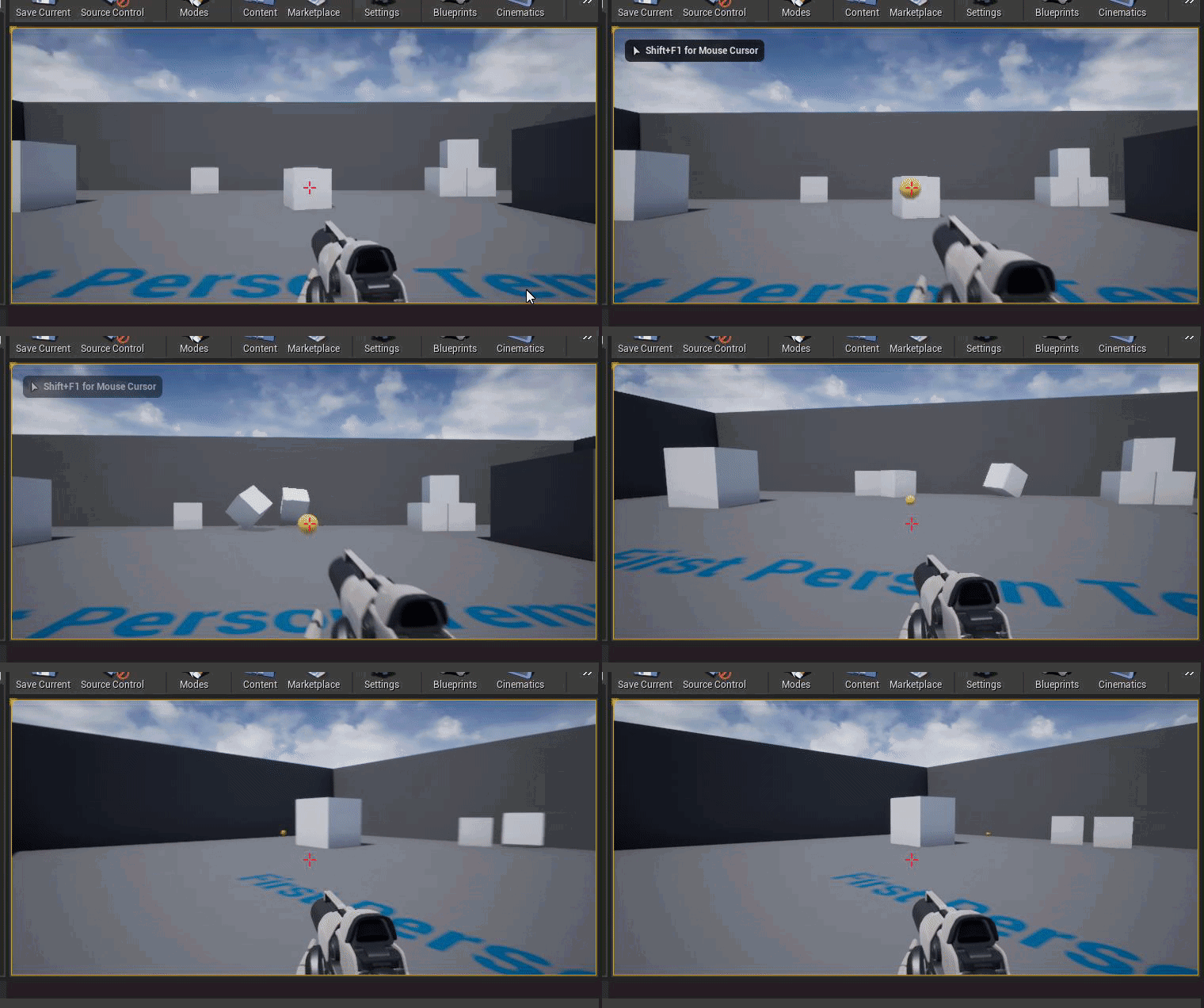 empty rock
shell adder
what do u mean by reappear with my cubes?
empty rock
shell adder
what do u mean by reappear with my cubes?
i man react*
sorry
shell adder
empty rock
I mean, something like this
https://gyazo.com/69b38fa93e835909db032cacf4fe6044
oh ok
currently when ur bullets collide have u coded for anything to happen
like do they get destroyed
shell adder
empty rock
Yes
i think u'll have to attach a script to the boxes that ontriggerenter they check if they've collided with a bullet and if so u do an addforce equal to the bullets velocity
empty rock
i'm using bolt 😅
 timid dove
empty rock
there's no reaction between them
timid dove
empty rock
there's no reaction between them
Do you have Colliders on both objects? Are you moving the projectiles in a physics friendly way?
Are the colliders triggers?
empty rock
timid dove
Do you have Colliders on both objects? Are you moving the projectiles in a physi...
Yes
empty rock
timid dove
Are the colliders triggers?
Yes
timid dove
empty rock
Yes
Triggers don't interact physically
empty rock
Oh ok
rigid furnace
Hello, I have a sphere and box collider, and currently the sphere, which is inside the box, is colliding with the box, causing glitches

the desired effect is to have the car model not intersect with any walls
 stuck bay
So I got a bunch of raycasts in a grid at fixed distance from each other here. The question is, how would you find the corner in this situation?

I would also like to support slopes of 45 degrees so a spherecast from top left to bottom right wouldn't work.
It doesn't help that literally no ledge detection algo on the internet handle this case 😢
timid dove
stuck bay
So I got a bunch of raycasts in a grid at fixed distance from each other here. T...
Binary search?
Do a raycast in the middle. If it's still the normal of the "top" section, you know the corner is somewhere in the bottom half, if it's the normal of the "bottom" section, you know the corner is somewhere in the top half. Search the appropriate half. Repeat.
stuck bay
I thought about it but this gives me a constant error that is the size of min step.
And it'd be temporally inconsistent.
stuck bay
So if you rotate the camera a bit to the side, the detected point would end up at a different place.
Well I'd use a fixed step between raycast positions.
Oh, actually...
I guess if I find the 2 points on different sides of the corner I can spherecast at an average angle of both sides.
That'd produce the exact point.
Thank you, I think you gave me an idea.
young nest
How does one emulate the force of a strong arrow that rips through an object (body)? Would that be a constant force over several updates until the arrow is through? What if the arrow is not long like a bullet, but a really strong one? I guess I want a huge knockback but I don't want people to fly upwards?
Maybe I'm stoned and even if the bullet rips through it's still just the same as the AddForce()
timid dove
young nest
How does one emulate the force of a strong arrow that rips through an object (bo...
AddForceAtPosition with ForceMode.Impulse
one-off
young nest
timid dove
AddForceAtPosition with ForceMode.Impulse
Really? Still impulse?
timid dove
why not
young nest
Hmm... how 'about "fantasy arrow" that like drags a body and pins it to the wall
Like SUPER strong
timid dove
depends on how it behaves then. if it basically ignores the body's mass, i'd make it a kinematic rigidbody and attach the body to it with a FixedJoint
or just start MovePosition-ing the body to go along with the arrow
young nest
Hmm.... you gave me an idea... attach and Coroutine to addforce continuously for X time depending on .... I don't know how to calculate model depth
I shouldn't care, I'll constant that
If I addforce over a few FixedUpdates that should look ok, right?
timid dove
I don't really know because I don't think I have a good mental image of the effect you're going for
young nest
I will definitely have to figure out what to scale the addforceatposition to giving t, probably just /72 or 120?
timid dove
why use magic numbers
young nest
timid dove
I don't really know because I don't think I have a good mental image of the effe...
Kinda like imagining a legolas level arrow that hits an orc and nails it to the wall
Cuz 72 frames or 90hz or something
timid dove
but that's not constant across devices etc
young nest
Refresh of the Quest
Sorry, I'm really high, lol. I mean, I'm writing for the Oculus Quest
timid dove
refresh rate isn't really relevant here, it's the physics simulation rate that matters
this is what Time.fixedDeltaTime is for - but AddForce by default already multiplies by fixedDeltaTime
if you're in ForceMode.Force
timid dove
that's the default force mode
young nest
But is that what is applied in a collision?
I want legolas to shoot an arrow that is so strong it could nail an orc to a wall, but it doesn't because it rips through the orc, and the force throws him back that hard anyway
But it's not an arrow, it's a bullet, so time to penetrate is like 0 because that's the length
I'm sorry, please ignore me, I think I got it.
timid dove
young nest
But it's not an arrow, it's a bullet, so time to penetrate is like 0 because tha...
If the time is "like 0" just use Impulse.
that's what it's for
young nest
timid dove
that's what it's for
You're right. The point is that I wanted emulate that it isn't 0 even though it is, so that's where I got confused. Thank you, you helped me figure that out.
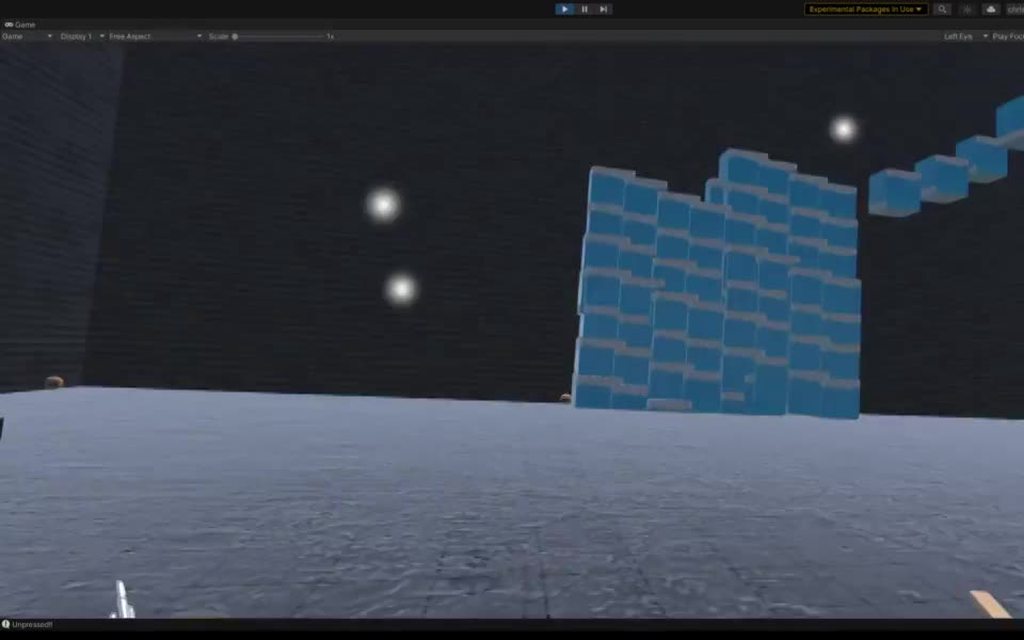 shadow seal
physics
 ember violet
I am using a golf course asset and was having trouble when the ball would come into contact with the mesh surrounding the hole as. I am not exactly sure how to fix this. I have attached a screenshot showing the mesh and the projected path of the ball. Can someone help me out here? (incase image didn't load: https://imgur.com/a/CFzR464)
shell adder
ember violet
I am using a golf course asset and was having trouble when the ball would come i...
so is the problem that the ball bounces over the hole because of the mesh?
because if so u could resize the mesh so that it doesn't block the hole
ruby prawn
How to separate all these forces in unity? and how to make a numerical integration with please for a week I can not make something correct https://x-engineer.org/automotive-engineering/chassis/vehicle-dynamics/calculate-wheel-torque-engine/
Method to calculate the wheel torque and force function of engine torque and transmission's gear ratios
 dark roost
why are my rigidbody2d falling so slow? all of the values are default
shell adder
dark roost
why are my rigidbody2d falling so slow? all of the values are default
rigidbodies have a mass value u can increase that if they're too slow
 feral mango
If i want to create custom ball physics, what collision detection system should i use? In my head i can imagine only CircleCast approach.
 hushed fractal
i got 2 game objects children of another one. Each on has a rigid body and they are connected with a configurable joint. The break and torque force are set to infinity but it doesnt work. When i grab one the other one doesnt follow
devout token
feral mango
If i want to create custom ball physics, what collision detection system should ...
Usually CircleCast is used for lines with a radial thickness, as it's not just a circle
feral mango
devout token
Usually CircleCast is used for lines with a radial thickness, as it's not just a...
So what can you recommend ?
devout token
feral mango
So what can you recommend ?
That really depends on what you want out of your custom physics
And more importantly why would you try making your own system instead of using the existing one
feral mango
I am not looking for easy ways 🙂
devout token
What problem are you trying to solve, I mean
feral mango
Create custom ball physics. For now it is just a challenge
devout token
Ah
Good luck then
 valid furnace
I have a ray cast that doesn't detect objects ...


i don't understand why it doesn't detect other objects
can anyone help me ?
 frigid pier
@valid furnace Raycast uses it's layermask. Make sure you set it up correctly. You can also inverse it to test with ~
valid furnace
frigid pier
<@!264473004560351244> Raycast uses it's layermask. Make sure you set it up corr...
inverting it worked well, don't know why, thank you so much
 brazen echo
Hi all. Slamming my head against a wall for this one for a while.
I've been googling for 3 days about this, but I encountered an odd bug including an inconsistency between Editor and Build versions. From what I've boiled it all the way down to, it's an issue with RaycastHit.textureCoord not calculating properly in the build, but working fine in editor. Some of the comments I've found were about convex mesh colliders not working, which I'm not using (I'm using regular mesh colliders). Another rather condescending person said "so you're trying to use mesh information without actually having it in your build?" which I was unsure how to parse.
My question is, does anyone have any additional information on how to guarantee that my textureCoord reference will be accurate in the build version? I've tried just about everything I could think of so far.
If you're unsure what I mean, here's an example in editor. I effectively have two cameras, two meshes, and two textures getting output from the cameras so I can "mirror" what's happening in a different part of the scene. It works perfectly in editor, and that green crosshair gives me an accurate position through the mirror. However, in build, it defaults to the farthest left corner point which I assume is 0,0.
brazen echo
 dreamy sun
How can i make the rigidbody of my player travel into walls please?
dreamy sun
How can i make the rigidbody of my player travel into walls please?
You can set your walls to a specific layer and your player to another, then go into Project Settings > Physics and uncheck collision between the two.
mighty sluice
@brazen echo could be some kind of lag or race driven problem; your build environment might not work exactly the same as the editor. For example, if physics is involved, it's possible that could contribute to deviations
You should try simplifying your raycast (making it more thread safe is possible) and see if that solves anything in build versions
brazen echo
It's odd because the raycast itself seems to work, it's just that the textureCoord it's returning is incorrect
All of the other different RayCast methods I'm using in my grab/interact logic seem to work fine, and of course, this method also works in editor and not in build for some reason
Someone online suggested it might have something to do with the build not getting the same information about the UVs on the mesh during runtime
On a thread I stumbled upon
dreamy sun
brazen echo
You can set your walls to a specific layer and your player to another, then go i...
OK THANKS
 delicate vigil
Hey all, i've been working with 2d Colliders and cant seem to configure them right. my player object just drives right through the obstacles. when it does the player sprite just spins wildly. also i can drive sraight off the map. how can I fix this?
brazen echo
@mighty sluice could it have something to do with the MeshFilter's UVs?
Well, no probably not huh. Since it works in editor.
mighty sluice
possibly but i would not guess that. if not a threading issue i would suspect that physics is moving the actual mesh differently
anything that could alter where the raycast lands on the mesh...
but it could very easily be something with the UV's
what is your build target?
brazen echo
I'm switching up UVs and testing
Sorry, can you elaborate what you mean on build target?
brazen echo
Vector3 p = hit.textureCoord; Camera c = hit.transform.parent.GetComponent<ReverseRef>().cam; Ray r = c.ViewportPointToRay(p);
The problem is only in the build. This is the point at which is stops working in build.
Windows.
Basically the mirrors both have cameras on them. I have insured there is no raycasting issue (since it works in editor) regarding collision or raycast layers. I take a reference point from the first camera to the point it hits on the "real world" mirror and cast using that reference point from the mirror camera which is static. Seems to work perfectly when I run it. Only messes up when I export.
 mighty sluice
yea i got no ideas...
I would post this in #archived-code-general instead of physics
doesn't seem to be a physics issue really, and someone with an idea is more likely to see it in general
brazen echo
kk. I'll give it a go.
delicate vigil
hey guy's do i have to add code to my movement script in order to make colliders work correctly? my player sprite just keeps driving through everything on my map. I've tried kinematic and static but those dont work either. both my player sprite and tree sprite have ridgidbody2d and box colliders.
 static plover
delicate vigil
hey guy's do i have to add code to my movement script in order to make colliders...
static plover
delicate vigil
hey guy's do i have to add code to my movement script in order to make colliders...
 crystal zodiac
 vast meadow
why might this be so stuttery
oh well when the video is laggy you cant see but
    void FixedUpdate()
    {
        if (Input.GetMouseButton(0) && heldObj != null)
        {
            int layerMask = 1 << 3;
            layerMask = ~layerMask;
            RaycastHit hit;
            if (Physics.Raycast(cam.transform.position, cam.transform.forward, out hit, 5f, layerMask))
            {
                heldPoint.transform.position = hit.point;
            }
            else
            {
                heldPoint.transform.position = Camera.main.transform.position + Camera.main.transform.forward * 5f;
            }
            Rigidbody rb = heldObj.GetComponent<Rigidbody>();
            rb.velocity = Vector3.SmoothDamp(rb.velocity, ((heldPoint.transform.position - heldObj.transform.position) * 1600f * Time.smoothDeltaTime), ref smoothHoldV, Time.smoothDeltaTime);
        }
}```nvm it was smooth it was just the rotation not changing
 obtuse pond
I have a method that can make a raycast on a untransformed Mesh
is there a way to apply a LocalToWorld matrix to the raycast so that it is equivalent to applying the same matrix to the mesh?
 viral ginkgo
@obtuse pond matrix * vector, thats how you apply a matrix transform to vector 😄
 olive musk
when implementing physics-based knockback on kinematic navmesh agents, does this general approach work?
- disable navmeshagent and kinematic setting on rigidbody
- apply force to the rigidbody
- wait for it to stop moving
- re-enable navmeshagent/kinematic
 jade ocean
Hey, how can I implement the spring force equation(F = -kx - bv) to a rigidbody object hanging from a target point due to gravity
timid dove
jade ocean
Hey, how can I implement the spring force equation(F = -kx - bv) to a rigidbody ...
You've got the formula right there, right? What part are you struggling with?
jade ocean
I don't know how to use the formula in code ._.
timid dove
In FixedUpdate:
Get or calculate all the values on the right side of the equation. Do the appropriate arithmetic and calculate your force. Then apply that force to the Rigidbody with AddForce
jade ocean
Can I do this without AddForce?
timid dove
Why?
You have a rigidbody... you're calculating a force you want to apply to it, and you don't want to use the primary and most straightforward way of applying forces to it? 🤔
jade ocean
I want to know how to do add a force to the acceleration of an object explicitly
timid dove
jade ocean
I want to know how to do add a force to the acceleration of an object explicitly
what does that mean?
The effect of adding force is to change the velocity of the object
A change in the velocity of the object is, by definition, acceleration
that's what acceleration means
jade ocean
Yes, sorry
timid dove
and that's the only affect adding force has
timid dove
you add force to the Rigidbody. This has the effect of modifying the velocity
jade ocean
I forgot physics 😫
timid dove
jade ocean
What about mass?
The more massive your object is, the less acceleration will result from the force
Unity will account for the mass automatically when you call AddForce
jade ocean
But what if it was not a rigidbody
timid dove
Then you have to do all the calculation yourself
The relevant equation is F = ma
force = mass * acceleration
that means the acceleration that results in a force equals Force / mass
a = F / m
jade ocean
Right, forgot and I though it was a = fm
 lunar magnet
why is my configurable joint causing my object to rotate slowly despite setting its maxangular velocity to be high? im trying to make a car using configurable joints but the wheels are rotating slowly when going down a ramp and i dont know why
frigid pier
Are you using wheel colliders?
lunar magnet
no im using cylinders with mesh colliders and attaching them to the car body using configurable joints
i have bad experiences with wheel colliders
timid dove
Well for one there's a physics-engine-wide maximum rotational velocity.
That might be part of the problem
 frigid pier
Also friction, not enough mass... Also physics engine is not quite exact with collisions. There's a reason wheel colliders exist. They wave some things off to work properly.
Also check resistance on the joint, it has a lot of settings to consider.
lunar magnet
wdym resistance
frigid pier
dreamy sun
how to make a rigidbody dont travel through walls?
frigid pier
@dreamy sun Use physics methods to drive physics objects using FixedUpdate. You can find tutorials on it in Unity Learn.
dreamy sun
frigid pier
<@!566504817422499840> Use physics methods to drive physics objects using FixedU...
Can you send the link please?
frigid pier
@dreamy sun Links are pinned in #💻┃unity-talk and in #💻┃code-beginner
dreamy sun
Ok thanks
 waxen nova
Can someone help me pls. I try making a 2D game where my Character shoots. I made the Character and the bullet Move with a CharacterController. I try detecting the Collision with void "OnControllerColliderHit" but it isnt working. I tried like very method the Unity Manual/ScriptingAPI has to offer but nothing works. PLS DM if you know a way this thing can work
timid dove
waxen nova
Can someone help me pls. I try making a 2D game where my Character shoots. I mad...
CharacterController is a 3D physics component
it won't interact with any 2D colliders
waxen nova
but i cant add a rigidbody to a character controller
timid dove
waxen nova
but i cant add a rigidbody to a character controller
sure you can
Add Component -> Rigidbody
set Is Kinematic to true
waxen nova
than i get a null reference error
waxen nova
wait
 copper olive
I want my enemy to kinda float in air and follow my player
Is there anything extra I need to do for that?
Or is it the same as on ground?
stuck bay
Help
timid dove
copper olive
I want my enemy to kinda float in air and follow my player
just offset the enemy's renderer(just the renderer, nothing else. Move it to a child object if needed) by as much as you want on the y axis
olive musk
i'm seeing different behavior when adding force to a rigidbody at rest, as well as to a different rigidbody which starts as kinematic but sets isKinematic = false in response to a trigger before the force is applied. the body which disables kinematic on-demand appears to be reacting much stronger to the force being applied. is there an explanation for this?
timid dove
olive musk
i'm seeing different behavior when adding force to a rigidbody at rest, as well ...
friction maybe?
the dynamic body is pushing against the ground and has some inherent downwards velocity causing friction, but the kinematic body has no such downward velocity at the start and therefore no or less friction with the ground?
olive musk
is the friction accessible via fields which i could inspect/log?
timid dove
olive musk
is the friction accessible via fields which i could inspect/log?
it's part of the PhysicMaterial(s) involved
olive musk
basically i'm just trying to understand whether the behavior i'm seeing is expected (and then tune the force being applied to plan for it)
timid dove
and if you're not using custom PhysicMaterial(s) there is a default material that is used that does have friction
olive musk
hm, so i could test by making the non-kinematic body material frictionless and see if it responds similarly?
timid dove
so to eliminate this as a possiblility - create a custom physicMaterial that has 0 friction and friction combine set to "Minimum" - and apply that to all of the objects involved (the floor, the objects, etc)
olive musk
thanks, i'll try it out. in my initial testing i just waited for a few seconds before applying the force to see whether that changed the behavior, in order to let it "come to rest" but it was the same as without the delay
timid dove
olive musk
thanks, i'll try it out. in my initial testing i just waited for a few seconds b...
you mean you made the kinematic body stop being kinematic, waited a few seconds, then applied the force? And it still went further than the non-kinematic one?
olive musk
yes, exactly. the physics debugger shows it changing to a rigidbody and then sleeping. but still gets launched further than the one which began its life non-kinematic.
timid dove
olive musk
yes, exactly. the physics debugger shows it changing to a rigidbody and then sle...
Interesting.
- Are the objects otherwise the same? Same mass? Same Collider(s)? Same object(s) they are touching?
- How exactly is the force being applied? Is it a one-time ForceMode.Impulse force, or something else?
olive musk
the force a scripted one-time Impulse, correct. objects are just duplicated cubes, one with kinematic enabled.
timid dove
dumb question - let's say you just make them both dynamic at the start. Do they still go different distances?
olive musk
haha, no dumb questions i appreciate the sanity check. they behave identically when they start with the same kinematic option at the start. i also have played with setting a frictionless physic material on the non-kinematic body, and it goes the same (shorter) distance after impulse, but now slides when it lands. :]
timid dove
olive musk
haha, no dumb questions i appreciate the sanity check. they behave identically w...
what about if you wait a second and make sure the non-kinematic body falls asleep before applying force to it
maybe it's related to sleep? 🤔
olive musk
i'm using the same logic for both impulses, so i've seen that the behavior between the kinematic types is the same either with or without the delay
at least it seems i've confirmed this behavior seems odd, heh
i'm using 2021.1 if that is relevant
timid dove
olive musk
what's the code for this look like
olive musk
Rigidbody rigidbody = go.GetComponent<Rigidbody>();
rigidbody.isKinematic = false;
rigidbody.AddForce(direction * pushForce, ForceMode.Impulse);```pushForce is set manually to 10
this is happening in a coroutine, and i've played with WaitForFixedUpdate to see if that changes anything, but no results
timid dove
olive musk
```csharp
Rigidbody rigidbody = go.GetComponent<Rigidbody>();
rigidbody.isKinema...
is direction being normalized?
olive musk
yeah it's normalized. if i swap the kinematic setting on the cubes, they swap behavior even though the angles are slightly different.
for completeness, csharp Vector3 direction = (other.transform.position - transform.position).normalized; Vector3 right = Quaternion.AngleAxis(90, Vector3.up) * direction; Vector3 pushDir = Quaternion.AngleAxis(-45, right) * direction; StartCoroutine(PushBack(other.gameObject, pushDir));
goal being "push away and up"
timid dove
and you're sure the coroutine is running only once per object?
olive musk
good question, the sphere is a trigger collider and i'm using OnTriggerEnter. let me confirm with some debug logging.
i think you got it. looks like the kinematic cube activates the trigger again when it changes to non-kinematic.
timid dove
olive musk
i think you got it. looks like the kinematic cube activates the trigger again wh...
ah!
The physics engine is full of weird little edge cases like that
olive musk
thanks for walking me through it :]
timid dove
"what happens when a collider is disabled inside another collider? What happens when it's destroyed? What happns if you change its body type? What happens if you change the collider from a trigger to a non-trigger" etc..
lots of weird interactions there
olive musk
haha yeah i'm sure i have lots of discoveries to make as i learn 😛 and with a bit of bookkeeping to prevent duplicate triggers, things are moving as expected now. thanks again.
timid dove
don't use a second rigidbody
just a second collider as a child object, on a separate layer
make that separate layer only collide with itself
Just for neatness I would do like:
Sphere (Rigidbody, whatever else)
- main collider (SphereCollider, layer = default)
- special collider (SphereCollider, layer = spheresonly)
And in your physics settings just set the spheresonly layer to collide only with itself
stupid name but yeah
yeah that turns the child into a completely separate, independent physics entity
vast meadow
ontriggerstay is firing for the object to the right even though the only triggers are where the arrows are pointing

heres the objects trigger box

absolutely lost
for some reason its detecting on trigger stay from the mesh collider thats not a trigger??
lunar magnet
how do i undo the effects of physics.ignorecollision?
lunar magnet
nvm i figured it out
 vast mulch
hey, Im working on a space game where the player explores planets and moons. But im finding an issue where if I rotate a planet the player's position doesn't follow the floor of the planet relative to the original position of the player on the planet. I tried making the player a child of the planet but it bugs out the player movement, does anyone know how I could fix this?
ember violet
shell adder
because if so u could resize the mesh so that it doesn't block the hole
How can I edit meshes?
shell adder
u use a program like blender to edit the mesh and if u've attached a mesh collider then that should resize it
shell adder
ember violet
How can I edit meshes?
or you could use other colliders like box colliders instead
 tacit hearth
OnTriggerEnter2D being called every update. How can i fix it. I only want it to call once.
ruby prawn
how to simulate the speed of an engine in relation to its performance?
vast mulch
vast mulch
hey, Im working on a space game where the player explores planets and moons. But...
anyone? lol
 timber holly
Hi everyone, I am doing a minigolf game and have a problem with physics here. The issue is when the ball rolls over a transition/edge between two colliders (from two cubes making the ground). The ball will jump cause that transition/edge.
I found the same issue from a reddit user: https://www.reddit.com/r/Unity3D/comments/5m34o7/3d_rigidbody_colliding_with_the_edge_between_two/
Has anyone been through the same issue? Any help is appreciated.

reddit
7 votes and 5 comments so far on Reddit
 thin hamlet
I'm working on a 3D fps-ish game where movement is pretty important, I decided to go with a character controller which I think should be better in this situations (tell me if I'm wrong), I'm really satistied with overall character controller functionality, yet the problem is that I'm really missing .addForce() feature from Rigidbody, I tried to figure out some solutions, I also tried googling for some, yet everything I created / found just didn't feel like add force should feel. Does anybody know how to correctly integrate add force function into character controller or do you think I should just switch to rigidbody?
timid dove
thin hamlet
I'm working on a 3D fps-ish game where movement is pretty important, I decided t...
The problem is that you would need to simulate momentum
basically you keep a current velocity vector around, and only manipulate that velocity vector additively
never overwrite it completely
then you can do things like add a bunch of velocity in a certain direction to simulate a knockback or impulse of some kind
this is of course, what Rigidbody is doing internally more or less. it has a mass and velocity and AddForce additively affects the velocity.
thin hamlet
Thats basically what I was trying to do right now and It actually turned out to work pretty good
 ornate trail
Anyone knows a reason for a vehicle turning one side with way more grip than the other?( using wheelcolliders btw)
 karmic ravine
Dose it possible to not bounce on step object like slider? If I go fast
 lapis plaza
@timber holly I didn't read the reddit but basically what you are seeing here is coming from physics engine feature called "contact offset". First thing to try is to set that to as tiny value as possible, then try to minimize the collision edges by overlapping them a bit (this only helps if the collision edges are not in 100% same angle)
if you are willing to do extra work for this and can use new enough Unity version that supports contact modifications then you could see this forum post first:
https://forum.unity.com/threads/experimental-contacts-modification-api.924809/#post-6482950 and after that read what I wrote on the topic here regarding the rolling ball case: https://forum.unity.com/threads/experimental-contacts-modification-api.924809/page-2#post-6720985
You do need 2021.2 version for this to work, so I'd pick the newest beta from hub if you want to test this
vapid tusk
Is it possible for a game object, with a collider, to know when a raycast hits it, other than with the raycasting object sending it a message? I.e. for the game object that is hit by the ray, to respond like it was hit with a collider?
shell adder
vapid tusk
Is it possible for a game object, with a collider, to know when a raycast hits i...
no i don't think so
u'd have to get the gameobject from the hit and get the script component and call a function from that script
vapid tusk
@shell adder Thanks. That is what I was going to do. I just thought it would be easier, if it could be treated like another collider hitting it.
shell adder
if u want it to know that it was being hit then instead of a ray u could use a thin box collider and have it be a trigger
vapid tusk
@shell adder That's an interesting idea. I'm not sure if I can make it work, because it's coming from the Player, which is moving around, however, I'm going to think about this idea some more. Thank you!
shell adder
alright
timber holly
lapis plaza
<@!539600416858570752> I didn't read the reddit but basically what you are seein...
Thank you very much, just changing the contact offset to a lower value did the trick. Thank you! 😁
lapis plaza
@timber holly as a side note, I think you can change the contact offset from collider or rigidbody, but physics settings has a global setting too
 heavy basin
Hi there ! Currently im working on a highly physics based 3D game. The game consists objects colliding with each other at high speeds and other things that have a lot to do with physics. My main question is : How scales of 3D objects should be like to have the best performance, stability and realism in highly physics based game ? For example, is realistically sized football ball okay for the best performance and stability? My second question is : How scales of 3d objects should be in general to have the best performance ?

 spiral tulip
heavy basin
Hi there ! Currently im working on a highly physics based 3D game. The game cons...
spiral tulip
heavy basin
Hi there ! Currently im working on a highly physics based 3D game. The game cons...
someone correct me if i'm wrong but i don't believe the scale of objects affects the overall performance, as long as the number of vertices and triangles in the mesh stay constant
 dreamy pollen
Anyone know off-hand if freezing locally unmoving rigidbodies improves performance? (mine are kinematic and are being moved with a parent animator)
it's a micro-optimization, if at all, I'm sure
frigid pier
stuck bay
my best guess is that this is also a physics thing... i have a relatively simple script attached to 16 balls (https://pastebin.com/DS2btZtd) and when i press R, they all teleport into this arrangement - but only once, and then it works after. i have no idea what could be happening with this
 stuck bay
this occurs both in the build and the standalone player, i'm using fixedupdate for the physics, the player controlled ball has continuousdynamic and the other balls have continuous collision
i have to go for a while so if anybody knows what this could be pls ping me
vast meadow
bruhh why are unity physics so bad
why is this walking??
theyre joined by fixedjoints and have no collision between them
vast meadow
so the fixed joints are forcing an empty rigidbody parent away from it for some reason
underneath the plane

 desert timber
Can anyone give me a hint on how the CharacterController is detecting the ground slope? I'm writing a player controller using the CharacterController, and am wondering why we need to detect ground slope ourselves (I see tons of great tutorials for the task) if this module is already calculating ground slope?
heavy basin
spiral tulip
someone correct me if i'm wrong but i don't believe the scale of objects affects...
Thanks for the answer
stuck bay
When I move my First Person controller based on a rigid body, the camera moves a tiny bit downward when I move on the ground.
If I set Interpolate, the rigidbody keeps bouncing a tiny bit up and down while moving.
desert timber
this is weird right? that we have a CharacterController that calculates ground slope via complex a method then doesn't expose it to us?
I'm reading that it's a Physx implementation
the original exposes slope and other properties
stuck bay
When I used the character controller it had issues with colliding with moving colliders
Notably when moving backward into them
 fierce thistle
Do we have any way to do a shapecast with a mesh?
 shrewd ibex
Guys, do the skin width of the character controller makes the player not able to interact with triggers? Or does it works the same as a collision for the trigger?
because in my game when I put a bigger skin width my character has problems detecting a trigger that is in front of him
 desert timber
shrewd ibex
Guys, do the skin width of the character controller makes the player not able to...
desert timber
shrewd ibex
Guys, do the skin width of the character controller makes the player not able to...
Yes, skin width is a sort of buffer around your character that will not collide/trigger anything. But, that would be some thick skin! 0.02 isn't very big so maybe something else is happening?
shrewd ibex
desert timber
Yes, skin width is a sort of buffer around your character that will not collide/...
Okay, thanks! I’ll give it a look to see what do I find
 last stump
Does OnTriggerEnter2D only work if one of the colliding objects has isTrigger to true?
static plover
last stump
Does OnTriggerEnter2D only work if one of the colliding objects has isTrigger to...
Yes, otherwise use OnCollisionEnter2D
 left rover
Hey, guys, I am trying to fix this issue where I have a time trial game, and you can control a vehicle (car, plane or boat). I set the centerOfMass for the Rigidbody for the car, but as soon as the car lands on the road, it topples over. The car should not topple over. I am doing the Junior Programmer course in Unity, and I was wondering if someone can help.

GitHub
Contribute to bhlee90/Programming-Theory-Repo development by creating an account on GitHub.
desert timber
left rover
Hey, guys, I am trying to fix this issue where I have a time trial game, and you...
I think you're sending incorrect arguments to transform.Rotate, double check that maybe
stuck bay
Hey guys ,
I have a list of 4 food items
I want if they collide with each other
position of any one of them changes
any idea how can I do so ?
 gilded sparrow
Hi all
Just a simple question: Mesh collider of a quad faster than Box collider?
Use case: For borders (have no rotation therefore aligns to AABB nicely) and prop/stage shapes
I searched and still pretty vague
Quad mesh collider set to convex, turns it into a cube.. is THIS faster than Box colliders?
Or.. since it turns it into a box, is it just telling me to "just use a box, man.." ?
timid dove
gilded sparrow
Hi all
Just a simple question: Mesh collider of a quad faster than Box collider?...
I would guess a box collider is faster than any mesh collider
the algorithm is a lot simpler
 lilac patrol
Hey, I'm having a weird issue with rigidbody physics. In my game you can shoot a bow & arrow (rigidbody arrows), and the physics for that works fine (mostly). It's a very simple system; when the arrow collides with something, it freezes in place. The problem is that if I'm very close to what I'm shooting at, the arrow will bounce off and fly far away. I have no idea what could be causing this.
stuck bay
Hi, I got an issue I don't know how to fix:
I have 3 cubes next to each other with perfect spacing (no gaps) all cubes are 1 by 1 by 1 and have a box collider. it looks like this: https://i.imgur.com/EvPnCRt.png
On top is a ball I can move with WASD using the rigidbody.AddForce method. When the ball rolls over the edge of a cube it jumps a bit as if it would go over a bump.
I don't know why as the cubes are all at the same height and have no rotation. Shouldn't the ball just roll over it as if it would be a flat surface?
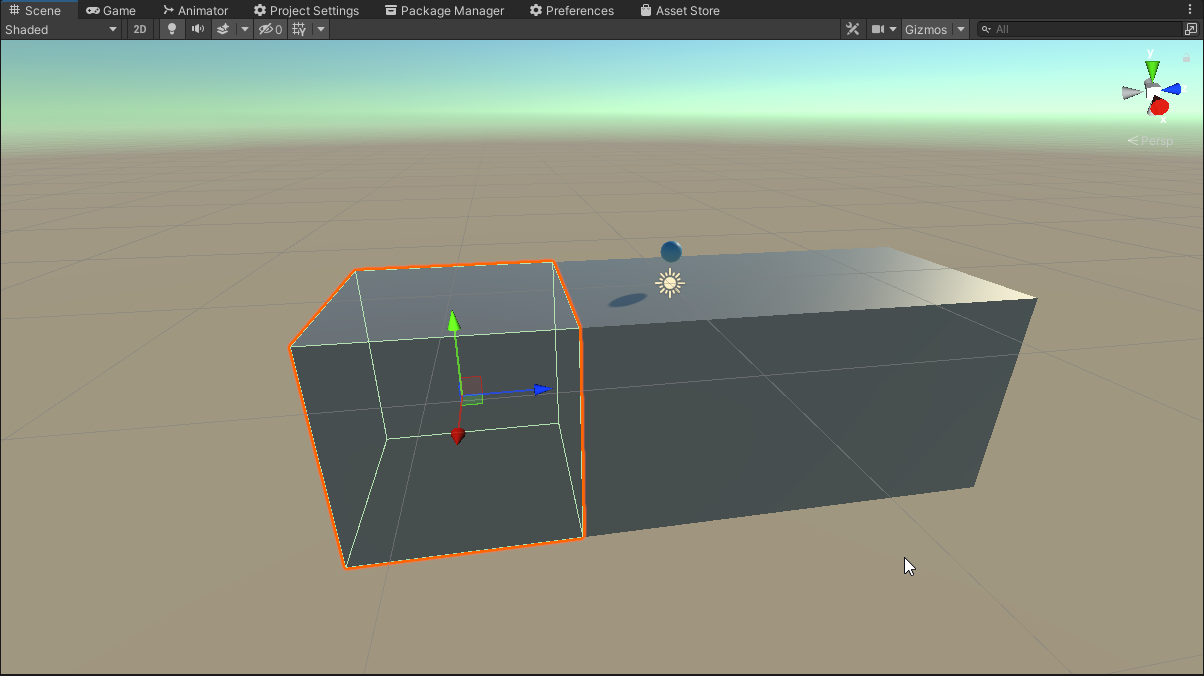 stuck bay
Hey guys ,
I have a list of 4 food items
I want if they collide with each other
...
stuck bay
stuck bay
Hey guys ,
I have a list of 4 food items
I want if they collide with each other
...
pls
anyone help
shell adder
stuck bay
Hi, I got an issue I don't know how to fix:
I have 3 cubes next to each other wi...
sometimes that can happen when u've got two different colliders, if ur worried about it then consider using one long box collider or a composite collider and that should smooth it out
dreamy sun
please where can i find a tutorial for stop my player going through walls pls?
wide nebula
YouTube
stuck bay
Add torque my friend
Experiment and i highly recommend you to check out unity manual Addforce, Addtorque,Addforceatpos section
stuck bay
dreamy sun
please where can i find a tutorial for stop my player going through walls pls?
Make sure u have collider attached to walls and also player-wall box checked
in physics section but you did not give full details so i foresee this will not be that useful but hope helps
dreamy sun
stuck bay
Make sure u have collider attached to walls and also player-wall box checked
already done x)
dreamy sun
stuck bay
in physics section but you did not give full details so i foresee this will not ...
ok i try the solution from a website and i chexk
check
dreamy sun
stuck bay
Oh k glad u solved ur problem tho
no wait i WILL try
i wait that it compile the scripts
stuck bay
if u want help feel free to dm me
dreamy sun
stuck bay
if u want help feel free to dm me
ok thanks :)
left rover
desert timber
I think you're sending incorrect arguments to `transform.Rotate`, double check t...
Nah, even though I comment out the transform.Rotate line, I still have the same problem
timber holly
lapis plaza
<@!539600416858570752> as a side note, I think you can change the contact offset...
I had actually changed the value from the physics global settings, because I didn't found it in the collider nor the rigidbody component 😂
lapis plaza
did you find it now? 🙂
young nest
I've tried a few different things and still can't get this ragdoll problem to work. I'm trying to replicate this "ragdoll flies a bit with arrow" effect

But all I'm getting is this tumbling over effect because it's just... getting dragged down. I'm using Puppetmaster just like the dev in the first example.
 last stump
Let's suppose I am throwing an object/ball in the air and, at some point, the ball starts falling (obviously). How do I check whether the ball is in the falling phase? Is it as simple as checking its rigidbody velocity?
timid dove
last stump
Let's suppose I am throwing an object/ball in the air and, at some point, the ba...
check if the y component of velocity is negative, yes
technically it's "falling" the whole time
 shut timber
Guys, as we know, game like shadow fight 2 and vector use 3d mesh. But does those game use 2d collider or 3d collider ?
shut timber
Guys, I'm trying to give damage to a ragdoll, but it will get hit multiple times because each bone has its own rigidbody. How do i prevent the child bones from sending collision message ?
stuck bay
Physics.IgnoreCollision
left rover
Perhaps, there is a bug with https://docs.unity3d.com/ScriptReference/Rigidbody-centerOfMass.html in Unity 2020.3.13f1. When I try setting the centerOfMass in Unity 2020.3.13f1, I get the issue, but if I try it in Unity 2018.4.34f1, I don't.
timid dove
left rover
Perhaps, there is a bug with https://docs.unity3d.com/ScriptReference/Rigidbody-...
what issue?
Sorry I see it now
dreamy sun
how can i make a better collider to a high faces object?
left rover
My vehicle behaves strangely as soon as it lands on the ground
It topples over for no reason
dreamy sun
dreamy sun
how can i make a better collider to a high faces object?
because it is stop to 256 ;-;
left rover
Yeah, I submitted a bug report
 bronze flower
young nest
But all I'm getting is this tumbling over effect because it's just... getting dr...
bronze flower
young nest
But all I'm getting is this tumbling over effect because it's just... getting dr...
I don't know what puppetmaster does but it looks to me like you're continuously applying a force to his forehead, so when he starts to tilt backwards that force continues to push him further over and down. Do you maybe need to maybe sure whatever applies the force is only doing it for an appropriately short time?
last stump
I want to AddForce in order to shoot a basketball in my game, but its child to another GameObject which also has Rigidbody. Is there a way I can AddForce to the basketball without affecting the parents?
 graceful meadow
last stump
I want to AddForce in order to shoot a basketball in my game, but its child to a...
graceful meadow
last stump
I want to AddForce in order to shoot a basketball in my game, but its child to a...
perhaps the basketball could have a kinematic rigidbody, and you set it to dynamic when you want to throw it?
kinematic means that it'll still inherit the position of its parent, and switching to dynamic lets addforce behave as expected
bronze flower
last stump
I want to AddForce in order to shoot a basketball in my game, but its child to a...
Having rigidbodies parented is generally not a super good idea. What's your reason for doing so?
last stump
bronze flower
Having rigidbodies parented is generally not a super good idea. What's your reas...
The reasoning was for gravity & movement which ended up not being implemented lol. Thanks for reminding me it was not needed in the end
It's just that when I add a Collider I tend to add an Rb as well most of the time. So I suppose I added it by mistake
Thank you everybody!
lapis plaza
@left roverdo note that once someone from Unity replies to that bug report, your email will be visible on that link.. and people can also navigate to all other bug reports you file through that link (you just only have one there)
typically people don't want to share the direct fogbugz links but rather public issue tracker links if Unity does approve the bug report
(it's mainly a privacy concern)
 twilit axle
Hi,
I am considering buying Game Creator and using their (non-Rigidbody) Unity Character Controller character.
This will save a lot of time and be fun to dive in.
However, I do still want Character to mimic authentic Rigidbody Physics for some mechanics, like certain objects making the Character bounce or swing.
In situations like these, would it work to make a Invisible GameObject with a Rigidbody and child the GC Character to it so that it secretly follows the Rigidbody's position?
Or, what is a good solution so that you don't necessarily have to code physics from scratch in these situations?
dreamy sun
Hello, i made a planet model and a script for the gravity toward the planet but when the player goes onto the real top, my player starts turning on himself when i walk
can somebody helps me please?
left rover
lapis plaza
<@!794465473668055082>do note that once someone from Unity replies to that bug r...
Oh, Ic. I had no idea. Thanks.
 pliant cairn
I dont know why player is getting hit by the bullet. I just want the bullet to pass through the player at the moment. The bullet has a rigid body and sphere collider
desert timber
twilit axle
Hi,
I am considering buying Game Creator and using their (non-Rigidbody) Unity C...
I'm not familiar with Game Creator, but it probably works similarly to the Unity CharacterController: that is, the idea of discrete changes in velocity rather than actually keeping track of an exactly simulated acceleration.
The gotcha' with real rigid body simulators is that games simulate in discrete time steps, rather than smooth functions. These steps forward in time "break" reality. One example is that when two bodies/colliders overlap, a push back force is introduced into the simulation in order to separate the two bodies. That extra force is the source of Halo's super leap, and is also found in many many other games.
These are tricky problems to solve, and, for a player character, these glitches will be found.
There's no reason we can't just use velocity approximations and then simulate physics, afaik. But, rigid body simulators are still fun in their own right. As a player, it's fun to find ways to make things get a little out of control!
(although, neither solution solve the problem of avoiding physics :P)
left rover
pliant cairn
I dont know why player is getting hit by the bullet. I just want the bullet to p...
I think you need to check the "Is Trigger" checkbox for the Sphere Collider component
 vocal spade
when developing a crouching system for a standard FPS type game, is it better to have two capsule colliders at different sizes that you enable/disable between, one at crouch height and one at standing height; OR is it better to just have one capsule collider that you resize?
in theory it should achieve the same effect, except with the resizing you don't have a "jump" in between the sizes that might not match an animation for instance
 forest geode
Physics.OverlapSphere ( gameObject.transform.position, selectedSkill.range, selectedSkill.layerMask );
Have a question on layerMasks here.
The layermask in question are Layer 10: Character
In the scene im testing, there is a total of 1 gameobject with that layer, and none of his children are.
A bit unsure on how to reference which layermask .. do I say 10, as it is Layer10, or 11 like a normal array/list.
Tried both: Debug on layermask = 10 returns 0:
Debug on layermask = 11 returns 4:
Ive crancked up the range so they should pick up everything in the scene, and i feel at least 1 of those should be "1".
forest geode
Solution: selectedSkill.layermask = "1<<10".
bronze flower
vocal spade
when developing a crouching system for a standard FPS type game, is it better to...
I would say it doesn't matter. I just always make sure to check that there's enough space for a full-height character before allowing uncrouching.
The really tricky bit is when you're building a zero-G character controller that can face in any direction, that's when it's gets "fun" 😵💫
 proper saddle
Hey everyone. My rigid body is falling really slow and I have no idea why. All the stuff about it is from years ago, many talking about increasing gravity which doesn't seem to be a thing anymore?
stuck bay
screenshot the rb
proper saddle
Here you go.
 proper saddle
Yea
stuck bay
hmm, it should fall normally. What else is on this object?
wide nebula
Mass != weight, upping it won't make it fall faster.
proper saddle
It's just a basic sphere. I want it to fall on a destructible object to crush it.
 wide nebula
How big are your objects?
proper saddle
Hmm... the scale is like 29x
wide nebula
That's a 30 meter sphere.
If you want "heavier" things to fall faster, you have to apply additional downward force to their rigidbody in their update.
proper saddle
Sigh... yea that seems to be working better. 😫
timid dove
You know how when godzilla or king kong falls over it takes a really long time?
proper saddle
Thanks a lot people
timid dove
That's what's happening to your sphere
wide nebula
The Rigidbody should have a gravity scale property like the Rigidbody2D one does, but alas.
timid dove
The actual speed of falling is normal but the distance traveled looks small relative to the size of the object.
stuck bay
can you put a physics material on 3d objects to increase gravity?
timid dove
stuck bay
can you put a physics material on 3d objects to increase gravity?
Those are for friction/bounciness only
stuck bay
ah cool beans
timid dove
stuck bay
can you put a physics material on 3d objects to increase gravity?
To add your own custom gravity do this:
void FixedUpdate() {
  rb.AddForce(customGravityVector, ForceMode.Acceleration);
}```Thanks @timid dove
 tawny violet
Hey all, having some weirdness with a Tilemap Collider and hoping someone could help, been pretty stumped by this trying to debug/find others with similar issues.
I have a tilemap set up with the Tilemap Collider 2D + a static Rigidbody 2D + Composite Collider 2D components for all tiles I want collidable. I have a box collider + Rigidbody 2D set up on my player character.
Everything looks fine when checking the collider lines in the editor as far as I can tell.

But I get some super weird behavior when I test the game - part of the tilemap collider seems to work fine, others seem to not exist, and there seem to be phantom colliders in places.

Any ideas as to why this may be happening? I'm pretty green to Unity and even just tips on how to start debugging this would be helpful.
last stump
I want to launch a ball at a random direction at the start of my game using AddForce. How do I randomly generate a direction (what values do I use in Random.Range)?
timid dove
last stump
I want to launch a ball at a random direction at the start of my game using AddF...
Random.onUnitSphere
gives you a vector in a random direction
last stump
Alright, and how do I detect if the direction is facing down? Does it have a negative value or something?
Oh wait, it returns a Vector right?
Nevermind, it returns a Vector3 I know what to do lol
pliant cairn
left rover
I think you need to check the "Is Trigger" checkbox for the Sphere Collider comp...
Yayy, it works like a charm! 🙂
stuck bay
what are some math and physics topics that I need to thorough myself to better understand them in unity AR/VR projects?
timid dove
stuck bay
what are some math and physics topics that I need to thorough myself to better u...
Do you just mean games in general? There's not much special about VR/AR except for the unique camera setup
You'll want to understand Vector arithmetic, Affine transformations and Matrix arithmetic, and trigonometry.
Physics wise you'll want to familiarize yourself with netwonian physics concepts like force, mass, acceleration, torque, inertia, moment of inertia, kinematic equations
stuck bay
thanks for the help , ill start with vector arithmetic 🙂
 sick zenith
How do I prevent my player from going through a composite collider? ; ; I change it's velocity over time in order to get him dashing. But when I do this the character goes through everything. I already set it's Collision Detection to Continuous and got Default Max Depenetration to huge numbers to see if something changed, but this guy still goes through my walls. Thanks to whoever helping!
timid dove
sick zenith
How do I prevent my player from going through a composite collider? ; ; I change...
how are you moving it
timid dove
sick zenith
I'm changing it's velocity <@!179367739574583296>
it should respect colliders then 🤔
sick zenith
void FixedUpdate() {
    direction = new Vector2(Input.GetAxisRaw("Horizontal"), Input.GetAxisRaw("Vertical"));
    if (direction.x == 0 && direction.y == 0) {
      direction = new Vector2(1.0f, 0.0f);
    }

    if(!onCooldown & executing) {
      executing = false;
      StartCoroutine(goOnCooldown());
      dashing = true;
    }

    if (dashing) {
      if(dashTimer > 0) {
        dashTimer -= Time.deltaTime;
        character.rb.velocity = direction * dashSpeed;
      } else {
        dashing = false;
        dashTimer = dashDuration;
        character.rb.velocity = Vector2.zero;
      }
    }
  }
In case you are interested @timid dove I found this answer
Unity does collision detection at discrete timesteps. So if you have an object that during one physics frame moves more than it's entire size, it can tunnel colliders.
There are three solutions to it:
* Make the collider of the rigidbody a bit larger
* Make the physics time step smaller. What you are optimizing for us making sure that in one physics step you never move more than the entire size of the collider.
* Make sure the rigidbody doesn't exceed a certain speed at which you know, it can't tunnel. You can use drag for this purpose.
I have a bouncy ball. Let's say I want to change its x direction when it collides with something. Can I do it by just Adding Force with -2 * the Ball's current X velocity?
timid dove
last stump
I have a bouncy ball. Let's say I want to change its x direction when it collide...
adding force will acceleratee it in a particular direction. How much it accelerates depends on the magnitude of the force and the mass of the ball
and the ForceMode you use
note that "accelerate" may just mean slowing it down if the force is in the opposite direction of current motion
last stump
If I multiply is x velocity by -2, doesn't it accelerate it with double the velocity on the opposite direction?
timid dove
no
last stump
How can I do it then?
timid dove
force doesn't directly translate to velocity
mass and time are part of the equation too
what's your goal?
what do you want the end result to be?
last stump
I want the Ball to randomly change its x direction once it collides with the player.
last stump
So, for example, if it's bouncing while going left, add the probability of it going right.
timid dove
ok but
last stump
Um, yes
timid dove
with the same speed as before, just in the opposite direction?
or
with a different speed?
or what
last stump
Yes, same speed.
last stump
Won't that affect the way it bounces though? If, for instance, I make it go right instead of left, won't it make it stuck in the right wall (right border of the screen from which it's supposed to bounce)
timid dove
why would it get stuck in the wall
I also don't understand how it's a "bounce" if you have a chance of.. continuing in the current direction
last stump
timid dove
why would it get stuck in the wall
It doesn't. It was just a silly assumption of mine.
Its "bounciness" reminds of Head Ball (if you know that mobile game). So it can hit the player's head and bounce up continuing the same direction.
The important part is, what I wanted to achieve worked. Thank you very much again (I might be wrong but I think you've helped me before haven't you? Really appreciate it)
desert timber
I'm curious: does anyone have a link to discussion about volume-less colliders? that is, kinds of colliders that can be generated from a MeshCollider tool.
I don't really know much about them, but I'm discovering that they can be annoying to encounter. Eg, the cinemachine's collider looks for a volume, and will clip through if the collider does not have a volume.
I guess this is a pretty vague question, but I'm struggling to get my cinemachine configured well. Also my character has become stuck while playing around with a Mesh Collider applied to weird/unfinished models. I'm wondering if that was a fluke or something to expect more frequently.
 deep field
this is very beginnner but
its all rigidbody 2ds how is it doing that
Why is it rotating on the z axis
 warped skiff
Hey, anyone know what i might be doing wrong? I can't seem to get anything to look like a usable SDF in the tool....

 fast creek
Hello, I'm trying to use Physics.OverlapCapsule on a custom character controller to detect if the next position of the character is going to be inside of an object, so I can then use Physics.ComputePenetration to figure out the correct position where it doesn't enter the object
This works very well, however, if the object is a terrain with trees it seems to be ignoring the trees, if I try using a rigidbody it does detect the trees and collision works, but I don't want to include a rigidbody on my character controller
Any ideas on why the terrain trees are not detected?
it seems the terrain collider is detected, however, the call to Physics.ComputePenetration doesn't work
 pliant fern
I've been trying to create 2d softbody physics following this tutorial: https://www.youtube.com/watch?v=3avaX00MhYc but my result ends up looking like the video attached. How do I fix this?
 round scroll
I have 2 objects, a building with mesh collider and a cube that is seperated into different parts to get destroyed, the cube has Rigidbody, mesh collider and terrain collider, but it just falls trough everything without getting destroyed
pliant fern
pliant fern
I've been trying to create 2d softbody physics following this tutorial: https://...
I think the problem is each bone is rotating on its own when it shouldnt be, but I don't know how to fix it
I think this because when i froze each bone's z rotation it looked a lot more normal
Well not completely normal
deep field
Can someone help
deep field
deep field
how tf https://cdn.discordapp.com/attachments/769107217685151765/867997295575175...
bump
pliant fern
pliant fern
I've been trying to create 2d softbody physics following this tutorial: https://...
tried tinkering with it and now it can hang off platforms
which i dont want
and its also very squished now
pliant fern
pliant fern
I've been trying to create 2d softbody physics following this tutorial: https://...
Nevermind, I solved it, and somehow it was that i needed to raise the frequency on the spring joints.
pliant fern
It's getting there, but it doesn't quite bounce it enough. What property should I change to get it to bounce it more?
pliant fern
I cant seem to get it to bounce more for the life of me
I've looked everywhere and I've found nothing
dreamy sun
Hi, i have a problem with my particle system, if i rotate it, the particles dont turn with it it keep like that
 dreamy sun
pliant fern
I've looked everywhere and I've found nothing
dreamy sun
pliant fern
I've looked everywhere and I've found nothing
Physics material?
dreamy sun
but make it more bounce
pliant cairn
What are the blue cubes passing though my obstacle? The cubes are rigid bodies(also they have a box collider) and the obstacle has a mesh collider on it.
viral ginkgo
@pliant cairn Looks like kinematic movement
I assume you are moving the cubes via transform
Or rb.position or something
You should either handle all movement via force
Or do some raycast checks in your translation code to prevent penetration
 cedar walrus
deep field
Why is it rotating on the z axis
cedar walrus
deep field
Why is it rotating on the z axis
freeze rotation on z
cedar walrus
if they're being rotated via script they will
deep field
supposed to be a ragdoll
deep field
cedar walrus
if they're being rotated via script they will
no
 opaque arch
Hey guys, I want to put a rolling barrel obstacle in the little 3D platformer game I'm working on, in famous 3D platformer games do they use physics for this type of thing? I searched it on google, but couldn't find a good answer.
timid dove
doubt it
if they're moving on a set path with a set speed etc.?
most likely animated.
opaque arch
timid dove
doubt it
Thank you for your answer, have a nice day!
 strong leaf
hello, I'm trying to code a 2d platformer and I need the designer to set a predefined jumpheight and initial jumpspeed in inspector. I tried coding it and the player won't reach the exact height, it's something close (8.9 compared to 10)
    {
        if (isGrounded || rb.velocity.y < 0)
            currGravity = gravity;

        if (spacePressed)
        {
            spacePressed = false;

            if (isGrounded)
            {
                //Debug.Log("intra aici");
                currGravity = jumpSpeed * jumpSpeed / (2 * jumpHeight);
                rb.AddForce(jumpSpeed * Vector2.up, ForceMode2D.Impulse);
                //canJump = false;
                canDoubleJump = true;
            }
            else if (canDoubleJump)
            {
                //gravity = jumpSpeed * jumpSpeed / (2 * jumpHeight);
                rb.AddForce(jumpSpeed * Vector2.up, ForceMode2D.Impulse);
                canDoubleJump = false;
            }
        }

        rb.AddForce(currGravity * Vector2.down, ForceMode2D.Force);
        rb.velocity = new Vector2(hInput * speed, rb.velocity.y);

        Debug.Log(rb.position);

}```this is the code I've written so far
basically right before jumping I'm setting gravity as v^2/(2*h) and resetting it when the player reaches ground or is falling
timid dove
what's the mass of your object
timid dove
ok that doesn't matter then, but generally would would multiply the gravity force by the object's mass, which is how you get the effect of all objects falling at the same speed as in real life
but since it's 1, it's moot
you have the normal gravity scale set to 0?
strong leaf
yes
timid dove
so I mean there is the whole idea that... even with perfect setup, since Unity's physics are simulated discretely, the formulas may actually be slightly different. Because you don't have smooth acceleration from gravity, you have it coming in chunks on the fixed updates
so instead of a parabolic curve you end up with sort of a parabola-shaped thing that has straight lines and corners
strong leaf
so you mean changing the fixed update step would make it more precise right? is there any other way to make jumpheight more precise?
timid dove
yeah making fixed update smaller would reduce the error from that
strong leaf
strange, I tried making it smaller and the max height gets crazy, it reaches 40
timid dove
strong leaf
strange, I tried making it smaller and the max height gets crazy, it reaches 40
can you show your Update()?
strong leaf
    private void HandleInput()
    {
        hInput = Input.GetAxisRaw("Horizontal");
        if (Input.GetKeyDown(KeyCode.Space))
            spacePressed = true;

    }

    //Flip player when changing direction
    private void ChangeDirection()
    {
        if (hInput > 0.01f)
        {
            if (direction == Direction.left)
            {
                transform.localScale = new Vector3(-transform.localScale.x, transform.localScale.y, transform.localScale.z);
                direction = Direction.right;
            }

        }
        else if (hInput < -0.01f)
        {
            if (direction == Direction.right)
            {
                transform.localScale = new Vector3(-transform.localScale.x, transform.localScale.y, transform.localScale.z);
                direction = Direction.left;
            }
        }
    }

    private void Update()
    {
        HandleInput();
        ChangeDirection();

}```hmm looks fine
strong leaf
strange
pliant fern
pliant fern
I cant seem to get it to bounce more for the life of me
It still doesnt really want to make things bounce more
stuck bay
Okay this is a wild one
transform.localRotation *= Quaternion.AngleAxis(parentBody.velocity.magnitude * turnCrankSpeed * Time.deltaTime, Vector3.right);
So I'm using this to rotate an object, right? Now this implementation obviously performs steps, so something like skipping from say, 3.2 to 3.5 and so on
I need something to have a smooth interpolation
And as a requirement, it needs to be in Update()
So basically instead of 3.2 -> 3.5, I want it to go, say, for the sake of sanity, 3.2001 -> 3.2002 -> 3.2003 and so on till 3.5000
But, I need it to be as fast as it otherwise would be
timid dove
stuck bay
Okay this is a wild one
pretty standard interpolation stuff.
Set a target
interpolate to it over time
Quaternion targetRotation;
...
targetRotation = transform.localRotation * Quaternion.AngleAxis(parentBody.velocity.magnitude * turnCrankSpeed * Time.deltaTime, Vector3.right);```then in Update:
transform.localRotation = Quaternion.RotateTowards(transform.localRotation, targetRotation, Time.deltaTime * degreesPerSecond);```Where do I put this?
timid dove
calculate the target... whenever the target would change
if that's every frame then it goes in Update
stuck bay
Okay, I'll check again then
timid dove
and then maybe it becomes something like
targetRotation = targetRotation * Quaternion.AngleAxis(parentBody.velocity.magnitude * turnCrankSpeed * Time.deltaTime, Vector3.right);```that might make more sense anyway actually 🤔
stuck bay
Right, missed that
timid dove
Quaternion targetRotation = Quaternion.identity; to initialize it
stuck bay
Yeah, basically it's a wheel that the player moves with 😅
Gotcha, thanks!
Okay, that works as expected, but not the uh, use case I'm using it for
 vDistance = Vector3.Distance(transform.position + Vector3.up * spokeLength * -1, transform.position + (transform.TransformDirection(wheelSpokes[activeSpoke].spokeDirection) * spokeLength));
        vRatio = Mathf.Clamp01(vDistance/1.4f);
        if(vDistance == 0)
        {
            surveyorPassed = true;
        }
        if(vDistance == 0.01)
        {
            if(surveyorPassed)
            {
                if (activeSpoke == 3)
                {
                    activeSpoke = 0;
                }
                else activeSpoke++;
                surveyorPassed = false;
            }
        }
        normalisedFactor = (vRatio - 0.3f) / 0.7f;


aMan.FootAlignment(1- (normalisedFactor), wheelSpokes[activeSpoke].footAlignment.passReach, wheelSpokes[activeSpoke].footAlignment.leftRight);```This is basically what I'm doing, and hence I wanted the thing to interpolate such that I could extract the exact time vDistance is 0
Though now that I put it this way it kinda seems impossible because it won't be frame consistent, there's always going to be some frame where it's a little more or a little less
last stump
If I use <rigidbody>.transform, does it return the Transform component of the GameObject that has the given rigidbody?
timid dove
last stump
If I use <rigidbody>.transform, does it return the Transform component of the Ga...
yes
you can do that with any Component
 rich elm
I have a somewhat collision related question; or moreso what would be the best way to do it. I have a game similar to pic below.

The dark blue blocks are completely non-interact-able and the blue ones are able to be walked on at free, (this is a 3D game, this is just the map as you would see from overhead)
timid dove
Is the movement grid-based? Or just the map is a grid
rich elm
Would the best way to do collision here, if I was creating the environment in blender and then importing it into unity, be to just have cubes?
The maps a grid but you can free move
It's essentially this
So the environment around and "walls" are decoration, minus like some doors and secret paths, and the light blue is the free walk space.
timid dove
cubes are fast as hell, but the optimal collision shapes would probably be to merge the dark blue areas into contiguous convex BoxColliders as much as possible
rich elm
So like, one big long box collider?
timid dove
For example

 timid dove
turn that area into those two red and green colliders
if you can keep them as axis-aligned box colliders, they will be super fast
rich elm
Another thing for me is I was going to auto-generate a map as the player walks through so they can see their progress (looks similar to the one posted)
IS there any good way to like, "detect"/record a player has moved past another box?
timid dove
the math for detecting your current grid coordinate is really simple and fast
so you could just check that every frame (what grid coordinate am i in) and keep track of which the player has visited and not
e.g. no colliders, just pure math
rich elm
oho? I feel like I did similar when I was working pre hiatus for me but I truly don't remember
Ahh kk
so if the player is +1 Z or w/e
then they've unlocked that spot
But wouldn't that have issues if you just, lag, and then "bam", now it hasn't checked that spot?
timid dove
rich elm
But wouldn't that have issues if you just, lag, and then "bam", now it hasn't ch...
Something stupid simple like:
Vector3 GridOrigin;
float squareLength;

public Vector2Int GetCurrentCoordinate(Vector3 position) {
    float x = position.x;
    float z = position z;

    int xCoord = Mathf.CeilToInt(x / squareLength);
    int yCoord = Mathf.CeilToInt(z / squareLength);

    return new Vector2Int(xCoord, yCoord);
}```You mean if you move too fast and skip a spot?
fast moving with low framerate?
timid dove
could be sort of an issue yeah, depending on how big the grid is and how fast you plan on the character moving
you could fix it by keeping track of the previous grid position and just filling in all spots between the current and the previous as well
rich elm
Hmm, I don't plan for the character to be fast fast, but since enemies kinda pop up in the environment you can expend stamina to dash in a direction quick and avoid em.
rich elm
Yeah like a meter.
timid dove
Do you want them to only "discover" the exact square they're standing on?
Or also all squares in a small radius
rich elm
Only the one they stand on, but tbh, I could probably settle with a radius of vision or some deal.
timid dove
if there's a discovery radius it's less of a problem
otherwise - i'd keep track of the previous position and also discover squares between previopus and current position when necessary
rich elm
Like just do a cast between the prev recorded spot and the new or something, and then unlock all those spaces?
Either way tho. this sounds way more simple than I was anticipating! I dunno why but my brain was saying "if I toss a blender model in and then toss a cube over it it's not going to work", dunno why.
last stump
I have a row of Objects simply moving at the same speed (one next to another) on the X axis (same direction) and also moving very slowly upwards. On each screen touch (the project is mobile), I set those Object's velocities as a Vector2(same x velocity, negative velocity with a very big value (for testing purposes)). Regardless of how big the negative velocity gets, the Objects still seem to go up. Any clue why this could be happening? Anything related to the Rigidbody settings?
timid dove
last stump
I have a row of Objects simply moving at the same speed (one next to another) on...
if you have other code that's writing the velocity it could just be getting overwritten.
last stump
If I have a rigidbody moving downwards and the object with the rigidbody has children with rigidbodies that move sideways, will it make the children stay in their initial y position?
timid dove
last stump
If I have a rigidbody moving downwards and the object with the rigidbody has chi...
If the child bodies are not kinematic, they wil be completely independent
if the child bodies are kinematic, they will follow the parent like any other child object
stuck bay
Hi! I'm starting on Unity and I have this problem that I can't fix. Terrain have collision and the character still falls through the floor, and clips through all other objects too, even if they have a mesh collider. Idk what to do at this point, at the start of the project it worked fine but suddenly started to just fall
timid dove
stuck bay
Hi! I'm starting on Unity and I have this problem that I can't fix. Terrain have...
get rid of the capsule collider on your character
You already have a CharacterController which is a capsule shaped collider itself
extra colliders can mess with the CharacterController
also I hope you're using CharacterController.Move in your script to move the player?
 sharp gale
I have the following but the character moves very stuttery (character has interpolation enabled on rigidbody):
        private void FixedUpdate()
        {
            Vector3 inputDirection = this.moveAction.action.ReadValue<Vector2>();
            if (inputDirection != Vector3.zero) {
                Vector3 velocity = MakeInputRelativeToCamera(inputDirection) * this.moveSpeed * Time.deltaTime;
                this.rigidbody.MovePosition(this.rigidbody.position + velocity);
            }
        }
However, if I use Update instead it runs very smoothly. I was under the impression that this should be going into FixedUpdate. Any thoughts?
timid dove
sharp gale
I have the following but the character moves very stuttery (character has interp...
I don't think it should make a difference as I thought they returned the same thing inside FixedUpdate but what happens if you replace Time.deltaTime; with Time.fixedDeltaTime?
sharp gale
timid dove
I don't think it should make a difference as I thought they returned the same th...
Behaves in the same way; and I logged out the value and you are correct; Time.deltaTime is the same as Time.fixedDeltaTime inside FixedUpdate.
timid dove
sharp gale
I have the following but the character moves very stuttery (character has interp...
How are you doing camera following?
sharp gale
With cinemachine
timid dove
sharp gale
With cinemachine
what's the update mode on the brain set to?>
sharp gale
the default values i believe

It's a really rapid micro stutter
the camera itself moves smooth in both cases; but when the character movement occurs in FixedUpdate it micro stutters.
 civic gale
I have a scene and script in which i can drag an object along the X axis which works fine. The problem is it will go straight through other objects. I'm not sure why as im using rigidbodies and colliders. Any help is highly appreciated
objects physics components: https://gyazo.com/97ce729c7942bb7825106527d5575ba8

dragging script:
using System.Collections;
public class MouseDragX : MonoBehaviour
{
    bool dragEnabled = false;
    Vector3 dragStartPosition;
    float dragStartDistance;
    void OnMouseDown()
    {
        dragEnabled = true;
        dragStartPosition = transform.position;
        dragStartDistance = (Camera.main.transform.position - transform.position).magnitude;
    }
    void Update()
    {
        if (Input.GetMouseButtonUp(0) || Input.GetMouseButtonUp(1))
        {
            dragEnabled = false;
        }
    }
    private void OnCollisionEnter(Collision collision)
    {
        Debug.Log("collided with+ " + collision.gameObject.name);
    }

    void OnMouseDrag()
    {
        if (dragEnabled)
        {
            Vector3 worldDragTo = Camera.main.ScreenToWorldPoint(new Vector3(Input.mousePosition.x, Input.mousePosition.y, dragStartDistance));
            transform.position = new Vector3(worldDragTo.x, dragStartPosition.y, dragStartPosition.z);
        }
    }
}```If you want collisions to work you need to use Physics methods to move it and inside FixedUpdate.
timid dove
civic gale
```using UnityEngine;
using System.Collections;
public class MouseDragX : MonoBe...
yeah you're just teleporting your thing
completely bypassing the physics system
frigid pier
Rigidbody.MovePosition does similar thing only within physics system.
Don't forget FixedUpdate
timid dove
Yeah you can make that work by:
- setting a target position in OnMouseDrag
- MovePosition-ing to that target position in FixedUpdate()
civic gale
alright ill try that
civic gale
took a break and then tried that solution
still goes through the other object even though it shows that it has collided
using System.Collections;
public class MouseDragX : MonoBehaviour
{
    public bool dragEnabled = false;
    Vector3 dragStartPosition;
    float dragStartDistance;
    Vector3 worldDragTo;
    Rigidbody r;

    private void Start()
    {
        r = GetComponent<Rigidbody>();

    }
    void OnMouseDown()
    {
        dragEnabled = true;
        dragStartPosition = transform.position;
        dragStartDistance = (Camera.main.transform.position - transform.position).magnitude;
    }
    void Update()
    {
        if (Input.GetMouseButtonUp(0) || Input.GetMouseButtonUp(1))
        {
            dragEnabled = false;
        }
    }
    private void FixedUpdate()
    {
        r.MovePosition(new Vector3(worldDragTo.x, dragStartPosition.y, dragStartPosition.z));
        if (dragEnabled == false)
        {

        }

        if (dragEnabled == true) {


    }
    }
    private void OnCollisionEnter(Collision collision)
    {
        Debug.Log("collided with+ " + collision.gameObject.name);
    }

    void OnMouseDrag()
    {
        if (dragEnabled)
        {
             worldDragTo = Camera.main.ScreenToWorldPoint(new Vector3(Input.mousePosition.x, Input.mousePosition.y, dragStartDistance));
            //transform.position = new Vector3(worldDragTo.x, dragStartPosition.y, dragStartPosition.z);
            //r.MovePosition(new Vector3(dragStartPosition.x, dragStartPosition.y, worldDragTo.z));
        }
    }
}``` timid dove
If the other object is a dynamic body it won't stop your kinematic one
only a static collider or another kinematic body would stop it with MovePosition
civic gale
even if i make them both kinematic it still goes through
frigid pier
If you want something to be affected by physics set it to dynamic
And make sure you didn't turn on positional constraints on the other object.
civic gale
if i dont have and positional constraints on it how do i stop it from moving
now they collide but the blue object moves away
frigid pier
civic gale
now they collide but the blue object moves away
So set it to kinematic.
If you are doing it correctly, dynamic object you are moving with MovePosition will never push in into another collider. Dynamic forces will always push it out.
 split hill
Can anyone tell how I would do something like how Paint the Town Red has their characters set up? Is it just as simple as basically doing environment voxel destruction but adding animation and ai to it, or is there something more? I am very new to unity, and coding in general.
Please @ me if you have anything.
 chilly talon
Hey guys, I kind of want to use the inbuilt friction/materials system but I am having an issue where whenever my character hits a wall, I lose all momentum
My goal is to move horizontally at lets say 10f
and when I hit the ground, continue at 10f
then slow down according to friction
but what happens is when I hit the ground, all momentum just stops, feels like the character gets stuck in the ground a little bit even
anyone know how I could fix this?
 torpid fossil
chilly talon
anyone know how I could fix this?
torpid fossil
chilly talon
anyone know how I could fix this?
Have you tried working with Physics Materials?
chilly talon
That's what im using
torpid fossil
Ah yes I see now
chilly talon
eh I'll continue to implament my own, feels nice
torpid fossil
What are your settings for the physics material?
 torpid fossil
You might need a friction value of 0 to make it work
chilly talon
oh wait
torpid fossil
(also don't forget to apply this to the object because I just did)
chilly talon
so I do have friction 0 for my own implementation
but I wanted to try and use the inbuilt one
but the only problem
When falling into the ground, the character just sticks the landing
torpid fossil
What kind of friction does the ground have?
torpid fossil
I'm asking because 3D physics materials have the option to set whether you want to be able to combine the friction by average, multiply, use the highest value, or the lowest value. Since the 2D version doesn't have that, it's hard to tell what it's using... Probably Average though.
 chilly talon
ah dam
well 0 friction on ground is the same as 0 friction on character
I want it to hit at 0 friction, then just go back to normal
in a sense
torpid fossil
Oh, huh... I have an idea: you might be able to switch the physics material out at runtime.
chilly talon
Just whenever I collide I set the player material back to the inbuilt?
torpid fossil
Keep a reference to 2 physics materials: regular friction and 0 friction. Then after the period in which you want the object to experience 0 friction, switch the 0 friction material out for the regular friction physics material.
chilly talon
actually my idea is a little dodge
Maybe I could
would it be better to set my own friction if I am gonna go that way?
torpid fossil
If you alter variables in scriptable objects, it changes that value for every object that uses it so using 2 materials might be the way here
chilly talon
instead of using the inbuilt system?
torpid fossil
chilly talon
would it be better to set my own friction if I am gonna go that way?
Yea, just to have as much control over it as possible
torpid fossil
Oh you're not talking about friction here right?
chilly talon
imma stick to mine then
torpid fossil
oh nvm
chilly talon
Ah, that applies when grounded
torpid fossil
I get it now I was a bit slow
chilly talon

Watch this
I hit the wall on the left
land straight down
jump straight up
land straight down
jump and HIT?!? AHHH
CircleCollider
torpid fossil
oh that is strange
chilly talon
I was using square, but I am interested in having slopes
so I switched to circle
got any ideas or just no idea?
me stump
I can think of maybe some workarounds, but idk why it's a problem to begin with
torpid fossil
Do you make the object stick to the wall using force? Maybe that it gets pushed like 1 pixel to the left in some cases when leaving the wall from the bottom?
chilly talon
So with me using the step frames
I am pressing no buttons
it doesn't stick to the walls by force
It just changes sprite when within 0.1f of the collider
chilly talon
it feels like the collider is going into the wall slightly so when I jump up I hit it from underneath
torpid fossil
Although, the Unity physics engine is not flawless. It might be a miscalculation on the collision.
chilly talon
how can do a flawless?
torpid fossil
That's internal Unity code, nothing we can do about it unfortunately
torpid fossil
You could perhaps write code that corrects this behavior
Yea like that
If it chips the wall but the player intends to slide along it you can just push it back against the wall
chilly talon
is rb.position any good?
torpid fossil
If you change rb.position it will probably still maintain its momentum
So you'll have to set velocity (or apply force) as well
torpid fossil
This might be something pixel-perfect that only happens in this specific situation though, so if you don't find an immediate solution, don't stress too much about it I'd say
You can always come back to it if it bothers players more often
chilly talon
I had pixel perfect collisions before but I was using transform.position lmao
lol that's true
since I check for collisions at 0.1f
if im within 0.01f, ill just push me out a lil
torpid fossil
Yep
chilly talon
torpid fossil
Yep
oh my goodness does rb.position add velocity..??
chilly talon
uhhhh?
torpid fossil
I thought it just set the position
chilly talon
hmm I might have coded it wrong
timid dove
No it doesn't
chilly talon
found the fix, had to lower fixed time step from 0.016666 to 0.01
chilly talon
torpid fossil
I thought it just set the position
that^^
torpid fossil
Alright!