
#⚛️┃physics
1 messages · Page 68 of 1
 stoic notch
 timid dove
I guess the next questionw ould be what's your code look like
stoic notch
scripts just have ontriggerenter and ontriggerexit
stoic notch
Im trying, but then I dont have the functionality to test it
I will try to figure out a way to turn off some of the script to still have it move
timid dove
stoic notch
share your code I guess? That doesn't look like a normal collision
timid dove
stoic notch
I will try to figure out a way to turn off some of the script to still have it m...
There's 3 scripts right?
stoic notch
yes
timid dove
I meant just the trigger scripts
stoic notch
2 triggers
timid dove
isn't the movement controlled by the main script only?
 stoic notch
and if its on the ground basically, so it doesnt need to turn around
 stoic notch
its a work in progress... im learning on my own... I basically wrote all this with no tutorials
and some internet searches
timid dove
yeah I'm pretty sure it's your code
timid dove
it's pretty convoluted so haard to tell exactly what's going wrong but... this could easily push you out:
        if (myLedgeDetector.turner == false && goLeft == false && goRight == true && goUp == false && goDown == false)
        {
            transform.position += transform.right * Time.deltaTime * speed;
}```wait.... I think I see it. its trying to turn around
timid dove
But basically - you should use Debug.Log
print which part of your code is actually running
like put a different log statement in each one of those if blocks
and watch it while you play
so you can tell wht's happening
stoic notch
gotcha.
timid dove
the fact that you're doing that scaling to turn the bug
instead of just rotating it
makes things really confusing i think
oh wait you are rotating it normally
with the walldetector thing
ok so yeah you're rotating it and then setting goUp = true
stoic notch
it is confusing. Thank you for the help. I think just talking it out with you helped me see parts that I did wrong
timid dove
except when you have turned - "up" is now to the right actually
because the bug is rotated
timid dove
transform.up < this points "up" according to the current rotation of the bug
if the bug is turned on its side
that is sideways
yeah
stoic notch
omg, wow that might have stumped me for a loooong time. Thank you so much!
timid dove
👍
alternatively - Vector3.up always points up according to the world.
if you need that
timid dove
mhmm
timid dove
😮
stoic notch
is there a simpler way to get my enemy to go on each surface, rather than manually guessworking to place is the correct position with numbers?
ive gotten it to do what I want it to do.... will go around in a circle in either direction. but its incredibly difficult to get the catapillar to be in the correct position.
if you look at my code... I have transform.position.x - 0.43f... ect.
Im sure there is a much easier way to do this. Im kind of proud I did this on my own, minus @timid dove help!!
Seems like an ultra complex way to solve my problem
 supple sparrow
People usually do some raycasts ahead of the entity, and get the normal vector on the hit point. Then you rotate to align to the normal.
At least for 3d. I guess you can get away with some hardcoded 4 directions for a 2d game
 steel pewter
Not sure if this is a physics-specific question or not, because it might be a general Unity/C#/coding issue, but the code does have to do with physics.
I'm bypassing the built-in drag system and using my own, using a simplified version of the drag formula (drag = drag coefficient * velocity^2).
- Get max velocity, max acceleration, and mass from the inspector
- Max thrust = mass * max acceleration)
- Drag coefficient = max thrust / max velocity^2 (so that drag will cancel out thrust at max velocity using the formula given above)
I'm getting a strange behavior now where the velocity keeps getting rounded down to 0 if less than 0.01. I'm not using any kind of rounding at all - my code adds the thrust as a force, and adds the drag as a separate force (calculated from velocity, as shown in the first paragraph), and those are the only two forces being added (there's also a torque from the rudder and an opposing torque, but those are Torques, not forces, and in the video the rudder is left at 0 so there's no torque in any case).
timid dove
steel pewter
Not sure if this is a physics-specific question or not, because it might be a ge...
share the code?
steel pewter
timid dove
share the code?
The comment about converting the angular velocity into radians/second is incorrect, but I can't change it here... doesn't affect the current issue, though.
timid dove
also what is so you're seeing - the velocity itself go to 0 before it should?
steel pewter
timid dove
also what is so you're seeing - the velocity itself go to 0 before it should?
Yes. In the video I linked, I show the velocity snapping to 0 if the value drops below 0.01.
timid dove
it could just be the rigidbody falling asleep
See if adding this in Awake or Start helps:
rigidbody.sleepThreshold = 0.0f;
steel pewter
timid dove
See if adding this in Awake or Start helps:
`rigidbody.sleepThreshold = 0.0f;`
(note that this is inserted just after the line rigidBody = GetComponent<Rigidbody2D>();)
I'm looking up the sleepthreshold for 2d.

Setting the SleepMode to NeverSleep did fix the issue, though, so it's definitely that. I don't see anything about setting the threshold for 2D, though.
timid dove
steel pewter
(note that this is inserted just *after* the line ` rigidBody = GetCompon...
oh sorry I didn't realize you were in 2d
yeah never sleep is what I wouldve suggested for 2d
 eternal thistle
Sorry if this is a dumb question (quite new in unity): Whats the correct combination of colliders and rigidbodies if I have a player and a chair? I have boxcollider and rigidbody on player and boxcollider on the chair (so player cannot walk through chair), when I want to sit on the chair the player gets pushed away so what to do? remove boxcollider or rigidbody from player? remove boxcollider from chair? is there some trigger or function how to handle this?
also networking is a problem. i solved this "somehow" with removing the rigid and box-collider from the player but when I have multiplayer game the sync takes a bit for other players to remove box-collider from players and then the physics engine kicks in and if a player wants to sit on the chair he is sitting only on local computer but on other computers he and the chair are floating away because they collided and the force makes them float into space
timid dove
eternal thistle
Sorry if this is a dumb question (quite new in unity): Whats the correct combina...
when the player sits in the chair you make one or both of the rigidbodies kinematic. probably the player
timid dove
eternal thistle
also networking is a problem. i solved this "somehow" with removing the rigid an...
as for networking - the "sit" action should be something like an RPC - and the clients can handle the actual nitty gritty of modifying rigidbodies etc.. themselves
eternal thistle
timid dove
when the player sits in the chair you make one or both of the rigidbodies kinema...
thank you sir! that seems to solve a lot
timid dove
Is there any reason you need more than one "height" for Colliders in the game? Couldn't this be solved by either putting the bullet's Collider on the floor or making every Collider in the game be at waist height like the bullets are?
 kind obsidian
timid dove
Is there any reason you need more than one "height" for Colliders in the game? C...
kind obsidian
timid dove
Is there any reason you need more than one "height" for Colliders in the game? C...
Cause I re-use the collider for the wall (which blocks the player's feet) for the bullet collision
in that case, I'd need two colliders, one at waist height, the other at floor height. Is there a way to neatly do this with tilemap colliders? The floor collider will not interact with the bullet, and I'll have the waist collider interactable with the bullet. But, I wonder if there's an easy way to do that (one way is I could make a script that duplicates the collider into a new gameobject and set it to a different collision layer, idk if it's considered hacky or okay)
 noble notch
Working on a cuboro/marble run type thingy. What would be the best physics settings to use/increase/whatever?

Currently I got something that works pretty well
 kind obsidian
timid dove
Is there any reason you need more than one "height" for Colliders in the game? C...
kind obsidian
timid dove
Is there any reason you need more than one "height" for Colliders in the game? C...
And I think moving the bullet's collider to the floor might work. I will spend a long time thinking of other solutions in the meanwhile.
 wicked phoenix
How would I be able to have a player move while standing on a moving rigidbody platform? Both objects have rigidbodies
I tried it with having no rigidbody on the platform, but when this happens, the player appears jittery when moving
timid dove
kind obsidian
in that case, I'd need two colliders, one at waist height, the other at floor he...
I think you could get away with just a single waist height Collider for everything. The player's waist would collide with part of the wall part of the way up. The feet would be just decorative
kind obsidian
timid dove
I think you could get away with just a single waist height Collider for everythi...
Ah that might work. I'm gonna keep that as one of the possible solutions, but I won't rush into it. I'm gonna try think of edge-cases more.
 vocal trench
noble notch
Working on a cuboro/marble run type thingy. What would be the best physics setti...
vocal trench
noble notch
Working on a cuboro/marble run type thingy. What would be the best physics setti...
What issues are you having?
 obsidian jacinth
So I noticed that my when my player's rigidbody2d is touching another rigidbody2d that is dynamic and does not have a frozen y position constraint...the inspector displays my velocity.y as totally wild random positive and negative values both small and large.
This has no visible effect whatsoever and its unnoticeable unless you're checking your y velocity, but anyone know why this is happening and how I can stop it? If I do checks on my y velocity, these random values while touching dynamic rigidbodies messes stuff up.
 supple mason
if you add a new PhysicMaterial to a scene, can you then not remove it in any way at all?
if i destroy a gameobject of class that has one, the PhysicMaterial gets left there, a google search suggests this is by design (https://issuetracker.unity3d.com/issues/physicmaterial-stays-in-memory-after-destroying-its-gameobject)
To reproduce: 1. Open user's attached project 2. Open scene "Main" 3. Play the scene and pause it after a few seconds 4. Open Profil...
so if you cant use new PhysicMaterial() freely, how are you supposed to handle it?
 drowsy osprey
Ping me on RR7 question as well. I wanna know the answer
 dire narwhal
how do i add rigid body to a object

 zealous scaffold
@dire narwhal type in "rigidbody"
Has anybody encountered an issue with Rigidbody constraints only properly apply when clicked in the inspector? My RB doesn't lock to it's parent until I click some part of the constraint in the inspector - I change the value back so that nothing has changed, but for some reason this is the only way RBs properly lock to their parents
zealous scaffold
Aand I figured it out
For future reference: if anybody has the issue where transform parenting is not working properly even though your child rigidbody is kinematic, you have to toggle the gameObject.active property of the child rigidbody's gameObject
 rugged geyser
Hey team. Tested having 400 moving projectiles damaging characters. By removing rigid bodies, moving them by transform.translate , and using OnTriggerEnter for the trigger colliders, I got 3-4 extra fps Boost. Just FYI.
When compared to adding velocity to the rigid body and doing onCollisionEnter
And having rigid bodies on the projectiles
 violet flower
I have a problem. My project is 2D with Bolt visual editing plug-in. Says the rigid body for the main player is too small, what am i doing wrong?
 supple mason
drowsy osprey
Ping me on RR7 question as well. I wanna know the answer
supple mason
drowsy osprey
Ping me on RR7 question as well. I wanna know the answer
what i've done so far, is create something like an objectpool but for physics material, i allocated 512 materials to it named 'InActive' and then when i grab one from the pool i name it active, when its returned to the pool its name inactive again. this has reduced the materials growth
however it also looks like this is not just limited to physics materials
for this to work you need some idea of how your materials are being consumed,
 true mason
How can I remove the rigid body mass limit?
timid dove
true mason
How can I remove the rigid body mass limit?
what's the mass limit?
as far as I know it's not limited other than by the limits of float
true mason
timid dove
as far as I know it's not limited other than by the limits of `float`
The mass limit is 1e09.
I need to remove it for simulating (hopefully procedural) planets
timid dove
Where is that documented?
Would you be better off just scaling everything down for your simulation? Or not using Rigidbodies at all?
Scaling down I think would make sense because it's unlikely you'll need physics interactions between planets and regular human-scale objects that need to be realistic. For example you wouldn't need to simulate the force that a landing spaceship applies to the planet that it lands on typically
So you could put the gravitational interactions between planets etc.. in a whole separate physics sim (which may or may not be using Rigidbodies/PhysX)
and if you need normal objects to interact with them - you can essentially treat them as kinematic from that perspective
true mason
timid dove
So you could put the gravitational interactions between planets etc.. in a whole...
I decided to use physx, but how can I use it?(Edit: my laptop can't handle that)
 spare nexus
I have an issue in unity version 2019.4.5. The issue is my character who has a character controller component on it not a rigidbody. My issue is this: I want to teleport the player from point A to point B. However when i use OnTriggerEnter() the code player.transform.position = newLocation.transform.positiin;
This code does not fire. I put a debug in there and it shows up whenever I enter the warp entrance. However the code to move the players position stays the same. I have been trying to find a fix for this for weeks and can't find any solution. I hope someone here can help. When my game starts and I am on the ground my y direction is contently going down too even when I'm grounded. Unsure if that's related to the problem or not. But if it was the debug.log wouldn't fire but it does. I am banging my head here on how to fix this. I hope someone can help
timid dove
true mason
I decided to use physx, but how can I use it?(Edit: my laptop can't handle that)
you don't use physx directly it's how Unity's standard physics works under the hood. But if you want to explore doing separate physics sims for the planets you can look here: https://learn.unity.com/tutorial/multi-scene-physics

Unity Learn
Previously, Unity had one physics Scene that was populated with all the bodies and colliders from all of your Unity Scenes. Starting in Unity 2018 LTS, you can split physics across Scenes. In this tutorial, you'll learn the basics of creating and loading alternate physics Scenes that can overlay a main scene.
 fleet island
I've been messing with cloth... making a collision mesh for cloth: using the conics / sphere pairs...
Is there a limit on how big i can make them and how far i can move them from the cloth component, i'd like to see about 'faking' planar surfaces using a few pairs of conics... but they'd need to get huge and be moved quite far in order to do this...
supple sparrow
spare nexus
I have an issue in unity version 2019.4.5. The issue is my character who has a c...
You're not supposed to be able to use forces AND setting position at the same time, these 2 approaches are conflicting and thus mutually exclusive to each other.
Try setting the rigidbody to kinematic before teleporting it? Toggle it back on after tp-ing. That's for objects at a stop. If you know it will be moving when teleporting, you would have to store the rigidbody velocity first (and probs angular velocity 🤔 ) before switching to kinematic, and restoring back after the tp-ing
Damn it you wrote you DON'T have a rb, I misread that. Well forget what I said ^^
Use the CC.Move() metho ?
method*
Thinking twice about it, it won't teleport with the CC move function xD Sorry I obviously lack some sleep. I never used Unity CharacterController, but I'd try the same strategy than the rigidbody though. Disable the CC, set new position, toggle back the CC
 acoustic peak
Collider2D doesn't have any contacts... It's marked as trigger and has a RigidBody2D (kinematic) attached. It's supposed to be colliding with another Collider2D, this one not marked as trigger. I tested putting them in the same layer/putting both on trigger and nothing
timid dove
spare nexus
I have an issue in unity version 2019.4.5. The issue is my character who has a c...
If you have a CharacterController on your player, then setting hte transform position will not work
You need to disable the CC, then move the position, then re-enable the CC again
timid dove
acoustic peak
`Collider2D` doesn't have any contacts... It's marked as trigger and has a `Rigi...
trigger colliders will only get Trigger messages
not collisions
acoustic peak
timid dove
trigger colliders will only get Trigger messages
??
i mean contacts
on runtime
acoustic peak
but
timid dove
what do you mean by having contacts anyway? How are you trying to detect this collision?
acoustic peak
timid dove
what do you mean by having contacts anyway? How are you trying to detect this co...
OnTriggerEnter2D(Collider2D col)
timid dove
acoustic peak
`OnTriggerEnter2D(Collider2D col)`
ok so:
Both objects have 2D colliders?
At least one collider is marked as a trigger?
At least one of them has Rigidbody2D? (not normal Rigidbody)?
and how are you moving them?
acoustic peak
timid dove
ok so:
Both objects have 2D colliders?
At least one collider is marked as a trig...
yes
yes
yes
through scripts
through transform.position
timid dove
which one are you moving
acoustic peak
the one that's marked as trigger and has the rb2d
timid dove
Can you share your ONTriggerEnter2D code? How do you know it's not running?
Also - you said they're on the same layer - have you played with the layer collision matrix at all?
acoustic peak
well it doesnt work and im not testing it that way
i was testing by stopping the movement script then moving them manually on top of the other object
then seeing the contacts on the collider component
but it said no contacts
acoustic peak
timid dove
Also - you said they're on the same layer - have you played with the layer colli...
same layer, different order
timid dove
acoustic peak
same layer, different order
order?
acoustic peak
order in layer
timid dove
Are you talking about physics layers or sprite rendering layers?
Because those are different things
acoustic peak
sprite render
timid dove
yeah that's not relevant here
timid dove
can you share your code?
acoustic peak
i looked at it
timid dove
acoustic peak
i looked at it
as long as the Default/Default box is checked you should be good
acoustic peak
btw should i run the ontrigger enter on the object marked as trigger or on the other one?
timid dove
acoustic peak
btw should i run the ontrigger enter on the object marked as trigger or on the o...
either one works
whatever makes sense for you
acoustic peak
k
public void OnTriggerEnter2D(Collider2D other) {
    DestroyServerRpc();
}
yes im working with multiplayer as well
acoustic peak
timid dove
as long as the Default/Default box is checked you should be good
it is
timid dove
acoustic peak
```cs
public void OnTriggerEnter2D(Collider2D other) {
DestroyServerRpc();
}...
How do you know it's not running?
acoustic peak
well
timid dove
Did you try putting Debug.Log in it?
acoustic peak
destroyserverrpc() is not working
and yes i put debug,log in it
though im not sure it'd run either way
but
its not appearing in contacts
and it should
timid dove
ok some more potentially dumb questions:
- Is this OnTriggerEnter2D code in the right place? Is it on a script that is attached to one of the objects with the colliders or the Rigidbody2D?
- Is the function inside another function by accident?
acoustic peak
timid dove
ok some more potentially dumb questions:
- Is this OnTriggerEnter2D code in the ...
should be on the right place
using System.Collections;
using System.Collections.Generic;
using UnityEngine;
using MLAPI;
using MLAPI.Messaging;
public class Projectile : NetworkBehaviour
{
    bool isNetworked = false;
    public override void NetworkStart()
    {
        isNetworked = true;
    }
    void FixedUpdate()
    {
        if (!isNetworked) return;
        transform.position += transform.right * 0.25f;
    }
    public void OnTriggerEnter2D(Collider2D other)
    {
        DestroyServerRpc();
    }
    [ServerRpc]
    void DestroyServerRpc()
    {
        gameObject.GetComponent<NetworkObject>().Despawn();
    }
}
full code
yes i removed the debug.log
timid dove
the code itself looks ok (notwithstanding any networking stuff I'm not familiar with MLAPI)

 timid dove
mhmm
acoustic peak
but instantiated either way
timid dove
and where's the script live?
acoustic peak
timid dove
and where's the script live?
?
acoustic peak
acoustic peak
this has more components

Projectile (Script)
is
using System.Collections;
using System.Collections.Generic;
using UnityEngine;
using MLAPI;
using MLAPI.Messaging;
public class Projectile : NetworkBehaviour
{
    bool isNetworked = false;
    public override void NetworkStart()
    {
        isNetworked = true;
    }
    void FixedUpdate()
    {
        if (!isNetworked) return;
        transform.position += transform.right * 0.25f;
    }
    public void OnTriggerEnter2D(Collider2D other)
    {
        DestroyServerRpc();
    }
    [ServerRpc]
    void DestroyServerRpc()
    {
        gameObject.GetComponent<NetworkObject>().Despawn();
    }
}
nvm i fixed it
 tight shard
Someone have good tutorial for using character joints ?
 vestal shore
Is there any workaround for this to where I can have both mesh colliders and physics on my character gameobject?
I've tried to use a mesh collider and a rigidbody on the same object yet the mesh collider doesnt seem to work. I cant make the rigidbody kinematic as I want it to be dynamic physics
 river cape
Unity only support convex mesh on dynamic rigidbodies.
If you have object with fancy shape you can add many primitive colliders in the children's.
supple sparrow
Code looks good, but you can't add forces to kinematic bodies (that's the point of having them kinematic, not compute forces)
 sacred parcel
Help me with this, anyone?
 timid dove
sacred parcel
Help me with this, anyone?
timid dove
sacred parcel
Help me with this, anyone?
what's the problem?
sacred parcel
What's not the problem.
I can't make a simple low-poly ragdoll.
This...thing happens.
;-;
timid dove
IDK? You're asuming I know what this is supposed to look like
sacred parcel
sacred parcel
I can't make a simple low-poly ragdoll.
.
timid dove
Looks like your model is not rigged properly
sacred parcel
I can send you the Blend file if you want.
timid dove
I don't want that
But if you have questions about rigging 3D characters the correct place is #🔀┃art-asset-workflow
sacred parcel
I thought ragdolls comes in physics?
timid dove
yes but the actual appearance of the ragdoll is very much a #🔀┃art-asset-workflow thing
if you want to show the colliders/joints of this thing not working properly - that could be a physics question. But the appearance of the skinned mesh itself is art
 muted kernel
so I'm trying to move a platform up continuously using a character controller, but the platform goes out of wack whenever my player lands on it (i assume because of gravity pushing the player, and therefore the platform, downwards). how can I continuously move a platform up, regardless of forces being applied to objects on top of it?
timid dove
muted kernel
so I'm trying to move a platform up continuously using a character controller, b...
CharacterController is intended for characters that need to bump into and stop when they hit obstacles
you just want your platform to move continuously right?
muted kernel
yes thats right
timid dove
I recommend removing the characterController and just using a Kinematic Rigidbody. You can move it either with Rigidbody.MovePosition inside FixedUpdate or by directly modifying the Transform position in Update
sacred parcel
Sorry for the poorly recorded video, but why does my ragdoll do that? And why is he floating so much?
 mighty sluice
does anyone know how unity applies gravity?
like... does it actually inject forces in the solver, or does it modify velocity directly?
 summer drum
Thought this would go in physics:
Hey guys, I set up a soft-body like mesh using spring joints, (a joint in each corner of the cube)
My issue is that when I raise 1 corner up using the arrows in editor mode (while playing), I want the cube to just droop down like gravity is applying to it.
What instead happens is the bottom left, not the bottom right:

(Top figure: a cube with spring joints at each corner)
(Bottom 2 figures: left is what happens when I drag a corner up, the right is what I want it to do)
mighty sluice
each spring joint needs to be on a rigid body, and anchor to another rigidbody
if you connect every corner to every adjacent corner, that means 1 spring joint for every pair of adjacent forners
you might encounter stablity issues
summer drum
mighty sluice
each spring joint needs to be on a rigid body, and anchor to another rigidbody
That's how I have done it
Each corner gameObject has a rigidbody, and about 3 spring joints
1 for adjacent corner (laterally), 1 for adjacent (horizontally), and 1 for across
The springy part itself works. If I drag a corner away, it tries to bounce back, and the other corners try to come to it
Issue is: when I raise a corner, the whole cube itself still keeps its upright cube form. I want the cube to just droop down (like bottom-right figure)
summer drum
So upon a grab action, the other corners should lose their connection, and that'll do it something like I desire? I'll give it a go
summer drum
Which ones do I remove. Since each corner has a connection to 3 others. Idk how to divide that by 2
mighty sluice

i didnt draw all the connections but i think you get the idea
every RB should have at least one, and some of them should have 2
summer drum
I removed the connection I had in each rb that connected to an across.
So my connections now look like yours
but which ones only have 1, versus 2?
summer drum
Where did you know about this specific set up?
Like this is new to me that this is a thing
mighty sluice
i know how joints work well, and while i wouldnt try this sort of thing myself very lightly (for stability reasons), this is the way to do it if you're gonna
almost nobody knows how to use joints well lol
if you can get this working it's a miracle
summer drum
yeah, Unity's joints are finicky
Thank you for the info, I'll attempt this rn
mighty sluice
if spring joints wont work, consider using configurable joints instead
they have a 3DOF linear spring /w drives
summer drum
Ah, gotcha. I'll experiment with them as well
summer drum
@mighty sluiceThe first method worked.
Limiting the springs to just a few allowed for more movement in the bones
And you're right - the behaviour is funny to say the least
But I can work with this for now, I'll have time to experiment with other joints after
Thanks!
mighty sluice
welcome
supple sparrow
mighty sluice
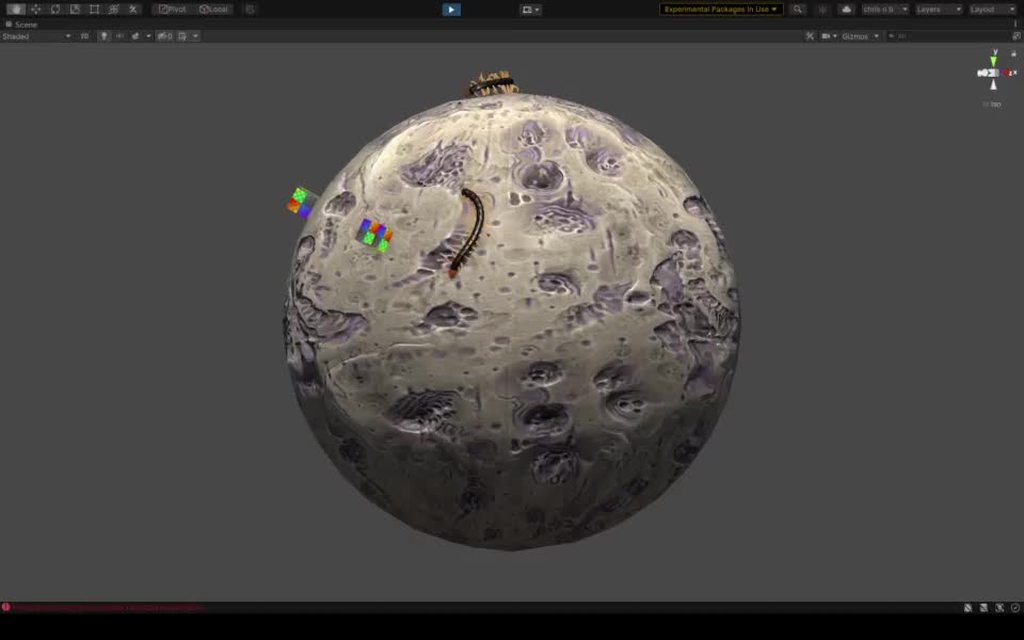
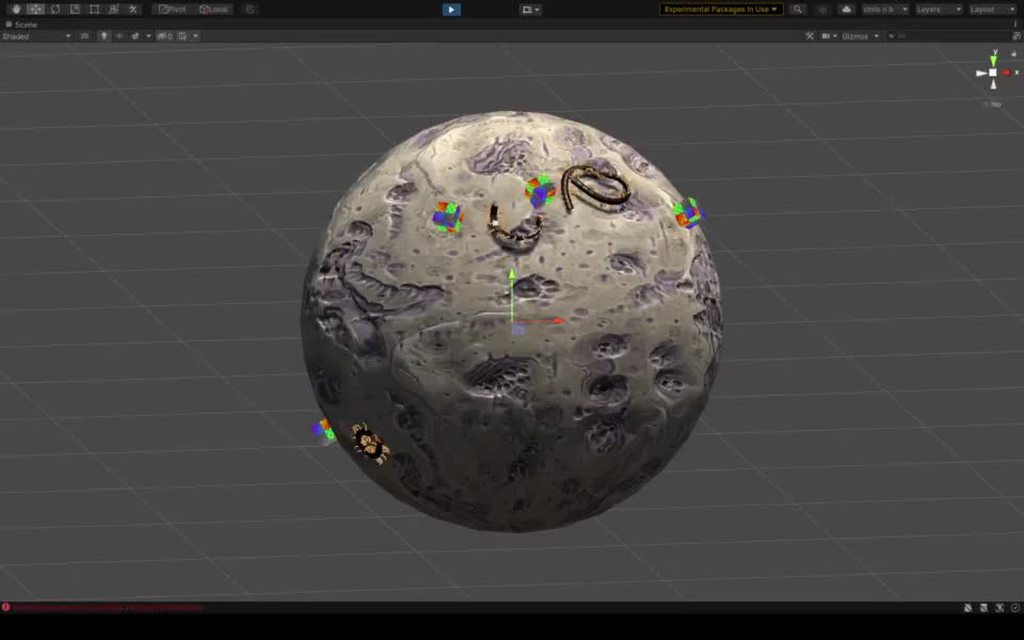
https://i.imgur.com/By3VM1k.mp4
1961: Youri Gagarine first human to journey in space
2021: First centipede to journey in space 🤩
mighty sluice
finally science is tackling the stuff that matters!
supple sparrow
How does the pathfinding work on these ones ? do they cast a ray through the sphere and the you project on the sphere ?
then*
supple sparrow
I assumed the cube thingy was food
mighty sluice
i am feeding them a direction that tells them the relative dir to the cube
it's a bit simple, but it works as a placeholder
normally i have my agents navigate based on diffused smell but i need to re-work my smell system
supple sparrow
mighty sluice
i am feeding them a direction that tells them the relative dir to the cube
relative dir on the 3d space ?
mighty sluice
there is no hard logic telling them where to go though
yea in 3d space. relative dir from head to target
supple sparrow
ALright I see :p
mighty sluice
it's just a place holder and convenience for making sure they can derive a direction to try and maintain
for now their motor control innards are much more important
they do get rewarded for the "food"
 stuck bay
Hey, i created a 3D room consisting of 4 walls (planes) on each side and im using a charactercontroller to detect collision but for some reason the walls on the left and right dont get detected and the ones in front and behind work perfectly fine
https://gyazo.com/a12bc6f981b3d3620ab41bfb666aa9d4
the walls are all the exact same i think something is wrong with the contact points of the capsule charactercontroller but im still new to this so i can't really tell can someone help me out/elaborate why this is not working
 sacred parcel
How to balance my ragdoll in Unity?
 round hinge
sacred parcel
How to balance my ragdoll in Unity?
round hinge
sacred parcel
How to balance my ragdoll in Unity?
There r lots of tutorials in Youtube. have you tried them ?
sacred parcel
Thing is, there are so many, I am kinda confused.
One thing: I am a TOTAL noob in programming.
So I want a tutorial which explains what it is doing.
round hinge
sacred parcel
Thing is, there are so many, I am kinda confused.
youtube puts the most relevent on the top. that toppest video should be the best
sacred parcel
Okay!
round hinge
anyways...
I recently faced a really challanging physics problem, where I need to limit the physics of a certain rigidbody to only X and Z. there is already an option in Unity for that, but I found out that it Does take y into account! which is weird... any idea how to do it manually ?
to illustrate the problem, imagine in this picture that up is Y and right is X axis. in this scenario that i drew, the collider hits the curved wall and rotates back when all axicies are allowed

in 3D , the length stays the same

when limited to X & Z though, the length becomes less

the length is the velocity in which the object is moving with.
this is one problem
there's this too :
when we have highly curved wall, the object would reflect forward and not change it's X axis in a 3D physics

but when limiting to only X & Z in Unity, the object wouldn't reflect on X! it would just keep it's 3D result and zeroes out the Y axis

This is the ideal result I'm looking for ( the green is the reflect)
 round hinge
I'll show it all in a video if my explanations wasn't enough
 vivid salmon
Hey guys! I'm procedurally generating a track mesh and I'm using this mesh as mesh collider, but when a rigidbody with a simple box collider slides in this mesh collider, it hits the edges of the mesh. No vertex position is being duplicated so there's no gap between each segment of the track, so I don't know what's causing this. Also, my rigidbody has Continuous Speculative collision detection because the gameplay is a bit fast so it clips a lot through the mesh without it.
 foggy rapids
friction in the materials
vivid salmon
There's no friction in the default physics material I've created
foggy rapids
default physics material has friction
vivid salmon
I created another physics material to use as default, without friction
foggy rapids
are you using it on both objects
vivid salmon
yea, I don't think that the issue is the friction, I see a bunch of other people asking on forums about that, but none of then resolves my issue
there's something to do with the mesh collider itself, I tried to weld the vertices, change physics settings but nothing works
timid dove
round hinge
anyways...
I recently faced a really challanging physics problem, where I need ...
Have you considered using the 2D physics engine instead?
mighty sluice
@lapis plaza Hey dude! Thanks very much for pointing me to your ModifiableContactPair example git, it was very useful.
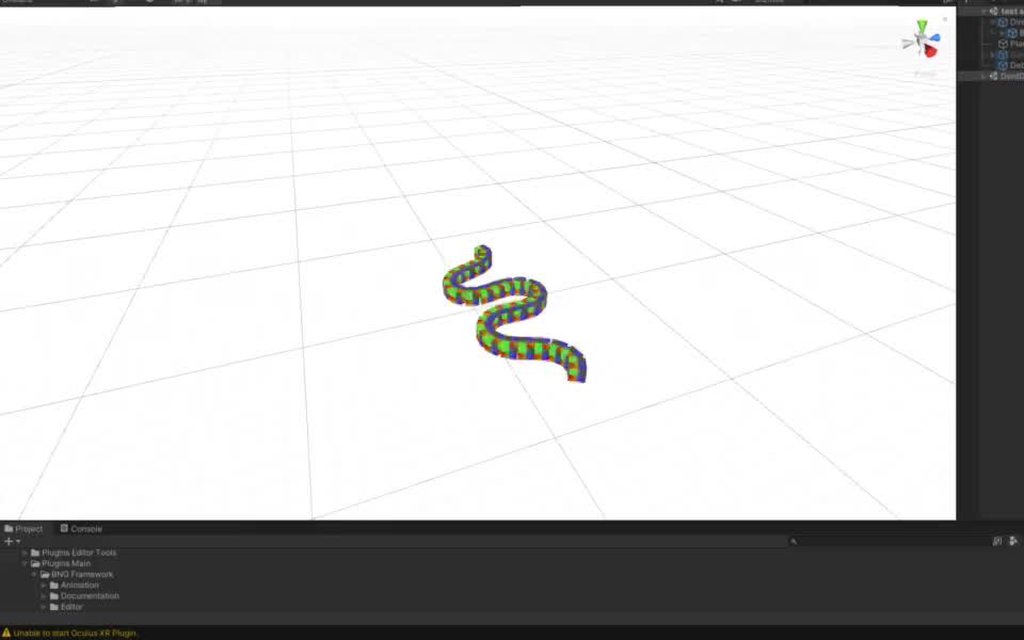
I have got a primitive first attempt working, but it's far from perfect and appers to drift anomalously to the left
I need to improve the math im using to get a friction co-efficient
timid dove
vivid salmon
yea, I don't think that the issue is the friction, I see a bunch of other people...
Your problem may also be helped by the modifiable contact pair API that @mighty sluice is referring to
I think it may be experimental still though. But I was having problems with that issue even back in Unity 5 days
mighty sluice
tracking the movement of a given contact point isthe hard part
a given contact is a unique per-frame thing, so technically there are no persistent contacts
and since i need the movement of a contact point relative relative to the surface of the collider, it's even more cumbersome
vivid salmon
@timid dove This seens interesting, but how stable it is? Is it mobile ready?
timid dove
vivid salmon
<@!179367739574583296> This seens interesting, but how stable it is? Is it mobil...
¯_(ツ)_/¯
round hinge
timid dove
Have you considered using the 2D physics engine instead?
This is a 3D game. This collider needs to hit 3D colliders. Is it possible to put a 2D physics inside a 3D physics?
If so, I can't wait to see how it works :D
 untold sand
 timid dove
true mason
it is kinematic
timid dove
true mason
it is kinematic
If it's kinematic does it matter that it fell asleep?
supple sparrow
Only if in contact with a static collider, could not wake up 🤷♂️
 real wave
sacred parcel
How to balance my ragdoll in Unity?
real wave
sacred parcel
How to balance my ragdoll in Unity?
literally what im trying to do rn
how could i get this to stick to the foot movement in an animation, but keep the foot placement? Its a stupid question i know but i dont have that much experience.
sacred parcel
@real wave Same.
real wave
sacred parcel
<@!289026673876140033> Same.
got any solution thus far?
sacred parcel
real wave
got any solution thus far?
Inverse Kinematics.
But first, I'll try some animations.
So learning that at first.
real wave
sacred parcel
Inverse Kinematics.
Thats what im doing
real wave
sacred parcel
So learning that at first.
Try brackeys video on animation its pretty understandable
sacred parcel
real wave
Try brackeys video on animation its pretty understandable
Can you send the link? IDK which tutorial you are talking about.
real wave
sacred parcel
Can you send the link? IDK which tutorial you are talking about.
Sorry was gone for a while. I meant the animation rigging one.
sacred parcel
real wave
Sorry was gone for a while. I meant the animation rigging one.
Can you send me a link?
Please?
real wave
aight
real wave
sacred parcel
Can you send me a link?

Let's create procedural animations using Animation Rigging!
► This video is sponsored by Unity.
● Learn more about Constraints: https://docs.unity3d.com/Packages/com.unity.animation.rigging@0.3/manual/ConstraintComponents.html
●GDC talk on Animation Rigging: https://youtu.be/XjMKbElVNmg
● Download the Skeleton: https://assetstore.unity.com/pa...
 noble nimbus
Hello, I need some help with the WheelCollider.
How can I stop completely and instantly a car formed by wheel colliders? For instance, I want this for respawning the car.
 distant coyote
a car with Wheel Colliders would typically have a Rigidbody at the top most level
(an RB that teh wheel colliders are attached to)
you'll want to set that RB's position, rotaiton, velocity, and angular velocity to zero
noble nimbus
distant coyote
a car with Wheel Colliders would typically have a Rigidbody at the top most leve...
Yup, I got it
noble nimbus
distant coyote
you'll want to set that RB's position, rotaiton, velocity, and angular velocity ...
Gonna try it! Thank you very much for your response
distant coyote
you might want to set all wheelcollider motor torque's to zero
then enable/disable the whole gameobject too - i believe that actually nulls out any velocity wheel colliders have
noble nimbus
Okay! I will do this if the previous doesn't work
noble nimbus
distant coyote
then enable/disable the whole gameobject too - i believe that actually nulls out...
Isn't it a bit sketchy though? heheh. Anyways, I will let you know! Ty a lot
distant coyote
you could disable individual colliders, and I don't think you have to do it over multiple frames either
just flick off flick on
user will never see it
no more tacky than "Respawning" 😛
noble nimbus
hahahah
💯
well
xd
Just by adding this: ```csharp
if(Input.GetKey(KeyCode.B))
{
rigidbody.velocity = new Vector3(0.0f, 0.0f, 0.0f);
Debug.Log("STOP");
}
it stops instantly, which is what I want. Then I can drive the car again accordingly
Many, many thanks!
 gleaming gorge
So, my character is using character controller for moving around, then I add hinge jointed doors to the level.
To make the character interact(push) the door I initially used oncollision and addforce to push the door away from the char, it kind of works but the character can actually push the door out of it's hinge especially when the door is at it's angular limit.
So, I googled for solution and found that instead of using addforce and oncollision, I should add a capsule collider. It almost work, but the character still can 'break' the door by pushing it beyond it's limit.
Question is, is there any workaround this problem without having to change from character controller to rigidbody?
timid dove
gleaming gorge
So, my character is using character controller for moving around, then I add hin...
This was designed for that: https://docs.unity3d.com/ScriptReference/CharacterController.OnControllerColliderHit.html
the example code there is relevant to your use case as well
gleaming gorge
timid dove
This was designed for that: https://docs.unity3d.com/ScriptReference/CharacterCo...
Yes, this is what I use on my initial attempt, I was using oncontrollercolliderhit to push the door out of the way, before.
But that said, I might give it another shot (just figured that I can check hingejoint angle, and void the push if the angle is at/over the limit)
timid dove
gleaming gorge
Yes, this is what I use on my initial attempt, I was using oncontrollercolliderh...
yeah it wont magically fix your hinge issue. That's a tricky one
gleaming gorge
Yeah, maybe I shouldnt use charactercontroller in the first place 😅 , but it's far too late now...
round hinge
gleaming gorge
So, my character is using character controller for moving around, then I add hin...
Hey. If the problem still exists.
Try limiting it's rotation and position through an script
In Fixed Update
gleaming gorge
round hinge
Hey. If the problem still exists.
Try limiting it's rotation and position throug...
🤔 I havent try that, might worth the shot
true mason
how can I get two kinematics rigidbody collide?
timid dove
true mason
how can I get two kinematics rigidbody collide?
You can only get them to do OnTriggerEnter
they will not do OnCollisionEnter
timid dove
true mason
how can I get two kinematics rigidbody collide?
Note the empty spot here:

kinematic rigidbody will only collide with dynamic (non-kinematic) rigidbody
true mason
ok
timid dove
true mason
ok
But if you see here it will work if at least one of them is as trigger collider, with OnTriggerEnter

 tranquil hawk
Hi guys, I am moving this ball with torque ... I'm not sure how to keep the max angular velocity large while preserving the player's ability to change it quickly

It seems like when I make the ball allowed to move faster, I lose the ability to control it as well
And I can't stop the ball when it's going down a hill, or make it go up a hill either
This is the script FWIW but I think it's mostly a conceptual question https://pastebin.com/ZGP76LK4
tranquil hawk
How do you find an object's angular velocity towards a particular direction?
mighty sluice
transform.InverseTransformDirection(rb.angularVelocity);
then read the axis you want
that would be relative to the object
just take angularVelocity for worldspace tumbling
timid dove
tranquil hawk
Hi guys, I am moving this ball with torque ... I'm not sure how to keep the `max...
I mean this is basically a question of momentum vs force. The larger the momentum, the higher the force required to cancel it out
momentum is velocity * mass - or
In angular terms it's angularVelocity * inertiaTensor and force is torque instead
so as angularVelocity goes up, so does the torque required to stop it
so either - provide more torque or reduce the intertia tensor of the object (which can be done by reducing its diameter or mass)
tranquil hawk
thanks guys
tranquil hawk
@timid dove I'm still kinda having a hard time with it. I just want the spinning to be converted to movement more easily. I tried lowering the mass but it doesnt seem to change it
Maybe I just need to give the torque an extra boost, proportional to the current velocity in that direction
 viral ginkgo
@tranquil hawk increase friction of the ball
no need for linear forces
you want it to have better grip? or you are happy with drifting?
tranquil hawk
i just kinda want to try out some different setups to decide ... i will try that, i don't have any physics material on it right now
viral ginkgo
@tranquil hawk you can also do a little trick to kick up the friction even further
by applying force on reverse collision normal
it might stick and climb walls tho
tranquil hawk
gotcha
Thanks the friction makes it a lot better
I don't suppose there's a way to do air control ?
viral ginkgo
@tranquil hawk if you dont want to do linear force
you can have little bit of linear force if its mid air maybe
real wave
Physiccs
tranquil hawk
Any tip for how to get this bike to always be looking the correct direction? Currently I have replacementObject.transform.rotation = Quaternion.Euler(0,rigid.velocity.normalized.y * 360,0);
tranquil hawk
Hmm maybe just sample positions from collision/raycast and subtract them to calculate the direction myself?
 drowsy dawn
Why do some collisions bounce off each other and some collisions act like magnets and you stick to the object? Video here: https://youtu.be/WQEbY6ntzgo

The MMO update for the game we're developing can be played now: https://store.steampowered.com/app/658480/Starfighter_General/
Meet the ancient of days:Man who's gamed more than anyone who ever lived:150,000hrs www.twitch.tv/goodnewsjim #1World Starcraft&BW&War3&D2hc.Jesus loves you.How may I pray for you?Love's the way.
Proof of me being #1 i...
tranquil hawk
It works 🕺 wheeee
tranquil hawk
@drowsy dawn are you sure it's the colliders causing that? If you turn them off it doesn't happen?
drowsy dawn
If I turn colliders off, I fly through stuff
This was a bug I always had in my non DOTS stuff
But I found the bug in DOTS too...
I thought people experienced this themselves and it wasn't just me
Ok, I'll try and fix it if no one is familiar with this UNITY physics bug...
 waxen edge
drowsy dawn
Why do some collisions bounce off each other and some collisions act like magnet...
waxen edge
drowsy dawn
Why do some collisions bounce off each other and some collisions act like magnet...
Not able to watch the Video atm, but that sounds like Physics Materials

 winter plank
is there a possible way to make my collider in real time
 frigid pier
Yes. You add one of the default shapes through code or create a mesh for one.
 spiral moon
like this efect but with obect of unity
spiral moon
spiral moon
like this efect but with obect of unity
no one?
 proud escarp
spiral moon
no one?
proud escarp
spiral moon
no one?
Shader graph
spiral moon
proud escarp
Shader graph
how
proud escarp
i dont really understand what you mean, could you explain it more
proud escarp
but i think shader graph will help
proud escarp
spiral moon
is not a physic work like to make it liquid
ok you mean liquids
i forgot i was in physics page
spiral moon
spiral moon
like this efect but with obect of unity
look the picture, How can I make a MetaBall efect such as slime ball as you can see this blue ball when interacts with other one like it the ball start to melt with the other one, like slime you see?
spiral moon
proud escarp
ok you mean liquids
look above
spiral moon
:u
proud escarp
if it does not work check out this tutorial

This script consists of just a few lines which easily made our
mesh to jelly or rubber type mesh
.
not try to increase damping value from ( 1f )
.
(Note)
if your mesh has greater than 1000 vertices, not try to add the script to this mesh
Link on my Discord:- https://discord.gg/b78t3r5RHa
Please Subscribe for more videos:-https://www.youtube.com...
spiral moon
uhhhh
proud escarp
This video will teach you how to make it using a c# script in unity
spiral moon
but..
spiral moon
yes but the slime style is working nice, but I mean the Melted style look
viral ginkgo
metaball should have nothing to do with physics
i think the balls just radiate some kind of potential field
spiral moon
viral ginkgo
metaball should have nothing to do with physics
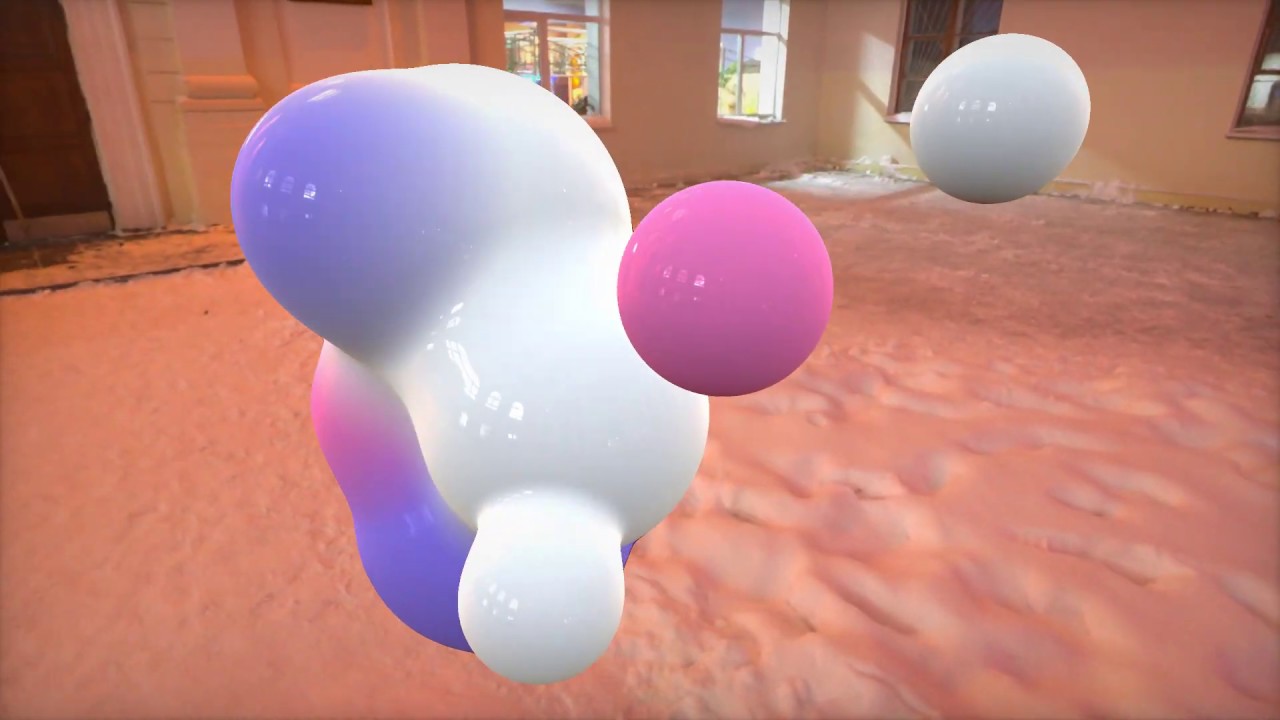
https://github.com/ya7gisa0/Unity-Metaballs
https://github.com/ya7gisa0/Unity-Raymarching-Android
Feel free to modify my code for your projects. Happy coding!
like this
viral ginkgo
and if the potential is bigger than some value at and frag, you draw the pixel
spiral moon
spiral moon
https://www.youtube.com/watch?v=kuLUqNNlN4g
is fake
stuck bay

i tought a mesh collider used the mesh as a colider
but i guess not
how can i make a collider like that? i have to add a bunch of coliders to make a custom one? or what ? this sucks i wasnt expecting it to be perfect but bruh
😪 the convex option is only for objecs with rigidbody so for the hoop the collider works exactly as i wanted its just not visible
im tired
sacred parcel
How to make my character move using animations and IK, and when a force is applied on it, say, it being run over by a car, it turns into an active ragdoll, and gets up by itself?
I really need help because apart from creating ragdoll using Unity's ragdoll builder, I know almost nothing.
(Please ping me if you find the answer.)
 polar leaf
@sacred parcel that's a complicated problem. There is an asset for that on the asset store called Puppermaster. Not sure exactly what it works but AFAIK, it applies forces to the ragdoll so it follows the animations.
I have a basic question. What is the difference in pratical terms between ForceMode Impulse and ForceMode Force?
sacred parcel
polar leaf
<@!608598566499516416> that's a complicated problem. There is an asset for that ...
But it's pricey.
polar leaf
It is. The way I think is, I'm not sure exactly how complex it is to build a system like this, but I'm pretty sure my pseudo-hourly rate multiplied by the time it will take me to build it will be much more expensive 😆
 sweet snow
polar leaf
I have a basic question. What is the difference in pratical terms between ForceM...
sweet snow
polar leaf
I have a basic question. What is the difference in pratical terms between ForceM...
Impulse is "instant", as if someone slapped it. Force is assumed to happen over 1 second, like a car accelerating.
sacred parcel
polar leaf
It is. The way I think is, I'm not sure exactly how complex it is to build a sys...
D:
polar leaf
sweet snow
Impulse is "instant", as if someone slapped it. Force is assumed to happen over ...
Thanks!
 rancid kayak
Can someone who's knowledgable with 2D collisions and rigidbody2D help me out? I'm trying to program hitboxes but sometimes collisions are not going through. (I can explain more in DM)
 golden raptor
I think explaining here is totally fine. sharing knowledge is a key feature if this channels @rancid kayak
if a collision is not "detected", that usually means some collision is turned off or you are using the wrong callback (which I recently confused myself)
rancid kayak
golden raptor
I think explaining here is totally fine. sharing knowledge is a key feature if t...
Okay, then I'll try to explain my situation. Just give me a moment to get all the notes together (just came back from a hike, and I have an outline of the issue)
So, I'm trying to program hitboxes in my 2d action game. These hitboxes are created at runtime and have their own layer. Where the issue arises is in setting up Rigidbody2Ds for the objects that use these hitboxes. And yes, these hitboxes' colliders have the isTrigger setting checked, and I'm using "OnTriggerEnter2D" for the scripts. (for clarity, the hitboxes are child objects each with a box collider) The way collisions are measured is that the hitboxes exist at runtime, and I just turn on/off their colliders when necessary. If neither the player controller or the enemy object have a rigidbody2d, collisions with a hitbox do not work, period. If the enemy has a rigidbody2D but not the player, then the player's hitboxes cause a trigger event when colliding with the object when the collider is turned on via inspector and via code. The enemy's hitboxes cause collision events on the player in a similar manner, except only when the collider is turned on via the inspector, not through code. If both have rigidbody2Ds, collisions seem to work, but very inconsistently when called through code (Debug.Log checks have shown me that sometimes it's like a collision doesn't even occur unless the objects move out of and back in range, which obviously isn't the behavior I want). They do seem to work when turned on via inspector, however. I don't know why there would be a difference when the hitbox's collider2D is turned on via the inspector vs when it's turned on via code.
This whole scenario makes me believe this has something more to do with me not understanding or knowing a certain aspect of Unity's collision/trigger system and how it works with rigidbodies. Can anyone give me any insight here?
Another interesting thing: for the last case, the hitbox trigger event does go off consistently if the parent object is already overlapping the other actor (enemy or player). Obviously, this will not work because I want to be able to have disjointed hitboxes ... and this just confuses me further on how collisions and rigidbodies work.
golden raptor
If neither the player controller or the enemy object have a rigidbody2d, collisions with a hitbox do not work, period
No idea, I used colliders without rigidbodies and it works. period. Colliders collide, not rigidbodies.
did you check what happens if you move the colliders around with the gizmos while the game runs?
rancid kayak
the only concern I have on that front is that someone else is working on the movement for the game, and last I checked they're using rigidbody2D for the player. So I have to account for that.
rancid kayak
tried moving around with the gizmos, same behavior.
And you say that ...the collider has an input for a rigidbody.
 golden raptor
"Attached body".
not an "Input".
it should be readonly, so nothing of concern
anyway, I remember having a Z problem when I messed with 2D.
somehow my colliders didn't collide because I unknowingly changed the Z value of one of the objects
rancid kayak
seems like all of the objects on my end keep a Z of 0
golden raptor
🤔 Then I am at the point where I would need to get hands on the code and check... I am not deep enough into it to take good guesses 🤷♂️
timid dove
rancid kayak
This whole scenario makes me believe this has something more to do with me not u...
You should read this whole article, and especially the tables at the bottom of it
https://docs.unity3d.com/Manual/CollidersOverview.html
 rancid kayak
So, static trigger colliders (like my hitboxes) simply don't collide with rigidbody colliders (like the enemies or player)?
wait

Does that mean colliders don't work properly when the object is scaled differently?
and instead I need to adjust the size of the collider componentitself?
rancid kayak
timid dove
You should read this whole article, and especially the tables at the bottom of i...
I read that, but I'm not sure if it's helped any. If anything, based on what I saw on the tables this should be working.
 limpid hornet
Since we are on the topic of colliders and triggers, I have a problem that I don't quite know how to address.
-- Projectile GameObject
    <RigidBody2D>
    <ScriptWithTriggerHandling>
    -- GameObject
        <SpriteRenderer>
        <CircleCollider2D>
I have a hierarchy set up like this. The Rigidbody in the parent object has collision detection set to Continuous. The CircleCollider in the child object is a trigger. The script in the parent object handles OnTriggerEnter2D().
My problem is that the projectile will sometimes go through an object and not call OnTriggerEnter. Sometimes it will enter another collider and only call OnTriggerEnter when it exits that collider. Other times it works as it should.
After playing around it seems like putting the collider on the parent object makes it always work. So the Rigidbody2D having continuous collision detection doesn't apply to child colliders.
Is this supposed to work this way? The child object will be changed at runtime so I'm trying to keep as much as possible in the parent so I don't have to copy/paste code a bunch of times for all the possible children.
limpid hornet
Well ignore that wall of text because even after rearranging everything so the collider and rigidbody are on the same object and detection is continuous Unity seems happy to just completely ignore collisions half the time.
golden raptor
I feel like I have to play with 2D a bit and check what you guys are on about... I don't had any issues with 3D colliders, I made a few scripts and prefabs for bullets using nearly the same approach.
 hollow void
How do i make sure that all of my jumps are consistent?
I have a little TPP (Third person Perspective) Character controller but the jumps are really inconsistent.
viral ginkgo
@hollow void jump in Update, use Input.GetKeyDown
don't use any delta time
hollow void
thanks
i ll see if that helps
Thanks it fixed
i was doing the jump using smooth delta time
🙂
 digital dust
Is it possible to someway make an object with trigger collider avoid going through walls?
 vagrant helm
I have added dynamic bones to the cape but I dont want it to go trough the body, I have added colliders but seems its not the way to fix it
 rancid kayak
Still having the issue where my trigger colliders work as intended when I turn them on/off via the inspector but not via code. Why is there a difference there? What does the inspector do to let the collisions work as they are supposed to that isn't done with a simple "collider on/off" switch in a script?
the fact that it's working with the inspector tells me it's not an issue caused by my code, rather that my script is missing some crucial part that is difficult to see.
 quartz pagoda
digital dust
Is it possible to someway make an object with trigger collider avoid going throu...
quartz pagoda
digital dust
Is it possible to someway make an object with trigger collider avoid going throu...
raycast?
digital dust
quartz pagoda
raycast?
wym?
quartz pagoda
I don't think you can have a rigidbody with istrigger really stop from collision. But if you really need it to then you have to do a workaround. Like using a raycast, and manually try to find collissions and then stop the gameobject from moving
polar leaf
Hello
How do I apply torque to an object
so it rotates around a given axis ? (normal)
timid dove
polar leaf
How do I apply torque to an object
Assuming it has a Rigidbody, you use the AddTorque method on the Rigidbody
rugged geyser
Hi team. I seem to be getting lots of physics.movebodies spikes. 400 characters with optimized transform hierarchies. No extra colliders or rigid bodies that don't have to be there.
Physics.processing is high too
Very high level but just wondering if there were some general go-tos
 marble cargo
I am making an obstacle course, as a rotare this thing, it does not shove my cube down, the cube has a rigid body and the spining platform has mesh collider
 viral ginkgo
@marble cargo the spinning thing might also need rigidbody
you might have to set its mesh collider "convex"
or give it a box collider too
marble cargo
imma try the first one
 latent plume
Are there any resources on different applications of deltaTime?
Like equations for movement, gravity, drag etc.
Making a platformer using the Update() event
 wide nebula
There's only one application for it, really. Whenever you're applying some value each frame, you need to multiply it by deltaTime because the time between frames is inconsistent.
latent plume
Right, but doesn't the equation change slightly for things like drag?
Like velocity *= velocity * dragRemainder * deltaTime doesn't work correctly
etc.
I could be wrong
it's just it's my first time dealing with physics timing to this level of detail and trying to fix my platformer
Working out which variables do/don't need * Time.deltaTime, and which if any need a different equation
viral ginkgo
dragRatio can be thought of the ratio of speed lost per second (although it doesn't work exactly like that similar to "interest problems")
@latent plume velocity -= velocity * dragRatio * deltaTime would work i think
latent plume
Hm
Okay, so I can see how that works, but are there no more edge cases after that?
My code has *= next to any addition except for where velocity is applied to position
But I still have different behaviour on different framerates
I can post the relevant code if that helps
polar leaf
timid dove
Assuming it has a Rigidbody, you use the AddTorque method on the Rigidbody
Hey, the rigidbody receives 3 angles. How can I convert my axis / power to 3 angles?
timid dove
polar leaf
Hey, the rigidbody receives 3 angles. How can I convert my axis / power to 3 ang...
Quaternion.AngleAxis(axis, angle).eulerAngles
something like that
mighty sluice
testing my VR agent-physics interactions https://i.imgur.com/cd3edPv.mp4
 summer drum
Do the Unity joints (Spring, Hinge, Character, Configurable) have different performance impacts?
For example, if my game has 100 Spring joints, or a 100 Configurable joints, is one worse than the other?
To my knowledge, config joints are like the 'parent' joint component. It can do what spring can, what hinge can, etc. So why wouldn't someone just use this one? Is there a downside?
timid dove
summer drum
Do the Unity joints (Spring, Hinge, Character, Configurable) have different perf...
probably not. But if you want to profile them and let us know, that would be cool!
timid dove
summer drum
To my knowledge, config joints are like the 'parent' joint component. It can do ...
Spring/hinge etc.. are easier to use. That's why you would use them over a Config joint
summer drum
So let's say spring is a subset of config, cause config can do more than just spring, but it can do spring, too.
So if you're just doing springiness work, you might think springJoint is easier to use than ConfigJoint,
but even for springiness alone, config is still better, because springJoint lets you set a spring value, but you cant set a different value for different axes, whereas you can with config
I find it hard to use the other ones when you know how config works. It looks daunting cause it has like 50 variables/values you have to adjust, but if there is no downside to using ConfigJoint even for the littlest thing, then it's the best joint to learn
timid dove
summer drum
I find it hard to use the other ones when you know how config works. It looks da...
fair enough. Personally ConfigJoint is extremely daunting to me so I'm glad for the Fixed/Hinge/Spring joints.
But maybe I'll learn eventually
I suspect it's all the same code driving everything
summer drum
I suspect that as well, but there's a low chance that when they made Hinge/Spring, they might have actually made that code more efficient FOR the purpose of spring/hinge,
so if I were to use Config when I only need Spring, there might be some overhead code running under the hood that I am not using?
timid dove
It is possible
summer drum
I just hope not. I have a model that I rigged up with spring, and config (after), and there was no apparent hit to performance, but idk how to do a thorough check
timid dove
we don't have access to the source code so the best thing to do is just profile it
make a scene with 500 copies of a prefab. Test it using the profiler with the prefab having a spring joint, and again with a config joint
that's the way I could think of to test it
summer drum
timid dove
make a scene with 500 copies of a prefab. Test it using the profiler with the pr...
Makes sense. I would also need to ensure I'm not toggling on/off anything else that appears to do nothing, but does something internally, when I am adjusting the Config's settings to achieve the look of Spring's.
timid dove
You could also of course ask in the physics section of the Unity forums and maybe someone from their staff will answer
¯_(ツ)_/¯
stuck bay
bruh mesh colliders are buggy af
wide nebula
You probably are just not aware of the limitations:
https://docs.unity3d.com/Manual/class-MeshCollider.html
stuck bay
anyway i have a translate moved player but he keeps clipping through walls and other things
wide nebula
Translation will not work well with physics collision detection. You need to use a Rigidbody and either add force or use the MovePosition function.
 runic surge
is DOTS physics fully cross deterministic yet?
I keep finding conflicting information on that
I know this project aims to make DOTS deterministic https://github.com/Kimbatt/unity-deterministic-physics#:~:text=This is a modified version of Unity DOTS Physics version 0.6.&text=3%2C which supports cross-platform,simulation by using soft floats.

GitHub
Cross-platform deterministic physics simulation in Unity, using DOTS physics and soft floats - Kimbatt/unity-deterministic-physics
 timid dove
What are you trying to do?
timid dove
what does "act like a cone" mean
timid dove
Where did the mesh come from? Is it the built in Unity cone?
 meager spindle
is my mesh just cursed or something
timid dove
Or a custom mesh
meager spindle
timid dove
Where did the mesh come from? Is it the built in Unity cone?
blender
fbx
timid dove
ok so what's it doing that is not cone-like
meager spindle
just kinda
stands
y'know
should fall over on its side when it hits the ground
wide nebula
What if you put it on a slight angle?
timid dove
if you put it at a slight angle does it fall over?
meager spindle
yes but the issue is that with older versions of the same mesh it does fall over
so something clearly has changed that shouldn't
timid dove
If it'sperfectly symmetrical it's just.. balanced I guess
meager spindle
seeing as the pickup system now just makes it vanish
timid dove
In real life nothing is perfect so it falls
meager spindle
yes but read this
meager spindle
meager spindle
seeing as the pickup system now just makes it vanish
this
timid dove
as for the pickup system - it's not related probably
there's a bug in your pickup system
meager spindle
no way
as everything else works fine
literally even other meshes
that I made too
so yeah you can see why i'm confused
timid dove
what do you mean by "vanish"
timid dove
Have you looked at the object in the inspector/hierarchy after the supposed "vanishing"?
meager spindle
it doesn't move though
timid dove
How did you make the cone in blender
meager spindle
even though it has a rigidbody
meager spindle
timid dove
How did you make the cone in blender
shift+a
then scaled it
exported
timid dove
ok good
meager spindle
thats literally it
also thing is this version is quite outdated
5.0.0f4 to be exact
timid dove
that's quite old but the features you're probably using haven't changed in a very long time
meager spindle
so can't quite just insert a cone
yeah im ultimately confused
have even tried making the collider with a mesh renderer
you could say
its cursed
timid dove
well... where is the mesh renderer here?
meager spindle
right here
 timid dove
on a child object?
meager spindle
yes
timid dove
Why does the parent object need a MeshFilter then
timid dove
are you 100% sure also that you're using the same mesh in both places
 timid dove
Idk - I would just try to debug the pickup vanishing thing
meager spindle
ehmm
yeah no I ultimately blame it on the unity's mesh collider being buggy
im gonna try and work some new solutions and see what happens
timid dove
Is there a good reason you need to use such an old version of Unity?
meager spindle
uh
yes
mainly being I just prefer them
I don't make all my games on unity 5.0.0f4 just so you know
I go with the newest possible that still has what I want
so like the obj model doesn't exist
lovely

o
my camera was inside the mesh
that makes sense
 weary moon
does anyone know why a rigidbody wont slide across a surface even if its using a frictionless material?
in the context of using a rigidbody as a player controller, it sort of sticks to walls
wait a minute it works if i have a frictionless material
but its if the dynamic friction is 0, but shouldnt that be something that static friction affects?
viral ginkgo
@weary moon dynamic friction is the friction force multiplier when the object sliding on some other object
static is when its standing still
It takes a little bit more force to get the object to start sliding in real life right?
And then its easier to keep it sliding
Thats also how it is in unity
The friction you see in highschool physics questions is dynamic force but reallife also has a static friction force
viral ginkgo
np
 fading crest
I'm working on a stabbing system for my VR game (code here: https://hastebin.com/urunowobas.csharp) and while it can stab, it cant un-stab.
I've tried sending a raycast up the blade to detect if anything is on it to no results, and ive tried a boxcast to no effect. (Ive also tried trigger colliders, but that just causes more issues somehow). Any tips?
 compact mortar
Hi all,
I have a big ask. Does anyone have ANY idea how to make train with proper physics. I can send in my code, however it it pre huge so idk. Maybe someone can help- I can pay you because its for a major game I am developing and I just cant get the train to turn a corner. Do Not suggest to me paths because that is not what we want. The player needs to be able to manually drive it
Thanks
wide nebula
Why won't a spline system work? You can move along it in any direction based on the players input.
compact mortar
wide nebula
Why won't a spline system work? You can move along it in any direction based on ...
Sorry, I am pretty new to this, what is a spline?
wide nebula
It's a path. 😆
https://assetstore.unity.com/packages/tools/utilities/curvy-splines-7038
For example, they even have a train demo.

Use the Curvy Splines from ToolBuddy on your next project. Find this utility tool & more on the Unity Asset Store.
compact mortar
wide nebula
It's a path. 😆
Seriously
How did I not even know this
Thanks so much you legend
See, I should have joined this discord 3 months ago
wide nebula
I would check out the asset, it's quite powerful. People have solved these issues, there's no point trying to reinvent the solutions.
compact mortar
Ahaha, ok. Cheers
compact mortar
wide nebula
https://assetstore.unity.com/packages/tools/utilities/curvy-splines-7038
For ex...
Hold up- its $50
How- I am a low-budget game dev
Any other way?
wide nebula
Make it yourself. 🤷♂️
compact mortar
Sure-
wide nebula
But you'll be spending more than $50 of your time trying to get something going.
Unity has sales, this definitely would be on it at some point.
compact mortar
I just found a video with a very nice description
so Imma just look at the description
xD
wide nebula
You can try Sebastian Lague's tutorial series on splines to get an undersatnding as well:
https://www.youtube.com/watch?v=saAQNRSYU9k
 proud nova
I recall Unity talking about providing something similar, but not sure if anything about that is public yet
compact mortar
and why are the only people that respond the community mods xD
latent plume
Hey does anyone know how I can get the correct initial jump velocity for a given jump height, jump time, and gravity?
compact mortar
idk, search up a formula and change it to code- check this thing out that I have stored in my 2tb hdd xD
...
isGrounded = Physics.CheckSphere(groundCheck.position, groundDistance, groundMask);

        if (isGrounded && velocity.y < 0)
        {
            velocity.y = -2f;
        }

        float speed = walkSpeed;
        float animSpeed = walkAnimationSpeed;

        float x = Input.GetAxis("Horizontal");
        float z = Input.GetAxis("Vertical");

        Vector3 move = transform.right * x + transform.forward * z;

        controller.Move(move * speed * Time.deltaTime);

        if (Input.GetButtonDown("Jump") && isGrounded)
        {
            velocity.y = Mathf.Sqrt(jumpHeight * -2f * gravity);
        }

        if (Input.GetKeyDown(KeyCode.LeftShift) && isGrounded == true)
        {
            speed *= 2;
        }
        else if (Input.GetKeyUp(KeyCode.LeftShift) && isGrounded == true)
        {
            speed = 3;
        }

        velocity.y += gravity * Time.deltaTime;

        controller.Move(velocity * Time.deltaTime);
@latent plume
idek if that suits ur thing- I have player animations os xD
latent plume
Ah that actually seems good. One sec
latent plume
compact mortar
idk, search up a formula and change it to code- check this thing out that I have...
what's the -2f for?
latent plume
yeah
compact mortar
Its something to do with a physics formula
I recon i did that wrong xD
Because I had issues with jumping, but it worked
maybe remove the -
lemme try that and tell you what happens for you
Ok so either works apparently
latent plume
Hm. Apparently it's close?
The number I get is always slightly too high
But it's near enough right
if desired height is 50, and gravity is 5, then I get a initial velocity of 22
but it should be 20
similarly...
if I have a desire height of 300, and gravity of 20
I get an initial velocity of 110 instead of 100
compact mortar
- honestly, I dont have a degree in physics
Its just code I have, so maybe you are helping me as well xD
latent plume
Well, thanks for the input anyway, brings me a bit closer to a solution
compact mortar
Ok, cool cool. Have fun xD
latent plume
cheers!
Okay, one more question for anyone who knows the answer
How do I work out the correct acceleration speed to reach a target speed in a target amount of time?
or a target amount of distance in a target amount of time... 🤔
Yeah, the latter one
timid dove
latent plume
or a target amount of distance in a target amount of time... 🤔
algebra

CalculatorSoup
Calculate displacement as a function of initial velocity, acceleration and time using the equation s = ut + (1/2)at^2. Solve for s, u, a or t; displacement, initial velocity, acceleration or time. Free online physics calculators and velocity equations in terms of constant acceleration, time and displacement.
start with the displacement equation - solve for whichever variable you want and plug in the rest
latent plume
timid dove
https://www.calculatorsoup.com/calculators/physics/displacement_v_a_t.php
Thanks. This seems really good. Is it just me, or can it not solve for displacement?
Or rather it only solves for displacement
Like I can't put an ideal displacement and solve for initial velocity
wait nvm nvm I found the option
ok looks good thanks! 😅
compact mortar
I have one for a train script @latent plume
var velocity = rbTrain.velocity;

        float speed = velocity.magnitude * 1.7f;

        if (speed <= 0)
        {
            speed = 0;
        }

        // Velocity = Force             / mass * time
        // velocity = currentMotorForce / 3000 * Time.deltaTime;

        fixedSpeed = (int)speed;
        speedText.text = "" + fixedSpeed;
If that makes sense
idek
rigidbodies have velocity built in and you can get it from var = rigidbody.velocity
timid dove
latent plume
Like I can't put an ideal displacement and solve for initial velocity
Yeah all the options are there. But you could also derive them following the normal rules of algebra if you needed
summer drum
I have this model that has ConfigurableJoints set up on all the bones, so when I drag this object around, the limbs behave well with physics.
Problem is, the whole object falls down to a ground.
Is there a way I could have this object just 'hover' in the air (not falling down), but with all its parts still physics-active when I move it around?
latent plume
timid dove
Yeah all the options are there. But you could also derive them following the nor...
I'm actually really bad at shifting around equations like that. Is there any resources you'd recommend for learning how to do that?
timid dove
summer drum
I have this model that has ConfigurableJoints set up on all the bones, so when I...
Diosable gravity on all the Rigidbodies
latent plume
I was bad at it in school as well. Would like to be more independent with equations but I usually have to find resources like the one you linked
timid dove
latent plume
I was bad at it in school as well. Would like to be more independent with equati...
uhhhhh... IDK it's been so long since I learned algebra... um I'd just google some basic algebra tutorials?
https://www.youtube.com/watch?v=V3dFHt9p5W8 This maybe?
latent plume
timid dove
uhhhhh... IDK it's been so long since I learned algebra... um I'd just google so...
I know a little bit about balancing equations and finding x etc. but there's usually points where I get stuck
Like, earlier, I got halfway through solving something that I felt would help me get the equations you sent
y = (x * (x+1)) / 2


y * 2 = (x * (x+1))

(y * 2) / x = (x+1)

((y * 2) / x) - 1 = x


so x = ((y * 2) / x) - 1
The one at the top I found online
timid dove
Well in any case - that site I linked gives you the equation to find any of the terms in that particular displacement equation
latent plume
The one at the bottom is me trying to put x on the left hand side. But then I still have some x stuck on the right hand side. Did I go wrong somewhere or is there more steps?
Yeah, the site you linked is really good, thanks
timid dove
latent plume
```
y = (x * (x+1)) / 2
y * 2 = (x * (x+1))
(y * 2) / x = (x+1)
((y * 2) / x...
Your algebra here was correct. The problem is it's a quadratic equation (it involves an x^2 term) which can't be solved using basic algebraic means
You have to use a more advanced technique for such equations
A quadratic equation is an equation that could be written as
latent plume
Ahh, okay thank you
The funny thing is I think I did these in school, but at that point I was doing everything entirely by rote and none of it had meaning
So I've pretty much forgotten anything I did back then
timid dove
yeah the way some schools teach I believe is... not good 😉
latent plume
😦 true dat
timid dove
it's better when there's some actual problem you're trying to solve and the terms have meaning
rather than just being abstract numbers and letters on paper
latent plume
For sure
I wish I learnt gamedev sooner because it definitely contextualised a lot of things I'd seen before
summer drum
timid dove
Diosable gravity on all the Rigidbodies
Disabling gravity on all the rigidbodies also disables the physics activity, though.
timid dove
summer drum
Disabling gravity on all the rigidbodies also disables the physics activity, tho...
it shouldn't...
how are you disabling gravity?
summer drum
The model itself is a nature object so the natural leaves and stuff have to wobble in the air when I drag my object around, they wobble until they settle into a droopy position since gravity is applying on them.
timid dove
gravity only controls... gravity
summer drum
When you say disable gravity on them, you mean Rigidbody.useGravity, correct?
timid dove
yes
timid dove
gravity of course
being pulled down by gravity of itself and any other bodies they're attached to
summer drum
Okay, I'll have a go with that, thank you for info
summer drum
timid dove
gravity of course
Okay, you're perfectly right, my bad.
Disabling gravity just disables the flower from falling
the limbs themselves also don't fall, but they do still act with jiggles to the rest of the movement
I can work with this, and make adjustments
 warped pasture
I'm completely new to Unity, so please forgive any false assumptions.
I'm trying to align gravity to a plane in space. Currently I'm raycasting from the camera, then getting the transform of the GameObject that's been hit.
I want to use this transform to determine a vector to set UnityEngine.Physics.gravity to, so that rigidbodies will be attracted in the direction of the plane, not directly towards it.
By this I mean that a plane along the x-axis should create a normalized vector of (1, 0, 0) (or (-1, 0, 0)) depending on the side of the plane that the raycast came from). Of course this would also need to extend to more complex rotations.
Thanks for any help you can give me
 grizzled sapphire
warped pasture
I'm completely new to Unity, so please forgive any false assumptions.
I'm tryin...
grizzled sapphire
warped pasture
I'm completely new to Unity, so please forgive any false assumptions.
I'm tryin...
What exactly do you need help with? You've explained only what you want, not what your issue is?
warped pasture
mainly that i'm not sure how to go about this as such... I'm not too familiar with the different data representations (quaternions etc.) so just any pointer as to whether this would be possible and a general outline of how it could be done
 glossy sable
warped pasture
mainly that i'm not sure how to go about this as such... I'm not too familiar wi...
glossy sable
warped pasture
mainly that i'm not sure how to go about this as such... I'm not too familiar wi...
What exactly do your planes look like? 1 vector isn't enough to define a plane
Wait, maybe it is enough. Is the direction vector perpendicular to the plane?
warped pasture
it wasn't, but i believe that i have worked it out now, just getting the normal of the raycast hit, then inverting that
thanks for the help anyway
 flint slate
Hi all, I'm having issues with the hockey stick not colliding with the hockey puck while the player is moving. They collide just fine when I stand still. Both the puck and hockey stick are using convex mesh colliders with continuous dynamic rigidbodies. I am also using a character controller for the player (not sure if that matters). I'm very new to Unity and game development, so any help would be appreciated. Thanks!
timid dove
It's because you are using a CharacterController for the body.
if the stick is a child of the player body - then when you move the CharacterController, the stick is basically just teleporting as far as the physics engine is concerned
it will teleport right through the puck no problem
You need to move the stick only via its Rigidbody
compact mortar
@wide nebula I found a way to make the train with full physics:
"I used sphere colliders for wheels and plane surfaces next to the wheels so that the wheels do not fall off the track. The wheels are connected to bogies by using hinge joint. The bogies are connected to the coach body by using hinge joint."
This was just in the comments of a video and it may have saved me months worth of work
flint slate
timid dove
It's because you are using a CharacterController for the body.
That makes sense, but I don't have the stick as the child of the player body. I use the auto hand asset to grip and pose the hands when gripping the hockey stick. It's not located under the player.
timid dove
flint slate
That makes sense, but I don't have the stick as the child of the player body. I ...
how does the stick move along with your hand when the player moves though
seems like there's some kind of teleportation happening still
flint slate
timid dove
how does the stick move along with your hand when the player moves though
I'll need to go back in and play around with it. Would a solution be to use a rigid body instead of a character controller? I would also like my character to slide a little when moving, like on ice. So a rigidbody may the only way for that.
 tacit laurel
weird: when timesclae < 1 rigidbody with interpolate are still stuttering
seems that interpolate should smooth that... bug?
compact mortar
Is there a reason wheel colliders make the camera go funny when the spring and damper exceeds a certain number xD
 lusty cloud
is this a good script for damping? it doesnt seem to work. LastLength = SpringLength; SpringLength = hit.distance - WheelRadius; SpringVelocity = SpringLength - LastLength; DamperForce = DamperForce * SpringVelocity; SpringForce = Stiffness * (SuspensionLength - SpringLength); SuspensionForce = (SpringForce + DamperForce) * transform.up;
grizzled sapphire
Why doesnt it work, what does it do and what do you expect it to do? What have you tried?
lusty cloud
grizzled sapphire
Why doesnt it work, what does it do and what do you expect it to do? What have y...
its supposed to dampen my suspension, but at low values it does nothing and at high it makes my car vibrate
grizzled sapphire
            LastLength = SpringLength;
            SpringLength = hit.distance - WheelRadius;
            SpringVelocity = SpringLength - LastLength;
What is the result of SpringVelocity? Can you log those
lusty cloud
wait i made changes. this seems like it should work in my peanut brain
            SpringLength = hit.distance - WheelRadius;
            SpringVelocity = SpringLength - LastLength;
            DamperForce = Damping * -SpringVelocity;
            SpringForce = Stiffness * (SuspensionLength - SpringLength);
SuspensionForce = (SpringForce + DamperForce) * transform.up;```and springvelocity is the difference of the compression from last tick
grizzled sapphire
Can you log your values please, or use a debugger, to see what they actually are?
            LastLength = SpringLength;
            SpringVelocity = SpringLength - LastLength;
My peanut brain says this is always 0, and you should store LastLength at the end of the method
Oh nevermind thats wrong
lusty cloud
grizzled sapphire
Can you log your values please, or use a debugger, to see what they actually are...
now i have this, seems much better but still bad
not it just glides around and jumps
stuck bay
Hopefully I make sense, and someone is able to give me a hand:
Working in 3D, and trying to get balls to bounce off of each other. I've got a radius and x,y,z, and it's easy to figure out if two spheres are contacting each other through the hypotenuse of the centers of the two spheres.
However, I've been trying to figure out for a while (and getting it wrong) for calculating the angles at which they should bounce off of each other.
(For simplicity, if we assume sphere_two is stationary, and sphere_one contacts it perfectly on the bottom/left/right/top/etc., sphere_one should just change velocity in one direction). I've got more theoreticals in my head, some of which I am still wrestling with, but I'll press send before adding more in case someone cuts me short 😂
Not worrying about conservation of momentum for the time being.
Ah, for someone who did more than just rudimentary Physics and Maths, you'd think I know I need to use the normal...
spiral moon
ehy
is better to use bassic Colliders like a cylinder to a character insted the mesh collider?

so in which case I should have to use mesh
wide nebula
Mesh colliders don't work with skinned meshes. So you use primitives.
How accurate you want to be is up to you. Using multiple child colliders for arms and such.
spiral moon
wide nebula
How accurate you want to be is up to you. Using multiple child colliders for arm...
like making the colliders with Cylinders with diferents Empty GameObjects
and set the size for the harms and legs
wide nebula
Yeah, essentially that.
Again, that's only if you need that level of accuracy. Most of the time, you don't.
spiral moon
thats how big games like God of War use to make colliders?
spiral moon
wide nebula
Again, that's only if you need that level of accuracy. Most of the time, you don...
and in which case should I use mesh colliders?
wide nebula
For irregular shaped meshes.
wide nebula
Something that would be a hassle to. Say, like a car, or a building.
spiral moon
in this case I will use an mesh collider
wide nebula
The reason you can't for skinned meshes is because the collider doesn't follow the bones. So it won't keep the "shape". You can force it to rebake the collider in code, but it's an expensive operation.
spiral moon
wide nebula
The reason you can't for skinned meshes is because the collider doesn't follow t...
like it will never follow the animation of a character
right?
wide nebula
Yep
spiral moon
OHHHHHHHHHHHHH
thats was happening to me right now so I change to a primitive cylinder
Lmao thanks for clarifying the doubt
spiral moon
why the Collision is not working, both characters has Colliders, and Rigidbody

for examle look both has Colliders and rigidbody
 timid dove
spiral moon
for examle look both has Colliders and rigidbody
timid dove
spiral moon
for examle look both has Colliders and rigidbody
because you are moving the object(s) with an animator instead of using the rigidbody's methods
 candid arrow
Is there away to turn off box collider collisions without turning on is trigger
 static plover
candid arrow
Is there away to turn off box collider collisions without turning on is trigger
static plover
candid arrow
Is there away to turn off box collider collisions without turning on is trigger
make them both kinematic?
or put them on layers and turn them off in the layer collision matrix
glossy sable
candid arrow
Is there away to turn off box collider collisions without turning on is trigger
There is also IgnoreCollision. Depending on your situation https://docs.unity3d.com/ScriptReference/Physics.IgnoreCollision.html
wide nebula
If they're just standing there, then it's fine. It's not like you're dropping 100s of these with rigidbodies.
timid dove
It also depends how spread out they are etc. Unity doesn't even look at the MeshCollider unless the Colliders pass the AABB bounds check first
Nope it's much more optimized than that
Try them both out and see
spiral moon
timid dove
because you are moving the object(s) with an animator instead of using the rigid...
the objects are moving by the transform.Translate();
spiral moon
timid dove
you are not using the Rigidbody
I have a problem with the primitive collider cylinder I guess

when playin the character start to falling and execute the animation of falling but this is the problem even when collision with the floor the character doestn stand up to walk
like this

but the cylinder collider is on the floor and is touching the floor so the character should walk correctly
 pure mist
using Unity.Physics. I am moving the character by altering his velocity.Linear to keep his momentum updating correctly (instead of Translation.pos, which would just tp him to that next point and lose his momentum). It works.
Now I want to so similar with rotation. Would I simply just alter velocity.Angular? Or do I need to mess with PhysicsMass.InverseInertia or PhysicsMass.Transform.rot? Again I'd like to preserve his angular momentum during these alterations.
 dawn snow
anyone help
foggy rapids

 dusty ledge
I am making a game with separate server and client projects. For some reason my physics between the client and the server vary dramatically, the physics and time settings are the exact same. If anyone knows why let me know.
runic surge
dusty ledge
I am making a game with separate server and client projects. For some reason my ...
this is because syncing physics is a very complicated and hard thing to implement
Even if you have the same simulation, you may not get the same result. Even if you have the same simulation and a different machine you may not get the same result...this concept is called determinism. I recommend this resource https://www.youtube.com/watch?v=Z9X4lysFr64

from the Game Developers Conference vault
timid dove
Yep - physics are a chaotic system - slight variations in floating point precision on different hardware or slight differences in starting states will quickly result in drastically different simulations.
dusty ledge
runic surge
Even if you have the *same* simulation, you may not get the same result. Even if...
yeah, that makes sence, but both sides are producing repeated things that vary from each other
runic surge
dusty ledge
yeah, that makes sence, but both sides are producing repeated things that vary f...
Unity physics for example can be soft deterministic, meaning it will be deterministic given the same inputs and the same machine. Most physics engines work this way.
timid dove
Rather than trying to keep physics simulations in sync across machines a lot of games take the approach of doing one canonical physics simulation on the server and having the client do local simulation only to interpolate/fill in the gaps between server updates basically
 arctic marsh
Thats why you start glitching when having bad connection. It really depends on your game, how precise does it have to be?
dusty ledge
timid dove
Rather than trying to keep physics simulations in sync across machines a lot of ...
I am not smart enough to make the player movement feel smooth through this
timid dove
Multiplayer is not easy
dusty ledge
I might just move to a non physics movement system, but my movement felt so nice 😭
arctic marsh
Again, how dependent is the game on precise physics?
What do you calculate on the server?
dusty ledge
arctic marsh
Again, how dependent is the game on precise physics?
not really, I don't use it at all except for movement
dusty ledge
arctic marsh
What do you calculate on the server?
I calculate the movement on the server to prevent cheating and I calculate it on the client to make it not laggy
arctic marsh
Prevent cheating? I could understand checking on the server for high values but not calculating the whole movement on it. I would sync the local movements on the server with every client.
dusty ledge
arctic marsh
Prevent cheating? I could understand checking on the server for high values but ...
Ok, that is probably better, but it would probably mess up the game if someone with high latency played, since they would be jittery
arctic marsh
that's what I know from old games. I mean, you could still lerp the position locally for other clients to, so every character moves smoothly, but if you played some multiplayer, you might have seen some glitching people jitter around
dusty ledge
arctic marsh
that's what I know from old games. I mean, you could still lerp the position loc...
I guess it will work, prob not the best solution but it will def work, thanks
runic surge
timid dove
Multiplayer is not easy
facts
dusty ledge
timid dove
Multiplayer is not easy
Fax
 charred cedar
im having a problem with one of my scripts, when i press spacebar it won't apply force upwards
heres the script
timid dove
charred cedar
im having a problem with one of my scripts, when i press spacebar it won't apply...
what do you have set for the groundmask in the inspector?
and where is the groundCheck object? Is it touching/near the ground?
charred cedar
brackeys said to create a layer called ground
timid dove
and what is groundDistance set to in the inspector
timid dove
charred cedar
brackeys said to create a layer called ground
I wasn't asking what brackeys said - I was asking how your script is configured in the inspector
charred cedar
 timid dove
charred cedar
timid dove
charred cedar
ok and what layer is your ground object on?
the platform or whatever you're standing on
timid dove
can you show that?
charred cedar
 timid dove
Are you getting any errors in console?
charred cedar
nope
timid dove
Can you show the position of your GroundCheck object on your character?
charred cedar
 charred cedar
so not on it?
timid dove
the script is going to check a sphere of radius "groundCheckDistance" which right now is .4 centered at that object's position
So you'll want it to be within .4 meters of the ground. The standard CharacterController capsule height is 2
it should be basically on the ground or very near the bottom of your character
 pseudo agate
If I wanted to make a 3d platformer with moving platforms that the player (and other colliders) would using animations be suitable for that?
timid dove
better to use Rigidbody.MovePosition to move the platforms
and make them kinematic Rigidbodies
 woven spire
Hello, Im trying to make a 2D Controller with Rigidbody. Currently, I move my character with rb2D.velocity. The thing is that I want to move it with a platform that moves in the X axis with a rb2D.MovePosition. Since Im not passing it any input on the platform the X velocity of the player is 0 and it will fall. How can I make it move with it? I tried using rb2D.AddForce for moving the player but the movement is bad.
wide nebula
When standing on a platform, take the same velocity that the platform is using for its MovePosition and apply it to your player.
stuck bay

How do I go about fixing this sort of bouncing from the wheel collider?
dm if you want to view the wheel collider settings, I don't want to clutter up the chat
 gusty agate
Hey, I want to make a car and add the wheel colliders. But I can't see the collider. I already made two new projects but there is the same problem.
timid dove
gusty agate
Hey, I want to make a car and add the wheel colliders. But I can't see the colli...
Do you have Gizmos enabled?
stuck bay
gusty agate
Hey, I want to make a car and add the wheel colliders. But I can't see the colli...
Make sure the object at the top of the object hierarchy has a rigidbody.
Most likely, it'll be an empty with a box collider that represents the car as a whole.
Wheel colliders need a parent object to have a rigidbody, that's why.
Maybe they can have a rigidbody themselves, but I don't think that'd be practical 
 fast ermine
hi, does anyone know how to change the size of a particle system in unity?
im trying to make it snow over my whole scene but i cant seem to find where to adjust the size of the particle system
timid dove
fast ermine
im trying to make it snow over my whole scene but i cant seem to find where to a...
You'd just change the emission to emit from a very large area
viral ginkgo
@fast ermine the "shape" in the particle system, you change the size there
timid dove
ah yeah - Shape is right
viral ginkgo
But i wouldn't want snow to rain on whole scene
I'd want a small field following the player
Also in world space
So the moving field doesn't also move the particles
fast ermine
thanks
pseudo agate
Reposting in here because maybe I was in the wrong channel... So I have a script (https://pastebin.com/KxeJLAS2) that moves me and the player on a moving platform. It works fine but the problem is it deforms meshs/objects. How could I fix this? Video demonstrating the issue: https://streamable.com/lpqdjx
Pastebin
Pastebin.com is the number one paste tool since 2002. Pastebin is a website where you can store text online for a set period of time.
 timid dove
pseudo agate
Reposting in here because maybe I was in the wrong channel... So I have a script...
timid dove
pseudo agate
Reposting in here because maybe I was in the wrong channel... So I have a script...
Your problem is your platform has non uniform scaling
So anything that you set as a child will get stretched and distorted
The fix is to only use non-uniform scaling on objects that don't have any children
E.g. move the "stretched" part of your platform to a child object of the platform
And scale that instead
wide nebula
@wet forge Don't spam shady links.
 wet forge
what do you mean??????
I didn't even use discord today
my brother is at my pc doe
where did "I" send the links?
wide nebula
Everywhere. Your "brother" is going to get you banned if it happens again.
