#⚛️┃physics
1 messages · Page 64 of 1

 eager oar
I am using a collider, but turning trigger on isn't working and I am not even using a onTrigger function in my code
 lavish rose
but im not sure wheter the deletion would be fast enough to prevent the force to be transfered...
lavish rose
eager oar
I am using a collider, but turning trigger on isn't working and I am not even us...
well, maybe you could 🙂
eager oar
and how do I do that , I am really a begginer you see...😅
lavish rose
bro, me too 😄
heheh...
w8 one..
so..
First you make a collider into a trigger...
 lavish rose
i think the target....
eager oar
ok
lavish rose
but it should work on both...
lavish rose
eager oar
or the traget
then you make a piece of code somewhere (Preferably standalone script attached to the bullet or the target...)
and use this thingy...:
    private void OnTriggerEnter(Collider other)
    {
        Destroy(gameObject);
        Destroy(other.gameObject);
}```this method fires when the trigger is triggered (impact) and destroys the (gameObject) its attached to and the one it hit...
oooooor, if you want to attach the script somewhere else, go somehow like:
  private void OnTriggerEnter(Collider other)
    {
        Destroy(bullet);
}```This should destroy the bullet on impact.
but again... Im not sure it will be fast enough that the force wouldnt be transfered...
eager oar
if it is a trigger, it doesn't collide
it just goes through I think
I will try it when I will be alble to
thanks in advance
lavish rose
hope it helps ;P
eager oar
just what is the "other"
lavish rose
its the other object its coliding with... (e.g.: if assigned to the bullet, the other is the target)
eager oar
oh ok
and how can I change this line
if (collision.collider.CompareTag("Enemy") && explodeOnTouch) Explode();
lavish rose
you want the Explode(); to happen if (collision.collider.CompareTag("Enemy") && explodeOnTouch) is treu?
lavish rose
 if (collision.collider.CompareTag("Enemy") && explodeOnTouch)
{
Explode();
};
oof, gonna take someone more experienced... 😄
eager oar
ok
btw you don't need {} for 1 line
you can just continue after the condition and finish the line with";"
 supple sparrow
@eager oar What @lavish rose describes should work
Make sure you switch from OnCollisionEnter callback to the OnTriggerEnter one, because now you're using a trigger
eager oar
the command then tells me that collider is not valid
collision (which is the "other") works, but the rest of the command wont
@supple sparrow
supple sparrow
you can still access gameobject and such from it
check scripting API reference for whats available

 supple sparrow
do a compareTag directly on the collider object
you named your collider like when it was a collision
this got you confused
if (collision1.CompareTag("Player") && explodeOnTouch)
eager oar
is this ok ? if (collision1.GetComponent<Collider>().CompareTag("Player") && explodeOnTouch) Explode();
supple sparrow
overkill
look at the first param of your callback
its already a Collider type
and also its wrong because you would firt need to acces the .gameObject on the collision before doing GetCompenent
but that's another story, lots happening here 🙂
I would rename collision1 to collider to avoid further confusion when you get your code working
eager oar
ok
supple sparrow
aaaand not sure if compareTag works on a Collider. If it doesn't, acces gameObject first
sorry don't have Unity opened atm
supple sparrow
the scripting API has your answer
https://docs.unity3d.com/ScriptReference/Component.CompareTag.html
 eager oar
still doesn't work
I will send the script instead.
using System.Collections;
using System.Collections.Generic;
using UnityEngine;

public class BulletEnemyScript : MonoBehaviour
{
    public Rigidbody rb;
    public GameObject explosion;
    public LayerMask WhatIsEnemy;

    //stats
    [Range(0f, 1f)]
    public float bounciness;
    public bool useGravity;

    //damage
    public int explosionDamage;
    public float explosionRange;
    public float explosionForce;

    //lifetime
    public int maxCollision;
    public float maxLifetime;
    public bool explodeOnTouch = true;

    int collisions;
    PhysicMaterial phys_mat;


    private void Start()
    {
        Setup();

    }

    private void Update()
    {
        //when to explode
        if (collisions > maxCollision) Explode();

        //maxLifetime explosion
        maxLifetime -= Time.deltaTime;
        if (maxLifetime <= 0) Explode();

    }

    private void OnTriggerEnter(Collider collider)
    {
        //Count down collisions
        collisions++;

        //explode if bullet hit an enemy
        if (collider.gameObject.CompareTag("Player") && explodeOnTouch) Explode();


}``` private void Explode()
{
//Instantiate explosion
if (explosion != null) Instantiate(explosion, transform.position, Quaternion.identity);
//check for enemies
Collider[] enemies = Physics.OverlapSphere(transform.position, explosionRange, WhatIsEnemy);
for (int i = 0; i < enemies.Length; i++)
{
//get Component of enemy and call TakeDamage
//just an example!!!
enemies[i].GetComponent<PlayerHelth>().TakeDamage(explosionDamage);
if (enemies[i].GetComponent<Rigidbody>())
{
enemies[i].GetComponent<Rigidbody>().AddExplosionForce(explosionForce, transform.position, explosionRange);
}
}
Delay();
}
//little delay (fixes bugs)
private void Delay()
{
Destroy(gameObject);
}
private void Setup()
{
// create anew physic material
phys_mat = new PhysicMaterial();
phys_mat.bounciness = bounciness;
phys_mat.frictionCombine = PhysicMaterialCombine.Minimum;
phys_mat.bounceCombine = PhysicMaterialCombine.Maximum;
//Assign material to collider
GetComponent<SphereCollider>().material = phys_mat;
//set gravity
rb.useGravity = useGravity;
}
private void OnDrawGizmosSelected()
{
Gizmos.color = Color.red;
Gizmos.DrawWireSphere(transform.position, explosionRange);
}
}
Please use hatebin.com next time 🙂
supple sparrow
the player is not a trigger ?
supple sparrow
well the Trigger callback is on the bullet script
eager oar
well now I made it that way
supple sparrow
you can approach it both ways
eager oar
but the bullets just fly through
supple sparrow
but your code looks good like that a t a glance
Your player has the tag Player, right ? (sorry to state the obvious, but I work with what I can see)
eager oar
yes
supple sparrow
put a debug log in the trigger callback to check trigger really happens ?
supple sparrow
before or after the if ?
eager oar
after
supple sparrow
alright then trigger is good, bug is elsewhere in the code
eager oar
I am looking for it rn
supple sparrow
👌
eager oar
something is wrong with the explosion function
 fiery bolt
What does ignore raycast/UI do?

When it's ticked, does it mean UI will ignore raycasts?
 timid dove
It's a layer
when an object is on that layer
raycasts will not hit it by default
otherwise it's a layer like any other layer, and there's not anything special about it other than the default LayerMask ignoring it
 safe lava
hey, anybody know what vertex data values the BakeMesh needs, can't find any documentation or decompilation of it? Does it support custom vertex data structure at all or does it have to contain all the default mesh values?
 cedar hull
how can i make this pushable and with gravity

 wise copper
@cedar hull if both objects have a box collider and rigidbody it should already work
cedar hull
so i need a colider on the player model or does that already have one??
 visual thistle
cedar hull
so i need a colider on the player model or does that already have one??
visual thistle
cedar hull
so i need a colider on the player model or does that already have one??
u need one
cedar hull
ok
cedar hull
visual thistle
u need one
the charater controler has a box very simular is it tat or do i need a collider on the player model
 uneven shore
what people usually use for movement for a 2d platform game? raycasting? sphere/box casting? translate? rigidbody? etc
wise copper
@uneven shore personal preference honestly. You can get away with using a Rigidbody2D and changing the velocity, however you might notice that your character will stick to walls if you jump into them. I've made my own movement packages in the past that use raycasts to determine collision.
There's a really good series by Sebastian Lague on 2D collision detection using raycasts if you want to go down that route: https://www.youtube.com/watch?v=OBtaLCmJexk
Learn how to create a 2D platformer controller in Unity that can reliably handle slopes and moving platforms.
In episode 02 we detect collisions vertically and horizontally.
Download source code here: https://github.com/SebLague/2DPlatformer-Tutorial
If you'd like to support these videos, you can make a recurring monthly donation (cancellable ...
uneven shore
@wise copper I actually just saw that yesterday, but it's a bit old so I was wondering if it's still relevant
wise copper
Yeah it's still relevant
uneven shore
Cool. What if my shape isn't square btw?
The raycast positioning seems to match a square (or square like) shape
wise copper
What shape are you thinking?
uneven shore
circle
wise copper
If you're planning on using physics for ramps and things like that, the Rigidbody2D might be the route you want to take
uneven shore
tbh I tried to use the rigidbody2d before, and it didn't look good. That is why I started looking and encountered the 2d platformer
uneven shore
I'm thinking on using collider cast rather than raycast. Any downside to that?
@wise copper
wise copper
nah not really
 earnest totem
Hey, so i'm trying to make unity handle earth sized objects and distances and i already implemented that for distance, but i need to do it for speed. Someone told me its done by zeroing the speed of an object once it passes the glitch-threshhold and then "Passing that to the frame of reference", however i have no idea how that will fix it since that will just make the other objects go with the glitch speed, which wont make it any better. Any ideas? Thanks
earnest totem
Okay, well i got it to kinda work
However when i exert the velocity vector onto my planet which my cube is supposed to orbit around
the vector is only applied once... which means it just goes to the left
 loud ferry
How do I make the character controller sprint when grounded, but also keep it's momentum while midair? https://hatebin.com/rjhlbsdvqk
 modest fable
Maybe this is the more appropriate channel
i'm making a game where you control a character using ragdoll physics
for example by mapping a joystick to say, right leg up-down, left-right
How should i go about doing this? One idea i had was using torque
so torque is added in the direction where the stick is being held
or i could use rotation, but maybe that would compromise the physics system
 proper coral
Is there a way to lock down two axis of rotation in a hinge joint so that it only rotates on one axis with absolutely no rotation in the others?
 viral ginkgo
@proper coral doesn't hinge joint already allow one axis of rotation?
proper coral
no it's not very good at stopping that kind of motion
the joint still kind of wobbles in all three axis
viral ginkgo
if you make the body heavier, it should be more stable
if you are trying to make swinging ropes or something, you gonna have a hard time
proper coral
I'm having a wheel attached to a bolt pivot around a certain part of a frame
and the bolt wobbles in the frame on more than one axis
viral ginkgo
you sure joint anchor and connected anchors are good?
viral ginkgo
you'd wanna make sure wheel is attached by its center
proper coral
the wheel and the bolt are all one rigid body
I will send a picture

so the wheel and bolt and the part of the steering that isn't jointed at the bottom all act as one rigid body
the bolt should rotate on the z axis around the frame but it wobbles a lot
proper coral
I can
viral ginkgo
compared to the wheel especially
proper coral
but the origin of the entire system is the point of rotation
as you can see I want it to rotate around the origin
the bolt and the wheel are in the same rigid body
proper coral
the wheel and the bolt rotate together yea
viral ginkgo
that sounds illegal
proper coral
it shouldnt be
viral ginkgo
i think you need bolt as a seperate rigidbody
proper coral
the design of the model is based of the ackerman steering concept
and I have separate wheel colliders that function
proper coral
I can stream it to you if you want so you can see how it functions?
viral ginkgo
yeah okay
 stuck bay
heyyy
sup guys
need some help with a plunger animation for pinball game

i cant figure how to make so when you start the game if you press the down arrow key the plunger will go down and up and as soon as you press again it will launch ball
sry im very bad at explaining stuff
here is an example you can see at the 20 second mark
THIS IS FOR A VISUAL PINBALL CABINET
A simple leaf microswitch can absorb the abuse of the plunger and also activate the digital representation when wired to the NC (normally closed) pins. Without going the analogue route this has been the most reliable digital setup for me yet.
viral ginkgo
you'd need to do that without using transform.position
stuck bay
why
viral ginkgo
you tried it?
viral ginkgo
if you had a spring attached to it,
and you wanted to wind it backwards
maybe then you could slowly pull it back with transform.position
also setting velocity 0 every frame
and then you'd stop doing that
and it would shoot
or toggle it kinematic instead of setting velocity 0 everytime
@stuck bay you basicly want physics and forces to do the shooting
stuck bay
so for the sprint joint id need to have a rigidbody on the plunger
viral ginkgo
or, you dont have rigidbody on the cylinder at all
and shoot the ball with "rb.velocity =" yourself
if you wanna handle the visual stuff in code
viral ginkgo
stuck bay
so for the sprint joint id need to have a rigidbody on the plunger
if you wanna do the spring style, yes
but you probably wanna have ball velocity more reliable
it might be different even if player winds the cylinder the same amount
if you use physics
 viral ginkgo
@stuck bay I was imagining cylinder would be attached to table via spring joint
cylinder would have colliders and rigidbody
and it would hit the ball to move it
viral ginkgo
@stuck bay it slows down the spring
uneven shore
hey guys, I'm currently using the formula jumpVelocity = initialVelocity + acceleration * time with initialVelocity=0, accleration=gravity and time=timeToApex, and it works by then adding the jumpVelocity once.
I now want to modify my jump so that the player can hold the button and the jump will only reach the apex if button is held at maximum time.
What formula can I use for that?
 round hinge
Hey fellas , quick question.
I'm making a bunch of bullets to go from one point and on and on till they reach some distance and disappear.
Would it be better if I used
sphere collider + Rigidbody + is Not kinematic
or
non Rigidbody + sphere collider
??
I'm asking cause I heard somewhere and somewhen that a collider should not move so much, and it's actually takes more cpu usages than using a Rigidbody...
And of course I don't remember who said it...
stuck bay
I would like to know if I turn physic off with "Physics.autoSimulation = false;" can I still use raycasting
timid dove
round hinge
Hey fellas , quick question.
I'm making a bunch of bullets to go from one point...
If you are planning on moving a collider it's best to give it a rigidbody
Otherwise the physics engine treats it as a static Collider and yes it's expensive to have to recompute the static Collider when it moves
round hinge
@timid dove thanks. So even though it's not marked as static, it's still treated as one ?
timid dove
The word "static" has a lot of different meanings to a lot of different systems in Unity
round hinge
@timid dove so, basically when we turn the static button on on a collider without any Rigidbody, it only affects the non-physical elements of the object ? ( Lightning etc)
And where can I find the detailed docs for that ?
 narrow tangle
Apparently I have seen people giving configurable joints, target rotations, which should work, but for some reason my joint doesn't rotate towards target rotation please help
I need sort of animated ragdolls please help
modest fable
narrow tangle
Apparently I have seen people giving configurable joints, target rotations, whic...
does that work with physics?
what force are you exerting if you make a target rotation i mean
narrow tangle
Maybe idk
 charred canyon
hey guys
i am a noob and i have a noon question
i have 2 cubes objects with rigid body with some distance betwen
on one of them i put transform.Translate(Vector3.forward * Time.deltaTime * 20) and my objects intersect each other is this good?
i need another code for them not intersect right?
 glacial jolt
@charred canyon moving rigidbodies directly with transform.Translate "teleports" them to the target location, bypassing any collision checks/resolution. You can either use AddForce or set the velocity manually on a rigidbody to get collisions working
round hinge
@timid dove I think you missed my question. I'd be glad if you responded :D
round hinge
round hinge
<@179367739574583296> so, basically when we turn the static button on on a colli...
This question
timid dove
round hinge
<@179367739574583296> so, basically when we turn the static button on on a colli...
Static colliders are documented here: https://docs.unity3d.com/Manual/CollidersOverview.html
It's completely orthogonal to the concept of static GameObjects:
https://docs.unity3d.com/Manual/StaticObjects.html This is mostly related to lighting, rendering, and navmeshes
round hinge
@timid dove Thanks a lot :D
timid dove
 hidden wadi
um is this supposed to happen when u add a Character Controller?
hidden wadi
um is this supposed to happen when u add a Character Controller?
Having both Rigidbody and CharacterController is unusual and they will most likely interfere with each other
hidden wadi
THX
 dreamy pollen
Are there problems associated with moving a transform in fixed update that has a rigidbody attached to it? That's kosher, right?
I know about rb.MovePosition() and rb.AddForce(___, ForceMode.VelocityChange) but I have a very niche corner case where it seems adjusting the transform position might be my only solution
timid dove
dreamy pollen
Are there problems associated with moving a transform in fixed update that has a...
moving the transform position directly is going to cause problems yes
Namely that collision detection is going to completely not work
It's also going to look unnatural if the RB has velocity, because the object will move one way from you moving the transform, and then it will continue to move with its same velocity from before next physics update
dreamy pollen
crud, you're right... drat
timid dove
what are you trying to do
timid dove
Oh that again haha
dreamy pollen
yeah dude this sucks... if only I could simulate aspects of the world before others
Unity/PhysX doesn't work that way tho
timid dove
I still suggest trying to apply a force counter to the centrifugal force 🙂
dreamy pollen
I don't know what that would look like, unfortunately... I'm not the most wrinkly-brained 🧠
the one easy fix would be to reparent the player's transform to whatever he's standing on, but then the scale of all game objects must be 1,1,1 which sounds like a huge pain for development
also sounds like something that could easily introduce bugs, bleh
@timid dove I've never used RigidBody joints before... would a Fixed Joint be useful here?
timid dove
dreamy pollen
the one easy fix would be to reparent the player's transform to whatever he's st...
Re: the scaling problem - you should really revisit your object hierarchy if you don't have 1,1,1 scaling all the way up and down the tree. You can have non-uniform scaling only on leaf nodes. Then you can avoid these problems completely
e.g. instead of having this: Disc (Scale 20, 1, 20) - with Rigidbody MeshRenderer, Collider Player (scale 1, 1, 1)
Do this:
  Disc Visuals (Scale 20, 1, 20) - with MeshRenderer, Collider
Player (scale 1, 1, 1)```Hrmm, the issue (if employing the method of reparenting) would be using the raycaster to determine the collider that contains the transform the player should reparent to. It would hit the Disc Visuals
timid dove
Then you do GetComponentInParent<Rigidbody>(), or transform.root
or use the RaycastHit.rigidbody
which will get you that parent automagically
dreamy pollen
Interesting, that's not so terribly nonviable after all
I still might look at what joints can do for me, I've never used them... I think I'd need to be assigning them every frame and disconnecting them, otherwise the player theoretically couldn't move using axis input
timid dove
Try em out
they're a little annoying to work with from script
because you can't just enable/disable them
they have to be created/destroyed as needed
and there's a lot of datapoints you need to set on them 😄
timid dove
For example @dreamy pollen here's some code I used for a project once where you have a grabby arm that can pick stuff up using a joint
There might be a better way to preconfigure all of those parameters outside of code but I'm not aware of it
dreamy pollen
Good god...
well, it is what it is. I'll look this over and see if I can parse it
thank you again, @timid dove !
timid dove
np
stuck bay
i have a basic player that can move and sphere but idk how to make it if the player touches the sphere the sphere moves
(3d)
viral ginkgo
@stuck bay if you want physics interaction, make sure both objects have collider and rigidbodies
if you meant some custom movement via code, you can do any sort of collision detection you want
You'll get a callback called when two objects overlap if you use trigger colliders for example
 obsidian whale
Im having trouble getting smooth/non-jittery movement. I have a camera -> empty kinematic GO with a config joint component (xyz pos locked, xyz rot unlocked) -> empty GO -> (whatever item, has a rigidbody). Im basically using it to make the item the player is holding slowly rotate towards the same direction as the camera, but the rotation is all jittery
I tried: transform.Rotate player and camera in fixed update // using rb.MoveRotation to rotate player & camera (inside fixed update) // transform.Rotate player + camera in late update //
supple sparrow
Did you try GO update in Update, Cam update in LateUpdate ?
 west trout
Hey friends. Anyone familiar with the character controller, as an alternative to 'rigidbody+capsule collider'?
I deleted rigidbody and collider, in favor of character controller, but now i don't collide with floors anymore.
In every tutorial I've seen, they are automatically stopped by other colliders, but not for me...
west trout
ahhh, i figured it out.
character controller collides with rigidbody, but not with rigidbody 2D.
 proud nova
3D and 2D physics are ran by different physics engines
obsidian whale
@supple sparrow yes,i tried cam update in LateUpdate, but the joint is just a component, I havent written a script for it. im just assuming its in fixedupdate since its a physics component
 shrewd peak
Anyone know how to make a rope with similar physics properties to a power cable?
right now i just have a bunch of spheres that cant self collide with each of them having a configurable joint referencing the previous one

if i have each these settings it works but it doesnt "feel" like a cable


anyone have ideas for better settings or a better solution
stuck bay
viral ginkgo
<@456226577798135808> if you want physics interaction, make sure both objects ha...
ive tried but my player falls over and even if it does touch the sphere it has a tiny gap and doesnt move at all
viral ginkgo
@stuck bay make sure they both have rigidbodies
dynamic rigidbodies
not kinematic
viral ginkgo
i dunno rigidbodies fall over
you shouldnt have rigidbody and character controller at the same time
viral ginkgo
@shrewd peak It's pretty difficult, it will be springy and it will perhaps not be able to carry its own weight if you have that many nodes
I don't think you can archieve a tight cable that doesnt get springy
using unity joints
with this many nodes
with standard physics update rate
.
gotta do some custom stuff for good rope physics
stuck bay
viral ginkgo
<@456226577798135808> make sure they both have rigidbodies
everytime i touch the sphere it will just keep sliding across the ground
viral ginkgo
well i dont know what you exactly want
stuck bay
nvm
 ornate phoenix
I'm having some trouble with the "Calculating Lead For Projectiles" formula from the unity3d wiki. Is this the right section to ask? I'm technically using the velocity of a character controller
dreamy pollen
Does anyone have any experience with Physics Scenes? Does the API allow you to dynamically 'import' animated mesh colliders with rigidbodies from the main physics scene?
Based on the docs, it doesn't mention working with rigidbodies: https://docs.unity3d.com/ScriptReference/PhysicsScene.html
timid dove
dreamy pollen
Does anyone have any experience with Physics Scenes? Does the API allow you to d...
Physics scenes in Unity are tied to Unity scenes
I'm pretty sure that you move Rigidbodies between physics scenes by moving them between actual scenes
 wraith junco
I need someone's help as soon as possible. I have a client and server simulation. Both have the SAME exact car prefab, but when executing the same movement from the same exact inputs, they end up in slightly different positions
I then booted up two new simulations, with just a flat plane and two of these cars, and they work fine and end up in exactly the same position, so I know it's possible
I just don't know what could be causing this
Cars are rigidbodies with wheel colliders btw
They're all running the same timestep too
I've looked over the car prefab about 20 times over. They're all identical. Code is all the same.
They all have the same interia tensor, intertia tensor rotation, etc, and yes, they both start in exactly the same position and rotation. Ground is exactly the same position too.

On the two new simulations I created, they end up in exactly the same position. Above is the server (left) and one of the new simulations (right).
Oddly enough, both the server and the client have different positions than both of the new simulations I created
This is so frustrating
All physics settings in the unity menu are exactly the same.
wraith junco
My physics character moves perfectly fine and stays in sync between the server and client by the way. So I'm guessing it's something fucked up with the wheel collider
The wheel colliders all have the same settings and are in exactly the same place on each prefab.
wraith junco

These are the values at which my car spawns in at, before the game starts. Even before applying motor torque or steering to the car, the values of the cars are different after the rigidbody settles (on my server project vs the new test scene project I made)
It's almost like my main projects have a buggy version of physx or some shit

These are the values ^ after the rigidbody cars are spawned in and let settled. No torque or steering or force applied to the rigidbody in any way. Server vs new test scene

And that ^ is both test 1 and test 2 project (the ones I just now created like 2 hours ago). Same as before, no torque or steering or force applied to the rigidbody, just spawned in and let settled
both exactly the same
I swear physx is fucked on my main projects
dreamy pollen
@wraith junco Looks like you are talking about determinism. This might boil down to an issue of floats producing different results between different architectures. Floats are notoriously imprecise... just checking if you were aware of that possibility
 steel verge
Can change the layer disable a collider? My tilemap collider currently has the Default layer, so I changed it but now my collision don't work.
wraith junco
@dreamy pollen Physx is supposed to be deterministic on the same CPU vendor. This is on the exact same hardware but it's producing different results
however when I create two entirely new projects, I get deterministic results
dreamy pollen
@wraith junco ahh, sorry no idea then man. If you're on DOTS I think you could switch to Havok physics (I'm disenchanted with PhysX), but not many people are opting for DOTS at this time.
wraith junco
I heard DOTS is difficult and I'm not sure if havok has built in stuff to make cars
 wraith junco
No, but that wasn't my point
I started up two brand new projects, and my cars are deterministic between those projects
same exact positions on every input I give it
wraith junco
but they're not deterministic between my server and client for some reason
its the weirdest thing
 distant coyote
server sitting on linux>?
distant coyote
headless?
distant coyote
client* is non-editor?
wraith junco
everything is run in the editor so far
I dont think a build is going to change determinism
distant coyote
so you have 2 instances of editor and you get screwy results?
wraith junco
Yes
I made a post on the forums and some other guy said he had the same issues with wheel colliders
distant coyote
(obnoxiously, the SceneView causes additional Update to occur, which with AutoSyncTransform turned on can do weird shit - independent of FixedUpdate)
distant coyote
hmmmmm this one might be worth me poking heh - sounds fun
anything else I should know about ur proj? VR? step size? etc?
wraith junco
Physics step is completely the same, made sure of it
non VR
all physics settings are the same
all wheel colliders are the same sizes, same exact settings
the interia tensor, interia tensor rotation, is the same across all of the same car prefabs loaded in
Even before adding force to the wheels, or adding steering, just dropping in the car makes them go to the wrong positions
on the server and client
like before the game starts, I have them at the exact same position. Game starts, rigidbodies settle, and they end up in different positions
the two new test projects I talked about do not experience this. Even when steering and adding torque to the wheels, they end up in the same position exactly.
distant coyote
you should probably check the Enhanced Determinism button
wraith junco
Doesnt that shit on performance?
distant coyote
Simulation in the scene is consistent regardless the actors present, provided that the game inserts the actors in a deterministic order. This mode sacrifices some performance to ensure this additional determinism.
try it first
wraith junco
provided that the game inserts the actors in a deterministic order.
What does this mean
Yeah that didnt work
I just did another test. Spawned in a rigidbody cube at an angle in the sky and let it fall
server ended up different than both of my new simulations
the two new simulations ended up identical
this is so fucked
timid dove
Whoever told you that networked physics simulations would be easy was lying
distant coyote
the best game of Spot the Difference ever 😛
@wraith junco are your Server and Client 2 different unity projects?

what are your step/maxstep too?
timid dove
maximum allowed timestep is important here! If the first frame (or any frame) of the game takes too long you'll hit that limit and everything will go out of sync
Good explanation on what that setting does: https://forum.unity.com/threads/what-is-maximum-allowed-timestep.330116/#post-2139556
Unity Forum
To my understanding so far, physics updates are skipped if the real timestep for the fixed loop goes above the Maximum Allowed Timestep.
Does this...
wraith junco

Both identical
It's almost like if you make a project too far apart from one another, it gets a different physx generation value
if that's even a thing
Because I made the new projects back to back, and they both have exactly the same physx properties @distant coyote
 median wadi
making a simple conveyor belt, any reason AddForce() wouldn't work on the object sitting on the belt, for an instant i got it to work if i turned off gravity on it after starting the game
wraith junco
The standard unity character controller still suffers from non determinism right?
I think someone said that, just wanting to make sure
timid dove
median wadi
making a simple conveyor belt, any reason AddForce() wouldn't work on the objec...
AddForce will work assuming you're not explicitly setting/overriding the velocity elsewhere
when I say "work" I mean that a force will be added. Not that you will achieve your desired behavior
wraith junco
Okay scratch that, now that I take a closer look at it, my rigidbody controller is not fully deterministic, and is ending up in different spots each time, though, with very small deviations
not big enough to cause problems
the wheel colliders are doing the same thing, but it's causing a massive deviation over time
lockstep it is
That still doesn't explain the 1:1 determinism in the two new projects that I created back to back though
median wadi
GetComponent<Rigidbody>().AddForce(direction, ForceMode.Acceleration);
weird, if i crank the direction up really high, the cube rolls
stuck bay
my flippers are not producing force
Pastebin
Pastebin.com is the number one paste tool since 2002. Pastebin is a website where you can store text online for a set period of time.
this is my script
stuck bay
anybody there?
 pale geode
I have a question, does physics in unity support weight? As in if I made a seesaw and put more mass on one end will it tip over?
Also will the force applied to the seesaw increase with distance fron the center of rotation?
timid dove
pale geode
I have a question, does physics in unity support weight? As in if I made a seesa...
Yes to all of this
pale geode
Awesome, based on reading online it was unclear to me
timid dove
Except the force doesn't increase, but torque does
pale geode
Yeah
timid dove
But i got what you meant
pale geode
So, would something like actual gears driving each other be feasable to make without too much additional scripting?
With different ratios interacting
timid dove
Soooo actual gears with teeth would be kinda rough
timid dove
That's a very complex Collider, and depending on how fast they're spinning, you would need quite a small timestep to get accurate results
You could certainly try it out and let us know how it goes though
pale geode
Why not, im just glad to know unity atleast supports the physics of it
Also, is there a reason why its not possible to get the current force exerted on a rigidbody?
timid dove
Mostly the collisions with those complex Colliders will be the main issue I think
timid dove
pale geode
Also, is there a reason why its not possible to get the current force exerted on...
The Rigidbody simply doesn't store that information
When a force is applied, the body's velocity and angular velocity are changed
And then the force information itself is discarded as no longer necessary
pale geode
Oh, but how difficult is then to make an object that breaks under the weight of something? Since if the objects are just sitting on top of it, the velocity is 0
distant coyote
"Rigidbody" 😛 its not a "Flexible tensile strength body"
as far as calculating the total force of a single rigidbody ... use math. velocity * mass = linear force
if it hits something head on
pale geode
Yes but im talking about static force
If i just place a heavy object on top of another
And want it to break
distant coyote
ah so you want like... "How many pounds"
pale geode
How does it acces that info if the velocity is 0
timid dove
You can get impulse from a Collision contacts: https://docs.unity3d.com/ScriptReference/Collision-impulse.html
I wonder of they'd add up to the weight of a sitting object..
Never tried it
distant coyote
lol I'm aaaactually curious to know this one
pale geode
I wonder too
Also, i have one more question, is it better practice to spin stuff with addtorque or with the motor of a hinge joint if available
Is there a big difference or no?
distant coyote
hinge joint has other useful features like Limits
other than that it just applies torque
@timid dove Indeed it does add up.
timid dove
eyyy
 pale geode
What are the numbers?
distant coyote
collision.impulse.y;
pale geode
Ohh
distant coyote
each object has a mass of 1
timeStep is locked to 0.01
and gravity is at -10
(to make them easier to read)
impulse obviously understands deltatime so you need to account for that to get "Weight"
 distant coyote
using System.Collections;
using System.Collections.Generic;
using UnityEngine;
using UnityEditor;
public class CollisionTest : MonoBehaviour
{
    float lastKnownMassLoading;

    private void OnCollisionStay(Collision collision)
    {
        lastKnownMassLoading = Mathf.Abs(collision.impulse.y) / Mathf.Abs(Physics.gravity.y) / Time.fixedDeltaTime;
    }

    private void OnDrawGizmos()
    {
        Handles.Label(transform.position, lastKnownMassLoading.ToString("f4"));
    }
}
for the edge case that this actually fkking works in 😛
for a more robust one...you'd probably want to keep a tree of everything you're currently colliding with, its Center of Gravity, etc.
after that its Physics 101 math
or be extra lazy, and put a trigger volume above your "Breakable" 😛
pale geode
Well, idk how ill do it, but im happy to know unity works like this
Thanks man
For showing me
timid dove
distant coyote
I'm actually really surprised this works and works so well
Kinda gets my game design juices flowing too
Nice job putting that demo together
distant coyote
yay physics 😄 lol
and now for the physics noobs, whats the difference between Mass and Weight? 😛
 calm plank
If I recall high school, weight is a measure of the effect of gravity on a mass.
wraith junco
Bold of you to assume I attended high school
calm plank
lol
 main socket
Hey guys, I have a Raycasting question:
I want to shoot a ray through multiple gameobjects until it hits a desired tag
currently the raycast is returning the first tag it hits, and i have to cast a new ray from this position
Is there a way to shoot a "continuous ray" until the desired tag is returned?
if (Physics.Raycast(currentSquare.transform.position, transform.TransformDirection(Vector3.left), out leftOfCurrentSquare, Mathf.Infinity))
i then have another IF nested within this one, which never triggers because the raycasthit tag is not "terrain"
if (leftOfCurrentSquare.collider.gameObject.tag == "terrain")
oh and is there a way to do this without using a layer mask?
supple sparrow
Well that's what Layer Masks are for
timid dove
main socket
Is there a way to shoot a "continuous ray" until the desired tag is returned?
RaycastAll will not stop at the first object
It will give you an array
But yeah if you want to go for a specific type of thing with the raycast you normally use LayerMask
Or even Collider.Raycast if you already know the specific object you're looking for
pale geode
Does anybody know why when I change the iskinematic flag of a GameObject to false it teleports into the ground instantly
?
Into the same position of the ground no matter where it is


after unchecking isKinematic as you see it just teleports into the ground there
the same thing happens when I change the flag with code
pale geode
I think I might have figured it out
My object has a hinge joint which seems to connect automatically to a point in the air?
which is set to the point in the floor
Yup, that was the problem
didnt realise Joints needed to be connected to something always and will connect to the air if no rigidbody is specified
hidden wadi
So i am making a physics based truck game and my truck keeps on rolling
distant coyote
move your CG down to the base of the truck
hidden wadi
thx
okay so i downloaded the code and draged it to my car
but i cant assign the tires to anything
distant coyote
check the demo scene
 patent sluice
How do I stop a ScreenPointToRay physics raycast going through UI elements? From googling around it seems like there's not much built-in way of doing this easily, despite it being something I'd expect being a pretty common problem?
The only potential solution I've found is to call EventSystem.current.IsPointerOverGameObject() before doing the raycast to determine if the cursor is over a UI element - but this doesn't work for me, presumably because I'm using the new input system
I could just deactivate my targeting system when things like the ESC menu are opened, but that wouldn't stop rays being cast through HUD elements etc. So a custom solution would require a lot of checks - surely there's an easier way?
 pliant temple
I have a question - is anyone familiar with Wheeljoint 2d Motor inputs? Like what do these values mean is it distance units per second??

 tawdry crown
Hi everybody , I have a question, is it OK if multiple colliders as children of the same gameobject intersect with each other? Like this:
 timid dove
tawdry crown
Hi everybody , I have a question, is it OK if multiple colliders as children of ...
timid dove
tawdry crown
Hi everybody , I have a question, is it OK if multiple colliders as children of ...
It's fine
tawdry crown
timid dove
It's fine
Thanks!
 vernal tulip
Help pl0x?
I have a jumping mechanic in a platformer, but I have a weird case that SOMETIMES when starting a jump while running into a wall, the velocity of the jump will be substantially lower the first fixed frame after the jump started.
More specifically, I'm calling add force on fixed update:
Player.Rigidbody.AddForce(i_JumpDirection * JumpForce * JumpForceModifier, ForceMode.Impulse);
Then in the next frame in fixed update I debug the velocity of the jump.
A proper jump (While not holding sideways against a wall) would result in a velocity of magnitude 16 for instance.
While holding into the wall though, it would sometimes result in the same value, which is what I want, but sometimes it will end up immediately on 10 in the frame after the jump starts.
Between the FixedUpdate where the jump's force is added, and the next FixedUpdate where it's monitored, there's a single tick of Gravity applied.
I manage gravity on my own with:
Player.Rigidbody.AddForce(gravity, ForceMode.Acceleration);
And have Unity's built-in gravity disabled.
No other physics force is applied other than those mentioned.
Is there an automatic drag that applies when grinding against a collider or something?
Any ideas? Suggestions?
Any help would be much appreciated.
timid dove
vernal tulip
Help pl0x?
I have a jumping mechanic in a platformer, but I have a weird case th...
Unity does simulate friction
You could try adding PhysicMaterials to your colliders with zero friction
vernal tulip
Oh. That's an interesting suggestion.
I'll give that a try. Thanks!
This definitely seems to do something.
The first frame's velocity is now at 13, so the friction was probably indeed what was going on, but it looks like just setting it to 0 wasn't enough.
The way I was getting stopped before was more sharper, and now it just looks like a lower jump.
Is setting the dynamic friction and static friction to 0 enough to eliminate the friction calculations?
I left the friction combine as the default of average, does this value matter at all if the friction is already set to 0?
It looks like it did. Changing it to minimum now eliminates this problem for me.
Is it just my imagination though, or is this value actually doing something? It's a bit hard to tell from experimentation since this behavior was non-consistent to begin with =\
timid dove
vernal tulip
It looks like it did. Changing it to minimum now eliminates this problem for me....
so the default physics material has some friction value
if you have a material with 0 friction and set it to average
then the result will be half of the friction of the default
which explains why you're getting 13 instead of 16 or 10
then when you set it to miniimum
it's taking the minimum of the two friction values
so 0
vernal tulip
That's fantastic. Completely solved my issue. Thanks so much 🙂
pale geode
Is it ok to have multiple joints on the same GameObject, for an example multiple fixedJoints connecting to different gameObjects?
Hmm, it seems no :/
One ends up not accepting a rigidbody to attach to
pale geode
Huh, i got it to work now, that wasnt the problem
 viral apex
Any thoughts on why my character gets stuck here?

I tried changing the size of the upper collider. But it still happens

 foggy rapids
the error may be in your input/movement code depending what you mean by stuck
generally people get stuck due to corners colliding. And you solve that by not having corners or using circle collisions
 edgy solstice
Hello, can someone help me with constraints on rigidbody, I've applied constraints on rotation X and position Y but when i collide with another objects those constraints are not working.
The more I collide the more my object gets pushed on those axis.
Is there a way to prevent this from happening, and explain me why is it happening?
timid dove
edgy solstice
Hello, can someone help me with constraints on rigidbody, I've applied constrain...
Can you show a video? That shouldn't happen
edgy solstice
@timid dove
Here it is, but i think i managed to prevent this by locking the rotation on Z axis as well
Not sure why it's not working if only X rotation is locked
Every time i collide it tilts on X axis
edgy solstice
Hm i don't know
edgy solstice
you might be right
viral ginkgo
@edgy solstice a quaternioun rotation can be equal to infinite euler rotations i believe
if you try to read transform.forward.y, i believe it should be constantly 0
cedar hull
how do i make this cup pushabl
 viral ginkgo
@cedar hull add rigidbody
cedar hull
viral ginkgo
<@!776164004460363816> add rigidbody
it has one
viral ginkgo
ah, my bad
it should move then?
and you can push it if you walk into it with that character
cedar hull
viral ginkgo
and you can push it if you walk into it with that character
it doesnt do that though
viral ginkgo
your character has a collider?
cedar hull
yes
 viral ginkgo
@cedar hull maybe its got a trigger collider on?
cedar hull
whats that?
 cedar hull
could it be because its still packed from importing?
viral ginkgo
nope
whatever values you see in inspector, they are whats being used
maybe the character moves visually but collider doesnt?
maybe you have root motion movement or something in child
@cedar hull see the collider that it actually moves when you move the character
cedar hull
I carnt walk through walls so im guessing it does
cedar hull
k
cedar hull
viral ginkgo
<@!776164004460363816> see the collider that it actually moves when you move the...
and it does
viral ginkgo
drop a cube on top that cup
in an angle that will move the cup
or make the cube heavy
to it moves the cup
viral ginkgo
the cup wont move when its colliding with another cube?
@cedar hull a rigidbody can collide with a non rigidbody collider
although if the cup is in sleeping state, maybe collision is being skipped
cedar hull
idk if this helps
but when i walked to teh cube
i went inside it
the same thing doesnt happen with the cup though
viral ginkgo
if plan on pushing things around with your character, maybe its better if you have a collider on your character
but i remember you already had one
so i dunno
cedar hull
ill try add a 2nd colider see if that works
cedar hull
viral ginkgo
maybe you changed project physics settings
ill check
viral ginkgo
i'd check the collision layer matrix
 viral ginkgo
it looks fine
i have no idea
should try to drop a cube on top of the cup
so you know if theres something wrong with physics
cedar hull
viral ginkgo
should try to drop a cube on top of the cup
k
they work with each other ;-;
could it be a problem with the char control script?
viral ginkgo
@cedar hull Maybe you just need to control the character via rb.velocity
but i am not sure about it
cedar hull
i dont see a reason they shouldnt work they can colid with each other but there like stuck when it comes to the player model
 undone isle
Hello, is there any way to prevent a collider from automatically attaching to a rigidbody component in a parent gameobject? Working specifically with 2d.
viral ginkgo
colliders parented to a rigidbody automatically becomes that rigidbodys collider
viral ginkgo
why anyways
undone isle
I have two gameobjects, gameobject1 is a parent to gameobject2. 1 has a rigidbody and 2 has a temporary collider I am turning on during an attack. I want this to interact with particles, but OnParticleCollision only gets called if it's in a script attached to gameobject1, not 2. But I prefer the script to be attached to 2.
viral ginkgo
you could maybe call a delegate inside OnParticleCollision to wherever you want that to be handled
or a function
undone isle
The attack is also a "spin" style of attack, and I want the player graphic to appear as though it is continuing to spin even if the attack collider has hit a rigidbody that would prevent it from continuing to move in a direction. With the collider automatically attaching to the rigidbody, some weird separations are occuring with other joint attached rigidbodies
I'm feeling like I'm just using the physics system incorrectly here
viral ginkgo
i am not experienced with particles anyways, maybe somebody else will have a better answer
undone isle
I appreciate it
 fair scaffold
morning
I had a question on hinges
is there a way to restrict axis on a hinge
so local rotation is restricted?
I made this hinge for the chamber of a gun. It works pretty well but you can push it in weird angles if you do your best.

 wide root
Reset the velocity
I had the same issue, wanted to constrain to a local axis but constraints are applied in world space
I found I could essentially lock any axis by resetting the velocity of the body, keeping it from moving in undesirable axis
I used it for dynamic handle sliding, similar to that of B&S to prevent it moving with the hand while it reapplied the offset
Yes it will still move with the connected anchor*
But it should fix that issue locally relative to the parent
Or well, connected body
 cunning terrace
hey , im using a particle system and added colliders to them , but they are not centred properly is there a way to fix this?

 cunning meteor
so im using Unity Physics and spawning in a bunch of cubes with Physics Bodies and Shapes that is set to 1,1,1
and they are all right next to eachother
but for some reason they are not staying still and are falling
which shouldnt happen as there is no way they can be pushing eachother
    private void CreateTower()
    {
        foreach (var entity in _entities)
        {
            _manager.DestroyEntity(entity);
        }

        _entities.Clear();

        for (var h = 0; h < height; h++)
        {
            for (var w = 0; w < width; w++)
            {
                for (var l = 0; l < length; l++)
                {
                    var entity = _manager.Instantiate(_towerEntity);

                    var objectTranslation = new Translation()
                    {
                        Value = new float3(l, h + 0.5f, w)
                    };

                    _manager.SetComponentData(entity, objectTranslation);
                    _entities.Add(entity);
                }
            }
        }
    }
Since they are all falling you probably have gravity set
If your towers aren't supposed to move, remove the Physics Body component on them
cunning meteor
supple sparrow
If your towers aren't supposed to move, remove the Physics Body component on the...
they are meant to be using physics and they are supposed to move
but they are level with the ground when spawned
so they shouldnt just move
the gound does work
basically the outer layers move a little somehow
and the rest of it follows
supple sparrow
I dont understand your setup and whats wrong with it. Can you screenshot the cubes in the scene view ?
timid dove
cunning meteor
basically the outer layers move a little somehow
They're slightly colliding with each other
And being pushed away
timid dove
The physics engine is simply not perfect
timid dove
Maybe add .001 space between them
timid dove
Multiply the position Vector by 1.001
cunning meteor
oh
why did i not manage to think of that
also just as i side question but do you think havok physics would be able to properly handle this?
im not switching if it can
 bright lagoon
I assume most physics engines would dislike simulating a bunch of objects that are "0" distance apart.
supple sparrow
Maybe try to also increase friction
 dense belfry
how can i calculate the radius of a planets gravity ?
i thought about using this formula f(x)=a/x f(x) = distance, x = G, and i don't know what to put in <a> . i want to use this formula because of the graph cause the bigger the x the smallest the distance and the opposite
BUT: lim f(x) ( x -> 0+ ) = +infinite and lim f(x) ( x -> 0- ) = -infinite so the lim f(x) ( x -> 0 ) = doesnt exist
lim f(x) ( x -> +- infinite) = 0
can plz someone help my brain hurts xd
tho i wont use any negative numbers so i don't care about the -infinite so lim f(x) ( x -> 0) = +infinite
a = radius
sorry if i spam
this can't work cause it's meters/m^3 kg^-1 s^-2 = meters XD
found it
if anyone else want's it it's r=(G*M)/c^2
 west shard
float timeForMaxHeight = jumpVelocity / Physics.gravity.magnitude;
maxPlayerJumpY = jumpVelocity * timeForMaxHeight;```im trying to get the max Height of a object which i give a y Force to
but this code doesnt give me the exact height

the red line shows maxPlayerJumpY but the object doesnt reach it
any ideas how I can solve this problem?
timid dove
jumpVelocity / Physics.gravity.magnitude;
maxPlayerJumpY = jumpVelocity * timeForMaxHeight;
this is not how motion with acceleration works...
the player will not be travelling at the same velocity for the whole duration of the jump
You need to use the projectile trajectory formula

Have a look at the flight path of the object with this trajectory calculator.
 torpid temple
I'm having trouble making this chip collide with my pegs board. The pegs have rigid bodies and capsule colliders. What should I do?
torpid temple
 civic pike
Vin
civic pike
Vin
pardon?
civic pike
nvm
timid dove
torpid temple
I'm having trouble making this chip collide with my pegs board. The pegs have ri...
show the peg colliders?
torpid temple
timid dove
show the peg colliders?
 timid dove
kinda hard to tell from that screenshot where the actual bounds of the capsule are
make sure it's lined up with the peg graphic itself
also does it help anything if you cahnge the collision detction on your poker chip to Continuous?
torpid temple
timid dove
kinda hard to tell from that screenshot where the actual bounds of the capsule a...
Sorry about that
 timid dove
yeah that looks fine
torpid temple
timid dove
also does it help anything if you cahnge the collision detction on your poker ch...
it does not, shows the same result
timid dove
try making your mesh collider convex on the chip
also what did you change the cooking options to
torpid temple
timid dove
try making your mesh collider convex on the chip
torpid temple
timid dove
also what did you change the cooking options to
I don't believe I changed it
torpid temple
torpid temple
timid dove
dont make it a trigger
This is what happens if I dont and if i turned on capsule collider
timid dove
torpid temple
This is what happens if I dont and if i turned on capsule collider
uhh
The cylinder mesh you're using...
is it the default unity one
or one you made in blender?
torpid temple
timid dove
is it the default unity one
It is, the default capsule collider caused what happened in the video and mesh seems to work, but it isn't colliding with anything
timid dove
torpid temple
It is, the default capsule collider caused what happened in the video and mesh s...
something's really fishy with your collider
torpid temple
I do have a physic material added to the mesh collider but I doubt thats the problem
timid dove
shouldn't be the problem
it seems almost like your capsule collider is centered way off center of the object
I see the center position for the capsule collider is some really big or really small number
cant tell because it's cut off
torpid temple
timid dove
I see the center position for the capsule collider is some really big or really ...
 torpid temple
timid dove
should probably just set them to zero
torpid temple
timid dove
should probably just set them to zero
done, no change
timid dove
you haven't played with any of the physics settings in the project settings have you?
especially the collision matrix?
torpid temple
timid dove
you haven't played with any of the physics settings in the project settings have...
I have not, I simply started making the board from primitive shapes and put colliders on the pegs
torpid temple
timid dove
you haven't played with any of the physics settings in the project settings have...
I have not touched that either. I just moved the chip inside the board under the pegs and this happened
@timid dove Hey man I figured it out, it was the table all along because of the capsule collider 🥴 thanks for the help!
 gilded sparrow
Hi all a simple question:
Im making a multiplayer board game with dice
The dice roll will be in its own "container", the players can see it too
I'd roll in the server first, and given the same initial pos/rot/force, all clients should get the same result deterministically, right?
Any further steps to ensure that? Like doing the dice roll its own physics world, etc?
timid dove
gilded sparrow
Hi all a simple question:
Im making a multiplayer board game with dice
The dice...
Ehhh not necessarily
Floating point calculations may have different results on different hardware
Just ask @wraith junco about it he's been struggling with that
 wanton tendon
i tried doing an car with an tutorial but the wheel collider ignores the ground
in the video the car stands on the wheels/colliders but here they are in the ground
timid dove
I would do something a bit different. Maybe use a bunch of prerecorded rolling animations or presimulating the dice roll so you know which side will land up then paint the decals of the dice roll on after :)
 marsh raft
E=mc^2
timid dove
wanton tendon
i tried doing an car with an tutorial but the wheel collider ignores the ground
...
Double check that your Colliders are in the right place
wanton tendon
they are.... i think maybe im just dumb @timid dove
gilded sparrow
timid dove
Floating point calculations may have different results on different hardware
So for worst case, i reckon just sending the simulation snapshots would be most accurate, but then again... it's only for dice roll visuals so why should i bother, right?
Unless there's other way to send dice roll physics sim snapshots
 quick night
for the sake of my game design, i had to program gravity on some objects myself. it is working perfectly, except it keeps getting inserted in the ground at random depths. i tried switching its collision detection to continuous but doesnt work. here is a demo for it
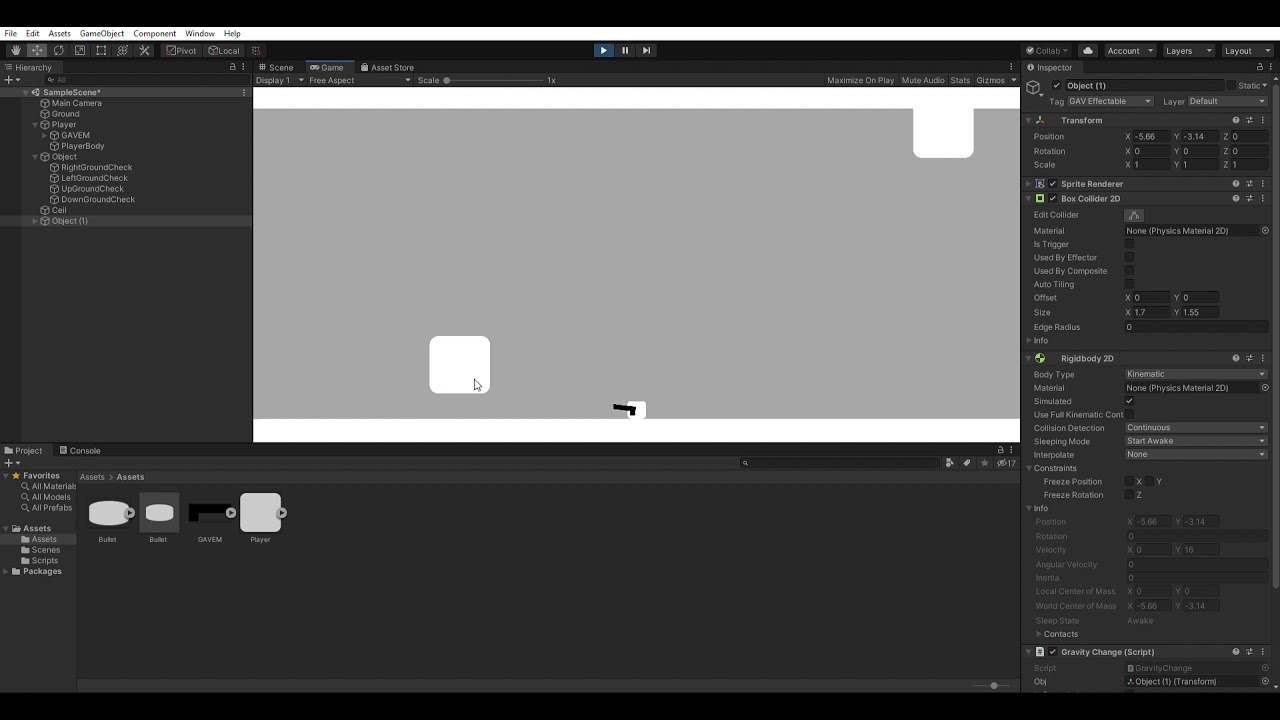
if required, i can send the code
dense belfry
am i allowed to flex?
 lofty turtle
hey guys, quick question, how do i set the rotation of a gameobject(sprite) 90/180 deg left/right (using quaternions)?
im trying stuff like quaternion.euler(0,90,0) etc but the results are not what they're supposed to be
timid dove
lofty turtle
hey guys, quick question, how do i set the rotation of a gameobject(sprite) 90/1...
Make sure you're rotating on the correct axis. Normally you would rotate a Sprite on the z axis if it's a 2D game
wraith junco
@gilded sparrow From what I've seen, most calculations are off by about the thousandth to ten thousandth decimal
even on the same hardware
with the same exact forces applied
If you're doing physics over a network, you're probably going to want to do lockstep. Which is easy. Just don't run physics on the client, just grab the positions/rotations of the physics entities from the server and lerp the model's position to it. This is how the game "Rust" does their multiplayer physics.
I'm in the process of changing my main character from a rigidbody to a character controller because the reconciliation events are extremely expensive even for one rigidbody
causes massive lagspikes if you don't have a high enough fps
 kind obsidian
Thoughts on using a 3D collider on a 2D game? Since I will have flying monsters, projectiles that might be ground-based (e.g. earthquake, ground attack, wave/flood) and some monsters might not fly etc. Or should I add 6-7 extra layers to support this? Anyone did it before? Guess I might have to do a mass refactoring from 2D colliders to 3D -_-
foggy rapids
it's very common practice.
but you have to use one or the other. You can't use 2d physics with 3d colliders, but you can make a 2d world using 3d physics
lofty turtle
timid dove
Make sure you're rotating on the correct axis. Normally you would rotate a Sprit...
i got around it just using transform.Rotate(), thanks anyway!
gilded sparrow
wraith junco
If you're doing physics over a network, you're probably going to want to do lock...
Its only for client side visual. Lockstep n anything is already waaay overkill for a dice roll visual
Actually the last option i thought of yesterday is, make its own physics world scene, client receive the values from server, then set the dice already facing the correct values upside
Then manually do Simulate for 3seconds worth, with the first frame blasting addforce to it.
Save the per frame snapshots
Then play it backwards
wraith junco
That's going to kill your performance if you're manually simulating physics and doing reconciliation with that
I would extremely recommend lockstep for this approach
games like Rust don't have prediction on ANY of their vehicles because it would just cost too much to do the reconciliation
on the CPU
 crystal iris
It sounds like they don't need to do reconciliation?
wraith junco
I'm still lost on what he's trying to achieve
crystal iris
To me it sounds like they need the server to determine a dice roll result, and then have the client's represent that dice roll result with a physical dice roll
If you want the rolls to be exactly identical yeah you'll need some kinda lockstep or something. But if all that matters is the dice showing (6,6,1,3,6), then they don't need the physics to be networked
wraith junco
unless theres the 1% chance that the dice falls the wrong way
crystal iris
But they would need a way to "fake" physically rolling dice that land on pre-determined values
wraith junco
onto the wrong side
crystal iris
Well yes, that's why you wouldn't truly physically simulate the dice on the clientside
 hexed stream
Question, I have all of the physics for a skiing game, although I don't know how it should be moved. I have tried using acceleration and force from the AddForce in the forward vector but that didn't work because it doesn't count for turning. Any ideas?
wraith junco
You can't rotate a rigidbody or it's going to jitter.
You need a rigidbody, and then some child without a rigidbody that does rotate
then move the rigidbody in whichever way the child is facing
crystal iris
You can rotate the rigidbody and still obey the physics simulation by using Rigidbody.AddTorque
wraith junco
That doesn't give you a very accurate rotation
im talking about precision
like first person controllers
crystal iris
And plubos is talking about a skiing game
wraith junco
true
hexed stream
Although if I use a child for rotation without a rigidbody, the rigidbody on the ski would be pointless
It would just be a big hassle
wraith junco
the rigidbody would absolutely not be pointless
the rigidbody doesn't hold the model
the child does
the parent is literally a rigidbody with a collider
no model
hexed stream
Oh thats what you meant
wraith junco
the child just dictates which direction you apply force at
on the rigidbody
Im not that advanced with physx, but you probably could just put a rigidbody on the parent without a collider, then put the collider on the child
that way the collider rotates
not sure if that would work, probably will
child also holds the camera
hexed stream
The parent does need a collider though or else it will just fall if it isn't holding the mesh
wraith junco
kinematic would be useless if you're doing physics movements.
hexed stream
yep
crystal iris
The parent rigidbody will utilize any child colliders as it's own
distant coyote
until it sees another rigidbody in the hierarchy. think of it like "Dividers"
kind obsidian
foggy rapids
but you have to use one or the other. You can't use 2d physics with 3d colliders...
Thanks. Time to refactor =[. I'll research the performance implications but I guess I got no choice if I want a complex game with different "heights" in my 2d game
kind obsidian
foggy rapids
it's very common practice.
hmm, there's no "3D" tilemap collider though 😦
I'll spend a few weeks thinking about whether to use "10" extra layers called something like "FAKE_3D_{HEIGHT}_{OFFSET}"... or to use 3D colliders. The lack of support for 3D tilemap colliders on my 2D tiles made me not go for the 3D collider solution =[
quick night
for the sake of my game design, i had to program gravity on some objects myself. it is working perfectly, except it keeps getting inserted in the ground at random depths. i tried switching its collision detection to continuous but doesnt work. here is a demo for it
https://youtu.be/ZBio0FmdPVM
if required, i can send the code
crystal iris
Are your wall colliders set to be static?
quick night
crystal iris
Are your wall colliders set to be static?
no they are not static
foggy rapids
kind obsidian
hmm, there's no "3D" tilemap collider though 😦
I'll spend a few weeks thinking...
Yeah but it's still possible.
I use a grid component and cube meshes with their textures mapped in world space.
kind obsidian
foggy rapids
Yeah but it's still possible.
I use a grid component and cube meshes with their ...
oh ok, I'll learn about Meshes and textures, since I mostly have experience in 2D
 lethal wyvern
Hi guyz! Am making a rigidbody FPS movement but i have a problem with stairs and slopes when going down
i tried a mass of 100,000 but that didnt help
for Movement am using Rigidbody.Velocity()
What do i do ???
kind obsidian
foggy rapids
Yeah but it's still possible.
I use a grid component and cube meshes with their ...
uh i don't quite understand, so i'll still need a 3D Tilemap system though right? https://forum.unity.com/threads/free-3d-tilemap-system-for-3d-pixel-art-games.710600/

Unity Forum
3D Tilemap System is a tool for painting tiles on Unity terrains or even on custom meshs using tilesets in the same way as it is popularly made and...
timid dove
lethal wyvern
Hi guyz! Am making a rigidbody FPS movement but i have a problem with stairs and...
explain your problem please. You said you have a problem but not what it is.
also share how you are moving your character
kind obsidian
foggy rapids
whatever gets the job done
ah ok, i'll spend a month thinking about using 3D colliders vs using the Layers collision matrix thing with 2D, cause its quite a massive refactor/decision
foggy rapids
if you are already committed to 2d phsics then just go with layer collision matrix
or z-sorting or whatever
kind obsidian
foggy rapids
if you are already committed to 2d phsics then just go with layer collision matr...
true.. i'm also tryna think if there's a way to call "Physics.IgnoreCollision" before the "OnCollision" is triggerred (and before rigidbody takes into account collisions too), so i can add my own custom logic to compare the Z min/max values
guess collission matrix it is, but will wait a month in case i find a better solution for my use case
wraith junco
So say I wanted to make my own "Rigidbody" car, with it's own wheels and everything completely without using physx, how much of a shit show am I in for?
And would I need any advanced math to do so?
I'm not looking for hyper realism, just something predictable over a network
foggy rapids
ur in for a big shitshow
wraith junco
yikes
foggy rapids
making the car move is the easy part. Doing collision detection is the hard part. Networking the whole thing is the hardest part.
wraith junco
I got my lockstep cars working with physx and tested it over a network, and the delay was awful
so that's my main concern
If you could physics.simulate individual objects, that would make life so much easier
That's literally the most important thing they left out
foggy rapids
lol, i think that would make it more of a mess
 brittle sluice
Hey everyone, Im working on ragdoll physics and im having this weird bug, I've looked around to see if anyone else had the issues on the forum but no answers so I joined the discord! 👋 [Gif is down below as well]

I have a guess that something with the animation is possibly changing the position of each bone, but not 100% sure.
brittle sluice
Its causing the ragdolls when I hit with a stick, they hit the ground right underneath them hard and fly super high in the air.
viral ginkgo
wraith junco
If you could physics.simulate individual objects, that would make life so much e...
Just set all objects kinematic except the one you want to simulate?
wraith junco
Then you have to go through each one and re-apply the velocity and every property it had that the kinematic took away
sounds like a huge mess
Have you done it that way before?
viral ginkgo
i never really needed to simulate one objects seperately from others
when i didnt wanna simulate other objects, i kept them kinematic forever
wraith junco
reconciliating even one object takes a bunch of CPU anyways
causes huge spikes in the profiler
viral ginkgo
if your game doesnt do any prediction, maybe you should just go with snapshot interpolation instead of lockstep
wraith junco
What's the difference between snapshot and lockstep
I think I might be getting them mixed up
viral ginkgo
snapshot interpolation: server sends position, rotation only
client doesnt simulate anything, (i am saying you also may not need to simulate local player)
lockstep in general: fully deterministic simulation, no positions/rotations/velocities etc sent from server.
server sends all client inputs to each client
clients simulate everything, no prediction, no rollback
rollback: lockstep but it predicts the future, no local player input delay
@wraith junco
wraith junco
So how my cars work is, every tick from the server, they get the position, rotation, and inputs
so first snaps to correct position, rotation, then it "drives" the car for that tick
otherwise it just doesn't look nice
but yeah my main character is fully predicted and does use rollback
viral ginkgo
so you did lockstep but also with state syncing to compansate for non-existing determinism
and rollback for local player
wraith junco
yes
viral ginkgo
but the thing is, do you really need to simulate other cars if you dont need to predict them?
wraith junco
If you don't apply motortorque and wheel steering, it doesn't feel nice at all
viral ginkgo
purpose of lockstep is saving bandwidth
but you already send position/rotation
@wraith junco i mean the other cars from remote players
wraith junco
wym other cars
viral ginkgo
i wouldnt simulate them at all
viral ginkgo
but they are simulated
wraith junco
yes.
If you just apply position/rotation, the movement feels blocky as hell
you need to apply wheel steering too
and motor torque
viral ginkgo
you said you predicted local player?
wraith junco
yes
viral ginkgo
why does the feel matter for remote players?
viral ginkgo
ah
wraith junco
physx wheel colliders are not deterministic in any way
every single input will ALWAYS produce a wrong movement
for some reason
viral ginkgo
you cant reconsiliate wheel speed
if you are not predicting lcoal player, you should not need to do any simulation
wraith junco
try it for yourself, only interpolating position/rotation just doesn't feel right
simulating the car for that tick makes it feel so much better
and then the lerp smoothes out the wrong position
viral ginkgo
i will assume that you are sending about 10 transform info per second?
viral ginkgo
what kind of lerp are you doing?
viral ginkgo
regular vector3 lerp?
wraith junco
yes
viral ginkgo
Vector3.lerp(current, target, deltatime * something)?
wraith junco
yes
viral ginkgo
i believe thats your issue
wraith junco
how so?
viral ginkgo
you can do a smarter lerp so that it always outputs the correct position the car needs to be in with a little delay
wraith junco
even then, simulating the car's rigidbody provides somewhat of an extrapolation
an accurate extrapolation
viral ginkgo
you buffer transform infos with timestamps
and then you look into the buffer
lets say you wanna see where car should be in 10.0
you have a pos0 with timestamp 9.48
and a pos1 with timestamp 10.32
Vector3 interval = Mathf.InverseLerp(9.48, 10.32, 10.0);
currentpos = Vector3.Lerp(pos0, pos1, interval);
@wraith junco
thats the smart lerp if i didnt make a mistake
wraith junco
damn that sounds like a lot of extra work
is there any real downside to simulating the rigidbody every tick?
wraith junco
right, but the non deterministic behaviour is corrected every tick
and is already smoothed by the lerp to the point where there's no jitter to be found
Your method might even introduce a little bit more delay
I think that's what garry's mod does with their serverside cars, and I'll tell you that the input delay is awful
on gmod
viral ginkgo
i offered this because you said you werent doing any big predictions, only one frame of prediction
might as well go with no prediction at all
viral ginkgo
you will never have any smoothness problems and things will play out pretty much %100 same with server
since you also send data for all fixedupdates
wraith junco
I'll do some further testing, if my method doesn't work then I'll definitely go with yours
I'll send you a quick vid of how the cars look

@viral ginkgo
viral ginkgo
your player character looks a bit fat for the car
viral ginkgo
thats what happens in server tho
it looks like it would go michael bay style if this whole thing is reconsiliated and predicted lol
wraith junco
reconciliation doesnt happen in cars
viral ginkgo
yeah yeah
wraith junco
it literally gets turned off completely if you're in a car, no way for it to happen
wym by it being too fat though?
viral ginkgo
i was just kidding about the fat cylinder
wraith junco
oh haha
 hot jackal
Hi all!
We are facing a little problem with the drag simulation for particle systems.
We have a logical data structure that represent a bullet that fly with a specific velocity.
In a separate class we are configuring a Particle System according to gun's data, so we are sure that particle will be aligned to the physical bullet.
It's all fine until we have introduced the drag.
Following the rigid body drag model, we have applied a drag like:
V(n) = V(n-1) * (1 - Drag * dt)
If we set the same drag value on the particles, the physics object and the particle seem to evolve differently.
So the question is: which drag model is actually used for particles?
stuck bay
Can i link multiple rigid bodies to one so they behave as if they were parented?
viral ginkgo
@stuck bay if you add a child collider to a rigidbody, that collider will do what you want
it will basicly become its parent rigidbodys collider
stuck bay
Thanks