#⚛️┃physics
1 messages · Page 43 of 1
 prime flower
 sly violet
That comes up a lot. Sometimes I tell people to just not bother with the Physics - the old arcade games didn't have it in the first place.
prime flower
Yeah but the concept falls apart then
Like Rocket League: Real physics forged into (some) arcade-like behavior
Rocket League would never work with the real-physics aspects
It's part of what makes the game so natural. Everyone knows how a ball is gonna bounce/react to where it's hit
The cars are where the arcade-like behaviors come into play
So I'm trying to have a physics-based game: Kind of like if the cars in Rocket League had hockey sticks
But the stick can't move around at all while "driving" and the stick can't move around if another car drives into it
A car driving into the stick should move the entire unit of the other car + stick as if it was one single object
sly violet
I don't suppose Unity Physics hinge joints have limits?
sly violet
Can you move the limits dynamically? You could "swing" by changing the limits, and then when you get hit, you're locked into that position.
prime flower
Realized you were going there cause i just thought the same thing, but I'm afraid that concept will completely ignore velocity
prime flower
I.E. adjusting the limits will not dynamically update/assign a velocity to the the connected body
sly violet
I think it would? Maybe try it.
prime flower
it would be like using RigidBody.MovePosition() which ignores collision responses
I will try it for sure, just don't see how the engine would be smart enough to calculate proper collisions with that method
sly violet
If the limits are the same as they are in PhysX, they're really just applying a force behind the scenes.
prime flower
Oh is that how they work in PhysX?
sly violet
Yeah, it's why you can tear joints apart if you apply kinematic/animated motions or just really large force.
And then they'll snap back when released and catapult your ragdoll into the horizon, lol.
prime flower
I will definitely explore that option then
sly violet
Good luck! Let us know how it goes.
prime flower
I posted on the forums too just in case: https://forum.unity.com/threads/hinge-joint-motors.797406/

Unity Forum
Most physics engines, like PhysX, allow you to enable a motor on the hinge joint to keep it at a target velocity with a given force. However, I do not...
 charred vault
no one is going to download something from you, paste your code into codeblocks, or if it;s too long use pastemyst o hatebin etc
 stuck bay
hmm for the Unity.Physics package, I see that Ray is supposed to have a constructor that takes two arguments
https://docs.unity3d.com/Packages/com.unity.physics@0.0/api/Unity.Physics.Ray.html
But for some reason it just doesn't?
Also says "Direction" when the actual code has "Displacement"?
 dawn plank
What version of the physic pakage are you using?
The 0.2 Version matching the code you showing but the link you provided is for version 0.0
https://docs.unity3d.com/Packages/com.unity.physics@0.2/api/Unity.Physics.Ray.html
 dusky prism
Hey guys,
What is the good way to sticks character legs to the ground while adding force to the head and arms by Constant Force and String Joint ?
Right now I put Constant Force and String Joint to the legs but still it is moving around when the force is suddenly.
stuck bay
@dawn plank you're right, I'm using 0.2.5p1, I didn't realize there would be more versions of the package's documentation
it's weird that the page you linked has a drop-down to select version, yet the 0.0 page does not
I guess also BlockStream is now NativeStream?
Yep...okay got everything figured out thanks
 inner cloud
i'd like to have a mesh collider on a rigidbody based character but unity tells me its not possible, is there a work around other than attach primitives collisions to each limb ?
 spiral fog
Okay so.
I got a motor on a slider joint
how do i set the speed of the motor
        //If touchcount IS above 0 we actually do something
        if (Input.touchCount > 0)
        {
            SliderJoint2D sliderLeft = leftPaddle.GetComponent(typeof(SliderJoint2D)) as SliderJoint2D;
            SliderJoint2D sliderRight = rightPaddle.GetComponent(typeof(SliderJoint2D)) as SliderJoint2D;

            JointMotor2D rightMotor = sliderRight.motor;
            JointMotor2D leftMotor = sliderLeft.motor;

            //loops trough every touch
            for (int i = 0; i < Input.touchCount; i++)
            {
                Vector3 touchPosCam = Camera.main.ScreenToWorldPoint(Input.touches[i].position);

                if (touchPosCam.x > 1)
                {
                    print("touchPosCam is over 1. Stuff should be happening to right side");
                    rightMotor.motorSpeed = 10;
                }
                else if (touchPosCam.x < 1)
                {
                    print("touchPosCam is under 1. Stuff should be happening to left side");
                    leftMotor.motorSpeed = 10;
                }
            }
        }
Thats my code
It just doesnt do anything
 ocean horizon
JointMotor2D is a struct (passed by-value in C#), not a class (passed by-reference) so you're changing a copy of it. You need to actually set the joint motor using your changed JointMotor2D struct.
sliderLeft.motor = leftMotor etc
ocean horizon
As I showed above.
ocean horizon
🙂
spiral fog
This doesnt look right
ocean horizon
Because it isn't.
I showed you above what you need below my comment.
JointMotor2D leftMotor = sliderLeft.motor (reading) vs sliderLeft.motor = leftMotor (writing)
spiral fog
Thank you.
ocean horizon
np, good luck.
prime flower
Anyone able to to give me some tips/ideas on how to achieve similar physics results as found in this video? https://www.youtube.com/watch?v=XXbBLaKNCQQ
I've been taking a stab at this for a few days without any luck. The idea is that the two rigidbodies (player and stick) are parent/child or connected in some way (I'm guessing joints) but the stick needs to be able to be positioned/oriented pretty uniquely. It's more than just a hinge joint as you can see the stick is moving left/right, up/down, forward/back, rotating, etc. The stick isn't rotating around just a single point.
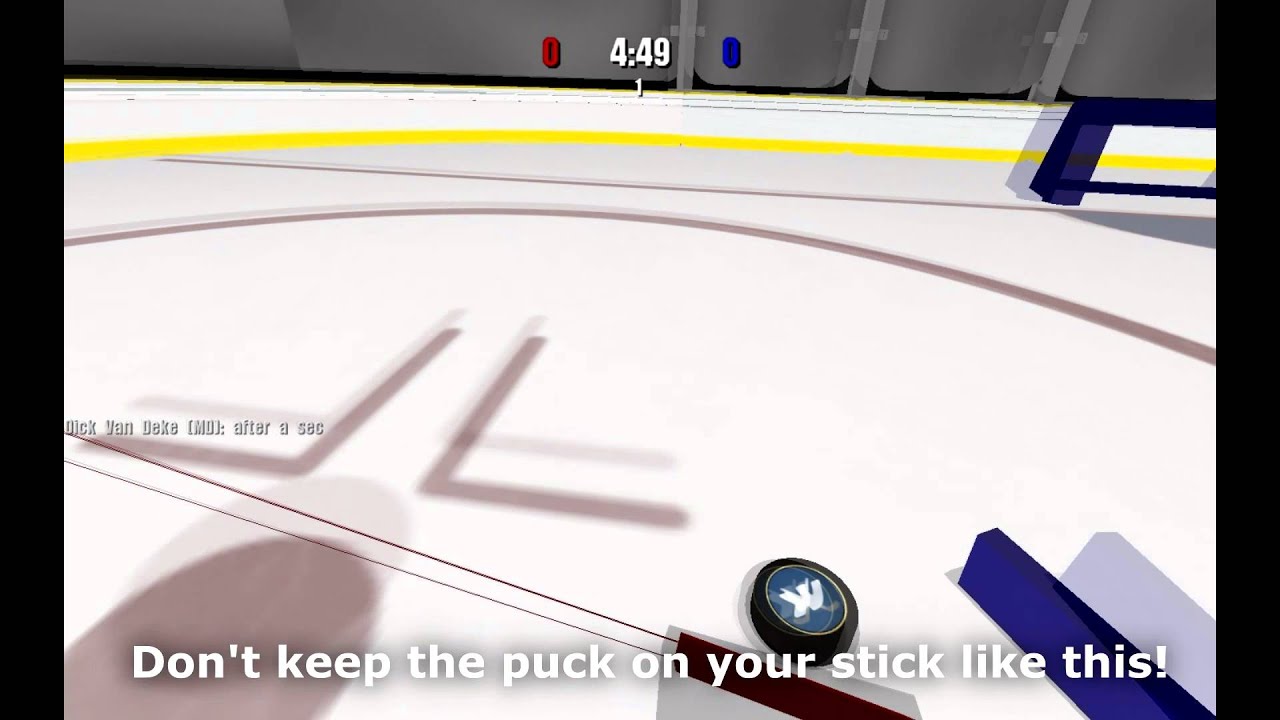
The stick always keeps it's position relative to the player. When the player rotates, the stick rotates with them.
 gilded parcel
Anyone know why my Raycasthit2d is lagging behind the origin?
ocean horizon
Without some kind of explanation of what you're doing you must know it's impossible to know why. 🙂
A complete guess would be that you're specifying the origin using Transform.position rather than Rigidbody2D.position and you're using interpolation/extrapolation so the two are not the same.
If not then at least define what you mean by origin (is this a query argument)? What query are you using i.e. Raycast?
gilded parcel
Here's the code the raycast is in, no interpolation or extrapolation on the rigidbody either
https://hatebin.com/riyrujweke
stuck bay
I don't know if it's the right section to ask but what's the most efficient way to make diagonal speed in a top down game the same as horizontal/vertical?
 glacial jolt
@stuck bay you can use Vector3.ClampMagnitude to limit the speed
stuck bay
Hmm, I don't really know how to implement it in my script
Do you mind if I send you what I have so far and help me with finding the way?
stuck bay
Oh nevermind I made it
glacial jolt
:+1: always feel free to post code, makes it easier to help
 onyx wraith
I'm trying to make a 2D platformer player controller and I've been running into a issue with tilemaps where the player will frequently get stuck in the ground or walls. I've looked online and tried changing the physics material to 0 friction 0 bounce but it still hasn't worked. Seeking help.
Using box collider for player and tilemap collider for tilemap
gilded parcel
@onyx wraith Try changing the box collider to a capsule collider, make sure to stop z rotation on the rigidbody
gilded parcel
I dont know of any other way to get around this issue sorry
I'm pretty sure it's caused by the corners of the box collider getting stuck on the corners of the tilemap collider where each tile connects
I vaguely remember of another type of collider that works on tilemaps so that could be worth looking into
I think its a composite collider
glacial jolt
@onyx wraith what is your setup like? Are you using a BoxCollider2D with a Rigidbody2D?
onyx wraith
yes
glacial jolt
are you modifying the velocity directly, or using AddForce?
onyx wraith
directly
glacial jolt
it might be easier to figure out what's up with a gif/code
if you're using physics, all of your logic should be in FixedUpdate (since that's the only time the rigidbody is actually moved). I can't really say why this would get stuck, but rigidbodies are designed to work as if they were physical boxes, so sometimes they aren't super conducive to making a CC
I did a really short tut on 2d CCs you might find useful
Learn to build a simple 2D platformer controller with tight controls that can run and jump.
note that it's reaaaallly introductory, so it's really bare bones. But you can download the project and see if it meets your needs
 hollow echo
Also you can't have a GetButtonDown in FixedUpdate, because FixedUpdate isn't guaranteed to run every frame
glacial jolt

GitHub
Free 2D Character Controller for Unity. Contribute to Brackeys/2D-Character-Controller development by creating an account on GitHub.
this is also pretty good (not mine)
 pallid jasper
Hey all!
Based on this model, what is the best way to get the blue blocks?
green lines are one of the possible rays
rays can't go past the blue blocks
but can go between them
 gusty sleet
What?
pallid jasper
Based on that, is there any way to get the blue blocks?
are you familiar with PHP? @gusty sleet
gusty sleet
Shoot a bunch of raycasts and check if they're blue boxes
Unless you have some other condition that knows whether it is a block you want
pallid jasper
see the way the rays currently work are like so
A ray originates from the center of the black box
having a random force between 0.7 and 1.3
each time it moves a length of 0.3, the force decreases by 0.3 * 0.75
every block it goes through, has a resistance.
that resistance also decreases the force by ((resistance / 5) + 0.3) * 0.3
the ray stops when the force is <= 0
 olive sigil
So, i have a phys material, Dynamic and Static friction are set to 0, and the friction combine is 0, but when i push things, they still have friction
the material is applied to both the object and the surface
olive sigil
also set to 0
sly violet
How smooth are the surfaces? Is this like a cube on a giant quad, or something more complicated?
olive sigil
flat cube, on a terrain, but the area im testing i used the brush to set constant height, so should be completely flat
just tried on a plane, same result
stuck bay
I’ll just put my question down and you guys can answer whenever.... “how do I add angular force to a cube/ set its angular velocity to make it rotate and match the same rotation as an empty point?”
olive sigil
how do you mean an empty point
stuck bay
An empty object
olive sigil
if its an empty object, it doesnt have angular velocity?
wouldnt you just want to do
rb.angularVelocity= new Vector3(0,0,0);
sly violet
I just tried to replicate your problem, Lol Bozo, but it works fine for me, I'm not seeing any friction at all. Is there anything else in your project that might be having an effect on it?
stuck bay
I’m trying to make a cube match the empty objects rotation using force/velocity
olive sigil
alright, so my cube is:
and thats the plane its on
@stuck bay so you want to use velocty to spin an object to be the same orientation of another object?
sly violet
@stuck bay Doing that exactly requires understanding the rotational inertia tensor. I usually just apply a force in the right direction until it gets where I want it, or set it directly if it needs to be instantaneous and exact.
stuck bay
Hmmmm...... ok.
sly violet
These things:
https://docs.unity3d.com/ScriptReference/Rigidbody-inertiaTensor.html
https://docs.unity3d.com/ScriptReference/Rigidbody-inertiaTensorRotation.html
Those values control how a torque becomes an angular velocity.
stuck bay
Also this is my code (the position part works fine)
hollow echo
are you using a negative mult to make that work? Because the logic looks backwards to me
Oh, sorry, your wording is just backwards
which is confusing
the target is actually the thing you're moving 😛
stuck bay
Oh sorry heh 😅
olive sigil
vertx, any clues as to my high friction-frictionless ice?
sly violet
Oof. Angular velocity is in radians per second, Euler angles are in degrees.
No sign correction applied... Seems like that could behave erratically.
stuck bay
Hmmmm.....
olive sigil
Pyrian, are there any difference between my pictures, and the stuff on your models?
sly violet
You might be really better off just using a Configurable joint. Place a spring effect on the positions and rotations.
stuck bay
Well I tried Euler angles because I’m not sure how to add and subtract quaternions
hollow echo
can you try AddTorque with the forcemode velocityChange
olive sigil
couldnt you set the angular velocity to a lerp between the two rotations?
sly violet
@olive sigil I don't see any differences that jump out at me. What's that "FrictionFree" material?
olive sigil
custom made zero friction material, but i found the problem
sly violet
Yeah? What was it?
olive sigil
how i was applying forces
i was using moveposition
instead of applying a force
so it wasnt seeing me pushing things as a force, so they didnt slide
sly violet
Wait - when you said there was friction, you were describing things that instantly stopped?
sly violet
Typically you only use MovePosition on Kinematic rigidbodies.
@stuck bay One thing that might help your rotation is to correct the results of your difference in Euler angles. Euler functions tend to return results in 0-360, and then when you take the difference you get anything from -360 to 360. You'll want to bring that into the range of -180 to 180. That'll remove a lot of weirdness. And then you'll want to change it from degrees to radians to match the angular momentum property you're setting.
while (DirRF.x < -180f) DirRf.x += 360f;
while (DirRF.y < -180f) DirRf.y += 360f;
while (DirRF.z < -180f) DirRf.z += 360f;
while (DirRF.x > 180f) DirRf.x -= 360f;
while (DirRF.y > 180f) DirRf.y -= 360f;
while (DirRF.z > 180f) DirRf.z -= 360f;
DirRF *= Mathf.DegToRad;```So, thank you very much because it works... HOWEVER it is rubber banding to the rotation a lot
Oop I got it work
Gonna try and use it for active rigid bodies
olive sigil
@stuck bay instead of the while loops, try (dirRF.x+180)%360-180
I think that should work the same, but without using loops/ifs
stuck bay
I’ll try that, thanks
olive sigil
It should function as a replacement for both while loops for each var
stuck bay
Ok
 smoky sapphire
If you're just trying to set the rotation, maybe try RigidBody.MoveRotation()?
Because that should give the object an exact amount of torque to snap into place
That's instantaneous though, so if you want to do it gradually, you might want to have an intermediary value that slowly lerps to match the reference object then have the physics objet MoveRotation to match it
 paper ridge
If my object is falling, how do I calculate the force required to make the object hover in place?
Nevermind. Reading a bit, seems like I was misunderstanding forces
smoky sapphire
ye it should just be equal to the inverse of the downward velocity
 torpid prism
anyone here knows about audio ?
im looking for a method to read world audio at world space position
currently using OnAudioFilterRead(float[] data, int channels) to make procedural sound
can hear the result in my headphones and would assume unity handles the sound distance based amplitude decrease and adding multiple sound sources - looking for a similar method but to get raw float data at position instead
sly violet
Hrm. AudioListener can be queried with GetOutputData (and GetSpectrumData), but I'm suspicious that those won't work while it's disabled, and I'm not aware of any other way to do it.
stuck bay
sly violet
Static colliders and triggers don't normally trigger/collide with each other.
...I'm a little surprised that OverlapCollider doesn't work, though.
 karmic pollen
Hello guys, I have three 2D object; player, ball and wall. I want to add bounciness to ball. There is no problem to add bounciness to ball but when collision between "player" and ball I don't want to see bounce effect.
I mean I want to disable bounciness when player and ball collision occurs.
olive sigil
set the bounciness of the player to be 0 with a bounce combine of multiply
karmic pollen
Bounciness of the player is already 0. I don’t want bounciness on player. I want to bounce BALL every collision except collision with player object.
olive sigil
i know, but the combine type has to be multiply
so when the ball hits the player, it multiplies their bounciness-es together and results in 0, otherwise it averages them
torpid prism
@sly violet i didn't find any methods for the audio listeners tho
only for the sound source
i was looking for something that would be placed in a certain position and act as "headphones"
so i could read the raw result data
from multiple sound sources around the scene
torpid prism
i can how ever still use OnAudioFilterRead when attaching AudioListener to my script
but then unity complains about too many instances of AudioListener
There are 10 audio listeners in the scene. Please ensure there is always exactly one audio listener in the scene.
how can I set the bounciness of the player
 peak panther
if I were to create my own 2D character controller that utilized a Kinematic Rigidbody, how would you go about having it so objects could push against the controller?
peak panther
Is there anything wrong with just using a Dynamic Rigidbody, setting it's gravity to zero, and just moving it?
charred vault
Euro the same way you set the bounciness of the ball
stuck bay
Hi! I've been working with probuilder and I got this weird error, does anyone know what could cause it?
stuck bay
Physics in unity always was hard for me...
I have several objects at different orbits i want to lock them on this orbit, but leave them to rotate on it
What i did wrong?
Why they are not rotating on orbits but go away from it?
 proud nova
Looks like they are pushed by collisions
stuck bay
They do, but they must rotate around center of orbit
smoky sapphire
I am having a devil of a time coding a 2d character controller
smoky sapphire
I'm learning that a lot of physics simulation problems can be fixed by rounding off a few decimal places
sly violet
Absolutely! The physics systems are very much designed that way. The idea is to have answers that are close enough that approximations are sub-pixel or at least unnoticeable. But if you're expecting exact solutions, you're typically going to be disappointed. You'll find the whole system a lot more manageable if you just assume that it's always going to be a little bit fuzzy in the fine-detail specifics.
dusky prism
Hey guys,
I have a character which is control with physics stuff like Spring Joint and Constant Force.
I want to stick the character's legs to the ground and when it is bent left and right, the body doesn't move.
What is the way to achieve it ?
Currently I use Fixed Joint on both legs with Constant Force but still the character moves around when there is sudden force on upperbody.
As you can see in the gif
https://gyazo.com/9914c5dc649039072333fe3a176f3189
 torpid prism
how to set angle axis of a quaternion ?
i got a rotation var , need to extract its angle float relative to the Up vector
smoky sapphire
@sly violet Almost makes me wish for a data type hard-set to three decimal places...
Actually, it'd be kind of nice if you could hard-set the number of decimal places for transform positions in the engine
Physics jitter is especially noticable in 2D
smoky sapphire
Actually... I just fixed it. Whoops!
Next problem: Putting enough coffee into me that I can figure out how to use the remainder of the movement vector in relation to sliding down a slope
 cloud epoch
I've seen this asked other places but I haven't seen a real explanation of why this is happening.
My character is a rigidbody that i move by changing his rb.velocity. Everything has a physics material with 0 bounce. The inputs are shown in the virtual joystick on the right. (its not a mobile game i just like to have things visualized)
The problem is that he gets pushed out of any wall I walk into. He is always pushed perpendicular to the wall with the velocity of the component of his original velocity in the opposite direction, so I'm guessing that he's clipping into the wall and its pushing him back out, but why does it keep pushing after they stop colliding?
If possible I would like to solve this without checking for collisions or using raycasts in my player movement script.
Thanks if you actually read this.
smoky sapphire
Well, you get some wierd stuff if you change the velocity of a rigidbody directly... That might be the first problem
sly violet
My character is a rigidbody that i move by changing his rb.velocity.
I mean, that IS your problem.
Damn, bro-ninja'd.
smoky sapphire
You typically want to use AddForce for dynamic bodies and MovePosition for kinematic ones
But if you go with Kinematic you have to do a lot of other work(as I'm learning) to make it play nice with other objects
So my recommendation would be to have it set to Dynamic and use AddForce
cloud epoch
The reason I wanted to change the velocity instead of move position is I want him to act like a physics object with certain interactions (mainly after jumping)
smoky sapphire
Yeah. Dynamic with AddForce is what you want, then
cloud epoch
I’ve heard the term before, but I’m blanking on what you mean by “dynamic”
smoky sapphire
Rigidbodies have different modes, Dynamic, Kinematic and Static
Dynamic is the one that interacts directly with the physics system
You move that one around by applying various forces to it.
cloud epoch
I’ll look into it, thanks
smoky sapphire
np
cloud epoch
Did you mean I should have “continuous dynamic” for collision detection?
smoky sapphire
Hm, I think so, though that sounds like an older version of Unity
cloud epoch
2019.2.2f1
smoky sapphire
Huh
I've got 2019.2.13f1 going and it's got dynamic/continuous separated into different options, but yes, that one you're seeing should be what you need anyway
cloud epoch
It has continuous, continuous dynamic, and continuous speculative
smoky sapphire
Interesting.
In this one it's got Dynamic/Kinematic/Static, then a separate option that's Discrete/Continuous, and a third for Interpolate/Extrapolate/None(with 'extrapolate' functionally being 'speculative,' I suppose).
But yeah, go with continuous dynamic
cloud epoch
I did that and yeah no more weird bounce, it’s caused some other problems but those should be easier to fix since I actually understand what’s going on, thanks
smoky sapphire
np
cloud epoch
now i remember why i didnt want to use addforce, its awkward to change the direction im running in, and i dont know how to set a maximum speed, the second one i can probably figure out on my own but it'll take a while because the way i think im supposed to do it conflicts with something i plan on adding later
 south cove
this may be a noob question but how do I accomplish top down 2d knockback? if I use addforce it shoots off really far, but if I try to move it other ways it just teleports back and looks weird
cloud epoch
How are you adding the force?
smoky sapphire
@cloud epoch Yeah, this is why it's recommended to use CharacterController instead of Rigidbody for controlled characters... Suffice to say, when you use physics you have to figure out how to manipulate the forces for control. Imagine like if you were moving a marble around on a table by blowing on it. That's what you're dealing with.
south cove
I have a debounce to detect hits, and when it hits it I just add a force in the direction the player is facing
smoky sapphire
@south cove Have you tried making the force you're adding very small?
smoky sapphire
There's also different modes of force to try
south cove
the enemy moves using transform.position and moveTowards
cloud epoch
@smoky sapphire makes sense, but there is so much I want to add later on that I want to be like blowing a marble on a table
smoky sapphire
@south cove Ah, yeah, if you're using a rigidbody you should really only use addforce or moveposition
south cove
ok
cloud epoch
@south cove try making the ForceMode impulse (or velocitychange depending on what you’re after) if you haven’t already
south cove
I tried just applying velocity
so it only works how I want it if I use transform.position
earlier it obviously still was affected by the rb physics
I'll try impulse
cloud epoch
I mean for the knockback not movement just to make sure I’m being clear
south cove
ok
yes
it seems to work but finetuning the knockback is definitely needed
thank you!
I think I need to enable linear drag on it
the issue I had earlier was that there was no drag on the rb.
smoky sapphire
I'm glad that I found the correct surface normal fraction to prevent my custom 2D character controller from jittering(1/240f) but I'm annoyed that I found it by accident and resent the possibility that I otherwise might never have done so.
south cove
now that knockback works, every time I get knocked back it increases the amount of it
ok, so it turns out it always pushes me diagonally downward towards the right with increasing value depending on where I am
I have my math wrong somewhere
south cove
so I thought that a direction was targetposition - currentposition
which works in the follow script
but with addforce it only goes towards 0,0 on the world
if I collide with an enemy that is
body.AddForce(collision.gameObject.transform.position - transform.position * knockback, ForceMode2D.Impulse);
with collision being the collider that the player detects
hollow echo
(collision.gameObject.transform.position - transform.position) * knockback
south cove
OH
smoky sapphire
That makes me think that whatever you're colliding with has a pose at the world origin for whatever reason
south cove
its a pemdas problem
hollow echo
remembering though that that direction is not normalised, so you'd get knocked further the further you are away when the knockback happens, which may or may not be an issue
south cove
the enemy is small enough that it shouldn't matter too much
south cove
thanks
it sort of mattered because I forgot to set the enemy's pivot to the bottom
but that was easy to fix
or I can just do .normalize right?
yeah I just normalized it and it's fine now. Thanks for telling me about that because I would never know to look that up
 knotty raft
What would be the best way to rotate a rectangle when you drag it on the Y axis?
I want it to rotate counter clockwise if it's moved to the right, and clockwise if it's moved to the left
Right now I'm using a OnMouseDrag, getting the pivot point (a child cube that I've set to the rectangle) and after it sets the rigidbody position it rotates around the pivot
but when I play and try to drag the object it just rotates and doesn't drag until I release the mouse click
This is the code from the OnMouseDrag
if (canMoveY == true && canMoveX == true)
{
    isPickMoving = true;
    var pivot = gameObject.transform.Find("pickPivot");
    curScreenPoint = new Vector3(Input.mousePosition.x, Input.mousePosition.y, screenPoint.z);
    curPosition = Camera.main.ScreenToWorldPoint(curScreenPoint) + offset;
    curPosition.z = gameObject.transform.position.z;

    rb.MovePosition(curPosition);

    var movementY = curPosition.y - oldPosition.y;

    if (movementY > 0)
    {
        rb.transform.RotateAround(pivot.position, Vector3.forward, ((movementY * -1) * Time.deltaTime));
    }
    else
    {
        rb.transform.RotateAround(pivot.position, Vector3.forward, movementY * Time.deltaTime);
    }

    isPickMoving = false;
}
 viral swallow
Hey all... probably a noob question as I haven't done much with Unity physics.
How do I set up a rigged mesh in Unity to have IK?
I want to be able to move to root bone and have it bendy and responsive
I tried adding joints+rigid bodies to all the bones and it went crazy
pointing me in the right direction to research it would be appreciated, I'm not sure what kind of tutorials to look up
smoky sapphire
@viral swallow I suspect #🏃┃animation will probably be better help, since that concerns itself with bones and such often
viral swallow
Alrighty, thanks I'll ask there
smoky sapphire
@knotty raft if you're using a rigidbody you shouldn't try to change position/rotation through transform in most cases
if it's a dynamic rigidbody you should be using forces, if it's kinematic you should use moveposition/moverotation
knotty raft
what should I use instead?
it's kinematic
but I'm dragging the object to a new position
smoky sapphire
I would use moveposition then
knotty raft
I'm also dragging it around to collide with other objects in the scene
smoky sapphire
moveposition does generate oncollision events
knotty raft
ok I'll give that a shot then
smoky sapphire
But you have to enable some options if it doesn't
in the project settings under physics, and then a checkbox on the kinematic body itself
and then you have to actually code the collision response, since kinematic bodies don't naturally respond to collisions
knotty raft
So I have to move it in the FixedUpdate method?
knotty raft
so I would just set the new position in the OnMouseDown and then let FixedUpdate actually move the object?
smoky sapphire
It'll move to whatever position you feed it in the next physics update(which occurs after fixedupdate)
Just remember that each time you call moveposition it overrides the previous call made this update, so if you use it twice in one fixedupdate it'll only move once
This is because it works by setting the forces needed to move the object to the given position
knotty raft
hmm I'm already using moveposition
but I see moverotation doesn't have a way to choose the pivot point
I need that since the pivot is wrong on my object
knotty raft
actually, I really only want it to rotate when I move the mouse in the Y
the X and Z shouldn't rotate the object
in fact, it shouldn't move in the Y at all
smoky sapphire
Well, if you apply the movements on the correct axes then you should be fine
As for the pivot point, it seems that besides using centerOfMass you can also "Attach a joint to the rigidbody and anchor it at the pivot point," whatever that means
knotty raft
i've tried using joints, but I just don't understand how to set them up with my existing objects lol
and when I've tried setting them up they don't work the way I think they should
I'm probably doing something wrong
smoky sapphire
I couldn't tell you about that, I only know what I find on Google :V
knotty raft
LOL
 wispy kayak
I'm trying to make car crash physics over a network (Mirror) - rigidbodies and networking don't mix, but how would you all approach this?
x-posted in #archived-networking as well
 lapis plaza
@wispy kayak physics in Unity are not deterministic nor can you 100% predict what other players did (which makes it impossible to replicate 100% same collision between the two clients unless you enforce some special rules heavily)
I'll continue on #archived-networking as it's pointless to keep crossposting here
glacial jolt
@lapis plaza just a heads up that PhysX does guarantee determinism on the same machine if Enhanced Determinism mode is enable
note that this makes no promises about Unity itself being deterministic, as all sorts of stuff happens at the end of the render frame (rather than the physics frame), like Destroy()
lapis plaza
@glacial jolt I'm aware of that setting (I've made PR for UE4 to expose that in past)
but it's only one thing
if you do EXACTLY the same sim from start to finish, they can only guarantee it's deterministic on that same platform / compiler
but that's the thing
you can't do that in networked gameplay, as soon as you need to roll back time, you alter the internal cache state and things are not determnistic anymore
what's even worse, when you read and set rigidbody positions on physx, you go through transform changes which can possibly alter the final digit due to floating point accuracy (each math operation back and forth risks on not getting quite the same end value)
and I can guarantee you, that even getting one digit change in floating point number can alter the physics sim to not be deterministic again
smoky sapphire
I suspect that in all cases where non-scripted/non-programmatic physics can be avoided, a game developer should try to avoid it
lapis plaza
and about that enhanced determnism flag, it's only giving you a guarantee that physx keeps the internal order same when doing the physics sim regardless if you add or remove physics objects to the physics scene
yeah, fake everything possible 😄
anyway, the point I'm trying to make here is that while you can make like a puzzle game with physx that's every time going to sim the same way, it's quite difficult to make it happen with anything that does roll back and resim with it due to the internal cache and transform math beneath it
you can technically bypass the cache if you just use physx solvers using physx immediate mode, then it uses same solvers but without physics scene and physx's own caching
but that's not even exposed in Unity
glacial jolt
yeah, that's all correct. I just wanted to add that in for completeness, since I find a lot of confusion online about why floating point engines can be non-determ (since floating point itself is determ under a single standard)
there's a ton of caveats even on a single machine, since Unity does a bonkers amount of stuff in the variable update loop
lapis plaza
yup
Unity Physics package is going to help a lot on these things due to no cache and someday hopefully crossplatform determinism through burst
glacial jolt
yeah, it looks pretty neat. I think they're still getting stacking to work, so knowing Unity it'll be out of preview roughly in 2030
lapis plaza
you can stack some objects with it
it's just not as great as what you can do when you can actually cache things
I'd wish they'd put that thing on github so people could extend it more easily
doing some naive simplistic caching solution would still be within reach
glacial jolt
^^^agreed. I fixed a bug in the InputSystem the other day...only possible cause it's open source!
lapis plaza
well, these packages are with sources, it's just distribution is in the gray area if Unity doesn't dist it themselves
technically Unity Companion License doesn't prevent you from putting these on github yourself but since Unity doesn't do it themselves, it's quite clear they don't want that
glacial jolt
yeah sorry, I meant that the InputSystem is actually on GitHub and you can submit PRs
lapis plaza
yeah, I know 🙂
I didn't know they accepted PRs tho
there's quite many repos in github Unity has packages for but accepts no PRs for
I know SRP and ml-agents ones get community PRs too
glacial jolt
dunno if they actually accept them, but there's a number that are open/get responses
lapis plaza
talking of that lib, I should probably give it another go soon
last time I tried it, their in-game binding was a total mess
totally unusable
glacial jolt
I haven't actually tried that yet, since my game is VR/PC, so allowing input binding is something to do a bit later
lapis plaza
it works fine if you use it with devices known to it, but generic device support was bloody awful
glacial jolt
yeah. Some of the stuff is fantastic, some is a WIP. It's being rushed out of preview, but for XR it's such a huge improvement I don't mind
some stuff is just flat out missing, so if you want professional results you gotta roll your own
lapis plaza
those are all input binds for same device
(also device doesn't have a trigger)
that screenshot was from their tank demo
lapis plaza
I'd just want device specific input binds with either button number or axis name
that's super basic requirement
glacial jolt
this has always kinda been Unity's problem versus UE, in that they don't make games themselves, so even if the package is really great, a lot of "super basic" stuff isn't there
lapis plaza
the issue with rewired or about any input lib, including Unity's own is that you get no native side source access
for example neither rewired or Unity's own new input system provides you trigger vibrations on win10 for nonUWP apps
I want that myself
so if I use new input system, I need to implement custom device for that
but it's going to make my life difficult as I have to dance around with their rules
I also need FFB support so with these input libs, I need to run that additionally through another system
it's kinda silly as these are still handled through same APIs
glacial jolt
yeah. It's worth posting this stuff on the input forum, as the team has been pretty responsive to feedback
lapis plaza
yeah, I've posted all these things 😄
they redid the whole HID support after I sent them some files on my wheel controllers that straight up broke the input system
as for the trigger vibrarations, I think they put it on backlog but it's never going to get high enough prio for anyone to ever look at it as it's only one platform and even on that it works if you build for UWP
glacial jolt
are the trigger vibrations handled by XInput?
lapis plaza
it's not a difficult thing to implement even, I have those vibrations running here on my xbox one controller on nonUWP app
nah, that's the thing
xinput only supports 2 motors
to get the 4 motor support, you need windows gaming input API which only exists on Win10 (I guess xbox too)
to use it, you basically just need to init windows runtime and then access to it is super similar to xinput
it's just... I really hate reinventing each wheel 😄
it's just... don't make a racing game in any game engine and you're going to be fine :p
basically have to workaround only physics, input, netcode and rendering (motion vector issues/aa glitches)
glacial jolt
well, I'm doing a VR app, so I have to use like...5 different packages to get everything working. And if we ever get to networking that's gonna be a doozy
lapis plaza
VR + networking isn't in great place currently with Unity
I guess if you can use the old stuff that still works...
but even VR changes now on 2020
glacial jolt
stuff like the above has me compiling a list of things that Unity needs to improve on, one of the major ones being exposing a lot more code to the community. The whole "ask on the forums, wait 6 months" is crazy slow
lapis plaza
they removed the old OpenVR support from 2020.1 and their replacement doesn't even support OpenVR 😄
I hope they figure that one out before 2020.1 releases
glacial jolt
yeah, OVR/Oculus support is really wonky, a lot of stuff is different for bizarre reasons
lapis plaza
there's currently no way to do steamvr on 2020.1a15+
glacial jolt
😐
I just try to wrap everything in my own code to make it easy to replace
even stuff like "get the right XR controller"
lapis plaza
the new xr package is nice idea, if it works
it's gotten to quite wild west now
I wonder if the lacking OpenVR support has anything to do with OpenXR coming up
which is going to be a fun concept because then you're going to run the thing through two wrappers here 😄
glacial jolt
I think Unity has had a bunch of issues with the newer version of SteamVR, since knuckles aren't supported in the input system yet
you can get pretty okay cross platform support with the XR namespace stuff + Input System + roll your own XR manager...lol
lapis plaza
the thing I hate the most on new input system is that the native side is dependent on Unity player code
if they screw things up on future unity version, you can't upgrade
if it was a separate dll or linked at build time, we could have "safe" and working versions of the input
now it just adds yet another thing that may break
and it's broken during beta already
it took a long time for it to even start working right on 2019
(while 2018 worked fine with it)
glacial jolt
moving between major versions has always been pretty risky with Unity
I can't see myself moving to 2020 for my current project until after release, and only if there's a really good reason
lapis plaza
I'd really want to stick to 2019 as well but DXR and HDRP kinda force my hand
probably going to stick to 2019 for a good while still
glacial jolt
ahh yeah, if you're targeting a realistic art style HDRP is tough to resist
I really like the SRP stuff, and would love to use URP, but I'm kind of at my limit with unity preview packages
smoky sapphire
Ugh. I'm trying to track down some ghost friction in my custom character controller.
 glacial jolt
you pretty much can't, but the standard solution is just to store the state of the game and load it up but...that comes with a whole host of other problems
you could also just reload the entire scene and fast forward to where you want to go
glacial jolt
^^fast forwarding is nice for automated tests though. Can just capture replays while playtesting, then run them all at 20x speed
 somber stream
I'm having an issue with joints drifting and causing an object to jitter movement and freak out
I have a character that I'm trying to be able to grab and climb, but the joints just spaz
smoky sapphire
Before I go down a particular rabbithole: Does anyone know if I move a Rigidbody with transform, run a sweep, then move it back to its original position before the physics update, if any wonkiness will occur
 opaque ledge
why not just run a rigidbody.sweeptest and not move it?
smoky sapphire
Because I'm building a custom character controller from a kinematic body and I am trying to preserve movement after colliding with a surface, and to do that without clipping into future surfaces I have to test from the hypothetical collision point.
And, for the sake of interacting with slopes(this is a 2d sidescroller) I am proceeding with the goal of using a collider that isn't a box, sphere, or capsule.
smoky sapphire
Tested it; it works fine.
So, that's cool.
I can't tell if my collision check code is surprisingly long or surprisingly short
smoky sapphire
There's probably a more computationally friendly way to align one 2D vector with another than through a rotation function, but I don't know what that is.
sly violet
Maybe normalize the target vector, and multiply that by the magnitude of the source vector.
...There's probably a better way, lol.
smoky sapphire
... Sheesh, why didn't I think of that
Oh, wait, I remember now
I think I'm paranoid about edge cases where it shouldn't be directly aligned with it but simply uses it as a reference point
I mean I guess I could put in the legwork of testing to see whether or not that's the case... Maybe later once I have the rest of the basic behaviors implemented
sly violet
Honestly if the rotation solution is working, unless you're doing thousands per frame, it's probably not worth worrying about.
smoky sapphire
Yeah, you're probably right.
It's occuring during the physics step for characters(and probably the rare physics-oriented object that would ever appear) so it's probably not a big deal
Each check does run a loop where it iterates up to four times, but that's just to account for intersections in the geometry
But yeah, even accountng for that it probably won't run more than, say, forty-to-eighty times per fixedupdate, at most.
And trigonometry isn't that intensive anyway
sly violet
Best I can think of is:cs Vector2 ParallelVector = DirectionVector * Mathf.Sqrrt(LengthVector.sqrMagnitude / DirectionVector.sqrMagnitude);
That's one less square root than the previous solution. Assumes DirectionVector isn't Vector2.zero.
smoky sapphire
I probably need to understand my own code a little better
Because I know that's wrong, but can't unenciate why without directly contradicting myself, which certainly means I'm doing something wrong.
sly violet
Is it short? Maybe post it, and I can see if there's any significant differences.
smoky sapphire
Well, no, I mean I need to figure out if my approach is accounting for situations that don't exist.
prime flower
Anyone here good with PhysX joints?
lapis plaza
@prime flower better just ask the actual question
prime flower
So I currently have nested GameObjects that are all at the same world position: Rotation, Pitch, and Tilt. I have them separated because I don't want the rotation of one object to effect the axis of the others. (No matter how far the object is tilted, for example, I still want to rotate it around a flat plane).
I want to convert this to physics with hinge joints + motors with the same effect. Is there a clear path in order to do that?
I'm assuming that I'll just need to turn them into RigidBodies that are connected parent-to-child in the same order using joints: Add a RigidBody to the Rotation object and a hinge joint that connects it to the Pitch RigidBody , then connect the Pitch RigidBody to the Tilt RigidBody with another hinge joint.
Does that sound correct?
(All 3 of those rigidbodies wouldn't have working colliders and would be positioned at the exact same position on top of each other)
lapis plaza
sounds about right
somber stream
I currently have a character controller that I've been working on, and want to add in climbing, somewhat in the vein of Grow Home.
Currently, I move the character through Rigidbody.MovePosition()
I have colliders on the hands, with IK targets for when i raise/lower the hands for them to grab.
I create a fixed joint on them when they collide and grab, however, i'm struggling to figure out how to actually get the character to be pulled up by the climbing process. Any suggestions?
somber stream
Or at least somewhere to start looking?
All of the climbing solutions ive seen don't utilize colliders and rigidbodies like i was thinking
glacial jolt
@somber stream I haven't played grow home, but are you looking to have an active ragdoll solution for climbing? This is where the character is essentially a ragdoll (rigidbodies + joints), with forces added to move it around
cause if so, the easy way is to just apply an force to the core of the ragdoll. This isn't physically correct, but is a good way to get started
somber stream
Yea, thats what i was thinking
I'm using the PuppetMaster asset for the active ragdoll
Basically allowing me to move between the physically simulated and non physically simulated ones
glacial jolt

Formerly a world record.
New world record (3min 5.5s) by Paul Cook: https://www.youtube.com/watch?v=qPUOfK0uu4M
GIRP is a game from Bennett Foddy, the creator of QWOP. It is playable online: http://www.foddy.net/GIRP.html
here's an example
pretty sure it's just applying an upwards force to the core
somber stream
A couple differences
I'm using the vector of the camera to influence the direction of the arms
that way, where you look, your arms go
so I was thinking i might need to apply the force to the hand, so it pulls the ragdoll up with it
glacial jolt
I suppose you could use IK and set the goal position to be the point you are "looking" at. And then take the delta between your current joint position/orientations and the target ones
somber stream
Yea, I'm doing that more or less currently, but was a bit lost on translating IK to physics forces rather than a translate
glacial jolt
I don't know a flawless solution, since from my understanding it's not an easy problem when you have a chain of joints, since it's tough to calculate how much velocity is needed to rotate towards a target orientation, since the mass of the object is influenced by joints further down
did something fairly similar for my game
 somber stream
Absolutely, I've been having fun issues with joints not co-operating and ragdoll instability
glacial jolt
essentially just set the connected mass multiplier on each hinge joint to be very high, so that the mass of joints further down is "ignored"
(the hands are all rigidbodies/hinge joints)
somber stream
Could I do that just for the hand/wrist joints, or are you saying i'd have to do that throughout the ragdoll
Thanks for the help btw
glacial jolt
np. If you set the mass scale of a joint very high (I use for the fingers), the parent joint is effectively 20x stronger when controlling its child. This way, you can easily move it to a goal rotation without the mass of its children influencing it
so if the arms are all you care about, you would just apply this up the arms
glacial jolt
I don't actually use forces to control the hand/digits tho. I just directly set the velocity/angular velocity
glacial jolt
w/ forces you'd need to control deceleration as you approach the goal with something like a PID controller
somber stream
Yea, i'd imagine that can get complex quickly
glacial jolt
the downside of setting v directly is that outside forces don't really have much influence, since velocity is reset each frame. This is great for my project, since precise control over the hands is important
but you can always tinker around (really high impacts make you lose control or w/e)
somber stream
I'm really not worried about accuracy of the physics simulation, more just overall feel
glacial jolt
yea, I fake a lot of it. I don't even display the actual joints, I just display art only meshes that interpolate to the joint position to reduce instability
somber stream
Thats really smart
lapis plaza
I can imagine 2020's featherstone articulations would help on this
it's a lot more stable
prime flower
Anyone know why a collider OnCollisionEnter would be triggering when near an object and not even touching it?
collision.contacts was also empty which I find to be very strange
So somehow I have a collision that has no contact point?
lapis plaza
I guess they omit the contacts that are not penetrating
there's a thing about physics engines that we have small offset in them to detect things at tad bigger volume than the actual collider shapes are
this offset value is in the unity's physics settings too
but it should be tiny by default already
by default, physx reports contacts that are not yet colliding but within the offset, I'm guessing Unity filters these out?
@prime flower
do note that I haven't used built-in Unity physics in years, this is just how the underlying physx works
I mean haven't used it in real projects in ages, I've tested the physx 3.4 upgrade last year but didn't really focus with collisions on that
prime flower
@lapis plaza do you know what that setting is called? There’s a good chance I might have accidentally increased that value when playing around so I really appreciate the insight. I have a strong feeling that’s what I accidentally did.
 wary star
@prime flower you can go into Project Settings -> Physics/Physics 2D and click Reset in the top-right dropdown menu
somber stream
@lapis plaza do you have any more info on that? Curious to see what's coming up
lapis plaza

Unity Forum
Hi
As of Unity 2020.1a15, there is a new feature called articulations available. An articulation in this context is a set of bodies that have their...
@prime flower project settings -> physics tab should have Deault Contact Offset value
somber stream
Thanks, was just reading that! Looks great, right now I'm utilizing the PuppetMaster asset by rootmotion, so I'm not too sure this will work
But I may have to play around with it to see if it would be worth replacing
The no stretching would be amazing
lapis plaza
just be aware that you can't loop articulations
somber stream
Yea, they seem pretty cool, but not quite the right solution at its current implementation
 fair nest
I had a rigidbody object on an animated object and the rigidbody object isn't falling off of the animated object when it moves out of the way, is there anyway I can fix this?
sly violet
@fair nest Does the rigidbody respond to other physics events? If yes, then you might have a Sleeping problem; try running Rigidbody.WakeUp on it.
(If it's not responding to any physics, check if it's kinematic.)
fair nest
Thanks
smoky sapphire
Does anyone know of an obvious way to 'intercept' a collision, read data from it, and redefine that data such that the physical reaction is different than it otherwise would be?
Goal: Have surface normals within a given angular range trigger the body to react as though the normal was directly upward, IE a flat surface
lapis plaza
@smoky sapphire this is what physx contact modifications do
I implemented the wrappers for it on UE4, it was somewhat trivial as it ships with full source code
but it's impossible to expose in regular Unity
new Unity Physics and Havok Physics packages have similar callbacks though
the idea is that once you get the contact points, you can spoof their properties before it's fed to the solvers to compute collision response
you can change all data if you want
be it contact point normals, ignore the points, move the contact points location etc (in physx contact mods, but it's similar deal in those DOTS physics packages)
smoky sapphire
Egh.
Well, switching to DOTS just for that single functionality would be a terrible idea
So I guess I have to do it the hard way
lapis plaza
well it is what it is
I've begged Unity to support this for years on regular physics
but it's not technically easy to do in a way that would still be performant due to the native code/c# interop according to yant
somehow Havok managed to do it still
and Unity Physics itself is all DOTS/HPC#
this is main reason I'm using Unity Physics package instead of built-in in fact
anyway
there is a thing that could let you do something similar
Nvidia is developing their own Unity wrapper for physx, altho I dunno the current state of it
it's basically quite direct physx api wrapper, not full implementation like in regular Unity
there's a separate "immediate mode" setup in physx that lets you use physx solvers without having them in simulated physics scene
that way you could resolve collisions separately and mirror the collision exit velocities etc with regular Unity physics
but it's totally possible that the plugin is still too raw and it might not expose this mode either
lapis plaza
ah, you use 2D physics?
well, none of the physx stuff I said applies to that then
I keep forgetting people do 2D physics too with Unity
lapis plaza
I dunno if there's anything in Unity 2D physics that would let you do this, never used it myself
smoky sapphire
I mean, there's Godot, but I want to port to console eventually
Right now I'm mostly just experimenting with dynamic, since I actually got decent results with kinematic mode and writing my own collision resolver
but if I can use the built-in stuff to get something more reliable, then I'll use it instead
But I know for a fact it's going to be a lot of unnatural force application to get it to mimic a less realistic physics model
Also, maybe this is an affectation of 2D specifically, but it seems that a dynamic body colliding with a static tilemap doesn't generate OnCollisionEnter2D, just OnCollisionStay2D
Which is surprising to me- I figured it would generate Enter by virtue of passing from 'not colliding' to 'colliding'
smoky sapphire
Aha. I have successfully tricked a dynamic rigidbody into maintaining its horizontal velocity when landing on, ascending, or descending a slope of acceptable angle.
somber stream
Has anyone ran into an issue with fixed joints somewhat drifting?
 foggy musk
Does anyone have a script file for unity 2019 that lets me click and drag game objects?
 dry lily
I have a 2d tilemap with a tilemap collider 2d setup and a character sprite with a rigidbody and a box colider, I use lerp "move towards" as my movement system and when the character hits a collision tile they jiggle and get stuck. How do i fix this so that the character simply doesn't move at all and no longer gets stuck
smoky sapphire
@dry lily If you're using a rigidbody, the way you should move the object around is either with AddForce(if the object is dynamic) or MovePosition(if the object is kinematic)
Otherwise you'll get weird stuff™️
The unfortunate thing about Unity is that the proper way to do anything is probably not your first guess
dry lily
Okay so i need manually script collisions than myself is what it sounds like
because the addforce and move position stuff doesnt work with how i want my movement to fucntion
smoky sapphire
It depends
If you're using a dynamic rigidbody then it'll collide by way of the physics system... If you're using a kinematic body, then yes, you'll absolutely have to do it manually
And if you DO use dynamic rigidbody, then yeah, you'll have to figure out how to make it behave in specific ways.
Which is what I've been doing today; making it act like a more traditional sidescrolling character when it interacts with slopes
I suspect more than a few beginners with Unity bounce off it because the mechanisms that would replicate the games that they envision(visions based off various game genres that exist) are not obviously exposed. It's very like being handed a furnace and some sand and being told to make a glass statue. At least we have the furnace, eh. In the old days you'd have to build it yourselves.
ocean horizon
@smoky sapphire With regards to your tilemap statement about not producing OnCollisionEnter2D; that's not true. Box2D (the 2D engine) produces these and it knows nothing about Tilemaps. All it sees are polygons so you have something funky in your set-up there.
In reality, Box2D produces rigidbody responses which isn't appropriate for a bunch of game genres. In terms performing your own collision responses, there's a bunch of things that can help you (in addition to all the standard queries) such as https://docs.unity3d.com/ScriptReference/Physics2D.Distance.html which you can use to determine distance/overlap as well as points of contact and normal which you are free to modify. This can be very useful in the kinematic case.
In terms of contact modification, we don't "expose" that because it could become a crazy performance drag if we were to produce a callback for it. Note the callbacks you see are after the simulation step has run because we can't just call the scripts during the simulation step because you are free to modify anything including destroying physics objects etc. The physics engine (Box2D) just cannot deal with the simulation state changing like that. This is why we gather contacts (enter/exit) and produce the script callbacks from them (enter/stay/exit) after the step and these don't necessarily happen per-contact because we group them by collider.
In the end, performing a script callback for each contact during its pre-solve phase is fraught with problems not least of which is that there are lots of these happening so it'd be expensive to do this but that is something that can be solved by exposing the ability for the user to specify which bodies this should happen on and/or gather all pre-solves and performing a single callback for modification. The real problem begins when, during the callback, scripts do work that has massive side-effects on the physics system. This isn't something we can easily control and defending of this causes performance issues in the physics pipeline.
Beyond contact modification though, I'd like to hear what else isn't exposed. One thing that I did for 2D was expose contacts albeit not for modification (https://docs.unity3d.com/ScriptReference/30_search.html?q=getcontacts).
Also, for Kinematics you can turn on (https://docs.unity3d.com/ScriptReference/Rigidbody2D-useFullKinematicContacts.html). This means kinematic/kinematic and kinematic/static contacts are produced and you can read these and produce your own response appropriately.
smoky sapphire
@ocean horizon Yeah, you might've missed the part where I pointed out I misspelled OnCollisionEnter2D :P
And Olento did say that the collisions aren't more directly accessible due to performance reasons
As far as what else isn't available... I feel like there was something but it's hard to remember at 5:40 am.
But offhand, and I know this isn't a coding problem but some sort of informational problem, but it seems like most of the questions I see in this channel tend to be users not understanding that they can't get proper collision if they aren't using the methods related to whatever rigidbody mode they're using. On the coding side, at best maybe Unity could throw up a warning when position is set directly on rigidbodies, and advise them to use E.G. MovePosition or the methods related to forces
Of course, I'm willing to bet there's reasons why that's difficult
Because my first guess is that the editor comprehending a line of code affecting transform AND that the object has a rigidbody might be convoluted
ocean horizon
Yes, I wish there were a really good way to warn about not modifying the Transform but as you indicate, it's actually hard to do that in a balanced way that doesn't itself become spam/annoying or just doesn't end-up being confusing. I've seen a few prototypes about this kind of analysis that's more general as opposed to trying to figure out a specific problem but they never really landed. Certainly, the physics system knows when it has to action a transform that the user has changed but informing the user without just spamming the console isn't easy.
With regards to contact modification, the performance stuff can be solved; the huge problem is dealing with side-effects during such callback which comes in the middle of the simulation pipeline stages. If you were using the C++ directly then you'd have to deal with those including crashes from the underlying physics engine (Box2D/physx) but of course, we're not allowed to just crash. We just can't allow such situations to occur. 😦
smoky sapphire
Policy stuff, huh.
ocean horizon
Well if the policy is not allow the engine to crash then yes. 🙂
The future now is using DOTS and exposing all the code as components and systems. Going to take a while for that to become the norm though.
smoky sapphire
Indeed. Plus you guys will basically have to offer sort of a boot camp for coding in that style, too, I bet.
ocean horizon
Yes and we're also not letting the existing stuff die but we also have to be careful not to start creating lots of new features. A lot of features were created simply because it's hard to end-users without access to the code to create. For instance, effectors in 2D. Some of them require contact modification (one-way for platforms for instance). These are black-box features which while nice and simple, are not extensible and here at Unity we all wish we could expose more so when we create such features they can be used directly or serve as an example of how you can do it yourself.
Starters to Unity physics have to deal with a lot from the get-go and it's not good. The issue of fixed-update/update is a hurdle when you start and you shouldn't have to deal with that until you are ready.
It's why for 2D you can now select to update physics per-frame, per-fixed-update or manual (in Unity 2020)
I'd like for it to default to per-frame initially for new projects but at least now you can select it as an option without having to code.
smoky sapphire
I wasn't even aware that was a concept that users were struggling with.
ocean horizon
Yep. See it all the time. Input gather per-frame then modifying physics in update only to discover later all sorts of issues such as interpolation, queries doing what is expected.
"Why is my game jittering" etc
smoky sapphire
Right. Though they also appear to be using transform.position for their motion also :P
ocean horizon
Yes as opposed to correctly going via Rigidbody API which when added is your proxy to the Transform pose.
Which comes back to Policy. If a user can change a Transform we're policy bound to honour that request, no matter how bad it may be for physics.
The lack of warning in the editor means you've probably written a lot of code before you realise
smoky sapphire
Yeah, I figured there were reasons a more advanced user might knowingly affect it
Which is why I figured "warning them might help" but there's reasons to not do that too, sounds like
ocean horizon
Even internal devs writing tutorials get it wrong and not just for physics so it shows it can be tricky. When you pick-up Unity and start rendering stuff it's all about a renderer and the transform with scripts in the middle. As soon as you introduce physics you've got many more things you need to consider and suddenly the Transform and the per-frame updates are not your friend anymore.
smoky sapphire
Yeah
Which come to think of it is slightly... Well, if one is moving things around in a game world then they probably want some sort of physics, which makes me think of transform almost as a lower-level thing most of the time
ocean horizon
Yes. It's why I practically live on the 2D/physics forums and say several times a week that you should treat the Rigidbody as a proxy to the Transform pose. If you want to read/write that pose, do it via the Rigidbody.
smoky sapphire
Well, I hope you guys figure out a good way to tell the users about that in-editor, it might help out a lot of beginners.
ocean horizon
Well it needs some kind of analysis/guidance window in the editor but I can tell you now, that is way beyond the scope of the physics teams. Of course the docs can always be improved but for beginners I can tell you it's Google/YouTube first, Unity tutorials then maybe manual/api-docs later.
Not saying that order above is wrong, hell I do that myself for stuff. 🙂
smoky sapphire
It's true, yeah
ocean horizon
So an annoying Paperclip saying, "hey, it looks like you're trying to move a Rigidbody"... in the editor 🙂
smoky sapphire
It's probably my inner programmer saying "such a common problem needs a more prominent solution"
ocean horizon
There are a bunch of problems like this. It's one thing highlighting an issue the user is doing, it's another then trying to say how to rectify it. It's not always a "You're doing this, do that instead".
Knowing what is happening underneath the hood can help.
It's probably why my answers on the forums are a bit long-winded and verbose.
smoky sapphire
Oh, sure. Not that I think you should tell users to always do whatever, but a nudge in the right direction could make their lives easier
ocean horizon
Agreed.
This was the per-update change I was referring to btw: https://twitter.com/melvmay/status/1164591679535497219?s=20

A small but nice feature allowing the 2D physics simulation to be executed during the fixed-update, update (per-frame) or script (manual using Physics2D.Simulate). This replaces the "Physics2D.AutoSimulate" property with "Physics2D.SimulationMode" (SimulationMode2D). #unity

 Twitter
Anyway, it's Sunday and I'm about to become Taxi driver for my teenage daughter so I better go.
smoky sapphire
Alright, have fun!
 edgy aurora
why does my rigid body character go into the wall slightly like ?
Its causing a lot of problems
I tried using RB.velocity instead of move position but that had its own problems
https://gyazo.com/1c33e61338831ea07c8e68365ede4cde
I need to use rigid body for a character controller because of physics
here is the code
https://pastebin.com/UWEBh5AQ


 sacred iris
what problems did rb.velocity have?
smoky sapphire
Well, see... That's due to gravity pushing it back down the slope.
Physics is a double-edged sword in some ways.
edgy aurora
gravity is turned off
smoky sapphire
Hmm
edgy aurora
im using my own gravity if u look at the code
smoky sapphire
Yeah, I mean, if you use transform.position it'll have no reason to go up slopes at all
Hmmm
edgy aurora
im using rb.moveposition
smoky sapphire
Oh, I see
edgy aurora
because the character get slightly stick in the wall, the gravity completely breaks
smoky sapphire
Is this a dynamic rigidbody or a kinematic rigidbody
 raw slate
How should I move my 3D character around the level without it sliding around too much and without modifying the rigidbody's drag?
smoky sapphire
Sure
@raw slate You could apply a force counter to the current motion when you want to stop
edgy aurora
ocean horizon
Your code moves the capsule so that it's overlapping the wall then the physics solver solves the overlap. You're not checking if it can move into the position without overlap first from what I can see. Also, whilst it's disabled, you're trying to do two consecutive MovePosition which won't work. MovePosition is only actioned when the simulation steps. Also the MovePosition code is wrong as it's not calculating a World position but some yVelocity vector.
raw slate
hmm
smoky sapphire
Ah, right. MovePosition overrides the previous call to MovePosition that was made this step
This is because MovePosition takes the position given to it and sets the velocity of the object so that it will arrive there this step.
edgy aurora
does the same override happen with rb.velocity or add force?
smoky sapphire
Not with addforce, because that's additive
If you set the velocity directly, naturally it'll be set to whatever you set it to
But moveposition will override them
edgy aurora
ok ill try add force
ocean horizon
You should calculate where you want to go including forward movements and gravity first then issue a single MovePosition.
You can check using cast if it can make it there and where it would hit then move to that position
edgy aurora
i need it to be additive so that when it comes to slope detection i can apply a second force to push the player down if you know what i mean
smoky sapphire
I was going to say that "MovePosition is specifically for Kinematic" but I don't actually know if that's true
ocean horizon
Sure, that becomes your new position so move to that
the physics system doesn't move forward then down with gravity, it doesn't do it in separate steps.
smoky sapphire
Yeh, basically add up all the motions you want to occur "this time" and then add it to the current position, and use that as the parameter for MovePosition
edgy aurora
ok ill try that
 surreal oracle
this might sound really stupid
but what about making the collider a little bigger
smoky sapphire
There's no stupid questions, just stupid answers
surreal oracle
wouldnt that just fix the issue
ocean horizon
Why? The current size isn't special so making it bigger makes no difference. The problem is that the body is being forced into overlap. That needs to be avoided.
edgy aurora
the character still moves into the wall slightly :(
smoky sapphire
np
ocean horizon
Yes for the reason I said above. You're moving into the wall with MovePosition. The physics then solves that and moves you out of it. You need to check if you can move into the wall first.
smoky sapphire
@edgy aurora Well, what's going on(I think) is that you're telling it to do so, and it's pushed back out the next update
Try using a raycast, or capsule cast, etc in the direction of movement to check the space first, then if the cast returns a collision move the object into where it collided instead of the given movement
edgy aurora
ok
ocean horizon
Note that the above is normally done with Kinematic bodies. It can be odd to use a non-kinematic (dynamic) body and try to make it act like a kinematic one.
smoky sapphire
I suppose that's why MovePosition is recommended for kinematics instead of dynamics
smoky sapphire
In Unity, the physics engine can be thought of as either writing the laws of reality yourself, or as moving a marble around by blowing on it.
Between the two, I usually go with the marble
 candid dove
How to chceck having position vector of player what's under him with Physics.Raycast()?
 inner robin
i have the most absurd basic issue right now. have one object with a rigidbody and capsule collider falling onto a simple cube with box collider. but its not colliding. why? no collider is set to trigger
charred vault
2D or 3D
smoky sapphire
Offhand what I think of is this time I was viewing 3D objects from the side and forgot to align their z-axis
Alternative to that, check your project's physics settings and make sure the objects tags can collide with each other
inner robin
OK there was something borked in the physics section in the prefs. Reset and seems all fine now
 hushed oasis
Guys, is it possible to determine the force applied to reach a particualr range in projectile motion in Unity
sly violet
Like, an angry-birds sort of thing? It's just an upside-down parabola.
 copper swan
hello guys! I just started learning unity and was working on forward character movement, but my cube starts roatating when going forward. Anyway I can keep it stable ?
 frigid pier
You can lock rotation in Rigidbody to prevent outside influence and face it toward movement through code
copper swan
oh got it within constraints of rigid body in freeze rotation! thanks mate
frigid pier
If you are going to rotate it manually use rigidbody methods to do so, not properties, they account for physics interaction.
hushed oasis
@sly violet , Yes but I want to know force I need to apply to reach at a desired range
sly violet
Is there a specified angle or anything?
The amount of force will depend on high you arc it.
hushed oasis
I have a vertical component and horizontal component of force
vertical component is fixed
I want to know how how much it should be the horizontal component to hit the taarget
sly violet
Well, if the vertical component is fixed, your time in flight is fixed. You can just calculate your time in flight, and then work out the horizontal speed required to land where you want at that moment in time.
hushed oasis
how to calculate time in flight?
 golden terrace
@hushed oasis Is this a projectile affected by gravity? (Sorry, coming in late)
hushed oasis
yeah it is?
sly violet
A projectile moves along its path with a constant horizontal velocity. But its vertical velocity changes by -9.8 m/s each second of motion.
golden terrace
I was also trying to find a good resouurce. 😄 Good find.
sly violet
This is good but ironically his problem is simpler than these solutions:
https://courses.lumenlearning.com/boundless-physics/chapter/projectile-motion/
golden terrace
That looks basically right - and look like what I was trying to find with t^2. Are your vertical and horizontal components always separate?
hushed oasis
Well vertical component is fixed
golden terrace
You can use that formula to get the hang time from the Y component. Then, multiply T by the distance that you travel horizontally each unit of T (seconds, probably).
Because the horizontal movement will be scalar as DistanceTraveledEachSecond * TotalSeconds.
So knowing T from your formula, you can use HorizontalDistanceTraveled / T = HorizontalDistancePerSecond to get the speed that you need to move horizontally.
@hushed oasis https://docs.unity3d.com/ScriptReference/ForceMode.VelocityChange.html
If you use ForceMode.VelocityChange in your code, that should be all that you need. Other ForceMode types might need you to multiply the distance that you intend to travel with the mass of your rigidbody to get the proper result.
hushed oasis
Okay @golden terrace , let me se
 austere wharf
Is it possible to run physics on only objects with a similar tag?
I know that it can be done with layers but layers are limited to 32.
golden terrace
Yes, in a way.
austere wharf
How?
golden terrace
You need to implement this in the OnCollisionEnter virtual method of a rigidbody and check the tag of the game object that owns the other collider in the collision.
austere wharf
But the physics engine will still calculate all object together, this will eat a lot of unnecessary processing power.
What i'm trying to do is run unity as server and simulate multiple games on the same unity instance.
golden terrace
That's true. Beyond this, I don't know another way to do it.
Oh! I definitely wouldn't try it like that.
You're better off having multiple scenes running separate concurrent simulations.
austere wharf
But this means i need to run a unity instance for each game
I think i should use a external physics engine that suits my needs.
Rather than finding a work around in unity.
smoky sapphire
@austere wharf I'm curious what you're doing.
Specifically that would require more than 32 physics layers
sly violet
He's running a server.
glacial jolt
https://forum.unity.com/threads/unity-does-not-execute-scripts-in-a-deterministic-order.804582/ signal boosting this in case anyone has run in to this or has any insight, tl;dr Unity isn't inserting objects into physx in a deterministic order
Unity Forum
I am currently working on an input based replay system for my project. During the game, all player input is stored and saved to a JSON file. When a...
sly violet
@austere wharf
But this means i need to run a unity instance for each game
You can load multiple Scenes and have each one have its own Physics simulation, all running in the same player. See here:
https://docs.unity3d.com/ScriptReference/SceneManagement.LocalPhysicsMode.html
The physics objects in each Scene loaded this way will be totally independent, no Unity instances or Layers needed.
 magic tendon
hi guys! I have a problem with some physics, i have exam tomorrow and totally don't know how this should work. (Joints, constans force, basicly i need to make a lever and understand how those joints works na dhow to use them)
smoky sapphire
I wish there was a way to get the velocity of the object prior to its last collision
I mean I guess I can assign it to a variable at the end of FixedUpdate. But that doesn't account for multiple collisions
sly violet
I use Collision.impulse. I found I had to add up all the impulse between two FixedUpdates, and used that in damage calculations.
smoky sapphire
That sounds annoying.
sly violet
🤷♂️ It's nice to think you can just "if X then Y" everything but in practice I find my "gathering information" and "acting on information" steps almost always end up separated like that. Get input in Update, get physics information in On* Events, apply it all in FixedUpdate.
Although I do start animation/particle effect results of user input immediately in Update, to make it ever so slightly more responsive looking.
glacial jolt
@smoky sapphire PhysX can do this iirc, I can't remember what it's called in their API, but it's not exposed via Unity. I haven't dug through the code in ages, but I think it allowed you to modify all the collision data before impulses were applied
@lapis plaza might know
lapis plaza
this was on 2D physics too, right?
glacial jolt
ahh okay
lapis plaza
2D physics is simpler to solve yourself too though
glacial jolt
is this for character motion?
smoky sapphire
yep
glacial jolt
it's actually a worthwhile investment to just go custom
lapis plaza
if it's characters, building custom char controller, especially for 2D isn't super hard
there are tutorials on this to get going too
smoky sapphire
Yeah, I'm building a collision resolver for a Kinematic body as we speak
lapis plaza
you'll get full control over the char movement too
smoky sapphire
I'm just dreading having to make it iterative, though
glacial jolt
https://roystan.net/articles/character-controller-2d.html I did this, note that it huuuugely introductory, raycasts are a more robust way
Learn to build a simple 2D platformer controller with tight controls that can run and jump.
smoky sapphire
I'm using Rigidbody2D.Cast() actually
Most of my questions relate to me wondering if there's an easier way to do anything than my first assumption
glacial jolt
if it's for a standard kind of controller, there's some github repos out there with stuff
smoky sapphire
The only caveat is that I want it to work on slopes... Any leads?
smoky sapphire
If not, that's fine, I'm the kind of stubborn fool who is perfectly happy to do things from scratch if he understands the inner workings
 candid swallow
smoky sapphire
candid swallow
smoky sapphire
Needs a rigidbody
And when you use a rigidbody, move it through AddForce() or set the velocity property
smoky sapphire
hmm
 strong leaf
I got a hard question. Im currently moving an object by setting its velocity, the object gets faster and faster and it can also jump, I'm adding an up impulse for that
The problem is the jump distance isnt constant, and thats what I wanna achieve
Any tips?
I should decrease the up impulse surely, but idk with what value
smoky sapphire
Well, if the object accelerates constantly, then whatever value you're setting to the velocity might be additive
So if you do velocity += vector that vector will be added every update
strong leaf
No, Im overwriting the z and x of velocity
The y keeps its value, which changes with the addforce impulse
The increase is a separate value, rb velocity is speed+speedIncrease
smoky sapphire
Try setting the velocity to zero at the start of each update
Because otherwise if you're adding a value to it it's going to accelerate
sly violet
@candid swallow You've got the floor's box collider set to "Is Trigger" which means nothing collides with it.
@strong leaf Umm, it's getting faster and faster and you want the jump distance to be constant? That's... Weird. You could just make smaller jumps as you get faster.
strong leaf
@sly violet yeah, but cant find out a formula for that
With how much should I decrease the jump impulse with each increase in forward speed, for the distance travelled to be the same each jump
sly violet
Gah, I shouldn't have deleted my first answer. It was correct.
@strong leaf It's just linear. (Well, inverse linear.)
So, if you double the speed, you just halve the up velocity, and if you halve the speed, you double the up velocity.
Watch out for very slow speeds, as you'll launch way up into the sky, and of course at zero speed the up velocity goes to infinity.
smoky sapphire
Yeah, you'll want to clamp it
strong leaf
Damn thanks @sly violet @smoky sapphire , that's exactly what I was looking for
Also, I'm curious if there's any easy way to disable bounces from rigidbodies
For example when the ball hits a rough edge, even with a tiny bit, it bounces back in the air
I was thinking of checking collision contacts and null the up velocity that it generates
But it's quite tricky on a sphere
sly violet
That's what bounciness is for.
https://docs.unity3d.com/ScriptReference/PhysicMaterial-bounciness.html
strong leaf
Thank you, i shall look into it
Btw, shouldnt bounciness be 0 by default?
Not using any physics material
sly violet
Time to start. Try using 0 bounciness and multiply for the combination method. Ideally every collider should have a material.
smoky sapphire
Maybe I should use a raycast separator for my sidescroller controller...
glacial jolt
@smoky sapphire are you working on getting collision interact to work correctly? Raycasts can work for that pretty well
strong leaf
@sly violet i tried setting a physics material and bounciness to 0 and multiply but same result
What I mean is that the ball bounces up when hits rough edges
smoky sapphire
@glacial jolt Well, no, the trouble I'm running into basically comes down to getting the proper behavior on 'walkable' slopes
strong leaf
Is there a way to disable physics simulations only between these 2 objects, player and platforms?
glacial jolt
what is your expected behaviour? Like just classic Super Mario stuff?
sly violet
Oh, is that ball rolling? Popping up is the expected physics of rolling a ball into a wall - it rolls slightly up the wall.
You can disable collisions between specific colliders. I'm not sure if that's what you meant, though.
If you make the wall frictionless to the ball, you should be able to stop the roll-up effect.
smoky sapphire
@glacial jolt The expected behvior is that on slopes within a given angle of the up vector that they do not hinder movement on the x-axis, nor do they allow for slippage as a result of gravity. Rather, slopes within that range should not alter the character's movements besides affecting their position on the y axis as expected from traversing the slope. All slopes that are OUTSIDE of this walkable range should behave with mundane physics
strong leaf
@sly violet yes thats what I was reffering to. So setting friction to 0 should remove the pop up?
@glacial jolt well I want to keep any other physical simulation but not this one
You can change direction only on ground, and this pop up surely breaks the game
glacial jolt
sorry @strong leaf I was talking to @smoky sapphire
strong leaf
@glacial jolt oh okay, lmao sorry
glacial jolt
this @smoky sapphire ?
where the red arrow is the movement vector (for a single frame, exaggerated), and the blue box is the final position of your character (assuming it is a rectangle)
smoky sapphire
I mean, that's sure a drawing of a collider going up a slope, sure
glacial jolt
haha I just want to know what specifically your intended behaviour is
I always say that if you can't draw it, it's gonna be tough to program it!
but if we assume you detect a collision with the slope, you can then push it upwards a certain amount based on how steep it is
I don't have a 2D one sitting around, but for 3D in my CC when a collision is detected, if it's for a slope > some angle, I just push the collider upwards until it is no longer intersecting the slope
how you compute this depends on how you are detecting collision, but a really easy way is to out the depenetration vector (a vector that pushes one collider out of another), and then intersect it with an upwards line
there's prolly an even easier way with raycasts, but this is what I do for 3D
kinda side note: fun article from ages ago on a similar topic: https://games.greggman.com/game/programming_m_c__kids/
(Unity has this to calculate collider depenetration https://docs.unity3d.com/ScriptReference/Collider2D.Distance.html)
smoky sapphire
Oh, is that what that is? I was reading the docs earlier and couldn't figure out what it was
It just says "minimum separation" which my best guess was that it told you how far apart two things were
Which seemed useless so I ignored it
Anyway, I'd much rather predict the motion to arrive at the correct destination than to move things around after they've already happened.
glacial jolt
yeah, you could always just raycast, detect a hit, then raycast along the slope the remaining amount, and if no hit move there
smoky sapphire
Yeh
That's my current approach
I know what I have to do, I just need to figure out why the code I wrote isn't correctly doing that.
glacial jolt
oh haha
if you're not already, use Debug.DrawLine and stuff to track your geometry tests
smoky sapphire
My most recent problem is why I'm getting such large numbers from a dot product function but I'll keep it in mind
glacial jolt
are your inputs large? Dot is a pretty simple equation in terms of how it relates to its inputs
 atomic solstice
I want that if a player presses control, the player I have, which is a capsule, compresses, like a crouch
 ancient anvil
so i'm trying to get my player to not collide with it's own bullets, i've tried the layer collision matrix but for some reason i can't actually make layers that get added to the 2d matrix, i can only edit layers in the 3d one
how would i go about fixing this, or is there another way to make two colliders not collide
ocean horizon
The 2D and 3D layer collision works identical so I don't follow why you say you can do whatever you're doing in 3D but not 2D. Things not contacting via layer and two specific colliders not contacting are different things.
ancient anvil
hmm, ok but how would i have specific colliders not collide then, layer matrix does not seem to work at least
smoky sapphire
@ancient anvil You should be able to add layers in the inspector
Top-left drop-down menu, "layers"?
ocean horizon
The layer matrix does work, the same as 3D which you say works.
ancient anvil
ah i figured it out, ty
smoky sapphire
~
smoky sapphire
Bleh. Still having trouble with this 2d character controller... Seems like no matter what I do I'm either trying to push a kinematic body toward behaving like a dynamic body or pushing a dynamic one to kinematic... Either way, like I'm trying to find some sort of intermediary.
smoky sapphire
It's probably just me, but programming seems to involve a lot of trying different things until I happen to be correct
stuck bay
Hey guys !
Is there a way to detect objects that are in a trigger ? (I'm not talking about small amounts like one player but arrays of gameobjects. )
smoky sapphire
If you intend specifically to build a list of objects that are inside a trigger, you'd probably have to add them to a list when they enter it and remove them from it when they leave.
It'd be convenient to store this data inside the object that contains the trigger, though
stuck bay
The trigger is not static 😬 So I would have to add them to an array with about 100.000 ? I'd like to use this for an extra culling and I'm working on a forest
smoky sapphire
As far as I'm aware, OnTriggerExit should work even if the trigger itself moves
Unity is the ultimate game development platform. Use Unity to build high-quality 3D and 2D games, deploy them across mobile, desktop, VR/AR, consoles or the Web, and connect with loyal and enthusiastic players and customers.
stuck bay
Interesting , thanks !
smoky sapphire
The current problem I've created for myself and am trying to solve
It's either easy or hard, but I don't know which
This is 2D, btw
 tall frigate
You can probably get the perpendicular vector from it's normal
You move your object from the distance between the object and the perpendicular, and with the remaining movement you follow the perpendicular vector
smoky sapphire
Yeah, the perpendicular is definitely the first step, the trick is that the final position has to be aligned with the original final position of the movement vector and move out along the gravity anti-normal
Given an arbitrary direction of gravity, I can't just add to the y component.
tall frigate
Your green movement is the gravity then ?
smoky sapphire
The green is the movement of the object, the blue is the gravity (anti-)normal
If I use the original supposed collision point as an origin for the perpendicular and the original non-collision movement's termination as an origin for the gravity, maybe I can just use a line intersection formula...
tall frigate
The perpendicular in your drawing is a collider, right ?
smoky sapphire
Yep
tall frigate
Well, with your cast, you can have the distance to the collider, so you can move it there
Then to climp the slope, you need to have a new direction to continue the movement
smoky sapphire
The thing I'm trying to determine is a new distance, because it's not a fraction the original movement- This is for a character controller, you see, so realistic physics doesn't quite apply.
tall frigate
Yeah but you try to move your polygon on the yellow point no ?
smoky sapphire
Yes, I know the directions, what I need is a precise distance or position.
tall frigate
So you mean you have the vectors of both the movement(green) and the gravity anti-normal (blue) ?
smoky sapphire
Yes, and I have the surface normal as well.
tall frigate
If you add the movement vector and the gravity antinormal vector
You should have the third vector you are looking for
smoky sapphire
I would, except it's not immediately obvious how long the gravity anti-normal needs to be to make contact with the surface perpendicular
tall frigate
Oh, so the vectors you have are just direction
smoky sapphire
Yep
smoky sapphire
The only vector whose length is definite is the movement vector
 astral jungle
Is it a good idea to put a bunch of box collider and fill the object for realistic collision?
atomic solstice
Hey, I need some help trying to make a slide mechanic, I have the player controller and the crouch, just need a slide.
smoky sapphire
Whew.
Alright, I finally got my character controller's most basic collisions functional
glacial jolt
@astral jungle for rigidbodies it's fine, when you have multiple colliders as a child of a rigidbody they're treated as if they were all one collider. For characters (other than ragdoll) not really
smoky sapphire
So, the answer to making my character controller was not advanced math, or trickery of logic, or anything else
The key was to build a raycast separator
"be this far from the floor."
That simple concept will prevent all slippage on slopes.
Actually, I think Mario 64 uses a similar concept.
Probably more games than I'd guess.
Really, raycasts are the duct tape of game engines.
smoky sapphire
Add some velocity upward
 trail fox
I'm trying to implement building in my game. Can anyone suggest a method for testing for collisions between my object and the world (or a set of layers) to know if it's a valid place to build the block?
Objects in the world have Colliders, but currently no RigidBody.
tall frigate
3D or 2D ?
trail fox
3d
trail fox
ah, brilliant, I wasn;t sure where those functions lived. thanks!
 grim burrow
how can i make player slide on slopes?(yes i think this is a physics qestion)
strong leaf
If it has a rigidbody it should slide automatically
You could try making a sphere collider
glacial jolt
have a rather complicated problem, seeing if anyone here has a clue: https://gamedev.net/forums/topic/705342-check-if-quaternionslerp-has-changed-direction/5419535/
 stone palm
I'm looking into rewriting my hitmarker system for damage in my game, previously I was just using colliders. But some attacks move very fast and the collider would detect the collision due to the position changes per frame of the animation. So I switched to a marker system where you place spheres around the damage area and my code uses the spheres to spherecast in place, I also kept track of the last sphere position last frame and find interpolated an interpolated position between them which I also use to check if damage should be dealt. The problem is that sometimes even that fails due to spherecast not working if the cast starts while already overlapping the collider.
Is there another alternative to spherecast that allows you to detect collisions even if the collider is overlapping the spherecast?
glacial jolt
you could combine it with https://docs.unity3d.com/ScriptReference/Physics.OverlapSphere.html
if you don't need raycasthit data, you could also use a OverlapCapsule
@stone palm
https://www.youtube.com/watch?v=Z-nYlIkKP2s interesting video amount Smash Bros' hitboxes

In Melee, hitboxes can be seen by setting DBLEVEL to DEVELOP in the debug menu. There is no easy way to display hitboxes in-game in Brawl, SSB4 or Ultimate, though a common technique in Brawl is to use hacks to place Super Scope shot visuals where the hitboxes are (which is s...
 meager ledge
How come the pallet just slides like that? Both the pallet and the metal have a physics material with friction set to 0.6 (both dynamic and static)
Im tilting the metal fork from horizontal position upwards
sly violet
@meager ledge That looks like you're "teleporting" the metal fork instead of moving it. If it's kinematic, you need to be using MoveRotation/MovePosition. If it's not kinematic, you need to be using AddForce/AddTorque.
meager ledge
I am using animations to move the whole thing. I guess animations won't work here then?
 stable minnow
is there a way to make colliders soft? Like have a bit of play with how much an object can sink into that collider
i want to make boundaries on the side but not to be an immediate stop boundary. I want it to feel more soft?
sly violet
@meager ledge Check your Animator settings, specifically the Update Mode. It needs to be set to "Animate Physics" to properly interact with the physics system.
@stable minnow I don't think there's an easy solution to that, depending on exactly what you're trying to accomplish. They're called "Rigidbodies" for a reason, lol. Softbodies can be constructed, but they're typically made from a collection of rigidbodies with spring joints between them or something like that.
meager ledge
@sly violet Thanks I will check it out
stable minnow
@sly violet thanks for the insight. for now I will just clamp my boundaries then for the x and y axis for the sake of finishing this
meager ledge
Setting the animator to simulate physics did work for the tilting problem. But creates another problem.
torpid prism
@meager ledge did you try and increase the friction ?
 deft gale
I'm trying to instantiate wheels/wheel colliders at runtime onto a rigidbody when the user clicks on it
But sometimes the wheel collider will be facing the way I don't want it to be, and I cant rotate the wheel collider. I read the direction is based off of the forward vector of your rigibody, would there be a way to change that?
meager ledge
@torpid prism I did. All the way from 0 to 50
torpid prism
for both the forklift and the box ?
deft gale
I think what Im trying to do is impossible with Unity's janky wheel colliders :(
sly violet
@meager ledge Looks again like a "teleport problem". So, what are you using to move the forklift as a whole? If it's an animation, it needs its Update Mode to be Animate Physics like the tilt before. If it's a kinematic rigidbody, it needs to use MovePosition. If it's not kinematic, it needs to use AddForce. In any event, directly setting the position (whether of the Transform or of the Rigidbody) will tend to have this effect.