#⚛️┃physics
1 messages · Page 36 of 1
 lapis plaza
but things have probably changed a bit since then
@hollow echo there's super simple example of the subscene on the ECS sample repo
 hollow echo
I read the slides for that but it doesn't really go into detail enough in the areas that would make me familiar with the reasoning behind it. But yeah, the serialization thing makes it clearer
lapis plaza
also with readme
hollow echo
ah sweet 👍
lapis plaza
hollow echo
lol I'm reading something that says Sub scene has that "ECS" smell.
 jagged shale
well now that it's on the SSD, i get a good 40-50 fps
even almost 60 at some points
not bad for a 970 in the editor
hollow echo
I don't have enough space for that ):
jagged shale
yeah i had to make space
hollow echo
maybe I could make a build...
jagged shale
deleted a few games heh
hollow echo
oh no I have to install IL2CPP
jagged shale
oh heh
yeah i guess i would too if i built
or could change the scripting
does ECS require IL2CPP?
hollow echo
Don't think so, I could change it but I figure I'm building to see how good it will run
jagged shale
true enough
lapis plaza
it doesn't
 waxen parrot
What's this I'm seeing about NVidia dropping physics and Unity moving to Havok? Will Unity not use PhysX any more? Does that apply to the new PhysX version that was recently announced?
hollow echo
The default pipeline will continue to use PhysX, the ECS world will see a flexible physics API with 2 additional physics implementations (no PhysX)
lapis plaza
Unity will not move physx to DOTS
hollow echo
oh no! not learning 😛
waxen parrot
and I'm excited about the new PhysX so I hope it's available for at least a while
hollow echo
I doubt the monobehaviour world is going anywhere for a while
waxen parrot
That's what I thought about Javascript when I started using Unity in 2009ish xD
hollow echo
at least you didn't think about Boo
waxen parrot
I like the ideas behind ECS and DOTS but IMO so far they are very ill adapted to Unity's basic front-end development environment
jagged shale
(i heard JavaScript was still in 2018.2, just script creation was disabled)
waxen parrot
Currently it is very easy to see and understand GameObjects and Components and how they work in scenes
hollow echo
it's making more sense slowly
waxen parrot
yes
hollow echo
but I think everyone totally agrees with that assessment
waxen parrot
I look forward to improvements and streamlining
good, I'm not well connected and have worried it's just me being a dinosaur
I've been out of game design school for a whole two years now so basically everything I know is ancient Greek xP
hollow echo
I did a build of megacity, nothing happened but now my SSD has gained some space magically
waxen parrot
o_o
 tropic hamlet
I prefer monobehaviour, but only because ECS isn't all finished and set in stone. I'm happy to change, but I don't wanna change while it's changing :P
jagged shale
Multi-Owl came and transported you data to the other portal world
hollow echo
I agree hippo, I'm not gonna move until it's settled and has nice looking components 😛
tropic hamlet
Currently megacity in editor is a ... something.
Not the nice toys we are used to.
waxen parrot
exactly
...I say, not having actually downloaded it
but I've played with the other ECS demos and they're a mouthful
tropic hamlet
It's pretty rough but give them time
jagged shale
i want to make a multi-owl emoji
hollow echo
you're not talking about multi-owls? 😛
waxen parrot
no
jagged shale

need a better shot
trying to separate it from the black background would be a huge chore
lapis plaza
hybrid workflow is always going to be funky
it'll be way nicer when we get full ecs editor
hollow echo
I'm still wary of difficulties making entirely ECS projects, I don't fully understand how basic things are best implemented without having an extreme amount of code that doesn't exist in a MB. But I suppose all this will come with time and demos
tropic hamlet
The full ecs editor would make it feel like regular unity

 celest widget
how do you create a terrain collider with the new unity physics? 🤔
jagged shale
which new, the 4.x new or the ECS new
lapis plaza
you'd use mesh collision, I assume
celest widget
ecs new
jagged shale
haven't even looked at it yet. but I will now
how come every version they make more and more stuff pre-installed
now they are pre-installing timeline too lol
lapis plaza
2019.2 alphas install 2d sprite and tilemaps too
even for HDRP template :p
it's silly
I really reallly dislike it
so much that I could see myself making a tool that would get rid of that extra crap from the new Unity installation already
I honestly don't get why they do this
but then again Unity's UX side hasn't impressed me that much in last few years :/
jagged shale
I tried converting a terrain directly
but doesn't work
Unity.Physics.Authoring.PhysicsShapeConversionSystem.ProduceColliderBlob```so yeah either you'd have to write your own code to convert terrain to a collider (seems that's doable) or you'd have to use mesh
also this is strange....

I removed all the default-installed junk I don't want
but it's still trying to reference them
I've not seen that happen in previous unity versions
assembly search path... is that something new?
it's a bug in Unity Physics
it's looking for that stuff inside the physics folder heh
celest widget
i dont get those
jagged shale
did you remove those packages?
jagged shale
yeah I dunno, I remove physics, it goes away
i install physics, it comes back
let me try just installing part of physics, like burst
see if it still happens
nope, not burst or mathematics

Phyiscs is installing this non-standard pkg
i wonder if it's the cause
i can't test it since it's not listed normally
well it's happening with Entites, so i guess it's not that anyway
ah well i chock it up to beta software
tropic hamlet
hehe i am warm and cosy here on my frequently crashing 2019.1
lapis plaza
@tropic hamlet did you vote on the 2019.1 release poll? 😄
tropic hamlet
yeah I said a few times vote of no confidence
it's nowhere near launchworthy
tbh shocked unity even asked
Unity's doing great but... bit cocky atm need to calm tits and get some work done on stability before release
lapis plaza
my main complaint on 2019.1+ is that editor sometimes gets frozen when you try to close it
tropic hamlet
2019.1: crash non stop if you leave it in the background then tab to it 20 mins later or so
lapis plaza
I keep killing it from task manager all the time now
tropic hamlet
pretty reproducable
lapis plaza
I haven't seen that
but I've seen it crash after new HDRP install
but after restart it's fine
tropic hamlet
happens every time for me, sometimes takes 30 mins or an hour, but it'll always crash going back to it
it's spitefully reminding me not to procrastinate
 tardy spear
"I keep killing it from task manager all the time now" -- I remember when I worked for a studio back in 2010, we used Unity 3, and it crashed or frozen so often that I could kill it in less than 2s by pressing Control-Shift-Esc, starting to type Un, pressing delete and then enter to agree with the MessageBoxA 😃
I barely ever exited it normally - made no sense because killing was faster after extensive practice. Crazy old days.
lapis plaza
seems like those good ol' days are back again 😄
I suspect it's the ECS stuff that does this now
as that's what I've been playing with recently
alternatively recent betas and alphas just got more unstable :p
lapis plaza
oh, PhysX 4.1 (and past RC now): http://gameworksdocs.nvidia.com/PhysX/4.1/release_notes.html
jagged shale
have they released the source code on GitHub yet?
lapis plaza
yes
jagged shale
nice
lapis plaza

GitHub
NVIDIA PhysX SDK. Contribute to NVIDIAGameWorks/PhysX development by creating an account on GitHub.
tropic hamlet
released the moment nobody wants it :P
tropic hamlet
never did get the gpu version
waxen parrot
So when can we expect an Einsteinian physics engine?
tardy spear
I believe I may be able to get the 4.1 out in my experimental builds in a matter of weeks, pending the full source code drop from Nvidia.
 pearl warren
what is new in 4.1
waxen parrot
Actually on a more serious note, is there a detailed comparison of available physics engines out there? I'd like to be able to have rational reasons to choose PhysX, Havok, Bullet, etc. rather than just going with what's familiar.
pearl warren
what would you like to know
There is simply almost no info
Physx is build in and is stable and used for a long time
havok is new and untested and no price yet
bullet is having some open source intergration but is very slow
if you develop something right now just use build in physx
waxen parrot
blarg
For starters, a table listing name, license type, language, and major affiliated game engines
I can get all that from Wikipedia for the engines I know but it's a pain and surely there are some I don't know
waxen parrot
Unity is increasingly getting plugins to diversify its physics engine options, and I want to stay informed about competing game engines
I'm also curious about things like floating precision, available primitive types, what important solvers are involved and their strengths and weaknesses, and what real phenomena are and are not replicated
for example Unity's current PhysX implementation doesn't replicate centrifugal forces inside concave objects
and SpaceEngine's homebrew physics has incredibly high position precision available
tardy spear
I wouldn't invest into Bullet. It's a great open-source solution, but I have to say that on a number of occasions we ran comparisons Bullet didn't impress much. That's talking about native integration which we had internally, but it was never published.
Speaking of an asset store integration, a third-party one, it's going to be rather challenging to get that performing well
For the reasons of not having access to efficient transform polling mechanisms, issues with threading that usually arise in connection to that, etc
waxen parrot
see, this knowledge would be good to see laid out for comparison
tardy spear
Fair enough, but being in this industry for a while, I wouldn't expect a fair comparison published. What will get published is a set of guidelines of course. GameObject world? - Use A. Dots? Use B.
waxen parrot
blech
I'd also like a per-project or per-world setting for precision, e.g. use half precision floats for games not heavy on physics, but as far as I know no physics engine offers that ability
pearl warren
I don't think that would make things better
half float calculations are not nessisary faster
waxen parrot
But I want to experiment xD
pearl warren
if youre in that state, build your own physics engine
or grab random OS projects and fork them
😛
waxen parrot
Imagine setting it to doubles instead and being able to calculate all your things to nanometer precision!
blarg. Someday I probably will try to write one.
tardy spear
It's my understanding is that all of that has been tried out and the conclusion overall is double was too much while half was not enough.
pearl warren
yeah Half is very very very imprecise
have you played with half precision floats lol
tardy spear
Fun fact of the day: PhysX' CharacterController uses double for positions
pearl warren
why is that
tardy spear
I don't know exactly, it's like the most imprecise subsystem of PhysX is built out of the most precise blocks
pearl warren
yeah character controller is slow and bad
I use an asset for it after trying to make my own rigidbody char controller for a month
lapis plaza
@pearl warren actual Havok physics engine isnt new
lapis plaza
Unity Physics, DOTS physics etc
There is no havok in name and in future when havok integration lands, calling the c# thing havok will only cause more confusion
As for bullet: it is not all about perf
Bullet has been used even on open world games like gta 4 (no idea if it was still in gta 5). Half of racing games running on inhouse game engines use bullet
lapis plaza
The reason is simple, bullet is open source, has very human readable code so it is easy to modify
Heh
The readability is also huge advantage for the new Unity Physics package
It is so simplified that it does bare essentials but also most what people expect from physics engine
It is probably one of the easiest physics codebases to understand out there right now
Physx on the other hand... :D
But nothing beats CryPhysics in madness, I sometimes wonder if the original author even understands it all anymore :)
tropic hamlet
To be fair the knowledge that bullet is dog slow should not suprise anyone with even a minor search, the purpose of bullet was to provide a robust full featured open source engine for animation, movies etc, games came later
i dunno why people mention it. there are 2 players: physx and havok. you use physx for speed and havok for reliability (historically)
Thats all I have to say.
 tropic hamlet
lol
Though newer physx is trying to address precision/stability
VR? use full havok
multiplayer with ecs? use unity's
I'm going with unity's physics for anything networked but it's still likely I would use physx alongside if doubling up on collider representations isn't too expensive....
@tardy spear would be nice if collision structures could be shared with all 3 physics engines since there is a reason to use more than one at the same time
lapis plaza
bullet is fine for most games
you don't need brute force perf for physics on most games
just saying
also, if you look at old benchmarks those may be before SIMD optimization pass
and are definitely before multithreading support
so if you take current Bullet and enable MT, you'll get pretty different perf than you got few years ago
of course it's not like all around 10x faster but it's faster nonetheless
tropic hamlet
https://forum.unity.com/threads/unity-physics-discussion.646486/page-3#post-4348471 note the most important part of my post is the post number. It is 128, and therefore correct.
Unity Forum
Will ScheduleStepJobs ever require fewer Completes? Scheduling large numbers of PhysicsWorlds to update simulatenously has like, 50% idle time.
Edit:...
tardy spear
hey @tropic hamlet I get questions why would you consider physx non deterministic and expensive for networking
where's that taken from
Nvidia is on me, and some Unity employees wonder as well
tropic hamlet
Well sending only inputs over the network / streaming / is considerably cheaper if all the entities are inside the physics world
tardy spear
no, compared to binary havok
assumably still the same dead beef there with all the caches and magic
no?
As in, I do follow why the dots physics is a godsend for networking. But one would expected havok and physx be the same concerning determinism and networking
lapis plaza
physx is deterministic on same computer if you run it with exactly same parameters
I've done tests on this topic
tardy spear
yeah, it's ok even in Unity after 2018.3 where you can re-create the physics scene
tropic hamlet
And physx will become less deterministic over time while the other implementations will not diverge
lapis plaza
it does fail if you reset the state to something in the middle and resim it but I think that's a cache issue or something to do with the setters not being able to reset the same values from past
but if you simulate same scene from start same way, it plays exactly the same
I've tried to break the determinism on this approach really hard and it hasn't failed on me
resetting the state in the middle is what is the issue
I can explain the latter more
basically if you read a rigidbody position with physx getters and then set it back to exactly same value, it can end up with different value on setting
there's floating point math being done on both getter and setter
you can't read and set the raw data
as that's inside physx datastructures that is not exposed
so I'm suspecting the values drift at this point or it's some cache setup that gets different values when you manually reset object positions and velocities
I have no idea if same happens on Havok
never used it
but for all I know, it could
on DOTS/Unity Physics, this will not be issue as you have full control
tropic hamlet
That's likely one of the reasons, yeah, I didn't try fighting it. When using Physx across the network, the code was built to pull it back on course and not rely on determinism.
jagged shale
it all goes back to the fact people wanted the ability to do physics rewinding for networking, and for some reason Unity was never able to deliver it, with PhysX.
so the assumption is, PhysX must be the reason.
lapis plaza
well, I never was able to implement that even with full access to physx
tropic hamlet
It will never be deterministic across different platforms now or ever though.
lapis plaza
but it boils down to different thing there
like mentioned, same simulation is deterministic (on same cpu at least)
I just couldn't find a way to rewind and reset the simulation reliably in the middle. if I resimulated the whole thing from start, it would work but that's not feasible 😄
for networking that is
tropic hamlet
Well one workaround is: use both DOTS physics and Unity's Physx but then the colliders would need to be done twice.
tardy spear
I don't get anything, maybe it's Friday and beer o'clock that's why
lapis plaza
heh
tropic hamlet
Try it on a networked game, Physx will drift on same machine with only inputs sent, because unity itself is not deterministic
tardy spear
I think PhysX has to be stated as deterministic and same as Havok for networking
that's not a problem of PhysX
lapis plaza
what I try to tell is that if you open a new level and simulate physics with same parameters, 100% same input etc, it will always play the same on same computer, probably on same cpu architecture too
but you can't rewind the physx scene back to some point and resimulate deterministically it as the reset operation isn't going to put the engine exactly in the same state as it were on the first run
tropic hamlet
Admittedly this is not the fault of Physx which has had hooks for determinism for a long long time
but if we can't control the data it's fed it is effectively non deterministic
lapis plaza
for rewind/resim networking purposes, yes
but not for some puzzle game where you start always from same point
tropic hamlet
For prediction it will be ok for the longest time but it will eventually drift, say you are using analogue input? you will have to feed it non deterministic data in the end.
lapis plaza
so if you make bridge constructor game using physx, it should play the puzzle the same way every time, as long as you use same code to drive it and fixed timesteps
tropic hamlet
(and no timesteps are skipped)
tardy spear
that's not apples to apples comparison at all
lapis plaza
the original chart didn't really put all cases in
tardy spear
if you have the same input, physx will give you the same output
lapis plaza
yes
tardy spear
it won't give you random BS out of nothing
tropic hamlet
Well it's basically a thread about Unity's DOTS Physics with some havok on the side, plus the weaknesses of DOTS Physics... which are many. I was arguing to patch those weaknesses one would still need Physx.
lapis plaza
tbh, at this point it's not really fair to judge what Unity Physics package can or can't do
we all know it fails on 3+ objects stacked atm
but like the DreamingImLatios mentioned on the forums, implementing some naive caching to stabilize it isn't necessarily an impossible task, even for physics rollback
tropic hamlet
But the thread IS about what it can and cannot do right now. The whole point is to discuss this.
lapis plaza
technically if you think what happens on rollback, you already have full history stored
that's a cache
tropic hamlet
Now for Physx I need to make a correction in that thread and I will
lapis plaza
of course the history alone will not do anything unless the algos use it
tropic hamlet
It's basically the same as havok but because it's not DOTS we can't guarantee the inputs will be the same across the network for Physx. It's a flaw of unity itself in this case
lapis plaza
well, Havok's specs aren't public afaik
unless you found some spec sheet somewhere, so it's just speculation
lapis plaza
source engine uses modified Havok, that's probably closest to it what avg people get to that 😄
tropic hamlet
He mentioned the key difference between unity dots physics and havok was that yes both are deterministic, and unity's advantage is that it will not just be same CPU but any CPU.
With a burst update later this year
lapis plaza
yeah, we'll see when that happens
afaik the target was Q1/Q2 this year but it must have drifted
tbh, I'd really want to see adaptive CPU extension selection more than the determinism at this point
even tho the determinism is very needed
but that doesn't really help if you can't run the Burst on all computers 😄
- would be fancy to get AVX support too
tropic hamlet
Well I need 3 object stacking across network. This will only be used in a light and local manner, but even so. I need it, it's not an optional feature. Even for single player, I need it.
I am shifting all my code to DOTS in the end, because it is illogical to waste so much perf on monobehaviour, but only when things mature a little more. I am making sure that my voice is heard as it matures, as should everyone. If zero stacking doesn't concern you, then that's fine for regular non physics games too.
I can design my game so no stacking is required and will do if it comes to it.
Ultimately though I can't ignore as an indie, the benefits of network rollback and low cost, easy to design network code.
lapis plaza
worth noting that stacking can be vertical too
which is kinda the issue on my project
most of my dynamic collisions are one dynamic body against other dynamic body but sometimes the middle body can be squeezed in the middle
and physics can't go nuts on such case
that just means two cars leaning to player car in the middle in the middle of race then
that's not something that you'd never expect to happen, it will happen
of course physics will not glitch on such situation most of the time either
you mostly observe the stacking instability when things are relatively still
tropic hamlet
....
I didn't think about lateral "stacking"
but yeah that's horrific.
In my game, pushing around lots of objects is a thing, I can still do it but stability would be a problem now.
So the initial dots physics offering from Unity is pretty great for normal non physics games that need high query performance. Fair enough. I'll stick with Physx a bit longer and put off mp
 fallow gorge
just seems like stacking is such a basic part of real life physics, to not have it in a modern engine in 2019 seems backwards
waxen parrot
I feel the same way about energy conservation. Admittedly it's still on PhysX 3.3 (I believe), but a salient example is Kerbal Space Program, where a gentle collision or wobble produces greater total reaction forces and momenta than were present before the collision, leading to runaway bouncing and wiggling that ends up summoning the Kraken (parts zooming out of the scene at 4546864741257999042x light speed for instance).
 maiden grove

reddit
Posted in r/Unity3D by u/UnitySG • 65 points and 23 comments
tropic hamlet
fun but unoptimised
I see a few people pointed out some potentially large gains to be had!
waxen parrot
yeah my laptop from 2013 can handle 4000 pretty okay
4000 trees would give it problems cuz I splurged on the CPU and not on any graphics hardware, but that's another topic... xP
How do physics engines even get nondeterministic? Computers are (barring hardware faults) deterministic machines. I would think any physics engine is deterministic from the ground up unless someone did something wrong.
maiden grove
float precision is the biggest issue w/ cross platform determinism
or, rather a big issue
pearl warren
Compiler optimization too
 wild coral
@jagged shale any luck on the terrain collider thing?
@celest widget how did you get terrain to work with the new physics? Did you just set it to static?
jagged shale
oh, no I didn't do any more with that
you'd either have to make a mesh collider or write something to convert the terrain to an entity
physics entity
there's a bit in the documentation about how to generate a collider at runtime
I think perhaps using that and reading the heights from the terrain could be combined
would probably be the direction I would go if thinking about it
but then again, might not be any better than just using a mesh
tropic hamlet
float precision is not a problem when origin shifting is essentially free
you can guarantee it remains inside your number format range
basically we're headed to a unity where you can keep on flying and not stop
although I guess that puts the boot in enlighten
none of that prebaked lark
jagged shale
also on physics
though if now you can roll your own physics essentially, you could probably make it origin friendly too
tropic hamlet
built in or death
when dots is all done I expect a cloud of angels to sing and gently lift my filthy hobbit project toward an ethereal dimension of wonder @ 60fps
I kinda think that's happening though - it's where Unity's money comes from.
jagged shale
your project has large hairy feet?
 blissful shore
beware the scope creep
tropic hamlet
hehe
jagged shale
feet are great for creeping around with
tropic hamlet
"scope creep" he calls it. It's not scope creep, it's more like scope swarm
blissful shore
There needs to be a PSA cartoon about the scope creep. It's just a bug with a different gimmick item in each claw.
Kid asks why does he have all those thingamajigs. "I dont even remember".
Voiced by nolan north
celest widget
@wild coral converted terrain to a mesh and set collider type to mesh
wild coral
Hey @celest widget yeah that works. I used MTE to convert, though Unity seems to mess up if you use a high quality terrain. I set physics to static on the terrain mesh and convert -> Destroy.
celest widget
i'll pm you my setup as a screenshot
 shadow cairn
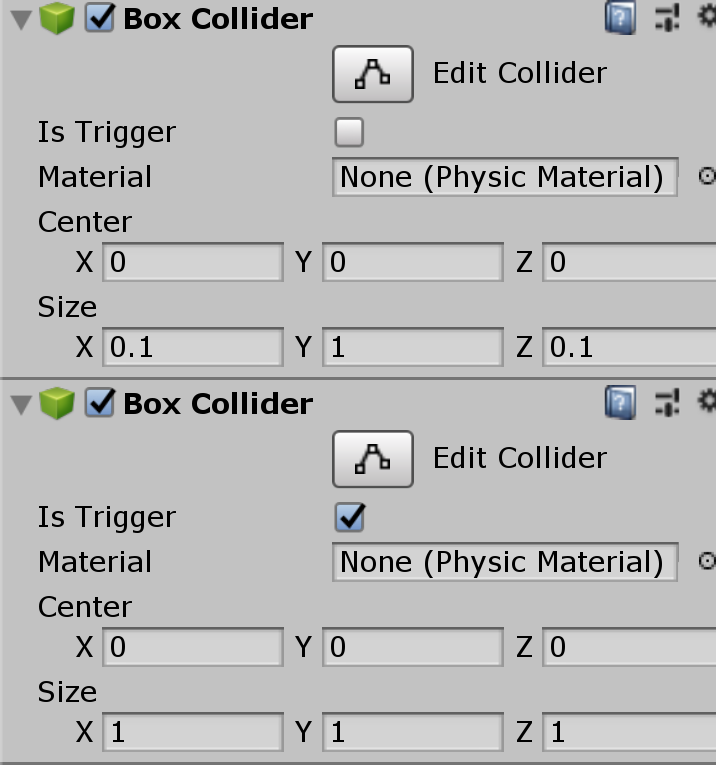
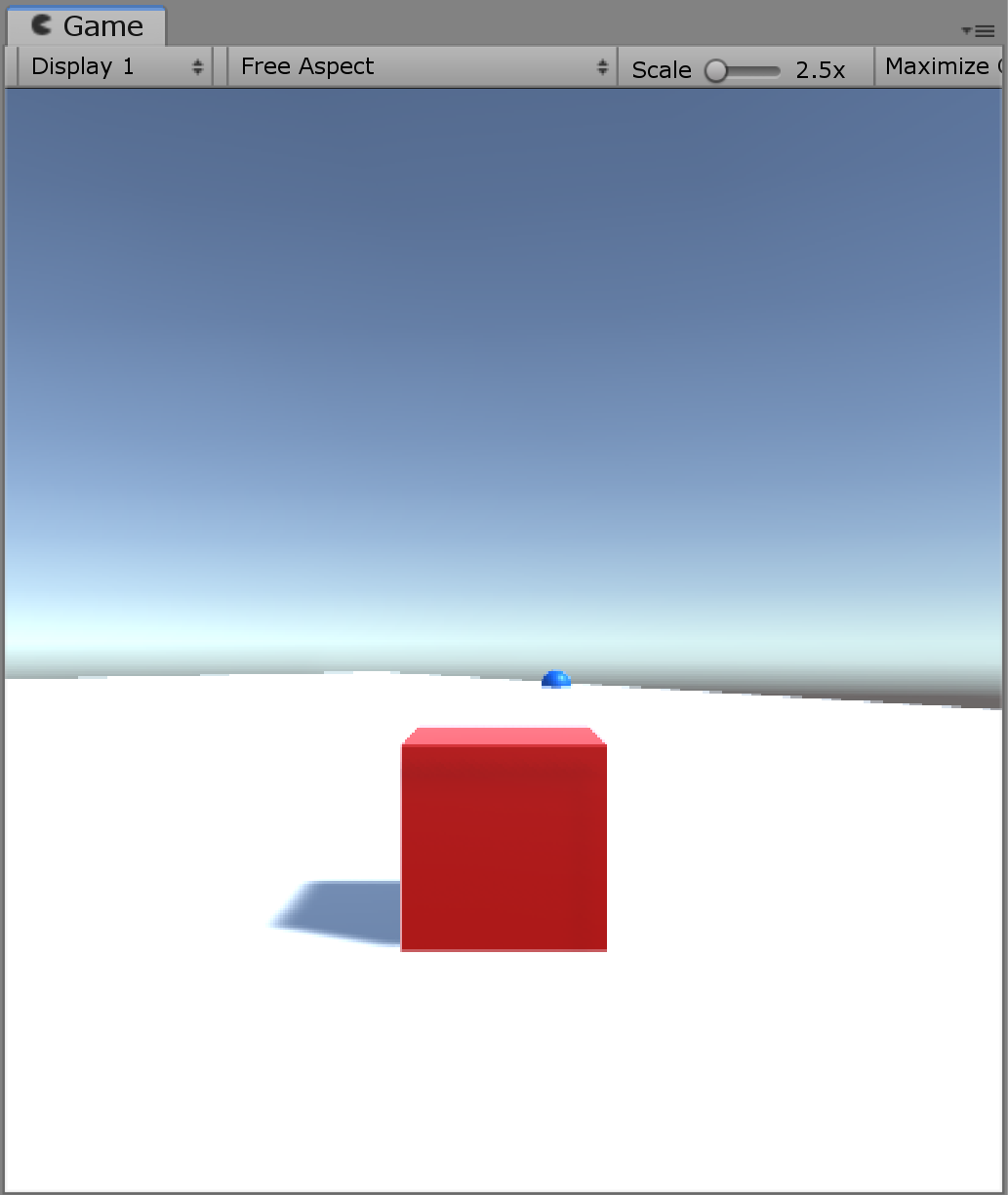
I have 2 colliders laid out like the following https://i.imgur.com/uj2IYYB.png but for some reason the sphere drops slightly into the ground, like this https://i.imgur.com/Ul6JHPD.png why would this be?
 wild coral
Why is one a trigger?
shadow cairn
So the the cube can go through it slightly to trigger the collision
wild coral
whats the sphere collider bounds look like?
shadow cairn
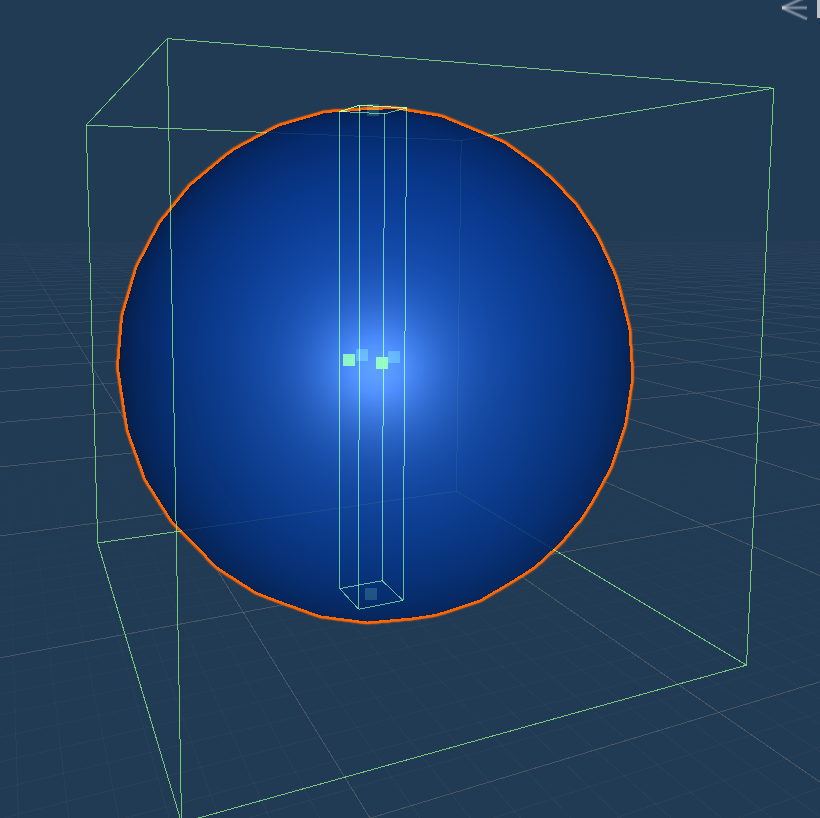 wild coral
looks like 2 colliders, is the big one a trigger?
shadow cairn
Yeh
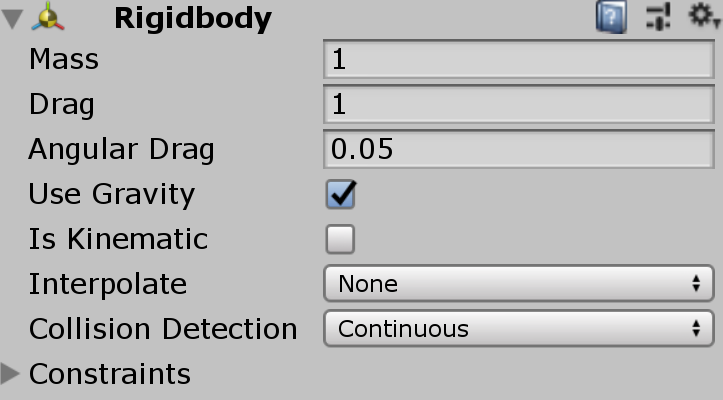 wild coral
what are the constraints?
shadow cairn
None
wild coral
k, that might make sense
Looks like its falling on its side and then because the inner collider is small, it goes into the ground
If you add rotation contraints might prove that, not sure
wild coral
cool!
 grand merlin
Hey everybody. So I have this problem when I want to use animation-based physics in game, but my animating object is actually child of the main one (because I'm switching skins around). any idea how to propagate animation physics to parent object in hierarchy?
lapis plaza
what do you mean by animation physics?
grand merlin
applying root motion
basically I'm trying to create a beat em up and it seems that I need a mix of root motion, unity physics and some glue between them
lapis plaza
yeah, but where does the physics come along here?
root motion is just animation
so it's really hard to tell what you are asking here
grand merlin
well, I didn't really see animation programming room and this room is as close to it as I could think of
if it's the wrong place to ask I'll move my question to someplace better
let me rephrase question as follows: I have a root motion on a child object. I need it to propagate to the parent object so that my object moves in game (and so it doesn't fight with rigidbody that is on the parent object)
 strong plaza
I haven't done that yet, but I assume you could read the positional offset between the animation frames and use the difference to translate it into a velocity that is applied to a rigidbody?
lapis plaza
we do have #🏃┃animation, I don't know what it covers
also I'm not even sure if your question is misplaced, just trying to understand the issue you have
hmmm, apparently PhysX 3.4.3 is out as well
macOS 32 bit support.```hasn't it been ages since OSX even had 32 bit operation systems?
I don't think those even existed on macOS era
this probably involves Unity too: Fixed the overlap termination condition in the GJK code for sphere primitive.
there's been bug reports for this on UE4 too, they haven't included the fix yet
lapis plaza
0lento approves 😄
I like how simple they've made it to override inertia tensor and center of mass
tropic hamlet
Removed:
macOS 32 bit support.
Fucks given:
none.
why initial velocities exposed ?
Why not current?
why are they not the same thing?
 bleak folio
I guess because the velocity of a mass is defined as a function of time with initial velocity. Doesn't explain why the current velocity is not exposed though
fallow gorge
i think its the same thing, at least when you set the initial vel it propagates to the component and doesnt change
tropic hamlet
Yeah if it's just editor side polish then it's acceptable. Carrying a couple of redundant vector3's, not so much acceptable.
Also I have a problem.
Why are physics not programmed in ECS?
The target market is exclusively ECS
but not coded in it? what rationale is there making it accessible to the classic C# crowd when they're not even able to use it ?
Would be less of a rampaging hippo with soothing logical balm
lapis plaza
@tropic hamlet that script is only accessible in editor before you hit play. When scene loads, that gets converted to ecs side, hence it accepts only initial values
tropic hamlet
But why not programmed in ECS and does this affect perf?
I don't need faulty logic like "makes it easy to modify" when the people modifying it would very much be using ECS.
(please tell me I'm being unrealistic and demanding by asking why it isn't in ECS when the dialogue from unity is ECS is performance)
I mean, I do shut up and go away with the right soothing logical balm applied.
lapis plaza
@tropic hamlet but there is no full ecs world editor yet..
I'm sure that happens asap once we get it
Current conversion workflow doesnt affect perf either
tropic hamlet
The "I'm sure" part is what I strongly doubt because it's the nature of people to go "oh, there's more pressing jobs..."
I mean we're still seeing minor UI perf increases from the most trivial code commits that could've been solved 5 years ago shrugs can't assume code quality is the same as programmer passion
lapis plaza
Physics was one of the reasons unity couldnt easily do pure ecs
So I doubt they leave it behind
My guess is that we get first ecs editor preview this summer
tropic hamlet
I do doubt because they are strongly marketing the physics code as being something the community invests in and builds now not later. That's not the recommended thing for something that will suddenly change an entire paradigm
this is final code, just not a lot of it, yet
so it's not going to go full ecs
lapis plaza
They do dots only standalone for 2019.3. You need full editor for that
tropic hamlet
so you think that the existing physics code will be fine then?
I highly doubt anything will change much
more features maybe but no code changes
I guess pure ECS physics were too hard in the end
lapis plaza
I don't mean it'll cater all cases
but it'll work on pure ecs
well, I'm pretty sure it works on pure ECS today too
if you set the needed data yourself
and consider that Tiny editor is really doing a lot of the needed things already, I'm sure they have the full ecs editor running internally already, but they are doing some API passes and polish before they get it out
it does make sense that they postpone the editor release until they get the ecs api somewhat stabilized first
really curious about that dots roadmap talk tho, as they could have addressed this there
also, I'm not really super concerned about the DOTS physics stacking today, as it's a thing I can solve on my own too if needed, for my own projects purposes
tropic hamlet
Yeah I think though realistically I'd prefer everything not be hybrid so that work doesn't have to be redone, and work isn't left to one side that could've been better, but that's just how I physically roll
lapis plaza
for DOTS-only standalone built to happen, you can't have anything monobehavior there
tropic hamlet
because programmers hate going back to older codebases then being blamed for taking so long
lapis plaza
technically navigation and UI are biggest blockers atm for pure ECS
lapis plaza
ah, I didn't mean it like that
you can run HPC# code on DOTS only (of course one can never be certain beforehand but there's no reason for them to limit this, only the old monobehavior/gameobject stuff and the API on that side)
I'm mainly concerned for that rather than everything done in ECS
tropic hamlet
I'm just being paranoid I think as I really want unity physics to be the ultimate solution for my needs, i'd like to be able to depend on one api that has determinism across different cpus with free origin shifting, so that means I'm much more likely to be all over unity's dots physics...
cos the ECS version of these physics would logically be more performant but harder to engineer
tropic hamlet
so I felt the dialogue coming out of unity "we made it easy to understand" is an excuse for not doing hardcore ECS perf - with the excuse you can "just pay for havok" if you need it faster
But that falls flat when you realise havok is not deterministic across different cpus and you have to pay still
 blazing scarab
you can create colliders purely in code and ignore any monobehaviours
lapis plaza
well, Unity Physics is very much ECS
blazing scarab
those are just cuz ecs doesnt have much editor support yet
lapis plaza
I'll start throwing rocks at Havok and Unity only when I know what's the ultimate deal with Havok integration and what is the final target for Unity Physics 😄
yeah, that's what I tried to say
this is why I started talking about full ecs editor in the first place 😄
blazing scarab
@tropic hamlet i havent looked at the code yet but what makes you think its not full ecs
tropic hamlet
the hybrid compatibility, I think I'm probably just being paranoid. Planning to go through it tonight if I get time
it should be full ECS but I just want to make 100% sure I'm not going to invest in a dead end
lapis plaza
yeah, I haven't seen anything else
you can't even run Unity Physics on GameObjectEntity
you need to either put it's scripts in gameobject that has ConvertToEntity or gameobject that exists on subscene (so it gets also serialized for ecs on save)
the moment you hit play in editor, you don't see UnityPhysics scripts in the editor
it's only done this way now for convenience as we don't have full ecs editor yet
blissful shore
@blazing scarab - There's some manual Job complete calls on the mainthread scheduling code inside Unity's ECS Physics package atm.
Then again, there's some mainthread and short term job stuff in the transform code atm, even for the "pure" ECS version.
If it was indeed "pure" as we understand it, there'd be no manual "complete" calls in any ComponentSystem or JobComponentSystem.
There's a few places in my own code where I call jobs and complete them on the main thread in ComponentSystems just because part of the logic can be parallelized but the other end still has to interact with the old APIs.
but the code can be run on burst so it's worth the cost of doing it half way since I'm stuck doing part of the logic in a ComponentSystem anyway
blazing scarab
huh i wonder what the design decision for that is
 peak panther

uuuuh is someone able to explain why on a completely identical jump my character is just... stopping?
the flipping is supposed to happen
ok and it happens only when I swap the timestep from 0.01 to 0.02
or if I delete that region (the whole thing is a big tilemap collider)
not on 0.015 though
alright
pearl warren
Without code we cannot make any conclusions
blissful shore
probably going into the geo due to the way the time step works, is this raycast based or are you using the stock Box2D integration
?
 safe flower
not sure if there's some lurking collider above the jump that might be causing this.
peak panther
using stock Box2D
jump is a simple velocity.y set
the reason the player turns is due to a wall jump ability
and the only thing going on physics wise there is changing terminal velocity by clamping the y velocity
when below a certain negative number
it shouldnt effect up
like I said though the just right below it is completely identical
and if I cut back a bit on the wall
(since it's a tilemap)
the issue goes away
It only happened there and when the timestep was 0.01. I've since set it to 0.015 to fix a different collision issue and the problem displayed in that gif has no returned.
 stuck bay
this is retarded
            int lenght = targets.Length;

            RaycastHit[] result = new RaycastHit[lenght];
            NativeArray<RaycastHit> results = new NativeArray<RaycastHit>(lenght, Allocator.Temp);
            NativeArray<SpherecastCommand> commands = new NativeArray<SpherecastCommand>(lenght, Allocator.Temp);

            for (int i = 0; i < lenght; i++)
            {
                Vector3 dir = targets[i] - PlayerPosition;
                commands[i] = new SpherecastCommand(PlayerPosition, radius, dir, distance, layers);
            }
            // Schedule the batch of sphere casts
            JobHandle handle = SpherecastCommand.ScheduleBatch(commands, results, 255, default(JobHandle));
            handle.Complete();

            // Dispose the buffers
            results.CopyTo(result);
            results.Dispose();
            commands.Dispose();

            return result;
it just stops after handle
whole code brakes
...
stuck bay
it dose not continue after JobHandle handle = SpherecastCommand.ScheduleBatch(commands, results, 255, default(JobHandle));
pearl warren
 stuck bay
?
    public RaycastHit[] TestForHits(Vector3 PlayerPosition, Vector3[] targets, float sphereCastRadius, float maxDistance)
    {
        int lenght = targets.Length;

        RaycastHit[] result = new RaycastHit[lenght];
        NativeArray<RaycastHit> results = new NativeArray<RaycastHit>(lenght, Allocator.Temp);
        NativeArray<SpherecastCommand> commands = new NativeArray<SpherecastCommand>(lenght, Allocator.Temp);

        for (int i = 0; i < lenght; i++)
        {
            Vector3 dir = (targets[i] - PlayerPosition) * maxDistance;
            commands[i] = new SpherecastCommand(PlayerPosition, sphereCastRadius, dir, maxDistance, targetLayerMask);
        }
        // Schedule the batch of sphere casts
        JobHandle handle = SpherecastCommand.ScheduleBatch(commands, results, 255, default(JobHandle));
        handle.Complete();

        // Dispose the buffers
        results.CopyTo(result);
        results.Dispose();
        commands.Dispose();

        return result;
    }
i am doing exactly the same as in the example
pearl warren
well
I think what your JobHandle handle = SpherecastCommand.ScheduleBatch(commands, results, 255, default(JobHandle));
code is asking
please make a job
with this command
put it in that results
and plz minimal 255 commands per job
oh oops you only request one command
😦
So job never starts
or something/
stuck bay

Job system works on linux?
Is not the plafrom or layer mask
phisics are setup correctly
no error msg no nothing just another broken thing from unity 😃
pearl warren
what unity version are you on
and you're on linux editor?
i don't know if that ever even worked xD
stuck bay
windows 10
i was having build to linux
but not working
windows 2018 somthing
3.1f1
 quartz wyvern
based on what criteria is it less expensive?
blissful shore
I'm going of a hunch, but I suspect the fact that it's kinematic instead of needing to calculate forces/displacement possibly simplifies a lot of things.
tropic hamlet
The speculative version of CC (there are two) is faster under most conditions but a tiny bit less reliable.
It's called speculative because it only kicks in when there's the speculative possibility there might be a collision (going fast, something in same broadphase)
Typically, you will only need this for your main player, the rest can be normal collision
AI is after all, under your control
(if it's not then make that under your control first)
I use it for anything on terrain for example that might tunnel
quartz wyvern
the other thing im confused with. if i freeze rotations on x and z but not y - i apply a force and it wont move =/
if i remove these freezes it will only move when all 3 rotations are not frozen
ah lol i see why 😄 thats hilarious
quartz wyvern
is contact offset broke?
ive tried a huge range of numbers big and small
my object still acts like its colliding when it hits the edge between two adjacent colliders when it should act like a single collider floor
 coarse dawn
Hello ! Is there an ETA for 2D Physics with DOTS ? Especially Tilemap/Composite colliders ?
 ocean horizon
@coarse dawn Unfortunately not. DOTS 2D physics is WIP. Tilemap / Composite would be much further down the road.
 autumn jetty
In the doc for the new physics it is said
You can choose to create you own collision worlds which are entirely independent of the physics world. However, if you are performing queries against the same physics world you are simulating, which is common, then you can take advantage of the fact that the broad phase had already been built.
Does this mean you can only simulate one world at a time? And as someone who haven't used this concept before, in comparison of using layers between two types of collision objects to never collide in what circumstances would one be better then the other?
peak panther
going to try to code my own collision
how good is this vid

Watch this video in context on the official Unity learn pages - http://www.unity3d.com/learn/tutorials/topics/2d-game-creation/scripting-collision In this li...
quartz wyvern
kinematic bodies with CCD enabled are not supported
wtf is this annoying decision? why cant iskinematic not just overrule and temporarily turn off CCD? how hard can that possibly be
since most people will just set to discrete to set to kinematic then reverse that process when turning it off, just needless fiddling for nothing
jagged shale
because someone will manually move an object 200,000km then complain CCD didn't register the collision
I think CCD can only work in the context of the physical reactiveness
not from kinematic movement
so by disabling it, it's made clear that limitation
but I get your point they could simply ignore it and not make it a warning
(though i'd argue by making it a warning and not an error, they kind of are allowing you to ignore it)
quartz wyvern
@pearl warren but that is the case for any isKinematic object
i was under the assumption for kinematics collisions don't get involved
because how else does it push the rb back when it overlaps a collider on a given frame since isn't kinamtics meant to mean not using physics
@jagged shale meant to ping you not that rando
lol
jagged shale
yeah I dunno. maybe they were tired of getting stupid bug reports about it so put a warning on it lol
quartz wyvern
ok im lost - i set my player matrix to not collide with a particular layer yet when i do OnCollisionEnter its colliding with the very thing i don't want it to collide with , even though visually its not actually colliding with it
it gives me the name of the parent which has a RB which is not what i want =/
ah there we go
had to do some weird fiddling
 sly violet
What ended up being the issue?
quartz wyvern
i still have issues 😄
but this time they objects keep moving when they shouldn't
even box colliders they still move
doesn't make any sense. theres no force being added
 hot oxide
looks like gravity thing
quartz wyvern
they do use gravity but they are box colliders why is it tipping left n right for example on the top right
hot oxide
Any scripts?
quartz wyvern
yeh im adding a force every frame, then i stop adding the force and they end up like that ^
(every fixed update frame)
hot oxide
Must be something wrong there
hollow echo
I am imagining that you're still managing to add forces
quartz wyvern
i thought that too but i debug log the force update - nothing coming out in console
once i stop adding the force
hollow echo
this is not a normal thing and the only thing I can imagine it being other than you have other scripts adding forces is that you're dealing with extremely odd scales or you've seriously messed up your settings into a whole new world of hell
hollow echo
that's fine, what I mean is like an extremely tiny or large world
quartz wyvern
they all above at least 0.2 on a scale axis
hollow echo
should be fine
hot oxide
Do you have player too?
quartz wyvern
huh
hollow echo
if you make a new scene and put down a cube does it act weird
quartz wyvern
i tried it with a single unit cube
works a bit - but it acts like it has barely any gravity
hot oxide
smh
hollow echo
if you add a plane does it go weird still though?
if so, you probably should screenshot your physics settings
quartz wyvern
unit cube
sure ill show my settings one sec
lol looks legit 😂
thats just dropping it with no forces
hollow echo
I can't imagine it's an issue but what are your Time settings?
quartz wyvern
oh i think i may have found the issue
_rigidBody.centerOfMass = transform.localPosition;
should've been 0,0,0
hollow echo
lol okay
hot oxide
hahaha
quartz wyvern
looks like if you set it to the local position it pivots forever on its center point
thanks for being the rubber ducks 😛
tropic hamlet
"_rigidBody.centerOfMass = transform.localPosition;"
backs out of room slowly
 errant umbra
Hey, I need a bit of help. I have a forceps and I'd like to pick up objects but the haptic device doesn't give any force feedback, it just tracks positions. How can I do it with physics so each jaw adapts to the mesh? I tried with torque but most of the objects keep falling even with infinite friction
sly violet
@quartz wyvern :
-
Generally speaking you shouldn't touch "centerOfMass", "inertiaTensor", or "inertiaTensorRotation", as these values are calculated automatically with the assumption that the density of the object is constant.
-
While hippocoder is retreating, I'd like to point out the reason why that code didn't work is that centerOfMass is in the local space of the current Transform while localPosition is in the "local" space of the parent transform (or world if there is no parent). In practice this means that you're placing the center of mass at the same offset that the object is in the world; so an object at y=5 has its center of mass 5 units above it. The behavior we saw in the videos makes sense when you realize that the center of mass is well outside of the collider and ends up swinging like a pendulum beneath it. Essentially the weight - the center of mass - is "hanging" beneath the collider under those conditions.
 wary hollow
@errant umbra kinda hard to tell if we're talking about the same thing here, but once when I was doing something similar for a VR project I had good luck using a configurable joint on each player hand, setting angular XYZ to Limited, target XYZ angles to 0, and using a position spring on XYZ drive
so with a chopstick mesh + box collider attached to each configurable joint, the player could realistically interact with the environment, pick up objects etc using the chopsticks to apply pressure on both sides of a rigidbody at once
and nothing would wiggle or explode or clip through the environment like it does with a fixed joint, or kinematic rigidbodies, or any number of other solutions I tried
tropic hamlet
center of mass tinkering is somewhat essential for realistic object behviour. Cars simply feel wrong without it, and most everyday objects will tumble and bounce much more realistically. But yeah, don't touch inertia tensor.
the com is usually just a local offset within collider bounds
People can think of it as "cor it's heavier on this side"
certainly not updating it every loop with world pos lol
lapis plaza
I actually love it how easy it is to mod the inertia tensor on Unity Physics (but yeah, it's not a thing you'd update often)
tropic hamlet
I never had reason to touch that diagonal nonsense
sly violet
"center of mass tinkering is somewhat essential for realistic object behviour."
Yeeeah most real world objects don't have constant density, certainly cars don't. But he's using cubes and just setting it to 0,0,0.
The tensor is about how much torque it takes to start/stop it spinning on a given axis, right? Never really needed to know how it worked.
lapis plaza
arcade racers use inertia tensor spoofing a lot
it's super easy way to keep consistent vehicle physics while swapping different size colliders for visual meshes
also makes tuning tons of different vehicles easier as the body shape doesn't automatically mean you dial all values again
you can just have some preset types which you fit into specific collision shapes and meshes
it's more of a designer tool in that sense, not really a thing you'd often use for more realistic physics (as usually you'd just use it to spoof more correct physics values rather)
tropic hamlet
Very interesting I never considered the body shape aspect
simply copying the tensor from the default-standard vehicle would allow different collider setups to handle the same.
Thanks for that
lapis plaza
that's actually something I first learned from some GDC talks
it's come up quite few times for different titles so far
tropic hamlet
it's one of those little tricks in the toolbox that make you go "that saves a lot of work!"
actually... I have weapons here that are often thrown and often they will have changes to collider or scale, and this would allow consistent behaviour
I'll use that tip in this project
I was just going to accept things in that respect
blissful shore
@lapis plaza - are the GDC talks you mentioned for this on youtube or behind the vault™?
lapis plaza
probably on both
well, not sure for one talk
will check
here's one for Rocket League: https://youtu.be/ueEmiDM94IE?t=1190 I dunno if they mentioned they do it with inertia tensors on that talk but that's how you do it

In this 2018 GDC talk, Psyonix's Jared Cone takes viewers through an inside look at the specific game design decisions and implementation details that made t...
here's part for Saints Row 4 vehicles: https://youtu.be/3XXw-2EPlL0?t=691

In this GDC 2014 talk, Volition's David Bianchi revisits his experience taking on the entire vehicle design of Saint's Row: The Third literally months before...
I could have sworn there was similar trick here: https://youtu.be/Db1AgGavL8E but couldn't find it, maybe they just shaped every vehicle to have same collider so it didn't matter 😄
In this 2016 GDC talk, Vicarious Visions' Jan Erik Steel & Patrick Donnelly cover how land, sea and air physics handling for Skylanders Superchargers was cre...
that last one has some nice tricks in general, loved the rotation landing one
@blissful shore
blissful shore
thanks @lapis plaza!
lapis plaza
I could list all vehicle talks in the internet 😄
here's one for GDC 2017 https://www.youtube.com/watch?v=SKXqWcaoTGE and Watch Dogs 2 vehicle replication talk should unlock from the gdc vault any day now

In this 2017 GDC talk, Naughty Dog's Edward Pereira breaks down individual physical elements that went into Uncharted 4's 4x4, such as tire collision respons...
quartz wyvern
is adding a force in a particular direction relative to the object forward? or is the direction of force world space?
lapis plaza
addforce is in world space usually
quartz wyvern
okay
cant figure out why my objects are going upwards when the direction is horizontal atm
stuck bay
Hi, anyone used Nvidia's Flex plugin ? Im trying to make fixedParticles move with multiple bones, cause by default you can parent all the fixedParticles to a single bone by dragging on the bone
im having trouble to transform the particles position from the FlexSoftAsset to Bone space, rotations issues i guess. Everything is aligned in the editor particles/mesh, but when i press play things go weird and rotate the wrong way plus offsets.
errant umbra
@wary hollow do you have any code I could check? Right now I’m raycasting from the inside of each jaw of the grasper and when a mesh is near enough, they don,t continue closing. A physics approximation would be better tho
 lime latch
is there a way with Unity Physics Body/Shape to lock an axis for rotation so my character doesn't fall over.
stuck bay
guys how would i use angular rotation relatively to the object's rotation
tropic hamlet
what is the purpose?
course-correction or figuring out the rotation angular velocity or force for throwing a spinning knife etc?
be specific :P
lapis plaza
I'm guessing some local space simulation
either way
would be better to explain it better and ask help mainly on one channel first
instead of putting a vague same question on multiple
quartz wyvern
my RB is not moving and yet "isSleeping" is always false
any idea why that might be
 digital ocean
It's not moving by code, or in general not by other rigidbodies bumping into it @quartz wyvern ?
 clear fern
is there a way to have my ball bounce off of stuff when it hits something the same way as light reflects (kind of)?
all the answers I'm seeing are like "use a rigidbody and set drag to 0 and bounciness to max and friction to 0" but doing that would mess up some stuff in my game
jagged shale
someone, I think it was @naive summit , did an arcade style physics bouncing awhile back.
clear fern
and also
is there a way to give a rigidbody "neutral" buoyancy?
like so it neither sinks nor floats
clear fern
yeah that's what i meant, how could I implement it?
lapis plaza
I'd start by googling how boyancy is handled in physics
lapis plaza
well, you want something that doesn't float or sink, you probably don't even want boyancy at all
you just want to cancel the gravity
clear fern
omg
i found something
if you add a force of 490.5f to the rigidbody's Y axis in fixedupdate... it neither floats nor sinks
like it doesn't change at all
lapis plaza
well, that's just canceling the gravity
also
490f is magic number
that's not good
if you change your RB mass, it will not work anymore
F=ma, gravity is the a here, m is the mass
clear fern
well with my experience of canceling gravity, the velocity doesn't seem to go down on any of the axises and stuff can get knocked out of the universe
lapis plaza
so you cancel the gravity, you multiply the negative gravity value and add that to your force
clear fern
ok i will try that maybe
lapis plaza
so... I'm guessing your RB has mass of 50
because F = m*a -> F = 50 * 9.81 = 490.5f
see, it's all math
clear fern
actually it has a mass of 1 🤔
lapis plaza
you got different gravity value then?
clear fern
possible but unlikely
lapis plaza
well, something doesn't add up
clear fern
this is all I do thisRigidbody.AddForce(0, floatForce * Time.fixedDeltaTime, 0); (float force is set in editor, and in this case is 490.5)
lapis plaza
what
no
never do that 😄
don't put deltatime in your force
it's already taken into account
clear fern
oh
lapis plaza
whatever you have in project settings->time for it
0.02 by default I think
so this makes sense now
clear fern
Well that script is what I use for everything in water
things that sink, float, etc...
so i might have to change a lot
lapis plaza
490.5 * 0.2 = 9.81
and F = m * a => F = 1kg * 9.81 m/s^2 = 9.81
so math checks out
but ditch that fixedDeltaTime from that equation, it's not doing anything good there
if you use forces, deltatime is taken already into account by physics engine
it's literally applying the force right from one physics step to another
clear fern
the only problem is I'd have to change the values of every object
so i'd divide it all by 50?
clear fern
to convert everything
because i set all the floatForce values to have the perfect force in water
like uh
lapis plaza
I don't see any point on putting first gravity to physics engine, then canceling it for each ribidbody one by one...
that's just silly
just put 0,0,0 on your gravity
it's like things floating in space then
clear fern
well I use this script for everything that floats, even the submarine
and idk about giving my submarine 0 gravity. last time I tried that strange things happened on the x and z axes
And the float force value might change over time
lapis plaza
strange things tend to happen when you put weird things on your equations
you can use real world physics equations
 timid sparrow
what can cause this? https://i.mlgimg.xyz/c849e9bc.png (box collider2d entering a trigger with a box collider2d)
 tropic hamlet
too cryptic with no information. typically there's 100s of things causing it
timid sparrow
Well. Any common issues?
Seems to be related to huge tilemap collider... but i dont see why it would cause that
sly violet
You said 2 box collider 2d's, one of which is a trigger. What's the role of the "huge tilemap collider" in this?
 dry crane
Sorry if this sounds stupid, but I don't really understand how Rigidbody2D.AddForce works.
my current understanding of it is:
1. The method is called with a Vector2
2. The acceleration of the object is calculated with a=m/f (acceleration is equal to object's mass divided by inputted force.
3. The acceleration is added to gravity (-9.81) and any other forces.
Some of my questions are:
how exactly do you divide an integer by a Vector2
and is the acceleration just for the current frame?
Thanks to anyone who helps me with this! (and please tell me if I got anything wrong!)
sly violet
A float multiplied/divided by a vector results in that vector with each component multiplied/divided by the float.
(An integer will be converted to a float first.)
The acceleration is just for the current frame.
If you want constant acceleration, you'll need to call it every frame.
Typically when you use constant acceleration, you use ForceMode.Force, which applies the force in units of force-per-second. Basically it divides the input by the physics frame rate.
(That means if you change the physics frame rate it'll still work.)
dry crane
So since the acceleration is just for the current frame, if I were to do rb.AddForce(Vector2(10, 0));
it would have an acceleration of 10 for that frame, and then a velocity of (10,0) forever?
sly violet
Well... The default ForceMode2D is Force, but if you're doing that as described, then you want to set it to Impulse. So:
rb.AddForce(Vector2(10, 0), ForceMode2D.Impulse);
Then, if the mass is 1, you call it just once, and nothing else interferes... You'll get velocity (10,0) forever.
dry crane
So then if I do rb.AddForce(Vector2(10, 0), ForceMode2D.Force); it will slowly accelerate each frame to get to a velocity of (10,0)?
(if the mass is 1)
tropic hamlet
post on forum with code if you need serious help - discord is for orienting and pointing people more than the tech details
sly violet
@dry crane: It will accelerate that much in 1 second IF you call it that way every frame during that second.
lapis plaza
I don't really see issue on dealing with code here
tropic hamlet
You'll have to scroll a lot, back and forth so trickier problems will be lost and devalued in this format.
Or be too exausting to bother with.
fallow gorge
anyone where you can edit the new physics filter layer names?
fallow gorge
yeah ecs physics
in PhysicsShape > CollisionFilter > theres two enum drop downs with the layers
fallow gorge
ok its just a scriptable object asset, create > dots physics > Physics Category Names
stuck bay
guya
guys* in my game i think Hitboxes have problems can you help me with that?
heres the game
im currently using ontriggerenter
sly violet
Can you describe the problem in detail?
stuck bay
the projectiles goes through the character and hits 1/3 or 1/4 of the time
@sly violet
sly violet
...Man, put up a WebGL build. 😉
Anyway, the most common reason for projectiles to go through without hitting is just how far they travel in a frame.
You could try setting the collision detection to continuous and/or decreasing the time increment (TimeManager Fixed Timestep) at which the physics runs.
sly violet
Good luck, let me know.
stuck bay
I have a rigidbody sphere attached to a rigidbody fps camera rig with a fixed joint, and I apply a force to the sphere (imagine the camera rig is a basketball player and the sphere is the ball). When I apply a force forward and up to the ball from a grounded position (simulating shooting the ball) I can make adjustments find the right force amounts. However when the player is jumping and shoots while in midair, the force applied to the ball seems to be multiplied by a huge amount, like x100. The ball goes flying out of the stadium.
stuck bay
So I adjusted the mass of the objects. Changed the player from 10 to 1, and the ball from 1 to 0.05, and now things seem to be running a lot more realistically.
 proper wren
Hello! I am super noob to unity and I got myself some 3d tiles.
Each one has their own mesh and I can add a mesh collider to each of them and they work as solid ground but the "seams" in the tiles make my rolling ball "bump"
Is there a way to tell unity "grab all the meshes you can find in this game object and bake them"?
Like a composite collider 2d but in 3d and with meshes 🤣
or what is the correct approach?
(all the floor parts are on the same position. It is not a placement problem)
proper wren
I am sure that I found the wrong way of doing it but I just made the meshes bigger so they overlap a bit and that fixed it 🤷
lapis plaza
Learn how Just Cause 4' copes with a wide range of vehicles and player styles though thoughtful design of its tire dynamics and how these relate to the overall vehicle gameplay experience. This talk is intended to take physics programmers and...
In this talk, NVIDIA will discuss the latest features of PhysX 4, NVIDIA's latest open-sourced PhysX version. This talk will focus on which new techniques are available, how to use them and provide details about the performance and accuracy...
 celest crystal
@proper wren AFAIK there is no built-in solution for combining meshes. You also have to handle combining materials and textures. I recommend this: https://assetstore.unity.com/packages/tools/modeling/mesh-baker-free-31895

Combine meshes and textures to reduce draw calls.
- Fix scaling, rotation and translation in imported models
- Combine and customize skinned meshes
- UVs, Normals, Tangents automatically adjusted
- Bakes tiling textures
- Full lightmapping support
- Source assets not ...
lapis plaza
deciphering Unity Physics again here, especially the vehicle sample
not a huge fan of the COM, orientation and inertia tensor overrides happening on same toggle
you'd usually want to override COM separately from inertia tensor
now if you override the COM, you need to compute inertia tensor somewhere to be able to feed the right value to the override (which you don't even usually want to override)
also weirdly, the vehicles tilt in opposite direction, I first thought it was the COM override which was set 2m below, but correcting this didn't fix the physics leaning in wrong direction
negative Y axis COM would have exactly that kind of effect
the camera follow script is essentially broken on this sample too, it just jitters if you simulate the physics steps in fixed timesteps, it's not covered at all here
I'm guessing it's an oversight because Unity Physics runs at Update now all the time
(which if not corrected, will make the physics run as fast as you can render)
really curious to see the updated Unity Physics and samples for it to see what all they've fixed from the initial package
lapis plaza
they estimated this week
current version is not compatible with latest ECS and apparently they got some other work that's stalled the release from not happening at the same time
I've manually updated the Unity Physics to work on latest but the early adopter issues are of course still present 😃
I wish Unity would put all packages to github too, even if it's just one commit per release
made this thread https://forum.unity.com/threads/ecs-packages-on-github.656512/
Unity Forum
@Joachim_Ante Is Unity planning to put Entities, Hybrid, Unity Physics, AI Planner, upcoming DSPGraph etc on github? Especially Entities and Hybrid...
but not really expecting any answer
they tend to ignore these kinda questions
they know there's technically nothing liming from people pushing the packages into github themselves but I don't think they want people to do that, so they just ignore these questions
I keep BOTD and some older FPS Sample diffs for SRP and PP on my SRP and PP forks, got permission for that (or rather reply from staff that Unity Companion License allows me to do this)
but SRP and PP were publicly open in the github to begin with
I could easily automate it so that once new packages would arrive, some bot would download, unpack and push the new release as new commit in some github repo
it's more of a question if Unity really doesn't want that to happen
that would help myself too, but not really feeling like doing the work for it just for my own gains
lapis plaza
Came across this: https://github.com/ElasticSea/Destructible-Walls / https://twitter.com/ElasticSea/status/1113845867201609728

GitHub
Demo showcasing destructible walls in Unity. Contribute to ElasticSea/Destructible-Walls development by creating an account on GitHub.


Destructible walls 💥
#gamedev #indiedev #madewithunity #unity3d #gaming https://t.co/SK9JkigF1f
Retweets
186
Likes
1217
 Twitter
I actually just updated that same Blast plugin today to Blast 1.1.4
haven't still checked this project out
it's kinda funny that the person redoes what Blast itself does by design afaik
at least I thought the integrity part was in the blast itself too
but how this is built is kinda nice because it's trivial to port this to Unity Physics package + it doesn't need Blast runtime in the build as chunks can be generated in the editor
altho in that project, the person generates the chunks scene start I think, but it's not a requirement, one can bake these in editor too to get rid of blast depenency on the platform itself
lapis plaza
that project does crash at runtime for me, it uses this: ```cs
if (EventSystem.current.IsPointerOverGameObject() == false)
but EventSystem.current is null so it'll get null ref exceptionunity docs sample isn't making me any wiser either 😄 https://docs.unity3d.com/ScriptReference/EventSystems.EventSystem.IsPointerOverGameObject.html
ah, needed to add the event system to the scene
(I've never used this thing on Unity)
stuck bay
Hey, @lapis plaza I just saw your thread in Unity about putting the source on Github.
Problem is You cannot do PR to that repository according to this.
https://github.com/Unity-Technologies/Unity.Mathematics/blob/master/readme.md#why-cant-we-send-a-pr-yet

GitHub
A prototype of a C# math library providing vector types and math functions with a shader like syntax - Unity-Technologies/Unity.Mathematics
lapis plaza
that's no issue and it's a totally different thing
mathematics package IS on github already
I don't care about being able to PR the official repo, I just want to easily fork and share the fork
and see the diffs 😃
or commits in this case
lapis plaza
yeah I guess, but these things are moving fast and especially ECS side stuff has their own internal plans and prototypes we end users don't even know about
it could be hard to explain why some PRs were not accepted and some not to certain part of this community
people only see the features and refuse to think of the big picture often
so it's probably just easier to say "we don't accept PRs for the time being"
that being said, I feel that math package licensing thing is just an excuse for the things I just mentioned
at least ML-Agents and SRP repo are both under same Unity Companion License as that Mathematics package and they do accept community PRs
I know this because they did accept few of my PRs to SRP repo
and seen community PRs on ML agents
stuck bay
PRs that make drastic changes to the repo definitely are of concern,
But PRs that involve bug fixes and Improving the code should be allowed IMO.
lapis plaza
well, in that math package there's a different concern
we end users don't know the criteria on how the things need to be implemented there for Burst to play nice with it, in fact, I think they hard code Burst to detect new math libs stuff
so having some community PR there messing up with their Burst optimization plans is no go
anyway, being able to PR things is not really the main thing community is wanting
while it would be nice, being able to fork and examine the changes in github would just be very helpful
having just packages dropping in the PM isn't that nice for people who want to examine and modify the code
of course it's convenient when you actually use them but that's different thing again
hmmmmm, there are no breakable joints yet on new Unity Physics (just thinking what it would take to upgrade that wall destruction sample to Unity Physics from built-in physics)
fallow gorge
ah just tried it, the visible seams are much more noticeable than viewing it as a gif
lapis plaza
yeah, I wonder if you could still hide that somehow with kinematic bodies before being active
lapis plaza
I'll crosspost a bit since this is also relevant here:
https://www.youtube.com/watch?v=yuqM-Z-NauU

Hear about the journey of taking Havok's AAA physics engine from C++ to the land of C# and the Data-Oriented Technology Stack (DOTS). Learn about the archite...
lapis plaza
what I like about Unity Physics package is that they actually call restitution restitution (instead of bounciness) and damping is called damping (instead of drag)
bounciness was harmless but drag has caused so much confusion for years among Unity users
stuck bay
Articulations are coming this week (probably):


I'm hoping to roll out yet another experimental 2018.3 with PhysX 4.1 and articulations either late this week, or early next week. Testing and some late fixes right now.
Twitter
fallow gorge
wonder what the new physics package has in store, would be a long time for simple api updates
lapis plaza
I'm currently wondering the most about breakable joints
the joint setup is still quite wip
 elder pelican
It may be harder with ECS physics since they "bake" data during editor time
Actually I think I'm wrong, that would apply for the collider only and not joints
lapis plaza
if you mean breakable then that's doable with stateless design
it's just needs a threshold for the applied force and breaks after it
I guess it would be nice to have something that takes more than one physics step to process so individual little over limit impulses wouldn't immediately break things, but I don't really know if physics engines do such things on breakables
elder pelican
Still a lot of hype for the next update of ECS physics even without breakable joints (we can still hope)
lapis plaza
at this point, people just want a thing that doesn't throw errors at you when you use the latest entities package 😄
also kinda sucks that Unity doesn't respond to the query about sharing the ECS packages on the github
I and probably many others have upgraded the Unity Physics and AI Planner packages manually when they've got broken on new Entities releases
could just share that work so everyone wouldn't have to do it individually if they want to keep these working
elder pelican
Well IMO you asked, they did not answer, just do it
The worse it could happen would be that will ask you to remove them
lapis plaza
well, I rather stay on their good side 😄
of course if there would just suddenly pop up some random github account that shared these, I wouldn't know anything about it 🤔
elder pelican
The guy who put Unity source code (that you find in their .dll) was just asked to remove it, nothing happened to him ^^
lapis plaza
yeah, but I run business too, I don't want to do things that can set me in bad light
it's different if you just do things for fun
elder pelican
VPN + random git account 😇
elder pelican
haha
fallow gorge
anyone renaming their physics package with the new entities release and experiencing crashes with moderate amounts of rigidbodies(like 10-15+)?
lapis plaza
@fallow gorge I had crashes with burst 1.0.0p9-10, p8 and p12 seem fine
there's a crash fix in p12 changelog too
fallow gorge
hmm ill give that a try, but i dont get crashes with small amounts of rigidbodies like <=5
lapis plaza
I've had more when I tested
lapis plaza
np
elder pelican
@lapis plaza the hero we don't deserve
tropic hamlet
But are forced to endure.
 gusty sleet
Is there a reason that non convex mesh colliders are no longer supported with non kinematic rigidbodies?
 rotund sentinel
Hii there, just a quick question, can i make my ship float upside like 45 degree?
I don't know how to make the water work in that degree
lapis plaza
@gusty sleet This change happened on Unity 5.0 already and it was optimization, technically even if they allowed that, nonconvex mesh colliders couldn't collide with other nonconvex, so that's kinda issue as people would have wanted to have that then. Also now the terrain is using mesh collider setup too, so it would be now even twice more limiting
that being said, new Unity Physics and upcoming (paid) Havok integration work like the old Unity 4 setup in this regard, they don't limit where you use it but you also can't collide between two nonconvex mesh colliders there either
gusty sleet
I figured something like that was the answer :/
It's pretty annoying having to make colliders for a cup out of boxes
Thanks though!
lapis plaza
you use blender?
https://github.com/kmammou/v-hacd has addons/blender that lets you automatically split your model into convex chunks

could be handy on some models
apparently Unity has some c# prototype in works for that but there's no word if that'll be released
shamelessy tagging @tardy spear as I'm curious if that V-HACD is now considered for Unity Physics? They now do compound colliders as child objects that get converted to entities, that V-HACD generator would be nice fit for this.
tardy spear
I should probably ignore that tag, since there's nothing I can share on top of what's been shared up to this moment. V-HACD stuff is my 20% time project that I don't have a chance to claim every month for endless regressions, maintenance, physx upgrades, random misc improvements etc.
I really want to say it will come at some point in time either from me or from the havok folks I'm sure.
lapis plaza
ah, just thought it would be perfect fit for the new Package as they already do compound colliders like that (you mentioned you didn't like it on gameobject setup)
tardy spear
yeah sure, it would
lapis plaza
but yeah, can understand it's not a priority atm 😃
seems like someone did a wrapper for the native plugin for it but I can't really understand the language 😄 https://kb.phardera.com/2018/08/unity-3d-v-hacd.html

碰撞偵測在物理動力模擬是不可缺少的功能,兩個複雜多邊形物體在執行碰撞偵測時需要做很多幾何運算,因此若要遊戲的畫面能夠流暢顯示,遊戲中的碰撞偵測就必須要能達到 real-time 的等級,目前能夠快速...
I can understand the code tho :p
https://translate.google.com/translate?hl=en&sl=zh-CN&tl=en&u=https%3A%2F%2Fkb.phardera.com%2F2018%2F08%2Funity-3d-v-hacd.html (and now the code snippets broke but can read the text) 😄
tardy spear
I guess it's no problem to bind to V-HACD via p-invoke at all
lapis plaza
yeah, that's what I thought and was sure someone had already done it
tardy spear
I'm on something different - I want to have it all written in C# and available as either as a package or something similar
lapis plaza
yeah, I remember what you told about it, it's way fancier setup 😃
lapis plaza
well. that thing worked, had to jump few hoops to get it built
I'll try porting this to Unity Physics later
tropic hamlet
I think that's neat - nice one!
fallow gorge
i like how the translated code snippets turn into the matrix
lapis plaza
yeah, what's funny is that if you actually copy/paste the translated page into text editor, it shows the code snippets right (despite web browser doesn't)
 vast yoke
I'm an experienced game developer who is new to Unity physics 😃 ... I'm trying to get a pendulum like object attached to another moving object (think inside a large elevator). I can get this to work in game if the pendulum is outside the hierarchy of the elevator. But this isn't great because if we move the elevator in the editor the pendulum doesn't move with it. Am I missing something simple here?
lapis plaza
Unity Physics only runs on ECS side by default, you got those convert to entity scripts there, so once the game starts, the physics object gets moved to entity world and if you move the gameobject it was under in gameobject scene, it's not connected anymore and nothing will happen
I dunno if that's what you were asking though
vast yoke
Maybe I didn't mean unity physics but I'm just using rigidbodies and character joints. If I made the swinging light a child of the elevator, when the elevator moves it doesn't swing with it. If it's not a child it works fine. So everything is good in game. But in the editor if we move the elevator the swinging light doesn't come with it (but fixes in game). Is that the right workflow?
lapis plaza
oh sorry
I thought you meant the new ECS package for physics, Unity has named it Unity Physics 😄
it'll get confusing now
vast yoke
what is the default called??? Physics in unity? 😃
lapis plaza
unity physics 😄
you have a screenshot of your joint setup?
or some small gif/vid to demonstrate it
vast yoke
Yeah I can post something, just thinking about the best way to include show it.
Does that help? You can see the rope is connected to the pod. I'd like to nest it to the pod object so if I move it in the editor it will move the rope in the editor
lapis plaza
not really sure what the hierarchy difference is here now when it works and doesn't work
vast yoke
Would you expect the physics to work fine if the rope was a child of the pod object?
lapis plaza
that doesn't really tell anything on the setup itself
if you have a setup that works and setup that doesn't, examine what makes them different
lapis plaza
Unity Physics 0.0.2-preview.1 @ package manager now:
## [0.0.2] - 2019-04-08

### Upgrade guide

* Any assembly definitions referencing `Unity.Physics.Authoring` assembly by name must be updated to instead reference `Unity.Physics.Hybrid`.

### Changes

* Renamed `Unity.Physics.Authoring` assembly to `Unity.Physics.Hybrid`. (All of its types still exist in the `Unity.Physics.Authoring` namespace.)
* Radius of cylinder `PhysicsShape` is no longer non-uniformly scaled when converted.

### Fixes

* Fixed exception when converting a box `PhysicsShape` with negative scale.
* Fixed incorrect orientation when fitting capsule, cylinder, or plane `PhysicsShape` to render mesh.
* Fixed convex radius being too large when switching `PhysicsShape` from plane to box or cylinder.
* Fixed calculation of minimum half-angle between faces in convex hulls.
* Fixed collision/trigger event iterators skipping some events when iterating.
* Fixed memory leak when enabling "Draw colliders" in the Physics Debug Display.

### Known Issues

* Physics systems are tied to (variable) rendering frame rate when using automatic world bootstrapping. See `FixedTimestep` examples in ECS Samples project for currently available approaches.
* IL2CPP player targets have not yet been fully validated.
* Some tests might occasionally fail due to JobTempAlloc memory leak warnings.
* Swapping `PhysicsShape` component between different shape types may produce non-intuitive results when nested in hierarchies with non-uniform scale.
* Some `PhysicsShape` configurations do not bake properly when nested in hierarchies with non-uniform scale.
* `PhysicsShape` does not yet visualize convex hull shapes at edit-time.
* Drag values on classic `Rigidbody` components are not currently converted correctly.```https://github.com/Unity-Technologies/EntityComponentSystemSamples updated for physics samples
## [Unity.Physics 0.0.2] - 2019-04-08

### Changes

* Character controller now has a max slope constraint to avoid climbing slopes that are too steep.
* Character controller now does another query to check if position returned by the solver can be reached.```Also curious what nvidia does with the plugin
lapis plaza
There is?
It mainly to bring physx 4 for robotics etc as a plugin that runs also on older unity versions
But seems like the dev is willing to try exposing more things
So, that could get interesting
Since it is 3rd party code setup, that could be easier used on dots than current physics which requires hybrid