
#⚛️┃physics
1 messages · Page 28 of 1
 twin nebula
Oh righ yeah also I've been scowering the Internet for tutorials on joint limits so if anybody has resources on them that'd be much appreciated
 viral cove
I tried googling it before but couldn't really find much useful in that regard
 gritty pilot
Does anyone know is there is a way to make curved stairs have a more accurate but still sloped hitbox? I know I might be a little too specific but i want to be certain that its possible before i have to change my movement script if its required
 twin nebula
Sadly not really unless you assign a proxy to all the stairs
But making all those would be kind of painful
twin nebula
twin nebula
So movement looks more like this
My solution here was to just go into playmode and adjust the handles there, because for some reason the handles just don't align with the actual limits whatsoever
 timid dove
gritty pilot
Does anyone know is there is a way to make curved stairs have a more accurate bu...
timid dove
gritty pilot
Does anyone know is there is a way to make curved stairs have a more accurate bu...
this looks like you marked the collider as convex
But uh - if you want a custom collision shape that doesn't match the shape of the mesh you are rendering, you need another mesh.
Basically - make another mesh in the shape of the collider you want, and use that for the collider only.
 obtuse seal
Hey, I am having some issues with Better Physics.
I set up the matrix so that the player affects fruit and fruit fragments, but those 2 don't affect the player, as seen in picture 1.
However, when I play the game, if player collides with either of those, he just gets affected by them as if I wasn't even using the better physics package.
Picture 2, 3 and 4 show my player, fruit and fruit fragment setup.
I know this isn't a built in unity thing, I am just really hoping someone is able to help.
I am using unity 6.3 alpha, in case that's relevant.
It is very possible that I messed something else up during the setup, do not assume I did everything correctly.
Please @ me and thanks in advance!


 timid dove
obtuse seal
Hey, I am having some issues with [Better Physics](<https://github.com/SadnessMo...
timid dove
obtuse seal
Hey, I am having some issues with [Better Physics](<https://github.com/SadnessMo...
This setup looks correct to me 🤔. I wonder if Unity broke something in the newer versions.
No errors in console?
Also can you try the demo scenes from the package? Do they work properly?
obtuse seal
timid dove
No errors in console?
None that I've noticed, I'll double check
obtuse seal
timid dove
Also can you try the demo scenes from the package? Do they work properly?
Yes, I'll give that a try in ~1h, gotta eat first
obtuse seal
Ok, the test scene does appear to be working perfectly.
This is so odd, I am suspecting I messed something up, I just can't figure out what :/
I suspected that it could be the fruit fragments colliding with fruit(they have a relation where fruit ignores the fragments) and then somehow the fruit and player get into a conflict who'll push the fragment towards who.
However, I just tested that out by making everything but the player behave like feather(yellow), and the player still got pushed away.
The only other idea I have is that, because I spawn fragments when you slice the fruit, the very frame they spawn(even tho better rigidbody is attached to them that same frame), the interaction somehow gets messed up.
I'll make a short video displaying the issue so it's easier to understand.
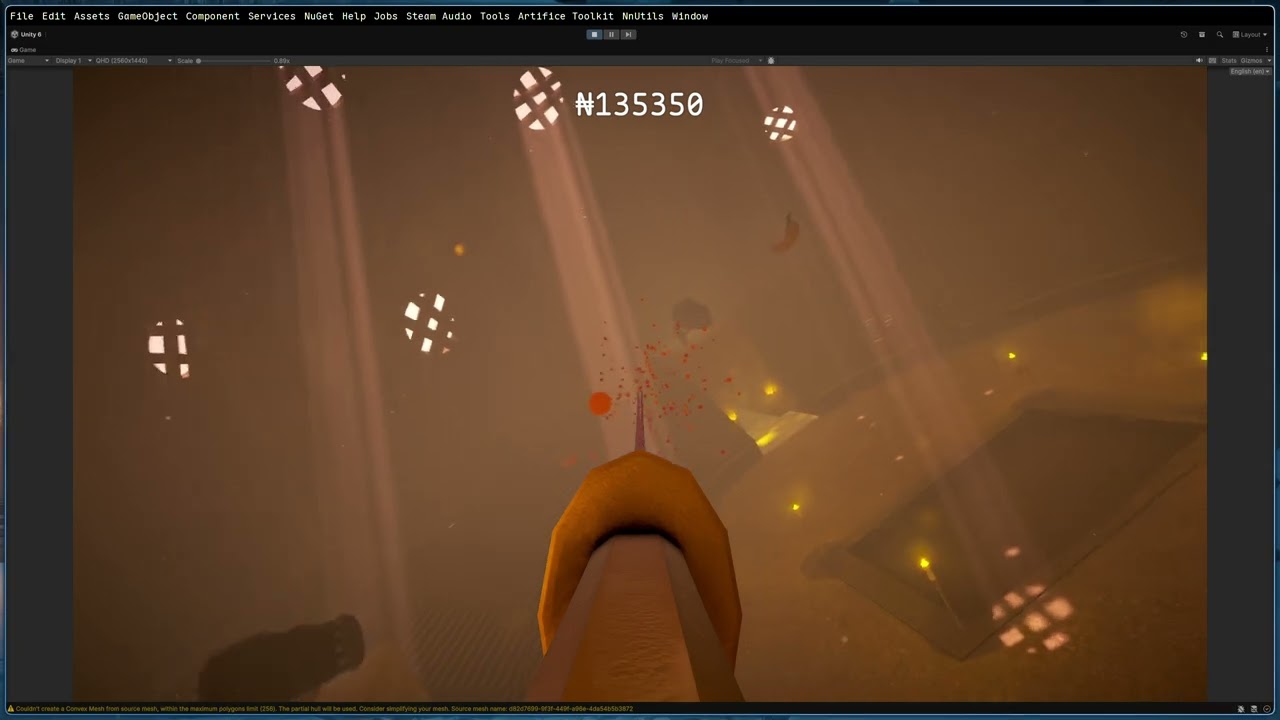
There, you can clearly see that you get pushed around by fruit instead of behaving like an unstoppable object :/
timid dove
obtuse seal
https://www.youtube.com/watch?v=lnCdMDjEi-Q
What timestamps?
Honestly the perspective of the game is confusing to me
obtuse seal
timid dove
What timestamps?
50s in, I hit an orange and am pushed down
although it happened with almost every fruit slice
0:43 is quite visible too, I hit a banana and I fly to the left of it
it's important to mention that I set the fruit fragments rigidbody velocity to 0 when they spawn, so it's not just the fragments flying to the right making it look like the player went left, the player actually goes left
timid dove
I guess it's maybe hard to tell in this game without "feeling" it
I have an idea of what may be happening I guess though
Actually should be easy for me to test it, hold on
obtuse seal
No worries, also, I am not in a hurry or anything so don't feel pressured to figure it out as soon as possible or anything like that.
timid dove
hmmm.. no I can't reproduce it
I thought maybe if the two objects were overlapping on the same frame the object spawned, maybe it was interacting for one frame before the selective kinematics registration kicked in
but it doesn't seem to be the case. I can spawn all day without affecting the player cube
obtuse seal
yeah, seems to be working flawlessly on your end :/
obtuse seal
timid dove
hmmm.. no I can't reproduce it
ok wait, can please try to set the purple cube's rigidbody collision detection mode to dynamic speculative?
not speculative, dynamic*
timid dove
obtuse seal
not speculative, dynamic*
doens't seem to change anything
obtuse seal
quit odd, I changed my player from dynamic to speculative and that seems to have fixed the issue, I have to test it more tho
timid dove
obtuse seal
quit odd, I changed my player from dynamic to speculative and that seems to have...
oh wait hmm
something maybe happened when they were both set to continuous speculative 🤔
nevermind can't reproduce it again 🤔
obtuse seal
my setup didn't do that anyways, fruits and fragments use discrete, it's just the player I set to continuous
speculative does help a lot, it's not a perfect solution tho.
the collision detection at such high velocities my player uses is I feel slightly worse than continuous dynamic, but it does help almost fully when it comes to the player being tossed around
I also just noticed you used the no friction physics material in your test scene.
I am not doing that.
Could that be the issue?
timid dove
ooooh
that could totally be it
hmm removing it from my test scene doesn't seem to make a difference though
obtuse seal
yeah, sadly didn't work on my end either :/
timid dove
obtuse seal
yeah, sadly didn't work on my end either :/
dumb question but how does your code work for the player movement
obtuse seal
I add a velocity change for to the rb:
_rb.AddRelativeForce(_dashForce, ForceMode.VelocityChange);
slicing is a bit more complex, I can send you the repo but I fully understand if you can't go through all that because it's a decent amount of code
timid dove
how is _dashForce calculated?
and yes how does the sliciung work? Is it using OnCollisionEnter? A raycast?
obtuse seal
dash force is just a vector3:
private void Dash()
{
    // Reset velocity
    _rb.linearVelocity = Vector3.zero;
    _rb.angularVelocity = Vector3.zero;

    // Add force
    _rb.AddRelativeForce(_dashForce, ForceMode.VelocityChange);
}
OnCollisionEnter
obtuse seal
timid dove
how is it defined
[FoldoutGroup("Movement/Dash"), SerializeField]
private Vector3 _dashForce = new(0, 800, 0);
 obtuse seal
timid dove
and yes how does the sliciung work? Is it using OnCollisionEnter? A raycast?
obtuse seal
timid dove
and yes how does the sliciung work? Is it using OnCollisionEnter? A raycast?
Yeah, the player is rotated that way
Here's the part where I fragment the fruit, it gets called in the OnCollisionEnter function:
https://gitlab.com/nnstdios/katana/-/blob/master/Katana/Assets/Scripts/Player/PlayerScript.cs?ref_type=heads#L324
timid dove
obtuse seal
Here's the part where I fragment the fruit, it gets called in the OnCollisionEnt...
If you comment out line 399 does it help?
obtuse seal
If this is what you are referring to, no:
//_rb.linearVelocity *= 0.75f;
//_rb.angularVelocity *= 0.75f;
I changed the script since last push so just making sure that's 399
Ok, I found a way to show you what's happening, let me just upload it to yt rq.
Ok, here's the vid with the timestamp:
https://youtu.be/BPDS2-cXU0E?t=40
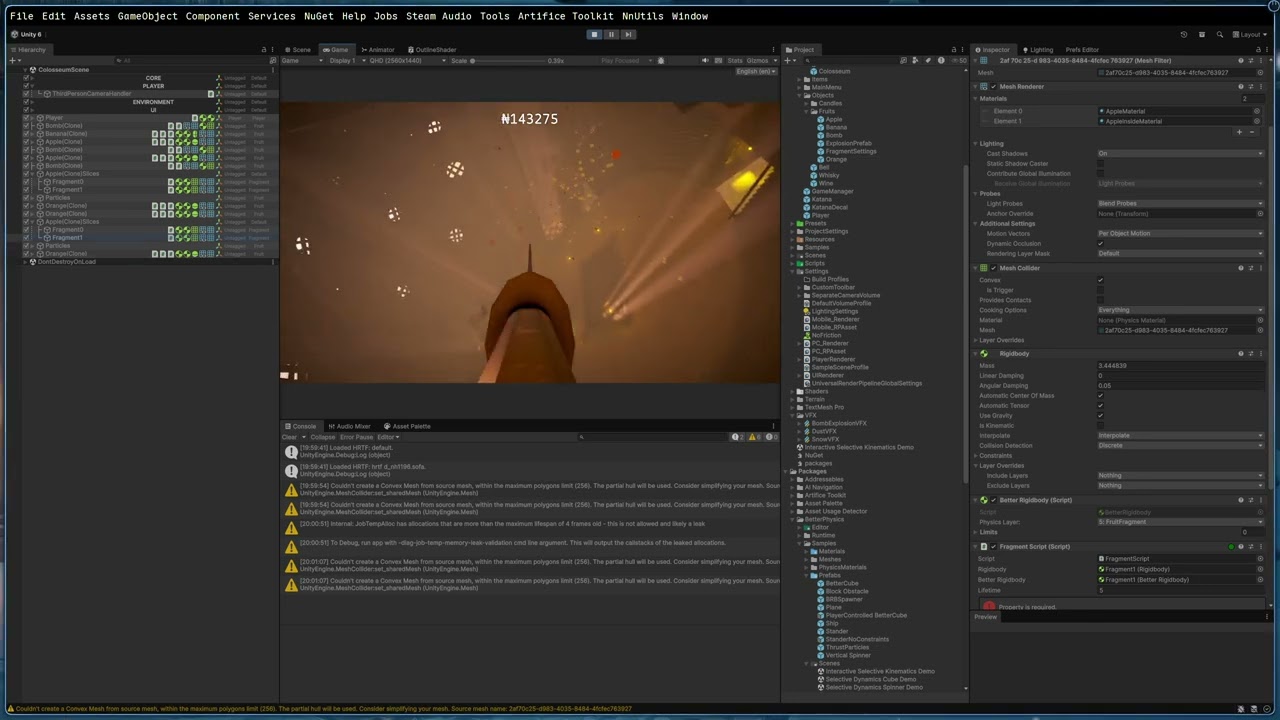
You can clearly see how the blade all of a sudden moves down when it hits the fruit or the fruit fragment.
obtuse seal
I would like to add that I narrowed this issue down to the fruit.
I imported an apple into the sample scene you provided and when I run into the apple, the player cube spins, just like what happens to the katan I have.
Could this be something to do with weird interactions with sphere/capsule colliders?
Ok, nope, not the sphere collider issue.
I changed it to a box collider, removed literally all the components but the rbs and the collider and still the same :/


Yeah, if you are able to help do let me know.
obtuse seal
Ok, I found a reliable way to reproduce it.
Have 2 cubes, set one to unstoppable and the other to default.
Even tho unstoppable should be unstoppable, if it collides with the default, it will get launched away.
This is exactly the setup I used with the fruit.
Is this expected behaviour and I am just severely misunderstanding how this works or is this a bug?
Please @ me and thanks in advance, I won't spam anymore, sorry.
timid dove
obtuse seal
Ok, I found a reliable way to reproduce it.
Have 2 cubes, set one to unstoppable...
Definitely sounds like a bug. BTW if you check the asset store page there's a link to a discord server if you want to continue the discussion there.
obtuse seal
Absolutely, whatever works for you.
 tardy rune
Hi everyone, I'm having a very weird physics inconsistency problem in my Unity game. Everything is explained and shown in the video.
 primal nymph
Hiya, does anyone have any resources for creating a 3d procedurally animated animal with physics? I have a character body that'd mainly be simulated using two spheres, and while I want simple-feeling procedural movement on the ground ala this video I'd also want the spheres to be physics objects so I could do fun things like have the character grab on and hang off objects with ragdoll physics.
I have experimented with Configurable Joints but cant really recreate the sort of movement in the video using them with two rigidbody spheres. I know this is a very difficult task so simply any resources or ideas to point me in the right direction would be greatly appreciated :)
 keen cypress
the character getting stuck on the edges and i think the problem is with the collider of the tileset AND IDK WHAT TO DO I TRIED EVERYTHING LITERALLY

 potent herald
what collider are you using?
timid dove
keen cypress
the character getting stuck on the edges and i think the problem is with the col...
Are you using a CompositeCollider2D?
 fickle tulip
Does anyone know how to solve problems with slopes using character controller? I'm having a problem with this.
viral cove
I guess no one really can give me any useful answer here, so I'm gonna take one step at a time
Is there a reasonable way to implement on compute shader collision against a custom mesh?
 halcyon storm
Hello everyone, how much of a performance impact will having raycast hit concave (non convex) mesh colliders have compared to convex mesh colliders?
tardy rune
tardy rune
Hi everyone, I'm having a very weird physics inconsistency problem in my Unity g...
Does anyone know? I hate these inconsistency issues.
I know with other joints there is a collision toggle disabled by default. Maybe check if that's also the case on the Articulation body?
timid dove
halcyon storm
Hello everyone, how much of a performance impact will having raycast hit concave...
It's going to depend on your specific scene and specific colliders
Profile it
 elfin dirge
what should i set my gravity value to in unity when my player underwater?
I have a Gravity value in unity, but idk what I should set that value number to when my player is underwater?!?!?! Pls send help.
-from ur local untamed Space Goblin Wizard.
 frigid pier
Gravity doesn't change undewater, change Drag value.
elfin dirge
so true. glad I came to the Physics nerds. yall are the best. thanks.
- from ur local untamed Space Goblin Wizard that almost touched the sun and the moon.
timid dove
Underwater you get:
- normal gravity
- hydrodynamic resistance
- buoyancy
So if you want to be realistic you'd simulate those latter two, though the second one is super complicated to do realistically, drag is a low effort approximation.
 smoky obsidian
Does anyone ever worked with softbodies? I'm trying to simulate one but I'm having some problems:
- I've tried cloth component of unity but obviously even though it's a volumetric mesh, the resulting deformation is similar to a cloth
- I have ObiCloth but I think that I am not using it properly. The deformation is similar to a volumetric one, but the mesh doesn't return to its original shape, so I obtain something similar to a modelling clay
Has anyone other ideas how to create softbodies? Or does anyone how to properly use one of the two above solutions?
timid dove
smoky obsidian
Does anyone ever worked with softbodies? I'm trying to simulate one but I'm havi...
Neither of those are soft body solutions. If you want softbodiea why would you use Obi Cloth when Obi Softbody exists? You're using the wrong tool.
smoky obsidian
I know that. The first solution was a stupid try. I'm using ObiCloth because I have that and I didn't want to buy another asset. If there aren't any free solutions, I will consider ObiSoftbody.
Anyway, I wrote an email to the developers of ObiCloth and they said that if I want a sideway deformation (what I want to achieve) ObiCloth is sufficient but I don't know how to properly tune the parameters
tardy rune
tardy rune
Hi everyone, I'm having a very weird physics inconsistency problem in my Unity g...
Anyone know how to solve this??
 orchid sky
vehicle sample is broke

 prisma lily
can someone fix the handling on this cause the car is wobbly and unstable
and the speed limiter for top speed doesnt work
 noble mesa
prisma lily
can someone fix the handling on this cause the car is wobbly and unstable
noble mesa
prisma lily
can someone fix the handling on this cause the car is wobbly and unstable
are you using built in wheelcollider or roll your own?
If you're using unity default one, all I have to say is good luck. You can fix this problem by creating an anti rollbar script(real cars have anti rollbars to prevent the wobbly and unstable position) but then you're going to have issues with friction, after that you're going to have issues with bumpy surfaces.
Also you're never going to get a stable car with how you're doing it. You will need to simulate an engine, transmission and differential that apply forces to the wheels then youll need to use the wheels to apply friction to the engine or the car wont slow down right when letting off the gas. 99% of games have rolled their own solutions for wheel colliders.
Its easier to do than how it sounds honestly. First you need to shoot a raycast from where the shocks would mount to the body of the car toward the ground and then apply an upward force to keep the cars body off the ground. Add some smoothing and configurable parameters like wheel radius rest length and spring stiffness and you have a pretty robust option that is better than unities built in collider in less than 200 lines of code.
If youre at all interested in how to properly implement a car in unity feel free to ask away https://hastebin.com/share/jegufafeno.java here is my wheel collider that I wrote. I used this as a starting point
Hastebin is a free web-based pastebin service for storing and sharing text and code snippets with anyone. Get started now.
prisma lily
noble mesa
are you using built in wheelcollider or roll your own?
well i am but im doing it based off dragging the wheel mesh in (which seems to work) i managed to fix this by slapping in random values
noble mesa
prisma lily
well i am but im doing it based off dragging the wheel mesh in (which seems to w...
idk what mean by dragging the wheel mesh in
but good luck to you. I am of no assistance when it comes to wheelcollider. But I do strongly suggest writing code to simulate antiroll bars/sway bars
prisma lily
noble mesa
but good luck to you. I am of no assistance when it comes to wheelcollider. But ...
thanks also will do for later, (wheel mesh is like the tires and such im using assetto corsa mod files for now)
noble mesa
prisma lily
thanks also will do for later, (wheel mesh is like the tires and such im using a...
are you trying to make a game like AC?
smoky obsidian
smoky obsidian
Does anyone ever worked with softbodies? I'm trying to simulate one but I'm havi...
Anyone for this?
 sinful marsh
Are there any people using Unity 6.2 and like me, have you had a bug with the cloth that makes the hair simulation super strange? (the hair gets longer)
 vital rover
Does anyone know how to get friction to behave more realistically with one object on top of another object that is moving? That is: both objects are rigid bodies. I have a box with a smaller box inside, when I move the bigger box, the smaller box should sort of “stick to” the larger box when it moves. I tried setting up different masses and physic materials with different frictions and it always seems frictionless when the larger box is moved. The smaller box always stays where it is in space until it hits the wall of the larger box to push it.
Intuitively I would think that the physics system should be able to simulate this, but from experimenting it looks like I’d need to instead code to fake the physics behavior, which I’d like to avoid if possible
I am trying to make a physics-based game where you need to carry a stack of objects from one place to another while keeping the stack balanced, but I can’t get them to move together.
sinful marsh
vital rover
Does anyone know how to get friction to behave more realistically with one objec...
Make it "parent" either in editor or in script so it will move according to the largest box. Of course this can be limited depending on the situation
vital rover
Well actually if they're both simulated, parenting doesn't matter.
But even if it did work, I don't want the smaller box to be permanently attached like it would be if it was a child and not simulated.
Just trying to get the behavior observed in real life, where if you have on object on top of another and move the lower object with low enough acceleration, the upper object will come along with it as though attached.
With gravity and friction supplying the forces to keep it attached to the lower object.
I'm no physicist, but my understanding is that if the force magnitude from friction and gravity exceeds the force applied from the lower object's acceleration, then they should stay together rather than the smaller object "sliding" (or rather maintining its inertia from being static, so appearing to slide on top of the lower object).
I just really don't want to have to code all that myself and was hoping the built in physics system can simulate it
vital rover
Okay there must be something I have not set up correctly because another person tried it in their project and it worked.
timid dove
vital rover
Does anyone know how to get friction to behave more realistically with one objec...
A huge missing part of the puzzle here is you didn't explain how you are moving the objects and what settings they have.
vital rover
Fair enough. Here's the movement portion of my mover test script to move the lower body.
    private void MoveTowardsTarget(float deltaTime)
    {
        var currentTarget = _targets[_currentTargetIndex];

        if (_useRigidbodyPhysics)
        {
            var direction = (currentTarget.position - transform.position).normalized;
            _rigidbody.MovePosition(transform.position + direction * _interpSpeed * deltaTime);
        }
        else
        {
            transform.position = Vector3.MoveTowards(transform.position, currentTarget.position, _interpSpeed * deltaTime);
        }
    }
And I'm calling that in FixedUpdate and passing in Time.fixedDeltaTime
_targets is a transform array.
Maybe MovePosition won't work?
And instead I need to set linear velocity or addforce...?
But I would think RigidBody.MovePosition would do so within the physics simulation.
Full script
The bottom one that the stack is in top of.
timid dove
Is this object kinematic?
vital rover
No.
timid dove
It should be if you want to move it with MovePosition
and the top object - is it being controlled by a script at all?
vital rover
No, just physics
But I just did some testing
You're right. If I don't set it to kinematic and I use MovePosition, the upper objects slide.
But if I set it to kinematic, they stick.
OR if it's not kinematic, then setting linearVelocity will allow the upper objects to stick.
So basically it's the combination of it being non-kinematic and using MoveTowards.
Cool I think I know how to proceed. Thanks 🙏
 barren gorge
Is there any way to do Rigidbody.AddTorque(x = 1, y = 1, 0) without creating roll (Z)? RigidbodyConstraints.FreezeRotationZ doesn't work for AddTorque methods for some reason I don't understand
 maiden snow
barren gorge
Is there any way to do `Rigidbody.AddTorque(x = 1, y = 1, 0)` without creating r...
maiden snow
barren gorge
Is there any way to do `Rigidbody.AddTorque(x = 1, y = 1, 0)` without creating r...
yes there is,
if you leave the letters out
barren gorge
maiden snow
if you leave the letters out
what?
barren gorge
how does that fix the problem?.. I think you're misunderstanding me 😄
aigain, AddTorque(1, 1, 0) creates a Z rotation even with FreezeRotationZ, that is the problem
 inner thistle
Rotating on two axes is somewhat complicated with Euler angles. The same rotation can be represented by multiple Euler angles so you can see the Z rotation value change even though the force is only applied to X and Y
barren gorge
actually angularVelocity.z = 0, AddTorque seems to directly modify rotation.z in such a case
well, this is physically correct behavior (I think it's called the gyroscopic effect?), I just find it odd that FreezeRotationZ doesn't work
inner thistle
It doesn't modify Z, the Euler angles are a derived from the quaternion and the value shown can be such that Z looks like it's changing
You can verify by making a timer in Update and changing the transform rotation directly to Vector3(t, t, 0), at some point you'll see the Z rotation change in the inspector
 flint portalBOT

🪲 To make bug reporting as quickly as possible, we made a bug reporting application for you. When running Unity choose Help->Report a Bug in the menu, or you can access it directly through the executable in the directory where Unity is installed. It will also launch automatically if you experience a crash.
📝 If your bug report is to do with Documentation, either an error, typo, or omission, you can report it by scrolling to the bottom of the page where you found the issue and click ‘Report a problem on this page’!
💡If your report is to do with a new feature idea, you can check the Unity Product Roadmaps page to see if your idea has already been planned.
For more complete instructions on how to report bugs, access: https://unity3d.com/unity/qa/bug-reporting
timid dove
barren gorge
aigain, `AddTorque(1, 1, 0)` creates a Z rotation even with `FreezeRotationZ`, t...
rotating on x and y will naturally create an "illusory" z axis rotation
basically Euler angles are terrible and you shouldn't use them
barren gorge
timid dove
rotating on x and y will naturally create an "illusory" z axis rotation
yeah, I realize this is realistic, but I need to use rb.angularVelocity
inner thistle
If (1, 1, 0) doesn't create the kind of rotation you want then the values are incorrect
timid dove
barren gorge
yeah, I realize this is realistic, but I need to use rb.angularVelocity
the real question is can you explain what kind of rotation you're actually trying to achieve here
inner thistle
You can't look at the rotation Euler angles to verify that it's correct, you have to look at what it actually does
barren gorge
inner thistle
If (1, 1, 0) doesn't create the kind of rotation you want then the values are in...
haha, fair
I just wanted to control the first-person camera using AddTorque(mouseDelta.y, mouseDelta.x, 0)
It's strange, but I just wanted to try it 💀
inner thistle
You'd have to transform the torque to from local space first
or rather transform the torque from local space to world space before passing it to AddTorque
barren gorge
inner thistle
You'd have to transform the torque ~~to~~ from local space first
I tried Transform.TransformVector, but it still creates Z
inner thistle
Do you actually see the camera tilting?
 barren gorge
actually, I have a second option. I imagine two rigidbodies: the first rotates vertically (the camera), and the second rotates horizontally, plus the second must sync its rotation with the first. But I'm not sure if joints allow this
timid dove
barren gorge
I just wanted to control the first-person camera using AddTorque(mouseDelta.y, m...
why tho\
barren gorge
just for fun
these kinds of tasks help you get to know Unity better; I'm new to Unity
viral cove
barren gorge
I just wanted to control the first-person camera using AddTorque(mouseDelta.y, m...
I'll be honest, I cannot imagine a situation where you would want to control the camera with physics forces
barren gorge
spaceship, a lot of flying things
proper solution is to fake it outside of physics ofc
viral cove
barren gorge
spaceship, a lot of flying things
You still could just attach the camera to those, no physics required
barren gorge
viral cove
You still could just attach the camera to those, no physics required
ah, you mean the physics engine, not the concept of physical-like rotation as a game mechanic? well, yes. again, I'm just learning unity/gamedev
actually, I found a solution: 2 Rigidbody + 1 ConfigurableJoint, but it has some problems ofc
 tacit laurel
which is faster? ontriggerenter or overlapsphere?
inner thistle
They do different things so question is meaningless
tacit laurel
dumb answer, one can do what the other does
viral cove
tacit laurel
which is faster? ontriggerenter or overlapsphere?
It'll probably be faster if you just test it yourself
timid dove
tacit laurel
which is faster? ontriggerenter or overlapsphere?
no
the question is wildly underspecified
tacit laurel
nope, there is a pattern so you'd know.
here's what i found on 500 objects, multiple events ms >> overlap ms ~ 1 event ms
 cedar oar
I'm wanting to make an object move in a parabola but im really struggling to make it work. I dont want to use launching the objects beucase i want percice control over it but how would i be able to make what i need happen?
timid dove
cedar oar
I'm wanting to make an object move in a parabola but im really struggling to mak...
depends. If you want to use physics, then simply launching any object into the air with a fixed initial velocity will automatically end up with it moving in a parabolic path.
If you don't want to use the physics engine, you can just use the parametric equations for a parabola
cedar oar
timid dove
depends. If you want to use physics, then simply launching any object into the a...
yeah i dont wanna use physics becuase i wish to ahve controla t diffrents cales and same launch strength regardless of amss
timid dove
what?
Anyway like I said if you don't want to use physics, use the parametric equations for a parabola.
But if that's the case why post in the Physics channel?
cedar oar
it partly felt more like a physics thing in this case
 runic torrent
I'm trying to make a jump using natural gravity (9.81) just to make sure the formula I keep seeing around (Mathf.Sqrt(2 * 9.81 * h)) works. I have the height plugged in as 1 and am expecting the jump peak to be 1, but every time I run this code in FixedUpdate the highest value I get output is 0.956185. Is there a reason for that?
    {
        //For now just make sure the jump height is not only consistent, but peaks where I specified
        //Well, the determinism is there. Now I just have to make sure the force is correct for the correct jump height
        if (!Mathf.Approximately(transform.position.y, 0)) { print(transform.position.y); }

        //Actually perform the jump
        if (jumpQueued)
        {
            rb.linearVelocity += Vector3.up * Mathf.Sqrt(2 * -Physics.gravity.y * jumpHeight);
            jumpQueued = false;
        }
}```Unity uses a discrete timestep physics simulation. Imagine drawing out the parabola of the motion on a chart, and then instead of the object reaching every infinitesimal point on the curve, the object only reaches a bunch of discrete points on the curve:

So for one - just from the fact it's using distinct points - you won't necessarily have a point at the very peak of the parabola
runic torrent
timid dove
Unity uses a discrete timestep physics simulation. Imagine drawing out the parab...
So the physics step is never actually reaching 1 then and is already technically mid descent the next time it performs a physics step if I have this right
timid dove
The other thing is - again due to the discrete simulation - it's not going to be a perfect parabola
runic torrent
timid dove
The other thing is - again due to the discrete simulation - it's not going to be...
So if I had a ledge that was 1m high and wanted to ensure the jump would just make it, what techniques would I use?
timid dove
runic torrent
So the physics step is never actually reaching 1 then and is already technically...
think about what happens each physics frame. It's basically:
- Apply gravity to adjust the velocity
- move according to the current velocity for 1 frame
- repeat
SO you'll go from one frame where you're moving upwards at 0.01 m/s, and then the next frame you'll be moving at -0.01 ms. At no point are you going 0 m/s
runic torrent
timid dove
think about what happens each physics frame. It's basically:
1. Apply gravity to...
Oh I get it. Because the physics step is 0.02s, right?
timid dove
runic torrent
Oh I get it. Because the physics step is 0.02s, right?
Well the numbers I used were made up.
With a physics step of 0.02 seconds and gravity of -9.81, then you would have a change in velocity of -9.81 * 0.02 per frame or .1962 m/s per frame
so it could be like:
frame 1: velocity = 0.1 m/s
frame 2: velocity = -0.0962 m/s
timid dove
runic torrent
I'm trying to make a jump using natural gravity (9.81) just to make sure the for...
one other thing here is you might not be starting from exactly 0 y velocity
runic torrent
timid dove
Well the numbers I used were made up.
With a physics step of 0.02 seconds and g...
So what technique would I use if I wanted a jump to just make it onto a ledge that was 1m higher than the jumper already is?
Do I just add a little bit of an arbitrary boost to make sure the physics update will actually get it as high as it needs to go or is there something better?
runic torrent
timid dove
yeah there's a formula
What's the formula?
timid dove
Full disclosure I'm using an AI tool to derive it right now but I'm pretty sure it's accurate:
https://g.co/gemini/share/7251562c1fcb
you'll need to plug that a, b, and c into the quadratic formula and then solve the quadratic formula
oh actually sorry I solved for the wrong variable
we need to solve for v0 not N
runic torrent
timid dove
Full disclosure I'm using an AI tool to derive it right now but I'm pretty sure ...
So, based on what I'm seeing, how would I implement this given a desired peak height?
I take it I use the stuff at the bottom to calculate N (with YN being the desired height) then plug that into the formula at the top to get v0 after rearranging it a bit?
viral cove
runic torrent
So what technique would I use if I wanted a jump to just make it onto a ledge th...
From game design standpoint designing something basic like jumping on a platform/elevation to be very barely achievable with perfect conditions is a very bad idea, you should consider adding some wiggle room there even if we ignore the "issue" of fixed step physics calculations
barren gorge
how does Physics.CapsuleCast works with Collider.contactOffset? just ignores?
timid dove
barren gorge
how does `Physics.CapsuleCast` works with `Collider.contactOffset`? just ignores...
It doesn't, yeah
barren gorge
Colliders whose distance is less than the sum of their contactOffset values will generate contacts
so, this mechanism is exclusively for collisions?
edit: yep, checked physx sources for sure
I mean, shouldn't the potential collider still use contactOffset even for collision queries like CapsuleCast?
sorry for  I'm trying to understand why contactOffset actually exists. just float precision fix?
 coral moat
hey i have a softbody made up of points connected with spring joints, but if i change the rotation for example, its like the springs loose all their tension. is there something i can do about this?
timid dove
coral moat
hey i have a softbody made up of points connected with spring joints, but if i c...
Change the rotation of what and how?
coral moat
timid dove
Change the rotation of what and how?
for example i have a softbody square, which has 12 points. every point is connected to the next point and to an "anchor" on the parent through spring joints which is used so the points pop backk in shapeafter being squished. if i rotate the parent its like every single spring breaks
timid dove
coral moat
for example i have a softbody square, which has 12 points. every point is connec...
Rotate it how?
If you're directly rotating the Transform of a physics object, you're going to have a bad time
coral moat
what should i do instead?
coral moat
okay thank you
 gritty socket
so i have a weird dilemma that i really feel like i should solve but my brain is not braining.
so long story short, im trying to turn a vector 3 that's representing an aim direction for where a bullet will fire from, and get an angle from that those 3 vectors.
normally, i'd get an angle before hand and turn those into cos and sin radians into a vector 3, but im trying to do it in reverse at the moment (which is making me feel awkaward now lol)
so with me trying to work backwards to get that angle, is it possible to get an angle or radian from a single vector 3, or is it possible to get a radian from a sine or cos value?
inner thistle
You need a second vector that the angle is in relation to. Then it's just Vector3.Angle(a, b)
gritty socket
ah... hmm.. alrighty i'll try to make up something.
seeing as i already have a direction originally, cant i multiply that direction by a small value to get what would be considered it moving forward in that direction?
inner thistle
position + direction * distance moves an object towards direction by distance
assuming direction is normalized
gritty socket
i'll try that
 oblique grove
Been having some trouble understanding the behaviour of Physics2D.CircleCast. I have a test scene where I'm casting a circle down towards a box collider. The green circle is the original position and the black one is the circle after sweeping towards and hitting the box, centred on hit.centroid. The red arrow that starts at the base of the green circle represents the direction of the sweep multiplied by hit.distance. Notice how the black circle goes past the edge of the box collider by exactly 0.005 units. The black cross right above the edge of the box collider is hit.point, and it lies exactly 0.0025 units above the box collider. The default contact offset is set to 0.01, so I'm struggling to understand why that would mean the a circle centred on hit.centroid would go past the collider, and why hit.point would go above.
When I set the default contact offset to 0.015, the black circle is exactly on the edge, but hit.point is off by 0.0075 units, so it seems it's always offset the same amount.
Anyone know why this happens? Why are the circle and the hit.point being offset by the default contact offset by different amounts?

 calm marsh
using UnityEngine;

public class Distance_Script : MonoBehaviour
{
    private Transform parentTransform;
    void Awake()
    {
        // Cache the parent transform once
        parentTransform = transform.parent;
    }

    // Start is called once before the first execution of Update after the MonoBehaviour is created
    void Start()
    {

    }

    // Update is called once per frame
    void Update()
    {
        if ( transform.position.y  <parentTransform.position.y -11)
        {
            Destroy(gameObject);
        }
    }
} ```its leaking memory
makes nio sensse
timid dove
calm marsh
its leaking memory
What makes you say that
 misty spoke
Hey, I have a top down environment, monsters and players are driven by rigidbodies. How do I stop them from pushing eachother? I can't just make objects kinematic (I think), disabling collisions between player and monster also wont work cuz then they will just pass thru
when they collide they should just stop
 elfin latch
when they collide make them go the other way?
misty spoke
I don't want the knockback effect, I'm going for a more realistic approach
elfin latch
you could detect when a obstacle is close and move them based on that, with ray casts
barren gorge
misty spoke
Hey, I have a top down environment, monsters and players are driven by rigidbodi...
maybe this?
 barren gorge
misty spoke
Hey, I have a top down environment, monsters and players are driven by rigidbodi...
barren gorge
misty spoke
Hey, I have a top down environment, monsters and players are driven by rigidbodi...
how do you move the NPC's rigidbody, by the way?
misty spoke
barren gorge
how do you move the NPC's rigidbody, by the way?
by setting the linear velocity on the rb
barren gorge
I mean AI navigation/pathfinding
misty spoke
for now its just a basic move towards player, if close attack
I'm in the middle of writing a proper AI for enemies
barren gorge
I'm just curious because I'm trying to achieve the same thing. I've already written a controller for a dynamic rigidbody (without any dumb drag manipulations or friction disabling, using just single AddForce) and now I'm thinking about how to use NavMeshAgent
misty spoke
barren gorge
I'm just curious because I'm trying to achieve the same thing. I've already writ...

Combat keeps the player engaged as they explore my game, so I improved how the enemy interacts with the player and their environment. This tweak made combat so fun that a tester spent over an hour repeatedly fighting a handful of enemies. At this point I knew I had an engaging combat system!
Howdy, and welcome to the 12th indie game devlog for ...
take a look at this, nice approach
calm marsh
timid dove
What makes you say that
the messages say that
-diag-job-temp-memory-leak-validation
ran this with debug
smoky obsidian
I'm using cloth component for a simulation for a university project. Does anyone know where I can find info on how cloth works from a scientific point of view?
inner thistle
Do you mean how real cloth works or how the simulation works?
smoky obsidian
I need to understand what the component does. I think that it splits the mesh into a sort of graph, with nodes that are visible in edit mode. But the physics, the equation behind its behaviour when the simulation starts, I didn't find them
inner thistle
I'm pretty sure it uses PhysX cloth, or at least the algorithm is probably very similar: https://docs.nvidia.com/gameworks/content/gameworkslibrary/physx/guide/Manual/Cloth.html
 remote wind
I need some help with slopes in Unity, basically no matter what I do to the code my player is always sliding down slopes slowly and I can't make the player stay idly when he sits on the slope. How can I fix this bug?
If you want I can show the code
Just @ me
smoky obsidian
inner thistle
I'm pretty sure it uses PhysX cloth, or at least the algorithm is probably very ...
Thank you so much. Very helpful website🫶
 safe reef
Is there any reason a rigidbody would bounce around like this on a flat surface?
looking closer into it, looks like the collider itself is going into the ground


doesn't always happen. If I pick up the box and drop it then there's a chance it'll start bouncing like that
regarding the physics setup, I only have the contact offset smaller (which can cause weird issues, so I'm not sure if it's that specifically) and gravity at -14.715

it seems like the overall stability is just not reliable. If you see the "Ground Point Velocity" inspector field, that's captured from the grounding cast when standing on a rigidbody. Sometimes it's zero, sometimes it's constantly moving around while on the same object
timid dove
safe reef
Is there any reason a rigidbody would bounce around like this on a flat surface?...
What's your ground made of
safe reef
just a flat plane with a mesh collider
the single mesh collider covers most of the map. I assume that isn't great and I should use thicker box colliders instead
very small objects for example just fall through the floor sometimes
 rapid pollen
Morning all!
I have a physics issue with my game that i'm trying my best to get rid of. I isolated the issue by simplifying the code to the minimum required to have the behavior appear. My capsule colliders "jump" higher when cornered between two walls.
The screenshots provided are the ENTIRE isolated setup.
I think something's happening with the physics solver that pushes the collider up?
Does anyone have an idea what could be happening here?


 timid dove
rapid pollen
Morning all!
I have a physics issue with my game that i'm trying my best to get ...
timid dove
rapid pollen
Morning all!
I have a physics issue with my game that i'm trying my best to get ...
Adding forces in Update is wrong
physics needs to be done in FixedUpdate
and you need to remove the Time.deltaTime from it
Time.deltaTime never goes in an AddForce call
rapid pollen
timid dove
Adding forces in Update is wrong
yeah sorry i got sloppy doing my reconstruction, but aside from that, it still does the issue in fixed update
rapid pollen
timid dove
Time.deltaTime never goes in an AddForce call
what about Time.fixedDeltaTime in FixedUpdate? This is how its currently setup in my actual player
timid dove
rapid pollen
what about Time.fixedDeltaTime in FixedUpdate? This is how its currently setup i...
It's wrong when used with AddForce
there is no reason to have it, and it just makes your numbers not make sense
rapid pollen
real
timid dove
Basically AddForce(force * Time.fixedDeltaTime, ForceMode.VelocityChange) is equivalent to AddForce(force, ForceMode.Acceleration)
but there's no reason to do the former since the latter exists
and then AddForce(force * Time.fixedDeltaTime, ForceMode.Acceleration) is just multiplying by an extra fixedDeltaTime for no reason making you have to put in huge acceleration numbers unecessarily
Acceleration needs to mean "meters per second squared"
and it stops doing that when you multiply unecessarily by fixedDeltaTime
timid dove
try setting a frictionless material

 barren gorge
rapid pollen
Morning all!
I have a physics issue with my game that i'm trying my best to get ...
barren gorge
rapid pollen
Morning all!
I have a physics issue with my game that i'm trying my best to get ...
do all walls have the same physics material?
rapid pollen
barren gorge
do all walls have the same physics material?
yes, which is none
barren gorge
rapid pollen
(The cleaned up "isolated" code, btw)
judging by the code, you are most likely not a programmer/new to gamedev, so let me ask you a question: why do you need Rigidbody? If you need a simple character controller, use the specialized CharacterController component, it will save you time
timid dove
rapid pollen
(The cleaned up "isolated" code, btw)
looks fine to me. Something else must be happening in the scene
rapid pollen
barren gorge
judging by the code, you are most likely not a programmer/new to gamedev, so let...
so we're multiple years in development and tens of hours of gameplay done, no way to move to character controller for now. Our game is heavily dependent on physics interactions between player/enemy/environments, and we were more comfortable using a rigidbody and going from start than battling the more rigid charactercontroller
This code bit like i mentioned is isolated and simplified for understanding of the issue. There is literally nothing else going on in the scene and all elements are out of the box unity to isolate the actual problem.
Please understand that the actual game code is much more complex and justifies the use of Rigidbody. I'm asking here because I think this is legitimately a physics solver issue
barren gorge
what is your unity version?
rapid pollen
2022.3.7f1
barren gorge
I also use dynamic Rigidbody for characters but I don't have such bugs, I am on Unity 6
timid dove
rapid pollen
Morning all!
I have a physics issue with my game that i'm trying my best to get ...
If you switch collision detection to different modes does it change?
rapid pollen
I think this is at the heart of the issue, as replacing it with an add force impulse does not do the same problem (still problematic, as what it then does is jump height being much smaller when close to ANY wall) (again, this is with a frictionless PM)


 rapid pollen
timid dove
If you switch collision detection to different modes does it change?
rapid pollen
timid dove
If you switch collision detection to different modes does it change?
nope
I think we did a lot of fiddling with the physics settings in the engine when the project first started. Could this be caused by changes in there?
timid dove
rapid pollen
I think this is at the heart of the issue, as replacing it with an add force imp...
My guess is the vertical velocity is not being fully reset to 0 or something when it's in the corner
what happens if you set the velocity to 0 manually before the jump
or assign it directly to jumpForce here
instead of rb.vel.y + jumpForce
rapid pollen
sadly, issue persists again
barren gorge
as far as I remember, the doc says that you shouldn't set linearVelocity directly; there is AddForce(vector, ForceMode.VelocityChange) for that
and your jump code is still in Update, not FixedUpdate
rapid pollen
barren gorge
and your jump code is still in Update, not FixedUpdate
it's a one time application, does it matter? let me try both moving this to fixed update and using add force velocity change
barren gorge
barren gorge
as far as I remember, the doc says that you shouldn't set linearVelocity directl...
(note that linearVelocity will not change after calling AddForce; this will happen in the next frame after collision response, at the beginning of the next FixedUpdate)
rapid pollen
rapid pollen
I think this is at the heart of the issue, as replacing it with an add force imp...
usign AddForce in VelocityChange mode yields the same issue as pictured here
barren gorge
rapid pollen
it's a one time application, does it matter? let me try both moving this to fixe...
this is something that is not recommended and is not supported, which means it could potentially cause problems. even if it is NOT the cause of the current problem, it could create other problems
barren gorge
rapid pollen
I think we did a lot of fiddling with the physics settings in the engine when th...
yes, try to reset the physics settings to the default ones
looks like the physics engine cannot depenetrate the collider or, alternatively, creates excessive collision contacts
rapid pollen
barren gorge
yes, try to reset the physics settings to the default ones
gddmnit
that was it
i need to figure out which of these settings was teh one that needed to change in order not to break the rest of the game
but it's one of those settings
thank you very much everyone for the suggestions
barren gorge
rapid pollen
gddmnit
that was it
then debug the velocity during flight after the jump. I think your velocity has a horizontal component
if the horizontal component is directed into a wall, the rigidbody slows down ALL velocity. this is how friction works in Unity/PhysX
even friction = zero doesn't fix this AFAIK
rapid pollen
Looking into it deeper, the issue was caused by use Adaptive Force in the physics settings. Unchecking it fixes the issue. I'll need to look into why we'd enabled it in the first place
timid dove
rapid pollen
Looking into it deeper, the issue was caused by use Adaptive Force in the physic...
well that's an obscure one
definitely not in my usual checklist..
barren gorge
I don't even understand what Adaptive Force does and who needs it 💀
rapid pollen
Documentation says its useful for piles of physics objects. we have stuff such as this in the game. Might be why we had it activated in the first place?
 barren gorge
-# this is why I want comments in the editor attached to fields
safe reef
timid dove
What's your ground made of
sorry for the ping, did you have any ideas on my issue from last night?
safe reef
the issue regarding rigidbodies bouncing around where you asked what the ground is made of
 blissful panther
I'm trying to work through a rotation issue I'm having with a few connected bodies, and I am unsure about this part here. Can anyone tell me if the calculation for stingerRelBind is actually a meaningful calculation? My understanding is that Quaternion.Inverse(rc0) should be the local space of rc0's rotation, and StingerJoint.transform.rotation is the world space rotation of that body. But I'm not sure I'm understanding what the result would be then?
 timid dove
blissful panther
I'm trying to work through a rotation issue I'm having with a few connected bodi...
timid dove
blissful panther
I'm trying to work through a rotation issue I'm having with a few connected bodi...
what are you trying to do with this?
Quaternion.Inverse(rc0) should be the local space of rc0's rotation
What do you mean by this?
blissful panther
timid dove
what are you trying to do with this?
The end goal is to have the connected body rotating, while the body that has the joint on it maintains it's world space rotation.
blissful panther
timid dove
> Quaternion.Inverse(rc0) should be the local space of rc0's rotation
What do yo...
I mean that rc0 is the world space rotation of the connectedBody, so the inverse should be local space. Is that not correct?
timid dove
blissful panther
I mean that rc0 is the world space rotation of the connectedBody, so the inverse...
that is not correct
blissful panther
timid dove
that is not correct
Ah ok that might be my issue then. What does the inverse give then?
timid dove
blissful panther
Ah ok that might be my issue then. What does the inverse give then?
it gives... the inverse
if you are rotated 90 degrees clockwise around the y axis, the inverse is the rotation required to return to Quaternion.identity
i.e. 90 degrees counterclockwise rotation around y, in this example
When you say "local space" you need to explain which frame of reference you're referring to
transform.localRotation is a local space rotation in the frame of reference of the object's direct parent
if the object has no parent then localRotation and rotation are identical
blissful panther
Is Quaternion.identity always in world space? So if we are using Quaternion.Inverse(rc0), is that returning the rotation requried to put that back to 0,0,0 world space rotation, or is it the rotation required to return to 0,0,0 relative to the object calling this code?
 tardy maple
I hope somebody can help me, I am slowly getting insane with this:
I have a pickup and carry system that is based on configurable Joints, is there any way to make this with configurable joints and not have the object bounce, also what is happening wiht the floating spheres when I move them? I know it's hard to debug like this but does anyone have any diea?
timid dove
blissful panther
Is Quaternion.identity always in world space? So if we are using Quaternion.Inve...
it's not intrinsically in any space
it's like Vector3.zero (0,0,0)
it's just a number/value, you can interpret it in any coordinate space you want
So if we are using Quaternion.Inverse(rc0), is that returning the rotation requried to put that back to 0,0,0 world space rotation
It's returning to identity in whatever coordinate space rc0 was in
timid dove
tardy maple
I hope somebody can help me, I am slowly getting insane with this:
I have a pic...
Joints are going to be bouncy no matter what - consider a different approach if you don't want that.
As for the spheres, you haven't provided any information about it really so it's unclear what they're supposed to be doing, how they work, etc.
tardy maple
The spheres are supposed to be able to picked up and manipulated like the other objects as well, the only difference is that they do not have gravity but they seem to float left and right to a stronger proportion. I had a system that did not use joints before but that did not work with me being able to constraint things to specific axis and areas using joints, hence I switched. Would it be better for me to implement movement and carry constraints myself?
timid dove
tardy maple
The spheres are supposed to be able to picked up and manipulated like the other ...
The spheres are supposed to be able to picked up and manipulated like the other objects as well, the only difference is that they do not have gravity but they seem to float left and right to a stronger proportion.
I couldn't possibly speculate unless you explain how you want/expect them to work and show the code/hierarchy/components involved.
Would it be better for me to implement movement and carry constraints myself?
Hard to answer without fully understanding your requirements
tardy maple
Basically I want to have a sphere that you can look at and click to move it with mouse look, the movement should only be along 1 axis and within a specified distance constraint. The spheres that are part of the triangle I want to be able to move in the same way but without any constraints, so my pickup system would need to be able to handle free moving and constraint objects which either can have gravity or no gravity. the point where the object should be is supposed to be 1m in front of the player or nearer if there would be another object or wall in the way
it should work like this, but using this does not work with constraint joints. Do you know of a different way of constraining objects?
timid dove
tardy maple
it should work like this, but using this does not work with constraint joints. D...
it kinda depends on your definition of "constrain".
- You could certainly and pretty easily write your code that moves the object to only move it along a single axis.
- Constraining how it moves when it collides with other objects is more complicated, basically you're limited to either the Rigidbody position constraints, joints, or writing your own clamping code (but this is a bit fraught because it's easy to get aphysical if you're directly clamping the position
tardy maple
I have this red sphere which I locked on all axis expect the Z Axis and I limited the movement on the Z axis. But the object does "jump off" the joint. Maybe just coding the clamping myself would be easier, I just need to correct the position right?
timid dove
tardy maple
I have this red sphere which I locked on all axis expect the Z Axis and I limite...
yeah but "correcting the position" can lead to unintended effects such as teleporting it into a wall or through obstacles etc
tardy maple
Yes, which I would like to not do, hence I am asking if there is a solution for this?
timid dove
I would probably go with the "coding the movement myself" and using velocity as the method of actual movement
Depending on how you want the deconflcition to go you can use spherecasts/boxcasts etc to prevent moving into other objects in the first place
tardy maple
Okay, thank you for your time and suggestions 😄 I will try it that way as well now. I will need to test with users for conflict resolving strategies, maybe I am overreacting and overcorrecting something that players don't even notice or care about
elfin latch
tardy maple
I hope somebody can help me, I am slowly getting insane with this:
I have a pic...
it looks like you are using the joint drives? Ramp up that damper
 timid crater
Hi there, i have a jittering problem that's going to make me crazy, the camera and player are both in Update(), the camera is a child of of the player.
any help would be appreciated
inner thistle
You need to show the code
timid crater
inner thistle
You need to show the code
to what exactly ?
camera, player, pick up ?
inner thistle
Everything that might be related to the jitter? The code that moves the camera and the code that moves the cube should be enough
Post the code here, you can make a thread if you want
 exotic glade
updating from 6000.1.9f to 6000.2 broke physics. can anyone explain why?

 proud condor
Seems like unity's default PhysX isnt lockstep friendly
So what should I do in my case?
 loud jolt
How can we make destructible enviornment?
And can I make almost all game objects destructible including, buildings, tree etc?
tacit laurel
does turning on and off each trigger forces physx to rebuild collision pairs for the full scene?
tacit laurel
yep and that's why you don't ever want to use triggers. overlapsphere is faster and can be batched in a job
barren gorge
hm interesting
 unique cave
Triggers are not great for performance and they also don't even support things like continuous collision detection
 amber star
exotic glade
updating from 6000.1.9f to 6000.2 broke physics. can anyone explain why?
amber star
exotic glade
updating from 6000.1.9f to 6000.2 broke physics. can anyone explain why?
Man 6.2 still on work
Also it crashing too much
exotic glade
barren gorge
no one can read minds 🙃
The screenshot shows it, the car fells trought ground (only wheels)
barren gorge
does anyone know why Physics.SphereCast and similar methods cannot detect collisions if the start position initially overlaps?
 south granite
Do you want this https://docs.unity3d.com/6000.2/Documentation/ScriptReference/Physics.OverlapSphere.html
 barren gorge
I assume that Unity uses the eASSUME_NO_INITIAL_OVERLAP PhysX flag for these methods, but I may be wrong
barren gorge
south granite
Do you want this https://docs.unity3d.com/6000.2/Documentation/ScriptReference/P...
no, I need a surface normal, so I need SphereCast, not SpheceOverlap
 fringe fulcrum
Not sure if this is the right place to discuss Lighting, but I'm trying to bake lighting in my scene and I'm getting some really strange artifacts around this wall that has an inset for a television. The shadows are very blocky. Not sure what settings to tweak, or even to share what I have set to help troubleshoot. What's a good place to start?
 proud condor
I have this question for both PhysX and DOTS
it seems Unity is not deterministic lockstep simulation at all
even Enhanced Determinism is anything but Determinism
Atleast for PhysX
but I want to get into DOTS but it looks complicated
and doesnt have proper Physics Debugger?
 bleak umbra
proud condor
I have this question for both PhysX and DOTS
bleak umbra
proud condor
I have this question for both PhysX and DOTS
What is the actual question?
 lethal fossil
Hi i was working on a small personal project where I simulate fluid flow and its interaction with physical bodies. So i plan to do the simulation(fluid simulation and physical interaction) inside Unity engine and then import the data into matlab and analyze,plot them there.
Is using Unity for the physics related things okay?also the fluids simulation part will be just vector field functions.
 final thunder
i'm trying to do one of the excercises on the unity learn course for beginner programming but i'm having an issue with box colliders. despite everything seemingly being set up properly, gameobjects still fall through the floor
 short sable
final thunder
i'm trying to do one of the excercises on the unity learn course for beginner pr...
short sable
final thunder
i'm trying to do one of the excercises on the unity learn course for beginner pr...
Things I would check:
-
Is the box collider set up properly?
-
Did you mistakenly check on trigger?
-
Do the game objects have colliders and are they setup properly?
proud condor
bleak umbra
What is the actual question?
Referring DOTS Physics to see its wireframe debugger?
elfin latch
fringe fulcrum
Not sure if this is the right place to discuss Lighting, but I'm trying to bake ...
what do your lighting settings look like?
final thunder
short sable
Things I would check:
* Is the box collider set up properly?
* Did you mistake...
Oh, making it a trigger disables collision physics? I didn't know that. Yea that explains it
twin nebula
barren gorge
I assume that Unity uses the eASSUME_NO_INITIAL_OVERLAP PhysX flag for these met...
Not sure if you still have issues with this but SphereCastNoAlloc does what you want
short sable
final thunder
Oh, making it a trigger disables collision physics? I didn't know that. Yea that...
Yes ontrigger has many uses watch some vids about them
barren gorge
twin nebula
Not sure if you still have issues with this but SphereCastNoAlloc does what you ...
well, no, again, the problem is that Physics.SphereCast (and others) sometimes misses touch colliders. I haven't figured it out yet, but it seems that the problem is in float (haha classic), which causes the query to start in other colliders and therefore strange things happen. I suppose this can be fixed by doing Physics.OverlapSphere + Physics.ComputePenetration before Physics.SphereCast, and then calc a more correct position of the sphere.
I would also clarify that Unity does NOT set the eASSUME_NO_INITIAL_OVERLAP flag, since Unity allows you to specify 0 for maxDistance, which is not possible with the eASSUME_NO_INITIAL_OVERLAP flag according to the PhysX docs and source code.
 regal summit
What are possible reasons why a Physics.Raycast would intermittantly just stop working? Nothing changes but it keeps hitting/not hitting the collider directly in front of it and I cannot figure out why the hits are intermitant instead of consistent

the two V shape casts should never stop returning hits, but in practice that is not the case
 placid pine
Is anybody super knowledgeable in Ragdolls that can help me out?
regal summit
regal summit
the two V shape casts should never stop returning hits, but in practice that is ...
They originate from far outside of the obstacle's collider so the issue is not that the raycasts originate from within its volume. The collider is correctly on the settings.unitlayer that the rays are filtering for. The V shape casts DO hit the obstacle for about 3 frames, but then stop hitting it for about 3 frames again, and then continue to flip back and forth between hitting it and not hitting it, for no apparent reason. 
placid pine
I’m having an issue where the character won’t fall to the ground and only parts of his body fall to the ground
elfin latch
Do you perhaps have a video?
runic torrent
If I assume a max jump height of 0.5m over 0.5s, how would I go about calculating how high the jumper is at in 0.25s? I found a bunch of formulas online, but none of them seem to be giving me answers that make sense. If the formulas I found are right then the gravity acting on the object should be 4m/s^2, but I'm not sure where I go from there or if calculating the gravity was even useful.
 fading crown
regal summit
They originate from far outside of the obstacle's collider so the issue is not t...
fading crown
regal summit
They originate from far outside of the obstacle's collider so the issue is not t...
Which Unity version ?
There was a bug at some point where having colliders too far from the origin would cause raycasts (and more generally intersection checks) to fail intermittently.
 peak cloak
I'm trying to make some basic googly eyes for this rock. The pupils are seperate objects. The pupils have rigidbodies the main rock doesn't at the start of the game they fall into place but they don't seem to be updating


 peak cloak
gave the rock a rigidbody and it worked
 dull shuttle
how to limit some object rotation on some axis to a certain range?
I have some box on wheels that can be pushed and i don't want it to flip over but i can't just freeze axis rotation because it should be able to be pushed on a slope
 rotund pelican
dull shuttle
how to limit some object rotation on some axis to a certain range?
I have some b...
rotund pelican
dull shuttle
how to limit some object rotation on some axis to a certain range?
I have some b...
config joint
keep everything else free
whatever rotation axis you wanna limit = limited
edit angle limits using the ui
dull shuttle
rotund pelican
config joint
> keep everything else free
> whatever rotation axis you wanna limi...
thanks
 lunar oasis
dull shuttle
how to limit some object rotation on some axis to a certain range?
I have some b...
lunar oasis
dull shuttle
how to limit some object rotation on some axis to a certain range?
I have some b...
Or in code define the rotation as a new vector3(); with the restrictions you want
dull shuttle
rotund pelican
config joint
> keep everything else free
> whatever rotation axis you wanna limi...
i just tried itand for some reason it doesn't help, here's a screenshot
 rotund pelican
hm, cant really determine anything from that image alone. but you gotta make something that caps rotation or idk
you can do that with config joints
dull shuttle
rotund pelican
hm, cant really determine anything from that image alone. but you gotta make som...
do you know which options should i use for that? i used Angular Y Motion
rotund pelican
whichever axis you want it to be limited by, use that
 quick void
Hello! I have a question. If you are making a horror game, where there are different complicated meshes for example you have a house and you have to add box colliders to the walls in order to prevent the player from transpassing. Whats the most effective way to do it? I was wondering do you have to use millions of box colliders for each wall or there is another method?
 lilac patrol
quick void
Hello! I have a question. If you are making a horror game, where there are diffe...
lilac patrol
quick void
Hello! I have a question. If you are making a horror game, where there are diffe...
why would you need millions of box colliders? maybe try mesh colliders?
loud jolt
How can I make road's double light game objects collidible? Currently it doesn't collide with player even though now I have added mesh collider?:

 elfin latch
loud jolt
How can I make road's double light game objects collidible? Currently it doesn't...
elfin latch
loud jolt
How can I make road's double light game objects collidible? Currently it doesn't...
Perhaps your player doesn’t consider collisions? An object has to have a non kinematic rigidbody to collide with colliders
timid dove
quick void
Hello! I have a question. If you are making a horror game, where there are diffe...
Why would it be millions?
timid dove
loud jolt
How can I make road's double light game objects collidible? Currently it doesn't...
That's way too complicated of a mesh for a collider. Just use a capsule collider for it
elfin latch
Mesh collider is just fine
loud jolt
elfin latch
Perhaps your player doesn’t consider collisions? An object has to have a non kin...
object has to have a non kinematic rigidbody to collide
Thx
bleak umbra
loud jolt
How can I make road's double light game objects collidible? Currently it doesn't...
one object needs a rigidbody, and depending on whether that RB is kinematic, also this setting:

 tulip prawn
Hello, i'm trying to create a 2D shoot em up, like dodonpachi, and i have a small question.
I would like the moves of the enemies to be related to the world space, but i would like the bullets to have a velocity related to the camera (not affected by scrolling). Is there an easy way to do it? (I feel like implementing the "fixedUpdate" method of the bullets will be too heavy if i put a lot of bullets)
timid dove
tulip prawn
Hello, i'm trying to create a 2D shoot em up, like dodonpachi, and i have a smal...
you'd have to be more specific. The simple answer is "convert your vectors into whatever coordinate space you need to as necessary"
tulip prawn
yes, but i would like to rely on the unity collision system. If i convert each position of the enemies or bullets, i will have to check the collisions by myself in the code. it's like the physics engine will by useless
inner thistle
It's not clear what kind of effect you're looking for (I don't know that game) but if you add the camera's velocity to the bullets' initial velocity they will move in relation to the camera
Don't know why you'd need to do manual collision checking
tulip prawn
inner thistle
It's not clear what kind of effect you're looking for (I don't know that game) b...
yes, but then, i will need to do that each frame, or each time the camera changes its velocity
inner thistle
Why is that a problem?
tulip prawn
because there can be a lot of bullets, and i'm afraid that it may be heavy to process
inner thistle
It's not
 green otter
Can I get some guidance on making a physical button for my physics-based game?
Attached is a photo of the button (composed of the pushable, movable button, and the static base) as well as an image of the configurable joint. The button's rigidbody is set to not interact with gravity so that it stays in its un-pressed position until pushed. The idea is for the button to stay pressed, not pop back up.
It currently works but I notice I'm sometimes able to pull the button up! It's only meant to be pushed down.
Can anyone provide some insight and advice? Please and thank you so very much!

 timid dove
green otter
Can I get some guidance on making a physical button for my physics-based game?
...
timid dove
green otter
Can I get some guidance on making a physical button for my physics-based game?
...
My recommendation is to fake it.
Use a trigger collider and animate it to a "pressed" position when an appropriate object enters the trigger (on top of it)
green otter
timid dove
My recommendation is to fake it.
ok at that point i think ill just make a script to cache its Y position and lock its Y+ so it can only move down
thank you!
timid dove
green otter
thank you!
Example from an old project of mine using that technique:
https://youtu.be/Tcf6Kafs4Ro?si=zZYmf7wuwbBBvOei&t=27

Got a few mechanics working in my drone puzzle game. Here you can see I have a pressure sensitive button that is hooked up to both a door and a lightbulb. The button reacts to either the drone itself or another object which the drone can place on the button. Nothing revolutionary but these are small stepping stones that will serve as the foundat...
green otter
hehe, it's somehow kinda cute.
timid dove
I do want to revisit this project one day 😛
 hallow vapor
Does anyone know if "Physics.Simulate()" simulates ALL physics scenes or just the active scenes physics scene?
timid dove
hallow vapor
Does anyone know if "Physics.Simulate()" simulates ALL physics scenes or just th...
Just the default/primary one
elfin latch
green otter
Can I get some guidance on making a physical button for my physics-based game?
...
There’s nothing better than pure physics interactions, you need to adjust the connected anchor so that the y limit only allows the button to go down.
loud jolt
How can we create vehicle crash/deformation system in our game?
 hidden umbra
 restive folio
I'm trying to create a claw to grab object by connecting it to the claw with a fixed joint but it's causing too much bounce
When not grabbed it doesn't cause any bounce bc I set its bounciness to 0
When it is grabbed and connected with fixed joint it bounced my entire robot too much
I expect it to be a fixed joint shenanigan but I honestly have no idea how to fix this
elfin latch
Perhaps disable collision between the two objects when they’re connected?
timid dove
restive folio
I'm trying to create a claw to grab object by connecting it to the claw with a f...
From the video the physics look... fine? What behavior do you want to change?
Maybe increase the mass of the robot if you want it to bounce less
restive folio
nvm I fixed it by changing physics solver from temporal to projected
I think temporal makes joint a lot more rigid so it creates a huge spring force when the object moves away from the originally grabbed position? not sure tbh
 fickle viper
So ive been trying to make a game but i got issues with parenting and physics. why does the eyes fall of if its part of a parent? and why do these all get pulled by gravity?? they dont have rigidbody yet. i dont know what the issue is maybe i have forgotten or overseen something. I give out the spawnScript and the video to see it visually,
https://paste.mod.gg/nmkwbmlvbccv/0
A tool for sharing your source code with the world!
i have a feeling im dumb today idk
fickle viper
Nevermind i fixed it!
loud jolt
Do someone know that why MeshesDeformation script works fine for metal ball sphere without freezing unity but it freezes unity when I use this script for car body mesh and the body goes below terrain when unity gets normal but this doesn't happen for metal ball sphere?:


A tool for sharing your source code with the world!
inner thistle
How many vertices does the ball have and how many does the car have? The algorithm might just be inefficient
loud jolt
inner thistle
How many vertices does the ball have and how many does the car have? The algorit...

 inner thistle
Right so the car has about 800 times more vertices so the deformation takes 800 times longer
loud jolt
Can't we optimise our script to deform highpoly models smoothly?
inner thistle
Some possible options:
- Simplify the mesh, you probably can't see a difference visually between 400k vertex model and 100k or even less
- Divide the mesh into subsections so that you don't need to check every vertex (e.g. deformation on the front part won't affect the rear anyway)
- Separate the metal body from the windows and lights and other details and only deform the body. You want the windows and lights to shatter instead of deform anyway, and they probably have a lot of the detail compared to the body. The body vertices can easily be simplified without losing detail
- Use a simplified mesh to calculate the deformation and then apply it to the actual mesh
 cold socket
loud jolt
cold socket
loud jolt
yo Krish, activate your Windows!
The car is waay too high poly-count like Nitku mentioned.
A quick fix would probably look something like this: https://www.youtube.com/watch?v=OcVwRm_cuaA
I also think you could create an even more decimated model and export it - to use as the hitbox for the car. This will make it easier for Unity physics to handle while keeping high fidelity visuals.
High videlity -> visual
low fidelity -> physics (which you can't much detail in with a convex shape).

Learn how to decimate a mesh in Blender and reduce your poly count without losing essential detail! In this beginner-friendly Blender tutorial, we’ll walk you through the entire process of lowering polygon count using the Decimate modifier — perfect for optimizing 3D models for games, animations, or faster viewport performance.
You’ll dis...
 fathom fjord
Does anyone here knows how I should make like collisions or hit detection with unity's entity component system?
bleak umbra
fathom fjord
Does anyone here knows how I should make like collisions or hit detection with u...
 loud ridge
How can I make the head bead get past without problems.I want it to look like head bead is moving and other follow it.
 wicked wigeon
loud ridge
How can I make the head bead get past without problems.I want it to look like he...
wicked wigeon
loud ridge
How can I make the head bead get past without problems.I want it to look like he...
I don't know how much you've tried already with joints, but have you tried using Distance Joint instead of Hinge Joint? You would check "Max Distance Only" and set distance to be the radius.
loud jolt
How to get point of contact and force on vehicle collision?
elfin latch
loud jolt
How to get point of contact and force on vehicle collision?
OnCollisionEnter()
 ivory cipher
This is a pretty common issue in unity but all the fixes i have seen online didnt lead to better results, so im asking in here if maybe one of you had encoured and fixed this before:
Im running into the classic collision issue when there are multiple collider meshes instead of one combined one and the ball then sometimes randomly bounces on the edges. I think that mostly comes from the fact that its a bit smaller scale. The balls sphere collider has a radius of 0.125.
Ive already tried changing a few physics settings like Contact Offset and solver iterations but no sucess yet
I also tried around with the physica material attached and the bounciness factor but even when i set bounciness to 0 there for both the ball and the golf course it doesnt change it.
Anyone got any ideas?
 barren gorge
ivory cipher
This is a pretty common issue in unity but all the fixes i have seen online didn...
barren gorge
ivory cipher
This is a pretty common issue in unity but all the fixes i have seen online didn...
this bug called "ghost collision"
what about https://www.youtube.com/watch?v=GqCyz7aoar8 ? (golf game too)

In this tutorial you'll learn WHY ghost collisions happen as well as a couple of ways you can avoid ghost collisions.
Ghost collisions are when objects collide when it appears there is nothing to collide with!
👨💻 As always, all code from this video is available on GitHub: https://github.com/llamacademy/minigolf
🏷️Save 25% on the ...
sorry I can't say anything more cuz idk, I just know that it's a common issue (like u said)
I guess u can easy google with "ghost collision" label
barren gorge
barren gorge
what about https://www.youtube.com/watch?v=GqCyz7aoar8 ? (golf game too)
I also remember that unity devs offered code to fix this problem. If I'm not wrong, it's the same as in this video
ivory cipher
thanks a lot, ill have a look at the video
loud jolt
Is it possible to use blender for mesh deformation on collision instead of creating script for it?
inner thistle
You can make pre-baked mesh animations with Blender or anything else but of course it won't help with dynamic deformations
tacit laurel
is mesh collider cooking one time per launch or scene load or on each instantiation?
loud jolt
loud jolt
Do someone know that why vehicle keep bouncing after colliding?:
Now its fixed
 wise flume
Hello, i would like to know if it's possible to have a Rigidbody2D.AddForce() with a curve as force. I explain myself, i would like to do a propulsion with a short horizontal offset, like the exponential curve. I want to do this because i need to keep the object controllable by the player to move it while it's in air to left or right.
timid dove
wise flume
Hello, i would like to know if it's possible to have a Rigidbody2D.AddForce() wi...
All forces are linear. Any curved motion would come from applying linear forces perpendicular to the object's current motion over time
For example orbital motion, which is elliptical, comes from linear forces towards the center of mass of the orbital system
wise flume
oh okay i see, thanks
 atomic jetty
Robotic Arm follow Target
Hey! I have a robotic arm fully set up in Unity using Articulation Bodies (each joint is configured as a revolute joint with proper rotation limits).
What I want to achieve is to move the arm in a realistic way so that the end effector reaches a target point in space, respecting all joint limits and axes of rotation. So the arm follows a target point and behaves correct. How do I do that?
I tried IK but that didn't worked quite right.
restive folio
atomic jetty
### Robotic Arm follow Target
Hey! I have a robotic arm fully set up in Unity us...
I believe the only approach is IK so you should look more into how you're implementing IK for your robotics arm
atomic jetty
restive folio
I believe the only approach is IK so you should look more into how you're implem...
Ok. I used Chain IK and I mean it followed the target point but in a straight line. The Chain IK would need need to respect constraints. How would I do that?
restive folio
atomic jetty
Ok. I used Chain IK and I mean it followed the target point but in a straight li...
I don't know much about IK in Unity sorry about that. I looked up Chain IK and seems like it's used for animations instead of physics simulation. You might have to implement IK from scratch or hopefully there's one online made for Articulation Body
elfin latch
atomic jetty
### Robotic Arm follow Target
Hey! I have a robotic arm fully set up in Unity us...
Not too sure how well this will work but you can try applying a PD force on the last part of the chain and it will try its best to reach the target while respecting the rotational limits
 solemn plover
ivory cipher
This is a pretty common issue in unity but all the fixes i have seen online didn...
solemn plover
ivory cipher
This is a pretty common issue in unity but all the fixes i have seen online didn...
I recently ran into this issue on a personal project, very annoying to fix. Did you end up getting it working? Your game looks fun!!
Anyone have any ideas about putting a humanoid with rigidbody chain (about 13 rigidbodies in total) onto a physically simulated bike rigidbody chain (back wheel, front wheel, chassis, handlebar)?
I'm starting to get it working but what a headache lol
ivory cipher
solemn plover
I recently ran into this issue on a personal project, very annoying to fix. Did ...
the video linked didnt help sadly no, i have not fully fixed it but reducing contact offset to 0.0001 in the settings was the only thing that kinda worked so far
solemn plover
ivory cipher
the video linked didnt help sadly no, i have not fully fixed it but reducing con...
I'll see if I have some time to open up my old project later today and let you know! It might have been setting collision detection to continuous but I doubt it
ivory cipher
i already got that. my rigidbody is set to continuous dynamic
 keen hedge
linking this here because I don't know whether this is a coding or a physics engine issue https://discord.com/channels/489222168727519232/1422583468050616402
 cosmic coyote
Working on player movement for a FPS and I'm running to a jumping issue. Jumping up has a regular speed, but falling feels like a feather. I've tried digging around online, but nothing I can find on forums seems to help (most either don't affect my project or simply will not work with this setup). I can provide more from the project (rb settings, variable values, etc) if needed. Any ideas?
inner thistle
Have you tried changing the aDrag value?
cosmic coyote
inner thistle
Have you tried changing the aDrag value?
Yep, turning it down does speed up the fall; but also gives a crazy speed boost if you move while falling. Turning it up to reduce the movement slows the falling speed
inner thistle
You'll have to use some other mechanism to limit the movement while falling. For example modify the SpeedCap method to use a different limit while in the air
 rose abyss
Suggested projectile motion method for optimization:
Say I want to shoot a rocket
Rather than instantiating a physical rigidbody object, I cast a ray a certain distance away
I then calculate the necessary parameters to determine where the projectile should end up (for example, falloff, although that's unnecessary for a rocket). I also calculate the time it would take for a physical rocket to reach its endpoint
I then wait said amount of time, then just put whatever effect of the rocket I need at the point of contact
If we want to handle something like interceptions, we can first keep track of the time since you last fired the projectile
Do the same steps as before (calculate params, time, etc.). Although this time, you keep a constant check for interception (like a player walks into the ray). You then plug in the time it took between your shot and the interception into your function, determining where the rocket should be
If the distance exceeds the interceptor, do nothing. If it should be at the point where the player stands, explode there instead. If the distance precedes, keep simulating motion and checks until it hits the interceptor, or the interceptor moves away
 severe moth
Where is the performance gain in this?
 hollow obsidian
Hello everyone,
I’m having an issue with camera jittering when moving my player.
From my tests, it seems to happen because the interpolation of my Rigidbody doesn’t work, since I’m rotating my components directly through the transform, which breaks the interpolation.
I’ve tried several approaches:
Creating a parent object that handles the rotation and moving the Rigidbody locally: after a while it gets offset and the rotation breaks.
Rotating the entire Rigidbody: I want to imitate just the head of a body, so this doesn’t work.
Rotating only the Y axis of the Rigidbody: the jittering actually gets worse.
I’m running out of “normal” ideas.
Do you have any tips on how to fix this issue? Any advice would be very helpful.
Thanks in advance!
rose abyss
severe moth
Where is the performance gain in this?
No rigidbody overhead
Also it's just one raycast from the player to the end position rather than a raycast that updates its movement and position while moving along with a projectile
Just relatively simple math and physics
Idk if it actually improves performance but it seems like it should
It's also more consistent than rigidbody projectiles (since rigidbodies are affected by physics in the world itself) because it is entirely deterministic which helps with better skill expression
It's essentially a fancier hitscan
severe moth
But if it's just one raycast then it wouldn't detect any interceptions
I feel like that only works for instantly hitting projectiles like bullets, not missiles
rose abyss
You update the raycast
severe moth
But then why not just do the traditional way of raycasting along the movement of the missile? Move it in a direction and then raycast from previous frame to current frame
rose abyss
It's one raycast that does a bunch of checks vs a new raycast everytime the rocket moves, no?
severe moth
But you'll have to raycast every frame regardless to know if it intercepts something surely
otherwise how will you know if something intercepts it in 10 frames
rose abyss
Good point
How about arcs?
With a single raycast you can simulate projectile arcs without relying on the fact you have to rotate the raycast
severe moth
well the reason you would need raycasts for arcs is let's imagine there's a wall in front of you and you're pointing ahead, then how will you know where the arc ends?
your one raycast would hit the wall, whereas raycasting along the arc would go around it
to simulate a projectile arcing you dont need any raycasts, but to visualize where it would land, you would need to know what it would hit along the way
if it's just for the movement arc, it's just pure math, but if you need to know about the world and what it would hit in that path, I don't see any way around raycasting there. But I also haven't done much of that, but at least from how I visualize it I don't see another way 😄
rose abyss
Also don't OnEnterTrigger / OnCollision events avoid constant checks?
It's a bit out of topic rn but we don't have to check every frame
severe moth
Well then it would require a rigidbody
at least for oncollision callback
It entirely depends on how you want something to behave, there are pros and cons for both. Raycasting is very very cheap though, just know that
as long as you dont have a bunch of high definition concave colliders everywhere, and your raycast length isnt massive, then raycasting every frame is no problem at all
rose abyss
severe moth
if it's just for the movement arc, it's just pure math, but if you need to know ...

I was thinking something along the lines of this
severe moth
Yeah I mean you can calculate the movement of an arc toward a position, so if that's all you need then that's fine
rose abyss
So just moving an object in an arc with a raycast attached to it is fine?
But again how do we manage hitting something at an angle
I guess that's easy to do with the arc of the proj
severe moth
If you raycast from your projectiles previous position to its current then the direction of the raycast is angled automatically based on the arc
rose abyss
I know that, but for something without a rigidbody attached, does it change its orientation?
severe moth
If you tell it to then it will, im not sure what you mean with normal orientation. Do you mean the rotation of the projectile?
rose abyss
Yes
severe moth
You can just rotate the projectile toward the direction its going
if you already know how to move it along the arc, then rotation is just a visual
rose abyss
That's true
 little gazelle
This is going to sound silly but what am I doing wrong that is preventing the player from colliding with objects rather than going right through them?


 random palm
little gazelle
This is going to sound silly but what am I doing wrong that is preventing the pl...
random palm
little gazelle
This is going to sound silly but what am I doing wrong that is preventing the pl...
Have you tried Interpolate-Interpolate and Collision Detection-Continuous on the rigidbody?
little gazelle
random palm
Have you tried Interpolate-Interpolate and Collision Detection-Continuous on the...
Just tried and it still passes through, thank you regardless
random palm
Then there is the Layer Collision Matrix in Project Settings->Physics.
random palm
little gazelle
Just tried and it still passes through, thank you regardless
The Default Layer needs to be able to collide with itself, since both objects are on this layer...
little gazelle
random palm
The Default Layer needs to be able to collide with itself, since both objects ar...
That resolved it, thanks again!
keen hedge
After dashing twice I get this error message that interrupts the game test (im assuming this would be the game crashing in a finished build)
in this script at line 431 I have a function that should make the momentum carried after a dash slow down smoothly to feel nice. This works flawlessly on my Laptop but not on my home pc for some reason.... the laptop runs on Ubuntu and the PC on Windows 10 not sure if that's relevant

 timid dove
keen hedge
After dashing twice I get this error message that interrupts the game test (im a...
timid dove
keen hedge
After dashing twice I get this error message that interrupts the game test (im a...
You're either dividing by zero or you're taking the square root of a negative number
keen hedge
I thought that too but once it get's too close to 0 it sets it to 0 instead of going through the function again
and somehow it also doesn't crash on my laptop
timid dove
You need to debug further to see exactly what's happening at that point
Print out the values of all the variables in that math
Find the nan, and trace it back to where it comes from
 iron galleon
(lmk if this is the wrong channel to ask about this lol)
So I want to create rigidbody based character controller, to create control similar to Goat Simulator 1's movement and rotation while jumping (and interacting with other things, like when the car hits the goat and sends it flying)
Is rb.addforce a good way to do this, or should I go for another method?
also, this rotating while jumping, would this be handled in code? or animation?
timid dove
iron galleon
(lmk if this is the wrong channel to ask about this lol)
So I want to create ri...
rb.addforce is a massive oversimplification of what such a controller would do.
yes you can make a character controller using a Rigidbody and forces. No it won't be 10 lines long if you want it to be any good.
The rotation here looks to be a mixture of code, animation, and then a ragdoll system to boot.
iron galleon
timid dove
yes you can make a character controller using a Rigidbody and forces. No it won'...
I'm afraid its be cooking my brain that's all lmao
atomic jetty
Just wanted to share a package I found for robotic arms in Unity
https://github.com/Preliy/Flange
Discord Tags: robotic arm follow target inverse kinematic ik robotics

GitHub
Unity package for industrial robots simulation. Contribute to Preliy/Flange development by creating an account on GitHub.
 golden veldt
Why are terrain trees with capsule colliders and a terrain collider with "Enable Tree Colliders" not actually working with nav mesh agent?
I've also already tried adding navMesh Modifiers and navMesh Obstacle components to the tree.
 coral mango
golden veldt
Why are terrain trees with capsule colliders and a terrain collider with "Enable...
coral mango
golden veldt
Why are terrain trees with capsule colliders and a terrain collider with "Enable...
Because terrain tree colliders are a totally separate system from navmesh agents?
golden veldt
coral mango
Because terrain tree colliders are a totally separate system from navmesh agents...
Colliders should carve out the area around them when I bake the nav-mesh, they aren't hence my agents walking through them. This doesn't happen when I put the trees in the scene manually - meaning that they are set up correctly. Sorry if that first question was a little unclear - Not working with nav mesh agents is the symptom but the real issue is that they aren't being baked into the nav mesh surface correctly.
coral mango
golden veldt
Colliders should carve out the area around them when I bake the nav-mesh, they a...
Sorry if I was unclear; tree colliders, even though they use capsule colliders to determine their shape, do not place capsule colliders in the scene. They are added to the terrain's collider at runtime and don't interact with navmesh baking.
Looks like some folks on the forum found a workaround.
loud jolt
Do someone know what could be the reason that the vehicle starts vibrating on collide and then jumps weirdly?:
lunar oasis
Two colliders when they overlap and are not triggers, if one enters the other it tries to push the other out, that's what the jittering is... A good and funny example is Skyrim 'Space program' giant club comes down, squashes your collider, the collider hits the ground and gets pushed back out with same force
 nocturne basin
having a collider 2d problem where the colliders are not touching but the character collider is stopping 1 pixel before the collider of the ground. in my pixel art game. what to do?
i found the solution
 tough crescent
I'm having an issue with my raycasts not detecting objects. I have my player object shooting a raycast beneath itself, in the shape of the player object, but most of the time the raycast does not return a hit at all, even when the object is right beneath the player.
Even when the player is standing like this, it does not detect the object beneath it. The weird thing is, it, for a brief couple of updates, like 2 or 3, detects the ground beneath it when it first lands on the ground, but then does not detect it anymore.

bool grounded()
    {
        RaycastHit hitObject;
        var hit = Physics.BoxCast(transform.position, transform.localScale*0.5f,transform.up*-1f, out hitObject, transform.rotation, maxgroundDistance); //Cast ray
        if (hit)
        {
            Debug.Log("detected ground hit");
            if(Vector3.Angle(hitObject.transform.up, transform.up) < maxGroundAngle) //Check if the surface that's hit is at a low enough angle relative to player to be considered ground
            {
                Debug.Log("grounded");
                return true;
            }
            else
            {
                Debug.Log("not grounded");
                return false;
            }
        }
        Debug.Log("not grounded");
        return false; //if no hit, return false
}```Thats the code
I have maxgroundDistance set at 0.1f currently, but even if I set it to 1000 it doesn't detect the ground right beneath it
I know that the issue is that the raycasts do not detect a hit, as when they do, it detects that it is grounded, but it just doesn't return a hit at all
timid dove
tough crescent
I know that the issue is that the raycasts do not detect a hit, as when they do,...
You can use the physics debug visualizers to visualize your queries (such as boxcast) in the scene. That could help you see what the issue is:
https://docs.unity3d.com/Manual/PhysicsDebugVisualization.html#physics-debug-queries
tough crescent
Thanks, ill do that and see if I can spot i
timid dove
tough crescent
Thanks, ill do that and see if I can spot i
Also just to be sure, what is being printed here? It seems like there's no way to tell in your code the difference between entering the first if statement and failing the second vs just failing the first
They both print "not grounded"
I would highly recommend making them print different things so you can tell the difference
tough crescent
The difference is if it prints "detected ground hit"
timid dove
It seems very likely it is indeed detecting the ground but then your transform.up logic is failing
timid dove
tough crescent
The difference is if it prints "detected ground hit"
Make sure you don't have Collapse enabled in your console
tough crescent
timid dove
Make sure you don't have `Collapse` enabled in your console
Ill check, but I'm quite confident that it does not at all detect the object beneath it
tough crescent
timid dove
Make sure you don't have `Collapse` enabled in your console
I do not
I can see that, when it does detect a ground hit, it does successfully detect that the angle is right, and returns that it is grounded
So the angle logic works
It's the raycast not detecting that's the problem
Here you can see as such

I have no clue why, for a couple of updates, it detects it but then stops.
timid dove
use the debug visualizations
maybe your object is in a differnt position than you think it is
tough crescent
Yeah, just trying to find out which menu I enable it from, one moment
tough crescent
timid dove
use the debug visualizations

(This is with max-distance increased to 3 to show it better)
Still not detecting hits
I also do have backface hitting enabled for raycasts btw, turned it on to see if that was the issue
timid dove
tough crescent
looks like your query is starting inside the ground
physics queries do not detect colliders they start inside
tough crescent
timid dove
looks like your query is starting inside the ground
No, its starting at the center of the player object
timid dove
tough crescent
No, its starting at the center of the player object
but it's overlapping the floor
make it slightly smaller or start it slightly higher
severe moth
try offsetting height
timid dove
ad it will work reliably
tough crescent
I'll try that
Thank you!
That fixed it, now it works reliably. Thanks for th help!
 thorny hearth
tough crescent
thorny hearth
tough crescent
you can also use trigger
 rapid forum

Hi there, i got a cloth simulation in my VR game, but it doesn't work at all. It doesn't fall with Gravity. I've been watching somes tutorial, i did all they do but no. My plane is Read/Write enable in my model. Thank you ! (This is the first Time i use cloth sim)
rapid forum
I just find out that any physics is broken. When i add a sphere in runtime and add rigidbody, the sphere dont fall either. I checked Gravity settings and it seems to be properly setup (-9.81)
timid dove
rapid forum
I just find out that any physics is broken. When i add a sphere in runtime and a...
Go to project settings -> physics and show which physics engine is selected
rapid forum
timid dove
Go to project settings -> physics and show which physics engine is selected
PhysX
timid dove
rapid forum
PhysX
And and what simulation mode is set?
rapid forum
I have the choice between physX or None.
The physics doesn't work in this additive scene, but does work in another one. The main scene is the same
timid dove
rapid forum
I have the choice between physX or None.
The physics doesn't work in this additi...
Are you creating the additive scene with a separate physics scene?
rapid forum
timid dove
And and what simulation mode is set?
I don't know, I don't think so. I use the default setup, defaults layers, etc
timid dove
I'd check the simulation mode and the time scale
rapid forum
The time of scale is 1, the simulation is set on Fixed update. Where can i see the simulation mode ?
timid dove
You just said it was FixedUpdate
rapid forum
Oh I wasn't sure
timid dove
Make sure your code isn't modifying time scale or physics simulation mode or other settings anywhere
For example do you have a pause game function?
rapid forum
Nope, I never touched those parameters, I don't have any pause function, all I have is a script that can change gravity, but it is never used and I cant collide with anything anyway
rapid forum
The script is disabled
And never enabled
I'll try to add a new scene tomorrow so I could try debug all this mess (my project is a prototype, I changed things over other things over other bugs etc so it's a big mess)
I'll come here if I can find a solution...
Thank you for your help ! 
 wispy iron
is there no equivalent to querytriggerinteraction for 2d raycasts? i see contact filters let you specify whether to detect triggers, but that only works if you have queries hit triggers on globally, and half the raycast overloads dont event take acontact filter
rapid forum
rapid forum
I'll try to add a new scene tomorrow so I could try debug all this mess (my proj...
I try to lunch the simulation on another computer (same project, link by github) and everything work... The physics seems to be blocked on my laptop at work. I not sure why, could it be caused by an firewall protection ? Or administration parameter ? But my session is administrator on this laptop...
 lone shell
How do I get the contact normal of a hit between a Collider and a Collider(trigger) Bullet?
(The bullet is supposed to penetrate through target, and I need to spawn a particle effect with the correct normal)
timid dove
lone shell
How do I get the contact normal of a hit between a Collider and a Collider(trigg...
The Collision object you receive in OnCollisionEnter contains the contact points, each of which has a contact normal
If you're using a trigger and getting OnTriggerEnter you don't get one, you'll have to use another approach like doing a retroactive raycast or circle/spherecast frfom the bullet's previous position
or better yet - if you are doing projectiles with triggers - it's probably better to just drop the trigger collider at all since trigger collisions aren't reliable for fast moving objects due to tunneling. Instead you can just do the spherecasts in FixedUpdate
lone shell
timid dove
or better yet - if you are doing projectiles with triggers - it's probably bette...
Does tunneling happen even with Continuous Dynamic on the bullets Rigidbody when IsTrigger=true?
timid dove
lone shell
Does tunneling happen even with Continuous Dynamic on the bullets Rigidbody when...
Yes, because trigger colliders don't use or care about collision detection modes
All they do is look at the final position and see if it's overlapping
There are no collisions for triggers
lone shell
Ok, since my bullets are supposed to be very fast and also penetrate and hit multiple colliders at once (not bouncing off), I pretty much have to use a custom solution?
I'll see if manual detection in fixedupdate works
severe moth
lone shell
Ok, since my bullets are supposed to be very fast and also penetrate and hit mul...
I recommend using raycastall for that
or spherecastall depending on the size of the bullet
 topaz spindle
is there a way to make hinge joint 2d ragdoll instead of staying stiff
 wild flax
im sturggling to make physical suspension
i have a script that should work but doesnt, raycasting from 4 points on a car doesnt seem to detect the ground or doesnt know to push up against the wheel wells
timid dove
wild flax
i have a script that should work but doesnt, raycasting from 4 points on a car d...
Share your code and some screenshots of your setup. Let's focus on the "Raycast not detecting the ground" issue first
 jolly shore
wild flax
i have a script that should work but doesnt, raycasting from 4 points on a car d...
jolly shore
wild flax
i have a script that should work but doesnt, raycasting from 4 points on a car d...

A detailed look at how we built our physics-based character controller in Unity for our game Very Very Valet - available for Nintendo Switch, PS5, and Steam
BUY NOW!! https://toyful.games/vvv-buy
~ More from Toyful Games ~
- Animation Deep Dive mentioned in the video - https://toyful.games/blog/character-animations
- Custom Car Physics in Unity...
This video may contain useful info for you 
 green sun
Does Character Controller have the same physics as a kinematic body?
green sun
Apparently the movement is driven by code, but it can still collide with static body
 deft belfry
A bit of a physics problem:
I have a player that jumps in the direction of its transform.up (as in, when jumping on an angled surface, the player will jump perpendicular to the slope). And, there are rotating/moving platforms that the player can walk on. It makes sense that the player's jump force should be based on how fast the platform is moving/rotating. But, how do I calculate that in both situations (on moving and on rotating platforms?)
inner thistle
The jump force should be constant regardless of how the platform is moving. If you add the jump force to current velocity (instead of setting the velocity to a constant) it'll behave realistically
deft belfry
inner thistle
The jump force should be constant regardless of how the platform is moving. If y...
Yeah, Im adding the jump force to the current velocity, but I'm using parenting to keep the player moving and rotating with the platform, and that doesnt change the velocity of the player
inner thistle
That might cause other issues but in that setup the player's velocity is (position this frame - position last frame) / deltatime
deft belfry
What about rotation?
inner thistle
Rotation shouldn't affect the jump
deft belfry
Alright, thanks
inner thistle
On a rotating platform with low framerates the direction might be slightly off but if you want to correct for that you can use the platform's normal at the contact point for the jump direction
loud jolt
Do someone know what could be the reason that why is vehicle glitching and keep drifting instead of moving in linear direction according to camera?:


VehicleController.cs:
https://paste.mod.gg/uqghihosvcqo/0
A tool for sharing your source code with the world!
timid dove
loud jolt
Do someone know what could be the reason that why is vehicle glitching and keep ...
Can't you see your wheel colliders are sideways? This means your wheel objects are rotated incorrectly on your model
You need to fix the 3D model and align the object properly
They're also upside down in addition to being sideways
severe moth
great for parallel parking though
loud jolt
loud jolt
Do someone know what could be the reason that why is vehicle glitching and keep ...
Now vehicle works fine but now its vehicle is vibrating on moving?:
loud jolt
loud jolt
VehicleController.cs:
https://paste.mod.gg/uqghihosvcqo/0
Do I change the way I am using force in script?
 jovial mica
Alright, I give up, I need help. I'm building a game that has 4 gameobjects with rigidbodies attached to a central object (Thrusters on a hover ship). Whenever the ship gets to any amount of speed, the 4 thrusters start to... vibrate. They're parented to the ship to retain position relative to the ship, and I have code that changes the rotation of the thrusters on player input. I've already told the two rigidbodies to ignore each other to ensure there are no collisions happening.

Hey, guess what! I didn't die! AND THERE'S STUFF!
I modified my UI and code structure to get rid of the sliders based on player feedback, and instead created a virtual thumbstick. Not only does this look more visually appearing and understandable as a control scheme, but it FEELS much more natural to control, while also feeling just a little bi...

 Instagram
Is it a conflict between the code changing the rigidbodies rotation and their parenting to the ship that could be causing this?
timid dove
jovial mica
Alright, I give up, I need help. I'm building a game that has 4 gameobjects with...
They're parented to the ship to retain position relative to the ship, and I have code that changes the rotation of the thrusters on player input
Yeah this is a problem
Is it a conflict between the code changing the rigidbodies rotation
Yes. You should never directly modify the Transform of a Rigidbody if you don't want to see this kind of issue.
Can you explain the setup more?
Are the child bodies kinematic?
why do the children need to be Rigidbodies at all?
jovial mica
timid dove
> They're parented to the ship to retain position relative to the ship, and I ha...
I modify the rotation of each thruster through it's rigidbody, not directly.
Each thruster's rotation is important to calculate the vector of thrust for the main body. The thrusters need rigidbodies to detect and react to physical contact with surrounding objects, and I use that to calculate damage based on relative velocities.
The child bodies are not kinematic.
bleak umbra
jovial mica
I modify the rotation of each thruster through it's rigidbody, not directly.
Ea...
A Rigidbody must be at the root of the moving object and can have no rigidbodies as children. All collisions and movement must be run through that single rigidbody per ‚rigid‘ object
A pivot thruster does not need it’s own rigidbody if you only care about collisions and it’s pose.
If you want to simulate link breakage between a thruster and the chassis of the ship you can use physics-joints. Then both objects are independent, individual rigidbodies at the scene root
Generally if you simulate a complex object like that, you need some form of custom physics to add details to the very basic relationships that the physX API alone provides.
timid dove
jovial mica
I modify the rotation of each thruster through it's rigidbody, not directly.
Ea...
That doesn't sound like a reason for them to have rigidbodies, just colliders.
But yeah non kinematic bodies do not belong in a parent/child relationship, that's your main issue
jovial mica
So remove the rigidbodies and manipulate it through transforms only. Got it.
severe moth
timid dove
But yeah non kinematic bodies do not belong in a parent/child relationship, that...
Isn't the exception if they're connected with joints? I've had active ragdolls where I've tried both removing the hierarchy, but also cases where I haven't changed it, and I don't see any immediate difference. I believe even the unity ragdoll wizard just retains the parent/child structure, although I haven't used that for a very very long time, so maybe it was changed.
 craggy fern
I dont know if this belongs in this place, but my rigidbody 2D turns to fall through certain part of my Sprite shape renderer ( Sprite shape controller). Anybody who's gone through this issue?
timid dove
craggy fern
I dont know if this belongs in this place, but my rigidbody 2D turns to fall thr...
Check your colliders
And how you are moving your character
Make sure it's only through the physics engine
 nimble spire
hi i have another problem
so my jumping and moving works pretty well
only thing is that theres a bit of momentum
like it keeps moving even after I let go
how do i stop that from happening
craggy fern
timid dove
Make sure it's only through the physics engine
Thank you and fixed it. I added my RB movements in fixedupdate as that was the issue. I had to go through some documents to properly understand that.
severe moth
nimble spire
hi i have another problem
so my jumping and moving works pretty well
only thing ...
Gonna need more context, how are you jumping and moving? If it's through force then try adding some linear dampening, or add a physics material to the collider and adjust friction
 toxic dragon
I have a hard nut to crack, or at least I feel it is.
I'm trying to achieve levitation or hovering, depending on what you want to call it.
But having modules that each can carry part of a load in physics is surprisingly hard to do in a stable manner when the resulting ground that they need to hover or levitate on varies. I guess I need something like independent suspension, but it's for hover cars so no wheels.
There is likely an easier way to cheat your way to the same feeling, without actually doing it, but I'm unsure how to achieve it.
I've been looking into papers that study magnetism as a way to achieve the uplift but it's hard to really implement in a way that doesn't cause some odd behaviour
Here you can see an example of what I got. On the left is a modular setup with 4 independent thrusters. They are not doing well.
In the middle is a single "magnet" thruster. It's doing pretty well but there is no regard for any of the underlying terrain across the body, only the center of it. Makes it feel a bit stiff. On the far right I've tried to make magnets that work together and er....yeah that goes bad immediately haha.
The middle magnet has most of the behaviour I want actually. It's respecting the underlying ground as it's supposed to, but it also lowers the fall rate when it closes to the ground in a smooth way like I'd expect of a suspension system.
But I just can't figure out how to make that behaviour modular so that for any vehicle I have I could add multiple thrusters and their output together controls how the body movies
It might simply be that what I'm attempting to do needs to be cheated rather than actually doing proper thruster stuff.
The single magnet is not too complicated
private void FixedUpdate()
{
    groundRay = new Ray(transform.position, -transform.up);
    isOnGround = Physics.Raycast(groundRay, out groundHit, maxGroundDistance, groundLayer);

    if (isOnGround)
    {
        currentHeight = groundHit.distance;
        groundNormal = groundHit.normal.normalized;
        pidForce = pidController.Seek(groundHit.point.y + 0.75f, currentHeight);
        force = coilTurns * current * pidForce / crossSectionalArea * groundNormal * Time.deltaTime;
        gravity = gravityForce * currentHeight * Time.deltaTime * -groundNormal;

        RBody.AddForce(gravity, ForceMode.Acceleration);
        RBody.AddForce(force, ForceMode.Acceleration);
    }
}
I've done a lot of physics based systems where only forces are used to animate, here I've been heavily using a script that tries to maintain a certain height, maybe it can be useful as inspiration. At least I've used it similar to your cube there where I would add force at 4 points of a rectangular object and balance it that way. Of course a magnet doesn't try to maintain any specific height, but it will at the very least be smoke and mirrors for now 🙂
https://pastebin.com/b26Y9Wmz
toxic dragon
severe moth
I've done a lot of physics based systems where only forces are used to animate, ...
I'll give it a look, thank you. Currently I'm using what unity calls a "PIDController" from their old Hoverracer Training Series. It outputs a force percentage given a desired height and a current height to adjust forces so you are always adjusted towards the desired height.
Problem is, whether I have 1 or 4 thrusters with that setup doesn't matter because the controller is very efficient at what it does. I need it to be more like "well if you lost one of those four thrusters your balance would be skewed."
short sable
I'm using a configurable joint to make the cylinder go down but how can I make it go fully down and not half way? does my player mass need to be a higher value? is there another way around this?
The ones marked with red are the ones I changed
 severe moth
You're not changing target position?
it's hard to tell what you want to happen, and how you are controlling it right now without code. Is it supposed to be like a button or something?
short sable
severe moth
it's hard to tell what you want to happen, and how you are controlling it right ...
Yes its a button when the player is ontop of the button it should go down but it should depend on how heavy the player is
so the player that you see in the video should make the button go down
severe moth
If it should depend on how heavy the player is , then probably the position spring is too high. First try to set y motion to free just to test the spring alone
short sable
but if I have another playable character that is smaller it should not go down
short sable
severe moth
If it should depend on how heavy the player is , then probably the position spri...
should I put the position spring and the other values I changed back to 0?
severe moth
Just try to test 1 thing at a time, so right now set y motion to free so that it doesnt affect the test. Then on runtime try lowering the position spring more and more
no need to set it through code just in the inspector to test
short sable
severe moth
Just try to test 1 thing at a time, so right now set y motion to free so that it...
the more I lower the position spring the more the button goes down which I don't want. Right now the button on the Y axis is at 1.5 and when I am in playmode it slowly goes down
short sable
short sable
the more I lower the position spring the more the button goes down which I don't...
like this ↓
severe moth
then try lowering the mass of the cylinder and increasing the spring strength
it should just be a matter of balancing the cylinders mass and the spring strength relative to the mass of the different playable characters. Due to it being a spring though it would still be affected by momentum of whatever is landing on it, so depending on the behaviour you want youd need to do some tricks behind the scenes if you want to avoid that
short sable
severe moth
then try lowering the mass of the cylinder and increasing the spring strength
bruh this shit is confusing like I don't want it to do down when I am not even standing on it if I change the values to make it no go then then when the player stands on it. It wont go down anymore like wtf.
severe moth
whats the mass of your player?
severe moth
Lemme try in my project to see if I can reproduce it
try setting the anchor to 0
i think the problem is that the target position Y is not where you think it would be
the position spring will just continue trying to reach the target position, but its local and affected by things like anchor
short sable
severe moth
try setting the anchor to 0
alr its at 0 to was on 1 before but I see no difference
severe moth
Right now I have a cube (your cylinder) set to 10 position spring 0 dampener, 0.5 mass suspended in the air and it holds its position until a rigidbody cube of 1 mass gets on top of it then it goes down
you can try adjusting the target position Y value to see the effect of the position(height) it's trying to maintain
You basically just want to counteract the force of the spring with your players mass
So step 1 is to find a mass and spring combination where the button is fighting gravity
short sable
Yoo it worked but how would I make it so you need to be ONLY a heavy object to make the button go down?
toxic dragon
Add a script
That checks what is on the button
Or I suppose there might be physics layers? I forgot if Unity has those.
severe moth
Depends how much control you want over it. It would just depend on the different characters mass. So the mass of the other player should be lower than the player that you want to be able to push the button
then its just a matter of adjusting the spring force so that only one of the masses is enough to couteract
Other option is to detect which player is about to step on the button and change the spring strength
short sable
I think im just going to make the heavy player have more mass and the other player which is smaller have a less mass
severe moth
Thats one way, just keep in mind that changing the mass of the other player will affect all physics for that player.
short sable
severe moth
Thats one way, just keep in mind that changing the mass of the other player will...
hmm, what would be a recommended option / easier.
severe moth
It entirely depends on the whole game. Is the whole game supposed to have different mechanics revolving the mass of the player, or is it just this one scenario.
Safest option is always through code, more dynamic/"realistic" is let physics handle it, but it removes control
if you do it entirely through mass, unless there is a very big difference between them, then the low mass player could potentially jump from a high enough distance and get enough force to counteract the spring joint
but I dont know the game or what's possible, so hard for me to say.
short sable
just this one scenario I guess, the buttons will only be used to solve puzzle's / open doors so like one level you will need multiple objects to put on the button to open a certain door etc.
severe moth
Is it an entirely physics based game like human fall flat
short sable
so I want it so some buttons you will need a specific weight for the button to be pressed fully down.
short sable
severe moth
Is it an entirely physics based game like human fall flat
Yes I guess, the game I am making is a physics based puzzle game where you can break walls / break floors if your too heavy / grab object etc
severe moth
then i'd probably just let it be up to the joint then and put enough dampener on it to counteract big impulses, then just trial and error for what the spring joint needs to be in terms of spring force and the amount of weight you want to be on it. you could also try removing gravity on the cylinder just to maybe make it easier to control
short sable
So if I want the button to only be pressed down when a object that has a mass like 3 what value would I change?
would I change the position spring?
severe moth
the spring force
short sable
severe moth
the spring force
Is that a setting? I don't see it
 short sable
severe moth
the position spring is spring force it uses to attempt to reach the target posit...
short sable
severe moth
the position spring is spring force it uses to attempt to reach the target posit...
ayy I see Thank you for the help! Going to have some fun with this 😁
short sable
severe moth
So everything is working but when I increase the position spring how can I keep it at the normal position?
toxic dragon
Try and clamp the value?
short sable
toxic dragon
Try and clamp the value?
wdym?
toxic dragon
Well you only want the button to go up to a certain point so clamp the max height
severe moth
short sable
So everything is working but when I increase the position spring how can I keep ...
You can try adjust target position height - this is the height (in local space) it wants to try achieve. If your anchor is at 0 then a target point of 0 should be the starting pivot point of whatever transform it is on
Sometimes the force is too low to really reach the point (I assume due to gravity) so if you adjust the spring force and it suddenly changes the resting position, it might just be that before it didnt have enough force to fully counteract gravity and reach the target point
toxic dragon
severe moth
I've done a lot of physics based systems where only forces are used to animate, ...
I'm looking at the code you shared and it occurs to me that perhaps I'm just being too naive in the way I calculate where force is applied. Not sure.
This is what I do in the attempted modular setup:
private void FixedUpdate()
{
    if (!engine) return;

    if (engine.IsOnGround)
    {
        groundRay = new Ray(transform.position, -transform.up);
        Physics.Raycast(groundRay, out groundHit, engine.MaxGroundDistance, engine.GroundLayer);

        groundNormal = groundHit.normal.normalized;
        float distance = (engine.CurrentHeight - groundHit.distance) + engine.DistanceToGround;
        pidForce = engine.PidController.Seek(distance, groundHit.distance);
        force = engine.CoilTurns * engine.Current * pidForce / engine.CrossSectionalArea * groundNormal * Time.deltaTime;

        engine.RBody.AddForceAtPosition(force, engine.RBody.transform.TransformPoint(centerOfMass), ForceMode.Acceleration);
    }
}
I need this to act like independent suspension somehow 🤔
severe moth
Try to add gizmos to visualize the forces
that can help a lot to see if it is being applied correctly
toxic dragon
I have an assumption that it's applied as if they were the only thruster available rather than the four I have in my setup.
Which is likely why it goes wrong
They are probably fighting each other
short sable
@severe moth AYY, thanks for the assistance. just messed around with the values until the button went down when the players mass being at 2! so now only objects that have a mass of 2 can press the button !
So if I want something to happen when the button is completely down how would I check if its completely down?
severe moth
simplest is just distance check
if the button is below some height > trigger whatever
toxic dragon
And my assumption appears to be correct
You know @severe moth ...maybe I'm thinking about this backwards.
Instead of applying a correction to the forces that pushes you up...maybe instead I need to adjust the forces that push you down.
So instead of seeking the value that makes the thruster push up pidForce = engine.PidController.Seek(distance, groundHit.distance); I should instead be looking for the right amount of gravity when I'm close enough to the ground.
Or, alternatively, the main body needs to adjust its positioning based on the average of each individual thruster summed up
severe moth
I assume the PID error value would be the distance to the ground
toxic dragon
I wish I was better at math, it's agonising not being able to do this ._.
public class PIDController
{
    //Our PID coefficients for tuning the controller
    public float pCoeff = .8f;
    public float iCoeff = .0002f;
    public float dCoeff = .2f;
    public float minimum = -1;
    public float maximum = 1;

    //Variables to store values between calculations
    float integral;
    float lastProportional;

    //We pass in the value we want and the value we currently have, the code
    //returns a number that moves us towards our goal
    public float Seek(float seekValue, float currentValue)
    {
        float deltaTime = Time.fixedDeltaTime;
        float proportional = seekValue - currentValue;

        float derivative = (proportional - lastProportional) / deltaTime;
        integral += proportional * deltaTime;
        lastProportional = proportional;

        //This is the actual PID formula. This gives us the value that is returned
        float value = pCoeff * proportional + iCoeff * integral + dCoeff * derivative;
        value = Mathf.Clamp(value, minimum, maximum);

        return value;
    }
}
I've never really used PIDs for stuff like this, just a lot of smoke and mirror hacks 😄
toxic dragon
Well the nice thing about a PID is that it corrects the value proportionately so you sort of "auto adjust" which is really just smoke and mirrors.
It's simulated physics behaviour rather than actual
severe moth
well PIDs are at least heavily used in the real world, but I assume its a lot of fiddling with the different numbers
toxic dragon
Yeah I didn't touch the numbers at all just use what Unity put in there.
I don't know enough math to get what to change or how :U
severe moth
I tried using PID for a drone but it was hard to get it to work how I wanted, I find just combining a bunch of vectors a lot easier haha. I'll probably get around to it at some point, because it's pretty useful
 slow kernel
Hey I'm following a tut and when I add a 2d rigidbody it flies ulward rather than down
toxic dragon
ulward?
 urban forge
I want to make a flying spaceship ai that chases and fires bullets on us. I tried navmesh agent with offset but I want something with more accurate physics looking like it's actually flying and not just going from point a to b. How can I do that?
toxic dragon
You can cheat it with inertia.
So instead of having an AI that needs to care about actual physics, you make the graphics part of the representation look like it's being acted on by physics whereas the AI itself is not.
 burnt yacht
Hi, I have Two character prefab and in each character prefab, I have a rope attach point. what I want is make the rope with physics and connect these characters. Any one have idea for how to create a rope with physics.
 loud jolt
How can I make my wheel collider to rotate/move vehicle in z direction (Forward) but currently its trying to rotate and move vehicle in x direction?:

NewVehicleController.cs:
https://paste.mod.gg/erezwgvmcmqz/0
A tool for sharing your source code with the world!
 stray coral
I have a problem with the collision in my game. For some reason some trees collide with the player and some don't. I'm new to developing
timid dove
stray coral
I have a problem with the collision in my game. For some reason some trees colli...
Your player has an extra extraneous collider
Which will cause issues
Remove that capsule collider from the player
stray coral
still doesn't work
timid dove
Then go double check where your player's collider actually is compared with the camera
It looks like the collider is way offset or something
Or rather the camera is offset
stray coral
looks pretty normal to me
timid dove
stray coral
looks pretty normal to me
But you admittedly don't know what you're doing right?
Maybe share some screenshots here
Show the player with its character controller gizmo and show the tree prefab with its collider gizmo
stray coral

 timid dove
stray coral
still doesn't work
timid dove
stray coral
still doesn't work
Were all of the trees placed with the Paint Trees brush?
stray coral
yes
thats why im so confused, because either all of them should have collision or none right?
timid dove
Yeah something else weird is going on here but from what you shared I don't see what
stray coral
I really dont want to place a dense forest manually😭
 twilit vine
Hey guys, I have a pretty weird problem with my Active Ragdoll game. It might be a bit long to explain here, but I have made a discussion post on the Unity forums discussing it. Please take a look and DM me if you want, thank you very much!!
https://discussions.unity.com/t/configurablejoints-ragdoll-collider-freeze-frames-on-hit/1691442
 tender vapor
is the only way to rotate a kinematic rigidbody2d, with MoveRotation?
SetRotation and setting rotation seem to both not work - the value gets updated, but immediately reverted the next fixedupdate. neither of their docs seems to suggest that they're only for dynamic rigidbodies.
I've tried testing with MoveRotation and a dynamic rigidbody, and either of those changes yields the expected/desired behaviour. this is all in a fixedtimestep, validated by Time.inFixedTimeStep. (in a coroutine, after a yield return new WaitForFixedUpdate();)
the behaviour i want is a rigidbody that doesn't move, rotates, and does not respond to external forces or have collision, and in this action i want the "teleportation" kind of behaviour that SetRotation/rotation allegedly have (as per their docs) - this is used for setting the initial rotation, so i don't want it to "sweep".
my current setup is a kinematic rigidbody2d with no constraints and a trigger boxcollider2d.
i did find this in Box2D's documentation, which is apparently the default 2d physics engine in unity
A kinematic body is moved by setting its velocity.
maybe that has to do with it? i don't see why that would prevent "teleportation" kinds of assignment though. i didn't find anything else, though i'm not familiar with Box2D so i mightve missed something
while we're on the topic - what's the difference between SetRotation and setting rotation? the unity docs are pretty sparse and i couldn't find analogous methods in Box2D docs for more info either.
loud jolt
Do someone know that why wheel collider is rotating wheels in X direction (Side direction) instead of Z direction (Forward direction)? Wheel collider component is getting applied in wrong rotation direction everytime when I use it on any object not only for this vehicle:
 timid dove
loud jolt
Do someone know that why wheel collider is rotating wheels in X direction (Side ...
timid dove
loud jolt
Do someone know that why wheel collider is rotating wheels in X direction (Side ...
Your mesh is oriented improperly
if you click the position tool while your wheel is selected, you need the blue arrow to correspond to the forward direction, i.e. the direction the wheel should travel when rolling
yours is sideways
tender vapor
tender vapor
is the only way to rotate a kinematic rigidbody2d, with `MoveRotation`?
`SetRota...
bump ^
random palm
tender vapor
bump ^
You can also use Rigidbody2D angularVelocity.
tender vapor
random palm
You can also use Rigidbody2D angularVelocity.
oh true - that's explicitly not what i'm going for though, i want a "teleport" kind of behavior
random palm
Rotating all in one step without responding to collisions should be working with SetRotation. Maybe someone else knows why not.
timid dove
tender vapor
is the only way to rotate a kinematic rigidbody2d, with `MoveRotation`?
`SetRota...
If you want teleportation, I guess I'd ask if you considered just not having a Rigidbody on this object at all
Setting . rotation should work though
You should probably turn off interpolation if it's on
tender vapor
timid dove
If you want teleportation, I guess I'd ask if you considered just not having a R...
it has a trigger collider as a child, i assumed (from brief research) that colliders should be moved via rigidbodies. is that assumption not correct?
i also do want it to move smoothly at a different point, this teleportation is intended as the initialization (and the object is reused, so i can't just set it to the right rotation to begin with - that just moves the issue further down)
timid dove
tender vapor
it has a trigger collider as a child, i assumed (from brief research) that colli...
Ok yeah, if you only ever wanted teleportation you don't need the Rigidbody
I suspect your issue is maybe related to interpolation
If you disable it, does setting rotation work?
It might be you need to turn interpolation on when smoothly moving it and off when teleporting
tender vapor
it was interpolate originally, but none and extrapolate both have the same effect of it getting reset after a physics tick
timid dove
It really shouldn't 🤔
tender vapor
collision detection is set to continuous, if that matters
timid dove
You're doing RB.rotation, not Transform, right?
tender vapor
correct
yield return new WaitForFixedUpdate();
float angle = 180 - attack.beamAngleRange * start.Value();
Debug.Log($"pre rot {rigidbody.rotation}");
Debug.Log($"target {angle}");
rigidbody.rotation = angle;
// rigidbody.SetRotation(angle);
// rigidbody.MoveRotation(angle);
Debug.Log($"post rot {rigidbody.rotation}");
yield return new WaitForFixedUpdate();
Debug.Log($"after fixedupdate {rigidbody.rotation}");
I would try setting up a minimal scene with a basic cube and a test script seeing if you see the behavior there
tender vapor
good point
tender vapor
uh hm. for some reason interpolated bodies with MoveRotation are getting teleported to the origin at the start?
this is the code i have
public class Rotate : MonoBehaviour
{
    public enum Mode { AssignRotation, SetRotation, MoveRotation }
    public Mode mode;
    bool run = false;

    void FixedUpdate() {
        if (!run) {
            run = true;
            var rb = GetComponent<Rigidbody2D>();
            switch (mode) {
                case Mode.AssignRotation:
                    rb.rotation = 45;
                    break;
                case Mode.SetRotation:
                    rb.SetRotation(45);
                    break;
                case Mode.MoveRotation:
                    rb.MoveRotation(45);
                    break;
            }
        }
    }
}
```it does not replicate the issue i originally had, but it does have... thischanged the FixedUpdate to a IEnumerator Start() with a yield return new WaitForFixedUpdate();
(logged Time.inFixedTimeStep and that does yield true)
can't replicate it there either, but interpolate does have an effect - it updates a frame later than extrapolate/none
so, something isn't like what i have in my actual project here..
unfortunately i will have to come back to this later, please do leave things for me to test if you can think of anything
timid dove
tender vapor
unfortunately i will have to come back to this later, please do leave things for...
Ok so I'm going to venture a guess that you have some other code or animation inadvertently changing the rotation of the object in your main project scene
No idea what's going on with that movement to origin though
tender vapor
timid dove
Ok so I'm going to venture a guess that you have some other code or animation in...
the animation on the object only controls the sprite, and the only rigidbody controls are later in the coroutine, after this code #⚛️┃physics message (there's a Debug.Break() on the line right after)
(using MoveRotation with SmoothStep, and that works fine. so the effect i see is that it's briefly shown in the previous orientation, and then snaps to the correct one due to that later MoveRotation.)
 surreal grail
How does one program a homing missile movement like this?
https://www.youtube.com/watch?v=UbaioNO2iGA&t=40s

Get the Unity asset here: https://assetstore.unity.com/packages/templates/systems/2d-homing-missiles-19671
This is a demo scene showing the use of the 2D Homing missiles Unity 3D asset to track down and destroy a swarm / flock of enemy ships.
The 2D Homing Missiles asset for Unity gives you realistically moving missiles to use in your games an...
I know it uses some kind of special PID controller for the missile's movement, but all I can do is make the missile simply rotate towards the target as it moves forward because that kind of knowledge is beyond me
// Start is called before the first frame update
void Start()
{
    _target = GameObject.FindWithTag("Player").GetComponent<Rigidbody2D>();
}

// Update is called once per frame
void FixedUpdate()
{
    if (_rb != null)
    {
        _rb.AddForce(transform.up * _speed);
    }

    if (_target != null)
    {
        RotatePlane();
    }
}

private void RotatePlane()
{
    Vector2 targetPos = _target.position;
    var direction = targetPos - _rb.position;

    // Calculate the angle between the object and the target
    float targetAngle = Mathf.Atan2(direction.y, direction.x) * Mathf.Rad2Deg - 90f;

    // Smoothly rotate toward the target
    float newAngle = Mathf.MoveTowardsAngle(_rb.rotation, targetAngle, _rotateSpeed * Time.deltaTime);
    _rb.MoveRotation(newAngle);

    int dirModifier = Vector2.Dot(transform.forward, -Vector3.up) > 0 ? 1 : -1;
    _model.transform.localRotation = Quaternion.Euler(0, -dirModifier * Mathf.Abs(transform.eulerAngles.z), 0);
}
Yes you are correct, PID controllers are probably the main tool.
bleak umbra
surreal grail
I know it uses some kind of special PID controller for the missile's movement, b...
You would extrapolate target position along its velocity, at T = distance / missile velocity. You factor in the missile turn rate acceleration and boost/coast energy. You can approximate the time to impact to calculate the intercept point to aim for. This would be updated continuously by your PID.
 rose quarry
Hi everyone, I was wondering if someone might have a good solution to a problem I am having.
I have a player character using a capsule collider, this player exists in 3D tile based world, where each tile has its own collision. As the player runs across the tiles even though they are at the same height the player still clips a little into them causing them to bounce up slightly.
How would I be able to solve this so that the player wont clip?
This is the setup I am using.

All cells are exactly 1m * 1m, and are using a 1m * 1m box collider.
timid dove
rose quarry
Hi everyone, I was wondering if someone might have a good solution to a problem ...
The best option is to merge the colliders of the ground into a single collider
rose quarry
the terrain is randomly generated and does have ups and downs so this isn't really feasible unforantly.
(though the ups and down parts are fine, its only the flat parts that have this issue)
timid dove
rose quarry
the terrain is randomly generated and does have ups and downs so this isn't real...
Merging colliders is still feasible even with ups and downs and even with procedural generation.
rose quarry
If i was to go down that route, how would i then solve the colliders interlocking between merged regions?
I have 16 by 16 by 16 chunks of terrain that i could try and get the colliders merged for, but how would i stop this same thing from occuring on the collision between chunks?
 drowsy canyon
What is the best way for 3d aiming direction? using:
rayHit.position - muzzle.position
is a problem because the direction is affected by the collider distance.
assuming the ray start from the camera
oh and assuming 3rd person. which means camera.position!= muzzle.position
tender vapor
drowsy canyon
What is the best way for 3d aiming direction? using:
```
rayHit.position - muzzl...
normalize the direction vector
drowsy canyon
tender vapor
normalize the direction vector
why does it matter?
drowsy canyon
no, that not my question
tender vapor
the difference of 2 positions gets you a direction that may not be normalized
affected by the collider distance.
could you clarify what you meant by this then?
drowsy canyon
my question is calculating the aim direction when the muzzle position is not equals to the camera position, and the ray comes out from the camera position (aim cursor in the middle of the screen)
tender vapor
that's... not a question, but that's nice context to know
what's the issue with the code you showed then?
it really does seem like you just need to normalize the direction vector you're getting
drowsy canyon
tender vapor
it really does seem like you just need to normalize the direction vector you're ...

thats a 2d picture but imagine it in 3d world where the 2 black rectangle stand in the same height but different distance
as u can see when the closer black rect is closer the bullet angle is different
tender vapor
that's perfectly normal if the muzzle is offset from the camera
drowsy canyon
tender vapor
that's perfectly normal if the muzzle is offset from the camera
yes but doesnt it feel off when shooting?
tender vapor
not really. a lot of games do that
 indigo shale
Hello, I am trying to make a simple spinning cube using a hinge joint but whenever I move the anchor on the axis the "rotation" is always wrong, it should be the opposite of what it is now and if I move the anchor/axis/whatever the axis spins too, it's never right
 drowsy canyon
tender vapor
not really. a lot of games do that
drowsy canyon
tender vapor
not really. a lot of games do that
and what is common to do when no object is hit?
rayhit = null?
how do u then calculate the direction?
drowsy canyon
tender vapor
it'd be set to aim at a fixed distance
yea i thought about it too, but won't it be weird on different maps sizes?
tender vapor
https://www.youtube.com/watch?v=AUPBC5W1KHo here's how tf2 does it with rockets
Music: Art of Rally OST - Dream Big
channel discord --- https://discord.gg/8TYgJhwA7S
channel patreon --- https://www.patreon.com/shounic
channel tracker --- https://trello.com/b/L3B65jUX
[ todo list / current progress on upcoming videos / channel roadmap ]
feedback --- https://forms.gle/bkuGF6attQrRPc6o9
custom files --- https://pastebin.com/r...
tf2 is first person but it's a similar situation - the rocket doesn't come out from where the camera is, but it needs to go to the crosshair
also consider hitscan logic - though that might not work depending on the scale of your game
drowsy canyon
tender vapor
https://www.youtube.com/watch?v=AUPBC5W1KHo here's how tf2 does it with rockets
that excatly what i was looking for
also nice to finally understand what "aim assist" is
thanks
tender vapor
drowsy canyon
also nice to finally understand what "aim assist" is
(aim assist is a broad term, this is one case of aim assist, it's not always like this)
indigo shale
indigo shale
Hello, I am trying to make a simple spinning cube using a hinge joint but whenev...
Anybody?
timid dove
drowsy canyon
There are several ways to approach this problem . I recommend watching this video: https://www.youtube.com/watch?v=EpkvNUoxlxM
 primal frigate
Hello guys. How can I modify Obi Rope to make it behave like a rod? Do you have any suggestions on this? I’ve tried many settings, but I could never achieve the stiffness of a rod. I need a rod that can be breakable.
 untold bone
people who are making 2D platformers: how you think its the best way to make collision + Physics? i was looking for something like cuphead or hollow knight, not physics based and with a high precision on collisions
 coarse juniper
hey there, just two questions: I do have the following game objects, a player, projectiles, enemy and experience. when a enemy is hit by a projectile it should spawn experience that is attracted to the player (given it's close enough to the player, think of sth like vampire survivors xp collection).
as far as I understand by now all said game objects (*, see question 2) need to have colliders (so that a projectile can hit enemies, experience can hit the player) and a rigid body. but I still have 2 questions:
-
when do I use "Is Trigger" on the colliders?
-
if my player has a collider, shooting projectiles moves my player (due to initial collision). do I fix this by moving the projectile spawn point or is there any other way to fix this?
thanks!
tender vapor
"Is trigger" turns colliders into trigger volumes, basically they detect overlaps rather than collision - they don't block stuff going through
coarse juniper
so in my case there I assume none should be a trigger?
tender vapor
the experience should probably not be solid
coarse juniper
ok, makes sense
tender vapor
the projectiles might also make sense to be nonsolid - depends on what you're going for
coarse juniper
projectiles should kinda "slow down" approaching enemies, so I guess here it makes sense for them to be solid
tender vapor
should they go through enemies?
coarse juniper
nope
green sun
I had this problem with Physics earlier where I 'teleport' (by updating the transform directly, or just drag it in the scene) a ground platform with my character as a children standing on it.
I used CheckSphere() in Update() to check ground, but it was always giving false for 1 frame after the teleportation. Even after I put all the logic in FixedUpdate(). This is really confusing because the character always sticks to the ground.
It's fixed after I use SyncTransform(), but I'm not sure how the physics cast works here.
{
    IsGrounded = GroundCheck();
    _animator.SetBool(_RunHash, IsGrounded);
}
void GroundCheck()
{
    Vector3 groundCheckSphere = transform.position + _groundOffset;
    return Physics.CheckSphere(groundCheckSphere, _sphereRadius, _groundLayer);
}```My guess is that the physics casts the sphere where the transform is already updated, but the collider is not yet moved there
But that does not explain why it still happens in FixedUpdate()
timid dove
green sun
But that does not explain why it still happens in `FixedUpdate()`
After you move Transforms you either need a SyncTransforms() to happen or a physics simulation step needs to occur for the collider to actually be updated in the physics scene
FixedUpdate happens right before the physics simulation step
so the collider still won't be updated there.
You should generally avoid moving any physics objects via the Transform
deft belfry
Back to working on moving platforms. Currently, when on a moving platform, the player is parented to the platform, allowing it to move with it. However, this causes some issues: The vector and number displayed in the console is the actual velocity of the player (measured using its changes in positions) and the magnitude of the vector respectively. You can see that it's functioning in accordance with the laws of physics (speed is increased when moving with the platform, and decreased when moving against the platform. However, Ias you can see, when moving in opposition to the platform, the player's actual velocity is zero, which means that the player has stopped moving. In addition, when the platform is moving in a different direction, the player's velocity changes abrubtly, which I find jarring.
timid dove
deft belfry
Back to working on moving platforms. Currently, when on a moving platform, the p...
are your objects using Rigidbodies? Parenting does not work properly for dynamic Rigidbodies, and isn't what you should do
deft belfry
timid dove
are your objects using Rigidbodies? Parenting does not work properly for dynamic...
Player does use rigidbody, but the platform doesnt\
timid dove
deft belfry
Player does use rigidbody, but the platform doesnt\
if the platform has a collider and is moving, it should have a Rigidbody
and you should move it with RB2D.MovePosition in FixedUpdate
deft belfry
timid dove
and you should move it with RB2D.MovePosition in FixedUpdate
Well, now parenting the player doesnt work
green sun
timid dove
You should generally avoid moving any physics objects via the Transform
It's just a collider, no body, but I am using Physics methods to check for ground
I wanted to avoid physics as much as possible to keep the system in check since it's just simple movement
But I guess I will have to go back to using kinematic body
bleak umbra
green sun
It's just a collider, no body, but I am using Physics methods to check for groun...
There is no reason to avoid the query-part of the physics system. It is the fastest generic spatial lookup system available in Unity (or any game engine).
 simple cloud
Hi, I have this game where you drag the blocks to move the sphere. And now I want to slow everything down. So I set the Time.Timescale to 0.1 for testing and the fixedDeltaTime to fixedDeltaTime * Time.TimeScale. And now the blocks move perfectly as I want and the ball also falls with the correct speed when exposed to gravity. But I THINK(just a guess) because the Blocks are as fast as my mouse and the timescale is so low, the Rigidbody multiplies the actual force with 10. How can I avoid this multiplication? btw the sphere is a normal rigidbody and the blocks is one single kinematic rigidbody.
timid dove
simple cloud
Hi, I have this game where you drag the blocks to move the sphere. And now I wan...
you would have to show your code.
but yeah basically if you've slowed down time and you have some code moving some object at the speed of your mouse, you are effectively moving the object faster if you've reduced the time scale
what you haven't done here is explain how your game interaction actually works with the user or the code behind it, so it's impossible to tell really
simple cloud
http://pastie.org/p/4FUSKCS1aMcBJ1YlqcRi9k Hope this helps. I tried to explain it with comments. Idk if they are of any use. Thanks for the help in advance! @timid dove
 pulsar canopy
What joint would I use to have an upright spring? They all seem to imply that the joint object is hanging upside down
severe moth
You could try with a configurable joint and setting target position
 odd cosmos
Are bullet projectiles better have a collider as a trigger or not?
unique cave
odd cosmos
Are bullet projectiles better have a collider as a trigger or not?
in some cases... maybe, but most times I would stay far away from triggers for fast moving objects. Triggers don't support continuous collision detection so you will end up facing tunneling issues if the bullets move any fast. Triggers are only checked at every physics update so there is high change that the bullet will be already on the other side of the obstacle the next frame it is checked and you get no notification of the collision
odd cosmos
Same thing happens for non trigger for me tho? It passes through the enemy..
unique cave
then you have something set up wrong
make sure continuous collision detection is enabled for the bullet rigidbody (not same as interpolation)
odd cosmos
I have both colliders as non trigger, and still for some reason (sometimes) the bullet would not hit the collider and pass through but still damage. Making is look like a bullet piercing through enemies
unique cave
how are you moving the bullet?
odd cosmos
I think I got continuous dynamic detection on?
unique cave
that should be fine for bullets
odd cosmos
unique cave
how are you moving the bullet?
Oh wait, I'm currently outside my home, gimme a few minutes
unique cave
The continuous collision detection won't help a bit if you are moving the bullet by teleporting it (transform.position/rigidbody.MovePosition (well, with 2d physics it's different case)). That would be my first guess here
tender vapor
unique cave
The continuous collision detection won't help a bit if you are moving the bullet...
isn't moveposition a sweep/interpolated?
there's the rigidbody.position setter that's explicitly teleportation
iirc you shouldn't be moving transform at all since it'll cause a lot more work (relatively) to put it back in the physics scene, no?
timid dove
sort of - it will move a body inside other colliders, but if those other bodies are dynamic they will act as though they got hit naturally by the object (unlike if you just teleport it and it deconflicts them)
it's mostly intended for kinematic bodies afaik
unique cave
tender vapor
isn't moveposition a sweep/interpolated?
Interpolated it is which is just the visuals but physics wise it's no better than transform.position unless it is the 2D engine. For kinematic bodies it is good as praetor said (much better than teleporting)
 signal wyvern
When using Physics.Simulate, will i need to combine my addForce to a single function. Im running similar to below but for some reason it seems only the secondary force is applied, is it overwritten?
            rb.AddForce(Direction1 * Force1, ForceMode.Force);
            rb.AddForce(Direction2 * Force2, ForceMode.Force);
            Physics.Simulate(Time.fixedDeltaTime);
inner thistle
AddForce is always additive. The problem is something else
pulsar canopy
So my configurable joint rotation is weird. Its connected anchor is the player. When I move, it's fine. When I rotate, it only snaps to the position after 1-2 seconds.
So it does rotate correctly, not matter the distance I moved, just with a significant delay. Do I need to update the anchor or something?
It's not parented to the player so I don't how that works but I'm thinking I should do that, because it follows the player anyway without any updating
to clarify, player is a dynamic rigibody and moves with addForce and rotates with addTorque
 ionic void
Anyone that can help me out,
I am trying to make 2 players tie together, I made a chain using hinge colliders. chains have Rigidybody2d, Hinge joint2d and circleCollider 2d.
First Chain is connected to RigidBody of Player1 and Player 2 also has hingejoint and connected to Last chain.
If Player2 moves using rb.velocity, its movement is very draggy, stuck stucktype
and player 1 cant move at all, just rotates left or right on its position
selected object is Player1, chain next to it is connect to it.
Last circle is player2, its connect to last chain.
Player2 moves likes its dragging a truck, player1 just stuck with chain position and doesnt move at all.
 timid dove
ionic void
selected object is Player1, chain next to it is connect to it.
Last circle is p...
timid dove
ionic void
selected object is Player1, chain next to it is connect to it.
Last circle is p...
player1 stuck sounds like it probably has a joint attached to nothing
ionic void
I deleted the chain next to it and made a duplicate of a chain and attached. player 1 could move again now but very slow
Now Player 2 is moving fine but Player1 is moving like its dragging a truck
Really confused.
timid dove
ionic void
Now Player 2 is moving fine but Player1 is moving like its dragging a truck
really hard to say anything without seeing all the obejctws and their inspectors
ionic void
I will take pics and send here
Huh, even more confused. I had deleted that stuff and now remade it and its working
 winged brook
ig collisions are physics related so... ye i have this doorway i modeled in blender, its just a plane, no thickness, i put a mesh collidor on it to go through the door but it isnt working? i can collide with the room but it doesnt lemme go through doors, its not on convex so... ?
 pulsar canopy
winged brook
ig collisions are physics related so... ye i have this doorway i modeled in blen...
pulsar canopy
winged brook
ig collisions are physics related so... ye i have this doorway i modeled in blen...
First of all, you should always use simplified colliders unless necessary (so, box collider). I also assume there's a hole in the wall there hopefully.
Secondly, if you want phyiscal movement, the door should have a rigidbody and the object pushing it (the player, presumably) should also have a rigidbody. The force of the movement should be high enough to move the door.
Thirdly, that will just push the door forward, no? You'd need to make it a hinge joint or rotate with code on collision to make it act like a real door

