#⚛️┃physics
1 messages · Page 20 of 1
 timid dove
 royal jetty
Huh, toggling that -kinda- works but it switches my rotation to translation for some reason
like my bat no longer rotates, it moves instead...
 dry moss
I think this is just me messing up but what am I doing wrong here?
I put the following Raycast onto my camera:
if(Physics.Raycast(transform.position, transform.TransformDirection(Vector3.forward), out hit, 3f)){
It's only consistent from far away
and yes the collision box of the container is perfectly sized, but even making it bigger doesn't help
since I need it to detect multiple layers I do a switch for it, but the hit should return the first thing it hits, and there's nothing in the way, yet it's saying the layer it detects is 0(the wall behind it I presume)
Oh my god I found it
In short the raycast was hitting my character because my character was looking down and the ray had gotten so far by that point that it counted as a hit
I put the layer to layer 2 - "ignore raycast"
 carmine basin
I have two objects that are connected via joints - when the joints are released, they don't collide until I manually depentrate them
if it helps, they're both incredibly heavy (10k mass)
timid dove
dry moss
In short the raycast was hitting my character because my character was looking d...
Debug.Log with the object the Raycast is hitting if any is usually a good debugging strategy for Raycast.
dry moss
timid dove
Debug.Log with the object the Raycast is hitting if any is usually a good debugg...
Already solved it
timid dove
Also you can just use transform.forward here
For the direction
It's equivalent to what you have
timid dove
dry moss
Already solved it
I know but in the future
dry moss
The thing you suggested is how I saw what the issue was lol
 normal cargo
Also good to draw the raycast in DrawGizmos so you can see what's happening
(though not sure you would have realized the problem from that this time)
royal jetty
royal jetty
Huh, toggling that -kinda- works but it switches my rotation to translation for ...
Huh, this might be another bug, but it looks like turning on "Animate physics" cancels out all rotation in the object
If I make a simple animation that rotates a plank, it works. But if I press the "animate physics" button it no longer rotates and seems to treat the rotation as movement
It's one object, no parent or children, simply animated as rotating yet enabling the animate physics prevents it from working
timid dove
royal jetty
It's one object, no parent or children, simply animated as rotating yet enabling...
did you constrain rotation on the Rigidbody perhance?
not sure what "seems to treat the rotation as movement" means
royal jetty
No, no constraints
It's easier to see if I have a parent object so let me remake my example, one sec
Here is what I expect. This is what happens in the preview and also what happens if "animate physics" is off
Here is what happens in game when animate physics is on
timid dove
what does the hierarchy look like?
What components are on each object?
which object(s) are being animated?
royal jetty
So, the bug also happens the same way when it's a single object animating itself
so one sprite with a rigidbody, a box collider 2d, and an animation
although the movement is less pronounced
timid dove
rigidbody2D with what body type?
royal jetty
kinematic, which is apparently necessary for animate physics
timid dove
if it's being controlled by an animation I would expect it to be kinematic, yes
royal jetty
In the exampe you're seeing, the animation is applied to an empty parent object
just providing the pivot point really
Just a plank really

and a near empty parent

The animation itself is a 45 degree rotation in the z axis only

But surely people have to be using rotation with animate physics, right? Like I can't be the first person that's ever tried to rotate an object with animate physics on
timid dove
royal jetty
In the exampe you're seeing, the animation is applied to an empty parent object
it really needs to be applied to the rigidbody itself. You can put the rigidbody on the parent and the collider on the child
royal jetty
That produces this instead
royal jetty
timid dove
it really needs to be applied to the rigidbody itself. You can put the rigidbody...
Which is closer to what I got when I used only one object, no parent
This is with a kinematic rigidbody, by the way
It's almost as if the animate physics needs more torque or something
Huh? No this is definitely a bug.
It's converting my 45 degree rotation to radians and then pretending those radians are degrees
So if I turn "animate physics" on then, instead of rotating 45 degrees it rotates 0.785 degrees (45 degrees in radians)
If I change my animation so the rotation is instead 90 degrees, it rotates 1.57 degrees (90 degrees in radians)
timid dove
royal jetty
Huh? No this is definitely a bug.
It's converting my 45 degree rotation to radi...
hah, that's funny.
report it!
royal jetty
Unfortunately my wacky workaround of rotating it 2600 degrees (roughly 45 radians which would then be treated as degrees) doesn't work. It's reduced to %360
timid dove
the next option is just to abandon using the animator!
royal jetty
I was using a hinge joint and a hinge motor before
But I need more control over the motion, so I was trying to use animation
HingeJoint 2d has its own really strange issues... If the torque is too high it's like it has to wind up
 humble stump
I use a hinge joint for my car door in unity. does anyone know how to make it not start to disconnect from the body when the car is moving?
 royal willow
royal jetty
HingeJoint 2d has its own really strange issues... If the torque is too high it'...
royal willow
royal jetty
HingeJoint 2d has its own really strange issues... If the torque is too high it'...
just rotate it via code if you have to
instead of animation
 silver moss
humble stump
I use a hinge joint for my car door in unity. does anyone know how to make it no...
silver moss
humble stump
I use a hinge joint for my car door in unity. does anyone know how to make it no...
How are you moving the car and is the door a child of the car transform?
royal jetty
royal willow
just rotate it via code if you have to
Unfortunately moverotation and such doesn't seem to produce physics effects for stuff it comes into contact with. So my "bat" doesn't hit the ball and transfer any force
royal willow
royal jetty
Unfortunately moverotation and such doesn't seem to produce physics effects for ...
well it depends on how you are doing rotation
royal jetty
I've tried a few methods, one being the torque motor of the hingejoint2d, which wasn't satisfactory
royal willow
if you are translating it or directly applying rotation it wont do anything physics wise
royal jetty
Yeah the "MoveRotation" doesn't do anything physics wise
I guess torque is the only way
But controlling torque is a pain because now I can't limit the bat swing easily
or control the timing
timid dove
You can use angularVelocity
timid dove
royal jetty
Unfortunately moverotation and such doesn't seem to produce physics effects for ...
it does actually
just make sure you're using it correctly
MoveRotation can only really be used in FixedUpdate
and only can be called once per physics frame
royal jetty
timid dove
MoveRotation can only really be used in FixedUpdate
Hm, I'll try moving it there
it made my bat "eat into" into my ball and then ejecting the ball in a random direction as it passed through
timid dove
royal jetty
Hm, I'll try moving it there
To maybe help explain what it does - MoveRotation cues up the rotation until the physics simulation. it basically applies a temporary one-physics-frame-only angular velocity that will get your object to the desired rotation in a single physics frame
if you call it again before the physics sim happens, it just overwrites the previously cued-up target rotation
royal jetty
Still it seems to pass through my ball instead of ejecting it
or, pushing it rather
ah, had to set collision to continuous
 polar nexus
I just hacked this together for updating the rotation of a rigidbody with a FixedJoint(3D). Any better way of doing it?
var body = fixedJoint.connectedBody;
fixedJoint.connectedBody = null;
transform.rotation = Quaternion.LookRotation((transform.position - FacePointInput).normalized);
fixedJoint.connectedBody = body;
definitely don't modify the Transform directly...
at least use the Rigidbody rotation
this way will break interpolation
polar nexus
understood (although im not using interpolation)
timid dove
Still, best to avoid touching the Transform when dealing with physics
polar nexus
yeah its a bad habit from my last project without rigidbodies
its probably even worth it to do a search for any gameobject with a rigidbody that there is never a .position or .rotation right?
Mnn unfortunately it doesn't seem to work. The RBs go nuts (going all over the place at hyper speed)
part of the issue is that it is on every frame, but recreating the joint every frame seems also extremely suboptimal
timid dove
well for one
it should be in FixedUpdate, not Update
since joints/physics won't even happen every frame
but why are you doing this every frame?
What's the goal here?
polar nexus
alright let me demonstrate with a gif
so my Mechs are fully composed of individual parts that are attached to eachother with Joints, those machine guns are attached with a fixed joint, but they should swivel based on the cursor position (red line point towards cursor)
 timid dove
Why not use a hinge joint?
polar nexus
wouldnt that hinge on its own? freely i mean
timid dove
If you don't want free physics interaction/simulation why use Rigidbodies/joints for the individual parts anyway?
just make the guns child objects of the arms and rotate them as you please, without a separate Rigidbody
polar nexus
well few reasons, it seemed easier to keep the rigidbody around since the components can also detach, and there didnt seem to be an easy way to "disable" the rigidbody for a while. The other reason is that for the persistence system (save/load game) it is considerably more practical to not have to move transforms around.
but i'll think i'll go for the hinge and just apply rotational forces to point towards the cursor. However it comes with some annoyances like having to come up with control systems etc to keep things accurate
(another reason for the rigidbody on each part is that that way, the mech is affected (balance, speed, mass) depending on what you attached)
timid dove
polar nexus
(another reason for the rigidbody on each part is that that way, the mech is aff...
This part works with just colliders
timid dove
polar nexus
well few reasons, it seemed easier to keep the rigidbody around since the compo...
As for detaching, it's true you can't disable Rigidbodies. You would have to Destroy/AddComponent
or use a separate prefab for the "attached" version and "unattached"
polar nexus
you wouldn't be able to set a mass for a collider right?
timid dove
right. Rigidbodies assume a uniform density across all colliders
so you could add some overall mass to the main Rigidbody as you attach the collider, which will update the center off mass etc correctly, but you couldn't have different components have different densities
if that's important
polar nexus
i'd be easier to be honest to rely on joints and let the physics engine do the heavy lifting
i'm quite suprised that it seems so trivial to just rotate a fixedjoint, yet it is seemingly impossible
timid dove
Try hingejoint and updating the angular limits dynamically?
polar nexus
yeah thats a good idea, as i update the limits, if the rotation is out of the limits, it will pretty much snap into the limit right?
timid dove
I would expect so
polar nexus
alright, thanks! giving it a go
royal jetty
Do HingeJoints not work with kinematic rigidbodies at all?
They don't appear to respond to torque generated by the hingeJoint motor
timid dove
royal jetty
They don't appear to respond to torque generated by the hingeJoint motor
The defining feature of kinematic bodies is that they don't respond to forces and torques
that's pretty much the whole point of kinematic.
royal jetty
I thought it was that they didn't respond to external forces
royal jetty
I suppose, even if they are on the same object it's a different component to the rigidbody itself
Surprisingly difficult to make a reasonable bat
Every solution appears to have a hard blocker that makes it not work
timid dove
royal jetty
Surprisingly difficult to make a reasonable bat
like a baseball bat? Controlled how?
royal jetty
Animation doesn't work because animate physics is broken with rotation, hinge joint doesn't work because it can't be kinematic and the ball exerts a force on the bat as well
yeah
just, a bat that swings and hits a ball
timid dove
I would just use Rigidbody.Move in FixedUpdate to move/rotate it
royal jetty
I tried that but that exerts an insane amount of force on the ball
timid dove
well i meean
royal jetty
either the bat is very slow, which looks strange
timid dove
it's an unstoppable force
timid dove
You can also add different physics materials
royal jetty
I might have to just
timid dove
to change the bounciness of the collision
royal jetty
make fake physics or something
well the ball has to be bouncy because it bounces against objects later
timid dove
sure but the bat can have its own material
royal jetty
When two physics objects collide, how is the bounciness calculation done?
If the bat has bounciness 0.2 and the ball is 1.0
does that like, average out?
timid dove
royal jetty
does that like, average out?
You can configure it how you want
Er wait if it's 2D
it's slightly different
there's fewer settings
royal jetty
Yeah, don't think I can configure that in my 2d material
the torque-controlled HingeJoint2d definitely won't work, at least
unfortunate with the animation, that would have worked nicely if it wasn't for the unity bug
polar nexus
oof, it was looking good, i updated the min,max angle in the editor and the weapon rb would align to the angle, then i tried aligning it with code and I can see the values update in the editor (see gif) but the weapon stays completely still. Any tips?
float angle = Mathf.Sin(Time.time * 2f) * 45f;
JointLimits limits = hinge.limits;
limits.min = angle;
limits.max = angle;
hinge.limits = limits;

 dapper ember
if i use rb.AddForce in fixedupdate, when will the rb.velocity actually get modified? I think its during the physics simulation ,but does that get called right after fixedUpdate()?
Is it bad practice in FixedUpdate(), to call AddForce multiple times in a row and in between the calls, access rb.velocity? Like this:
    private void FixedUpdate()
    {

        if (ePressed)
            rb.AddForce(localGravity * Vector3.down, localGravityForceMode);

        rb.AddForce(forwardForce * transform.forward, forceMode);

        if (qPressed)
        {
            Vector3 v1 = Vector3.ProjectOnPlane(rb.velocity, transform.forward);
            rb.velocity = Vector3.ProjectOnPlane(rb.velocity, v1);
        }

        if (sPressed)
        {
            rb.AddForce(upForce * Vector3.up, upForceMode);
        }

        if (wPressed)
            rb.AddForce(downForceW * Vector3.down, downForceWMode);

    }
It's during the physics sim which is right after all the FixedUpdates run yes.
Accessing velocity will not see the results of the force adding right away
 unique cave
dapper ember
Is it bad practice in FixedUpdate(), to call AddForce multiple times in a row an...
unique cave
dapper ember
Is it bad practice in FixedUpdate(), to call AddForce multiple times in a row an...
If you need to know the velocity after the next simulation step, you can always use Rigidbody.GetAccumulatedForce and add its effect on the velocity to the current velocity using simple physics math (you can likely skip drag for simplicity)
dapper ember
unique cave
If you need to know the velocity after the next simulation step, you can always ...
thanks 👍
humble stump
silver moss
How are you moving the car and is the door a child of the car transform?
i got it to work by using the main rigidbody of the car instead of the body one, thank you
 zenith zenith
I'm trying to implement collision in OnCollisionEnter2D by reflecting the velocity based on a variable called previousVelocity. Based on debug, Update and FixedUpdate get called first with the correct velocity however the previousVelocity value in collision (3rd print statement) is 0 for some reason

because its the last printed it should be the last one that was called but the variable just isnt updated?
 quick mortar
Hi guys, Anyone have any idea for making a projectile line that can also predict bounce? I tried tarodev's way of simulating into another scene, only problem is that unity seems to be inconsistent when it comes to physics especially when there's bouncing. There's no easy solution unless I rework everything to DOTS or tweak physics settings to have less errors but wayyy more expensive computations. I also do some manual physics so I think that's adding more to the inconsistency (maybe?)
 half creek
is there a way to make 2d joints more stable/stronger? I need the joints on the left to look like ones on the right (on the right the boxes have position and rotation constrains)


Current joint settings:

I also tried other types of joints, but without much improvement
silver moss
half creek
Current joint settings:
ConfigurableJoint exposes all possible settings for joints so I would play around with that
half creek
looks good, but unfortunately it appears to be 3D only
silver moss
Ah damn, didnt notice you use 2D
How do you want it to behave? Like a bridge that is straight until you step on it or what?
half creek
yeah, exactly
half creek
yes, but that just shortened the platform
silver moss
Lots of trial and error goes into this stuff
half creek
tried more friction too, but maybe not enough
silver moss
If nothing works then doing it manually with forces is worth trying too
Without joints I mean
half creek
will give it a shot later, thanks
quick mortar
quick mortar
Hi guys, Anyone have any idea for making a projectile line that can also predict...
NVM I solved this
 static shuttle
heyyyy fellas
and not fellas idk
ive got a rigged and procedurally animated mesh thats suddenly having a lot of issues.
basically, the mesh still works and everything is working as intended. The giraffe dude still ragdolls and stuff like he should. However, take a look at the screenshots and you'll come to find the rig isnt moving with the mesh and player.


has anyone seen this issue before and knows how to deal with it?
ive been messing with this for about a day and a bit now, the ragdolling is perfect and hes so bouncy and stuff, the head also moves with the mouse and hes capable of walking, but now that im done with all that, the rig just doesnt move which kinda removes all my previous work as the targets control the body obv
i just cant figure out whats going on
humble stump
why does it take my wheel colliders so long to brake no matter the brakeTorque i apply?
 exotic hill
Hello, I'm using 2D physics, there is any way to avoid objects by pushing themselves, for example I have a player and enemies, but they push the player.
 woeful pulsar
@exotic hill If it can collide (in the unity physx sense) with the player, then it'll affect the player. There is no way around that.
If you want the player to push the objects around but you want those objects to not affect the player in any kind of way, what you can do is set the objects colliders to trigger, monitor trigger stay events on the player and manually add force to the triggered objects.
If you need those objects to still interact with the world, you can create a system of compound colliders where some are triggers and some aren't, and then layer the objects accordingly.
 queen stone
humble stump
why does it take my wheel colliders so long to brake no matter the brakeTorque i...
queen stone
humble stump
why does it take my wheel colliders so long to brake no matter the brakeTorque i...
There is no context so really hard to answer but it's usually due to
- Low vehicle mass, set the mass at least to 1000
- High COM, try lowering that Center Of Mass
- You are not using ABS, it works just as it does in real life (I've tested it)
- Low stifness of wheel collider (not the sideways one), increasing the stifnees makes the brake and torque more efficient
- You can hard code a down force to make the grip stronger: void Update() { rigidbody.AddForce(-Vector3.up * downForce); }
static shuttle
queen stone
There is no context so really hard to answer but it's usually due to
- Low vehic...
should rigidbody mass be the same as like irl in every circumstance??
got a quadrupedal player character thats wigging out atm
wondering if its because its mass is below 1
queen stone
static shuttle
should rigidbody mass be the same as like irl in every circumstance??
Not necessarly but there's usually something wrong if the mass of a car is 1 instead of 1000
static shuttle
i get you
anyway, this character i have is animated through physics, like literally forcing each foot to move forward instead of traditional animation in order to get a really nice human fall flat like movement system right, but now no collision is working
wondering if mass couldve had something to do with it
 long cape
Does anyone have any clue why if I attach any 3D object to my sprite it gets flattened out? 3D colliders also gets flattened out no matter what Z value I set to it. This does not happen to any of my other 2D sprites, just this one.

nvm, solved it.
 rigid adder
Any idea why the character controller gets stuck when jumping into the underside of slopes? It almost always gets stuck on the first jump, and then slides on further jumps. It also doesn't matter where I jump from, either, so it isn't stuck by way of collision box.
https://gyazo.com/840c45be001466a4b891ccb4375992b9
 timid dove
rigid adder
Any idea why the character controller gets stuck when jumping into the underside...
timid dove
rigid adder
Any idea why the character controller gets stuck when jumping into the underside...
Maybe show your code?
rigid adder
timid dove
Maybe show your code?
Not much to show. It is only moving once in this spot, with a vector 3 containing the speed.
https://i.gyazo.com/d95c7b1f39e600879080d3fed0db112e.png
 timid dove
rigid adder
Not much to show. It is only moving once in this spot, with a vector 3 containin...
timid dove
rigid adder
Not much to show. It is only moving once in this spot, with a vector 3 containin...
Show the full script?
rigid adder
most of it is disabled for the sake of this test
https://i.gyazo.com/b8205a1b2b481e4d79e8a42b1b5afb71.png
https://i.gyazo.com/b08975c98a5938ac8e472abda5e52a1a.png
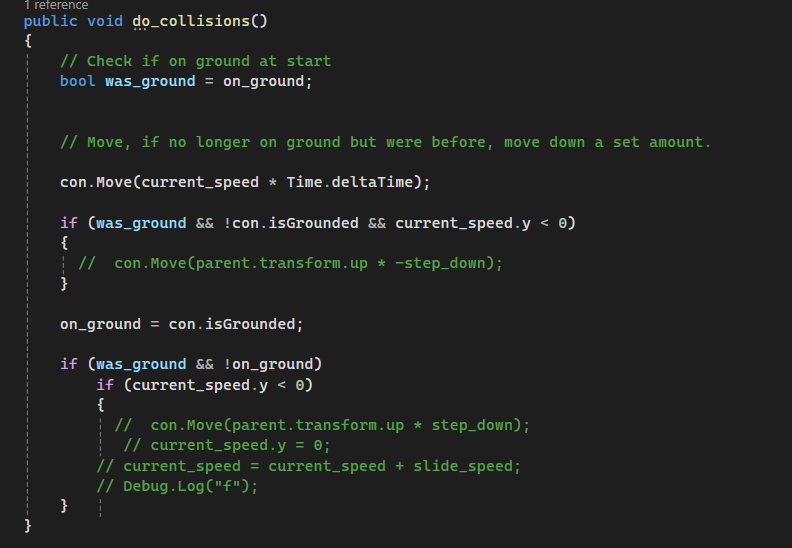
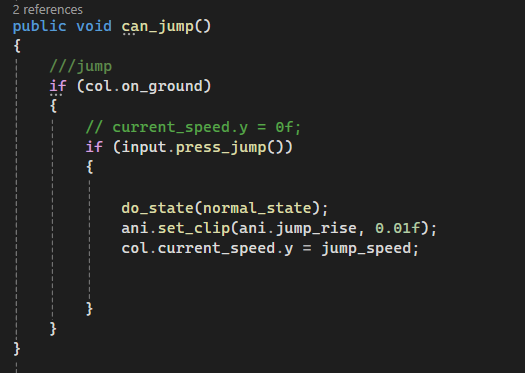
There is code elsewhere which sets movement speed based on the joystick, but colliding with the slope is not changing speed, which is why it sticks in place. Its the vertical speed continuing to play out, and then falling.
There isn't any code anywhere which sets vertical speed to 0, either.
timid dove
!code
 flint portalBOT

Posting code
📃 Large Code Blocks
Use links to services like:
https://gdl.space/, https://paste.ofcode.org/, https://hatebin.com/, https://paste.myst.rs/, https://hastebin.com/
📃 Inline Code
Surround code with three backquotes. Not quotation marks.
To format as C#, add cs to the first line:
```cs
// Your code here
```
Add a comment with a line number if there is an error message.
timid dove
Please don't use screenshots
 sturdy stream
I changed the custom physics shape on some of my tiles but they end up resetting specifically in the game's build. Is there a way to fix this?
rigid adder
Figured out the problem with the character controller, but now its left me with more questions.
If I move the controller with a vector3 that has horizontal and vertical movement, the object will:
slide up horizontal walls properly.
fail to slide along a sloped cieling.
But if I move with horizontal only, and then move with vertical seperately, it's reversed. It no longer slides along walls, but slides along sloped cielings.
royal jetty
Unity's 2d gravity feels really slow to me. Like a ball rolls off a table and floats gently in the air for a good while before it actually starts falling. I've heard this is a gravity / object scale thing, but what is the actual reasonable scale for an object to behave like it would in real life?
Heck, the entire physics simulation feels pretty slow overall.
Am I having these issues because my 2d objects are fuckin' massive? Assuming something like a baseball is roughly 2 unity units
Also, suppose I vastly increase the gravity scale, will I have other physics related issues from oversized objects?
Is there maybe a way to set "world scale" so I don't have to work with tiny units all the time?
timid dove
royal jetty
Unity's 2d gravity feels really slow to me. Like a ball rolls off a table and fl...
Real life scale
The default circle is a 1 meter diameter circle, which is massive
royal jetty
So if I wanted baseball physics then my baseball should be 0.1 unity units
royal jetty
Right
But working in very small units is kinda annoying
if I set the gravity scale to 10, does that produce the same result?
timid dove
No because then all your forces and lighting and everything else are not modeled correctly
royal jetty
Right
Does object size affect the other basic unity forces? Like friction, bounciness
timid dove
Your 2 unit baseball is elephant sized.
It might affect your perception of those things
That stuff is determined by physics materials
royal jetty
Yeah I just mean like, an elephant sized baseball bounces differently from a normal sized baseball right
it also handles linear drag differently
(Also, this is unrelated, but Unity found and reproduced my issue with Animate Physics converting degrees to radians)
timid dove
Only in the sense that your perceptions of distance relative to it are skewed
royal jetty
I'm torn between just increasing the gravity scale and dealing with whatever wonkyness that brings and working in a sub 1 distance space
I have objects that would be 0.01 unity units large and that's pretty annoying to work with
timid dove
Probably less annoying than compensating 15 other things in the world
royal jetty
Do you know specifically what it would affect?
I couldn't find a list and the only thing I know about is gravity
timid dove
Perception of distances and forces, all the numbers in your code would need to be adjusted. Lighting.
 stuck bay
I am trying to create a spherical planet. But i have a problem about "non-perfect" sphere. Since a sphere cannot be fully spherical due to performance reasons, the spherical objects will have perpendicular edges nor small or big.
The problem i faced, whenever i put a mid-perfect spherical ball on the planet, the gravity being applied looping itself whenever there is a edge that is perpendicular to the center. I would like to know if it has a name. I want to search but i don't know how to explain or name this!
 stuck bay
royal jetty
I couldn't find a list and the only thing I know about is gravity
stuck bay
royal jetty
I couldn't find a list and the only thing I know about is gravity
Gravity! 
royal jetty
stuck bay
I am trying to create a spherical planet. But i have a problem about "non-perfec...
What do you mean by looping itself
stuck bay
It is going right and left continuously
royal jetty
You mean it slides back and forth on the surface
royal jetty
What kind of collider is this?
stuck bay
It is only two sphere
stuck bay
stuck bay
I am trying to create a spherical planet. But i have a problem about "non-perfec...
Actually the image i sent shown this error better than it would in a 3D scene
royal jetty
Sphere colliders are in fact perfect
or, as near to as not to matter anyway.
Are you sure you're not using a polygon collider?
A sphere collider isn't jagged like your example above. A sphere collider simply measures the distance between two objects.
timid dove
Yeah I'm trying to figure out where this "non perfect" sphere is coming from
stuck bay
royal jetty
Sphere colliders are in fact perfect
Yes you are right. Wait let me show with an image
royal jetty
timid dove
Yeah I'm trying to figure out where this "non perfect" sphere is coming from
I imagine he's having the issue and then trying to rationalize how it could happen at all
timid dove
Showing the code would be a good start
stuck bay
I am so bad at explaining things sorry for that but wait :d i will show it
royal jetty
stuck bay
Yes you are right. Wait let me show with an image
Do you have friction or linear drag on?
timid dove
And also a video or image of the issue yes
royal jetty
If not, your ball won't slow down and could wobble back and forth
stuck bay
royal jetty
If not, your ball won't slow down and could wobble back and forth
Let me explain again. The planet cant be a perfect sphere here. The problem here is a planet that has a perpendicular edge to the center of the planet. The center of the planet is pulling all of the rigidbodies to itself. Basically, the direction kinda offsets in that edge.
Of course i tried to play with friction and such drag and angular drag. This did solves a little but it makes the ball hard to go. The player will have to interact those dynamically in the future. Should i go with drag and angular drag?
Using code:
var calculatedPull = (planet.transform.position - ball.transform.position).normalized;
ball.AddForce(calculatedPull * pullGravity, ForceMode.Acceleration);

 royal jetty
This is not a sphere collider
stuck bay
Yes my apologizes for that. As i said earlier, i am bad at explaining things.
 royal jetty
Is there a reason why you're using a mesh collider instead of a sphere collider?
stuck bay
Of course! I wanted to simulate a world that is not perfect here
I am glad i did
Caught that bug
royal jetty
stuck bay
Let me explain again. The planet cant be a perfect sphere here. The problem here...
Well, your code just pulls the moon towards the center of the planet, but it can't go further "down" so the only part of the force applied is the horizontal force

as your planet is "imperfect" the ball moves sideways
stuck bay
Yesss you are awesome
timid dove
Which is exactly what you'd expect, because it's like having a hill on the planet
And it's rolling down the hill
royal jetty
then it builds up speed from this accumulating force
moves to the other side, slows down, and repeats the process

there is no friction or drag
stuck bay
timid dove
And it's rolling down the hill
Hm so i shouldnt do anything about it?
royal jetty
from the moon's perspective your world is basically shaped like this.
 stuck bay
Thank you for helping, both 🙏🏻 I wont touch this thing further since it is an expected thing to happen then
sturdy stream
sturdy stream
I changed the custom physics shape on some of my tiles but they end up resetting...
bumping this
timid dove
stuck bay
Hm so i shouldnt do anything about it?
That depends what your goals are
 versed stag
Exactly when is OnCollisionExit2D being called?
In the image i have drawn a ball bouncing and its posistion in two separete ticks, is OnCollisionExit2D happening on tick 2 (the first tick after the ball has bounced), or at "a" where the ball leaves the surface.
i am working on a brick breaker game and i want to override the bounce direction of a collision. but there seems to be no "Physics.ContactModifyEvent" for 2D, so i was wondering if setting the velocity OnCollisionExit2D would function instead

(alternativly i could use a trigger, but then the question would still be the same, just with OnTriggerEnter2D)
versed stag
i did some experimenting with checking positions and velocity of incomming bouncy balls. the velocity changed already OnCollisionEnter2D, and the posistion of OnCollisionEnter2D and Exit2D varied a bit. i am unsure if this means that the physics aren't interpolated in the way i thought around collisions (where a collision only happens on a tick), or if the Enter/Exit2D methods only happen on ticks (but the bounce can happen between ticks)
 inner thistle
Physics is simulated only on ticks. Nothing can happen in between them
timid dove
versed stag
i did some experimenting with checking positions and velocity of incomming bounc...
the collision happens during the simulation itself, and the callbacks are called after the simulation (the simulation will have calculated a new trajectory and position for the colliding objects already.
It goes (simplified):
FixedUpdate -> Internal Physics Simulation -> OnCollision/OnTrigger callbacks
this all happens once per "physics tick"
versed stag
i think i get it. so using OnTrigger or OnCollision will happen after a new position has been set, and thus i can't use those to customize the bounce direction by setting the velocity then. Is there a way to handle / override the collision itself then? like how 3d has Physics.ContactModifyEvent?
timid dove
versed stag
i think i get it. so using OnTrigger or OnCollision will happen after a new posi...
unfortunately no, as you observed such an api doesn't exist. Not for lack of trying. I've been asking about this for a while to crickets 😦
https://discussions.unity.com/t/will-we-ever-get-a-contact-modification-api-for-2d/949146
versed stag
that is unfurtunate, but thanks for the help anyways.
 simple tulip
Hello everyone, I’m a beginner and I’m trying for days to create a fishing net to launch for my VR game (you grab a sphere of the net and when you launch it you capture some stuff)
So far I’m trying to do it with few spheres and configurable joints and a XR grab Interacable on the spheres (the ropes are from an asset) but it’s not working, the spheres are falling and when I launch it, the net doesn’t open, the spheres stay close to each other.
I tried so manyyyy configurations for the joints / gravity but nothing is working…
Anyone would have some advice to do it? The net has to be open during the flight but to take the shape of the stuff to capture.
Thanks a lot !

 runic warren
I want to constrain a dynamic rigidbody to only move along a spline which I've sort of figured out how to do in two ways.
void FixedUpdate()
{
SplineUtility.GetNearestPoint(rail, rb.position, out var nearest, out float _);
transform.position = nearest;
rb.velocity *= Vector3.Dot(rb.velocity, transform.forward);
}```In this first method, I'm able to keep the rigidbody locked to only move along the spline, but collisions bug out frequently, at least when messing with things in scene view.
```cs
void FixedUpdate()
{
SplineUtility.GetNearestPoint(rail, rb.position, out var nearest, out float _);
rb.AddForce((new Vector3(nearest.x, nearest.y, nearest.z) - rb.position)*10);
}```In this second method, the physics are more stable, but the rigidbody isn't locked to the spline, it just gets pushed towards the nearest point on it.
Is there any better approach to doing this or am I missing something? rustic quiver
i know this may sound vague but i do not know how to or where to start, im making a pinball game and i have no clue how to make the physics for the ball any tip?
 dense tide
how do i make two objects not push each other while walking
if i make the mass equal, then one of them will get pushed if they aren't walking
and i want gravity and stuff to still work
 bleak umbra
runic warren
I want to constrain a dynamic rigidbody to only move along a spline which I've s...
bleak umbra
runic warren
I want to constrain a dynamic rigidbody to only move along a spline which I've s...
Does it help if you use rigidbody.position or .Move() instead of the transform?
 marsh dirge
I have 2d box collider on player and 2d box collider on border, when player touches border it will start to slide around map why is that happening? I want to make him in box so he cant leave area, can I do it somehow by script so he doesnt slide when he collides with wall?
I have box collider 2d on player and on wall, both of them have rigidbody2d component, when player collides into a wall player will start sliding in one way like im moving him there but i aint.
 frigid pier
This is not enough information, you need to describe all complenets you are using and method how you moving it
marsh dirge
frigid pier
This is not enough information, you need to describe all complenets you are usin...
This is player movement code: https://hastebin.com/share/pehexeqexu.csharp and pics of components on player.

Hastebin is a free web-based pastebin service for storing and sharing text and code snippets with anyone. Get started now.
and this on wall
 frigid pier
marsh dirge
This is player movement code: https://hastebin.com/share/pehexeqexu.csharp and p...
frigid pier
marsh dirge
This is player movement code: https://hastebin.com/share/pehexeqexu.csharp and p...
Your script is not built for interaction with other physical objects, it overrides physics. If you want interaction use forces or handle collisions yourself.
frigid pier
detect collision with non floor objects, interrupt/lock move logic that direction
marsh dirge
how to detect collision with non floor objects, what do you mean by non floor objects?
frigid pier
The things you bump into. That have different physics layer or tag to distinguish them from the floor
 elfin carbon
Hey guys, I'm developing a multiplayer game with client prediction and am having an interesting physics log that I can't find on google anywhere.
In order to do server reconciliation, I need to re-simulate 1 rigidbody in the scene (the player) in the event that they fall out of sync with the server's position. I'm getting the attached log on the server

Here's the code that's being executed on the server

This is not called from a physics callback like OnCollisionEnter anywhere. It's called in a server remote procedure call
Aside from this method, the server runs with autosimulation (fixedupdate)
 weary anvil
Can anyone tell me why my wheel collider won't collide with my Cube?

 timid dove
weary anvil
Can anyone tell me why my wheel collider won't collide with my Cube?
timid dove
weary anvil
Can anyone tell me why my wheel collider won't collide with my Cube?
Something fishy is going on - the fact that the blue arrow is facing upwards is strange.
the blue arrow should face forward. Green should face upward. Red should face to the right. (According to the object)
weary anvil
timid dove
Something fishy is going on - the fact that the blue arrow is facing upwards is ...
I noticed rotations shouldn't be applied to wheel colliders. Fixed now. Thanks
dapper ember
How can I make a fish controller that allows me to bend the fish's head and tail in both up and down directions (i.e, it can make "U" or "n" shape), and so that it interacts with other objects in the scene?
Example situation:
If the fish is lying in default pose on the ground, i.e just flat and tail and head aren't bending at all, and we wanna bend the fish into n shape, then we push the tail and head down, and the middle part of the fish should go up. Like bend in that shape.
Another example:
We can have the fish in a U shape next to a wall, so that the tail is touching the ground, and the head is touching the wall.
basically like this:
royal willow
make 2 box colliders with rigidbodies, then connect them via joints
if you press A rotate one of the collider objects one way and the other one the opposite
if you press D invert the collider rotations
etc
 tight compass
Hey! can anyone help me figure out a solution to a problem im having with joints in unity? I have a floating player capsule that uses spring forces to stay at a desired height and torque forces to stay upright ( like in the character controller video by Toyful Games ) and im trying to add some hands to the player that are just floating spheres connected by a configurable joint. I have set the rigidbodies on the hands to have 0 mass but they are still adding weight to my player, throwing off the forces keeping him floating and upright. adjusting the spring and dampening forces stops the oscillations but then effects the feel of the controller. I hope this makes sense, I can provide more details that will help, if needed. Cheers!
 short sable
So I am making a 2.5D game and my player can push objects, I also want the player to pull objects as well. I can't find any tutorials on how to do this can some one help me? script: https://paste.ofcode.org/xzaGYp76TtbBqdGJYnzihP
timid dove
short sable
So I am making a 2.5D game and my player can push objects, I also want the playe...
If you want to do a lot of physics stuff it's probably easier to work with a Rigidbody-based controller instead of CharacterController. With a Rigidbody you can attach the objects with physics joints to achieve the "pulling"
short sable
timid dove
If you want to do a lot of physics stuff it's probably easier to work with a Rig...
Just to clarify instead of having a player that has a character controller I should make a rigid body based controller instead
short sable
timid dove
Well I said it would be easier that way
is it not easy with the character controller?
short sable
timid dove
If you want to do a lot of physics stuff it's probably easier to work with a Rig...
I think I'm gonna stick with a character controller instead. You can't achieve the kind of movement you want with a rigidbody. When using a CharacterController, you have complete control over everything
timid dove
short sable
I think I'm gonna stick with a character controller instead. You can't achieve t...
You can accomplish both with both. The thing is you can't attach a joint to a CharacterController.
You can even make your Rigidbody kinematic if you want
I was just saying it would be easier with RB because you can use joints.
short sable
can I still have a character controller and a rigid body together?
dapper ember
if I have two rigidbody objects, and one is connected to the other via Character Joint. What is the correct way to make sure that the one with the joint won't make the other one move too much?
idk if increasing mass of the other is proper way because the docs say that:
The physics solver produces better results when the connected Rigidbodies have a similar mass.
royal willow
dapper ember
if I have two rigidbody objects, and one is connected to the other via Character...
if you move meaning positional movement, it will move both regardless, if you mean rotational movement they will move in opposing directions due to physics
you can make the opposing rigidbody kinematic if needed
i should ask before i get carried away, how much is the other rigidbody moving?
dapper ember
royal willow
i should ask before i get carried away, how much is the other rigidbody moving?
thanks for offering help! I'm not working on the problem anymore
 hallow plover
short sable
can I still have a character controller and a rigid body together?
hallow plover
short sable
can I still have a character controller and a rigid body together?
i think CharacterController itself has a rigidbody without rigidbody CharacterController will not work i suppose.
 plush plinth
any tips on how to prevent this? Creating a jenga game and the blocks seem to be clipping

 boreal shale
how is drag calculated? is if just -[drag]m/s^2
royal willow
short sable
can I still have a character controller and a rigid body together?
no, you have to choose one
royal willow
hallow plover
i think CharacterController itself has a rigidbody without rigidbody CharacterCo...
this is completely wrong, a character controller does not have and does not need a rigidbody to work
timid dove
boreal shale
how is drag calculated? is if just -[drag]m/s^2
In what context? Rigidbody drag?
boreal shale
yes
timid dove
boreal shale
yes
hallow plover
royal willow
this is completely wrong, a character controller does not have and does not need...
If the character controller doesn't have inbuilt rigidbody then how it acts for gravity.
royal willow
hallow plover
If the character controller doesn't have inbuilt rigidbody then how it acts for ...
you have to make the gravity for it
and pretty much all physics interactions
hallow plover
royal willow
you have to make the gravity for it
How do you make gravity.
royal willow
by moving the charactercontroller down every frame until it hits ground then you reset the velocity that you were applying
you can look up a tutorial on how this works if needed
 static spruce
Hello. I have a problem where a gameObject is not detected.
This is the code from that gameObject and it tried to destroy other gameObject like him if there are more:
private void DestroyExtraRoomConectors()
    {
        Collider2D[] colliders = Physics2D.OverlapPointAll(transform.position,5);
        foreach (Collider2D collider in colliders)
        {
            Debug.Log(collider.gameObject.tag);
            if (collider.gameObject.CompareTag("RoomConector"))
            {
                if (gameObject.GetInstanceID()<collider.gameObject.GetInstanceID()) Destroy(collider.gameObject);
                else Destroy(gameObject);
            }
        }
    }
This is the gameObject Inspector:

The Debug.Log just shows other GameObjects that are not in the layer 5, and that's strange
Is more information needed?
timid dove
static spruce
Hello. I have a problem where a gameObject is not detected.
This is the code fro...
Why do you have a physics object on the UI layer?
static spruce
timid dove
Why do you have a physics object on the UI layer?
I don't know actually. I have asked myself the same thing
I have tried setting the layer to 0 (default), but it doesn't work anyway
timid dove
static spruce
I don't know actually. I have asked myself the same thing
If this is actually a UI element or no?
static spruce
timid dove
If this is actually a UI element or no?
It is not. But I managed to solve it, thanks
timid dove
static spruce
Hello. I have a problem where a gameObject is not detected.
This is the code fro...
5 is also not a valid layer mask
static spruce
It was related to another part of the code
static spruce
timid dove
Your layer mask was the problem
Why 5 is not valid?
Isn't layerMask an int?
timid dove
Well it's valid but it doesn't mean layer 5
It's a bitmask
5 is 0101 in binary
So that would cover layers 0 and 2
Exposr your layer mask in the inspector to set it properly
Or use LayerMask.GetMask
static spruce
timid dove
Or use LayerMask.GetMask
I did that
static spruce
timid dove
So that would cover layers 0 and 2
But I still don't understand it
timid dove
Well you'd have to understand how bitmasks work
It's not that complicated, it's just saying that it allows any layer where there's a 1 in the binary representation of the number
static spruce
I will look for it on internet
timid dove
Int is 32 bits, so there's 32 layers
static spruce
timid dove
It's not that complicated, it's just saying that it allows any layer where there...
I think I got it, thanks
 ashen swift
my distance joint doesnt work
 unique cave
ashen swift
my distance joint doesnt work
unique cave
ashen swift
my distance joint doesnt work
Did you read what was linked to you at #archived-code-general?
frigid pier
!mute 1182622982514937947 3d Insulting community members ignoring advice.
flint portalBOT
 undyingtriad was muted.
 mighty zenith
hey guys, i have an issue rotating 2d active ragdoll. it's brokes when rotates multiple times and teleporting up and down. here is code for movement and balancing: https://hastebin.com/share/ecuhifasas.csharp


Hastebin is a free web-based pastebin service for storing and sharing text and code snippets with anyone. Get started now.
mighty zenith
it's getting even worse! please someone help.
 timid dove
mighty zenith
hey guys, i have an issue rotating 2d active ragdoll. it's brokes when rotates m...
timid dove
mighty zenith
hey guys, i have an issue rotating 2d active ragdoll. it's brokes when rotates m...
modifying the transform of a physics object directly is bound to cause issues
mighty zenith
timid dove
modifying the transform of a physics object directly is bound to cause issues
what exactly do you mean?
timid dove
mighty zenith
what exactly do you mean?
                transform.position = hip.position + hipOffset * -1;
transform.localScale = new Vector3(-transform.localScale.x, 1, 1);```you are directly modifying the Transform of your physics object
this is going to wreak havoc
mighty zenith
but how i can rotate this guy otherwise?
timid dove
honestly no idea. Never seen an active ragdoll game that has the character flip
generally they're super finicky
mighty zenith
timid dove
generally they're super finicky
ok, maybe you know other procedural animation model with flip and physics i can use instead of active ragdoll?
timid dove
When you say "with physics" what do you mean exactly
Do you actually need ragdoll physics
or just general player physics
mighty zenith
well i just want players can see gunshot reaction and falling after death or in coma
timid dove
after death you can replace your character with a ragdoll. YOu don't need it to be one the whole time
that's super common
mighty zenith
oh
but still need a way to animate at least legs so they will stand on stair or other non-standard reliefs
timid dove
mighty zenith
but still need a way to animate at least legs so they will stand on stair or oth...
That's just regular animation and inverse kinematics
You don't need ragdoll physics for that
 queen marsh
Testing out Unity 6 preview and I noticed this under the Physics tab
Is this going to allow Unity Physics/Havok to be used outside of DOTS? Or does this just mean developers will be able to add their own physics engines to this list (i.e to be published on the asset store)?
 timid dove
queen marsh
Testing out Unity 6 preview and I noticed this under the Physics tab
Is this goi...
queen marsh
timid dove
queen marsh
Testing out Unity 6 preview and I noticed this under the Physics tab
Is this goi...
queen marsh
Oh didn't see that post, thanks! Very happy to see this being implemented
 warm patrol
Hey, can I get the position of the colliding spot? Like that:
 warm patrol
 light gate
https://docs.unity3d.com/ScriptReference/ContactPoint.html
light gate
https://docs.unity3d.com/ScriptReference/ContactPoint.html
thank u!!!❤️
 hollow quartz
I'm making a multiplayer game, and I want to add ragdoll physics to player when the player dies. But when I activate the ragdoll physics (rigidbodies) the player just flys to the moon XD I am using ragdoll first time and I don't know how to fix this issue.

 carmine basin
SpherecastAllNonAlloc seems to be passing through objects at very specific positions and then hitting backfaces, but not correctly generating RaycastHit.point
When firing a raycast via the aforementioned at a wall, and moving a trail renderer to the hit point, it will sometimes not hit the front of the box collider (the face i'm aiming at), and instead pass through and hit on the inside of the box collider. The trail renderer will then move to the origin of the scene
okay, according to the docs, its meant to hit backfaces, silly me
I've decided to offset the starting point of the spherecast by a small amount, and extend the distance of the spherecast by that same amount
Unfortunately, I'm still getting over-penetration AND the hit point is still set to origin on some of them
Notes: For colliders that overlap the sphere at the start of the sweep, RaycastHit.normal is set opposite to the direction of the sweep, RaycastHit.distance is set to zero, and the zero vector gets returned in RaycastHit.point
this is from the SpherecastAll API page, and I'm not quite sure I understand
weird, there's still some huge over-penetration
the raycast doesn't start OR end anywhere near the collider, still passes through the collider, but somehow doesn't hit?
how on earth are these NOT hitting??

has anyone experienced something like this before?
the magenta lines upwards show the end point of a spherecast. SOMEHOW, this isn't hitting? but if I fire the spherecast from another angle, it's fine

 carmine basin
If anyone knows why this is doing what it is, or how, or anything about this, please @ me
 mossy swan
I'm generating my own heightmap for my terrain. Currently I'm just using a MeshCollider on it, but is it better to use a TerrainCollider - which is a heightmap grid? I still want to render my custom terrain myself, so this is 100% about the most optimal collider for a heightmap. There seems to be conflicting information when I looked online because some of it was also considering the rendering costs too. Can I even use a TerrainCollider without a rendered terrain?
 static kestrel
I'm having trouble with a jump script for my player character in Unity. The issue is that during the first jump, the character ascends much higher than expected, but subsequent jumps work correctly. Here is the physics code ```
public void Trigger()
{
if(!canJump) Debug.Log("no jump charges");
if(!canJump) return;
Debug.Log("Jump triggered");
_rb.velocity = new Vector3(_rb.velocity.x, 0, _rb.velocity.z);
_rb.AddForce(Vector3.up * _jumpForce, ForceMode.Impulse);
_remainingCharges--;
Debug.Log($"Remaining charges after trigger: {_remainingCharges}");
}
state code: ```using Player.Actions.Implementations;
using UnityEngine;
public class PlayerJumpingState : MonoBehaviour, IState<PlayerState>
{
private PlayerCharacter _player;
private bool _isJumpInputReleased;
void Awake() => _player ??= GetComponent<PlayerCharacter>();

public void EnterState(StateManager<PlayerState> stateManager)
{
    if(_player.physicsManager.isGrounded())
        {stateManager.ChangeState(PlayerState.Idling);}

    if(!_player.actionManager.jumpAction.canJump) {
        stateManager.ChangeState(PlayerState.Flying);
        return;
    }

    _player.rb.drag = _player.parameters.AirDrag;
    _isJumpInputReleased = false;
}

public void ExitState(StateManager<PlayerState> stateManager)
{
    if(_player.physicsManager.isGrounded())
        _player.rb.drag = _player.parameters.GroundDrag;
}

public void UpdateState(StateManager<PlayerState> stateManager)
{
    _player.actionManager.lookAction.Trigger(_player.inputManager.LookInput);

    if (!_player.inputManager.isJumpTriggered)
        _isJumpInputReleased = true;

    if (_player.inputManager.isJumpTriggered && _isJumpInputReleased)
    {
        _player.actionManager.jumpAction.Trigger();
        _isJumpInputReleased = false;
    }

    if(!_player.actionManager.jumpAction.canJump)
        stateManager.ChangeState(PlayerState.Flying);

}

public void FixedUpdateState(StateManager<PlayerState> stateManager)
{
    _player.actionManager.moveAction.Trigger(_player.inputManager.MovementInput, _player.physicsManager.getMovementSpeed);


    if(_isJumpInputReleased && _player.rb.velocity.y > 0)
        _player.rb.AddForce(Vector3.down * 2f);
}
}```
 timid breach
is there a better way to get collisions for curved objects, i am using polycollider even after 94 points i get this mess, there are too many boxes
 timid dove
timid breach
is there a better way to get collisions for curved objects, i am using polycolli...
timid dove
timid breach
is there a better way to get collisions for curved objects, i am using polycolli...
what is "polycollider"?
timid breach
timid dove
what is "polycollider"?
polygon collider 2d
timid dove
why do you have boxes
what are you trying to achieve here? How did you get to a bunch of boxes
what curved object are you trying to make a collider for?
timid breach

i dont know why the points get converted into the boxes
@timid dove is that what unity usually does or is conversion into multiple box colliders abnormal
timid dove
timid breach
<@179367739574583296> is that what unity usually does or is conversion into mult...
polygon collider doesn't convert anything into boxes
it triangulates the given shape
timid breach
then i dont know why this is happening with me
timid dove
also as you see the collider gizmo is green
I don't know what the yellow thing you showed was
but it wasn't a collider
or at least not a unity collider
are you using a networking framework or something?
timid breach
i turned on the collider bounds
 timid dove
timid breach
i turned on the collider bounds
timid dove
timid breach
i turned on the collider bounds
bounds are bounds
they are not the collider shape itself
timid breach
ohk, i just fixed the problem, had to fix some random points
 simple hearth
Is there an efficient way to lower physics costs of Unity? I'm okay with flaws etc if it's going to free some of the cpu usage
 simple hearth
Is there an efficient way to lower physics costs of Unity? I'm okay with flaws e...
simple hearth
simple hearth
Is there an efficient way to lower physics costs of Unity? I'm okay with flaws e...
In this instance, there are 1500 dynamic objects with rigidbody and collider2d.
or is it just "take it or leave it" scenario and I'm not going to be able to optimize it?
timid dove
simple hearth
Is there an efficient way to lower physics costs of Unity? I'm okay with flaws e...
There's lots of things you can change in the settings
Including making the fixed timestep larger
simple hearth
can you recommend any guide to tweak them?
I want to avoid to tweak physics settings randomly since it may break things..
simple hearth

In this video, we’ll go through key physics considerations to keep in mind when you're aiming for high performance while moving from a prototype to a more complex project.
⭐Physics Documentation https://on.unity.com/3sB5x1y
⭐Learn more https://blog.unity.com/technology/optimize-your-mobile-game-performance-get-expert-tips-on-physics-ui-and-aud...
found this, thanks
 signal wyvern
Hi guys quick question. I Have two objects A & B. Both are physical objects with rbs, I want object A to collide normally with Object B however I don’t want Object B to be influenced by object A at all.
I cannot set either object to Kinimatic as both are moved by other forces.
Anyone with advanced physics experience able to help explain how I can achieve this?
 gloomy geyser
I don’t know how to do it in Unity, I’m more familiar with Unreal’s physics engine. I assume it's similar? At least in Unreal you can assign each object a collision channel, partition each object into different collision layers and change the default collision response of each object independently to your preference
signal wyvern
gloomy geyser
I don’t know how to do it in Unity, I’m more familiar with Unreal’s physics engi...
I’m not familiar with UE but in unity using layers to control collisions does not solve the issue. If I disable the collisions via layers it disables the collisions on both sides, which is not what I want. As I still need object A to respond to the collision normally.
gloomy geyser
Oh, ok. Sorry I can't help much, I'm new to Unity 🙃
In Unreal you would be able to control each layer independently
timid dove
signal wyvern
Hi guys quick question. I Have two objects A & B. Both are physical objects with...
There's an asset that does this
https://youtu.be/BAlxxIDneVg?si=5vDSuSL7oYMau3_W

A more in-depth view at the Selective Kinematics feature of BetterPhysics
BetterPhysics is a must-have physics asset that adds essential features to Unity's physics engine. In this video we take a closer look at the Selective Kinematics feature which lets you create and configure custom interactions between dynamic Rigidbodies.
Selective Kinem...
signal wyvern
timid dove
There's an asset that does this
https://youtu.be/BAlxxIDneVg?si=5vDSuSL7oYMau3_...
Haha this is your asset right? I assume your overriding unitys rbs in some way?
I’d purchase but I have no idea how performant your solution is.
gloomy geyser
Is Unity’s collision system at least similar to UEs?
I’d like to learn more about it
 novel light
gloomy geyser
Is Unity’s collision system at least similar to UEs?
novel light
gloomy geyser
Is Unity’s collision system at least similar to UEs?
Unreal uses the exact same physics engine (PhysX) as Unity.
Though the integration with the game engine is different, so the same test across both probably won't give the same result, for instance.
gloomy geyser
novel light
Unreal uses the exact same physics engine (PhysX) as Unity.
Though the integrat...
Ah, I see. Unity also uses PhysX. I did not know that. Thanks for the information!
royal willow
unity3D use PhysX while the unity2D uses Box2D
timid breach
i am creating a dash move but at highspeed rigidbody2d does not act as expected, the capsulecollider2d goes into the ground collisions , making my player completely static
is there a better way to make dash move without this problem
(i have tried collision detection mode on continuous as well)
gloomy geyser
royal willow
unity3D use PhysX while the unity2D uses Box2D
Yes, I noticed the difference in the 2D inspector 👍
royal willow
timid breach
i am creating a dash move but at highspeed rigidbody2d does not act as expected,...
set the rigidbody collision detection to continuous
and interpolate to interpolate
timid breach
royal willow
set the rigidbody collision detection to continuous
I already mentioned that
timid breach
royal willow
and interpolate to interpolate
I did that too
royal willow
well how exactly fast is this rigidbody going?
there are limits for the physics system to catch up
timid breach
royal willow
well how exactly fast is this rigidbody going?
Not much fast, I can still see movement with naked eye
royal willow
well show us
timid breach
I'm currently out, I will mention as soon as I'm able to
 rapid pollen
Hello!
I have approx 500 rigidbodies in one of my scenes, which as you can guess is super mega taxing.
I was wondering if it would be more taxing to do a check every second for each of those for distance with the player and activate/deactivate kinematic depending on if the player is close in order to keep performance.
Any opinions on the matter? Do you peeps have better ideas?
unique cave
rapid pollen
Hello!
I have approx 500 rigidbodies in one of my scenes, which as you can guess...
For sure it would be better to do a distance check of some sort but I would love to hear why you need that many of them to begin with before giving any more suggestions just to make sure this is not XY
 narrow pier
signal wyvern
Hi guys quick question. I Have two objects A & B. Both are physical objects with...
narrow pier
signal wyvern
Hi guys quick question. I Have two objects A & B. Both are physical objects with...
I had the same problem and spent a lot of time figuring out things. My repo on github has a script to selectively ignore forces from specified Rigidbodies https://github.com/ArtemPindrus/UnityExtended.Core/blob/main/Utilities/RBs/SelectiveKinematics.cs. It's under MIT, so don't hesitate to use it.
Add it to a Rigidbody and then add RBs that should be ignored into the Initially ignored array.
rapid pollen
unique cave
For sure it would be better to do a distance check of some sort but I would love...
My game has a dedicated kick button and so there are a lot of random objects (bags, crates, etc.) hanging around the world. In small scenes, not a problem, in bigger scenes definitely an issue
unique cave
rapid pollen
My game has a dedicated kick button and so there are a lot of random objects (ba...
Well, if the objects are just lying somewhere, couple hundred of them doesn't sound too bad at all since they will just start sleeping from very beginning making them not simulate any physics actively
signal wyvern
narrow pier
I had the same problem and spent a lot of time figuring out things. My repo on g...
Thanks a lot i will take a look, Im curious what did you use this for in your game? Personally i need it for a physical player inside a physical boat
rapid pollen
unique cave
Well, if the objects are just lying somewhere, couple hundred of them doesn't so...
the strange thing is that they still take a lot of performance; i've tried setting them to kinematic and i gain 2.5ms in my scene.
maybe they're not sleeping as they should?
unique cave
rapid pollen
maybe they're not sleeping as they should?
from the physics debugger you can see whether they are sleeping or not when you select the object
rapid pollen
ha! thank sfor the tip. None of them are indeed sleeping.
unique cave
rapid pollen
ha! thank sfor the tip. None of them are indeed sleeping.
that will definitely make them slow
rapid pollen
strange since they're not moving around at all
unique cave
rapid pollen
strange since they're not moving around at all
are you manipulating the objects in any way in any of your scripts? (transform, gameObject, rb etc.)
also make sure the sleeping thresholds are at their default values in the physics settings
rapid pollen
god oh god
thank you aleksiH
I had completely forgotten my buoyancy code; I thought if I did an "addforce" of strength 0 (when not in water), it would not count
towards going asleep or not
turns out it does count
unique cave
definitely will
unique cave
np
narrow pier
signal wyvern
Thanks a lot i will take a look, Im curious what did you use this for in your ga...
Are you familiar with object interaction in games made by Frictional (Amnesia, SOMA, Penumbra)? I'm trying to replicate exactly that. The problem I had is kinda complicated to describe in words without video, but in short, I wanted to prevent player from easily moving heavy objects using light objects (imagine taking a cup of water, pushing it against a 20 kg barrel and moving it like it's nothing). Now I understand that I approached the problem from the wrong perspective, but left solution for selective kinematics for later use.
unique cave
rapid pollen
its all sleeping properly now
Also just adding the force when it's not needed may be a performance issue in itself
rapid pollen
unique cave
Also just adding the force when it's not needed may be a performance issue in it...
yeah, its what I changed
thanks again
signal wyvern
narrow pier
Are you familiar with object interaction in games made by Frictional (Amnesia, S...
Just had a look, Looks like what i need but i will need to modify this script to work during runtime as my objects arent originally in scene
 gentle holly
I have a really weird problem I can't solve :/
NavMeshAgent (with Collider & kinematic Rigidbody) and a box with a script that includes OnTriggerEnter . Very simple setup. I have 2 problems:
OnTriggerEnteris being called every frame the agent moves, almost as if it wasOnTriggerStay.OnTriggerExitdoesn't get called at all
What on earth is going on?
timid dove
gentle holly
I have a really weird problem I can't solve :/
`NavMeshAgent` (with `Collider` ...
Is your Rigidbody falling asleep?
gentle holly
is that a thing?
timid dove
Yes
gentle holly
Well, I'm not familiar with that. But I did discover that how I'm moving my agents has something to do with it
I am setting a destination every frame, and it is somewhere immediately in front of my character (because i use keyboard controls to move the main character around a navmesh)
i don't know why, but i do know that if i make an agent pass through a trigger by only setting the destination during start, it works fine
narrow pier
signal wyvern
Just had a look, Looks like what i need but i will need to modify this script to...
There is a public method to add new Rigidbodies to the list of ignored IDs at runtime, but you go as you want. If you encounter any issues, let me know. As I barely tested it, I want to know possible problems with it in advance.
 stable briar
I just wanna know something, the physics are calculated depending on the framerate while running the game, or its more about the quality of the CPU/GPU ?
unique cave
stable briar
I just wanna know something, the physics are calculated depending on the framera...
I'm not sure whether I understand your question but physics are simulated at fixed rate regardless of the hardware or framerate. You can change that fixed rate in the Time settings
stable briar
unique cave
I'm not sure whether I understand your question but physics are simulated at fix...
okk thank you
I saw a video on godot which says physic works diffrently on an other devices so I was curious if it was the same thing in Unity
timid dove
stable briar
I saw a video on godot which says physic works diffrently on an other devices so...
The only difference will be potentially the precision at which floating point calculations are performed. Some hardware has specialized floating point modules with higher precision
unique cave
Don't think it's guaranteed to be deterministic anyway regardless of presicion
 dapper eagle
Is it possible the built in wheel colliders have a bug with the steering value? I am in debug mode and see my input is correct, i can see both negative and positive values but when i look at the wheel collider visuals the wheels only turn to the right.
inner thistle
I'm pretty sure someone would have noticed by now if steering was that broken
 small cove
Trying to add force to my player so they go up and to the side and while moving up looks fine when they get pushed to the side it looks like they’re teleporting
Ik it’s cause of the push force being so high but is there a way to keep the push force and make it so that the player doesn’t look like it’s teleporting
dapper eagle
inner thistle
I'm pretty sure someone would have noticed by now if steering was that broken
yeah not sure, but it looks like the debug visuals are not showing it going to the left, maybe it's just the visual, i am currently just adding steering. i do not have the throttle or brake yet
I have tested with throttle and it's not just the visual, i am on 2022.3.20f1 right now. I am very sure my input is correct too
timid dove
dapper eagle
yeah not sure, but it looks like the debug visuals are not showing it going to t...
If you think you have a reproducable bug, the best thing to do is submit a bug report.
royal willow
small cove
Ik it’s cause of the push force being so high but is there a way to keep the pus...
how fast is it actually going?
there are hard limits to a rigidbody and going over that can cause weird effects
timid dove
you would have to show us what you mean
and perhaps share your movement code
usually that kind of thing happens because you're trying to use two incompatible forms of motion
 rapid talon
any ideas why a physics cast (overlap box) is not always detecting target obejct and yet a trigger collider does? the overlap box is attached to an animated object that doesn't even move that fast and yet there are times it doesn't detect the target object
dapper eagle
I figured it out, it was a very stupid mistake, accidentally had a nagative value * with another negative value causing the steering always to be positive
 coral moat
guys how can i make the springjoint not affecting my main obj like i have a drone and if i attach something using a spring joint it drags the drone to the floor
 wispy hemlock
Hi all,
Sooo, I'm having a weird issue that I can't seem to figure out.
I'm building a Scifi Rover Rig, with (front to back) suspension arms, but my code to match the wheel mesh positions to the wheel colliders is doing something screwy (attached pic) with the mesh positions. Can anyone see where I'm going wrong please? ((I know that I'll probably have to redo/rethink my hierarchy layout at some point, because the arms don't line up correctly, I know why, just not sure how to fix)

Hastebin is a free web-based pastebin service for storing and sharing text and code snippets with anyone. Get started now.
timid dove
coral moat
guys how can i make the springjoint not affecting my main obj like i have a dron...
The drone needs to produce enough thrust to carry the object, just like in real life
warm patrol
Hey, does someone know what can be wrong? I have a Raycast (Debug.DrawLine on the first screenshot) with a layerMask of 6. This wall has the same layerMask, but Raycast doesn't see it and says that (Physics.Raycast(ownerScript.head.transform.position, ownerScript.playerPositionOnHead, Vector3.Distance(ownerScript.head.transform.position, ownerScript.playerPositionOnHead), 1 << 6)); is `false.

 timid dove
warm patrol
Hey, does someone know what can be wrong? I have a Raycast (`Debug.DrawLine` on ...
timid dove
warm patrol
Hey, does someone know what can be wrong? I have a Raycast (`Debug.DrawLine` on ...
~~It would be nice to see the DrawLine code, as well as the inspector of the wall.
Note that objects don't have layer masks, just layers.~~
Oh actually it seems pretty clear
You're passing two position vectors into Raycast
Raycast expects a position and a direction, so you're using the wrong parameters
It would be more analogous to Debug.DrawRay
If you want to use two positions you should be using Physics.Linecast instead
warm patrol
timid dove
If you want to use two positions you should be using Physics.Linecast instead
thank uuu i was so silly😢 😢
and i was drawing Raycast with DrawLine lol
 deft topaz
Hi everyone, I'm a bit desperate with this problem.
I'm trying to shoot a cannonball out of a cannon in a 3D space, but the cannonball lands significantly beyond the target. I'm using physics calculations to determine the initial velocity based on the launch angle and time to land.
The problem is not so complex because the only force applied in this scenario is gravity, the object has no drag. And yet for the life of me I can't figure out what's wrong 😦
For my X and Z axes I'm using Uniform Rectilinear Motion with the equation
x = v0x * cos(alpha) * t + x0*
where x is the position in the x axis, v0x the initial velocity (what I would like to figure out), alpha the angle, t the time to land and x0 the initial position.
For my Y axis I'm using uniformly accelerated (by gravity only).
Mainly,
y = y0 + v0y * sin(alpha) * t - 1/2 gt^2
where y is the position in the y axis, y0 the initial position, v0y the initial velocity (also want to figure it out), and g is gravity force.
And yet, applying all of this results in a very wacky cannonball launch...
I've looked in many other posts, but either their requirements weren't the same as mine, or they used a different equation they barely explained
Here is the code:
https://pastebin.com/r3gq7sjg
Thank you for any tips you can give me, and anything else you need please ask 🙏
In the video you can see the aim is OK but it always overshoots it
Pastebin
Pastebin.com is the number one paste tool since 2002. Pastebin is a website where you can store text online for a set period of time.
timid dove
deft topaz
Hi everyone, I'm a bit desperate with this problem.
I'm trying to shoot a canno...
We're missing a bunch of context here. For example where does "currentGravity" come from
deft topaz
currentGravity is the absolute value of Physics.gravity.y, resulting in 9.81
As for the arguments such as targetPoint and originPoint; originPoint is the position of the cannon whereas targetPoint the position described by the red marker in the video, which is set randomly
Finally T is a float value currently set at 45, and initial angle has a value of 60º which gets converted into radians in the function
royal willow
use a mesh collider
 winged summit
I'm making a fighting game in Unity 2D and I have a question, how do I make it so that, for example, when I jump over the enemy, it slides like in some games instead of falling and turning? (I put a video so you can understand what I want it not to do)
royal willow
winged summit
I'm making a fighting game in Unity 2D and I have a question, how do I make it s...
just lock the rigidbody rotation using contraints (if you have a rigidbody)
timid dove
Probably best to make the train collider up out of a bunch of BoxColliders
winged summit
royal willow
just lock the rigidbody rotation using contraints (if you have a rigidbody)
ty
timid dove
Clearly it's not empty
If you have a CharacterController, that is itself a capsule-shaped Collider
 sturdy plank
I'm having an issue with a simple obstacle that I am trying to create. The obstacle is just a box that rotates on its x-axis. The problem that I'm having is that if I center the player above the objects origin, I can just surf the box. I have tried parenting the player on collision, however despite the players Rigidbody rotation constraints being frozen, the player still rotates with the box. I'm using the Invector 3rd person controller if that makes a difference. This video from Super Mario Sunshine shows what I am trying to emulate: https://www.youtube.com/watch?v=sFc0rJYy7Mw. Any help with this would be greatly appreciated!
 regal turret
Hello! I have a heavy lag spike for several seconds when I spawn 100 enemies at once. profiler says the physics 2d find new contacts is the problem. I don't get it, since I removed ALL possible collisions via collision matrix. What is the fix for this?


 timid dove
regal turret
timid dove
regal turret
if you removed "all possible collisions" then why do they need colliders at all?
regal turret
timid dove
if you removed "all possible collisions" then why do they need colliders at all?
For check of how to fix the lag spike. I plan to later add ability to hit these enemies via bullets, and also maybe ground. First thing is lag spike.
It's annoying and I need to find a solution. I faced this problem before but stopped attempting to find how to fix it.
I understand that I can hashset these enemies and use colliders bounds overlap technique, but I want to find out how to do it via physics first.
If it's possible to do 100 enemies or more via physics of course.
timid breach
i have this setup on a enemy, i am trying to make sure two enemies cant collide with each other

any idea whats wrong here
timid breach
I have unchecked same layer collision in physics2d in project settings, but it's still colliding
silver moss
timid breach
I have unchecked same layer collision in physics2d in project settings, but it's...
How is it moving? Rigidbody?
timid breach
silver moss
How is it moving? Rigidbody?
yes rigidbody2d
any idea what might be wrong
silver moss
timid breach
any idea what might be wrong
Make sure that all the colliders are on the correct layer
Like if you have child colliders, check those too
Orher than that no idea, not familiar with these new layer settings
timid breach
only one collider

and this is the layer on both
i also tried using this using tags
it prints the debug that its ignoring collision but in game its not
 timid breach
@silver moss any idea, what can I do?
silver moss
timid breach
<@136926228341850112> any idea, what can I do?
I have no ideas right now
Could debug.log the colliders and their layers in OnCollisionEnter2D to confirm what is actually happening
Is this Unity 6 btw?
timid breach
silver moss
Could debug.log the colliders and their layers in OnCollisionEnter2D to confirm ...
How can I debug the layer
Layer name specifically
silver moss
LayerMask.LayerToName
timid breach
I confirmed the collision layer to be enemy
timid dove
timid breach
i have this setup on a enemy, i am trying to make sure two enemies cant collide ...
show the full inspector of this GameObject

 timid dove
timid breach
i have this setup on a enemy, i am trying to make sure two enemies cant collide ...
timid dove
timid breach
i have this setup on a enemy, i am trying to make sure two enemies cant collide ...
And this object?
This one seems different
Is that first one an enemy? or the player?
timid dove
timid breach
because if these are the enemies, there's nothing here stopping it from colliding with another enemy.
timid breach
how can i make sure they dont collide with each other
timid dove
Either use the layer collision matrix in physics 2d settings, or add the Enemy layer to the "Exclude Layers" dropdown on the Enemy object's Rigidbody2d OR Collider2d
timid breach
timid dove
Either use the layer collision matrix in physics 2d settings, or add the Enemy l...
did both
timid dove
timid breach
did both
not according to your screenshot
timid dove
timid breach
this one has "Nothing" in Exclude Layers"
timid breach
yes this is after i did exclusion in script
timid dove
Why do it in script?
Also how do we know 3 is the correct layer?
timid breach
same problem, still colliding

 timid dove
timid breach
same problem, still colliding
timid dove
timid breach
same problem, still colliding
print the names of the two colliders in your OnCollisionEnter2D.
timid breach


@timid dove i tried disabling same layer collision in collision matrix of physics2d as well
timid dove
timid breach
this is not OnCollisionEnter2D
timid breach
timid dove
this is not OnCollisionEnter2D
do you mean this

 timid dove
timid breach
timid dove
timid breach
So it sounds like two enemies are NOT in fact colliding
so what's the issue?
timid breach
timid dove
so what's the issue?
stuck, not going through eachother
 timid dove
timid breach
timid dove
timid breach
you should fix these logs so we can actually tell what's going on
print both in one line
Debug.Log($"{col.otherCollider} collided with {col.collider}");```damn now nothing is printing
timid dove
Well which object is the script attached to
timid breach
orbix with enemy script
 timid dove
timid breach
orbix with enemy script
timid dove
timid breach
orbix with enemy script
Is this just supposed to be the eyeball character? Because judging by your collider gizmo this object includes huge colliders along the floor as well

This stuff^
timid dove
It's very suspect that this is part of the eyeball character
timid breach
no i can assure you its not, its on a completely different game object
timid dove
I see
timid breach
here so i its not colliding with other enemy but they are still blocking each other
 timid dove
timid breach
here so i its not colliding with other enemy but they are still blocking each ot...
timid dove
timid breach
here so i its not colliding with other enemy but they are still blocking each ot...
well how does your movement script work for these things?


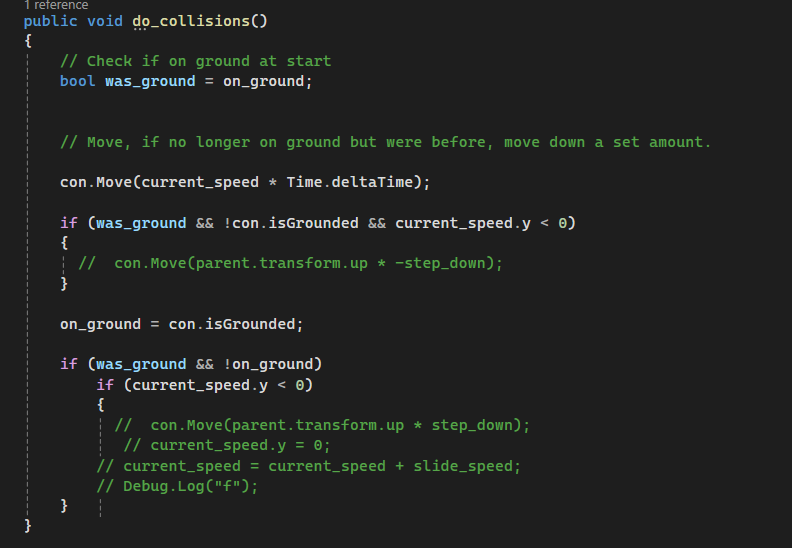
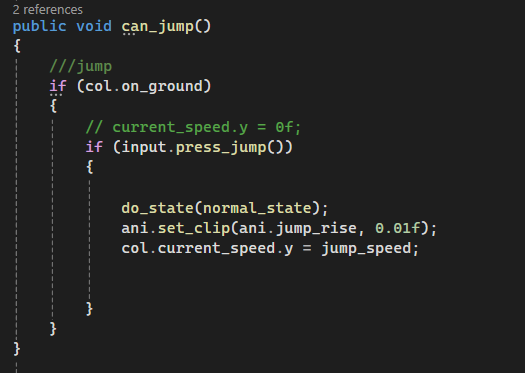 timid dove
timid breach
timid dove
timid breach
Show the full script.
But from this small snippet it looks like it's manually doing raycasts on the sides to detect obstacles.
If you show the rest we can probably see that it uses these raycast results to decide to move or not
So the problem has nothing to do with actual physics collisions
your movement script here is doing raycasts to determine when it can and can't move
so the fix would be to use an appropriate layermask with these raycasts
Also - in the future, when you share code, please use this: !code
flint portalBOT
Posting code
📃 Large Code Blocks
Use links to services like:
https://gdl.space/, https://paste.ofcode.org/, https://hatebin.com/, https://paste.myst.rs/, https://hastebin.com/
📃 Inline Code
Surround code with three backquotes. Not quotation marks.
To format as C#, add cs to the first line:
```cs
// Your code here
```
Add a comment with a line number if there is an error message.
timid breach
Hastebin is a free web-based pastebin service for storing and sharing text and code snippets with anyone. Get started now.
timid breach
timid dove
What is `PhysicsObject`?
i shared it , or if you mean the class itself, Its defined in unity

@timid dove i figured it out
thanks for being patient with me
silver moss
I had a suspicion that you are doing collision checks manually, I should've clarified more than asking "How is it moving? Rigidbody?" 😬
timid dove
timid breach
i shared it , or if you mean the class itself, Its defined in unity
i shared it , or if you mean the class itself, Its defined in unity
For the record - no it ain't.
 abstract prawn
I have a very challenging design problem I've been facing for a while, and I was wondering if anyone has any ideas how to implement this.
Effectively, I need a player to be able to move its rigidbody freely atop a makeshift conveyor belt. The challenge:
1.) The rigidbody doesn't actually make contact with the terrain, since the player actually hovers above the ground, so I can't rely on friction to do the job.
2.) Adding a flat velocity every frame won't work because that compounds over time and causes acceleration.
3.) I can't manually set the velocity to the rate of the conveyor belt since I want the player to be able to move atop the belt.
 timid dove
The rigidbody doesn't actually make contact with the terrain, since the player actually hovers above the ground, so I can't rely on friction to do the job.
I don't understand this part.
but the standard way to do a conveyor belt is, make the belt kinematic and do something like this:
Vector2 startPos;
Rigidbody2D rb;
Vector2 velocity = new (1, 0);

void Start() {
  startPos = rb.position;
}

void FixedUpdate() {
  Vector2 movement = velocity * Time.fixedDeltaTime;
  rb.position = startPos - movement;
  rb.MovePosition(startPos);
}```I don't understand this part.
Basically, to prevent snagging, and allow the player to pass over little bumps smoothly, the player just detects terrain and hovers above it. This means it doesn't actually collide with the ground, which means a conveyor can't physically push the player along.
timid dove
abstract prawn
> I don't understand this part.
Basically, to prevent snagging, and allow the p...
then you need to handle this yourself in code. I would use sort of a "friction-at-a-distance" kind of approach
Although preventing snagging seems like perhaps something that could be solved in other ways
but what I mean by friction-at-a-distance is that basically you would apply forces to the player similar to a friction force. i.e. if the velocity of the player is different from the velocity of the belt, you apply a force to the player in the direction of the difference between their velocities - proportional to said difference
i.e. if the player is travelling at the same speed as the belt, no force is needed
abstract prawn
timid dove
Although preventing snagging seems like perhaps something that could be solved i...
It's done as a sort of suspension system like in a car, it's to allow some springiness while passing up ledges and other terrain
abstract prawn
timid dove
i.e. if the player is travelling at the same speed as the belt, no force is need...
This kind of works, but it has a problem in that it would only get the rigidbody up to speed as opposed to adding the speed in the specified direction. For instance, moving along the conveyor wouldn't supply additional speed, so walking along it wouldn't make you any faster which is unintuitive
The best approximate solution I have right now is by moving a parent of the rigidbody while it's over the conveyor so the rigidbody receives that steady additional speed by inheritance
Then when it exits the conveyor, I add a little momentum to the rigidbody to give the illusion of the belt imparting momentum
The problem with this is that jumping on and off the conveyor causes a speed boost every time you jump off
This is a shockingly complex little puzzle to me
timid dove
abstract prawn
This kind of works, but it has a problem in that it would only get the rigidbody...
it really depends how your normal move code works
abstract prawn
Player has a top speed; accelerating will add speed in the forward direction until top speed is met
So given that, even with friction I'd have that to contend with I suppose
Which means moving the parent is probably the only logical thing to do
So it's pretty much figuring out how to apply the momentum on dismount that doesn't accrue when you jump up and down on the conveyor?
timid dove
abstract prawn
Player has a top speed; accelerating will add speed in the forward direction unt...
well that's your problem
you have this arbitrary top speed. Really when you're on the conveyor belt your arbitary top speed needs to account for that
abstract prawn
I suppose that's true, figuring out how to adjust the top speed according to the direction you're facing is interesting
Your top speed should also be less moving opposite the direction of the conveyor
Probably a dot product or something
timid dove
abstract prawn
Probably a dot product or something
it's not even that complicated. Just subtract the "velocity" of the surface below you from your current velocity, then do the max speed calculation.
i.e.
Vector2 velocityOfTheGround = Vector2.zero;
// do a raycast down
// if we hit conveyor belt then...
velocityOfTheGround = conveyorSpeed;

Vector2 currentSpeed = rb.velocity;
Vector2 relativeSpeed = currentSpeed - velocityOfTheGround;
float magnitude = relativeSpeed.magnitude; // or just check.x if you want only that
// apply speed limit
Vector2 clampedSpeed = LimitMySpeedHowever(relativeSpeed);
Vector2 newSpeed = relativeSpeed + velocityOfTheGround;
something along these lines
abstract prawn
Oh yeah! That is less complicated, thank you
I think this solution will work well!
timid dove
I have a player with a Character controller
You mean Unity's built in CharacterController component?
Or something else?
Because CharacterController is 3D-only
i tryed multiple OnCollision/Ontrigger methods.
Which ones? You may not have tried the correct ones.
then yeah you're trying to mix 3D and 2D physics
They do not interact.
Use a CapsuleCast or BoxCast solution. Check with a Box/CapsuleCast before moving your character and only move as far as you can based on the cast results
Lots of people have written them. Usually using a kinematic rigidbody2d and a solution like what I just mentioned with CapsuleCasting
But there is no direct equivalent component built in to Unity, no.
easier solution than what
Your options are:
- Find one someone else made
- Write your own
casting is easy though
so I'm not sure what the hangup is there
I don't understand, no
That's how CharacterController works
it does CapsuleCasts every time you move
But again
feel free to find a script someone else made.
there are hundreds/thousands of them
Another option I guess is use a Rigidbody-based controller with velocity and set your player's mass to 0
I thouyght you said you didn't want other things to get pushed
then you want a kinematic controller with capsulecasts
timid breach
//Check for left ledge!
leftLedgeRaycastHit = Physics2D.Raycast(new Vector2(transform.position.x - rayCastOffset.x, transform.position.y + rayCastOffset.y), Vector2.down, rayCastLength);
Debug.DrawRay(new Vector2(transform.position.x - rayCastOffset.x, transform.position.y + rayCastOffset.y), Vector2.down * rayCastLength, Color.green);
if (leftLedgeRaycastHit.collider == null) direction = 1;

// Check for right wall
RaycastHit2D rightWallRaycastHit = Physics2D.Raycast(new Vector2(transform.position.x, transform.position.y + rayCastOffset.y), Vector2.right, rayCastLength, rayCastLayerMask);
Debug.DrawRay(new Vector2(transform.position.x, transform.position.y + rayCastOffset.y), Vector2.right * rayCastLength, Color.red);

if (rightWallRaycastHit.collider != null)
{
    direction = -1;
    Debug.Log("-1");
    Debug.Log("Collided with: " + rightWallRaycastHit.collider.gameObject.name);
}

// Check for left wall
RaycastHit2D leftWallRaycastHit = Physics2D.Raycast(new Vector2(transform.position.x, transform.position.y + rayCastOffset.y), Vector2.left, rayCastLength, rayCastLayerMask);
Debug.DrawRay(new Vector2(transform.position.x, transform.position.y + rayCastOffset.y), Vector2.left * rayCastLength, Color.magenta);

if (leftWallRaycastHit.collider != null)
{
    direction = 1;
    Debug.Log("1");
    Debug.Log("Collided with: " + leftWallRaycastHit.collider.gameObject.name);
}
i have this code where i am using raycast2d to detect the walls and also the other enemies, but since enemies are on same layer called enemies, the raycasts are detecting the object itself and changing direction continuously
timid dove
timid breach
```
//Check for left ledge!
leftLedgeRaycastHit = Physics2D.Raycast(new Vector2(...
you could temporarily put the source of the raycast on a different layer
int oldLayer = gameObject.layer;
gameObject.layer = Physics2D.IgnoreRaycastLayer;

// do your raycasts here...

gameObject.layer = oldLayer;```Physics2D.IgnoreRaycastLayer
do i put a layer instead of this
timid dove
That is a layer
although actually seems like it's a mask not a layer
so yeah, put whatever layer you want
as long as it's a layer that isn't in the layermask you're using
timid breach
timid dove
That is a layer
can you guide me how can i add this raycast2d as child of an empty that is on IgnoreRaycastLayer so that i dont need to put whole gameObject on that layer
like do i create gameobject in the script as well or do i refer it using serializefield
timid dove
timid breach
can you guide me how can i add this raycast2d as child of an empty that is on Ig...
idk what you mean by add this raycast2d as child of an empty
You definitely don't want to "create a GameObject"...
timid breach
timid dove
```cs
int oldLayer = gameObject.layer;
gameObject.layer = Physics2D.IgnoreRaycas...
i cant do this as i am constantly checking for collisions in update function
timid dove
timid breach
i cant do this as i am constantly checking for collisions in update function
why can't you do this
what does Update have to do with anything
timid breach
wont it keep changing the layers
timid dove
Is that a problem for some reason?
the code changes the layer back when it's done
so it won't be visible to anything
 wintry pollen
I don't think I can chat there lol
wintry pollen
 manic fractal
Guys I am a rookie here just wondering if I can dynamically change material for line render based on some conditions
silver moss
manic fractal
Guys I am a rookie here just wondering if I can dynamically change material for ...
Not a physics question but yes, every renderer has a sharedMaterial (and material) property that you can change
manic fractal
silver moss
Not a physics question but yes, every renderer has a sharedMaterial (and materia...
Sorry and thank's
ashen swift
my guy's arm keeps coming apart

it gets fixed when i uncheck freeze positon x and y
but then the arm doesnt stay on the joint and rotates retardedly
 devout veldt
Hey guys, i'm having some weird behaviors with 2 rigidbodies of the same mass.
I have a little script that throw them at the same force, but the canon is sent like the mass doesn't matter, could you help me pls ?
Shynx 🙂

 timid dove
devout veldt
Hey guys, i'm having some weird behaviors with 2 rigidbodies of the same mass.
I...
timid dove
devout veldt
Hey guys, i'm having some weird behaviors with 2 rigidbodies of the same mass.
I...
show the code and the inspectors of the objects?
One possibility to check for is:
Is one or the other of the objects colliding the the player or something else as it's being thrown?
You can check this with a Debug.Log inside OnCollisionEnter
devout veldt
timid dove
show the code and the inspectors of the objects?
The code only apply a force on the throw event in the animation, i gave you the inspectors of the objects already.
I only have this strange behaviors with the canon, all the other items works correcly.
On the throw i simply teleport the object at the hand possition and i set a collision ignore in the item rigidbody so he doesn't collide with the player collisions
timid dove
devout veldt
The code only apply a force on the throw event in the animation, i gave you the ...
Can you check the collision idea with a log anyway? Maybe something is wrong with that setup
devout veldt
I'm running a test for the collision 🙂
timid dove
Also - do all such objects have NetworkTransforms etc? Maybe networking is causing an issue
Who is throwing this thing? The host? The server? A client? What's the network topology
devout veldt
I don't think so because it's the same struct for every objets, and the canon is the only one with the behavior
timid dove
My thoughts are that the main difference is the shape of the colliders
which may contribute to an unexpected collision somewhere
I also note there's a difference in collision detection mode on the Rigidbody
devout veldt
timid dove
which may contribute to an unexpected collision somewhere
I can confirm that no unespected collision happen during the throw
timid dove
I'm not sure then!
devout veldt
Can it have something to do with the 3D object ?
timid dove
try it and see
why kinematic though?
i forgot that 2D kinematic bodies can move with velocity
3D cannot
royal willow
so it only travels? travels in a certain direction only?
wdym by that
if your goal is to make it travel in a certain direction only and just delete it on inpact i would use translate()
timid dove
Letting the RIgidbody2D move it is much better than using Update and manually moving it
royal willow
i thought not having colliders or a rigidbody would increase performance?
timid dove
because the physics engine is native code and highly parallelized
royal willow
well if you didnt use the rb or any colliders that would increase performance?
timid dove
but then how do you do collision detection?
you need to say what you're comparing to
also no again, moving the objects all manually with Update is going to be super slow
royal willow
timid dove
but then how do you do collision detection?
you could use overlapsphere()
or a trigger
timid dove
royal willow
you could use `overlapsphere()`
how would you do that without a collider
🤔
those only detect colliders
royal willow
you just detect other colliders
timid dove
So now you're manually doing hundreds of overlapSphere calls?
in Update?
this is not going to be faster
now you're just trying (poorly) to recreate the spatial acceleration data structure that the physics engine already has built into it
which will be so much more optimized than anything you will ever write
I'm saying it's better than whatever manual collision detection scheme you are cooking up
everything has limits. You need to test on your target hardware to see what yours are
I'm not going to answer only with yes or no
of course you can do that
you will have to test if it is performant enough or not
thoise things exist for a reason - to be used
if you're satisfied why would you do something else
look into ECS
look into the job system.
royal willow
timid dove
So now you're manually doing hundreds of overlapSphere calls?
okay if hundreds of overlapsphere calls wouldnt do much for performance, would a trigger work? im having a hard time believing removing the RB and colliders (if not using a trigger) would reduce performance since physics objects have to look for collisions as well and apply physics.
unless the physics system is just that optimized, if thats the case then i would prefer that then
timid dove
royal willow
okay if hundreds of `overlapsphere` calls wouldnt do much for performance, would...
again a trigger would have to use colliders and rigidbodies
and yes the physics system is optimized for exactly this - detecting collisions quickly
royal willow
alright 👍
unique cave
royal willow
alright 👍
And triggers are far from optimized, in fact last time I heard, they can be significantly slower than collisions. Of course Triggers are optimized but the way they are implemented is suboptimal in some cases. If I remember correctly, every OnTriggerSomething method will check for the collisions independently and collisions are resolved as possible collision pairs in broad and narrow phases which makes it very fast
royal willow
unique cave
And triggers are far from optimized, in fact last time I heard, they can be sign...
okay
unique cave
royal willow
okay
Lets say you wanted to detect collisions between a player and 100 enemies. Using OnTriggerEnter for each enemy would be slow while on the single player it would be much better. For collisions there's no such big difference where you are detecting the collisions
royal willow
unique cave
Lets say you wanted to detect collisions between a player and 100 enemies. Using...
okay
 still stone
@silver moss Hey there, only just saw your message over in #💻┃unity-talk .
I'm using Character Joints, I used the Ragdoll Wizard to generate it.
 silver moss
Remind me what the issue was?
silver moss
So did you try enabling projection?
still stone
Not as of yet, literally just woke up
I'm going through all of the joints now
silver moss
Also try enabling Enable Adaptive Force in the physics settings
IIRC that helps with stability of chained joints
still stone
silver moss
Also try enabling ``Enable Adaptive Force`` in the physics settings
That likely won't help me in this case, mainly because I'm exporting this into an AssetBundle
silver moss
Should probably make a popup show up for the user if that setting is not enabled then
With the user I mean whoever uses your assetbundle, not the player
still stone
Gotcha
silver moss
Greater Default solver iterations could also help. Also in the physics settings
still stone
Enabling Projection still has a slight deformation, although it's insanely better!
Thanks for that 😄
silver moss
Could try a lower Projection Distance too
That's the max distance it can stretch out before it snaps back to place
still stone
Alright thanks I'll mess around with that a bit!
timid dove
still stone
Do you happen to know which netcode solution plateup uses?
still stone
timid dove
Do you happen to know which netcode solution plateup uses?
iirc they use their own P2P system
Uses Steam Matchmaking for the initial connection, from there it's custom P2P.
ashen swift
ashen swift
my guy's arm keeps coming apart
can anyone answer this
 dense remnant
Hi guys, I'm facing a problem with a collider. I'm making a game where the player is 2d, but the enviorment is 3d. I have a warship model, but for some reason, when I try to add a 2d collider to it, so the player can't collide, its facing the wrong direction. If you look in the screenshot provided, you can see the problem I'm facing. Hope someone knows a fix. Rotating it doesn't seem to work.

 open quail
Hello all, I have a question about physics and collisions on simple primitive gameobjects.
I am currently on the Counting Prototype in the programming learning path for Unity.
They provide a cube that is made with basic primitive shapes and parented under a single gameobject.
Each of the walls of the cube, is a cube with its own collider and rigidbody.
The balls also have their own colliders and rigidbodies.
Everything is fine, the balls drop into the box and collect in the box. However, if I try to move the box using transform.position, or physics rb.AddForce(), the balls go through the walls of the box.
I have tried to set collision detection to continuous on all the walls and balls. I have tried to make the walls much bigger, and I have also made the balls much bigger. I have tried to set the box moveSpeed to be slower, but no matter what, the balls keep falling through the side walls when I move left or right with the box.
On the parent gameobject, of the box, there is a boxcollider set as a trigger, but even if I remove it, it doesnt help.
Can creating a box with multiple primitive cubes, cause craziness with collisions, and cause them not to work
 timid dove
open quail
Hello all, I have a question about physics and collisions on simple primitive ga...
timid dove
open quail
Hello all, I have a question about physics and collisions on simple primitive ga...
The problem likely lies with how you are moving the box
Although the settings on your bodies and the overall physics settings may play a part
open quail
timid dove
The problem likely lies with how you are moving the box
I tried addForce and just transform +=
timid dove
You will definitely not want to move via the Transform
open quail
Interesting. I was up all night, I went to bed so sad
timid dove
Showing how the collider(s) for the box are set up may also help
open quail
timid dove
Showing how the collider(s) for the box are set up may also help
Alright, when I get home later, I will provide further details. Thank you for your response!
 hardy tendon
I have an issue I can't quite grasp. I have a wall box made of box colliders 2d. I have ball with circle collider, max bounciness and a rigidbody2d with no material.
When the ball hits a wall the x velocity seems to be completly absorbed same for the top wall with the y velocity. Keeping the ball stuck in an up/down or left right loop. What could it be?
 timid dove
hardy tendon
I have an issue I can't quite grasp. I have a wall box made of box colliders 2d....
timid dove
hardy tendon
I have an issue I can't quite grasp. I have a wall box made of box colliders 2d....
Try a frictionless meterial. I think what's happening is friction is trying to convert some linear velocity into rotation. But you have constrained the rotation on the Rigidbody2D. So that energy just disappears
hardy tendon
timid dove
Try a frictionless meterial. I think what's happening is friction is trying to c...
Bouncy is like this
 timid dove
hardy tendon
Bouncy is like this
timid dove
hardy tendon
Bouncy is like this
is it on both objects?
unique cave
Could also be your script doing something wonky in case you use one to control the movement
hardy tendon
On both colliders, not on RBs
hardy tendon
unique cave
Could also be your script doing something wonky in case you use one to control t...
My wall is just wall 🙂
My ball is just a rigidbody getting force from elsewhere
 silver moss
dense remnant
Hi guys, I'm facing a problem with a collider. I'm making a game where the playe...
silver moss
dense remnant
Hi guys, I'm facing a problem with a collider. I'm making a game where the playe...
Did you add a rigidbody to the warship?
unique cave
hardy tendon
My wall is just wall 🙂
My ball is just a rigidbody getting force from elsewhere
what kind of forces? could those affect the bouncing?
hardy tendon
nope just _rigidbody.AddForce(...) when colliding with the player
silver moss
@dense remnant What is facing the wrong direction, the warship? You could just fix the model's rotation or put the meshrenderer on an empty child and rotate the child
unique cave
hardy tendon
nope just _rigidbody.AddForce(...) when colliding with the player
Could you record a short video showing what it looks like when this happens?
hardy tendon
unique cave
Could you record a short video showing what it looks like when this happens?
is there a built in recording system? i don't recall or do i have to use obs?
unique cave
hardy tendon
is there a built in recording system? i don't recall or do i have to use obs?
I don't think there is. Use any screen recording software
silver moss
Save it as something like mp4 so it embeds here in discord
hardy tendon
unique cave
Only point where I saw some kind of absorption happen was when the ball hit the paddle at an angle. Where exactly the problem is?
unique cave
what about it?
hardy tendon
that could be one thing but it doesn-t explain this

the top wall completly absorbed the ball y velocity
and now is in an endless loop left to right
unique cave
I'm just confused as to what I'm supposed to see
hardy tendon
I drew in green the box of the game, the ball came from the bottom with a small angle on the x and somehow the wall fully absorbed the y velocity and now it's in an endless loop left to right

Sorry if Iàm not explaining perfectly
unique cave
That doesn't show in the video though
hardy tendon
Ill try to replicate the this example
hardy tendon
unique cave
That doesn't show in the video though
unique cave
hardy tendon
how did it get there?
unique cave
Does it happen only sometimes?
hardy tendon
sometimes, probably when the angle is veeery tiny (probably)
unique cave
I don't really know what to say, sorry
I cannot really say I understand the issue well enough to suggest any concrete solutions or debugging steps
royal willow
you could use vector3.reflect if this is game is similar to pong
hardy tendon
its arkanoid so kinda similar
royal willow
then i believe vector3.reflect would work for you https://docs.unity3d.com/ScriptReference/Vector3.Reflect.html

it could also be something in your code resetting the velocity or the rigidbody getting stuck in the wall for a split second
does it happen with or without the physics material?
hardy tendon
with the material on both colliders
mind the wall has only collider, the ball has rb too with no material
royal willow
so when you do not have it, it doesnt act this way?
hardy tendon
always does it
 halcyon knot
please help me basically my issue is that I have a gun in my game with a rigidbody compenet with Kinematics on but still when I move my camera, the gun just goes flying and doesnt follow the player. I know it has something to do with the rigidbody compoenent attacted to the gun because when I turn it off, it works fine
i fixed the solution was to set interpolate to none
dense remnant
silver moss
Did you add a rigidbody to the warship?
I managed to do it on my own. I changed my player to use a 3d collider and freezing it on the other axis and then just using a mesh collider for 3d obejcts
timid dove
Physics OverlapSphere
You may get a small list of things and then you just iterate over it to find the closest
timid dove
Use a collider in what sense? Colliders are involved no matter what
silver moss
Trigger colliders or?
With OnCollisionEnter you can check which self collider was hit from the Collision parameter. Get the contact point(s) which has properties for the involved colliders:
https://docs.unity3d.com/ScriptReference/ContactPoint.html
So collision.GetContact(0).thisCollider or it could've been otherCollider
Sure but does it have a rigidbody?
If yes, all collision messages will be sent to the object that has the rigidbody instead of the child object that has the collider
So you'd need to differentiate them anyway
As for triggers, IIRC you can't check which self trigger was hit, so it would need to be on a separate object
Edit: Just checked and Trigger messages get sent to both the collider and the rigidbody
Easiest way would be to put them on different children and give those children different scripts, have OnCollisionEnter on both of them
 last hemlock
i think this is the right chat for this topic, but if not ill take it to a different one if needed, but can anyone help explain how to use wheel colliders correctly? cos so far they seem to be causing me more drama then help so far, and, from what i can gather, keep seeming to lock for some reason on start of play and i cant get them to roll freely, unless im doing something wrong with them?
ok i realised one mistake for them which i have fixed so far
but im still confused why they always lock up and wont budge no matter how much force i put into the object
 dreamy crater
 dreamy crater
dreamy crater
dreamy crater
Can anyone do my homework 👉 👈
 hasty forge
dreamy crater
Can anyone do my homework 👉 👈
hasty forge
dreamy crater
Can anyone do my homework 👉 👈
make a physics simulator
dreamy crater
hasty forge
make a physics simulator
r u gud at physics
hasty forge
i "voted it off" my schedule
so that means i never really got past gravity, elecricity, light and soundwaves
dreamy crater
hasty forge
so that means i never really got past gravity, elecricity, light and soundwaves
mechanics
 heady ocean
I cant seem to get my character to collide with the wall and I've tried changing the sorting layers messing around with the tilemap collider and the rigidbody and the boxcollider2d but nothings really working.
 timid dove
heady ocean
I cant seem to get my character to collide with the wall and I've tried changing...
timid dove
heady ocean
I cant seem to get my character to collide with the wall and I've tried changing...
What components are on your character?
How are you moving your character?
You would need to be moving it via physics to get collisions
heady ocean
im just using a grid based movement script
timid dove
heady ocean
im just using a grid based movement script
Well why would that respect physics collisions then?
 bitter haven
https://www.youtube.com/watch?v=qdskE8PJy6Q&ab_channel=ToyfulGames
So, my bro and I are trying to figure this out.
We've managed to make moving around and jumping somewhat stable. But we've run into a snag.
Player-Input rigidbody forces and outside rigidbody forces are both being decelerated by the speed cap. And we want to make it so that that doesn't happen for outside forces.

A detailed look at how we built our physics-based character controller in Unity for our game Very Very Valet - available for Nintendo Switch, PS5, and Steam
BUY NOW!! https://toyful.games/vvv-buy
~ More from Toyful Games ~
- Animation Deep Dive mentioned in the video - https://toyful.games/blog/character-animations
- Custom Car Physics in Unity...
ashen swift
how do u stop freeze position x and y from freezing in global space
and only in local space
cuz my guy's arm keeps coming apart
 empty matrix
Is there a way to make a triangle collider besides a mesh collider?
 empty matrix
silver moss
Nope
empty matrix
silver moss
Nope
are there any options for what to do with a triangle roof?
silver moss
Whats wrong with meshcollider?
If you are concerned about performance, its not bad at all when it comes to static objects
inner thistle
You can make a simplified mesh and add a mesh collider to that instead of the actual roof object
empty matrix
silver moss
If you are concerned about performance, its not bad at all when it comes to stat...
Please note that there are holes in the roof, which players may be able to fall through. If I put a mesh collider, the holes will also be under the collider and the players will levitate in the air
silver moss
Thats why you use a simplified mesh like Nitku mentioned
Or at least set the meshcollider to convex so it doesnt have holes
Although I dont understand the second part of you message 🤔
Do you need accurate collisions or no? You want holes or no?
empty matrix
silver moss
Do you need accurate collisions or no? You want holes or no?
If I put a mesh collider, the holes will also be under the collider
silver moss
Sorry but I dont understand or see the issue with that
empty matrix
silver moss
Sorry but I dont understand or see the issue with that
Well, I'm standing with my feet on the hole, I should be falling through, but I'm levitating over the hole...
empty matrix
silver moss
And the inspector of the mesh collider
 silver moss
Uncheck "convex" if you want to have physical holes
empty matrix
silver moss
Uncheck "convex" if you want to have physical holes
Really??
silver moss
Really!
It will make the collider invisible in the editor but thats because you have the same mesh on the mesh filter
empty matrix
silver moss
Really!
It's work... Thank you very much 0_0
 olive fern

 short bolt
Are WheelJoint2D useable? They don't seem to make sense, they float around like balloons and don't seem to behave like wheels
wispy hemlock
Hi all. Having a really weird issue with Colliders etc.
Can anyone give me any ideas on what possible issues could be causing this behaviour?
Everything has a RigidBody, colliders set up correctly etc.
Very very confused as to why some work and some don't.

 silver moss
wispy hemlock
Hi all. Having a really weird issue with Colliders etc.
Can anyone give me any...
silver moss
wispy hemlock
Hi all. Having a really weird issue with Colliders etc.
Can anyone give me any...
Show some collider settings, how do you move the character etc.
wispy hemlock
silver moss
Show some collider settings, how do you move the character etc.
Rover and Player Collider settings.
And Player Movement Script


Hastebin is a free web-based pastebin service for storing and sharing text and code snippets with anyone. Get started now.
silver moss
wispy hemlock
Rover and Player Collider settings.
And Player Movement Script
https://hastebi...
Moving your rigidbody via the transform will not produce good collisions
This includes playerRoot.Translate and possibly playerRoot.Rotate (which might not be a problem on a capsule)
wispy hemlock
silver moss
This includes ``playerRoot.Translate`` and possibly ``playerRoot.Rotate`` (which...
Right okay. Time for a rethink then I guess. lol. Thank you.
Any suggestions? 😕
silver moss
Use the rigidbody to move it. velocity or AddForce
wispy hemlock
Okay, thank you.
wispy hemlock
Is there any kind of calculation for figuring out necessary 'jump force' ?
silver moss
wispy hemlock
Is there any kind of calculation for figuring out necessary 'jump force' ?
Wdym by necessary?
Usually its a predefined amount of force
wispy hemlock
silver moss
Wdym by necessary?
It's okay, I found something that works nicely.
wispy hemlock
jumpForce = Mathf.Sqrt(requiredJumpHeight * (Physics.gravity.y * 1) * -2) * playerRigidBody.mass;
playerRigidBody.AddForce(jumpForce * playerRoot.up, ForceMode.Impulse);
Pretty cool. Give it a required jump height and it works everything out based on your rb settings.
Okay, I've had a look around, but tbh I'm not 100% sure what I should look for. I have 4 objects raycasting to the ground on each corner of my vehicle. How can I get a rotation value based on the heights of those raycast hit points? I think the thing I need to look at is dotproduct?
silver moss
wispy hemlock
Okay, I've had a look around, but tbh I'm not 100% sure what I should look for. ...
I'd say look at cross product
Or make a plane (or 2 planes) with the constructor that takes 3 positions and use the plane's normal
https://docs.unity3d.com/ScriptReference/Plane.html
https://docs.unity3d.com/ScriptReference/Plane-ctor.html
But yeah the cross prodct should be pretty simple:cs var backFront = frontWheel - backWheel; var leftRight = rightWheel - leftWheel; var cross = cross(backFront, leftRight);
Something along those lines
wispy hemlock
silver moss
But yeah the cross prodct should be pretty simple:```cs
var backFront = frontWhe...
Okay, so if I understand cross product, that code would give me a point (Vector3?) in the middle of all 4 ray casts? (I'm making a hover vehicle, the body rotation is the last thing I need to do)
silver moss
It doesn't give you a point, it gives you a direction that would point upwards relative to the wheels if you do it right
f = front, b = back

The blue lines are the vectors you put into Vector3.Cross. Green is the result
If you want to include all 4 wheels then you need to do it twice and maybe Slerp between those two cross products
wispy hemlock
Aaah okay.
Quick video for reference. So this would allow me to keep the vehicle 'tilted' in relation to the terrain?
 silver moss
Yes
wispy hemlock
Awesome. Thank you very much 🙂
wispy hemlock
Haven't tested yet. But does this look about right?
Vector3 frontLR = FL - FR;  //Front Left - Front Right;
Vector3 rearLR = RL - RR;   //Rear Left - Rear Right;
Vector3 crossLeftRight = Vector3.Cross(frontLR, rearLR); // Left to Right (Front & Back)

Vector3 leftFR = FL - RL;  //Front Left - Rear Left
Vector3 rightFR = FR - RR; //Front Right = Rear Right
Vector3 crossFrontBack = Vector3.Cross(leftFR, rightFR);  // Front to Back (Left & Right)

Vector3 crossFull = Vector3.Cross(crossLeftRight, crossFrontBack);

vehicleRotation = Quaternion.Euler(crossFull);
Nah, for the cross you need to give perpendicular directions, not colinear directions
So a sideways vector and a front-back vector
And this is nonsense: cs vehicleRotation = Quaternion.Euler(crossFull);
A direction doesn't work as an euler angle. Maybe you want LookRotation combined with something
wispy hemlock
Right okay, I think I get it (just had another look at your example). and of course it's nonsense. lol. Sorry. Getting a bit late for me so a bit tired. Thank you for taking the time to help. Think I'm going to call it a night and come back to it in the morning 🙂
Just really quickly sorry, just so I've got it straight in my head.
Green = 1st cross
Red = 2nd cross?
 silver moss
Yep
wispy hemlock
Awesome. thanks 🙂
silver moss
Oh and the crossfull part in your example wont work
Just do Vector3.Slerp(crossA, crossB, 0.5f) to get an average
wispy hemlock
Ah, gotcha.
 fast thistle
This is a good place to ask about Quaternions, right?
I have a series of rotation transformations q1*q2*q3=Q , and I want to get Q^-1. To calculate that, I just have to invert the order and invert each of the quaternions, correct? So Q^-1=(q3^-1)*(q2^-1)*(q1^-1), correct?
fast thistle
I have a series of rotation
 cosmic mica
Hello, I've been having problems with Rigidbody.SetDensity(float density)
It does internally change the mass for the physics simulation (reacts to forces appropiately), but the Rigidbody.mass property remains unchanged, so defeats the purpose if you want to use the resulting value.
Does this happen to anybody else?
PD: unity should really expose the internals they use to compute a rigidbody/compoundcollider volume...
PD2: this happens both in Unity 2021 and Unity 6
narrow pier
cosmic mica
Hello, I've been having problems with Rigidbody.SetDensity(float density)
It doe...
Unity most certainly simply uses some PhysX API to calculate RB's mass on basis of density.
If you're advanced enough, look at PhysX source code.
In this extensions file (https://github.com/NVIDIA-Omniverse/PhysX/blob/19542b61c4fee8e5aaa97f10455933488383d092/physx/source/physxextensions/src/ExtRigidBodyExt.cpp) you can refer to computeMassAndInertia and updateMassAndInertia methods or others that are considering density in their calculations. And of course search through the PhysX docs.

GitHub
NVIDIA PhysX SDK. Contribute to NVIDIA-Omniverse/PhysX development by creating an account on GitHub.
cosmic mica
Will do!
 dull adder
I have a 3D voxel array, how do I create a collider for the voxels?
silver moss
dull adder
I have a 3D voxel array, how do I create a collider for the voxels?
Maybe mesh colliders? In chunks, obviously
And some meshing algo like "greedy meshing"
There's a lot of resources on this stuff online
dull adder
silver moss
Maybe mesh colliders? In chunks, obviously
Don't mesh colliders have to be convex when used in a rigidbody