#⚛️┃physics
1 messages · Page 9 of 1
 timid dove
I meant that the ground can either have no Rigidbody or a kinematic Rigidbody and it won't fall
 stuck bay
my rigidbody settings are the default ones I never changed them
stuck bay
timid dove
Both objects seem to be below the cube based on y position though
i moved the cube a little bit below my objects and when i hit play now their both frozen in the air
timid dove
stuck bay
my rigidbody settings are the default ones I never changed them
Show them
And show where these objects actually are
And the hierarchy
It's hard to help when I can't really see anything
stuck bay
timid dove
It's hard to help when I can't really see anything


when i hit play now
they both go up in the air for like a second then freeze in the air
stuck bay
timid dove
Where's the collider gizmos??
what is that
timid dove
 stuck bay
and their above the floor
timid dove
That green box is your collider @stuck bay
Your mesh is offset from the object's actual location
The collider is inside the floor
Hence popping up in the air
You need to actually pay attention to the positions of the mesh and the colliders etc
You'll also generally want to use the Move tool

So you can see your object's pivot
stuck bay
my car is over the road now
and its still floating
and when i put it below or right above the floor it falls through or floats
im not sure where i should put it
is using the box colider even the right thing
to add car physics & to stop them from falling through the floor
stuck bay
stuck bay
to add car physics & to stop them from falling through the floor
i only had a rigidbody at first and i added a box colider because i thought it would to that
 shell dove
Hello, i want my player not walking around on ice so I made an phsyicsmaterial, and changed everthing to 0 to make it everthing from ice but when i assign it to the floor, the player is still walking around like it would be ice, do someone know how to solve this issue, and sorry if it is a bad question. Thanks!


 stuck bay
to add car physics & to stop them from falling through the floor
stuck bay
stuck bay
to add car physics & to stop them from falling through the floor
nvm after looking online I added my box colider around my car and that fixed it
timid dove
shell dove
Hello, i want my player not walking around on ice so I made an phsyicsmaterial, ...
0 means no friction
No friction is like ice
If you want friction don't make it 0
(there's friction by default btw)
 stone pond
how do I stop the rigidbody collision between the prefabs?
I don't want them to hit one another
 torpid bolt
Hey yall, i got a weird question, my player character functions like this hitbox wise, they have a circle hitbox on the bottom that is half their size and a square hitbox on top for their torso, when crouching, the top one disables and the crouch anim starts, but this causes a problem, whenever the player jumps onto a corner of a surface, because its a circle hitbox, they can walk up the corner instead of just falling off, if i turn off the slippery physics for the circle collider, they just get stuck, any ideas on how to fix this?
they also slide off if they stand still on the edge
timid dove
stone pond
how do I stop the rigidbody collision between the prefabs?
layer based collisions
or
Physics.IgnoreCollision between their specific colliders
timid dove
torpid bolt
Hey yall, i got a weird question, my player character functions like this hitbo...
use a box instead of a circle?
torpid bolt
I guess i should try that, im using this project to learn unity and followed brackeys tutorial and he provided a script for it that im not 100% fluent with yet, but ill try
 river hazel
Hello, might be a basic question, but I was wondering why I keep falling off the terrain edges? Thanks!
 shy walrus
Anyone know why my particles with world collission seem to fall through the floor planes after colliding with them?
they clearly do collide, but fail to stay sitting on them. It's as if they have an inbuilt mechanism to only collide with each plane once, then disregard it
 rotund lagoon
I want to do a Physics2D.CircleCastAll across a tilemap collider... but for some reason I'm only getting the first hit, not all the tiles which were hit. How can I detect all tiles that have been hit by the raycast/
 open widget
Colliders question:
I want to instantiate multiple gameobjects in one location
Problem: due to them having colliders, upon spawning, they instantly exert force on each other causing them to "explode" from each other
Is there a way similar to rigid velocity limit to prevent this, and make them move away in a slower and smoother manner?
 muted field
I hope this is the right channel, I'm having trouble adding a mesh collider to a cylinder.
- I create a Cylinder
- Remove Capsule Collider
- Add Mesh Collider, it autoselects Cylinder as Mesh
- Add Rigidbody
- It falls through the floor
Any ideas?
Ah, setting convex seems to solve it? Hm
 quartz wyvern
Trying to set vertices in my 2D Polygon collider but i get this error:
Failed setting path. Index is out of bounds.
UnityEngine.PolygonCollider2D:SetPath (int,UnityEngine.Vector2[])
for this second line:
        _polygon2D.SetPath(0, _verts.ToArray());
        _polygon2D.SetPath(1, _holes.ToArray()); // here
any one know why that is ?
do i have to set how many paths before hand ?
timid dove
quartz wyvern
Trying to set vertices in my 2D Polygon collider but i get this error:
```
Faile...
You need to set https://docs.unity3d.com/ScriptReference/PolygonCollider2D-pathCount.html first
quartz wyvern
ah thank you @timid dove don't suppose you know if unity has their source code available for how they triangulate the polygons?
 ionic knot
whenever I move the PlaneWithHole slightly, its Mesh Collider will collide with the Cylinder correct
but If move it after the Cylinder has fallen half way through the plane, it will just ignore the upper half collider and went through it
and it's the same in multiple game engines, so I assume there is something I'm missing here
 zealous phoenix
Anybody know what's going on? I'm using the Character Controller and no scripts introducing motion to the player.
The only script I have is to make the player move around. If I have gravity disabled on the character's rigid body like I want, it just continues to go up.
timid dove
zealous phoenix
Anybody know what's going on? I'm using the Character Controller and no scripts ...
You should not have a Rigidbody and a CharacterController on the same object
Unless the Rigidbody is marked as Kinematic
 toxic raptor
hi im making brick breacker but my ball is sticking the wall . How can i solve this issue ?
 carmine basin
I have a very odd use case that I pretty much need - The concept is a simultaneous turn-based ragdoll fighter, where you control the joints of your character to fight.
While the players are planning their turns, I need to somehow freeze the rigidbodies of the characters, but still display a ghost/silhouette, showing the outcome of the move.
Would it be possible to do the following at the end of a turn?
- Store the orientation, velocity and angular velocity of the rigidbody
- Make them kinematic
then - make them move again
- Restore the orientation, velocity and angular velocity
The intention is that the player will get X seconds to make their turn and confirm, and when the turn begins, the velocities and orientation will be restored so that the movements will still be as normal
 wind meadow
not sure if it goes here but for coroutines. Is it possible for a coroutine function to have a waitforseconds and waituntil albeit separated by say an if/else block?
 unique cave
wind meadow
not sure if it goes here but for coroutines. Is it possible for a coroutine func...
unique cave
wind meadow
not sure if it goes here but for coroutines. Is it possible for a coroutine func...
that doesn't sound like it has anything to do with physics. ask on one of those scripting channels
wind meadow
yeah i was figured
zealous phoenix
timid dove
You should not have a Rigidbody _and_ a CharacterController on the same object
Yeah, I realized that might have been the problem. Thanks for clarifying.
 remote dirge
why.
The player has a bean collider and a Rigibody attached. The Rigibody is moved via modifying its velocity in FixedUpdate(). The collider has continuous collision detection.
The body decides to go to space when going over a step like shown in the gif.
why.
More information: the y changes exponentially after that. I'm assuming the velocity keeps being set to a higher number because the physics solver still thinks we are no that step?
Edit: forgot a question mark

also I don't know why doesn't the gif show the entire thing, but considering the FPS, it can't. Just imagine the blue dude is gone
timid dove
remote dirge
why.
The player has a bean collider and a Rigibody attached. The Rigibody is mov...
could be an issue in your code
but yeah the video doesn't show much
can you show the code?
remote dirge
  Vector3 movementVector = new Vector3(moveInput.x, rb.velocity.y, moveInput.y);
  rb.MovePosition(transform.position + movementVector);
I thought you said you were moving via "modifying its velocity in FixedUpdate()"
remote dirge
yea I changed it rn and my brain didn't register it
timid dove
anyway this:
new Vector3(moveInput.x, rb.velocity.y, moveInput.y); is not generally correct.
remote dirge
but moveposition seems to work
timid dove
If this is in FixedUpdate I'd at very least expect:
new Vector3(moveInput.x, rb.velocity.y * Time.fixedDeltaTime, moveInput.y);
remote dirge
rb.velocity = movementVector * movementSpeed; this is the old way
timid dove
remote dirge
`rb.velocity = movementVector * movementSpeed;` this is the old way
uhh yeah that'd do it too because that's multiplying the existing y velocity by whatever your movement speed is each frame
which will send you rocketing into the sky
since rb.velocity.y is a component of movementVector
remote dirge
timid dove
If this is in FixedUpdate I'd at very least expect:
`new Vector3(moveInput.x, rb...
that's extremely incorrect considering that the rb.velocity is being changed by Unity every physics call.
timid dove
remote dirge
that's extremely incorrect considering that the rb.velocity is being changed by ...
Well you;'re using MovePosition which completely overwrites / ignores velocity anyway
so you're wrong about that
I wouldn't expect MovePosition to ever be used with rb.velocity anyway
remote dirge
the moveInput is corrected with Time.fixedDeltaTime already
timid dove
they - shouldn't really mix at all
timid dove
remote dirge
the moveInput is corrected with Time.fixedDeltaTime already
Ok but the y component is NOT
that's your problem
and why I suggested what I did
you only corrected the x and z
If you let the physics simulation do its thing - yes the velocity will automatically use fixedDeltaTime.
But you're not doing that - you're using MovePosition
remote dirge
the y component IS already being modified by unity
multiplying the Y component like that only makes it go way slower than it should
remote dirge
timid dove
If you let the physics simulation do its thing - yes the velocity will automatic...
I sent the old way a couple messages ago
rb.velocity = movementVector * movementSpeed; this is how I used to do it
timid dove
yeah and again if movementVector includes rb.velocity.y already then it's a problem
say movementSpeed is 5 then you will be multiplying the y velocity by 5 every frame
hence - rocketship
timid dove
I think you want this:
rb.velocity = new Vector3(moveInput.x, rb.velocity.y, moveInput.y);``` but you'd have to get rid of the previous deltaTime multiplication into moveInput hereit just makes the character fall insanely slow
timid dove
it won't affect y velocity at all
remote dirge
I'll just stick with move position for now
timid dove
remote dirge
it just makes the character fall insanely slow
sounds like you're later multiplying deltaTime in
basically you're just having issues with your order of operations etc right now
remote dirge
no I multiply the input
moveInput = new Vector3(Input.GetAxisRaw("Horizontal"), Input.GetAxisRaw("Vertical")) * movementSpeed * Time.fixedDeltaTime;
oh also I don't know why is there two movementspeeds
oh right I was debugging something
timid dove
If you do this:
moveInput = new Vector3(Input.GetAxisRaw("Horizontal"), Input.GetAxisRaw("Vertical")) * movementSpeed;
rb.velocity = new Vector3(moveInput.x, rb.velocity.y, moveInput.y);``` it should work properly(deleting any other MovePosition lines etc...)
 primal remnant
Bit of a strange issue i'm having. I am I'm calling RaycastAll() toward the ground to check for colliders in a certain Layer. all works fine, except for the colliders that are parented under gameobjects with rigidbodies. they are never found. if i unparent the collider, it will find it just fine. if i delete the rigidbody, it will also start detecting it.
EDIT: seems to be like that on purpose. if i add a rigidbody to the child collider it will now function properly
timid dove
primal remnant
Bit of a strange issue i'm having. I am I'm calling RaycastAll() toward the grou...
Note that RaycastHit has:
.collider .rigidbody and .transform and they all do subtly different things
Pay careful care about which you're using
 golden oriole
The transparent object has the Physics material seen on the right side attatched to it. But for some reason, it doesn't recognize it at the start (as seen by me throwing something at it with no bounce happening). Only once I edit it, even if I return it to the original value of 0.5 afterwards, it starts working again. Anyone know why that could be?
Notably, it worked fine for the past 2+ weeks since i implemented it, just today It decided to stop working, but I can't figure out what I did to cause an interaction like this. (No physics material, nor their values are changed in code, nor does the transparent object have any type of script attatched)
 dusty trout
How do you make a custom constraint?
timid dove
dusty trout
How do you make a custom constraint?
what kind of constraint are we talking about
dusty trout
timid dove
what kind of constraint are we talking about
For instance, a custom Parent constraint
Ones that don't require rigging
I found info on Google about a year ago and was able to make a two-handed constraint, but I can't find anything anymore...
timid dove
Unity has a Parent Constraint
that doesn't require rigging
not really a physics related thing though
Are we talking about like.. physics joints? Or what?
dusty trout
At the moment I want to make a locked joint with struts. (Unity's are to sporadic...)
But I would also like to know, in General, how to make custom constraints for Any future constraint I would like to make.
Really just looking for Any example of a custom constraint that I can use as an example...
dusty trout
timid dove
that doesn't require rigging
Sorry, I didn't see your quick reply till now. I'll try to check back sooner...
timid dove
dusty trout
At the moment I want to make a locked joint with struts. (Unity's are to sporadi...
Hav eyou looked into Articulation Bodies and Articulation Joints?
dusty trout
timid dove
Hav eyou looked into Articulation Bodies and Articulation Joints?
Yes, I spent hours on it and came to the conclusion that this would not work either.
But even so, I would really like to know how to make Any Custom constraint.
Is it possible?
timid dove
If you're talking about custom joints, I don't think so
At least not within their framework of Joints. You can of course write a script that manipulates Rigidbodies however you please
dusty trout
It turns out that the custom two-handed constraint that I had made a year ago was an extension of the Animation Rigging package:
https://www.youtube.com/watch?v=xwwK0lAlSyY

The Animation Rigging package can be extended with C# to enable precise results for specific gameplay needs. In this session, Unity Animation Developer Sven Santema demonstrates how to build custom rig constraints in C#. You'll see how you can easily extend the package to add secondary motions on your character rigs at runtime and how you can cr...
dusty trout
timid dove
At least not within their framework of Joints. You can of course write a script ...
Ok, thanks for you feedback
quartz wyvern
if an RB is kinematic can i update it via transform.position or do i have to use rb.position ?
for things like triggers to still work accurately
 last geode
anybody know why the left model works and the right model doesn't?

 restive maple
how do I get my character's arm to flop backwards while they run

like a physics based flop
 frigid spindle
why does my ragdoll do that
 restive sinew
I have been working on creating a Car Racing game, and despite watching several videos, I find this problem to be persistent: The car's wheels (driven by corresponding wheel collider game objects, fall through the surface of the ground object when the Play button is pressed..
 tacit laurel
can one scene have multiple physics "worlds"? i need to timescale 0 the game while in the creature editor
looks like it's per scene
 fallow wyvern
I just converted my player to Is Trigger and now it is sinking through the floor. I do need it enabled because I'm checking if it's colliding from another object
How can i get it to stop sinking through the floor
oh i see, is trigger stops the collision mechanic and just makes it an object you can pass through
last geode
last geode
anybody know why the left model works and the right model doesn't?
if it helps im using this tutorial: https://www.youtube.com/watch?v=iiNt4Z_0lU8&t=6s&ab_channel=HappyChuckProgramming

Recreate BILLY From KARLSON | Unity Inverse Kinematic Ragdolls
Hey guys, I know it's been a bit... Actually maybe a while. But I am trying to get back into youtube and I am starting off with active ragdolls with inverse kinematics like the ones you've probably seen in Dani's videos. This is also known as procedural animation. With this we also ...
 gleaming gorge
Any idea on how to make a charactercontroller 'fat' but without making them able to climb obstacles?
 neat heart
How do I go about having per-voxel collision detection with my obj files exported from MagicaVoxel?
unique cave
neat heart
How do I go about having per-voxel collision detection with my obj files exporte...
PhysX is not voxel physics engine. You can obviously add as many box colliders to the objects as you want to but it may not end up being as performant as you want, especially with large maps with lots of details
timid dove
gleaming gorge
Any idea on how to make a charactercontroller 'fat' but without making them able...
Increase radius and decrease step height
neat heart
I got my player controller here, which is supposed to check when the player is standing on the ground/on a solid surface: https://paste.helpch.at/poyojasija.csharp
For some reason though, IsOnGround() always returns true no matter what
timid dove
neat heart
For some reason though, IsOnGround() always returns true no matter what
you should check what object your raycast is hitting
neat heart
I'm not sure how i'd do that
Also, sidenote: OnDrawGizmos doesnt seem to be working, not sure if I am doing something wrong with that
hmm for some reason it's always null
Though the player definitely has an object under him
timid dove
neat heart
I'm not sure how i'd do that
Using hte raycast results of course. You'll have to switch to an override that includes a RaycastHit
neat heart
timid dove
Using hte raycast results of course. You'll have to switch to an override that i...
Idk what is wrong with my Unity though
timid dove
wdym
neat heart
Debug.DrawRay(raycastOrigin, transform.forward * stepCheckDistance, Color.red); is not showing anything, shouldnt that draw a ray
timid dove
neat heart
`Debug.DrawRay(raycastOrigin, transform.forward * stepCheckDistance, Color.red);...
do you have gizmos enabled?
gleaming gorge
timid dove
Increase radius and decrease step height
I did, I have set the step height to 0 and it still can climb
this image may help describing the problem.
I think due to the collision normal having value > 0 in the left image, the character controller still have possibility to move up with enough force.
Sure I can make the obstacle higher but it feels like more of a hack and might cause random problem again in the future

 unique prism
Can anyone help me figure out why my ball is losing velocity when it hits my paddle?
private void OnCollisionEnter2D(Collision2D collision)
    {
        Ball ball = collision.gameObject.GetComponent<Ball>();

        if (ball != null)
        {
            Vector3 paddlePosition = this.transform.position;
            Vector2 contactPoint = collision.GetContact(0).point;

            float offset = paddlePosition.x - contactPoint.x;
            float width = collision.otherCollider.bounds.size.x / 2;

            float currentAngle = Vector2.SignedAngle(Vector2.up, ball.rigidbody.velocity);
            float bounceAngle = (offset / width) * this.maxBounceAngle;
            float newAngle = Mathf.Clamp(bounceAngle, -this.maxBounceAngle, this.maxBounceAngle);

            Quaternion rotation = Quaternion.AngleAxis(newAngle, Vector3.forward);
            ball.rigidbody.velocity = rotation * Vector2.up * ball.rigidbody.velocity.magnitude;

        }
    }
this is what gets called when it collides
gleaming gorge
ball.rigidbody.velocity = rotation * Vector2.up * ball.rigidbody.velocity.magnitude;
When you multiply something with vector2.up, it will lose the horizontal speed since vector2.up.x == 0, so try to remove the vector2.up
unique prism
gleaming gorge
> ball.rigidbody.velocity = rotation * Vector2.up * ball.rigidbody.velocity.magn...
It needs to be a vector though since it's a quaternion, and multiplying by (0,1) just makes it travel up. I thought multiplying it by the magnitude would account for the horizontal velocity?
Since the magnitude is the speed its traveling in any direction
Could you show me what you had in mind?
timid dove
unique prism
this is what gets called when it collides
It's losing energy because that's what happens when things collide in the physics simulation
if you want to keep a constant velocity - do that
ball.rigidbody.velocity = rotation * Vector2.up * ballSpeed;
gleaming gorge
unique prism
It needs to be a vector though since it's a quaternion, and multiplying by (0,1)...
Ah right, I always mixed up between vector3.forward and vector2.up 😅
Maybe you should try to log if your ball.rigidbody.velocity after collision is the same as ball.rigidbody.velocity before collision
Btw is that rigidbody is Rigidbody2D?
unique prism
gleaming gorge
Ah right, I always mixed up between vector3.forward and vector2.up 😅
Maybe you...
Yes it's 2D
unique prism
timid dove
`ball.rigidbody.velocity = rotation * Vector2.up * ballSpeed;`
is ballSpeed an actual thing I can call? I thought I was already doing this by multiplying by ball.rigidbody.velocity.magnitude
timid dove
unique prism
is ballSpeed an actual thing I can call? I thought I was already doing this by m...
It is if you make such a variable
it was an example
I thought I was already doing this by multiplying by ball.rigidbody.velocity.magnitude
As mentioned already, the ball is going to lose energy from the impact.
Using the ball's existing velocity doesn't help you at all since that magnitude is going to decrease naturally from the collision
 tawdry heath
do collider-related questions go here?
tawdry heath
I have this Table with a Drawer, and inside the drawer I have a flashlight. How can I make the flashlight move with the drawer moving?


 wide nebula
tawdry heath
I have this Table with a Drawer, and inside the drawer I have a flashlight. How ...
wide nebula
tawdry heath
I have this Table with a Drawer, and inside the drawer I have a flashlight. How ...
Making it a child of the drawer would be the easiest.
 lost radish
Im trying to make a rope by connecting joints together however I cant get it to not be squiggly! Any idea what may cause this?

 lost radish
Im trying to make a rope by connecting joints together however I cant get it to ...
lost radish
lost radish
Im trying to make a rope by connecting joints together however I cant get it to ...
For some reason reassigning connectedBody every fixedupdate fixed the issue
private void FixedUpdate()
{
Rigidbody cRb;
for (int i = allHingeJoints.Count - 1; i >= 0; i -= 1)
{
cRb = allHingeJoints[i].connectedBody;
allHingeJoints[i].connectedBody = null;
allHingeJoints[i].connectedBody = cRb;
}
}``` umbral flare
Is anyone else having issues with unity editors crashing when entering play mode with a ragdoll in the scene?
neat heart
I've got this method here to handle the player movement: https://paste.helpch.at/obibojuzej.java
For some reason though, while everything works fine, the game does not seem to detect when the player is jumping. I tried using GetKeyDown(Space) instead but that did not work either.
 fresh patrol
Hello, how can i prevent two sprites with rb2d's and collider 2d's from going through eachother? Some of the cubes in the picture fall right through into cube below them sometimes. Reducing the y gravity in the project settings is not an option for me and it causes another problem. Any idea how can i fix this issue?
 timid dove
neat heart
I've got this method here to handle the player movement: https://paste.helpch.at...
timid dove
neat heart
I've got this method here to handle the player movement: https://paste.helpch.at...
best to share the whole script because it's unclear for example where this code is called from.
anyway - you already have logs - so use them and figure out which code is and isn't running
that will help you track down the issue
unique cave
fresh patrol
Hello, how can i prevent two sprites with rb2d's and collider 2d's from going th...
Id definitely not rely on physics on that type grid based game. Increasing physics iterations and making fixed timestep smaller would probably help on that but as I said, using physics doesnt sound ideal solution
fresh patrol
unique cave
Id definitely not rely on physics on that type grid based game. Increasing physi...
You're right physics is too unstable to handle some functions which requires precision. However i'll try to fix the issue by tweaking the physics settings for now bcs i feel like trying to move the tiles with code will take a lot of time and i might get stuck somewhere considering my skill level on coding
fresh patrol
unique cave
Id definitely not rely on physics on that type grid based game. Increasing physi...
by physics iterations you mean position iterations? It's on 1000 right now. These are my physics 2d settings currently:
 unique cave
fresh patrol
by physics iterations you mean position iterations? It's on 1000 right now. Thes...
unique cave
fresh patrol
by physics iterations you mean position iterations? It's on 1000 right now. Thes...
I assumed that would help, yeah. 1000 is quite high number already😅. Fixed Timestep on Time settings is something that would help more but will obviously be quite expensive
fresh patrol
unique cave
I assumed that would help, yeah. 1000 is quite high number already😅. Fixed Time...
Fixed Timestep is set on default(0.02) To what value should i set it to, like 0.01?
unique cave
fresh patrol
Fixed Timestep is set on default(0.02) To what value should i set it to, like 0....
Id try 0.01
fresh patrol
unique cave
Id try 0.01
it didn't do it. I did this by watching a tutorial. It works almost perfect in the tutorial. I think it's possible but it requires a lot of tweaking and i need to find a sweet spot in the settings
fresh patrol
fresh patrol
it didn't do it. I did this by watching a tutorial. It works almost perfect in t...
i reduced gravity to -10, some cubes still go into eachother, so i think gravity is not the source of the problem here
 clear pewter
Hi guys,i am creating a game for VR,i am having an huge problem with the colliders,in my game i have a controller that has to hit a disk and during the hitting it is like the controller "enter" inside the disk and it is not good at all.
Is there a way to solve this problem?
 velvet fog
how accurate is Unity physics to real world? are there any tests/comparisons?
 hollow echo
It's PhysX, and the answer is: it's extremely approximate
timid dove
Not that accurate. It's a simulation designed for computational efficiency and decent results
velvet fog
hollow echo
It's PhysX, and the answer is: it's extremely approximate
what do you mean its physx?
hollow echo
🗃️ Documentation
Physics manual
Unity Physics (ECS) • Havok Physics (ECS)
📚 Resources
Collision action matrix
Github examples
Youtube
🤔 Troubleshooting
velvet fog
oh really? default unity physics engine is just physx? didn't know about it. thanks
does it mean than Unity will run better with nvidia gpu? or is physics simulation entirely upon cpu?
timid dove
The physics engine runs on the cpu
 novel furnace
Does anyone know if it's possible for the Twist Limit Spring on a character joint to only make the high twist limit springy? I never want to go below the low twist limit, but I do want the high limit to be slightly flexible and springy
 strong leaf
hello, why this doesn't work? C# isGrounded = Physics.BoxCast(m_groundOffset, m_boxCastSize / 2, -jumpAxis, layerMask: m_groundLayer);
Error CS1501 No overload for method 'BoxCast' takes 4 argument; but boxcast has one declaration like this: public static bool BoxCast(Vector3 center, Vector3 halfExtents, Vector3 direction, Quaternion orientation = Quaternion.identity, float maxDistance = Mathf.Infinity, int layerMask = DefaultRaycastLayers, QueryTriggerInteraction queryTriggerInteraction = QueryTriggerInteraction.UseGlobal);
so it should work by specifying the named parameter, right? I'm confused what is going on
timid dove
Check the docs and make sure you're using a version of the function that actually exists:
https://docs.unity3d.com/ScriptReference/Physics.BoxCast.html
Are m_groundOffset and jumpAxis both Vector3s?
strong leaf
timid dove
Are `m_groundOffset` and `jumpAxis` both Vector3s?
yes
if I specify the default for these it works: isGrounded = Physics.BoxCast(m_groundOffset, m_boxCastSize / 2, -jumpAxis, Quaternion.identity, Mathf.Infinity, m_groundLayer,QueryTriggerInteraction.UseGlobal);
weird
timid dove
strong leaf
if I specify the default for these it works: isGrounded = Physics.BoxCas...
which version of unity are you on?
strong leaf
2022.2
timid dove
strong leaf
if I specify the default for these it works: isGrounded = Physics.BoxCas...
Oh wait I know the problem - Unity doesn't use C# default arguments the normal way sometimes. Because they want to inject non-constant values they use this cute attribute technique:
https://github.com/Unity-Technologies/UnityCsReference/blob/4b436cf82aaff7a0719e373ee8af4f4625f05638/Modules/Physics/ScriptBindings/Dynamics.bindings.cs#L924
The result is what you tried to do with named parameters won't work
strong leaf
oooow, damn, thanks for the explanation! had no idea about this
 unique snow
I am programing a 3D game and there is the player and the box, but if they collide and the player walks the player pushes the box like its nothing. I tried to increase the mass of the box didnt work. Pin me if u can help!
strong leaf
unique snow
I am programing a 3D game and there is the player and the box, but if they colli...
are you using forces or velocities?
unique snow
Velo
strong leaf
if you are changing the player's speed by velocity it won't take mass and any physics interaction in consideration, only collisions
unique snow
Hmm
strong leaf
https://forum.unity.com/threads/rigidbody-velocity-or-moveposition-or-addforce.810846/ "I wouldn't modify velocity directly. Doing that simply overrides the velocity calculation that comes from the physics solver, which may cause side effects."

Unity Forum
Hello, I have a smaller question.
Recently, I have decide to work on a smaller project.
That revolves around the player running all over the map and...
if you want to keep using velocities you should do raycasts and basically simulate those interactions yourself or keep using forces
timid dove
unique snow
Velo
you would have to be moving your player via forces
If you just say "set my velocity to 5" it will do so, without regard to the physics of the situation
strong leaf
is there any alternative to Physics.OverlapBox() that doesn't return the colliders hit? I'm interested in a boxcast behaviour, but to be able to detect when collider intersects at start
timid dove
strong leaf
is there any alternative to Physics.OverlapBox() that doesn't return the...
CheckBox
note that neither of those give you a "cast", they're just queries on a specific box-shaped space in the scene.
strong leaf
yep, it's what I meant by that, and exactly what I need, thank you!
strong leaf
I am trying to make an object follow relative world position of the cursor: ```
transform.position = Camera.main.ScreenToWorldPoint(new Vector3(Input.mousePosition.x, Input.mousePosition.y, Vector3.Distance(transform.position, Camera.main.transform.position)));
the problem is every tick the object gets further and further away and I don't understand why; both the cursor and the camera remain the same position
strong leaf
nvm, I fixed this, I should have cached the initial position of the object
 tawny birch
dunno if this belongs in here but it fits the best. Does someone know if theres a way to rotate a box collider?
 timid dove
tawny birch
dunno if this belongs in here but it fits the best. Does someone know if theres ...
timid dove
tawny birch
dunno if this belongs in here but it fits the best. Does someone know if theres ...
rotate the object it is attached to.
strong leaf
    protected override void Start()
    {
        base.Start();
        m_currLane = m_startLane;
        if (m_discreteLanes != null)
        {
            Debug.Log(m_discreteLanes.LanePositions[m_currLane - 1]);
            transform.position = m_discreteLanes.LanePositions[m_currLane - 1];
            Debug.Log(transform.position);
        }
}```I have this code and the player should be positioned in the lane transform position, but the position stays the same
the debug log prints the new position, so somewhere in the way something changes it's position to the one set in the inspector
any was how to debug this? fixedupdate and update are empty
timid dove
strong leaf
any was how to debug this? fixedupdate and update are empty
Does your object have a CharacterController and/or Animator?
strong leaf
timid dove
Does your object have a CharacterController and/or Animator?
animator yes, but root motion is off
timid dove
(p.s. why - 1?
timid dove
strong leaf
animator yes, but root motion is off
That's exactly the problem then
disable the animator to test
strong leaf
timid dove
disable the animator to test
disabled it, no effect
strong leaf
timid dove
(p.s. why `- 1`?
I use 1-n indexing in inspector
strong leaf
strong leaf
```
protected override void Start()
{
base.Start();
m_cu...
I still couln't solve this, really weird
nvm, damn that was tricky; I was modifying the transforms position instead of rigidbody
how can I position a rigidbody that is not kinematic by modifying the transform?
quartz wyvern
any one know a easy way to keep 3D physics objects with rigidbodies to remain inside the unity' navmesh surface
i need objects to avoid accidently getting in to an area the player cannot reach to pick them up
 fresh moon
quartz wyvern
i need objects to avoid accidently getting in to an area the player cannot reach...
fresh moon
quartz wyvern
i need objects to avoid accidently getting in to an area the player cannot reach...
This seems to be for vr right ? you can respawn them at the initial location if they are out of reach.
quartz wyvern
No
Player can throw objects but the items need to be reachable to pickup by the navmesh agent @fresh moon
So can't have them end up outside the player nav area
fresh moon
quartz wyvern
So can't have them end up outside the player nav area
Are there many such objects ?
quartz wyvern
Like 100 or so
fresh moon
quartz wyvern
Like 100 or so
you have two options, First : you need to have some script running in each object that detects that itself is not on the navmesh. Second : you need to have some outside script that knows the boundary and keep track of objects.
easy one to implement would be the First one but It will be computationally heavy
 rich totem
hello, i am amking a gokart game. I want to ask about suspension. on which things i should focus on. I am kinda new to wheel colliders and stuff. Right now i have a functioning gocard but its a little jiggely
 twin nebula
Just realised there's a physics channel so I'll ask here instead because I am not learning Newton's second law of motion just for this
How would I calculate what torque is needed for something to reach a position? Or how could I just generally make a ball roll to reach another target?
timid dove
twin nebula
Just realised there's a physics channel so I'll ask here instead because I am no...
That question doesn't specify enough information.
any torque will be enough to reach a desired rotation.
The question is how fast do you want to reach it and over what time period will you be applying the torque. Also do you want it to stop spinning at the end because that'd be another torque.
twin nebula
I want to reach a position rather than a rotation. I want the ball to roll to a GameObject
I don't know how to calculate the torque to get it to roll in the direction of an object
timid dove
I mean, similar answer
Any torque will get you rolling
And any rolling speed will get you anywhere - barring friction
It just depends how fast you want to get there
twin nebula
No but like what is the math behind it
Like targetPosition - currentPosition doesn't work
timid dove
As I've been saying you haven't fully specified the question yet. There's no math until you rigorously describe exactly what it is you want.
twin nebula
I don't get what I'm meant to describe. I want to make a ball roll to a position using AddTorque
(That's not being passive aggressive by the way)
 sleek grail
I used wheel colliders for my car, and for some reason when I press play it turns into a crab. What did I do wrong?
 timid dove
sleek grail
I used wheel colliders for my car, and for some reason when I press play it turn...
timid dove
sleek grail
I used wheel colliders for my car, and for some reason when I press play it turn...
your model is sideways
export/import it properly so that the z axis (blue arrow) is forward
sleek grail
yeah that was the issue thankfully, didnt realise export rotation mattered lol
 ancient kite
Hi, this is my own first project, I added colliders both sides of the way to prevent the cube (player) to fall off, but when I jump and stick to either "wall" mid-air, it slides off, vibrate for a moment on the corner and onGround remains false even it touch the ground, hence it doesn't jump again

 coral mango
So I know you can enable kinematic/kinematic contacts, but is there a way to enable collisions between a kinematic rigidbody and a charactercontroller?
timid dove
ancient kite
Hi, this is my own first project, I added colliders both sides of the way to pre...
Hard to help without seeing any code or what components are on the object(s)
ancient kite
timid dove
Hard to help without seeing any code or what components are on the object(s)
nothing fancy, just a rigidbody and a collider
I changed transform by keys to AddForce for moving left and right but as you see, when I keep pressing the A-D button, it sticks to collider instead of sliding down
timid dove
Yep pretty standard
It's just due to friction with the wall
In real life if you push an object against a wall it also won't slide down due to friction
Same deal here
ancient kite
I thought rigidbody handles that, it has a friction properity of 0.0
ancient kite
cube has rigidbody, collider "walls" don't btw
ancient kite
timid dove
Unless you applied a custom physics material
oh, thank you, it works just fine now
 toxic coral
I have a ragdoll and when an object hit the ragdoll I'd like to apply the objects force (velocity) to the ragdoll so it will fly in the proper direction. Currently I am applying the force to all rigidbodies of the ragdoll but it does not seem to affect anything.
Here is my logic:
    public void ActivateRagdoll(Vector3 velocity)
    {
        _animator.enabled = false;
        _colliders.ForEach(col => { col.enabled = true; });
        _rigidBodies.ForEach(rb => { rb.isKinematic = false; });
        _rigidBodies.ForEach(rb => rb.AddForce(velocity));
    }
The ragdoll just falls without any directional force.
 silver moss
toxic coral
I have a ragdoll and when an object hit the ragdoll I'd like to apply the object...
silver moss
toxic coral
I have a ragdoll and when an object hit the ragdoll I'd like to apply the object...
Use ForceMode.Impulse when you use AddForce with one time forces
Or ForceMode.VelocityChange
Or just change the rb.velocity directly
remote dirge
is it possible to "rerun" the OnCollisionStay() void?
because it doesn't return all the Collisions (I'm just putting it out here, I hate that design), there are some cases where the game won't register the player as grounded (specifically where there are more Collisions happening, with a wall, another object or literally anything else)
private void OnCollisionStay(Collision collision)
    {
        ContactPoint[] contacts = new ContactPoint[collision.contactCount];
        int contactCount = collision.GetContacts(contacts);
        for (int i = 0; i < contactCount; i++)
        {
            Vector3 contactNormal = contacts[i].normal;
            if (contactNormal.y < 0.05f && contactNormal.y > -0.05f) //the vector is not pointing up or down
            {
                if (contactNormal.sqrMagnitude > 0.0f) //but it is pointing somewhere else
                {
                    "RerunTheFunction"
                }
            }
            if (contactNormal.y > 0.1f)
                isGrounded = true   */
        }
    }
//sort of minimal code
or is there a way to get multiple Collisions?
toxic coral
silver moss
Or ForceMode.VelocityChange
hm thanks for the hint but none of them worked 😦 ragdoll still falls the same
silver moss
toxic coral
hm thanks for the hint but none of them worked 😦 ragdoll still falls the same
No matter how high of a velocity value you use?
toxic coral
silver moss
No matter how high of a velocity value you use?
No sorry the problem is that the direction is always the same. The character always is "punched" backwards. Even tho I attack from the sides etc.
toxic coral
silver moss
No matter how high of a velocity value you use?
Ok one important info might be what velocity I retrieve to add. I use the velocity of the object that is hitting the character by accessing rigidbody.velocity. I then apply that velocity as force to the rigidbodies of the ragdoll of the target. I assume that this is not the way to do it?
silver moss
toxic coral
No sorry the problem is that the direction is always the same. The character alw...
Okay so the forces work but the direction is not what you want
silver moss
toxic coral
Ok one important info might be what `velocity` I retrieve to add. I use the velo...
Are you using OnCollisionEnter? Show the code where you call ActivateRagdoll from
You could use collision.relativeVelocity
The thing is that when OnCollisionEnter is called, the collision has already happened and rigidbody.velocity has already been changed by the physics response
toxic coral
silver moss
Are you using ``OnCollisionEnter``? Show the code where you call ``ActivateRagdo...
        public void OnCollisionEnter(Collision other)
        {
            OnHit(other.collider.gameObject, other.relativeVelocity);
        }


        protected override void OnHit(GameObject hitObject, Vector3 collisionVelocity)
        {
            var ragdoll = hitObject.GetComponentInParent<NPCRagdollManager>();
            if (ragdoll == null) return;
            ragdoll.ActivateRagdoll(collisionVelocity);
        }

    public void ActivateRagdoll()
    {
        _animator.enabled = false;
        _colliders.ForEach(col => { col.enabled = true; });
        _rigidBodies.ForEach(rb => { rb.isKinematic = false; });
    }


    public void ActivateRagdoll(Vector3 velocity)
    {
        ActivateRagdoll();
        _rigidBodies.ForEach(rb => rb.AddForce(velocity, ForceMode.Impulse));
    }
These methods are from three different classes but I pasted them into this snipped for reading convienience
silver moss
toxic coral
```cs
public void OnCollisionEnter(Collision other)
{
...
Everything I see here looks OK 🤔
You could try waiting one frame with a coroutine and then adding the forces
toxic coral
silver moss
You could try waiting one frame with a coroutine and then adding the forces
yeah I kinda assumed that - maybe it's not ready to add forces to the rigidbodies at that point
toxic coral
silver moss
You could try waiting one frame with a coroutine and then adding the forces
How can I wait for exactly one frame again? I stumbled over that once
silver moss
toxic coral
How can I wait for exactly one frame again? I stumbled over that once
In this case you probably want to wait for fixed update:
https://docs.unity3d.com/ScriptReference/WaitForFixedUpdate.html
Maybe twice? Not sure
yield return null; would let you wait one frame but I don't think it helps here, but try everything
toxic coral
silver moss
``yield return null;`` would let you wait one frame but I don't think it helps h...
maybe I just check some tutorial on those things. Can't be the first person who wants to do that eh
silver moss
Have you used coroutines before?
toxic coral
silver moss
Have you used coroutines before?
yes
silver moss
IEnumerator WaitAndAddForces()
{
  yield return new WaitForFixedUpdate();
  // Add forces here
}```yield return null; might also work if it is the animator that takes one frame to deactivate
toxic coral
silver moss
```cs
IEnumerator WaitAndAddForces()
{
yield return new WaitForFixedUpdate();
...
no did not help. thanks for the help anyway. will go to sleep now and tomorrow dig into it more 😄
remote dirge
remote dirge
is it possible to "rerun" the `OnCollisionStay()` void?
because it doesn't retur...
don't wanna be annoying, but anyone have any ideas? I didn't find a single good search online
 drowsy drift
Anyone know how i might get a sheetmetal effect in unity? and what i mean by that is having the object bending and deforming, but not too bendy.
Want to have it that you can push a mesh like this against a wall and it bends and conforms as it is pushed against the wall.
 toxic coral
Can someone explain to me why the ragdoll is not pushed to the right side by the force of the box that hit it? Yesterday I tried to figure it out but I am still clueless.
remote dirge
drowsy drift
Anyone know how i might get a sheetmetal effect in unity? and what i mean by tha...
you'll need something like a cloth solver
and just tweak the parameters so it behaves like a metal sheet
 cerulean kestrel
Are mesh colliders known for being sometimes inconsistent with some custom meshes in terms of collision detection when using OnCollisionEnter() alongside a Tag to detect if a moving object has hit the mesh collider?
Context: I have made a simple cube-shaped pillar with ramps around it in Blender, but when I import it as .fbx (and set the Generate Colliders boolean to true in the import settings), the boundaries of the pillar's mesh collider are not visible (even though they are supposed to), and the moving objects that are supposed to destroy themselves when hitting the pillar go through the pillar in specifics parts of the model...
I know this could be more of a Blender/3D modelling issue, but I still wanted to ask here just in case.
 dire peak
Does anyone have any experience using a sprites custom physics shape to make mesh colliders in Unity3D? I am trying to make hit/hurtboxes but since it's 2D sprites in 3D I am struggling.
neat heart
https://paste.helpch.at/neyocomexe.csharp
In my custom character controller, for some reason my player when moving towards a 1 voxel high step, they might 'teleport' above it or 'jump' on it automatically.
I have no idea what part of my code causes that.
Also, sometimes, when running towards objects made of several voxels which strange shapes, the player clips through the object.
Like huh
 timid dove
cerulean kestrel
Are mesh colliders known for being sometimes inconsistent with some custom meshe...
timid dove
cerulean kestrel
Are mesh colliders known for being sometimes inconsistent with some custom meshe...
- Unity won't render the collider gizmos for concave colliders for whatever reason
- It is entirely possible for your mesh to have degenerate topology which can lead to unexpected collision behavior.
If you object has a complicated shape, if possible try to use a simpler mesh or several primitive colliders for the collider.
timid dove
dire peak
Does anyone have any experience using a sprites custom physics shape to make mes...
customphysics shape only works with TIlemap collider2d and polygoncollider2d
it will not do anything with 3D physics
dire peak
timid dove
customphysics shape only works with TIlemap collider2d and polygoncollider2d
Thank you for responding. Do you happen to know if it's possible to access the vertices of a custom physics shape using a C# script? In my research I mostly saw that you're right and custom physics shape is meant for 2D colliders but I thought since my game is light on resources I might be able to just generate a mesh and a MeshCollider3D each frame based on the locations of the custom physics shape vertices.
cerulean kestrel
timid dove
1. Unity won't render the collider gizmos for concave colliders for whatever rea...
alright then, i suppose i have to recreate the staircase pillar i made and try my best to hopefully make it have better topology...
thanks for the info though, i appreciate it!
timid dove
dire peak
Thank you for responding. Do you happen to know if it's possible to access the v...
dire peak
timid dove
https://docs.unity3d.com/ScriptReference/Sprite.GetPhysicsShape.html
thanks a lot ❤️
remote dirge
is it possible to "rerun" the OnCollisionStay() void?
because it doesn't return all the Collisions (I'm just putting it out here, I hate that design), there are some cases where the game won't register the player as grounded (specifically where there are more Collisions happening, with a wall, another object or literally anything else)
private void OnCollisionStay(Collision collision)
    {
        ContactPoint[] contacts = new ContactPoint[collision.contactCount];
        int contactCount = collision.GetContacts(contacts);
        for (int i = 0; i < contactCount; i++)
        {
            Vector3 contactNormal = contacts[i].normal;
            if (contactNormal.y < 0.05f && contactNormal.y > -0.05f) //the vector is not pointing up or down
            {
                if (contactNormal.sqrMagnitude > 0.0f) //but it is pointing somewhere else
                {
                    "RerunTheFunction"
                }
            }
            if (contactNormal.y > 0.1f)
                isGrounded = true   */
        }
    }
//sort of minimal code
or is there a way to get multiple Collisions?
neat heart
neat heart
https://paste.helpch.at/neyocomexe.csharp
In my custom character controller, fo...
Bump, still got no clue what is going on
neat heart
Here's a video of what happens
Like huh why does it go up steps like this? I don't have any code that should make this happen
 viral beacon
do rigidbodies always perform better outside of a transform heirarchy?
timid dove
remote dirge
is it possible to "rerun" the `OnCollisionStay()` void?
because it doesn't retur...
I don't understand what "rerunning" the function would do to help you hear, or why you're using OnCollisionStay in the first place
or what you mean by it "returning" collisions (it doesn't return anything)
If you want to track all of the current ground colliders your player is touching you should use a collection such as a HashSet or a List
e.g.
HashSet<Collider> currentlyTouchingGround = new();

void OnCollisionEnter(Collision c) {
  bool isGround = // all your code to detect if this is a ground collider.

  if (isGround) {
    currentlyTouchingGround.Add(c.collider);
  }

  isGrounded = currentlyTouching.Count > 0;
}

void OnCollisionExit(Collision c) {
  currentlyTouchingGround.Remove(c.collider);
  isGrounded = currentlyTouchingGround.Count > 0;
}```
@remote dirgeBump...
remote dirge
timid dove
e.g.
```cs
HashSet<Collider> currentlyTouchingGround = new();
void OnCollisionE...
yea I didn't think about it like that, I don't need OCStay :/
thanks!
viral beacon
I have a system where I use empties to group rigidbody systems, is it fine for the transform of these empties to not follow the rigidbodies?
timid dove
viral beacon
I have a system where I use empties to group rigidbody systems, is it fine for t...
you'll have to elaborate more on what you mean
viral beacon
As it currently stands, I have one object that serves as the parent for multiple rigidbodies, my intent is to not place rigidbodies in a transform heirarchy, so that puts me in a position where these group objects wont follow their children. I would like to know if thats alright or if theres a better alternative.
timid dove
I don't really get what you mean by "so that puts me in a position where these group objects wont follow their children"
Objects never follow their children.
The special thing with Rigidbodies is that if they're dynamic, they won't follow their parents
 wraith junco
Suppose I'm trying to land a rigidbody helicopter on a rigidbody cargo ship. What's the best way of getting the helicopter to stay in sync with the boat?
Joints aren't really good because I need the helicopter to still have it's own freedom of movement.
I was thinking just directly modifying the velocity of the helicopter to make up for the position error every simulation tick, but now we're overriding the helicopter's actual physics movement
timid dove
PID controller
wraith junco
timid dove
PID controller
PIDs relate to control theory right? I feel like that would get pretty complex if we're adding force to mitigate the error.
What about just directly modifying the child's position/rotation based on the movement delta from the parent?
just brainstorming for now.
wraith junco
just to clarify: I'm looking to create a parenting effect between two rigidbodies. Not an AI helicopter.
 bleak umbra
wraith junco
just to clarify: I'm looking to create a parenting effect between two rigidbodie...
bleak umbra
wraith junco
just to clarify: I'm looking to create a parenting effect between two rigidbodie...
You could have joints that you break based on some logic or disable the force sim based on some logic
timid dove
wraith junco
PIDs relate to control theory right? I feel like that would get pretty complex i...
You expressed concern about overriding the physics movement. a PID controller is the right way to do this if you want to use real physics
It's not quite an AI helicopter.
As an analogy, this would be basic dumb cruise control, not a self driving car.
 uncut pollen
Hi, quick question about making a ragdoll with rigidbodies and configurable joints
I have 2 objects with capsule colliders + rigidbodies I want to connect with a configurable joint, but I'm not sure how to set the point of connection to be the location of another object
I want to connect the top and bottom capsule at the sphere. The sphere doesn't have a rigidbody component. How would I go about setting the point of connection to the sphere?
 timid dove
uncut pollen
Hi, quick question about making a ragdoll with rigidbodies and configurable join...
timid dove
uncut pollen
Hi, quick question about making a ragdoll with rigidbodies and configurable join...
you wouldn't. The sphere would basically just be a visual thing.
You'd just connect to the other body at the sphere's local position in that body's coordinate space
(the joint's connected anchor)
uncut pollen
timid dove
(the joint's connected anchor)
Yea thought so but it's a vector3 so I guess I have to make a script for it
Thanks
 mint portal
In my 2d game, I want to simulate a bullet hitting multiple targets in a row (basically going through them). I've tried taking the targets' Vector2 positions and calculating the angles from the attacker. I then checked Mathf.Abs(Mathf.DeltaAngle(angle1, angle2)) to see if it's small enough to indicate that they are roughly aligned from the attacker's perspective.
This method isn't working, probably because I don't understand how Vector2.Angle or Vector2.SignedAngle calculates it's value.
Is there an easier/better way of doing this?
I found a solution using atan2.
bleak umbra
mint portal
In my 2d game, I want to simulate a bullet hitting multiple targets in a row (ba...
Yes, raycasting
uncut pollen
How come there's only a low/high angular X limit for configurable joints but only 1 setting for Y and Z
strange
 narrow osprey
Hey folks,
TL:DR - "rb.velocity = moveVec" type movement is bad at handling external forces, is there a reliable solution?
I've been using Addforce movement for my characters for a long time. It's very flexible for applying external forces, but terrible for moving platforms. So I'm switching over to a more traditional "rb.velocity = moveVector" type of approach, which solves the moving platforms problem, but is bad with handling external forces (eg explosions, wind-streams, etc) because anytime I set rb.velocity on the character, it cancels out any momentum that those external forces provided.
To give a concrete example, if I walk into a wind-trigger the wind can push me, but as soon as I'm out of the trigger that force from the wind stops instantly (whereas when a character uses Addforce type movement this isn't a problem because the moveVec and external forces all just accumulate
Is there a common solution to this?
(ps my problem is with X/Z external forces, as Y axis isn't a problem)
bleak umbra
narrow osprey
Hey folks,
TL:DR - "rb.velocity = moveVec" type movement is bad at handling ext...
If you do kinematic movement (write to velocity) you should for the most part disable all forces acting on your character via layers or go full kinematic by turning the rigidbody to kinematic and make your own collision handler or use KCC (asset).
timid dove
narrow osprey
Hey folks,
TL:DR - "rb.velocity = moveVec" type movement is bad at handling ext...
If you want realistic responses to external forces and also for your thing to attempt to reach some target velocity, your best bet is a PID controller.
 supple vault
Any way to fix this???
I made locomotion similar to Gorilla Tag and uses Configurable Joints
turning the mass on the physics hands down doesn't do any good bc it makes the hands/arms weak
if ur wondering what i need help with its the hand moving the entire body when moved fast or in general
 late sundial
does anyone by chance has ever worked with Obi softbody?
We are stumped on how to generate a good blueprint
 fickle cobalt
is my wheel collider supposed to have a long orange line? because when I run the game, my bus is behaving very weirdly


don't worry about the pink car beside it its just for testing*
nevermind I'm dumb I forgot that was the suspension distance
narrow osprey
bleak umbra
If you do kinematic movement (write to velocity) you should for the most part di...
Thanks for your response! No I do want the forces to act on the character, that's the problem. With AddForce this works really nicely, but then moving platforms are ruined or inaccurate
narrow osprey
timid dove
If you want realistic responses to external forces and also for your thing to at...
Oh great, I've never heard of a PID controller. That sounds ideal - thanks!
 peak charm
hello! i want to understand why i'm still able to run into walls and other vertical surfaces. i'm watching a tutorial and to fix this specific bug they added a platform effector 2d and linked it to the composite collider. i did that, but i'm still able to run into verts. how do i fix this?


 neat heart
https://paste.helpch.at/belaponecu.csharp
For some reason, when my player is underground like that, it wont move forward but itll only move diagonally.
https://paste.helpch.at/poqejidovu.csharp This is the CalculateInputDirection() method I use in that script above
 tough pasture
Does anyone know how to make a better water physics... I basically used Shader for this... But it couldn't really look great..
unique cave
tough pasture
Does anyone know how to make a better water physics... I basically used Shader f...
I dont understand. What you use shader for? What looks bad?
tough pasture
I mean the water??
I made use of a particular shader to give the water feeling. I am asking if there's any water simulation that is better than this..
timid dove
tough pasture
I made use of a particular shader to give the water feeling. I am asking if ther...
Are you asking about rendering or something else
if it's a rendering question #archived-shaders is the better place to ask
tough pasture
Maybe I should just ask this way:
Has any one worked with water before?? Did it require physic??
unique cave
Making the visuals doesnt require any physics (only shader), but when you start making floating objects like boats, you may want to add rigidbody to the boat and add custom forces based on the water height (easiest to calculate by doing the same math you do in vertex shader but in c# side) at different positions of the boat
 queen nebula
So thats probably very basic to most of you. I have a capsule and simple terrain i sculpt. When i move the capsule fast enough it will fly off the terrain, like a car flying of a ramp. How do i stop that ? Making the capsule move on the terrain without flying off ?
timid dove
queen nebula
So thats probably very basic to most of you. I have a capsule and simple terrai...
what do you want to happen if it's going fast and goes over a ramp
queen nebula
Ok so basically i have a character as a child to the capsule
And now the character flys off. I want it to simply stick to ground.
I guess i could ray cast and just set its position
@timid dove But i hoped theres something else
timid dove
queen nebula
<@179367739574583296> But i hoped theres something else
you're wanting to override the natural consequences of the physics engine so yes you'll need to write some code to do that
queen nebula
timid dove
you're wanting to override the natural consequences of the physics engine so yes...
Does other games do that too?
When they have to move over terrain
timid dove
There are hundreds of thousands or millions of games
they all do different things
I'm sure some of them do that, yes.
 celest dagger
Hey all, I am finding that I can push physics/rigidbodies through the floor like this: https://gyazo.com/be3d8d7b3ac7ddc730015d32cdfb4bf2
I cant find a direct reason why, I have solving iterations up and friction up. Does anyone know what causes this?
wide nebula
Are you using physics to push the objects, or assigning the position directly?
celest dagger
So it seems to work in Vr, I have a script driving the sphere(temporary hand) via velocity to the motion controlled. As long as kinematics is off it works well
 rain tartan
this happens when i press the restart button i made someone help me and this is my box collider


 obtuse ruin
rain tartan
this happens when i press the restart button i made someone help me and this is ...
obtuse ruin
rain tartan
this happens when i press the restart button i made someone help me and this is ...
Did you check your road collision yet?
You know what to look for considering you fixed your bike collision already in #💻┃code-beginner
rain tartan
obtuse ruin
Did you check your road collision yet?

this is my road collision
i cant see what could be the problem
obtuse ruin
rain tartan
i cant see what could be the problem
Did you save your changes to the bike collision?
rain tartan
yh
 inland jetty
Im attempting to launch my active ragdoll by hitting it with a fast moving wall. The wall has a rigidbody and gets near speed=100. The player mostly is just standing still. Sometimes my character gets caught in the wall and bugs out very very badly. So i set the rigidbody collision detection to continuous dynamic which seems to work but i just had a rare case where the wall skipped over the player.
Is this what interpolate is for, or am i supposed to use continuous speculative?
This bug hasnt happened many times, so its hard for me to test which solution works. Im getting mixed answers from google
rain tartan
obtuse ruin
Did you save your changes to the bike collision?
wdym by save the changes
obtuse ruin
rain tartan
wdym by save the changes
Well I see the exact same problem still so I can only assume the changes you made to the bike did not change
Like, it still clips the same amount
Otherwise I'm not sure
peak charm
peak charm
hello! i want to understand why i'm still able to run into walls and other verti...
bump
 rustic raptor
Has anyone got some good resources or can anyone help me understand with unity's configurable joint system? I'm trying to use them to create a physics body for a XR game. I've been following a couple of tutorials on YouTube but I can never get the same result and I honestly don't understand what configurable joints do and the official documents isn't much help
rain tartan
anyone know why bike spawns like then when the restart button is pressed in the game over screen?
 timid dove
rain tartan
anyone know why bike spawns like then when the restart button is pressed in the ...
timid dove
rain tartan
anyone know why bike spawns like then when the restart button is pressed in the ...
nobody knows anything about your game so no
presumably that is how you set your scene up or how your code is placing the bike
 fading wyvern
timid dove
presumably that is how you set your scene up or how your code is placing the bik...
fading wyvern
timid dove
presumably that is how you set your scene up or how your code is placing the bik...
just replying to say that i randomly bumped into your answers from 2020 on the unity forums
ty for being giggity goated for the community
fading wyvern
ello
so
uh
I have two rigidbodies attached to each other with a fixedjoint2D
and one of them is supposed to move
one of them is supposed to spin
body 1 does move both itself and the other, but body 2 doesn't spin
is there anyway to freeze two objects against a joint but still allow them to rotate around said joint?
 harsh otter
hi so i added wheel colliders to a car i have an when i press play it bounces really high. i fixed it by putting the mass of the car up and lowering the damper of the wheel colliders but not the car is obviously really slow and doesnt even move unless i set the speed to something like 10000000 and then it just flys off how do i fix this
 raven leaf
i got a wheel collider that falls through the floor but other ones are perfectly fine, why is that ?
all wheel colliders in the cars maintain the position except for one it falls through the floor
it causes weird behaviors

and the collider is gone spining forever

SOLVED by redoing the same steps and same values...
 lone quartz
Is there any way to stop "exploding" rigidbodys if they spawn at the same place?
timid dove
lone quartz
Is there any way to stop "exploding" rigidbodys if they spawn at the same place?
disable collisions between them somehow (trigger colliders, layer based collisions, Physics.IgnoreCollision, etc)
 untold python
How can i make 2 way platform in 2D?
This is attached to tile's child gameobject
 timid dove
untold python
How can i make 2 way platform in 2D?
This is attached to tile's child gameobject
timid dove
untold python
How can i make 2 way platform in 2D?
This is attached to tile's child gameobject
what is a "2 way platform"?
Wouldn't that just be a normal object without the platform effector?
untold python
so if player is on the platform he must press down arrow so platform collider turns off
same thing when player is under the platform
 brittle stump
Can someone help me with IK foot placement?
 tight salmon
hey i wanted to ask a really broad question! does anyone here have experience with the unity havok integration? if so how did you find it? was it a big boon from the default physx backend?
bleak umbra
tight salmon
hey i wanted to ask a really broad question! does anyone here have experience wi...
afaik the reason why "nobody" uses havok is because of the expensive license and therefore there is little real experience from which you could get any info here. you can always compare paper specs and see if that makes a difference for you or make your own tests, which would be the only thing you should base a decision on ('cause: havok is expensive).
tight salmon
@bleak umbra fair enough and thanks, that's an answer in and of itself 😄
stuck bay
Anybody know why my fixed timestep goes back to .02 in play mode no matter what I change it to? With everything in my scene deactivated still does it.
 hard iris
Hi, got some problem with the tilemap collider 2D.
used a tilemap to make the floor for a 2.5D game i've started to make.
-Grid's Cell swizzle is set to XZY.
is there a way to rotate the tilemap collider to fit the existing tiles?

 spring current
FOR THE PROS ---> What's the best way to get a nice looking collider on 2d art that has weird shapes/angles
timid dove
spring current
FOR THE PROS ---> What's the best way to get a nice looking collider on 2d art t...
in the sprite editor you can set up a custom physics shape for any sprite
spring current
timid dove
in the sprite editor you can set up a custom physics shape for any sprite
And then turn that shape into a collider or add a collider and it has the set up shape?
spring current
timid dove
in the sprite editor you can set up a custom physics shape for any sprite
Thank you , I'll read more on this in google search. I appreciate your help
timid dove
spring current
And then turn that shape into a collider or add a collider and it has the set up...
it will be used if you use that sprite with a PolygonCollider2D or TilemapCollider2D
you can of course also always set up custom collider directly with the PolygonCollider2D
spring current
That sounds awesome and easy
 arctic hearth
I know it's visual scripting but I think this is the colliders and not the scripts
 acoustic pond
hey, i have beginner to mediocre experience with unity 2d, and i'm just not too sure on how to create a soft body that is an ACTUAL soft body player. the character i was thinking of was sort of like a slime blob thing, but i'm not sure how to give it the physics so that if like half of it was off an edge, it would be drooping off the edge and probably fall off due to gravity and so on so forth.
i have no idea how to go about this and would really appreciate help, straight from scratch
the best term to explain the type of soft body or something that im going for is almost fluid-like, if that helps you visualize it
bleak umbra
acoustic pond
the best term to explain the type of soft body or something that im going for is...
Something like this? Mostly a particle/point-cloud based simulation of a soft volume (probably held together by some sort of swarm algorithm) and an efficient algorithm for generating/updating a surface for that pint cloud. Neither of those problems are easy/efficient in the generic case you’ll find in published literature and would require a bunch of your own creativity. https://twitter.com/Vuthric/status/1500651043193069573?s=20


update on my Slime game💚
You call it exploring a dungeon. I call it food delivery.
#UE5 #gamedev #techart #vfx #realtimevfx
Likes
69013
Retweets
11039
 Twitter
·
acoustic pond
bleak umbra
Something like this? Mostly a particle/point-cloud based simulation of a soft vo...
Twitter
·
acoustic pond
bleak umbra
Something like this? Mostly a particle/point-cloud based simulation of a soft vo...
exactly like that, but in 2d. i have absolutely zero idea what you just said meaning this is 100% NOT beginner friendly, but maybe it is in 2d?
is there a simpler method or another way in which I could accomplish the same thing in 2d
bleak umbra
acoustic pond
exactly like that, but in 2d. i have absolutely zero idea what you just said mea...
In 2d it would be easier but still fundamentally the same thing. Maybe you can use trickery I’m not aware of in 2d. My first approach would still be a swarm sim and point cloud meshing algorithm. Maybe read a bit into fluid simulation, crowd/swarm algorithms and point cloud surfaces
 dusky marsh
Hey folks, what could be the reason behind a Collider Trigger not triggering Enter nor Exit, but triggers stay ?
(even though it stops triggering stay when no longer in radius)
 inland frigate
need help with physics
 sleek creek
Anyone have any issues on Instantiated Objects not following the Physics Matrix by layer?
My object when dropped in the scene manually follows the physics matrix fine but when spawned through Instantiate(object) it just straight up collides with every layer and ignores the rules, even though the layer itself does not change.
timid dove
sleek creek
Anyone have any issues on Instantiated Objects not following the Physics Matrix ...
Nope there's no issue with this in general. There must be something wrong in how you have set things up
sleek creek
timid dove
Nope there's no issue with this in general. There must be something wrong in how...
Turns out when they are instantiated as children they inherit the physics of the parents!
I have to unparent them.
Ty tho!
timid dove
That strongly depends on which components the various objects have
In general colliders only care about their own layers and they belong to the nearest ancestor Rigidbody
sleek creek
Yeah, it's on a ragdoll that has rigidbodies on it so it inherited from that.
acoustic pond
bleak umbra
In 2d it would be easier but still fundamentally the same thing. Maybe you can u...
thank you so much
inland frigate
guys
can anybody help there? #1109579439047725096
 foggy condor
Yo anyone knows on how to use isTrigger with the object still colliding
 tight topaz
Hi
I'm doing MovePosition() and my object's collision is buggy and goes through the floor. I have the object's Rigidbody set to continuous dynamic. How can I fix this?
objRB.MovePosition(Vector3.SmoothDamp(forceObj.transform.position, camPos + (usedHand.transform.position - camPos).normalized * distanceOfObj, ref forceSpeedVector, forceSpeed));
 daring terrace
Hi everyone! I think I may have a problem similar to the person above me, but when I try having collision with two connected objects, the connected object always seems to bug out and get excited. Sometimes it’ll just stop moving, or switch to an odd position. I’ve tried different methods of fixing this; however, they all unfortunately produce the same result. My goal is to have a “realistic collision” where the connected object rotates appropriately to the target (on collision). Any help / insight as to why these objects are behaving this way would be greatly appreciated! Thank you! (The video attached showcases what happens on collision when the target object reaches an “undesired” position).
timid dove
daring terrace
Hi everyone! I think I may have a problem similar to the person above me, but wh...
Without any further details we can only assume you're moving your objects in a way that isn't physics friendly.
To fix it, only move your objects in physics friendly ways. (Adding forces and/or setting the velocity)
timid dove
tight topaz
Hi
I'm doing MovePosition() and my object's collision is buggy and goes through ...
MovePosition ignores colliders. Use velocity or adding forces to move your object
daring terrace
timid dove
Without any further details we can only assume you're moving your objects in a w...
Hi! Thank you for the response! In that particular example, I was using a configurable joint (which I thought was physics friendly, but yielded the same results as physics unfriendly ways). I appreciate your suggestion, and I'm going to look into PID controllers for a more realistic grab. Thank you!
timid dove
daring terrace
Hi! Thank you for the response! In that particular example, I was using a config...
The configurable joint is only one piece of the puzzle though. How are you moving the object the joint is connected to?
Or whatever. The setup is unclear
daring terrace
timid dove
The configurable joint is only one piece of the puzzle though. How are you movin...
And with that I realize how stupid I was 😭. I'm pretty sure that part of the answer lies within the fact that I was manually changing the transform (manipulating obj in scene mode) for lazy testing purposes, and it might work a little better when I attach it to a purely "physics driven" object in game? Even if not, I now understand that there are a ton of variables that I'm going to have to change. Thank you!
 fringe heron
Physics.OverlapSphere() is not working... have no idea why this does not work:
This is the code, I check for a sphere and I am getting closer to it. it prints 0 everytime, no colliders found, I do not filter them using layer, everything, houses, objects have collider too but it cannot recognize, why? Can you help please? Bot has this script attached to it and player enters in area
 timid dove
daring terrace
And with that I realize how stupid I was 😭. I'm pretty sure that part of the an...
timid dove
daring terrace
And with that I realize how stupid I was 😭. I'm pretty sure that part of the an...
yes exactly.
timid dove
fringe heron
Physics.OverlapSphere() is not working... have no idea why this does not work:
T...
your colliders array is null (you never initialized it)
therefore there is nowhere to put query results
so it returns 0 which is the number of results it wrote to the (nonexistent) array
try adding this:
void Awake() {
  colliders = new Collider[10];
}```or just initialize it in the field initializer:
Collider[] colliders = new Collider[10];```Note that the size of the array you create will be the maximum number of results the query will be able to detect. So think about that and size the array accordingly
fringe heron
Ok but it does not work even when I try with Alloc Version
This is NonAlloc
Will try that in a moment
timid dove
fringe heron
This is NonAlloc
I'm aware, hence my instructions for doign the allocation yourself
if it still isn't working at all - then perhaps the objects you are trying to detect do not have colliders or the position is wrong or something
 tough pelican
Hi, I have a 3D player with a Rigidbody and Capsule Collider. I have floor collision working properly but I'm struggling to get it working with a cube object. It works properly if I tap the movement key while facing the cube, but if I hold it down then I'll pass through the cube entirely. I'm sure it's an easy fix, but this is all new to me so I'm not sure what to do. I've tried changing the collision detection type of the Rigidbody and the sizes of the colliders, but no luck.
wide nebula
What code are you using to move the rigidbody?
 warped slate
Is there a way I can calculate the top speed the speed variable, the rigidbody mass, and the rigidbody drag? I want to be able to calculate the maximum speed that my player character can go.
fringe heron
Hey how can I make ragdoll once and change skin mesh of character from script?
My character hierarchy looks like this:

and it is .glb file
and it is in A pose
 frigid pier
@clear pewter Don't cross-post
clear pewter
ok
timid dove
warped slate
Is there a way I can calculate the top speed the speed variable, the rigidbody m...
Easier if you just implement the drag yourself
 raw skiff
I'm having trouble with 2D physics, and I can't seem to get an answer in Beginner. Should I repost my query here?
raw skiff
I have a 2D platformer (using OpenGameArt sprites), where the character needs to be able to crouch AND be able to press crouch and jump in order to drop down 'thin' platforms.
I'm using two Tilemaps (Midground and OneWayPlatforms) on two respective different layers (Ground and OneWayPlatforms).
When dropping down, I use Physics2D.IgnoreCollision to temporarily ignore the OneWayPlatforms TilemapCollider2D.
When standing up from a crouch, I BoxCollider2D cast to make sure nothing on layer 'Ground' is above the character's head before the character stands up.
However, when standing back up from a crouch while standing on a OneWayPlatform with a OneWayPlatform above my character's head,
instead of standing up on the lower platform while the upper platform is now at the character's waist (expected behavior), my character is pushed 0.5442 units down until their vertical halfway point (waist) is now level with the lower platform - effectively, they're pushed halfway down through the lower OneWayPlatform.
Can anybody suggest to me why this is happening? https://cdn.discordapp.com/attachments/497874004401586176/1110586519779029002/image.png

https://hatebin.com/dqthvrylfo - Basic V movement (includes 'crouch' code)
https://hatebin.com/gbkfqinmqz - Specific drop-down code
tough pelican
wide nebula
What code are you using to move the rigidbody?
sorry for the late reply; here's my current movement class https://gdl.space/cecanacuvu.cs
I messed around with it a little and discovered that the player doesn't phase through the cube when the movement speed is lowered, but changing the Rigidbody collision detection type doesn't resolve it
 fringe valley
I have this parent scalling shit going on how do i fix it i have tried so many things online cant get it to fix And why is this a thing ?
 wide nebula
tough pelican
sorry for the late reply; here's my current movement class https://gdl.space/cec...
wide nebula
tough pelican
sorry for the late reply; here's my current movement class https://gdl.space/cec...
This is the classic issue of moving by modifying the transform directly. You're teleporting it and not using physics at all.
Look up how to move a rigidbody, you'll find info on the AddForce function
wide nebula
fringe valley
I have this parent scalling shit going on how do i fix it i have tried so many t...
If the parent is not uniform scale, the children will distort if the parent rotates.
fringe valley
how do i stop this
@wide nebulaI have tried separating objects with object with scale 1 1 1 but evertyhing i have tried doesnt work
wide nebula
All three of the parents are uniform scale in your screenshot?
wide nebula
Your cylinder is a child of three objects, FR, Wheels and Cube.
fringe valley
yeah the cube has a scale of 4, .5, 2 that need to be that to be that size
wide nebula
Or in other words, those objects are the parent objects of the cylinder, and if those are not uniform scale, it will skew whatever is a child of it.
fringe valley
ok cool but i need the scale to be that to make it a long cubiod
and the wheels has a scale of 1 1 1 so that should parent scale of the wheels no ?
wide nebula
If that was a true statement, you wouldn't be having the issue.
fringe valley
so for me to make that cuboid i would have to go in blender make something like that then import back in unity with a scale of 1 1 1
wide nebula
Anyway. Create a new object Car and put your objects under that. The cube would not have any children. Make them siblings instead.
And yes, modeling it properly is also an option
fringe valley
ok thanks ill have another go
toxic coral
Any idea why the Ragdoll Creator is screwing up the head sphere collider so much? I don't understand why the radius is so super sensitive - mega large at ~0.08
 viral beacon
if I add colliders to the bones of a prefab, then scale those bones when I instantiate the prefab, will that screw up the physics?
 small thorn
Anyone know if there's a setting similar to UE's Can Character Step Up?
My character controller keeps climbing everything, even enemies 🤣
timid dove
toxic coral
Any idea why the Ragdoll Creator is screwing up the head sphere collider so much...
probably due to the scale of your object? It's unclera since we can't see the hierarchy or anything
 fast escarp
how would i go about making a catapult using mainly joints 3d
viral beacon
does unity support mesh colliders made of multiple convex elements?
timid dove
viral beacon
does unity support mesh colliders made of multiple convex elements?
it would be a concave collider unless you split it into multiple convex meshes
viral beacon
so I would have to write a script that extracts each loose element from the physics mesh and assign it as a separate mesh collider
timid dove
maybe? The best approach is very detail-dependent.
viral beacon
wha
 tame karma
Okay Guys, i have a little problem:
I have a player (just the capsule) that runs lets say with a speed of 10 and he can sprint, when he is sprinting it will then run at a speed of lets say 100.
And i have a box to collide with.
Both have a collider and the player has a Rigidbody with Collision Detection Continuos.
I am moving the player in FixedUpdate and am using Rigidbody.MovePosition instead of directly modifying transform.position.
Everything works fine until i sprint at the box, the player will just pass into the box and will start to fly up
I dont know why this happens, could anybody pls help??

And the code looks like this:
 timid dove
tame karma
And the code looks like this:
timid dove
tame karma
And the code looks like this:
MovePosition is not going to respect collisions
move your object by setting velocity or by adding forces
tame karma
@timid dove This works now, thanks.
But now, if i run against a wall and i'm holding W (So i'm still running against the wall) And then i want to like dodge it with A or D keys, it wont move to the sides, probably cause it still detects the collision and resets me to the point i am. This means i wont be able to move while i am running against the wall. This maybe doesn't seem that much of a problem, but its very annoying.
 timid dove
tame karma
<@179367739574583296> This works now, thanks.
But now, if i run against a wall a...
timid dove
tame karma
<@179367739574583296> This works now, thanks.
But now, if i run against a wall a...
maybe due to friction with the wall?
also you seem to be multiplying your velocity by deltaTime
which is not correct
don't do that.
velocity is already a "per second" quantity.
tame karma
Jup I did that, already wondered why i needed such a high speed, but what can i do about the friction so i am still able to move A and D?
And without Time.deltaTime it moves very inconsistent
timid dove
wdym by inconsistent
shouldn't be anything inconsistent about it
It would be more inconsistent with deltaTime
tame karma
I would like to upload a video but i cant right?
timid dove
why not
tame karma
I dont know if u can tell but the movement feels very sticky or like inconsistent
timid dove
I don't see anything weird no
the "stickiness" is because you're using GetAxis instead of GetAxisRaw @tame karma
tame karma
And its also faster when i hold W and D, it moves twice as fast probably cause it moves forward and right at the same time
It just looks a lot faster then
And with GetAxisRaw there is no like middleway its just -1, 0 or 1 i dont think this is the feeling of stickiness it makes it smoother i think
And the stickiness is if you only move in one direction cause then it seems very slow
timid dove
tame karma
And the stickiness is if you only move in one direction cause then it seems very...
This is a common problem and easily addressed
targetvelo = new Vector3(_rightMovement, 0, _frontMovement);
targetvelo = Vector3.ClampMagnitude(targetvelo, 1);
targetvelo *= SpeedModifiers();
targetvelo.y = _yVelo;
rb.velocity = targetVelo;```that order is quite important btw and you currently have a bug where you're multiplying the speed in after the y velocity is put in there which will be very strange when you actually start jumping
tame karma
So Vector3.ClampMagnitude(targetVelo, 1)?
timid dove
sorry yes
tame karma
Sorry for wasting your time and i dont know how to thank you but now it works soo goood
TYSM
 celest meadow
is the rigidbody velocity value at the end of fixedupdate the one that is used in the physics simulation?
because my system uses a velocity cap that is applied at the end of fixed update, but idk if this works or not
timid dove
celest meadow
is the rigidbody velocity value at the end of fixedupdate the one that is used i...
After FixedUpdate forces will be applied then movement will happen
So the velocity will definitely be able to change
celest meadow
oh, so when you use addforce in your code it predicts the result to give you a value but then all those physics updates are reapplied in the actual physics simulation?
timid dove
celest meadow
oh, so when you use addforce in your code it predicts the result to give you a v...
There's no prediction. They are applied one time, in the simulation
celest meadow
so whenever I have a line with addforce and then a line after saying (if rb.velocity ...), is the velocity not actually updated yet for that code?
(assuming this is all in fixedUpdate())
timid dove
celest meadow
so whenever I have a line with addforce and then a line after saying (if rb.velo...
Correct
Which is why when I need something like that I do the calculation with velocity myself
Rather than calling AddForce
celest meadow
you mean you set the velocity directly?
like if I do, rb.velocity = ..., then that is done, right then and there?
celest meadow
timid dove
Which is why when I need something like that I do the calculation with velocity ...
OMG THIS METHOD IS LIKE 1000x BETTER, it works perfectly, also, you're explanation makes perfect sense to why this weird thing was happening. Thanks so much!
 tepid carbon
How can i make the obj + Avatar move to the beginning area when hit the specific collider.
example avatar flying on space ship and exit far away so how can i set space ship back to begining for new user

example picture
 neat forge
Is there a way to make physics objects not transfer momentum upon impact but still collide? (without increasing mass)
bleak umbra
neat forge
Is there a way to make physics objects not transfer momentum upon impact but sti...
how do you collide without transferring momentum?
neat forge
bleak umbra
how do you collide without transferring momentum?
literally just detecting the collision and that's it. I just needed for a very specific usecase and found a solution already
bleak umbra
neat forge
literally just detecting the collision and that's it. I just needed for a very s...
you do that with trigger colliders or kinematic rigidbodies
neat forge
Yeah, i used kinematic
i can't really do triggers because my issue was i have a plane with aerodynamics, and a rigidbody bullet
bleak umbra
you can always add more triggers 😉
neat forge
and my solution was just to save the plane's previous velocity on impact, make the rigidbody kinematic for a singular frame, and then finally just give the rigidbody it's previous velocity
it works! and its not noticeable since it's not the player's vehicle that's being impacted
bleak umbra
neat forge
and my solution was just to save the plane's previous velocity on impact, make t...
that's a dirty hack, might be worth solving that with a trigger
neat forge
Maybe, but i don't think this solution is gonna cause me problems in the future.
I was thinking of TBH just doing a raycast instead but
bleak umbra
maybe its actually not that dirty, idk your game, might actually be a good idea
neat forge
It's a, flightcade thing wish sim-ish aspects. I wanted to make the player's bullets as physical as possible
bleak umbra
neat forge
I was thinking of TBH just doing a raycast instead but
plenty of options if you ever have to revisit it
neat forge
Yeah
bleak umbra
i'd do my bullets with custom physics and raycasting, but thats just me
especially if you want aerodynamics
neat forge
I mean, i only wanted them on the AI (simplified) and on the player. For the bullets I think just a rigidbody bullet from a pool with a random rotation offset when being called works.
 fickle sparrow
What would you guys use for this game in terms of rigidbody interpolation? continuous with interpolation set to interpolate sometimes produces duplaicate collisions with the oncollisionenter2d method. (ie, enemy forces is reduced by 2 on an enemy death instead of 1)
Seems like "none" might be the best in terms of physics accuracy, but I'm not sure where interpolate / extrapolate differ there
 forest lance
fickle sparrow
What would you guys use for this game in terms of rigidbody interpolation? conti...
forest lance
fickle sparrow
What would you guys use for this game in terms of rigidbody interpolation? conti...
Pretty sure interpolation only affects visuals, it shouldnt cause duplicate collisions
But I don't think interpolation is necessary here, unless you see noticeable jitters and shakes
fickle sparrow
forest lance
Pretty sure interpolation only affects visuals, it shouldnt cause duplicate coll...
Ill investigate this further then. I was under the impression that the accuracy of the physics interactions changed alongside the rendering. Thanks 🙂
 dreamy whale
how can i apply force to a specific point on a Rb? in this case i'm trying to lift the rectangle by the left side, but idk how to do it in unity
 unique cave
dreamy whale
how can i apply force to a specific point on a Rb? in this case i'm trying to li...
unique cave
dreamy whale
how can i apply force to a specific point on a Rb? in this case i'm trying to li...
Rigidbody.AddForceAtPosition
dreamy whale
unique cave
Rigidbody.AddForceAtPosition
I ended up finding it before, but ty
and it works(kinda)
now i want to cut it like in the image, where red is the slice and the other 2 colors are the gameObject vertices

but idk how to do it
 strong turret
Hello, I've a mesh collider on a cylinder and set as trigger. Is there any way that onTriggerEnter only executes when other objects enter from only one of the cylinder's faces.
timid dove
strong turret
Hello, I've a mesh collider on a cylinder and set as trigger. Is there any way t...
Nope
You can track the previous position of the object and check where it was on the frame before it entered to try to infer that information
strong turret
Ohh, ok I'll try this.
 magic needle
When I set my collision to Speculative, OnCollisionEnter gets called before objects have collided. i.e. it will get called and say there was a ground collision a few feet above and before the collision with the ground. Is this an intended behavior??
 smoky monolith
Putting this here because I honestly don't know where else to ask;
I've been having a problem with rigidbodies and colliders there I'm not exactly sure how to fix. Essentially, I'm building my game in a modular block-based way sort of like minecraft. Each block obviously has it's own box collider. The issue I've been having is, when my player character tries to walk between blocks, he'll often freeze for a second when trying to cross between box colliders. Is there any way to let the character smoothly walk across colliders?
Edit for anybody who has the same problem and comes across this message: Fixed by changing the player collider from a box collider to a sphere collider. I assume a circle collider would fix it in 2D
 vague marsh
Is it possible to use the "new" Unity.physics without ECS? Especially, spatial queries in Burst jobs?
And if so, is there a sample project of that somewhere?
bleak umbra
vague marsh
Is it possible to use the "new" Unity.physics without ECS? Especially, spatial q...
on the surface you cannot use unity.physics without unity.entities as .physics depends on .entities, so whatever you actually do in the end you need to present the .physics engine its world via .entities, you may choose to then extract that physics world back into GameObject land and not actually make your "game" with entities,
however:
In Unity Physics, core algorithms are deliberately decoupled from jobs and ECS. This is done to encourage their reuse as well as to free you from the underlying framework and stepping strategy.
and:
As an example of this, see the Immediate Mode sample. It steps a physical simulation multiple times in a single frame, independent of the job system or ECS, to show future predictions.
Sample:
https://github.com/Unity-Technologies/EntityComponentSystemSamples/tree/master/PhysicsSamples/Assets/Demos/6. Use Cases/6b. Immediate Mode

GitHub
Contribute to Unity-Technologies/EntityComponentSystemSamples development by creating an account on GitHub.
vague marsh
Thanks, will study that one then.
 rose lion
Hi Guys
i Hope everyone doing good
i have a problem with RCC Physics

Race Master 3D - Gameplay Walkthrough Part 2 All Levels 9-15 (Android, iOS)
👍JOIN ME AND BECOME MY YOUTUBE MEMBER https://www.youtube.com/channel/UCRf4-iCB2SXg9OsuFauzlsw/join
If you enjoy the video, drop a like!
🔔SUBSCRIBE https://www.youtube.com/channel/UCRf4-iCB2SXg9OsuFauzlsw?sub_confirmation=1
FACEBOOK https://www.facebook.com/pryszardgami...
I am trying to get the spline Guidance for track while keeping Physics intact.
but not able to achieve it.
rose lion
RCC mean, Realistic Car Controller

I am using Version 3 of RCC kit
just need Spline Assisted Car Movement on track, nothing else.
 shrewd mortar
does somebody know why my rigidbody applies torque on axis other than the ones i specified? For the val Input im just using a Vector2 which i control with the left stick. This is my steering method which is supposed to rotate the rb on the relative z axis and the global y axis. but it also rotates my rigidbody on the x axis and i dont know why.
public void Steer(Vector2 val) { rb.AddRelativeTorque(Vector3.right * (val.y * inputMultiplicator) * (steerSensitivity * Time.deltaTime)); rb.AddTorque(Vector3.up * (val.x * inputMultiplicator) * (steerSensitivity * Time.deltaTime)); }
timid dove
shrewd mortar
does somebody know why my rigidbody applies torque on axis other than the ones i...
- Never use deltaTime with AddForce or AddTorque (and a corollary to this is it should only be happening in FixedUpdate)
- You're using AddRelativeTorque in one case and normal AddTorque in the other.
shrewd mortar
okay why should i never use delta Time? is it because fixed update already takes care of that?
i rewrote it to use relative torque on both but the issue is still there
timid dove
shrewd mortar
okay why should i never use delta Time? is it because fixed update already takes...
In the default force mode, Time.fixedDeltaTime is already factored into the velocity change that AddForce/AddTorque causes
(and since it's using FIxedDeltaTime it's assuming you're calling it in FixedUpdate)
 trail iris
Hello! Does anyone know why OnCollisionStay points sometimes yield completely incorrect result?

this is the intended behavior

I simply drew red gizmos on all points of collision, and the first one is just... wrong
timid dove
trail iris
Hello! Does anyone know why OnCollisionStay points sometimes yield completely in...
because this isn't what oncollisionstay is intended for
it's not intended for overlapping objects. It's for dynamic physical objects touching naturally
trail iris
I guess that make sense, but still weird why if it will break iff the boxcollider is larger than 10x in any dimensions
And only at certain angle
So i guess a overlapbox or boxcast is my only option? Or theres something im missing
timid dove
It's not really clear what you're trying to accomplish or what any of the objects I'm looking at are, so I'll leave it at the fact that OnCollisionStay isn't going to get you that.
trail iris
trail iris
https://cdn.discordapp.com/attachments/497872424281440267/1113138136441171978/im...
Basically get results like this @timid dove
When two colliders intersect
stuck bay
Does anyone know why my formulas don't produce the same result as RigidBody.AddForceAtPosition? My torque seems to produce way bigger angular velocity compared to the rigidbody's internal code:
private void AddForceAtPosition(Vector3 force, Vector3 position)
{
AddForce(force);
position.y = 0.0f;
Vector3 centerOfMass = rigidbody.centerOfMass;
centerOfMass.y = 0.0f;
Vector3 torque = Vector3.Cross(position - centerOfMass, force);
AddTorque(torque);
}
private void AddTorque(Vector3 torque)
{
if(torque.x != 0.0f || torque.z != 0.0f)
{
Debug.Log($"Torque not 2D! {torque}");
}
Vector3 angularImpulse = torque * Time.fixedDeltaTime;
Vector3 angularVelocityChange = rigidbody.rotation * Vector3.Scale(VectorUtility.Divide(Vector3.one, rigidbody.inertiaTensorRotation * rigidbody.inertiaTensor), Quaternion.Inverse(rigidbody.rotation) * angularImpulse);
angularVelocity += angularVelocityChange;
}``` solid willow
Whats the best way to get a pre rendered cloth sim into Unity that will perform well on Quest 2 and doesn't require 3rd party APIs at runtime?
 zenith holly
hey before I code myself into a corner I could use some advice on how to set up collision in my game. right now I just snap to the surface of a terrain layer and push a rigid body around and call it a day but that's not going to work going forward because slopes. the thing that makes it complicated is I'm doing the link between worlds perspective trick where everything is skewed 45°. I don't know if this should include my colliders or not though.
the picture below shows a "normal" side view then two ways I can handle my colliders in a skewed environment. I'm not sure which option will make more sense in terms of implementing physics and motion and slopes.

if it helps clarify the perspective trick, here's a camera view and side view of the same scene

 zenith holly
never mind, i learned how to use a skew shader so all the actual geometery is normal lol
 torn dew
Hey everyone! I'm fairly new to the whole physics and C#.
im having trouble making something move forward when the rigid body rotates down or up.
any input or ideas would be fantastic as ive been stuck on this for about 3 days lol
 timid dove
torn dew
Hey everyone! I'm fairly new to the whole physics and C#.
im having trouble ma...
timid dove
torn dew
Hey everyone! I'm fairly new to the whole physics and C#.
im having trouble ma...
You are trying to read components of your quaternion like they're Euler angles.
They're not
Stop doing that 😉
Besides that, quite unclear what you're trying to do.
torn dew
thanks! ill do a bit more studying with quaternion then.
essentially when the rb moves down on the x axis, i would like it to move forward on the z. and then the opposite for the else if statement
timid dove
torn dew
thanks! ill do a bit more studying with quaternion then.
essentially when the r...
when the rb moves down on the x axis
THis is very unclear
are you talking about position or rotation?
torn dew
rotation
timid dove
Try to be precise with your language, it's hard to explain spatial things in words if you are mixing up terms like that
timid dove
torn dew
thanks! ill do a bit more studying with quaternion then.
essentially when the r...
If you want to know if it's pointing up or down, use something like:
float angleFromUp = Vector3.Angle(Vector3.up, transform.forward);
bool facingUp = angleFromUp < 90;```don't try to use euler angles for things, they're hard to work with and not unique
torn dew
timid dove
If you want to know if it's pointing up or down, use something like:
```cs
float...
right on, thanks for the help! time to go read up more on quaternions
timid dove
torn dew
right on, thanks for the help! time to go read up more on quaternions
I recommend against it. It's not necessary to understand how quaternions work in order to use quaternions
you also don't need them for this
torn dew
timid dove
Try to be precise with your language, it's hard to explain spatial things in wor...
what im trying to do is when the player provides input to rotate the object on the x axis (lets say the amount is 10f), the object will also move forward on the z axis

once again sorry if I'm bad at explaining things, i'm still fairly new
timid dove
torn dew
what im trying to do is when the player provides input to *rotate* the object on...
you want a rolling ball
I think it will be a lot easier to "fake it". Do an approach like this:
https://learn.unity.com/project/roll-a-ball

Unity Learn
Welcome to Roll-a-ball! In this learning project, you’ll: Use Unity Editor and its built-in capabilities to set up a simple game environment Write your own custom scripts to create the game functionality Create a basic user interface to improve the game experience Build your game, so other people can play it!
torn dew
timid dove
you want a rolling ball
im trying to add a forward rotation mechanic
 timid dove
torn dew
im trying to add a forward rotation mechanic
timid dove
torn dew
im trying to add a forward rotation mechanic
All you need is a force up
from the rotor
the rest will come automatically
That's basically how my drone works:
https://www.youtube.com/watch?v=SIjaJeIvMmk
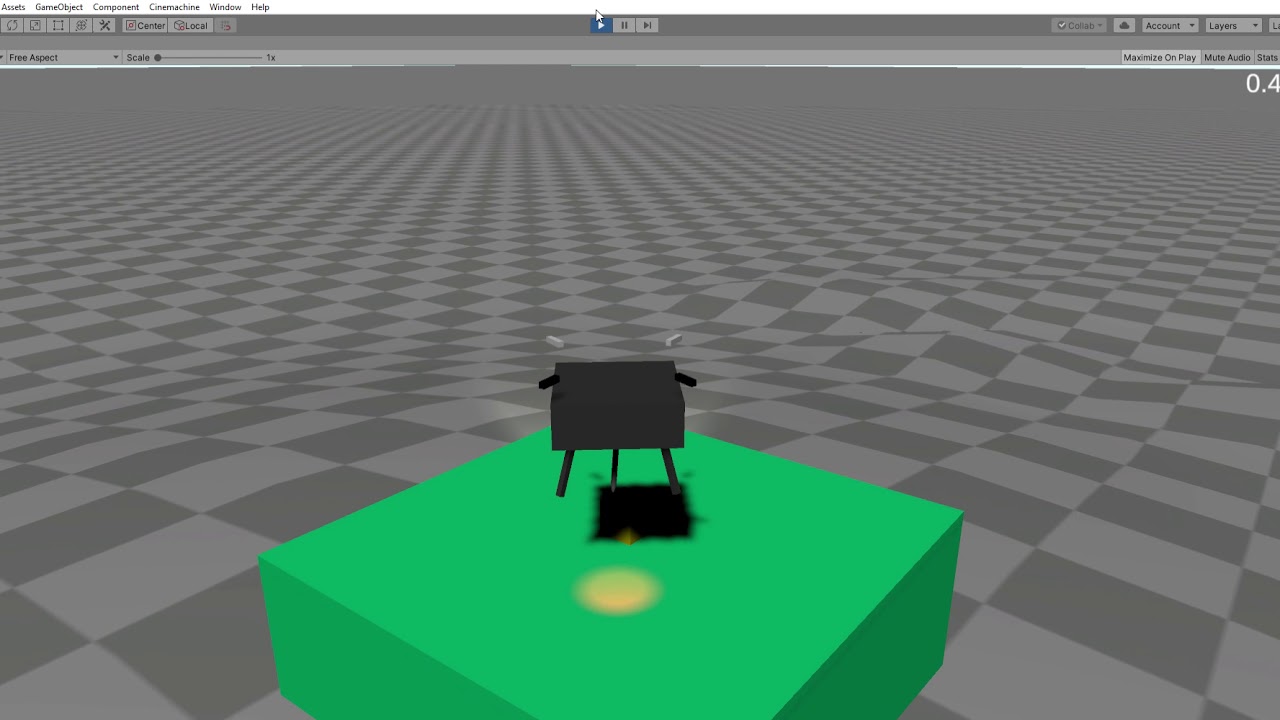 zenith holly
never mind, i learned how to use a skew shader so all the actual geometery is no...
zenith holly
zenith holly
never mind, i learned how to use a skew shader so all the actual geometery is no...
turns out i can't use a skew shader because of fundamental problems with that approach so i'm back to square one on this problem.
i need to set up a movement system that allows traversal of slopes where the maximum allowed angle depends on the orientation of the slope within the world. for example, if it's ascending in the direction of X+ or X- you can go up a 45° angle. but if it's ascending in Z+or Z- that number changes because of the perspective tilt. In Z+ (away from camera) a 45° incline is a "vertical" wall and the max slope should be in the neighborhood of 30° or so. But in Z- (towards camera) a sheer 90° wall is actually traversible - movement should only be blocked by slopes coming backwards at the player. and I don't really know what should happen with like corners, etc, where the direction isn't aligned exactly with an axis. I'm sure someone better at trig than me can figure this out but it's beyond my understanding
untold python
my player isn't moving when i use RigidBody2D
    private void FixedUpdate()
    {
        float moveInput = Input.GetAxisRaw("Horizontal");

        _rb.velocity = new Vector2(moveInput * _speed, _rb.velocity.y);


        //_anim.SetFloat("speed", Mathf.Abs(Input.GetAxisRaw("Horizontal")));
    }
Debug logs are working but it isn't moving, also on the picture i turned off script component, but it still doesn't fall

i think i did something wrong in rb
 tender gulch
untold python
my player isn't moving when i use RigidBody2D
```cs
private void FixedUpdate...
tender gulch
untold python
my player isn't moving when i use RigidBody2D
```cs
private void FixedUpdate...
Does disabling the animator fix it?
untold python
tender gulch
Does disabling the animator fix it?
nah
tender gulch
untold python
nah
Take a screenshot of the whole editor, so that the whole inspector and hierarchy are visible.
untold python
tender gulch
Take a screenshot of the whole editor, so that the whole inspector and hierarchy...

 tender gulch
untold python
tender gulch
untold python
PlayerMelee is active though.
Also, it would be better if you share the screenshots during play mode.
untold python
i have found problem but can't undertand why it's not working, so i have this method in Update(). Game works fine without it
private void JumpHandler()
    {
        if (Input.GetKeyDown(KeyCode.W) && _canJump)
        {
            _rb.velocity = Vector2.up * _jumpForce;
            //_anim.SetBool("isJumping", true);

            StartCoroutine(JumpCooldown());
        }
        if (_isGrounded)
        {
            //_anim.SetBool("isJumping", false);
        }
    }
_canJump is true but why if works if i don't press W
 compact widget
heya, im learning tilemaps with composite colliders, previously I had seperate gameobjects for every floor and wall. i have a question about rigidbody2d static and dynamic.
I'm running into a problem where my character's Y velocity is never zero when it is on the tilemap floor, which is important for other code I have written. this problem is fixed when i set the tilemap's rigidbody2D to dynamic, but i'm assuming that's bad practice for stationary platforms. I didn't have this problem when I used individual gameobjects set to static. could I have some help?
timid dove
compact widget
heya, im learning tilemaps with composite colliders, previously I had seperate g...
I'd probably just fix the code that requires 0 velocity
 cloud nova
untold python
_canJump is true but why *if* works if i don't press W
cloud nova
untold python
_canJump is true but why *if* works if i don't press W
you mean the function activates even if you did not press W?
compact widget
timid dove
I'd probably just fix the code that requires 0 velocity
will do.
is it a known issue or something? i still don't understand why
zenith holly
hey so i have a weird problem that i'm not good enough at math to solve, but I think i have some clues to lead in the right direction.
i need part of my character controller to basically do the following:
if it is, get the normal at the point of collision
calculate if on an incline and how steep based on the normal ("climb angle")
calculate the orientation of the normal in the XZ plane as an angle ("surface orientation")```
it's the last two parts that's tricky for me. first the climb angle - I think this is the angle between the normal and direction of movement? Is that correct? i also need to know if the normal is pointed towards +X, -X, +Z, -Z, or somewhere in between, what I'm calling the surface orientation for lack of a better name. I think the way to get that is by getting the angle between the normal and the +Z axis, is that correct? or is it the angle of the normal *without it's y component* compared to +z?? i'm really bad at spatial math, lol winter pulsar
hello friends, I need some help with Obi rope, I want to implement snake with Obirope which increases and decreases in length, can anyone help me with that? thanks. Reference link: https://youtube.com/shorts/-4e_9SNNvBQ?feature=share
snake run race,snake run race gameplay,snake run race android,snake run race ios,snake run race game,snake run race max level,snake run race 3d,snake run race ad,snake run race app,snake run race app store,snake run race apk,snake run race mod,snake run race hack,snake run race part 1,snake run race mod apk,snake run race all levels,snake run ra...
 bitter mirage
zenith holly
hey so i have a weird problem that i'm not good enough at math to solve, but I t...
bitter mirage
zenith holly
hey so i have a weird problem that i'm not good enough at math to solve, but I t...
Vector3.Angle(Vector3.up, _yourNormalAngle); This calculates a gradient from a to b
Might help
bleak umbra
zenith holly
hey so i have a weird problem that i'm not good enough at math to solve, but I t...
you don't actually need much math for that
to get the directionless slope from the surface normal you simply do a dot product between the normal and the reference direction via Vector3.Dot(normal, Vector3.up), you can convert the result into angles or use it directly, its going to be a value between -1 and 1 with 1 meaning the normal is parallel to Vector3.up and 0 means its orthogonal to it.
To get a vector in a plane, you project it into that plane via Vector3 projectedDirection = Vector3.ProjectOnPlane(myDirection, planeNormal).normalized, in your case planeNormal is Vector3.up.
timid dove
It's just Vector3.Angle if you want the angle
 steel sorrel
is there a unity physics developer i can ask something incredibly specific?
bleak umbra
steel sorrel
is there a unity physics developer i can ask something incredibly specific?
 unique cave
steel sorrel
is there a unity physics developer i can ask something incredibly specific?
unique cave
steel sorrel
is there a unity physics developer i can ask something incredibly specific?
You can ask something incredible specific and hope someone experienced enough finds your question
steel sorrel
My concern was that I saw no talk about optimizing sleep/awake logic concerning rigidbodies that happen to be moved in Update().
They are re-activated, even if no force was applied to them.
They go to sleep 1 second later, but little shaking/errors add up, and it is just milliseconds of spike that could be entirely avoided.
It's just a bit annoying to have a script that has to manage forcing sleep/awake AND interpolation based on when it's needed.
Just milliseconds of checking wasted, but also costumers don't even care or notice it so ... meh 😕
timid dove
steel sorrel
My concern was that I saw no talk about optimizing sleep/awake logic concerning ...
Rigidbodies should not be moved in Update 😉
And what kind of movement are you talking about when you say "no force applied"
steel sorrel
timid dove
And what kind of movement are you talking about when you say "no force applied"
Teleporting and World_Origin Transformations
But there are loads of stuff that could be changed.
I'd even go as far as to prevent us devs to scale objects 🤡
The very fact that we CAN move rigidbodies in Update tells me they do recognize that some situations ask us to so precisely that.
tough pelican
Hi, I have a gun that shoots projectile bullets and I'm trying to implement the ability to kill enemies with it. The bullets have a Rigidbody set to continuous and a Box Collider with isTrigger set to true. The enemy has a standard capsule collider, and the OnTriggerEnter method inside the enemy script destroys the object. Only problem is that collisions only seem to work when you shoot the enemy from specific angles and distances. I'm thinking it's a Rigidbody or collider issue rather than an issue with the scripts, but I can send those if it would help
It seems to work better when you're shooting from further away
steel sorrel
tough pelican
Hi, I have a gun that shoots projectile bullets and I'm trying to implement the ...
either reduce the velocity and call it "style", or change bullets to raycasts and you fake its position along that path
delay the "deal damage" event based on the out Hit.distance gives you
or ... change the collider to continuous dynamic ... should only on the bullet, but in 2021 i sometimes see some colliders going through it, a bit wierd
OnTriggerEnter is a bit buggy from my experience, An OverlapSphere and checking the array never failed me
 onyx hollow
is there a way to change the velocity of a rigidbody to be going to a position, as in it completely stops once it reaches its location
tough pelican
steel sorrel
OnTriggerEnter is a bit buggy from my experience, An OverlapSphere and checking ...
Hmm, yeah maybe I won't use OnTriggerEnter. Thanks for the advice
steel sorrel
onyx hollow
is there a way to change the velocity of a rigidbody to be going **to** a positi...
what I was talking before, for maximum performance you gotta check if your agent ia close to the desided position and manually setting it to sleep 😴
Otherwise you risk keeping it awake with the force you add, then stop appting, it overshoots the target, and gets applied again
You can increase the drag if you want a cheap solution tho
onyx hollow
steel sorrel
what I was talking before, for maximum performance you gotta check if your agent...
So if it reaches the position i just turn off the velocity?
As in set it to 0?
steel sorrel
onyx hollow
As in set it to 0?
you can .... you just have to make sure mo other forces that apply to it automatically, and that your desired position is not too close to a wall
setting the velocity to zero i remember caused collisions to jitter.
try AddForce(-rg.velocity, (...)Impulse)
onyx hollow
steel sorrel
you can .... you just have to make sure mo other forces that apply to it automat...
Btw this is 2d not 3d
 peak panther
If you were making a hitbox system for a bullet hell, aka you're expecting hundreds of (pooled) bullets...
Would you use Triggers to detect collisions.
Or Physics2D.OverlapCollider?
steel sorrel
peak panther
If you were making a hitbox system for a bullet hell, aka you're expecting hundr...
Most people would advise you to use triggers because it makes life easier, and you can even not give a damn about performance as you want to target rich gamers anyway 😦 ... so, if you are not experiencing any performance issues, go forward with triggers.
only thing to note, Overlap[ANY] only works for primitives .... you will have to handle non-convex mesh colliders with an exeption followed by a raycast
If a unity dev is reading this, I'd LOVE to be given some papers or documentation on the physic engine itself ... I fear that Static colliders are making calls and checks even when not needed
peak panther
steel sorrel
only thing to note, Overlap[ANY] only works for primitives .... you will have to...
Doesn't Overlap collider use the collider attached to the object?
Which definitely can be more than a primitive.
steel sorrel
peak panther
Doesn't Overlap collider use the collider attached to the object?
ah, you probably are in 2D then! Box2D might allow for that, 3d does not
 misty chasm
Hello, I'm trying to make a 2D car with wheel joints for the wheels, but if I don't freeze the z rotation of the wheels, they just end up getting deformed and scaled weirdly, and obviously if I freeze the z rotation, I can't go forwards. So what do I do?
bitter mirage
misty chasm
Hello, I'm trying to make a 2D car with wheel joints for the wheels, but if I do...
Have the sprite as a child of an invisible gameobject with the wheel joint and collider
misty chasm
bitter mirage
Have the sprite as a child of an invisible gameobject with the wheel joint and c...
what?
bitter mirage
misty chasm
what?
A: Has all the physics - rigidbody with frozen Z rotation
B: Contains all the graphics, you can spin it all you want, doesn't even need rigidbody
Image taken from one my projects, imagine Coin is Wheel and it isn't a prefab but rather part of your car
 misty chasm
Ahh thanks. Much clearer. Will let you know if it works
bitter mirage
👍
misty chasm
@bitter mirage I forgot, is the anchor of the wheel joint the one that's on the wheel of the one that's on the car?
bitter mirage
misty chasm
<@354299754332553217> I forgot, is the anchor of the wheel joint the one that's ...
https://docs.unity3d.com/Manual/class-WheelJoint2D.html
Anchor and ConnectedAnchor in Properties
 misty chasm
yeah @bitter mirage I'm still having the issue. Here's what my stuff looks like


if you need more let me know :)
bitter mirage
How are you rotating your sprite, and what is the issue you are having
misty chasm
i'm not rotating my sprite manually, I'm using the motor force thingy on the wheel joint
and what happens is my wheels get all streched
 ashen pier
with raycasts, is there a way to ignore the collider of a gameobject, but not the collider of its child?
unique cave
ashen pier
with raycasts, is there a way to ignore the collider of a gameobject, but not th...
By assigning different layers to them, should be possible
bitter mirage
misty chasm
i'm not rotating my sprite manually, I'm using the motor force thingy on the whe...
I would rotate it using animations or something instead, link the animator speed to the car speed
 fringe kayak
how do i make my tiles on the tilemap have collision?
timid dove
fringe kayak
how do i make my tiles on the tilemap have collision?
add a TilemapCollider2D to the tilemap
fringe kayak
thx
untold python
hey, why doesn't my player collide with obstacle in game mode and build version, but seems okay when i switch to scene
 timid dove
untold python
hey, why doesn't my player collide with obstacle in game mode and build version,...
timid dove
untold python
hey, why doesn't my player collide with obstacle in game mode and build version,...
Either your game camera is rotated or it's a perspective camera
 summer prawn
hey is it possible to i have 60k constraint ? what is the meaning of these spikes?
 steel sorrel
summer prawn
hey is it possible to i have 60k constraint ? what is the meaning of these spike...
steel sorrel
summer prawn
hey is it possible to i have 60k constraint ? what is the meaning of these spike...
without seeing the above tab AND the hyerarchy below no one can tell
it could even be caused by you leaving the some physics object as selected in the editor ... wierdly enough, that causes performance problems (while using the editor)
 ashen pier
when using raycasts, i have it setup so that a raycast will hit a gameobject, but the child colliders and not the parent colliders. however, when i use hit.transform.name, it gives me the name of the parent. is there any way i can get the specific child's name instead of the parent?
 quartz jetty
hallo, i am working on a sonic game; is there an updated hedge physics project that i can learn how it works? (or anyone help and/or redirect me)
steel sorrel
ashen pier
when using raycasts, i have it setup so that a raycast will hit a gameobject, bu...
i don't think I can understand what you are trying to do 🤔,
BUT, "anything".name should almost never be used.
timid dove
ashen pier
when using raycasts, i have it setup so that a raycast will hit a gameobject, bu...
hit.collider.name
 dapper arch
Hi. I want to make a demanding 2D game in Unity and I want the physics to be "rigid" (no acceleration or deceleration, all movements will be very jerky). Is there an option to disable every acceleration and deceleration in RigidBody2D to harden the physics or is it better to write it in clean code?
timid dove
dapper arch
Hi. I want to make a demanding 2D game in Unity and I want the physics to be "ri...
Make your bodies kinematic and set the velocity directly in your code.
dapper arch
Thanks
 golden crane
As Physics's nonalloc method like Raycast/Overlap Sphere and etc need Collider[] to be pass as an argument.
What if I make a global Collider[] in my project and reuse it everywhere instead of local Collider[] for each of the script that need to use the NonAlloc version?
Would there be any downside to this approach?
timid dove
golden crane
As Physics's nonalloc method like Raycast/Overlap Sphere and etc need Collider[]...
I do this all the time, it's a good idea. The only concern is that it will continue to hold onto object references, not allowing them to be garbage collected. Best to clear the array every once in a while, such as when changing scenes
golden crane
oh oof. I didn't clear it  thanks for suggestion!
 ruby frigate
I think I need some help (or pointers in the right direction) from someone with more knowledge in mechanics 😉
I have a spaceship, that can rotate around it's axis with _rotationSpeed and move forward with _speed.
The spaceship moves, by setting a waypoint. It then gradually rotates towards that waypoint and moves forward at the same time.
This is all well, and works. But now I need to calculate the distance the spaceship will travel, until it reaches the waypoint.
But since this is a combination of a rotation and a linear movement, I'm at the end of my physics knowledge.
Can someone point me in the right direction?
timid dove
ruby frigate
I think I need some help (or pointers in the right direction) from someone with ...
The distance is simply Vector3.Distance(startingPosition, endPosition)
the rotation has nothing to do with distance, no?
ruby frigate
That's the problem - it does.
Because when the object moves forward and rotates at the same time, the movement is not a straight line (that was what tripped me up).
But I don't know the formulas to calculate such a movement
timid dove
ruby frigate
That's the problem - it does.
Because when the object moves forward and rotates ...
well for any given frame the distance actually covered towards the target could be calculated by solving this little right triangle
V is your velocity
T is the amount actually moved towards the destination
the green angle is the angle between your heading and the desired heading
Using Soh Cah Toa we can use Cah.
Cos(angle) = adjacent / hypotenuse
Cos(green angle) = T / V
T = V * cos(green angle)

This could be done iteratively based on the rotational velocity until the green angle reaches 0
at which point the distance left just becomes Vector3.Distance
ruby frigate
Ok, so to calculate this in one go probably somehow works with the derivative.
timid dove
ruby frigate
Ok, so to calculate this in one go probably somehow works with the derivative.
I'd say the integral actually. The function above computes how far it moves towards the destination in a given frame.
We want to express that as a function over time and then add up the area under that curve (aka the total distance travelled) - hence the integral
ruby frigate
@timid dove I can't really find a formula or even an example on how to approach this.
But I found a heuristic that actually works for my problem, so I think I'll use that for now.
Thank's a lot for helping 🙂
 stoic spruce
i have a dartboard and a dart, the tip of the dart is a box trigger. most times it seems that ontriggerenter fires too slow to be usable when throwing the dart at a imo resonable speed even though i've tried continuous and dynamic detection. changing the sim mode to update didn't help either.
i do have a get tag in the ontriggerenter, would that be possibly slowing it down to cause funky stuff?
it's supposed to turn the rb to isKinemtatic so it stays in place as soon as it hits the dartboard but it either phases through or bounces off before sticking to it
timid dove
stoic spruce
i have a dartboard and a dart, the tip of the dart is a box trigger. most times ...
It has nothing to do with computational speed, it's just tunneling

Game Development Stack Exchange
I have recently had an issue where sometimes a collision would not be detected. Someone told me that maybe I had an tunneling issue.
In the context of game development using physics, what is tunnel...
The best solution is don't make the collider a trigger
 gloomy hornet
Anyone familiar with the Temporal Gauss Seidel PhysX solver type
I'm having a bit of difficulty with jittering joint chains
 low helm
How can I rotate a Prefab? On Rotation its not working
 timid dove
low helm
How can I rotate a Prefab? On Rotation its not working
timid dove
low helm
How can I rotate a Prefab? On Rotation its not working
what is "On Rotation"? And why would you rotate a prefab
Generally you should leave the prefab's position and rotation at 0
you can position and rotate spawned instances as needed
low helm
how?
timid dove
By setting them in the instantiate call or by setting them after spawning
through the Transform
 pseudo ether
I am having issues with Rigidbody2d.Cast - it does not return any Hits, regardless of situation.
I can have the object that is casting (Kinematic Rigidbody2d with polygon collider 2d) inside another Rigidbody (Static with box collider), and it still insists on no collisions.
public static void MoveWithCollision(Vector3 currentPosition, Vector3 targetPosition, float movementSpeed,
        Rigidbody2D physicsComponent)
    {
        var moveVector = (targetPosition - currentPosition).normalized * movementSpeed;
        var distSqr = Vector3.SqrMagnitude(targetPosition - currentPosition);
        if (distSqr <= 1)
        {
            moveVector *= (distSqr);
        }
        physicsComponent.velocity = moveVector;

        //var nextFrameMoveVector = moveVector * Time.deltaTime;
        /*ContactFilter2D filter2D = new ContactFilter2D();
        filter2D.SetLayerMask(LayerMask.GetMask("Wall"));*/
        RaycastHit2D[] results = new RaycastHit2D[] { };
        var resultCount = physicsComponent.Cast(moveVector,results,5);
        Debug.Log(resultCount);
        if (resultCount != 0)
        {
            physicsComponent.velocity = new Vector2();
        }
    }```
The Goal is to achieve movement without going into collisions of (in this case) walls.
I have so far tried:
- removing the ContactFilter
- increasing the range to an arbitrary number (5)
- setting both the object and the walls to dynamic Rigidbodies
Am I misunderstanding the use for `Cast`, or is something else not working as intended?I'm racking my brain trying to figure out what the hell is up with the configurable joints
Because I can't figure out what space the target position works in
The position on each axis seems to be inverted for some reason
timid dove
carmine basin
The position on each axis seems to be inverted for some reason
It's in the object's local coordinate space
timid dove
pseudo ether
I am having issues with `Rigidbody2d.Cast` - it does not return any Hits, regard...
You gave it a zero element array
There's no room for any results
It returns the number of elements it actually wrote to the array
Which will always be 0 since the array has size zero
results = new RaycastHit2D[10]:
pseudo ether
... well that would be it.
timid dove
You should do this and also make it a static member variable. The idea here is to always reuse the same array
pseudo ether
Ill do that, ty
The documentation even specifically says so - but not if you dont read the not
The results array will not be resized if it doesn't contain enough elements to report all the results.
timid dove
Yep. It also wouldn't be possible for the method to resize the array without using a ref parameter
 shrewd sluice
hi is there a way to stop ghostcollisions on 0 width gaps. I have a few fastmoving objects, which collide with these gaps on every collison mode, and I don't want to change physics engine and/or migrate to dots (I am still not very shure what it is tbh). I am almost finised with my first big learning project with unity and would like to fix these ghost collisons. (unity 3d)
I rely on having a cube collider, since a capsule collider doesn't suit the specific purpose an a cube mesh with rounded corners also doesn't fix the problem
 random sleet
Hey guys , in 2d when I shot the game object using add.force (the object has 2d collider and rigidbody) to a wall (the wall has 2d colldier also ) both of wall and the game object have a 2d physics material to make the game object bounce , the problem is when I shot the game object to the wall with a less than 90° angle the game object don't reflect with the same angle at the opposite direction, unity ignore the reflection angle if it less than 90 ° , when I shot it with a angle more than 90° it reflect correctly, so what is the solution?
 cloud fossil
Is there a difference in the physics engine if I say the ball is 1 unit, gravity is 980, vs saying the ball is .01 unit, gravity is 9.8 units?
timid dove
shrewd sluice
hi is there a way to stop ghostcollisions on 0 width gaps. I have a few fastmovi...
Your best bet is to merge the colliders so there's no gap if possible
timid dove
cloud fossil
Is there a difference in the physics engine if I say the ball is 1 unit, gravity...
Yes.
The masses will be all out of whack and floating point precision with the large numbers will be poor
There will also be rendering issues as the lighting model also uses meters, and the Shadowmap resolution will also be out of whack
shrewd sluice
timid dove
Your best bet is to merge the colliders so there's no gap if possible
how can I do it on procederal placed planes, is there a method to merge to planes or do I have to create a new mesh with the corner data of the planes?
timid dove
If they're all just flat you could just teleport one collider around under the moving object quite easily
Otherwise you're looking at some runtime mesh modification.
shrewd sluice
could joints work, I only saw it in the preview when searching for a script, so I am not shure about how they funciton
 eternal flower
Hey, I am trying to get the twist correction from the animation rigging to work with spine twist. I already have some two bone ik set up for the arms which seems to be working fine. but I just cannot seem to get the spine to work. I set up some twist correction with the default mixamo model too to see if it had anything to do with the model and it worked perfectly after setting it up the exact same way.
https://screenrec.com/share/DfMU8lnWs5
Anyone know why this might be happening. I think it has something to do with the synty models as it only occurs on those. But I can't think of any special reason to this. Any ideas are welcome.

Recorded with ScreenRec
twin nebula
Is there a way to stop spring joints from drooping?
I've got a spring joint 2D right now and the more I move the object its attached to / the more I change the frequency the more it droops
peak panther
Apparently turning OFF a collider in a trigger will call OnTriggerExit, but turning ON a collider in a trigger will not call OnTriggerEnter
Is that correct?
timid dove
I thought it was the opposite.
 sharp dragon
how i can fix this ?
 weak wolf
How can I shorten the jump curve of my physics object, while keeping the same jump high?
Gravity Scale could work...
Yes it works
 balmy hedge
Having some issue with Wheel colliders. Anyone have any suggestions or fixes for this drift?

 marsh prawn
does anyone know why when i start the game all my parts just fall im following brackeys yt tutorial for the first game but when i try it everything just falls into the void
forest lance
marsh prawn
does anyone know why when i start the game all my parts just fall im following b...
probably missing colliders
 harsh relic
My character keeps falling through the box collider 2d any ideas on why is this happening?
harsh relic
harsh relic
My character keeps falling through the box collider 2d any ideas on why is this ...
 granite osprey
does a raycast fully inside a collider hit that collider?
timid dove
granite osprey
does a raycast fully inside a collider hit that collider?
The documentation addresses this question
granite osprey
Yeah, i saw. they say to check use backface on physics settings, but this doesn't solve my problem. still getting no collision
now i'm trying to calculate if it is inside using bounds
timid dove
What are you actually trying to do
granite osprey
at object spawn i need to know in which area it is
timid dove
Depending on the circumstances either use your game's grid coordinate system (if it has one) or use Physics.OverlapXXX
pseudo ether
I am slightly confused with Physics2D.ClosestPoint. It seems to not be the closest point at all?
public static void HandleCollision(Rigidbody2D rigidbody2D, Collision2D collision2D)
{
collision2D.GetContacts(ContactPoint2Ds);
//rigidbody2D.ClosestPoint()
if (collision2D.gameObject.layer == Constants.WallLayer)
{
var deepestCollisionPoint = new Vector2();
float minDist = 0;
for (int i = 0; i < collision2D.contactCount; i++)
{
var entryPoint = collision2D.GetContact(i).point;
var exitPoint = rigidbody2D.ClosestPoint(entryPoint);
var sqrMagnitude = (entryPoint - exitPoint).sqrMagnitude;
if (sqrMagnitude < minDist)
{
deepestCollisionPoint = entryPoint;
minDist = sqrMagnitude;
}
}
TargetPoint = rigidbody2D.ClosestPoint(deepestCollisionPoint);
}
}```
The red points here are the points from `collision2D.GetContacts(ContactPoint2Ds);` the blue dot the `TargetPoint`
The Green outlines are the colliders of the ship and the box
The yellow lines are the connections between red and blue. I would expect these to be as short as possible.
My end goal would be to find the shortest way out of a collision.
Additional source of confusion: why are the red dots where they are?
I would expect them either at the vertices of my ships collider, or at the intersections with the box collider. They are neither hollow echo
pseudo ether
I am *slightly* confused with Physics2D.ClosestPoint. It seems to not be the clo...
hollow echo
pseudo ether
I am *slightly* confused with Physics2D.ClosestPoint. It seems to not be the clo...
sqrMagnitude will never be less than minDist because it starts at 0. You should initialise minDist to Mathf.Infinity
so the deepestCollisionPoint would presumably just be (0, 0)
pseudo ether
hollow echo
`sqrMagnitude` will never be less than `minDist` because it starts at 0. You sho...
... I failed my rubber duck. Thank you!
gleaming gorge
How can I prevent charactercontrollers from being pushed up when they collide or pushing into each other?
 maiden wolf
so what's unity capable of in terms of real-time fluid physics? i'm thinking of something that can actually be splashed around/redirected and fill cups and stuff
instead of just 2d textures bouncing around
bleak umbra
maiden wolf
so what's unity capable of in terms of real-time fluid physics? i'm thinking of ...
unity does not have any systems that do actual fluid simulation. you'd have to make your own and the capability of those are only limited by your ability and knowledge. Or you could buy a 3rd party asset 😛
 green needle
so i have rb movement and a physics material on the player and ground with bounce to 0, i still bounce though at high speeds, how do I stop this without just stopping up y velocity, because I still need to be able to jump?
rb.velocity = new Vector3(movDir.x * speed, rb.velocity.y, movDir.y * speed);
is how I move if it helps
maiden wolf
bleak umbra
unity does not have any systems that do actual fluid simulation. you'd have to m...
any third party assets that use metaballs that work on AMD hardware?
 haughty carbon
I'm trying to create an active ragdoll. Any feedback?
 deft orbit
Is there any way to make a rigidbody's motion be relative to another rigidbody? For example, if I have two rigidbodies A and B, and a force is applied to A, it should also be applied to B, but not the other way around.
If there is no force acting on B, its position and rotation relative to A's position and rotation should stay the same
timid dove
deft orbit
If there is no force acting on B, its position and rotation relative to A's posi...
You could do it with separate physics scenes
The common example of this is like a ship with physics inside the ship
deft orbit
timid dove
The common example of this is like a ship with physics inside the ship
yeah, that's precisely what I'm trying to do
I've never heard of physics scenes, can you link some resources?
cloud fossil
doing tilt maze thing, trying to work out physics materials. There are so many variables to deal with, Bounce Threshold, ball, wall, and floor "bounciness", average, multiply, maximum. I'm stuck between "ball bounces infinitely off the floor and flies off the board" and "ball won't bounce off the walls at all". Am I asking too much of unity? Are there more things I need to check? Do I need to scale my forces down further?

 viral ginkgo
@cloud fossil I think playing around with the dampening option on the ball rigidbody may be helpful to you
gleaming gorge
cloud fossil
doing tilt maze thing, trying to work out physics materials. There are so many v...
try adding physics material with less bounce to the floor
fading wyvern
how do you make the start and end points of an edge collider 2d meet?
maiden wolf
i'm looking for fluid physics that uses polygonal metaballs that can be splashed around/redirected and fill in stuff like bucket's, is there anything like that for unity that works with AMD hardware?
also since this would be for a game i want to be able to lower it's level of detail the farther i get from it, that can be done with metaballs right?
timid dove
maiden wolf
i'm looking for fluid physics that uses polygonal metaballs that can be splashed...
Obi Fluid is a good asset that does this
 pulsar canopy
I'm using a character controller for movement and I have controller jump for jumping. Every now and again, my character will fly up into the air above the camera then come down. I notice it only happens when it's colliding into something while running into it and jumping
how come this happens when I am not using a rigidbody or anything that would direct my character to fly up into the air?
Here is an example
timid dove
pulsar canopy
how come this happens when I am not using a rigidbody or anything that would dir...
Seems clear that it's a bug in your code
The CharacterController does exactly what your code tells it to do. Time to start debugging
maiden wolf
timid dove
Obi Fluid is a good asset that does this
is there a version that's compatible with HDRP?
timid dove
maiden wolf
is there a version that's compatible with HDRP?
Says no on the asset store
 rare juniper
How do you add a mesh collider to a humanoid model made up of multiple child gameobjects with skinned mesh renderers?
I want the colliders to be very precise so I'd like to use a mesh collider if possible. I need to be able to detect collision on the human.
Should I add a mesh collider to each body part or combine all of the meshes and then have a mesh collider at the root level?
timid dove
rare juniper
How do you add a mesh collider to a humanoid model made up of multiple child gam...
mesh colliders on animated rigged models are generally not compuitationally feasible
generally the collider is built up of many primitives
spheres, capsules, and cubes
all attached to the various bones on the model
rare juniper
Is that what you would do even for a model controlled by an XR rig?


 rare juniper
Okay thanks!
quartz wyvern
is there any api to know if a collider is entirely inside another and doesn't protrude
triggers alone wont really work but not sure what functions to use to test it
bleak umbra
quartz wyvern
is there any api to know if a collider is entirely inside another and doesn't pr...
only for individual points, which you can use to make your own custom API based on the shapes of the colliders you are testing against each other
quartz wyvern
hm i see
 quartz plinth
hey, my animator got childs with colliders on them. they are causing the parent rigidbody to move for some reason, anyone know why?
they share the same Layer, and i've made it so it shouldnt interact with itself.
 rose mulch
On Apple Silicon, are Physics GPU accelerated via Metal or is it all on the CPU?
timid dove
rose mulch
On Apple Silicon, are Physics GPU accelerated via Metal or is it all on the CPU?
All modern CPUs (including the Apple M1/M2) include an integrated GPU. It's also possible for your machine to have a separate dedicated GPU. In either case, GPU code is running on a GPU, not the CPU.
that being said, in Unity Physics are all done on the CPU not the GPU unless you're using a third party library
 wise tinsel
Is there any way that I can make rigidbody with concave colliders?
like
can havok do it maybe?
 twilit yacht
use several collider
wise tinsel
dang
twilit yacht

stuck bay
I'm used to normal Physics.Raycast where layermask is used to ignore a layer, but first time using Physics2D.Raycast and learning that layermask works the opposite (for some reason).
Is it possible to selectively ignore a layer with 2d raycasts the same way you would for normal raycasts?
(Also who decided to make them different in the first place??)
timid dove
stuck bay
I'm used to normal Physics.Raycast where layermask is used to ignore a layer, bu...
they work exactly the same way
they are not different
not sure where you're getting the impression they are opposite
stuck bay
okay i was definitely just confused by the different wording on each respective API page + another mistake that i was making
 lunar tulip
How do games like universe sandbox 2 calculate orbits with 0 eccentricity? I couldn’t get my head wrapped around that. Is there a general Formular with variable eccentricity?
My goal is to calculate the needed velocity to have an x amount of eccentricity orbit giving the semi major axis of both planets. While the bigger one is stationary, the orbiting planet isn’t. After that, I want to apply the calculated force to the object (rb.addForce(perpendicularangle*neededvelocity, ForceMode.VelocityChange))
timid dove
lunar tulip
My goal is to calculate the needed velocity to have an x amount of eccentricity ...
A 0 eccentricity orbit would be a circle, is that what you mean?
lunar tulip
Yes
timid dove
If you want a perfect elliptical orbit use the parametric equations for an ellipse
It's not immediately clear that applying the physics engine (which is based on discrete time steps) is likely to create a realistic elliptical orbit
Although Sebastian Lague's orbital exploration YouTube video seemed to have decent results with such a system
lunar tulip
I have my idea from his channel, I want to pair procedural generated planets and orbit simulations.. I don’t know if calculating positions rather than apply physics is as exciting
 winged herald
My CompositeCollider2D skips sections of my tilemap, even though these tiles clearly have a collider. It works fine when I remove the CompositeCollider2D, but I need it to reduce lag.
What's wrong with it?
It's very weird.
When I change a tile in the area that is being skipped, it forces the mesh to correctly rebuild
But ONLY in that area
When i manually rebuild it using the API, it does not work
haughty carbon
timid dove
Yes
I've also been trying to create a ragdoll active game but I don't know what's best for movement, mapping movements from a Animation or coding leg and hand movements
 tough path
I'm making a CS:GO-like surf game and I've modeled parts of ramps in Blender and imported them into Unity to be able to make modular maps, like so:

And I snap the objects together with the vertex snap tool when holding V
problem is, whenever the player slides over the seam where the two models are touching, the player jerks, as though it just hit a speed bump
which I find really strange because the objects are 100% flush with each other
Both the straight ramp and curved ramp like you see in the photo have mesh colliders (checking/unchecking convex does nothing)
Any ideas?
 strange zenith
Sillyish question, but how would I prevent players from being able to jump off of objects they're holding? similar to how in half life you can grab an object, put it underneath you, and spam jump to be able to jump off of it infinitely.
My friend told me to do a grounded check on the objects, but what if multiple objects are stacked ontop of each other? Would I have to make a grounded check script for each physics object?
Adding jumping n gravity and grounded checks rn so any insight/ideas greatly appreciated.
strange zenith
tough path
problem is, whenever the player slides over the seam where the two models are to...
also I've seen this problem happen in CSGO surf maps normally
maybe try exporting it as one model in blender and seeing if it works then. It might be the topology of the model maybe or something to do with physics calculations transferring between models
[I'm a newbie tho so maybe dont listen to me lmao]
tough path
strange zenith
also I've seen this problem happen in CSGO surf maps normally
maybe try exporti...
That's probably it. I just don't want to have to design the maps in Blender but if it comes down to that, so be it
tough path
strange zenith
Sillyish question, but how would I prevent players from being able to jump off o...
If it's only objects that you're holding, maybe you could assign them to a new layer and just do a check if they're on that layer
Is that what you're going for?
strange zenith
tough path
If it's *only* objects that you're holding, maybe you could assign them to a new...
ig ye but like the inverse I just want to have both a grounded check for jumping and once I implement the ability to pick up objects, to be able to pick up objects and not use them to fly
that could probably work tho
tough path
strange zenith
ig ye but like the inverse I just want to have both a grounded check for jumping...
Right so then just make them not on your ground layer
How are you currently checking if the player is grounded?
 dim fulcrum
I'm trying to make an "active ragdoll" and have several problems because of my approach. For reasons I want my ragdoll to be constructed from separate objects connected with rigid bodies. This somewhat works, I managed to connect it all up, set the proper anchors primary axis' and range of motions. The ragdoll collapses acceptably, but compared to a "normal" ragdoll created from an animated model "normally" I'm not able to move it around as I'd expect. A normal ragdoll you can move in the scene view "like a rag doll", my ragdoll jolts erratically, and sometimes explodes even though my break forces and break torques are set to infinity. Is there anything I can tweak, or is it just expected behaviour? I'm trying to validate that I didn't mess something up before trying to copy animation movement onto it.
 lost lagoon
Hey, up until now, I've been moving objects(by directly modifying the Transform) and detecting "collisions" via script (using Physics.OverlapSphere) to detect overlapping objects and apply necessary corrections. Recently, I've been told that this is not a great idea as it causes Unity to (partially or entirely?) recalculate the physics scene due to the lack of a rigidbody on the object. Additionally, there seems to be conflicting information regarding whether it is okay to alter an object(which has a rigidbody) via Transform.position/rotation instead of using Rigidbody.MovePosition / Rotation. If anyone could clarify how I should proceed, I would appreciate it very much.
Note: I have no interest in using Unity's physics simulation (collision system), however I would not mind allow Unity to detect triggers and then implementing my corrections in "OnTriggerEnter" for example if need be.
dim fulcrum
lost lagoon
Hey, up until now, I've been moving objects(by directly modifying the Transform)...
I'm almost sure unity won't calculate any physics unless you add a rigid body to your objects. You can add colliders if you want collisions to be detected, but setting "isTrigger" on them will also prevent any collision simulation and simply call your ontrigger code.
dim fulcrum
lost lagoon
Hey, up until now, I've been moving objects(by directly modifying the Transform)...
sorry I missed that you have rigid bodies, not sure why you use them since their purpose is to run the simulation?
 weary anvil
Hi, have some odd behaviour with RB's. I am trying to push a Box collider using another box collider. At angles, this works well, but when the surfaces are flat against each other, there's no force against either objects 🫤
weary anvil
 split dew
I am using HDRP's water system to create an ocean. I want to create a controllable boat on that ocean. I assume it has to do with with floating phyiscs to react to the simulation of the ocean itself (i guess?), can anyone point me in the right direction of how can such thing work? I have no idea where to begin
timid dove
weary anvil
Hi, have some odd behaviour with RB's. I am trying to push a Box collider using ...
how are you moving the object?
My guess is you're teleporting it, not moving it properly with physics
 onyx olive
split dew
I am using HDRP's water system to create an ocean. I want to create a controllab...
onyx olive
split dew
I am using HDRP's water system to create an ocean. I want to create a controllab...
I'm not a master of physics or unity, but you definitely don't want this simulated - make it in code
split dew
onyx olive
I'm not a master of physics or unity, but you definitely don't want this simulat...
Got a youtube tutorial of having it use physics for boyancy. It's working nice (apart from the fact that the ocean waves doesn't make things drift away) but its good for now. Only problem is it having conflicts with the movement controls of the ship itself (which also uses physics), just gotta do some polishing i guess
onyx olive
oh thats cool
could you link it
also its not the water that makes things drift away, its the wind

epic gif
split dew
https://www.youtube.com/watch?v=v7ag-NeSMSQ there you go

New unity water system buoyancy tutorial
example vid: https://youtu.be/KsPx0yyps88
Sorry if the production quality is bad this is my first video that i edited myself lmao
All music heard in the video is produce by me
split dew
onyx olive
also its not the water that makes things drift away, its the wind
aaa yes makes sense
onyx olive
sick thanks
split dew
my pleasure :)
If you figure out how to make it work fine with a good controller that simulates ship movement, that'd be lit
onyx olive
you could maybe add a rigidbody to it and just use forces
having the water affect the speed is a bit beyond that but if ur just looking for controls that could be it
split dew
ye im trying to. Tbh im beginner with how physics work so I am using GPT to help with it, but its been causing certain conflicts/issues that just are gone when i disable the boyancy script
I assume its forces opposing each other or sth along those lines
onyx olive
split dew
I assume its forces opposing each other or sth along those lines
how are you adding the forces?
split dew
Boyancy or movement? Or both?
onyx olive
movement
split dew
lemme find the script
private void FixedUpdate()
    {
        float horizontalInput = Input.GetAxis("Horizontal");
        float verticalInput = Input.GetAxis("Vertical");

        // Calculate the movement direction based on input
        Vector3 movement = transform.forward * verticalInput * moveSpeed * Time.deltaTime;

        // Apply the movement force to the ship
        rb.AddForce(movement, ForceMode.Impulse);

        // Calculate the rotation based on input
        Quaternion rotation = Quaternion.Euler(0f, horizontalInput * rotationSpeed * Time.deltaTime, 0f);

        // Apply the rotation to the ship
        rb.MoveRotation(rb.rotation * rotation);
    }```

very basic script for forward/backwards movement and rotation to be polished later, but apparently whenever its moving forwards/backwards, (i.e. im holding w or s), it keeps stopping and going, like some kind of stutteringaand when I disable the boyancy script it works flawlessly
split dew
its np i'll play around with stuff till I figure out the solution