#⚛️┃physics
1 messages · Page 8 of 1
 hexed violet
Question
Does GetRawAxis return -1, 0 and 1?
only
Hm.... the ship won't move, I am trying to figure out what's missing
Ah, I see
 tropic trench
Ok im gonna ask again, because I really want this to work. Is there any reason a raycast would work differently on windows VS. linux? I have a system that im trying to make to pick up items in my game, for some reason, when I make a raycast at the exact same position (as in "Ray Created: Origin: (401.40, 3.38, 420.94), Dir: (-0.15, -0.37, 0.92)"), it works on two different windows machines, and my editor, but not on linux. any reason why? btw my ray IS still hitting stuff, just not what i expect. if i cast the same ray beforehand without filtering, it hits stuff, just never hitting the item that im trying to grab... maybe there is a way to render a ray in the game? that would be useful for debugging this lol
Here's the code
public void Pickup_Pressed(InputAction.CallbackContext ctx)
{
    Debug.Log($"Pickup Press: {ctx.performed}");
    if (!ctx.performed)
        return;

    RaycastHit hit;
    Ray ray = main_camera.ScreenPointToRay(Mouse.current.position.ReadValue());

    Debug.Log($"Ray Created: {ray.GetPoint(0f)}, {ray}");

    Physics.SyncTransforms();
    if (Physics.Raycast(ray, out hit))
    {
        Debug.Log($"[Test] Ray Hit An Object: {hit.transform.gameObject.name}");
    }

    Physics.SyncTransforms();
    if (Physics.Raycast(ray, out hit, inventory_grab_range, mask)) // Do a Raycast with only layer 8 (Items)
    {
        Debug.Log($"Ray Hit An Object: {hit.transform.gameObject.name}");
        Transform hit_transform = hit.transform;
        GrabItem(hit_transform.gameObject);
    }

    Debug.Log("Cast Attempts Done.");
}
the first print always runs, and the second one, and the third one, but not the fourth
 ebon scaffold

So I've been playing around with Unity Marbles but
why are they so slippery?
its like their rotation velocity is clamped, so when I go super fast, the marbles still rotate slow is what I mean
even tho I got no angular drag
 timid dove
ebon scaffold
its like their rotation velocity is clamped, so when I go super fast, the marble...
timid dove
ebon scaffold
its like their rotation velocity is clamped, so when I go super fast, the marble...
There is indeed a setting in physics settings for max angular velocity
tropic trench
tropic trench
Ok im gonna ask again, because I really want this to work. Is there any reason a...
bump because it feels like questions dont get read if they arent at the bottom of the channel
 mortal galleon
So I have an airship that I am using physics to move (so that I can have a little more of a floaty feeling). What is the best practice for handling the fact that I can't have a mesh collider w/ a rigidbody and Kinematics ?
Should I do it using a second physics scene .. do all the forces over there then translate position movements to the first scene? Or should I go with a compound mesh?
 arctic marsh
tropic trench
Ok im gonna ask again, because I really want this to work. Is there any reason a...
arctic marsh
tropic trench
Ok im gonna ask again, because I really want this to work. Is there any reason a...
you could just add a linerenderer and update its postion or make a debug build and call debug.drawray or drawline
 mental tusk
hey, not sure if you found solution at this moment, but if you're looking for simple yet effective solution you can use joints with locked rotation or link both wheels with 2 or more joints like train wheels are.
Hi, quick question. I would require few physical scenes both 2d and 3d at the same time to function independently. From what i've seen havok does fantastically with lots of objects at 3d scenes, but build-in 2d unity physics handles 2d better.
Can i use both Havok and Unity 2D physics at the same time without creating weird workarounds?
arctic marsh
mental tusk
Hi, quick question. I would require few physical scenes both 2d and 3d at the sa...
From the docs it sounds like you have to use either or
mental tusk
That would agree with my findings. Is there at least any good documentation for havok, I'm having problems finding one based on unity integration
arctic marsh
do you search for anything special or just the general doc page?
mental tusk
Something containing explanation of compoments, script references etc. Like Unity docs about build in physics
arctic marsh
mental tusk
Something containing explanation of compoments, script references etc. Like Unit...
it somehow is based on the unity physics system, so maybe you find some answers there that go beyond the basic setup of havok?
mental tusk
I suppose as of now it's unfortunately limited to user made tutorials and resources with text based, and unity ECS/Havok sample project.
Thanks for help.
tropic trench
arctic marsh
you could just add a linerenderer and update its postion or make a debug build a...
alright thank tou i will try that
tropic trench
ok yeah
can confirm, rays are messed up on linux
i think its an input issue
but im not sure how
@timid dove do you know about input settings i could change since you were helping with this before
at least i think you were the one who suggested setting the mouse inputs to the input system rather than the manager
ok based on some further debugging
it looks like the mouse is not being locked
moving to #🖱️┃input-system ig?
 pine tinsel
I'm attempting to make an active ragdoll, and I believe I have all the joints in the right place, however whenever I press play, the ragdoll, with a box collider, still falls through the floor. Any ideas why?
timid dove
pine tinsel
I'm attempting to make an active ragdoll, and I believe I have all the joints in...
None of your ragdoll limbs have colliders
pine tinsel
timid dove
None of your ragdoll limbs have colliders
Figured that might be an issue; I’ll just take a simple model and do that. Doing this seems like it’d be a headache for my first game
 lofty vale
Basic question about colliders. I have a relatively simple object I made in blender with armature animations, and I added a mesh collider to the object hoping I could stand on it. I can, but the collider doesn't move with the animation. How do I make the collider move with the object?
timid dove
lofty vale
Basic question about colliders. I have a relatively simple object I made in blen...
You don't.
You make up a collider from primitive colliders on the various bones of the armature.
It's too cost prohibitive to fully animate a Mesh Collider
lofty vale
Oh, well that's interesting
pine tinsel
Hey, so say I have five different humanoid models, but they’re all the same shape, is there a way to transfer the configurable joints from one model to another? Or do I have to sit there and do the exactly same joints for each model?
 storm shore
pine tinsel
Hey, so say I have five different humanoid models, but they’re all the same shap...
storm shore
pine tinsel
Hey, so say I have five different humanoid models, but they’re all the same shap...
Can you duplicate your object hierarchy and then just change the mesh or meshes?
I have a question regarding how to influence the direction of a rigidbody's velocity based on its orientation. I'm trying to make a physics based skateboard and I'm trying to avoid wheel colliders. Right now I have a rigidbody for the board and a rigidbody for the trucks. They are connected through a hinge joint so it angles itself like a real skateboard. I am using sphere colliders for the wheels with a low friction physics material. The problem is this makes the board slide around any direction whereas I'd like it to orient its velocity based on where the trucks are pointing.
A cube is sitting on the board making it tilt so the trucks are turned slightly. The white lines are the forward vectors of the board and trucks respectively.

I guess what I'm looking for is a way to have directional friction? Like little to no friction for the direction the trucks are pointing but high friction for sideways movement.
 tawdry rampart
So if I understand correctly, the wheels are sliding instead of rolling atm?
storm shore
Right, they're just sphere colliders with a physics material with low friction values.
tawdry rampart
Sphere colliders are fine here, but you need them to roll, not slide to have direction. I also don't think you need low friction here.
Maybe something like this, see how it rolls based on the direction it's facing not straight down the slope
Even though it's using sphere colliders for wheels
storm shore
I see. How is the rotation locked to a particular axis? I don't see how that's being done on the articulation body
tawdry rampart
By the Revolute joints of the Articulations (on the "wheel" GameObjects)
Tho you can do the same with Rigidbodies + Hinge Joints, it's just faster to author Articulations for me personally 😄
You can click the "Edit Joints" button in the Inspector to see the axis that the body is going to rotate around
storm shore
I think I understand. I'll give artuclations a shot.
 nocturne goblet
How can I make it such that a navmeshAgent does not attempt to avoid other navMeshAgents (meaning collision avoidance is none) but still have them collide with the other agents such that they cant move thru eachother?
Thes objects have a rigidbody on them, but must be set to kinematic, so I dont believe I can just put a capsule collider on them to collide with
I just dont understand why the whole obsactle avoidance section of the agent is throw out when set to none. The priority value is extremly useful, but I cant have the agents avoid eachother because when two agents have eachother as a destination, they start to turn a little and it looks very strange. I also prefer agents to get stuck behind other agnets as a mechanic
All I want is the ability to turn off obstacle avoidance while maintaining 'matter' and priority
 midnight elk
Ive got an object with a cloth simulation (think a sheet of paper) when i shoot it holes are instantiated onto the surface. The issue is when i then move the cloth the holes remain where they were instantiated. How can i like attatch them to the cloth?

 unique cave
midnight elk
Ive got an object with a cloth simulation (think a sheet of paper) when i shoot ...
unique cave
midnight elk
Ive got an object with a cloth simulation (think a sheet of paper) when i shoot ...
This is something that came to my mind: when instantiating the holes, use Cloth.vertices to get the cloth vertices -> find 3 of the closest vertices from the hole -> use barycentric coordinates to find the masses for the 3 points -> use those 3 points and the masses to calculate the position whenever you want. This wont work on every case but depending on the usecase, could work very nicely
midnight elk
unique cave
This is something that came to my mind: when instantiating the holes, use Cloth....
at the moment im trying to use a hinge joint for it instead, i want the piece of paper to swing when the object it is attatched to moves, and i want the holes to stay on it.
At first this seems to be working. If i manually rotate it it swings and the holes remain attatched as seen in the image i attatched. However when moving the thing its attatched to nothing changes, its like the paper has no gravity and isnt effected by drag

 timid dove
Unity doesn't have a realistic air resistance model
You're not going to get the effect naturally
You'll have to either add your own drag forces or do some faking
midnight elk
timid dove
You'll have to either add your own drag forces or do some faking
what do you reckon would be the easiest way of faking it?
 ruby perch
hey, i am trying to implement client side prediction with rigidbodies in my game, I need to spawn each player on their own physics scene so i can simulate their movement s individually with Physics.Simulate() how would i go about doing that, and is it necessary


 steady shadow
@frosty dust I kind of need you again if that’s okay
I’ve tried the drift power at multiple things and i can’t get this to work
 astral coyote
Hello, can someone help me out with the simulation of a black hole?
i have written a shader code to represent the black hole effect.
float4 frag(vertexOutput input) : COLOR
           {
               //Set up particle
               float3 initpos = CartesianToSpherical(_WorldSpaceCameraPos);
               float3 rayDirection = normalize(input.worldPos - _WorldSpaceCameraPos);
               float3 initvel = toSphericalVel(_WorldSpaceCameraPos, rayDirection);

               LightParticle particle;

               particle.position = float4(0, initpos.x, initpos.y, initpos.z);
               particle.velocity = float4(1, initvel.x, initvel.y, initvel.z);
               //particle integration
               float s_R = _SchwarzschildRadius; //2 * G * M / (c * c);
               int numIterations = 0;
               float stepSize = _StepSize;
               int maxIterations = _MaxIterations;
               while (numIterations < maxIterations)
               {
                   // Runge-Kutta 4th order
                   float4 v1 = computeDerivatives(particle.position, particle.velocity,s_R);
                   float4 v2 = computeDerivatives(particle.position + 0.5 * stepSize * v1, particle.velocity, s_R);
                   float4 v3 = computeDerivatives(particle.position + 0.5 * stepSize * v2, particle.velocity, s_R);
                   float4 v4 = computeDerivatives(particle.position + stepSize * v3, particle.velocity, s_R);
                   particle.position = particle.position + stepSize * (v1 / 6 + v2 / 3 + v3 / 3 + v4 / 6);
                   if (particle.position.y < s_R*1.1)
                       return float4 (0, 0, 0, 1);
                   ++numIterations;
               }
               float3 endpos = (particle.position.yzw);
               float3 endvel = (particle.velocity.yzw);
               float3 end_vel_cart = toCartesianVel(endpos, endvel);
              return texCUBE(_Cube, end_vel_cart);
           }


the problem that i have is, when i zoom in i can see the distortion of the light but i never the the event horizon like in the last picture, do someone know what i did wrong?
 foggy current
Hey ! Anyone here capable to help me make my car (tractor) stay in once piece and not "melt" into the ground please ?
 swift whale
ok so I have a parent object with a mesh collider, rigid body, and a hinge joint (the black cylinder) and a child object with colliders (the orange handles). the child object moves with the parent when editing but in game when the parent object is moved with physics the child stays still, anyone know why it does this or to how to fix?


nvm they were set to static, I am an idiot
tropic trench
My item keeps clipping through the terrain, should I set the item to use a more expensive collision detection or what
I am also using a network rigidbody if that matters!
 toxic coral
How can I disable physical "pushing" when having two colliders? I created a new Capsule Collider to act as a "Scanner" for detecting objects. However when I run towards an NPC the NPC gets pushed away from that "Scanner Collider". How can I still listen on collision events but not physically affect gameobjects with that "Scanner Collider" I made?
 formal chasm
Good Morning! I was wondering if anyone has any experience with Configurable Joints? I'm trying to connect two objects with a gap between them. I've set up a simple test. The problem that I'm having is the objects zoom to one another as if the connectedAnchor and Anchor should be at the same point, has anyone experienced this before? If I run this code, they'll immediately snap to one another

 carmine basin
I want to create something that inherits from PhysicMaterials with extra properties; how would I do this?
Rather, i've tried making my script inherit from PhysicMaterial, and adding in the "CreateAssetMenu" stuff
but to no avail
foggy current
Hey there ! Could someone help me for something ? I want to make a race game prototype in 3D but I'm a beginner and I cannot understand how to make the Wheel Collider work properly... can anyone help me please ?
 random cypress
I'm very new to making a game in Unity as I'm going to make a prototype for 2 Touhou Project fangames which is 1st that is a open-world sandbox game and 2nd a racing/driving game with realistic physics and graphics.
Of course I'm basically making a prototype in Unity which is basically where it's one character (Reimu Hakurei or any other Touhou character) and there is only 1 car and it's set in a map where it's taken place in a map where there's stuff like ramps for stunts and even crash testing stuff too.
Now the reason why I'm here is that I'm trying to make my very first game as I said and I want to see how I make Reimu or the other Touhous get in the car and how to make it visible so I can see Reimu in the car.
The main thing here is that the physics for the car which means like driving around as well as having crash physics (soft body or mesh deform) and of course having the car parts break off like bumpers wheels etc.
Since this is like a small prototype, I could expect people to make mods for it if they like such as adding new vehicles, new characters and tracks and even improving up the graphics/physics and stuff.
Of course the Touhou driving game prototype demo is gonna be in Unity but if someone gets inspired by it or whatever means they could put it into Unreal engine if they like, Same for the Touhou open-world sandbox game as well.
Remember, This is like a small prototype/demo that I'm making and anyone or whoever could improve it like make mods or whatever they want to do with it like improving physics/graphics and more as it starts off small and will get bigger and better in the future.
The idea of a Touhou Project open-world sandbox game inspired by Grand Theft Auto and even a driving/racing game where Touhous drive vehicles like cars/boats/bikes/planes and helicopters and many more vehicle types with realistic physics and graphics would some like an amazing Touhou fangame for Touhou fans like me.
 polar wolf
Anyone understand why my player's Rigidbody.velocity.magnitude is so messed up when standing on a simple box collider?
It's the player vel variable under the Player Anim Controller script
https://imgur.com/i8qAOp4
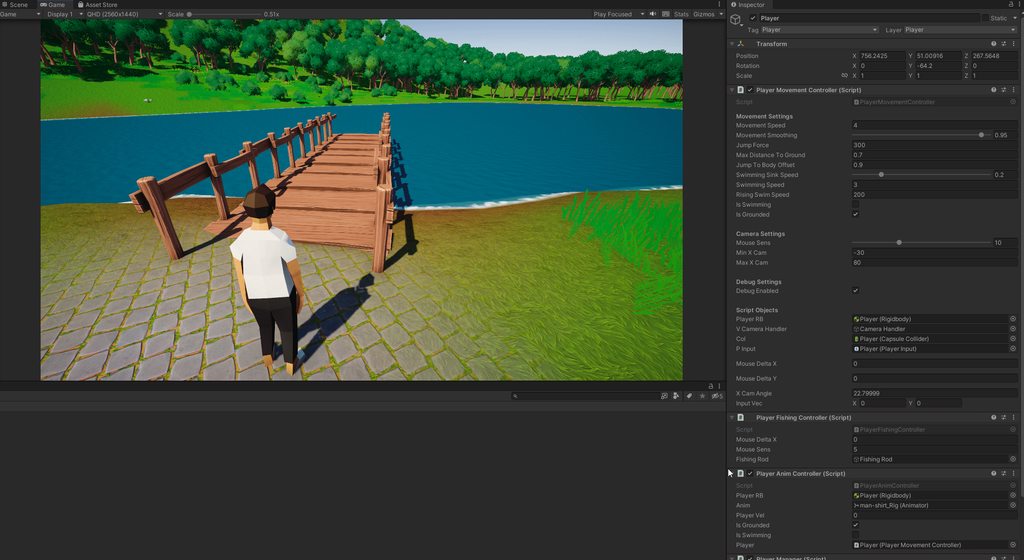
I need to be able to stop the player from changing their state if they're moving but I can't really do that if whatever is going on here is happening 
 remote pewter
polar wolf
Anyone understand why my player's Rigidbody.velocity.magnitude is so messed up w...
remote pewter
polar wolf
Anyone understand why my player's Rigidbody.velocity.magnitude is so messed up w...
post code
polar wolf
remote pewter
post code
Hastebin is a free web-based pastebin service for storing and sharing text and code snippets with anyone. Get started now.
The anim controller is just doing Rigidbody.velocity.magnitude so I sent my player controller
it's a little bit of a mess atm because I'm in the middle of transitioning into having player states so sorry to your eyeballs
The rotation on the prefab/colliders is completely flat too so I'm just at a loss
remote pewter
polar wolf
https://hastebin.com/share/dujaduqopa.csharp
what about the script you're looking at
the one with PlayerVel
polar wolf
It shouldn't be doin anything but one moment
Hastebin is a free web-based pastebin service for storing and sharing text and code snippets with anyone. Get started now.
remote pewter
polar wolf
It shouldn't be doin anything but one moment
are those values matching that of the rigidbody if you look at its inspector values/velocity
polar wolf
Yup
Let me see if it's an issue with my movement script
I'ma just disable it while on the prefab
huh yeah it's something with the movement controller
remote pewter
polar wolf
Let me see if it's an issue with my movement script
yeah my guess it's that Lerp
remote pewter
also check IsGrounded when you're on that platform too
polar wolf
Yeah is grounded works no problem
remote pewter
then yeah it seems to me the lerp isn't lerping correct
 remote pewter
polar wolf
So bad news is that it isn't the lerp
remote pewter
polar wolf
So bad news is that it isn't the lerp
you tested ?
remote pewter
how did you verify it's not
polar wolf
I commented out the lerping and replaced it https://hastebin.com/share/suzivoroqi.csharp
Hastebin is a free web-based pastebin service for storing and sharing text and code snippets with anyone. Get started now.
remote pewter
polar wolf
I commented out the lerping and replaced it https://hastebin.com/share/suzivoroq...
what's PMoveUpdate
how are you calling it
polar wolf
It's being called by my player manager on fixed updated https://hastebin.com/share/oboqukepan.csharp
Hastebin is a free web-based pastebin service for storing and sharing text and code snippets with anyone. Get started now.
It's just a glorified FixedUpdate so I can reuse my input manager
remote pewter
polar wolf
It's just a glorified FixedUpdate so I can reuse my input manager
does it only happens when you go on that collider ?
also cs // 0 = Moving, 1 = Fishing public int playerStatus = 0; should be an enum :p
polar wolf
I'll be 100% I have zero clue what an enum is but I'll do it after we figure out the mystery of this
I'm not a good programmer lmao
remote pewter
polar wolf
I'll be 100% I have zero clue what an enum is but I'll do it after we figure out...
think of it like ints that you can use label instead
polar wolf
Interesting
I wish I knew that
and yeah it seems to only be with the prefab bridge
Which confuses me
remote pewter
remote pewter
think of it like ints that you can use label instead
public enum States { Moving, Fishing}
polar wolf
100% gonna swap to that then
remote pewter
polar wolf
and yeah it seems to only be with the prefab bridge
are you looking for any special Tags / Layers ? I'm not seeing much here
polar wolf
Nope it's on the default layer so I'm pretty confused what could be doing it.
This is what the colliders are like


Yeah I just disabled all of them but what you're standing on just in case and it's still there... I'm so confused
remote pewter
is it only the bridge? have you tried other colliders ?
or new 3d cube object
plane
polar wolf
A brand new cube works perfectly fine
remote pewter
hmm something is up with the bridge then ? weird
polar wolf
Maybe it's because it has an lod group? Even though it doesn't have a mesh collider one
sec
Nope...
Like maybe I'm missing something?
But it's just a mesh with some box colliders over it

Oh never mind I guess somehow the one time I tested the box collider it was 0. But it's doing it on cubes no
now*
Wait... It's doing it on scaled box colliders?
remote pewter
wdym scaled box colliders
polar wolf
One sec
remote pewter
polar wolf
One sec
also you could also just set the velocity to 0 when you stop using Inputs no
polar wolf
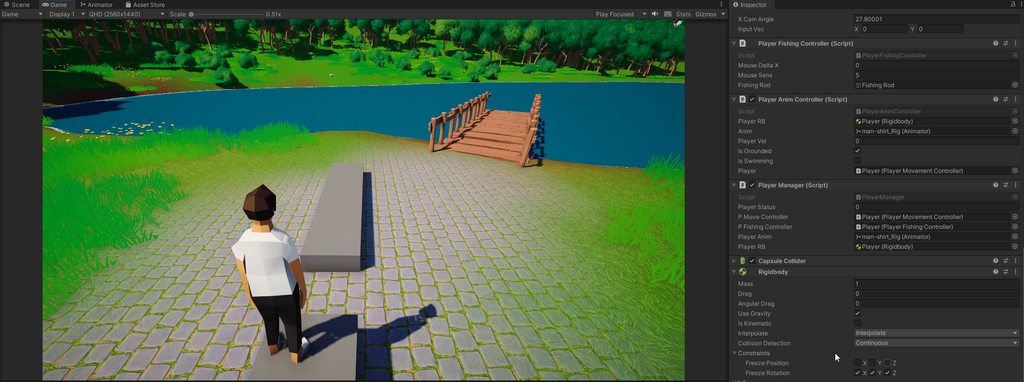
So if the box colliders size is changed in anyway it happens... https://imgur.com/wbPZoXk
 remote pewter
polar wolf
So if the box colliders size is changed in anyway it happens... https://imgur.co...
remote pewter
polar wolf
So if the box colliders size is changed in anyway it happens... https://imgur.co...
maybe inputVec or one of those aren't letting it go back down to 0
 remote pewter
maybe the collision is adding extra forces somehow
remote pewter
I mean physics works like that
nothing comes to a complete stop
usual residual forces remain in some way shape or form
I would say to try first my earlier take
polar wolf
I guess.. I think that's scientific notion for really dang small so I can just have a temp work around where if it's < than like 0.01 or something
remote pewter
just explicitly set the velocity to 0 when you let go of keys and certain conditions are met
I think the reason why rigidbody based controllers are iffy is they are hard to get precise control over
polar wolf
Yeah that work around works. I can't say I'm the biggest fan of it but it does work
Well thanks for the help
remote pewter
srry wish I could help out more
polar wolf
And thanks for letting me know about enums, the name always spooked me
It's probably a unity thing so a bit out of your control
remote pewter
limited knowledge on rigdbody based controllers & only know basic physics 😇
polar wolf
At least I was able to find a solution so that's all that really matters
 solid spoke
Why is the collider for my capsule expanding when i'm trying to use it as a Configurable Joint?


I think it might have something to do with the configuration of the Anchor(s)
 pulsar canopy
My child (dynamite) doesn't move with parent object (left hand) when being thrown

you can see it floats right before it gets thrown
why?
solid spoke
solid spoke
Why is the collider for my capsule expanding when i'm trying to use it as a Conf...
It seems the solution is I didn't have the parents scale uniform, as well as its child objects. If anyone is wondering!
 onyx lion
Hi guys, my character controller is able to clip in corners, any tip?
carmine basin
I'm trying to get the physic material of a collider and compare it to one in a scriptable object
and its always returning a null ref
my code is as follows;
  hit.Collider.attachedRigidbody.AddExplosionForce((bulletDamage / (hit.Distance / maxRange)) * bulletForce, hit.Point, 0.1f, 0.2f);
  var impactEffect = ImpactScriptableObject.impacts.Find(x => x.physicMaterial== hit.Collider.sharedMaterial);
and impacts is a static list of custom class Impacts
timid dove
carmine basin
and its always returning a null ref
NREs are always the same
- Identify which reference is null and why
- Fix it
You have a lot of dereferencing happening on that line - split the line up and/or log all the possibilities
carmine basin
I fixed it, I am now checking the hit physics material, and using the name
timid dove
ImpactScriptableObject.impacts
hit.Collider
hit.Collider.attachedRigidbody
Any of these could be null
 true zenith
Hi! I am making a game where you often have to connect the cables, and I am wondering about a way to make a wire simulation. After watching some tutorials, I made a objects connected with joints, and simple mesh generator, but it behaves buggy and freaks out often. Can you please give me some advice on the configuration of Configurable Joint (that's what I used) or maybe there is a different better approach to simulating cables in Unity?
timid dove
true zenith
Hi! I am making a game where you often have to connect the cables, and I am wond...
depends on what kind of simulation you want/need
does it need to be a fully physical simulation?
Just a grpahical one?
If you just want it to look nice you can use Verlet Integration. If you want actual physics simulation you can use either joint chains or if you want to get fancy there's https://assetstore.unity.com/packages/tools/physics/obi-rope-55579
true zenith
timid dove
does it need to be a fully physical simulation?
Well it needs to behave like a rope for some time, for example I connect it to one point, then it follows me (if possible it gets more joints) and after I connect the other end it should fall to a floor like a wire, and then maybe I can stop simulating it and just use mesh. Graphical mesh satisfies me enough, even with not so regular joints it looks ok for my purposes
true zenith
timid dove
If you just want it to look nice you can use Verlet Integration. If you want act...
Yeah, looks fancy, but costs more than my monthly earnings xd
true zenith
Talking about physics, it does not need to pull, it just should hang between two static points
carmine basin
You could most likely code it, in that case
maybe use a line renderer
and then you can code the sagging/hanging
onyx lion
tropic trench
<@516277723040186410> whoops meant to ping
okay give me a sec
well, its just a capsule collider
 tropic trench
onyx lion
well, its just a capsule collider
tropic trench
onyx lion
well, its just a capsule collider
ok can you send a video of the problem?
true zenith
true zenith
Hi! I am making a game where you often have to connect the cables, and I am wond...
Well, seems like I've found a reasonable working solution, I just used hinge joints, and also used more joints (here are 200, but I will try to minimise the number)

 grand raptor
hey y'all, I'm really new to the programming and rigging side of things, and could really use some help with a problem I've encountered during a project. I hope this is the right channel for this lol.
Basically, I have this little goblin dude whose robe is supposed to have some cardboard cutouts pinned to it. The hat and sleeves are controlled with dynamic bones, but the bottom uses cloth physics. Ideally, I want to be able to "pin" the cardboard pieces in place on the robe as it moves around, but I can't figure out how to do that. I don't think vertex groups transfer from blender to unity, and I'm not sure how else to attach them in a way where they maintain their rigidity and proper position.
I'm having a few other problems with this right now, but this is definitely the most pressing haha
 gentle marten
Hello guys , i have 3D model of an area and i want to make flood simulation on it with C# and m new to this ..so any help ?
timid dove
gentle marten
Hello guys , i have 3D model of an area and i want to make flood simulation on i...
Sounds like some university research level stuff. Unity doesn't have any kind of built in fluid simulation.
You'll have to make it yourself from scratch, find a library that does it, or buy an asset that does fluid sim.
timid dove
Sure... you could do it in C#, you could do it with a native plugin, you could do it however you want.
gentle marten
can u help me with tutorials or videos
i am just new to this
and i dont know how
timid dove
You are at the start of a very long journey
a fluid simulation is a pretty advanced topic
if you are just barely a beginner at programming, it could take you years to get to the level where you could do a realtime fluid simulation.
If you'd rather skip that, there's always assets https://assetstore.unity.com/packages/tools/physics/obi-fluid-63067
gentle marten
look i dont need to have advanced skills at doing physics simulations ..i have a 3D model and i want to make flood on it ..it doesnt have to be like tough work ...i just need some guidness ..if someone like work on somethin like this ..
 inner thistle
Fluid simulation is one of the more difficult things you could pick. It's not going to be simple no matter how hard you wish it would be.
 warm plank
Hi guys, I'm trying to create an artificial gravity scenario like in space engineers, and I'm having trouble with keeping the velocity of the player consistent with the spaceship when the ship collides. I have the rotation and velocity of the player locked with the orientation of the spaceship, but when the ship collides the player gets the ships 'attempted' velocity applied rather than its actual velocity, so for example when a ship collides head on with a wall, the player will slide forward within the ship as if there is no collision. How can I fix this?

Hastebin is a free web-based pastebin service for storing and sharing text and code snippets with anyone. Get started now.
gentle marten
inner thistle
Fluid simulation is one of the more difficult things you could pick. It's not go...
No solution for even making simple thing ??
timid dove
gentle marten
No solution for even making simple thing ??
Fluid simulation is simply not simple
unless you want to dumb it down to something like Minecraft water
 craggy mulch
I'm having a weird issue with physics2d.overlap. I'm 99% sure my coordinates and layermasks are correct. This is the code:
        bool IsBlockedAtPosition(Vector2 position){
            Vector2 half = new Vector2(-.45f, .45f); // TODO: Move this somewhere globalish
            var transformedPosition1 = _machineRoot.TransformPoint(position - half);
            var transformedPosition2 = _machineRoot.TransformPoint(position + half);

            ContactFilter2D filter2D = new ContactFilter2D();
            filter2D.layerMask = _blockedLayerMask;
            List<Collider2D> hit = new();
            var collidersAtPosition = Physics2D.OverlapArea(
                transformedPosition1,
                transformedPosition2,
                filter2D,
                hit
            );

            var c2 = Physics2D.OverlapBox(
                _machineRoot.TransformPoint(position),
                _machineRoot.transform.localScale * .9f,
                0,
                _blockedLayerMask
            );

            Debug.Log("Is Blocked Check - pos: " + position + ", p1: " + transformedPosition1 + ", p2: " + transformedPosition2);
            Debug.Log(hit.Count);
            Debug.Log(collidersAtPosition);
            Debug.Log(c2);

            if(collidersAtPosition > 0){
                return true;
            }

            return false;
        }
What's extra weird, is if I move the target collider from being a child of _machineRoot, to a child of the scene root, without changing the position/scale/rotation at all, the overlap suddenly works
One of those works, the other does not!!!


There are no rigidbodies or colliders on any of the parents, so I don't think it's a composite collider thing
gentle marten
timid dove
Fluid simulation is simply not simple
its okay ..how can i do somethin even similar to that
timid dove
craggy mulch
I'm having a weird issue with physics2d.overlap. I'm 99% sure my coordinates and...
I'm having a weird issue with physics2d.overlap.
Are you going to share what the issue is?
also I have no idea what I'm looking at in those screenshots
no context for your game
craggy mulch
timid dove
> I'm having a weird issue with physics2d.overlap.
Are you going to share what ...
ah, fair, the overlap doesn't find anything
timid dove
and what are you expecting it to find?
And which overlap do you mean?
you're doing at least two of them
craggy mulch
basically I have a polygon collider at a given location, and I'm trying to OverlapArea/Box, and it returns nothing, even though I'm sure the position/scale and layermasks are correct
timid dove
craggy mulch
basically I have a polygon collider at a given location, and I'm trying to Overl...
how did the collider etc get there?
did it move this frame?
Also this contact filter is almost definitely wrong:
            ContactFilter2D filter2D = new ContactFilter2D();
filter2D.layerMask = _blockedLayerMask;```it didn't move that frame, it's attached to an object that is instantiated on scene load
well
timid dove
You should use filter2D.SetLayerMask(_blockedLayerMask);
craggy mulch
when I put the object at the root of the scene (while the game is playing) it works
timid dove
otherwise it will ignore the mask
craggy mulch
ok, I'll try that, sec
timid dove
unless you also do filter2D.useLayerMask = true;
but - if you use SetLayerMask it will also set that
timid dove
craggy mulch
when I put the object at the root of the scene (while the game is playing) it wo...
ok so I'd say your object is probably not where you think it is
or doesn't have the collider(s) you think it has
or it moved that frame and physics colliders don't update usually until the physics simulation phase
craggy mulch
the 2 screenshots show the object in the same place, with the same collider, in one screenshot it works, the other it does not
so I'm very confident that the object and colliders are correct
timid dove
I don't see anything in the screenshot demonstrating a collider
nor do I know which object we're talking about
nor can I verify that any of these positiions etc. are correct
from the information you've shared at least
craggy mulch
in both screenshots, the object on the right with the transform gizmos. So, identical positions. You're right I have the collider gizmo disabled, but I can promise you that in the 2 shots, the colliders are identical. All I've done is drag the object from one objects root to the scene root (which you can see in the hierarchy view on the left of both screenshots)
timid dove
and how do we know that _machineRoot and position and _blockedLayerMask are the same
craggy mulch
here's the collider when it does work (at root of scene):

here's the collider when it doesn't work (object is child of machineroot):

the same exact function with the same exact args are called each time (so position is identical, I'm even logging this to be sure)
here's the layermask of that object in the screenshots that I want to overlap:
 timid dove
That's a layer. How is the mask defined?
craggy mulch
here's what is set in the script
 timid dove
craggy mulch
the same exact function with the same exact args are called each time (so positi...
timid dove
craggy mulch
the same exact function with the same exact args are called each time (so positi...
where is this happening?
craggy mulch
I'm not sure what you mean
timid dove
where are you calling IsBlockedAtPosition
craggy mulch
well, it's a bit hard to isolate that in any meaningful way to share with you, but I'm not sure that it should matter too much, since it's called from the same place and with the same args in both contexts (where it works and where it doesn't), but
        private void DoFormation(ConveyorAgent agent, Barcode barcodeOutValue)
        {
            Vector2 pos = agent.transform.localPosition;

            agent.PathPoints.Clear();
            agent.PathPoints.Add(agent.transform.localPosition);

            for(var i = 0; i<barcodeOutValue.VectorsTruncated.Count; i++){
                Vector2 vector = barcodeOutValue.VectorsTruncated[i];
                var newPos = pos + vector;

                if(IsBlockedAtPosition(newPos)){
                    Debug.Log("Blocked at position: " + newPos);
                    continue;
                }

                pos = newPos;
                agent.PathPoints.Add(pos);
            }
            agent.BuildFormStrip();
        }
I guess what I was trying to ultimately get at is some context about when this thing is called compared to when the object is created / positioned
timid dove
<@&502884371011731486> spam
 rapid canopy
Hello guys,
I am currently trying to handle this kid of issue with physics, where an object (blue) is moving on the ground (green left) and get stopped by an other ground (green right) object on the same level.
When using a mesh collider (i.e. creating a plane with a Physics Shape whose Shape Type is set to mesh) my (blue) object still stop around the intersection 2 triangles.
Is it supposed to be the normal behavior ? I would have expected the decollision to happen on the whole mesh level, not on a per triangle level.
 craggy mulch
timid dove
I guess what I was trying to ultimately get at is some context about when this t...
craggy mulch
timid dove
I guess what I was trying to ultimately get at is some context about when this t...
Yeah, that makes sense. Not sure how to be more illustrative about that, other than to say that everything is stationary, and was instantiated on scene load.
The only difference between the one that works and the one that doesn't is that in the one that works, the collider I'm trying to overlap is in the scene root, rather than being a child of machineRoot
warm plank
warm plank
Hi guys, I'm trying to create an artificial gravity scenario like in space engin...
Is anyone able to take a look at this?
 hollow wind
Hi! I've been dealing with a very annoying issue for the past year. I'm making a VR physics game, and when the FPS is a rock solid 72 or 90 (depending on the screen refresh rate), the physics are fluid and without stuttering. But the moment the FPS drops to 71/89 FPS, objects suddenly become stuttery (even with interpolation ON), and collisions have completely results and objects fly away at 3x the speed. I've set the Timestep to be 1/refresh rate. And the worst part is that I've implemented Entities Physics to my project with the hopes of this not happening anymore but unfortunately it has the same problem! Any help would be greatly appreciated.
Also in Unity DOTS Physics Package for some reason changing the collision solver count to some other value than 4 does absolutely nothing. And when Debug.Logging the value it display a 0, which makes no sense.
(Note it displays a 0 inside the headset which runs on Android, in the Editor it says 4).
hollow wind
warm plank
Is anyone able to take a look at this?
Isn't this what should actually happen?
In real life when a ship collides with something people and objects fall down
Because the speed they have keeps affecting them
 uneven pine
warm plank
Hi guys, I'm trying to create an artificial gravity scenario like in space engin...
uneven pine
warm plank
Hi guys, I'm trying to create an artificial gravity scenario like in space engin...
well is there friction? if not then sliding is whats supposed to happen
 vital jolt
working on my first "game" why does my cube go flying : (

if I enable kinematic it just passes through the walls : (
hollow wind
Always move rigidbodies with rigidbodyComponent.MovePosition(Vector3 targetPosition)
This way it will collide with walls because it will move the object taking physics into account
If you do tranform.Translate() instead it will ignore physics and thus ignore walls
 deft grail
vital jolt
if I enable kinematic it just passes through the walls : (
deft grail
vital jolt
if I enable kinematic it just passes through the walls : (
kinematic rigidbodies completely ignore collisions, because when you set a rigidbody to kinematic, you're telling the physics engine "I'm handling all of the collisions myself"
so kinematic rigidbodies will call the physics callback functions like OnTriggerEnter and OnCollisionEnter, but won't do anything unless you explicitly tell it to
hence, passing through walls
vital jolt
@arctic marsh you mean how is my script set up? I'm using vector 2 transform.translate"horizontal"//"vertical"
deft grail
how does energy transfer work for box2d dynamic rigidbodies? if two bodies collide do dynamic collisions just take the mass and angle into account for calculating trajectory? how much does the overlap impulse affect the determinism of the collision?
essentially I'm trying to predict how two rigidbodies will collide so I can know quickly going into the future if I need a rigidbody to be kinematic, or I can just leave it dynamic because it'll do what I want
 bleak umbra
i have a mesh collider and a terrain collider that are flush with each other, still when i roll a ball over the edge between them the physics engine makes the ball jump, is there any way fix this with physics settings/collider shape? i'd like to avoid writing a custom controller for the ball as that would complicate things a lot since i'd like to actually keep those little jumps in places where there is a tiny edge. All colliders have physics materials with zero friction and combine to minimum.

an ortho view of the situation showing the mesh collider
 timid dove
deft grail
how does energy transfer work for box2d dynamic rigidbodies? if two bodies colli...
timid dove
deft grail
how does energy transfer work for box2d dynamic rigidbodies? if two bodies colli...
That's a pretty esoteric question, but Box2D is open source so you could go digging for it
bleak umbra
timid dove
That's a pretty esoteric question, but Box2D is open source so you could go digg...
was looking for an easier fix 😄
deft grail
bleak umbra
~~was looking for an easier fix 😄~~
he wasn't even replying to you? lol
bleak umbra
deft grail
he wasn't even replying to you? lol
phew, hope restored
arctic marsh
vital jolt
<@144387642140655616> you mean how is my script set up? I'm using vector 2 trans...
If you translate the transform directly, it avoids collision detection, you have to move the rigidbody or set the velocity
arctic marsh
bleak umbra
an ortho view of the situation showing the mesh collider
Does this happen to other objects too, lets say move a simple cube with a box collider over it?
warm plank
hollow wind
Isn't this what should actually happen?
No, I don't want the player to have inertia, I want all their physics to be calculated relative to the ship
warm plank
uneven pine
well is there friction? if not then sliding is whats supposed to happen
It's supposed to stay locked relative to the ship. My goal was to have all the players physics calculations relative to the ship, so when the ship isn't moving then neither is the player
at the moment I have their up direction locked to the ships up direction, and their velocity is calculated relative to that, but there's obviously some things left over I've missed
uneven pine
warm plank
It's supposed to stay locked relative to the ship. My goal was to have all the p...
How does that make sense
warm plank
Which part are you confused about?
uneven pine
the fact that having the player locked, is not very physics based
warm plank
well it's just the up direction so that I can calculate gravity relative to the ship rather than world space
I want all their physics to be relative to the ship, so if the ship isn't moving they shouldn't be moving within it, which is the bug I'm trying to fix
uneven pine
I still don't understand are you trying to have physically accurate model, or some physics that don't make sense but feel good
uneven pine
warm plank
it's artificial gravity like my post said
since when is a computer simulation not artificial lol
warm plank
like artificial gravity in sci-fi
bleak umbra
arctic marsh
Does this happen to other objects too, lets say move a simple cube with a box co...
yes
arctic marsh
bleak umbra
yes
I guess your mesh collider is not clean enough then at some point. Not sure about the values on the mesh collider, but is there something like contact offset
rapid canopy
bleak umbra
i have a mesh collider and a terrain collider that are flush with each other, st...
I have the exact same need. If you find a solution, let me know, I will too
bleak umbra
arctic marsh
I guess your mesh collider is not clean enough then at some point. Not sure abou...
the mesh collider vertices are exactly at the position that a raycast to the terrain collider returns
thats what a cube does (the blue gizmos are the contact points), green gizmos are the average of all the contact points
 arctic marsh
bleak umbra
the mesh collider vertices are exactly at the position that a raycast to the ter...
arctic marsh
bleak umbra
the mesh collider vertices are exactly at the position that a raycast to the ter...
There has to be something. if you remove your meshcollider and use a simple plane collision, it should not happen, right?
bleak umbra
arctic marsh
There has to be something. if you remove your meshcollider and use a simple plan...
same result with a plane
 arctic marsh
Well, then you have another issue here. How are you moving the object?
bleak umbra
arctic marsh
Well, then you have another issue here. How are you moving the object?
i'm not moving it, the rigidbody moves it
based on what this z-fighting tells me, the terrain and plane meshes are perfectly aligned
 arctic marsh
bleak umbra
i'm not moving it, the rigidbody moves it
arctic marsh
bleak umbra
i'm not moving it, the rigidbody moves it
the rigidbody moves it? but how, this looks flat, so where does teh velocity come from?
bleak umbra
arctic marsh
the rigidbody moves it? but how, this looks flat, so where does teh velocity com...
 arctic marsh
Ahhh, got it, okay
So you have a plane and on that plane a mesh collider and between those two, it gets this little bump
arctic marsh
bleak umbra
this might help you , there is a script down below. Seems like a global physics calculation issue and the OP made some script to avoid it. https://forum.unity.com/threads/rolling-ball-bouncing-issues-preventing-upgrade-past-2018-2.1054418/

Unity Forum
Hi all,
For a while I've really wished I could upgrade my project past 2018.2, however issues starting with the PhysX updates introduced way back in...
But for the sake of levelcreation, you might just stitch together the mesh at some point and create one meshcollider for the level or at least continuous parts
bleak umbra
arctic marsh
But for the sake of levelcreation, you might just stitch together the mesh at so...
it even messes up "rolling" over the terrain with no mesh collider in the vicinity (happens rarely)
 arctic marsh
bleak umbra
it even messes up "rolling" over the terrain with no mesh collider in the vicini...
arctic marsh
bleak umbra
it even messes up "rolling" over the terrain with no mesh collider in the vicini...
hm, what is your rigidbody set to with interpolation?
bleak umbra
arctic marsh
hm, what is your rigidbody set to with interpolation?
interpolation settings dont make a difference, tried all combinations
anyway, i'm going with a custom sim, rigidbody sim seems to be way too much hassle
arctic marsh
bleak umbra
interpolation settings dont make a difference, tried all combinations
All sims run the same afaik
under the hood they check against faces and vertices
arctic marsh
So the grid pattern I see on the last screenshot is a terrain component in unity, right?
bleak umbra
arctic marsh
So the grid pattern I see on the last screenshot is a terrain component in unity...
the ramp is a mesh, the ground is a unity terrain (height cleared to world 0)
arctic marsh
bleak umbra
the ramp is a mesh, the ground is a unity terrain (height cleared to world 0)
Something is weird here... I just tested the same setup on my side, nothing jumping or anything
bleak umbra
arctic marsh
Something is weird here... I just tested the same setup on my side, nothing jump...
might be a GC spike that messes up the sim
arctic marsh
bleak umbra
might be a GC spike that messes up the sim
Oh well, that can very likely be, maybe going out of game view and back to it, alt tabbing, or what not.
warm plank
Is there any way of making a rigidbody only apply forces to certain other rigidbodies?
timid dove
warm plank
Is there any way of making a rigidbody only apply forces to certain other rigidb...
layer based collisions
warm plank
timid dove
layer based collisions
Do you have a tutorial or docs? I couldn't find anything on this
timid dove
warm plank
Do you have a tutorial or docs? I couldn't find anything on this
first google result https://docs.unity3d.com/Manual/LayerBasedCollision.html
warm plank
wont that stop them actually colliding? All I want is to stop the forces
timid dove
warm plank
wont that stop them actually colliding? All I want is to stop the forces
what's the difference?
forces are what makes them collide
warm plank
I mean more stop them from pushing each other about
warm plank
they stop each other from moving but don't actually move each other when they collide
timid dove
That's kind of a weird and imprecise behavior
stop moving?
So maybe just set velocity to 0 in OnCollisionEnter?
warm plank
Right I'll try that
I might just make the mass for one a lot larger I guess that'd be the most physically accurate
 safe flare
are physics materials broken in 2021.3.11? This still slides like ice.

 timid dove
safe flare
are physics materials broken in 2021.3.11? This still slides like ice.
timid dove
safe flare
are physics materials broken in 2021.3.11? This still slides like ice.
is there code involved?
safe flare
yes. I use apply force onto the object to move it. That's it though.
timid dove
safe flare
are physics materials broken in 2021.3.11? This still slides like ice.
is the ball rolling?
safe flare
yes
timid dove
well
that's why
high friction on a rolling ball just means... it grips well to roll
it's not actually SLIDING
sliding is where friction matters
safe flare
I see
timid dove
if you want rolling resistance
try angular drag
or make your own custom with AddTorque
safe flare
i see
cus angular drag would always affect it, even while in air, right?
i guess that's fine
timid dove
yes it would
 halcyon walrus
Hello,
I have an enemy with 3 colliders on it. I don't want any of these colliders to collide with eachother on the instance of the object they exist on.
However, I do want these colliders to be able to collide with other instances of the same object.
Basically, I want the enemies to collide with eachother, but not with themselves.
Can I do this with layers, or do I need to do something else? It seems like using layers they either collide with themselves and eachother, or none of them collide
timid dove
halcyon walrus
Hello,
I have an enemy with 3 colliders on it. I don't want any of these collid...
As long as the enemy parent object has a RIgidbody, none of its child colliders will interact with each other
(unless the children have their own Rigidbodies)
halcyon walrus
Oh I see, let me check
timid dove
if the children need to have their own Rigidbodies you can use https://docs.unity3d.com/ScriptReference/Physics.IgnoreCollision.html to have each pair of colliders in the object ignore eeach other

 timber pelican
in general, is it ok to have a child rigidbody under a parent rigidbody?
arctic marsh
timber pelican
in general, is it ok to have a child rigidbody under a parent rigidbody?
not a good idea in general, if you want both to be affected by physics. If its just for collision and kinematic, it might work, but usually child object colliders are taken into account of the root rigidbody I think
timid dove
timber pelican
in general, is it ok to have a child rigidbody under a parent rigidbody?
It's ok as long as you thoroughly understand all of the consequences and caveats of doing it.
It's "ok" in the sense that nobody is going to stop you and your game isn't going to crash.
tawdry rampart
timber pelican
in general, is it ok to have a child rigidbody under a parent rigidbody?
As others said, it's ok but the main thing to understand here is that Rigidbodies do not really follow the concept of a hierarchy. Their movement is not going to be constrained based on their position in your Scene Hierarchy. If you want the child Rigidbody to move together with the parent, you should use Joints (e.g. a Fixed Joint to simulate a hierarchical parenting).
 quaint charm
I have a cloth swinging here and 4 objects which are children of the cloth. How can i make them follow the cloths movement? I thought just making them children of it would make them yknow stick to the cloth but that didnt work

 tacit laurel
how do you pin one hinge joint from a chain in place ?
when i set up a configurable joint in free mode it'll stay in place but others don't stick to it anymore
in locked mode the translation changes, just the rotation is locked
tacit laurel
kinematic rb on pinned joint results in erratic motion for the rest of the chain
 naive panther
I have a problem where everytime I run my game the cube starts to rotate (a.k.a the player) and its not supposed to, even when I press freeze rotation z it still rotates and either makes the game impossible or far too easy
can anyone help?
unique cave
naive panther
I have a problem where everytime I run my game the cube starts to rotate (a.k.a ...
Sounds like you are rotating the cube either via script or animation, objects doesnt rotate without a reason
onyx lion
Hi guys, i have a little problem, is there a way to "force" not clipping into corners? Its because i use runtime imported models so they just have mesh colliders and i cant controll that, i dont know if i expressed well
naive panther
Its bouncing on the ground. It's supposed to bounce when it hits an object

I accidetnly changed the mesh to a sphere once and then i changed it back and now Im having these problems
unique cave
naive panther
Its bouncing on the ground. It's supposed to bounce when it hits an object
Really hard to guess with this little information given. Even screen recording of that effect would be helpful. Also how you move the object, how the collider is currently positioned etc,
naive panther
sadly I can't upload large screen recording files
unique cave
Why?
naive panther
discord doesn't let me send files bigger than 8mb
would a call work better?
Ah yes of course it randomly fixesd itself
is there a thanks system on this server?
tropic trench
naive panther
discord doesn't let me send files bigger than 8mb
try streamable
very simple uploads
and a large limit on files
quaint charm
quaint charm
I have a cloth swinging here and 4 objects which are children of the cloth. How ...
has anyone got any ideas on this?
or even alternate ways of getting the same effect that arent cloth, such as hinge joints or somth
 stuck bay
hey does anybody know how I can make a ragdoll balence
 silver moss
stuck bay
hey does anybody know how I can make a ragdoll balence
silver moss
stuck bay
hey does anybody know how I can make a ragdoll balence
Do you have an example of a game that has the kind of ragdoll balancing you want
stuck bay
silver moss
Do you have an example of a game that has the kind of ragdoll balancing you want
like gang beasts or human fall flat
silver moss
Look into ConfigurableJoints.
They can balance your character rotationally and positionally. Its tricky though
Other joints can work too but CJ has all the features exposed
 dark moss
I just noticed my ground check is a few physics frames late in detecting the player rigidbody stopping colliding with an object, and that onCollisionExit is being called like two or three physics steps late. (Tested with a slow timescale and no rigidbody interpolation to count frames) This is causing some issues for me, as I want to snap to the ground if I hit a small bump or something, and that relies on me knowing exactly when I stop being grounded. Any ideas as for how I could solve this?
 worldly plume
So, I am trying to add ragdoll physics to my rigged character, and I seem to have added it correctly. (or so I think) but when I go into play mode. My character starts having an what can only be described as an exercism and starts spazzing uncontrollably
I've made sure that all the colliders aren't overlapping. And I saw something about enabling projections, and I tried that, but that didn't work either.
timid dove
dark moss
I just noticed my ground check is a few physics frames late in detecting the pla...
you won't know it's happened until after it happened, that's the nature of OnCollisionExit
 steel raven
So whenever i use rigidbody.addforce impulse it behaves differently depending on where I am on the map. This force is for jumping and in some places the jump is higher than other places. This began happening when I updated to 2022.2.11. There are no colliders in the way or anything an it is just a simple addforce function. All of the physics materials on the ground are the same so i dont think that could be the issue.
timid dove
steel raven
So whenever i use rigidbody.addforce impulse it behaves differently depending on...
Sounds like a bug in your code.
e.g. perhaps the code is framerate dependent or something of that nature
tawdry rampart
quaint charm
I have a cloth swinging here and 4 objects which are children of the cloth. How ...
Parenting is not going to work here, the simulation only updates the Cloth's vertices, not the Transform. You could write a script that updates the "attached" object's positions based on the simulated vertices of the Cloth. If you want to attach other dynamic physics objects, you could make a kinematic Rigidbody that follows a vertex and attach something dynamic to it via Joints
tawdry rampart
dark moss
I just noticed my ground check is a few physics frames late in detecting the pla...
The collision exits when the distance between the 2 Colliders is greater than the sum of their contactOffsets (see Collider.contactOffset). So you can still be in a Collision while having a positive distance between them.
If you want to know as early as possible that the bodies stopped touching, you could subscribe to the OnCollisionStay and check what is the minimum separation of the Collision's ContactPoints. That would be only one frame late, because the separation values will be from the start of the simulation step (before the objects get depenetrated from each other). Or you could perform an Overlap query in the OnCollisionStay to check if they are still overlapping after the depenetration if you really need to know as soon as possible.
quaint charm
tawdry rampart
Parenting is not going to work here, the simulation only updates the Cloth's ver...
i tried the kinematic rigidbody thing and i couldnt get it to work. i want the object to swing when it moves (its like a paper target) while the holes remain attatched to it (like its been shot) what do you suppose is the simplest way of doing this?
tawdry rampart
So the holes are just decals?
quaint charm
theyre objects with a material
so yea kinda, tried decals that would make the surface they contact transparent, but couldnt find anyone whod done it for hdrp
tawdry rampart
Right, so now it sounds like more of a job for a custom shader as opposed to physics. To render some holes around points that were hit
quaint charm
would decals stick to a cloth sim?
tawdry rampart
I... Don't know 😄 I haven't done anything graphics related in a long while. Looking at the HDRP docs the Decal feature seems pretty fancy and it looks like it can project the decal onto a deformed surface. Tho I imagine you'll still have to calculate the position and rotation for the decal mesh
So I imagine you know where you hit the cloth. You then find the closest vertex, write down it's index. The position of that vertex is the position for your decal. Then you take some nearby vertices to figure out which way should the hole face?
dark moss
tawdry rampart
The collision exits when the distance between the 2 Colliders is greater than th...
Thanks, that's exactly what I was looking for!
 agile marsh
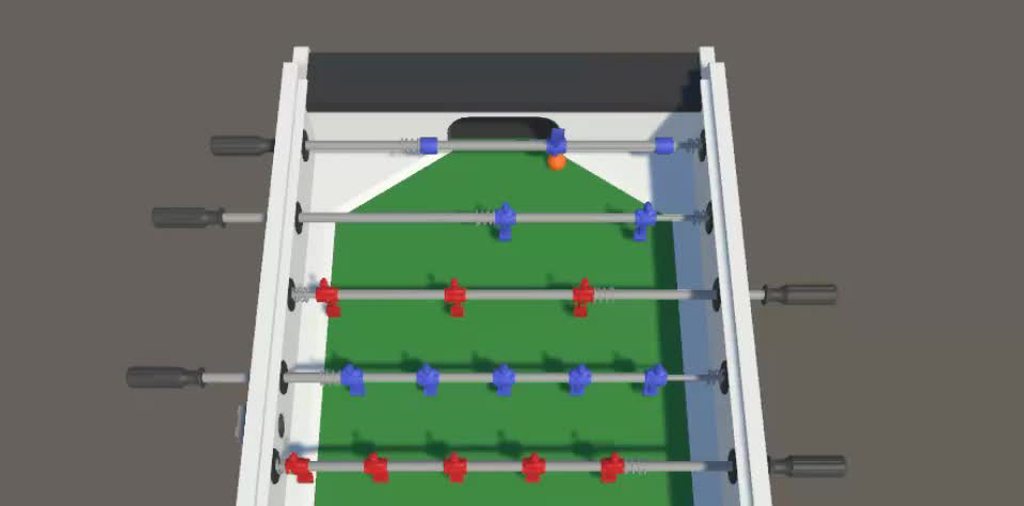
Is there a way how to fix that football rod so it moves and spins only in single direction.https://imgur.com/a/OjdjIrk
tried with constraints, joints... but didn't have any luck. Bit better looked when I changed velocity and angular velocity to zero for y and z, but still isn't it.
 tawdry rampart
Looks like a job for a Hinge Joint. Just set joint Axis to be along the length of the stick
tawdry rampart
agile marsh
Is there a way how to fix that football rod so it moves and spins only in single...
agile marsh
thanks, i am trying something it looks better. I am bit confused as i tried once that joint but it spun weirdly (because i see that i forgot to move anchor point to centre of mass)
now it is only spinning, but cannot be moved
tawdry rampart
Ogh, right, the table football sticks can be moved back and forth 😅 . In that case you need a Configurable Joint
steel raven
timid dove
Sounds like a bug in your code.
The addforce is called once
 steel raven
The addforce is called once
steel raven
steel raven
The addforce is called once
Seems like it fixes when i adjust contact offset. Not a perfect solution because i dont want too low offset
timid dove
steel raven
The addforce is called once
Once per what
steel raven
timid dove
Once per what
once, a singular time
timid dove
you sure about that?
worldly plume
Are mesh colliders inherently worse for performance? Is there any benefit from using a lower poly mesh as a mesh collider instead of just using a mesh collider on a high poly mesh?
timid dove
- Worse for performance compared with what?
- Yes
unique cave
On most cases the difference is not very noticeable due to broad phase checks eliminating most of the further calculations. If none of the collision pairs gets to the narrow phase check, theres no difference between collider types
 deep parrot
does anyone know how to fix collision bouncing on an edge? My rigidbody bounces up when it hits an edge in the mesh. I have tried capsule colliders, contact offset (it worked a bit but not reliable enough), changing the solver iterations nothing works. Anyone know a solution?
arctic marsh
deep parrot
does anyone know how to fix collision bouncing on an edge? My rigidbody bounces ...
Try to avoid colliders laying edge to edge
deep parrot
well im using a model i made in blender ill send a screenshot of the edges. Its one model and one mesh collider:


there is pretty much no where to bounce but it is
ive also tried making my player collider a capsule: But it still bounces

 rapid mortar
I'm making a small 3D game where you more or less play as a Chain-Chomp from mario - controlling the ball on one end, chain connecting the ball to a static point. I'm using cylinders and Character Joints to make the chain, since hinges only work in one axis, but in testing, the chain will often pull apart (not breaking, just stretching) and flying all over the place. What settings can I adjust in the Character Joint component to make sure the individual links never separate from each other like that?
the chain links are set to not collide with each other, and also do not collide with the ball
 marble reef
Hi guys I just wanted to know I am creating a VR game in Which there will be Physics Interaction too .. so I have created the basic physics of Player using the Video "Valem Tutorials" have created for the Physics Interaction. I just wanted help with I want the grabbing of the object to be more precise like sticking it to the hand, and also wanted to use Distance Grabbing for the Object .. Can anyone help me ? what to do ahead ?
https://www.youtube.com/watch?v=D9qQb3EvU8c&ab_channel=ValemTutorials

Here we go again, let's learn how to grab and interact with physical objects in VR !
▶ PATREON : https://www.patreon.com/ValemVR
▶ DISCORD : https://discord.gg/5uhRegs
#vr #vrdev #madewithunity #valem #unity
quaint charm
is it possible to anchor just a section of a rigidbody? in my situation i want to keep the top anchored in 1 location
i would use a hinge joint however these arent effected by drag, unless there is some way to do that
timid dove
quaint charm
is it possible to anchor just a section of a rigidbody? in my situation i want t...
joints are the way to do it yes. I don't really understand what your comment about drag means
Drag is a property of the Rigidbody, not the joint.
quaint charm
lemme try and explain that a bit better
quaint charm
timid dove
joints are the way to do it yes. I don't really understand what your comment abo...
the green line here is a target, im trying to make it so that when it moves in the direction of the red arrow it swings. The blue dots on it are objects which i need to stay stuck to it whilst it moves

 timid dove
quaint charm
the green line here is a target, im trying to make it so that when it moves in t...
timid dove
quaint charm
the green line here is a target, im trying to make it so that when it moves in t...
seems like a typical chain of Rigidbodies connected by hinge joints
quaint charm
can you explain sort of what id have to do for this? I figured it would be something like that but have no idea how to actually make it and ive never used hinge joints before
timid dove
Just make a bunch of Rigidbody2Ds in a line
connect each one to the next via HingeJoint2D
 spring sable
can I parent a rigidbody to an object without a rigidbody expect parent/child behavior?
would a fixed joint work in this situation?
spring sable
right now I have to disable interpolation for some reason when my player is on a moving platform
and I was wondering why I have to do that
if i leave interpolation on it feels like the player is moving through honey
my player is a dynamic rigidbody, moved by adding forces
my platforms are just colliders without rigidbody
spring sable
spring sable
would a fixed joint work in this situation?
i tried using a kinematic rigidbody platform and a fixed joint, but it dosent work, because I want the player to be able to move around while on the platform.
spring sable
spring sable
right now I have to disable interpolation for some reason when my player is on a...
why is this?
ik it has to do with lateUpdate being used if a rigidbody is interpolated
but it makes no sense
if I could keep my moving platforms working, but remove the part where I have to disable interpolation I would be golden
silver moss
spring sable
right now I have to disable interpolation for some reason when my player is on a...
How is your character currently sticking to the platform? Custom code?
silver moss
spring sable
can I parent a rigidbody to an object without a rigidbody expect parent/child be...
That doesnt really work, you would need a joint or make it follow the platform with a script
Also is it 3D or 2D?
rapid mortar
rapid mortar
I'm making a small 3D game where you more or less play as a Chain-Chomp from mar...
still working on this, going slow
Given that I want the rope/chain to extend and retract dynamically, and manipulate and be manipulated by physics objects, are Cylinders + Character Joints a good way to simulate this?
I've seen some things about Line Renderers, ObiRope, and some stuff about Verlet, but I'm still not entirely sure which is better suited to my needs.
spring sable
silver moss
How is your character currently sticking to the platform? Custom code?
I’m childing my player to the platform
2D
 rotund lagoon
I having a problem when I load a scene. On initial load am I instantiating a grid of about 3000 colliders. I then want to immediately run a sphere cast on these. The problem is that for some reason i have to wait a long time after the instantiate before the spherecast will register a hit (100 frames wait = no hit, but 200 frames wait I get hits??)....I'm assuming that Unity physics is for some reason taking to a while to rebuild the collisions in the background.
How can I either:
- Manually trigger a rebuild immediately after i'm done the instantiating
or - Wait until the rebuild is completed (instead of just arbitrary number of frames)
rotund lagoon
Ok, i found that after instantiating the objects, for some reason, I need to set the collider component on each object to enable=false; then immediately enable=true then the colliders will be available immediately...what's up with that?
timid dove
rotund lagoon
Ok, i found that after instantiating the objects, for some reason, I need to set...
Physics.SyncTransforms();``` is what you wantotherwise the physics world won't be updated until the next physics simulation step
spring sable
spring sable
right now I have to disable interpolation for some reason when my player is on a...
i forgot to note that interpolation is on, the moving platform still works
but the player can barely move and jump
like its moving through honey
I'm not the only one who has come across this (dare i say) bug
Unity is the ultimate game development platform. Use Unity to build high-quality 3D and 2D games, deploy them across mobile, desktop, VR/AR, consoles or the Web, and connect with loyal and enthusiastic players and customers.
Unity is the ultimate game development platform. Use Unity to build high-quality 3D and 2D games, deploy them across mobile, desktop, VR/AR, consoles or the Web, and connect with loyal and enthusiastic players and customers.
(my exact problem) https://answers.unity.com/questions/1598976/rigidbody-player-moves-slower-on-moving-platform.html
Unity is the ultimate game development platform. Use Unity to build high-quality 3D and 2D games, deploy them across mobile, desktop, VR/AR, consoles or the Web, and connect with loyal and enthusiastic players and customers.
Unity is the ultimate game development platform. Use Unity to build high-quality 3D and 2D games, deploy them across mobile, desktop, VR/AR, consoles or the Web, and connect with loyal and enthusiastic players and customers.
everyone says to just turn interpolation off when on a moving platform, but that's kind of a sucky solution.
 hasty plinth
Wassup
My physics is actin up
i need some help
When I add force to a rigidbody like this, it not only adds force but also makes it slide across the ground


but in the second screenshot, it doesnt slide
uneven pine
hasty plinth
When I add force to a rigidbody like this, it not only adds force but also makes...
well on the second screenshot you have drag which makes the player or whatever stop
uneven pine
hasty plinth
When I add force to a rigidbody like this, it not only adds force but also makes...
without drag or friction its always going to slide because there is nothing to reduce the objects velocity
hasty plinth
When I add force through script, right before the line where I add force, I set the drag to 0 and then it gradually lerps back to 4 in about 3 seconds
I want it to slide more
but it doesnt
uneven pine
whatever you are doing thats a terrible solution
inner thistle
Why don't you just set the drag to a value that makes it slide the amount you want
hasty plinth
How do I get sliding this smooth ;-;

Now, the moments where it seems to clip to the right are where I add force through script
 hasty plinth
inner thistle
Why don't you just set the drag to a value that makes it slide the amount you wa...
hasty plinth
inner thistle
Why don't you just set the drag to a value that makes it slide the amount you wa...
I just set drag to 0 and the problem seems go persist
hasty plinth
uneven pine
whatever you are doing thats a terrible solution
Plzz suggest me a new one
inner thistle
well you have to remove the code that messes it up of course
hasty plinth
inner thistle
well you have to remove the code that messes it up of course
This
I disabled player movement scripts and it works perfectly fine 😭
But where in those 2000 lines of code is the line that fricks up my force
💀💀
timid dove
hasty plinth
When I add force to a rigidbody like this, it not only adds force but also makes...
It sounds to me that you just don't understand how physics works TBH
Objects have momentum
hasty plinth
timid dove
It sounds to me that you just don't understand how physics works TBH
I guess you should check your hearing
spring sable
Bruh all you have to do is add a force proportional to your target velocity
And adjust the proportion factor to get scale
spring sable
hasty plinth
I guess you should check your hearing
2000 lines of code does not mean the code is good
Kind of the opposite
spring sable
spring sable
Bruh all you have to do is add a force proportional to your target velocity
This way it smoothly accelerated to your target velocity
No lerp needed
 coarse cove
Hi, can someone help me with a potentially really simple problem ? ( I can't find the solution online though... ) Started learning unity making a 2d platformer game, and have been playing with the physics. For some reason I can't get surface effector 2D to push my character horizontally, it only works vertically even if I rotate the object and whatnot. Is there something basic I'm missing to control the direction of the force ? All I can change right now is up or down. ( I've seen tutorials on youtube where they use this but it works horizontally .... )
quaint charm
timid dove
seems like a typical chain of Rigidbodies connected by hinge joints
Tysm this was it
Had to adapt a bit for my project but this pointed me enough in the right direction!
 hearty owl
I have a game with a car. I want the car to pause when I am in the pause menu. I found this thread where this guys suggested to set StepPhysicsWorld.Enabled to false. https://forum.unity.com/threads/pausing-physics-simulation.991616/#post-6439715 So I installed the Unity Physics package which in turns also install a bunch of dependencies like Burst, Collections, Entities, Jobs... I then added Physics and Entities to my definition file. And imported using Unity.Physics.Systems; in my script. And in the update loop I tried to set
  StepPhysicsWorld.Enabled = false;
} else {
  StepPhysicsWorld.Enabled = true;
}
But I am getting an error An object reference is required for the non-static field, method, or property 'ComponentSystemBase.Enabled'
Unity Forum
Does anyone know if there is a way to simply pause the physics simulation and turn it back on at a later time? Not just turn all entities to...
timid dove
hearty owl
I have a game with a car. I want the car to pause when I am in the pause menu. I...
The usual approach is simply:
Time.timeScale = 0;```Oh this is ECS just noticed
hearty owl
timid dove
The usual approach is simply:
```cs
Time.timeScale = 0;```
what value should I set it to resume?
hearty owl
IDK what's ECS tho, I just installed that package based on what i google.
timid dove
You're definitely barking up the wrong tree then
timid dove
timid dove
The usual approach is simply:
```cs
Time.timeScale = 0;```
This is the way to pause the game
timid dove
hearty owl
I have a game with a car. I want the car to pause when I am in the pause menu. I...
You don't need any of these packages etc.
you've somehow stumbled across some posts for ECS physics which is completely unrelated to normal Unity Rigidbody physics.
hearty owl
Ahh no wonder it was so confusing.
Btw is it better to set timeScale if update or fixedupdate?
timid dove
Presumably you're pausing the game in response to user input
input should always be read in Update
Note that FixedUpdate will stop running while time scale is 0
Update will always run as normal - once per frame.
 hazy canyon
can anyone explain why i just fly through the terrain?
 sterile thicket
does the terrain have a collider?
hazy canyon
yea it has the normal terrain collider on it
sterile thicket
is the collider set as a trigger?
hazy canyon
nope
sterile thicket
hmm, I'm sorry I don't know why its doing that.
hazy canyon
hahah all good
tropic trench
@hazy canyon player has a collider? Continous dynamic collisions on player collider?
hazy canyon
player has a box collider.
 lime dawn
I am trying to make a car controller for unity a realistic one or something like my summer car, I want it to be a manual car, I want it to have a clutch and the wheels and engine rpm to match but with gears and gear ratio in mind while clutch is not pressed I have been trying to ages can someone please help.
 safe juniper
ive implemented the marching cubes algorithm for creating a destructible planet, the mesh creation/rendering is fine
but unity wont let rigidbodies have a concave mesh, is there some way around this?
onyx lion
hi guys, id like to know how to addd rigidbody force depending on the position of the bullet that hitted the player (the bullet hits player and moves his rigidbody back)
timid dove
onyx lion
hi guys, id like to know how to addd rigidbody force depending on the position o...
AddForceAtPosition
 chrome cradle
How to do a suspension system for a car using Unity's builtin components?
I'm using spring joint, but the tire seems to be disconnected from the attached rigidbody and thus is getting dragged by the vehicle.
I want the suspension to act like a shock absorber. So it smoothens out any bumps and potholes and doesn't just move with the terrain.
 shell night
chrome cradle
How to do a suspension system for a car using Unity's builtin components?
I'm u...
shell night
chrome cradle
How to do a suspension system for a car using Unity's builtin components?
I'm u...
well if you'd attach a wheel to a spring in the real world, you'd get pretty much the same effect
chrome cradle
shell night
well if you'd attach a wheel to a spring in the real world, you'd get pretty muc...
The problem seems to be that it is not getting attached properly
shell night
chrome cradle
The problem seems to be that it is not getting attached properly
if its dragged behind the car, its attached properly to the spring
chrome cradle
shell night
if its dragged behind the car, its attached properly to the spring
Okay, how can I make it so that it doesn't get dragged?
 summer solar
Does anyone know why the ball glitches through the blocks? It has a RigidBody Component and the Vector3 is inverted with *= -1 on the Z-Axis upon OnTriggerEnter().
The Collider Size of the Ball is standard and the collider size of the blocks is slightly extended so it overs the tiny empty spaces too.
https://i.imgur.com/mT5ZVJc.gif
 timid dove
summer solar
Does anyone know why the ball glitches through the blocks? It has a RigidBody Co...
timid dove
summer solar
Does anyone know why the ball glitches through the blocks? It has a RigidBody Co...
Because you're trying to do physics with trigger colliders for some reason?
summer solar
timid dove
Because you're trying to do physics with trigger colliders for some reason?
this is for a university project and we aren't allowed to use the physics engine. How else would I do this using only script-controlled objects?
timid dove
summer solar
this is for a university project and we aren't allowed to use the physics engine...
If you're using OnTriggerEnter you're already using the physics engine
If you're using colliders you're already using the physics engine
If you're using Rigidbody you're using the physics engine
 polar hawk
my 2d rigid body physics arent working
my character has a dynamic rigid body and a collision box and the object its hitting also has a collision box and rigibody yet nothing happens when they hit each other
both are dynamic

 quartz sundial
polar hawk
my 2d rigid body physics arent working
quartz sundial
polar hawk
my 2d rigid body physics arent working
Make sure that both Collider aren't set to Is Trigger and don't move it with Transform if that doesn't help make sure that the layers of the Objects can Collide with each other.
 old eagle
Can someone explain why this situation fires OnCollisionEnter event?
The image is from top view. Left box has Rigidbody attached, isKinematic is set to True and it's moving where the arrow shows (-Vector3.forward direction). The right box has Rigidbody attached, isKinematic is false and Rigidbody is sleeping. The imaged attached is when OnCollisionEnter is fired. Left box has a collider of size (0.7; 0.7; 0.7), right box (1; 1; 1). Physics Manager setting Default Contact Offset is 0.01. Collision detection is set to: Continuous Dynamic.
 polar hawk
quartz sundial
Make sure that both Collider aren't set to Is Trigger and don't move it with Tra...
polar hawk
quartz sundial
Make sure that both Collider aren't set to Is Trigger and don't move it with Tra...
Can one of them be set to trigger?
 buoyant aurora
Hey yall, got a small sliding issue here. Whenever the game is running, this tank keeps sliding to one of its sides. Dont matter if its a slope or not. What could be causing this?

 magic briar
How do I add a collider to my tilemap. It's my first time working on them and I have no idea what I am doing. I want the player (which right now is a capsule) to be able to walk on the tile map. I would like it more if you dm me but is it fine if we do it here. I don't really mind.
 rare dove
magic briar
How do I add a collider to my tilemap. It's my first time working on them and I ...
rare dove
magic briar
How do I add a collider to my tilemap. It's my first time working on them and I ...
You can just google it, there's plenty of tutorials for that
 subtle hamlet
can anyone say why this thing happens when i'm in play mode?
 quartz sundial
polar hawk
Can one of them be set to trigger?
quartz sundial
polar hawk
Can one of them be set to trigger?
No, Is Trigger disable Collision
 novel mortar
Hi! I have some troubles with the chopping mechanic... As you can see I can't stay too close to the tree and chop it unless I am looking at it's top. Also you can see if I am at a certain distance from it I can finally chop it... So I have a script on the tree along with 2 box colliders and 1 sphere collider, and the axe got just a script and an animator. What could cause the problem? (Tell me if you would like to see the code)
timid dove
novel mortar
Hi! I have some troubles with the chopping mechanic... As you can see I can't st...
best to use MP4 for videos on discord:
- Many peoples' computers cannot play mkv files
- Discord cannot embed it
novel mortar
timid dove
best to use MP4 for videos on discord:
- Many peoples' computers cannot play mkv...
I got it, i'll repost it as a MP4
 turbid geyser
How would I calculate the impulse force value required to move a given distance over a given time; given mass, drag, and no gravity?
timid dove
turbid geyser
How would I calculate the impulse force value required to move a given distance ...
"reach a distance" doesn't really narrow down the requirements. any amount of force, with the object starting at rest, will have the object reach a particular distance
it's a question of how long will it take to reach that distance
turbid geyser
I suppose I mean to stop at a given distance. With drag, its not assumed it will reach a given distance--right?
timid dove
It'd be easier if you used a custom drag implementation
turbid geyser
But I will add given a particular time as well.
timid dove
since Unity's drag is not open source
 fluid galleon
Making a bullet physics simulator.
My calculated y drop values are slightly different to the real world values. It doesn't matter so much early on, however once the distance travelled gets larger, the values get further and further away.
For example, drop at 200m is -23.2cm or -0.232cm. I get 28.39188 cm or -0.2839188m.
At 1000m, the drop is -4004.6cm or -40.046m. I get -1512.729cm or -15.12729m.
Values are for .308 lapua, taken from JBM ballistics website using it's simple trajectory calculator.
Anybody know what I'm doing wrong?
Please ping me if you reply.
Simulation uses these equations taken from wikipedia for Newton's drag.
https://en.wikipedia.org/wiki/Projectile_motion#Trajectory_of_a_projectile_with_Newton_drag

 forest lance
fluid galleon
Making a bullet physics simulator.
My calculated y drop values are slightly di...
forest lance
fluid galleon
Making a bullet physics simulator.
My calculated y drop values are slightly di...
Could be because of floating point precision. Consider using decimal type instead of float if you really need these numbers to be as accurate as possible
Though I would try using double first and see if it is precise enough
timid dove
fluid galleon
Simulation uses these equations taken from wikipedia for Newton's drag.
https://...
No comment on the math etc but yield return new WaitForSeconds(0.001f); is not going to work well for you
fluid galleon
I was thinking something felt weird about that, could you explain more?
timid dove
If your code depends on that wait time being accurate it's not going to work
yield return null will wait one frame
WaitForSeconds with a tiny number is just going to wait for one frame usually
Which is likely to be a lot longer than 1 ms
It should be called "wait for the next frame after this amount of time has elapsed"
fluid galleon
that makes sense. Isn't that just update?
timid dove
If you want to tie it to the physics simulation time step you can also use yield return new WaitForFixedUpdate
fluid galleon
timid dove
If you want to tie it to the physics simulation time step you can also use yield...
Thank you
fluid galleon
forest lance
Though I would try using `double` first and see if it is precise enough
Will do thank you, although I did try it before and it threw up some errors so i just backtracked instead of attempting to fix them.
fluid galleon
forest lance
Could be because of floating point precision. Consider using `decimal` type inst...
there is a problem in that vector3 doesnt accept doubles 😦
novel mortar
novel mortar
Hi! I have some troubles with the chopping mechanic... As you can see I can't st...
Here it is with an MP4 file as suggested
 frozen socket
I am trapped in quaternion hell
I have tried to achieve this system with some hacked together code and it kind of barely works, does anyone here know of a good way to clamp just the rotation on the x axis according to a maximum and minimum angle?

 obtuse abyss
Hey everyone, I'm new.
I'm working on a simple top-down 2D game, and trying to impliment some physics-based nunchucks. Seems pretty simple. Everything is under a child object. The handle has a rigidbody with a fixed joint 2D to keep it in place. Two chain links each using hinge joints, and the striking end also with a hinge joint and a collider.
However, the hinge joints uuhhhhhh are extremely broken. The base drifts with changes to directional input. And the pieces just chaotically fly off with a mind of their own.
It seems to work if you stay still, but breaks very quickly under actual play conditions. Any tips for how to stablize this and make it more predictable?
heirarchy

how it's set up

At play, the right one immediately jumps right

Video of how quickly everything flies apart
buoyant aurora
My rigidbodies with spring joints keep sliding without any forces, what could be causing it?
 granite wave
buoyant aurora
My rigidbodies with spring joints keep sliding without any forces, what could be...
granite wave
buoyant aurora
My rigidbodies with spring joints keep sliding without any forces, what could be...
How are you moving the character? What is your script like?
How are your joints set up?
 slender jacinth
my npc is going underground in second frame, can someone help me fix this pls
 coral mango
slender jacinth
my npc is going underground in second frame, can someone help me fix this pls
coral mango
slender jacinth
my npc is going underground in second frame, can someone help me fix this pls
That doesn't look like a physics problem. It looks like the pivot point of your sprite is different between the two frames.
 scenic thunder
How can I simulate air physics (or at least an simplified version of air that works well ) ?
buoyant aurora
granite wave
How are you moving the character? What is your script like?
Well its a tank, with a rigidbody. The treads have 9 spring joints each, with the tank parented.
No forces are being applied. It starts sliding as soon as it touches the ground.
 fleet blade
So I've been trying to use cloth physics, and the mesh is tearing here


(I hope this is the right channel for this)
Can anyone tell me how to fix this?
 runic talon
I have the following code where I'm checking the bounds of a gameObject before and after modifying its vertices, but for some reason the MeshCollider.bounds are not getting updated after the mesh is updated
// Get the mesh from the MeshFilter on the target gameObject
Mesh targetMesh = targetPbMesh.gameObject.GetComponent<MeshFilter>().sharedMesh;
// Get the MeshCollider from the same gameObject and set the sharedMesh for it
MeshCollider targetMeshCollider = targetPbMesh.gameObject.AddComponent<MeshCollider>();
targetMeshCollider.sharedMesh = targetMesh;


// Check what the bounds are before we modify the vertices
Bounds boundsBefore = targetMeshCollider.bounds;

// Translate the vertices in a way that should modify the bounds
targetMesh.vertices = targetMesh.vertices.Select(TransformVertex).ToArray();

// Check what the bounds are after we modify the vertices
Bounds boundsAfter = targetMeshCollider.bounds;

// boundsBefore == boundsAfter ???

// I have also tried these before getting the boundsAfter, with no luck:
// targetMesh.RecalculateBounds();
// Physics.SyncTransforms();
Does anyone know how I can force a recalculation of the MeshCollider's Bounds after modifying the mesh's vertices?
bleak umbra
runic talon
I have the following code where I'm checking the bounds of a gameObject before a...
set the sharedMesh to null, then assign a new mesh
runic talon
bleak umbra
set the sharedMesh to null, then assign a new mesh
At what point in the code should I set the sharedMesh to null and to the new mesh? Do I have to create a new Mesh instance or can I reuse the one I modified the vertices on?
Also thank you for the response 🙂
bleak umbra
runic talon
At what point in the code should I set the sharedMesh to null and to the new mes...
you can reuse the old one
its just the only way i know of how to trigger the cooking at runtime
you aren't supposed to actually do this btw, its very bad for performance, so don#t do it every frame, it forces the physics engine to do a lot more than just make a collider mesh
runic talon
This is actually happening during Edit mode, not at runtime at all
At what point in the code should I set the sharedMesh to null and to the new mesh?
Still not sure about this 🤔
bleak umbra
whenever you like
If prior to setting sharedMesh any of the vertices, indices or triangles of the mesh have been changed then the shapes of the MeshCollider will be rebuilt.
you just have to set it to null first if its the same mesh, else it wont trigger
(this is all undocumented afaik, and the implementation is not public)
runic talon
Thanks! It wasn't working at first but it was due to my own issue, just got it working!
timid dove
<@&502884371011731486>
 potent ice
frozen socket
I am trapped in quaternion hell
potent ice
frozen socket
I am trapped in quaternion hell
Are you still looking for an answer to this? if so dm me
 shell dove
I wan this box too have triggers so it can interacte with the car but when I turn the rigidbody on the cubes just falls right trough the mesh of the road and when I turn the trigger checkbox off it works perfect. Do anyone know how to solve this problem?

 potent ice
shell dove
I wan this box too have triggers so it can interacte with the car but when I tur...
potent ice
shell dove
I wan this box too have triggers so it can interacte with the car but when I tur...
Rigidbody is used to apply physics to an object this means gravity will affect it. That is why the object falls. If you apply a box collider with the Trigger checkbox not ticked (default option) it will be a collider meaning that it checks for collision and the physics engine acts accordingly (the car will bump it and it wont fall through the floor) checking the Trigger checkbox makes this a trigger box these do NOT collide with anything it only checks if another trigger/collider is touching or intersecting it. These can be used for stuff like checkpoints or finish lines where you want to check if the Player reached the trigger but you also want to let him walk inside the trigger
shell dove
potent ice
Rigidbody is used to apply physics to an object this means gravity will affect i...
But the road have a collison and the car can drive on it perfectly and the box too, but when i turn on the trigger then it's falls trough the road. when I not have the trigger checkbox on the box do not fall trough the road and everthing works fine
potent ice
shell dove
But the road have a collison and the car can drive on it perfectly and the box t...
This is how colliders and triggers work. When you want to have collisions between 2 objects you have to have at least 1 Box Collider with the Trigger checkbox turned off. Otherwise the Collider is not a collider but a trigger. I would suggest this video that explains it
https://www.youtube.com/watch?v=S0MXZ6AXzTE

A Like and Subscribe would be appreciated :)
All feedback is welcome!
Unity Colliders manual:
https://docs.unity3d.com/Manual/CollidersOverview.html
Unity Colliders scripting API:
https://docs.unity3d.com/ScriptReference/Collider.html
Music:
Sunset by Free Vibes: https://goo.gl/NkGhTg
0:00 Basics
0:30 Primitive Collider Types
1:27 Non-Primit...
shell dove
potent ice
This is how colliders and triggers work. When you want to have collisions betwee...
Thanks🖐️
 sour pivot
Hi, I'm looking for any advice or suggestions to maximize performance for a somewhat niche use of Unity's physics engine.
I've been working on a VR music making environment consisting of "notes" (just a collider which is a trigger) which can be played with "mallets" (kinematic RB, non-trigger) or "sport balls" (non-kinematic RB, non-trigger) .
Since music events happen at a much higher framerate than 90, much of the interaction happens in FixedUpdate and I've dialed FixedTimestep down to .005 which seems to make the feel of hitting a note with a mallet more responsive.
Another thing happening in FixedUpdate is the processing of MIDI beatclock. This is a simple MIDI message that is received 24 times per quarter note, actual time subject to the BPM set in a DAW. I'm using these clock ticks to Rigidbody.MoveRotation of "geared" wheels which have child mallets, resulting in a clockwork musicbox style sequencer of sorts. Each wheel subscribes to an Action<int> OnMidiClockTick which is invoked in FixedUpdate where a buffer of received MIDI messages is processed.
Here's a demo video for context https://www.youtube.com/live/K_uy4AHiHgc?feature=share&t=1630

I've been tinkering with this XR Music Studio project for several years. I have many plans for it. The way I'd prefer to perform sound arts is that I exist m...
sterile thicket
Why do my enemies move forever and dont stop until they hit a collider, and how can i fix this?
Here is the rigidbody inspector for the enemy:

Also this is a 2D game
wait nvm, i just added linear drag and it fixed it
timid dove
sterile thicket
Why do my enemies move forever and dont stop until they hit a collider, and how ...
Look up Newton's first law of motion 😉
sterile thicket
lol
sour pivot
sterile thicket
Why do my enemies move forever and dont stop until they hit a collider, and how ...
What's your expectation? Linear Drag would add friction if that's what you're looking for.
sterile thicket
sour pivot
What's your expectation? `Linear Drag` would add friction if that's what you're ...
yeah, thats what i needed
 pine blaze
is it possible to edit the extent of a 2D circle collider instead of just its radius?
timid dove
pine blaze
is it possible to edit the extent of a 2D circle collider instead of just its ra...
The only "extents" a circle has is the radius
pine blaze
timid dove
The only "extents" a circle has is the radius
In the editor it has an extent section, but the editor locks it. Didn't know if there was a way to unlock it.

The bounds I meant
mb
timid dove
That's the bounds
You can't edit it no
Only through changing the radius
It's just the AABB circumscribing the Collider

This article provides an introduction to the different bounding volume techniques used to implement collision detection in 3D environments. Followup articles will cover implementations in specific 3D libraries.
 pine blaze
timid dove
Only through changing the radius
pine blaze
timid dove
Only through changing the radius
Got it. I want a capsule collider but not sure how to do what I want to with the capsule collider. What would be the equivalent of the radius in a capsule collider? Just the bounds?
timid dove
Not sure I understand the question
Capsule colliders also have a radius BTW
What are you trying to do
pine blaze
So in code I get the radius of the circle collider by referencing _circleCollider.radius. What would the equivalent be for the capsule collider?
timid dove
timid dove
Capsule colliders also have a radius BTW
^
pine blaze
Weird. it returns an error for me when I try to reference the radius of a capsule collider.
timid dove
What error
Show your code and the error
Oh sorry apparently the 2D one works differently
But again can I ask exactly what you're trying to accomplish
You want the "radius" of the Collider but for what purpose
pine blaze
Applying a force, Vector3.up times - capsuleCollider.radius times the transform.localscale.y of the object its attached to. so in code...
timid dove
Why 🤔
pine blaze
ModelContainer.gameObject.MMGetComponentNoAlloc<MMFollowTarget>().Offset += Vector3.up * -_circleCollider.radius * this.transform.localScale.y;
Except I want to use a capsule instead of a circle collider
To apply a jump force
pine blaze
the size, I see. Thank you 👍
 bold yew
Hello. I'm working on a game with a really simple block based vehicle building system. Wedges, corner wedges, inverse corner wedges, and cubes are available so far. Is there a good way to combine the individual colliders of these blocks into largerconvex shapes to help optimize physics performance?
timid dove
in 2D yes
bold yew
Well that's unfortunate :]
 vale monolith
Hey everyone, did anyone tried to work with cloth more in detail.
Simply what i want to do, that the cloth will not let you get through, but instead rather will fall over.
Anyone did something like this ?
Here as you can see cloht physics behave perfect:

But when you try to go up with your object the cloth will start to "scater" and object is getthing through.
Instead of rather flipping over to the other half of the cloth.
Any suggestions how to achieve such behaviour of cloth ?

 night remnant
I'm using a rigidbody for a movement controller and calling a rb.MovePosition() in a FixedUpdate(). I'm having an issue where when the player controller continually tries to move against a wall, it will climb up over the wall basically and I don't want it gaining any height by spamming movement into the wall.
Are there settings I should be adjusting to make sure this doesn't happen?
 gaunt walrus
Using UnityChan's spring bone script for a character model and it gets this really bad jitter when moving, is there a better alternative or any fixes?
 still crown
so one of my game objects suddenly refused to move at all, it used to work fine but now it's not affected by gravity at all and it won't follow the player as intended so idk what's wrong
it's really weird it used to work fine before
timid dove
Presumably you've made some change to code or something.
Or the object or scene configuration
had to say without further details
 terse topaz
Hey so quick question. I'm trying to do some compensating for changing the gravity scale during a jump for hang time, and the transition might happen between frames, so I'm trying to figure out how to account for that. It shouldn't be too difficult, but things just aren't adding up. So I decided to do a simple experiment and try to predict the next height and vertical velocity given a current vertical velocity and gravity. Weirdly though, it predicts the next velocity no problem, but not the height. I'm guessing it has something to do with the math I'm doing, and was hoping someone could take a look
here's the debug output for current and predicted velocity and height (spat out every FixedUpdate where the player has a positive vertical velocity)

and here's the code
 timid dove
terse topaz
and here's the code
timid dove
terse topaz
and here's the code
It's just:
Vector3 nextVelocity = body.velocity + Physics.gravity * Time.fixedDeltaTime;
Vector3 nextPosition = body.position + nextVelocity * Time.fixedDeltaTime;```I'll try tweaking it to that and see if that illuminates anything for me
timid dove
terse topaz
I'll try tweaking it to that and see if that illuminates anything for me
The whole 1/2 gravity * time^2 thing is an idealized formula for real life gravity.
We're in a computer simulation using fixed timestep discrete simulation.
it's not quite the same.
terse topaz
I see, so the physics engine is not calculating next position based on acceleration, but rather calculating the next velocity, and how far it would have moved at that new velocity?
(using acceleration to determine the next velocity, though, of course)
timid dove
yep it's just something like:
- apply gravity to all object velocities
- apply all added forces to object velocities
- resolve collisions
- move every object according to its velocity
terse topaz
I wish to scream ʘ‿ʘ
but I get it. Harder to figure things out like that
thanks for the help!
and for posterity, just confirmed it

wait a minute. That means I can't predict what jump velocity is needed to reach a certain height, no?
(unless I step it out)
 unkempt dirge
i would use rigidbody 2d and just add to rigidbody.velocity
i would also calculate friction in the player script. To do this I literally just check if the player is trying to move at all in if he’s not, divide the speed by a number that will get you a sliding effect as long as the / number is something small
@stuck bay
 shut coral
I have this barrel and I'm looking for a cylindrical collider. I do not want the barrel to roll like a sphere but when I use a capsule collider that's what it does. I want a flat base on the bottom and top.
 uneven pine
shut coral
I have this barrel and I'm looking for a cylindrical collider. I do not want the...
uneven pine
shut coral
I have this barrel and I'm looking for a cylindrical collider. I do not want the...
there is no cylinder collider in unity, so you either need your own custom collision method, or you can simply frezze the rotation on the capsule collider. Or you can have a mesh in the form of a cylinder, disable the mesh renderer put a convex mesh collider on and then set the barrel as a child of the object
unique cave
No need for parenting, you can select any mesh you wish for the mesh collider, it doesnt need to be the one from mesh filter
timid dove
A convex mesh collider with the existing barrel mesh is probably the simplest approach here
shut coral
timid dove
A convex mesh collider with the existing barrel mesh is probably the simplest ap...
I'll do this one, thank you. I don't want to freeze the rotation with a capsule collider because I want it to be able to roll.
 nimble coral
anyone know how 2 fix

 long nimbus
Greetings
I am new to unity and trying to set up a 2D game in top-down view
The problem I have is with my colliders
Specifically 2D box....
It has zero height when the object is aligned to XY with Z up axis, and is aligned to XY axis when the object is at XZ with Y alignment
Photos follows


In the top, the object is aligned to XY with Y up, while the second picture shows the object aligned to XZ with Y up
And in first case the 2D collider cannot be resized, while in the second it is aligned to the wrong XY axis
 wide nebula
2D only exists on the x/y. If you want z, use a 3D collider.
long nimbus
I do not want to use Z
I just want the collider to be the full size of the map board
In the first case it cant be resized to the full map and in second it can be resized but in wrong axis
no matter what size I input in the inspector module or try to drag the green boxes, it wont be resized in the first base
And in second, as I said, it can be resized, but the map is now in wrong axis
I can take a video
wide nebula
Sure
long nimbus
Either way
Should I use XY or XZ for 2D game?
Top-Down
Cause the 2D editor button puts me to iso/ortho view to XY with Z up

this I mean
so I thought it should be XY with Z up towards the cam
inner thistle
If you want to use physics then it has to be XY
long nimbus
well I use the colliders only to detect mouse clicks and whatnot
but yes
thanks you for elaboration
inner thistle
and even if you don't use physics then XY is infinitely more convenient because things like Vector2 are XY
long nimbus
indeed
I heard Vector3 up in unity is Y tho
so I wondered if it should be XZ with Y up
Anyway....somehow I inputed extremely large number and it works now
inner thistle
In 3d, yes. You have 2d.
long nimbus
Yeah ik
I just use vector3 s so I can layer stuff on top of each other

it worked at 7 million size
😄
am I doing something wrong?
wide nebula
Did you import that mesh?
long nimbus
nope
wide nebula
Is it a child of another object?
wide nebula
Show your whole editor
It's pretty massive looking, just based on how far into the screen canvas it sits. Drop in a default cube and see how the size differs.
 long nimbus
wide nebula
It's pretty massive looking, just based on how far into the screen canvas it sit...
long nimbus
wide nebula
It's pretty massive looking, just based on how far into the screen canvas it sit...
Yeah I know its massive, thats why I am seeking help
something seems off to me
😄
And thank you very much for looking into it
wide nebula
Can you put the cube in?
long nimbus
replace the plane with a cube or 3D cube collider?
wide nebula
Just drop a cube in to verify this is very big. Just curious.
 wide nebula
Huh
wide nebula
Can you reduce the y-offset to 0?
 wide nebula
Oh, reduce the 7 million to something like 10, too.
 wide nebula
Well, I have no idea. Use a 3D collider I guess?
If you use the 2D collider on the test cube earlier, is it the same issue?
long nimbus
yeah, 3D box collider works just fine, but there is one issue related to it
yeah, 2D collider works weirdly on everything
it works fine only if I have the obj aligned to XZ
 long nimbus
yeah, 3D box collider works just fine, but there is one issue related to it
long nimbus
long nimbus
yeah, 3D box collider works just fine, but there is one issue related to it
I wanted to discuss a second issue in this server related to this, and that is ScreenToWorldPoint conversion which is seemingly always off for me
thats why I wanted to use 2D collider since I thought the 3D might be messing that up
wide nebula
Oh, you had it at 90 rotation before, I see now.
long nimbus
but I will bring that up in #💻┃code-beginner channel
wide nebula
Make an empty object, no rotation, child the rotated plane to it and put the collider on the root.
wide nebula
Yep, you were rotating something that exists conceptually in only the x,y world into the 3rd dimension. Hence the line, it just essentially shrinks.


 terse topaz
Does anybody have a good way to calculate the gravity and vertical velocity necessary to reach a given height with a given end velocity in a specific amount of time?
I know the regular kinematic formulas don't apply because of how Unity manages the physics and I have a suspicion that this would've been covered by something in highschool math, but I'm drawing a blank
 twin nebula
Can anyone tell me why when using config joints I lock Angular Y rotation but if the joints move around enough they still rotate on the Y axis?
 elfin flax
Hey Does Havok Physics works with Netcode for Entities?
 hexed swan
I have an issue occurring in my game and I can't seem to solve it.
I have a box collider set to "is trigger". Then I have a player with a rigidbody with continuous collision detection. The player also has a box collider. When the player is moving around inside the collider everything is fine. But if I stand still for a few seconds Unity keeps detecting that I'm constantly exiting and entering the collider, even though I'm staying inside it. Anyone knows what could be causing this?
I've tried moving around the box collider of the dog and changing the collision detection mode but nothing seems to be working. I am also calling rigidbody.WakeUp() inside Update
timid dove
hexed swan
I've tried moving around the box collider of the dog and changing the collision ...
If you set sleepThreshold on the rb to 0, it will never sleep
and you won't have to do the WakeUp thing
hexed swan
timid dove
If you set `sleepThreshold` on the rb to 0, it will never sleep
I did this and the rb never goes to sleep but it still keeps detecting the enter/exit
sometimes it's not an issue but sometimes it keeps detecting every single frame and slows down the game
timid dove
hexed swan
I did this and the rb never goes to sleep but it still keeps detecting the enter...
you'd have to show your setuop
unless the objects are moving it shouldn't happen
hexed swan
timid dove
you'd have to show your setuop
okay I'll send it to you tonight, as I have to go now
(it's 6pm where I live)
 rugged galleon
How do you do hurt boxes in topdown games, where the collider is different from the hurtbox? Currently I have a collider at the base of my character and trigger for the hurtbox, plus a trigger on the bullets. Problem is the bullets collides/enters both of them, which results in double damage.
timid dove
rugged galleon
How do you do hurt boxes in topdown games, where the collider is different from ...
use layer based collisions
the bullet's layer should not interact with the character's base collider layer
rugged galleon
yeahh, how did I not think of that earlier
 blissful lotus
hey have you guys noticed that if gravity is on for a rigibody and add forces to that body it doesn't calculate the iteraction properly?
 sullen current
I've got a situation where I'm using Physics.Ignore collision on 2 colliders, but the strange thing is even though these colliders don't physically bump eachother they still seem to call on collision events on the scritps that are on them. Is that how it's supposed to work? If so is there a way to also stop these collision events from being called between those 2 objects?
Follow up question I want an object to not have it's velocity effected only when it collides with a particular type of object while it's in a particular state.
What I've been doing is storing the velocity from fixed update and applying it after the collision on collision enter and stay, but this doesn't seem to give me the desired effect, It's velocity is still modified by the collision in some instances. (it sort of works most of the time)
bleak umbra
sullen current
Follow up question I want an object to not have it's velocity effected only when...
Maybe you could be looking into putting objects on different layers and set up collisions between those layers
bleak umbra
sullen current
Follow up question I want an object to not have it's velocity effected only when...
This is also what physics.ignore is for. You would maybe detect an upcoming collision with a larger trigger collider or raycast and then call .ignore() if the collision should be ignored
sullen current
bleak umbra
This is also what physics.ignore is for. You would maybe detect an upcoming coll...
So physics.ignore is supposed to ignore all collision events too then? I noticed it called collision exit if it was touching the object you used it on.
bleak umbra
sullen current
So physics.ignore is supposed to ignore all collision events too then? I noticed...
Bit fuzzy on the details but you may have to use it before the collision occurs or disable the colliders before calling it to prevent the callbacks from happening
sullen current
bleak umbra
Bit fuzzy on the details but you may have to use it before the collision occurs ...
That makes a lot of sense. Thanks for your help. That does help clarify some things. The situation I'm in is very particular since the rest of the project is very locked down at this point.
uneven pine
terse topaz
Does anybody have a good way to calculate the gravity and vertical velocity nece...
you should be able to do it with kinematic equations and simply calculating hoe much force you need to apply to reach there
terse topaz
uneven pine
you should be able to do it with kinematic equations and simply calculating hoe ...
No dice. Unity looks at the velocity you were going for the previous frame, cuts it depending on the applied forces (like gravity), then moves you at that speed for the fixed delta time. So it doesn't quite work out the same
terse topaz
So far I've figured out that if I use the normal kinematic functions to figure out what the gravity and starting velocity would normally be, but then add half of how much velocity would be lost by the first frame to the normal velocity, then it tells me what the initial velocity should actually be
Only catch is that the ending velocity is not what you might expect, and I don't actually have a proof that this is how the math would work out. I just did it by hand a few times with different scenarios and it seems to work
timid dove
blissful lotus
hey have you guys noticed that if gravity is on for a rigibody and add forces to...
No, I haven't noticed that.
I don't think it's true.
blissful lotus
timid dove
No, I haven't noticed that.
I had to restart Unity
For the physics intersections to work properly
 ruby spade
Should an axe with a collider, attached to the hand bone of a RB character controller detect collisions with a Treed model that has a collider on it. Both colliders DO NOT have is trigger checked. All objects are on on the same layer.
silver moss
ruby spade
Should an axe with a collider, attached to the hand bone of a RB character contr...
The OnCollisionEnter message will be sent to the object that has the rigidbody, not necessarily the one that has the collider
So in this case it would be sent to the character and not the axe
Also if the axe (or the hand holding it) is animated with traditional animations it will likely not register collisions properly
ruby spade
silver moss
The OnCollisionEnter message will be sent to the object that has the rigidbody, ...
thank you, I am having an abnormally hard time with collisions in this project. I will look into it further.
silver moss
ruby spade
thank you, I am having an abnormally hard time with collisions in this project. ...
If the problems persist, walk through this, it's pretty handy:
https://unity.huh.how/programming/physics-messages
ruby spade
That’s damn handy. Thank you.
 haughty wave
hello i am trying to shoot raycast out of a car gameobject can anyone direct me to some code or somehow explain how to shoot them out(im new to raycasts) Ping if you can help
timid dove
haughty wave
hello i am trying to shoot raycast out of a car gameobject can anyone direct me ...
Google Unity Raycast and look at examples
 sour fjord
https://media.discordapp.net/attachments/412218424471584769/1096693431797043210/image.png The problem that I'm trying to solve is physics based, but the thing I'm stuck on now I've managed to abstract into this pure math problem. Given the coordinates of A, B, C, and D, and that AB and AE are the same length (and of course, that, as in the image, E lies on CD), how should I go about finding the coordinates of E? If there's a better channel for this, I'll be happy to post it there instead 🙂


 steep widget
I have a scenario where I have a tilemap with some roads for example, and over these there can be things like trees that you can interact with. The problem is that the colliders for the roads mess up my mouse interactions with the trigger colliders on my trees, meaning that only some parts of the trees detects my mouse.. If I remove the roads everything works fine. What is the correct way of solving issues like this?
 bright sluice
hi, how can I prevent my player from losing momentum when he is attached to a distance joint ?
 timid dove
bright sluice
hi, how can I prevent my player from losing momentum when he is attached to a di...
timid dove
bright sluice
hi, how can I prevent my player from losing momentum when he is attached to a di...
a joint won't inherently make you lose momentum. Likely your code is doing this.
bright sluice
this is the only script that changes values of my distance joint 2D :
void Update()
    {
        if (Input.GetMouseButtonDown(0) && checker == true)
        {
            RaycastHit2D hit = Physics2D.Raycast(GameManager.instance.cam.ScreenToWorldPoint(Input.mousePosition), Vector2.zero, Mathf.Infinity, layerMask);

            if(hit.collider != null)
            {
                Vector2 mousePosScreenToWorld = hit.point;
                rope = gameObject.AddComponent<DistanceJoint2D>();

                rope.enableCollision = true;
                rope.connectedAnchor = mousePosScreenToWorld;
                lr.enabled = true;

                checker = false;

                lr.SetPosition(1, mousePosScreenToWorld);
            }
        }
        else if (Input.GetMouseButtonUp(0))
        {
            DestroyImmediate(rope);

            lr.enabled = false;

            checker = true;
        }

        if(lr.enabled == true)
        {
            lr.SetPosition(0, gunTip.position);
        }
}```ok and what about scripts that affect your Rigidbody?
bright sluice
I have my player movement script : https://pastebin.com/MB8ZTGpp
Pastebin
Pastebin.com is the number one paste tool since 2002. Pastebin is a website where you can store text online for a set period of time.
timid dove
bright sluice
I have my player movement script : https://pastebin.com/MB8ZTGpp
rb.velocity = new Vector2(horizontal * speed, rb.velocity.y);```You're doing that every frame
The rope isn't going to freely be able to swing you when you're tightly controlling the horizontal velocity like that
If you want to leave this all unchanged I suggest going into a different mode when swinging on the rope where you control things solely through forces
bright sluice
timid dove
The rope isn't going to freely be able to swing you when you're tightly controll...
what should I do then ? and if "horizontal" is at 0, the horizontal velocity will be 0
 modest cape
could someone please help me with this issue, both oracles have a collider and they also both have the same ontrigger script. however 1 works and 1 does not.
i kept the record resolution down so i could save some space to show
 dreamy hollow
Hey, i make a hobby project like a reaaaly simplifed Kerbal Space Program... Very Simplified.
For my Rocket Physic, the Rocket has an Rigidbody.
I like to "implement" the function that, the player can enter the ship and thats the problem.
When im using a mesh collider with convex, than i cant enter the ship because the complete hull is a collision.
without convex i cant use the rigidbody, because i dont want to active kinematic, because eeehm, i need physics. xD
Maybe, anyone has an Idea?

 primal crow
dreamy hollow
Hey, i make a hobby project like a reaaaly simplifed Kerbal Space Program... Ver...
primal crow
dreamy hollow
Hey, i make a hobby project like a reaaaly simplifed Kerbal Space Program... Ver...
Personally, I would split the hull into several box colliders for the walls, and other primitives to replicate the rest as close as I can, which would also likely improve performance as well
rotund lagoon
I don't understand the purpose of the static rigidbody. For example if I setup a floor with 2d colider and 2d static rigidbody, I can then have a dynamic 2d rigidbody fall onto it and stop....however if i remove the 2d static rigidbody, so that the floor has only a 2d colider it still works fine...so what's the point of the static rigidbody?
uneven pine
yeah check when the player shoot then enable the colliders
chrome cradle
Hello,
I have a vehicle with a bunch of colliders inside of it and it seems like they are being used for rigidbody physics calculations seen as Physics.SyncColliderTransforms is taking a lot of time.
Is there a way to keep colliders parented to a rigidbody but without making them a part of the calculations?
timid dove
chrome cradle
Hello,
I have a vehicle with a bunch of colliders inside of it and it seems lik...
Counter question - what would be the point of colliders that are not part of the physics calculations?
chrome cradle
timid dove
Counter question - what would be the point of colliders that are not part of the...
It's core to the gameplay of my game. You are supposed to shoot modules in vehicles and disabling them will cause different effects to happen in the vehicles.
Here's a hitbox model of a BMP 2.
Blue effects gunnery, Red effects mobility, Orange is fueltanks, Yellow is ammunition, Cyan effects communications, Purple is external armour.


 verbal monolith
I have this problem that the pickup able objects can phase through walls, Is there any fix for that?
tropic trench
verbal monolith
I have this problem that the pickup able objects can phase through walls, Is the...
how are you moving the object
verbal monolith
here is the script. Sorry if it is a bit messy, didnt get to clean it up yet
timid dove
verbal monolith
I have this problem that the pickup able objects can phase through walls, Is the...
move the object via RB velocity instead of however you're doing it now.
terse topaz
I just realized that floating point math is gonna screw me over trying to figure out physics calculations. Is there any way to compensate for this? Or do I just have to take the hit and rely on rough approximations?
timid dove
Depends what you're trying to do
terse topaz
I'm trying to predict what gravity and vertical velocity are needed to play nice with Unity's logic so that the object reaches a specific height within a specific amount of time
I've got the math worked out, but then there's this
 timid dove
terse topaz
I've got the math worked out, but then there's this
timid dove
terse topaz
I've got the math worked out, but then there's this
plugging in magic numbers isn't really useful
unity's physics is going to be calculated with the same 32 bit floating point math that your prediction code will run with
so while floating point precision error is annoying - it shouldn't cause any drift from the math your own code can do
terse topaz
that's what I'm kinda hoping for
like it'll cancel itself out
but it doesn't seem to be playing out that way
I'll try a few more things and see what happens
timid dove
- your math could be wrong
- you could be operating with assumptions like "no drag" which might not be true about your Rigidbodies
- your code could have a bug
terse topaz
right, I'm doing small scale tests just in the c# interpreter to see how the math would theoretically play out
so far I've got the following formulas figured out:
D = Vi * N + A ((N^2 + N)/2)
D = Vf * N - A ((N^2 - N)/2)
N being the number of frames, and units being measured per frame rather than per second
Also, to calculate a peak of a jump, I gotta do:
D = (-A/2) * N - A ((N^2 - N)/2)
it uses the second formula but Vf = -A/2 (because if the velocity were to reach zero, it would be at the same height for two frames, and this offsets that so it's only at the peak for one frame).
Then just scaling up the velocity by multiplying by 1f/Time.fixedDeltaTime, and acceleration by 1f/Time.fixedDeltaTime^2
Ok, it seems to be working, but it's just not perfect
I don't think I'm gonna be able to get it perfect though, and it's literally like 0.00001 units of distance off so not the end of the world
 terse ginkgo
You can use joints instead
They are made for this lol
Assuming your character is a rigidbody at least
 feral shell
how can i configure the box collider of a bomb, to allow going out of it but not in
in other words, player will not be pushed away when he throws a bomb, but when he is outside the collider, he cant go back in
i thought of using four 2D colliders for each wall, so the back face would allow passing trough, but that cant be rotated
terse topaz
terse ginkgo
You can use joints instead
The character is not attached to anything and it's for their jumping physics, so I'm not sure a joint would work here
terse topaz
feral shell
how can i configure the box collider of a bomb, to allow going out of it but not...
Looks like your solution might need some code. I found this which seems to be what you're looking for:
https://docs.unity3d.com/ScriptReference/Physics.IgnoreCollision.html
stuck bay
feral shell
how can i configure the box collider of a bomb, to allow going out of it but not...
bomb bots arena straight copy
feral shell
stuck bay
bomb bots arena straight copy
never heard of that, just trying to learn unity by making retro games 
feral shell
terse topaz
Looks like your solution might need some code. I found this which seems to be wh...
thanks!
timid dove
stuck bay
bomb bots arena straight copy
you mean... bomberman?
stuck bay
timid dove
you mean... bomberman?
no

Bomb Bots Arena is the ultimate multiplayer bomb brawler experience!Bomb Bots Arena is a bombastic online multiplayer brawler (B.O.M.B) that lets players compete against frenemies and online players around the globe.Players get to customize their very own Bomb Bot and send it into battles in order to level up and unlock new abilities. Punch you...
timid dove
stuck bay
no
Seems like a Bomberman clone
 gritty tree
i have a player and the movement system and everything is fine but the problem happens when the player collides with the wall. the player starts jittering and going into and out of the wall super rapidly instead of coming to a stop. it starts shaking the camera and everything.
the player movement uses transform.forward to move
timid dove
gritty tree
i have a player and the movement system and everything is fine but the problem h...
Sounds typical of moving your Rigidbody via its Transform rather than by using the Rigidbody methods
the player movement uses transform.forward to move
That's just a direction vector and not a movement strategy
gritty tree
timid dove
Sounds typical of moving your Rigidbody via its Transform rather than by using t...
yes i thought that was the issue i just wanted to confirm. i have already started changing the movement script
 inner niche
is there any way to do physics faster without changing mass or gravity ? like run at a 2x clock ?
timid dove
inner niche
is there any way to do physics faster without changing mass or gravity ? like ru...
Time.timeScale = 2
inner niche
timid dove
Time.timeScale = 2
nice that works like a charm, can you run different scenes at different timescales or is that to much to ask ? 😄
timid dove
inner niche
nice that works like a charm, can you run different scenes at different timescal...
Sure just set the timescale to whatever you need in a script on each scene
 tulip furnace

Hello all
I have a scene where I would like to make the 'level' eventually into a physical product
the marble like physics that i am trying to replicate and the surfaces that it contains is only 0.4 x 0.4 unit scale (400mm), See a 1m cube next to it for reference
once I get down to that level, it is super hard to navigate the scene. It is recommended to keep everything at real world scale so that physics works correctly. Has anyone tried to do something similar, and am I taking the right approach?
rotund lagoon
How can I make my 2d physics bounce angles just mirror across the collision normal? The debug lines on my image are the calculated lines with each bounced mirrored...but the physics engine differs from this slightly. I've been trying to tune the Physics material of the bouncing object but I just can't get it to match with the lines; there appears to be a degree of randomness.

 winged dew
rotund lagoon
How can I make my 2d physics bounce angles just mirror across the collision norm...
winged dew
rotund lagoon
How can I make my 2d physics bounce angles just mirror across the collision norm...
I don't know about other mechanics in your game, but is using the physics engine even necessary? Couldn't you just script the movement so that when it hits walls it will reflect it's velocity over the wall normal
 kind grove
I have a little game going. I have a gun and when I shoot my enemy they get knocked back the velocity doesnt reset so they keep on getting shoved back until they hit a wall
I want it reset though, is there a way to fix this without having to make a script specifically for making it act normal
timid dove
kind grove
I want it reset though, is there a way to fix this without having to make a scri...
Normally you'd have friction with the ground
I'd guess you've disabled that with a physics material
pine blaze
In 2D, is there a chance that a trigger collider could end up being completely ignored if a rigidbody moves fast enough through it, and/or if said collider is also very thin? I'm trying to implement a goomba stomp mechanic. If the player is falling at a slower speed, the trigger collider seems to work properly and destroy the enemy when it's landed on, but whenever the player falls at a fairly fast speed downward, sometimes the player dies when landing on the enemy, and I can't find any other reason that it wouldn't be working properly at higher speeds.
timid dove
pine blaze
In 2D, is there a chance that a trigger collider could end up being completely i...
yes
pine blaze
timid dove
yes
Is there anyway to remedy this other than making the collider larger or changing the gravity so the rigidbody doesn't fall as fast??
timid dove
pine blaze
Is there anyway to remedy this other than making the collider larger or changing...
You can do your own manual Box/Calpsule/Circle casting
or switch to non-trigger colliders and continuous collision detection
stuck bay
i have the box colider
and rigidbody component added to my cube and game object
but their not falling down on to the cube
timid dove
stuck bay
but their not falling down on to the cube
screenshots
timid dove
you gave the floor a dynamic (non-kinematic) Rigidbody then
generally you don't want that
stuck bay
ah ok
what component should I use instead?
i tried to click on is kinematic for my ground
but that made 1 of my objects freeze in the air and the 2nd one fall through the floor
but my floor doenst fall though now
timid dove
stuck bay
what component should I use instead?
The ground doesn't need a Rigidbody at all, or it can just be kinematic
timid dove
stuck bay
but that made 1 of my objects freeze in the air and the 2nd one fall through the...
 untold trench
So I have this issue where doorways and things with ceilings prevent the player from entering and collision only works if I sprint and jump into the collision, which will allow the player to pass through. Is there anything off the bat I should check? I've already tried all different skin widths on my character controller, changed step offset and slope limit as well, no luck.
 zealous phoenix
The image of the colliders doesn't show much more than yellow spaghetti, just saying.
 errant gazelle
How would you go about making an active ragdoll hold a weapon and attack with it? Should I give the weapon a fixed joint and attach it to the ragdoll's hand and then for the animation?
stuck bay
@timid dovewdym just a kinematic?


1 of my objects freeze in the air and the 2nd one fall through the floor
but my floor doenst fall though now
timid dove
stuck bay
1 of my objects freeze in the air and the 2nd one fall through the floor
but my ...
You've hidden the Rigidbody settings so I can't see