#archived-networking
1 messages · Page 23 of 1
 austere yacht
 sharp axle
Typically, open world games are not networked, so you are kind of in uncharted territory. You'll have to keep in mind that the host/server needs to keep all scenes in memory
sharp axle
Its doable but its one of things that's like way harder than you would initially think
 livid nexus
Uncharted how? Stardew is an example of exactly what I am trying to do in terms of how the multiplayer works if you are familiar with it. The map is divided up into smaller chunks where you just get hit with a loading screen once you hit the boundary of your current chunk
livid nexus
austere yacht
Splitting is helpful for workflow reasons (all loaded identical for all clients)...
In terms of not splitting, how are things handled to make it less intensive on the system? for example, not rendering certain areas of the map if you’re not in it?
 lucid stag
How do I make rbs able to rollback?
My networking code is frame based, and basically teleports objects back if it needs to resimulate, except rigidbodies get a stroke whenever you try to do that (and also rolling back velocity/angularVelocity litterally kills it)
 vivid pagoda
lucid stag
My networking code is frame based, and basically teleports objects back if it ne...
vivid pagoda
lucid stag
My networking code is frame based, and basically teleports objects back if it ne...
Here's a general approach you can take Record State Before each frame update or simulation step, record the state of the rigidbodies including their position, rotation, velocity, and angular velocity.
vivid pagoda
lucid stag
My networking code is frame based, and basically teleports objects back if it ne...
or Smooth Transition to avoid strokes or sudden jumps in the simulation when rolling back, consider implementing some form of interpolation or smoothing between the current state and the rolled-back state. This can help maintain continuity in the simulation.
 uncut wren
If I call Animator.Play() when using the NetworkAnimator, woulld it update the animator on other clients? There's no mention of using the Play function on the docs for it, as far as I can see
in fact, the docs only has the world "Play" in it once, and that's in the ribbon - referring to Multiplayer Play Mode
sharp axle
uncut wren
If I call Animator.Play() when using the NetworkAnimator, woulld it update the a...
The only things that sync are the animation state and the parameters. If you want to call Play() you'll need to use a RPC
uncut wren
alrighty, thanks :)
austere yacht
livid nexus
In terms of not splitting, how are things handled to make it less intensive on t...
Just like you would on singleplayer. In multiplayer you’re primarily concerned with not sending network updates to objects a player can’t see. To do that you just compare distance or other semantics like occlusion/zone/activity. In some frameworks (like mirror) such mechanics exist as builtin components and typically work out of the box for abstract (non-rpc) updates like network variables or transforms. For rpc‘s and low-Level messages you naturally have to diy.
one approach could be to divide your scenes into chunks (box volumes) and only update clients with what’s happened in their nearby chunks. Then you don’t have to constantly compare all objects‘ proximity
 spare tapir
For a first person shooting game.What the client send to simulate projectile?
Will the server need to have a simulatee system?
lucid stag
vivid pagoda
Here's a general approach you can take **Record State** Before each frame update...
My unity crashes whenever I set Velocity/AngularVelocity back onto the rb, but I'll try again
 carmine walrus
I'm having some trouble understanding when to make a server do an action, as opposed to a client or owner, and sync that action across all players
say a client is trying to touch a flag to collect it using OnTriggerEnter, and that action then enables some hidden meshes in the player's object to indicate that player is holding the flag. what kind of variables would I need to sync in order to achieve this?
here's what I have right now:
when a flag is touched:
    NetworkVariable<bool> stolen = new NetworkVariable<bool>();
    PlayerStats playerCarrying;
    (...)

    void OnTriggerEnter(Collider other)
    {
        PlayerStats player = other.GetComponent<PlayerStats>();
        if (player == null) return;

        if (!string.Equals(player.tag, tag))
        {
            if (player.hasFlag || stolen.Value) return;
            player.hasFlag = true;
            flagMesh.enabled = false;
            stolen.Value = true;
            playerCarrying = player;
        }
        else
        {
            if (!player.hasFlag) return;
            player.hasFlag = false;
            GameManager.instance.AddTeamPoints(team, 1);
        }
    }
player's stats:
NetworkVariable<bool> _hasFlag = new NetworkVariable<bool>
    (false, NetworkVariableReadPermission.Everyone, NetworkVariableWritePermission.Owner);

 (...)

public bool hasFlag
    {
        get => _hasFlag.Value;
        set
        {
            if (_hasFlag.Value != value)
            {
                FlagUpdate();
            }
            _hasFlag.Value = value;
        }
    }

    private void FlagUpdate()
    {
        if(flagCarryObject != null) flagCarryObject.SetActive(!hasFlag);
        if(flagCarryEffects != null) flagCarryEffects.SetActive(!hasFlag);
    }
apologies for bumping off other users. there are some unanswered questions above this wall of text from the others.
 cerulean snow
I dont know if i am in the right server, but here is my question:
What whould be the best networking solution to use for a mmo as an indie game dev?
I am familiar with Fishnetworking and Photon, but i don't know if they are what i need for 300+ players.
And i know that Netcode for game objects isn't suitable for mmo's, but n don't know anything about netcode for entities.
What whould you suggest?
uncut wren
You'd be better off contacting network solution providers directly with your plans
I domt think there'd be any plug and play or more simple solutions like NGO just readily available
And most net solutions would likely cap you WAY before you reach that 300+ without having prior authorisation anyway
sharp axle
cerulean snow
I dont know if i am in the right server, but here is my question:
What whould ...
MMOs all require custom networking solutions. So you would go with whatever your server team is most familiar with.
 warped pilot
Hello is it possible to join a lobby with lobbyname and password ?
 urban berry
Hello, I have a dedicated server running at all times using NGO, lobbies, and a relay server to allow WebGL. It seems like after some period of time the relay server expires and players can no longer join the server.
What is the expiration period for a Relay and how do I keep it alive for extended periods of time?
 sharp axle
warped pilot
Hello is it possible to join a lobby with lobbyname and password ?
sharp axle
warped pilot
Hello is it possible to join a lobby with lobbyname and password ?
You can password protect a lobby but you still need either the lobby join code or lobby id to join.
warped pilot
ok thanks
carmine walrus
still having sync troubles between the server and clients. if anyone feels like helping out hop on over to #1216422346316058754
basically the server is able to see changes being made to specific game objects and the canvas, but the clients don't. more details in the thread
 sacred pumice
How would i send the other computers inputs using mirror
Edit: Found a solution on this forum post if anyone else is having this issue: https://forum.unity.com/threads/the-new-input-system-package-doesnt-seem-to-work-with-mirror-networking-api.951107/

Unity Forum
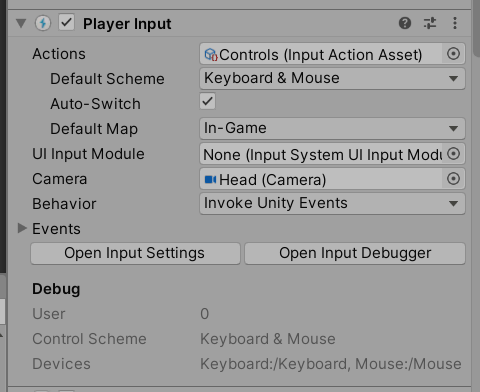
Everytime I spawn 2 players (one host and one client) with the package, the Player Input component on the host looks like this:
[IMG]
It works...

 mental citrus
Hello, ive been trying to make it so when you click on the hitbox of a ship you can move it around with your mouse, this works flawlessly on the host as the position is being synchronized on the client as well, problem is when the client tries to click and move the ship, as the bool does not update, the log does not get sent and obviosly the ship doesnt move for both client and host
using Unity.Netcode;

public class ShipManagerScript : NetworkBehaviour
{
    public GameObject myShip;
    public GameObject myHitbox;
    public bool isShipFollowingMouse = false;

    // Update is called once per frame
    void Update()
    {
        if (Input.GetMouseButtonDown(0))
        {
            MoveShipServerRpc();
        }

        if (isShipFollowingMouse)
        {
            FollowMouseServerRpc();
        }
    }

    [ServerRpc(RequireOwnership = false)]
    public void MoveShipServerRpc()
    {
        Vector3 mousePosition = Camera.main.ScreenToWorldPoint(Input.mousePosition);
        mousePosition.z = 0;

        Collider2D hitboxCollider = myHitbox.GetComponent<Collider2D>();
        if (hitboxCollider.bounds.Contains(mousePosition))
        {
            isShipFollowingMouse = !isShipFollowingMouse;

            // Print a debug log
            Debug.Log("Ship clicked. isShipFollowingMouse: " + isShipFollowingMouse);
        }
    }

    [ServerRpc(RequireOwnership = false)]
    public void FollowMouseServerRpc()
    {
        Vector3 mousePosition = Camera.main.ScreenToWorldPoint(Input.mousePosition);
        mousePosition.z = 0;

        myShip.transform.position = new Vector3(mousePosition.x, mousePosition.y, myShip.transform.position.z);
    }
}```Mouse Movement
warped pilot
Hey I have Username and Password Login from Unity. How do I get access to the Username or do I have to save it seperatly ?
AuthenticationService.Instance.PlayerName this does not work
OK I got it: AuthenticationService.Instance.PlayerInfo.Username
warped pilot
How do I know who is the Host in the Lobby ?
sharp axle
warped pilot
How do I know who is the Host in the Lobby ?
lobby.hostId is the player id of the current host.
warped pilot
thanks
livid nexus
What does this do on the Network Manager?

Does it just mean whenever the server changes scenes, everyone does?
 severe ruin
Problems with how to serialize ulong[] arrays (not trying to use lists)
This documentation says
Arrays of C# primitive types, like int[], and Unity primitive types, such as Vector3, are serialized by built-in serialization code.
https://docs-multiplayer.unity3d.com/netcode/current/advanced-topics/serialization/arrays/
So one would think the following is possible
public NetworkVariable<ulong[]> Ids= new NetworkVariable<ulong[]>(new ulong[0], NetworkVariableReadPermission.Everyone, NetworkVariableWritePermission.Server);```
But (for me) this prints this error (which contradicts documentation stating  "Arrays of C# primitive types" should be handled)
```Serialization has not been generated for type System.UInt64[]...````Disabling it means the newtork manager will not sync the scene or its network objects with the clients and you will need to manage them yourself
https://docs-multiplayer.unity3d.com/netcode/current/basics/scenemanagement/custom-management/
If you haven't already read the Using NetworkSceneManager section, it's highly recommended to do so before proceeding.
sharp axle
severe ruin
Problems with how to serialize ulong[] arrays (not trying to use lists)
This doc...
That will work with RPCs but not NetworkVariables
You will need to use NativeArrays there
https://docs-multiplayer.unity3d.com/netcode/current/advanced-topics/serialization/arrays/#native-containers
Arrays of C# primitive types, like int], and [Unity primitive types, such as Vector3, are serialized by built-in serialization code. Otherwise, any array of types that aren't handled by the built-in serialization code, such as string], needs to be handled through a container class or structure that implements the [INetworkSerializable interface.
livid nexus
Okay, let's say I want to do a small scale open world game, with no dedicated server (a player is hosting) and ideally, the different clients can go wherever they please in the world.
What is the conceptual idea for doing this? ie, originally, I was thinking that the world is divided up into different scenes, and the players can load into different scenes. However, Netcode for GameObjects does not really support this type of behavior.
What topics should I be looking into?
sharp axle
livid nexus
Okay, let's say I want to do a small scale open world game, with no dedicated se...
Really depends on how large the world is. You'll need to save some kind Area of Interest or visibility system so the host isn't just simulating every NPC in the entire world when no one is around. But the world still needs to progress even when no one is present.
 hot plinth
Hey, this part of the tutorial is wrong I think? https://docs.unity3d.com/Packages/com.unity.netcode@1.2/manual/rpcs.html?q=PostUpdateCommands
[WorldSystemFilter(WorldSystemFilterFlags.ServerSimulation)]
public class ServerRpcReceiveSystem : SystemBase
{
    protected override void OnUpdate()
    {
        Entities.ForEach((Entity entity, ref OurRpcCommand cmd, ref ReceiveRpcCommandRequest req) =>
        {
            PostUpdateCommands.DestroyEntity(entity);
            Debug.Log("We received a command!");
        }).Run();
    }
}
It's inheriting from SystemBase without marking the class as partial, and PostUpdateCommands is not mentioned anywhere else in the docs
 teal cedar
Why I cannot see vivox in my package manager? It is because I have older version of unity (2021 LTS)?
 sharp axle
teal cedar
sharp axle
teal cedar
You can always add it by name if its not showing up
teal cedar
sharp axle
You can always add it by name if its not showing up
And what is the name?
sharp axle
teal cedar
And what is the name?
com.unity.services.vivox
teal cedar
sharp axle
com.unity.services.vivox
Thanks 👍
 tribal stream
i'm about to watch an hour long video about unity input systems and making controls for pc/xbox/playstation controllers and so on. I read on unity's site and other places that netcode requires things to be different.
can someone elaborate what that means for controls? is it as simple as me adding netcode to the top of any input.c scripts?
i don't wanna get halfway through or fully through an hour long process only to have to undo it for multiplayer because netcode wanted it a specific way
sharp axle
tribal stream
i don't wanna get halfway through or fully through an hour long process only to ...
You just have to make use that the input is only getting applied to the local player
warped pilot
Hello what is best practice with Lobbies when I create a Lobby and someone join it that I see it on the Host ? Update Lobby every second or is there events for this ?
sharp axle
warped pilot
Hello what is best practice with Lobbies when I create a Lobby and someone join ...
tribal stream
sharp axle
You just have to make use that the input is only getting applied to the local pl...
Alrighty I’ll be sure to double check that. Still setting up multiplayer at the moment
 summer otter
Does anyone know how I could get NavMeshAgent root motion working with NGO using server authoritative movement?
sharp axle
summer otter
Does anyone know how I could get NavMeshAgent root motion working with NGO using...
Ot should just work with a network Transform. You probably need to disable the navmesh agent on the client though.
summer otter
Yes you are right. Basicly without root motion, the NavMesh is working. But with root motion I struggle with the OnAnimatorMove method calls, which could not called by the ServerScript (Animator only is set on ClientObject). On the client side I've no access to the NavMeshAgent, which has to be sync with the animation in OnAnimatorMove. Is it a bad decision to separate the scripts for server and client? Or do you have an other idea to solve this problem?
sharp axle
summer otter
Yes you are right. Basicly without root motion, the NavMesh is working. But with...
I don't personally like to separate scripts into client and server but its not a bad idea. That's how the Boss Room sample does and they use Navmesh agents
https://docs-multiplayer.unity3d.com/netcode/current/learn/bossroom/bossroom-architecture/#navigation-system
Boss Room is a fully functional co-op multiplayer RPG made with Unity Netcode. It's an educational sample designed to showcase typical Netcode patterns often featured in similar multiplayer games. Players work together to fight Imps and a boss using a click-to-move control model.
summer otter
@sharp axle Boss-Room is where I Gott the separation Idea from. But they use Ridged-Bodies with NavMesh and not root motion
 astral spear
Idk which channel fits for this problem 2024-03-12T15:06:25.5532] @firebase/database: FIREBASE WARNING: Provided authentication credentials for the app named "[DEFAULT]" are invalid. This usually indicates your app was n initialized correctly. Make sure the "credential" property provided to initializeApp() is authorized to access the specified "databaseURI." and is from the correct project. But this the closest channel
How do i fix this?
 noble veldt
summer otter
<@86985386886201344> Boss-Room is where I Gott the separation Idea from. But th...
noble veldt
summer otter
<@86985386886201344> Boss-Room is where I Gott the separation Idea from. But th...
Right, if you are using server authoritative and moving them on the server only, then having animations that move them will be a problem and usually the client's are where you run animations at and not even on the server - although with a shooter, and collider checks, you probably would want that but it's more difficult since you put more stress on the server. If you still want that then probably somehow allow the transform movement just on the server and then NOT on the clients and probably disable the NavMeshAgent on the clients anyways
So one question might be, do you actually care if the animation is run on the server for arm/leg collider movement and checks? If you aren't doing a shooter then maybe not and you can take that load off the server and just run the animation on the clients.. but then you are saying you want root movement, which is a problem
So basically maybe you just want the script on both server and client, but then on the client ignore the transform movement so that it doesn't try/doesn't jitter, or research how to properly sync it as a client predicted movement somehow.. and then you are saying you don't have access to the NavMeshAgent (and I even suggested disabling it on clients above) so I think you do understand the problem
So maybe the question is: How do you client predict/sync movement where the NavMeshAgent is used on the server but it doesnt exist or is disabled on the client, or can you have NavMeshAgent active on both client and server and use client prediction for moving them both?
 steep sparrow
Hey. I'm building an app for mobile and I want to store data in a database however I don't want to synchronize all the data on all databases because the app should be available in each country and then I'd need for each region a database. Is there a tool which provides Multi-Region-Cloud-Service so that I don't have to design the regional database synchronization by myself?
summer otter
Thanks @noble veldt for your hints. You are right, client prediction is something what I've already in my mind. So I should dig about this a little bit deeper. Actually I found only tutorials and hints for client prediction without using a NavMesh, so I've placed it to bottom of my to-dos, but maybe I should priorize this.
warped pilot
{
try
{
CreateLobbyOptions lobbyOptions = new CreateLobbyOptions();
lobbyOptions.IsPrivate = m_UiLobbies.IsPrivate();
lobbyOptions.Player = GetPlayer();
//lobbyOptions.Data = new Dictionary<string, DataObject>()
//{
// {
// "JoinCode", new DataObject(visibility: DataObject.VisibilityOptions.Public, value: m_JoinCode)
// }
//};
Lobby lobby = await Lobbies.Instance.CreateLobbyAsync(m_UiLobbies.MyLobbieName(), LobbieMaxPlayerCount(), lobbyOptions);
m_LobbyId = lobby.Id;
m_ActiveLobby = lobby;
await LobbyEvents(lobby);
StartCoroutine(HeartbeatLobby(m_HearthBeatSeconds));
m_UiLobbies.SetupLobbieUi(lobby.Name, lobby);
Debug.Log($"Die Lobbie {m_UiLobbies.MyLobbieName()} erfolgreich erstellt für {LobbieMaxPlayerCount()} Spieler!");
}
catch (LobbyServiceException ex)
{
Debug.Log("TEST");
PopupManager.MyInstance.AddToRedQueque("TEST");
Debug.Log(ex);
return;
}
}```
Hello this is my CreateLobby function! How does it trigger when the Lobbie was not created ? Because in the catch it doesnt work .. gray pond
tribal stream
gray pond
tribal stream
i'm watching a codemonkeys tutorial on using netcode with lobby but i can't find multiplayer. i'm only a few minutes into the video and i'm stuck.

can someone give me the "for dummies" version of how to make a p2p lobby for friends to join thats safe. i don't want people to have to mess around with their firewall and whitelist folks just to test out multiplayer. i want to use the unity features, friends, lobby, and relay with netcode to make lobbies and friendlists for us to join
sharp axle
tribal stream
can someone give me the "for dummies" version of how to make a p2p lobby for fri...
Lobby and Relay are what you need there
tribal stream
so there's no multiplayer from the unity dashboard?
ok thats good to know
i think i may be able to figure it out from there. its super annoying getting part way through a tutorial and needing another tutorial to fix or teach what one inconvieniently left out.
vent over- back to it
noble veldt
steep sparrow
Hey. I'm building an app for mobile and I want to store data in a database howev...
depending on what you are using to access the database, all you need to do is use the same schema and you change the database name like append a country code.. so your code doesn't change at all just the name you use to connect to the database.. so database name "MyGame-NA" and "MyGame-ASIA" or whatever you want for the regions, or use the region names that Unity has appended onto the database name, however u want to name them with regions
warped pilot
Hello, is it possible if someone presses ready in the lobby that the host will see when everyone is ready and he can start the game?
 rapid crater
does anyone have experience with the asset ObjectNet who could suggest why it may be easier than Net Objects?
sharp axle
warped pilot
Hello, is it possible if someone presses ready in the lobby that the host will s...
Sure, just create a "Ready" lobby Player Data variable. The host can see these and count who is ready
 drowsy spindle
you have to use sync variables for camera logic right? im trying to migrate some stuff ive been working on from monobehaviors to network behaviors and really really unsure about it. havent been able to get anything working.. so do [SyncVar] require a certain package or something?
sharp axle
drowsy spindle
you have to use sync variables for camera logic right? im trying to migrate some...
If you are using Netcode for GameObjects then it does not use sync vars. I think that's Mirror. But also the camera should not be networked in any case. Unless for some crazy reason you have remote players controlling each other's camera
 weak plinth
I followed a Valem tutorial (https://www.youtube.com/watch?v=Pry4grExYQQ) that showed how to use Unity Relay + Lobby services, but my player prefab is not being replicated. I'm investigating by broadcasting logs using a networked string (not working). I'm trying to connect to Quest 2 headsets in a toy example that I'll build into a research project.
In this video, I'm going to show not only how we can let the player create or join a game automatically without any user interface but also how to do so in a secure and stable way using both relay and lobby !
❤️ Support on Patreon : https://www.patreon.com/ValemVR
🔔 Subscribe for more Unity Tutorials : https://www.youtube.com/@ValemTutorials?s...
weak plinth
Update: I am able to connect the instances but I can't see replicated player prefabs in the scene.
sharp axle
weak plinth
Update: I am able to connect the instances but I can't see replicated player pre...
Are you seeing the player prefab clones in the inspector?
 hoary shell
HI everyone, I have no idea where to post this. My tutor buddy is currently asleep I think, or is getting there. So I don't want to keep bugging him. I need to know how to do a project between two computers. I own both computers, too poor to afford the whole seats thing with unity.
What is the best way to deal with a remote project?
-
GitHub Desktop was suggested, but when I go to install it GH wants me to put my project on the github wensite. Am I doing it wrong? Can't I just have my two computers communicate with each other directly?
-
Unity seems to have conflicting information on remote projects. One site says I have to pay, another site says I can just connect my two computers to each other via my network at home. Which is which?
-
Should I just do some microsoft file sharing with a file that's just shared between both computers?
drowsy spindle
@hoary shell maybe you're looking for something like promethean ai? although i think the microsoft file sharing is the most professional way to do it.
hoary shell
drowsy spindle
<@403759513905135617> maybe you're looking for something like promethean ai? alt...
I just need to find the easiest and most reliable since i'm the only one who is using the file
drowsy spindle
i think cloud is currently free for right now through unity
this is probably not networking question tho.. i'd ask in unity talk
hoary shell
well I apparently can't share regardless of what I attempt because microsoft keeps demanding passwords even though I turned them off
sharp axle
hoary shell
HI everyone, I have no idea where to post this. My tutor buddy is currently asl...
You really should be using version control in any case. GitHub is a good choice but Unity Version Control is free for up to 3 people I think. You have to set up a dev ops accounts but it won't charge you unless you go beyond the free limits
 heady summit
Hello everyone
I keep getting 'KeyNotFoundException: The given key 'KitchenGameMultiplayer' was not present in the dictionary.' whenever i try to call a ServerRPC from a In-Scene placed NetworkBehaviour, in this canse 'KitchenGameMultiplayer'
am i allowed to call RPCs only from instantiated network objects?
Im using Netcode for Game Objects
 craggy valve
does anyone worked with motion matching over network
weak plinth
sharp axle
Are you seeing the player prefab clones in the inspector?
I have already built the project, so no, I don't get to see them – however, while I was following that part of the tutorial, it was working on local multiplayer.
Also, to debug, I have been trying out Server/Client RPCs like so:
    private void OnEnable()
    {
        _networkTextData.OnValueChanged += (previous, current) =>
        {
            _debugLogText.text = current.IsEmpty ? "Empty response. Previous: " + previous : current.ToString();
        };
    }

    public void UpdateText(in string msg)
    {
        Debug.Log(msg);

        var dataCopy = _networkTextData.Value.ToString();

        dataCopy += $"{(IsHost ? "Host " : "Client ")} ({OwnerClientId}): {msg}\n";

        if (dataCopy.Length > 4096)
        {
            dataCopy = dataCopy[(dataCopy.IndexOf('\n') + 1)..];
        }

        _networkTextData.Value = dataCopy;
    }

    public void Log(in string msg)
    {
        SendLogServerRpc(new ForceNetworkSerializeByMemcpy<FixedString4096Bytes>(msg));
    }

    [ServerRpc]
    private void SendLogServerRpc
    (
        ForceNetworkSerializeByMemcpy<FixedString4096Bytes> msg,
        ServerRpcParams serverRpcParams = default
    )
    {
        RecvLogClientRpc(msg, new ClientRpcParams
        {
            Send = new ClientRpcSendParams
            {
                TargetClientIds = NetworkManager.Singleton.ConnectedClientsList.Select(c => c.ClientId).ToList()
            }
        });
    }

    [ClientRpc]
    private void RecvLogClientRpc
    (
        ForceNetworkSerializeByMemcpy<FixedString4096Bytes> msg,
        ClientRpcParams clientRpcParams = default
    )
    {
        UpdateText(msg.Value.ToString());
    }
but the client's view is never updated
weak plinth
Now I'm using this – no network variable
using System.Linq;
using TMPro;
using Unity.Collections;
using UnityEngine;
using Unity.Netcode;

public class DebugLogText : NetworkBehaviour
{
    private TextMeshProUGUI _debugLogText;
    private string _textLocalCopy;

    private void Awake()
    {
        _debugLogText = GetComponent<TextMeshProUGUI>();
        _debugLogText.text = "Uninitialised\n";
        _textLocalCopy = _debugLogText.text;
    }

    public void UpdateText(in string msg)
    {
        Debug.Log(msg);

        _textLocalCopy += $"{(IsHost ? "Host " : "Client ")} ({OwnerClientId}): {msg}\n";

        if (_textLocalCopy.Length > 4096)
        {
            _textLocalCopy = _textLocalCopy[(_textLocalCopy.IndexOf('\n') + 1)..];
        }

        _debugLogText.text = _textLocalCopy;
    }

    public void Log(in string msg)
    {
        SendLogServerRpc(new ForceNetworkSerializeByMemcpy<FixedString128Bytes>(msg));
    }

    [ServerRpc]
    private void SendLogServerRpc
    (
        ForceNetworkSerializeByMemcpy<FixedString128Bytes> msg,
        ServerRpcParams serverRpcParams = default
    )
    {
        RecvLogClientRpc(msg, new ClientRpcParams
        {
            Send = new ClientRpcSendParams
            {
                TargetClientIds = NetworkManager.Singleton.ConnectedClientsList.Select(c => c.ClientId).ToList()
            }
        });
    }

    [ClientRpc]
    private void RecvLogClientRpc
    (
        ForceNetworkSerializeByMemcpy<FixedString128Bytes> msg,
        ClientRpcParams clientRpcParams = default
    )
    {
        UpdateText(msg.Value.ToString());
    }
}
I also tried this just using a NetworkVariable like I was doing at the very beginning:
using TMPro;
using Unity.Collections;
using UnityEngine;
using Unity.Netcode;

public class DebugLogText : NetworkBehaviour
{
    private TextMeshProUGUI _debugLogText;

    private NetworkVariable<ForceNetworkSerializeByMemcpy<FixedString128Bytes>> _networkLog =
        new(
            writePerm: NetworkVariableWritePermission.Owner,
            readPerm: NetworkVariableReadPermission.Everyone,
            value: new FixedString128Bytes("Uninitialised from network")
        );

    private void Awake()
    {
        _debugLogText = GetComponent<TextMeshProUGUI>();
        _debugLogText.text = "Uninitialised\n";
    }

    private void OnEnable()
    {
        _networkLog.OnValueChanged +=
            (prev, curr) => _debugLogText.text += curr.Value.ToString();
    }

    public void Log(in string msg)
    {
        FixedString128Bytes log = $"{(IsHost ? "Host " : "Client ")} ({OwnerClientId}): {msg}\n";

        Debug.Log(log);
        _networkLog.Value = log;
    }
}
Here, a lot of additional logs are printed by the host and its client. The other client logs out some data but it disappears in a flash; the host then shows that this client got disconnected.
weak plinth
NOCONNECT
Checking logcat, I find that the host is always created successfully, but the client for whatever reason cannot be created and errors out in the logs.
I've even added my UI class to the list of network prefabs
 raven geyser
wondering what the most up to date multiplayer networking system is, should i be using photon or NGO or something else?
sharp axle
raven geyser
wondering what the most up to date multiplayer networking system is, should i be...
All of the current ones in the pinned message here are up to date and currently supported
raven geyser
sharp axle
All of the current ones in the pinned message here are up to date and currently ...
thanks
sharp axle
Checking logcat, I find that the host is
 stable dust
anyone got any reccomendations for a tutorial to learn unity netcode?
tribal stream
how do i get that menu to show up? i added and connected relay and made a test script with a debug log but this menu refuses to show up

https://www.youtube.com/watch?v=msPNJ2cxWfw&t=219s its from this tutorial and ngl its making me mad, a few parts of this tutorial are already deprecated after barely a year

❤ Watch my FREE Complete Multiplayer Course https://www.youtube.com/watch?v=7glCsF9fv3s
✅ Learn more about Relay and UGS https://on.unity.com/3tQZLLW
📝 Relay Docs https://on.unity.com/3OjXL8z
🌍 Get my Complete Courses! ✅ https://unitycodemonkey.com/courses
👍 Learn to make awesome games step-by-step from start to finish.
👇 Click on Show More
🎮 Ge...
weak plinth
weak plinth
NOCONNECT
Checking logcat, I find that the host is always created successfully,...
Looking for help to connect stuff up!
tribal stream
same bro, this is confusing
i can set up a cloud vm but not stupid multiplayer. how is this harder😭
i just wanna set up multiplayer with lobby and relay so me and my testers dont have to mess with firewall permissions. can someone give me the dummy proof walk through on doing that?
weak plinth
I'm kinda trying to solve the same problem, I think
However in my case I'm connecting two 'Android' devices together
tribal stream
oof
tbh i'd love to get to the point where i could test multiplayer on other devices like ios and android but i just simply cannot get it all connected correctly in the first place
i have all the packages, i've got netcode, but i cannot seem to get relay to work to even set up lobbys for any platform
the debug menu refuses to load so i have no idea if i connected everything correctly
in my case it enters play mode and freezes, it doesnt error out or break, but it wont do anything despite setting up a player controller. its just stuck...
weak plinth
tribal stream
in my case it enters play mode and freezes, it doesnt error out or break, but it...
I suggest writing your own logging logic. Are you building to Windows?
weak plinth
It's easier imo since you could just preview it through the editor. You will have access to the logs.
Unless you need that package because you want them to debug built executables?
You could use this script for that:
using System.Linq;
using TMPro;
using Unity.Netcode;
using UnityEngine;

public class CustomLogHandler : ILogHandler
{
    private readonly ILogHandler _defaultLogHandler = Debug.unityLogger.logHandler;
    private string _textLocalCopy;

    private TextMeshProUGUI ui { get; }

    public CustomLogHandler(in TextMeshProUGUI ui)
    {
        this.ui = ui;
    }

    public void LogFormat(LogType logType, UnityEngine.Object context, string format, params object[] args)
    {
        var logFmt =
            $"{(NetworkManager.Singleton.IsHost ? "Host " : "Client ")} ({NetworkManager.Singleton.LocalClientId}): {format}\n";

        var uiLog = string.Format(logFmt, args);
        if (uiLog.Length > 256)
        {
            uiLog = uiLog[..253] + "...";
        }

        if
        (
            uiLog.Contains("error") || uiLog.Contains("Error") || uiLog.Contains("ERROR") ||
            uiLog.Contains("exception") || uiLog.Contains("Exception") || uiLog.Contains("EXCEPTION")
        )
        {
            uiLog = "<color=red>" + uiLog + "</color>";
        }
        else if (uiLog.Contains("warning") || uiLog.Contains("Warning") || uiLog.Contains("WARNING"))
        {
            uiLog = "<color=yellow>" + uiLog + "</color>";
        }

        _textLocalCopy += uiLog;

        if (_textLocalCopy.Count(x => x == '\n') > 20)
        {
            _textLocalCopy = _textLocalCopy[(_textLocalCopy.IndexOf('\n') + 1)..];
        }

        ui.text = _textLocalCopy;

        // Also write the log to the default console
        _defaultLogHandler.LogFormat(logType, context, logFmt, args);
    }

    public void LogException(System.Exception exception, UnityEngine.Object context)
    {
        var uiLog = exception.ToString();
        if (uiLog.Length > 256)
        {
            uiLog = uiLog[..253] + "...";
        }
        uiLog = "<color=red>" + uiLog + "</color>";

        _textLocalCopy +=
            $"{(NetworkManager.Singleton.IsHost ? "Host " : "Client ")} ({NetworkManager.Singleton.LocalClientId}): {uiLog}\n";
        if (_textLocalCopy.Count(x => x == '\n') > 20)
        {
            _textLocalCopy = _textLocalCopy[(_textLocalCopy.IndexOf('\n') + 1)..];
        }

        ui.text = _textLocalCopy;

        // Also log the exception to the default console
        _defaultLogHandler.LogException(exception, context);
    }
}
thing is I'm not sure if i will need them too. i have different debuggers, some for testing multiplayer, others for single player and so on. maybe i shouldn't specify down like that and just find people who can test and debug everything
weak plinth
Perhaps, yeah
tribal stream
weak plinth
You could use this script for that:
```cs
using System.Linq;
using TMPro;
using ...
is this your custom script or does it come from unity?
weak plinth
tribal stream
is this your custom script or does it come from unity?
Custom, technically GPT inspired
works tho
tribal stream
interesting... i may borrow that. but I'm still gonna try other ways first before i resort to using someone elses stuff
if i end up using it I'll credit you in the games end credits
weak plinth
that's okay, just providing a sure shot solution to only the logging sitch
weak plinth
tribal stream
if i end up using it I'll credit you in the games end credits
that's quite kind of you 
sharp axle
how do i get that menu to show up? i
sharp axle
stable dust
anyone got any reccomendations for a tutorial to learn unity netcode?
💬 Here is the Multiplayer Course! I really hope both of these FREE courses help you in your game dev journey! Hit the Like button!
🌍 Course Website with Downloadable Project Files, FAQ https://cmonkey.co/freemultiplayercourse
🎮 Play the game on Steam! https://cmonkey.co/kitchenchaosmultiplayer
❤ IF you can afford it you can get the paid ad-free ...
stable dust
thank you
 placid onyx
heady summit
I keep getting 'KeyNotFoundException: The given key 'KitchenGameMultiplayer' was...
placid onyx
heady summit
I keep getting 'KeyNotFoundException: The given key 'KitchenGameMultiplayer' was...
did you make sure the RPC gets called after OnNetworkSpawn ran?
 keen briar
can someone help me with multiplayer on multiplayer HLAPI movement? (i already have networking setup and players can join and everything works but player movement is client sided)
mental citrus
keen briar
can someone help me with multiplayer on multiplayer HLAPI movement? (i already h...
Did you add a client network transform?
keen briar
what's that
keen briar
mental citrus
Did you add a client network transform?
what is a client network transform
i';m cofnused already
sharp axle
keen briar
can someone help me with multiplayer on multiplayer HLAPI movement? (i already h...
HLAPI got deprecated many many years ago. Are you using Netcode for GameObjects?
mental citrus
There are many tutorials and also updated documentation on netcode
mental citrus
Np
warped pilot
Hello I have LobbyEvents:
callbacks.KickedFromLobby += OnKickedFromLobby;
But It will trigger too when I LeaveLobby .. Is there a way to fix this ?
 rough folio
warped pilot
Hello I have LobbyEvents:
callbacks.KickedFromLobby += OnKickedFromLobb...
rough folio
warped pilot
Hello I have LobbyEvents:
callbacks.KickedFromLobby += OnKickedFromLobb...
Set a flag when leaving the lobby intentionally, and add an if in OnKickedFromLobby that checks for it?
warped pilot
What do you mean exactly?
I got it .. Sorry im dumb
Ok it doesnt work I have tried it with when I Leave Lobby: m_GetKickedFromLobby = false;
When I get kicked: m_GetKickedFromLobby = true;
And on the event:
 {
     if (m_GetKickedFromLobby)
     {
         m_UiLobbies.SetupLobbieKick();
         PopupManager.MyInstance.AddToRedQueque(m_UiLobbies.LobbyKickText.GetLocalizedString());
     }
}```With this setup, m_GetKickedFromLobby should always be true, except specifically when you press the button to leave the lobby. Then it turns to false, lobby is left, and after the event OnLobbyKicked is fired and is over, then it is set back to true. I think that's the best way to do that?
rough folio
nice
warped pilot
yes is working thanks a lot
is it possible to ban him from lobby ? because when I kick him he can rejoin again
i think with data or ?
and safe playerid to ban
rough folio
warped pilot
is it possible to ban him from lobby ? because when I kick him he can rejoin aga...
that's very dependent on what you're actually using for networking, but probably there is a way
sharp axle
warped pilot
is it possible to ban him from lobby ? because when I kick him he can rejoin aga...
Yea. you can disable their Player ID in the dashboard. And there is also an entire Moderation SDK.
https://docs.unity.com/ugs/en-us/manual/moderation/manual/overview
heady summit
did you make sure the RPC gets called
 tender saffron
anyone here familiar with Photon Quantum?
I'm trying to access an enum from a .qtn file and I'm not sure how to reference it


 drifting plaza
Anyone what what a reasonable maximum ping to engineer my game around should be with dedicated hosting?
sharp axle
drifting plaza
Anyone what what a reasonable maximum ping to engineer my game around should be ...
It really depends on the type of game. Fighting games are way more sensitive than card games. Mobile games can do weird things when traveling between cell towers.
The network simulator can test these scenarios
https://docs-multiplayer.unity3d.com/tools/current/tools-network-simulator/
The Network Simulator tool allows you to test your multiplayer game in less-than-ideal network conditions, enabling you to discover issues in simulated real-world scenarios and fix them before they surface in production. It facilitates simulating network events, such as network disconnects, lag spikes, and packet loss.
 high sierra
Hi guys , I've just started using unity and was wondering what is the best way to share the project to some of my friends
stable dust
im attempting to make a multiplayer game i have a player setup but when i build the hosts camera doesnt move do i have to use cinemachine instead?
i can send a video of the issue if needed
sharp axle
high sierra
Hi guys , I've just started using unity and was wondering what is the best way t...
Like for development? Or just play testing?
sharp axle
stable dust
im attempting to make a multiplayer game i have a player setup but when i build ...
No you don't have to use cinemachine but you can if you want. It works pretty well with networking
placid onyx
stable dust
im attempting to make a multiplayer game i have a player setup but when i build ...
you probably have the code that controls the camera not isolated to the controlling player
ideally put the camera in the player prefab and make sure it only gets enabled for the controlling (owner) player
 fickle ridge
Hello i have a problem with Photon not instantiating is there a general solution for that?
stable dust
for some reason the hosts camera is placed in some random spot when a client joins?
i went through all scripts and the setup of the prefab
sharp axle
stable dust
for some reason the hosts camera is placed in some random spot when a client joi...
You need to disable the camera on the remote player
stable dust
how would i go about doing that
would i make it happen when i click the client button or?
sharp axle
stable dust
how would i go about doing that
In the player's OnNetworkSpawn() you check if(IsLocalPlayer) then disable the camera
stable dust
thank you
tribal stream
https://youtu.be/bOf6CjpuSFs?si=u9bzIpl2OSlxbcW2 i'm still super confused and this tutorial was not any more helpfull than any of the others he has. this one depends on steps taken 5 hours earlier. I just want to set up lobbies, friends and relay.
and preferably without having to buy 40 dollar addons that he uses

✅ Unity Black Friday! 500 BEST Assets on Sale! https://assetstore.unity.com/?aid=1101l96nj&pubref=rev_quantum
⚡ Get Quantum Console (affiliate) https://assetstore.unity.com/packages/tools/utilities/quantum-console-211046?aid=1101l96nj&pubref=rev_quantum
❤️ Use the Coupon CODEMONKEY10 to get 10% OFF!
🌍 Get my Complete Courses! ✅ https://unitycode...
i installed each of their packages and have them enabled in the dashboard but I don't know what to do from there
sharp axle
tribal stream
https://youtu.be/bOf6CjpuSFs?si=u9bzIpl2OSlxbcW2 i'm still super confused and th...
Those are 3 very different services. But the basics is to Create a Lobby first then Create a Relay. Add the Relay Join Code to the Lobby Data. Anybody joining the Lobby can see the Relay Code and join the Relay.
You can add Friends by Player Id or Username. You don't need to be connected to the game to do that
tribal stream
problem is, i don't know how to create a relay or lobby. i have it installed but i don't see it on any drop downs
i don't know how he opened it. for him it looks like it just opens. that doesnt happen for me
i just want to get into the actual game developement but i can't until multiplayer is working, and i can test that it works
tribal stream
tribal stream
how do i get that menu to show up? i added and connected relay and made a test s...
quite litterally, the guy says at this time stamp "lets check and see if this works" but he tests it on a 40 dollar asset i don't have and I'm NOT going to pay for. so i have no idea if what i did even worked
 torn lance
First time working with the netcode for gameobjects, just making sure I'm not walking down the wrong path. I want to maintain the struct FightState in a NetworkVariable<FightState>, and to do that I need to serialize/deserialize an unknown size array. Is this achieving what I think it is?
public struct FightState : INetworkSerializable
{
    public EntityState[] playerStates;

    public void NetworkSerialize<T>(BufferSerializer<T> serializer) where T : IReaderWriter
    {
        // I assume this uses the ReadValueSafe and WriteValueSafe functions I define below?
        serializer.SerializeValue(ref playerStates);
    }
}

public static partial class SerializationExtentions
{
    public static void ReadValueSafe<T>(this FastBufferReader reader, out T[] unmanagedTypeArray) where T : INetworkSerializable, new()
    {
        reader.ReadValueSafe(out int length);

        unmanagedTypeArray = new T[length];

        for (int i = 0; i < length; i++)
        {
            reader.ReadValueSafe(out T val);
            unmanagedTypeArray[i] = val;
        }
    }

    public static void WriteValueSafe<T>(this FastBufferWriter writer, in T[] unmanagedTypeArray) where T : INetworkSerializable, new()
    {
        writer.WriteValueSafe(unmanagedTypeArray.Length);

        for (int i = 0; i < unmanagedTypeArray.Length; i++)
        {
            writer.WriteValueSafe(unmanagedTypeArray[i]);
        }
    }
}


public struct EntityState : INetworkSerializable
{
    public int hitpoints;
    public int mana;
    public int stamina;

    public void NetworkSerialize<T>(BufferSerializer<T> serializer) where T : IReaderWriter
    {
        serializer.SerializeValue(ref hitpoints);
        serializer.SerializeValue(ref mana);
        serializer.SerializeValue(ref stamina);
    }
}
problem is, i don't know how to create a relay or lobby
sharp axle
torn lance
First time working with the netcode for gameobjects, just making sure I'm not wa...
It might be easier to use Native Arrays. But also your array length shouldn't be unknown. Just pick a reasonable maximum like 120 if you're keeping the last 2 seconds of updates.
torn lance
sharp axle
It might be easier to use Native Arrays. But also your array length shouldn't be...
(not really an important factor but it's actually a turn based game so the states are saved after each round its not a rollback thing)
pain in every direction, it seems

unknown length since the battles will have varying amounts of allies and enemies
does [MarshalAs(UnmanagedType.ByValArray, SizeConst = 128)] work in order to trick it into seeing the struct as unmanaged and avoid the headache?
sharp axle
torn lance
does `[MarshalAs(UnmanagedType.ByValArray, SizeConst = 128)]` work in order to t...
No clue. But I doubt it. If it were that easy, then it'd be done by default
torn lance
Actually it does look like there's already an implementation for this I had just missed the correct docs page somehow
/// <summary>
/// Write a NetworkSerializable array
///
/// "Safe" version - automatically performs bounds checking. Less efficient than bounds checking
/// for multiple writes at once by calling TryBeginWrite.
/// </summary>
/// <param name="value">The values to write</param>
/// <param name="unused">An unused parameter used for enabling overload resolution based on generic constraints</param>
/// <typeparam name="T">The type being serialized</typeparam>
[MethodImpl(MethodImplOptions.AggressiveInlining)]
public void WriteValueSafe<T>(T[] value, ForNetworkSerializable unused = default) where T : INetworkSerializable => WriteNetworkSerializable(value);
thanks for the help though, I always forget about NativeArray
warped pilot
Hey what is a good practice to make a ready check for Unity Lobby system ?
sharp axle
warped pilot
Hey what is a good practice to make a ready check for Unity Lobby system ?
Use Lobby Player Data to save a bool and then use Lobby Events to subscribe to changes in the lobby data
 rancid fjord
Does network for GameObject support wifi direct? or any way to host & play without a having a wifi network currently accesible (such as creating a hotspot or using wifi direct)?
keen briar
is multiplayer HLAPI a good API for multiplayer?
sharp axle
keen briar
is multiplayer HLAPI a good API for multiplayer?
Unet HLAPI is no longer supported. Netcode for Gameobjects is the Unity supported networking framework. Here are the docs if you need to migrate from an old project
https://docs-multiplayer.unity3d.com/netcode/current/installation/upgrade_from_UNet/
UNet is deprecated and no longer supported. Follow this guide to migrate from UNet to Netcode for GameObjects. If you need help, contact us in the Unity Multiplayer Networking Discord.
keen briar
sharp axle
Unet HLAPI is no longer supported. Netcode for Gameobjects is the Unity supporte...
multiplayer HLAPI is easier to use i think
sharp axle
keen briar
multiplayer HLAPI is easier to use i think
It has also been completely removed from the latest versions of Unity
torn lance
The editor seems to be dying when it's serializing a NetworkVariable of an enum (even though it's allegedly supported). Is this some known bug or what?

it does look like the Type[] argument is getting passed just a Type which maybe is causing problems? the docs say MethodInfo.MakeGenericMethod(Type[]) with zero overrides https://learn.microsoft.com/en-us/dotnet/api/system.reflection.methodinfo.makegenericmethod?view=net-8.0
            var type = m_NetworkVariableFields[m_NetworkVariableNames[index]].GetValue(target).GetType();
            var genericType = type.GetGenericArguments()[0];

            EditorGUILayout.BeginHorizontal();
            if (genericType.IsValueType)
            {
                var method = typeof(NetworkBehaviourEditor).GetMethod("RenderNetworkContainerValueType", BindingFlags.Public | BindingFlags.Instance | BindingFlags.FlattenHierarchy | BindingFlags.NonPublic);
                var genericMethod = method.MakeGenericMethod(genericType); // << this is causing the error   "ArgumentException: Invalid generic arguments      Parameter name: typeArguments"
                genericMethod.Invoke(this, new[] { (object)index });
            }

Substitutes the elements of an array of types for the type parameters of the current generic method definition, and returns a MethodInfo object representing the resulting constructed method.
high sierra
sharp axle
Like for development? Or just play testing?
development yes
sharp axle
high sierra
development yes
You would a version control system. Like Git or Unity Version Control or Perforce. Add your friends to the team and everyone can get synced up
fickle ridge
Hello i have a question about synchronising player movement in multiplayer with Photon. When i build my game, and i run the game once, there's no problem. But when i log a second time with another window of the game, when im in one window, i control the second character, and when im in the other window, i control the first character
is there a way to switch that?
warped pilot
Hey how can I update LobbyData ?
 fluid walrus
usually you'd use FastBufferReader/Writer for that kind of thing, or is there some feature those are missing that you need?
 frank dragon
Hey! Bit of a random question but is there a way to see if the user has a specific website open (eg running a check to see if they current have Facebook open in the browser)
fluid walrus
if the types in the list are also INetworkSerializable you should be able to do serializer.SerializeValue on them in your NetworkSerialize method, does that not work for you?
 solar geode
Hi, someone can help please?, Im using Photon2 and the RPC Calls, I have an array of Sprites, which is selected randomly and the position of the array is saved in a variable, but when I want to make the Others RPC call, the value that I save in the variable to show the same Sprites to others players, doesn't saves the value and always returns position 0, there is the code
 wide girder
solar geode
Hi, someone can help please?, Im using Photon2 and the RPC Calls, I have an arra...
wide girder
solar geode
Hi, someone can help please?, Im using Photon2 and the RPC Calls, I have an arra...
Share !code according to the guidelines.
 raw stormBOT

Posting code
📃 Large Code Blocks
Use links to services like:
https://gdl.space/, https://paste.ofcode.org/, https://hatebin.com/, https://paste.myst.rs/, https://hastebin.com/
📃 Inline Code
Surround code with three backquotes. Not quotation marks.
To format as C#, add cs to the first line:
```cs
// Your code here
```
Add a comment with a line number if there is an error message.
livid nexus
For those familiar with fishnet, what is the difference between a TargetRpc and an ObserverRpc?
 icy flint
Hey does anyone have a good guide on how to setup a Player mouse script to work with NGO?
I can only find movement scripts but nothing regarding the actual player rotation
sharp axle
icy flint
Hey does anyone have a good guide on how to setup a Player mouse script to work ...
Client network transform will sync rotation and positions
icy flint
but I need it to be server authoritive
sharp axle
You will need to send screen to world point in a rpc. But the lag is going to be unbearable
icy flint
well what's the best solution? client authoritive is going to make this a cheating hell (even if its just a small school project)
livid nexus
Why does the mouse position need to be sent to the server?
icy flint
well when the player turns other people should be able to see the player turn
livid nexus
So your mouse position is used to turn the player? Is it a first person game or something of the sorts?
livid nexus
Because then all you need to worry about is synchronizing the players rotation to the Server and not the player input itself
ie you can have the movement be server authoritative and the rotation be client authoritative and just synchronize the transform information to the server
icy flint
well how would I do that? just a network transform and my normal mouse script?
livid nexus
I think so yeah
I’m using fishnet and not NGO so I’m not familiar with the explicit details on how you would do it, but conceptually it’s the same idea
fickle ridge
does anyone know why when i run 2 instances of my game, i can control the other player's movements? I work with photon btw
 jagged quartz
I'm trying out "Multiplayer Play Mode" but after installing, clearing GC cache, reload assets, rebuild (clean) solution and restarting the client - i still get the same error:
UnityEngine.Debug:LogError (object)``` trail vortex
I just imported FUSION2 and got the error
Assets\Photon\Fusion\Runtime\FusionStats.cs(722,15): error CS0103: The name 'FindFirstObjectByType' does not exist in the current context
and should I use FUSION or FUSION2
livid nexus
fickle ridge
does anyone know why when i run 2 instances of my game, i can control the other ...
Not familiar with photon but sounds like you haven’t done an ownership check on your movement controller
fickle ridge
livid nexus
Not familiar with photon but sounds like you haven’t done an ownership check on ...
How do i do that?
livid nexus
With NGO or fishnet you can do an isOwner check. It’ll return true if the owner of that game object is the one that’s running the script
Essentially in your update method (where you have your movement code), you can can first have if(!isOwner) {return;} before your actually movement code which will cause the rest not to run on the device unless you own that game object
sharp axle
jagged quartz
I'm trying out "Multiplayer Play Mode" but after installing, clearing GC cache, ...
Are you trying to start a host on each clone?
weak plinth
Hey, now that my replication code is working, the next step in my app is to use voice chat and some kind of transcription. My obvious choice is Vivox for audio, and while I wanted to use STT on it, this appears to be an early preview feature, and not even available for regular use.
I started investigating how to retrieve audio data from Vivox and found this: https://docs.unity.com/ugs/en-us/manual/vivox-unity/manual/Unity/developer-guide/audio-taps/access-audio-data
My understanding is that I should be able to save this data and upload it to another service such as Google or Microsoft Azure for speech-to-text (which is a requirement my supervisor set for me). How should I go about doing that from the float array provided in OnAudioFilterRead?
 unkempt glade
can some one help me with my player model
I'm developing a VR game using Unity's 3D Core and have imported a character model from Blender. However, the ears of the character are visible to the player, which I want to avoid. I aim to make the ears invisible to the local player while ensuring they remain visible to other players in a multiplayer setup. Can anyone offer guidance on achieving this?
The character model is made in Blender.
I'm seeking a solution that involves adjusting visibility specifically for the local player while preserving visibility for other players in a multiplayer environment.
VR headsets supported include Meta Quest 2, Meta Quest 3, Meta Quest Pro, and Valve Index.
Request for Assistance:
I'm looking for suggestions or methods within Unity's 3D Core to effectively manage the visibility of certain parts of a character model based on the player's perspective in a multiplayer VR environment, considering compatibility with Meta Quest 2, Meta Quest 3, Meta Quest Pro, and Valve Index.
jagged quartz
sharp axle
Are you trying to start a host on each clone?
I forgot old code using parrelsync that indeed was starting a host because of logic that i removed when switching, so yes. Thank you
sharp axle
unkempt glade
I'm developing a VR game using Unity's 3D Core and have imported a character mod...
The easiest way is to have a separate model for the local player and one for the remote players. You could also change the rendering players
 limpid harness
my code is stuck on waiting for the OnJoinedLobby callback!
can you guys help?
i don't kmow whats going on!
unkempt glade
sharp axle
The easiest way is to have a separate model for the local player and one for the...
how
limpid harness
sharp axle
The easiest way is to have a separate model for the local player and one for the...
it makes a bit of sense
sharp axle
unkempt glade
how
You can check IsLocalPlayer and then swap out the models
limpid harness
anyways can youy help?
unkempt glade
sharp axle
You can check IsLocalPlayer and then swap out the models
im so lost im new xd
limpid harness
xd xd
unkempt glade
limpid harness
this is a graveyard
yeaj
warped pilot
Hey when I change my PlayerData i have a event:
private void OnLobbyChanged(ILobbyChanges changes)
{
    if (changes.PlayerData.Changed)
    {
        Debug.Log("Jemand hat die Spielerdaten geändert");
    }
    UpdateLobby();
}
But it does not work with OnLobbyChanged .. How can I make when someone change playadata in Lobbies that the event fire ?
But if someone leave or join Lobby it works fine
limpid harness
i have a problem with my code its stuck on the onlobbyloined method
i have to do homework so dont ask pls anything just reply with your anwser pretty pls
 warm bridge
Do someone know why I have a this error ?
Although I had the Windows Dedicated Server Build Support installed ?
 sharp axle
limpid harness
i have a problem with my code its stuck on the onlobbyloined method
sharp axle
limpid harness
i have a problem with my code its stuck on the onlobbyloined method
Share !code according to the guidelines.
raw stormBOT
Posting code
📃 Large Code Blocks
Use links to services like:
https://gdl.space/, https://paste.ofcode.org/, https://hatebin.com/, https://paste.myst.rs/, https://hastebin.com/
📃 Inline Code
Surround code with three backquotes. Not quotation marks.
To format as C#, add cs to the first line:
```cs
// Your code here
```
Add a comment with a line number if there is an error message.
limpid harness
sharp axle
limpid harness
here
https://paste.ofcode.org/GBjeh9FPhAcb5tQ7ZRi4Ru
You should also specify that you are using Photon. I can't help you there
 mint anvil
so i made a post about this and it seems like other ppl got this problem too after upgrading to 1.8.1 (network object script not working)
i have no clue how to fix it :,(
 autumn gorge
Hi, i'm working on adding the ennemis for the client, they are only visible by the host and when i try to make them spawn i have this error


here's the code for the spawner
 ocean tapir
hello, im really new to networking and im just trying to get a 2 clients to move around with a dedicated sever. although im having trouble with the cameras. i have given each player a tag and im now trying to disable the opposite players camera. so i need something that runs only on the client and is different for each one. i tried a clientrpc but it doesn't seem to be working because it has no control over the objects.
sharp axle
autumn gorge
Only the server can Spawn objects
sharp axle
ocean tapir
hello, im really new to networking and im just trying to get a 2 clients to move...
In the players OnnetworkSpawn(), check for !IsLocalPlayer then disable the camera
ocean tapir
i changed my code to this void OnNetworkSpawn(){
if (!IsLocalPlayer){
Transform EnemeyCam;
if (transform.tag == "Player 1"){
EnemeyCam = GameObject.FindWithTag("Player 2").transform.GetChild(0);
EnemeyCam.gameObject.SetActive(false);
}
else{
EnemeyCam = GameObject.FindWithTag("Player 1").transform.GetChild(0);
EnemeyCam.gameObject.SetActive(false);
}
}
}
but it hasnt had a difference
sharp axle
ocean tapir
i changed my code to this void OnNetworkSpawn(){
if (!IsLocalPlayer){
...
You don't have to do anything with tags. When the other players spawn on each client the player object will check if it's the local player. If it's not then you can safely disable the camera on it
ocean tapir
ok i think i got it but i might be referencing the camera wrong
void OnNetworkSpawn(){
if (!IsLocalPlayer){
transform.GetChild(0).gameObject.SetActive(false);
}
}
ocean tapir
sharp axle
You don't have to do anything with tags. When the other players spawn on each cl...
shit nvm i forgot to override the function thanks so much although i still don't really know what on network spawn and is local player do
placid onyx
jagged quartz
I'm trying out "Multiplayer Play Mode" but after installing, clearing GC cache, ...
Make sure you have only ONE of the players assigned to either server or host role. You'll at least get a transport error if two players try to serve/host since that port is already in use. Also check the IP and port you assigned, server IP should be either 0.0.0.0 or 127.0.0.1 and for port use any that's free (default: 7777). Sometimes, a port may not be properly closed, a reboot can also help to fix that.
placid onyx
warm bridge
Do someone know why I have a this error ?
Although I had the Windows Dedicated S...
restart Unity? In case you added the module while that editor was still open. Also check if that's the exact editor version your project uses. Finally: try reboot.
placid onyx
ocean tapir
i changed my code to this void OnNetworkSpawn(){
if (!IsLocalPlayer){
...
using GameObject.Find("") will get you into big trouble with networking specifically
assign references in Inspector or use GetComponent or any other means
I prefer to write a lot of smaller components specifically for networking, for instance I have a NetworkSpawnEnableComponents script that I put on my prefab, and drop in any component I want enabled if the object is either owned or not owned by the client so I need not code any of this
may be much to take in but here's my netcode package: https://github.com/CodeSmile-0000011110110111/de.codesmile.netcode
check Runtime/Components
GitHub
Netcode for GameObject and Unity Gaming Services common features, tools and extensions - CodeSmile-0000011110110111/de.codesmile.netcode
placid onyx
ocean tapir
void OnNetworkSpawn(){
if (!IsLocalPlayer){
transform.GetChil...
also: my player prefab contains the camera (and virtual camera) so its part of the object, which makes it easy to toggle camera: if (IsOwner) => enable
I prefer to have the components disabled by default because that's the default case for a player, since there's only one owner but many non-owners
autumn gorge
sharp axle
Only the server can Spawn objects
how can i corrct this problem ?
fluid walrus
autumn gorge
how can i corrct this problem ?
first of all it looks like there's no need for Spawner to be a NetworkBehaviour? it doesn't have any RPCs or network vars
autumn gorge
ah yes i see
so back to monoBehavior


do i have to add network object to the spawnpoit too ?
fluid walrus
no, it should only need your script, then you can do NetworkManager.Singleton.IsServer instead of IsServer
i think some of your errors right now are coming from when Spawner was destroyed at the end?
that should help with that at least
autumn gorge
ty, i'll try this
it still works for the host but client have not camera rendering even tough it worked before i added theses lines:
        var onlineMonster = monster.GetComponent<NetworkObject>();
        onlineMonster.Spawn(true);


error of the cloned project

and also the ai is completely broken, it follows me on the first second and then it goes everywhere even tough it worked properly when instantiate for client
fluid walrus
have you added your monster to the prefab list in the network manager config? that's what the top error is saying
 fluid walrus
yeah, is that the same between host and client?
oh, wait it's complaining about soft sync, that's objects in the scene
is there any NetworkObject in the scene?
autumn gorge
fluid walrus
yeah, is that the same between host and client?
on my clone it is
autumn gorge
fluid walrus
is there any NetworkObject in the scene?
yes, the spawner
fluid walrus
you can remove the NetworkObject from that
it's only going to run on the host anyway, it doesn't need to be synced itself
autumn gorge
oh okay
i try to start a game

damn still complaining
im trying to find the hash of the prefab
fluid walrus
there's still network objects in the scene it looks like
if they're not in the prefabs list it can't sync them
so either make them not NetworkObjects, or add them there!
autumn gorge
ty for your time, i'll find it haha
autumn gorge
fluid walrus
so either make them not NetworkObjects, or add them there!
it worked, ty so much
now i just have top deal with ai problem
fluid walrus
nice 🙂
autumn gorge
this time ai wont work properly
since everything is on netcode even tough on local it work properly
autumn gorge
the ai work properly my bad, its the prefab that slides on the surface
but i have no clue on how to fix it
icy flint
Hey,
I am working on a small FPS game with Unity NGO, Lobby and Relay.
I was wondering how I could add a second prefab for the second team, and how I would handle which Prefab the Player should use and where he should spawn
weak plinth
Has anyone used whisper.unity with Vivox before? https://github.com/Macoron/whisper.unity
GitHub
Running speech to text model (whisper.cpp) in Unity3d on your local machine. - Macoron/whisper.unity
 onyx dust
hi
I have a camera in the character that’s attached to the character’s head. The animation causes character to start shaking. I decided to use the Virtual Camera (it follows the empty "zxc" object in the character’s head model) from Cinemachine.When I run the game alone, everything works fine.But when I enter the game with 2 clients,then the script CinemachineVirtualCamera disappears in VirtualCamera and creates a child element cm.


 sterile creek
placid onyx
using GameObject.Find("") will get you into big trouble with networking specific...
sterile creek
placid onyx
using GameObject.Find("") will get you into big trouble with networking specific...
Runtime/Extensions/NetworkManagerExt.cs
using UnityEditor; wont build. idk how to mark it on github. Actually found it in a few locations now.
But cool package!
astral spear
I got this backend thingy runnin a server at localhost:3000 how do make my game connect to it?
Like they said i need to put up the right adress
Ion get it
sharp axle
sterile creek
Runtime/Extensions/NetworkManagerExt.cs
```using UnityEditor;``` wont build. idk...
Nothing using UnityEditor will build. As the name suggests it's editor only
sharp axle
astral spear
I got this backend thingy runnin a server at localhost:3000 how do make my game ...
You're gonna have to be more specific.
sterile creek
sharp axle
Nothing using UnityEditor will build. As the name suggests it's editor only
That’s what I said… it’s not my code
fickle ridge
Guys do you recommend fishnet or Photon for multiplayer?
And which is easier to implement?
sterile creek
They all feel pretty similar, there is also unity netcode for gameobjects. I would just pick one
fickle ridge
Yeah but i already used photon for my project and the result was unbeliavable in a bad way
like one player was controlling the other player and vice versa
astral spear
sharp axle
You're gonna have to be more specific.
I need to put the right address of my game on this localhost:3000
Like connect the unity game in this localhost
sterile creek
fickle ridge
Yeah but i already used photon for my project and the result was unbeliavable in...
Hahah we call that user error 😉. Networking is hard. A different library doesn’t make the concepts any easier
sharp axle
astral spear
I need to put the right address of my game on this localhost:3000
That depends on what kind of a server this is.
astral spear
Set it up using a nodejs and firebase
sharp axle
astral spear
Set it up using a nodejs and firebase
Netcode will not connect to nodejs
You can do a unity web request though
astral spear
sharp axle
That depends on what kind of a server this is.
Multiplayer kind?
astral spear
sharp axle
Netcode will not connect to nodejs
You can do a unity web request though
How so?
 hoary shell
sharp axle
You really should be using version control in any case. GitHub is a good choice ...
hoary shell
sharp axle
You really should be using version control in any case. GitHub is a good choice ...
ok
jagged quartz
fickle ridge
Im in dire need of a competent person
I think chat gpt is actually OK at git - but if your question is really advanced, i honestly think stack overflow is a better forum for git
austere yacht
fickle ridge
Guys anyone knows how to correctly use Git?
How about one of the bazillion tutorials and the documentation?
 brisk mist
someone can help me? im hosting an api in versel free and when I use thunder client to look if is working and it is works well, but when I use in UnityWebRequest it get an error of Authorization (401). I dont understand why... here some


 astral spear
sharp axle
https://docs.unity3d.com/Manual/UnityWebRequest-SendingForm.html
astral spear
sharp axle
https://docs.unity3d.com/Manual/UnityWebRequest-SendingForm.html
It dont work
sharp axle
astral spear
It dont work
Something is wrong with your server then
sharp axle
brisk mist
someone can help me? im hosting an api in versel free and when I use thunder cli...
That probably means your bearer token is incorrect
 keen briar
i'm making a multiplayer vr and non vr game
how do i make player prefabs different
for both
vr players
and non vr players
(i'm using multiplayer hlapi)
keen briar
why did nobody respond after i saisd hat
warped pilot
HeyHello, I have a question, with the lobby system, is an event triggered when the host leaves the lobby that I can use to restart my relay?
got it
sharp axle
keen briar
how do i make player prefabs different
Post your spawning code here and we can take a look at it
keen briar
using UnityEngine;
using UnityEngine.UI;
using UnityEngine.Networking;

public class HostConnect : MonoBehaviour
{
    public NetworkManager networkManager;
    public InputField ipAddressInput;
    public InputField ipPortInput;
    public GameObject connectUI;

    public void StartHost()
    {
        networkManager.StartHost();
        DisableConnectUI();
        LockCursor();
    }

    public void JoinGame()
    {
        networkManager.networkAddress = ipAddressInput.text;
        int port;
        if (int.TryParse(ipPortInput.text, out port))
        {
            networkManager.networkPort = port;
            networkManager.StartClient();
            DisableConnectUI();
            LockCursor();
        }
        else
        {
            Debug.LogError("Invalid port number");
        }
    }

    void DisableConnectUI()
    {
        connectUI.SetActive(false);
    }

    void LockCursor()
    {
        Cursor.lockState = CursorLockMode.Locked;
        Cursor.visible = false;
    }
}
here i posted it
sharp axle
keen briar
```c#
using UnityEngine;
using UnityEngine.UI;
using UnityEngine.Networking;
pu...
I'm still not clear on why you aren't using NGO. It's literally less code than what you have here
But this is just your connection code. Do you have any code to spawn the player at all?
astral spear
sharp axle
Something is wrong with your server then
Got a question if i were to commission someone related to fix this problem... Whats the right price for it?
sharp axle
astral spear
Got a question if i were to commission someone related to fix this problem... Wh...
Depends on where you live. Hiring a server engineer in the US is like at least $100k/year at the very low end
sterile creek
astral spear
Got a question if i were to commission someone related to fix this problem... Wh...
$50-150 an hour for a U.S. based engineer
You will find cheaper on places like up work, but goodluck haha
You need to send http requests, likely using something like long polling. You could also setup a socket connection and keep that alive for communication but it’s pretty complicated if your not using a library.
For Quantum Chess, my team used http requests with a rest api using flask and app engine and it worked nicely. All the multiplayer runs through it but there is no peer to peer connection
livid nexus
Anyone here familiar with fishnet that I can DM to discuss and issue ive been stuck on?
 dusk isle
Need some guidance for Final Year Project - Multiplayer Sudoku App
 mortal elm
I am having a few very very annoying problems
-
A GameObject is coming up as null when I try to set it active, when it is dragged and dropped and i see it in the editor
-
A script can't seem to find the photon view component that is in the same gameobject, the same script has an issue where it randomly Disables (presumabely) after awake as it doesn't run Start() - to counter this I literally had to do public override void OnDisable() this.enabled = true;
astral spear
sterile creek
$50-150 an hour for a U.S. based engineer
Good god.
keen briar
sharp axle
I'm still not clear on why you aren't using NGO. It's literally less code than w...
the code spawns player on starthost() or joingame()
automatically
i think
because multiplayer hlapi
 analog tide
Hello i'm having a little issue with my code so here is the problem :
[Rpc(SendTo.ClientsAndHost)]
    public void CreateBulletRpc(Quaternion weaponSpawnerRotation)
    {
       [...]
    }```

When i try to make it a serverRPC with ne permission needed so all my client can use it, it won't work  but when i make it a classique RPC the says that i need to be the server to spawn the bullet,
About a week ago it worked i made some changed playing solo and not testing it on a server and now the client can't shoot some bullets.

My script is attached to the player have a network object and is a network behaviouronly the server can spawn things, so if you're spawning the bullet as a network object you don't need to send the RPC to clients too, send it to only the host
analog tide
i'll try this
analog tide
well it works not i have an other issue but i can now see why
 tawny briar
Why??

using 1.2.0-pre.12
I am trying to not create client / server worlds until I explicitly create them but it just keeps creating them as soon as I hit play
I have added the Override Automatic Netcode Bootstrap component and set it to disable but it makes no difference
analog tide
I'm back, i now not have the same error as this morning, and now i have a rotation but it can't spawn and i don't know why
here is the code :
public override void OnNetworkSpawn()
    {
        if (IsOwner)
        {
            enabled = true;
            playerController = GetComponent<PlayerController>();
        }
        else
        {
            enabled = false;
        }
    }

private void Update() {
        if (Input.GetMouseButton(0) && weapon != null && !isReloading && Time.time - lastShot > weaponFireRate && weaponAmmo > 0)
        {
            lastShot = Time.time;
            CreateBulletServerRpc(weaponSpawner.transform.rotation);
        }
    }

[ServerRpc(RequireOwnership = false)]
    public void CreateBulletServerRpc(Quaternion weaponSpawnerRotation)
    {
        {
            Debug.Log("Creating bullet at " + weaponSpawnerRotation);
            RaycastHit hit;
            if (Physics.Raycast(GetComponent<PlayerController>().myCamera.transform.position, GetComponent<PlayerController>().myCamera.transform.forward, out hit, 1000f))
            {
                Vector3 dispersion = new Vector3(Random.Range(-weaponDispersion, weaponDispersion), Random.Range(-weaponDispersion, weaponDispersion), Random.Range(-weaponDispersion, weaponDispersion));
                GameObject bullet = Instantiate(bulletPrefab, gameObject.GetComponentInChildren<WeaponParts>().weaponMuzzle.transform.position, weaponSpawnerRotation);
                bullet.GetComponent<NetworkObject>().Spawn();
                bullet.GetComponent<BulletScript>().bulletSpeed.Value = weaponSpeedBalisitic;
                bullet.GetComponent<BulletScript>().direction.Value = (hit.point - gameObject.GetComponentInChildren<WeaponParts>().weaponMuzzle.transform.position).normalized;
                bullet.GetComponent<BulletScript>().damage.Value = weaponDamage;
            }
            else
            {
                GameObject bullet = Instantiate(bulletPrefab, gameObject.GetComponentInChildren<WeaponParts>().weaponMuzzle.transform.position, weaponSpawnerRotation);
                bullet.GetComponent<NetworkObject>().Spawn();
                bullet.GetComponent<BulletScript>().bulletSpeed.Value = weaponSpeedBalisitic;
                bullet.GetComponent<BulletScript>().direction.Value = GetComponent<PlayerController>().myCamera.transform.forward;
                bullet.GetComponent<BulletScript>().damage.Value = weaponDamage;
            }
        }
    }```

I have this : Object reference not set to an instance of an object

I did put my weaponSpawner at my gameobject my scripts are children of my gameobjectI apparently needed to add an override of my own:
 placid onyx
analog tide
I'm back, i now not have the same error as this morning, and now i have a rotati...
placid onyx
analog tide
I'm back, i now not have the same error as this morning, and now i have a rotati...
clean up your code first! don't repeat GetComponent all over again, do it once, assign to variable. It's faster and way more readable because you don't end up with code where 50% of the text is a repetition of the lines before and after. It makes it hard to spot issues as well, like the nullref.
the error message tells you the line, but with one line containing possibly 5+ references that might be null this is hard to spot - if you clean the code to have 1-2 references per line, you'll spot these issues right away because there's no second guessing anymore
placid onyx
analog tide
I'm back, i now not have the same error as this morning, and now i have a rotati...
btw the IDE can help with cleaning, for instance "extract variable" to create a variable from a method that returns something
 errant bramble
Backdash - new C# rollback netcode library
I've been working on a dotnet library for rollback netcode, widely used by fighting games to accomplish a better P2P multiplayer experience
I based my implementation on GGPO which was the pioneer in this type of netcode
More about why it is good and how it works here and here.
It is very early and needs more testing. but I believe it looks good enough to share 😅
https://github.com/lucasteles/Backdash
Demos:
Unfortunately, it does not work with Unity until they finish the CoreCLR port.
 stone granite
What you recommend for multiplayer with ECS DOTS? Photon Quantum or Netcode or other?
sharp axle
stone granite
What you recommend for multiplayer with ECS DOTS? Photon Quantum or Netcode or o...
Can't recommend Netcode for Entities unless you are already all in on DOTS. Netcode for Gameobjects is awesome though
stone granite
I am switching from other engine, but I need to use ECS because I will have lot of Units in my 2D RTS game
mint anvil
another stupid question from me :p
so i have a script that has a value controlled by an interface called Mod
public NetworkVariable<Vector3> waypoint;
    public Vector3 Waypoint
    {
        get { return waypoint.Value; }
        set { waypoint.Value = value; }
    }
and the other one is supposed to set this value:
    [ServerRpc(RequireOwnership = false)]
    void SetWaypointServerRpc(NetworkObjectReference ship, Vector3 waypoint)
    {
        GameObject selectedShip = ship;
        selectedShip.GetComponent<Mod>().Waypoint = waypoint;
    }
but i get this error:
InvalidOperationException: Client is not allowed to write to this NetworkVariable
even tho it's a server rpc ... ?
sharp axle
mint anvil
another stupid question from me :p
so i have a script that has a value controlle...
If you are getting this error then it means that its not a network behavior or the network object is not spawned
mint anvil
sharp axle
If you are getting this error then it means that its not a network behavior or t...
hmm ok thx i'll look at it
 pearl swallow
Hey guys, I am using photon Fusion and I have been trying to replace mesh of a Network GameObject.
After reading the documentation seems like only general data types like int, float, color, vector 3, etc can be changed dynamically for all clients.
So I tried to turn on/off game objects but that does not get reflected to all the clients as well.
Anyone knows the solution?
Wanted to create a game like prop hunter where you can change the mesh.
fluid walrus
you could make an array of meshes somewhere, and sync the index of the mesh in the array as an int instead of the mesh itself
livid nexus
Hey i am using fishnet. Any idea why I can load into new connection scenes just fine, but when i try to load one that I previously came from, everything in the scene is disabled?
pearl swallow
fluid walrus
you could make an array of meshes somewhere, and sync the index of the mesh in t...
Ohhhhh, I see thanks. I’ll try this out.
 hushed terrace
Hey guys anyone in here any experience with building a Server authoritative server ? Im trying to figure out how to use Unity.Services.Authentication.Server namespace because i have 3.3.0 auth package installed and the namespace is not showing ... I dont understand why ...
 past matrix
Hey, how do I make that enemy cards from your perspective are on the top and from enemys perspective your cards are on the top for them? I want to make turn based card game, and I want for player that their cards will always be seen on the bottom.
 sharp axle
past matrix
Hey, how do I make that enemy cards from your perspective are on the top and fro...
sharp axle
past matrix
Hey, how do I make that enemy cards from your perspective are on the top and fro...
Kinda depends on your setup. If this in done all in world space with each card having a network transform then you would only need to alight the local player camera
If you have the cards as sprites on a UI canvas then they shouldn't be networked and the UI would be updated by like a NetworkList of cards for the player hand, board, and decks
 naive gyro
How do I make a walkie-talkie using Photon Voice?
warped pilot
Hey when I StartHost he spawns my player prefab. How can I change it to spawn it manually ?
sharp axle
warped pilot
Hey when I StartHost he spawns my player prefab. How can I change it to spawn it...
Remove the player prefab from the network manager then you can call . SpawnAsPlayerObject ()
warped pilot
what do i have to fill up as client id ?
sharp axle
warped pilot
what do i have to fill up as client id ?
That will be the client id of the player you want to spawn
 wild mortar
why do io get error Cannot complete action because client is not active. This may also occur if the object is not yet initialized, has deinitialized, or if it does not contain a NetworkObject component.
UnityEngine.Debug:LogWarning (object)
https://hastebin.com/share/gubejavevo.csharp im using fishnet
Hastebin is a free web-based pastebin service for storing and sharing text and code snippets with anyone. Get started now.
livid nexus
How can i make sure that when the host and a player are in a different scene, that the host isnt seeing the lighting from both scenes?
 haughty heart
Scene lights affect all scenes. You need to create the logic for turning off lights you don't want.
When a scene is loaded, find the lights in it and disable them if you don't want them on
placid onyx
wild mortar
why do io get error Cannot complete action because client is not active. This ma...
possibly calling an action before the client has spawned on the network?
 stable shadow
I am using Mirror and kcp as my networking/transport protocall. It's been working great for months but starting today the client can no longer connect to the server and I haven't been able to debug why 
Things I've checked confirmed to be fine:
- I can ping my external ip, no issues there
- The server network address is my external IP
- router firewall has an exception for my local ip on the correct port
- the version of unity itself is firewall excepted
I did notice my local ip the last 3 digits had changed, but I made sure to update everything to the new local address (server, port forward) and cmd pings go through just fine


I was able to connect to myself with the local IP so the server functions there, but networked IP connection doesnt go through
unity.exe has a firewall exception as well made sure of that
astral spear
how do i fix this?
 astral spear
how do i fix this?
 mint anvil
helo, another question:
the debug works and i run the function
Debug.LogError(selectable.name + waypointPosition);
SetWaypointServerRpc(selectable.gameObject.GetComponent<NetworkObject>(), waypointPosition);
but the "called" debug never happens, so the function isn't working
    [ServerRpc(RequireOwnership = false)]
    void SetWaypointServerRpc(NetworkObjectReference ship, Vector3 waypoint)
    {
        Debug.LogError("called");
        GameObject selectedShip = ship;
        selectedShip.GetComponent<Mod>().Waypoint = waypoint;
    }
do you know why?
ocean tapir
Hello there im trying to use a severRpc to move an object by adding a force to it. however when i do it increase the veloctiy but doesnt change the transform postion at all any idea why this is
public void movementServerRpc(Vector2 m,ServerRpcParams serverRpcParams = default){
var clientId = serverRpcParams.Receive.SenderClientId;
if (NetworkManager.ConnectedClients.ContainsKey(clientId)){
var client = NetworkManager.ConnectedClients[clientId];
client.PlayerObject.GetComponent<Rigidbody2D>().AddForce(m,ForceMode2D.Force);
Debug.Log(client.PlayerObject.transform.position);
}
}
it is called in update if isOwner
sharp axle
astral spear
how do i fix this?
Looks like you are already logged in on that PC
astral spear
sharp axle
Looks like you are already logged in on that PC
Yeah but why its red and not lettin me in the damn server
sharp axle
mint anvil
helo, another question:
the debug works and i run the function
```cs
Debug.LogEr...
You would only see "called" on the server console
sharp axle
astral spear
Yeah but why its red and not lettin me in the damn server
You can not log in twice from the same PC
astral spear
sharp axle
You can not log in twice from the same PC
Thats the thing. Ik this must be simple to you but how do i fix it then?
sharp axle
astral spear
Thats the thing. Ik this must be simple to you but how do i fix it then?
Log out of Epic on that PC
astral spear
sharp axle
Log out of Epic on that PC
Ohhh wait wait. My pc is login on it and my laptop is log in too
So there must be only one...
astral spear
sharp axle
Log out of Epic on that PC
Right?
sharp axle
astral spear
Right?
Seems that way. Steam does the same thing
astral spear
sharp axle
Seems that way. Steam does the same thing
So i should log out my unity on the other pc then aight aight
mint anvil
sharp axle
You would only see "called" on the server console
yeah on server i get only this:
[Netcode] Deferred messages were received for a trigger of type OnSpawn with key 0, but that trigger was not received within within 1 second(s).
no clue what this means
sharp axle
mint anvil
yeah on server i get only this:
```[Netcode] Deferred messages were received for...
That is usually when an RPC is called before that object has spawned. Make sure it's being called in OnNetworkSpawn() or after
mint anvil
wait maybe i found the issue (i am stupid)
i didn't spawn the player because i thought i don't have to, it's a strategy game and the players are cameras, and the code to set waypoint per click is on that
mint anvil
soooo now the problem is the only player prefab is the local player, the other players are not spawned automatically, and if i do it manually they delete itself
sharp axle
mint anvil
soooo now the problem is the only player prefab is the local player, the other p...
Are you spawning the player in the network manager?
mint anvil
sharp axle
Are you spawning the player in the network manager?
what do you mean by that (i have the player prefab assigned in the network manager)
sharp axle
mint anvil
what do you mean by that (i have the player prefab assigned in the network manag...
Do you have the player prefab assigned in the network manager so it will automatically spawn players?
mint anvil
sharp axle
Do you have the player prefab assigned in the network manager so it will automat...
yes i have (i edited my message before you wrote the message xD)
 coral rose
hi everyone Im currently playing with Netcode in Unity but have a problem, when the Client connects to the Host this Error Message accurs : " [Netcode] Trying to receive NamedMessage from client 0 which is not in a connected state" Does someone possibly know an answer to this problem or could help me out in some way or another ? Any help would be appreciated
sharp axle
coral rose
hi everyone Im currently playing with Netcode in Unity but have a problem, when ...
Are you calling a RPCs inside ofth OnClientConnected callback?
coral rose
no im not how do i do that ?
sharp axle
coral rose
no im not how do i do that ?
No, You don't want to do that because the client is not fully connected then and you'll get that error message
coral rose
But im not doing that and i still get the error message
coral rose
sharp axle
No, You don't want to do that because the client is not fully connected then and...
Can i send you the code so you can get a look at it ?
sharp axle
hi everyone Im currently playing with
 misty totem
Does anyone know a way to get more detail on this fun little error?
[Netcode] NetworkConfig mismatch. The configuration between the server and client does not match
I'm running two servers hosted on unity multiplayer hosting and when i try to connect them to one another I get this error and I have no idea why.
The client on my pc connects to them fine but the two servers can't seem to link to one another
so if i could figure out what unity thinks the mismatch is that would be very helpful in fixing it
sharp axle
misty totem
Does anyone know a way to get more detail on this fun little error?
[Netcode] Ne...
I don't believe this is possible. Multiplay Server Hosting does not support direct server to server connections.
!collab
raw stormBOT
📢 Collaborating and Job Posting
We do not accept job or collab posts on discord.
Please use the forums:
• Commercial Job Seeking
• Commercial Job Offering
• Non Commercial Collaboration
misty totem
sharp axle
I don't believe this is possible. Multiplay Server Hosting does not support dire...
hmm I see - thanks for the response.
still would be useful if netcode gave a little more detail on what it thinks is mismatched 🤔
also if that's the case it's weird that is the error I'm getting - rather than unable to connect/ connection rejected or something
 hidden spear
Hey everyone, I am wanting to develop a 2D roguelike multiplayer game and am intending to upload it onto steam. I'm reaching out to get someone's opinion about the multiplayer aspect of the game. I don't know anything at all about multiplayer and don't know where to start. Should i use unity's multiplayer intergration or is there a better / more reliable solution to create multiplayer. Since this would hopefully become a steam game i would also need to compensate for user profiles when wanting to play with friends. if someone could maybe give me a sense if direction of what to do i would really appreciate it. If you require more information to fully understand what i would be using from the networking please do DM me and i would really be thankful for any help. Thanks.
 ripe mesa
hidden spear
Hey everyone, I am wanting to develop a 2D roguelike multiplayer game and am int...
ripe mesa
hidden spear
Hey everyone, I am wanting to develop a 2D roguelike multiplayer game and am int...
you need to tell more about your game
is it a shooter? what is your player count? platform target? how fast paced it is? what about your game security?
hidden spear
ripe mesa
is it a shooter? what is your player count? platform target? how fast paced it i...
it will be a rougelike , 4 players per lobby , pc , will start off decently slow - there will be boss fights and towards further stages more enemies would spawn and game might get decently "stressful" / fast, still getting to game security based of networking.
ripe mesa
hidden spear
it will be a rougelike , 4 players per lobby , pc , will start off decently slow...
Yes rougelike, like hack n slash, or shooter?
How many entities? Or Enemies are expected
Its a game usually played with friend ?
hidden spear
ripe mesa
Yes rougelike, like hack n slash, or shooter?
hack n slash, its like dungeon themed
but might implement crossbows or magic projecticels at some point
hidden spear
ripe mesa
Its a game usually played with friend ?
yes, basicly u would create a lobby then u can launch solo or with friends
hidden spear
ripe mesa
How many entities? Or Enemies are expected
well it depends on the stage, liek at the begining they will spawn slow... id say maybe up to 200 enemeies in later stages?
ripe mesa
It can be 200 enemies at the same time?
hidden spear
ig so
i have kind of been "making the game" with PUN photon. i have had people tell me to use fusion and ive seen people use mirror asset( for steam and stuff), so thats why im askling for guidence
ripe mesa
Will the game published on steam?
hidden spear
i hope to do so, but it depends on how well i can make the game. i am still a student at school and i kind of have taken game development as a hobby and self taught everythign i know so far. My main goal for this project was to chalenge myself and see how it is becuase i do have a passion for coding.
ripe mesa
If the game is published in steam, you will have a huge perks on multiplayer game
You can use the steamworks networking to allow players to connect together
If you use Photon products you dont have to worry about any of this.
While if you use other netcodes (Mirror,Fishnet,NGO,Netick,Mirage) you will have or must use a relay services to allow players play together
Steamworks is one of the relay services I talked
Its free of charge if yoh publish ur game on steam
hidden spear
so what is the best option, steam networking?
ripe mesa
Id recommend you Fishnet, Mirage, Mirror, or Netick
If you dont want spagehtti code, use Netick
hidden spear
so im thinking using mirror with fizzy's steamworks, anything else i should keep in mind if im going down that path
sharp axle
hidden spear
so what is the best option, steam networking?
I would say that in the end of comes down to price and personal preference. Unity Relay and Lobby has fairly generous free tiers and is cross platform if ever plan to release to mobile or consoles. Unity Netcode can also work with Steamworks.
For networking in general, try to keep things as data oriented as possible. Your life will be a lot easier if you serpates the game data from the game logic
 willow scaffold
Is it possible to use client as a host with Webgl or do I 100% need a dedicated server to host my game?
sharp axle
willow scaffold
Is it possible to use client as a host with Webgl or do I 100% need a dedicated ...
A web browser can not be a host. You can use the Relay Service to get around that though
willow scaffold
sharp axle
A web browser can not be a host. You can use the Relay Service to get around tha...
What is Relay Service?
willow scaffold
Thanks
 scenic dock
can i hide object from the owner?
sharp axle
scenic dock
can i hide object from the owner?
As long as the owner is not the host, I believe you can.
 dense echo
hey i was using photon pun2 and using IPunOwnershipCallbacks Interface Reference
but am getting this error Assets\SyncMaterialChange.cs(39,26): error CS0115: 'SyncMaterialChange.OnOwnershipRequest(PhotonView, Player)': no suitable method found to override
 weak plinth
Is there a way to replicate XR hands reliably over a network?
I have seen samples of 'controller hands' which are driven by animators, which can easily be replicated over the network, even client-authoritatively (see Valem Tutorials).
What I am interested in is actual hand input being recorded procedurally and replicated.
naive gyro
I'm making a multiplayer game using Photon and when I click on the button that should open another scene, the scene either takes a long time to open (in rare cases) or doesn't open at all and gives this error - Connection lost. OnStatusChanged to DisconnectByServerTimeout. Client state was: Leaving. SCS v0 UDP SocketErrorCode: 0 AppOutOfFocusRecent WinSock
here are the logs of my game
naive gyro
but when you go to a scene where there is nothing, it's fine.
I would also add that in Unity Editor I have everything loads normally and fast enough without any errors.
rapid crater
ripe mesa
While if you use other netcodes (Mirror,Fishnet,NGO,Netick,Mirage) you will have...
I was under the impression that Mirror, as it is in uMMORPG allows for local co-op without the need for a relay server. Just one of the players acting as server and player
ripe mesa
rapid crater
I was under the impression that Mirror, as it is in uMMORPG allows for local co-...
that could work, but thats irrelevant
rapid crater
ripe mesa
that could work, but thats irrelevant
Not to me it's not 🙂 (for what i am trying to do, i mean)
 glacial condor
Hi all, I work for an escape room and we're trying to to implement a program that will help our gamemasters see the progress of one of the games inside the room and be able to help them remotely if needed. I'm new to networking in general so I'm trying to get the easiest solution to this, many of the examples go straight into player movement and things not needed in this scenerio. Currently I have net code for unity installed but I've peeked at photon fusion which just seems a like a lot for the little that I'm trying to achieve. If someone knows of something similar I can replicate or a good guide on simple data transfer across a local network, pls let me know, ty 😊
naive gyro
naive gyro
I'm making a multiplayer game using Photon and when I click on the button that s...
I'm still waiting
 wraith olive
glacial condor
Hi all, I work for an escape room and we're trying to to implement a program tha...
wraith olive
glacial condor
Hi all, I work for an escape room and we're trying to to implement a program tha...
Is this an irl escape room? If so why are you using unity? I guess NGO does make basic data transfer very simple.
Anyways netcode for gameobjects (the unity provided thing) works great in my experience
glacial condor
wraith olive
Is this an irl escape room? If so why are you using unity? I guess NGO does make...
Its irl. We have a console prop that we're swapping out its gatekeeper to a unity program. The cameras don't pick up the screen so this is just for quality of life for the game master. Thank you for the response!
 visual hull
Guys, what approach should you use? First, the client connects to the server (netcode), and then authorizes itself by entering the login and password or before connecting to the server (connection approval from netcode)
sharp axle
visual hull
Guys, what approach should you use? First, the client connects to the server (ne...
Depends on how you are authenticating. If using Unity Authentication then I would do that first
visual hull
I use that system: Client -> Server -> web server -> MySQL without unity auth
sharp axle
visual hull
I use that system: Client -> Server -> web server -> MySQL without unity auth
as long as you are encrypting the password you can do it through Connection Approval. You can keep your authentication web server from being public facing
visual hull
sharp axle
as long as you are encrypting the password you can do it through Connection Appr...
btw it is possible to use async operation in connection approval?
sharp axle
visual hull
btw it is possible to use async operation in connection approval?
Pretty sure you can. You would need to set response.Pending to be true
 tawdry trench
i control the other person and he controls me for some reason
willow scaffold
tawdry trench
i control the other person and he controls me for some reason
Do you check IsOwner value in your script?
tawdry trench
willow scaffold
Do you check IsOwner value in your script?
i already fixed this thanks for your reply
 wispy spire
    {
        yield return new WaitForSeconds(2);
        box.enabled = false;
        yield return new WaitForSeconds(5);
        GetComponent<PhotonView>().RPC("powrot", PhotonTargets.All, ofiara , zabujca);
        GetComponent<PhotonView>().RPC("ustawienia_pocz2", ofiara);

    }``` ```[PunRPC]
    void ustawienia_pocz2(PhotonPlayer ofiara)
    {
        if(ofiara.isLocal)
        {
            mozesz_strzelac = false;
        }

    }``` ```[PunRPC]
    void ustawienia_pocz2(PhotonPlayer ofiara)
    {
        if(ofiara.isLocal)
        {
            anim.Play("New State", 0, 0);
            Debug.Log("koniec_anim");
        }

    }```
 bright remnant
ok spróbuj ten kod using UnityEngine;
using System.Collections;
using Photon.Pun;
public class ExampleClass : MonoBehaviour
{
// Zdefiniuj zmienną 'box' jako obiekt typu Collider lub inny odpowiedni typ
public Collider box;
IEnumerator czekajazsiezwali(PhotonPlayer ofiara, PhotonPlayer zabujca)
{
    yield return new WaitForSeconds(2);
    // Ustawienie box.enabled na false po odczekaniu 2 sekund
    if (box != null)
        box.enabled = false;

    yield return new WaitForSeconds(5);

    // Wywołanie RPC z odpowiednimi argumentami
    if (GetComponent<PhotonView>() != null)
    {
        GetComponent<PhotonView>().RPC("powrot", RpcTarget.All, ofiara.ActorNumber, zabujca.ActorNumber);
        GetComponent<PhotonView>().RPC("ustawienia_pocz2", RpcTarget.All, ofiara.ActorNumber);
    }
}

[PunRPC]
void ustawienia_pocz1(PhotonPlayer ofiara)
{
    if(ofiara.IsLocal)
    {
        // Działania wykonywane, jeśli ofiara jest lokalnym graczem
        // Przykładowo:
        mozesz_strzelac = false;
    }
}

[PunRPC]
void ustawienia_pocz2(PhotonPlayer ofiara)
{
    if(ofiara.IsLocal)
    {
        // Działania wykonywane, jeśli ofiara jest lokalnym graczem
        // Przykładowo:
        anim.Play("New State", 0, 0);
        Debug.Log("koniec_anim");
    }
}
}
btw nie mam pewności czy zadziała
działa?
wispy spire
bright remnant
działa?
czkeaj sprawdze
wispy spire
bright remnant
ok spróbuj ten kod using UnityEngine;
using System.Collections;
using Photon.Pun...
to jest nowsza werjs protona
ja korzystam z straszej
a to co wyslales to chyba z chatugpd xd
bright remnant
tak to było chatGPT zrobiłem co mogłem
 wanton forge
Idk why but all my ui elements are just infinitely duplicating with netcode.
Like I have a text ui and on runtime it just constantly duplicates and I'm not sure why.
sharp axle
wanton forge
Idk why but all my ui elements are just infinitely duplicating with netcode.
Do your canvas or ui elements have a network object on them?
wanton forge
sharp axle
Do your canvas or ui elements have a network object on them?
No.
placid onyx
wanton forge
Idk why but all my ui elements are just infinitely duplicating with netcode.
possibly duplicating per connected client, or per spawned object?
sounds like a typical if (IsClient) but not considering the object spawns for every client so you may need to do an if (IsOwner) check instead
for instance if your player prefab contains ui HUD elements, these will be shown by default for both the owner and all other players unless you only enable them for the local / owner player
 storm sierra
Hello all, question regarding cameras and netcode - when i add a new client, the camera from the previous client switches to the camera of the new client... any idea how to fix this?
placid onyx
storm sierra
Hello all, question regarding cameras and netcode - when i add a new client, the...
you probably spawn a camera for each client but not enabling the camera ONLY for the local/owner player
wanton forge
placid onyx
for instance if your player prefab contains ui HUD elements, these will be shown...
so like if not ovner then disable the interface?
thing is it is duplicating even before any host / client vhich is really weird
placid onyx
wanton forge
so like if not ovner then disable the interface?
no don't overcomplicate 😉
if (IsOwner) then enable ...
it's better to leave components disabled in the prefab and enable as needed, avoids them doing things in Start or OnDisable/OnDestroy that you don't want to run in the first place, and the code is simpler.
storm sierra
placid onyx
you probably spawn a camera for each client but not enabling the camera ONLY for...
Ok so, if (!IsOwner){
MainCamera.enabled = false;
}
Not sure how to go about this
placid onyx
storm sierra
Ok so, if (!IsOwner){
MainCamera.enabled = false;
}
Not sure how to go about th...
exactly but negate that, see above 😉
storm sierra
Oh wow hadn't thought about starting them as disabled cool trick
placid onyx
I have a componen for that ... EnableOnNetworkSpawn or similar
that's the one: https://github.com/CodeSmile-0000011110110111/de.codesmile.netcode/blob/main/Runtime/Components/NetworkSpawnEnableComponents.cs
GitHub
Netcode for GameObject and Unity Gaming Services common features, tools and extensions - CodeSmile-0000011110110111/de.codesmile.netcode
I then just drag the disabled components onto it and they get enabled when it spawns for the owner
 midnight pebble
does netcode for gameobjects work with steamworks.net? What transport do I have to get?
wanton forge
placid onyx
no don't overcomplicate 😉
if (IsOwner) then enable ...
it's better to leave com...
solved nothing. Also I don't think this is the case anyway as it is replicating infinitely. Not twice.
And also it replicates before there is even a single client.
wanton forge
^ fixed

However I am running this serverrpc but it still errors that it can't access connectedclients from the client?
storm sierra
I still havent fixed my camera issue. Well I have, but only by unselecting a camera in the inspector during runtime.
the camera for the new instance starts as on, but when i turn it off in the inspector it works perfectly, i just need to know how to disable the camera of every new instance
sharp axle
midnight pebble
does netcode for gameobjects work with steamworks.net? What transport do I have ...
You can find a couple of Steam transports here
https://github.com/Unity-Technologies/multiplayer-community-contributions
GitHub
Community contributions to Unity Multiplayer Networking products and services. - Unity-Technologies/multiplayer-community-contributions
sharp axle
storm sierra
the camera for the new instance starts as on, but when i turn it off in the insp...
On the player's OnNetworkSpawn() if(!IsOwner) disable the camera
 fickle magnet
So in my open world multiplayer game I need some advice.
- I'm using NetworkTransform for my enemies and they tend to move around choppy and laggy for other players. Should I just make my own thing?
- If I have like 8 players running around in different parts of the world, I need to have all these enemies near each player active on the host end? I'd like to not do this so host doesn't have more processing done, but prob have to do this.
#2 prob isn't explained too well. But normally I have all enemies disabled while player is not nearby but since it's multiplayer and if you have many players running around in different areas then they have many enemies active around them but to keep it in sync it all goes back to the server then host. (I do hotseat hosting cuz i don't have $$ to run a server)
 scarlet venture
i recommend looking into the details of Netcode for Entities, and the new Megacity Multiplayer (128+ players) sample game that uses it.
their cloud hosting services have a free tier, and the costs, once your game becomes busy, looks very reasonable.
better than Amazon generic cloud services.
(also you don't NEED their services to use NCfE)
visual hull
Hey its a normal bug? Because I see this message only in client but prefab was spawned on client and server side

 half sage
what network solutions would you guys recommend for a 2d topdown game with a max of like 4 players? i'm very new to networking, is pun 2 good?
placid onyx
visual hull
Hey its a normal bug? Because I see this message only in client but prefab was s...
check the NetworkPrefabs list for any missing prefabs
placid onyx
half sage
what network solutions would you guys recommend for a 2d topdown game with a max...
any will be fine, pick the one that has the most tutorials / documentation / community support
currently I'd say that's NGO
visual hull
Client and server have this prefab in list

And that same config for server / client

Idk where is problem its a bug or what?
sharp axle
visual hull
Client and server have this prefab in list
I don't know if it's causing this particular bug, but netwpr!kmg the entire XR rig is going to give you trouble.
 lavish canyon
yall i am going insane wth is this
the script just has a network variable and a couple other fields
it looks fine in the inspector after i save the script, but when i click off the object its attatched to and select it again, it gives me all those errors
these are the only flieds i have

it looks like it works as intended if its a serialized private field, but when its public it does this. w h y
sharp axle
lavish canyon
it looks like it works as intended if its a serialized private field, but when i...
Looks like an editor bug. Should probably update to the latest version 1.8.1
lavish canyon
ah, okay. thanks
 signal bone
I have a network object pool, and the server spawns the objects and adds them to the list of gameobjects in the pool
however, on the clients their list is obviously empty
what is the best way to make sure the list of gameobjects in the netwokr object pool are the same as the list on the server?
bright remnant
what networking solutions would your recomend
visual hull
sharp axle
I don't know if it's causing this particular bug, but netwpr!kmg the entire XR r...
Finally, just deleting the NetworkManager object on the server and client and creating it again fixed the problem at the moment. It is a bug
wanton forge
I am running this serverrpc but it still errors that it can't access connectedclients from the client?
 sharp axle
signal bone
what is the best way to make sure the list of gameobjects in the netwokr object ...
sharp axle
signal bone
what is the best way to make sure the list of gameobjects in the netwokr object ...
You shouldn't have to do anything on the clients for Network Object pool. Clients will just Spawn/Despawn like normal.
https://docs-multiplayer.unity3d.com/netcode/current/advanced-topics/object-pooling/
Netcode for GameObjects (Netcode) provides built-in support for Object Pooling, which allows you to override the default Netcode destroy and spawn handlers with your own logic. This allows you to store destroyed network objects in a pool to reuse later. This is useful for often used objects, such as projectiles, and is a way to increase the app...
sharp axle
wanton forge
I am running this serverrpc but it still errors that it can't access connectedcl...
RPCs can not return a value. You would need to call a clientRPC if you wanted to send that value back to the client
wanton forge
sharp axle
RPCs can not return a value. You would need to call a clientRPC if you wanted to...

(Made the return value instead just a debug log and the method is now void)
bright remnant
can anyone answer my thread
sharp axle
wanton forge
Make sure LobbyHandler is a Network Behavior and is on a spawned Network Object
wanton forge
sharp axle
Make sure LobbyHandler is a Network Behavior and is on a spawned Network Object
It is
signal bone
sharp axle
You shouldn't have to do anything on the clients for Network Object pool. Client...
They need to access the network object for client prediction
For example I have a grappling hook projectile
And on the client it was clunky for the them to press the button but the projectile spawns a little later so I had the client simulate forward with the grappling hook projectile until the server sends an update
But the way I did that was through on the grappling hook spawn for the client, it would search for all player scripts in the game and compare the owning client ids and if they match then it adds the projectile to the pool
But this seems like a weird solution???
sharp axle
signal bone
But this seems like a weird solution???
If you are instantiating objects locally for the client then it shouldn't be networked. But also does a grappling hook need to be pooled? I would think that it would be only one per player at a time.
signal bone
sharp axle
If you are instantiating objects locally for the client then it shouldn't be net...
The client is not instantiating the grappling hook object, they are using the same one as the server so that when the server eventually shoots the grappling hook it will send back a position update and the client projectile will be set to the servers
signal bone
sharp axle
If you are instantiating objects locally for the client then it shouldn't be net...
Also yes, in this case the grappling hook does not need to be pooled, but regardless how would I get a reference to the grappling hook on the client?
sharp axle
signal bone
Also yes, in this case the grappling hook does not need to be pooled, but regard...
if the server is spawning it then you would use Network Object Reference
https://docs-multiplayer.unity3d.com/netcode/current/advanced-topics/serialization/networkobject-serialization/#networkobjectreference
Brief explanation on using NetworkObject and NetworkBehaviour in Network for GameObjects
signal bone
Hmmm so the server spawns the player object, then inside the player object the network pool spawns a network object
Then the server sends that network object in an rpc to the client? And the object pool assigns that network object into its list of game objects?
sharp axle
signal bone
Hmmm so the server spawns the player object, then inside the player object the n...
If you are using the Network Object Pool I linked to, you don't have to do any of that. Spawn()/Despawn() will handle all the pooling for you.
naive gyro
I have a problem, I use Photon and I made a menu where players can create or enter a lobby, but when I try to do PhotonNetwork.LoadLevel(); in the game itself, all players go to the specified scene, but do not see each other.PhotonNetwork.LoadLevel(); only works if the button is clicked by MasterClient.
sharp axle
naive gyro
I have a problem, I use Photon and I made a menu where players can create or ent...
I don't use Photon but normally only the Host should be changing the scenes
 tough drum
Hi, im currently following the multiplayer Tutorial from CodeMonkey
He says to install ClientNetworkTransform from a git url but my unity doesnt do anything after I try to add it.
sharp axle
tough drum
Hi, im currently following the multiplayer Tutorial from CodeMonkey
He says to i...
You dont have to go through GitHub for that. You can just copy the code from here
https://docs-multiplayer.unity3d.com/netcode/current/components/networktransform/#owner-authoritative-mode
Introduction
tough drum
sharp axle
You dont have to go through GitHub for that. You can just copy the code from her...
i dont understand what i have to do with that code
sharp axle
tough drum
i dont understand what i have to do with that code
That is the Client Network Transform
tough drum
but what do i do with that :/
sharp axle
tough drum
but what do i do with that :/
You can use that to follow the rest of the tutorial.
 dusky gorge
Hi, I'm making a multiplayer game that uses additive scenes for different things (like UI, Level, Gameplay, etc.), but I'm having some problems synchronizing the active scene that's being loaded. On the server/host the correct scene is being set as the active one, but the clients are not being synchronized and have the wrong active scene.
I know there's the NetworkSceneManager.ActiveSceneSynchronizationEnabled property which is supposed to do exactly that as far as I understand, but I've tried setting it to true both on the server and the clients, but nothing changed. I don't even get any SceneEvents of type SceneEventType.ActiveSceneChanged
 blissful trout
I'm working with FishNet and managed to set up the absolute basics with initializing new players at a spawnpoint, but player actions are not syncd up. I can't see when one opens the door, and I can't see either move from the others perspective. Where do I need to start to sync actions?
 dusky gorge
Hi, I'm making a multiplayer game that
warped pilot
Sorry im new at networking. When I join as a Client I get this error message. Can someone help me there ?
 warped pilot
ok i found it
 valid zinc
!code
raw stormBOT
Posting code
📃 Large Code Blocks
Use links to services like:
https://gdl.space/, https://paste.ofcode.org/, https://hatebin.com/, https://paste.myst.rs/, https://hastebin.com/
📃 Inline Code
Surround code with three backquotes. Not quotation marks.
To format as C#, add cs to the first line:
```cs
// Your code here
```
Add a comment with a line number if there is an error message.
valid zinc
https://gdl.space/iqegosuweq.cs Here is the code.
look i am spawning an object named terrainscanner or psychicpulse but it is not seen by other ppl what should i do to fix that
and i am using mirror
 ember berry
can someone help me. i am building a 2 - player multiplayer game using the matchmaker service of UGS. Problem i am facing is whenever someone starts matchmaking by generating a ticket and leaves/exits the game before a match is found, the ticket generated by that player is still present in the matchmaker and gets matched to someone else even when the first player has now exited the game.
i am using the following code :
private async void OnApplicationPause(bool pause)
    {
        if (pause == true)
        {
            if (matchticketid != null)
            {
                print("pause Started");
                 await MatchmakerService.Instance.DeleteTicketAsync(matchticketid);

                    print("paused");
            }
        }
        else
            print("not paused");
    }
however only "pause Started" is printed on the android logcat when game is minimised and the actual function of MatchmakerService.Instance.DeleteTicketAsync(matchticketid) and subsequent "paused" is only printed when i reopen the game.
can someone tell me how to solve this issue with the code or suggest me a different approach to my problem??
spare tapir
The count I read is 3. But the read value is 6 characters?


I checked the server sent "ggg" with count 3 .
😵💫
valid zinc
https://gdl.space/iqegosuweq.cs Here is the code.
look i am spawning an object named terrainscanner or psychicpulse but it is not seen by other ppl what should i do to fix that
and i am using mirror
wanton forge
void Update()
    {
        TestServerRpc();
    }

    [ServerRpc(RequireOwnership = false)]
    private void TestServerRpc() {
        Debug.Log(NetworkManager.ConnectedClients.Count);

        TestClientRpc(NetworkManager.ConnectedClients.Count);
    }

    [ClientRpc]
    private void TestClientRpc(int playerCount) {
        Debug.Log(playerCount);

        if (playerCount < playersNeeded) {
            lobbyText.text = playerCount + "/" + playersNeeded + " players are needed to start!";
        }
        else {
            lobbyText.text = "Waiting for host to start!";
        }
}```I don't get this.
This full on lags out the unity editor
but ONLY when the editor is the host.
If the build im using to test it is the host, it's absolutely fine.
As well as this separate issue:
public override void OnNetworkSpawn() {
        cam.enabled = IsOwner;

        GameObject spawnedObj = null;

        if (IsServer) {
            var instance = Instantiate(UIPrefab);
            var instanceNetworkObject = instance.GetComponent<NetworkObject>();
            instanceNetworkObject.Spawn();

            spawnedObj = instanceNetworkObject.gameObject;
        }

        if (!IsOwner && (spawnedObj != null)) {
            Destroy(spawnedObj);
        }

        base.OnNetworkSpawn();
} ```Where 2 different ui appears for the client.
 onyx flame
Id like to report a webgl bug with relay and the new input system. When joining a game from webgl as the first client the input system fails to recognize the new client as its player. every client beyond the first works fine which is very unusual. I can show logs and further evidence beyond this. If there are any suggestions I would love some help.
wispy spire
    {
        yield return new WaitForSeconds(2);
        box.enabled = false;
        yield return new WaitForSeconds(5);
        GetComponent<PhotonView>().RPC("powrot", PhotonTargets.All, ofiara , zabujca);
        GetComponent<PhotonView>().RPC("ustawienia_pocz2", ofiara);

    }``` ```[PunRPC]
    void ustawienia_pocz2(PhotonPlayer ofiara)
    {
        if(ofiara.isLocal)
        {
            mozesz_strzelac = false;
        }

    }``` ```[PunRPC]
    void ustawienia_pocz2(PhotonPlayer ofiara)
    {
        if(ofiara.isLocal)
        {
            anim.Play("New State", 0, 0);
            Debug.Log("koniec_anim");
        }

    }```
 thick vector
The game im making will give the player the option to type in a world name, and the game will check the database to see if that world exists, if it doesnt then the world will be created, and a lobby will be created and the lobby will delete itself when there are 0 players in that world
if a player tries to join an existing world, the game will check if a lobby exists for that world, and if there isnt then it will create a lobby, is this the most optimal way to go about doing this? if not id appreciate a better way
 severe spear
whats the biggest packet size i can serialize over the network (for onsynchronize)?
severe spear
netcode seems to just... not work how it says it should?
im looking at this (highlighted part is important)

on a late join, onnetworkspawn is invoked
i dont care when, the point is that it gets invoked
however, its not being invoked for me
nor is OnSynchronize
but only for the client, it fires on the server
sharp axle
severe spear
but only for the client, it fires on the server
Are you seeing any error messages in the console? Also make sure that you are not calling LoadScene () on the clients. The network manager should be handling scene syncing?
severe spear
i found it after a lot of troubleshooting... apparently theres an error being thrown on synchronization and caught by netcode, so it flew under the radar when testing in a debug build
its probably due to passing a string instead of a fixed string to a serializer
 unique gorge
I am new here. Is it better to use netcode for objects or netcode for entites? I ask this for my 5 vs 5 shooter game.
placid onyx
wanton forge
This full on lags out the unity editor
Not surprised since Debug.Log spam 60 times per second and printing it to the console slows the editor down, network or not.
placid onyx
wanton forge
```cs
public override void OnNetworkSpawn() {
cam.enabled = IsOwner;
...
Why are you instantiating UI on the server? That makes no sense, typically the server isn't supposed to even render anything.
Also you cannot simply Destroy a spawned network object, you have to despawn it. In general: don't spawn it in the first place if it isn't supposed to be spawned.
wanton forge
placid onyx
Why are you instantiating UI on the server? That makes no sense, typically the s...
I mean I just changed it to simply if it is the owner and still on the client there are 2 instances of it that are spawned.
sharp axle
unique gorge
I am new here. Is it better to use netcode for objects or netcode for entites? I...
You would only use Netcode for Entities if you are already using DOTs for your game
sharp axle
unique gorge
Is there better netcode for multiplayer games?
There are plenty of other options. Check the pinned message here for a list of some
 oak flower
unique gorge
Where is pinned message?
oak flower
unique gorge
Where is pinned message?
The pin icon top right
unique gorge
Thanks
For my 5 vs 5 shooter game what do you think is the best netcode
I am trying to find on internet, but i didnt found any good informations
sharp axle
unique gorge
For my 5 vs 5 shooter game what do you think is the best netcode
There really isn't any best netcode. Some have more built in features than others but they all will work for a team shooter.
wanton forge
placid onyx
Why are you instantiating UI on the server? That makes no sense, typically the s...
You can't spawn network objects on the client btw.
wanton forge
Please help someone because I haven't botten a proper answer yet.

This spawns 2 of the ui object to the client, when there should only be 1.
sharp axle
wanton forge
This spawns 2 of the ui object to the client, when there should only be 1.
If this is on the player, the Instantiate and Spawn() should be in a RPC. I don't know why OnNetworkSpawn would be called twice on the client. The host would have it called twice normally.
Your UI object probably should not be network objects in any case though.
wanton forge
sharp axle
If this is on the player, the Instantiate and Spawn() should be in a RPC. I don...
I need the ui to be different for some players.
As well as to update different players' ui respectively
which I can't do based off of one object.
wraith olive
wanton forge
I need the ui to be different for some players.
Just sync a state that tells what UI a player should be seeing and then the UI can also read what data you need it to display from the rest of your game
UI should almost certainly stay client-side otherwise
severe spear
hey, im trying to send some data with a custom message handler, and everything works fine if the recieving client is the sending client
like, sending it to myself
i recieve it properly
but the data is nonsense if it gets sent between clients
packets get sent like this cs public void SendPacket(IPacket packet, ulong clientId = 0) { NetworkManager.Singleton.CustomMessagingManager.SendNamedMessage( packet.Type.ToString(), clientId, packet.Serialize(), NetworkDelivery.ReliableFragmentedSequenced); }
they are reliable
im probably not recieving them right but i dont know how to with fragmented messages
stable dust
so i have extra items like hats and stuff turned off locally which works but then the shadow doesnt show the missing hat
is there any way around this?
because otherwise the hats and stuff block player vision
sharp axle
severe spear
im probably not recieving them right but i dont know how to with fragmented mess...
if packet is also implementing INetworkSerializable then you shouldn't need to call Serialize() on it
sharp axle
stable dust
so i have extra items like hats and stuff turned off locally which works but the...
You probably need to use a RPC to disable those items
severe spear
sharp axle
if packet is also implementing INetworkSerializable then you shouldn't need to c...
Serialize() is a custom function to convert it to a FastBufferWriter
in the case of the specific packet im sending thats causing problems, it looks like this:
        public FastBufferWriter Serialize()
        {
            FastBufferWriter writer = new(File.GetSize(), Unity.Collections.Allocator.Temp);
            writer.WriteNetworkSerializable(File);
            return writer;
        }
File is an INetworkSerializable, it gets serialized properly when sending locally
like, the client id target of the message is the same as the sender
but when its recieved by a different client, the data is jumbled
none of it deserializes right and it overflows
the size of the buffer is right though, oddly enough

it goes through this but none of it deserializes right
severe spear
to deserialize it, it does this btw

it just peeks the file type to deserialize using the proper class
the data is just total nonsense, a fixed string's length property is just some random number in the tens of millions
oh shit i think i found the problem
the data starts at position 8 but i seek to 0

this didnt fix it... which is unsurprising considering it didnt cause issues locally
it seems like it might be an endianness problem?
but i dont understand why it would only be a problem when sending to other clients, if its all through the same messaging syste,
severe spear
i fixed it somehow? but i honestly dont know what i changed
oh wait, right
it was working all along but it was using the same buffer twice by accident
so i was getting errors from the second one
 twilit root
Does most discussion in here focus on netcode implementation or networking concepts in general? I've started using and finding success with fusion 2 and wondering if this is a suitable place to discuss those questions and issues,
 earnest hinge
I have a spaceship with players inside that can move around whilst the spaceship itself is also moving and rotating. However currently when the spaceship is moving, players and especially clients physically lag behind it and jitter. Could someone give me a general idea on how I could prevent this lag and have players move with the ship smoothly?
warped pilot
Hey how can I change this variable in inspector ? private NetworkVariable<float> m_CountdownTimer = new NetworkVariable<float>(5f);
sharp axle
twilit root
Does most discussion in here focus on netcode implementation or networking conce...
I would say general networking questions are fine. But Photon specific questions would be better on their own server
 vagrant girder
are there any recommendation for non-real time game backend services ? i have tried Nakama, it seems fine but the debugging support is really not ideal so im looking for alternative
sharp axle
earnest hinge
I have a spaceship with players inside that can move around whilst the spaceship...
Syncing transform on a moving platform is super tricky. One way is to parent the player to the Ship but I think you'll have to disable interpolation
sharp axle
warped pilot
Hey how can I change this variable in inspector ? private NetworkVariable<fl...
make it public or use [SerializeField]
sharp axle
vagrant girder
are there any recommendation for non-real time game backend services ? i have tr...
Unity Cloud Code, AWS Lambda, or Playfab Cloudscript (Azure Function)
earnest hinge
sharp axle
Syncing transform on a moving platform is super tricky. One way is to parent the...
What will disabling interpolation do and on which objects would I need to disable it on? I'm not very familiar with NGO
sharp axle
earnest hinge
What will disabling interpolation do and on which objects would I need to disabl...
Interpolation attempts to smooth the movement of the Network Transform. This can cause a problem when you need it locked to a local position
twilit root
sharp axle
I would say general networking questions are fine. But Photon specific questions...
Thank you for the response. In general, if I am building a 1v1 card game with max of two players in room, what're the pros/cons of using host/client vs shared room setups?
sharp axle
twilit root
Thank you for the response. In general, if I am building a 1v1 card game with ma...
If shared rooms are dedicated servers, then the biggest tradeoffs will be cost and security. The Host will be in full control of the game state and there is not much you can do about that. If its a pure card game then you can go with like NodeJs or some serverless solutions I listed a few posts up
wanton forge
Can someone here just explain to me in depth how to use ui for each client without using it as a network object. Answers I've only gotten so far basically just say "Handle the ui from the client and that's it".
I was using it as a network object but now I am getting TONS of stupid errors that I can't seem to resolve
Also how am I supposed to have a NetworkBehaviour script inside it without it being a network object?
sharp axle
wanton forge
Can someone here just explain to me in depth how to use ui for each client witho...
I have a UI Manager script that is its own network object. It will grab a reference to the local canvas in its OnNetworkSpawn(). The UI manager will be the one subscribing to network variables and containing the RPCs needed to update the UI
 spring void
wanton forge
Can someone here just explain to me in depth how to use ui for each client witho...
spring void
wanton forge
Can someone here just explain to me in depth how to use ui for each client witho...
You can store a reference to the network object of the player who's supposed to be the owner of the UI. That way you can communicate with the server indirectly via that network object. You can also create some UnityAction or UnityEvent and subscribe it with your UI so it can be refreshed whenever that UnityAction or UnityEvent is invoked.
sharp axle
Events are great for decoupling UI
 zenith hatch
I read some of the resources and this is pretty intimidating
sharp axle
zenith hatch
I read some of the resources and this is pretty intimidating
Networking is not for the faint of heart. Its just a steep learning curve. Once you get your head around it, it'll become second nature
 lavish scaffold
how can i sync UI buttons across host and client?
if one is disabled for one client then it should be diabled for the other client too
 restive barn
 placid onyx
lavish scaffold
how can i sync UI buttons across host and client?
if one is disabled for one cli...
placid onyx
lavish scaffold
how can i sync UI buttons across host and client?
if one is disabled for one cli...
You sync the enabled/disabled state, netvar or rpc. UI shouldn't be networked, it just responds to state change either through events or polling.
placid onyx
wanton forge
Can someone here just explain to me in depth how to use ui for each client witho...
UI should always be non-networked. UI is just that stupid sprite renderer that takes some data and displays it, like player health. So you really only need to synch the data, or the actions. The UI only needs to know where to find that data, either to pull it every frame or (better) to hook into netvar changes or other gameplay events.
lavish scaffold
placid onyx
You sync the enabled/disabled state, netvar or rpc. UI shouldn't be networked, i...
i have a network manager in a different scene
but i want to disable the buttons in another scene
will that be possible?
placid onyx
spring void
You can store a reference to the network object of the player who's supposed to ...
If the UI is a card being drawn (common use case) then the game state changes from "card in player's hand" to "card played on table". That's an event sent via RPC. The card UI responds to that by animating its movement from player hand to table for every client.
placid onyx
lavish scaffold
i have a network manager in a different scene
but i want to disable the buttons...
You cannot have a NetworkManager "in a different scene". It's a DontDestroyOnLoad object and remains in that DontDestroyOnLoad "scene" once it has been initialized - which should occur at the start of the game.
lavish scaffold
placid onyx
You cannot have a NetworkManager "in a different scene". It's a DontDestroyOnLoa...
ohh then that means i can access it from any scene
placid onyx
yep, it's NetworkManager.Singleton remember? 😉
lavish scaffold
got it thanks
i am actually trying to make a mutliplayer tic tac toe game
so thats why i wanted to disable the buttons for the other client when one player has its turn
placid onyx
Tictactoe game-state could be represented by NetworkList<byte> with 9 entries which are either 0 (empty), 1 (X) or 2 (O). 😉
Every client only needs to hook into OnValueChanged and update its game display, for something this simple you can even brute force it and destroy the board and recreate it every time it changes.
lavish scaffold
i actually had had a tic tac toe game
i was wondering if i could add online play into it
would ineed to change most of the variables so that they are network variables?
should i share it to show how i had handled it?
 dense cave
sharp axle
Networking is not for the faint of heart. Its just a steep learning curve. Once ...
dense cave
sharp axle
Networking is not for the faint of heart. Its just a steep learning curve. Once ...
And even then it's frustrating because each way to handle your network varies from dependencies lol like pun to mirror.
sharp axle
lavish scaffold
i actually had had a tic tac toe game
i was wondering if i could add online play...
Adding multiplayer after the fact usually means rewriting a bunch if not all of your systems. For tic tac toe you really only need the one NetworkVariable/List. But it might be worth it to just start from scratch
sharp axle
dense cave
And even then it's frustrating because each way to handle your network varies fr...
Once you get the theory down the actual implementation of network variables and RPCs are just down to syntax. It's a lot like learning a new programming language
dense cave
Yup agreed. I'm just happy I don't have to worry about how they work and all that jazz. Lol I just hook it up and let them rip.
 stray hearth
hey im a producer/composer looking to make soundtracks for any horror or similar type games in development
dense cave
stray hearth
hey im a producer/composer looking to make soundtracks for any horror or similar...
I think this channel is only for multiplayer stuff.
warped pilot
    /// Anfrage an den Server ob der jeweilige Spieler Ready ist
    /// </summary>
    /// <param name="ServerRpcParams"></param>
    [ServerRpc(RequireOwnership = false)]
    private void SetPlayerReadyServerRpc(ServerRpcParams serverRpcParams = default)
    {
        // Aktualisiere den Status des Spielers im Dictionary
        m_PlayerReadyDictionary[serverRpcParams.Receive.SenderClientId] = true;

        // Überprüfe, ob alle Spieler bereit sind
        bool allClientsReady = true;
        foreach (ulong clientId in NetworkManager.Singleton.ConnectedClientsIds)
        {
            if (!m_PlayerReadyDictionary.ContainsKey(clientId) || !m_PlayerReadyDictionary[clientId])
            {
                // Ein Spieler ist nicht bereit
                allClientsReady = false;
                break;
            }
        }

        if (allClientsReady)
        {
            GameManager.MyInstance.StartGameState();
        }
    }
Whats the problem here ? When I click as client I get the error:
ConnectedClientIds should only be accessed on server.
spring void
warped pilot
``` /// <summary>
/// Anfrage an den Server ob der jeweilige Spieler Read...
Since you're using [ServerRpc], it should work. 🤔 Did you have any other errors earlier? Have you started a server or hosted it? It's worth trying to log NetworkManager.Singleton.IsServer and NetworkManager.Singleton.IsHost.
warped pilot
No but maybe I found the problem. does the object need to be a NetworkBehaviour ?
ok this was the problem now all works fine
sharp axle
stray hearth
Couldn’t find a for hire type chat I thought this was it tbh
Lol wrong type of networking. Check the forums here
!collab
raw stormBOT
📢 Collaborating and Job Posting
We do not accept job or collab posts on discord.
Please use the forums:
• Commercial Job Seeking
• Commercial Job Offering
• Non Commercial Collaboration
 faint cedar
Hello. I am getting these error messages when i connect a client to a host in my game

is there a way to locate the network objects causing the problem or do i have to check every one to find a matching hash?
placid onyx
faint cedar
is there a way to locate the network objects causing the problem or do i have to...
good question! so far I've simply checked each NetworkObject component since I don't have that many
NetworkObject shows the hash in the Inspector
worst case: make a script that gets all NetworkObject components in the scene and prints their hash and gameobject.name. It should also be possible to get all in-scene NetworkObject using Unity's Search feature.
faint cedar
Thank you. Ill try that
weak plinth
I got a problem with MultiplayerInput with this codes how can i make them together
 merry hound
weak plinth
I got a problem with MultiplayerInput with this codes how can i make them togeth...
merry hound
weak plinth
I got a problem with MultiplayerInput with this codes how can i make them togeth...
!code
raw stormBOT
Posting code
📃 Large Code Blocks
Use links to services like:
https://gdl.space/, https://paste.ofcode.org/, https://hatebin.com/, https://paste.myst.rs/, https://hastebin.com/
📃 Inline Code
Surround code with three backquotes. Not quotation marks.
To format as C#, add cs to the first line:
```cs
// Your code here
```
Add a comment with a line number if there is an error message.
weak plinth
Hastebin is a free web-based pastebin service for storing and sharing text and code snippets with anyone. Get started now.
livid nexus
Hey i got an issue with SyncLists in Fishnet.
My player inventory is a list that looks as follows. This is what i want to become a synclist

Where

And

The issue is that I am getting an error that ItemData_SO cannot be serialized
 sharp axle
livid nexus
The issue is that I am getting an error that ItemData_SO cannot be serialized
sharp axle
livid nexus
The issue is that I am getting an error that ItemData_SO cannot be serialized
That is correct. I normally will just give SOs an ID field and then I can reference them by id.
 undone orbit
could i possibly get some help with using photon networking?
weak plinth
I got a sniper scope that uses a render texture prefab to give it that scope effect which works. however in multiplayer, if two or more players have the scope out, it only tracks the master clients. I know it's beacuse theres only one render texture but how can i make it so it makes its own render texture for each player?
sharp axle
weak plinth
I got a sniper scope that uses a render texture prefab to give it that scope ef...
You'll need to disable the other cameras that are rendering to that texture
 stiff ridge
undone orbit
could i possibly get some help with using photon networking?
stiff ridge
undone orbit
could i possibly get some help with using photon networking?
Possibly. 🙂
Simply post your question and someone may answer.
undone orbit
I acc got it to work! Ty tho
livid nexus
Fishnet question here.
Hey ive got a question. In my game, i have it so there can be player hosts. Think of it like a mini open world game, where different areas are different scenes.
The host and other clients are all capable of being in different scenes from each other. My network manager has a "scene condition" observer condition so that if the host is in a different scene than another player, they cannot interact with anything.
Items in my game are just a gameobject that calls OnTriggerEnter when a player collides with it, and inside that is a server RPC that adds it to the clients inventory.
The issue is that because of the SceneCondition, when the host leaves the current scene, players in the previous scene cannot pick up items anymore because its "not active". How can i work around this?
 split hedge
Hey
I've got this gun positioning problem , the weapon, player has got a client network transform on it, and on the host, the positioning works, but on the client, (and on the host when the client picks the weapon up), it doesn't, the position doesnt update.

 visual hull
Hello, how do you check from the client's perspective whether the netcode server is active and ready for our connection?
fluid walrus
visual hull
Hello, how do you check from the client's perspective whether the netcode server...
it depends on what libraries and platforms you're using, this could be something you do through a lobby system
with NGO on its own i think the answer is just "try to connect and see if it works" 😛
visual hull
fluid walrus
with NGO on its own i think the answer is just "try to connect and see if it wor...
Only if I expect a faster response, I have to do my timeout / Stop Client if I do not receive a response to the data, e.g. ping pong?
fluid walrus
what are you using?
sharp axle
visual hull
Hello, how do you check from the client's perspective whether the netcode server...
You would need some other intermediate server or service keeping track of the game server status
split hedge
split hedge
Hey
I've got this gun positioning problem , the weapon, player has got a client ...
bumper
fluid walrus
split hedge
bumper
i'm not clear from your message, does the gun also have a network transform on it?
split hedge
fluid walrus
i'm not clear from your message, does the gun also have a network transform on i...
yes
fluid walrus
can you see in the NetworkObject inspector if it's spawned on both ends and has the right owner ID showing up etc?
split hedge
fluid walrus
can you see in the NetworkObject inspector if it's spawned on both ends and has ...
It is spawned, but the position is off
sharp axle
split hedge
It is spawned, but the position is off
If you parent it then you'll need to reset it's position
split hedge
sharp axle
If you parent it then you'll need to reset it's position
Wdym parent it? It's not parented
It has a transform it follows
sharp axle
split hedge
It has a transform it follows
Its not following it very well it seems. Do you have an offset on it?
split hedge
sharp axle
Its not following it very well it seems. Do you have an offset on it?
For the host it works, it positions, rotates, etc
ripe mesa
split hedge
bro doesnt succeed in PUN and migrating to NGO
split hedge
ripe mesa
bro doesnt succeed in PUN and migrating to NGO
I got nowhere near pun ever haha
 regal delta
The new small scale competitive mp template is an awesome starting point
 split hedge
sharp axle
Its not following it very well it seems. Do you have an offset on it?
split hedge
sharp axle
Its not following it very well it seems. Do you have an offset on it?
Can you help me mate?
sharp axle
It looks like it's just following the player x,z position. When it should be following the hand position
split hedge
sharp axle
It looks like it's just following the player x,z position. When it should be fol...
Well as I said, on the host, it works somehow
sharp axle
split hedge
Well as I said, on the host, it works somehow
Are you using SpawnWithOwnership() to spawn the gun?
 dry maple
Free Networking Solutions Comparison! Mirror vs Fishnet vs Netick: https://forum.unity.com/threads/free-networking-solutions-comparison-mirror-vs-fishnet-vs-netick.1574884/
Sorry for not including NGO 😁
Unity Forum
As a netcode programmer, using my experience and knowledge in the field and the various networking solutions, I've decided to compare three of the free...


 dry sage
Hey I'm trying to make a multiplayer game with the help of a tutorial using photon..
Everything works fine if there is only one player present in the room but as soon as there are two players in the room.. controls just get swapped.
I control the other player's character and vice versa.
Can anyone help
dry sage
dry sage
Hey I'm trying to make a multiplayer game with the help of a tutorial using phot...
using System.Collections.Generic;
using UnityEngine;
using Photon.Pun;

public class RoomManager : MonoBehaviourPunCallbacks
{

    public GameObject player;

    [Space]
    public Transform spawnPoint;


    void Start()
    {
        Debug.Log("Connecting..");

        PhotonNetwork.ConnectUsingSettings();

    }

    public override void OnConnectedToMaster()
    {
        base.OnConnectedToMaster();

        Debug.Log("Connected to Server");

        PhotonNetwork.JoinLobby();
    }

    public override void OnJoinedLobby()
    {
        base.OnJoinedLobby();

        Debug.Log("We are Connected and in lobby now");

        PhotonNetwork.JoinOrCreateRoom("test", null, null);


    }


    public override void OnJoinedRoom()
    {
        base.OnJoinedRoom();

        Debug.Log("We are Connected and in a room now");

        GameObject _player = PhotonNetwork.Instantiate(player.name, spawnPoint.position, Quaternion.identity);
        _player.GetComponent<PlayerSetup>().IsLocalPlayer();

    }
}```here at last I'm calling another script which is this
dry sage
dry sage
here at last I'm calling another script which is this
using UnityEngine;
using Photon.Pun;

public class PlayerSetup : MonoBehaviour
{
    public Movement movement;
    public GameObject Face;


    public void IsLocalPlayer()
    {
        movement.enabled = true;
        Face.SetActive(true);

    }
}
On the right is the transform it should follow (and does on the host)

It follows the player but in the wrong way
split hedge
split hedge
here is the code
 vague geyser
I'm using unity netcode and trying to set player's position by 500x and 500y here, however it works on Host side, and not on the client side. does anybody know the problem? i spent entire 4 days looking for the solution and couldnt find one.
[Rpc(SendTo.Server)]
    public void TakeDamageServerRpc(float damage)
    {
        if (playerDied.Value == false)
        {
            playerHp.Value -= damage;
            if (playerHp.Value <= 0)
            {
                playerDied.Value = true;
                originPos = transform.position;
                transform.position = new Vector2(500, 500);
                playerHp.Value = 10;
                StartCoroutine(nameof(Respawning));
            }
        }
        else
        {
            playerDied.Value = false;
            //transform.position = originPos;
        }
    }
Nvm, I fixed it
The issue was, I had to call transform.position on a "ClientRpc" void
Or if anybody curious
by doing this
[ClientRpc]
void TeleportClientRpc()
{
    // transform code here
}
 floral tusk
Can anyone recommend a good networking solution for a multiplayer racing game with a centralised server ?
austere yacht
floral tusk
Can anyone recommend a good networking solution for a multiplayer racing game wi...
DIY on top of any middleware
 nova linden
This should Call the clientRPC for everyone excpect the client that callsed it, right ?

I pass the OwnerClientId into the ServerRpc as the id
sharp axle
nova linden
This should Call the clientRPC for everyone excpect the client that callsed it, ...
It will get sent to everyone but the owner will exit early. You'll want to use RPCParams if you want to save a bit on bandwidth
 slender lintel
I am trying to make a player to knockback when it is hit by other player however it doesn't quite work. I see the target player get knockback for split second then teleport back. Why is this the case?
    public void knockback(Vector3 direction) {

        // playerVelocity.x = Mathf.Sqrt(jumpHeight * -3.0f * gravity);
        Vector3 knockbackDirection = direction.normalized;

        Vector3 knockbackForceVector = knockbackDirection * 10;

        // Apply the knockback force to the character controller's movement
        controller.Move(knockbackForceVector * Time.deltaTime);
    }
    public void TakeDamage(int amount, Vector3 camDirection) {
        motor = GetComponent<PlayerMotor>();
        currentHealth -= amount;

        motor.knockback(camDirection);
        if(currentHealth <= 0) {
            Death();
        }

    }
void AttackRaycast() {
        if(Physics.Raycast(cam.transform.position, cam.transform.forward, out RaycastHit hit, attackDistance, attackLayer))
        {
            if(hit.transform.TryGetComponent<Actor>(out Actor T))
            { T.TakeDamage(attackDamage, cam.transform.forward); }
        }
    }
What networking are you using? You will likely need to use an RPC to apply the knockback
 odd dew
Anyone here can help with VoIP implementation? Specifically using Opus.
The following code does work, but you can hear crackling and in some unknown for me situations the delay is like 2 seconds, and in the other very low. For clarification this isn't the final code that I will use. Final one will be prettier xd
Connection manager takes available encoded packets from PacketsReady list and sends them, and when receiving adds to InputPackets.
Everything else you can see how it's working.
I will be grateful for any help.
vague geyser
slender lintel
```csharp
public void knockback(Vector3 direction) {
// pla...
You can try
[ClientRpc]
    public void knockbackClientRpc(Vector3 direction) {

        // playerVelocity.x = Mathf.Sqrt(jumpHeight * -3.0f * gravity);
        Vector3 knockbackDirection = direction.normalized;

        Vector3 knockbackForceVector = knockbackDirection * 10;

        // Apply the knockback force to the character controller's movement
        controller.Move(knockbackForceVector * Time.deltaTime);
    }
But make sure your code is doing well first
slender lintel
sharp axle
What networking are you using? You will likely need to use an RPC to apply the k...
Unity Netcode
first attempt at multiplayer
slender lintel
vague geyser
But make sure your code is doing well first
what do you mean by "doing well"?
vague geyser
If it's not the code you write fault for bahaving like that
slender lintel
vague geyser
You can try
```cs
[ClientRpc]
public void knockbackClientRpc(Vector3 direc...
I don't think I wrote anything that causes any teleportation 🤔
vague geyser
Very well, then you can try implementing this ClientRPC example i showed you
slender lintel
vague geyser
Very well, then you can try implementing this ClientRPC example i showed you
Thank you very much, looks like that kind of worked but the player that is getting the knockback is the wrong player.
i.e. A hit B, A gets the knockback(A pulled towards B) 🤦
What could be the cause?
I am guessing it got the wrong controller somehow?
sharp axle
slender lintel
Thank you very much, looks like that kind of worked but the player that is getti...
You are calling knockback on the wrong player object. And sounds like you'll need to reverse the direction
slender lintel
sounds like it, but I have 0 idea how to call it on the right player object
currently it is called by ```
public void TakeDamage(int amount, Vector3 camDirection) {
    motor = GetComponent<PlayerMotor>();
    currentHealth -= amount;

    motor.knockback(camDirection);
    if(currentHealth <= 0) {
        Death();
    }

}
which didn't ask for which player object to call from
how do I tell it to call from the target instead of the attacker?
nova linden
I have a scrip that works perfectly fine(script a) but if i add a second script(b) that in no way manipulates the other script script a stops working and i get this error

Script B
using UnityEngine;
using Unity.Netcode;
using System;

public class PlayerData : NetworkBehaviour
{
    public NetworkVariable<string> PlayerName = new NetworkVariable<string>(default, NetworkVariableReadPermission.Everyone, NetworkVariableWritePermission.Owner);
    public GameObject obj;

    private void Start()
    {
        obj = gameObject;

        if (IsOwner)
        {
            PlayerName.Value = Guid.NewGuid().ToString();
        }
    }
}
Script A
private void LateUpdate()
    {
        Keyframe newPos = new Keyframe(head.localPosition.y, PlayerPrefs.GetFloat("baseValue", 0.437f));
        heightRemap.MoveKey(1, newPos); //this is l.42
    }
heres a picture of the curve and it infact has 2 keyframes so it shouldnt be out of range, and it works perfectly unless i add script b to the same gameobject

 covert gull
Is there any reason for me to do server authoritative movement in a PvE co-op game? I'm making a small non-competitive co-op game where you can play in up to parties of 4. I'm having one client host and the other clients join that one person. Is there anything wrong with having client authoritative movement for each player? Obviously this could result in people cheating, but I'm not sure this is really an issue for my game?
nova linden
covert gull
Is there any reason for me to do server authoritative movement in a PvE co-op ga...
Im making something very similar, that shouldnt be a problem unless you have leaderboards or smth but if its just a small play with your friends pve game it doesnt matter
 waxen quest
What are the approaches of setting the values of MaxPayloadSize and MaxPacketQueueSize?
There can be 'n' number of clients connected in my session. How to determine the ideal value of these 2?
 flint grove
using System.Collections.Generic;
using UnityEngine;
using Unity.Netcode;
using UnityEngine.Networking;
using UnityEngine.SceneManagement;

public class playerinstantator : NetworkBehaviour
{
    public Transform CyberPlayer;
    public Transform spawnpoint;

    private Transform cyberplayertransform;

    private bool playerspawn = false;

    // Start is called before the first frame update
    void Start()
    {

    }

    // Update is called once per frame
    void Update()
    {
        if (SceneManager.GetActiveScene().name == "HardScene1" && !playerspawn)
        {
            Hard1spawnServerRpc();
            playerspawn = true;
        }
    }

    [ServerRpc(RequireOwnership = false)]
    private void Hard1spawnServerRpc()
    {
        cyberplayertransform = Instantiate(CyberPlayer, spawnpoint.position, spawnpoint.rotation);
        cyberplayertransform.GetComponent<NetworkObject>().Spawn(true);
    }
}

```i made this script to spawn different player characters for differnt levels so i dropped a empty gameobject in network manager's player prefab box and then attcahed this script to the empty game object so when the empty game object get spawn then the code run and it spawn the actual player character i want for that level
the spawn is working as it should but the client is unable to control the player and the host is controlling both spawned players which should not happen
sharp axle
flint grove
the spawn is working as it should but the client is unable to control the player...
You need to use SpawnAsPlayerObject() instead of Spawn(). And make that only the local player is accepting input
flint grove
sharp axle
You need to use SpawnAsPlayerObject() instead of Spawn(). And make that only the...
can u update the script and send me back pls
i tried using SpawnAsPlayerObject() but its still same for me
im trying from hours now
sharp axle
flint grove
i tried using SpawnAsPlayerObject() but its still same for me
That's really all you need to change. Make sure you are using a client network transform on the player prefab. Your input script should be checking for isOwner or IsLocalPlayer
 fading stag
I'm getting a couple weird errors only after I switch to one of my scenes from another one. when the scene loads I get "SpawnStateException: Object is already spawned" and then when I try to use the drag and drop UI in the scene I get "KeyNotFoundException: The given key 'InvintorySlot' was not present in the dictionary".
The drag and drop UI works by sending over indexes for the items and locally spawning the items on both clients to avoid reparenting, I think the intitalizing is what's causing the second error but I can't figure it out since it works when I test it as the starting scene. I'm using Unity NGO
covert gull
Should I use facepunch or steamworks.net for my co-op game that I plan to publish to steam? What is the difference between the two?
 opal dust
Hi, just wondering if it's ok to post questions about netcode for entities in this channel or if I should ask in #1062393052863414313? My question is specifically about a server / client issue hence why I'm wondering if it's ok to ask here
sharp axle
opal dust
Hi, just wondering if it's ok to post questions about netcode for entities in th...
The dots forum would probably get you a quicker answer. But here is fine too
sharp axle
covert gull
Should I use facepunch or steamworks.net for my co-op game that I plan to publis...
There is no difference. They are just 2 different implementations of the Steamworks API
lavish scaffold
sharp axle
Adding multiplayer after the fact usually means rewriting a bunch if not all of ...
yeah right i think ill do that
 late gazelle
Hello. Is it possible to implement a websocket server in unity to which one can connect via a javascript client in the browser? I found this example but I did not find a way to send data to the client: https://docs-multiplayer.unity3d.com/transport/current/minimal-workflow-ws/
One thing that isn’t evident in the simple client-serve example is that the NetworkDriver instantiates a NetworkInterface object internally. However, you might still need to request a particular NetworkInterface object.
This guide walks you through using the Unity Transport package to create a simple client and server that use a remote function over a UDP connection to add two numbers with the following flow:
livid nexus
Should server rpcs never be called by the server itself, ie a playerhost?
fluid walrus
in NGO at least that's fine
 rancid vapor
late gazelle
Hello. Is it possible to implement a websocket server in unity to which one can ...
rancid vapor
late gazelle
Hello. Is it possible to implement a websocket server in unity to which one can ...
I would imagine you would need to go lower level than Transport, possibly importing a library like WebSocket-Sharp and using that if its compatible with the c# version Unity uses. The question is, why are you writing in unity for a js webclient? Would you not be better building a unity client for webgl, or writing the server in pure c#/nodejs?
late gazelle
rancid vapor
I would imagine you would need to go lower level than Transport, possibly import...
I want to build a simulator in unity which sends position data over websocket to clients
rancid vapor
late gazelle
I want to build a simulator in unity which sends position data over websocket to...
I'd be thinking of using a web socket library from nuget then
Im a noob tho 😂
late gazelle
Yeah seems the best option. I thought there might be a unity implementation already. Thanks
 hazy sonnet
What could be the reason that my players don't spawn in a random position (and not at 0,0,0)? I'm thinking, is this a synchronization issue?
unique gorge
Hi, i am making multpilayer 5v5 shooter game. I want to use steam networking , but i am scared of DDoS. Is there something that can prevent DDoS?
sharp axle
unique gorge
Hi, i am making multpilayer 5v5 shooter game. I want to use steam networking , b...
Your server hosting provider should take care of that for you
fluid walrus
unique gorge
Hi, i am making multpilayer 5v5 shooter game. I want to use steam networking , b...
if you use steam you can use steam datagram relay which mitigates that like unity relay, since players' ip addresses aren't exposed to each other
sharp axle
If they are determined enough, they can ddos the relay server. Ultimately, there isn't really much you can do to prevent that type of attack.
fluid walrus
yeah, and it's gabe's problem to fix not yours in that case 😛
split hedge
Hello!I have this piece of code, where I'm applying force to a dropped weapon towards the player's forward direction.
On the host it works, but on the client, it does not, the playerCam.transform.forward is Vector3.zero
Why is this? Am I using the rpc wrong?
 unique gorge
Thank you for answers@sharp axle @fluid walrus
sharp axle
split hedge
Hello!I have this piece of code, where I'm applying force to a dropped weapon to...
Does the weapon have a client network transform on it?
stable dust
how would i go about instantiating a round system ? im using steamworks and mirror
split hedge
sharp axle
Does the weapon have a client network transform on it?
Yes the problem is not with the weapon
I debugged the playerCam.forward and on the client, its always 0,0,1
On the host it differs
wanton forge
[ClientRpc]
    public void TeleportPlayerClientRpc() {
        if (IsOwner) {
            GetComponent<ClientNetworkTransform>().Teleport(mapHandler.spawnLocation.position, Quaternion.Euler(0, 0, 0), transform.localScale);
        }
}```This runs but does not tp any player (the script is inside the player.)
sharp axle
split hedge
Yes the problem is not with the weapon
I debugged the playerCam.forward and on ...
Is the playerCam networked? You usually will have to disable the other cameras that are in the scene.
sharp axle
wanton forge
```cs
[ClientRpc]
public void TeleportPlayerClientRpc() {
if (IsOwne...
If you are not getting any console errors then the spawn Location position might not be getting set on the clients
 tame valley
I'm testing network animations, and it appears to be the problem that others can see my animations but I can't see thiers
using Unity.Netcode;
using UnityEngine;

namespace DC.Input
{
    public class PlayerMovementController : NetworkBehaviour
    {
        [SerializeField] private float _speed;
        [SerializeField] private Transform _modelTransform;

        private CharacterController _characterController;
        private Animator _animator;


        private void Awake()
        {
            _characterController = GetComponent<CharacterController>();
            _animator = GetComponent<Animator>();
        }

        private void FixedUpdate()
        {
            if (!IsOwner) return;

            var horizontal = UnityEngine.Input.GetAxis("Horizontal");
            var vertical = UnityEngine.Input.GetAxis("Vertical");

            var move = transform.right * horizontal + transform.forward * vertical;
            if (move.magnitude > 1)
            {
                move.Normalize();
            }

            _characterController.Move(_speed * Time.deltaTime * move);

            _animator.SetFloat("Vertical", vertical);
            _animator.SetFloat("Horizontal", horizontal);
        }
    }
}
The gameobject that has Animator, has NetworkAnimator component added, the Host cannot see the animations of another client, but client can see the animations of host
 cunning quail
I don't know if this is the correct place to ask this but, I'm thinking about delving into multiplayer for the first and I'm trying to figure out which framework to use. I just want make a simple lobby game with up to 8 players just walking around and interacting with each other. From what I understand, Unity has 2 solution, NGO and DOTS. What's really the difference between them? Which one should I start with? And will the NGO be replaced with replaced with new solution?
austere yacht
cunning quail
I don't know if this is the correct place to ask this but, I'm thinking about de...
DOTS is not networking its a paradigm/toolstack. You should use NGO, no, it won’t be replaced by netcode for entities
 acoustic sapphire
cunning quail
I don't know if this is the correct place to ask this but, I'm thinking about de...
acoustic sapphire
cunning quail
I don't know if this is the correct place to ask this but, I'm thinking about de...
Just my 2 cents as a programmer:
What the difference is, is that Netcode for Gameobjects works for the 'normal' gameobject workflow in Unity. Also doesn't work on Entities.
Netcode for Entities as the name says, only works for entities. You need to use DOTS to be able to use it. This comes with a whole bunch of caveats, but the performance is amazing.
Starting with gameobjects is easier, because its also better supported by #archived-unity-gaming-services. You can simply drop in Relay & Matchmaking for example and it works. There are some examples on how to write this for DOTS, but this requires a lot of knowledge already. Using DOTS isn't something you just pickup, it's a choice you need to make if you really need performance. If you don't I suggest just sticking with Netcode for Gameobjects. Just 8 players should be fine with it.
austere yacht
Also, while entities is faster, NGO is by no means slow
cunning quail
I see, I'll start with NGO then, btw, I also saw some people suggesting custom solutions like fishnet, whats your opinion on that?
austere yacht
No netcode framework in existence is truly plug & play beyond trivial toy usage
cunning quail
I believe so, the game needs to be designed around the network
austere yacht
cunning quail
I see, I'll start with NGO then, btw, I also saw some people suggesting custom s...
Use what has the most helpful community and is backed by a large enough corporation that won’t suddenly abandon the framework
(Never rely on stuff Google makes)
warped pilot
    public async void LeaveLobby()
    {
        m_GotKickedFromLobby = false;

        try
        {
            await LobbyService.Instance.RemovePlayerAsync(MyLobbyId, AuthenticationService.Instance.PlayerId);
        }

        catch (LobbyServiceException ex)
        {
            Debug.Log(ex);
            return;
        }

        MyActiveLobby = null;
        MyLobbyId = null;
        m_ReadyCheck.MyLocalPlayerIsReady = false;
    }```

Hey when someone Leave my Lobby why does it not trigger my LobbyEvent ? If someone join it works fine ...

```        var callbacks = new LobbyEventCallbacks();
        callbacks.KickedFromLobby += OnKickedFromLobby;
callbacks.LobbyChanged += OnLobbyChanged;```What do you mean networked? Like is there a client network transform on it?
sharp axle
warped pilot
```
public async void LeaveLobby()
{
m_GotKickedFromLobby = fals...
You aren't getting a LobbyChanged event when a player leaves?
sharp axle
split hedge
What do you mean networked? Like is there a client network transform on it?
Yea. Does it have a Network Object?
split hedge
sharp axle
Yea. Does it have a Network Object?
The player has, its under it
The cam has a client network transform on it tho
sharp axle
split hedge
The cam has a client network transform on it tho
Is the camera disabled on those remote players?
split hedge
sharp axle
Is the camera disabled on those remote players?
Go again please?
warped pilot
@sharp axle Yes I dont get the LobbyEvent when a Player leaves .. Joining is working fine
sharp axle
split hedge
Go again please?
You said the Playercamera.Forward is always (0,0,1).
split hedge
sharp axle
You said the Playercamera.Forward is always (0,0,1).
Yes.
The camera is enabled
Its a cinemachine virtual cam if that helps tho
sharp axle
split hedge
Its a cinemachine virtual cam if that helps tho
Sounds like you are getting the wrong transform then
split hedge
sharp axle
Sounds like you are getting the wrong transform then
On host it works perfectly
sharp axle
split hedge
On host it works perfectly
So the clients are getting the wrong transform
split hedge
How is it? It would be the same
sharp axle
split hedge
How is it? It would be the same
Are the other virtual cameras moving on the clients? Or is only their own camera moving?
 compact raft
my clients connect fine and sync positions etc fine. But for some reason I can't seem to get this network variable to sync.

_netLookDir is always (0,0,0) on other clients
sharp axle
compact raft
my clients connect fine and sync positions etc fine. But for some reason I can't...
You have it set to readonly
compact raft
sharp axle
You have it set to readonly
that's not how readonly works. Just means I can't change the networkvariable object, nothing to do with the value of networkvariable
 split hedge
sharp axle
Are the other virtual cameras moving on the clients? Or is only their own camera...
split hedge
sharp axle
Are the other virtual cameras moving on the clients? Or is only their own camera...
What would you classify as other virtual cameras? There is only one, a playerCam, and its moving, rotating (at least locally)
lavish scaffold
my code is working on the host side but not one the client side even though i am calling the client RPC and server RPC methods
private void Start()
    {
        game.SetActive(false);
        placeholderPanel.SetActive(false);

        NetworkManager.Singleton.OnClientConnectedCallback += (clientId) =>
        {
            Debug.Log(clientId + " joined");
            if (NetworkManager.Singleton.IsHost && NetworkManager.Singleton.ConnectedClients.Count == 2)
            {
                Debug.Log("Game Start");
                StartGame();
            }
        };
    }
 private void StartGame()
    {
        StartGameServerRpc();
        StartGameClientRpc();
    }

[ServerRpc]
    private void StartGameServerRpc()
    {
        game.SetActive(true);
        networking.SetActive(false);
        Destroy(networking);
    }

    [ClientRpc]
    private void StartGameClientRpc()
    {
        game.SetActive(true);
        networking.SetActive(false);
        Destroy(networking);
    }
I use [ServerRpc(RequireOwnership = false)] above [ServerRpc] so any player can call this method.
Then inside the ServerRpc method I call the ClientRpc.
Now, if this is to be a competitive online game my method is bad because you should ONLY have the host call the ServerRpc but for my game it's not competitive so this is fine.
lavish scaffold
i think ill try that
cause its not a competitive game
just a multiplyaer tictac toe
fickle magnet
lavish scaffold
i think ill try that
cause its not a competitive game
just a multiplyaer tictac...
    [ServerRpc(RequireOwnership = false)]
    public void SendWorldTextToPlayersServerRpc(int playerNumber, string info, string playerName)
    {
        SendWorldTextToPlayersClientRpc(playerNumber, info, playerName);
    }
    [ClientRpc]
    private void SendWorldTextToPlayersClientRpc(int playerNumber, string info, string playerName)
    {
        if (IsPlayer(playerNumber)) { return; }

        Collector.gm.MultiplayerWorldChatText(info, playerName);
    }
example of what I do
This project was a huge leaerning experience and I know my code naming sucks and could be better now.
lavish scaffold
fickle magnet
```
[ServerRpc(RequireOwnership = false)]
public void SendWorldTextToPla...
thanks i think ill try it
currently i was debuggin to see wether it is even calling the function or not
fickle magnet
lavish scaffold
thanks i think ill try it
currently i was debuggin to see wether it is even cal...
The reason you call the client inside the server is cuz from the server it automatically sends to all the clients.
Unless anyone has a better way please share. I know my way works though.
lavish scaffold
fickle magnet
The reason you call the client inside the server is cuz from the server it autom...
ohh
so thats why it wasnt changing it in the client side
sharp axle
split hedge
What would you classify as other virtual cameras? There is only one, a playerCam...
You are throwing a weapon in the direction of playerCam.forward, right. And on the clients where playerCam is not moving, the weapon is not going in the right direction
unique gorge
Is there some video tutorials for steam netowrking sockets?
 golden bone
where do i begin with location sharing?
mint anvil
a quick question asking for advice: my game has planets each team can capture (1 start planet for each team) i want to have a list every player can see, which planets are owned by which team, but can i even make a networking list? or what would be the best solution (just rpc change the list? but then it can be out of sync?)
sharp axle
mint anvil
a quick question asking for advice: my game has planets each team can capture (1...
You could use either a NetworkList or use RPCs for this.
rapid crater
Is Unitys built in solution ready yet, or should i try to get parrelsync working?
sharp axle
rapid crater
Is Unitys built in solution ready yet, or should i try to get parrelsync working...
If you are using 2023.1+ then Multiplayer Play Mode will work fine
https://docs-multiplayer.unity3d.com/mppm/current/install/
How to install Multiplayer Play Mode
 sacred schooner
Hey I was wondering if anyone has any good learning resources for NGO? Not the absolute basics covered in CodeMonkey's or other's videos, but bite-sized examples how to do networking for more advanced systems? Or do you just reccommend digging through the Docs (lul) and chatGPT'ing your way around?
I eventually get things going but can't fully wrap my head around the Unity(TM) way of thinking around designing and implementing a system around multiplayer, which makes me waste a lot of time
austere yacht
chat gpt knows nothing about NGO
sacred schooner
It sure as hell pretends to do so then 😄
But it often leads to running in circles, hence the question
austere yacht
there is nothing special or quirky about NGO, it works like all other frameworks that have you write server & client in the same project
if you prefer you can skip all the abstractions and do it all via manual messaging and lots of boilerplate if that's your cup of tea.
typically a framework will only take care of the transport and connection/authority/message management for you with only very thin convenience components on top of that, so the first order of business is to have the right expectations.
sacred schooner
I'm fine with boilerplate to some extent (most of my CS courses are forcing Java  ), was just wondering if you have some not-so-well-known resources that you found helpful when learning this shiiii
austere yacht
you'll get a new appreciation what "boilerplate" means when you try to do networking without a framework
sacred schooner
sure dude, but we are where we are, do you have something that answers my question?
fluid walrus
the official docs are fine, it's not a hugely complicated or powerful framework
sharp axle
sacred schooner
Hey I was wondering if anyone has any good learning resources for NGO? Not the a...
CodeMoneky's complete multiplayer course is probably the best you are going to get.
The official docs are very good though. There are samples there beyond the getting started steps
If you really like the GPT interface then Unity Muse is trained on the official docs
sacred schooner
Yea I think I signed up for their AI package, but then they tried to take 80$ out of my wallet for a year subscription, opted out of that ASAP. Muse is free-to-use though?
rapid crater
no, muse is not free to use. all pricing should be posted.
rapid crater
sharp axle
If you are using 2023.1+ then Multiplayer Play Mode will work fine
https://docs-...
Thanks!
sacred schooner
welp yeah so there goes that Muse guy out of the window. I thought there would be an easier way to do this, but to example projects and documentation i go!
rapid crater
I am liking this one
https://youtu.be/swIM2z6Foxk

Learn how to make a multiplayer game in Unity using Netcode for Gameobjects.
ᐅGet the full Source Code Bundle to my Unity Tutorials 🤓
https://sam-yam.itch.io/samyam-full-source-code-to-all-videos
►📥 Get the Source Code 📥
https://www.patreon.com/posts/80190936
Wishlist my new game BUMBI on Steam!
https://store.steampowered.com/app/2862470/BUMB...
waxen quest
I sent this message about help several times I wonder why noone replies to this. It's pretty important part in the whole multiplayer setup.
My question is:
What are the approaches of setting the values of MaxPayloadSize and MaxPacketQueueSize?
There can be 'n' number of clients connected in my session. How to determine the ideal value of these 2?
waxen quest
waxen quest
I sent this message about help several times I wonder why noone replies to this....
I already visited this link. Is this correct or any other approach is better?
https://forum.unity.com/threads/maxpacketqueuesize.1317384/
Unity Forum
Is it safe to say that the MaxPacketQueueSize is the worst case of the Network?
So basically if I got N-Clients with M-PossibleMessages. That the...
lavish scaffold
i have made a network variable array of type <int> and then initialised them
but i am not able to synchronize data between the host and the client
when i click on either of the sides(host or client)
the buttons on the host side gets disabled but not on the client side
the cells is a network variable array of type int:
public NetworkVariable<int>[] cells;
it is initialized in the awake function as :
cells = new NetworkVariable<int>[9];
InitializeNetworkList();
InitializeNetworkList() initializes each element of array and assigns defualt value:
private void InitializeNetworkList()
    {
        for(int i = 0; i < buttonList.Length; i++)
        {

            cells[i] = new NetworkVariable<int>(0);
        }
    }
whenever an update is made (ie a button is clicked) i am updating the array which is responsible for activing and deactivating the buttons
public void UpdateMade()
{
  Debug.Log("Update Made");
  UpdateButtonsServerRpc();
  UpdateButtonsClientRpc();
}
The UpdateButtonsServerRpc() method is as follows :
[ServerRpc (RequireOwnership = false)]
    private void UpdateButtonsServerRpc()
    {
        cells[3].Value = 1;//test values
        cells[7].Value = 1;
        cells[0].Value = 1;
        cells[5].Value = 1;

        for (int i = 0; i < buttonList.Length; i++)
        {
            if (cells[i].Value == 0)
            {
                buttonList[i].interactable = true;
            }
            else
            {
                buttonList[i].interactable = false;
            }
        }
    }
the UpdateButtonsClientRpc() method is as follows :
[ClientRpc]
    private void UpdateButtonsClientRpc()
    {
        for (int i = 0; i < buttonList.Length; i++)
        {
            if (cells[i].Value == 0)
            {
                buttonList[i].interactable = true;
            }
            else
            {
                buttonList[i].interactable = false;
            }
        }
}```its showing me this warning:

i have tried debugging it and added breakpoints but it isnt breaking when click the button
fluid walrus
i'm not sure NGO supports arrays of network variables, or at least i've never tried that 🤔 it scans for networkvariables in class definitions and does some hidden setup so you can't just instantiate networkvariables as normal objects
normally you'd use a NetworkList for this kind of thing i think?
 glass dew
When the server receives a packet from a client, it will save it to the queue of that client's thread before processing it
Can I save the Action instead of the packet data so that the client thread can process it?
private static ConcurrentQueue<Action> actions;
thanks u