#archived-networking
1 messages · Page 19 of 1
 patent iris
 nocturne vapor
Texture2d texture;
If (IsOwner) texture = card;
else texture = back;
This requires the cards to be owned by the player holding them
 rustic quail
nocturne vapor
Texture2d texture;
If (IsOwner) texture = card;
else texture = back;
This requi...
rustic quail
nocturne vapor
Texture2d texture;
If (IsOwner) texture = card;
else texture = back;
This requi...
That's perfect. Thank you!
 sharp axle
nocturne vapor
Texture2d texture;
If (IsOwner) texture = card;
else texture = back;
This requi...
sharp axle
nocturne vapor
Texture2d texture;
If (IsOwner) texture = card;
else texture = back;
This requi...
The only issue with this is that the clients all get info about everyone's cards in hand. So it's a possible vector for cheating
nocturne vapor
sharp axle
The only issue with this is that the clients all get info about everyone's cards...
I mean you don't have to sync the card texture, this way it would stay a secret
the back texture is probably in the prefab, because it is constant
the card texture could be loaded just on the owner side
If you would sync it yes, otherwise no
nocturne vapor
now it is my turn to need help
I currrently implement modding and want to make the objects work over network
this is my current code:
public void registerItem(ApiItem apiItem) {
        AssetBundle bundle = AssetBundle.LoadFromFile(apiItem.assetBundle);
        GameObject go = bundle.LoadAsset<GameObject>(apiItem.assetName);
        bundle.Unload(false);

        go.transform.parent = parent.transform;
        go.SetActive(false);

        NetworkObject ngo = go.AddComponent<NetworkObject>();
        go.AddComponent<NetworkTransform>();
        NetworkManager.Singleton.AddNetworkPrefab(go);
}
The actual loading works flawless, but I don't know if the addNetworkPrefab function actually works
Atleast when I want to spawn a copy of that gameobject it only spawns on the host and fails to sync with the client
How is this supposed to be done? Since it is modding I can only add the gameobjects during runtime
This gets called before the NetworkManager starts/hosts a lobby btw
So it should be able to take the new network prefabs into account
sharp axle
nocturne vapor
now it is my turn to need help
I currrently implement modding and want to make t...
Is RegisterItem getting called on the clients as well?
nocturne vapor
sharp axle
Is RegisterItem getting called on the clients as well?
Yes, this i called when loading the mods on, so wether someine is host or client, is unknown
nocturne vapor
I tested btw that this works
Had a laptop as host, there the object worked as expected and the editor as client where the object existed, but did not spawn, since it was not in the network prefab list and the server is unable to spawn a network object with id 0
sharp axle
nocturne vapor
I tested btw that this works
Had a laptop as host, there the object worked as ex...
I think the game object has to be active and not a child object
nocturne vapor
Hmm ok, then I will need to write my own modprefab class surpressing the execution of the rigidbody for example, because it should act as a prefab
Thanks
sharp axle
nocturne vapor
Hmm ok, then I will need to write my own modprefab class surpressing the executi...
Let us know how that works out. I'd like to do mods myself
nocturne vapor
sharp axle
Let us know how that works out. I'd like to do mods myself
Sure. The hardest part is honestly to just load the data, since unity being unity only allows their nstive load functions like ressource.load in certain folders ;-;
Luckily there are workarounds
Will keep you updated, codemonkeys video about how to do modding is a great place to start. I opted for different systems tho. Json for defining the mod, Moonsharp for lua code execution and unity assetBundles to load objects. This way I automatically have colliders and so on allready configured by the mod creator
 desert lion
i'm trying to set up Lobby for the first time. If I press play in the editor I can create lobbies just fine. but if i build and run, i can neither create nor join lobbies because i get the error 401 unauthorized. this happens even if the editor is not running an instance of the game - even if only the compiled version is runningm it fails.
what could cause this?
 desert lion
is this check not enough to tell if auth is complete yet?
private void Update()
    {
        if (!launchedLobby && UnityServices.State == ServicesInitializationState.Initialized)
        {
            if (MultiplayerManager.Instance.isHosting)
            {
                CreateLobby(MultiplayerManager.Instance.playerName);
            }
            else
            {
                JoinWithCode(MultiplayerManager.Instance.lobbyCode);
            }
            launchedLobby = true;
        }

        HandleHeartbeat();
}```That is initialized and not signed in. You would need to use AuthenticationService.Instance.SignedIn event
nocturne vapor
sharp axle
Let us know how that works out. I'd like to do mods myself
ok the problem is that the networkprefabs seem to get reseted
Solution:
your network manager:
https://pastebin.com/gAH1fxWp
Pastebin
Pastebin.com is the number one paste tool since 2002. Pastebin is a website where you can store text online for a set period of time.
seems to work, the cube is my modded object the main game build doesn't know that it exists

this took way too fing long to figure out
nocturne vapor
nocturne vapor
ok the problem is that the networkprefabs seem to get reseted
Solution:
your net...
one small correction: onClientStarted not onClientConnected
desert lion
sharp axle
That is initialized and not signed in. You would need to use AuthenticationServi...
I thought I understood but I can't get it to trigger. this function is called on Awake:
private async void InitializeUnityAuthentication()
    {
        if (UnityServices.State != ServicesInitializationState.Initialized)
        {
            InitializationOptions options = new InitializationOptions();
            options.SetProfile(MultiplayerManager.Instance.playerName);
            await UnityServices.InitializeAsync();
            await AuthenticationService.Instance.SignInAnonymouslyAsync();
            AuthenticationService.Instance.SignedIn += Launch;
            Debug.Log("Starting Authentication");
        }
    }
then this one is simply:
private void Launch()
{
    Debug.Log("Signed In.");
    if (MultiplayerManager.Instance.isHosting)
    {
        CreateLobby(MultiplayerManager.Instance.playerName);
    }
    else
    {
        JoinWithCode(MultiplayerManager.Instance.lobbyCode);
    }
}```

I get the first Debug.Log but "Signed In." never appears and my game seems to hang or something? I can open and close Quantum Console but my own UI buttons stop working. It's weird.You are subscribing to SignedIn after you already signed in
desert lion
oh if i'm already signed in there i don't even need the event let me try just calling Launch directly
ahh that worked!
desert lion
sharp axle
You are subscribing to SignedIn after you already signed in
thank you that turned out to be an easy fix
i love how fixing one problem always reveals new ones lol
desert lion
i can get two players into the same lobby but then my ui freezes for some reason with no errors or exceptions thrown lol
 umbral mesa
Anyone knows How to run the EXE in a cloud server?
 desert lion
is that a linux server?
it sure looks like one. linux doesn't natively run windows .exes
you'd need either to build an appropriate flavor of linux executable or use some sort of compatibility layer like WINE or Proton
nocturne vapor
You need a linux server build
Using wine or proton shouldn't be done for server stuff
nocturne vapor
desert lion
i can get two players into the same lobby but then my ui freezes for some reason...
You need to deactivate the ui per default and only enable the local one. The ui will load twice and cause weird problems
desert lion
nocturne vapor
You need to deactivate the ui per default and only enable the local one. The ui ...
thanks but i don't think that's the case here based on what i see in the heirarchy. there's no duplicate objects. but i did have to disable player input objects on my player characters in a different scene so i think i know the kind of scenario you mean where there's like multiple event managers somehow or something.

also i have to figure out how to show a list of player names lol
nocturne vapor
Uhm that is odd indeed, never had ui issues appart from the obvious duplication
nocturne vapor
desert lion
also i have to figure out how to show a list of player names lol
This one is actually easy. If you limit your playername by size you can use the fixedstring datatype. I think that is how it is called and the list will depend on how many players you have and how you manage them.
You can use a networklist, quick and easy, but I generally try to avoid them. What you can do as wrll is you probably allready have player scripts. Add a netvar for the name and construct the name list locally from that
desert lion
thanks i'll take a look at that once i get my game to stop hanging or whatever is locking input
it's not even completely locking input, quantum console works
 hexed hatch
so im using unity lobby system and what i found is when player alt+f4 in the game and stays in lobby the game doesnt remove him from the
GetLobbyAsync() how to make like 5s timeout ti kick the player
nocturne vapor
@hexed hatch the same thing got discussed here, hope this helps
hexed hatch
i was reading it earlier
this guy had problem with relay
my problem with the lobby itself
sharp axle
hexed hatch
so im using unity lobby system and what i found is when player alt+f4 in the gam...
You can change the disconnect removal time in the Dashboard Lobby Config
hexed hatch
it's 120 seconds by default but i waited 15mins no one got killed?
sharp axle
hexed hatch
it's 120 seconds by default but i waited 15mins no one got killed?
Are you polling the Lobby or using Events?
hexed hatch
i said the function im using to update the players
GetLobbyAsync()
even whel a player leaves i still find him in GetLobbyAsync()
sharp axle
hexed hatch
even whel a player leaves i still find him in GetLobbyAsync()
Sounds like a bug somewhere. I would open a ticket from the Dashboard on that
hexed hatch
lobby been up for 1 year or more
how is that a bug
i was thinking about making a heartbeat from users with time to check when someone stop sending
and do it all manually
but then i found error while the host get disconnected. then i cant change him or close the room
hexed hatch
i fixed it. it was because when u connect two times with same host the sever won't know when u timeout since u'll send both profiles requests with same ip
so it was working
 urban trellis
Could someone help me understand why I'm getting the error The type or namespace name 'LobbyEventCallbacks' could not be found and none of the lobby event stuff is being recognized even though I have using Unity.Services.Lobbies; and using Unity.Services.Lobbies.Models; in the file and have the lobby package 1.0.3 installed? The documentation page says that lobby events should work for 1.0.0 and up so I'm confused why it isn't recognizing any of it.

 austere yacht
urban trellis
Could someone help me understand why I'm getting the error `The type or namespac...
austere yacht
urban trellis
Could someone help me understand why I'm getting the error `The type or namespac...
Are you missing an assembly reference?
urban trellis
austere yacht
Are you missing an assembly reference?
I dont think I am
 drifting plaza
if i don't plan on having real-time, server authoratitve anti-cheat, is there any reason to not directly send game updates between clients in an attempt to minimize latency?
 terse mesa
    public void SetUserText(GameObject player)
    {
        UserText(player);
    }

    [ObserversRpc]
    public void UserText(GameObject player)
    {
        player.GetComponent<PlayerController>().userText.GetComponent<TextMeshProUGUI>().text = player.GetComponent<PlayerController>().user;
    }

    private void LateUpdate()
    {
       LINE OF ERROR -> SetUserText(gameObject);
    }
error: cannot complete action because client is not active
except the error stops after i initialize the client so maybe its not that
 mortal blaze
Hi I need help to clarify fleets. what is the the difference of scaling and cloud server density? like I tried to increase the min & max scaling but the cpu & ram available for cloud servers is not increasing. what i'm aiming for is to create atleast 80 servers/instances of the game that is available to use but with a good % of cpu and ram. how to achieve this?
 muted crystal
what network api would people recommend for a Unity beginner on a small scale VR project?
I will not need to have more than 4 players if the project is successful. Minimum I need is 2.
The project itself is not that big, it is just one person unscrewing a bolt on a a car wheel and the other taking the tyre off and putting a new one on.
Photon seems like a good one? But it is in LTS mode. Fusion and Quantum are quite new so maybe I should stick to Photon since there should be a lot of support online?
nocturne vapor
muted crystal
what network api would people recommend for a Unity beginner on a small scale VR...
I would recommend mirror, it is the biggest one with a lot of ressources, should be good for your project
muted crystal
nocturne vapor
I would recommend mirror, it is the biggest one with a lot of ressources, should...
hmm, looks like Mirror only goes up to 2021 LTS.
Editor version shouldn't really be an issue, but that's 2 years old now. I'm having to rebuild a project from 2017 anyway so as long as it's a fairly recent one it's fine.
Which aspects does Mirror outweigh Photon?
nocturne vapor
muted crystal
hmm, looks like Mirror only goes up to 2021 LTS.
Editor version shouldn't really...
it should work perfectly fine in any newer lts version, they follow the lts release schedule and frankly 2022 lts is not out for too long (june this year)
I personally use ngo tho
Mirror outweighs every other solution in community support, just because it is widely supported and a battle tested solution, you will find many tutorials, docs, blog entries and so on and since this is your priority, I have recommend mirror
Photon seems like a good one? But it is in LTS mode. Fusion and Quantum are quite new so maybe I should stick to Photon since there should be a lot of support online?
If you want to use photon you can do that as well too
Photon seems to be used as one product, their package and their hosting
Mirror and NGO are more a built your own solution kindof thing, so for example you might use the mirror script api but the steamworks transport layer, for dealing with the actual traffic
I personally don't have much experience in anything outside of NGO but I know that concepts transfer between mirror and NGO, I even used their ressources for learning some stuff. Photon no clue, just went with your priority of support
So it all depends on this:
do you want a working 3rd party solution? Photon
do you want a workig 1st party solution? NGO with Unity gaming services
do you want to build your own solution, maybe use steam for lobby hosting? Mirror for the big community behind it
there is no right or wrong here, especially with your small scale project, just pick the networking, that gets you going the fastest
for a new project a new networking solution can be picked, concepts are transferable
it also depends on how good you are with reading docs, the more you can get infos on your own, by learning about the topic and reading docs, the less relevant the community actually becomes, it is helpfull sometimes tho
muted crystal
I probably should have mentioned it'll be on a local network as well
muted crystal
nocturne vapor
it also depends on how good you are with reading docs, the more you can get info...
I mean reading docs is unavoidable so whichever one has the best readability I guess
nocturne vapor
muted crystal
I probably should have mentioned it'll be on a local network as well
oh this could be a deal breaker for photon then, from what I read I can't find easy ways to do that, I could be completly wrong here tho, but they are mainly focusing on their cloud products at first glance. This could be a thing that is easily fixed and everything else works fine, but I honestly don't know
but I have been reading into it for like 10minutes now, so maybe this is not true
after writing this I immediatly find what I have been looking for ;-;
Ok it is totally possible to self host and do local networking
when you decide to go for photon, report back to me, interested to know how it goes
muted crystal
nocturne vapor
after writing this I immediatly find what I have been looking for ;-;
Ok it is t...

I did see this
so it must be possible but maybe it's not very clear how to do it
nocturne vapor
It is described here
https://doc.photonengine.com/pun/current/getting-started/initial-setup
https://www.photonengine.com/sdks#server-sdkserverserver
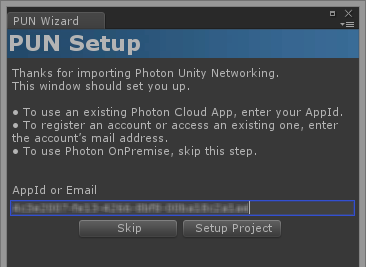
Photon Unity Networking (PUN) is really easy to setup.
Import PUN into a new project and the PUN Wizard will pop up. Alternatively it's in the menu:...
Global cross platform multiplayer game backend as a service (SaaS, Cloud) for synchronous and asynchronous games and applications. SDKs are available for android, iOS, .NET, Mac OS, Unity 3D, Windows, Unreal Engine, HTML5 and others.
muted crystal
thanks
honestly, there probably is no harm in just doing it on a cloud server like normal despite being on the same local network
might save some time
sharp axle
If I remember right, the problem I had with photon is that they still charge you for using Photon Server. It might have changed since I last looked at it though
muted crystal
sharp axle
If I remember right, the problem I had with photon is that they still charge you...
there's a free version that limits you to 20 players
I think it should stay free until you upgrade to more players tho
 modest mantle
Hey, when can I spawn player prefab manually?
ClientConnected called after network sync, so I can't spawn player here.
I also can't spawn player on connection approval, because net prefabs not ready on this stage.
Maybe I can use some scene event?
 nocturne vapor
modest mantle
Hey, when can I spawn player prefab manually?
ClientConnected called after netwo...
nocturne vapor
modest mantle
Hey, when can I spawn player prefab manually?
ClientConnected called after netwo...
what is actually your goal? why not just have a loader gameobject as a player prefab and that loader handles the player initialization. The player prefabs get spawned correctly afterall
 white igloo
Hi im using Playernetwork and sum. When i start the game. I dont see the gun from my opponent. What did I forgot to add to the gun? There is already Client Network Transform
patent iris
Hi, early stages of creating a networked game, and right now I'm having issues with movement. It seems the client on a local build moves extremly slow, and the jumping is wonky (rigidbody add force) .
What would cause different results between build version and editor version?
Sometimes I can move extremely fast as Host on Editor, but i'm extremely slow and barely moving in client build
nocturne vapor
patent iris
Hi, early stages of creating a networked game, and right now I'm having issues w...
You wil need to describe your setup a bit more
desert lion
hey so total newbie question here but I followed a guide to setup lobby and relay and they're working for online multiplayer. but now that relay is hooked up to my transport layer or whatever I can't launch an offline single player game because it wants to connect to relay when I start the host. what settings do I need to switch back to default before launching single player offline?
 fluid walrus
desert lion
hey so total newbie question here but I followed a guide to setup lobby and rela...
fluid walrus
desert lion
hey so total newbie question here but I followed a guide to setup lobby and rela...
it sounds like you're still starting the host? you probably don't want to be doing that at all in singleplayer
desert lion
fluid walrus
it sounds like you're still starting the host? you probably don't want to be doi...
by "singleplayer offline" i mean "self hosted on localhost, no external connections accepted". i'm running the same game in singleplayer and multiplayer modes and it wouldn't work if i didn't launch a host even if that host never connects to another client.
but yeah when i try to launch a self hosted offline game it still tries to connect to relay and i get You must call SetRelayServerData() at least once before calling StartServer. and Host is shutting down due to network transport start failure of UnityTransport
what do i have to point back at default values before launching singleplayer to avoid this?
I assume its this?
 desert lion
yeah turns out you can easily re-enable unity transport by just going
NetworkManager.Singleton.GetComponent<UnityTransport>().SetConnectionData("127.0.0.1", 7777);``` golden fulcrum
Hello! Is there any way to connect an external client (ex. Python UDP client) to Unity Transport?
I am trying to use Unity Netcode for Entities which uses Unity Transport. I can successfully connect server/client within Unity, but when I try to use a simple Python UDP client instead the Unity server seems to never catch the request. Would like to use Netcode for Entities since there are no other DOTS 1.X networking libraries afaik.
patent iris
nocturne vapor
You wil need to describe your setup a bit more


This is the only code involved. For some reason the speeds are messed up when running on a client build or host. For example when I'm the Host on Unity Editor, the player moves extremly fast, like I press A to move left and fly off screen super quick.
When I do it on the client build, I barely move at all
nocturne vapor
patent iris
This is the only code involved. For some reason the speeds are messed up when ru...
The unity editor is not fps limited but the build normally is and just using the delta time (so the time between 2 frames) of another player is not a good idea. If you want to do it with sever authority to prevent cheating, you will need a different system with client side movement prediction for that to function correctly
For now just move the calculations for the vector to the owner function
so the moveServerRpc only takes tge new position as input, which will still result in terrible gameplay due to latency
But it will work better
not too mention your approach isn't in any way secure either, I could just overwrite the speeds on the client
So yea you completly need to change the approach, depending on what you want to achieve
patent iris
nocturne vapor
not too mention your approach isn't in any way secure either, I could just overw...
Would adding conditional statements within the RPC help? Kind of like , (if speed == (the value I expect) , then proceed?
patent iris
nocturne vapor
The unity editor is not fps limited but the build normally is and just using the...
Would limiting the FPS help? What if I limited the game to a certain FPS? What can I google to learn more about this process of client side movement?
nocturne vapor
patent iris
Would adding conditional statements within the RPC help? Kind of like , (if spee...
No, you system does not work afterall. It won't help your broken system and just look for client side movement prediction. I'm no expert in this topic tho, so can't provide any firther details
nocturne vapor
patent iris
Would limiting the FPS help? What if I limited the game to a certain FPS? What c...
Yes it would, but still, using the delta time of another player is a bad idea and you should never do it
patent iris
If the intention is to create a multiplayer game using dedicated servers and server authority, is Netcode for Entities best to use/learn?
golden fulcrum
If your project involves Unity DOTS then maybe. If not then I do not recommend, Netcode for Entities is pretty baked into Unity DOTS, which is very different from normal Unity framework.
golden fulcrum
golden fulcrum
Hello! Is there any way to connect an external client (ex. Python UDP client) to...
Searching online the past 2 days, I think connecting to Unity Transport via an external (not Unity) client may be very difficult/impossible... seems no one has done it.
patent iris
noted , thanks
golden fulcrum
golden fulcrum
Searching online the past 2 days, I think connecting to Unity Transport via an e...
Oh, I think I figured it out. By default, the Netcode for Entities default driver will use IPCNetworkInterface if client/server worlds both exist locally and is not in build... I really do not like how it switches. Makes it seem that latency is better than it really is local and there are no Debug logs indicating it is using IPC rather than UDP...
 crude stirrup
In Netcode, can only Network Objects execute server RPCs?
sharp axle
crude stirrup
In Netcode, can only Network Objects execute server RPCs?
Yes. the RPC has to be in a Network Behaviour on a spawned and active Network Object
 open kiln
Hi, anyone using Unity Multiplay + Photon Fusion, is there a way to make sure Server created a 'room' then only Client joins in?
 radiant flare
Hey guys. we're just about wrapping up to upload our asset to the Unity marketplace.
It's a comprehensive multiplayer solution including game server hosting, services for players, friends, party play, notification system etc., and on the Unity side fully integrated prefabs that you can just "drop in". The multiplayer game development API we've got is incredibly simple.
I was playing with it myself this week and even I got surprised how incredibly quickly I could take an asset such as the Universal Car Controller and get it up and running with multiplayer. So I wanted to try and show a bit of that in this video.
Would love to get some thoughts and feedback, you can sign up for a free account already and get started at www.bittershark.com if you're interested in trying it out.
 round reef
help, i have using UnityEngine.Networking; and its still not working

im guessing i need another library
but which one
 hollow adder
Our game is running ok however we still have some issues during high load on the server.
It is the same problem i initially mentioned. When we reach a certain number of players online ~1400 we start noticing higher latency and some disconnections due to ping timeouts
Looking at server metrics on datadog it shows that we have “system.net.udp.rcc_buf_errors” that only appear when we reach 1200 players and higher. Any idea what might be causing that?
These errors indicate issues with receiving UDP packets, which can result in higher latency and disconnections.
When you observe an increase in "system.net.udp.rcc_buf_errors" when the number of players reaches around 1200 and higher, it suggests that the system's UDP receive buffer is becoming overwhelmed. This can happen when there is a high volume of incoming UDP packets that the system is unable to process efficiently.
In Unity Transport there is a setting that allows me to increase the “receive queue capacity” which I increased from 512 to 2048 at the cost of just extra memory.
After this change we noticed less dropped users, but still observed the errors in the graph
I then increased the capacity further to 8192 which did not help any further.
At this point theres nothing else i can think of to further reduce the error or eliminate them
I think the next point of optimization that will make the biggest difference is jobifying the server code (using Job system in Unity to parallelize handling of incoming packets). There is a documentation page about it in the Unity Transport docs page, but it doesnt go in very much detail and I dont have experience with the Job system myself.
So if you find clear answer for this problem, then let's work together.
nocturne vapor
hollow adder
Our game is running ok however we still have some issues during high load on the...
I guess this is way to specific for this channel. In the pins there is a dedicated unity networking server. Maybe you will have luck there
The only thing I can say is I have no clue and wish you best of luck figuring it out, this goes way above my head
 mortal blaze
has anyone experience ram/cpu spike while the headless build is running on the game server hosting (linux) of unity multiplay?
 rich basalt
How can I send data from one client to another? or from one client to the server and the server sends it to all clients?
 prisma wolf
rich basalt
How can I send data from one client to another? or from one client to the server...
prisma wolf
rich basalt
How can I send data from one client to another? or from one client to the server...
Im gonna check one of my online games to remember how networking works, wait a moment
rich basalt
ok xD
prisma wolf
I remembered Code monkey has great tutorial for it
rich basalt
yeah but its outdated i think
i watched it
a part of it
@prisma wolf is it possible to make multiplayer without all this port stuff?
i heard of the steam multiplayer stuff but does unity has sth like this built in?
prisma wolf
@rich basalt I had a problem, I couldnt answer, Im sorry
Its not outdated, I followed his tutorial like two months ago and they worked perfectly. There are some changes in Unity Netcode for GameObjects but not so many
rich basalt
hm i couldnt progress any further bc you cant pull prefabs into the list...
but aside from that
i still dont know what prefabs do there
how can i send information
i dont want so send positions
prisma wolf
Do you use Unity lobby system?
rich basalt
i have no idea what this is
prisma wolf
rich basalt
i have no idea what this is
It allows you to create lobbys of a certain number of players and "put information" in the lobby. When you update the lobby in all players, they can read that information
rich basalt
"create lobbys" do i need servers for that?
prisma wolf
rich basalt
"create lobbys" do i need servers for that?
No, Unity ones are free
rich basalt
huh?
prisma wolf
As long as your game doenst grow really a lot, they are free
I don't know the exact numbers, but you can use their lobbies if not too many players connect to your game
prisma wolf
rich basalt
that doesnt sound really save
It is, as long as you dont have thousands of players connected yo your game at the same time
prisma wolf
rich basalt
it sounds that they crash and stuff
All server might have problems. But Unity ones are pretty sophisticated
rich basalt
i dont know about that
prisma wolf
rich basalt
i dont know about that
Look, all server might have problems, and you cant do anything about it
But Unity ones are so stable
prisma wolf
rich basalt
ok i will look into that
In the lobby video Code Monkey explains it a little
Well, also wanted to say I never had problems with Unity or heard anyone say they had problems
rich basalt
ok
can we switch to beginner coding real quick i have a problem that is real beginner like
prisma wolf
rich basalt
can we switch to beginner coding real quick i have a problem that is real beginn...
Networking isn't for begginers, but I think I may could answer it
prisma wolf
rich basalt
yeah i probably skip this for my first game
I really hightly recommend you to not go with networking with your first game
Networking makes everything more complex
rich basalt
yes its actually my second but my first one in 3d so yeah i wont do multiplayer for now
prisma wolf
And there's no a simple way to implement networking
nocturne vapor
rich basalt
How can I send data from one client to another? or from one client to the server...
What data exactly do you wsnt to transfer, there are only specific datastructures you can transer by default. For custom datastructures you need to do some extra work
For example you can't sync ganeobjects
rich basalt
forget it but thanks for helping
prisma wolf
rich basalt
yes its actually my second but my first one in 3d so yeah i wont do multiplayer ...
But you have experience with Unity? Because I have never finished any game but I made some tools and learnt a lot since I started
nocturne vapor
rich basalt
<@732323050686775506> is it possible to make multiplayer without all this port s...
At the end of the day no, ports is how the network layer (I think, kinda forgot the names if the iso layer model) works
But your customers don't have to forward ports anymore
There is unity relay, steamworks, epic and many other relay solutions
You can also have dedicated servers
rich basalt
ok im not going to do this multiplayer stuff right now but is this unity relay free? and how many players does it support?
is this the lobby thing you talked about?
nocturne vapor
I think 10ccu (concurrent users) is free, but not sure. I use steamworks
rich basalt
steamworks is 100 euros 😦
and i dont want to invest 100euros in my first game
but yeah i will think about it in future projects
prisma wolf
rich basalt
ok im not going to do this multiplayer stuff right now but is this unity relay f...
This is all the info
https://unity.com/solutions/gaming-services/pricing
nocturne vapor
That is understandable. For me steamworks just has so many benefits that it was worth the 100 bucks. But your goals may differ
Oh wow it is 50ccu
nocturne vapor
rich basalt
forget it but thanks for helping
Alright, but if you need it again here is it anyway
The section supported types has all default types you can share
https://docs-multiplayer.unity3d.com/netcode/current/basics/networkvariable/
Introduction
 wise fern
I'm following this video on matchmaking https://youtu.be/XJax6xZTSWE?si=fL1ZU4fHTFpsYFqA and i dont know how to set up the ServerBuild and ClientBuild


This Unity Multiplayer tutorial will teach you how to get integrate UGS Game Server Hosting and Matchmaker into your Netcode For GameObjects game in 2023. For project files access, check out the repository here: https://github.com/DapperDino/Multiplayer-Character-Select
----------------------------------------------------------------------------...
sharp axle
wise fern
I'm following this video on matchmaking https://youtu.be/XJax6xZTSWE?si=fL1ZU4fH...
I would also check out SamYam's and Code Monkey's videos on Server Hosting. But basically for the server you need to change the build platform to Dedicated Server (linux). The client can be windows PC or whatever
 crisp panther
need help ClassName+<Upload>d__14
what is this?
IEnumerator Upload(string msg)
    {
        WWWForm form = new WWWForm();
        form.AddField("{msg}", msg);
        Debug.Log("Here: ");
        using (UnityWebRequest www = UnityWebRequest.Post("http://localhost:8082/api/name/{msg}", form))
        {
            yield return www.SendWebRequest();

            if (www.result != UnityWebRequest.Result.Success)
            {
                Debug.Log(www.error);
            }
            else
            {
                Debug.Log("Form upload complete!");
            }
        }
    }
above called

msg = Upload(msg).ToString();
Hi does anyone know how to use profiler for UGS Multiplay server using their ip&port? i really need it badly.
sharp axle
 silk reef
without using an RPC
silk reef
without using an RPC
You can send it as NetworkObjectReference. But the only other options you have to send it are Network Variables or with a Custom Message Handler
silk reef
sharp axle
You can send it as NetworkObjectReference. But the only other options you have t...
so its possible to do something like NetworkVariable<NetworrkBehaviourReference>?
sharp axle
silk reef
so its possible to do something like `NetworkVariable<NetworrkBehaviourReference...
that should work.
 teal cedar
Can unity do this? I have network player object. Then I have child named camera root. Now on the ground I have network weapon. Is it possible to set weapon as child of that root? Im using NGO
sharp axle
teal cedar
Can unity do this? I have network player object. Then I have child named camera ...
It can. But reparenting network objects is kinda of a pain so I avoid it whenever possible. If I need to attach an object I will create a physics joint for it
teal cedar
sharp axle
It can. But reparenting network objects is kinda of a pain so I avoid it wheneve...
I have network weapon and network player so..., what should I do?
sharp axle
teal cedar
I have network weapon and network player so..., what should I do?
You can give it a go
https://docs-multiplayer.unity3d.com/netcode/current/advanced-topics/networkobject-parenting/
A NetworkObject parenting solution within Netcode for GameObjects (Netcode) to help developers with synchronizing transform parent-child relationships of NetworkObject components.
teal cedar
sharp axle
You can give it a go
https://docs-multiplayer.unity3d.com/netcode/current/advanc...
Yeah, but the root is fifth child so all those children need to be network object,💀
 spring void
[Netcode for GO]
Can INetworkSerializable be used on classes or should I stick to structs only?
sharp axle
spring void
[Netcode for GO]
Can `INetworkSerializable` be used on classes or should I stick...
I stick to structs. That makes sure it can be used in RPCs and Network Variables
 livid dawn
Any one know how to get someone's Meta ID/account name? I want to display their name above their character but I don't know what to write to get that information.
teal cedar
sharp axle
You can give it a go
https://docs-multiplayer.unity3d.com/netcode/current/advanc...
That's insane, player is spawned? But his root? Root isn't network object so not possible and if it is then it needs to be spawned too
I have to do this approach, it's a bit stupid but there is probably no other way. I will have network weapon, when player collects it then despawn and instantiate non network weapon and set it to be child of root. All through client rpcs. Does this make sense?
sharp axle
teal cedar
I have to do this approach, it's a bit stupid but there is probably no other way...
I've done it that way too. There is no real need for the sword to be networked after a player picks it up.
teal cedar
@sharp axle And then player who is networked controls that sword right?
sharp axle
teal cedar
<@86985386886201344> And then player who is networked controls that sword right?
Yea. Unless you are doing something weird where the server is controlling it for some reason.
 terse timber
Hello everyone, I'm new here in discord channel.
I'm having a problem with Unity networking. I'm using Relay. In the game each player has 4 bullets and they spawn in order. Like everyone else, I have a problem on the client side and not on the host side. The host fires the bullet immediately, while the client fires its bullets through "ServerRpc". This makes the client see that the firing of the bullet is delayed. But actually it fires at the right time on the host side. But the client sees the bullet with a delay. When I shoot in motion, the bullet is not fired from the tip of the gun, but from an empty space to the left or right. I can't figure out how to solve this. The fact that the bullets are constantly changing makes it difficult.
As a solution, I thought of spawning the bullets in OnNetworkSpawn, I wanted to create a pool and use the same ones. In this case, I could not overcome the client having problems accessing the bullets created on the server side. This was an old network project. I used to do it using google play games realtime multiplayer services. Now I'm trying to get it back on its feet. I need some help.
I'm using the client network transform for player prefabs.
 waxen quest
Hi, I am using Unity Netcode + Relay + Lobby.
Is there a way to access lobby player data using Netcode ulong id?
I want to implement Player Names. Or what's the best way to implement Player name in Netcode
nocturne vapor
sharp axle
I've done it that way too. There is no real need for the sword to be networked a...
Do you know a way btw to have it networked when you need it to be, for example dropping it as an item like in minecraft and completly removing the network object part otherwise? So you can reparent
sharp axle
nocturne vapor
Do you know a way btw to have it networked when you need it to be, for example d...
It would be two separate objects. The equipped item is non networked Instantied locally. The dropped item is network Spawned with an RPC.
Another option is to just reparent the network object to the root of the player and then have it follow whatever mount point with a follow script.
sharp axle
waxen quest
Hi, I am using Unity Netcode + Relay + Lobby.
Is there a way to access lobby p...
nocturne vapor
I see, I have been avoiding doing it this way, but maybe I could do it automatically with a handler stripping out every networked component of the weapon and thus being very similar to a non networked gameobject
waxen quest
sharp axle
https://docs.unity.com/ugs/en-us/manual/authentication/manual/player-name-manage...
Thats actually not what I need. I want to access other player names throught there client id. I am using lobby and relay. I can send playername as data in lobby but How can I access that name with ulong client id?
sharp axle
waxen quest
Thats actually not what I need. I want to access other player names throught the...
Oh I see, you can't. At least not directly. The Lobby has no idea about the network manager. I just save the player name as a network variable on the player. You could save the client id and player name to a dictionary locally if you need a quick lookup
waxen quest
sharp axle
Oh I see, you can't. At least not directly. The Lobby has no idea about the netw...
Yes that's what I thought but how the other players name will be sent to others?
Rpc is the only option right?
Player will send their I'd and name to server and server will send to all other. And others will save them in dictionary
sharp axle
waxen quest
Yes that's what I thought but how the other players name will be sent to others?...
I use a network variable on the player. Then loop through all the players if need be
waxen quest
Ohh so a networked string. How do you loop through all players? Where can we get players list. Because only server can access connected clients list
waxen quest
waxen quest
Ohh so a networked string. How do you loop through all players? Where can we get...
@sharp axle
sharp axle
Easiest way is to just FindObjectsByType<Player>(). Can also just have the player object save itself to a local dictionary when it spawns in
waxen quest
sharp axle
Easiest way is to just FindObjectsByType<Player>(). Can also just have the playe...
Yeah. Thanks for the help mate
patent iris
When using Client Prediction/Reconciliation, do we need to allow client movement(aka use ClientNetworkTransform) ?
Unable to move my client right now , which I believe is because Server Authority is true still, and I’m not moving client on Server Rpcs.
Do I need to add ClientNetworkTransform and actually have Server Authority off?
Basically trusting the client and letting them move , but the server will correct it the client (reconcile) if needed?
teal cedar
patent iris
When using Client Prediction/Reconciliation, do we need to allow client movement...
You use client prediction if you want all player movement to be server authoritive
patent iris
teal cedar
You use client prediction if you want all player movement to be server authoriti...
Server authoritative means the client needs to wait for a server response to move doesn’t it?
austere yacht
patent iris
Server authoritative means the client needs to wait for a server response to mov...
it means the server can override anything the client does and whatever a client does is only replicated to other clients if the server has validated it.
teal cedar
Damn, how to do this? How can server instantiate weapon on all players A on all clients machines?
patent iris
austere yacht
it means the server can override anything the client does and whatever a client ...
Thanks, so in Unity terms, do you know if I should attach ClientNetworkTransform ? Basically let the client move freely , but then the server corrects if needed each tick? I’m just confused on how to let the player move first , and not wait on the server’s response
Working on implementing Client prediction and reconciliation, but at the moment only the host can move , client isn’t moving
austere yacht
patent iris
Thanks, so in Unity terms, do you know if I should attach ClientNetworkTransform...
Im not sure how exactly the network transform is implemented. But in theory, you just move the client and the sync logic reports the result to the server. Ofc if you’re using predictions/corrections that’s gonna be way more complicated negotiations. There you’d move the client based on some internal meta-state that aims to use local and remote information together with the timing/sequencing of this information to minimize the error between the two while smoothing the corrections.
teal cedar
Is this efficient or there is different solution?I try to instantiate and attach weapon on all A players (player who picked up weapon) on all clients
    {
        DestroyServerRpc(id);
    }

    [ServerRpc(RequireOwnership = false)]
    private void DestroyServerRpc(ulong id)
    {
        InstantiateSetWeaponClientRpc(id);
        NetworkObject network = GetComponent<NetworkObject>();
        network.Despawn();
    }
    [ClientRpc]
    private void InstantiateSetWeaponClientRpc(ulong id)
    {
        NetworkFPSController[] networkFPSControllers = FindObjectsOfType<NetworkFPSController>();

        foreach (NetworkFPSController fpsController in networkFPSControllers)
        {
            NetworkObject playerObject = fpsController.gameObject.GetComponent<NetworkObject>();
            if (playerObject.OwnerClientId == id)
            {
                GameObject Weapon = Instantiate(NonNetworkWeapon);
                Weapon.transform.parent = fpsController.weaponContainer.transform;
            }
        }
}```Or else, does network manager have something like get player object by id? Not local one
sharp axle
patent iris
Working on implementing Client prediction and reconciliation, but at the moment ...
If you are doing client prediction then you basically have to write your own network transform. The clients have to move locally but still get updates from the server about it's true position.
sharp axle
teal cedar
Is this efficient or there is different solution?I try to instantiate and attach...
It would be easier to have the instantiate clientRpc on the player object. Then just pass the item id to equip
teal cedar
sharp axle
It would be easier to have the instantiate clientRpc on the player object. Then ...
Yeah, so only thing that weapon on the ground will do is that it will send weapon index and then player will find that weapon in it's own scriptable object and then instantiate it through rpc?
sharp axle
teal cedar
Yeah, so only thing that weapon on the ground will do is that it will send weapo...
Thats how I do it
teal cedar
While developing those weapons I found out this. So this client rpc will be executed on all clients except owner right? Respectively it will be executed but owner will be ingored
        private void SendAngleClientRpc(float angle, ulong id)
        {
            NetworkObject Player = NetworkManager.LocalClient.PlayerObject.GetComponent<NetworkObject>();
            if(Player.OwnerClientId == id){return;}
            else{
                CinemachineCameraTarget.transform.localRotation = Quaternion.Euler(_cinemachineTargetPitch, 0.0f, 0.0f);
            }
}```Interesting
sharp axle
teal cedar
While developing those weapons I found out this. So this client rpc will be exec...
This will run on everyone's client but will only effect the remote player
teal cedar
sharp axle
This will run on everyone's client but will only effect the remote player
So that's what I want. When A moves then update immediately locally it's position then update A position on all other clients except for player A's own pc because that is already locally done
sharp axle
teal cedar
So that's what I want. When A moves then update immediately locally it's positio...
If this is on the player object hen all you need is if(IsLocalPlayer) return
teal cedar
sharp axle
If this is on the player object hen all you need is `if(IsLocalPlayer) return`
Okay, that makes it easier for me. Thank you so much😀
 warped pilot
How was the variable for OnNetworkSpawn ? I cant find it ..
warped pilot
ok i got it
mortal blaze
On unity multiplay, is there a way to increase the number of machines in the cloud or specs of it? or add fleets on a single queue on matchmaker? what I'm trying to do is create 50+ available servers on a single queue.
warped pilot
Hello, a stupid question, but how do I sync a particle effect so that others can see it?
sharp axle
warped pilot
Hello, a stupid question, but how do I sync a particle effect so that others can...
LocalTime and ServerTime
warped pilot
thanks a lot
 stray shell
does anyone know how can I make it so that all clients can interact with a rigidbody (move it) in unity netcode for gameobjects?
livid dawn
Anyone know how to "stream" the background music playlist in Unity using Photon Fusion or Voice? I want everyone in the room/session to listen to the same thing at the same time.
 regal delta
Maybe see if a 3rd party solution is out there. Or send a sync variable to tell each player to listen to the same track at the same time
sharp axle
stray shell
does anyone know how can I make it so that all clients can interact with a rigid...
Only the object's owner should be controlling the physics. Otherwise you'll end up with race conditions
sharp axle
livid dawn
Anyone know how to "stream" the background music playlist in Unity using Photon ...
If you want to stream media then look into WebRTC
stray shell
sharp axle
Only the object's owner should be controlling the physics. Otherwise you'll end ...
Its a cube thats in a room. Everyone should be able to interact with it.
sharp axle
stray shell
Its a cube thats in a room. Everyone should be able to interact with it.
If its owned by the server then just make sure every player has a rigid body and collider and it should just work
stray shell
sharp axle
If its owned by the server then just make sure every player has a rigid body and...
You mean the network player, right? The problem with that is that I also have physics based interactables that should be able to be picked up by every player
sharp axle
stray shell
You mean the network player, right? The problem with that is that I also have ph...
if two player try to pick it up at the same time, you're gonna have a bad time
stray shell
sharp axle
if two player try to pick it up at the same time, you're gonna have a bad time
It's a vr game. If the player picks it up the other players cant grab it anymore. Fist one to grab it grabs it
I mean it has to work somehow, its not like I'm the first person trying it
livid dawn
sharp axle
If you want to stream media then look into WebRTC
I meant "stream" more like playing the music that's been imported already into Unity and using AudioSource and playing it for everyone in the room to hear but everyone hears the same thing at the same time.
sharp axle
livid dawn
I meant "stream" more like playing the music that's been imported already into U...
LocalTime and ServerTime
livid dawn
sharp axle
https://docs-multiplayer.unity3d.com/netcode/current/advanced-topics/networktime...
I appreciate it but do you think this will work with Photon Fusion?
sharp axle
livid dawn
I appreciate it but do you think this will work with Photon Fusion?
As long as it has network/server time the theory is the same
livid dawn
sorry if I sound stupid but I'm really new to the whole online thing and trying to learn lol
sharp axle
stray shell
I mean it has to work somehow, its not like I'm the first person trying it
Syncing physics is very very hard.
 covert gull
Anyone use the encryption capabilities of Unity Transport? I followed the Unity documentation for enabling a secure server/client connection using DTLS and certificates and I keep getting a DTLS handshake error. It keeps saying the DTLS handshake failed on step 6. Anyone know why I might be seeing this error?
 severe briar
covert gull
Anyone use the encryption capabilities of Unity Transport? I followed the Unity...
severe briar
covert gull
Anyone use the encryption capabilities of Unity Transport? I followed the Unity...
If I understood it correctly then step 6 is 'Certificate request'.
Maybe the server/client doesn't have that.
Or I've completely missed and it means something else.
Anyways, you can read the handshake packets using wireshark, it will prove/disprove my guess.
 covert gull
severe briar
If I understood it correctly then step 6 is 'Certificate request'.
Maybe the ser...
covert gull
severe briar
If I understood it correctly then step 6 is 'Certificate request'.
Maybe the ser...
Do the certificates need to be installed on both ends?
severe briar
Yeah, I think so.
warped pilot
Sorry, I'm pretty new to networking. But maybe someone can explain my problem to me. The Client Move doesn't work, does anyone know why?
nocturne vapor
warped pilot
Sorry, I'm pretty new to networking. But maybe someone can explain my problem to...
there are quite a few porblems with this, first off you can't take input in the functions you call in a server rpc, it won't work, you would need to pass that input
But that would result in different problems (latency)
What are your goals for that project? depending on that answer, the solution is different
Are you ok with allowing the players to say were they are? So not care about movement hacking in any form
warped pilot
I only read that it would be better to run it over the server
is it bad ?
ClientNetworkTransform is working fine
My goal for the project -> third person shooter like Pubg/Fortnite
teal cedar
warped pilot
My goal for the project -> third person shooter like Pubg/Fortnite
Yo, that's mine too
teal cedar
warped pilot
My goal for the project -> third person shooter like Pubg/Fortnite
Creating shooters is hardest because your latency needs to be bellow 50ms
Can player object have two network animators?
teal cedar
nocturne vapor
there are quite a few porblems with this, first off you can't take input in the ...
That's issue I have to fix too. Because I have fps shooter and movement is still client controlled so.
nocturne vapor
warped pilot
is it bad ?
It is not bad, it is actually good, you will just need a lot of knowledge implementing that solution
You will need to write your own network transform doing client side prediction, so doing the movement on the client, but the client also listens to the server about the true position
I honestly have not looked into how this is implemented in detail, so can't guide you further
The default unity option only provides one mode the server is right, the clientside transform does the oposite, the client is always right, you will have to do the server is always right globally but it allows the client to do stuff, till the server says that this is not okay
warped pilot
Ok thanks for your answer
Im just trying it ..
is it easy to hack a position with clientside movement ?
or difficult too ?
For my script, what would be the correct way ? What did I false ?
nocturne vapor
Mainly taking input in the function you call in a serverrpc, that function will be executed on the server and simply can't take any input from the player
What you would want to do instead, if you want to go with that approach you currwntly have, is pass in the input as arguments to these functions
nocturne vapor
You do a lot with the playerInput in the move function, which gets called by the serverrpc fir example playerInput.sprint? ...
warped pilot
using UnityEngine;
public class PlayerHealth : NetworkBehaviour, IDamageable
{
[SerializeField]
private int _MaxHealth = 100;
[SerializeField]
private int _Health;
[Header("Death Seetings")]
[SerializeField]
private ParticleSystem DeathSystem;
public int CurrentHealth { get => _Health; private set => _Health = value; }
public int MaxHealth { get => _MaxHealth; private set => _MaxHealth = value; }
public event IDamageable.TakeDamageEvent OnTakeDamage;
public event IDamageable.DeathEvent OnDeath;
private void OnEnable()
{
CurrentHealth = MaxHealth;
OnDeath += Die;
}
private void OnDisable()
{
OnDeath -= Die;
}
private void Die()
{
if (DeathSystem != null)
{
Vector3 spawnPosition = transform.position + new Vector3(0f, 2f, 0f);
Instantiate(DeathSystem, spawnPosition, Quaternion.identity);
}
Debug.Log("Ich bin gerade gestorben!");
}
public void TakeDamage(int Damage)
{
int damageTaken = Mathf.Clamp(Damage, 0, CurrentHealth);
CurrentHealth -= damageTaken;
Debug.Log(CurrentHealth);
if (damageTaken != 0)
{
OnTakeDamage?.Invoke(damageTaken);
}
if (CurrentHealth == 0 && damageTaken != 0)
{
OnDeath?.Invoke();
}
}
}```
Is it hard to expand my health system with networking ? severe pilot
Hey guys, for some reason I can't connect over LAN using NGO. Not using local host, works from same device but not over different devices. Have allowed unity editor through firewall. Any advice?
So this is hosting

On client

so this is 2 instances on the same device and works fine
but enterting the same ip and port on another device, connected to the same network doesn't work
I tried using my hotspot and data in case it was an issue with the network I'm connected to but same issue
Client code

Host code

I have allow remote connection enabled too

ah
it's a firewall issue
turning off firewall worked
what do I need to allow in firewall cause I allowed unity editor
warped pilot
How do I handle Objectspools in Network ?
austere yacht
warped pilot
How do I handle Objectspools in Network ?
use a custom spawner implementation that redirects the spawn command into your pool (netcode frameworks typically consider an inactive object as "despawned" as far as the shared game state goes)
sharp axle
warped pilot
How do I handle Objectspools in Network ?
Netcode for GameObjects (Netcode) provides built-in support for Object Pooling, which allows you to override the default Netcode destroy and spawn handlers with your own logic. This allows you to store destroyed network objects in a pool to reuse later. This is useful for often used objects, such as projectiles, and is a way to increase the app...
 fresh meteor
What would be a good choice for a text based multiplayer game?
Players wont be walking around with a character, but rather pressing some buttons to make actions(delay/ping shouldn't be a problem here)
This means that a constant connection is probably not necessary other than being logged into an account. (tho I know little about networking so perhaps its necessary either way)
This has to work in a browser and use some sort of database to store player data + account info.
 willow vale
Hey, is there any solution like ParallelSync provided by unity itself?
 terse radish
Hi all! I'm trying out the new multiplay play mode but I find a bunch of errors in the new player window that pops up
Asset Database is set to Read Only, but it has found out-of-date assets. This should not happen!
Asset Database is set to Read Only, but there are out-of-date assets during trigger import. This should not happen!
and then it fails to load in my addressables assetdatabase. Anyone happens to know what the working directory of this new play window is? I have a custom build & load path set up for addressables as my project is split up to multiple sub-projects. The addressable load path is given with a relative path which is easily resolved using the main Unity Editor (and has been working for like 2 years now) but fails miserably when i try it out using the new multiplayer play mode.
 neon yoke
Using Unity netcode whenever I change the scene using the Netcode sceneManager. Some networkObjects that are spawned are not destroyed. How should I approach this issue?
sharp axle
fresh meteor
What would be a good choice for a text based multiplayer game?
Players wont be w...
If it's purely text based then I would try to find a node js MUD server
sharp axle
willow vale
Hey, is there any solution like ParallelSync provided by unity itself?
Overview of Multiplayer Play Mode
warped pilot
Hello, I'm trying Objectpool according to the documentation, but I get an error on this line:
// Register Netcode Spawn handlers NetworkManager.Singleton.PrefabHandler.AddHandler(prefab, new PooledPrefabInstanceHandler(prefab, this));
Unable to convert "Unity.BossRoom.Infrastructure.PooledPrefabInstanceHandler" to "Unity.Netcode.INetworkPrefabInstanceHandler".
I have only copy this from the documentation, what is the mistake here ?
 uncut wren
Good evening, folks. I'm currently looking into a networked FPS and have a pretty solid character controller so its time to move onto weapons.
I've tried this before but got stuck on spawning the player(s) and their weapons.
I'm using Netcode for Gameobjects
Does anyone have any pointers or experience on this that they'd be willing to share?
I'm currently thinking that I could just spawn separate network objects and attach them to the players
 haughty heart
You shouldn't need a network object for what the player is holding. All that should be is some synced value representing the weapon and then have each client show the weapon on the character, locally.
Of course, if the weapon is dropped (if that's a thing), that would be its own network object.
uncut wren
iirc, the way I did it before was simply instantiating the weapons as a child of the player before base.OnNetworkSpawn(), but I ran into the odd issue that, uh
only the host had a gun
I'll have a play about, I still need to implement weapons in some manner though
haughty heart
Right, that's why you "dress" the players locally on each client based on their synced variable. I'd imagine you'd sync a custom object representing a player that stores their info like team, health, currently held weapon etc.
uncut wren
So I could have, say, a container with each weapon on it and it instantiates a weapon for each player based on the index of the weapon they're using
haughty heart
Something like that yeah
uncut wren
alrighty. I've also got some other stuff going on too, such as anim override controller stuffs
so hopefully it's gonna play nice with that
but for now, I'm gonna work on getting weapons to spawn for players
thanks for a lil bit of guidance :)
 knotty horizon
Good day everyone! The question is, I have a client and a server. And the problem is that if I try to log in on a PC, then everything connects and works as it should, but if I run the project on Android, the connection is not established
    void Start()
    {
        DontDestroyOnLoad(this);
        string filePath;
        filePath = Path.Combine(Application.streamingAssetsPath, "ca.crt");
        try
        {
            byte[] caCertBytes;
#if UNITY_ANDROID && !UNITY_EDITOR
        WWW www = new WWW(filePath);
        while (!www.isDone) { }
        caCertBytes = www.bytes;
#else
            caCertBytes = File.ReadAllBytes(filePath);
#endif
caCertificate = new X509Certificate2(caCertBytes);
        }
        catch (Exception ex)
        {
  ErrorText.text += ("Произошла ошибка: " + ex.Message);
        }
        try
        {
     PlayerPrefs.SetInt("FlagAuthorizate", 0);
            RunClient(IP, "192.168.1.204");
        }
        catch (Exception ex)
        {
            Debug.Log(ex.Message);
            return;
        }
    }
public async void RunClient(string machineName, string serverName)
{
    try
    {
        client = new TcpClient(machineName, PORT);
        ErrorText.text += "Get stream.\n";
        stream = client.GetStream();

        sslStream = new SslStream(stream, false, new RemoteCertificateValidationCallback(ValidateServerCertificate), null);
        Debug.Log("Client connected.");
        try
        {
sslStream.AuthenticateAsClient(serverName, null, SslProtocols.Tls12, false);
            await Task.Run(() => MachinState());
        }
        catch (AuthenticationException e)
        {
            Debug.Log(e.Message);
            if (e.InnerException != null)
            {
      Debug.Log(e.InnerException.Message);
            }
            Debug.Log("Authentication failed - closing the connection.");
            client.Close();
            return;
        }
    }
    catch (Exception e)
    {
        return;
    }
}

public bool ValidateServerCertificate(object sender, X509Certificate certificate, X509Chain chain, SslPolicyErrors sslPolicyErrors)
{

    foreach (X509ChainElement chainElement in chain.ChainElements)
    {
        Debug.Log(chainElement.Certificate);
    }
    if (chain.ChainElements.Count > 1 && chain.ChainElements[1].Certificate.Equals(caCertificate))
    {
        return true;
    }
    else
    {
        // Цепочка не содержит корневой сертификат центра сертификации
        Debug.Log("Certificate is not signed by the specified CA.");
        return false;
    }
}
 noble sapphire
So in the Unity Transport theres a bool called Allow Remote Connection, how can i change that in script
 verbal palm
hi, i wwanna ask is that let say i have a gameobject in which i have deattach the child at the first frame to make the code work, so will the netcodes network object will keep track of that child object which gets deattached from the parent
mortal blaze
On multiplay/matchmaker, how to get the number of allocated machine on a fleet? or get if a pool has already a maximum server without queueing .
 flint jolt
Hello, everyone! I'm new to Unity and encountering some issues. When I attempt to collaborate with my friends using LTS 2021.3, I can't seem to locate the collaboration option in Unity Gaming Services. Could someone please assist me in finding a solution? Thank you!
spring void
[Netcode for GameObjects]
I've noticed that my ClientRpc runs on the host even if he wasn't listed as a target client. Is it intended behavior? Am I doing something wrong?
 public void SetIntAttributeValueOnClients (int objectId, int value)
 {
    Debug.Log(nonHostClientsRpcParams.Send.TargetClientIds.Count); // returns 0
    SetIntAttributeValueClientRpc(objectId, value, nonHostClientsRpcParams); // It's supposed to run only on non-hosts
 }

[ClientRpc]
void SetIntAttributeValueClientRpc (int objectId, int value, ClientRpcParams clientRpcParams)
{
    Debug.Log($"Test"); // is logged on host anyway
}
Is there any good way to say spawn some related NBs, set some NVs, and then do something once they are all synced?
without a ClientRPC
spring void
spring void
[Netcode for GameObjects]
I've noticed that my ClientRpc runs on the host even i...
Looks like the problem exists only if I use ClientRpc from another ClientRpc. It resolves like a normal (non-network) method. I suppose I'll need to use it more carefully.
nocturne vapor
spring void
Looks like the problem exists only if I use `ClientRpc` from another `ClientRpc`...
A clientrpx needs to be called on the server
So if you want to use it from normal function you would call a serverrpc that calls that clientrpc
spring void
nocturne vapor
A clientrpx needs to be called on the server
So if you want to use it from norma...
What I meant, calling ClientRpc makes the next ClientRpc work like a method even if it's still called on the host/server.
void Test1 ()
{
  Test2ClientRpc (clientsRpcParams);
}
[ClientRpc]
void Test2ClientRpc(ClientRpcParams clientRpcParams)
{
  Debug.Log("Test2"); // works like a normal ClientRpc
  if (NetworkManager.Singleton.IsHost) // passes the condition check
    Test3ClientRpc(clientsRpcParams);
  if (NetworkManager.Singleton.IsServer) // passes the condition check
    Test3ClientRpc(clientsRpcParams);
}

[ClientRpc]
void Test3ClientRpc(ClientRpcParams clientRpcParams)
{
  Debug.Log($"Test3"); // works like a normal method
}
So it looks like I can't use a nested ClientRpc even if it's still called from the server.
 nocturne vapor
yea I don't think that works
waxen quest
Hello I am using Lobby with Relay and Netcode.
The Lobby rate limits are very low. It is not even for 1 user this much request per second. It's for all users. How can we increase the rate limits??
waxen quest
waxen quest
Hello I am using Lobby with Relay and Netcode.
The Lobby rate limits are very l...
How can we know if we can place the request. Is there a callback. When we have a request available.
waxen quest
The players cannot able to Join lobbies together at the same time. It throws RateLimited Error.
This will give very bad impression of the game
severe briar
spring void
What I meant, calling `ClientRpc` makes the next `ClientRpc` work like a method ...
That's intended.
Clients can communicate with the server.
Server can communicate with the clients.
But clients can't communicate with each other directly.
spring void
severe briar
That's intended.
Clients can communicate with the server.
Server can communicate...
Just to make sure I'm getting it right: the server/host can't communicate with clients via ClientRpc, because it's intended?
I mean in this test I wasn't even trying to communicate with clients from a non-host clients.
So pretty much I communicated only from the host side, yet ClientRpc still failed.
To clarify: on non-host clients the condition if (NetworkManager.Singleton.IsHost) wouldn't return true.
So pretty much Test3 method should only be run from the server. Yet it doesn't work like ClientRpc despite of being ClientRpc.
severe briar
spring void
Just to make sure I'm getting it right: the **server/host can't communicate with...
The second client rpc is already on the client side, so it will be executed locally, since clients can't communicate with each other directly.
spring void
severe briar
The second client rpc is already on the client side, so it will be executed loca...
Alright, so the host has client and server side separated, and those sides can't communicate with each other without a correct RPC call, even if they belong to the same app/game instance. It makes more sense now. Thanks for the clarification. So far I thought the host had both functionalities included.
severe briar
spring void
Alright, so the host has client and server side separated, and those sides can't...
If the game is runned in 'Server' mode, then it has only server functionality.
If in 'Host' mode, then a server and client instances are created.
And host, as a client, connects to the server.
spring void
severe briar
If the game is runned in 'Server' mode, then it has only server functionality.
I...
Thanks for clarification.
waxen quest
waxen quest
Hello I am using Lobby with Relay and Netcode.
The Lobby rate limits are very l...
Is there something we can do?
silk reef
how would I do something like NetworkVariable<NetworkBehaviourReference[]>
When I use a NetworkList, it updates any time I add/remove, which is not what I need
severe briar
silk reef
When I use a `NetworkList`, it updates any time I add/remove, which is not what ...
What behaviour do you expect?
silk reef
severe briar
What behaviour do you expect?
I believe thats as expected, if I add/add/add/remove ill get onListChanged callback 4 times
i dont see any other way to say populate a list with 10 objects, and only have OnListChanged called once
severe briar
silk reef
i dont see any other way to say populate a list with 10 objects, and only have O...
You can use event on the list
if (listevent.Count != list.Capacity) return;
I don't remember what this object contains, so can't write the exact syntax.
Also, I thought that it's possible to store an array as a NV.
severe briar
silk reef
I believe thats as expected, if I add/add/add/remove ill get onListChanged callb...
From the docs:
Arrays of C# primitive types, like int[], and Unity primitive types, such as Vector3, are serialized by built-in serialization code. Otherwise, any array of types that aren't handled by the built-in serialization code, such as string[], needs to be handled through a container class or structure that implements the INetworkSerializable interface.
Just create a wrapper class for a NetworkBehaviour or use NetworkObjectReference.
Upd: NetworkBehaviourReference should also work.
silk reef
severe briar
From the docs:
```Arrays of C# primitive types, like int[], and Unity primitive...
NetworkVariable<NetworkBehaviourReference[]>?
severe briar
silk reef
`NetworkVariable<NetworkBehaviourReference[]>`?
Yes, I think it should work.
But not sure, since I hadn't touched the netcode for a couple of months.
silk reef
let me try
silk reef
severe briar
Yes, I think it should work.
But not sure, since I hadn't touched the netcode fo...
ArgumentException: Type Unity.Netcode.NetworkBehaviourReference[] is not supported by NetworkVariable1.
severe briar
silk reef
`ArgumentException: Type Unity.Netcode.NetworkBehaviourReference[] is not suppor...
Created a wrapper for the NBR
 public class NetworkBehaviourArray : INetworkSerializable
    {
        public NetworkBehaviourReference[] References;

        public void NetworkSerialize<T>(BufferSerializer<T> serializer) where T : IReaderWriter
        {
            serializer.SerializeValue(ref References);
        }
    }

private NetworkVariable<NetworkBehaviourArray> _test = new();
Don't know if it will sync values correctly, test it yourself
severe briar
severe briar
Created a wrapper for the NBR
```
public class NetworkBehaviourArray : INetwor...
If it doesn't you can try
public class NetworkBehaviourArray : INetworkSerializable
    {
        public NetworkBehaviourReference[] References;

        public void NetworkSerialize<T>(BufferSerializer<T> serializer) where T : IReaderWriter
        {
            for (int i = 0; i < References.Length; i++)
            {
                serializer.SerializeValue(ref References[i]);
            }
        }
    }
doesnt seem to work for me, maybe i implemented it wrong?
severe briar
silk reef
doesnt seem to work for me, maybe i implemented it wrong?
What doesn't work?
The values don't sync?
silk reef
severe briar
What doesn't work?
The values don't sync?
im not sure how i should implement it exactly:
public NetworkVariable<NetworkBehaviourArray> test;
test.Value = ?
severe briar
silk reef
im not sure how i should implement it exactly:
`public NetworkVariable<NetworkBe...
I think it should be
test.Value[index]
As it holds an array, so the value will return an array.
silk reef
severe briar
I think it should be
test.Value[index]
As it holds an array, so the value will r...
I tried this:
        {
            this,
            this,
        };

        test2.Value = new NetworkBehaviourArray()
        {
            References = array
};```oh, it does work. but for some reason the previous value is always null...
severe briar
silk reef
```var array = new NetworkBehaviourReference[]
{
this,
...
It turned out, that you can have an array of network variables
NetworkVariable<int>[] _array = new NetworkVariable<int>[5];
wuhhh
silk reef
severe briar
It turned out, that you can have an array of network variables
```
NetworkVaria...
let me try, how would OnValueChanged work there?
severe briar
silk reef
let me try, how would `OnValueChanged` work there?
I think each variable in the array would have a OnValueChanged event
silk reef
severe briar
I think each variable in the array would have a `OnValueChanged` event
thats interesting, but it wont help me much in this case. Turns out I made a silly mistake and the code you gave above is working nicely.
nocturne vapor
severe briar
It turned out, that you can have an array of network variables
```
NetworkVaria...
I mean it makes sense if you think about it, you just tell the compiler please allocate and inite the memory x times
nocturne vapor
silk reef
let me try, how would `OnValueChanged` work there?
You would have to go through the array of network vars and add that onValueChanged function I guess
silk reef
{
    public int Count;

    public NetworkBehaviourArray Test;

    public void NetworkSerialize<T>(BufferSerializer<T> serializer) where T : IReaderWriter
    {
        serializer.SerializeValue(ref Count);
        Debug.Log(Test == null);
        Test.NetworkSerialize(serializer);
    }
}```

Now I thought nesting it would work based on the docs, but i get a nullrefIt does work, its only on spawn that its null, but im not sure how to avoid
nocturne vapor
From where do you init all of that? Start or OnNetworkSpawn?
silk reef
        CharacterNetwork.Value = new CharacterNetwork()
        {
            Count = refs.Count,
            Test = new NetworkBehaviourArray()
            {
                References = refs.ToArray()
            }
};```from a server button press atm
it doesnt seem to send the Test to the client, im a bit out of my depth
warped pilot
Hello, what is a good option with Unity Gaming Services that allows players to log in only with the current game version?
teal cedar
Does NGO support network array? Network variable<int>[]
severe briar
teal cedar
Does NGO support network array? Network variable<int>[]
Yes
uncut wren
I have a whole new crazy issue.
I'm getting an error telling me that a network prefab with a certain Hash cannot be spawned
I'm creating a player and spawning weapons for it in the hierarchy - so what would be the best course of action for this?
Perhaps I could register the players' spawned prefabs as network prefabs?
silk reef
@severe briar
I got it mostly working like this:
public struct NetworkBehaviourArray : INetworkSerializable, IEquatable<NetworkBehaviourArray>
{
    public NetworkBehaviourReference[] References;

    public void NetworkSerialize<T>(BufferSerializer<T> serializer) where T : IReaderWriter
    {
        // Length
        var length = 0;
        if (!serializer.IsReader)
        {
            if (References != null)
            {
                length = References.Length;
            }
        }

        serializer.SerializeValue(ref length);

        // Array
        if (serializer.IsReader)
        {
            References = new NetworkBehaviourReference[length];
        }

        for (var n = 0; n < length; ++n)
        {
            serializer.SerializeValue(ref References[n]);
        }
    }

    public bool Equals(NetworkBehaviourArray other)
    {
        return References == other.References;
    }
}
the only issue now is in OnValueChanged the previousValue.References is null, im not sure how I can initialize it
uncut wren
update on my issue - its now spawning all the weapons as it should
but I now get an error about incorrect parenting
uncut wren
haughty heart
Right, that's why you "dress" the players locally on each client based on their ...
Hey, thought I'd update you on my object spawning stuffs.
Not at the pc rn, but I had errors regarding a failure to spawn an object locally due to invalid prefab hashes.
Starting to think I might have to pool all the weapons into the character and just enable the ones the player is using
I'll see how that goes regarding errors and stuff - and can optimise later - but if it doesn't work, I think I'll move back to a non-networked project for the time being
haughty heart
Yeah, that's one way to do it have the player prefab map the weapons and toggle them as needed. Whatever works for you.
But yes, making a networked game is an extreme amount of work. Once you get past the "this seems easy" tutorials that only show how you sync transforms, reality of the work ahead sets in. 🫠
uncut wren
yeahhh lmao, im running into some mega problems here
neon yoke
I have a scenario were multiple clients are together in one scene and when they all stand on a square I load in a new scene (single mode).
I want to pause the new scene until all clients have loaded into it.
But I don't know how I can pause the scene for loaded clients that are waiting for the last clients to load, should I set the timescale to zero?
To communicate if a client has loaded the scene I was planning on using SceneEventType.LoadEvenetCompleted and clientRpc's
What is the best way to approach this?
severe briar
neon yoke
I have a scenario were multiple clients are together in one scene and when they ...
I, usually, store data for each player in a class and then compare the loaded and timedout amount with the connected amount.
I think you can use NetworkManager.Singleton.ConnectedClients.Count or something, I don't remember the exact syntax
 pallid steeple
you get a list of all the clients that completed the loading on SceneEventType.LoadEventCompleted SceneEvent (also a list of those that failed)... You could have say... a bool ShouldGameRun=false; which you set to true when all clients are in the sceneEvent.ClientsThatCompleted list and then your game runs again
neon yoke
@severe briar @pallid steeple thanks for the response.
The part for managing the clients was clear to me.
I am unsure about my assumption that you can use the timeScale to pause the scene in Networked Projects?
severe briar
neon yoke
<@277155889020928000> <@615488797412425768> thanks for the response.
The part fo...
It's bad practice in general.
Let's take a turn based strategy for example, even when it's the player turn the game doesn't freeze, even though the game is 'paused'.
The way to 'pause' the game is by turning on/off components based on the game state.
neon yoke
severe briar
It's bad practice in general.
Let's take a turn based strategy for example, even...
Thanks then I will take your advice and find another way to "pause"
 bronze tendon
I'm making a card game, with multiplayer. The multiplayer connects random people all over the world to play. I'm wondering if ping would be an issue. Right now everyone can connect with everyone. But would that have an impact on the game? The game doesn't need high internet speeds, but it does need to keep the player connected and make it somewhat playable, like passing network variables quickly etc.
Without regional matchmaking there will be more players to play against; Lobbies fill up quicker.
With regional matchmaking, the lobbies ofcourse will fill up less quickly, but the ping would not be an issue.
What are you guys' ideas about this?
 spring crane
bronze tendon
I'm making a card game, with multiplayer. The multiplayer connects random people...
spring crane
bronze tendon
I'm making a card game, with multiplayer. The multiplayer connects random people...
Try playing it with high ping emulation? You know best whether your game has mechanics that are timing sensitive. Some time sensitive things can also be pretty easily compensated for.
bronze tendon
spring crane
Try playing it with high ping emulation? You know best whether your game has mec...
That sounds like a great idea. I'm guessing Unity doesn't have a built-in ping emulation 🙈. Would a simple VPN work?
I'm reading on a reddit post that "clumsy" is a good app for emulating high ping. Any other recommendations?
spring crane
Yea I recall Clumsy. I don't have other recommendations.
bronze tendon
I'll check it out. Thanks 👍
silk reef
can anyone explain how to use NetworkVariable<NativeArray<int>>
waxen quest
Why am i getting this error. This only appears on Host. It is happening since i updated Unity Editor to 2022.3.13
 severe briar
waxen quest
Why am i getting this error. This only appears on Host. It is happening since i ...
severe briar
waxen quest
Why am i getting this error. This only appears on Host. It is happening since i ...
Can't tell much without the code.
Maybe
Because you've updated the editor to a newer version.
Tried looking for an issue on github but it doesn't exist.
waxen quest
severe briar
Can't tell much without the code.
Maybe
Because you've updated the editor to a n...
It never happened before. But after I updated the editor.
severe briar
waxen quest
It never happened before. But after I updated the editor.
Open a github issue
And downgrade
teal cedar
I am completely lost. I have network variable. I then set it's value through server rpc but it throws me error Client is not allowed to write to this variable. Like what?!
severe briar
teal cedar
I am completely lost. I have network variable. I then set it's value through ser...
Show the code.
teal cedar
severe briar
Show the code.
private void SynchroniseActiveIndexServerRpc(int activeIndex)
{
NetworkactiveIndex.Value = activeIndex;
Debug.Log(NetworkactiveIndex.Value);
}``` remote relic
Hello, I’m trying to work on my client reconnecting code. Two clients can join a game and spawn objects with ownership. When a client disconnects I can have them rejoin with a unique Guid. Although now their clientId is different. What’s the best way to go about keeping all objects owned by that client? Even though the ids change.
severe briar
teal cedar
I am completely lost. I have network variable. I then set it's value through ser...
Maybe, you're changing the variable somewhere else?
Also, make sure to initialize it.
severe briar
remote relic
Hello, I’m trying to work on my client reconnecting code. Two clients can join a...
I think you can reduce the Network id recycle or something on the network manager.
Or try to set the object id directly, but I don't know if it's possible.
Or save all objects in the dictionary<ulong clientId, List<NetworkBehaviour>>
Check if the player connected is the same as previous, don't know how to do this, maybe via transport or something.
Change ownership of all object to the new player.
teal cedar
severe briar
Maybe, you're changing the variable somewhere else?
Also, make sure to initializ...
here is how I initialize it. And I checked it. It is changed only inside that RPC
public NetworkVariable<int> NetworkactiveIndex = new NetworkVariable<int>(-1, NetworkVariableReadPermission.Everyone, NetworkVariableWritePermission.Owner);
 twin lion
Do NetworkVariableWritePermission.Server instead of Owner maybe?
teal cedar
twin lion
Do NetworkVariableWritePermission.Server instead of Owner maybe?
I will try
twin lion
Maybe the server doesn't own the object
remote relic
severe briar
Or save all objects in the dictionary<ulong clientId, List<NetworkBehaviour>>
Ch...
Ok I’ll try these out, thank you!
teal cedar
twin lion
Maybe the server doesn't own the object
It works! Thank you so much
twin lion
teal cedar
It works! Thank you so much
Great! :> no problem bro
teal cedar
twin lion
Great! :> no problem bro
And this? public NetworkVariable<int>[] WeaponIds = new NetworkVariable<int>[] { new NetworkVariable<int>(-1, NetworkVariableReadPermission.Everyone, NetworkVariableWritePermission.Server), new NetworkVariable<int>(-1, NetworkVariableReadPermission.Everyone, NetworkVariableWritePermission.Server) };
I change those inside ServerRpc but idk why it isnt synchronised through network.
twin lion
hmm I'm not sure how NetworkVariables work if they are "nested", you probably don't need networkvariables inside an already networked array, but to be honest I have never tried it
That's the only thing I can think of why it wouldn't work
unless your rpc is wrong or smth
oh no I just tried it, it is correct
I totally misread your code, but yeah I'm not sure what the problem could be, prob doesn't like accessing networkvariables inside an array would be my guess
teal cedar
twin lion
I totally misread your code, but yeah I'm not sure what the problem could be, pr...
So maybe I will just use two network ints. because Idk where is error. Because in Log no errors but when other player connect then player who was already there then his variables are still wrong
Okay, I replaced it and it works now so...
severe briar
teal cedar
And this? ```public NetworkVariable<int>[] WeaponIds = new NetworkVariable<i...
I think it would work, if initialize in the OnNetworkSpawn.
severe briar
public NetworkVariable<int>[] WeaponIds;
public override void OnNetworkSpawn()
{
    WeaponIds = new NetworkVariable<int>[]
    {
        new NetworkVariable<int>(-1, NetworkVariableReadPermission.Everyone, NetworkVariableWritePermission.Server),
        new NetworkVariable<int>(-1, NetworkVariableReadPermission.Everyone, NetworkVariableWritePermission.Server)
    };
}
Thanks, I will test it.
 limber crag
Hi anybody tried to upload the file from PC to quest pro using any script?
 severe briar
 sour fiber
but i have those error
sour fiber
but i have those error
What version of unity do you use?
It seems like 2020 or lower.
As FindObjectByType was added later
 sour fiber
i solved problem
yes related to version
i have not LTS version
i dowload LTS and fixed
waxen quest
How can we parent the spawning network object? This dont work
 if (IsServer)
 {
     GameObject bomb = Instantiate(bombPrefab, targetPlayerTemp.GetComponent<PlayerManager>().pickPoint);
     bomb.GetComponent<NetworkObject>().Spawn(true);
     bomb.GetComponent<NetworkObject>().TrySetParent(targetPlayerTemp.GetComponent<PlayerManager>().pickPoint);
 }
Network objects can only be children of another network object.
player (NO) -> pickpoint (NO) -> bomb (NO)
NO - network object
waxen quest
severe briar
Network objects can only be children of another network object.
player (NO) -> ...
Oh I see. Thanks so much @severe briar 🙂
waxen quest
severe briar
Network objects can only be children of another network object.
player (NO) -> ...
I just added NO to pickPoint. But still it spawns at zero position
In my case pickpoint parent does not have NO. But player do have NO. My player is character and i have placed pick point on player hand
How do we deal that in this case?
Or i have to locally parent the bomb in every client
 spring pilot
this is a super noob question so I apologise in advance but do I have to send EVERY piece of data not just including the players position, state, head rotation etc, but also their currently held weapon, whether or not they're reloading every single tick? the reason I'm asking is I want to send data to the server for when the player spawns incl what weapon they have etc, is it really necessarry to serialize that every tick? seems kinda inefficient no? apologies if my use of the word "serialize" is wrong here but it just seems like a kind of archaic and inefficient way of doing things to constantly be sending empty variables that aren't being used every tick
like would it not be more efficient say if I could just call a function, say for example weaponManager.triggerReload() and have a trigger for it sent over the wire so everyone sees it? because right now the way I'm handling stuff like that is by having an iNetworkSerializable boolean showing whether or not the player is reloading every single tick and it feels kinda wasteful...
severe briar
spring pilot
like would it not be more efficient say if I could just call a function, say for...
Sync variable state using NetworkVariable and update it using server rpc when needed.
spring pilot
severe briar
Sync variable state using `NetworkVariable` and update it using server rpc when ...
thank you!
 unkempt abyss
Hi, I'm using Facepunch.Steamworks to create a standalone dedicated server and a unity client. I'm trying to connect them using a Relay Socket provided by the C# Wrapper for the Steamworks API, however I cannot get the client to connect to the server. Here is my code:
Server
using Steamworks;

public class Program
{
    static void Main()
    {
        var serverInit = new SteamServerInit("spacewar", "Spacewar")
        {
            GamePort = 35004,
            Secure = true,
            QueryPort = 35005,
            SteamPort = 35006,
        };

        try
        {
            SteamServer.Init(480, serverInit);
        }
        catch (Exception e)
        {
            DebugWriter.WriteToConsole(e.Message, DebugTypes.Error);
        }

        Boot();
    }

    private static void Boot()
    {
        SteamServer.LogOnAnonymous();
        SteamServer.ServerName = "Test Server";
        SteamServer.MapName = "Test Map";
        SteamServer.DedicatedServer = true;
        SteamServer.AutomaticHeartbeats = true;
        SteamServer.MaxPlayers = 16;
        SteamServer.AutomaticHeartbeats = true;
        SteamServer.AutomaticHeartbeatRate = 60;

        SteamServer.OnSteamServersConnected += OnSteamServersConnected;

        var server = SteamNetworkingSockets.CreateRelaySocket<SteamworksServer>();

        DebugWriter.WriteToConsole($"Socket state: {SteamServer.IsValid}", DebugTypes.Info);

        ServerUpdate();

        SteamServer.Shutdown();
    }

    private static void OnSteamServersConnected()
    {
        DebugWriter.WriteToConsole("Successfully booted Socket Server", DebugTypes.AcceptedCon);
        DebugWriter.WriteToConsole($"{SteamServer.PublicIp}, {SteamServer.ServerName}", DebugTypes.AcceptedCon);
    }

    private static void ServerUpdate()
    {
        while (true)
        {
            Thread.Sleep(1000);
        }
    }
}
Client
var s = SteamNetworkingSockets.ConnectRelay<ConnectionManager>(480);

DebugWriter.WriteToConsole($"{s.Connected}", DebugTypes.AcceptedCon);
It always returns false
any help is appreciated :)
only thing I can think of is that the functionality of the SocketManager (SteamworksServer) are sync so the infinite while loop at the end block the thread but I'm not sure how I can set it up so the program doesn't end otherwise - I'd have to make the Manager functions async right? Unless someone has a better idea...?
spring pilot
hey guys just a quick question if you dont mind me asking, say I RPC something and the player is disconnected for a brief while during that tick, will they still receive the RPC after reconnecting? (I'm assuming no)
sharp axle
spring pilot
hey guys just a quick question if you dont mind me asking, say I RPC something a...
RPCs are sent reliably by default in NGO. If it gets dropped the server will try again
waxen quest
waxen quest
In my case pickpoint parent does not have NO. But player do have NO. My player i...
Does anybody know the solution
nocturne vapor
waxen quest
Does anybody know the solution
stuff the player picksups should always be parented locally and moved by the animations
waxen quest
nocturne vapor
stuff the player picksups should always be parented locally and moved by the ani...
I did a work around. Instead of parenting it. I am just making pickup items transform as pick point transform
.
One question. How to make RPCs work on derived classes?
Item: NetworkBehaviour

Bomb: Item

Rpc don't work in bomb class. It gives error
honestly can't hjelp you with that, maybe calling into the super class?
I don't use polymorphism I try to find other ways
I have a Item script and that Item script can be extended with different scripts, such as weapon, so on the object you need a weapon script and an item script, instead of an inherited weapon script
This is called composition over inheritance and leads to cleaner code and less problem Imo
waxen quest
nocturne vapor
honestly can't hjelp you with that, maybe calling into the super class?
I don't ...
I want to achieve something like that. Can you please share the example or link that can help me
In this case we have to put both class as MonoBehaviours?
Like bomb will have Item as well as Bomb script on its object?
nocturne vapor
waxen quest
I want to achieve something like that. Can you please share the example or link ...
give me a few minutes
waxen quest
nocturne vapor
give me a few minutes
Sure mate 🙂
nocturne vapor
waxen quest
In this case we have to put both class as MonoBehaviours?
the beautifull thing is that you can choose. For example if you want to have the item itself networked but the bomb only acts as a data container, you have the item network but not the bomb and access them via scripting as needed. If you don't need the item networked, because it only contains trivial data, such as the id of the item, but the bomb needs to be networked you can do this as well
waxen quest
nocturne vapor
the beautifull thing is that you can choose. For example if you want to have the...
Yeah, so am I right about your method? Both will be dropped as components to that object right?
Bomb will have Require component of Item
nocturne vapor
yes, both are components. So my method goes more in the direction of ecs, while still being different due to having systems and components unified into on thing
waxen quest
nocturne vapor
yes, both are components. So my method goes more in the direction of ecs, while ...
Yes this is also a good approach. I just wanted to have Item as separate generic script.
Thanks a lot for your time mate 🙂
nocturne vapor
using System;

//interfaces are the easiest way to achieve this, without having to rethink how to develop code
public interface IShape {
    void Draw();
}

//classes implementing that interface
public class Square : IShape {
    public void Draw() {
        Console.WriteLine("Drawing a square");
    }
}

public class Triangle : IShape {
    public void Draw() {
        Console.WriteLine("Drawing a triangle");
    }
}

//our container for the unificatio, in polymorphism this would be the parent class
public class Shape {
    private readonly IShape shape;

    public ColoredShape(IShape shape) {
        this.shape = shape;
    }

    public void Draw() {
        shape.Draw();
    }
}

//this can be done in cleaner way, but it shows a point here
Shape square = new Shape(new Square());
square.Draw();
In unity you can query these interfaces like any other component btw, so you can do:
.getComponent<IShape>().draw();
a video about flaws of inheritance:
https://www.youtube.com/watch?v=hxGOiiR9ZKg

Let's discuss the tradeoffs between Inheritance and Composition
Access to code examples, discord, song names and more at https://www.patreon.com/codeaesthetic
0:00 Introduction
0:25 Inheritance
3:32 Composition
5:22 Abstracting with Inheritance
6:52 Abstracting with Interfaces
8:20 When to use Inheritance
but this is more of a tl;dr, since this is a network channel not a programming channel, but I think, it can help you solve your problems
waxen quest
nocturne vapor
but this is more of a tl;dr, since this is a network channel not a programming c...
Ohh I see. I never tried this. Will surely look into composition!
Thanks so much for your help
nocturne vapor
no problem
nocturne vapor
waxen quest
Ohh I see. I never tried this. Will surely look into composition!
one additional thing, you can have nearly infinite interfaces you implement and inherit from a base class
So you can do:
class myCube : NetworkBehavious, IShape, IGravity, ... {
}
waxen quest
Yeah. That's great! Ill try the interfaces
drifting plaza
Due to the nature of networking, your client will always be running x ticks behind the server, correct? So how do you sync up clients and the server, do you just update the client's with whatever the latest position they sent is?
nocturne vapor
drifting plaza
Due to the nature of networking, your client will always be running x ticks behi...
You design your systems with that latency in mind and if necessary do client side predictions
sharp axle
drifting plaza
Due to the nature of networking, your client will always be running x ticks behi...
It's the other way around usually. The server is behind the clients by the ping time. That's why clients have to rollback when they get updated server data
silk reef
I find in NGO 1.5.2 if I call the following code OnValueChanged does not get called:
tiles.Add(this);```something about changing the ownership and immediately changing a NetworkList results in tiles.OnValueChanged callback not happening on the client
If I change the ownership, wait, then update the list it works
I believe this is a bug, as it worked as expected in 1.0.2
 rigid niche
Hey is "Lobby" currently down? Because im not getting any requests.
 drifting plaza
Assuming constant latency, shouldn't this give me the number of ticks of latency? (Tick rate = 64)

 main hawk
So I stumbled upon this tidbit of information from here (https://docs-multiplayer.unity3d.com/netcode/current/basics/networkobject/) and I want to ask, what does loading a NetworkBehaviour component mean? Does it mean just for it to be added to the GameObject, or its Awake/Start are called or something else? Also before what method of NetworkObject do I have to have the NetworkBehaviours "loaded" and does it mean that ALL NetworkBehaviours on ALL GameObjects have to be loaded before even the first NetworkObject is "loaded"?

Netcode for GameObjects' high level components, the RPC system, object spawning, and NetworkVariables all rely on there being at least two Netcode components added to a GameObject:
drifting plaza
Is there a way to tell how long a specific rpc was in transit for after it is recieved?
sharp axle
main hawk
So I stumbled upon this tidbit of information from here (https://docs-multiplaye...
I'm pretty sure this is just referring to the order of the components in the inspector
sharp axle
drifting plaza
Is there a way to tell how long a specific rpc was in transit for after it is re...
You can send the server time of the client in the RPC
main hawk
can I in some way change their order in code?
sharp axle
main hawk
can I in some way change their order in code?
Not that I'm aware of but I've never looked into why you would even want to.
drifting plaza
sharp axle
You can send the server time of the client in the RPC
and then what do I compare that value to?
sharp axle
drifting plaza
and then what do I compare that value to?
The server time when it was received
drifting plaza
sharp axle
The server time when it was received
just to make sure, you're refering to NetworkManager.ServerTime.Time right?
sharp axle
drifting plaza
just to make sure, you're refering to NetworkManager.ServerTime.Time right?
Right
drifting plaza
sharp axle
Right
so I tried this, but it's returning an incredily small value like 0.0087 which doesn't seem right for one way travel time. Espcially considering that: NetworkManager.Singleton.NetworkConfig.NetworkTransport.GetCurrentRtt(NetworkManager.ServerClientId) returns around 130 ms
sharp axle
I might have it backwards and you send Local Time from the client then subtract server time from it
LocalTime and ServerTime
drifting plaza
Yeah I was gonna say that i think the way we had it before was just giving the error in unity's estimate 😄
drifting plaza
sharp axle
I might have it backwards and you send Local Time from the client then subtract ...
so since I'm sending from server to client, do I send server time and subtract loca time from that?
sharp axle
drifting plaza
so since I'm sending from server to client, do I send server time and subtract l...
from the server, local time and server time should be identical
drifting plaza
sharp axle
from the server, local time and server time should be identical
server local time and server server time are the same, i'm confused what your saying
sharp axle
on the server, NetworkManager.LocalTime.Time and NetworkManager.ServerTime.Time should be the same
drifting plaza
so i send ServerTime.Time from the server at the beginning of my client rpc, and when it arrives, I compare the difference with LocalTime.Time on the host?
ya know what dont worry about it, i'm about try something and if it doesn't wory im gonna have to ask about more stuff anyways so dont worry about it for now, thank you
Could someone take a look at my implementation of syncing ticks across clients and servers: I don't know why it isn't working, i've tried estimating latency with so many different approaches but nothing seems to work https://hastebin.com/share/qoxiyesapu.csharp
Hastebin is a free web-based pastebin service for storing and sharing text and code snippets with anyone. Get started now.
 gentle geyser
Hi there, can someone say me what network solution better to use? Which one is more optimized. I already have experience with Mirror but not sure if it has the best performance. I'm looking into trying Netcode for Game Objects but I is it that good right now ? For example can it handle a lot of connected people, I mean around 100 player for example. I'm considering two options right now: FishNet and NGO
waxen quest
Hi, I am stuck in a weird bug. I am not getting client disconnection and connection callbacks even after subscribing to NetworkManager.
It used to work but suddenly not working since few hours. I have tried everything and still it don't work
These callbacks occuring only when Local Client and Host leaves but not for other clients.
nocturne vapor
gentle geyser
Hi there, can someone say me what network solution better to use? Which one is m...
There is no existing solution that can hanle 100players in a fairly complex game well. With a lot of optimization you could get it running, but mmos mainly write their own network solutions
Ngo is for smaller scale games 2-20 maybe
waxen quest
waxen quest
Hi, I am stuck in a weird bug. I am not getting client disconnection and connec...
Can anyone tell why. For some reason I am suddenly not getting callbacks of Client connected or Disconnected for other clients except host and local client.
It's been a day and this problem occuring. Is this my device problem because i fetched an old commit too. It is not working in any build.
nocturne vapor
That goes over my head, that's why I didn't reply
waxen quest
nocturne vapor
That goes over my head, that's why I didn't reply
Ohh for a work around I am sending rpc from server of Client connected and disconnected 🥲
 weak plinth
Hello, I am working on creating smoke grenades for my fps, I have gotten them to show properly over the network through use of an rpc but they are not syncing position between clients. When the object is spawned in I am adding force to the rigidbody from the owner who spawned it in order to throw the grenade. using photon. Any help would be appreciated. Thanks
 dusty warren
I have a question that's VRC related, how do you make an toggle global without creating a new intractable toggle? I have this tablet in this world from a creator & I wanna know how can I make that toggle go from local to global because earlier when I was in the world that I was working on testing the toggle I couldn't see what my friend was doing with popcorn that was placed in the world & apparently with the table that was placed in the world they could toggle it & it would show them floating but not the table so apparently it's only a local toggle.
drifting plaza
do I have to use some form of network transform with NGO
nocturne vapor
dusty warren
I have a question that's VRC related, how do you make an toggle global without c...
You may want to ask on the VRC discord for that. That is not the kind of netcode most are working with here
if it is udon tho I think there was a button in the visual editor if a variable is global or local
nocturne vapor
drifting plaza
do I have to use some form of network transform with NGO
Depends on what you are doing, but yes that is preferable. If you need client side prediction you even would want to write your won network transform
drifting plaza
nocturne vapor
Depends on what you are doing, but yes that is preferable. If you need client si...
well I just have the client's manually send their positions and rotations and other stuff to the server via code rather than the component, so i figure that's okay right?
like as part of my client prediciton server reconcilliation
nocturne vapor
drifting plaza
well I just have the client's manually send their positions and rotations and ot...
the default network transform does nothing else I think, so you just have written your own network transform, so yea that should be fine
if it works it works
drifting plaza
nocturne vapor
if it works it works
yup, I've tried in the past to get the whole system working but I didn't know about determinism with physics back then so you can imagine how I gave up after spending hours just to realize my whole approach was wrong. Came back to it a couple days ago, redesigned architecture, and now I've managed to implement it in under a day, so i'm pretty proud of myself, even if it's not the most complicated thing in the world
drifting plaza
Hey so I'm using a circular buffer for my CPSR, but the issue is when it goes back to 0 i esentially have to skip reconcilliation on that tick and then for the next tick I have to make special considerations, how can I implement a better solution for this?
dusty warren
nocturne vapor
You may want to ask on the VRC discord for that. That is not the kind of netcode...
Oh okay, thank you!
dusty warren
nocturne vapor
You may want to ask on the VRC discord for that. That is not the kind of netcode...
It is in Udon. How do I open the visual editor? 😶
nocturne vapor
it could be written in udon sharp as well, which would be c# and not visual scripting
Can only leave you with the docs of udon https://creators.vrchat.com/worlds/udon/
What is Udon?
dusty warren
nocturne vapor
it could be written in udon sharp as well, which would be c# and not visual scri...
Oooh okay!
So if I were to change these parts of the script & replace local with global will it change just like that?
using UdonSharp;
using UnityEngine;
using UnityEngine.UI;
using VRC.SDKBase;
using VRC.Udon;
public class TouchToggle : UdonSharpBehaviour
{
public GameObject[] toToggle;
bool toggleState;
public Collider[] fingerTracker;
public ParticleSystem pAnim;
public AudioSource ding;
public Color off;
public Color on;
public Image graphics;
private void OnTriggerEnter(Collider other)
{
if (other == fingerTracker[0] || other == fingerTracker[1])
{
DoTheThing();
        if (other == fingerTracker[0])
        {
            Networking.**Local**Player.PlayHapticEventInHand(VRC_Pickup.PickupHand.Right, 0.25f, 4, 40f);
        }
        else
        {
            Networking.**Local**Player.PlayHapticEventInHand(VRC_Pickup.PickupHand.Left, 0.25f, 4, 40f);
        }
    }
}

public void DoTheThing()
{
    toggleState = !toggleState;
    pAnim.Play();
    ding.Play();

    if (toggleState == false)
    {
        graphics.color = off;
    }
    else
    {
        graphics.color = on;
    }

    for(int i = 0; i < toToggle.Length; i++)
    {
        toToggle[i].SetActive(!toToggle[i].activeSelf);
    }

}

private void Update()
{
    this.transform.localEulerAngles = new Vector3(0, 0, this.transform.**local**EulerAngles.z + Time.deltaTime * 4);
}
}
nocturne vapor
that wouldn't work
and it wouldn't even compile
again just ask on the vrchat discord, they specifically have channels for this kind of stuff
Most here are woking on games implementing the netcode architectures (such as unity NGO/NE, Mirror or Fusion Photon/Quantum), not the high level abstraction made by vrc udon. This will be most likely the wrong channel for that. There aren't that many active people here either
nocturne vapor
drifting plaza
Hey so I'm using a circular buffer for my CPSR, but the issue is when it goes ba...
what do you mean exactly?
drifting plaza
nocturne vapor
what do you mean exactly?
uhm, nvm about that, but I do have a question about physx determinism. Of course, there may be other factors at play here, but (at constant velocity applied over a fixed time step equal to my fixed tick step) my delta position of a player is fluctuating quite wildly. While most of their delta positions per tick are around the calculated expect result, some of them go as high as almost 2x the calculated result and some go as low as 0.5x. Is this normal for non determinisim, or is there probably something else going on?
nocturne vapor
Uhm never played with that so can't tell. My only network experience lies in implementing it for my own game and trying to help people here
When I handle physics I usually just use the network rigidbody
drifting plaza
Ok i've never used that before but ill give it a try
hm, u need a network transform for a network rigidbody, let me see about a workaround
nocturne vapor
Might be worth testing it this way to see if it fluctuates as well
drifting plaza
Yeah, I mean at the end of the day I can always just add an additional check to make sure the distribution of high delta positions matches what I'd expect vs a constant stream of high delta positions, and that would theoreitcaally still work
Network rigidbodies always intimidate me cause of the stuff about how collisions only occur between objects that a client owns
 bitter needle
Hi folks, quick question, not looking for extended explanations, just looking for an off the cuff, what's the effective CCU limitation of NGO? I know thats a loaded question, with a lot of dependencies to answer it...I am just looking for an off the cuff answer
 muted sinew
hi i have a problem. i am making multiplayer game using netcode for gameobjects. i want to share server with developers, so they can test the game. how can i let they connect to server?
silk reef
Is there a good place to learn about message ordering? specifically around Spawning/NetworkVariables. Can I depend on messages arriving in order?
radiant flare
muted sinew
hi i have a problem. i am making multiplayer game using netcode for gameobjects....
Maybe this would be something for you: www.bittershark.com ?
sharp axle
bitter needle
Hi folks, quick question, not looking for extended explanations, just looking fo...
You are more limited by server hardware and bandwidth. You have to really know what you're doing to get more than 100 CCU per server
drifting plaza
OMG MY CSRP IS WORKING AHH IM SO HAPPY
took me two hours to figure out I had to manualy call the physics simulation
bitter needle
sharp axle
You are more limited by server hardware and bandwidth. You have to really know w...
ok that's what I was looking for, thank you....so it's really a very data heavy api
 mighty badge
I hope this is an appropriate channel to ask the following question:
So I have been studying about the Netcode Of Gameobjects Topic of Unity. I came across the Network Manager component and it has a list of Network Prefabs.
So far I've learned that the Network Prefabs is a list where you have to add prefabs that you want to spawn on the network. This part is where I have some questions about:
- For example if my game has 5 Unlockable Characters. Should they all be in the Network Prefabs List?
- From analytical perspective: What are some possible questions that I can ask myself to figure out beforehand what should be in Network Prefabs?
- Are there any other tips that can be provided regarding this topic? For example some common mistakes that people can make or overlook?
Thank you in advanced. I'll really appreciate it if someone can help me with this.
sharp axle
bitter needle
ok that's what I was looking for, thank you....so it's really a very data heavy ...
Not necessarily. The data that is synced is entirely up to you. Youbwikk always have to be mindful of how you are syncing the game state. Even if your game is just tic tac toe 99, a single sever is going to start choking eventually.
sharp axle
mighty badge
I hope this is an appropriate channel to ask the following question:
So I have ...
Only prefabs that need to be spawned dynamically need to be in the prefab list. Unlockable characters or dlc can be added to the network list at runtime with addressables or asset bundles.
mighty badge
Ah ok I think I understand it a bit better now. Thank you!
 granite pike
Is there a way to get something like
Is there a way to get something like Try Server (Method with only NetworkSerializable Params), which will simply execute the function when offline but can do a specified behavior if we are online, like simply calling the method on Server Rpc. I use this line of reasoning for my code all the time using ServerRpc so this in simpler terms would be very useful.
waxen quest
Can anyone help. How can i get rid of this error. This error
[Netcode] [NT TICK DUPLICATE] Server already sent an update on tick 0 and is attempting to send again on the same network tick!
This happens only after Local player spawn till local player objects is spawned. And it only happens on Host device.
Its been 15 days and i am unable to figure out why this happens

 pure vector
any recommendations for low latency networking? i usually use mirror but seeing if theres anything that would give better low latency performance for a project im starting
sharp axle
waxen quest
Can anyone help. How can i get rid of this error. This error
```
[Netcode] [NT T...
I would open a Support ticket for that. I've never seen that error message before
sharp axle
pure vector
any recommendations for low latency networking? i usually use mirror but seeing ...
Low latency has more to do with your server hardware and network service provider than it does with networking API
waxen quest
sharp axle
I would open a Support ticket for that. I've never seen that error message befor...
Yeah. I could not find it anywhere on the internet either.
 hot dagger
How would I sync 2 different variables between 2 clients such that only one client can modify one of the variables but the other can view it?
I'm using netcode for GO's. I'm trying to add a NetworkVariable<int> as a test variable, but I'm trying to figure out how I would sort out this case juggling between client and server rpcs
I guess ideally I'd want the data to only live on the server/host, but be readable/push updates to all clients. Currently working on how I can invoke a client side method that calls a server rpc to modify the data since I don't want the client modifying it directly
pure vector
sharp axle
Low latency has more to do with your server hardware and network service provide...
yeah figure as much, just wasnt sure of current state of unity networking api's
sharp axle
pure vector
yeah figure as much, just wasnt sure of current state of unity networking api's
NGO is pretty solid. Only things missing would be a client prediction system and area of interest system.
 hearty dock
hot dagger
I'm using netcode for GO's. I'm trying to add a NetworkVariable<int> as a test v...
hearty dock
hot dagger
I'm using netcode for GO's. I'm trying to add a NetworkVariable<int> as a test v...
Netcode for GOs has a concept of "Ownership" for NGOs:
https://docs-multiplayer.unity3d.com/netcode/current/basics/networkobject/#ownership
See:
GetComponent<NetworkObject>().SpawnWithOwnership(clientId); and
GetComponent<NetworkObject>().ChangeOwnership(clientId); for example
Netcode for GameObjects' high level components, the RPC system, object spawning, and NetworkVariables all rely on there being at least two Netcode components added to a GameObject:
Only the owner can modify the network variables on it
 novel kettle
In Client Network Transform, there are these options. Can anyone tell me what the difference is between the first two and when to enable/disable the bottom two?
 novel kettle
waxen quest
Can anyone help. How can i get rid of this error. This error
```
[Netcode] [NT T...
novel kettle
waxen quest
Can anyone help. How can i get rid of this error. This error
```
[Netcode] [NT T...
I'm getting the same errors. Mine are likely related to my Dotween DOMove methods. It started showing up this morning after updating from 2022.3.7f1 to 2022.3.11f1. I'm still investigating the issue, but could also use some help with this!
waxen quest
novel kettle
I'm getting the same errors. Mine are likely related to my Dotween DOMove method...
I figured out why that was happening for me. I was disabling Client Network Transform in one of my nested object of player. So the error was showing
novel kettle
I see! I'm doing the same thing 😲
novel kettle
waxen quest
I figured out why that was happening for me. I was disabling Client Network Tran...
So... you can't disable this component to prevent the player from performing any changes?
waxen quest
novel kettle
So... you can't disable this component to prevent the player from performing any...
I solved it by keeping it enabled an just disable/ enable sync like this
ClientNetworkTransform networkTranform = rb.gameObject.GetComponent<ClientNetworkTransform>();

if (networkTranform != null)
{
    networkTranform.SyncPositionX = false;
    networkTranform.SyncPositionY = false;
    networkTranform.SyncPositionZ = false;

    networkTranform.SyncRotAngleX = false;
    networkTranform.SyncRotAngleY = false;
    networkTranform.SyncRotAngleZ = false;
}
Took me 10 days to find this out lmao
novel kettle
I'm so glad you did! Thanks for sharing the solution! You've just saved me hours of debugging 😉
waxen quest
novel kettle
I'm so glad you did! Thanks for sharing the solution! You've just saved me hours...
No problem mate 🙂
warped pilot
Hello is it possible to add a networkprefab at runtime ?
sharp axle
warped pilot
Hello is it possible to add a networkprefab at runtime ?
Learn more about the dynamic Prefab system, which allows you to add new spawnable Prefabs at runtime.
 woeful cradle
i get this error when i import pun 2 and photon voice 2, my version is 2022.3.2f1, ive tried re importing it and ive got no idea what to do 

 river meteor
Using NGO - Tried to do simple menu with IP Adress to connect input
private void Awake()
{
serverBtn.onClick.AddListener(() =>
{
NetworkManager.Singleton.StartServer();
_canvas.gameObject.SetActive(false);
});
clientBtn.onClick.AddListener(() =>
{
UnityTransport connectionInfo;
if (NetworkManager.Singleton.TryGetComponent<UnityTransport>(out connectionInfo))
{
connectionInfo.SetConnectionData(ipTextbox.text, 7777);
Debug.Log("Trying to connect: " + connectionInfo.ConnectionData.Address + ":" + connectionInfo.ConnectionData.Port + "...");
}
else
{
Debug.LogAssertion("Can't get connection info!");
return;
}
NetworkManager.Singleton.StartClient();
_canvas.gameObject.SetActive(false);
});
listenServerBtn.onClick.AddListener(() =>
{
Debug.Log("Start listen server at " + NetworkManager.Singleton.GetComponent<UnityTransport>().ConnectionData.Address + ":" + NetworkManager.Singleton.GetComponent<UnityTransport>().ConnectionData.Port);
NetworkManager.Singleton.StartHost();
_canvas.gameObject.SetActive(false);
});
}```
and it gives me an error when trying to connect, no matter what IP adress I am typing. 127.0.0.1:7777 is not valid, and my local 192 [...] is also invalid, why? without setting connection data it's working fine river meteor
ok gathered IP from textbox should be .ToString()
 violet wadi
Unity netcode:
How do I use the PlayerLeft lobby event? It returns a list of ints for the players who left, but how am I meant to use ints to represent players?
 blissful sentinel
Hey guys, I am pretty new to network coding, trying to figure out unity multiplayer. I'm having this issue right now where I can't seem to connect as a client to my host (as in, when the client joins the server, they don't show up in the scene hierarchy) however, it does seem that client is still able to send logs to the server (I get the message that a new player joined the server, but nobody shows up). This is the code I'm using to join, I'm assuming this is where the problem lies:
 warped pilot
Hello what is the best way to spawn a "bullet" with a trailrenderer ? I use this as a scriptable Object now:
    /// Erstellt eine "Bullet - Trail"
    /// </summary>
    /// <returns></returns>
    private TrailRenderer CreateTrail()
    {
        GameObject instance = new GameObject("Bullet Trail");
        TrailRenderer trail = instance.AddComponent<TrailRenderer>();
        trail.colorGradient = TrailConfig.Color;
        trail.material = TrailConfig.Material;
        trail.widthCurve = TrailConfig.WidthCurve;
        trail.time = TrailConfig.Duration;
        trail.minVertexDistance = TrailConfig.MinVertexDistance;
        trail.emitting = false;
        trail.shadowCastingMode = UnityEngine.Rendering.ShadowCastingMode.Off;

        return trail;
    }

    private IEnumerator PlayTrail(Vector3 StartPoint, Vector3 EndPoint, RaycastHit Hit)
    {
        TrailRenderer instance = TrailPool.Get();
        instance.gameObject.SetActive(true);
        instance.transform.position = StartPoint;
        yield return null;

        instance.emitting = true;
        float distance = Vector3.Distance(StartPoint, EndPoint);
        float remainingDistance = distance;
        while (remainingDistance > 0)
        {
            instance.transform.position = Vector3.Lerp(StartPoint, EndPoint, Mathf.Clamp01(1 - (remainingDistance / distance)));
            remainingDistance -= TrailConfig.SimulationSpeed * Time.deltaTime;

            yield return null;
        }

        instance.transform.position = EndPoint;
        yield return new WaitForSeconds(TrailConfig.Duration);
        yield return null;
        instance.emitting = false;
        instance.gameObject.SetActive(false);
        TrailPool.Release(instance);
}```Ok, chatGPT is a fkng thing! Without it I would never find a solution to his. Problem was a ZWS - Zero Width Space character which was added from TextBox - this character is incorrect when using string as URL or IP Address. It must be cleared out. Simply with func like this : cs public static string RemoveInvisibleCharacters(string input) { return new string(input.Where(c => !char.IsControl(c)).ToArray()); }
violet wadi
How to not have 'Attempting to apply patches to lobby, but there were no patches to apply" warning?
violet wadi
river meteor
Ok, chatGPT is a fkng thing! Without it I would never find a solution to his. Pr...
You can show zero width characters within Visual Studio and Visual Studio Code
river meteor
violet wadi
You can show zero width characters within Visual Studio and Visual Studio Code
yeah but I was debug logging in unity
but thanks for info
waxen quest
woeful cradle
i get this error when i import pun 2 and photon voice 2, my version is 2022.3.2f...
I suggest you to join Photon Discord. Their team will surely help you in this
violet wadi
Getting 404 when trying to join any channel in Vivox
        Debug.Log("Join channel async");
        string channelToJoin = GlobalClientData.LobbyID;
        await VivoxService.Instance.JoinGroupChannelAsync("myLobby", ChatCapability.TextAndAudio);
        Debug.Log("Channel joined");
setting the channel name equal to the lobby ID doesn't give a 404 but it never joins the chanenl
 teal cedar
I'm lost. I have server rpc that will call coroutine SpawnBullet. That works fine. But inside SpawnBullet I have again SpawnBullet if I hit metal surface. On host it works but on client it doesn't do anything. Unity NGO
Why?
sharp axle
teal cedar
I'm lost. I have server rpc that will call coroutine SpawnBullet. That works fin...
Are you calling Spawn() or are just trying to Instantiate() locally?
 frosty sinew
i have online multiplayer up and running but struggling to find resources on playing sounds that all player can hear, i saw mentioned "serverRPC" and "ClientRPC". any help is appreciated. feel free to ping me

 sharp axle
frosty sinew
i have online multiplayer up and running but struggling to find resources on pla...
sharp axle
frosty sinew
i have online multiplayer up and running but struggling to find resources on pla...
From the client you will need to call a serverRPC that calls a clientRPC. Or you can use a network variable to trigger the sound.
https://docs-multiplayer.unity3d.com/netcode/current/advanced-topics/networktime-ticks/#example-2-using-network-time-to-create-a-synced-event
LocalTime and ServerTime
frosty sinew
a network variable looks like the better option, from a lot of googles, audio isnt serializable so it cant be sent as easily as a variable
 crude ridge
Anybody know why I get this error?
UnityException: get_value is not allowed to be called from a MonoBehaviour constructor (or instance field initializer), call it in Awake or Start instead. Called from MonoBehaviour 'Player' on game object 'Player'.
    private NetworkVariable<Color> color = new NetworkVariable<Color>(Random.ColorHSV());

    public override void OnNetworkSpawn()
    {
        camera.gameObject.SetActive(IsOwner);

        playerBody.GetComponent<Renderer>().material.color = color.Value;

        base.OnNetworkSpawn();
}```A MonoBehaviour can't be networked, you want to use a NetworkBehaviour instead for this
crude ridge
nocturne vapor
A MonoBehaviour can't be networked, you want to use a NetworkBehaviour instead f...
it's already NetworkBehaviour
or do you mean the Color object/variable?
cuz the script that the code is within is a NetworkBehaviour (player)
nocturne vapor
That script is in a monobehaviour class, atleast that is what the error says
Which is not allowed
crude ridge
 nocturne vapor
crude ridge
cuz the script that the code is within is a NetworkBehaviour (player)
nocturne vapor
crude ridge
cuz the script that the code is within is a NetworkBehaviour (player)
That is odd
Errors in unity can expand, showing the line numbers, are you sure that these are the lines that are making problems?
crude ridge
it takes me to this linr
private NetworkVariable<Color> color = new NetworkVariable<Color>(Random.ColorHSV());
There shouldn't be anything wrong with that code
Try setting it to a fixed color and see if that fixed the problem
It could be that the init doesn't like a variable initilizer, which could be different on each machine
teal cedar
sharp axle
Are you calling Spawn() or are just trying to Instantiate() locally?
I use combination of pool and spawn. In server rpc I spawn and SpawnBullet bullet just moves it
crude ridge
yeah i thkn thats its cuz if i do
    private NetworkVariable<Color> color = new NetworkVariable<Color>();

    public override void OnNetworkSpawn()
    {
        camera.gameObject.SetActive(IsOwner);

        if (color.Value == new Color())
        {
            color.Value = Random.ColorHSV();
        }

        playerBody.GetComponent<Renderer>().material.color = color.Value;

        base.OnNetworkSpawn();
    }```
it works finebut that if statement looks garbo
nocturne vapor
crude ridge
but that if statement looks garbo
That way by definition it is on new Color, also you could just do an IsServer check, because netvars can by default only be wrirtten to by the server
So you can simplify a bit
crude ridge
so it's just if (IsServer)?
nocturne vapor
Yea
teal cedar
crude ridge
yeah i thkn thats its cuz if i do
```c#
private NetworkVariable<Color> col...
Yeah, it's bit annoying that you cannot pass material and materials cannot be networked
 urban hawk
How do I like, determine which player is local and which player is remote without the player prefabs? They were spawned in the lobby scene, which I'm obviously moving away from after the game starts, so like, how do I inform the game of stuff like the local player owns these things marked with the local flag and the remote player owns the remote marked stuff. It's a hearthstone like card game so there's zero need for visuals to be synced across the network, only data
teal cedar
This just moves the bullet
nocturne vapor
urban hawk
How do I like, determine which player is local and which player is remote withou...
There are mutliple ways, such as custom managers and so on, but you need to have a playerobject right? (Something you spawn as player object specifically) withthat is is just IsLocalPlayer
urban hawk
nocturne vapor
There are mutliple ways, such as custom managers and so on, but you need to have...
Should they be persistent? Cause I have them spawn in the lobby, and then when I load in the real gameplay scene they no longer exist
nocturne vapor
isn't the object that allows interaction and showing you your cards the player object in the new scene?
If you don't have that the easiest solution is just having a script that stores the clientid for the local player, so you can easily derive if a given clientid is the localplayer or not
urban hawk
nocturne vapor
isn't the object that allows interaction and showing you your cards the player o...
Oh, no it's not, would it be the same player if I just put a player object in the scene? Or does netcode have like a special tie to the one it instantiates? Yeah clientid is probably what I'm going for otherwise, but idk which is best really
nocturne vapor
Best it what just works for you. Clientid is probably the fastest to implement and it will probably be reasonably fast
urban hawk
nocturne vapor
Best it what just works for you. Clientid is probably the fastest to implement a...
Yeah I don't really know what's best for me haha, I'll try that tho
river meteor
in NGO with ClientNetworkTransfom should I however sync localScale of player in code? It's not syncing
crude ridge
Do I need an IsServer check?
using Unity.Netcode;
using UnityEngine;

public class CustomNetworkManager : NetworkManager
{
    void Awake()
    {
        ConnectionApprovalCallback = ApprovalCheck;
    }

    private void ApprovalCheck(ConnectionApprovalRequest request, ConnectionApprovalResponse response)
    {
        response.Approved = true;
        response.CreatePlayerObject = true;
        response.Position = new Vector3(0, 100, 0);
        response.Rotation = Quaternion.identity;
    }
}```Hi there,
I want to despawn all networkObjects when I switch a scene except objects in the dontDestroyLoad layer. How would I best approach this?
nocturne vapor
neon yoke
Hi there,
I want to despawn all networkObjects when I switch a scene except obje...
Isn't this the default behaviour?
neon yoke
nocturne vapor
Isn't this the default behaviour?
Well I thought that as well, I used Photon in the past there it was. But here I just see my old networkObjects fall into oblivion while the other scene is loaded in. I am switching in single mode.
Here you can see the object (MortarShell(clone)) and when Is switch the scene and it is finished loading it is still present and falling through the world. The new level is a bit higher.
frosty sinew
trying to get a sound to play for all players connected when a button is pressed, this is my attempt at using a network variable bool. im getting a casting error "InvalidCastException: Specified cast is not valid." any help appreciated, feel free to ping me


 crude ridge
is there a way to make it so the player does not spawn until the entire scene is loaded when using NGO? currently my player spawns before my spawnpoints, so i can't change its position properly
waxen quest
Does RPCs executes for late joiners?
waxen quest
crude ridge
is there a way to make it so the player does not spawn until the entire scene is...
Same I am looking for this too
sharp axle
crude ridge
is there a way to make it so the player does not spawn until the entire scene is...
You have to remove the player prefab from the network manager and spawn the players manually. You can use Scene Events SceneEventType.LoadEventCompleted or you use the spawn points OnNetworkSpawn() to call SpawnAsPlayerObject()
sharp axle
waxen quest
Does RPCs executes for late joiners?
They do not. RPCs are for one off events. If you need late joiners to know about it then it's best to use network variables. Or you could send the RPCs again after the late clients Onclientconnected callback.
 coral sail
Hi everyone im new here, i have few questions about netcode and dedicated server.
coral sail
coral sail
Hi everyone im new here, i have few questions about netcode and dedicated server...
i am making a game on dedicated server with backfilling enebled, player can join randomly, i want to give players the options to select any model from a bunch of them and then when they load the scene(which is uploaded on server) game is connected with the server and then their selected model is instantiated and synced across all the clients, which may be joining late in the game, how do i give the options for many models because there is only one prefab option in network manager that network manager instantiates, can anyone help?
sharp axle
coral sail
i am making a game on dedicated server with backfilling enebled, player can join...
basically, same answer as above. Remove the player prefab and spawn the players manually with .SpawnAsPlayerObject()
waxen quest
sharp axle
They do not. RPCs are for one off events. If you need late joiners to know about...
For some reason I am not getting OnConnected or OnDisconnected Callbacks for other clients. Only host is getting these callbacks for other clients not local player
sharp axle
waxen quest
For some reason I am not getting OnConnected or OnDisconnected Callbacks for oth...
Right, those only fire for the host and the connecting/disconnecting client.
waxen quest
sharp axle
Right, those only fire for the host and the connecting/disconnecting client.
It used to work for all clients previously tho
For work around I made rpc for connected and disconnected callbacks. Host sends to all
crude ridge
sharp axle
You have to remove the player prefab from the network manager and spawn the play...
Where do I check when loadeventcompleted is invoked?
sharp axle
crude ridge
Where do I check when loadeventcompleted is invoked?
If you haven't already read the Using NetworkSceneManager section, it's highly recommended to do so before proceeding.
crude ridge
sharp axle
https://docs-multiplayer.unity3d.com/netcode/current/basics/scenemanagement/scen...
So should spawning the character be server side or client side of the if statement for the loadeventcompleted code?
sharp axle
crude ridge
So should spawning the character be server side or client side of the if stateme...
only the server can spawn things.
 modern reef
so, Im learning multiplayer now, using the new package.
I want to render the player fullbody avatar only for other players and hide it from the owner. how is it usually done?
crude ridge
anybody know why i get this error when a client disconnects from host game?
 crude ridge
also why cant i add functions/methods to my custom network manager and call them from other scripts?


this is in my custom network manager
nocturne vapor
modern reef
so, Im learning multiplayer now, using the new package.
I want to render the pl...
During OnNetworkSpawn you check if IsLocalPlayrr is set to true and if yes deactivate it
modern reef
nocturne vapor
During OnNetworkSpawn you check if IsLocalPlayrr is set to true and if yes deact...
thanks. worked just fine.
neon yoke
Hi what does the DestroyWithScene boolean do and how can I influence it?


While I have disabled the Active scene Synchronization boolean my networkObject is still present in the next scene....
silk reef
I'm trying to use NetworkAnimator to sync my animations, is it expected that a float parameter in the animator would get synced or no?
 brazen citrus
Hey everyone, I'm a bit lost as I've just split my player inputs in a server authoritative architecture and I've set my input in Update and my ProcessPlayerMovementServerRpc in FixedUpdate but I kept my Jump, Crouch and Look methods in update as I thought they wouldn't be used harmfully. Now the problem is my client cant jump anymore even though the only change is splitting the Call for processing the jump into a variable that stores the bool to jump which is then passed as a parameter to process the jump. thanks in advance.

cleaned up the past of code to only include jump related methods
This debug returns true, so the client has a True for jumpInput :
    public void SetJumpInput(bool newJumpInput)
    {
        jumpInput = newJumpInput;
        Debug.Log("<color=yellow>[Client] SetJumpInput called with: " + newJumpInput + "</color>");
    }
but the server outputs that it's false in its debug
brazen citrus
trying to solve but nothing for now #archived-code-general message ...
brazen citrus
figured Apply Gravity() should've been a ServerRpc
Still unsure why it would overwrite server processes
or why the sync in NetworkTransform affects all axis when only 1 is enabled
nocturne vapor
brazen citrus
Hey everyone, I'm a bit lost as I've just split my player inputs in a server aut...
Wit server authorative movement you disallow the clients to change rhe position at all, if you want to do this in anxthing remotly real time you will want to write your own network transform using client side prediction, as the latency is game breaking
nocturne vapor
silk reef
I'm trying to use `NetworkAnimator` to sync my animations, is it expected that a...
NetworkAnimators by default ate server authoritative by default as well, so as long as you set the float in a rpc and using the network animator for triggers instead of the normal animator, everything should work as expected
nocturne vapor
neon yoke
Hi what does the DestroyWithScene boolean do and how can I influence it?
It has a field in the scripting api
https://docs.unity3d.com/Packages/com.unity.netcode.gameobjects@1.6/api/Unity.Netcode.NetworkObject.html
 dreamy musk
anyone know how to use the "small scale competitive multiplayer" in 2022?
im not sure how to use it, and i wanna use it to make multiplayer games
 clear jolt
Hey, guys I'm facing a strange bug with Networklist, here is my code:
    public int InitialCoin = 400;

    [Header("Purchase")]
    public NetworkList<int> Coins = new NetworkList<int>();
    public NetworkList<int> CoinsTotal = new NetworkList<int>();
    public NetworkVariable<bool> HasFirstGold = new NetworkVariable<bool>(false);

    [SerializeField] private int RealAmmo0SupplyLimit = 1500;
    public NetworkList<int> RealAmmo0Supply = new NetworkList<int>();
    [SerializeField] private int Ammo0SupplyLimit = 1500;
    public NetworkList<int> Ammo0Supply = new NetworkList<int>();
    [SerializeField] private int Ammo1SupplyLimit = 100;
    public NetworkList<int> Ammo1Supply = new NetworkList<int>();

    [SerializeField] private int RemoteSupplyApplyInterval = 6;
    [SerializeField] private int RemoteHPTimesLimit = 2;
    [SerializeField] private float RemoteHPSupplyAmount = 0.6f;
    public NetworkList<int> RemoteHPTimes = new NetworkList<int>();
    [SerializeField] private int RemoteAmmo0TimesLimit = 2;
    [SerializeField] private int RemoteAmmo0SupplyAmount = 100;
    public NetworkList<int> RemoteAmmo0Times = new NetworkList<int>();
    [SerializeField] private int RemoteAmmo1TimesLimit = 2;
    [SerializeField] private int RemoteAmmo1SupplyAmount = 10;
    public NetworkList<int> RemoteAmmo1Times = new NetworkList<int>();

    protected virtual void Start()
    {
        if (!IsServer) return;

        .......

        foreach(var fac in Factions)
        {
            Coins.Add(InitialCoin);
            CoinsTotal.Add(InitialCoin);
            RealAmmo0Supply.Add(RealAmmo0SupplyLimit);
            Ammo0Supply.Add(Ammo0SupplyLimit);
            Ammo1Supply.Add(Ammo1SupplyLimit);
            RemoteHPTimes.Add(RemoteHPTimesLimit);
            RemoteAmmo0Times.Add(RemoteAmmo0TimesLimit);
            RemoteAmmo1Times.Add(RemoteAmmo1TimesLimit);
        }
    }
This part of initialization works well when using the editor to make a host and client. But when I'm using a release version to make the host, this list seems not been initialized and on the client side it shows ''out of index".
And by the way, I was using this override function in its child class, which looks like below:
    protected override void Start()
    {
        base.Start();

        if (!IsServer) return;

        foreach(var fac in Factions)
        {
            SmallBuffAdditionalEXP.Add(0);
        }
    }
Try OnNetworkSpawn instead of start
clear jolt
nocturne vapor
Try OnNetworkSpawn instead of start
Yeah I tried this but no use, using the Debug and found this part of code didn't get conducted.

Now modified to this, having a separate function was just another try to see why this did not get operated.
nocturne vapor
Is factions empty at that init moment? That is odd
OnNetworkSpawn should get called properly
clear jolt
I bumped into another issue which may become a reason to this.
clear jolt
nocturne vapor
OnNetworkSpawn should get called properly
Yeah this was pretty strange
While the initialization issue's cause remains unknown. Here is a new issue maybe the block to it's initialization.
My NPCs are calling OnSpawn() events to sign up in gameManager. But now it's throwing errors.
KeyNotFoundException: The given key 'RMUC2024_GameManager' was not present in the dictionary.
System.Collections.Generic.Dictionary`2[TKey,TValue].get_Item (TKey key) (at <07ba9f98d9794cf19aca0392570e5637>:0)
Unity.Netcode.NetworkBehaviour.__endSendServerRpc (Unity.Netcode.FastBufferWriter& bufferWriter, System.UInt32 rpcMethodId, Unity.Netcode.ServerRpcParams serverRpcParams, Unity.Netcode.RpcDelivery rpcDelivery) (at ./Library/PackageCache/com.unity.netcode.gameobjects@1.7.0/Runtime/Core/NetworkBehaviour.cs:113)
GameManager.SpawnRefereeServerRpc (System.Int32 robotID, Unity.Netcode.ServerRpcParams serverRpcParams) (at Assets/Scripts/Game/GameManager.cs:319)
GameManager.SpawnUpload (System.Int32 robotID) (at Assets/Scripts/Game/GameManager.cs:312)
RefereeController.OnNetworkSpawn () (at Assets/Scripts/Game/RefreeSystem/RefereeController.cs:98)
Here the 'RMUC2024_GameManager' is the inherited class of my base GameManager. I didn't really get what this error really means.
The previous initialization happens in my parent class - GameManager. While the one I was using in scene is its inherited class RMUC2024_GameManager.
This part of errors are thrown out by my NPCs which call events and finally hit the ServerRpc in GameManager. But it throws a strange error that says 'RMUC2024_GameManager' is not present in the dictionary. My question is what dictionary it's talking about?
 zinc sedge
hello, i would like to load a scene though the NetworkManager.SceneManager
but, the scene is from an assetbundle
i get the fellowing error
Scene 'Assets/Mods/LethalAPI/Scenes/BlankScene.unity' couldn't be loaded because it has not been added to the build settings scenes in build list.
it work perfectly when loaded with the normal SceneManager
sharp axle
zinc sedge
hello, i would like to load a scene though the NetworkManager.SceneManager
but, ...
Addressable scenes are not yet supposed. It's in the roadmap though
zinc sedge
sharp axle
Addressable scenes are not yet supposed. It's in the roadmap though
you mean the with Addressables package ?
i don't use it and shouldn't need it
the scene is from an asset bundle
even with the normal SceneManager i don't use Addressables
that work fine with the scene's path while the assetbundle is loaded
 shrewd hollow
How would I send a byte[] to another person using a NetworkVariable?
The Unity forum answer isn't really explaining this.
sharp axle
shrewd hollow
How would I send a byte[] to another person using a NetworkVariable?
The Unity f...
You would use a NativeArray
https://docs-multiplayer.unity3d.com/netcode/current/advanced-topics/serialization/arrays/
Arrays of C# primitive types, like int], and [Unity primitive types, such as Vector3, are serialized by built-in serialization code. Otherwise, any array of types that aren't handled by the built-in serialization code, such as string], needs to be handled through a container class or structure that implements the [INetworkSerializable interface.
shrewd hollow
How do I rewrite this such that Unity doesn't give me any red texts?
 spring pilot
anybody know what might be causing this? just started working on some network stuff for testing in a separate project today and this has started to occur. got no idea what it has to do with, my prefab list is correctly selected in the network manager and also I have a single network object contained within it

no matter what I do it happens immediately after I try and run the project
 feral kelp
What is best programming language for socket programming?
 iron mason
this is more networking as in multiplayer games - the discord doesn't really have a "meeting people" networking channel but the #📖┃code-of-conduct has some links to forums for it, you might have better luck there 🙂
 wet copper
Does anyone who knows how to program multiplayer using fusion have any idea why I'm getting this error?

 neon crystal
Hi. I'm using Photon to make a game. I'm just wondering how I can stop network lag?
sharp axle
neon crystal
Hi. I'm using Photon to make a game. I'm just wondering how I can stop network l...
Unless you invent a time machine, you can not stop lag. You can only work around it. I don't use Photon but I thought they had some client prediction component
warped pilot
What is the best way of a Bullet System ?
teal cedar
This is bad. I am developing FPS shooter using NGO. Should I use entities and NFE instead of it?
If yes then where should I learn it. Or I should believe that NGO will become more advanced with built-in client side prediction systems?
sharp axle
teal cedar
This is bad. I am developing FPS shooter using NGO. Should I use entities and NF...
You really have to go all in on DOTS if you use N4E. It's a super neat system and a completely different style of programming. But if all you need to client prediction, then I'm not sure it's worth the hassle. NGO is not going to get a client prediction system but it's possible to write your own.
Unity is working on a Unified Netcode that will give the best of both worlds but it's super early with no release estimate.
If you want to learn about DOTs then check out the Turbo Makes Games YouTube channel and #1062393052863414313
teal cedar
sharp axle
You really have to go all in on DOTS if you use N4E. It's a super neat system an...
Okay, I looked at dots and it is complicated. So I think the best for me is to continue with NGO and then later when Unified netcode is released then dive into it.
waxen quest
I am using Unity Relay and Netcode. How can I know if the host internet is crashed or relay is stopped? I want to stop hosting if Relay or internet is crashed.
waxen quest
waxen quest
I am using Unity Relay and Netcode. How can I know if the host internet is crash...
In my case when host is disconnected from internet. The relay users doesn't disconnect and host and all clients just stay paused.
I want to Shutdown the network manager when this happens
 gentle drift
Hello, I am working on multiplayer tank game, and I have this code for despawning the tankObject and spawning some particles when it dies. If a client calls the DestroyTankServerRpc() it all works fine but if the host calls it I get
[Netcode] Deferred messages were received for a trigger of type OnSpawn with key 30, but that trigger was not received within within 1 second(s). UnityEngine.Debug:LogWarning I am not sure what causes the warning
warped pilot
    [SerializeField] private StarterAssetsInputs StarterAssetsInputs;

    private PlayerInput PlayerInput;

    public override void OnNetworkSpawn()
    {
        base.OnNetworkSpawn();

        if (IsClient && IsOwner)
        {
            PlayerInput = GetComponent<PlayerInput>();
            PlayerInput.enabled = true;
        }
    }

    private void Update()
    {
        if (IsOwner)
        {
            if (StarterAssetsInputs.shoot && GunSelector.ActiveGun != null)
            {
                GunSelector.ActiveGun.Shoot();
            }
        }
    }```

What is wrong here ? If I shoot with the Client my Host is shooting ..If the host does not respond within the timeout window the relay should automatically be closed and all clients will disconnect.
sharp axle
gentle drift
Hello, I am working on multiplayer tank game, and I have this code for despawnin...
I'm pretty sure this happens when the object is destroyed before the RPC gets received
gentle drift
But I destroy the object inside of the RPC
waxen quest
sharp axle
If the host does not respond within the timeout window the relay should automati...
The NetworkManager will shutdown?
sharp axle
gentle drift
But I destroy the object inside of the RPC
I don't know where these RPCs are located but you are despawning then sending a clientRPC. If it's going to a despawned object then that could cause issues
sharp axle
waxen quest
The NetworkManager will shutdown?
It's supposed to, yes
gentle drift
sharp axle
I don't know where these RPCs are located but you are despawning then sending a ...
I have tried commenting out the ClientRPC but it still gives the same warning
waxen quest
sharp axle
It's supposed to, yes
Oh I'll check it out. Thanks mate
waxen quest
sharp axle
It's supposed to, yes
It didn't shutdown in host. It did shutdown in all connected clients
patent iris
Hi all. I am facing a problem where other clients are not able to see the HOST moving.
Basically clients can see all other clients moving, and the host or server is also tracking/seeing everything, BUT all clients cannot see the host moving. Only the host sees the host moving.
Anyone know why?
 white ledge
I want to Add spatial audio chat in Unity WebGL but unable to find the solution for this
I have experience working with Vivox in past but Vivox doesn't give the support for WebGL on the other hand Photon Voice can be a solution but according to it's documentation it doesn't work on Safari browser (as of my latest knowledge)
So, can anyone guide me how can I achieve this?
Because I believe it's possible
 unique venture
so im making my game have multiplayer and this is my script that does the players animations and the animation is messed up for multiplayer it doesnt sync and when one person does it both do
here is my code https://pastebin.com/REDaBeDB
Pastebin
Pastebin.com is the number one paste tool since 2002. Pastebin is a website where you can store text online for a set period of time.
unique venture
not sure if this has anything to do with my problem
https://pastebin.com/VM9qtQu1
Pastebin
Pastebin.com is the number one paste tool since 2002. Pastebin is a website where you can store text online for a set period of time.
thats a error im getting
coral sail
sharp axle
basically, same answer as above. Remove the player prefab and spawn the players ...
Yes so i have tried that, i tried to instantiate a player objrct through server in OnClientConnected callback, but nothing happens, if i send serverRpc through Client to server to spawn a object, server isnt responding nothing is happning
 river summit
is it possible to save certain room ID's(Strings) to a certain string array and sync that array through lobbies ?
(here's what I am trying to do since this may not be the best approach.):
Players can Choose an Option in the lobby that will affect the whole way the game works, so i need a list for every room made with every choice(Basically a list for each option) and then based on what the current player chose, when they join a random room i want that room to have that option already on..
summary : the player chooses the language of the game he will join in the lobby and when he joins a random room i need him to join a room with the language he chose.
sharp axle
river summit
is it possible to save certain room ID's(Strings) to a certain string array and ...
If you are using Unity Lobby service then yes. That can be saved as public Lobby Data and can be queried.
river summit
sharp axle
If you are using Unity Lobby service then yes. That can be saved as public Lobby...
oh- i forgot to mention, no i am using PUN2
 stiff ridge
river summit
is it possible to save certain room ID's(Strings) to a certain string array and ...
stiff ridge
river summit
is it possible to save certain room ID's(Strings) to a certain string array and ...
This is very simple to do: You can use multiple room lists (in Photon terms: Lobbies). You can create a lobby per option and create / find rooms in those. That is the easiest way to handle it.
Here is the doc for this topic. Check out the Default Lobby Type (that's all you really need).
Note: Your clients don't have to join a lobby to find rooms in that list or to create them associated in one. There is a parameter for the TypedLobby in most matchmaking operations.
https://doc.photonengine.com/pun/current/lobby-and-matchmaking/matchmaking-and-lobby
Getting into a room to play with (or against) someone is very easy with Photon.
There are basically three approaches:
Either tell the server to find a...
river summit
stiff ridge
Here is the doc for this topic. Check out the Default Lobby Type (that's all you...
so what your saying is that i make a lobby for each option(language)?
stiff ridge
Yes.
river summit
but the language is being set by the player in the lobby scene already- does that matter ?
stiff ridge
You need the language as value, when you do this, so it should work fine.
I take it the user selects a language from an enum / list, right?
river summit
well- a UI dropdown, but yeah same thing ig
stiff ridge
Then, yes. You take that value, turn it into a string and use it as name for a lobby (Photon term for room list).
river summit
hmm... ill expirement a bit and be back if i figure it out or smth
river summit
yooooooo i got it to work!
river summit
stiff ridge
Then, yes. You take that value, turn it into a string and use it as name for a l...
thx bruv really appreciated 
waxen quest
I am having trouble with Unity Lobby, Relay and NGO.
I am making a game on mobile and when a client put the game in background for just 2-5 seconds. That client will get completely unsynchronized from everyone. Even the scenes will get out of synchronized. (Maybe disconnected from relay but no callbacks)
NOTE: This only happens with Relay and NGO. Running them locally works completely fine in this case.
Can anyone help me with this
 amber trench
waxen quest
I am having trouble with Unity Lobby, Relay and NGO.
I am making a game on mob...
amber trench
waxen quest
I am having trouble with Unity Lobby, Relay and NGO.
I am making a game on mob...
there are not enough details to generalize some fixes for you. in my experience, the vendor packages need a lot of bespoke development for realtime mobile games, if you want the game to be actually playable
patent iris
patent iris
Hi all. I am facing a problem where other clients are not able to see the HOST m...
bump
patent iris
Can anyone explain to me why this is failing to send the HOST's state/position to other clients.
It works when clients are connected to just a server, all clients can see each other's movements. But once I use a host, the host's movement is not being sent to all other clients
 waxen quest
amber trench
there are not enough details to generalize some fixes for you. in my experience,...
waxen quest
amber trench
there are not enough details to generalize some fixes for you. in my experience,...
I tried this with Editor also. I paused the editor as a client. And after 2-5 seconds i resumed it and the editor too got completely desynchronized.
This is only happening with Relay Integration. Testing in LAN works completely fine as expected
sharp axle
patent iris
Can anyone explain to me why this is failing to send the HOST's state/position t...
The host won't be doing any prediction since it's always caught up. Timer.ShouldTick is probably always false on the host
sharp axle
waxen quest
I tried this with Editor also. I paused the editor as a client. And after 2-5 se...
You can change the relay time out.
waxen quest
sharp axle
You can change the relay time out.
How to do that can you tell please?
sharp axle
Pretty sure it's just on the relay transport in the inspector
waxen quest
sharp axle
Pretty sure it's just on the relay transport in the inspector
Btw this happens sometimes but sometimes it works fine. This is a strange behavior
Is there a way to know if player got disconnected from Relay?
When the player gets de synchronized it dont disconnect. It stays there
The OnClientDisconnected does not gets executed
sharp axle
waxen quest
When the player gets de synchronized it dont disconnect. It stays there
The client is getting disconnected from the network? Or on the host the client player is not despawning?
waxen quest
sharp axle
The client is getting disconnected from the network? Or on the host the client p...
As soon as the client pauses like putting the game on background or editor play mode pause for 2-5 seconds. That client is getting de synchronized completely (Not disconnected). Nothing works on that client anymore (No scene syncs, rpcs, movement syncs)
sharp axle
waxen quest
As soon as the client pauses like putting the game on background or editor play ...
That's odd. It should be treated as a network crash. The connection should timeout and disconnect
waxen quest
sharp axle
That's odd. It should be treated as a network crash. The connection should timeo...
Yes. This only happens sometimes. Sometimes that player gets re-synchronized again but sometimes it dont untill rejoins that session
The only solution i have for now is to Shutdown OnApplicationPause
unique venture
anyone know why i get this error
https://pastebin.com/F0ZdMNG8
Pastebin
Pastebin.com is the number one paste tool since 2002. Pastebin is a website where you can store text online for a set period of time.
waxen quest
unique venture
anyone know why i get this error
https://pastebin.com/F0ZdMNG8
Same i too get these. But these dont come when setting Log level to Normal in NetworkManager
waxen quest
sharp axle
That's odd. It should be treated as a network crash. The connection should timeo...
I got this error on Host side
Error Unity Received error message from Relay: player timed out due to inactivity.
Error Unity Relay allocation is invalid. See NetworkDriver.GetRelayConnectionStatus and RelayConnectionStatus.AllocationInvalid for details on how to handle this situation.
Error Unity Transport failure! Relay allocation needs to be recreated, and NetworkManager restarted. Use NetworkManager.OnTransportFailure to be notified of such events programmatically.
Error Unity [Netcode] Host is shutting down due to network transport failure of UnityTransport!
But it was the client that paused not host
waxen quest
Is there a way to know if Relay allocation is expired or timed out so we can recreate allocation and re- assign it to Lobby
 short nexus
public void startpairing()
{
if (PhotonNetwork.IsConnected && PhotonNetwork.IsMasterClient)
{
// Fetch all the players in the room
Player[] photonPlayers = PhotonNetwork.PlayerList;
List<Player> players = new List<Player>(photonPlayers);
        // Check if we have enough players for pairing
        if (players.Count >= 2 && players.Count % 2 == 0)
        {
            // Form pairs
            while (players.Count > 0)
            {
                Player player1 = players[0];
                Player player2 = players[1];

                    RoomOptions subroomOptions = new RoomOptions { IsVisible = false, MaxPlayers = 2 };
                    PhotonNetwork.JoinOrCreateRoom("abcd", subroomOptions, TypedLobby.Default);
                 PhotonNetwork.SetPlayerCustomProperties(new ExitGames.Client.Photon.Hashtable { { "Subroom", "abcd" } });
                players.RemoveAt(0);
                players.RemoveAt(0);
            }
        }
    }
}
here is the code , where i paired players , and then i want to send them in separate sub room, but the problem is , subroom is not creating and giving error of
CreateRoom failed. Client is on GameServer (must be Master Server for matchmaking) and ready. Wait for callback: OnJoinedLobby or OnConnectedToMaster.
can anyone help me in this problem
Thanks
spring void
[NetCode for GameObjects]
Does the method name of ClientRpc/ServerRpc affects the size of packets sent?
short nexus
Actually i am using custom properties instead of RPC
sharp axle
spring void
[NetCode for GameObjects]
Does the method name of ClientRpc/ServerRpc affects th...
no, the only thing that gets sent are the parameters
spring void
sharp axle
no, the only thing that gets sent are the parameters
Thanks. So I suppose I could do microoptimization by creating multiple similar methods instead of adding some extra parameters. But it makes me wonder: how does Unity know which method to run? 🤔
sharp axle
spring void
Thanks. So I suppose I could do microoptimization by creating multiple similar m...
microoptimizations are the devil.
But the network manager indexes the RPCs and Network Variables to keep track of what goes where
waxen quest
@sharp axle May I know which version of Unity editor you use?
sharp axle
waxen quest
<@86985386886201344> May I know which version of Unity editor you use?
I'm using 2023.2
waxen quest
sharp axle
I'm using 2023.2
Okay
 coral shadow
hey guys, i have a base ship network object. i want to instanciate different models for that ship based on a scriptable object.
so what i did is have an RPC on network spawn to let the clients instanciate the corresponding model as a child of my network object
the problem is that now the instanciated model game object lags behind the parent network object. any idea why?
warped pilot
public class PlayerAction : NetworkBehaviour
{
    [SerializeField] private PlayerGunSelector GunSelector;
    [SerializeField] private StarterAssetsInputs StarterAssetsInputs;


    private void Update()
    {
        if (!IsOwner)
        {
            return;
        }

        if (StarterAssetsInputs.shoot && GunSelector.ActiveGun != null)
        {
            FireNewBulletServerRpc();
        }
    }

    [ServerRpc]
    private void FireNewBulletServerRpc()
    {
        GunSelector.ActiveGun.Shoot();
    }
}```

Whats the problem here ? When I shoot Im shooting always with the client.When I press shoot (left click) on the host I see the client firing
severe briar
warped pilot
```[DisallowMultipleComponent]
public class PlayerAction : NetworkBehaviour
{
...
Probably, you don't spawn the player with the client ownership.
I would assume, that it's done via a 'PlayerPrefab' field on the network manager.
warped pilot
Moving does work
severe briar
warped pilot
Moving does work
Because NetworkTransform is server authoritative by default
That's a bit complicated:
There's a delay between the server and the client
Clients usually ahead of the server, because they execute the input locally and then sending it to the server
The server gets it and uses the same movement code and executes it.
Then other players get synced.
Client -> Server -> Other clients
To deal with the delay and prevent cheating you'll have to code a client prediction system.
And there're a lot of stuff to predict:
Movement,
Raycasts,
Animations,
Spawn object
So, depending on the game it can get really complicated.
Or, if you don't care about cheaters, just create a client network transform
warped pilot
I have a client network transform
Moving is all working fine. But I think I found the problem
        {
            FireNewBulletServerRpc();
        }
    }

    [ServerRpc]
    private void FireNewBulletServerRpc()
    {
        GameObject go = Instantiate(TestPrefab, transform.position, Quaternion.identity);
        go.GetComponent<NetworkObject>().Spawn();
    }```

Ok it is working now. The only problem I have, as a host it spawns 7 prefabs, as a client one .. why does it as a host spawn 7 times ? if (Time.time > ShootConfig.FireRate + LastShootTime)
Does this not work for Networking ?
waxen quest
What's the ideal way of setting these values?
Like for a game with 5-20 players what should be the value?
I found this on the forum is this correct?
MaxPacketQueueSize is (Clients * Clients + 10) * 2 (10 for a small buffer, 2 for the reliable message system)
MaxPayloadSize is: ((Clients + 10) * (sizeof(float) * 3 * 3) * 10 (10 again buffer, the flaot times three shall
represent the Transform at the Client spawn, and times 10 just as safeguard not being to low)

According to this for a game of 20 players = (20 X 20 +10)X2= 820 MaxPacketQueueSize?
This cannot be set at runtime. We must have to set before starting host
 sturdy pike
Hi can I ask a question?
Im urrently learning Photon Quatum and I have this issue regarding to data synchroization in DSL.
I crreated data on OnInit and saved the said data on Global
my target is when new players joined it, the received the data Global and no longer stops the OnInit to not replace the data in Global
but that seems to be not working, can I ask for alternatives or is there a fix for it?
waxen quest
sturdy pike
Hi can I ask a question?
Im urrently learning Photon Quatum and I have this iss...
I suggest joining Photon Discord as there are dedicated channels for each Photon Product where community and Photon team help each other
patent iris
sharp axle
The host won't be doing any prediction since it's always caught up. Timer.Should...
Thank you! You were right
patent iris
patent iris
Thank you! You were right
Although I'm not sure I understand why
sharp axle
patent iris
Although I'm not sure I understand why
When you are doing client prediction the server is the source of Truth. There is nothing for it to predict. The client on the server (the host) is already perfectly in sync with the server
patent iris
sharp axle
When you are doing client prediction the server is the source of Truth. There is...
That makes sense. I think I'm confused though why it wouldn't tick based on my code setup. Maybe I'm not fully understanding my NetworkTimer class (that I basically just copied from Youtube :D)


My understanding is that every player and the server is just saying "hey, if a certain amount of time has passed between frames on my local computer, then it's time to tick"
sharp axle
patent iris
That makes sense. I think I'm confused though why it wouldn't tick based on my c...
I think I watched that tutorial too. I'm not sure why everyone feels the need to make their own tick system. NGO already has Tick and Network Time
patent iris
Should there only be 1 NetworkTimer class that all players use? Right now I have everyone creating a new NetworkTimer I think
sharp axle
patent iris
Should there only be 1 NetworkTimer class that all players use? Right now I have...
Each client keeps track of its own.
https://docs-multiplayer.unity3d.com/netcode/current/advanced-topics/networktime-ticks/
LocalTime and ServerTime
patent iris
thank you
 grim nova
Anyone has any idea about why/how this is happening?
I'm just trying to spawn a pretty simple prefab. The client should spawn the prefab by calling a ServerRpc which calls a ClientRpc. The host is doing fine and spawning the prefab for both Host and Client. But the client it's not spawning the prefab and the host is logging errors like this.

Here the class that i'm using in my attempt to make the client spawn a prefab
using Unity.Netcode;
using UnityEngine;

public class TestPrefabSpawner : NetworkBehaviour
{
    [SerializeField]
    private GameObject _NetworkPrefabToSpawn;

    public override void OnNetworkSpawn()
    {
        Logger.Info($"Spawned with Network.");
    }

    private void Update()
    {
        if (!Input.GetKeyDown(KeyCode.Return))
            return;

        if (IsOwner)
        {
            if (IsServer)
                SpawnPrefabClientRpc(LocalPlayer.Transform.position, OwnerClientId);

            if (!IsServer)
                SpawnPrefabServerRpc(LocalPlayer.Transform.position, OwnerClientId);
        }

    }

    [ClientRpc]
    private void SpawnPrefabClientRpc(Vector3 position, ulong id)
    {
        var instance = Instantiate(_NetworkPrefabToSpawn, position, Quaternion.identity);

        instance.GetComponent<NetworkObject>().SpawnAsPlayerObject(id);
    }

    [ServerRpc(RequireOwnership = false)]
    private void SpawnPrefabServerRpc(Vector3 position, ulong id)
    {
        SpawnPrefabClientRpc(position, id);

    }

}
Any help will be 100% appreciated
waxen quest
waxen quest
What's the ideal way of setting these values?
Like for a game with 5-20 players...
Any ideas anyone?
 silver phoenix
Im tryna download parrelsync. is it supposed to take like more than 10 minutes?
sour fiber
hello
Hello, I have two network objects and transform objects. One of them is HealthBar. I am trying to make HealthBar the child of my other network object, but the "HealthBar.GetComponent<NetworkObject>().TrySetParent(transform, false);" appears in the photo. not working(return false).
 teal cedar
What is better? Thousand of bullet netcode objects or each player will have pre warm pool of non-networked bullets and then when someone shoot then handle it through RPCs?
sharp axle
teal cedar
What is better? Thousand of bullet netcode objects or each player will have pre ...
Object Pooling will almost always be the better choice. especially for short lived objects like bullets
teal cedar
sharp axle
Object Pooling will almost always be the better choice. especially for short liv...
But what is better? Network pool or local pool activated by RPCs
Simply, should be bullets network objects?
 earnest hinge
What could be a reason for objects showing up on host but not on clients?
teal cedar
earnest hinge
What could be a reason for objects showing up on host but not on clients?
Because you instantiate it locally?
earnest hinge
Don't think so
 sharp axle
teal cedar
Simply, should be bullets network objects?
sharp axle
teal cedar
Simply, should be bullets network objects?
Is there a reason for them to be network objects? If not then they probably shouldn't be
teal cedar
sharp axle
Is there a reason for them to be network objects? If not then they probably shou...
To synchronise position? That's the only thing why it needs to be networked
sharp axle
teal cedar
To synchronise position? That's the only thing why it needs to be networked
are they moving in anything other than a straight line?
teal cedar
sharp axle
are they moving in anything other than a straight line?
They are now moving in straight line
sharp axle
earnest hinge
Don't think so
Are the ship's child objects being seen on the clients?
sharp axle
teal cedar
They are now moving in straight line
then they don't need to be syncd. they can just be calculated locally
earnest hinge
sharp axle
Are the ship's child objects being seen on the clients?
No, only the parent which is spawned in the script that calls BuildShip()
teal cedar
sharp axle
then they don't need to be syncd. they can just be calculated locally
👍, but later I want to add bullet drop, that can be still calculated locally?
sharp axle
earnest hinge
No, only the parent which is spawned in the script that calls BuildShip()
I'm pretty sure that you can not spawn a child object like that. It has to be separate then reparented after its spawned
sharp axle
teal cedar
👍, but later I want to add bullet drop, that can be still calculated locally?
There is no reason bullet drop can't be calculated
teal cedar
@earnest hinge Ship prefab must be network object. Is it possible for you to split that child away from that prefab and then spawn that child? That might work
teal cedar
sharp axle
There is no reason bullet drop can't be calculated
Thank you!
earnest hinge
Sorry the names aren't very clear, shipPrefab is just a reference to a prefab which the ship created is based on, first I spawn the parent which holds all the parts of the ship and then the children are instantiated, spawned and reparented
teal cedar
earnest hinge
Sorry the names aren't very clear, shipPrefab is just a reference to a prefab wh...
Is that parent network object?
sharp axle
Not really. if its being spawned unparented then it should show up on the clients
 honest brook
[Netcode] [DestinationState To Transition Info] Layer (0) does not exist!
How to fix this error
silver phoenix
Im trying to use parrel sync. When I click new clone it just takes me to unity hub. How do I fix this?
I get all these errors. Is it cuz the unity hub is in a different drive than the project? i have no idea

 junior sapphire
SOLVED: Daft question but not sure where to ask. How do I install the latest experimental version of Netcode for Entities? Using Add Package from Git URL and com.unity.netcode just gives me version 1.0.17
Do I need to use this URL? https://github.com/needle-mirror/com.unity.netcode.git

GitHub
Unitys Data Oriented Technology Stack (DOTS) multiplayer netcode layer - a high level netcode system built on entities. This package provides a foundation for creating networked multiplayer applica...
aha! Yes that got it. All good 🙂
severe briar
silver phoenix
I get all these errors. Is it cuz the unity hub is in a different drive than the...
They're not errors, but logs.
Just notifying you, that a folder link was created.
"Symbolic links are advanced shortcuts in Windows 11 and Windows 10 that can point to a file or folder, redirecting applications to access them as if they were in a different location."
honest brook
honest brook
```[Netcode] [DestinationState To Transition Info] Layer (0) does not exist!```
...
how to fix this?
nocturne vapor
severe briar
They're not errors, but logs.
Just notifying you, that a folder link was created...
You can take windows out of the statement, they have been a standard on unix based systems like linux for ages as well
 tawdry stump
Adding multiplayer on my small remake demo of the MMO lineage2. Server written in java (java.net.ServerSocket)
 nocturne vapor
Looks nice
severe briar
honest brook
```[Netcode] [DestinationState To Transition Info] Layer (0) does not exist!```
...
Maybe you didn't set the network transport in the network manager
Or you're missing the first transport (at index 0), try to reimport the package
honest brook
severe briar
Maybe you didn't set the network transport in the network manager
Or you're miss...
it only shows when changing animation
when host player changes animation this error shows for client player
weak plinth
Is it possible to make a peer-to-peer multiplayer game using nothing but Steamworks API (or Steamworks.NET) and not having to pay for servers at all?
severe briar
honest brook
it only shows when changing animation
Oh, yeah, I see
// If there is no state transition then return
            if (animationState.StateHash == 0 && !animationState.Transition)
            {
                return;
            }

var currentState = m_Animator.GetCurrentAnimatorStateInfo(animationState.Layer);
            // If it is a transition, then we are synchronizing transitions in progress when a client late joins
            if (animationState.Transition && !animationState.CrossFade)
            {
                // We should have all valid entries for any animation state transition update
                // Verify the AnimationState's assigned Layer exists
                if (m_DestinationStateToTransitioninfo.ContainsKey(animationState.Layer))
                {

                }
                else if (NetworkManager.LogLevel == LogLevel.Developer)
                {
                    NetworkLog.LogError($"[DestinationState To Transition Info] Layer ({animationState.Layer}) does not exist!");
                }
            }
Seems like state dictionary is not supplied with the animator values for some reason
It happens after deserialization,
public void OnAfterDeserialize()
        {
            BuildDestinationToTransitionInfoTable();
        }
So something is wrong with either of these:
NetworkObject
NetworkAnimator
SceneManagment
Can't tell more without prefab hierarchy
severe briar
weak plinth
Is it possible to make a peer-to-peer multiplayer game using nothing but Steamwo...
If you don't have persistent data, then yes.
If you have, well, it depends.
But you still will have to pay a hundred bucks for the game to release on steam, so it's not free already.
weak plinth
severe briar
If you don't have persistent data, then yes.
If you have, well, it depends.
But ...
Yes I know about the game submission fee. Thanks.
Could you also do this with the Epic Online Services? Or Apple Game Center? And is there something free like this for Android/Google since they discontinued their multiplayer APIs on Google Play Game Services in 2020?
severe briar
weak plinth
Could you also do this with the Epic Online Services? Or Apple Game Center? And ...
Yeah, you just will have to change the transport.
EOS is free afaik.
Can't tell about others
weak plinth
severe briar
Yeah, you just will have to change the transport.
EOS is free afaik.
Can't tell ...
Transport?
severe briar
weak plinth
Transport?
Yeah, the transport layer, which is used for the netcode communication.
Facepunch (steamworks) is one of them
weak plinth
severe briar
Yeah, the transport layer, which is used for the netcode communication.
Facepunc...
Aaahh ok. Many thanks.
sharp axle
Steam has a p2p network you can use but their docs are garbage.
weak plinth
sharp axle
Steam has a p2p network you can use but their docs are garbage.
Is Epic's Online Services's Documentation better?
sharp axle
If you are using NGO then there are a couple of Steam Transports you can use that make it way easier
sharp axle
weak plinth
Is Epic's Online Services's Documentation better?
No clue. I've never looked into them
Honestly, you aren't likely to go past the Unity Relay free tier even after you launch your game
severe briar
sharp axle
Honestly, you aren't likely to go past the Unity Relay free tier even after you ...
Actually, you can if did something wrong
I've spent 140MiB just with 2 players playing at 64 tick
 weak plinth
@severe briar @sharp axle Honestly I don't know anything about Unity Relay. Can't I just use Steam's Datagram Relay?
sharp axle
weak plinth
<@277155889020928000> <@86985386886201344> Honestly I don't know anything about ...
Sure
teal cedar
Guys, do you know any tutorials for unity multiplay and matchmaker?
sharp axle
teal cedar
Guys, do you know any tutorials for unity multiplay and matchmaker?

📥Get the Source Code📥
https://www.patreon.com/posts/82134830
If you liked this video please like and subscribe as it helps me a lot, and consider joining my Patreon or becoming a YouTube Member :)
►Check out the Previous Video
The Ultimate Multiplayer Tutorial for Unity - Netcode for GameObjects
https://youtu.be/swIM2z6Foxk
⚙️ Set Up ⚙️
►Mul...
teal cedar
Okay, I will try it, thanks anyway
crude ridge
do you not leave your lobby when you run NetworkManager.shutdown?
teal cedar
sharp axle
https://www.youtube.com/watch?v=FjOZrSPL_-Y&pp=ygUQdW5pdHkgbWF0Y2htYWtlcg%3D%3D
GitHub
A Matchmaking with Multiplay Unity example project. Implements the Unity Matchmaking and Multiplay SDK to create an end to end matchmaking game experience. - GitHub - Unity-Technologies/com.unity.s...
sharp axle
crude ridge
do you not leave your lobby when you run NetworkManager.shutdown?
You do not. The lobby service is separate from NGO
crude ridge
How should I leave then?
sharp axle
teal cedar
Is this good? https://github.com/Unity-Technologies/com.unity.services.samples.m...
That's the official sample for Multiplay and Matchmaking. Its about as good as it gets
sharp axle
crude ridge
How should I leave then?
or you can use the Relay Integration
https://docs.unity.com/ugs/en-us/manual/lobby/manual/relay-integration
crude ridge
Ye I alreadey am using relays
teal cedar
sharp axle
That's the official sample for Multiplay and Matchmaking. Its about as good as i...
Does it cover all features that samyans YouTube tutorial has?
crude ridge
sharp axle
or you can use the Relay Integration
https://docs.unity.com/ugs/en-us/manual/lob...
so how should i handle lobby disconnects if im using relay?
sharp axle
crude ridge
so how should i handle lobby disconnects if im using relay?
You add the player's AllocationID to the Lobby Player data. then when they disconnect from the Relay it will also leave the lobby
crude ridge
sharp axle
You add the player's AllocationID to the Lobby Player data. then when they disco...
And then if I add the allocationID, will it auto remove from lobby?
sharp axle
crude ridge
how do you get the player AllocationID ?
sharp axle
crude ridge
how do you get the player AllocationID ?
You get it when you join the relay
crude ridge
my lobby/relay logic is like this
            Lobby joined = await Lobbies.Instance.JoinLobbyByIdAsync(lobby.Id);

            JoinAllocation alloc = await RelayService.Instance.JoinAllocationAsync(joined.Data["Relay"].Value);

            Singleton.GetComponent<UnityTransport>().SetRelayServerData(new RelayServerData(alloc, "dtls"));

Singleton.StartClient();```i join the lobby before i join the relay
cuz i need the relay value from the lobby, which is only visible if you've joined it
ig i could make it public so that u can see it's value before you join lobby?
sharp axle
crude ridge
ig i could make it public so that u can see it's value before you join lobby?
alloc.AllocationID is the ID you would set. You can set it after the player joins the lobby
crude ridge
isn't alloc.AllocationID the same for all players tho?
sharp axle
crude ridge
isn't alloc.AllocationID the same for all players tho?
I'm not sure how it works on the back end. But the allocation id is used to associate the player with the relay connection
crude ridge
I see
do i only need to do this for the client?
or do i need to do it on the host as well
sharp axle
Its probably not needed for the host. But I would add it to all players anyways
crude ridge
Interesting
Btw, do you know why sometimes my client never connects?

THis is what it usually looks like
But sometimes it says only the top 2
And it's just stuck in the menu, without any errors
But other times it works if I just reload the game or something

should I run toString?
 fading rover
Get ready for 64gb ram flex

 plain parcel
Hi, I'm need a facepunch expert x), I'm looking for a solution to kick a player from a lobby, I saw an action "SteamMatchmaking.OnLobbyMemberKicked", anyone know something about that ?
neon yoke
I have moved a dynamically spawned networkObject to the DontDestroyOnLoad Layer. Then I switch to a new scene.
The object is moved to that scene away from the dontDestroyOnLoad. Any ideas and what could cause this behaviour?
 mortal inlet
So I'm currently on my phone rn and unable to properly reshare stuff but I've asked for photon pun 2 related help in the advanced coding chat, it would mean a lot if someone could help me out here with it
severe briar
neon yoke
I have moved a dynamically spawned networkObject to the DontDestroyOnLoad Layer....
I think you can't use DDOL with NO, don't know about photon, but in NGO the NO won't even spawn.
So, in case of photon, it would syncronise it to the current network scene, I guess.
crude ridge
So I set the allocationId and the person is still not auto disconnected from the lobby
            Lobby joined = await Lobbies.Instance.JoinLobbyByIdAsync(lobbyID);

            JoinAllocation alloc = await RelayService.Instance.JoinAllocationAsync(joined.Data["Relay"].Value);

            Singleton.GetComponent<UnityTransport>().SetRelayServerData(new RelayServerData(alloc, "dtls"));

            await LobbyService.Instance.UpdatePlayerAsync(joined.Id, AuthenticationService.Instance.PlayerId, new UpdatePlayerOptions
            {
                AllocationId = alloc.AllocationId.ToString()
            });

Singleton.StartClient();```@sharp axle any thoughts?
sharp axle
crude ridge
<@86985386886201344> any thoughts?
No, this should work. How are you disconnecting the client?
crude ridge
sharp axle
No, this should work. How are you disconnecting the client?
NetworkManager.Shutdown()
But it also doesn't work if I just close the game screen/exit test mode in the editor
 ocean frigate
Well guys I'm using photon multiplayer networking system... And I want that on the head of each player there would be a random name tell me how to do this
 winged anvil
Hello! I want to implement this reward system on my app, but I'm using firebase authentication with login and registration, if I follow this, will this still be save on the user's account? or should I incorporate firebase to the reward system? I'm planning to just follow the tutorial 😅

In this video, I'm going to show you how to create a simple reward system for your hyper or hybrid casual game, you might be wondering what the benefits of adding the reward system are in summary, this feature will increase engagement and the chance of players watching rewarded ads. Ok, let's get to it
State.io Clone tutorial:
https://www.youtu...
river meteor
anyone knows why is this happening? I am trying to parent player to rotating platform. You can see on dev text that parent object is set and unsetting randomly
       private void OnTriggerEnter(Collider other)
    {
        NetworkObject plrNetwork = other.GetComponent<NetworkObject>();


            AttachPlayer_ServerRpc(plrNetwork.NetworkObjectId);
            //other.gameObject.transform.SetParent(transform);

    }

    private void OnTriggerStay(Collider other)
    {

    }

    private void OnTriggerExit(Collider other)
    {
        NetworkObject plrNetwork = other.GetComponent<NetworkObject>();

            AttachPlayer_ServerRpc(plrNetwork.NetworkObjectId, false);
            //other.gameObject.transform.SetParent(null);


    }

    [ServerRpc(RequireOwnership = false)]
    private void AttachPlayer_ServerRpc(ulong playerId, bool attach = true)
    {
        GameObject pPlayer = NetworkHelper.FindPlayerByNetworkId(playerId);

        if(pPlayer != null)
        {
               if(attach)
            {
            pPlayer.transform.SetParent(this.transform);
                }
                else
            pPlayer.transform.SetParent(null);
        }
    }
It happens only when second player join in. That is causing a lot of stuttering when connected player wants to jump on the platform. I don't know if it is normal behaviour in NGO or my code is f*cked up somewhere else...
mortal inlet
I need help with some code I have spent 3 hours creating (ik skill issue) and I dont even recognize words anymore, basically, I am creating a wow like trainer system where you walk up to a trainer and left click on them, they then give you the class they train in (mage, warrior etc.). This would be very easy if I wasnt making a multiplayer game using Photon, so basically here is the code for the trainer: '''using Photon.Pun;
using UnityEngine;
public class MageTrainerTest : MonoBehaviourPunCallbacks
{
    [SerializeField] bool isMageTrain; // Indicates if this trainer can train mages

    private bool hasInteracted = false; // Flag to track if interaction has occurred

    private void OnMouseDown()
    {
        if (!hasInteracted && photonView.IsMine) // Check if interaction hasn't happened and if this is the local player's view
        {
            PlayerController playerController = photonView.GetComponent<PlayerController>(); // Get the PlayerController of the interacting player

            if (playerController != null && playerController.isNeutral && isMageTrain)
            {
                playerController.photonView.RPC("BecomeMage", RpcTarget.AllBuffered); // Call an RPC to become a mage for all players
                hasInteracted = true; // Set interaction flag to true locally
            }
        }

        if (!hasInteracted && !photonView.IsMine)
        {
            photonView.TransferOwnership(PhotonNetwork.LocalPlayer);

            PlayerController playerController = photonView.GetComponent<PlayerController>();

            if (playerController != null && playerController.isNeutral && isMageTrain)
            {
                playerController.photonView.RPC("BecomeMage", RpcTarget.AllBuffered); // Call an RPC to become a mage for all players
                hasInteracted = true; // Set interaction flag to true locally
            }
        }
    }
}```
and here is the relevant code on the player controller script: public void BecomeMage()
{
isMage = true;
isNeutral = false;
}```I have not tried my build yet will do and report back
 sly fable
Using Netcode for gameobjects. I get a lot of delay between the client and the host. Upped the tick rate and other such things. Any other tips?
severe briar
sly fable
Using Netcode for gameobjects. I get a lot of delay between the client and the h...
Upping the tickrate higher than 60 won't help much
64 = ~16ms delay
128 = ~8ms delay
(In case if there're no interpolation and buffer)
So, you'll have to implement client side prediction to remove the delay locally.
If you're making some kind of fps/fighting game, then rollback is also required.
river meteor
river meteor
anyone knows why is this happening? I am trying to parent player to rotating pla...
Changed interpolation method in rigidbody to interpolate and it's gone. That' was the solution...... wasted whole day
crude ridge
await LobbyService.Instance.UpdatePlayerAsync(lobby.Id, AuthenticationService.Instance.PlayerId, new UpdatePlayerOptions
{
ConnectionInfo = alloc.ConnectionData.ToString(),
AllocationId = alloc.AllocationId.ToString()
});``` look like this doesn't properly allow lobby to auto disconnect either... austere harness
Heya, I was wondering if anyone know an asset/repo that would fit my problem?
We have a project where a couple clients and a couple hosts will be online at the same time in a local network. Any one of the hosts should be able to pick a client from a list of all available clients and pair up with them.
From what I understand we could use Unity's Lobby system, but we're hoping we could avoid it, due to the running costs.
ocean frigate
Is photon the only best multiplayer networking system? Is it better than fishnet?
crude ridge
ocean frigate
Is photon the only best multiplayer networking system? Is it better than fishnet...
No
nocturne vapor
ocean frigate
Is photon the only best multiplayer networking system? Is it better than fishnet...
it is the best in the same way linux is the best, it depends on what you want
or a less nerdy equivalent, ask 10 people about what is the best food and you will have 12 answers
teal cedar
Should the server handle damage calculations and client handles visuals right?
Btw, @sharp axle , thank you so much. Now my shooting mechanics is much more smoother. I did it like this. When player shoots then call server RPC and spawn trail client. Spawn trail client will just handle visuals and server handles damage, also server RPC will call spawn trail client on all clients except for local player
nocturne vapor
teal cedar
Should the server handle damage calculations and client handles visuals right?
yes that is always a good idea, as it is very easy to sync and has automatic server authority
sharp axle
Rule Zero of networking is to never trust the Client
 quick perch
Does netcode GameObject not work with Entities net code? Currently their assemblies are conflicting becuase they are both called Unity.Netcode.Editor
I was thinking that I could mix the two though where needed
teal cedar
quick perch
Does netcode GameObject not work with Entities net code? Currently their assembl...
I would like to mix both of them too.
quick perch
I don't see why they couldn't I mean maybe a port conflict, but you should be able to change that or use a reverse proxy.
sharp axle
quick perch
Does netcode GameObject not work with Entities net code? Currently their assembl...
At the moment you can not. They are in process of making a Unified Netcode that will incorporate both
quick perch
sharp axle
At the moment you can not. They are in process of making a Unified Netcode that ...
Ah ah, so in 5 years good to know
 cold jackal
How do you detect that a client has disconnected from server?
crude ridge
How do I check if a user actually joins a relay properly in NGO?
 hushed wing
@austere yacht Hey man, could I grab a lesson on using ngrok a temp testing solution? Willing to donate. Cheers
 winged sandal
i have come for guidance. So, im using rigidbody's in my game, and im wondering what the problem is for the client when it comes to just simply pushing another non-player object with a rigidbody.
The host can move around the block just fine, with a mass of 2 and the object block with a mass of 1.
But when the client tries to move the block, its as if the mass is increased by 10. Why is this happening?
hushed wing
winged sandal
i have come for guidance. So, im using rigidbody's in my game, and im wondering ...
Does any of your code scale instead of static values?
winged sandal
hushed wing
Does any of your code scale instead of static values?
Dont think so lol
sharp axle
winged sandal
i have come for guidance. So, im using rigidbody's in my game, and im wondering ...
If you are using NGO with client network transform and network rigidbodies, then non owners get set to kinematic.
winged sandal
sharp axle
If you are using NGO with client network transform and network rigidbodies, then...
Yeah, i got the same result anyway no matter what kind of combination of network rigidbodies and normal rigidbody, really weird stuff
 last sky
hey, what should I look into if I wanted to make a game for 2 players to compete against each other? was thinking P2P connection but I couldn't find if unity supports something like this
sharp axle
last sky
hey, what should I look into if I wanted to make a game for 2 players to compete...
You can use Unity Relay or any other relay service if you want.
warped pilot
Hey I have a question, im new at networking. maybe someone can help me here:
How do I instantiate a ScriptableObject in Networking ?
sharp axle
warped pilot
Hey I have a question, im new at networking. maybe someone can help me here:
Ho...
You don't. The way I do it is to keep all the SO's in a master list on a manager class then you can just pass the index of that list around.
hushed wing
my tcp and udp ports seem to be activate but i still cant ping that port. isp confirms they do no port blocking due to not training their lvl1 to deal with it


wtf

it gets a new udp port every time it launches
 wheat bramble
I've been stuck on this issue for a week or two now and it's pretty annoying. I have a menu scene with a Network Manager and I'm using Lobby and Relay together. When my host creates a game everything works fine and people can join, but when the host leaves by destroying the network manager, shutting it down, and returning to the menu, if they host another game people can join the relay and lobby but it's as if scene network objects aren't spawned and using Spawn doesn't do anything. I send RPCs through my scene objects I get the "Deferred messages were received for a trigger of type OnSpawn with key 3, but that trigger was not received within within 1 second(s)" error which I think means that the object being sent an RPC isn't spawned. Can anyone help me with this?
hushed wing
Yo lets go, do i just add my external ip address to the client build now and that should work?
 river meteor
why my player which joins to server(host) have checked these variables? When he is not a server or host

 abstract copper
river meteor
why my player which joins to server(host) have checked these variables? When he ...
abstract copper
river meteor
why my player which joins to server(host) have checked these variables? When he ...
are you looking at that inspector on the host application? Even if it isn't the host's player?
as in, are you looking at another player's info from the perspective of the host here?
those values will reflect the state of the local client. So, if you are looking at someone else's player from the perspective of the host, it will say IsServer and IsHost
river meteor
abstract copper
are you looking at that inspector on the host application? Even if it isn't the ...
yes
abstract copper
then what you seeing makes sense
river meteor
yeah I was checking it because I had another problem with running method from quantum console but it seems problem is that QC is invoking methods from MonoBehaviour
severe briar
wheat bramble
I've been stuck on this issue for a week or two now and it's pretty annoying. I ...
Probably, because network manager was destroyed
Move it into a boot scene
Boot -> Main Menu -> Lobby -> Game
When the host disconnects return to the Main Menu scene
And host again
Main Menu -> Lobby -> Game
wheat bramble
I make sure the Network Manager is destroyed before going back to the menu. This only happens to Scene Network objects that are not using the Singleton pattern and keeping the same instance throughout the game. To work around this I’ve moved the necessary RPCs to a separate Singleton object and seems to be working like this for some reason.
river meteor
how can I prevent StartClient() to spawn player prefab?
wheat bramble
river meteor
how can I prevent StartClient() to spawn player prefab?
I like to just not have a player prefab and then use SpawnAsPlayerObject to spawn my player that way I have more control over it
weak plinth
I'm confused, using netcode for gameobjects, calling a serverRpc function but it errors on the client machine and just says only the server can spawn network objects but i though a serverRpc is run on the server/host (ignore the photonprefabs bit I am using NGO, the game previously used photon though)
void spawnPlayerManagerServerRpc(ulong clientID)
{
GameObject playerManager = Instantiate((GameObject)Resources.Load("PhotonPrefabs/PlayerManager"), Vector3.zero, Quaternion.identity);
playerManager.GetComponent<NetworkObject>().SpawnWithOwnership(clientID);
}``` wide girder
weak plinth
I'm confused, using netcode for gameobjects, calling a serverRpc function but it...
wide girder
weak plinth
I'm confused, using netcode for gameobjects, calling a serverRpc function but it...
Does it actually run on the client?
weak plinth
wide girder
Does it actually run on the client?
it does not run on either no. I tried changing it so instead of spawning in my playermanager, I just set it as the player object (previously was calling spawn playermanager from a monobehaviour) however now when the playermanager tries to instantiate the player in the same way, (this time it is a network behaviour using a network object) i still get an error so the issue clearly isnt mono/networkbehaviour
I am very confused on why it doesn't let me instantiate anything through RPCs without just saying "only server can spawn networkobjects"