#archived-networking
1 messages · Page 15 of 1
 keen plover
 real ingot
k
give me a sec
show me the movement script
I meant
if(ChatInputField.isFocused) {
// Disable the movement here
}
keen plover
okay
Hastebin is a free web-based pastebin service for storing and sharing text and code snippets with anyone. Get started now.
here is player movement
but keep in mind this is multiplayer game so we cant disable every player when we write only myself
real ingot
do something like this
``if(ChatInputField.isFocused) {
}
else {
// Movement script in here
}``
real ingot
keen plover
but keep in mind this is multiplayer game so we cant disable every player when w...
try using if(!isOwner) but I'm not quite sure
 real ingot
this is photon. I only know how to do this with netcode. So I can't really help you with that
real ingot
keen plover
but by they way it looks I believe you should use isMine
if(!isMine) return;
in the beginning of the method
real ingot
real ingot
do something like this
``if(ChatInputField.isFocused) {
}
else {
// Mo...
and then use this after
 real ingot
does isOwner work in photon?
real ingot
give me a sec I'll write it down
I think you should use isMine instead of isOwner. Unless isOwner is possible in photon too
again, not sure
give me a sec
keen plover
isOwner isnt possible i got error only now
i think my visual studio is broken it doesnt show errors i will work on that later tho
so i should use isMine?
isMine also doesnt exist
real ingot
if(ChatInputField.isFocused && photonView.isMine) {
playerMove.enabled = false;
}
else if(!ChatInputField.isFocused && photonView.isMine) {
playerMove.enabled = true;
}
here
don't place this code in the playerMove cause it won't go back to true then

 keen plover
okay
real ingot
real ingot
do something like this
``if(ChatInputField.isFocused) {
}
else {
// Mo...
after if(photonView.isMine) do this
so do if(chatinputfield.isfocused) {
// Leave it empty
}
else {
CheckInput();
}
keen plover
oh wait one sec
i did something wrong now i put it correct like u said and no error
i will try that now wait
okay now its fixed but i will try it out now with 2 players so i can check is it working propertly
real ingot
it should work
keen plover
It works thank you so much
real ingot
np
real ingot
Hi!
I got 2 button, one for startHost and second one for startClient. These buttons and script is in another scene where there's no networkManager. How do I load the scene with the networkManager and call the startClient or startHost there?

 candid ginkgo
I personnally have a "Setup" scene where I have my NetworkManager and other gameobjects that I want to keep through my scenes and use DontDestroyOnLoad. Then I load my other scene that I want the user to interact with by doing ```csharp
public class SceneLoaderManager : MonoBehaviour
{
[SerializeField] private string sceneName = "SampleScene";
void Start()
{
    StartCoroutine(LoadScene());
}

IEnumerator LoadScene()
{
    yield return new WaitUntil(() => NetworkManager.Singleton != null);
    SceneManager.LoadScene(sceneName);
}
}
sorry forgot to ping
real ingot
candid ginkgo
sorry forgot to ping
how do you put gameobjects in the dontdestroyonload?
candid ginkgo
GameObject thingy;
DontDestroyOnLoad(thingy);
btw if you are using unity's NetworkManager I'm pretty sure it automatically gets added to DontDestroyOnLoad
like if you go into play mode in a scene where you have it you should see it get moved to the DontDestroyOnLoad scene like that
 real ingot
candid ginkgo
like if you go into play mode in a scene where you have it you should see it get...
real ingot
candid ginkgo
like if you go into play mode in a scene where you have it you should see it get...
oh yeah I forgot it's automatic
candid ginkgo
welp still good to know how to add objects to the dontdestroyonload if you need it for other things haha
real ingot
true
but how am I going to add the player and the prefabs into the networkmanager when it's in another scene?
wait
no shit
nvm
I'm stupid
ignore what I just said
candid ginkgo
np lol
real ingot
that's embarrassing
real ingot
candid ginkgo
I personnally have a "Setup" scene where I have my NetworkManager and other game...
it spawns the player in the scene I ran the coroutine thought
candid ginkgo
where do you want the player to spawn ?
 candid ginkgo
Do you use the component's parameter to spawn the player or is it done through script ?
 real ingot
candid ginkgo
Do you use the component's parameter to spawn the player or is it done through s...
real ingot
candid ginkgo
Do you use the component's parameter to spawn the player or is it done through s...
component. Is that the reason?
candid ginkgo
It might be because I'm not sure if it takes into account the scene changes
lemme check how I handle mine
real ingot
wait then how do I do it through script. NetworkManager.Singleton.playerprefab?
candid ginkgo
real ingot
wait then how do I do it through script. NetworkManager.Singleton.playerprefab?
public class PlayerSpawner : NetworkBehaviour
{
    [SerializeField] private GameObject playerPrefab;

    private void Start()
    {
        DontDestroyOnLoad(gameObject);
    }

    public override void OnNetworkSpawn()
    {
        NetworkManager.Singleton.SceneManager.OnLoadEventCompleted += SceneLoaded;
    }

    private void SceneLoaded(string sceneName, LoadSceneMode loadSceneMode, List<ulong> clientsCompleted, List<ulong> clientsTimedOut)
    {
        if(IsHost && sceneName == "GameplayTest")
        {
            foreach(ulong id in clientsCompleted)
            {
                GameObject player = Instantiate(playerPrefab);
                player.GetComponent<NetworkObject>().SpawnAsPlayerObject(id, true);
            }
        }
    }
}
basically you check for the onsceneloaded event and instantiate them as player objects when the event is called
or more like you instantiate them locally and then spawn them on the network as player objects
also if you already have a lobby of players that is connected you should switch scenes using csharp if(NetworkManager.Singleton.IsHost) NetworkManager.Singleton.SceneManager.LoadScene(sceneToLoadOnStart, LoadSceneMode.Single);
That way it loads the scene for all players
but double check if scene management is enabled before on your networkmanager


 candid ginkgo
👍
real ingot
the client doesn't load up
candid ginkgo
oh
real ingot
real ingot
do I have to do isClient in there
candid ginkgo
by that do you mean the player doesn't spawn or does it just not load the scene ?
real ingot
candid ginkgo
by that do you mean the player doesn't spawn or does it just not load the scene ...
no the host player loads up but the clients player don't
candid ginkgo
are the methods called by buttons from the same scene ?
real ingot
yeah
the buttons are in a canvas in the same scene where the spawner is and network manager
do I have to remove the player from the networkprefabs?
candid ginkgo
no I don't think thats where the problem comes from
does your InGame scene have those buttons ?
keen plover
Does anyone know how to fix this error: The observed monobehaviour (Bullet01(Clone)) of this PhotonView does not implement OnPhotonSerializeView()!
real ingot
no
I got the mainmenu scene and the ingame scene
the mainmenu holds all the buttons and functions to go to inGame scene
like the spawner and spawnnetwork
candid ginkgo
I would say maybe try separating the spawning of the player and the switching of the scene
like have 2 buttons, that call StartClient and StartHost
and a third button that only has ```csharp
if(NetworkManager.Singleton.IsHost)
NetworkManager.Singleton.SceneManager.LoadScene(sceneToLoadOnStart, LoadSceneMode.Single);
that way only the host can start the scene
candid ginkgo
candid ginkgo
but double check if scene management is enabled before on your networkmanager
and also this
real ingot
candid ginkgo
and also this
It's true on default
candid ginkgo
oh ok
real ingot
candid ginkgo
and a third button that only has ```csharp
if(NetworkManager.Singleton.IsHost)
...
I third button?
why?
why do I need to startHost and startClient on a client button?
 candid ginkgo
no I meant have 3 buttons total
real ingot
Host, client, server?
 candid ginkgo
you can I'm pretty sure it should work still
but also
remoev the 3 line from the startclientscene and starthostscene methods
the point of using ```csharp
NetworkManager.Singleton.SceneManager.LoadScene(sceneToLoadOnStart, LoadSceneMode.Single);
Does anyone know how to fix this error: The observed monobehaviour (Bullet01(Clone)) of this PhotonView does not implement OnPhotonSerializeView()!
candid ginkgo
sorry I never used photon
real ingot
 candid ginkgo
real ingot
candid ginkgo
real ingot
yeah that looks ok
real ingot
candid ginkgo
yeah that looks ok
Well I pressed the host button and then the start game. Switched to another player and pressed start game but it throws an error

if that's what I had to do
candid ginkgo
Was the player you pressed the button with registered as a client ?
In order it should be start host->start client->start game
also are your clients connected to the host ?
real ingot
ok so the first player I did host client and start player
it loaded up
but the second one I do client and start player
it throws me an error
candid ginkgo
If you do
-> player 1 presses start host
-> player 2 presses start client
-> either players press start game
Does it work ?
real ingot
yeah that worked
it's just that it started both games when I pressed one button
which probably means I gotta do if(!isOwner) return;
candid ginkgo
do you want them to start separately ?
real ingot
ok so imagine the server is already hosted and there and I just want to start the game and join it
that's it
I'm not making a matchmaking game
candid ginkgo
Ohhhhh ok I get it
real ingot
I want so that you could join a server where people are already playing something like that you know?
candid ginkgo
Ok so I'm NOT experienced enought to give you a solution for that but from what I found online

Unity Forum
Is there any built in way to have a server/host handle players being in different scenes? If there's not a built in way, is there a good workaround? I...
If you untick the scene management from the networkManager it might help
real ingot
wait
ok so you know gta V right?
like online
the server is already hosted
you press a few buttons and you joined the server
all players are in there
candid ginkgo
yeah I got that you want players to dynamically join and leave. What I think you can do for that is untick scene management so that it stops synchronizing the scenes
real ingot
like you press Start Game in the main menu and you are in the game / server
oh
which way should I start the game now cause it throws an error now and on the client side you can't press start game only server can. Do I have to go back the way the code was before?
real ingot
candid ginkgo
yeah I got that you want players to dynamically join and leave. What I think you...
I was a little confused the stuff didn't work
candid ginkgo
Yeah maybe using NetworkManager.Singleton.SceneManager.LoadScene(sceneToLoadOnStart, LoadSceneMode.Single);
breaks everything if scene management is unticked
 candid ginkgo
the problem is that the solution I gave you uses its onLoadEventComplete to spawn the players and I'm not sure if it gets called by a normal LoadScene
I guess you'd have to find a way to get the list of playerIds from the network manager when SceneManager.sceneLoaded is called
and then spawn as player objects on the network using their ids
real ingot
ok I'll see
real ingot
candid ginkgo
I guess you'd have to find a way to get the list of playerIds from the network m...
ah so I have to put the scenemanager back on
candid ginkgo
yeah I think so
sorry if I confused you I didn't understand you were trying to have something dynamic like that
candid ginkgo
same here haha
real ingot
still learning networking. It ain't an easy thing
candid ginkgo
ikr I've been banging my head against the wall for the past 2 weeks or so trying to make a player controller
real ingot
candid ginkgo
ikr I've been banging my head against the wall for the past 2 weeks or so trying...
like movement or something?
candid ginkgo
yeah trying to make a third person character with wallrunning and a bunch of stuff but it's hard
real ingot
I got like 30 unity forums tabs open on google
candid ginkgo
lmao
real ingot
candid ginkgo
yeah trying to make a third person character with wallrunning and a bunch of stu...
ah. I did the movement easily
wallrunning is a little something else
candid ginkgo
the hardest part so far for me has been understanding what is supposed to happen on the server and what is supposed to happen on the clients
like since I'm using raycasts to check for walls I have no idea if those are supposed to be done client side or server side
or if either work
real ingot
I include to the server like visuals so that people would be able to see me instead of including the camera or something.
but I understand you
There's too many things to think about
candid ginkgo
welp gonna have to leave for a bit so hope you get your scene loading problem sorted 👍
real ingot
candid ginkgo
welp gonna have to leave for a bit so hope you get your scene loading problem so...
yeah I hope it ain't going to take a few days
 vital thicket
quick question, "lan" style games, like host server and players can login to server and play together, best approach? also is it important to start making game right away with networking for this option or it can be added later?
 nocturne vapor
vital thicket
quick question, "lan" style games, like host server and players can login to ser...
nocturne vapor
vital thicket
quick question, "lan" style games, like host server and players can login to ser...
it can be added later but that is a nightmare
how to do it is pretty much the getting started part of the docs, which relies on client host connections
vital thicket
so it would be better to start with it right away while building? also, it can be online host, not just "owner" on local, but concept is like LAN system, not live service thingy
real ingot
do networking just when you start making your game. I made a big mistake by making a lot of contents in the game and then networking. I was forced to make a new scene and rework everything
 sharp axle
vital thicket
so it would be better to start with it right away while building? also, it can b...
sharp axle
vital thicket
so it would be better to start with it right away while building? also, it can b...
Yea. Otherwise you will end rewriting a bunch of systems to make them netowrk compatible
vital thicket
alright, thats what i wanted to know, i know networking is PITA but.. any suggestion on network modes, whats best to go, whats not to do? is Mirror solid to start with or to use unity networking? or something else?
real ingot
candid ginkgo
I guess you'd have to find a way to get the list of playerIds from the network m...
I just came back and I realised that it already is doing what you explained earlier in the spawners script.

you probably meant that I have to get the player that pressed the start game button and instantiate his playerPrefab
keen plover
Does anyone know how to fix this error: The observed monobehaviour (Bullet01(Clone)) of this PhotonView does not implement OnPhotonSerializeView()!
sharp axle
keen plover
Does anyone know how to fix this error: The observed monobehaviour (Bullet01(Clo...
I don't use Photon but it sounds like you need to implement OnPhotonSerializeView
candid ginkgo
real ingot
you probably meant that I have to get the player that pressed the start game but...
idk if a player can instantiate his own player prefab
The server might need to be the one that does it so that it gets synchronized
sharp axle
real ingot
I just came back and I realised that it already is doing what you explained earl...
You'll need to make sure that this is only running on the Server/Host
real ingot
candid ginkgo
The server might need to be the one that does it so that it gets synchronized
Ahhh that's what you mean
ah shit. This only spawns all the players at the same time then
that's a problem
candid ginkgo
What I think you could do is have a subscription to the SceneManager.sceneLoaded
this should only be client side since it's not the NetworkManager.Singleton.SceneManager
and then you send a ServerRPC that makes the server instantiate the player prefab and makes the client that sent the rpc the owner
real ingot
I see
candid ginkgo
to get the clientId I found this on the docs csharp [ServerRpc(RequireOwnership = false)] public void MyGlobalServerRpc(ServerRpcParams serverRpcParams = default) { var clientId = serverRpcParams.Receive.SenderClientId;
real ingot
I understand a hunch of that but since I'm a beginner at networking I'm not quite sure
real ingot
candid ginkgo
to get the clientId I found this on the docs ```csharp
[ServerRpc(RequireOwnersh...
huh'
ok
candid ginkgo
hold on Imma write a quick mockup script and you tell me if you get what I'm trying to say
sharp axle
You should be subscribing to OnSceneEvent if you want to wait to load all the players agter they are in the new scene
https://docs-multiplayer.unity3d.com/netcode/current/basics/scenemanagement/scene-events/#tracking-event-notifications-onsceneevent
If you haven't already read the Using NetworkSceneManager section, it's highly recommended to do so before proceeding.
candid ginkgo
he wants the players to hop in and out of his scene dynamically
real ingot
sharp axle
You should be subscribing to OnSceneEvent if you want to wait to load all the pl...
I'm not aiming for a matchmaking
sharp axle
I gotcha. There is no real support for that kind of drop in drop out multiplayer
Maybe if you load scenes additively? You would need to setup some kind of custom scene management
candid ginkgo
@real ingot something like that might work ```csharp
public class TestScriptWoohoo : NetworkBehaviour
{
GameObject playerPrefab;
private void OnEnable()
{
    SceneManager.sceneLoaded += OnSceneLoaded;
}

private void OnDisable()
{
    SceneManager.sceneLoaded -= OnSceneLoaded;
}

void OnSceneLoaded(Scene scene, LoadSceneMode mode)
{
    // this is called on the client
    if(scene.name == "TheNameOfTheSceneWhereYouWantToSpawnPlayers")
    {
        if (!IsServer)
        {
            // this is called on the client
            // we need to tell the server that we joined the scene
            PlayerJoinedSceneServerRPC();
        }
    }
}

[ServerRpc(RequireOwnership = false)]
public void PlayerJoinedSceneServerRPC(ServerRpcParams serverRpcParams = default)
{
    // this is called on the server
    ulong id = serverRpcParams.Receive.SenderClientId;

    GameObject player = Instantiate(playerPrefab);
    player.GetComponent<NetworkObject>().SpawnAsPlayerObject(id, true);
    // since the prefab is a NetworkObject, it will be spawned on the clients automatically (hopefully)
}
}
 drifting plaza
If one client updates a static variable, will another client running the same script automaticaly receive the updated version of that static variable?
 raw stormBOT

Posting code
📃 Large Code Blocks
Large code blocks should be posted as links to services like:
https://gdl.space/, https://paste.ofcode.org/, https://hatebin.com/
https://paste.myst.rs/, https://hastebin.com/
📃 Inline Code
Surround code with three backquotes. Not quotation marks.
To get C# formatting the first line should only contain cs or csharp.
Add a comment with a line number if there is an error message.
```cs
// Your code here
```
Do not share screenshots of code unless requested.
drifting plaza
eh nvm its not that big
real ingot
candid ginkgo
<@750412087183802432> something like that might work ```csharp
public class Test...
Ok I'll see
real ingot
candid ginkgo
<@750412087183802432> something like that might work ```csharp
public class Test...
does it really have to be server? shouldn

shouldn't it be IsHost?
candid ginkgo
isserver returns true for host I'm pretty sure
real ingot
candid ginkgo
isserver returns true for host I'm pretty sure
ah ok
candid ginkgo
Ah bit now that I think about it that might be a problem in our case
drifting plaza
drifting plaza
If one client updates a static variable, will another client running the same sc...
do you guys know how this works?
sharp axle
drifting plaza
do you guys know how this works?
It does not unless that static variable is also a network variable
drifting plaza
sharp axle
It does not unless that static variable is also a network variable
phew, okay, thanks
candid ginkgo
real ingot
ah ok
since we also want the host to spawn his player you might need to replace it with (isClient)
real ingot
candid ginkgo
since we also want the host to spawn his player you might need to replace it wit...
well not until I get a server
candid ginkgo
afaik a host returns true for both isclient and isserver but I can't find anything that explain it clearly
real ingot
so when I get a server I just have to change it to !IsServer
real ingot
candid ginkgo
afaik a host returns true for both isclient and isserver but I can't find anythi...
it doesn't
as much as I remember
sharp axle
Host is a client and a server
candid ginkgo
in that case definetly replace the if by a isClient
to make sure that only clients call the ServerRPC
so far I've been only using isclient and isserver unless I need to do something that is very specific to having a host
candid ginkgo
yeah probably
real ingot
{
    [SerializeField] private GameObject playerPrefab;

    void Start()
    {
        DontDestroyOnLoad(gameObject);
    }

    private void OnEnable()
    {
        SceneManager.sceneLoaded += OnSceneLoaded;
    }

    private void OnDisable()
    {
        SceneManager.sceneLoaded -= OnSceneLoaded;
    }

    void OnSceneLoaded(Scene scene, LoadSceneMode mode)
    {
        // this is called on the client
        if (scene.name == "InGame")
        {
            if (!IsClient)
            {
                // this is called on the client
                // we need to tell the server that we joined the scene
                PlayerJoinedSceneServerRPC();
            }
        }
    }

    [ServerRpc(RequireOwnership = false)]
    public void PlayerJoinedSceneServerRPC(ServerRpcParams serverRpcParams = default)
    {
        // this is called on the server
        ulong id = serverRpcParams.Receive.SenderClientId;

        GameObject player = Instantiate(playerPrefab);
        player.GetComponent<NetworkObject>().SpawnAsPlayerObject(id, true);
        // since the prefab is a NetworkObject, it will be spawned on the clients automatically (hopefully)
    }
}```{
public void StartHost()
{
StartCoroutine(StartHostScene());
}
public void StartClient()
{
StartCoroutine(StartClientScene());
}
public void StartGame()
{
StartCoroutine(StartGameScene());
}
IEnumerator StartHostScene()
{
yield return new WaitUntil(() => NetworkManager.Singleton != null);
NetworkManager.Singleton.StartHost();
}
IEnumerator StartClientScene()
{
yield return new WaitUntil(() => NetworkManager.Singleton != null);
NetworkManager.Singleton.StartClient();
}
IEnumerator StartGameScene()
{
yield return new WaitUntil(() => NetworkManager.Singleton != null);
NetworkManager.Singleton.SceneManager.LoadScene("InGame", LoadSceneMode.Single);
}
}```idk about the startnetwork though.
Should I leave as is?
oh and shouldn't if(!IsClient) be if(IsClient)?
real ingot
candid ginkgo
yeah probably
It doesn't load the player btw
candid ginkgo
The startnetwork still uses the NetworkManager.Singleton.SceneManager
but I'm pretty sure if you don't want the scenes to be synced you should untick the scene management from the network manager
and if you untick it I don't think you can use NetworkManager.Singleton.SceneManager
you should replace it with a normal loadscene
real ingot
isn't just simply doing loadscene gonna put me in an empty scene where no players exist?
candid ginkgo
thats where the ServerRPC comes in
real ingot
ah ok
candid ginkgo
ideally it should load the scene and then spawn the player
real ingot
ok so the scene loads up for both host and client separately which is good but the players don't spawn

this doesn't get called at all
 real ingot
candid ginkgo
ideally it should load the scene and then spawn the player
real ingot
candid ginkgo
ideally it should load the scene and then spawn the player
After the player 1 presses host and start game it only goes past this line if (scene.name == "InGame") and player 2 when I press client it throws me an error
 candid ginkgo
check your network prefab list it might have cleared the prefab
happened to me once
real ingot
it's fine
 candid ginkgo
darn
 candid ginkgo
wait your calling the serverrpc from the server
it needs to be called from the client
 real ingot
candid ginkgo
it needs to be called from the client
real ingot
candid ginkgo
it needs to be called from the client
and this is when I did client and start the game on player 2
real ingot
candid ginkgo
wait your calling the serverrpc from the server
and I did !IsServer instead of !IsClient
real ingot
real ingot
and this is when I did client and start the game on player 2

oh and after some time the host debugged this

oh wait
real ingot
candid ginkgo
it needs to be called from the client
sorry I didn't read
fixed this

the host loaded up but the client didn't
for the client it keeps throwing these errors

unless I don't even need to start client but just press start game
after hosting
candid ginkgo
idk it seems to react weirdly
do you have code that is trying to destroy a networkobject on the clientside ?
real ingot
real ingot
unless I don't even need to start client but just press start game
but if I do that it loads both players in like it should but it doesn't show the other players in the scene
real ingot
candid ginkgo
do you have code that is trying to destroy a networkobject on the clientside ?
I shouldn't
real ingot
candid ginkgo
do you have code that is trying to destroy a networkobject on the clientside ?
that only happens when I press client and then start game
that like spawns the player but in the mainmenu scene
 candid ginkgo
I think the expected result should be something like that for now but the errors are weird
basically
real ingot
but when I host and start game it spawns the player in the right scene and everything works fine
candid ginkgo
When the host starts the game it should spawn his player on his side and load the scene on his side
then when the clients joins in the main menu it should probably show the characters because they are synced regardless of the scene if I'm not wrong
real ingot
start network code: https://paste.ofcode.org/BzFM5c2Xjby27w4W5mWX6c
Spawner code: https://paste.ofcode.org/kFAhNVh5Y2qQYbVFTSivE3
real ingot
candid ginkgo
When the host starts the game it should spawn his player on his side and load th...
when I host and press play game. Not just host. I'm assuming you meant the right thing
candid ginkgo
yeah mb
I mean I still think there should be a host before you join or else there will be no servers to join
real ingot
I recorded a little video to make it a little more clear to whats going on
real ingot
candid ginkgo
I mean I still think there should be a host before you join or else there will b...
yeah I do that
candid ginkgo
Well honestly the behaviour you have rn is almost what I think should happen but I have no idea where the error comes from and why it makes it so you can't change scene
like the fact that when you press start client it spawns a player is good because if I'm not wrong that should be the host's player
like if you move him on his side it might even move on the client's side if the errors don't cause it to completely bug out
maybe one of your editor has a prefab that is technically different I'm not sure ?
like if you make a build for the client does it work ?
real ingot
candid ginkgo
like the fact that when you press start client it spawns a player is good becaus...
yeah it's on the host cause if I simply press client and start game it doesn't really do anything except switch scenes with no player
when I press client when the server is hosted it only spawns the player for the client not for the host
so the host can't see the client
real ingot
candid ginkgo
like if you move him on his side it might even move on the client's side if the ...
so doing this isn't gonna do anything
candid ginkgo
oh ok
real ingot
it doesn't tho find the server
when I press client which is good
it just doesn't switch scenes after I press start game
candid ginkgo
Yeah I'm guessing the errors are causing it to sorta crash and it won't let you switch
real ingot
OH WAIT
so when I press the client on player 2 when the server is hosted. The player 2 doesn't spawn but it is showing player 1
candid ginkgo
candid ginkgo
like if you move him on his side it might even move on the client's side if the ...
yeah thats what I meant by that
real ingot
it is moving too when I'm moving on player 1
candid ginkgo
to double check during play mode in the networkObject component it should tell you the id of the owner
host should be id 0 (I think)
candid ginkgo
nice that means we're getting close
real ingot
aka player 1 and player 2
candid ginkgo
problem now is to find out what's causing those errors
cuz I'm guessing their the ones making you unable to switch sscenes
try running from a build from player 2
real ingot
candid ginkgo
try running from a build from player 2
you mean host on player 2?
just saying the files and everything is the same on both editors at all times
candid ginkgo
oh ok then nvm
real ingot
I'm using parrelSync clone manager to do this

immediately after I press client it runs this

and so it doesn't continue
someone had the same issue as me https://forum.unity.com/threads/something-breaks-when-spawning-as-client.1406806/
it might be cause it's not adding the object to the prefab list
to the player list
after I press client and start game it spawns the player in but crashes immediately
I know that cause it shows the 2 listeners debug sometimes for a quarter of a second
when I press client and start game it shows this too. This is a little new

it destroys the spawner script gameobject after pressing client too
real ingot
yeah it is
I'll try playing with the networkobject settings
yeah nothing is working
real ingot
candid ginkgo
if not maybe making it one might help
this line could be the one destroying the spawner. Idk how thought
since it did spawn the player 2 for like a little second and then destroyed the spawner and crashed after I pressed start game
here
 candid ginkgo
Hopefully it's not an error due to ngo not planning for people to join/leave on the go
honestly I have no clue what could cause this rn
maybe adding the playerspawner to the list of prefabs ?
real ingot
I'll see tho I doubt that'll work
real ingot
candid ginkgo
maybe adding the playerspawner to the list of prefabs ?
that prevented errors
and stopped the spawner from destroying it self
never mind
candid ginkgo
dammit
real ingot
this is so frustrating
this just explains how hard networking is
;P
usually the cause of the bugs could be the smallest mistake like forgetting to do something or doing true instead of false on a bool
I really don't see any problem in here

nor else where
I'ma have to think about this for a while. I'm not going to be home tmr for a while so I'll learn a little more networking and try to solve this issue
if you or someone else found a way to fix this please tell me. I'll make sure to debug after I'm back. Unless someone will find a way till tomorrow. It's late for me so I'll take a break
candid ginkgo
Yeah I'll look around
real ingot
I'll do too
 shrewd junco
not really, server rpc's run on the server so it wont be able to get the clients input. One thing you can do is use network variables for input, then the server moves everyone based on the networkvariables every frame
 azure crown
There are no NetworkTransforms in Netcode?
 weak plinth
using UnityEngine;

public class WSClient : MonoBehaviour
{
    WebSocket ws;

    void Start()
    {
        ws = new WebSocket("ws://localhost:8080");
        ws.OnMessage += (sender, e) =>
        {
            Orange();
        };
        ws.Connect();
    }


    void Orange()
    {
        print("Orange");
        print(Random.insideUnitCircle);
        print("Apple");

    }

}
 wide girder
weak plinth
``` using WebSocketSharp;
using UnityEngine;
public class WSClient : MonoBehavi...
wide girder
weak plinth
``` using WebSocketSharp;
using UnityEngine;
public class WSClient : MonoBehavi...
Check #854851968446365696 on how to ask questions
weak plinth
hey guys unity specific things like Random doesn't work when I call a function from the websocket for example the Orange() only prints "Orange" but not "Apple" ```using WebSocketSharp;
using UnityEngine;
public class WSClient : MonoBehaviour
{
WebSocket ws;
void Start()
{
    ws = new WebSocket("ws://localhost:8080");
    ws.OnMessage += (sender, e) =>
    {
        Orange();
    };
    ws.Connect();
}


void Orange()
{
    print("Orange");
    print(Random.insideUnitCircle);
    print("Apple");

}
}
Yo! Can I ask really quickly what does networkmanager.singleton mean. Why does some people do networkmanager.singleton != Null
shrewd junco
real ingot
Yo! Can I ask really quickly what does networkmanager.singleton mean. Why does s...
The singleton pattern is to make sure there is only 1 of an object. Things would break very quickly if you loaded a level, and there was another network manager trying to do its own things. Or even if it doesnt break, you just dont need 2.
The singleton pattern ensures theres one but also gives u a reference to the object through its public field "Singleton". If this didnt exist, you couldnt just do NetworkManager != null because that's just the class name
sharp axle
weak plinth
hey guys unity specific things like Random doesn't work when I call a function f...
You'll need to check your console for any error messages.
sharp axle
real ingot
Yo! Can I ask really quickly what does networkmanager.singleton mean. Why does s...
To add on to what the others said. Calling networkManager.Shutdown() will also make the Singleton null. So it can also be a way of checking if your manager is still running
weak plinth
sharp axle
You'll need to check your console for any error messages.
no errors
weak plinth
sharp axle
You'll need to check your console for any error messages.
I got it working after many many hours : ```using WebSocketSharp;
using UnityEngine;
public class WSClient : MonoBehaviour
{
WebSocket ws;
FishSpawner fishSpawner;
string message;
void Start()
{

    fishSpawner = GetComponent<FishSpawner>();
    ws = new WebSocket("ws://localhost:8080");
    ws.Connect();
    ws.OnMessage += (sender, e) =>
            {
                message = e.Data.ToString();

            };
}

void Update()
{
    if (message is not null)
    {
        fishSpawner.SpawnFish(message.Replace("Spawn fish:", ""));
        message = null;
    }
}
}```
 mossy phoenix
Im having an issue with multiplayer as its my first time doing it and im new to unity, when I join as a second user I can only look up and down and cannot move, the host can move just fine. Im using a youtubers movement script that I changed a bit and a matchmaking script as well. Can anyone help with that? Heres my movement script https://hastebin.com/share/sihilibuwu.csharp, and my other script https://hastebin.com/share/ecigixoqav.csharp
Hastebin is a free web-based pastebin service for storing and sharing text and code snippets with anyone. Get started now.
 glad saddle
What would be the most cost effective networking solution? I am looking at Photon and play fab at the moment. I plan for ~500 CCU maximum and just want to use multiplayer and maybe a leaderboard for a mobile game. Each lobby would be 2 players
 jaunty summit

 half anvil
can I ask netcode stuff here ? is it ok ?
real ingot
half anvil
can I ask netcode stuff here ? is it ok ?
Yeah
half anvil
real ingot
Yeah
is there a seprate discord server dedicated to netcode ?
real ingot
half anvil
is there a seprate discord server dedicated to netcode ?
You can ask for help there and here
 molten dragon
guys what is netcodeObject in netcode
i think the definition of netcodeObject is same as photon networking engine
 austere yacht
molten dragon
guys what is netcodeObject in netcode
i think the definition of netcodeObject is...
austere yacht
molten dragon
guys what is netcodeObject in netcode
i think the definition of netcodeObject is...
Netcode for GameObjects' high level components, the RPC system, object spawning, and NetworkVariables all rely on there being at least two Netcode components added to a GameObject:
austere yacht
austere yacht
https://docs-multiplayer.unity3d.com/netcode/current/basics/networkobject/
To replicate any Netcode aware properties or send/receive RPCs, a GameObject must have a NetworkObject component and at least one NetworkBehaviour component. Any Netcode-related component, such as a NetworkTransform or a NetworkBehaviour with one or more NetworkVariables or RPCs, requires a NetworkObject component on the same relative GameObject (or on a parent of the GameObject in question).
molten dragon
austere yacht
https://docs-multiplayer.unity3d.com/netcode/current/basics/networkobject/
i read that , but its same like photo Engine
austere yacht
so?
 vagrant garden
molten dragon
i read that , but its same like photo Engine
vagrant garden
molten dragon
i read that , but its same like photo Engine
No it's different. Photon stuff can run in cloud mode. Netcode for GameObjects needs a server / host. And many more differences.
 tidal hemlock
Someone familiar with Netcode for GOs (specifically network animator) can help with a problem related to animator layers?
I’ve looked up quite a bit and can’t find anything (useful)
 scarlet marlin
I'm in the early stages of using netcode for gameobjects and have a simple program that works great on local, but I added code to use the SetConnectionData call and simply inputting 127.0.0.1 gets me a "network address invalid" error. Is that supposed to happen if you put that in from that call?
molten dragon
vagrant garden
No it's different. Photon stuff can run in cloud mode. Netcode for GameObjects n...
the definitions are same
guys what the difference between
this NetworkBehaviour https://docs.unity3d.com/Manual/class-NetworkBehaviour.html
and this NetworkBehaviour https://docs-multiplayer.unity3d.com/netcode/current/basics/networkbehavior/

Both the NetworkObject and NetworkBehaviour components require the use of specialized structures to be serialized and used with RPCs and NetworkVariables:
tidal hemlock
tidal hemlock
Someone familiar with Netcode for GOs (specifically network animator) can help w...
Not sure if there are any rules against posting unity discussion questions in the channel but I made a proper one about this ^ in case anyone knows
https://discussions.unity.com/t/netcode-for-gameobjects-network-animator-transition/269959
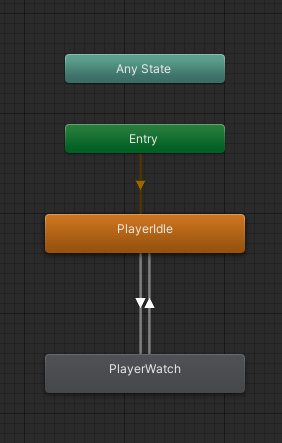
Unity Discussions
I have a simple animator (and the NetworkAnimator script), player idle animation base, with a single animation clip transitioning back and forth based on a bool, in local play it works great, with Netcode for GOs, its a bit weird. Animation works great on owner (client side), but other clients get an error [Netcode] [DestinationState To Transi...
 sonic lintel
Hey guys I really really lost I want to build an mmo game, and a competitive game when you have 2-6 plaer in room,
I don't know what network to use, I build a 3 games in photon but I know it's just free to 10 player or something like this, I build my own server using socket in few projects but its dont have any encryption(o reallynot good at encryption),so can you guys help me to decide What to use
 zenith crescent
ngo or fishnet no if ands or buts about it, since ur already familiar
(netcode for gameobjects)
unity has a lot of lobby features and a bunch of multiplayer tools
integrated for ngo
i came from pun 2 to ngo and i love it
its also a first party solution which makes me happy
@sonic lintel
also very easy to setup dedicated servers with it
zenith crescent
https://www.youtube.com/watch?v=3yuBOB3VrCk&t=2617s&ab_channel=CodeMonkey this is a great tutorial my first one i watched

❤ Watch my FREE Complete Multiplayer Course https://www.youtube.com/watch?v=7glCsF9fv3s
🌍 Get my Complete Courses! ✅ https://unitycodemonkey.com/courses
👇 Click on Show More
🎮 Get my Steam Games https://unitycodemonkey.com/gamebundle
Quantum Console https://assetstore.unity.com/packages/tools/utilities/quantum-console-211046?aid=1101l96nj&pubre...
it got me into it pretty quick
sonic lintel
OK man ty so much I really got lost with all the network, ty !
zenith crescent
np i have been researching solutions for the past month it drove me crazy but ended up on netcode for alot of reasons
its great for games with under 20 people
and theres netcode for entities that can handle alot more
and there pretty similar so start with netcode for gameobjects for under 10-20 player games
zenith crescent
yea definitely
half anvil
how should a synchornized player movement be programmed ?
should it be like player moves and then there is [Command] function that sends the coordinates of the player which is then told to all the clients ?
zenith crescent
i cant find any good sources on how to implement client prediction for NGO i followed one tutorial but it had alot of issues does anyone know where i can find good resources?
austere yacht
zenith crescent
i cant find any good sources on how to implement client prediction for NGO i fol...
You should not expect to find tutorials for one of the more advanced and nongeneric problems in networking. Typically you’d have to make your own decisions based on understanding the principles behind it. Your netcode framework doesn’t (shouldn’t) matter. Theory here: https://github.com/ThusSpokeNomad/GameNetworkingResources

GitHub
A Curated List of Game Network Programming Resources - GitHub - ThusSpokeNomad/GameNetworkingResources: A Curated List of Game Network Programming Resources
real ingot
half anvil
should it be like player moves and then there is [Command] function that sends t...
Use network transform. That'll do it. I prefer using client network transform. Assign the component to the object that moves or changes the size and tick off the transform position, rotation, scale axis that isn't needed.
half anvil
real ingot
Use network transform. That'll do it. I prefer using client network transform. A...
hey I am not able to move as a client
you wanna see da code ?
real ingot
Client network transform doesn't have a seperate script so you'll have to go to unity website and find the code there
real ingot
half anvil
hey I am not able to move as a client
Show it
half anvil
using System.Collections;
using System.Collections.Generic;
using Unity.Netcode;
using UnityEditor.UI;
using UnityEngine;

public class playerMovement : NetworkBehaviour
{
    private Rigidbody2D rb;
    private float speed = 20f;
    // Start is called before the first frame update
    void Start()
    {
        rb = GetComponent<Rigidbody2D>();
    }

    // Update is called once per frame
    void Update()
    {


        if (!IsOwner) {
            return;
         };
        float moveHorizontal = Input.GetAxis("Horizontal");
        float moveVertical = Input.GetAxis("Vertical");

        // Calculate movement vector
        Vector2 movement = new Vector2(moveHorizontal, moveVertical) * speed;

        // Apply movement to the Rigidbody
        rb.velocity = movement;
    }

}
wdym
real ingot
The position, rotation, and scale of a NetworkObject is normally only synchronized once when that object is spawned. To synchronize position, rotation, and scale at realtime during the game, a NetworkTransform component is needed. NetworkTransform synchronizes the transform from server object to the clients.
Scroll down to client network transform and copy all the code in there
Create a script and call it ClientNetworkTransform
Then paste all the code inside it and make sure the name is right
Then assign the script to the player.
The player will move for all clients now just make sure to tick off all unnecessary syncing axis in the component to prevent lag
You can immediately tick off position, rotation, scale z axis since your game is a 2D
half anvil
real ingot
Create a script and call it ClientNetworkTransform
hey is there a ClientNetworkTransform already built it lemme check
real ingot
half anvil
hey is there a ClientNetworkTransform already built it lemme check
No there is no clientNetworkTransform built in
half anvil
real ingot
No there is no clientNetworkTransform built in
oooohhhh
real ingot
real ingot
https://docs-multiplayer.unity3d.com/netcode/1.0.0/components/networktransform/
Use this link and follow the stuff I wrote
real ingot
real ingot
Scroll down to client network transform and copy all the code in there
Do this in the website
The component should look like this

Leave the threshold and configuration alone
You don't really need to change anything in there
real ingot
real ingot
You can immediately tick off position, rotation, scale z axis since your game is...
Syncing is what you need yo change
half anvil
real ingot
The component should look like this
so I should remove network transform and add client transform
?
also doesnt rigid body rely on network transform ?
rigid body 2d
@real ingot thanks a lot man it is working but I dont understand how the script works but i dont understand how the network transform works either
I mean should I know that stuff ?
real ingot
half anvil
<@750412087183802432> thanks a lot man it is working but I dont understand how t...
Idk what you mean about that
half anvil
real ingot
Idk what you mean about that
I am just saying that I dont understand how network transform or client transform works
real ingot
For rigidbody you need a component called network rigidbody I believe so assign that to your player that holds the rigidbody and the physics related movement like falling is going to be smooth
half anvil
it is too complicated for me network transform and client transform
real ingot
Now since it's in 2D I'm not sure how it works and if you really need it or not since I only work on 3D games
half anvil
to understand their working or code
real ingot
half anvil
I am just saying that I dont understand how network transform or client transfor...
It's simply a thing that you need so that your movement would be sent to the server and then to all the clients
real ingot
real ingot
Now since it's in 2D I'm not sure how it works and if you really need it or not ...
I was talking about rigidbody network there
half anvil
real ingot
It's simply a thing that you need so that your movement would be sent to the ser...
so it is something like it tells the server and the server tell the clients like all the clients
real ingot
half anvil
so it is something like it tells the server and the server tell the clients like...
Yeah sort of
For further info go here https://docs-multiplayer.unity3d.com/netcode/current/components/networktransform/
Introduction
It'll explain it better then I will
half anvil
real ingot
Yeah sort of
hey it does not tell differences between network transform and client transform clearly
real ingot
real ingot
https://docs-multiplayer.unity3d.com/netcode/1.0.0/components/networktransform/
This website will tell you
Sorry
"NetworkTransform always synchronizes positions from the server to the clients and position changes on the clients aren't allowed. Netcode for GameObjects comes with a sample containing a ClientNetworkTransform. This transform synchronizes the position of the owner client to the server and all other client allowing for client authoritative gameplay."
Here
That'll explain the difference
half anvil
real ingot
"NetworkTransform always synchronizes positions from the server to the clients a...
how is movement synchronized when using client transfrom and not in network transform
I dont understand
oh position changes on client arent allowed
int network transform
is that y ?
real ingot
You need to read fully before asking questions or arguing
real ingot
half anvil
is that y ?
Idk
You don't need to know how does ClientNetworkTransform code works
All you need to know is the difference and the settings inside it
half anvil
real ingot
You don't need to know how does ClientNetworkTransform code works
I just wanna know the difference
real ingot
real ingot
"NetworkTransform always synchronizes positions from the server to the clients a...
This explains all the difference
half anvil
real ingot
This explains all the difference
yeah I am seeing
real ingot
Servers has this problem with permissions. So we use clientNetworkTransform to send the movement to other clients without any problems
half anvil
real ingot
Servers has this problem with permissions. So we use clientNetworkTransform to s...
yeah see this NetworkTransform always synchronizes positions from the server to the clients and position changes on the clients aren't allowed. Netcode for GameObjects comes with a sample containing a ClientNetworkTransform. This transform synchronizes the position of the owner client to the server and all other client allowing for client authoritative gameplay.
real ingot
Since I'm pretty new at networking too I can't tell you if this is right or not so yeah I'm trying my best lol
half anvil
I dont know if this is safe or not but it works
becuase synchronizes the position of the owner client to the server and all other client allowing for client authoritative gameplay
real ingot
half anvil
I dont know if this is safe or not but it works
It is safe and original m
It's made by unity and most people are using this
half anvil
ok
real ingot
The normal NetworkTransform I'm not really sure when you should use it
half anvil
real ingot
The normal NetworkTransform I'm not really sure when you should use it
i think we need to do manually what clientTransform does in networkTransform I maybe wrong
real ingot
Everything is the same in the inspector for both
It just turns a method bool to true to give perms and that's it
half anvil
ohhh
half anvil
real ingot
It just turns a method bool to true to give perms and that's it
do you know how the code works ?
real ingot
It's the way the code is written I'm not on my pc so I'm just explaining all this from what I remember
half anvil
real ingot
It's the way the code is written I'm not on my pc so I'm just explaining all thi...
you seem like an interesting fellow can you send me the link of your itch page
 astral tree
I am making a meeting application using 3D avatars and what I am trying to do is open a data channel between two peers using Unity's WebRTC package.
The data I am sending are blendshape values predicted by some AI model, so basically a list of integers.
The simulation needs to be realtime and the data should be transmitted as fast as possible.
However I am not sure what is the best configuration for the data channel to be as fast as possible
I tried playing with the maxPacketLifeTime but I can't see any difference.
Has anyone worked on something similar ?
real ingot
half anvil
you seem like an interesting fellow can you send me the link of your itch page
I don't have that
shrewd junco
real ingot
It is safe and original m
It's technically not safe out of the box. It shouldnt be used alone in games where anything really matters (like highscores). I believe reading that's why it's not included in just the ngo package (yet included in the samples still).
Yet if it's just a game between friends, you can rely on friends not hacking in each others games for an unfair advantage
real ingot
No one really said that it was bad before so I just assumed that it was safe but since it wasn't isn't in the ngo package I was a little hesitant to say that it was safe
shrewd junco
real ingot
No one really said that it was bad before so I just assumed that it was safe but...
It's not that it's bad cause it is just a network transform without server authority. there are times where u could use it with no downside. You just really wouldnt want it when players can be interact with random people online, whether that be an online leaderboard, some trading system, or just joining each other
If I had a game that didnt use physics, I would LOVE to use it. Because rn I'm suffering with input lag
real ingot
Wait so should I use NetworkTransform instead client? If I want to prevent hackers?
shrewd junco
real ingot
Wait so should I use NetworkTransform instead client? If I want to prevent hacke...
Depends on the scope of your game. if your game is intended to be between random people then yes probably. Otherwise people could just ruin the experience for others unless you manage to get an insanely good anti cheat.. which I dont know much about.
But even with a network transform (aka swapping to server authoritative), someone hosting the game could still be the hacker. Then you'd have to look at other solutions like hosting your own server etc etc. But this is a far less worrisome case
And the last part was me just saying you wont ever fully deal with hackers, so decide what part you want to actually deal with
real ingot
Ok
 sacred prawn
anyone who managed to create a version of the xr socket from the xr toolkit that can be used over network either with normcore or photon? I made some attempts in the past but never got anywhere.
half anvil
shrewd junco
And the last part was me just saying you wont ever fully deal with hackers, so d...
Ok buy how would u synchronize movement with network transform ?
real ingot
half anvil
Ok buy how would u synchronize movement with network transform ?
You'll have to do some coding to do that
half anvil
real ingot
You'll have to do some coding to do that
I know but I am not skilled enough
real ingot
Client network transform as much as I know now just gives access to hackers changing the way you move without a problem cause the server isn't interrupting. Now with network transform you'll have to do checks and passes I believe but idk
real ingot
half anvil
I know but I am not skilled enough
Google bro
half anvil
real ingot
Google bro
Ok I ll try do you use only unity or some other engine as well
real ingot
Only unity. Why?
half anvil
real ingot
Only unity. Why?
ok do you do internship or job ?
half anvil
real ingot
I work on my own game m8
cool I ll do some googling
about network transform
real ingot
Why were you asking those questions tho?
half anvil
real ingot
Why were you asking those questions tho?
idk you seemed interesting
half anvil
real ingot
Why were you asking those questions tho?
where do you host live game dev projects ?
like I have a itch page
and github for code
real ingot
Don't really get that. Servers? Where do I save my project files?
half anvil
real ingot
Don't really get that. Servers? Where do I save my project files?
like you can make a web file of your game and post your game online so others can see
just like playstore
half anvil
real ingot
I'm going to post my game on steam
oh thats even better a finished product
real ingot
No bro. I don't have it there yet but it'll be there in a year or so maybe
half anvil
real ingot
No bro. I don't have it there yet but it'll be there in a year or so maybe
r u using a pc or laptop rn ?
real ingot
Not using anything I'm on a vacation. For coding I use a pc but I'm planning on getting a laptop sooner or later
shrewd junco
is it a network object? im confused what you mean by replicate
maybe you could just send an rpc to all clients saying to disable it, if you dont want to despawn the entire object
you dont neccessarily need to send the object reference, if each player grabs the same reference on awake/start
really depends what this is though
i would have all the weapons stored as some ID -> gameobject reference, client clicks a weapon, sends a server rpc to equip that ID, server sends a client rpc (to everyone) saying equip [X] on that player. Each player looks it up in their own dictionary
the client rpc should take care of that for you
nah im saying like everyone has a reference that "sword" or [0] points to the gameobject, then "bow" or [1] points to gameobject2 for everyone
it really should just be fine to have these mostly setup from the inspector
id say a bigger problem would be either getting a serialized dictionary, or converting that inspector data to a dictionary
 weary tangle
So there is a single player drag racing game for mobile. I want to change it to multiplayer. The basic scripts would remain unchanged or would they need to be abrogated ?
zenith crescent
pretty simple question i have client prediction implemented and it works great but the host isnt calling ProcessSimulatedMovement for other clients but the clients are calling it for eachother, its like the host isnt calling processsimulatedplayermovement for other clients so everyone looks choppy on the host i tried all combinations of isowner ishost islocalplayer or isclient im confused
            _playerMovement.ProcessLocalPlayerMovement(movementInput, lookInput);
        }
        else{
            _playerMovement.ProcessSimulatedPlayerMovement();
}```Depends on how you built the single player, but most likely you'll end up rewriting most of the game
sharp axle
zenith crescent
pretty simple question i have client prediction implemented and it works great b...
You'll need to put a breakpoint there in the code to see why thsts not running. If this is on the player prefab, then the remote players should run the simulated movement function
nocturne vapor
here a really easy way to do this, have a parent oject you call weaponmanager of the wepons. When you enable/disable one you loop thorugh the child objects to see if the weapon is what you want to enable/disable, if it is, send a rpc with that child index
 lean anchor
@spring crane basically i just want a non ip sharing multiplayer game that i can make for free. im already familiar with photon. does it work with webgl?
 spring crane
lean anchor
<@453379015387119627> basically i just want a non ip sharing multiplayer game th...
spring crane
lean anchor
<@453379015387119627> basically i just want a non ip sharing multiplayer game th...
You should confirm this for every individual product, as the capabilities (and requirements) can differ a lot depending on what they do. At least PUN and Fusion do support WebGL.
lean anchor
spring crane
You should confirm this for every individual product, as the capabilities (and r...
ok, so i should look into the photon PUN (solution im planning to use) documentation?
spring crane
lean anchor
ok, so i should look into the photon PUN (solution im planning to use) documenta...
Yea you should see platform requirements mentioned somewhere. Note that PUN is now a legacy product, superseded by Fusion
lean anchor
spring crane
Yea you should see platform requirements mentioned somewhere. Note that PUN is n...
what does legacy product mean?
spring crane
PUN Classic (v1), PUN 2 and Bolt are in maintenance mode. PUN 2 will support Unity 2019 to 2022, but no new features will be added. Of course all your PUN & Bolt projects will continue to work and run with the known performance in the future. For any upcoming or new projects: please switch to Photon Fusion or Quantum.
lean anchor
spring crane
> PUN Classic (v1), PUN 2 and Bolt are in maintenance mode. PUN 2 will support U...
oh ok i will look into these
 nova linden
how much does a network transform taker per second in bytes ?
 sly pawn
That question doesn't really make sense
If ur asking about how long a message takes, it really depends on distance and signal
sharp axle
nova linden
how much does a network transform taker per second in bytes ?
If you mean NGO, nothing is transmitted unless the object is moving
nova linden
sharp axle
If you mean NGO, nothing is transmitted unless the object is moving
but if its moving, i want to know arroun dhow many objects i can have moving at the same time
sharp axle
nova linden
but if its moving, i want to know arroun dhow many objects i can have moving at ...
There is no hard limit. Thousands if you want. You will need to use The Network Profiler to gauge those metrics
nova linden
is there atleast a rule of thumb how much the average persons network conection can handle without creating insane lag
real ingot
candid ginkgo
Yeah I'll look around
yo. You got anything? Cause I got no clue
sharp axle
nova linden
is there atleast a rule of thumb how much the average persons network conection ...
for an average game, the host is sending 5-10 kbps per client. The average user in the US has 3Mbps connection.
nova linden
okay so i dont have to worry about that part
candid ginkgo
real ingot
yo. You got anything? Cause I got no clue
I saw that there was a "active scene" checkbox on the networkobject component which you could try to play around with but other than that same here no clue
Maybe make a post on the forums and hope someone with more experience has a fix
Or if it's a problem with ngo itself it gets noticed by a unity dev
real ingot
candid ginkgo
Maybe make a post on the forums and hope someone with more experience has a fix
yeah I was planning to do that if we aren't going to make any progress
 sand talon
Hi, i'm working on a Team Based PVP game and am kinda at a halt. I finished the game mechanics, they are all networked and work fine as is, tho now i need to introduce a round or match system, where the game loads everyone into a match and does all the background stuff, like checking a teams score, or counting the clock etc. Where would i start with an object like that? What is necesary for something like that...? Any ideas help!
real ingot
Use unity gaming service multiplay matchmaking server
sand talon
Does that work with Photon?
sharp axle
sand talon
Does that work with Photon?
It can yea.
sand talon
what does the matchmaking server do?
sharp axle
sand talon
what does the matchmaking server do?
sand talon
that seems a little overcomplicated... imma try to make a barebones system that works for now!
still thanks for the suggestion! 
real ingot
candid ginkgo
I saw that there was a "active scene" checkbox on the networkobject component wh...
I've am messing around a little trying to get more warnings and errors to understand what's going on. I got this warning

Well this happened only cause I placed the loadScene in the startClient it self
and it caused it to not even startclient for some reason
just load scene and that's it
I just commented everything out and left the DontDestroyOnLoad(gameObject); on start in the spawner script and it actually still gave me the same errors after I press start client

kinda obvious
idk man
but the host is completely unaffected which frustrates me
it could be cause the spawner object is owned by the host

that's probably the reason
unless that's how it should be like
oh and the client seem to be going for the OwnerClientId 0 instead of 1 as much as I remember
Now I just think that there might be a problem with NGO it self or something is wrong with the start network start client or it's the spawner object it self the networkobject
candid ginkgo
yeah I guess that might just be something they didn't plan ngo to be used for
which still seems weird to me because it's not that uncommon for games to have player's join a game in the middle
I guess it's just one of the downsides of ngo being relatively recent
idk if that would change anything but maybe you could try changing the scene first and then joining with the client
just to check if the problem comes from the client connecting in general or just him connecting with scenes not synchronized
shrewd junco
real ingot
Now I just think that there might be a problem with NGO it self or something is ...
What was the issue if you dont mind pointing me to where you described the issue?
real ingot
real ingot
I really don't see any problem in here
scroll up
real ingot
shrewd junco
What was the issue if you dont mind pointing me to where you described the issue...
.
candid ginkgo
to sum it up he's trying to make a system where player's can join in/out of a lobby mid-game but getting errors which we can't understand
shrewd junco
real ingot
scroll up
from what i see above and in the video, it seems like some things just arent synced across editors like the network prefab list. That warning u got in the video about network prefab list not being initialized was an error in ngo 1.4.0 but was fixed i believe in 1.5.1
as for the 2 listeners thing being printed, thats (probably) because you have 2 cameras in the scene. You simply just need to disable a camera if you arent the owner of it
And the destroy one im not entirely sure, i would have to see more of the code to understand what was being destroyed
real ingot
shrewd junco
as for the 2 listeners thing being printed, thats (probably) because you have 2 ...
the thing is I don't. What I was guessing is the second player (client) connected for a second and his prefab (player) got spawned and then destroyed
candid ginkgo
yeah I guess it might still be helpful to make a build to be 100% sure it's not caused by the prefab list
real ingot
cause there's only 1 player in there with 1 listener
shrewd junco
real ingot
the thing is I don't. What I was guessing is the second player (client) connecte...
i would really just test this with cubes to start. At least that way u can narrow down where the error is
but you gotta make sure you add everything that spawns on the network to the network prefab list
real ingot
shrewd junco
but you gotta make sure you add everything that spawns on the network to the net...
I did
shrewd junco
I think sometimes mine dont save fully either, so what I do is just check the prefab list on both editors, or ill move something in the scene (so i can save) and it should prompt the 2nd editor to reload
but i only really had that happen twice
real ingot
do I need to have the spawner in the prefab list?
candid ginkgo
might help
shrewd junco
real ingot
do I need to have the spawner in the prefab list?
if it just exists in the scene then maybe not
although idk what this spawner is really doing

 real ingot
candid ginkgo
idk if that would change anything but maybe you could try changing the scene fir...
real ingot
candid ginkgo
idk if that would change anything but maybe you could try changing the scene fir...
so I did this and it only printed "InGame" in console
shrewd junco
real ingot
i believe this is probably running more than you think, but is there any reason you are doing this instead of using the network managers spawn feature?
real ingot
so it just sees the client as not a client
shrewd junco
you just plug in the prefab and itll spawn players for you
candid ginkgo
the scenes aren't synced so the idea was that the player can have joined the host while still being in the menu and it only spawns the player object when he loads the ingame scene
candid ginkgo
real ingot
so I did this and it only printed "InGame" in console
oh yeah that makes sense since the isclient isn't true when the onsceneloaded event is called
shrewd junco
you should still be able to just use the network manager spawn but instead just load the scene for the player after the host does
candid ginkgo
do you mean the onnetworkspawn event ?
shrewd junco
i mean just letting the network manager spawn the player still
candid ginkgo
it does in the PlayerJoinedSceneServerRPC doesn't it ?
shrewd junco
candid ginkgo
it does in the PlayerJoinedSceneServerRPC doesn't it ?
no because is client isnt gonna be true at this point
it might be running too early
candid ginkgo
do you think replacing the subscription to the sceneloaded event in the OnEnable by OnNetworkSpawn would help ?
real ingot
shrewd junco
no because is client isnt gonna be true at this point
how does that work?
shrewd junco
i think itd be better if the server itself just handled it, but give me a moment to test something before i suggest this
candid ginkgo
Also afaik the problem occured when the client connected to the host so we never got to the point where the onsceneloaded event was called on the client
shrewd junco
given that the scene is basically empty, its probably all running instantly
real ingot
candid ginkgo
Also afaik the problem occured when the client connected to the host so we never...
not even the onSceneLoaded() gets called when I try to connect to the host as a client
nothing prints out
candid ginkgo
which makes sense so far since when you pressed on the button it didn't switch scenes so it doesn't call the method
just to be 1000000% certain I think you should try running the client from a build if you haven't yet
real ingot
plus the players spawn in the main menu after pressing client so pressing the client and then the start game is a little bad
candid ginkgo
real ingot
I just commented everything out and left the ``DontDestroyOnLoad(gameObject);`` ...
because this error is very suspicious
shrewd junco
that error just means the prefab list isnt updated
real ingot
candid ginkgo
just to be 1000000% certain I think you should try running the client from a bui...
same thing
shrewd junco
can you screenshot your network manager and prefab lists
real ingot
 real ingot
shrewd junco
that error just means the prefab list isnt updated
real ingot
shrewd junco
that error just means the prefab list isnt updated
it's the same thing everywhere
candid ginkgo
still can't press start game ?
real ingot
I pressed client
it showed the other player
then pressed the start game and it just froze cause it tried to switch scenes
candid ginkgo
darn

 shrewd junco
and the other client has the same 1 object, and nothing assigned in Player prefab right?
real ingot
shrewd junco
and the other client has the same 1 object, and nothing assigned in `Player pref...
yep
same object for the players
only 1 prefab for the players
no player prefab assigned, only for the spawner script
shrewd junco
real ingot
yep
is the host itself spawning by the same code? because the OnSceneLoaded part i imagine is trying to run before you can even press the host button
real ingot
 real ingot
shrewd junco
is the host itself spawning by the same code? because the OnSceneLoaded part i i...
real ingot
shrewd junco
is the host itself spawning by the same code? because the OnSceneLoaded part i i...
.
That'll answer the question
I hope
candid ginkgo
to my understanding in order it should be : host gets created -> he starts the game which switches scene which spawns his player -> client gets created -> he switches scene which should spawn his player
real ingot
candid ginkgo
to my understanding in order it should be : host gets created -> he starts the g...
yeah
candid ginkgo
but rn it gets stuck at step 3
real ingot
Player1: Host, start game
player2: Client, start game
now ofcourse in the future I'll host a dedicated server so the host button ain't going to be there no more plus I gotta think of a way to make it so that it would connect as a client to the server and change scenes in one click instead of 2
candid ginkgo
did you try enabling active scene sync or playing around with these

I quickly read the docs but they didn't go too much into detail as to how that worked but maybe it could help
real ingot
candid ginkgo
did you try enabling active scene sync or playing around with these
on player or spawner object?
candid ginkgo
on the player prefab
real ingot
Ah I didn't then I'll do that rn
candid ginkgo
Netcode for GameObjects' high level components, the RPC system, object spawning, and NetworkVariables all rely on there being at least two Netcode components added to a GameObject:
it talks about it at the very bottom

 candid ginkgo
yeah I'm running out of ideas now lol
real ingot
pretty much the same but I don't remember the last error
real ingot
candid ginkgo
yeah I'm running out of ideas now lol
I'm running out of brain cells
candid ginkgo
Just to be sure there are no other network objects rn right ?
like there's only the player spawner and the player prefab ?
real ingot
candid ginkgo
like there's only the player spawner and the player prefab ?
yeah. I'ma double check
yeah
unfortunately :P
candid ginkgo
And I'm pretty sure you already tried a few days ago but adding the player spawner to the prefab list doesn't do much I assume ?
real ingot
candid ginkgo
And I'm pretty sure you already tried a few days ago but adding the player spawn...
I did that just not long when I asked should I or should I not
no effect. Same thing
real ingot
candid ginkgo
unity forums it is
Used it a little ago
didn't expect this to take this long
candid ginkgo
From what I read what they recommend to do is to use the networkmanager's scene loader to load the scene but disable all it's game objects on the client's side
but then I have no idea how to prevent the networkManager from automatically synchronizing the scene when a client gets created
oh but actually that could work if it loads it all additively
candid ginkgo
real ingot
basically replace the scenemanager.loadscene part by ```csharp
if(isServer) // called by server/host to load the scene for everyone connected
NetworkManager.Singleton.SceneManager.LoadScene("InGame", LoadSceneMode.Additive);
if(isClient) // called by client/host to make the scene visible
FunctionThatEnablesAllTheGameObjectsOrSomething():
from what im trying, i still dont get the first error you are having. Check on the client after the error happens if the prefab list truly has the prefab 🤔
because this doesnt seem to be an error related to changing scenes, it happens as soon as u press join as client
real ingot
shrewd junco
because this doesnt seem to be an error related to changing scenes, it happens a...
when I press client it doesn't change scenes so yeah
candid ginkgo
candid ginkgo
basically replace the scenemanager.loadscene part by ```csharp
if(isServer) // c...
You'd also need to re-enable scene management in the networkManager
shrewd junco
real ingot
when I press client it doesn't change scenes so yeah
but does it work even if you arent trying to change scenes in the first place?
candid ginkgo
real ingot
After pressing client:
^
shrewd junco
well you shouldnt exactly keep trying to press start game after the first errors :p
real ingot
shrewd junco
well you shouldnt exactly keep trying to press start game after the first errors...
true
idk I do that cause I feel like it
maybe magic will happen
Who knows
real ingot
candid ginkgo
basically replace the scenemanager.loadscene part by ```csharp
if(isServer) // c...
what do you mean in this line exactly? FunctionThatEnablesAllTheGameObjectsOrSomething():
candid ginkgo
basically when you load a scene additively it loads the other scene while keeping the menu scene
sorta like dontdestroyonload I guess
so theoretically
If you load both the menu and the game
but only show the game when you press start game it might work
assuming the error came from the fact that ngo didn't like that you weren't using the networkManager's sceneloader
because once the client connects it'll automatically synchronize the scenes
problem being that you wanted the client to choose when joined the game
so technically the game will exist as soon as the client connects but he just won't see it. And then pressing the start game button will hide the menu and show the game
I saw people online say that to make it easier you can just make all gameobjects be the children of a root object and then you just enable/disable the root
real ingot

ok so the players load in the main menu scene. Ofcourse only the host spawned in. No errors when I press client nor when I press start game
the only problem is that it still doesn't spawn in the second player
the client player
you can see the game scene and the host player tho
just like bawsi said, something is wrong with the timing and this isn't getting called

or something like that
candid ginkgo
yeah that's really odd
you did switch the subscription of the method that spawns the player to the networkmanager's onsceneload right ?
wait nvm it doesn't even matter now that both scenes are loaded you can just call it from the startgame button
real ingot
the spawned script is the same as it was the last time I shared the code. I didn't change anything
candid ginkgo
ohhh
real ingot
the start network is the only one I changed
candid ginkgo
maybe as a temporary thing you can call the serverrpc that spawns the player in the startgamescene
after the mainmenu.setactive(false) add the call to the serverrpc so that it spawns the player
oorrrrr
double check that the OnSceneLoaded method is subscribed to the networkManager's onsceneloaded event
basically replace the thing in the onenabled/disabled by UnityEngine.SceneManagement.SceneManager.sceneLoaded +=/-= Onsceneloaded
candid ginkgo
candid ginkgo
basically replace the thing in the onenabled/disabled by UnityEngine.SceneManage...
if you didn't already do that
real ingot
candid ginkgo
after the mainmenu.setactive(false) add the call to the serverrpc so that it spa...
idk if I can say "it worked"
 candid ginkgo
eh at least it's different from last time lol
candid ginkgo
now need to figure out why there are three lol
real ingot
it's just that the host has 2 players now
candid ginkgo
can you send both scripts as code blocks ?
candid ginkgo
if you disable the playerSpawner component do you still get 3 players ?
real ingot
btw where I did mainmenu.setactive(false); the mainmenu is a parent of StartNetwork gameobject
real ingot
candid ginkgo
if you disable the playerSpawner component do you still get 3 players ?
I get 2
how?
candid ginkgo
I knew it
nice
I think the host called the rpc at some point because it loaded the scene
candid ginkgo
candid ginkgo
I think the host called the rpc at some point because it loaded the scene
locally
real ingot
the player prefab is not assigned tho. How are the players spawning?
real ingot
 candid ginkgo
it is assigned isn't it ?
real ingot
 candid ginkgo
yeah
real ingot
candid ginkgo
it is assigned isn't it ?
Player Prefab
not the network prefab
the network prefab is assigned
I thought player prefab spawns automaticaly when the client starts
candid ginkgo
basically the player prefab is unassigned in the networkmanager because it spawns the player automatically as soon as he connects to the server
which in your case is bad since you want the client to join manually
so what the player spawner script does is spawn it when the serverrpc is called
real ingot
I'm guessing there's no way to spawn the player and put it in the InGame scene?
candid ginkgo
[ServerRpc(RequireOwnership = false)]
    public void PlayerJoinedSceneServerRPC(ServerRpcParams serverRpcParams = default)
    {
        // this is called on the server
        ulong id = serverRpcParams.Receive.SenderClientId;

        GameObject player = Instantiate(playerPrefab);
        player.GetComponent<NetworkObject>().SpawnAsPlayerObject(id, true);
        // since the prefab is a NetworkObject, it will be spawned on the clients automatically (hopefully)
}```which scene does it get spawned in ?
real ingot
candid ginkgo
which scene does it get spawned in ?
mainmenu
real ingot
candid ginkgo
```csharp
[ServerRpc(RequireOwnership = false)]
public void PlayerJoinedScen...
wait
no no no
how is PlayerJoinedSceneServerRPC calling tho?
when the component is disabled
candid ginkgo
you can still call methods when a component is disabled
candid ginkgo
lol
real ingot
I fr didn't know that
candid ginkgo
no worries learned about it a few days ago as well
but basically it only gets called by the button now
real ingot
So I'm assuming I just have to leave PlayerJoinedSceneServerRPC in there and that's it
candid ginkgo
and when a player leaves you only have to despawn the object
real ingot
cause then nothing else but that is getting called
candid ginkgo
you can even move it to the other script and delete this one
doesn't really matter where it is
or
if you want to test something which might be a little cleaner
you can try removing the call to the rpc from the button
and replacing the subscription in the onenabled/ondisabled
not sure if that will work
but If it works
that means the spawning of the player isn't tied to the UI which I personnally think is cleaner
basically
remove the line that spawns the player in the startgame method
and replace the onenable/ondisable in the spawner script by this ```csharp
private void OnEnable()
{
NetworkManager.Singleton.SceneManager.OnLoadEventCompleted += OnSceneLoaded;
}
private void OnDisable()
{
    NetworkManager.Singleton.SceneManager.OnLoadEventCompleted -= OnSceneLoaded;
}```
ah but then that would mean the spawning of the player might happen even when the scene is disabled
yeah no scratch that bad idea
real ingot
I don't really understand why is it saying this when everything is fine


is it cause it's not public?
candid ginkgo
cuz you put it in the ienumerator
candid ginkgo
lol
candid ginkgo
fair enough
real ingot
now onto the using only start game button
candid ginkgo
I mean it works like that don't need to change it tbh
the main problem now is making the players spawn in the right scene I guess
real ingot
true
just want to make it a 1 click not 2 for the players
I'll figure it out tomorrow
onto the main problem
candid ginkgo
apparently the way it works is that you need to set a scene as active
now I have no idea if the currently active scene is synchronized between all players but if it's not then you just have to call whatever method changes it
candid ginkgo
Netcode for GameObjects Integrated Scene Management
real ingot
candid ginkgo
if they aren't synced you just have to call NetworkManager.Singleton.SceneManager.SetActiveScene() before you spawn the player
or whatever method they might have made for it to work with netcode
or maybe not even the NetworkManager.Singleton.SceneManager and just the normal one
idk that's just a bunch of checks you're gonna have to do I guess
real ingot
nah NetworkManager.Singleton.SceneManager doesn't exist, the SceneManager.SetActiveScene() works fine I believe but I'm having issues with the courantine so I'll do this tmr.
Too tired
atleast the main main part got fixed.
took us long enough lopl
thanks a lot tho @candid ginkgo and @shrewd junco
saved me months
hope I can learn more from y'all
candid ginkgo
pleasure's all mine, I learned a lot too just by trying to help so glad it worked out in the end 👍
shrewd junco
real ingot
hope I can learn more from y'all
i dont really know all too much about multiplayer myself 😅
 rapid carbon
[SerializeField]private float speed;
    private Vector2 direction;
    private Rigidbody2D rb;

    void Awake()
    {
        rb = GetComponent<Rigidbody2D>();
    }
    void OnMove(InputValue value)
    {
        direction = value.Get<Vector2>();
    }
    void FixedUpdate()
    {
        if(IsOwner)
        {
            rb.velocity = direction * speed;
        }
    }
this is my movement script and for somereason my player is still not moving
it has a network obj, client transform,network rigidbody2d but still isnt moving
why?
shrewd junco
rapid carbon
it has a network obj, client transform,network rigidbody2d but still isnt moving
Is it working for the host, or for no one?
rapid carbon
shrewd junco
Is it working for the host, or for no one?
no one
shrewd junco
rapid carbon
no one
Probably IsOwner isnt true for anyone then, how are you spawning this player?
rapid carbon
just added player prefab in the network manager
rapid carbon
shrewd junco
Probably IsOwner isnt true for anyone then, how are you spawning this player?
and its in network objs list as well
this is on the player

this is the manager
 shrewd junco
rapid carbon
this is on the player
shrewd junco
rapid carbon
this is on the player
That network object seems... wrong
rapid carbon
?
shrewd junco
I feel like it's missing some fields that would tell you if isOwner and other details
rapid carbon
idk
shrewd junco
rapid carbon
```
[SerializeField]private float speed;
private Vector2 direction;
priv...
I would suggest following the codemonkey tutorial for spawning players. Otherwise if spawning the player isnt the issue, then you should debug what the OwnerClientID is on this script, and possibly just throw "IsOwner" in that debug to make it clear who the owner is
shrewd junco
Were u able to recreate the same movement that he did? I was going to suggest that the network rigidbody was causing the problem because maybe only the host owned it, but you said no one can move which means that's not the case
rapid carbon
shrewd junco
Were u able to recreate the same movement that he did? I was going to suggest th...
he used transform i m using rb.velocity
rapid carbon
shrewd junco
Were u able to recreate the same movement that he did? I was going to suggest th...
it worked for a while
but idk what happened
let me try removing rb
real ingot
rapid carbon
?
Try changing from normal to debug in the inspector
shrewd junco
You can also look at the rigidbody on each person and see if it's set to kinematic or not
real ingot
And look at the network object
shrewd junco
real ingot
Try changing from normal to debug in the inspector
Its odd because even the normal mode should display more..
rapid carbon
rapid carbon
let me try removing rb
nope doesnt work
rapid carbon
real ingot
Try changing from normal to debug in the inspector
okk let me
real ingot
shrewd junco
Its odd because even the normal mode should display more..
Everything seems fine unless he didn't take a picture of the whole network object
rapid carbon
 real ingot
Make sure your NGO is up to date maybe
rapid carbon
real ingot
Make sure your NGO is up to date maybe
it is
rapid carbon
real ingot
Do what the first warning said
idts not right now
real ingot
It's not gonna do anything except get rid of your warning. All you have to do is create it in unity and that's it.
rapid carbon
but thats not the problem right now
real ingot
Did you really take a picture of the whole networkObject in the player?
 real ingot
Expand the NetworkObject component
rapid carbon
 rapid carbon
?
real ingot
rapid carbon
Make the inspector debug and take a picture of the NetworkObject expanded again
Top right 3 dots and debug from normal
rapid carbon
 shrewd junco
I knew I wasnt tripping, something is definitely off im just not sure what causes that
real ingot
rapid carbon
Yep it's wrong
IsClient isOwner isHost isserver is Localclient is missing
rapid carbon

shrewd junco
Oh wait a second, this is the prefab itself
rapid carbon
yes
shrewd junco
Run the game and take show the network object when the host is in
Some of those boxes should be checked
rapid carbon
okk let me
real ingot
shrewd junco
Some of those boxes should be checked
Nah it always should be there
rapid carbon
 real ingot
That's odd. At first I thought it might be the version of NGO but he said it isn't
rapid carbon

shrewd junco
I would still either just add debugs in that script like IsOwner and check if the rigidbody is set to kinematic, or redo the tutorial incase you accidentally changed a crucial part
real ingot
Right now the movement script can't even check if IsOwner cause the IsOwner in the NetworkObject doesn't even exist
shrewd junco
real ingot
Right now the movement script can't even check if IsOwner cause the IsOwner in t...
Regardless of what's displayed on the inspector, itll still have the IsOwner field
rapid carbon
😵💫
real ingot
rapid carbon
<:atwhatcost:1068114091987718204>
Try creating a new object and adding the networkObject in there and tell us if the isOwner is in there or not
rapid carbon
where
shrewd junco
shrewd junco
I would still either just add debugs in that script like IsOwner and check if th...
I would still just suggest to do these alone. As this would give you information as to why you cannot move
real ingot
rapid carbon
where
Doesn't matter, in the hierarchy
rapid carbon
shrewd junco
I would still either just add debugs in that script like IsOwner and check if th...
so i should add debug in is owner condition
shrewd junco
rapid carbon
so i should add debug in is owner condition
It will display a lot but yes you can do it there if you want
rapid carbon
shrewd junco
It will display a lot but yes you can do it there if you want
okk let me
shrewd junco
Also can you additionally make sure you didnt accidentally set the speed to 0
rapid carbon
shrewd junco
Also can you additionally make sure you didnt accidentally set the speed to 0
nope its 8
shrewd junco
So IsOwner is printing true?
rapid carbon
yes
shrewd junco
Hmm just check the rigidbody then and see if its kinematic
rapid carbon
shrewd junco
Hmm just check the rigidbody then and see if its kinematic
nope its dynamic
shrewd junco
I havent used network rigidbody 2d, I assume it applies the same logic as 3D
You may have some other error then, because I dont see anything here that would cause this
Just to be certain, try to debug what you're setting the velocity to be
candid ginkgo
just gonna throw this out there if that might help but I'm pretty sure that for the new input system to work when using a client side transform you might need to have it disabled by default and enable it locally when a client connects
I had encountered a problem like that a few days ago and that was what fixed it for me
Learn more about Client driven movements, networked physics, spawning vs statically placed objects, object reparenting
rapid carbon
i have added a canvas to the prefab itself
candid ginkgo
candid ginkgo
https://docs-multiplayer.unity3d.com/netcode/current/learn/bitesize/bitesize-cli...
pretty sure I read about it somwhere here
rapid carbon
and if the canvas !isowner then destory canvas
candid ginkgo
candid ginkgo
pretty sure I read about it somwhere here
but I'm not sure if that was caused by the input system or by the character controller the sample used
shrewd junco
candid ginkgo
https://docs-multiplayer.unity3d.com/netcode/current/learn/bitesize/bitesize-cli...
Ah that makes sense, I was going to ask them to debug the input next after checking what the velocity is being set to 😅
candid ginkgo
worth a try I guess
rapid carbon
i am doing that only
i have that canvas in player prefab and if player prefab is not owner the locally destroy the canvas
shrewd junco
rapid carbon
i am doing that only
Debug if the input is correct, if it's not reading input properly then it's not gonna move. What Tarook said above is how u would fix it if this is the issue
 candid ginkgo
you can but I think you should just have the component be disabled by default and activate it on a player's prefab when he connects
so that there only is 1 that is enabled locally for each player
shrewd junco
Though it should still work if they only connect on a host and try moving
candid ginkgo
yeah I don't think it'll break anything but I think if another player connects and it has an enabled player input component it'll make a bunch of errors in the console
shrewd junco
When u are testing this, are you testing only on a host or do you have a host and client connected?
rapid carbon
host
shrewd junco
Because this really should work if its only 1 player, where 2 might be causing issues
I dont know anything about new input system honestly
rapid carbon
btw this is netcode 1.1.0
candid ginkgo
then try doing something like this ```csharp
public class OwnerComponentManager : NetworkBehaviour
{
private PlayerInput playerInput;

private void Awake()
{
    playerInput = GetComponent<PlayerInput>();
}

public override void OnNetworkSpawn() // most components are disabled by default
{
    base.OnNetworkSpawn();

    enabled = IsClient;

    if (IsServer)
    {
        // not much to do here since your project has client side priority
    }

    if (!IsOwner)
    {
        enabled = false;
        return;
    }

    // player input is only enabled on owning players

    playerInput.enabled = true;
    // enable other scripts that you want the client to use like the player movement and such
}
}
You should definitely upgrade
rapid carbon
y does the package manager have 1.1.0 only
shrewd junco
You can upgrade by changing the version number in some json folder I forgot the name of. Theres some result on google that tells u how to I believe
candid ginkgo
are you on unity 2022 ?
rapid carbon
2021
candid ginkgo
ah then not sure how to help sorry
rapid carbon
Can I port my project to 2022?
candid ginkgo
of course
rapid carbon
How
candid ginkgo
but then you can't go back to 2021
candid ginkgo
not as far as I know but if there's a way to upgrade netcode without having to change the unity version I would try that first
candid ginkgo
rapid carbon
And is 22 lts?
yes
rapid carbon
Well then i think u should go with 22 anyways something new won't hurt ig
shrewd junco
You dont need to change unity versions, unless you want to for other reasons
Just changing the version number in like packages.json should be fine
rapid carbon
2022 3 5f1 is fine?
candid ginkgo
shrewd junco
Just changing the version number in like packages.json should be fine
try that first it'll be simpler