#archived-shaders
1 messages · Page 237 of 1
 verbal jewel
 golden solstice
hi there nice people, i was wondering if some one can help me to figure out how to make this shader urp that use shader graph for be compatible with box shaped meshes

in the sphere ones works fine but i need the box shaped be compatible using a new shader from that one or similar so i can see the box with edges and the same effect but looking good on it , anyone? thanks.
its uses https://github.com/Brackeys/Force-Field/tree/master/Force Field btw , big thanks to him for the work on this free content 🙂

GitHub
Project files for our tutorial on how to make a Force Field in Unity using Shader Graph. - Force-Field/Force Field at master · Brackeys/Force-Field
 low lichen
golden solstice
hi there nice people, i was wondering if some one can help me to figure out how ...
low lichen
golden solstice
hi there nice people, i was wondering if some one can help me to figure out how ...
This is just a limitation of fresnel. It's not an outline/inner glow effect, it's a rim-lighting effect. What you're asking for is not as simple as fresnel and requires more than just a shader.
 tiny shuttle
In shader graph there a way to make options for the editor ? Like say i want my scale to be 0.5 or 1.0 or 1.5 and i switch between them in the editor without any value between
 drowsy marsh
tiny shuttle
In shader graph there a way to make options for the editor ? Like say i want my ...
drowsy marsh
tiny shuttle
In shader graph there a way to make options for the editor ? Like say i want my ...
there's a thing called a blackboard that's on the left by default. if you click the plus, you can add properties which will show up in the inspector for materials that use that property. to connect them to nodes, just drag them from the blackboard to the main area
 tiny shuttle
Yes yes thats what i am using already , didnt know its called a blackboard thanks but the question is there something i can add to make options .. say option A : float of 0.5 option B , float of 1.0 .. etc
drowsy marsh
you are asking for something like a selector?
like you predefine a list of possible values and have the user select from them?
 regal stag
The usual way to do something like that would be with a custom material property drawer, but it's not something that shader graph gives access to
It does give access to overriding the entire material GUI but that's probably a bit overkill
tiny shuttle
No i am so beginner wouldn’t figure that out , any easy workaround ? Maybe playing with clamp nodes to avoid values between the options
I want 3 specific float values
And nothing in between
drowsy marsh
do you need the values in the inspector to match those particular values?
you could have a slider with values from 0.1-2.9 send to a floor node, then multiply them by say 0.5 to get an input result of only 0, 0.5, and 1
actually, take a slider that goes from 0-1. multiply by some value x, floor it, then divide by x to get regular steps that more or less match the slider
idk if there's a better way to do any of that though
i am drawing dynamic meshes and am getting an issue with the lighting being off where separate meshes meet. i'm still quite new to this, but i think it is something to do with normals, but would like confirmation or redirection before i try to troubleshoot
 drowsy marsh
it was a normals issue and i figured it out, thank you
 lean lotus
Anyone know how I can get access to shader model 6 for compute shaders in unity by chance?
 drowsy linden
Ok so if I have a texture from black to white, how would I draw evenly spaced circles where the size depends on the value of the texture on that spot?
 clever saddle
Is there any mesh.uv toturial?I cant figure out what depends the num of of mesh.uvs and how the order of uvs influences the mesh?
lean lotus
usually I think there is 1 UV per vertex
and you index into them using the same index as each vertex, so the index you get for a vertex to make a triangle is the as the same as the index for each UV

 dim yoke
clever saddle
There're 24 uv arrays
dim yoke
clever saddle
There're 24 uv arrays
24 uv arrays? I don't think that's the case. rather one single array of 24 elements, 1 for each vertex
clever saddle
dim yoke
24 uv arrays? I don't think that's the case. rather one single array of 24 eleme...
😖 I saied missed.How to know which vector2 corresponds to the index of uv?
dim yoke
do you know how meshes are generated in general? (vertex and triangle array)
 tulip grove
Does anyone have idea why is this happening, i mean on different angles liquid material looks on front, some of them on back

this is the normals map

 grand jolt
tulip grove
Does anyone have idea why is this happening, i mean on different angles liquid m...
grand jolt
tulip grove
Does anyone have idea why is this happening, i mean on different angles liquid m...
you need to change the render queue

 timid plover
Is there any way GraphicsBuffers can hold your custom struct?
seems like the issue is that sizeof(CustomStruct) fails,
adding [StructLayout(LayoutKind.Sequential)] doesn't work
 tulip grove
grand jolt
you need to change the render queue
tulip grove
grand jolt
you need to change the render queue
from where ?
grand jolt
tulip grove
from where ?
In the material
tulip grove
grand jolt
In the material
its URP materials there are no render queue property i only have this one, and if i prioritise the liquid it goes really wrong
 grand jolt
tulip grove
its URP materials there are no render queue property i only have this one, and i...
grand jolt
tulip grove
its URP materials there are no render queue property i only have this one, and i...
Its similar to render queue
 tulip grove
yeah but the thing i want to do make that liquid can be visible fro glass
tulip grove
tulip grove
Does anyone have idea why is this happening, i mean on different angles liquid m...
when i prioritise the liquid it looks like right side of the image
Look if i decrease the alpha of glass liquid becomes visible
 tulip grove
Look if i decrease the alpha of glass liquid becomes visible
tulip grove
tulip grove
Look if i decrease the alpha of glass liquid becomes visible
and if i maxed out its goes invisible again
 grand jolt
Oh, I think I understand what you mean. There is no DepthWrite in URP
tulip grove
I have no idea acutally the issue is liqud and glass are different objects and materials but liquid becomes invisible even being inside the mug
Cant visible from side, can visible from top

 vocal narwhal
tulip grove
its so weird
vocal narwhal
tulip grove
its so weird
 calm crystal
can I copy unity's standard shader somewhere and change it?
vocal narwhal
calm crystal
can I copy unity's standard shader somewhere and change it?
You can get the built in shaders from the download archive https://unity3d.com/get-unity/download/archive
calm crystal
thanks
grand jolt
vocal narwhal
You can get the built in shaders from the download archive <https://unity3d.com/...
He has a URP. It does not fit the built-in shader. He will have to rewrite the GUI also if he wants to change something
 dawn nebula
Question here, so currently i'm generating grass with a geometry shader and am procedurally generating terrain. I'm trying to see if there's a way I could possibly apply the shader to my textures rather than a material, because the terrain chunks are currently just one large mesh. Would that be possible or no?
 remote stirrup
im currently trying to learn how to use shader graph and ive ran into a problem with the preview window, its showing pink no matter what i do with the shader. Does anyone know whats wrong?
 dim yoke
remote stirrup
im currently trying to learn how to use shader graph and ive ran into a problem ...
dim yoke
remote stirrup
im currently trying to learn how to use shader graph and ive ran into a problem ...
Most likely your render pipeline isn't set up correctly. what render pipeline are you using? did you recently upgrade from different pipeline(like built-in render pipeline to urp)?
remote stirrup
im using the universal render pipeline
dim yoke
did you create the project using the urp template or did you upgrade from birp?
remote stirrup
i created the project as a 3D core
dim yoke
so you downloaded urp on top of that?
 dim yoke
remote stirrup
dim yoke
remote stirrup
downloading the urp package itself isn't enough. make sure to follow all of these steps https://docs.unity3d.com/Packages/com.unity.render-pipelines.universal@13.1/manual/InstallURPIntoAProject.html
 wheat jungle
Question here!
Is there a way to mask out materials/shaders instead of mesh?
I currently have this script which masks out specifically mesh only.
{
    SubShader {
         // draw after all opaque objects (queue = 2001):
         Tags { "Queue"="Geometry+1" }
         Pass {
           Blend Zero One // keep the image behind it
         }
       }
         FallBack "Diffuse"
}
I'm currently aiming to mask out a material, which acts as an outline shader. How can I do that?
 timid minnow
I'm trying to figure out how to do a nice outward ripple using time and sine in my shader graph for rings (you fly through them). Any tips? The current result is not great
 timid minnow
Oh, modulo gives me a much nicer result than sine... duh
wheat jungle
wheat jungle
Question here!
Is there a way to mask out materials/shaders instead of mesh?
I c...
nevermind, solved.
 hybrid bobcat
hey everyone ! I am trying to have 2 transparent sprite not write over each other but "fuse" in transparency. If someone has an idea where I should start, it would be helpful!
Top is current (normal behaviour) and the bottom one is what I'd want

 tired canyon
Anyone have any resources I can use to try and figure out what my shader is doing wrong in "scene" mode
I think it might have something to do with it being HDRP but I'm not totally sure
Doing a bunch of stuff based on the absolute world position
 calm rock
trying to save a shader, comes up with this. I'm trying to save it inside a newly packagified project and unity, in it's infinite wisdom has decided that saving my shader in my packages shader folder is verboten.

let me save the file, software, I am the boss here
Is there any way to turn this behaviour off? It's obviously buggy in this case, overzealous handholding by a nanny editor that's resulted in annoyance.
 shadow locust
you can't really save stuff into the packages folder. It gets deleted/recreated all the time
calm rock
It's my package, the one I have the source to. How am I supposed to develop a package if I can't save files in the package.
I know the manifest versions in the cache can't be edited but this is a package I'm developing with the source right there in the packages folder
this is a line of code in the unity editor somewhere saying 'can't save here' without thinking about package development.
 dapper pollen
is it possible to pass the samplersate such as sampler_MainTex into a custom function? I keep getting errors when attempting something like myfunction(sampler_state sampler) or myfunction(SamplerState sampler)
@calm rock are you trying to save from shadergraph into a custom package folder? anyway should be simple enough to drag the saved file from assets into the package, not ideal and maybe worth a bug report if this is whats happening
calm rock
dapper pollen
<@!676159410741051470> are you trying to save from shadergraph into a custom pac...
I can save from the shadergraph (or at least I think it's saving) but if I do 'save as' and save in to the same directory as the original file, this pops up
It smells like a small oversight, can't find any options to turn off the restrictions though - I don't need to be told where to save things, lol.
and yes, that's what I did in the end - save it to assets, then drag it over.. annoying though and I've had a day of annoyances 🙂
shadow locust
calm rock
I know the manifest versions in the cache can't be edited but this is a package ...
That's not how you develop packages though
Have you been following this? https://docs.unity3d.com/Manual/CustomPackages.html
 calm rock
shadow locust
Have you been following this? https://docs.unity3d.com/Manual/CustomPackages.htm...
calm rock
shadow locust
Have you been following this? https://docs.unity3d.com/Manual/CustomPackages.htm...
An embedded package is an editable package, right? One that sits in the package directory.
 fallow trail
hey, im having a weird problem, when i create a shader graph and use it will make my circle look like that... Any solution?

the graph is literally empty i didn't change anything
 regal stag
fallow trail
hey, im having a weird problem, when i create a shader graph and use it will mak...
regal stag
fallow trail
hey, im having a weird problem, when i create a shader graph and use it will mak...
You aren't using the sprite texture yet, so it's only displaying the mesh that the sprite generates. You need to sample the _MainTex and connect the A output to the Alpha port.
fallow trail
regal stag
You aren't using the sprite texture yet, so it's only displaying the mesh that t...
that works, thank you!
regal stag
dapper pollen
is it possible to pass the samplersate such as `sampler_MainTex` into a custom f...
If this is for Shader Graph in v10.3+ you should be using the newer texture types, like UnityTexture2D, which contains the texture object along with it's sampler (accessed via .samplerstate). https://www.cyanilux.com/tutorials/intro-to-shader-graph/#better-texture-data-types
Or if you need a sampler state port it should be using UnitySamplerState
For older versions, SamplerState should work.
Newer versions can continue to use the older functionality if required, by selecting the "bare" types. (Can't remember if they can always be selected or whether they need to be enabled in preferences though. But it's better to use the new ones)
 blissful shell
Hello! I have an issue with a Shader Graph transparent material which is showing bizzare depth sorting. I have some screenshots in the post here on #archived-urp , I don't know which channel it should best in V_V Any help would be appreciated.
#archived-urp message
dapper pollen
@regal stag its a hand written shader
 icy bramble
Can shaders be used to change the shape of particles?
 frigid pelican
Hi! i'm having some trouble with a simple tiling and offset: i'm trying to do a simple hologram shader with this texture:

And the texture is simply blank whatever i do:

 shadow kraken
Show what you got plugged into UVs @frigid pelican
frigid pelican

 strong bobcat
This may be a dumb question, but can you control the alpha/transparency of a cutout?
 grizzled bolt
strong bobcat
This may be a dumb question, but can you control the alpha/transparency of a cut...
grizzled bolt
strong bobcat
This may be a dumb question, but can you control the alpha/transparency of a cut...
Sure thing!
It changes the shape/size of the silhouette if you've got grey areas in the channel
strong bobcat
erm I think I worded it wrong, lemme take another run at it, graphics hard lol
frigid pelican
shadow kraken
Show what you got plugged into UVs <@!196595697028562945>
works perfectly well with this test texture:
 grizzled bolt
strong bobcat
erm I think I worded it wrong, lemme take another run at it, graphics hard lol
grizzled bolt
strong bobcat
erm I think I worded it wrong, lemme take another run at it, graphics hard lol
Rather do you mean to have a semitransparent/translucent material which also has a cutoff threshold?
strong bobcat
I think I thought of a solution, but for fun, I'll explain the specifics 😄
Using a compute shader that overwrites the main shader buffer, in order to render a dynamic cutout, with a dynamic render texture (metaballs) - I was racking my brain trying to think of a way to add bloom - and for some reason I was focused on.. cutouts.. I dont know why I was thinking I needed a cutout for bloom
but thats the solution I think, just do 'normal' hlsl bloom based off the cutout shape
and render on top of everything again 😛
grizzled bolt
strong bobcat
Using a compute shader that overwrites the main shader buffer, in order to rende...
I see! Guess those metaballs can't use the usual emissive intensity to work with existing bloom solutions?
strong bobcat
grizzled bolt
I see! Guess those metaballs can't use the usual emissive intensity to work with...
Nope, the metaballs are rendered using mathematic formulas, just faking their shading
no material, no texture
frigid pelican
Hi again lol
I've got a shader here, with a texture as alpha input, and somehow, even if my sprite is nicely cropped, some blank is here :/

 grizzled bolt
frigid pelican
Hi again lol
I've got a shader here, with a texture as alpha input, and somehow,...
grizzled bolt
frigid pelican
Hi again lol
I've got a shader here, with a texture as alpha input, and somehow,...
You need to crop the texture, not the sprite
The shader is sampling and tiling the texture so it doesn't care about the sprite shape
frigid pelican
grizzled bolt
You need to crop the texture, not the sprite
The shader is sampling and tiling t...
oh, so i need to crop it manually in gimp or somth?
grizzled bolt
frigid pelican
oh, so i need to crop it manually in gimp or somth?
Yes
 glad siren
How should I manage Emission Map in a LitURPShaderGraph ? Do I just use a SampleTexture2D and use it as emission ?
frigid pelican
hi again, again lol
any ideas of why my shader appears fine on the scene window but not in the game one...? Camera issue?

 glad siren
How should I manage Emission Map in a LitURPShaderGraph ? Do I just use a `Sampl...
glad siren
glad siren
How should I manage Emission Map in a LitURPShaderGraph ? Do I just use a `Sampl...
If I use this method it "works" if I have emission maps, but if I do not put any emission map on other objects, they become all white, do I need to make 2 shaders ? one with and without emission ?
grizzled bolt
glad siren
If I use this method it "works" if I have emission maps, but if I do not put any...
You would set it to use a black texture/color by default if no texture is assigned
dim yoke
frigid pelican
hi again, again lol
any ideas of why my shader appears fine on the scene window...
Could we see the shader/shader graph (btw shader graph is not made to work on UI elements)? Is that object an UI element?
 modern tusk
Hey there, so I recently moved a project from "3D Built in Render" to URP, however, now the lighting looks different, especially in the water
I'd like to have the lighting match exactly how it was before
is this a shader issue that I am having?
Before (Built in Render Pipeline):

After (URP):

The lighting settings for each project are exactly the same as well
grizzled bolt
modern tusk
After (URP):
The water in this one is missing its refractions so it renders as a dull solid surface
In URP you would need to enable "opaque texture" in quality asset's settings and use urp specific refraction shader for it
modern tusk
grizzled bolt
The water in this one is missing its refractions so it renders as a dull solid s...
Where can I locate quality asset's settings?
 zealous hound
hey, ive a question about effect of "merging"/"joining" two or more objects. i've heard of raymarching but i only need the visual effect of "merging".
Sooo...Is it possible to make look-alike-effect thru Shader Graph and if so, how?
[HDRP]
 grizzled bolt
modern tusk
Where can I locate quality asset's settings?
grizzled bolt
modern tusk
Where can I locate quality asset's settings?
Usually in "settings" folder
The quality tab in project settings window points to those assets which you can click to see the location of
 versed iris
how exactly would you get access to the depth texture in a shader like this?
 grizzled bolt
zealous hound
hey, ive a question about effect of "merging"/"joining" two or more objects. i'v...
grizzled bolt
zealous hound
hey, ive a question about effect of "merging"/"joining" two or more objects. i'v...
Marching cubes would be another option to generate a wholly new mesh, but I can't think of much of a way to fake it
modern tusk
grizzled bolt
Usually in "settings" folder
The quality tab in project settings window points t...
Thank you, that solved the issue~!
strong bobcat
zealous hound
hey, ive a question about effect of "merging"/"joining" two or more objects. i'v...
This has been my life for the past two days - I think it's.. theoretically possible with shader graph.
Lacking the hlsl skills to make my own raymarcher, I used sebastian lague's to get the effect, but, rewriting the shader buffer and re-doing it every frame with a dynamic cutout is.. questionable

^ lots of trickery
something interesting I found: there's quite a wealth of available "metaball" implementations kicking around, but like, 90% of them.. aren't actually metaballs at all, but fakery to give the impression thats what going on. Hell I found one what was a freakin gif on a render texture playing a loop
a couple made using shuriken that looked -kinda- like metaballs, until you start poking at it
 terse sinew
Hello!
I made an animated trail shader for bullets in my game. However, the texture always starts with the same offset. I am trying to to randomize the offset by adding a random value (Offset) to the time in the shader graph. I change the Offset property with a script on the trail child object that randomizes the property on awake with:
TrailRenderer trail = GetComponent<TrailRenderer>();

float seed = Random.Range(0f, 1000f);

trail.materials[0].SetFloat("Offset", seed);
But its still starting with the same offset! Any ideas on what I'm doing wrong?

 regal stag
terse sinew
Hello!
I made an animated trail shader for bullets in my game. However, the text...
regal stag
terse sinew
Hello!
I made an animated trail shader for bullets in my game. However, the text...
When working with the .materials, I believe you can't edit it directly like that and need to store it in a variable and pass the whole array back, like
Material[] mats = renderer.materials;
//mats[0].SetFloat, etc.
renderer.materials = mats;
But you should also be able to use .material instead of .materials[0] here.
Also not that important but you could likely have the maximum set to 1f, since that's when the texture would repeat.
You should also likely be using _Offset for the property name string. But you'd need to double check the Reference field of the property under the Node Settings. (It's usually similar to the display name but starting with _, but older versions of SG also use an auto-generated string which you may need to change)
terse sinew
regal stag
When working with the `.materials`, I believe you can't edit it directly like th...
Saving the array and using the reference name worked! Thank you!!!!
 obsidian fox
how to make sonar effect using shader graph
 strong bobcat
obsidian fox
how to make sonar effect using shader graph
strong bobcat
obsidian fox
how to make sonar effect using shader graph
I would use a similar technique to Brackey's dissolve effect, just remove the noise, and the alpha cutout
... er that may be a dumb idea actually
nevermind me! 😛
 simple violet
looks like a decal
timid plover
obsidian fox
how to make sonar effect using shader graph
download it and look at the source code?
 grand jolt
 strange depot
why it don't work please 😭
strange depot
why it don't work please 😭
Try plugging it into the base color instead of emmision
strange depot
grand jolt
Try plugging it into the base color instead of emmision
i tryed it don't work....
grand jolt
Does your project have any errors?
strange depot
grand jolt
Does your project have any errors?
no
strange depot
grand jolt
Try reimporting the shader
how
grand jolt
Right click on it and select reimport
grand jolt
versed iris
how exactly would you get access to the depth texture in a shader like this?
I don't really know how to do it in cg, using the built in pipeline, however I belive you have to do something like this: sampler2D _CameraDepthTexture
grand jolt
strange depot
it does nothing
Does the shader compile?
strange depot
uh like what? (im not english sorry)
grand jolt
What render pipeline are you using?
Let's go to a thread so we don't clug up the chat
strange depot
grand jolt
What render pipeline are you using?
how do i know
 edgy pagoda
Hello, some days ago I started learning how shaders works and ho to create them in the goal to achieve something similar as ability indicators in the, now dead, game Wildstar. I found this reddit post that explain very well what Im trying to create https://www.reddit.com/r/Unity3D/comments/4xtsn3/shader_wildstar_telegraphs/.
So far I have basics knowledge of shaders, I also learnt what ray marching is but I can't figure out how I can achieve something similar to telegraphs in Wildstar so if someone can tell me the steps or advices to achieve this I would be grateful.
edgy pagoda
Some images
grand jolt
hiya i am just learning how to use shader graph and was wondering if there is a simple way to automatically add materials to a landscape me and my friend have been wondering all day
dim yoke
grand jolt
hiya i am just learning how to use shader graph and was wondering if there is a ...
what you mean by that exactly? add materials to landscape? like add ice, grass and stone textures automatically?
grand jolt
dim yoke
what you mean by that exactly? add materials to landscape? like add ice, grass a...
yes
dim yoke
can you show some reference image of what you're looking for exactly? what sort of landscape is it? how whould the texture be selected? using height (like mountains)? surface tilt (very steep surfaces tend to be rocky)?
 umbral hemlock
anyone have any idea how to get an RGBA64 texture from GPU to CPU?
ReadPixels() apparently only supports RGBA32.
Edit: Okay I fixed it. ReadPixels works with RGBAHalf and RGBAFloat (RGBAHalf is essentially the same as RGBA64 so I'm using that instead now)
I was worried I'd have to write some crazy program outside of unity... good thing I don't have to.
 supple thistle
https://www.youtube.com/watch?v=taMp1g1pBeE
How can I make this only fade in and not out?

Let’s learn how to create one of my favourite effects: Dissolve!
Check out Skillshare: http://skl.sh/brackeys6
● Download the project: https://github.com/Brackeys/Shader-Graph-Tutorials
♥ Support Brackeys on Patreon: http://patreon.com/brackeys/
····················································································
♥ Subscribe...
 brisk flame
can someone help? all the materials in my game randomly turned pink.
shadow locust
Are you sure it was random?
You didn't happen to switch to a different Render Pipeline or something?
brisk flame
It was random! I was just in the middle of using probuilder and BAM! everything just turns pink.
shadow locust
restart Unity
double check your shaders
delete library folder
¯_(ツ)_/¯
It's possible that you did something to change your materials with ProBuilder
 analog karma
does anybody know how to fix the depth mask "far plane" problem?
where changing the angle or distance seems to change the depth mask


 sterile wave
is it somehow possible to use custom render feature with transparent materials?
sterile wave
sterile wave
is it somehow possible to use custom render feature with transparent materials?
my materials always look black in transparent mode
 clever garnet
anyone know if it's possible to index a float4 in shader graph? e.g. myFloat4[1] should give my the green component value
I have my index, wondering how to get a component value from it
grizzled bolt
clever garnet
anyone know if it's possible to index a float4 in shader graph? e.g. `myFloat4[...
Index? You can access individual channels with the Split node
clever garnet
I have an integer in the range 0-3
looking for simplest way to get a particular channel from that
regal stag
If it needs to be via an index, could use a Custom Function node
clever garnet
cg supports this? I'm actually giving that a try now 🙂
otherwise I'll just use some lerps or god forbid branches
regal stag
Yeah you can do myFloat4[index] in hlsl
grand jolt
how can i make a vertex displace shader that makes a plane look spohericl
 analog karma
analog karma
analog karma
help please 
grand jolt
what template should be used for shaders

 round river
Just gonna ask here cause I'm not sure what the best place to discuss rendering/graphics output is, but I'm curious why this scene, with only 15 textured quad objects and 2 cameras, apparently has 5.1k tris and 15.2k verts?


I just assumed that, logically, a quad would only have 4 verts, so I'm a little confused here
clever garnet
Have you looked at the scene in wireframe mode?
also if you disable everything in 'world' what's the tri count?
you can also look at the tri count of the model files used in your scenes
round river
Alright, I'll try that
analog karma
analog karma
help please <:UnityChanSleepy:531994480950247424>
....

 round river
clever garnet
Have you looked at the scene in wireframe mode?
round river
clever garnet
Have you looked at the scene in wireframe mode?
Well, there seems to be only 4 verts and 2 tris each per quad, but I'm having some trouble finding where it actually lists how many there are

 mighty jay
hey, i get this error message while i'm trying to create a material from my shader graph :
[Worker4] Shader error in 'Shader Graphs/Water': Couldn't open include file 'Packages/com.unity.render-pipelines.core/ShaderLibrary/Color.hlsl'. at line 1028

Compiling Subshader: 0, Pass: ShadowCaster, Vertex program with <no keywords>
Platform defines: SHADER_API_DESKTOP UNITY_COLORSPACE_GAMMA UNITY_ENABLE_DETAIL_NORMALMAP UNITY_ENABLE_REFLECTION_BUFFERS UNITY_LIGHTMAP_FULL_HDR UNITY_LIGHT_PROBE_PROXY_VOLUME UNITY_PASS_SHADOWCASTER UNITY_PBS_USE_BRDF1 UNITY_SPECCUBE_BLENDING UNITY_SPECCUBE_BOX_PROJECTION UNITY_USE_DITHER_MASK_FOR_ALPHABLENDED_SHADOWS
Disabled keywords: DOTS_INSTANCING_ON INSTANCING_ON SHADER_API_GLES30 UNITY_ASTC_NORMALMAP_ENCODING UNITY_ENABLE_NATIVE_SHADOW_LOOKUPS UNITY_FRAMEBUFFER_FETCH_AVAILABLE UNITY_HALF_PRECISION_FRAGMENT_SHADER_REGISTERS UNITY_HARDWARE_TIER1 UNITY_HARDWARE_TIER2 UNITY_HARDWARE_TIER3 UNITY_LIGHTMAP_DLDR_ENCODING UNITY_LIGHTMAP_RGBM_ENCODING UNITY_METAL_SHADOWS_USE_POINT_FILTERING UNITY_NO_DXT5nm UNITY_NO_FULL_STANDARD_SHADER UNITY_NO_SCREENSPACE_SHADOWS UNITY_PBS_USE_BRDF2 UNITY_PBS_USE_BRDF3 UNITY_PRETRANSFORM_TO_DISPLAY_ORIENTATION UNITY_UNIFIED_SHADER_PRECISION_MODEL UNITY_VIRTUAL_TEXTURING _CASTING_PUNCTUAL_LIGHT_SHADOW
someone knows why?
analog karma
help me solve my depth mask
i've already asked help for this more than weeks ago
clever garnet
round river
Well, there seems to be only 4 verts and 2 tris each per quad, but I'm having so...
Try disabling all the 'world' game objects. What is the tri count?
round river
clever garnet
Try disabling all the 'world' game objects. What is the tri count?
How do I do that? I'm guessing some kinda "don't render" tag I can flag them with?
analog karma
analog karma
does anybody know how to fix the depth mask "far plane" problem?
please, i can't find any solution online
clever garnet
click on the 'world' object in the scene, checkbox in the inspector to disable it
round river
clever garnet
click on the 'world' object in the scene, checkbox in the inspector to disable i...
Nah, no difference
 analog karma
ok just ping me if somebody wants to help me, i gtg, byeeeee
clever garnet
that means those objects are not the problem 😄
disable other stuff
until you find what it is
round river
Well, I disabled the only other mesh in the scene, and now we're down to only 1.7k tris and 5k verts

Guess it's just that pesky camera left
clever garnet
disable everything that's not the actual camera 😄
round river
you're tellin me
round river

 clever garnet
it's targeting a texture called PSX texture.
interesting, but beyond my knowledge if you're using render textures and stuff haha
round river
Yeah, I'm rendering the output of the player camera to a quad that the other camera (which I already disabled) is looking at
mighty jay
hey, i get this error message while i'm trying to create a material from my shader graph :
[Worker4] Shader error in 'Shader Graphs/Water': Couldn't open include file 'Packages/com.unity.render-pipelines.core/ShaderLibrary/Color.hlsl'. at line 1028

Compiling Subshader: 0, Pass: ShadowCaster, Vertex program with <no keywords>
Platform defines: SHADER_API_DESKTOP UNITY_COLORSPACE_GAMMA UNITY_ENABLE_DETAIL_NORMALMAP UNITY_ENABLE_REFLECTION_BUFFERS UNITY_LIGHTMAP_FULL_HDR UNITY_LIGHT_PROBE_PROXY_VOLUME UNITY_PASS_SHADOWCASTER UNITY_PBS_USE_BRDF1 UNITY_SPECCUBE_BLENDING UNITY_SPECCUBE_BOX_PROJECTION UNITY_USE_DITHER_MASK_FOR_ALPHABLENDED_SHADOWS
Disabled keywords: DOTS_INSTANCING_ON INSTANCING_ON SHADER_API_GLES30 UNITY_ASTC_NORMALMAP_ENCODING UNITY_ENABLE_NATIVE_SHADOW_LOOKUPS UNITY_FRAMEBUFFER_FETCH_AVAILABLE UNITY_HALF_PRECISION_FRAGMENT_SHADER_REGISTERS UNITY_HARDWARE_TIER1 UNITY_HARDWARE_TIER2 UNITY_HARDWARE_TIER3 UNITY_LIGHTMAP_DLDR_ENCODING UNITY_LIGHTMAP_RGBM_ENCODING UNITY_METAL_SHADOWS_USE_POINT_FILTERING UNITY_NO_DXT5nm UNITY_NO_FULL_STANDARD_SHADER UNITY_NO_SCREENSPACE_SHADOWS UNITY_PBS_USE_BRDF2 UNITY_PBS_USE_BRDF3 UNITY_PRETRANSFORM_TO_DISPLAY_ORIENTATION UNITY_UNIFIED_SHADER_PRECISION_MODEL UNITY_VIRTUAL_TEXTURING _CASTING_PUNCTUAL_LIGHT_SHADOW
someone knows why?
round river
My earliest guess as to what might've been happening is that the one capturing the render texture quad might've been capturing everything else as well, which would also map onto the quad, which it'd capture too, and so on
The camera "multiplying" the visible geometry in the scene is the only idea I could think of as to what might be causing the problem
clever garnet
well you can rule that out now 😛
round river
Well, I've deleted the render texture, the quad, and the material for it, as well as the other camera, but we're still getting 1.7k tris

Right now it's just the main camera and nothing else
 clever garnet
I don't know what the difference is between that and an empty scene so I'm out of ideas 😄
round river
Yep
I think I'm gonna reimport the assets into a new project and see how that turns out
clever garnet
nothing is being added to scene when you hit play?
round river
There's no scripts, so nothing I can think of
clever garnet
nothing new appears in the hierarchy?
round river
Nope
regal stag
It's probably the skybox mesh
clever garnet
how is the skybox more than a cubemap though lol
round river
Yeah, I'm just gonna start a new project, I actually deleted all of the meshes instead of just deactivating them and now it says this

I'll take that as my cue to just walk away from this project and open a new one to start from scratch 😅
grand jolt
Shader "VTXD/CurvedWorld"
{
    Properties
    {
        _MainTex ("Texture", 2D) = "white" {}
        _Curvature("Curvature", Float) = 0.001
    }
    SubShader
    {
        Tags { "RenderType"="Opaque" }
        LOD 200

        CGPROGRAM
        #pragma surface surf Lambert vertex:vert addshadow

        uniform sampler2D _MainTex;
        uniform float _Curvature;

        struct Input
        {
            float2 uv_MainTex;
        };

        void vert(inout appdata_full v)
        {
            float4 worldSpace = mul(unity_ObjectToWorld, v.vertex);
            worldSpace.xyz = _WorldSpaceCameraPos.xyz;
            worldSpace = float4(0.0f, (worldSpace.z * worldSpace.z) * -_Curvature, 0.0f, 0.0f);

            v.vertex += mul(unity_WorldToObject, worldSpace);
        }

        void surf(Input IN, inout SurfaceOutput o)
        {
            half4 c = tex2D(_MainTex, IN.uv_MainTex);
            o.Albedo = c.rbg;
            o.Alpha = c.a;
        }

        ENDCG
    }
    FallBack "Mobile/Diffuse"
}
this is suppsed to be an object bending shader

it works by displacing the vertices relative to the distance from view
is this normal for a plane of 4 verts
round river
Question, is cussing allowed in here?
grand jolt
round river
Question, is cussing allowed in here?
wdym
clever garnet
idk so maybe just don't lol
round river
alright, I'll censor myself then
because WHY THE [null]ING [null] ARE THERE THIS MANY IN A NEW BLANK [null]ING SCENE????


IT WAS THE SKYBOX
FUCK
 clever garnet
Cyan speaks tuely 😄
round river
For reference, earlier in the day I had a working First-Person test in a fully illuminated world with a skybox and multiple shaded meshes that ran at a solid 80fps, instead of the 1.5 this is running at
Fuck it, I'm uninstalling and reinstalling Unity, I just added 1 cube and it shot up to 2k verts
grand jolt
wtf
round river
ikr
My only guess is that somehow in fiddling around with the settings earlier this evening I've just completely fucked it in some way
grand jolt
round river
My only guess is that somehow in fiddling around with the settings earlier this ...
dued you seem way more experienced than me, is this normal for a vertex displace shader?

the plane only has 4 verts
https://www.youtube.com/watch?v=6_e_GoWlZOo i used htis tutorial

This time, we create a shader to bend the whole world.
►-------------------------------------------------------◄
Join the community, keep on learning.
► Come hang out in discord! This is the most efficient way to reach not only the team members but thousands of other developers like you! We love it when you help, showcase or just discuss with ...
round river
Uhhhh I don't know what that is, but I can take a wild guess based on my blender experience
grand jolt
i think its supposed to bend on the z axis
round river
So displacement (in my experience) is when you use a predefined texture or function to warp or shift the position of the vertexes
grand jolt
yeh
round river
in Blender when you don't have a texture selected it'll just offset the mesh by a random amount
it can also do this if the vertex count on the mesh is too low
Like, not enough room for the detail to come through
If you wanted to get a rippling wave on a plane, you'd have to have it subdivided with enough vertices to have the necessary "resolution" to make it actually look like a wave, instead of just trying to map 4 vertices onto that texture - which would equal the whole think out and make it look flat, but just displaced on the z axis by a certain amount
I take it the displacement value is driven by how close the camera is to the object?
vocal narwhal
round river
For reference, earlier in the day I had a working First-Person test in a fully i...
It's the CPU doing all the work here. The number of verts you're talking about is miniscule
 round river
Sooo... what's the solution?
vocal narwhal
profile it to see what's taking so much time
round river
How would I do that?
vocal narwhal
https://learn.unity.com/tutorial/diagnosing-performance-problems# use the profiler window

Unity Learn
A profiling tool gives detailed information about how a game is performing. The Profiler window is a powerful profiling tool that is built into Unity. This tutorial describes what the Profiler window is used for and how to use it to diagnose performance problems in a game or other application.
grand jolt
round river
I take it the displacement value is driven by how close the camera is to the obj...
ye
 formal canyon
I'm stuck on a weird problem. my material/shader is only rendering to a quarter of my rendertexture.

my fragment shader is simply returning a color, I'm not changing the vertex shader myself
#pragma vertex VertDefault
#pragma fragment Frag
mighty jay

i have this problem when i change the Wave scale variable it makes the noise smaller
but in the end result the waves i try to simulate are not smaller but just faster
does someone know why?
 meager pelican
formal canyon
my fragment shader is simply returning a color, I'm not changing the vertex shad...
meager pelican
formal canyon
my fragment shader is simply returning a color, I'm not changing the vertex shad...
Pastebin your shader. I wouldn't use VertDefault, I'd put in boilerplate code. I assume you're using BiRP?
This is a post-processing effect?
formal canyon
@meager pelican I will try restarting a shader from scratch, I think it must be the vertex shader that is somehow not working for me
meager pelican
The VertDefault is coming in from (I assume) StdLib.hlsl and IIUC is for the postprocessing stack. Which is what I was trying to confirm. Also trying to confirm pipeline in use.
formal canyon
I think I know where I messed up. I must have removed vertex shader code (I started on this a few days ago). I've now added code to pass texcoord through vertex-shader and it's working now
I had no struct v2f definition or v2f vert(appdata_base) code
thanks for the help, simply restarting from scratch (boilerplate) was a good idea


 stable carbon
Its probably stupid question, but why do i get this settings of unlit shader graph using URP

instead of what my tutorial guide got

please? :( i dont understand, just started with this
vocal narwhal
stable carbon
Its probably stupid question, but why do i get this settings of unlit shader gr...
Presumably your project is not configured to use URP.
Configuration instructions are pinned to this channel
grand jolt
script
Shader "VTXD/CurvedWorld"
{
    Properties
    {
        _MainTex ("Texture", 2D) = "white" {}
        _Curvature("Curvature", Float) = 0.001
    }
    SubShader
    {
        Tags { "RenderType"="Opaque" }
        LOD 200

        CGPROGRAM
        #pragma surface surf Lambert vertex:vert addshadow

        uniform sampler2D _MainTex;
        uniform float _Curvature;

        struct Input
        {
            float2 uv_MainTex;
        };

        void vert(inout appdata_full v)
        {
            float4 worldSpace = mul(unity_ObjectToWorld, v.vertex);
            worldSpace.xyz = _WorldSpaceCameraPos.xyz;
            worldSpace = float4(0.0f, (worldSpace.z * worldSpace.z) * -_Curvature, 0.0f, 0.0f);

            v.vertex += mul(unity_WorldToObject, worldSpace);
        }

        void surf(Input IN, inout SurfaceOutput o)
        {
            half4 c = tex2D(_MainTex, IN.uv_MainTex);
            o.Albedo = c.rbg;
            o.Alpha = c.a;
        }
        ENDCG
    }
    FallBack "Mobile/Diffuse"
}
The tutorial is using an older version
In the Graph Inspector visible in your screenshot you need to change surface to transparent and enable alpha clip if you want their respective outputs to show up
And as Vertx said your URP is not working correctly if the preview is hot pink
remote stirrup
im applying a shader to my terrain, but not to the box, how do i make it so the shader doesnt apply to the box when they overlap?
 grand jolt
do you have to use URP to use shaders
because im using the default template and ony the entire object is displacing
and not individual vertexes
Shader "VTXD/CurvedWorld"
{
    Properties
    {
        _MainTex ("Texture", 2D) = "white" {}
        _Curvature("Curvature", Float) = 0.001
    }
    SubShader
    {
        Tags { "RenderType"="Opaque" }
        LOD 200

        CGPROGRAM
        #pragma surface surf Lambert vertex:vert addshadow

        uniform sampler2D _MainTex;
        uniform float _Curvature;

        struct Input
        {
            float2 uv_MainTex;
        };

        void vert(inout appdata_full v)
        {
            float4 worldSpace = mul(unity_ObjectToWorld, v.vertex);
            worldSpace.xyz = _WorldSpaceCameraPos.xyz;
            worldSpace = float4(0.0f, (worldSpace.z * worldSpace.z) * -_Curvature, 0.0f, 0.0f);

            v.vertex += mul(unity_WorldToObject, worldSpace);
        }

        void surf(Input IN, inout SurfaceOutput o)
        {
            half4 c = tex2D(_MainTex, IN.uv_MainTex);
            o.Albedo = c.rbg;
            o.Alpha = c.a;
        }
        ENDCG
    }
    FallBack "Mobile/Diffuse"
}
 tidal wraith
I'm getting an undeclared identifier on a unity macro(Unity_Initialize_Output). How is this possible?
dim yoke
grand jolt
do you have to use URP to use shaders
no, shader coding is actually harder with urp
dim yoke
grand jolt
```cs
Shader "VTXD/CurvedWorld"
{
Properties
{
_MainTex ("Textur...
I'm having really hard times getting sense of what this vertex function is doing. Id recommend shadergraph (yes, you need urp in order to use shader graph or very new unity version) if you're not familiar with shaders. this seems like a lot of useless functions that are not going to give you the results you want
 gusty vapor
I have zero shader experience, are there any ways in which a shader could simulate an appearance of movement of mesh vertex positions, both randomly (like Cloth with random gravity) or visually appear to be pulling the the mesh towards other meshes?
meager pelican
gusty vapor
I have zero shader experience, are there any ways in which a shader could simula...
Yes - But it's too much to try to explain in some discord post.
Try googling "vertex displacement shader GPU" or some such. Also try searching for "GPU cloth simulation" or check Unity's version.
The rest is math, and you programming.
As far as "pulling the mesh towards other meshes" one mesh doesn't know about the others...so you'll have to pass data from C#.
dim yoke
Asking the question would make it easier to help
 meager pelican
 zenith heron
Don't die! You won't be able to program shaders then!
But fear not, any adjustable-size pixelation shader will do the job, just pass in the pixel size from C# and lower it over time.
https://www.youtube.com/watch?v=siiqnXA156Y

✅ Get the Project files and Utilities at https://unitycodemonkey.com/video.php?v=siiqnXA156Y
Let's make a Pixelate Effect Shader to apply to our Sprites in Shader Graph!
Check out the entire Shader Graph Tutorials Playlist
https://www.youtube.com/playlist?list=PLzDRvYVwl53tpvp6CP6e-Mrl6dmxs9uhx
Make Awesome Effects with Shader Graph!
https://w...
zenith heron
Yeah I actually saw that one
thing is, the results showed a different kind of pixelate effect, less picturesque than the one I showed above. This is because the pixelate demonstrated in the video is too symmetrical and goes by equivalent pixel sizes and correspondent colors. The one demonstrated in the gif above, however, seems randomized but at a constant spectrum.
if I could take the one in the video and add a bit of chaos into it, maybe then it could look like the one in the gif
 spare wedge
Hi everyone, I want for a long time now to learn about coding / understand how shaders are made, I discovered recently the joy of making VFX and as you may know to do VFX you have to know how to deal with shaders. I don't know anything about the shader graphs or how you code them. I come to you guys to ask you if you have some tutorials, some websites that explain how to deal with shaders? I saw videos on youtube but I can't figure out where to begin with.
Thanks for your help.
 tidal cypress
what can I use to replace is_backface so that it sets the backface to red
 analog karma
help
analog karma
analog karma
help
.
my other questions gets answered while this one doesn't
what the [censored]?
analog karma
here is the issue on motion
 sterile wave
zenith heron
sterile wave
zenith heron
just put a uv into a posterize node
 tranquil kite
i finally started picking up shader programming without shader graph. Wanted access to these 2 properties, figured i'd have to initialize them on vert, works fine, but the compilter wouldn't let me ommit the SV_WHATEVER. So i just put __ and _ is there a better way to do this?
 analog karma
here is the issue on motion
analog karma
analog karma
here is the issue on motion
help
dim yoke
analog karma
help
Don’t spam, it doesn’t help anyone. You should show the shader code/shader graph in order to get any further help
 mint wave
@tranquil kite i think its
float4 objectPos: POSITION;
float4 viewDirTangent: TANGENT;
but i'm a straight beginner in hlsl ..
analog karma
dim yoke
Don’t spam, it doesn’t help anyone. You should show the shader code/shader graph...
ok..
the only reason i do that is pretty much nobody doesn't even want to help
god [censored] dammit 
mint wave
@analog karma repost your problem .. that's hard to find information on a subject if you need to scrool up
analog karma
i'll post the shader graph
analog karma
analog karma
here is the issue on motion
here is the problem
the depth mask i'm using for the refractions of my water shader
if its white, it means it gets affected by the refraction, when i zoom out or change angles or zoom in, the depth mask just keeps changing its distance
here is the depth mask
 mint wave
@humble laurel i want to help you but i never play with the depth buffer
but that's remember me this tutorial
https://lindenreidblog.com/2017/12/15/simple-water-shader-in-unity/

A tutorial on how to create a water shader with a foam line and wave animation.
regal stag
tidal cypress
what can I use to replace is_backface so that it sets the backface to red
Should be able to add a variable to your v2f struct with the SV_IsFrontFace semantic.
regal stag
tranquil kite
i finally started picking up shader programming without shader graph. Wanted acc...
The usual way is to use any TEXCOORDn semantic. When used in the vertex output / frag input they are interpolators that can be used to pass any data, doesn't have to just be texture coordinates.
regal stag
analog karma
here is the depth mask
I'd probably change the depth to Eye mode and remove the Camera node & Multiply.
(Should be the same calculation anyway but if you're in HDRP I'm unsure if the Camera node is even supported)
Either way, subtracting the depth values also doesn't always lead to good results. I have a fog plane tutorial that is more accurate, may be able to adapt that. See method 2. Mostly for URP but there's a HDRP one at the very end of the post too. https://www.cyanilux.com/tutorials/fog-plane-shader-breakdown/
analog karma
regal stag
I'd probably change the depth to Eye mode and remove the Camera node & Multiply....
i am using hdrp
 haughty tendon
i have an ico sphere, how can i texture a circle on the sphere using shader graph?
 haughty moat
Hello, I have a general question about numthread (this is mostly to satisfy my curiosity for now). Unity apparently default to (8,8,1) => 64 threads. I've read in multiple places that warp size is 32 threads, but I mostly see it in papers and posts dating around 2010. Some recent forum post mention 64 threads warp size. Will the 64 threads get split into 2 warps without overhead on 32 warp size hardware and 8 was chosen because it's the smallest int that can be squared to a multiple of 32 ? Or am I misunderstanding what numthread represents ? Any good article suggestion that might help me understand it ?
glad siren
grizzled bolt
You would set it to use a black texture/color by default if no texture is assign...
You mean changing the mode from White to Black ? Or setting the default texture to a Black one ?
 grizzled bolt
glad siren
You mean changing the mode from White to Black ? Or setting the default texture ...
grizzled bolt
glad siren
You mean changing the mode from White to Black ? Or setting the default texture ...
The important part is that you pass a black color or texture to the emission output when you don't want to use emission
haughty tendon
i need help! how do i put a circle on a sphere in shader graph
grizzled bolt
@glad siren Changing mode from white to black seems to indeed make the default unassigned color black
Though I couldn't find that one in the docs
regal stag
haughty tendon
i need help! how do i put a circle on a sphere in shader graph
How exactly do you want the circle mapped to the sphere?
Always facing the camera? If the sphere is using smooth normals, a Fresnel Effect node might give you something like that.
glad siren
Anyone know why my shader is doing the bottom effect on the text ?

Both lines are supposed to be the same (they use 2 different shaders)
grizzled bolt
@haughty tendon if you want the circle to be projected onto the mesh, it'll be easiest if you have a sphere mesh that already has a projected UV map
Then you could use Ellipse or Polar Coordinates nodes
But if you don't have that it's also an option to project the UVs in object space, somewhat similar to how triplanar mapping is made but with only one axis
grizzled bolt
<@&502884371011731486>
 desert orbit
!ban 717556796629450823 Spam
 echo moatBOT
 CupcakeCrusader#7247 was banned
glad siren
Anyone know how to render basic Text (UI Component) with a Shadergraph Shader ?
regal stag
glad siren
Anyone know how to render basic Text (UI Component) with a Shadergraph Shader ?
Can try sampling a texture with reference _MainTex, but Shadergraph doesn't really have proper support for UI yet.
dim yoke
I think the UI element render sorting is going to be messed up when using shader graph. I think shader graph uses always depth testing for sorting so youd get some z-fighting and the ordering using the order in hierarchy doesn't work
regal stag
In v12+ you can override the ZTest in the Graph Settings, so could set it to Always (assuming it's on a ScreenSpace-Overlay type canvas that is). Can also disable shadow casting. I'm not sure if the other passes the shadergraph generates will mess with rendering though.
It also still won't work with other features like the clip rect and stencil operations (for masking) that the default UI shader has.
 primal anchor
Hello,
I have a kind-of "advanced" question. So I'm making a weird project consisting of non-euclidian visualisation (Thursthon's geometries). And for super-weird geometries like Sol the raymarching take too much time, so I want to optimize it. One way of doing it is to save data from one frame to another in a structure. So for example I could have an array of Texture3D containing data from the last frame.
But I cannot find anything to create this kind of structure from the shader and keep it from future frames (with allocating the structures in the GPU's memory and use it in one frame to another). This comment (https://forum.unity.com/threads/solved-how-can-i-initialize-a-structured-buffer-without-external-scripts.1020913/) on forums says we cannot create the texture from shader.
But can I find a way, in Unity's C#, of using this kind of thing https://docs.microsoft.com/en-us/windows/win32/api/d3d11/nf-d3d11-id3d11device-createtexture3d and pass a "pointer" to the GPU's structure to the shader, then map the structure with the on-going compute shader and read/write data ?
Unity Forum
So, I'm sure many of you are familiar with VRChat by now. I have been working on a fur shader intended to work on their platform, however, they have...

Create a single 3D texture.
(here it's using D11's method (because HLSL is from Microsoft) but I'm good with any other method)
(My goal, here, is to limitate the staging of structures between CPU and GPU to 0)
 gloomy tendon
anyone have an M1 mac?
 tall girder
Is a shader the thing I'm looking for to give my entire game a 'unique' look? I want to achieve some sort of cartoony artstyle, but don't want to manually change every material in order to achieve that
gloomy tendon
tall girder
Is a shader the thing I'm looking for to give my entire game a 'unique' look? I ...
well you really want to use cartoony shaders in all those materials, so hard to do it without changing all
tall girder
gloomy tendon
well you really want to use cartoony shaders in all those materials, so hard to ...
Is there not a different way to apply some sort of base shader to the entire game?
dim yoke
regal stag
In v12+ you can override the ZTest in the Graph Settings, so could set it to Alw...
can you set the depth test to be ZTest [unity_GUIZTestMode] tho (always could be better than the default one still)? I think the masking isn't really a big problem. I have genuinely never used UI masks
regal stag
dim yoke
can you set the depth test to be `ZTest [unity_GUIZTestMode]` tho (always could ...
No, can only select the enum values. But I think the value of unity_GUIZTestMode is set to Always when working with Screenspace-Overlay UI so that's why I suggested it.
I haven't really used UI masks all that much either, but it is needed for scroll rects which I've used. Just mentioning it in case it's important for their use-case.
dim yoke
oh yeah. most likely that's the case. I confused some things. unity_GUIZTestMode is most likely just a way to make sure the z testing works for all canvas modes (and with 2d/3d scene view?)
regal stag
dim yoke
oh yeah. most likely that's the case. I confused some things. `unity_GUIZTestMod...
Yeah, my assumption is it's used to switch between Always and LEqual depending on the canvas mode
At least that's what I gathered from a quick google, but it's not that well documented
dim yoke
yeah. I i'd imagine 3d scene view, World Space and Screen Space - Camera uses lequal
for a moment I confused the z-testing with render order. render order is done by doing the draw calls in correct order, shouldn't have anything to do with z-testing
 wary horizon
I dont know if this question fits here. But can you do a render feature for URP for a toon shader? and what performance implications does that hold if its possible?
Ideally i dont want to swap every single material i have to a toon material if possible
lean lotus
Hey I forget, what program allows me to see how long each kernel dispatch of a compute shader takes?
shadow locust
lean lotus
Hey I forget, what program allows me to see how long each kernel dispatch of a c...
renderdoc maybe?
zenith heron
what's the difference between universal RP and HDRP
and does it tie in with having a 2d or 3d game
analog karma
urp is designed for low end devices, or mobile devices
hdrp is designed for high end devices, like pc, consoles
zenith heron
yeah hdrp is the one for me
eww wait hdrp made my graphics look uglier
how do I set it back to normal
 shadow locust
HDRP is... very hard to work with
especially if you're not an industry professional
 shadow locust
It's in project settings -> graphics
zenith heron
just reply if you can
zenith heron
shadow locust
scriptable render pipeline asset
so i don't actually need to set the render pipeline as this?
 shadow locust
zenith heron
so i don't actually need to set the render pipeline as this?
shadow locust
zenith heron
so i don't actually need to set the render pipeline as this?
You asked how to turn off HDRP
shadow locust
to do that you take that selector at the top and set it to None
zenith heron
but I want to know how to make it look nice and be able to use custom shaders at the same time
or do I not need to use HDRP for custom shaders
shadow locust
You learn the tedious and complicated art workflows of HDRP
you don't need HDRP for custom shaders
zenith heron
o:
shadow locust
all render pipelines support custom shaders
shadow locust
hyper realistic graphics
zenith heron
so its supposed to be a useful tool for custom shaders
shadow locust
??
zenith heron
zenith heron
whats hdrp for then
sorry ignore my guesses
shadow locust
render pipelines are render pipelines
shaders are shaders
shaders are a small part of how render pipelines do their thing
the render pipeline is Unity's whole process of taking your game scene and drawing it on the screen.
zenith heron
hence the word pipe
thank you for your instruction
and HDRP is some high quality rendering stuff?
shadow locust
https://docs.unity3d.com/Manual/render-pipelines.html this is a good section to read
lean lotus
so is there any way at all to see how long any one compute shader kernel takes in editor or player?
zenith heron
where can I learn about what is required to have the ability of the implementation of shaders without having to look over every bit of detail on the internet only to realize halfway through the page that you're reading about something completely unrelated?
it's not fun answering some new person's questions every minute, better that I learn everything now
analog karma
regal stag
I'd probably change the depth to Eye mode and remove the Camera node & Multiply....
i tried your method, it did work but not in the way i wanted. i'll show you

and, i can't adjust the distance of the mask
zenith heron

how can I prevent this
it's not like I can't make the game with it present but it's annyoing and that is what I value in the overall topic of speech
Basically, this does have to do with downloading HDRP or maybe it has to do with opening Shader Graph but anything I have done recently was in the field of shaders and that is why this topic relates to this channel.
Now, as for solving the issue, I hope many other people have experienced this because they can help me solve the issue. If that happens, perhaps I can solve it for others too. That being said, why am I receiving this error message? Formalities are not in bold, if you so wish you may focus on the bolded (and significant) inquiry.
edgy pagoda
Hello, if someone want to help me with shaders for ability indicators I created a reddit post explaining the issue https://www.reddit.com/r/Unity3D/comments/tq6fax/shaders_how_can_i_replicate_those_ability

reddit
7 votes and 13 comments so far on Reddit
 white cypress
zenith heron
where can I learn about what is required to have the ability of the implementati...
white cypress
zenith heron
where can I learn about what is required to have the ability of the implementati...
every render pipeline has the ability to implement shaders, the main thing you need to know is how to implement them in the specific pipeline
white cypress
zenith heron
how can I prevent this
it's not like I can't make the game with it present but i...
looks like an internal unity error, unclear what the exact cause is
 arctic flame
hi everyone
i'm using the standard assets water4 package
and i've found that i need to add a term to the shader they use so that the effect is in local space
what's the easiest way to do that?

i'm lookin at lines like the following
o.bumpCoords.xyzw = (tileableUv.xyxy + _Time.xxxx * _BumpDirection.xyzw) * _BumpTiling.xyzw;

        o.viewInterpolator.xyz = worldSpaceVertex - _WorldSpaceCameraPos;

        o.pos = UnityObjectToClipPos(v.vertex);
and on account of vs not having any real intellisense for unity shaders i'm not sure what these types are or what they're intended for
meager pelican
arctic flame
```glsl
o.bumpCoords.xyzw = (tileableUv.xyxy + _Time.xxxx * _BumpDirection.xyzw)...
Welcome to swizzle! Swizzling is using the components of a vector type in various ways. Like in your _Time.xxxx varialbe. That's using the 1st component of _Time four times to create a vector4 type that is just the .x component repeted 4 times.
The o.bumpCoords.xyzw is in the standard order (4 components, so it's probably a float4...in order of xyzw).
As far as types, they should be declared in the file somewhere or come in from some kind of include or auto-inclusion.
I'm guessing that bumpCoords is a float4 and is a normal or bump map. _BumpTiling and Direction are float4's that look like scalars...being used to vary the bump-map intensity and also to tile it. viewInterpolator.xyz looks like a ray from the camera to the object's position. The last line is standard transformation from object space to clip space that almost all vert shaders use.
arctic flame
right and xyzw are the vector components
though most of these have four components, which suggests they aren't being used for any kind of spatial translation
here's the shader source
and i suppose what im wanting is a 2d or 3d vector to offset the whole effect by

it's in world space right now
so 2D or 3D with an irrelevant y component
arctic flame
because the effect is in world space
meager pelican
So are object transforms expressed in world space
arctic flame
the effect doesn't use a transform reference at all from the looks of things
meager pelican
If it is at 0,0,0 and you move it to 1,1,1 it's offset by 1,1,1
It must, it's doing a vert transform to clip space.
arctic flame
hm
well looking at that gif will show that it appears as if the effect is in world space
meager pelican
In your animated pic, you're dragging it around
arctic flame
well um i'm not clear how exactly it's achieving it
but their intended purpose is that you can place your water plane anywhere and have the pixels match
and that makes sense in a lot of use cases
in my game though, it's a vertical shmup and i'm keeping my camera and play area static in the scene and then translating the scenery behind it
meager pelican
Oh, ok. So you can change the transform on the object, or you can as you say apply some global offset.
arctic flame
so i want the effect on this water to scroll as well, it seems an easy solution for that is a vector3 term that applies a global offset
meager pelican
To apply the offset you'd add that to the position before translating it to clip space.
The trick is that the object2clip transformation is taking into account the object's transform world-space, and then flattening it to clip space relative to the camera's frustum.
So Unity is making a matrix to do that for THIS instance of THIS object.
Which is why it's probably easiest to modify the locations in C#.
But you can mess with the model/view/projection matrix stuff if you wish. You could just try to offset the model (object) pos with your global offset.
arctic flame
so looking at something like
o.pos = UnityObjectToClipPos(v.vertex) + _WorldSpaceOffset;
General idea, but won't work.
And that's because
UnityObjectToClipPos is doing a lot of magic matrix transformation.
So more like
UnityObjectToClipPos(v.vertex + _WOrldSpaceOffset);
But IDK if that will work.
arctic flame
That arrangement didn't seem to affect anything about the shader
meager pelican
Huh. It should, that's pretty standard object-space vertex displacement.
arctic flame
perhaps my input is wrong
^ this has a few changes
i'm working in the HQ regime
and my new term is on lines 11, 121 and 163
and then i'm wiggling that and looking for any change

nothing as of yet though
it makes me wonder if my term is working correctly because i also added the following

and i'd expect to see something different, correct or not, unless the values are remaining at zero for one reason or another
i couldn't tell you why that might be though.
meager pelican
I've GTG to work.
But you could output the offset as a color. The positive areas of the offset will be white (assuming near 1 or highter). If it's zero or negative it will be black.
arctic flame
that's a good idea.
arctic flame
oh heck, they actually are zero. 🤔 ?
 urban elm
hey! i was wondering if theres such a shader that can combine shaders?
or just in general how to edit shaders and combine effects
im looking to do something similar to how poiyomi shaders have a setting that makes things only visible in mirrors, but be able to apply this to other shaders
 amber saffron
 blissful marlin
How do I determine how many material passes a shadergraph shader is using? And more importantly, how can I reduce the number of passes?
 thorn tapir
Hey I want to make a screen overlay sort of thing that only captures certain objects in the scene via a camera, rendering to a texture, and color everything in that capture one solid color with a black background via a shader perhaps. Doing a sort of boss fight end, final hit screen
is this the best way to go about doing this or is there a better way?
blissful marlin
Having a black background attached to the camera rendering the texture (that is only visible to that camera) seems like a simpler option. Don't really know why you'd want to handle that with a shader
 near current
Hya. I'm making a Tree (leafs) shader with shadergraph. I want to fade out the leaf verteces if the angle of the polygon normal is too angled to the camera. Where do I start, what kind of Nodes should I google to get that effect?
thorn tapir
blissful marlin
Having a black background attached to the camera rendering the texture (that is ...
the part I'd be handling with the shader would be making the player and the enemy (the only layers captured by the camera) one solid color
the black bg is of course done with the camera itself
blissful marlin
ohhhh yes a shader is a very easy way to handle that
thorn tapir
any tips or how to do so? I'm pretty new to shaders, and I tend to just fumble my way through the graphs until I reach the desired result
blissful marlin
fortunately for you, I've stumbled my way through that exact graph :)
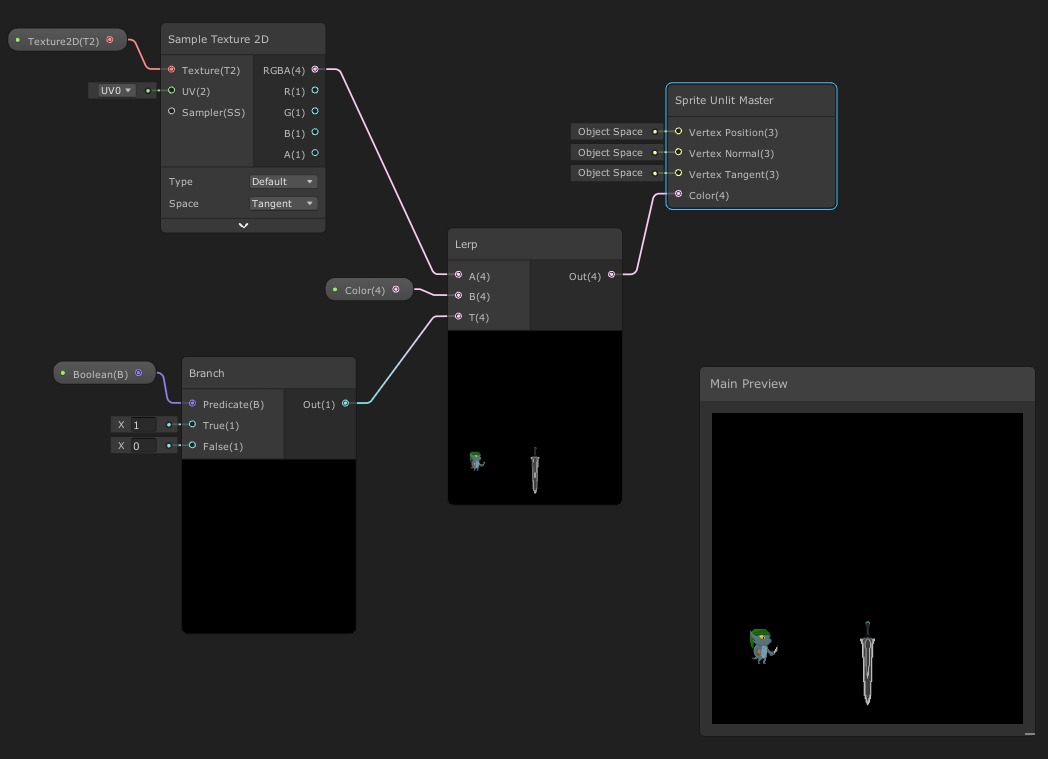
Connect a lerp to your base color texture to A, a lerp to the color you want to change the player/enemy to to B, and a boolean to T
thorn tapir
nice! thanks!
blissful marlin
You'll need to create a custom function node to convert bool to a vector, you can copy the one I'm using here (unless this has changed in more recent versions and there is an easier solution now)
 regal stag
blissful marlin
You'll need to create a custom function node to convert bool to a vector, you ca...
regal stag
blissful marlin
You'll need to create a custom function node to convert bool to a vector, you ca...
A Branch node would do this.
Or could just use a Float property instead of a boolean. Behind the scenes it's handled as a float anyway.
thorn tapir
just turning the shader on and off?
thorn tapir
blissful marlin
You'll need to create a custom function node to convert bool to a vector, you ca...
giving me an error Undeclared identifier 'Out'
hmm, dont think I did this right
https://i.imgur.com/NKa6Bts.png
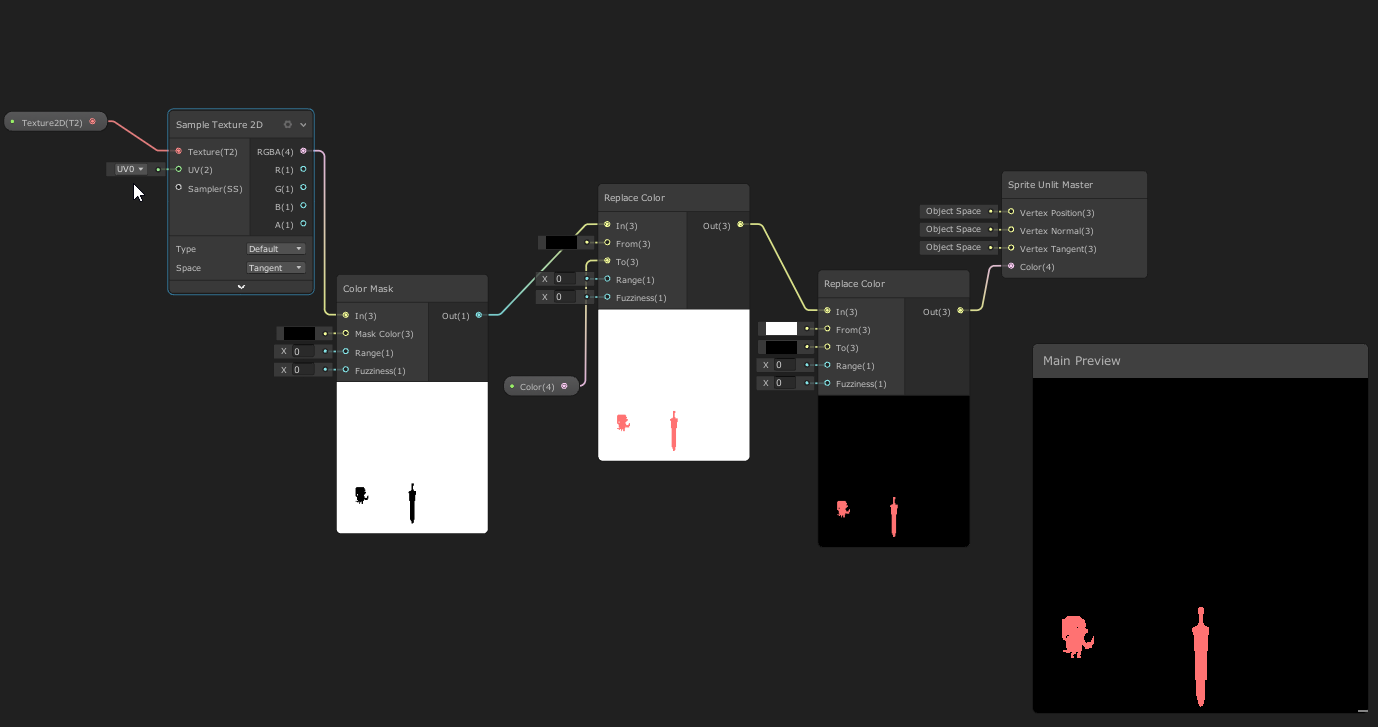
doesnt seem to be applying the color to the objects in the scene
I think I need to like, key out the black, then use what remains as a mask??
blissful marlin
I thought you were applying this on the objects as they were being rendered to the texture, not to the render texture itself
I don't know how you'd go about keying a specific color
thorn tapir
ah, yea i see how your method would make sense
but I think I can easily key out the black space
the lerp doesnt seem to be doing anything though
I'll just start from here I guess...
Key out the black space, make a mask with whats left, fill in that area with a color, send that out to the material
 amber saffron
blissful marlin
How do I determine how many material passes a shadergraph shader is using? And m...
amber saffron
blissful marlin
How do I determine how many material passes a shadergraph shader is using? And m...
You can get the number of passes of a material with this API : https://docs.unity3d.com/ScriptReference/Material-passCount.html
And for a shader : https://docs.unity3d.com/ScriptReference/Shader-passCount.html
The number of used passes is determined by the render pipeline and the material settings
thorn tapir
https://gfycat.com/FluidRealisticHart
works exactly as I wanted 😄
Gonna have to change layers on some stuff, but yea!

 lost canopy
GAAAH... Not even a question, just the most annoying bug that crashed my Unity. Because of this.
int a = int.MinValue;
bool b1 = (a < 0); // true
bool b2 = (-a < 0); // ALSO true
bool b3 = (a == -a); // yep, true;So if you ever test for if (a < 0) you can't be sure that -a will be > 0. I found this out the very hard way.
shadow locust
yeah the range is like -128 to 127 so there's no positive equivalent of -128, and it just underflows back to itself (that's for sbyte but the same principle applies for all signed integer datatypes)
near current
I need a little bit of help with my Tree leave shader
Im trying to apply dither based upon How angled a polygon is to the camera


This is how far I got.. All the faces but Top and Bottom of the cube are reacting like I want them to
I just Cant get the top and bottom face of the cube to apply the same principal, its doing my head in
anyone any insights they can share?
 lean marsh
With the URP, was is considered the standard way of doing multi pass shaders (or what are the options)?
 wide thicket
hey can you help me figure out something?
is it better to have a material with one large texture or a bunch of small textures?
stable carbon
I might be dumb but, why is my material still appearing magenta, when i already put inputs and outputs and source of the code to my Custom function node? Can someone help me?


Its saying that the file is not .hlsl file, but it should be good
,
 wide thicket
stable carbon
I might be dumb but, why is my material still appearing magenta, when i already ...
wide thicket
stable carbon
I might be dumb but, why is my material still appearing magenta, when i already ...
open the file location and try renaming the file to "whateveryourfileiscalled.hlsl**.txt**"
stable carbon
wide thicket
open the file location and try renaming the file to "whateveryourfileiscalled.hl...
Its still appearing invalid file type ://
stable carbon
oh?
wide thicket
you're following the same tutorial as I am 😂 literally just did this yesterday
wide thicket
yeah no issues, lemme see what i did
stable carbon
I odnt really know what im doing, but i thought its okay, but apparently its not
wide thicket
try using this one instead
wide thicket
👍
wide thicket
stable carbon
thank you
good luck with your project 😄
stable carbon
thank youu, you too
stable carbon
Okay, but this is not funny, do you think you know what is going on with this error again? I dont understand @wide thicket
 wide thicket
stable carbon
Okay, but this is not funny, do you think you know what is going on with this e...
wide thicket
stable carbon
Okay, but this is not funny, do you think you know what is going on with this e...
happened to me too
make sure the variables are set to the correct output

 wide thicket
try resaving the graph shader, and clearing the console?
could just be left over
if that doesnt work i'll try something else
stable carbon
lol how do i clear console
wide thicket
at the top of unity in the windows drop down, open the console window
once open it should have an option for clear
stable carbon
ah yeah, im just blind
wide thicket
stable carbon
ah yeah, im just blind
if that doesnt work make sure you have the right inputs for the normals
 stable carbon
its not dropping any orrer, but the shader is just blank collor, there no shadow
error*
wide thicket
keep whatever you have plugged in for the ToonRamp variables, I moved mine for a different effect

 wide thicket
make sure it's plugged in to the shader output
stable carbon
it looks very similar to this i would say
wide thicket

Post with commented code and .shadergraph file : https://www.patreon.com/posts/lit-toon-shader-54740865
My Github site with all tutorials
https://minionsart.github.io/tutorials/
Discord: https://discord.com/invite/astrokat
Twitch: https://www.twitch.tv/minionsart
Twitter: https://www.twitter.com/minionsart
Patreon: https://www.patreon.com/mini...
and the emission, you have a light in your scene?
stable carbon
yes, its in the emission and i have direc. light here
wide thicket
hmmm, you have a screenshot of your shader graph?
stable carbon

 wide thicket
that or if you want to use unlit, just plug it into the base color instead of the emission
yeah that works, if you're going for a true toon shader unlit mode will be more efficient
stable carbon
okay
wide thicket
so i'm trying to add a dither overlay to this toon shader
the effect i'm going for is the texture itself is projected from the screen/camera view, but the texture origin moves with the object it's on in world space
you can see above how it slides around, how would I be able to combine the projection UV with the point of origin UV?
i've tried multiply but it gets funky and doesn't retain the screen/camera view projection
https://gyazo.com/d182c2b13a66f859dddbd42bf3ac9746

 candid imp
how do i add cube map materials to objects?
 shadow locust
what is velocity? It's a float4?
 open quarry
shadow locust
what is velocity? It's a float4?
open quarry
shadow locust
what is velocity? It's a float4?
float3, the fourth channel is a diff variable
turns out it cause i was trying to normalize the zero vector
 clear bone
How can I make it glow from far away? I couldn't find anything
i'm using post processing from URP
 wispy wedge
hey everyone. i have a weird problem. im using UnityObjectToView in my shader to get the depth of vertices for particles (billboard), but the particles all have the same depth! im targetting webgl 1.0...is there something weird with calculating view depth manually in webgl 1.0/opengl es 2.0? EDIT: solved, i was multiplying by _ProjectionParams.w in the wrong spot, math order of operations error.
grand jolt
Is it possible to calculate the average color of a texture in a shader?
the average RGB
wide thicket
how do i get an objects screen space position relative to UV?
wide thicket
using screen space to project textures, but the aspect ratio of the texture changes with the window resolution, how do i keep it 1:1?
 deep viper
sorry to add to this backlog, this isn't even a shader but I would think you guys would best know what to do here
I'm trying to make a way to select a color from a color wheel using a vector2, and I set up a visual for it
problem is the colors are off (I also don't really have the vocabulary to explain what's "off" about it) (generic RGB color wheel on the left, mine on the right)

here's my code: https://codebeautify.org/csharpviewer/y2294898d

 granite owl
I just updated to unity 2020.3.32f1 today, and now I keep getting this error in one of my shaders: "Shader error in 'Real Ivy/Flat leaves': undeclared identifier '_DoubleSidedConstants' at /Users/Name/Documents/GitHub/Dead-Raid/Library/PackageCache/com.unity.render-pipelines.high-definition@10.8.1/Runtime/Material/Decal/DecalUtilities.hlsl(273) (on d3d11)" I've tried reimporting the hdrp package, commenting out all references to that function call, reimporting the real ivy asset, and commenting out the include for DecalUtilities, but the error persists no matter what.
grizzled bolt
granite owl
I just updated to unity 2020.3.32f1 today, and now I keep getting this error in ...
It might be best to contact the author of the asset
near current
Hya. I got some trouble with ShaderGraph
Im making a leaves shader, and running into trouble applying Dither..
Based on the Dot.Product of the fragment's normal and the camera direction I test what the dithering on the fragment should be, and then apply this through a Blend node with the leaves' alpha
But, the Dot Product doesnt seem to be one float per fragment?


If I use the dot product you can see in the blend node that its applied more towards the outer edges of the fragment?
If I just hook up a float to the blend opacity it does not have this behaviour


Anybody any idea why it does this and how to counter this?
amber saffron
near current
But, the Dot Product doesnt seem to be one float per fragment?
It is one float per fragment, but, your leaves geometry seem to be flat planes, and as such, the normal has a constant value across the polygon.
The view direction should however change from one pixel to the other, but probably not enough for the effect you want to have.
In the nodes preview, the normal is previewed as a sphere, that explains the big difference between the preview and what you see in the scene view.
near current
@amber saffron Ah I see a few things that I should read up on. First of, a fragment is not the same as a polygon?
amber saffron
To put it simple : fragment = pixel
near current
Ahh okokok
And the view directions is per fragment / pixel , Towards the center of the screen?
amber saffron
It's the direction from the camera position to the pixel position
near current
ah ok. But that's what explains the different levels of dithering on one polygon then, right?
amber saffron
(or the other way around, I often invert it myself 😅 )
amber saffron
near current
ah ok. But that's what explains the different levels of dithering on one polygon...
Yes
near current
the third point you made: I think the previews are actually accurate. As soon as its a sphere instead of a flat texture in the Blend node, that's when I see the effect I dont want
So.. I'll need to get another way of getting the second vector for the Dot Product, if I'd want the dithering to apply over the whole polygon
regal stag
Could probably use (0,0,-1) in View space transformed into World (via Transform node).
The Direction output from the Camera node might be the same thing.
amber saffron
From you explanation I understood "I want to apply a dither to the alpha of my leaves" but I didn't get the "how" you want to apply it.
What is the effect your are trying to do ?
near current
regal stag
Could probably use (0,0,-1) in View space transformed into World (via Transform ...
Ah thanks. The Camera Direction does the trick!
near current
amber saffron
From you explanation I understood "I want to apply a dither to the alpha of my l...
I'm trying to fade out the polygonal "crosses"
 amber saffron
Okay, makes way more sense to me now 😄
Happy that you've found the solution you needed.
near current
well, the crosses are still there 😦
it works Way better on a test cube.. As soon as a poly is Too angled, it dithers away

but not in the tree.. hmmm
regal stag
Perhaps because the normal vectors aren't aligned to the quads so the shading is smoother?
near current
Yeah they're tweaked a little bit, but nothing That far... I think there's something I'm overlooking with the shader
It seems as if if Does take the rotation of the camera into account, but I'm missing something in my logic
when I rotate it does seem to pick up on "too" much of an angle and then dither.. But when I move the camera's position and change the perspective it doesnt dither hmmm
regal stag
I think that's why usually the view direction is used
near current
okok. Thanks. I'll play around with it 🙂
 steady ledge
hello! i made a water shader and attached it to player, but when player moves, the normal maps move together, how i set it to world position?

 hazy bear
I'm wondering whether it's possible to do arithmetic with shader properties. As an example, just adding 1 to a property before doing a stencil comparison:
||```Shader "example"
{
Properties {
_Section ("Section", Int) = 1
}
SubShader
{
    Pass
    {
        Stencil {
            Ref [_Section]+1
            Comp gequal
            Pass replace
        }
    }
}
}```||
But this throws a shader error. Can I replicate this behaviour in a different way (but within the shader of course, not just adding 1 to the variable in the script)?
 analog crest
can I get rid of this big reflection on the ground to only have the shadow thats casted ?
 shadow locust
analog crest
can I get rid of this big reflection on the ground to only have the shadow thats...
shadow locust
analog crest
can I get rid of this big reflection on the ground to only have the shadow thats...
modify the material of the surface to reduce smoothness/metallicness
assuming it's a standard shader
analog crest
shadow locust
modify the material of the surface to reduce smoothness/metallicness
not working

 shadow locust
Did you save the graph?
analog crest
yes
analog crest
yes it is
grizzled bolt
analog crest
not working
If it really does not work that would mean it's not a reflection, but rather the natural falloff of light
Surfaces get exponentially brighter the closer they are to a light source
I guess you need a shader that controls and limits the light falloff, similar to what toon shaders do
analog crest
grizzled bolt
If it really does not work that would mean it's not a reflection, but rather the...
Ill try that thanks
The goal is to have the same lighting effect than this game, if you have any tips that would be appreciated :)) https://www.youtube.com/watch?v=uqYW7Z2GMYM&t=819s

Play Super Animal Royale for FREE here! - https://sbx.gg/srohmwrecker
►ENJOY THE VID? LIKE, COMMENT & SUBSCRIBE! http://bit.ly/RWT4Di ◄
Thanks to Super Animal Royale for sponsoring this video! :)
Super Animal Royale Season 1 is out NOW!
About Super Animal Royale-
It’s a fight for furvival! Super Animal Royale is a 64-player, frenetic, top-d...
 wooden kite
hi people, how can i make parts of my lit shader unlit in shader graph ?
like, lets say i have a outline shader, and i wan't only the outline to be visible even in the dark
grizzled bolt
wooden kite
like, lets say i have a outline shader, and i wan't only the outline to be visib...
That would be called emission
wooden kite
grizzled bolt
That would be called emission
i've searched for this emission node, but i didn't found, is it something new or it doesn't exist in URP / 2D shader graphs ?
grizzled bolt
wooden kite
i've searched for this emission node, but i didn't found, is it something new or...
It's not a node, it's a property of the lit shader
wooden kite
grizzled bolt
It's not a node, it's a property of the lit shader
it doesn't exist in lit sprite shaders for some reason
grizzled bolt
wooden kite
it doesn't exist in lit sprite shaders for some reason
Oh you mean the sprite shader
I don't know how it works over there
wooden kite
thanks anyway !
 empty chasm
Hopefully this is the right place, apologies if this belongs in a different channel. Also my first question, so I hope I followed the guidelines correctly.
Using https://github.com/Tuntenfisch/Voxels to try and understand Dynamic Contouring Voxels, I am not understanding part of the flow.
https://github.com/Tuntenfisch/Voxels/blob/release/Assets/Scripts/Voxels/Volume/VoxelVolume.cs - Line 50 has an [extended] ComputeShader.Dispatch() call.
The VoxelVolumeConfig.Compute variable references this compute file: https://github.com/Tuntenfisch/Voxels/blob/release/Assets/Compute/Voxels/VoxelVolume.compute
Following the C# execution, Dispatch() is called once; however, it looks like the compute's VoxelVolume.GenerateVoxelVolume() [line 20] is called several times (I believe 67^3 times? As NumberOfVoxels is 67).
Can anyone give me some insight into this disparity? I feel there is something basic I am simply missing. I am not new to Unity/C#, but I am new to this area of it.
Bigger-picture goal that has lead me here: Save/Load mechanism for generated/modified DC voxels.
 pallid stone
Hi! Not sure if this is the right channel, but has anyone had any luck importing a render texture into blender? Thanks!
shadow locust
pallid stone
Hi! Not sure if this is the right channel, but has anyone had any luck importing...
Not the right channel, but http://answers.unity.com/answers/37176/view.html
Unity is the ultimate game development platform. Use Unity to build high-quality 3D and 2D games, deploy them across mobile, desktop, VR/AR, consoles or the Web, and connect with loyal and enthusiastic players and customers.
pallid stone
shadow locust
Not the right channel, but http://answers.unity.com/answers/37176/view.html
Thank you kindly and apologies for it being the wrong channel 🙂
meager pelican
empty chasm
Hopefully this is the right place, apologies if this belongs in a different chan...
The call of the compute shader (the line 50) passes the number of invocations as a param. Remember that a GPU is a multi-core parallel processor. The Numthreads thing and the ID is:
void GenerateVoxelVolume(uint3 voxelID : SV_DispatchThreadID)
{
    if (IsOutOfVoxelVolumeBounds(voxelID))
    {
        return;
    }```
From there in the other file.  SV_DispatchThreadID is getting a 0 to NumberOfVoxels value (passed from line 50).  There's an immediate check if it out of bounds and if not it continues on.

So that ONE dispatch call on the C# side caused 64 (at least) invocations (4x4x4 in the x, y, z values of the uint3 voxelID).

Each core got passed its own voxelID and goes off in parallel and processes it.

You need to read up on compute shaders. Strap in, it's a bit of a ride. 😉Thank you for the reply. I was starting to gather that Dispatch() was creating threads, thus GenerateVoxelVolume() called multiple times. I feel my disconnect was expecting familiar code looping/incrementing the voxelID; where that seems to be done internally.
This is now my current understanding:
A) voxelID defines a uint3 start-point, and is also used as the SV_DispatchThreadID.
B) numthreads(x,y,z) (effectively) delegates +x,y,z values to voxelID/SV_DispatchThreadID (matrix incrementing/addition), across (xyz) threads.
eg: A starting point Dispatch() [42,10,96] with numthreads(4,2,5), would run 40 times with the voxelID range of [42..45, 10..11, 96..100].
Please correct me if I am still misunderstanding.
wide thicket
how do i get an objects screen space position relative to UV?
using screen space to project textures, but the aspect ratio of the texture changes with the window resolution, how do i keep it 1:1?
im thinking i'd have to grab the screens current resolution (1920x1080, 300x7000, whatever it is) and use a formula to convert it to 1:1 aspect ratio
regal stag
wide thicket
how do i get an objects screen space position relative to UV?
using screen space...
This might help if you're referring to Shader Graph, #archived-shaders message
wide thicket
regal stag
This might help if you're referring to Shader Graph, https://discord.com/channel...
I think this is exactly what I was looking for, thank you so much
near current
Hya. GOt a question: I got a Lit billboard shader that rotates fragments towards the camera. But lighting gets calculated based upon the original position, so the lighting on the billboards doesnt change when they rotate
Working in shadergraph btw. Atm I'm manipulating the rotation and feeding it in to the Vertex Master's Position input
grizzled bolt
regal stag
This might help if you're referring to Shader Graph, https://discord.com/channel...
I was just looking for this stuff 
Is this kind of "stabilization" necessary for everything that wants to face the camera directly? I ran into a similar issue when trying to have a matcap shader
wide thicket
hey so what's the consensus on if/branching in shader graph? should it be avoided or does it not matter as much anymore?
regal stag
grizzled bolt
I was just looking for this stuff <:sparkleclassy:854644971932352542>
Is this k...
That kind of stabilisation is basically just to keep the screen coordinates aligned to the object.
With matcap, there's a common problem with perspective projections because the matcap is handled in view space. Ben Golus has a nice thread : https://twitter.com/bgolus/status/1487224443688554497, and shares this graph which fixes some of those perspective problems by constructing a matrix using the camera up & view direction and a few cross products.
 grizzled bolt
I recall a lot of old games used matcap (or something much like it) to fake reflections before cubemaps were a thing
Wonder if something changed that made them more complex to implement, or if they were complex in the first place
regal stag
wide thicket
hey so what's the consensus on if/branching in shader graph? should it be avoide...
If you're referring to the Branch node, it uses a ternary operator (bool ? x : y) rather than an actual if statement. And in HLSL that always evaluates both sides and just throws the other away.
It's not going to produce any actual shader branching, for that you'd likely need to use an if statement in a Custom Function node (though using if doesn't guarantee to branch. I think you can force it with [branch], but might be better to let the compiler decide). Branching is usually fine if it's based on a property that's the same for all pixels.
This is a pretty up-to-date article that goes over some branching stuff : https://medium.com/@jasonbooth_86226/branching-on-a-gpu-18bfc83694f2
wide thicket
regal stag
If you're referring to the Branch node, it uses a ternary operator (bool ? x : y...
in cases where it's a per pixel basis, would a lerp be more efficient?
 radiant meteor

 gaunt carbon
Hello how there my have URP problem pink

but there

transpanet
where transpanet lit lol
okay but think solution idea


 distant zealot
I've heard that I should use stencil shaders to accomplish this effect (pictured). As someone who's never worked with shaders before, what videos/guides do I need to read/watch/study to actually make this happen?
 grand jolt
How do you do anisotropic filtering for repeat tiled textures? I have this really annoying banding issue


Up close^
The gif illustrates the problem best
 eager folio
distant zealot
eager folio
distant zealot
It depends on the rendering path you're using.
eager folio
grand jolt
I mean, that does look pretty realistic if you're trying to imitate an analog television. But you can probably fix the issue by editing the mipmaps for the detail texture?
eager folio
Well, I mean, photographing a CRT monitor with a digital camera creates that sort of interference pattern.
But if it isn't the look you want, you can probably minimize it by making the mips less detailed.
grand jolt
I know how I would get rid of it, but I actually think I will keep it now - I was told by a bunch of other people that it's technically more realistic
grizzled bolt
grand jolt
Oh well shit, if it's more realistic
More realistic if you're filming a CRT, not so when looking at it with human eyeballs ^^
 sacred rock
I seem to have trouble reading any data out of Texture3D in compute shaders for some reason, either when sampling with normalised float3 coordinates or accessing the data with a uint3... it seems as though I just get zeros...
Simplest example:
#pragma kernel HistogramMain

Texture3D<float> Voxels;
RWStructuredBuffer<uint> HistogramBuffer;

[numthreads(4,4,4)]
void HistogramMain(uint3 id: SV_DispatchThreadID) {
    uint v = uint(255.0 * Voxels[id]);
    InterlockedAdd(HistogramBuffer[v], 1);
}
        shader.SetTexture(histMainKernel, "Voxels", data);
        int w = (data.width + 3)/4, h = (data.height + 3)/4, d = (data.depth + 3)/4;
        shader.Dispatch(histMainKernel, w, h, d);
        histogramBuffer.GetData(histogramData);
Above example yields everything being in bin 0.
This is data that is otherwise being rendered with VolumeViewerPro FWIW (and I've done a bit of injecting some noise into the data to verify that the data I'm referring to is indeed correct, if that makes sense).
 hexed surge
I'm trying to make decent looking low poly trees and need some pointers like keywords to google, or directions to dig to replicate the look from the reference
their tree's branches and leaves look soft and have this volume feel about them, you can barely tell those are all planes with transparent textures
while my current iteration looks very flat (3rd picture)


not sure if this is the right place to ask, please point me to the right channel if it's not
lost canopy
it is. I can't help you with that though.
sacred rock
hexed surge
I'm trying to make decent looking low poly trees and need some pointers like key...
I think you need to look at baking in some ambient occlusion... quick google for "ambient occlusion low poly trees" lead to https://www.youtube.com/watch?v=p-9pgZI3inI, might be of interest.

#teamtrees #cggeek
Grants New LowPoly Short Course: Learn Blender fast: https://www.gamedev.tv/p/low-poly-landscapes/?coupon_code=GRANT&affcode=45216_9b6dqwx2
Grant's Character Course discount link: https://www.gamedev.tv/p/blender-character-creator-2/?coupon_code=GRABBITT&affcode=45216_9b6dqwx2
Grant’s Drawing course discount link: https://www...
hexed surge
sacred rock
I think you need to look at baking in some ambient occlusion... quick google for...
thank you, baking occlusion sounds very helpful for my task 👍
sacred rock
hexed surge
thank you, baking occlusion sounds very helpful for my task 👍
whether that video itself is directly useful is another matter, but hopefully that (by which I mean the idea of baking lighting) should set you on the right course, and it might turn out that it's not necessarily something you do with shaders in Unity, but in the asset creation stage. Or not.
hexed surge
sacred rock
whether that video itself is directly useful is another matter, but hopefully th...
yes, I realized how occlusion might help with soft shadows I see in the reference after seeing your link, certainly worth a shot and sounds like it should give some good results
thank you again 👍
sacred rock
hexed surge
yes, I realized how occlusion might help with soft shadows I see in the referenc...
my pleasure
eager folio
hexed surge
I'm trying to make decent looking low poly trees and need some pointers like key...
As mentioned, ambient occlusion will help. But the biggest factor is probably faking the normals.
 hexed surge
eager folio
As mentioned, ambient occlusion will help. But the biggest factor is probably fa...
hexed surge
eager folio
As mentioned, ambient occlusion will help. But the biggest factor is probably fa...
thank you, the link looks very useful 👍
Indeed, with a quick and dirty AO bake it already looks better, but it didn't help with very dark backfaces
was going to dig how to replicate translucency from from Blender in Unity, but that link will save me a lo of time ❤️
 steady ledge
hello! i made a water shader and attached it to player, but when player moves, ...
steady ledge
steady ledge
hello! i made a water shader and attached it to player, but when player moves, ...
anyone?
 daring dew
steady ledge
anyone?
daring dew
steady ledge
anyone?
You might have to change the mode of the Position node, from "World", to "Absolute World"
steady ledge
daring dew
You might have to change the mode of the Position node, from "World", to "Absolu...
there is no position node on normals and textures, idk how to add it properly, i got it from a tutorial
steady ledge
i tried to add this one, but not worked

 pastel oak
Hello ! I'm kind of a beginner at shaders and I'm actually making a minimap (using a render texture and a dedicated camera/layer) but I would like to render the world without details, kinda like GTA5 map where buildings looks like basic shapes with outlines. Tbh I have no idea how to do this, was thinking about using a replacement shader, feels like the best way to do this but .. idk, so if any one of you has any clues this would be awesome ! have a gud day
here's the kind of result I would like to achieve
 low lichen
pastel oak
here's the kind of result I would like to achieve
low lichen
pastel oak
here's the kind of result I would like to achieve
If that's the look you're trying to achieve, then you will need to make a separate map texture, probably as an SVG. There's no way that the GTA minimap is implemented by rendering the world from above.
pastel oak
low lichen
If that's the look you're trying to achieve, then you will need to make a separa...
hm ok I see, I was actually reading some reddit post answering the same
pastel oak
low lichen
If that's the look you're trying to achieve, then you will need to make a separa...
I guess perfs would better too
sacred rock
pastel oak
I guess perfs would better too
There are objects from the world dynamically moving in it though, IIRC? So it will still involve something more than just the map texture.
low lichen
pastel oak
I guess perfs would better too
Definitely, and an artist can control precisely what it looks like
pastel oak
sacred rock
There are objects from the world dynamically moving in it though, IIRC? So it wi...
Yeah I mean players but I solved that with icon dynamicly set upon detected players/npc around th emain character
pastel oak
low lichen
Definitely, and an artist can control precisely what it looks like
Yeah I can understand that
pastel oak
low lichen
Definitely, and an artist can control precisely what it looks like
So the idea would be to craete the texture beforehand, and computing players pos around the world on the render texture on top of the map ?
low lichen
pastel oak
So the idea would be to craete the texture beforehand, and computing players pos...
Something like that, yes.
pastel oak
low lichen
Something like that, yes.
oook I get it, I think you saved me quite a lot of time aha
primal anchor
Allow me to try again, sorry if I spam 🥲 : #archived-shaders message
lean marsh
If I wanted to build my own 2D lighting system (lets say for the sake of education so using unity's 2d lighting system is out of the question) what is the general approach for doing something like that? Do I have my main render target render as is and have a shader that renders a "lightmap" to a different render target and the combine the two together? If so how would I go about rendering a shader to a specific target and how would I then combat both that and the main render target?
and for the sake of starting, I am not worries about shadow casting from other things in the scene, just want to get lighting works at the basic level
sacred rock
primal anchor
Allow me to try again, sorry if I spam 🥲 : https://discord.com/channels/4892221...
I don’t have an answer for your more advanced question - sounds like an interesting project, though. I don’t see any particular evidence that you could create the structures you want from a shader, but I don’t quite see the problem with creating the structures from the cpu and having the logic that you need for juggling them in shaders.
I wonder if you could help with my entirely trivial question from a few hours ago, though - why do I not seem to be able to read values from Texture3D in a compute shader?
primal anchor
sacred rock
I don’t have an answer for your more advanced question - sounds like an interest...
The problem is that I would like to limitate data transfer between CPU and GPU. My calculations would need about 0.5Mio of data stored, and I don't want to transfer it for every frame 🥲
And I don't find any obvious reason to fail in your code. Do you create the RenderTexture corresponding to the Texture3D Voxel or do you take it from somewhere else (the thing about the renderer) ?
timid plover
you can use 3d textures natively, no need to create a rendertexture
primal anchor
(Maybe you can idk, I only used RenderTexture for my stuff until now, but I'm not an expert x) )
timid plover
https://docs.unity3d.com/Manual/class-Texture3D.html there's an example on how to declare it
sacred rock
It’s not a RenderTexture, just a Texture3D that has data populated by a script.
sacred rock
primal anchor
The problem is that I would like to limitate data transfer between CPU and GPU. ...
I understand you want to limit data transfer, but you should be able to create the buffers and then not need to keep shifting data over the bus every frame?
In my case, the data is loaded by a third party script… (although actually, I modified the script quite a bit to make the loading faster and am considering going further with that, so I’m fairly familiar with the internal workings… it populates a Color[] and uses Texture3D.SetPixels(), no great mystery).
primal anchor
sacred rock
I understand you want to limit data transfer, but you should be able to create t...
I litterally wanna change the stuff every frame x) So the best way would be to have a permanent place in GPU's memory to store stuff 😦
sacred rock
primal anchor
I litterally wanna change the stuff every frame x) So the best way would be to h...
Like a StructuredBuffer?
timid plover
that's what should happen when you declare a texture3d and read/write to it in compute shaders
primal anchor
sacred rock
Like a `StructuredBuffer`?
It that "permanent" between unity's passes ?
If true, it's what I need x)
sacred rock
primal anchor
It that "permanent" between unity's passes ?
Why wouldn’t it be?
timid plover
if unity doesn't do something stupid it won't writeback from gpu to cpu
sacred rock
This conversation is reminding me of a conversation with a student in a class I was TA for… they somehow had it in their head that they needed some advanced modern OpenGL stuff about persistent uniform buffers or something… when actually, they just needed to make a Tex3D and read/write from it.
primal anchor
yeah I checked, seems to be what I need indeed
sacred rock
I don’t even know about uniform buffers, what I do know is that you can write data into buffers and it won’t be wiped without reason.
primal anchor
Tanks for your time, and sorry i could not help xianes x(
sacred rock
primal anchor
Tanks for your time, and sorry i could not help xianes x(
That’s ok, I still don’t get what I’m doing wrong though… I actually tried months ago to adapt a compute shader I had that was working with StructuredBuffer<float> to use Texture3D<float> for equivalent data, and could never get it to work. Had some simpler stuff I wanted to do so thought I’d have another crack at it, but I just can’t seem to read data from Texture3D. There must be something stupid I’m missing.
timid plover
you need a sampler to read from textures
sacred rock
Tried with and without sampler.
Although I wish that I had a better reference for this, and maybe I set up my sampler wrong.
timid plover
this seems to be a good resource
https://forum.unity.com/threads/3d-textures-from-compute-shader.477905/
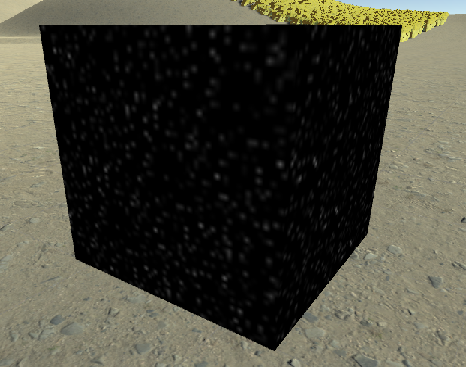
Unity Forum
I'm trying to do an implementation of Worley noise for a volumetric cloud renderer, I've tried to generate the noise textures through a script however...
sacred rock
It appears as though it can be accessed like voxels[uint3], voxels.Load() (which also seems like it might not need a sampler?) and Voxels.SampleLevel(sampler_linear_clamp, float3, 0). Thanks for the link, my gf is going to be here in a minute, but that may well help when I get time.
timid plover
the sampler thing may only be applicable to normal shaders, im not sure if they're needed for compute shaders
sacred rock
timid plover
the sampler thing may only be applicable to normal shaders, im not sure if they'...
Well I certainly don’t get compile errors, just 0 values.
lean lotus
Is unity ever gonna get Shader Model 6 or any way for me to get access to Shader Model 6?
 mortal thunder
Hey, I'm trying to lerp between 2 textures with a noise. I figured it out in Shader Graph but that tool isn't used for the project I'm working on so, I need to translate it somehow?

The noise is the only issue btw I can fade between the textures no problem but I want the second texture to follow the noise
 mental bone
You will need to find a hlsl noise function and use that
You can look at the code for the node here https://docs.unity3d.com/Packages/com.unity.shadergraph@6.9/manual/Gradient-Noise-Node.html
mortal thunder
mental bone
You will need to find a hlsl noise function and use that
I just need the power, invert & saturation btw. I already have a noise texture
mental bone
Well those should be build in functions. Are you using CG or hlsl ?
mortal thunder
CG...
mental bone
Of the top of my head the functions are pow() saturate() and I cant remember invert
mortal thunder
mental bone
Of the top of my head the functions are pow() saturate() and I cant remember inv...
Invert isn't completely necessary thanks. How do I use those 2?
Is there another way I can search for shader info btw? Shader Graph keeps popping up in my search results
mental bone
Pow takes in two arguments. It raises the first to the power of the second
This should help https://developer.download.nvidia.com/cg/index_stdlib.html
Cg Standard Library Documentation
mortal thunder
Thanks
mortal thunder
mental bone
Pow takes in two arguments. It raises the first to the power of the second
You are Awesome! It works perfectly now! To invert it I just needed to swap c1 with c2 in the lerp function!
mortal thunder
Now I'm thinking the texture pops in too fast. There's no middle ground from 0-1. I want it to be half way done at 0.5
1 isn't fully dissolved either. Sorry I don't know what I'm doing xD
Sorry to @mental bone but do you have any ideas about this?
mental bone
mortal thunder
Sorry to <@!292371456862584833> but do you have any ideas about this?
I cant right now but post your code someone else will take a look at it I'm sure
mortal thunder
Okay, thanks. I'll post the code in a bit
mortal thunder
 strong musk
does anyone have a VR friendly shader that gives of an effect like this:
dangit
anyway, like the rainbow dancing frog thing
or just a rainbowey effect in general
 real plover
Right now, this is hand animated. But I sort of want to do something similar via code. Example being: Given any shape as a base, do this animation or something similar. I was thinking a shader? But I don't know if I could get a similar looking result (pixel). I'm also really not good at shaders, like, at all.
Thoughts?

 safe gate
real plover
Right now, this is hand animated. But I sort of want to do something similar via...
safe gate
real plover
Right now, this is hand animated. But I sort of want to do something similar via...
well the equation for a circle is just x*x + y*y = r*r so maybe something with that to determine the color?
zenith heron
Hello, I am trying to set the brightness of a 2D sprite's color to make it look whiter. However, the limit for HSV brightness makes it look as it normally does:

I want to make it so that the sprite can go beyond and look whiter


the images were not taken from Unity. What I am looking for is a shader which can change its look based on the visual representations above, from a scale in which can be globally accessed and modified.
Since I am not knowledgeable on shaders that much, I came here to receive some ideas while I experiment on my own as well.
lean lotus
so if I use a shader rn to blend two textures, by assigning the second texture a value of 1.0f / Number with blend mode of SrcAlpha OneMinusSrcAlpha
How do I do this in a compute shader?
Attempting to do temporal reprojection and struggling
zenith heron

In shader graph, I have created a new shader graph asset. When I set up the main texture and attach it to the color input, no main preview shows. I have also tried searching up what the course of action is if you want to show a preview but it fails to do so, but I have not found any relative results. For this reason, I have come to ask for help from experienced people. Does anyone know what I am missing in the above circumstances which is supposed to help me show a sprite preview? Thank you very much for your time.
grizzled bolt
zenith heron
In shader graph, I have created a new shader graph asset. When I set up the main...
Magenta in preview means error in shader usually results from an incomplete manual install of URP
If you want to make a sprite shader you normally should use Sprite Lit / Unlit type shader graph
Off-chance there could be some clues to what's happening in Graph Settings but hard to say
zenith heron
I'm currently using a Sprite Unlish Shader Graph Asset,
I have no render pipeline asset on currently, but that's because HDRP pipeline assets make my camera look murky
grizzled bolt
zenith heron
I have no render pipeline asset on currently, but that's because HDRP pipeline a...
You need to stick with either URP or HDRP and have the pipeline asset on, otherwise their shaders won't work at all
HDRP needs extra work to tune lights and exposures correctly which probably caused the "murkiness"
grizzled bolt
Definitely
zenith heron
thank you very much for your help!
grizzled bolt
@zenith heron Anyway, the deal is that when you normally apply a color (BaseColor) to a sprite, its shader multiplies the BaseMap by that
There's also other blend modes in the sprite shader, but they aren't accessible for some reason
If you can get the Sprite graphs working right, you can make your own blend modes
Usually a Blend node using a Mode that allows for brightening of the input texture
zenith heron

 elfin cedar
for some reaosn i was following this tutorial https://www.youtube.com/watch?v=NiOGWZXBg4Y&t=615s on how to create a force field but it looks ugly compared to how it is supposed look in the video,any idea why?



Let's learn how to make an awesome force field with Unity Shader Graph!
● Check out Skillshare! http://skl.sh/brackeys15
● Support us on Patreon: https://www.patreon.com/brackeys
● Project Files: https://github.com/Brackeys/Force-Field
● Water Shader shown in intro: https://youtu.be/jBmBb-je4Lg
● Setting up Lightweight: https://bit.ly/2W0AY...
 grizzled bolt
zenith heron
what's hanging in the back there
grizzled bolt
zenith heron
what's hanging in the back there
Did you plug in the alpha from the texture to the graph output?
zenith heron
oh oops
elfin cedar
elfin cedar
for some reaosn i was following this tutorial https://www.youtube.com/watch?v=Ni...
Anyone can help pls?
zenith heron
yay it works so well
When referencing a Material attached to an object in code, would I do GetComponent<Material>() as I would GetComponent<SpriteRenderer>()
grizzled bolt
zenith heron
When referencing a Material attached to an object in code, would I do GetCompone...
"Material" is not a component
I think what you ultimately need is SpriteRenderer.Material
zenith heron
ohh ok
spriterenderer shows its material

I made a public variable called Saturation for my shader. This variable is meant to be modified in runtime, but how should I go about accessing it?
grizzled bolt
zenith heron
I made a public variable called Saturation for my shader. This variable is meant...
https://docs.unity3d.com/ScriptReference/Material.SetFloat.html this if it's Exposed and not Global
zenith heron

ohhh
thats so interesting
when I output the shader's name, it says "Shader Graphs/Saturate". What's the reason behind the Shader Graphs/ part?
elfin cedar
elfin cedar
for some reaosn i was following this tutorial https://www.youtube.com/watch?v=Ni...
Help would be apprecatied
 shadow locust
zenith heron
why is the material called Saturate (Instance) during runtime but Saturate prior...
shadow locust
zenith heron
why is the material called Saturate (Instance) during runtime but Saturate prior...
You're probably using Renderer.material in your code, which creates a copy for that renderer
shadow locust
This is generally a good thing as otherwise you'll be modifying your asset directly
zenith heron
ohh lol
shadow locust
Yes and technically you're responsible for Destroying it when the scene ends, or you'll get a memory leak
zenith heron
if my spriterenderer changes its sprite does my material keep its old texture?
shadow locust
If you change the copy the original won't change
shadow locust
Wdym
 shadow locust
No
Pretty sure it uses material property blocks for that or something
So the material isn't changed
grizzled bolt
shadow locust
Yes and technically you're responsible for Destroying it when the scene ends, or...
The garbage collector doesn't handle it?
zenith heron
so during runtime as I change my sprite I should also use SpriteRenderer.material.SetTexture()?
shadow locust
grizzled bolt
The garbage collector doesn't handle it?
Nope
Because there's a native half from the cpp side of Unity
zenith heron
whats the difference between a Texture object and a Sprite object
grizzled bolt
zenith heron
so during runtime as I change my sprite I should also use SpriteRenderer.materia...
Well yes, you'd have to change the instance's texture specifically as well
But another option is to use MaterialPropertyBlock.SetFloat instead of Material.SetFloat
It's a bit more complex upfront and has some limitations but it doesn't create a clone of the material to keep track of, rather locally overrides properties
grizzled bolt
zenith heron
whats the difference between a Texture object and a Sprite object
Neither of these are things, precisely
zenith heron
how do I use MaterialPropertyBlock?
i can't seem to find it to be a property of SpriteRenderer as Material is, or if it is one of Material's properties
grizzled bolt
zenith heron
i can't seem to find it to be a property of SpriteRenderer as Material is, or if...
It's a method of Renderer, which SpriteRenderer inherits from
You'll need to find detailed instructions yourself
lean lotus
How do I replicate a shader that is called with
Graphics.Blit(_MainTex, _converged, _addMaterial);
and who does this:
return float4(tex2D(_MainTex, i.uv).rgb, 1.0f/(_Sample + 1.0f));
with blend types of SrcAlpha OneMinusSrcAlpha
To blend two images to make the _converged image progressively get refined from the _MainTex in a compute shader? have been trying to get this working but I havent been able to replicate the behavior above in a compute shader
elfin cedar
elfin cedar
for some reaosn i was following this tutorial https://www.youtube.com/watch?v=Ni...
Asking for help again after alot of hours
mortal thunder
elfin cedar
Asking for help again after alot of hours
Is your shader a PBR shader? That's the only thing I can think of aside from your Unity looks like it's an older version than the video author's
elfin cedar
mortal thunder
Is your shader a PBR shader? That's the only thing I can think of aside from you...
it is version 2022,which is newer
mortal thunder
Yeah, that's why I mentioned it could also be an issue
mortal thunder
elfin cedar
it is version 2022,which is newer
Brackeys is Unity 2019.1.0f1
elfin cedar
mortal thunder
Brackeys is Unity 2019.1.0f1
ok,so what edits do i make for it look like the one in the video?
mortal thunder
I won't know until I try it. Could you PM me the shader? That'd be a time saver.
elfin cedar
mortal thunder
I won't know until I try it. Could you PM me the shader? That'd be a time saver.
you mean the shader graph?

or the actual shader file?
mortal thunder
The Shader file.
mortal thunder
@elfin cedar Good news. Couple of issues. Your Sample Texture was plugged in from the Alpha not the RGBA. And your Alpha Clip Threshold didn't work on +0.5 it needed to be -0.5
Try that and let me know if that worked
Also, your Hexagon Offset should be 3 not 1 if you want to be accurate to the video
elfin cedar
mortal thunder
<@!617569118492557313> Good news. Couple of issues. Your Sample Texture was plug...
it fixed the grid texture,but it still looks weird
 mortal thunder
elfin cedar
it fixed the grid texture,but it still looks weird
mortal thunder
elfin cedar
it fixed the grid texture,but it still looks weird
Turn your Fresnel Power up?
elfin cedar
mortal thunder
Turn your Fresnel Power up?
still the same
 mortal thunder
Are you using URP? Honestly don't know what the problem could be. Does the Shader look normal in the Graph editor?
elfin cedar
mortal thunder
Are you using URP? Honestly don't know what the problem could be. Does the Shade...
it looks the same in graph editor,and yes i am using URP
regal stag
elfin cedar
still the same
Your graph relies on the Scene Depth node, so have you enabled the Depth Texture on the URP Asset?
elfin cedar
regal stag
Your graph relies on the Scene Depth node, so have you enabled the Depth Texture...
yes
lean marsh
I have a piece of shader code that I am am trying to get a fading transparency from the center however I am getting a weird effect where every so often the transparency gets just slightly darker, then gradient continues like this:

The code for this is:
float distanceToLightSource = distance(i.localPos, lightSourcePosition);

float lightDistancePower = lerp(
    lightStartingPower,
    lightStoppingPower,
    clamp(distanceToLightSource, 0, 1)
);

if (hasLightSource)
{
    mainTex.a = lightDistancePower;
}
so I am not sure why I get see this artifact and the gradient should be constant unless I am missing something with the code
near current
Hya.. Im having trouble building a billboard shader in shadergraph
This works Decent. Using the position and scale, multiply that with a transformation matrix set to inverse view

But, it makes the billboards (trees) also rotate around the x and z axis, I just need the Y rotation
Further on in the shader I also rotate the normals to get accurate shading, but that doesnt work with these other axes' also rotating
the main problem im running into is that except for the transformation matrix I havent seen any other examples of rotating towards the camera, let alone only along the Y axis
anybody any good suggestions on how to achieve this?
 edgy crane
Any idea on how to improve this wind effect ? (graph inc) Any input is welcome ❤️
 lucid creek
im super new to all of this and was wondering if there is a way to mask part of a texture of an object when colliding with a collider
like only a small portion of this sphere is colliding with the box and only the part colliding with the box is showing a different texture
im assuming theres a name for what im talking about or a common description but like i said im brand new
 shadow locust
lucid creek
im super new to all of this and was wondering if there is a way to mask part of...
shadow locust
lucid creek
im super new to all of this and was wondering if there is a way to mask part of...
*Stencil shader" should get you started
lean marsh
I figured out the dithering techniques to remove the banding effect with a noise texture + dithering
 heavy panther
is there a way to include alpha as transparency in the shader graph?
specifically here
 grizzled bolt
heavy panther
specifically here
grizzled bolt
heavy panther
specifically here
Transparency or alpha clipping need to be enabled in graph settings
edgy crane
May I have feedback ❤️
 steel elbow
Does anyone know how to apply a spritemask to a 3d object? Or achieve the same affect?
Just for some context: I'm working In a 2d environment but with 3d objects for sprites to achieve a 2.5d side on look I want to mask one object while it reveals another beneath it all 3d objects are fbx imported from blender
steel elbow
Oh nvm wrote some custom stencil shader stuff and fixed it
lean lotus
How can I get the world position that a pixel in a texture would hit in a compute shader?
 hushed basin
im not sure which channel to put this question but im new to this

im wrong some where?

 plush shoal
Hey , can someone please help me getting the material updating ?
 zenith heron
Hello, I am using URP and have made a "Brightness" shader effect which goes beyond HSV value and makes the texture look brighter. The shader does its job when I set its values manually, but when I try to do so in code by using SpriteRenderer.material.SetFloat(), the value remains unchanged. Any ideas on what is needed to change the values of my Material's values? (the material turns into an (Instance) copy of itself during runtime)
 mystic sequoia
anyone know a good free lighting/shading system to use for a 2d game?
uses are going to be just sunrays
or atleast thats the top priority, good looking sunrays and sunlight
ive been trying to find one but
their all for 3d
any help would be much appreciated :).
lean lotus
Possible seizure warning
hey so what can cause default unity motion vectors to do this... I had an animation to ensure smooth movement, and a compute shader that directly reads out the motion vector texture(gotten by GetFromGlobal) and displays it
I swear this wasnt happening earlier
But I believe this is the reason I just spent like 4-5 hours debugging with increasingly infuriating results of something that worked fine earlier today
Note that this also happens if I translate the camera at a constant rate but less so, depending on speed

 astral summit
I'm having trouble with extracting files in unity from a FBX file. The FBX file was from blender that was set to copy the textures and materials. It says "Cant create asset file!" and the console shows this.
 dim yoke
Any thoughts on this? I'm just wondering how to get the nameID (ik I could use the string name) from ComputeShader. ComputeShaders doesn't seems to be having PropertyToID on it...
 regal stag
dim yoke
Any thoughts on this? I'm just wondering how to get the `nameID` (ik I could use...
regal stag
dim yoke
Any thoughts on this? I'm just wondering how to get the `nameID` (ik I could use...
You'd still use Shader.PropertyToID for that part, not the ComputeShader class
dim yoke
regal stag
You'd still use `Shader.PropertyToID` for that part, not the ComputeShader class
oh wait ... forgot how to use Shader.PropertyToID 🤦♂️. Didn't remember it was static method (thought you have to specify the shader you use). Thanks a ton 🙏
mortal thunder
mortal thunder
Sorry, I'm hoping to fix this; I'm thinking the texture pops in too fast. There's no middle ground from 0-1. I want it to be half way done at 0.5
1 isn't fully dissolved either. Sorry I don't know what I'm doing xD
dim yoke
One thing i'm wondering is what ComputeShader.SetBuffer does under the hood. I'm having two ComputeBuffers and I want to swap them every frame. If I call SetBuffer twice to make the swap, does that require some data transfer or does it just swap reference to those buffers?
Also does it matter if first of them is RWBuffer (in compute shader itself) and second one isn't? For the shader logic it would make more sense to have one read/write and second only read but is it better to make both RW if I need to swap the buffers in C# script?
lean lotus
Why do motion vectors flicker so much if you look at them when your moving? I think its screwing up my program...
lean lotus
like, why is this happening when I try to read it and display it?? camera is translating at a constant rate, no rotations, directly outputting the texture in a compute shader(same thing happens in a normal shader)
 shadow locust
Because your framerate isn't consistent maybe?
lean lotus
its within +- 0.1ms
and I dont think it was doing it in the first half of yesterday
either this or something else is making good reprojection neigh impossible rn...
 keen ore
shadow locust
Yes and technically you're responsible for Destroying it when the scene ends, or...
keen ore
shadow locust
Yes and technically you're responsible for Destroying it when the scene ends, or...
where is that documented?
shadow locust
keen ore
where is that documented?
here naturally: https://docs.unity3d.com/ScriptReference/Renderer-material.html
keen ore
excuse my laziness
 scenic pilot
Hello everyone!
In genshin impact new update, I really like this effect they did with this dark slime like texture.
Taking a closer look at it, is constantly moving and pulsating , changing shape, and even reflects lights slightly.
Does anybody know how they did this in unity?
Here a gif:


 lean lotus
how do I have one fragment shader write to multiple textures at once?
drowsy linden
Can I make a 2D array in HLSL? I can only think of using a Texture2DArray but im not sure that will help me. I'm making a CS that will read a part of a texture passed in from script and return a 2D array of floats based on that part of the texturer
Or should I output a buffer and unflatten it in script
Actually never mind I think I’m thinking about this the wrong way
shadow locust
Just use one long buffer and do the straightforward math to treat it like it's 2D


 shadow locust
 silent fulcrum
drowsy linden
shadow locust
Just use one long buffer and do the straightforward math to treat it like it's 2...
silent fulcrum
drowsy linden
shadow locust
Just use one long buffer and do the straightforward math to treat it like it's 2...
ok so pseudocode would be something like
Texture2D in;
Buffer<float> res;

numthreads(8,8,1)
void CSMain(id){
  for x in range 8{
    for y in range 8{
      res[
        ((id.y * 8 + y) * in.width) + //get y position in flattened array
        (id.x * 8) + x  //add x position
      ] = in.getPixelAt(x,y).r; //set data for square in 2D array
    }
  }
}
and then in c# I would then get res from the shader?
if so, how do I get the width and the pixel from the texture? GetDimensions seems to be a static function and not helpful to me
shadow locust
you can't get the width and height from the buffer. You'd have to pass in the width/height as a parameter or something
otherwise any pair of factors of the buffer size could be the width/height
e.g. a buffer of size 24 could equally be 2x12 and 4x6
drowsy linden
ok. so then I would do something like
Texture2D in;
Buffer<float> res;
uint width = 256;
and buffer is 1D right, just making sure
shadow locust
yes
drowsy linden
shadow locust
yes
and then on the c# side I would do like
texToRead = new Texture2D(1,1);
//read texture from disk
m_buffer = new ComputeBuffer(float, 256*256, ComputeBufferType.Default); //create buffer
m_shader.SetBuffer(0,"res",m_buffer); //link buffer
m_shader.SetTexture(0, "in", texToRead); //set texture
m_shader.Dispatch(0,8,8,1); //dispatch
m_shader.Release();
//Do stuff with resulting buffer array
right? Still very new to this
shadow locust
The dispatch calls looks a little suspect. I'd expect a call to https://docs.unity3d.com/ScriptReference/ComputeShader.FindKernel.html to find the right value to pass in as the first parameter instead of 0
Though it's possible/probable 0 will work in this instance, if there's only one kernel in the shader
drowsy linden
well 0 is the 1st kernel and I only have 1 kernel in this script so it shouldn't matter, right?
oh i saw your edit now
shadow locust
I've never really thought about it, but it may work that way, yes
drowsy linden
But other than that, it
I have the right idea?
#pragma kernel ReadFileToArray //id 0

Texture2D textureToRead;
Buffer<float> res;
uint width = 256;

//Read a chunk of the texture
[numthreads(8,8,1)]
void ReadFileToArray(uint3 id : SV_DispatchThreadID)
{
    for (uint x = 0; x < 256; x++)
    {
        for (uint y = 0; y < 256; y++)
        {
            res[
                ((id.y * 8 + y) * width) + //get y position in flattened array
                (id.x * 8) + x  //add x position
            ] = textureToRead.Load(x,y); //TODO: math
        }
    }
}
Something like this should be fine? I'm nervous, I dont want to crash my GPU again, it already does that a lot