#archived-shaders
1 messages · Page 218 of 1
 true elbow
 devout sun
I recommend you to start a Surface shader from zero and add a lerp between 2 textures
true elbow
pain
it would be helpful if I could just add in my properties and have it work
I did something similar with the particle shader
although that was more... deletign something than adding it in
devout sun
are you sure that you only need a lerp between 2 textures?
true elbow
Well I need to also re-implement a normal map and the like
Honestly, I grow tempted to just implement all of image modes in GIMP
with the whole factor thing, which I suppose would just be like... a lerp between the base version, and the modified one
 cosmic prairie
why use builtin again? in shader graph it's just 1 node
much more begginer friendly
true elbow
I have a customized particle shader that partially disables color over lifetime
and unless there's a shader graph version of the standard shaders in URP
which would be cool
I don't wanna dig through URP's shaders to re-do part of my work
cosmic prairie
what do you mean? there are lit and unlit variants
can be transparent and two sided
like a particle
true elbow
does that come in shader graph form
because, to be blunt
I feel I can manage writing actual shaders from scratch. I just despise working with a copy-pasted version of the standard shader
Unity has so many include statements that it is near-impossible to actually figure out what is doing what
at least for me
cosmic prairie
there are URP shaders that mimic shader graph defaults
and URP defaults
if that is what you mean
true elbow
then I might switch over to that workflow later
 true elbow
I've messed around with shader graph before
I know it in general, and I have plenty of experience in blender
It's just that I don't wanna have to change my entire workflow. Plus, this is for a VRChat avatar, and although they recently added support for URP... I've heard the most recent patch was questionable overall so I'm cautious to switch
cosmic prairie

Gist
Template shader to use as guide to create Universal Pipeline ready shaders. This shader works with Universal Render Pipeline 7.1.x and above. - UniversalPipelineTemplateShader.shader
anyways this should be an example
if you do decide to switch
true elbow
sorry if I'm coming off as arrogant
cosmic prairie
no, it's fine
true elbow
tbh
I probably should switch
I know generally how to program, but it is so much easier to just link up some nodes
cosmic prairie
if you need it for VRchat then builtin is okay I guess, but I can't imagine how they are using both pipelines
or why
cosmic prairie
my guess would be they switched to urp and they are converting builtin ones automagically? Ill look this up

hmm
true elbow
that's odd. Could have sworn they announced they supported it now
a few months back they were upgrading to unity 2019 and I heard mentions in the community of getting URP working
cosmic prairie
well it would be nice if they made the switch but then they need to create a shader converter haha
true elbow
welp time for custom BS shaders it is
man do I feel dumb
went through all this effort when I could've just made one from scratch
apologies for wasting your time in some sense, considering URP is unworkable for what I'm doing
tho I have another question. Wit something that's only transparent in some spots, how do I still have it be transparent, but not have such a silly render queue position
as it's a semi-transparent piece of clothing, and the model it's attached to starts rendering it on top
cosmic prairie
the model is also transparent?
you could enable zwrite on one of them
if that would solve it
really depends on how it looks like
you can send it to me in a dm if you do not want to post it in public
looking at it would really help tho
 kind juniper
There's one thing I don't completely understand about shaders and google doesn't seem to produce any good explanation: I sometimes see shaders that omit the vertex shader(function?) completely and only have surface(is it the same as fragment btw?) shader. Does it mean that unity automatically adds the the default vertex part or that the transformation to view space does not happen?
For example this shader here only has the surface function(surf), unless I'm misunderstanding something: https://hastepaste.com/view/Q2XMdzsG
Is surface shader a different approach to vertex+fragment shader?
Alright, I think I answered my own question. 😄
 teal breach
I seem to have some issues with shadergraph constantly throwing null reference exceptions on a particular shader graph I made
If I add any keywords to the blackboard, it spams console with Assertion failed, ArgumentNullExceptions and NullReferenceExceptions - I then can't save or really do anything further, have to close SG and reopen
anyone have any ideas what to avoid/how to fix?
 meager pelican
true elbow
welp time for custom BS shaders it is
meager pelican
true elbow
welp time for custom BS shaders it is
Jumping in, catching up, and guessing.....
So this post may make history as the most useless post on Shader Discord...
However, the shader optimizer MAY strip out properties that are not used by the shader code somehow. And the standard shader source isn't generated from ShaderLab that I know of, it's hand-written special, or customized by unity somehow.
So that property you're trying to add SHOULD show up if you get the right sections and the billion variants edited to include using it. I think....
The other thing to check is that the standard shader has a custom material inspector...so the property may actually be there, and accessible by script, but might not be showing up in the inspector's view. Try setting the value of your custom property in script and seen if it changes the results, even if you cannot see it in the inspector.
I'm GUESSING.
But a property definition should be accessible You SHOULD be able to clone the shader, edit that monstrosity if you really wanted to, and add the property. In theory. So I feel you pain.
This is just a comment up and above all the "why don't you just use..." stuff. I haven't tried editing the standard shader in a few years! So I don't really remember all the details, and it may have changed anyway.
true elbow
I have already made a solution just by making a shader from scratch with the help of Peter226
I say "with the help of" but he did a lot
ran into another issue but it seems to be way more fundamental
meager pelican
Yeah, I saw that later. 🙂
 swift loom
If I do tex2D or tex3D on a repeating texture, is 1 the start of the next loop instead the end of the texture?? So it's 0-0.99999999 then 1-1.9999999 etc
true elbow
but now I collapse because it is 6 AM and I just spent several hours trying to edit a shader when I could just make my own
time for sleep
swift loom
and if so what's the best way to avoid the loop without clamping it? just do if > 1 variable = 0.9999999 ? 😄
 warm geyser
hello
i got a problem
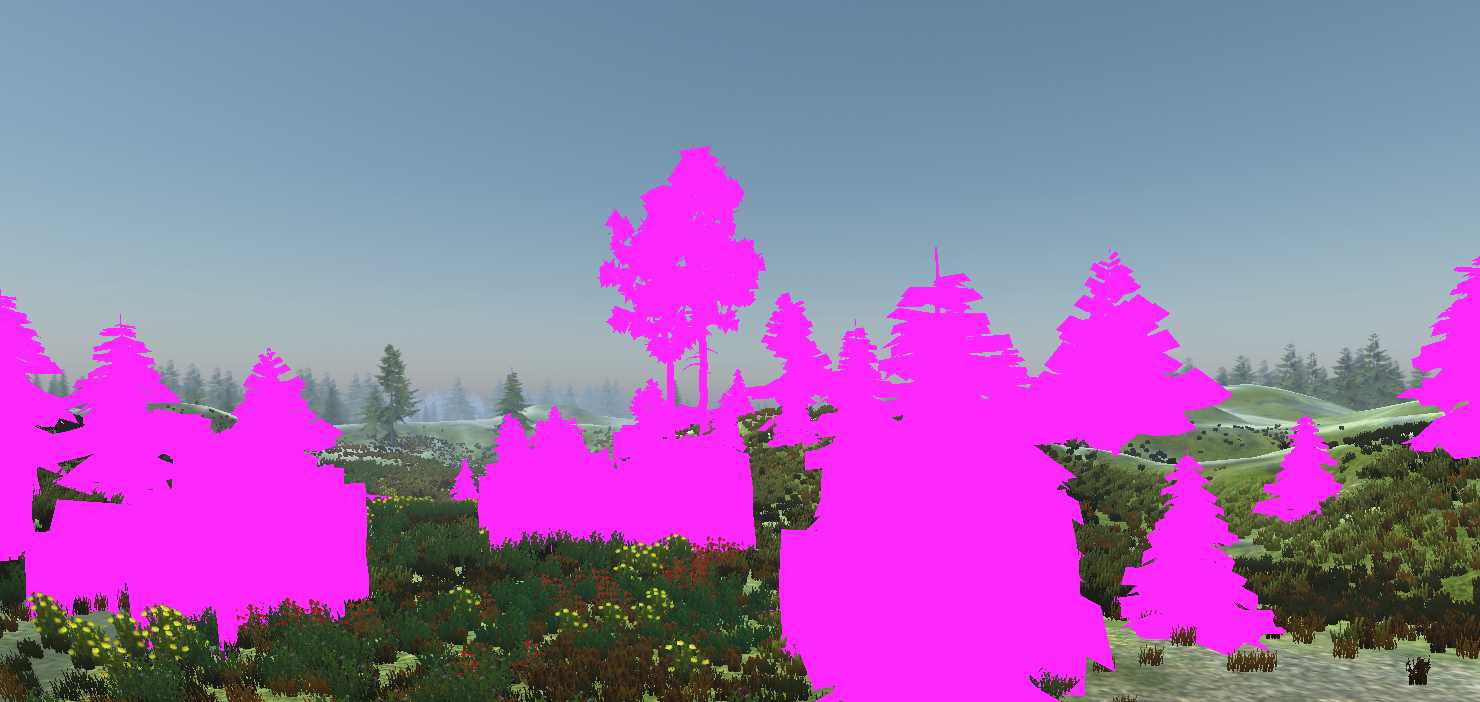
i downloaded a tree assethttps://assetstore.unity.com/packages/3d/vegetation/trees/dream-forest-tree-105297

Elevate your workflow with the Dream Forest Tree asset from IL.ranch. Find this & other Trees options on the Unity Asset Store.
and when i try to check the demo of it
it just turn into all pink

i think its material problem so i go to edit->Render pipeline->Universal Render Pipeline->Upgrade Project Material to UniversalRP Materials
but after upgrade, its still the same
nothing changed
pls help
 low lichen
swift loom
If I do tex2D or tex3D on a repeating texture, is 1 the start of the next loop i...
low lichen
swift loom
If I do tex2D or tex3D on a repeating texture, is 1 the start of the next loop i...
Yes, 1 is the start of the next loop.
meager pelican
warm geyser
pls help
The asset has to be URP compatible.
warm geyser
warm geyser
i think its material problem so i go to edit->Render pipeline->Universal Render ...
.
low lichen
warm geyser
i think its material problem so i go to edit->Render pipeline->Universal Render ...
Not all materials can be automatically upgraded to URP materials. All that tool does is find materials using shaders it recognizes, like the Standard shader, and copies all the properties over to the URP equivalent shader. If the material is using a shader the tool doesn't recognize, it can't do anything.
swift loom
thanks
low lichen
@warm geyser What shader are the materials in this asset using?
 meager pelican
kind juniper
There's one thing I don't completely understand about shaders and google doesn't...
meager pelican
kind juniper
There's one thing I don't completely understand about shaders and google doesn't...
You're talking about Surface shaders. Unity Surface Shaders are "just" syntactic sugar for vert/frag shaders GENERATED by the Surface Shader processor. So when it generates the shader, if it doesn't have a specified Vert() function, it generates a default one.
So in your question, option #1 is the answer.
Shaders MUST generate the transformation to CLIP space out of the vertex stage, to prep for rasterization that happens between the vert and the frag.
low lichen
warm geyser
nature/tree creator leaves
Take a look at this thread
https://forum.unity.com/threads/tree-editor-universal-render-pipeline.1031200/
Unity Forum
Hi guys,
I'm using URP and noticed the trees made with Unity Tree Editor are not working, the material is pink. They require a unique material, for...
warm geyser
ok
warm geyser
low lichen
Take a look at this thread
https://forum.unity.com/threads/tree-editor-universal...
i saw it said change the shader from tree creator leaves to speedtree
and i did

but after all it only fixed water
and the rest still pink
low lichen
warm geyser
and i did
Make sure you use one of the SpeedTree shaders under Universal Render Pipeline/Nature
Nature/SpeedTree is for built-in
warm geyser
oh

i changed, but still pink, i changed the tarrain prefab to Universal Render Pipeline/Terrain/Lit
and it look better
low lichen
Which shader did you choose? There are multiple SpeedTree shaders
warm geyser
speedtree7
low lichen
Try SpeedTree8. I'm not sure why the material inspector is so empty.
Oh nevermind, you have the terrain selected
Are you sure those materials you edited are the ones actually being used in the scene?
 low lichen
The properties are probably slightly different and don't automatically convert correctly, so you might have to change the properties to get it to look right.
warm geyser
owh
kind juniper
meager pelican
You're talking about Surface shaders. Unity Surface Shaders are "just" syntacti...
Yeah, that's what I figured. Thanks for the clarification anyway!
 vernal pewter
Anyone know how I can get the Z coordinate of a tile inside a tilemap shader?
All tiles seem to share the same Z coordinate, even if they are set at different coordinates using Tilemap.SetTile(x, y, z, Tile)
kind juniper
vernal pewter
All tiles seem to share the same Z coordinate, even if they are set at different...
Could be the vertex z position that's changed?
 outer shuttle
Hi guys, i'm trying to compute (in a compute shader) a vertical height texture of my level, but i have no idea of how i could access height information? This is because i am creating an ocean system based on gerstner waves, and i'd like to use the depth of ocean floor to modulate some wave parameters, so i thought my game would just compute a height map of the level at load and then my shader would sample that texture to get the height info. The thing is, my ground is not made from a terrain with heightmap, but just meshes placed by hand. Any idea about how to go about this?
I'd like to avoid to have to set a camera on top and use zbuffer
low lichen
outer shuttle
I'd like to avoid to have to set a camera on top and use zbuffer
I don't see any alternative
vernal pewter
kind juniper
Could be the vertex z position that's changed?
Nope, that's what I thought too
It's the same for all vertices, even if there are tiles with Z != 0
kind juniper
vernal pewter
Nope, that's what I thought too
According to the docs: The tile map stores sprites in a layout marked by a Grid component.
So, it could be that each tile is actually and individual quad.🤔
vernal pewter
It is
Each tile is a quad
I originally thought they used greedy meshing, but they don't
kind juniper
vernal pewter
I originally thought they used greedy meshing, but they don't
judging by the Tile docs, each tile has it's own transform matrix.
Maybe you can get the z position from there:
https://docs.unity3d.com/ScriptReference/Tilemaps.Tile.html
vernal pewter
I wonder how they do that then, since the default sprite shader works for tilemaps. I assumed it would just be in the x/y/z position of the vertex in the vertex shader
kind juniper
vernal pewter
I wonder how they do that then, since the default sprite shader works for tilema...
I think they render each tile separately, maybe batching them..? So your best bet is to check the transformation matrix of that specific tile.
 rustic dagger
swift loom
and if so what's the best way to avoid the loop without clamping it? just do if ...
rustic dagger
swift loom
and if so what's the best way to avoid the loop without clamping it? just do if ...
frac()
swift loom
thanks
 grand jolt
Hey, I am using the ShaderlabsVS extension for Visual Studio to make shaders.
For some reason whenever I am using ShaderlabsVS and press enter to go onto a new line underneath my code it starts my line at the beginning of the line instead of underneath my code.
Is there anyway to fix this? I've been trying to figure out why that is for a while now
rustic dagger
grand jolt
Hey, I am using the ShaderlabsVS extension for Visual Studio to make shaders.
Fo...
ooh! i never knew this existed! i always wrote my shaders like people coded in the 70's, with no highlights or autocomplete.
which version of vs are you using?
grand jolt
I'm using Visual Studio 2019, I also tried switching to Visual Studio 2017 to see if it would fix any issues
rustic dagger
yeah, it doesn't say 19 is supported, although it says it might be
2017 still gave you the same issue?
grand jolt
Yep, same issue sadly
rustic dagger
any other extensions might be in the way?
grand jolt
I don't think so, I made sure to disable every custom extension I had installed to see if it could be that but it doesn't seem to be
I've also tried resetting keybinds to see if it could be anything like that to no avail
rustic dagger
😦
grand jolt

rustic dagger
what about the vscode one? i know it's a different IDE, but it's still VS (kinda)
i mean, the vscode extension in vscode (didn't mean to try bringing it into 2019)
grand jolt
I could try using vscode, does it still have IntelliSense?
I manged to fix it! in the settings of Shaderlab

I just changed these settings to this
 gusty hinge
how can I create a color gradient on a cube? Found ways to do it in blender, but I can't seem to export it to blender
errrr... to unity
vernal pewter
kind juniper
I think they render each tile separately, maybe batching them..? So your best be...
Doesn't seem to work either, all values in the transform matrix seem to be 0
I feel like someone should have had this problem before me...
 main flax
Hello everyone! Can somebody help me, please? I tried to create my first shader and can't understand why it doesn't show me the colour and texture.

I need the result model to look like this.
 meager pelican
outer shuttle
I'd like to avoid to have to set a camera on top and use zbuffer
meager pelican
outer shuttle
I'd like to avoid to have to set a camera on top and use zbuffer
The easiest way is just to use scene depth texture and convert the ocean bottom to World-space, the Y value is the depth relative to some value for the water. (this is just as you draw each frame, for what is on the screen, no master-height-map required)
Buuuut...simple-height may not be what you really want (nor the depth texture) since it's also about eye-depth to that point, and refraction if you want it.
But if you MUST have a height map, you can compute one for the scene in the terrain-mesh shaders as you draw each pixel, since you have that info anyway. Then you don't need a compute pass...that's another idea if you don't like the WS conversion idea above. That would require MRT support though, I think (maybe not, maybe you can update another texture but I'm unsure).
Short of all those ideas, the top-down camera is probably the easiest way, and doesn't need a compute shader (IDK why you'd use a compute shader for this).
 brittle owl
main flax
Hello everyone! Can somebody help me, please? I tried to create my first shader ...
brittle owl
main flax
Hello everyone! Can somebody help me, please? I tried to create my first shader ...
does it work correctly in the game view?
main flax
brittle owl
does it work correctly in the game view?
No, in the game and in the scene it's just white

 brittle owl
so, what kind of model is this being applied to? and correct me if i’m wrong but the effect is just a fade to full transparency from bottom to top right?
main flax
brittle owl
so, what kind of model is this being applied to? and correct me if i’m wrong but...
Right. And the obgect is a truncated inverted pyramid
brittle owl
i see, i think there’s a better way to achieve the effect
use the y position of the object (in object space) to lerp between 0-1 and then plug that into the alpha, and then set the color to whatever you want the color to be
main flax
And the colour should also glow, like hologram.
main flax
brittle owl
use the y position of the object (in object space) to lerp between 0-1 and then ...
Can you please show me how to do that? I never worked with Unity before, I need it to just create some materials.
Or just tell me which nodes I need
brittle owl
oh i’m not at my computer but i can try to take you through it
use the position node and set it to object space, put the output into the split node and i think you take the g value and plug it into a lerp node’s time input. then make sure the lerp is going from 1-0 (or 0-1 if it’s reversed), plug the output into your alpha, and then to make it glow, take out all inputs to the emission, change the color to that blue you wanted, and in the same color menu at the bottom there should be a slider for intensity, just raise it until it looks right
main flax
It's much better, but I can't reverse the lerp.

Whatever combination of ones and zeros I use in lerp and inverse lerp I can't get the visible lower half and invisible upper half
main flax
brittle owl
oh i’m not at my computer but i can try to take you through it
use the positio...
The graph shader now looks like this
 brittle owl
main flax
The graph shader now looks like this
brittle owl
main flax
The graph shader now looks like this
a few things wrong, the position node is not set to object space, you might need to flip the 0 and 1 in the lerp node if it’s going in the wrong direction, and what’s the point of the fresnel and texture you’re putting in? also the emission should just be done like how i was saying if you’re trying to achieve a glow
main flax
brittle owl
a few things wrong, the position node is not set to object space, you might need...
Ok... Then let's start from the beginning, if you don't mind. What is object space then?
brittle owl
position in terms of the object. for the g (which is the y value) it will be from 0-1 going from bottom to top
main flax
Ah, no, wait, I understood.
 main flax
brittle owl
position in terms of the object. for the g (which is the y value) it will be fro...
main flax
brittle owl
position in terms of the object. for the g (which is the y value) it will be fro...
But I still can't get what I need from the lerp.


 main flax
brittle owl
a few things wrong, the position node is not set to object space, you might need...
main flax
brittle owl
a few things wrong, the position node is not set to object space, you might need...
And I didn't really understand what you told about glow: "...and then to make it glow, take out all inputs to the emission"
brittle owl
okay im back on my pc, ill try to show you what i mean
main flax
Ok, I'll try my best to understand!
brittle owl
main flax
Ok, I'll try my best to understand!
heres what i came up with

applied to a capsule

i added the multiply and add parameters so you can shift around the effect if it isn't in the right spot
and here's what you have to do to get a nice glow
hope that helps
main flax
Thank you!
I'll try to do it right now
How to add the multiply and add parameters?
Ok, I understood about parameters. I think now I made the same thing as yours
But it still doesn't really work with my object. It doesn't glow.

 main flax
brittle owl
heres what i came up with
main flax
brittle owl
heres what i came up with
But I think I get most of what I wanted, so thank you very much!!!!!
brittle owl
main flax
But I think I get most of what I wanted, so thank you very much!!!!!
oops sorry i was busy, maybe its not glowing cause its too transparent at the bottom?
main flax
I really don't know.
Maybe, but transparency doesn't have... levels of something, right?
meager pelican
What do you mean by "glow"?
Light emission? (Lights other objects in the scene)
or
Bloom post process? (a blur for certain brightness levels of pixels)
P.S.
I'm not sure how this all translates to URP, it is written for built-in, but many if not most ideas here should apply:
https://blog.terresquall.com/2020/01/getting-your-emission-maps-to-work-in-unity/
(You probably don't need an emission map, just a color for your object).
Also note that I've seen debate online about emission/glow/bloom issues not working on some mobile, but it may be do to the complicated needs of the setup.
 main flax
Thank you)
And I think it's closer to bloom.
 hardy aurora
i don´t know if my question classifies as a shaders one but
i have to make an object that changes colour depending on the light that hits it
and i have absolutely no idea how to do that
are there any tutorials that anybody could recommend
or something that i could reasearch?, i am not being really lucky finding exactly what i´m looking for
meager pelican
That sounds like a shader question.
But what exactly do you mean by "changes color depending on the light that hits it"?
What's the RGB color-math?
FYI - Light color already gets multiplied by albedo color automatically. So a red-only light will only show the red parts of any object's color.
@hardy aurora
hardy aurora
basically what i got asked to do is, like an object that when in contact with direct light will display a different colour, at least on the area it is being hit
instead of simply looking brighter on the area the light is hitting it, it´s lighter colour will just be a different one
something like that
however i am rather new to shaders and can´t seem to find a tutorial or course that goes into this specifically
meager pelican
Did you try just changing the light's color? (I'm still unsure of what it would look like from your description)
Is the light a different color? Or is it by light-number? Is it a flashlight type of thing? Or some lantern?
hardy aurora
no it isn´t a flashlight thing, it´s basically an object that instead of reacting to light by darkening the areas where it has a shadow
the shadow is just a different colour to the one the object normally is
hardy aurora
meager pelican
Did you try just changing the light's color? (I'm still unsure of what it would...
ah yeah, it is hard to describe
and complicated i guess
the world is supposed to have a normal light and interactiopns with it, while this object has a different one
if it is too complicated i´ll just make this object gradually change colours as time goes on
meager pelican
- It's definitely a shader question. Unique lighting.
- Anything is possible, but not everything is easy to explain nor necessarily do.
You could use an unlit shader, and "just" calculate lighting manually for your no-light-intensity shaded object.
The lit shaders will mess with the lighting.
hardy aurora
mmmmm, a lerp node could help with this
hardy aurora
was thinking of using universal render pipeline system and an unlit shader graph
though if your option is simpler i´ll definately take it
meager pelican
That's basically "my option" too.
But you'll have to loop through the lights manually, and do different calcs than normally done. Since you don't want intensity. There's resources on that.
Cyan wrote some, one second.

GitHub
Some custom lighting functions/sub-graphs for Shader Graph, Universal Render Pipeline - GitHub - Cyanilux/URP_ShaderGraphCustomLighting: Some custom lighting functions/sub-graphs for Shader Graph, ...
hardy aurora
thank you!
this helps a lot
again sorry for not getting it inmediately, i´m new to shaders and just trying to learn
meager pelican
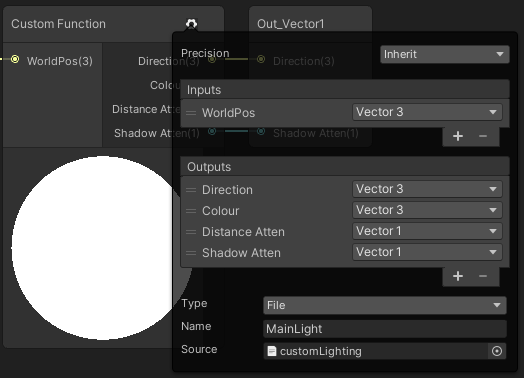
Hey! Wrote this up as an answer to someone on the Unity Discord. I had plans to extend this, but probably wont get around to it as I’ve moved to a new site. But it still possibly provides a b…
No apology necessary. And it sounds like you're on the right track, thought-wise. 🙂 Now you'll have to dig in, experiment, and get back to us with specifics.
hardy aurora
yrah, thank you!ç
gusty hinge
following the unity tutorial to create a water shader graph, but there is no PBR shader. Found posts saying to use 'new blank graph', change active target to 'universal', and make sure material is set to 'lit'. Still, not sure how to complete the tutorial since the PBR Master node isn't an option I can add
hardy aurora
gusty hinge
following the unity tutorial to create a water shader graph, but there is no PBR...
hey, you can do this using the universal pipeline system
unlit shader graph
gusty hinge
sorry, forgot to post... I figured it out
hardy aurora
ah, it´s ok, sorry
 west eagle
fog
swift loom
Any idea why this is happening?
Shader error in 'Sprites/TileTestShader': Program 'frag', error X8000: Validation Error: source component 3 in temp r2 not initialized. Opcode #76 (count is 1-based) (on d3d11)
Pastebin
Pastebin.com is the number one paste tool since 2002. Pastebin is a website where you can store text online for a set period of time.
It's when I do objZ = floor((i.worldPos.z *100) /18); at the bottom and use it in the for loop
I'm trying to nab the object world Z value and use it to check a texture
i... think i fixed it. i think i was just returning an unassigned color value.
 rare ore
Hi
I am trying to set environment reflection for a material through script at runtime
I am able to change the metallic and smoothness by setting the float between a range of 0 to 1
But when setting a float value of 1 to environment reflection, the effect is not reflecting during runtime
The material I am trying to change has a environment reflection set to false, I want to set it to true. Through script.
Can someone please help me with this?
 dusk cobalt
Iam looking for URP Shader for Selection circle. Mainly to select Star in Galaxy map
 twilit elbow
Does anybody know if "official unity decals for URP" are a thing already? i saw that there seems to be a unity Decal Renderer Feature for URP 12.0.0 but I only have URP 11.0.0 for Unity 2021.1.20f1, is URP 12 not out yet?
I downloaded another URP Decal System but i don't like it since it completely ignores shadows and makes everything look weird so i was hoping unity would offer something more advanced
low lichen
rare ore
Can someone please help me with this?
You have to enable the corresponding keyword. What the keyword is depends on the material. For the Standard shader, it's _GLOSSYREFLECTIONS_OFF, so you'd want to do Material.DisableKeyword("_GLOSSYREFLECTIONS_OFF") to enable reflections.
 tall girder
hi @low lichen , remember the grayscale blur? I seem to have really bad performance in vr. Could it be the shader or did I enable wrong settings somehow? (using empty scene with only the post process and an xr rig)
disabling all post process effects give a lot of performance back, but still not even 90fps
 ornate skiff
is it possible to get the final position (in c#) of a vertex after it has been displaced by a shader? i.e. so i can displace a mesh and then place another object on it's new position
when i check the vertex positions in unity it still returns the non-displaced positions (even though the object is moved) so i'm guessing it's not possible?
 mental bone

Tudor's blog
Bake to rendertextures & write to structured buffers.
vernal pewter
Anyone know how to disable frustum culling for sprites? I'm modifying their vertex position and they are being culled :(
low lichen
tall girder
hi <@!153952447516114944> , remember the grayscale blur? I seem to have really b...
Are you using Single Pass Instanced? Or Multi Pass?
tall girder
low lichen
Are you using Single Pass Instanced? Or Multi Pass?
multi because single wouldnt render the right eye
low lichen
tall girder
multi because single wouldnt render the right eye
Even with post processing disabled?
tall girder
low lichen
Even with post processing disabled?
i haven't tried that yet, will do that tomorrow, no time now. Will ping you

 hardy basin
Hey!
So I installed URP and I am trying to access my 2D Lights in a script but for some reason I get this error

oops picture for ants
Type or namespace Universal does not exist in the namespace UnityEngine.Experimental.Rendering
It should be working but for some reason I'm guessing the project is missing references to that namespace

No Universal namespace for some reason
I was wondering if anyone has any pointers on how to add the namespace (maybe they changed where it is located?)
 whole citrus
Can you post your code? No matter how simple
Can you double check the version of URP you have?
The documentation link goes to 7.0, 11 is the last
hardy basin
Sure thing
using System.Collections;
using System.Collections.Generic;
using UnityEngine;
using UnityEngine.Experimental.Rendering.Universal;

public class LightController : MonoBehaviour
{
    // Start is called before the first frame update
    void Start()
    {
        Light2D hinge = gameObject.GetComponent(typeof(Light2D)) as Light2D;

        Debug.Log("test");

        if (hinge != null)
            hinge.useSpring = false;
    }

    // Update is called once per frame
    void Update()
    {

    }
}

8.3.1
Looked up the documentation for my installed version
And it still points me to UnityEngine.Experimental.Rendering.Universal for the Light2D class
 prisma fox
Quick question on vector * scalar operation in hlsl --
Are the two below statements equivalent?
Assume arbitrary values in a defined float3 variable, "val"
(1) val *= 0.5;
(2) val *= float3(0.5, 0.5, 0.5);
meager pelican
Yes. (1) is a component-wise multiply because val is a float3.
prisma fox
Gotcha, thanks mate
brittle owl
from what i found online, a gstack texture is just a texture that holds:
AO in Red
Roughness in Green
and Specular in Blue
idk if there’s anything in the A channel?
if you’re using shader graph, split the texture into its individual color components and feed them in to the correct master node inputs
brittle owl
 fleet rampart
this one
fleet rampart
this one
oops forgot to reply
teal breach
Is there a convenient way to tell a Shader Graph shader that only one keyword variant will ever be used?
teal breach
teal breach
Is there a convenient way to tell a Shader Graph shader that only one keyword va...
it sounds like an odd case, so I'll elaborate more - it's a surface shader, using a built-in keyword that I only ever want to be enabled
meager pelican
If it's a custom shader you "own"...and you always want the keyword enabled, just remove it. Customize it. That's you programming.
swift loom
Can I not use a MaterialPropertyBlock on a shared material? I try to send a Texture2DArray to the shader and access it via another object but it seems to only work on the first object. Applying the property block to the second object as well seems to do all sorts of things like overwriting the MainTex even tho it doesn't even apply one.
 steady lintel
How do you apply a toon shader to an entire scene? I've tried looking online but nothing so far has helped
mental bone
Change all the materials to use the toon shader ?
grand jolt
Anyone down to help me with a theoretical question that's likely shader related?
Does anyone have any idea how the Animal Crossing achieved sprite sheet eyes that also normal map the face around them?

Typically the technique for doing 2D facial expressions on a 3D model is to duplicate a portion of the meshes face geo, overlap it, and then use that for the eyes/brows with texturing
But I don't really know how they managed to get the normals of the face to dynamically adapt to the 2d face expressions

Enjoy, a like and a subscribe would be extremely appreciated. 👋😀💕
#ACNHWinterUpdate #AnimalCrossing
Here's a good example as well
I'm fairly certain the eyes are just one spritesheet, but you can see (at my timestamp) the eyelids are raised, while the eyes themselves are inset on the face mesh
There's definitely no way they are swapping out the entire texture of the face just for the eye expressions either, that would be insanely inefficient
Perhaps I am just overthinking this
fleet rampart
brittle owl
from what i found online, a gstack texture is just a texture that holds:
AO in ...
Thank youu
mental bone
grand jolt
There's definitely no way they are swapping out the entire texture of the face j...
Perhaps they just have a normal texture atlased for all the eyes and use that
grand jolt
mental bone
Perhaps they just have a normal texture atlased for all the eyes and use that
I tried this, it doesn't give the same look unfortunately

It looks like the actual base texture of the head reacts to the normals of the eyes and mouth
If you just do normal mapping on the eyes/mouth without the head also having it, it looks really off
Okay I made something real quick
 mental bone
So add the normals to the head as well. We are not talking about 8k textures per char. The other solution might be blend shapes
grand jolt
mental bone
So add the normals to the head as well. We are not talking about 8k textures per...
How do you even line that up though? Because the UVs for the eyes and the head are completely different
Since in the game, the sprites of the eyes/mouth are constantly changing
mental bone
Like a sprite sheet? You get a frame id for the type of eyes and you know where to sample each map for that id
 vocal narwhal
Some decal shaders have separate opacity for normals
like, HDRP has an option to use the blue channel from the mask map for the normal map opacity
mental bone
The number of frames has to be the same Im not sure why you would need to line them up
grand jolt
That's not what I mean
hold up
I mean the UVs of the eyes and the head are going to be completely different, and I don't think it makes sense to constantly swap the normal map of the head with the eyes and mouth because that's an absurd amount of combinations

This thing I made real quick

The eyes are their own map like this

and the head would be whatever

And this is just the texture I used for the eye
So that would somehow have to be translated to the head normal map for every single expression and mouth movement
Which doesn't make sense to me
Unless there's some clever way Nintendo unwrapped their meshes and I am kind of lost on how they did this
Do you get what I mean though?
The pics I posted above are a standard technique they've used in the past
they used the same technique for Twilight Princess
but the eyes in that game weren't normal mapped like in ACNH so it's a lot easier to pull off
mental bone
What I dont get is if the eyes are on a seperat mesh why do you need to change the normals on the head?
grand jolt
To get the inset that you see in the game
mental bone
Expressions are gonna be happening on the eye mesh
grand jolt
If you dont do it on the head as well it looks really weird

Again, I could be completely wrong
I've got 2am brain
mental bone
The mesh you showed will cover that whole area its normal will make the eyes look like that
grand jolt
Yes it would but the eye sprite has transparency so that the texture of the head can be seen
I have an idea on how I might do it
but I don't think it's correct
Maybe I will experiment tomorrow
¯_(ツ)_/¯
grand jolt
vocal narwhal
Some decal shaders have separate opacity for normals
Do you think the eyes are decals?
I don't know if that's a dumb question or not
Because in my mind, if they were, it would totally work
vocal narwhal
It's likely what you're doing, but the point is finding a shader with a separate alpha for the normal map
grand jolt
Can't decals in HDRP affect the normals of whatever its projecting on?
vocal narwhal
Yes
vocal narwhal
There is, but their shader is not built with separate normal map alpha afaik
vocal narwhal
grand jolt
Wait what
is this brand new
I remember people saying for the longest time only HDRP had decals built in
vocal narwhal
2021-01-11
grand jolt
Is that stable?
vocal narwhal
It doesn't say preview, so yes
vocal narwhal
It may require a beta/alpha Unity though, no idea. I don't keep up with the details
Yeah it's certainly not gonna be that old 😛
grand jolt
Well shit, I might try that out
Im sure there's a lot of changes from 2019 to 2021
Now in your opinion, does it make sense to handle eyes/mouth 2d sprites for character with decals?
I'm not sure if there's any downsides or anything
vocal narwhal
I don't really think there's a reason to. As far as I know decals benefit from projecting across different surfaces and ease of authoring
You've got a fixed location, you just need to find/create a shader that has separate opacity for the normals
grand jolt
I'll probably continue this tomorrow night, getting sleepy
 white cypress
the eyes are definitely not decals, there are model rips out there that don't require them
grand jolt
white cypress
the eyes are definitely not decals, there are model rips out there that don't re...
Wait seriously?
And they look the same ripped?
I mean I could try reverse engineering that
white cypress
grand jolt
Nintendo Switch - Animal Crossing: New Horizons - Cats - The #1 source for video game models on the internet!
i got this one
it has Raymond too
white cypress
regardless, its likely just texture swapping. its not a hard thing to do even with normal maps
grand jolt
Oh my god
It literally is just that


Yea I guess I didn't expect it to be that literal
I didn't realize they were swapping out the normal map, albedo, specular, etc. for every single expression
I thought they eyes and mouth would be separated
well thank you
mental bone
grand jolt
well thank you
Told ya
grand jolt
Can I make this affect the mesh collider as well?
 kind juniper
grand jolt
Can I make this affect the mesh collider as well?
kind juniper
grand jolt
Can I make this affect the mesh collider as well?
No can do. The displacement is not applied to the mesh. It's applied to each vertex during rendering on the GPU side.
 supple leaf
hey, im looking for a simple plane mesh outline shader. basically i just take the mesh. copy it 4 times and offset to make it look like outlines. i already did that with the raw mesh, but i have no idea how to translate this to a shader in hlsl.
teal breach
meager pelican
If it's a custom shader you "own"...and you always want the keyword enabled, jus...
The problem is this approach does not work when using e.g. SG lit shaders, such that the keywords are used in Unity's internal functions. For example, I need to ensure that _SPECULARHIGHLIGHTS_OFF is always enabled - it's used in Unity's internal lighting calcs. I tried hacking in a define using custom script nodes, but couldn't get it to work. The only way to have it work in this case is to define the keyword on the blackboard and then have it always enabled in all my materials (which feels clunky).
 cerulean dune
Hey !
I'm using shaders on a cube to color it. In the scene, there can be gameObjects that use the Sprite-Lit shader to render an assigned texture.
When I do that, there's 2 choice ; The cube render in front of the Sprite-Lit, or the Sprite-Lit render in front of the cube.
I'd like to take the 3D position in count for this case, which means using a Lit shader instead of a Sprite-Lit one.
How can I put a texture on an material using a Lit shader (as for the Sprite-Lit one) without having it to affect every other object that have this material ?
Basically I'd like a prefab that got the material to get a selected texture to be attached to it and have another prefab that would have the same material but a different texture, but I can't find a way to do it

 misty yew
Does the ShadowCaster pass in URP simple lit shader run if shadows are disabled in the Render pipeline asset?
Could I say, remove that pass and get more performance?
low lichen
That pass won't be used. The most you'd get by removing it is smaller build size and shorter build time, if it's not already getting stripped.
And the difference would be very small for one ShadowCaster pass
 distant scarab
My shared graph is not working in some android devices i am not sure what went wrong. any idea?
 civic fern
prolly not without more infoi
misty yew
low lichen
That pass won't be used. The most you'd get by removing it is smaller build size...
What about removing DepthOnly and Universal2D pass as well from the shader?
low lichen
misty yew
What about removing DepthOnly and Universal2D pass as well from the shader?
Removing these will not affect performance. If they're not being used, they're not being used.
misty yew
I see
civic fern
i was following a tutorial that gives me a glowing shader, and it works with one issue: my (usually transparent on the sprite) background, is opaque, yellow, and has a weird shape, help?

the sprite has no background and it was there upon importing, before i added emission
im assuming there's like a cull transparent mesh tickbox somewhere im missing

it looks like this on the first bit of the shader so thats where the problem is
cerulean dune
Well with URP Sprite Lit shader, it's used to render the sprite attached to the game object
But since this sprite is from a 2D/UI texture, it's rendered different (3d space isn't considered)
So I'd like the same behaviour but for a 3d space. Otherwise the project would get messy :s
 wary horizon
Im looking to change the colour property on my VFX graph. forums say i need to use SetVector4, But its asking for an ID?
How do i get an ID of a colour property?
 low lichen
@wary horizon Shader.PropertyToID
low lichen
I usually define it in a one liner like this:
private static readonly int PropertyNameID = Shader.PropertyToID("_SomeProperty");
VFX Graph uses shaders too, compute shaders
wary horizon
there is no reference name, so im a little stumped

 wary horizon
I'll give it a go. i swear there was a box above ToolTip that was ReferenceName or something
last time i used vfx graph
oh it takes a string aswell
low lichen
The id is more efficient. The string version just calls Shader.PropertyToID every time when you can do it just once.
wary horizon
oh ok cool, I'll use the ID then
i guess its similar to hashmap for animation
hash something. canny remember
wary horizon
@low lichen Do you know how to achieve intensity of this?
effectProperties.SetVector4(bloodColorID, new Vector4(191, 16, 0, 255));
would i just times the V4 by some value?
low lichen
wary horizon
would i just times the V4 by some value?
Sure. It looks like you're assuming the color is 0-255, but it's 0-1, just like in the inspector.
So it already should be super intense with numbers that high above 1
wary horizon
the inspector shows me 255
low lichen
 wary horizon
 low lichen
That's just because you have 0-255 mode selected in the color picker
wary horizon
Ah
Time to test
i guess theres a ref name somewhere

But unity would not like to give me it
 hushed vigil
It's spelled Color in the earlier screenshot but Colour in that
meager pelican
Well, you could take a wild shot and put an underscore ("_") before the name...as in "_BloodColor"
Total SWAG though.
Otherwise, output the value of BloodColor as the color, for debugging purposes (IDK what your VFX graph looks like, maybe that's what you're already doing)
wary horizon
Hello, I have this blood shader, But its not getting rid of the black property, Does anyone know why?

There are still alot of black peices

 tacit mist
Yo, Anyone here?>
Anyone know how to fix this?

I have a bunch of instanced troops, but ion certain camera configurations, it culls the closest units
You can still see their shadows
 karmic hatch
i'm using HDRP's specular (specular color) material in a shader graph, and i think this is just a feature of that material type but as i go to very low view angles, my object looks grey, is there any way to avoid that?
(I'm making Jupiter, here's what it looks like normally:)

and now grey:
 tacit mist
it's prabably because your specular color is white
also it's rough, if you smooth it, it'll look more colorful
karmic hatch
it's dark blue and even if i turn it black it still does htis
if i make it smooth i get a giant specular highlight and it looks like polished wood rather than a planet :(
tacit mist
Yeah, you should probably write your own shader
karmic hatch
yeah i'm using shader graph
if i set the smoothness to > 1 it doesn't show the highlight so ig i have to do that and then fix it from there
:|
cosmic prairie
tacit mist
You can still see their shadows
shader graph?
tacit mist
@cosmic prairie nope
 tardy tundra
I have several effect shaders, and I have a mesh with simple shader with the mesh textures. Is there any way to add or mix the effect shaders like a layer of shaders and re-asing by code, without having to reassign the mesh textures just change the effect?
 wary helm
didnt know which channel to put this in,
ive upgraded to hdrp, and im trying to make a particle material for my line renderer but its always magenta no matter what settings i apply?
white cypress
wary helm
ive upgraded to hdrp, and im trying to make a particle material for my line rend...
That means the shader is invalid. Did you upgrade the materials to hdrp?
wary horizon
Don't tell me im doing a branch wrong?

The colours its showing when i flip the bool is either white or black

Very much white
 white cypress
wary helm
but all the particle ones didnt
white cypress
wary helm
but all the particle ones didnt
You may have to make a new particle material, or use one of the defaults
wary helm
white cypress
You may have to make a new particle material, or use one of the defaults
what defaults?
 lunar grove
is there any way i can add the unity's billboard effect that is applied to a material for particle system ?
i heard i can apply a billboard shader on that material
i don't know how to do that on a surface shader present on the particle material
cosmic prairie
tacit mist
<@!197764673137803264> nope
you need a custom shadow pass with discard/clip in it
 tawdry saffron
Hey all, I've been putting together a 2d lit shader for a sprite and it appears the sprite is always black. If I turn off lighting, I do get to see the actual colours of the sprite. I have the light source to a very high intensity and tried moving the light source around to see if it wasn't a normal issue. Not sure what's going on?


(with lighting turned off)
 civic fern
doesnt matter if its at high intensity, is it within the outer radius?
im using custom shaders on 2d sprites and ive run into unity's quirk where you need extra space around the sprite in its sheet if you're going to properly render shaders that increase the size of a sprite, ie, an outline will only render if you have ample space around the sprite
is there a way to do that automatically? like a script or a setting or something that adds a border around a sprite so shaders like that can be used without a manual edit
tawdry saffron
civic fern
doesnt matter if its at high intensity, is it within the outer radius?
Yeah, it's within the radius
Not sure about your question though. I know there's texture padding (which adds extra pixels around the edges of the sprite as it gets bundled into a texture), but I'm not sure if Unity has something like that (I wouldn't be surprised if it did)
Ahh, turns out I needed a 2D Sprite light. Interesting
 gloomy tendon
Hi in deferred mode I have a grid (alpha plane) which I want to hide in some areas. Can I draw invisible geometry to the z buffer between main and alpha passes to block that area?
tardy tundra
I have several effect shaders, and I have a mesh with simple shader with the mesh textures. Is there any way to add or mix the effect shaders like a layer of shaders and re-asing by code, without having to reassign the mesh textures just change the effect?
 languid zodiac
Hi, if i want to my shader has custom look in the inspector do i need to write a script for this? For example i have an enum and i want to have different properties that depends from chosen enum.
wary horizon
Hello, Why can i not visualize this AABB box?

In the documentation, the colliding box is visible...
 kind juniper
wary horizon
Hello, Why can i not visualize this AABB box?
kind juniper
wary horizon
Hello, Why can i not visualize this AABB box?
I'd assume that they render it via gizmos in a script.🤔
Maybe not.
wary horizon
the boxes i have are the bounds

just annoying. I'd like to visualize whats happening
white cypress
wary helm
what defaults?
If you click the little circle next to the asset picker it should show you a default particle material. Either that or switch the shader to a particle one
 clever plover
For some reason, Shader Graph Inspector doesn't show up for me. I am using Unity 2019.2.27
Is it hidden? Or does my version not have it yet?
 shadow iron
How do I fix this to also apply the _Tint color?
_Tint("Tint Color", Color) = (.5, .5, .5, .5)
SetTexture[_FrontTex2] { constantColor(0,0,0,[_Blend]) combine texture lerp(constant) previous }
I found this online to blend 2 skyboxes and it works. I just want to be able to change the skybox color.
meager pelican
wary horizon
the boxes i have are the bounds
The AABB IS the bounds. Axis Aligned Bounding Box...AABB. 😉
wary horizon
Yea no. thats not the collision box
my collision box is scaled 50x0.1x50
the bounds is a complete box. it is not the same
 grand burrow
Not sure if a unity bug, or if i'm doing something wrong here.
I'm trying to assign a sprite to this material, but for some reason its all grayed out. The weird thing is that if I change the shader, I can assign the sprite there. Switching back to the sprite shader after that will cause it to function correctly in game, while not displaying the sprite in the inspector still. I can technically use that as a work around, but would love to double check if there is a better/less bootleg way of doing this. Version 2021.1.4f1
 white cypress
grand burrow
Not sure if a unity bug, or if i'm doing something wrong here.
I'm trying to ass...
white cypress
grand burrow
Not sure if a unity bug, or if i'm doing something wrong here.
I'm trying to ass...
why are you assigning the sprite in the material instead of the sprite renderer
grand burrow
I'm trying to use this for a particle system, specifically getting them to draw on a specific sprite sorting layer
Which, works when i do it this way, the inspector just seems to be unhappy and I'm wondering if the thing I was following online was incorrect
white cypress
grand burrow
Which, works when i do it this way, the inspector just seems to be unhappy and I...
I suspect its because the material itself assumes you have a sprite renderer and attempts to read the texture from it. you may have to make a copy of it and modify it to not do that
grand burrow
I'll look into it, thanks!
 wary linden
(HDRP) Anyone have any idea why phong smoothing isn't being applied to my tesselated mesh? Even with shape factor at 1.0 no displacement is applied.

Works as expected when using a heightmap, but I can't use them for some of my assets
 merry rose
wary linden
(HDRP) Anyone have any idea why phong smoothing isn't being applied to my tessel...
merry rose
wary linden
(HDRP) Anyone have any idea why phong smoothing isn't being applied to my tessel...
It looks like the mesh has sharp edges, which will in rendering actually separate them so there is no way of doing phong on those edges, try smoothing out the model and try using the phong again
wary linden
@merry rose I see that it works on a sphere primitive, is there a max angle?
Even when I import a mesh with a less sharp angle compared to the sphere primitive it doesn't get displaced

sphere primitive
 merry rose
It needs to be smoothed mesh it doesn't matter what angle it will be
wary linden
This whole time I thought smooth shading was just something on the render side, not the actual mesh data. Thank you! @merry rose

 stray trail
Hello does anyone know how I can sample the destination render target? I am blitting a src texture to a dst texture and I need to read the dst alphas / if theres a way to do custom blending that would help too 🙂
wary helm
white cypress
If you click the little circle next to the asset picker it should show you a def...
thanks
tacit mist
Does anyonw know how to work Instancing in ShaderGraph
 shell ice
Looking for some guidance on this

Walk 散歩 - Freaky Japanese Horror Game Where a Terrifying Shadow Monster Stalks a Girl Through a City
Read More & Play The Beta Demo, Free: https://www.alphabetagamer.com/walk-beta-demo/
I want to mimic the environmental shader this game is using, like the dithering pattern in the sky and all
Ive got the dithering down, but in the video, parts of the dithering also seem to kind of look like its glitching out, kind of like an old crt monitor
anyone got a clue how I can mimic this?
And 1 other thing, the enemy seems to be rendered differently from the player, I feel like it has something to do with vertex positions but im not entirely sure
shadow iron
_Tint("Tint Color", Color) = (.5, .5, .5, .5)
SetTexture[_FrontTex2] { constantColor(0,0,0,[_Blend]) combine texture lerp(constant) previous }
How do I add the _Tint to the constantColor?
 tacit parcel
shell ice
Looking for some guidance on this
tacit parcel
shell ice
Looking for some guidance on this
I really doubt the game use fancy environmental shader for the background since the background looks like static images
shell ice
yeah but theres a certain post processing effect that takes place to make the dithering kinda bug out
@tacit parcel

to be more specific, if you focus on the patterns in here the video you can see it kind of flicker
tacit parcel
I'm not sure but the flicker might be due to video compression.
shell ice
Nah its def intended, saw the same effect in the game
the flickering is to emulate the imperfections of an old tv im assuming
makes it look more authentic at the least
cerulean dune
Why do my Lit (transparent) material appears in front of my transparent shader, even if its render queue is at max ?
PS : It's a line renderer

Do I have to add some things in the shader graph so it would renders well ?
tardy tundra
I have several effect shaders, and I have a mesh with simple shader with the mesh textures. Is there any way to add or mix the effect shaders like a layer of shaders and re-asing by code, without having to reassign the mesh textures just change the effect???
meager pelican
wary horizon
Yea no. thats not the collision box
Colliders aren't bounding boxes. FYI - The mesh has a local bounding box, separate from the collider. The renderer also has one in world-space. It us used for gross-level object clipping on the CPU side. If it doesn't intersect the view frustum, Unity can ignore the object when sending meshes to the GPU.
Colliders are for physics calcs.
See https://docs.unity3d.com/ScriptReference/Renderer-bounds.html
 mental bone
What range is object space position in ?
 patent plinth
shell ice
https://www.youtube.com/watch?v=YSQB-4WPvoc&t=243s
patent plinth
shell ice
https://www.youtube.com/watch?v=YSQB-4WPvoc&t=243s
I think it's just a pixel shader with extra layer of noise on top of it
shell ice
It kinda of looks like parts of the original dithering had bits of it flickering
Im just not sure how I can make it so that some bits of the dithering would randonly flicker
 solar needle
hello, i'm pretty new to compute shader, and i have an error that i don't know how to fix, its
"ComputeLifeGame.compute: Kernel at index (0) is invalid
UnityEngine.StackTraceUtility:ExtractStackTrace ()
LifeGame/<Execute>d__11:MoveNext () (at Assets/LifeGame.cs:105)
UnityEngine.SetupCoroutine:InvokeMoveNext (System.Collections.IEnumerator,intptr)"
my c# code

here is the compute shader

the error is when i dispatch, but i don't know what i am doing wrong
 glacial river
I'm not sure if this would come into shaders but Unity keeps loading the wrong objects. I think Unity is thinking the objects are behind the object so it doesn't render them? How do I fix this??
 patent plinth
wdym wrong objects?
glacial river
In the very back there should be trees but it's not rendering them
patent plinth
it's your camera distance
patent plinth
glacial river
In the very back there should be trees but it's not rendering them

crank that bad boy number up
glacial river
Ah that did it, thanks
prisma fox
In URP, is there a way to get the Scriptable Renderer Data that is associated to the Scriptable Renderer on a given camera?
The below gives me the Scriptable Renderer, but not sure how to get the Scriptable Renderer Data from there..?
Camera.main.GetComponent<UniversalAdditionalCameraData>().scriptableRenderer;
patent plinth
prisma fox
In URP, is there a way to get the Scriptable Renderer Data that is associated to...
also you can jsut do this instead var cameraData = camera.GetUniversalAdditionalCameraData();
Just see the scriptableRenderer section there
meager pelican
solar needle
the error is when i dispatch, but i don't know what i am doing wrong
Did you get any compile errors in the compute shader?
Did you remember to include a #pragma kernel CSMain directive?
Did that commented-out debug line show a result for the FindKernel call? I assume it gave you an index of 0, but....just checking.
solar needle
Yeah, i have fixed the problem, i am pretty new to compute shader so i'm doing stupid mistake
Bad variables names, etc etc
 sonic bear
in shadergraph how would i get the skybox? like i have this overlay plane that i want to instead of grey be the skybox
 sonic bear
or rather just
sample the same cubemap so that it is in line with the skybox?
becuase whenever i try to use
sample cubemap with world veiw and world normal
it just doesn't work
 sharp cloak
"float3 worldNormal - contains world normal vector if surface shader does not write to o.Normal."
If I write to o.Normal, how to replace/use worldNormal from Input?
Is this the answer? Then, how do I do this?
"float3 worldNormal; INTERNAL_DATA - contains world normal vector if surface shader writes to o.Normal. To get the normal vector based on per-pixel normal map, use WorldNormalVector (IN, o.Normal)."
 junior crow
I have a pixel art sprite I want to render as a 3d plane that receives and casts shadows. I know there's a method to allow sprite renderers to cast shadows, but is there a better approach? I think I'm going to need the 2d sprite to have a physical mesh at some point.
sonic bear
@junior crow you can just use a plane, and then turn alpha cliping on
sharp cloak
I applied a normal map, how do I add a height map?
https://forum.unity.com/threads/surface-shader-height-map.461272/
what is ParallaxOffset?
junior crow
sonic bear
<@!181154292898594816> you can just use a plane, and then turn alpha cliping on
Using just a plane means that I can't get accurate collision, right?
sharp cloak
sharp cloak
I applied a normal map, how do I add a height map?
https://forum.unity.com/thre...
is there o.Height or something? I don't understand this line:
fixed4 c = tex2D(_MainTex, IN.uv_MainTex + texOffset) * _Color;
sharp cloak
\o/
sonic bear
I tried using something like this

which works fine inside the preview
but not at all in the actual scene

as you can see it's not copying the skybox

it's all warped in the scene
sharp cloak
I'm trying to implement the height map in my shader but it distorts it in random directions
help?
sharp cloak
well, I applied the heightmap; once I get to a more complete version, I'll open my code
for now, my open code is here https://github.com/Arthur-Kenichi-Condino/AbSolitudeV522
patent plinth
sonic bear
in shadergraph how would i get the skybox? like i have this overlay plane that i...
~~You can use cubemap node, and there's two way you can do this. 1. based on it's normalized position or 2. based on view direction with flipped matrix. I made a very simple multilayer skybox, perhaps you can copy some https://github.com/breadnone/Multi-Layer-Skybox~~
patent plinth
sonic bear
as you can see it's not copying the skybox
Sorry, I think I misunderstood your question.. You can do this quite simple, the BoatAttack has the same skybox projection shader, just use that 🙂
patent plinth
sonic bear
Also you can convert this with normalized position instead, it's less messy, both work the same tho, so change it if you want or else just leave it 🙂
and here, taken from the BoatAttack example. It's quite dimmed in the screenshot bcos of my custom lighting, the default won't look like that

 patent frost
Hi ! Does anyone know why my shader graph looks like this ? I cannot work because of this

I'm on the 2020.3.3f1 btw
karmic hatch
in HDRP, how do I get the depth of the given pixel in unity units and how do I get the view direction? I'm extremely new at this and most of the documentation is either nonexistent or outdated
 tidal pike
could someone please tell me if i'm thinking is correct, you can make shaders in the URP right? are those the same shaders for material being lit or unlit?
for example could someone make a URP and a toon shader for materials?
i'm curious if its possible to purchase a URP which includes a bunch of shaders which could be applied to different materials for lighting a scene, if you wanted say a Nintendo look and feel
karmic hatch
in URP you can make shaders yes
they won't be the default URP shaders but they will work and they will go through URP
 iron coyote
Hi! is there any way to reuse shader properties definition? Some sort of include? I have several shaders which all uses the same functionality which I normaly include in hlsl program. But for that to work, I also have to define all the properties I need. Which is now done for every shader separetly. Is there anyway to avoid duplication here?
patent plinth
iron coyote
Hi! is there any way to reuse shader properties definition? Some sort of include...
You mean like in Sub Graph?
iron coyote
is it a shader graph thing? I am not using it
patent plinth
well yes 🙂
iron coyote
I just need a way to inject those public properties you get on your material to tweak from a common source file
because I need to modify already existant shaders, and I dont want to duplicate them everywhere.. :\
patent plinth
isn't it the default behavior for it to be included already?
also whats wrong with #include?
iron coyote
AFAIK you have to define these properties manually for each shader. I couldn't find a way to include them like you usually include hlsl programs
#include doesn't work for them, because they are not hlsl programs but unity own thing, I guess?
they are out HLSLPROGRAM tags
tidal pike
do people make multiple shaders for handling different materials, for example, do people make shaders for handling anything made from clothe, a shader for anything with grass, bushes or leaves?
a shader for skin
patent plinth
iron coyote
AFAIK you have to define these properties manually for each shader. I couldn't f...
There's another way with with pragma but that should be exclusive to unity thing as well.. the answer would be, I'm not sure
tbh I'm not sure with what you want tbh, sorry can't be any help 🥲
sonic bear
@patent plinth hey sorry I was asleep at that time
iron coyote
patent plinth
There's another way with with `pragma` but that should be exclusive to unity thi...
I think pragma wont help me here, because these properties is just a unity thing to serialize and pass data to shader from material. So there should be some support from unity shader language for it to work. And I guess there is no such thing unfortunatly..
low lichen
iron coyote
Hi! is there any way to reuse shader properties definition? Some sort of include...
There's not a way to do this that I'm aware of. Same goes for defining shader keywords. Even though it's part of the shader program, they can't be #included.
iron coyote
patent plinth
tbh I'm not sure with what you want tbh, sorry can't be any help 🥲
I just want to include some reusable code, which I need in a lot of place.. Unfortunatly that reusable code also requires properties defined. But its not a big problem after all.. Thanks anyway 🙂
sonic bear
the issue is that i am using a custom shadergraph in order to create a "fog" effect where it just fades out into the skybox

and doing as an overlaid plane on the camera so that i don't have to make every single object use a custom shader
So what it does is it just takes the scene depth and adjusts the alpha of the overlay plane with it
in the scene view there the selected plane is just one i put in the scene to be able to see if the actual overlay plane was matching with the skybox by looking through it at the plane placed where it is supposed to fade off
as you can see
it doesn't match the skybox
sonic bear
just a single one
patent plinth
the foggy thing, is it a texture2d with alpha?
sonic bear
so basically
this part here just takes scene depth directly, and converts it into a gradient of black and white based on the fall off settings that is fed into the alpha property

that works perfectly fine
here i have been trying to make a cubemap, that will be sampled to match up with how the camera sees the skybox

and feed it into the color
however i have not been able to sample the cubemap in a way that it aligns with the skybox
Here i will show you what it looks like without the skybox cubemap put in
olderscreen shot as unity is being slow to load up

@patent plinth but the grey "fog" is the scene depth part of it
ah here we go, you can see that right here even, the cubemap isn't alligned
 patent plinth
you mean the horizon wasn't aligned?
sonic bear
yeah
sonic bear
offffset it from what?
sonic bear
nope, no matrix node
patent plinth
OR do it the easy way, rather than using viewdirection + flip... change it to position + normalized nodes then multiply its position
tho I'm not sure if the later would work with your setup
sonic bear

i can redo the part with direction and whatnot
all it does is feed the sample cubemap into the color of the masternode
@patent plinth Multiply it's position by what? also what would i do about the view?
this seems to work well
 sonic bear
how come
it works in the preview?
but not the

actual game?
what the
i didn't change a single thing

and now it doesn't work
patent plinth
yes, bcos you must feed it
sonic bear
 tacit parcel
I'm not using shadergraph, but I dont think you need normal
patent plinth
something like this

I tried to reproduce yours, with my own method, but if yours is working then don't change it 🙂
sonic bear
@patent plinth Here let me just upload it
patent plinth
sonic bear
<@!726512159940411422> Here let me just upload it
Ah no, I wouldn't have time for that 🙂 ...Like I said, if it's working, then don't break it... whether the implementation is correct or not, lets save it for another day 😃 .. Back to work now
sonic bear
noooo worries the issue was it wasn't working, but thanks for the help
sonic bear
i was talking about the preview, it was working there
patent plinth
🤣
sonic bear
@tacit parcel annnd what do you mean? i just was messing around with multiplying the normal and when it was 0 the results seemed to be working
it produced this result
 tidal pike
minecraft poggers
 safe gate
so i have this outline shader that i shamelessly stole from somewhere on the internet, and i know how to use it, which is by adding another material to a renderer and giving it a material with this shader on it, but it only seems to work for objects that have one material by default, if i try to do the same thing again on one that has multiple, it will only give the outline to the part that the material before it affects, any ways to circumvent this?
 sonic bear
@safe gate well the issue is probably that you took it off of the internet without understanding how it works
safe gate
well i do understand how it works in some sense at least
i always make a point of trying to understand how whatever i pull from the internet works
so that i don't have these kinds of issues
hmm okay i believe i have found something that'll solve my issue
yep that seems to have solved it, although it is a bit hacky
sonic bear
i figured it out
and as a result i am going to have a brain anyrism

alright how would I go about making a shadergraph object render over everything?
patent plinth
You should read about renderqueue, tho shadergraph doesn't explicitly provide this.. you'll find a clue by googling a bit 🙂 sorry can't be any help
sonic bear
i figured it out, there was some fanagling on the inside, and working around

but everything is working now
the issue was that the fog shader was considering this area here "far enough to fade" becuase it was transparent and wasn't included in the scene depth

but becuase i was going to add a world boundry in the first place
i just created a quick shader that was opaque yet used the same technique to render the skybox
so it would get included into the depth
 twin fulcrum
Could someone please advise me on how I can get the x and y position in the fragment function? I'm learning to write 2D shaders and want to draw a certain coloured pixel at specific locations. Thanks in advance 🙂
junior crow
How can I take 2d pixel art sprites, and automatically turn them into flat 3d models, with an accurate mesh/collision?
steady lintel
steady lintel
How do you apply a toon shader to an entire scene? I've tried looking online but...
still lookin for the answer to this if anyone has any ideas
 wispy stump
steady lintel
still lookin for the answer to this if anyone has any ideas
wispy stump
steady lintel
still lookin for the answer to this if anyone has any ideas
You'd have to do it one object at a time I think because scenes themselves don't have materials objects do
Are there like Unity Shader experts for hire somewhere?
patent plinth
steady lintel
still lookin for the answer to this if anyone has any ideas
Thats not how shaders supposed to be used, ... Toon shader is quite expensive of a shader
 compact wadi
I'm trying to make a Sprite Lit shader in shader graph but the master node doesn't take alpha. Fine, but if I add a replace color node, I lose my alpha so the sprite sits in a black box. cannot find anything online, can anyone advise?
nm, used Split and Combine nodes to hack it
steady lintel
patent plinth
Thats not how shaders supposed to be used, ... Toon shader is quite expensive of...
hmm okay, so apply the shader to each object individually then?
low lichen
steady lintel
still lookin for the answer to this if anyone has any ideas
There are Replacement shaders, which you can assign to a camera to make that camera draw all objects with a specific shader. That's just for Built-in. You can get something similar with URP using the Render Objects feature with an override material.
But I think it's unlikely you want to replace all shaders with a toon shader. What about particles? Sprites? UI?
steady lintel
low lichen
There are Replacement shaders, which you can assign to a camera to make that cam...
oh shit yeah thats kind of what im looking for
something i can attach to the camera, any ideas on where to start with that?
steady lintel
low lichen
Are you using the built-in render pipeline?
I have URP installed, but i am not using one right now
low lichen
You're always using some render pipeline. If you're not using URP or HDRP, then you're using the built-in one, where you can use Replacement shaders
URP and HDRP do not support that feature
compact wadi
I have a 2D sprite and I want to make a shader so it ignores lights in the scene. What node covers that?
steady lintel
low lichen
You're always using some render pipeline. If you're not using URP or HDRP, then ...
Okay yeah i think im using URP, how can i apply the replacement shader?
low lichen
steady lintel
Okay yeah i think im using URP, how can i apply the replacement shader?
Like I said, URP doesn't support replacement shaders. I also mentioned that URP has a similar feature called Render Objects where you can set an override material.
Here's an introduction to the Render Objects feature in URP
https://docs.unity.cn/Packages/com.unity.render-pipelines.universal@11.0/manual/renderer-features/how-to-custom-effect-render-objects.html
steady lintel
low lichen
Like I said, URP doesn't support replacement shaders. I also mentioned that URP ...
Hm, alright. So I'll just have to use HDRP then I assume. Could you point me in some directions as to how I could set that up? (Sorry, this is my first time messing with shaders)
low lichen
HDRP doesn't support replacement shaders either
steady lintel
Ohhhh
low lichen
The built-in render pipeline is the only one that supports it
steady lintel
Okay
low lichen
How difficult do you think it will be to just put a toon material on everything in the scene?
Because this approach will not let you have different materials on objects
Which means everything has the same textures
Which is probably not what you want
steady lintel
low lichen
Which is probably not what you want
Ah this is true
hmmm, yeah it shouldn't be too hard at all, you think this is the best solution?
@low lichen ^?
low lichen
steady lintel
hmmm, yeah it shouldn't be too hard at all, you think this is the best solution?
Yes
steady lintel
alrighty then, thx for the help
vernal pewter
I'm having some trouble rotating a quad around a specific pivot point inside a vertex shader. This is my rotation function:
float2 Rotate(float2 UV, float2 Center, float Rotation)
{
    //rotation matrix
    Rotation = Rotation * (3.1415926f/180.0f);
    UV -= Center;
    float s = sin(Rotation);
    float c = cos(Rotation);

    //center rotation matrix
    float2x2 rMatrix = float2x2(c, -s, s, c);
    rMatrix *= 0.5;
    rMatrix += 0.5;
    rMatrix = rMatrix*2 - 1;

    //multiply the UVs by the rotation matrix
    UV.xy = mul(UV.xy, rMatrix);
    UV += Center;

    return UV;
}
I'm passing the vertex position as UV, the pivot offset as the center, and - rotation in eulerangles as rotation. It's rotating the correct way, but the pivot is incorrect..
vernal pewter
Nvm, I got it to work. I was mixing up which space this was being calculated in
This might be kind of a hard to understand question, but I have a quad that I am rendering again, and then displacing vertices in a shader. The vertices are now skewed, but I want to rotate the skewed quad according to the original quads rotation. But due to the skew (atleast thats what I think the problem is), the rotation is only correct at 0, 90, 180 and 270 degrees. I need to do some additional calculation for the rotation but I'm not sure what it is.
Here is a kind of demonstration of what I mean: https://streamable.com/6w94cl

Nvm, it's not even correct at 0, 90, 180, 270, it's just always wrong :(
I think I'm doing the rotation completely wrong :/
steady lintel
Hey! https://youtu.be/owwnUcmO3Lw I followed this tutorial on how to make a toon-like shader in unity, and it looks pretty good. My only issue is it's reaction to lights. It only reacts to the worldlight and nothing else. If anyone could take a look at this shader script and show me how I could maybe make it dynamically interact with other light sources in the scene, that would be great. Thanks! (Ignore the bottom Pass, i was trying to make it receive shadows a certain way, but it just didn't look good) https://hatebin.com/slydqayuqw

Hi guys, in this video I'm walking you through creating your own cell shader from scratch. Its very easy and perfect for beginners. It will show you the basic structure of a fragment shader and walk you through the math involved in calculating the light and shadow areas in a toon shaded object.
If you enjoyed consider subscribing - https://www...
 obtuse basin
Hi everyone! I'm trying to do a Photoshop-like Screen blend layer on top of several objects
To do that, I'm trying to use Scene Color
Question is: where should I get the 4 UV float values to put here?

I do have the _MainTex property already set, but I can't get the coordinate values out of it alone
vernal pewter
Have you tried screen position?
obtuse basin
Just did, thanks
It doesn't work, maybe I'm using it wrong
I'd like to use the texture's coordinates in order to get the colors underlayed below this texture

I should note that I'm making this for UI, so everything is two dimensional
steady lintel
steady lintel
Hey! https://youtu.be/owwnUcmO3Lw I followed this tutorial on how to make a toon...
Hey, still workin on this, any help would be greatly appreciated
 crystal turret
hello friends, I need some help. I made an outline shader for 2D sprites, and it looks good in the preview, but then when I apply it in the game it looks weird
so this is the preview

and here is in game

🤔
meager pelican
vernal pewter
I'm having some trouble rotating a quad around a specific pivot point inside a v...
FYI - UV is normally terms for texture coordinates, not verts. But vert's have UV's on them.
As for the rotation, if the pivot is always the same point (like center), why not just set the desired rotation in C# on the object's transform? Or does that not work for your use case? Because then Unity passes in the transformation matrix....magic happens...and it all works. Just a thought.
 regal stag
crystal turret
and here is in game
regal stag
crystal turret
and here is in game
This is happening due to the mesh the sprite is being drawn on. On the sprite import settings you'll see the mesh type, which usually defaults to "Tight" and generates a mesh that avoids drawing fully transparent parts of the texture in order to reduce overdraw. You can change it to "Full Rect" instead, or alter the mesh outline via the Sprite Editor (see https://docs.unity3d.com/Manual/SpriteOutlineEditor.html) to add extra padding for the outline.
crystal turret
regal stag
This is happening due to the mesh the sprite is being drawn on. On the sprite im...
omg thank you!!
 golden sand
Hi! I bought the PSXEffects asset in the store and I'm trying to put the shader onto my materials, but when I change it from Standard to the PSX shader my mesh goes completely transparent, my material sphere thumbnail goes blank as well. Does anyone know what may be happening or how to resolve this? thanks!
meager pelican
golden sand
Hi! I bought the PSXEffects asset in the store and I'm trying to put the shader ...
Assuming you're in the requisite built-in pipeline, I'd see the support page for the asset. (I mean, saying "settings" is too simple, and I have no specifics).
But it won't work correctly in URP or HDRP as of this moment.
tacit mist
Does anyone have experience with per material properties in shader graph?
golden sand
@meager pelican Thanks for the reply, yeah I'm using the built-in pipeline. I messaged the creator a while ago so hoping for a reply, I'm really not sure what the problem is, great asset otherwise. thanks!
meager pelican
tacit mist
Does anyone have experience with per material properties in shader graph?
Instance ID was added to SG 12. But IDK how to use it. @regal stag has mentioned using custom nodes before.
https://twitter.com/cyanilux/status/1382832863817703426?lang=en
On the C# side, you'd set it up with Material Property Blocks.


I haven't tested it that extensively, but it seems possible to get GPU Instancing with Material Property Blocks to work in #shadergraph via a Custom Function.
Note the empty blackboard & GPU Instancing tickbox also needs to be enabled on the material. Works in v10 at least 🤔
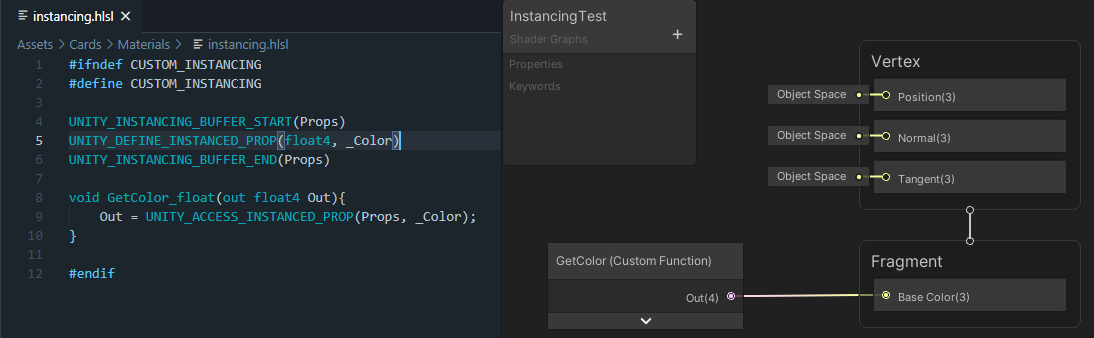
 Twitter
·
Twitter
·
And I'm assuming you mean per-instance properties.
Otherwise, all properties are already per-material, basically.
 runic pendant
I am having trouble with some shadow stuff atm

I have a 2D sprite in a 3D space. The character sprite actually has 2 renderers. One for the player and one to cast shadows. The main one uses a billboard effect to keep looking at the camera. The shadow renderer doesn't have a billboard effect. After separating the lighting and shadow shader, I noticed that the main shader is "transparent" when it comes to shadows. As seen in the image, the shadow of the 3D box is drawn on top of the character, when it is not supposed to.
Is it possible to fix this problem or are my options limited because I am using sprites?
 topaz cipher
billboard effect is your custom script ? or use particle system
runic pendant
custom script
topaz cipher
try use mesh quad Substitute SpriteRenderer
runic pendant
Yea that makes sense. Thanks
Is there a reason why I am getting this error with the Sprite Renderer?
topaz cipher
URP or buildin Pipeline
runic pendant
builtin
topaz cipher
the shader map is base on mesh vertex or pixel, i remember is vertex and when uses a billboard effect is possible not has change the vertex in Fact
topaz cipher
or your billboard effect is work in vert shader function, shadowCaster pass not dong same thing
Depends on how you achieve billboard effect
 hardy warren
Hi, I've made this "map" in blender, but when i exported it to unity it did some weird things. Why is the top only visible from bottom and bottom is only visible from top? It should be just like its in blender, shown in the video below
i dont really know which channel this problem belongs to
ive searched the internet and seems that its something called backface culling, but i dont know how to fix it
 neat hamlet
try inverting the normals
hardy warren
how to do it?
im a beginner, so i dont know a lot of stuff
ohh i see what inverting normals is
it seems like the thing that im missing
But how to actually do it?
kind juniper
hardy warren
But how to actually do it?
Open it in Blender and enable viewing face orientation. Make sure that the faces are oriented the right way and invert any that don't. Then export it to unity again.
hardy warren
alright
hardy warren
kind juniper
Open it in Blender and enable viewing face orientation. Make sure that the faces...
wow it worked!!! thank you so much!
sadly i will need to export it again, and it takes around 10 minutes, because there is 1000 frames of animation on such a big object
but im really happy to have this problem solved
kind juniper
hardy warren
sadly i will need to export it again, and it takes around 10 minutes, because th...
Sounds like a decent way to kill performance in your game.😅
hardy warren
well, in unity it seems that its working flawlessly, its just the exporting from blender
kind juniper
hardy warren
well, in unity it seems that its working flawlessly, its just the exporting from...
Did you profile your game? It might be running ok on your hardware and/or without any other systems running.
hardy warren
i dont know
ive just started making it
i only have the file imported
and unity isnt lagging at all
i havent tested the animations though
kind juniper
Well, just keep in mind what I said.
hardy warren
ok
karmic hatch
I have made a shader for rocket exhaust but now I need to attach one to each rocket in my game, how would I do that?
Presumably it's in the c# script attached to the shader (it's a post processing effect) but idk how to do it so far
teal breach
runic pendant
Is there a reason why I am getting this error with the Sprite Renderer?
Is your material marked as 'transparent' or 'opaque'?
runic pendant
teal breach
Is your material marked as 'transparent' or 'opaque'?
Technically its Opaque. But when I set the render queue to Transparent it just doesnt respond to shadows at all
 urban arrow
Howdy yall. I'm having issues creating a GetMainLight custom function node in the shader graph, I was curious if anyone could lend a hand.
I'm coping the following code I've found in a few tutorials into an hlsl file:
And I am getting an error I don't understand when plugging it:
 regal stag
urban arrow
And I am getting an error I don't understand when plugging it:
regal stag
urban arrow
And I am getting an error I don't understand when plugging it:
The function in the file is named "MainLight_float", so the name in the custom function should be "MainLight", not "GetMainLight".
Also looks like it isn't outputting a DistanceAtten, so the number of outputs is different.
urban arrow
That makes sense; I'd changed the name while troubleshooting.
The error I get on correcting it is as you've said, it's expecting a different number of parameters (5).
I'll try and see if I can get the results I want without using a distanceAttenuation before trying to figure out how to add it. Thanks for the help!
 tranquil fern
I have an idea and I wanted to ask if it's a dumb idea. I want to make my piano keys glow for 300ms. I want to use emission for this. So I thought, maybe I can set the time now on the shader and have it subtract it from the actual time now, clamping between 0 and 1. Can this be done?
So every time a key gets touched it sets this time value so the shader can have an emissiveness of 1 again, and go down to 0 in 300ms.
meager pelican
tranquil fern
I have an idea and I wanted to ask if it's a dumb idea. I want to make my piano ...
Well, you didn't say what pipeline, so you'll have to convert the maths to nodes if using SG, but you have the right idea.
So I'd pass in TWO times...the start time and the current frame time (so as to make sure they all sync up, and you don't have any problems with C# time being different from shader-time's _Time, but you can try using _Time.? if you want to and only pass start time).
Then you want a fraction of the 300/1000's that is left.
So it's max((CurrentTimeMS - StartTimeSecondsMS)/300, 1.0)
or
max((CurrentTimeSeconds - StartTimeSeconds)/0.03, 1.0)
Build in variable _Time.x that Unity passes to the shader is scaled to 20th of a second, so you'd need 15 of those if you want. But you'll have to scale CurrentTime that way to match and keep the same units. Or use the float _Time.y and just be concerned about the fractional parts in the expression.
Whatever you do, in the shader you can use an if. Yes an if.
if (emResult < 1.0) {
   do something small/quick to colors for emission
}```And ideally you'd calc that in the vertex stage, and pass it as a flat interpolated value to the frag stage.
And depending on the look you're after, you might want a bloom post processing effect too.
tranquil fern
Hmmmm but I don't need an if when using a clamp right? I read that conditionals should be avoided
Also yeah sorry, I meant urp.
Right now I'm using dotween on the emission color. Something tells me a shader would be better for performance.
meager pelican
If the emission color is a parameter, you can set it in C#, but you'll have to do that every frame and reset it if you exceed 300 ms.
Some conditionals in shaders can be avoided with good design, but things like ternary operators and probably clamps and stuff end up still having a condition at the microcode level and maybe even the IL code level.
People get too anxious and clever and don't realize that any expression that has a decision to make has a conditional in it implicitly.
As long as you're not doing some big block of code, and you need the result calced anyway...that if is basically "nothing", particularly since you'd set the condition in the vertex stage if you're thinking.
As for other math tricks, you'll have to get the resulting binary code and count cycles to compare them (and it will vary by hardware) or you can just "know" that a simple if isn't that bad. But if you can use a clamp and a multiply, go ahead.
meager pelican
And the other thing I should mention is that C# calcs are going to be done once per frame per-object (key), but in the shader it will be once per vertex (if you're smart) or once-per-fragment if you're a newbie and can't put it in the vert().
So it all depends on your setup and specifics. But a GPU has orders of magnitude faster vert processing than you'll probably get with CPU object processing.
But if on the CPU/C#, you can just pass in a 0 or 1 for the result, and then multiply that by the emission color. You should benchmark it each way with a few 1000 keys on your screen. If you're concerned. 😉
tranquil fern
Yeah youre probably right. It's not a huge deal in any case. All I have in this scene is the piano
And I'm using it to make a video even, so performance is not really an issue. I just don't want to teach myself bad habits
My pc is pretty bad ass so I can get away with a lot. I want flying sparks which is not in the scope of this channel. Just mentioning it to explain that my question was probably silly.
Thanks!
 solemn trail
How do you use an image effect shader in HDRP? I'm trying to get started playing around with one, but I can't seem to figure out how to actually apply it to the scene/camera.
meager pelican
solemn trail
How do you use an image effect shader in HDRP? I'm trying to get started playin...
 sonic dragon
Hello, I have an issue with the shadows on my procedural mesh. I had this issue from day one when it was just a 16*16 cube of cubes. It is only affected by the distance of the camera and is present in both the game and scene view. Note: This is with the default unity lighting.
 vocal narwhal
sonic dragon
Hello, I have an issue with the shadows on my procedural mesh. I had this issue ...
vocal narwhal
sonic dragon
Hello, I have an issue with the shadows on my procedural mesh. I had this issue ...
Max shadow distance is a thing.
https://docs.unity3d.com/Manual/shadow-distance.html
solemn trail
meager pelican
Have you seen this https://docs.unity3d.com/Packages/com.unity.render-pipelines....
I think that's exactly what I'm looking for, thanks.
teal breach
I missed this on forums, thought it worth posting here: https://forum.unity.com/threads/focusing-on-shaders.1171444/
Unity Forum
We know that the introduction of the Scriptable Render Pipelines brought a lot of complexity to writing shaders in Unity. We are working on improving...
teal breach
teal breach
I missed this on forums, thought it worth posting here: https://forum.unity.com/...
some info from unity about long term plans for shaders
 vocal nova
Why does my master node look like this and not like a normal master node?
 karmic hatch
if you're meaning the old PBR master stuff, it's been replaced. If you're meaning that it doesn't have slots that you want to include, you can click on either the vertex or fragment nodes and press space and add in more things
 torpid sapphire
Hey I was wondering something and figured I would ask here :
I have a lot of materials in many differents objects. I want to gradually show the objects with a reverse dissolve effect that would be led by a growing sphere in the center of objects. The shader works, it's all cool. But I feel like my workflow is wrong. I am about to change every single materials in the objects to use my shader logic.
I have many different shaders in that scene. I would need to write a custom shaders for all of them and insert my dissolve logic in there and then create a new material and have it use the new shader. That could be easily 40+ materials to make manually + 3-4 shaders to customize. Feels wrong. Is there any way to automate this process to some point ?
My strategy would be to use the dissolve shader for the duration of the appearance. Then switch back to their default material/shader because they are obviously less expensive.
I am doing this the right way ?
Also, maybe my per-object shader is not a good solution too. There is also some objects in the center of the scene that are not to be affected by this effect.
Thank you
meager pelican
@torpid sapphireHow's performance?
I mean...
If you're passing in a UNIFORM condition to the object's shader, you can build in conditional "dissolve or not" into the same shader. Still won't be expensive when running "normally". But pass a bool (float of 0 or 1) as a uniform, along with any other parameters.
If/when you do that, ALL CORES in the group will skip over the dissolve code when it isn't needed. Use the [branch] attribute (might be ignored on modern compilers, but use it anyway).
And of course I'd test out the shader-mod first with several hundred objects all fading or not and time it each way. And compare to swapping shaders. Before I edited all materials in the project.
But that beats the heck out of swapping shaders around. Unless you're using stock shaders and don't want to duplicate their functionality.
Just my 2 cents.
Also see excellent post here: https://stackoverflow.com/questions/37827216/do-conditional-statements-slow-down-shaders (top answer)

Stack Overflow
I want to know if "if-statements" inside shaders (vertex / fragment / pixel...) are really slowing down the shader performance. For example:
Is it better to use this:
vec3 output;
output = input*...
torpid sapphire
@meager pelican Thank you for your answer ! What I understand from this, (I am not that advanced into shaders just yet, working hard to be tho ! ) is that I should not worry about swapping back the "original materials" since setting a global bool "DissolveEnabled" will give a uniform condition that is the same for every fragment of my shaders so it doesn't break the wavefront, meaning it would do the check for every fragment for each material because the GPU will easily group these calls together. Is that right ? That is super enlightening.
I'd still have to remake their materials but I won't have to keep 2 sets around so that is a cleaner way to do it. Thank you 🙂
Also, my understanding is that the gpu will group different materials with the same shaders together, but what is different shaders have the same conditions ?
meager pelican
You understood correctly. (first post above)
Unity batches differently, depending on pipeline. And if you have GPU instancing enabled.
For the built-in/standard pipeline, it groups by material. For URP (and I think HDRP) it groups by shader.
That said, it's a good question about params, but in this specific case, at worst adding the bool would break it out into two groups of instanced stuff instead of one group (all other things being equal). So meh. 😉 That's one extra draw call (well, 2x the grouping instead of 1x the grouping), not 100's or 1000's.
So you'll either get 1 draw call for all of them somehow, or 2 one for enabled, and one for disabled. As for the rest of the settings, IDK, good question. Too many pipelines to sort out right now too.
(I think all that is correct)
But if you have GPU instancing enabled, you get per-instanced material settings, at least in the built-in RP. For the others, Unity is adding instancing to SG, but IDK what state it is in, a URP/HDRP expert will have to help with that. It can be done by manually editing shaders IIUC.
So that's why having different settings...thus making unique materials...."breaks" batching in built-in, but instancing does not. Because with instancing, it's one material with instanced-data.
IDK what happens if you have a uniform variable in an instanced shader not as an instance variable....it's a good question....since it could break batching depending on pipeline. I suspect for built-in, you'd get 2x draw-group calls...you might even just swap the materials, but that's not much diff than swapping the shader.
Now I'm confused. lol. I'd have to try it out.
Batching gets complicated. But it is a good question.
As far as an object's draw performance, my answer stands. But with regard to batching, I'm unsure.
And I'd want to know at this point:
- What pipeline you're using
- What hardware levels you're targeting.
Because modern hardware can deal with a dynamic-if when all cores follow the same path and don't diverge pretty easily.
 cosmic glacier
evening all, im trying to get a shader working to show vertex colours and texture, so far I have this but its showing black for some reason (I want it unlit but visible) can anyone take a peek and see if anything obvious is missing? just trying to learn this magic thank you

if I use a standard material (not using my shader) the texture displays how I would expect
meager pelican
cosmic glacier
if I use a standard material (not using my shader) the texture displays how I wo...
At first glance, your logic looks correct to me.
What do you have the texture2D set to? Make sure that is set, and also the vertex colors ON THE MESH.
To debug, just output either the vertex color, or the texture result, and see what you get.
cosmic glacier
might be my colours tbh, I assign them in script for testing just to all Color.red - texture is all set, cheers
ah yeah
was
I set them using mesh.SetColours and works fine
cosmic glacier
easy shader I know but never really dabbled much in this, thanks
meager pelican
You did well then. Good first-ish shader. 🙂
 ornate sierra
I cant find the PBR shader using urp along with a couple others, were they renamed or moved?
meager pelican
It's the Lit shader.
And the master-node is now split into vertex and fragment. But it will still work, you can find the blocks.
ornate sierra
Ok thanks
torpid sapphire
@meager pelican thanks again for the answer ! To answer your question I am using URP, primarily shader graphs since I am not that efficient with shader code, especially in URP. And I am targeting mobile iOS and Android devices that runs ARCore/ARKit. It is basically to spawn let's call it a small classroom, with bunch of objects in it. There is a main object that is the main focus that will appear differently but the whole classroom, which is 1m x 1m real world size are the objects I want to show with the inverse dissolve 🙂
So it is a very light scene aside from the AR technology and the facts it will run on lower end devices
meager pelican
Yeah, batching in URP is evolving. I'm unsure of the specifics on how setting of a uniform would work other than making a new material for it (like you started with, one of each type for each material).
OTOH, a non-uniform per-instance variable (dynamic uniform...since it is per-object instance, but is he same value for all pixels...the shader doesn't change the value) may work just fine. No cores would diverge. IDK how really low-end/old hardware, but for the mainstream stuff that post above sounded like it would be fine.
How many instances are we talking about?
ornate sierra
How would I access a variable on a shader?
would something like this work?
float fill = this.gameObject.GetComponent<MeshRenderer>().material.shader.FindPropertyIndex("Fill");
 knotty juniper
ornate sierra
would something like this work?
float fill = this.gameObject.GetCompone...
knotty juniper
ornate sierra
would something like this work?
float fill = this.gameObject.GetCompone...
has a nice example
solemn trail
What's the HDRP equivalent of UnityObjectToClipPos?
torpid sapphire
@meager pelican About 225 meshes and 170k Triangles 🙂
 drifting sequoia
i tried adding shader graphs and the universal render pipeline to my already existing project
when i go to add an unlit or lit graph
its just pink
and doesnt change at all
torpid sapphire
@drifting sequoia I believe when you import URP package in a default renderer pipeline project you have to manually create/drag renderer asset into the quality/graphics settings. This is automated for you if you create an URP project
Right click in project window -> Create -> Rendering -> Universal Renderer Pipeline -> Pipeline Asset (Forward Renderer)
kind juniper
Anyone has a clue how some complex procedurally generated terrains blend between textures smoothly? I was trying to pass voxel material index in the uv channel of each vertex to get the appropriate texture from a texture atlas, however, due to uv being interpolated when they are passed to the fragment shader, the fragment colors are all over the place. Is there a well known approach to render multitude of textures on 1 mesh based on some input data?
One way I thought of is just to define the uvs for the whole triangle/quad. However, this way the textures won't blend between triangles and it will just result in "blocky" terrain, kinda like in minecraft.
Actually, how does unity terrain shader does it? Gotta look into it.
low lichen
Unity terrain uses a splatmap, just a texture where each RGBA channel represents a texture and how much of it to blend into each pixel.
kind juniper
Wouldn't that mean that you can only have 4 textures blended?
Yet you can have more textures on the same terrain.🤔
low lichen
It's limited to 4 texture each pass
If you add more, it draws the terrain again transparent on top of the previous pass
kind juniper
I see. Sounds complicated.
low lichen
How many textures do you need?
kind juniper
As many as voxel materials there should be. Tens, hundreds? Not sure yet.
low lichen
And they're all in one big texture atlas?
kind juniper
If there's a better way, they don't have to.
I was reading about texture arrays, maybe I can try that?
The problem is passing the right texture index into the fragment shader and making sure everything blends seamlessly...🤔
low lichen
Your shader will have to sample two times minimum to be able to blend two textures
So it needs two indices and then a t value to determine how much to blend them together
In most cases, the t value would just be 0, no blending
kind juniper
Can't I like compute the blending ratio of textures for each vertex outside the shader, then pass them into the fragment shader to be interpolated?🤔
low lichen
Yes you can. And the texture indices can also be encoded in the vertices
kind juniper
low lichen
Yes you can. And the texture indices can also be encoded in the vertices
I'm not sure in which attribute to encode them though? Everything seems to be interpolating when passed to fragment shader. I don't want my indices to get interpolated.
low lichen
kind juniper
I'm not sure in which attribute to encode them though? Everything seems to be in...
You can add a nointerpolation modifier to the variable.
It's not supported on OpenGL ES 2.0 though
kind juniper
Can I add it to the default attributes like uv?
low lichen
Yes
kind juniper
Oh, okay. Also, it's a urp shader, so HLSL. Is it the same as in CG?
low lichen
nointerpolation is an HLSL thing. It's called flat in GLSL.
kind juniper
Oh, great.
kind juniper
low lichen
`nointerpolation` is an HLSL thing. It's called `flat` in GLSL.
Thanks! I'll see if I can put it all together. 😅
kind juniper
You can kinda ask
 real lion
lol
okok so idk how to fix this problem but the outline is not showing up for the eyes and mouth


and heres the photo i exported from aseprite

 thorn prawn
Hey!
I'm trying to create a hex-based map with multiple biomes, and I'm looking for a way to get the texture to tile properly on the hexes while still having multiple textures for different areas.
The way I thought of but haven't tested is simply projecting the texture on multiple hexes at once and cutting it off where biomes change (with a nice transition) to get a tiled and nice map.
However, I don't even know how I would start on this, or if it's viable/there's a better way.
So is it? Do you guys have other recommendations?
Thanks.
(The whole project is based on URP, by the way)
real lion
hey uh i need help again
idk how to fix this on the shadergraph

i wanted it to look like this in game

heres the graph

wait-
am i in the right channel?
is this for shadergraph too?
 sonic hawk
Hey folks - working a on 2.5d game atm (2d sprite in a 3d space), & tryna get a shader sorted out.
Is it possible to have a two sided cutout shader suitable for sprites, that also supports transparency? (Bonus points if the transparency doesn't effect the shadow casting)
Thanks!
brittle owl
real lion
is this for shadergraph too?
yep
brittle owl
real lion
heres the graph
are you sending the a channel of the output to the alpha input in the master node?
 winged plover
Help!!! Shader Graph is not showing the other Shaders but these ones???
 brittle owl
winged plover
Help!!! Shader Graph is not showing the other Shaders but these ones???
brittle owl
winged plover
Help!!! Shader Graph is not showing the other Shaders but these ones???
what does it show in the universal render pipeline area
winged plover
brittle owl
what does it show in the universal render pipeline area
this is everything i see

And why doesn't this shader work?

sorry i'm really new to Shader Graph
brittle owl
Oh, your urp isn’t installed correctly (it’s urp right)
winged plover
 brittle owl
follow an installation tutorial on youtube
winged plover
brittle owl
Oh, your urp isn’t installed correctly (it’s urp right)
Oh let me check that 🙂
brittle owl
👍
winged plover
brittle owl
👍
I'll let you know when i'm done
winged plover
nvm
 native cobalt
i'm trying to build a simple shader in amplify that looks up a cubemap in the same way as the skybox. my method right now is to invert the view vector and use it to texture sample a cubemap. it's close to the results of the visible skybox, but it's not exact... it looks like it's almost scaled up a little bit. rotations are already accounted for. what am i missing in the maths here?

basically i'm building a super cheap fake stained glass material. i've disabled the normal map to make the problem easier to see... the textures don't quite line up, and the scaling makes the cubemap appear significantly larger and chunkier than it should.
 karmic hatch
I have a post processing effect for rocket exhaust in my game, how would I set it up so it places multiple exhausts in different places?
ornate sierra
How would I make it to where if I change a value on the material it only affects the gameobject im changing it on, or would I just have to make different variants of the material
knotty juniper
ornate sierra
How would I make it to where if I change a value on the material it only affects...
check out MaterialPropertyBlock
the give you a override on a per renderer basis for material properties
ornate sierra
Ok thank you
 pliant pond
is there any way to check and see if unity's post processing stack is enabled within a shader? ex. #ifdef postprocessing so i can treat colors a bit different if it is enabled in that scene, would be useful =)
 fervent tinsel
pliant pond
is there any way to check and see if unity's post processing stack is enabled wi...
fervent tinsel
pliant pond
is there any way to check and see if unity's post processing stack is enabled wi...
This sounds like a bad idea. You can have pp enabled without it doing tonemapping etc
I'd just implement some way to adjudt the shaders colors regardless pp being there or not
pliant pond
fervent tinsel
This sounds like a bad idea. You can have pp enabled without it doing tonemappin...
how is that a bad idea?
it’s not like anyone would be forced to use it, and obviously you should be cautious of when you use it - it is your project after all, and you would be controlling both the post and shader. you should know what entails when post is enabled, for like you said whether tone mapping is enabled or not
a simple use case could be checking whether or not a scene should render a fast bloom done in a post shader in game play or render a fancy bloom during cut scenes or something when post processing is enabled
of course scripts or manual work can do all this too, it’s merely for automation and easiness
fervent tinsel
IMHO that just sounds like nightmare to manage and is likely to do wrong things regardless the amount of effort one puts to it..
pliant pond
Yes but how?
We already have unity defined global keywords based on things like platform and graphics api
fervent tinsel
Are you using PPv2 or URP/HDRP volumes?
Well.. It doesnt matter that much.. Basically you need some script to deal with the absurd complexity that kind of system brings you. Fetch pp components, read their values, figure what which camera they render to, figure what is impact of their current values... Sorry but I just cant see that ending well
pliant pond
im not asking for a dynamic system