#archived-shaders
1 messages · Page 217 of 1
 distant sleet
 meager pelican
It's probably not going to make any difference. I mean there's maybe an extra "cycle" or 3 to use the conditional. The only impact is you're returning what I assume is a uniform value....so for the cores that it doesn't apply to they will be masked off and just skip over it. The other cores will return that value. They will all execute both sides, but there's hardly any code there time wise. Meh. My 2 cents.
you can try what CharlieMcF mentioned, but I bet you won't see much diff. But I'm willing to bet making some function call is SLOWER than just doing a "return _OutlineColor;". You have to do the conditional check no matter what, math or ifs, and you have to do the other stuff most of the time (the non-outline). The only thing you miss is the early-out and that only happens of ALL cores in a group manage to hit the same side of the condition.
 tough silo
Now that I have figured out how to use DrawMeshInstancedIndirect, I have many many instanced meshes with Materials, since that from what I undestand the LOD component and standard culling won't work on meshes instanced this way, I curious about what should I modify if I implemented a custom fustrum culling in the shader, my idea was to make meshes transparent by zeroing the material's alpha but I don't think it would really improve anything that much, when I think about it I would actually try to negate the presence of the mesh in the first place if culled but is it even possible in a shader?
 carmine hedge
How would i create a shader that changes a gameobject and its children's alpha?
I want to make the appear more transparent when the shader is applied
 rustic dagger
carmine hedge
How would i create a shader that changes a gameobject and its children's alpha?
rustic dagger
carmine hedge
How would i create a shader that changes a gameobject and its children's alpha?
there's several ways you could go about it, some easier, some "better" 🙂
using the sharedMaterial(s) field could work, assuming these objects use the same material, but that's probably not the best approach.
I'd just create a list of all materials (and children's materials) that I would need to change the alpha on at start up, after first creating a runtime instance of each material and reassigning it back to the MeshRenderer (unity doesn't always seem to do it when I expect it to).
 lapis lodge
Can compute shaders emit light? Like emissive materials?
 shadow locust
lapis lodge
Can compute shaders emit light? Like emissive materials?
shadow locust
lapis lodge
Can compute shaders emit light? Like emissive materials?
compute shaders just... compute things. They don't directly have any effect on rendering
lapis lodge
Yes I get that but I thought that setting the texture
It’s possible to have different thing that colors
And shapes
So no, and what about a post processing with it?
 languid jay
what string do you use to get the base color of a custom shadergraph material? _Color isn't working for me.
return GetComponent<SpriteRenderer>().material.GetColor("_Color").a > 0.0f;
 languid jay
ok so let's say I just go ahead and declare _Color

how does _Color get the value of the finished product? The color of the sprite after all of the transformations?
 vocal narwhal
Huh? It doesn't. It's a property, an input to the shader.
languid jay
ok, well I'm trying to delete the sprite when its opacity is 0
vocal narwhal
If you have a material, it'll have been set to something either via the inspector or code
languid jay
so I think I need to grab the color.a from the material
vocal narwhal
You will have to check whatever is contributing to that

 steady coyote
So i'm trying to make a procedural skybox and i've followed a tutorial from a website and after i tried to figure out the uv's it stretches the skybox at the poles creating something like this:
if anyone knows how to stop this stretching please let me know.
the tutorial i followed: https://medium.com/@jannik_boysen/procedural-skybox-shader-137f6b0cb77c
i should also mention i downloaded the complete shader and i still had the same issue.
 tacit parcel
steady coyote
if anyone knows how to stop this stretching please let me know.
tacit parcel
steady coyote
if anyone knows how to stop this stretching please let me know.
the tutorial it self seems to be stretched
https://miro.medium.com/max/700/1*LOYRNEzzKigfAM7Cf_AG5g.png
 steady coyote
tacit parcel
the tutorial it self seems to be stretched
https://miro.medium.com/max/700/1*LOY...
steady coyote
tacit parcel
the tutorial it self seems to be stretched
https://miro.medium.com/max/700/1*LOY...
yeah which is weird because it seems to not do that in the final product
carmine hedge
rustic dagger
there's several ways you could go about it, some easier, some "better" 🙂
using...
but i have lots of duplicates of a gameobject all with the same material but i want to make only one of them more transparent than the others

 amber saffron
 cursive maple
where is the depth texture option in unity 2019.4.29f1
cursive maple
where is the depth texture option in unity 2019.4.29f1
Not there, look in the URP asset
cursive maple
amber saffron
Not there, look in the URP asset
bro can you please tell where is that option?
https://www.youtube.com/watch?v=gRq-IdShxpU&t=13s im trying to use this tutorial

In this video, we'll take a look at how we can use the Shader Graph feature in Universal Render Pipeline, or URP for short, with Unity to create a water shader! The water shader can be simple or complex, and include the features you desire. Let your imagination get wild in this tutorial, or simply follow step-by-step to get about the same result...
to make a water shader
amber saffron
cursive maple
bro can you please tell where is that option?
 misty vine
RWStructuredBuffer<uint> _Data;
#define INVALID_ID 0xFFFFFFFF
[numthreads(1, 1, 1)]
void CSDebug(uint3 id : SV_DispatchThreadID)
{
    uint myId = id.x;
    uint index = 0;
    uint existingId = INVALID_ID;
    [allow_uav_condition]
    do {
        InterlockedCompareExchange(_Data[index], INVALID_ID, myId, existingId);
        if (existingId == INVALID_ID) break;
        index++;
    } while (1);
}
I launch this with 32, 1, 1 thread groups. And _Data initialized to all INVALID_ID. I want it to populate the array with id.x for each thread. 0,1,2,3...,31. But for some reason, one number always repeats.
Am I misunderstanding something about InterlockedCompareExchange ?
EDIT: holy cow! It looks like a mis-compile caused by the unrolling of the do/while. It works correctly with while(1)
 grand jolt
Can shaders make this area dark, or is it only lighting?

Please ping me if someone answers my question
meager pelican
Unanswerable as asked.
I mean, lighting is done by the shaders, so....yes in all cases? @grand jolt
grand jolt
meager pelican
Unanswerable as asked.
I mean, lighting is done by the shaders, so....yes in all...
Sorry I'm not too familiar xD
I apologize for the unanswerable question
meager pelican
No need!
I'm just saying, you may want to rephrase. Lighting settings could do things, mess with them.
But shaders color all the pixels.
grand jolt
Well I've messed with the lighting settings, but it couldn't darken an area that much that is in the photo
meager pelican
Yeah, well, then it's probably some special shader magic effect. But IDK what it is nor how they did it. So...buckle up butter cup ( 😉 ) because you're in for a long ride if you have to learn shaders to come up with effects like that starting from scratch. Might be fun though!
It's all basically math. I mean, you can pass the whole screen and darken it. You could even try adding effects without writing shaders, like color grading.
But in the end, if you have "special back zone areas" you may have to do shader programming.
lapis lodge
im looking to make the compute shader "draw points", basically I have a position and want to make the compute shader draw a very tiny circle there or any size
i heard about render texture but im not sure what it is
or to create meshes
can you explain me? or help with any resources?
misty vine
lapis lodge
can you explain me? or help with any resources?
A RenderTexture is just a buffer (memory location) to which one or more shaders can draw pixels. It can also include a depth buffer and stencil buffer. The usual rendering process draws into a render texture which is then copied to the screen.
lapis lodge
oh now i understand, thank you
 mystic dagger
i have this random texture that doesn't show up when I try to select it from the material menu

it just gets assigned automatically somehow
why can't i select it , cuz it doesn't autoassign all the time?
 robust spade
Not sure if this is better here or VR. I'm trying to get Tessellation to work on Quest 2 (non-link). It seems like the hardware supports it ( SystemInfo.supportsTessellationShaders == true) but every time I try to put an object in the scene with a tessellation shader (Standard RP or URP) it doesn't render at all. Has anyone had any success with this or know how I might debug further?
 kind juniper
Is there a way to pass a an array of structs with array in the struct in a compute buffer to the shader?
An array of these where VoxelMaterialStruct is also a struct
    public struct BiomeData
    {
        public float threshold;
        public float area;
        public float heightOffset;
        public float heightMultiplier;
        public int materialsCount;
        public VoxelMaterialStruct[] materials;
    }
I assume arrays can't be passed like that because they're not blittable? That's the error I get.
But is there a blittable collection?
Maybe Native collections or something?
Can't I map it to this struct in the shader somehow?
struct BiomeSetting
{
    float threshold;
    float area;
    float heightOffset;
    float heightMultiplier;
    int materialsCount;
    MaterialSetting materials[100];
};
Have you tried fixed-sized buffers on the C# side?
public fixed VoxelMaterialStruct materials[100];
Didn't know that was a thing.😮
Doesn't seem to work with a struct...

Guess I'll just need to pass several arrays.🤷♂️
misty vine
hm. you might be able to use the MarshalAs attribute to make it work correctly
afraid I don't understand it well enough to offer anything precise
kind juniper
Thanks. I'll look into it.
 cosmic prairie
grand jolt
Can shaders make this area dark, or is it only lighting?
cosmic prairie
grand jolt
Can shaders make this area dark, or is it only lighting?
try setting the ambient light in the lighting settings to color instead of skybox, and then pure black, it should be similar, the original does have a lot of special effects tho by the looks of it
or maybe just cleverly placed baked lights
 knotty pendant
I'm following this tutorial for a laser: https://www.youtube.com/watch?v=S6eRVwAtfOM, And i created a sprite-lit shader thingie, but theres no sprite lit manager in the actual shader graph editor? sorry if this is a dumb question, I have literally never heard of the shader graph system before and I need a laser effect.
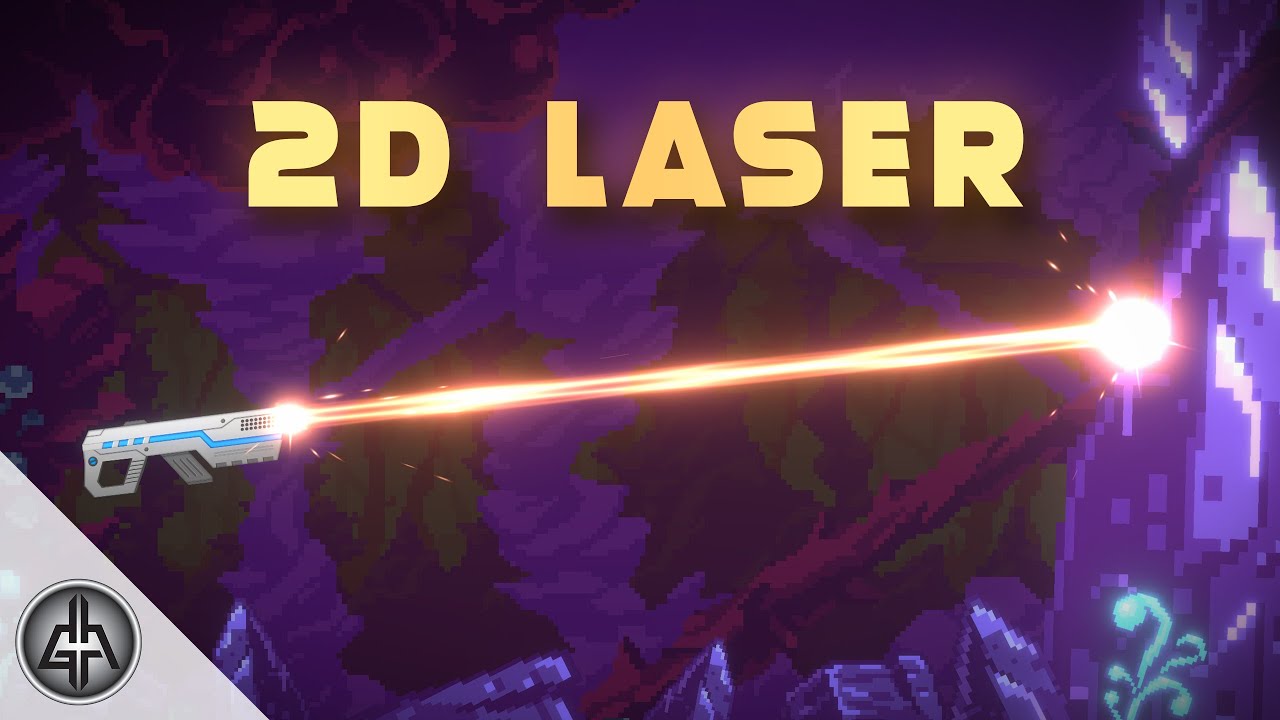
Let's see how to create and shoot a 2D Laser in Unity, using Shader Graph and a bit of code. Laser is procedurally generated, which means no textures involved!
Made in the 2D Renderer of the URP with Unity 2020.1
2D Sci-Fi Gun: https://assetstore.unity.com/packages/2d/textures-materials/2d-sci-fi-weapons-pack-22679?aid=1100l3Jhu
2D Scenario: ...
there's only fragment and vertext things by default?
meager pelican
kind juniper
But is there a blittable collection?
Arrays in shaders are fixed-length, so you have to have fixed-sized structures. But IDK why that wouldn't work otherwise.
There are complications with alignment between .NET and HLSL, in this article they talk about cbuffers, but it may apply to structured buffers (compute buffers) as well. IDK if this will help you or not, but see toward the end where they give examples for arrays.
http://timjones.io/blog/archive/2011/03/08/marshalling-c-structures-into-directd-cbuffers-using
Blog and open source projects by Tim Jones.
kind juniper
meager pelican
Arrays in shaders are fixed-length, so you have to have fixed-sized structures. ...
Thanks, but I went with a bit of a more straightforward approach for now: passed only simple data in the struct, like index start and length, and passed the array of additional data structs all in one big buffer. Then I just pick the relevant data based on index start and the length specified in the first struct.
meager pelican
Oh, I thought they were repeated in the struct! Yeah, if the index and such are single-values, your new design is the way to go. The structuredBuffer basically is an array...of structs!
kind juniper
meager pelican
Oh, I thought they were repeated in the struct! Yeah, if the index and such are...
Yeah, I have several structured buffers for structs. And originally I had a structure like this:
struct1
{ simple data}

struct2
{ simple data + array of struct1}

structuredBuffer of struct2
So array of struct1 was marked as not blittable.
Now I have something like this
struct1
{ simple data}

structuredBuffer of all struct1 for all struct2 instances

struct2
{ simple data + start and end index in struct1 buffer}

structuredBuffer of struct2
 brisk prism
Guys, any idea how to scroll 3d noise based on tangent vector ?
grand jolt
How can I create a "darkness volume? that is basically a cube, and when the cube intersects geometry, the geometry gets dark with all the edges of the cube feathered so it looks like darkness?
 kind spear
can anyone tell me how can i getting the scene color in a shader in urp
meager pelican
kind spear
can anyone tell me how can i getting the scene color in a shader in urp
You mean like with the scene color node?
meager pelican
grand jolt
How can I create a "darkness volume? that is basically a cube, and when the cube...
Any of
- All the shaders in the scene have to be aware of how to honor the existence of the pixels in the dark-zone.
- you use some kind of post-processing to scan the resulting scene, and apply the zones by calculating the world-space position of each pixel in the previously-finished scene, and then deciding if it intersects some list of dark-zones.
as far as "feathering" it, that's some kind of gradient calc relative to the center of the cube/sphere/whatever (spheres are quicker, but cubes aren't too bad).
Transparent items will be a problem, either way, all transparents will have to honor the zones somehow, since they could be "behind" a dark zone, or in front of one. Just doing dark zones in between opaque and transparents won't produce the results you want I don't think.
- Some kind of custom lighting solution. I think that might also imply #1 though, due to self-lighting calcs in shaders.
Best guesses off the top of my head.
Maybe you could try "black fog" and see if it works (won't work if additive).
kind spear
meager pelican
You mean like with the scene color node?
yes but with the transparent shaders(materials) also
meager pelican
kind spear
yes but with the transparent shaders(materials) also
IMO, you can't, directly.
You're in post-processing territory instead of "scene color" territory. So research post processing...
The scene-color node gets its results BEFORE transparents are drawn.
Post processing applies to the whole rendered scene.
kind spear
meager pelican
IMO, you can't, directly.
You're in post-processing territory instead of "scene ...
How can i doing a distortion postprocessing for a single mesh
meager pelican
OK, also research "stencils". Have that mesh set a stencil (be careful of what bits you use, lighting uses some too) and then the post processing can "know" what pixels were impacted.
But the best way might be to distort the mesh as you draw it in the transparent queue. But you won't get transparents that way. You may have to do both. IDK your use case.
P.S. shader graph doesn't support stencils last I knew.
P.P.S. the scene-color node is only for opaques, used by transparent shaders after the opaques are drawn.
kind spear
meager pelican
OK, also research "stencils". Have that mesh set a stencil (be careful of what ...
Thanks for helping but i want to know something, is there any way to get the scene color in the shader graph with another way using a custom function
meager pelican
There's a terminology problem (ambiguity) going on in our conversation. Due to the fact that the term "scene color" is used in different contexts.
In Shader Graph, "Scene color" = "The color of the things rendered in the opaque queue BEFORE transparents are even drawn."
But I think you're using that as in "I want to do this effect last, after ALL THINGS including transparents are drawn."
- You can do custom functions in SG.
- You can get the WHOLE scene, including transparents, in post processing shaders.
- But you can't get one mesh, unless you know where that mesh ended up being drawn (like using a stencil).
Using post processing is about WHEN the shader graph item is called. It's part of the pipeline order.
Another option might be to stack cameras.
And draw your mesh in the 2nd camera, using the first camera's results. That's a form of post-processing, really.
kind spear
meager pelican
1) You can do custom functions in SG.
can you help me in the custom function
meager pelican
You can always give it a try and then post what you have. I or others will/may be able to help. 🙂
That said, now that I think about it, try the camera stacking first. In the 2nd camera, you can draw your special distorted mesh, and use the 1st camera's results. Then you (I think) can just use the scene-color node directly, but I haven't tried it. If that doesn't work, then go to the custom function.
Draw the mesh in the transparent queue, and use the scene color node of the SECOND camera (IDK if you have to enable it on both cameras or not. @empty oar would know, or if this even works).
kind spear
Ok thanks
meager pelican
kind spear
Ok thanks
One thought...transparents may still be a problem with camera stacking....since they don't update the depth buffer by default, so you don't know "how deep" the transparent object was.
Transparents and depth is ALWAYS a challenge...because the color of transparent things is really TWO things....the background color and a blend of the transparent object(s) that were "on top". But you have ONE depth buffer per pixel with ONE value.
meager pelican
Yeah, it is harder than you would think at first, due to transparency issues. Otherwise, you could just use the scene color node and one camera.
kind spear
meager pelican
Yeah, it is harder than you would think at first, due to transparency issues. O...
but the most vfx on the scene are transparent
meager pelican
Yeah....the challenge.
Research it. I don't have all answers, but this conversation will get you started. 🙂
The reason it is a challenge is that you're writing a DISTORTION effect.
And you want to include previous transparent objects.
@kind spear
Try the camera stacking, IMO. Like I said, I haven't tried it for this use-case, but it seems reasonable.
Since the first camera drew everything but the distortion. The "only" issue you'd have is if you have transparent things in front (closer to camera) of the distortion. They'd get distorted too.
It might be possible to use some kind of multi-pass shader (or custom render feature????) on the mesh, and draw it in a very high queue number/event. IDK, not good with that.
 open quarry
hi, im trying to fake a double sided shader in shader graph for my grass shader
i dont want to use the shader graph double sided option cause it actually impacted my fps drastically
i already got the logic for flipping the faces properly, however now im trying to figure out how to calculate when the cameras viewing angle is >= 180. any ideas?
this is where i am so far

 slow chasm
how would I go about flat shading this terrain? it's generated using vertices and I want to make it more low-poly like

 deep mason
Guys, after a recent downgrade form 2021 -> 2020, any new TMP (or any) objects added to the scene has this grayed out shader. All the old objects are still correct and can be edited, and they can be copied and pasted with no issues, but any new objects have this uneditable shader I can't seem to change? Any idea why - a uninstall and re-install of TMP and URP didn't help.

Solved!: One parent object had a fucked-up shader, made all the children have the same issue, removing the parent object solved it.
grand jolt
Can someone help me? I'm trying to make a darkness volume. Someone told me to sample the depth, and calculate the new depth with the fragment depth, but that is not working ```
cs
Shader "TimmyTGames/Darkness Volume"
{
Properties
{
_MainTex("Base (RGB)", 2D) = "white" {}
_Color("Color", Color) = (0, 0, 0, 0)
_Strength("Darkness Strength", Range(0, 5)) = 0
}
SubShader
{
Tags {"RenderType"="Transparent" "Queue"="Transparent"}
LOD 200
Pass
{
CGPROGRAM
// Upgrade NOTE: excluded shader from DX11; has structs without semantics (struct appdata members depth)
#pragma exclude_renderers d3d11
#pragma vertex vert
#pragma fragment frag
        struct appdata
        {
            float4 vertex : POSITION;
            float2 uv0 : TEXCOORD0;
            float depth;
        };

        struct v2f
        {
            float4 vertex : SV_POSITION;
            float2 uv0 : TEXCOORD0;
            float depth;
        };

        sampler2D _MainTex;
        fixed4 _Color;
        float _Strength;
        UNITY_DECLARE_DEPTH_TEXTURE(_CameraDepthTexture);

        v2f vert(appdata v)
        {
            v2f o;
            UNITY_INITIALIZE_OUTPUT(v2f, o);
            o.vertex = UnityObjectToClipPos(v.vertex);
            return o;
        }

        fixed4 frag(v2f i) : SV_TARGET
        {
            fixed4 c = tex2D(_MainTex, i.uv0) * _Color;
            float linearDepth = Linear01Depth(i.depth);
            float newLinearDepth = dot(i.depth, linearDepth) * (1 - _Strength) + _Strength;
            i.depth = newLinearDepth;
            return c;
        }

        ENDCG
    }
}
Fallback "Diffuse"
}
 weary osprey
using the import texture 2d node fucks up my sprite
it completely distorts and ruins it
i cant figure out why
 eager folio
@weary ospreycan you be more specific?
brisk prism
Guys, how do you cull front on shader graph ?
grand jolt
hi, can i have multiple alpha levels in one shader (like adding a texture that is less visible to another )
grand jolt
brisk prism
Guys, how do you cull front on shader graph ?
in the graph settings
 jagged path
Hi does somebody know how I can pass uint2s into a compute shader?
brisk prism
grand jolt
in the graph settings
I only see double sided, I don't see cull front/cull back
 iron coyote
Hi, I am trying to mask some objects from fullscreen blit using stencil buffer in URP. Is there any additional setup I should do when blitting (to access stencil buffer in shader?). I setup stencil in shaders but it doesn't work, so I guess I am missing some additional setup during blit..
meager pelican
iron coyote
Hi, I am trying to mask some objects from fullscreen blit using stencil buffer i...
Which side "doesn't work" for the blit? Source side isn't set, or it doesn't make it to the destination? Or what? Unsure of what you're saying here. If it isn't set on the source, make sure the source render texture includes a stencil buffer.
Shader Graph doesn't use stencils, so you must be writing these shaders manually, yes? Stencils should work in URP when written manually, using the Stencil keyword(s) setup.
Maybe show your code.
The stencil operation is kind of hardware based in that you don't code for it directly.
It's a function of the hardware's pipeline, IIUC.
But you set it up in code, of course. There's just no "if" logic in vert/frag code.
iron coyote
Yes, I am writing shaders manually. Here is part from my object material:
Stencil
        {
            Ref 2
            Comp Always
            Pass Replace
        }
Here is part on fullscreen blit material shader:
        Stencil
        {
            Ref 2
            Comp Less
        }
Here is how my fullscreen blit features do its job:
        public override void OnCameraSetup(CommandBuffer cmd, ref RenderingData renderingData)
        {
            RenderTextureDescriptor blitTargetDescriptor = renderingData.cameraData.cameraTargetDescriptor;
            blitTargetDescriptor.depthBufferBits = 0;

            cameraTargetHandle.Init(renderingData.cameraData.renderer.cameraColorTarget);
            temporaryTextureHandle.Init("_TemporaryFullscreenTexture");
            cmd.GetTemporaryRT(temporaryTextureHandle.id, blitTargetDescriptor, settings.filterMode);
        }

        public override void Execute(ScriptableRenderContext context, ref RenderingData renderingData)
        {
            CommandBuffer cmd = CommandBufferPool.Get(profilerTag);

            Blit(cmd, cameraTargetHandle.Identifier(), temporaryTextureHandle.Identifier(), settings.lowfireMaterial);
            Blit(cmd, temporaryTextureHandle.Identifier(), cameraTargetHandle.Identifier());

            context.ExecuteCommandBuffer(cmd);
            CommandBufferPool.Release(cmd);
        }
OK, I'll (or you) will have to try to figure out what bits are available in the stencil buffer. Lighting uses the stencil buffer too, IIRC.
So it could be that lighting is blowing away your stencil value. You set a value of 2 (one bit) and then compare to less than that.
You might also wish to try a stencil mask to only pay attention to that one bit.
Try the mask. Let me look it up.
iron coyote
I am a bit suspicious about my temporary texture has 0 depth buffet bits. Would blit pass the stencil from source to the shader even tho target has no depth?
Ill try stencil mask, need some time to google it 😄
meager pelican
There's a read and a write mask.
And to your other question, I'm unsure of the answer.
But regarding the mask, since you didn't use one, any stray bits other than bit 1 (value 2) will make the result GREATER than 2 if the stencil bit you're after is already a 1. So a mask would be warranted unless you know the stencil has been cleared.
And that some other process hasn't used stencil bits between the time you wrote the 2 and the time you're checking it (reading).
@iron coyote
I found this, it might help too. Let me/us know if you get it working, add to community teamwork/knowledge.

Guide for using the Stencil buffer in Unity to create portals & windows when using the Universal Render Pipeline. This info is also suitable applicable to...
iron coyote
well thanks for the link, but this uses RenderObjects feature, but I want to mask objects in fullscreen shader. Imagine I have several custom post processing features implemented using fullscreen blit, I want some of them to respect the mask (stencil buffer). I dont think I would be able to archive that using RenderObjects feature. Because I need to exclude something during fullscreen process, when all objects are already rendered
meager pelican
I was afraid of that. Just conversing....
I'm unable to find (as of yet) a list of bits that Unity uses for the stencil buffer (like lighting, shadows, whatever). But IIRC, it uses them.
So you write your stencil code when you draw the object (let's say it is opaque) and then unity goes off and does its thing with lighting passes, and then later you're trying a post processing pass, and the stencil values have changed. I admit I'm guessing here and I'm not trying anything out in unity right now, but IIRC lighting uses some stencil bits.
Anyway, that was my thought, it may help. And that's why I think that the mask will/may help...if you use the right bit! Maybe a value of 2 isn't the proper bit. But you only have 8 bits to test with...so you can "find one" if it isn't documented.
I want to find the docs on it if they exist though.
iron coyote
The only example of stencil usage in fullscreen effect in URP that I found is Unity subpixel AA 😄 Which is weird, because I thought it would be more popular. We use depth texture as a global texture in our fullscreen shaders, but we have no global stencil buffer texture, so I have a feeling it requires additional setup during blit by using SetRenderTarget
to pass the buffer to the fullscreen shader
I can see Unity does that in their SMAA, I'll try that too
meager pelican
OH! That's an interesting thought. IDK how that works on all platforms though. You've moved beyond my paygrade. 😉
But cool idea, having your own stencil buffer reserved, basically, IIUC.
IDK how the hell you debug that one when "it doesn't work". Maybe RenderDoc will tell you something, or PIX.
That's an idea, to view what is bound.
iron coyote
😄 And regarding stencil mask you were talking -- I think stencil itself is written properly, I can see it in RenderDoc, but it looks like it is ignored during the blit. That why I am thinking that command buffer just need to be explicitly told to use it
meager pelican
I'm pretty sure the 2 value is written properly too.
I'm just wondering it if didn't have more bits set later, and your blit is doing a "less" comparison. That's where readmask comes in, if Unity doesn't blow away your 2-value bit (bit 1) . But if that were the case, you'd probably see different behavior than you're seeing now...because now you get nothing, not some unity's-bits-used. (Guess).
So readmask will ignore any other set bits that would blow away your test and give you a nothing-result.
But if the stencil buffer isn't even bound, yeah, you have the other problem.
 charred meteor
Hey there, just a quick one:
If I had a fragment shader applied to a single mesh that covered the entirety of my screen, would this take the same time to execute compared to applying the same shader to n meshes that (due to their positioning) also covered the entirety of my screen? (i.e, nothing was visible that did not have the shader applied to it)
 midnight dagger
How can I increase a value by X every Y seconds?
meager pelican
charred meteor
Hey there, just a quick one:
If I had a fragment shader applied to a single mes...
Technically, there's more overhead to the 2nd thing with n meshes. Whatever overhead in the mesh setup, vertex processing (more verts) x N.
charred meteor
Gotcha, thats what I assumed. Thanks!
meager pelican
midnight dagger
How can I increase a value by X every Y seconds?
x * some value of _Time.y, possibly (_Time - start_Time). Assuming x starts at 0. Otherwise it's val = startVal + (x * _Time.y - start_Time)
midnight dagger
meager pelican
x * some value of _Time.y, possibly (_Time - start_Time). Assuming x starts a...
thanks, but what about doing this with a shadergraph?
slow chasm
I'm having trouble with my shading, I just added some code to flatshade all of the triangles on this island but it makes the entire thing black with a small part sticking out - if I put another material over it it works fine though

here's the code that does the shading and coloring:
    private void CreateTriangles()
    {
        // Need 6 vertices to create a square (2 triangles)
        triangles = new int[xSize * zSize * 6];
        int vert = 0;
        int tris = 0;


        // loop through rows
        for (int z = 0; z < xSize; z++)
        {
            // fill all columns in row
            for (int x = 0; x < xSize; x++)
            {
                triangles[tris + 0] = vert + 0;
                triangles[tris + 1] = vert + xSize + 1;
                triangles[tris + 2] = vert + 1;
                triangles[tris + 3] = vert + 1;
                triangles[tris + 4] = vert + xSize + 1;
                triangles[tris + 5] = vert + xSize + 2;

                vert++;
                tris += 6;
            }
            vert++;
        }
        if (Useflat)
        {
            FlatShading();
        }
        color = new Color[vertices.Length];
        for (int i = 0, z = 0; z <= zSize; z++)
        {
            for (int x = 0; x <= xSize; x++)
            {
                float height = Mathf.InverseLerp(mnHeight, mHeight, vertices[i].y);
                color[i] = gradient.Evaluate(height);
                i++;
            }
        }
    }
    private void FlatShading()
    {


        Vector3[] flatShadedVertices = new Vector3[triangles.Length];
        for (int i = 0; i < triangles.Length; i++)
        {

            flatShadedVertices[i] = vertices[triangles[i]];
            triangles[i] = i;
        }
        vertices = flatShadedVertices;
    }
    private void UpdateMesh()
    {
        mesh.Clear();
        mesh.vertices = vertices;
        mesh.triangles = triangles;
        mesh.RecalculateNormals();
        mesh.RecalculateTangents();
        mesh.colors = color;
        GetComponent<MeshCollider>().sharedMesh = mesh;


        gameObject.transform.localScale = new Vector3(MESH_SCALE, MESH_SCALE, MESH_SCALE);
    }
 ornate sky
midnight dagger
How can I increase a value by X every Y seconds?
ornate sky
midnight dagger
How can I increase a value by X every Y seconds?
Can't you just use a time node and a float, send them both through a multiply? Change the float value to increase/decrease the rate of change
lapis lodge
I want to make the compute shader draw spheres
this seems easy enough to google but i can't find any resources that can help me, i basically have a list of positions and would like to see a sphere in that position (color doesn't matter).
iron coyote
meager pelican
But if the stencil buffer isn't even bound, yeah, you have the other problem.
I managed to do it by simply moving my fullscreen material from the first blit (when I am blitting to temporary texture) to the second blit (when I am blitting to camera target). But I have no idea why it matters. Under the hood Blit() function has hardcoded BuiltinRenderTextureType.CameraTarget as depth attachment. Why would it matter then?
meager pelican
IDK, if it is bound properly. But maybe someone else has it figured out. Thank you for updating though.
Glad you got it working.
meager pelican
lapis lodge
I want to make the compute shader draw spheres
this seems easy enough to google ...
What type of environment are you running it in?
"a compute shader" isn't specific enough.
Are you doing procedural geometry? (creates meshes for a regular shader to shade later)
Ray tracing/marching?
Compute shaders can manipulate pixels, but they don't normally process meshes during drawing like the regular shaders do. They can create procedural meshes though by filling in data buffers.
The reason is that compute shaders don't go through the normal graphics pipeline, like input assembly, vertex processing, rasterization, and fragment/pixel processing stages.
lapis lodge
meager pelican
What type of environment are you running it in?
"a compute shader" isn't specifi...
none, i just found about Graphics.DrawMesh
i think it can work or should I be using something different?
meager pelican
You want a regular shader with a regular material, not a compute shader.
compute shaders are something else.
Or you can just use any of the built-in shaders.
lapis lodge
i should be using them, its for calculations mainly gravity
but thanks i think i will use the built-in
last question: what's it's called for merching meshes? that look similar to how water drops join
meager pelican
OK, THAT gets more complicated. Search for metaballs. You'll need an asset or write a custom shader or two.
lapis lodge
thank you very much
meager pelican

GitHub
Unity 3D implementation of metaballs and marching cubes algorithm - GitHub - dario-zubovic/metaballs: Unity 3D implementation of metaballs and marching cubes algorithm
^^ Just the first google hit...
@lapis lodge
lapis lodge
thank you
meager pelican
lapis lodge
i should be using them, its for calculations mainly gravity
but thanks i think i...
Oh, and you can use both...
But graphics.DrawMesh is for mesh geometry and you don't/can't use a compute shader for that. It wants the mesh pipeline.
lapis lodge
well i know the positions and such it works great too, tho drawmesh instanced is pain to understand
midnight dagger
is it possible to increase a float by an integer over time?
like every frame it will add 1 to that float
meager pelican
In a shader? Not easily, and not cheaply. You'd have to allocate a perm buffer to hold the data, shaders don't normally retain values between frames unless they're stored somewhere (compute buffer or texture or somewhere).
If it is just 1 float, pass it in from C#
See material.setFloat()
midnight dagger
wish i could use C#, but im trying to make a mod for a game and the mod loader doesnt support C# scripts :/
so yeah i have to do it in a shader
meager pelican
That sucks, because the compute buffers are allocated/assigned in C#....
Shaders themselves don't retain anything.
Maybe a writeable texture could be assigned.....
IDK your situation.
The mods have zero scripting? What about C++?
midnight dagger
its actually just an assetbundle loader, and you cant put scripts on assetbundles so
midnight dagger
thanks
 dull pewter
So, beginner at shaders over here, anyone have any tips for what I would need to do to make a greyscale shader come to work?
EDIT: NVM, found it. Just a simple saturation node and it fixed my problem.
 cinder pebble
Someone know, how to put the correct texture in a Two Sides Mesh (because it looks white, like if there isn't the base map).

 upper olive
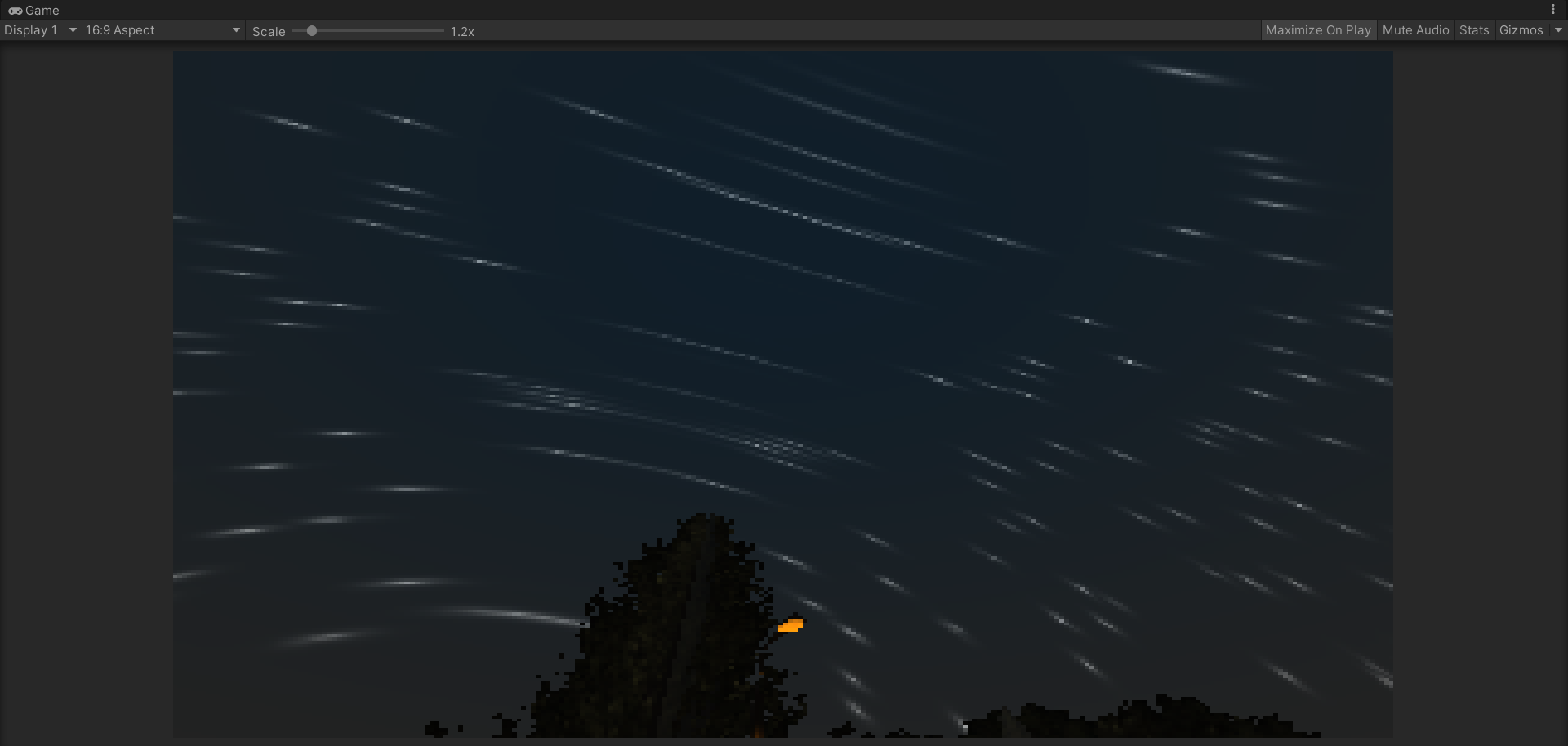
https://i.imgur.com/SBT2awv.png im getting this strange behavior with my skybox shadergraph
 mighty roost
Is there an alternative to the Scene Depth node in the HDRP (Version 10.5.1 - June 29, 2021)? I can't use it for the liquid shader graph I'm working on.
grand jolt
hey, how can i set the property of a button material via script? i tried
getComponent<Renderer/Image/Material> and then setFloat("",) but the console says that theres no material attached
tacit parcel
grand jolt
hey, how can i set the property of a button material via script? i tried
Back on 2019.2, you can use GetComponent<Image>().material
I havent tried newer unity, but from the manual, Image doesnt have material property anymore 
grand jolt
ive tried the same with a sprite renderer and the getfloat method but this is also not working
also: i cant use animator to record properties
the manual says it should work with set float and i also have no errors. this is my code ````using System.Collections;
using System.Collections.Generic;
using UnityEngine;
using UnityEngine.UI;
public class button1 : MonoBehaviour{
public bool hit;
public Renderer lerpi;
public float f;
// Start is called before the first frame update


void Start()
{
    lerpi = GetComponent<Renderer>();
}

// Update is called once per frame
void Update()
{
    lerpi.material.SetFloat("lerp1",f);    }
}
https://docs.unity3d.com/ScriptReference/Material.SetFloat.html just like in this example
grand jolt
tacit parcel
Back on 2019.2, you can use GetComponent<Image>().material
I havent tried newer ...
the problem was that i used the name and not the reference like "Vector1_304afe116f5f4b659e5fd86d46aafc40"
 honest bison
I cant get the scene depth node to work in URP


solved: I am a dummy - material was set to opaque
duh!
 cobalt hawk
material.SetTextureOffset() seems to work with the normal URP shader, but not with the shadergraph I made. Any ideas on how I could make this work?
meager pelican
Expose a float2 or float4 (vec2, vec4) and pass them into the tiling/offset part of the sample node?
Set them in C#
And if you don't use that call in C#, but pass your own values....you can do tiling as well as offset.
But I think that call is supposed to map to the traditional <texture-name>_ST variable. You could try mapping that to an exposed variable too.
 hardy aurora
excuse me, i have this shader

that works well with planes, cubes, sphered, other objects
but i tried to make a trail for a river using probuilder and it just won´t work with that
is there anything that i can do to create a river that has its places where it is lower and all of that
without the texture breaking?
 desert comet
Hello, can someone recommend me some video to get started with shaders?
hardy aurora
hey, i would suggest brackeys, some things are a bit outdated but the general idea is still useful
desert comet
Ok, thanks!🤩
 swift loom
Can I get the depth of a 3D texture somehow using something like _TexelSize ??
GetDimensions ?
meager pelican

Returns the dimensions of the resource. | Texture3D::GetDimensions function
grand jolt
Yoo.
What are the costs of point light shadows?
Do they take 6x the space in the global shadow atlas?
Nvm, found hippocoder's post on the forums, guess I should avoid em.
charred meteor
Here's a fun one:
I just found out that using MaterialPropertyBlocks with a sprite renderer will break instancing (Bug: https://issuetracker.unity3d.com/issues/2d-instancing-is-broken-when-scene-objects-have-custom-properties-set-through-material-property-blocks)
I need to pass four 16 bit integer values to my shader, which I was doing via MPBs, however it appears that this is no longer a viable solution.
However, I have been informed that I could pass the values via the sprite renderer's ".color" property. Now, for my purposes I don't believe I will need that property, so this could be viable (Store my 4 values in RGBA), but I was wondering if anyone knew if it would be possible to pack my int values into the float components, if I should need to pass more info in the future.
E.g, Assuming the precision of the floats is 32 bit, can I pack two 16 bit integers into each component of the color? And would it be possible to unpack those on the GPU?
Alternatively, if someone could explain the "workaround" listed in the link, I could see if that would be viable (I'm afraid I'm not entirely sure what it means)
distant sleet
Hey guys, just wondering, if I build with WebGL compute shaders will still work right? or are certain parts of HLSL not compatible with webgl
 low lichen
midnight dagger
is it possible to increase a float by an integer over time?
low lichen
midnight dagger
is it possible to increase a float by an integer over time?
You could do this with Unity's CustomRenderTexture. Make a 1x1 1-channel float CustomRenderTexture that updates every frame with a shader that either uses the double buffering to read and increment or I think you can just use hardware blending.
And then read this texture when you need the float
No scripting required
 signal flume
Hey there, I just have a simple unlit shader graph that offsets the vertex position by it's normal direction a little to make a wobble effect
this is working fine, but it looks like the sphere mesh I'm using is split?

a video might make it easier to see, 1s
is there a way I can export a mesh with no split normals?
here's my graph. The input from the multiply there is just a scrolling gradient noise
 grand jolt
@signal flume sure, just make a sphere in Blender and set the shading to smooth.
That will average the normals.
low lichen
signal flume
is there a way I can export a mesh with no split normals?
It's more likely the issue is how you're generating the noise
I assume you're using UVs to sample the noise?
signal flume
Yeah
low lichen
That won't wrap 0-1 seamlessly
Try using a 3D noise, using the vertex normal as input
not sure if Shader Graph has that option
signal flume
worked perfectly, thank you
charred meteor
Does anyone know how I can set the value of TEXCOORD1 when using a sprite renderer? The SetUVs method is exclusive to mesh renderers
low lichen
charred meteor
Does anyone know how I can set the value of TEXCOORD1 when using a sprite render...
You can't, SpriteRenderer generates the mesh on-demand
charred meteor
Well hot damn that just ruined my day 😂
low lichen
charred meteor
Well hot damn that just ruined my day 😂
Maybe there's a different solution to your problem. What are you trying to achieve?
charred meteor
This might be a bit long winded so bare with me, I'll try to explain
- I have sprites in an atlas.
- I need to apply a shader to these sprites at run-time
- The shader needs to know about the XY position and WH of the sprite in question that it is being executed on
- I was using material Property blocks and instanced properties in order to provide this data
- This all works, and I get my desired result.
However
- Using MPBs has broken batching, meaning that each of my sprites requires an independent draw call. This is a non starter.
- MPBs breaking batching has been marked as a "Wont Fix" bug by Unity
- Seeing as I didn't need to pass much data, I was attempting to pass it without MPBs via the renderer's color property.
- This works, but it appears that the precision is too low (Currently investigating if I can fix this)
- I was trying to look for other "unused" channels that could be passed to the vertex shader without explicity defining any new properties
- Several exist, but none appear to be accessible via Sprite Renderer
So, the question is, how can I pass the XY/WH UVs of my sprites to my shader in a way that won't break batching :/
low lichen
charred meteor
So, the question is, how can I pass the XY/WH UVs of my sprites to my shader in ...
Hmm, I can't think of any good solutions. Since you don't seem to be using SpriteRenderer's color property, is there anything stopping you from just drawing the sprites as instanced quads with a MeshRenderer and passing in the uv offsets with MaterialPropertyBlocks?
charred meteor
I want to use all the other functionality of sprites, animation, tilemap etc. 😦
 dapper spade
how do I get a camera's depth texture from code, I'm using shader graph? (with urp and emphasis on I'm using shader graph)
low lichen
charred meteor
I want to use all the other functionality of sprites, animation, tilemap etc. 😦
Then like you've mentioned, trying to pass it through color seems like the best option.
charred meteor
low lichen
Then like you've mentioned, trying to pass it through color seems like the best ...
On that note, do you know what Unity does with that color parameter? It appears as though my floats lose precision. I have the colour property defined as float4 (as opposed to fixed), and they definitely have full precision when passed to the renderer (And maintain it when on the renderer)
low lichen
It's possible that it's getting crunched down to 8-bit somewhere along the way
 sour mulch
Working on a very basic water shader and everything is pretty much how I want it to look, but I want to make it look slightly transparent but haven't been able to quite figure it out. (This is made using shadergraph)
low lichen
@charred meteor You could use just one of the channels to store an index into a vector array you generate and pass into the sprite material.
Assuming Unity isn't normalizing it at some point
But that can be worked around too
charred meteor
low lichen
<@!145629969157062657> You could use just one of the channels to store an index ...
Ok, this sounds interesting, I might need to go through it slowly though.
So, I have an array on my material that stores vec4s (xywh of all of my sprites on the atlas)?
I pass in a unique ID to the shader via the colour channel
The shader looks up the vec4 in the array using that ID
Is that right?
If so, how do I go about populating the array with data?
In fact, how do I even define an array on a material? 😂
low lichen
charred meteor
Ok, this sounds interesting, I might need to go through it slowly though.
So, I...
Yeah, that's right.
Material has SetVectorArray.
As for how to populate the array, you can either have one array per atlas or have one big global array.
 long trout
Hello. I am having a bit of a problem with my shader graph. I am using unity version 2020.1.2f1 and the lines that connect nodes are not showing up, making it hard to find out which node is connected where. All there is is a color indication. Does anyone know how I would go about fixing this?

This is a URP project.
 digital gust
long trout
digital gust
long trout
Did you try to reload the window, reinstall unity maybe? So do not open the project with the graph open already
long trout
digital gust
Did you try to reload the window, reinstall unity maybe? So do not open the proj...
Updated to 2020.3.17f1 and the issue is gone 🙂
digital gust
there we go 🙂
 tardy tundra
Does anyone know how I can make a dynamic decay effect shader?, as a substance painter, bake a lot of textures assets its not viable for me... I would like a shader with rust parameter so I just change this on code on realtime, how can I implement it?
 digital gust
tardy tundra
Does anyone know how I can make a dynamic decay effect shader?, as a substance p...
digital gust
tardy tundra
Does anyone know how I can make a dynamic decay effect shader?, as a substance p...
you just use the generated rust texture, put it in a shadergraph and mask it with whatever you like, add a public value to the inspector and control the masking with it.
grand jolt
How can I create a shader where kets say if you put a decal on an intersection between meshes, it "bends" the decal? So like the top part is on the wall and the button is on the floor?
tardy tundra
digital gust
you just use the generated rust texture, put it in a shadergraph and mask it wit...
But how can I detect the edges of the mesh ? Make the rust high on that zone like substance
Need to be for many diferent assets
digital gust
tardy tundra
Need to be for many diferent assets
Checkout some shadergraph tutorials on outline shading, this should get you to the right direction
tacit parcel
tardy tundra
But how can I detect the edges of the mesh ? Make the rust high on that zone lik...
you can check how ambient occlusion algorithm works for that I think.
 topaz cipher
HI who use the URP by Shadow shader when I turn on GPU INSTANCE my custom properties will lose
my custom properties was Samlpe_Tex
Use UNITY_INSTANCE_BUFFER_START/END
But TEXTURE2D can not use in GPU INSTANCE In my cognition
 manic delta
anyone know where I can get FurFx? need it for a project but it isnt on the store anymore
digital gust
I would not recommend using a very old plugin if you can get more recent ones
manic delta
I just need it cause a project was using it and i lost it
digital gust
You lost the project?
digital gust
well, then it is in the project... unless you want to use illegal ways, I dont think you can get it downloaded somewhere
manic delta
thanks tho
na just the one in isnt working some reason
prob do like ya said and get a better one XD
(when I have monee)
 leaden anvil
How can I make a 2D sprite shader that has a blur effect similar to those you would find in something like paint.net or Photoshop? All the solutions I've tried in Unity don't look right when compared to the effects in them. My sprites are 8x8 and I want to generate a blurred dark outline around them. Example:
 digital gust
manic delta
prob do like ya said and get a better one XD
digital gust
manic delta
prob do like ya said and get a better one XD
I mean, its a physicbased shader, actually doing the same as a grass shader, there are tons of tutorials and projects to download out there which you might be able to tweak 🙂
manic delta
digital gust
I mean, its a physicbased shader, actually doing the same as a grass shader, the...
oh cool, i'll have to look at it, thanks
saw grass based shaders but didnt know how similar
grand jolt
hi, how can i switch between multiple sample textures. i wonder why theres no switch/sample bezier node in shadergraph just like in vfxg
brisk prism
topaz cipher
HI who use the URP by Shadow shader when I turn on GPU INSTANCE my custom proper...
Prolly because you're not supposed to use gpu instancing while using srp batcher
grand jolt
@grand jolt i think i create a flipbook and change the target by the tex index
i also can use multiple lerp nodes, to switch between more than 2 images. but using more then one lerp in a row is kinda stupid
topaz cipher
brisk prism
Prolly because you're not supposed to use gpu instancing while using srp batcher
but is was happen in the Shadow Pass my ForwardPass is work
and in my cutsom shader file inspector view shader tip tall me SRP Batcher is no compatible
I did this deliberately because i need GPU INSTANCE
my ForwardPass GPUINSTANCE is work very well
I do some test now! was simple Shadow Pass In URP but bring an custom TEXTURE2D
 crisp ridge
I have a custom shader that show PINK on some android device from Android V6 to V10, work fine on Windows and most Android. Anyone have an idea why?
dapper spade
how do I get a camera's depth texture from code, I'm using shader graph? (with urp and emphasis on I'm using shader graph)
 fathom kiln
I tried to filter this annoying flickering with a code i found online float filteredGrid( in vec2 p, in vec2 dpdx, in vec2 dpdy ) { const float N = 10.0; vec2 w = max(abs(dpdx), abs(dpdy)); vec2 a = p + 0.5*w; vec2 b = p - 0.5*w; vec2 i = (floor(a)+min(fract(a)*N,1.0)- floor(b)-min(fract(b)*N,1.0))/(N*w); return (1.0-i.x)*(1.0-i.y); }
But I have made a shader graph that represent the grid and my idea was to implement this filter with a custom function in shader graph but i am not sure what the inputs are.
 amber saffron
dapper spade
how do I get a camera's depth texture from code, I'm using shader graph? (with u...
amber saffron
dapper spade
how do I get a camera's depth texture from code, I'm using shader graph? (with u...
If you're using shadergraph, why don't you use the scene depth node ?
dapper spade
amber saffron
If you're using shadergraph, why don't you use the scene depth node ?
oh yeah I forgot to expain cause its a custom post processing thing I'm using a custom render pass to run a shader on a material
amber saffron
fathom kiln
I tried to filter this annoying flickering with a code i found online ```float f...
The inputs are all the parameters from the function, the output is a float
amber saffron
fathom kiln
I tried to filter this annoying flickering with a code i found online ```float f...
But you'll have to change a bit the function to something like this :
void FilteredGrid_float( in float2 p, in float2 dpdx, in float2 dpdy, out float o )
{
    const float N = 10.0;
    vec2 w = max(abs(dpdx), abs(dpdy));
    vec2 a = p + 0.5*w;
    vec2 b = p - 0.5*w;
    vec2 i = (floor(a)+min(fract(a)*N,1.0)-
              floor(b)-min(fract(b)*N,1.0))/(N*w);
    o = (1.0-i.x)*(1.0-i.y);
}
is that URP or HDRP ?
dapper spade
amber saffron
is that URP or HDRP ?
URP
amber saffron
dapper spade
URP
dapper spade
I've see that, I'm using shader graph
amber saffron
Ok but ... is the scene depth node working ?
I mean, it's pretty confusing, you're using shadergraph, but want to get the depth by code ...
Do you want to sample the depth in a custom function node in shadergraph ?
@dapper spade
dapper spade
Okay I'll explain everything I'm doing
I'm using a custom render pass and a shader on a material to do post processing
And I pass in the main texture so the shader can do its thing
And the scene depth node doesn't work
It seems to just be the distance of the camera to zero
amber saffron
(you did enable depth texture in the current or all urp assets right ? Sorry if I ask evident things, but we never know)
dapper spade
Yes I did
Wait hold on I'm almost home
I'm really dumb thanks for all your help
for some reason depth textures were turn off
maybe i ddin't save
¯_(ツ)_/¯
amber saffron
dapper spade
I'm really dumb thanks for all your help
So, that was it 🙂 Well, at least it's an easy fix
dapper spade
I remeber turning it on tho
dapper spade
amber saffron
So, that was it 🙂 Well, at least it's an easy fix
might of spent too many weeks on fixing it tho 👀
looks so cool after spending weeks on it lmao

 slim steppe
Hi i want to recreate this code in a compute shader without the for loop ```cs
for(float a = 0; a < Mathf.PI * 2; a += stepSize)
{
Vector3 pos = new Vector3(
Mathf.Cos(a),
Mathf.Sin(a),
0
);
        Vector3 dir = (pos - transform.position).normalized;
        float noiseVal = PerlinNoise(pos.x, pos.y);

        Vector3 newVert = pos + dir * noiseVal;

        verts.Add(newVert);
    }
just like a loop but a will be the id of the thread
 mental bone
Yeah and vector3 will be float3
.normalized would be a call to the hlsl normalize func
Etc etc
slim steppe
thanks!
slim steppe
dapper spade
how do u get float max value in shader graph?
I think its 3.402823466 E + 38
dapper spade
is there a node for just maxFloat?
slim steppe
i dont think so
you could make a custom node
btw. could you help me again? This is my current code: ```
#pragma kernel CSMain
static const float PI = 3.14159265f;
float stepSize;
matrix perlinNoise;
float3 verts[2];
[numthreads(8,8,1)]
void CSMain (uint3 id : SV_DispatchThreadID)
{
float a = stepSize * id.x;
float3 pos = float3(
    cos(a),
    sin(a),
    0
);

float3 dir = normalize(pos);
float noiseVal = perlinNoise[(int)pos.x, (int)pos.y];

float3 newVert = pos + dir * noiseVal;

verts[id.x] = newVert;
}

@dapper spade @mental bone
dapper spade
make num threads [numLoops, 1, 1] unless u know what u want
slim steppe
dapper spade
make num threads [numLoops, 1, 1] unless u know what u want
i dont
slim steppe
ok
I wasnt able to set the size using math so i thought i'd just use the smallest possible number and set it using my script
dapper spade
use a StructuredBuffer<float3>
slim steppe
ok thanks!
dapper spade
or RWStructuredBuffer<float3>
I think
I'm not great with compute shaders
this is just from previous exampls I've used
slim steppe
dapper spade
this is just from previous exampls I've used
oh
do you know how i can fix these?
 slim steppe
ok, thanks for helping me
 tidal ferry
Hey! Unsure if anyone could help me here. Working on a replacement shader for development. Our scene is very dark so I made a custom draw mode to render all objects with a custom unlit shader. However getting a Terrain to play nice has been a hassle. A single pass works fine but when rendering second pass layers I can't get the alpha to blend correctly no matter what. Example:

You can see the two layers in the same pass blend together fine but there is a black border when blending into the previous pass
I couldn't get adding an AddPassShader Dependency to work, likely because this is beign done with a replacement shader and I bleive it is only using the RenderType tag into consideration
It seems like no matter what the alpha gets set to in the shader pass, it renders it at 1
 signal niche
Hi. How to solve this? Using Unlit shader graph

 vernal island
Hello which type of shader would you recommend if I want to change colours/reflectivity on every vertices using UI(sliders here)? Graphic or compute shader? I think future will be on compute shader right?
meager pelican
slim steppe
ok, thanks for helping me
if I were you I'd research "procedural geometry" on the GPU, and also https://docs.unity3d.com/ScriptReference/Graphics.DrawProceduralIndirect.html and the instanced version. But the buffers @dapper spade mentioned can be filled in using your compute shader.
slim steppe
meager pelican
if I were you I'd research "procedural geometry" on the GPU, and also https://do...
thanks
 leaden radish
in my understanding the combination of shader graph and particle system is more performant that vfx graph
right?
and is more widely supported for more devices esp mobiles
meager pelican
VFX graph is about GPU Particles.
The regular particle system is CPU based.
There's pros and cons to each approach, particularly with things like collisions and knowing about meshes.
However, VFX graph can get you millions of particles per frame and produce things that the CPU particles cannot.
That said, they each have their uses, and like you said, platforms. VFX might not be supported on some mobile devices, IIUC.
SG can be used with both.
leaden radish
but particle system with mix of shader graph is more performant right?
rn m avoiding vfx graph 😄
its the new kid on the block
since m never making millions of particles
man idk why unity do it
first this dillema of render pipelines then particle
the list of this is long
 lofty lance
what is a mask map?
 proper hedge
I've mucked with shaders a little in the past but i'm having trouble getting my head around this: Any suggestions on how to apply a custom shader to a UI element?
Basically I want to feed a shader an array from another script to have it draw a dirt-simple tilemap. I just need to figure out how to get the shader to draw to the UI layer instead of something in the world.
proper hedge
Honestly it seems to be working mostly. I've got a custom shader attached to a RawImage on the UI - working fine in Editor and in a Build. But the "Game view" just shows solid black.
... Oh. So I guess shaders just don't work all that well when you're trying to use them under a canvas in Screen Space Overlay mode. Ugh, you gotta be kidding me.
 stray trail
Hey I'm writing this shader and I'm just trying to write into the zbuffer without actually writing a color. I used ColorMask 0 to mask out all color, yet it acts like I did ColorMask A, still rendering something. Any thoughts?
            v2f vert(appdata v)
            {
                v2f o;
                o.vertex = UnityObjectToClipPos(v.vertex);
                o.uv = TRANSFORM_TEX(v.uv, _MainTex);
                return o;
            }

            fixed4 frag(v2f i) : SV_Target
            {
                fixed4 col = tex2D(_MainTex, i.uv);
                clip(col.r - _AlphaCutoff);
                return col;
            }

 unique holly
I'm trying to utilise a mask texture with three color channels to multiply the colors of specified pixels on the maintex. I don't want the mask's texture applied to it, just for it to be used as a uv mask, if that makes sense. I just can't really figure out where to go from here to make this happen, and uv/texcoord documentation is proving rather elusive. I currently have the shader multiplying the base tex without a mask, but that's not the ideal end result.
The only caveat is that the color properties must be split into independant floats for what I'm doing, which made it a bit harder to find something to reference. There's an unused color property present too, but it must stay present, unfortunately.
If anyone can guide me in the right direction that'd be lovely.
 solemn trail
I'm working on a shader in Shader Graph and I'm having trouble combining two things.
Right now I've got a bunch of nodes controlling vertex displacement, and I'm using that process to generate normals to match. On the large scale it looks good.
But I'd like to add some noise to the normal map on the small scale, and I'm not sure how to do that. The normals I have right now are driven by vertex position, but I'd like to combine them with noise.
solemn trail
Is there a way to use vertex normals and fragment normals at the same time?
tardy tundra
How can I add layers of shader on code, like in shader one I have all the textures of the mesh and, on other different shader have the effects, so just need to make different shaders effects then just add the effect and not make a super spaghetti shader with all the effects.
 keen patio
unity raytracing shader how to use something like multi_compile
Shader.EnableKeyword can't work
 tall girder
hi, is it possible to make the camera unable to see color and apply other shaders to it unless looking through a certain block/ui image? (image for better explanation)

so basically; I want to apply shaders to the camera and disable most shaders when looking through this specific lens object which reverts the vision to normal
but around the lens object, the other shaders should still be visible
low lichen
This can be achieved with the stencil buffer. I assume when you say "apply shaders to the camera", you mean post processing?
low lichen
Have you already setup the post processing? If you want to use the stencil buffer, it needs to be implemented in the post processing shaders, so you will need custom shaders.
tall girder
No i haven't done that yet. Do you know any tutorial which explains this?
low lichen
This is an overview of the stencil buffer, though not specifically for post processing
https://www.ronja-tutorials.com/post/022-stencil-buffers/
Summary The depth buffer helps us compare depths of objects to ensure they occlude each other properly. But theres also a part of the stencil buffer reserved for “stencil operations”. This part of the depth buffer is commonly referred to as stencil buffer. Stencil buffers are mostly used to only render parts of objects while discarding others.
T...
The gist is you can tell shaders to write a hidden integer value on every pixel that shader is outputting to and then you can tell other shaders to only render pixels where this hidden integer value passes some condition.
tall girder
this can be done without losing performance?
low lichen
For example, you can draw a rectangle/ui/image with a custom shader that's completely transparent and only writes some integer value to the stencil buffer, say 1. Then you can tell the post processing shader to only draw on pixels where the stencil value is 1
Stencil operations are not expensive.
tall girder
awesome thank you for this info!
low lichen
Here's the documentation for how to define how a shader should use the stencil buffer
https://docs.unity3d.com/Manual/SL-Stencil.html
tall girder
does that explain how to write a stencil value too?
low lichen
There are two examples at the bottom of the page. The first example has the shader write 2.
The second example has the shader only draw where the stencil value is less than 2, but in your case it makes more sense to do a Comp Equal
And with this, the masked area/lens can be any arbitrary shape, not just a rectangle.
tall girder
great, I think that's all I need to know to continue this journey
grand jolt
Hi! Need a little help. This isn't specifically about shader, but I thought people in here might know more about propertyblocks than in general-code. I'm changing colors of several child instances which use the same material via Materialpropertyblock.
My question is, how can I reference/get the color of an instance, that has been set by the propetyblock? transform.getchild(0).GetComponent<Renderer>().material.GetColor only returns the original material property,
not the one that has been changed/set with using property block. MaterialPropertyBlock.GetColor would also just return the current color property of the propertyblock, right? Sorry, Still a noob. Can't figure this out since yesterday. Help would be appreciated.
fathom kiln
I want to make an outline shader where the color fades inwards. Its like a fresnel effect but I want to achieve this on a plane object.
 karmic hatch
fathom kiln
I want to make an outline shader where the color fades inwards. Its like a fresn...
karmic hatch
fathom kiln
I want to make an outline shader where the color fades inwards. Its like a fresn...
you could use the UVs to find when you're near the edges if it's a quad or something simple
also i want to make a compute shader that creates a texture of static of a certain size, how would i do that
amber saffron
grand jolt
Hi! Need a little help. This isn't specifically about shader, but I thought peop...
Once the color has been set by the material property block you should be able to retrieve it with MaterialPropertyBlock.GetColor
Eventually, you can also do : Renderer.GetPropertyBlock().GetColor(...)
solemn trail
Is there any way to apply both vertex normals and fragment normals? It seems like you can only do one or the other, but not both.
amber saffron
karmic hatch
also i want to make a compute shader that creates a texture of static of a certa...
Well, make a compute that generated a noise per pixel ?
amber saffron
solemn trail
Is there any way to apply both vertex normals and fragment normals? It seems li...
I don't get your question
karmic hatch
amber saffron
Well, make a compute that generated a noise per pixel ?
i am very new to shaders (at least, the non-shadergraph kind) :/
solemn trail
I’m displacing vertices with my shader, so I’m setting vertex normals for their new positions. But I also want to add a normal texture on top of that.
I can’t figure out how to combine vertex normals with a normal map texture.
grand jolt
@amber saffron well, material PropertyBlock().GetColor wouldn't work, because I change it's color for each instance within a for loop, so the last random color of the propertyBlock isn't really helpful. About
renderer. Get PropertyBlock.().GetColor(), it seems to me it's one of those things I tried several times before giving up, But I'm not sure. I'll try it as soon as I'm back at it. Thanks for replying! I appreciate that.
amber saffron
solemn trail
I’m displacing vertices with my shader, so I’m setting vertex normals for their ...
If the fragment stage, you should just have to pass the normals in tangent space. Well, in a surface shader at least, depend on how you're making your shader.
amber saffron
karmic hatch
i am very new to shaders (at least, the non-shadergraph kind) :/
I can only recommand to look at tutorials about compute shaders then
karmic hatch
thanks
grand jolt
@amber saffron so, I tried that
Renderer.GetPropertyBlock(). GetColor()
And it definitely doesn't work. Makes sense that it wouldn't, since I would try to get the color from the function, not the propertyBlock. Dang. Please Let me know when you have another idea. :(
amber saffron
grand jolt
<@532477925250039820> so, I tried that
Renderer.GetPropertyBlock(). GetColor()
...
Oh sorry, I've read the API to quickly. Try something like :
MaterialPropertyBlock mpb = new MaterialPropertyBlock();
myRenderer.GetPropertyBlock( mpb );
var myColor = mpb.GetColor( ... );
@Remy no problem. It's alright. We'll, yeah, storing the color in a local variable would do the trick, I also thought about saving the individual colors in a list, since I have to check the instance colors at some point. So there isn't really a possibility to get the color from the instance, right? I have to store them, before I change the propertyBlocks color to give another instance a different random color?
meager pelican
grand jolt
<@532477925250039820> so, I tried that
Renderer.GetPropertyBlock(). GetColor()
...
How about: Just have each instance keep track of its own color.
use that value to set the MPB. The MPB will pass it to an instancing shader.
So each instance knows its color, and each instance-of-color is set-up to be passed to the MPB for the shaders. It's an extraf float4 overhead, but meh unless you're real tight on mem.
nm, Remy already said that.
grand jolt
@meager pelican I don't mind doing something like that. I had several ideas for pretty simple solutions, but I wanted to make sure to avoid redundancy, that's why I wanted to know if it's possible to get the colors from instances, set by a material property block. Like I said, I'm still a beginner and don't know much. The thought was, when the instances are actually changing colors, the information has to be somewhere and I thought I could get it from the instance, just I would get it from renderer.material
lofty lance
can someone please explain how this piece of terrain is 5.7k tris ?
this is 100x100 and it has 78 tris... looks to me like it has more than the other by looking at the triangles in the wireframe...

500x500

i know for a fact that terrain size is the only factor as i messed with many different settings
vernal island
Don't shader optimize the generate terrains? They try to minimize of triangles. If I remember it right (if you use shader graph it would be optimized for sure)
lofty lance
vernal island
Don't shader optimize the generate terrains? They try to minimize of triangles. ...
Where can I find that?
But still wondering.. i see less triangles in the 500x500, but it still shows more in the stats window, why is that?
grand jolt
@lofty lance pull the mesh into your properties, as a prefab and double klick it, to open it in the 3d viewer. Then Klick statistics and shadow at the top of the panel in the viewer. There you can see the numbers of triangles
lofty lance
grand jolt
<@318749496995479564> pull the mesh into your properties, as a prefab and double...
is the wireframe not representing the number of triangles?
grand jolt
Well, I'd suppose so, but at least you get to double check.
 grand jolt
The actual object in your scene. Just pull it into your properties. That way it becomes a prefab
lofty lance
and where are the properties.. sorry
grand jolt
No worries. Give me a second.
vernal island
lofty lance
Where can I find that?
Something here: https://docs.unity3d.com/Manual/SL-ShaderPerformance.html
grand jolt
@Xurima check this out https://docs.unity3d.com/Manual/ProjectView.html
lofty lance
grand jolt
@Xurima check this out https://docs.unity3d.com/Manual/ProjectView.html
i know what the project window is ..
grand jolt
XD my bad. That's what I meant
lofty lance
vernal island
Something here: https://docs.unity3d.com/Manual/SL-ShaderPerformance.html
so there i no button i click and it does the optimization automatically?
oh lol
grand jolt
Pull your mesh in there and then double Klick it, if you want to check the number of triangles.
 grand jolt
@Xurima. Oh, I thought it had, since we're talking about triangles XD I think I should shut up now. Sorry for the inconvenience. I thought I could actually help.
lofty lance
lol no worries at least you tried :3
grand jolt
^^
meager pelican
lofty lance
this is 100x100 and it has 78 tris... looks to me like it has more than the othe...
Do you have tesselation active?
vernal island
if you make shader in shader graph can you export the code?
leaden radish
hey can anyone check why my shader graph resut is not displayed on the scene?
fixed it
apparently u need to connect colour to a node not b
silly mistakes but intheory it should not matter where you put the node for multiplying weird way of doing things in unity
and it disappeared again
 strange pecan
Hey guys, I have a small problem. Basically I have a game that uses the URP for 2 lights. I created a custom shader for the water and I need to pass it an array of float. Unfortunately, shader graph doesn't support arrays and I cannot store my values in a texture. I absolutely need the Sprite Lit shader. Is there any way I could pass an array of float in shader graph? Or maybe I should copy the Sprite-Lit-Shader and modify it with my code so that I can pass arrays? Any help is appreciated at this point 😢
low lichen
strange pecan
Hey guys, I have a small problem. Basically I have a game that uses the URP for ...
You should be able to use an array inside a Custom Function node.
tall girder
hello @low lichen or anyone else, I have some problems with my post processing and stencil buffer. For some reason nothing happens. GlassShader: https://hatebin.com/dlqkadnvnf grayscale: https://hastepaste.com/view/41VIA4m8c. I am trying to make the glass shader part disable the grayscale using stencil. What am I doing wrong here?
low lichen
tall girder
hello <@!153952447516114944> or anyone else, I have some problems with my post p...
So the grayscale post processing shader works?
tall girder
low lichen
So the grayscale post processing shader works?
yep that part works, but it's just all gray
low lichen
Just not masked?
tall girder
exact
low lichen
You're using HDRP?
tall girder
yes i am
low lichen
The deferred renderer? Or forward?
tall girder
the default one, idk
low lichen
Default is deferred. Deferred rendering uses the stencil buffer internally for various things, so you have to make sure the stencil ref value you use doesn't conflict with those used by HDRP
tall girder
is there a way to know which values are used by hdrp?
low lichen
Unity so graciously gave users 2 of the 8 bits to use for whatever
https://github.com/Unity-Technologies/Graphics/blob/master/com.unity.render-pipelines.high-definition/Runtime/RenderPipeline/HDStencilUsage.cs.hlsl

GitHub
Unity Graphics - Including Scriptable Render Pipeline - Graphics/HDStencilUsage.cs.hlsl at master · Unity-Technologies/Graphics
tall girder
so only values 64 and 128?
low lichen
Well, I assume you get the whole bit, 64 and 128 would be bits 7 and 8. My assumption is that those two bits can be whatever and Unity will ignore them and never overwrite them
You can do that with ReadMask and WriteMask, to ignore certain bits
tall girder
using ref 64 also gives no results though
low lichen
It's possible that HDRP is clearing the depth+stencil buffer before post processing shaders are processed
I just don't know enough about HDRP
tall girder
the grayscale is rendered after post process
i think i just don't have the stencil set up correctly
low lichen
It looks correct to me
So either the objects are drawn out of order (unlikely) or the stencil value is getting overwritten.
Or the post processing is rendered into another render target which didn't have the original stencil values copied to it
tall girder
well the glassshader does have a queue order of 1999
low lichen
@tall girder How are you drawing the grayscale shader? Part of some built-in custom post processing thing in HDRP?
 low lichen
You have a C# script associated with it?
tall girder
yes
low lichen
One sure way to ensure the stencil value has been written is to manually draw the mesh with the glass shader just before doing the fullscreen blit.
Are you using HDUtils.DrawFullScreen in your C# script?
tall girder
yes I am
low lichen
CommandBuffer has a DrawRenderer command, but then you somehow need to get a reference to the renderer in the scene
You can also use DrawMesh, where you'll need to provide the Mesh, Material and transformation matrix
tall girder
I have no idea how to do such thing
low lichen
Is there always going to be just one mask object in your scene or can there be any number of them at the same time?
tall girder
likely multiple ones
low lichen
@tall girder I'm going to make a new HDRP project and try to troubleshoot this
tall girder
low lichen
<@!297777621129756672> I'm going to make a new HDRP project and try to troublesh...
okay thank you
I am trying to look for answers online as well, but there's very little info about post process + stencil buffers
@low lichen does the grayscale's stencil require some sort of "pass fail" thingy to make sure it doesn't pass if the ref fails?
low lichen
No
 nimble mica
probably a dumb question but all the tutorials on post processing for 2d shows that you need to import a package called post processing but i cant find it.
tall girder
nimble mica
probably a dumb question but all the tutorials on post processing for 2d shows t...
Go to package manager (window->package manager) and in this window select "packages in project" and change it to unity registry. Then you can search for Post Processing
 tall girder
it's there for me. Maybe it's render pipeline dependant?
nimble mica
its my first time trying out post proccessing so i dont really know much about it
tall girder
nimble mica
its my first time trying out post proccessing so i dont really know much about i...
worst case you could maybe start a 3d project and download the post processing in there and copy the files to your 2d project
tall girder
nimble mica
i made a 3d project and it still doesnt show up
last thing I can think of is adding the package manually with the git url https://github.com/Unity-Technologies/PostProcessing by hitting the plus sign
tall girder
nimble mica
i made a 3d project and it still doesnt show up
try this in your empty 3d project first to see if that works
 tall girder
wow, haha i understand your confusion
maybe you can find it under in project or my assets now?
 tall girder
sorry, I'm clueless too
nimble mica
i guess no post processing for me ;((
tall girder
does anyone know where I can find the Depth Of Field hlsl shader file from HDRP? I want to use it for stencil buffering but can't seem to find it anywhere
or perhaps there's an easier way of masking specific post processing effects?
 scenic raptor
Is it possible to get the "_CameraNormalsTexture" for unlit shaders. I want to have the Depth Normal SSAO for my objects with custom lighting. But if I choose "unlit" the objects don't write into the CameraNormalsTexture. Could I somehow add a pass or something to support Depth Normal SSAO for unlit objects?
scenic raptor
scenic raptor
Is it possible to get the "_CameraNormalsTexture" for unlit shaders. I want to h...
Could answer myself found this render feature that solved my problem https://gist.github.com/Cyanilux/be5a796cf6ddb20f20a586b94be93f2b

Gist
Renders Unlit Opaque objects into CameraNormalsTexture for SSAO Depth Normals mode - UnlitDepthNormalsFeature.cs
low lichen
@tall girder Finally got something working

I had to make it a Custom Pass to get access to the depth/stencil buffer
@tall girder
GrayScalePass: https://hastebin.com/oseniduqev.csharp
GrayScale.shader: https://hastebin.com/tibuxihade.cpp
And I would modify your Glass shader to include WriteMask 64 in the Stencil block to ensure it doesn't clear all the other stencil bits
tall girder
@low lichen where do I attach the Custom Pass file to?
low lichen
tall girder
<@!153952447516114944> where do I attach the Custom Pass file to?
Add a Custom Pass Volume component on some game object, keep it global and add the pass to that list
And set it to After Post Processing
tall girder
could I attach it to the post process gameobject?
low lichen
Sure
Also, I changed it so it references a Material asset instead of creating and destroying it
So just make a new Material with the GrayScale shader. The shader is under Hidden, so the only way to create the material is to right click the shader and create Material from that menu
Looks like this with everything set up
 tall girder
Hmmm I'm not seeing any results yet
low lichen
Did you also remove the old GrayScale post processing?
tall girder
you mean the one that I put in the volumeglobal?
low lichen
Yes?
tall girder
wow it works!
thank you so much @low lichen
now let's say I want the same thing but with a depth of field effect, how do I get access to the depth of field effect's code?
there surely must be a way to access that
low lichen
It's probably easier to reverse the solution. Instead of only applying post processing outside the mask, you could keep a copy of the screen texture before post processing is applied and then paste it back onto the processed texture, but only inside the mask.
That way you won't need a custom version of every post processing effect you want affected by this.
Because I think a lot of the built-in post processing in HDRP are actually done with compute shaders, which can't use the stencil buffer easily.
tall girder
but what if you want some post process effects to remain active inside and outside the mask but others only outside?
low lichen
I don't think if you can specify a custom post process effect to appear in between the built-in effects, only before or after
How concerned are you about performance?
tall girder
well really depends on how much it takes
10% would still be acceptable but 30% or higher would probably make it out of the question
 supple leaf
hey, im looking for something like this: https://gamedev.stackexchange.com/questions/156902/how-can-i-create-an-outline-shader-for-a-plane
there is actually a solution in this thread but i keep failing to implement it and get errors. shaders are still magic to me. anybody can help out?

Game Development Stack Exchange
All these toon shaders I have been seeing render an duplicated mesh behind it and extrude the normals of the vectors to make it look like it has a border, but it feels a bit hacky to me.
Basically...
low lichen
@tall girder I think it will be easier, though not as performant, to render two cameras and composite them together.
tall girder
Wouldn’t that take twice the processing power?
low lichen
It's overkill, but I don't know if HDRP gives you enough control to do what you want performantly.
What post process effects do you want applied to everything and what should only be applied to inside/outside the mask?
tall girder
I need basic effects like tone control, shadow and other image enhancing stuff to be applied to everything and depth of field/grayscale only applied outside the mask
low lichen
You're sure you definitely only need depth of field and grayscale? It's possible to extend the current solution to include depth of field, but it doesn't scale well. Every time you want to add another effect, it's going to be a lot of work.
tall girder
Isn’t it the same process for each effect that you want excluded the same as the grayscale we did?
low lichen
Depth of field is a much more complex process than grayscale
It's not just one shader
tall girder
Sure, dof is the only other effect i want to apply exclusively to the outside mask
In addition to the grayscale of course
low lichen
There's an injection point specifically for before and after blurs, which includes depth of field and motion blur. You could hook into before the blur, save the screen texture at that state, then let it blur, then before the rest of the post processing is applied, paste the unblurred copy on top of the blurred texture using the mask.
HDRP applies post processing in this order: Dynamic Exposure > DLSS > TAA/SMAA > Depth of Field > Motion Blur > Panini Projection > Lens Flares > everything else > FXAA
tall girder
Ahh I see
low lichen
Doing it this way means there won't be any motion blur inside the mask either
But there's just no way to hook into between depth of field and motion blur without modifying HDRP
tall girder
Who wants motion blur, haha
low lichen
true
tall girder
So this seems like a good solution
tall girder
low lichen
There's an injection point specifically for before and after blurs, which includ...
any idea on how to achieve this?
low lichen
@tall girder Do you see "After Post Process Blurs" in this section of Project Settings > HDRP Default Settings? I'm using an old version of HDRP which might be why I don't see it.
 tall girder
low lichen
<@!297777621129756672> Do you see "After Post Process Blurs" in this section of ...
tall girder
low lichen
<@!297777621129756672> Do you see "After Post Process Blurs" in this section of ...
nope, not there for me either
low lichen
What version of Unity and HDRP are you using?
low lichen
hmmmm, according to the source code, it's supposed to be there
tall girder
wouldn't the Before TAA setting give us what we need?
low lichen
But then everything inside the mask wouldn't be anti-aliased
We want to make the copy in "Before Post Process" and then paste it in "After Post Process Blurs"
Because the only thing between those two events is Depth of Field and Motion Blur
tall girder
i see, makes sense
low lichen
This injection point was added July 28 according to the GitHub repo. It's possible it hasn't been made live yet.
tall girder
could be a beta test thing?
low lichen
There's a version 12 according to the documentation
tall girder
i wouldn't mind switching to the beta
tall girder
low lichen
Which is still in beta
should I install 2021.2 so we can continue?
low lichen
Sure, though I can't install it right now so I won't be able to implement this myself. But I can talk you through it.
tall girder
alright give me some time to get it all ready
tall girder
interestingly the interface has been updated
tall girder
low lichen
Sure, though I can't install it right now so I won't be able to implement this m...
finished the installation. It actually took quite some time for unity to install the new hdrp version
low lichen
Does the grayscale effect still work?
tall girder
yes that's all good
low lichen
And can you see "After Post Process Blurs" now?

 low lichen
Cool. Okay, we need to make two custom post processes. One will go in Before Post Process and all it will do is make a copy of the color texture and store it in a global shader property, similar to what GrayScalePass does.
The second process will go in After Post Process Blurs and it will be basically exactly the same as GrayScalePass, except instead of making a new copy, it uses the copy that was made before.
I'd name the first pass something like "BeforeBlurCopyPass"
tall girder
alright that's done
low lichen
This is all that needs to be in it. I'm basically just splitting GrayScalePass into two
using UnityEngine;
using UnityEngine.Rendering.HighDefinition;

internal class BeforeBlurCopyPass : CustomPass
{
    private static readonly int TempCopyNameID = Shader.PropertyToID("_InputTexture");

    protected override void Execute(CustomPassContext ctx)
    {
        var cmd = ctx.cmd;
        var colorTexture = ctx.cameraColorBuffer.rt;

        cmd.GetTemporaryRT(TempCopyNameID, colorTexture.descriptor);
        cmd.CopyTexture(colorTexture, TempCopyNameID);
    }
}
Hang on, these need to be post processes, not custom passes
Unless After Blurs was also added for passes
No, it doesn't. Actually, only the first pass should be a post process.
low lichen
Yes, but changing it into a post process
using UnityEngine;
using UnityEngine.Rendering;
using UnityEngine.Rendering.HighDefinition;

internal class BeforeBlurCopyProcess : CustomPostProcessVolumeComponent
{
    private static readonly int TempCopyNameID = Shader.PropertyToID("_InputTexture");

    public override void Render(CommandBuffer cmd, HDCamera camera, RTHandle source, RTHandle destination)
    {
        var colorTexture = source.rt;

        cmd.GetTemporaryRT(TempCopyNameID, colorTexture.descriptor);
        cmd.CopyTexture(colorTexture, TempCopyNameID);

        cmd.Blit(source, destination);
    }
}
I'm not certain that cmd.Blit will work in HDRP. There might be some HDRP method you're supposed to use instead. But we'll see
tall girder
meaning it needs to be the bottom one
 low lichen
Yes
tall girder
alright got that
low lichen
Then we just remove the parts in GrayScalePass where it was making a new copy:
using UnityEngine;
using UnityEngine.Rendering.HighDefinition;
using UnityEngine.Rendering;

internal class GrayScalePass : CustomPass
{
    private static readonly int TempCopyNameID = Shader.PropertyToID("_InputTexture");
    private static readonly int IntensityNameID = Shader.PropertyToID("_Intensity");

    [Range(0, 1)]
    public float intensity = 1;

    public Material material;

    private MaterialPropertyBlock _propertyBlock;

    protected override void Setup(ScriptableRenderContext renderContext, CommandBuffer cmd)
    {
        _propertyBlock ??= new MaterialPropertyBlock();
    }

    protected override void Execute(CustomPassContext ctx)
    {
        if (material == null) return;

        var cmd = ctx.cmd;

        var colorTexture = ctx.cameraColorBuffer.rt;

        _propertyBlock.SetFloat(IntensityNameID, intensity);

        CoreUtils.DrawFullScreen(ctx.cmd, material, colorTexture, ctx.cameraDepthBuffer, _propertyBlock);

        cmd.ReleaseTemporaryRT(TempCopyNameID);
    }
}
That's all, in theory
tall girder
but what about pasting the beforeblur image?
low lichen
Ah yeah, one small change to the GrayScale shader
It should be drawing only inside the mask instead of the reverse
So change Comp NotEqual to Comp Equal
tall girder
the grayscale shader has become a literal gray shader
low lichen
It will still be wrong though, everything inside the mask will be grayscale
tall girder
you are aware that this is happening?
 low lichen
No. I'm going to see if I can get something working even in the older version. It won't be right, but I'll be able to better troubleshoot.
tall girder
btw can't you install hdrp v12 from the github?
by adding a package through a github link
low lichen
I say I can't because it will take a while. I'm supposed to be working on something else 😬
tall girder
oh oops
well if you are out of time just let me know, we could continue another time
low lichen
I've got a bit of time
tall girder
okay great ;D
strange pecan
@low lichen How can I do that, I need to grab the float array form the material but I don't have access to that in a custom node function :/
tall girder
low lichen
So change `Comp NotEqual` to `Comp Equal`
this does mean the stencil parts are the only ones that have grayscale, while I need everything else but these parts to be in grayscale, same with DoF. I have to keep it at NotEqual
low lichen
tall girder
this does mean the stencil parts are the only ones that have grayscale, while I ...
I'm aware. The GrayScale shader will also have to be split. One will just be a normal grayscale shader applied on everything, the other will draw the copy unmodified only inside the masked area.
tall girder
low lichen
I'm aware. The GrayScale shader will also have to be split. One will just be a n...
okay just to make sure, this is the result we're aiming for:
 low lichen
Yup
 signal spear
Hi im trying to learn how to make a shader, im making a simple water wave shader from a tutorial thats on a quad. Except in the editor the quad is still flat and doesnt have any waves. Could someone please tell me what i have done wrong?
https://pastebin.com/NF4CHZGV
 tame topaz
Are you literally just using a quad? Because you're going to need something that has a lot more vertices than just 4.
signal spear
tame topaz
Are you literally just using a quad? Because you're going to need something that...
Ok i already knew that but the shader isnt working at all which is what i want to fix
low lichen
@tall girder I'm getting close, but I can't get the second part executed at the right time. To use the stencil buffer, I have to use a custom pass, but custom passes can only be executed before or after post processing. A custom post process can be executed at the right time, but can't access the stencil buffer. There's probably some fix for this, but I have to get back to work.
I'll take another look at this when I get home
tall girder
Thanks for the update! You might want to get 2021.2 so you can access the before blur property
tall girder
low lichen
I'll take another look at this when I get home
We got quite a few good results today. Just ping me whenever you're free and I'll let you know if I am too
low lichen
tall girder
We got quite a few good results today. Just ping me whenever you're free and I'l...
Sure. Here's what it looks like now. Almost right, except everything inside the mask has no post processing because it's getting pasted after all of it has already been applied.
 tall girder
Wow that's already really good
grand jolt
Hey guys, does _WorldSpaceCameraPos get EVERY camera, or just the main camera?


 forest tinsel
Hey, I have a fairly simple shader that draws a hexagon, and also adds an outline.
This is the frag function:
                float dist = hex((i.uv - 0.5));
                float outline = min(smoothstep(0.0, _OutlineBlendInner, dist * 3), smoothstep(_OutlineWidth, _OutlineWidth - _OutlineBlendOuter, dist * 3));
                dist = smoothstep(_OutlineBlendInner, 0, dist);

                return dist * _Color + outline * _OutlineColor;
            }
It comes out as the left side of the picture, which is exactly what I want. However, when they're overlapping, I want the outline to disappear. Currently the hexagons are different GameObjects, and I'd prefer to keep it that way as the code becomes a lot more manageable like that.
I would like that the inside color (pink) is always on top of the outline (green). Any way to achieve this?

Oh, I guess I can just use two passes, but unfortunately will have to calculate the frag twice. Would be more efficient if I just use a mesh, but I guess that's a tradeoff that I can only see if I start having perf problems.
low lichen
@tall girder I got it
@tall girder Here are the files:
https://gist.github.com/PeturDarriPeturs/9f8ff709f887fd4696088eb12bb58396
tall girder
low lichen
<@!297777621129756672> I got it
wow amazing! did you use hdrp v12?
low lichen
Yes
This is using the same method as I explained before
Two custom post processes, and an extra Custom Pass that does nothing except make the depth buffer available to the last post process, because I couldn't find any other way to get the depth buffer inside a custom post process.
tall girder
low lichen
Two custom post processes, and an extra Custom Pass that does nothing except mak...
Very well. Where did you get the documentation/knowledge for this stuff?
This cannot be something you just come up with... or can you?
low lichen
To get a better understanding of HDRP, I looked around in the GitHub repository
https://github.com/Unity-Technologies/Graphics/tree/master/com.unity.render-pipelines.high-definition
As for the method, that just comes with experience. I haven't ever made an effect specifically like this before, but the idea of using the stencil buffer is obvious if you've used it a bunch for other things in the past (which I have).
tall girder
I wish to get on your level of knowledge one day 😅
low lichen
For me, it all started with learning writing basic shaders. Specifically, I started with this tutorial series.
https://www.youtube.com/watch?v=T-HXmQAMhG0
Another video/tutorial thing. This time about shaders. Still trying to find my voice and my style for future videos. Let me know what you guys think.
Get the shader code used in this video here:
http://danjohnmoran.com/Shaders/
Unity Documentation on Providing data to Vertex Programs:
http://docs.unity3d.com/Manual/SL-VertexProgramInputs.html
...
With enough interest and time, you will get there
tall girder
Awesome, thanks! Will save that for later
low lichen
Let me know if you have any trouble setting up the scripts I sent
tall girder
I am working on it right now
tall girder
low lichen
Let me know if you have any trouble setting up the scripts I sent
I am kinda at a loss here

What goes where?
low lichen
Delete all the old files, except for the glass shader
The only Custom Pass that should be in the volume is GetDepthBufferPass
And add GrayScaleProcess to the Before Post Process order list
tall girder
what do i do with the grayscale material i made earlier?
low lichen
You don't need it anymore, all the processes manage the materials themselves now.
tall girder
i seem to be getting no blur/grayscale effects yet
low lichen
I think the Intensity on the GrayScalePass is default at 0, so override that and change to 1
And just add a Depth of Field effect like you normally would
It will only be applied to outside the mask automatically
tall girder
this is good?


 tall girder
grayscale works now but DoF is not visible yet
low lichen
Have you matched my settings?
tall girder
from the screenshots, yes
low lichen
I had to override the Focus Distance to see it
Can you tell if Motion Blur is working if you crank up the intensity?
tall girder
no motion blur
tall girder
bloom does work
low lichen
And you see it change if you increase the intensity?
tall girder
are you sure there aren't any other settings that I have to change?
low lichen
I'll try setting it up again from scratch to see if I missed any step
tall girder
I appreciate the time you take to help me with this one 😉
 jade depot
does anyone know what could cause this weird white line effect on the edges of models?
 low lichen
@tall girder I made a new HDRP template project and did all the steps and it works
tall girder
low lichen
<@!297777621129756672> I made a new HDRP template project and did all the steps ...
Oh that's weird I swear I've done everything correctly. Let me recheck
vernal island
Hello. it will be little stupid question. in Simple Example there is surface or vertex shader? https://docs.unity3d.com/2020.1/Documentation/Manual/SL-CustomShaderGUI.html
tall girder
low lichen
<@!297777621129756672> I made a new HDRP template project and did all the steps ...
O my god this is inexcusable. I just realised DoF doesn't work in the scene camera, only in the game view 
fathom kiln
Hey. I want to make a shockwave effect when collided with the object. How do I make the effect occur on the collision point?
 vernal island
someone knows how can make color range for 0-255 than 0-1 in vertex shader?
0-1 number *255 only way?
 obtuse basin
Hi everyone,
I have been trying to create a grayscale shader for UI
I want to be able to have an overlay on top of some UI in the scene (but not all)
I already created the grayscale effect for a given sample texture via URP's shader graph
however, it only works for the Image, it does not overlay on top of the UI
could anyone please help with this?
I'm new to shaders and been trying to get acquainted with them
tacit parcel
jade depot
does anyone know what could cause this weird white line effect on the edges of m...
Seems like your model texture needs padding
jade depot
tacit parcel
Seems like your model texture needs padding
it was the mipmap in the end, I just disabled it on the model
 twilit geyser
Hey guys 🙂 Does anyone have a clue why I get these weird values at the bottom? I thought object space position is in the range of -0.5f to 0.5f so the remapping shouldn't have any problems? What am I missing here?

Looks like they are negative values to me?
Same question for this?
 low lichen
twilit geyser
Hey guys 🙂 Does anyone have a clue why I get these weird values at the bottom? ...
low lichen
twilit geyser
Hey guys 🙂 Does anyone have a clue why I get these weird values at the bottom? ...
Object space position is just vertex positions, which can be in any range
twilit geyser
But the default unity sphere should be in this range, no? @low lichen
twilit geyser
I still don't understand why I get the pink error color in the power node though. That usually happens when working with negative values. If the preview works with the default sphere then the remap should work perfectly and no values below 0 should exist?
twilit geyser
well, it pushes the negative values around. The gradient I would expect seems to be at around -0.6 to 0.6
Thanks for the input 🙂
 earnest skiff
guys, I'm trying to add outline shaders to my game but it doesn't work with multiple materials, I've tried a shader from github and this one from asset store https://assetstore.unity.com/packages/tools/particles-effects/quick-outline-115488 , no clue
Use the Quick Outline tool for your next project. Find this and more particle & effect tools on the Unity Asset Store.
 jolly ravine
is it possible to use shader graph with the built-in pipeline?
earnest skiff
earnest skiff
guys, I'm trying to add outline shaders to my game but it doesn't work with mult...
please
obtuse basin
Hi! Is there a way to get the texture of the background into shader graph (URP)?
I want my main texture to blend with the background like Photoshop's blend modes
meager pelican
obtuse basin
Hi! Is there a way to get the texture of the background into shader graph (URP)?
Yes. You use the transparent queue for the object in question...
and the scene color node. There's some setup required.
https://docs.unity3d.com/Packages/com.unity.shadergraph@10.6/manual/Scene-Color-Node.html?q=scene color
Also note that it returns the opaque color background...so other transparent objects are NOT included.
There's an option to make sure the camera renders the opaque scene grab texture...graphics settings maybe, or on the camera.
vernal island
Hello. i need little help. i have vertex+frag shader. i need to make 2nd pass, but every pass would be used in needed situation.
do i need to use material.setpass() ?
meager pelican
So when you say vertex+frag, I'm assuming you're in the standard pipeline. If so, you should be able to just make a multi-pass shader. It will use the 2nd pass automatically.
You copy the "basic shader"'s pass to another pass. This results in two draw calls for the object, each pass rending its own thing.
Might be times # of materials. I don't remember what order it happens with multiple materials. Probably mat1-pass1, mat2-pass1, mat2-pass2, mat2-pass2 but I am unsure on that. In that case it is 4 draw calls due to the 2 materials x 2 passes.
vernal island
oh i see :/ maybe i know how to create it w/o diabling the 2nd pass >.< anyways ty! 🙂
karmic hatch
twilit geyser
I still don't understand why I get the pink error color in the power node though...
I think you get negative values at the bottom and the power node doesn't like negative values (even if you're squaring it), you have to put it through an absolute (and then ig you could multiply by sign afterwards if you want an odd power)
maybe the sphere is bigger than 0.5 radius? idk
obtuse basin
meager pelican
Yes. You use the transparent queue for the object in question...
and the scene ...
thanks, super helpful! I've been looking for this for a long time and it seems to be the right way!
 low flame
I'm wondering about an idea, and I'm curious if y'all have an idea how I might approach this.
Currently I have an interior view with windows, and an exterior. I'm using two cameras, stacked, in the default built-in pipeline. I render the exterior scene, then I render the interior over it. Performance is fine so I don't need a solution to this, I'm just curious how it might be done.
I'm wondering if it's possible to draw the interior first, and calculate either a stencil or reuse the depth buffer in the second camera to only draw the exterior stuff that's actually visible.
 wraith inlet
low flame
I'm wondering about an idea, and I'm curious if y'all have an idea how I might a...
wraith inlet
low flame
I'm wondering about an idea, and I'm curious if y'all have an idea how I might a...

The portal locomotion used in VR game 'Budget Cuts' has proven to be a novel motion-sickness-free and smooth method of locomotion. However, it has given the 'Budget Cuts' team many challenges along the way. Learn about the ins and outs of the...
Freya Holmer's GDC talk solving a problem very analogous to yours (first half of the talk is game design, second half is rendering tech)
low flame
Thank you. I'll give it a watch!
meager pelican
low flame
I'm wondering about an idea, and I'm curious if y'all have an idea how I might a...
Technically, it kind of "solves itself" for the most part. Window being the main concern.
With opaque objects (most of your scene), they get drawn FRONT to BACK meaning the interior will get drawn BEFORE the background....but the background will be clipped by the depth buffer and the pixel shaders will never be called! This saves on performance and it is why opaque is drawn front-to-back...so big trees and walls and things that occlude the stuff behind them aren't chewing up your GPU time as much.
OTOH, transparent objects have to accumulate color. So they get drawn like a glaze if you're painting...back to front. Color over top of color. Since the blend has to know the background color of what is drawing on top of.
So you window object (maybe only the glass, or the whole thing) could be drawn with a shader that is in the transparent queue and applies some distortion or reflection to the background if you want...tint...whatever.
I'm sure there's some tricks and tweeks....particularly things like refraction and interior reflection. That's where the challenges are.
And light sources outside the window. 🙂
And you should be able to pull that all off with one camera, but if two are needed, draw the interior first. Have you tried that?
 mossy moth
I am unable to find PBR shader in the shaders thing, what should i do

 barren field
Hi guys, I don't understand why this is so difficult, I want to tile a material in the world axis without stretching. Why is not working? I tried playing with the axis but it just moves the stretching to another axis, instead of fixing the problem. Is there a way to blend that on top or something?

I basically want to take 1 world axis and use it as a mask
 echo solstice
Heloooo
I have a problem with shader code
The main problem is texture2DLOD
What should I replace at texture2DLoD
In fragment part
 midnight spade
Guys Im about to give up on writing shaders. I switched to surface shaders to make lighting easier but my converted shader is pink. I stripped the code down to a minimum to try and debug it but it's still pink! Anyone have any advice?
// Upgrade NOTE: replaced '_Object2World' with 'unity_ObjectToWorld'

Shader "Grid/Grid2"
{
    Properties
    {
        _TextureArray ("Albedo Map Array", 2D) = "white" {}
        _NormalArray ("Normal Map Array", 2D) = "bump" {}
        _OutlineOpacity ("Border Opacity", float) = 0.8
        _GridTex ("Grid Texture", 2D) = "white" {}
        _BackgroundColor ("Background Color", Color) = (0,0,0)

        _Glossiness ("Smoothness", Range(0,1)) = 0.5
        _Metallic ("Metallic", Range(0,1)) = 0.0
        _Ambient ("Ambient", Range(0,1)) = 0.25
        _Specular ("Specular", Color) = (0.2, 0.2, 0.2)
    }
    SubShader
    {
        Tags
        {
            "RenderType"="Opaque"
        }
        LOD 200
        CGPROGRAM

        #pragma surface surf Standard fullforwardshadows
        #pragma target 3.0

        // =============================
        //         GRID PROPERTIES
        // =============================
        sampler2D _TextureArray;
        sampler2D _NormalArray;
        float _OutlineOpacity;
        sampler2D _GridTex;
        half3 _BackgroundColor;

        // =============================
        //         PBR PROPERTIES
        // =============================
        half _Glossiness;
        half _Metallic;
        half _Ambient;
        half3 _Specular;

        struct Input
        {
            float4 color : COLOR;
        };

        void surf (Input IN, inout SurfaceOutputStandard o)
        {
             // Albedo comes from a texture tinted by color
             o.Albedo = fixed3(0,1,0);
        }

        ENDCG
    }
    //Fallback "Diffuse"
}
I'm really hoping that this gets easier soon
meager pelican
Comment all that out and replace it with this:
    SubShader {
      Tags { "RenderType" = "Opaque" }
      CGPROGRAM
      #pragma surface surf Lambert
      struct Input {
          float4 color : COLOR;
      };
      void surf (Input IN, inout SurfaceOutput o) {
          o.Albedo = 1;
      }
      ENDCG
    }
    Fallback "Diffuse"
  }```
Is it still pink?@midnight spade
If not, go back to your original and add lines or groups in one at a time.
Check the inspector and console for error messages.
If it is still pink, you have a setup problem. Like you're in URP or something instead of the standard pipeline.
midnight spade
Hold up you can't be in urp?
Hmm yeah I put in this exact shader and it's still pink 😦 @meager pelican
Actually I'm getting an error with the second argument to surf...
Shader error in 'Grid/Grid2': Unexpected identifier "SurfaceOutputStandard". Expected one of: sampler sampler1D sampler2D sampler3D samplerCUBE sampler_state SamplerState SamplerComparisonState bool int uint half float double or a user-defined type at line 44
meager pelican
Sure, it's an error. Standard surface shader stuff is all for the built-in pipeline.
midnight spade
How was I not made aware of this lol
meager pelican
It predates URP
midnight spade
There goes half a day
What's the replacement in urp?
Hmm okay you're right, I just looked it up. I'm surprised I didn't know this
I was originallly using vertex/fragment shaders but I was having trouble with normal mapping and people suggested just switching to surface shaders
meager pelican
Shader graph
OR
Write your own in text.
See https://docs.unity3d.com/Packages/com.unity.render-pipelines.universal@8.2/manual/writing-custom-shaders-urp.html
Also Cyan produced a blog post on the subject, as have probably others.
https://www.cyanilux.com/tutorials/urp-shader-code/
Explains how shader code (ShaderLab & HLSL) is written to support the Universal RP
midnight spade
So I've actually become really comfortable with shader graph but I decided to try learning to write them beacause I was missing some features in shader graph like disabling Z-tests
Oh cool thanks for sharing
Looks like a good link
meager pelican
I thought that was an option....IDK.
But you can see the generated code that SG makes....it's a code generator. But it's a URP style code generator. 😉
midnight spade
I know you can modify the compiled shader graph code (this is what I was originally doing) but it's kind of a pain cause you need to go back and forth and the compiled code is long af haha
Thanks for the help though
I might still switch back to that after all
I didn't expect writing shaders to be so difficult
If you don't mind me asking another question, here was my original vertex/fragment shader code: https://codeshare.io/BAVXmx
I'm outputting the fragment normals for debugging purposes but they're off
If it helps, the T and B vectors seem to be off when I try outputting them instead
This is what the normals look like. You can see the effect of the map but everything is shifted red for some reason

Should be green on the flat parts and red/blue on the inclines instead
 main flax
Hello! I just accedently started to use Unity. In fact, I only need it to create some materials. But I can't find anything for 2020 version. So, I wondered, if there is any kind of instruction for this? I really can't understand how to work with Shader Graph. I need to create hologram-like material, glowing, but transparent and decaying from bottom to top of the model. Can anybody help me? I would've been be really grateful for that.
meager pelican
midnight spade
Should be green on the flat parts and red/blue on the inclines instead
Hmmm....I'll have to read the link.
But green would be an up-normal, yes? So is that object facing "up"?
midnight spade
main flax
Hello! I just accedently started to use Unity. In fact, I only need it to create...
Hey! this is a really common effect. Brackeys has a tutorial on it here https://www.youtube.com/watch?v=taMp1g1pBeE&ab_channel=Brackeys

Let’s learn how to create one of my favourite effects: Dissolve!
Check out Skillshare: http://skl.sh/brackeys6
● Download the project: https://github.com/Brackeys/Shader-Graph-Tutorials
♥ Support Brackeys on Patreon: http://patreon.com/brackeys/
····················································································
♥ Subscribe...
midnight spade
meager pelican
Hmmm....I'll have to read the link.
But green would be an up-normal, yes? So is...
Yeah exactly
The camera is pointing down


 meager pelican
I see
midnight spade
 main flax
midnight spade
Hey! this is a really common effect. Brackeys has a tutorial on it here https://...
main flax
midnight spade
Hey! this is a really common effect. Brackeys has a tutorial on it here https://...
Thanks, but it isn't really what I meant) The result should look like this upside down pyramid under the robot:
https://sharpcoderblog.com/blog/create-a-hologram-effect-in-unity-3d

Sharp Coder Blog
Hologram is a three-dimensional projection of an object or a person onto a nearby area, by employing a technique called light beam intersection. Even though there are no true...
midnight spade
meager pelican
Is B your bitangent?
Should be yeah
midnight spade
main flax
Thanks, but it isn't really what I meant) The result should look like this upsid...
Ohh
That tutorial isn't working though?
main flax
That tutorial is only about the robot material itself, and its more of a coding)
And the "pyramid" shouldn't change with time, it's more like a gradient in color
midnight spade
I think you would more or less do the same thing but lerp the alpha value with the y coordinates
meager pelican
OK, so what are you outputting, input.normal?
midnight spade
So that the model fades out as you go higher
So the original image is outputting the fragment normal
But it's incorrect
The other 3 are outputting the vertex normals, the tangent, and the bitangent in that order
I suspect that the tangent is what's causing the issues
It's uniform
main flax
midnight spade
I think you would more or less do the same thing but lerp the alpha value with t...
Maybe. But I don't know how to use the Shader Graph. Can't find a tutorial for unity 2020. Everything I found is for another version, another templates and only for PBR Graph, but I don't have those in 2020 Unity.
Maybe somebody know where to look? Or the better way of seeking in the Web for it?
midnight spade
main flax
Maybe. But I don't know how to use the Shader Graph. Can't find a tutorial for u...
It's hard to suggest something specific cause so much of this is up to artistic intent but you could always start with something like this and then modify it to fit your needs no? https://www.youtube.com/watch?v=wtZ5WcrV-9A&ab_channel=DanielIlett
Give any scene a sci-fi look by making some of your objects holographic! In this video, we'll explore a technique that makes any object look like a futuristic 3D projection.
✨ Read on my website: https://danielilett.com/2020-07-12-tut5-9-urp-hologram/
💻 Get the source on GitHub: https://github.com/daniel-ilett/shaders-hologram
🍕 S...
meager pelican
IDK man. But I'm not really super into URP hand-written stuff.
I'd generate a SG version, and see what it calls.
Or since your comparing URP to URP, I'd check the model too. Because if it worked in built-in, but not URP, it wouldn't be the model. But unless you know those maths would have worked in built-in...the model may have the wrong values????????? (Doubt it but).
midnight spade
If you're looking for a tutorial on shader graph in general idk about that. I just started by plugging things together and seeing what happened lol
midnight spade
meager pelican
IDK man. But I'm not really super into URP hand-written stuff.
I'd generate a S...
hmm you know what comparing with sg might be smart
the compiled shaders are pretty complicated but maybe i could decipher a solution from them
meager pelican
main flax
Maybe. But I don't know how to use the Shader Graph. Can't find a tutorial for u...
PBR graph is just looking different these days. Use the lit shader in Shader Graph. Instead of one "master PBR" node, you'll see two sections...vertex and fragment. This is a better/newer way to do it. "Just" convert to the new way.
Welcome to moving targets and new software. 😉
meager pelican
midnight spade
the compiled shaders are pretty complicated but maybe i could decipher a solutio...
You'll find the lines, it won't be too hard. 😉
main flax
Ah, so I started more or less correctly after all... Ok, I'll try to look at links you sent. Thank you! Good night!
midnight spade
Only 9360 of them to comb through lol
meager pelican
midnight spade
Only 9360 of them to comb through lol
They're all mostly repeats with versioning. You know this...lol.
You'll find it. lol
midnight spade
Yeah I'm just being facetious lol I'll figure it out
If anyone's looking at this in the future, I actually came to the solution pretty quickly considering how long I've been dealing with it:
My meshes are procedurally generated. I was only recalculating their normals and not their tangents. I didn't think that I had to because I never had any issues in shader graph but I guess not. My tangents seem to make more sense now.
meager pelican
You said the normal was wrong too (red)..... That's what's still throwing me.
But I'm glad you're getting it worked out.
midnight spade
Yeah you need to use the tangents to calculate the fragment normals
The vertex normals are fine
I invented that terminology so maybe it's misleading though
meager pelican
Oh, there's a way to calc the normal from the 3 verts.....
midnight spade
Yeah exactly
meager pelican
Oh, so the red wasn't a normal?
Because like you said it should be green......if pointing up.
midnight spade
No no it's supposed to be the tangent
meager pelican
oh, lol
midnight spade
Well the one that is all red is supposed to be the tangent
the one that is red with noice on it is supposed to be the normal yeah haha
Anyways the output still doesn't make full sense but it's getting closer
meager pelican
I'm exuding optimism from my end.....
vernal island
hello. what to do when i have this code and this warning is popping: "Shader warning in 'Unlit/VertexShaderMaterial': Use of UNITY_MATRIX_MV is detected. To transform a vertex into view space, consider using UnityObjectToViewPos for better performance."
im getting the result what i need and changing it to UnityObjectToViewPos() i get bad result :/
anyone knows?

 rancid sluice
hi im really new to shaders so can anyone tell me how to check if the vertex is visable by the camera
midnight spade
You probably want to get the clip space coordinates and see whether or not they're within the visible range @rancid sluice
I've never done this before though I'm just speculating
grand jolt
How can I make procedural bricks in shader graph?
Nothing fancy, something like this: (blender built in)

 desert orbit
There are procedural shader examples in the shader graph package, installed from its Package manager page.
grand jolt
I know how to make a shader 2 sided from master, but can I control it from a material boolean?
grand jolt
How do I make the voronoi transfer between faces smoothly rather than being stuck to their one?
It would have to do with UV right?
meager pelican
rancid sluice
hi im really new to shaders so can anyone tell me how to check if the vertex is ...
What @midnight spadesaid, and to add, visible range is the xy values are between -1 and +1, you can ignore the zw values.
rustic dagger
grand jolt
It would have to do with UV right?
yes, you need contiguous UVs for that to work
or if you use 3D coordinates to generate the noise, that could also work
(technically 4D, since you already have time)
grand jolt
I... what?
grand jolt
rustic dagger
or if you use 3D coordinates to generate the noise, that could also work
I just use a float as input do scale, and Time as input to offset
rustic dagger
grand jolt
I just use a float as input do scale, and Time as input to offset
I’m not sure how you used Voronoi in your context. I’ve used a version in shader code (not a node graph), and the version I found could take in anywhere between 1 and 4 floats to generate the noise.
If you then plug in the local position coordinates into that, plus time in the 4th component, that should resolve cleanly and seamlessly in 3D space
kind juniper
Let's say I have an array that I pass into my shader and I want to access it from a fragment based on some vertex data. Is it unreliable to cast a float passed in uv(for example) into an int to access an array element?
rustic dagger
pretty sure it's fine
you can improve reliability using https://developer.download.nvidia.com/cg/floor.html
NVIDIA Cg Toolkit Documentation for floor
kind juniper
rustic dagger
you can improve reliability using https://developer.download.nvidia.com/cg/floor...
I see. Thanks!
 lucid current
 signal spear
I have a water shader made in shaderlab not shader graph and was wondering how to add foam to the top? The shader is just moving the vertices up and down with cos and i was hoping there is a way to make it so once the vertices pass a certain height it turns white to mimic foam? I just don't know how to do this. Im very new to shaders.
This is the code https://pastebin.com/39MbDkLT
 true elbow
So I'm trying to edit a copy of the standard shader. I kinda need most of its features, I'm just trying to change one thing. But, for some reason, I can't seem to actually add properties. Adding them in the actual shader doesn't work, and neither does adding them in a modified version of the input cginc
So what do I need to change to actually change what I see in the inspector
Please DM or @ me if you have an answer
lucid current
how can I fresnel this sprite borders?
 cosmic prairie
grand jolt
I just use a float as input do scale, and Time as input to offset
cosmic prairie
grand jolt
I just use a float as input do scale, and Time as input to offset
GitHub
Adds various noise generation nodes to Unity Shader Graph, including 3D noise nodes. - GitHub - JimmyCushnie/Noisy-Nodes: Adds various noise generation nodes to Unity Shader Graph, including 3D noi...
true elbow
still hoping for help on the standard shader edit
 devout sun
true elbow
still hoping for help on the standard shader edit
devout sun
true elbow
still hoping for help on the standard shader edit
are you working on Built-in RP?
true elbow
yes, actually
I'm using a slightly edited particle shader and I don't really want to dig through URP's shaders to find what to edit to do that again
devout sun
here you may find a lot of information about Built-in RP. There's an entire section of Standard Suface Shaders in the complete book https://learn.jettelly.com/course/unity-shader-bible/usb-chapter-1/preface/
true elbow
uh, how to put this
I just ripped the standard shader that's provided with BRP. Just copy-pasted the code, and am trying to make a specific edit to it
I didn't do create > standard surface shader
devout sun
I understand, what do you need to edit?
true elbow
I just need to add in a specific property that will actually appear in the inspector. Adding it to the properties list doesn't seem to do that
neither does editing a certain cg include that it links to
devout sun
ok
true elbow
once I can edit that property I'm planning on changing how the detail map functions so it just multiplies the textures together
and maybe lerping those so I can animate it fading into another texture
devout sun
but when you say "edit that property", what is the specific function do you need for that property? like change it in real-time?
true elbow
change it via animation I suppose.
devout sun
because, if you need add textures to the shader, you can do it easily writing
_FirstTex ("FirstTex", 2D) = "white"{}
_SecondTex ("SecondTex", 2D) = "white"{}
true elbow
how to put this
when I add those lines in, due to some... screwery deep in the libraries, it doesn't show up
like I added
_Mask("Mask", Range(0.0, 1.0)) = 0.0
because I'm just playing with the pre-existing second texture to get that to work
and for some reason, it just... doesn't show that range
devout sun
well if you want properties working in the shader, you should connect them into the CGPROGRAM
true elbow
as in, showing up in the inspector?
devout sun
BY the way, do you know how to write shaders, right?
devout sun
you are not stupid, you just need more practice. Standard Surface Shaders are a
a simplified version of vertex/fragment shaders
true elbow
well basically, I know that standard particle shaders have a custom... menu... thing
there's a specific cginc file they call
I'm looking for the equivalent of that, but for surface
also, I knew there was vertex and fragment but
looking up articles didn't give proper explanations as to what those were
devout sun
Surfaces are easier to understand but yea, you must understand the most functions in vertex/fragment shaders because, according to the Unity's documentation, you can access to the view direction and other functions from the Surface vertex input
as I said, Surface shader is a simplified program in comparison to vertex/fragment
true elbow
fair enough
Just... why will my property not show up. I've edited everything so it's mentioned directly in the CGprogram
even if it is buried in an include statement
devout sun
if you want you can show me the shader you are working on
true elbow
prepare yourself for some pain. Keep in mind this is 99% just the standard unity shader for this sorta stuff
devout sun
ok haha
true elbow
oh wait I have to change the file paths so they all work together hold on
they're currently set to an absolute path which wouldn't work for obvious reasons
since it uses a bunch of cginc files I had to put it as a package
devout sun
I'm reviewing it
it's a vertex/fragment shader with an Standard Surface structure
in fact, the vertex and fragment shader stages can be found in the meta.cginc file
true elbow
if it was included it's something I edited. Although, besides the Input file, everything else is just fixing links
but again, why doesn't it show the mask property I added in
devout sun
this one? _Mask("Mask", Range(0.0, 1.0)) = 0.0
true elbow
yeah, if you apply that shader to something, you'll see that mask isn't something I can edit
oh hold one lemme check a thing
if you look in the input file, I have it initialized like the others
and I just edited it to be mentioned directly on line 90
instead of
half mask = 1;
it's now
half mask = _Mask;
and that mask variable is used repeatedly
and I know fully well I passed it the _DETAIL_MUL feature in the actual shader
true elbow
I'm trying to make it shift from one texture to another, while still having all the general features of the standard shader