#archived-shaders
1 messages · Page 190 of 1
 neat gull
 swift loom
Hi, I'm having some issues creating a pixel art light shader. I've been kinda frankensteining this together with approaches I've found around the internet, and it works mostly. It's supposed to be a flat color light with the amount of gradients limited by _Shades, which works, but only as long as a color channel is 0 or 1, anything in between causes color bleed in the middle and additional shades become visible.
I'm not entirely sure where the issue is now, whether it's my code or some mode or something causing behavior that I'm unaware of.
Basically on the left is the behavior im looking for, and the shades are correct there at least, if a bit lopsided size wise
 hot mortar
Hey all, I made this little shader tutorial on how to make a Vertex shader for Sprites
feedback would be awesome
https://www.youtube.com/watch?v=L6Qm5WlNczY

Ever wondered how to give more life to your sprites without animations? By using a vertex shader, you can use the GPU instead of CPU to get beautiful effects with a low performance cost.
In this tutorial we work on giving a portal a wobble and rotation effect, with a simple shader, using shader graph.
Enjoy.
 soft mauve
does anyone know how i can squish this upwards
like the gradient cuts off higher, but keeps the same amount of blending into black
 amber saffron
How is this gradient made ?
 low lichen
Going to need to see more of the graph, you're just showing a multiply node and none of the inputs
soft mauve
its basically getting the top normal
but the gradient is translating down half the object i wanna scale that down
amber saffron
You could use a remap node
soft mauve
wait i dont even need that lerp there
amber saffron
The normal.y value ranges from -1 to 1 . So use remap with in -1;1, and change the output value to your need
low lichen
Would that not scale the gradient too? I guess there's no way not to scale the gradient here unless you're okay with the top not being full 1 like it is now.
Just a simple subtract basically
low lichen
What do you mean by this exactly?
but keeps the same amount of blending into black
I read this as you want to keep the gradient the same "length"
soft mauve
so i want the gradient so imagine white is 1 and black is 0
i want it to go from 1 -> 0
not from 0.5 -> 0
low lichen
Oh, black on the bottom and white on the top with the gradient in the middle?
amber saffron
That's because you've already modified the normal value
you're multiplying it with "flatcutoff"
amber saffron
Remap allows you to change a value based on an in and out range.
Imaging having a point (your value) on a rubber band, and you squash/stretch it
soft mauve
ahhh
that's sick
super handy
now im getting a purple bottom though
in a lerp node later on
but if i make the bottom colour that is being lerped white the purple goes away
amber saffron
Please provide a screenshot with more nodes
soft mauve
amber saffron
Isn't it because you're using top color green and bottom color purple ?
 fathom narwhal
searching how make an wind shader with urp to make async waving low poly trees for dummys :/
amber saffron
soft mauve
no the bottom colour is grey
My bad, I've looked to fast.
You should add a "saturate" node after the smoothstep I think
soft mauve
no your completely fine
amber saffron
Else you're sending value out of the 0;1 range to the lerp
And so, it will extrapolate the values of the two colors
soft mauve
i also tried the saturate node and it made no effect
if i get the lerp showing too
does this help?
amber saffron
you might also want to sature the T value before the input in the second lerp
as it's the same issue with extrapolation
amber saffron
I said the T input
amber saffron
Like I said earlier : the value for the T inpout was out of the 0;1 range, leading in extrapolated values for the lerp output.
Saturate is basically a shortcut for Clamp node, with 0 and 1 range
 warm shale
Anyone have any suggestions on how to handle emissive values on models where you independently want to adjust the emissiveness of each thing? IE: Multiple lights on a car, or an electronics device. Would shadergraph be appropriate for that? Maybe using a mask for each section and toggling them on/off, or would that be overkill?
 shadow locust
warm shale
Anyone have any suggestions on how to handle emissive values on models where you...
shadow locust
warm shale
Anyone have any suggestions on how to handle emissive values on models where you...
different materials for each of those places
which you can achieve by having submeshes
1 material per submesh on the MeshRenderer
that would be the "standard" way of doing it - I guess you could use different UV "zones" and a custom shader if you want
or yeah a mask texture on a custom shader
warm shale
That's what I usually do but having one material per independent emission section seems inefficient
shadow locust
could definitely do it in shdergraph with a mask texture
I would probably still use 1 separate material for all the lights
like 1 material for the car body, one for the lights
warm shale
I'm testing now a mask image, with each color for an emission zone, then just specifying the colors that are active to turn them on/off, going to see how it goes
What benefit does separating out the lights have ?
Would there be a performance hit doing this in one material?
shadow locust
just makes your shaders less overloaded
technically it might be faster as all one material - but your single shader could end up being really complicated to write and maintain
so from a developer sanity point of view I would have "lights" be one material
like you would basically have a big if/else branch in your shader basiaclly saying "if this part of the car is part of the body, do this, otherwise treat it like a light"
that kind of branching is kinda no good for shader performance too
warm shale
Ya, I'm trying to figure out a way to do it with a single mask image, and passing in colors that are active and doing it efficiently without a bunch of branches
Kind of like bitmasking
shadow locust
yeah - it's definitely doable
just a bunch of extra lighting multiplications for those sections - which if the value from the mask texture is 0, they do nothing
shaders are happy with that kind of thing
warm shale
Ultimately it should end up with an emissive black and white node that gets pumped into the emissive slot, that is dynamic based upon the mask image * the current active colors
The problem is getting that emissive texture without a bunch of branches
I'm thinking I might have to write a custom node
 grand jolt
I'm using Amplify for my shaders and I am sure this issue still stands regardless, my Depth Fade node just doesnt seem to work with an orthographic camera
It works just fine in perspective
This is what it looks like in perspective

wait..
what the hell
 regal stag
grand jolt
I'm using Amplify for my shaders and I am sure this issue still stands regardles...
regal stag
grand jolt
I'm using Amplify for my shaders and I am sure this issue still stands regardles...
Is there a setting on it to stop it converting to a linear depth?
grand jolt
its working in game view now
i swear to god im retarded 😦
I dont understand
I just spent like 30 minutes messing with stuff and its randomly working
 inland carbon
someone has idea how to get custom lighting working in hdrp
i geting this error : unrecognized identifier 'Light'
 midnight spade
Hey guys, anyone have a solution for using height maps in shader graph?
 woeful geyser
Does alpha clipping improve performance? As I understand clipped pixels are not passed to fragment shader
woeful geyser
Another question. Is there way to force a particular mesh to have priority in z-fighting with others? I draw a cube over others and don't want to make it bigger at any way
grand jolt
Dumb question
what is it called when a player or object creates distortions or trails in a water shader?
There's a term for it
Ripples
that's the term
fug.
Do people typically handle ripples for a water shader using render targets?
 thick fulcrum
grand jolt
Do people typically handle ripples for a water shader using render targets?
thick fulcrum
grand jolt
Do people typically handle ripples for a water shader using render targets?
yes is the short answer, unless it's just one interaction (e.g. just affects player). then you could just pass over a coordinate, depends on end goal etc.
 weary dust
i have a general question about this shader:
Right now we are using the alpha channel in order to control if the shader shows the texture or shows the color...
But we would like a version of it that allow us to control the Color of the model and also the Alpha...
In a way that we can fade from no color showing texture to colorized not showing texture.
And also fade alpha
I guess we would need to create a new property for Alpha, but what about the current treatment of the _Color ?
would this shader require major changes? would this have an impact on performance?
just need to know those 2 things. Thanks a lot
 hard lichen
Question: is it possible for a texture shader to draw pixel past the texture size? ie: for an outline shader
thick fulcrum
hard lichen
Question: is it possible for a texture shader to draw pixel past the texture siz...
depends on situation, if your using a texture atlas / sprite sheet then the answer is no
otherwise I believe it's possible, there was some discussion on this prior which a search should yield
hard lichen
thank you
 strange prairie
weary dust
would this shader require major changes? would this have an impact on performanc...
strange prairie
weary dust
would this shader require major changes? would this have an impact on performanc...
I mean it's quite a small shader, no? Adding an extra float property for transparency would hardly be a big change. A transparent shader is much worse for performance than opaque though.
weary dust
and how dtoes that affect? i mean, it becoomes heavy just when youre using that transparency property?
or all the time?
lets say i have 16000 objects with that shade
but im just using the transparency property on a few
at some points
would the performance become worse either i use the property on all or not?
strange prairie
Then the renderer treats all of them as transparent which means it also renders pixels that are behind it
But you could add a boolean (checkbox) that will compile two different versions of the shader to prevent that
weary dust
the renderer treats them all transparent evenn if i keep the Alpha to 0 ?
strange prairie
Yes
strange prairie
I'm not sure how you'd add a checkbox, but I know the Standard shader does a lot of that
weary dust
this is for mobile
so i have to take performance intoo account
just one more thing... the Color thing... it would be easy to change the way it Colors objects?
as you see we are using the alpha parameter of the _COlor property
alpha 0 uses texture, alpha 1 uses the Color property
would it be possible to keep that like it is?
or if we want to add this Alpha property we should change the way that works?
strange prairie
Yeah, alpha doesn't have to be transparency. You're using it as both right now but you don't have to.
 glossy matrix
Would it be possible to create a shader graph shader that's a dot on the screen and is a constant size (on screen) regardless of distance?
Just needed to know if it's feasible with only shader graph and no writing custom shaders
 desert orbit
glossy matrix
Would it be possible to create a shader graph shader that's a dot on the screen ...
desert orbit
glossy matrix
Would it be possible to create a shader graph shader that's a dot on the screen ...
URP has a screen node, but you can always forward this information.
low lichen
hard lichen
Question: is it possible for a texture shader to draw pixel past the texture siz...
The pixel shader will only run on the pixels the mesh occupies on screen. There's no way to specify a pixel you want to draw on in a shader.
If you want to draw on some pixel, you will have to make sure the mesh is behind it. Usually for outlines, you would do that by drawing the mesh a second time but extending the vertices out so they occupy more space.
weary dust
Is it possible to disable the transparency feature of Shader that allows transparency in runtime?
I have a lots of objects but just want to make transparent a few at the same time. It would be performance wasting if the shader is making them all render the objects beneath
so i wonder if theres any way i enable/disable transparency before and after using it
or for this purpose i need 2 different materials ?
desert orbit
I think you have to swap materials.
low lichen
It is possible if the shader uses properties to control blending and if you change the queue, but this is very manual and different for every shader. This is how the Standard shader changes to transparent within in the same shader
It's easier to just change the material like Fogsight said.
weary dust
okay thanks guys
low lichen
The Standard shader also needs certain keywords enabled and disabled depending on the transparency mode
glossy matrix
desert orbit
URP has a screen node, but you can always forward this information.
Thx
low lichen
And no simple way to change them without doing it manually
desert orbit
Transparent shaders do not cast shadows properly, by default, I think. So would have to be replaced anyway.
strange prairie
desert orbit
Transparent shaders do not cast shadows properly, by default, I think. So would ...
They do in the HDRP
grand jolt
Anyone know an online library of shaders that include URP shaders?
swift loom
So I'm running a base pass on a sprite which tints it with a color, then I run an additive light pass afterwards. But if I understand correctly, the _MainTex gets directly altered in the base pass does it not? If so, is there any easy way of sampling the original unaltered texture?
swift loom
actually think i figured it out, i was just altering the color in the vertex shader and it got passed all the way through 😛
 wheat quail
So when I was doing some grass shader tutorials there was something in the code called SV_Target that supposed to correct this (?). Writing shader code is a bit above my head though. Is there something I can do in shadergraph to correct the dark spots?
 sharp verge
Just wondering - I'm using quite a few noise nodes in my shaders, would it be more performance friendly to replace them with a baked noise texture?
Eg. A RGB texture with some baked perlin noise in each channel
wheat quail
figured it out... used an unlit shader and used a calculate lights subgraph io previously made.
 simple violet
I made a material with a unity shader and I want to change the offset value via script
problem is I don't know how to access the offset value of the shaer
anyone know what I should use?
material.setvector?
hello?
is my question not worded correctly?
 vocal narwhal
propertyBlock.SetVector("_BaseMap_ST", new Vector4(0.5f, 0.5f, 0.25f, 0.25f));
see https://docs.unity3d.com/Manual/SL-PropertiesInPrograms.html Special Texture properties - Texture tiling & offset
simple violet
apparently materail.SetTextureOffset works too
vocal narwhal
probably easier. Mine's the only option if you're using MaterialPropertyBlocks
 eager sphinx
No matter what we tried on this rain shader it wont work ssr multi reflection probes it wont even reflect back any light too if anyone knows a fix please help
Stupid hdrp mess it is
 full ravine
How can I make an object fade away and never come back?
 neon gull
Has anyone here ever worked with the editor camera's depth and can help me out? I am trying to get the editor camera to render it's depth texture and access it, however I am not quite sure if that is possible given that the camera resets its settings before rendering
 viral knoll
full ravine
How can I make an object fade away and never come back?
viral knoll
full ravine
How can I make an object fade away and never come back?
Kill it
 lavish stream
does unity have something like UE4's shader complexity viewmode? i'm trying to find some metric to compare the performance cost of my shadergraph shaders
currently the only solution i've found online is compiling the shadercode then running it through a 3rd party program called Mali
my guess is unity must have some way to compare individual shader costs right?
 full sail
Is it possible to use a custom shader with the tileMap renderer to loop the map? I'm stumped on how to achieve the effect I want.
 toxic flume
I want something like it, halo 3, animated electricity/lightning effect
Should I use an electricity texture and distort it?
 crimson slate
how can i make it so that the planes look like leaves?
i am using a leaf texture but it the planes just show green
vocal narwhal
change the rendering mode to cutout
crimson slate
vocal narwhal
change the rendering mode to cutout
thanks i figured out u can use leaf shader
 cerulean flare
Anyone know why my fresnel normals aren't being mirrored? I've been stuck on this for a couple months and can't figure out the issue
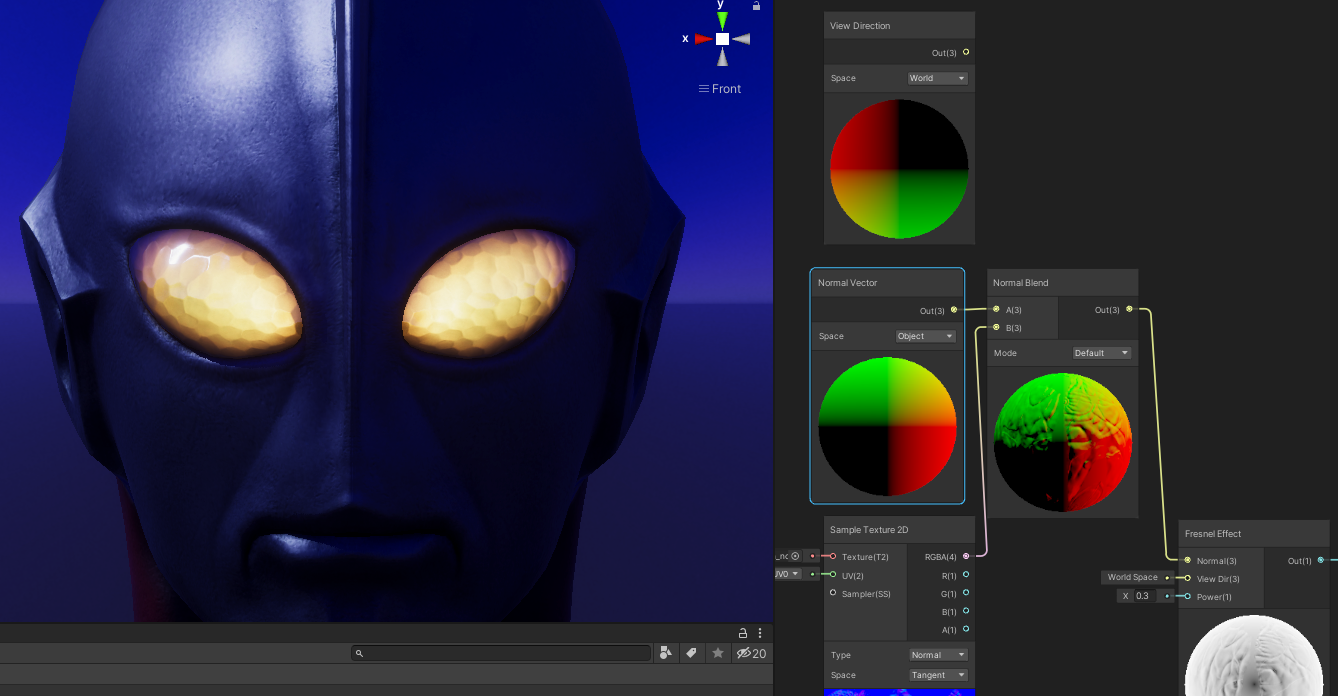
 worldly shard
i have a question
is it better to use visual scripting for shader
or use shader language
which one is easy to detect errors and debug
 wheat spire
Moving here cause I think my issue is a shader issue..
Trying to figure out why my is basically culling front faces even though I have Cull Off in subshader settings.
vocal narwhal
link to the shader, or just make a double sided cone
thick fulcrum
toxic flume
you could try something procedural, but you will probably have more control with a pre-defined texture
shadertoy can be a good source of ideas https://www.shadertoy.com/view/ldlXRS
 toxic flume
@thick fulcrum thanks, yes shadertoy is awesome but I do not know why I can not find it, my search word
I had searched lightning and electricity not electric
They need to change search functionality, really bad
One question, sampling from noise texture is better than computing a noise, for example simple noise (sin,frac,dot)?
thick fulcrum
toxic flume
<@!181788534301130752> thanks, yes shadertoy is awesome but I do not know why I ...
I agree, I just did another search and got different results to what google dropped me into
seems there's a tag search feature, so tag=electric in the search box gave different results perhaps better
toxic flume
Yes, it is only a tag search and name
thick fulcrum
depends on situation when it comes to sampling noise, if you are constantly changing (random) or computing it once. if the latter it's probably better to just use a pre-computed texture as the noise.
I liked this example too, perhaps better for "forcefields" https://www.shadertoy.com/view/3tdcW4
 thick fulcrum
ah 🤔 for mobile it might be lightest to use an animated texture / spritesheet type of affair.
OR
get VERY creative with code implementation, must be someway to fudge it on mobile by pre-computing sections but I would not know where to begin 😆
 high kiln
does anyone know where this flickering is coming from? it seems to affect only the outermost raw image UI container.
I think it occured after upgrading from 2020.1.x to the most recent version of unity.
 tepid galleon
can someone help me make a shader that inverts the red, green, and/or blue colors of a sprite?
 naive mural
@tepid galleon i think you can just do (float3(1, 1, 1) - color.xyz) in the shader.
regal stag
If you want to be able to control which can be inverted can do something like this :
// in Properties :
_Invert ("Invert? (0 = no, 1 = yes)", Vector) = (0,0,0,0)
...
float3 result = abs(_Invert - color).xyz;
 fresh vigil
Hi, I have two cameras, first one only renders a specific layer, the second renders the whole game except the camera layer that 1st camera renders. The first one renders first and I copy its _CameraDepthTexture to another custom ID. I'm reconstructing the world positions from depth buffer when 2nd camera renders, using its own depth texture, and the one I previously copied to a custom ID. Thing is, while the world pos from the 2nd camera appears to be okay, there's some weird issue when reconstructing the pos from the first camera depth. (screenshots on the way)
that's visualizing X position , the 1st one is the first camera
Needless to say, both cameras have the same projection settings and have the same position/rotation.
Been banging my head trying to look for smthing that I might have done wrong, but unless it's something related to some obscure rendertexture settings, i have no idea what the problem might be
regal stag
fresh vigil
Been banging my head trying to look for smthing that I might have done wrong, bu...
Yeah, might be the render texture format. There's a RenderTextureFormat.Depth format, could try that.
fresh vigil
Thanks, I'll play around with some of the RT settings again 🙂
 alpine goblet
rly noob question but in urp can you code a shader and use the shader graph at the same time?
regal stag
alpine goblet
rly noob question but in urp can you code a shader and use the shader graph at t...
If you're referring to working with both with separate shaders, then yes. They're different files, .shadergraph vs .shader. You can't open shader code as a graph though.
You can generate code from a graph but it'll then be a code file which is saved separately (and editing it won't make changes to the graph).
alpine goblet
Thanks, is the node system as capable or has the same features as coding the shader?
regal stag
There are some features only available in coding. e.g. Tessellation isn't in shadergraph yet. Can't access ZTest or Stencil operations. But for beginners, shader graph can be a lot easier to work with.
alpine goblet
thing is im trying to achieve something in shader graph and im having some problems and i found a shader script with everything done so im kinda tempted to switch
on the other hand there are so many tutorials just for shader graph
regal stag
Something to bear in mind is that if the shader code isn't specifically written for URP it likely won't work. There's a chance it'll work if it's unlit, but if it's a surface shader it definitely won't work.
Unless you switch to the pipeline that code is intended for that is, which will likely be the built-in RP.
alpine goblet
well looks like im sticking with shader graph thanks
alpine goblet
Another dumb question, what does Vector4.zw mean?
regal stag
alpine goblet
Another dumb question, what does Vector4.zw mean?
Would be obtaining the 3rd and 4th components of the Vector4 and converting it to a Vector2.
The components can be labelled as x, y, z, w or r, g, b, a.
alpine goblet
makes sense, thanks alot.
 cinder chasm
I'm getting an error regarding GraphicsFences NotSupportedException: Cannot determine if this GraphicsFence has passed as this platform has not implemented GraphicsFences.
SystemInfo.supportsGraphicFence is returning true. Anyone know why GraphicsFence.Passed is throwing this error if its supposedly supported?
Unsure of where this question fits tbh
alpine goblet
could someone tell me what TextureGrad() does?
 still carbon
alpine goblet
could someone tell me what TextureGrad() does?
still carbon
alpine goblet
could someone tell me what TextureGrad() does?
It gives you direct control over how the sampling thinks the pixel coverage of the sampled fragment is going to be. Giving control over things like anisotropy and mips or create special sampling effects. It has very niche uses. There's a good breakdown here <https://stackoverflow.com/a/52977548"
still carbon
worldly shard
which one is easy to detect errors and debug
they both have their pros and cons. Visual programming of shaders is really helpful since you see the result immediately in the graph though and you're not going to make syntax mistakes with extremely vague error messages that often don't help. But you sacrifice some finer control and shader features or possible avenues of optimization.
alpine goblet
still carbon
It gives you direct control over how the sampling thinks the pixel coverage of t...
thank you, there isn´t anything close in shader graph right? im gonna try and do a custom node with TextureGrad()
still carbon
yeah custom node should work
you could also use https://docs.unity3d.com/Packages/com.unity.shadergraph@6.9/manual/Sample-Texture-2D-LOD-Node.html for something similar that doesn't require messing with derivatives @alpine goblet
alpine goblet
still carbon
yeah custom node should work
im hoping so
alpine goblet
still carbon
you could also use <https://docs.unity3d.com/Packages/com.unity.shadergraph@6.9/...
thanks il check it out
regal stag
If you use a custom function node, I recommend using SAMPLE_TEXTURE2D_GRAD(textureName, samplerName, coord2, dpdx, dpdy) in it, as that's the method SRPs will expect.
alpine goblet
Thanks will do
alpine goblet
Can i manually write the abstract method or do i need to do it with a hotkey? i know its a dumb question but im having some weird errors and this is all i could think about
regal stag
Unsure what you are referring to, perhaps show the error messages.
alpine goblet
idk if im not using some directive, but things like "Slots" and "Bindings" should be correct
the code just incase
regal stag
Ah, you're using the C# CodeFunctionNode which is outdated. The up-to-date method of using custom functions is to use the Custom Function node directly in the graph. https://docs.unity3d.com/Packages/com.unity.shadergraph@8.3/manual/Custom-Function-Node.html
or for v10+ : https://docs.unity3d.com/Packages/com.unity.shadergraph@11.0/manual/Custom-Function-Node.html
alpine goblet
regal stag
Ah, you're using the C# CodeFunctionNode which is outdated. The up-to-date metho...
thanks again 🥲
That´s actually super cool too
alpine goblet
regal stag
If you use a custom function node, I recommend using `SAMPLE_TEXTURE2D_GRAD(text...
im sorry for being so annoying but on textureName is it a string ? (if it is strings arent available as inputs) or is it an actual texture?
regal stag
It's a Texture2D object. There's no such thing as strings in shaders afaik.
Easiest to send it in through an input, probably same for sampler (SamplerState)
alpine goblet
I see thanks
 feral inlet
Hi. I was using Vector 1s as indexes for my T2DA arrays in shadergraph. Am I supposed to do this? Do you change the vec 1s with this function? (SetInt)
neon gull
does anybody know whether there are specific unsupported features in terms of compute shaders (in Unity) when it comes to nvidia or amd?
I am working on an editor tool that modifies the positions of vertices using compute and it works fine on a wide variety of nvidia GPUs, however lots of vertex positions are off on AMD Gpus
Maybe someone stumbled upon something similar in the past
alpine goblet
is there any macro that works with this inputs? ive tried texture and tex_Sample/tex.Sample but none worked
regal stag
alpine goblet
is there any macro that works with this inputs? ive tried texture and tex_Sample...
I think it's sampling the texture right? (Not that familiar with glsl)
SRPs tend to use the macro SAMPLE_TEXTURE2D(texture, sampler, uv);
alpine goblet
there it is, thanks alot Cyan.
still carbon
feral inlet
Hi. I was using Vector 1s as indexes for my T2DA arrays in shadergraph. Am I sup...
SetFloat() would be for vector1 but SetInt should work too, if it's working fine then it's fine 🙂
still carbon
@grand jolt just do hit_pos = float2(0,0); in the first line, so that an output is guaranteed, as out implies a value will always be assigned
 wet lance
I am trying to follow this but I am new to shaders so I need some help
Jaiden Mispy
Let's say you have two overlapping circles. Instead of making something Venn diagram-esque, you'd rather they just marked out a continuous area.
I try to make a material to put the shader on but I can only make 3d materials
Also I tried going with the 3d material anyways and it did not work
wet lance
Nevermind I got it working!
 night mica
Does anyone know what the 'Texel Size' shader graph maps to? I'm trying to use it get the texture width to sample a data buffer baked as a texture.... but once I pull the 'Texel Size' node into a node tree I can no longer connect it to the vertex position (ie. like using sample texture 2d instead of sample texture 2d LOD).
regal stag
night mica
Does anyone know what the 'Texel Size' shader graph maps to? I'm trying to use i...
Hmm, not sure why it's limited to fragment only. Might be able to obtain it in a Custom Function node, would be the texture's reference + "_TexelSize". (.x is 1/width, .y is 1/height, .z is width, .w is height)
Alternatively, send it in yourself through a property.
night mica
Hm... weird. works fine in HLSL.
¯_(ツ)_/¯
Oh well, I'll just manually set it as a property.
 shell thorn
sup!
I've made a nebula shader but have some problems with implementation of star flare\glow they now looks more like blurred dots
Any Idea how to make flares?
like this one
low lichen
shell thorn
sup!
I've made a nebula shader but have some problems with implementation of sta...
Is this just an exercise in writing shaders or do you plan on using this shader in a game?
Because it sounds expensive, compared to a cubemap texture
shell thorn
low lichen
Because it sounds expensive, compared to a cubemap texture
In a game, but basically it will be only one Super shader for background so I don't care about performance and yes its 2d shader
low lichen
Writing procedural one-pass shaders like this often requires a lot of math. To get flares like that, you'd probably be using sin and cos to make the ring.
I suppose you could also sample a flare texture
But do you want it to be hardcoded where these things are?
shell thorn
for a circles isn't a problem, already tried to sample texture but with no luck, those flares must be ununiform distributed so with sampling I have no idea how to achieve random distribution.
low lichen
Make a random function and use the index of the flare as the seed
shell thorn
I suppose to reuse one flare by using a noise and generally I wanna make a flare inside a shader
 icy osprey
im trying to make a simple Holosight shader in shadergraph, can someone help me figure out how to make it so that if the sight is not behind its object its invisible (the green part should be invisible)
low lichen
This requires stencils, which Shader Graph doesn't expose properties for.
icy osprey
low lichen
This requires stencils, which Shader Graph doesn't expose properties for.
so i just have to write the shader?
low lichen
These look like two very simple shaders
You can just duplicate an unlit shader and add the stencil part to it
regal stag
If you want it to only appear in the quad, you could move the sight texture inside the quad instead of moving a separate quad/object. That way, it won't render the part outside the quad bounds.
low lichen
That would lose the 3D effect. The crosshairs are meant to be a few meters in front of the scope.
You could do some kind of parallax effect in one shader
But that's probably more expensive than using stencils
This shader should work as the stencil write shader. That would be the shader on the invisible quad.
https://gist.github.com/ewandennis/ff0f12da482a0aff55486290c00c5e9e

Gist
A simple stencil buffer masking shader for Unity . GitHub Gist: instantly share code, notes, and snippets.
I don't think you need to modify it to make it work in URP
regal stag
Should work fine, unless you want SRP batcher support
icy osprey
thanks, will check it out
regal stag
You'll also need a shader on the crosshair that has a stencil pass like
Stencil {
    Ref[_StencilMask]
    Comp Equal
}
thanks
i have no idea about writing shaders, so ill read some stuff
no idea what are you saying tbh
is there a way i can incorporate these written shaders into the shadergraph?
 knotty juniper
there is a code node but that can only be parts of a shader
regal stag
You'd have to generate code from the graph to add stuff like Stencils. There's an option to view the generated code if you right-click the Master node (or if you're in v10+ it's in the Inspector when you click the .shadergraph file). You can then save the generated shader in your assets, edit it, and swap it out on the material.
There is an alternative if you want to continue using graphs. It's possible to override stencil values using the RenderObjects feature on the Forward Renderer asset. But it's a bit awkward with singular objects, as it filters per-layer.
 buoyant eagle
Hello, I made a shader using shadergraph which uses function replacecolor() for changing all my pixels from one color to another, It was working fine, But then I saved and closed proyect, and when I reopened now all my textures look black, Anyone knows why this bug happens? I have no Idea on what could I do, bc the shader is still the same, but it does not change the color anymore, and everything looks black, all my sprites without the material look good, but the material with that shader now looks black
 lavish sierra
@buoyant eagle does it just look black in Shadergraph, or in the game?
icy osprey
regal stag
There is an alternative if you want to continue using graphs. It's possible to o...
I found a shader that does the thing without using stencils
im trying to understand how it works so i can recreate it in shadergraph
 merry rose
Hello, Today I got onto a quest of making URP Terrain Grass better for my needs, I already fixed few color issues and now moved onto putting a ShadowCaster pass into it. I "successfully" implemented it but only on objects that are not spawned through terrain details, so Grass still does not cast any shadows, Is there a way to enable it? It seems like it skips ShadowCasterPass completely when painted on terrain. (It's been already like 12 years... https://blogs.unity3d.com/2008/04/14/terrain-lighting-shadows-and-the-road-towards-it/)
Unity Technologies Blog
People have been asking: why built-in shadows don’t work on Unity’s terrain? (here, here, …) Yes, right now (Unity 2.0.2) they don’t. Why – because we didn’t have time to make them work yet. Both terrain and built-in shadows are new features in Unity 2.0, and those two don’t happen to just work together. Here’s […]
regal stag
icy osprey
I found a shader that does the thing without using stencils
It uses parallax (basically, offsetting the uv coordinates based on the tangent space view direction), MentallyStable briefly mentioned it above but thought it might be more expensive than the stencil approach. It should be possible in shader graph at least though.
A lot of the shader is just the "setup" involved for converting the View Direction into Tangent Space. Luckily, shader graph can do that for you using the Space dropdown on the node.
(They also seem to be adding the normal to the view direction before that though? Not sure I really understand that. Maybe you'd have to do that too (in World? space). Can then use Transform node to convert from World to Tangent. Not sure, hope this gives some hint of what to look into.
icy osprey
regal stag
It uses parallax (basically, offsetting the uv coordinates based on the tangent ...
thanks, ill be working on that
i have a very vague idea on what im doing lol
regal stag
@icy osprey Might be a bit different from the shader you found, but I've used this sort of thing for parallax effects before, if it helps
icy osprey
regal stag
<@!185102882528296960> Might be a bit different from the shader you found, but I...
thanks, will try this out
wet lance
So I have the following shader code which makes it so the shadows in my game don't have additive blending
    Properties{
        _MainTex("Base (RGB)", 2D) = "white" {}
    }

    SubShader{
        Tags { "Queue" = "Transparent" }

        Pass {
            Stencil {
                Ref 2
                Comp NotEqual
                Pass Replace
            }

            Blend SrcAlpha OneMinusSrcAlpha

            CGPROGRAM
            #pragma vertex vert
            #pragma fragment frag
            #include "UnityCG.cginc"

            uniform sampler2D _MainTex;

            struct v2f {
                half4 pos : POSITION;
                half2 uv : TEXCOORD0;
            };

            v2f vert(appdata_img v) {
                v2f o;
                o.pos = UnityObjectToClipPos(v.vertex);
                half2 uv = MultiplyUV(UNITY_MATRIX_TEXTURE0, v.texcoord);
                o.uv = uv;
                return o;
            }

            half4 frag(v2f i) : COLOR{
                half4 color = tex2D(_MainTex, i.uv);
                if (color.a == 0.0)
                    discard;
                return color;
            }
            ENDCG
        }
    }

        Fallback off
}```Essentially it makes shadows look like this:https://cdn.discordapp.com/attachments/497872424281440267/810332202738122832/unknown.png


But now I am getting problems where the player's shadow goes through walls like this
And it is also messing with the cursor
Anyone know how I could fix this?
still carbon
wet lance
So I have the following shader code which makes it so the shadows in my game don...
below the Blend line, add ZWrite off
right now it's writing to depth buffer which then clips rendering of other stuff that's s on the same plane or behind
wet lance
Thanks so much that worked!
 twin swallow
https://medium.com/@jannik_boysen/procedural-skybox-shader-137f6b0cb77c
I've been following this skybox shader guide and I can't figure out where I went wrong, or if there's a setting somewhere I need to change.
alpine goblet
do you have rg in the uv of the texture?
hey guys any tips on optimizing a shader in urp? ive done alot of stuff and when i look at the sky for example i hit 300 fps but when i look at my plane with the texture i go to about 50 fps
twin swallow
alpine goblet
do you have rg in the uv of the texture?
yeah. I used the above as a subgraph here:
alpine goblet
no idea then i tried double checking but i think you have everything correct
you have saved the shader right?
lmao i randomly found cyan blog, it has so much cool stuff
twin swallow
yeah its saved 😛
grand jolt
How to enable high quality in your game
grand jolt
oh this is the channel

Let's learn how to make a cool Snow Shader in Shader Graph!
Check out XMLLayout! https://bit.ly/2VZocbu
● The shader is inspired by this amazing video: https://youtu.be/Q43XBychCEY
● Mayan Temple pack: http://devassets.com/assets/mayan-temple/
····················································································
♥ Subscribe:...
will this work on mobile ios / android
?
low lichen
@grand jolt Yes
grand jolt
How do I?
low lichen
I don't know, how do you?
low lichen
@grand jolt It's no different from doing it the way they're showing you in the tutorial
grand jolt
he says unity 2019.1.2 +
and setup for lightweight render pipeline
how do i set it up?
low lichen
Do you want me to watch the tutorial and update the instructions in it for the latest version of URP?
grand jolt
idk if u want?
he says in the beggining to set up that so idk how
he doesnt show how to set it up
low lichen
Do you not have URP set up in your project?
grand jolt
idk i just started a new one
low lichen
Did you use the URP template?
grand jolt
how do I?
low lichen
You have to choose a template when you create a new project
The default is called "3D", which doesn't use URP
low lichen
There's another template called Universal Render Pipeline, which uses URP
You can setup URP in an existing project too
grand jolt
is it lightweight then?
low lichen
Lightweight was renamed to Universal a while ago
low lichen
grand jolt
ok i will try this thanks
Should I install newest version or the one that it recommends me?
Of URP
cuz i got 2019.4.16f1 and not 2020.x
low lichen
@grand jolt The only reason you might not want to install the newest version is if you're worried about it being unstable
But I don't have reason to believe that it is
grand jolt
ok
i got it
and somehow changed all materials while keeping the texture on it
like thousands of mats
using google 3d exporter xd
 twilit geyser
Does anybody know why the edges on the texture are lit that much? The material has smoothness set to 1, which gives that strong reflection of the light in the big blob, but I would like not to have it on the edges?
low lichen
What textures do you have on the material? Looks like maybe a normal map. Is there a metallic/specular map?
twilit geyser
@low lichen In this example I've no maps at all except the albedo and alpha albedo.
The smoothness has a float value
low lichen
What shader is this?
twilit geyser
HD Decal
I also tried different compression settings and other import settings, because I was thinking that it might be quality related, but it didn't change much.
low lichen
I'm guessing somehow the alpha is reducing the smoothness, which makes it more diffuse
So the specular highlight is bigger and more diffuse on the edges
twilit geyser
Hm, I guess the edge actually might have half values in the alpha because of lack of quality
low lichen
Doesn't HDRP have debug views to preview specularity and such?
twilit geyser
Actually, I don't have a map for albedo either, just setting a color there. Just using the texture I have for the albedo alpha
I have very little experience in HDRP, I don't know
Okay, I found it, but I'm not sure what to do with the information 😄
low lichen
Can you post what it looks like?
twilit geyser
low lichen
I'm surprised there isn't any debug view to just see the different GBuffers of the deferred rendering
One of those should be specularity/smoothness
But thinking about it, I think the alpha must be affecting the specularity of the scene
It's blending between the highly specular decal to the less specular wood below it
twilit geyser
This?
low lichen
Ah yes
And yeah, you can see the edges are blurry
Meaning it's blending between the smooth black decal and the bright rough wood
What does it look like if you make the wood highly specular too?
I'd expect the edges to no longer be brighter
This doesn't fix your problem, just more to confirm the issue
low lichen
Okay, then this kinda seems like an oversight or limitation in deferred rendering. It doesn't like transparent things I guess.
One fix would be to minimize the alpha gradient on the edges
To make it a more defined edge
twilit geyser
That will be tough, because I think the "gradient" comes from quality loss during compression. This is an 8k Flipbook actually and details get small since it's 64 frames
I could try to increase the contrast inside the shader maybe?
low lichen
Modify the shader you mean?
twilit geyser
Yeah, it's a custom shader
low lichen
Oh, I've been looking at the HDRP/Decal shader
twilit geyser
I've used that as a template, actually using ASE here
twilit geyser
Don't mind the normal map stuff
low lichen
Is it transparent in the middle too? To show the wall behind it?
twilit geyser
What do you mean in the middle?
low lichen
Not the edges. Is it slightly transparent overall?
twilit geyser
No, the transparency comes from the shader, but the actual texture doesn't have alpha
low lichen
You can add a Step node right before plugging in the Albedo Alpha
But you then have to multiply that with the overall alpha value you want
Because Step will make it jump either 0 or 1
twilit geyser
I tried that earlier, but it didn't work. Maybe I made a mistake, I'll try it again.
low lichen
@grand jolt You followed the tutorial and remade the shader?
twilit geyser
@low lichen Ah, I forgot to multiply my MAOS Opacity with it, it's working now.
Looks pretty much solved now, thanks a bunch!
low lichen
Have you tried changing the Snow Opacity property?
grand jolt
at 1
and his is at 0.5 btw
🤔
im gonna go through it again maybe i missed a step
anyway to have the shader graph window better..? like when i doubleclick to open it it opens in a small window where scene view is
I'd like it to be seperate window each time i reopen it
also what i noticed
his simple noise looks different
vs mine as a circle
low lichen
I think that's just a change in Shader Graph. It's the same data, just projected on a sphere
Have you tried increasing SnowOpacity to higher than 1?
 low lichen
Are you sure it was set to 0.5 in that screenshot from the video?
grand jolt
yes he just switched to that shader on his materials
so its default values 0100 and 0.5 opacity
low lichen
I think the noise is kinda unnecessary
I'd rather use a snow texture that has some noise in it
More control that way
The generated noise is very high frequency, a different random value for every pixel.
grand jolt
welp idk how i would do it xD
I hoped it would look like in his video but it just does not
I will check everything again from start
low lichen
To replace the noise with a texture, remove all these noise related nodes.
low lichen
Replace the Add node with a Lerp node, plug the Base Sample Texture node into the A port and plug this node into the T port, remove the other Multiply node.
Then add another Sample Texture 2D node for the snow texture and plug that into the B port of the Lerp.
twilit geyser
@low lichen Your idea worked well, however I have another problem right now. Some parts of the reflection are flickering. Any idea? (view in full screen)
low lichen
@twilit geyser What threshold are you using in the Step? Any difference if you change that around?
low lichen
What does the roughness GBuffer debug view look like now?
I assume this must be some weirdness with HDRP's temporal anti aliasing, since the camera isn't moving at all
alpine goblet
hey guys any tips on optimizing a shader in urp? ive done alot of stuff and when i look at the sky for example i hit 300 fps but when i look at my plane with the texture i go to about 50 fps
twilit geyser
@low lichen The shape is perfectly black. I would assume there would be white spots flickering as well, if that was the problem, right?
low lichen
At least something. You're sure this wasn't there before? It goes away as soon as you bypass the Step node?
twilit geyser
Oh no, I think it was there before as well
low lichen
Oh okay
twilit geyser
Some general HDRP setting?
low lichen
If you make the wood specular again, does it appear to have the same flickering?
twilit geyser
Yeah it does
low lichen
Then yeah, it sounds like some general HDRP thing
twilit geyser
Hm, I have the default HDRP settings from the HDRP sample that's always setup at the beginning of the project
low lichen
How far can you reduce smoothness before it's no longer as shiny as you want it?
I assume lower smoothness is going to reduce this aliasing
twilit geyser
It stops around 0.65 smoothness, which is a totally different look
low lichen
What anti aliasing settings are default in HDRP?
twilit geyser
Where do I find those?
low lichen
Probably in one of the HDRP assets
twilit geyser
@low lichen It was on the camera settings and it's set to "Temporal Anti-Aliasing", changing it fixed it
Thanks again, you're saving me from a lot of headaches ❤️
woeful geyser
How to get rid of ripples on textures? Mip maps are on
grand jolt
uf that looks ... interesting
 last robin
it sure seems like mipmaps are not on or not generated? You could also be using tex2Dlod which samples a specific mipmap level? not sure
woeful geyser
last robin
it sure seems like mipmaps are not on or not generated? You could also be using ...
well this appears when I change the checkbox "Generate mipmaps" in play mode and it does take effect. May be it needs to be really prepared in some way, I don't know
Forgot to mention that this is URP Simple Lit without modifications
 marble jasper
Hello i'm currently working on a raytracer in unity using compute shaders
This is a part of the function i'm using to check an intersection between a ray (origin, direction) and a sphere
The line 'float a = dot(direction,direction);' works fine but the line 'float b = ......' crashes unity
I found out it has to do something with the function parameter 'float3 origin'
Even if i pass in the float3 origin as a hardcoded value unity still crashes
low lichen
Is it crashing as soon as the compute shader is dispatched or is it crashing during compilation?
marble jasper
How can i see that?
low lichen
It's compiled as soon as you've saved it and opened Unity again
marble jasper
The crash log says "Unity.exe caused an Access Violation (0xc0000005)"
It crashes during runtime
GPU spikes to 100%
and then it freezes
low lichen
There isn't any possibility you have some recursion happening, is there?
Crashes from shaders is not something I've seen often
marble jasper
Hmm
looks like it has something to do with float3 arithmetics?
float3 - float3
float3 L = float3(0,0,-1.0f);
this works
wait
low lichen
What if you replace it with float3 L = origin - origin;?
marble jasper
it is really inconsistent
low lichen
How much memory does your GPU have? Do you have any reason to believe it's running out?
low lichen
How soon do you think it's crashing? I assume you're dispatching every frame?
marble jasper
Now i'm just dispatching it in the start method
low lichen
Hmm, and you can fix it consistently by removing one of those seemingly trivial operations?
marble jasper
wellllll
low lichen
Can the result of those operations have an effect on what the shader does later? Is there a branch to something else depending on the result of those calculations?
marble jasper
i've tried a lot of things and one time it worked, but then i tried it again and it didnt work
ye thats what i tried
1 sec
glossy matrix
no idea what im doing with shaders, but id like to combine these two passes, how would i go about doing that?
marble jasper
i'm gonna try some more things
low lichen
glossy matrix
no idea what im doing with shaders, but id like to combine these two passes, how...
You're writing with the "fixed function" syntax in ShaderLab. It's kinda outdated and I have no experience with it.
marble jasper
Also @low lichen:
dot(L,L) works
dot(direction,direction) works
but dot(direction,L) crashes
Type mismatch?
or
low lichen
marble jasper
Type mismatch?
I would think any type mismatch issues would be a compile issue, not runtime
marble jasper
or zero division or smthng idk
low lichen
That doesn't normally cause crashes though
marble jasper
because dot can be zero right?
low lichen
I suppose it's possible
glossy matrix
low lichen
You're writing with the "fixed function" syntax in ShaderLab. It's kinda outdate...
ah -- i kinda just found it online, basically one pass only renders when its behind other object ( so you can see through it) and the other renders in camera view. . .
(essentially i just wanted a shader which you can see no matter if its behind an object or not, because camera layering is broken with some api im using ;-;)
marble jasper
Hm the crash seems to be caused by the code using the result of the dot
Can a sqrt(0) be a problem?
shouldnt be
low lichen
It can't hurt to add checks for it
I haven't heard of Unity crashes from shaders dividing by zero and similar math errors
marble jasper
oh boi it goes deeper down the rabbit hole
I think i found the issue
out Sphere hit
where hit is only assigned when a sphere is actually hit
low lichen
But surely it has to be initialized to something?
Does it even compile if it hasn't been initialized?
marble jasper
Might be a bug in unity compute shaders?
its only initialized within a branch
(Disclaimer: my code is getting messy)
When i do this i get a compile error: ''FindNearest': output parameter 'hit' not completely initialized at kernel CSMain
But if i do this i get no compile error while in some cases 'hit' is still not initialized
last robin
you're potentially not setting hit if you don't hit any spheres
marble jasper
Thats what i was saying :P
But shouldnt the compiler throw an error because of that?
last robin
oh i see
marble jasper
in for example c# the compiler throws an error if a variable only gets initialized within a branch
last robin
uh i've definitely had some weird compiler bugs show up in compute shaders so it's entirely possible it's a compiler bug
in my case it happened when using early returns and branches
not sure what it is about them that causes it but it's happened twice to me
what you can try is throwing a UNITY_BRANCH on top of the loop and see if it errors properly?
last robin
i think maybe it's flattening the branch so it evaluates both sides
so if that optimization happens technically it would be initialized
if that makes sense
it really shouldn't do that though lol
sorry, not on the loop
on the if statement
UNITY_BRANCH
marble jasper
I'm trying
Takes some time to restart unity :D
Hm
How can an unassigned variable crash unity if i'm not using the variable anywhere
only 'out'ing it
last robin
🤷♂️
last robin
hmm just use [branch] then
it's defined in UnityCG probably but it's just a macro for [branch]
last robin
weird
well probably a compiler bug, but you should probably just return the index of the sphere and set it to -1 if nothing hits
as a workaround
marble jasper
Alright
same error
Write to location 0000000000000000 caused an access violation.
in the error.log
last robin
can you repost a screenshot of the code?
marble jasper
need to clean the code a little bit after all the testing 1 sec
uhm
Adding the "index = i"
crashes the program
waititt
it goes further
This crashes
this doesnt
last robin
well i mean the 2nd one i isnt used so that code is probably throw away
last robin
like crashes unity?
marble jasper
yes
marble jasper
Are there any official unity developers in here? ;D
assigning 0 to index within the loop also works fine
last robin
a lot of code is probably removed cause it's a constant though
last robin
🤔
last robin
lol
you can't reason with compiler bugs
makes me wonder if unity is using an old version of the HLSL compiler and some of this stuff is fixed
marble jasper
isnt unity using some kind of altered HLSL
last robin
not sure
marble jasper
k got it working
kinda
No sphere on my screen yet but that is probably just my broken code
Thanks for the help :D
wait nvm
okay
enough compute shaders for today
LOL
shell thorn
Sup!
Is any way to use a Sprite Lit Shader as a subgraph to reuse it in another one sprite lit shader?
Question closed, found a subgraph
 full merlin
Hey guys. I'm learning about the shader graph and managing to get the hang of it. But there are some stuff I still don't know
Any advice on how I can improve?
twin swallow
<#archived-shaders message>
(link to a post I made last night)
Could someone take a look at this skybox shader I've been trying to make from a guide?
I don't know enough to see what mistake I may have made to get the output I'm getting.
regal stag
twin swallow
<https://discord.com/channels/489222168727519232/497874081329184799/810707361944...
Are you sure the output isn't correct? The "correct output" image is looking along the y axis (down or up) while yours looks like it's just looking along the x/z axis somewhere. If you change the angle the camera is looking at they might be the same?
It does look a bit stretched horizontally though, maybe that's just the fov setting, not sure.
twin swallow
🤦🏻♀️
it looks more correct when i rotate the camera 90 on the x-axis
which doesnt make much sense to me 😅
regal stag
Yeah, rotating 90deg on the x axis would make the camera look directly downwards
It might be easier to visualise the shader in scene view where you can look in all directions easily
twin swallow
ah, because its a sphere
glossy matrix
i have this shader and would like to make the edge sharper, not sure how id go about with that, any suggestions?
shell thorn
glossy matrix
i have this shader and would like to make the edge sharper, not sure how id go a...
play with color mask Range Fuzziness and some noise
but you need basically more play with noise to get smooth transition
@glossy matrix
alpine goblet
hey guys random question, do you think amplify is worth it?
 craggy ledge
guys when i do
mesh.vertices on MonoBehaviour, is it CPU or GPU modification of vertex ?
 potent haven
craggy ledge
mesh.vertices on MonoBehaviour, is it CPU or GPU modification of vertex ?
potent haven
craggy ledge
mesh.vertices on MonoBehaviour, is it CPU or GPU modification of vertex ?

Short answer, is that making it editable means there's a copy in both C# and the GPU. They get updated when draw calls are dispatched.
Also, is there a section for compute shaders, or is this the right area? Apologies for the silly question. I'm just new here ^^
 echo solstice
shell thorn
echo solstice
shell thorn
This is shader graph? Am I right?
 near pond
it is
 drowsy trail
I have an issue with my toon shader and how it casts shadows. Its supposed to work with shadow cascades and it does in the editor, but when I build the project all the shadows that are not under cascade 0 are broken. Is there a way I can fix this? I use URP and unity version 2019.3
https://media.discordapp.net/attachments/368165149426581514/811134672703848488/unknown.png Shadows in the editor

Shadows on build
the toon shader uses a custom script and two keywords
 naive pendant
normalize the direction
interpolation can error and then you receive invalid values
normalizing the direction should fix some issues but maybe not all
drowsy trail
alright ill see if that will work
naive pendant
drowsy trail
alright ill see if that will work
tell me if it works
drowsy trail
mmk
naive pendant
I'm mostly an render-api guy so after that it'll be harder for me to help xD
drowsy trail
it didnt seem to work, I added a line after 31
Direction = normalize(Direction);
though im not really sure if i supposed to do that, im not really good with shader code
naive pendant
I'd go step-by-step
from the shadergraph preview to what you have now
to see which line causes problems
you should always normalize values in pixel shader
because interpolation can cause floating point errors
well
always normalize normals
not every value
xD
drowsy trail
mm i see
naive pendant
so if only the direction of something is important always noramlize that. If you need direction + scale then don't normalize
drowsy trail
I was able to fix it after deep digging on the internet.
I basically changed
float4 shadowCoor = TransformWorldToShadowCoord(WorldPos);
to
float cascadeIndex = ComputeCascadeIndex(WorldPos);
float4 shadowCoord = mul(_MainLightWorldToShadow[cascadeIndex], float4(WorldPos, 1.0));
 surreal pivot
I have this blur shader for UI Images
https://pastebin.com/FauXReFH
The thing is I would like a feather at the edges and have tried many things to accomplish this. Though I never could make it work :/
Could someone point me at the right direction on how to make that work?
twilit geyser
Hey guys 🙂 Are there no decal shader options in unity's built-in pipeline? I only found the decal shader in the HDRP pipeline so far.
amber saffron
twilit geyser
Hey guys 🙂 Are there no decal shader options in unity's built-in pipeline? I on...
no
twilit geyser
That's crazy, did projects simply not use decals at all before HDRP?
amber saffron
But there is plenty of assets to handle decals in the built-in pipeline
(If your original question is about built-in solutions provided by Unity)
twilit geyser
Hm yeah, I'm working on a decal pack for the store and I can't just add other people's work in the package
amber saffron
You could bundle in your pack a unitypackage with already setup decals for ultimate decals for example, without embedding other things : https://assetstore.unity.com/packages/tools/utilities/ultimate-decals-deferred-forward-urp-139080
Just make it explicit in your doc that if users want to use it, they need to have the asset installed
swift loom
Maybe an overly simple question, but in shader code if you do divide a float by a float3 what is happening? Is it just getting divided by the x in the float3?
twilit geyser
Thanks for the Info, Remy!
amber saffron
swift loom
Maybe an overly simple question, but in shader code if you do divide a float by ...
Did you try ? I think it will raise a compilation issue. You should either cast the float3 to a single float, or the float to a float3
amber saffron
twilit geyser
Thanks for the Info, Remy!
A lot of assets work like that to support multiple solutions 🙂
swift loom
yes it works and my code works the way i intended it to but in the complete opposite way than i intended it to 😩
but what im doing is this
aah even a small snippet got nuked, sec
Pastebin
Pastebin.com is the number one paste tool since 2002. Pastebin is a website where you can store text online for a set period of time.
but whether distance is a float or float3 doesn't seem to matter so im assuming it's just using the x?
amber saffron
I think that the usual cast from float to float 3 is : float3 f3 = float3(f,f,f);
but the inverse is probably just using X indeed
swift loom
👍 Thanks. I'm just trying to learn this via code I find so sometimes they do things that I don't really get. :)
amber saffron
Still, I don't see why distance would be a float 3 😄
swift loom
yep it shouldnt be... but it still works 😄
 near stratus
Why is everything glowed? its standard 3d project converted to universal pipeline, i did the same in new URP project and it works any ideas?
regal stag
near stratus
Why is everything glowed? its standard 3d project converted to universal pipelin...
The glowing is caused by the Bloom post processing. An Intensity of 10.91 is probably quite high
near stratus
yea but why is everything glowing not only one object in my case its cube. Volume is in cube so it should work only for cube not every single object
and even the text is glowed
regal stag
Volumes won't cause certain objects to glow and others not. It's a screen space effect. It just means that the glow should only appear if the camera is inside the volume (for Local ones)
The volume is also Global, so it's always active in this case.
If you want only certain objects to glow, you need to have them output a brighter colour than other objects, and adjust the Threshold on the Bloom appropriately. Basically, if the output colour is brighter than the threshold it'll glow. I tend to have HDR colours enabled (on URP asset), then have a shader output values higher than (1,1,1,1) for glowing objects. Threshold can then be higher than 1, like 1.2 or something.
It works fine without HDR too, but you'd need to keep the threshold lower than 1 and be careful how bright other objects are.
near stratus
Thanks for help ❤️
 rustic thistle
Hey guys it's me again. I have a a question. I have a iceplatform with refraction done via shader graph, but the problem is, that the because of the scene color node the character above the ice is refracted too. Have someone an idea how to solve this bug?
regal stag
rustic thistle
Hey guys it's me again. I have a a question. I have a iceplatform with refractio...
You can sample the depth (Scene Depth node, **Eye **mode) using the same distorted coordinates that the Scene Color uses, and compare that depth value with the depth of the ice surface (using the Comparison node. Ice surface depth can be obtained with Screen Position node, set to Raw, Split and take the A output).
If the Scene Depth returned is smaller than the ice surface depth, you know it's trying to refract the player or another object ontop of the ice. The problem is there's no way to determine what the colour would be behind that object, so you have to result to using the non-distorted Screen Position.
I've used the same idea for a water shader to prevent it distorting objects above the surface. This is the part that shows the setup : https://www.cyanilux.com/tutorials/water-shader-breakdown/Graph3.png
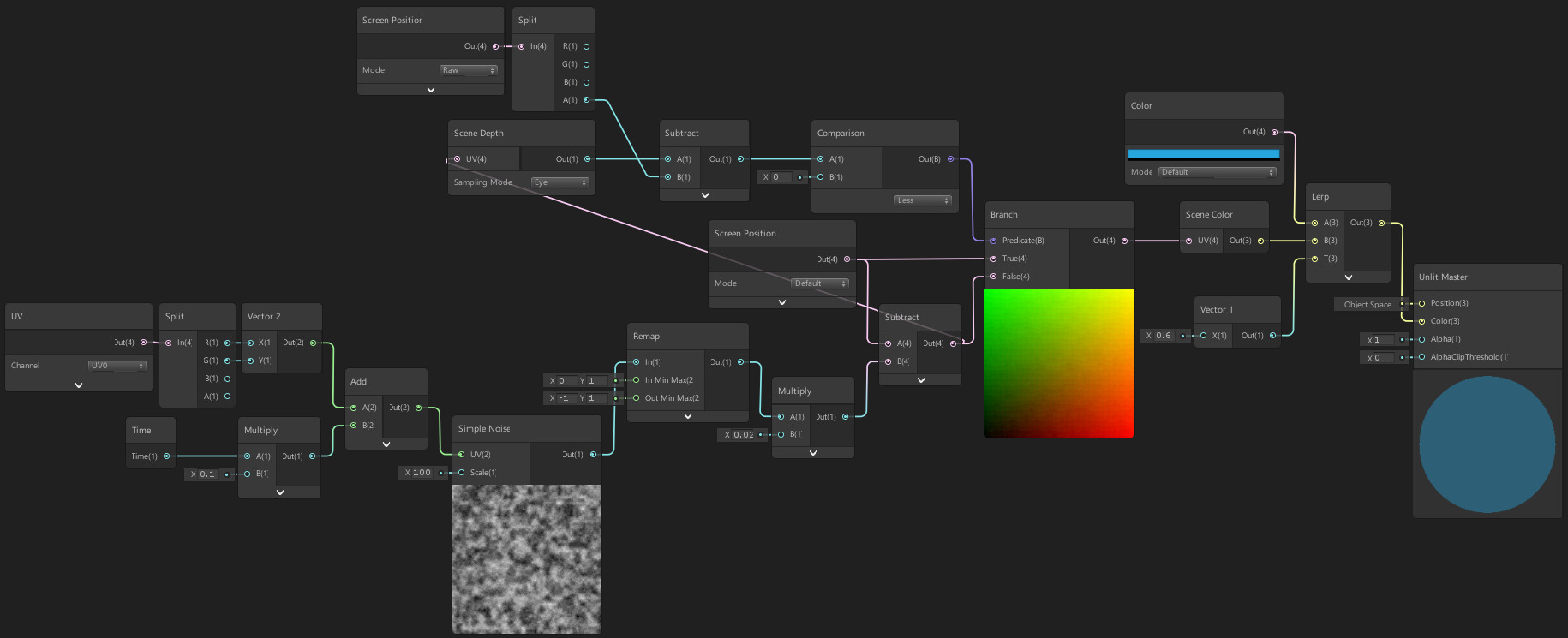
Maybe not the best solution, can leave some artifacts behind, especially if MSAA is enabled. Not really aware of anything else though, (other than maybe trying to draw the player later / in the transparent queue so it doesn't appear in the scene color texture. That might lead to other problems?)
rustic thistle
regal stag
Maybe not the best solution, can leave some artifacts behind, especially if MSAA...
Thank you. Huge fan. 😄 I just thought of a proximitry Custom Node, wich is stepping back when the z buffer of the refracted object lays above the ice. Could it work too? But I will try your approach for sure, too. Thank you 🙂
And yeah, you are right, changing the render queue is not a thing, because the character could fall of the ice, while the camera stay above, as in ragdoll after dead
regal stag
rustic thistle
Thank you. Huge fan. 😄 I just thought of a proximitry Custom Node, wich is step...
Not too sure what you are referring to by "proximitry Custom Node" really. If it involves depth it sounds like a similar approach to the one I discussed
rustic thistle
yeah it is very similar. my first attempts was that.
but it led to some artifacts. So now I am thinking of a Custom Node wich is lowering the strenght of the given refraction when the refracted objects lays above
regal stag
Yeah, that's similar to my approach above, just using Comparison & Branch instead of a Step & Multiply. I'd definitely handle it on the strength of the distortion rather than multiplying the result of the Scene Color though.
rustic thistle
Is this the shader you refered to? https://twitter.com/Cyanilux/status/1134420880891809793


Hey! Wanted to use the 'Scene Color' and 'Scene Depth' nodes a bit, which developed into this water shader. It's all drawn to the plane so the camera can't go below the surface, but it looks cool. 🌊#unity3D #madewithunity #shaders #shadergraph #VFX #VFXFriday https://t.co/laRjwMXmFk
Likes
350
 Twitter
·
regal stag
Twitter
·
regal stag
Yeah, I have a breakdown here, that's where the image above was from https://www.cyanilux.com/tutorials/water-shader-breakdown/
rustic thistle
This looks awesome, thank you. I will give it a shoot 🙂
Am I missing something?
It seems still refract the character 😦
regal stag
Scene Depth node should use Eye mode, and Screen Position needs to be Raw in top left
amber saffron
rustic thistle
oh okay, it worked
An other trick to hack refraction is instead of using the scene color, you could sample from a precomputed cubemap
 sly breach
how to change outline color ?
nvm found it --> https://alexanderameye.github.io/outlineshader
swift loom
I have an lighting shader with additive blend, is there any simple method for avoiding adding multiple light sources together?
BlendOp Max seems to work ^^ Thanks
 digital gust
Dont ask to ask
digital gust
How can you tell you cant use it?
digital gust
I am not going to load that file, sorry. What have you done to try it and what result did you get?
digital gust
Oh, well, if you say its not, i should have believed that chinese email saying it got 100 mio dollars for me 😉 😄
digital gust
Okay, so pink shaders, do you use any specific render pipeline?
echo solstice
Chinese email
digital gust
Do you get any errors?
echo solstice
It tells this is compiled
digital gust
can you paste the shader code in hastebin com?
echo solstice
Ok
echo solstice
digital gust
can you paste the shader code in hastebin com?
Here?
digital gust
hastebin . com
digital gust
Nope, pelase not, I dont do DM on this server
echo solstice
digital gust
Where did you get that shader from btw.
From a game
Look this
That's noy working
digital gust
Why arent you using hastebin, this is like a mess of text now...
echo solstice
Ok. If you like I sent you above shader
echo solstice
echo solstice
ShadowsAlphaBlendShadowReceiver.shader
This
Btw I need shader graph
How to download it?
Or how to get get it?
Package
amber saffron
echo solstice
Btw I need shader graph
Then you need to use one of the render pipelines (HDRP or URP), it will come with shadergraph
echo solstice
amber saffron
Then you need to use one of the render pipelines (HDRP or URP), it will come wit...
I have unity 2020.1.17
amber saffron
My statement still applies .
amber saffron
Packages
echo solstice
Yes?
amber saffron
Or start a new project from template
echo solstice
I have seen in tutorials
echo solstice
amber saffron
Or start a new project from template
Then
amber saffron
Then what ? You select the template with the render pipeline of you choice, and everything is set up
echo solstice
Ahhhh
 willow pike
Would it be possible to have an editor based component that displays the hex values of the vertex colors I’m using on an object? Most vertex color tools for unity only give you an ink dropper which picks up the pixel color of an object on screen which isn’t helpful since those pixels aren’t the actual vertex color but the color of the object after rendering including shading and lighting.
I’d love to be able to assign the colors directly from palettes I’m creating and have them update when I change colors too but I guess that’s a separate issue 😆
 ivory sun
why when i build game i see purple models ? i add shaders in project settings in graphic (always include list) and still i see that
 junior kelp
are u using the right renderpipeline asset in graphics settings
its only happening in builds?
 queen spoke
Hello everyone 🙂
Dumb question :
How to get a third channel ( input ) into the **Add **component of the **ShaderGraph **?
ps : it is by default possible with Amplify Shader Editor.
junior kelp
i think you just have to use another add node
queen spoke
@junior kelp Is there another add node ?
Or is there any possibility to create a "custom" one ?
ivory sun
junior kelp
its only happening in builds?
yes i mean even when i run game, in editor all looks good
junior kelp
no i mean just do A+B and then do a second add node that does (A+B) + C
junior kelp
when you go to graphics settings in project settings, what does it say
@queen spoke yes it should act the same as adding the 3 things together
queen spoke
@junior kelp Okay thanks a lot 🙂
junior kelp
np 😄
ivory sun
queen spoke
Didn't know it will act the same XD
junior kelp
@ivory sun im not exactly sure whats causing the problem, but it should be solved if you just recreate your material assets and reapply them to your objects
ive seen the issue before if the material is missing a reference to the shader that its supposed to be using
ivory sun
when i run game its like that
junior kelp
are you changing anything about the materials in code
junior kelp
what does ur shadergraph look like
ivory sun
just animate emission and give texture
ivory sun
k i will try
queen spoke
Another dumb question 😄
Brightness multiplier in Shader graph ?
regal stag
queen spoke
Another dumb question 😄
Brightness multiplier in Shader graph ?
I believe the green nodes in amplify are properties. In this case a Vector1/Float, which you can set up in the Blackboard in shader graph
ivory sun
junior kelp
all i can think of is remake your material assets
still doesn't work
queen spoke
@regal stag Ah yes you are right 😄
Thanks a lot
ivory sun
can u tell me steps to set up processing? maybe i mess up something?
i have to change volume or something in camera? now i w8 for compile
junior kelp
right click youre shader graph asset, then click create material. then drag and drop that material onto your mesh renderer of your crate
ivory sun
it's called activeCrate (that new) and still
junior kelp
right click assets > reimport all
ivory sun
ok now i have to w8 heh
shell thorn
Question for shader guru, I have a complex shader that include parallax stars background (subgraphs), and procedural nebula, they blended together.
I can't create 3D like nebula due limitations of real time performance of ray-marching algorithm, so to add some 3D "volumetric" effect I wanna join normal maps from different layers of nebulas and Light them by using their normal maps with background stars, any idea how to implement it in shader graph?
shell thorn
after few experiments I've got next results
shell thorn
ivory sun
junior kelp
right click assets > reimport all
still :# idk what's going on xd
oh i see
edit -> project settings -> graphics and there is render pipe. When i start it's getting "none" as value but when it's not playing/build it's my render pipe script asset right -.- why this reset on Play?
shell thorn
ivory sun
edit -> project settings -> graphics and there is render pipe. When i start it's...
all stuff will reset in Play mode
according to your question set up render pipeline in Quality too
simple violet
how do I pixelate a fixed4?
simple violet
https://luka712.github.io/2018/07/01/Pixelate-it-Shadertoy-Unity/
{
    float2 uv = i.uv;

    float pixelX = _ScreenWidth / _CellSizeX;
    float pixelY = _ScreenHeight / _CellSizeY;

    return tex2D(_MainTex, float2(floor(pixelX * uv.x) / pixelX, floor(pixelY * uv.y) / pixelY));
}```As a title says, pixelate it and that's what we're going to do. For that we're going to use shaders. You might have heard of them, used them, but what about writing them ? This post covers just that, writing some fragment shaders with help of shadertoy and later Unity engine.
would this function pixelate a color gradient?
simple violet
so I have an rgb value that I want to pixelate
how would I do that?
do I turn the rgb value into a tex2d?
simple violet
is it possible to pixelate a fixed4?
text mesh pro has a variable called face color
faceColor.rgb *= input.color.rgb;
and I want to pixelate it
how would I do that?
where does facecolor go in here?
As a title says, pixelate it and that's what we're going to do. For that we're going to use shaders. You might have heard of them, used them, but what about writing them ? This post covers just that, writing some fragment shaders with help of shadertoy and later Unity engine.
I'm following this tut to pixelate a fragment
but I don't know where to put the RGB values
any help?
does pixelating work with vertext colors?
simple violet

I was able to make a pixelated gradient in shadertoy

I need some help converting it to unity though
Is this able to be converted to unity?
naive pendant
simple violet
Is this able to be converted to unity?
yes
simple violet
@naive pendant can I do it to a float 4 rgb value?
grand jolt
Hey, im kinda new to the urp shader graph. I want to create a shader graph and create a material in order to use it in a particle system. Can someone help me out? does this even work? any help appreciated
 digital hamlet
@grand jolt yes it does
when your shader graph is done you can create a plain material
then change the Shader option from 'Universal Render Pipeline' to '{your shader}'
now you should have a working material with that shader graph applied
you can simply drag it in the Particle System Renderer material field
 distant zenith
i have a question about lighting is this the place to ask
digital hamlet
 subtle apex
is this the right place to ask a question about shader graph?
Is there some kind of "if else" functionality in shader graph? I have two different sub graphs for scene depth calculation (to handle perspective and orthographic camera in one shader) and I want this shader to have boolean parameter that calculates depth for ortho if true and for perspective if false. Or is it easier to just have 2 different shaders?
edit: it's "branch" node
 brisk prism
 dreamy pewter
hey guys is there a way to create a shader for 2d object (invisible enemy/object ) that can be displayed in a masked area i already have an image effect shader with a mask but i need the object to respond to it any idea??
digital hamlet
@dreamy pewter U mean this https://www.youtube.com/watch?v=4pl8DcsCQ_k
 silver tendon
If I wanna do toon shading where do I start?
dreamy pewter
digital hamlet
<@!400853298317361162> U mean this https://www.youtube.com/watch?v=4pl8DcsCQ_k
it work how stupid im XDD i was thinking complicated XDD its a good way to make a mask thank you ❤️ ❤️ ❤️
digital hamlet
You're welcome fellow gamedev 👍
dreamy pewter
digital hamlet
You're welcome fellow gamedev 👍
here is the result i already have an image effect the maskes colors and now i added a sprite maske as a circle sprite its working good
 dreamy pewter
thank you !! ❤️ 😋
digital hamlet
is it normal that it doesn't follow the player fully, like it stops when you get to the side ?
dreamy pewter
yeah im suck at AI so hhhh still cant find a solution for the enemy to avoid the walls or some kind of pathfinding i never tried pathfinding and all the tutorial i saw dosent suit my needs they all make like strategy style pathfinding
digital hamlet
oh no, I meant the circle
digital hamlet
dreamy pewter
yeah im suck at AI so hhhh still cant find a solution for the enemy to avoid the...
i dont want to me the one always giving tutorials but this time it's a brackey's one: https://www.youtube.com/watch?v=jvtFUfJ6CP8
dreamy pewter
oh yeah! the sircle i dont know how to i tryed to make the pos_x and pos_y of the sircle in the image effect script to be the same as the player position but still it dosent display on the screen even when i try /screen.whidth and /screen.hight
 digital hamlet
dreamy pewter
oh yeah! the sircle i dont know how to i tryed to make the pos_x and pos_y of th...
digital hamlet
dreamy pewter
oh yeah! the sircle i dont know how to i tryed to make the pos_x and pos_y of th...
you can make it a child of the player object
so that it follows him everywhere he goes
- you get less code
dreamy pewter
no sicle mask is in the image effect script is not and object its a texture2d
so even if i made the sprite mask as a child i still need to make the colored circle mask in the image effect script follow the player
 digital hamlet
can't you just make a child sprite with the sprite mask component ?
oh I see, you need it to color the stuff around into orange
yep
digital hamlet
@dreamy pewter can you send me a photo of your hierarchy with the player and the circle mask ?
dreamy pewter


the problem here is not in the sprite mask i can make it follow the player
the problem is the circle mask position i the image effect script need to be in the same position as the player and inside the screen
digital hamlet
how are you using mask_x_pos ?
you want to have it relative to the player and always inside the screen right ?


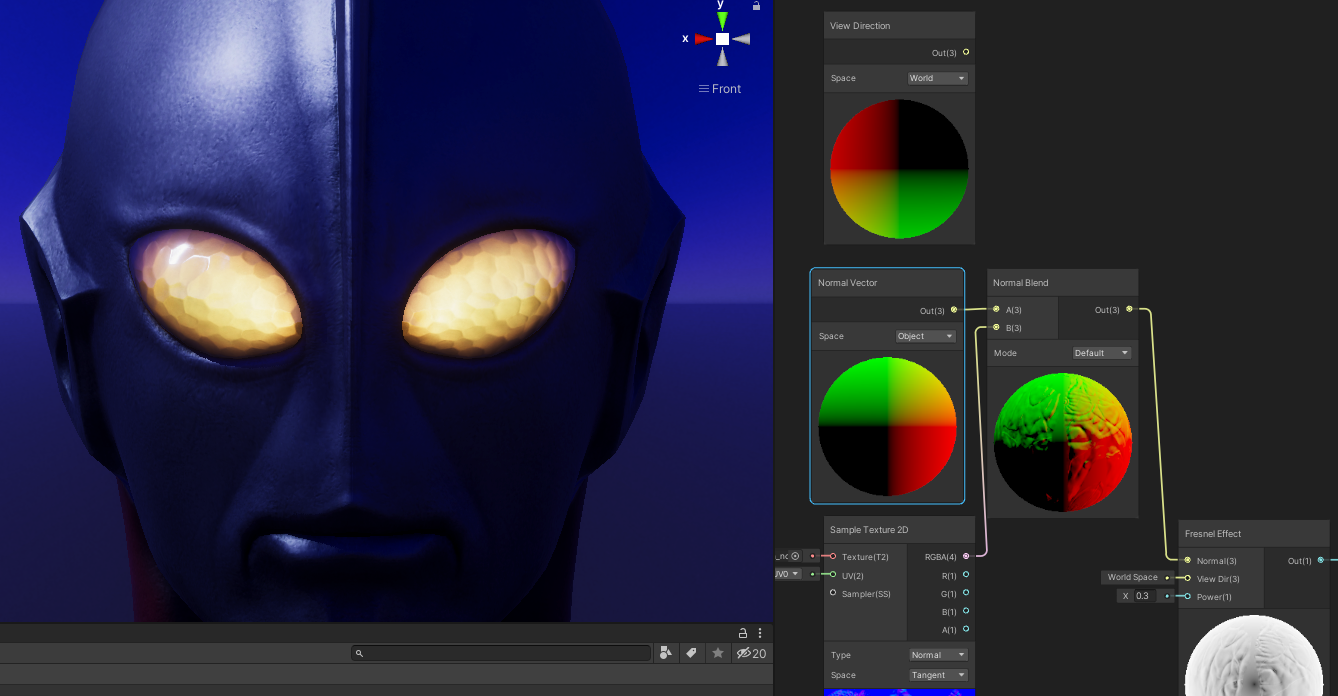


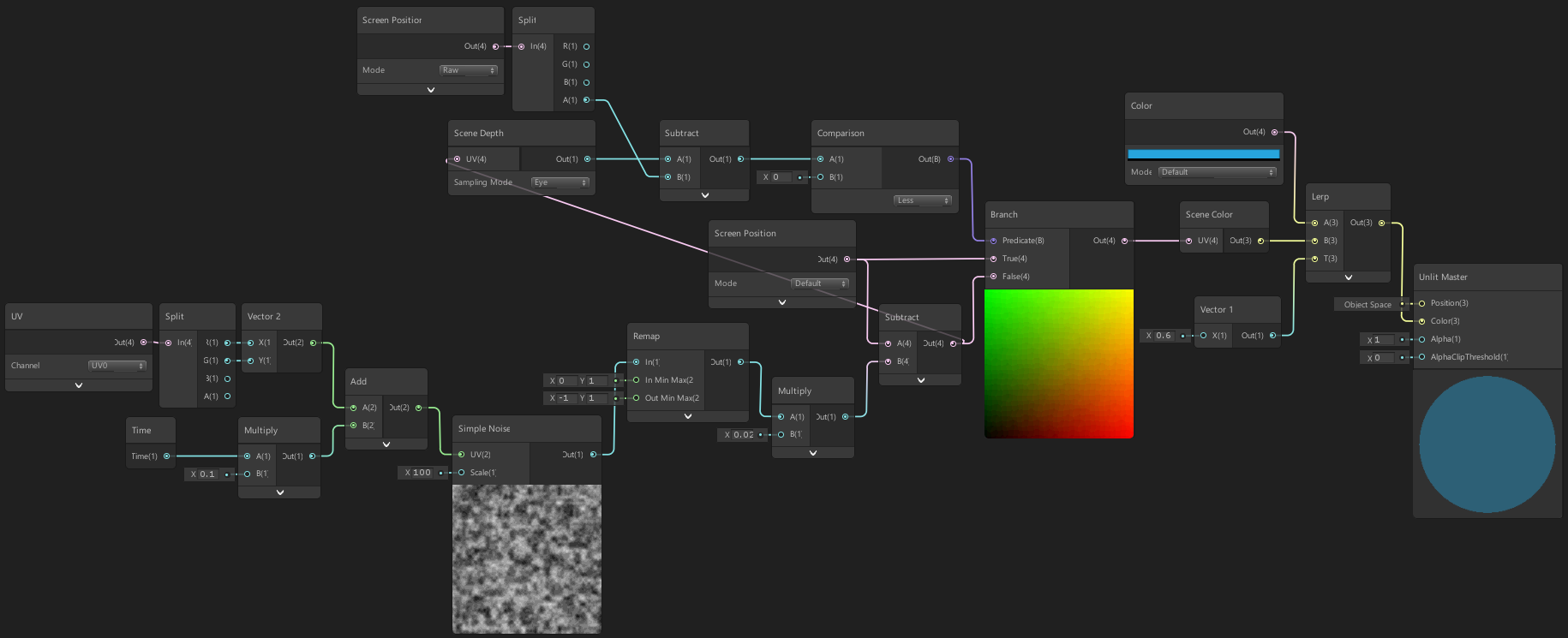 digital hamlet
you should try this:
maskXpos = (playerPos.x - (cameraPos.x - screen.width/2))/screen.width
maskYpos = (playerPos.y - (cameraPos.s - screen.height/2))/screen.height
dreamy pewter
digital hamlet
maskXpos = (playerPos.x - (cameraPos.x - screen.width/2))/screen.width
its works !!! thank u ❤️ ❤️
