#archived-shaders
1 messages · Page 181 of 1
 toxic flume
Can I avoid computing some calculations in a shader in some situations without condition? I know I can use lerp and step but I have to compute values at first then step or lerp.
To implement highlight shader for example for loots and weapon when the player gets close to them, is it in local space or screen space? I think local space is better. Sometimes, I want to scroll the effect in z and y and sometimes x and y. How can I handle it in one shader?
 thick fulcrum
@toxic flume If I understand your question I would usually do it in object space (local) for uv transitions, taking object scale into account. For calculating distance e.g. between object and camera, I would use world space. However I'd probably do the code c# side to decide if user is interacting and trigger the shader to run effect depends on your situation I guess.
 teal breach
not sure where to ask this, but I think here might be best. Are there any particular differences in openGL shader models for amd and nvidia hardware? I thought they were supposed to be identical, but I've got a hard to fix bug in a shader which I believe is only happening on AMD cards
I've only got nvidia hardware, so I can't reproduce the bug. I also have only a small number of reports of the issue, but they all seem to have AMD in common
my understanding was this shouldn't be a thing? Alternatively, if someone with AMD could run my webGL demo and prove me wrong, that would also be extremely helpful
 viral moss
hey there, is there anyone here who would be able to help me out combining propertys onto another shader?
the code is not too big, but my knowledge is too little..
 solar sinew
Does anyone have experience writing in the old C# API for CodeFunctionNode? I have a custom node I found online I want to convert to HLSL but this API is pretty confusing
Alternatively I do have the tutorial .shader file the custom node is based on but I'm having trouble finding out the differences between CG and HLSL
 distant pawn
I am new to compute shaders, so I don't really understand what I am doing. I keep getting these errors on shader compilation
Shader Compiler Socket Exception: Terminating shader compiler process

Shader compiler: Compile Marching.compute - CSMain: Internal error communicating with the shader compiler process.  Please report a bug including this shader and the editor log.

Shader error in 'Marching': Compiling CSMain: Internal error communicating with the shader compiler process.  Please report a bug including this shader and the editor log.
I dunno how to fix
any pointers?
 pearl sierra
Hey guys! Is it possible to make a shader that random squares lit up (emissive) like this?
 plucky summit
Yes, one way would be to get the x and y of each fragment, round it to the nearest x and y grid point, then use a texture that has random pixels to determine the emission amount
solar sinew
I just got this up and running on my computer and oh boy does it seem like it'll be useful
https://github.com/septag/glslcc

GitHub
GLSL cross-compiler tool (GLSL->HLSL, MSL, GLES2, GLES3, GLSLv3), using SPIRV-cross and glslang - septag/glslcc
thick fulcrum
@solar sinew the differences between CG and HL are not that big, if you search you can find lists on internet for common functions i.e. "mix" is equal to "lerp". here is one reference I often use to prompt the grey cells: https://anteru.net/blog/2016/mapping-between-HLSL-and-GLSL/
When converting older shaders, if they are unlit it's usually straight forward and often just work regardless. If your converting from built in renderer to either hdrp / urp you will find lighting to be more challenging.
As you were just after a snippet for a custom node that should not be an issue, if you want to post the bit your struggling with I can take a look when I get a moment (but I make no promises as I'm just another noob trying to help)
solar sinew
Thanks. I was looking for good 3D voronoi custom nodes and stumbled across this:
It seems most custom nodes I find use the old custom node C# API
Luckily that one is based off of a CG shader tutorial by Ronja
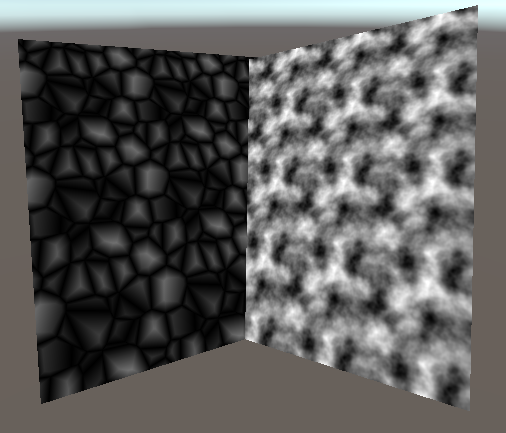
Ronja's Shader Tutorials
So far we generated noise that goes on forever. But in some cases we want noise that repeats itself after a certain distance though, mainly when we’r...
I guess the best link would be here:
https://github.com/ronja-tutorials/ShaderTutorials/tree/master/Assets/028_Voronoi_Noise
My aim is to just simplify some things down to the few hlsl function(s) I should need

GitHub
unity shader tutorials. Contribute to ronja-tutorials/ShaderTutorials development by creating an account on GitHub.
solar sinew
I feel quite silly because I was mainly struggling on how to structure it all. Thanks a ton
thick fulcrum
yea there is a slight difference when using it as a custom function which is confusing, until you know it 😉
 tough condor
teal breach
not sure where to ask this, but I think here might be best. Are there any partic...
tough condor
teal breach
not sure where to ask this, but I think here might be best. Are there any partic...
I have amd gpu and cpu, I can test it for you
teal breach
thanks very much!
 grand jolt
0-0
 steel forge
is this why my game is just a blank screen when built? MissingMethodException: Default constructor not found for type UnityEngine.Rendering.HighDefinition.Lit? And how do i fix it?
nvm
toxic flume
thick fulcrum
<@!509697647246966804> If I understand your question I would usually do it in ob...
Yes local space is perfect for that.
My problem is
"I want to scroll the effect in z and y plane and sometimes x and y plane. How can I handle it in a shader?"
My solution: Rotate using rotation matrix
toxic flume
pearl sierra
Hey guys! Is it possible to make a shader that random squares lit up (emissive) ...
You can inspire shadertoy.
A common approach is
split uv (group uv)
Make star inside that
Consider 3*3 grids around a grid uv to add neighbor stars lights to that uv grid
Add noise to appear only some portion of stars in grids
Add layers to add depth to the sky
...
toxic flume
pearl sierra
Hey guys! Is it possible to make a shader that random squares lit up (emissive) ...
 indigo frost
Hey guys,
I'm currently looking for a low poly shader
something that offsets vertices on low poly meshes, to achieve that look
 rugged verge
I have a MainTex with UV coordinates.
how do I get the pixels from the GrabTexture that is in the maintex.UV + UV_Offset, in tex2Dproj(_GrabTexture, IdontKnowWhatToFillHere)
nvm I found it. Edit: nvm I didn't find it, i will just avoid solving this subproblem by solving my main problem another way
teal breach
teal breach
my understanding was this shouldn't be a thing? Alternatively, if someone with A...
for anyone interested - thanks to testing from @tough condor I found that the problem is the fmod function. It behaves differently for AMD and nvidia cards when using opengl APIs. fmod isn't defined in glsl, only in hlsl, so it could be whatever Unity interprets it into that causes the issue.
tough condor
interesting
 regal stag
Ah cool, Will try to keep that issue in mind if I ever come across something similar.
I know glsl has a mod function, but it works differently than hlsl's fmod too.
teal breach
the 'bug' for me was that the vehicle would become invisible if you choose the 3x3 pixelisation (using '-' once after it loads) https://elliotb256.itch.io/propixelizer
behind the scenes the shader works by basically dithering the vehicle and rendering it as a sparse dot matrix, before a post process comes in and fills in the dots - the dithering uses fmod to figure out which pixels to fill, and for some reason was resulting in no pixels filled for 3x3 pixelisations on openGL/AMD
(both binary and webgl as it happens)
toxic flume
Is mixing float and half variables (local and exposed fields) in shaders time consuming?
So, is it better to use float variables? Also what about int variables.
teal breach
@toxic flume have you read this? https://docs.unity3d.com/Manual/SL-DataTypesAndPrecision.html might be useful to know not all types are supported, depending on platform/hardware
 toxic flume
Are HDR colors heavy? with or without HDR enabled flag in cameras?
I want to scale colors. I can add a multiplier and multiply it. Is it more performant with respect to HDR colors?
toxic flume
teal breach
<@!509697647246966804> have you read this? https://docs.unity3d.com/Manual/SL-D...
Yes, For example int does not support for <=GLSL2.0
My platform is android. I always have problems to consider all of them.
For example because int is not supported in old devices, it is converted to float and it is heavy!
teal breach
I'm afraid then all I can offer is my sympathy 😅
indigo frost
Can someone please explain briefly what the position node does?
 vague pike
Have you tried pressing F1 while having it selected?
 devout quarry
indigo frost
Can someone please explain briefly what the position node does?
devout quarry
indigo frost
Can someone please explain briefly what the position node does?
world position of the fragment (I'm pretty sure)
the 'position' slot of the 'object' node returns the world position of the object
pearl sierra
toxic flume
You can inspire shadertoy.
A common approach is
split uv (group uv)
Make star in...
Hey um I didn’t mean to create the skybox. I meant to have random lit windows in the building
viral moss
Hey guys, can i ask a question about combining 2 shader?
maybe someone could help me out here
thick fulcrum
@viral moss don't be shy, just ask and either someone can help or not... just be happy either way 😉
viral moss
So i have 1 shader that determines what colors to use from a texture for what bodypart.
and another shader that creates this cell shaded look.
CELL Shader:
-
okay this is the shader i want to use:
https://pastebin.com/uhkcF7Ff -
and this is the shader i need the properties from:
https://pastebin.com/E2dBU7yS
As you see in the second code on the top there are different collors for all the parts.
I need to be able to set these colors in the first shader
Pastebin
Pastebin.com is the number one paste tool since 2002. Pastebin is a website where you can store text online for a set period of time.
Pastebin
Pastebin.com is the number one paste tool since 2002. Pastebin is a website where you can store text online for a set period of time.
thick fulcrum
do you have amplify shader editor or is this what someone else made initially?
viral moss
I have the editor yes
but i cant seem to open the first shader with it
I basically need these properties added on the other shader
Just the colors however
thick fulcrum
you won't be able to as it's not made with ase, what you can do though is extend the second one to include the outline. I believe there are some examples of how to do outline in ASE either on forums / their site which you could probably find easier to integrate.
thick fulcrum
mashing two shaders together is not straight forward and will require a little work I'm afraid, but if you have the time and patience I'm sure you can do it 😉
thick fulcrum
you could always poke the folk over on ASE discord if you have problems understanding how parts of it should work together. they maybe able to help out too
viral moss
Thanks for the help :):):)
solar sinew
thick fulcrum
it was all copy and paste (mostly)
I didn't realize I wasn't supposed to pack all of that within an hlsl function
wow it's so simple  haha
haha
toxic flume
pearl sierra
Hey um I didn’t mean to create the skybox. I meant to have random lit windows in...
OK, my wrong but again, you should split uv into some groups(5*4 for example). Then compute group indices using floor operator and some stuff and finally by means of simple noise (noise(id)) and a threshold, you can select which one is turned on
solar sinew
Anyone have a good resource for reflections on transparent surfaces (specifically water)? I'm not sure what approach I should take to replicate the reflections on the water's surface in this video:
https://youtu.be/0g5bROk9Hvc?list=PLQFMBhvatuXQHsAMutGs4IMrpM3wY2o0v
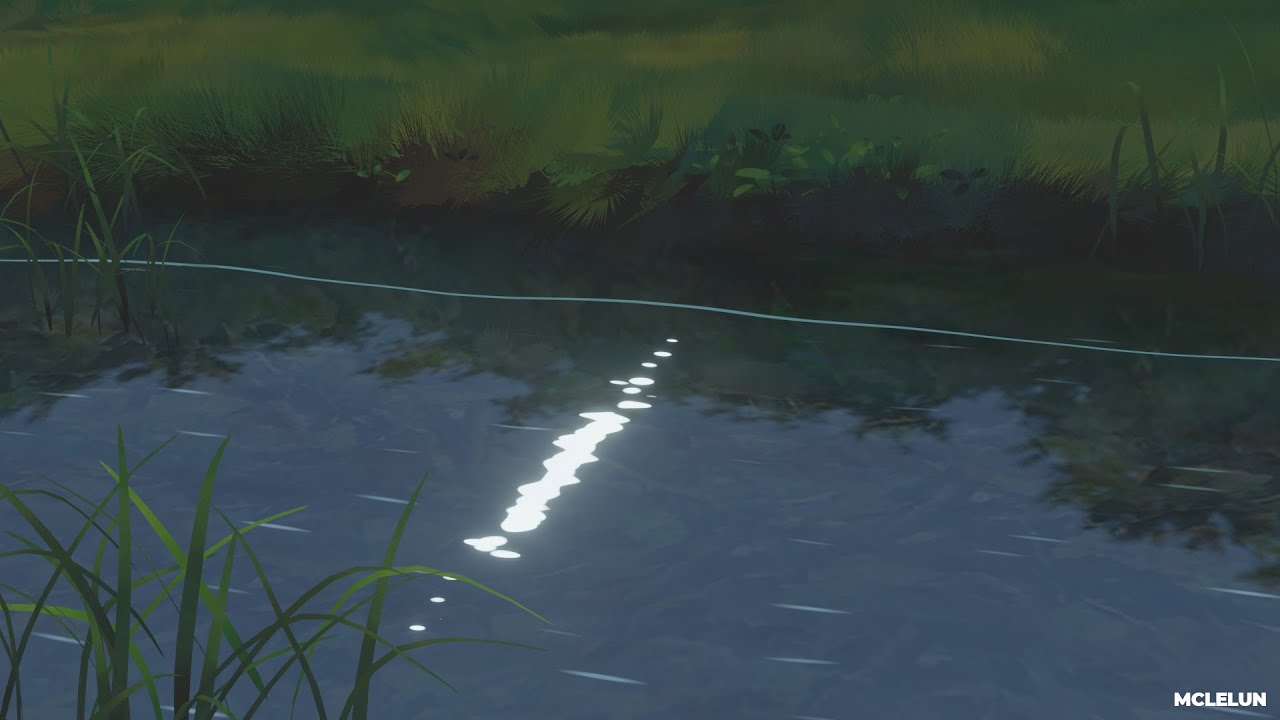
Kristof Dedene just released another tutorial. This time about creating stylised anime water which kind of have that studio ghibli water look. I go through the tutorial and make some changes, which let the water receive shadow. Instead of emission shader, I use colorramp diffuse shader for the water to receive shadow from the leaves. Grass movem...
I know there are ways to do this pretty simply but I am drawing a blank currently
grand jolt
@solar sinew You could use a Planar Reflection Probe component, resize the bounding box to cover the water, that should reflect
solar sinew
ah I forgot the reflection settings within the lighting window as well
 flint lily
I have a problem I need help with. If anyone can help, I'd really appreciate it. The problem is at this link: https://answers.unity.com/questions/1790943/shader-acting-not-as-expected-i-have-no-clue-why.html
Unity is the ultimate game development platform. Use Unity to build high-quality 3D and 2D games, deploy them across mobile, desktop, VR/AR, consoles or the Web, and connect with loyal and enthusiastic players and customers.
solar sinew
flint lily
I have a problem I need help with. If anyone can help, I'd really appreciate it....
Pro-tip btw: use the shortcut: Shift + Start + S for easy screenshots
flint lily
solar sinew
Pro-tip btw: use the shortcut: `Shift + Start + S` for easy screenshots
it was easier to explain what was happening if i edited the pic in snapchat lol
flint lily
solar sinew
Pro-tip btw: use the shortcut: `Shift + Start + S` for easy screenshots
can you help me tho mr.pro? 😄
solar sinew
I am not very experienced with shader programming but at a glance I have a few questions. It's not really clear what you are trying to achieve.
First - why do you need two outlines?
in relation to specific operations - I'll leave that for someone else to dissect. I will say that this "delimiter angle" you are using as a threshold seems odd to me
 slate compass
flint lily
it was easier to explain what was happening if i edited the pic in snapchat lol
slate compass
flint lily
it was easier to explain what was happening if i edited the pic in snapchat lol
this is the only time this is acceptable :p
idk what ur problem is but from my experience all those outline shaders have problems like this..
depending on ur viewing angle it wont "border" the entire game object
flint lily
oh in the code there are 2 outlines bc someone else made this hahaha
slate compass
u see how at the bottom left ear of the monkey
the outline is barely even ther
😐
same deal on this one
flint lily
the weird thing is it only doesn't display the outline over half of the "ground" that is farther away from the camera, then when a new "ground" object starts(like a tile) it does the same thing over again
slate compass
🤔
i wont be much help atm.. but in the morning when my buddys start waking up ill give my pro shader guys a shout and see if they have a solution for u.. and i'll give u a ping if ur cool
flint lily
slate compass
i wont be much help atm.. but in the morning when my buddys start waking up ill ...
wow really?! if you did that would be amazing, i'd be eternally grateful
slate compass
flint lily
wow really?! if you did that would be amazing, i'd be eternally grateful
yea man.. not a problem.. i got ur unity answers page copied and i'll see if i cant get a solution for u.. unless u find one by then
flint lily
slate compass
yea man.. not a problem.. i got ur unity answers page copied and i'll see if i c...
i probably won't im done messing with that project for the night. thank you
solar sinew
No idea but I'm going to take a wild guess and say it's this odd delimiter angle being used
flint lily
if you are talking about _Angle, im not using that
i set it to 0 in the inspector
it gave the best look
like a nice full line throughout the shape's outline
however i did test other values for that and it did not affect the problem
solar sinew
well this whole script seems to be center around that value (again I have no idea what situation would require this other outline approach). Also my small brain assumed they would use a dot product somewhere in here
also just look through https://unity.stelabouras.com/outlines-edge-detection/index.html and see if anything catches your eye as a better approach (since you said someone else wrote what you are using)
always a great tutorial
https://roystan.net/articles/outline-shader.html
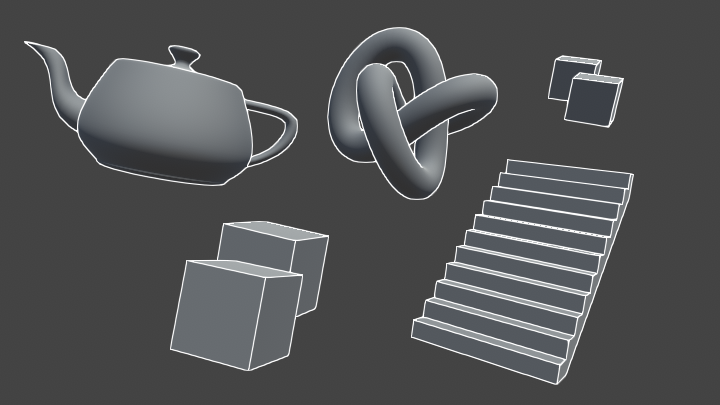
Learn to write an outline edge detection shader for Unity engine, integrated with the post-processing stack. This effect is especially popular as a compliment to toon shading, or in CAD and architectural rendering.
flint lily
if i use both outlines the first would be on the inside(or shown on top) of the other depending on the thickness of the second
it's more of a style choice than anything
however when you say the whole shader seems to revolve around the angle thing, i only see it mentioned once in the first outline code section
or rather once in each outline code block
solar sinew
line 61 and 103
flint lily
yes
that is once in the first
once in the second
also ive tried a few other approaches before this one and they never gave me as good of an outline, then again they didnt have this problem
solar sinew
the comments + the photo made it seem like only one outline was intended to be used at once. I initially misunderstood - either way there are many ways to approach this that seem a bit more straightforward
 runic rock
AADAS how do i stop my material thing being blurry if its away from camera
thick fulcrum
switch off dof pp effect, no idea... need more information 😉
runic rock
how do i stop the the lines going blurry
runic rock
whats that :D
 low lichen
A setting on the texture
runic rock
how
low lichen
Select the texture, look at the Inspector, increase Anisotropic Filtering
Unity calls it Aniso Level
runic rock
oo ty it worked
 acoustic heron
Hi folks!
I'm a programmer starting with game development and I would like to know the essence of shader programming, what do you guys recommend to be a starting point?
grand jolt
Try the Unity Learn site. also YouTube is filled with shader programming tutorials
 sterile sigil
hey, running into an issue with a shader graph that I'm using on a UI element. the element disappears in game view, but is visible in scene view both when the game is running and in the regular editor.
is there something specific I need to set up to use shader graph materials in a UI? doesn't seem to be related to z position, and I haven't had any luck turning off transparency or making it alpha vs additive
the rest of my menu is always visible, and none of those elements use a material with a shader graph
toxic flume
I have four exact same weapons. Only three weapons can use GPU instancing, why?!
My weapon has different sections(body,barrel,trigger). All sections have one material. Only some parts utilize GPU instancing. For example body is rendered one by one
I activated GPU instancing and implemented material property block to handle different colors.
For same materials and meshes, do we get GPU instancing or static/dynamic batching?
Is it suitable to activate GPU instancing? I am scary because maybe activating GPU instancing prevent static/dynamic batching
Activating LOD ruined GPU instancing because different meshes are rendered.
solar sinew
I've brought some older shader graphs into the latest beta release (2020.2.0b12) and all the custom nodes list this error: invalid conditional expression
When I check the line where the error is in the HLSL file it's for the open curly bracket {
regal stag
@solar sinew Are they using an #if SHADERGRAPH_PREVIEW line? Try replacing the #if with #ifdef
solar sinew
#ifdef or #ifndef?
Also this is occuring in subgraphs
My guess was it has something to do with the shift away from pre-built master nodes
Just tried changing that line to #ifdef and I'm still receiving the error hmmm
regal stag
#ifndef would be the opposite of #ifdef. Either could be used, depends on the code setup I guess. But I've definitely seen that error occur when using just #if instead.
I suppose it is also possible it's a bug in the beta version
solar sinew
Yeah that was what I was trying to determine
regal stag
Maybe also try resaving + reloading the graph
solar sinew
No luck
The project I am looking at is actually @ivory epoch's Breath of the Wild/Wild West URP project
solar sinew
regal stag
`#ifndef` would be the opposite of `#ifdef`. Either could be used, depends on th...
If the error was related to the #if statement wouldn't the error be on that code snippet's line?
Currently it's listing the line prior as the location of the error
which only contains {
regal stag
Idk why the line isn't showing the exact one, but it's definitely related to the #if
I've seen others post here with the same issue and using #ifdef instead solved it. 🙁
solar sinew
😦 I'll try recreating the custom function node in a new shader and see if I get the same error
I'll let you know
regal stag
If you've also got #if SHADOWS_SCREEN stuff that might cause the same issue I guess
Tbh, I don't think that stuff is even used in URP atm so it's probably safe to remove that anyway
solar sinew
Yeah it does have that stuff
Is it possible that the precision changes in graph have anything to do with it?
regal stag
It might also fix if you change them to something like #if SHADOWS_SCREEN == 1, as I think that is what it's meant to be testing for (might mean the same thing anyway though). For the SHADOWS_SCREEN one an #ifdef won't work, as it still gets defined, just with a value of 0.
 midnight dagger
is it possible to convert texture to color?
i want to do it for using texture with SetColor
solar sinew
regal stag
It might also fix if you change them to something like `#if SHADOWS_SCREEN == 1`...
Just tried it and no luck
Well
it might have solved it but I'm seeing other new errors now - I'll get back to you
 elfin ivy
why is my particle cone emitting a bigger particle cone in the opposite direction aswell as a smaller one where it's supposed to be emmitting? xD
solar sinew
regal stag
It might also fix if you change them to something like `#if SHADOWS_SCREEN == 1`...
When I replaced any #if before any SHADERGRAPH_PREVIEW with #ifdef I still saw an error but I didn't check to see if it was the same error
I then changed SHADOWS_SCREEN like you suggested and there are no more errors 🙂
Changes: #ifdef and SHADOWS_SCREEN == 1 👍
regal stag
Ah nice, glad it's fixed
@midnight dagger Not really sure what you mean by this. A texture can contain many pixels each with a different colour so it doesn't really make sense to convert a whole texture to a single colour. (Unless the texture is just a solid colour, in which case, why does it need to be a texture in the first place?)
midnight dagger
im trying to mod a game and _EmissiveColorMap doesnt work at all but others like _BaseColorMap, _SpecularColorMap works _EmissiveColor works too but i cant add texture :/
finally i got it to work with _EmissiveColorMode
regal stag
It is possible that for the _EmissiveColorMap to work, the _EmissiveColor also needs to be set to white
midnight dagger
yeah its white but the problem was related to _EmissiveColorMode
solar sinew
Anyone know how to create the Redirect (elbow) node available from 2020.2.0a21 / 10.0.0-preview.27 on?
 honest bison
I'm writing a vertex fragment shader which supports baked lighting. I have the baked lighting applied but undure how to apply shadow mask. Thanks.
solar sinew
regal stag
Ah nice, glad it's fixed
 rustic talon
i have a general question, can you achive same results with shader graph as with scripting?
i mean, u can do the same stuff with both?
regal stag
Shader Graph can't do exactly everything that shader code can do, but a graph does make it easier for beginners and I find it quicker to work with.
slate compass
 regal stag
Graphs also generate code behind the scenes, which you can view by right-clicking on the master node. You could then save that in your assets and edit it further though the generated code isn't always that readable.
rustic talon
slate compass
https://gfycat.com/academicmarriedbarracuda
so cool!! @slate compass
i've been studying shaders for a long time but i dont feel like im really learning to use it, i follow some tutorials and i try to do things by myself
but im not able to do a lot,any advice to learn?
slate compass
keep practicing
i didnt make this so im not very good with shaders either

YouTube
Gabriel Aguiar Prod. is a channel that mostly focus on creating Visual Effects for games, but it recently started a Indie Gamedev journey. Updates are coming...
this guy is worth checking out
grand jolt
Anyone have any idea why this outline shader goes all screwy if the thickness is above 0.999? I need to be able to increase the thickness more as it's pencil thin at 0.999
0.999
1 😦
solar sinew
grand jolt
1 😦
Isn't alpha a value between 0 and 1?
grand jolt
yes i believe so
 brisk dome
Hey, does anyone know what the camera node direction returns?
I've had some debug colors on screen for it normalised and non-normalised, and it doesn't seem to change at all regardless of how the camera is moved
honest bison
This is driving me mental. I have the shadowmask applied to my vertex fragment shader and it randomly flicks on and off... What the hell Unity!!!!!!!!
Does anyone have a vertex fragment shader with shadowmask?
 restive rain
No, sorry
Hey guys, is there any way to make this portal shader look like this in all angles? I know there's a way, I'm just trash at shader graph:
From the bottom it looks like this:
low lichen
@restive rain Either use two sided mesh or enable two sided in the Shader Graph master output settings
 digital gust
Also be sure that its lit from all sides, maybe its just a side in the shadow, depends if you are using emission or not
toxic flume
I have four exact same weapons. Only three weapons can use GPU instancing, why?!
My weapon has different sections(body,barrel,trigger). All sections have one material. Only some parts utilize GPU instancing. For example body is rendered one by one
I activated GPU instancing and implemented material property block to handle different colors.
For same materials and meshes, do we get GPU instancing or static/dynamic batching?
Is it suitable to activate GPU instancing? I am scary because maybe activating GPU instancing prevent static/dynamic batching
Activating LOD ruined GPU instancing because different meshes are rendered.
low lichen
@toxic flume Any transparent elements on the weapons?
I believe Unity will always pick GPU instancing over dynamic batching if it's possible
But static batching comes before GPU instancing
toxic flume
@low lichen
I do not think any transparent elements. All have textures opaque shader.
Thanks. So you mean Adding GPU instancing is useful and does not ignore static batching when they can use both of them, right?
Also, it is really strange. For example four exact weapons with different colors, only three of them utilize gpu instancing!
Any limitation about GPU instancing?
low lichen
You should not be seeing worse performance by enabling GPU instancing. Unity will always try to pick the best batching for each case.
The Frame Debugger will tell you why a given draw call wasn't batched with the previous
toxic flume
OK I care more and put the result here with pic
grand jolt
@toxic flume You cant use Static or SRP Batching with MaterialPropertyBlocks, it breaks the batching entirely, using GPU Instancing is your only bet.
 high kiln
can anyone explain how to do a shader like this in unity?
I am talking about the multiple instances of transparency seen here
liquid > glass > ice cubes inside the liquid > backside of glass > backside of liquid > background
low lichen
These look like renders
high kiln
so in realtime this would not be possible?
low lichen
The term you're probably looking for is order independent transparency
It's possible, but it's slow (and requires highly customized shaders)
In many cases, you can get away with just forcing the sorting of the different elements
For a glass of liquid, you would probably have to separate the outside and inside of the glass, then make the inside draw first, then the liquid, then the outside.
high kiln
thanks @low lichen .
but why do I have to draw the liquid first? i would have thought the backside should be first, then liquid and then the front?
low lichen
I said the inside of the glass would be first
high kiln
oh I misread that
you are talking about the inside of the glass. isnt that the backside aswell?
low lichen
Depends what you mean by backside
high kiln
haha I see 😉 i guess i understand what you meant
but would you see it as three independent shaders or one shader with 3 passes or something like that? or subshaders?
I am on HDRP i might mention
low lichen
I'd see it as 3 separate game objects
The inside and outside glass could use the same shader/material
Or actually, probably a different material to force the render queue
I think HDRP might call it something else
high kiln
Okay then. I'll experiment a little with that knowledge. Thanks so far!
in HDRP you can make use of raytracing and recursive rendering. maybe it's possible to do it in different ways
low lichen
HDRP has a Priority setting on the MeshRenderer which seems to do the same thing
https://docs.unity3d.com/Packages/com.unity.render-pipelines.high-definition@8.0/manual/Renderer-And-Material-Priority.html
high kiln
ah good to know 👍
but wouldnt it be possible to use 3 materials on the one gameobject to achieve that aswell?
low lichen
I suppose so
grand jolt
you can, itll probably complain about the extra cost of rendering it and suggest using Sub-Meshes though
 meager pelican
IDK why Unity doesn't implement some kind of OIT.....
But I suppose a lot of it is kind of custom anyway, like with various types of refraction.
toxic flume
grand jolt
<@!509697647246966804> You cant use Static or SRP Batching with MaterialProperty...
I didn't get it. I have weapons with different colors. You say I do not use property block for that?!
grand jolt
no, was just saying if your using MaterialPropertyBlocks, Static and Scriptable Render Pipeline Batching wont work
so you would have to use GPU Instancing anyway.
toxic flume
@grand jolt
OK, thanks. Yes I have used pooled property blocks and materials with GPU instancing enabled.
low lichen
But the SRP Batcher can get close to the same performance improvement as GPU instancing, at least on the CPU side.
Even if it's different materials, because that's what the SRP Batcher was designed to optimize
toxic flume
Weapon1 (Color1)
Body
Barrel
Trigger
Weapon1(Color2)
Body
Barrel
Trigger
Weapon1(Color3)
Body
Barrel
Trigger
Weapon2
....
I have almost 10 weapon types with 5 different colors (5*10=50). Some of them have two and some of them have 3 or 4 meshes.
All parts of a weapon have only one material (main texture with one uv)
What is your suggestion?
They are pick up items on the ground
Use GPU instancing + PB or not
 astral pecan
I need help, anyone capable of making UI Image shader that is rendered below other UI shaders?
Somehow setting Z axis behind the parent's TMP Text doesn't work
😭
thick fulcrum
with UI it's position in the hierarchy in the scene is also important
astral pecan
Yeah, but I absolutely have to have this as a child
thick fulcrum
I'm gonna question that, give me good reason why it needs to be so 😉
astral pecan
Parent of this message is using Vertical Layout, and I need it to respect TMP_Text's size when it overflows
Somehow if I have this TMP_Text as the child of the background image, it doesn't work properly
thick fulcrum
there are ways to do this, with layout components but it does get messy have to admit
astral pecan
Right now this is the best, works correctly with content fitter, expands the scroll view correctly, and the height behaves well with vertical layout
If I reverse the order, somehow it no longer respect the TMP_Text's auto size
thick fulcrum
you want background per text element or for whole chat box as latter is easier?
astral pecan
Per text element
Because Warnings have to be easily visible
Red background for warnings, yellow for alerts, etc
thick fulcrum
isn't there an inline color scripting you can use to set a highlight or was that just text 🤔
thick fulcrum
try this in your TMP text area Text <mark=#ffff00aa>can be marked with</mark> an overlay.
astral pecan
I tried that
Its above the text
Haha
Not even behind the text
It created an extra mesh behind, interesting
thick fulcrum
what a strange effect to have... dare I say useless, oh well 😦
thick fulcrum
heh june 2020 geometry rendering incorrect order for underline, strikethrough and mark... but it's not a priority fix
thick fulcrum
so built in or SRP renderer?
astral pecan
URP
thick fulcrum
ok lets have a quick test 🤔
 worldly drift
Can anybody help me how to use OR with shader defines? Because _MAIN_LIGHT_SHADOWS || _ADDITIONAL_LIGHTS does not seem to work
thick fulcrum
@worldly drift check out cyan's example on github it helped me out a lot with all that https://github.com/Cyanilux/URP_ShaderGraphCustomLighting

GitHub
Some custom lighting functions/sub-graphs for Shader Graph, Universal Render Pipeline - Cyanilux/URP_ShaderGraphCustomLighting
@astral pecan I'd have thought changing the render queue might have worked... alas it's correct in editor but not in game 😦
regal stag
@worldly drift If you want to check if two keywords are defined, I believe you have to use :
#if defined(A) || defined(B)
(Can't just be #ifdef A || B afaik)
worldly drift
@regal stag thx that makes sense
@thick fulcrum thx for the repo. Its nice to have as a reference for writing custom shader graph nodes. Although I cannot use shader graph for my use case cause there still seems to be now way to have front face culling 😅
thick fulcrum
ah hmm I never considered that with shader graph, I know you can draw to front or back face... but presume that makes other issues
regal stag
Kinda wish shader graph just exposed Cull, ZTest and ZWrite tbh
worldly drift
yeah thats really a bummer
astral pecan
Why doesn't it?
thick fulcrum
because it's not finished yet 😛
astral pecan
Its been 5 years
worldly drift
I just thought I would give it another shot. But writing a raymarching shader is basically impossible with these limitations
regal stag
Idk. I think it just tries to be less complicated by giving you "opaque" vs "transparent", and a few predefined blend modes.
astral pecan
I have no knowledge on shaders though
thick fulcrum
so in anther 5 it might be possible 😆
grand jolt
i would settle for Vector 2's showing as actual Vector 2's in the inspector, and the ability to drag keywords around, so I can actually make a shader look respectable.
astral pecan
Im just gonna render text on another camera
So its always on top of everything
10/10
Perfection
worldly drift
astral pecan
So I'll have to deal with ugly text
A was afraid witing shaders was going to get more complicated with Unity pushing Shadergraph and barely having any ressources on custom SRP shaders but I have to admit their shader code is really clean compared to the old shaders 🙂
astral pecan
Yeah, its fine, thanks @worldly drift
I just remembered the new URP feature
Camera stacking/layering
Haha
grand jolt
yeah they are really pushing visual scripting ATM because they want everyone on DOTS asap, and itll be a lot easier for people to transition if they are used to using the graphs as the C# code for ECS forces you to completely re-think your coding habits.
Thats why they bought Bolt, I imagine they just went "we need visual scripting for DOTS, sod it just buy Bolt and modify it". Way less work for them.
astral pecan
I feel like that'd be more work than creating one from scratch
Goddamn it still renders
grand jolt
given how much I hear Bolt is better than standard Graphs I wouldn't think that, it's probably way better
about as much as I hear people crowing about Rider and Odin
astral pecan
Even though the text is on Priority Text layer
And its turned off on Culling Mask
What is going on lol
restive rain
@low lichen no that's fine if I can't see it from the back. Its like if I move vertically it'll change
 slim dust
hello! I have the same problem https://answers.unity.com/questions/1657759/ui-elements-not-rendering-properly-on-android.html
anybody knows the solution?
i am trying to find one for like 2hrs
Unity is the ultimate game development platform. Use Unity to build high-quality 3D and 2D games, deploy them across mobile, desktop, VR/AR, consoles or the Web, and connect with loyal and enthusiastic players and customers.
 dreamy kernel
Hey guys
astral pecan
Not much work but it works like a charm
dreamy kernel
Is it possible to write my own calculated Z-value to Z-buffer?
Instead of whatever mesh has
I'm trying to have SDF shapes rendered with raymarching shaders intersect with scene objects and with one another
And yeah, I'm talking about the default rendering workflow
Not an SRP one
I've been struggling for many hours now, and I still can't figure it out
I've been trying to use SV_Depth in fragment shader output struct
But for some reason rendering engine doesn't care if I pass 0, 1, -1, infinity or -infinity
low lichen
Do you have ZWrite On?
dreamy kernel
Yeah
low lichen
Is the raymarching shader drawn after the scene objects or before?
dreamy kernel
I've tried different Queue tag values, if that's what you're asking about
My knowledge is a bit shallow on draw order and such
low lichen
I would think it's easier to sample the scene depth texture in the raymarching shader and do the depth testing manually
You can then theoretically early exit the raymarching shader as well
dreamy kernel
But how would I have two raymarched objects intersect then?
They both can read depth, but can't write to it
So they can only be occluded by ordinary shaders, but not by each other
dreamy kernel
Okay I think I found the issue
After taking another approach to googling things, I've managed to find another example of how SV_Depth is declared
I was declaring it as a field in a fragment output struct
But turns out I should've declared it as an out argument to a fragment shader
low lichen
Both are supposed to work
regal stag
It can also be in a struct
regal stag
I assume the fragment shader actually using/outputting that struct right?
low lichen
It's working as an out parameter?
regal stag
Remove the : SV_Target (at the end of the frag function, not the struct one)
dreamy kernel
Ohhhhhhh
I got used to ignoring the : SV_Target part of a fragment shader since before I learned what it stands for
Yeah thanks
Now this variant works as well
Great
By the way, is this a correct way to calculate Z depth from raymarch result?
NonlinearEyeDepth is function I've made. It inverses result of LinearEyeDepth
I mean, first line I know should work more-or-less
The second line is the one, that gives me most inconfidence
regal stag
I'm actually not sure, this is something I'm looking into as I'm working on a blog post about depth stuff.
If it's the opposite of LinearEyeDepth, it's probably correct though
dreamy kernel
Okay, let me then reformulate my question
Does 0 linear eye depth correspond to near clip and 1 to far clip?
regal stag
Eye depth is 0 at camera pos, 1 at 1 unit, 10 at 10 units, etc
low lichen
I think it depends what graphics library you're using. OpenGL and DirectX have inverted depth values I believe.
regal stag
Linear would be 0 at camera pos, 1 at far plane
dreamy kernel
Okay, then in that case I should switch NonlinearEyeDepth argument back to f.z/farClip
dreamy kernel
dreamy kernel
I mean, first line I know should work more-or-less
It doesn't
It is supposed to be multiplication instead of division
If anyone needs this, feel free to use.
This one works completely fine from what I can tell.
regal stag
I've also reversed both the eye and linear ones in case anyone wants them. Linear is basically just eye/far anyway though. These are specifically the inverse of the SRP ones, which specify _ZBufferParams as a second variable for some reason.
float LinearDepthToNonLinear(float linear01Depth, float4 zBufferParam){
    // Inverse of Linear01Depth
    return (1.0 - (linear01Depth * zBufferParam.y)) / (linear01Depth * zBufferParam.x);
}

float EyeDepthToNonLinear(float eyeDepth, float4 zBufferParam){
    // Inverse of LinearEyeDepth
    return (1.0 - (eyeDepth * zBufferParam.w)) / (eyeDepth * zBufferParam.z);
}
Which terminology are you referring to?
regal stag
Ah lol. I usually just call it eye depth, or view depth. The linear can just be assumed tbh.
I don't really get why "eye" is used tbh, since unity calls it "view space" not "eye space" anyway
dreamy kernel
It should be called DecompressZ
And inverse of it - CompressZ
Or unpack and pack
Call it similarly to normal unpacking
regal stag
Yeah, idk. The Encode/Decode you had before also works. I think there's already a Encode/DecodeNormal too, for the DepthNormalsTexture.
dreamy kernel
Encode and decode sound more like it's encrypted
That's why I thought it was a poor word choice
regal stag
Idk Compress also seems the same
dreamy kernel
Pack/unpack is the best one imo
Sounds intuitive to everyone
And is quite short to type
regal stag
Yeah maybe. I still kinda feel like LinearEyeDepth is a bit more descriptive though. Just using "Z" doesn't really tell you what space that's in.
regal stag
Probably
I've been reading and writing up an entire post about depth the past 2 weeks
dreamy kernel
Oh speaking of Z. I remember struggling for hours, trying to figure out why my atmospheric shader Z-buffer check doesn't properly work.
And it turned out I was mistaken in what Z-buffer stores. Back then I thought it stored distances.
So yeah, that * dot(fragmentDir, cameraDir) part you've seen above is to account for that. It converts distance to depth.
regal stag
Yea, I recognise that now
dreamy kernel
regal stag
Yeah maybe. I still kinda feel like LinearEyeDepth is a bit more descriptive tho...
Just swap Z for Depth in naming
solar sinew
worldly drift
<@!181788534301130752> thx for the repo. Its nice to have as a reference for wri...
I found it a little frustrating that front face culling isn't exposed in Shader graph. One workaround that I have used so far is using a branch node with the Is Front Face boolean node - and setting the alpha to 0 for true. It's not ideal
regal stag
Yeah, that workaround is pretty hacky.
dreamy kernel
Hm
For some reason standard shaders are now blinking when I fly around my scene or rotate camera
They seem to fluctuate between these two states
Right one - is normal state
Left one - is rendered only from certain view positions and angles
I have no idea what causes this behavior
Okay, I've disabled everything besides this plain cube, including the SDF skybox. And yet it still flickers
And yeah, with turned off sun it exactly looks like the cube on the left
Restarting editor didn't help :/
Ahahaha
For some reason far clip on my scene camera was set to 600000 and near clip to 0.01
regal stag
Oh wow
dreamy kernel
I don't know why it's set to these values, and I don't know why they decided to act up only now
But they seem to be the culprit
Yep, all seems to be working now
And yeah, I know. Aesthetics are shit
By the way - these pillars you see - are SDF-raymarched rounded cubes with modulo applied
And they are part of skybox shader
solar sinew
@regal stag for vertex displacement should I treat a plane as a quad or a model? I am displacing water in a river
https://cyangamedev.wordpress.com/2019/06/14/vertex-displacement/
dreamy kernel
Now, last question I would love to resolve
Is it possible to have one material for all scene objects, but in such way that each one has a separate instance?
I have a neat tidy system, where I can pick through material inspector distance function used for this particular material. And it's such a shame I can't just grab a random object, duplicate it, and then change it's shape with two clicks, without reassigning anything.
regal stag
@solar sinew For displacing water you'd likely want to offset the Y axis of the plane. Quads usually are aligned pointing the object space z axis.
solar sinew
Thanks - I thought I'd check whether I should be using the position or UV node. I assumed position
regal stag
Btw I'm a bit curious. You're using unity_CameraToWorld._13_23_33 for the camera's forward vector in WS.
But I remember seeing shader graph's camera node use :
float3 _Camera_Direction = -1 * mul(UNITY_MATRIX_M, transpose(mul(UNITY_MATRIX_I_M, UNITY_MATRIX_I_V)) [2].xyz);
... Would these be the same thing? I'm a little confused as to what this is actually calculating.
regal stag
I would assume if these were the same thing then shader graph would just use unity_CameraToWorld._13_23_33 as well. I'm stuggling to find any info on unity_CameraToWorld tbh.
dreamy kernel
UNITY_MATRIX_M isn't even documented in here https://docs.unity3d.com/Manual/SL-UnityShaderVariables.html
What the hell
regal stag
lol
dreamy kernel
Oh right, a different RP...
Wait
What kind of info would you even need on CameraToWorld?
regal stag
I guess built-in doesn't have UNITY_MATRIX_M, but it would be identical to the ObjectToWorld one. I think.
dreamy kernel
If you're wondering about how _13_23_33 stuff works, I could explain
But yeah, Unity's way of calculating camera direction is quite odd
regal stag
It's taking those parts of the matrix right, I'm not entirely sure what they correspond to though
dreamy kernel
Could it be that accessing matrix elements is inefficient? Hm....
dreamy kernel
regal stag
It's taking those parts of the matrix right, I'm not entirely sure what they cor...
Ah, it's simple
You see, matrix consists of 4 columns
Each column is a Vector4 basically, where x y z w are written from top to bottom
First 3 vectors are basically directions of right, up and forward for your coordinate system
(They can also be scaled, if object using matrix itself is supposed to be scaled)
So I'm just grabbing X Y Z of 3rd vector of the matrix and using it as my direction forward
regal stag
Right, so does the "13" mean 1st row, 3rd column (or the other way around, can never remember what the row-column order convention is).
dreamy kernel
Yeah, I can't remember it either
I just googled "matrix indices" and opened up photos
regal stag
Yeah. I'd just assume it doesn't mean 13 as the number, since an index of 33 definitely doesn't fit into a 4x4 (max 16 numbers).
dreamy kernel
_13_23_33 is a mathematical matrix notation if you're wondering. There's no index 0.
But you could as well use _m02_m12_m23 instead
regal stag
Would unity_CameraToWorld be equal to the UNITY_MATRIX_I_V matrix then? (inverse of UNITY_MATRIX_V)?
regal stag
dreamy kernel
_13_23_33 is a mathematical matrix notation if you're wondering. There's no ind...
Ah okay
dreamy kernel
Not sure what view matrix is about
I just think of unity_CameraToWorld as of unity_ObjectToWorld, but the object happens to be camera
regal stag
I think both are converting between world and view space (and vice versa), so I'd assume they are the same. Unless "Camera space" is referring to something other than view here.
Trying to look through the SRP code but there's not really anything that says #define unity_CameraToWorld UNITY_MATRIX_I_V so it's not really clear if they are the same or not.
There's also another, unity_MatrixInvV, just to make it even more confusing
Don't know why it can't just stick to one naming convention
dreamy kernel
I think I found something related on OpenGL introduction
So I guess view matrix is same as WorldToCamera
I'm like 93% confident it is
By the way, calculating camera direction should be done in vertex shader I guess
Since vertex shader is run almost millions of times less often than a fragment shader
Or, ideally, it should be done in C# script and then passed as a property or something. If your mesh is way too high-poly that is.
regal stag
Oh it looks like they might be defined in different CBUFFERs. Seems to be a Per-camera or Per-frame thing?
...
#define UNITY_MATRIX_I_V unity_MatrixInvV
...
CBUFFER_START(UnityPerCameraRare)
float4x4 unity_WorldToCamera;
float4x4 unity_CameraToWorld;

CBUFFER_START(UnityPerFrame)
float4x4 unity_MatrixInvV;
That's from UnityCG.cginc.
Not really sure I understand this though. Is this suggesting that second cameras still use view space of the main camera?
dreamy kernel
I have no idea what constant buffers even are
regal stag
I think it's related to passing information into the shader but I'm not that familiar with them either
dreamy kernel
Is there CBUFFER_END?
regal stag
Yea there would be, sorry didn't copy those parts out
dreamy kernel
I mean, there's a chance, that MatrixInvV is updated both on per camera and per frame basis
Since there's no CBUFFER_END before it
Oh well, who cares
I'm sticking to my favourite little matrices - WorldToCamera and CameraToWorld
regal stag
Idk maybe, I don't think they are even in cbuffers in the URP one anyway.
toxic flume
Are these effects animated(spritesheet)? for example when opening a reward chest and createbox
regal stag
Probably particle effects
dreamy kernel
Seeing a video/gif would be better
dreamy kernel
Maybe it's just a shader, that ramps up brightness of a still texture or something
regal stag
Yeah, hard to tell with just a bright blob
dreamy kernel
Lol
By the way, since we've started talking about matrices, I'm itching to talk about 4th unit vector in em
Cause I've got no one else to talk about them
regal stag
It's just 0,0,0,1 right? Except for the projection matrix because it uses it to pass the eye-space depth through in the w component for the perspective divide.
dreamy kernel
If I understand it correctly, it's actually float4(position, 1.0)
regal stag
Ah, okay you are referring to the translation part
dreamy kernel
Yeah
toxic flume
dreamy kernel
I only understood how it works like a week ago or so
toxic flume
For mobile games, I think animated spritesheet is more performant and high quality with respect to shader fot these situations. dont know :/
dreamy kernel
Hmmm to me it really looks like a sprite that has it's brightness increased using a curve
regal stag
I think it's just a static sprite/particle, additively blended
dreamy kernel
Yeah, additive blending since it's basically a glow effect
regal stag
It might be using bloom too, though I know that can be expensive on mobile. The floor kinda looks like it's glowing too but that might be cheated with additive sprites too
toxic flume
dreamy kernel
Hmmm to me it really looks like a sprite that has it's brightness increased usin...
No need sprite sheet? animated in after effect?
dreamy kernel
Just additive shader, that has properties for rgba texture and it's brightness. Brightness controlled by C# script.
That's it.
toxic flume
and what about chest and weapons? Are they 3d models? what about reflections? are all fake, using cube map for example
regal stag
It's quite fast but I don't think there's any animation. The ones on the chest opening just grow in size and brightness.
The chest is 3D I think, you can even see the sprite/particle quad clipping through it a bit
dreamy kernel
They are 3d models
Probably some sort of camera stacking is used
Although icons themselves are most likely 2d
regal stag
Yeah, the spinning weapons are 3D, but the icons are just 2D UI stuff
toxic flume
OK, thanks dudes. It is slow motion😆
thick fulcrum
as the chest contains nothing per say, it could just be a short mov / animation since it's a repetitive item and not unique per say.
with UI overlay for contents at end
dreamy kernel
dreamy kernel
Cause I've got no one else to talk about them
Anyway. Matrix 3x3 is just three vectors forming a basis (you can also think of it as something defining a coordinate grid), and that can be "multiplied" (an awful name for this) by a vector. The result of this procedure is a redefined for another coordinate grid vector - m.right * v.x + m.up * v.y + m.forward * v.z. So that means 3x3 is only capable of rotating/scaling/skewing points around (0,0,0). But in 4x4 case we now have 4th coordinate to vectors and 4 vectors total in a matrix. So if v.w = 1, then we suddenly have m.right * v.x + m.up * v.y + m.forward * v.z + m.position * 1. And if v.w is 0, then only scale/rotation/skew are applied, just like in case of 3x3. This is great for rotating normals, although you still should renormalize them if matrix has any skew/scale to it.
So yeah, it's simple and fun to think about.
And I guess 4x4 matrices are used instead of doing good old position + m * v because it takes less time, thanks to matrix multiplication being a parallel task.
Also I hate how matrix multiplication is supposed to be read from right to left
...although. Oh well. sin(cos(x)) is also read from right to left. So I guess that's fair.
But I still wish it'd look like this:
WorldToCamera <- ObjectToWorld <- Vertex
instead of this:
WorldToCamera * ObjectToWorld * Vertex
Oh, btw you can multiply matrix by a matrix. So you could have a prebaked matrix for some static mesh ObjectToCamera = WorldToCamera * ObjectToWorld
iirc, unity_ObjectToWorld even applies transformations relative to the root of your parent hierarchy.
rustic talon
Hi, im trying to understand with subratcting the A from ScreenPosition to SceneDepth, it return us the intersections
this
regal stag
@rustic talon In short, the A output of the Raw Screen Position is the "eye depth" to the fragment (pixel) being rendered. The Scene Depth node with Eye mode returns the eye depth of objects behind the transparent surface.
Eye depth is basically just the distance between a position and camera - but not the camera position itself but a plane perpendicular to it. If you transform a position to View space, it's the Z axis, but negated. You can actually use the Position node (View) -> Split -> Negate B/Z instead of the Raw Screen Position A - they mean the same thing in a Perspective camera projection.
What's important is, when the depth of the fragment and scene is very close to eachother, (aka the two values are basically the same), subtracting them returns a value close to 0, giving you the intersections (though they can sometimes look squashed at shallow camera angles).
In most cases, you'll also Saturate to clamp the value between 0 and 1, and you might use a One Minus so that you have values of 1 at the intersections, and 0 everywhere else (rather than the other way around).
solar sinew
thick fulcrum
it was all copy and paste (mostly)
I noticed a few differences between the ronja voronoi noise tutorial the SeamlessVoronoi custom function is based on. The tutorial has an additional function for smoothing cell borders to avoid aliased borders/visual artifacts. I'm not positive how to incorporate this into HLSL as the original function is just output to the surface shader. I'd like to add control over border smoothness.
I had tried tinting the cell border output and then blending that into my cell output to smudge/blur the cell edges but couldn't figure it out.
@regal stag any ideas on how to smooth voronoi cell edges? With Draydak's help on some formatting, I have this code using the double pass method to find the closest cell & closest edge.
Here's a pastebin:
https://pastebin.com/gqQPfQjU
Pastebin
Pastebin.com is the number one paste tool since 2002. Pastebin is a website where you can store text online for a set period of time.
midnight dagger
how can i enable this with a script?
regal stag
@solar sinew Are you referring to the fwidth usage for anti-aliased lines? (Rather than using something like step)
float3 value = i.worldPos.xyz / _CellSize;
float3 noise = voronoiNoise(value);
float3 cellColor = rand1dTo3d(noise.y);

float valueChange = fwidth(value.z) * 0.5;
float isBorder = 1 - smoothstep(0.05 - valueChange, 0.05 + valueChange, noise.z);

float3 color = lerp(cellColor, _BorderColor, isBorder);
o.Albedo = color;
Yes, while thinking of how to control the smoothness I noticed this as one difference between the ronja script and the SeamlessVoronoi one. I wasn't sure if that function had any clues on how I could smooth cell edges (given that the script I currently have tiles the ciles using the float3 Period rather than control individual cell size).
regal stag
@midnight dagger Looking at the HDRP/Lit code : https://github.com/Unity-Technologies/Graphics/blob/master/com.unity.render-pipelines.high-definition/Runtime/Material/Lit/Lit.shader
I think the tickbox itself would be SetFloat("_AlphaCutoffEnable",1);
But that likely is used to do : EnableKeyword("_ALPHATEST_ON");
@solar sinew The "isBorder" result in that code would likely be the anti-aliased version result. I don't think the function needs changing, it's just how the output is used. In shader graph, I believe the fwidth function is the same as the DDXY node.
toxic flume
If I use hdr color without any effect like bloom, it is like normal color multiply by a factor?
HDR Color= Normal Color * Multiplier
[HDR] _HDRColor("HDR Color",Color)=(1.0,1.0,1.0,1.0)
-----------------------------------
_Color("Color",Color)=(1.0,1.0,1.0,1.0)
_Multiplier("Multiplier",Float)=1
Basically yeah. I could be wrong but I think the exact "Intensity" value that the HDR colour-picker uses is based on 2^intensity. If you aren't worried about using the same scale, multiplying by a number is fine.
toxic flume
I want to know is it heavy with respect to normal color and multiply by pow(2,intensity)?
I mean hdr color or not differ
I want to write a shader and do not know I intend to use bloom in the future or not
Is it better to write with hdr colors or not ( 2^intensity)?
regal stag
Ah, it's actually Intensity = Color * 2f ^ Exposure. (https://forum.unity.com/threads/how-to-change-hdr-colors-intensity-via-shader.531861/#post-3501895)
I guess that means the intensity is also a float3
toxic flume
Perfect, so they are the same and I use HDR instead of the formula above, perfect.
One question, if I apply bloom effect, I have to have HDR colors or again the above formula works? _Color*pow(2,intensity)
solar sinew
regal stag
<@!347435811223896064> The "isBorder" result in that code would likely be the an...
How would I substitute _CellSize with Period?
Since float3 isBorder uses valueChange and valueChange = fwidth(value.z) * 0.5;
For defining value, I don't think Period.x (for example) could replace _CellSize as Period is tiling the cells
sorry for the edits 😅 I realized I had written it a bit confusingly
regal stag
toxic flume
Perfect, so they are the same and I use HDR instead of the formula above, perfec...
You don't need HDR colours for bloom. But it makes it easier to work with.
Basically if you don't use HDR, colour values are clamped between 0 and 1. I think if the threshold on bloom is something like 0.9 then any colour values above that would still produce bloom. If you don't want something to glow, then it needs to output a lower colour value, but then the scene might be darker unless you increase the brightness with additional post processing.
regal stag
solar sinew
How would I substitute `_CellSize` with `Period`?
Since `float3 isBorder` uses ...
Hmm. I'm not sure...
Maybe because it's float3 tiledCell = modulo(cell, period); in the tiled version it could be float3 value = modulo(i.worldPos.xyz, period);? That's just a guess though.
solar sinew
Hmm
regal stag
I'm not even sure I understand what fwidth(value.z) is doing now
Have you tried the code how it was?
solar sinew
About to, initially I got hung up on whether it should all be within a function.
also here is what the fwidth is doing:
In the surface shader we change the value to use all directional axes before we pass it into the noise function. Another whing we’ll change is that we won’t base the valueChange for smoothing the borders from the input value anymore, instead we use the distance from the border directly. That’s because now the value isn’t 2d like the surface anymore and the borders can run in many angles to the surface which makes the previous way of getting the value result in way too smooth edges sometimes.
Oh wait I had tried
regal stag
I guess I'm just a bit confused as to why it's value.z. Like what's special about the z axis here and could it work with x or y too?
I think it would work with any axis actually
I don't think you need to take the period into account with that, I think it should work as is.
solar sinew
Should I be placing this code outside the voronoiNoise function?
regal stag
Eh maybe. In Ronja's tutorial it is outside of the rest of the function. I guess it could be inside but returned via a different output. Though you'd also need to pass in that worldPos - oh but that's what the "value" input is anyway?
rugged verge
Posisble to do start and end region comments with shaders? In C# we can do #region/#endregion
solar sinew
What should I be declaring i as?
(when placing the code outside the function)
Since I can't use void surf (Input i, inout SurfaceOutputStandard o) {
as Input and SurfaceOutputStandard are unrecognized identifiers
regal stag
They're just the input/output of the surface shader. You wouldn't need them here.
solar sinew
regal stag
Hmm. I'm not sure...
Maybe because it's `float3 tiledCell = modulo(cell, period)...
How should I declare worldPos.xyz?
float3 value = modulo(worldPos.xyz, period);
regal stag
I think it's the value input on the voronoiNoise_float function
toxic flume
Is it appropriate to send color (base or glow, etc) to shaders as a vertex color? no additional drawcalls.
propertyblock.SetColor and GPU instancing vs set vertex color!
low lichen
@toxic flume You say "a vertex color", but you'd have to set the vertex color of every vertex
That's a lot of work for the CPU
solar sinew
I'm not sure what this later value input should be doing 
especially with
float3 baseCell = floor(value);
and
float3 tiledCell = modulo(cell, period);```They did not change in my example or if change really rare
low lichen
@toxic flume Setting vertex color would mean additional draw calls, because each mesh is unique unless you combine all the meshes into one mesh and draw that
solar sinew
low lichen
<@!509697647246966804> Setting vertex color would mean additional draw calls, be...
now that I'd like to see 
toxic flume
You say static batching/dynamic batching breaks because of setting vertex colors?!
Materials are the same
For example for sprites, if I have n exact same sprites with different colors in sprite renderer (vertex color), do we have n drawcalls?
solar sinew
@regal stag I wonder if there are any useful ideas on how to approach controlling edge smoothness in Blender's smooth voronoi node. Looking at it and it seems to be pretty similar in structure overall to what I have now. At least in the sense that yes it is also a voronoi calculation
void node_tex_voronoi_smooth_f1_3d(vec3 coord,
                                   float w,
                                   float scale,
                                   float smoothness,
                                   float exponent,
                                   float randomness,
                                   float metric,
                                   out float outDistance,
                                   out vec4 outColor,
                                   out vec3 outPosition,
                                   out float outW,
                                   out float outRadius)
{
randomness = clamp(randomness, 0.0, 1.0);
  smoothness = clamp(smoothness / 2.0, 0, 0.5);

  vec3 scaledCoord = coord * scale;
  vec3 cellPosition = floor(scaledCoord);
  vec3 localPosition = scaledCoord - cellPosition;

  float smoothDistance = 8.0;
  vec3 smoothColor = vec3(0.0);
  vec3 smoothPosition = vec3(0.0);

for (int k = -2; k <= 2; k++) {
    for (int j = -2; j <= 2; j++) {
      for (int i = -2; i <= 2; i++) {
        vec3 cellOffset = vec3(i, j, k);
        vec3 pointPosition = cellOffset +
                             hash_vec3_to_vec3(cellPosition + cellOffset) * randomness;
        float distanceToPoint = voronoi_distance(pointPosition, localPosition, metric, exponent);
        float h = smoothstep(
            0.0, 1.0, 0.5 + 0.5 * (smoothDistance - distanceToPoint) / smoothness);
        float correctionFactor = smoothness * h * (1.0 - h);
        smoothDistance = mix(smoothDistance, distanceToPoint, h) - correctionFactor;
        correctionFactor /= 1.0 + 3.0 * smoothness;
        vec3 cellColor = hash_vec3_to_vec3(cellPosition + cellOffset);
        smoothColor = mix(smoothColor, cellColor, h) - correctionFactor;
        smoothPosition = mix(smoothPosition, pointPosition, h) - correctionFactor;
      }
    }
  }
  outDistance = smoothDistance;
  outColor.xyz = smoothColor;
  outPosition = safe_divide(cellPosition + smoothPosition, scale);
}```
(also I just remembered that Discord supports syntax highlighting in code blocks).of course the larger glsl file this is from has many different functions for voronoi in 1D, 2D, 3D, for F1, F2, F3, and smooth versions of each
solar sinew
Hmmm I'll look at it more later
distant pawn
Ig this is a shader issue if some kind, cause there isn't any help channel really for my issue. For some reason the tops of my mesh isn't affect by light at all. I tried changing the mesh structure in blender and played around with the scene light and the object importing, but nothing seems to fix it. I assume it's something wrong with the UVs but idk
 fluid lion
I get this error whenever my shader is updated on the camera. The shader still works and my game still works normally but I have no idea of how to get rid of this error. Please help!
toxic flume
https://docs.unity3d.com/Packages/com.unity.render-pipelines.universal@7.1/manual/universalrp-builtin-feature-comparison.html
Can't we use Normal+depth texture camera in universal pipeline?!!!
devout quarry
@toxic flume I think they added it in URP 10.0
because they needed it for ambient occlusion
If you're locked to an older URP version, you can try this
it's old code though, haven't tested it since I posted it
toxic flume
So the doc is old?!
Also in LWRP, it has been written not supported but I searched and some developers have said it can be supported
devout quarry
@toxic flume
you can select the URP version in the docs on the top left
ah right, but yeah it seems it's outdated
astral pecan
Nope, its not gone
I am using Shader Graph
Added _Stencil integer unexposed
Now its StencilOp
Its gone after I exposed _Stencil
regal stag
There are quite a few stencil properties that are usually passed into UI. Shader Graph doesn't really handle them
astral pecan
Op is enum..?
Im just trying to remove all the warnings haha
Its flooding the console
regal stag
// In properties
_StencilComp ("Stencil Comparison", Float) = 8
_Stencil ("Stencil ID", Float) = 0
_StencilOp ("Stencil Operation", Float) = 0
_StencilWriteMask ("Stencil Write Mask", Float) = 255
_StencilReadMask ("Stencil Read Mask", Float) = 255

_ColorMask ("Color Mask", Float) = 15

// Later in Subshader / Pass
Stencil
{
   Ref [_Stencil]
   Comp [_StencilComp]
   Pass [_StencilOp]
   ReadMask [_StencilReadMask]
   WriteMask [_StencilWriteMask]
}

ColorMask [_ColorMask]
Thanks, I will expose them all
regal stag
If you just want to get rid of the warnings can probably create those float/vectors1 but I think stencil would be required if you want the UI to disappear when working with scroll bars for example.
astral pecan
Yeah true, currently it isn't working with scrollview mask
That's why its named TempFix_
regal stag
Could generate code from the graph, save it as a copy and edit it. It's then separate from the graph though
astral pecan
Until Unity supports ShaderGraph for UI
devout quarry
I'd like to use the new normals texture in URP 10 using this

but I just get a red output
is there something else I have to do?
SampleSceneDepth(i.uv.xy) works fine
regal stag
Does it maybe need to be enabled somehow, like the Depth Texture does on the URP asset?
devout quarry
I don't see a toggle for it :/
thick fulcrum
is it a render feature script?
devout quarry
but also, ambient occlusion doesn't seem to work, maybe I should get that working first to be sure
devout quarry
thick fulcrum
is it a render feature script?
I don't use a custom feature to implement the normals texture, it should be built in in URP 10
thick fulcrum
the ambient occlusion is a render feature
I'd open up the beta and look but it's got that damn editor gui fault
devout quarry
yeah I added the SSAO feature but don't see the effect in the scene, I'm going to get that working first, maybe I'm doing something wrong
thick fulcrum
trying to do Lit decal, I've got basic working with a reconstructed world normal from screen space.
Which will probably do for my needs, but was thinking to take it a step further and add in a texture normal which is where it starts to go a bit wrong.
devout quarry
thick fulcrum
from certain angles you can see the bounding box, any suggestions to get rid of that?
devout quarry
ah right so it does work, it's just that my shader graph materials weren't writing to the normals texture?
regal stag
Hmm.. it looks like the ScriptableRenderPass has a function, ConfigureInput(ScriptableRenderPassInput.Normal);. That's used in the ScreenSpaceAmbientOcclusion feature.
The ForwardRenderer then loops through all active render features and checks for that being set. So it should handle enabling it automatically.
devout quarry
so the Lit.shader has a 'DepthNormals'
regal stag
Does it not support shader graph materials yet then?
devout quarry
but wouldn't shader graph shaders also need that?
regal stag
I assume it's a specific pass?
devout quarry
I only see a 'DepthOnly' pass in my compiled shadergraph shader
I'll check the github repo, maybe they have this in a PR or something
don't see anything on github, lets hope they add it, otherwise I'm back to doing my won texture
regal stag
Yeah I can't see anything either
devout quarry
I would hope that they 'synchronized' these releases more so all the parts of the engine work as expected
regal stag
Yeah I'm surprised that shader graph wasn't updated to handle the DepthNormals
devout quarry
aha I was wrong
there is a DepthNormals pass in shadergraph, but not for unlit shaders
does that make sense?
I guess it does make sense because you don't want AO on 'unlit' objects
but no normals?
regal stag
Oh.. eh. That doesn't really make sense to me. That's also annoying for custom lighting models using unlit graph
Kinda feel like if it's opaque, it should just show on the normals texture
devout quarry
My guess is that they wanted to limit AO to lit shaders, and did that by simply not writing to normals texture if the shader is unlit
then I'll be doing my own normals texture again 🙂
regal stag
Yeah lol, will probably use my own too if that's the case.
sterile sigil
hey friends, I run into this a lot and don't have a full understanding. I'm trying to add a colored circle to a larger texture. I'd like to simply place the circle on the texture, while ignoring all black elements, but I can't find the right way to do it. None of the Blend options seem to work, and Add doesn't do what I want (seems a bit transparent). Any advice? I feel like combining elements like this is a fundamental aspect of shaders that I struggle with. Sometimes these solutions work and sometimes they don't
You can see that through both Add or Screen, the circle is a bit transparent, while I want it to be simply on top of the rainbow circle
well I just figured it out, thanks for letting me write out my thoughts. I used Overwrite and used a white version of the circle as the Opacity, for anyone curious. thanks, cheers
new question - is there a way to Set a property within shader graph? My aim here is to use the shader to set the color of the circle, and then access that color via material.GetColor() in my script
I'm already accessing the shader properties in C# with SetColor()
regal stag
The shader can't set a property, no
sterile sigil
hm, ok thanks, I'll have to think of a different way
rustic talon
Hi @regal stag , i'm following ur water breakdown and i have a question. Just before doing the comparision, object in front of the plane are distorted too, and i'm thinking why this happens, cause i want to learn. It is cause we are passing the screen position in default mode and this doesnt take care of depth?
devout quarry
@rustic talon yeah to get rid of that you'll need to do an additional check
this is what I do
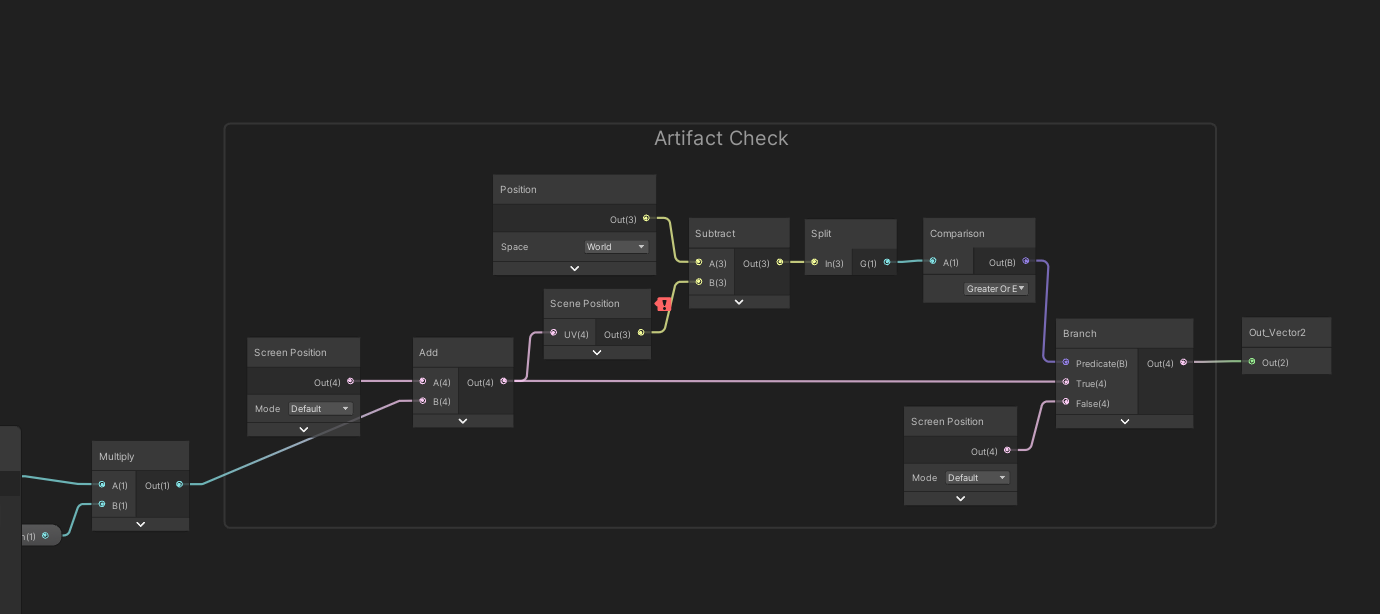
just to show you the logic
regal stag
@rustic talon It's because the texture being distorted is the "Camera Opaque Texture" (that's what the Scene Color node gives you in URP). It contains everything opaque that the camera sees - without transparent shaders like the water plane.
The water shader samples that texture with the Scene Color node and distorts it with noise, but since it includes objects in front of the water plane too, those get distorted too without additional checks based on the depth texture (Scene Depth).
If it were say, a texture containing only opaque objects below the water surface, then it wouldn't need to worry. But that's not really how rendering works.
rustic talon
oooh okay, didnt know what exactly Scene COlor does. I've read the documentation but didnt understanded at all
Note: In Lightweight Render Pipeline this Node returns the value of the Camera Opaque Texture. See the Lightweight Render Pipeline for more documentation on this feature. The contents of this texture are only available for Transparent objects.
didnt understand this final part at all
regal stag
Well objects in the opaque queue would show in the camera's opaque texture. So while you might be able to sample it, you'd just get the colour of the object itself back.
If you outputted the texture sample in an opaque shader, it would then render that to the opaque texture... It just creates an awkward loop and ends up as a glitchy looking mess if I recall correctly.
rustic talon
jajajajaj i've seen this awkward result😂
regal stag
e.g. something like this, where it sort of copies the colour as the camera view moves around
 rain hedge
I'm getting the error "Invalid subscript 'shadowCoord'" in Varyings.hlsl
This is my current shader
And these are the keywords I've defined
regal stag
The _MAIN_LIGHT_SHADOWS keyword expects the shadowCoord to be passed in the Varyings but that doesn't happen in the Unlit Graph, and that other keyword isn't going to be taken into account as the generated code won't include it regardless of defining it afaik.
You can use MAIN_LIGHT_CALCULATE_SHADOWS instead though. (And you should also define _MAIN_LIGHT_SHADOWS_CASCADE and _SHADOWS_SOFT as Global MultiCompile keywords so those are taken into account too).
I've got functions & subgraphs that handle this here, if you're interested : https://github.com/Cyanilux/URP_ShaderGraphCustomLighting
rain hedge
Oh let me try that real quick
That seems to have fixed it
Thank you
Um now the shadows are weirdly uneven
solar sinew
Quick question: when should you define a keyword as a shader feature versus multi-compile?
My current understanding is multi-compile should be used when you have large features in your graph you may or may not use (for example - adding a world bend effect vs not).
Meanwhile, shader feature is better for situations such as whether to use a specular texture, or whether to use a lightmap for example
Also... when would you use Predefined? I was thinking “wouldn’t it make sense to define keywords such as MAIN_LIGHT_CALCULATE_SHADOWS as Predefined since this shader will always have that keyword turned on?”
regal stag
@solar sinew Multi-Compile is better for things that could be toggled at runtime. Shader feature is for other stuff. Both generate multiple variants of the shader, but the shader features that are unused will be stripped from the final build. If you're toggling something at runtime, you don't want to use shader feature as the resulting shader variant might not be included.
Predefined is more for keywords that are already defined in the shader (usually by URP / Unity), and you just want to have a keyword node to test if it's true/false. One example would be : I think shader graph generates each pass with a defined keyword. Like SHADERPASS_UNLIT (in the case of the Unlit Graph, I think SHADERPASS_FORWARD might be the PBR/Lit one? Or something like that anyway, you can view them if you generate the code). There's also passes with SHADERPASS_SHADOWCASTER, SHADERPASS_DEPTHONLY etc.
For example if you wanted the shadow caster pass to output a different value in the AlphaClipThreshold than the regular "unlit" pass, since it does #define SHADERPASS_SHADOWCASTER, you can test for it in the graph using the Predefined option. You wouldn't want the Multi-Compile or Shader Feature in this case as that would just define it again, and in all passes. (Could also test for it with a custom function)
 spiral kite
anybody has a way to blur UI bg in hdrp
solar sinew
regal stag
<@!347435811223896064> **Multi-Compile** is better for things that could be **to...
So say I have two different lighting ramps, one for characters and one for environment. In this case I wouldn’t be toggling this at runtime, so I would choose shader feature? But how would that compile? Since two objects, in the same scene, using the same shader, would have the same “shader feature” turned on or off?
Would that still compile multiple variants of the same shader?
regal stag
That would sort of depend by what you mean by "two different lighting ramps". Are they using the same identical code, just a swapped out ramp texture? Or are they two separate pieces of code separated with a boolean or enum keyword?
solar sinew
In graph it would be two separate sample texture nodes receive two different textures. Alternatively, two sample gradient nodes - one for hard shading and one for soft shading.
In this case is it better to use an enum for each lighting ramp variant? And use a single sample texture/gradient node?
Or, is whether I use an enum really just dependent on if I use more than two ramps
I suppose one way I’ve seen keyword bools used is if someone wants multiple different features in a graph toggled together, essentially swapping between two different layouts
solar sinew
solar sinew
I suppose one way I’ve seen keyword bools used is if someone wants multiple diff...
Sorry I know this is several different topics at once 😅
regal stag
Yeah, Idk I'm getting a bit confused now. I think it's better to stick with as few variants as possible really, especially since the SRP Batcher can only batch objects using the same shader variant if I recall correctly. I doubt there's that much of a problem with having a separate shader variant on the character vs the whole environment though.
solar sinew
I guess another hypothetical is deciding which objects receive a rim light using a keyword bool
Since I wouldn’t be changing whether an object receives rim lighting during runtime I would set this as a shader feature. Then when the shader compiles - one variant will include the code for rim lighting, while the other will not
regal stag
Kinda yeah. It depends on what other keywords are included too.
If you have say, two boolean keywords, A and B. Then that produces 2 keywords for the first keyword, and another 2 keywords for each of those to account for the second. So 4 shader variants in total.
If you have 10 boolean keywords, that's 1024 variants. (2^10)
A lot of those might be stripped out if they are shader features though
solar sinew
Ah okay, in that case I would define MAIN_LIGHT_CALCULATE_SHADOWS as multi-compile not because I plan on toggling it during runtime, but because it’s a keyword I want all variants of the shader to use (and it is not a predefined keyword for whatever pipeline I am using)
regal stag
Mm idk, it might be better to define it as a shader feature as I would then assume the variants produced for when the keyword is off wouldn't be included in the build.
solar sinew
Also, I suppose defining whether a keyword is local or global impacts choosing whether to define it as a shader feature or multi-compile
regal stag
Global and Local is more because there's a maximum number of keywords that can be defined.
256 global ones (for all shaders in the project), and 64 local ones (per shader).
Probably best to stick with local as much as you can, unless it's a keyword already used by other shaders in the project (or like the URP lighting/shadow ones, they should be global).
 high otter
Hi guys, I started using unity and I'm looking for help about alpha surface shader,
I just wanna know why when I pragam alpha:blend or fade I can see through my object (that sound crazy ^^) if my alpha is 1.
The screen should be more usefull ^^
toxic flume
We have several different techniques to add outline/glow only around objects.
1- Image Effect-> Image+Blur
2- Render objects as 2D meshes and find outline for these 2D meshes
3- 2 passes First one is normal, in the second one, change vertices and scale..
...
What is your opinion?
 high nebula
How do I access shader graph in Unity? Excuse the noob question!
or is it an external program to visually design shaders?
regal stag
It's included if you install one of the scriptable render pipelines. (Either URP or HDRP)
high nebula
okay so I don't think I have either of those installed in the little game 😄 Back to hand coding
It's a webGL program so no need for fancy render pipelines
toxic flume
You can use amplify or shader forge as well
high nebula
I just want to drop one transparent texture over another, I tried _Blend 0,1 but it removes the underlying texture as you go from 0,1
toxic flume
lerp(_color1_color2,a)
regal stag
Probably want to lerp between the two textures based on the alpha of the transparent texture. So like, lerp(texResultA, texResultB, texResultB.a);
high nebula
I was using this (lazy cut and paste from unity wiki) ```Shader "Blend 2 Textures, Simply Lit" {
Properties {
_Color ("Color", Color) = (1,1,1)
_Blend ("Blend", Range (0,1)) = 0.5
_MainTex ("Texture 1", 2D) = ""
_Texture2 ("Texture 2", 2D) = ""
}
Category {
Material {
Ambient[_Color]
Diffuse[_Color]
}
// iPhone 3GS and later
SubShader {Pass {
    Lighting On
    SetTexture[_MainTex]
    SetTexture[_Texture2] {
        ConstantColor (0,0,0, [_Blend])
        Combine texture Lerp(constant) previous
    }
    SetTexture[_] {Combine previous * primary Double}
}}

// pre-3GS devices, including the September 2009 8GB iPod touch
SubShader {
    Pass {
        SetTexture[_MainTex]
        SetTexture[_Texture2] {
            ConstantColor (0,0,0, [_Blend])
            Combine texture Lerp(constant) previous
        }
    }
    Pass {
        Lighting On
        Blend DstColor SrcColor
    }
}
}
}```
Give me a clue (first time playing with shaders) where the alpha would need to be applied
regal stag
Not really familiar with the fixed function syntax here. I'd personally look into the cg/hlsl shader code instead, there's much more tutorials and resources on that.
According to https://docs.unity3d.com/Manual/SL-SetTexture.html it's just combine texture lerp (texture) previous
high nebula
Heh, all the examples seem to blend between two images I want to overlay image B onto MainTex! 😄
toxic flume
What do you mean overlay, your picture
high nebula
Let me explain 😄 A video is worth a thousand pictures and 100,000 words!
Incorrect overlay
I want the black puzzle to be multipled over the base texure not blended between the two
if that makes sense
regal stag
You just need to blend them based on the alpha channel of the second texture rather than a "Blend" property. According to the docs I linked above the syntax for that is combine texture lerp (texture) previous. Look at the "Alpha Blending Two Textures" example.
high nebula
hmm, took the example and get this the base layer is loaded at runtime the overlay with alpha is set in inspector prior to loading…
Fixed, now to tweak…
brisk dome
So does anyone know about shadergraph using blit
devout quarry
@brisk dome what do you mean?
I think a shadergraph-shader could be used to create a material that's used during a blit operation yeah
brisk dome
@devout quarry I'm using a renderfeature to use Graphics.blit, in URP
I'm still not very experienced, but it's the shader effecting the render texture pixel by pixel, rather than vertice by vertice
In my case I'm doing a per pixel ray check into the world, but the issue being the camera direction is returning garbage values
Im pretty sure it's something to do with the camera node not liking blit, but I can't debug it properly to know
 stone sandal
Heya shader friends! We are currently running a survey to gather users thoughts on new features on Shader Graph as well as gathering general usability attitudes for the Shader Graph. If you have thoughts or opinions, we would like to hear from you!
https://unitysoftware.co1.qualtrics.com/jfe/form/SV_26rzfGcd4fbET09?channel=unitydiscord
Survey questions related to the Unity Shader Graph
also, just in case you're worried, I'm the TA on shader graph and i'm personally involved in reviewing responses! no black holes here, your results will be seen!
solar sinew
stone sandal
Heya shader friends! We are currently running a survey to gather users thoughts ...
I just noticed that under "How long does it typically take you to author a shader in Shader Graph?" there is a response that reads "1 week to 3 days"
stone sandal
solar sinew
I just noticed that under "How long does it typically take you to author a shade...
Yeah thanks for the catch, unfortunately we can’t change the answers after the survey is live right now
solar sinew
That answer should read "1-3 days" correct? Just want to make sure I choose the right option
stone sandal
It should read as “3 days to 1 week”
solar sinew
Thanks 👍
pearl sierra
Hey guys! Shader.SetGlobalColor() is not working? Does anyone know why? Thanks! ```Shader "Unlit/Transparent Color" {
Properties
{
_MainTex ("Base (RGB) Trans (A)", 2D) = "white" {}
_Color ("Main Color", Color) = (1,1,1,1)
}
SubShader
{
    Tags {"Queue"="Transparent" "IgnoreProjector"="True" "RenderType"="Transparent"}
    LOD 100

    ZWrite on
    Blend SrcAlpha OneMinusSrcAlpha

    Pass {
        Lighting Off
        SetTexture [_MainTex] {

        constantColor [_Color]

        Combine texture * constant, texture * constant
        }
    }
}
} Shader.SetGlobalColor("_Color", Color.blue);```
thick fulcrum
@pearl sierra I'm presuming it's because you have defined it as a local variable in the shader, rather than grabbing the global. Do you want to set one color for ALL materials with this shader or allow them to be set individually?
low lichen
Fixed function shader in 2020
👀
 faint notch
anyone successfully created a outline shader on URP ? seems to me multi-pass shader is not an option in URP yet. I am looking to create a outline shader that supports skinned meshes and is lightweight enough for mobile.
I kind of have something working adding a additional material for the outline, however this has some performance issues on mobile.
I guess i have to look into Scriptable render passes
 amber saffron
This outline question/discussion comes way to often here :D
@devout quarry did an exemple for an outline post process https://alexanderameye.github.io/outlineshader.html
And this learn page has a nice example of hull based toon outline, that doesn't require coding : https://learn.unity.com/tutorial/custom-render-passes-with-urp#5ddc3f73edbc2a001ff7d6bc

Unity Learn
In this tutorial, you will learn how to use custom render passes to render a toon outline post processing effect on selected objects
@faint notch ^
faint notch
@amber saffron Ah yeah i have seen that, i want to use this as a "selection/outline" glow effect though. So i can't use a screen-space image effect.
amber saffron
The second one then ?
faint notch
The per-object outline? i had worse performance results on that method on my android unit.
Not sure why though, I might have done something wrong.
I am going to play around some more with this, see what results i can get.
I just need an outer outline (like glow), so my usecase is a bit simpler.
thick fulcrum
took some figuring out, but once I got my head around rebuilding the correct matrix transformation it looks ridiculously easy. So now I have a Lit projected decal done in shader graph. Just need to add in additional lights and can call that done 😄
 midnight minnow
question about stencil masks and ui. Can you use a stencil mask to cut out of a raw image or something similar. At the moment i have this where the object is being cut out of it in the scene view but nothing in the camera view. is there a way to get this working or should i look elsewhere
please @midnight minnow if you have an answer
thick fulcrum
@midnight minnow I believe there is an extension in this repository which should do it, "softalphamask" but I've not had to look at any of that for a while so can't say if it works with all SRP's https://github.com/JohannesDeml/unity-ui-extensions

GitHub
pulling daily from bitbucket repo. Contribute to JohannesDeml/unity-ui-extensions development by creating an account on GitHub.
midnight minnow
thank you very much ill look into it
rustic talon
Fast Question, nowadays if u want ur trees and grass to be moved by wind, u need to do a shader no? im asking cause i've tried all kinds of things with terrain wind parametters and wind zones and my vegetation dont move....
midnight minnow
@thick fulcrum same issue happens where it happens in the editor scene but not in the game scene
thick fulcrum
@rustic talon generally I believe it's done in the shader, so your vegetation needs to have a suitable shader capable of applying vertex deformation based on the wind settings.
@midnight minnow are you using URP / HDRP or standard renderer?
midnight minnow
i would assume standard renderer from my limited experience in this
thick fulcrum
I'm surprised it's not working as that's fairly robust and bug free. perhaps it's something in the setup you have 🤔 strange it's working in editor though
midnight minnow
ill keep playing around with it for now
thick fulcrum
🤔 I'm currently using a render feature to grab normals, this gives me a texture which has the models mesh normals. Is it possible to get the model with it's "textured" normal map instead and if so where to start?
 granite blade
I am building a Toon Shader in URP, and I am wondering is there a way to make my "specular" - black - like actually black instead of white? (artistic purpose)
Can anyone think of a way? I used a tut for that, basically a simple get light direction and Dot product with cam direction to get spec, but can't seem think of a way to turn it black
regal stag
You'd probably want to Saturate the specular result (clamps between 0 and 1), then use it as the T input of a Lerp between the diffuse colour (A) and a specular/black colour (B) - instead of adding the diffuse and specular together as you would normally do.
 fringe pagoda
I'm trying to combine two base map textures, one is solid color albedo and one is supposed to be a transparent overlay over the first color albedo but in the game, it appears black
can someone help me? Thx
granite blade
regal stag
You'd probably want to `Saturate` the specular result (clamps between 0 and 1), ...
can you explain further? I am very new to shader graph and scripting . I tried that, same results basically, what am i doing wrong?
meager pelican
@fringe pagoda
float4 col1 = the base color
float4 col2 = the transparent overly pixel color
float4 result = float4(col1.rgb * (1-col2.a) + col2.rgb * col2.a, 1);
fringe pagoda
meager pelican
<@!308682986994270208>
float4 col1 = the base color
float4 col2 = the transpare...
@meager pelican I'm kinda confused what that will mean except for all the math part, I'm assuming the last parameter 1 is the alpha
regal stag
@granite blade It's a little hard as I don't know what those connections from the top and bottom are. The A input on the Lerp should be the base/albedo colour with the diffuse (normal dot light dir) shading, I'd assume that's what the connection at the top is, but can't be sure.
B input should be the black Color node you have, and the T should be a mask to tell you where the specular light is - the output of the Power node (and connect the Saturate node you have now to the A input on the Power node. That is still part of the specular calculations).
You're basically using Lerp with the specular result to do : when specular (T) is 0 show me the normal object colour (A), and when specular (T) is 1, show me the black (B). Values in between get blended. I think that's what you want, unless I've misunderstood what you were trying to achieve.
fringe pagoda
this is my shader rn
I'm relatively new to shaders but I know that white is non-transparent and black is transparent
meager pelican
@fringe pagoda It's a traditional blend calculation using the transparent color's alpha and a "base" color. In your shader.
Yes, the final 1 is the result's alpha, blended into an opaque color.
So if you start with a 100% white pixel (1,1,1,1), and you blend in a blue pixel at 75% alpha (0,0,1, .75), you'll end up with a result of
(.25, .25, 1, 1) which is an opaque blue pixel that is lightened by "white" by 25%.
fringe pagoda
Ah I see makes sense
meager pelican
That all assumes you want traditional blending and that the source textures don't have premultiplied alpha.
fringe pagoda
Thanks. So if I want the right group to be transparent the previews on the right side have to be black?
meager pelican
Hang on, SG.....
You didn't say SG.
They show a slightly different calc, but that looks to work too.
granite blade
@regal stag I got it ! Amazing explanations. Thank you so much!
Actually now I got transparency instead of black. 1 sec 😄
regal stag
Ah, that's because the color node is set to 0 Alpha, might want to change that to (0,0,0,1) instead of (0,0,0,0), assuming you are using the alpha of that for the master input.
rain hedge
My shadows are doing this strange oscillating thing. I know it's not a geometry thing because the shadow caster is the default unity plane
granite blade
@regal stag Still transparent
regal stag
What have you got connected to the alpha input on the master node?
fringe pagoda
meager pelican
They show a slightly different calc, but that looks to work too.
@meager pelican thx
regal stag
@granite blade You don't need to multiply the diffuse and specular together, and I'm a bit confused why the dithering at the bottom is included in the lerp now. If you want the specular dithered too, then multiply the dither and power node together before putting it into the T input. I feel like you need to re-read what I posted before to understand why the lerp is used.
But you're also in a subgraph and are outputting your Vector4 result into a Vector1 specular which is a big problem. You either need to swap to using a Vector4 output for this or move these calculations out of the subgraph and put them into the main graph. (and by calculations I mean this lerp part, not the diffuse or specular parts, those could stay in the sub graph).
granite blade
Ye I kinda get what your saying but then I have no clue what to do with it 😄
Thanks - I'll keep trying
but basically there, that group is just creating dots so i can alpha it out to have a dotted Specular, the dither is just extra effect
rain hedge
rain hedge
My shadows are doing this strange oscillating thing. I know it's not a geometry ...
So it seems to be an issue with my shadow attenuation?
I just used the shadow attenuation directly and got the same result
granite blade
@regal stag GOTT'EM! I just thought about what you said and moved that specific calc to the main graph and Voila! Thanks again
 echo badger
Any ideas why my shadows would be so funky? They are like rendering on top of the geometry.
regal stag
@echo badger Shadows usually show through transparent objects. Since you are using alpha clipping, you could stick to Opaque surface mode to fix that.
echo badger
@regal stag OH! I thought I remembered that you needed to have it as transparent for the alpha to work. Thank you!
regal stag
Needs to be transparent for alpha blending (partial transparency), but not for clipping.
echo badger
Ah, the more you know!
solar sinew
I just reopened my project and several of my materials have gone pink.
Sent that too early^
anyways I am getting an error saying void functions cannot return a value
in reference to my custom HLSL being used in a custom function node
 median gull
Are you returning something in a void function?
solar sinew
Yeah my output is a float3. It's odd though because last time I had the project open I didn't have this error
oh wait never mind
I figured out why all the materials are pink - for some weird reason my selected pipeline got removed
(I may still need help on that error but I'll let you know)
Turns out that fixed it
very odd
I'm not sure why my render pipeline asset was removed hmm
 quick flame
Probably forgot to save
 gleaming notch
Do shaders not work with UI images on a canvas?
 knotty juniper
shader have some requirements to work nice with the UI
toxic flume
I have two passes, each of them works perfectly but when I use both of them, it does not work. it is noisy, overlap some parts/pixels mixed
 😆
toxic flume
😆
toxic flume
How can I remove interior lines? I have used two passes and old method scaling in clip space.
Do I have to use outline image effect in screen space?
low lichen
@toxic flume Which is drawn first, the gun or the outline? Does it matter?
If the gun can be drawn first, then you could use stencils
Have the gun write some stencil value and make the outline only draw where the stencil value is not that value, preventing it from drawing on top of any pixels where the gun is.
Or if the outline is drawn first, you could make the gun always draw on top of the outline
toxic flume
@low lichen I do not want to use stencil, I wish to handle it without stencil
  Pass{// normal texture
     Tags {"RenderType"="Opaque" "Queue" = "Geometry" }
     ZWrite On

}
   Pass{ //outline
    Tags {"RenderType"="Opaque" "Queue" = "Geometry" }
    Cull Front
    ZWrite On
}
Can I run passes sequentially?!
low lichen
@toxic flume So this is a multipass shader?
toxic flume
yes two passes
Can't I apply the first pass and then after that the second one, right?
low lichen
@toxic flume Does it stop working if you move the outline pass ahead of the normal pass?
toxic flume
@low lichen Does not differ, dude
low lichen
@toxic flume Well, stencil is the cleanest solution I can think of
Why do you not want to use it?
toxic flume
OK, first because I think all android devices do not support it.
and I concluded that passes do not run sequentially, as a stack ,correct?
low lichen
What makes you think that?
How else could they be "run"/drawn if not one after the other?
toxic flume
So why do we have the problem mentioned above? @low lichen
Because I scale vertices right?
devout quarry
for something like this I either use stencils, or I render the gun to a mask buffer first that just is black/white, then when applying the outline I check against that mask to determine whether or not to draw the outline
 twilit geyser
Does someone have an idea what this flickering could be caused by? Project is HDRP, shader is written with Amplify, but I'm just trying to copy the functionality of HD/Lit
Trees are made with speedtree
granite blade
Is there a problem with ShaderGraph and mobile export? I made a custom Toon Shader an on the android it turns blue (should be grey) and the black specular I had turns white, also it seems like a "dithering"effect isn't working on the specular.
twilit geyser
I have white flickering now for materials without SSS 😦
solar sinew
(Context: I am using ramp textures [256x1px])
Is it more performant to use a texture array or to create one large texture with multiple ramps (and then sample a different V coordinate)?
I am trying to use the latter method hopefully. I just need to make this tool to stack the ramp textures rather than them overlap.
I already have a tool for generating gradient textures and saving them
toxic flume
devout quarry
for something like this I either use stencils, or I render the gun to a mask buf...
Is it efficient? I have many weapons on the ground. I have to make a mask buffer for all of them?
or it is an image effect in screen space? only one time for all pixels on the screen.
Render texture with only weapons and then use the render texture and sample it in the shader?
devout quarry
toxic flume
Is it efficient? I have many weapons on the ground. I have to make a mask buffer...
for me it's a single pass, just like you draw the objects to the screen buffer, I first draw them to another buffer, I did use GPU instancing or the SRP batcher, not sure, but it was fast yeah
and no, not a different mask buffer for each object, just 1 buffer, and in one pass you draw certain objects to that buffer
in URP it's with context.DrawRenderers, and I worked with the renderinglayer mask so like all the objects that had layer 2 selected would draw to that buffer
I have an example here, but beware it's just me messing around so the code might not be good or might not work for you
toxic flume
@devout quarry Thanks. Unfortunately I am not familiar with URP and contexts. I have worked with standard pipeline. I see it, perfect
 meager mist
Hi, I made a dissolve shader by following a tutorial but in play mode the color of the edges are not showing. Can someone help?
This is the shader
 strong hedge
Hi can someone help me with compute shaders ,
I am trying to to cellular automata so I need to on a texture ,modify it then get it in the cpu and then Dispatch with the modified one
vague pike
So, I've been trying to make a shader that has like a ground overlay where my cursor is (e..g a magic circle to show range of a spell).
Currently just trying to simple paint all fragments inside a certain amount of pixels around the cursor red, but somehow can't even get that to work. And not really sure what I'm doing wrong...
Basically just feeding Input.mousePosition into the shader, dividing that by Screen Width to get the position relative instead of in pixels. Subtracting it from Screen Position X, taking the Absolute, and then checking if it's <= 20, and if so output a different colour. But doesn't seem to really do anything D: (Could post a shader graph screenshot, but it's a bit of a mess)
Doesn't show anything it appears
Maybe my CursorX setting doesn't work for some reason
strong hedge
Did you convert screen to world space?
vague pike
shader = Shader.Find("Shader Graph/GenericShaderLit");
cursorXID = Shader.PropertyToID("CursorX");
Shader.SetGlobalFloat(cursorXID, Input.mousePosition.x);
Should be right?
@strong hedge Thats why I'm dividing by screen width, if you mean that?
strong hedge
Ok
vague pike
Or what do you mean
Right now I even just plugged CursorX into Remap (In: 0-1920, Out: 0-1) and all is black no matter how I move the cursor
strong hedge
And you should also add the camera pos to that
vague pike
So it feels like passing my stuff in is wrong
@strong hedge Hmm, might have to try around witht hat, but would that matter since I use Screen Position node?
strong hedge
Dunno don’t have much experience with advanced shaders I am mostly a c# person
vague pike
Right
granite blade
Anyone knows of a way to get Shader Graph to properly work with URP + XR ?
My Shader got all f'd up in the build (Right is how it's suppose to look):
vague pike
polkadots \o/
granite blade
specular polkadots - but they don't move in AR 😦
solar sinew
granite blade
specular polkadots - but they don't move in AR 😦
does your outline technique use the @devout quarry ©️ DepthNormals™️ renderer feature? It looks really good so I'm just curious how you approached it
vague pike
Oh, I'm dumb
I exposed the CursorX property, so the material overrides the SetGlobalFloat, not exposing it fixes that
granite blade
solar sinew
does your outline technique use the <@!390899557942165504> ©️ DepthNormals™️ ren...
Thank, I used this tutorial: https://www.youtube.com/watch?v=1QPA3s0S3Oo&ab_channel=NedMakesGames
Small underrated but very useful channel

Outlines are a fun technique to add style to your game and pair perfectly with toon shaders. There are a variety of ways to implement them, and in this video, I look at one of them. I use a renderer feature to render a mesh twice, extruding the "hull" to create an outline. In the process, I write a script to handle sharp corners.
► Toon shading...
solar sinew
Oh I recognize his voice - I can't remember which tut I've seen of his but it's a great channel 👍
strong hedge
No idea how it really works but the code from this video is a great template for compute shaders https://youtu.be/ItPTBSeGjdM

Conway's Game of Life was created by John Horton Conway in 1970. It's designed as a mathematical system capable of creating copies of itself. The design of this mathematical "game" uses a simple 2 dimensional rectangle full of living and dead cells. 4 rules determine the next state of the cell based on it's own current state and the state of it'...
grand jolt
Can anyone help me understand why Alpha Clipping isn't working on an HDRP Shader with Shadergraph? Thank you.
 vocal narwhal
you're not passing the alpha in to anywhere are you?
grand jolt
Nope. Just using a float to adjust the clipping. It works if I go past 1, but then everything just disappears.
Ooo I see I got it now 🙂
Yeah had to put the albedo alpha into the alpha channel. Wasn't even thinking about that as it wasn't a Transparent shader, so wasn't thinking about alpha lol. But yeah that was it 🙂 Thank you.
 twilit dune
hey, please can someone help me? I have two lerps to produce two gradients, and I want to squish them into one gradient. Any ideas how I would accomplish that?
rustic talon
im trying to do something with polar coordinates but i have this seam, what i should do?
regal stag
@twilit dune You need to remap the value going into the T input a bit and put one lerp into another like this. Using an Inverse Lerp node for the remapping, (or Remap but the out min-max would always be 0 and 1 so it's identical).
rustic talon
its strange cause with sample texture works good
but not with gradient noise
gradient noise its not a generated texture by unity?
regal stag
@rustic talon You need a seamless noise texture as it is wrapping the texture around, basically connecting the top and bottom.
The noise generates continuously in all directions rather than repeating, so if it were to try to repeat it causes seams. e.g. If we force it to repeat using tiling and fraction node, it produces obvious seams. That's kinda what you are seeing with the polar coordinates too, but with the Y axis wrapped around onto itself instead.
twilit dune
@regal stag You are fantastic, thank you so much
rustic talon
aaghh okay, it has sense now... thx!
@regal stag ive deactivated the mip maps of the texture and now the strange seam has disapeared, it is cause the mip maps were reducing the quality of my texture and it creates the seam?
regal stag
Yeah I've noticed mip maps also cause a seam when using the polar coordinates. Not too sure why, I haven't looked into it that much. I usually use the Texture 2D LOD node (with lod 0), but disabling mip maps fixes it too.
meager pelican
strong hedge
Hi can someone help me with compute shaders ,
2D CA?
Anyway, if you use compute shaders you'll probably have a big memory array (buffer) at whatever resolution and then iterate over it with the compute kernel instances.
THEN
You'd draw a full-screen-quad or whatever and map the results in the buffer to the screen pixels to render it on the screen.
I would think.
You'd probably have kernels for initializing and clearing and then for iterating/animating.
You'd have to map screen pixels to CA-buffer resolution, which I'd assume would be lower than actual screen resolution but who knows?
I don't remember with CA if you need two buffers, one for the previous frame, one for the current, but you could swap them and re-assign each frame.
 exotic kraken
Can someone explain how blending works? I read the official Unity documentation but I'm still lost.
Blend SrcColor DstColor
What exactly do SrcColor and DstColor refer to, and what are they added to?
 last robin
Src refers to what you're drawing now, Dst refers to what's already been drawn
i think the easiest mode to understand is Blend One One, which is literally new_color = 1*src_color + 1*dst_color
and if you're familiar with lerp you'll find that traditional transparency is just lerp
if you're not lerp(a, b, t) = (1-t)*a + t*b
traditional transparency is Blend SrcAlpha OneMinusSrcAlpha
so if you plug in SrcAlpha for t in that formula, b = SrcColor and a = DstColor, you get transparency
those Src and Dst factors are just factors put right before the rgb color
so new_color = src_factor*src_color + dst_factor*dst_color
you can also change that plus sign to other things using BlendOp
so BlendOp Sub = new_color = src_factor*src_color - dst_factor*dst_color
another easy one to understand is Blend DstColor Zero which is multiplicative blending
or new_color = dst_color*src_color + 0*dst_color
this is a good read if you're still not sure https://en.wikibooks.org/wiki/Cg_Programming/Unity/Transparency
midnight minnow
Quick question is there a way to save the variable from a stencil buffer to another variable to do more stuff than just binary enable or disable parts of the object
devout quarry
If I write objects to some RGBA buffer, is there a way to 'skip' a channel for some objects? So that like I can say 'hey, for this object, don't override, just keep whatever was already in the buffer', but not for other channels
I guess this is with color mask? But can a color mask be dynamic, so that in the fragment shader I dynamically decide whether to draw to a channel or not
regal stag
I would assume that is what ColorMask is for
devout quarry
Specifically my use case is that I write objects to the red channel so that they can be processed by an outline shader but for some objects, I want the outline shader to ignore those objects so don't want to draw lines there. But then lines show up 'behind' the object and show through so I wanted to work a with a mask in another channel like green, so that the object doesn't write to red but does write to green and the outline shader will then check, ah, if there is a green pixel there, don't draw the outline and so the lines wouldn't show through
But maybe I'll need another approach
So yeah the outline shader needs to 1. Ignore the object for outlines 2. Know that there shouldn't be lines at all in that area
 sturdy phoenix
Anyone know how to deal with super thin lines in ShaderLab? Idk what to do about fixing this. Looking for alternative grid rendering methods, and while shaders are working well for me right now, I'm guessing meshes won't have this sort of issue.
solar sinew
devout quarry
So yeah the outline shader needs to 1. Ignore the object for outlines 2. Know th...
Would Channel Mixer do the trick?
https://docs.unity3d.com/Packages/com.unity.shadergraph@7.5/manual/Channel-Mixer-Node.html
I assume so
devout quarry
@solar sinew I don't use shadergraph but I managed to do what I want 🙂


like this, the white sections are ignored by the outline shader, and the lines don't show behind them
devout quarry
If anyone is looking for a URP outline, Ben Golus shared a technique a while back here: https://medium.com/@bgolus/the-quest-for-very-wide-outlines-ba82ed442cd9 I converted the effect to URP and you can download it here. https://alexanderameye.github.io/jfaoutline.html Lots of people ask for outline effects in here, so this might be of use to a whole bunch of you. There is a readme in the .unitypackage with some setup explanation but it's very straightforward. It looks like this:
thick fulcrum
should probably get pinned the number of times it's asked about
twilit geyser
Hey guys, I'm looking for the rotation info inside shader graph
Would that be the right node?
low lichen
No, euler angles is not the same as direction
Very much doubt Unity would be giving shaders euler angles
Because they are pretty much useless for anything but human friendly representation of 3D rotation
twilit geyser
That's okay, if I need to convert things. Just wanted to know, whether that's the information in general, or whether it's not even possible to get the rotation info
low lichen
The rotation is encoded into the transform matrix
twilit geyser
I'm not sure how shaders work behind the scenes since I learned shaders with node based editors. I know that some info can't be obtained in shaders because it's too early of a stage so to speak
twilit geyser
low lichen
The rotation is encoded into the transform matrix
I see, how can I obtain the information in shader graph?
low lichen
What do you want to do with it?
twilit geyser
Inside my shader I am rotating something and the user can change the rotation axis in the inspector of the material. I want to subtract the rotation info of the object to make the rotation of the object independent of it's settings in the transform
Basically, I am working on a sway movement to simulate wind. And I want my sway to always go in the direction specified with a vector independent of the objects rotation