#archived-shaders
1 messages · Page 167 of 1
 ashen trail
what do you mean?
 proven cedar
I want to change its shader
Of the particle
I went into the particles material thingy but there was only the materials of the other particles
Which i changed
I just want to change it to be fit for mobile shaders
 soft jacinth
anyone have any ideas on how I might do that?
 vague barn
how do i render an object only when within a volume?
it is a text mesh pro and i dont want to modify the original shader
im using hdrp
 teal breach
is there a shader define equivalent of 'in editor'?
preferably the actual editor viewport, not the game view
 crystal light
how efficient is Shadergraph's keyword functionality?
does it get optimized when a constant is used on the "else" branch?
 warped junco
 naive mural
Hello, does anyone know why my shader is spazzing out when i select Two-Sided as an option in the shader graph? It doesn't do so in the editor screen, only in the game screen. I'm using HDRP. https://i.imgur.com/ussYXSN.mp4

 still orbit
@naive mural maybe a depth precision issue. How big is your far clip value on that camera?
Either that or there is a render state issue (potentially a bug)
naive mural
@still orbit not sure what it was, but after switching the material to transparent the issue disappeared.
still orbit
Ah yea, there you go. It was rendering both sides with the same depth and testing them against each other. Z-fighting.
 uncut gyro
Hey
i just tried upgrading materials to URP
and
this one does not work
but these look normal
oh actually these do not work too
 rustic dragon
I don't think custom shaders will convert, you'd probably have to remake them in shader graph
 thick fulcrum
or check with asset producer to see if they have URP version in works / available
 velvet hazel
Hey guys, does anyone here know if Universal Render Pipeline supports Instance Indirect Shaders?
rustic dragon
@velvet hazel #archived-hdrp might know also
velvet hazel
thanks
crystal light
@amber saffron hello, thank you for your response. I mean, if I use a keyword boolean inside a shadergraph - the ON input is something GPU-intensive, the OFF input is just a constant. will the shader in case of OFF be optimized to use the constant?
 amber saffron
When you use a keyword, the compiler with literally compile two different shaders, one that uses the ON branch, and one what uses the OFF branch
And if it's a constant, well ... yes, the shader will use it as is 😄
crystal light
Will it remove any left-over ON nodes? For example, if a keyword's ON functionality uses a texture map, will the texture map lookup be switched off, in case I'm compiling with the keyword as OFF?
amber saffron
Yes, all things connected to the ON node will be stripped out of the shader when you use the keyword in the OFF setting
crystal light
@amber saffron got it! thank you once again.
 unique oar
My screen color node is all funky. It makes everything rendered look very pixelated and fuzzy. Any idea what's causing this?
 devout quarry
@unique oar maybe it's being downscaled, check your render pipeline asset
unique oar
@devout quarry Yep, that was it. Thank you!
 empty bridge
I have a rainbow shader here: https://pastebin.com/5VwdU7B0 How would I go about adding emission that's relative to the current color?
Pastebin
Pastebin.com is the number one paste tool since 2002. Pastebin is a website where you can store text online for a set period of time.
proven cedar
Does anyone know how i can change the shader of a particle thingy
 mild sleet
I have have a 2d sprite shadergraph shader. How would I go about scaling the vertex positions around the center of the sprite? I can't get the math to add up
wait maybe my math is right but batch rendering is messing with me or smth. Do meshes with the same shader get combined? If so, how can I disable batch rendering on a shadergraph shader
Ok I found a solution that only works at runtime. As long as the shaders are separate instances, it works
 honest bison
What is the cheapest way to do alpha on TBDR hardware?
 meager pelican
You can "do" alpha blending, it's just that it increases overdraw by definition and eliminates a lot of the efficiency of the TBDR design.
https://docs.imgtec.com/PowerVR_Architecture/topics/rules/c_GoldenRules_do_not_use_alpha_blend_unnecessarily.html
Most of the cautions I've see have been "Don't use discard"
https://docs.imgtec.com/PowerVR_Architecture/topics/rules/c_GoldenRules_do_not_use_discard.html
2-cents.
Worth reading all that doco.
Be sure alpha blending is used only when required to make the most of deferred architectures and to save bandwidth.
Avoid forcing depth-test processing in the texture stage as this will decrease performance in the early depth rejection architectures.
 wise copper
I'm creating a Material in the Editor
Material grassMaterial = new Material(grassShader);
grassMaterial.SetTexture("_MainAlbedoTex", texture.Texture);
grassMaterial.SetTexture("_MainNormalTex", texture.Normal);
grassMaterial.SetFloat("_render_clip", 1);
AssetDatabase.SaveAssets();
AssetDatabase.CreateAsset(grassMaterial, grass);```
However, when I assign the material to a mesh, the shader variable `_render_clip `won't update, I have to find the material in the Project and click on it, then the GameObjects will show the texture correctly. shadow kraken
I'm just going out on a limb here but it might be worth trying to use a material property block, where you explicitly apply all properties at the end
wise copper
That seems to require a Renderer to set the property block with, this is just an editor utility
teal breach
Exard are you using SRP?
wise copper
yes
I have it working now, using the wrong keyword, just added grassMaterial.EnableKeyword("_ALPHATEST_ON");
teal breach
Noticed a bug in shader compilation. I am compiling for WebGL 2.0 using ES 3.0, and the generated shader code appears to be using a bitfieldExtract function, which is not defined until the 3.1 specification (https://www.khronos.org/registry/OpenGL-Refpages/es3.1/html/bitfieldExtract.xhtml). My shader code is using division by powers of two to avoid bitwise operators for this platform, but the compiler is too clever and subs them back in.
 mild dirge
How would you go about making a background blur effekt when opening the menu?
How I did it until now was using the Unity PostProcessingStack and using a Overlay in my PauseMenu using the Unity Legacy Blur Shader I found someone had converted. https://hatebin.com/ndbjwdamlv (.shader)
https://hatebin.com/pueqjqhawy (.cs, apparently needed)
But this turned ou to not work in a build. In Editor it works just as intended, but in a build it throws Invalid Shader Exception and if I have the pause menu open for too long it crashes the build.
thick fulcrum
@mild dirge are you building for PC or something else?
mild dirge
PC, Mac, Linux atm, why are you asking @thick fulcrum
thick fulcrum
just wondering if target platform supports requirements for the shader, which they should
mild dirge
Personally am not really capable of understand the HLSL code itself I have to admit. Do you have another idea on how I could achieve such an effect?
thick fulcrum
I'm still learning, so went shadergraph over code afraid... I can only suggest perhaps a different blur shader - also using post processing so should fit into your workflow. https://www.ronja-tutorials.com/2018/08/27/postprocessing-blur.html
Ronja's Shader Tutorials
Summary A effect that’s useful for example to show exhaustion or to make transitions is a blur. To blur the screen we take the average of the surroun...
mild dirge
I'll look into it, thank you anyway. Have a nice day
thick fulcrum
you too
mild dirge
No, I am not
 low lichen
Just wanted to mention that JetBrains Rider 2020.2 added much better support for Cg and HLSL!
Rider 2020.2 adds much-requested support for Cg and HLSL shaders! This includes syntax highlighting, code completion, semantic error highlighting, go to definition, find usages, refactorings, and more.
Rider fully understands the structure of shader files, including macros, and can navigate to macro definitions or unroll them directly in code. Included files are discovered and parsed, and Ctrl+Click on an included file will take you directly to that file.
Oooh, it even knows some macros. I wonder if this is just a pre-defined list or something more dynamic.
 lone stream
Can someone explain to me what is positionNDC ?
ah nvm it's Normalised Device Coordinates
 polar coral
sup, i need some help
i have this shader i made that makes it so i can put a color above my maintex.. so when color alpha is 0 it just the basic texture and when its 1 the color is on top, also the mask works so its not just a square.... i added these references like _MainTex and _Color from a tutorial so when i implement the material created from the shader to the sprite renderer that the sprite + color is implemented automatically to the material without having to change it in the material itself.. the problem is normally when i change the alpha of the extra color to 0 the color goes away on top and youre left with the maintex .. but for some reason the color of the sprite renderer is directely connected to material color which is good but the alpha just does the overall sprite alpha so not like a intended it in my shader.. it works perfect when i change the alpha in the material itself but i wanted to know how to also attach the alpha to the sprite renderer do i have to use another reference other than _Color? im new with shaders + i followed this tutorial.. plz help me cause ive been struggling with this for a while https://www.youtube.com/watch?v=93jnsgD-8Wo&t

✅ Get the Project files and Utilities at https://unitycodemonkey.com/video.php?v=93jnsgD-8Wo
Let's make a cool Sprite Tint using Shader Graph. This is excellent for Heal and Damage effects.
Check out the entire Shader Graph Tutorials Playlist
https://www.youtube.com/playlist?...
i wanna change it in sprite renderer cause when i change my material it changes all object that have that material
and not when i use sprite color
low lichen
The color property in the sprite renderer is passed as the vertex colors
There should be a Vertex Color node
Sprite Renderer doesn't touch the _Color property at all
polar coral
hmm so why is it that when i dont use _Color the color doesnt work? cause there is a difference
sec imma show
with _Color
low lichen
Oh you're using some Sprite Lit Master output
I don't know how that works
It probably samples the vertex color itself
polar coral
ok i tested it and for some reason this time it was the same so youre prob right
so what should i change in my shader + what is the difference between color and vertex color?
is vertex color like a Vector3?
low lichen
I don't quite understand what you want your shader to do.
You want to have two color properties, one on the material and one in the sprite renderer?
Or do you just want to use the sprite renderer color?
polar coral
alpha 0 = just maintex alpha 1 = same mask but color overwrite
low lichen
Mask?
crystal light
If I set to Standard shader, the shader is pink, but shows geometry
polar coral
im gonna use this for when my character or any other object gets damaged
crystal light
when I switch to HDRP, nothing is shown
polar coral
mask i mean the alpha of the maintex so i dont just end up with a square
get what i mean?
low lichen
Right
polar coral
ok
so i thought it would be ez if i connected the color of the spriterenderer with that color so i dont have to change my material i can just do spriterenderer.color + when i change material it changes ALL the objects color
to make the damage effect
like its ez now cause _MainTex is connected
low lichen
So preferably you'd like to remove this color property from the material and just use the sprite color property?
mild dirge
Can someone in short explain the difference in frag shader and vert shader to me? I'm trying to read the turial advised to me earlier, but I didn#t figure those two our
 regal stag
If I'm understanding what you want to do, I don't think it's possible with the sprite renderer color - as the sprite master node already takes the vertex color into account. Changing the alpha will always make the sprite transparent, and nothing in the graph can change that afaik.
 drowsy stirrup
quick question, how do i buffer the unity_ObjectToWorld matrix?
when i try
  float4x4 unity_ObjectToWorld;
};```
i get https://i.imgur.com/gCBlyeR.png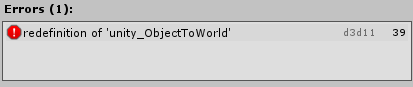
uniform does not change that
i mean, makes sense that it doesnt in hlsl but this is wierd :/
low lichen
@mild dirge When you want to draw a mesh on the screen, the GPU will run the vertex shader on every vertex of the mesh to determine where on screen those vertices should be. Then when it knows where the mesh is on the screen, it generates fragments, which are potential pixels. So every pixel the mesh occupies on screen, the fragment shader will run. And the fragment shader is a very simple program that just returns what color that pixel should be.
polar coral
@low lichen no what i mean is i have a exposed 2dTex with a reference _MainTex so when i put a sprite inside the spriterenderer it also puts that sprite into the material 2d texture.. i want that same connection with the color
mild dirge
Thank you @low lichen
low lichen
@polar coral You're already getting the color from the sprite renderer through vertex colors
There's no need for a Color property if you only want to get the sprite color
low lichen
I understand, but that's not possible
polar coral
ah sad
low lichen
Unless you have some custom script on the object that sets that property
polar coral
why does the _maintex work tho? why is this possible?
low lichen
That's just what SpriteRenderer does to pass the texture to the shader
And the way it passes the color to the shader is through vertex colors
low lichen
You can just not have a _Color property and just get the vertex color in the shader
regal stag
The Sprite Renderer already passes the colour in, you don't need a property to do it. That's what the Vertex Color node obtains. However, I think what you want to do is use "0 alpha" to show the main texture - but that can't happen as the sprite master node already takes the vertex colour into account making it transparent.
polar coral
ah so youre certain that u understand what im doing here but its just not possible aight i get u
regal stag
You would probably need to keep using a _Color property, and use different material instances to stop them all changing
low lichen
Or don't use the Sprite Lit Master output node
polar coral
the thing is when i change the color of the material it works like intended but all objects change like the same how do i make this independent?
ye im new to shaders so can u explain why ishouldnt use sprite lit master?
cause its the same from tutorial
low lichen
So as I understand it, you want to be able to change how the sprite renderer color property works, where the alpha of the color doesn't make the whole sprite more transparent, just the color overlay?
polar coral
Exactly
regal stag
I feel like the simplest method would be to use a separate sprite overlayed ontop
polar coral
english isnt my native language so cant really explain it in one sentence but you prob already figured
low lichen
@polar coral You can just change how you are changing the color in the script. If you want the color to fade in and out, you can just make the color darker.
polar coral
so something totally different from the tutorial?
low lichen
But that assumes the overlay blending is multiply, not overlay.
So, black colors remain unaffected, white are completely affected
polar coral
ye thats right but a want a full overlay so nothing is left from the sprite only the alpha and the chosen color like it works now
how do people normally do it when they have a material for different objects with exposed values but dont want to change everything at once but rather indevidually?
low lichen
Make material instances at runtime, basically temporarily duplicating materials or using MaterialPropertyBlocks.
But then you'd have to only change the _Color property and ignore the sprite renderer color.
polar coral
hmm and the ez way is prob just duplicate materials ?
low lichen
That's as simple as using the renderer.material property. Accessing that property instead of renderer.sharedMaterial will automatically duplicate the material for you.
polar coral
can you send me a video of how its done? i dont really know what to search for?
low lichen
For material property blocks, you'd use it like this:
private MaterialPropertyBlock propertyBlock;
private Renderer renderer;

private void Start()
{
    propertyBlock = new MaterialPropertyBlock();
    renderer = GetComponent<Renderer>();
}

private void SetColor(Color color)
{
    propertyBlock.SetColor("_Color", color);
    renderer.SetPropertyBlock(propertyBlock);
}
And the simpler way:
private Renderer renderer;

private void Start()
{
    renderer = GetComponent<Renderer>();
}

private void SetColor(Color color)
{
    renderer.material.SetColor("_Color", color);
}
But the simpler method generates more garbage when duplicating that material.
polar coral
uhu uhu aight thx a lot for the help really appreciate it.. can you send me a video of someone that explains this process.. i always find it easier to understand that way
low lichen
That's the whole script. You'd just have to call SetColor when you want to change the color of the sprite.
I would just be googling a tutorial for you. Is that not something you can do?
polar coral
ye youre righ xD aight thx mate take care
polar coral
@low lichen color works but alpha just makes in disappear instead of what im trying to do?
low lichen
@polar coral Can you show me the graph?
low lichen
I thought changing alpha makes it disappear?
That would make me think the graph doesn't work
low lichen
But it looks transparent in-game?
polar coral
low lichen
What's the problem here?
polar coral
low lichen
So it looks as it should in the graph editor, but completely transparent in game?
low lichen
Hmm, and you're not changing the sprite renderer color at all, right? It's just always set to white opaque?
low lichen
@polar coral Then I don't know why it's turning transparent. What if you use a different name than _Color?
polar coral
then it doesnt work like i posted above it just takes the color of the platform so the same like anything else
imma do it again sec
low lichen
That's weird though, there's no reason it shouldn't work with a different name if you're changing it in both the shader and script
Are you saving the shader by pressing Save Asset?
low lichen
Can you post the whole script?
polar coral
low lichen
The whole script, not just the method.
low lichen
If it's long, you can post it in https://hatebin.com
low lichen
And I assume no errors in the console?
Actually, I might have an idea of why it isn't working. Sprite Renderer is using a material property block to assign the main texture. A renderer can only have one property block at a time. There might be a conflict there.
 lament turtle
Good morning. I'm having trouble getting a material to reload on my player. The player gets all of its color detail from a texture (a .png file), and I got the script to change that texture on a keypress to change the look, and it's mostly working. When I press the key, I can actually see the change in the material globe in the inspector, but it doesn't update on the player. Can anybody help or point me in the right direction on how to get the player to update to it in the game?
low lichen
@lament turtle If you're changing the pixels on a Texture2D in a script, you need to upload those changes to the GPU. You do that by calling texture.Apply()
lament turtle
I've just changed it to a different texture with this:
playerRenderer.material.mainTexture = playerMaskTexture;
(playerMaskTexture being a public Texture that I've dragged it into in the inspector)
So I guess the texture is being applied to the material, but the object isn't reloading the material?
low lichen
I haven't ever come across an issue like that
polar coral
@low lichen any ideas on how to fix it?
low lichen
I'd have to recreate the shader and troubleshoot it
polar coral
the issue lies with the shader you think?
low lichen
@polar coral Can you expand the Combine node? What value did you set as the Alpha?
If I have that set to 1, it doesn't appear transparent
 raw hemlock
Quick question, is there any way of disabling backface culling in URP?
low lichen
@raw hemlock Yes, there's a Two Sided checkbox in the PBR Master node settings.
low lichen
Huh, I don't recognize that layout at all. Is that Shader Graph?
low lichen
For me, Sprite Lit is already two sided
raw hemlock
whenever the x scale goes negative my sprite disappears
i have the checkbox for lit, but not sprite lit
low lichen
Probably something missing from the preview, then
polar coral
@low lichen its 1
low lichen
@polar coral Have you tried just changing the color in the material itself?
It looks like it's working that way for me.
polar coral
ye that works perfect but then all the object will change so when i want a flicker of white when damaged i dont want every object to flicker but just the one damaged
get me?
low lichen
@polar coral Okay, so use the other method to change the material I talked about. renderer.material.SetColor
I usually prefer MaterialPropertyBlocks, but since Sprite Renderer uses it too, it conflicts.
 copper lake
can someone give with a star or sun shader?
 prisma fox
I'm in 2019.3 working along with this tutorial for 2019.2 LWRP: https://blogs.unity3d.com/2019/07/31/custom-lighting-in-shader-graph-expanding-your-graphs-in-2019/
I have run into an error with the Custom Function node. Unity is reporting the following error. I'm not sure how to interpret this, has anyone run into a similar error?
`Shader error in 'Unlit Master': undeclared identifier 'TransformWorldToShadowCoord' at Assets/Shaders/CustomLighting/CustomLighting.hlsl(16) (on d3d11)
Compiling Fragment program
Platform defines: UNITY_ENABLE_REFLECTION_BUFFERS UNITY_USE_DITHER_MASK_FOR_ALPHABLENDED_SHADOWS UNITY_PBS_USE_BRDF1 UNITY_SPECCUBE_BOX_PROJECTION UNITY_SPECCUBE_BLENDING UNITY_ENABLE_DETAIL_NORMALMAP SHADER_API_DESKTOP UNITY_LIGHT_PROBE_PROXY_VOLUME UNITY_LIGHTMAP_FULL_HDR`

Unity Technologies Blog
With the release of Unity Editor 2019.1, the Shader Graph package officially came out of preview! Now, in 2019.2, we’re bringing even more features and functionality to Shader Graph. What’s Changed in 2019? Custom Function and Sub Graph Upgrades To maintain custom code inside...
Here is a screenshot of the graph I have:
 leaden anvil
https://gyazo.com/db03983d002c4d3ec4e53fb2158d4a65 I am making a 2d wave effect for lava, and I need this texture to repeat so it looks seamless as it's being offset. How would I do this?

here is what it's supposed to look like, but this is only when the offset is at 0
okay I figured it out, I had to make the sprite's wrap mode be "Repeat"
 eager folio
If I want to make a sprite shader that changes color when it overlaps another sprite, is there a fairly simple way to do that?
rustic dragon
I don't think there is a way to do that, you'd have to have at least one of the sprites use a shader that would include the overlapping sprite, feed it the position of that sprite in relation to the primary one, so on
eager folio
I mean, I know there are shaders that show an outline when they are behind something else, so I'm thinking something vaguely along those lines?
rustic dragon
yeah, some render pipeline trick, I should learn some of that 🙂
eager folio
Basically, I want to do a line that is black when against a white background and white against a black background.
rustic dragon
so that line can be over both backgrounds?
eager folio
Yes.
Basically like this
Would it be as simple as taking a grab pass and inverting it? (for a black and white image)
What if it was more than black and white?
rustic dragon
well, this might work, basically make a shader that grabs the screen and inverts it, if you set the cameras up right, it might do what you want
but I don't think it would do what you are showing in that image
 eager folio
Well, with a mask to isolate it to the areas I want
Guess I'll have to try it! Thanks 😄
 royal field
Does turning off specular highlighting and reflections on a mesh w/ materials that don't use them on the Standard Shader improve performance?
Or would the performance impact be the same with them on and smoothness/metallic at 0?
 full sail
Hey guys, what's up with the alpha for sprite shaders? I wanted to make a radial gradient on a square sprite quad, but the alpha seems to be premultiplied? and I'm getting weird results when looking on mobile vs pc
full sail
in editor
in game (pc)
in game (mobile)
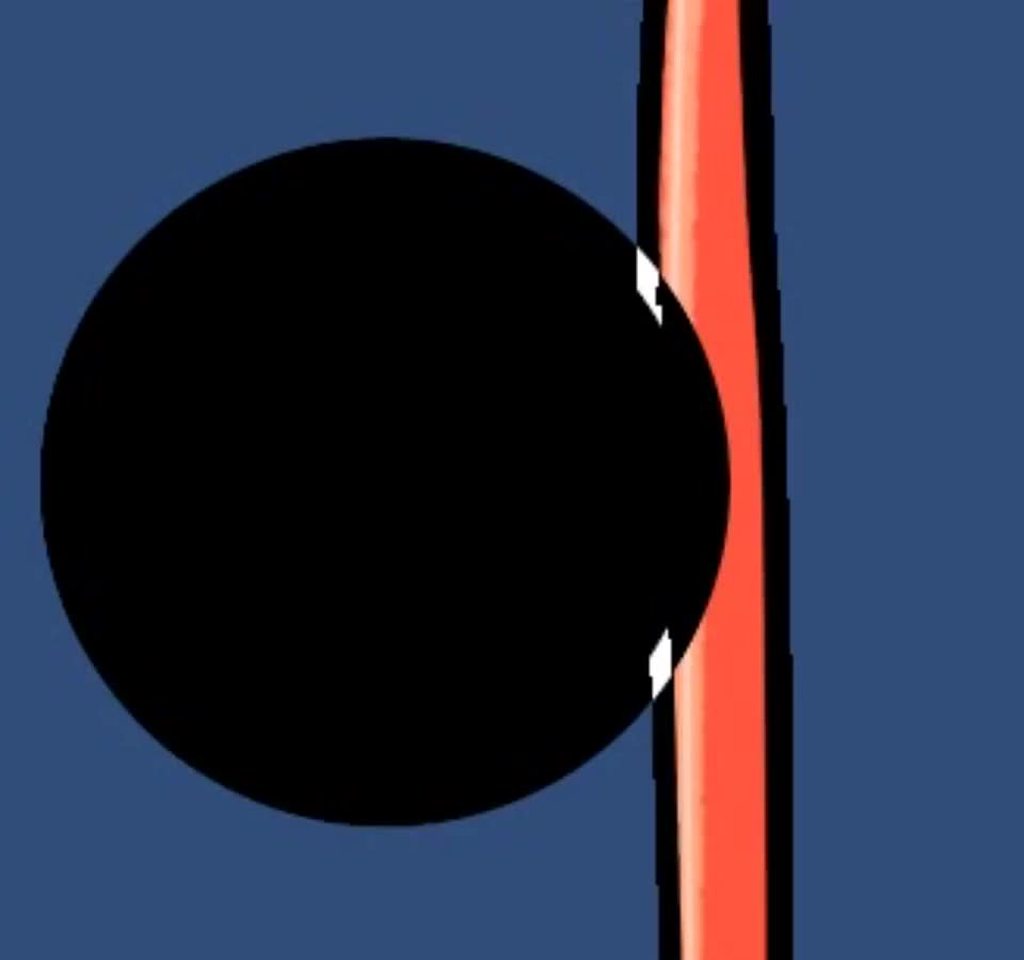
Ahhhhh nvm, I was doing my radial gradient by 1 - length(texCoord)
I had a pow() call to control the falloff, but I think pow(0, n) returns NaN
so I just added a dropout return if that's <= 0
 teal lily
Wow
eager folio
Kinda hoping someone can help me improve it though
It only works with opaque geometry, which is a pretty big limitation
teal breach
@eager folio - is that just because of draw order? other transparent objects may be drawn after it?
if so, you can fiddle with the draw order/render queue
@prisma fox your error is because the unlit style (from the node Unlit Master) does not include the Lighting.hlsl file in the compiled shader
Switch to the Lit Master, and use the emission for your color and set the albedo to black (so you only use your custom lighting calc)
 mystic vale
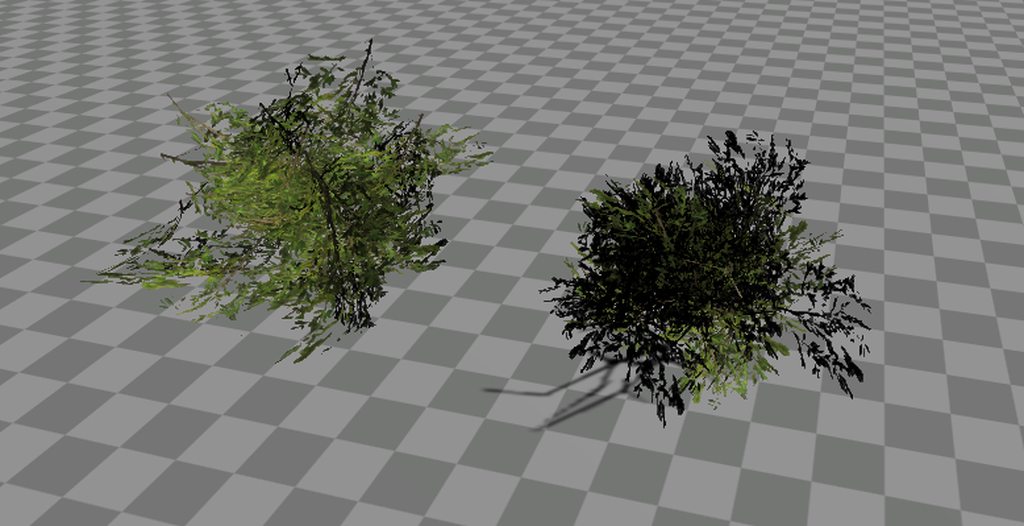
I'm having a problem with my bushes.
This is the link to images: https://imgur.com/a/mtO3MjZ
As you can see, there is a dark part in the shader that is different in each view. I think it's the normal of each place (the foliage is a plane with a texture). i'm tring to figure out what is it, if it's a problem of the model, a problem of the texture... but i can't figure out why. on the 2° model, the right one, is more visible, so i really don't know
There is the shadergraph at the end with the same blender model
 teal breach
@mystic vale Try returning a normal pointing directly up in world space, rather than using the normal of the surface
@mystic vale afaik your blender view doesn't appear to be applying any lighting, or you are just using ambient lighting?
mystic vale
only ambient lighting
eager folio
@teal breach Because 'Scene Color' only samples opaque objects.
And the shader requires a transparent object to receive it.
So can't even have two instances overlapping.
teal breach
ahh, I assumed Scene Color was sampling the current buffer, but it must be a texture produced between opaque/transparent queues
does the behaviour change for deferred rendering? (I guess you can't test that if you are using URP)
eager folio
Correct, this is urp
rustic dragon
@eager folio is your game in true 3D, in my test I used sprites actually and it worked, if you are using any 2D view maybe that would work
eager folio
Mine is 2d camera, with sprites.
teal breach
I assume it works for opaque objects and alpha clip, just not transparency with alpha blend?
eager folio
It works for objects set to opaque in the shader
So yes, alpha clip works as long as it is set to opaque.
I am thinking it is probably 'good enough'.
Though since only 'transparent' objects can receive the scene color, that means that the same sprite can't be both the 'front' and 'back' of the effect.
The transparent one has to be in front.
So I will need to be careful about what can overlay what
teal breach
You might be able to get the effect you want by using an additional material/pass and adding a render feature to the SRP - but it will be a lot of extra work
 lusty badger
Is there a way to make basically a "custom" ZTest with the depth node in ShaderGraph?
 trail nymph
https://github.com/KillaMaaki/RetroTVFX How would I go around importing this shader into my project?

GitHub
A small collection of shaders for a range of authentic old TV effects (Composite, S-Video, RF, etc) - KillaMaaki/RetroTVFX
I've never messed around with shaders before, so I'm a bit confused
 stoic bear
Hi, Anyone can help me implement this 2D deformed road
lament turtle
Can anybody point me in the right direction for working with layered textures? I have a texture that's mostly transparent that I'd ideally like to just put on top of an existing texture (of a Player), but I'm not having much luck
teal breach
@stoic bear that looks like a cylinder turning?
stoic bear
Almost, but it's a deformed version of a 2D sprite which is animated with a simple shader code
the actual image
 bronze basin
I made a 2D shader for a sprite, that basically rotates the sprite around center over time. When I to rotate in game the sprite squishes and as soon as sprite reaches 90* rotation, it disappears. Why is that?
Is it some weird object-world space conversion issue?
Shader
regal stag
@bronze basin The Vertex Position input is expected to be in Object space. Try changing the Position node to Object space.
bronze basin
Yep, that worked!
Then another question: when I zoom in or out of the object (in game), it disappears.
Like, imagine this is your screen. If my parent object is outside of red box, the sprite disppears.
OK, same happens in the editor window, it disappears based on where the camera is.
stoic bear
@teal breach Is it easy to implement in unity ? I've already Implemented It In Godot engine but can't port It to unity.
teal breach
you could try applying the texture so that it wraps around a cylinder, and then just rotate the cylinder - it looks like that would achieve the same projection transformation they have used?
if you want to do it flat
I guess you could get the screen position of the pixel, and modify the uv coordinates based on that
something like u.x = (screen.x + pow(screen.y,2.0))
stoic bear
Can I do that based on a curve ? any example code ?
teal breach
so it will pinch the horizontal texture coordinate as you increase the vertical direction
you doing this in shadergraph?
stoic bear
stoic bear
@teal breach I used these 2 curves and base on that and points counts I sliced the texture to a lot of polygons
regal stag
@bronze basin Is it maybe related to the z component being removed? The "Rotate" node takes a Vector2, so the 3rd component of the position is being removed, and when that's connected to the Vertex Position input it defaults to 0, which might be outside the camera's culling? Might be able to fix it if you Split the Position and Rotate results, and connect the X,Y and Z to a Vector3 (or Combine) node before connecting it to the master.
Alternatively there's a Rotate About Axis node, where you could rotate the 3D position around (0,0,1)
lusty badger
I put modulo everywhere when something rotates, just to be sure 😄
regal stag
It might also be related to how sprites are batched. I usually work with 3D more so not sure.
bronze basin
@regal stag Might it be the matter of only updating Vertex Position and leaving Normal/Tangent as they are?
 tranquil fern
This question probably gets asked a lot here but how do I make an outline in 3d? I can't find any solutions for URP
bronze basin
You basically have to draw the same mesh again, but bigger.
tranquil fern
That works with a cube, but...
How can I only show the parts that do not collide with the mesh I want to outline? And how do I make sure it also works when animating?
I have a complex model I want to outline when selected (players on a map)
bronze basin

Download the full example here: https://ole.unity.com/toonoutline
Just the two shaders alone: https://ole.unity.com/toonoutlineshadersonly
@regal stag ok, found the solution: instead of rotating vertices (which is messed up due to being batched... you were right), I simply rotate the texture and feed the UV output to the texture sampler.
The problem I have now it looks funny, but I think it's because of how I made the texture...
Ain't an artist lol.
 spark flint
Can someone help me with my emissions? I want the eyes of my characters to glow in their own colors. I read/seen a couple of tutorials, but all use just white emissions and then color them in the shader. I have an emission map, which is basically my MainTex but in black except the different colored eyes of the characters. I want these colors to glow. I have also added the Bloom effect and set it accordingly. However just adding the emission to the MainTex doesn't do the job. Do I need to blend them? Multiply? Sorry, I'm new to shaders 😄
I've tried using a transparent or white background as well. Whatever I do it either highlights too much or nothing at all. Also I get problems when glowing stuff overlaps changing the color
bronze basin
@regal stag That works.
 grand jolt
Hey im new to shaders im looking for a shader or someone to point me to a tutorial so that the quad closest to the camera is whatever i specify
everything else is white
bronze basin
Can I disable batching in shadergraph?
grand jolt
how do you convert world space position to screen space position in image effect shader? and not for the v2f
amber saffron
Usually in image effect shader you do it the other way arround : you calculate the world space position from the camera depth buffer.
 timber ember
Hey guys. Can anyone give pointers on how I could go about using ShaderGraph to create a point/particle cloud effect?
My first thought was to (and I'm really new to shaders to bear with me) subtract the triangle from the vertice points, and then change the vertex colors to a high-emmission color so the points maintain high visibility, but I'm not even sure if that's the right path or even possible.
 mortal saddle
Hi! How can I get a unique random number in my shader for shader graph? I created a flicker shader that I assigned to my particle system of stars so the stars flicker. The problem is that all the stars flicker at the exact same rate. I need each instance of the shader to start at a different time/have a different seed
regal stag
@mortal saddle Is this with the Particle System component? If you edit the custom vertex streams option on the Renderer module you can send in a random value for each particle, which you could use to offset the time.
mortal saddle
Yep, it is
regal stag
I used something similar here : https://cyangamedev.wordpress.com/2020/07/19/custom-vertex-streams/
full sail
Is the shader graph worth using for mobile platforms yet?
timber ember
And just to be clear on my above request, the end-goal is to have a point-cloud silhouette replace the mesh but otherwise continue moving along with animations and movements. So if ShaderGraph isn't the right answer, that's cool.
And I'm using point cloud liberally here - I mean to say the mesh should look like a collection of dots and lights, not that it specifically needs to have originated as a point cloud.
copper lake
Can someone send me a sun or star shader?DM Me!
 stuck reef
stop cross posting
 mortal kiln
i posted them 40 minutes apart and mainly did it incase anyone wants the link to the tutorial
eager folio
I would like it 😄
 hollow geyser
There is a problem with my shader Idk what it is
basically when I have one sprite with the shader, when I press play it appears with the sway effect
when i duplicate the sprite both of the sprites dissapear
why???
 crisp trellis
hi
is there a way to render with 2 shaders immediately after another?
like when having multiple objects
I notice first shader A will be used for all objects
and then shader B for all objects
(according to the Queue tags of the shaders)
what i would like to achieve instead:
object 1 will be rendered with shader A and then shader B
then object 2 with shader A and then shader B
and so on
I assume that is not possible, because of how shader programs work 😄
If someone knows that for sure I'm also happy if someone could just confirm that
Ok seems the only solution here is doing multiple passes within a subshader?
prisma fox
I am working with the Custom Passes framework. I'd like to write to the Custom Buffer with one Custom Render Pass, and then access that Custom Buffer with a subsequent Custom Render Pass. Is it possible to access the Custom Buffer from the Custom Passes framework in Shadergraph?
crisp trellis
Feels like your question might just have answered my question lmao
custom passes framework is HDRP only though?
crisp trellis
thx
wow good to find out multipass doesn't work in URP lol
well that's the info i got. Is there any way to make multi-pass work with URP?
please mention or write a pm, thanks a lot! 🙂
also if not any good alternatives?
lusty badger
@crisp trellis I think you could look at renderer features in URP
low lichen
@crisp trellis You can separate the passes into separate shaders and materials and then assign all those material to the same renderer in the order you want them in.
teal breach
@crisp trellis you can still apply two materials to one object in URP to achieve multipass
You can't define custom passes for shadergraph, so it's one way to implement such a behaviour (eg having a second material implement the custom pass)
low lichen
If an renderer has multiple materials and no submesh, Unity will render the same mesh multiple times with each material
If the renderer does have submeshes, it will expect the order of the materials to be mesh0, mesh1, mesh2, etc... If you want to do multiple materials on each of those submeshes, you can still add more materials to the end of the list and it will wrap around.
crisp trellis
@lusty badger thanks
@low lichen @teal breach also thanks guys, happy to hear. Any place to read about that you can recommend? since I didn't find it googling earlier. gonna search in the docs in a second.
low lichen
It's not really an intended use of the material list, but one that's been around for a while.
I doubt it's documented anywhere.
low lichen
Actually, it's mentioned here
https://docs.unity3d.com/Manual/class-MeshRenderer.html#materials
If a Mesh contains more Materials than sub-Meshes, Unity renders the last sub-Mesh with each of the remaining Materials, one on top of the next. This allows you to set up multi-pass rendering
on that sub-Mesh. However, this can impact the performance at run time. Fully opaque Materials overwrite the previous layers, which causes a decrease in performance with no advantage.
 crisp trellis
oh nice
low lichen
It says it impacts performance at run-time, but it shouldn't be any more expensive than multi-pass shaders.
Maybe a little bit, since it's separate materials with potentially separate properties
But still multiple draw calls
I think this should work with the SRP Batcher
crisp trellis
well it gonna bind different shader programs multiple times. so it's not optimal, but that's kinda what multi pass means
btw
where is it even stated that URP can't do multi-pass?
I guess it's a good idea to read through the package docs?
low lichen
SRP Repo: Issue #1469 I'm currently porting over shaders from a project which uses a multipass shader. However, only the first pass ...
Doesn't appear they've documented it anywhere
crisp trellis
It would be really nice if Unity could actually state these limitations up-front in the documentation
^ lol
sorry for asking that many questions
but are there any other things you think that are valuable to know about URP that I can't figure out by reading the package docs?
low lichen
There are many small things like this multipass thing that I can't think of on the spot
crisp trellis
oh ok. If one comes to mind feel free to @crisp trellis me 😛
thank you a lot for the help so far 🙂
@low lichen I just tried the multi material thing and the Frame Debugger shows it's still rendered in wrong order
I have 3 materials on my GameObject and I have also 3 shaders on my GameObject (one for each material)
Does this only work with the same shader using different materials maybe?
low lichen
@crisp trellis So it's still drawing with all 3 shaders, just in the wrong order?
crisp trellis
yes exactly
low lichen
I think the material render queue has priority over the material list order
crisp trellis
trying to make a more simplified version of that scenario now
material render queue != shader queue tag?
low lichen
Come to think of it, I've always used multipass setups with different render queues
crisp trellis
the order it currently does it is:
object A with shader 1
object B with shader 1
object A with shader 2
object B with shader 2
instead of what i'm hoping for:
object A with shader 1
object A with shader 2
object B with shader 1
object B with shader 2
low lichen
Object A and Object B are separate game objects?
crisp trellis
yes
low lichen
The SRP Batcher probably wants to draw the two objects with the same shader in a row
crisp trellis
i disabled it in the settings to be sure
low lichen
The default batcher might still be doing something similar
Are these materials opaque or transparent?
 low lichen
Unity will always draw transparent after opaque, unless you override the render queue specifically
low lichen
It's more like you're duplicating the mesh renderer
crisp trellis
except when the opaque / transparent tags differ?
low lichen
I think the Unity batcher/drawer will draw the multiple materials as if it's seeing duplicate renderers with each of those materials on them with the same transform
So it still respects the render queue of each material
In most cases, it will draw both materials at the same time one after the other, since the renderer is in the same place, same order.
But transparent materials will always come after opaque, unless you override it with the render queue.
crisp trellis
hm
still couldn't make it work
set all shaders' RenderType to Opaque
the Queue is still at Transparent+100 (or what it was before, assuming it doesn't matter?)
low lichen
Unity draws opaque objects roughly front-to-back, but allowing batching to break that order. Transparent objects are drawn strictly back-to-front and will break batching to maintain that order.
The queue is the only thing that matters, not the rendertype
RenderType isn't used for anything except in camera shader replacements, which doesn't even work in URP anyway.
crisp trellis
should i omit the Queue tag?
low lichen
No, you'll want to set the queue of the transparent shader to match the opaque shader
meager pelican
What are you actually trying to do? (I read back a ways, but maybe I missed it).
low lichen
Multipass shaders in URP
meager pelican
No, I mean "what is that a solution for"?
There's other things, other ways to approach a goal.
low lichen
Which isn't possible, but I said you can put multiple materials on one renderer and Unity will draw the renderer multiple times with each of those materials
crisp trellis
rendering outlines
meager pelican
There's several ways to do outlines in URP.
low lichen
👍
crisp trellis
thanks for the great advice
copper lake
can someone give a sun shader?
crisp trellis
I just tried changing the RenderType and it doesn't seem to matter at all whether it's Opaque or Transparent
low lichen
Yeah, it's basically a legacy tag at this point
crisp trellis
Transparent is currently rendered Before Opaque with this "multi pass setup" (by using multiple materials)
low lichen
But I'm still going to add it to all my shaders... just in case...
crisp trellis
well i noticed opaque seems to minimize overdraw - by using the frame debugger
low lichen
Yeah, it draws front-to-back, roughly
crisp trellis
yeah, the background is rendered after, so the depth test will fail
then after that the transparents are rendered which rely on the background existing for blending
low lichen
And for the same reason, you must draw the transparent objects in the back first so the front can blend with it
crisp trellis
oh
if that's the case my scene probably was to simple, so it didn't show
guess with the "multi-pass - by multiple materials setup" we just talked about, transparents will be kinda broken?
low lichen
I assumed the transparent material you're overriding the queue of will only blend on top of the opaque material that's part of the same object
So as long as the transparent material draws after that specific opaque object and before any other transparent objects in front it, it will blend properly
crisp trellis
well I was actually wondering about real transparents now, that just have multiple passes
got it
polar coral
sup, i made all these colored versions of my character... is it possible to have like 1 character and for every color ( 4 preset color related to that color) and make it with a shader without having to import every version cause i also have animation to do
- what colors should i use so they are easily excludable for the shader i would think R G B but for the 4th one i dont know
royal field
@polar coral I think you could do that without a shader, just one material for each color while using the white texture to color off
polar coral
ye but that would remove the hue shifting i did to make it more lifely
shadow kraken
I would have one coloured variant and then make a shader that lets you adjust hue saturation and lightness
 sage moss
You could use the channels for a duotone like effect, and the colors are specified via materal
meager pelican
You use the white one, and then multiply it by a color passed in.
You can do that with different materials (like for 4 or 5 teams) or you can pass it in per-object instance with something like a material-property-block. That may have an issue with SRP's batcher though, so be careful of that.
Or if you want, use a color pallet and just pass in a "type" index to the pallet.
You could technically use a 256 color index and just the red channel, maybe with alpha if you want.
amber saffron
@polar coral I would export the original as a single 4 level of grey texture, expose the 4 colors as properties in the shader, and do a match/replace.
And with this you'll have infinite combinations 🙂
polar coral
ye was planning to tho that
i was wondering tho.. i made all these colored versions so i know which correct hue change and value/ sat change works... i wanted to save these 4 color codes for every color
should i do this with scribtable objects or just an array or how would you do this?
@amber saffron
rustic dragon
SO is fine, as is just entering in the colors in a struct for each 'variant' in in the inspector for the character, or some csv/json type thing where you enter the colors in text
you should look into editor scripting to where you can actually see the results in a little window 🙂
grand jolt
Does anyone know if a customisable license plate is possible through shaders? Something that looks like this?
rustic dragon
you mean with random or prescribed #'s?
would that include letters and other symbols?
grand jolt
Like something that can be changed by a player on their own, each individual number/character would be changeable
Yeah so the symbols could be changed too!
grand jolt
I'll give it a try
 deft shell
hey, i have no idea how compute shaders work. How could i create a cube in compute shaders and then actually make it into a mesh so it could get colliders and so on..?
rustic dragon
you could use compute shaders to compute some math for the verts I imagine, but you'd still need to use code to make the mesh and assign it to the meshfilter, and the same for the collision mesh
polar coral
how do you change levels in unity shader?
amber saffron
@deft shell For juste a cube, compute shaders are overkill.
@polar coral You mean, like "image/levels" in photoshop ?
In shadergraph, your best match for this is the remap node.
 spring valve
Would anyone know how to add transparency to this vertex color shader
Shader "BumpedSpecularVtxCol" {
Properties {
_Color ("Main Color", Color) = (1,1,1,1)
_SpecColor ("Specular Color", Color) = (0.5, 0.5, 0.5, 1)
_Shininess ("Shininess", Range (0.03, 1)) = 0.078125
_MainTex ("Base (RGB) Gloss (A)", 2D) = "white" {}
_BumpMap ("Normalmap", 2D) = "bump" {}
}
SubShader {
Tags { "RenderType"="Opaque" }
LOD 400
CGPROGRAM
#pragma surface surf BlinnPhong
sampler2D _MainTex;
sampler2D _BumpMap;
fixed4 _Color;
half _Shininess;
struct Input {
float2 uv_MainTex;
float2 uv_BumpMap;
half4 color : COLOR0;
};
void surf (Input IN, inout SurfaceOutput o) {
fixed4 tex = tex2D(_MainTex, IN.uv_MainTex);
o.Albedo = tex.rgb * _Color.rgb * IN.color.rgb;
o.Gloss = tex.a;
o.Alpha = tex.a * _Color.a;
o.Specular = _Shininess;
o.Normal = UnpackNormal(tex2D(_BumpMap, IN.uv_BumpMap));
}
ENDCG
}
FallBack "Specular"
}
rustic dragon
@polar coral you can use a ceiling too, as long as your black is true black in the texture, like 0
then I think you won't need to use saturate after to maintain everything is within 0 and 1
polar coral
aight thats what i needed thx a lot
why does this add works
but this wone doesnt
this one doesnt
@rustic dragon
rustic dragon
try a saturate after you do some math like that
oftentimes you are out of range
like the blacks you have in that bottom node are in the -'s
polar coral
but i dont want to change the color
rustic dragon
you just want the outline?
rustic dragon
you want to add the red outline to the 3 tone thing up top?
polar coral
nah i want to make a shader that automatically replaces the colors to the one i saved in pairs of 4 .. so i dont have to color each animation sprite
and it works but just not the last one
rustic dragon
the last one?
so in that image (the shader graph) that red outline you want to be black I imagine
rustic dragon
is it point sampled I imagine?
might just be that preview window
what is the res of the image?
 warped yarrow
Does anyone here happen to know how to adjust the intensity of an HDR color with a unity animation? I can animate the standard 4 color floats but I'm not sure how to adjust HDR intensity for like lights on a door as it animates.
I was thinking I could also add an intensity Vect1 in my shader and animate that but I just realized I don't know how to use the shader graph to multiply HDR intensity either
rustic dragon
so you are using a color node set to HDR?
warped yarrow
yeah
rustic dragon
try a saturate before you add them
rustic dragon
ok, is your texture being forced to power of 2, because 510 is not a power of 2
what are your texture settings?
rustic dragon
I'd first make that texture 512x512 to be safe
polar coral
its not cause of the pixels the mask is a bit off
rustic dragon
then make sure your RGB has no gaps
warped yarrow
Shader is dumb simple I'm just looking for some way to adjust the HDR intensity
rustic dragon
I'd have to see it
@warped yarrow not 100% sure, but I think then you can go over 1 when inputing the color values in script
warped yarrow
so is HDR intensity 2 R+2 G+2 B+2?
polar coral
512x512 its worse now
rustic dragon
did you just scale the image, or make the canvas larger?
send me the image I can look, if you want
spring valve
I'll pay someone abit via paypal to fix my transparency in this shader issue
rustic dragon
I am wondering in your texture settings if you were, or it was forcing it to a power of 2, which scales the image to 512x512, which would leave gaps like that
rustic dragon
check your values in photoshop, the ceiling will make any value 1 if they are not exactly 0
you should also try and make your actual sprite the resolution you want, I imagine your 'pixels' are like 16 actual pixels high
rustic dragon
you can do your mult but you'll need to saturate or clamp it
polar coral
cause certain blends also gave holes with rgb in the beginning
but add did the trick
rustic dragon
yeah, I think your values in the mask texture are not 0 or 1
er, some 🙂
you can find them by doing a brightness/contrast or levels layer and cranking it up or down, you'll find the slightly non-black and slightly non-white pixels
 west fulcrum
Hey! Is this channel active? I put up some questions on forum and answers but got no response. Now i have another question 😃
For outline shaders, i usually see the ”copy texture in 4 directions”, but couldnt you enlarge a texture to get the same or better effect?
rustic dragon
@west fulcrum depends on the shape of the border
if it's irregular or concave, that won't work
west fulcrum
It’s kind of like a point ans click where you can interact with objects to see the outline. I didnt test it yet, just theorizing. Maybe the classic outline will work.
Here’s another problem i’m having
west fulcrum
I'm trying to use HDR to get a bloom effect on a shader I'm making for the 2D renderer.
I made a simplified version of it, two ellipse, each multiplied with a HDR-color, and then these two are mixed using the Add node.
The effect in end is that the brighter circle is transparent. This doesn't happen if I disable HDR in the Universal Render Pipeline Asset, but also the Bloom gets disabled when I do this. See attached images from the game.
west fulcrum
I just though of using one ellipse with a gradient and posterizw instead. Bur it’s confusing.
Ok @rustic dragon thanks. I’ll try both 😃
rustic dragon
the ellipse would make the outline not perfectly the same width all around, not too much, but slightly
polar coral
@rustic dragon i did this so i just can use the alpha channel and now that one works perfect but for some reason it bugs out
rustic dragon
inverted @polar coral ?
polar coral
west fulcrum
Sorry i’m mixing 2 questions here. The ellipse its not about the outlines, its about transparency in hdr
rustic dragon
let's see your texture settings
regal stag
@west fulcrum The transparency issue there might be because the alpha value is going above 1.
rustic dragon
alpha is inverted
west fulcrum
@regal stag oh, interesting! Should i split it out and clamp it?
rustic dragon
but yeah @polar coral show the texture settings on it, the whole inspector including the lower preview part
regal stag
@west fulcrum Yeah, something like that. I haven't worked with the sprite master nodes as much but with the other ones the alpha is usually a separate input which makes clamping it easier. I usually keep it between 0 and 1 to prevent issues, especially when also using bloom.
west fulcrum
Great i will definitely check that out 😃
regal stag
I don't know for sure if that's the issue, but it would be the first thing I'd try to see if it fixes it.
rustic dragon
waiting to see the texture settings
polar coral
ye thought u ment shader graph
rustic dragon
filter mode?
regal stag
Might also need to close & reopen the graph after changing the texture settings in order for it to update
rustic dragon
ok, if you want send me the sprite source, if not maybe somebody else has insight
west fulcrum
Btw @regal stag if you look ar my shader, what blend mode should i use to just overlay the two ellipises without mixing the colors? Right now red multiplied with red makes orange. I really just want to set orange to the small circle..
 regal stag
If you don't want the colours to mix and want to choose different colours for the inner and outer parts I'd use a Lerp node.
rustic dragon
yeah, the png
regal stag
Something like this, unless I'm misunderstanding what you meant.
west fulcrum
hmm.. i thought i could use the gradient node, but it doesn't seem to allow me to input any parameters
interesting, let me try that! thanks for setting it up
had no idea i could use the lerp node like that, but it worked, even with 3 steps like i really wanted
Do you have any idea why my node previews looks like this, i don't know what changed, but i used to see the same as main preview in the last step, it shows a weird ball with colors on the bottom
regal stag
There's probably a Position node or subgraph connected somewhere down the chain which makes everything use the "3D" spherical preview.
west fulcrum
You're right, there is! I use that to have a different noise depending on position of the object. Is there a way to still have that and not have the sphere previews?
regal stag
Only way to do it currently is just disconnect the Position node and stick to UVs while editing the graph. It's somewhat annoying that there isn't a way to choose whether nodes should use the 2D or 3D previews. It's something that I suggested and it was added to the under consideration part of the roadmap, but who knows when it'll be implemented. https://portal.productboard.com/8ufdwj59ehtmsvxenjumxo82/c/76-preview-mode-control
Preview mode control would give you the option to switch between a 2D image and a sphere per each node.
west fulcrum
yeah it seems simple enough to just right click it like the main preview
Don't know if this is for showoff, but i'm really happy with the shader, and it's much simpler now. Thanks a lot!
🙂
i added my vote on the product board..
Sorry to bombard you with questions, but there's a tiny dark edge around the fire (that is made from an ellipse with distorted UV's. Any idea why that happens?
regal stag
You should make the outer ellipse node only control the alpha and not the colour. That's why in my example above the smaller ellipse was used to lerp the colour while the large ellipse was only put into the W (alpha) on the Vector4 node
west fulcrum
ah, nice, i missed that step!
darn, you're good! How long have you been doing shaders? 🙂
regal stag
I've been using shadergraph for over a year now, but shaders in general a little longer
Though most of my older stuff before shader graph was probably copy-pasting parts of shader code
west fulcrum
aha, yeah that's how lot of us learn to code, so thats nice.
also can't you collapse a group in the graph? i think i remember i could do that in Amplify
like with inputs and outputs
regal stag
Don't think so. Can turn them into subgraphs probably, but then you get the same problem with the 3D previews as I'm sure subgraphs default to them too for some reason
west fulcrum
aha yeah, i was just trying to organize, but i usually spend too much time on that 🙂
west fulcrum
Is it somehow possible to offset a node in this stage, to move it up/down?
regal stag
Nah, the offset would need to be before, going into the UV inputs on the Ellipse nodes or whatever other nodes rely on UVs.
west fulcrum
yeah, that's the problem, I have a couple of nodes, with a power node in the end, where i can change the intensity of the fire, the problem is when i change that, it moves vertically
It's maybe to complex to glance, but just in case
 royal sluice
guys, how do i remove this fresnel effect from the occlusion / shadow part of planet earth? I'm using Lit Shader from HDRP 🙂
someone?
 knotty juniper
you would need to know the light data or the main light direction to mask it
royal sluice
ok, but I don't know the name of the nodes, I use blender more and it is much easier to use and also, if I could transport all the blender material to HDRP @knotty juniper
knotty juniper
looks like you would need a custome node
https://forum.unity.com/threads/shader-graph-light-direction.615316/#post-5166512
Unity Forum
So i want to somehow get the _WorldSpaceLightPos0 value (basic in the default shaders) or Main Light Direction at least. Any ideas how can i get it ?...
polar coral
im using some preview nodes to make at all a bit cleaner
is this bad for performance?
knotty juniper
preview nodes do not effect the generated shader code
royal sluice
looks like you would need a custome node
https://forum.unity.com/threads/shader-graph-light-direction.615316/#post-5166512
@knotty juniper ty
Unity Forum
So i want to somehow get the _WorldSpaceLightPos0 value (basic in the default shaders) or Main Light Direction at least. Any ideas how can i get it ?...
eager folio
@west fulcrum Gradients aren't inputs in shadergraph, they are stored in the shader
If you want an imported one, use an image(maybe script generated)
sage moss
Theoretically, for real-time lighting, could a toon shader operate faster than a basic blinn/phong shader? (let's forget shadows for a second)
eager folio
I doubt it would be meaningfully faster.
sage moss
I'm just kicking around ideas to get real time lighting on a mobile chip that's fill rate constrained
eager folio
I mean, maybe if it was an unlit toon shader
amber saffron
@polar coral Sorry for not answering before, it was late :)
I build up a quick sample on how I would approach this :
The idea is to convert your sprite to a 5 levels greyscale image :
Where :
- 0 = transparent
- 0.25 = color1
- 0.5 = color2
- 0.75 = color3
- 1 = color4
Import the texture in unity as single channel, stored in the red channel :
And in the graph, you do some operations to filter the value and get masks from them to apply your colors :
Then it's just the matter of duplicating the objects/materials to swap the colors
You can extend this technique to use up to 255 colors + 1 alpha, with even less nodes, but this would require using an array of colors in the shader and some (small) script to set the array values
west fulcrum
@amber saffron wow, that was smart! I didnt think of this before, we were only doing single colored sprites and replace the color of it all, but that means we can’t have multicolored wallpapers, just monochromatic (is that the word)
@eager folio i solved it another way, but can’t you make a gradient using a UV node and map colors to the top and bottom or something?
eager folio
@west fulcrum You absolutely can; that is actually how the 'gradient' node functions.
But that wouldn't get any of the benefits of the gradient editor(for instance)
@amber saffron couldn't you also just map the grayscale values to a gradient, rather than baked in values? (feed the normalized grayscale into u on the gradient)
@west fulcrum Also, any special effects like that, you can use another channel in the image as a mask.
And then overlay it all on a normal sprite
west fulcrum
So much fun things to do with shaders, so little time 😅 thanks all of you
amber saffron
You could also totally feed the grayscale value to a gradient, but for the moment you can't expose a gradient in the material UI, and anyway it is limited to 8 colors.
An other solution is to use a "palette texture" where you map the greyscale value to the U coordinate where you sample the palette, and you can then easilly swap colors by changing the row of pixels (change the V coord).
But this requires "chaining" texture samples (sample one tex to use the output value as coord to sample an other one), and it can get costly on some platforms.
 runic juniper
I've read that shader graph works with the default render pipeline. Can any one confirm?
regal stag
@runic juniper It only works with the scriptable render pipelines (LWRP/URP & HDRP)
runic juniper
Hm. Because last time I tried to switch to URP it destroyed my project
regal stag
There are differences between the pipelines. It's good to check that all the features from built-in that you are using are available, as URP lacks certain features currently. https://docs.unity3d.com/Packages/com.unity.render-pipelines.universal@8.2/manual/universalrp-builtin-feature-comparison.html
When upgrading, materials also need switching to shaders that URP supports. Any custom shaders will likely need rewriting. The docs have info on how to upgrade properly : https://docs.unity3d.com/Packages/com.unity.render-pipelines.universal@8.2/manual/InstallURPIntoAProject.html
Alternately there's probably node based editors that work with built-in pipeline, like shader forge or Amplify.
teal breach
Is there a way to pin the centre coordinate used for shadow mapping? I'd like Unity to use shadow maps centred on a particular game object to prevent visual artefacts appearing
amber saffron
@polar coral For the fun of it, I also made a sample that uses a color array. It requires a bit of scripting and a custom function node, and sadly, the palette data gets trashed when you save the scene (but can be reassigned), and leaks materials in the scene.
But nothing that isn't manageable to work around with more time spend on the scripts.
The graph itself is also WAAYYYY more compact :
polar coral
@amber saffron oh god haha.. thx a lot for the effort but i fixed the whole thing yesterday with @rustic dragon
low lichen
I feel like I'm the only one who is freaking out about the shader support in Rider. I can even Ctrl+Click a Unity macro and it will open the cginc file its in and show me the #define line. It's not perfect, because there can be many #defines of the same macro for different platforms/settings, but better than what I was doing before, which was searching a GitHub repo of all the built-in shaders.
teal breach
thats pretty neat, I'm still very much searching the repo
and thank you very much whoever made this article: https://teofilobd.github.io/unity/shaders/urp/graphics/2020/05/18/From-Built-in-to-URP.html
Unity’s Scriptable Render Pipeline represents a great advance on the way that unity deals with graphics, giving more power to the users to customize the pipe...
devout quarry
@low lichen now that you mention it, I'm going to check it out
I always preferred vs code above rider, just for startup times, but what you mention seems super nice
 wary horizon
is there a way to make Legacy > Particles > additive use HDR? or do i have to make my own shader for this simple thing?
oh i want to also add some fire shader or something above this UI healthbar, is that easy to do? 😅
eager folio
Shouldn't be hard, depending on how realistic/stylized you want it
 dreamy kernel
How the hell do I get a color value of physical sky sunlamp via C#?
dreamy kernel
I can't believe it
Is there really no way to know it?
What the hell?
So idiotic
naive mural
hello, is it possible to change not just the mesh orientation in shader graph's main preview, but also the camera's? For certain effects it's better to orient the camera to the mesh than the other way around.
dreamy kernel
Yeah, I still can't find a way to get it
Can I at least write custom lit shaders in HDRP?
bronze basin
Where can I learn Unity shader language from?
Like, is there a reference, or something?
bronze basin
I have overall sense of shaders (I was primarily using OpenGL in the past), but I want to understand more about Unity shaders.
@dreamy kernel does it have a reference similar to C# scripting reference?
dreamy kernel
bronze basin
Thanks!
dreamy kernel
np
Shader-related documentation is underdeveloped anyway
And it seems like in HDRP you can't write custom shaders at all
bronze basin
Can you use shadergraph in HRDP?
amber saffron
@dreamy kernel You can use shadergraph to make shader for HDRP, and if you're brave enough, nothing prevents you to write you own shaders from code.
dreamy kernel
I haven't found a working shader template for HDRP
amber saffron
As for the physical sky sunlamp ... I don't think you can get it from c#, but the sky sun is driven by the main directional light, so you should just get the direction light color and intensity.
dreamy kernel
Nah, it doesn't work that way
When lamp angle goes to 0, you can see environment is starting to get colored orange from direct lighting
Meanwhile lamp itself still has 1,1,1
amber saffron
There is no shader template for HDRP. But all shader sources are available, and if you wan to have a "fresh" template, a solution is to make a basic shader in shadergraph, copy the generated code from it, and use it as a base.
In the generated code you will find a bug function generated by shadergraph that is basically a surface functions
Well, you can reverse engineer the pbr sky code to find it.
Or in an other hard way, in c# make a camera that look at the sun in the sky with a very narrow angle, render to a texture and read back the center pixel value 😅
dreamy kernel
I instead settled on a dumb solution
I'll just have a gradient, that has light colors for different sun angles
 urban sand
Hey guys
two shaders of mine does not work on after building to android
how can i debug it
amber saffron
Tried enabling debug build and look at android logcat ?
amber saffron
You must define "doesn't work" here.
Is it displaying majenta ? Then it might be a compilation error that you might find in the editor logs, or in the logcat.
If it's not rendering link in the editor ... then it's more difficult to indentify indeed.
@dreamy kernel Just for the sake of it, I found where the direction light color is calculated when using physical sky :
amber saffron
Most of those functions are either private or internal, so if you REALLY want to get the exact value, you'll have to call those functions through reflection, or copy their code to you own classes.
dreamy kernel
Where'd you get that code from, by the way?
I'm not all that good at digging through Unity's source code stuff
amber saffron
Well, all SRP/VFX and Shadergraph source code is here 🙂 https://github.com/Unity-Technologies/Graphics/

GitHub
Unity Graphics - Including Scriptable Render Pipeline - Unity-Technologies/Graphics
urban sand
Shader "Instanced/InstancedIndirectColored"
{

    Properties
    {
        _Color ("Color", Color) = (1,1,1)
    }

    SubShader
    {
        Pass
        {
            CGPROGRAM

                #pragma vertex vert
                #pragma fragment frag
                #pragma shader_feature_local INSTANCING


                #include "UnityCG.cginc"

                struct appdata {
                    float4 vertex   : POSITION;
                    float4 color    : COLOR;
                };

                struct v2f {
                    float4 pos   : SV_POSITION;
                    fixed4 color    : COLOR;
                };

                StructuredBuffer<float4x4> _Transforms;
                fixed4 _Color;
                float _Debug;

                v2f vert(appdata v, uint instanceID: SV_InstanceID)
                {
                    v2f o;
                    float4 pos = float4(1, 1, 1, 1);
#if INSTANCING
                    pos = mul(_Transforms[instanceID], v.vertex);
#else
                    pos = v.vertex;
#endif
                    o.pos = UnityObjectToClipPos(pos);
                    o.color = _Color;
                    return o;
                }

                fixed4 frag(v2f i) : SV_Target {
                    return i.color;
                }

            ENDCG
        }
    }
}
this shader written for gpu instancing working iwth DrawMeshInstancedIndirect @amber saffron
Editor Result:
Android Result:
i didnt handle the fallback intentionally it doesnt fallback to unity's default shader
but still draww all meshes to the origin
there must be söth wrong with the StructuredBuffer<float4x4> _Transforms;
this matrix is setted on update and i debugged the app there is no eror thrwoing on update
amber saffron
Could it be that INSTANCING is not defined on android ?
urban sand
#pragma shader_feature_local INSTANCING its defined here
in the shader itself
i enable it just after material creation
there is no reason it wouldnt work on android
amber saffron
Maybe because of this ?
shader_feature is very similar to multi_compile. The only difference is that Unity does not include unused variants of shader_feature shaders in the final build. For this reason, you should use shader_feature for keywords that are set from the Materials, while multi_compile is better for keywords that are set from code globally.
urban sand
it is jsut enabled with material.EnableKeyword("INSTANCING");
amber saffron
Meaning that if in the editor your don't have a material that has this keyword and is build, than it will be stripped out in the build
amber saffron
So if you enable the keyword only in code in the build, this variant doesn't exist.
Change shader_feature to multi_compile and it should be good.
urban sand
yeah ill try and let u know thx
@amber saffron yes sir it is
u save a lot of time of mine hope some one does same to you too ❤️
polar coral
sup,
i made a shader that replaces colors of my character as youve prob seen above.. it works perfect with my new prototype walking animation... only thing is.. there seems to be some weird polygon effect around it.. any clue?
the black
i think its cause its only 52x52 cause otherwise the shader had some inconsistencies
its also the case with just the normal sprite
bronze basin
It looks like inverting colors? Make sure your sprite doesn't have some weird outline around it?
regal stag
Sprites tend to create a mesh based on the contents. Usually the alpha would be 0 around those areas so you wouldn't see the mesh/polygon edges. Instead of black, you should probably be setting it to transparent. I think there's also a setting on the sprite to force it to a rectangle if that's really what you want.
bronze basin
Lol okay, you could achieve the same by doing 1 - color.r (or .g, .b) XD
polar coral
@regal stag aight thx a lot i fixed it
my main preview was black so i set alpha to 1 and it fixed it but that created the polygon so a changed the 1 with the original alpha
@bronze basin nah bro
now i can easily implement these colors to the animation without having to make 10+ animations
bronze basin
Ah, okay, fairs!
west fulcrum
Hey! Let’s say i have circular particles, can i make a shader that would render a shadow like this, similar to cel/toon shading, so i can rotate a particle and the shadow is always facing down?
I’m using the 2D renderer if it matters..
i did it before but using a sphere mesh for the particles, but is it possible to do just in 2d?
sage moss
If you think about what that looks like as one sphere... It's pretty easy to get started
You can also force a particle to keep a specific rotation
 heavy ermine
Yes it's possible, just apply a sphere normal map to the round particle and then set up the toon shader
then you can use a constant vector if you always want the shadow from the same direction
west fulcrum
ah, smart!
heavy ermine
or use light direction if you're in URP/Built-in
I think we still don't have access to light direction in hdrp
west fulcrum
i'm using URP with the 2d renderer
i'm not 100% what constant vector means, but let me try the sphere normal map first 🙂
heavy ermine
using a vector direction you set rather than using the light direction, is what I meant by "constant vector"
west fulcrum
let me fiddle a little.. thanks in the meantime 🙂
maybe a stupid question, but can i have a sprite as a particle in any shape, and have the shader "fill" it? Or/and will that particle be the main texture for the shader?
heavy ermine
the shape of the particle is determined by the alpha of the sprite texture, otherwise it's just a flat quad
west fulcrum
gotcha
@sage moss i wanted the particle to be oval slightly and rotate, to get a wobbly effect
sage moss
Can animate that in a sprite sheet
west fulcrum
Hmm.. honestly i don't even know how to make the simplest possible toon shader just for 2d with no actual lights..
rustic dragon
using a normal map as the color?
west fulcrum
hehe yeah i'm very new to this.. let me think where to plug that in
regal stag
Usually you'd set the sample texture 2D node to "Normal" type when sampling normal maps
rustic dragon
unlit doesn't use normals in the sprite, and that isn't even set up as a normal map
west fulcrum
shouuld i plug this into the normal input of some node.. hmm
aha
sorry for being so lame, i'm just trying to learn, you're more than helpful 🙂
i'm not sure if i should use the power node, and posterize on the normal map, or use it on the actual texture with the colors that i want
rustic dragon
you shouldn't do that type of math on normals, there are special normal strength nodes to work with that
well you can do math, but you have to do it a different way 🙂
regal stag
With the vector you get out of sampling the normal map you probably want to put it through a Dot Product with another vector (e.g. light direction)
rustic dragon
you have to use custom nodes to get light dir, right?
regal stag
Though currently that's all in tangent space, so that light direction wouldn't be a world space one.
west fulcrum
Ok so that's somewhat right, but i feel i miss a node to plugin the normal map to, and combine with a color node
the dot product worked fine
regal stag
That normal strength node shouldn't really be there
west fulcrum
oh the dot product should suffice to let me tell how much "moon" i want to see
regal stag
I mean, you can alter the strength of the normal but that would be before the dot product, not after it
west fulcrum
aha
so how can i plug this in to set a color of the circle, and possibly of the shadow?
regal stag
You'd probably use a Lerp node to change the colours of the black/white gradient you get from the dot product.
You'd also need to Clamp/Saturate before as it has negative values currently
rustic dragon
@regal stag just interested, is there a savings difference in using Saturate vs Clamp01?
regal stag
Hmm, I'm not sure
rustic dragon
I figure since clamp has extra 'features' it might, maybe only if you go beyond 0 to 1
west fulcrum
I kind of got it, except i dont know where the posterize node goes, and there's a thin outline
Did i put the saturate in the right place?
regal stag
Hmm, not sure why the outline would be there, unless it's something to do with the texture itself
west fulcrum
oh sorry, it's the texture
It looked like this first, so i tried to remove the background, maybe i shouldn't have
Should I do an ellipse to cut it out as a circle?
or just have it a flat box
and let the alpha of the maintexture of the particle be the alpha? I think you said that before..
regal stag
If you have another texture for the particle then sure, use the alpha from that. Otherwise an ellipse might work (though is less flexible if you want to swap out the shape later), or fix the alpha channel on the normal map texture
@polar coral There are plans to include a small "elbow" node. Not sure if it's in any versions yet though, might be in URP 9x or 10x ones but they haven't been properly released yet. https://portal.productboard.com/8ufdwj59ehtmsvxenjumxo82/c/65-redirect-elbow-node
west fulcrum
@regal stag Hmm.. I don't think I'm doing the lerp right, and also the saturate node doesn't seem to do anything.
regal stag
You want the ellipse to only affect alpha so you'll need to Split and recombine them in a Vector4 node rather than using another lerp
west fulcrum
aha
regal stag
The saturate node clamps the value between 0 and 1, as the dot product should contain negative values. It's possible that the posterize is removing them too though.
I think the posterize result looks quite noisy too. I'm wondering if the texture had chunks of colour rather than gradients whether it would look any better
I take it that the plan is to swap the texture out for a different shape later anyway though right? As currently a sphere/circle isn't really going to change when rotated anyway. Though I guess it would if it's stretched.
west fulcrum
yeah it's really noisy and ugly
hmm.. i'm doing something wrong with the split/combine
Is there a "perfect normal map" i can download from somewhere? This was a JPG :/
regal stag
The Ellipse is already a Vector1 so doesn't need splitting. By splitting it's actually going through the R channel not A
west fulcrum
the particle will be slighly oval
oh
ok now it looks good, thanks! It's just the normal map that sucks 😄
it isn't very obvious in-game as the particels are rather small
Ok thank you @regal stag and others in the channel, this is the current result of the work thanks to your help so far 🙂
 tidal relic
ok, new to unity....
I have a file imported from maya with materials assigned.
Once I'm in unity, all the paramaters are greyed out and they're tied to a shader called "Standard"
now I also have amplify... so is there any way to either
1- Switch these FBX imprted materials to work with amplify shaders?
or 2 - pick the faces that are assigned these imported materials, and assign amplify materials to them?
thanks!
thick fulcrum
@tidal relic you probably need to create and assign a new material within Unity, I'm not familiar with the maya format. But it's what I have to do with Blender
tidal relic
@thick fulcrum thanks! turned out I had to extract the materials from the FBX!
drowsy stirrup
i have a question, im using the "Silhouette Only" shader from http://wiki.unity3d.com/index.php/Silhouette-Outlined_Diffuse and its working fine for the most part
although I have one issue, that's whatever is happening here https://i.imgur.com/Exe8sO6.png
this is what these things look like without outlines https://i.imgur.com/8Sxq2aj.png


everything else looks fine but these posts just decided to take a poop in my scene
does anyone have any idea what part of the code causes that?
i only changed one thing from the linked source and thats "Blend One OneMinusDstColor" to "Blend SrcAlpha OneMinusSrcAlpha"
 rugged verge
I'm using 2DXFX (they just have pre-made shaders you can use on 2D UI images).
Should I learn Shader Graph? My goal is to combine different shaders, and there doesn't seem to be an easy way to do this.
E.g. I have a shader that "Wobble animation" like water, and another shader that glows the outline, then another shader that produces a holigram effect. Is it possible to combine all 3 shaders in Shader Graph, or is there a better way to do this?
What do you guys think? Thanks in advance!
west fulcrum
Is there a way to make a shader to have all particles of a system form the shape and the shader rendered on top of it?
eager folio
@drowsy stirrup Might be bad normals, if the outline shader uses normal displacement.
@west fulcrum Render the full particle system to a render texture and apply effects to that.
@rugged verge Shadergraph doesn't just let you combine existing shaders, but you could probably do all those effects in a single graph.
west fulcrum
@eager folio aha interesting, how cpu/gpu intensive is that? Like if i use it for smoke, and have multiple particle systems. Could i use the same technique to render all shadows to get 50% opacity without shadows overlapping.
eager folio
That is exactly what I used it for; having multiple transparent sprites rendered together.
I've not done any serious profiling, but I doubt it is more expensive than a particle shader doing grabpasses for refraction(for instance)
And you can always lower the resolution of the render texture if you need to.
west fulcrum
Aha cool 😃
Do you think this is using that technique? This looks perfect and also has an outline and possiblt refraction
I saw something about blurring the render texture to make the particles melt together
low lichen
It's called metaballs
west fulcrum
But does it still use a rendertexture?
low lichen
Yeah, I can image you'd have to do that for this affect
Draw some white circles with blurry edges into a render texture, then add some threshold to cut out the pixels that aren't bright enough.
west fulcrum
Thanks 😃
eager folio
Yeah. I don't have an example handy but that's how I did dynamic flames for another thing.
rugged verge
@rugged verge Shadergraph doesn't just let you combine existing shaders, but you could probably do all those effects in a single graph.
@eager folio Thanks, hopefully it's out of BETA (installing 2020.1.3 now).
Gonna learn from some YT vids
rugged verge
Ah ok I'll try it out. I don't see many alternatives to combine multiple shaders in one UI image (or a group of UI images)
tranquil fern
How can I move between two colors using a value between 0 and 1?
What node would I need for that
regal stag
Lerp
tranquil fern
YES
Lerp
It was on the tip of my tongue
And this one I don't know at all: how can I make an equal wave between 0 and 1? I've used Time sine before but it's too slow and hangs too long
As in, for the input of the lerp
regal stag
Triangle wave maybe?
tranquil fern
Hmmmm.... Looks better but I'd like to speed it up a bit. I think I can divide it
regal stag
Scaling the time input would adjust the speed (so yeah, multiply/divide)
 signal rapids
Hey, shader graph question. I'm trying to use the Baked GI node to give me some control of the light probe intensity on a material. How do I do this best? I'm just getting really pale results so far. I'm in HDRP
 tidal rover
I have 2 camera's that are stacked in a WebGL project with the overlay camera having a script to set the GL.wireframe on PreRender but its not doing the rendering as it should. its not applying the wireframe
the PreRender and PostRender callbacks dont seem to work at all
regal stag
I assume this in URP then?
tidal rover
yes it is
Im looking at the forums and it states that the callbacks have been removed. but im not sure how I can remedy it to do it anyway
regal stag
The OnPreRender/PostRender only works in built-in. For scriptable render pipelines you can use the delegates in the RenderPipeline class, like BeginCameraRendering. https://docs.unity3d.com/ScriptReference/Rendering.RenderPipeline.html
tidal rover
I assume I attach these on start?
regal stag
I haven't really used them myself. But using it in start or awake would probably work.
tidal rover
passing in the object for my renderpipeline and attaching those events. but I only want it on one camera so that might get tricky
im trying to render a wireframe on top of something, but the shader I have does not support WebGL...
wait how do I even access those delegates
regal stag
Probably need using UnityEngine.Rendering at the top
tidal rover
 marsh turret
(dunno if you remmber, we were talking waaay back and you helped me out on a world position hack thing)
low lichen
@tidal rover It's static methods on the class
low lichen
But you don't want to use those anyway
marsh turret
i'm trying to work out how to get the normal vector in my blit pass (I want to change the opacity of something based on the angle to the player's location - so stuff directly above them is opaque but stuff belwo is not etc)
tidal rover
what do you suggest I do then @low lichen 🤔
tidal rover
if you say i shouldnt be using them anyway, what should I do instead tho? @low lichen
marsh turret
I have the view direction, but i've been told I should dot dot-product that with the view direciton to get the angle-off...
regal stag
Ah right, I thought it was the RenderPipeline one
low lichen
@tidal rover You shouldn't be using the RenderPipeline class because it doesn't have the events you want
teal breach
@marsh turret you probably want to dot product the view direction in WS with the normal in WS, take the negative, and clamp between (0,1) - you will have 1 when looking directly at it and it faces you, and 0 when you are looking away or at right angles
you can do it in shadergraph directly