#archived-shaders
1 messages · Page 146 of 1
 ionic prawn

Let’s learn how to create one of my favourite effects: Dissolve!
Check out Skillshare: http://skl.sh/brackeys6
● Download the project: https://github.com/Brackeys/Shader-Graph-Tutorials
♥ Support Brackeys on Patreon: http://patreon.com/brackeys/
···························...
 devout quarry
@ionic prawn just use the pbr graph in urp
 stone sandal
also, a majority of shader graph was built before vfx graph, so they have more opportunities to improve on UI designs that we're currently locked into
ionic prawn
It shows pink.
devout quarry
have you set the active render pipeline?
in project settings>graphics you should set the render pipeline
ionic prawn
In Edit - Render Pipeline?
devout quarry
and it should be an URP one
in project settings, you can drag in a pipeline in both the graphics and quality sections
ionic prawn
Yes but it's empty.
devout quarry
then you need to put in your pipeline asset there
ionic prawn
Can I create a new URP Rendering Pipeline?
ionic prawn
Okay
devout quarry
and then under rendering somewhere, I don't remember exactly
will create a pipeline asset and a forward renderer for you
ionic prawn
Oh Yes, you are right as I browed Internet before asking for help here.
I can't see Rendering under create menu.
devout quarry
in your project window
ionic prawn
Sending you screengrab
devout quarry
Create -> Rendering
do you have the URP package installed?
you need to install it first from the package manager
package is called 'Universal RP'
 naive mural
hello, are skinned mesh renderers not possible to batch?
ionic prawn
Okay, I am looking for it.
stone sandal
 hoary umbra
@stone sandal I know it is not supported, but why aren't they trying to support it?
https://forum.unity.com/threads/overlaying-nodes-in-shader-graph.538010/ I guess I can use this workaround then

Unity Forum
Does anyone know of a way to overlay nodes in shader graph without losing colours?
If I have the following:
[ATTACH]
I'd like to get the end result:...
I try currently to make a texture based transform/burn shader. but I am not happy with the borderline of the burn, because I can use some colors or else it will not work and I can't controll how smooth the line will be.
ionic prawn
@devout quarry @stone sandal It worked! Thanks guys
hoary umbra
now I will goolge on how to make a sub graph. my shader starts to get cluttered
devout quarry
@hoary umbra supporting exposed gradients would take a lot of work with their current system and is 'not worth the effort' at this time
@ionic prawn great!
hoary umbra
then they should make it impossible to add gradient as property, when nobody is planing to make it supported. o.o
stone sandal
re-using gradients within a graph is still a good workflow to support c:
devout quarry
yup
You could always create your own custom material editor for shadergraph shaders if you really wanted to
and use a gradient field
 meager pelican
Gradients in the inspector are c#.
Shader samplers lerp automatically.
Just create a texture from your gradient and set it on the material in C#. Then sample it in the shader. Done.
There's no such thing as "gradient" in a shader. Nor in c# really, it's an abstract concept and a calc.
That's you programming.
@hoary umbra
hoary umbra
I don't really wanna use textures for this, cause I can't manipulate them any given time on the fly
meager pelican
The shader graph one different.
Why not? Sure you can.
hoary umbra
I might misunderstand what you mean.
meager pelican
You can even create per-frame dynamic textures. Fill it with whatever.
remember to release it.
hoary umbra
it isn't a question about can I do this in shader graph, its a question if I wanna use textures instead of the normal gradient. btw. I am not a coder.
 low lichen
There is no such thing as a gradient in shaders. You can't pass a gradient to a shader.
meager pelican
Yeah, but as you know there's a gradient node in SG
But that's a bit of a disconnect to the C# side I think.
hoary umbra
I only make 3D models usually, but since all coders in my team are busy and nobody of them works with shader graph means that I try to do it currently. so I made 95% of the shader based on tutorials from the internet and a little own effort.
devout quarry
Gradient in shader graph is basically lerping between 8 colors
hoary umbra
WIP.
devout quarry
@hoary umbra depending on the use case, maybe a lerp between 3 colors is good enough?
hoary umbra
someone asked me to add this symbol to the shader for some reason.
3-4 colors are more then enough. @devout quarry
devout quarry
@
Well, wanted to be sure, did this while something else was loading :
@amber saffron use this
oh damn wrong message
hold on
hoary umbra
the border line still has trouble with some colors/intensities and the line is a bit too smooth from the other side.
devout quarry
If you can interpret my pseudocode to graph :
colorA;
colorB;
colorC;

inValue;
middleValue;

output = lerp( lerp( colorA, colorB, saturate( inValue / middleValue ) ), colorC, Saturate ( (inValue - middleValue) / (1-middleValue) ) );
@amber saffron this
is for lerping between 3 colors
hoary umbra
I am not really a coder so its hard for me too understand it property.
devout quarry
hoary umbra
I wonder if I can do this with nodes. like here?
naive mural
hello, is it be possible to make renderers which use the same meshes and material, however, some different material properties to batch together?
naive mural
@low lichen I've tried that option a few times, but for some reason it wasn't working. I finally decided to copy and delete all objects, then paste them back in the editor and batching now works. For some reason when creating Materials via scripts batching is broken. Will need to investigate further. @low lichen thanks for the advice.
low lichen
@naive mural Are you sure instancing is enabled on those materials you create?
naive mural
yes
low lichen
As in you set Material.enableInstancing to true?
naive mural
I am reausing a premade material which has the option set to true. I then set the renderer.sharedMaterial as the main material i provide and then set renderer.material to change the properties which then create the instance if one's missing on the renderer.
low lichen
But then it's a different material
And it can't be instanced
If you want to change properties, you must do it through a MaterialPropertyBlock and the shader has to specifically support it
naive mural
I've also tried MaterialPropertyBlock which yielded the same results while not creating additional instances of the material.
low lichen
The properties you want to change with the property block have to be in a specific buffer in the shader
You can use the Frame Debugger to see why draw calls couldn't be batched
naive mural
@low lichen for some reason batching works by instantiating a copy of the object so i just destroy the previous one, good enough for my purposes. I never used the frame debugger before, how would you derive that kind of information from it? When i click on something all i get is text saying "Event, event index, event name".
 tepid grotto
Can anyone here help me combine 2 surface shader codes? Im really bad at shader and dont know much about it so when i try to merge the 2 shaders i get weird errors. Please dm or ping me if anyone is willing to help.
EDIT: Solved
 warm marsh
is there any reason why my shader graph material wouldnt set a texture properly? I've changed its name and ref name, then used this on the appropriate material SetTexture("_Text")
also supplying that function with a texture from another material
so more like skinnedMeshRenderer.material.SetTexture("_Text", text)
texture is plugged into a sample texture 2d and then the albedo of my pbr master
hoary umbra
I guess I made my hand made gradient complexer as needed, by making the gradient exclude colors in it if you set their color position to 0 or 1.
So people can choose if an material uses 1,2, 3 or 4 color gradients. Including smoothness
 vocal narwhal
@warm marsh it should be the reference field exactly as written
warm marsh
Its the exact name, I changed it from the generated name
no errors popping up
@vocal narwhal
I'm trying to set it in code using another material basemap
devout quarry
@warm marsh are you using it like this?
material.SetTexture("_ColorGradientTexture", colorGradientTexture);
but then with your variables obviously
that should work
There must be another issue
warm marsh
the function was being spammed from elsewhere so it was resetting the material each time my bad
@vocal narwhal @devout quarry thanks though
hoary umbra
so the material was just not attached to the shader?
 sweet bloom
hi how can i get the color of a part of a mesh after the light contributed to it?
i would like to find the brightest spot on a sphere
devout quarry
You could do a dot product of light direction and normal vector
to find the 'lit' spot
devout quarry
you can also check where the shadows are
sweet bloom
in want to create a simple eye
devout quarry
check this

Been looking into custom lighting for Universal RP (v7.2.1+) & #shadergraph (see thread)
This article is pretty good, but the Unlit Master won't receive shadows - unless you also use the keywords :
MAIN_LIGHT_CALCULATE_SHADOWS
_MAIN_LIGHT_SHADOW_CASC...

 Twitter
you can get light direction and shadows
and using those you can find out the 'bright spots' of your object
devout quarry
so basically dot light direction and normal vector, then multiply with shadow attenuation
yeah but only the main light
sweet bloom
i dont know, what when the light is occluded?
devout quarry
something is in front of the light?
sweet bloom
yes
devout quarry
then the shadow attenuation will fix that
the shadow attenuation allows you to know where shadows are
you could also sample the lightmap
this thread might help

@arieleo @Pawige I'm Doing it in the URP, first you need to import "Lighting.hlsl"
Then declare the sampler (had errors using the normal lightmap one) "SAMPLER(samplerunity_LightmapInd);"
and finally sample "SAMPLE_TEXTURE2D(unity_LightmapInd, samplerunity_LightmapInd, in...
Twitter
sweet bloom
yes thus sound like it
thus way gets a 2dtexture of the lightmapoverlay that causes the shadows on a object?
devout quarry
I haven't tried the lightmap sampling method myself
sweet bloom
ok thank you, i will read about it
 regal stag
The lightmap stuff would be for sampling baked lighting right?
regal stag
There should also be a Baked GI node in shadergraph
devout quarry
ooh didn't know that cool
sweet bloom
this will not work for dynamic scenes?
devout quarry
the lightmap is generated when you bake your lighting
sweet bloom
i need this to make a bug that can see light
devout quarry
so no, but I would try the dot product of light direction/normal vector + shadow attenuation stuff
sweet bloom
this is a work around, so ist not really what i want to simulate
devout quarry
Okay
I would do this in C#
Calculate the distance between object and light
and together with the attenuation factor
you can calculate the light intensity
regal stag
That wouldn't really handle shadows though
sweet bloom
but this is the other way aound
the bugs eye does not know the light
it knows only the brightest spot on the sphere
devout quarry
Ah you want the bug to go to the brightest spot on an object?
sweet bloom
i want him to find the brightest spot in the scene using his simulated eye
and i do not want to use informations he does not have, hi only has a sphere as an eye
checking every light in the scene an calculating the shadows ist the wrong way around
thats why i just need the brightest spot on the sphere checking the effective texturebrightnes of the sphere
the resulting texture must be stored somewhere otherwise the graphic engine could not display the sphere
warm marsh
does anybody know of any good outline shaders that would outline like the in editor selection of objects?
low lichen
@sweet bloom When light is calculated for each pixel of a mesh, it is recalculated every frame. It doesn't get stored anywhere.
And what if your bug is outside of view? Then the lighting doesn't have to be calculated at all.
And any pixel that is occluded doesn't get calculated either as that would be a waste of time
 delicate badger
https://cdn.discordapp.com/attachments/574982975813320705/697430614009184316/unknown.png Is there a way to apply anti-aliasing on Decal ? I'm on HDRP and we are using the decalProjector
 devout quarry
@warm marsh https://roystan.net/articles/outline-shader.html
Learn to write an outline edge detection shader for Unity engine, integrated with the post-processing stack. This effect is especially popular as a compliment to toon shading, or in CAD and architectural rendering.
like this?
warm marsh
aye I've just tried porting it over and I had error after error (im using URP) I'm pretty new to shaders and had no luck finding documentation
devout quarry
this implements a basic version of his outline shader
oops the outlines looks pretty bad in discord, the actual video is better
but I would give that a go, my tutorial still holds up I think
warm marsh
ill have a tinker now, thanks 🙂
@devout quarry is there anyway that this could be modified to only show on say a selected object but still be a render feature so that it can be applied to everything? is that actually possible with this setup
devout quarry
You'd have to modify the code but yes
using render layer masks
So you can select which objects have an outline
warm marsh
I think that might create issues with my current setup, not sure if this is possible but could I call the outline.hlsl from the base lit material in URP and enable / disable a keyword, would you be able to point me in the right direction of a tutorial if so?
 queen narwhal
Hi , can you help in recreating this shader ?
https://paste.myst.rs/8j8
devout quarry
@queen narwhal what does it look like?
and where do you get stuck when trying to convert it?
queen narwhal
Looks like this , i have no experience regarding shaders
@devout quarry i think its pretty simple for a shader guy
warm marsh
@devout quarry within the outlinefeature.cs script is there any way to identify which object is being asessed or is this done on mass?
*en masseeeee so i look smart 😄
ah you said rendering layer masks not layer masks, that might be my route
devout quarry
@queen narwhal if you want to outsource the work, take a look at unity connect
@warm marsh yeah the new rendering layer masks, not layer masks!
I'll give you an example of how I use them
warm marsh
thats definitely possible with my setup then, thanks! I'm looking through google and ive found some related stuff but have no idea where to inject it so an example would be ace, where did you learn this?
devout quarry
this is just an example though
This specifically I learned from looking at examples over at Unity's github repo (Graphics) + help from MentallyStable

GitHub
Contribute to Unity-Technologies/Graphics development by creating an account on GitHub.
warm marsh
brilliant, thanks!
devout quarry
Like for example if I wanted to learn about 'renderinglayermasks', I just search for that term and see how they use it themselves in URP haha
warm marsh
I had to do that with the unet stuff back in uni, should have thought of that myself!
 simple frost
oh yeah we actually did that in my previous project on HDRP. Ended up adding a number of delegate callbacks in the actual main srp render pass to draw certain objects with the context at key times (after transparent objects, before the post processing stack, after stack, etc)
warm marsh
I'm struggling to get it to work, I have a rough idea on whats needed but the rendering layer mask doesnt seem to work at all
I've just taken the value from the debug inspector when the layer is set to layer 32
m_ShaderTagId = new ShaderTagId("UniversalForward");
m_FilteringSettings = new FilteringSettings(RenderQueueRange.opaque, layerMask: -1, 2147483648);
m_RenderStateBlock = new RenderStateBlock(RenderStateMask.Nothing);
added those in (forgot how to do code tags)
then these:
var drawingSettings = CreateDrawingSettings(m_ShaderTagId, ref renderingData, renderingData.cameraData.defaultOpaqueSortFlags);
context.DrawRenderers(renderingData.cullResults, ref drawingSettings, ref m_FilteringSettings, ref m_RenderStateBlock);
warm marsh
@devout quarry I have an outline of the object but within the object now, I guess that counts as being close
simple frost
@warm marsh could you post the whole code block? Hard to debug otherwise
warm marsh
I'm just picking away at another render feature I saw online using filteringsettings so its probably completely wrong
@simple frost
            var sourceTexId = Shader.PropertyToID("_SourceTex");

            RenderTextureDescriptor opaqueDescriptor = renderingData.cameraData.cameraTargetDescriptor;
            opaqueDescriptor.depthBufferBits = 0;
            cmd.GetTemporaryRT(temporaryColorTexture.id, opaqueDescriptor, FilterMode.Bilinear);
            Blit(cmd, source, sourceTexId);
            cmd.Clear();

            var drawingSettings = CreateDrawingSettings(m_ShaderTagId, ref renderingData, renderingData.cameraData.defaultOpaqueSortFlags);
            drawingSettings.overrideMaterial = outlineMaterial;
            drawingSettings.overrideMaterialPassIndex = 0;

            context.DrawRenderers(renderingData.cullResults, ref drawingSettings, ref m_FilteringSettings, ref m_RenderStateBlock);

            Blit(cmd, sourceTexId, source);
            cmd.ReleaseTemporaryRT(sourceTexId);

            context.ExecuteCommandBuffer(cmd);

CommandBufferPool.Release(cmd);```with these in setup
            m_ShaderTagId = new ShaderTagId("UniversalForward");
            m_FilteringSettings = new FilteringSettings(RenderQueueRange.all, layerMask: -1, renderingLayerMask: 2147483648);
m_RenderStateBlock = new RenderStateBlock(RenderStateMask.Blend); ```is that outline material a single pass?
warm marsh
its @devout quarry setup so im not sure, im brand spanking new to scriptable render features
let me just check the shader
its through shadergraph with a custom function
thats my current output
thats the outline but within the object itself, the outlines nice though haha
simple frost
is it a shadergraph material?
warm marsh
yeah the outline material is
@simple frost its this https://alexanderameye.github.io/outlineshader.html but with adjustments in the outlinefeature.cs
I was attempting to filter out a specific renderinglayermask, so I can highlight selected objects without having to assign the specific material per object
simple frost
Looks like its calling the correct pass there which was my first thought
its hard to tell from the image, whats the object its supposed to be outlining and where is it?
warm marsh
its a generator, the outline is correct just not on the outside of the object haha, it does however alter quite alot when i pan my camera, ill try and get aquick capture
regal stag
What does the shader graph for this look like? Are you using the correct UV input?
regal stag
The outline shader is based in screen space, so in order to have it line up with objects it should use the Screen Position node as UVs instead of the UV node
simple frost
^
warm marsh
ill give that a whirl, thanks 🙂
progresssssss haha, now I'm guessing I've done something wrong to nuke the color
warm marsh
so i've reverted back to alexanders original and added in just the filtering settings with minimal changes and now the object is displaying its texture and outline but the filtering doesnt seem to work, it must be my order of blit and clear
warm marsh
            var sourceTexId = Shader.PropertyToID("_SourceTex");

            RenderTextureDescriptor opaqueDescriptor = renderingData.cameraData.cameraTargetDescriptor;
            opaqueDescriptor.depthBufferBits = 0;

            if (destination == RenderTargetHandle.CameraTarget)
            {
                cmd.GetTemporaryRT(temporaryColorTexture.id, opaqueDescriptor, FilterMode.Point);
                Blit(cmd, source, temporaryColorTexture.Identifier(), outlineMaterial, 0);
                Blit(cmd, temporaryColorTexture.Identifier(), source);

            }
            else Blit(cmd, source, destination.Identifier(), outlineMaterial, 0);

            context.ExecuteCommandBuffer(cmd);
            cmd.Clear();

            var drawingSettings = CreateDrawingSettings(m_ShaderTagId, ref renderingData, renderingData.cameraData.defaultOpaqueSortFlags);
            //drawingSettings.overrideMaterial = outlineMaterial;
            //drawingSettings.overrideMaterialPassIndex = 0;

            context.DrawRenderers(renderingData.cullResults, ref drawingSettings, ref m_FilteringSettings, ref m_RenderStateBlock);
            cmd.ReleaseTemporaryRT(temporaryColorTexture.id);

            context.ExecuteCommandBuffer(cmd);
CommandBufferPool.Release(cmd);```@simple frost thats results in this, the generator is the intended outline object
can you see where I've gone wrong to not filter out the other object in the screenshot?
simple frost
did you update the material as well? the way its done here is it then compares the object color to the output of the custom function and lerps to the outline color
This node setup will lerp between an outline color and the main texture based on where the outline is. And that should do it! You can now apply the material to an object and only that object will have an outline.
very last line of the tutorial
warm marsh
I'm still trying to have it techincally applied to everything but then masked off within the render feature using renderinglayermask
is the last section only if I want to apply it as a material to the meshes themselves?
simple frost
from what I can tell thats not how this tutorial selectively applies the outline (by applying to to the material per mesh)
warm marsh
ah okay I will have a go, I must have misinterpreted it
simple frost
otherwise this is where you will need to draw the mask and pass it in to the material to only draw selective areas
regal stag
Yeah the tutorial doesn't really do that, but if you want to use a render feature to pick certain objects to outline it might need to re-render the object with the feature as a sort of transparent overlay over the existing object (as I don't think it's possible to have the overrideMaterial carry data such as the existing material's textures over to the overrided material).
Maybe not ideal as it would be rendering the object twice though
simple frost
what we did was have a separate pass that would draw each object that needed highlighting at a separate point in the render step and draw all those to a temp rt, then pass the rt to the actual outline material as the mask
since we were only ever outline one or two things it worked fine
regal stag
Yeah that might be a better option
simple frost
can just throw it on a monobehavior or something and attach to one of the delegates in the srp to iterate through renderers that need highlighting and render needed passes there to rt
regal stag
I've also done something similar, but with the stencil buffer and having the outline shader render to a fullscreen quad and discard based on stencils to only show outlines in certain places. Not sure how performant that is compared to your suggestion though.
simple frost
no clue about relative perf, we had much bigger fish to fry a la ~8,000 draw calls lol
dont recall it taking long tho
devout quarry
what we did was have a separate pass that would draw each object that needed highlighting at a separate point in the render step and draw all those to a temp rt, then pass the rt to the actual outline material as the mask
@simple frost Doing the exact same thing at the moment, and then use render layer masks to filter which objects should be drawn to that RT
naive mural
hello, does anyone know if PBR batcher works properly? I'm having odd results in the stats window. I'm rendering ~1,600 meshes of the same type, but each mesh has different material property values and i'm getting batching:~5k, saved by batching: -5k. How come it's a negative value? Verts and tris are ~10k, it used to be ~6mil without the batcher, which probably indicates that because the same mesh is used for all renderers, it's batching the rendering of that one mesh somehow. Set pass calls without the batcher are ~5k, with the batcher ~1.3k. The thing which is weird are the draw counts because they're in the negative. Batchers like GPU instancing show positive numbers when displaying "saved by batching" and would remove the amount saved from the "batch" count. Does the PBR batcher show total draw call count before the batching occurs and the negative is supposed to just mean that if you did "batching + saved by batching" you would get total draw calls?
 plain lantern
Hey guys. I'm having an issue. I'm displacing vertices and re-building normals with NormalFromHeight, but i'm getting this weird noise artifacting between triangles, does anyone know what's causing them ?
naive mural
@plain lantern i had the same problem, couldn't figure it out, created my own node with https://citeseerx.ist.psu.edu/viewdoc/download?doi=10.1.1.161.8979&rep=rep1&type=pdf page 43 top code and it works like a charm. Not sure if it suits your needs since for me i needed a heightmap for a flat plane.
plain lantern
Simillar but i'm generating my own heightmap from noise
Will check it out, thanks for the link
low lichen
@naive mural Are you talking about the SRP batcher?
naive mural
@low lichen yeah
low lichen
The Stats window doesn't show correct information when the SRP batcher is enabled
There's supposed to be some stats/debug view for the SRP batcher, but I couldn't find it
naive mural
i c, thanks for the heads up
 hazy bridge
Hello, I am trying to use the ToonBasicOutline Shader from the https://github.com/Unity-Technologies/UniversalRenderingExamples Toon Outline project.
I am using it as it is used in the example, with custom forward renderer added Render Objects Feature, including the ToonBasicOutline material in override to apply the effect.
It is working correctly, but I do have an issue. The underlying object has shadergraph material with alpha cutoff applied. Unfortunately, this ToonBasicOutline shader does not seem to pick up this alpha from the object and that causes having the outline as a solid black color behind the cutoff mesh by the alpha ...
Does anybody know if there is a way how to solve it, and make it read the alpha from the object and apply it to the outline as well?
This is how it looks like currently when the object has alpha applied (all the black parts inside the character should be "transparent" or cutoff
devout quarry
For shader features or multi compiles like this
is the __ needed before the name?
I've seen it in several shaders so added it to mine as well but idk what purpose it serves
regal stag
@devout quarry The multi_compile can have an "off" keyword as well as the on. The underscores is where that would go, but if its not needed you use underscores so it doesn't take up a keyword (as I believe there's a limit to the number of keywords that can be defined).
devout quarry
Okay thanks!
I'm using these more like an enum where only 1 is active at a time
one of those 3
regal stag
If only one at a time is active I think you can do '#pragma multi_compile __ SHOW_TEXTURE SHOW_OUTLINE SHOW_DEBUG'
Then it should make less shader variants
(I think defining them separately would be 8? variants while this should be 4, if I understand it correctly)
stone sandal
if only one is active at a time, i would suggest using a shader feature instead of 3 multicompiles
what you have now is generating variants for the combinations of those keywords, which you aren't using
a single shader feature with three keywords will generate less variants
 fluid pollen
I have a shader graph which is applying textures based on the normal vector, I have a problem where, when scaling the object, it messes with the texture placement. Rotation and Position doesn't change the texture placement.
stone sandal
we used to have a bug that object space normals were using the incorrect data and changed when scaled, but it should've been fixed by package 7.3 if i remember correctly
fluid pollen
oh I see, my shader graph is 7.1.8
it says 7.2.1 is the highest for me, was it introduced in a later version than 2019.3?
updating to the latest package fixed it, thank you!
 fervent tinsel
I wish shader feature was a thing for compute shaders
but since even multi compile is a new thing, I guess I should just be happy that exists 😄
(for compute that is)
 crisp thistle
I have some code that turns on a materials emission map for a little bit, but it affects all objects in the scene with the same material, how do I stop this?
I've googled it and something called [PerRendererData] has come up, can I add an emission channel to the new surface shader and do it that way or is there a simpler way?
meager pelican
Google "Material Property Blocks"
But the shader has to support it for the property
fluid pollen
is there a way to have a shader graph where you only render an object below the backface of another object? would I need some way to find if it's intersecting with it, or?
low lichen
@fluid pollen You mean behind?
low lichen
Probably with stencils
fluid pollen
okay I implemented the stencil but that isn't what I wanted
 sonic girder
Hey everyone! I'm working on pushing the shader graph more, and along the way I've decided to try disabling perspective correction for UVs in a material
I'm trying to replicate a shader like this: https://github.com/keijiro/Retro3D/blob/master/Assets/Retro3D/Retro3D Unlit.shader

GitHub
A shader that imitates low grade 3D graphics. Contribute to keijiro/Retro3D development by creating an account on GitHub.
I just cannot seem to get it though
 distant pawn
will Unity ever add lighting nodes to shader graph?
cause I don't think custom nodes and hard coded properties are gonna cut it for long
devout quarry
maybe
I hope so 🙂
No idea why they aren't added already
you can suggest it here
Product roadmap and feature requests. Welcome to our product portal.
stone sandal
they aren't added already because we need to be able to define compatibility based on active render pipelines
HDRP will not allow lighting information in the shader because the lighting calculations and materials are completely separated, but universal can. so we need to make sure we have a way to show the users what will work and what won't c:
 whole glacier
how do you make a texture flicker effect in shader? imagine a traditional animation
simple frost
ah you mean like in between frames?
sonic girder
Flipbook node
simple frost
probably just multiply a stepped noise against the texture
sonic girder
use it to move UVs around a texture with all of your animation frames on it
(Unless I'm misunderstanding)
stone sandal
ah yeah the flipbook node, there's currently a couple of bugs with it though. we have the fixes ready but it's not published yet
simple frost
the "flicker" effect was what I was referring to, but thats how you will do the animation @sonic girder
whole glacier
sort of like this https://www.youtube.com/watch?v=ieVHDIAngDs

I do not own any rights for this music video!
Irina Dakeva created the analog animation from over 2,000 individual images, each of which she painstakingly painted with watercolors, one right after another. Dakeva's energetic style has some real pop, with inventive transitions...
sonic girder
The flicker in this case is done by the artwork itself, the watercolor has natural hue/sat/value fluctuations
but you could setup color changes that coincide with time/noise then mask it
low lichen
Do you want something procedural so you don't have to make all those frames yourself?
Because that's most likely how it was done for this music video
Each frame is hand painted and masked
Actually, the silhouette also fluctuates, so it's not masked
whole glacier
yeaa, i was thinking if moving the uv every frame randomly is possible?
im not trying to get the whole color/shadow thing just a different texture every frame
simple frost
yeah you would just take the output of the flipbook node and add a bit of noise to it
whole glacier
err im trying to do it in HLSL
whole glacier
yupp got the noise
simple frost
okay, so then just getting a separate noise for u and v and adding them to SOME uv mapping will give you the jitter part
we can get to the flipbook mapping in a sec
but does that make sense for the jitter? Essentially when sampling our texture we will take
jitterUV = flipbookUV + vec2(noise1,noise2) yeah?
just need to make sure the noise is consistent per frame across the frag shader otherwise itll just jumble our image
are you actually using a flipbook texture or just a single input texture?
whole glacier
just a single input texturee
simple frost
ah then its easier!
jitterUV = texcoord0 + vec2(noise1, noise2)
does that make sense so far?
whole glacier
ok i think i mightve skipped a step, what do i put into the noise function for randomizing per frame?
 gleaming moss
time
you would want to step it based on how long you want a particular frame to hold
usually going to involve a floor() and dividing by the number of frames per second, since Unity's time values are given in seconds
simple frost
something like
noise1 = Noise(time)
noise2 = Noise(time + 10)
just so you dont get the same number for both noise1 and noise2
whole glacier
ahhh okay! i got it!
simple frost
and yeah depending on how fast you want the jitter you may end up throwing a floor into the function as @gleaming moss says
whole glacier
thanks alot!
gleaming moss
doing it continuously is also valid
simple frost
yeah itll just depend on the desired effect and how fast/slow it is
whole glacier
yeaaa floor was what i was looking for
simple frost
way to go @whole glacier well done then!
and good point @gleaming moss
if you have any more questions about how to do the effect in the video feel free to ping me 🙂
gleaming moss
yeah sorry about the delay, internet is flaking out
but the floor is very important to the flipbook aspect
it's good to note that the derivative of a function can be very important for visual effect
with respect to time or space
whole glacier
Will do! 😀
gleaming moss
it's a huge part of, for example, Arc System Works' really groundbreaking stuff on cel shading
the C-whatever continuous nature of computer animation can screw up the feeling of hand drawing
sonic girder
I have a cryptic error in shader graph hopeully a guru can assist me with
simple frost
oooo I love cryptic errors
gleaming moss
template witch spotted
 frank steppe
if you have a shader like a dissolve shader that you will set on an object, do you need to make one for each shader that the object is going to be before. so for example if you had a solid color object, you'd need a solid color dissolve shader, a glass object, you'd need to make a glass dissolve shader, a textured object, a textured dissolve shader, etc?
simple frost
what does the error badge say @sonic girder ?
@frank steppe you could also have a single shader with keywords to create variants
sonic girder
frank steppe
oh i see, i will read about keywords
sonic girder
contents of custom function
it should just pass through
oh maybe i found it
lol
gleaming moss
heisenbugs
sonic girder
ok so i had left out an out
but
the error persists
ill restart unity and see if its still there
simple frost
a full restart shouldn't be needed, but perhaps a graph reload. What version are you on @sonic girder ?
sonic girder
7.3.1
stone sandal
the order of your inputs and outputs needs to correspond to the order of the ports iirc try switching your out texture and out float2
 stone sandal
since we autogenerate the inputs, when they're out of order we're passing the wrong data types when it calls the function. i can make a note to add that to the docs c:
sonic girder
It's probably in there, I checked that for the inputs, but not the outputs
I was rushing
thanks for the help!
stone sandal
@gleaming moss what's a template witch? 👀
gleaming moss
an extended C++ joke
stone sandal
twiddles thumbs in c#
gleaming moss
TBF enough trail was blazed by the time C# started on generics they could get it right
a lot of the C++ obscure template error stuff owes to its accidental nature
not a shader question tho
simple frost
I do love generics and templates, but a first language of C meant anything can be anything 😆
simple frost
wooooof yeah fun stuff
gleaming moss
kids with their loop constructs
simple frost
you had registers and you liked em!
 knotty herald
~~Hey everyone, we're hitting a major issue with HDRP and we're running out of options.
Long story short, we're trying to set the Diffuse of an HDRP/Unlit texture using Material.SetTexture at runtime.
The problem is, we get this error, even though we are using SetTexture!?
Any help would be forever appreciated~~
Using 2019.3.17F I believe
knotty herald
Solved in #archived-hdrp ^
devout quarry
why does a sampled shadowmap look so weird?
Do I need to do a special conversion to make them look like they are in the right place?
low lichen
@devout quarry You have shadow cascades enabled, so there are multiple resolutions packed into one texture
And I'm not sure what you want to do. Overlaying it on top of the camera view isn't going to look right, because a shadow map is just a depth map from the light's perspective
devout quarry
Okay gotcha, thanks
 wanton yarrow
Trying to add a sprites-default shader to a new material for testing. For some reason, it's making my sprite disappear. I tried adjusting the sorting layer for the render order, but no change. Why is the sprite invisible when this shader is done on a different material?
sonic girder
I've spent most of the day working on a custom function etc. to try and get affine texture (non-perspective-correct) mapping via shader graph and I seem so close but I must be missing something
Does anyone have an interest in peeping what I have and maybe giving me more ideas or pointing out silly mistakes? 😄
sonic girder
🦗
I'll happily contribute beer/coffee money to any interested parties 😅
and share the results publicly
gleaming moss
what you're looking for is the noperspective modifier in HLSL
sonic girder
oooh
gleaming moss
I'm offhand not sure how you could finick that into a graph tho
you can write by hand depending on complexity
unfortunately without barycentrics and access to the vertex attributes I don't really think there's a good way to 'fake it'
simple frost
yeah youll have some trouble without having an interpolator
sonic girder
thank you both for your input, I'm starting to feel the same way @simple frost
 heavy stirrup
hi all! looking for some guidance on how to achieve an effect similar to this picture where convex edges are lightened
the effect changes size with the distance from the camera (that is: if I get closer, the effect is smaller). I'm pretty new to shaders in that I haven't created one myself in unity, but I know how they work and am looking for guidance on what exactly are the rendering steps that go into an effect like this? I suspect there is some usage of normals, but I really don't know what the steps for the shader magic behind this effect are (how do I use the normals? how do I make sure this effect isn't on all edges (i.e. concave like the mouth of pacman)?). would appreciate some guidance on what is going on in this effect so I can take steps towards creating one in Unity 😄 thanks.
gleaming moss
that looks like a stylized SSAO
catch is that if it's a local ridge the pixel is brightened slightly
also consistent with what you're describing about the effect width being distance-dependent
it is not strictly necessary to use normals but you might get better quality
ridge just means 'my depth is closer than all my neighbors'
normals seem like they would just burn lots of extra memory bandwidth to tell you things you already know
heavy stirrup
interesting - so I would want to have a shader look at the depth map of the screen and lighten pixels where their depth is closer than all their neighbors? (is it that easy?)
agreed with the normals comment 🙂 had some helpful folks on the forums offer a few solutions with normals but I think shaders are the way to go.
 opaque grove
In LWRP, anyone know if its possible to do like a "screen crack" with post effects or maybe some 2d thing with shader graph? Or would I just have to get a high res enough image of a screen crack and enable it as a UI overlay element on the camera? The idea I wanna go for is for example, if a bullet or golf ball or fast-moving small object flys at the camera, it would "crack" the lens for a few seconds, im just wondering a good way to approach something like that, visually speaking
 frail salmon
I followed a tutorial to build a shader that generates a fractal design on a 2d surface. Is there any way to place 2d objects on top or below this layer
similar to photoshop blending modes/layers
sonic girder
add/mult nodes and then blend node, blend node has modes like photoshop
@frail salmon
frail salmon
thanks @sonic girder
do you think there are resources/speed problem if I want to blend multiple shaders on top of each other?
sonic girder
Everything has a cost, you'd need to just profile things and see.
It shouldn't be too bad for basic, reasonably sized things i think?
frail salmon

Twitter: @The_ArtOfCode
Facebook: https://www.facebook.com/groups/theartofcode/
Patreon: https://www.patreon.com/TheArtOfCode
PayPal Donation: https://paypal.me/theartofcode
Part 1:
https://youtu.be/kY7liQVPQSc
This is the second of two videos in which we will create a Mande...
I followed this tutorial to start with
 ocean spade
i tried making a displacement shader (as in distorting the image) with the 2DRenderer, but the 'scene color' node doesn't seem to work at all with the 2DRenderer.
the only comms i could find on this where here https://answers.unity.com/questions/1697901/scene-color-node-in-shader-graph-not-working-with.html where someone just claims it's incompatible
and here https://forum.unity.com/threads/does-lwrp-2d-renderer-support-the-scene-color-node.778493/ where someone suggests a workaround by setting render queue of materials, but this didn't work for me either
curious if i'm missing any other way to do a displacement shader with the 2dRender, 'scene color' is kinda ambiguous to search for so may have missed something
 naive coral
help
when i change my materials color at run time
it gets all glowy
and it only changes once
the next time i change it
it doesnt appear to be changed ingame
but when i click on the albedo
i see that the values have changed
 primal comet
Heyo, Wondering if anyone can give me a tip on this... I'm having an issue with distortion behaving with my depth color I'm using for water, where the scene depth is not getting distorted, but creating a "double image"... where I can see a hard edge, and a distorted edge. Intended would be everything get distorted in the water, and doesn't create these weird artifacts. Any ideas?
broken distortion
gleaming moss
not broken, just not respecting depths nearer then the refracting surface
good workaround is to check if the depth at the offset is less than the original pixel and zero out the distortion vector if it is
not at all physical but looks acceptable
distant pawn
can someone please explain to me what the scene color node is?
please take into account, I don't know what a buffer is or any slightly technical shader stuff
 river trout
I hear for those building for Oculus Quest.. the MRTK shaders are the go ( less overhead than the standard Unity Shaders ) https://microsoft.github.io/MixedRealityToolkit-Unity/Documentation/README_MRTKStandardShader.html
easy to install...
& free 🙂
devout quarry
@distant pawn it samples the color of the scene
distant pawn
so a scene texture?
distant pawn
oh. cool
devout quarry
'Camera's color buffer'
so the colors
you should see a 'buffer' just as a space to store stuff
so the colors are stored in a buffer
distant pawn
ok
devout quarry
and the node accesses them!
distant pawn
i think I get it now
how would you add post processing to a the color buffer then? or is it not possible yet
 rustic vigil
anyone know what lighting settings i would need to change to get rid of that strong bulb effect thing on my capsule character? (sorry for stupid question)
low lichen
@rustic vigil Make the material less smooth/more diffuse
gleaming moss
also make sure your project is set to linear lighting, not gamma
 leaden gyro
I imported a huge pack from the Asset Store, but, as always, its shaders arent working. Im not very apt in Shader code (at all)
How can I find out why the Sahder code isnt working? Its not giving errors
I think its a tri-planar shader, though it's called 'top blend'
It doesn't look complex but I just have no idea why these shaders wouldnt work
devout quarry
Is this in SRP?
warm marsh
how do I use #include "UnityCG.cginc" while also using HLSLPROGRAM, is there a new way to do this in universal render pipeline?
I basically want ComputeGrabScreenPos
but also want to be able to access the Core.hlsl
low lichen
@warm marsh Do you get an error if you try to do it?
 worldly breach
How do I add normal mapping (based on a normal map) to a fragment shader?
warm marsh
yeah if I try and mix the two then I get a _Time undeclared or something from my shadervariables
worldly breach
I have a triplanar shader and want to add normal mapping.
But I can't really find an example shader or anything, just surface shaders.
regal stag
@warm marsh I think the function code for ComputeGrabScreenPos is inline float4 ComputeGrabScreenPos (float4 pos) { #if UNITY_UV_STARTS_AT_TOP float scale = -1.0; #else float scale = 1.0; #endif float4 o = pos * 0.5f; o.xy = float2(o.x, o.y*scale) + o.w; o.zw = pos.zw; return o; } so maybe try using this, or ComputeScreenPos instead?
warm marsh
cheers
gleaming moss
@worldly breach triplanar normal maps are actually kind of a special case
Medium
Triplanar mapping is a great solution for dealing with texturing on complex geometry that is difficult or impossible to use traditional UVs…
this is a Unity-specific article, but the actual math wouldn't change
at least between a surface shader and something else
worldly breach
i already had this article open, just need to read it now
gleaming moss
Anyone familiar with technical details of the HDRP hair shader?
trying to suss out if I can use it for something like grass or moss
need to be able to toggle the 'hair-ness' for more conventional BRDF behavior
 slender birch
how do I use a boolean from a shadergraph?
I want to get a color if certain number is greater than x, and a different color if its less than x
with the boolean returned by the comparaison mode, I cant use the multiply node, so idk how to do it
regal stag
@slender birch The Comparison node can be put into the Branch node, which can return a value based on if it's true or false.
slender birch
oh, ok thanks!
regal stag
You could also use a Step node instead
slender birch
also, another question, would using the voronoi node to render detail on the ground be slow? or can that be baked?
gleaming moss
- not necessarily and 2) not trivially
you can bake out the distance to nearest voronoi cluster for a partial savings
whole thing needs some cleverness with rendering in texture space
doable, but it takes some app work
slender birch
hmm I see
well, early optimization is the root of all evil
so i'll roll with it for now
thanks
gleaming moss
FWIW you can find some similar things in stuff like UMA (re: baking things to textures)
 shrewd crag
@heavy stirrup hmm actually looks like a rounded edges/ rounded corners shader to me
the trick is rounding normals very close to edges
you can do this with a simple normal map
heavy stirrup
it changes with distance from the camera, can that be done with a shader that alters normals? 😮
meaning, it changes size to be smaller as I get my camera closer
shrewd crag
i think you just bake in the rounded corners because it's very hard to determine at runtime in a rasterizing engine where edges are
it really depends
i mean for general geometry it's going to be hard to do without baking
if it's just always cubes
you can do anything with cubes
heavy stirrup
fortunately it'll always be cubes 😄 I figured using a depth map would be all the information I need to find convex edges
shrewd crag
there are a lot of ways to skin this cat
the simplest thing is to bake the normal map
and scale it as you get closer/further away
it should be clear that using a clever UV layout for your cube
you'll be able to multiply e.g. depth by a uv coordinate
to control the thickness of the roundness
but that's not what's going on in that screenshot
as far as i can tell, it's just rounded corners
it is definitely NOT getting thicker or thinner withd istance
you're probably just observe normal mipmaps
i.e., there's a normal map that is chosen for distance objects that does not have any rounding
gleaming moss
with the utmost respect I think you are vastly overthinking this
you can see visible screen-space depth artifacts in the posted image
slender birch
how can I "outlines" a voronoi noise?
so, having the edges of the cells drawn with a different color
gleaming moss
if you have a monochrome/'distance' Voronoi, just test against a certain 'cell distance' threshold
unfortunately for this case, Voronoi noise is more about centers rather than edges
slender birch
im using the shadergraph
the only outputs of the voronoi are Out (distance to center) and Cells
gleaming moss
Out is what you're interested in, so you would want to use that with a Step or Select node
regal stag
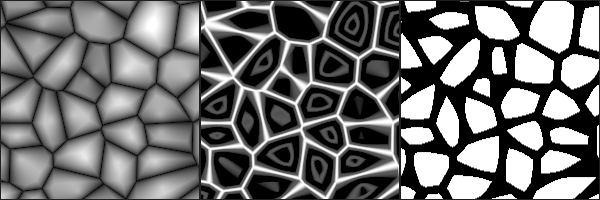
Yeah you can't obtain edges from the Voronoi node, you'd need to use a custom function. I have some examples here : https://cyangamedev.wordpress.com/2019/07/16/voronoi/
 gleaming moss
(sorry, can't type today it seems)
slender birch
how can I remap a vector with the shader graph?
so, I have a vector, x, y, z, and I want it to be x, z, y (or x, z)
regal stag
Split and put the components back into a Vector3 or Combine node, or use the Swizzle node.
slender birch
tbanks
 green abyss
I am super new to Unity and Programming in general, i'm also mot certain this is the right place to ask about this. But I recently played through a game called A Short Hike and listened to the creators GDC talk, he talked about how he did the visuals for the game using a package called GB Camera. I loved the asthetic so I went online and got the camera working in my project. My question is this, in A Short Hike there is a wide colour palette with alot of different colours in it. But it seems that the GB Camera only uses one colour and shades of that colour. Is there a way around this?
 golden idol
I need help over here
 midnight wolf
pretty simple quesiton hopefully but does anyone know how to get local sprite uv coords in shader graph. (just trying to do a simple horizontal clip shader and would like to have a normalized 0-1 slider that clips it from 0 -100%). I was looking into the position node with object selected (saw something similar in a video) but wasnt able to get it. just started playing with the shader graph, thanks
 fringe jasper
Can someone tell me what I'm doing wrong?
I'm trying to learn following along Quill18's video
low lichen
@fringe jasper The function you want to use is tex2D, not Tex2D
 stone night
Hey everyone :)
So: I am trying to make a shader graph which has a condition based on position if you looked at the mesh with no rotation or translation applied.
Something like the below image. (Red would have something there, white would be 100% transparent, blue is mesh edges)
What should I look at in order to make this?
 tiny edge
I'm mostly new to Unity, so apologies if the question is nooby, but is there a way to remove backface culling from a material after it's been fully set up? I was reading online about having to open the material in an editor and setting up this whole fancy code system and, while I'm learning to code, it seems a little intimidating. Is there a direct way to disable this?
 thick fulcrum
@tiny edge on the default shaders check dropdown box for render faces, option for front, back and both. If you choose both it should do what you want.
tiny edge
Apologies, where would I find that dropdown box?
devout quarry
@stone night you want to make that pattern?
 violet canyon
hi
i have a shader graph like this:
but i want it to look more like this:
how can i have those collapsed/compressed nodes?
 mystic geyser
@tiny edge are you using the Built In Pipeline or the new SRPs? if its the Built In and you are using a Standard Shader on your material , you can just use a 2 Sided ( no cull ) variant of Standard shader that will disable backface culling while retaining all the already setup material properties. https://gist.github.com/unitycoder/469118783af9d2fd0e2b36becc7dd347
you can switch shaders on your material from shader dropdown list on top of material inspector. the same applies to SRP materials as well. as long as the shader you switch to has identical 1 to 1 property names , they will be retained between switch

Gist
Standard Shader - 2 Sided (cull off) - Also, 2 Sided Standard Surface Shader with Fixed Normals - Standard-2Sided-FixNormals.shader
tiny edge
@mystic geyser Awesome! That worked! Thank you bunches ❤️
devout quarry
@violet canyon you can convert the colors to properties maybe
or collapse the nodes by pressing on the arrow that's on the top right of the node
fringe jasper
what would a non negative less than zero number be?
meager pelican
A poorly worded error message! lol
Make sure it's positive or zero.
slender birch
Is there any way to have a subgraph have a global property?
I currently have it hardcoded
but it would be nice to be able to change it in the inspector
and another question, is there any way to check if the shader is being rendered in the scene view, or to have different shaders for the scene view/game? I dont want the vertex position displacement to be shown in the scene view
devout quarry
@slender birch You can add a property to the subgraph
then connect a property to it in the main graph
like that you can change it in the inspector
slender birch
Yea, but I want to change it for all materials, and all shaders at the same time
It's a world bending property, so, all objects have to have it set to the same amount
I think my best bet is making a script to do it
devout quarry
yeah
devout quarry
no but in your main graph you could have a property linked to the subgraph
slender birch
Yeah, there are several main shaders tho
violet canyon
@devout quarry this is what happens when the nodes are collapsed with the arrow
and i don't want to convert them into properties, this is unrelated
regal stag
@violet canyon It's not possible to have the "compressed nodes" as inputs like that. It's on the roadmap for sub-graph default inputs though. https://portal.productboard.com/8ufdwj59ehtmsvxenjumxo82/c/58-default-values-for-subgraph-inputs

This will allow you to assign default values to the input ports on your sub graphs, such as world space position or UV Channel 1, as seen on the nodes in the image above.
violet canyon
@regal stag I see, thanks 🙂
When updating the properties of a material with renderer.material.SetColor(...), the property does not get updated, any idea why?
regal stag
Make sure you have changed & are using the property "Reference" value (not the same as it's name) in the blackboard.
violet canyon
The reference is different from the name
yup
Just realized this
Thanks haha
(Reference was the same as the name, but _ instead of )
Oh, and Save Asset too...
hahaha, this is awesome
i'm going to have so much fun with custom shaders
this is crazy
regal stag
You may also want to use renderer.sharedMaterial so you aren't creating a material instance, unless that's what you want to do (which you should cache and destroy later)
violet canyon
the difference is that a material instance is specific for each object, right?
regal stag
Yeah
violet canyon
yeah, so i want a material for this object yup
regal stag
If you want different properties per object you'd need multiple instances, (or use something like MaterialPropertyBlocks)
violet canyon
it is not destroyed when the object is destroyed?
regal stag
Nah, I think you need to handle it yourself
regal stag
There's an example here https://docs.unity3d.com/ScriptReference/Renderer-material.html
Basically just store the material created in Start as a variable which can be used in the OnDestroy function.
violet canyon
is there a problem with Destroy(renderer.material)?
regal stag
Every time you use renderer.material it returns a new instance
You need to cache the instance, otherwise when you use Destroy(renderer.material) it will just be creating a new one again and destroying it instantly.
violet canyon
oh, I thought it was only the first time
thanks
If the material is used by any other renderers, this will clone the shared material and start using it from now on.
That is not clear, I assumed that if it was used by the same renderer, it would not clone it again
regal stag
Ah, maybe I'm wrong. Still might be safer to store a reference just in case
violet canyon
I'll check with print("Materials " + Resources.FindObjectsOfTypeAll(typeof(Material)).Length);
so... both Destroy(material) and Destroy(renderer.material) leave that count unchanged. I'll use material instead just to be sure
regal stag
Could probably also check by storing the reference then `print(_material == renderer.material)
violet canyon
== is by ref in C# for ref types?
regal stag
I don't think Destroy() happens immediately, so it might not change until the end of the frame or something
violet canyon
I don't think Destroy() happens immediately, so it might not change until the end of the frame or something
the example on the link you sent seems to say the opposite
just checked btw, the == returns True, yay!
mystic geyser
.sharedMaterial references the common asset material assigned in the renderers. .material references an instance of shared material for the given renderer on runtime. if no instance exists , it will create one. accessing by .material is not recommended in scenarios where you have a common material for different objects and want to only change few properties between them. MaterialPropertyBlocks is the way to set varying properties correctly for different renderers ( ideally with same mesh ) using same material. primary concern here would be breaking batching potential by instancing new material copies. each material instance is bound to consume atleast 1 draw call.
@violet canyon
low lichen
If you're using the SRP Batcher, it's actually now recommended to create new materials rather than use property blocks. It's able to batch multiple materials that use the same shader variant.
mystic geyser
with SRP batcher yea that would make sense i suppose. my reference was with respect to builtin pipeline behavior.
so in SRPs you dont do property blocks then?
low lichen
You can still use them and I do, but it won't play nicely with the SRP Batcher if you're using it.
And I think if you want to use instancing, you'll have to do it manually with Graphics.DrawMeshInstanced
With the SRP Batcher enabled, it will never use instancing
And by won't play nicely, I mean those draw calls won't be batched
regal stag
I also don't think shadergraph properties support instancing, likely due to the SRP Batcher
low lichen
I don't think the SRP Batcher is enabled by default
It's totally optional. It can do batching the same way the built-in renderer does it.
mystic geyser
so if we opt for built in like batching behavior i.e no SRP bathcing , then property blocks have same relevance as built in?
low lichen
Yeah, they'll work the same way
But like Cyan said, Shader Graph doesn't fully support instancing
There's some "Hybrid Instancing" experimental option, but I think that's for ECS rendering specifically.
 nova needle
hi, kind of new to graphics programming. If I have a mesh where something changes very frequently (in one example it is the vertex colors, in the other it is the height of the vertex positions), how do I do this? Do I just update a Mesh instance and call Graphics.DrawMesh all the time?
or should I even put it in the shader?
low lichen
@nova needle If you can do it in the shader, it would definitely be much faster.
What are you changing those vertex values to?
slender birch
depends on how it changes tho
nova needle
in one case it is the ground hexagon map, where 99% of the time all I need to change are the vertex colors (depending on how humid the ground is for example)
the other example is the watermesh, where 99% of the time all I need to change is the waterheight at that vertex (which is simulated though, so not just a sin curve which I could directly calculate on the gpu)
in both examples I have the colors and height precalculated by some simulation on the cpu, and want to change these properties of the mesh quite often, while the other properties don't really change
and in both cases these are per-vertex properties
low lichen
If you're reliant on calculating these things on the CPU, then I don't see many other options than updating the mesh.
You don't have to use Graphics.DrawMesh unless you're already using that to draw it.
nova needle
are you suggesting doing the simulation on the gpu too? the problem is, the game is like an eco system simulation, so I need the data (water height or ground humidity) quite often on the cpu too
low lichen
There have been recent changes to the Mesh API that allow for more access and performance in changing data.
nova needle
it is not just a "how it looks" thing
low lichen
No, then you should keep it on the CPU
slender birch
I think you have to use mesh.colors
nova needle
yes I know about mesh.colors, this is what I am using now
low lichen
Unity Forum
Hi! We are thinking of making some improvements to the Mesh C# API (finally, eh). Here's a google doc with current API outline and status:...
nova needle
but always resetting mesh.colors and mesh.positions or what it is and then calling graphics.drawmesh every frame is what I should do?
slender birch
either that, or having an humidity map, pass that map to the shader, and do the color calculations on the gpu, but I dont know if the humidity map thing would be slower
nova needle
I cannot exploit that I am only changing one small part of the mesh somehow?
either that, or having an humidity map, pass that map to the shader, and do the color calculations on the gpu, but I dont know if the humidity map thing would be slower
@slender birch yes that is what I meant by using a shader. I thought maybe it is either clearly faster or slower for someone more experienced than me
low lichen
Humidity can be just one float attribute in the vertex and color calculated in the shader
nova needle
Ok, so I understand it right:
(1) Either always set the corresponding properties on the mesh object (positions or colors) and use Graphics.DrawMesh
(2) Set it once, and pass humidity/height information to the shader so that the shader overwrites these properties
But it is not clear if one is way faster then the other?
then I would go with 1 since it is easier for me
Humidity can be just one float attribute in the vertex and color calculated in the shader
@low lichen yes exactly, does it mean that it would be better to do it in the shader?
and what happens if the color starts to depend on more variables then just humidity?
are these obvious easy questions or questions with not such a clear answer?
low lichen
Depends what variables those would be and if they are present in the vertex attributes
The GPU is always going to be faster at doing those per-vertex calculations
I think uploading new data to the GPU is pretty asynchronous, so I don't think you need to worry about that taking much time.
nova needle
ok, thanks for the insights
violet canyon
But like Cyan said, Shader Graph doesn't fully support instancing
I'm using SRP and Shader Graph
What should I do then in the end? Property blocks / new materials?
regal stag
@violet canyon Probably best to stick with the renderer.material to create material instances. They should be batched properly by the SRP Batcher.
I know some others have had issues with batching when using MaterialPropertyBlocks + the SRP batcher in the past, as MentallyStable mentioned they don't play nicely. Don't know if that's changed in newer versions.
slender birch
Im having trouble recalculating the normals for a world bending shader.
Basically, the vertex y coordinate gets displaced down following this formula:
y = x^2*k
where y is the down displacement, x the distance to the camera, and k a constant (-0.005)
to calculate the normal, I then have to calculate the gradient vector.
∇f = (2xk, -1)
thats the normal vector of the curve, so now, if I calculate the angle of that vector:
arctan(-1/2xk)
that should be the angle I need to rotate the normal vector arround the x axis in the view world space, then transform it to tangent, and that should be it...
except it isnt, its not working.
When I map the normal to the albedo, I get something weird happening, it changes when I move the camera forward
Sorry about the long test, is this too confusing? Should I post something differently?
I think the problem is with the space transformations
this is what im using, the top multiply node imputs are the x (distance to the camera) and k (curve constant)
and the output should be the recalculated normal
low lichen
@nova needle Just happens to be a post on r/Unity3D showcasing the new mesh API
https://www.reddit.com/r/Unity3D/comments/fzqycn/did_you_know_that_the_new_mesh_api_allows_us/

reddit
81 votes and 26 comments so far on Reddit
slender birch
ok this is confusing me
if I get the normal in view coordinates, then plug it into a View->Tangent transform (set to direction), and then to the albedo, I get white
if I just get the normal in tangent coordinates, I get blue
why?
shouldnt it be the exact same thing?
as you can see in the shaderGraph previews, they are different
Unity Forum
Hopefully this is simple, but the following two things are empirically not equivalent, and I don't understand why:
[ATTACH]
and
[ATTACH]
Is it...
uhh
why?
slender birch
wtf is this bullshit
meager pelican
OK, I'm late to the party. Sorry. Holiday. ;)
No way SRP batcher wants a unique material instance for each object and won't batch MPB's. I mean, it might be that way right now, but if so don't use it or do something else.
I suppose it varies by use-case. But if I have 2000 minions running around, each with a unique RGB color there no damn way that I should create 2000 material instances just to get batching. That's nuts, and a huge huge huge waste of memory.
And I'd damn well expect that those 2000 GPU instanced objects get batched when using the SRP.
So something smells. I'm not arguing that anyone is wrong, I'm saying so far this makes no damn sense.
:2c:
regal stag
@slender birch I could be wrong but it looks like View->Tangent/World doesn't vary between whether the Type is Position or Direction. It's coded as something like mul(UNITY_MATRIX_I_V, float4(_Transform_FB869782_Out_1.xyz, 1)).xyz. I think this means it applies the matrix as a translation the direction due to the w component being 1 in that float4?
regal stag
Perhaps this is more the expected result? I think this might be the same as the Normal Vector set to Tangent, although the preview isn't identical so I could be wrong.
regal stag
The preview here looks a bit weird anyway, as that's not what the main preview produces.
slender birch
ok I think I get it
thats a bit odd isnt it?
even if you set the type to Direction, it translates it'
a bit missleading
ok I think that worked
but it is not fixing what I was trying to fix
damn it
regal stag
Is there a particular reason why the normal vector has to start in view space?
slender birch
the bending is done in view space
(the further away from the camera, the more bent the world is, so the normal has to be rotated in view space)
I actually changed it now
so instead of the normal starting in view space, im having the 1, 0, 0 vector transformed from view space to tangent
and that is (I think?) working
not really sure
low lichen
@meager pelican Some more information on that topic
https://forum.unity.com/threads/materialpropertyblock-and-srp-batcher.815499/

Unity Forum
Hi,
I am trying to change the color of multiple dynamic identical meshes using the same (Simple Lit) material with GPU instancing enabled without...
slender birch
Ok, so, starting my problem from scratch
basically, I am bending the world depending on how far the vertex are from the camera, and for that reason, the ground plane is casting a shadow on itself.
low lichen
@slender birch You have to make sure you're bending the depth pass too
slender birch
the depth?
low lichen
Realtime shadows are done by comparing the depth texture of the camera with the depth texture of the light
slender birch
im using the PBR shader graph
there is no depth output, and the vertex position is for everything, not just for the color
low lichen
Okay, I'm guessing Shader Graph will do the same vertex modification for the depth pass
regal stag
I think shadergraph should handle it for you
Are you on URP? What version are you using?
slender birch
I think its the normal, but no matter how much I change the normal, the weird shadow is exactly the same
yeah URP, lastest
updated it yesterday
meager pelican
@low lichen So you can set up your own CBUFFER somehow and work around it? Oy.
I mean, otherwise, insanity ensues. Somehow you'd have to have an instance id to use as an index.
No way I'm making 2000 copies of a dang material.
slender birch
what im doing now for the normal calculation, is rotating the normal vector by the angle, arround the vector obtained from the cross product between the up vector and the camera direction vector, in world space, then changed to object space
low lichen
@meager pelican You can still use instancing in a project with the SRP Batcher enabled, you just have to do it manually with Graphics.DrawMeshInstanced
The SRP Batcher is never going to try to batch something using instancing
regal stag
I think the CBUFFER is how the SRP Batcher can batch multiple materials with different properties
meager pelican
OH, well, that's not so bad.
slender birch
and the most angering part, is that no matter how much I change the normal, no matter if I do it right or wrong, the shadow is exactly the same
it isnt fucked up in different ways, its fucked up the exact same way
im honestly just tempted to dissable the ground from casting shadows
because the other objects seem to cast it right
regal stag
You probably don't need the ground to cast shadows anyway
slender birch
yeah, but idk if the other objects are fucked in some way I dont know
regal stag
Yeah, it's probably just the PBR lighting that would be affected by normals.
 silent wind
hey! which option do I choose?
fervent tinsel
create one
I guess you can load one if you have one
it doesn't really change much other than the created one will be on your default hdrp resources
fervent tinsel
it's not a big deal, you'll see the asset it creates on the default folder and you can mod it as you like, it's not something that will come haunt you later 😄
silent wind
I already have one
fervent tinsel
only thing to note is that if you have multiple HDRP assets in the project, you may mix them yourself and then wonder why the settings don't apply
silent wind
I'm going to load
fervent tinsel
that's fine
low lichen
You have to create the asset
fervent tinsel
if you've created the asset, it will not be in the packages but in your assets folder
fervent tinsel
why would you even have OpenGLES setup for windows?
fervent tinsel
a mobile renderer
fervent tinsel
it's not forced by default
the current selection is on project settings->player settings
windows renderer should be set to automatic by default
so I'm guessing you've opened some project that's been setup for mobile(?)
silent wind
it is set already to auto
and i didn't make any project for mobile
this happened..
and I get these errors again after fixing
fervent tinsel
oh, you need DX12 for DXR
fervent tinsel
you can but it doesn't matter
if you use DXR, only thing you need is DX12 on top of the list
fervent tinsel
kinda hard to tell from random bits of information
your hdrp wizard should be all green
and your shaders need to be HDRP compatible
silent wind
it is all green
fervent tinsel
and your hdrp needs to be compatible with unity version you are using
fervent tinsel
7.x for 2019.3, 8.x for 2020.1
silent wind
it is compatible
fervent tinsel
those mipmap warnings are normal on 2019.3
that's fixed only on 2020.1
it does work still
fervent tinsel
yes I can see it
are those HDRP shaders?
in your materials
for terrain you need to assign material with HDRP terrain lit shader
standard shaders don't render anything on HDRP
or any shaders meant for built-in renderer for that matter
silent wind
brb
silent wind
for terrain you need to assign material with HDRP terrain lit shader
@fervent tinsel how can I do that?
fervent tinsel
@silent wind make a new material, assign it HD Terrain Lit shader
assign it to your terrain (there's a setting for custom terrain material)
I dunno if the automated HDRP material upgrader can do terrain nowadays, I don't really use it myself much
silent wind
assign it to your terrain (there's a setting for custom terrain material)
@fervent tinsel cannot find it
fervent tinsel
it should be on the last "tab" on it
look for settings / cog
on the terrain components top row that is
@silent wind this is where it was on the old setup (only image I found with google): https://i.pinimg.com/originals/be/bf/29/bebf29b1bb9d88694a708d387f94089a.png

it's in similar place on the current system
silent wind
only have these
silent wind
found it
now I have another problem
it does this strange lighting
and I cannot put a value in the terrain material
I'll just make a totally new project and remake it all in a few days I guess
naive coral
why is the second material of my game object showing on pc but not on android
 grand jolt
Hey boys, I'm trying to use float4 as UV in my shader. I replaced the float2 successfully (no errors in shader), and now set the UVs on the mesh using mesh.SetUV with index = 0. It is not correctly showing it however (compared to if I hardcode the z/w values it into the shader). What could be going on here?
grand jolt
Solved it, turned out to be some funkyness with how unity updated the shader and applied it to the material.
green abyss
Anyone know how to do a pixelated shader for a 3d game kind of like in A Small Hike?
devout quarry


Are you nostalgic for the past? Let's see how you can achieve this cool retro effect in a 60 second #shadersdonequick tutorial! 📺 You can get the graph here https://t.co/FkXTd3gS9E #unitytips #madewithunity #indiedev #gamedev #tutorial #shaders https://t.co/MfuKdlQi5g
Retweets
298
Likes
1381
Twitter
 fluid lion
Is there a way to manipulate a specific area of vertices? I am trying to manipulate an area of vertices whenever a ship collides with something. Can this be done through shaders and how?
thick fulcrum
@fluid lion doable yes, easy no... certainly not for novices
gleaming moss
manipulate is not by itself a helpful description either
do you want it to be permanent? just constrained to one area?
does it need to combine with other modifications?
please describe what you need, it might be important
fluid lion
I'll just start simple. How do you get the current vertex the GPU is working on through the shader? I'm trying to Debug.Log the POSITION values it but it's not appearing in the console.
gleaming moss
you don't, since there are typically a lot being processed at once
there's likewise some overhead associated with GPU/GPU communication
bit like the job systems if you've played with those
stalling is involved
fluid lion
Alright. Instead of the current, can I just loop through all of them?
gleaming moss
that's what a draw call/dispatch is going to do
are you trying this in a regular surface shader? compute?
this is what I mean-- happy to help, but I don't understand/you haven't described what you want to accomplish here
are you trying to knock off pieces of your objects? are you just trying to make a cartoony bounce thing
mystic geyser
@fluid lion you can use a full fledge Graphics Debugger like RenderDoc to capture a frame and inspect the entire draw call stack & the buffers essentially letting you inspect per vertex and per pixel values for a given frame. https://renderdoc.org/
https://docs.unity3d.com/Manual/RenderDocIntegration.html
you can also use DX11/12 Visual Studio debugger for your shaders if thats your thing : https://docs.unity3d.com/Manual/SL-DebuggingD3D11ShadersWithVS.html
fluid lion
I have an unlit shader and I'm trying to use the POSITION value and debug it onto the console.
gleaming moss
which won't really happen as described
if you want to deform things that are near a specific point, you can scale a displacement by a radial distance
GPUs happen to be pretty good at this, but since you're likely going to have that center point defined as a constant/shader property combining several impacts at once can be hard
getting into the initial question of 'what do you actually want to do'
I do not mean this in a mean/aggressive way
mystic geyser
GPUs happen to be pretty good at this, but since you're likely going to have that center point defined as a constant/shader property combining several impacts at once can be hard
@gleaming moss can use a simple screen space buffer like RenderTextures to write collision areas/zones into it and sample it in a shader to operate on the updated values for masking and/or blending.
gleaming moss
sure, effectively blend shapes
variable-size output is kind of complicated and I have a nasty feeling this is really a question about doing CSG modeling on the GPU
which is probably not a good fit for traditional vertex shaders
mystic geyser
this is simply done by having a secondary camera render look for only collision events/objects in a scene and write into textures and pass into a shader that can use that generic data for all sort of effects from grass/snow displacement to more advanced masking and blending.
am not sure though what you mean *CSG Modelling on GPU *part. but for OPs use case i suppose a relatively simple setup like this will suffice
gleaming moss

Constructive solid geometry (CSG; formerly called computational binary solid geometry) is a technique used in solid modeling. Constructive solid geometry allows a modeler to create a complex surface or object by using Boolean operators to combine simpler objects, potentially g...
mystic geyser
aware of CSG. just not CSG on GPU thing. doesnt that go into full blown physics on GPU sort of thing , atleast in OPs case.
gleaming moss
yes, which is why I think it's not a good idea/great fit. Unfortunately OP has not clarified if that's what they want 😐
mystic geyser
i am guessing something along these lines : https://youtu.be/TUFcerTa6Ho?t=874

Alex Battaglia returns with the second part of his Star Citizen tech breakdown, based on a visit to CIG's UK development studio. In the first part, we looked at how the game scales on a galactic level - but this time we go closer. Much closer, right down to the particle level....
and this is fairly simple technique , easily achieve with screen space buffer i mentioned. world space persistent buffer based implementation would be more involved but for short term persistence its quite conventional approach.
fluid lion
I'm trying to make pseudo-ocean wave physics and I want to displace the vertices of my ocean wave mesh(es) whenever a player-controlled frigate moves.
gleaming moss
yeah, that's much better ^
bot's idea would work pretty well-- you can run "wave physics" as a shader on the render target
then in the actual water shader add some extra height read from the texture
just scale an up vector from the wave height
you need an extra render target (can be low-resolution) and likewise can draw things that push water into it with a special camera
alternate approach if it's just one boat would be to keep a spline where the player boat was and do a displacement scale trick based on distance to the spline
math on latter is a bit trickier
 desert orbit
Normally you would want create waves outside of the shader to feed waves to the shader and have information available for ship interaction. And simple waves can be achieved by using multi-register noise then scrolling it in one direction. Catlikecoding has tutorials on the noise.
mystic geyser
wave sims in shader is easy part in ocean sim i suppose. its the physics interaction sync thats challenging
thick fulcrum
@fluid lion I would suggest looking at Crest, there is a Git version for standard render (non URP) which you can test / play around with it's vey good ocean with deformable waves. If you want to work in URP you can get version from asset store. https://github.com/crest-ocean/crest

GitHub
An advanced ocean system implemented in Unity3D. Contribute to crest-ocean/crest development by creating an account on GitHub.
mystic geyser
advanced implemenations like crest ocean utilize async readback i think
there is also this https://github.com/eliasts/Ocean_Community_Next_Gen

GitHub
Next gen iteration of the unity community ocean shader - eliasts/Ocean_Community_Next_Gen
nova needle
why is it bad to divide by the w component in the vertex shader?
and is there any way to configure any editor to work with shaders nicely?
simple frost
what do you mean by work with shaders nicely?
nova needle
autocompletion and automatic alignment etc @simple frost
simple frost
ah sorry I thought you meant as in Unity editor haha. I know VS has plugins for recognizing hlsl code, and you can add extensions so that .shader files also get the formatting but ive not come across anything that works super nicely with Shaderlab code
nova needle
ah ok, thank I will try that
delicate badger
hi there. After building our project, in the log, we got : WARNING: Shader Unsupported: 'HDRP/Unlit' - All passes removed
WARNING: Shader Did you use #pragma only_renderers and omit this platform?
Any clue to remove that ?
mystic geyser
@nova needle have you checked out https://assetstore.unity.com/packages/tools/utilities/shaderlabvscode-94653 ? its basically a vscode extension. there is also a free version on github with limited features. it has been really helpful in writing shaderlab code by hand.

Get the ShaderlabVSCode package from amlovey and speed up your game development process. Find this & other Utilities options on the Unity Asset Store.
 peak ridge
I have these tiny pixel sized gaps where my model sits over the shadow its casting. its not a bias setting on the light. any ideas whats wrong?
happens in both hard and soft shadow mode
actually guess this might be a better topic for the lighting channel soz
nova needle
@mystic geyser thanks, looks great! too bad that vscode fails on the Entities.Foreach lambdas from the Entities package
I would love to use it for everything otherwise
peak ridge
nvm figured it out. forgot a very specific thing was being done in the shader that causes this
simple frost
@mystic geyser thanks, didnt know about that, building a version for vs2019 now
 torpid hearth
I want to random the seed from my material (made in Substance Designer) in Unity, and all i can find is old and deprecated methods, can someone point me in the right direction?
 lime viper
Are you using URP, HDRP, or Built-in?
 rugged ginkgo
hey, how is this
if(c.x > 0.5 && c.y > 0.5 && c.z > 0.5 )
                {
                    clip(-1);
                }
different than this:
clip(-(step(c.x, 0.5) * step(c.y, 0.5) * step(c.z, 0.5)));
 raw canopy
step() is being expanded to >= by Unity's shader generator, according to forums
if statement is slower as I'm seeing
meager pelican
lol
clip( float3(0.5, 0.5, 0.5) - c);
(I think, haven't tried it)
might need 3 tests due to the &
rugged ginkgo
naa, that wasnt it
it was the most stupidest thing ever (as always is in programming)
meager pelican
could try an if all too.
rugged ginkgo
in the docs step is " step(y,x) "
and as in a sane person I kept reading " step(x,y) "
meager pelican
Wait. Which one is the one you want?
rugged ginkgo
I was improving a shader, so I was removing the if statement
the only thing I had to do was change the order inside the step
frail salmon
can I use 2d shadergraph if im designing for mobile and dont care about old systems, its very confusing about lwrp and srp and what is okay and what is not
rugged ginkgo
but i mean, who the hell puts y first and x in the latter?!
meager pelican
It's way too much. Why use a step?
You want to know if it's all > 0.5 and clip it, but if any < .5 you don't clip it. Right?
rugged ginkgo
right
I only reduced 2 instructions doing that, I was actually hoping for more
a ternary would be better?
Im gonna check
yup!
meager pelican
You want to vectorize it.
Try something like
if all(normalize(c - float3(0.5, 0.5, 0.5))) clip(-1)
I'd have to play with it. But if you can do vector ops on it, it's generally a good idea.
(EDIT: you want saturate not normalize. Doh!)
rugged ginkgo
I got down 4 instructions by doing c.x >= 0.5 ? c.y >= 0.5 ? c.z >= 0.5 ? -1 : 0 : 0 : 0
im gonna try your solution
meager pelican
And it clips all frags?
rugged ginkgo
yes it does
rugged ginkgo
I thought step would be better for conditionals instead of ternaries
everywhere I read ppl prefer step
weird
hey, thanks dude
meager pelican
I didn't help! But you're welcome.
I'm going to have to go try that out and figure it out now. lol
rugged ginkgo
at least you tried 😄
if you want to have some fun I was optimizing this block: ``` if(c.x > 0.5 && c.y > 0.5 && c.z > 0.5 )
{
clip(-1);
}
else
{
c = tex2D(_Sura, i.u);
}
I'm stupid today.
I did a normalize rather than a saturate.
Try it with saturate instead. Must have had too much ham.... 😉
@rugged ginkgo
meager pelican
🙂
grand jolt
Is it possible to find if an object has a shadow cast on it or is in shade?
or would that be too expensive to calculate?
 desert pumice
Most of what you hear online about branching in a shader is incorrect. Internally, step does a branch, so you won't see a speedup by trying to use it to remove branches. Branches are also not slow anymore, and aren't a big deal unless you are forcing a dynamic branch around a texture sampler. For istance, the code posted above by @rugged ginkgo will execute both sides of the branch sampling the texture each time, then determine to clip the pixel or not. If you want to avoid the texture sample, then you need to use dynamic flow control to do that.
you could also use if (any(saturate(c-0.5)) if your in HLSL, though honestly I think these types of optimizations are usually not worth worrying about, certainly not if your not looking at the compiled assembly and seeing this as part of your bottleneck in a profiler.
 vital nacelle
Hi! Im trying to learn how to create shaders and I got this error:
Shader error in 'Custom/Test/FirstShader': syntax error: unexpected token 'struct' at line 24 (on d3d11)
My code looks like this:
I don't know what Im doing wrong since im following a tutorial step by step
low lichen
@vital nacelle Struct definitions, unlike C#, end with a semicolon after the closing bracket.