#archived-shaders
1 messages · Page 137 of 1
 steel notch
 meager pelican
This just proves a universal constant of physics and probability: Roseanne Roseannadanna was right "It's always something". (Old reference).
P.S.
I think it was grey, but the opaque texture WAS enabled.
 regal stag
It seems to be grey with the Unlit, but black with the Lit one
Which seems a little strange, wait nvm, I have no lights in the scene, of course it's black 🤦♂️
steel notch

Unity is the ultimate game development platform. Use Unity to build high-quality 3D and 2D games, deploy them across mobile, desktop, VR/AR, consoles or the Web, and connect with loyal and enthusiastic players and customers.
found this
as a separate thing
meager pelican
That's not it though, as it works in "regular" URP/SG (as I showed above) in a 2D project. It's specifically the experimental 2D renderer that appears to be at issue.
 dusky yarrow
Anyone know where the preview and settings have disappeared to in the PBR Master node?
 onyx lily
how would i set a piece of a mesh to be transparent?
dusky yarrow
Either a cutout or a texture piping to your alpha channel. I think.
onyx lily
I got it!
how would i get a line to appear behind?
like this
nvm
found it
im dumb
wait i take it back
i ticked two sided and now i'm getting this weird effect
dusky yarrow
@onyx lily Are you using the URP? Just found out that the cut-out mode is on the standard shader, which isn't compatible with the URP.
dusky yarrow
@onyx lily Just figured it out. Are you still stuck?
 dusky yarrow
Are you looking for something like this?
dusky yarrow
- Create a texture, set the alpha value where you want a hole.
- Create a material.
- Set the shader to Universal render Pipeline/Simple Lit.
- Set Surface Type to Transparent.
- I had to set Render Face to Both, you might not.
- Tick Alpha clipping (this is the magic).
- Set Base Map to your texture with the alpha values.
- Strut around and bask in your glory.
@onyx lily Here's my texture & material for reference.
onyx lily
@dusky yarrow wdym by "set the alpha value where you want a hole"
i already have the hole, if that's what you eman
mean*
the only issue is it looking extremely weird
dusky yarrow
Open to texture, it's just a png with a hole.
onyx lily
would this node do?
dusky yarrow
Wouldn't using twelve meshes be easier to get exactly what you want?
onyx lily
well, i'm looking for the cube to be able to be warped
dusky yarrow
No need to use a custom shader, you can use the build in Lit ones.
dusky yarrow
Have you tried the steps I wrote above?
onyx lily
i don't really understand them, that's why i'm asking for you to elaborate on the first one
dusky yarrow
Use the texture I posted as an example.
dusky yarrow
@onyx lily Hollow cube using the URP shader.
onyx lily
sorry for the late response, thanks! I'm going to try it now!
it worked! Thanks so much!
@dusky yarrow
wow
dusky yarrow
Only the strutting left to do then @onyx lily.
dusky yarrow
What unit is the _Time variable in? All the documentation say is some variation of Time since level load. Is it seconds, milliseconds, ticks…?

GitHub
Scriptable Render Pipeline. Contribute to Unity-Technologies/ScriptableRenderPipeline development by creating an account on GitHub.
meager pelican
It's floats, so units are seconds with fractions. (Sorry, duplicate)
 tall chasm
Hi guys, tiling and offset node in shader graph tiles my texture according to the mesh's height and width. How do I keep the aspect ratio of my texture?
 soft harness
spotlight cookies in lightweight?
meager pelican
@tall chasm Well, if you can get your mesh's height/width (you'll have to pass it in I think) you can use that ratio to adjust your UV's. Can't tell you the formula off the top of my head but maybe take the output of the tiling and offset and multiply by the other ratio, accordingly. It would be a ratio of your mesh's x to the texture width, and mesh's y to the texture height of some sort.
tall chasm
@meager pelican I'll give that a go
meager pelican
OR I suppose you could mean something different...like per triangle mapping of an entire texture, by world-space size or something. Not sure what you're really after. But yeah, resizing the mesh (say a quad) will stretch the texturing of 0->1 UVs. So you're really after a calced tiling I think.
Also make sure you set the wrap mode on the texture if that's what you want.
meager pelican
@tall chasm
tall chasm
@meager pelican
That's a scrolling pattern
The thing I'm trying to achieve is for it to remain circular like its original aspect ratio
regal stag
Is this a screen space effect? @tall chasm
tall chasm
What do you mean by screen space?
regal stag
Is it applied to a 3D object in the scene, or the camera view?
tall chasm
Ohh
regal stag
It's not too clear from the image
regal stag
Is it always going to be fullscreen? If so you could use the Screen width/height to determine the correct scaling, rather than sending in the width/height of the UI component
tall chasm
Yes always fullscreen
regal stag
And do you want the image to scale with the UI size, or always remain the same scale regardless of size?
tall chasm
I want the aspect ratio to be correct for the image. Meaning the A button sprite now looks squashed. I want it to remain as a circle. This scrolling pattern is a background so I guess the size remains the same for different screen resolution?
 autumn bramble
No matter what master node I use in Shader Graph, if I later use the shader in a particle system, then I can't change the particle color.
Which master is the right one for particles? Or do I need to set particle color up in the Shader Graph itself somehow?
regal stag
@autumn bramble Is this for the shuriken particle system? If so, it uses Vertex Color, so you need to use that node in the graph to take into account the particle system colour.
autumn bramble
It's for sprites that I animate through the particle system with a sprite sheet
regal stag
@tall chasm Try this. It uses the screen position as UVs, using the screen width/height ratio, instead of the normal UVs from the UI object.
autumn bramble
@regal stag It works with Vertex Color, thanks alot! 🙂
regal stag
@autumn bramble As a note, the Particle System component also allows you to send in additional data using the custom vertex streams option under the Renderer tab, e.g. AgePercent which goes from 0 to 1 over particle lifetime.
That would add "AgePercent (TEXCOORD0.z) to the list, which in shadergraph you would use the UV node on channel 0, Split -> take Z/B component
tall chasm
@regal stag that worked beautifully!! Thank you so much man 🙂
Btw
How'd you group and name it Spreenspace UV?
regal stag
Dragged a selection, right-click Group Selection.
autumn bramble
Damn, color is working, but the Alpha over lifetime is ignored
regal stag
@autumn bramble The alpha over lifetime should be in the alpha component of the Vertex Colour, you may need to Split it and take the A output
tall chasm
Thank you @regal stag I never knew grouping was possible. Now my nodes seem more organized 🙂
One last question, adding space between tiles is not possible right?
autumn bramble
I really think I have somehow messed up my project - everytime I use the Shader Graph with alpha /opacity of some form, nothing seems to work as expected ^^
regal stag
@autumn bramble Have you set the master node to be transparent?
@tall chasm Hmm, it might be possible. The easiest method would be using a texture with extra padding though.
tall chasm
@autumn bramble check your texture type too. Working in default most of the time works fine. When I changed to sprite ui mode it broke for me
autumn bramble
yes it's transparent and I split the alpha from the vertex color. But alpha over lifetime is not applied, and also I seem to have the same problem as yesterday (particles look like they are slightly transparent, even if the should be fully opaque)
tall chasm
@regal stag Ok got it! Thanks 🙂
autumn bramble
For this project I set the Universal Render Pipeline - could that be the problem?
meager pelican
@tall chasm Well, ya could have told me that! 😉 But good work from @regal stag - the screen space height/width is what you can use for full-screen. Then you don't have to pass it in, Vindorable.
Otherwise, yeah, you adjust UV's according to that ratio.
@autumn bramble For this project I set the Universal Render Pipeline - could that be the problem?
Doubt it.
Try outputting the alpha into the colors to debug it. Set RGB to whatever you're currently plugging into alpha (maybe swizzle it), and set alpha to one. And see what color you get.
tall chasm
@meager pelican sorry! I'm a little bad in explaining it since I'm still new to shaders. I still appreciate your help!
meager pelican
lol That's OK, no harm. 😉 :p I didn't mean anything by it really. It still ends up as a ratio of the "mesh"'s size, the thing that makes it easier is that you can calc it from screen size. (aspect ratio).
Musing...I wonder if there's a way to get the screen-space size (X and Y) of an arbitrary mesh of n triangles after clipping...you could compute it for one polygon, but IDK about the whole mesh, particularly with clipping.
tall chasm
Lol I have no idea 😅
trying to create a circular gradient background but it's not showing me anything
regal stag
The alpha components of the colours is 0
 proud axle
yeah the color is totally transparent
regal stag
For some reason, shadergraph defaults to 0,0,0,0 😓
tall chasm
Ahh I see
proud axle
youd think it would do 255,255,255,255
tall chasm
Spent 30 mins connecting and reconnecting the nodes hoping something might work just to realise alpha was 0 lol
regal stag
Well, (1,1,1,1) in terms of the actual Color/Vector4 value, but yeah. It would make more sense to default to that
For most other master nodes it doesn't matter that much, as the Color input is a Vector3 and it has a separate alpha input. But for the Sprite ones, it's all in the same input.
tall chasm
Ahh ok I understand
 tame topaz
Hey friends, I have an age old question about sorting, but specifically with regards to sprites and shadergraph.
The gif is pretty self explanatory, and I noticed that there is a new (?) Rendering Layer Mask option on the sprite renderer component. Is this what I should be looking into?
 grand jolt
Hi! Anyone knows why the cube is cut in the middle? Shouldnt be something progressive?
meager pelican
@grand jolt "Cut in the middle"? "Progressive"?
You're outputting to alpha. You're getting zeros in black areas, right?
@tame topaz Looks like backface culling?
proud axle
@tame topaz tried a different material on the spriterenderer something with a different shader?
regal stag
@grand jolt It's "cut in the middle" because your AlphaClipThreshold is set to 0.5, and so alpha values below that will be clipped. If you don't want it to discard pixels, set it to 0.
grand jolt
@regal stag Thx, I didnt see that
dusky yarrow
What is "Tangent Space"? I'm trying to understand why this gives me a pure green surface (green is the centre pixel of the input).
proud axle

What is tangent space, and more important, what is its relevance to game design? In this in-depth feature, FXLabs programmer Siddharth Hegde discusses both tangent space and its practical uses, and why it is such an important consideration in many of today�s pixel shaders.
dusky yarrow
It's got matrix algebra. 😢
meager pelican
Yeah. ;)
I think of tangent space as what you normally see normals mapped to in a normal-map. If it were mapped to world space it would be different for each orientation of the object, and for object space it would be all over the place. So it's relative to UV's, and orthogonal to the surface normal and binormal. There's tangent and bi-tangent and normals. It's why we get those purple normal maps. Basically, tangent space is face-normal and binormal relative.
I think. Here
Well, that didn't work. lol
 final helm
Does someone know how can we do a blurring effet shader?
meager pelican
Scroll up to yesterday. In what pipeline, using what tools and what renderers? Whole screen? Partial object?
Also see unity tutorial on Shader Graph and distortion.
meager pelican
I posted a simple example yesterday.
But we couldn't get it to work IF you're using the current version of the experimental 2D renderer. But in normal URP it worked. Used the scene color node.
final helm
I'm not doing anything related to the experimental 2D renderer
meager pelican
That sample code I made is a pretty crappy blur, you can do better, but it shows the basic idea.
And like cyan said, you can use a downsample if you don't need the high-res for other things.
 formal tartan
hey guys please help me
i already asked it once lmao
so I want that black screen to be transparent
like a normal Fog of War effect should be
but I don't know exactly how to do that
since I never touched shader coding stuff
regal stag
What exactly do you mean by "the transparency of the black screen doesn't look right"?
final helm
@analog surge About what sample code are you talking about?
formal tartan
it makes all the objects it overlaps change color or something @regal stag
it should just fade away
 analog surge
wrong carpe xD
formal tartan
but it doesn't
meager pelican
@final helm Sorry - Thursday at 8:12 Eastern Time. That's about where the discussion started.
meager pelican
lol
formal tartan
@regal stag And I also want it to hide some gameobjects even though the black screen is transparent, so they only show up when outside the black screen (inside the transparent mesh, the line of sight)
and I have absolutely no idea about how to do that
regal stag
@formal tartan Sorry, I don't think I understand your problem or setup enough to be of help here. You mentioned in the image that someone else made the original shader for you. Could you not ask them about how to fix this?
formal tartan
I can't talk to that person anymore
the shader is applied to a material which is applied to that black screen sprite
i didn't mention that
so the material's transparency is lowered when i lower the shader's alpha value
right?
regal stag
I would assume so, but it depends on how the shader it setup. Changing the alpha did seem to affect it properly in the second image though. I just don't see whats "wrong" with it.
formal tartan
what's wrong is that it is not what i want it to do
i mean it sounds like it is
but it does something completely off
regal stag
Right, but I don't know what your intended result is.
formal tartan
my intended result is the black screen being slightly transparent, like in the second image but without it affecting the walls or any other objects it overlaps
see
in this example i got off the internet
the black screen makes everything appear darker
but you can still see it though the black screen
and then when the black screen ends (in the cutout) everything is displayed normally
that's what I want
 brave sable
Is it possible to read a variable from a shader? ive searched up and found Shader.getFloat but it doesnt seem to work.
regal stag
@formal tartan I think in that example image, the grid and walls are likely being rendered after the "black screen". The screen itself is not transparent. If you don't want walls/certain objects to be affected, render them after the black screen. If each object is a separate sprite, I think they have sorting layers / order in layer on the SpriteRenderer? (not too sure, I'm not too familiar with 2D/Sprites).
meager pelican
@brave sable That's going to read a value from a material property.
What type of thing are you trying to "read from a shader"? Is it a compute shader?
brave sable
dont exactly know the difference but its an unlit shader, im trying to read the distance from the camera to an object.
meager pelican
You should already know that on the C# side....
regal stag
@brave sable Could you not calculate that in the C# script instead?
formal tartan
@regal stag Ok I got the idea of changing the order in layer setting on the sprite renderer component of the black screen and now I achieved the effect that I wanted, thanks!
brave sable
no, everything is rendered in the shader since its a raymarched.
final helm
I watched something for the blur and I've done this, but the result is still completely white opaque
what should I add more to get a working blur?
brave sable
although it might be possible to send object info from a normal script.
meager pelican
@brave sable Oh, lol. Oy. Then how do you specify the object from which you want to get the distance?
You could try blitting the depth buffer to a texture and read the values back. But that's a scene depth value.
There's probably 100 other ways, but I'd have to know your architecture/design.
@final helm What I did in the example was use a scene color node, and multiple samples, averaged.
regal stag
@final helm That looks more like distortion than blur.
But in order for the Scene Color node to work properly, if you are using LWRP/URP though, make sure the Opaque Texture option is enabled on the pipeline asset, and it needs to be Transparent (or the shader itself will be rendered to the texture, and cause some weird rendering loop...).
If you aren't using the opaque texture for anything else then, you can specify a downsampling in the pipeline asset which might work as a blur effect. If you need to opaque texture for other things at full resolution, then you'll need to use multiple samples and do the blur calculations yourself, like in @meager pelican's example.
final helm
'kay
brave sable
yeah idk, im kind of new to unity and shaders in general. i just followed a tutorial for raymarching and made slow progress.
final helm
lol I just created a mirror, well
brave sable
if you want me to i can send a pastebin of the shader.
but idk how much that would help
meager pelican
Maybe answer @regal stag 's question first...do you need the scene color stuff at full res for other things in the future? (You only get one copy, and you have to pick a resolution).
final helm
Sorry, there were a lot of info
not sure to understand, do you mean if I care about the details of the blur?
regal stag
It might be easier to just use the opaque downsampling as a blur, until you need the full res opaque texture for something else.
final helm
I don't understand your point? What would a full-res texture be useful for?
to be clear, I just want to blur the screen as background for pause menu
regal stag
The full-res opaque texture is useful for things like looking through clear glass, where objects behind are slightly distorted.
Distortions is the main use case, I'm not sure if there's any other reasons to use it.
If you want to blur the entire screen, couldn't you use a post processing effect instead?
final helm
But what would be the texture? the glass texture? like a 2048*2048 empty texture? I don't get it lol
oh, I will take a look
regal stag
The "opaque texture" is what the Scene Color node gives you. It's a texture containing a capture of the screen after rendering opaque objects. (In LWRP/URP at least. It's different in HDRP)
final helm
Ah ok
regal stag
I believe the downsampling option just makes that texture smaller, which as a result makes it more blurry. But once it's made smaller, you can't get that full resolution texture back if you wanted it for a different shader effect (as all shaders rendered by a camera share the same opaque texture / scene color output).
final helm
As I said, I just need the blurring effect as a background for the pause menu so it shouldn't bother anything else?
regal stag
If it's just for a pause menu (and you want to blur the entire screen), post processing might be a better option. URP has a Depth of Field effect.
final helm
Okay, I tried changing values and so on but can't it be more blurry?
it's the furthest I can get
regal stag
If you use the Gaussian mode, setting both start and end to 0 seems to be quite blurry.
If you need it even blurrier, you can use the Bokeh mode and adjust the Focus Distance. (I think the Bokeh mode is more expensive than the Gaussian mode though).
final helm
Indeed! thanks
can I modify it through code? (I suppose but well, we never know)
I did not figure out how post-processing works in URP yet
regal stag
I believe you can adjust the Weight of the Volume script through code to turn the effect on/off. If you have any more questions about the post processing it would be better suited in the #💥┃post-processing channel though.
final helm
Yup 👍
dusky yarrow
Thanks @meager pelican. Didn't see your reply at the time.
 lavish stream
using shader graph, there's pbr and unlit right? well, i followed a tutorial and made a cell shader using unlit. but now i need to use that shader with transparency (not with alpha cutout), is that possible on master unlit?
if not, how do i turn off the default lighting information from the master pbr so i can use it's transparency
regal stag
The Unlit Master node has a Transparent rendering option. Click the cog on the master node.
lavish stream
hmm
then im not sure why this isnt working
oh hey i follow you on twitter!
i love your shader work : )
regal stag
Thanks
lavish stream
here's this
regal stag
Does your texture have alpha values? If you take the A component and put it into a Preview node, is there anything there?
lavish stream
oh it does. im dumb. i set the alpha cutoff to 0 and it worked
regal stag
Yeah, and that. If the AlphaClipThreshold isn't 0 it will discard pixels below that alpha value.
regal stag
Light cookies are "In research" for URP, according to the roadmap. (LWRP was renamed to URP).
soft harness
is there a workaround?
regal stag
I'm not aware of any, sorry
soft harness
do i need to change back to the default render pipeline?
dusky yarrow
I know this is really trivial, but I just did my own vertex moving shader thing on my own! WOO. Big day.
So… Can one disable the vertex movement in the Scene window?
soft harness
good job!
dusky yarrow
Does a shader let me draw outside the object space? The effect I'm looking for is a spark between two points. I was attacking it with a cylinder between them (then I realised that the primitive wouldn't work because it only has one segment in the Y axis). Now I think it might take far too many vertices to achieve the effect if I do it this way.
Should I be looking at using the UV so I can get sub-vertex coordinates in order to create fine movement of the glow?
regal stag
@dusky yarrow You can offset vertices to any position, but it won't update the bounds of the mesh, which is used to cull the object when the camera isn't looking at it. (I believe you can set the bounds of the mesh manually using mesh.bounds in a C# script though?).
If you're looking to make a spark/lightning effect between two points though, I would look into using the LineRenderer component : https://docs.unity3d.com/Manual/class-LineRenderer.html
dusky yarrow
Thanks @regal stag. A shader was the wrong way to go about things then.
regal stag
You'll likely still need a fragment shader to make the effect look good, but the LineRenderer would be a better solution than using a 3D mesh. (Like instead of defining every point in the line renderer, you could just define two points, and use a scrolling texture with alpha cutout for the zig-zagging to create a lightning effect).
dusky yarrow
There's 2D shaders supported now (from what YouTube has told me).
I suppose that would be the correct thing to use to add some effects.
Is the line renderer's line still jagged though?
regal stag
You can make it jagged if you define multiple points (more than just 2). I've just edited the comment above though which is an alternative.
dusky yarrow
OK, I'll give that a try. Thanks @regal stag.
meager pelican
@dusky yarrow Why not just use the particle system? For one "spark" it's not a big deal at all (no overdraw or anything). You can call ParticleSystem.Emit() with params to set the direction vector and the speed/lifetime which you can calculate given the two points. No custom shader needed. Unless you want some real-special effect on it that you can't get from a flipbook or other texture/attributes.
 night tiger
I've been trying to change the stencil buffer via property blocks, i.e Ref [_Stencil] and changing the property. I'm trying to make the TextMeshPro (the 3D one) maskable, but it doesn't work. The new _Stencil value is passed to the shader, but the masking doesn't happen. When I apply the same changes to the material itself through the editor, the masking takes effect. Am I missing something?
I'm mostly curious as to why this happens. I could probably make a new material and replace the material wherever I needed it (though that seems to scale really badly), but I'm also curious as to why this happens.
tall chasm
Is it possible to do a shine swipe effect on a button using shaders or is this effect done using animated sprites?
tall chasm
https://www.youtube.com/watch?v=21yU1iHcelg
Something like this

Coin Glint FX result video
See how to do it step by step in this video:
soft harness
how would i have one textre render in the shadows, but another render in the light?
like a custom cross-hatching
autumn bramble
If using the HDRP, there seem to be no particle shaders for Shader Graph - which one should I use for alpha-blended particles?
Or am I misunderstanding something: can I use the other shader graphs, even if using HDRP?
dusky yarrow
@meager pelican what do you mean by a flipbook in this context?
 merry shell
Hey guys, I'm working on a shader, and as you can see, the offset works to move the uv's of the texture in shader graph, but it doesn't work in the editor itself. Does anyone know why? I'm using Unity 2019.2 with HDRP
 fathom plinth
does it work when you click play?
merry shell
Nop!
fathom plinth
really?
Because I was going to suggest turning on Animated Materials
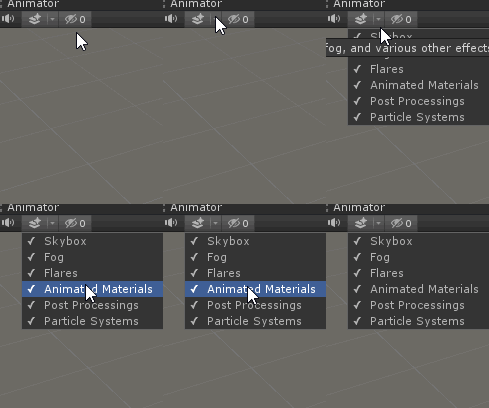
but if it's not working when you click play, i'm not sure
merry shell
That does sound like it would fix it huh haha, but no it unfortunately doesn't work when in play mode 😦
@fathom plinth It did fix it!! Thanks 😄
meager pelican
@dusky yarrow IDK what look you're going for. But the particle system will move and change attributes (size, color, speed, flip-book-frame) of your "spark" over time...that's what it's all about. And it can handle 1 or 10,000 particles. There's a GPU one too (VFX) but it's probably overkill for this and would likely be harder to set up and use for you. But, again, IDK your usecase.
what do you mean by a flipbook in this context?
Here:
https://www.youtube.com/watch?v=jzehPwTEHuE
I don't think I've done a particle shader in SG, I do them in the standard pipeline all the time. But IDK about URP/SG and particles. I suppose I should try it. But you may not even need a custom shader for a "spark".

making classic animation using unity's shader graph.
In this unity shader graph tutorial we will use the Flipbook node to trim a sprite sheet image (atlas) with animation frames, and always display a single frame from the sprite. then we will use the time node to change the frame...
meager pelican
@tall chasm Can be done either way. There's no "one way".
With a shader, you'd animate the specular light direction; basically a custom lighting calc. Or you could animate a super-imposed moving texture containing "highlights" over top of it. Etc. Etc. Etc.
tall chasm
@meager pelican Ok let me give the super-imposed method a try. I don't understand the first method
dusky yarrow
@meager pelican I get what you mean by flipbook now. Just a series of images played in sequence. Like I get from Aseprite.
meager pelican
Yep. Sprite-sheet animation, flipbook, etc.
The reason I mentioned it is that the spark-particle could change shape/form as it moved using that method if you wanted it to. That's separate from the size, and color settings which the particle system also animates.
dusky yarrow
The affect I'm trying to create is more an electric arc than a spark. Sorry, bad explanation on my part.
https://www.youtube.com/watch?v=_2LpCdhuOyQ

Several spectacular examples the explosive force of high voltage power, including uncontrolled arcing at high voltage power substations and a controlled demonstration.
regal stag
Yeah I assumed that was the case, as you mentioned spark between two points. That's why I suggested the LineRenderer component.
There are likely other ways to achieve a similar effect, but that seems the easiest / most obvious to me
meager pelican
So you're psychic too. Cool! 😉
regal stag
Haha, I think I'm just good at reading into people's words too much
dusky yarrow
Thanks both @regal stag & @meager pelican. The spark bit will come when I've figured this out (i.e. if I figure this out).
meager pelican
I'm exuding optimism, BanksySan.
There's many techniques for "lightning" too. Maybe use your google-fu and scare up some some examples. Not to counter what Cyan said at all.
regal stag
There is also no reason why you couldn't use the flipbook idea, and apply it to animate a lightning effect on the line renderer.
proud axle
regular ass type
 silk sky
so a classic "Texture -> Sample -> Master" should work?
oh wait I'm retarded
i need to lerp that
proud axle
👍
regal stag
If you have a greyscale texture / mask, it would usually go into the T input on the lerp to interpolate between two other values (if it's just black/white it would output A/B), is this what you mean? @silk sky
regal stag
No problem
regal stag
I guess?
It's better to just ask a question if you have one, I'm sure others can try answering it too
silk sky
So I have a transparent object, in it there's a inverse fresnel wich work as sort of light pulse, using and HDRI color
problem is even if Intensity is high, the light effect doesnt really comes out of the shaded object
proud axle
you put it in emission?
silk sky
yes sir
proud axle
now it doesnt actually generate dynamic light, its an effect, and needs something like bloom to make it shine
regal stag
Yeah, URP doesn't support realtime emission. Bloom post processing is the best way to make it look good.
proud axle
while I think the default unity shaders emissive properties can be baked or whatever theres no realtime GI stuff
silk sky
I need to access to a shader color and switch it in game. problem is when I exit the scene from editor the color doesnt turn back to previous one
tall chasm
Don't understand what's with this error
proud axle
the shader needs a _MainTex
it looks like it just has some Colors
just assign _MainTex as a reference name
meager pelican
@tall chasm Just create a Texture 2D property on the SG blackboard (exposed I think) and name it _MainTex in both places (I think it's called reference).
proud axle
name isnt as important as the referencename (one is a "pretty" name)
meager pelican
@silk sky When you modify material properties in the editor game mode or edit mode, they "stick" in the asset database. You're not modifying a copy, you're modifying the actual asset. It's not like the other stuff that gets serialized and deserialized.
silk sky
but the issue persist only in the editor right?
meager pelican
Yes, that doesn't happen in a build that I know of.
How did you modify it? In code or by-hand in the editor?
proud axle
@tall chasm
tall chasm
@proud axle , @meager pelican Got it. That fixed it. But my shader doesn't require a texture so I don't understand why do I need to add an exposed texture field?
meager pelican
It's a sprite, right?
proud axle
it sounds like its required by whatever that thing was like a UI Renderer or something
something on the Canvas
meager pelican
The sprite system wants that texture reference because sprite materials need it to "work". (^^ or maybe UI like Tront is saying)
tall chasm
Yea it's part of the UI Canvas. No matter it's ok now haha
meager pelican
Dang psychics.
I'm 0 for 2 today.
Just for the record, sprites want that too. 😉
tall chasm
Ok I understand 👌 Thanks!
how do I make this in shader graph
Trying the make the button shine with your method @meager pelican
meager pelican
Just make it in a graphics editor.
OK, so you probably want the same UV0 to start with for both, BUT, for the scrolling one you do your time offset thing like you did above. Then you add the RGB values and normalize the result. I'd leave the alpha as it is from your original main coin texture. That's one way. It's an additive color blend, which works with your black (0) background and your white/gradient color stripe.
So basically the only diff is the alpha, if I read your graph properly.
How did it end up working for you? Did it scroll color across?
dusky yarrow
Creating a curve with the LineRenderer gives me annoying artefacts when the rate of change of the curve closes in on the number of vertices. Is there a way to smooth this out or do I just have to create a crap load of vertices?
 plucky bone
Add more verts is the answer
dusky yarrow
@plucky bone is there a magic equation that already exists around the differential of the tangent and the number of verts?
dusky yarrow
Is this the correct way to draw a curve? With the LineRenderer, I mean.
plucky bone
It's one way
You can quite easily do your own mesh generation as well
But you'll probably end up with the same resutl
meager pelican
@tall chasm did you get it working?
dusky yarrow
What's wrong with this method?
void surf (Input IN, inout SurfaceOutputStandard o)
{
    o.Metallic = _Metallic;
    o.Smoothness = _Glossiness;
    o.Alpha = 1;
    o.Albedo.rg = IN.worldPos.xy * 0.5 + 0.5;
}
It's not compiling. invalid subscript 'xy'. IN.worldPos.y also fails. Doesn't worldPos have a y?
meager pelican
Show your Input struct
dusky yarrow
@meager pelican
struct Input
{
    float worldPos;
};```It should be a float3
So your guess was basically correct, there was no y, only an x, because a float has an x.
you can even swizzle the x like
...

o.Albedo = f.xxx;
@tall chasm Here's a tileable texture for your diagonal:
meager pelican
And a quick shader. I cheated with a custom node to make it less spaghetti and fit but you can duplicate that math easily enough with "real nodes". Make sure your textures are set to wrap mode = repeat for this to work. There's no normal mapping or other lighting in this or anything. So simple.
meager pelican
And of course there's many other ways to do this: Lighting calcs with normals and such for better specular highlights, and then there's generating it with another tool and using a flipbook animation. To name two.
tall chasm
@meager pelican This is not for a game object in world space
It's for UI button/coin/etc
So it's unlit, not affected by light
I don't have alpha channel for Sprite Unlit Master node
tall chasm
This equals to:
The moment I connect the Add
Button becomes weird
@meager pelican
 low lichen
@dusky yarrow Instead of relying on the shape of the mesh to make the curve, you can just use a transparent quad and do the sine wave in the frag/surf function.
Then it will always be pixel perfect.
 naive mural
hello, i'm writing a compute shader and wanted to make a mutable sampler which I would pass from CPU to GPU. is this possible? ComputeShader class doesn't have a SetSampler function and looking at the docs it looks like it always has to be hard coded.
meager pelican
@tall chasm The color in your pic is a vector4, so make sure the final component is set how you want it (the A in RGBA).
As to "button becomes weird" I guess I'll have to mess with a UI sprite when I get a chance, but that highlight looks added and tinted. I'll have to check on blending for the UI sprite. The "weird" is the black border? or what? Because the additive color is there. So confused as to what you want. Make sure you set the alpha component properly.
You may need to check the import settings on the "strip" texture and make sure you import alpha from it (or use alpha from greyscale).
 left pivot
hello, I have a problem
preview is working right but as you can see doesn't work on scene.
i don't know why? can someone elaborate?
low lichen
@left pivot Where's the scene view?
low lichen
@left pivot Is the problem that the outline is not as thick as the preview?
left pivot
yeah
low lichen
I can imagine it could be affected by the resolution of the view. The preview is much lower resolution.
meager pelican
Did you use derivatives, @left pivot ?
What outline technique are you using?
left pivot
is there a work around? what preview shows is what I need.
it's offsetting texture up, down, left, right. adding together then adding to main tex.
low lichen
How are you determining how much to offset the texture in each direction?
Just a fixed offset?
left pivot
I have a vector1 that is multiplied by 0.01 otherwise offset is too much.
it's exposed to inspector
low lichen
Are you able to get it to look the same in the scene view if you increase this offset?
low lichen
Can you share the whole shader graph?
left pivot
yeah sure
there are 2 group named as left but one of em is right one.
even this is unreadable though.
I can send the graph also, it's from a youtube tutorial. tutor's works fine. not mine though.
URP 7.1.8 with 2019.3.06f
Sorry but I got it done.
it was because of Color's alpha. I don't know why 😦
sorry to take time
shame on me
meager pelican
@naive mural Is it a set of simple changes such that you only have one or two or four permutations? It might not be too bad due to cache locality/coherence to multi read and then "just" select.
naive mural
I wanted to make an option to give the ability to select any sampler state out of the ones available on unity. Bilinear/Point/Trilinear and Clamp/Repeat/Mirror/MirrorOnce. That would make 12 different total combinations. Atm i just declared the most useful 6 inside the shader and made a switch statement inside the shader to decide which one should be used based on an enum on the CPU's side. Feels quite ugly to do it this way though.
naive mural
runtime
meager pelican
Yep, I knew you'd say that! ;)
IDK if it can be done. If it can, I can't do it in Unity. Maybe someone else knows.
I'm sure you've read this: https://docs.unity3d.com/Manual/SL-SamplerStates.html
So it's parsing the name of the sampler to get the mode. At design time you might be able to pull off a substitution (and I'm not even sure about that) but at run time...I'd be stuck with the same type of switch statement you're using too.
I'd nest it though, so the B/P/T would each contain another switch or ifs for C/R/M/MO and try a [branch] and see what happens. The compiler might just runroll all that anyway without further intervention. Oy.
You might want to see if dynamically changing the texture settings in C# will help. But that's texture instance specific, not sampler in shader.
naive mural
i haven't considered changing the texture settings, i wonder if it can just be changed while the shader is being dispatched and then reset it with little to no cost. Will have to check it out. Thanks @meager pelican
meager pelican
Yeah, and at worst-case you'd have 12 instances of a particular texture's combinations, and could swap them out based on need. Still kind of sucks as you'd need multiple instances for texture X to have different effects for multiple objects.
IDK if it only stores the actual texture once though on the GPU, and just changes settings....IDK how the engine handles that.
Or like you say, do it on the fly, but then you'd f-up instancing or drawing, maybe. I'd have to play with it.
Because there's a one-to-one relationship between a texture and those settings, but IDK if it caches the actual texture bitmap internally and uses the one for multiple instances of a texture2D. And materials map textures to them. and batching is by material.
Instancing can pass per-instance attributes and there's a SetTexture() on a material property block.
@naive mural
 ocean wren
Hi everyone, I'm currently working on a shader and I would like to know what is the relation between the base color and the red channel of the detail map (color desat) ?
naive mural
@meager pelican Finished testing. If filter/wrap settings are changed before compute shader's dispatch and then reset right after dispatch, other systems are not affected, unless ofc the dispatch itself would need to be batched. Changing the settings is also not very costly, roughly 0.01f ms on my system
meager pelican
@ocean wren See the detail example in the surface shader. It's multiplied * 2 in their example so Albedo.rgb *= detail.rgb * 2;. You didn't specify the pipeline, but if you're writing a custom shader anyway....you can deal with it however you want to blend it.
naive mural
hello, does anyone know how to create regions in HLSL code?
 digital venture
Guys, is shadergraph only broken for me in 2019.3? I created fresh project, imported URP, changed in project settings to use a render pipeline, reimported materials
but when i open up shadergraph, it says that current pipeline is not compatible with this master node
sorry my bad, i applied my pipeline to quality, not graphics
it works just fine now
low lichen
@leaden fable You mean draw lines between the 3 dots?
low lichen
@leaden fable What mesh are you using with this shader and how big is it?
It would be more performant to just draw a triangle mesh with a simple shader than doing SDF
low lichen
In what context? Creating the mesh?
 leaden fable
Nope, it's always a triangle with the same view distance
low lichen
Then why not just pop a triangle mesh into the scene and make it a child of the character?
leaden fable
Is there a way to make it have no thickness as a mesh?
I'm using a shader because I want it to be one with the floor
low lichen
You can have it be just one triangle face, which has no thickness.
 devout quarry
I'm having kind of a funny SG bug
if I draw an 'EditorGUILayout.BeginFoldoutHeaderGroup' in my editor with text that is the same as an existing graph, the SG icon is put next to it
so in this case I do have a Caustics.shadersubgraph file in my project
ocean wren
Hi everyone ! Is it possible to input a material directly in a shader to automatically plug the maps ? like in the layered lit
In nodal system not in code
 amber saffron
Not without a custom material inspector
ocean wren
Okay thanks @amber saffron
 waxen pewter
guys please help, trying to install modern LW shader to my old project but its not really workin so far, whats the problem ?
why i dont see my exposed shader varibles(color) and i dont see my shader on the dude get applied ?
i did all this
amber saffron
Did you do "save asset" in the graph window ?
waxen pewter
oh... so that what cusing this problem
sorry im little dum first time using shader graphs
dusky yarrow
@dusky yarrow Instead of relying on the shape of the mesh to make the curve, you can just use a transparent quad and do the sine wave in the frag/surf function.
@low lichen That's what I was originally thinking, albeit with the shader graph. The problem was that the shader still relied on the verts being there in order to move them.
meager pelican
Hey @dusky yarrow - is this a situation where your effect will always be off in the distance and the user/camera view won't circle around the two points? Or can the user move around them? (or is it 2D)
dusky yarrow
@meager pelican Neither yet, I'm just trying to learn Unity and shaders. I don't have any use case for it at all.
It just seemed like a reasonable thing to use as a project to find out how things work. I'm very new to Unity.
meager pelican
It's all cool. The thing is that certain situations can make you select one solution over another, depending on needs.
regal stag
@dusky yarrow I believe @low lichen was suggesting something similar to this. Using alpha cutout rather than offsetting any vertices.
The advantage here being it's not relying on any vertices, so the "resolution" of the curve will always be perfect, regardless of frequency/amplitude.
 normal hedge
Would anyone here be willing to advise an absolute shader noob? I have a concept I'm trying to pursue, but I don't have the understanding to know what kind of things to research.
I have worked in Unity for a while so I'm not a complete beginner with the engine, just with shaders 🙂
meager pelican
You're better off just asking the question "to the world" and seeing what drops out of it. You don't have to ask to ask.
normal hedge
Fair enough, lol. Would this be the place to do that? That's kind of what I'm looking for.
meager pelican
If it's a shader question, sure. But see the resources (the stick pin above) first, or maybe a real general shader tutorial on YT or something so we don't have to write a book just to answer a question.
normal hedge
Fair enough. I have watched some videos on shaders before and I think I wrote some super basic intro shaders.
 fervent tinsel
I just use google :D
Anyway, I agree, if you have actual question then ask that instead
normal hedge
I'm looking to sample a texture, then use that to "stamp" another texture onto it? Looking to take an albedo texture and use it to generate a texture with "brush strokes" based on the original albedo color. Does that make sense? What should I research to accomplish that?
dusky yarrow
@regal stag @low lichen That looks like what I was envisioning. I'll have a play with that technique. Thanks both.
meager pelican
@normal hedge IDK it depends on exactly what you want to achieve. But you could start with "masking" and "blending" searches.
fervent tinsel
@normal hedge you can look into custom render textures if you want to actually generate a new texture with a shader
if you just want to make a masking shader, that's a different thing
normal hedge
Quick googling suggests I'm looking more for the render texture option. Thanks! That's a big help already...
meager pelican
That's the output destination (and a good suggestion) but it isn't the methodology. You'll still want to know how to mask, blend/stencil, etc. unless all your stamps are "square". 😉 The CRT has a nice framework around it. But you still need to write a shader for the material.
 shell walrus
Question. I'm trying to base a shader on light direction and had to use a custom function. In the tutorial I'm following they were able to get a main light node. I can't find this, even in the latest Unity?
proud axle
pfft I wish there was a main light node
pisses me off it isnt included
@shell walrus you figure it out let me know plz
shell walrus
yeah for now I've had to make my own custom thing (very out of my depth here lol) figured it out via this https://connect.unity.com/p/getting-light-information-with-a-custom-node-in-shadergraph

Unity Connect
Custom Nodes are a formidable addition to ShaderGraph to extend its functionality
shell walrus
Here's a question. Is it daft to try making a cell shaded shader with PBR in mind? Do either roughness, normal, ao, height or metallic defeat the purpose of cell shaded?
 craggy patrol
hey i want to start using shadergraph
but it does not work with the universal rp so i imported the lwrp but i can not create a rp asset
amber saffron
Shadergraph works with URP
I don't know how you did set up your project, but shadergraph is imported with URP, and should work out of the box
craggy patrol
ok thx i will try that
craggy patrol
thx @amber saffron that worked
 celest flame
I have a question, I'm using a shader based on the white box shader from unity and some parts of objects (mainly the shadows from those objects) get this particular colour. It glitches whenever you move. Can someone tell me why only these parts get coloured and how I can remove this effect?
low lichen
@celest flame Are you using URP/LWRP/HDRP? Forward or deferred? Post processing?
low lichen
That kinda resembles the pattern of SSAO.
Are you trying to make an unlit shader?
What do you mean by the white box shader from Unity?
celest flame
No it's a lit shader
low lichen
You mean the Standard shader and the default material?
celest flame
the standard shader yes
low lichen
The Standard shader doesn't work on HDRP
celest flame
I'm sorry - It's not the standard shader - It's the material that comes with the DOTS Sample project
grand jolt
@shell walrus Borderlands exists, so... not dumb.
craggy patrol
https://cdn.discordapp.com/attachments/621316280321966080/677110744126455839/unknown.png
https://cdn.discordapp.com/attachments/621316280321966080/677110574953529344/unknown.png
Hey i have upgraded my project to urp and applied a bit of post processing (tried to copy the one on the first picture)
and now i noticed all those weird shadow glitches

 low lichen
@craggy patrol The first screenshot is realtime shadows? Not baked?
Nevermind, it looks like realtime soft shadows
The second screenshot is hard shadows, probably at a lower resolution so each pixel of the shadowmap is even easier to see.
craggy patrol
how would I fix that ?
low lichen
@craggy patrol Both settings are in the render pipeline asset you created when first setting up URP
craggy patrol
ok thx
low lichen
You can try just enabling soft shadows and see if it's good enough. If not, try increasing the shadowmap resolution.
 faint notch
Can you not use Material.SetTextureOffset on Shaders generated from Shadergraph?
amber saffron
You can, in some fancy way
faint notch
I can create my own property and use SetFloat etc right, but was just wondering
Hook that into Tiling and Offset
amber saffron
If you know that the original syntax in shaderlab for texture tile/offset is [TextureName]_ST, you can define a shadergraph property using the same Reference as the texture + _ST
Then, in the graph, use this vector4 for a tile/offset node
So, for a texture with reference _MyTex add a vector4 property with reference _MyTex_ST and in c# use material.SetTextureOffset( "_MyTex", value )
celest flame
How can I remove this effect from my shader? It keeps doing this with shadows on triangular spaces
amber saffron
I highly suspect that you have a NaN issue here. What are you doing in the shader ? Can you share the graph ?
celest flame
I'll send it in 2 pics, it's unclear if I send it in 1
it's basically a modified version of the DOTS Sample material
amber saffron
Well, even with so many screenshot, it's barely readable
celest flame
yes, I was afraid of that
it has the same design as the shader used in DOTS Sample, just other colours. But the original shows this spot aswell
faint notch
@amber saffron thanks, thats cool
amber saffron
Apart from the glitched deformed character, I don't spot anything suspicious in this screenshot
celest flame
the last ss was an example for the original shader
My shader fits well everywhere except on triangular plates where shadows fall, but I can't figure out why
It flickers when I move, this is how it is supposed to look like
amber saffron
If you could share your project that would be great to understand what is happening
craggy patrol
i am using urp and for some reason it looks like ambiet occlushion is doing nothin
amber saffron
No AO in universal
or, iirc, it's not implemented yet with URP built-in post process stack (will come soon), and I'm totally not sure if it works or not with PP stack v2
craggy patrol
mhhh ok thx
fervent tinsel
SSAO used to be disabled from PPv2 when using LWRP
I wouldn't expect it to be any different with URP
some user did hack it to enable it
fervent tinsel
it's not that it can't be run on it, it seems to be one of these artificial limitations because LWRP was designed to not rely on compute
yes, that's been on the works for months 🙂
like remy mentioned, it's coming soon
on URP product board, it's listed among short term things (within 6 months): https://portal.productboard.com/8ufdwj59ehtmsvxenjumxo82/c/15-ao-support
Support for ambient occlusion.
wish we had a similar board for HDRP as well, cough
 proper bobcat
HI guys! Who can help with vertex color shader setup for IRP ?
proud axle
@proper bobcat whats your question?
generally you just multiply vertex color node with the texture sample results
proper bobcat
@proud axle I want use only vertex color with in pbr shader type. If I'm using color as albedo and emissive colors still washed out
proud axle
so vertexcolor node straight into albedo and emission?
over here on my machine that makes a pretty strong RGB
proper bobcat
@proud axle
proud axle
all supposed to be the same color?
proper bobcat
@proud axle that supposed to be more saturated. That looks like wrong gamma range
proud axle
well URP is in linear mode by default
not gamma
you can change it in the player settings I think
proper bobcat
@proud axle thanks. I will try it
 uncut karma
@celest flame you could try saturate or max 0 on the shadow applying to see if it clears up, it's either Nan or some negative value inverting the color
@proper bobcat if vertex color is coming through as linear it can just have a conversion applied in the shader, no need to switch the whole project to gamma
proud axle
is there an easy way to do that @uncut karma ? the linear2gamma conversion?
uncut karma
There's a color or conversion hlsl file as part of the core render pipeline library that has all the methods
If shader graph doesn't do it it can be pasted into a custom node
I'm guessing there's also a define in urp or hdrp that says if vertex color is actual color or linear data but it would be buried in their shaders
 still orbit
In Shader Graph, you can also use Colorspace Conversion node. Linear > SRGB and vice versa
autumn bramble
I have a weird problem with vertex displacement:
- I created a cube with many vertices in Blender.
- imported it in Unity.
- added this displacement shader graph:
But this is the result I get:
- Why would the mesh break up like that? I double checked in Blender: all vertices are connected.
- Why are the other Vertices ignored? Every side has around 20 more vertices (I'm looking for a kind of jagged rock effect).
amber saffron
Having the vertices connected in blender doesn't mean they are "really" connected.
When you have a normal split, it is interpreted in 3D engines as two (or more) vertices
Ans since you have normal splits (to distinguish each face), and you push the vertices along their normals, what you see here it 100% expected
autumn bramble
Is there any way to keep the normals connected? Or: if this is expected, there doesn't seem the be much you could do with vertex displacement
still orbit
you need to equalise the vertex normals
amber saffron
Keep them connected : don't use hard edges.
Or, you can also choose to not rely on vertex normals for the displacement vector
still orbit
^ if the edges are smooth the vertices will displace how you expect.
autumn bramble
Ok thanks Remy and Kink: no I have some stuff to try 😉
Ok beveling the edges didn't help, on to the next test ^^
plucky bone
@still orbit What do you mean by equalise?
autumn bramble
I think not using the normals is the only option.
still orbit
Like, a vertex on a cube edge is actually between 3 and 6 vertices (depending on the triangle layout/winding). Hard edge means each has a distinct normal direction. If all joining edges are smooth it means all those normal directions are equal.
Of course all that technically depends on mesh format, but thats by far the most common
autumn bramble
Ok even if I dont use normals, but change the vertex object coordinates, I get the same result.
Is vertex displacement only viable for planes? Like a water surface?
still orbit
"change the vertex object coordinates" can you elaborate?
proud axle
yeah you can have a cube with 6 faces
or like a ton
it depends on UVs and normals
Dont think its just normals its UVs too!!
for a UVcube with 6 difference faces
you got
4 verts per side
24!
VERTS: 4 down, 4 up, 4 left, 4right, 4 front, 4 back
think about ur cube man
 autumn bramble
"change the vertex object coordinates" can you elaborate?
@still orbit I meant that I don't use the Normal Node in Shader Graph, but directly change the position of the vertices. But I understand now that this is no solution either, because there actually are several vertices at the edges 😉
@proud axle thinking about the unwrapped object is helpful, thanks
craggy patrol
any idea on how i could invert noise in shadergraph ?
low lichen
@craggy patrol Invert Colors Node?
craggy patrol
kind of but not really XD
regal stag
Depends what you mean by invert, but you probably want a One Minus node
craggy patrol
i basically want everything that is white to change to black and the other way around
regal stag
Yeah the One Minus will do that
craggy patrol
 noble tree
looks inverted to me
regal stag
I mean, the places that are black are now white, and vice versa
craggy patrol
i quickly edited that in photoshop
regal stag
If that's the output you want then you'd need to do this :
 mental sentinel
still orbit
mental sentinel
still orbit
its -1 to 1
Use remap > (-1, 1) (1, 0)
or if you like how it looks and just want visual inverse Saturate > One Minus
regal stag
I don't think it is a -1 to 1 range, the Gradient Noise output is roughly 0 to 1.
still orbit
yea youre right, my bad
regal stag
I think what they were expecting was due to the difference between linear & gamma colour spaces
still orbit
yea it looks like it
devout quarry
@regal stag why do you say 'roughly' 0 to 1?
I've noticed I've had to use a saturate node after a gradient noise for good results in some cases
 lethal steppe
Hi Guys, maybe you have some clue whats going on: I have a postprocessing shader which does not really (not drastically at leats) affect the performance in the editor. But when I turn in on in a built version of the project its super slow. (Using the sam resolution in both cases) Maybe something is of the shader is compiled on the fly? I am using IL2CPP. Could be I am missing something fundamental, some guide what to read would help alread! Thanks 🙂 *Added resolution info
regal stag
@devout quarry I said roughly because I've also noticed it can be slightly above 1 and slightly below 0. Probably something to do with how it's implemented, but I'm not sure why exactly - Maybe something to do with floating point errors?
low lichen
@lethal steppe Have you tried profiling what's causing the performance issue?
Knowing at least whether it's GPU or CPU time would already be helpful.
lethal steppe
I see good point, I will check and copare the two cases, thanks!
lethal steppe
In the CPU usage there is a call in the build version: Gfx.WaitForPresentOnGfxThread - google told me it could be a lot of things. This is only in the built version, and eating like 98%
Other than that, in the GPU usage, the longest calls on the GPU are the Graphics.Blit() I do in my cameras onRenderImage(). In the built version its 61ms 95% in the editor its 5ms 38%.
I assume this could be a setting which is done differently in the built version? The multithreaded rendering (Graphics jobs) is not turned on. There are some differences in the hierarchy though - but I guess thats some default editor vs build differences.
Maybe got any idea what direction should I proceed? I will now just try different build settings and lets see.
low lichen
@lethal steppe Is this on Windows, both the editor and the build?
lethal steppe
yes both are on windows
low lichen
The Gfx.WaitForPresentOnGfxThread is just the CPU waiting for the GPU to finish its blit.
lethal steppe
its a gpu then 😄
low lichen
Is it only 1 call to Graphics.Blit?
lethal steppe
its 2 calls in both cases
 kind helm
How can i get the depth texture in hdrp?
meager pelican
@lethal steppe Can you do DX12? Try PIX on the build and look into what's going on. Or native (GPU manufacturer) debugging tools.
@kind helm using SG? Isn't there a scene depth node?
fervent tinsel
@lethal steppe are you sure it is your pp that makes build slow?
Like have you disabled it and it is fast again in build?
tame topaz
Hi everyone,
In HDRP, I'm just changing a material's color/emission via as a quick test:
model.material.SetColor("_BaseColor", new Color (0, 1, 0, 1));
model.material.SetColor("_EmissiveColorLDR", new Color(0, 1, 0));
model.material.SetFloat("_EmissiveIntensity", 12);
And while this is changing it, it doesn't actually update the model in scene view (though its material's properties are indeed changed). Is there something I need to do to push the change at runtime?
meager pelican
@tame topaz How is "model" set? Also, normally you want to change sharedMaterial and not Material. Depends on if you want to make a new material instance or not.
Also scene-view, and editor-view are different, as are edit mode and play mode. So I'm not sure where you're going on your last sentence. IN the runtime, ( a build), it will only change for the run, not in the asset database.
tame topaz
Right. I'm changing the material at runtime but it isn't actually changing it in any view. So while the material defaults as white on start, changing it does in fact update the material in the inspector. However it remains white in view until I manually adjust something in the inspector.
I'll give shared material a shot though
meager pelican
(OK, and none of this is really a shader question. But it's kind of related I suppose.)
What happens when you reference .material is that it clones the .sharedMaterial and then you're editing a local-copy for that object. It becomes an object-specific instance of the material.
The serialization and deserialization of the objects between edit mode and play mode...will restore the status of the .material and .sharedMaterial.
And when you modify .sharedMaterial in the editor (like when using ExecuteInEditMode) you'll find you're modifying the asset database entry.
tame topaz
Ah gotcha. Thanks for the explanation.
meager pelican
It might modify the material permanently. I don't remember offhand. But...one thing you can always do is to clone the material yourself and then set all your objects to reference it via .sharedMaterial. I've done that making a "material cache" for various reasons, so that if I already have a particular setting of a material, I set that in a new object's .sharedMaterial, and they all use that same one, but if I need to make a new one I do that too. That way they share when it's the same, and new if it isn't. (like dynamic object creation, but keeping batching when I don't/can't use instancing material property blocks).
meager pelican
But you should seriously consider gpu instancing and material property blocks instead of batching and messing with material settings if you can.
@tame topaz
tame topaz
It's for a coloured shot (4 player local interactive) so using GPU instancing sounds like something we want to do.
meager pelican
Good, then you shouldn't need to modify the material anyway. 😉 But your shader has to be instancing aware. SG is aware for things like color. And so is standard pipeline surface shaders, and you manually code it for vert/frag.
 terse nexus
How would i create a "global" shader. I am using the URP. With global i mean a shader that applies to all Elements no Matter what Material they use. (e.g. an outline shader)
 gleaming barn
@terse nexus I think you'll want to use a UsePass SubShader https://docs.unity3d.com/Manual/SL-UsePass.html
terse nexus
So I must refer it in every shader? I dont quite understand the docs
And this will probably not automatically work with shader graphs, or?
I saw something called render features or similar. Is that maybe a way to go? If yes any ideas how?
low lichen
@terse nexus This concept of applying the same effect on all shaders is not really a thing.
lethal steppe
@meager pelican @shadow krakennto thank you for your input guys.
Yes - turning off the effect itself, makes the build go with 230fps. With the pp on it drops to 15 - also when I resize the window to really small size, the FPS goes up again.
I tried DX12 - same thing. I used PIX, which only works in DX12 mode but could not make that work with the Editor since Hub starts by starting Editor.exe ... So I dont really know what to compare or how to understand what it does display to me. But thanks again guys, I will continue with this tomorrow.
low lichen
@terse nexus Your options are to add this effect to all the shaders you're using, add it as a post processing step or specifically in the case of an outline shader, you could render all the objects again but with an outline material as an override material.
That last step will probably double your draw calls, though
meager pelican
@lethal steppe You don't want to use it in the editor, use it in a build (DX 12 debug build). There's a shader pragma for debug symbols in shaders too.
See point #3 here (read all):
https://docs.unity3d.com/Manual/DebuggingShadersWithPIX.html
@terse nexus no Matter what Material they use. (e.g. an outline shader)
Shaders ARE materials, and materials ARE shaders. The material just holds the settings for the shader selected.
However, you can pass those material settings to a shader override as explained here:
https://docs.unity3d.com/Manual/SL-ShaderReplacement.html
It's done for a camera.
 gritty linden
Does anyone know why I get this error? Shader error in 'Cel-Shaded RP/Unlit': 'TransformObjectToWorld': no matching 1 parameter function at Assets/Custom SRP/Shaders/UnlitPass.hlsl(24) (on d3d11)
UnlitPass is supposed to contain some code for a custom Unlit shader I'm working, here's the code. I include the required SpaceTransforms.hlsl from the core RP library in the Common.hlsl file.
low lichen
@gritty linden So "../ShaderLibrary/Common.hlsl" is your own file that includes com.unity.render-pipelines.core/ShaderLibrary/SpaceTransforms.hlsl?
gritty linden
Yep
low lichen
If you manually include SpaceTransforms.hlsl in this shader, do you get duplicate definition errors?
gritty linden
Actually, apparently it's because the Attributes struct doesn't have the positionOS parameter. Don't know why the compile error didn't state that but hey, it works now, so whatever I guess
I could have noticed that earlier as well, to be honest 🤦♂️
lavish stream
@regal stag I was reading your post about world space UVs and triplanar mappping. its really helpful! i'm using it for this https://i.imgur.com/LMYgHGH.png
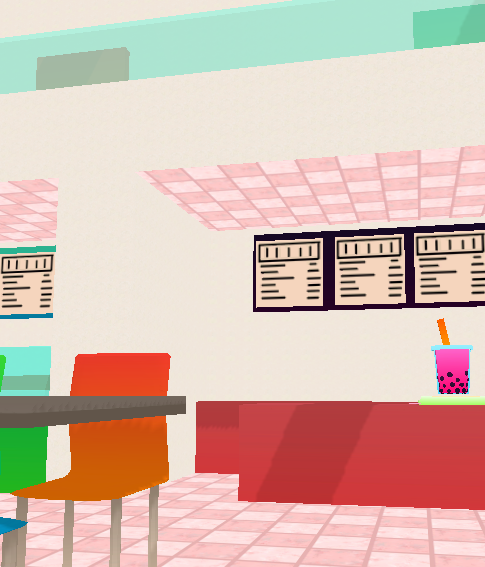


however, it is a little weird that the ceiling must be the floor tile texture
would it be much more complicated to use another texture for the negative normals of an axis?
fervent tinsel
use different mesh/material for ceiling or make more complicated shader that takes the direction into account
proud axle
I think checking negative normals would be easy then you have 6 direction triplanar
fervent tinsel
it's not difficult but you end up paying for two texture samplers instead of one
not a big deal it just feels that there could be simpler solutions but want to use one generic for all
terse nexus
Thx @meager pelican I'll probably just add a custom shader to every object than. It's easier in my case.
kind helm
@meager pelican I need it for a custom volume so i don't have Shader graph (Unless you can now use SG to create post processing)
terse nexus
how do I turn a normal map image to a normal vector?
terse nexus
in shader graph that is
devout quarry
You can sample the texture and set the type to 'Normal'
terse nexus
like this? http://prntscr.com/r28ct4
 devout quarry
What is it you want to do?
terse nexus
i have a function that requires a normal vector. I want to input that vector from a normal map image
I guess this does the job
devout quarry
Yeah, you should just be able to plug in the RGBA(4) slot
terse nexus
new problem :P
I have a vec4 with the calculated lighting and a vec4 with the texture. But the shadowing is to strong. How can i reduce its influence in the multiplication. http://prntscr.com/r293py
I just cant think of it although it should be basic math
 meager pelican
@kind helm I need it for a custom volume so i don't have Shader graph (Unless you can now use SG to create post processing)
I don't remember what pipeline you're using.
But OK.
IDK why you can't use SG for post processing, but you end up making a custom shader anyway I think (IDK much about SRP's post processing, frankly). But I mean you could use a basic shader that shades a quad in screenspace, then view the code and edit it up into whatever the post processing requirements are for SRP. You know, start out in SG as a code-generator. It would show you the syntax for the depth buffer.
Ultimately a pp is "just" a full screen triangle or a full screen quad, with shader processing and a blit.
So I guess I'm saying it doesn't matter if you actually USE SG in the end, but it will show you the syntax for the depth buffer if you use it to generate some code.
The docs imply they have macros for various calcs, but you'd have to make sure you had the texture and sampler definitions too. Docs say:
void Unity_SceneDepth_Raw_float(float4 UV, out float Out)
{
    Out = SHADERGRAPH_SAMPLE_SCENE_DEPTH(UV);
}```
for the scene depth node.Sry i'm using HDRP here. I tried looking at the generated code but yeah, they use macros and that doesn't lead me to anywhere. I've found LoadCameraDepth() but it's behaving weird and i can't find any docs about it
meager pelican
i can't find any docs about it
Welcome to the bleeding edge. We have cookies.
You'll have to dig around and parse the include files and figure it out. Probably someone else can give you more specifics. I don't use it much (yet). Wishing you luck.
But the macros should work.
terse nexus
any idea how I can scale up an object with a shader graph? Not by percent like multiplying 1.1 the size to the vertex pos, but adding 0.1 units to its size
meager pelican
Normally I'd just mess with the transformation matrix in the vertex stage, but in SG, IDK...and even if you can re-transform you'd probably get inefficient duplication of work. You could just do a normal-sized SG version, then edit the shader, but that kind of defeats the purpose and uses SG as an initial code-generator. But it isn't likely to be everything to everyone...there's always limits.
Maybe it has a way, but if it does, IDK how to mess with the underlying object-to-world local scale in SG.
terse nexus
i was trying to outline objects with this. But due to just multiplying the border width would be different which looks a bit strange
regal stag
@terse nexus I believe object (hull) outline shaders usually use the normal vector to push the vertices out, (Position + Normal Vector * Width). This could be done in World space, then converted to object using the Transform node, (as the master requires the input in object space). It'll only work properly if the mesh has smooth normals though.
Hmm. You'd also need front-face culling though.. and I don't think shadergraph has that option, unless it's been added in URP 7.2.0 which I haven't used yet. Could likely use double-sided and Is Front Face node to alpha clip front faces, but that seems a bit of a hack. Would be easier to edit the generated code and change it to Cull Front rather than Back.
meager pelican
You know...unity just needs an outline option in their standard shaders across all the pipelines. It may not solve every need, but this question comes up like 20 times per week.
And there's several ways. If you "just" want outline, here's one:
https://forum.unity.com/threads/lwrp-outline-shader-help-needed.710642/
But your google-fu should give you 50 more options in short order.
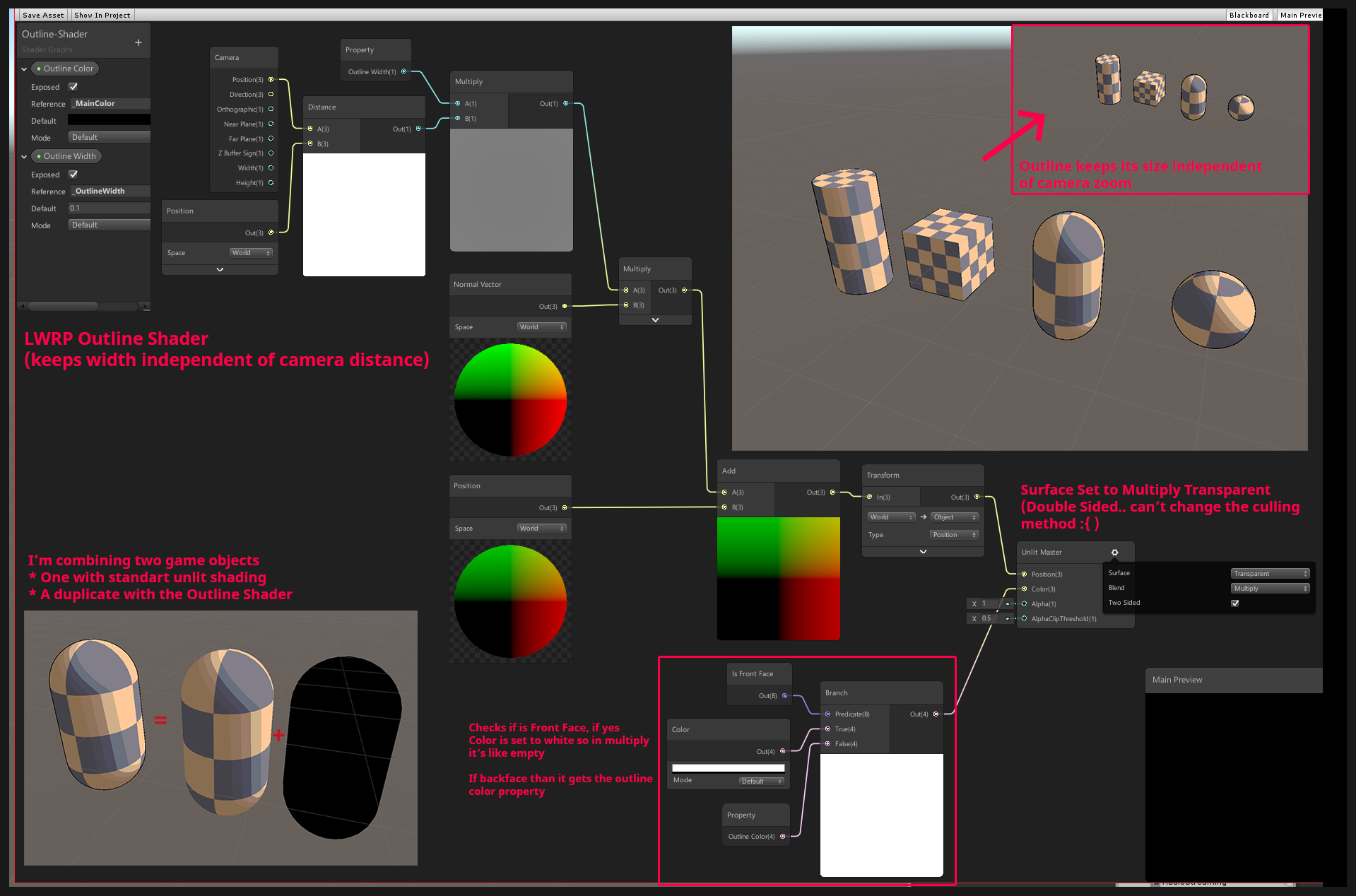
Unity Forum
[IMG]
Hey guys, i posted this on unity3d reddit but got no response yet :( so i'll try it over here. Here is the post:
I'm creating a lwrp shader...
And that one still discusses the same issues as @regal stag just mentioned.
amber saffron
@terse nexus If it's for outline, I'm pretty sure you can convert the normal vector to view space, and from there do some maths to do a constant pixels sized outline
devout quarry
In shadergraph I have some waves by offsetting the vertices, but when I want to modulate the wave height using the scene depth node, the shader refuses to compile...
Is this because frag/vert stages in the shader? And how would I then modulate wave height by depth?
 stone sandal
are you in universal or HD?
devout quarry
Universal
I'm not on my PC right now so I'm not sure but when I try mixing scene depth with vertex displacement, I get the error on my master node saying something about 'vs 4.0' or something like that
There's definitely a 4.0 in the error message, I'll check later for full error
regal stag
It won't even let me connect the scene depth node to the vertex position output, likely due to the vertex/frag stage difference.
devout quarry
Yeah sometimes it does allow me to do it, but most of the times it doesn't
stone sandal
it would only "allow" it if it's in a subgraph, iirc
devout quarry
Yup that's the case
stone sandal
but you shouldn't be able to use that in vertex right now
devout quarry
So how could I modulate wave height with scene depth?
Pre-bake the depth or something?
regal stag
Is that because sampling depth doesn't work in vertex stage, or just because the node uses a non-lod sample?
Would it be possible to sample the _CameraDepthTexture in the Sample Texture 2D LOD node instead?
stone sandal
you could try, the built in node doesn't use LOD iirc
regal stag
Just tested, seems to work. 😀
Using this, probably not written perfectly. Used the shadergraph preview ifdef, because I'm also using the Scene Depth node (in the fragment stage) and it was causing a redefinition, but the preview needs it defined otherwise the custom node errors.
(uv is Screen Position node input)
#ifdef SHADERGRAPH_PREVIEW
TEXTURE2D(_CameraDepthTexture);
SAMPLER(sampler_CameraDepthTexture);
#endif

void Test_float(float2 uv, out float Out) {
    Out = LinearEyeDepth(_CameraDepthTexture.SampleLevel(sampler_CameraDepthTexture,uv,0).r, _ZBufferParams);
}```@devout quarry This works 👆 (Could probably just use the Sample Texture 2D LOD node too, although then you'd need a _CameraDepthTexture property and wouldn't be able to use the Scene Depth node as I think there would be redefinition errors then... I used a custom function so I could also use LinearEyeDepth).
devout quarry
Ooh lovely will try this out, thank you
Do you know why using LOD works with vertex stage?
regal stag
I believe the normal sample method uses screen partial derivatives to determine the mipmap level to use for sampling the texture, which are only available in the fragment stage. For the LOD version you specify the mipmap level - it doesn't need to use those derivatives, so works in the vertex stage.
devout quarry
So what would be the downsides of using the LOD sampling for depth always?
regal stag
@devout quarry As far as I know the depth texture in URP doesn't have any mipmap levels other than 0 anyway - so I'd assume the output would be identical. Not sure if there's any performance difference between using Sample and SampleLevel though, can't find anything after a quick google.
devout quarry
Alright, thank you Cyan!
terse nexus
@regal stag to my outline issue. I am currently using render features. To re render objects with the extruded (outline) shader and than render the normal object on top. It kinda does what it should.
 fossil ermine
Is there somewhere any documentation, or info. About how you should upgrade custom written shaders in the Build-in renderer to the new Universal renderer? Or does anyone by any chance know if it is even possible to recreate shaders in URP without using shadergraph
regal stag
@fossil ermine I'm aware of this video : https://www.youtube.com/watch?v=ErsXwcb3n4c from a Unite talk. It's basically just copying code from the "SimpleLit" shader in the "Universal RP/Shaders" package directory though.

The Universal Render Pipeline brings with it long-awaited accessibility and performance improvements to rendering in Unity.
Speaker:
Yilmaz Kiymaz - InnoGames GmbH
Learn more about the Universal Render Pipeline: https://on.unity.com/2mmIawj
fossil ermine
A thanks a lot! I will look to that
regal stag
@fossil ermine There's also a PBR example shader for URP here, which I just stumbled across. It has some nice comments to explain it : https://gist.github.com/phi-lira/225cd7c5e8545be602dca4eb5ed111ba
fossil ermine
Thanks a lot for the help!
 waxen hollow
Hi im tryin to create a 2D sprite outline shader and it works so far. But the outline is are more inlines ``` _OutlineColor.a *= ceil(color.a);
_OutlineColor.rgb *= color.a;
            _OutlineSize /= 10;
            float up = tex2D(_MainTex, IN.texcoord + float2(0, _OutlineSize+1*_MainTex_TexelSize.y)).a;
            float down = tex2D(_MainTex, IN.texcoord + float2(0, -_OutlineSize+1*_MainTex_TexelSize.y)).a;
            float left = tex2D(_MainTex, IN.texcoord + float2(-_OutlineSize+1*_MainTex_TexelSize.x, 0)).a;
            float right = tex2D(_MainTex, IN.texcoord + float2(_OutlineSize+1*_MainTex_TexelSize.x, 0)).a;

            float outline = (1 - left * up * right * down) * color.a;

            #ifdef UNITY_UI_ALPHACLIP
            clip (color.a - 0.001);
            #endif

            return color + (outline * _OutlineColor) * ceil(_OutlineSize); ```
How to create the outlines on the outside not inside ?
devout quarry
@waxen hollow is this a shader on your mesh?
if so, it makes sense that the lines are 'inlines'
if you want to color lines outside of the mesh
you should do it as a screen-space image effect
soft harness
it's a sprite
devout quarry
yeah alright sprite
but still the outline material is applied to the sprite
so only pixels that belong to the sprite can be manipulated right?
soft harness
i don't know
regal stag
All pixels within the quad of the sprite could be manipulated. The problem here is that the outline (or inline) is based on the alpha channel, which is likely a harsh transition between 0 and 1. It samples 4 neighbouring pixels, and multiplies them together. If any one of those pixels has an alpha value of 0, it results in the inline colour. You'd likely have to change the alpha channel to have that extra padding, if you wanted the outlines to be further out.
Could also try adding the samples together, rather than multiplying. That's what MinionsArt does here : https://www.patreon.com/posts/20894506
If your alpha channel is too close to the edge of the sprite quad though, it will be cut off.
@waxen hollow ^
waxen hollow
alright thanks gonna try that
waxen hollow
Seems to work, better. Just weird that the outline is brighter. based on what color is when the outline starts
regal stag
Might need to clamp / saturate the combined alpha value before it's multiplied with the colour
 west flame
I'm looking for a shader/technique that draw a texture multiple times on the object surface at random position. I feel like it someone already wrote that kind of shader but can't seem to find the right keywords to find it. Any ideas ?
waxen hollow
@regal stag i have to idea. How would i do that ?
                float down = tex2D(_MainTex, IN.texcoord + float2(0, -_OutlineSize+1*_MainTex_TexelSize.y)).a;
                float left = tex2D(_MainTex, IN.texcoord + float2(-_OutlineSize+1*_MainTex_TexelSize.x, 0)).a;
                float right = tex2D(_MainTex, IN.texcoord + float2(_OutlineSize+1*_MainTex_TexelSize.x, 0)).a;

                float outline = left + right + up + down;

                #ifdef UNITY_UI_ALPHACLIP
                clip (color.a - 0.001);
                #endif

                outline *= (1-color.a);


return color + (outline * _OutlineColor) * ceil(_OutlineSize); ``` thats my code atm@waxen hollow Try : float outline = saturate(left + right + up + down);
waxen hollow
already did nothing changed
regal stag
Or maybe saturate(outline) on the final line? It was mostly just a guess
waxen hollow
k
regal stag
@waxen hollow I would probably replace the last line with a lerp instead. something like return lerp(color, _OutlineColor, outline); I'm not sure what the ceil(_OutlineSize) part is about, that might be why it's brighter.
waxen hollow
ceil rturns the smallest integer value that is greater than or equal to the specified value. Means if _OutlineSize is 0 nothing is applied.
but imma try that with the lerp
regal stag
I see, but if _OutlineSize is larger than 1, it'll be brighter
waxen hollow
awsome 0.0 it works perfect !
lerp(color, _OutlineColor, outline * ceil(_OutlineSize)); still using ceil to turn of outline
thx @regal stag
sadly the drop shadow is full red but thats a propblem for our artist :D
regal stag
Might have to separate the shadow into a different sprite
waxen hollow
^^
 wanton yarrow
How do I enable GPU Instancing on the Sprites-Default shader? I can't seem to find the source on my Assets or Packages list.
 warped field
I wonder how to get a color value from a texture pixel based on UV
by scriting not Shader graph
regal stag
@warped field As in shader code? Or in a C# Script?
warped field
shader code I just need to read data off a texture file the pixel color of the uv
regal stag
I tend to use shadergraph, but tex2D (_Texture, uv) should work for Built-in pipeline. (If you are using URP you should use _Texture.Sample(sampler_Texture, uv) instead, although it would also likely be easier just using shadergraph if you are using URP).
For more info, these pages has some example shaders for Built-in pipeline, including some where it samples a texture.
https://docs.unity3d.com/Manual/SL-VertexFragmentShaderExamples.html
https://docs.unity3d.com/Manual/SL-SurfaceShaderExamples.html
 fleet crown
Does URP have something similar to tex2Dlod that can be used in a vertex function?
regal stag
@fleet crown _Texture.SampleLevel(sampler, uv, lod)
(or SAMPLE_TEXTURE2D_LOD(textureName, samplerName, coord2, lod) from the ShaderLibrary, if you include the pipeline.core Common.hlsl. That one handles platform differences but all of them seem to use SampleLevel except GLES2 where it's not supported).
fleet crown
@regal stag Thanks
 rich marsh
hey, was wondering if someone could point me in the correct direction for something I'm trying to accomplish.
wanting to simulate a camera where it "exposes" film for a period of time
so I was thinking what I would need to do is do something to add all the rgb values together of each frame the camera sees then clamp to 255 on each pixel's r,g, and b
at first I was messing around with a render texture and writing out the bytes to a series of png files
but that was way too costly and just chugged
so I'm guessing shaders are the way to go so that I can just blend together (add rgb values) of a bunch of frames on top of eachother and save to one final png file?
wanton yarrow
What is a cutout shader? How does it work compared to other shaders?
proud axle
Aka alpha clip
wanton yarrow
alpha clip?
Is there a video or tutorial that will explain how alpha clipping or cutout shaders work?
proud axle
0 or 1 clip or it doesn't
Like transparency but faster with just 1 level of transparent
wanton yarrow
Just one level? No inbetween for half transparency?
proud axle
Idk never used em
wanton yarrow
Any way to make a shader cut off certain alpha partially? Like making a faded mask?
So that the hole in the image you posted doesn't look as diffused?
warped field
got ti working ty
proud axle
used some cut out today
make this burger a little more glitchy
i think imma redo it again but im lazy
warped field
looks like a hologram
proud axle
thats the plan
 primal crystal
Anyone have any issue with emissive particle materials after the 2019.3.1f1 update? My emissive particles are turning fuzzy and strobe like.
 small elbow
Guys does anybody knows how to make text , a transparent mask for layer just below of it like the on in the image
 abstract patio
anyone familiar with post processing stack v2 custom effects?
 hardy hare
How would I make an object use screen uv instead of local uv
terse nexus
This is my attempt to seamless water plane tiling http://prntscr.com/r31fok
And its not working... :P
I am pretty new to shader graph
 regal stag
@terse nexus You'll want to put the Position into a Split, take the R and B outputs into the X and Y inputs on a Vector2 node and put that into the UV input on the Tiling And Offset node. The offset can then just be the time * speed input. I also have a tutorial/blog post, the first part goes through this, should be of help : https://cyangamedev.wordpress.com/2020/01/28/worldspace-uvs-triplanar-mapping/
This post includes an introduction to using the Position node to sample textures rather than using mesh UV channels, which is also the basis of Triplanar mapping. It won’t be super in-depth but wil…
terse nexus
still not working :/ Ill look at the tutorial.
This is btw my new and full setup http://prntscr.com/r31t85
The output is fed into the vertex position slot of the master
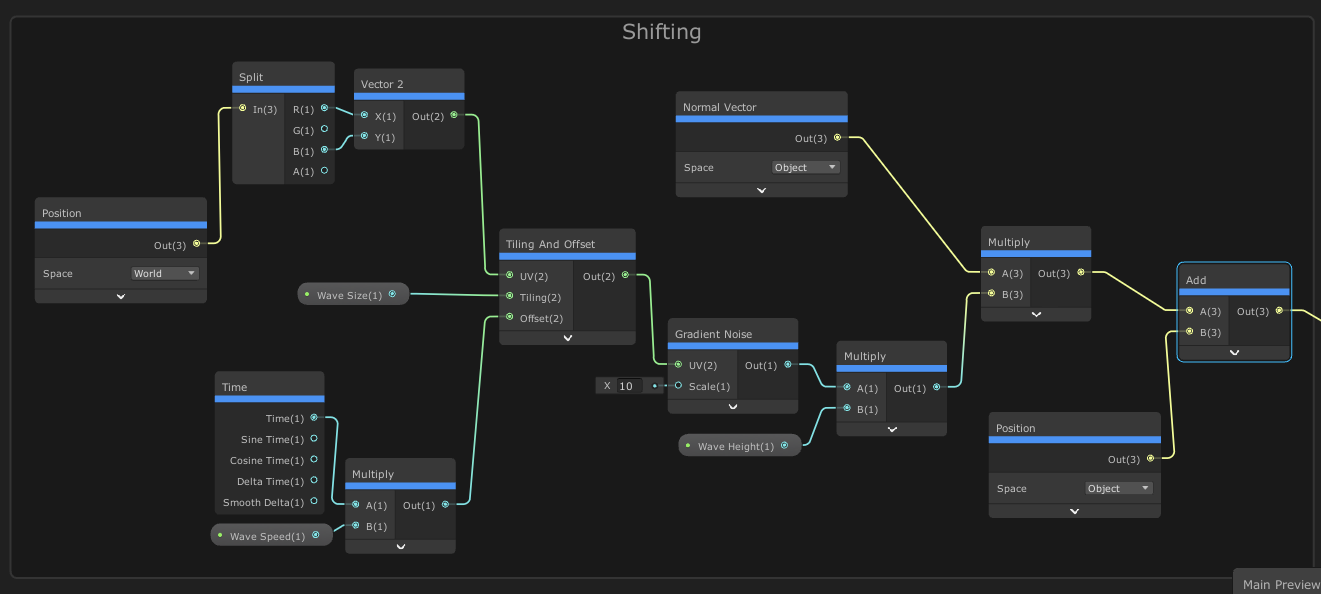
wait just me being stupid and not pressing save asset xD
thanks a lot
terse nexus
How can I transition between two colors depending on an alpha value?
Blending gives weird color tones
regal stag
Use a Lerp, with the T as the alpha
meager pelican
@terse nexus Blending gives weird color tones
How did you blend?
Are you trying to do some form of transparent blending, or just using alpha to store degree-of-progress between two colors?
@ivory dock Create a material and name it something.
Assign those settings to the standard shader (regular pipeline) or the appropriate shader in SRP.
Those textures are assigned in the "little boxes" beside each attribute. Like the base color texture is assigned to the Albedo, etc. You may not need all of them.
🙂
Materials are settings for shaders. But normally, unless you're writing your own shaders, this isn't the proper forum. The general unity forum, lighting, etc are what you want.
No need, and no problem. 🙂
And now it's gone....... lol
 ivory dock
Was too late, the mecanism was On
 swift yoke
Guys, I'm very new to shader graph and shaders in general. All I want to do right now is take the Unlit/Transparent shader that comes with HDRP and give it the ability to use Vertex Colours. Right now I can't change the colour or transparency of the image at all. [The image is 2D]
meager pelican
"The Image"? Like you're doing a transfiguration?
swift yoke
@meager pelican that's the default material for unlit/transparent and see it takes in an image
the image is basically a dot that fades out, it will be a ripple but I'll need vertex colours
meager pelican
Yeah, that's the albedo texture.
OK, so use SG, and there's a vertex color node.
https://docs.unity3d.com/Packages/com.unity.shadergraph@6.9/manual/Vertex-Color-Node.html
multiply that times the texture's uv result.
So
A texture-read node * vertex color node. Both can/will give you a vert4 (RGBA) with alpha, and you'll have to make sure you do transparency.
swift yoke
Okay I do see what you mean, but when I create a new unlit shader graph this is all that appears
Like I said I have 0 experience with these, I'm sure it's super easy - I'm guessing I need to add an albedo texture
well I added a texture2DAsset so then I can drag my asset in there which is fine
meager pelican
Yeah, rather than publishing a pic, I'll just describe it so you get the details. (I hope, from memory and off the top of my head).
Click the + on the RippleGraph "blackboard" on the left, add a texture node, name it something, and make sure it is "Exposed".
Then add a vertex color node by right clicking on the black background and selecting "add node" and finding vertex color.
meager pelican
You need to read that texture at the right place for the pixel you're drawing. That's done with a Sample Texture node. So add one of those.
swift yoke
okay
meager pelican
It will automatically use "uv0" as the input, so you should be OK.
swift yoke
yeah it does
meager pelican
OK, so now add a multiply node
You'll have to tell the texture node what texture to read so connect that up.
swift yoke
yeah done
meager pelican
OK, so multiply the output of the sample texture node and the output of your vertex color node.
Two in, one result out.
swift yoke
done
meager pelican
Now test it out by plugging that result into the color node. You'll need alpha too. So you can take that result and plug it into a "split" node. Then take the result of the split node and put it on the alpha input of the unlit master node.
So you'll have two lines out of the multiply...one to the color, one to a split and the split's alpha to alpha.
swift yoke
I did that?
meager pelican
OK, that will work. I think. Did you assign a texture to the texture input on the sample-texture node?
swift yoke
Just did now
meager pelican
You'll need to adjust the alph-clip threshold too.
Don't forget to save it or it won't work. There's a button...
swift yoke
okay thanks I'll test it a bit and see
regal stag
You'll also need to click the cog on the Master node and set the surface type to Transparent, if you haven't already.
swift yoke
hmm it seems to no longer be transparent, well part of it is (the outside of the circle) but the inside seems to be one block colour
meager pelican
"Block color"? Did you texture show up in the preview?
Also like I and Cyan said, make sure the master node is set to "transparent".
meager pelican
You have to assign a texture of some sort. Does it look like a white circle or what? (your texture that you want to use)
swift yoke
Yeah kind of here I'll show you
As you can see, the ripple texture is basically a white blob but it has slightly transparent parts. And even so, nothing is showing in the preview at all
I was wrong
it's 2D so I had to rotate the preview around
But all the preview is, is a white circle
The higher the alpha clipping, the smaller the circle, so I guess it does realise that the alpha is lower as it get''s further out
meager pelican
Yeah. The preview is a white circle because your input texture is a circle, right? Anyway, how are the vertex colors assigned on your mesh? (Are you using a quad or what?).
You'll probably want to make a material, assign this shader to it, and see how it looks in unity.
swift yoke
I did, it's a white circle lmao
meager pelican
OK, well, are your vertex colors white on the mesh that you made?
swift yoke
Yeah I believe so
swift yoke
I think I got it
I set the vertex colour to a very transparent colour, and then the clipping very low
meager pelican
And was it mostly-transparent?
swift yoke
Yeah
meager pelican
Exactly what you asked for. Maybe, or maybe not, what you wanted. 😉
If you just want to modify the transparency, you don't need to use vertex colors to do that.
swift yoke
I don't?
proud axle
you can just use a slider 😛
meager pelican
Nope. ;)
You can just "expose" a float on the blackboard and plug it straight into the alpha value of the result mater node.
swift yoke
Oh damn okay, well I have it now xD
Is vertex colours just for changing the overall colour then?
meager pelican
Yeah, it's another way to assign colors on a mesh, storing the info into the mesh data.
It gets "interpolated" across triangles too. So you can get some cool color effects if you want them.
swift yoke
Oh I see okay, I really need to find a set of videos going over shader graph because it seems amazing, I'm planning on using it to simulate wet ground/puddles too once I figure out how
proud axle
bro i got a vid sec

I like to make videos, i would like to see out there. But there is no video out there yet, that gives a brief overview over ALL shader graph nodes and how to use them. This is the tl:dl episode for everyone who's got their first tutorial behind them and have already set up the...
baaaaaammmmm
all ze nodes
regal stag
It's alright for showing you which nodes are available, but I feel that video doesn't really explain the nodes in any detail. But you can also right-click a node to view it's documentation though.
swift yoke
I just need to learn the basics so that I can apply them in different ways. I was thinking about learning how to do snow and how to do rust, and then maybe from there I can make puddles? So they only go on the top of surfaces and they have more/less reflective parts or something
proud axle
sure I mean Im kinda sad its not like shaderforge where you can get all the light information and write your own lighting model
do specular reflections use the dot product and normals n shit
half lambert from valve is what got me into shaders long long ago
swift yoke
welp I've got a long way to go sadly
meager pelican
There are several online courses you can take, some for like 20 bucks....but the ones I'm thinking of aren't shader graph specific. There's one or more for unity's standard pipline though. And some using threejs and other things.
You have "programmer" in your profile, so I assume you can type code as well as drag connectors around (joking) so you could get a good overview of GPU's and how they work, as well as some basic math and lighting info.
swift yoke
Yeah I'm sure I can learn to write them with code but I feel like over time that's going to become obsolete in tutorials for new things etc since everyone seems to use the graph view now
meager pelican
Sure. And JAVA and object oriented code is the future! ;)
SG will never be "everything" to everyone. It's just one tool. IMHO. And it's a fine tool. And you can start there. But it won't teach you about the GPU hardware or the pipeline in and of itself.
And "graphics programming" is really a discipline in itself. Oy.
 crystal patrol
Hey all, had a question on performance. I'm discarding certain vertices in a compute shader by setting the position to 0. Is there a performance overhead on like Android devices for doing so?
meager pelican
If it's a compute shader, why would there be a diff? And what verts are you processing in compute shaders?
If you're doing a pixel shader discard in the regular pipeline, it can make a diff on some mobile systems.
Hey all, had a question on performance. I'm discarding certain vertices in a compute shader by setting the position to 0. Is there a performance overhead on like Android devices for doing so?
@crystal patrol
crystal patrol
There seems to be a massive frame rate drop so just eliminating what might be causing it. Must be another part of the shader. Thanks @meager pelican
crystal patrol
Nah. Setting position to 0 of a vertex in a structured buffer so that the pixel shader will discard it instead of using discard
meager pelican
That's a new one, can you elaborate? Position 0 would be the object origin....so you mean that the frustum clipping would skip it if you never look at 0,0,0???
Oh, relative pos of the vertex and the mesh location. Got ya. Slow today. I suppose it would collapse them down to nothing, basically.
If you're updating a structured buffer, I don't see why that would harm anything. Certainly wouldn't map to many/any pixels that way.
Do you need a special "mesh"...so you don't generate triangle strips, right? You generate polys out of the SB and generate tris with 3 points each or with 0's....yes?
One thing you can do is see if geometry shaders are supported since you have compute shaders. And then don't generate the tris that you're discarding. IDK about net savings though, GS has overhead too.
crystal patrol
Yeah not going to add a geom shader. It's definitely not causing an overhead, isolated and checked. But thanks anyway
meager pelican
Yeah, of course, if it's not causing overhead, no need to add the GS....if you could skip the whole compute pass, then maybe.
leaden fable
When I use this method to draw a FoV for my AI I get some TV fuzz triangle... :/
Nvm, just had to increase the detection margin
 golden crest
why do soft particles work when i play in the editor but not when i build the project?
uncut karma
there's no way to get SV_VertexID in shader graph? 👎
 proven stirrup
Does anyone have a good strategy for rendering a World Space canvas on top of everything in the world in HDRP?
naive mural
hello, does anyone know how to bake and process AnimationCurves on the GPU? Currently i have a system which samples quite a lot of data on the CPU and sends it to the GPU. The overhead from the CPU takes about 0.4ms to prepare the data per GameObject, most of which is the result of needing to calculate and set GPU variables.
amber saffron
Textures maybe ? Also Data buffers ?
naive mural
that still leaves the question of sampling. VFX graph is able to do it, but i've tried searching the code and wasn't able to pinpoint how exactly they're baking the data and then sampling it on the GPU's end.
low lichen
@naive mural I found this
https://github.com/Unity-Technologies/ScriptableRenderPipeline/blob/773dee9a44ff68bca8b994a2a26ce0c76adc79aa/com.unity.render-pipelines.core/Runtime/Utilities/TextureCurve.cs
GitHub
Scriptable Render Pipeline. Contribute to Unity-Technologies/ScriptableRenderPipeline development by creating an account on GitHub.
Though, it doesn't look like it's used by VFX Graph
naive mural
@low lichen thanks
amber saffron
Basically, plot the curve data in a texture, with a fixed time step, and sample in with a regular texture sample. Bonus : profit from the linear interpolation
grand jolt
How inefficient is making outline by creating 8 copies of the sprite? Should I just do the outline in a PNG itself?
 soft jacinth
I don't do 2d but I do know there are sprite shaders that allow effects, I'm almost certain it's more optimized than using that many sprite duplicates
png outline could work if it's pixel art, but if you want a smooth outline (higher res sprite) you want a shader I think for sure
@grand jolt https://www.youtube.com/watch?v=FvQFhkS90nI

✅ Get the Project files and Utilities at https://unitycodemonkey.com/video.php?v=FvQFhkS90nI
Let's make a Outline Effect Shader to apply to our Sprites in Shader Graph!
Check out the entire Shader Graph Tutorials Playlist
https://www.youtube.com/playlist?list=PLzDRvYVwl53tpvp...
grand jolt
Could I take a realistic character and make a shader to make them look cartoony?
 clear night
experimenting 2 hours, anyone has an idea how i keep the faces connected?
https://cdn.discordapp.com/attachments/294789611052597248/679057117109288961/unknown.png


 orchid peak
@plain pumice they're splitting apart since they aren't actually welded together (if they shared vertices, the mesh would have smooth shading). If you want to apply a vertex push effect to a mesh with flat shading, you can use a derivative method seen in post #2 here: https://forum.unity.com/threads/geometry-shader-flat-shading-in-shader-graph.718415/
Unity Forum
I'm using LWRP in my project and I would like to implement a flat shading for my graph shader using a geometry shader described in this tutorial. Is...
grand jolt
i need a shader that can open a book any help
 plain pumice
@orchid peak sure you tagged the right person? I havent talked in this discord for months
not cause this discord isn't cool, but because I can't bother you guys for code advice until I get my life together
grand jolt
clear night
got it one minute ago, the shader was fine, the mash had no smoothing....
thanks for the link anyways ill look into that
shell walrus
Made a PBR shader, whilst messing around I've managed to leave a texture 2D in there that's greyed out. I 100% have not, there are no unused texture 2Ds in the graph. Its really bizarre. Annoyingly it affects my roughness, this old tile normal even though it's not plugged in
devout quarry
@shell walrus
this could be a texture2D that is defined inside of the graph
not as a property
like this
ocean wren
Hi Everyone ! I need your help. I'm trying to mix multiple normal map (4 normals) to create something like the layered lit (only with shader graph in nodal system). The fact is Each normal need to pass though a mask, How Can I do this ?
I try to pass each normal through it's own mask then normal reconstruct it one by one then normal blend Normal 1 with normal 2 and normal blend normal 3 with normal 4 then normal blend (N1+N2) with (N3+N4) but it's look like it doesn't work. the result look like really flat


(In the picture, the A input of each multiply is a differente normal map and each B input is a differente mask